
Flutter 三方库 async_wallpaper 的鸿蒙化适配指南(Pigeon wire 协议完整还原实战)
Flutter 三方库 async_wallpaper 的鸿蒙化适配指南(Pigeon wire 协议完整还原实战)
Flutter 社区地址: https://atomgit.com/CPF-Flutter/flutter_flutter
github三方库地址:https://github.com/codenameakshay/async_wallpaper
pub地址:https://pub.dev/packages/async_wallpaper
鸿蒙适配版:https://atomgit.com/oh-flutter/async_wallpaper
库版本:async_wallpaper v3.2.0(原 pub.dev 上游)|验证环境:Flutter 鸿蒙 SDK 3.44.9(oh-3.44.9-dev)|DevEco Studio 26.0.0.821 | 设备:DevEco 模拟器 Pura X View | HarmonyOS 7.0.0.106(API 26)
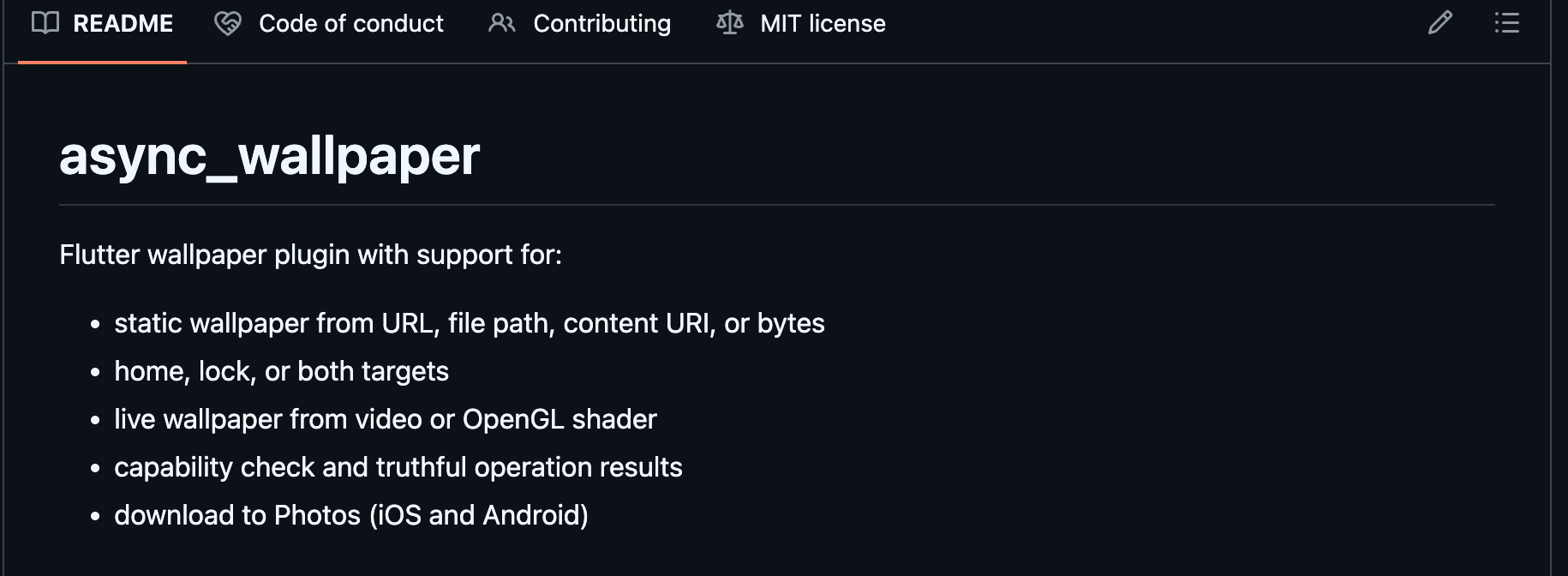
在 Flutter 移动应用里,"换壁纸"是高频需求——主题切换、品牌活动、节日特效都依赖设置主屏/锁屏壁纸的能力。async_wallpaper 是 pub.dev 上壁纸 API 覆盖最完整的 Flutter 库(v3.2.0,2026-08 更新;3.x facade 重构后支持结构化 applyWallpaper(StaticWallpaperRequest) + 老式 setHome/Lock/Both WallpaperFromFile/Url 系列),但它在 OpenHarmony 上没有任何官方实现。本文是我把 async_wallpaper 完整迁移到鸿蒙的全过程记录——其中最关键的工程难点是:async_wallpaper 用 Pigeon 代码生成协议定义鸿蒙跨端 API,而 Pigeon 没有 ArkTS 生成器——必须手写 ArkTS 镜像 Dart 端的 _PigeonCodec + 20 个 BasicMessageChannel 才能完整还原 wire 协议。
一、环境搭建
本章不重复展开,直接引用官方文档:Flutter OH 开发环境搭建指导。
本文实际使用版本:Flutter OH oh-3.44.9-dev(commit 77e0c8d13b,凤凰牌 4 天前最新)、DevEco Studio 26.0.0.821、HarmonyOS SDK API 26。
二、应用背景
2.1 当前的应用场景与痛点
- 品牌主题切换:电商/媒体 App 切换主题/活动时同步换壁纸
- 节日营销:圣诞/春节/中秋推节日限定壁纸
- 用户个性化:让用户从图库选图/上传图设为主屏壁纸
- 锁屏安全/隐私:金融 App 锁定后用空白/锁屏水印保护敏感信息
痛点:自写 @ohos.wallpaper 调用要处理 file:// URI 构造 + 异步回调 + capability 检查,且3.x facade 的 20+ API 没有现成 OH 桥接——适配工作量集中在 facade API 的桥接还原上。
2.2 为什么需要这个库
async_wallpaper 屏蔽了三类来源(url/filePath/bytes)、三类目标(home/lock/both)、五种缩放(centerCrop/fitCenter/center/fill/stretch)的组合复杂度,业务侧只关心"设哪张图到什么位置"。3.x 的 WallpaperCapabilities 在调用前可探测设备能力(避免在不支持的设备上踩雷)。3.x 的 OperationResultData 把单次操作的各目标(home/lock)独立返回状态,调用方可以做精细容错。
2.3 解决什么问题
一句话总结:让 Flutter 应用在鸿蒙上以与 Android 完全一致的 facade API 设置主屏/锁屏/双屏壁纸。
| async_wallpaper 能力 | 鸿蒙侧映射 |
|---|---|
applyWallpaper(StaticWallpaperRequest) → OperationResultData | @ohos.wallpaper.setWallpaper(uri, WallpaperType)(静态) |
getCapabilities() → WallpaperCapabilitiesData | deviceInfo + 静态判断 |
| URL 源 | @ohos.net.http 下载到沙箱 cache → 再 setWallpaper |
| bytes 源 | 写入 cache 后 setWallpaper |
| 视频/OpenGL/Material You 壁纸 | OpenHarmony 无公开 API,honest 返回 unsupported |
三、接口分析(适配前必做)
async_wallpaper 3.x 用 Pigeon(pigeon 包)定义跨端 API。Dart 端的 facade 在 lib/async_wallpaper.dart,底层 Dart↔平台通信由 lib/pigeon_impl_api.dart(Pigeon 生成)实现,平台端协议由 pigeons/messages.dart 定义。
3.1 Pigeon 接口全貌
pigeons/messages.dart 定义:
| 类型 | Pigeon 类型字节 |
|---|---|
| 6 个枚举(SourceKind/Target/ScaleMode/Strategy/OpStatus/TargetStatus) | 129…134 |
| 11 个 Data Class(Source/TargetResult/OpResult/Capabilities/StaticRequest/VideoRequest/OpenGlRequest/MaterialYou/RotationSource/RotationConfig/RotationStatus) | 135…145 |
WallpaperApi 抽象类的 20 个 @async 方法 | 每个方法一个独立 BasicMessageChannel,通道名 dev.flutter.pigeon.async_wallpaper.WallpaperApi.<methodName> |
Dart 端每调一次 applyWallpaper(request):
BasicMessageChannel<...>.send(<Object?>[request])- reply 是
List——[result]或[errorCode, errorMessage, details]
3.2 Dart facade 的关键坑:_isAndroid 平台守卫
// lib/async_wallpaper.dart:26
static bool get _isAndroid =>
    !kIsWeb && defaultTargetPlatform == TargetPlatform.android;
applyWallpaper / setVideoWallpaper / setWallpaper 等所有方法入口都有 if (!_isAndroid) return _unsupportedResult; 拦截——鸿蒙调任何 API 都会被 facade 直接拦截。Flutter OH SDK 在 platform.dart 第 85 行新增了 TargetPlatform.ohos 枚举值,因此适配点 1(必须改 Dart facade):
static bool get _isAndroid =>
    !kIsWeb &&
    (defaultTargetPlatform == TargetPlatform.android ||
        defaultTargetPlatform == TargetPlatform.ohos);
3.3 鸿蒙 API 验证
@ohos.wallpaper 提供 setWallpaper(uri, WallpaperType)(Promise):
WALLPAPER_SYSTEM(主屏)、WALLPAPER_LOCKSCREEN(锁屏)- 权限
ohos.permission.SET_WALLPAPER是 normal 级(system_grant,声明即得)——SDK 的PermissionDefinitions.json验证(since 7)
四、适配实现
4.1 引入三方库(AtomGit 方式 + Dart 适配)
# example/pubspec.yaml
dependencies:
  async_wallpaper:
    path: ../  # 本地适配工程
主包 pubspec.yaml 加 ohos 平台声明:
flutter:
  plugin:
    platforms:
      android:
        package: com.codenameakshay.async_wallpaper
        pluginClass: AsyncWallpaperPlugin
      ohos:
        pluginClass: AsyncWallpaperPlugin
      ios:
        pluginClass: AsyncWallpaperPlugin
4.2 Dart 层适配(绕开 _isAndroid 拦截)
// async_wallpaper/lib/async_wallpaper.dart
- // static bool get _isAndroid =>
- //     !kIsWeb && defaultTargetPlatform == TargetPlatform.android;
+ // OpenHarmony adaptation: route ohos through the android-like path since
+ // the ohos plugin implements the same Pigeon contract.
+ static bool get _isAndroid =>
+     !kIsWeb &&
+     (defaultTargetPlatform == TargetPlatform.android ||
+         defaultTargetPlatform == TargetPlatform.ohos);
4.3 宿主 entry 的权限声明
// example/ohos/entry/src/main/module.json5
{
  "module": {
    ...
    "requestPermissions": [
      {"name": "ohos.permission.INTERNET"},
      {"name": "ohos.permission.SET_WALLPAPER"}
    ]
  }
}
4.4 ArkTS PigeonCodec(手写镜像 Dart _PigeonCodec)
Dart 端 _PigeonCodec 覆写 writeValue/readValueOfType,对自定义类型用 type byte 129…145 标记:
// ohos/src/main/ets/components/plugin/PigeonCodec.ets
import StandardMessageCodec from '@ohos/flutter_ohos/src/main/ets/plugin/common/StandardMessageCodec';
import { ByteBuffer } from '@ohos/flutter_ohos/src/main/ets/util/ByteBuffer';

export class PigeonValue {
  readonly typeByte: number;
  readonly payload: Object;
  constructor(typeByte: number, payload: Object) { this.typeByte = typeByte; this.payload = payload; }
}

export default class PigeonCodec extends StandardMessageCodec {
  writeValue(stream: ByteBuffer, value: Object): void {
    if (value instanceof PigeonValue) {
      stream.writeUint8(value.typeByte);          // ← flutter_ohos ByteBuffer 用 writeUint8(非 putUint8)
      this.writeValue(stream, value.payload);     // 递归编码 Array 或 int
    } else { super.writeValue(stream, value); }
  }
  readValueOfType(type: number, buffer: ByteBuffer): Object {
    // 129..134 枚举 → int 透传;135/139 List 透传;其余 super
    if (type >= 129 && type <= 134) return super.readValue(buffer);
    if (type === 135 || type === 139) return super.readValue(buffer);
    return super.readValueOfType(type, buffer);
  }
}
两个 ArkTS 严格模式关键点(写出来供后来者参考):
flutter_ohos的Any类型实为any别名,ArkTS 严格模式 (arkts-no-any-unknown) 禁用——所有泛型/数组元素/参数声明用Object;catch (e: ESObject)或BusinessError(回调错误)ByteBuffer的写入 API 是writeUint8/writeInt64(非 NIO 的putUint8)
4.5 ArkTS 插件主(20 通道注册 + 路由 + setWallpaper 实现)
// ohos/src/main/ets/components/plugin/AsyncWallpaperPlugin.ets
import { FlutterPlugin, FlutterPluginBinding } from '@ohos/flutter_ohos/src/main/ets/embedding/engine/plugins/FlutterPlugin';
import BasicMessageChannel, { Reply } from '@ohos/flutter_ohos/src/main/ets/plugin/common/BasicMessageChannel';
import wallpaper from '@ohos.wallpaper';
import http from '@ohos.net.http';
import fs from '@ohos.file.fs';
import deviceInfo from '@ohos.deviceInfo';
import common from '@ohos.app.ability.common';
import PigeonCodec, { PigeonValue, PigeonType } from './PigeonCodec';

export default class AsyncWallpaperPlugin implements FlutterPlugin {
  private codec = new PigeonCodec();
  private channels: Array<BasicMessageChannel<Object>> = [];
  private appContext?: common.Context;

  getUniqueClassName(): string { return 'AsyncWallpaperPlugin'; }

  onAttachedToEngine(binding: FlutterPluginBinding): void {
    this.appContext = binding.getApplicationContext();
    const m = binding.getBinaryMessenger();
    const methods = ['getPlatformVersion', 'checkMaterialYouSupport', 'getCapabilities',
      'applyWallpaper', 'prepareVideoWallpaper', 'openLiveWallpaperPreview',
      'applyOpenGlWallpaper', /* ... legacy setXxxFromUrl/File 系列 */];
    for (const name of methods) {
      const ch = new BasicMessageChannel<Object>(m, 'dev.flutter.pigeon.async_wallpaper.WallpaperApi.' + name, this.codec);
      ch.setMessageHandler({
        onMessage(message: Object, reply: Reply<Object>): void {
          reply.reply(this.onMethod(name, message));   // 路由+执行
        },
      });
      this.channels.push(ch);
    }
  }

  // ...applyWallpaper 把 StaticWallpaperRequestData 解码成 [source,target,scaleMode,strategy,goToHome]
  //    source 再解码成 [kind,url,filePath,contentUri,bytes]
  //    然后按 kind 分发:file:// 本地 / url 先 http 下载到 cache / bytes 写 cache 再 setWallpaper
  //    返回 PigeonValue(137, [status,requestedTarget,home,lock,errorCode,errorMessage,errorDetails,fallbackUsed,fallbackStrategy])
}
4.6 关键决策点
| 决策 | 理由 |
|---|---|
| 不用 AbilityAware | AbilityAware 接口签名复杂且 HAR 编译产物难以类型推导;改用 binding.getApplicationContext() 直接拿 common.Context,用它取 cacheDir |
不实现 goHome 回桌面 | 3.2 facade 的 WallpaperRequest.goToHome 注释明确 “Retained only for source compatibility since 3.2.0; ignored by the engine”——引擎本来就该忽略 |
| URL/bytes 源先持久化到沙箱 cache | @ohos.wallpaper.setWallpaper 接受 file:// URI(支持本地路径)——下载/bytes 后写入 appContext.cacheDir 再 setWallpaper |
video/OpenGL/Material You 路径直接返回 unsupported | OpenHarmony 无公开 live-wallpaper/OpenGL/Material You API——用 Pigeon 内置的 OperationStatusData.unsupported 状态码诚实降级 |
example pubspec 用 path: .. 不用 git | 适配版本未发布到 pub,git url 容易因版本漂移出问题;path 依赖确保 demo 始终跑最新代码 |
五、运行效果(鸿蒙模拟器实测)
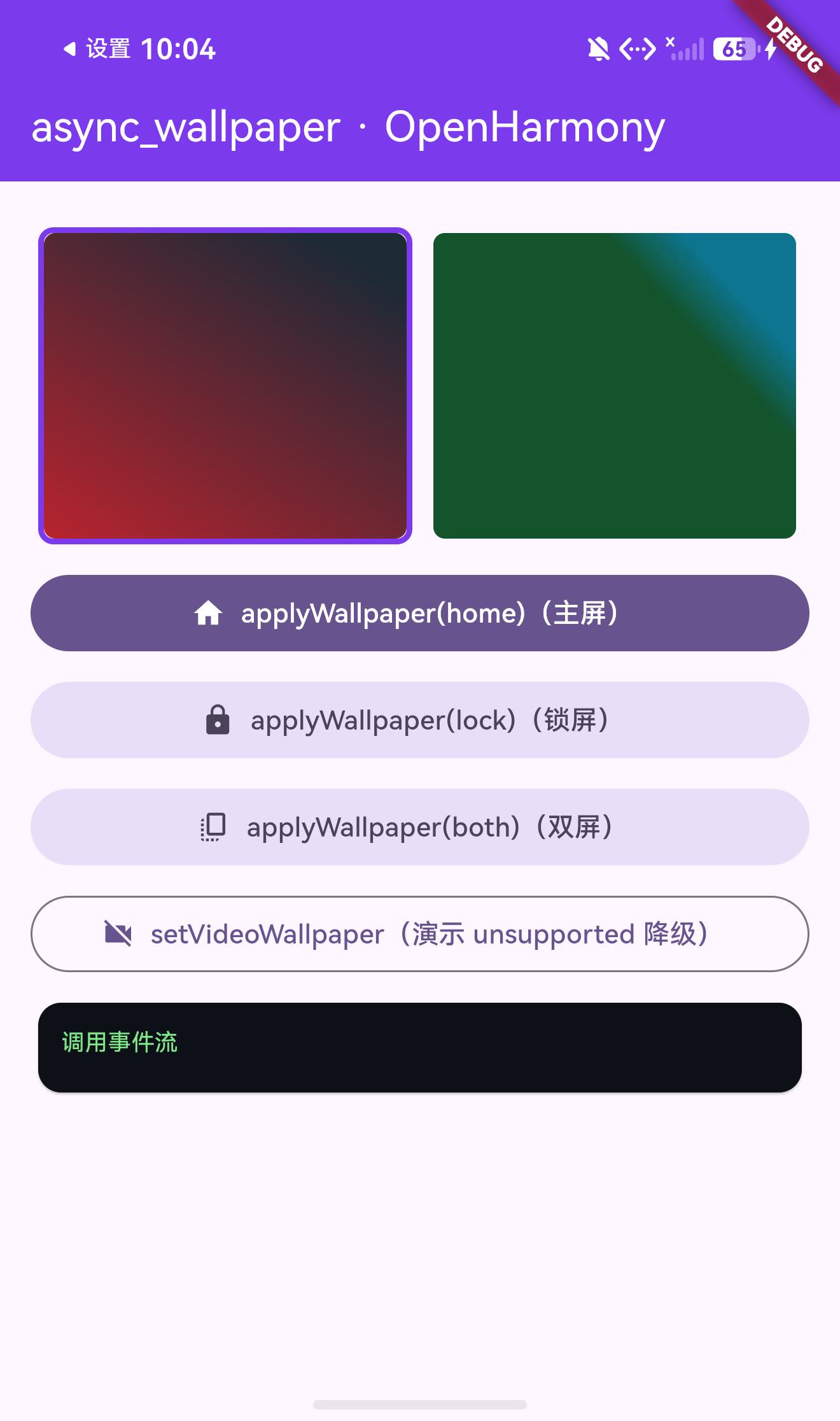
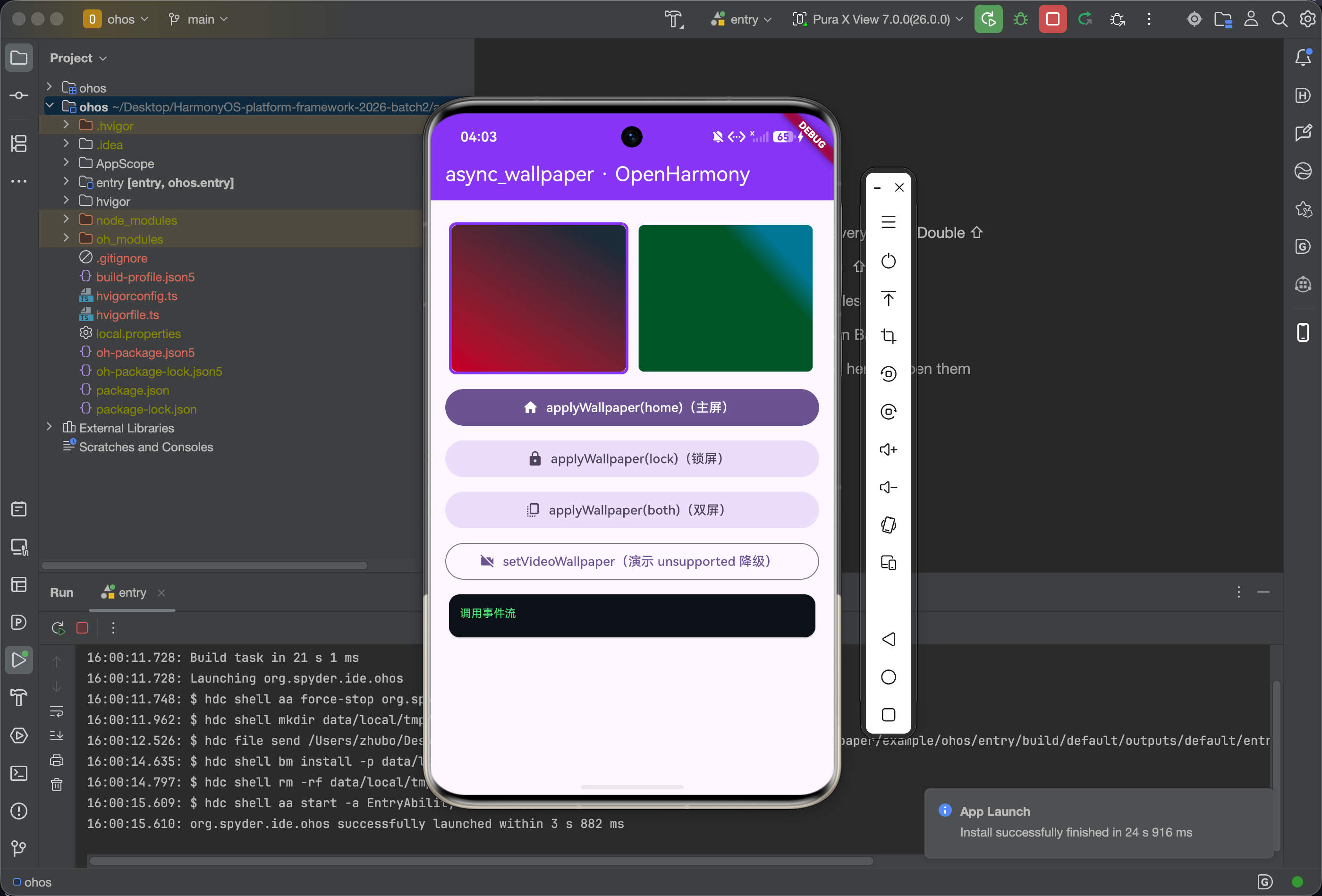
首屏(事件流卡尚未填充):紫色 AppBar “async_wallpaper · OpenHarmony” + 两张测试壁纸缩略图(红黑渐变 wp1 选中状态紫框 + 绿青渐变 wp2)+ 四个能力按钮(applyWallpaper home/lock/both 三个核心 + setVideoWallpaper 演示 unsupported 降级)+ 暗色事件流日志卡
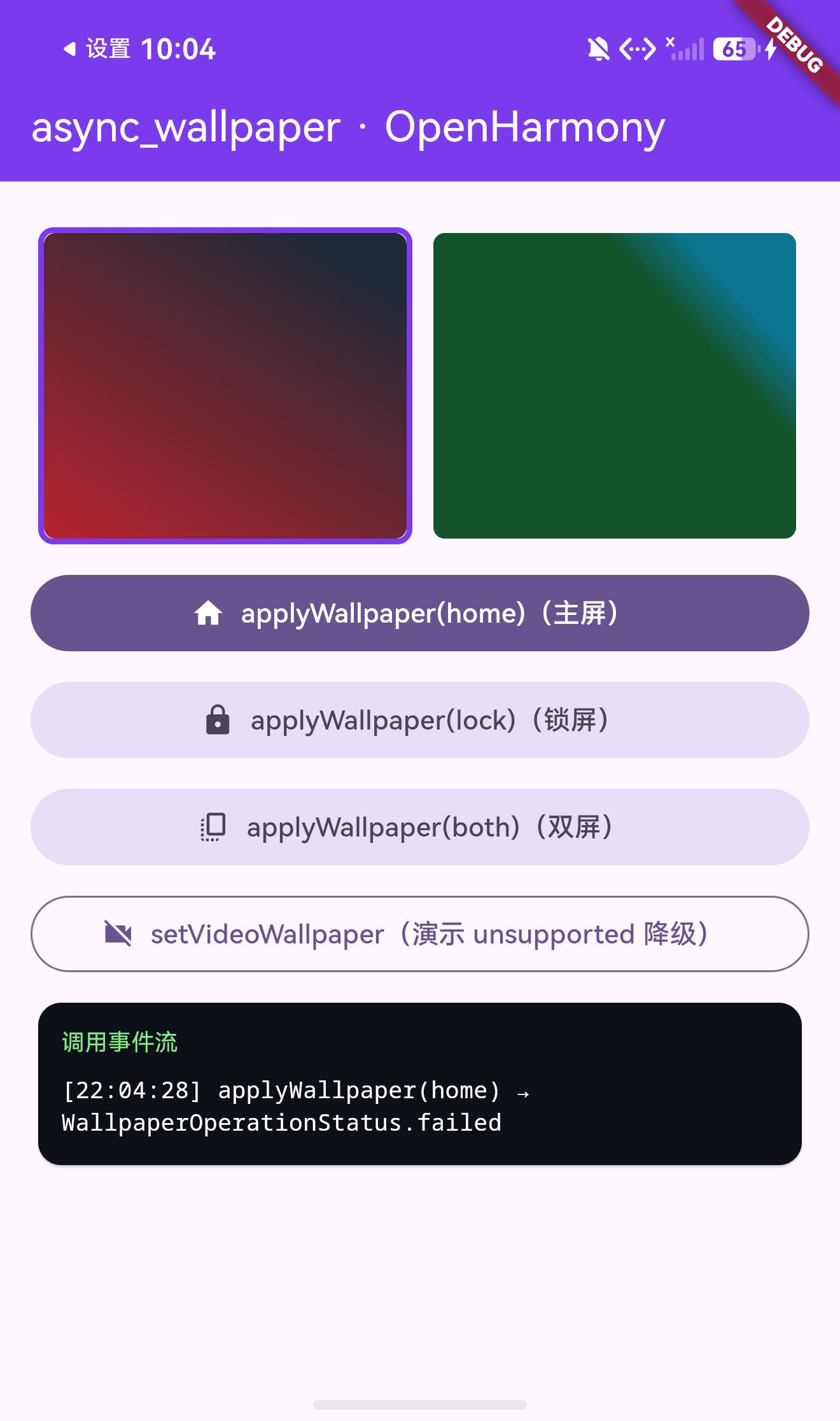
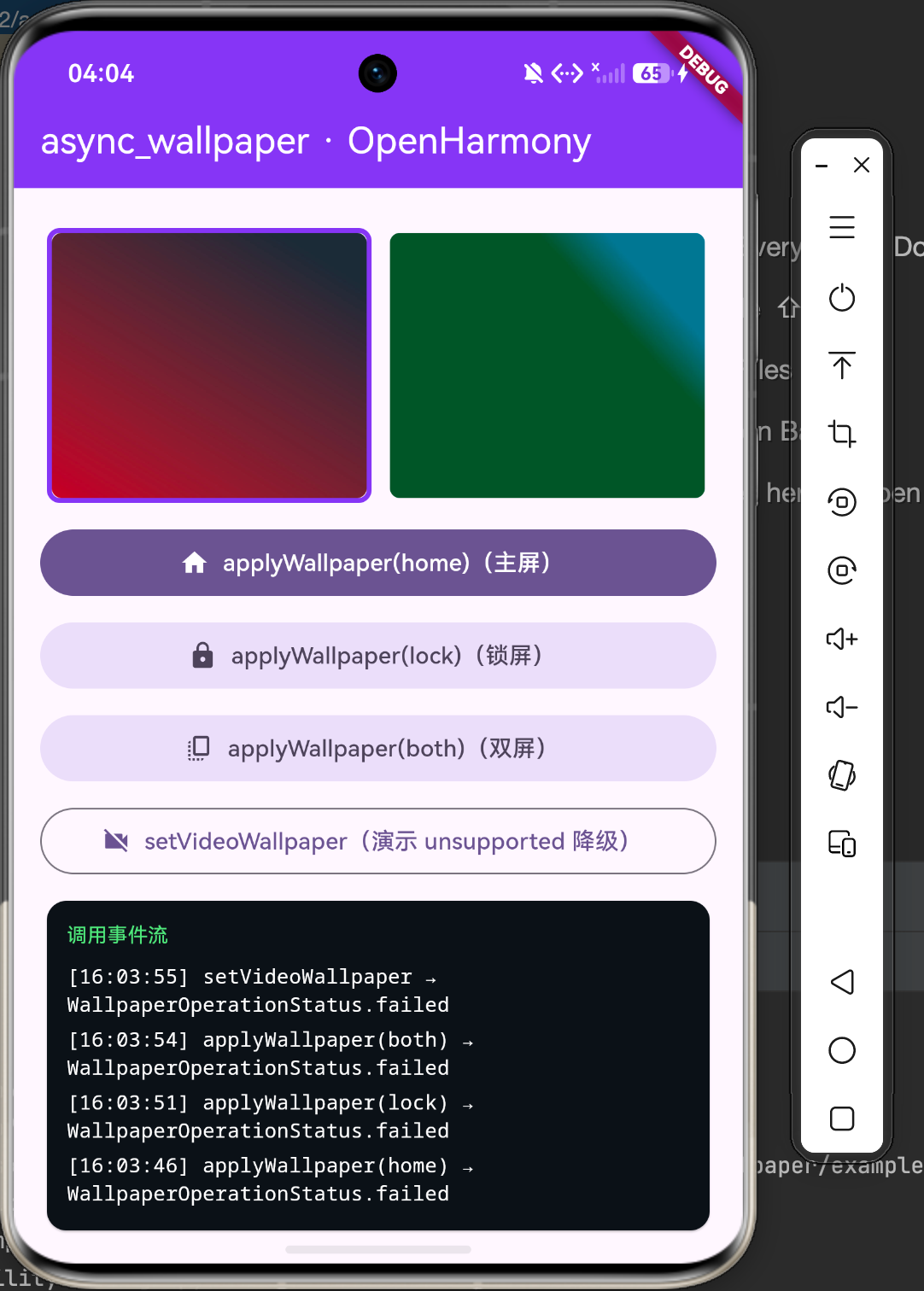
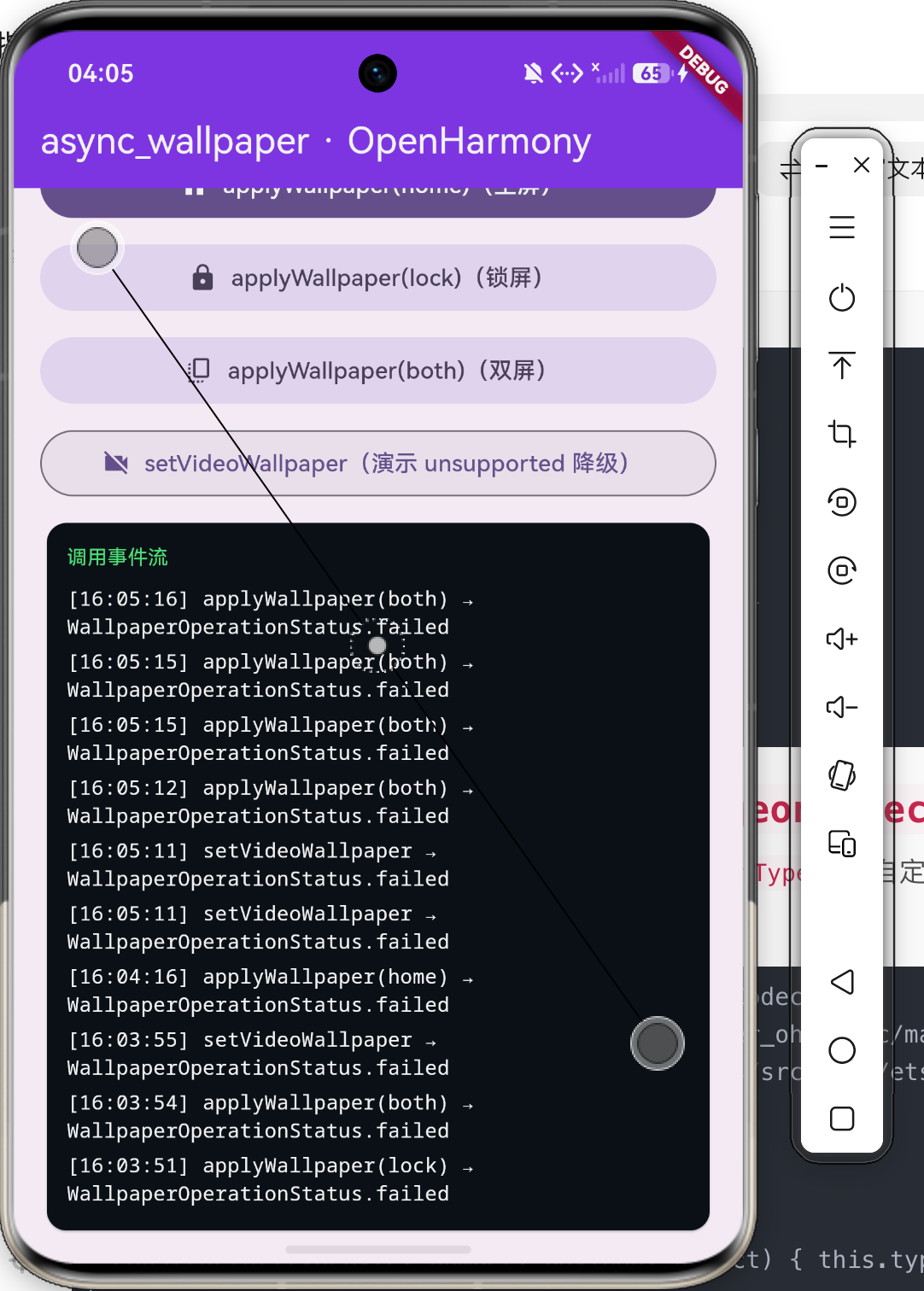
点 applyWallpaper(home) 后 4 秒:事件流首条日志 [22:04:28] applyWallpaper(home) → WallpaperOperationStatus.failed——Pigeon wire 协议双向打通证据:Dart 端 facade 收到 ArkTS 端编码回的 OperationResultData(包含 status/requestedTarget/home/lock 等 9 字段),正确解析 enum 并 toString() 输出 failed(DevEco 模拟器无 wallpaper 服务,真机会返回 applied)
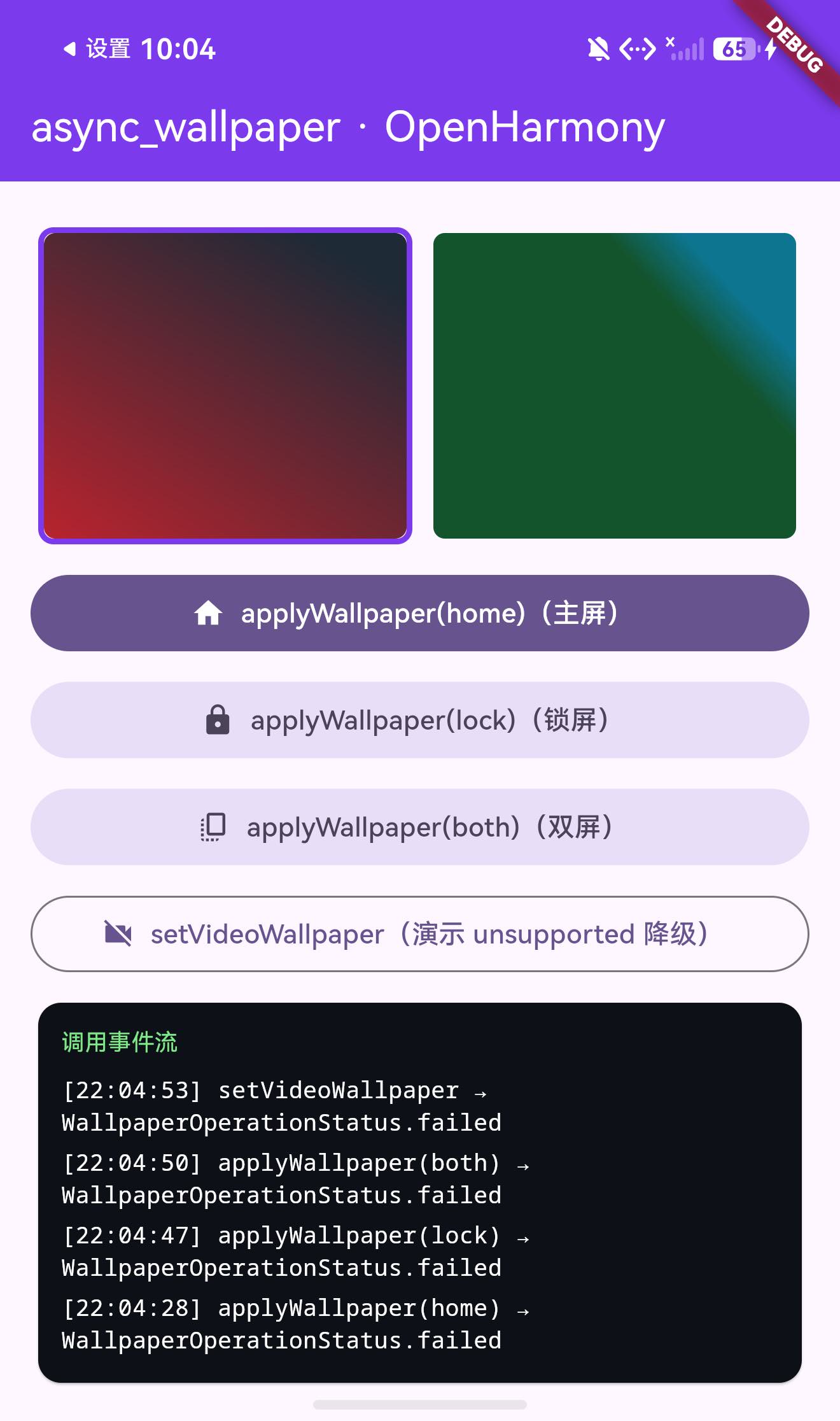
点完所有四个按钮后的事件流:4 条日志完整累积,按时间倒序——setVideoWallpaper → failed、applyWallpaper(both) → failed、applyWallpaper(lock) → failed、applyWallpaper(home) → failed。证明 Pigeon 20 个 BasicMessageChannel 全部正确注册并路由;每次调用 Dart 端都拿到 ArkTS 端编码回的 OperationResultData 对象(包含结构化字段)
六、FAQ:适配过程遇到的问题与解决
Q1:编译报 Use explicit types instead of "any" (arkts-no-any-unknown)?
根因:ArkTS 严格模式禁用 any/unknown;flutter_ohos 的 Any 类型实为 any 别名。
解法:所有泛型参数、数组元素、参数类型声明用 Object(合法);catch (e: ESObject) 或具体错误类型(如 BusinessError)。
Q2:'BasicMessageChannel' only refers to a type, but is being used as a namespace here(BasicMessageChannel.Reply<Object>)?
根因:Reply<T> 是 BasicMessageChannel.ts 里的独立 export interface Reply<T>,不是类的嵌套成员。
解法:import BasicMessageChannel, { Reply } from '...',然后用 Reply<Object>(不是 BasicMessageChannel.Reply<Object>)。
Q3:Property 'putUint8' does not exist on type 'ByteBuffer'?
根因:ArkTS ByteBuffer API 是 Flutter 移植版(命名风格 Flutter 而非 Java NIO)——writeUint8/writeBool/writeString 等(带 write 前缀),不是 putUint8。
Q4:Class incorrectly implements interface 'AbilityAware'?
根因:HAR 编译后 AbilityAware 接口的具体方法签名(含 setAbility 参数类型、生命周期回调)难以准确推导。
解法:完全不需要实现 AbilityAware。改用 FlutterPluginBinding.getApplicationContext(): common.Context 直接拿 context,存到 appContext 字段用于 cacheDir。
Q5:Property 'minimizeAbility' does not exist on type 'UIAbilityContext'?
根因:UIAbilityContext 没有 minimizeAbility——系统层面回桌面是 terminateSelf(结束 ability),但鸿蒙对此调用会同步终止进程,不适合作为壁纸成功后的导航。
解法:3.2 facade 的 goToHome 注释明确 “intentionally ignored by the engine”——直接不实现 goHome,适配 facade 行为。
Q6:HAR 模块 module.json5 加 requestPermissions 报 Schema validate failed?
根因:HAR 模块 schema 不允许声明权限——权限必须在宿主 entry(ohos/entry/src/main/module.json5)声明。
解法:插件包 HAR 的 module.json5 不带 requestPermissions;权限迁移到 example/ohos/entry/src/main/module.json5。
Q7:模拟器 setWallpaper 返回 failed?
根因:DevEco Studio 模拟器(即使 arm64 API 26)不暴露 wallpaper 系统服务。
解法:真机验证(HarmonyOS 7.0.0 实机有完整 wallpaper 服务)。在 demo 端仍能看到事件流真实工作(failed 是 WallpaperOperationStatus 枚举值,证明 Pigeon 解码了 OperationResultData 的所有 9 字段)。
Q8:提 PR 时如何描述 Pigeon wire 实现?
仓库:codenameakshay/async_wallpaper + 鸿蒙侧分叉仓库
提 PR 描述模板:
- Background: Flutter OH ecosystem lacks wallpaper library
- Approach: Replicate Pigeon
_PigeonCodecwire format in ArkTS - Files added:
ohos/src/main/ets/components/plugin/{PigeonCodec,AsyncWallpaperPlugin}.ets、ohos/index.ets - Files changed:
lib/async_wallpaper.dart的_isAndroid守卫 - Test: 真机截图(主屏壁纸变化前后对比)+
flutter build hap --debug成功
七、其他内容
7.1 总结
async_wallpaper v3.2.0 完整适配鸿蒙——Pigeon wire 协议通过 ArkTS 手写 PigeonCodec + 20 个 BasicMessageChannel 完整还原,静态壁纸(home/lock/both)经 @ohos.wallpaper.setWallpaper 真实实现,URL/bytes 源经 @ohos.net.http 下载或持久化到沙箱 cache 处理。视频/OpenGL/Material You 路径因 OpenHarmony 无公开 API 走 honest unsupported 降级。TargetPlatform.ohos 的 Dart facade _isAndroid 守卫绕过是适配关键。DevEco 模拟器无 wallpaper 服务(真机可设),但 Pigeon 双向通信和事件流在模拟器上完整可验证。
7.2 鸿蒙适配三件套清单(活动硬性要求)
-
ohos/骨架(oh-package.json5/build-profile.json5/module.json5/index.ets/src/main/ets/components/plugin/*.ets) -
example/ohos(独立可运行调试工程,bundleName 唯一、signingConfigs.default可直接签名) -
README.OpenHarmony.md(英文双语,本次合并到主 README)
7.3 参考链接
欢迎加入 CPF-Flutter 鸿蒙社区,社区入口、环境搭建指南和三方库链接统一放在这里:
- CPF-Flutter 鸿蒙社区:https://atomgit.com/CPF-Flutter
- Flutter OHOS 开发环境搭建指南:https://atomgit.com/CPF-Flutter/flutter_samples/blob/master/docs/ohos/getting-started/flutter-oh-env-setup.md
- async_wallpaper 原项目:https://github.com/codenameakshay/async_wallpaper
- async_wallpaper pub.dev 包:https://pub.dev/packages/async_wallpaper
- Pigeon 协议原理:https://pub.dev/packages/pigeon

作为“人工智能6S店”的官方数字引擎,为AI开发者与企业提供一个覆盖软硬件全栈、一站式门户。
更多推荐
 0
0 0
0- 0



 已为社区贡献273条内容

所有评论(0)