
HarmonyOS鸿蒙实战应用9:随手账本——骨架屏与空状态设计
·
引言
数据加载时显示空白页面很难看,没有数据时显示空荡荡的列表也不友好。本篇实现:加载时的骨架屏动画、无数据时的空状态引导、首次使用的引导页。
一、骨架屏
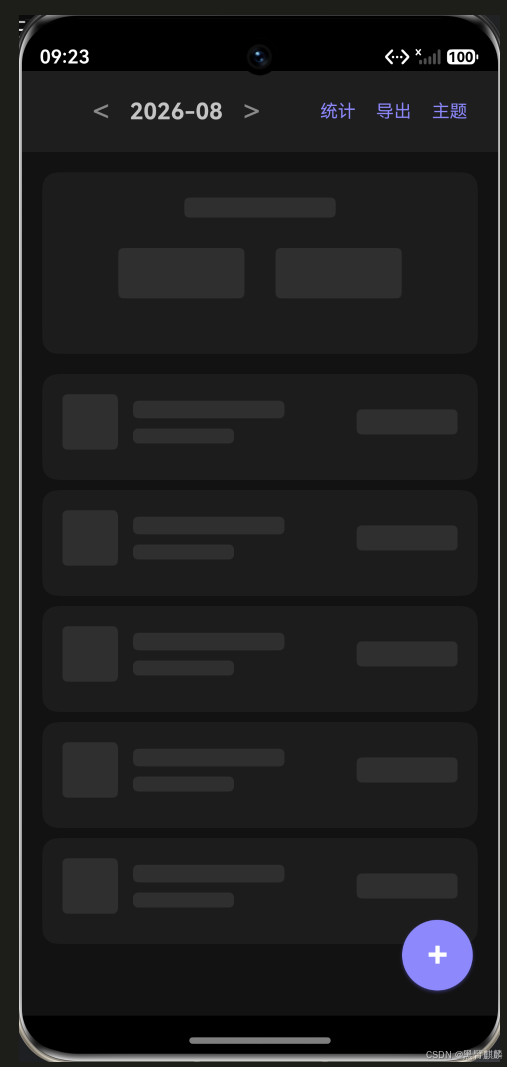
骨架屏是用灰色方块模拟页面布局,让用户感觉"页面正在加载"。
1.1 骨架屏组件
// components/SkeletonScreen.ets
@Component
export struct SkeletonScreen {
  build() {
    Column() {
      // 顶部汇总骨架
      Column() {
        this.SkeletonRect(120, 16)
        Row() {
          this.SkeletonRect(100, 40)
          this.SkeletonRect(100, 40)
        }
        .width('100%')
        .justifyContent(FlexAlign.SpaceEvenly)
        .padding(16)
      }
      .width('100%')
      .padding(20)
      .backgroundColor(Color.White)
      .margin({ bottom: 16 })

      // 列表骨架
      ForEach([1, 2, 3, 4, 5], () => {
        this.SkeletonCard()
      })
    }
    .width('100%')
    .padding(16)
  }

  @Builder
  SkeletonRect(width: number, height: number) {
    Column()
      .width(width)
      .height(height)
      .backgroundColor('#E8E8E8')
      .borderRadius(4)
      .margin({ bottom: 8 })
  }

  @Builder
  SkeletonCard() {
    Row() {
      // 图标占位
      this.SkeletonRect(44, 44)
      Column() {
        this.SkeletonRect(120, 14)
        this.SkeletonRect(80, 12)
      }
      .alignItems(HorizontalAlign.Start)
      .layoutWeight(1)
      .padding({ left: 12 })
      this.SkeletonRect(80, 20)
    }
    .width('100%')
    .padding(16)
    .backgroundColor(Color.White)
    .borderRadius(12)
    .margin({ bottom: 8 })
  }
}
1.2 闪动动画
@Component
export struct AnimatedSkeleton extends SkeletonScreen {
  @State opacity: number = 0.3;

  aboutToAppear() {
    // 启动闪烁动画
    animateTo({ duration: 1000, iterations: -1, curve: Curve.EaseInOut }, () => {
      this.opacity = 0.8;
    });
  }

  build() {
    Column() {
      // 同上
    }
    .opacity(this.opacity)
  }
}
加载中的骨架屏实拍——顶栏下方是汇总条与五张账单卡片的灰色占位,整体呼吸闪烁:
二、空状态设计
2.1 空状态组件
// components/EmptyState.ets
@Component
export struct EmptyState {
  @Prop message: string = '暂无数据';
  @Prop actionText: string = '';
  @Prop onAction?: () => void;

  build() {
    Column() {
      // 空状态图标
      Text('📭')
        .fontSize(64)
        .margin({ bottom: 16 })

      Text(this.message)
        .fontSize(16)
        .fontColor('#999')
        .margin({ bottom: 8 })

      Text('点击右下角 + 按钮新增第一笔账单')
        .fontSize(13)
        .fontColor('#BBB')

      if (this.actionText && this.onAction) {
        Button(this.actionText)
          .type(ButtonType.OUTLINE)
          .fontColor('#6C63FF')
          .borderColor('#6C63FF')
          .margin({ top: 24 })
          .onClick(() => this.onAction!())
      }
    }
    .width('100%')
    .height('100%')
    .justifyContent(FlexAlign.Center)
    .alignItems(HorizontalAlign.Center)
  }
}
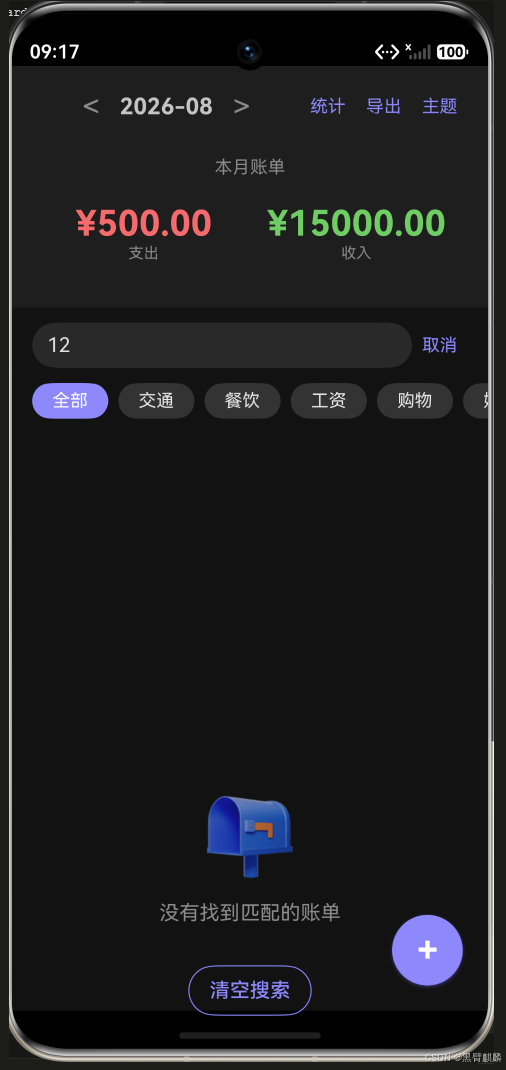
搜索无结果时的空状态实拍——输入"12"没有匹配账单,显示引导提示与"清空搜索"按钮:
2.2 多种空状态
// 根据不同场景显示不同空状态
@Builder
EmptyStateView(type: 'no_bill' | 'no_result' | 'no_data') {
  if (type === 'no_bill') {
    EmptyState({
      message: '还没有账单',
      actionText: '新增一笔'
    })
  } else if (type === 'no_result') {
    EmptyState({
      message: '没有找到匹配的账单',
      actionText: '清空搜索'
    })
  } else {
    EmptyState({ message: '暂无数据' })
  }
}
三、首次使用引导
// components/OnboardingOverlay.ets
@Component
export struct OnboardingOverlay {
  @State step: number = 1;

  build() {
    Stack() {
      // 半透明遮罩
      Column()
        .width('100%')
        .height('100%')
        .backgroundColor('rgba(0,0,0,0.6)')
        .onClick(() => {})

      // 引导卡
      Column() {
        if (this.step === 1) {
          this.Step1()
        } else if (this.step === 2) {
          this.Step2()
        } else {
          this.Step3()
        }
      }
      .width('85%')
      .padding(24)
      .backgroundColor(Color.White)
      .borderRadius(20)
    }
    .width('100%')
    .height('100%')
  }

  @Builder
  Step1() {
    Text('欢迎使用随手账本')
      .fontSize(22)
      .fontWeight(FontWeight.Bold)
    Text('轻松记录每一笔收支\n掌握你的财务状况')
      .fontSize(15)
      .fontColor('#666')
      .textAlign(TextAlign.Center)
      .margin({ top: 12 })
    Button('下一步')
      .width('100%')
      .height(44)
      .backgroundColor('#6C63FF')
      .fontColor(Color.White)
      .borderRadius(22)
      .margin({ top: 24 })
      .onClick(() => { this.step++ })
  }

  @Builder
  Step2() {
    Text('记录每一笔')
      .fontSize(22)
      .fontWeight(FontWeight.Bold)
    Text('点击 + 新增账单\n支持支出/收入分类记录')
      .fontSize(15)
      .fontColor('#666')
      .textAlign(TextAlign.Center)
      .margin({ top: 12 })
    Button('下一步')
      .width('100%')
      .height(44)
      .backgroundColor('#6C63FF')
      .fontColor(Color.White)
      .borderRadius(22)
      .margin({ top: 24 })
      .onClick(() => { this.step++ })
  }

  @Builder
  Step3() {
    Text('数据分析')
      .fontSize(22)
      .fontWeight(FontWeight.Bold)
    Text('月度统计、分类排行\n一目了然')
      .fontSize(15)
      .fontColor('#666')
      .textAlign(TextAlign.Center)
      .margin({ top: 12 })
    Button('开始使用')
      .width('100%')
      .height(44)
      .backgroundColor('#6C63FF')
      .fontColor(Color.White)
      .borderRadius(22)
      .margin({ top: 24 })
      .onClick(() => { this.finishOnboarding() })
  }
}
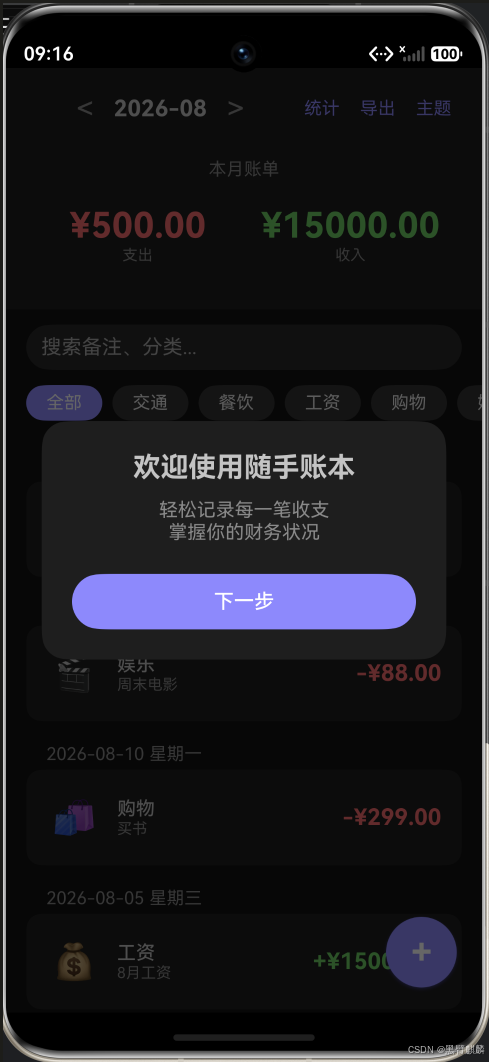
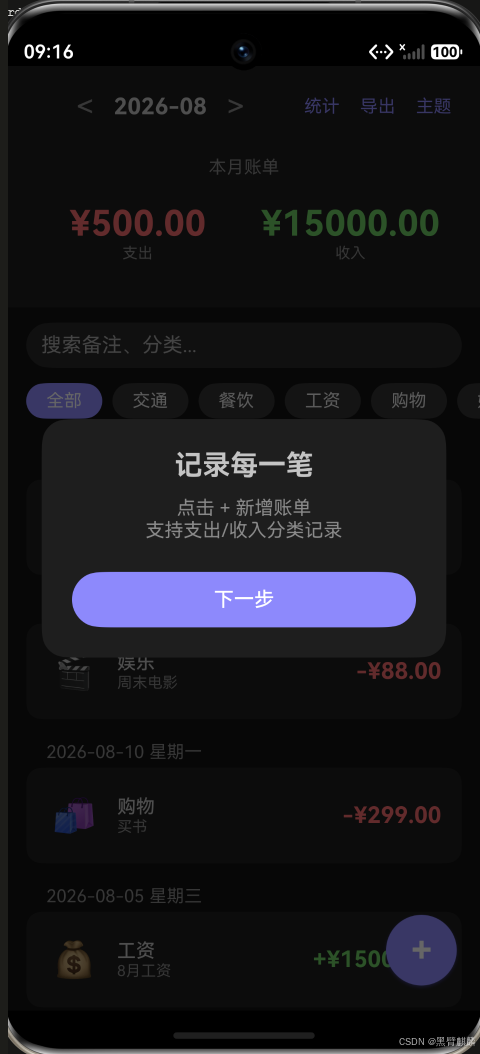
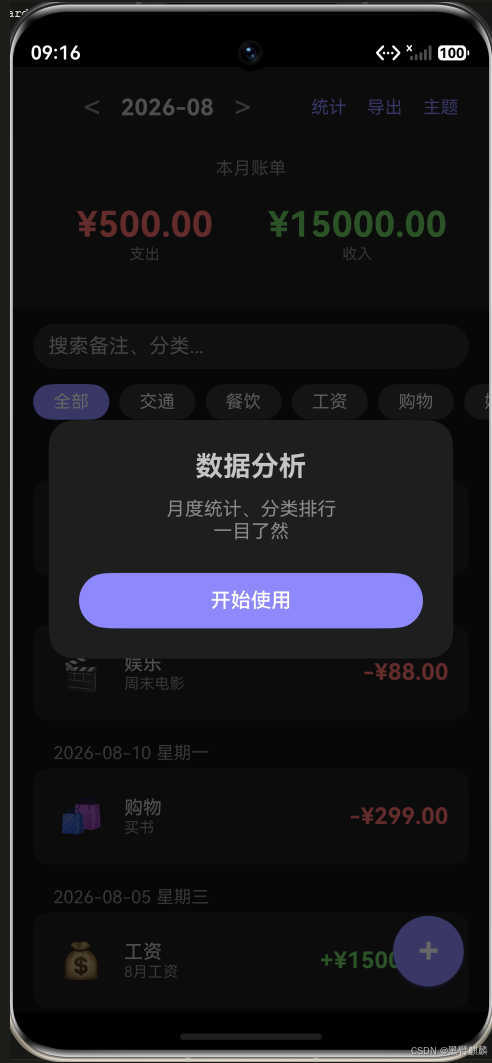
首次启动的三步引导实拍——依次是"欢迎使用"“记录每一笔”“数据分析”,点完"开始使用"后写入 Preferences 标记,之后不再出现:
四、页面状态管理
// 页面有三种状态:加载中 / 空数据 / 有数据
enum PageState {
  LOADING,
  EMPTY,
  DATA
}

@State pageState: PageState = PageState.LOADING;

aboutToAppear() {
  this.loadData();
}

async loadData() {
  this.pageState = PageState.LOADING;
  const bills = await persistentStore.getAll();

  if (bills.length === 0) {
    this.pageState = PageState.EMPTY;
  } else {
    this.pageState = PageState.DATA;
    this.bills = bills;
  }
}

build() {
  Stack() {
    if (this.pageState === PageState.LOADING) {
      SkeletonScreen()
    } else if (this.pageState === PageState.EMPTY) {
      EmptyState({ message: '还没有账单' })
    } else {
      this.MainContent()
    }
  }
}
五、检查清单
加载状态:
✅ 初始加载:骨架屏动画
✅ 刷新加载:列表顶部刷新指示器
✅ 加载失败:错误提示 + 重试按钮

空状态:
✅ 无账单:引导文字 + 新增按钮
✅ 搜索无结果:提示 + 清空按钮
✅ 筛选无结果:提示 "该分类暂无数据"

首次使用:
✅ 三步引导:功能介绍
✅ 引导只显示一次:Preferences标记已完成
总结
本篇实现了:
- 骨架屏:加载时模拟页面布局+闪烁动画
- 空状态:不同场景的不同空提示
- 首次引导:三步引导+只显示一次
- 状态切换:LOADING/EMPTY/DATA 三级状态
下篇为最终篇——发布检查与最终验收。

作为“人工智能6S店”的官方数字引擎,为AI开发者与企业提供一个覆盖软硬件全栈、一站式门户。
更多推荐
 0
0 0
0- 0


 已为社区贡献12条内容

所有评论(0)