
Harmony鸿蒙实战应用5:随手账本——搜索筛选与分类统计
·
引言
账单多了就需要搜索和筛选。本篇实现:按关键词搜索、按分类筛选、月度分类统计图表。
一、搜索功能
1.1 搜索栏
@State searchKeyword: string = '';
@State searchResults: BillItem[] = [];

@Builder
SearchBar() {
  Row() {
    TextInput({ placeholder: '搜索备注、分类...', text: this.searchKeyword })
      .height(40)
      .layoutWeight(1)
      .padding({ left: 12 })
      .onChange((val) => {
        this.searchKeyword = val;
        this.doSearch();
      })

    if (this.searchKeyword.length > 0) {
      Button('取消')
        .type(ButtonType.NORMAL)
        .fontColor('#6C63FF')
        .fontSize(14)
        .onClick(() => {
          this.searchKeyword = '';
          this.searchResults = [];
        })
    }
  }
  .width('100%')
  .height(48)
  .backgroundColor(Color.White)
  .borderRadius(24)
  .padding({ left: 16, right: 8 })
  .shadow({ radius: 2, color: 'rgba(0,0,0,0.05)' })
}
1.2 搜索逻辑
private doSearch() {
  const keyword = this.searchKeyword.trim().toLowerCase();
  if (!keyword) {
    this.searchResults = [];
    return;
  }

  this.searchResults = this.monthBills.filter(b => {
    return b.note.toLowerCase().includes(keyword) ||
           b.category.toLowerCase().includes(keyword);
  });
}
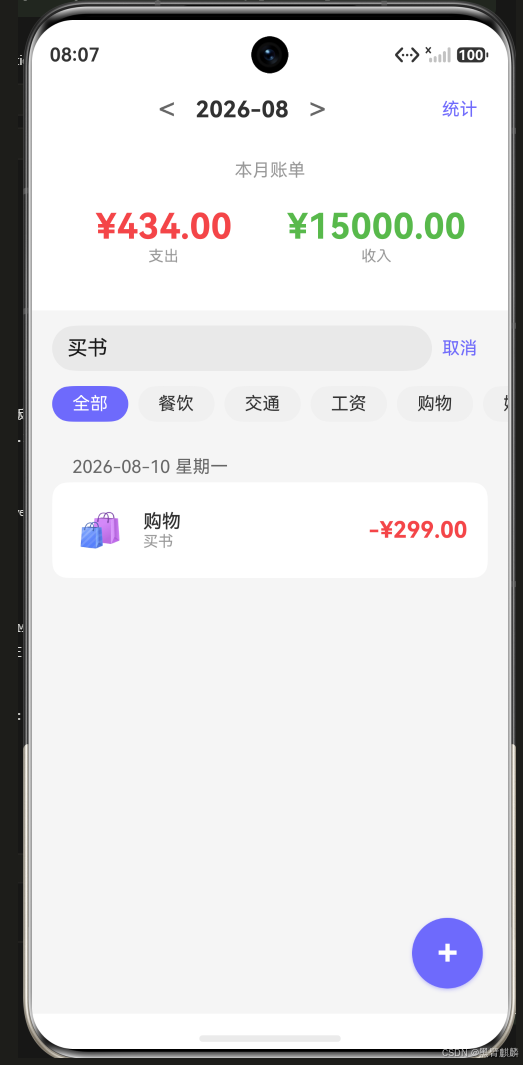
搜索效果——输入关键词"买书"实时过滤,列表只剩匹配的购物账单,搜索框右侧出现"取消":
二、分类筛选
2.1 筛选标签栏
@State selectedFilter: string = '全部';

@Builder
FilterBar() {
  Scroll({ scrollable: ScrollDirection.Horizontal }) {
    Row() {
      // "全部"标签
      this.FilterChip('全部')

      ForEach(this.allCategories(), (cat: string) => {
        this.FilterChip(cat)
      })
    }
    .padding({ left: 16, right: 16 })
  }
  .height(48)
  .scrollBarWidth(0)
}

@Builder
FilterChip(label: string) {
  Text(label)
    .fontSize(14)
    .fontColor(label === this.selectedFilter ? Color.White : '#333')
    .padding({ left: 16, right: 16, top: 6, bottom: 6 })
    .backgroundColor(label === this.selectedFilter ? '#6C63FF' : '#F0F0F0')
    .borderRadius(16)
    .margin({ right: 8 })
    .onClick(() => {
      this.selectedFilter = label;
    })
}

private allCategories(): string[] {
  const cats = new Set(this.monthBills.map(b => b.category));
  return Array.from(cats);
}

// 筛选后的账单列表
private get filteredBills(): BillItem[] {
  let bills = this.monthBills;
  if (this.selectedFilter !== '全部') {
    bills = bills.filter(b => b.category === this.selectedFilter);
  }
  if (this.searchKeyword) {
    bills = bills.filter(b => {
      const kw = this.searchKeyword.toLowerCase();
      return b.note.toLowerCase().includes(kw) || b.category.toLowerCase().includes(kw);
    });
  }
  return bills;
}
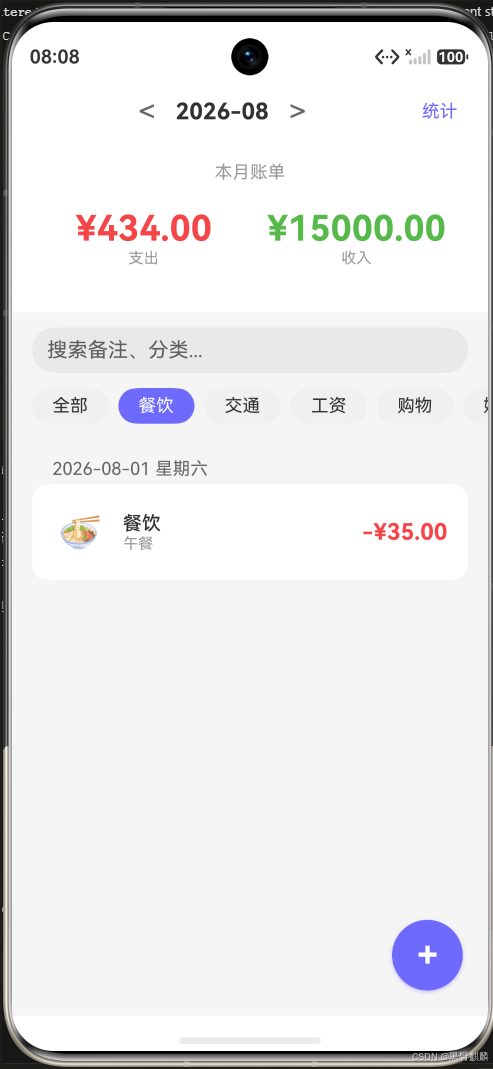
分类筛选效果——选中"餐饮"标签(紫色高亮),列表只显示餐饮账单,标签栏横向滚动容纳所有分类:
三、分类统计面板
3.1 统计布局
3.2 分类统计计算
interface CategoryStats {
  category: string;
  amount: number;
  percentage: number;
  type: BillType;
}

private calculateCategoryStats(): CategoryStats[] {
  const expenseBills = this.monthBills.filter(b => b.type === BillType.EXPENSE);
  const totalExpense = expenseBills.reduce((s, b) => s + b.amount, 0);

  // 按分类汇总
  const groups = new Map<string, number>();
  for (const bill of expenseBills) {
    const cur = groups.get(bill.category) || 0;
    groups.set(bill.category, cur + bill.amount);
  }

  return Array.from(groups.entries())
    .map(([category, amount]) => ({
      category,
      amount,
      percentage: totalExpense > 0 ? amount / totalExpense * 100 : 0,
      type: BillType.EXPENSE
    }))
    .sort((a, b) => b.amount - a.amount);
}
3.3 统计UI
@Builder
CategoryStatsView() {
  Column() {
    Text('分类支出排行')
      .fontSize(16)
      .fontWeight(FontWeight.Bold)
      .width('100%')
      .padding({ bottom: 16 })

    ForEach(this.calculateCategoryStats(), (stat: CategoryStats) => {
      Row() {
        // 分类名
        Text(this.getCategoryEmoji(stat.category) + ' ' + stat.category)
          .width(80)
          .fontSize(14)

        // 进度条
        Stack() {
          // 背景条
          Column()
            .width('100%')
            .height(8)
            .backgroundColor('#F0F0F0')
            .borderRadius(4)

          // 进度
          Column()
            .width(`${Math.max(stat.percentage, 2)}%`)
            .height(8)
            .backgroundColor('#6C63FF')
            .borderRadius(4)
        }
        .layoutWeight(1)
        .margin({ left: 8, right: 8 })

        // 金额和占比
        Text(`¥${stat.amount.toFixed(0)}`)
          .width(70)
          .fontSize(14)
          .textAlign(TextAlign.End)
        Text(`${stat.percentage.toFixed(1)}%`)
          .width(50)
          .fontSize(12)
          .fontColor('#999')
          .textAlign(TextAlign.End)
      }
      .width('100%')
      .padding({ vertical: 6 })
    })
  }
  .width('100%')
  .padding(16)
  .backgroundColor(Color.White)
  .borderRadius(12)
}
四、统计Tab页
// pages/StatsPage.ets
@Entry
@Component
struct StatsPage {
  @State currentMonth: string = this.getCurrentMonth();
  @State monthBills: BillItem[] = [];

  aboutToAppear() {
    this.loadData();
  }

  build() {
    Column() {
      // 月度总收入/支出/结余
      this.MonthOverview()

      Scroll() {
        Column() {
          // 分类统计
          this.CategoryStatsView()
        }
        .width('100%')
        .padding(16)
      }
      .layoutWeight(1)
    }
    .width('100%')
    .height('100%')
    .backgroundColor('#F5F5F5')
  }

  @Builder
  MonthOverview() {
    const income = this.monthBills
      .filter(b => b.type === BillType.INCOME)
      .reduce((s, b) => s + b.amount, 0);
    const expense = this.monthBills
      .filter(b => b.type === BillType.EXPENSE)
      .reduce((s, b) => s + b.amount, 0);

    Row() {
      this.StatItem('收入', `¥${income.toFixed(2)}`, '#44BB44')
      this.StatItem('支出', `¥${expense.toFixed(2)}`, '#FF4444')
      this.StatItem('结余', `¥${(income - expense).toFixed(2)}`, '#6C63FF')
    }
    .width('100%')
    .padding(20)
    .backgroundColor(Color.White)
  }

  @Builder
  StatItem(label: string, value: string, color: string) {
    Column() {
      Text(value)
        .fontSize(22)
        .fontWeight(FontWeight.Bold)
        .fontColor(color)
      Text(label)
        .fontSize(13)
        .fontColor('#999')
        .margin({ top: 4 })
    }
    .layoutWeight(1)
  }
}
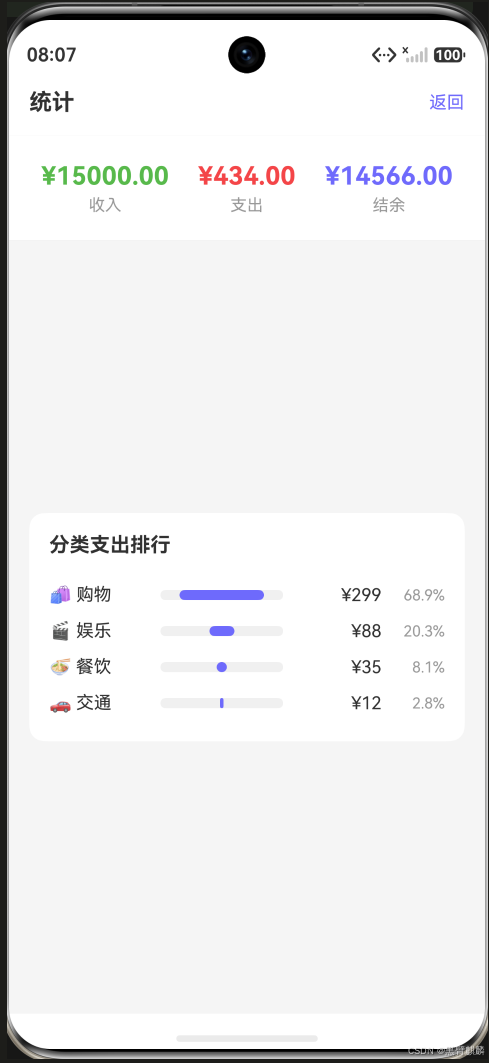
统计页实际效果——月度收入/支出/结余总览 + 分类支出排行进度条(购物 ¥299 占 68.9% 居首):
搜索与筛选联动逻辑
// 搜索+筛选联动(unsingleton getter)
get filteredBills(): BillItem[] {
  let bills = this.monthBills;

  // 关键词搜索
  if (this.searchKeyword.trim()) {
    const kw = this.searchKeyword.toLowerCase().trim();
    bills = bills.filter(b =>
      b.note.toLowerCase().includes(kw) ||
      b.category.toLowerCase().includes(kw)
    );
  }

  // 分类筛选
  if (this.selectedFilter !== '全部') {
    bills = bills.filter(b => b.category === this.selectedFilter);
  }

  return bills;
}
总结
本篇实现了:
- 搜索:按备注和分类关键词实时过滤
- 分类筛选:横向滚动标签,多条件联动
- 统计页面:月度总览 + 分类排行进度条
- 搜索+筛选联动:两个条件同时生效
下篇实现 Preferences 本地数据持久化。

作为“人工智能6S店”的官方数字引擎,为AI开发者与企业提供一个覆盖软硬件全栈、一站式门户。
更多推荐



 0
0 0
0- 0


 已为社区贡献12条内容

所有评论(0)