
HarmonyOS 6 ArkUI‑Radio 单选按钮组件分组互斥选中状态切换表单单选逻辑完整实现
一、项目背景与整体架构
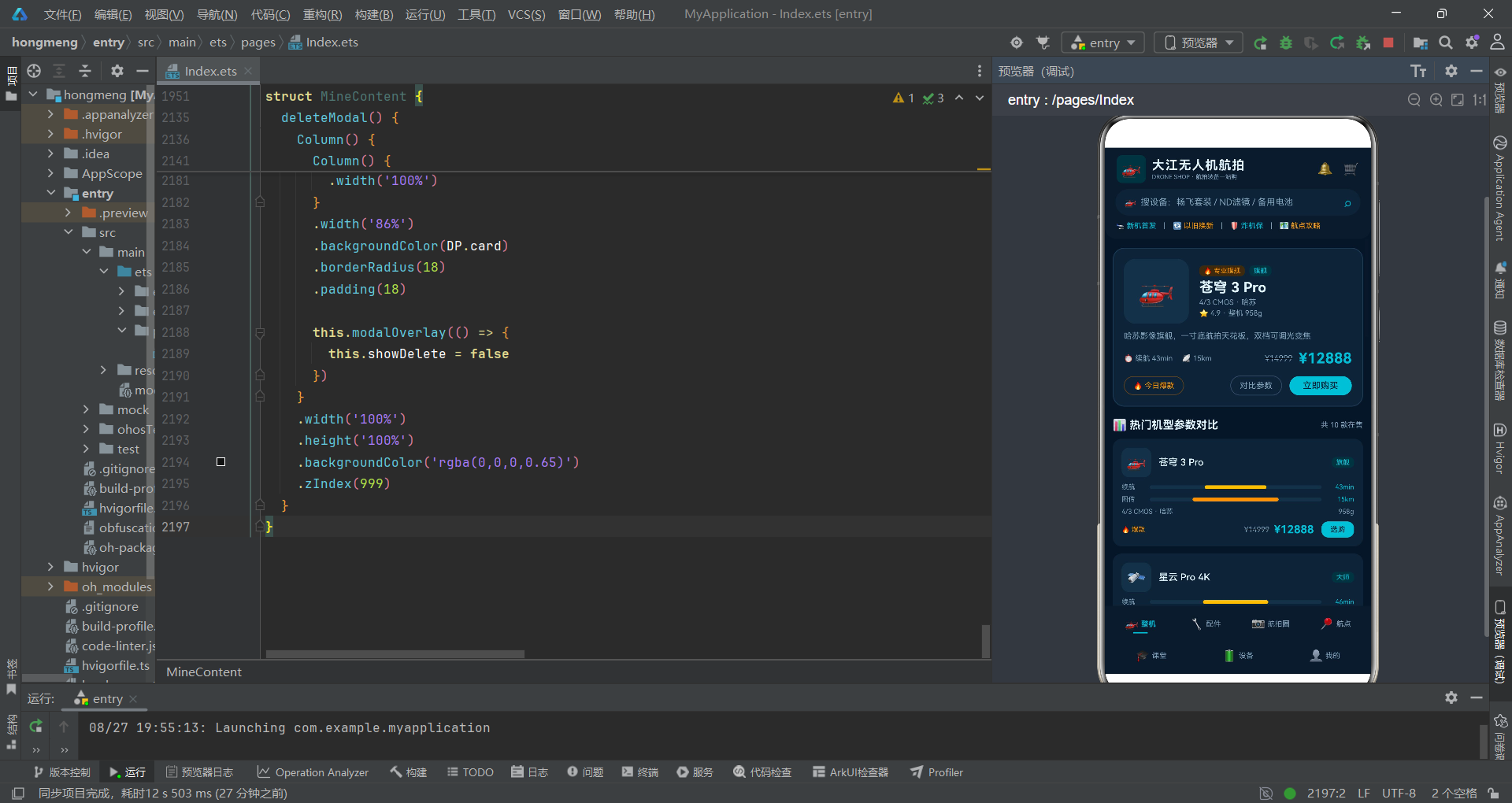
随着消费级无人机市场的蓬勃发展,无人机航拍已经从专业领域走向大众生活。一款优秀的无人机配套应用,不仅需要提供产品展示与购买功能,还需要构建完整的飞友社区、航点导航、在线课堂、设备管理等生态体系。本文将深度解析一款基于鸿蒙系统ArkTS开发的无人机航拍商城应用,从数据模型、布局架构、状态管理到交互动画,逐层拆解其技术实现细节。
鸿蒙系统(HarmonyOS)作为面向全场景的分布式操作系统,其声明式UI开发范式ArkTS为开发者提供了高效、简洁的UI构建方式。通过@Component、@State、@Builder等装饰器,开发者可以以数据驱动的方式构建响应式界面,大幅提升开发效率与代码可维护性。
本应用采用"科技深蓝 × 飞行青 × 信号橙"的配色方案,整体视觉风格偏向科技感与专业感。应用包含七大核心模块:整机商城、配件商城、航拍圈社区、航点攻略、航拍课堂、设备管理、个人中心,形成了从硬件购买到内容创作再到技能提升的完整生态闭环。
1.1 整体架构概览
应用采用经典的Tab导航架构,底部双排Tab栏承载七个功能入口,顶部为品牌Header与搜索栏,中间内容区根据当前激活的Tab动态切换。这种架构的优势在于信息层级清晰,用户可以快速在各功能模块间切换。
从架构图中可以看出,应用采用了组件化的设计思想。每个Tab页面对应一个独立的@Component结构体,内部封装了各自的状态数据与UI构建逻辑。这种模块化的设计使得代码结构清晰,便于后续的迭代维护。
1.2 技术栈与核心特性
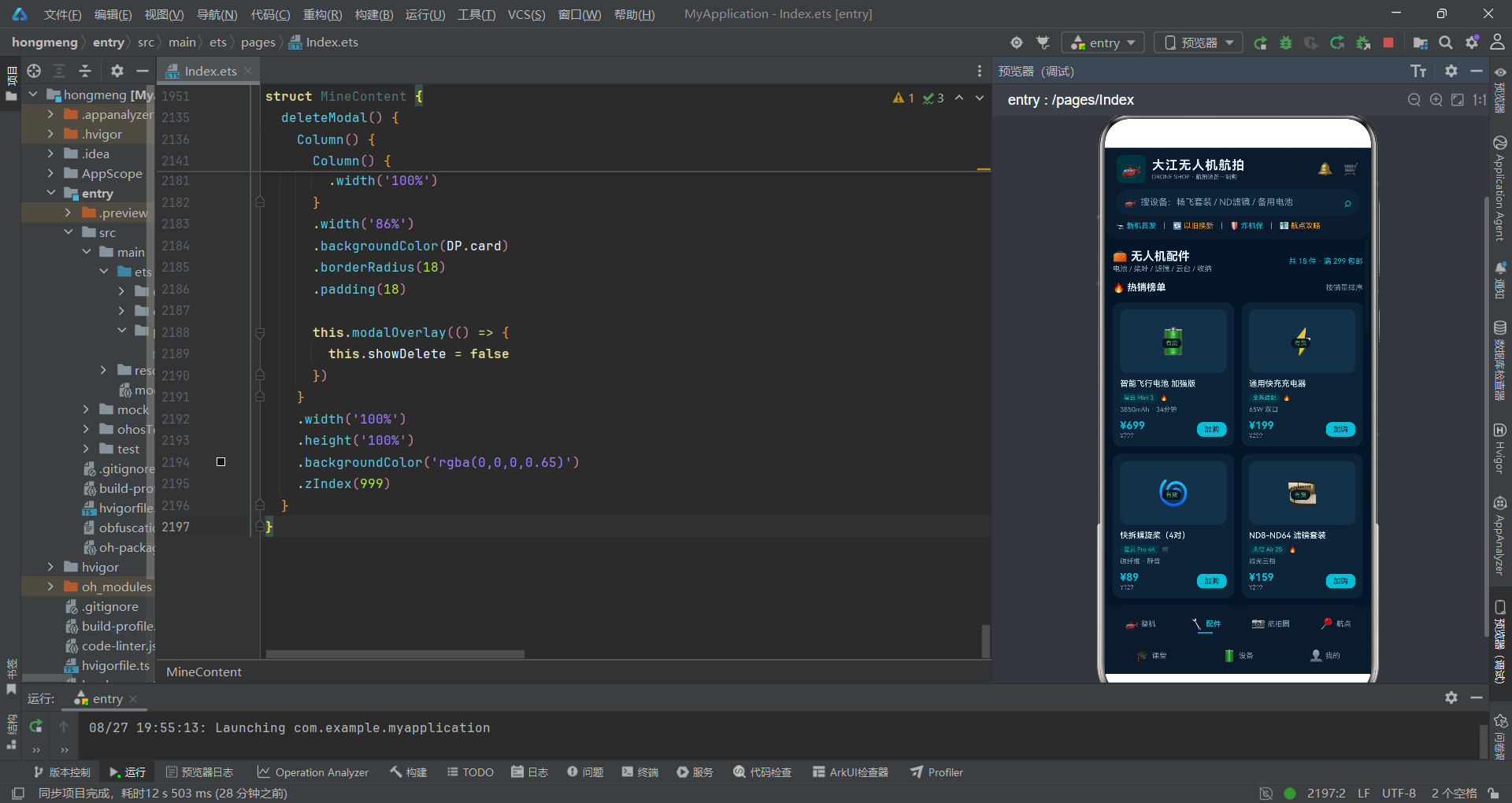
本应用基于鸿蒙系统的ArkUI声明式开发框架,核心技术点包括:
- 声明式UI:使用ArkTS语言,以声明式的方式描述UI结构
- 组件化开发:通过@Component装饰器封装可复用组件
- 状态管理:通过@State装饰器实现响应式数据绑定
- 构建器函数:通过@Builder装饰器封装可复用的UI片段
- 布局系统:Column、Row、Stack、Flex等基础布局容器
- 列表渲染:ForEach循环渲染动态列表
- 滚动容器:Scroll实现可滚动的内容区域
- 动画系统:animation属性实现属性动画,支持曲线、时长、迭代次数等配置
- 弹窗模式:Stack堆叠 + 半透明遮罩 + 条件渲染实现模态弹窗
二、数据模型与接口定义
2.1 调色板接口设计
interface DronePalette {
  bg: string
  primary: string
  primarySoft: string
  secondary: string
  secondarySoft: string
  card: string
  cardDeep: string
  text: string
  textSub: string
  chip: string
  warn: string
  warnSoft: string
  green: string
  greenSoft: string
  yellow: string
  yellowSoft: string
  white: string
}
这是应用的核心配色接口,定义了一整套完整的色彩体系。在深色主题应用中,色彩的层次管理至关重要,不仅需要主色调,还需要对应的浅色版本用于背景衬托。
接口中primary与primarySoft成对出现,前者用于文字、图标等前景元素,后者用于标签背景、按钮禁用态等浅层次场景。同样地,secondary、warn、green、yellow都有对应的Soft版本,这种设计模式确保了在任何场景下使用颜色时都能找到合适的深浅搭配。
card与cardDeep的区分体现了对视觉层次的精细把控。普通卡片使用card色,而头部、Tab栏等需要更暗背景的区域使用cardDeep,通过细微的色差营造出空间层次感。
chip色是一种介于背景与卡片之间的中间色,常用于输入框背景、进度条轨道、图标容器等元素,它既不会像背景那样过于暗沉,也不会像卡片那样过于突出。
将色彩定义为接口的好处在于,后续如果需要更换主题配色方案,只需要修改对应的常量对象即可,不需要在每个组件中逐一修改颜色值,大大提升了主题切换的灵活性。
2.2 无人机产品接口
interface DroneItem {
  id: number
  name: string
  icon: string
  flightTime: number
  transRange: number
  camera: string
  weight: number
  price: number
  originPrice: number
  badge: string
  level: string
  hot: boolean
  desc: string
  rating: number
}
无人机产品接口定义了整机商品的完整数据结构。id字段作为唯一标识,在ForEach渲染时作为key使用,确保列表渲染的性能与正确性。
flightTime(续航时间)和transRange(图传距离)是无人机产品最核心的两个参数指标,在UI中以进度条的形式进行可视化展示,让用户可以直观对比不同机型的性能差异。
badge和level两个字段用于产品标签体系。badge表示营销标签,如"专业旗舰"、“全能航拍"等;level表示产品等级,如"旗舰”、“大师”、“进阶”、"新手"等。不同等级对应不同的颜色编码,帮助用户快速识别产品定位。
hot字段是一个布尔值,用于标记热销爆款产品。在UI中,热销产品会显示火焰图标并使用橙色高亮,营造抢购氛围。
originPrice与price分别表示原价与现价,通过对比展示让用户感受到优惠力度,这是电商应用中常见的营销手段。
2.3 配件、动态与航点接口
interface AccessoryItem {
  id: number
  name: string
  icon: string
  compat: string
  spec: string
  price: number
  originPrice: number
  stock: string
  hot: boolean
}

interface FeedItem {
  id: number
  author: string
  avatar: string
  location: string
  title: string
  height: number
  focal: number
  iso: number
  shutter: string
  drone: string
  likes: number
  saves: number
  liked: boolean
}

interface SpotItem {
  id: number
  name: string
  region: string
  scenery: string
  status: string
  season: string
  popularity: number
  score: number
  desc: string
}
配件接口中compat字段表示兼容机型,stock字段表示库存状态(有货/限购/缺货),库存状态会以不同颜色呈现,让用户一目了然。
航拍圈动态接口包含了丰富的拍摄参数信息:飞行高度、焦段、ISO、快门速度等。这些专业参数是航拍爱好者非常关注的信息,展示在作品卡片中既增加了内容的专业度,也为其他飞手提供了参数参考。
航点接口中的status字段尤为重要,它表示空域状态(适飞/限高120m/禁飞),不同状态对应不同的颜色编码(绿色/黄色/红色)。这是无人机应用中非常关键的安全提示功能,直接关系到飞行合规性。
2.4 课程、电池与个人数据接口
interface CourseItem {
  id: number
  name: string
  icon: string
  teacher: string
  lessons: number
  duration: string
  level: string
  price: number
  students: number
  rating: number
}

interface BatteryItem {
  id: number
  name: string
  cycles: number
  health: number
  status: string
  charging: boolean
}

interface WorkItem {
  id: number
  name: string
  icon: string
  likes: number
  date: string
}

interface CertItem {
  id: number
  name: string
  org: string
  level: string
  date: string
}
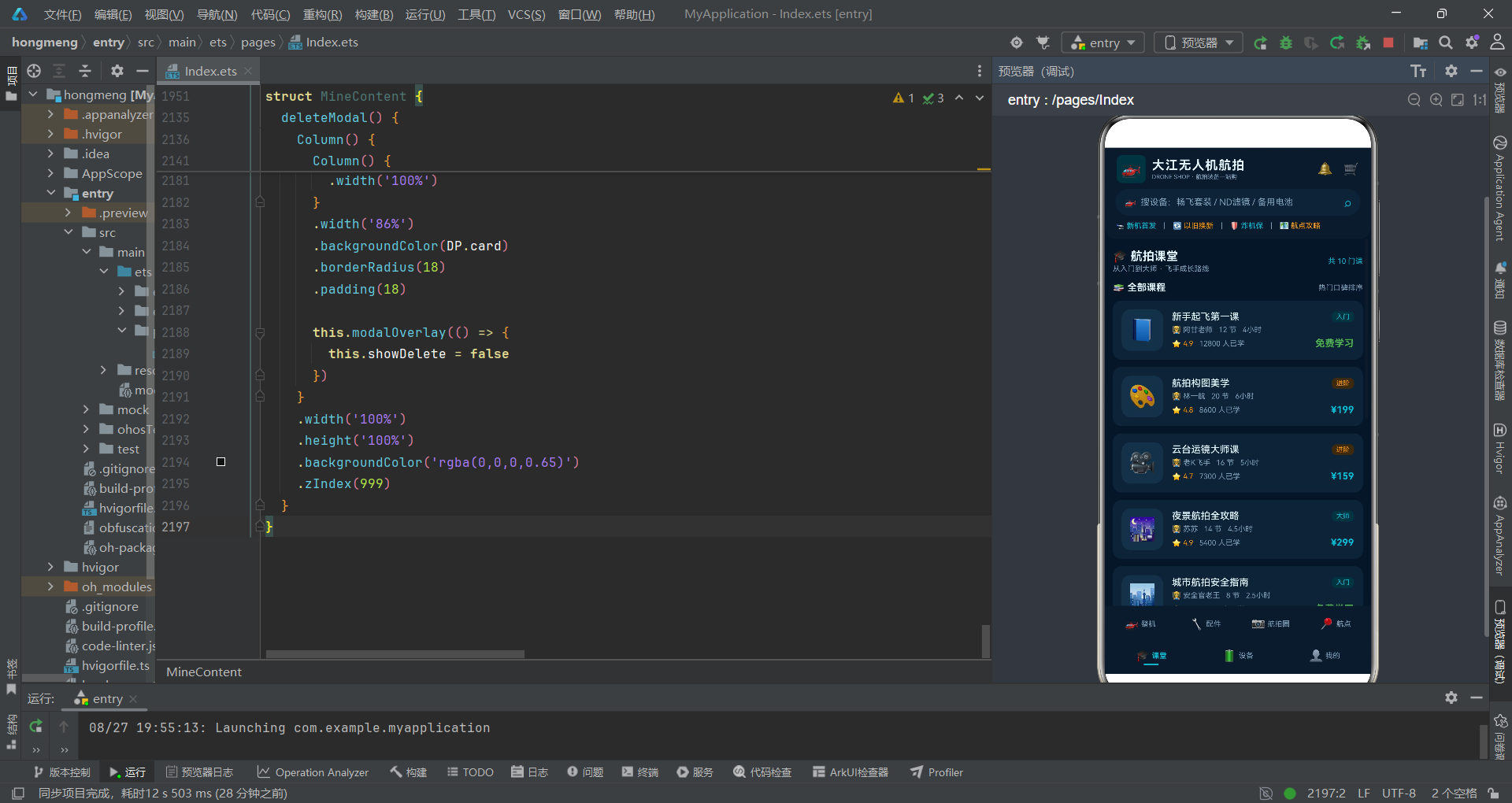
课程接口包含了完整的在线课程信息,从讲师、课时数、时长到难度等级、价格、学员数、评分,构成了完整的课程商品信息模型。
电池接口是设备管理模块的核心,cycles表示充放电循环次数,health表示电池健康度百分比,charging表示是否正在充电中。这些数据对于无人机用户来说非常重要,直接影响飞行安全与电池寿命。
个人中心的作品接口与证书接口,分别记录用户的航拍作品与飞行资质证书,体现了应用从工具到社区再到个人成长体系的完整生态布局。
三、调色板系统与工具函数
3.1 配色方案实现
const DP: DronePalette = {
  bg: '#0A1628',
  primary: '#00BCD4',
  primarySoft: '#0E3340',
  secondary: '#FF9800',
  secondarySoft: '#3A2A12',
  card: '#122236',
  cardDeep: '#0E1B2C',
  text: '#E1F5FE',
  textSub: '#7FA0B8',
  chip: '#1B3148',
  warn: '#FF5252',
  warnSoft: '#3A1A1E',
  green: '#4CAF50',
  greenSoft: '#14331A',
  yellow: '#FFC107',
  yellowSoft: '#332A12',
  white: '#FFFFFF'
}
调色板常量DP是整个应用的色彩中枢,所有组件的颜色都从这里取值。这种集中式色彩管理的好处是显而易见的:统一视觉风格、便于主题切换、减少重复定义。
主色调选用飞行青#00BCD4,这是一种带有科技感的青蓝色,既呼应了天空与飞行的主题,又在深色背景上具有良好的可读性。主色调的浅色版本#0E3340则用于标签背景、按钮禁用态等场景,通过降低饱和度和亮度来实现层次感。
辅助色选用信号橙#FF9800,这是一种高饱和度的暖色调,在冷色调为主的界面中起到画龙点睛的作用,常用于强调重要信息、热门标记、价格标签等。
警告色、成功色、提示色的设计遵循了通用的色彩语义:红色表示警告/错误,绿色表示成功/正常,黄色表示提示/注意。每种颜色都有对应的浅色版本用于背景填充。
文字颜色分为主文本色#E1F5FE与次要文本色#7FA0B8,两者在亮度上形成对比,确保信息层级分明。在深色主题中,文字颜色不宜使用纯白,适当降低亮度可以减少视觉疲劳。
在深色主题设计中,色彩对比度的把控是一个技术难点。主文本色与背景色的对比度建议不低于4.5:1,次要文本色不低于3:1,这样才能确保在各种屏幕亮度下都有良好的可读性。本应用的配色方案在这方面做得相当出色。
3.2 参数进度条工具函数
function specBarW(v: number, max: number): string {
  return Math.round(v / max * 100) + '%'
}

function specBarColor(v: number, max: number): string {
  const p: number = v / max
  if (p >= 0.75) {
    return DP.primary
  }
  if (p >= 0.45) {
    return DP.secondary
  }
  return DP.yellow
}
这两个函数用于将数值参数转换为可视化进度条的宽度与颜色。specBarW函数计算当前值占最大值的百分比,返回一个字符串形式的百分比宽度。
specBarColor函数根据数值占比返回不同的颜色:占比75%以上使用主色调青色,表示性能优秀;45%-75%使用辅助色橙色,表示性能中等;45%以下使用黄色,表示性能较低。这种三段式的颜色编码让用户可以一眼判断参数水平。
为什么选择75%和45%作为分界点?这是经过产品设计考量的。在无人机参数体系中,续航时间和图传距离是核心竞争力指标。75%以上属于旗舰级水平,45%-75%是主流中端产品的区间,45%以下则是入门级产品的水平。这样的分级既符合市场实际情况,又能直观体现产品档次差异。
3.3 等级与状态颜色函数
function gradeColor(level: string): string {
  if (level === '新手') {
    return DP.yellow
  }
  if (level === '进阶') {
    return DP.secondary
  }
  return DP.primary
}

function gradeBg(level: string): string {
  if (level === '新手') {
    return DP.yellowSoft
  }
  if (level === '进阶') {
    return DP.secondarySoft
  }
  return DP.primarySoft
}
等级颜色函数根据产品等级返回对应的文字颜色与背景色。新手级使用黄色,进阶级使用橙色,旗舰/大师级使用青色。这种颜色递进关系与用户的成长路径相呼应,从入门到专业,颜色从暖色调过渡到冷色调,视觉上也形成了进阶感。
gradeColor与gradeBg总是成对使用,前者提供文字颜色,后者提供背景颜色。这种前后景颜色的配对设计确保了标签在任何情况下都有良好的对比度和可读性。
function stockColor(stock: string): string {
  if (stock === '有货') {
    return DP.green
  }
  if (stock === '限购') {
    return DP.secondary
  }
  return DP.warn
}

function zoneStatusColor(status: string): string {
  if (status === '适飞') {
    return DP.green
  }
  if (status === '限高120m') {
    return DP.yellow
  }
  return DP.warn
}
库存状态与空域状态的颜色函数遵循了相同的设计原则:绿色表示正常/安全,黄色表示注意/限制,红色表示警告/禁止。这是一种通用的交通灯式色彩语义,用户可以快速理解其含义。
值得注意的是,zoneStatusColor与zoneStatusBg函数在航点模块中被频繁使用,不仅用于文字着色,还用于卡片边框、按钮背景等多个视觉元素。这种统一的色彩编码系统确保了整个应用的视觉一致性。
3.4 统计与计算函数
function monthTotal(list: MonthFlight[]): number {
  let t: number = 0
  list.forEach((m: MonthFlight) => {
    t += m.hours
  })
  return t
}

function workTotal(list: WorkItem[]): number {
  let t: number = 0
  list.forEach((w: WorkItem) => {
    t += w.likes
  })
  return t
}

function avgScore(list: SpotItem[]): string {
  let t: number = 0
  list.forEach((s: SpotItem) => {
    t += s.score
  })
  return (Math.round(t / list.length * 10) / 10).toFixed(1)
}
统计类函数用于计算数组数据的汇总值。monthTotal计算累计飞行时长,workTotal计算作品总获赞数,avgScore计算航点平均评分。这些函数将数据计算逻辑从UI组件中抽离出来,遵循了关注点分离的设计原则。
avgScore函数的实现细节值得关注。它先将平均分乘以10取整再除以10,最后使用toFixed(1)保留一位小数。这样做的目的是确保评分显示始终只有一位小数,并且经过了四舍五入处理,展示效果更加专业。
function withFeedLiked(list: FeedItem[], id: number): FeedItem[] {
  return list.map((f: FeedItem) => {
    if (f.id !== id) {
      return f
    }
    const nf: FeedItem = {
      id: f.id, author: f.author, avatar: f.avatar, location: f.location, title: f.title,
      height: f.height, focal: f.focal, iso: f.iso, shutter: f.shutter, drone: f.drone,
      likes: f.likes + (f.liked ? -1 : 1), saves: f.saves, liked: !f.liked
    }
    return nf
  })
}
withFeedLiked函数是一个纯函数,用于切换动态的点赞状态。它接收当前列表和目标动态ID,返回一个全新的列表数组。这种不可变数据更新的方式是响应式框架中的最佳实践,因为@State装饰器能够检测到数组引用的变化,从而触发UI更新。
函数内部使用map方法遍历数组,对于非目标项直接返回原对象,对于目标项则创建一个全新的对象,翻转liked状态并相应增减likes计数。这种方式确保了数据的不可变性,避免了直接修改状态可能带来的问题。
四、入口组件与Tab导航架构
4.1 入口组件结构
@Entry
@Component
struct DroneApp {
  @State activeTab: number = 0

  build() {
    Column() {
      DroneHeader()
      Stack() {
        if (this.activeTab === DroneTab.DRONES) {
          DroneContent()
        } else if (this.activeTab === DroneTab.PARTS) {
          PartContent()
        } else if (this.activeTab === DroneTab.FEED) {
          FeedContent()
        } else if (this.activeTab === DroneTab.SPOTS) {
          SpotContent()
        } else if (this.activeTab === DroneTab.COURSE) {
          CourseContent()
        } else if (this.activeTab === DroneTab.DEVICE) {
          DeviceContent()
        } else if (this.activeTab === DroneTab.MINE) {
          MineContent()
        }
      }
      .layoutWeight(1)
      .width('100%')
入口组件DroneApp是整个应用的根组件,使用@Entry装饰器标记,表示这是页面的入口点。@Component装饰器则将其声明为一个UI组件。
@State activeTab: number = 0定义了当前激活Tab的索引状态。当用户点击底部Tab时,这个状态值会改变,从而触发UI重新渲染,显示对应的内容组件。
整体布局采用垂直Column结构,分为三个部分:顶部Header、中间内容区、底部Tab导航栏。这种上中下三段式布局是移动端应用最经典的布局模式。
中间内容区使用Stack容器包裹,通过if-else条件渲染来显示当前激活的Tab页面。为什么使用Stack而不是直接在Column中放置?因为Stack中的子组件是堆叠排列的,虽然这里通过条件渲染每次只显示一个子组件,但使用Stack可以确保内容区撑满剩余空间,并且为后续可能增加的页面切换动画预留了空间。
.layoutWeight(1)是关键属性,它让Stack组件占据Column中除了Header和Tab栏之外的所有剩余空间。这是弹性布局的典型用法,类似于Web开发中的flex: 1。
4.2 双排Tab导航栏
      Row() {
        this.tabItem('🚁', '整机', DroneTab.DRONES)
        this.tabItem('🔧', '配件', DroneTab.PARTS)
        this.tabItem('📷', '航拍圈', DroneTab.SPOTS)
        this.tabItem('📍', '航点', DroneTab.SPOTS)
      }
      .width('100%')
      .height(50)
      .backgroundColor(DP.cardDeep)
      .padding({ left: 4, right: 4, top: 3 })

      Row() {
        this.tabItem('🎓', '课堂', DroneTab.COURSE)
        this.tabItem('🔋', '设备', DroneTab.DEVICE)
        this.tabItem('👤', '我的', DroneTab.MINE)
      }
      .width('100%')
      .height(42)
      .backgroundColor(DP.cardDeep)
      .padding({ left: 4, right: 4, bottom: 3 })
    }
双排Tab导航栏是本应用的一个设计亮点。由于功能模块多达7个,单排Tab会显得过于拥挤,因此采用了上下双排的设计。第一排放置4个核心功能Tab,第二排放置3个辅助功能Tab。
第一排Tab高度为50px,第二排为42px,通过高度差异形成视觉主次关系。核心功能Tab更高更醒目,辅助功能Tab稍矮,符合用户的使用频率与注意力分配。
两排Tab的背景色都使用DP.cardDeep,比普通卡片颜色更深,与中间内容区形成视觉分隔。内边距的设置也很讲究:上排只有顶部内边距,下排只有底部内边距,这样两排Tab在视觉上紧密相连但又有明确的分界。
4.3 Tab项构建器
  @Builder
  tabItem(icon: string, label: string, tab: number) {
    Column() {
      Row() {
        Text(icon).fontSize(15)
        Text(label).fontSize(10).fontColor(this.activeTab === tab ? DP.primary : DP.textSub)
          .fontWeight(this.activeTab === tab ? FontWeight.Bold : FontWeight.Normal).margin({ left: 3 })
      }
      .justifyContent(FlexAlign.Center)
      Divider().strokeWidth(2).color(this.activeTab === tab ? DP.primary : Color.Transparent)
        .width(20).borderRadius(1).margin({ top: 2 })
    }
    .layoutWeight(1)
    .justifyContent(FlexAlign.Center)
    .onClick(() => {
      this.activeTab = tab
    })
  }
tabItem是一个使用@Builder装饰器标记的构建器函数,用于封装单个Tab项的UI结构。通过参数化设计,同一个构建器可以生成不同图标的Tab项,避免了代码重复。
每个Tab项采用垂直Column布局,上方是图标与文字的水平组合,下方是一个指示条。这种图标+文字+底部指示条的设计是Tab导航的经典模式。
文字颜色使用条件表达式判断:当Tab激活时使用主色调青色并加粗,未激活时使用次要文字色。这种状态切换是响应式的,当activeTab状态改变时,所有Tab项的显示状态会自动更新。
底部指示条使用Divider组件实现,宽度为20px,圆角1px。激活时显示主色调,未激活时完全透明。这种设计既美观又简洁,用户可以清晰地知道当前所在的Tab位置。
.layoutWeight(1)确保所有Tab项在Row中平均分配宽度,不管一排有几个Tab,总能均匀分布。这是弹性布局的又一个典型应用。
.onClick事件处理函数将activeTab设置为当前Tab的索引值。由于activeTab是@State状态变量,赋值操作会触发UI重新渲染,从而实现Tab切换效果。
@Builder装饰器是鸿蒙ArkUI中非常实用的特性,它允许开发者将重复的UI片段抽取为可复用的构建函数。与自定义@Component相比,@Builder更加轻量,适合在组件内部封装小型UI片段,既能减少代码冗余,又不会引入额外的组件层级。
4.4 Tab枚举定义
enum DroneTab {
  DRONES = 0,
  PARTS = 1,
  FEED = 2,
  SPOTS = 3,
  COURSE = 4,
  DEVICE = 5,
  MINE = 6
}
Tab枚举将数字索引与语义化名称对应起来,大大提升了代码的可读性。使用DroneTab.DRONES比直接使用数字0要清晰得多,也减少了写错数字的风险。
枚举的另一个好处是便于维护。如果后续需要调整Tab顺序或增加新的Tab,只需要修改枚举定义即可,不需要在代码中到处查找硬编码的数字。
五、头部组件设计
5.1 头部整体结构
@Component
struct DroneHeader {
  build() {
    Column() {
      Row() {
        Text('🚁').fontSize(22).backgroundColor(DP.primarySoft).borderRadius(8).padding(6)
        Column() {
          Text('大江无人机航拍').fontSize(17).fontWeight(FontWeight.Bold).fontColor(DP.text).letterSpacing(1)
          Text('DRONE SHOP · 航拍装备一站购').fontSize(8).fontColor(DP.textSub).margin({ top: 1 })
        }
        .alignItems(HorizontalAlign.Start)
        .margin({ left: 8 })
        Column().layoutWeight(1)
        Text('🔔').fontSize(17).margin({ right: 14 })
        Text('🛒').fontSize(17)
      }
      .width('100%')
      .padding({ left: 16, right: 16, top: 10, bottom: 8 })
头部组件采用垂直Column布局,包含三行内容:品牌信息栏、搜索栏、快捷入口栏。整体背景使用DP.cardDeep深色,并设置了底部圆角,形成一种"悬浮"在内容区上方的视觉效果。
第一行是品牌信息栏,左侧是品牌Logo图标+品牌名称+副标题的组合,右侧是通知与购物车两个功能入口。
品牌名称使用17px加粗字体,配合1px的字间距,显得专业而大气。副标题使用8px的次要文字色,字号虽小但信息完整,起到补充说明的作用。
中间的Column().layoutWeight(1)是一个经典的弹性空间占位技巧。它占据了Row中左右两侧之间的所有剩余空间,从而将左侧品牌信息与右侧功能图标推到两端。这种方式比使用justifyContent(FlexAlign.SpaceBetween)更加灵活,因为可以精确控制左右两边的间距。
5.2 搜索栏设计
      Row() {
        Text('🚁').fontSize(13).fontColor(DP.primary).margin({ left: 12 })
        Text('搜设备:畅飞套装 / ND滤镜 / 备用电池').fontSize(12).fontColor(DP.textSub).margin({ left: 6 })
        Column().layoutWeight(1)
        Text('⌕').fontSize(16).fontColor(DP.primary).margin({ right: 12 })
      }
      .width('92%')
      .height(36)
      .backgroundColor(DP.card)
      .borderRadius(18)
搜索栏采用胶囊形状设计,高度36px,圆角18px(即高度的一半),形成完美的圆角矩形。背景色使用DP.card,比头部背景稍浅,形成层次感。
搜索栏内部左侧是一个无人机小图标,中间是搜索提示文字,右侧是搜索图标。提示文字使用次要文字色,内容为热门搜索关键词的示例,既起到占位提示的作用,又能引导用户搜索热门商品。
搜索栏宽度设置为92%,左右两侧留有少量边距,这种非全宽的设计让搜索栏看起来更加精致,也与下方的卡片内容宽度保持一致的视觉节奏。
5.3 快捷入口栏
      Row() {
        Text('🛬 新机首发').fontSize(10).fontColor(DP.primary)
        Text('|').fontSize(10).fontColor(DP.textSub).margin({ left: 10, right: 10 })
        Text('🔄 以旧换新').fontSize(10).fontColor(DP.secondary)
        Text('|').fontSize(10).fontColor(DP.textSub).margin({ left: 10, right: 10 })
        Text('🛡️ 炸机保').fontSize(10).fontColor(DP.primary)
        Text('|').fontSize(10).fontColor(DP.textSub).margin({ left: 10, right: 10 })
        Text('🗺️ 航点攻略').fontSize(10).fontColor(DP.secondary)
      }
      .width('92%')
      .margin({ top: 8 })
    }
    .width('100%')
    .backgroundColor(DP.cardDeep)
    .borderRadius({ bottomLeft: 16, bottomRight: 16 })
    .padding({ bottom: 12 })
  }
}
快捷入口栏提供了四个常用功能的快速入口,用竖线分隔符隔开。文字颜色交替使用主色调与辅助色,形成节奏感。
四个快捷入口分别是:新机首发、以旧换新、炸机保、航点攻略。这些都是无人机商城中高价值的功能入口,放置在头部显眼位置可以提升用户的点击率。
头部底部设置了16px的圆角(仅左下角和右下角),这种设计让头部看起来像一个悬浮的面板,增加了界面的层次感与精致度。底部12px的内边距确保内容不会贴到圆角边缘。
六、整机商城模块详解
6.1 整机组件状态定义
@Component
struct DroneContent {
  @State drones: DroneItem[] = DRONES
  @State heroScale: number = 1
  @State curDrone: DroneItem = DRONES[0]
  @State showBuy: boolean = false
  @State buyCount: number = 1
  @State buyVersion: number = 0
  @State buyColor: number = 0
  @State buyService: number = 0
整机商城组件定义了丰富的状态变量。drones存储无人机产品列表数据,heroScale控制英雄卡片的按压缩放动画,curDrone记录当前展示的主力机型。
购买弹窗相关的状态包括:showBuy控制弹窗显示隐藏,buyCount记录购买数量,buyVersion记录选中的版本索引,buyColor记录选中的颜色索引,buyService记录选中的服务计划索引。
这些状态变量全部使用@State装饰器,意味着它们的任何变化都会触发UI的重新渲染。这是声明式UI框架的核心思想:状态驱动视图。
6.2 英雄卡片设计
  build() {
    Stack() {
      Scroll() {
        Column() {
          Column() {
            Row() {
              Text(this.curDrone.icon).fontSize(40).width(88).height(88).backgroundColor(DP.chip)
                .borderRadius(16).textAlign(TextAlign.Center)
              Column() {
                Row() {
                  Text('🔥 ' + this.curDrone.badge).fontSize(9).fontColor(DP.secondary)
                    .backgroundColor(DP.secondarySoft).borderRadius(6)
                    .padding({ left: 6, right: 6, top: 2, bottom: 2 })
                  Text(this.curDrone.level).fontSize(9).fontColor(gradeColor(this.curDrone.level))
                    .backgroundColor(gradeBg(this.curDrone.level)).borderRadius(6)
                    .padding({ left: 6, right: 6, top: 2, bottom: 2 }).margin({ left: 6 })
                }
                Text(this.curDrone.name).fontSize(19).fontWeight(FontWeight.Bold).fontColor(DP.text).margin({ top: 4 })
                Text(this.curDrone.camera).fontSize(10).fontColor(DP.textSub).margin({ top: 3 })
                Text('⭐ ' + this.curDrone.rating.toFixed(1) + ' · 整机 ' + this.curDrone.weight + 'g')
                  .fontSize(10).fontColor(DP.textSub).margin({ top: 3 })
              }
              .alignItems(HorizontalAlign.Start)
              .layoutWeight(1)
              .margin({ left: 14 })
            }
            .width('100%')
英雄卡片是整机页面最醒目的区域,展示当前主推的无人机产品。卡片左侧是产品图标(40px大号图标放置在88x88的圆角容器中),右侧是产品详细信息。
产品信息区域从上到下依次是:标签行(营销标签+等级标签)、产品名称、相机参数、评分与重量。信息层级分明,用户可以快速获取产品的核心卖点。
营销标签使用辅助色(橙色),等级标签使用动态颜色(根据等级从黄色到青色)。两种标签都采用"文字+背景色"的药丸形状设计,视觉上统一且精致。
产品名称使用19px加粗字体,是整个卡片中最大的文字,确保品牌名称的视觉权重。相机参数作为产品核心卖点,使用次要文字色展示在名称下方。
评分与重量信息放在最下方,使用星号图标配合评分数字,以及重量信息,为用户提供购买决策的参考数据。
6.3 英雄卡片交互与动画
          .scale({
            x: this.heroScale,
            y: this.heroScale
          })
          .animation({ duration: 200, curve: Curve.EaseOut })
          .onTouch((e: TouchEvent) => {
            if (e.type === TouchType.Down) {
              this.heroScale = 0.96
            }
            if (e.type === TouchType.Up || e.type === TouchType.Cancel) {
              this.heroScale = 1
            }
          })
英雄卡片的按压缩放动画是一个细节亮点。通过监听触摸事件,在手指按下时将缩放比例设为0.96,手指抬起或取消时恢复为1。配合200ms的EaseOut缓动曲线,产生一种"按下回弹"的触感反馈。
为什么使用0.96的缩放比例?这个数值经过了精心设计。缩放太小(如0.99)用户几乎感觉不到,缩放太大(如0.9)则会显得突兀。0.96是一个恰到好处的数值,用户能明显感觉到按压反馈,但又不会觉得界面在剧烈变化。
Curve.EaseOut缓动曲线意味着动画开始时速度快,结束时速度慢,逐渐减速到最终状态。这种曲线模拟了物理世界中的弹性减速效果,让动画看起来更加自然流畅。
.animation()属性的使用方式是声明式的:只需要指定动画参数,框架会自动检测相关属性的变化并应用动画。开发者不需要手动管理动画的开始、结束、插值等细节,这就是声明式动画的魅力所在。
6.4 参数对比列表
          ForEach(this.drones, (d: DroneItem) => {
            Column() {
              Row() {
                Text(d.icon).fontSize(22).width(40).height(40).backgroundColor(DP.chip)
                  .borderRadius(10).textAlign(TextAlign.Center)
                Text(d.name).fontSize(13).fontWeight(FontWeight.Medium).fontColor(DP.text)
                  .layoutWeight(1).maxLines(1).textOverflow({ overflow: TextOverflow.Ellipsis }).margin({ left: 10 })
                Text(d.level).fontSize(9).fontColor(gradeColor(d.level))
                  .backgroundColor(gradeBg(d.level)).borderRadius(6)
                  .padding({ left: 6, right: 6, top: 2, bottom: 2 })
              }
              .width('100%')

              Row() {
                Text('续航 ').fontSize(9).fontColor(DP.textSub).width(38)
                Stack() {
                  Column().width('100%').height(5).backgroundColor(DP.chip).borderRadius(3)
                  Column().width(specBarW(d.flightTime, 120)).height(5)
                    .backgroundColor(specBarColor(d.flightTime, 120)).borderRadius(3)
                }
                .layoutWeight(1)
                .height(5)
                Text(d.flightTime + 'min').fontSize(9).fontColor(DP.primary).width(44).textAlign(TextAlign.End)
              }
              .width('100%')
              .margin({ top: 8 })
参数对比列表是整机页面的核心功能区域,用户可以在这里直观对比各款无人机的性能参数。每个产品卡片包含三行参数:续航时间、图传距离、相机与重量。
每行参数都采用"标签+进度条+数值"的三段式布局。左侧是固定宽度的参数标签,中间是弹性宽度的进度条,右侧是固定宽度的数值显示。这种布局让所有产品的进度条起点和终点都对齐,方便用户横向对比。
进度条的实现使用了Stack堆叠布局。底层是一个全宽的灰色轨道(DP.chip色),上层是一个动态宽度的进度条(颜色根据数值变化)。Stack容器默认居中对齐子组件,但这里两个Column都是全宽或部分宽度,它们会自然地左对齐,形成进度条效果。
specBarW函数计算进度条宽度百分比,specBarColor函数根据数值大小返回不同颜色。这种将数据可视化逻辑抽离为纯函数的做法,既保持了UI代码的简洁,又方便后续的维护和测试。
ForEach组件是鸿蒙ArkUI中渲染动态列表的核心工具。它接收三个参数:数据源数组、子组件构建函数、键值生成函数。键值生成函数返回的字符串用于唯一标识每个列表项,确保列表更新时框架能正确复用DOM节点,从而提升列表渲染性能。
七、配件商城与航拍圈模块
7.1 配件双列宫格布局
@Component
struct PartContent {
  build() {
    Scroll() {
      Column() {
        // ... 标题区域 ...

        Flex({ wrap: FlexWrap.Wrap, justifyContent: FlexAlign.SpaceBetween }) {
          ForEach(ACCESSORIES, (a: AccessoryItem) => {
            Column() {
              Stack() {
                Column().width('100%').height(86).backgroundColor(DP.chip).borderRadius(10)
                Text(a.icon).fontSize(34)
                Text(a.stock).fontSize(8).fontColor(stockColor(a.stock))
                  .backgroundColor(DP.bg).borderRadius(6)
                  .padding({ left: 5, right: 5, top: 2, bottom: 2 })
                  .align(Alignment.TopEnd).margin({ top: 5, right: 5 })
              }
              .width('100%')
              .height(86)
配件页面采用双列宫格布局展示所有配件商品。实现方式是使用Flex容器,设置wrap: FlexWrap.Wrap让子组件自动换行,设置justifyContent: FlexAlign.SpaceBetween让每行的两个子组件分别靠两边对齐,中间留出间距。
每个配件卡片的宽度设置为48.5%,两张卡片加起来是97%,剩余3%作为中间间距。再配合SpaceBetween的对齐方式,正好实现双列等分布局。
卡片顶部是商品图片区域(这里用图标+色块代替),右上角有一个库存状态标签。库存标签的背景色使用DP.bg(最深的背景色),文字颜色根据库存状态动态变化:有货显示绿色,限购显示橙色,缺货显示红色。
库存标签使用.align(Alignment.TopEnd)定位到Stack的右上角,这是Stack布局的一个重要特性——可以通过align属性控制子组件在堆叠容器中的对齐位置。配合margin属性,可以精确调整标签的边距。
7.2 配件卡片信息结构
              Text(a.name).fontSize(11).fontWeight(FontWeight.Medium).fontColor(DP.text).width('100%')
                .maxLines(1).textOverflow({ overflow: TextOverflow.Ellipsis }).margin({ top: 8 })

              Row() {
                Text(a.compat).fontSize(8).fontColor(DP.primary).backgroundColor(DP.primarySoft)
                  .borderRadius(5).padding({ left: 5, right: 5, top: 2, bottom: 2 })
                Text(a.hot ? '🔥' : '🛒').fontSize(8).fontColor(a.hot ? DP.secondary : DP.textSub).margin({ left: 4 })
              }
              .width('100%')
              .margin({ top: 6 })

              Text(a.spec).fontSize(9).fontColor(DP.textSub).width('100%').margin({ top: 4 })

              Row() {
                Column() {
                  Text('¥' + a.price).fontSize(14).fontWeight(FontWeight.Bold).fontColor(DP.primary)
                  Text('¥' + a.originPrice).fontSize(8).fontColor(DP.textSub)
                    .decoration({ type: TextDecorationType.LineThrough }).margin({ top: 1 })
                }
                .alignItems(HorizontalAlign.Start)
                Column().layoutWeight(1)
                Text('加购').fontSize(10).fontColor(DP.cardDeep).backgroundColor(DP.primary).borderRadius(8)
                  .padding({ left: 10, right: 10, top: 4, bottom: 4 })
              }
              .width('100%')
              .margin({ top: 8 })
            }
            .width('48.5%')
            .backgroundColor(DP.card)
            .borderRadius(12)
            .padding(10)
            .margin({ top: 10 })
配件卡片的信息结构从上到下依次是:商品名称、兼容机型标签+热销标记、规格参数、价格与加购按钮。
商品名称使用11px字重,设置了单行省略(maxLines(1) + TextOverflow.Ellipsis),确保长名称不会撑破布局。
兼容机型标签使用主色调青色文字配浅色背景,紧挨着一个热销标记图标(热销显示火焰,普通显示购物车)。这种小图标的使用增加了卡片的信息量但不显得拥挤。
规格参数使用9px次要文字色,提供了产品的核心规格信息,帮助用户快速判断是否符合需求。
价格区域是电商卡片的核心。现价使用14px加粗主色调,原价使用8px次要文字色并添加删除线。两者垂直排列,现价在上原价在下,形成鲜明的价格对比。
右下角的"加购"按钮是卡片的行动召唤点(CTA),使用填充式主色调按钮,深色文字配浅色背景,在深色卡片上非常醒目。
7.3 航拍圈信息流设计
@Component
struct FeedContent {
  @State feeds: FeedItem[] = FEEDS
  @State showPublish: boolean = false
  @State pubTitle: string = ''
  @State pubLocation: string = ''
  @State pubModel: number = 0
  @State pubVisible: number = 0
  @State pubDesc: string = ''

  build() {
    Stack() {
      Scroll() {
        Column() {
          // ... 标题栏 ...

          ForEach(this.feeds, (f: FeedItem) => {
            Column() {
              Row() {
                Text(f.avatar).fontSize(22).width(40).height(40).backgroundColor(DP.chip)
                  .borderRadius(20).textAlign(TextAlign.Center)
                Column() {
                  Text(f.author).fontSize(12).fontWeight(FontWeight.Medium).fontColor(DP.text)
                  Text('📍 ' + f.location).fontSize(9).fontColor(DP.textSub).margin({ top: 2 })
                }
                .alignItems(HorizontalAlign.Start)
                .layoutWeight(1)
                .margin({ left: 8 })
                Text('关注').fontSize(9).fontColor(DP.cardDeep).backgroundColor(DP.secondary)
                  .borderRadius(8).padding({ left: 10, right: 10, top: 4, bottom: 4 })
              }
              .width('100%')
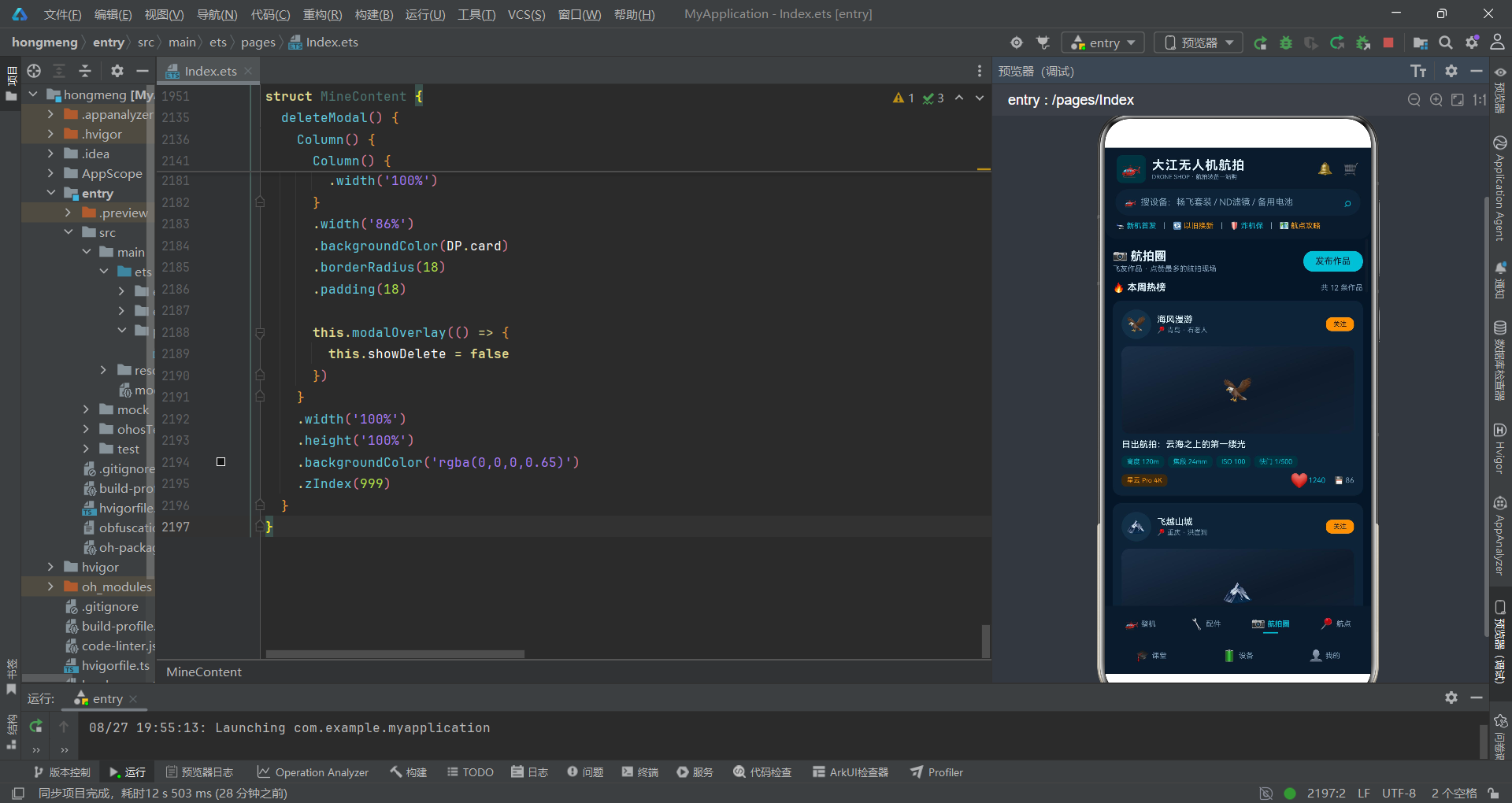
航拍圈是社区内容模块,采用经典的信息流设计。每条动态卡片包含:作者信息栏、图片区域、标题、拍摄参数标签、互动栏。
作者信息栏左侧是圆形头像(40x40,圆角20即正圆),中间是作者名与地理位置,右侧是关注按钮。关注按钮使用辅助色(橙色)填充,是一个高对比度的行动按钮。
地理位置信息使用定位图标+地点文字的组合,增加了内容的场景感。对于航拍内容来说,拍摄地点是非常重要的信息,用户往往是因为某个地点的美景而产生飞行兴趣。
              Column() {
                Text(f.avatar).fontSize(34)
              }
              .width('100%')
              .height(118)
              .justifyContent(FlexAlign.Center)
              .linearGradient({
                angle: 160,
                colors: [['#1B3148', 0], ['#0E1B2C', 0.55], ['#122236', 1]]
              })
              .borderRadius(10)
              .width('100%')
              .height(118)
              .margin({ top: 10 })
图片区域使用渐变色作为占位背景,模拟真实图片的视觉效果。渐变角度为160度,从左上角到右下角,包含三个颜色节点,形成一种富有层次感的深色渐变效果。
这种渐变背景的设计比单纯使用纯色背景更加生动,也为后续替换为真实图片预留了视觉空间。图片区域高度为118px,是卡片中占比最大的区域,符合"图片优先"的社交内容设计原则。
7.4 拍摄参数与互动设计
              Row() {
                Text('高度 ' + f.height + 'm').fontSize(9).fontColor(DP.primary).backgroundColor(DP.primarySoft)
                  .borderRadius(6).padding({ left: 7, right: 7, top: 3, bottom: 3 })
                Text('焦段 ' + f.focal + 'mm').fontSize(9).fontColor(DP.primary).backgroundColor(DP.primarySoft)
                  .borderRadius(6).padding({ left: 7, right: 7, top: 3, bottom: 3 }).margin({ left: 5 })
                Text('ISO ' + f.iso).fontSize(9).fontColor(DP.primary).backgroundColor(DP.primarySoft)
                  .borderRadius(6).padding({ left: 7, right: 7, top: 3, bottom: 3 }).margin({ left: 5 })
                Text('快门 ' + f.shutter).fontSize(9).fontColor(DP.primary).backgroundColor(DP.primarySoft)
                  .borderRadius(6).padding({ left: 7, right: 7, top: 3, bottom: 3 }).margin({ left: 5 })
              }
              .width('100%')
              .margin({ top: 8 })
拍摄参数标签是航拍社区的特色功能,展示了这张作品的飞行高度、焦段、ISO、快门速度等专业参数。对于航拍爱好者来说,这些参数具有很高的参考价值,可以学习到不同场景下的最佳拍摄设置。
所有参数标签使用统一的样式:主色调青色文字配浅色背景、圆角6px、统一的内边距。这种一致性设计让参数区域看起来整齐有序,专业感十足。
              Row() {
                Text(f.drone).fontSize(9).fontColor(DP.secondary).backgroundColor(DP.secondarySoft)
                  .borderRadius(6).padding({ left: 7, right: 7, top: 3, bottom: 3 })
                Column().layoutWeight(1)
                Text(f.liked ? '❤️' : '🤍').fontSize(15)
                  .scale({
                    x: f.liked ? 1.35 : 1,
                    y: f.liked ? 1.35 : 1
                  })
                  .animation({ duration: 250, curve: Curve.EaseOut })
                  .onClick(() => {
                    this.feeds = withFeedLiked(this.feeds, f.id)
                  })
                Text(' ' + f.likes).fontSize(10).fontColor(f.liked ? DP.primary : DP.textSub)
                Text('💾 ' + f.saves).fontSize(10).fontColor(DP.textSub).margin({ left: 12 })
              }
              .width('100%')
              .margin({ top: 8 })
互动栏是社交产品的核心交互区域。左侧是使用机型标签(辅助色橙色),右侧是点赞和收藏两个互动按钮。
点赞交互是这个区域的亮点。点赞图标使用两个emoji表示不同状态:已点赞显示红心❤️,未点赞显示白心🤍。点击时触发缩放动画,从1倍放大到1.35倍再回弹,配合250ms的EaseOut缓动曲线,产生一种"怦然心动"的视觉效果。
点赞状态更新使用withFeedLiked纯函数,该函数返回一个全新的数组,确保@State能检测到数据变化并触发UI更新。点赞数的颜色也会随状态变化:已点赞显示主色调青色,未点赞显示次要文字色。
收藏按钮使用软盘图标💾,这是一个经典的"保存"隐喻。收藏数使用次要文字色,视觉权重低于点赞数,符合产品优先级设计。
八、航点与课堂模块
8.1 航点状态与脉冲动画
@Component
struct SpotContent {
  @State spots: SpotItem[] = SPOTS
  @State spotPulse: boolean = false
  @State showReport: boolean = false
  @State repLocation: string = ''
  @State repDate: string = '2026-08-26'
  @State repTime: number = 0
  @State repAlt: number = 1
  @State repPurpose: number = 0
  @State repPhone: string = ''
航点模块的状态变量中,spotPulse是一个特殊的布尔状态,用于控制状态指示灯的脉冲动画效果。其他状态变量主要用于报备弹窗的表单数据。
                Column() {
                  Text('●').fontSize(11).fontColor(zoneStatusColor(s.status))
                    .opacity(s.status === '适飞' ? (this.spotPulse ? 1 : 0.35) : 1)
                    .scale({
                      x: s.status === '适飞' && this.spotPulse ? 1.3 : 1,
                      y: s.status === '适飞' && this.spotPulse ? 1.3 : 1
                    })
                    .animation({ duration: 800, curve: Curve.EaseInOut, iterations: -1 })
                  Text(s.status).fontSize(8).fontColor(zoneStatusColor(s.status)).margin({ top: 3 })
                }
                .width(46)
                .alignItems(HorizontalAlign.Center)
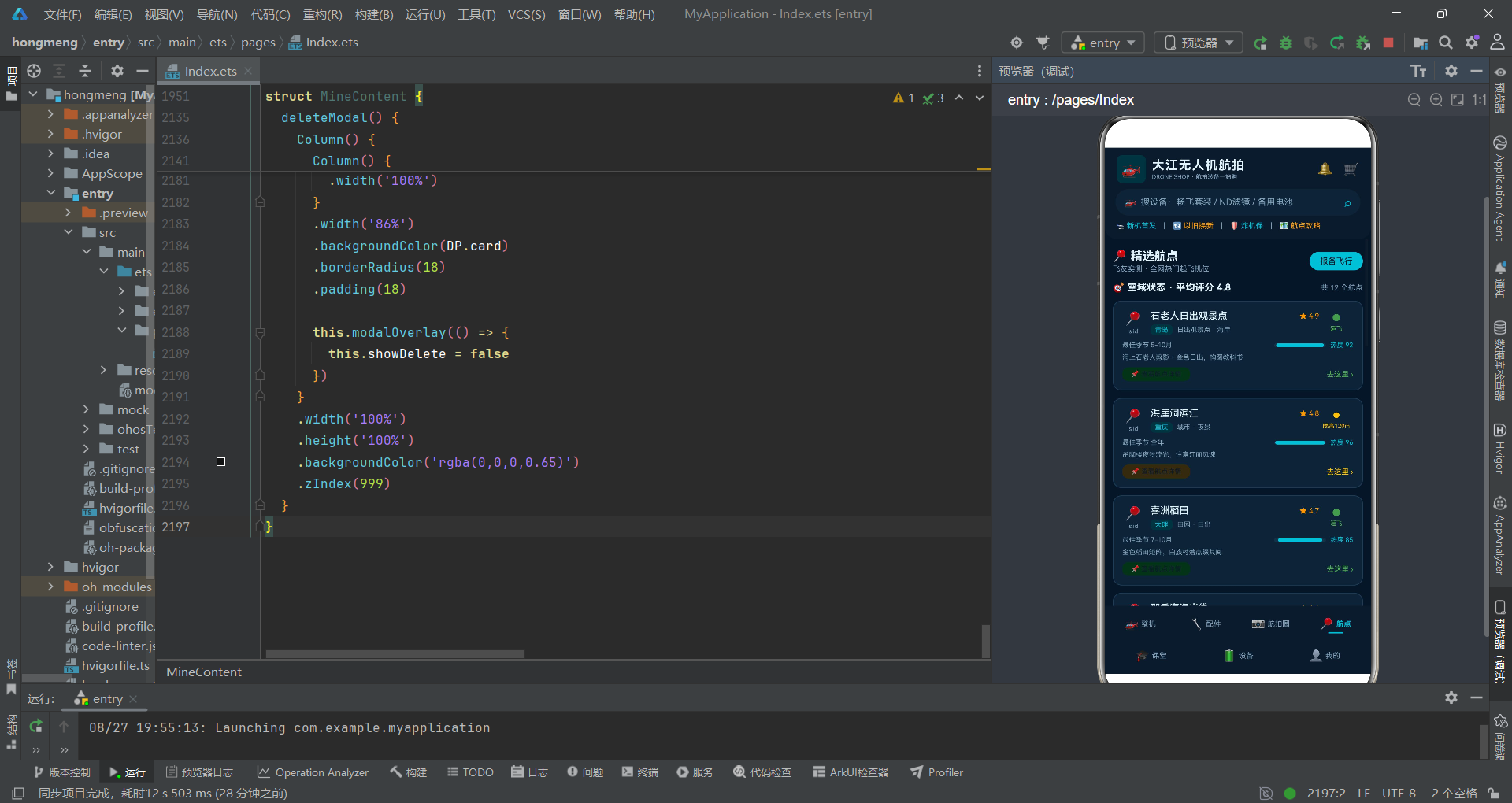
航点状态指示是一个设计精巧的功能。状态指示灯使用一个圆点符号"●",颜色根据空域状态变化:适飞为绿色,限高为黄色,禁飞为红色。
特别的是,"适飞"状态的指示灯有一个呼吸脉冲动画效果。通过opacity属性在1和0.35之间交替,同时scale属性在1和1.3之间交替,配合800ms的EaseInOut曲线和无限次迭代(iterations: -1),形成一种持续闪烁的呼吸灯效果。
为什么只有"适飞"状态有脉冲动画?这是产品设计的巧思:适飞意味着安全飞行,脉冲动画像心跳一样传递出"活力、正常"的感觉,同时也能吸引用户注意到这些可以飞行的航点。而限高和禁飞状态则保持静态,传达出"注意、禁止"的严肃感。
脉冲动画的触发时机在Scroll的onAppear回调中,当页面首次出现时将spotPulse设为true,从而启动动画循环。
8.2 航点卡片信息结构
              Row() {
                Text('最佳季节 ' + s.season).fontSize(9).fontColor(DP.textSub)
                Column().layoutWeight(1)
                Stack() {
                  Column().width('100%').height(5).backgroundColor(DP.chip).borderRadius(3)
                  Column().width(specBarW(s.popularity, 100)).height(5)
                    .backgroundColor(specBarColor(s.popularity, 100)).borderRadius(3)
                }
                .width(70)
                .height(5)
                Text('热度 ' + s.popularity).fontSize(9).fontColor(DP.primary).margin({ left: 6 })
              }
              .width('100%')
              .margin({ top: 8 })

              Text(s.desc).fontSize(9).fontColor(DP.textSub).width('100%')
                .maxLines(1).textOverflow({ overflow: TextOverflow.Ellipsis }).margin({ top: 6 })

              Row() {
                Text('📌 查看航点详情').fontSize(9).fontColor(DP.cardDeep).backgroundColor(zoneStatusBg(s.status))
                  .borderRadius(8).padding({ left: 12, right: 12, top: 4, bottom: 4 })
                  .onClick(() => {
                    this.repLocation = s.name
                    this.showReport = true
                  })
                Column().layoutWeight(1)
                Text('去这里 ›').fontSize(10).fontColor(zoneStatusColor(s.status))
              }
航点卡片包含丰富的信息:航点名称与评分、地区与风景类型、最佳季节与热度、简介描述、操作按钮。
热度值使用进度条可视化,进度条宽度固定为70px,热度值越高进度条越长,颜色也从黄色过渡到青色。这种可视化方式让用户可以快速比较不同航点的热门程度。
操作区域左侧是"查看航点详情"按钮,按钮背景色根据空域状态变化(绿色/黄色/红色的浅色版本)。点击此按钮会打开报备弹窗,并自动填入当前航点名称作为飞行地点。
右侧是"去这里"文字链接,颜色与状态色一致,右侧有一个箭头符号,暗示点击后会进入导航或详情页面。
卡片边框颜色也会根据状态变化:禁飞状态使用红色边框(#5A2A2E),其他状态使用蓝色边框(#1E3B55)。这种细微的色彩差异进一步强化了空域状态的视觉区分。
8.3 课程卡片设计
@Component
struct CourseContent {
build() {
Scroll() {
Column() {
// ... 标题区域 ...
ForEach(COURSES, (c: CourseItem) => {
Row() {
Text(c.icon).fontSize(30).width(56).height(56).backgroundColor(DP.chip).borderRadius(12)
.textAlign(TextAlign.Center)
Column() {
Row() {
Text(c.name).fontSize(13).fontWeight(FontWeight.Medium).fontColor(DP.text)
.layoutWeight(1).maxLines(1).textOverflow({ overflow: TextOverflow.Ellipsis })
Text(c.level).fontSize(9).fontColor(gradeColor(c.level))
.backgroundColor(gradeBg(c.level)).borderRadius(6)
.padding({ left: 6, right: 6, top: 2, bottom: 2 })
}
.width('100%')
Row() {
Text('👨🏫 ' + c.teacher).fontSize(10).fontColor(DP.textSub)
Text(c.lessons + ' 节').fontSize(10).fontColor(DP.textSub).margin({ left: 8 })
Text(c.duration).fontSize(10).fontColor(DP.textSub).margin({ left: 8 })
}
.width('100%')
.margin({ top: 4 })
Row() {
Text('⭐ ' + c.rating.toFixed(1)).fontSize(10).fontColor(DP.secondary)
Text(c.students + ' 人已学').fontSize(10).fontColor(DP.textSub).margin({ left: 8 })
Column().layoutWeight(1)
Text(c.price === 0 ? '免费学习' : '¥' + c.price).fontSize(13).fontWeight(FontWeight.Bold)
.fontColor(levelColor(c.price))
}
.width('100%')
.margin({ top: 5 })
}
.alignItems(HorizontalAlign.Start)
.layoutWeight(1)
.margin({ left: 12 })
}
.width('94%')
.backgroundColor(DP.card)
.borderRadius(12)
.padding(12)
.margin({ top: 10 })
课堂模块采用横向课程卡片设计,左侧是课程图标(56x56圆角方块),右侧是课程详细信息。信息区域分为三行:课程名称与难度等级、讲师与课时与时长、评分与学员数与价格。
课程难度等级标签复用了gradeColor和gradeBg函数,根据课程级别(入门/进阶/大师)显示不同颜色。入门课程使用黄色,进阶使用橙色,大师使用青色,与产品等级的色彩体系保持一致。
讲师信息使用教师图标+姓名的格式,课时数和总时长作为辅助信息排列在后。这些信息帮助用户了解课程的规模和时间投入。
评分与价格在同一行,评分使用星号图标+评分数字(辅助色橙色),学员人数使用次要文字色。价格信息右对齐,使用最大的字号(13px加粗),是卡片中最醒目的信息之一。
价格颜色通过levelColor函数动态决定:免费课程显示绿色,付费课程显示主色调青色。免费课程是重要的引流手段,用醒目的绿色标注"免费学习"可以有效吸引用户点击。
九、设备管理模块
9.1 电池健康仪表盘
@Component
struct DeviceContent {
  @State batteries: BatteryItem[] = BATTERIES
  @State boltPulse: boolean = false
  @State showEdit: boolean = false
  // ... 其他状态 ...

  build() {
    Stack() {
      Scroll() {
        Column() {
          // ... 标题区域 ...

          Flex({ wrap: FlexWrap.Wrap, justifyContent: FlexAlign.SpaceBetween }) {
            ForEach(this.batteries, (b: BatteryItem) => {
              Column() {
                Row() {
                  Text(b.charging ? '⚡' : '🔋').fontSize(14)
                    .opacity(b.charging ? (this.boltPulse ? 1 : 0.15) : 1)
                    .animation({ duration: 600, curve: Curve.EaseInOut, iterations: -1 })
                  Text(b.name).fontSize(10).fontWeight(FontWeight.Medium).fontColor(DP.text)
                    .layoutWeight(1).maxLines(1).textOverflow({ overflow: TextOverflow.Ellipsis }).margin({ left: 6 })
                }
                .width('100%')
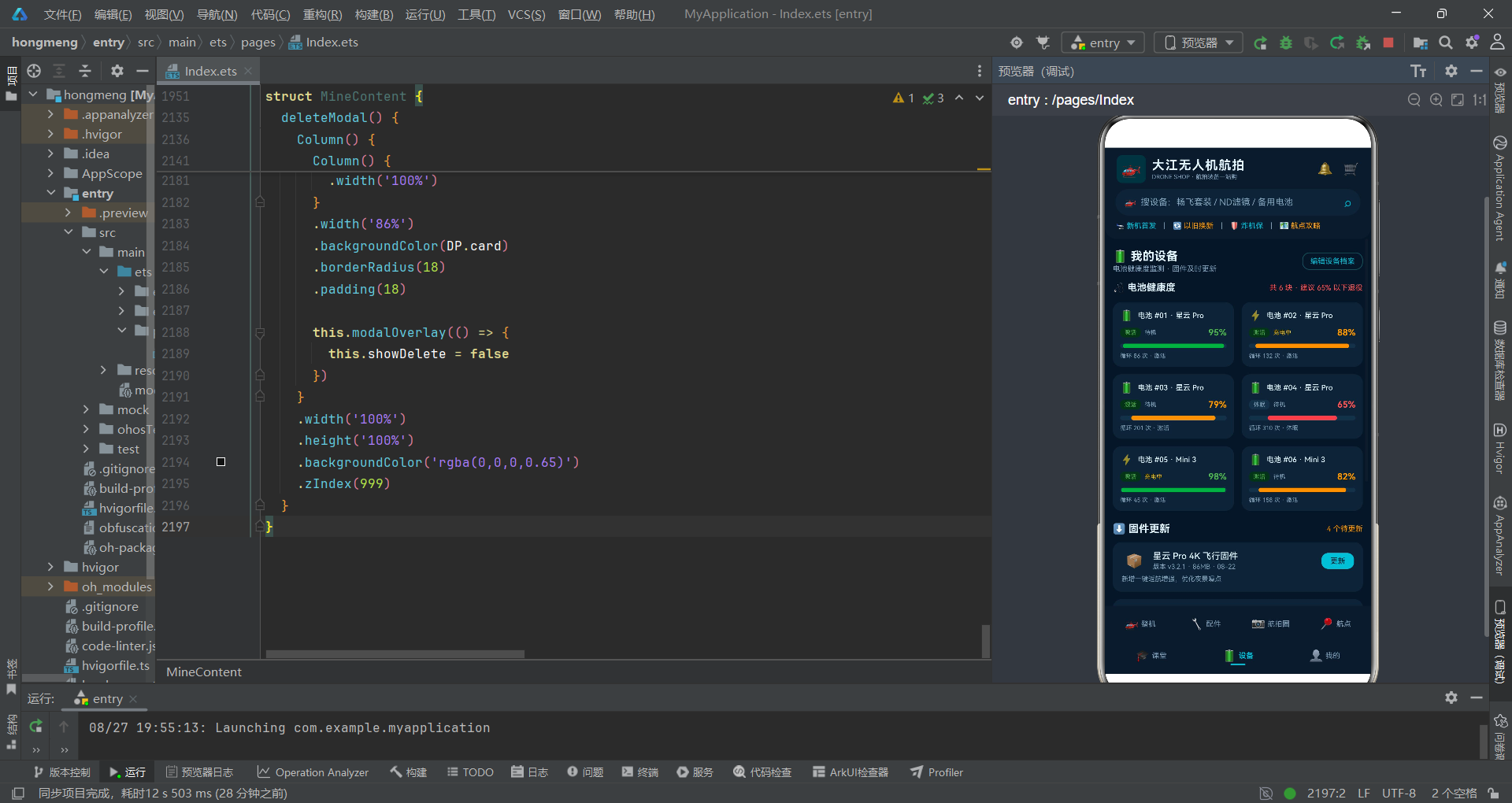
设备管理模块的核心是电池健康监测功能。电池卡片采用双列宫格布局,与配件页面的布局方式相同。
充电状态的闪电图标脉冲动画是一个细节亮点。当电池正在充电时(charging为true),闪电图标的透明度在1和0.15之间交替变化,配合600ms的EaseInOut曲线和无限次迭代,形成一种充电时的闪烁效果。
这个脉冲动画与航点模块的状态脉冲实现原理相同,但视觉效果不同。航点脉冲是放大+透明度变化(呼吸感),而充电脉冲只有透明度变化(闪烁感)。同样的动画技术,通过调整参数可以表达完全不同的语义。
boltPulse状态在组件的onAppear回调中被设为true,从而启动所有充电中电池的脉冲动画。由于动画设置了iterations: -1(无限循环),动画会一直持续运行。
                Row() {
                  Text(b.status).fontSize(8).fontColor(b.status === '激活' ? DP.green : DP.textSub)
                    .backgroundColor(b.status === '激活' ? DP.greenSoft : DP.chip).borderRadius(6)
                    .padding({ left: 6, right: 6, top: 2, bottom: 2 })
                  Text(b.charging ? '充电中' : '待机').fontSize(8).fontColor(b.charging ? DP.yellow : DP.textSub)
                    .margin({ left: 5 })
                  Column().layoutWeight(1)
                  Text(b.health + '%').fontSize(12).fontWeight(FontWeight.Bold).fontColor(healthColor(b.health))
                }
                .width('100%')
                .margin({ top: 8 })

                Stack() {
                  Column().width('100%').height(6).backgroundColor(DP.chip).borderRadius(3)
                  Column().width(specBarW(b.health, 100)).height(6)
                    .backgroundColor(healthColor(b.health)).borderRadius(3)
                }
                .width('100%')
                .height(6)
                .margin({ top: 8 })

                Text('循环 ' + b.cycles + ' 次 · ' + b.status).fontSize(8).fontColor(DP.textSub).width('100%').margin({ top: 6 })
电池卡片的信息结构包括:电池图标与名称、状态标签与充电状态与健康度百分比、健康度进度条、循环次数。
电池状态分为"激活"和"休眠"两种,激活状态显示绿色标签,休眠状态显示灰色标签。充电状态显示"充电中"(黄色)或"待机"(灰色)。
健康度百分比是卡片的核心信息,使用12px加粗字体,颜色根据健康度动态变化:90%以上绿色,75%-90%橙色,75%以下红色。这种颜色编码让用户可以一眼判断电池的健康状况。
健康度进度条高度为6px,比其他进度条稍粗,视觉权重更高。进度条颜色与百分比数字颜色一致,形成统一的视觉语言。
循环次数是电池寿命的另一个重要指标。一般来说,锂电池的循环寿命在300-500次左右,超过这个次数后电池容量会明显衰减。显示循环次数可以帮助用户预估电池的剩余寿命。
9.2 固件更新列表
          ForEach(FIRMWARES, (fw: FirmwareItem) => {
            Column() {
              Row() {
                Text('📦').fontSize(18).width(34).textAlign(TextAlign.Center)
                Column() {
                  Text(fw.name).fontSize(12).fontWeight(FontWeight.Medium).fontColor(DP.text)
                  Text('版本 ' + fw.version + ' · ' + fw.size + ' · ' + fw.updated).fontSize(9)
                    .fontColor(DP.textSub).margin({ top: 2 })
                }
                .alignItems(HorizontalAlign.Start)
                .layoutWeight(1)
                .margin({ left: 8 })
                Text('更新').fontSize(10).fontColor(DP.cardDeep).backgroundColor(DP.primary).borderRadius(9)
                  .padding({ left: 12, right: 12, top: 5, bottom: 5 })
              }
              .width('100%')
              Text(fw.note).fontSize(9).fontColor(DP.textSub).width('100%').margin({ top: 6 })
            }
            .width('94%')
            .backgroundColor(DP.card)
            .borderRadius(12)
            .padding(12)
            .margin({ top: 10 })
固件更新列表展示了待更新的固件信息。每个固件卡片包含:固件图标、固件名称与版本与大小与更新日期、更新按钮、更新说明。
固件名称使用12px中等字重,版本号、大小、更新日期等辅助信息使用9px次要文字色。信息层级清晰,用户可以快速识别固件的重要信息。
"更新"按钮使用填充式主色调设计,是卡片的行动召唤点。按钮位置在卡片右上角,符合用户的操作习惯。
更新说明(note)放在卡片底部,使用次要文字色,介绍本次固件更新的内容。对于无人机用户来说,固件更新通常包含性能优化和Bug修复,了解更新内容有助于判断是否需要立即更新。
十、个人中心模块
10.1 飞行统计柱状图
@Component
struct MineContent {
  @State works: WorkItem[] = WORKS
  @State showDelete: boolean = false
  @State delWork: WorkItem = WORKS[0]

  build() {
    Stack() {
      Scroll() {
        Column() {
          // ... 用户信息卡片 ...

          Column() {
            Text('📊 近半年飞行时长').fontSize(14).fontWeight(FontWeight.Bold).fontColor(DP.text).width('100%')
            Text('累计 ' + monthTotal(MONTH_FLIGHT) + ' 小时 · 8 月飞得最勤').fontSize(10)
              .fontColor(DP.textSub).width('100%').margin({ top: 2 })

            Row() {
              ForEach(MONTH_FLIGHT, (m: MonthFlight) => {
                Column() {
                  Column().width(16).height(barH(m.hours))
                    .backgroundColor(barColor(m.hours)).borderRadius(4)
                  Text(m.month).fontSize(9).fontColor(DP.textSub).margin({ top: 4 })
                }
                .layoutWeight(1)
                .justifyContent(FlexAlign.End)
                .height(92)
                .alignItems(HorizontalAlign.Center)
              }, (m: MonthFlight) => m.month)
            }
            .width('100%')
            .margin({ top: 10 })
          }
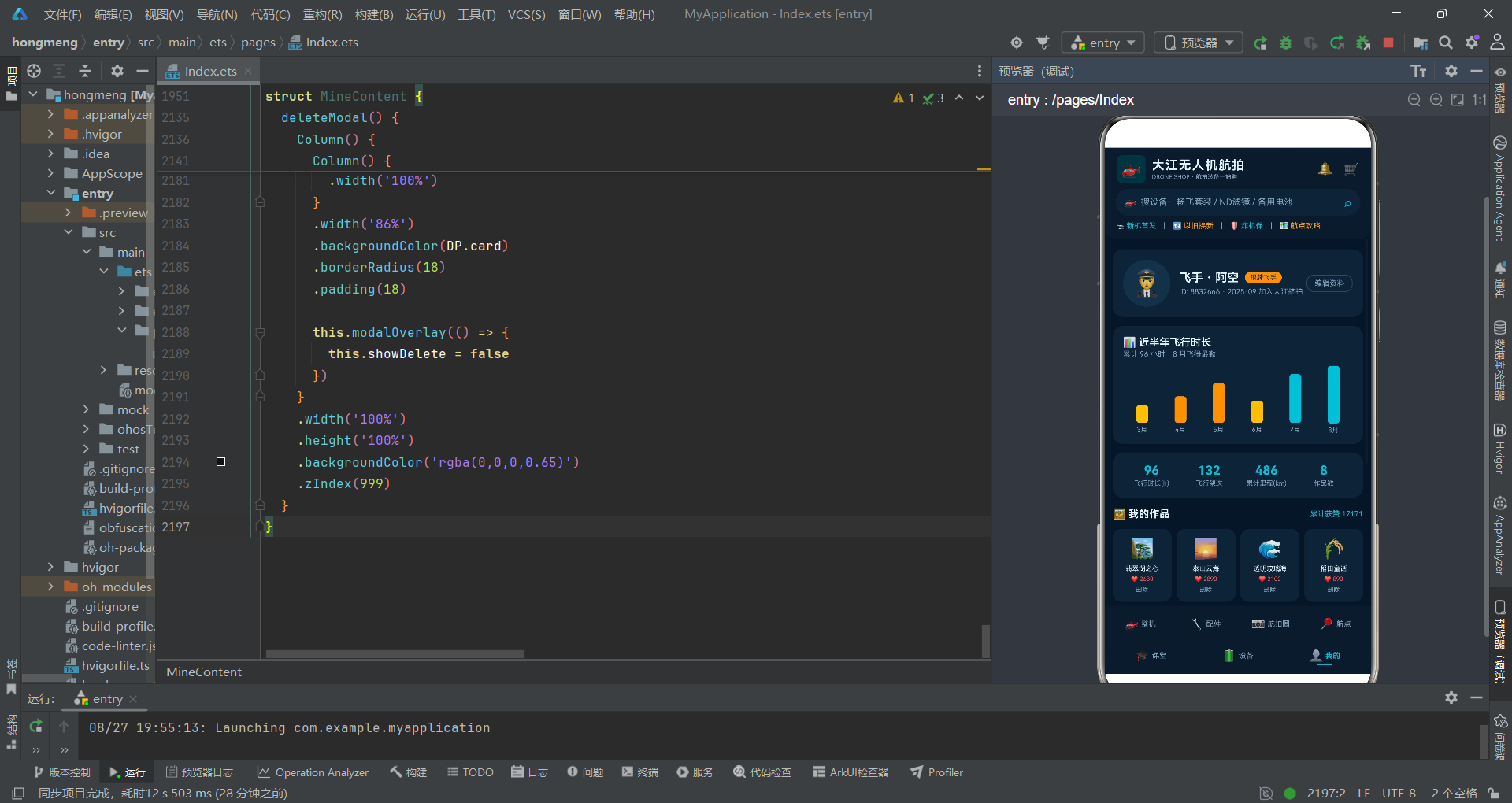
个人中心的飞行统计区域包含一个自制的柱状图,展示近半年的飞行时长数据。柱状图完全使用基础组件(Column、Row、Text)构建,没有依赖任何图表库,体现了声明式UI的灵活性。
每个柱子由一个Column组件表示,宽度固定为16px,高度通过barH函数计算(飞行小时数 × 3)。柱子颜色通过barColor函数动态决定:20小时以上青色,12-20小时橙色,12小时以下黄色。
柱状图的容器Row高度固定为92px,每个子Column使用justifyContent(FlexAlign.End)从底部开始排列,这样柱子就会从底部向上"生长",形成标准的柱状图效果。
每个柱子下方显示月份标签,使用9px次要文字色。月份与柱子水平居中对齐,形成完整的坐标轴效果。
monthTotal函数计算累计飞行时长,显示在副标题中。同时还显示了"8月飞得最勤"的智能提示,增加了数据的解读性。
用基础组件自定义图表虽然不如专业图表库功能丰富,但对于简单的数据可视化场景已经足够使用。这种方式的优势在于完全可控、无需额外依赖、与应用风格高度统一。对于鸿蒙开发来说,掌握基础组件的组合技巧是非常重要的能力。
10.2 数据概览与作品宫格
          Row() {
            Column() {
              Text('96').fontSize(17).fontWeight(FontWeight.Bold).fontColor(DP.primary)
              Text('飞行时长(h)').fontSize(9).fontColor(DP.textSub).margin({ top: 2 })
            }
            .layoutWeight(1)
            Column() {
              Text('132').fontSize(17).fontWeight(FontWeight.Bold).fontColor(DP.primary)
              Text('飞行架次').fontSize(9).fontColor(DP.textSub).margin({ top: 2 })
            }
            .layoutWeight(1)
            Column() {
              Text('486').fontSize(17).fontWeight(FontWeight.Bold).fontColor(DP.primary)
              Text('累计里程(km)').fontSize(9).fontColor(DP.textSub).margin({ top: 2 })
            }
            .layoutWeight(1)
            Column() {
              Text('' + this.works.length).fontSize(17).fontWeight(FontWeight.Bold).fontColor(DP.primary)
              Text('作品数').fontSize(9).fontColor(DP.textSub).margin({ top: 2 })
            }
            .layoutWeight(1)
          }
数据概览区域使用四列等分布局,展示四个核心数据指标:飞行时长、飞行架次、累计里程、作品数。每个指标包含大号数字(17px加粗主色调)和小号标签文字(9px次要文字色)。
四个数据项使用.layoutWeight(1)平均分配宽度,不管屏幕宽度如何变化,总能保持四列等分布局。这种弹性布局方式确保了在不同尺寸设备上都有良好的显示效果。
          Flex({ wrap: FlexWrap.Wrap, justifyContent: FlexAlign.SpaceBetween }) {
            ForEach(this.works, (w: WorkItem) => {
              Column() {
                Text(w.icon).fontSize(26)
                Text(w.name).fontSize(9).fontColor(DP.text).maxLines(1)
                  .textOverflow({ overflow: TextOverflow.Ellipsis }).margin({ top: 6 })
                Text('❤️ ' + w.likes).fontSize(8).fontColor(DP.warn).margin({ top: 4 })
                Text('删除').fontSize(8).fontColor(DP.textSub).margin({ top: 5 })
                  .onClick(() => {
                    this.delWork = w
                    this.showDelete = true
                  })
              }
              .width('23.5%')
              .backgroundColor(DP.card)
              .borderRadius(12)
              .padding({ top: 12, bottom: 12 })
              .margin({ top: 10 })
              .alignItems(HorizontalAlign.Center)
            }, (w: WorkItem) => w.id.toString())
          }
作品宫格使用四列布局,每个作品卡片宽度为23.5%,四张卡片加起来是94%,剩余6%由SpaceBetween分配为间距。
每个作品卡片包含:作品图标、作品名称、获赞数、删除按钮。卡片内容水平居中对齐,整体风格简洁清爽。
删除按钮是一个重要的交互入口。点击删除按钮后,会先将当前作品赋值给delWork状态变量,然后打开删除确认弹窗。这种"先记录目标、再显示弹窗"的模式是处理列表项操作的常用技巧。
10.3 证书列表
          Column() {
            ForEach(CERTS, (ct: CertItem) => {
              Column() {
                Row() {
                  Text('📜').fontSize(18).width(32).textAlign(TextAlign.Center)
                  Column() {
                    Text(ct.name).fontSize(12).fontWeight(FontWeight.Medium).fontColor(DP.text)
                    Text(ct.org + ' · ' + ct.level).fontSize(9).fontColor(DP.textSub).margin({ top: 2 })
                  }
                  .alignItems(HorizontalAlign.Start)
                  .layoutWeight(1)
                  .margin({ left: 8 })
                  Text(ct.date).fontSize(9).fontColor(DP.primary)
                }
                .width('100%')
                .padding({ left: 12, right: 12, top: 12, bottom: 12 })
                Divider()
                  .color('#2E4A66')
              }
              .width('100%')
            }, (ct: CertItem) => ct.id.toString())
          }
证书列表展示用户获得的飞行资质证书。每个证书项包含:证书图标、证书名称、颁发机构与等级、获取日期。
证书列表使用分割线(Divider)分隔各条目,分割线颜色为#2E4A66,这是一种比卡片背景稍亮的蓝色,在深色主题中既能起到分隔作用,又不会过于突兀。
证书信息中,颁发机构与等级合并显示在第二行,使用次要文字色。获取日期右对齐,使用主色调青色,突出时间信息的重要性。
十一、弹窗模式与交互设计
11.1 弹窗架构模式
  @Builder
  modalOverlay(onClose: () => void) {
    Column()
      .layoutWeight(1)
      .width('100%')
      .onClick(() => {
        onClose()
      })
  }
应用中的所有弹窗都采用了相似的架构模式:Stack堆叠 + 半透明遮罩 + 条件渲染。modalOverlay构建器封装了遮罩层的点击关闭逻辑,是一个可复用的UI片段。
遮罩层本质上是一个全屏的透明Column组件,它占据了弹窗中除内容区域外的所有空间(通过layoutWeight(1)实现)。点击遮罩层会触发传入的关闭回调函数,实现"点击空白处关闭弹窗"的交互体验。
这种模式的优势在于:遮罩层与弹窗内容在同一个Column中,Column的方向是垂直的,遮罩层在上(占据大部分空间),内容在下。这种"上虚下实"的结构正好对应了底部弹窗的视觉效果。
鸿蒙ArkUI中实现弹窗的方式有多种:可以使用系统提供的bindSheet、bindMenu等API,也可以使用Stack+条件渲染的自定义方式。本应用选择了自定义实现,主要原因是可以完全控制弹窗的样式、动画和交互细节,实现与整体设计风格高度统一的弹窗体验。
11.2 购买弹窗详解
  @Builder
  buyModal() {
    Column() {
      this.modalOverlay(() => {
        this.showBuy = false
      })

      Column() {
        Row() {
          Text('🛒 购买无人机').fontSize(16).fontWeight(FontWeight.Bold).fontColor(DP.text)
          Column().layoutWeight(1)
          Text('✕').fontSize(16).fontColor(DP.textSub).onClick(() => {
            this.showBuy = false
          })
        }
        .width('100%')
        .padding({ bottom: 12 })
购买弹窗是一个典型的底部弹窗(Bottom Sheet)。整体结构为:遮罩层在上,内容区域在下。内容区域使用DP.card作为背景色,顶部左右圆角20px,底部与屏幕底部齐平。
弹窗顶部是标题栏,左侧是弹窗标题(带购物车图标),右侧是关闭按钮(✕符号)。标题栏底部有12px的内边距,与下方内容形成分隔。
        Text('选择版本').fontSize(11).fontColor(DP.textSub).width('100%').margin({ top: 12 })

        Row() {
          ForEach(DRONE_VERSIONS, (v: string, idx: number) => {
            Text(v).fontSize(10).fontColor(this.buyVersion === idx ? DP.cardDeep : DP.text)
              .backgroundColor(this.buyVersion === idx ? DP.primary : DP.chip).borderRadius(9)
              .padding({ left: 12, right: 12, top: 5, bottom: 5 }).margin({ right: 6 })
              .onClick(() => {
                this.buyVersion = idx
              })
          }, (v: string) => v)
        }
        .width('100%')
        .margin({ top: 6 })
选项组是弹窗中的常见组件模式。每个选项是一个可点击的Text标签,选中状态使用填充式主色调背景+深色文字,未选中状态使用chip色背景+浅色文字。
选项组的交互逻辑非常简洁:点击某个选项时,将对应的索引赋值给状态变量,由于状态变化触发UI重绘,所有选项的选中状态会自动更新。
购买弹窗中有多个选项组:版本选择、颜色选择、服务计划选择。它们都遵循相同的交互模式,只是数据来源和绑定的状态变量不同。
        Row() {
          Text('电池数量').fontSize(12).fontColor(DP.text)
          Column().layoutWeight(1)
          Text('−').fontSize(17).fontColor(DP.textSub).backgroundColor(DP.chip).borderRadius(8)
            .width(30).height(30).textAlign(TextAlign.Center)
            .onClick(() => {
              if (this.buyCount > 1) {
                this.buyCount -= 1
              }
            })
          Text(this.buyCount + ' 块').fontSize(13).fontColor(DP.text).margin({ left: 10, right: 10 })
          Text('+').fontSize(17).fontColor(DP.cardDeep).backgroundColor(DP.primary).borderRadius(8)
            .width(30).height(30).textAlign(TextAlign.Center)
            .onClick(() => {
              if (this.buyCount < 6) {
                this.buyCount += 1
              }
            })
        }
数量选择器是电商弹窗中的经典组件。它由减号按钮、数量显示、加号按钮三部分组成。减号按钮使用灰色背景(禁用感),加号按钮使用主色调填充(强调感)。
数量选择设置了上下限:最少1块,最多6块。当数量达到边界时,对应的按钮点击无效。这种边界检查确保了数据的合理性,也避免了出现负数或过大数量的情况。
        Row() {
          Text('合计').fontSize(12).fontColor(DP.textSub)
          Column().layoutWeight(1)
          Text('¥' + buyTotal(this.curDrone.price, this.buyVersion, this.buyService, this.buyCount))
            .fontSize(19).fontWeight(FontWeight.Bold).fontColor(DP.primary)
        }
        .width('100%')
        .margin({ top: 12 })

        Text('立即购买').fontSize(15).fontColor(DP.cardDeep).backgroundColor(DP.primary).borderRadius(20)
          .padding({ left: 40, right: 40, top: 10, bottom: 10 }).margin({ top: 14 })
          .onClick(() => {
            this.showBuy = false
          })
价格汇总区域是购买弹窗的决策区域。合计金额使用19px加粗主色调,是弹窗中最大的文字,确保用户能清晰看到最终价格。
价格计算通过buyTotal函数完成,该函数接收基础价格、版本索引、服务计划索引、数量四个参数,计算最终总价。版本和服务计划都会影响单价,数量则是倍增因子。
"立即购买"按钮使用填充式主色调设计,圆角20px(胶囊形状),左右内边距40px,是弹窗中最醒目的行动按钮。
十二、各模块技术要点对比总结
12.1 模块架构对比
| 模块 | 布局方式 | 核心组件 | 动画效果 | 弹窗类型 | 状态数量 |
|---|---|---|---|---|---|
| 整机商城 | 垂直列表 + 英雄卡 | Column/Row/Stack | 按压缩放动画 | 底部购买弹窗 | 8个 |
| 配件商城 | 双列宫格 | Flex( Wrap ) | 无 | 无 | 0个 |
| 航拍圈 | 信息流列表 | Column/Row/Stack | 点赞缩放动画 | 底部发布弹窗 | 6个 |
| 航点攻略 | 垂直列表 | Column/Row/Stack | 状态脉冲动画 | 居中报备弹窗 | 7个 |
| 航拍课堂 | 横向卡片列表 | Row/Column | 无 | 无 | 0个 |
| 设备管理 | 双列宫格 + 列表 | Flex/Column/Row | 充电脉冲动画 | 底部编辑弹窗 | 7个 |
| 个人中心 | 混合布局 | Column/Row/Flex | 无 | 居中删除确认弹窗 | 3个 |
12.2 组件技术要点
| 技术点 | 使用场景 | 关键属性/装饰器 | 作用 |
|---|---|---|---|
| @Component | 所有组件 | struct声明 | 标记为UI组件 |
| @Entry | 入口组件 | 根组件 | 标记为页面入口 |
| @State | 动态数据 | 变量声明 | 响应式状态管理 |
| @Builder | 可复用UI片段 | 函数声明 | 封装可复用构建逻辑 |
| Column | 垂直布局 | 布局容器 | 垂直排列子组件 |
| Row | 水平布局 | 布局容器 | 水平排列子组件 |
| Stack | 堆叠布局 | 布局容器 | 层叠排列子组件 |
| Flex | 弹性布局 | wrap/justifyContent | 灵活的流式布局 |
| ForEach | 动态列表 | 数组+key生成函数 | 循环渲染列表项 |
| Scroll | 滚动容器 | scrollable | 可滚动内容区域 |
| animation | 属性动画 | duration/curve/iterations | 属性变化过渡动画 |
| layoutWeight | 弹性分配 | 数值 | 按权重分配空间 |
| FlexAlign | 对齐方式 | Center/SpaceBetween等 | 控制子组件对齐 |
12.3 颜色系统对照表
| 颜色名称 | 色值 | 用途 |
|---|---|---|
| bg | #0A1628 | 页面背景 |
| primary | #00BCD4 | 主色调·飞行青 |
| primarySoft | #0E3340 | 主色调浅色背景 |
| secondary | #FF9800 | 辅助色·信号橙 |
| secondarySoft | #3A2A12 | 辅助色浅色背景 |
| card | #122236 | 卡片背景 |
| cardDeep | #0E1B2C | 深色卡片/头部背景 |
| text | #E1F5FE | 主文字色 |
| textSub | #7FA0B8 | 次要文字色 |
| chip | #1B3148 | 标签/输入框背景 |
| warn | #FF5252 | 警告色·红 |
| green | #4CAF50 | 成功色·绿 |
| yellow | #FFC107 | 提示色·黄 |
十三、深度总结
本文从架构设计、数据模型、组件实现、交互动画等多个维度,对这款鸿蒙无人机航拍商城应用进行了全方位的技术解析。整款应用代码结构清晰、设计规范统一、交互细节丰富,是学习鸿蒙ArkUI声明式开发的优秀范例。
从架构层面来看,应用采用了经典的Tab导航+组件化架构。七个功能模块各自独立为一个@Component组件,每个组件内部封装了自己的状态管理与UI构建逻辑。组件之间通过接口定义的数据结构进行通信,确保了模块间的低耦合与高内聚。这种架构模式既便于团队协作开发,也利于后续的功能迭代与维护。
从数据模型设计来看,应用定义了一整套完整的接口体系,从产品数据到用户数据,从设备数据到内容数据,每个数据实体都有明确的字段定义与类型约束。TypeScript类型系统的引入使得代码在编译阶段就能发现类型错误,大大提升了代码的健壮性。同时,集中式的调色板设计确保了视觉风格的一致性,也为后续的主题切换预留了扩展空间。
从布局技术来看,应用综合运用了Column、Row、Stack、Flex等多种布局容器,根据不同场景选择最合适的布局方式。垂直列表使用Column+Scroll,双列宫格使用Flex+Wrap,堆叠效果使用Stack,弹性空间分配使用layoutWeight。各种布局技术的灵活运用,构建出了丰富多样的界面形态。
从状态管理来看,应用大量使用@State装饰器实现响应式数据绑定。Tab切换、列表数据、弹窗显隐、表单输入、动画状态等所有动态数据都由@State管理,数据变化自动驱动UI更新。这种声明式的状态管理模式,使得开发者无需手动操作DOM,只需要关注数据逻辑,大幅提升了开发效率。
从动画效果来看,应用巧妙地运用了属性动画实现了多种微交互动画。英雄卡片的按压缩放手感、点赞按钮的心形弹跳、航点状态的呼吸脉冲、充电图标的闪烁效果,这些动画虽然实现简单,但大大提升了用户体验的精致度。所有动画都遵循了统一的设计语言:时长控制在200-800ms之间,缓动曲线多采用EaseOut或EaseInOut,确保动画自然流畅不突兀。
安装DevEco Studio程序

选择目标安装目录:

设置环境变量,但是需要重启一下:

新建一个空白模板:

设置API为24的模板项目:

初始化项目,自动下载相关依赖:

完整代码:
// ============================================================
// 主题:科技深蓝 #0A1628 × 飞行青 #00BCD4 × 信号橙 #FF9800
// 7 Tab 双排:整机 / 配件 / 航拍圈 / 航点 / 课堂 / 设备 / 我的
// ============================================================
// ---------- 接口定义 ----------
interface DronePalette {
bg: string
primary: string
primarySoft: string
secondary: string
secondarySoft: string
card: string
cardDeep: string
text: string
textSub: string
chip: string
warn: string
warnSoft: string
green: string
greenSoft: string
yellow: string
yellowSoft: string
white: string
}
interface DroneItem {
id: number
name: string
icon: string
flightTime: number
transRange: number
camera: string
weight: number
price: number
originPrice: number
badge: string
level: string
hot: boolean
desc: string
rating: number
}
interface AccessoryItem {
id: number
name: string
icon: string
compat: string
spec: string
price: number
originPrice: number
stock: string
hot: boolean
}
interface FeedItem {
id: number
author: string
avatar: string
location: string
title: string
height: number
focal: number
iso: number
shutter: string
drone: string
likes: number
saves: number
liked: boolean
}
interface SpotItem {
id: number
name: string
region: string
scenery: string
status: string
season: string
popularity: number
score: number
desc: string
}
interface CourseItem {
id: number
name: string
icon: string
teacher: string
lessons: number
duration: string
level: string
price: number
students: number
rating: number
}
interface BatteryItem {
id: number
name: string
cycles: number
health: number
status: string
charging: boolean
}
interface FirmwareItem {
id: number
name: string
version: string
size: string
note: string
updated: string
}
interface MonthFlight {
month: string
hours: number
}
interface WorkItem {
id: number
name: string
icon: string
likes: number
date: string
}
interface CertItem {
id: number
name: string
org: string
level: string
date: string
}
// ---------- 调色板(深空蓝 × 飞行青 × 信号橙) ----------
const DP: DronePalette = {
bg: '#0A1628',
primary: '#00BCD4',
primarySoft: '#0E3340',
secondary: '#FF9800',
secondarySoft: '#3A2A12',
card: '#122236',
cardDeep: '#0E1B2C',
text: '#E1F5FE',
textSub: '#7FA0B8',
chip: '#1B3148',
warn: '#FF5252',
warnSoft: '#3A1A1E',
green: '#4CAF50',
greenSoft: '#14331A',
yellow: '#FFC107',
yellowSoft: '#332A12',
white: '#FFFFFF'
}
// ---------- 纯函数 ----------
function specBarW(v: number, max: number): string {
return Math.round(v / max * 100) + '%'
}
function specBarColor(v: number, max: number): string {
const p: number = v / max
if (p >= 0.75) {
return DP.primary
}
if (p >= 0.45) {
return DP.secondary
}
return DP.yellow
}
function gradeColor(level: string): string {
if (level === '新手') {
return DP.yellow
}
if (level === '进阶') {
return DP.secondary
}
return DP.primary
}
function gradeBg(level: string): string {
if (level === '新手') {
return DP.yellowSoft
}
if (level === '进阶') {
return DP.secondarySoft
}
return DP.primarySoft
}
function stockColor(stock: string): string {
if (stock === '有货') {
return DP.green
}
if (stock === '限购') {
return DP.secondary
}
return DP.warn
}
function zoneStatusColor(status: string): string {
if (status === '适飞') {
return DP.green
}
if (status === '限高120m') {
return DP.yellow
}
return DP.warn
}
function zoneStatusBg(status: string): string {
if (status === '适飞') {
return DP.greenSoft
}
if (status === '限高120m') {
return DP.yellowSoft
}
return DP.warnSoft
}
function healthColor(h: number): string {
if (h >= 90) {
return DP.green
}
if (h >= 75) {
return DP.secondary
}
return DP.warn
}
function levelText(price: number): string {
if (price <= 0) {
return '免费'
}
return '¥' + price
}
function levelColor(price: number): string {
if (price <= 0) {
return DP.green
}
return DP.primary
}
function barH(h: number): number {
return h * 3
}
function barColor(h: number): string {
if (h >= 20) {
return DP.primary
}
if (h >= 12) {
return DP.secondary
}
return DP.yellow
}
function monthTotal(list: MonthFlight[]): number {
let t: number = 0
list.forEach((m: MonthFlight) => {
t += m.hours
})
return t
}
function workTotal(list: WorkItem[]): number {
let t: number = 0
list.forEach((w: WorkItem) => {
t += w.likes
})
return t
}
function versionPrice(base: number, v: number): number {
if (v === 1) {
return base + 400
}
if (v === 2) {
return base + 1200
}
return base
}
function buyTotal(base: number, v: number, service: number, count: number): number {
const unit: number = versionPrice(base, v) + (service === 1 ? 699 : 0)
return Math.round(unit * count)
}
function withFeedLiked(list: FeedItem[], id: number): FeedItem[] {
return list.map((f: FeedItem) => {
if (f.id !== id) {
return f
}
const nf: FeedItem = {
id: f.id, author: f.author, avatar: f.avatar, location: f.location, title: f.title,
height: f.height, focal: f.focal, iso: f.iso, shutter: f.shutter, drone: f.drone,
likes: f.likes + (f.liked ? -1 : 1), saves: f.saves, liked: !f.liked
}
return nf
})
}
function withoutWork(list: WorkItem[], id: number): WorkItem[] {
return list.filter((w: WorkItem) => w.id !== id)
}
function avgScore(list: SpotItem[]): string {
let t: number = 0
list.forEach((s: SpotItem) => {
t += s.score
})
return (Math.round(t / list.length * 10) / 10).toFixed(1)
}
// ---------- 数据:整机 ----------
const DRONES: DroneItem[] = [
{ id: 1, name: '苍穹 3 Pro', icon: '🚁', flightTime: 43, transRange: 15, camera: '4/3 CMOS · 哈苏', weight: 958, price: 12888, originPrice: 14999, badge: '专业旗舰', level: '旗舰', hot: true, desc: '哈苏影像旗舰,一寸底航拍天花板,双档可调光变焦', rating: 4.9 },
{ id: 2, name: '星云 Pro 4K', icon: '🛰️', flightTime: 46, transRange: 15, camera: '4K/60FP111s · 1英寸', weight: 895, price: 7999, originPrice: 9499, badge: '全能航拍', level: '大师', hot: true, desc: '全向避障 + 十公里图传,旅拍商用两相宜', rating: 4.8 },
{ id: 3, name: '星云 Mini 3', icon: '🛸', flightTime: 38, transRange: 10, camera: '4K/30FP111s · 1/1.3英寸', weight: 249, price: 2988, originPrice: 3999, badge: '轻便入门', level: '新手', hot: true, desc: '249g 随身畅飞,竖拍直出,新手入门首选', rating: 4.7 },
{ id: 4, name: '天穹 Air 2S', icon: '🪁', flightTime: 34, transRange: 12, camera: '5.4K · 1英寸', weight: 595, price: 6499, originPrice: 7499, badge: '进阶航拍', level: '进阶', hot: true, desc: '1 英寸大底 + 智能跟随,进阶创作者性价比之选', rating: 4.7 },
{ id: 5, name: '极光 4S', icon: '✨', flightTime: 41, transRange: 14, camera: '4K/120FP111s · 1/1.5英寸', weight: 720, price: 8988, originPrice: 9999, badge: '高速连拍', level: '大师', hot: true, desc: '120FP111s 高帧率运动镜头,光轨夜景一键成片', rating: 4.6 },
{ id: 6, name: '猎鹰 F1', icon: '🦅', flightTime: 28, transRange: 8, camera: '1080p · 1/2.3英寸', weight: 430, price: 1299, originPrice: 1999, badge: '新手入门', level: '新手', hot: false, desc: '千元级练手机,抗风 5 级,炸机不心疼', rating: 4.4 },
{ id: 7, name: '青鸟 Lite', icon: '🕊️', flightTime: 32, transRange: 9, camera: '4K/30FP111s · 1/1.7英寸', weight: 210, price: 1999, originPrice: 2699, badge: '轻便入门', level: '新手', hot: true, desc: '轻巧续航长,父母也能轻松上手', rating: 4.6 },
{ id: 8, name: '蜂鸟 Nano', icon: '🐝', flightTime: 18, transRange: 5, camera: '2.7K · 1/2.6英寸', weight: 89, price: 699, originPrice: 999, badge: '口袋随行', level: '新手', hot: false, desc: '掌心大小口袋机,室内户外随手飞', rating: 4.2 },
{ id: 9, name: '远航 S2 行业版', icon: '📡', flightTime: 55, transRange: 20, camera: '红外 + 可见光', weight: 1200, price: 26999, originPrice: 29999, badge: '行业定制', level: '旗舰', hot: false, desc: '红外热成像 + 探照灯喊话,应急救援好帮手', rating: 4.8 },
{ id: 10, name: '山鹰 VTOL 固定翼', icon: '✈️', flightTime: 120, transRange: 30, camera: '4K 变焦', weight: 3500, price: 45999, originPrice: 49999, badge: '专业固定翼', level: '旗舰', hot: false, desc: '垂直起降固定翼,测绘巡检长航时作业', rating: 4.7 }
]
// ---------- 数据:配件 ----------
const ACCESSORIES: AccessoryItem[] = [
{ id: 1, name: '智能飞行电池 加强版', icon: '🔋', compat: '星云 Mini 3', spec: '3850mAh · 34分钟', price: 699, originPrice: 799, stock: '有货', hot: true },
{ id: 2, name: '通用快充充电器', icon: '⚡', compat: '全系适配', spec: '65W 双口', price: 199, originPrice: 259, stock: '有货', hot: true },
{ id: 3, name: '快拆螺旋桨(4对)', icon: '🌀', compat: '星云 Pro 4K', spec: '碳纤维 · 静音', price: 89, originPrice: 129, stock: '有货', hot: false },
{ id: 4, name: 'ND8-ND64 滤镜套装', icon: '🎞️', compat: '天穹 Air 2S', spec: '减光三档', price: 159, originPrice: 219, stock: '有货', hot: true },
{ id: 5, name: '便携收纳箱', icon: '🧳', compat: '全系通用', spec: 'EVA 防摔', price: 129, originPrice: 179, stock: '有货', hot: false },
{ id: 6, name: '三轴手持云台', icon: '🎥', compat: '星云 Mini 3', spec: '增稳防抖', price: 899, originPrice: 1199, stock: '限购', hot: true },
{ id: 7, name: '车载充电线', icon: '🚗', compat: '全系适配', spec: '点烟器取电', price: 49, originPrice: 79, stock: '有货', hot: false },
{ id: 8, name: '机身保护罩', icon: '🛡️', compat: '星云 Pro 4K', spec: '硅胶防撞', price: 59, originPrice: 89, stock: '有货', hot: false },
{ id: 9, name: '大容量备用电池', icon: '🔋', compat: '天穹 Air 2S', spec: '5000mAh · 38分钟', price: 899, originPrice: 1099, stock: '有货', hot: true },
{ id: 10, name: 'ND32-PL 偏振滤镜', icon: '🎞️', compat: '极光 4S', spec: '消除反光', price: 179, originPrice: 239, stock: '缺货', hot: false },
{ id: 11, name: '4G 图传增强模块', icon: '📡', compat: '星云 Pro 4K', spec: '超远距离增强', price: 499, originPrice: 699, stock: '有货', hot: true },
{ id: 12, name: '双电池充电管家', icon: '🔌', compat: '全系适配', spec: '双路快充', price: 259, originPrice: 329, stock: '有货', hot: false },
{ id: 13, name: '防水双机背包', icon: '🎒', compat: '全系通用', spec: '可收纳双机', price: 329, originPrice: 459, stock: '有货', hot: false },
{ id: 14, name: '高亮监视屏', icon: '🖥️', compat: '全系适配', spec: '2000nit', price: 1399, originPrice: 1799, stock: '限购', hot: false },
{ id: 15, name: '降噪桨叶套装', icon: '🌀', compat: '极光 4S', spec: '低噪桨', price: 119, originPrice: 159, stock: '有货', hot: false },
{ id: 16, name: '遥控器挂带', icon: '🎗️', compat: '全系适配', spec: '加宽减压', price: 39, originPrice: 59, stock: '有货', hot: false },
{ id: 17, name: '头戴式 FP111V 眼镜', icon: '🥽', compat: '猎鹰 F1', spec: '1080p 图传', price: 2299, originPrice: 2799, stock: '缺货', hot: false },
{ id: 18, name: '镜头清洁套装', icon: '🧹', compat: '全系通用', spec: '镜头除尘', price: 29, originPrice: 49, stock: '有货', hot: false }
]
// ---------- 数据:航拍圈 ----------
const FEEDS: FeedItem[] = [
{ id: 1, author: '海风漫游', avatar: '🦅', location: '青岛 · 石老人', title: '日出航拍:云海之上的第一缕光', height: 120, focal: 24, iso: 100, shutter: '1/500', drone: '星云 Pro 4K', likes: 1240, saves: 86, liked: true },
{ id: 2, author: '飞越山城', avatar: '🏔️', location: '重庆 · 洪崖洞', title: '洪崖洞夜景流光,赛博山城的正确打开方式', height: 90, focal: 28, iso: 400, shutter: '1/30', drone: '苍穹 3 Pro', likes: 2386, saves: 152, liked: false },
{ id: 3, author: '麦田守望者', avatar: '🌾', location: '大理 · 喜洲古镇', title: '稻田里的白色童话,喜洲的夏天', height: 60, focal: 35, iso: 100, shutter: '1/640', drone: '星云 Mini 3', likes: 890, saves: 45, liked: true },
{ id: 4, author: '海岸线', avatar: '🌊', location: '威海 · 那香海', title: '风暴前夕的海岸,压低的云层太震撼', height: 150, focal: 16, iso: 200, shutter: '1/1000', drone: '天穹 Air 2S', likes: 1765, saves: 120, liked: false },
{ id: 5, author: '云端旅人', avatar: '☁️', location: '川西 · 四姑娘山', title: '雪山之巅与云海同框,此生必飞', height: 400, focal: 24, iso: 100, shutter: '1/800', drone: '苍穹 3 Pro', likes: 3120, saves: 201, liked: true },
{ id: 6, author: '城市猎人', avatar: '🌆', location: '上海 · 陆家嘴', title: '三件套同框的黄金时刻', height: 120, focal: 24, iso: 200, shutter: '1/250', drone: '极光 4S', likes: 1560, saves: 98, liked: false },
{ id: 7, author: '风与自由', avatar: '🍃', location: '青海 · 翡翠湖', title: '翡翠之眼的俯瞰,盐湖的果冻色', height: 200, focal: 35, iso: 100, shutter: '1/500', drone: '星云 Pro 4K', likes: 2680, saves: 175, liked: true },
{ id: 8, author: '峡谷回声', avatar: '🏜️', location: '新疆 · 独库公路', title: '独库公路九曲十八弯,航拍才懂的天路', height: 300, focal: 50, iso: 200, shutter: '1/400', drone: '猎鹰 F1', likes: 980, saves: 67, liked: false },
{ id: 9, author: '暮色行者', avatar: '🌇', location: '杭州 · 西湖', title: '断桥残雪的晚霞,湖面泛着碎金', height: 80, focal: 24, iso: 100, shutter: '1/60', drone: '星云 Mini 3', likes: 1340, saves: 89, liked: false },
{ id: 10, author: '蓝色星球', avatar: '🐋', location: '三亚 · 蜈支洲岛', title: '透明玻璃海,清澈见底的珊瑚花园', height: 100, focal: 28, iso: 100, shutter: '1/1000', drone: '青鸟 Lite', likes: 2100, saves: 143, liked: true },
{ id: 11, author: '山野摄影师', avatar: '🦌', location: '呼伦贝尔 · 草原', title: '草原上的牧群线条,风吹草低见牛羊', height: 200, focal: 70, iso: 100, shutter: '1/500', drone: '天穹 Air 2S', likes: 1120, saves: 76, liked: false },
{ id: 12, author: '黎明之光', avatar: '🌅', location: '泰山 · 日观峰', title: '泰山云海日出,金光洒满十八盘', height: 300, focal: 24, iso: 100, shutter: '1/320', drone: '苍穹 3 Pro', likes: 2890, saves: 188, liked: true }
]
// ---------- 数据:航点 ----------
const SPOTS: SpotItem[] = [
{ id: 1, name: '石老人日出观景点', region: '青岛', scenery: '日出观景点 · 海岸', status: '适飞', season: '5-10月', popularity: 92, score: 4.9, desc: '海上石老人剪影 + 金色日出,构图教科书' },
{ id: 2, name: '洪崖洞滨江', region: '重庆', scenery: '城市 · 夜景', status: '限高120m', season: '全年', popularity: 96, score: 4.8, desc: '吊脚楼夜景流光,注意江面风速' },
{ id: 3, name: '喜洲稻田', region: '大理', scenery: '田园 · 日出', status: '适飞', season: '7-10月', popularity: 85, score: 4.7, desc: '金色稻田矩阵,白族村落点缀其间' },
{ id: 4, name: '那香海海岸线', region: '威海', scenery: '海岸 · 湖泊', status: '适飞', season: '6-9月', popularity: 78, score: 4.6, desc: '风车海岸 + 浴场弧线,夏季傍晚最佳' },
{ id: 5, name: '四姑娘山观景台', region: '阿坝', scenery: '山地 · 雪峰', status: '限高120m', season: '10-5月', popularity: 88, score: 4.9, desc: '幺妹峰云海,高海拔注意电池低温' },
{ id: 6, name: '陆家嘴天际线', region: '上海', scenery: '城市 · 地标', status: '禁飞', season: '全年', popularity: 99, score: 4.8, desc: '核心区禁飞,请在沿江观景平台外拍摄' },
{ id: 7, name: '翡翠湖', region: '海西', scenery: '湖泊 · 盐湖', status: '适飞', season: '5-9月', popularity: 90, score: 4.9, desc: '蒂芙尼蓝盐湖,正午顺光最佳' },
{ id: 8, name: '独库公路观景台', region: '伊犁', scenery: '峡谷 · 公路', status: '适飞', season: '6-10月', popularity: 82, score: 4.7, desc: '九曲十八弯俯瞰,注意错峰避车流' },
{ id: 9, name: '西湖断桥', region: '杭州', scenery: '湖泊 · 城市', status: '限高120m', season: '全年', popularity: 93, score: 4.6, desc: '断桥残雪、平湖秋月,四季皆宜' },
{ id: 10, name: '蜈支洲岛', region: '三亚', scenery: '海岸 · 海岛', status: '适飞', season: '11-4月', popularity: 86, score: 4.8, desc: '环岛一周的透明玻璃海,注意海风盐雾' },
{ id: 11, name: '呼伦贝尔草原', region: '呼伦贝尔', scenery: '草原 · 山地', status: '适飞', season: '6-9月', popularity: 80, score: 4.7, desc: '牧群曲线与河流九曲,黄昏光影最佳' },
{ id: 12, name: '泰山日观峰', region: '泰安', scenery: '山地 · 日出', status: '限高120m', season: '全年', popularity: 91, score: 4.9, desc: '云海日出名场面,凌晨山风大需抗风' }
]
// ---------- 数据:课堂 ----------
const COURSES: CourseItem[] = [
{ id: 1, name: '新手起飞第一课', icon: '📘', teacher: '阿甘老师', lessons: 12, duration: '4小时', level: '入门', price: 0, students: 12800, rating: 4.9 },
{ id: 2, name: '航拍构图美学', icon: '🎨', teacher: '林一航', lessons: 20, duration: '6小时', level: '进阶', price: 199, students: 8600, rating: 4.8 },
{ id: 3, name: '云台运镜大师课', icon: '🎥', teacher: '老K飞手', lessons: 16, duration: '5小时', level: '进阶', price: 159, students: 7300, rating: 4.7 },
{ id: 4, name: '夜景航拍全攻略', icon: '🌃', teacher: '苏苏', lessons: 14, duration: '4.5小时', level: '大师', price: 299, students: 5400, rating: 4.9 },
{ id: 5, name: '城市航拍安全指南', icon: '🏙️', teacher: '安全官老王', lessons: 8, duration: '2.5小时', level: '入门', price: 0, students: 15200, rating: 4.8 },
{ id: 6, name: '穿越机 FP111V 入门', icon: '🚀', teacher: '飙哥', lessons: 24, duration: '8小时', level: '大师', price: 499, students: 3200, rating: 4.6 },
{ id: 7, name: '日出日落追光术', icon: '🌅', teacher: '阿晨', lessons: 10, duration: '3小时', level: '进阶', price: 129, students: 6800, rating: 4.7 },
{ id: 8, name: '航拍调色入门', icon: '🎛️', teacher: '剪影君', lessons: 15, duration: '5小时', level: '进阶', price: 149, students: 7900, rating: 4.8 },
{ id: 9, name: '行业测绘应用课', icon: '🗺️', teacher: '测绘老赵', lessons: 18, duration: '6.5小时', level: '大师', price: 699, students: 2100, rating: 4.5 },
{ id: 10, name: '雪景航拍技巧', icon: '❄️', teacher: '寒江', lessons: 11, duration: '3.5小时', level: '进阶', price: 99, students: 4500, rating: 4.6 }
]
// ---------- 数据:设备 ----------
const BATTERIES: BatteryItem[] = [
{ id: 1, name: '电池 #01 · 星云 Pro', cycles: 86, health: 95, status: '激活', charging: false },
{ id: 2, name: '电池 #02 · 星云 Pro', cycles: 132, health: 88, status: '激活', charging: true },
{ id: 3, name: '电池 #03 · 星云 Pro', cycles: 201, health: 79, status: '激活', charging: false },
{ id: 4, name: '电池 #04 · 星云 Pro', cycles: 310, health: 65, status: '休眠', charging: false },
{ id: 5, name: '电池 #05 · Mini 3', cycles: 45, health: 98, status: '激活', charging: true },
{ id: 6, name: '电池 #06 · Mini 3', cycles: 158, health: 82, status: '激活', charging: false }
]
const FIRMWARES: FirmwareItem[] = [
{ id: 1, name: '星云 Pro 4K 飞行固件', version: 'v3.2.1', size: '86MB', note: '新增一键返航增强,优化夜景噪点', updated: '08-22' },
{ id: 2, name: '遥控器固件', version: 'v1.8.0', size: '42MB', note: '修复摇杆漂移,提升图传稳定性', updated: '08-15' },
{ id: 3, name: '电池管家固件', version: 'v2.0.5', size: '18MB', note: '优化充电均衡,延长电池寿命', updated: '08-02' },
{ id: 4, name: '云台校准工具', version: 'v1.1.2', size: '12MB', note: '提升俯仰轴阻尼表现', updated: '07-28' }
]
// ---------- 数据:我的 ----------
const MONTH_FLIGHT: MonthFlight[] = [
{ month: '3月', hours: 8 },
{ month: '4月', hours: 12 },
{ month: '5月', hours: 18 },
{ month: '6月', hours: 10 },
{ month: '7月', hours: 22 },
{ month: '8月', hours: 26 }
]
const WORKS: WorkItem[] = [
{ id: 1, name: '翡翠湖之心', icon: '🏞️', likes: 2680, date: '08-20' },
{ id: 2, name: '泰山云海', icon: '🌅', likes: 2890, date: '08-18' },
{ id: 3, name: '透明玻璃海', icon: '🌊', likes: 2100, date: '08-12' },
{ id: 4, name: '稻田童话', icon: '🌾', likes: 890, date: '08-05' },
{ id: 5, name: '夜色山城', icon: '🌃', likes: 2386, date: '07-30' },
{ id: 6, name: '海岸风暴', icon: '⛈️', likes: 1765, date: '07-22' },
{ id: 7, name: '云上雪峰', icon: '🏔️', likes: 3120, date: '07-15' },
{ id: 8, name: '晚霞断桥', icon: '🌉', likes: 1340, date: '07-08' }
]
const CERTS: CertItem[] = [
{ id: 1, name: 'AOPA 无人机驾驶员合格证', org: 'AOPA 中国航空器拥有者协会', level: '多旋翼 · 超视距', date: '2023-06' },
{ id: 2, name: 'UTC 慧飞无人机航拍证', org: '大疆慧飞航拍学院', level: '航拍专业', date: '2024-03' },
{ id: 3, name: 'CAAC 民用无人机操控员执照', org: '中国民用航空局', level: '中型多旋翼', date: '2025-01' }
]
// ---------- 静态配置(弹窗选项) ----------
const DRONE_VERSIONS: string[] = ['标准版', '畅飞套装', '畅飞+屏套装']
const DRONE_COLORS: string[] = ['曜石黑', '极光银', '星云白']
const SERVICE_PLANS: string[] = ['1年随心换', '2年随心换']
const PUBLISH_MODELS: string[] = ['星云 Pro 4K', '苍穹 3 Pro', '星云 Mini 3']
const PUBLISH_PARAMS: string[] = ['高度 120m', '焦段 24mm', 'ISO 100', '快门 1/500']
const VISIBILITY: string[] = ['公开', '仅粉丝']
const TIME_SLOTS: string[] = ['清晨', '上午', '黄昏', '夜间']
const ALTITUDE_LIMITS: string[] = ['60m', '120m', '500m']
const REPORT_PURPOSES: string[] = ['航拍创作', '测绘', '巡检']
const INSURANCE: string[] = ['在保', '过保']
const USAGE_SCENARIOS: string[] = ['日常航拍', '商业接单', '教学演示', '行业作业']
// ---------- Tab 枚举 ----------
enum DroneTab {
DRONES = 0,
PARTS = 1,
FEED = 2,
SPOTS = 3,
COURSE = 4,
DEVICE = 5,
MINE = 6
}
// ---------- 入口 ----------
@Entry
@Component
struct DroneApp {
@State activeTab: number = 0
build() {
Column() {
DroneHeader()
Stack() {
if (this.activeTab === DroneTab.DRONES) {
DroneContent()
} else if (this.activeTab === DroneTab.PARTS) {
PartContent()
} else if (this.activeTab === DroneTab.FEED) {
FeedContent()
} else if (this.activeTab === DroneTab.SPOTS) {
SpotContent()
} else if (this.activeTab === DroneTab.COURSE) {
CourseContent()
} else if (this.activeTab === DroneTab.DEVICE) {
DeviceContent()
} else if (this.activeTab === DroneTab.MINE) {
MineContent()
}
}
.layoutWeight(1)
.width('100%')
Row() {
this.tabItem('🚁', '整机', DroneTab.DRONES)
this.tabItem('🔧', '配件', DroneTab.PARTS)
this.tabItem('📷', '航拍圈', DroneTab.FEED)
this.tabItem('📍', '航点', DroneTab.SPOTS)
}
.width('100%')
.height(50)
.backgroundColor(DP.cardDeep)
.padding({ left: 4, right: 4, top: 3 })
Row() {
this.tabItem('🎓', '课堂', DroneTab.COURSE)
this.tabItem('🔋', '设备', DroneTab.DEVICE)
this.tabItem('👤', '我的', DroneTab.MINE)
}
.width('100%')
.height(42)
.backgroundColor(DP.cardDeep)
.padding({ left: 4, right: 4, bottom: 3 })
}
.width('100%')
.height('100%')
.backgroundColor(DP.bg)
}
@Builder
tabItem(icon: string, label: string, tab: number) {
Column() {
Row() {
Text(icon).fontSize(15)
Text(label).fontSize(10).fontColor(this.activeTab === tab ? DP.primary : DP.textSub)
.fontWeight(this.activeTab === tab ? FontWeight.Bold : FontWeight.Normal).margin({ left: 3 })
}
.justifyContent(FlexAlign.Center)
Divider().strokeWidth(2).color(this.activeTab === tab ? DP.primary : Color.Transparent)
.width(20).borderRadius(1).margin({ top: 2 })
}
.layoutWeight(1)
.justifyContent(FlexAlign.Center)
.onClick(() => {
this.activeTab = tab
})
}
}
// ---------- 头部:科技商城风(静态无动画) ----------
@Component
struct DroneHeader {
build() {
Column() {
Row() {
Text('🚁').fontSize(22).backgroundColor(DP.primarySoft).borderRadius(8).padding(6)
Column() {
Text('大江无人机航拍').fontSize(17).fontWeight(FontWeight.Bold).fontColor(DP.text).letterSpacing(1)
Text('DRONE SHOP · 航拍装备一站购').fontSize(8).fontColor(DP.textSub).margin({ top: 1 })
}
.alignItems(HorizontalAlign.Start)
.margin({ left: 8 })
Column().layoutWeight(1)
Text('🔔').fontSize(17).margin({ right: 14 })
Text('🛒').fontSize(17)
}
.width('100%')
.padding({ left: 16, right: 16, top: 10, bottom: 8 })
Row() {
Text('🚁').fontSize(13).fontColor(DP.primary).margin({ left: 12 })
Text('搜设备:畅飞套装 / ND滤镜 / 备用电池').fontSize(12).fontColor(DP.textSub).margin({ left: 6 })
Column().layoutWeight(1)
Text('⌕').fontSize(16).fontColor(DP.primary).margin({ right: 12 })
}
.width('92%')
.height(36)
.backgroundColor(DP.card)
.borderRadius(18)
Row() {
Text('🛬 新机首发').fontSize(10).fontColor(DP.primary)
Text('|').fontSize(10).fontColor(DP.textSub).margin({ left: 10, right: 10 })
Text('🔄 以旧换新').fontSize(10).fontColor(DP.secondary)
Text('|').fontSize(10).fontColor(DP.textSub).margin({ left: 10, right: 10 })
Text('🛡️ 炸机保').fontSize(10).fontColor(DP.primary)
Text('|').fontSize(10).fontColor(DP.textSub).margin({ left: 10, right: 10 })
Text('🗺️ 航点攻略').fontSize(10).fontColor(DP.secondary)
}
.width('92%')
.margin({ top: 8 })
}
.width('100%')
.backgroundColor(DP.cardDeep)
.borderRadius({ bottomLeft: 16, bottomRight: 16 })
.padding({ bottom: 12 })
}
}
// ---------- Tab1 整机:英雄卡 + 参数对比列表(按压缩放动画) ----------
@Component
struct DroneContent {
@State drones: DroneItem[] = DRONES
@State heroScale: number = 1
@State curDrone: DroneItem = DRONES[0]
@State showBuy: boolean = false
@State buyCount: number = 1
@State buyVersion: number = 0
@State buyColor: number = 0
@State buyService: number = 0
build() {
Stack() {
Scroll() {
Column() {
Column() {
Row() {
Text(this.curDrone.icon).fontSize(40).width(88).height(88).backgroundColor(DP.chip)
.borderRadius(16).textAlign(TextAlign.Center)
Column() {
Row() {
Text('🔥 ' + this.curDrone.badge).fontSize(9).fontColor(DP.secondary)
.backgroundColor(DP.secondarySoft).borderRadius(6)
.padding({ left: 6, right: 6, top: 2, bottom: 2 })
Text(this.curDrone.level).fontSize(9).fontColor(gradeColor(this.curDrone.level))
.backgroundColor(gradeBg(this.curDrone.level)).borderRadius(6)
.padding({ left: 6, right: 6, top: 2, bottom: 2 }).margin({ left: 6 })
}
Text(this.curDrone.name).fontSize(19).fontWeight(FontWeight.Bold).fontColor(DP.text).margin({ top: 4 })
Text(this.curDrone.camera).fontSize(10).fontColor(DP.textSub).margin({ top: 3 })
Text('⭐ ' + this.curDrone.rating.toFixed(1) + ' · 整机 ' + this.curDrone.weight + 'g')
.fontSize(10).fontColor(DP.textSub).margin({ top: 3 })
}
.alignItems(HorizontalAlign.Start)
.layoutWeight(1)
.margin({ left: 14 })
}
.width('100%')
Text(this.curDrone.desc).fontSize(11).fontColor(DP.textSub).width('100%').margin({ top: 10 })
Row() {
Text('⏱️ 续航 ' + this.curDrone.flightTime + 'min').fontSize(10).fontColor(DP.textSub)
Text('📡 ' + this.curDrone.transRange + 'km').fontSize(10).fontColor(DP.textSub).margin({ left: 12 })
Column().layoutWeight(1)
Text('¥' + this.curDrone.originPrice).fontSize(11).fontColor(DP.textSub)
.decoration({ type: TextDecorationType.LineThrough })
Text('¥' + this.curDrone.price).fontSize(20).fontWeight(FontWeight.Bold).fontColor(DP.primary).margin({ left: 8 })
}
.width('100%')
.margin({ top: 12 })
Row() {
Text(this.curDrone.hot ? '🔥 今日爆款' : '🏷️ 现货直发').fontSize(10)
.fontColor(this.curDrone.hot ? DP.secondary : DP.primary)
.border({ width: 1, color: this.curDrone.hot ? '#5A4020' : '#14505C' })
.borderRadius(14).padding({ left: 12, right: 12, top: 6, bottom: 6 })
Column().layoutWeight(1)
Text('对比参数').fontSize(11).fontColor(DP.textSub)
.border({ width: 1, color: '#2E4A66' }).borderRadius(14)
.padding({ left: 12, right: 12, top: 6, bottom: 6 })
.onClick(() => {
this.curDrone = this.drones[1]
})
Text('立即购买').fontSize(12).fontColor(DP.cardDeep).backgroundColor(DP.primary).borderRadius(14)
.padding({ left: 18, right: 18, top: 6, bottom: 6 }).margin({ left: 10 })
.onClick(() => {
this.buyCount = 1
this.buyVersion = 0
this.buyColor = 0
this.buyService = 0
this.showBuy = true
})
}
.width('100%')
.margin({ top: 12 })
}
.width('94%')
.backgroundColor(DP.card)
.border({ width: 1, color: '#1E3B55' })
.borderRadius(16)
.padding(14)
.margin({ top: 12 })
.scale({
x: this.heroScale,
y: this.heroScale
})
.animation({ duration: 200, curve: Curve.EaseOut })
.onTouch((e: TouchEvent) => {
if (e.type === TouchType.Down) {
this.heroScale = 0.96
}
if (e.type === TouchType.Up || e.type === TouchType.Cancel) {
this.heroScale = 1
}
})
Row() {
Text('📊 热门机型参数对比').fontSize(15).fontWeight(FontWeight.Bold).fontColor(DP.text)
Column().layoutWeight(1)
Text('共 ' + this.drones.length + ' 款在售').fontSize(10).fontColor(DP.textSub)
}
.width('94%')
.margin({ top: 16 })
ForEach(this.drones, (d: DroneItem) => {
Column() {
Row() {
Text(d.icon).fontSize(22).width(40).height(40).backgroundColor(DP.chip)
.borderRadius(10).textAlign(TextAlign.Center)
Text(d.name).fontSize(13).fontWeight(FontWeight.Medium).fontColor(DP.text)
.layoutWeight(1).maxLines(1).textOverflow({ overflow: TextOverflow.Ellipsis }).margin({ left: 10 })
Text(d.level).fontSize(9).fontColor(gradeColor(d.level))
.backgroundColor(gradeBg(d.level)).borderRadius(6)
.padding({ left: 6, right: 6, top: 2, bottom: 2 })
}
.width('100%')
Row() {
Text('续航 ').fontSize(9).fontColor(DP.textSub).width(38)
Stack() {
Column().width('100%').height(5).backgroundColor(DP.chip).borderRadius(3)
Column().width(specBarW(d.flightTime, 120)).height(5)
.backgroundColor(specBarColor(d.flightTime, 120)).borderRadius(3)
}
.layoutWeight(1)
.height(5)
Text(d.flightTime + 'min').fontSize(9).fontColor(DP.primary).width(44).textAlign(TextAlign.End)
}
.width('100%')
.margin({ top: 8 })
Row() {
Text('图传 ').fontSize(9).fontColor(DP.textSub).width(38)
Stack() {
Column().width('100%').height(5).backgroundColor(DP.chip).borderRadius(3)
Column().width(specBarW(d.transRange, 30)).height(5)
.backgroundColor(specBarColor(d.transRange, 30)).borderRadius(3)
}
.layoutWeight(1)
.height(5)
Text(d.transRange + 'km').fontSize(9).fontColor(DP.primary).width(44).textAlign(TextAlign.End)
}
.width('100%')
.margin({ top: 6 })
Row() {
Text(d.camera).fontSize(9).fontColor(DP.textSub).maxLines(1)
.textOverflow({ overflow: TextOverflow.Ellipsis }).layoutWeight(1)
Text(d.weight + 'g').fontSize(9).fontColor(DP.textSub).margin({ left: 8 })
}
.width('100%')
.margin({ top: 6 })
Row() {
Text(d.hot ? '🔥 爆款' : '⚡ 现货').fontSize(9).fontColor(d.hot ? DP.secondary : DP.primary)
Column().layoutWeight(1)
Text('¥' + d.originPrice).fontSize(10).fontColor(DP.textSub)
.decoration({ type: TextDecorationType.LineThrough })
Text('¥' + d.price).fontSize(15).fontWeight(FontWeight.Bold).fontColor(DP.primary).margin({ left: 6 })
Text('选购').fontSize(10).fontColor(DP.cardDeep).backgroundColor(DP.primary).borderRadius(9)
.padding({ left: 12, right: 12, top: 5, bottom: 5 }).margin({ left: 10 })
.onClick(() => {
this.curDrone = d
this.buyCount = 1
this.buyVersion = 0
this.buyColor = 0
this.buyService = 0
this.showBuy = true
})
}
.width('100%')
.margin({ top: 8 })
}
.width('94%')
.backgroundColor(DP.card)
.borderRadius(12)
.padding(12)
.margin({ top: 10 })
}, (d: DroneItem) => d.id.toString())
Text('💡 购机享一年炸机保 · 首飞前请先完成报备与实名登记').fontSize(10).fontColor(DP.textSub)
.width('94%').margin({ top: 14, bottom: 16 })
}
.width('100%')
}
.scrollable(ScrollDirection.Vertical)
.width('100%')
.height('100%')
if (this.showBuy) {
this.buyModal()
}
}
.width('100%')
.height('100%')
}
@Builder
modalOverlay(onClose: () => void) {
Column()
.layoutWeight(1)
.width('100%')
.onClick(() => {
onClose()
})
}
@Builder
buyModal() {
Column() {
this.modalOverlay(() => {
this.showBuy = false
})
Column() {
Row() {
Text('🛒 购买无人机').fontSize(16).fontWeight(FontWeight.Bold).fontColor(DP.text)
Column().layoutWeight(1)
Text('✕').fontSize(16).fontColor(DP.textSub).onClick(() => {
this.showBuy = false
})
}
.width('100%')
.padding({ bottom: 12 })
Row() {
Text(this.curDrone.icon).fontSize(30).width(56).height(56).backgroundColor(DP.chip)
.borderRadius(12).textAlign(TextAlign.Center)
Column() {
Text(this.curDrone.name).fontSize(14).fontWeight(FontWeight.Medium).fontColor(DP.text)
Text('⭐ ' + this.curDrone.rating.toFixed(1) + ' · ' + this.curDrone.camera).fontSize(10)
.fontColor(DP.textSub).margin({ top: 3 })
Text(this.curDrone.weight + 'g · ' + this.curDrone.flightTime + 'min 续航').fontSize(10)
.fontColor(DP.textSub).margin({ top: 3 })
}
.alignItems(HorizontalAlign.Start)
.layoutWeight(1)
.margin({ left: 12 })
}
.width('100%')
Text('选择版本').fontSize(11).fontColor(DP.textSub).width('100%').margin({ top: 12 })
Row() {
ForEach(DRONE_VERSIONS, (v: string, idx: number) => {
Text(v).fontSize(10).fontColor(this.buyVersion === idx ? DP.cardDeep : DP.text)
.backgroundColor(this.buyVersion === idx ? DP.primary : DP.chip).borderRadius(9)
.padding({ left: 12, right: 12, top: 5, bottom: 5 }).margin({ right: 6 })
.onClick(() => {
this.buyVersion = idx
})
}, (v: string) => v)
}
.width('100%')
.margin({ top: 6 })
Text('选择颜色').fontSize(11).fontColor(DP.textSub).width('100%').margin({ top: 10 })
Row() {
ForEach(DRONE_COLORS, (c: string, idx: number) => {
Text(c).fontSize(10).fontColor(this.buyColor === idx ? DP.cardDeep : DP.text)
.backgroundColor(this.buyColor === idx ? DP.primary : DP.chip).borderRadius(9)
.padding({ left: 12, right: 12, top: 5, bottom: 5 }).margin({ right: 6 })
.onClick(() => {
this.buyColor = idx
})
}, (c: string) => c)
}
.width('100%')
.margin({ top: 6 })
Row() {
Text('电池数量').fontSize(12).fontColor(DP.text)
Column().layoutWeight(1)
Text('−').fontSize(17).fontColor(DP.textSub).backgroundColor(DP.chip).borderRadius(8)
.width(30).height(30).textAlign(TextAlign.Center)
.onClick(() => {
if (this.buyCount > 1) {
this.buyCount -= 1
}
})
Text(this.buyCount + ' 块').fontSize(13).fontColor(DP.text).margin({ left: 10, right: 10 })
Text('+').fontSize(17).fontColor(DP.cardDeep).backgroundColor(DP.primary).borderRadius(8)
.width(30).height(30).textAlign(TextAlign.Center)
.onClick(() => {
if (this.buyCount < 6) {
this.buyCount += 1
}
})
}
.width('100%')
.margin({ top: 12 })
Text('选择服务计划').fontSize(11).fontColor(DP.textSub).width('100%').margin({ top: 10 })
Row() {
ForEach(SERVICE_PLANS, (s: string, idx: number) => {
Text(s).fontSize(10).fontColor(this.buyService === idx ? DP.cardDeep : DP.text)
.backgroundColor(this.buyService === idx ? DP.primary : DP.chip).borderRadius(9)
.padding({ left: 12, right: 12, top: 5, bottom: 5 }).margin({ right: 6 })
.onClick(() => {
this.buyService = idx
})
}, (s: string) => s)
}
.width('100%')
.margin({ top: 6 })
Divider()
.color('#2E4A66')
.margin({ top: 12 })
Row() {
Text('合计').fontSize(12).fontColor(DP.textSub)
Column().layoutWeight(1)
Text('¥' + buyTotal(this.curDrone.price, this.buyVersion, this.buyService, this.buyCount))
.fontSize(19).fontWeight(FontWeight.Bold).fontColor(DP.primary)
}
.width('100%')
.margin({ top: 12 })
Text(this.buyService === 1 ? '已含 2 年随心换 ¥699' : '含 1 年随心换 · 支持以旧换新').fontSize(10)
.fontColor(this.buyService === 1 ? DP.primary : DP.textSub).width('100%').margin({ top: 4 })
Text('立即购买').fontSize(15).fontColor(DP.cardDeep).backgroundColor(DP.primary).borderRadius(20)
.padding({ left: 40, right: 40, top: 10, bottom: 10 }).margin({ top: 14 })
.onClick(() => {
this.showBuy = false
})
}
.width('100%')
.backgroundColor(DP.card)
.borderRadius({ topLeft: 20, topRight: 20 })
.padding(18)
.padding({ bottom: 26 })
}
.width('100%')
.height('100%')
.backgroundColor('rgba(0,0,0,0.65)')
.zIndex(999)
}
}
// ---------- Tab2 配件:双列宫格 ----------
@Component
struct PartContent {
build() {
Scroll() {
Column() {
Row() {
Column() {
Text('🧰 无人机配件').fontSize(16).fontWeight(FontWeight.Bold).fontColor(DP.text)
Text('电池 / 桨叶 / 滤镜 / 云台 / 收纳').fontSize(10).fontColor(DP.textSub).margin({ top: 2 })
}
.alignItems(HorizontalAlign.Start)
Column().layoutWeight(1)
Text('共 ' + ACCESSORIES.length + ' 件 · 满 299 包邮').fontSize(10).fontColor(DP.primary)
}
.width('94%')
.margin({ top: 14 })
Row() {
Text('🔥 热销榜单').fontSize(13).fontWeight(FontWeight.Bold).fontColor(DP.text)
Column().layoutWeight(1)
Text('按销量排序').fontSize(10).fontColor(DP.textSub)
}
.width('94%')
.margin({ top: 12 })
Flex({ wrap: FlexWrap.Wrap, justifyContent: FlexAlign.SpaceBetween }) {
ForEach(ACCESSORIES, (a: AccessoryItem) => {
Column() {
Stack() {
Column().width('100%').height(86).backgroundColor(DP.chip).borderRadius(10)
Text(a.icon).fontSize(34)
Text(a.stock).fontSize(8).fontColor(stockColor(a.stock))
.backgroundColor(DP.bg).borderRadius(6)
.padding({ left: 5, right: 5, top: 2, bottom: 2 })
.align(Alignment.TopEnd).margin({ top: 5, right: 5 })
}
.width('100%')
.height(86)
Text(a.name).fontSize(11).fontWeight(FontWeight.Medium).fontColor(DP.text).width('100%')
.maxLines(1).textOverflow({ overflow: TextOverflow.Ellipsis }).margin({ top: 8 })
Row() {
Text(a.compat).fontSize(8).fontColor(DP.primary).backgroundColor(DP.primarySoft)
.borderRadius(5).padding({ left: 5, right: 5, top: 2, bottom: 2 })
Text(a.hot ? '🔥' : '🛒').fontSize(8).fontColor(a.hot ? DP.secondary : DP.textSub).margin({ left: 4 })
}
.width('100%')
.margin({ top: 6 })
Text(a.spec).fontSize(9).fontColor(DP.textSub).width('100%').margin({ top: 4 })
Row() {
Column() {
Text('¥' + a.price).fontSize(14).fontWeight(FontWeight.Bold).fontColor(DP.primary)
Text('¥' + a.originPrice).fontSize(8).fontColor(DP.textSub)
.decoration({ type: TextDecorationType.LineThrough }).margin({ top: 1 })
}
.alignItems(HorizontalAlign.Start)
Column().layoutWeight(1)
Text('加购').fontSize(10).fontColor(DP.cardDeep).backgroundColor(DP.primary).borderRadius(8)
.padding({ left: 10, right: 10, top: 4, bottom: 4 })
}
.width('100%')
.margin({ top: 8 })
}
.width('48.5%')
.backgroundColor(DP.card)
.borderRadius(12)
.padding(10)
.margin({ top: 10 })
}, (a: AccessoryItem) => a.id.toString())
}
.width('94%')
.margin({ top: 2 })
.padding({ bottom: 16 })
}
.width('100%')
}
.scrollable(ScrollDirection.Vertical)
.width('100%')
.height('100%')
}
}
// ---------- Tab3 航拍圈:作品信息流(爱心点赞缩放动画) ----------
@Component
struct FeedContent {
@State feeds: FeedItem[] = FEEDS
@State showPublish: boolean = false
@State pubTitle: string = ''
@State pubLocation: string = ''
@State pubModel: number = 0
@State pubVisible: number = 0
@State pubDesc: string = ''
build() {
Stack() {
Scroll() {
Column() {
Row() {
Column() {
Text('📷 航拍圈').fontSize(16).fontWeight(FontWeight.Bold).fontColor(DP.text)
Text('飞友作品 · 点赞最多的航拍现场').fontSize(10).fontColor(DP.textSub).margin({ top: 2 })
}
.alignItems(HorizontalAlign.Start)
Column().layoutWeight(1)
Text('发布作品').fontSize(12).fontColor(DP.cardDeep).backgroundColor(DP.primary).borderRadius(13)
.padding({ left: 16, right: 16, top: 7, bottom: 7 })
.onClick(() => {
this.pubTitle = ''
this.pubLocation = ''
this.pubModel = 0
this.pubVisible = 0
this.pubDesc = ''
this.showPublish = true
})
}
.width('94%')
.margin({ top: 14 })
Row() {
Text('🔥 本周热榜').fontSize(13).fontWeight(FontWeight.Bold).fontColor(DP.text)
Column().layoutWeight(1)
Text('共 ' + this.feeds.length + ' 条作品').fontSize(10).fontColor(DP.textSub)
}
.width('94%')
.margin({ top: 12 })
ForEach(this.feeds, (f: FeedItem) => {
Column() {
Row() {
Text(f.avatar).fontSize(22).width(40).height(40).backgroundColor(DP.chip)
.borderRadius(20).textAlign(TextAlign.Center)
Column() {
Text(f.author).fontSize(12).fontWeight(FontWeight.Medium).fontColor(DP.text)
Text('📍 ' + f.location).fontSize(9).fontColor(DP.textSub).margin({ top: 2 })
}
.alignItems(HorizontalAlign.Start)
.layoutWeight(1)
.margin({ left: 8 })
Text('关注').fontSize(9).fontColor(DP.cardDeep).backgroundColor(DP.secondary)
.borderRadius(8).padding({ left: 10, right: 10, top: 4, bottom: 4 })
}
.width('100%')
Column() {
Text(f.avatar).fontSize(34)
}
.width('100%')
.height(118)
.justifyContent(FlexAlign.Center)
.linearGradient({
angle: 160,
colors: [['#1B3148', 0], ['#0E1B2C', 0.55], ['#122236', 1]]
})
.borderRadius(10)
.width('100%')
.height(118)
.margin({ top: 10 })
Text(f.title).fontSize(12).fontWeight(FontWeight.Medium).fontColor(DP.text).width('100%')
.maxLines(2).textOverflow({ overflow: TextOverflow.Ellipsis }).margin({ top: 8 })
Row() {
Text('高度 ' + f.height + 'm').fontSize(9).fontColor(DP.primary).backgroundColor(DP.primarySoft)
.borderRadius(6).padding({ left: 7, right: 7, top: 3, bottom: 3 })
Text('焦段 ' + f.focal + 'mm').fontSize(9).fontColor(DP.primary).backgroundColor(DP.primarySoft)
.borderRadius(6).padding({ left: 7, right: 7, top: 3, bottom: 3 }).margin({ left: 5 })
Text('ISO ' + f.iso).fontSize(9).fontColor(DP.primary).backgroundColor(DP.primarySoft)
.borderRadius(6).padding({ left: 7, right: 7, top: 3, bottom: 3 }).margin({ left: 5 })
Text('快门 ' + f.shutter).fontSize(9).fontColor(DP.primary).backgroundColor(DP.primarySoft)
.borderRadius(6).padding({ left: 7, right: 7, top: 3, bottom: 3 }).margin({ left: 5 })
}
.width('100%')
.margin({ top: 8 })
Row() {
Text(f.drone).fontSize(9).fontColor(DP.secondary).backgroundColor(DP.secondarySoft)
.borderRadius(6).padding({ left: 7, right: 7, top: 3, bottom: 3 })
Column().layoutWeight(1)
Text(f.liked ? '❤️' : '🤍').fontSize(15)
.scale({
x: f.liked ? 1.35 : 1,
y: f.liked ? 1.35 : 1
})
.animation({ duration: 250, curve: Curve.EaseOut })
.onClick(() => {
this.feeds = withFeedLiked(this.feeds, f.id)
})
Text(' ' + f.likes).fontSize(10).fontColor(f.liked ? DP.primary : DP.textSub)
Text('💾 ' + f.saves).fontSize(10).fontColor(DP.textSub).margin({ left: 12 })
}
.width('100%')
.margin({ top: 8 })
}
.width('94%')
.backgroundColor(DP.card)
.borderRadius(12)
.padding(12)
.margin({ top: 10 })
}, (f: FeedItem) => f.id.toString())
Text('— 已经到底啦,去飞一段新的吧 —').fontSize(10).fontColor(DP.textSub)
.width('94%').margin({ top: 14, bottom: 16 })
}
.width('100%')
}
.scrollable(ScrollDirection.Vertical)
.width('100%')
.height('100%')
if (this.showPublish) {
this.publishModal()
}
}
.width('100%')
.height('100%')
}
@Builder
modalOverlay(onClose: () => void) {
Column()
.layoutWeight(1)
.width('100%')
.onClick(() => {
onClose()
})
}
@Builder
publishModal() {
Column() {
this.modalOverlay(() => {
this.showPublish = false
})
Column() {
Row() {
Text('📤 发布作品').fontSize(16).fontWeight(FontWeight.Bold).fontColor(DP.text)
Column().layoutWeight(1)
Text('✕').fontSize(16).fontColor(DP.textSub).onClick(() => {
this.showPublish = false
})
}
.width('100%')
.padding({ bottom: 12 })
Text('作品标题').fontSize(11).fontColor(DP.textSub).width('100%')
TextInput({
text: this.pubTitle,
placeholder: '给你的航拍作品起个标题…'
})
.fontSize(12)
.fontColor(DP.text)
.backgroundColor(DP.chip)
.height(38)
.width('100%')
.margin({ top: 6 })
.onChange((v: string) => {
this.pubTitle = v
})
Text('拍摄地点').fontSize(11).fontColor(DP.textSub).width('100%').margin({ top: 10 })
TextInput({
text: this.pubLocation,
placeholder: '如:青海 · 翡翠湖'
})
.fontSize(12)
.fontColor(DP.text)
.backgroundColor(DP.chip)
.height(38)
.width('100%')
.margin({ top: 6 })
.onChange((v: string) => {
this.pubLocation = v
})
Text('使用机型').fontSize(11).fontColor(DP.textSub).width('100%').margin({ top: 10 })
Row() {
ForEach(PUBLISH_MODELS, (m: string, idx: number) => {
Text(m).fontSize(10).fontColor(this.pubModel === idx ? DP.cardDeep : DP.text)
.backgroundColor(this.pubModel === idx ? DP.primary : DP.chip).borderRadius(9)
.padding({ left: 11, right: 11, top: 5, bottom: 5 }).margin({ right: 6 })
.onClick(() => {
this.pubModel = idx
})
}, (m: string) => m)
}
.width('100%')
.margin({ top: 6 })
Text('拍摄参数').fontSize(11).fontColor(DP.textSub).width('100%').margin({ top: 10 })
Flex({ wrap: FlexWrap.Wrap }) {
ForEach(PUBLISH_PARAMS, (p: string) => {
Text(p).fontSize(10).fontColor(DP.primary).backgroundColor(DP.primarySoft).borderRadius(8)
.padding({ left: 10, right: 10, top: 4, bottom: 4 }).margin({ right: 6, top: 6 })
}, (p: string) => p)
}
.width('100%')
.margin({ top: 2 })
Text('作品描述').fontSize(11).fontColor(DP.textSub).width('100%').margin({ top: 10 })
TextArea({
text: this.pubDesc,
placeholder: '分享拍摄背后的故事…'
})
.fontSize(12)
.fontColor(DP.text)
.backgroundColor(DP.chip)
.height(80)
.width('100%')
.margin({ top: 6 })
.onChange((v: string) => {
this.pubDesc = v
})
Row() {
Text('可见范围').fontSize(12).fontColor(DP.text)
Column().layoutWeight(1)
ForEach(VISIBILITY, (v: string, idx: number) => {
Text(v).fontSize(10).fontColor(this.pubVisible === idx ? DP.cardDeep : DP.textSub)
.backgroundColor(this.pubVisible === idx ? DP.primary : DP.chip).borderRadius(9)
.padding({ left: 12, right: 12, top: 4, bottom: 4 }).margin({ left: 8 })
.onClick(() => {
this.pubVisible = idx
})
}, (v: string) => v)
}
.width('100%')
.margin({ top: 12 })
Text('发布').fontSize(15).fontColor(DP.cardDeep).backgroundColor(DP.primary).borderRadius(20)
.padding({ left: 40, right: 40, top: 10, bottom: 10 }).margin({ top: 14 })
.onClick(() => {
this.showPublish = false
})
}
.width('100%')
.backgroundColor(DP.card)
.borderRadius({ topLeft: 20, topRight: 20 })
.padding(18)
.padding({ bottom: 26 })
}
.width('100%')
.height('100%')
.backgroundColor('rgba(0,0,0,0.65)')
.zIndex(999)
}
}
// ---------- Tab4 航点:飞行地点清单(状态色编码 + 适飞绿灯脉冲) ----------
@Component
struct SpotContent {
@State spots: SpotItem[] = SPOTS
@State spotPulse: boolean = false
@State showReport: boolean = false
@State repLocation: string = ''
@State repDate: string = '2026-08-26'
@State repTime: number = 0
@State repAlt: number = 1
@State repPurpose: number = 0
@State repPhone: string = ''
build() {
Stack() {
Scroll() {
Column() {
Row() {
Column() {
Text('📍 精选航点').fontSize(16).fontWeight(FontWeight.Bold).fontColor(DP.text)
Text('飞友实测 · 全网热门起飞机位').fontSize(10).fontColor(DP.textSub).margin({ top: 2 })
}
.alignItems(HorizontalAlign.Start)
Column().layoutWeight(1)
Text('报备飞行').fontSize(11).fontColor(DP.cardDeep).backgroundColor(DP.primary).borderRadius(12)
.padding({ left: 14, right: 14, top: 6, bottom: 6 })
.onClick(() => {
this.repLocation = ''
this.repDate = '2026-08-26'
this.repTime = 0
this.repAlt = 1
this.repPurpose = 0
this.repPhone = ''
this.showReport = true
})
}
.width('94%')
.margin({ top: 14 })
Row() {
Text('🎯 空域状态 · 平均评分 ' + avgScore(this.spots)).fontSize(13).fontWeight(FontWeight.Bold).fontColor(DP.text)
Column().layoutWeight(1)
Text('共 ' + this.spots.length + ' 个航点').fontSize(10).fontColor(DP.textSub)
}
.width('94%')
.margin({ top: 12 })
ForEach(this.spots, (s: SpotItem) => {
Column() {
Row() {
Column() {
Text('📍').fontSize(18)
Text('s.id').fontSize(8).fontColor(DP.textSub).margin({ top: 2 })
}
.width(30)
Column() {
Row() {
Text(s.name).fontSize(13).fontWeight(FontWeight.Medium).fontColor(DP.text)
.layoutWeight(1).maxLines(1).textOverflow({ overflow: TextOverflow.Ellipsis })
Text('★ ' + s.score.toFixed(1)).fontSize(10).fontColor(DP.secondary)
}
.width('100%')
Row() {
Text(s.region).fontSize(9).fontColor(DP.primary).backgroundColor(DP.primarySoft)
.borderRadius(6).padding({ left: 6, right: 6, top: 2, bottom: 2 })
Text(s.scenery).fontSize(9).fontColor(DP.textSub).margin({ left: 6 })
}
.width('100%')
.margin({ top: 4 })
}
.alignItems(HorizontalAlign.Start)
.layoutWeight(1)
.margin({ left: 8 })
Column() {
Text('●').fontSize(11).fontColor(zoneStatusColor(s.status))
.opacity(s.status === '适飞' ? (this.spotPulse ? 1 : 0.35) : 1)
.scale({
x: s.status === '适飞' && this.spotPulse ? 1.3 : 1,
y: s.status === '适飞' && this.spotPulse ? 1.3 : 1
})
.animation({ duration: 800, curve: Curve.EaseInOut, iterations: -1 })
Text(s.status).fontSize(8).fontColor(zoneStatusColor(s.status)).margin({ top: 3 })
}
.width(46)
.alignItems(HorizontalAlign.Center)
}
.width('100%')
Row() {
Text('最佳季节 ' + s.season).fontSize(9).fontColor(DP.textSub)
Column().layoutWeight(1)
Stack() {
Column().width('100%').height(5).backgroundColor(DP.chip).borderRadius(3)
Column().width(specBarW(s.popularity, 100)).height(5)
.backgroundColor(specBarColor(s.popularity, 100)).borderRadius(3)
}
.width(70)
.height(5)
Text('热度 ' + s.popularity).fontSize(9).fontColor(DP.primary).margin({ left: 6 })
}
.width('100%')
.margin({ top: 8 })
Text(s.desc).fontSize(9).fontColor(DP.textSub).width('100%')
.maxLines(1).textOverflow({ overflow: TextOverflow.Ellipsis }).margin({ top: 6 })
Row() {
Text('📌 查看航点详情').fontSize(9).fontColor(DP.cardDeep).backgroundColor(zoneStatusBg(s.status))
.borderRadius(8).padding({ left: 12, right: 12, top: 4, bottom: 4 })
.onClick(() => {
this.repLocation = s.name
this.showReport = true
})
Column().layoutWeight(1)
Text('去这里 ›').fontSize(10).fontColor(zoneStatusColor(s.status))
}
.width('100%')
.margin({ top: 8 })
}
.width('94%')
.backgroundColor(DP.card)
.border({ width: 1, color: zoneStatusColor(s.status) === DP.warn ? '#5A2A2E' : '#1E3B55' })
.borderRadius(12)
.padding(12)
.margin({ top: 10 })
}, (s: SpotItem) => s.id.toString())
Text('💡 起飞前请在 UOM 系统报备 · 红线区域严禁飞行').fontSize(10).fontColor(DP.textSub)
.width('94%').margin({ top: 14, bottom: 16 })
}
.width('100%')
.onAppear(() => {
this.spotPulse = true
})
}
.scrollable(ScrollDirection.Vertical)
.width('100%')
.height('100%')
if (this.showReport) {
this.reportModal()
}
}
.width('100%')
.height('100%')
}
@Builder
modalOverlay(onClose: () => void) {
Column()
.layoutWeight(1)
.width('100%')
.onClick(() => {
onClose()
})
}
@Builder
reportModal() {
Column() {
this.modalOverlay(() => {
this.showReport = false
})
Column() {
Row() {
Text('📡 报备飞行').fontSize(16).fontWeight(FontWeight.Bold).fontColor(DP.text)
Column().layoutWeight(1)
Text('✕').fontSize(16).fontColor(DP.textSub).onClick(() => {
this.showReport = false
})
}
.width('100%')
.padding({ bottom: 12 })
Text('飞行地点').fontSize(11).fontColor(DP.textSub).width('100%')
TextInput({
text: this.repLocation,
placeholder: '请输入起飞地点'
})
.fontSize(12)
.fontColor(DP.text)
.backgroundColor(DP.chip)
.height(38)
.width('100%')
.margin({ top: 6 })
.onChange((v: string) => {
this.repLocation = v
})
Row() {
Text('飞行日期').fontSize(12).fontColor(DP.text)
Column().layoutWeight(1)
Text(this.repDate).fontSize(12).fontColor(DP.primary)
}
.width('100%')
.margin({ top: 12 })
Text('飞行时段').fontSize(11).fontColor(DP.textSub).width('100%').margin({ top: 8 })
Row() {
ForEach(TIME_SLOTS, (t: string, idx: number) => {
Text(t).fontSize(10).fontColor(this.repTime === idx ? DP.cardDeep : DP.text)
.backgroundColor(this.repTime === idx ? DP.primary : DP.chip).borderRadius(9)
.padding({ left: 12, right: 12, top: 5, bottom: 5 }).margin({ right: 6 })
.onClick(() => {
this.repTime = idx
})
}, (t: string) => t)
}
.width('100%')
.margin({ top: 6 })
Text('限高选择').fontSize(11).fontColor(DP.textSub).width('100%').margin({ top: 10 })
Row() {
ForEach(ALTITUDE_LIMITS, (a: string, idx: number) => {
Text(a).fontSize(10).fontColor(this.repAlt === idx ? DP.cardDeep : DP.text)
.backgroundColor(this.repAlt === idx ? DP.primary : DP.chip).borderRadius(9)
.padding({ left: 12, right: 12, top: 5, bottom: 5 }).margin({ right: 6 })
.onClick(() => {
this.repAlt = idx
})
}, (a: string) => a)
}
.width('100%')
.margin({ top: 6 })
Text('飞行用途').fontSize(11).fontColor(DP.textSub).width('100%').margin({ top: 10 })
Row() {
ForEach(REPORT_PURPOSES, (p: string, idx: number) => {
Text(p).fontSize(10).fontColor(this.repPurpose === idx ? DP.cardDeep : DP.text)
.backgroundColor(this.repPurpose === idx ? DP.primary : DP.chip).borderRadius(9)
.padding({ left: 12, right: 12, top: 5, bottom: 5 }).margin({ right: 6 })
.onClick(() => {
this.repPurpose = idx
})
}, (p: string) => p)
}
.width('100%')
.margin({ top: 6 })
Text('联系电话').fontSize(11).fontColor(DP.textSub).width('100%').margin({ top: 10 })
TextInput({
text: this.repPhone,
placeholder: '报备联络手机号'
})
.fontSize(12)
.fontColor(DP.text)
.backgroundColor(DP.chip)
.height(38)
.width('100%')
.margin({ top: 6 })
.onChange((v: string) => {
this.repPhone = v
})
Row() {
Text('取消').fontSize(13).fontColor(DP.textSub).border({ width: 1, color: '#2E4A66' })
.borderRadius(18).padding({ left: 26, right: 26, top: 8, bottom: 8 }).margin({ top: 14 })
.onClick(() => {
this.showReport = false
})
Text('提交报备').fontSize(13).fontColor(DP.cardDeep).backgroundColor(DP.primary).borderRadius(18)
.padding({ left: 26, right: 26, top: 8, bottom: 8 }).margin({ top: 14, left: 12 })
.onClick(() => {
this.showReport = false
})
}
.width('100%')
}
.width('88%')
.backgroundColor(DP.card)
.borderRadius(18)
.padding(18)
this.modalOverlay(() => {
this.showReport = false
})
}
.width('100%')
.height('100%')
.backgroundColor('rgba(0,0,0,0.65)')
.zIndex(999)
}
}
// ---------- Tab5 课堂:课程卡片 ----------
@Component
struct CourseContent {
build() {
Scroll() {
Column() {
Row() {
Column() {
Text('🎓 航拍课堂').fontSize(16).fontWeight(FontWeight.Bold).fontColor(DP.text)
Text('从入门到大师 · 飞手成长路线').fontSize(10).fontColor(DP.textSub).margin({ top: 2 })
}
.alignItems(HorizontalAlign.Start)
Column().layoutWeight(1)
Text('共 ' + COURSES.length + ' 门课').fontSize(10).fontColor(DP.primary)
}
.width('94%')
.margin({ top: 14 })
Row() {
Text('📚 全部课程').fontSize(13).fontWeight(FontWeight.Bold).fontColor(DP.text)
Column().layoutWeight(1)
Text('热门口碑排序').fontSize(10).fontColor(DP.textSub)
}
.width('94%')
.margin({ top: 12 })
ForEach(COURSES, (c: CourseItem) => {
Row() {
Text(c.icon).fontSize(30).width(56).height(56).backgroundColor(DP.chip).borderRadius(12)
.textAlign(TextAlign.Center)
Column() {
Row() {
Text(c.name).fontSize(13).fontWeight(FontWeight.Medium).fontColor(DP.text)
.layoutWeight(1).maxLines(1).textOverflow({ overflow: TextOverflow.Ellipsis })
Text(c.level).fontSize(9).fontColor(gradeColor(c.level))
.backgroundColor(gradeBg(c.level)).borderRadius(6)
.padding({ left: 6, right: 6, top: 2, bottom: 2 })
}
.width('100%')
Row() {
Text('👨🏫 ' + c.teacher).fontSize(10).fontColor(DP.textSub)
Text(c.lessons + ' 节').fontSize(10).fontColor(DP.textSub).margin({ left: 8 })
Text(c.duration).fontSize(10).fontColor(DP.textSub).margin({ left: 8 })
}
.width('100%')
.margin({ top: 4 })
Row() {
Text('⭐ ' + c.rating.toFixed(1)).fontSize(10).fontColor(DP.secondary)
Text(c.students + ' 人已学').fontSize(10).fontColor(DP.textSub).margin({ left: 8 })
Column().layoutWeight(1)
Text(c.price === 0 ? '免费学习' : '¥' + c.price).fontSize(13).fontWeight(FontWeight.Bold)
.fontColor(levelColor(c.price))
}
.width('100%')
.margin({ top: 5 })
}
.alignItems(HorizontalAlign.Start)
.layoutWeight(1)
.margin({ left: 12 })
}
.width('94%')
.backgroundColor(DP.card)
.borderRadius(12)
.padding(12)
.margin({ top: 10 })
}, (c: CourseItem) => c.id.toString())
Text('💡 全部课程购买后永久有效 · 支持先试看后付费').fontSize(10).fontColor(DP.textSub)
.width('94%').margin({ top: 14, bottom: 16 })
}
.width('100%')
}
.scrollable(ScrollDirection.Vertical)
.width('100%')
.height('100%')
}
}
// ---------- Tab6 设备:电池健康仪表盘 + 固件更新(闪电脉冲动画) ----------
@Component
struct DeviceContent {
@State batteries: BatteryItem[] = BATTERIES
@State boltPulse: boolean = false
@State showEdit: boolean = false
@State devNick: string = ''
@State devDate: string = '2026-03-15'
@State devInsurance: number = 0
@State devScenario: number = 0
@State devNotes: string = ''
build() {
Stack() {
Scroll() {
Column() {
Row() {
Column() {
Text('🔋 我的设备').fontSize(16).fontWeight(FontWeight.Bold).fontColor(DP.text)
Text('电池健康度监测 · 固件及时更新').fontSize(10).fontColor(DP.textSub).margin({ top: 2 })
}
.alignItems(HorizontalAlign.Start)
Column().layoutWeight(1)
Text('编辑设备档案').fontSize(10).fontColor(DP.primary).border({ width: 1, color: '#14505C' })
.borderRadius(10).padding({ left: 10, right: 10, top: 5, bottom: 5 })
.onClick(() => {
this.devNick = '主力机 · 苍穹 3 Pro'
this.devDate = '2026-03-15'
this.devInsurance = 0
this.devScenario = 0
this.devNotes = ''
this.showEdit = true
})
}
.width('94%')
.margin({ top: 14 })
Row() {
Text('🩺 电池健康度').fontSize(13).fontWeight(FontWeight.Bold).fontColor(DP.text)
Column().layoutWeight(1)
Text('共 ' + this.batteries.length + ' 块 · 建议 65% 以下退役').fontSize(10).fontColor(DP.warn)
}
.width('94%')
.margin({ top: 12 })
Flex({ wrap: FlexWrap.Wrap, justifyContent: FlexAlign.SpaceBetween }) {
ForEach(this.batteries, (b: BatteryItem) => {
Column() {
Row() {
Text(b.charging ? '⚡' : '🔋').fontSize(14)
.opacity(b.charging ? (this.boltPulse ? 1 : 0.15) : 1)
.animation({ duration: 600, curve: Curve.EaseInOut, iterations: -1 })
Text(b.name).fontSize(10).fontWeight(FontWeight.Medium).fontColor(DP.text)
.layoutWeight(1).maxLines(1).textOverflow({ overflow: TextOverflow.Ellipsis }).margin({ left: 6 })
}
.width('100%')
Row() {
Text(b.status).fontSize(8).fontColor(b.status === '激活' ? DP.green : DP.textSub)
.backgroundColor(b.status === '激活' ? DP.greenSoft : DP.chip).borderRadius(6)
.padding({ left: 6, right: 6, top: 2, bottom: 2 })
Text(b.charging ? '充电中' : '待机').fontSize(8).fontColor(b.charging ? DP.yellow : DP.textSub)
.margin({ left: 5 })
Column().layoutWeight(1)
Text(b.health + '%').fontSize(12).fontWeight(FontWeight.Bold).fontColor(healthColor(b.health))
}
.width('100%')
.margin({ top: 8 })
Stack() {
Column().width('100%').height(6).backgroundColor(DP.chip).borderRadius(3)
Column().width(specBarW(b.health, 100)).height(6)
.backgroundColor(healthColor(b.health)).borderRadius(3)
}
.width('100%')
.height(6)
.margin({ top: 8 })
Text('循环 ' + b.cycles + ' 次 · ' + b.status).fontSize(8).fontColor(DP.textSub).width('100%').margin({ top: 6 })
}
.width('48.5%')
.backgroundColor(DP.card)
.borderRadius(12)
.padding(10)
.margin({ top: 10 })
}, (b: BatteryItem) => b.id.toString())
}
.width('94%')
.margin({ top: 2 })
.onAppear(() => {
this.boltPulse = true
})
Row() {
Text('⬇️ 固件更新').fontSize(14).fontWeight(FontWeight.Bold).fontColor(DP.text)
Column().layoutWeight(1)
Text(FIRMWARES.length + ' 个待更新').fontSize(10).fontColor(DP.secondary)
}
.width('94%')
.margin({ top: 16 })
ForEach(FIRMWARES, (fw: FirmwareItem) => {
Column() {
Row() {
Text('📦').fontSize(18).width(34).textAlign(TextAlign.Center)
Column() {
Text(fw.name).fontSize(12).fontWeight(FontWeight.Medium).fontColor(DP.text)
Text('版本 ' + fw.version + ' · ' + fw.size + ' · ' + fw.updated).fontSize(9)
.fontColor(DP.textSub).margin({ top: 2 })
}
.alignItems(HorizontalAlign.Start)
.layoutWeight(1)
.margin({ left: 8 })
Text('更新').fontSize(10).fontColor(DP.cardDeep).backgroundColor(DP.primary).borderRadius(9)
.padding({ left: 12, right: 12, top: 5, bottom: 5 })
}
.width('100%')
Text(fw.note).fontSize(9).fontColor(DP.textSub).width('100%').margin({ top: 6 })
}
.width('94%')
.backgroundColor(DP.card)
.borderRadius(12)
.padding(12)
.margin({ top: 10 })
}, (fw: FirmwareItem) => fw.id.toString())
Text('💡 电池建议每月深度校准一次 · 请勿过放存储').fontSize(10).fontColor(DP.textSub)
.width('94%').margin({ top: 14, bottom: 16 })
}
.width('100%')
}
.scrollable(ScrollDirection.Vertical)
.width('100%')
.height('100%')
if (this.showEdit) {
this.editModal()
}
}
.width('100%')
.height('100%')
}
@Builder
modalOverlay(onClose: () => void) {
Column()
.layoutWeight(1)
.width('100%')
.onClick(() => {
onClose()
})
}
@Builder
editModal() {
Column() {
this.modalOverlay(() => {
this.showEdit = false
})
Column() {
Row() {
Text('📝 编辑设备档案').fontSize(16).fontWeight(FontWeight.Bold).fontColor(DP.text)
Column().layoutWeight(1)
Text('✕').fontSize(16).fontColor(DP.textSub).onClick(() => {
this.showEdit = false
})
}
.width('100%')
.padding({ bottom: 12 })
Text('设备昵称').fontSize(11).fontColor(DP.textSub).width('100%')
TextInput({
text: this.devNick,
placeholder: '给设备起个好记的名字…'
})
.fontSize(12)
.fontColor(DP.text)
.backgroundColor(DP.chip)
.height(38)
.width('100%')
.margin({ top: 6 })
.onChange((v: string) => {
this.devNick = v
})
Row() {
Text('购入日期').fontSize(12).fontColor(DP.text)
Column().layoutWeight(1)
Text(this.devDate).fontSize(12).fontColor(DP.primary)
}
.width('100%')
.margin({ top: 12 })
Text('保险状态').fontSize(11).fontColor(DP.textSub).width('100%').margin({ top: 8 })
Row() {
ForEach(INSURANCE, (i: string, idx: number) => {
Text(i).fontSize(10).fontColor(this.devInsurance === idx ? DP.cardDeep : DP.text)
.backgroundColor(this.devInsurance === idx ? DP.primary : DP.chip).borderRadius(9)
.padding({ left: 14, right: 14, top: 5, bottom: 5 }).margin({ right: 8 })
.onClick(() => {
this.devInsurance = idx
})
}, (i: string) => i)
}
.width('100%')
.margin({ top: 6 })
Text('使用场景').fontSize(11).fontColor(DP.textSub).width('100%').margin({ top: 10 })
Flex({ wrap: FlexWrap.Wrap }) {
ForEach(USAGE_SCENARIOS, (u: string, idx: number) => {
Text(u).fontSize(10).fontColor(this.devScenario === idx ? DP.cardDeep : DP.text)
.backgroundColor(this.devScenario === idx ? DP.primary : DP.chip).borderRadius(9)
.padding({ left: 12, right: 12, top: 5, bottom: 5 }).margin({ right: 8, top: 8 })
.onClick(() => {
this.devScenario = idx
})
}, (u: string) => u)
}
.width('100%')
.margin({ top: 2 })
Text('备注').fontSize(11).fontColor(DP.textSub).width('100%').margin({ top: 10 })
TextArea({
text: this.devNotes,
placeholder: '填写设备的养护记录、改装配件等…'
})
.fontSize(12)
.fontColor(DP.text)
.backgroundColor(DP.chip)
.height(70)
.width('100%')
.margin({ top: 6 })
.onChange((v: string) => {
this.devNotes = v
})
Row() {
Text('取消').fontSize(13).fontColor(DP.textSub).border({ width: 1, color: '#2E4A66' })
.borderRadius(18).padding({ left: 26, right: 26, top: 8, bottom: 8 }).margin({ top: 14 })
.onClick(() => {
this.showEdit = false
})
Text('保存').fontSize(13).fontColor(DP.cardDeep).backgroundColor(DP.primary).borderRadius(18)
.padding({ left: 26, right: 26, top: 8, bottom: 8 }).margin({ top: 14, left: 12 })
.onClick(() => {
this.showEdit = false
})
}
.width('100%')
}
.width('100%')
.backgroundColor(DP.card)
.borderRadius({ topLeft: 20, topRight: 20 })
.padding(18)
.padding({ bottom: 26 })
}
.width('100%')
.height('100%')
.backgroundColor('rgba(0,0,0,0.65)')
.zIndex(999)
}
}
// ---------- Tab7 我的:飞行统计柱状图 + 作品宫格 + 证书 ----------
@Component
struct MineContent {
@State works: WorkItem[] = WORKS
@State showDelete: boolean = false
@State delWork: WorkItem = WORKS[0]
build() {
Stack() {
Scroll() {
Column() {
Column() {
Row() {
Text('👨✈️').fontSize(34).width(64).height(64).backgroundColor(DP.chip)
.borderRadius(32).textAlign(TextAlign.Center)
Column() {
Row() {
Text('飞手 · 阿空').fontSize(16).fontWeight(FontWeight.Bold).fontColor(DP.text)
Text('银牌飞手').fontSize(9).fontColor(DP.cardDeep).backgroundColor(DP.secondary)
.borderRadius(7).padding({ left: 7, right: 7, top: 2, bottom: 2 }).margin({ left: 8 })
}
.width('100%')
Text('ID: 8832666 · 2025-09 加入大江航拍').fontSize(10).fontColor(DP.textSub).margin({ top: 4 })
}
.alignItems(HorizontalAlign.Start)
.layoutWeight(1)
.margin({ left: 12 })
Text('编辑资料').fontSize(10).fontColor(DP.textSub).border({ width: 1, color: '#2E4A66' })
.borderRadius(10).padding({ left: 10, right: 10, top: 5, bottom: 5 })
}
.width('100%')
}
.width('94%')
.backgroundColor(DP.card)
.borderRadius(14)
.padding(14)
.margin({ top: 14 })
Column() {
Text('📊 近半年飞行时长').fontSize(14).fontWeight(FontWeight.Bold).fontColor(DP.text).width('100%')
Text('累计 ' + monthTotal(MONTH_FLIGHT) + ' 小时 · 8 月飞得最勤').fontSize(10)
.fontColor(DP.textSub).width('100%').margin({ top: 2 })
Row() {
ForEach(MONTH_FLIGHT, (m: MonthFlight) => {
Column() {
Column().width(16).height(barH(m.hours))
.backgroundColor(barColor(m.hours)).borderRadius(4)
Text(m.month).fontSize(9).fontColor(DP.textSub).margin({ top: 4 })
}
.layoutWeight(1)
.justifyContent(FlexAlign.End)
.height(92)
.alignItems(HorizontalAlign.Center)
}, (m: MonthFlight) => m.month)
}
.width('100%')
.margin({ top: 10 })
}
.width('94%')
.backgroundColor(DP.card)
.borderRadius(14)
.padding(14)
.margin({ top: 12 })
Row() {
Column() {
Text('96').fontSize(17).fontWeight(FontWeight.Bold).fontColor(DP.primary)
Text('飞行时长(h)').fontSize(9).fontColor(DP.textSub).margin({ top: 2 })
}
.layoutWeight(1)
Column() {
Text('132').fontSize(17).fontWeight(FontWeight.Bold).fontColor(DP.primary)
Text('飞行架次').fontSize(9).fontColor(DP.textSub).margin({ top: 2 })
}
.layoutWeight(1)
Column() {
Text('486').fontSize(17).fontWeight(FontWeight.Bold).fontColor(DP.primary)
Text('累计里程(km)').fontSize(9).fontColor(DP.textSub).margin({ top: 2 })
}
.layoutWeight(1)
Column() {
Text('' + this.works.length).fontSize(17).fontWeight(FontWeight.Bold).fontColor(DP.primary)
Text('作品数').fontSize(9).fontColor(DP.textSub).margin({ top: 2 })
}
.layoutWeight(1)
}
.width('94%')
.backgroundColor(DP.card)
.borderRadius(14)
.padding(14)
.margin({ top: 12 })
Row() {
Text('🖼️ 我的作品').fontSize(14).fontWeight(FontWeight.Bold).fontColor(DP.text)
Column().layoutWeight(1)
Text('累计获赞 ' + workTotal(this.works)).fontSize(10).fontColor(DP.primary)
}
.width('94%')
.margin({ top: 14 })
Flex({ wrap: FlexWrap.Wrap, justifyContent: FlexAlign.SpaceBetween }) {
ForEach(this.works, (w: WorkItem) => {
Column() {
Text(w.icon).fontSize(26)
Text(w.name).fontSize(9).fontColor(DP.text).maxLines(1)
.textOverflow({ overflow: TextOverflow.Ellipsis }).margin({ top: 6 })
Text('❤️ ' + w.likes).fontSize(8).fontColor(DP.warn).margin({ top: 4 })
Text('删除').fontSize(8).fontColor(DP.textSub).margin({ top: 5 })
.onClick(() => {
this.delWork = w
this.showDelete = true
})
}
.width('23.5%')
.backgroundColor(DP.card)
.borderRadius(12)
.padding({ top: 12, bottom: 12 })
.margin({ top: 10 })
.alignItems(HorizontalAlign.Center)
}, (w: WorkItem) => w.id.toString())
}
.width('94%')
.margin({ top: 2 })
Row() {
Text('🏅 飞行证书').fontSize(14).fontWeight(FontWeight.Bold).fontColor(DP.text)
Column().layoutWeight(1)
Text(CERTS.length + ' 本认证').fontSize(10).fontColor(DP.secondary)
}
.width('94%')
.margin({ top: 14 })
Column() {
ForEach(CERTS, (ct: CertItem) => {
Column() {
Row() {
Text('📜').fontSize(18).width(32).textAlign(TextAlign.Center)
Column() {
Text(ct.name).fontSize(12).fontWeight(FontWeight.Medium).fontColor(DP.text)
Text(ct.org + ' · ' + ct.level).fontSize(9).fontColor(DP.textSub).margin({ top: 2 })
}
.alignItems(HorizontalAlign.Start)
.layoutWeight(1)
.margin({ left: 8 })
Text(ct.date).fontSize(9).fontColor(DP.primary)
}
.width('100%')
.padding({ left: 12, right: 12, top: 12, bottom: 12 })
Divider()
.color('#2E4A66')
}
.width('100%')
}, (ct: CertItem) => ct.id.toString())
}
.width('94%')
.backgroundColor(DP.card)
.borderRadius(14)
.margin({ top: 10, bottom: 16 })
}
.width('100%')
}
.scrollable(ScrollDirection.Vertical)
.width('100%')
.height('100%')
if (this.showDelete) {
this.deleteModal()
}
}
.width('100%')
.height('100%')
}
@Builder
modalOverlay(onClose: () => void) {
Column()
.layoutWeight(1)
.width('100%')
.onClick(() => {
onClose()
})
}
@Builder
deleteModal() {
Column() {
this.modalOverlay(() => {
this.showDelete = false
})
Column() {
Row() {
Text(this.delWork.icon).fontSize(30).width(56).height(56).backgroundColor(DP.chip)
.borderRadius(12).textAlign(TextAlign.Center)
Column() {
Text(this.delWork.name).fontSize(14).fontWeight(FontWeight.Bold).fontColor(DP.text)
Text('发布于 ' + this.delWork.date + ' · ' + this.delWork.likes + ' 赞').fontSize(10)
.fontColor(DP.textSub).margin({ top: 3 })
}
.alignItems(HorizontalAlign.Start)
.layoutWeight(1)
.margin({ left: 12 })
}
.width('100%')
Column() {
Text('⚠️ 确认删除作品「' + this.delWork.name + '」?').fontSize(12)
.fontWeight(FontWeight.Medium).fontColor(DP.warn).width('100%')
Text('删除后无法恢复,作品下的点赞与收藏记录将一并清除!').fontSize(10)
.fontColor(DP.textSub).width('100%').margin({ top: 4 })
}
.width('100%')
.backgroundColor(DP.warnSoft)
.borderRadius(10)
.padding(10)
.margin({ top: 12 })
Row() {
Text('取消').fontSize(13).fontColor(DP.text).backgroundColor(DP.chip).borderRadius(18)
.padding({ left: 28, right: 28, top: 9, bottom: 9 }).margin({ top: 14 })
.onClick(() => {
this.showDelete = false
})
Text('确认删除').fontSize(13).fontColor(DP.white).backgroundColor('#E53935').borderRadius(18)
.padding({ left: 28, right: 28, top: 9, bottom: 9 }).margin({ top: 14, left: 14 })
.onClick(() => {
this.works = withoutWork(this.works, this.delWork.id)
this.showDelete = false
})
}
.width('100%')
}
.width('86%')
.backgroundColor(DP.card)
.borderRadius(18)
.padding(18)
this.modalOverlay(() => {
this.showDelete = false
})
}
.width('100%')
.height('100%')
.backgroundColor('rgba(0,0,0,0.65)')
.zIndex(999)
}
}
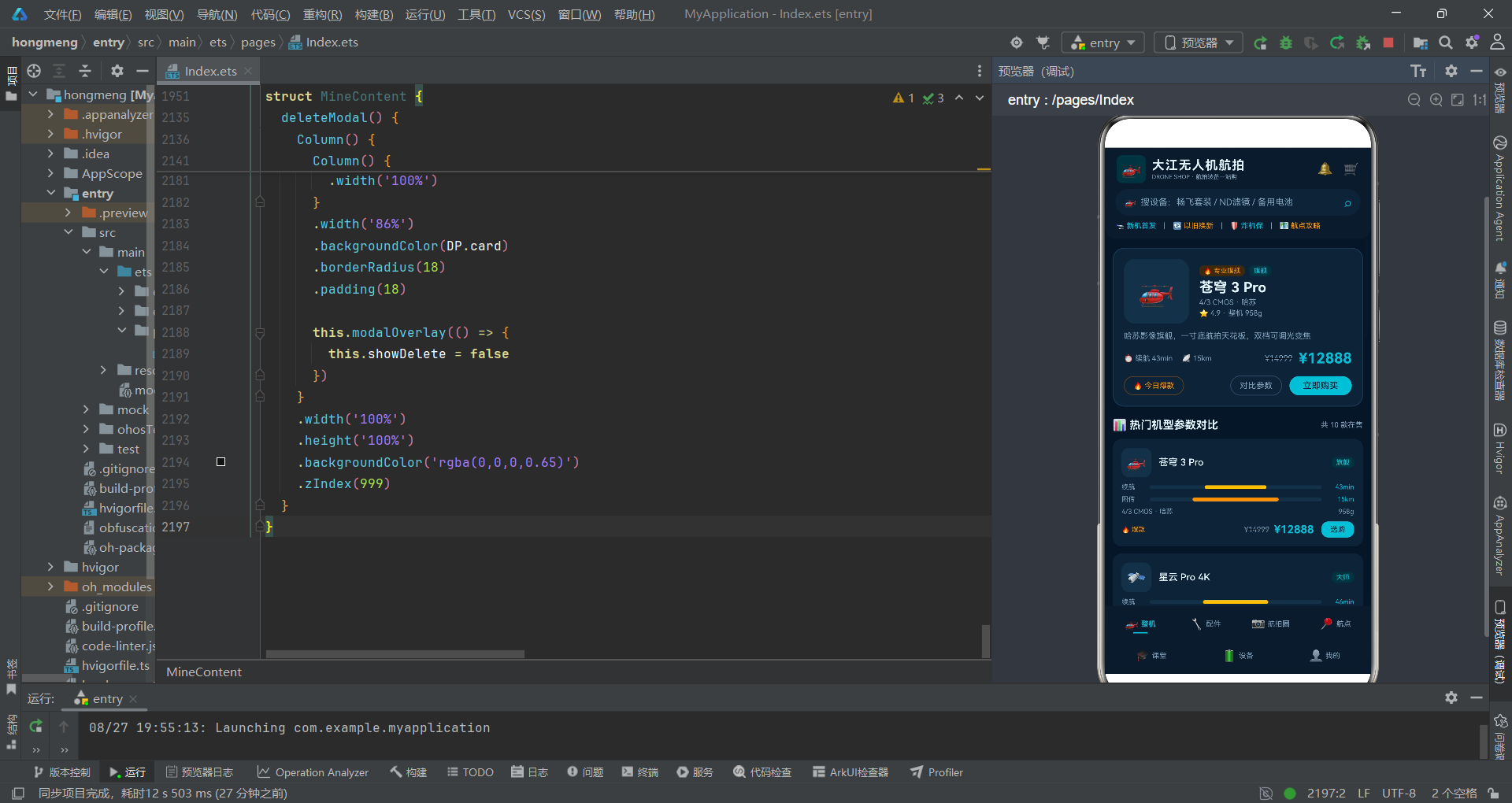
从弹窗设计来看,应用统一采用了Stack+条件渲染的自定义弹窗方案,实现了底部弹窗和居中弹窗两种类型。每个弹窗都包含遮罩层点击关闭、内容区域自定义表单、确认与取消操作等完整的交互流程。弹窗内部的表单控件(输入框、选项组、数量选择器等)样式统一、交互一致,形成了完整的组件设计体系。
从代码组织来看,应用遵循了良好的代码分层原则。接口定义、数据常量、工具函数、组件实现分别组织,逻辑清晰。工具函数全部采用纯函数实现,便于测试与复用。@Builder构建器的大量使用减少了重复代码,提升了代码的可维护性。
整体而言,这款应用展示了鸿蒙ArkTS声明式开发的强大能力与最佳实践。从数据建模到UI布局,从状态管理到交互动画,每个环节都体现了扎实的技术功底与细致的产品思考。对于鸿蒙开发者来说,研究这样一个完整的应用案例,可以系统地学习声明式UI的开发思想与实践技巧,快速提升自己的开发能力。
鸿蒙系统的声明式UI框架为开发者提供了高效、优雅的开发体验。通过@Component、@State、@Builder等核心装饰器,配合Column、Row、Stack、Flex等布局容器,以及ForEach、Scroll等功能组件,开发者可以快速构建出功能完整、体验优良的跨端应用。随着鸿蒙生态的不断完善,相信会有越来越多的优质应用涌现,为用户带来更加丰富的全场景智慧体验。

作为“人工智能6S店”的官方数字引擎,为AI开发者与企业提供一个覆盖软硬件全栈、一站式门户。
更多推荐
 13
13 0
0- 0


 已为社区贡献53条内容

所有评论(0)