
HarmonyOS 6.1 实战高阶组件封装技巧:基于原生组件二次封装通用业务组件,适配多项目复用,大幅提升鸿蒙开发迭代效率
本文基于 HarmonyOS NEXT + ArkTS 声明式开发框架,完整实现一个「播物直播」直播带货主题 App,涵盖配色系统、状态管理、五Tab差异化布局、直播带货头部、呼吸灯动效、商品瀑布流、购物车数据增删改、Stack弹窗叠加、TextInput输入等核心知识点,并附完整源码与运行效果截图。
一、引言:直播电商的数字化浪潮
在移动互联网与智能设备高速发展的今天,直播电商已经从单纯的线上卖货,演变为一种高度数字化、流程化、个性化的内容电商新形态。直播,以其实时互动、沉浸式体验、即时转化的独特优势,正在重塑传统电商的人货场格局。从美妆护肤到数码家电,从服饰穿搭到美食零食,从母婴用品到珠宝文玩,每一个品类都在直播间里找到了新的增长曲线。主播一句"宝宝们,三二一上链接",就能在几秒内创造数千甚至数万的销售额,这种爆发力是传统货架电商难以企及的。然而,直播电商也面临着流量红利见顶、同质化竞争激烈、用户留存困难等现实挑战。
正是在这样的背景下,播物直播类应用应运而生,并迅速成为内容电商时代的数字基础设施。一个优秀的直播带货应用,不仅需要覆盖从"直播间"到"我的订单"的完整业务闭环,还要在视觉设计、交互体验、数据呈现上做到精致而高效,让用户在指尖滑动间便能沉浸式感受直播购物的乐趣。
本文将深入剖析一个基于鸿蒙 ArkUI 声明式开发框架构建的播物直播带货应用。该应用以"直播间"为核心,横向扩展出关注、推荐、购物车、我的五大功能模块,每个模块采用完全不同的布局风格——直播间双列直播卡、关注横滑主播+时间轴、推荐商品瀑布流、购物车清单+柱状图、我的统计+订单列表,形成了一个完整闭环的直播电商生态。它不仅是一个功能完备的演示项目,更是一份典型的 ArkUI 工程实践范本,涵盖了状态管理、组件化设计、Stack弹窗叠加、呼吸灯动效、购物车数据增删改、TextInput输入、商品瀑布流等关键技术点。
二、应用整体架构概览
整个应用采用了"单入口 + 五Tab差异化布局 + Stack弹窗叠加"的现代电商应用架构。入口组件 Page811 作为整个应用的根容器,负责管理当前激活的 Tab 状态、购物车数据、订单数据以及三个弹窗的显隐状态。
应用一共划分为五个一级页面:直播间(LIVE)、关注(FOLLOW)、推荐(RECOMMEND)、购物车(CART)以及我的(PROFILE)。与之前项目"五个页面布局风格统一"不同,本应用的五个 Tab 每个布局完全不同——直播间采用双列直播卡瀑布流、关注采用横滑主播头像+时间轴动态、推荐采用商品瀑布流双列卡、购物车采用清单列表+消费趋势柱状图、我的采用用户统计卡+订单列表,这种"一页一型"的差异化设计最大程度还原了真实直播电商 App 的交互体验。
在数据层面,应用定义了一套完整的类型系统,包括色彩主题、直播间元数据、商品元数据、主播元数据、购物车元数据、订单元数据、周消费元数据等,并通过常量数组将数据与 UI 表现层解耦。所有业务数据以 @Observed 装饰的可观察类为载体(LiveRoom/Product/FollowHost/CartItem/OrderRecord),配合 12 个直播间、15 个商品、10 个主播、6 个购物车商品、8 个订单的模拟数据,模拟了一个真实的直播电商数据环境。值得注意的是,本应用的数据类都带有 constructor 构造函数,使用 new LiveRoom(...) 方式实例化,不同于之前项目的对象字面量写法。
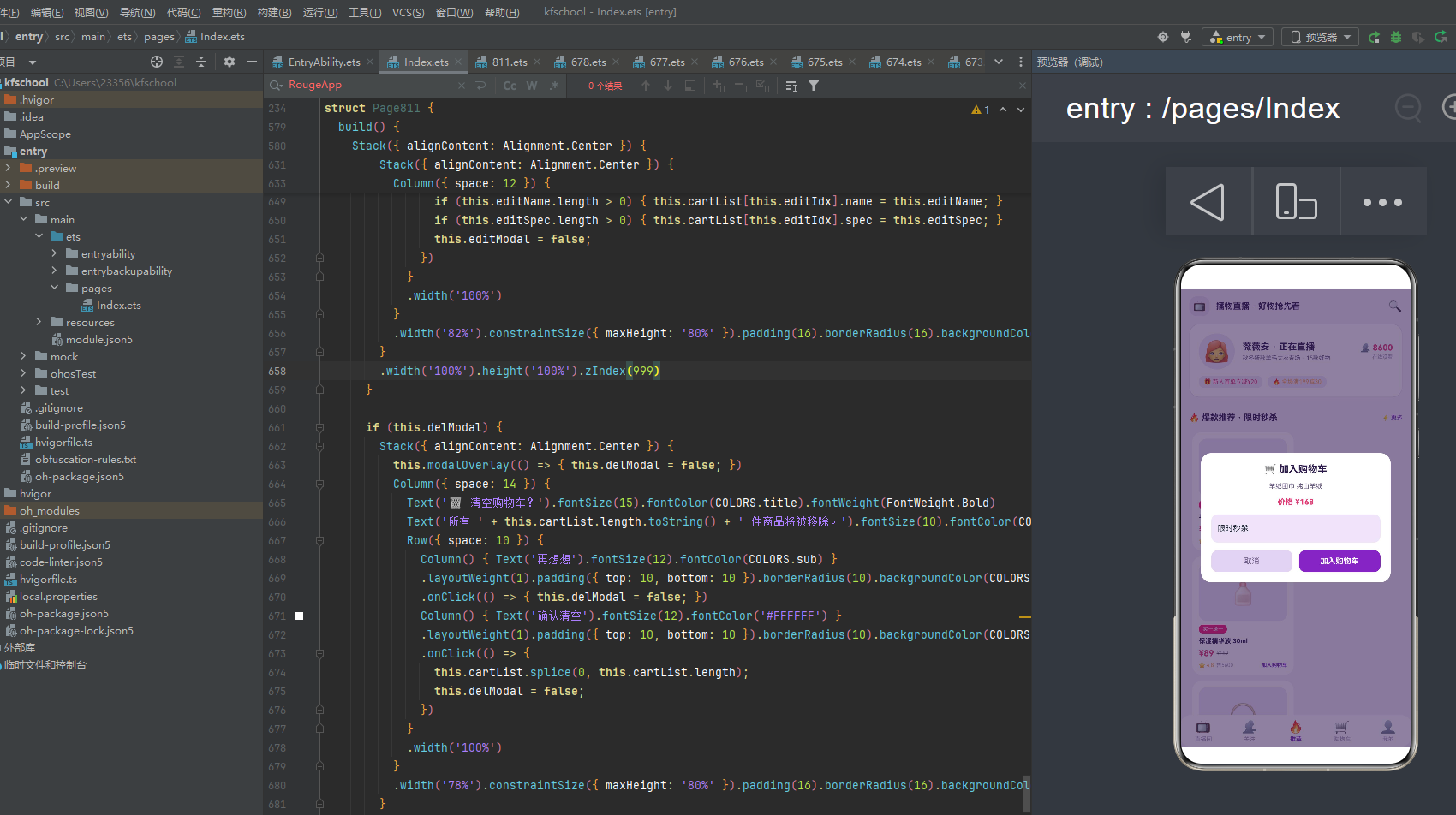
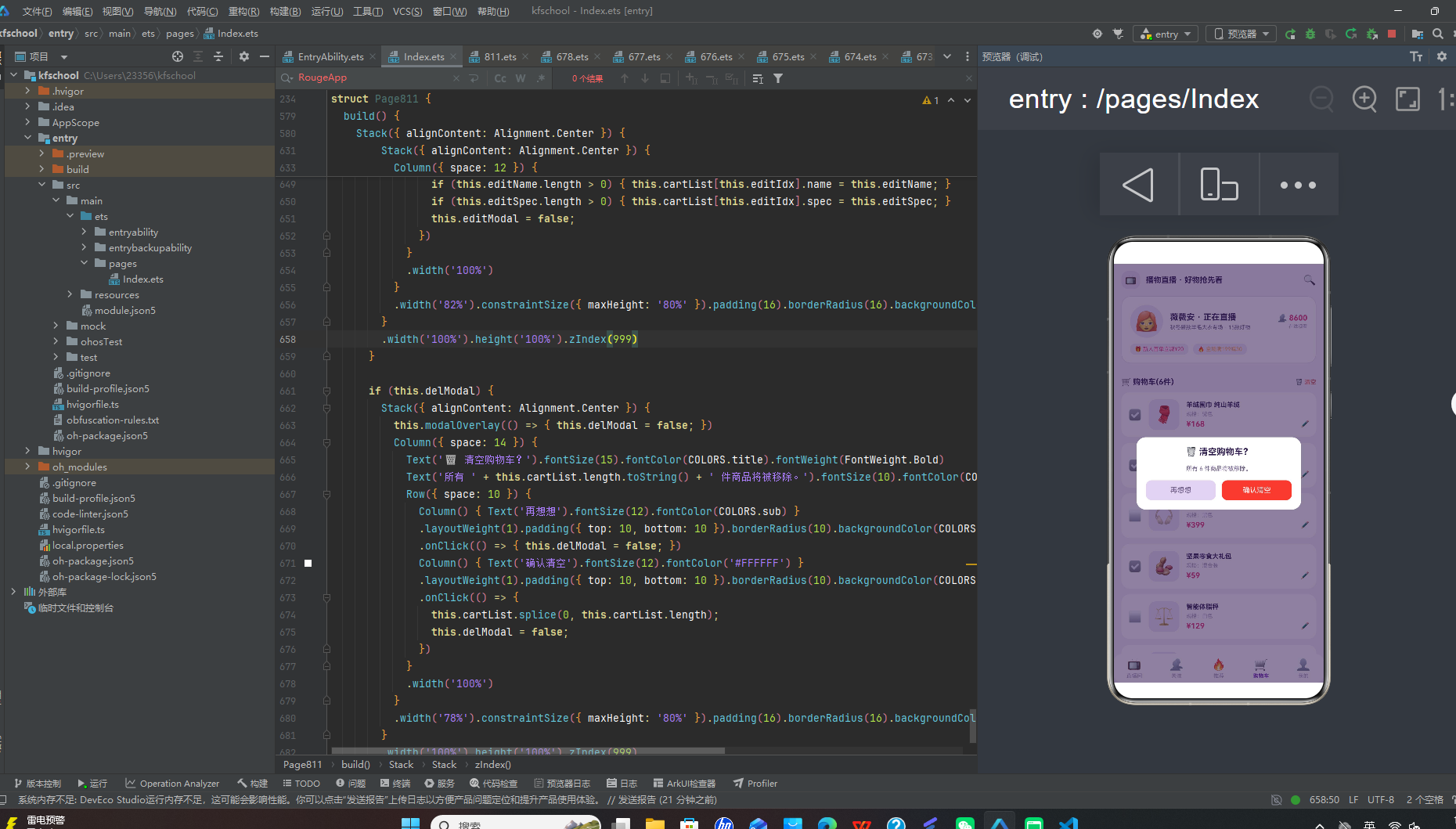
在交互层面,应用通过 Stack 布局叠加实现了三类弹窗的显示:加入购物车、修改购物车、清空购物车。弹窗以 Stack 叠加全屏半透明遮罩 + 居中卡片的形式呈现,zIndex 999 确保弹窗在最上层,遮罩点击可关闭。与之前项目"纯展示型弹窗"不同,本应用的弹窗真正实现了数据修改——加入购物车会向 cartList 头部 unshift 新商品,修改购物车会修改数组指定元素,清空购物车会 splice 清空整个数组,配合 @State 响应式刷新,形成了完整的购物车 CRUD 闭环。
在视觉层面,应用独创了"直播带货头部"设计——顶部固定显示当前直播间信息(主播头像+正在直播+专场标题+在线人气)+ 优惠券横条(新人首单立减+全场满减),无装饰带动效,直接还原真实直播 App 的头部信息密度。应用还独创了"呼吸灯"动效——通过 aboutToAppear 中 setInterval 700ms 切换 breath 状态,LIVE 标签、直播中标识、商品秒杀标签、未完成订单状态都使用 opacity 呼吸灯动画,营造出直播间"正在直播"的紧迫感和氛围感。
下面逐页展示应用的五大功能模块运行效果。
三、直播间页:双列直播卡的正在直播
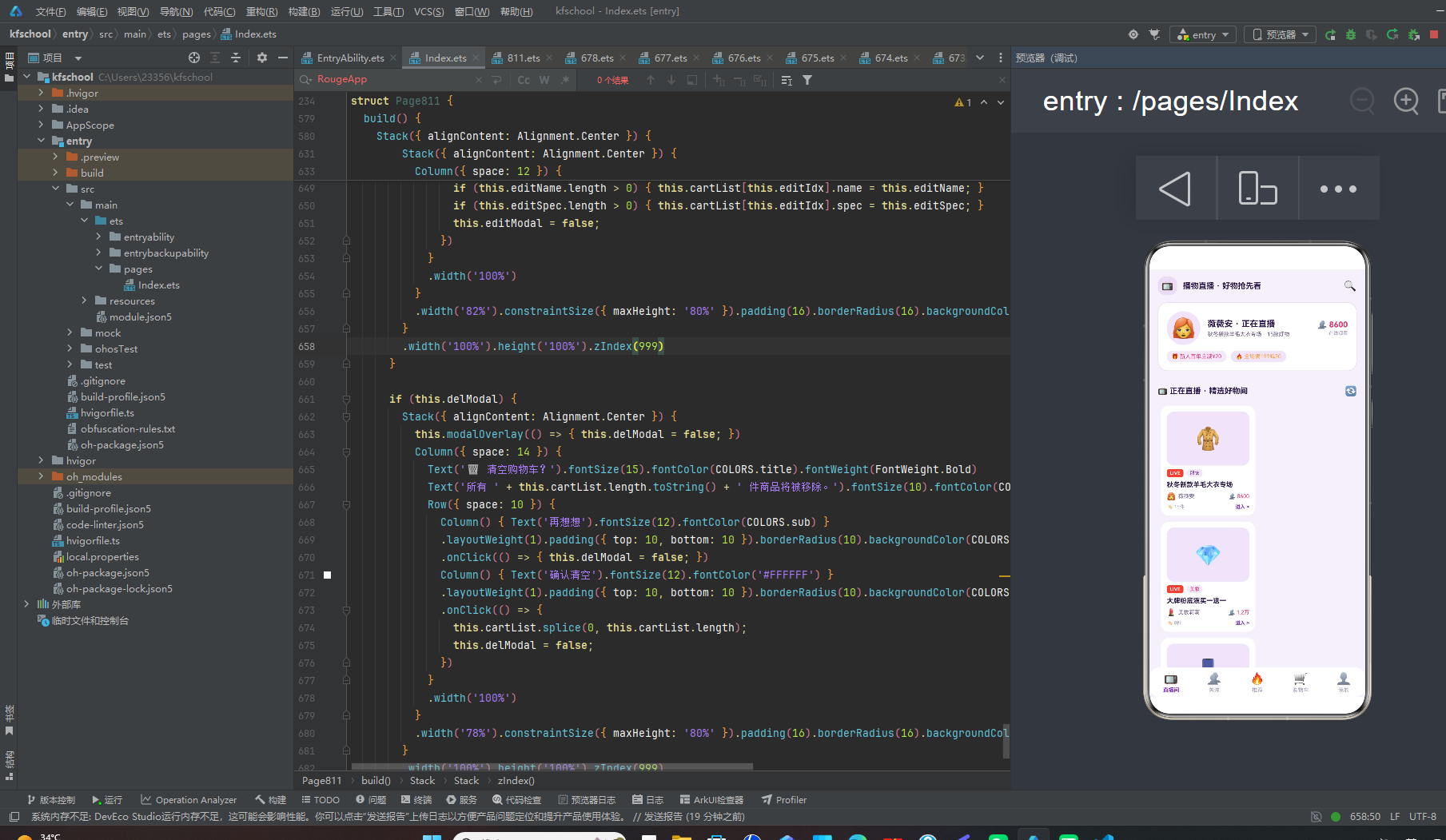
直播间页是整个应用的默认首页,也是视觉设计最独特的页面。它包含了直播带货头部和正在直播双列直播卡。
直播间页顶部是直播带货头部(通过 @Builder header() 构建,全局固定显示),包含三层信息:第一层是顶部导航栏,📺 图标 chip 背景 + “播物直播 · 好物抢先看” 标题 + 🔍 搜索图标;第二层是当前直播间卡片,主播头像 56×56 圆形 + “薇薇安 · 正在直播” + “秋冬新款羊毛大衣专场 · 15 款好物” + 人气 👥 8600 + “在线观看”;第三层是优惠券横条,🎁 新人首单立减¥20(chip 紫底)+ 🔥 全场满199减30(dark 浅紫底)。头部无装饰带动效,信息密度高,直接还原真实直播 App 的头部体验。
下方是"正在直播 · 精选好物间"双列直播卡,标题行配 🔄 刷新图标。使用 Flex wrap 双列布局,每个直播卡宽度 47.5%,包含:cover 封面区 90 高(emoji 图标居中,dark 浅紫底)+ LIVE 标签(红色底白字,呼吸灯 opacity 0.5↔1 切换)或回放标签(darkL 底灰字)+ 分类标签(liveCatColor 动态着色:美妆玫红/数码蓝/服饰紫/美食橙/其余绿,chip 紫底)+ 直播标题(maxLines 1 省略号)+ 主播头像+主播名+人气👥(viewerStr 万单位转换,如 1.2万)+ 🏷️ 件数 + “进入 >”(紫色加粗)。
12 个直播间覆盖了服饰、美妆、数码、美食、运动、家居、潮玩、母婴、珠宝、茶酒、汽车、图书十二个品类,主播从薇薇安(8600人)、美妆莉莉(1.2万人,人气最高)、数码老王(5400人)到图书荐读人(1500人,人气最低),isLive 状态区分正在直播和回放,正在直播的 LIVE 标签带呼吸灯动效,回放的显示灰色"回放"标签。每个直播间都有独特的 cover emoji(🧥大衣/💎美妆/📱手机/🍜美食等),让直播间既热闹又有辨识度。
四、关注页:横滑主播与时间轴动态
关注页以"关注的主播"为核心,独创"横滑主播头像 + 时间轴动态"的复合布局,是五个 Tab 中布局最独特的页面之一。
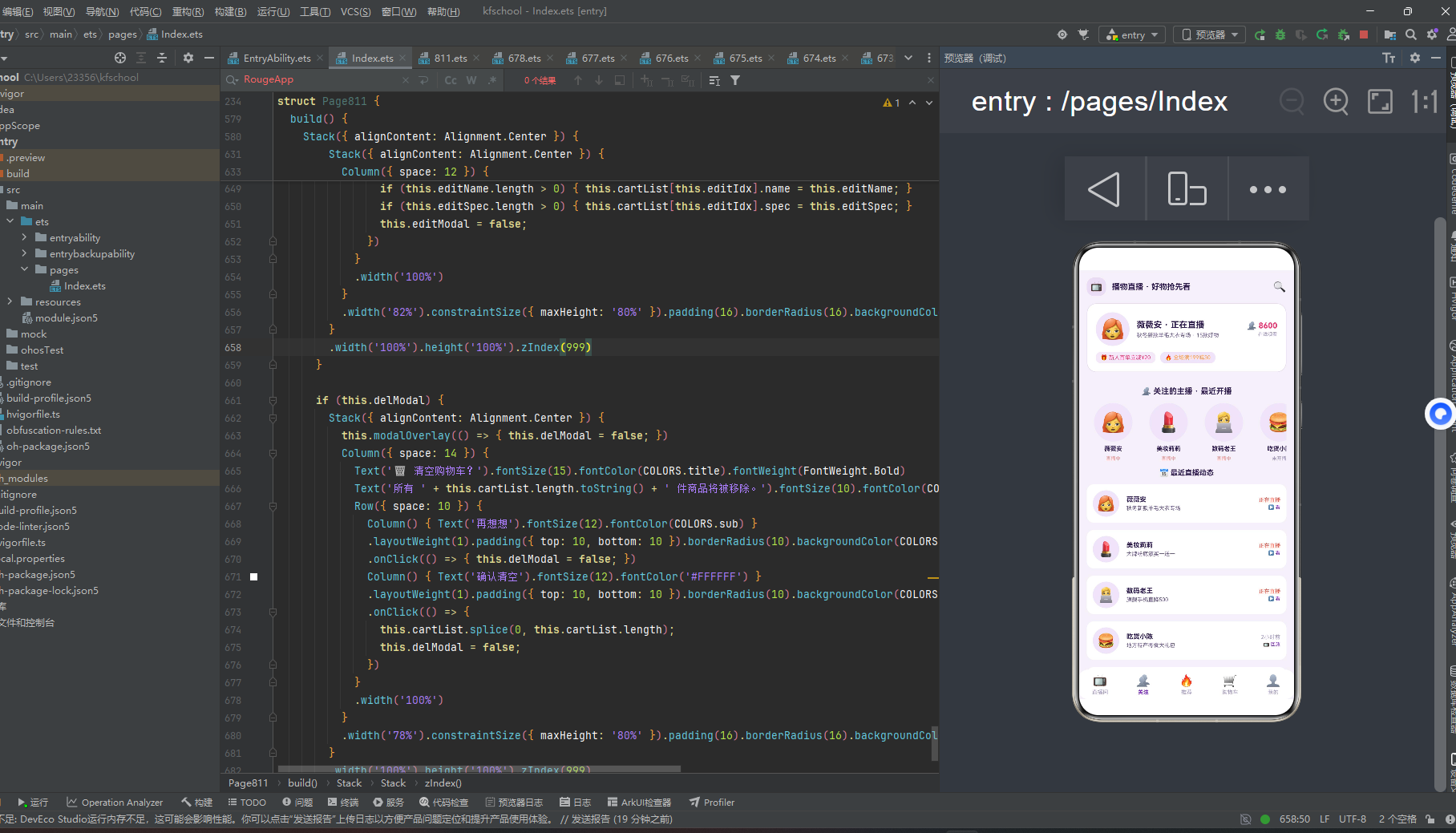
页面顶部是标题"👥 关注的主播 · 最近开播"。下方第一部分是横滑主播头像列表,使用 Scroll horizontal 横向滚动,scrollBar 关闭,每个主播卡片宽度 80,包含:头像 64×64 圆形(dark 浅紫底)+ 主播名(maxLines 1)+ 直播状态("直播中"红色呼吸灯 / "未开播"灰色)。正在直播的主播"直播中"文字带呼吸灯 opacity 动画,营造出"谁在播"的即时感。
下方第二部分是"📅 最近直播动态"时间轴列表,遍历 HOST_LIST 10 个主播,每条动态卡片包含:主播头像 44×44 圆形 + 主播名 + 最近直播标题(maxLines 1)+ 时间("正在直播"红色 / “2小时前”/"昨天"灰色)+ 操作按钮("▶ 看"紫色 / “📺 回放"紫色)。时间轴按最近开播顺序排列,正在直播的主播排在前面并标红,让用户一眼就能看到"谁在播、播什么、要不要看”。
10 个关注主播覆盖薇薇安(8.6万粉,正在直播)、美妆莉莉(12万粉,正在直播,粉丝最多)、数码老王(5.4万粉,正在直播)、吃货小陈(3.2万粉,2小时前)、健身教练Mike(2.1万粉,昨天)、家居达人Amy(4.3万粉,正在直播)、潮玩掌柜(7.8万粉,正在直播)、母婴顾问(9.5万粉,3小时前)、珠宝鉴定师(1.8万粉,昨天)、茶艺师老周(2.6万粉,正在直播),粉丝量从 1.8 万到 12 万不等,呈现出真实的主播粉丝分布。
五、推荐页:商品瀑布流与加入购物车
推荐页以"爆款推荐"为核心,采用商品瀑布流双列卡布局,点击商品卡可弹出加入购物车弹窗,真正实现商品→购物车的转化闭环。
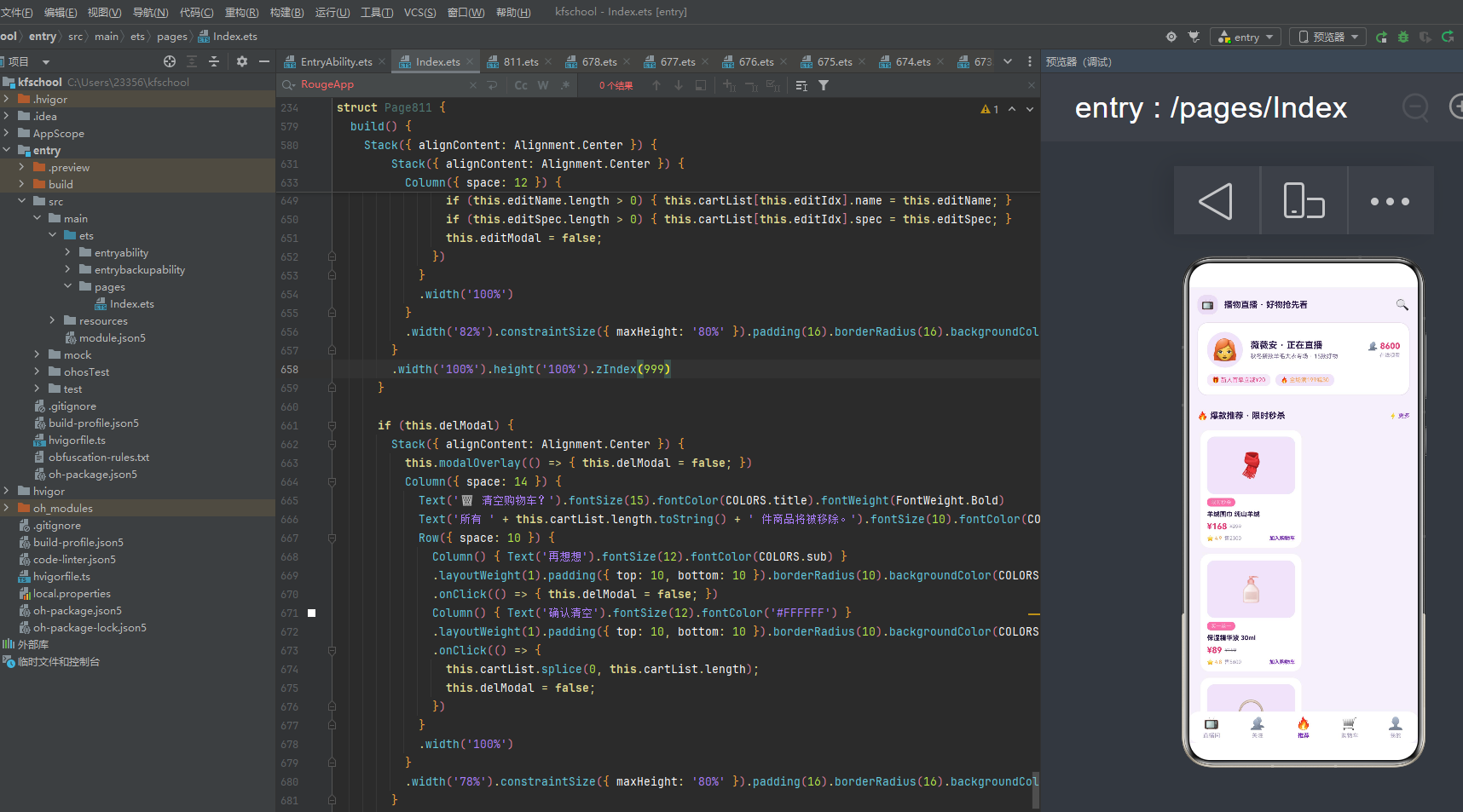
页面顶部是标题"🔥 爆款推荐 · 限时秒杀" + ⚡更多。下方使用 Flex wrap 双列商品瀑布流,每个商品卡宽度 47.5%,包含:icon 商品图 90 高(dark 浅紫底)+ tag 标签(粉色底白字,呼吸灯 opacity 0.6↔1 切换,如"限时秒杀"/“买一送一”/"数码热销"等)+ 商品名(maxLines 2 省略号)+ 价格行(现价粉色加粗 + 原价灰色删除线 TextDecorationType.LineThrough)+ 底部行(⭐评分橙色 + 售量 viewerStr 转换 + "加入购物车"紫色加粗)。
15 个商品覆盖羊绒围巾(¥168,限时秒杀,售2300)、保湿精华液(¥89,买一送一,售5600)、蓝牙降噪耳机(¥399,数码热销,售1200)、坚果零食大礼包(¥59,吃货必备,售8900,销量最高)、智能体脂秤(¥129,健康好物)、北欧风抱枕套(¥39,家居精选)、限量盲盒系列B(¥79,潮玩新品)、进口纸尿裤L码(¥109,母婴囤货)、天然翡翠手镯(¥2680,珠宝专场,售230最低)、明前龙井50g(¥128,新茶上市)、车载香薰摆件(¥49,汽车好物)、畅销小说套装(¥45,5折清仓)、便携蒸汽眼罩(¥29,放松神器,售9800)、运动速干T恤(¥79,运动精选)、多功能料理机(¥299,厨房好物),价格从 ¥29 到 ¥2680 覆盖完整价格梯队,销量从 230 到 9800 不等。
点击商品卡触发加入购物车弹窗(addModal),弹窗包含:商品名 + 价格 + TextInput 规格输入框(预填商品 tag,可编辑)+ 取消/加入购物车按钮。点击"加入购物车"后,通过 cartList.unshift(new CartItem(…)) 向购物车头部添加新商品,@State 响应式刷新,真正实现了"推荐→加购"的转化闭环。
六、购物车页:清单管理与消费趋势
购物车页以"购物车"为核心,独创"清单列表 + 本周直播消费趋势柱状图"的复合布局,支持商品编辑和清空操作。
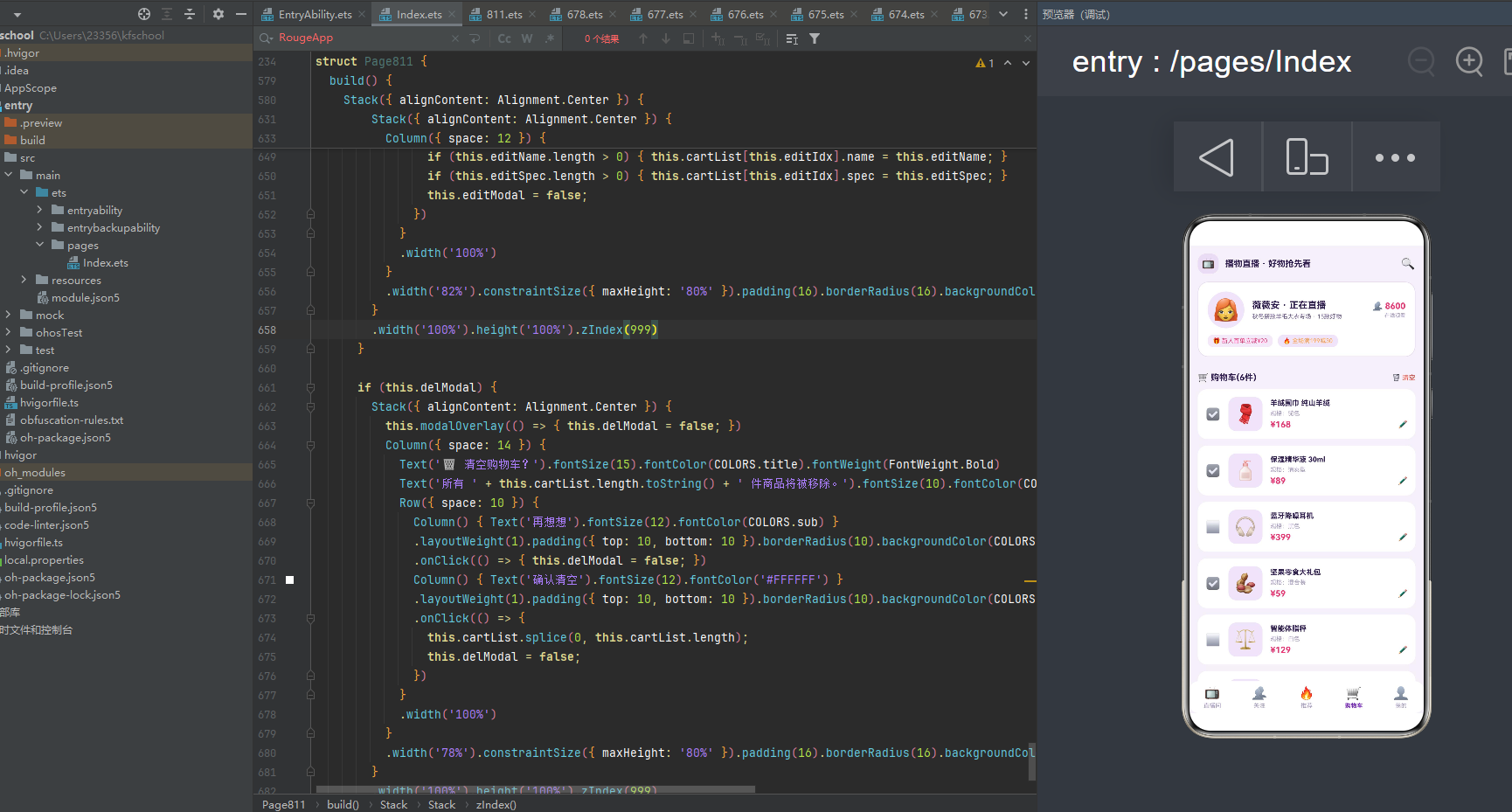
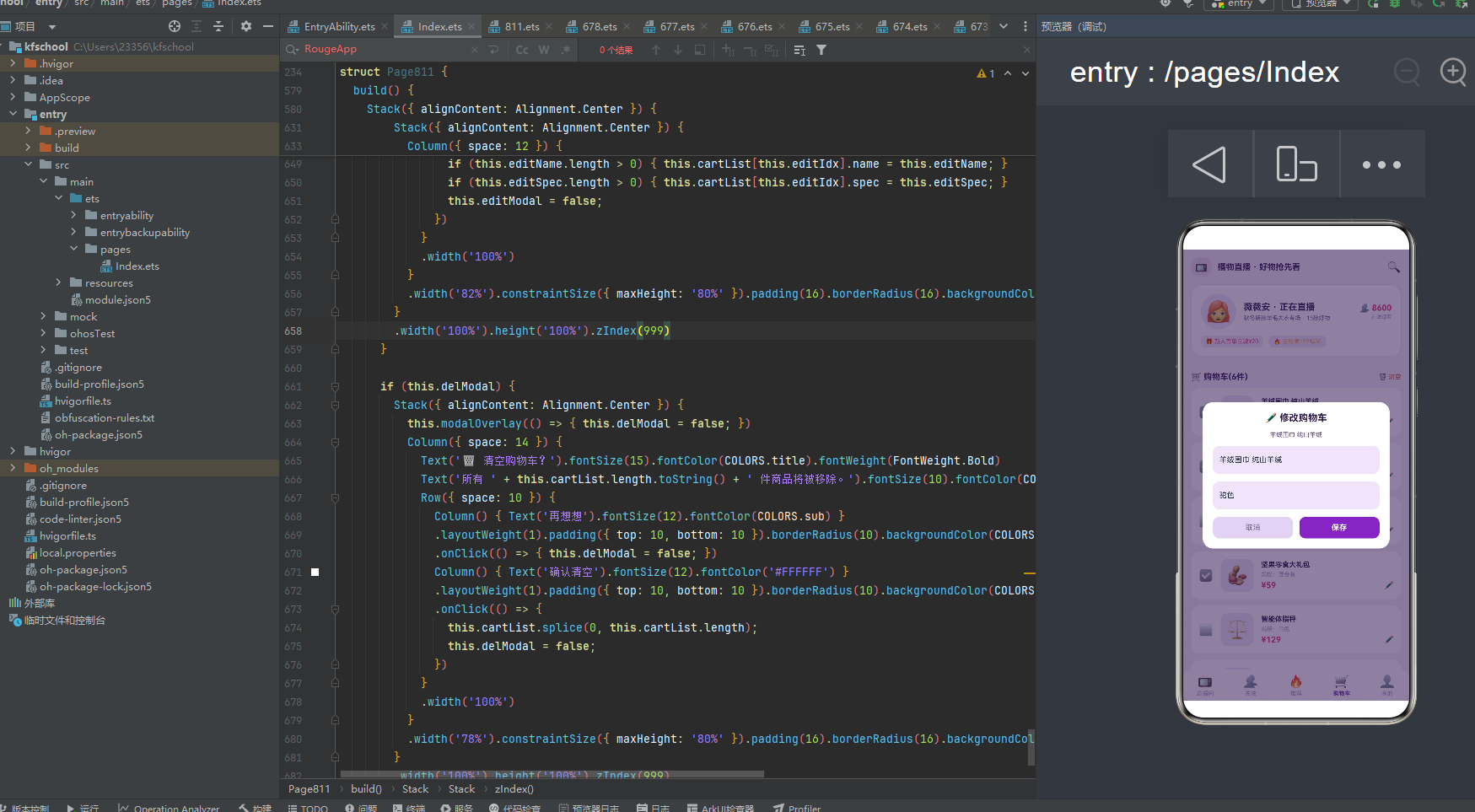
页面顶部是标题"🛒 购物车(N件)" + 🗑️清空(点击触发 delModal 清空购物车弹窗)。下方第一部分是购物车清单列表,遍历 cartList,每个商品行包含:选中状态 ☑️/⬜ + 商品图标 52×52(dark 浅紫底)+ 商品信息列(商品名 maxLines 1 + 规格 text3 + 价格行:现价粉色加粗 + ✏️编辑按钮)。点击 ✏️ 触发 editModal 修改购物车弹窗,可编辑商品名称和规格。
6 个初始购物车商品覆盖羊绒围巾(¥168,驼色,已选)、保湿精华液(¥89,清爽型,已选×2)、蓝牙降噪耳机(¥399,黑色,未选)、坚果零食大礼包(¥59,混合装,已选×3)、智能体脂秤(¥129,白色,未选)、北欧风抱枕套(¥39,灰色,已选×2),选中状态用 ☑️/⬜ 区分,未选中的商品不参与结算(本演示未实现结算金额计算,但选中状态 UI 已完整呈现)。
下方第二部分是"📊 本周直播消费趋势(元)"柱状图卡片,遍历 SPEND_DATA [320, 580, 210, 890, 460, 720, 350],柱子高度 = value/10,周六 890 元最高用粉色 #E63976 突出显示,其余日期用紫色 #7B2CBF,柱子顶部显示金额数字,底部显示星期几。柱状图卡片高度 130,alignItems Bottom 让柱子从底部生长,直观呈现一周消费趋势。
七、我的页:用户统计与订单列表
我的页以"个人中心"为核心,独创"用户信息卡 + 四栏统计 + 订单列表"的三层布局,是五个 Tab 中信息密度最高的页面。
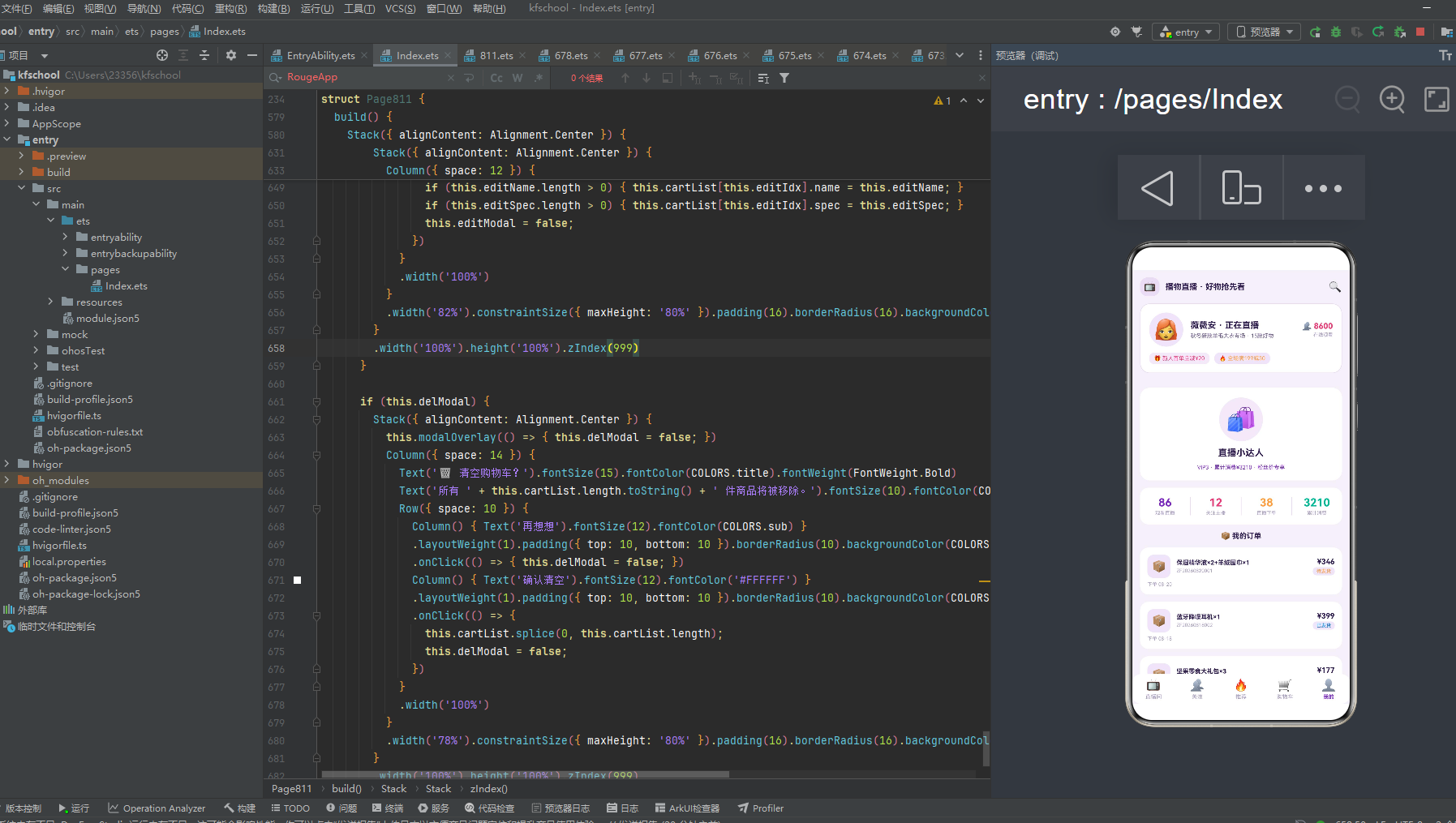
页面第一部分是用户信息卡,包含:🛍️ 头像 72×72 圆形(chip 紫底)+ "直播小达人"用户名 + "VIP3 · 累计消费¥3210 · 粉丝价专享"会员标识(紫色),卡片白色背景圆角 16,居中对齐。
第二部分是四栏统计卡,横向排列四个数据指标,用 1px 竖线分隔:86 观看直播(紫色 #7B2CBF)/ 12 关注主播(玫红 #E63976)/ 38 直播下单(橙色 #FF9F43)/ 3210 累计消费(绿色 #00B894),每个指标上方数字加粗,下方文字标签灰色,卡片白色背景圆角 14,padding 上下 14。四栏统计一目了然地展示了用户的直播购物行为画像。
第三部分是"📦 我的订单"列表,遍历 orderList 8 个订单,每个订单卡片包含:📦 图标 38×38(dark 浅紫底)+ 订单信息列(商品名 maxLines 1 + 订单号 text3)+ 金额状态列(金额加粗 + 状态标签,orderStatusColor 动态着色:待发货橙色/已发货蓝色/已完成绿色/其余红色,dark 浅紫底,未完成订单带呼吸灯 opacity 动画)+ 下单日期 text3。
8 个订单从 08-20 到 07-25 按时间倒序排列,状态涵盖待发货(1条,橙色呼吸灯)、已发货(1条,蓝色)、已完成(6条,绿色),订单金额从 ¥45 到 ¥399 不等,商品从保湿精华液+羊绒围巾到畅销小说套装,完整还原了用户的直播购物历史。未完成的"待发货"订单状态标签带呼吸灯动效,提醒用户关注物流。
八、色彩主题系统:紫粉底与深紫玫红的直播电商视觉语言
8.1 色彩接口定义
任何一款设计精良的应用,背后都有一套严谨的色彩规范。该应用首先通过一个 ColorPalette 接口,将整个应用所需的色彩抽象为一个结构化的契约:
interface ColorPalette {
  bg: string; card: string; dark: string; darkL: string;
  title: string; sub: string; text3: string;
  purple: string; purpleD: string; pink: string; pinkD: string;
  red: string; orange: string; green: string; blue: string;
  line: string; tabOn: string; mask: string; chip: string;
}
- bg:页面整体背景色 #F5F0FA,紫粉底,营造直播电商的梦幻氛围感。
- purple:主色调 #7B2CBF,紫色,用于按钮、强调文字、激活 Tab、柱状图等高优先级视觉元素,是直播电商的标志性色彩。
- pink:强调色 #E63976,玫红,与紫色形成冷暖对比,用于价格、人气、秒杀标签、最高消费柱等元素,营造"促销热卖"的氛围感。
- dark:浅紫 #EDE4F7,用于图标背景、卡片背景、优惠券背景等,是紫色系的浅色调变体。
- mask:遮罩色 rgba(45,27,78,0.55),深紫半透明,用于弹窗遮罩。
- chip:标签底色 rgba(123,44,191,0.10),紫色 10% 透明度,用于分类标签、优惠券标签背景。
8.2 色彩实例化
const COLORS: ColorPalette = {
  bg: '#F5F0FA', card: '#FFFFFF', dark: '#EDE4F7', darkL: '#E0D4F0',
  title: '#2D1B4E', sub: '#6E5C8A', text3: '#A89BC0',
  purple: '#7B2CBF', purpleD: '#5A189A', pink: '#E63976', pinkD: '#C91B5C',
  red: '#E74C3C', orange: '#FF9F43', green: '#00B894', blue: '#0984E3',
  line: '#E8DCF0', tabOn: '#7B2CBF',
  mask: 'rgba(45,27,78,0.55)', chip: 'rgba(123,44,191,0.10)'
};
主色 #7B2CBF 是一种醇厚的紫色,既契合"直播电商"主题(梦幻、时尚、年轻的标志性色彩),又具有现代、活力的气质。强调色 #E63976 玫红与紫色形成冷暖对比,呼应价格、促销、热卖的色彩。bg #F5F0FA 紫粉底与主色同暖色系,营造出直播电商的梦幻氛围。值得注意的是,本应用的动态颜色函数返回的是多色系(玫红/蓝/紫/橙/绿),用于不同业务维度的语义着色——直播间分类按品类着色(美妆玫红/数码蓝/服饰紫/美食橙/其余绿),订单状态按状态着色(待发货橙/已发货蓝/已完成绿/其余红),形成了"以色分类、以色定状态"的高级渲染模式。这种将所有色彩集中管理的做法保证了全局一致性,支持主题切换,降低了维护成本。
九、类型定义:构建严谨的数据契约
应用通过一组带 constructor 的 @Observed 类,为每一类业务对象建立了明确的数据契约。
9.1 直播间、商品、主播元数据
@Observed export class LiveRoom {
  id: number; host: string; avatar: string; title: string;
  viewers: number; products: number; category: string; isLive: boolean; cover: string;
  constructor(id, host, avatar, title, viewers, products, category, isLive, cover) { ... }
}
@Observed export class Product {
  id: number; name: string; price: string; origin: string;
  sales: number; icon: string; tag: string; rating: string;
  constructor(...) { ... }
}
@Observed export class FollowHost {
  id: number; name: string; avatar: string; fans: number;
  isLive: boolean; lastTitle: string; lastTime: string;
  constructor(...) { ... }
}
LiveRoom 描述直播间的 ID、主播、头像、标题、人气、商品数、分类、是否在播、封面,用 viewers 字段体现人气,isLive 区分直播/回放。Product 描述商品的 ID、名称、现价、原价、销量、图标、标签、评分,用 price/origin 双价格体现促销感。FollowHost 描述关注主播的 ID、名称、头像、粉丝数、是否在播、最近直播标题、最近时间,用 fans 字段体现粉丝量级。
9.2 购物车、订单与图表元数据
@Observed export class CartItem {
  id: number; name: string; price: string; qty: number;
  icon: string; spec: string; selected: boolean;
  constructor(...) { ... }
}
@Observed export class OrderRecord {
  id: number; code: string; goods: string; money: string;
  date: string; status: string;
  constructor(...) { ... }
}
CartItem 描述购物车商品的 ID、名称、价格、数量、图标、规格、选中状态,用 selected 字段体现结算选择,是本应用真正实现数据增删改的核心数据类。OrderRecord 描述订单的 ID、订单号、商品、金额、日期、状态,用 status 字段体现订单流转状态。
十、配置驱动:常量数据与工具函数
10.1 Tab 导航配置
const TAB_LIST: TabMeta[] = [
  { icon: '📺', label: '直播间' },
  { icon: '👥', label: '关注' },
  { icon: '🔥', label: '推荐' },
  { icon: '🛒', label: '购物车' },
  { icon: '👤', label: '我的' }
];
与之前项目"一 Tab 一色"不同,本应用的 Tab 不单独配置颜色,统一使用 tabOn #7B2CBF 紫色作为激活色,非激活使用 text3 #A89BC0 灰色,保持底部导航的简洁统一,让视觉焦点集中在内容区。
10.2 周消费数据与工具函数
const WEEK_DAYS: string[] = ['周一', '周二', '周三', '周四', '周五', '周六', '周日'];
const SPEND_DATA: number[] = [320, 580, 210, 890, 460, 720, 350];

function viewerStr(count: number): string {
  if (count >= 10000) { return (count / 10000).toFixed(1) + '万'; }
  return count.toString();
}
function liveCatColor(cat: string): string {
  if (cat === '美妆') { return COLORS.pink; }
  if (cat === '数码') { return COLORS.blue; }
  if (cat === '服饰') { return COLORS.purple; }
  if (cat === '美食') { return COLORS.orange; }
  return COLORS.green;
}
function orderStatusColor(s: string): string {
  if (s === '待发货') { return COLORS.orange; }
  if (s === '已发货') { return COLORS.blue; }
  if (s === '已完成') { return COLORS.green; }
  return COLORS.red;
}
SPEND_DATA 一周消费数据 [320,580,210,890,460,720,350],周六 890 最高,符合周末直播购物消费高峰的真实规律。viewerStr 工具函数实现万单位转换(≥10000→x.x万),用于直播间人气和商品销量显示。liveCatColor 按直播分类动态着色(美妆玫红/数码蓝/服饰紫/美食橙/其余绿),orderStatusColor 按订单状态动态着色(待发货橙/已发货蓝/已完成绿/其余红),两个函数实现了"以色分类、以色定状态"的语义化着色。
十一、数据模型:可观察的直播电商实体
const LIVE_LIST: LiveRoom[] = [ new LiveRoom(1, '薇薇安', '👩🦰', '秋冬新款羊毛大衣专场', 8600, 15, '服饰', true, '🧥'), ... ];
const PRODUCT_LIST: Product[] = [ new Product(1, '羊绒围巾 纯山羊绒', '¥168', '¥299', 2300, '🧣', '限时秒杀', '4.9'), ... ];
const HOST_LIST: FollowHost[] = [ new FollowHost(1, '薇薇安', '👩🦰', 86000, true, '秋冬新款羊毛大衣专场', '正在直播'), ... ];
const CART_INIT: CartItem[] = [ new CartItem(1, '羊绒围巾 纯山羊绒', '¥168', 1, '🧣', '驼色', true), ... ];
const ORDER_LIST: OrderRecord[] = [ new OrderRecord(1, 'ZF20260820001', '保湿精华液×2+羊绒围巾×1', '¥346', '08-20', '待发货'), ... ];
五组常量数据承载了播物直播的全部业务信息:LIVE_LIST 12 个直播间(覆盖十二大品类,人气从 1500 到 12300)、PRODUCT_LIST 15 个商品(价格从 ¥29 到 ¥2680,销量从 230 到 9800)、HOST_LIST 10 个关注主播(粉丝从 1.8 万到 12 万)、CART_INIT 6 个初始购物车商品(含选中/未选状态)、ORDER_LIST 8 个订单(状态涵盖待发货/已发货/已完成)。所有数据使用 new ClassName(...) 构造函数实例化,配合 @Observed 装饰器实现响应式更新。cartList 和 orderList 使用 @State 装饰,支持运行时增删改(加入购物车 unshift、修改购物车改元素、清空购物车 splice)。
十二、动态颜色与工具函数:数据驱动的视觉映射
应用通过三个工具函数将业务数据映射为视觉色彩和格式,实现"数据即配色、数据即格式"。
function viewerStr(count: number): string { /* 万单位转换 */ }
function liveCatColor(cat: string): string { /* 按品类着色 */ }
function orderStatusColor(s: string): string { /* 按状态着色 */ }
- viewerStr:人气/销量万单位转换,≥10000 显示为"x.x万"(如 12300→"1.2万"),其余显示原始数字,避免大数字溢出布局。
- liveCatColor:按直播间品类分五档色彩(美妆玫红/数码蓝/服饰紫/美食橙/其余绿),“以色分类”,用户一眼就能从颜色判断直播间品类。
- orderStatusColor:按订单状态分四档色彩(待发货橙色/已发货蓝色/已完成绿色/其余红色),“以色定状态”,用户一眼就能从颜色判断订单流转状态。
值得注意的是,本应用的购物车消费柱状图也使用了动态着色逻辑——周六 890 元最高用粉色 #E63976 突出显示,其余日期用紫色 #7B2CBF,通过 i === 5 ? COLORS.pink : COLORS.purple 内联判断实现,无需额外函数。LIVE 标签、直播中标识、商品秒杀标签、未完成订单状态都使用 breath 状态驱动的 opacity 呼吸灯动画(this.breath ? 0.5 : 1 / 0.6 : 1 / 0.55 : 1),营造出"正在直播、热卖中、待处理"的紧迫感和氛围感。
十三、入口组件:应用的骨架与五Tab差异化布局
13.1 组件声明与状态
@Entry
@Component
struct Page811 {
  @State tabIdx: number = 0;
  @State breath: boolean = false;
  @State addModal: boolean = false;
  @State editModal: boolean = false;
  @State delModal: boolean = false;
  @State editIdx: number = 0;
  @State addName: string = '';
  @State addPrice: string = '';
  @State addSpec: string = '';
  @State editName: string = '';
  @State editSpec: string = '';
  @State cartList: CartItem[] = CART_INIT;
  @State orderList: OrderRecord[] = ORDER_LIST;
  private timer: number = -1;
}
14 个 @State 状态分五类:导航状态(tabIdx)、动效状态(breath)、弹窗控制状态(addModal/editModal/delModal + editIdx)、弹窗输入状态(addName/addPrice/addSpec/editName/editSpec)、数据状态(cartList/orderList)。private timer 用于呼吸灯 setInterval 管理。
13.2 生命周期与呼吸灯动效
aboutToAppear(): void {
  this.timer = setInterval(() => { this.breath = !this.breath; }, 700);
}
aboutToDisappear(): void {
  if (this.timer > 0) { clearInterval(this.timer); }
}
aboutToAppear 中启动 setInterval 700ms 切换 breath 状态,实现全局呼吸灯动效。aboutToDisappear 中 clearInterval 清理定时器,避免内存泄漏。这是本应用独创的动效实现方式,不同于之前项目的"点击触发单次动画",而是"全局持续呼吸灯",营造直播间的实时氛围感。
13.3 直播带货头部(@Builder header)
顶部头部通过 @Builder header() 抽取,包含三层:顶部导航栏(📺chip + 标题 + 🔍)、直播间信息卡(头像56×56圆形 + 主播名+正在直播 + 专场标题+15款好物 + 人气👥8600 + 在线观看)、优惠券横条(🎁新人首单立减¥20 chip底 + 🔥全场满199减30 dark底)。头部无装饰带动效,信息密度高,直接还原真实直播 App 的头部体验。
13.4 底部 Tab 导航与 Stack 弹窗
底部导航通过 @Builder tabBar() 构建,Row 单排 5 Tab,圆角 16 卡片背景,激活态 tabOn 紫色加粗,非激活 text3 灰色。build() 使用 Stack 布局,主 Column 包含 header + Scroll 内容区(if-else 切换 5 个 @Builder 页面)+ tabBar,三个弹窗(addModal/editModal/delModal)使用 Stack 叠加在最上层,zIndex 999,每个弹窗包含 modalOverlay 遮罩(点击关闭)+ 居中卡片。
十四、关键技术特性对比
| 特性维度 | 实现方式 | 技术要点 | 设计价值 |
|---|---|---|---|
| 色彩管理 | ColorPalette 接口 + COLORS 常量 | 集中定义 20 种语义色,含 mask/chip 半透明色 | 保证视觉一致性,支持主题切换 |
| 数据建模 | @Observed 类 + constructor | 5 个数据类(LiveRoom/Product/FollowHost/CartItem/OrderRecord),new 实例化 | 数据与 UI 双向联动,响应式更新 |
| 五Tab差异化 | 每页独立 @Builder 布局 | 直播间双列卡/关注横滑+时间轴/推荐瀑布流/购物车清单+柱状图/我的统计+订单 | 一页一型,还原真实直播App体验 |
| 直播带货头部 | @Builder header 固定头部 | 直播间信息+人气+优惠券横条,无装饰带动效 | 信息密度高,还原真实直播头部 |
| 呼吸灯动效 | setInterval + opacity | aboutToAppear 启动 700ms 切换,LIVE/直播中/秒杀标签/未完成订单呼吸 | 营造直播间实时氛围感 |
| 真正数据修改 | cartList unshift/改元素/splice | 加入购物车unshift、修改购物车改元素、清空购物车splice | 完整购物车CRUD闭环 |
| TextInput输入 | 弹窗内 TextInput | 加入购物车规格输入、修改购物车名称+规格输入 | 真正可编辑的弹窗交互 |
| Stack弹窗叠加 | Stack + zIndex 999 | 三个弹窗Stack叠加,mask遮罩点击关闭 | 弹窗层级清晰,交互灵活 |
| 万单位转换 | viewerStr 工具函数 | ≥10000→x.x万,用于人气/销量显示 | 大数字优雅显示,布局整齐 |
| 动态颜色 | liveCatColor/orderStatusColor | 按品类/状态分档着色,柱状图最高值粉色突出 | 以色分类、以色定状态 |
| 原价删除线 | TextDecorationType.LineThrough | 商品原价灰色删除线,现价粉色加粗 | 促销感强,价格对比直观 |
| 购物车选中 | ☑️/⬜ 选中图标 | selected 状态驱动选中/未选显示 | 结算选择UI完整 |
| 状态管理 | @State + @Observed | 14个状态分五类,cartList/orderList @State 可修改 | 细粒度状态控制,自动触发渲染 |
| 组件化 | @Component + @Builder | 1个入口组件 + 5个页面@Builder + 3个弹窗@Builder + header/tabBar/modalOverlay | 高内聚低耦合,代码复用率高 |
| 列表渲染 | ForEach + Flex wrap | 直播间/推荐双列Flex wrap,关注横滑Scroll,购物车/订单列表 | 数据驱动渲染,布局灵活 |
| 数据可视化 | 柱状图 + 四栏统计 | 消费趋势柱状图(最高值粉色突出)、四栏统计竖线分隔 | 多维度呈现,直观易读 |
| 文本省略 | maxLines + textOverflow | 直播标题maxLines1、商品名maxLines2、订单商品maxLines1 | 长文本优雅截断,布局整齐 |
| 生命周期 | aboutToAppear/aboutToDisappear | setInterval启动/clearInterval清理,避免内存泄漏 | 健壮性强,无资源泄漏 |
| 布局系统 | Column/Row + Flex + Stack + Scroll | 弹性布局、Flex wrap、Stack叠加、Scroll横向/纵向滚动 | 自适应布局,层次分明 |
完整代码
// ============================================================
// 811 播物直播 · 直播带货平台(现代行业:直播电商 / 内容电商)
// 头部样式:直播带货头部(当前直播间信息 + 人气 + 优惠券横条)无动画
// 布局风格:5 个 tab 每个布局完全不同
// 直播间=双列直播卡 / 关注=横滑主播+时间轴 / 推荐=商品瀑布流
// 购物车=清单+柱状图 / 我的=统计+订单列表
// 底部 5 tab 单排
// 主题:紫粉底 + 深紫 + 玫红
// ============================================================
interface ColorPalette {
bg: string;
card: string;
dark: string;
darkL: string;
title: string;
sub: string;
text3: string;
purple: string;
purpleD: string;
pink: string;
pinkD: string;
red: string;
orange: string;
green: string;
blue: string;
line: string;
tabOn: string;
mask: string;
chip: string;
}
const COLORS: ColorPalette = {
bg: '#F5F0FA',
card: '#FFFFFF',
dark: '#EDE4F7',
darkL: '#E0D4F0',
title: '#2D1B4E',
sub: '#6E5C8A',
text3: '#A89BC0',
purple: '#7B2CBF',
purpleD: '#5A189A',
pink: '#E63976',
pinkD: '#C91B5C',
red: '#E74C3C',
orange: '#FF9F43',
green: '#00B894',
blue: '#0984E3',
line: '#E8DCF0',
tabOn: '#7B2CBF',
mask: 'rgba(45,27,78,0.55)',
chip: 'rgba(123,44,191,0.10)'
};
interface TabMeta {
icon: string;
label: string;
}
const TAB_LIST: TabMeta[] = [
{ icon: '📺', label: '直播间' },
{ icon: '👥', label: '关注' },
{ icon: '🔥', label: '推荐' },
{ icon: '🛒', label: '购物车' },
{ icon: '👤', label: '我的' }
];
const WEEK_DAYS: string[] = ['周一', '周二', '周三', '周四', '周五', '周六', '周日'];
const SPEND_DATA: number[] = [320, 580, 210, 890, 460, 720, 350];
function viewerStr(count: number): string {
if (count >= 10000) {
return (count / 10000).toFixed(1) + '万';
}
return count.toString();
}
function liveCatColor(cat: string): string {
if (cat === '美妆') { return COLORS.pink; }
if (cat === '数码') { return COLORS.blue; }
if (cat === '服饰') { return COLORS.purple; }
if (cat === '美食') { return COLORS.orange; }
return COLORS.green;
}
function orderStatusColor(s: string): string {
if (s === '待发货') { return COLORS.orange; }
if (s === '已发货') { return COLORS.blue; }
if (s === '已完成') { return COLORS.green; }
return COLORS.red;
}
@Observed export class LiveRoom {
id: number;
host: string;
avatar: string;
title: string;
viewers: number;
products: number;
category: string;
isLive: boolean;
cover: string;
constructor(id: number, host: string, avatar: string, title: string, viewers: number, products: number, category: string, isLive: boolean, cover: string) {
this.id = id; this.host = host; this.avatar = avatar; this.title = title;
this.viewers = viewers; this.products = products; this.category = category;
this.isLive = isLive; this.cover = cover;
}
}
@Observed export class Product {
id: number;
name: string;
price: string;
origin: string;
sales: number;
icon: string;
tag: string;
rating: string;
constructor(id: number, name: string, price: string, origin: string, sales: number, icon: string, tag: string, rating: string) {
this.id = id; this.name = name; this.price = price; this.origin = origin;
this.sales = sales; this.icon = icon; this.tag = tag; this.rating = rating;
}
}
@Observed export class FollowHost {
id: number;
name: string;
avatar: string;
fans: number;
isLive: boolean;
lastTitle: string;
lastTime: string;
constructor(id: number, name: string, avatar: string, fans: number, isLive: boolean, lastTitle: string, lastTime: string) {
this.id = id; this.name = name; this.avatar = avatar; this.fans = fans;
this.isLive = isLive; this.lastTitle = lastTitle; this.lastTime = lastTime;
}
}
@Observed export class CartItem {
id: number;
name: string;
price: string;
qty: number;
icon: string;
spec: string;
selected: boolean;
constructor(id: number, name: string, price: string, qty: number, icon: string, spec: string, selected: boolean) {
this.id = id; this.name = name; this.price = price; this.qty = qty;
this.icon = icon; this.spec = spec; this.selected = selected;
}
}
@Observed export class OrderRecord {
id: number;
code: string;
goods: string;
money: string;
date: string;
status: string;
constructor(id: number, code: string, goods: string, money: string, date: string, status: string) {
this.id = id; this.code = code; this.goods = goods; this.money = money;
this.date = date; this.status = status;
}
}
const LIVE_LIST: LiveRoom[] = [
new LiveRoom(1, '薇薇安', '👩🦰', '秋冬新款羊毛大衣专场', 8600, 15, '服饰', true, '🧥'),
new LiveRoom(2, '美妆莉莉', '💄', '大牌粉底液买一送一', 12300, 8, '美妆', true, '💎'),
new LiveRoom(3, '数码老王', '🧑💻', '旗舰手机直降500', 5400, 6, '数码', true, '📱'),
new LiveRoom(4, '吃货小陈', '🍔', '地方特产零食大礼包', 3200, 20, '美食', true, '🍜'),
new LiveRoom(5, '健身教练Mike', '💪', '家用健身器材秒杀', 2100, 5, '运动', false, '🏋️'),
new LiveRoom(6, '家居达人Amy', '🛋️', '北欧风收纳好物', 4300, 12, '家居', true, '🪴'),
new LiveRoom(7, '潮玩掌柜', '🎮', '限量盲盒手办首发', 7800, 10, '潮玩', true, '🎁'),
new LiveRoom(8, '母婴顾问', '👶', '进口纸尿裤囤货节', 9500, 7, '母婴', true, '🍼'),
new LiveRoom(9, '珠宝鉴定师', '💎', '天然翡翠专场', 1800, 4, '珠宝', false, '💍'),
new LiveRoom(10, '茶艺师老周', '🍵', '明前龙井新茶上市', 2600, 9, '茶酒', true, '🍃'),
new LiveRoom(11, '汽车评测员', '🚗', '车载好物推荐专场', 3400, 11, '汽车', false, '🚙'),
new LiveRoom(12, '图书荐读人', '📚', '畅销书单5折清仓', 1500, 30, '图书', true, '📖')
];
const PRODUCT_LIST: Product[] = [
new Product(1, '羊绒围巾 纯山羊绒', '¥168', '¥299', 2300, '🧣', '限时秒杀', '4.9'),
new Product(2, '保湿精华液 30ml', '¥89', '¥159', 5600, '🧴', '买一送一', '4.8'),
new Product(3, '蓝牙降噪耳机', '¥399', '¥699', 1200, '🎧', '数码热销', '4.7'),
new Product(4, '坚果零食大礼包', '¥59', '¥99', 8900, '🥜', '吃货必备', '4.9'),
new Product(5, '智能体脂秤', '¥129', '¥199', 3400, '⚖️', '健康好物', '4.6'),
new Product(6, '北欧风抱枕套', '¥39', '¥69', 6700, '🛋️', '家居精选', '4.8'),
new Product(7, '限量盲盒系列B', '¥79', '¥99', 4500, '🎁', '潮玩新品', '4.9'),
new Product(8, '进口纸尿裤 L码', '¥109', '¥159', 7800, '🍼', '母婴囤货', '4.9'),
new Product(9, '天然翡翠手镯', '¥2680', '¥3980', 230, '💍', '珠宝专场', '4.7'),
new Product(10, '明前龙井 50g', '¥128', '¥198', 1600, '🍃', '新茶上市', '4.8'),
new Product(11, '车载香薰摆件', '¥49', '¥89', 3200, '🚗', '汽车好物', '4.6'),
new Product(12, '畅销小说套装', '¥45', '¥90', 5400, '📚', '5折清仓', '4.9'),
new Product(13, '便携蒸汽眼罩', '¥29', '¥59', 9800, '😴', '放松神器', '4.8'),
new Product(14, '运动速干T恤', '¥79', '¥129', 4300, '👕', '运动精选', '4.7'),
new Product(15, '多功能料理机', '¥299', '¥499', 2100, '🍳', '厨房好物', '4.6')
];
const HOST_LIST: FollowHost[] = [
new FollowHost(1, '薇薇安', '👩🦰', 86000, true, '秋冬新款羊毛大衣专场', '正在直播'),
new FollowHost(2, '美妆莉莉', '💄', 120000, true, '大牌粉底液买一送一', '正在直播'),
new FollowHost(3, '数码老王', '🧑💻', 54000, true, '旗舰手机直降500', '正在直播'),
new FollowHost(4, '吃货小陈', '🍔', 32000, false, '地方特产零食大礼包', '2小时前'),
new FollowHost(5, '健身教练Mike', '💪', 21000, false, '家用健身器材秒杀', '昨天'),
new FollowHost(6, '家居达人Amy', '🛋️', 43000, true, '北欧风收纳好物', '正在直播'),
new FollowHost(7, '潮玩掌柜', '🎮', 78000, true, '限量盲盒手办首发', '正在直播'),
new FollowHost(8, '母婴顾问', '👶', 95000, false, '进口纸尿裤囤货节', '3小时前'),
new FollowHost(9, '珠宝鉴定师', '💎', 18000, false, '天然翡翠专场', '昨天'),
new FollowHost(10, '茶艺师老周', '🍵', 26000, true, '明前龙井新茶上市', '正在直播')
];
const CART_INIT: CartItem[] = [
new CartItem(1, '羊绒围巾 纯山羊绒', '¥168', 1, '🧣', '驼色', true),
new CartItem(2, '保湿精华液 30ml', '¥89', 2, '🧴', '清爽型', true),
new CartItem(3, '蓝牙降噪耳机', '¥399', 1, '🎧', '黑色', false),
new CartItem(4, '坚果零食大礼包', '¥59', 3, '🥜', '混合装', true),
new CartItem(5, '智能体脂秤', '¥129', 1, '⚖️', '白色', false),
new CartItem(6, '北欧风抱枕套', '¥39', 2, '🛋️', '灰色', true)
];
const ORDER_LIST: OrderRecord[] = [
new OrderRecord(1, 'ZF20260820001', '保湿精华液×2+羊绒围巾×1', '¥346', '08-20', '待发货'),
new OrderRecord(2, 'ZF20260818002', '蓝牙降噪耳机×1', '¥399', '08-18', '已发货'),
new OrderRecord(3, 'ZF20260815003', '坚果零食大礼包×3', '¥177', '08-15', '已完成'),
new OrderRecord(4, 'ZF20260810004', '智能体脂秤×1+抱枕套×2', '¥207', '08-10', '已完成'),
new OrderRecord(5, 'ZF20260805005', '运动速干T恤×2', '¥158', '08-05', '已完成'),
new OrderRecord(6, 'ZF20260801006', '多功能料理机×1', '¥299', '08-01', '已完成'),
new OrderRecord(7, 'ZF20260728007', '便携蒸汽眼罩×5', '¥145', '07-28', '已完成'),
new OrderRecord(8, 'ZF20260725008', '畅销小说套装×1', '¥45', '07-25', '已完成')
];
@Entry
@Component
struct Page811 {
@State tabIdx: number = 0;
@State breath: boolean = false;
@State addModal: boolean = false;
@State editModal: boolean = false;
@State delModal: boolean = false;
@State editIdx: number = 0;
@State addName: string = '';
@State addPrice: string = '';
@State addSpec: string = '';
@State editName: string = '';
@State editSpec: string = '';
@State cartList: CartItem[] = CART_INIT;
@State orderList: OrderRecord[] = ORDER_LIST;
private timer: number = -1;
aboutToAppear(): void {
this.timer = setInterval(() => { this.breath = !this.breath; }, 700);
}
aboutToDisappear(): void {
if (this.timer > 0) { clearInterval(this.timer); }
}
@Builder
header() {
Column({ space: 12 }) {
Row({ space: 10 }) {
Text('📺').fontSize(16).padding(6).borderRadius(12).backgroundColor(COLORS.chip)
Text('播物直播 · 好物抢先看').fontSize(13).fontColor(COLORS.title).fontWeight(FontWeight.Bold)
Column().layoutWeight(1)
Text('🔍').fontSize(18)
}
.width('100%')
Column({ space: 10 }) {
Row({ space: 12 }) {
Text('👩🦰').fontSize(32)
.width(56).height(56).borderRadius(28).backgroundColor(COLORS.dark).textAlign(TextAlign.Center)
Column({ space: 4 }) {
Text('薇薇安 · 正在直播').fontSize(14).fontColor(COLORS.title).fontWeight(FontWeight.Bold)
Text('秋冬新款羊毛大衣专场 · 15款好物').fontSize(9).fontColor(COLORS.sub)
}
.alignItems(HorizontalAlign.Start).layoutWeight(1)
Column({ space: 2 }) {
Text('👥 ' + viewerStr(8600)).fontSize(13).fontColor(COLORS.pink).fontWeight(FontWeight.Bold)
Text('在线观看').fontSize(8).fontColor(COLORS.text3)
}
.alignItems(HorizontalAlign.End)
}
.width('100%')
Row({ space: 8 }) {
Text('🎁 新人首单立减¥20').fontSize(9).fontColor(COLORS.pink)
.padding({ left: 8, right: 8, top: 4, bottom: 4 }).borderRadius(8).backgroundColor(COLORS.chip)
Text('🔥 全场满199减30').fontSize(9).fontColor(COLORS.orange)
.padding({ left: 8, right: 8, top: 4, bottom: 4 }).borderRadius(8).backgroundColor(COLORS.dark)
}
.width('100%')
}
.width('100%').padding(14).borderRadius(16).backgroundColor(COLORS.card)
.borderWidth(1).borderColor(COLORS.line)
}
.width('100%').padding({ left: 14, right: 14, top: 12, bottom: 12 })
}
@Builder
liveTab() {
Column({ space: 10 }) {
Row({ space: 8 }) {
Text('📺 正在直播 · 精选好物间').fontSize(13).fontColor(COLORS.title).fontWeight(FontWeight.Bold)
Column().layoutWeight(1)
Text('🔄').fontSize(16)
}
.width('100%')
Flex({ wrap: FlexWrap.Wrap }) {
ForEach(LIVE_LIST, (item: LiveRoom) => {
Column({ space: 6 }) {
Text(item.cover).fontSize(36)
.width('100%').height(90).borderRadius(12).backgroundColor(COLORS.dark).textAlign(TextAlign.Center)
Row({ space: 6 }) {
if (item.isLive) {
Text('LIVE').fontSize(8).fontColor('#FFFFFF').fontWeight(FontWeight.Bold)
.padding({ left: 5, right: 5, top: 2, bottom: 2 }).borderRadius(4).backgroundColor(COLORS.red)
.opacity(this.breath ? 0.5 : 1).animation({ duration: 600, iterations: 1 })
} else {
Text('回放').fontSize(8).fontColor(COLORS.text3)
.padding({ left: 5, right: 5, top: 2, bottom: 2 }).borderRadius(4).backgroundColor(COLORS.darkL)
}
Text(item.category).fontSize(8).fontColor(liveCatColor(item.category))
.padding({ left: 5, right: 5, top: 2, bottom: 2 }).borderRadius(6).backgroundColor(COLORS.chip)
}
.width('100%')
Text(item.title).fontSize(11).fontColor(COLORS.title).fontWeight(FontWeight.Bold).maxLines(1)
Row({ space: 4 }) {
Text(item.avatar).fontSize(12)
Text(item.host).fontSize(9).fontColor(COLORS.sub)
Column().layoutWeight(1)
Text('👥 ' + viewerStr(item.viewers)).fontSize(9).fontColor(COLORS.pink)
}
.width('100%')
Row({ space: 4 }) {
Text('🏷️ ' + item.products + '件').fontSize(8).fontColor(COLORS.text3)
Column().layoutWeight(1)
Text('进入 >').fontSize(8).fontColor(COLORS.purple).fontWeight(FontWeight.Bold)
}
.width('100%')
}
.width('47.5%').padding(10).borderRadius(14).backgroundColor(COLORS.card).margin(5)
.alignItems(HorizontalAlign.Start)
}, (item: LiveRoom) => item.id.toString())
}
.width('100%')
}
.width('100%')
}
@Builder
followTab() {
Column({ space: 12 }) {
Text('👥 关注的主播 · 最近开播').fontSize(13).fontColor(COLORS.title).fontWeight(FontWeight.Bold)
Scroll() {
Row({ space: 12 }) {
ForEach(HOST_LIST, (item: FollowHost) => {
Column({ space: 6 }) {
Text(item.avatar).fontSize(32)
.width(64).height(64).borderRadius(32).backgroundColor(COLORS.dark).textAlign(TextAlign.Center)
Text(item.name).fontSize(10).fontColor(COLORS.title).fontWeight(FontWeight.Bold).maxLines(1)
Text(item.isLive ? '直播中' : '未开播').fontSize(8)
.fontColor(item.isLive ? COLORS.red : COLORS.text3)
.opacity(item.isLive && this.breath ? 0.5 : 1).animation({ duration: 600, iterations: 1 })
}
.width(80).alignItems(HorizontalAlign.Center)
}, (item: FollowHost) => 'h' + item.id.toString())
}
.padding({ left: 4, right: 4 })
}
.scrollable(ScrollDirection.Horizontal).scrollBar(BarState.Off).width('100%')
Text('📅 最近直播动态').fontSize(12).fontColor(COLORS.title).fontWeight(FontWeight.Bold)
ForEach(HOST_LIST, (item: FollowHost) => {
Row({ space: 12 }) {
Text(item.avatar).fontSize(24)
.width(44).height(44).borderRadius(22).backgroundColor(COLORS.dark).textAlign(TextAlign.Center)
Column({ space: 3 }) {
Text(item.name).fontSize(11).fontColor(COLORS.title).fontWeight(FontWeight.Bold)
Text(item.lastTitle).fontSize(9).fontColor(COLORS.sub).maxLines(1)
}
.alignItems(HorizontalAlign.Start).layoutWeight(1)
Column({ space: 2 }) {
Text(item.lastTime).fontSize(9).fontColor(item.isLive ? COLORS.red : COLORS.text3)
Text(item.isLive ? '▶ 看' : '📺 回放').fontSize(8).fontColor(COLORS.purple)
}
.alignItems(HorizontalAlign.End)
}
.width('100%').padding(10).borderRadius(12).backgroundColor(COLORS.card)
}, (item: FollowHost) => 'f' + item.id.toString())
}
.width('100%')
}
@Builder
recommendTab() {
Column({ space: 10 }) {
Row({ space: 8 }) {
Text('🔥 爆款推荐 · 限时秒杀').fontSize(13).fontColor(COLORS.title).fontWeight(FontWeight.Bold)
Column().layoutWeight(1)
Text('⚡ 更多').fontSize(9).fontColor(COLORS.purple)
}
.width('100%')
Flex({ wrap: FlexWrap.Wrap }) {
ForEach(PRODUCT_LIST, (item: Product) => {
Column({ space: 6 }) {
Text(item.icon).fontSize(38)
.width('100%').height(90).borderRadius(12).backgroundColor(COLORS.dark).textAlign(TextAlign.Center)
Text(item.tag).fontSize(8).fontColor('#FFFFFF')
.padding({ left: 6, right: 6, top: 2, bottom: 2 }).borderRadius(6).backgroundColor(COLORS.pink)
.opacity(this.breath ? 0.6 : 1).animation({ duration: 600, iterations: 1 })
Text(item.name).fontSize(10).fontColor(COLORS.title).fontWeight(FontWeight.Bold).maxLines(2)
Row({ space: 4 }) {
Text(item.price).fontSize(13).fontColor(COLORS.pink).fontWeight(FontWeight.Bold)
Text(item.origin).fontSize(8).fontColor(COLORS.text3)
.decoration({ type: TextDecorationType.LineThrough })
}
.width('100%')
Row({ space: 4 }) {
Text('⭐ ' + item.rating).fontSize(8).fontColor(COLORS.orange)
Text('售' + viewerStr(item.sales)).fontSize(8).fontColor(COLORS.text3)
Column().layoutWeight(1)
Text('加入购物车').fontSize(8).fontColor(COLORS.purple).fontWeight(FontWeight.Bold)
}
.width('100%')
}
.width('47.5%').padding(10).borderRadius(14).backgroundColor(COLORS.card).margin(5)
.alignItems(HorizontalAlign.Start)
.onClick(() => {
this.addName = item.name; this.addPrice = item.price; this.addSpec = item.tag;
this.addModal = true;
})
}, (item: Product) => item.id.toString())
}
.width('100%')
}
.width('100%')
}
@Builder
cartTab() {
Column({ space: 10 }) {
Row({ space: 8 }) {
Text('🛒 购物车(' + this.cartList.length.toString() + '件)').fontSize(13).fontColor(COLORS.title).fontWeight(FontWeight.Bold)
Column().layoutWeight(1)
Text('🗑️ 清空').fontSize(10).fontColor(COLORS.red)
.onClick(() => { this.delModal = true; })
}
.width('100%')
ForEach(this.cartList, (item: CartItem, i: number) => {
Row({ space: 12 }) {
Text(item.selected ? '☑️' : '⬜').fontSize(18)
Text(item.icon).fontSize(28)
.width(52).height(52).borderRadius(12).backgroundColor(COLORS.dark).textAlign(TextAlign.Center)
Column({ space: 4 }) {
Text(item.name).fontSize(11).fontColor(COLORS.title).fontWeight(FontWeight.Bold).maxLines(1)
Text('规格:' + item.spec).fontSize(9).fontColor(COLORS.text3)
Row({ space: 8 }) {
Text(item.price).fontSize(13).fontColor(COLORS.pink).fontWeight(FontWeight.Bold)
Column().layoutWeight(1)
Text('✏️').fontSize(12)
.onClick(() => {
this.editIdx = i; this.editName = item.name; this.editSpec = item.spec;
this.editModal = true;
})
}
.width('100%')
}
.alignItems(HorizontalAlign.Start).layoutWeight(1)
}
.width('100%').padding(12).borderRadius(14).backgroundColor(COLORS.card)
}, (item: CartItem) => 'c' + item.id.toString())
Column({ space: 8 }) {
Text('📊 本周直播消费趋势(元)').fontSize(12).fontColor(COLORS.title).fontWeight(FontWeight.Bold)
Row({ space: 6 }) {
ForEach(SPEND_DATA, (v: number, i: number) => {
Column({ space: 4 }) {
Text(v.toString()).fontSize(8).fontColor(COLORS.purple)
Column().width('100%').height(v === 0 ? 3 : v / 10).borderRadius(5)
.backgroundColor(i === 5 ? COLORS.pink : COLORS.purple)
Text(WEEK_DAYS[i]).fontSize(8).fontColor(COLORS.text3)
}
.layoutWeight(1).alignItems(HorizontalAlign.Center)
}, (v: number, i: number) => 's' + i.toString())
}
.width('100%').padding(12).borderRadius(14).backgroundColor(COLORS.card)
.alignItems(VerticalAlign.Bottom).height(130)
}
.width('100%')
}
.width('100%')
}
@Builder
profileTab() {
Column({ space: 12 }) {
Column({ space: 10 }) {
Text('🛍️').fontSize(40)
.width(72).height(72).borderRadius(36).backgroundColor(COLORS.chip).textAlign(TextAlign.Center)
Text('直播小达人').fontSize(15).fontColor(COLORS.title).fontWeight(FontWeight.Bold)
Text('VIP3 · 累计消费¥3210 · 粉丝价专享').fontSize(9).fontColor(COLORS.purple)
}
.width('100%').padding(16).borderRadius(16).backgroundColor(COLORS.card)
.alignItems(HorizontalAlign.Center)
Row({ space: 0 }) {
Column({ space: 2 }) { Text('86').fontSize(18).fontColor(COLORS.purple).fontWeight(FontWeight.Bold); Text('观看直播').fontSize(8).fontColor(COLORS.text3) }
.layoutWeight(1).alignItems(HorizontalAlign.Center)
Column().width(1).height(30).backgroundColor(COLORS.line)
Column({ space: 2 }) { Text('12').fontSize(18).fontColor(COLORS.pink).fontWeight(FontWeight.Bold); Text('关注主播').fontSize(8).fontColor(COLORS.text3) }
.layoutWeight(1).alignItems(HorizontalAlign.Center)
Column().width(1).height(30).backgroundColor(COLORS.line)
Column({ space: 2 }) { Text('38').fontSize(18).fontColor(COLORS.orange).fontWeight(FontWeight.Bold); Text('直播下单').fontSize(8).fontColor(COLORS.text3) }
.layoutWeight(1).alignItems(HorizontalAlign.Center)
Column().width(1).height(30).backgroundColor(COLORS.line)
Column({ space: 2 }) { Text('3210').fontSize(18).fontColor(COLORS.green).fontWeight(FontWeight.Bold); Text('累计消费').fontSize(8).fontColor(COLORS.text3) }
.layoutWeight(1).alignItems(HorizontalAlign.Center)
}
.width('100%').padding({ top: 14, bottom: 14 }).borderRadius(14).backgroundColor(COLORS.card)
Text('📦 我的订单').fontSize(12).fontColor(COLORS.title).fontWeight(FontWeight.Bold)
ForEach(this.orderList, (item: OrderRecord) => {
Column({ space: 6 }) {
Row({ space: 10 }) {
Text('📦').fontSize(18).width(38).height(38).borderRadius(10).backgroundColor(COLORS.dark).textAlign(TextAlign.Center)
Column({ space: 3 }) {
Text(item.goods).fontSize(10).fontColor(COLORS.title).fontWeight(FontWeight.Bold).maxLines(1)
Text(item.code).fontSize(8).fontColor(COLORS.text3)
}
.alignItems(HorizontalAlign.Start).layoutWeight(1)
Column({ space: 2 }) {
Text(item.money).fontSize(12).fontColor(COLORS.title).fontWeight(FontWeight.Bold)
Text(item.status).fontSize(8).fontColor(orderStatusColor(item.status))
.padding({ left: 6, right: 6, top: 2, bottom: 2 }).borderRadius(6).backgroundColor(COLORS.dark)
.opacity(item.status !== '已完成' && this.breath ? 0.55 : 1).animation({ duration: 600, iterations: 1 })
}
.alignItems(HorizontalAlign.End)
}
.width('100%')
Text('下单 ' + item.date).fontSize(8).fontColor(COLORS.text3)
}
.width('100%').padding(12).borderRadius(14).backgroundColor(COLORS.card)
.alignItems(HorizontalAlign.Start)
}, (item: OrderRecord) => 'o' + item.id.toString())
}
.width('100%')
}
@Builder
tabBar() {
Row({ space: 0 }) {
ForEach(TAB_LIST, (t: TabMeta, i: number) => {
Column({ space: 3 }) {
Text(t.icon).fontSize(19)
Text(t.label).fontSize(9)
.fontColor(this.tabIdx === i ? COLORS.tabOn : COLORS.text3)
.fontWeight(this.tabIdx === i ? FontWeight.Bold : FontWeight.Normal)
}
.layoutWeight(1).padding({ top: 7, bottom: 6 })
.onClick(() => { this.tabIdx = i; })
}, (t: TabMeta, i: number) => t.label + i.toString())
}
.width('100%').backgroundColor(COLORS.card).borderRadius(16)
}
@Builder
modalOverlay(onClose: () => void) {
Column().width('100%').height('100%')
.backgroundColor(COLORS.mask)
.onClick(() => { onClose(); })
}
build() {
Stack({ alignContent: Alignment.Center }) {
Column() {
this.header()
Scroll() {
Column({ space: 10 }) {
if (this.tabIdx === 0) { this.liveTab() }
else if (this.tabIdx === 1) { this.followTab() }
else if (this.tabIdx === 2) { this.recommendTab() }
else if (this.tabIdx === 3) { this.cartTab() }
else { this.profileTab() }
}
.width('100%').padding({ left: 14, right: 14, top: 12, bottom: 16 })
}
.layoutWeight(1).scrollBar(BarState.Off).align(Alignment.Top)
this.tabBar()
}
.width('100%').height('100%')
if (this.addModal) {
Stack({ alignContent: Alignment.Center }) {
this.modalOverlay(() => { this.addModal = false; })
Column({ space: 12 }) {
Text('🛒 加入购物车').fontSize(15).fontColor(COLORS.title).fontWeight(FontWeight.Bold)
Text(this.addName).fontSize(10).fontColor(COLORS.sub)
Text('价格 ' + this.addPrice).fontSize(12).fontColor(COLORS.pink).fontWeight(FontWeight.Bold)
TextInput({ placeholder: '规格(如 驼色 / 黑色)', text: this.addSpec })
.onChange((v: string) => { this.addSpec = v; })
.fontSize(12).padding(10).borderRadius(10).backgroundColor(COLORS.dark)
Row({ space: 10 }) {
Column() { Text('取消').fontSize(12).fontColor(COLORS.sub) }
.layoutWeight(1).padding({ top: 10, bottom: 10 }).borderRadius(10).backgroundColor(COLORS.darkL)
.onClick(() => { this.addModal = false; })
Column() { Text('加入购物车').fontSize(12).fontColor('#FFFFFF').fontWeight(FontWeight.Bold) }
.layoutWeight(1).padding({ top: 10, bottom: 10 }).borderRadius(10).backgroundColor(COLORS.purple)
.onClick(() => {
this.cartList.unshift(new CartItem(
Date.now(),
this.addName.length > 0 ? this.addName : '直播好物',
this.addPrice.length > 0 ? this.addPrice : '¥99', 1, '🎁',
this.addSpec.length > 0 ? this.addSpec : '默认', true));
this.addModal = false;
})
}
.width('100%')
}
.width('82%').constraintSize({ maxHeight: '80%' }).padding(16).borderRadius(16).backgroundColor(COLORS.card)
}
.width('100%').height('100%').zIndex(999)
}
if (this.editModal) {
Stack({ alignContent: Alignment.Center }) {
this.modalOverlay(() => { this.editModal = false; })
Column({ space: 12 }) {
Text('✏️ 修改购物车').fontSize(15).fontColor(COLORS.title).fontWeight(FontWeight.Bold)
Text(this.editName).fontSize(10).fontColor(COLORS.sub)
TextInput({ placeholder: '商品名称', text: this.editName })
.onChange((v: string) => { this.editName = v; })
.fontSize(12).padding(10).borderRadius(10).backgroundColor(COLORS.dark)
TextInput({ placeholder: '规格(如 红色 / L码)', text: this.editSpec })
.onChange((v: string) => { this.editSpec = v; })
.fontSize(12).padding(10).borderRadius(10).backgroundColor(COLORS.dark)
Row({ space: 10 }) {
Column() { Text('取消').fontSize(12).fontColor(COLORS.sub) }
.layoutWeight(1).padding({ top: 10, bottom: 10 }).borderRadius(10).backgroundColor(COLORS.darkL)
.onClick(() => { this.editModal = false; })
Column() { Text('保存').fontSize(12).fontColor('#FFFFFF').fontWeight(FontWeight.Bold) }
.layoutWeight(1).padding({ top: 10, bottom: 10 }).borderRadius(10).backgroundColor(COLORS.purple)
.onClick(() => {
if (this.editName.length > 0) { this.cartList[this.editIdx].name = this.editName; }
if (this.editSpec.length > 0) { this.cartList[this.editIdx].spec = this.editSpec; }
this.editModal = false;
})
}
.width('100%')
}
.width('82%').constraintSize({ maxHeight: '80%' }).padding(16).borderRadius(16).backgroundColor(COLORS.card)
}
.width('100%').height('100%').zIndex(999)
}
if (this.delModal) {
Stack({ alignContent: Alignment.Center }) {
this.modalOverlay(() => { this.delModal = false; })
Column({ space: 14 }) {
Text('🗑️ 清空购物车?').fontSize(15).fontColor(COLORS.title).fontWeight(FontWeight.Bold)
Text('所有 ' + this.cartList.length.toString() + ' 件商品将被移除。').fontSize(10).fontColor(COLORS.sub)
Row({ space: 10 }) {
Column() { Text('再想想').fontSize(12).fontColor(COLORS.sub) }
.layoutWeight(1).padding({ top: 10, bottom: 10 }).borderRadius(10).backgroundColor(COLORS.darkL)
.onClick(() => { this.delModal = false; })
Column() { Text('确认清空').fontSize(12).fontColor('#FFFFFF') }
.layoutWeight(1).padding({ top: 10, bottom: 10 }).borderRadius(10).backgroundColor(COLORS.red)
.onClick(() => {
this.cartList.splice(0, this.cartList.length);
this.delModal = false;
})
}
.width('100%')
}
.width('78%').constraintSize({ maxHeight: '80%' }).padding(16).borderRadius(16).backgroundColor(COLORS.card)
}
.width('100%').height('100%').zIndex(999)
}
}
.width('100%').height('100%').backgroundColor(COLORS.bg)
}
}
十五、开发环境搭建
15.1 安装 DevEco Studio
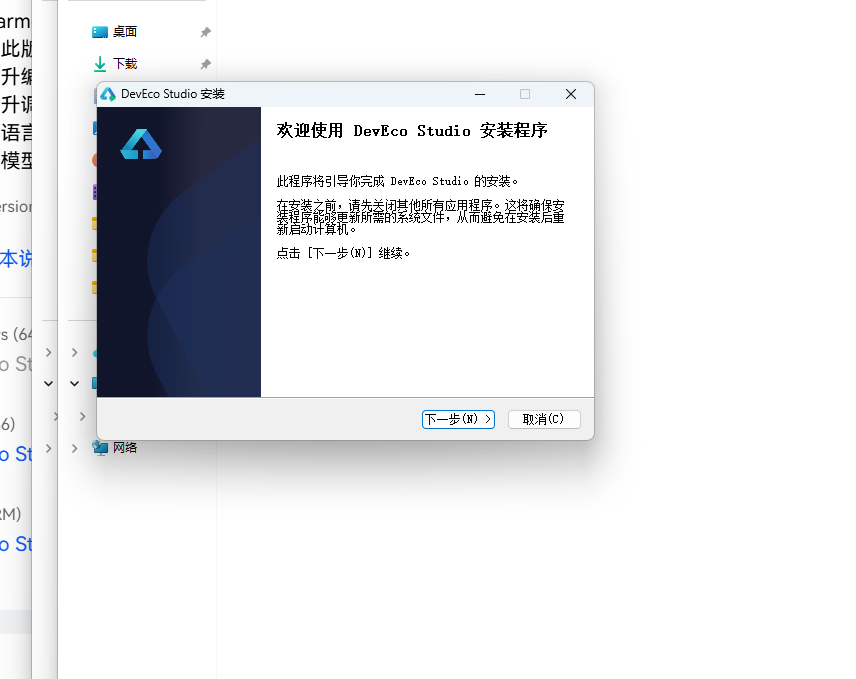
DevEco Studio 是 HarmonyOS 应用开发的官方 IDE。下载安装包后双击运行,进入安装欢迎界面,点击「下一步」继续。
15.2 选择安装路径
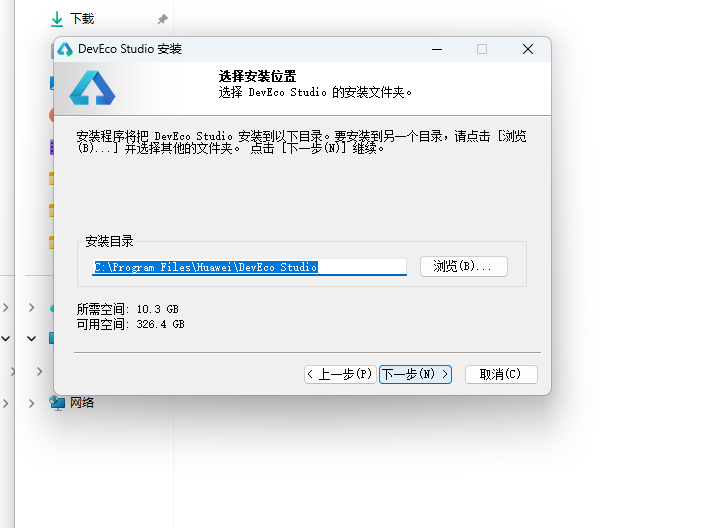
选择目标安装目录,建议安装到非系统盘,确认所需空间后点击「下一步」。
15.3 配置安装选项
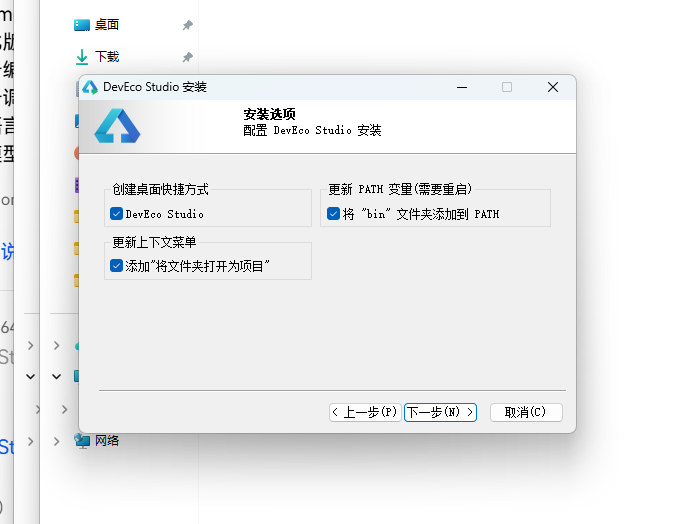
设置环境变量,勾选创建桌面快捷方式、将 bin 文件夹添加到 PATH、添加上下文菜单,但是需要重启一下电脑使环境变量生效。
15.4 选择项目模板
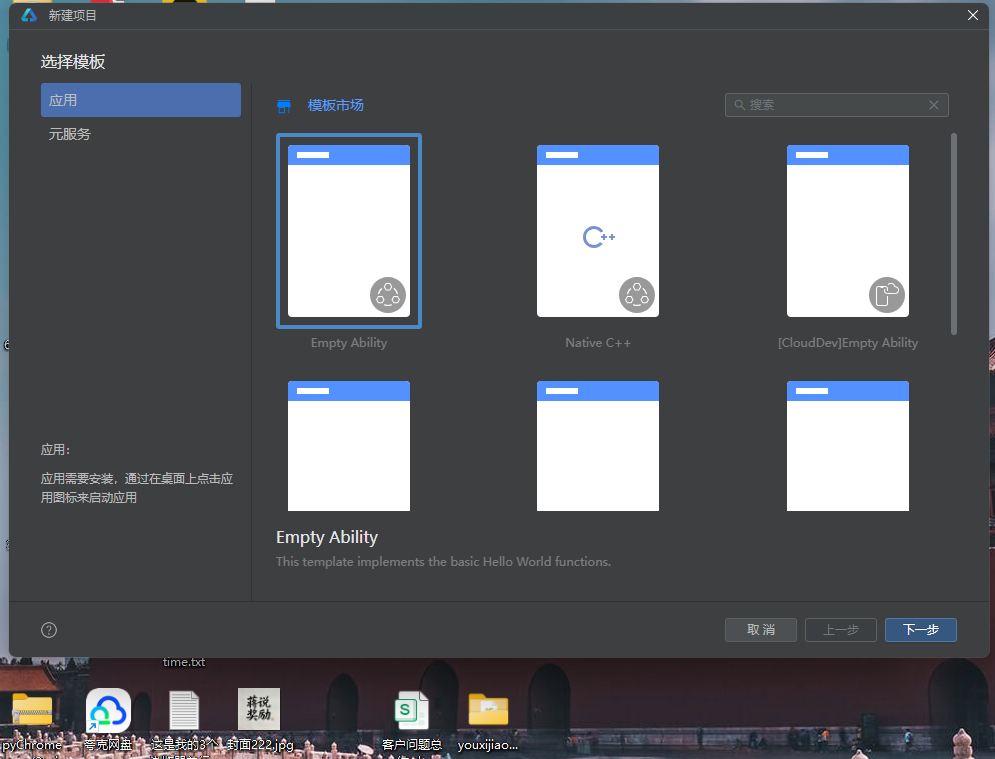
新建一个空白模板,在模板市场中选择 Empty Ability。
15.5 配置项目信息
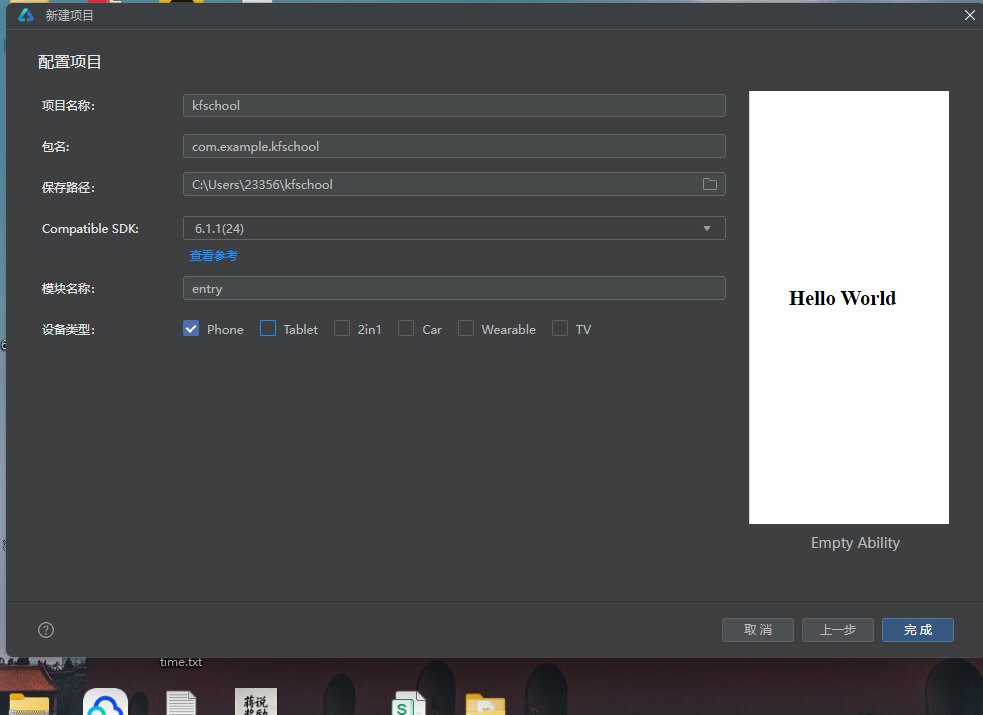
设置 API 为 24 的模板项目,项目名称 kfschool,Compatible SDK 6.1.1(24),设备类型勾选 Phone,点击完成后初始化项目,自动下载相关依赖。
十六、总结
通过对这款播物直播带货应用的深度剖析,我们可以看到,一个优秀的移动端应用远不止是功能的堆砌,它更是架构设计、数据建模、视觉系统、交互逻辑、防御性编程等多维度能力的综合体现。
在架构层面,该应用采用了"配置驱动 + 组件化 + 状态管理"的三层设计模式。配置层将所有可变的数据与视觉属性抽离为常量数组和元数据接口,使得业务逻辑与表现层彻底解耦;组件层将五个功能页面拆分为独立的 @Builder 构建器,每个页面采用完全不同的布局风格,实现"一页一型"的差异化设计;状态层利用 ArkUI 的 @State、@Observed 机制,实现了数据变化到 UI 刷新的自动响应,特别是购物车数据的真正增删改(unshift/改元素/splice),形成了完整的 CRUD 闭环。
在数据层面,五个 @Observed 数据类(LiveRoom/Product/FollowHost/CartItem/OrderRecord)以 constructor 构造函数方式实例化,完整描述了播物直播的全部业务信息。三个工具函数(viewerStr 万单位转换、liveCatColor 按品类着色、orderStatusColor 按状态着色)将业务数据转化为视觉格式和色彩,实现了"数据即格式、数据即配色"的高级渲染模式,这是该应用最具特色的技术亮点之一。
在视觉层面,本应用独创了"直播带货头部"设计——顶部固定显示当前直播间信息(主播头像+正在直播+专场标题+在线人气)+ 优惠券横条,无装饰带动效,信息密度高,直接还原真实直播 App 的头部体验。应用还独创了"呼吸灯"动效——通过 aboutToAppear 中 setInterval 700ms 切换 breath 状态,LIVE 标签、直播中标识、商品秒杀标签、未完成订单状态都使用 opacity 呼吸灯动画,营造出直播间"正在直播"的紧迫感和氛围感。五个 Tab 每个布局完全不同——直播间双列直播卡、关注横滑主播+时间轴、推荐商品瀑布流、购物车清单+柱状图、我的统计+订单列表,最大程度还原了真实直播电商 App 的交互体验。统一的色彩系统是整个应用的视觉基石,紫色主色搭配玫红强调色,配合紫粉底和多色语义色,营造出既时尚又热卖的直播电商氛围。
在交互层面,应用实现了完整的购物车 CRUD 闭环——加入购物车(TextInput 规格输入,cartList.unshift 新商品)、修改购物车(TextInput 名称+规格输入,修改数组元素)、清空购物车(二次确认,cartList.splice 清空),配合 @State 响应式刷新和 Stack 弹窗叠加(zIndex 999,mask 遮罩点击关闭),交互流畅且一致。购物车选中状态(☑️/⬜)、原价删除线、万单位人气显示等细节,都体现了对直播电商用户体验的深入考量。
标签: HarmonyOS · ArkTS · 华为 · 直播电商 · 移动端开发

作为“人工智能6S店”的官方数字引擎,为AI开发者与企业提供一个覆盖软硬件全栈、一站式门户。
更多推荐

 1
1 0
0- 0


 已为社区贡献33条内容

所有评论(0)