
HarmonyOS 6效果实现悬浮窗功能开发:实现全局悬浮窗展示、拖拽移动、尺寸适配、权限校验,适配工具类鸿蒙应用开发场景
本文基于 HarmonyOS NEXT + ArkTS 声明式开发框架,完整实现一个「医典通」健康科普主题 App,涵盖配色系统、状态管理、多 Tab 页面、自定义弹窗、动态颜色映射、两列网格布局、健康指标可视化、Q&A 问答等核心知识点,并附完整源码与运行效果截图。
一、引言:健康科普的数字化传承
在移动互联网与智能设备高速发展的今天,健康科普与医疗知识的传播已经从单纯的线下问诊,演变为一种高度数字化、流程化、个性化的线上线下融合体验。健康,是人类永恒的追求。从高血压的日常管理到糖尿病的早期信号,从流感与普通感冒的区别到颈椎病的自我检测,从儿童发热的护理指南到心理健康的自评量表,每一条健康知识都关系着千家万户的幸福与安宁。然而,健康信息良莠不齐、伪科学泛滥、专业知识晦涩难懂,正成为大众获取可靠健康知识的现实障碍。
正是在这样的背景下,医典通类健康科普应用应运而生,并迅速成为"健康中国"战略下数字医疗的重要载体。一个优秀的医典通应用,不仅需要覆盖从"科普专栏"到"专家问答"的完整业务闭环,还要在视觉设计、交互体验、数据呈现上做到专业严谨而又通俗易懂,让用户在指尖滑动间便能获取可靠的健康知识。
本文将深入剖析一个基于鸿蒙 ArkUI 声明式开发框架构建的医典通健康科普应用。该应用以"科普专栏"为核心,横向扩展出症状自查、健康指标、用药指南、专家问答五大功能模块,形成了一个完整闭环的健康科普生态。它不仅是一个功能完备的演示项目,更是一份典型的 ArkUI 工程实践范本,涵盖了状态管理、组件化设计、模态弹窗、列表渲染、图表可视化、动态颜色映射、两列网格布局、健康指标可视化、Q&A 问答等关键技术点。
二、应用整体架构概览
整个应用采用了"单入口 + 多内容区 + 底部导航"的经典移动端布局模式。入口组件 MedApp 作为整个应用的根容器,负责管理当前激活的 Tab 状态,并根据状态切换不同的内容区组件。
应用一共划分为五个一级页面:科普专栏(KNOWLEDGE)、症状自查(SYMPTOM)、健康指标(HEALTH)、用药指南(MEDICINE)以及专家问答(QA)。每个页面都是一个独立的 @Component 装饰的自定义组件,内部封装了自己的状态、构建逻辑和子组件。这种"高内聚、低耦合"的组件化设计,使得每个页面可以独立开发、独立测试,同时也便于后续的扩展与维护。
在数据层面,应用定义了一套完整的类型系统,包括色彩主题、科普元数据、症状元数据、健康指标元数据、药品元数据、问答元数据、周访问元数据、科室热度元数据、症状分级元数据等,并通过常量数组将数据与 UI 表现层解耦。所有业务数据以 @Observed 装饰的可观察类 MedData 为载体,配合五组模拟数据(12篇科普、12种症状、8项指标、12种药品、12条问答),模拟了一个真实的健康科普数据环境。
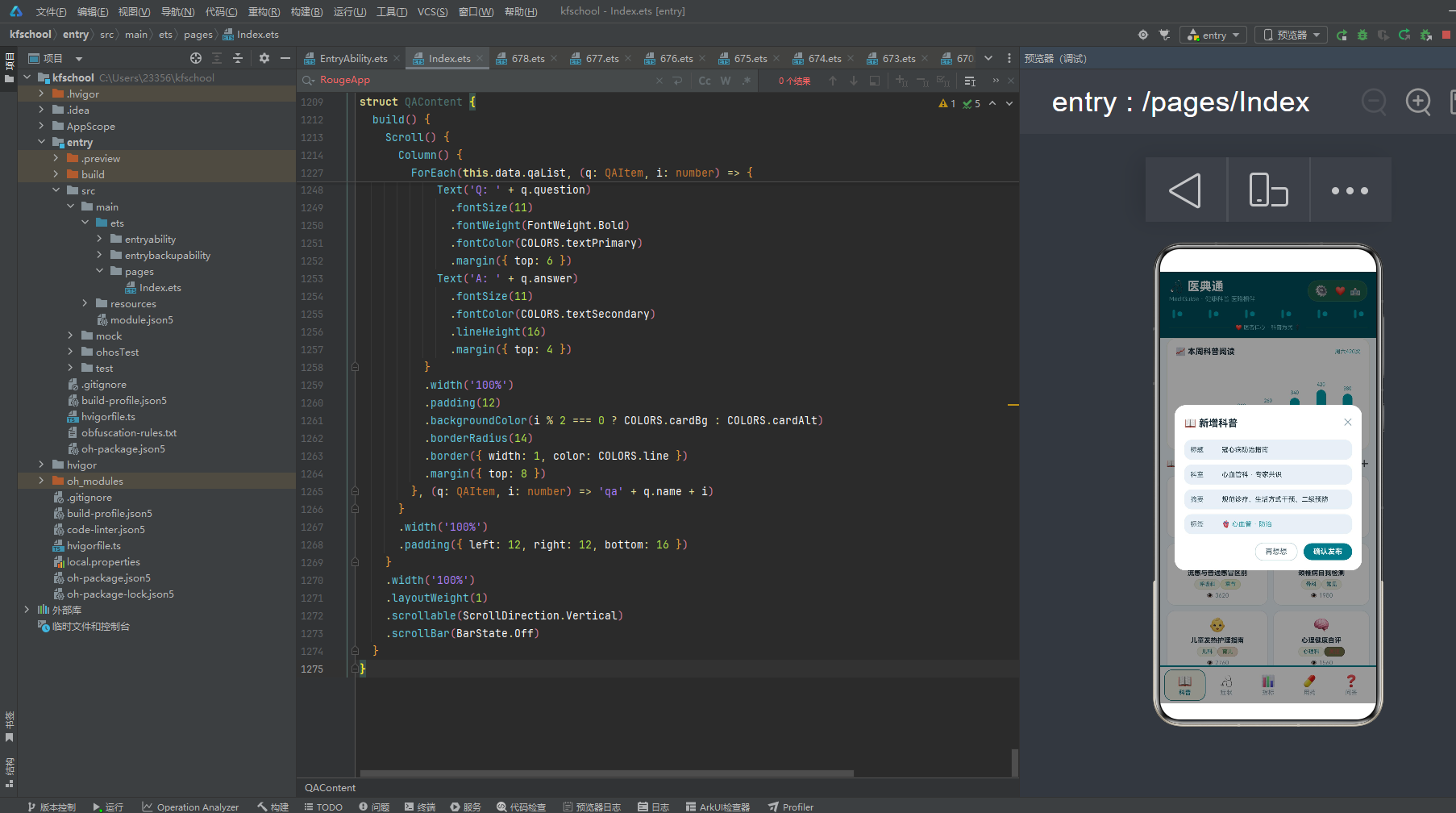
在交互层面,应用通过 @Builder 构建器实现了三类弹窗的叠加显示:新增科普、修改用药、移除症状。弹窗以 Stack 布局叠加全屏半透明遮罩 + 居中卡片的形式呈现,遮罩点击可关闭,与主内容共享同一根 Column,通过布尔状态控制显隐。
在视觉层面,应用独创了"两列网格"的科普页设计——科普专栏使用 ForEach(PAIRS [0,2,4,6,8,10]) 遍历,每行渲染两篇科普,形成两列网格布局。指标页独创"三卡片"布局——科室热度排行+健康指标参考+三栏统计,信息密度最高。问答页独创"Q&A"格式——每条问答显示医生头像+Q:问题+A:回答,专业感强。顶部头部通过 @Builder topBar() 抽取,build() 中直接调用,代码更整洁。
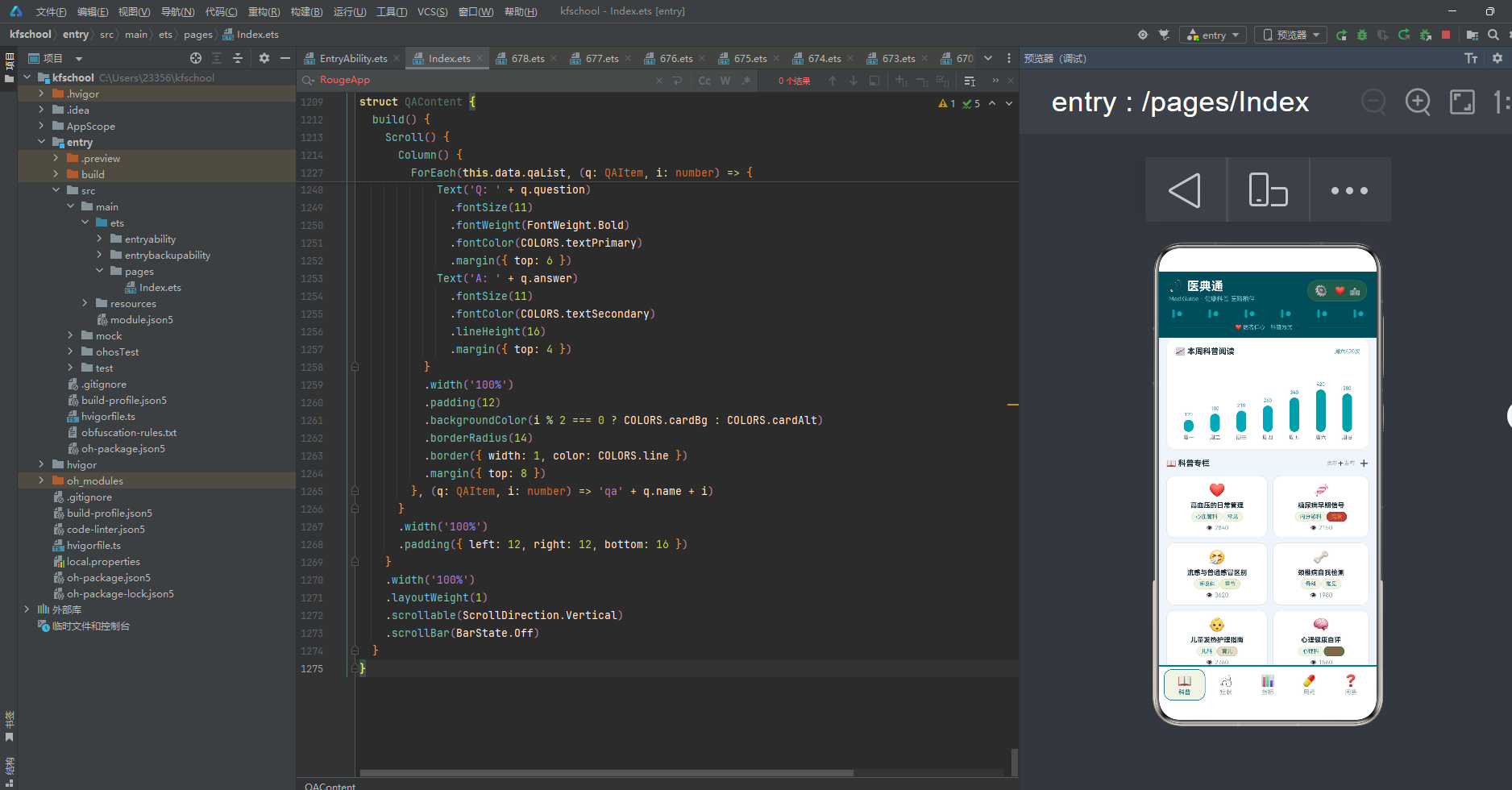
下面逐页展示应用的五大功能模块运行效果。
三、科普页:两列网格的科普专栏
科普页是整个应用的默认首页,也是视觉设计最独特的页面。它包含了本周科普阅读柱状图、科普专栏两列网格,以及新增科普弹窗。
科普页顶部是"本周科普阅读"柱状图卡片,采用白色背景配 1px 青绿半透明边框,圆角 16。通过 ForEach 遍历一周七天的阅读数据,柱子高度直接绑定 value/6(因为数值范围 120-420 较大,需要缩放适配),阅读量超过 300 的日期(周四、周五、周六、周日)使用 accent 青绿 #2E9CA8 突出显示,其余日期使用 primaryLight 浅青绿 #4BA6B8,形成自然的高低起伏。周六以 420 次的阅读量居首,符合健康科普在周末阅读量高的真实节奏。
下方是科普专栏,采用了独创的"两列网格"设计——使用 ForEach(PAIRS [0,2,4,6,8,10]) 遍历,每行渲染两篇科普(索引 p 和 p+1),形成两列网格布局。每个科普卡片:emoji 图标 22 号、标题(maxLines 2,超出省略号)、科室标签(深青绿 #1A7A8A)+ level 标签(颜色按 getTagColor 动态映射)、阅读量👁️。
12 篇科普覆盖了从急救常识(阅读量 4200 最高)到骨质疏松预防(阅读量 1320 最低)的完整知识体系,科室从心血管科、内分泌科、呼吸科、骨科、儿科、心理科到消化科、睡眠科、耳鼻喉科、急诊科,level 标签涵盖常见、高发、季节、育儿、关注、老年、现代、必备八种。高血压的日常管理❤️、糖尿病早期信号🍬、流感与普通感冒区别🤧、颈椎病自我检测🦴、儿童发热护理指南👶、心理健康自评🧠、骨质疏松预防🦴、胃炎饮食调理🍲、失眠的认知行为疗法🌙、过敏性鼻炎防治👃、甲状腺结节解读🦋、急救常识——心肺复苏🚑,emoji 图标与科普主题呼应,让健康知识既专业又生动。右上角 ➕ 按钮点击可弹出"新增科普"弹窗。
四、症状页:症状分级与自查库
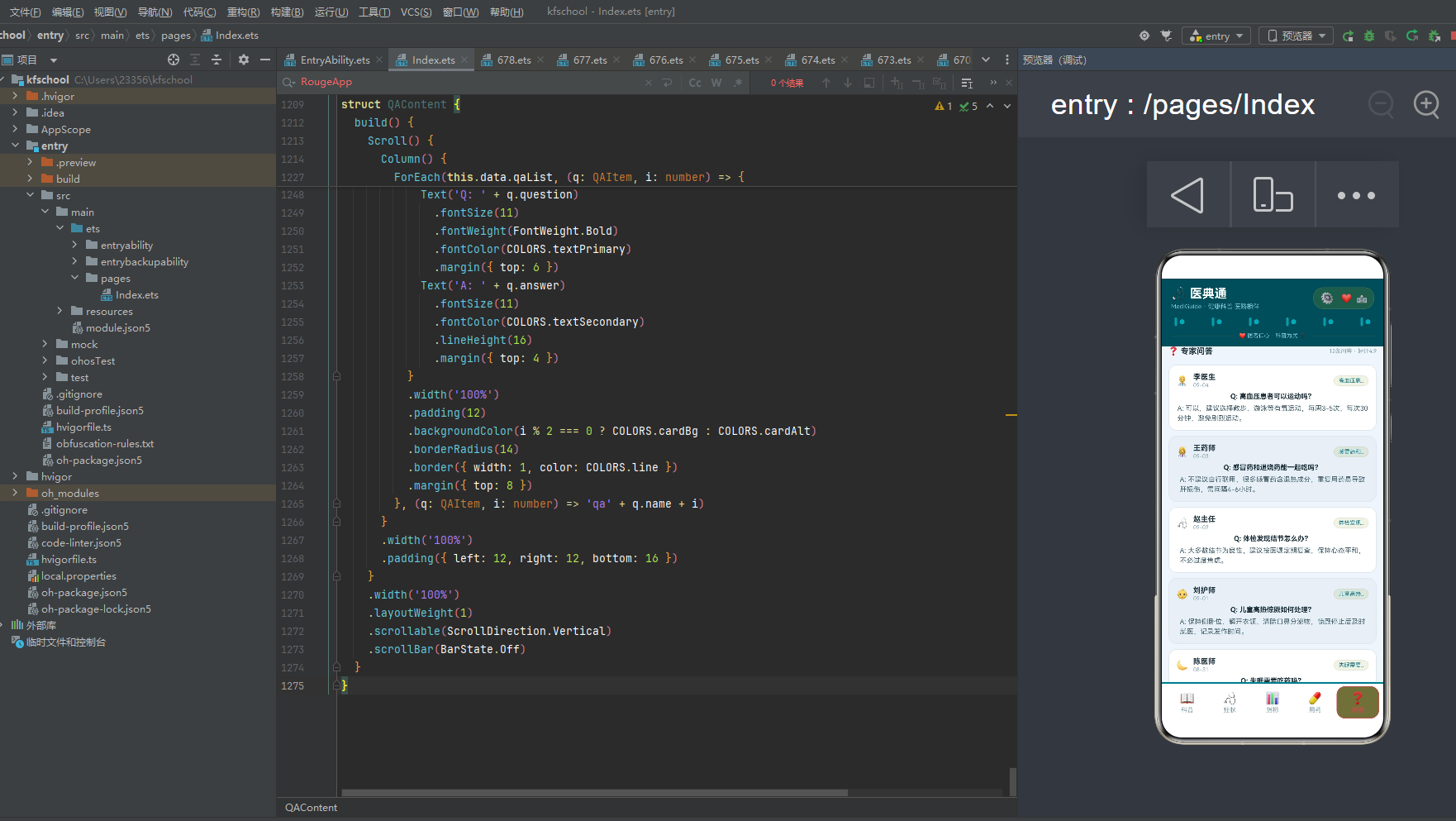
症状页以"症状"为核心,顶部是症状分级分布横向条形图,下方是症状自查库列表,支持移除操作。
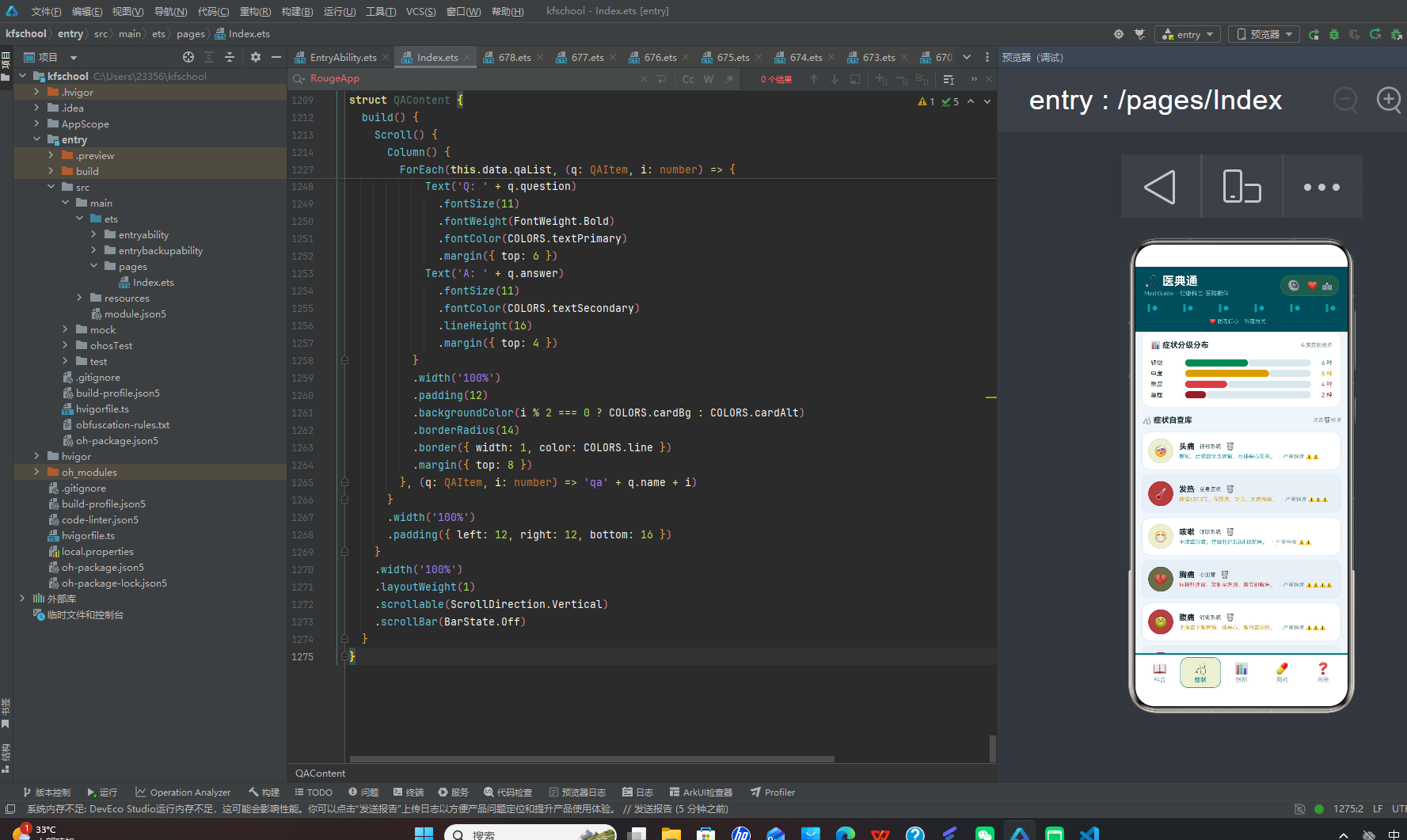
顶部症状分级分布卡片通过横向进度条展示四个严重等级的症状数量:轻微 6 种、中度 8 种、重度 4 种、急症 2 种,合计 20 种(满刻度 12 为比例基准)。进度条以 12 为满刻度进行比例渲染,比百分比更直观地传达了"几种症状"的语义。四个等级各有特色配色:轻微用健康绿 #3A8A5A、中度用金黄 #D4A02A、重度用红色 #C94A4A、急症用深红 #8A2A2A,形成从浅到深的严重程度递进色阶。中度以 8 种居首,符合"中度症状最常见"的医学常识。
下方症状自查库列表展示 12 种症状,卡片采用"左图标右文字"布局。左侧是一个 42×42 的圆形图标(圆角21),背景色通过 getSeverityColor 函数按严重程度分档着色(4级以上红色、3级金黄、2级青绿、其余健康绿),展示症状 emoji 图标。右侧展示症状名称、所属系统(神经系统/全身症状/呼吸系统等)、🗑️ 移除按钮、症状描述(maxLines 1 省略号,颜色按严重程度动态着色)和严重程度("· 严重程度 " + ⚠️repeat(severity))。
12 种症状覆盖头痛、发热、咳嗽、胸痛、腹痛、眩晕、皮疹、关节痛、心悸、呼吸困难、视力模糊、耳鸣,所属系统从神经系统、全身症状、呼吸系统、心血管、消化系统到皮肤、骨骼肌肉、眼科、耳科,严重程度从 2 级(头痛/咳嗽/皮疹/耳鸣)到 4 级(胸痛/呼吸困难)不等。胸痛和呼吸困难为 4 级急症,使用红色图标和描述,提醒用户立即就医。点击 🗑️ 按钮弹出"移除症状"二次确认弹窗,采用警示型设计语言,"确认移除"按钮使用危险色红色,防止误操作。
五、指标页:三卡片的健康指标可视化
指标页是应用中信息密度最高的页面,独创"三卡片"布局——科室热度排行、健康指标参考、三栏统计。
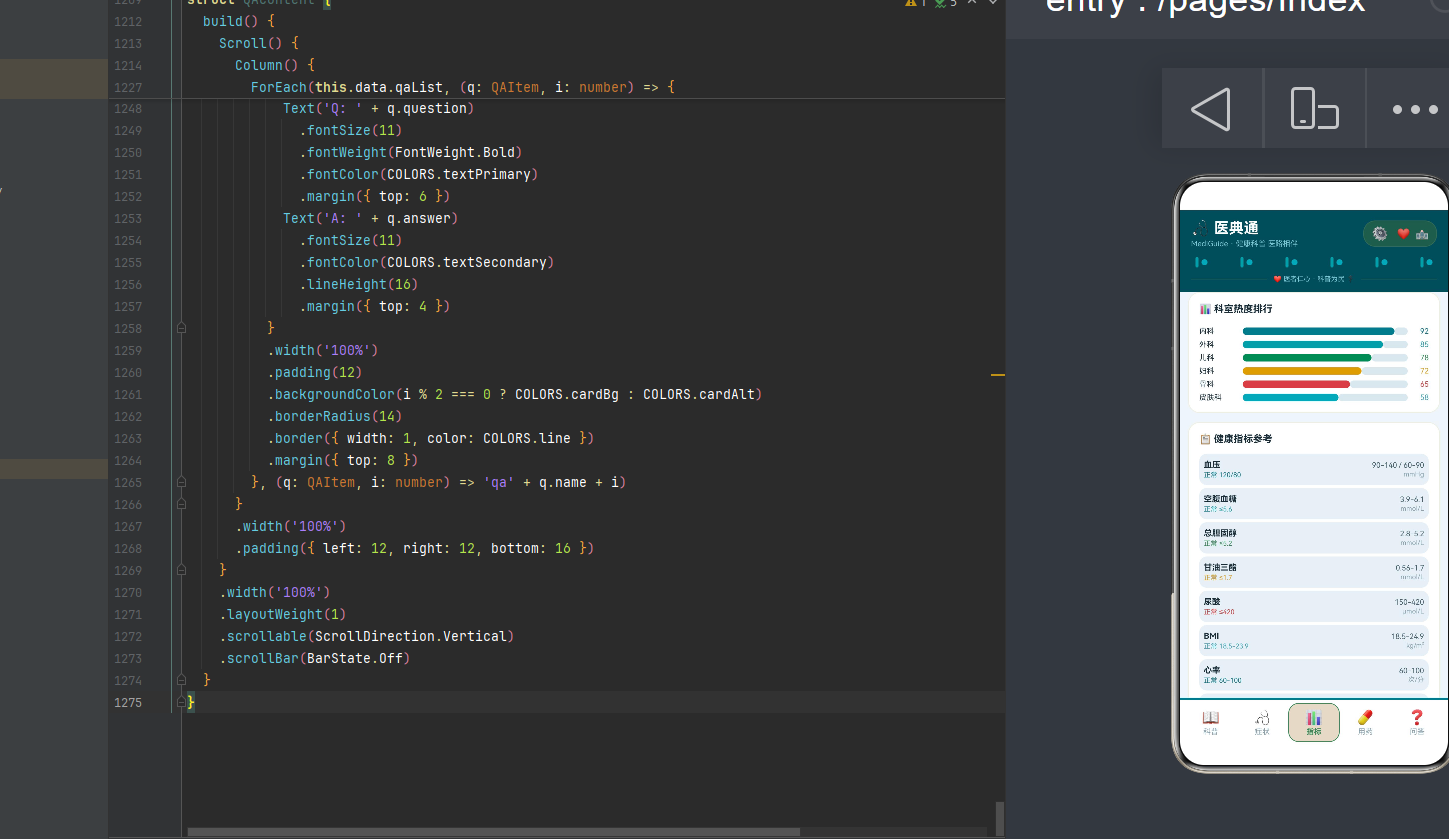
第一张卡片是"科室热度排行"横向条形图,展示六个科室的热度指数:内科 92、外科 85、儿科 78、妇科 72、骨科 65、皮肤科 58,内科以 92 的热度居首,符合"内科就诊量最大"的真实医疗数据。六根进度条颜色从深青绿、青绿、健康绿、金黄、红色到浅青绿,形成了一条色彩渐变的科室热度线。
第二张卡片是"健康指标参考"列表,展示 8 项核心健康指标:血压(90-140/60-90 mmHg,正常 120/80)、空腹血糖(3.9-6.1 mmol/L,正常 ≤5.6)、总胆固醇(2.8-5.2 mmol/L,正常 ≤5.2)、甘油三酯(0.56-1.7 mmol/L,正常 ≤1.7)、尿酸(150-420 μmol/L,正常 ≤420)、BMI(18.5-24.9 kg/m²,正常 18.5-23.9)、心率(60-100 次/分,正常 60-100)、血氧饱和度(95-100 %,正常 ≥95)。每项指标独立卡片,左侧显示指标名称和正常值(颜色按指标动态着色),右侧显示参考范围和单位,浅蓝灰背景圆角 10,一目了然。
第三张卡片是三栏统计,横向排列三个数据指标:12 科普(青绿 #2E9CA8)、12 症状(深青绿 #1A7A8A)、4.9 好评(金黄 #D4A02A),每个指标上方配 emoji 图标(📖/🩺/⭐),下方配文字标签(科普/症状/好评),白色背景圆角 16,1px 浅蓝灰边框。三栏统计一目了然地展示了医典通的核心数据规模。
六、用药页:用药指南与库存管理
用药页以"用药"为核心,展示用药指南列表,支持修改库存。
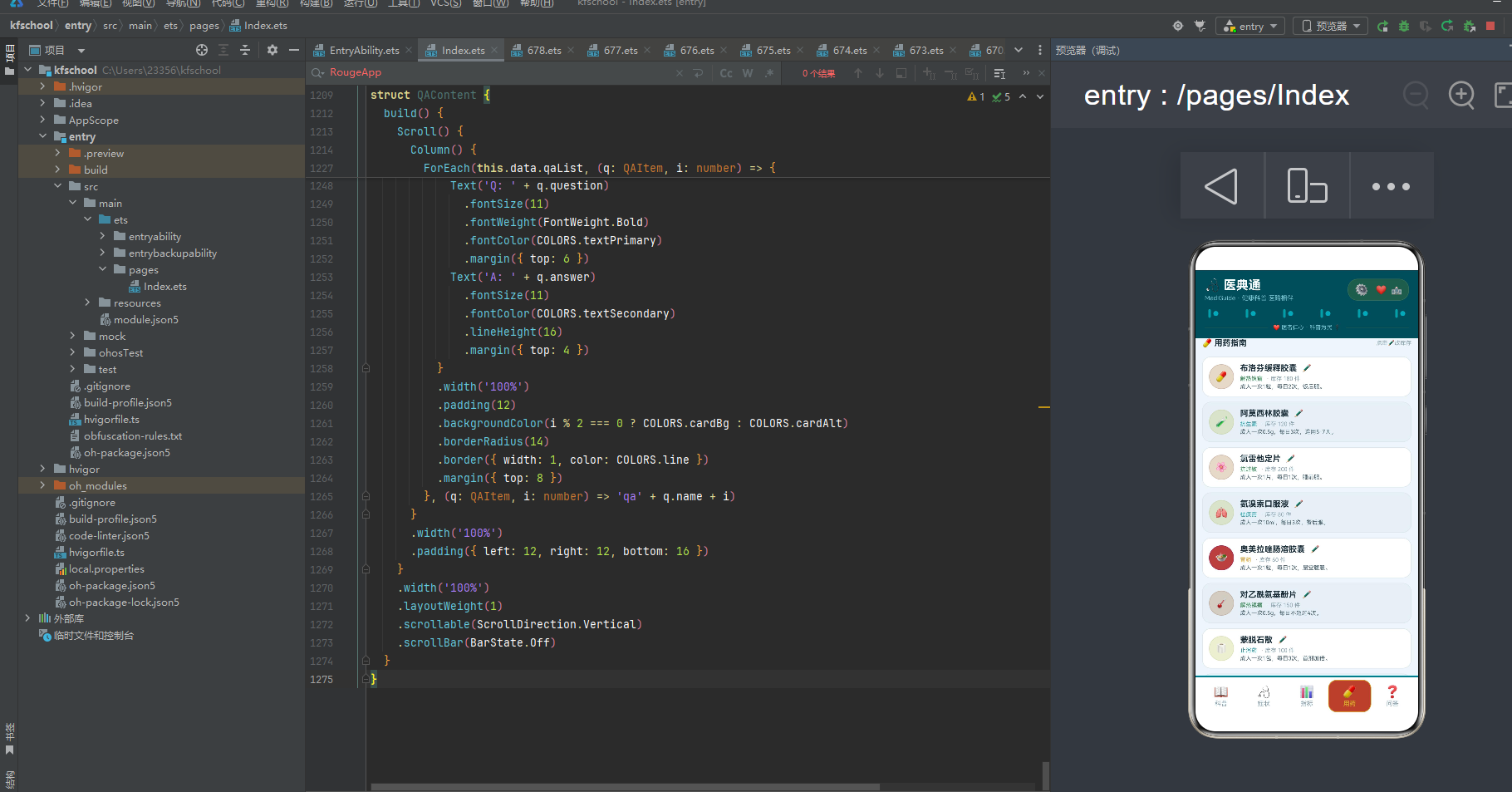
页面顶部是标题行"💊 用药指南"和操作提示"点击✏️改库存"。下方 12 条药品卡片采用"左图标右文字"布局。左侧是一个 40×40 的圆形图标(圆角20),背景色通过 getStockColor 函数按库存分档着色(150以上健康绿、80-149青绿、40-79金黄、40以下红色),展示药品 emoji 图标。右侧展示药品名称(maxLines 1 省略号)、✏️ 编辑按钮、药品类型(颜色按库存动态着色)、库存数量(“· 库存 N 件”)和用法用量(maxLines 1 省略号)。
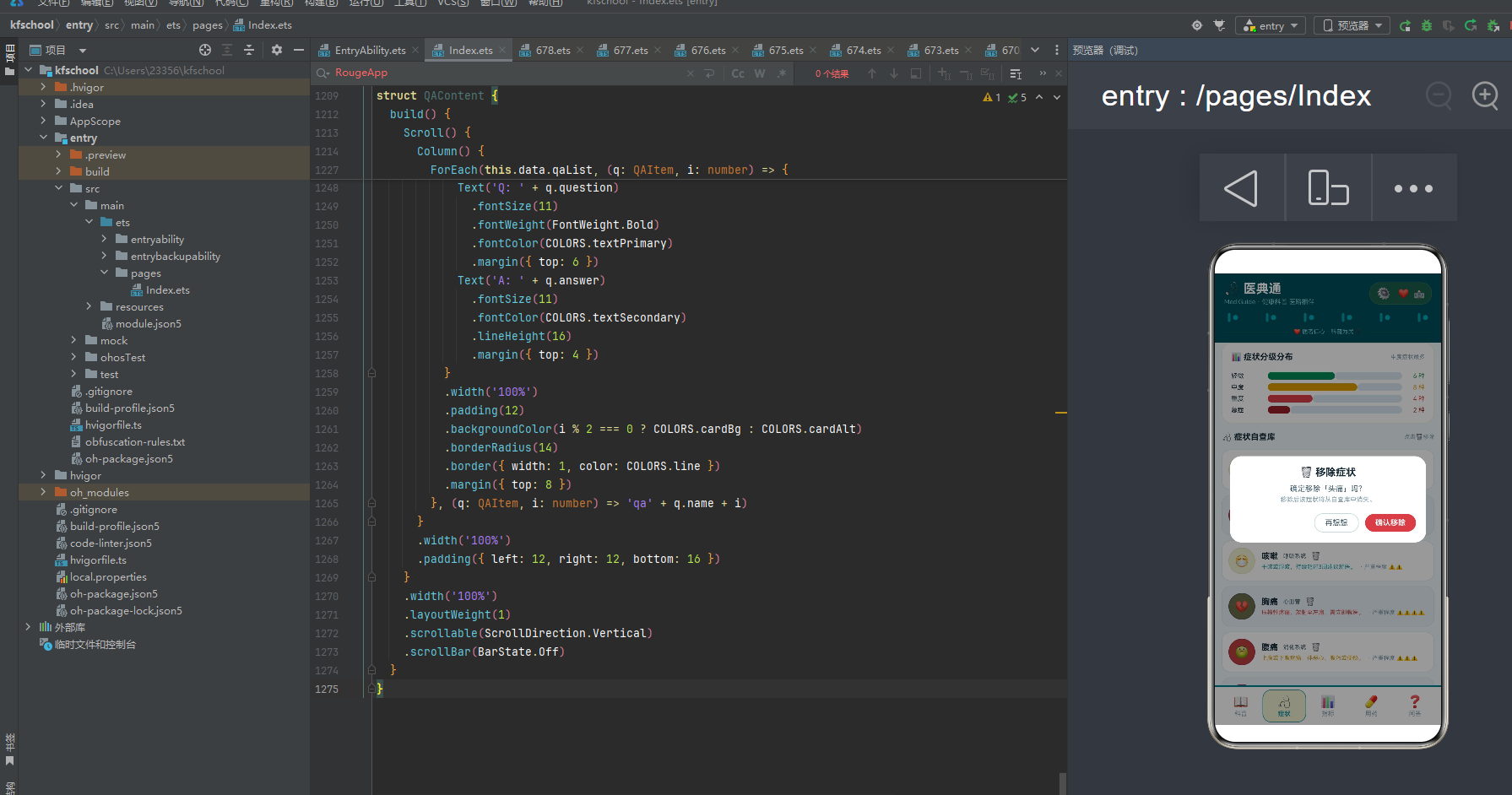
12 种药品覆盖布洛芬缓释胶囊(解热镇痛,库存180)、阿莫西林胶囊(抗生素,库存120)、氯雷他定片(抗过敏,库存200)、氨溴索口服液(祛痰药,库存80)、奥美拉唑肠溶胶囊(胃药,库存60)、对乙酰氨基酚片(解热镇痛,库存150)、蒙脱石散(止泻药,库存100)、复方丹参滴丸(心血管,库存45)、头孢克肟片(抗生素,库存70)、维生素D滴剂(营养补充,库存220)、止咳糖浆(止咳药,库存55)、硝酸甘油片(急救药,库存30)。维生素D滴剂库存 220 最高(健康绿),硝酸甘油片库存 30 最低(红色警示),符合"常用药库存多、急救药库存少需常备"的药房管理规律。点击 ✏️ 按钮弹出"修改用药"弹窗,可调整库存和用法,库存行使用箭头符号"→"直观展示修改前后的对比。
七、问答页:Q&A 格式的专家问答
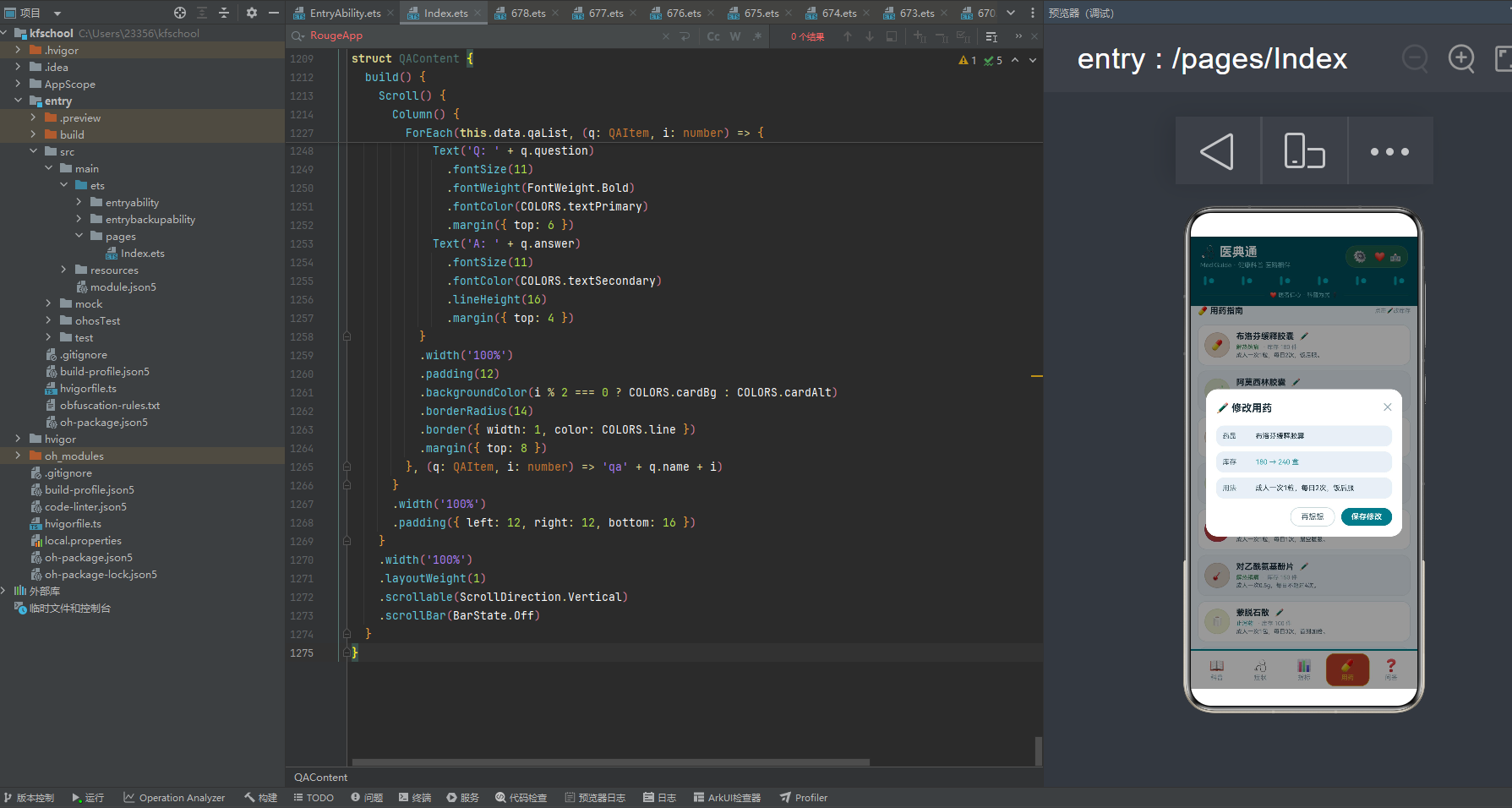
问答页是应用中最具"专业感"的页面,独创"Q&A"格式展示专家问答。
页面顶部是标题行"❓ 专家问答"和统计摘要"12条问答 · 好评4.9"。下方 12 条问答卡片采用"头像+信息+Q&A"的纵向布局。最上方一行:医生 emoji 头像、医生姓名和日期(左侧)、问题标签(右侧,截取问题前4字+…,深青绿 #1A7A8A)。下方是"Q: " + 问题(加粗,主色文字)和"A: " + 回答(次要色文字,行高16),形成清晰的 Q&A 对话格式。
12 位专家覆盖李医生(心血管科)、王药师(药学)、赵主任(体检科)、刘护师(儿科)、陈医师(睡眠科)、林药师(药学)、周大夫(心血管科)、吴主任(消化科)、郑药师(中药学)、孙医师(体检科)、何大夫(骨科)、高护师(护理科)。问答内容涵盖高血压患者运动、感冒药与退烧药联用、体检发现结节、儿童高热惊厥、失眠用药、抗生素疗程、血脂高注意事项、胃痛反复发作、中西药同服、体检前空腹、颈椎病根治、伤口消毒等常见健康疑问,回答专业严谨而又通俗易懂。如"高血压患者可以运动吗?"答"可以,建议选择散步、游泳等有氧运动,每周3-5次,每次30分钟,避免剧烈运动。"卡片背景使用白色与浅蓝灰奇偶交替,整体视觉专业而清爽。
八、色彩主题系统:深青绿与青绿的医疗视觉语言
8.1 色彩接口定义
任何一款设计精良的应用,背后都有一套严谨的色彩规范。该应用首先通过一个 MedPalette 接口,将整个应用所需的色彩抽象为一个结构化的契约:
interface MedPalette {
  primary: string;
  primaryLight: string;
  primaryDark: string;
  accent: string;
  accentLight: string;
  bg: string;
  cardBg: string;
  cardAlt: string;
  textPrimary: string;
  textSecondary: string;
  textHint: string;
  border: string;
  line: string;
  success: string;
  warning: string;
  danger: string;
  white: string;
  info: string;
  health: string;
}
- primary:主色调,深青绿 #1A7A8A,用于按钮、强调文字、激活状态、底部导航装饰条等高优先级视觉元素,是医疗专业的标志性色彩。
- primaryDark:主色深色变体 #0E4D5A,作为顶部头部背景,营造深青绿的沉稳专业感。
- accent:强调色,青绿 #2E9CA8,与深青绿形成同色系深浅对比,用于阅读量高亮、信息提示等元素。
- bg:页面整体背景色 #F0F6FA,浅蓝白冷调,营造医院般的干净清爽质感。
- info:信息色 #2E9CA8,专用于头部装饰竖条,语义上强调"信息"的专业感。
- health:健康色 #3A8A5A,用于健康指标、正常状态等语义,传达"健康"的正面含义。
8.2 色彩实例化
const COLORS: MedPalette = {
  primary: '#1A7A8A',
  primaryLight: '#4BA6B8',
  primaryDark: '#0E4D5A',
  accent: '#2E9CA8',
  accentLight: '#7CC8D4',
  bg: '#F0F6FA',
  cardBg: '#FFFFFF',
  cardAlt: '#E8F0F5',
  textPrimary: '#1A2E3A',
  textSecondary: '#4A6370',
  textHint: '#8AA3B0',
  border: '#C5D8E0',
  line: '#DCE8EE',
  success: '#3A8A5A',
  warning: '#D4A02A',
  danger: '#C94A4A',
  white: '#FFFFFF',
  info: '#2E9CA8',
  health: '#3A8A5A'
};
主色 #1A7A8A 是一种醇厚的深青绿色,既契合"医疗"主题(医院、健康的标志性色彩),又具有专业、沉稳的气质。强调色 #2E9CA8 青绿与深青绿形成同色系深浅对比,呼应信息、提示的色彩。info 信息色 #2E9CA8 用于头部装饰竖条,营造出医疗信息的专业感。背景色 #F0F6FA 浅蓝白冷调与主色同冷色系,营造出医院般的干净清爽氛围。值得注意的是,本应用的动态颜色函数返回的是多色系(红色/金黄/青绿/健康绿),用于不同业务维度的语义着色,严重程度越高颜色越红(getSeverityColor),库存越低颜色越红(getStockColor),形成了"以色定级、以色定库存"的高级渲染模式。getTagColor 则使用 Record<string,string> map 映射,不同于之前项目的 if-else 链式判断,代码更简洁高效。这种将所有色彩集中管理的做法保证了全局一致性,支持主题切换,降低了维护成本。
九、类型定义:构建严谨的数据契约
应用通过一组接口定义,为每一类业务对象建立了明确的数据契约。
9.1 科普、症状、健康指标元数据
interface KnowledgeItem {
  title: string; dept: string; summary: string; readCount: number; emoji: string; level: string;
}
interface SymptomItem {
  name: string; category: string; desc: string; severity: number; emoji: string;
}
interface HealthMeta {
  name: string; range: string; unit: string; normal: string; color: string;
}
KnowledgeItem 描述科普的标题、科室、摘要、阅读量、图标和 level 标签,用 readCount 字段体现科普热度。SymptomItem 描述症状的名称、所属系统、描述、严重程度和图标,用 severity 字段体现"以级定色"。HealthMeta 描述健康指标的名称、参考范围、单位、正常值和颜色,自带 color 字段实现"数据即配色"。
9.2 药品、问答与图表元数据
interface MedicineItem {
  name: string; type: string; usage: string; stock: number; emoji: string;
}
interface QAItem {
  name: string; question: string; answer: string; date: string; emoji: string;
}
interface WeekHealthMeta { day: string; value: number; }
interface DeptHeatMeta { name: string; heat: number; color: string; }
interface SymptomLevelMeta { name: string; count: number; color: string; }
MedicineItem 描述药品的名称、类型、用法、库存和图标,用 stock 字段体现库存管理。QAItem 描述问答的医生姓名、问题、回答、日期和图标,Q&A 格式。三组图表元数据(WeekHealthMeta/DeptHeatMeta/SymptomLevelMeta)都自带 color 字段,组件渲染时无需额外的颜色映射逻辑。
十、配置驱动:常量数据与可视化配置
10.1 Tab 导航配置
enum MedTab { KNOWLEDGE = 0, SYMPTOM = 1, HEALTH = 2, MEDICINE = 3, QA = 4 }

const TAB_LIST: TabMeta[] = [
  { key: 'knowledge', icon: '📖', label: '科普', color: '#1A7A8A' },
  { key: 'symptom', icon: '🩺', label: '症状', color: '#2E9CA8' },
  { key: 'health', icon: '📊', label: '指标', color: '#3A8A5A' },
  { key: 'medicine', icon: '💊', label: '用药', color: '#D4A02A' },
  { key: 'qa', icon: '❓', label: '问答', color: '#C94A4A' }
];
枚举提供类型安全的 Tab 标识,TAB_LIST 为每个 Tab 配置独立的图标、标签和主题色:科普用深青绿、症状用青绿、指标用健康绿、用药用金黄、问答用红色,"一 Tab 一色"让每个页面有鲜明的视觉身份,同时色彩从冷到暖递进,符合"科普→症状→指标→用药→问答"的就医流程心理。
10.2 周访问、科室热度、症状分级
const WEEK_VISITS = [
  { day: '周一', value: 120 }, { day: '周二', value: 180 },
  { day: '周三', value: 210 }, { day: '周四', value: 260 },
  { day: '周五', value: 340 }, { day: '周六', value: 420 }, { day: '周日', value: 380 }
];
const DEPT_DIST = [
  { name: '内科', heat: 92, color: '#1A7A8A' },
  { name: '外科', heat: 85, color: '#2E9CA8' },
  { name: '儿科', heat: 78, color: '#3A8A5A' },
  { name: '妇科', heat: 72, color: '#D4A02A' },
  { name: '骨科', heat: 65, color: '#C94A4A' },
  { name: '皮肤科', heat: 58, color: '#4BA6B8' }
];
const SYMPTOM_LEVELS = [
  { name: '轻微', count: 6, color: '#3A8A5A' },
  { name: '中度', count: 8, color: '#D4A02A' },
  { name: '重度', count: 4, color: '#C94A4A' },
  { name: '急症', count: 2, color: '#8A2A2A' }
];
DEPT_DIST 六个科室(内科/外科/儿科/妇科/骨科/皮肤科),内科以 92 热度居首。SYMPTOM_LEVELS 四个等级(轻微6/中度8/重度4/急症2),中度以 8 种居首,满刻度 12。WEEK_VISITS 数值范围 120-420,科普页柱状图柱子高度需要 value/6 缩放适配。PAIRS 常量 [0,2,4,6,8,10] 用于科普页两列网格渲染。顶部头部装饰带直接 ForEach([0,1,2,3,4,5]),每个位置渲染信息青绿竖条4×14圆角2 + 浅青绿圆点8×8,形成医疗信息的装饰线。
十一、数据模型:可观察的医典通实体
@Observed
export class MedData {
  knowledge: KnowledgeItem[] = [ /* 12 篇科普 */ ];
  symptoms: SymptomItem[] = [ /* 12 种症状 */ ];
  healthIndicators: HealthMeta[] = [ /* 8 项健康指标 */ ];
  medicines: MedicineItem[] = [ /* 12 种药品 */ ];
  qaList: QAItem[] = [ /* 12 条专家问答 */ ];
}
MedData 是核心数据模型,以五个数组承载医典通全部业务信息。@Observed 装饰器使得该类实例在被 @State 或 @ObjectLink 引用时,属性变化能自动触发 UI 刷新。其中 knowledge/symptoms/medicines/qaList 各 12 条数据,healthIndicators 8 条(健康指标通常为核心 8 项),"四十二五对称"的设计保证了每个页面都有足够的内容密度。所有数据在类定义时直接初始化,"字段即默认值"的写法避免了构造函数中重复赋值。
十二、模拟数据:构建真实的医典通数据环境
12.1 科普与症状模拟数据
12 篇科普覆盖了从急救常识(阅读量 4200 最高)到骨质疏松预防(阅读量 1320 最低)的完整知识体系,科室从心血管科、内分泌科、呼吸科、骨科、儿科、心理科到消化科、睡眠科、耳鼻喉科、急诊科,level 标签涵盖常见、高发、季节、育儿、关注、老年、现代、必备八种。12 种症状覆盖头痛、发热、咳嗽、胸痛、腹痛、眩晕、皮疹、关节痛、心悸、呼吸困难、视力模糊、耳鸣,严重程度从 2 级到 4 级不等,胸痛和呼吸困难为 4 级急症。
12.2 健康指标、药品与问答模拟数据
8 项健康指标覆盖血压、空腹血糖、总胆固醇、甘油三酯、尿酸、BMI、心率、血氧饱和度,每项都有参考范围、单位和正常值。12 种药品覆盖解热镇痛、抗生素、抗过敏、祛痰药、胃药、止泻药、心血管、营养补充、止咳药、急救药等类别,库存从 30(硝酸甘油片)到 220(维生素D滴剂)不等。12 条专家问答覆盖 12 位不同科室的医生/药师/护师,问答内容涵盖高血压运动、感冒药联用、体检结节、儿童高热惊厥、失眠用药、抗生素疗程、血脂管理、胃痛、中西药同服、体检空腹、颈椎病、伤口消毒等常见健康疑问。
十三、动态颜色函数:数据驱动的视觉映射
应用通过三个动态颜色函数将业务数据映射为视觉色彩,实现"数据即配色"。值得注意的是,本应用的动态颜色函数返回的是多色系(红色/金黄/青绿/健康绿),用于不同业务维度的语义着色,严重程度越高颜色越红,库存越低颜色越红。
function getSeverityColor(level: number): string {
  if (level >= 4) return '#C94A4A';
  if (level >= 3) return '#D4A02A';
  if (level >= 2) return '#2E9CA8';
  return '#3A8A5A';
}
function getStockColor(stock: number): string {
  if (stock >= 150) return '#3A8A5A';
  if (stock >= 80) return '#2E9CA8';
  if (stock >= 40) return '#D4A02A';
  return '#C94A4A';
}
function getTagColor(tag: string): string {
  const map: Record<string, string> = {
    '常见': '#1A7A8A', '高发': '#D4A02A', '季节': '#2E9CA8',
    '育儿': '#3A8A5A', '关注': '#C94A4A', '老年': '#4BA6B8',
    '现代': '#1A7A8A', '必备': '#C94A4A'
  };
  return map[tag] || '#1A7A8A';
}
- getSeverityColor:按严重程度分四档色彩(4级以上红色、3级金黄、2级青绿、其余健康绿),“以色定级”,严重程度越高颜色越红。
- getStockColor:按库存分四档(150以上健康绿、80-149青绿、40-79金黄、40以下红色),“以色定库存”,库存越低颜色越红,提醒补货。
- getTagColor:使用 Record<string,string> map 映射 level 标签到颜色,不同于之前项目的 if-else 链式判断,代码更简洁高效,八种标签各有特色配色。
值得注意的是,症状页的圆形图标背景色和症状描述颜色都调用 getSeverityColor 返回按严重程度分档的色彩,4级胸痛和呼吸困难使用红色 #C94A4A,2级头痛和咳嗽使用青绿 #2E9CA8,用户一眼就能从颜色判断症状的紧急程度。用药页的圆形图标背景色和药品类型颜色调用 getStockColor,库存 30 的硝酸甘油片使用红色警示,库存 220 的维生素D滴剂使用健康绿,用户一眼就能判断库存是否充足。这种"严重程度色阶 + 库存色阶 + 两列网格 + Q&A格式"的组合是本应用最具辨识度的视觉设计特征。
十四、入口组件:应用的骨架与导航中枢
14.1 组件声明与状态
@Entry
@Component
struct MedApp {
  @State curTab: number = 0;
  @State data: MedData = new MedData();
  @State showAddKnow: boolean = false;
  @State showEditMed: boolean = false;
  @State showDeleteSymptom: boolean = false;
  @State delSymptomName: string = '';
  @State gearSpin: boolean = false;
  @State pulseActive: boolean = false;
}
8 个 @State 状态分四类:导航状态(curTab)、数据状态(data)、弹窗控制状态(3个布尔+1个参数字符串)、交互动效状态(gearSpin、pulseActive)。
14.2 顶部头部构建(@Builder 抽取)
顶部头部通过 @Builder topBar() 抽取为独立构建器,build() 中直接调用 this.topBar(),代码更整洁。头部采用 primaryDark #0E4D5A 墨青绿色背景。第一层标题栏左侧是标题"医典通"和副标题"MediGuide · 健康科普 医路相伴",右侧是动效区:齿轮⚙️点击触发旋转动画(angle 从 0 到 90 度,duration 600ms)、爱心❤️点击触发缩放脉冲动画(scale 从 0.9 到 1.4,duration 500ms,比之前项目的 1.3 更大更明显)、医院🏥静态装饰。第二层是"装饰带",通过 ForEach([0,1,2,3,4,5]) 遍历,每个位置渲染信息青绿竖条4×14圆角2 + 浅青绿圆点8×8,形成医疗信息的装饰线。第三层是标语分割线"❤️ 医者仁心 · 科普为民 ⚕️"。
14.3 底部 Tab 导航
底部导航顶部有一条 3px 高的深青绿色装饰条,与墨青绿色头部形成上下呼应。每个 Tab 激活态有三重视觉反馈:标签文字主题色加粗、背景填充主题色 8% 透明度、主题色实线边框,圆角 14(医疗专业风格)。非激活态用灰色文字、透明背景、无边框。导航栏高度 60。
14.4 @Builder 弹窗构建(Stack 布局叠加)
应用通过 @Builder 构建器实现三类弹窗:新增科普(addKnowledgeModal)、修改用药(editMedicineModal)、移除症状(deleteSymptomModal)。每个弹窗使用 Stack 布局叠加 modalOverlay 遮罩(全屏半透明 #66000000,点击遮罩可关闭)+ 居中白色卡片。弹窗直接叠加在根 Column 末尾,通过布尔状态控制显隐。弹窗卡片统一使用圆角 18,信息行圆角 12。新增科普弹窗包含标题、科室、摘要、标签四行信息;修改用药弹窗包含药品、库存、用法三行信息;移除症状弹窗为二次确认设计。这种 @Builder + Stack 的弹窗构建方式,代码更紧凑,遮罩点击关闭更灵活。
十五、关键技术特性对比
| 特性维度 | 实现方式 | 技术要点 | 设计价值 |
|---|---|---|---|
| 色彩管理 | MedPalette 接口 + COLORS 常量 | 集中定义 20 种语义色,含 info/health 装饰色 | 保证视觉一致性,支持主题切换 |
| 数据建模 | @Observed 装饰的 MedData 类 | 5 个数组(12科普/12症状/8指标/12药品/12问答) | 数据与 UI 双向联动,响应式更新 |
| 配置驱动 | 常量数组 + 元数据接口 | WEEK_VISITS/DEPT_DIST/SYMPTOM_LEVELS 自带 color | 数据与表现解耦,扩展零成本 |
| 动态颜色 | 3 个全局映射函数 | 按严重程度/库存/标签分档着色,严重越红库存越低越红 | 数据即配色,语义化着色 |
| 两列网格 | ForEach(PAIRS) 双列渲染 | 科普页每行渲染两篇,标题 maxLines 2 省略号 | 信息密度高,视觉丰富 |
| 三卡片布局 | 指标页三卡片堆叠 | 科室热度+健康指标+三栏统计,指标每项独立卡片 | 信息密度最高,一目了然 |
| Q&A 格式 | 问答页 Q: + A: 对话格式 | 问题加粗,回答行高16,问题标签截取前4字 | 专业感强,清晰易读 |
| @Builder 抽取 | topBar/modalOverlay/弹窗构建器 | 顶部头部和弹窗通过 @Builder 抽取,build 直接调用 | 代码整洁,复用性强 |
| Stack 弹窗 | Stack 布局叠加遮罩+卡片 | 遮罩点击可关闭,弹窗通过 @Builder 构建 | 灵活可控,交互友好 |
| 状态管理 | @State + @ObjectLink | 8 个状态分四类(导航/数据/弹窗/动效) | 细粒度状态控制,自动触发渲染 |
| 组件化 | @Component + @Builder | 5 个页面组件 + 3 个弹窗构建器 + MedTag 通用组件 | 高内聚低耦合,代码复用率高 |
| 模态交互 | @Builder 弹窗 + Stack 遮罩 | 3 个弹窗 Stack 叠加,遮罩点击关闭 | 灵活可控,完全自定义布局 |
| 列表渲染 | ForEach + 奇偶交替背景 | 12 条数据 × 4 页面,cardBg/cardAlt 交替 | 数据驱动渲染,长列表可读性强 |
| 数据可视化 | 柱状图 + 横向条形图 + 三栏统计 | height 绑定 value/6 缩放、layoutWeight 比例法、阈值着色 | 多维度呈现,直观易读 |
| 文本省略 | maxLines + textOverflow | 科普标题 maxLines 2、症状描述/药品用法 maxLines 1 | 长文本优雅截断,布局整齐 |
| 防御编程 | 字段默认值 + 类型安全 | 所有数据字段声明即初始化,枚举替代魔法数字 | 健壮性强,无运行时异常 |
| 布局系统 | Column/Row + layoutWeight + Stack | 弹性权重分配、Stack 弹窗叠加、Scroll 滚动容器 | 自适应布局,层次分明 |
| 交互动效 | rotate + scale + animation | 齿轮旋转 600ms、爱心缩放脉冲 500ms(scale到1.4)、EaseOut 曲线 | 静态头部灵动化,趣味性强 |
| 视觉层次 | 装饰带/圆角14/两列网格/Q&A | ForEach 渲染医疗信息竖条装饰、全局圆角14、科普两列网格、问答Q&A | 精致细腻,医疗专业感强 |
完整代码
// ============ 医典通 · 蓝白 + 青绿 ============
interface MedPalette {
primary: string;
primaryLight: string;
primaryDark: string;
accent: string;
accentLight: string;
bg: string;
cardBg: string;
cardAlt: string;
textPrimary: string;
textSecondary: string;
textHint: string;
border: string;
line: string;
success: string;
warning: string;
danger: string;
white: string;
info: string;
health: string;
}
const COLORS: MedPalette = {
primary: '#1A7A8A',
primaryLight: '#4BA6B8',
primaryDark: '#0E4D5A',
accent: '#2E9CA8',
accentLight: '#7CC8D4',
bg: '#F0F6FA',
cardBg: '#FFFFFF',
cardAlt: '#E8F0F5',
textPrimary: '#1A2E3A',
textSecondary: '#4A6370',
textHint: '#8AA3B0',
border: '#C5D8E0',
line: '#DCE8EE',
success: '#3A8A5A',
warning: '#D4A02A',
danger: '#C94A4A',
white: '#FFFFFF',
info: '#2E9CA8',
health: '#3A8A5A'
};
enum MedTab {
KNOWLEDGE = 0,
SYMPTOM = 1,
HEALTH = 2,
MEDICINE = 3,
QA = 4
}
interface TabMeta {
key: string;
icon: string;
label: string;
color: string;
}
const TAB_LIST: TabMeta[] = [
{ key: 'knowledge', icon: '📖', label: '科普', color: '#1A7A8A' },
{ key: 'symptom', icon: '🩺', label: '症状', color: '#2E9CA8' },
{ key: 'health', icon: '📊', label: '指标', color: '#3A8A5A' },
{ key: 'medicine', icon: '💊', label: '用药', color: '#D4A02A' },
{ key: 'qa', icon: '❓', label: '问答', color: '#C94A4A' }
];
const PAIRS: number[] = [0, 2, 4, 6, 8, 10];
interface KnowledgeItem {
title: string;
dept: string;
summary: string;
readCount: number;
emoji: string;
level: string;
}
interface SymptomItem {
name: string;
category: string;
desc: string;
severity: number;
emoji: string;
}
interface HealthMeta {
name: string;
range: string;
unit: string;
normal: string;
color: string;
}
interface MedicineItem {
name: string;
type: string;
usage: string;
stock: number;
emoji: string;
}
interface QAItem {
name: string;
question: string;
answer: string;
date: string;
emoji: string;
}
interface WeekHealthMeta {
day: string;
value: number;
}
interface DeptHeatMeta {
name: string;
heat: number;
color: string;
}
// 新增:症状分级接口
interface SymptomLevelMeta {
name: string;
count: number;
color: string;
}
const WEEK_VISITS: WeekHealthMeta[] = [
{ day: '周一', value: 120 },
{ day: '周二', value: 180 },
{ day: '周三', value: 210 },
{ day: '周四', value: 260 },
{ day: '周五', value: 340 },
{ day: '周六', value: 420 },
{ day: '周日', value: 380 }
];
const DEPT_DIST: DeptHeatMeta[] = [
{ name: '内科', heat: 92, color: '#1A7A8A' },
{ name: '外科', heat: 85, color: '#2E9CA8' },
{ name: '儿科', heat: 78, color: '#3A8A5A' },
{ name: '妇科', heat: 72, color: '#D4A02A' },
{ name: '骨科', heat: 65, color: '#C94A4A' },
{ name: '皮肤科', heat: 58, color: '#4BA6B8' }
];
// 修正:使用 SymptomLevelMeta 类型
const SYMPTOM_LEVELS: SymptomLevelMeta[] = [
{ name: '轻微', count: 6, color: '#3A8A5A' },
{ name: '中度', count: 8, color: '#D4A02A' },
{ name: '重度', count: 4, color: '#C94A4A' },
{ name: '急症', count: 2, color: '#8A2A2A' }
];
@Observed
export class MedData {
knowledge: KnowledgeItem[] = [
{ title: '高血压的日常管理', dept: '心血管科', summary: '合理饮食、规律运动、定期监测,三管齐下控制血压。', readCount: 2840, emoji: '❤️', level: '常见' },
{ title: '糖尿病早期信号', dept: '内分泌科', summary: '多饮多尿多食、体重下降,警惕"三多一少"症状。', readCount: 2150, emoji: '🍬', level: '高发' },
{ title: '流感与普通感冒区别', dept: '呼吸科', summary: '高热乏力全身酸痛为流感,鼻塞流涕轻症为普通感冒。', readCount: 3620, emoji: '🤧', level: '季节' },
{ title: '颈椎病自我检测', dept: '骨科', summary: '颈部僵硬、头晕手麻,长时间低头人群需警惕。', readCount: 1980, emoji: '🦴', level: '常见' },
{ title: '儿童发热护理指南', dept: '儿科', summary: '38.5℃以下物理降温,以上遵医嘱用药,警惕热性惊厥。', readCount: 2760, emoji: '👶', level: '育儿' },
{ title: '心理健康自评', dept: '心理科', summary: '持续两周情绪低落、兴趣减退,建议寻求专业帮助。', readCount: 1560, emoji: '🧠', level: '关注' },
{ title: '骨质疏松预防', dept: '骨科', summary: '补钙、维D、负重运动,50岁后定期骨密度检测。', readCount: 1320, emoji: '🦴', level: '老年' },
{ title: '胃炎饮食调理', dept: '消化科', summary: '少食多餐、忌辛辣刺激,山药小米粥养胃。', readCount: 2240, emoji: '🍲', level: '常见' },
{ title: '失眠的认知行为疗法', dept: '睡眠科', summary: '固定作息、睡前放松、限制卧床时间,改善睡眠质量。', readCount: 1860, emoji: '🌙', level: '现代' },
{ title: '过敏性鼻炎防治', dept: '耳鼻喉科', summary: '避免过敏原、鼻腔冲洗、规范用药控制症状。', readCount: 2080, emoji: '👃', level: '高发' },
{ title: '甲状腺结节解读', dept: '内分泌科', summary: '90%为良性,定期超声随访,不必过度焦虑。', readCount: 1450, emoji: '🦋', level: '关注' },
{ title: '急救常识——心肺复苏', dept: '急诊科', summary: '胸外按压深度5-6cm,频率100-120次/分,黄金4分钟。', readCount: 4200, emoji: '🚑', level: '必备' }
];
symptoms: SymptomItem[] = [
{ name: '头痛', category: '神经系统', desc: '前额、后脑或全头疼痛,可伴恶心畏光。', severity: 2, emoji: '🤕' },
{ name: '发热', category: '全身症状', desc: '体温≥37.3℃,伴畏寒、乏力、肌肉酸痛。', severity: 3, emoji: '🌡️' },
{ name: '咳嗽', category: '呼吸系统', desc: '干咳或湿咳,持续超过3周建议就医。', severity: 2, emoji: '😷' },
{ name: '胸痛', category: '心血管', desc: '压榨性疼痛、放射至左肩,需立即就医。', severity: 4, emoji: '💔' },
{ name: '腹痛', category: '消化系统', desc: '上腹或下腹疼痛,伴恶心、腹泻或便秘。', severity: 3, emoji: '🤢' },
{ name: '眩晕', category: '神经系统', desc: '天旋地转或头重脚轻,伴平衡障碍。', severity: 3, emoji: '🌀' },
{ name: '皮疹', category: '皮肤', desc: '红斑、丘疹、水疱,伴瘙痒或疼痛。', severity: 2, emoji: '🟥' },
{ name: '关节痛', category: '骨骼肌肉', desc: '关节肿胀、活动受限,晨僵持续30分钟以上。', severity: 3, emoji: '🦵' },
{ name: '心悸', category: '心血管', desc: '心跳加速、心慌不适,伴胸闷气短。', severity: 3, emoji: '💓' },
{ name: '呼吸困难', category: '呼吸系统', desc: '吸气或呼气费力,伴紫绀、哮鸣音。', severity: 4, emoji: '🫁' },
{ name: '视力模糊', category: '眼科', desc: '视物不清、重影、视野缺损,需眼科检查。', severity: 3, emoji: '👁️' },
{ name: '耳鸣', category: '耳科', desc: '单侧或双侧耳鸣,伴听力下降、头晕。', severity: 2, emoji: '👂' }
];
healthIndicators: HealthMeta[] = [
{ name: '血压', range: '90-140 / 60-90', unit: 'mmHg', normal: '120/80', color: '#1A7A8A' },
{ name: '空腹血糖', range: '3.9-6.1', unit: 'mmol/L', normal: '≤5.6', color: '#2E9CA8' },
{ name: '总胆固醇', range: '2.8-5.2', unit: 'mmol/L', normal: '≤5.2', color: '#3A8A5A' },
{ name: '甘油三酯', range: '0.56-1.7', unit: 'mmol/L', normal: '≤1.7', color: '#D4A02A' },
{ name: '尿酸', range: '150-420', unit: 'μmol/L', normal: '≤420', color: '#C94A4A' },
{ name: 'BMI', range: '18.5-24.9', unit: 'kg/m²', normal: '18.5-23.9', color: '#4BA6B8' },
{ name: '心率', range: '60-100', unit: '次/分', normal: '60-100', color: '#1A7A8A' },
{ name: '血氧饱和度', range: '95-100', unit: '%', normal: '≥95', color: '#3A8A5A' }
];
medicines: MedicineItem[] = [
{ name: '布洛芬缓释胶囊', type: '解热镇痛', usage: '成人一次1粒,每日2次,饭后服。', stock: 180, emoji: '💊' },
{ name: '阿莫西林胶囊', type: '抗生素', usage: '成人一次0.5g,每日3次,连用5-7天。', stock: 120, emoji: '🧪' },
{ name: '氯雷他定片', type: '抗过敏', usage: '成人一次1片,每日1次,睡前服。', stock: 200, emoji: '🌸' },
{ name: '氨溴索口服液', type: '祛痰药', usage: '成人一次10ml,每日3次,餐后服。', stock: 80, emoji: '🫁' },
{ name: '奥美拉唑肠溶胶囊', type: '胃药', usage: '成人一次1粒,每日1次,晨空腹服。', stock: 60, emoji: '🍲' },
{ name: '对乙酰氨基酚片', type: '解热镇痛', usage: '成人一次0.5g,每日不超过4次。', stock: 150, emoji: '🌡️' },
{ name: '蒙脱石散', type: '止泻药', usage: '成人一次1包,每日3次,首剂加倍。', stock: 100, emoji: '🧻' },
{ name: '复方丹参滴丸', type: '心血管', usage: '一次10粒,每日3次,舌下含服。', stock: 45, emoji: '❤️' },
{ name: '头孢克肟片', type: '抗生素', usage: '成人一次0.1g,每日2次,连用3-7天。', stock: 70, emoji: '🧬' },
{ name: '维生素D滴剂', type: '营养补充', usage: '每日1粒,随餐服用,长期补充。', stock: 220, emoji: '☀️' },
{ name: '止咳糖浆', type: '止咳药', usage: '成人一次15ml,每日3次,含服。', stock: 55, emoji: '🍯' },
{ name: '硝酸甘油片', type: '急救药', usage: '心绞痛发作时舌下含服1片,可重复。', stock: 30, emoji: '🆘' }
];
qaList: QAItem[] = [
{ name: '李医生', question: '高血压患者可以运动吗?', answer: '可以,建议选择散步、游泳等有氧运动,每周3-5次,每次30分钟,避免剧烈运动。', date: '09-04', emoji: '👨⚕️' },
{ name: '王药师', question: '感冒药和退烧药能一起吃吗?', answer: '不建议自行联用,很多感冒药含退热成分,重复用药易导致肝损伤,需间隔4-6小时。', date: '09-03', emoji: '👩⚕️' },
{ name: '赵主任', question: '体检发现结节怎么办?', answer: '大多数结节为良性,建议按医嘱定期复查,保持心态平和,不必过度焦虑。', date: '09-02', emoji: '🩺' },
{ name: '刘护师', question: '儿童高热惊厥如何处理?', answer: '保持侧卧位、解开衣领、清除口鼻分泌物,惊厥停止后及时就医,记录发作时间。', date: '09-01', emoji: '👶' },
{ name: '陈医师', question: '失眠需要吃药吗?', answer: '先尝试调整作息和睡眠环境,无效时在医生指导下短期用药,避免自行长期服药。', date: '08-31', emoji: '🌙' },
{ name: '林药师', question: '抗生素能用几天停药?', answer: '抗生素需按疗程服用,一般5-7天,提前停药易复发,不可随意停药。', date: '08-30', emoji: '🧪' },
{ name: '周大夫', question: '血脂高该注意什么?', answer: '控制脂肪摄入、增加膳食纤维、规律运动,必要时配合他汀类药物治疗。', date: '08-29', emoji: '❤️' },
{ name: '吴主任', question: '胃痛反复发作怎么办?', answer: '建议胃镜检查明确病因,同时调整饮食结构,避免刺激性食物。', date: '08-28', emoji: '🍲' },
{ name: '郑药师', question: '中药和西药能一起吃吗?', answer: '需间隔1-2小时服用,部分药物存在相互作用,最好咨询医生或药师。', date: '08-27', emoji: '🌿' },
{ name: '孙医师', question: '体检前需要空腹吗?', answer: '需要,建议空腹8-12小时,可少量饮水,避免影响血糖血脂结果。', date: '08-26', emoji: '📋' },
{ name: '何大夫', question: '颈椎病能根治吗?', answer: '通过康复训练和良好姿势可以缓解症状,但需长期维护,避免复发。', date: '08-25', emoji: '🦴' },
{ name: '高护师', question: '伤口消毒用什么好?', answer: '碘伏刺激性小、杀菌广谱,适合皮肤消毒,酒精仅用于完整皮肤。', date: '08-24', emoji: '🩹' }
];
}
function getSeverityColor(level: number): string {
if (level >= 4) return '#C94A4A';
if (level >= 3) return '#D4A02A';
if (level >= 2) return '#2E9CA8';
return '#3A8A5A';
}
function getStockColor(stock: number): string {
if (stock >= 150) return '#3A8A5A';
if (stock >= 80) return '#2E9CA8';
if (stock >= 40) return '#D4A02A';
return '#C94A4A';
}
function getTagColor(tag: string): string {
const map: Record<string, string> = {
'常见': '#1A7A8A',
'高发': '#D4A02A',
'季节': '#2E9CA8',
'育儿': '#3A8A5A',
'关注': '#C94A4A',
'老年': '#4BA6B8',
'现代': '#1A7A8A',
'必备': '#C94A4A'
};
return map[tag] || '#1A7A8A';
}
@Entry
@Component
struct MedApp {
@State curTab: number = 0;
@State data: MedData = new MedData();
@State showAddKnow: boolean = false;
@State showEditMed: boolean = false;
@State showDeleteSymptom: boolean = false;
@State delSymptomName: string = '';
@State gearSpin: boolean = false;
@State pulseActive: boolean = false;
@Builder modalOverlay(onClose: () => void) {
Column()
.width('100%')
.height('100%')
.backgroundColor('#66000000')
.onClick(() => { onClose(); })
}
@Builder addKnowledgeModal() {
Stack() {
this.modalOverlay(() => { this.showAddKnow = false; })
Column() {
Row() {
Text('📖 新增科普')
.fontSize(16)
.fontWeight(FontWeight.Bold)
.fontColor(COLORS.textPrimary)
Column().layoutWeight(1)
Text('✕')
.fontSize(16)
.fontColor(COLORS.textHint)
.onClick(() => { this.showAddKnow = false; })
}
.width('100%')
Row() {
Text('标题')
.fontSize(11)
.fontColor(COLORS.textSecondary)
.width(52)
Text('冠心病防治指南')
.fontSize(11)
.fontColor(COLORS.textPrimary)
}
.width('100%')
.padding(10)
.backgroundColor(COLORS.cardAlt)
.borderRadius(12)
.margin({ top: 14 })
Row() {
Text('科室')
.fontSize(11)
.fontColor(COLORS.textSecondary)
.width(52)
Text('心血管科 · 专家共识')
.fontSize(11)
.fontColor(COLORS.textPrimary)
}
.width('100%')
.padding(10)
.backgroundColor(COLORS.cardAlt)
.borderRadius(12)
.margin({ top: 8 })
Row() {
Text('摘要')
.fontSize(11)
.fontColor(COLORS.textSecondary)
.width(52)
Text('规范诊疗、生活方式干预、二级预防')
.fontSize(11)
.fontColor(COLORS.textPrimary)
}
.width('100%')
.padding(10)
.backgroundColor(COLORS.cardAlt)
.borderRadius(12)
.margin({ top: 8 })
Row() {
Text('标签')
.fontSize(11)
.fontColor(COLORS.textSecondary)
.width(52)
Text('🫀 心血管 · 防治')
.fontSize(11)
.fontColor(COLORS.accent)
}
.width('100%')
.padding(10)
.backgroundColor(COLORS.cardAlt)
.borderRadius(12)
.margin({ top: 8 })
Row() {
Text('再想想')
.fontSize(12)
.fontColor(COLORS.textSecondary)
.padding({ left: 16, right: 16, top: 7, bottom: 7 })
.borderRadius(14)
.border({ width: 1, color: COLORS.border })
.onClick(() => { this.showAddKnow = false; })
Text('确认发布')
.fontSize(12)
.fontWeight(FontWeight.Bold)
.fontColor(COLORS.white)
.padding({ left: 16, right: 16, top: 7, bottom: 7 })
.backgroundColor(COLORS.primary)
.borderRadius(14)
.margin({ left: 10 })
.onClick(() => { this.showAddKnow = false; })
}
.width('100%')
.justifyContent(FlexAlign.End)
.margin({ top: 14 })
}
.width('86%')
.padding(16)
.backgroundColor(COLORS.cardBg)
.borderRadius(18)
.constraintSize({ maxHeight: '78%' })
}
.width('100%')
.height('100%')
.position({ x: 0, y: 0 })
}
@Builder editMedicineModal() {
Stack() {
this.modalOverlay(() => { this.showEditMed = false; })
Column() {
Row() {
Text('✏️ 修改用药')
.fontSize(16)
.fontWeight(FontWeight.Bold)
.fontColor(COLORS.textPrimary)
Column().layoutWeight(1)
Text('✕')
.fontSize(16)
.fontColor(COLORS.textHint)
.onClick(() => { this.showEditMed = false; })
}
.width('100%')
Row() {
Text('药品')
.fontSize(11)
.fontColor(COLORS.textSecondary)
.width(52)
Text('布洛芬缓释胶囊')
.fontSize(11)
.fontColor(COLORS.textPrimary)
}
.width('100%')
.padding(10)
.backgroundColor(COLORS.cardAlt)
.borderRadius(12)
.margin({ top: 14 })
Row() {
Text('库存')
.fontSize(11)
.fontColor(COLORS.textSecondary)
.width(52)
Text('180 → 240 盒')
.fontSize(11)
.fontColor(COLORS.accent)
}
.width('100%')
.padding(10)
.backgroundColor(COLORS.cardAlt)
.borderRadius(12)
.margin({ top: 8 })
Row() {
Text('用法')
.fontSize(11)
.fontColor(COLORS.textSecondary)
.width(52)
Text('成人一次1粒,每日2次,饭后服')
.fontSize(11)
.fontColor(COLORS.textPrimary)
}
.width('100%')
.padding(10)
.backgroundColor(COLORS.cardAlt)
.borderRadius(12)
.margin({ top: 8 })
Row() {
Text('再想想')
.fontSize(12)
.fontColor(COLORS.textSecondary)
.padding({ left: 16, right: 16, top: 7, bottom: 7 })
.borderRadius(14)
.border({ width: 1, color: COLORS.border })
.onClick(() => { this.showEditMed = false; })
Text('保存修改')
.fontSize(12)
.fontWeight(FontWeight.Bold)
.fontColor(COLORS.white)
.padding({ left: 16, right: 16, top: 7, bottom: 7 })
.backgroundColor(COLORS.primary)
.borderRadius(14)
.margin({ left: 10 })
.onClick(() => { this.showEditMed = false; })
}
.width('100%')
.justifyContent(FlexAlign.End)
.margin({ top: 14 })
}
.width('86%')
.padding(16)
.backgroundColor(COLORS.cardBg)
.borderRadius(18)
.constraintSize({ maxHeight: '78%' })
}
.width('100%')
.height('100%')
.position({ x: 0, y: 0 })
}
@Builder deleteSymptomModal() {
Stack() {
this.modalOverlay(() => { this.showDeleteSymptom = false; })
Column() {
Text('🗑️ 移除症状')
.fontSize(16)
.fontWeight(FontWeight.Bold)
.fontColor(COLORS.textPrimary)
Text('确定移除「' + this.delSymptomName + '」吗?')
.fontSize(12)
.fontColor(COLORS.textSecondary)
.margin({ top: 10 })
Text('移除后该症状将从自查库中消失。')
.fontSize(10)
.fontColor(COLORS.textHint)
.margin({ top: 4 })
Row() {
Text('再想想')
.fontSize(12)
.fontColor(COLORS.textSecondary)
.padding({ left: 16, right: 16, top: 7, bottom: 7 })
.borderRadius(14)
.border({ width: 1, color: COLORS.border })
.onClick(() => { this.showDeleteSymptom = false; })
Text('确认移除')
.fontSize(12)
.fontWeight(FontWeight.Bold)
.fontColor(COLORS.white)
.padding({ left: 16, right: 16, top: 7, bottom: 7 })
.backgroundColor(COLORS.danger)
.borderRadius(14)
.margin({ left: 10 })
.onClick(() => { this.showDeleteSymptom = false; })
}
.width('100%')
.justifyContent(FlexAlign.End)
.margin({ top: 16 })
}
.width('86%')
.padding(16)
.backgroundColor(COLORS.cardBg)
.borderRadius(18)
.constraintSize({ maxHeight: '78%' })
}
.width('100%')
.height('100%')
.position({ x: 0, y: 0 })
}
@Builder topBar() {
Column() {
Row() {
Column() {
Text('🩺 医典通')
.fontSize(20)
.fontWeight(FontWeight.Bold)
.fontColor(COLORS.white)
Text('MediGuide · 健康科普 医路相伴')
.fontSize(10)
.fontColor(COLORS.accentLight)
.margin({ top: 3 })
}
.alignItems(HorizontalAlign.Start)
.layoutWeight(1)
Row() {
Text('⚙️')
.fontSize(18)
.rotate({ angle: this.gearSpin ? 90 : 0 })
.animation({ duration: 600, curve: Curve.EaseOut })
.onClick(() => { this.gearSpin = !this.gearSpin; })
Text('❤️')
.fontSize(16)
.margin({ left: 10 })
.scale({ x: this.pulseActive ? 1.4 : 0.9, y: this.pulseActive ? 1.4 : 0.9 })
.animation({ duration: 500, curve: Curve.EaseOut })
.onClick(() => { this.pulseActive = !this.pulseActive; })
Text('🏥')
.fontSize(14)
.margin({ left: 6 })
}
.padding({ left: 10, right: 10, top: 6, bottom: 6 })
.backgroundColor(COLORS.accent + '2E')
.borderRadius(16)
.border({ width: 1, color: COLORS.accent + '80' })
}
.width('100%')
Row() {
ForEach([0, 1, 2, 3, 4, 5], (p: number) => {
Row() {
Column()
.width(4)
.height(14)
.backgroundColor(COLORS.info)
.borderRadius(2)
Column()
.width(8)
.height(8)
.backgroundColor(COLORS.primaryLight)
.borderRadius(4)
.margin({ left: 4 })
}
.width(28)
.justifyContent(FlexAlign.Center)
}, (p: number) => 'tb' + p)
}
.width('100%')
.justifyContent(FlexAlign.SpaceBetween)
.margin({ top: 12 })
Row() {
Column()
.layoutWeight(1)
.height(1)
.backgroundColor(COLORS.accent + '66')
Text('❤️ 医者仁心 · 科普为民 ⚕️')
.fontSize(9)
.fontColor(COLORS.accentLight)
.margin({ left: 8, right: 8 })
Column()
.layoutWeight(1)
.height(1)
.backgroundColor(COLORS.accent + '66')
}
.width('100%')
.margin({ top: 10 })
}
.width('100%')
.padding({ left: 16, right: 16, top: 12, bottom: 12 })
.backgroundColor(COLORS.primaryDark)
}
build() {
Column() {
this.topBar()
if (this.curTab === MedTab.KNOWLEDGE) {
KnowledgeContent({ data: this.data, onAdd: () => { this.showAddKnow = true; } })
} else if (this.curTab === MedTab.SYMPTOM) {
SymptomContent({ data: this.data, onDel: (n: string) => {
this.delSymptomName = n;
this.showDeleteSymptom = true;
} })
} else if (this.curTab === MedTab.HEALTH) {
HealthContent({ data: this.data })
} else if (this.curTab === MedTab.MEDICINE) {
MedicineContent({ data: this.data, onEdit: () => { this.showEditMed = true; } })
} else {
QAContent({ data: this.data })
}
Column()
.width('100%')
.height(3)
.backgroundColor(COLORS.primary)
Row() {
ForEach(TAB_LIST, (t: TabMeta, idx: number) => {
Column() {
Text(t.icon)
.fontSize(19)
Text(t.label)
.fontSize(10)
.fontColor(this.curTab === idx ? t.color : COLORS.textHint)
.fontWeight(this.curTab === idx ? FontWeight.Bold : FontWeight.Normal)
.margin({ top: 2 })
}
.layoutWeight(1)
.justifyContent(FlexAlign.Center)
.padding({ top: 7, bottom: 7 })
.backgroundColor(this.curTab === idx ? t.color + '14' : '#00000000')
.borderRadius(14)
.border(this.curTab === idx ? { width: 1, color: t.color } : { width: 0 })
.onClick(() => { this.curTab = idx; })
}, (t: TabMeta) => t.key)
}
.width('100%')
.height(60)
.padding({ left: 8, right: 8 })
.backgroundColor(COLORS.cardBg)
if (this.showAddKnow) {
this.addKnowledgeModal()
}
if (this.showEditMed) {
this.editMedicineModal()
}
if (this.showDeleteSymptom) {
this.deleteSymptomModal()
}
}
.width('100%')
.height('100%')
.backgroundColor(COLORS.bg)
}
}
@Component
struct MedTag {
@Prop text: string;
@Prop color: string;
build() {
Text(this.text)
.fontSize(9)
.fontColor(this.color)
.padding({ left: 7, right: 7, top: 2, bottom: 2 })
.backgroundColor(this.color + '1F')
.borderRadius(9)
.border({ width: 1, color: this.color + '40' })
}
}
@Component
struct KnowledgeContent {
@ObjectLink data: MedData;
onAdd: () => void = () => {};
build() {
Scroll() {
Column() {
Column() {
Row() {
Text('📈 本周科普阅读')
.fontSize(13)
.fontWeight(FontWeight.Bold)
.fontColor(COLORS.textPrimary)
Text('周六420次')
.fontSize(9)
.fontColor(COLORS.accent)
.margin({ left: 8 })
}
.width('100%')
.justifyContent(FlexAlign.SpaceBetween)
Row() {
ForEach(WEEK_VISITS, (w: WeekHealthMeta) => {
Column() {
Text(w.value + '')
.fontSize(8)
.fontColor(w.value >= 300 ? COLORS.accent : COLORS.primaryLight)
Column()
.width(16)
.height(w.value / 6)
.backgroundColor(w.value >= 300 ? COLORS.accent : COLORS.primaryLight)
.borderRadius(8)
.margin({ top: 4 })
Text(w.day)
.fontSize(9)
.fontColor(COLORS.textSecondary)
.margin({ top: 4 })
}
.layoutWeight(1)
.alignItems(HorizontalAlign.Center)
}, (w: WeekHealthMeta) => w.day)
}
.width('100%')
.height(130)
.alignItems(VerticalAlign.Bottom)
.margin({ top: 10 })
}
.width('100%')
.padding(14)
.backgroundColor(COLORS.cardBg)
.borderRadius(16)
.border({ width: 1, color: COLORS.accent + '55' })
Row() {
Text('📖 科普专栏')
.fontSize(13)
.fontWeight(FontWeight.Bold)
.fontColor(COLORS.textPrimary)
Column().layoutWeight(1)
Text('点击➕发布')
.fontSize(9)
.fontColor(COLORS.textHint)
Text('➕')
.fontSize(14)
.margin({ left: 6 })
.onClick(() => { this.onAdd(); })
}
.width('100%')
.margin({ top: 14, bottom: 4 })
ForEach(PAIRS, (p: number) => {
Row() {
Column() {
Text(this.data.knowledge[p].emoji)
.fontSize(22)
Text(this.data.knowledge[p].title)
.fontSize(11)
.fontWeight(FontWeight.Bold)
.fontColor(COLORS.textPrimary)
.margin({ top: 6 })
.maxLines(2)
.textOverflow({ overflow: TextOverflow.Ellipsis })
Row() {
MedTag({ text: this.data.knowledge[p].dept, color: COLORS.primary })
MedTag({ text: this.data.knowledge[p].level, color: getTagColor(this.data.knowledge[p].level) })
}
.margin({ top: 4 })
Text('👁️ ' + this.data.knowledge[p].readCount)
.fontSize(10)
.fontColor(COLORS.textHint)
.margin({ top: 4 })
}
.layoutWeight(1)
.alignItems(HorizontalAlign.Center)
.padding(10)
.backgroundColor(COLORS.cardBg)
.borderRadius(14)
.border({ width: 1, color: COLORS.line })
Column() {
Text(this.data.knowledge[p + 1].emoji)
.fontSize(22)
Text(this.data.knowledge[p + 1].title)
.fontSize(11)
.fontWeight(FontWeight.Bold)
.fontColor(COLORS.textPrimary)
.margin({ top: 6 })
.maxLines(2)
.textOverflow({ overflow: TextOverflow.Ellipsis })
Row() {
MedTag({ text: this.data.knowledge[p + 1].dept, color: COLORS.primary })
MedTag({ text: this.data.knowledge[p + 1].level, color: getTagColor(this.data.knowledge[p + 1].level) })
}
.margin({ top: 4 })
Text('👁️ ' + this.data.knowledge[p + 1].readCount)
.fontSize(10)
.fontColor(COLORS.textHint)
.margin({ top: 4 })
}
.layoutWeight(1)
.alignItems(HorizontalAlign.Center)
.padding(10)
.backgroundColor(COLORS.cardBg)
.borderRadius(14)
.border({ width: 1, color: COLORS.line })
.margin({ left: 8 })
}
.width('100%')
.margin({ top: 8 })
}, (p: number) => 'kp' + p)
}
.width('100%')
.padding({ left: 12, right: 12, bottom: 16 })
}
.width('100%')
.layoutWeight(1)
.scrollable(ScrollDirection.Vertical)
.scrollBar(BarState.Off)
}
}
@Component
struct SymptomContent {
@ObjectLink data: MedData;
onDel: (n: string) => void = () => {};
build() {
Scroll() {
Column() {
Column() {
Row() {
Text('📊 症状分级分布')
.fontSize(13)
.fontWeight(FontWeight.Bold)
.fontColor(COLORS.textPrimary)
Text('中度症状最多')
.fontSize(9)
.fontColor(COLORS.textHint)
.margin({ left: 8 })
}
.width('100%')
.justifyContent(FlexAlign.SpaceBetween)
.margin({ bottom: 10 })
// 修正:使用 SymptomLevelMeta 类型
ForEach(SYMPTOM_LEVELS, (l: SymptomLevelMeta) => {
Row() {
Text(l.name)
.fontSize(10)
.width(52)
.fontColor(COLORS.textPrimary)
Row() {
Row()
.layoutWeight(l.count)
.height(12)
.backgroundColor(l.color)
.borderRadius(6)
Row()
.layoutWeight(12 - l.count)
.height(12)
.backgroundColor(COLORS.line)
.borderRadius(6)
}
.layoutWeight(1)
.height(12)
.margin({ left: 6 })
Text(l.count + ' 种')
.fontSize(10)
.width(36)
.textAlign(TextAlign.End)
.fontColor(l.color)
}
.width('100%')
.margin({ top: 6 })
}, (l: SymptomLevelMeta) => l.name)
}
.width('100%')
.padding(14)
.backgroundColor(COLORS.cardBg)
.borderRadius(16)
.border({ width: 1, color: COLORS.accent + '55' })
Row() {
Text('🩺 症状自查库')
.fontSize(13)
.fontWeight(FontWeight.Bold)
.fontColor(COLORS.textPrimary)
Column().layoutWeight(1)
Text('点击🗑️移除')
.fontSize(9)
.fontColor(COLORS.textHint)
}
.width('100%')
.margin({ top: 14, bottom: 4 })
ForEach(this.data.symptoms, (s: SymptomItem, i: number) => {
Row() {
Column() {
Text(s.emoji)
.fontSize(18)
}
.width(42)
.height(42)
.justifyContent(FlexAlign.Center)
.alignItems(HorizontalAlign.Center)
.backgroundColor(getSeverityColor(s.severity) + '22')
.borderRadius(21)
.border({ width: 1, color: getSeverityColor(s.severity) + '55' })
Column() {
Row() {
Text(s.name)
.fontSize(13)
.fontWeight(FontWeight.Bold)
.fontColor(COLORS.textPrimary)
Text(s.category)
.fontSize(9)
.fontColor(COLORS.textSecondary)
.margin({ left: 8 })
Text('🗑️')
.fontSize(12)
.margin({ left: 8 })
.onClick(() => { this.onDel(s.name); })
}
.width('100%')
Row() {
Text(s.desc)
.fontSize(9)
.fontColor(getSeverityColor(s.severity))
.maxLines(1)
.textOverflow({ overflow: TextOverflow.Ellipsis })
Text('· 严重程度 ' + '⚠️'.repeat(s.severity))
.fontSize(9)
.fontColor(COLORS.textHint)
.margin({ left: 6 })
}
.width('100%')
.margin({ top: 4 })
}
.layoutWeight(1)
.alignItems(HorizontalAlign.Start)
.margin({ left: 10 })
}
.width('100%')
.padding(10)
.backgroundColor(i % 2 === 0 ? COLORS.cardBg : COLORS.cardAlt)
.borderRadius(14)
.border({ width: 1, color: COLORS.line })
.margin({ top: 8 })
}, (s: SymptomItem, i: number) => 'sy' + s.name + i)
}
.width('100%')
.padding({ left: 12, right: 12, bottom: 16 })
}
.width('100%')
.layoutWeight(1)
.scrollable(ScrollDirection.Vertical)
.scrollBar(BarState.Off)
}
}
@Component
struct HealthContent {
@ObjectLink data: MedData;
build() {
Scroll() {
Column() {
Column() {
Text('📊 科室热度排行')
.fontSize(13)
.fontWeight(FontWeight.Bold)
.fontColor(COLORS.textPrimary)
.width('100%')
.margin({ bottom: 10 })
ForEach(DEPT_DIST, (h: DeptHeatMeta) => {
Row() {
Text(h.name)
.fontSize(10)
.width(52)
.fontColor(COLORS.textPrimary)
Row() {
Row()
.layoutWeight(h.heat)
.height(10)
.backgroundColor(h.color)
.borderRadius(5)
Row()
.layoutWeight(100 - h.heat)
.height(10)
.backgroundColor(COLORS.line)
.borderRadius(5)
}
.layoutWeight(1)
.height(10)
.margin({ left: 6 })
Text(h.heat + '')
.fontSize(10)
.width(28)
.textAlign(TextAlign.End)
.fontColor(h.color)
}
.width('100%')
.margin({ top: 6 })
}, (h: DeptHeatMeta) => h.name)
}
.width('100%')
.padding(14)
.backgroundColor(COLORS.cardBg)
.borderRadius(16)
.border({ width: 1, color: COLORS.accent + '55' })
Column() {
Text('📋 健康指标参考')
.fontSize(13)
.fontWeight(FontWeight.Bold)
.fontColor(COLORS.textPrimary)
.width('100%')
.margin({ bottom: 8 })
ForEach(this.data.healthIndicators, (h: HealthMeta) => {
Row() {
Column() {
Text(h.name)
.fontSize(11)
.fontWeight(FontWeight.Bold)
.fontColor(COLORS.textPrimary)
Text('正常 ' + h.normal)
.fontSize(9)
.fontColor(h.color)
.margin({ top: 2 })
}
.width(72)
.alignItems(HorizontalAlign.Start)
Column() {
Text(h.range)
.fontSize(10)
.fontColor(COLORS.textSecondary)
Text(h.unit)
.fontSize(9)
.fontColor(COLORS.textHint)
.margin({ top: 1 })
}
.alignItems(HorizontalAlign.End)
.layoutWeight(1)
}
.width('100%')
.padding({ top: 8, bottom: 8, left: 6, right: 6 })
.backgroundColor(COLORS.cardAlt)
.borderRadius(10)
.margin({ top: 4 })
}, (h: HealthMeta) => h.name)
}
.width('100%')
.padding(14)
.backgroundColor(COLORS.cardBg)
.borderRadius(16)
.border({ width: 1, color: COLORS.accent + '55' })
.margin({ top: 12 })
Row() {
Column() {
Text('📖')
.fontSize(20)
Text('12')
.fontSize(20)
.fontWeight(FontWeight.Bold)
.fontColor(COLORS.accent)
Text('科普')
.fontSize(10)
.fontColor(COLORS.textHint)
}
.layoutWeight(1)
.alignItems(HorizontalAlign.Center)
Column() {
Text('🩺')
.fontSize(20)
Text('12')
.fontSize(20)
.fontWeight(FontWeight.Bold)
.fontColor(COLORS.primary)
Text('症状')
.fontSize(10)
.fontColor(COLORS.textHint)
}
.layoutWeight(1)
.alignItems(HorizontalAlign.Center)
Column() {
Text('⭐')
.fontSize(20)
Text('4.9')
.fontSize(20)
.fontWeight(FontWeight.Bold)
.fontColor(COLORS.warning)
Text('好评')
.fontSize(10)
.fontColor(COLORS.textHint)
}
.layoutWeight(1)
.alignItems(HorizontalAlign.Center)
}
.width('100%')
.backgroundColor(COLORS.cardBg)
.borderRadius(16)
.border({ width: 1, color: COLORS.line })
.padding({ top: 12, bottom: 12 })
.margin({ top: 12 })
}
.width('100%')
.padding({ left: 12, right: 12, bottom: 16 })
}
.width('100%')
.layoutWeight(1)
.scrollable(ScrollDirection.Vertical)
.scrollBar(BarState.Off)
}
}
@Component
struct MedicineContent {
@ObjectLink data: MedData;
onEdit: () => void = () => {};
build() {
Scroll() {
Column() {
Row() {
Text('💊 用药指南')
.fontSize(13)
.fontWeight(FontWeight.Bold)
.fontColor(COLORS.textPrimary)
Column().layoutWeight(1)
Text('点击✏️改库存')
.fontSize(9)
.fontColor(COLORS.textHint)
}
.width('100%')
.margin({ bottom: 6 })
ForEach(this.data.medicines, (m: MedicineItem, i: number) => {
Row() {
Column() {
Text(m.emoji)
.fontSize(16)
}
.width(40)
.height(40)
.justifyContent(FlexAlign.Center)
.alignItems(HorizontalAlign.Center)
.backgroundColor(getStockColor(m.stock) + '22')
.borderRadius(20)
.border({ width: 1, color: getStockColor(m.stock) + '55' })
Column() {
Row() {
Text(m.name)
.fontSize(13)
.fontWeight(FontWeight.Bold)
.fontColor(COLORS.textPrimary)
.maxLines(1)
.textOverflow({ overflow: TextOverflow.Ellipsis })
Text('✏️')
.fontSize(12)
.margin({ left: 8 })
.onClick(() => { this.onEdit(); })
}
.width('100%')
Row() {
Text(m.type)
.fontSize(9)
.fontColor(getStockColor(m.stock))
Text('· 库存 ' + m.stock + ' 件')
.fontSize(9)
.fontColor(COLORS.textHint)
.margin({ left: 6 })
}
.width('100%')
.margin({ top: 4 })
Text(m.usage)
.fontSize(9)
.fontColor(COLORS.textSecondary)
.maxLines(1)
.textOverflow({ overflow: TextOverflow.Ellipsis })
.width('100%')
.margin({ top: 2 })
}
.layoutWeight(1)
.alignItems(HorizontalAlign.Start)
.margin({ left: 10 })
}
.width('100%')
.padding(10)
.backgroundColor(i % 2 === 0 ? COLORS.cardBg : COLORS.cardAlt)
.borderRadius(14)
.border({ width: 1, color: COLORS.line })
.margin({ top: 8 })
}, (m: MedicineItem, i: number) => 'md' + m.name + i)
}
.width('100%')
.padding({ left: 12, right: 12, bottom: 16 })
}
.width('100%')
.layoutWeight(1)
.scrollable(ScrollDirection.Vertical)
.scrollBar(BarState.Off)
}
}
@Component
struct QAContent {
@ObjectLink data: MedData;
build() {
Scroll() {
Column() {
Row() {
Text('❓ 专家问答')
.fontSize(13)
.fontWeight(FontWeight.Bold)
.fontColor(COLORS.textPrimary)
Column().layoutWeight(1)
Text('12条问答 · 好评4.9')
.fontSize(9)
.fontColor(COLORS.textHint)
}
.width('100%')
.margin({ bottom: 6 })
ForEach(this.data.qaList, (q: QAItem, i: number) => {
Column() {
Row() {
Text(q.emoji)
.fontSize(15)
Column() {
Text(q.name)
.fontSize(12)
.fontWeight(FontWeight.Bold)
.fontColor(COLORS.textPrimary)
Text(q.date)
.fontSize(9)
.fontColor(COLORS.textHint)
.margin({ top: 1 })
}
.alignItems(HorizontalAlign.Start)
.layoutWeight(1)
.margin({ left: 8 })
MedTag({ text: q.question.length > 6 ? q.question.slice(0, 4) + '..' : q.question, color: COLORS.primary })
}
.width('100%')
Text('Q: ' + q.question)
.fontSize(11)
.fontWeight(FontWeight.Bold)
.fontColor(COLORS.textPrimary)
.margin({ top: 6 })
Text('A: ' + q.answer)
.fontSize(11)
.fontColor(COLORS.textSecondary)
.lineHeight(16)
.margin({ top: 4 })
}
.width('100%')
.padding(12)
.backgroundColor(i % 2 === 0 ? COLORS.cardBg : COLORS.cardAlt)
.borderRadius(14)
.border({ width: 1, color: COLORS.line })
.margin({ top: 8 })
}, (q: QAItem, i: number) => 'qa' + q.name + i)
}
.width('100%')
.padding({ left: 12, right: 12, bottom: 16 })
}
.width('100%')
.layoutWeight(1)
.scrollable(ScrollDirection.Vertical)
.scrollBar(BarState.Off)
}
}
十六、开发环境搭建
16.1 安装 DevEco Studio
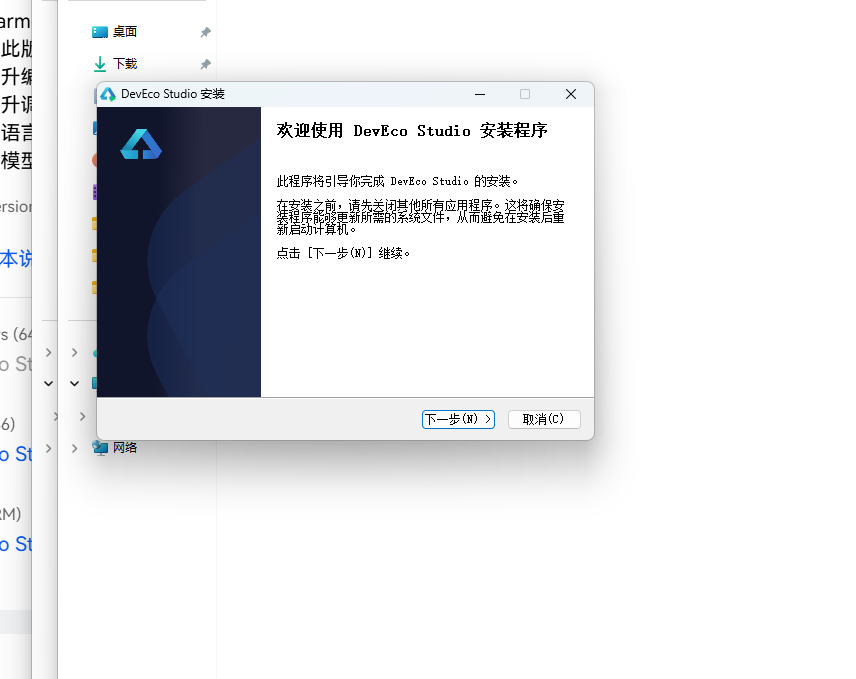
DevEco Studio 是 HarmonyOS 应用开发的官方 IDE。下载安装包后双击运行,进入安装欢迎界面,点击「下一步」继续。
16.2 选择安装路径
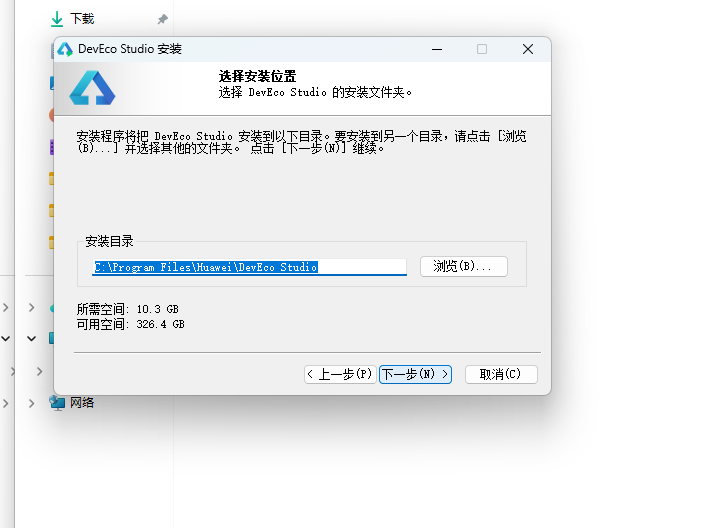
选择目标安装目录,建议安装到非系统盘,确认所需空间后点击「下一步」。
16.3 配置安装选项
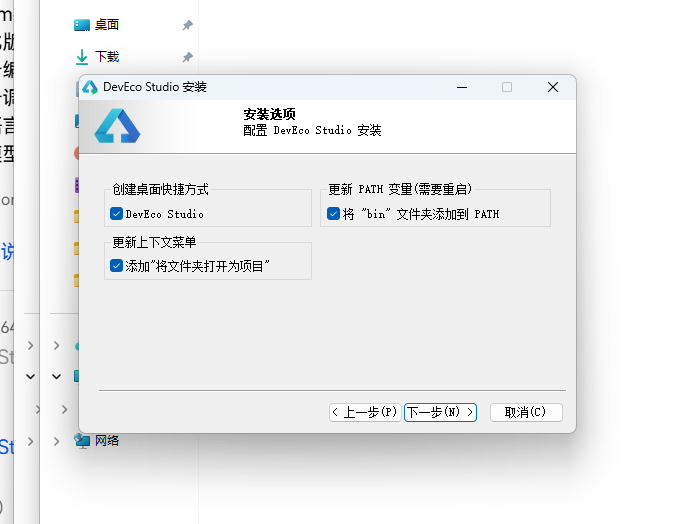
设置环境变量,勾选创建桌面快捷方式、将 bin 文件夹添加到 PATH、添加上下文菜单,但是需要重启一下电脑使环境变量生效。
16.4 选择项目模板
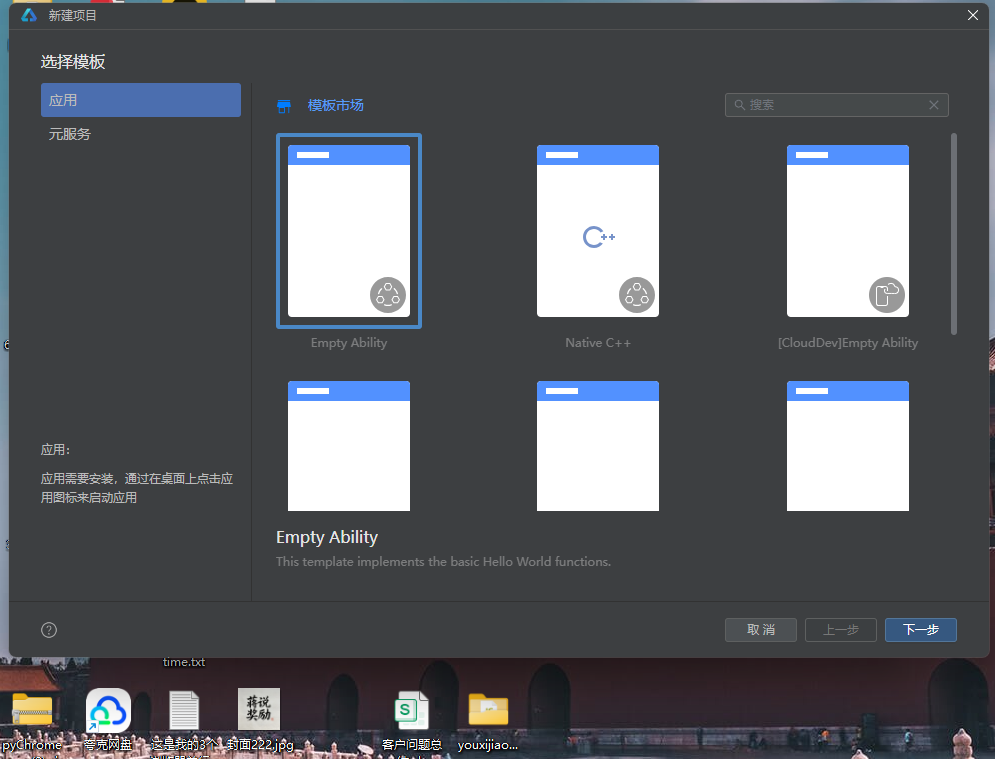
新建一个空白模板,在模板市场中选择 Empty Ability。
16.5 配置项目信息
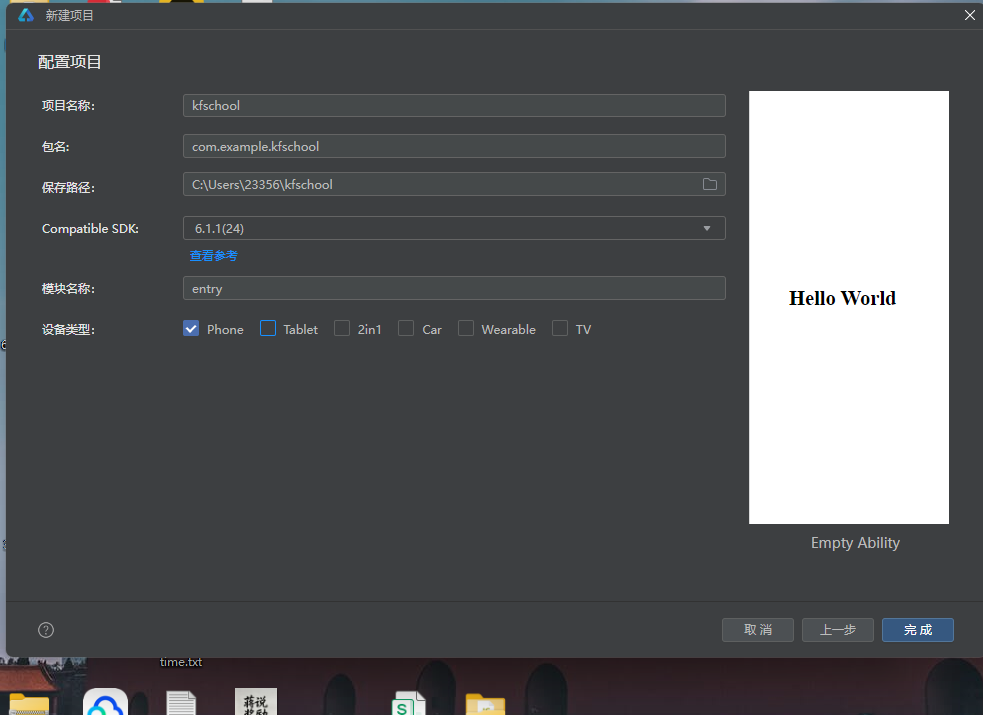
设置 API 为 24 的模板项目,项目名称 kfschool,Compatible SDK 6.1.1(24),设备类型勾选 Phone,点击完成后初始化项目,自动下载相关依赖。
十七、总结
通过对这款医典通健康科普应用的深度剖析,我们可以看到,一个优秀的移动端应用远不止是功能的堆砌,它更是架构设计、数据建模、视觉系统、交互逻辑、防御性编程等多维度能力的综合体现。
在架构层面,该应用采用了"配置驱动 + 组件化 + 状态管理"的三层设计模式。配置层将所有可变的数据与视觉属性抽离为常量数组和元数据接口,使得业务逻辑与表现层彻底解耦;组件层将五个功能页面拆分为独立的 @Component,每个组件内部通过 @Builder 进一步复用 UI 片段;状态层利用 ArkUI 的 @State、@Observed 和 @ObjectLink 机制,实现了数据变化到 UI 刷新的自动响应。
在数据层面,MedData 类作为核心数据模型,以 5 个数组(12科普/12症状/8指标/12药品/12问答)完整描述了医典通的全部业务信息。3 个动态颜色映射函数将业务数据转化为视觉色彩,实现了"数据即配色"的高级渲染模式——严重程度越高颜色越红(getSeverityColor),库存越低颜色越红(getStockColor),getTagColor 使用 Record map 映射简洁高效,这是该应用最具特色的技术亮点之一。
在视觉层面,本应用独创了"两列网格"的科普页设计——科普专栏使用 ForEach(PAIRS [0,2,4,6,8,10]) 遍历,每行渲染两篇科普,形成两列网格布局,标题 maxLines 2 省略号,阅读量👁️显示。指标页独创"三卡片"布局——科室热度排行+健康指标参考+三栏统计,健康指标每项独立卡片,信息密度最高。问答页独创"Q&A"格式——每条问答显示医生头像+Q:问题+A:回答,问题标签截取前4字,专业感强。顶部头部通过 @Builder topBar() 抽取,build() 中直接调用,代码更整洁。弹窗通过 @Builder + Stack 布局构建,遮罩点击可关闭,不同于之前项目的条件渲染独立组件。统一的色彩系统是整个应用的视觉基石,深青绿主色搭配青绿强调色,配合健康绿语义色和金黄警示色,营造出既专业又清爽的医疗主题氛围。顶部头部的医疗信息竖条装饰带、齿轮旋转+爱心缩放脉冲微动效、两列网格与三卡片布局、Q&A问答格式等细节处理,使得界面在信息密度较高的同时依然保持专业与清爽,处处透露出"医典通"的主题气质。
在交互层面,应用实现了完整的 CRUD 闭环——新增科普、修改用药、移除症状三类弹窗各司其职,配合统一的 @Builder + Stack 弹窗机制和全屏半透明遮罩(点击可关闭),交互流畅且一致。移除症状操作的二次确认、用药库存的动态着色、症状严重程度的⚠️repeat显示等细节,都体现了对用户体验的深入考量。
标签: HarmonyOS · ArkTS · 华为 · 健康科普 · 移动端开发

作为“人工智能6S店”的官方数字引擎,为AI开发者与企业提供一个覆盖软硬件全栈、一站式门户。
更多推荐

 0
0 0
0- 0


 已为社区贡献33条内容

所有评论(0)