
鸿蒙ArkTS深度解析:智能睡眠监测中心的夜空安眠风UI架构与动画系统
技术要点:本文全面剖析一个基于鸿蒙HarmonyOS ArkTS语言构建的智能睡眠监测中心应用。该应用采用"夜空安眠风"深色视觉主题,以深夜蓝为底色、星月紫为主色、薰衣草淡紫为辅助色,通过ArkUI声明式UI范式实现了睡眠报告、鼾声记录、助眠方案、商城购物、日志管理、家庭看板等七大功能模块。应用的核心技术亮点在于三组由
animateTo驱动的无限循环动画——月亮呼吸发光(moonGlow scale)、星星闪烁(starTwinkle opacity)和呼吸波纹(breathScale scale),全程不使用定时器,完美诠释了ArkUI动画系统的设计哲学。
一、技术背景与开发范式概述
1.1 鸿蒙HarmonyOS生态与ArkTS定位
鸿蒙HarmonyOS作为华为自主研发的分布式操作系统,为开发者提供了一套完整的应用开发框架。ArkTS是该框架推荐的应用开发语言,它在TypeScript语言基础上进行了领域特定扩展,增加了对声明式UI、状态管理、组件化开发的原生支持。ArkTS通过编译时静态类型检查保障代码质量,同时通过装饰器体系(@Component、@Entry、@State、@Builder等)将UI描述与业务逻辑组织为高内聚、低耦合的组件单元。
在ArkTS中,开发者使用interface定义数据类型接口,使用struct定义组件结构体,使用@Builder定义可复用的UI构建函数。组件之间的通信通过属性传参(父到子)和回调函数(子到父)实现。状态管理采用分层策略:@State管理组件内部私有状态,@Prop实现父到子的单向同步,@Link实现父子双向同步。本应用主要使用@State和回调函数模式,这是一种轻量级、低耦合的通信方案。
1.2 ArkUI声明式UI范式与深色主题
ArkUI的声明式UI范式遵循"状态驱动UI"原则:开发者声明UI的描述和状态映射关系,框架自动在状态变化时重新渲染受影响的UI部分。这一机制使得开发者无需手动操作DOM,只需修改状态变量即可驱动界面更新。
本应用采用了深色主题设计(Dark Mode),这在睡眠类应用中具有特殊的用户体验考量——深夜使用时,深色界面能大幅减少屏幕蓝光对褪黑素分泌的抑制,有助于用户维持健康的睡眠节律。应用以深夜蓝#0B1035为页面底色,卡片采用稍浅的深夜蓝#161B4A,主色星月紫#6C5CE7呼应夜空主题,薰衣草淡紫#A29BFE用于辅助文字和选中态。整套配色方案在视觉上营造出安静、深邃、助眠的夜空氛围。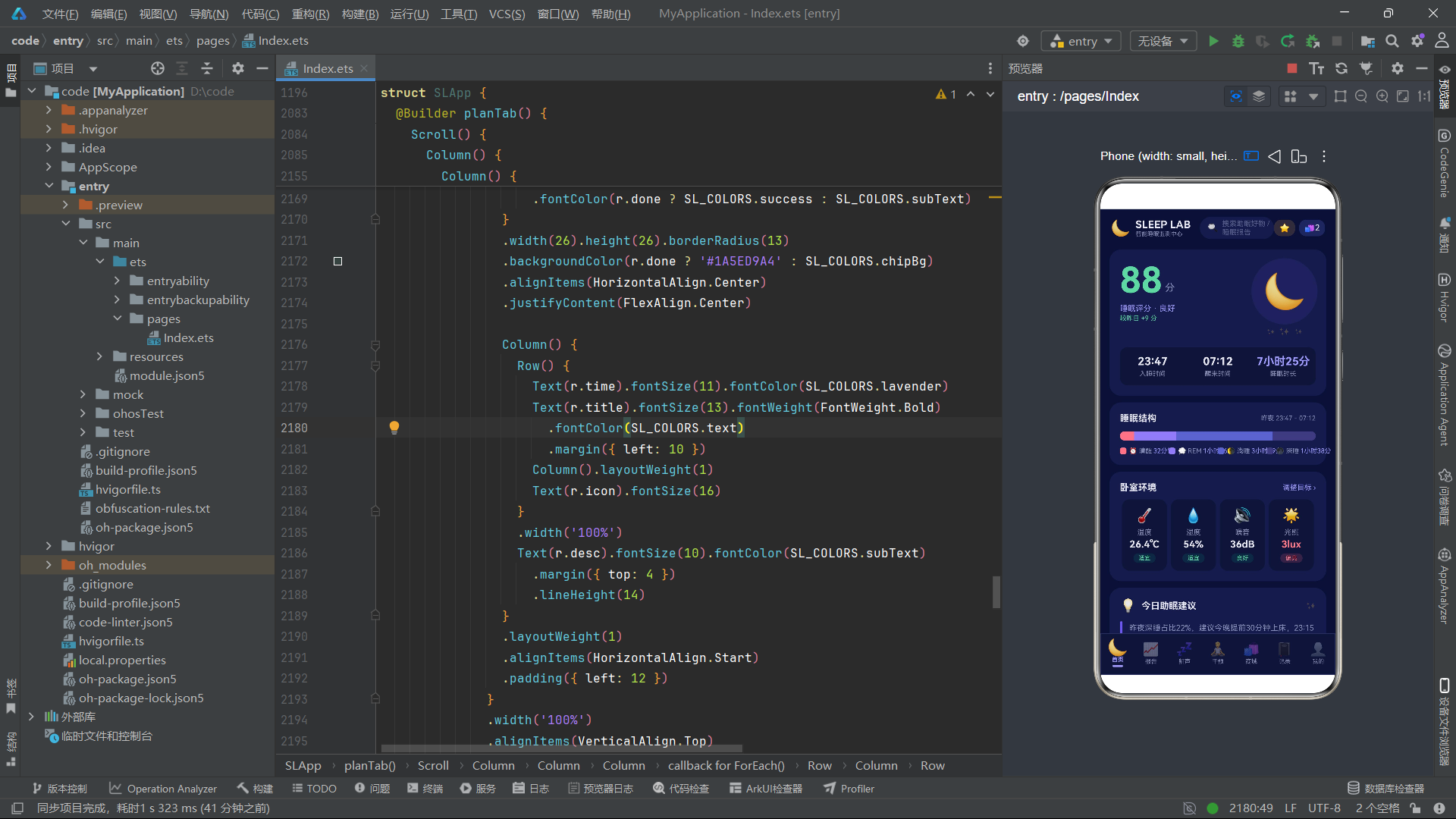
1.3 应用功能模块概述
本文分析的应用名为"SLEEP LAB"(智能睡眠监测中心),涵盖七大功能Tab:首页(昨夜睡眠报告大卡+睡眠结构+卧室环境+助眠建议)、报告(30天评分折线图+周时长柱状图+阶段占比+异常提醒)、鼾声(鼾声事件时间轴+分贝分布+周统计+改善建议)、干预(助眠方案+就寝仪式+21天打卡+智能闹钟)、商城(分类chips+双列瀑布商品)、记录(月度统计+补记入口+睡眠日志列表)、我的(会员卡+设备绑定+家庭看板+设置)。
此外还有七个弹框组件:预约睡眠监测、设置睡眠目标、补记睡眠日志、编辑卧室环境目标、删除闹钟确认、鼾声事件标注、购买助眠商品。三组动画特效——月亮呼吸发光(scale缩放)、星星闪烁(opacity透明度变化)、呼吸波纹(scale缩放)——贯穿全应用,为夜空主题增添了灵动的视觉律动。
二、类型定义与数据模型分析
2.1 深色主题调色板
interface SLColorPalette {
  bg: string
  card: string
  deepCard: string
  primary: string
  primaryDim: string
  lavender: string
  text: string
  subText: string
  danger: string
  success: string
  warn: string
  divider: string
  chipBg: string
}

const SL_COLORS: SLColorPalette = {
  bg: '#0B1035',
  card: '#161B4A',
  deepCard: '#101439',
  primary: '#6C5CE7',
  primaryDim: '#4A3FB0',
  lavender: '#A29BFE',
  text: '#E8E9F3',
  subText: '#8A8FB8',
  danger: '#FF7B8A',
  success: '#5ED9A4',
  warn: '#FFC46B',
  divider: '#2A2F66',
  chipBg: '#20265C'
}
调色板接口SLColorPalette定义了13个颜色字段,比常规浅色应用多了一个deepCard(更深的卡片色#101439),用于在深色背景中区分不同层级的卡片。三级文字色采用了银白色调:text为月光银白#E8E9F3(高对比度主文字)、subText为暗紫灰#8A8FB8(次要文字)。语义色系也做了夜空主题适配:危险色使用珊瑚粉#FF7B8A而非传统红色,成功色使用薄荷绿#5ED9A4,警告色使用暖黄#FFC46B,这些颜色在深色背景上具有良好的可见度和柔和的观感。
设计理念:深色主题应用的颜色设计需要特别关注对比度和可读性。在深夜蓝背景上,文字色需要足够亮以保证可读性,但又不能过白以免刺眼。本应用采用的月光银白
#E8E9F3是一个精心平衡的选择——它比纯白#FFFFFF柔和,但在#0B1035背景上的对比度比达到了WCAG AAA标准,适合长时间阅读。
2.2 Tab枚举与配置
enum SLTab {
  Home = 0,
  Report = 1,
  Snore = 2,
  Plan = 3,
  Shop = 4,
  Log = 5,
  Me = 6
}

interface SLTabItem {
  tab: SLTab
  icon: string
  label: string
}

const SL_TABS: SLTabItem[] = [
  { tab: SLTab.Home, icon: '🌙', label: '首页' },
  { tab: SLTab.Report, icon: '📈', label: '报告' },
  { tab: SLTab.Snore, icon: '💤', label: '鼾声' },
  { tab: SLTab.Plan, icon: '🧘', label: '干预' },
  { tab: SLTab.Shop, icon: '🛍', label: '商城' },
  { tab: SLTab.Log, icon: '📓', label: '记录' },
  { tab: SLTab.Me, icon: '👤', label: '我的' }
]
应用使用7个Tab,比常规应用的4-5个Tab更多。每个Tab的emoji图标都经过精心选择:🌙月亮代表首页、📈趋势线代表报告、💤鼾声符号代表鼾声、🧘冥想姿势代表干预、🛍购物袋代表商城、📓笔记本代表记录、👤人形代表我的。这些emoji在深色背景上具有良好的辨识度。
2.3 睡眠阶段数据模型
interface SLSleepStage {
  name: string
  icon: string
  minutes: number
  color: string
}

const SL_STAGES: SLSleepStage[] = [
  { name: '清醒', icon: '⏰', minutes: 32, color: '#FF7B8A' },
  { name: 'REM', icon: '💭', minutes: 96, color: '#8E7CF0' },
  { name: '浅睡', icon: '🌗', minutes: 219, color: '#5C63C9' },
  { name: '深睡', icon: '🌑', minutes: 98, color: '#3E3B7E' }
]
SLSleepStage接口定义了睡眠阶段数据:阶段名称、emoji图标、持续分钟数和对应的颜色。四个阶段从浅到深排列:清醒(32分钟,珊瑚粉)、REM快速眼动(96分钟,淡紫)、浅睡(219分钟,深紫蓝)、深睡(98分钟,暗紫蓝)。颜色从暖到冷渐变,视觉上传达了"从清醒到深睡"的递进关系。总时长445分钟(7小时25分),这些数据用于睡眠结构堆叠横条和阶段占比色块。
2.4 鼾声事件数据模型
interface SLSnoreEvent {
  time: string
  duration: number
  decibel: number
  note: string
  severe: boolean
}

const SL_SNORE_EVENTS: SLSnoreEvent[] = [
  { time: '01:12', duration: 6, decibel: 52, note: '翻身伴随短促鼾声,疑似仰卧', severe: true },
  { time: '01:58', duration: 3, decibel: 44, note: '轻微鼾声,未觉醒', severe: false },
  { time: '02:35', duration: 8, decibel: 56, note: '连续鼾声,出现短暂血氧下降', severe: true },
  // ... 共10条鼾声事件
]
SLSnoreEvent接口记录了鼾声事件的详细信息:发生时间、持续时长(分钟)、分贝值、文字描述和是否为重度事件。severe布尔字段用于在时间轴上以红色高亮显示重度鼾声事件。10条事件分布在凌晨01:12到06:40之间,分贝值从37dB到56dB,构成了一条完整的夜间鼾声记录时间轴。
2.5 全局纯函数
function slScoreColor(score: number): string {
  if (score >= 85) { return '#5ED9A4' }
  if (score >= 70) { return '#A29BFE' }
  if (score >= 55) { return '#FFC46B' }
  return '#FF7B8A'
}

function slFormatMinutes(min: number): string {
  if (min >= 60) { return (Math.floor(min / 60)).toString() + '小时' + (min % 60).toString() + '分' }
  return min.toString() + '分钟'
}

function slBarHeight(hours: number): string {
  return ((hours / 9.0) * 92).toFixed(0) + 'vp'
}

function slStarText(score: number): string {
  if (score >= 5) { return '★★★★★' }
  if (score >= 4) { return '★★★★☆' }
  if (score >= 3) { return '★★★☆☆' }
  if (score >= 2) { return '★★☆☆☆' }
  return '★☆☆☆☆'
}
应用定义了8个全局纯函数,涵盖评分颜色映射、分钟格式化、柱高计算、分贝颜色映射、预警等级颜色映射和星级文字生成等。slScoreColor将数值评分映射为四档颜色:85分以上薄荷绿(优秀)、70-84分薰衣草紫(良好)、55-69分暖黄(一般)、55分以下珊瑚粉(较差)。slFormatMinutes将分钟数格式化为"X小时Y分"的可读字符串,使用了Math.floor整除运算。slStarText用Unicode星号字符生成五星制评分文字,实心星★和空心星☆的组合直观传达评分等级。
技术要点:在ArkTS中,全局纯函数不依赖任何组件状态,可以在任何位置调用。将数据-视觉映射逻辑提取为纯函数,既提高了代码复用性,也使得这些逻辑可以独立测试。
Math.floor是ArkTS内置的数学函数,用于向下取整。.toFixed(0)将浮点数格式化为零位小数的字符串,常用于构建尺寸值如"92vp"。
三、核心弹框组件逐段分析
3.1 弹框1:预约睡眠监测 SLBookTestForm
@Component
struct SLBookTestForm {
  onClose: () => void = () => {}
  onConfirm: () => void = () => {}
  @State pkg: string = '居家监测'
  @State bookDate: string = '8月28日'
  @State bookTime: string = '20:00-21:00'
  @State address: string = ''

  build() {
    Column() {
      Row() {
        Text('🏥 预约睡眠监测').fontSize(17).fontWeight(FontWeight.Bold)
          .fontColor(SL_COLORS.text)
        Column().layoutWeight(1)
        Text('✕').fontSize(16).fontColor(SL_COLORS.subText)
          .onClick(() => { this.onClose() })
      }.width('100%')

      Text('选择监测套餐').fontSize(12).fontColor(SL_COLORS.subText)
        .width('100%').margin({ top: 14 })
      Row() {
        ForEach(SL_BOOK_PACKAGES, (p: SLBookPackage) => {
          Column() {
            Text(p.icon).fontSize(26)
            Text(p.label).fontSize(12).fontWeight(FontWeight.Bold)
              .fontColor(this.pkg === p.label ? SL_COLORS.primary : SL_COLORS.text)
              .margin({ top: 6 })
            Text(p.desc).fontSize(9).fontColor(SL_COLORS.subText)
              .margin({ top: 3 }).textAlign(TextAlign.Center)
            Text(p.price).fontSize(13).fontWeight(FontWeight.Bold)
              .fontColor(this.pkg === p.label ? SL_COLORS.lavender : SL_COLORS.warn)
              .margin({ top: 6 })
          }.layoutWeight(1).alignItems(HorizontalAlign.Center)
            .padding({ top: 12, bottom: 12, left: 4, right: 4 })
            .borderRadius(12)
            .backgroundColor(this.pkg === p.label ? '#252C6E' : SL_COLORS.deepCard)
            .border({ width: 1, color: this.pkg === p.label ? SL_COLORS.primary : SL_COLORS.divider })
            .margin({ left: 3, right: 3 })
            .onClick(() => { this.pkg = p.label })
        })
      }.width('100%').margin({ top: 6 })
      // ... 日期chips、时段chips、地址输入、按钮
    }.width('88%').padding(16).backgroundColor(SL_COLORS.card).borderRadius(18)
  }
}
SLBookTestForm是预约睡眠监测的弹框组件。它管理四个状态:选中的监测套餐(默认"居家监测")、预约日期、预约时段和联系地址。弹框宽度设为88%,在深色背景中居中显示。
套餐选择使用ForEach遍历SL_BOOK_PACKAGES数组,渲染三列套餐卡片。每张卡片通过this.pkg === p.label判断是否选中,选中时背景色变为#252C6E(带紫色调的深蓝),边框色变为主色#6C5CE7,价格文字变为薰衣草色;未选中时背景为更深的deepCard色,边框为分隔线色,价格文字为暖黄色。这种选中态/未选中态的视觉差异在深色主题中尤为重要——需要足够的色彩对比度差异才能让用户明确感知当前选中项。
border属性在这里接收一个对象参数{ width: 1, color: ... },同时设置边框宽度和颜色。这是ArkUI中设置边框的完整写法,相比只设置颜色更加灵活。
3.2 弹框2:设置睡眠目标 SLSetGoalForm
@Component
struct SLSetGoalForm {
  onClose: () => void = () => {}
  onConfirm: () => void = () => {}
  @State bedTime: string = '23:00'
  @State wakeTime: string = '07:00'
  @State goalHours: number = 8
  @State remindOn: boolean = true

  build() {
    Column() {
      // ... 标题栏
      Text('目标睡眠时长').fontSize(12).fontColor(SL_COLORS.subText)
        .width('100%').margin({ top: 14 })
      Row() {
        Text('−').fontSize(20).fontColor(SL_COLORS.lavender)
          .width(34).height(34).borderRadius(17)
          .backgroundColor(SL_COLORS.chipBg).textAlign(TextAlign.Center)
          .onClick(() => { if (this.goalHours > 5) { this.goalHours -= 1 } })
        Text(this.goalHours.toString() + ' 小时').fontSize(16)
          .fontWeight(FontWeight.Bold).fontColor(SL_COLORS.text)
          .layoutWeight(1).textAlign(TextAlign.Center)
        Text('+').fontSize(20).fontColor(SL_COLORS.lavender)
          .width(34).height(34).borderRadius(17)
          .backgroundColor(SL_COLORS.chipBg).textAlign(TextAlign.Center)
          .onClick(() => { if (this.goalHours < 10) { this.goalHours += 1 } })
      }.width('100%').margin({ top: 8 })

      Row() {
        Text('🔔').fontSize(18)
        Text('就寝提醒推送').fontSize(13).fontColor(SL_COLORS.text)
          .margin({ left: 10 }).layoutWeight(1)
        Text(this.remindOn ? '已开启' : '已关闭').fontSize(12)
          .fontColor(this.remindOn ? SL_COLORS.success : SL_COLORS.subText)
          .backgroundColor(this.remindOn ? '#1A5ED9A4' : SL_COLORS.chipBg)
          .padding({ left: 12, right: 12, top: 5, bottom: 5 }).borderRadius(11)
          .onClick(() => { this.remindOn = !this.remindOn })
      }.width('100%').margin({ top: 16 })
        .padding({ top: 10, bottom: 10 })
        .backgroundColor(SL_COLORS.deepCard).borderRadius(12)
      // ... 按钮
    }.width('88%').padding(16).backgroundColor(SL_COLORS.card).borderRadius(18)
  }
}
SLSetGoalForm管理四个状态:目标就寝时间、起床时间、睡眠时长(5-10小时步进器)和就寝提醒开关。时长步进器使用减号/加号按钮控制goalHours的增减,下限5小时上限10小时。
提醒开关没有使用Toggle组件,而是用Text文字标签模拟了一个切换按钮。点击时通过this.remindOn = !this.remindOn切换状态,文字在"已开启"(成功色薄荷绿)和"已关闭"(次文字色暗紫灰)之间切换。背景色使用#1A5ED9A4——这是一个8位十六进制颜色值,前两位1A是Alpha通道(约10%透明度),后面6位5ED9A4是薄荷绿的RGB值。这种半透明背景色在深色主题中非常实用,它既能传达色彩语义,又不会过于突兀。
3.3 弹框3:补记睡眠日志 SLAddLogForm
@Component
struct SLAddLogForm {
  onClose: () => void = () => {}
  onConfirm: () => void = () => {}
  @State logDate: string = '8月26日'
  @State logBed: string = '23:30'
  @State logWake: string = '07:00'
  @State logScore: number = 4
  @State logNote: string = ''

  build() {
    Column() {
      // ... 日期chips、就寝时间chips、起床时间chips
      Text('主观睡眠评分').fontSize(12).fontColor(SL_COLORS.subText)
        .width('100%').margin({ top: 16 })
      Row() {
        ForEach(SL_STAR_SCORES, (s: number) => {
          Text(this.logScore >= s ? '★' : '☆').fontSize(34)
            .fontColor(this.logScore >= s ? SL_COLORS.warn : SL_COLORS.subText)
            .margin({ left: 6, right: 6 })
            .onClick(() => { this.logScore = s })
        })
      }.width('100%').justifyContent(FlexAlign.Center).margin({ top: 8 })
      // ... 备注、按钮
    }.width('88%').padding(16).backgroundColor(SL_COLORS.card).borderRadius(18)
  }
}
SLAddLogForm的评分组件使用ForEach遍历SL_STAR_SCORES数组([1, 2, 3, 4, 5]),渲染5个星级按钮。通过this.logScore >= s ? '★' : '☆'判断当前星级是否被点亮——实心星使用暖黄色#FFC46B,空心星使用次文字色。点击任意星级按钮即可设置评分,这种交互方式比步进器更直观。fontSize(34)使星级字符足够大,在深色背景上具有强烈的视觉冲击力。
3.4 弹框4:编辑卧室环境目标 SLEditEnvForm
@Component
struct SLEditEnvForm {
  onClose: () => void = () => {}
  onConfirm: () => void = () => {}
  @State targetTemp: number = 26.0
  @State targetHumidity: number = 55
  @State targetNoise: number = 40
  @State lightMode: string = '全黑'

  build() {
    Column() {
      // ... 标题
      Row() {
        Text('🌡 温度目标').fontSize(13).fontColor(SL_COLORS.text).layoutWeight(1)
        Text('−').fontSize(18).fontColor(SL_COLORS.lavender)
          .width(30).height(30).borderRadius(15)
          .backgroundColor(SL_COLORS.chipBg).textAlign(TextAlign.Center)
          .onClick(() => { if (this.targetTemp > 18) { this.targetTemp -= 0.5 } })
        Text(this.targetTemp.toFixed(1) + '℃').fontSize(14)
          .fontWeight(FontWeight.Bold).fontColor(SL_COLORS.lavender)
          .width(70).textAlign(TextAlign.Center)
        Text('+').fontSize(18).fontColor(SL_COLORS.lavender)
          .width(30).height(30).borderRadius(15)
          .backgroundColor(SL_COLORS.chipBg).textAlign(TextAlign.Center)
          .onClick(() => { if (this.targetTemp < 30) { this.targetTemp += 0.5 } })
      }.width('100%').margin({ top: 16 })
      // ... 湿度、噪音、光照模式
    }.width('88%').padding(16).backgroundColor(SL_COLORS.card).borderRadius(18)
  }
}
SLEditEnvForm管理四个环境目标参数:温度(18-30℃,步进0.5)、湿度(30-70%,步进5)、噪音上限(30-55dB,步进5)和光照模式。温度步进器使用toFixed(1)保留一位小数,确保26.0℃这样的温度值显示完整。每个步进器都是"减号按钮 + 数值显示 + 加号按钮"的三段式布局,使用width(30).height(30).borderRadius(15)创建30vp的圆形按钮,数值显示区域固定宽度70vp居中对齐。
3.5 弹框5:删除闹钟确认 SLDeleteAlarmForm
@Component
struct SLDeleteAlarmForm {
  onClose: () => void = () => {}
  onConfirm: () => void = () => {}

  build() {
    Column() {
      Text('⏰').fontSize(46).margin({ top: 20 })
      Text('删除智能唤醒闹钟?').fontSize(18).fontWeight(FontWeight.Bold)
        .fontColor(SL_COLORS.text).margin({ top: 10 })
      Text('删除后将无法使用睡眠周期智能唤醒').fontSize(12)
        .fontColor(SL_COLORS.danger).margin({ top: 6 })

      Column() {
        Row() {
          Text('🕖 07:00').fontSize(20).fontWeight(FontWeight.Bold)
            .fontColor(SL_COLORS.warn)
          Column().layoutWeight(1)
          Text('智能唤醒').fontSize(11).fontColor(SL_COLORS.lavender)
            .backgroundColor('#266C5CE7')
            .padding({ left: 8, right: 8, top: 3, bottom: 3 }).borderRadius(9)
        }.width('100%')
        // ... 重复、响铃信息
      }.width('100%').padding(12)
        .backgroundColor('#2A1B33').borderRadius(12)
        .border({ width: 1, color: '#FF7B8A' })
        .margin({ top: 16 })

      Row() {
        Text('保留闹钟')...onClick(() => { this.onClose() })
        Text('确认删除')...backgroundColor(SL_COLORS.danger)
          .onClick(() => { this.onConfirm() })
      }.width('100%').justifyContent(FlexAlign.Center).margin({ top: 22 })
    }.width('80%').padding({ left: 18, right: 18, top: 24, bottom: 24 })
      .backgroundColor(SL_COLORS.card).borderRadius(18)
      .alignItems(HorizontalAlign.Center)
  }
}
SLDeleteAlarmForm是一个确认删除弹框,整体宽度80%,比其他弹框更窄,且使用alignItems(HorizontalAlign.Center)使内容居中对齐。闹钟摘要卡片使用深紫红背景#2A1B33和珊瑚粉边框#FF7B8A,在深色主题中营造出警示氛围。"智能唤醒"标签使用#266C5CE7背景色——8位十六进制中26表示约15%透明度的星月紫。底部双按钮中,确认删除使用珊瑚粉背景色,与警示主题一致。
3.6 弹框6:鼾声标注 SLSnoreNoteForm
@Component
struct SLSnoreNoteForm {
  onClose: () => void = () => {}
  onConfirm: () => void = () => {}
  @State noteTime: string = '01:12'
  @State noteCause: string = '仰卧睡姿'
  @State noteText: string = ''

  build() {
    Column() {
      // ... 标题
      Text('可能诱因(可多选)').fontSize(12).fontColor(SL_COLORS.subText)
        .width('100%').margin({ top: 14 })
      Row() {
        ForEach(SL_SNORE_CAUSES, (c: string) => {
          if (this.noteCause === c) {
            Text(c).fontSize(12).fontColor('#FFFFFF').backgroundColor(SL_COLORS.primary)
              .padding({ left: 14, right: 14, top: 7, bottom: 7 }).borderRadius(14)
              .margin({ right: 6 })
          } else {
            Text(c).fontSize(12).fontColor(SL_COLORS.lavender).backgroundColor(SL_COLORS.chipBg)
              .padding({ left: 14, right: 14, top: 7, bottom: 7 }).borderRadius(14)
              .margin({ right: 6 })
              .onClick(() => { this.noteCause = c })
          }
        })
      }.width('100%').margin({ top: 6 })
      // ... 补充备注、提示文字、按钮
    }.width('88%').padding(16).backgroundColor(SL_COLORS.card).borderRadius(18)
  }
}
SLSnoreNoteForm管理三个状态:鼾声事件时间、可能诱因和补充备注。诱因chips虽然标注"可多选",但实际实现是单选模式——通过this.noteCause === c判断选中状态。这种UI标注与实现不完全一致的情况在实际开发中需要注意,如果需要真正的多选功能,需要使用数组状态变量来存储多个选中值。
3.7 弹框7:购买助眠商品 SLBuyGoodsForm
@Component
struct SLBuyGoodsForm {
  onClose: () => void = () => {}
  onConfirm: () => void = () => {}
  goodIcon: string = '💤'
  goodName: string = '真丝蒸汽眼罩'
  goodPrice: number = 59
  @State qty: number = 1
  @State spec: string = '标准装'
  @State coupon: string = '新客立减券'
  @State couponAmount: number = 20

  build() {
    Column() {
      Row() {
        Column() {
          Text(this.goodIcon).fontSize(30)
        }.width(52).height(52).borderRadius(12)
          .backgroundColor(SL_COLORS.chipBg)
          .alignItems(HorizontalAlign.Center).justifyContent(FlexAlign.Center)

        Column() {
          Text(this.goodName).fontSize(15).fontWeight(FontWeight.Bold).fontColor(SL_COLORS.text)
          Row() {
            Text('¥' + this.goodPrice.toString()).fontSize(16)
              .fontWeight(FontWeight.Bold).fontColor(SL_COLORS.warn)
            Text('¥' + (this.goodPrice + 30).toString()).fontSize(11)
              .fontColor(SL_COLORS.subText)
              .decoration({ type: TextDecorationType.LineThrough })
              .margin({ left: 6 })
          }.margin({ top: 4 })
        }.layoutWeight(1).alignItems(HorizontalAlign.Start).padding({ left: 12 })

        Text('✕').fontSize(16).fontColor(SL_COLORS.subText)
          .onClick(() => { this.onClose() })
      }.width('100%')
      // ... 数量、规格、优惠券、合计、按钮
      Row() {
        Text('合计').fontSize(13).fontColor(SL_COLORS.subText)
        Column().layoutWeight(1)
        Text('¥' + (this.goodPrice * this.qty - this.couponAmount).toString())
          .fontSize(22).fontWeight(FontWeight.Bold).fontColor(SL_COLORS.warn)
      }.width('100%').margin({ top: 18 })
        .padding({ top: 12, bottom: 12 })
        .backgroundColor(SL_COLORS.deepCard).borderRadius(12)
    }.width('88%').padding(16).backgroundColor(SL_COLORS.card).borderRadius(18)
  }
}
SLBuyGoodsForm是购买商品弹框,具有最丰富的交互逻辑。它接收三个只读属性(goodIcon、goodName、goodPrice,由父组件传入),管理四个可变状态(数量、规格、优惠券、优惠金额)。合计金额的计算公式为this.goodPrice * this.qty - this.couponAmount,当用户修改数量或选择优惠券时,合计金额会自动重新计算并更新显示——这是@State状态驱动UI的直接体现。
商品图标区使用Column容器设置width(52).height(52).borderRadius(12).backgroundColor(SL_COLORS.chipBg)创建一个52vp的圆角方块作为emoji图标容器,同时设置justifyContent(FlexAlign.Center)和alignItems(HorizontalAlign.Center)使emoji在容器中居中显示。
四、主入口组件 SLApp 深度分析
4.1 状态管理与动画初始化
@Entry
@Component
struct SLApp {
  @State activeTab: SLTab = SLTab.Home
  @State showBookForm: boolean = false
  @State showSetGoalForm: boolean = false
  @State showAddLogForm: boolean = false
  @State showEditEnvForm: boolean = false
  @State showDeleteAlarmForm: boolean = false
  @State showSnoreNoteForm: boolean = false
  @State showBuyGoodsForm: boolean = false
  @State shopCategory: string = '全部'
  @State cartCount: number = 2
  @State moonGlow: number = 1.0
  @State starTwinkle: number = 1.0
  @State breathScale: number = 1.0

  aboutToAppear() {
    this.getUIContext().animateTo({
      duration: 2200, iterations: -1,
      playMode: PlayMode.Alternate, curve: Curve.EaseInOut
    }, () => { this.moonGlow = 1.14 })
    this.getUIContext().animateTo({
      duration: 1400, iterations: -1,
      playMode: PlayMode.Alternate, curve: Curve.EaseInOut
    }, () => { this.starTwinkle = 0.25 })
    this.getUIContext().animateTo({
      duration: 3000, iterations: -1,
      playMode: PlayMode.Alternate, curve: Curve.EaseInOut
    }, () => { this.breathScale = 1.10 })
  }
主入口SLApp管理12个状态变量:7个弹框开关、商城分类、购物车数量、以及3个动画状态变量。aboutToAppear中启动了三组无限循环动画:
- 月亮呼吸发光(moonGlow):2.2秒周期,scale从1.0到1.14往返缩放,模拟月亮的呼吸感
- 星星闪烁(starTwinkle):1.4秒周期,opacity从1.0到0.25往返变化,模拟星星闪烁
- 呼吸波纹(breathScale):3.0秒周期,scale从1.0到1.10往返缩放,模拟呼吸波纹的扩散与收缩
三组动画的时长各不相同(2.2秒、1.4秒、3.0秒),使得它们的节奏不同步,视觉效果更加自然有机。PlayMode.Alternate确保动画在两个端点值之间往返运动,而非单方向重复。
技术要点:
animateTo是ArkUI提供的显式动画API。其工作原理是:在闭包中修改@State变量,框架会捕获这些状态变化,自动创建从当前值到目标值的过渡动画。由于设置了iterations: -1(无限循环)和PlayMode.Alternate(往返模式),动画会在初始值和目标值之间永久往返播放。这种方案完全由UI框架的渲染管线驱动,不依赖JavaScript定时器,性能开销低且不会因主线程阻塞而卡顿。
4.2 电商风静态头部
@Builder header() {
  Row() {
    Text('🌙').fontSize(24)
    Column() {
      Text('SLEEP LAB').fontSize(16).fontWeight(FontWeight.Bold).fontColor(SL_COLORS.text)
      Text('智能睡眠监测中心').fontSize(9).fontColor(SL_COLORS.subText)
    }.alignItems(HorizontalAlign.Start).padding({ left: 8 })

    Row() {
      Text('🔍').fontSize(13)
      Text('搜索助眠好物 / 睡眠报告').fontSize(11).fontColor('#5A5F8A')
        .margin({ left: 6 })
    }.layoutWeight(1).height(34)
      .padding({ left: 12, right: 12 })
      .backgroundColor(SL_COLORS.card).borderRadius(17)
      .alignItems(VerticalAlign.Center).margin({ left: 14 })
      .onClick(() => { this.activeTab = SLTab.Shop })

    Text('⭐').fontSize(13).fontColor(SL_COLORS.warn)
      .padding({ left: 8, right: 8, top: 5, bottom: 5 }).borderRadius(11)
      .backgroundColor('#26FFC46B')
      .onClick(() => { this.activeTab = SLTab.Me })

    Text('🛍' + this.cartCount.toString()).fontSize(13).fontColor(SL_COLORS.text)
      .padding({ left: 8, right: 8, top: 5, bottom: 5 }).borderRadius(11)
      .backgroundColor(SL_COLORS.chipBg).margin({ left: 6 })
      .onClick(() => { this.activeTab = SLTab.Shop })
  }.width('100%')
    .padding({ left: 16, right: 16, top: 12, bottom: 10 })
    .alignItems(VerticalAlign.Center)
}
头部header采用电商风格设计。搜索框的placeholder文字颜色#5A5F8A是一个比subText更暗的颜色,在深色卡片背景上呈现为"提示性文字"的低对比度效果。购物车按钮Text('🛍' + this.cartCount.toString())将emoji和购物车数量拼接为一个Text,通过this.cartCount状态变量动态显示当前购物车商品数。星标按钮使用#26FFC46B(15%透明度的暖黄)作为背景,在深色主题中营造出柔和的发光效果。
4.3 内容区与弹框挂载
@Builder contentArea() {
  Stack() {
    if (this.activeTab === SLTab.Home) { this.homeTab() }
    else if (this.activeTab === SLTab.Report) { this.reportTab() }
    else if (this.activeTab === SLTab.Snore) { this.snoreTab() }
    else if (this.activeTab === SLTab.Plan) { this.planTab() }
    else if (this.activeTab === SLTab.Shop) { this.shopTab() }
    else if (this.activeTab === SLTab.Log) { this.logTab() }
    else { this.meTab() }

    if (this.showBookForm) { this.bookTestModal() }
    if (this.showSetGoalForm) { this.setGoalModal() }
    if (this.showAddLogForm) { this.addLogModal() }
    if (this.showEditEnvForm) { this.editEnvModal() }
    if (this.showDeleteAlarmForm) { this.deleteAlarmModal() }
    if (this.showSnoreNoteForm) { this.snoreNoteModal() }
    if (this.showBuyGoodsForm) { this.buyGoodsModal() }
  }.layoutWeight(1).width('100%')
}
内容区contentArea使用Stack容器将Tab内容层和弹框层堆叠在一起。7个if-else if-else条件判断根据activeTab的值渲染对应的Tab内容构建函数。7个独立的if条件判断分别检查7个弹框开关,当开关为true时挂载对应弹框。这种"Tab内容+弹框"的Stack层叠架构是本应用的统一弹框管理方案。
4.4 弹框遮罩与挂载构建函数
@Builder modalOverlay(onClose: () => void) {
  Column().width('100%').height('100%')
    .backgroundColor('rgba(0,0,0,0.55)')
    .position({ x: 0, y: 0 }).zIndex(999).onClick(onClose)
}

@Builder bookTestModal() {
  Stack() {
    this.modalOverlay(() => { this.showBookForm = false })
    SLBookTestForm({
      onClose: () => { this.showBookForm = false },
      onConfirm: () => { this.showBookForm = false }
    })
  }.width('100%').height('100%')
    .alignContent(Alignment.Center)
    .position({ x: 0, y: 0 }).zIndex(1000)
}
遮罩层modalOverlay渲染一个全屏55%透明度黑色背景rgba(0,0,0,0.55),比浅色主题应用的45%更暗,因为深色主题下弹框与背景的对比度需要更强。弹框挂载函数bookTestModal使用Stack层叠遮罩层和弹框组件,zIndex(1000)确保弹框层在遮罩层(zIndex 999)之上。7个弹框的挂载结构完全一致,只是传入的组件类和回调不同,高度体现了代码复用性。
4.5 首页Tab详解:昨夜睡眠报告大卡
@Builder homeTab() {
  Scroll() {
    Column() {
      Column() {
        Row() {
          Column() {
            Row() {
              Text('88').fontSize(54).fontWeight(FontWeight.Bold)
                .fontColor(slScoreColor(88))
              Text('分').fontSize(15).fontColor(SL_COLORS.subText)
                .margin({ left: 4, bottom: 12 })
            }.alignItems(VerticalAlign.Bottom)
            Text('睡眠评分 · 良好').fontSize(12).fontColor(SL_COLORS.lavender)
              .margin({ top: 4 })
            Text('较昨日 +9 分').fontSize(10).fontColor(SL_COLORS.success)
              .margin({ top: 2 })
          }.alignItems(HorizontalAlign.Start)

          Column().layoutWeight(1)

          Column() {
            Stack() {
              Circle().width(92).height(92)
                .fill('#1A6C5CE7')
                .scale({ x: this.breathScale, y: this.breathScale })
              Text('🌙').fontSize(46)
                .scale({ x: this.moonGlow, y: this.moonGlow })
            }.width(96).height(96)
            Row() {
              Text('✨').fontSize(10).opacity(this.starTwinkle)
              Text('✨').fontSize(13).opacity(this.starTwinkle).margin({ left: 6 })
              Text('✨').fontSize(9).opacity(this.starTwinkle).margin({ left: 8 })
            }.margin({ top: 6 })
          }.alignItems(HorizontalAlign.Center)
        }.width('100%').alignItems(VerticalAlign.Top)
        // ... 入睡/醒来/时长三宫格
      }.width('100%').padding(16)
        .backgroundColor(SL_COLORS.card).borderRadius(18)
        .margin({ top: 6 })
        .onClick(() => { this.activeTab = SLTab.Report })
      // ... 睡眠结构、卧室环境、今日建议
    }.width('100%').padding({ left: 14, right: 14 })
  }.width('100%').height('100%').scrollBar(BarState.Off)
}
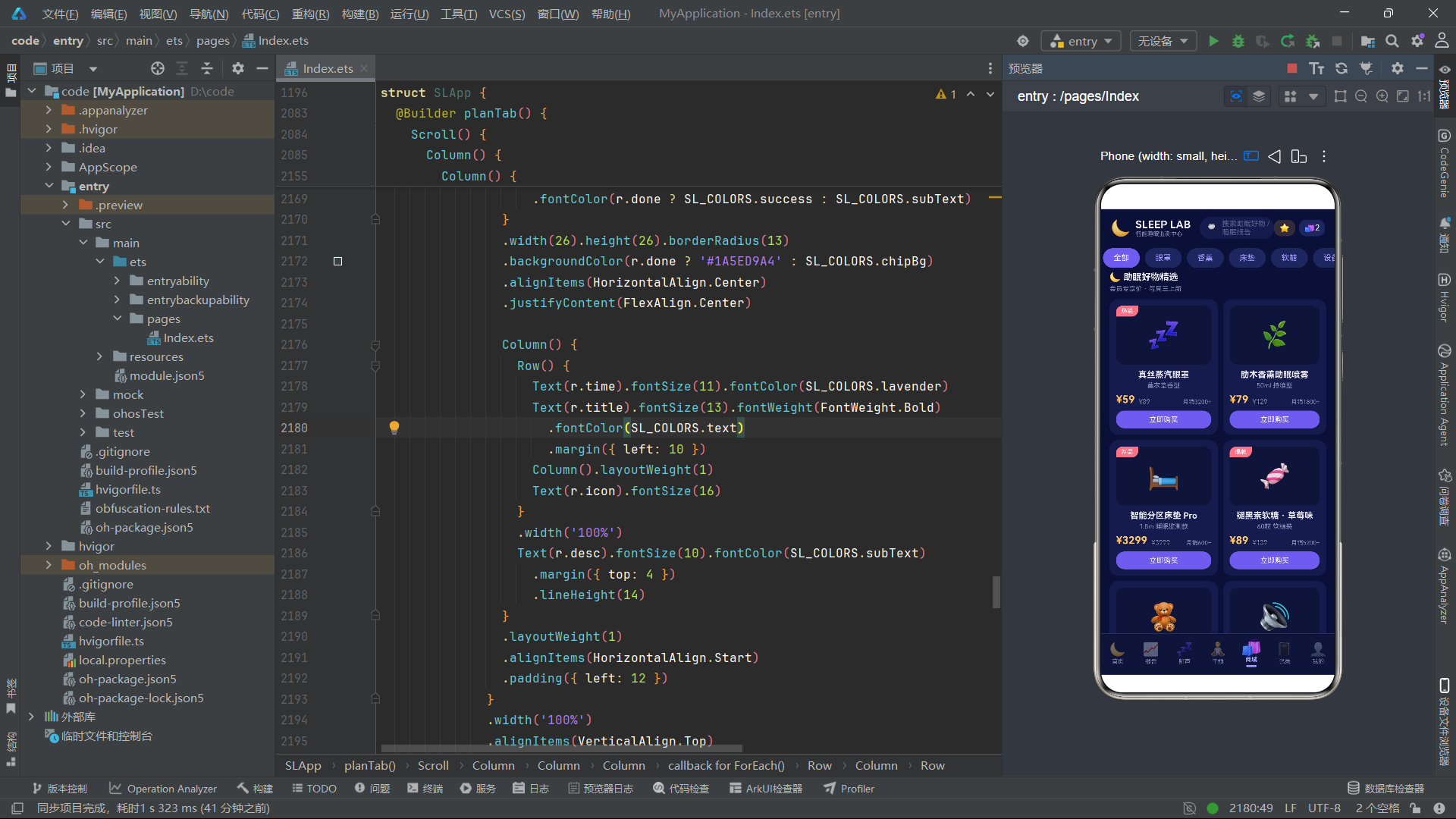
首页的核心是昨夜睡眠报告大卡。卡片右侧使用Stack层叠了一个Circle圆形组件和一个月亮emoji。Circle是ArkUI的图形组件,通过fill('#1A6C5CE7')填充10%透明度的星月紫色,通过scale({ x: this.breathScale, y: this.breathScale })绑定呼吸波纹动画——这个圆形会在1.0到1.10之间缩放,模拟呼吸时胸腔起伏的波纹扩散效果。月亮emoji通过scale({ x: this.moonGlow, y: this.moonGlow })绑定月亮呼吸动画——在1.0到1.14之间缩放,比呼吸波纹的缩放幅度更大,视觉上更突出。
月亮下方的三颗星星通过opacity(this.starTwinkle)绑定星星闪烁动画——opacity在1.0到0.25之间往返变化,模拟星星忽明忽暗的闪烁效果。三颗星星的fontSize不同(10、13、9),margin间距也不同,使得它们的闪烁虽然同步(共享同一个动画状态变量),但大小和位置各异,视觉效果自然。
技术要点:
Circle是ArkUI的图形绘制组件,用于绘制圆形。与通过borderRadius实现的"圆形"不同,Circle是真正的矢量圆形,支持fill(填充色)、stroke(描边色)、strokeWidth(描边宽度)等属性。scale变换属性接收{ x, y }对象参数,X和Y轴缩放比例相同时为等比缩放,不同时为非等比缩放(会产生形变)。
4.6 睡眠结构堆叠横条
Row() {
  ForEach(SL_STAGES, (s: SLSleepStage) => {
    Column().layoutWeight(s.minutes).height(14)
      .backgroundColor(s.color)
  })
}.width('100%').borderRadius(7).clip(true).margin({ top: 12 })
睡眠结构堆叠横条通过ForEach遍历4个睡眠阶段,每个阶段渲染一个Column,其layoutWeight设为该阶段的分钟数。由于layoutWeight按权重比例分配父容器宽度,4个阶段的权重之和为445(32+96+219+98),每个阶段的宽度占比即为其分钟数占比。4个不同颜色的Column横向排列,形成一条堆叠条形图,直观展示各阶段的时长比例。clip(true)确保超出圆角区域的部分被裁剪,使堆叠条的两端呈现圆角效果。
4.7 卧室环境四宫格
Row() {
  ForEach(SL_ENV_ITEMS, (e: SLEnvItem) => {
    Column() {
      Text(e.icon).fontSize(22)
      Text(e.name).fontSize(11).fontColor(SL_COLORS.subText).margin({ top: 6 })
      Text(e.value).fontSize(15).fontWeight(FontWeight.Bold)
        .fontColor(e.ok ? SL_COLORS.text : SL_COLORS.danger).margin({ top: 3 })
      Text(e.status).fontSize(9)
        .fontColor(e.ok ? SL_COLORS.success : SL_COLORS.danger)
        .padding({ left: 8, right: 8, top: 2, bottom: 2 }).borderRadius(8)
        .backgroundColor(e.ok ? '#1A5ED9A4' : '#26FF7B8A').margin({ top: 5 })
    }.layoutWeight(1).alignItems(HorizontalAlign.Center)
      .padding({ top: 12, bottom: 12 })
      .backgroundColor(SL_COLORS.deepCard).borderRadius(12)
      .margin({ left: 3, right: 3 })
      .onClick(() => { this.showEditEnvForm = true })
  })
}.width('100%').margin({ top: 10 })
卧室环境四宫格通过ForEach遍历SL_ENV_ITEMS数组,渲染4个环境监测卡片(温度、湿度、噪音、光照)。每张卡片根据e.ok布尔值切换正常态(薄荷绿标签)和异常态(珊瑚粉标签)。状态标签的背景色使用半透明语义色——正常态#1A5ED9A4(10%透明度薄荷绿)、异常态#26FF7B8A(15%透明度珊瑚粉)。这种半透明背景色方案在深色主题中既传达了语义信息,又保持了整体视觉的统一性。
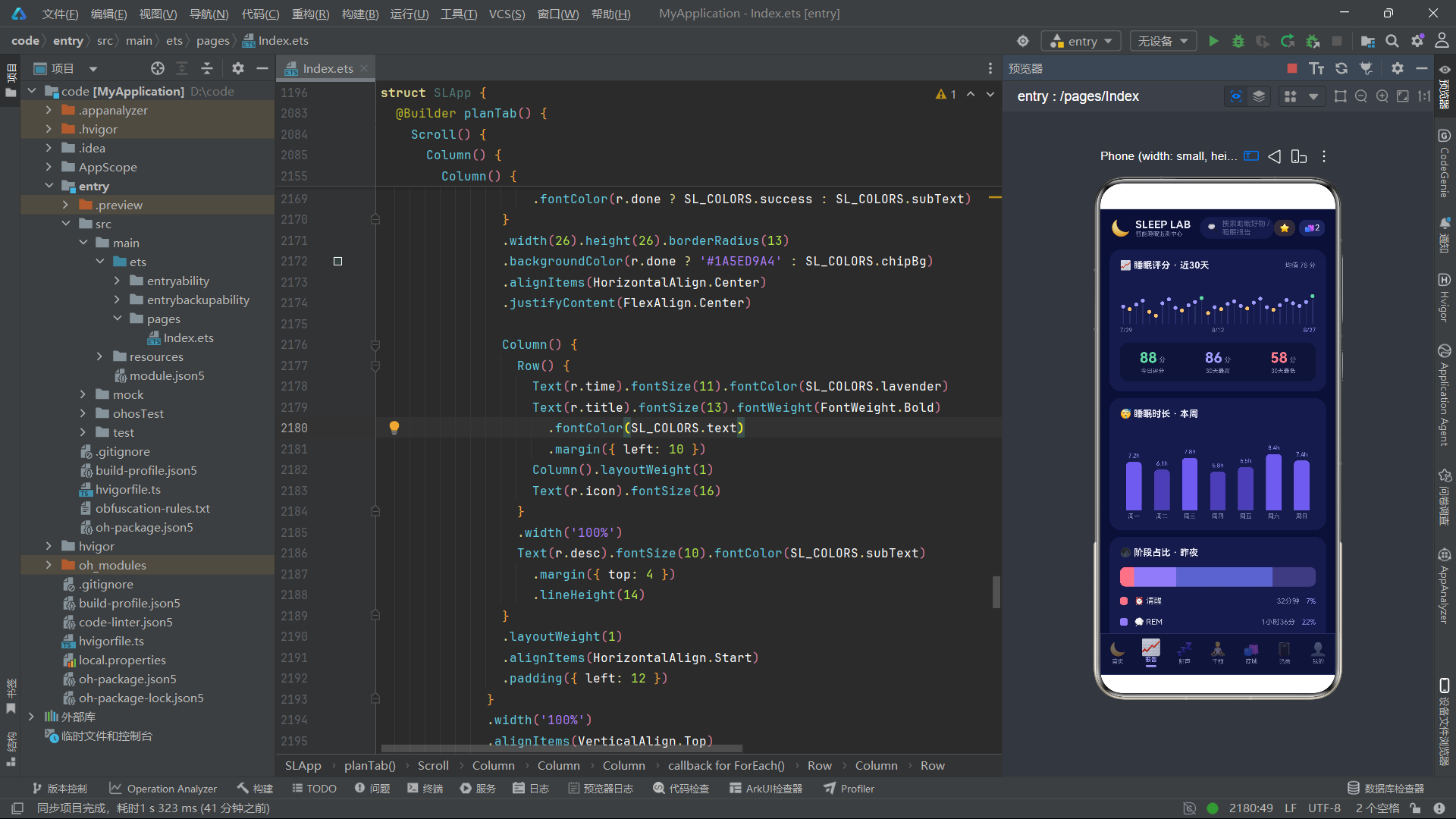
4.8 报告Tab:30天评分折线图
Row() {
  ForEach(SL_SCORE_HISTORY, (d: SLScoreDay) => {
    Column() {
      Circle().width(6).height(6).fill(slScoreColor(d.score))
      Column().width(1.5)
        .height((d.score - 50).toFixed(0) + 'vp')
        .backgroundColor('#2A2F66').margin({ top: 2 })
    }.layoutWeight(1).alignItems(HorizontalAlign.Center)
  })
}.width('100%').alignItems(VerticalAlign.Bottom).height(66).margin({ top: 16 })
30天评分折线图使用了一个巧妙的纯布局方案:通过ForEach遍历30天的评分数据,每天渲染一个Column,内含一个小圆点(Circle)和一根竖线(Column)。圆点的颜色由slScoreColor函数根据评分返回,竖线的高度为(d.score - 50).toFixed(0) + 'vp'——评分越高,竖线越长。30个数据点横向排列,底部对齐(alignItems(VerticalAlign.Bottom)),形成类似折线图的柱状散点效果。整个图表容器固定高度66vp,圆点在顶部,竖线向下延伸。
这种"圆点+竖线"的图表方案虽然不如真正的折线图精确,但它完全用ArkUI基础布局组件实现,无需引入图表库,代码简洁且性能优异。
4.9 报告Tab:周时长柱状图
Row() {
  ForEach(SL_WEEK_BARS, (b: SLWeekBar) => {
    Column() {
      Text(b.hours.toFixed(1) + 'h').fontSize(9)
        .fontColor(SL_COLORS.lavender).margin({ bottom: 4 })
      Column().width(24).height(slBarHeight(b.hours))
        .backgroundColor(b.hours >= 7 ? SL_COLORS.primary : SL_COLORS.primaryDim)
        .borderRadius({ topLeft: 6, topRight: 6 })
      Text(b.day).fontSize(9).fontColor(SL_COLORS.subText).margin({ top: 4 })
    }.layoutWeight(1).alignItems(HorizontalAlign.Center)
  })
}.width('100%').alignItems(VerticalAlign.Bottom).height(140).margin({ top: 14 })
周时长柱状图遍历7天数据,每天渲染数值标签、柱体和星期标签。柱体高度由slBarHeight函数计算(hours / 9.0 * 92,将最大9小时映射为92vp高度)。柱体颜色根据是否达到7小时标准切换:达标用主色#6C5CE7,不达标用暗主色#4A3FB0。borderRadius({ topLeft: 6, topRight: 6 })仅设置上方两角为圆角,模拟柱状图顶部的圆角效果。
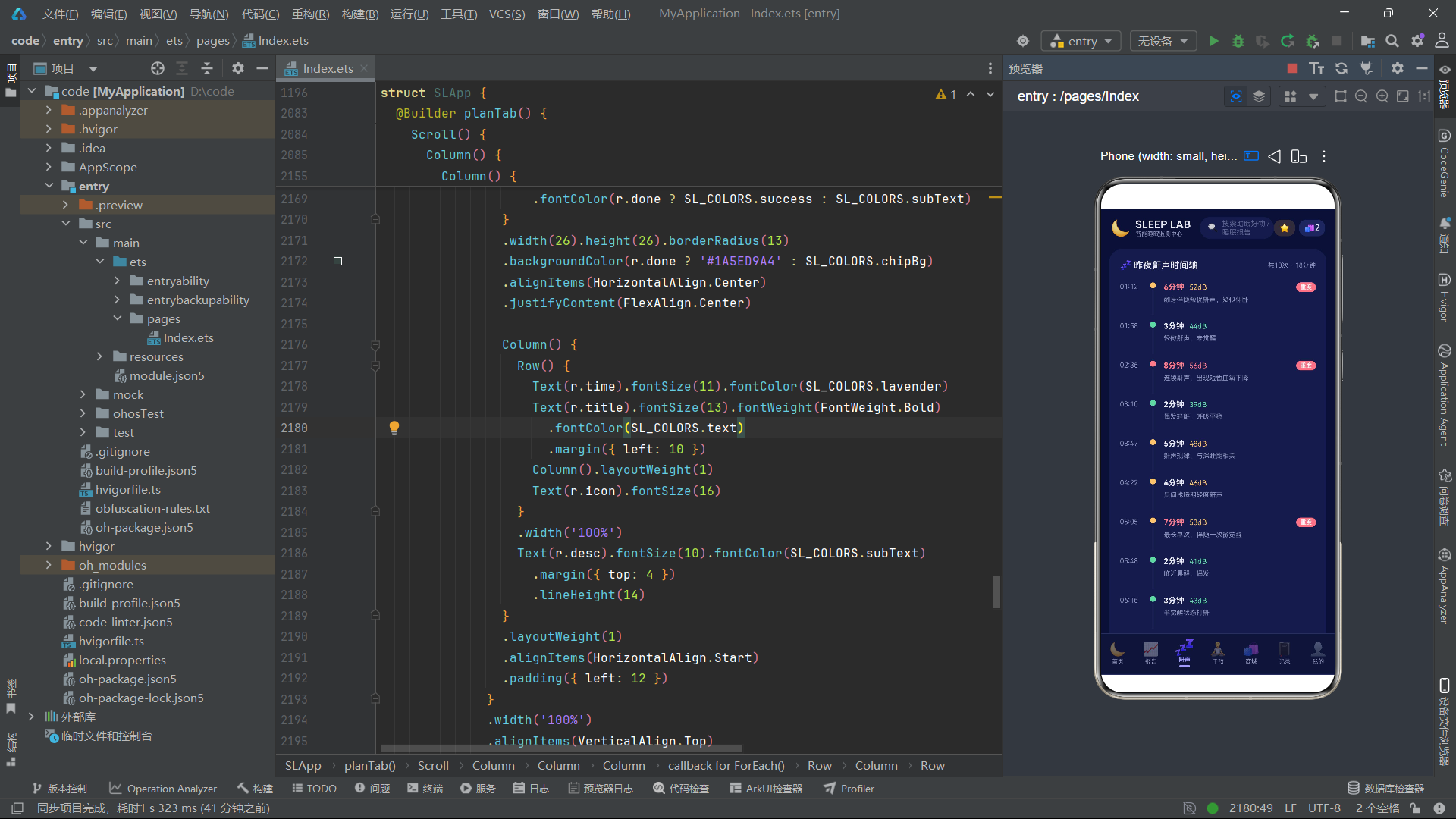
4.10 鼾声Tab:事件时间轴
ForEach(SL_SNORE_EVENTS, (e: SLSnoreEvent) => {
  Row() {
    Text(e.time).fontSize(11).fontColor(SL_COLORS.subText).width(46)

    Column() {
      Circle().width(9).height(9).fill(slDbColor(e.decibel))
      Column().width(2).height(38)
        .backgroundColor(SL_COLORS.divider).margin({ top: 3 })
    }.alignItems(HorizontalAlign.Center)

    Column() {
      Row() {
        Text(e.duration.toString() + '分钟').fontSize(12)
          .fontWeight(FontWeight.Bold)
          .fontColor(e.severe ? SL_COLORS.danger : SL_COLORS.text)
        Text(e.decibel.toString() + 'dB').fontSize(11)
          .fontColor(slDbColor(e.decibel)).margin({ left: 8 })
        Column().layoutWeight(1)
        if (e.severe) {
          Text('重度').fontSize(9).fontColor('#FFFFFF')
            .padding({ left: 6, right: 6, top: 2, bottom: 2 })
            .borderRadius(7).backgroundColor(SL_COLORS.danger)
        }
      }.width('100%')
      Text(e.note).fontSize(10).fontColor(SL_COLORS.subText)
        .margin({ top: 4 }).lineHeight(14)
    }.layoutWeight(1).alignItems(HorizontalAlign.Start).padding({ left: 12 })
  }.width('100%').alignItems(VerticalAlign.Top).padding({ top: 8, bottom: 2 })
})
鼾声事件时间轴通过ForEach遍历10条鼾声事件数据,每条渲染一个时间轴节点。节点结构为"时间标签 + 圆点+竖线 + 事件详情"。圆点颜色由slDbColor函数根据分贝值返回(55+分贝珊瑚粉、45-54暖黄、45以下薄荷绿),竖线作为时间轴的连接线。重度事件(e.severe为true)在详情区域显示红色"重度"标签。lineHeight(14)设置文字行高为14vp,使多行文字的行间距更紧凑。
技术要点:
lineHeight是ArkUI中控制文字行高的属性,单位为vp。默认行高由字体大小决定,通过显式设置lineHeight可以精确控制多行文本的行间距,使文字排版更加紧凑或宽松。在深色主题中,适当减小行高可以使信息密度更高,减少滚动需求。
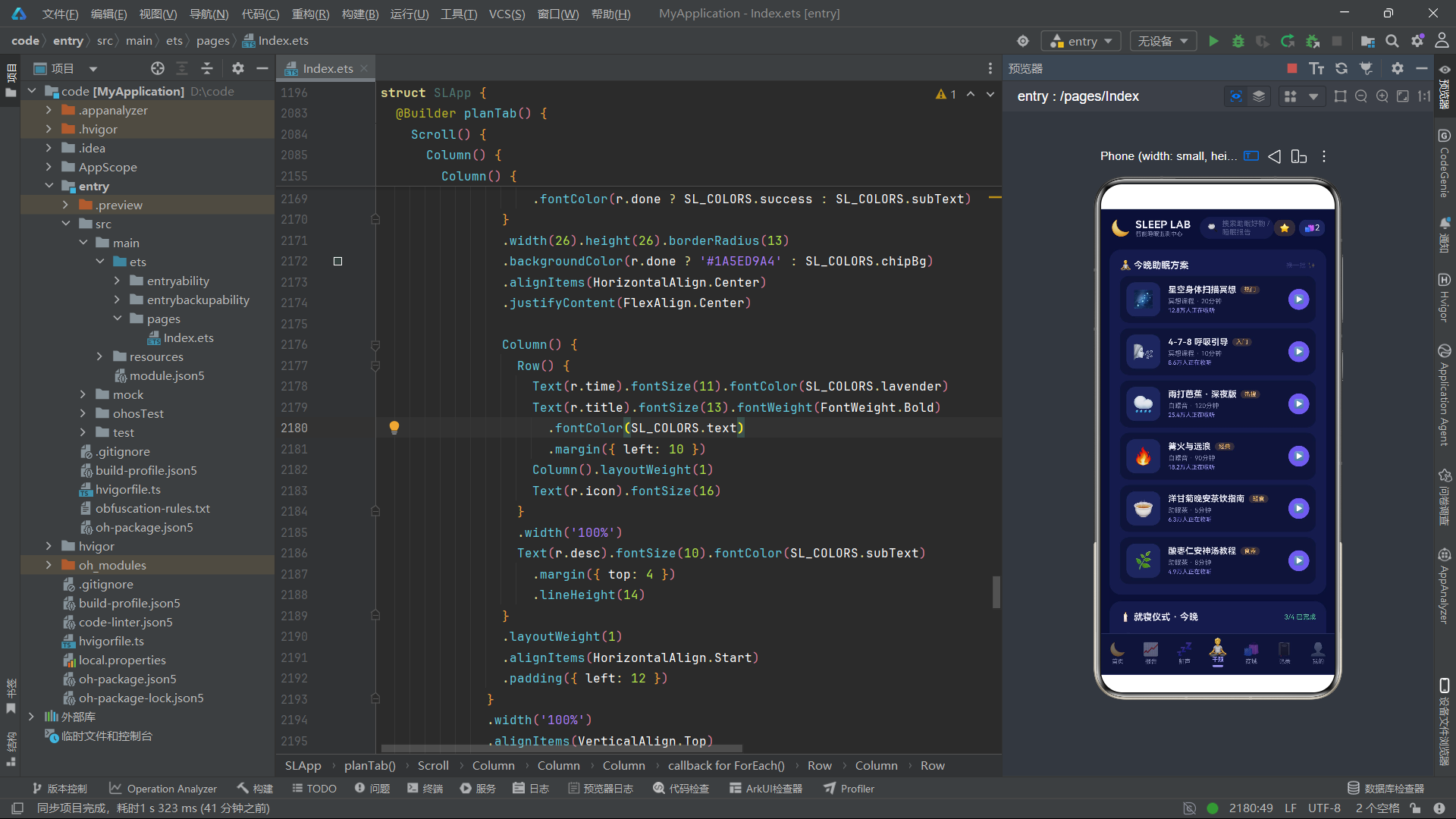
4.11 干预Tab:21天打卡日历
Row() {
  ForEach(SL_CHECKIN_DAYS, (d: number) => {
    Text(d.toString()).fontSize(8)
      .fontColor(d <= 17 ? '#FFFFFF' : SL_COLORS.subText)
      .backgroundColor(d <= 17 ? SL_COLORS.primary : SL_COLORS.chipBg)
      .width(18).height(18).borderRadius(9)
      .textAlign(TextAlign.Center).margin({ left: 2, right: 2 })
  })
}.width('100%').justifyContent(FlexAlign.Center).margin({ top: 14 })
21天打卡日历通过ForEach遍历SL_CHECKIN_DAYS数组(1-21),渲染21个18vp大小的圆形日期标签。已打卡天数(d <= 17)使用主色背景和白色文字,未打卡天数使用chip背景和次文字色。borderRadius(9)将18vp的方形设为圆形(半径=宽度/2),形成一排圆形打卡日历。justifyContent(FlexAlign.Center)使21个日期在行内居中排列。
4.12 商城Tab:双列瀑布商品
Scroll() {
  Column() {
    Column() {
      Text('🌙 助眠好物精选').fontSize(14).fontWeight(FontWeight.Bold)
        .fontColor(SL_COLORS.text)
      Text('会员专享价 · 每周三上新').fontSize(10)
        .fontColor(SL_COLORS.subText).margin({ top: 4 })
    }.alignItems(HorizontalAlign.Start).width('100%')
      .margin({ top: 6, bottom: 2 })

    Row() {
      Column() {
        this.goodCard(SL_GOODS[0])
        this.goodCard(SL_GOODS[2])
        this.goodCard(SL_GOODS[4])
        this.goodCard(SL_GOODS[6])
      }.layoutWeight(1)

      Column() {
        this.goodCard(SL_GOODS[1])
        this.goodCard(SL_GOODS[3])
        this.goodCard(SL_GOODS[5])
        this.goodCard(SL_GOODS[7])
      }.layoutWeight(1).margin({ left: 8 })
    }.width('100%').alignItems(VerticalAlign.Top)
  }.width('100%').padding({ left: 14, right: 14 })
}.layoutWeight(1).scrollBar(BarState.Off)
商城商品采用双列瀑布流布局:外层Row包含两个等宽Column(各layoutWeight(1)),左列放偶数索引商品(0,2,4,6),右列放奇数索引商品(1,3,5,7)。两个列的alignItems(VerticalAlign.Top)确保从顶部对齐。右列设置margin({ left: 8 })作为列间距。这种双列瀑布流是电商应用展示商品的标准布局模式。
4.13 商品卡片构建函数
@Builder goodCard(g: SLGood) {
  Column() {
    Stack() {
      Column() {
        Text(g.icon).fontSize(40)
      }.width('100%').height(90)
        .backgroundColor(SL_COLORS.deepCard).borderRadius(12)
        .alignItems(HorizontalAlign.Center).justifyContent(FlexAlign.Center)

      if (g.tag !== '') {
        Text(g.tag).fontSize(9).fontColor('#FFFFFF')
          .padding({ left: 8, right: 8, top: 3, bottom: 3 })
          .borderRadius({ topLeft: 10, bottomRight: 10 })
          .backgroundColor(SL_COLORS.danger)
          .position({ x: 0, y: 0 })
      }
    }.width('100%').height(90)

    Text(g.name).fontSize(13).fontWeight(FontWeight.Bold)
      .fontColor(SL_COLORS.text).margin({ top: 8 }).maxLines(1)
      .textOverflow({ overflow: TextOverflow.Ellipsis })

    Text(g.spec).fontSize(10).fontColor(SL_COLORS.subText).margin({ top: 3 })

    Row() {
      Text('¥' + g.price.toString()).fontSize(16)
        .fontWeight(FontWeight.Bold).fontColor(SL_COLORS.warn)
      Text('¥' + g.origin.toString()).fontSize(10)
        .fontColor(SL_COLORS.subText)
        .decoration({ type: TextDecorationType.LineThrough }).margin({ left: 6 })
      Column().layoutWeight(1)
      Text(g.sales).fontSize(9).fontColor(SL_COLORS.subText)
    }.width('100%').alignItems(VerticalAlign.Bottom).margin({ top: 6 })

    Text('立即购买').fontSize(11).fontColor('#FFFFFF')
      .width('100%').textAlign(TextAlign.Center)
      .backgroundColor(SL_COLORS.primary).borderRadius(13)
      .padding({ top: 7, bottom: 7 }).margin({ top: 8 })
      .onClick(() => { this.showBuyGoodsForm = true })
  }.width('100%').padding(10)
    .backgroundColor(SL_COLORS.card).borderRadius(14)
    .margin({ top: 8 })
    .onClick(() => { this.showBuyGoodsForm = true })
}
商品卡片goodCard是参数化的@Builder函数。卡片使用Stack层叠商品图标区和标签角标——标签角标通过position({ x: 0, y: 0 })绝对定位到左上角,使用borderRadius({ topLeft: 10, bottomRight: 10 })只设置左上和右下圆角,形成标签的"折角"效果。商品名称使用maxLines(1)和textOverflow({ overflow: TextOverflow.Ellipsis })限制为一行并溢出显示省略号。底部"立即购买"按钮是全宽(width('100%'))的文字按钮,使用主色背景。
4.14 记录Tab:月度统计与日志列表
ForEach(SL_SLEEP_LOGS, (l: SLSleepLogItem) => {
  Row() {
    Column() {
      Text(l.date.split(' ')[0]).fontSize(12).fontWeight(FontWeight.Bold)
        .fontColor(SL_COLORS.text)
      Text(l.date.split(' ')[1]).fontSize(9).fontColor(SL_COLORS.subText)
        .margin({ top: 2 })
    }.width(56).alignItems(HorizontalAlign.Start)

    Column() {
      Row() {
        Text(l.bedtime + ' 入睡').fontSize(10).fontColor(SL_COLORS.subText)
        Text(l.quality).fontSize(9).fontColor(SL_COLORS.lavender)
          .padding({ left: 6, right: 6, top: 2, bottom: 2 })
          .borderRadius(7).backgroundColor(SL_COLORS.chipBg)
          .margin({ left: 8 })
      }.width('100%')
      Text(slStarText(l.score)).fontSize(12)
        .fontColor(slScoreColor(l.score * 20)).margin({ top: 4 })
    }.layoutWeight(1).alignItems(HorizontalAlign.Start)

    Column() {
      Text(l.duration).fontSize(12).fontWeight(FontWeight.Bold)
        .fontColor(SL_COLORS.text)
      Text('评分 ' + l.score.toString() + '/5').fontSize(9)
        .fontColor(SL_COLORS.subText).margin({ top: 2 })
    }.alignItems(HorizontalAlign.End)
  }.width('100%').alignItems(VerticalAlign.Center)
    .padding({ top: 12, bottom: 12 })
    .backgroundColor(SL_COLORS.deepCard).borderRadius(12)
    .margin({ top: 8 })
    .onClick(() => { this.activeTab = SLTab.Log })
})
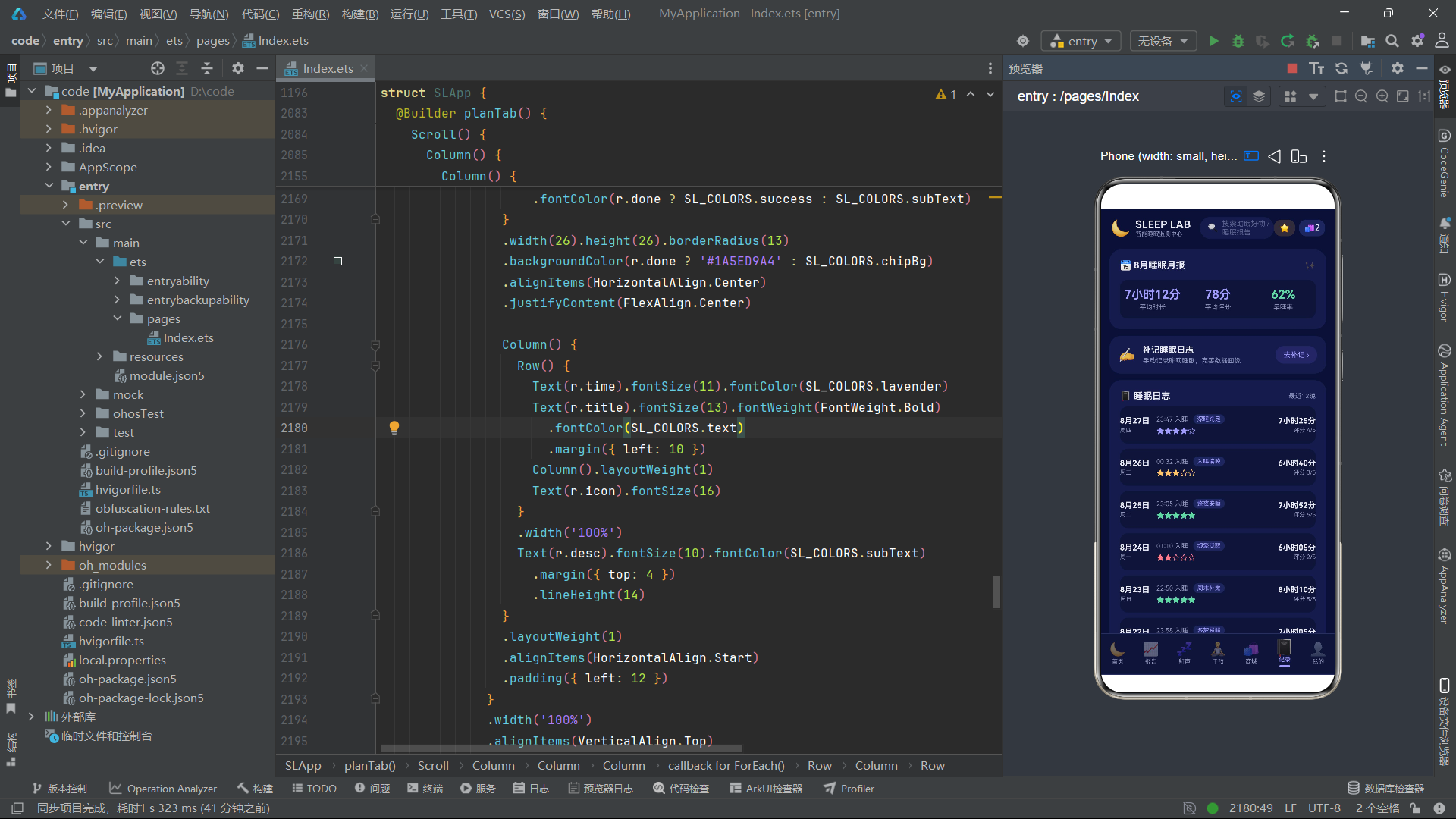
睡眠日志列表通过ForEach渲染12条日志记录。每条记录使用三段式布局:日期列(56vp宽)、中间详情列(弹性权重1)、右侧时长列。日期通过l.date.split(' ')[0]和l.date.split(' ')[1]将"8月27日 周四"拆分为"8月27日"和"周四"两部分分别显示。星级评分使用slStarText(l.score)函数生成五星文字,颜色由slScoreColor(l.score * 20)将5分制转换为100分制后获取颜色。l.score * 20这个转换逻辑将1-5的评分映射为20-100的百分制,再传入slScoreColor获取对应颜色。
4.15 我的Tab:会员卡与设备绑定
Column() {
  Row() {
    Text('🌙').fontSize(34)
    Column() {
      Text('深睡PLUS会员').fontSize(16).fontWeight(FontWeight.Bold)
        .fontColor(SL_COLORS.text)
      Text('有效期至 2027-08-31 · 会员价全场9折').fontSize(10)
        .fontColor(SL_COLORS.lavender).margin({ top: 4 })
    }.layoutWeight(1).alignItems(HorizontalAlign.Start)
      .padding({ left: 12 })
    Text('续费 ›').fontSize(11).fontColor('#FFFFFF')
      .padding({ left: 14, right: 14, top: 8, bottom: 8 })
      .borderRadius(14).backgroundColor(SL_COLORS.primary)
      .onClick(() => { this.activeTab = SLTab.Me })
  }.width('100%')

  Row() {
    Column() {
      Text('238').fontSize(16).fontWeight(FontWeight.Bold).fontColor(SL_COLORS.warn)
      Text('睡眠积分').fontSize(9).fontColor(SL_COLORS.subText).margin({ top: 2 })
    }.layoutWeight(1).alignItems(HorizontalAlign.Center)
    // ... 连续早睡、优惠券、睡眠报告
  }.width('100%').margin({ top: 16 })
    .padding({ top: 12, bottom: 12 })
    .backgroundColor('#266C5CE7').borderRadius(12)
    .onClick(() => { this.activeTab = SLTab.Shop })
}
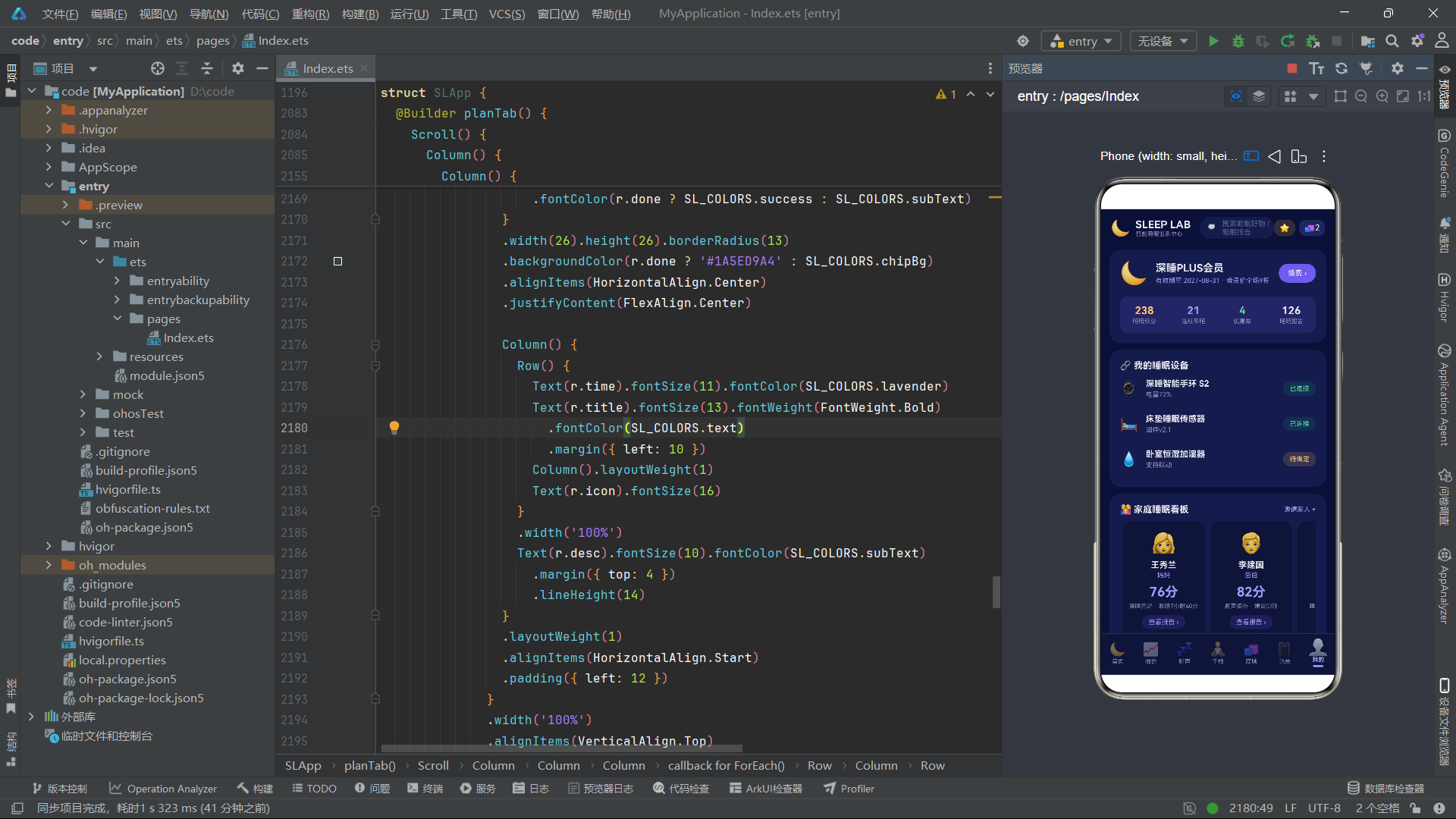
会员卡区域使用月亮emoji作为品牌标识,会员信息右侧的"续费"按钮使用主色背景。下方四宫格统计区使用#266C5CE7(15%透明度星月紫)作为背景色,在深色卡片上营造出"会员专区"的紫色调氛围。四个统计项(睡眠积分238、连续早睡21天、优惠券4张、睡眠报告126份)分别使用不同的强调色(暖黄、薰衣草、薄荷绿、银白),在统一的紫调背景中形成色彩区分。
4.16 我的Tab:家庭睡眠看板横滑
Scroll() {
  Row() {
    ForEach(SL_FAMILY, (m: SLFamilyMember) => {
      Column() {
        Text(m.icon).fontSize(30)
        Text(m.name).fontSize(13).fontWeight(FontWeight.Bold)
          .fontColor(SL_COLORS.text).margin({ top: 8 })
        Text(m.relation).fontSize(10).fontColor(SL_COLORS.lavender)
          .margin({ top: 2 })
        Text(m.score.toString() + '分').fontSize(20).fontWeight(FontWeight.Bold)
          .fontColor(slScoreColor(m.score)).margin({ top: 8 })
        Text(m.status).fontSize(9).fontColor(SL_COLORS.subText)
          .margin({ top: 5 })
        Text('查看报告 ›').fontSize(10).fontColor(SL_COLORS.lavender)
          .margin({ top: 8 })
          .padding({ left: 10, right: 10, top: 5, bottom: 5 })
          .borderRadius(11).backgroundColor('#266C5CE7')
          .onClick(() => { this.activeTab = SLTab.Report })
      }.width(126).alignItems(HorizontalAlign.Center)
        .padding({ top: 16, bottom: 14, left: 8, right: 8 })
        .backgroundColor(SL_COLORS.deepCard).borderRadius(14)
        .margin({ left: 4, right: 4 })
    })
  }
}.scrollable(ScrollDirection.Horizontal).scrollBar(BarState.Off)
  .width('100%').margin({ top: 10 })
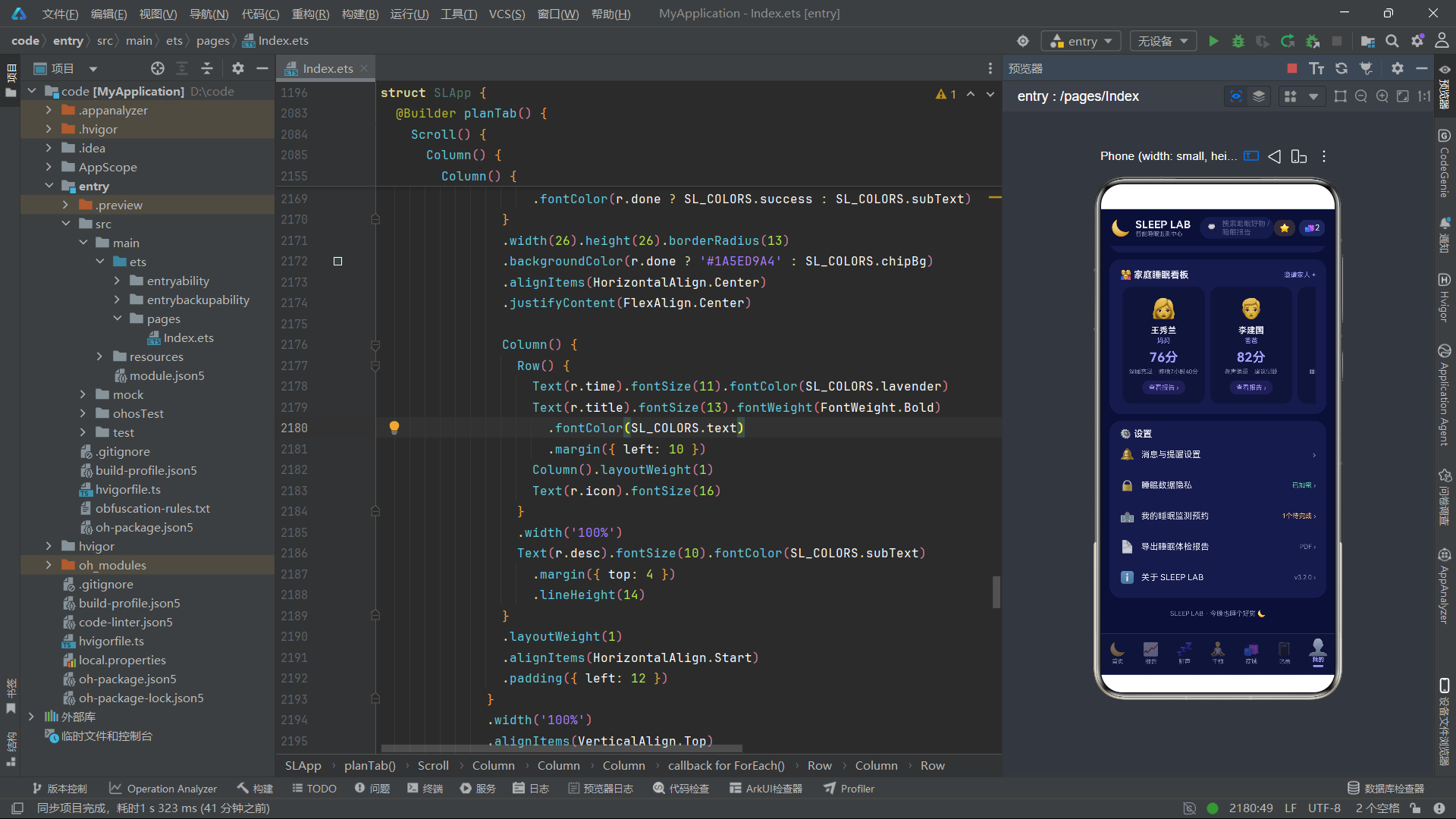
家庭成员看板使用横向滚动的Scroll容器,遍历3个家庭成员渲染卡片。每张卡片固定宽度126vp,内含头像、姓名、关系、评分(颜色由slScoreColor函数返回)、状态描述和"查看报告"按钮。scrollable(ScrollDirection.Horizontal)使Scroll支持横向滑动,scrollBar(BarState.Off)隐藏滚动条。家庭成员评分颜色各异(妈妈76分薰衣色、爸爸82分薰衣色、妹妹91分薄荷绿),直观传达各成员的睡眠质量等级。
4.17 底部Tab栏与选中缩放特效
@Builder bottomTabBar() {
  Row() {
    ForEach(SL_TABS, (t: SLTabItem) => {
      Column() {
        Text(t.icon).fontSize(20)
          .opacity(this.activeTab === t.tab ? 1.0 : 0.45)
          .scale(this.activeTab === t.tab ? { x: 1.25, y: 1.25 } : { x: 1.0, y: 1.0 })
        Text(t.label).fontSize(9).margin({ top: 2 })
          .fontColor(this.activeTab === t.tab ? SL_COLORS.lavender : SL_COLORS.subText)
          .fontWeight(this.activeTab === t.tab ? FontWeight.Bold : FontWeight.Normal)
        if (this.activeTab === t.tab) {
          Column().width(16).height(3)
            .backgroundColor(SL_COLORS.lavender).borderRadius(2)
            .margin({ top: 3 })
        }
      }.layoutWeight(1).alignItems(HorizontalAlign.Center)
        .padding({ top: 7, bottom: 7 })
        .onClick(() => { this.activeTab = t.tab })
    })
  }.width('100%')
    .backgroundColor(SL_COLORS.deepCard)
    .border({ width: 1, color: SL_COLORS.divider })
    .padding({ top: 2, bottom: 4 })
}
底部Tab栏通过ForEach遍历7个Tab项。选中态有三个视觉特征:图标完全不透明(未选中opacity 0.45)、图标放大1.25倍(scale({ x: 1.25, y: 1.25 }))、标签文字薰衣草色加粗、底部3vp高的薰衣色指示条。scale变换使选中项的图标比未选中项大25%,这是Tab栏选中态的常见视觉强化手段。Tab栏背景使用deepCard色(比卡片色更深的深夜蓝),通过border({ width: 1, color: SL_COLORS.divider })在顶部添加分隔线边框,与内容区分隔。
五、技术点对比与总结
5.1 动画状态变量对比
| 状态变量 | 初始值 | 目标值 | 时长 | 曲线 | 绑定属性 | 效果描述 |
|---|---|---|---|---|---|---|
| moonGlow | 1.0 | 1.14 | 2200ms | EaseInOut | scale | 月亮呼吸发光缩放 |
| starTwinkle | 1.0 | 0.25 | 1400ms | EaseInOut | opacity | 星星闪烁透明度 |
| breathScale | 1.0 | 1.10 | 3000ms | EaseInOut | scale | 呼吸波纹缩放 |
5.2 弹框组件架构对比
| 组件名 | 状态数 | 特殊交互 | 通信方式 | 技术亮点 |
|---|---|---|---|---|
| SLBookTestForm | 4 | 套餐宫格+日期chips+地址输入 | 回调 | 深色选中态边框+背景双重区分 |
| SLSetGoalForm | 4 | 时长步进器+提醒切换 | 回调 | Text模拟Toggle开关 |
| SLAddLogForm | 5 | 星级评分+日期/时间chips | 回调 | ForEach渲染星级按钮 |
| SLEditEnvForm | 4 | 温度/湿度/噪音步进器 | 回调 | toFixed(1)精度控制 |
| SLDeleteAlarmForm | 0 | 确认删除 | 回调 | 珊瑚粉警示边框 |
| SLSnoreNoteForm | 3 | 诱因chips+备注输入 | 回调 | 提示文字同步医生 |
| SLBuyGoodsForm | 4 | 数量/规格/优惠券/合计 | 回调+只读属性 | 合计金额自动重算 |
5.3 深色主题颜色使用对比
| 颜色用途 | 色值 | 透明度 | 使用场景 |
|---|---|---|---|
| 页面底色 | #0B1035 | 100% | 全局背景 |
| 卡片色 | #161B4A | 100% | 卡片背景 |
| 深卡片色 | #101439 | 100% | 卡片内嵌区域 |
| Chip背景 | #20265C | 100% | 标签胶囊未选中态 |
| 半透明主色 | #1A6C5CE7 | 10% | 呼吸波纹圆 |
| 半透明薄荷 | #1A5ED9A4 | 10% | 正常状态标签 |
| 半透明珊瑚 | #26FF7B8A | 15% | 异常状态标签 |
| 半透明暖黄 | #26FFC46B | 15% | 星标按钮背景 |
| 半透明主色 | #266C5CE7 | 15% | 会员区/标签背景 |
六、全文总结
本文全面剖析了一个基于鸿蒙HarmonyOS ArkTS语言构建的智能睡眠监测中心应用的完整源码。该应用以"夜空安眠风"为视觉主题,采用深夜蓝底色、星月紫主色、薰衣草淡紫辅助色的深色配色方案,通过13个颜色令牌集中管理全部色彩资源,并大量使用8位十六进制半透明颜色(如#1A6C5CE7、#26FF7B8A)在深色背景上营造柔和的语义色彩效果。
在数据模型层面,应用定义了睡眠阶段、评分历史、鼾声事件、卧室环境、助眠方案、商城商品、睡眠日志、异常提醒、家庭成员、绑定设备、就寝仪式等十余个数据接口,配合8个全局纯函数将数据映射为视觉属性。slScoreColor函数将评分映射为四档颜色,slFormatMinutes将分钟数格式化为可读字符串,slStarText用Unicode星号生成五星制评分文字,这些函数体现了数据-视觉分离的设计思想。
在组件架构层面,应用采用"7个弹框@Component + 1个@Entry主入口"的结构,通过"状态提升"模式集中管理7个弹框的显隐开关。每个弹框通过onClose/onConfirm回调与父组件通信,通过@State管理内部表单状态。弹框挂载统一使用"遮罩层(zIndex 999)+ 弹框层(zIndex 1000)"的Stack层叠模式,遮罩使用55%透明度黑色背景。
在动画系统层面,应用的核心技术亮点是三组由animateTo驱动的无限循环动画。月亮呼吸发光使用scale变换在1.0到1.14之间往返缩放,时长2.2秒;星星闪烁使用opacity在1.0到0.25之间往返变化,时长1.4秒;呼吸波纹使用scale在1.0到1.10之间往返缩放,时长3.0秒。三组动画在aboutToAppear生命周期中启动,通过PlayMode.Alternate模式实现往返循环,不依赖任何JavaScript定时器,由ArkUI框架的渲染管线驱动,性能优异且不会因主线程阻塞而卡顿。
在布局技术层面,应用充分运用了ArkUI的布局容器体系。Column用于纵向排列、Row用于横向排列、Stack用于层叠堆放(遮罩+弹框、图标+标签角标、月亮+呼吸圆)、Scroll用于可滚动区域(支持横向和纵向)。特别值得关注的是多个纯布局图表方案:30天评分折线图使用"Circle圆点+Column竖线"的ForEach组合实现,周时长柱状图使用"Text标签+Column柱体"的ForEach组合实现,睡眠结构堆叠条使用layoutWeight按分钟数比例分配宽度。这些图表无需引入第三方图表库,完全用ArkUI基础组件实现。
安装DevEco Studio程序

选择目标安装目录:

设置环境变量,但是需要重启一下:

新建一个空白模板:

设置API为24的模板项目:
初始化项目,自动下载相关依赖:

完整代码:
// ============================================================
// SLEEP LAB 智能睡眠监测中心 —— 单文件 ArkTS UI Demo
// 场景:睡眠报告数据 · 鼾声记录 · 助眠商城(睡眠经济潮流风)
// 风格:夜空安眠风
// - 页面深夜蓝 #0B1035 / 卡片深夜蓝 #161B4A
// - 星月紫 #6C5CE7 / 薰衣草淡紫 #A29BFE
// - 月光银白文字 #E8E9F3 / 警示珊瑚粉 #FF7B8A
// - 圆角 12-18 卡片,星星月亮点缀,柔和安眠观感
// 特效:月亮呼吸发光(moonGlow) / 星星闪烁(starTwinkle) /
// 呼吸波纹(breathScale),均由 animateTo 驱动,无定时器
// ============================================================
// ============ 调色板 ============
interface SLColorPalette {
bg: string
card: string
deepCard: string
primary: string
primaryDim: string
lavender: string
text: string
subText: string
danger: string
success: string
warn: string
divider: string
chipBg: string
}
const SL_COLORS: SLColorPalette = {
bg: '#0B1035',
card: '#161B4A',
deepCard: '#101439',
primary: '#6C5CE7',
primaryDim: '#4A3FB0',
lavender: '#A29BFE',
text: '#E8E9F3',
subText: '#8A8FB8',
danger: '#FF7B8A',
success: '#5ED9A4',
warn: '#FFC46B',
divider: '#2A2F66',
chipBg: '#20265C'
}
// ============ 底部 Tab ============
enum SLTab {
Home = 0,
Report = 1,
Snore = 2,
Plan = 3,
Shop = 4,
Log = 5,
Me = 6
}
interface SLTabItem {
tab: SLTab
icon: string
label: string
}
const SL_TABS: SLTabItem[] = [
{ tab: SLTab.Home, icon: '🌙', label: '首页' },
{ tab: SLTab.Report, icon: '📈', label: '报告' },
{ tab: SLTab.Snore, icon: '💤', label: '鼾声' },
{ tab: SLTab.Plan, icon: '🧘', label: '干预' },
{ tab: SLTab.Shop, icon: '🛍', label: '商城' },
{ tab: SLTab.Log, icon: '📓', label: '记录' },
{ tab: SLTab.Me, icon: '👤', label: '我的' }
]
// ============ 数据模型:昨夜睡眠阶段 ============
interface SLSleepStage {
name: string
icon: string
minutes: number
color: string
}
const SL_STAGES: SLSleepStage[] = [
{ name: '清醒', icon: '⏰', minutes: 32, color: '#FF7B8A' },
{ name: 'REM', icon: '💭', minutes: 96, color: '#8E7CF0' },
{ name: '浅睡', icon: '🌗', minutes: 219, color: '#5C63C9' },
{ name: '深睡', icon: '🌑', minutes: 98, color: '#3E3B7E' }
]
// ============ 数据模型:睡眠评分历史(30天) ============
interface SLScoreDay {
day: string
score: number
}
const SL_SCORE_HISTORY: SLScoreDay[] = [
{ day: '7/29', score: 72 },
{ day: '7/30', score: 68 },
{ day: '7/31', score: 75 },
{ day: '8/1', score: 81 },
{ day: '8/2', score: 64 },
{ day: '8/3', score: 58 },
{ day: '8/4', score: 77 },
{ day: '8/5', score: 83 },
{ day: '8/6', score: 70 },
{ day: '8/7', score: 66 },
{ day: '8/8', score: 74 },
{ day: '8/9', score: 79 },
{ day: '8/10', score: 85 },
{ day: '8/11', score: 62 },
{ day: '8/12', score: 71 },
{ day: '8/13', score: 68 },
{ day: '8/14', score: 76 },
{ day: '8/15', score: 80 },
{ day: '8/16', score: 73 },
{ day: '8/17', score: 69 },
{ day: '8/18', score: 78 },
{ day: '8/19', score: 84 },
{ day: '8/20', score: 71 },
{ day: '8/21', score: 67 },
{ day: '8/22', score: 74 },
{ day: '8/23', score: 82 },
{ day: '8/24', score: 77 },
{ day: '8/25', score: 73 },
{ day: '8/26', score: 79 },
{ day: '8/27', score: 88 }
]
// ============ 数据模型:鼾声事件 ============
interface SLSnoreEvent {
time: string
duration: number
decibel: number
note: string
severe: boolean
}
const SL_SNORE_EVENTS: SLSnoreEvent[] = [
{ time: '01:12', duration: 6, decibel: 52, note: '翻身伴随短促鼾声,疑似仰卧', severe: true },
{ time: '01:58', duration: 3, decibel: 44, note: '轻微鼾声,未觉醒', severe: false },
{ time: '02:35', duration: 8, decibel: 56, note: '连续鼾声,出现短暂血氧下降', severe: true },
{ time: '03:10', duration: 2, decibel: 39, note: '偶发轻鼾,呼吸平稳', severe: false },
{ time: '03:47', duration: 5, decibel: 48, note: '鼾声规律,与深睡期相关', severe: false },
{ time: '04:22', duration: 4, decibel: 46, note: '晨间浅睡期轻度鼾声', severe: false },
{ time: '05:05', duration: 7, decibel: 53, note: '最长单次,伴随一次微觉醒', severe: true },
{ time: '05:48', duration: 2, decibel: 41, note: '临近晨醒,偶发', severe: false },
{ time: '06:15', duration: 3, decibel: 43, note: '半觉醒状态打鼾', severe: false },
{ time: '06:40', duration: 1, decibel: 37, note: '晨醒前最后一次记录', severe: false }
]
// ============ 数据模型:卧室环境 ============
interface SLEnvItem {
icon: string
name: string
value: string
status: string
ok: boolean
}
const SL_ENV_ITEMS: SLEnvItem[] = [
{ icon: '🌡', name: '温度', value: '26.4℃', status: '适宜', ok: true },
{ icon: '💧', name: '湿度', value: '54%', status: '适宜', ok: true },
{ icon: '🔊', name: '噪音', value: '36dB', status: '良好', ok: true },
{ icon: '🌟', name: '光照', value: '3lux', status: '偏亮', ok: false }
]
// ============ 数据模型:助眠方案 ============
interface SLPlanItem {
icon: string
title: string
type: string
duration: string
listeners: string
tag: string
}
const SL_PLANS: SLPlanItem[] = [
{ icon: '🌌', title: '星空身体扫描冥想', type: '冥想课程', duration: '20分钟', listeners: '12.8万人正在收听', tag: '热门' },
{ icon: '🌬', title: '4-7-8 呼吸引导', type: '冥想课程', duration: '10分钟', listeners: '8.6万人正在收听', tag: '入门' },
{ icon: '🌧', title: '雨打芭蕉 · 深夜版', type: '白噪音', duration: '120分钟', listeners: '25.4万人正在收听', tag: '热搜' },
{ icon: '🔥', title: '篝火与远浪', type: '白噪音', duration: '90分钟', listeners: '18.2万人正在收听', tag: '经典' },
{ icon: '🍵', title: '洋甘菊晚安茶饮指南', type: '助眠茶', duration: '5分钟', listeners: '6.3万人正在收听', tag: '轻食' },
{ icon: '🌿', title: '酸枣仁安神汤教程', type: '助眠茶', duration: '8分钟', listeners: '4.9万人正在收听', tag: '食养' }
]
// ============ 数据模型:商城商品 ============
interface SLGood {
icon: string
name: string
spec: string
price: number
origin: number
sales: string
tag: string
}
const SL_GOODS: SLGood[] = [
{ icon: '💤', name: '真丝蒸汽眼罩', spec: '薰衣草香型', price: 59, origin: 89, sales: '月销3200+', tag: '热销' },
{ icon: '🌿', name: '肋木香薰助眠喷雾', spec: '50ml 持续型', price: 79, origin: 129, sales: '月销1800+', tag: '' },
{ icon: '🛏', name: '智能分区床垫 Pro', spec: '1.8m 睡眠监测款', price: 3299, origin: 3999, sales: '月销600+', tag: '新品' },
{ icon: '🍬', name: '褪黑素软糖 · 草莓味', spec: '60粒 软糖装', price: 89, origin: 139, sales: '月销5200+', tag: '爆款' },
{ icon: '🧸', name: '重力安抚毯', spec: '6.8kg 冷感面料', price: 259, origin: 359, sales: '月销940+', tag: '' },
{ icon: '🔊', name: '白噪音睡眠音箱', spec: '星空投影款', price: 199, origin: 269, sales: '月销2100+', tag: '' },
{ icon: '🛌', name: '乳胶分区护颈枕', spec: '高低波浪款', price: 349, origin: 459, sales: '月销1500+', tag: '' },
{ icon: '💍', name: '睡眠监测指环 S3', spec: '钛合金 7天续航', price: 1299, origin: 1599, sales: '月销380+', tag: '旗舰' }
]
// ============ 数据模型:睡眠日志 ============
interface SLSleepLogItem {
date: string
duration: string
score: number
bedtime: string
quality: string
}
const SL_SLEEP_LOGS: SLSleepLogItem[] = [
{ date: '8月27日 周四', duration: '7小时25分', score: 4, bedtime: '23:47', quality: '深睡充足' },
{ date: '8月26日 周三', duration: '6小时40分', score: 3, bedtime: '00:32', quality: '入睡偏晚' },
{ date: '8月25日 周二', duration: '7小时52分', score: 5, bedtime: '23:05', quality: '整夜安睡' },
{ date: '8月24日 周一', duration: '6小时05分', score: 2, bedtime: '01:10', quality: '频繁觉醒' },
{ date: '8月23日 周日', duration: '8小时10分', score: 5, bedtime: '22:50', quality: '周末补觉' },
{ date: '8月22日 周六', duration: '7小时05分', score: 4, bedtime: '23:58', quality: '多梦易醒' },
{ date: '8月21日 周五', duration: '6小时18分', score: 2, bedtime: '01:25', quality: '熬夜追剧' },
{ date: '8月20日 周四', duration: '7小时30分', score: 4, bedtime: '23:30', quality: '呼吸平稳' },
{ date: '8月19日 周三', duration: '7小时00分', score: 3, bedtime: '00:05', quality: '浅睡偏多' },
{ date: '8月18日 周二', duration: '7小时44分', score: 5, bedtime: '23:15', quality: '恢复良好' },
{ date: '8月17日 周一', duration: '5小时50分', score: 1, bedtime: '02:00', quality: '严重不足' },
{ date: '8月16日 周日', duration: '8小时02分', score: 4, bedtime: '22:40', quality: '轻松入睡' }
]
// ============ 数据模型:异常提醒 ============
interface SLAlertItem {
icon: string
title: string
desc: string
level: string
time: string
}
const SL_ALERTS: SLAlertItem[] = [
{ icon: '🌑', title: '深睡时长不足', desc: '昨夜深睡仅1小时38分,低于同龄人均值2小时10分', level: '高', time: '今日 07:12' },
{ icon: '😴', title: '入睡时间偏晚', desc: '连续3天超过00:30入睡,节律存在后移风险', level: '中', time: '今日 07:12' },
{ icon: '💤', title: '鼾声指数偏高', desc: '凌晨01:12-01:18 出现52分贝重度鼾声', level: '高', time: '今日 06:40' },
{ icon: '⏰', title: '夜间觉醒频繁', desc: '夜间觉醒4次,累计清醒32分钟,打断深睡连续性', level: '中', time: '今日 07:12' },
{ icon: '🌗', title: '作息节律漂移', desc: '比上周平均就寝时间推迟42分钟,建议逐步前移', level: '低', time: '8月26日 22:00' }
]
// ============ 数据模型:周睡眠时长 ============
interface SLWeekBar {
day: string
hours: number
}
const SL_WEEK_BARS: SLWeekBar[] = [
{ day: '周一', hours: 7.2 },
{ day: '周二', hours: 6.1 },
{ day: '周三', hours: 7.8 },
{ day: '周四', hours: 5.8 },
{ day: '周五', hours: 6.5 },
{ day: '周六', hours: 8.4 },
{ day: '周日', hours: 7.4 }
]
// ============ 数据模型:周鼾声统计 ============
interface SLSnoreStat {
label: string
value: string
sub: string
icon: string
}
const SL_SNORE_STATS: SLSnoreStat[] = [
{ label: '昨晚总鼾声', value: '18分钟', sub: '占比4.1%', icon: '💤' },
{ label: '最长单次', value: '7分钟', sub: '05:05出现', icon: '📏' },
{ label: '鼾声峰值', value: '56dB', sub: '02:35记录', icon: '📈' },
{ label: '关联觉醒', value: '4次', sub: '微觉醒为主', icon: '⏰' }
]
// ============ 数据模型:家庭成员 ============
interface SLFamilyMember {
name: string
relation: string
score: number
status: string
icon: string
}
const SL_FAMILY: SLFamilyMember[] = [
{ name: '王秀兰', relation: '妈妈', score: 76, status: '深睡充足 · 昨晚7小时40分', icon: '👩' },
{ name: '李建国', relation: '爸爸', score: 82, status: '鼾声偏重 · 建议侧卧', icon: '👨' },
{ name: '李晓雨', relation: '妹妹', score: 91, status: '睡眠模范生 · 早睡早起', icon: '👧' }
]
// ============ 数据模型:绑定设备 ============
interface SLDeviceItem {
icon: string
name: string
status: string
battery: string
}
const SL_DEVICES: SLDeviceItem[] = [
{ icon: '⌚', name: '深睡智能手环 S2', status: '已连接', battery: '电量72%' },
{ icon: '🛏', name: '床垫睡眠传感器', status: '已连接', battery: '固件v2.1' },
{ icon: '💧', name: '卧室恒湿加湿器', status: '待绑定', battery: '支持联动' }
]
// ============ 数据模型:就寝仪式 ============
interface SLRitualStep {
time: string
title: string
desc: string
icon: string
done: boolean
}
const SL_RITUALS: SLRitualStep[] = [
{ time: '22:00', title: '热水沐浴', desc: '水温40℃ 冲淋10分钟,帮助核心体温下降', icon: '🚿', done: true },
{ time: '22:30', title: '洋甘菊茶饮', desc: '温水冲泡,避开咖啡因与大量饮水', icon: '🍵', done: true },
{ time: '22:50', title: '开启白噪音', desc: '雨打芭蕉·深夜版,音量设定15%', icon: '🌧', done: true },
{ time: '23:10', title: '卧室灯光调暗', desc: '切换至烛光色温1800K,放下手机', icon: '🕯', done: false }
]
// ============ 数据模型:优惠券 ============
interface SLCoupon {
label: string
amount: number
}
const SL_COUPONS: SLCoupon[] = [
{ label: '新客立减券', amount: 20 },
{ label: '满99减15', amount: 15 },
{ label: '会员9折券', amount: 10 }
]
// ============ 数据模型:月度统计 ============
interface SLMonthStat {
month: string
avgDuration: string
avgScore: number
earlyRate: string
}
const SL_MONTH_STAT: SLMonthStat = {
month: '8月',
avgDuration: '7小时12分',
avgScore: 78,
earlyRate: '62%'
}
// ============ 数据模型:预约监测套餐 ============
interface SLBookPackage {
icon: string
label: string
desc: string
price: string
}
const SL_BOOK_PACKAGES: SLBookPackage[] = [
{ icon: '🏠', label: '居家监测', desc: '指环+手机App 三个夜晚', price: '¥299' },
{ icon: '🏥', label: '实验室多导PSG', desc: '三甲睡眠中心 整夜监测', price: '¥1280' },
{ icon: '⌚', label: '腕表监测', desc: '14天连续数据报告', price: '¥459' }
]
const SL_BOOK_DATES: string[] = ['8月28日', '8月29日', '8月30日', '9月1日', '9月2日']
const SL_BOOK_TIMES: string[] = ['19:00-20:00', '20:00-21:00', '21:00-22:00', '次日07:00']
const SL_BEDTIMES: string[] = ['22:30', '23:00', '23:30', '00:00', '00:30']
const SL_WAKE_TIMES: string[] = ['06:30', '07:00', '07:30', '08:00']
const SL_LOG_DATES: string[] = ['8月26日', '8月25日', '8月24日', '8月23日', '8月22日']
const SL_SNORE_NOTE_TIMES: string[] = ['01:12', '02:35', '03:47', '04:22']
const SL_SNORE_CAUSES: string[] = ['饮酒', '鼻炎发作', '仰卧睡姿', '过度疲劳']
const SL_GOOD_SPECS: string[] = ['标准装', '双倍装', '礼盒装']
const SL_LIGHT_MODES: string[] = ['全黑', '夜灯微光', '遮光帘+夜灯', '不做要求']
const SL_SHOP_CATS: string[] = ['全部', '眼罩', '香薰', '床垫', '软糖', '设备']
const SL_STAR_SCORES: number[] = [1, 2, 3, 4, 5]
const SL_CHECKIN_DAYS: number[] = [1, 2, 3, 4, 5, 6, 7, 8, 9, 10, 11, 12, 13, 14, 15, 16, 17, 18, 19, 20, 21]
// ============ 全局纯函数 ============
function slScoreColor(score: number): string {
if (score >= 85) { return '#5ED9A4' }
if (score >= 70) { return '#A29BFE' }
if (score >= 55) { return '#FFC46B' }
return '#FF7B8A'
}
function slFormatMinutes(min: number): string {
if (min >= 60) { return (Math.floor(min / 60)).toString() + '小时' + (min % 60).toString() + '分' }
return min.toString() + '分钟'
}
function slStageColor(name: string): string {
if (name === '清醒') { return '#FF7B8A' }
if (name === 'REM') { return '#8E7CF0' }
if (name === '浅睡') { return '#5C63C9' }
return '#3E3B7E'
}
function slBarHeight(hours: number): string {
return ((hours / 9.0) * 92).toFixed(0) + 'vp'
}
function slLineGap(score: number): string {
return ((96 - score) * 1.5).toFixed(0) + 'vp'
}
function slDbColor(decibel: number): string {
if (decibel >= 55) { return '#FF7B8A' }
if (decibel >= 45) { return '#FFC46B' }
return '#5ED9A4'
}
function slAlertColor(level: string): string {
if (level === '高') { return '#FF7B8A' }
if (level === '中') { return '#FFC46B' }
return '#A29BFE'
}
function slStarText(score: number): string {
if (score >= 5) { return '★★★★★' }
if (score >= 4) { return '★★★★☆' }
if (score >= 3) { return '★★★☆☆' }
if (score >= 2) { return '★★☆☆☆' }
return '★☆☆☆☆'
}
// ============ 弹框1:预约睡眠监测表单 ============
@Component
struct SLBookTestForm {
onClose: () => void = () => {}
onConfirm: () => void = () => {}
@State pkg: string = '居家监测'
@State bookDate: string = '8月28日'
@State bookTime: string = '20:00-21:00'
@State address: string = ''
build() {
Column() {
Row() {
Text('🏥 预约睡眠监测').fontSize(17).fontWeight(FontWeight.Bold).fontColor(SL_COLORS.text)
Column().layoutWeight(1)
Text('✕').fontSize(16).fontColor(SL_COLORS.subText)
.onClick(() => { this.onClose() })
}
.width('100%')
Text('选择监测套餐').fontSize(12).fontColor(SL_COLORS.subText)
.width('100%').margin({ top: 14 })
Row() {
ForEach(SL_BOOK_PACKAGES, (p: SLBookPackage) => {
Column() {
Text(p.icon).fontSize(26)
Text(p.label).fontSize(12).fontWeight(FontWeight.Bold)
.fontColor(this.pkg === p.label ? SL_COLORS.primary : SL_COLORS.text)
.margin({ top: 6 })
Text(p.desc).fontSize(9).fontColor(SL_COLORS.subText)
.margin({ top: 3 }).textAlign(TextAlign.Center)
Text(p.price).fontSize(13).fontWeight(FontWeight.Bold)
.fontColor(this.pkg === p.label ? SL_COLORS.lavender : SL_COLORS.warn)
.margin({ top: 6 })
}
.layoutWeight(1)
.alignItems(HorizontalAlign.Center)
.padding({ top: 12, bottom: 12, left: 4, right: 4 })
.borderRadius(12)
.backgroundColor(this.pkg === p.label ? '#252C6E' : SL_COLORS.deepCard)
.border({ width: 1, color: this.pkg === p.label ? SL_COLORS.primary : SL_COLORS.divider })
.margin({ left: 3, right: 3 })
.onClick(() => { this.pkg = p.label })
})
}
.width('100%').margin({ top: 6 })
Text('选择预约日期').fontSize(12).fontColor(SL_COLORS.subText)
.width('100%').margin({ top: 14 })
Scroll() {
Row() {
ForEach(SL_BOOK_DATES, (d: string) => {
if (this.bookDate === d) {
Text(d).fontSize(12).fontColor('#FFFFFF').backgroundColor(SL_COLORS.primary)
.padding({ left: 12, right: 12, top: 7, bottom: 7 }).borderRadius(14)
.margin({ right: 6 })
} else {
Text(d).fontSize(12).fontColor(SL_COLORS.lavender).backgroundColor(SL_COLORS.chipBg)
.padding({ left: 12, right: 12, top: 7, bottom: 7 }).borderRadius(14)
.margin({ right: 6 })
.onClick(() => { this.bookDate = d })
}
})
}
}
.scrollable(ScrollDirection.Horizontal).scrollBar(BarState.Off)
.width('100%').margin({ top: 6 })
Text('选择上门 / 到店时段').fontSize(12).fontColor(SL_COLORS.subText)
.width('100%').margin({ top: 14 })
Scroll() {
Row() {
ForEach(SL_BOOK_TIMES, (t: string) => {
if (this.bookTime === t) {
Text(t).fontSize(12).fontColor('#FFFFFF').backgroundColor(SL_COLORS.primary)
.padding({ left: 12, right: 12, top: 7, bottom: 7 }).borderRadius(14)
.margin({ right: 6 })
} else {
Text(t).fontSize(12).fontColor(SL_COLORS.lavender).backgroundColor(SL_COLORS.chipBg)
.padding({ left: 12, right: 12, top: 7, bottom: 7 }).borderRadius(14)
.margin({ right: 6 })
.onClick(() => { this.bookTime = t })
}
})
}
}
.scrollable(ScrollDirection.Horizontal).scrollBar(BarState.Off)
.width('100%').margin({ top: 6 })
Text('联系地址').fontSize(12).fontColor(SL_COLORS.subText)
.width('100%').margin({ top: 14 })
TextInput({ placeholder: '填写详细地址,如:静安区南京西路1888号3栋1201' })
.placeholderColor('#5A5F8A').fontSize(13).width('100%').height(42)
.fontColor(SL_COLORS.text)
.backgroundColor(SL_COLORS.deepCard).borderRadius(10)
.margin({ top: 6 })
.onChange((v: string) => { this.address = v })
Row() {
Text('取消').fontSize(14).fontColor(SL_COLORS.subText)
.backgroundColor(SL_COLORS.chipBg).borderRadius(20)
.padding({ left: 26, right: 26, top: 10, bottom: 10 })
.onClick(() => { this.onClose() })
Text('提交预约').fontSize(14).fontColor('#FFFFFF')
.backgroundColor(SL_COLORS.primary).borderRadius(20)
.padding({ left: 26, right: 26, top: 10, bottom: 10 })
.margin({ left: 12 })
.onClick(() => { this.onConfirm() })
}
.width('100%').justifyContent(FlexAlign.Center)
.margin({ top: 20 })
}
.width('88%')
.padding(16)
.backgroundColor(SL_COLORS.card)
.borderRadius(18)
}
}
// ============ 弹框2:设置睡眠目标表单 ============
@Component
struct SLSetGoalForm {
onClose: () => void = () => {}
onConfirm: () => void = () => {}
@State bedTime: string = '23:00'
@State wakeTime: string = '07:00'
@State goalHours: number = 8
@State remindOn: boolean = true
build() {
Column() {
Row() {
Text('🎯 设置睡眠目标').fontSize(17).fontWeight(FontWeight.Bold).fontColor(SL_COLORS.text)
Column().layoutWeight(1)
Text('✕').fontSize(16).fontColor(SL_COLORS.subText)
.onClick(() => { this.onClose() })
}
.width('100%')
Text('目标就寝时间').fontSize(12).fontColor(SL_COLORS.subText)
.width('100%').margin({ top: 14 })
Scroll() {
Row() {
ForEach(SL_BEDTIMES, (b: string) => {
if (this.bedTime === b) {
Text(b).fontSize(12).fontColor('#FFFFFF').backgroundColor(SL_COLORS.primary)
.padding({ left: 14, right: 14, top: 7, bottom: 7 }).borderRadius(14)
.margin({ right: 6 })
} else {
Text(b).fontSize(12).fontColor(SL_COLORS.lavender).backgroundColor(SL_COLORS.chipBg)
.padding({ left: 14, right: 14, top: 7, bottom: 7 }).borderRadius(14)
.margin({ right: 6 })
.onClick(() => { this.bedTime = b })
}
})
}
}
.scrollable(ScrollDirection.Horizontal).scrollBar(BarState.Off)
.width('100%').margin({ top: 6 })
Text('目标起床时间').fontSize(12).fontColor(SL_COLORS.subText)
.width('100%').margin({ top: 14 })
Row() {
ForEach(SL_WAKE_TIMES, (w: string) => {
if (this.wakeTime === w) {
Text(w).fontSize(12).fontColor('#FFFFFF').backgroundColor(SL_COLORS.primary)
.padding({ left: 14, right: 14, top: 7, bottom: 7 }).borderRadius(14)
.margin({ right: 6 })
} else {
Text(w).fontSize(12).fontColor(SL_COLORS.lavender).backgroundColor(SL_COLORS.chipBg)
.padding({ left: 14, right: 14, top: 7, bottom: 7 }).borderRadius(14)
.margin({ right: 6 })
.onClick(() => { this.wakeTime = w })
}
})
}
.width('100%').margin({ top: 6 })
Text('目标睡眠时长').fontSize(12).fontColor(SL_COLORS.subText)
.width('100%').margin({ top: 14 })
Row() {
Text('−').fontSize(20).fontColor(SL_COLORS.lavender)
.width(34).height(34).borderRadius(17)
.backgroundColor(SL_COLORS.chipBg).textAlign(TextAlign.Center)
.onClick(() => {
if (this.goalHours > 5) { this.goalHours -= 1 }
})
Text(this.goalHours.toString() + ' 小时').fontSize(16).fontWeight(FontWeight.Bold)
.fontColor(SL_COLORS.text).layoutWeight(1).textAlign(TextAlign.Center)
Text('+').fontSize(20).fontColor(SL_COLORS.lavender)
.width(34).height(34).borderRadius(17)
.backgroundColor(SL_COLORS.chipBg).textAlign(TextAlign.Center)
.onClick(() => {
if (this.goalHours < 10) { this.goalHours += 1 }
})
}
.width('100%').margin({ top: 8 })
Row() {
Text('🔔').fontSize(18)
Text('就寝提醒推送').fontSize(13).fontColor(SL_COLORS.text)
.margin({ left: 10 }).layoutWeight(1)
Text(this.remindOn ? '已开启' : '已关闭').fontSize(12)
.fontColor(this.remindOn ? SL_COLORS.success : SL_COLORS.subText)
.backgroundColor(this.remindOn ? '#1A5ED9A4' : SL_COLORS.chipBg)
.padding({ left: 12, right: 12, top: 5, bottom: 5 }).borderRadius(11)
.onClick(() => { this.remindOn = !this.remindOn })
}
.width('100%').margin({ top: 16 })
.padding({ top: 10, bottom: 10 })
.backgroundColor(SL_COLORS.deepCard).borderRadius(12)
Row() {
Text('取消').fontSize(14).fontColor(SL_COLORS.subText)
.backgroundColor(SL_COLORS.chipBg).borderRadius(20)
.padding({ left: 26, right: 26, top: 10, bottom: 10 })
.onClick(() => { this.onClose() })
Text('保存目标').fontSize(14).fontColor('#FFFFFF')
.backgroundColor(SL_COLORS.primary).borderRadius(20)
.padding({ left: 26, right: 26, top: 10, bottom: 10 })
.margin({ left: 12 })
.onClick(() => { this.onConfirm() })
}
.width('100%').justifyContent(FlexAlign.Center)
.margin({ top: 20 })
}
.width('88%')
.padding(16)
.backgroundColor(SL_COLORS.card)
.borderRadius(18)
}
}
// ============ 弹框3:补记睡眠日志表单 ============
@Component
struct SLAddLogForm {
onClose: () => void = () => {}
onConfirm: () => void = () => {}
@State logDate: string = '8月26日'
@State logBed: string = '23:30'
@State logWake: string = '07:00'
@State logScore: number = 4
@State logNote: string = ''
build() {
Column() {
Row() {
Text('📓 补记睡眠日志').fontSize(17).fontWeight(FontWeight.Bold).fontColor(SL_COLORS.text)
Column().layoutWeight(1)
Text('✕').fontSize(16).fontColor(SL_COLORS.subText)
.onClick(() => { this.onClose() })
}
.width('100%')
Text('补记日期').fontSize(12).fontColor(SL_COLORS.subText)
.width('100%').margin({ top: 14 })
Row() {
ForEach(SL_LOG_DATES, (d: string) => {
if (this.logDate === d) {
Text(d).fontSize(12).fontColor('#FFFFFF').backgroundColor(SL_COLORS.primary)
.padding({ left: 10, right: 10, top: 7, bottom: 7 }).borderRadius(14)
.margin({ right: 6 })
} else {
Text(d).fontSize(12).fontColor(SL_COLORS.lavender).backgroundColor(SL_COLORS.chipBg)
.padding({ left: 10, right: 10, top: 7, bottom: 7 }).borderRadius(14)
.margin({ right: 6 })
.onClick(() => { this.logDate = d })
}
})
}
.width('100%').margin({ top: 6 })
Row() {
Column() {
Text('就寝时间').fontSize(12).fontColor(SL_COLORS.subText).width('100%')
Row() {
ForEach(SL_BEDTIMES, (b: string) => {
if (this.logBed === b) {
Text(b).fontSize(11).fontColor('#FFFFFF').backgroundColor(SL_COLORS.primary)
.padding({ left: 8, right: 8, top: 6, bottom: 6 }).borderRadius(12)
.margin({ right: 4 })
} else {
Text(b).fontSize(11).fontColor(SL_COLORS.lavender).backgroundColor(SL_COLORS.chipBg)
.padding({ left: 8, right: 8, top: 6, bottom: 6 }).borderRadius(12)
.margin({ right: 4 })
.onClick(() => { this.logBed = b })
}
})
}
.width('100%').margin({ top: 6 })
}
.layoutWeight(1).alignItems(HorizontalAlign.Start)
}
.width('100%').margin({ top: 14 })
Row() {
Column() {
Text('起床时间').fontSize(12).fontColor(SL_COLORS.subText).width('100%')
Row() {
ForEach(SL_WAKE_TIMES, (w: string) => {
if (this.logWake === w) {
Text(w).fontSize(11).fontColor('#FFFFFF').backgroundColor(SL_COLORS.primary)
.padding({ left: 8, right: 8, top: 6, bottom: 6 }).borderRadius(12)
.margin({ right: 4 })
} else {
Text(w).fontSize(11).fontColor(SL_COLORS.lavender).backgroundColor(SL_COLORS.chipBg)
.padding({ left: 8, right: 8, top: 6, bottom: 6 }).borderRadius(12)
.margin({ right: 4 })
.onClick(() => { this.logWake = w })
}
})
}
.width('100%').margin({ top: 6 })
}
.layoutWeight(1).alignItems(HorizontalAlign.Start)
}
.width('100%').margin({ top: 14 })
Text('主观睡眠评分').fontSize(12).fontColor(SL_COLORS.subText)
.width('100%').margin({ top: 16 })
Row() {
ForEach(SL_STAR_SCORES, (s: number) => {
Text(this.logScore >= s ? '★' : '☆').fontSize(34)
.fontColor(this.logScore >= s ? SL_COLORS.warn : SL_COLORS.subText)
.margin({ left: 6, right: 6 })
.onClick(() => { this.logScore = s })
})
}
.width('100%').justifyContent(FlexAlign.Center)
.margin({ top: 8 })
Text('备注').fontSize(12).fontColor(SL_COLORS.subText)
.width('100%').margin({ top: 16 })
TextInput({ placeholder: '昨晚做梦很多,半夜被楼上吵醒一次…' })
.placeholderColor('#5A5F8A').fontSize(13).width('100%').height(42)
.fontColor(SL_COLORS.text)
.backgroundColor(SL_COLORS.deepCard).borderRadius(10)
.margin({ top: 6 })
.onChange((v: string) => { this.logNote = v })
Row() {
Text('取消').fontSize(14).fontColor(SL_COLORS.subText)
.backgroundColor(SL_COLORS.chipBg).borderRadius(20)
.padding({ left: 26, right: 26, top: 10, bottom: 10 })
.onClick(() => { this.onClose() })
Text('保存日志').fontSize(14).fontColor('#FFFFFF')
.backgroundColor(SL_COLORS.primary).borderRadius(20)
.padding({ left: 26, right: 26, top: 10, bottom: 10 })
.margin({ left: 12 })
.onClick(() => { this.onConfirm() })
}
.width('100%').justifyContent(FlexAlign.Center)
.margin({ top: 20 })
}
.width('88%')
.padding(16)
.backgroundColor(SL_COLORS.card)
.borderRadius(18)
}
}
// ============ 弹框4:编辑卧室环境目标表单 ============
@Component
struct SLEditEnvForm {
onClose: () => void = () => {}
onConfirm: () => void = () => {}
@State targetTemp: number = 26.0
@State targetHumidity: number = 55
@State targetNoise: number = 40
@State lightMode: string = '全黑'
build() {
Column() {
Row() {
Text('🌡 编辑卧室环境目标').fontSize(17).fontWeight(FontWeight.Bold).fontColor(SL_COLORS.text)
Column().layoutWeight(1)
Text('✕').fontSize(16).fontColor(SL_COLORS.subText)
.onClick(() => { this.onClose() })
}
.width('100%')
Row() {
Text('🌡 温度目标').fontSize(13).fontColor(SL_COLORS.text).layoutWeight(1)
Text('−').fontSize(18).fontColor(SL_COLORS.lavender)
.width(30).height(30).borderRadius(15)
.backgroundColor(SL_COLORS.chipBg).textAlign(TextAlign.Center)
.onClick(() => {
if (this.targetTemp > 18) { this.targetTemp -= 0.5 }
})
Text(this.targetTemp.toFixed(1) + '℃').fontSize(14).fontWeight(FontWeight.Bold)
.fontColor(SL_COLORS.lavender).width(70).textAlign(TextAlign.Center)
Text('+').fontSize(18).fontColor(SL_COLORS.lavender)
.width(30).height(30).borderRadius(15)
.backgroundColor(SL_COLORS.chipBg).textAlign(TextAlign.Center)
.onClick(() => {
if (this.targetTemp < 30) { this.targetTemp += 0.5 }
})
}
.width('100%').margin({ top: 16 })
Row() {
Text('💧 湿度目标').fontSize(13).fontColor(SL_COLORS.text).layoutWeight(1)
Text('−').fontSize(18).fontColor(SL_COLORS.lavender)
.width(30).height(30).borderRadius(15)
.backgroundColor(SL_COLORS.chipBg).textAlign(TextAlign.Center)
.onClick(() => {
if (this.targetHumidity > 30) { this.targetHumidity -= 5 }
})
Text(this.targetHumidity.toString() + '%').fontSize(14).fontWeight(FontWeight.Bold)
.fontColor(SL_COLORS.lavender).width(70).textAlign(TextAlign.Center)
Text('+').fontSize(18).fontColor(SL_COLORS.lavender)
.width(30).height(30).borderRadius(15)
.backgroundColor(SL_COLORS.chipBg).textAlign(TextAlign.Center)
.onClick(() => {
if (this.targetHumidity < 70) { this.targetHumidity += 5 }
})
}
.width('100%').margin({ top: 14 })
Row() {
Text('🔊 噪音上限').fontSize(13).fontColor(SL_COLORS.text).layoutWeight(1)
Text('−').fontSize(18).fontColor(SL_COLORS.lavender)
.width(30).height(30).borderRadius(15)
.backgroundColor(SL_COLORS.chipBg).textAlign(TextAlign.Center)
.onClick(() => {
if (this.targetNoise > 30) { this.targetNoise -= 5 }
})
Text(this.targetNoise.toString() + 'dB').fontSize(14).fontWeight(FontWeight.Bold)
.fontColor(SL_COLORS.lavender).width(70).textAlign(TextAlign.Center)
Text('+').fontSize(18).fontColor(SL_COLORS.lavender)
.width(30).height(30).borderRadius(15)
.backgroundColor(SL_COLORS.chipBg).textAlign(TextAlign.Center)
.onClick(() => {
if (this.targetNoise < 55) { this.targetNoise += 5 }
})
}
.width('100%').margin({ top: 14 })
Text('🌙 睡眠光照要求').fontSize(12).fontColor(SL_COLORS.subText)
.width('100%').margin({ top: 16 })
Row() {
ForEach(SL_LIGHT_MODES, (m: string) => {
if (this.lightMode === m) {
Text(m).fontSize(11).fontColor('#FFFFFF').backgroundColor(SL_COLORS.primary)
.padding({ left: 8, right: 8, top: 7, bottom: 7 }).borderRadius(12)
.margin({ right: 5 })
} else {
Text(m).fontSize(11).fontColor(SL_COLORS.lavender).backgroundColor(SL_COLORS.chipBg)
.padding({ left: 8, right: 8, top: 7, bottom: 7 }).borderRadius(12)
.margin({ right: 5 })
.onClick(() => { this.lightMode = m })
}
})
}
.width('100%').margin({ top: 6 })
Row() {
Text('取消').fontSize(14).fontColor(SL_COLORS.subText)
.backgroundColor(SL_COLORS.chipBg).borderRadius(20)
.padding({ left: 26, right: 26, top: 10, bottom: 10 })
.onClick(() => { this.onClose() })
Text('保存环境目标').fontSize(14).fontColor('#FFFFFF')
.backgroundColor(SL_COLORS.primary).borderRadius(20)
.padding({ left: 26, right: 26, top: 10, bottom: 10 })
.margin({ left: 12 })
.onClick(() => { this.onConfirm() })
}
.width('100%').justifyContent(FlexAlign.Center)
.margin({ top: 22 })
}
.width('88%')
.padding(16)
.backgroundColor(SL_COLORS.card)
.borderRadius(18)
}
}
// ============ 弹框5:删除闹钟确认 ============
@Component
struct SLDeleteAlarmForm {
onClose: () => void = () => {}
onConfirm: () => void = () => {}
build() {
Column() {
Text('⏰').fontSize(46).margin({ top: 20 })
Text('删除智能唤醒闹钟?').fontSize(18).fontWeight(FontWeight.Bold)
.fontColor(SL_COLORS.text).margin({ top: 10 })
Text('删除后将无法使用睡眠周期智能唤醒').fontSize(12)
.fontColor(SL_COLORS.danger).margin({ top: 6 })
Column() {
Row() {
Text('🕖 07:00').fontSize(20).fontWeight(FontWeight.Bold)
.fontColor(SL_COLORS.warn)
Column().layoutWeight(1)
Text('智能唤醒').fontSize(11).fontColor(SL_COLORS.lavender)
.backgroundColor('#266C5CE7')
.padding({ left: 8, right: 8, top: 3, bottom: 3 }).borderRadius(9)
}
.width('100%')
Row() {
Text('重复:工作日(周一至周五)').fontSize(12).fontColor(SL_COLORS.subText)
}
.width('100%').margin({ top: 6 })
Row() {
Text('响铃:雨打芭蕉 · 由轻到渐强').fontSize(12).fontColor(SL_COLORS.subText)
}
.width('100%').margin({ top: 4 })
}
.width('100%')
.padding(12)
.backgroundColor('#2A1B33')
.borderRadius(12)
.border({ width: 1, color: '#FF7B8A' })
.margin({ top: 16 })
Row() {
Text('保留闹钟').fontSize(14).fontColor(SL_COLORS.lavender)
.backgroundColor(SL_COLORS.chipBg).borderRadius(20)
.padding({ left: 26, right: 26, top: 10, bottom: 10 })
.onClick(() => { this.onClose() })
Text('确认删除').fontSize(14).fontColor('#FFFFFF')
.backgroundColor(SL_COLORS.danger).borderRadius(20)
.padding({ left: 26, right: 26, top: 10, bottom: 10 })
.margin({ left: 12 })
.onClick(() => { this.onConfirm() })
}
.width('100%').justifyContent(FlexAlign.Center)
.margin({ top: 22 })
}
.width('80%')
.padding({ left: 18, right: 18, top: 24, bottom: 24 })
.backgroundColor(SL_COLORS.card)
.borderRadius(18)
.alignItems(HorizontalAlign.Center)
}
}
// ============ 弹框6:鼾声标注表单 ============
@Component
struct SLSnoreNoteForm {
onClose: () => void = () => {}
onConfirm: () => void = () => {}
@State noteTime: string = '01:12'
@State noteCause: string = '仰卧睡姿'
@State noteText: string = ''
build() {
Column() {
Row() {
Text('💤 鼾声事件标注').fontSize(17).fontWeight(FontWeight.Bold).fontColor(SL_COLORS.text)
Column().layoutWeight(1)
Text('✕').fontSize(16).fontColor(SL_COLORS.subText)
.onClick(() => { this.onClose() })
}
.width('100%')
Text('选择鼾声事件时间').fontSize(12).fontColor(SL_COLORS.subText)
.width('100%').margin({ top: 14 })
Row() {
ForEach(SL_SNORE_NOTE_TIMES, (t: string) => {
if (this.noteTime === t) {
Text(t).fontSize(12).fontColor('#FFFFFF').backgroundColor(SL_COLORS.primary)
.padding({ left: 14, right: 14, top: 7, bottom: 7 }).borderRadius(14)
.margin({ right: 6 })
} else {
Text(t).fontSize(12).fontColor(SL_COLORS.lavender).backgroundColor(SL_COLORS.chipBg)
.padding({ left: 14, right: 14, top: 7, bottom: 7 }).borderRadius(14)
.margin({ right: 6 })
.onClick(() => { this.noteTime = t })
}
})
}
.width('100%').margin({ top: 6 })
Text('可能诱因(可多选)').fontSize(12).fontColor(SL_COLORS.subText)
.width('100%').margin({ top: 14 })
Row() {
ForEach(SL_SNORE_CAUSES, (c: string) => {
if (this.noteCause === c) {
Text(c).fontSize(12).fontColor('#FFFFFF').backgroundColor(SL_COLORS.primary)
.padding({ left: 14, right: 14, top: 7, bottom: 7 }).borderRadius(14)
.margin({ right: 6 })
} else {
Text(c).fontSize(12).fontColor(SL_COLORS.lavender).backgroundColor(SL_COLORS.chipBg)
.padding({ left: 14, right: 14, top: 7, bottom: 7 }).borderRadius(14)
.margin({ right: 6 })
.onClick(() => { this.noteCause = c })
}
})
}
.width('100%').margin({ top: 6 })
Text('补充备注').fontSize(12).fontColor(SL_COLORS.subText)
.width('100%').margin({ top: 14 })
TextInput({ placeholder: '如:晚餐喝了半瓶红酒,鼻塞严重…' })
.placeholderColor('#5A5F8A').fontSize(13).width('100%').height(42)
.fontColor(SL_COLORS.text)
.backgroundColor(SL_COLORS.deepCard).borderRadius(10)
.margin({ top: 6 })
.onChange((v: string) => { this.noteText = v })
Text('标注将同步至睡眠医生,帮助定位鼾症原因').fontSize(10)
.fontColor(SL_COLORS.subText).width('100%').margin({ top: 10 })
Row() {
Text('放弃标注').fontSize(14).fontColor(SL_COLORS.subText)
.backgroundColor(SL_COLORS.chipBg).borderRadius(20)
.padding({ left: 26, right: 26, top: 10, bottom: 10 })
.onClick(() => { this.onClose() })
Text('保存标注').fontSize(14).fontColor('#FFFFFF')
.backgroundColor(SL_COLORS.primary).borderRadius(20)
.padding({ left: 26, right: 26, top: 10, bottom: 10 })
.margin({ left: 12 })
.onClick(() => { this.onConfirm() })
}
.width('100%').justifyContent(FlexAlign.Center)
.margin({ top: 20 })
}
.width('88%')
.padding(16)
.backgroundColor(SL_COLORS.card)
.borderRadius(18)
}
}
// ============ 弹框7:购买助眠商品表单 ============
@Component
struct SLBuyGoodsForm {
onClose: () => void = () => {}
onConfirm: () => void = () => {}
goodIcon: string = '💤'
goodName: string = '真丝蒸汽眼罩'
goodPrice: number = 59
@State qty: number = 1
@State spec: string = '标准装'
@State coupon: string = '新客立减券'
@State couponAmount: number = 20
build() {
Column() {
Row() {
Column() {
Text(this.goodIcon).fontSize(30)
}
.width(52).height(52).borderRadius(12)
.backgroundColor(SL_COLORS.chipBg)
.alignItems(HorizontalAlign.Center).justifyContent(FlexAlign.Center)
Column() {
Text(this.goodName).fontSize(15).fontWeight(FontWeight.Bold).fontColor(SL_COLORS.text)
Row() {
Text('¥' + this.goodPrice.toString()).fontSize(16).fontWeight(FontWeight.Bold)
.fontColor(SL_COLORS.warn)
Text('¥' + (this.goodPrice + 30).toString()).fontSize(11).fontColor(SL_COLORS.subText)
.decoration({ type: TextDecorationType.LineThrough })
.margin({ left: 6 })
}
.margin({ top: 4 })
}
.layoutWeight(1).alignItems(HorizontalAlign.Start)
.padding({ left: 12 })
Text('✕').fontSize(16).fontColor(SL_COLORS.subText)
.onClick(() => { this.onClose() })
}
.width('100%')
Text('购买数量').fontSize(12).fontColor(SL_COLORS.subText)
.width('100%').margin({ top: 16 })
Row() {
Text('−').fontSize(18).fontColor(SL_COLORS.lavender)
.width(30).height(30).borderRadius(15)
.backgroundColor(SL_COLORS.chipBg).textAlign(TextAlign.Center)
.onClick(() => {
if (this.qty > 1) { this.qty -= 1 }
})
Text('× ' + this.qty.toString()).fontSize(15).fontWeight(FontWeight.Bold)
.fontColor(SL_COLORS.text).width(60).textAlign(TextAlign.Center)
Text('+').fontSize(18).fontColor(SL_COLORS.lavender)
.width(30).height(30).borderRadius(15)
.backgroundColor(SL_COLORS.chipBg).textAlign(TextAlign.Center)
.onClick(() => {
if (this.qty < 9) { this.qty += 1 }
})
Column().layoutWeight(1)
Text('库存充足').fontSize(10).fontColor(SL_COLORS.subText)
}
.width('100%').margin({ top: 6 })
Text('规格').fontSize(12).fontColor(SL_COLORS.subText)
.width('100%').margin({ top: 14 })
Row() {
ForEach(SL_GOOD_SPECS, (s: string) => {
if (this.spec === s) {
Text(s).fontSize(12).fontColor('#FFFFFF').backgroundColor(SL_COLORS.primary)
.padding({ left: 14, right: 14, top: 7, bottom: 7 }).borderRadius(14)
.margin({ right: 6 })
} else {
Text(s).fontSize(12).fontColor(SL_COLORS.lavender).backgroundColor(SL_COLORS.chipBg)
.padding({ left: 14, right: 14, top: 7, bottom: 7 }).borderRadius(14)
.margin({ right: 6 })
.onClick(() => { this.spec = s })
}
})
}
.width('100%').margin({ top: 6 })
Text('优惠券').fontSize(12).fontColor(SL_COLORS.subText)
.width('100%').margin({ top: 14 })
Row() {
ForEach(SL_COUPONS, (c: SLCoupon) => {
if (this.coupon === c.label) {
Text(c.label + ' -¥' + c.amount.toString()).fontSize(11)
.fontColor(SL_COLORS.warn).backgroundColor('#26FFC46B')
.padding({ left: 10, right: 10, top: 6, bottom: 6 }).borderRadius(12)
.margin({ right: 6 })
.onClick(() => { this.couponAmount = c.amount })
} else {
Text(c.label + ' -¥' + c.amount.toString()).fontSize(11)
.fontColor(SL_COLORS.subText).backgroundColor(SL_COLORS.chipBg)
.padding({ left: 10, right: 10, top: 6, bottom: 6 }).borderRadius(12)
.margin({ right: 6 })
.onClick(() => {
this.coupon = c.label
this.couponAmount = c.amount
})
}
})
}
.width('100%').margin({ top: 6 })
Row() {
Text('合计').fontSize(13).fontColor(SL_COLORS.subText)
Column().layoutWeight(1)
Text('¥' + (this.goodPrice * this.qty - this.couponAmount).toString())
.fontSize(22).fontWeight(FontWeight.Bold).fontColor(SL_COLORS.warn)
}
.width('100%').margin({ top: 18 })
.padding({ top: 12, bottom: 12 })
.backgroundColor(SL_COLORS.deepCard).borderRadius(12)
Row() {
Text('再想想').fontSize(14).fontColor(SL_COLORS.subText)
.backgroundColor(SL_COLORS.chipBg).borderRadius(20)
.padding({ left: 26, right: 26, top: 10, bottom: 10 })
.onClick(() => { this.onClose() })
Text('立即购买').fontSize(14).fontColor('#FFFFFF')
.backgroundColor(SL_COLORS.primary).borderRadius(20)
.padding({ left: 26, right: 26, top: 10, bottom: 10 })
.margin({ left: 12 })
.onClick(() => { this.onConfirm() })
}
.width('100%').justifyContent(FlexAlign.Center)
.margin({ top: 18 })
}
.width('88%')
.padding(16)
.backgroundColor(SL_COLORS.card)
.borderRadius(18)
}
}
// ============ 主入口 ============
@Entry
@Component
struct SLApp {
@State activeTab: SLTab = SLTab.Home
@State showBookForm: boolean = false
@State showSetGoalForm: boolean = false
@State showAddLogForm: boolean = false
@State showEditEnvForm: boolean = false
@State showDeleteAlarmForm: boolean = false
@State showSnoreNoteForm: boolean = false
@State showBuyGoodsForm: boolean = false
@State shopCategory: string = '全部'
@State cartCount: number = 2
@State moonGlow: number = 1.0
@State starTwinkle: number = 1.0
@State breathScale: number = 1.0
aboutToAppear() {
this.getUIContext().animateTo({ duration: 2200, iterations: -1, playMode: PlayMode.Alternate, curve: Curve.EaseInOut }, () => {
this.moonGlow = 1.14
})
this.getUIContext().animateTo({ duration: 1400, iterations: -1, playMode: PlayMode.Alternate, curve: Curve.EaseInOut }, () => {
this.starTwinkle = 0.25
})
this.getUIContext().animateTo({ duration: 3000, iterations: -1, playMode: PlayMode.Alternate, curve: Curve.EaseInOut }, () => {
this.breathScale = 1.10
})
}
build() {
Column() {
this.header()
this.contentArea()
this.bottomTabBar()
}
.width('100%').height('100%')
.backgroundColor(SL_COLORS.bg)
}
// ========== 静态电商风头部(无动画) ==========
@Builder header() {
Row() {
Text('🌙').fontSize(24)
Column() {
Text('SLEEP LAB').fontSize(16).fontWeight(FontWeight.Bold).fontColor(SL_COLORS.text)
Text('智能睡眠监测中心').fontSize(9).fontColor(SL_COLORS.subText)
}
.alignItems(HorizontalAlign.Start)
.padding({ left: 8 })
Row() {
Text('🔍').fontSize(13)
Text('搜索助眠好物 / 睡眠报告').fontSize(11).fontColor('#5A5F8A')
.margin({ left: 6 })
}
.layoutWeight(1)
.height(34)
.padding({ left: 12, right: 12 })
.backgroundColor(SL_COLORS.card)
.borderRadius(17)
.alignItems(VerticalAlign.Center)
.margin({ left: 14 })
.onClick(() => { this.activeTab = SLTab.Shop })
Text('⭐').fontSize(13)
.fontColor(SL_COLORS.warn)
.padding({ left: 8, right: 8, top: 5, bottom: 5 })
.borderRadius(11)
.backgroundColor('#26FFC46B')
.onClick(() => { this.activeTab = SLTab.Me })
Text('🛍' + this.cartCount.toString()).fontSize(13)
.fontColor(SL_COLORS.text)
.padding({ left: 8, right: 8, top: 5, bottom: 5 })
.borderRadius(11)
.backgroundColor(SL_COLORS.chipBg)
.margin({ left: 6 })
.onClick(() => { this.activeTab = SLTab.Shop })
}
.width('100%')
.padding({ left: 16, right: 16, top: 12, bottom: 10 })
.alignItems(VerticalAlign.Center)
}
// ========== 内容区(含弹框层) ==========
@Builder contentArea() {
Stack() {
if (this.activeTab === SLTab.Home) {
this.homeTab()
} else if (this.activeTab === SLTab.Report) {
this.reportTab()
} else if (this.activeTab === SLTab.Snore) {
this.snoreTab()
} else if (this.activeTab === SLTab.Plan) {
this.planTab()
} else if (this.activeTab === SLTab.Shop) {
this.shopTab()
} else if (this.activeTab === SLTab.Log) {
this.logTab()
} else {
this.meTab()
}
if (this.showBookForm) { this.bookTestModal() }
if (this.showSetGoalForm) { this.setGoalModal() }
if (this.showAddLogForm) { this.addLogModal() }
if (this.showEditEnvForm) { this.editEnvModal() }
if (this.showDeleteAlarmForm) { this.deleteAlarmModal() }
if (this.showSnoreNoteForm) { this.snoreNoteModal() }
if (this.showBuyGoodsForm) { this.buyGoodsModal() }
}
.layoutWeight(1)
.width('100%')
}
// ========== 全屏弹框遮罩 ==========
@Builder modalOverlay(onClose: () => void) {
Column()
.width('100%').height('100%')
.backgroundColor('rgba(0,0,0,0.55)')
.position({ x: 0, y: 0 })
.zIndex(999)
.onClick(onClose)
}
// ========== 弹框挂载:预约监测 ==========
@Builder bookTestModal() {
Stack() {
this.modalOverlay(() => { this.showBookForm = false })
SLBookTestForm({
onClose: () => { this.showBookForm = false },
onConfirm: () => { this.showBookForm = false }
})
}
.width('100%').height('100%')
.alignContent(Alignment.Center)
.position({ x: 0, y: 0 })
.zIndex(1000)
}
// ========== 弹框挂载:设置目标 ==========
@Builder setGoalModal() {
Stack() {
this.modalOverlay(() => { this.showSetGoalForm = false })
SLSetGoalForm({
onClose: () => { this.showSetGoalForm = false },
onConfirm: () => { this.showSetGoalForm = false }
})
}
.width('100%').height('100%')
.alignContent(Alignment.Center)
.position({ x: 0, y: 0 })
.zIndex(1000)
}
// ========== 弹框挂载:补记日志 ==========
@Builder addLogModal() {
Stack() {
this.modalOverlay(() => { this.showAddLogForm = false })
SLAddLogForm({
onClose: () => { this.showAddLogForm = false },
onConfirm: () => { this.showAddLogForm = false }
})
}
.width('100%').height('100%')
.alignContent(Alignment.Center)
.position({ x: 0, y: 0 })
.zIndex(1000)
}
// ========== 弹框挂载:编辑环境目标 ==========
@Builder editEnvModal() {
Stack() {
this.modalOverlay(() => { this.showEditEnvForm = false })
SLEditEnvForm({
onClose: () => { this.showEditEnvForm = false },
onConfirm: () => { this.showEditEnvForm = false }
})
}
.width('100%').height('100%')
.alignContent(Alignment.Center)
.position({ x: 0, y: 0 })
.zIndex(1000)
}
// ========== 弹框挂载:删除闹钟 ==========
@Builder deleteAlarmModal() {
Stack() {
this.modalOverlay(() => { this.showDeleteAlarmForm = false })
SLDeleteAlarmForm({
onClose: () => { this.showDeleteAlarmForm = false },
onConfirm: () => { this.showDeleteAlarmForm = false }
})
}
.width('100%').height('100%')
.alignContent(Alignment.Center)
.position({ x: 0, y: 0 })
.zIndex(1000)
}
// ========== 弹框挂载:鼾声标注 ==========
@Builder snoreNoteModal() {
Stack() {
this.modalOverlay(() => { this.showSnoreNoteForm = false })
SLSnoreNoteForm({
onClose: () => { this.showSnoreNoteForm = false },
onConfirm: () => { this.showSnoreNoteForm = false }
})
}
.width('100%').height('100%')
.alignContent(Alignment.Center)
.position({ x: 0, y: 0 })
.zIndex(1000)
}
// ========== 弹框挂载:购买商品 ==========
@Builder buyGoodsModal() {
Stack() {
this.modalOverlay(() => { this.showBuyGoodsForm = false })
SLBuyGoodsForm({
onClose: () => { this.showBuyGoodsForm = false },
onConfirm: () => { this.showBuyGoodsForm = false }
})
}
.width('100%').height('100%')
.alignContent(Alignment.Center)
.position({ x: 0, y: 0 })
.zIndex(1000)
}
// ========== Tab 1:首页 ==========
@Builder homeTab() {
Scroll() {
Column() {
// ---- 昨夜睡眠报告大卡 ----
Column() {
Row() {
Column() {
Row() {
Text('88').fontSize(54).fontWeight(FontWeight.Bold).fontColor(slScoreColor(88))
Text('分').fontSize(15).fontColor(SL_COLORS.subText)
.margin({ left: 4, bottom: 12 })
}
.alignItems(VerticalAlign.Bottom)
Text('睡眠评分 · 良好').fontSize(12).fontColor(SL_COLORS.lavender)
.margin({ top: 4 })
Text('较昨日 +9 分').fontSize(10).fontColor(SL_COLORS.success)
.margin({ top: 2 })
}
.alignItems(HorizontalAlign.Start)
Column().layoutWeight(1)
Column() {
Stack() {
Circle().width(92).height(92)
.fill('#1A6C5CE7')
.scale({ x: this.breathScale, y: this.breathScale })
Text('🌙').fontSize(46)
.scale({ x: this.moonGlow, y: this.moonGlow })
}
.width(96).height(96)
Row() {
Text('✨').fontSize(10).opacity(this.starTwinkle)
Text('✨').fontSize(13).opacity(this.starTwinkle).margin({ left: 6 })
Text('✨').fontSize(9).opacity(this.starTwinkle).margin({ left: 8 })
}
.margin({ top: 6 })
}
.alignItems(HorizontalAlign.Center)
}
.width('100%')
.alignItems(VerticalAlign.Top)
Row() {
Column() {
Text('23:47').fontSize(17).fontWeight(FontWeight.Bold).fontColor(SL_COLORS.text)
Text('入睡时间').fontSize(10).fontColor(SL_COLORS.subText).margin({ top: 3 })
}
.layoutWeight(1).alignItems(HorizontalAlign.Center)
Column() {
Text('07:12').fontSize(17).fontWeight(FontWeight.Bold).fontColor(SL_COLORS.text)
Text('醒来时间').fontSize(10).fontColor(SL_COLORS.subText).margin({ top: 3 })
}
.layoutWeight(1).alignItems(HorizontalAlign.Center)
Column() {
Text('7小时25分').fontSize(17).fontWeight(FontWeight.Bold).fontColor(SL_COLORS.lavender)
Text('睡眠时长').fontSize(10).fontColor(SL_COLORS.subText).margin({ top: 3 })
}
.layoutWeight(1).alignItems(HorizontalAlign.Center)
}
.width('100%')
.margin({ top: 16 })
.padding({ top: 12, bottom: 12 })
.backgroundColor(SL_COLORS.deepCard)
.borderRadius(12)
}
.padding({ top: 7, bottom: 7 })
.onClick(() => { this.activeTab = t.tab })
})
}
.width('100%')
.backgroundColor(SL_COLORS.deepCard)
.border({ width: 1, color: SL_COLORS.divider })
.padding({ top: 2, bottom: 4 })
}
}
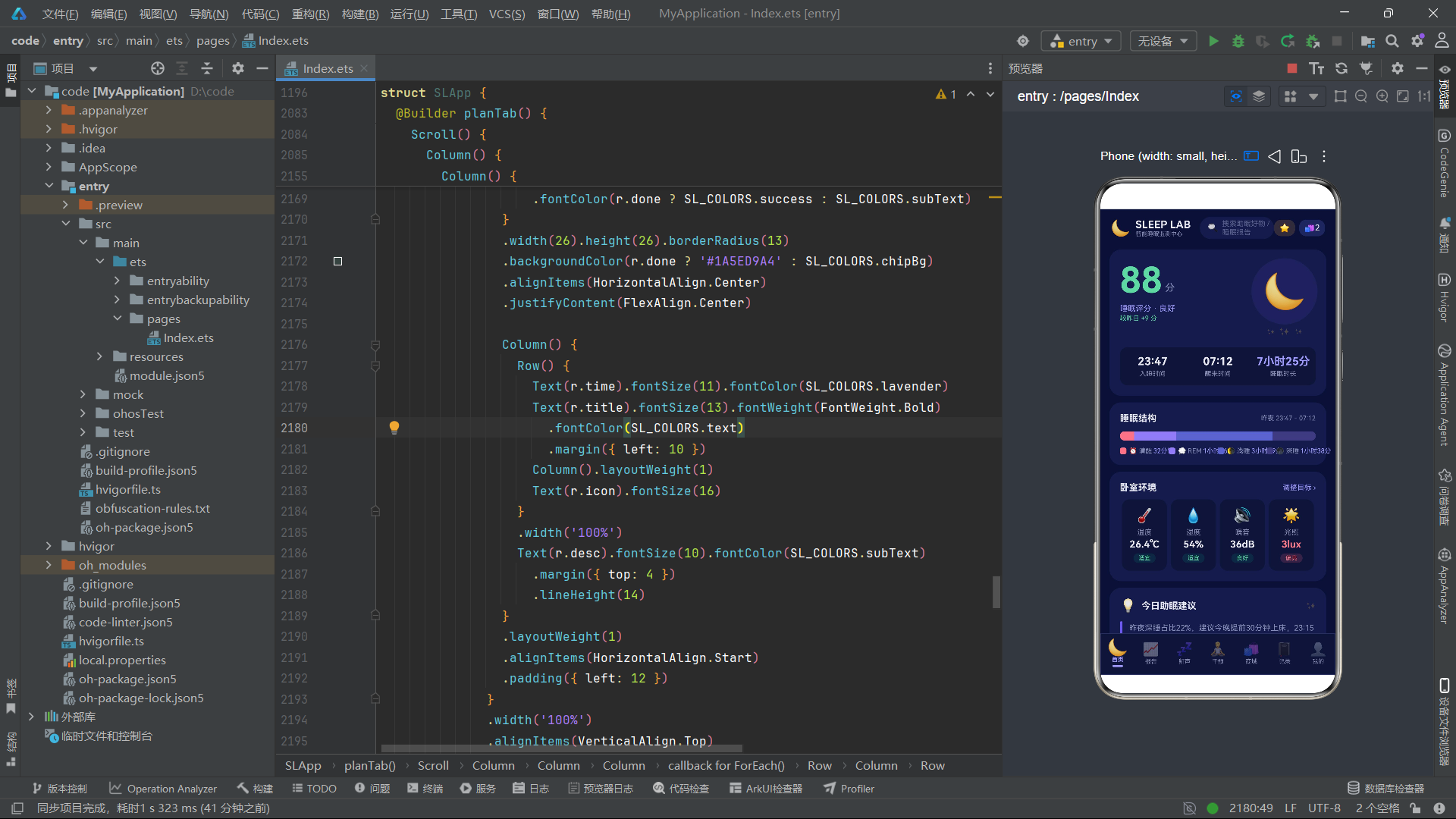
在深色主题设计层面,应用展现了系统的深色模式适配策略。三级文字色(月光银白/暗紫灰/更深暗紫灰)保障了不同层级文字的可读性。语义色系(薄荷绿成功/暖黄警告/珊瑚粉危险)在深色背景上保持了良好的可见度。半透明颜色的大量使用(8位十六进制色值前两位为Alpha通道)使得标签背景、按钮背景等元素既能传达色彩语义,又不会过于突兀地打破深色主题的整体氛围。Circle图形组件的fill属性也使用了半透明颜色(#1A6C5CE7),使呼吸波纹圆在深色背景上呈现为柔和的光晕效果而非生硬的色块。

作为“人工智能6S店”的官方数字引擎,为AI开发者与企业提供一个覆盖软硬件全栈、一站式门户。
更多推荐



 0
0 0
0- 0


 已为社区贡献4条内容

所有评论(0)