
HarmonyOS 6 ArkUI - 颜色变量抽离统一管理,色值定义在组件顶部,深色主题多页面配色一键统一修改
在精准营养时代,肠道菌群检测已从实验室走向消费者移动端。本文将深入剖析一个基于鸿蒙HarmonyOS ArkTS语言构建的肠道菌群检测中心应用,该应用以酸奶生物实验室风格为视觉基调,融合检测报告、益生菌商城、精准饮食方案三大核心场景,采用浅色主题设计,通过animateTo动画系统驱动菌泡上浮、培养皿旋转、菌群脉冲三大视觉特效。全文将从配色令牌体系、数据模型设计、纯函数封装、弹窗组件架构、主入口组件、七大Tab页面布局、动画系统实现等维度,逐段拆解每一个技术细节,为鸿蒙开发者提供一份可落地的工程级参考。
一、开头技术描述
肠道菌群被称为人类的"第二基因组",随着精准医学与消费级检测的融合,越来越多的健康应用开始将专业的肠道菌群检测数据以可视化、可交互的方式呈现给普通用户。本应用正是在这一背景下诞生的一款面向年轻人的"精准营养"酸奶生物实验室风格应用,它将肠道菌群检测报告、益生菌补剂商城和精准饮食方案三大功能模块整合在同一个单文件ArkTS工程中,通过鸿蒙HarmonyOS的声明式UI范式构建出完整的用户交互体验。
从技术架构层面来看,整个应用采用单入口组件(@Entry @Component)搭配多个子组件(@Component)的组件化架构模式。主入口组件GLApp通过@State装饰器管理全局状态,包括当前激活的Tab页签、七个弹窗的显示与隐藏开关,以及三个动画状态变量。七个独立的弹窗组件(GLBookTestForm、GLReportShareForm、GLAddFoodForm、GLEditPlanForm、GLDeletePlanForm、GLBuyProForm、GLTrackForm)各自封装独立的表单逻辑,通过回调函数与主组件通信,实现了解耦与复用。
在视觉设计层面,应用采用"酸奶生物实验室"浅色主题风格。页面底色为酸奶白#FFF8F2,卡片背景为纯白#FFFFFF,主色调为菌群青绿#00B894,强调色为益生菌橙#FF9F43,文字色为墨青#1E3A34,点缀色为检测紫#A55EEA。这套配色方案通过interface GLColorPalette接口定义类型约束,再通过const GL_COLORS对象统一管理,形成了一套完整的、类型安全的配色令牌系统。大圆角设计(16-20vp)与圆润胶囊元素共同营造了柔和、亲和的视觉感受,配合细菌emoji点缀(🦠🧫🥛🥬),使整个应用在专业感与趣味性之间取得了良好的平衡。
在动画系统方面,应用完全依赖animateTo驱动三大特效:菌泡上浮(bubbleFloat,通过translate实现Y轴往返平移)、培养皿旋转(cultureSpin,通过rotate实现360度匀速旋转)、菌群指数脉冲(probiPulse,通过scale实现缩放呼吸)。三组动画在aboutToAppear生命周期中初始化,分别使用不同的duration、iterations、playMode和curve参数,呈现出各具特色的动态效果,且全程不使用任何定时器,符合鸿蒙动画系统的最佳实践。
二、类型定义与数据模型分析
2.1 配色令牌接口设计
应用的视觉一致性建立在严格的配色令牌体系之上。GLColorPalette接口定义了20个颜色字段,覆盖页面底色、卡片背景、主色及其衍生色、强调色及其衍生色、点缀色、文字色系、线条色、语义色系(绿/黄/红及浅底色)和白色。
interface GLColorPalette {
  page: string
  card: string
  primary: string
  primarySoft: string
  primaryDeep: string
  accent: string
  accentSoft: string
  purple: string
  purpleSoft: string
  ink: string
  inkSub: string
  inkHint: string
  line: string
  green: string
  greenSoft: string
  yellow: string
  yellowSoft: string
  red: string
  redSoft: string
  white: string
}
每个字段都有明确的语义用途。page表示页面底色#FFF8F2(酸奶白),card表示卡片背景#FFFFFF(纯白),primary是主色#00B894(菌群青绿),primarySoft是主色的浅色变体#E0F7F0(用于浅底背景),primaryDeep是主色的深色变体#009B7D(用于强调文字)。这种三层颜色体系(主色-浅色-深色)贯穿整个应用的设计,确保了视觉层级的清晰表达。
accent表示强调色#FF9F43(益生菌橙),同样配有accentSoft浅底色#FFF1E0。purple是点缀色#A55EEA(检测紫),配有purpleSoft浅底色#F3EAFD。文字色系分为三级:ink为正文色#1E3A34(墨青),inkSub为次要文字色#5C7A72,inkHint为提示文字色#A8BDB6。line为分割线色#F0E8DF。语义色系包括绿灯色green/greenSoft、黄灯色yellow/yellowSoft、红灯色red/redSoft,用于食物红绿灯和状态标签。
技术要点:通过interface定义颜色接口而非直接使用对象字面量,TypeScript编译器能够在编译阶段检测出颜色缺失或类型不匹配的问题。这种"接口先行"的设计模式在大型项目中尤为重要,它将设计规范固化为代码约束,确保任何使用颜色的地方都能获得 IntelliSense 提示和类型检查。
2.2 底部导航Tab枚举与配置
应用采用7个底部Tab页签,通过enum GLTab定义枚举值,每个值对应一个整数索引。
enum GLTab {
  HOME = 0,
  REPORT = 1,
  FLORA = 2,
  DIET = 3,
  SHOP = 4,
  LOG = 5,
  ME = 6
}
枚举值从0开始递增,分别代表首页、报告、菌群、饮食、商城、记录、我的。使用枚举而非魔法数字(magic number)的好处在于代码可读性和可维护性:this.activeTab === GLTab.HOME比this.activeTab === 0直观得多,且在重构时只需修改枚举定义即可。
GLTabItem接口定义了Tab项的数据结构,包含tab(枚举值)、icon(emoji图标)和label(中文标签)三个字段。GL_TABS常量数组将7个Tab项按照固定顺序排列,供底部导航栏的ForEach遍历渲染。
2.3 检测套餐数据模型
interface GLTestPackage {
  id: number
  name: string
  subtitle: string
  icon: string
  price: number
  originalPrice: number
  tag: string
  sampleType: string
  turnaround: string
}
GLTestPackage定义了检测套餐的完整数据结构。id为唯一标识,name为套餐名称,subtitle为副标题描述,icon为emoji图标,price和originalPrice分别为现价和原价(用于展示折扣),tag为营销标签,sampleType为采样方式描述,turnaround为报告交付周期。GL_TEST_PACKAGES数组包含4个套餐:16s检测、食物不耐受检测、激素代谢检测、肠脑轴专项检测,覆盖了从基础到高端的完整检测产品线。
2.4 菌群丰度数据模型
interface GLFloraItem {
  name: string
  latin: string
  percent: number
  status: string
  trend: string
  note: string
}
GLFloraItem是菌群生态展示的核心数据模型。name为中文名(如"厚壁菌门"),latin为拉丁文学名(如"Firmicutes"),percent为相对丰度百分比,status为含量状态(“充足”/“偏低”/“缺乏”),trend为趋势方向(“up”/“down”/“flat”),note为功能注释。GL_FLORA数组包含9个菌门/菌属数据,从占比41.2%的厚壁菌门到仅0.3%的白色念珠菌,完整呈现了肠道菌群的生态全景。
技术要点:将拉丁学名与中文名分离存储,既满足了学术准确性要求(拉丁学名是国际通用标准),又照顾了普通用户的阅读习惯(中文名更易理解)。这种双名设计在医学类应用中是常见的最佳实践。
2.5 健康指标数据模型
interface GLHealthMetric {
  name: string
  value: string
  unit: string
  ref: string
  status: string
  icon: string
}
GLHealthMetric定义了健康指标的展示结构。name为指标名称,value为检测值(字符串类型以兼容小数),unit为单位,ref为参考范围描述,status为状态评估,icon为emoji图标。GL_METRICS数组包含6个核心指标:菌群多样性指数、短链脂肪酸总量、肠屏障完整性评分、产丁酸菌丰度、有害菌占比、胆汁酸代谢能力,涵盖了菌群生态、代谢产物、屏障功能、有害菌控制等多个维度。
2.6 益生菌商品数据模型
interface GLProduct {
  id: number
  name: string
  strain: string
  cfu: string
  price: number
  originalPrice: number
  tag: string
  sold: string
  rating: string
  icon: string
}
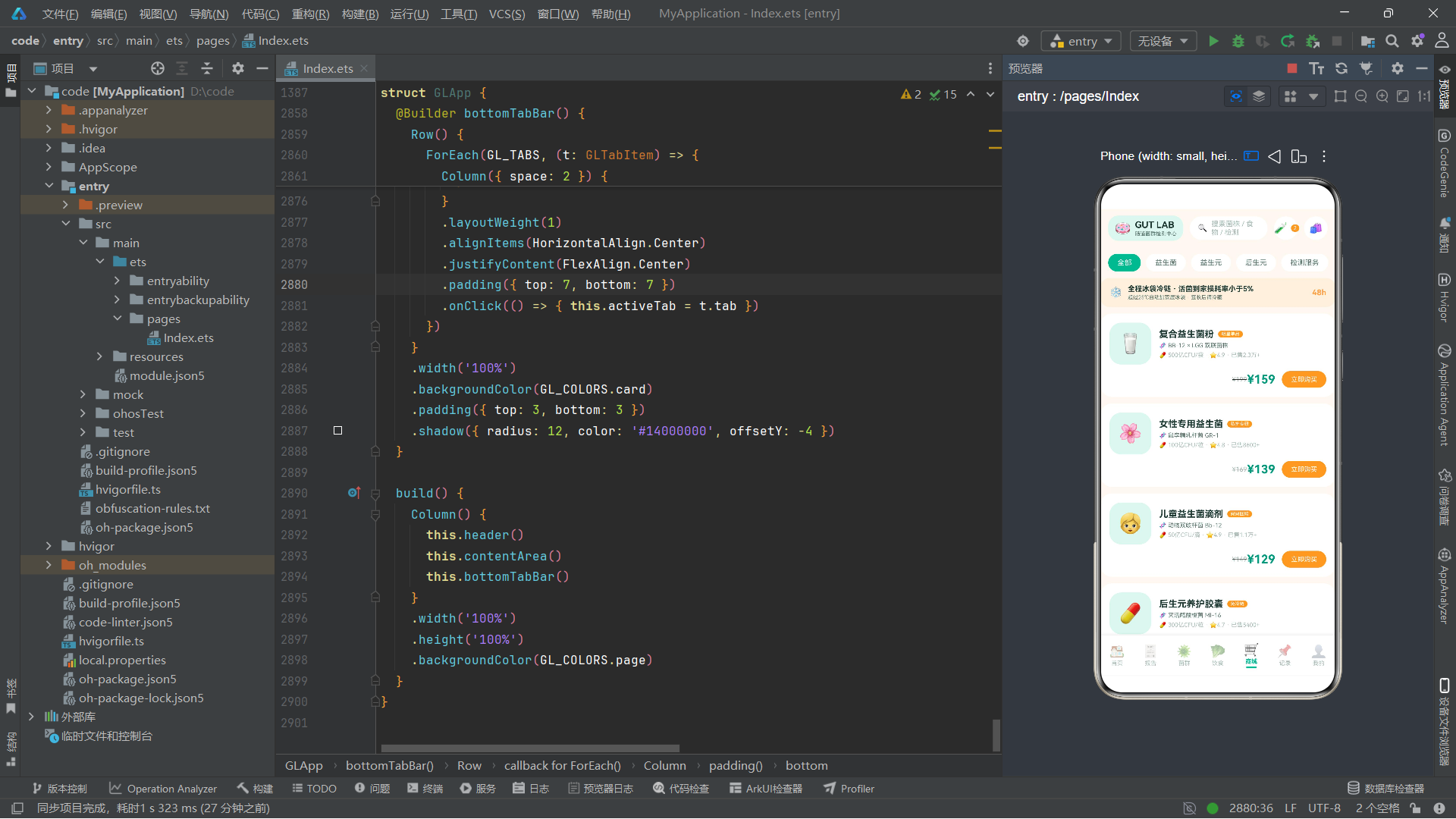
GLProduct定义了益生菌商品的电商数据结构。strain为菌株信息,cfu为菌落形成单位(Colony-Forming Unit)描述,sold为销量文本,rating为评分。GL_PRODUCTS数组包含6个商品:复合益生菌粉、女性专用益生菌、儿童益生菌滴剂、后生元养护胶囊、益生元纤维粉、夜间修护益生菌,覆盖了不同人群和不同功能需求。
2.7 饮食建议与食物红绿灯模型
interface GLFoodAdvice {
  title: string
  desc: string
  icon: string
  color: string
}

interface GLFoodLight {
  name: string
  light: string
  category: string
  reason: string
}
GLFoodAdvice定义了饮食建议卡片的数据结构,包含标题、描述、图标和主题色。GLFoodLight定义了食物红绿灯数据,light字段值为"green"/“yellow”/“red”,分别代表绿灯(放心吃)、黄灯(适量吃)、红灯(尽量避)。GL_FOOD_ADVICE包含5条核心饮食原则,GL_FOOD_LIGHTS包含11种食物分类,为用户提供了直观的饮食指导。
2.8 历次报告与趋势对比模型
interface GLReportItem {
  date: string
  title: string
  score: number
  delta: string
  status: string
}

interface GLTrendPoint {
  month: string
  last: number
  now: number
}
GLReportItem定义了历次检测报告的数据结构,delta为分数变化值(如"+6"),status为报告状态(“已出报告”/“检测中”)。GLTrendPoint定义了趋势对比数据,last为上次检测分数,now为本次检测分数,用于双柱状图可视化对比。GL_REPORTS包含5条历史报告记录,GL_TRENDS包含6个月度趋势数据点,从2025年3月的60分到2026年8月的82分,清晰展示了肠道健康的改善轨迹。
2.9 饮食时间轴与打卡记录模型
interface GLDietLog {
  time: string
  meal: string
  foods: string
  score: number
  icon: string
}

interface GLCheckinRecord {
  time: string
  type: string
  title: string
  detail: string
  icon: string
  done: boolean
}
GLDietLog定义了今日饮食记录的时间轴数据,meal为餐次(早餐/午餐/晚餐/加餐),foods为食物描述,score为gut评分。GLCheckinRecord定义了打卡记录数据,type为打卡类型(益生菌/饮食/益生元),done为是否完成。GL_DIET_LOGS包含5条饮食记录,GL_CHECKINS包含6条打卡记录,共同构建了用户的日常健康管理时间线。
2.10 家庭成员与复查计划模型
interface GLFamilyMember {
  name: string
  relation: string
  age: string
  tag: string
  icon: string
  active: boolean
}

interface GLReviewPlan {
  name: string
  nextDate: string
  cycle: string
  note: string
}
GLFamilyMember定义了家庭成员档案数据,relation为关系(本人/妈妈/爸爸/妹妹),tag为检测状态标签,active标记当前选中的成员。GLReviewPlan定义了复查计划数据,cycle为复查周期,note为注意事项。GL_FAMILY包含4位家庭成员,GL_PLANS包含3条复查计划,支持家庭健康管理的全场景需求。
2.11 五大健康维度与打卡日历模型
interface GLDimension {
  name: string
  score: number
  color: string
  icon: string
}

interface GLCalendarCell {
  day: string
  fiber: string
  done: boolean
}
GLDimension定义了五大健康维度的评分数据,每个维度配有独立的主题色和图标:免疫防御(青绿78分)、消化代谢(橙色84分)、情绪肠脑(紫色71分)、皮肤状态(红色66分)、体重管理(深青80分)。GLCalendarCell定义了打卡日历的单元格数据,day为星期,fiber为当日纤维摄入量,done为是否完成打卡。
2.12 弹窗选项数据模型集合
应用定义了多组弹窗选项接口和数据,支持七种弹窗交互:
interface GLBookWay {
  name: string
  icon: string
  desc: string
  price: string
}

interface GLFoodOption {
  name: string
  icon: string
  score: number
}

interface GLStrainOption {
  code: string
  name: string
  cfu: string
  price: number
  desc: string
}

interface GLCycleOption {
  label: string
  days: number
  save: string
}

interface GLFeelingOption {
  key: string
  label: string
  icon: string
  desc: string
}

interface GLSettingItem {
  icon: string
  title: string
  value: string
}
这些接口各自服务于特定的弹窗场景:GLBookWay用于预约检测方式选择,GLFoodOption用于饮食记录中的食物选择,GLStrainOption用于益生菌购买中的菌株选择,GLCycleOption用于购买周期选择,GLFeelingOption用于服用打卡中的感受选择,GLSettingItem用于设置列表展示。
技术要点:将不同弹窗的选项数据分别定义为独立接口,而非使用一个通用的"万能接口",遵循了接口隔离原则(Interface Segregation Principle)。每个接口只包含其使用场景真正需要的字段,避免了冗余属性,使得类型系统更加精确。
三、全局纯函数封装分析
3.1 状态颜色映射函数
function glStatusColor(status: string): string {
  if (status === '充足') {
    return GL_COLORS.primary
  }
  if (status === '偏低') {
    return GL_COLORS.accent
  }
  return GL_COLORS.red
}
glStatusColor函数将含量状态文本映射为对应的主题色。"充足"返回主色青绿#00B894,“偏低"返回强调色橙色#FF9F43,其他状态(如"缺乏”)返回红色#FF6B6B。这种文本到颜色的映射函数确保了状态颜色的一致性——无论在哪个页面、哪个组件中使用,同一个状态总是呈现相同的颜色。
与之配套的glStatusBg函数返回对应的浅底色,用于标签背景:
function glStatusBg(status: string): string {
  if (status === '充足') {
    return GL_COLORS.primarySoft
  }
  if (status === '偏低') {
    return GL_COLORS.accentSoft
  }
  return GL_COLORS.redSoft
}
3.2 食物红绿灯颜色函数
function glLightColor(light: string): string {
  if (light === 'green') {
    return GL_COLORS.primary
  }
  if (light === 'yellow') {
    return GL_COLORS.yellow
  }
  return GL_COLORS.red
}

function glLightBg(light: string): string {
  if (light === 'green') {
    return GL_COLORS.greenSoft
  }
  if (light === 'yellow') {
    return GL_COLORS.yellowSoft
  }
  return GL_COLORS.redSoft
}

function glLightLabel(light: string): string {
  if (light === 'green') {
    return '绿灯 · 放心吃'
  }
  if (light === 'yellow') {
    return '黄灯 · 适量吃'
  }
  return '红灯 · 尽量避'
}
这三个函数构成了食物红绿灯的完整颜色与文字映射体系。glLightColor返回主色,glLightBg返回浅底色,glLightLabel返回中文描述文本。这种将颜色和文字逻辑统一封装为纯函数的做法,使得食物红绿灯的渲染逻辑在任何地方调用都保持一致,且修改颜色映射只需改一处代码。
3.3 分数与数值格式化函数
function glScoreColor(score: number): string {
  if (score >= 80) {
    return GL_COLORS.primary
  }
  if (score >= 60) {
    return GL_COLORS.accent
  }
  return GL_COLORS.red
}

function glPct(pct: number): string {
  return pct.toFixed(0) + '%'
}

function glBarH(value: number, total: number, maxVp: number): string {
  return (value / total * maxVp).toFixed(0) + 'vp'
}
glScoreColor将数值分数映射为颜色:80分以上为青绿(优秀),60-79分为橙色(中等),60分以下为红色(偏低)。glPct将数字格式化为百分比字符串(如96变为"96%")。glBarH根据数值、总数和最大像素高度计算柱状图的高度字符串,用于趋势对比双柱图的柱高计算。
3.4 趋势图标与价格格式化函数
function glTrendIcon(trend: string): string {
  if (trend === 'up') {
    return '↑'
  }
  if (trend === 'down') {
    return '↓'
  }
  return '→'
}

function glPrice(price: number): string {
  return '¥' + price.toFixed(0)
}
glTrendIcon将趋势方向文本映射为箭头emoji,glPrice将数字价格格式化为带人民币符号的字符串。
3.5 进度环周长与列表操作函数
function glRingDash(pct: number): number {
  return 377 * pct / 100
}

function glToggleList(list: string[], tag: string): string[] {
  if (list.indexOf(tag) >= 0) {
    return list.filter((x: string) => x !== tag)
  }
  return list.concat([tag])
}

function glFoodScore(portion: number): number {
  if (portion <= 0) {
    return 0
  }
  if (portion >= 5) {
    return 96
  }
  return 68 + portion * 6
}
glRingDash根据百分比计算SVG圆环的strokeDashArray值,基于直径120vp的圆周长377(π×120≈377)。glToggleList实现了多选标签的切换逻辑:如果标签已在列表中则移除,否则添加。glFoodScore根据食物份量计算gut评分,份量越大分数越高,最高96分。
技术要点:
glToggleList函数是纯函数的典型示例——它不修改输入数组,而是返回一个新数组。这种不可变数据(Immutable Data)模式在ArkTS的@State状态管理中尤为重要,因为状态变更必须产生新的引用才能触发UI重新渲染。使用filter和concat而非splice和push,确保了函数的纯度和状态变更的可追踪性。
四、弹窗组件逐段分析
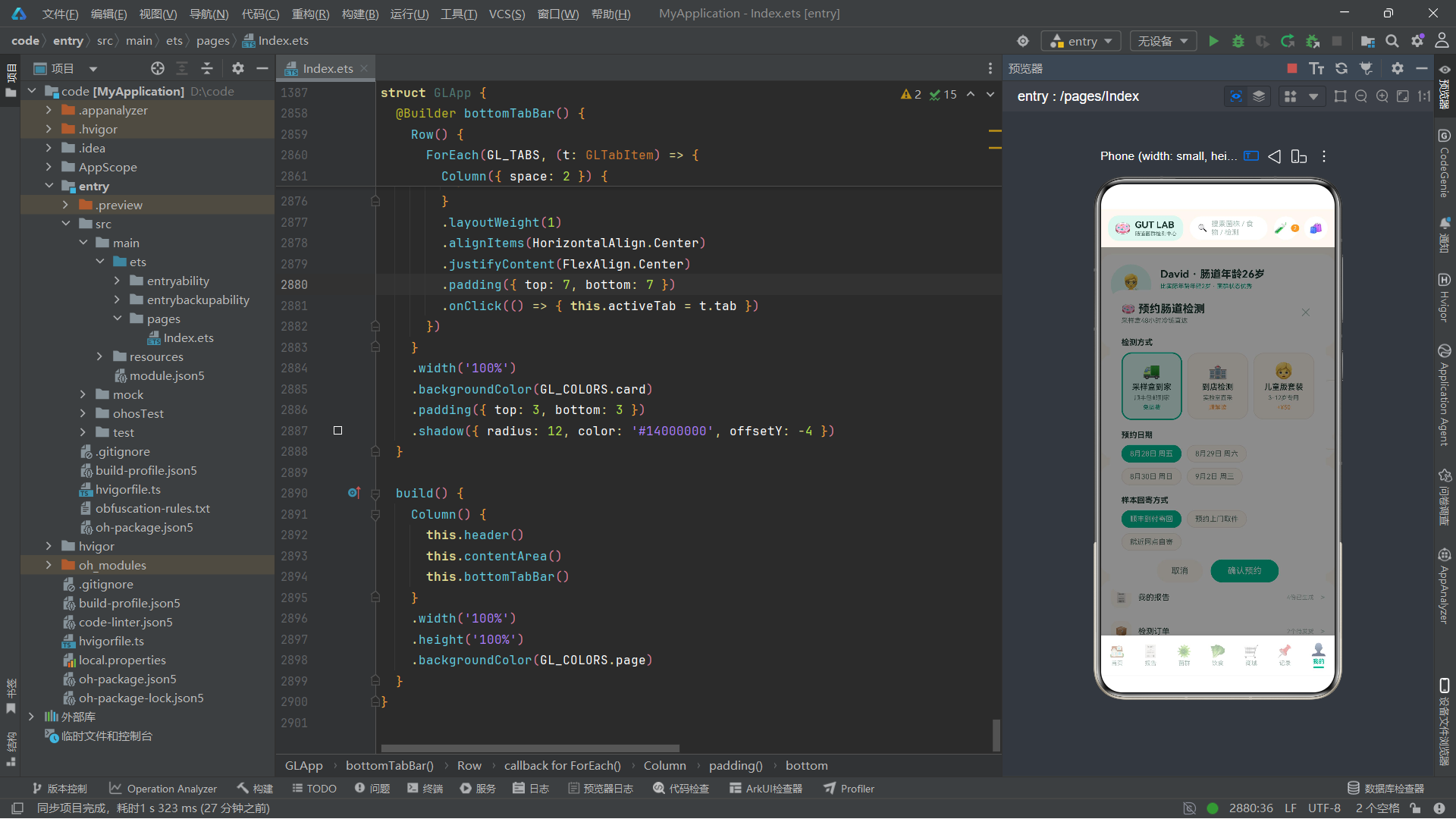
4.1 预约检测弹窗组件
GLBookTestForm是预约检测弹窗的核心组件,管理检测方式、预约日期、回寄方式和收样地址四个表单状态。
@Component
struct GLBookTestForm {
  @State selectedWay: string = '采样盒到家'
  @State selectedDate: string = '8月28日 周五'
  @State selectedReturn: string = '顺丰到付寄回'
  @State address: string = ''
  onClose: () => void = () => {}
  onConfirm: () => void = () => {}
组件通过四个@State变量管理表单状态,默认选中"采样盒到家"方式、"8月28日 周五"日期、"顺丰到付寄回"回寄方式。onClose和onConfirm是回调函数属性,由父组件传入,分别处理关闭和确认逻辑。
wayCell Builder方法渲染单个检测方式选项的单元格:
@Builder wayCell(way: GLBookWay) {
    Column({ space: 4 }) {
      Text(way.icon).fontSize(24)
      Text(way.name).fontSize(12).fontWeight(FontWeight.Medium).fontColor(GL_COLORS.ink)
      Text(way.desc).fontSize(9).fontColor(GL_COLORS.inkSub)
      Text(way.price).fontSize(9).fontColor(this.selectedWay === way.name ? GL_COLORS.primaryDeep : GL_COLORS.accent)
    }
    .layoutWeight(1)
    .alignItems(HorizontalAlign.Center)
    .justifyContent(FlexAlign.Center)
    .padding({ top: 12, bottom: 12 })
    .borderRadius(16)
    .backgroundColor(this.selectedWay === way.name ? GL_COLORS.primarySoft : GL_COLORS.page)
    .border({ width: this.selectedWay === way.name ? 2 : 1, color: this.selectedWay === way.name ? GL_COLORS.primary : GL_COLORS.line })
    .onClick(() => { this.selectedWay = way.name })
  }
这段代码通过条件表达式实现选中态视觉反馈:选中时背景为主色浅底primarySoft,边框宽度为2且颜色为主色;未选中时背景为页面底色page,边框宽度为1且颜色为线条色line。价格文字颜色也随选中状态变化。
chipRow Builder方法是一个高复用的通用选项chips渲染器:
@Builder chipRow(options: string[], current: string, onPick: (v: string) => void) {
    Flex({ wrap: FlexWrap.Wrap }) {
      ForEach(options, (opt: string) => {
        Text(opt)
          .fontSize(11)
          .fontColor(current === opt ? GL_COLORS.white : GL_COLORS.inkSub)
          .backgroundColor(current === opt ? GL_COLORS.primary : GL_COLORS.page)
          .border({ width: 1, color: current === opt ? GL_COLORS.primary : GL_COLORS.line })
          .padding({ left: 12, right: 12, top: 6, bottom: 6 })
          .borderRadius(14)
          .margin({ right: 8, bottom: 8 })
          .onClick(() => { onPick(opt) })
      })
    }
    .width('100%')
  }
这个Builder方法接收三个参数:选项数组options、当前选中值current和选择回调onPick。通过Flex({ wrap: FlexWrap.Wrap })实现自动换行布局,每个选项以胶囊形状呈现,选中态为白字主色底,未选中态为灰字页面底。这种将UI逻辑参数化的设计使得同一个Builder可以在不同场景下复用,只需传入不同的数据和回调即可。
技术要点:
@Builder方法是ArkTS中用于提取和复用UI布局的关键装饰器。与@Component不同,@Builder方法不需要独立的状态管理,它直接访问宿主组件的this上下文。在本例中,chipRow通过将onPick回调作为参数传入,实现了"行为参数化"——同一个UI结构可以根据不同的回调函数执行不同的状态更新逻辑,这是函数式编程思想在UI构建中的体现。
4.2 报告分享弹窗组件
GLReportShareForm组件管理报告分享的四个选项:脱敏开关、医生解读开关、分享范围和链接有效期。
@Component
struct GLReportShareForm {
  @State desensitize: boolean = true
  @State withDoctor: boolean = true
  @State scope: string = '同步给医生'
  @State validity: string = '7天'
  onClose: () => void = () => {}
  onConfirm: () => void = () => {}
switchRow Builder方法渲染自定义的开关行,使用Circle组件模拟iOS风格拨片开关:
@Builder switchRow(label: string, hint: string, value: boolean, onToggle: () => void) {
    Row() {
      Column({ space: 2 }) {
        Text(label).fontSize(13).fontWeight(FontWeight.Medium).fontColor(GL_COLORS.ink)
        Text(hint).fontSize(9).fontColor(GL_COLORS.inkSub)
      }
      .alignItems(HorizontalAlign.Start)
      .layoutWeight(1)
      Row() {
        Circle().width(20).height(20).fill(GL_COLORS.white).margin(3)
      }
      .width(46)
      .height(26)
      .borderRadius(13)
      .backgroundColor(value ? GL_COLORS.primary : GL_COLORS.line)
      .justifyContent(value ? FlexAlign.End : FlexAlign.Start)
      .onClick(() => { onToggle() })
    }
    .width('100%')
    .padding({ top: 8, bottom: 8 })
  }
开关的视觉效果通过justifyContent属性控制圆点位置:FlexAlign.End时圆点在右侧(开启态),FlexAlign.Start时圆点在左侧(关闭态)。背景色随之变化。这种用基础组件组合实现复杂交互控件的方式,展示了ArkTS声明式UI的灵活性。
分享范围和链接有效期使用不同颜色的chips:分享范围使用紫色系(purple/purpleSoft),有效期使用橙色系(accent/accentSoft),通过颜色区分不同维度的选项。
4.3 记录饮食弹窗组件
GLAddFoodForm组件管理饮食记录的餐次选择、食物选择和份量控制。
@Component
struct GLAddFoodForm {
  @State meal: string = '早餐'
  @State selectedFood: string = '无糖酸奶'
  @State portion: number = 1
  onClose: () => void = () => {}
  onConfirm: () => void = () => {}
食物选择采用宫格式布局,每个食物项显示图标、名称和gut评分:
ForEach(GL_FOOD_OPTIONS, (f: GLFoodOption) => {
    Column({ space: 4 }) {
        Text(f.icon).fontSize(22)
        Text(f.name).fontSize(10).fontColor(this.selectedFood === f.name ? GL_COLORS.primaryDeep : GL_COLORS.inkSub)
        Text('gut +' + f.score).fontSize(8).fontColor(this.selectedFood === f.name ? GL_COLORS.primary : GL_COLORS.inkHint)
    }
    .width('23%')
    .alignItems(HorizontalAlign.Center)
    .padding({ top: 10, bottom: 10 })
    .borderRadius(14)
    .backgroundColor(this.selectedFood === f.name ? GL_COLORS.primarySoft : GL_COLORS.page)
    .border({ width: this.selectedFood === f.name ? 2 : 1, color: this.selectedFood === f.name ? GL_COLORS.primary : GL_COLORS.line })
    .margin({ right: '2%', bottom: 8 })
    .onClick(() => { this.selectedFood = f.name })
})
每个食物项宽度为23%,配合2%的右间距,实现一行四列的宫格布局。gut评分前缀"gut +"使评分含义直观可读。
份量控制采用减号-数值-加号的stepper模式:
Row({ space: 0 }) {
    Text('−').fontSize(18).fontColor(this.portion > 1 ? GL_COLORS.ink : GL_COLORS.inkHint)
        .width(36).height(32)
        .textAlign(TextAlign.Center)
        .backgroundColor(GL_COLORS.page)
        .borderRadius({ topLeft: 16, bottomLeft: 16 })
        .onClick(() => { if (this.portion > 1) { this.portion = this.portion - 1 } })
    Text(this.portion + ' 份').fontSize(13).fontWeight(FontWeight.Bold).fontColor(GL_COLORS.ink)
        .width(80).height(32)
        .textAlign(TextAlign.Center)
        .backgroundColor(GL_COLORS.page)
    Text('+').fontSize(18).fontColor(GL_COLORS.primary)
        .width(36).height(32)
        .textAlign(TextAlign.Center)
        .backgroundColor(GL_COLORS.page)
        .borderRadius({ topRight: 16, bottomRight: 16 })
        .onClick(() => { if (this.portion < 5) { this.portion = this.portion + 1 } })
}
减号按钮在份量为1时文字变浅(inkHint),加号按钮在份量为5时停止增加。三个Text通过不同的borderRadius配置形成左圆角-无圆角-右圆角的连续外观。
底部实时显示gut评分,通过glFoodScore纯函数计算并使用glScoreColor着色:
Text(glFoodScore(this.portion).toString())
    .fontSize(22)
    .fontWeight(FontWeight.Bold)
    .fontColor(glScoreColor(glFoodScore(this.portion)))
4.4 编辑饮食方案弹窗组件
GLEditPlanForm组件管理忌口标签多选、纤维目标、饮水目标和辣度容忍四个饮食方案参数。
忌口标签使用glToggleList纯函数实现多选切换:
ForEach(GL_AVOID_TAGS, (tag: string) => {
    Text(tag)
        .fontSize(11)
        .fontColor(this.avoidList.indexOf(tag) >= 0 ? GL_COLORS.white : GL_COLORS.inkSub)
        .backgroundColor(this.avoidList.indexOf(tag) >= 0 ? GL_COLORS.accent : GL_COLORS.page)
        .border({ width: 1, color: this.avoidList.indexOf(tag) >= 0 ? GL_COLORS.accent : GL_COLORS.line })
        .padding({ left: 12, right: 12, top: 6, bottom: 6 })
        .borderRadius(14)
        .margin({ right: 8, bottom: 8 })
        .onClick(() => { this.avoidList = glToggleList(this.avoidList, tag) })
})
通过indexOf检测标签是否在选中列表中,选中时为白字橙底。点击时调用glToggleList返回新数组并赋值给@State,触发UI更新。
纤维目标和饮水目标使用不同颜色的stepper:纤维目标使用主色系(primarySoft底色),饮水目标使用强调色系(accentSoft底色)。纤维步进为5g(范围15-45g),饮水步进为100ml(范围1500-3500ml),通过条件判断防止超出范围。
辣度容忍使用紫色系chips,与其他选项形成色彩区分。
4.5 删除方案确认弹窗组件
GLDeletePlanForm组件采用红色警示风格,展示方案摘要并提供双按钮确认。
@Component
struct GLDeletePlanForm {
  planName: string = '高纤维修复方案 · 21天周期'
  onClose: () => void = () => {}
  onConfirm: () => void = () => {}
该组件不使用@State(方案名称作为只读属性传入),结构包含警示图标、确认标题、风险说明、方案摘要和双按钮。方案摘要使用红色浅底redSoft和红色边框包裹,列出方案名称、已坚持天数和打卡记录数,让用户在删除前充分了解影响。
4.6 购买益生菌弹窗组件
GLBuyProForm组件管理菌株选择、服用周期选择和冷链说明。
菌株列表使用纵向排列的卡片式选项,每个菌株显示名称、CFU含量、描述和价格:
ForEach(GL_STRAINS, (s: GLStrainOption) => {
    Row() {
        Column({ space: 2 }) {
            Text(s.name).fontSize(12).fontWeight(FontWeight.Medium).fontColor(GL_COLORS.ink)
            Text(s.cfu + ' · ' + s.desc).fontSize(9).fontColor(GL_COLORS.inkSub)
        }
        .alignItems(HorizontalAlign.Start)
        .layoutWeight(1)
        Text(glPrice(s.price)).fontSize(13).fontWeight(FontWeight.Bold)
            .fontColor(this.selectedStrain === s.code ? GL_COLORS.primaryDeep : GL_COLORS.inkSub)
        Text(this.selectedStrain === s.code ? '●' : '○')
            .fontSize(14)
            .fontColor(this.selectedStrain === s.code ? GL_COLORS.primary : GL_COLORS.inkHint)
            .margin({ left: 8 })
    }
    .width('100%')
    .padding({ left: 12, right: 12, top: 10, bottom: 10 })
    .borderRadius(14)
    .backgroundColor(this.selectedStrain === s.code ? GL_COLORS.primarySoft : GL_COLORS.page)
    .border({ width: this.selectedStrain === s.code ? 2 : 1, color: this.selectedStrain === s.code ? GL_COLORS.primary : GL_COLORS.line })
    .margin({ bottom: 8 })
    .onClick(() => { this.selectedStrain = s.code })
})
实心圆点●和空心圆点○作为选中指示器,直观展示当前选中状态。
冷链说明条使用冰块emoji和橙色浅底,突出活菌冷链配送的特殊要求。底部显示合计金额。
4.7 服用打卡弹窗组件
GLTrackForm组件管理服用状态、服用时间、肠道感受和备注四个打卡要素。
肠道感受选择采用三宫格布局,每个选项包含大emoji图标、标签和描述:
ForEach(GL_FEELINGS, (f: GLFeelingOption) => {
    Column({ space: 4 }) {
        Text(f.icon).fontSize(26)
        Text(f.label).fontSize(12)
            .fontWeight(FontWeight.Medium)
            .fontColor(this.feeling === f.key ? GL_COLORS.primaryDeep : GL_COLORS.ink)
        Text(f.desc).fontSize(8)
            .fontColor(this.feeling === f.key ? GL_COLORS.primary : GL_COLORS.inkHint)
    }
    .layoutWeight(1)
    .alignItems(HorizontalAlign.Center)
    .padding({ top: 12, bottom: 12 })
    .borderRadius(16)
    .backgroundColor(this.feeling === f.key ? GL_COLORS.primarySoft : GL_COLORS.page)
    .border({ width: this.feeling === f.key ? 2 : 1, color: this.feeling === f.key ? GL_COLORS.primary : GL_COLORS.line })
    .onClick(() => { this.feeling = f.key })
})
通过layoutWeight(1)实现三等分布局,选中态通过主色系背景和边框突出显示。这种将主观感受量化为选项的设计,降低了用户的输入成本。
五、主入口组件GLApp深度分析
5.1 组件声明与状态定义
@Entry
@Component
struct GLApp {
  @State activeTab: GLTab = GLTab.HOME
  @State showBookForm: boolean = false
  @State showShareForm: boolean = false
  @State showAddFoodForm: boolean = false
  @State showEditPlanForm: boolean = false
  @State showDeletePlanForm: boolean = false
  @State showBuyForm: boolean = false
  @State showTrackForm: boolean = false
  @State bubbleFloat: number = 0
  @State cultureSpin: number = 0
  @State probiPulse: number = 1
@Entry装饰器标记此组件为页面入口组件,@Component声明其为可复用的自定义组件。11个@State变量分为两组:7个布尔值控制七个弹窗的显示与隐藏(初始值全为false),3个数值型变量驱动三组动画效果(bubbleFloat初始为0表示无偏移,cultureSpin初始为0表示无旋转,probiPulse初始为1表示原始缩放比例),1个枚举值activeTab控制当前激活的Tab页签。
技术要点:
@State装饰的变量是ArkTS响应式状态系统的核心。当这些变量的值发生变化时,框架会自动触发依赖这些变量的UI组件重新渲染。在本例中,当showBookForm从false变为true时,contentArea中的条件渲染if (this.showBookForm) { this.bookModal() }会自动执行,显示预约检测弹窗。这种"状态驱动UI"的范式是声明式UI与命令式UI的根本区别。
5.2 aboutToAppear生命周期与动画初始化
aboutToAppear() {
    this.getUIContext().animateTo({ duration: 2400, iterations: -1, playMode: PlayMode.Alternate, curve: Curve.EaseInOut }, () => {
      this.bubbleFloat = 26
    })
    this.getUIContext().animateTo({ duration: 9000, iterations: -1, playMode: PlayMode.Normal, curve: Curve.Linear }, () => {
      this.cultureSpin = 360
    })
    this.getUIContext().animateTo({ duration: 1500, iterations: -1, playMode: PlayMode.Alternate, curve: Curve.EaseOut }, () => {
      this.probiPulse = 1.12
    })
  }
aboutToAppear是组件生命周期回调,在组件创建后、build方法执行前调用。此方法中通过this.getUIContext().animateTo初始化三组动画:
菌泡上浮动画:duration: 2400(2.4秒一个周期),iterations: -1(无限循环),playMode: PlayMode.Alternate(交替播放,即正向→反向→正向),curve: Curve.EaseInOut(缓入缓出曲线)。动画闭包中将bubbleFloat从0变为26,驱动菌泡emoji在Y轴方向上浮26vp。由于Alternate模式,动画会在26vp和0vp之间往返,模拟菌泡的自然上浮与下沉。
培养皿旋转动画:duration: 9000(9秒一圈),iterations: -1(无限循环),playMode: PlayMode.Normal(正常播放,每次从起点到终点),curve: Curve.Linear(线性曲线,匀速旋转)。动画闭包中将cultureSpin从0变为360,驱动培养皿图标旋转360度。由于Normal模式,每完成一圈后立即从0度重新开始,实现匀速无限旋转。
菌群指数脉冲动画:duration: 1500(1.5秒一个周期),iterations: -1(无限循环),playMode: PlayMode.Alternate(交替播放),curve: Curve.EaseOut(缓出曲线,快速到达终点后缓慢回归)。动画闭包中将probiPulse从1变为1.12,驱动菌群指数数字和打卡图标缩放放大12%。Alternate模式使数字在1.0和1.12之间呼吸式缩放。
技术要点:三组动画全部使用
animateTo而非定时器(setInterval/setTimeout),这是鸿蒙动画系统的最佳实践。animateTo基于帧驱动,与屏幕刷新率同步,性能更优且不会因JS事件循环阻塞而卡顿。iterations: -1表示无限循环,PlayMode.Alternate实现往返效果,PlayMode.Normal实现单方向重复。三种不同的Curve(缓入缓出、线性、缓出)赋予三组动画各异的运动节奏。
5.3 头部Builder分析
@Builder header() {
    Row({ space: 10 }) {
      Row({ space: 6 }) {
        Text('🧫').fontSize(20)
        Column({ space: 1 }) {
          Text('GUT LAB').fontSize(14).fontWeight(FontWeight.Bold).fontColor(GL_COLORS.ink)
          Text('肠道菌群检测中心').fontSize(8).fontColor(GL_COLORS.inkSub)
        }.alignItems(HorizontalAlign.Start)
      }
      .alignItems(VerticalAlign.Center)
      .padding({ left: 10, right: 10, top: 6, bottom: 6 })
      .backgroundColor(GL_COLORS.primarySoft)
      .borderRadius(16)

      Row({ space: 6 }) {
        Text('🔍').fontSize(12)
        Text('搜索菌株 / 食物 / 检测').fontSize(11).fontColor(GL_COLORS.inkHint).layoutWeight(1)
      }
      .alignItems(VerticalAlign.Center)
      .layoutWeight(1)
      .height(36)
      .padding({ left: 12, right: 12 })
      .backgroundColor(GL_COLORS.card)
      .borderRadius(18)

      Row({ space: 6 }) {
        Text('🧪').fontSize(16)
        Text('2').fontSize(8).fontColor(GL_COLORS.white)
          .backgroundColor(GL_COLORS.accent)
          .padding({ left: 4, right: 4, top: 1, bottom: 1 })
          .borderRadius(8)
      }
      .alignItems(VerticalAlign.Center)
      .justifyContent(FlexAlign.Center)
      .width(36).height(36)
      .backgroundColor(GL_COLORS.card)
      .borderRadius(18)
      .onClick(() => { this.activeTab = GLTab.REPORT })

      Text('🛍️').fontSize(16)
        .width(36).height(36)
        .textAlign(TextAlign.Center)
        .backgroundColor(GL_COLORS.card)
        .borderRadius(18)
        .onClick(() => { this.activeTab = GLTab.SHOP })
    }
    .width('100%')
    .alignItems(VerticalAlign.Center)
    .padding({ left: 12, right: 12, top: 10, bottom: 10 })
    .backgroundColor(GL_COLORS.page)
  }
头部由四个区域组成:品牌标识区(培养皿emoji + “GUT LAB"文字 + 副标题,包裹在主色浅底圆角容器中)、搜索栏(🔍图标 + 占位文字,layoutWeight(1)占据剩余空间)、检测订单入口(🧪图标 + 角标数字"2”,点击跳转报告页)、购物车入口(🛍️图标,点击跳转商城页)。头部采用电商风格的静态布局,36vp高度的圆角元素统一了视觉节奏。
5.4 弹窗遮罩与Wrapper Builder
@Builder modalOverlay(onClose: () => void) {
    Column()
      .width('100%')
      .height('100%')
      .backgroundColor('rgba(0,0,0,0.45)')
      .position({ x: 0, y: 0 })
      .zIndex(998)
      .onClick(onClose)
  }
modalOverlay是通用的遮罩层Builder,接收一个onClose回调。使用半透明黑色rgba(0,0,0,0.45)覆盖全屏,zIndex(998)确保遮罩在内容之上但弹窗之下。点击遮罩区域触发关闭回调。
每个弹窗都有对应的Wrapper Builder,以bookModal为例:
@Builder bookModal() {
    Stack() {
      this.modalOverlay(() => { this.showBookForm = false })
      Column() {
        GLBookTestForm({
          onClose: () => { this.showBookForm = false },
          onConfirm: () => { this.showBookForm = false }
        })
      }
      .width('92%')
    }
    .width('100%')
    .height('100%')
    .position({ x: 0, y: 0 })
    .zIndex(999)
  }
Wrapper使用Stack将遮罩层和弹窗组件叠加,弹窗组件宽度为92%(居中显示),整个Wrapper的zIndex(999)高于遮罩层。通过传入onClose和onConfirm回调,将弹窗的关闭逻辑统一为this.showBookForm = false。
技术要点:这种"遮罩 + Wrapper + 子组件"的三层弹窗架构实现了关注点分离:遮罩负责视觉遮蔽和点击关闭,Wrapper负责布局定位和层级管理,子组件负责表单逻辑和内容渲染。每一层都可以独立修改而不影响其他层。
5.5 内容区Builder分析
@Builder contentArea() {
    Stack() {
      if (this.activeTab === GLTab.HOME) {
        this.homeTab()
      } else if (this.activeTab === GLTab.REPORT) {
        this.reportTab()
      } else if (this.activeTab === GLTab.FLORA) {
        this.floraTab()
      } else if (this.activeTab === GLTab.DIET) {
        this.dietTab()
      } else if (this.activeTab === GLTab.SHOP) {
        this.shopTab()
      } else if (this.activeTab === GLTab.LOG) {
        this.logTab()
      } else {
        this.meTab()
      }

      if (this.showBookForm) {
        this.bookModal()
      }
      if (this.showShareForm) {
        this.shareModal()
      }
      if (this.showAddFoodForm) {
        this.addFoodModal()
      }
      if (this.showEditPlanForm) {
        this.editPlanModal()
      }
      if (this.showDeletePlanForm) {
        this.deletePlanModal()
      }
      if (this.showBuyForm) {
        this.buyModal()
      }
      if (this.showTrackForm) {
        this.trackModal()
      }
    }
    .width('100%')
    .layoutWeight(1)
  }
内容区使用Stack容器将Tab页面和弹窗层叠加。Tab页面通过if-else if-else条件渲染,根据activeTab的值决定显示哪个Builder。弹窗层通过独立的if条件判断,互不干扰,允许同时显示多个弹窗(虽然在交互逻辑上不会同时触发多个)。layoutWeight(1)使内容区占据头部和底部导航之间的全部剩余空间。
5.6 底部导航Builder分析
@Builder bottomTabBar() {
    Row() {
      ForEach(GL_TABS, (t: GLTabItem) => {
        Column({ space: 2 }) {
          Text(t.icon)
            .fontSize(19)
            .opacity(this.activeTab === t.tab ? 1 : 0.4)
          Text(t.label)
            .fontSize(9)
            .fontColor(this.activeTab === t.tab ? GL_COLORS.primary : GL_COLORS.inkHint)
            .fontWeight(this.activeTab === t.tab ? FontWeight.Bold : FontWeight.Normal)
          if (this.activeTab === t.tab) {
            Column()
              .width(16)
              .height(3)
              .borderRadius(2)
              .backgroundColor(GL_COLORS.primary)
          }
        }
        .layoutWeight(1)
        .alignItems(HorizontalAlign.Center)
        .justifyContent(FlexAlign.Center)
        .padding({ top: 7, bottom: 7 })
        .onClick(() => { this.activeTab = t.tab })
      })
    }
    .width('100%')
    .backgroundColor(GL_COLORS.card)
    .padding({ top: 3, bottom: 3 })
    .shadow({ radius: 12, color: '#14000000', offsetY: -4 })
  }
底部导航通过ForEach遍历GL_TABS数组渲染7个Tab项。每个Tab项包含emoji图标、中文标签和可选的指示条。选中态通过三个维度区分:图标透明度(1 vs 0.4)、标签颜色(主色 vs 提示色)、标签字重(Bold vs Normal)和指示条(仅选中时渲染)。shadow属性为底部导航添加向上的投影,营造悬浮层次感。
5.7 build方法
build() {
    Column() {
      this.header()
      this.contentArea()
      this.bottomTabBar()
    }
    .width('100%')
    .height('100%')
    .backgroundColor(GL_COLORS.page)
  }
build方法是组件的根布局,使用Column将头部、内容区和底部导航从上到下垂直排列。根容器设置为100%宽高,背景色为页面底色page。这种"头部-内容-底部导航"的三段式布局是移动端应用的经典结构。
六、七大Tab页面逐段分析
6.1 首页Tab分析
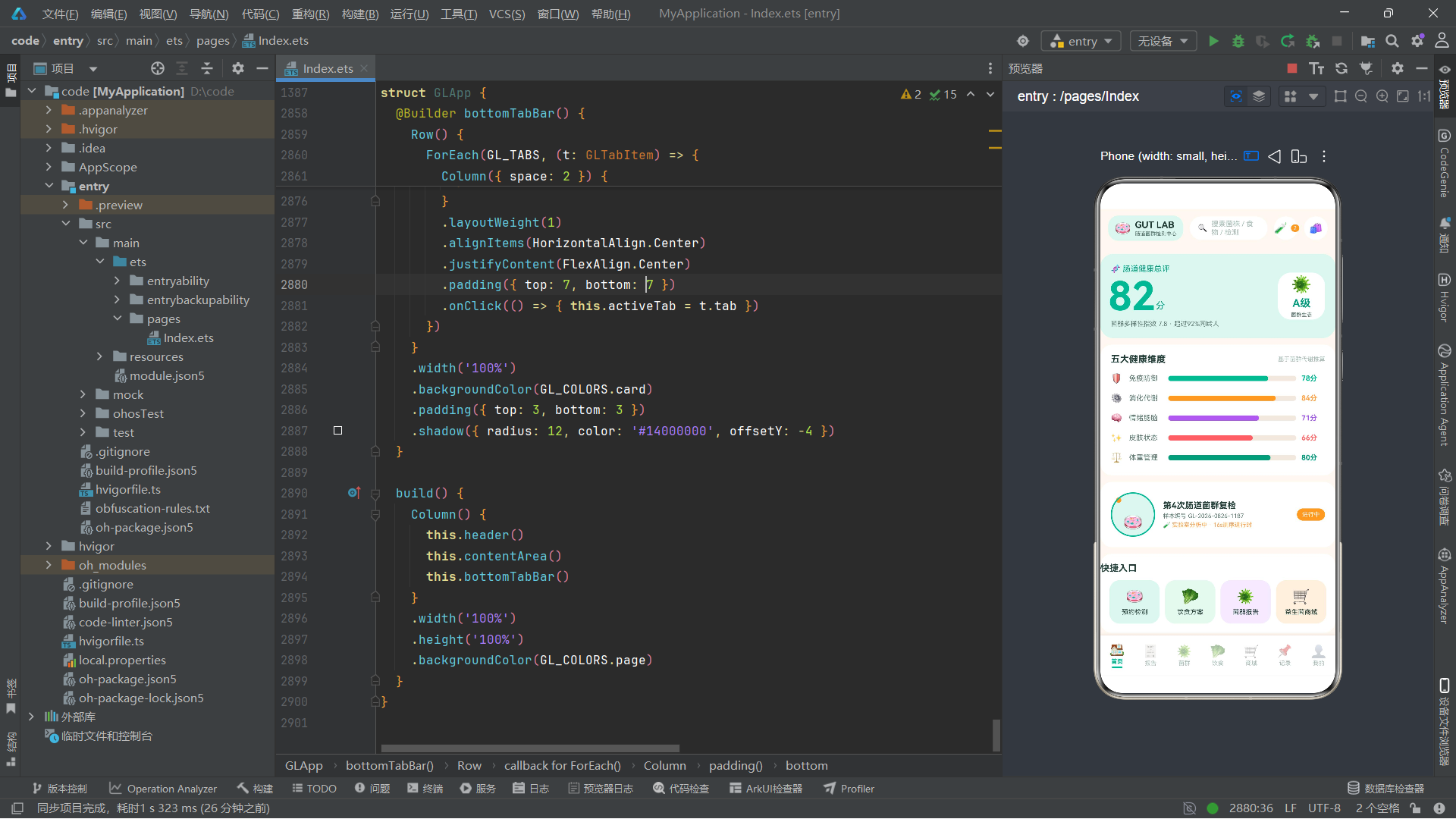
首页由健康总评大卡、五大健康维度、当前在检样本和快捷入口四个模块组成。
健康总评大卡使用菌群脉冲特效:
Row({ space: 4 }) {
    Text('82')
        .fontSize(54)
        .fontWeight(FontWeight.Bold)
        .fontColor(GL_COLORS.primary)
        .scale({ x: this.probiPulse, y: this.probiPulse })
    Text('分').fontSize(14).fontColor(GL_COLORS.primaryDeep).margin({ bottom: 10 })
}
.alignItems(VerticalAlign.Bottom)
scale属性绑定到probiPulse动画变量,使"82"这个分数在1.0和1.12之间缩放呼吸。54vp的超大字号配合主色青绿,形成强烈的视觉焦点。右侧的"A级"评级卡片使用72×72vp的圆角方块容器。
五大健康维度使用色块进度条展示:
ForEach(GL_DIMENSIONS, (d: GLDimension) => {
    Row({ space: 8 }) {
        Text(d.icon).fontSize(14).width(20)
        Text(d.name).fontSize(11).fontColor(GL_COLORS.inkSub).width(52)
        Row() {
            Column()
                .width(glPct(d.score))
                .height(8)
                .borderRadius(4)
                .backgroundColor(d.color)
            Column().layoutWeight(1)
        }
        .layoutWeight(1)
        .height(8)
        .borderRadius(4)
        .backgroundColor(GL_COLORS.line)
        Text(d.score + '分').fontSize(11).fontWeight(FontWeight.Bold).fontColor(d.color).width(36)
    }
    .width('100%')
    .alignItems(VerticalAlign.Center)
    .padding({ top: 7, bottom: 7 })
})
每个维度使用一个进度条,通过glPct(d.score)将分数转换为百分比宽度。进度条由两个Column组成:前者宽度为分数百分比,背景为维度主题色;后者layoutWeight(1)占据剩余空间,背景为线条色。这种"双Column进度条"是ArkTS中实现进度条的常用技巧。
当前在检样本使用培养皿旋转特效:
Column()
    .width(68)
    .height(68)
    .borderRadius(34)
    .backgroundColor(GL_COLORS.primarySoft)
    .border({ width: 2, color: GL_COLORS.primary })
    .justifyContent(FlexAlign.SpaceBetween)
    .alignItems(HorizontalAlign.Center)
    .rotate({ angle: this.cultureSpin })
培养皿图标通过rotate绑定到cultureSpin动画变量,实现360度匀速旋转。68×68vp的圆形容器配合主色边框和浅底色,模拟实验室培养皿的视觉效果。
快捷入口使用四宫格布局,每个入口使用不同的浅底色主题(primarySoft/greenSoft/purpleSoft/accentSoft),点击触发对应的弹窗或Tab切换。
技术要点:首页通过将三组动画效果分别应用于不同模块(probiPulse用于总评分、cultureSpin用于培养皿、bubbleFloat在菌群Tab使用),实现了动画在页面间的合理分配。每个动画都有其语义含义:脉冲表示"实时监测"、旋转表示"实验中"、上浮表示"菌群活跃",将技术动画与业务语义紧密结合。
6.2 报告Tab分析
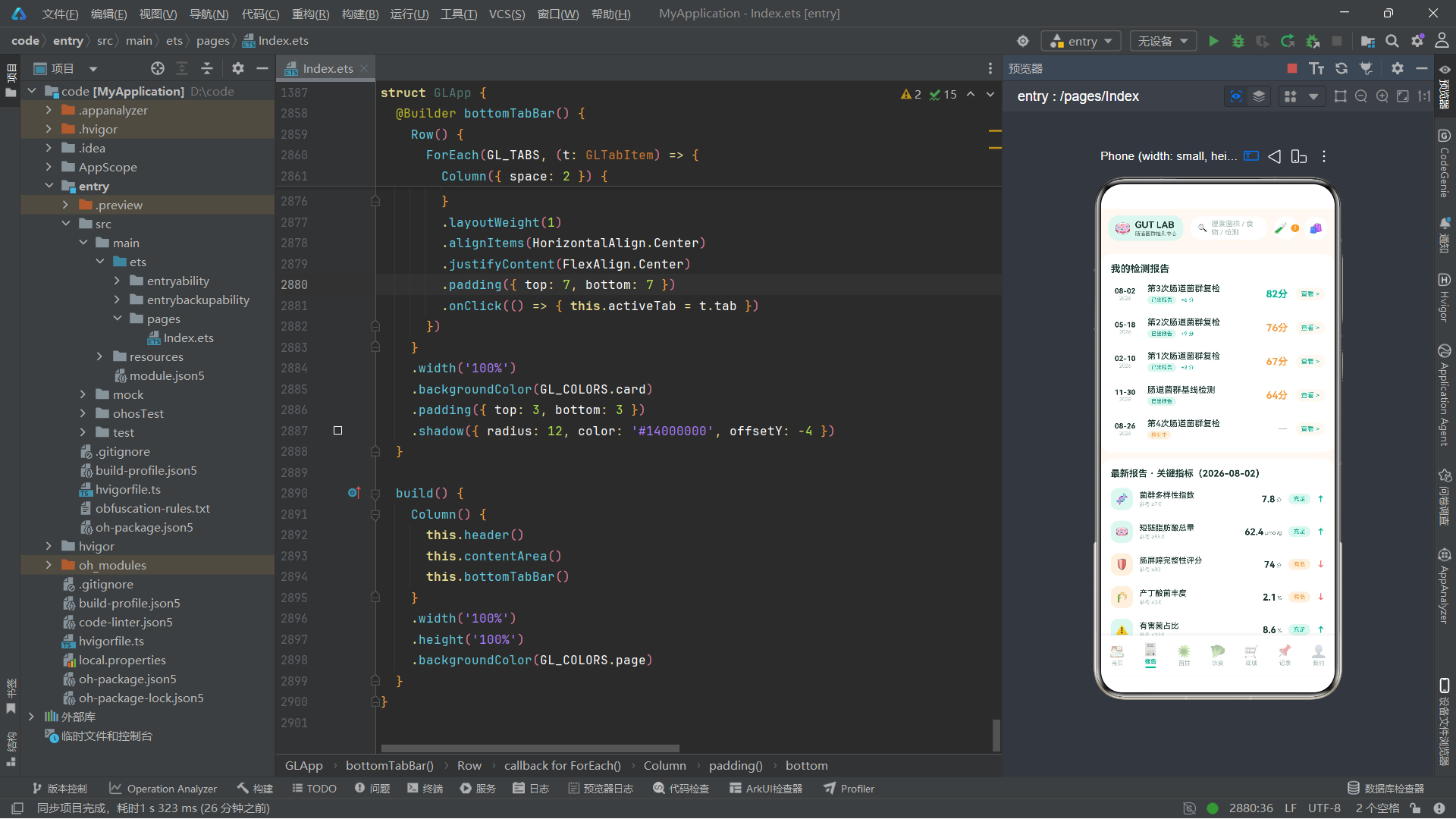
报告Tab由历次报告列表、最新报告指标和趋势对比双柱图三个模块组成。
历次报告列表通过ForEach渲染GL_REPORTS数组,每条记录包含日期、标题、状态标签和分数:
ForEach(GL_REPORTS, (r: GLReportItem) => {
    Row({ space: 12 }) {
        Column() {
            Text(r.date.slice(5, 10)).fontSize(11).fontWeight(FontWeight.Bold).fontColor(GL_COLORS.ink)
            Text(r.date.slice(0, 4)).fontSize(8).fontColor(GL_COLORS.inkHint)
        }
        .alignItems(HorizontalAlign.Center)
        .width(44)

        Column({ space: 3 }) {
            Text(r.title).fontSize(13).fontWeight(FontWeight.Medium).fontColor(GL_COLORS.ink)
            Row({ space: 6 }) {
                Text(r.status).fontSize(8)
                    .fontColor(r.status === '检测中' ? GL_COLORS.accent : GL_COLORS.primaryDeep)
                    .backgroundColor(r.status === '检测中' ? GL_COLORS.accentSoft : GL_COLORS.primarySoft)
                    .padding({ left: 6, right: 6, top: 2, bottom: 2 })
                    .borderRadius(8)
                if (r.delta !== '-') {
                    Text(r.delta + ' 分').fontSize(8).fontColor(GL_COLORS.primary).margin({ left: 2 })
                }
            }
        }
        .alignItems(HorizontalAlign.Start)
        .layoutWeight(1)

        if (r.score > 0) {
            Text(r.score + '分').fontSize(15).fontWeight(FontWeight.Bold).fontColor(glScoreColor(r.score))
        } else {
            Text('—').fontSize(15).fontColor(GL_COLORS.inkHint)
        }
    }
})
日期通过slice方法拆分为月日(索引5-10)和年份(索引0-4)两部分,分别用不同字号渲染。状态标签根据"检测中"和其他状态使用不同的颜色方案。分数通过if条件判断:分数大于0时显示分数并用glScoreColor着色,分数为0时(检测中)显示破折号。点击"查看"按钮触发报告分享弹窗。
最新报告指标列表渲染GL_METRICS数组,每个指标包含图标、名称、参考值、检测值和状态标签:
ForEach(GL_METRICS, (m: GLHealthMetric) => {
    Row({ space: 10 }) {
        Column() {
            Text(m.icon).fontSize(16)
        }
        .width(34)
        .height(34)
        .borderRadius(12)
        .backgroundColor(glStatusBg(m.status))
        .justifyContent(FlexAlign.Center)

        Column({ space: 2 }) {
            Text(m.name).fontSize(12).fontWeight(FontWeight.Medium).fontColor(GL_COLORS.ink)
            Text(m.ref).fontSize(8).fontColor(GL_COLORS.inkHint)
        }
        .alignItems(HorizontalAlign.Start)
        .layoutWeight(1)

        Row({ space: 2 }) {
            Text(m.value).fontSize(14).fontWeight(FontWeight.Bold).fontColor(GL_COLORS.ink)
            Text(m.unit).fontSize(8).fontColor(GL_COLORS.inkSub).margin({ bottom: 2 })
        }
        .alignItems(VerticalAlign.Bottom)

        Text(m.status)
            .fontSize(9)
            .fontColor(glStatusColor(m.status))
            .backgroundColor(glStatusBg(m.status))
            .padding({ left: 8, right: 8, top: 3, bottom: 3 })
            .borderRadius(10)

        Text(glTrendIcon(m.status === '偏低' ? 'down' : 'up'))
            .fontSize(12)
            .fontWeight(FontWeight.Bold)
            .fontColor(m.status === '偏低' ? GL_COLORS.red : GL_COLORS.primary)
    }
})
指标图标使用34×34vp的圆角方块容器,背景色通过glStatusBg根据状态着色。检测值和单位使用Row+alignItems(VerticalAlign.Bottom)实现下对齐。状态标签和趋势箭头的颜色都通过纯函数计算,确保颜色逻辑的一致性。
趋势对比双柱图使用纯ArkTS组件绘制柱状图:
ForEach(GL_TRENDS, (t: GLTrendPoint) => {
    Column({ space: 5 }) {
        Text(t.now.toString()).fontSize(9).fontWeight(FontWeight.Bold).fontColor(GL_COLORS.primaryDeep)
        Row({ space: 3 }) {
            Column()
                .width(9)
                .height(glBarH(t.last, 100, 96))
                .borderRadius({ topLeft: 4, topRight: 4 })
                .backgroundColor(GL_COLORS.primarySoft)
            Column()
                .width(9)
                .height(glBarH(t.now, 100, 96))
                .borderRadius({ topLeft: 4, topRight: 4 })
                .backgroundColor(GL_COLORS.primary)
        }
        .alignItems(VerticalAlign.Bottom)
        .height(96)

        Text(t.month).fontSize(8).fontColor(GL_COLORS.inkSub)
    }
    .layoutWeight(1)
    .alignItems(HorizontalAlign.Center)
})
每个月份渲染两根柱子:上次(浅色)和本次(深色),通过glBarH纯函数计算柱高。柱子底部对齐,高度最大96vp。这种不使用图表库、纯用Column组件绘制柱状图的方式,展示了ArkTS声明式UI的灵活性,同时避免了引入第三方依赖的开销。
6.3 菌群Tab分析
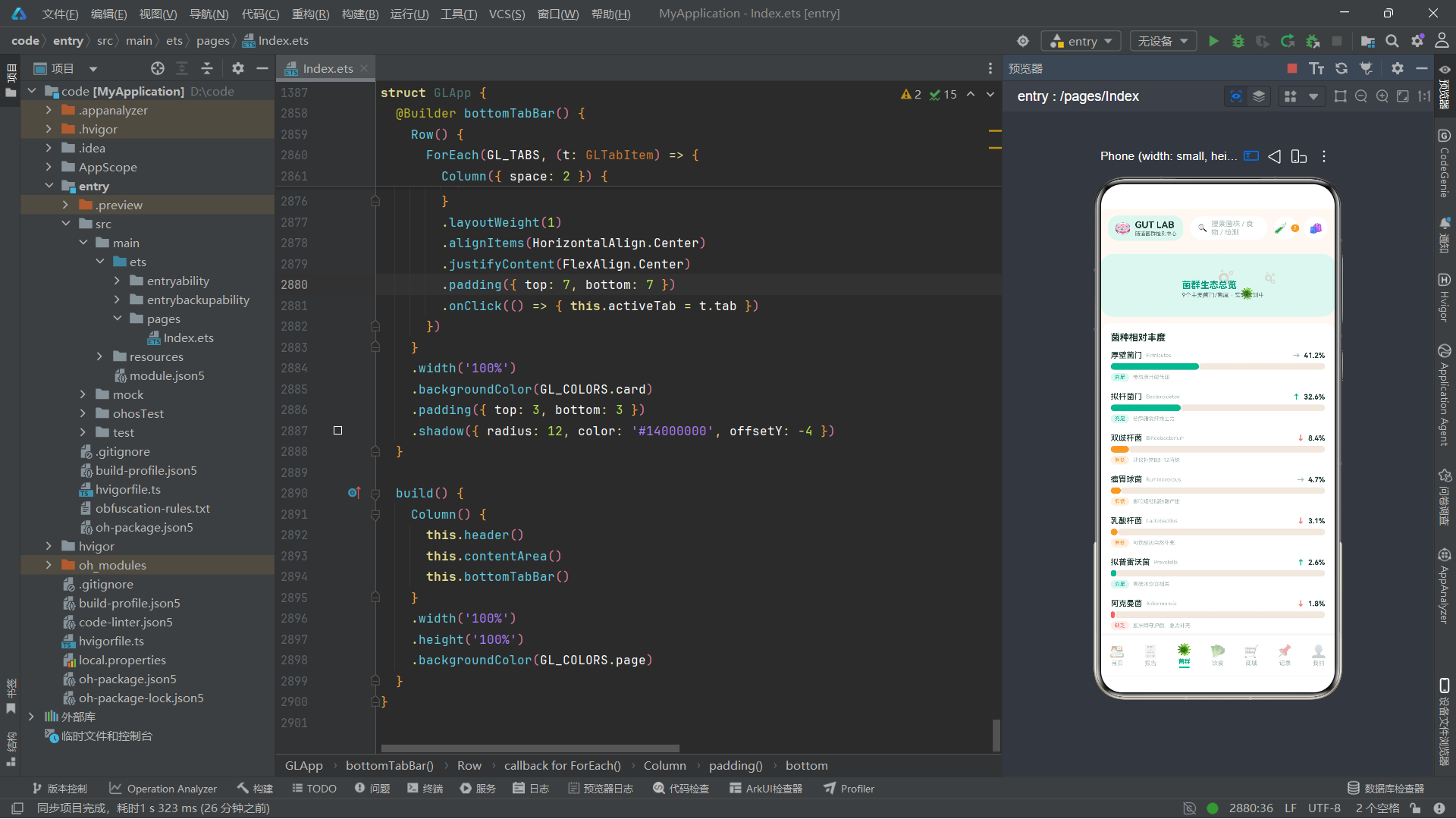
菌群Tab由菌泡上浮特效区、菌种丰度横条图、优势菌群卡和缺乏菌预警卡四个模块组成。
菌泡上浮特效区使用Stack叠加多个emoji和文字:
Stack({ align: Alignment.TopStart }) {
    Column()
        .width('100%')
        .height(96)
        .backgroundColor(GL_COLORS.primarySoft)
        .borderRadius(20)
    Text('🫧').fontSize(24)
        .translate({ y: -this.bubbleFloat })
        .margin({ left: 26, top: 30 })
    Text('🦠').fontSize(18)
        .translate({ y: -this.bubbleFloat * 0.6 })
        .margin({ left: 90, top: 56 })
    Text('🫧').fontSize(16)
        .translate({ y: -this.bubbleFloat * 0.8 })
        .margin({ left: 160, top: 20 })
    Column({ space: 2 }) {
        Text('菌群生态总览').fontSize(14).fontWeight(FontWeight.Bold).fontColor(GL_COLORS.primaryDeep)
        Text('9个主要菌门/菌属 · 实时监测中').fontSize(9).fontColor(GL_COLORS.inkSub)
    }
    .alignItems(HorizontalAlign.Start)
    .margin({ left: 16, top: 12 })
}
.width('100%')
.height(96)
.margin({ left: 12, right: 12, top: 10 })
.borderRadius(20)
.clip(true)
三个emoji分别使用不同的bubbleFloat乘数(1.0、0.6、0.8)实现不同速度的上浮效果,营造菌泡此起彼伏的自然动态。clip(true)确保emoji不会溢出容器边界。
菌种丰度横条图使用layoutWeight实现按比例的进度条:
Row({ space: 0 }) {
    Column()
        .layoutWeight(f.percent)
        .height(10)
        .borderRadius(5)
        .backgroundColor(glStatusColor(f.status))
    Column()
        .layoutWeight(100 - f.percent)
        .height(10)
        .borderRadius(5)
        .backgroundColor(GL_COLORS.line)
}
.width('100%')
与首页的百分比宽度进度条不同,这里使用layoutWeight实现按比例分配空间。layoutWeight(f.percent)和layoutWeight(100 - f.percent)分别占据百分比和剩余空间,这种方式在数值精度上更可靠。
优势菌群卡使用绿色浅底greenSoft突出正面信息,点击可跳转到益生菌商城(通过showBuyForm弹窗)。
缺乏菌预警卡使用红色浅底redSoft和红色边框突出警示信息,包含阿克曼菌的具体预警描述和"去补充"行动按钮。
6.4 饮食Tab分析
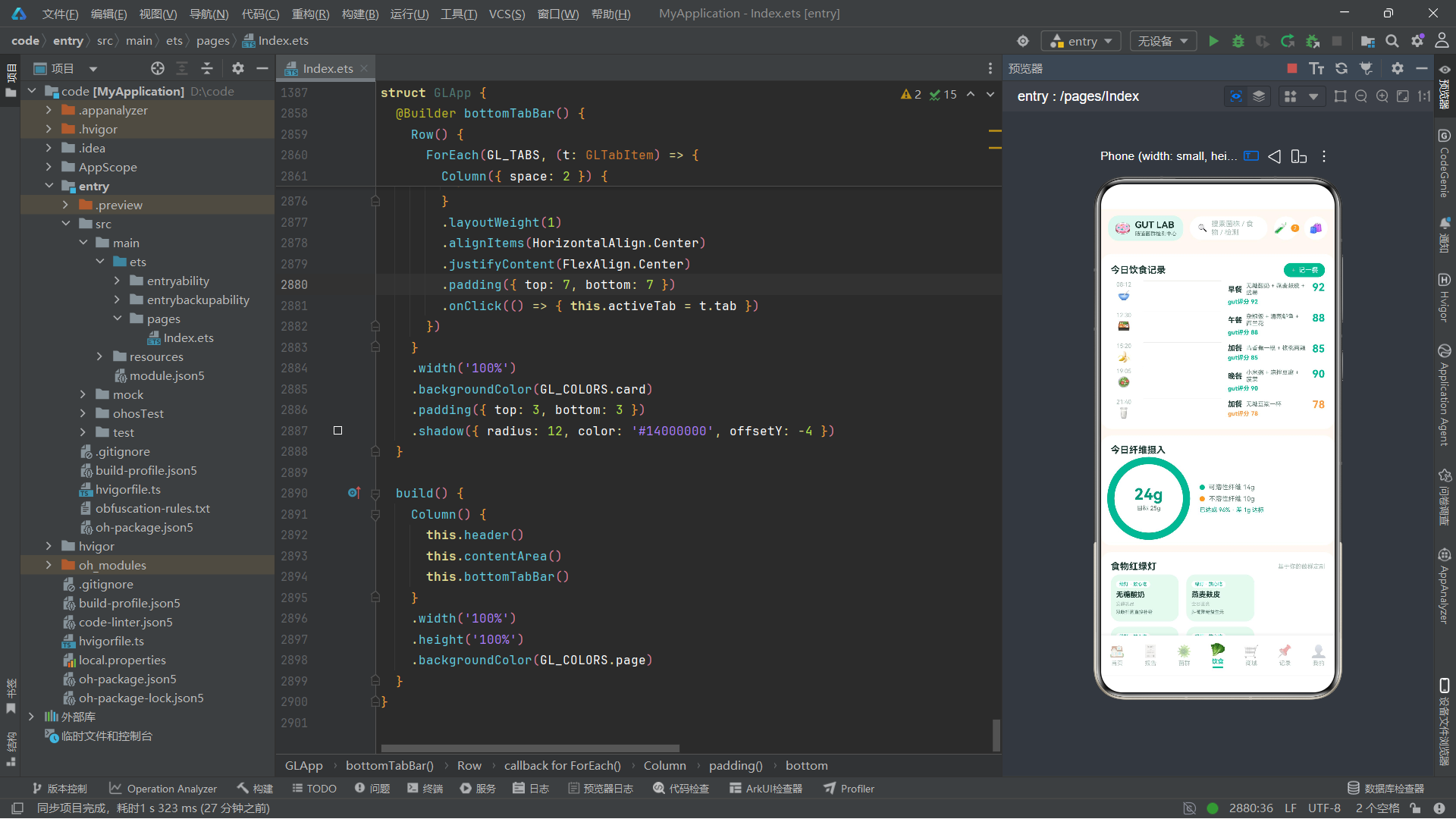
饮食Tab由今日饮食记录时间轴、纤维摄入进度环、食物红绿灯宫格、当前方案和周打卡日历五个模块组成。
饮食记录时间轴使用竖线+图标的经典时间轴布局:
ForEach(GL_DIET_LOGS, (log: GLDietLog) => {
    Row({ space: 10 }) {
        Column({ space: 2 }) {
            Text(log.time).fontSize(9).fontColor(GL_COLORS.inkHint)
            Text(log.icon).fontSize(16)
        }
        .alignItems(HorizontalAlign.Center)
        .width(40)

        Column()
            .width(2)
            .layoutWeight(1)
            .backgroundColor(GL_COLORS.line)

        Column({ space: 3 }) {
            Row({ space: 6 }) {
                Text(log.meal).fontSize(11).fontWeight(FontWeight.Bold).fontColor(GL_COLORS.ink)
                Text(log.foods).fontSize(9).fontColor(GL_COLORS.inkSub).layoutWeight(1)
            }
            .width('100%')
            Text('gut评分 ' + log.score).fontSize(9).fontWeight(FontWeight.Bold).fontColor(glScoreColor(log.score))
        }
        .alignItems(HorizontalAlign.Start)
        .layoutWeight(1)
        .padding({ top: 2, bottom: 10 })

        Text(log.score.toString())
            .fontSize(16)
            .fontWeight(FontWeight.Bold)
            .fontColor(glScoreColor(log.score))
    }
})
时间轴由左侧的时间+图标列、中间的2vp竖线、右侧的内容列和最右侧的大字评分组成。竖线使用Column().width(2).layoutWeight(1)占据全部剩余高度,背景色为线条色。
纤维摄入进度环使用双层Circle实现环形进度:
Stack({ align: Alignment.Center }) {
    Circle()
        .width(116)
        .height(116)
        .fill(Color.Transparent)
        .stroke(GL_COLORS.line)
        .strokeWidth(11)
    Circle()
        .width(116)
        .height(116)
        .fill(Color.Transparent)
        .stroke(GL_COLORS.primary)
        .strokeWidth(11)
        .strokeDashArray([glRingDash(96), 500])
        .strokeLineCap(LineCapStyle.Round)
        .rotate({ angle: -90 })
    Column({ space: 2 }) {
        Text('24g').fontSize(24).fontWeight(FontWeight.Bold).fontColor(GL_COLORS.primaryDeep)
        Text('目标 25g').fontSize(9).fontColor(GL_COLORS.inkSub)
    }
}
底层Circle为灰色轨道(stroke为线条色),上层Circle为进度弧(stroke为主色),通过strokeDashArray设置实线长度为glRingDash(96)(即377×96/100≈362),虚线长度为500(远大于圆周长,确保只显示实线部分)。strokeLineCap(LineCapStyle.Round)使弧线端点为圆角。rotate({ angle: -90 })将起点从3点钟方向旋转到12点钟方向。中心叠加文字显示当前摄入量和目标值。
技术要点:利用
strokeDashArray实现圆环进度是SVG/Canvas中的经典技巧,在ArkTS中同样适用。[实线长度, 虚线长度]的数组控制描边的虚实模式。通过将虚线长度设置得足够大(500远超周长377),确保只有实线部分可见。配合rotate调整起点位置,实现标准的从12点钟方向开始的进度环。
食物红绿灯宫格使用Flex自动换行布局,每个食物项宽度为31%,间距3.5%:
Flex({ wrap: FlexWrap.Wrap }) {
    ForEach(GL_FOOD_LIGHTS, (f: GLFoodLight) => {
        Column({ space: 4 }) {
            Text(glLightLabel(f.light)).fontSize(7).fontColor(glLightColor(f.light))
                .padding({ left: 5, right: 5, top: 1, bottom: 1 })
                .backgroundColor(GL_COLORS.card)
                .borderRadius(7)
            Text(f.name).fontSize(11).fontWeight(FontWeight.Bold).fontColor(GL_COLORS.ink)
            Text(f.category).fontSize(7).fontColor(GL_COLORS.inkHint)
            Text(f.reason).fontSize(7).fontColor(GL_COLORS.inkSub)
        }
        .width('31%')
        .alignItems(HorizontalAlign.Start)
        .padding({ left: 8, right: 8, top: 10, bottom: 10 })
        .borderRadius(14)
        .backgroundColor(glLightBg(f.light))
        .margin({ right: '3.5%', bottom: 8 })
    })
}
每个食物项顶部显示红绿灯标签("绿灯 · 放心吃"等),通过glLightLabel、glLightColor和glLightBg三个纯函数统一计算标签文本和颜色。背景色根据红绿灯类型变化,使用户能通过颜色快速判断食物的适宜程度。
当前方案使用绿色浅底greenSoft背景,提供"编辑"和"删除"两个操作按钮,分别触发编辑弹窗和删除确认弹窗。
周打卡日历使用ForEach渲染7个日期单元格,每个单元格显示星期、完成标记和纤维摄入量。完成标记通过条件渲染c.done ? '✓' : '·'区分,背景色也随完成状态变化。
6.5 商城Tab分析
商城Tab由分类chips横滑、冷链横幅条和商品大卡列表三个模块组成。
分类chips横滑使用水平Scroll容器:
Scroll() {
    Row({ space: 8 }) {
        ForEach(GL_SHOP_CATS, (cat: string) => {
            Text(cat)
                .fontSize(11)
                .fontColor(cat === '全部' ? GL_COLORS.white : GL_COLORS.inkSub)
                .backgroundColor(cat === '全部' ? GL_COLORS.primary : GL_COLORS.card)
                .padding({ left: 14, right: 14, top: 7, bottom: 7 })
                .borderRadius(15)
        })
    }
    .padding({ left: 12, right: 12 })
}
.scrollable(ScrollDirection.Horizontal)
.scrollBar(BarState.Off)
scrollable(ScrollDirection.Horizontal)设置水平滚动方向,scrollBar(BarState.Off)隐藏滚动条。第一个分类"全部"默认选中,使用白字主色底。
冷链横幅条使用橙色浅底accentSoft背景,包含冰块emoji、冷链说明文字和"48h"时效标识。
商品大卡列表通过ForEach渲染GL_PRODUCTS数组,每个商品卡片包含图标、商品信息(名称+标签+菌株+CFU+评分+销量)和价格区(原价删除线+现价+购买按钮):
ForEach(GL_PRODUCTS, (p: GLProduct) => {
    Column({ space: 10 }) {
        Row({ space: 12 }) {
            Column() {
                Text(p.icon).fontSize(30)
            }
            .width(64)
            .height(64)
            .borderRadius(18)
            .backgroundColor(GL_COLORS.primarySoft)
            .justifyContent(FlexAlign.Center)

            Column({ space: 4 }) {
                Row({ space: 6 }) {
                    Text(p.name).fontSize(14).fontWeight(FontWeight.Bold).fontColor(GL_COLORS.ink)
                    Text(p.tag).fontSize(7).fontColor(GL_COLORS.white)
                        .backgroundColor(GL_COLORS.accent)
                        .padding({ left: 5, right: 5, top: 1, bottom: 1 })
                        .borderRadius(7)
                }
                Text('🧬 ' + p.strain).fontSize(9).fontColor(GL_COLORS.inkSub)
                Text('💊 ' + p.cfu + ' · ⭐' + p.rating + ' · 已售' + p.sold).fontSize(9).fontColor(GL_COLORS.inkHint)
            }
            .alignItems(HorizontalAlign.Start)
            .layoutWeight(1)
        }

        Row() {
            Column().layoutWeight(1)
            Text(glPrice(p.originalPrice))
                .fontSize(10)
                .fontColor(GL_COLORS.inkHint)
                .decoration({ type: TextDecorationType.LineThrough })
            Text(glPrice(p.price)).fontSize(18).fontWeight(FontWeight.Bold).fontColor(GL_COLORS.primaryDeep)
            Text('立即购买').fontSize(10).fontColor(GL_COLORS.white)
                .backgroundColor(GL_COLORS.accent)
                .padding({ left: 14, right: 14, top: 7, bottom: 7 })
                .borderRadius(15)
                .margin({ left: 10 })
                .onClick(() => { this.showBuyForm = true })
        }
    }
    .backgroundColor(GL_COLORS.card)
    .borderRadius(18)
    .padding(14)
    .onClick(() => { this.showBuyForm = true })
})
原价使用decoration({ type: TextDecorationType.LineThrough })添加删除线,现价使用18vp大字号和深主色突出。购买按钮使用强调色背景。整个卡片有点击事件,触发购买弹窗。
6.6 记录Tab分析
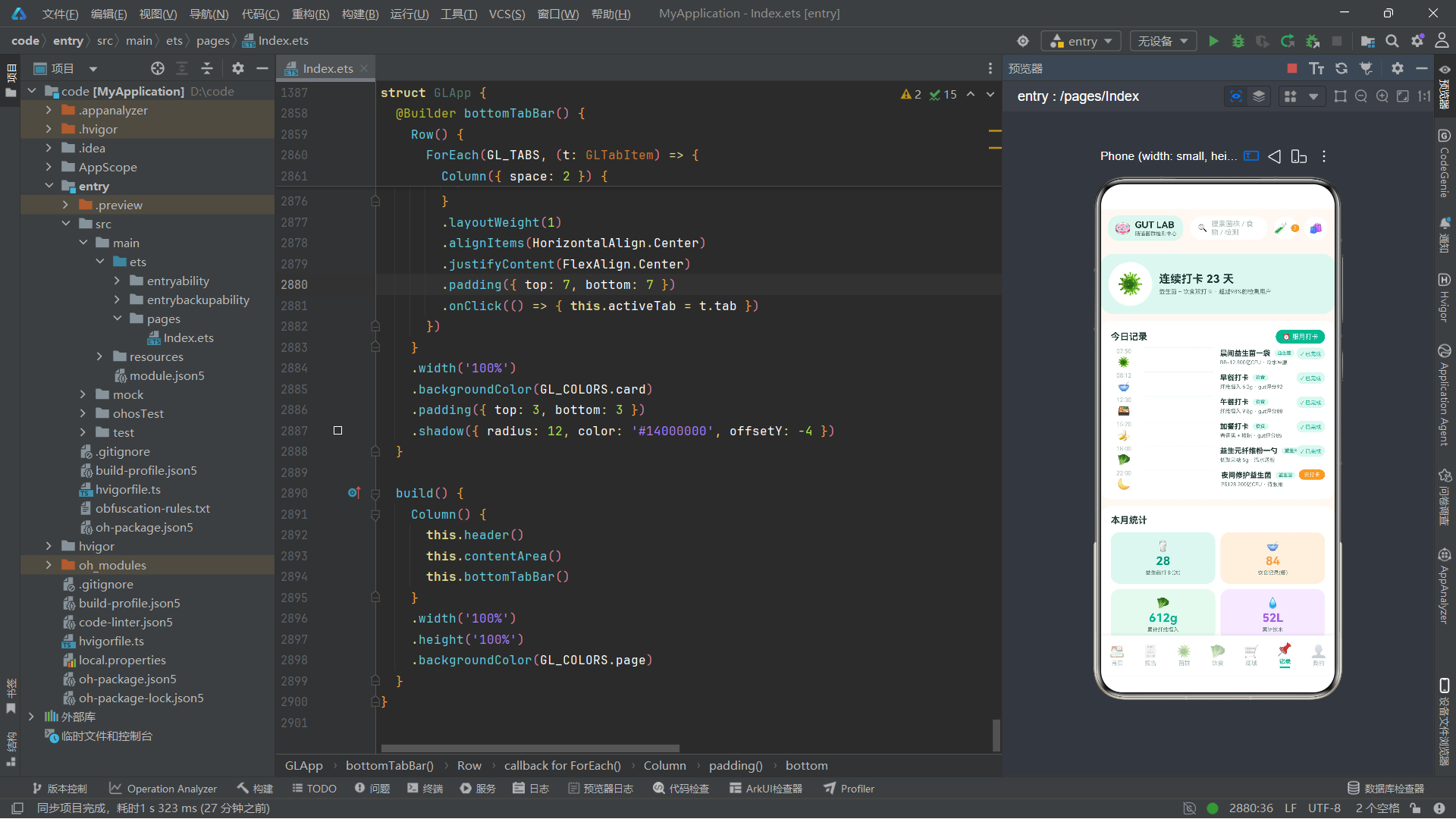
记录Tab由连续打卡大卡、今日打卡时间轴和月度统计四宫格三个模块组成。
连续打卡大卡使用菌群脉冲特效:
Column() {
    Text('🦠').fontSize(30)
}
.width(60)
.height(60)
.borderRadius(30)
.backgroundColor(GL_COLORS.card)
.justifyContent(FlexAlign.Center)
.scale({ x: this.probiPulse, y: this.probiPulse })
打卡图标通过scale绑定到probiPulse,与首页的总评分共享同一个动画变量,实现不同模块间的视觉呼应。
今日打卡时间轴混合展示益生菌和饮食打卡记录,结构与饮食Tab的时间轴类似,但增加了完成状态的条件渲染:
if (c.done) {
    Text('✓ 已完成').fontSize(8).fontColor(GL_COLORS.primary)
        .padding({ left: 6, right: 6, top: 3, bottom: 3 })
        .backgroundColor(GL_COLORS.primarySoft)
        .borderRadius(9)
} else {
    Text('去打卡').fontSize(8).fontColor(GL_COLORS.white)
        .padding({ left: 8, right: 8, top: 3, bottom: 3 })
        .backgroundColor(GL_COLORS.accent)
        .borderRadius(9)
        .onClick(() => { this.showTrackForm = true })
}
已完成的打卡显示绿色"✓ 已完成"标签,未完成的显示橙色"去打卡"按钮,点击触发服用打卡弹窗。
月度统计四宫格使用2×2布局,每个格子使用不同的颜色主题(primarySoft/accentSoft/greenSoft/purpleSoft),分别展示益生菌打卡次数、饮食记录餐数、累计纤维摄入和累计饮水量。
6.7 我的Tab分析
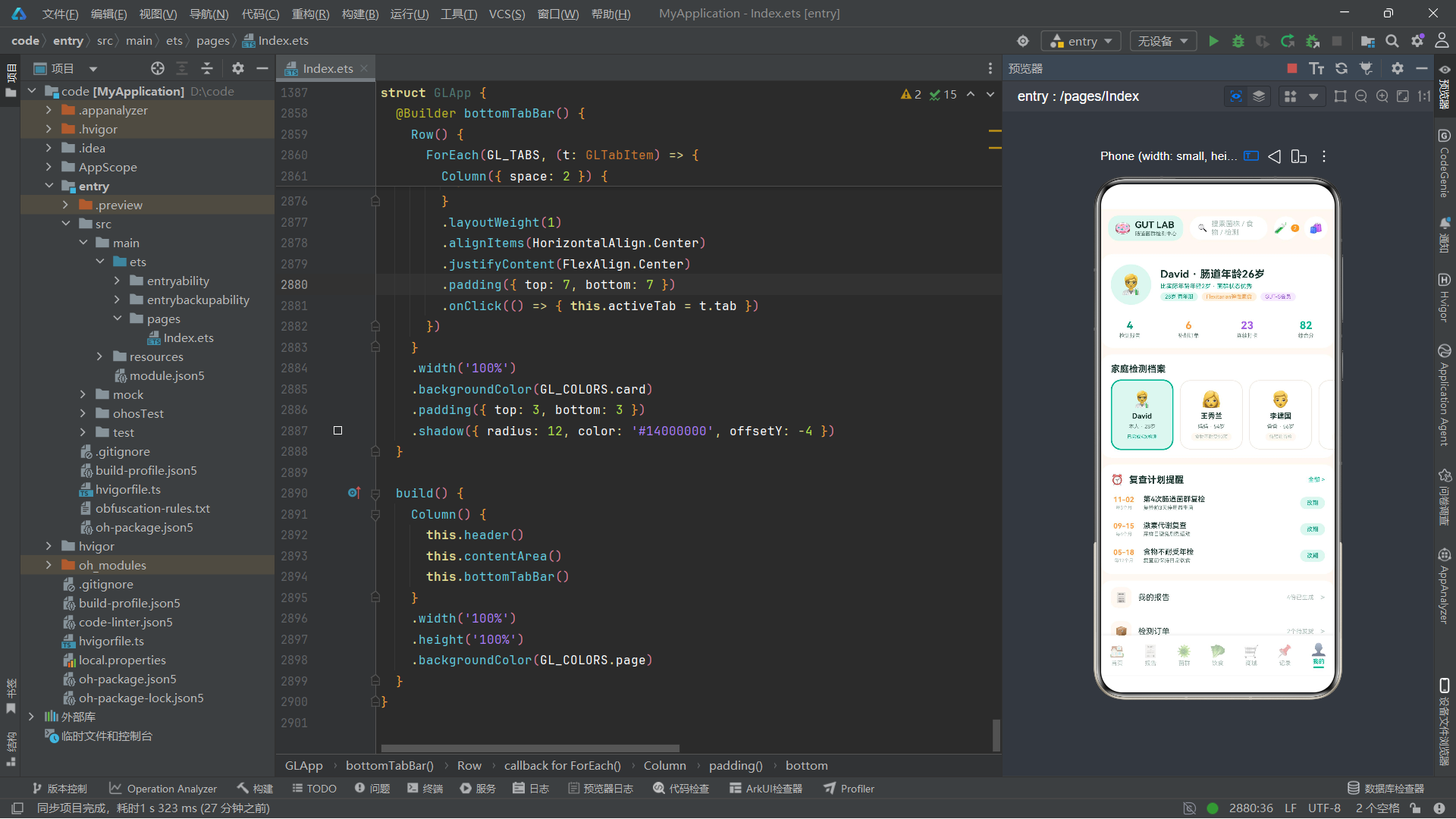
我的Tab由个人档案卡、家庭成员横滑、复查提醒卡和设置列表四个模块组成。
个人档案卡包含头像、姓名、肠道年龄标签、饮食模式标签和会员标签,以及四列统计数据(检测报告数、补剂订单数、连续打卡天数、综合分):
Row({ space: 0 }) {
    Column({ space: 2 }) {
        Text('4').fontSize(16).fontWeight(FontWeight.Bold).fontColor(GL_COLORS.primaryDeep)
        Text('检测报告').fontSize(8).fontColor(GL_COLORS.inkSub)
    }.layoutWeight(1).alignItems(HorizontalAlign.Center)
    Column({ space: 2 }) {
        Text('6').fontSize(16).fontWeight(FontWeight.Bold).fontColor(GL_COLORS.accent)
        Text('补剂订单').fontSize(8).fontColor(GL_COLORS.inkSub)
    }.layoutWeight(1).alignItems(HorizontalAlign.Center)
    Column({ space: 2 }) {
        Text('23').fontSize(16).fontWeight(FontWeight.Bold).fontColor(GL_COLORS.purple)
        Text('连续打卡').fontSize(8).fontColor(GL_COLORS.inkSub)
    }.layoutWeight(1).alignItems(HorizontalAlign.Center)
    Column({ space: 2 }) {
        Text('82').fontSize(16).fontWeight(FontWeight.Bold).fontColor(GL_COLORS.primary)
        Text('综合分').fontSize(8).fontColor(GL_COLORS.inkSub)
    }.layoutWeight(1).alignItems(HorizontalAlign.Center)
}
四列统计数字使用不同的颜色(primaryDeep/accent/purple/primary),每列layoutWeight(1)等宽分布,形成清晰的对比展示。
家庭成员横滑使用水平Scroll展示家庭成员卡片,每个卡片96vp宽,通过active属性控制选中态:
ForEach(GL_FAMILY, (m: GLFamilyMember) => {
    Column({ space: 5 }) {
        Text(m.icon).fontSize(24)
        Text(m.name).fontSize(11).fontWeight(FontWeight.Bold).fontColor(GL_COLORS.ink)
        Text(m.relation + ' · ' + m.age).fontSize(8).fontColor(GL_COLORS.inkSub)
        Text(m.tag).fontSize(7).fontColor(m.active ? GL_COLORS.primaryDeep : GL_COLORS.inkHint)
            .padding({ left: 6, right: 6, top: 2, bottom: 2 })
            .backgroundColor(m.active ? GL_COLORS.primarySoft : GL_COLORS.page)
            .borderRadius(9)
    }
    .width(96)
    .border({ width: m.active ? 2 : 1, color: m.active ? GL_COLORS.primary : GL_COLORS.line })
    .backgroundColor(m.active ? GL_COLORS.primarySoft : GL_COLORS.card)
    .onClick(() => { this.showBookForm = true })
})
复查提醒卡渲染GL_PLANS数组,每条计划显示下次复查日期、周期、名称和注意事项,提供"改期"按钮。
设置列表通过ForEach渲染GL_SETTINGS数组,每行包含图标、标题、当前值和箭头,使用统一的圆角图标容器。
技术要点:水平横滑列表是移动端常见的布局模式。通过
Scroll().scrollable(ScrollDirection.Horizontal)可以实现水平滚动,配合固定宽度的子元素(如96vp宽的家庭成员卡片),实现卡片横向排列的效果。scrollBar(BarState.Off)隐藏滚动条保持视觉简洁。
七、鸿蒙技术点穿插讲解
7.1 @Entry与@Component装饰器的协同
@Entry装饰器标记的组件是页面的根组件,每个页面只能有一个@Entry组件。它告诉框架这个组件可以直接作为页面加载。@Component装饰器声明一个自定义组件,可以被其他组件引用。在本应用中,GLApp是@Entry @Component双重装饰的页面入口,而七个弹窗组件(GLBookTestForm等)仅使用@Component装饰,作为子组件被GLApp引用。
7.2 @State状态管理机制
@State是ArkTS中最基础的状态装饰器。被@State修饰的变量在值发生变化时,会自动触发引用该变量的UI组件重新渲染。在本应用中,activeTab的变化会触发contentArea中的条件渲染重新执行,showBookForm等布尔值的变化会触发对应弹窗的显示或隐藏,probiPulse等动画值的变化会触发scale/rotate/translate属性的更新。
7.3 @Builder装饰器与UI复用
@Builder方法用于将UI布局代码封装为可复用的方法。与@Component不同,@Builder方法不需要独立的组件实例,它直接在宿主组件的上下文中执行。在本应用中,header、contentArea、bottomTabBar、homeTab等都是@Builder方法,它们将主组件的布局拆分为逻辑清晰的模块。modalOverlay是一个参数化的@Builder方法,通过传入不同的回调实现通用的遮罩功能。
7.4 animateTo动画系统
animateTo是ArkTS提供的属性动画API。它接收一个动画选项对象和一个闭包:动画选项定义duration(持续时间)、iterations(循环次数,-1为无限)、playMode(播放模式)、curve(缓动曲线);闭包中修改状态变量,框架会自动在这些变量的当前值和目标值之间做插值动画。
三种PlayMode的区别:
PlayMode.Normal:每次从起点到终点,完成后重新从起点开始PlayMode.Alternate:正向到终点后反向回到起点,往返循环PlayMode.Reverse:从终点到起点反向播放
在本应用中,培养皿旋转使用Normal模式实现单方向匀速旋转,菌泡上浮和菌群脉冲使用Alternate模式实现往返呼吸效果。
7.5 ForEach列表渲染
ForEach是ArkTS中的列表渲染组件,它接收三个参数:数据源数组、子项生成函数和(可选的)键值生成函数。在本应用中,ForEach被广泛用于渲染各种数据列表,如Tab项、检测套餐、菌群丰度、健康指标、商品列表等。ForEach会自动根据数据源的变化(增删改)更新UI。
7.6 Scroll与滚动控制
Scroll组件是ArkTS中的滚动容器,支持垂直和水平滚动。在本应用中,每个Tab页面都使用Scroll包裹内容以支持垂直滚动,商城的分类chips和我的页面家庭成员卡片使用scrollable(ScrollDirection.Horizontal)实现水平滚动。scrollBar(BarState.Off)隐藏滚动条,保持视觉简洁。
7.7 Stack叠层布局
Stack是层叠布局容器,子元素按照声明顺序从底层到顶层叠放。在本应用中,Stack被用于弹窗Wrapper(遮罩层+弹窗组件叠加)、进度环(轨道Circle+进度Circle+中心文字)、菌泡特效区(背景容器+多个emoji叠加)等场景。
7.8 Flex换行布局
Flex({ wrap: FlexWrap.Wrap })是弹性布局容器,支持子元素自动换行。在本应用中,各种chips选项(预约日期、回寄方式、忌口标签、食物选择等)都使用Flex.Wrap实现自动换行,适应不同数量的选项。
技术要点:
Flex与Row/Column的区别在于Flex支持换行(FlexWrap.Wrap),而Row和Column不支持。当子元素数量不确定或可能超出容器宽度时,应使用Flex({ wrap: FlexWrap.Wrap })而非Row。
7.9 条件渲染与if表达式
ArkTS支持在build方法和@Builder方法中使用if-else条件渲染。在本应用中,条件渲染被用于Tab页面切换(if (this.activeTab === GLTab.HOME))、弹窗显示(if (this.showBookForm))、完成状态切换(if (c.done))、分数显示(if (r.score > 0))等场景。条件渲染的分支变化会触发UI的增删更新。
八、架构模式与设计思想总结
8.1 单文件架构的优劣
本应用将所有代码(配色令牌、数据模型、纯函数、弹窗组件、主入口组件)集中在一个文件中,共计约2900行代码。这种单文件架构的优势在于:所有代码一目了然,便于快速理解整体结构;无需配置模块系统,降低了项目复杂度;适合Demo级别或原型阶段的快速开发。但劣势也明显:文件过大导致维护困难,无法实现代码分割和懒加载,团队协作时容易产生冲突。在生产环境中,应按照功能模块拆分为多个文件。
8.2 回调式组件通信
七个弹窗组件通过onClose和onConfirm回调与主组件通信。这种回调式通信的优势在于:子组件不需要知道父组件的实现细节,只需在适当时机调用回调;父组件通过传入不同的回调实现不同的关闭逻辑;组件之间高度解耦。这是函数式编程中"依赖注入"思想在UI组件中的应用。
8.3 纯函数与UI分离
应用将所有颜色映射、格式化、计算逻辑抽取为纯函数(以gl为前缀),这些函数不依赖任何组件状态,只根据输入返回输出。纯函数的好处是:可测试性强(给定输入必有确定输出)、可复用性高(任何组件都可调用)、可维护性好(修改逻辑只需改一处)。这种将业务逻辑与UI渲染分离的设计思想,使得代码结构更加清晰。
8.4 设计令牌系统
GLColorPalette接口和GL_COLORS常量构成了完整的设计令牌(Design Token)系统。所有颜色都有语义化名称(如primary、accent、ink),而非直接的十六进制值。这使得颜色修改变得集中和安全:只需修改GL_COLORS中的值,所有引用该颜色的地方都会自动更新。这是设计系统(Design System)理念在代码层面的实现。
九、结尾对比表格与详细总结
对比表格:七大Tab页面功能与技术特征
| Tab页面 | 核心功能 | 主要数据模型 | 动画特效 | 关键布局技术 | 交互弹窗 |
|---|---|---|---|---|---|
| 首页 | 健康总评、维度展示、在检样本、快捷入口 | GLDimension, GLTestPackage | probiPulse缩放, cultureSpin旋转 | Column进度条, 条件渲染 | 预约检测弹窗 |
| 报告 | 历次报告、指标列表、趋势双柱图 | GLReportItem, GLHealthMetric, GLTrendPoint | 无 | 双柱图Column, slice日期拆分 | 报告分享弹窗 |
| 菌群 | 菌泡特效、丰度横条图、优势菌、缺乏预警 | GLFloraItem | bubbleFloat上浮 | layoutWeight进度条, Stack叠层 | 购买益生菌弹窗 |
| 饮食 | 饮食时间轴、纤维进度环、红绿灯宫格、方案管理 | GLDietLog, GLFoodLight, GLCalendarCell | 无 | Circle进度环, Flex换行宫格 | 记录饮食/编辑方案/删除确认弹窗 |
| 商城 | 分类chips、冷链横幅、商品大卡列表 | GLProduct | 无 | 水平Scroll, decoration删除线 | 购买益生菌弹窗 |
| 记录 | 连续打卡、打卡时间轴、月度统计 | GLCheckinRecord | probiPulse缩放 | 条件渲染完成态, 四宫格 | 服用打卡弹窗 |
| 我的 | 个人档案、家庭成员、复查计划、设置列表 | GLFamilyMember, GLReviewPlan, GLSettingItem | 无 | 水平Scroll横滑, 四列统计 | 预约检测弹窗 |
对比表格:七组动画参数对比
| 动画名称 | 状态变量 | duration(ms) | iterations | playMode | curve | 效果描述 |
|---|---|---|---|---|---|---|
| 菌泡上浮 | bubbleFloat | 2400 | -1(无限) | Alternate | EaseInOut | Y轴往返平移26vp |
| 培养皿旋转 | cultureSpin | 9000 | -1(无限) | Normal | Linear | 360度匀速旋转 |
| 菌群脉冲 | probiPulse | 1500 | -1(无限) | Alternate | EaseOut | 缩放1.0-1.12呼吸 |
对比表格:七大弹窗组件架构对比
| 弹窗组件 | @State数量 | 主要交互控件 | Builder方法 | 回调函数 | 色彩主题 |
|---|---|---|---|---|---|
| GLBookTestForm | 4 | wayCell宫格, chipRow换行chips, TextInput | 2个 | onClose, onConfirm | 主色青绿 |
| GLReportShareForm | 4 | switchRow自定义开关, Flex chips | 1个 | onClose, onConfirm | 紫色+橙色 |
| GLAddFoodForm | 3 | Flex chips, 食物宫格, stepper | 0个 | onClose, onConfirm | 主色青绿 |
| GLEditPlanForm | 4 | 多选chips, 双stepper, chips | 0个 | onClose, onConfirm | 橙色+紫色 |
| GLDeletePlanForm | 0 | 方案摘要, 双按钮 | 0个 | onClose, onConfirm | 红色警示 |
| GLBuyProForm | 2 | 菌株列表, 周期chips | 0个 | onClose, onConfirm | 主色+橙色 |
| GLTrackForm | 4 | 自定义开关, chips, 感受宫格, TextInput | 0个 | onClose, onConfirm | 主色青绿 |
详细总结
本文对一款基于鸿蒙HarmonyOS ArkTS语言构建的肠道菌群检测中心应用进行了全面、深入的技术剖析。该应用以"酸奶生物实验室"浅色主题为视觉基调,将专业的肠道菌群检测数据以可视化、可交互的方式呈现给用户,同时整合了益生菌电商和精准饮食方案两大功能模块,构建了一个完整的"检测-补剂-饮食"健康管理闭环。
从架构层面来看,应用采用了典型的单入口组件(@Entry @Component)加多子组件(@Component)的组件化架构。主入口组件GLApp通过11个@State变量管理全局状态,其中7个布尔值控制弹窗显隐、3个数值驱动动画、1个枚举值控制Tab切换。七个独立的弹窗组件通过回调函数与主组件通信,实现了松耦合的组件间协作。二十多个@Builder方法将布局代码模块化,包括七个Tab页面的内容构建、七个弹窗Wrapper和通用工具Builder(如modalOverlay、chipRow、switchRow)。
从数据层面来看,应用定义了二十多个TypeScript接口,覆盖检测套餐、菌群丰度、健康指标、益生菌商品、饮食建议、食物红绿灯、历次报告、趋势对比、饮食日志、打卡记录、家庭成员、复查计划、健康维度、打卡日历、设置项、弹窗选项等多种数据结构。这些接口配合静态数据数组和十二个纯函数,构建了完整的、类型安全的数据驱动层。纯函数将颜色映射、格式化、计算逻辑统一封装,确保了业务逻辑的一致性和可维护性。
安装DevEco Studio程序

选择目标安装目录:

设置环境变量,但是需要重启一下:

新建一个空白模板:

设置API为24的模板项目:

初始化项目,自动下载相关依赖:

完整代码:
// ============================================================
// GUT LAB 肠道菌群检测中心 · 单文件 ArkTS UI Demo
// ------------------------------------------------------------
// 场景:体检报告App类潮流场景
// 肠道菌群检测报告 + 益生菌补剂商城 + 精准饮食方案
// 面向年轻人的「精准营养」酸奶生物实验室风格
// 风格:酸奶生物实验室风(浅色主题)
// - 酸奶白底:#FFF8F2 页面底 / #FFFFFF 卡片
// - 菌群青绿:#00B894 主色
// - 益生菌橙:#FF9F43 强调色
// - 墨青字:#1E3A34
// - 检测紫:#A55EEA 点缀
// - 大圆角 16-20、圆润胶囊元素
// - 细菌 emoji 点缀:🦠🧫🥛🥬
// 特效(全部由 animateTo 驱动,无任何定时器):
// - bubbleFloat 菌泡上浮 translate
// - cultureSpin 培养皿旋转 rotate
// - probiPulse 菌群指数脉冲 scale
// ============================================================
// ============ 配色令牌 ============
interface GLColorPalette {
page: string
card: string
primary: string
primarySoft: string
primaryDeep: string
accent: string
accentSoft: string
purple: string
purpleSoft: string
ink: string
inkSub: string
inkHint: string
line: string
green: string
greenSoft: string
yellow: string
yellowSoft: string
red: string
redSoft: string
white: string
}
const GL_COLORS: GLColorPalette = {
page: '#FFF8F2',
card: '#FFFFFF',
primary: '#00B894',
primarySoft: '#E0F7F0',
primaryDeep: '#009B7D',
accent: '#FF9F43',
accentSoft: '#FFF1E0',
purple: '#A55EEA',
purpleSoft: '#F3EAFD',
ink: '#1E3A34',
inkSub: '#5C7A72',
inkHint: '#A8BDB6',
line: '#F0E8DF',
green: '#2ECC71',
greenSoft: '#E8F9F0',
yellow: '#F7B731',
yellowSoft: '#FEF7E0',
red: '#FF6B6B',
redSoft: '#FFEDEA',
white: '#FFFFFF'
}
// ============ 底部导航 Tab ============
enum GLTab {
HOME = 0,
REPORT = 1,
FLORA = 2,
DIET = 3,
SHOP = 4,
LOG = 5,
ME = 6
}
interface GLTabItem {
tab: GLTab
icon: string
label: string
}
const GL_TABS: GLTabItem[] = [
{ tab: GLTab.HOME, icon: '🏠', label: '首页' },
{ tab: GLTab.REPORT, icon: '🧾', label: '报告' },
{ tab: GLTab.FLORA, icon: '🦠', label: '菌群' },
{ tab: GLTab.DIET, icon: '🥬', label: '饮食' },
{ tab: GLTab.SHOP, icon: '🛒', label: '商城' },
{ tab: GLTab.LOG, icon: '📌', label: '记录' },
{ tab: GLTab.ME, icon: '👤', label: '我的' }
]
// ============ 数据模型:检测套餐 ============
interface GLTestPackage {
id: number
name: string
subtitle: string
icon: string
price: number
originalPrice: number
tag: string
sampleType: string
turnaround: string
}
const GL_TEST_PACKAGES: GLTestPackage[] = [
{ id: 1, name: '肠道菌群16s检测', subtitle: '全景测序 · 检出500+菌种', icon: '🧬', price: 399, originalPrice: 499, tag: '畅销爆款', sampleType: '粪便采样盒', turnaround: '5-7个工作日' },
{ id: 2, name: '食物不耐受检测', subtitle: '90项食物IgG抗体筛查', icon: '🥛', price: 299, originalPrice: 359, tag: '敏感肌推荐', sampleType: '指尖血采样', turnaround: '3-5个工作日' },
{ id: 3, name: '激素代谢检测', subtitle: '皮质醇节律 + 性激素代谢', icon: '💧', price: 459, originalPrice: 529, tag: '熬夜党必查', sampleType: '唾液4点采样', turnaround: '7个工作日' },
{ id: 4, name: '肠脑轴专项检测', subtitle: '情绪相关菌群深度解析', icon: '🧠', price: 529, originalPrice: 649, tag: '新品上市', sampleType: '粪便采样盒', turnaround: '7-10个工作日' }
]
// ============ 数据模型:菌群丰度 ============
interface GLFloraItem {
name: string
latin: string
percent: number
status: string
trend: string
note: string
}
const GL_FLORA: GLFloraItem[] = [
{ name: '厚壁菌门', latin: 'Firmicutes', percent: 41.2, status: '充足', trend: 'flat', note: '参与胆汁酸代谢' },
{ name: '拟杆菌门', latin: 'Bacteroidetes', percent: 32.6, status: '充足', trend: 'up', note: '分解膳食纤维主力' },
{ name: '双歧杆菌', latin: 'Bifidobacterium', percent: 8.4, status: '偏低', trend: 'down', note: '建议补充BB-12菌株' },
{ name: '瘤胃球菌', latin: 'Ruminococcus', percent: 4.7, status: '偏低', trend: 'flat', note: '影响短链脂肪酸产出' },
{ name: '乳酸杆菌', latin: 'Lactobacillus', percent: 3.1, status: '偏低', trend: 'down', note: '可饮酸奶自然补充' },
{ name: '拟普雷沃菌', latin: 'Prevotella', percent: 2.6, status: '充足', trend: 'up', note: '高碳水饮食相关' },
{ name: '阿克曼菌', latin: 'Akkermansia', percent: 1.8, status: '缺乏', trend: 'down', note: '肠屏障守护菌,急需补充' },
{ name: '大肠杆菌', latin: 'Escherichia', percent: 0.9, status: '充足', trend: 'flat', note: '条件致病菌,含量受控' },
{ name: '白色念珠菌', latin: 'Candida', percent: 0.3, status: '缺乏', trend: 'down', note: '真菌占比低属健康信号' }
]
// ============ 数据模型:健康指标 ============
interface GLHealthMetric {
name: string
value: string
unit: string
ref: string
status: string
icon: string
}
const GL_METRICS: GLHealthMetric[] = [
{ name: '菌群多样性指数', value: '7.8', unit: '分', ref: '参考 ≥7.0', status: '充足', icon: '🧬' },
{ name: '短链脂肪酸总量', value: '62.4', unit: 'μmol/g', ref: '参考 ≥55.0', status: '充足', icon: '🧫' },
{ name: '肠屏障完整性评分', value: '74', unit: '分', ref: '参考 ≥80', status: '偏低', icon: '🛡️' },
{ name: '产丁酸菌丰度', value: '2.1', unit: '%', ref: '参考 ≥3.0', status: '偏低', icon: '🌾' },
{ name: '有害菌占比', value: '8.6', unit: '%', ref: '参考 ≤10.0', status: '充足', icon: '⚠️' },
{ name: '胆汁酸代谢能力', value: '68', unit: '分', ref: '参考 ≥60', status: '充足', icon: '💧' }
]
// ============ 数据模型:益生菌商品 ============
interface GLProduct {
id: number
name: string
strain: string
cfu: string
price: number
originalPrice: number
tag: string
sold: string
rating: string
icon: string
}
const GL_PRODUCTS: GLProduct[] = [
{ id: 1, name: '复合益生菌粉', strain: 'BB-12 × LGG 双联菌株', cfu: '500亿CFU/袋', price: 159, originalPrice: 199, tag: '明星单品', sold: '2.3万+', rating: '4.9', icon: '🥛' },
{ id: 2, name: '女性专用益生菌', strain: '鼠李糖乳杆菌 GR-1', cfu: '100亿CFU/粒', price: 139, originalPrice: 169, tag: '私护专研', sold: '8600+', rating: '4.8', icon: '🌸' },
{ id: 3, name: '儿童益生菌滴剂', strain: '动物双歧杆菌 Bb-12', cfu: '50亿CFU/滴', price: 129, originalPrice: 149, tag: '妈妈回购', sold: '1.1万+', rating: '4.9', icon: '🧒' },
{ id: 4, name: '后生元养护胶囊', strain: '灭活酪酸梭菌 MI-16', cfu: '300亿CFU/粒', price: 189, originalPrice: 229, tag: '免冷链', sold: '5400+', rating: '4.7', icon: '💊' },
{ id: 5, name: '益生元纤维粉', strain: '低聚果糖FOS + 菊粉', cfu: '水溶性膳食纤维', price: 89, originalPrice: 109, tag: '菌群口粮', sold: '3.6万+', rating: '4.9', icon: '🥬' },
{ id: 6, name: '夜间修护益生菌', strain: '植物乳杆菌 PS128', cfu: '200亿CFU/袋', price: 179, originalPrice: 209, tag: '情绪肠轴', sold: '7300+', rating: '4.8', icon: '🌙' }
]
// ============ 数据模型:饮食建议库 ============
interface GLFoodAdvice {
title: string
desc: string
icon: string
color: string
}
const GL_FOOD_ADVICE: GLFoodAdvice[] = [
{ title: '每日纤维 25g', desc: '主食1/3换粗粮,菌群众多样性+11%', icon: '🥬', color: '#00B894' },
{ title: '每天一份发酵食', desc: '酸奶/泡菜/康普茶,天然益生菌来源', icon: '🥛', color: '#FF9F43' },
{ title: '彩虹多酚蔬果', desc: '蓝莓紫甘蓝等彩色蔬果滋养产丁酸菌', icon: '🫐', color: '#A55EEA' },
{ title: '拒绝人工甜味剂', desc: '三氯蔗糖会抑制乳酸杆菌定植', icon: '🚫', color: '#FF6B6B' },
{ title: '固定进食节奏', desc: '肠道菌群也有生物钟,规律=养菌', icon: '⏰', color: '#009B7D' }
]
// ============ 数据模型:食物红绿灯 ============
interface GLFoodLight {
name: string
light: string
category: string
reason: string
}
const GL_FOOD_LIGHTS: GLFoodLight[] = [
{ name: '无糖酸奶', light: 'green', category: '发酵乳品', reason: '双歧杆菌直接补给' },
{ name: '燕麦麸皮', light: 'green', category: '全谷主食', reason: 'β-葡聚糖益生元' },
{ name: '西兰花', light: 'green', category: '十字花科', reason: '萝卜硫素护肠屏障' },
{ name: '青香蕉', light: 'green', category: '抗性淀粉', reason: '喂养产丁酸菌' },
{ name: '洋葱大蒜', light: 'green', category: '葱属蔬菜', reason: '菊粉类天然益生元' },
{ name: '泡菜味噌', light: 'green', category: '天然发酵', reason: '植物乳杆菌来源' },
{ name: '全麦面包', light: 'yellow', category: '麸质主食', reason: '麸质敏感者限量' },
{ name: '苹果', light: 'yellow', category: '高果糖水果', reason: '果糖不耐受者减半' },
{ name: '红薯', light: 'yellow', category: '高FODMAP', reason: '易产气,胀气期少吃' },
{ name: '麻辣火锅', light: 'red', category: '高辣油炸', reason: '辣椒素刺激肠黏膜' },
{ name: '全糖奶茶', light: 'red', category: '精制糖', reason: '滋养有害菌大军' }
]
// ============ 数据模型:历次报告 ============
interface GLReportItem {
date: string
title: string
score: number
delta: string
status: string
}
const GL_REPORTS: GLReportItem[] = [
{ date: '2026-08-02', title: '第3次肠道菌群复检', score: 82, delta: '+6', status: '已出报告' },
{ date: '2026-05-18', title: '第2次肠道菌群复检', score: 76, delta: '+9', status: '已出报告' },
{ date: '2026-02-10', title: '第1次肠道菌群复检', score: 67, delta: '+3', status: '已出报告' },
{ date: '2025-11-30', title: '肠道菌群基线检测', score: 64, delta: '-', status: '已出报告' },
{ date: '2026-08-26', title: '第4次肠道菌群复检', score: 0, delta: '-', status: '检测中' }
]
// ============ 数据模型:趋势对比(双柱图) ============
interface GLTrendPoint {
month: string
last: number
now: number
}
const GL_TRENDS: GLTrendPoint[] = [
{ month: '25/03', last: 60, now: 63 },
{ month: '25/06', last: 63, now: 66 },
{ month: '25/09', last: 66, now: 64 },
{ month: '25/12', last: 64, now: 67 },
{ month: '26/03', last: 67, now: 76 },
{ month: '26/08', last: 76, now: 82 }
]
// ============ 数据模型:今日饮食时间轴 ============
interface GLDietLog {
time: string
meal: string
foods: string
score: number
icon: string
}
const GL_DIET_LOGS: GLDietLog[] = [
{ time: '08:12', meal: '早餐', foods: '无糖酸奶 + 燕麦麸皮 + 蓝莓', score: 92, icon: '🥣' },
{ time: '12:30', meal: '午餐', foods: '杂粮饭 + 清蒸鲈鱼 + 西兰花', score: 88, icon: '🍱' },
{ time: '15:20', meal: '加餐', foods: '青香蕉一根 + 核桃两颗', score: 85, icon: '🍌' },
{ time: '19:05', meal: '晚餐', foods: '小米粥 + 凉拌豆腐 + 菠菜', score: 90, icon: '🥗' },
{ time: '21:40', meal: '加餐', foods: '无糖豆浆一杯', score: 78, icon: '🥛' }
]
// ============ 数据模型:打卡记录 ============
interface GLCheckinRecord {
time: string
type: string
title: string
detail: string
icon: string
done: boolean
}
const GL_CHECKINS: GLCheckinRecord[] = [
{ time: '07:50', type: '益生菌', title: '晨间益生菌一袋', detail: 'BB-12 500亿CFU · 冷水冲服', icon: '🦠', done: true },
{ time: '08:12', type: '饮食', title: '早餐打卡', detail: '纤维摄入 6.2g · gut评分92', icon: '🥣', done: true },
{ time: '12:30', type: '饮食', title: '午餐打卡', detail: '纤维摄入 9.8g · gut评分88', icon: '🍱', done: true },
{ time: '15:20', type: '饮食', title: '加餐打卡', detail: '青香蕉 + 核桃 · gut评分85', icon: '🍌', done: true },
{ time: '18:00', type: '益生元', title: '益生元纤维粉一勺', detail: '低聚果糖 5g · 温水送服', icon: '🥬', done: true },
{ time: '22:00', type: '益生菌', title: '夜间修护益生菌', detail: 'PS128 200亿CFU · 待服用', icon: '🌙', done: false }
]
// ============ 数据模型:家庭成员 ============
interface GLFamilyMember {
name: string
relation: string
age: string
tag: string
icon: string
active: boolean
}
const GL_FAMILY: GLFamilyMember[] = [
{ name: 'David', relation: '本人', age: '28岁', tag: '已完成4次检测', icon: '🧑🔬', active: true },
{ name: '王秀兰', relation: '妈妈', age: '54岁', tag: '食物不耐受90项', icon: '👩', active: false },
{ name: '李建国', relation: '爸爸', age: '56岁', tag: '待预约首检', icon: '👨', active: false },
{ name: '李小雨', relation: '妹妹', age: '22岁', tag: '儿童版已升级', icon: '👧', active: false }
]
// ============ 数据模型:复查计划 ============
interface GLReviewPlan {
name: string
nextDate: string
cycle: string
note: string
}
const GL_PLANS: GLReviewPlan[] = [
{ name: '第4次肠道菌群复检', nextDate: '2026-11-02', cycle: '每3个月', note: '复检前3天停用益生菌' },
{ name: '激素代谢复查', nextDate: '2026-09-15', cycle: '每6个月', note: '采样日避免剧烈运动' },
{ name: '食物不耐受年检', nextDate: '2027-05-18', cycle: '每12个月', note: '复查前保持日常饮食' }
]
// ============ 数据模型:五大健康维度 ============
interface GLDimension {
name: string
score: number
color: string
icon: string
}
const GL_DIMENSIONS: GLDimension[] = [
{ name: '免疫防御', score: 78, color: '#00B894', icon: '🛡️' },
{ name: '消化代谢', score: 84, color: '#FF9F43', icon: '⚙️' },
{ name: '情绪肠脑', score: 71, color: '#A55EEA', icon: '🧠' },
{ name: '皮肤状态', score: 66, color: '#FF6B6B', icon: '✨' },
{ name: '体重管理', score: 80, color: '#009B7D', icon: '⚖️' }
]
// ============ 数据模型:饮食周打卡日历 ============
interface GLCalendarCell {
day: string
fiber: string
done: boolean
}
const GL_WEEK_ROW1: GLCalendarCell[] = [
{ day: '周一', fiber: '24g', done: true },
{ day: '周二', fiber: '21g', done: true },
{ day: '周三', fiber: '26g', done: true },
{ day: '周四', fiber: '19g', done: true },
{ day: '周五', fiber: '23g', done: true },
{ day: '周六', fiber: '17g', done: false },
{ day: '周日', fiber: '25g', done: true }
]
// ============ 数据模型:设置列表 ============
interface GLSettingItem {
icon: string
title: string
value: string
}
const GL_SETTINGS: GLSettingItem[] = [
{ icon: '🧾', title: '我的报告', value: '4份已生成' },
{ icon: '📦', title: '检测订单', value: '2个待发货' },
{ icon: '🚚', title: '收货地址', value: '3个地址' },
{ icon: '💳', title: '支付方式', value: '微信支付' },
{ icon: '🛡️', title: '隐私与数据', value: '基因级加密' }
]
// ============ 弹框选项:预约检测 ============
interface GLBookWay {
name: string
icon: string
desc: string
price: string
}
const GL_BOOK_WAYS: GLBookWay[] = [
{ name: '采样盒到家', icon: '🚚', desc: '顺丰包邮到家', price: '免运费' },
{ name: '到店检测', icon: '🏥', desc: '实验室直采', price: '赠解读' },
{ name: '儿童版套装', icon: '🧒', desc: '3-12岁专用', price: '+¥50' }
]
const GL_BOOK_DATES: string[] = ['8月28日 周五', '8月29日 周六', '8月30日 周日', '9月2日 周三']
const GL_RETURN_WAYS: string[] = ['顺丰到付寄回', '预约上门取件', '就近网点自寄']
// ============ 弹框选项:报告分享 ============
const GL_SHARE_SCOPES: string[] = ['仅自己可见', '分享给好友', '同步给医生', '生成公开链接']
const GL_SHARE_VALIDITY: string[] = ['24小时', '7天', '30天', '永久有效']
// ============ 弹框选项:记录饮食 ============
const GL_MEAL_TYPES: string[] = ['早餐', '午餐', '晚餐', '加餐']
interface GLFoodOption {
name: string
icon: string
score: number
}
const GL_FOOD_OPTIONS: GLFoodOption[] = [
{ name: '无糖酸奶', icon: '🥛', score: 9 },
{ name: '燕麦', icon: '🌾', score: 8 },
{ name: '西兰花', icon: '🥦', score: 9 },
{ name: '青香蕉', icon: '🍌', score: 8 },
{ name: '洋葱', icon: '🧅', score: 7 },
{ name: '泡菜', icon: '🥬', score: 7 },
{ name: '苹果', icon: '🍎', score: 6 }
]
// ============ 弹框选项:编辑饮食方案 ============
const GL_AVOID_TAGS: string[] = ['乳糖', '麸质', '辣椒', '酒精', '咖啡因', '海鲜', '精制糖']
const GL_SPICY_LEVELS: string[] = ['不吃辣', '微辣', '中辣', '重辣']
// ============ 弹框选项:购买益生菌 ============
interface GLStrainOption {
code: string
name: string
cfu: string
price: number
desc: string
}
const GL_STRAINS: GLStrainOption[] = [
{ code: 'BB-12', name: '动物双歧杆菌 BB-12', cfu: '200亿CFU/袋', price: 159, desc: '耐胃酸 · 定植力强' },
{ code: 'LGG', name: '鼠李糖乳杆菌 LGG', cfu: '100亿CFU/袋', price: 149, desc: '免疫屏障 · 经典菌株' },
{ code: 'PS128', name: '植物乳杆菌 PS128', cfu: '60亿CFU/袋', price: 169, desc: '情绪肠轴 · 台湾专研' },
{ code: 'QUAD', name: '四联复合菌株', cfu: '500亿CFU/袋', price: 189, desc: '多维协同 · 全面养护' }
]
interface GLCycleOption {
label: string
days: number
save: string
}
const GL_BUY_CYCLES: GLCycleOption[] = [
{ label: '30天体验装', days: 30, save: '立减¥20' },
{ label: '60天周期装', days: 60, save: '立减¥60' },
{ label: '90天巩固装', days: 90, save: '立减¥120' }
]
// ============ 弹框选项:服用打卡 ============
const GL_TAKE_TIMES: string[] = ['早餐前30分', '早餐后', '午餐后', '睡前']
interface GLFeelingOption {
key: string
label: string
icon: string
desc: string
}
const GL_FEELINGS: GLFeelingOption[] = [
{ key: 'bloat', label: '胀气', icon: '😮💨', desc: '腹部胀满不适' },
{ key: 'smooth', label: '通畅', icon: '😌', desc: '排便轻松顺畅' },
{ key: 'normal', label: '正常', icon: '🙂', desc: '无明显不适' }
]
// ============ 商城分类 ============
const GL_SHOP_CATS: string[] = ['全部', '益生菌', '益生元', '后生元', '检测服务']
// ============ 全局纯函数 ============
// 含量状态 → 状态色(充足青 / 偏低橙 / 缺乏红)
function glStatusColor(status: string): string {
if (status === '充足') {
return GL_COLORS.primary
}
if (status === '偏低') {
return GL_COLORS.accent
}
return GL_COLORS.red
}
// 含量状态 → 状态浅底色
function glStatusBg(status: string): string {
if (status === '充足') {
return GL_COLORS.primarySoft
}
if (status === '偏低') {
return GL_COLORS.accentSoft
}
return GL_COLORS.redSoft
}
// 食物红绿灯 → 主色
function glLightColor(light: string): string {
if (light === 'green') {
return GL_COLORS.primary
}
if (light === 'yellow') {
return GL_COLORS.yellow
}
return GL_COLORS.red
}
// 食物红绿灯 → 浅底色
function glLightBg(light: string): string {
if (light === 'green') {
return GL_COLORS.greenSoft
}
if (light === 'yellow') {
return GL_COLORS.yellowSoft
}
return GL_COLORS.redSoft
}
// 红绿灯文字
function glLightLabel(light: string): string {
if (light === 'green') {
return '绿灯 · 放心吃'
}
if (light === 'yellow') {
return '黄灯 · 适量吃'
}
return '红灯 · 尽量避'
}
// 分数 → 颜色(80+青 / 60+橙 / 其余红)
function glScoreColor(score: number): string {
if (score >= 80) {
return GL_COLORS.primary
}
if (score >= 60) {
return GL_COLORS.accent
}
return GL_COLORS.red
}
// 百分比 → 宽度字符串
function glPct(pct: number): string {
return pct.toFixed(0) + '%'
}
// 数值 → 柱高字符串(图表用)
function glBarH(value: number, total: number, maxVp: number): string {
return (value / total * maxVp).toFixed(0) + 'vp'
}
// 趋势图标
function glTrendIcon(trend: string): string {
if (trend === 'up') {
return '↑'
}
if (trend === 'down') {
return '↓'
}
return '→'
}
// 价格 → 字符串
function glPrice(price: number): string {
return '¥' + price.toFixed(0)
}
// 进度环周长(环直径120vp)
function glRingDash(pct: number): number {
return 377 * pct / 100
}
// 多选标签切换(弹框内 chips 用)
function glToggleList(list: string[], tag: string): string[] {
if (list.indexOf(tag) >= 0) {
return list.filter((x: string) => x !== tag)
}
return list.concat([tag])
}
// gut评分(份量越大越接近满分)
function glFoodScore(portion: number): number {
if (portion <= 0) {
return 0
}
if (portion >= 5) {
return 96
}
return 68 + portion * 6
}
// 弹框 1:预约检测(套餐宫格单选 + 日期chips + 回寄方式chips + 地址输入)
@Component
struct GLBookTestForm {
@State selectedWay: string = '采样盒到家'
@State selectedDate: string = '8月28日 周五'
@State selectedReturn: string = '顺丰到付寄回'
@State address: string = ''
onClose: () => void = () => {}
onConfirm: () => void = () => {}
@Builder wayCell(way: GLBookWay) {
Column({ space: 4 }) {
Text(way.icon).fontSize(24)
Text(way.name).fontSize(12).fontWeight(FontWeight.Medium).fontColor(GL_COLORS.ink)
Text(way.desc).fontSize(9).fontColor(GL_COLORS.inkSub)
Text(way.price).fontSize(9).fontColor(this.selectedWay === way.name ? GL_COLORS.primaryDeep : GL_COLORS.accent)
}
.layoutWeight(1)
.alignItems(HorizontalAlign.Center)
.justifyContent(FlexAlign.Center)
.padding({ top: 12, bottom: 12 })
.borderRadius(16)
.backgroundColor(this.selectedWay === way.name ? GL_COLORS.primarySoft : GL_COLORS.page)
.border({ width: this.selectedWay === way.name ? 2 : 1, color: this.selectedWay === way.name ? GL_COLORS.primary : GL_COLORS.line })
.onClick(() => { this.selectedWay = way.name })
}
@Builder chipRow(options: string[], current: string, onPick: (v: string) => void) {
Flex({ wrap: FlexWrap.Wrap }) {
ForEach(options, (opt: string) => {
Text(opt)
.fontSize(11)
.fontColor(current === opt ? GL_COLORS.white : GL_COLORS.inkSub)
.backgroundColor(current === opt ? GL_COLORS.primary : GL_COLORS.page)
.border({ width: 1, color: current === opt ? GL_COLORS.primary : GL_COLORS.line })
.padding({ left: 12, right: 12, top: 6, bottom: 6 })
.borderRadius(14)
.margin({ right: 8, bottom: 8 })
.onClick(() => { onPick(opt) })
})
}
.width('100%')
}
build() {
Column() {
Row() {
Column({ space: 2 }) {
Text('🧫 预约肠道检测').fontSize(17).fontWeight(FontWeight.Bold).fontColor(GL_COLORS.ink)
Text('采样盒48小时冷链直达').fontSize(10).fontColor(GL_COLORS.inkSub)
}.alignItems(HorizontalAlign.Start).layoutWeight(1)
Text('✕').fontSize(16).fontColor(GL_COLORS.inkHint)
.padding(6)
.onClick(() => { this.onClose() })
}
.width('100%')
.padding({ left: 18, right: 18, top: 16, bottom: 12 })
Scroll() {
Column() {
Text('检测方式').fontSize(12).fontWeight(FontWeight.Bold).fontColor(GL_COLORS.ink)
.width('100%').margin({ top: 6, bottom: 8 })
Row({ space: 8 }) {
this.wayCell(GL_BOOK_WAYS[0])
this.wayCell(GL_BOOK_WAYS[1])
this.wayCell(GL_BOOK_WAYS[2])
}
.width('100%')
Text('预约日期').fontSize(12).fontWeight(FontWeight.Bold).fontColor(GL_COLORS.ink)
.width('100%').margin({ top: 16, bottom: 8 })
this.chipRow(GL_BOOK_DATES, this.selectedDate, (v: string) => { this.selectedDate = v })
Text('样本回寄方式').fontSize(12).fontWeight(FontWeight.Bold).fontColor(GL_COLORS.ink)
.width('100%').margin({ top: 8, bottom: 8 })
this.chipRow(GL_RETURN_WAYS, this.selectedReturn, (v: string) => { this.selectedReturn = v })
Text('收样地址').fontSize(12).fontWeight(FontWeight.Bold).fontColor(GL_COLORS.ink)
.width('100%').margin({ top: 8, bottom: 8 })
TextInput({ placeholder: '填写收样地址,如:上海市静安区南京西路100号' })
.placeholderColor(GL_COLORS.inkHint)
.fontSize(12)
.width('100%')
.backgroundColor(GL_COLORS.page)
.borderRadius(12)
.padding({ left: 12, right: 12 })
.onChange((v: string) => { this.address = v })
}
.padding({ left: 18, right: 18, bottom: 12 })
}
.layoutWeight(1)
.scrollBar(BarState.Off)
Row() {
Text('取消').fontSize(13).fontColor(GL_COLORS.inkSub)
.backgroundColor(GL_COLORS.page)
.padding({ left: 22, right: 22, top: 10, bottom: 10 })
.borderRadius(20)
.onClick(() => { this.onClose() })
Text('确认预约').fontSize(13).fontColor(GL_COLORS.white)
.backgroundColor(GL_COLORS.primary)
.padding({ left: 26, right: 26, top: 10, bottom: 10 })
.borderRadius(20)
.margin({ left: 12 })
.onClick(() => { this.onConfirm() })
}
.width('100%')
.justifyContent(FlexAlign.Center)
.padding({ top: 10, bottom: 16 })
}
.width('100%')
.constraintSize({ maxHeight: '78%' })
.backgroundColor(GL_COLORS.card)
.borderRadius(20)
}
}
// 弹框 2:报告分享(脱敏toggle + 医生解读toggle + 范围chips + 有效期chips)
@Component
struct GLReportShareForm {
@State desensitize: boolean = true
@State withDoctor: boolean = true
@State scope: string = '同步给医生'
@State validity: string = '7天'
onClose: () => void = () => {}
onConfirm: () => void = () => {}
@Builder switchRow(label: string, hint: string, value: boolean, onToggle: () => void) {
Row() {
Column({ space: 2 }) {
Text(label).fontSize(13).fontWeight(FontWeight.Medium).fontColor(GL_COLORS.ink)
Text(hint).fontSize(9).fontColor(GL_COLORS.inkSub)
}
.alignItems(HorizontalAlign.Start)
.layoutWeight(1)
Row() {
Circle().width(20).height(20).fill(GL_COLORS.white).margin(3)
}
.width(46)
.height(26)
.borderRadius(13)
.backgroundColor(value ? GL_COLORS.primary : GL_COLORS.line)
.justifyContent(value ? FlexAlign.End : FlexAlign.Start)
.onClick(() => { onToggle() })
}
.width('100%')
.padding({ top: 8, bottom: 8 })
}
build() {
Column() {
Row() {
Column({ space: 2 }) {
Text('📤 分享检测报告').fontSize(17).fontWeight(FontWeight.Bold).fontColor(GL_COLORS.ink)
Text('第3次肠道菌群复检 · 综合分82').fontSize(10).fontColor(GL_COLORS.inkSub)
}.alignItems(HorizontalAlign.Start).layoutWeight(1)
Text('✕').fontSize(16).fontColor(GL_COLORS.inkHint)
.padding(6)
.onClick(() => { this.onClose() })
}
.width('100%')
.padding({ left: 18, right: 18, top: 16, bottom: 12 })
Scroll() {
Column() {
Column() {
this.switchRow('报告脱敏', '隐藏姓名/手机号/样本编号', this.desensitize, () => { this.desensitize = !this.desensitize })
Divider().color(GL_COLORS.line).margin({ left: 2, right: 2 })
this.switchRow('附医生解读', '附带功能医学医生的文字解读', this.withDoctor, () => { this.withDoctor = !this.withDoctor })
}
.width('100%')
.backgroundColor(GL_COLORS.page)
.borderRadius(14)
.padding({ left: 12, right: 12, top: 4, bottom: 4 })
Text('分享范围').fontSize(12).fontWeight(FontWeight.Bold).fontColor(GL_COLORS.ink)
.width('100%').margin({ top: 14, bottom: 8 })
Flex({ wrap: FlexWrap.Wrap }) {
ForEach(GL_SHARE_SCOPES, (s: string) => {
Text(s)
.fontSize(11)
.fontColor(this.scope === s ? GL_COLORS.white : GL_COLORS.purple)
.backgroundColor(this.scope === s ? GL_COLORS.purple : GL_COLORS.purpleSoft)
.padding({ left: 12, right: 12, top: 6, bottom: 6 })
.borderRadius(14)
.margin({ right: 8, bottom: 8 })
.onClick(() => { this.scope = s })
})
}
.width('100%')
Text('链接有效期').fontSize(12).fontWeight(FontWeight.Bold).fontColor(GL_COLORS.ink)
.width('100%').margin({ top: 6, bottom: 8 })
Flex({ wrap: FlexWrap.Wrap }) {
ForEach(GL_SHARE_VALIDITY, (v: string) => {
Text(v)
.fontSize(11)
.fontColor(this.validity === v ? GL_COLORS.white : GL_COLORS.accent)
.backgroundColor(this.validity === v ? GL_COLORS.accent : GL_COLORS.accentSoft)
.padding({ left: 12, right: 12, top: 6, bottom: 6 })
.borderRadius(14)
.margin({ right: 8, bottom: 8 })
.onClick(() => { this.validity = v })
})
}
.width('100%')
}
.padding({ left: 18, right: 18, bottom: 12 })
}
.layoutWeight(1)
.scrollBar(BarState.Off)
Row() {
Text('暂不分享').fontSize(13).fontColor(GL_COLORS.inkSub)
.backgroundColor(GL_COLORS.page)
.padding({ left: 22, right: 22, top: 10, bottom: 10 })
.borderRadius(20)
.onClick(() => { this.onClose() })
Text('生成分享卡').fontSize(13).fontColor(GL_COLORS.white)
.backgroundColor(GL_COLORS.purple)
.padding({ left: 26, right: 26, top: 10, bottom: 10 })
.borderRadius(20)
.margin({ left: 12 })
.onClick(() => { this.onConfirm() })
}
.width('100%')
.justifyContent(FlexAlign.Center)
.padding({ top: 10, bottom: 16 })
}
.width('100%')
.constraintSize({ maxHeight: '78%' })
.backgroundColor(GL_COLORS.card)
.borderRadius(20)
}
}
// 弹框 3:记录饮食(餐次chips + 食物宫格 + 份量stepper + gut评分)
@Component
struct GLAddFoodForm {
@State meal: string = '早餐'
@State selectedFood: string = '无糖酸奶'
@State portion: number = 1
onClose: () => void = () => {}
onConfirm: () => void = () => {}
build() {
Column() {
Row() {
Column({ space: 2 }) {
Text('🥣 记录一餐').fontSize(17).fontWeight(FontWeight.Bold).fontColor(GL_COLORS.ink)
Text('记录越准 · gut评分越准').fontSize(10).fontColor(GL_COLORS.inkSub)
}.alignItems(HorizontalAlign.Start).layoutWeight(1)
Text('✕').fontSize(16).fontColor(GL_COLORS.inkHint)
.padding(6)
.onClick(() => { this.onClose() })
}
.width('100%')
.padding({ left: 18, right: 18, top: 16, bottom: 12 })
Scroll() {
Column() {
Text('餐次').fontSize(12).fontWeight(FontWeight.Bold).fontColor(GL_COLORS.ink)
.width('100%').margin({ bottom: 8 })
Flex({ wrap: FlexWrap.Wrap }) {
ForEach(GL_MEAL_TYPES, (m: string) => {
Text(m)
.fontSize(11)
.fontColor(this.meal === m ? GL_COLORS.white : GL_COLORS.inkSub)
.backgroundColor(this.meal === m ? GL_COLORS.primary : GL_COLORS.page)
.border({ width: 1, color: this.meal === m ? GL_COLORS.primary : GL_COLORS.line })
.padding({ left: 14, right: 14, top: 6, bottom: 6 })
.borderRadius(14)
.margin({ right: 8, bottom: 8 })
.onClick(() => { this.meal = m })
})
}
.width('100%')
Text('选择食物').fontSize(12).fontWeight(FontWeight.Bold).fontColor(GL_COLORS.ink)
.width('100%').margin({ top: 6, bottom: 8 })
Flex({ wrap: FlexWrap.Wrap }) {
ForEach(GL_FOOD_OPTIONS, (f: GLFoodOption) => {
Column({ space: 4 }) {
Text(f.icon).fontSize(22)
Text(f.name).fontSize(10).fontColor(this.selectedFood === f.name ? GL_COLORS.primaryDeep : GL_COLORS.inkSub)
Text('gut +' + f.score).fontSize(8).fontColor(this.selectedFood === f.name ? GL_COLORS.primary : GL_COLORS.inkHint)
}
.width('23%')
.alignItems(HorizontalAlign.Center)
.padding({ top: 10, bottom: 10 })
.borderRadius(14)
.backgroundColor(this.selectedFood === f.name ? GL_COLORS.primarySoft : GL_COLORS.page)
.border({ width: this.selectedFood === f.name ? 2 : 1, color: this.selectedFood === f.name ? GL_COLORS.primary : GL_COLORS.line })
.margin({ right: '2%', bottom: 8 })
.onClick(() => { this.selectedFood = f.name })
})
}
.width('100%')
Text('份量').fontSize(12).fontWeight(FontWeight.Bold).fontColor(GL_COLORS.ink)
.width('100%').margin({ top: 6, bottom: 8 })
Row({ space: 0 }) {
Text('−').fontSize(18).fontColor(this.portion > 1 ? GL_COLORS.ink : GL_COLORS.inkHint)
.width(36).height(32)
.textAlign(TextAlign.Center)
.backgroundColor(GL_COLORS.page)
.borderRadius({ topLeft: 16, bottomLeft: 16 })
.onClick(() => { if (this.portion > 1) { this.portion = this.portion - 1 } })
Text(this.portion + ' 份').fontSize(13).fontWeight(FontWeight.Bold).fontColor(GL_COLORS.ink)
.width(80).height(32)
.textAlign(TextAlign.Center)
.backgroundColor(GL_COLORS.page)
Text('+').fontSize(18).fontColor(GL_COLORS.primary)
.width(36).height(32)
.textAlign(TextAlign.Center)
.backgroundColor(GL_COLORS.page)
.borderRadius({ topRight: 16, bottomRight: 16 })
.onClick(() => { if (this.portion < 5) { this.portion = this.portion + 1 } })
}
.width('100%')
.justifyContent(FlexAlign.Center)
Row({ space: 10 }) {
Text('🧮 本餐 gut 评分').fontSize(11).fontColor(GL_COLORS.inkSub).layoutWeight(1)
Text(glFoodScore(this.portion).toString())
.fontSize(22)
.fontWeight(FontWeight.Bold)
.fontColor(glScoreColor(glFoodScore(this.portion)))
}
.width('100%')
.backgroundColor(GL_COLORS.primarySoft)
.borderRadius(14)
.padding({ left: 14, right: 14, top: 10, bottom: 10 })
.margin({ top: 12 })
}
.padding({ left: 18, right: 18, bottom: 12 })
}
.layoutWeight(1)
.scrollBar(BarState.Off)
Row() {
Text('取消').fontSize(13).fontColor(GL_COLORS.inkSub)
.backgroundColor(GL_COLORS.page)
.padding({ left: 22, right: 22, top: 10, bottom: 10 })
.borderRadius(20)
.onClick(() => { this.onClose() })
Text('记录这一餐').fontSize(13).fontColor(GL_COLORS.white)
.backgroundColor(GL_COLORS.primary)
.padding({ left: 26, right: 26, top: 10, bottom: 10 })
.borderRadius(20)
.margin({ left: 12 })
.onClick(() => { this.onConfirm() })
}
.width('100%')
.justifyContent(FlexAlign.Center)
.padding({ top: 10, bottom: 16 })
}
.width('100%')
.constraintSize({ maxHeight: '78%' })
.backgroundColor(GL_COLORS.card)
.borderRadius(20)
}
}
// 弹框 4:编辑饮食方案(忌口chips多选 + 纤维目标stepper + 饮水stepper + 辣度chips)
@Component
struct GLEditPlanForm {
@State avoidList: string[] = ['乳糖', '油炸']
@State fiberTarget: number = 25
@State waterTarget: number = 2000
@State spicy: string = '微辣'
onClose: () => void = () => {}
onConfirm: () => void = () => {}
build() {
Column() {
Row() {
Column({ space: 2 }) {
Text('🥬 编辑饮食方案').fontSize(17).fontWeight(FontWeight.Bold).fontColor(GL_COLORS.ink)
Text('高纤维修复方案 · 第2周').fontSize(10).fontColor(GL_COLORS.inkSub)
}.alignItems(HorizontalAlign.Start).layoutWeight(1)
Text('✕').fontSize(16).fontColor(GL_COLORS.inkHint)
.padding(6)
.onClick(() => { this.onClose() })
}
.width('100%')
.padding({ left: 18, right: 18, top: 16, bottom: 12 })
Scroll() {
Column() {
Text('忌口标签(多选)').fontSize(12).fontWeight(FontWeight.Bold).fontColor(GL_COLORS.ink)
.width('100%').margin({ bottom: 8 })
Flex({ wrap: FlexWrap.Wrap }) {
ForEach(GL_AVOID_TAGS, (tag: string) => {
Text(tag)
.fontSize(11)
.fontColor(this.avoidList.indexOf(tag) >= 0 ? GL_COLORS.white : GL_COLORS.inkSub)
.backgroundColor(this.avoidList.indexOf(tag) >= 0 ? GL_COLORS.accent : GL_COLORS.page)
.border({ width: 1, color: this.avoidList.indexOf(tag) >= 0 ? GL_COLORS.accent : GL_COLORS.line })
.padding({ left: 12, right: 12, top: 6, bottom: 6 })
.borderRadius(14)
.margin({ right: 8, bottom: 8 })
.onClick(() => { this.avoidList = glToggleList(this.avoidList, tag) })
})
}
.width('100%')
Text('每日纤维目标').fontSize(12).fontWeight(FontWeight.Bold).fontColor(GL_COLORS.ink)
.width('100%').margin({ top: 8, bottom: 8 })
Row({ space: 0 }) {
Text('−').fontSize(18).fontColor(this.fiberTarget > 15 ? GL_COLORS.ink : GL_COLORS.inkHint)
.width(36).height(32)
.textAlign(TextAlign.Center)
.backgroundColor(GL_COLORS.primarySoft)
.borderRadius({ topLeft: 16, bottomLeft: 16 })
.onClick(() => { if (this.fiberTarget > 15) { this.fiberTarget = this.fiberTarget - 5 } })
Text(this.fiberTarget + ' g').fontSize(13).fontWeight(FontWeight.Bold).fontColor(GL_COLORS.primaryDeep)
.width(90).height(32)
.textAlign(TextAlign.Center)
.backgroundColor(GL_COLORS.primarySoft)
Text('+').fontSize(18).fontColor(GL_COLORS.primaryDeep)
.width(36).height(32)
.textAlign(TextAlign.Center)
.backgroundColor(GL_COLORS.primarySoft)
.borderRadius({ topRight: 16, bottomRight: 16 })
.onClick(() => { if (this.fiberTarget < 45) { this.fiberTarget = this.fiberTarget + 5 } })
}
.width('100%')
.justifyContent(FlexAlign.Center)
Text('每日饮水目标').fontSize(12).fontWeight(FontWeight.Bold).fontColor(GL_COLORS.ink)
.width('100%').margin({ top: 14, bottom: 8 })
Row({ space: 0 }) {
Text('−').fontSize(18).fontColor(this.waterTarget > 1500 ? GL_COLORS.ink : GL_COLORS.inkHint)
.width(36).height(32)
.textAlign(TextAlign.Center)
.backgroundColor(GL_COLORS.accentSoft)
.borderRadius({ topLeft: 16, bottomLeft: 16 })
.onClick(() => { if (this.waterTarget > 1500) { this.waterTarget = this.waterTarget - 100 } })
Text(this.waterTarget + ' ml').fontSize(13).fontWeight(FontWeight.Bold).fontColor(GL_COLORS.accent)
.width(90).height(32)
.textAlign(TextAlign.Center)
.backgroundColor(GL_COLORS.accentSoft)
Text('+').fontSize(18).fontColor(GL_COLORS.accent)
.width(36).height(32)
.textAlign(TextAlign.Center)
.backgroundColor(GL_COLORS.accentSoft)
.borderRadius({ topRight: 16, bottomRight: 16 })
.onClick(() => { if (this.waterTarget < 3500) { this.waterTarget = this.waterTarget + 100 } })
}
.width('100%')
.justifyContent(FlexAlign.Center)
Text('辣度容忍').fontSize(12).fontWeight(FontWeight.Bold).fontColor(GL_COLORS.ink)
.width('100%').margin({ top: 14, bottom: 8 })
Flex({ wrap: FlexWrap.Wrap }) {
ForEach(GL_SPICY_LEVELS, (lv: string) => {
Text(lv)
.fontSize(11)
.fontColor(this.spicy === lv ? GL_COLORS.white : GL_COLORS.purple)
.backgroundColor(this.spicy === lv ? GL_COLORS.purple : GL_COLORS.purpleSoft)
.padding({ left: 14, right: 14, top: 6, bottom: 6 })
.borderRadius(14)
.margin({ right: 8, bottom: 8 })
.onClick(() => { this.spicy = lv })
})
.width('100%')
.height('100%')
.backgroundColor(GL_COLORS.page)
}
}
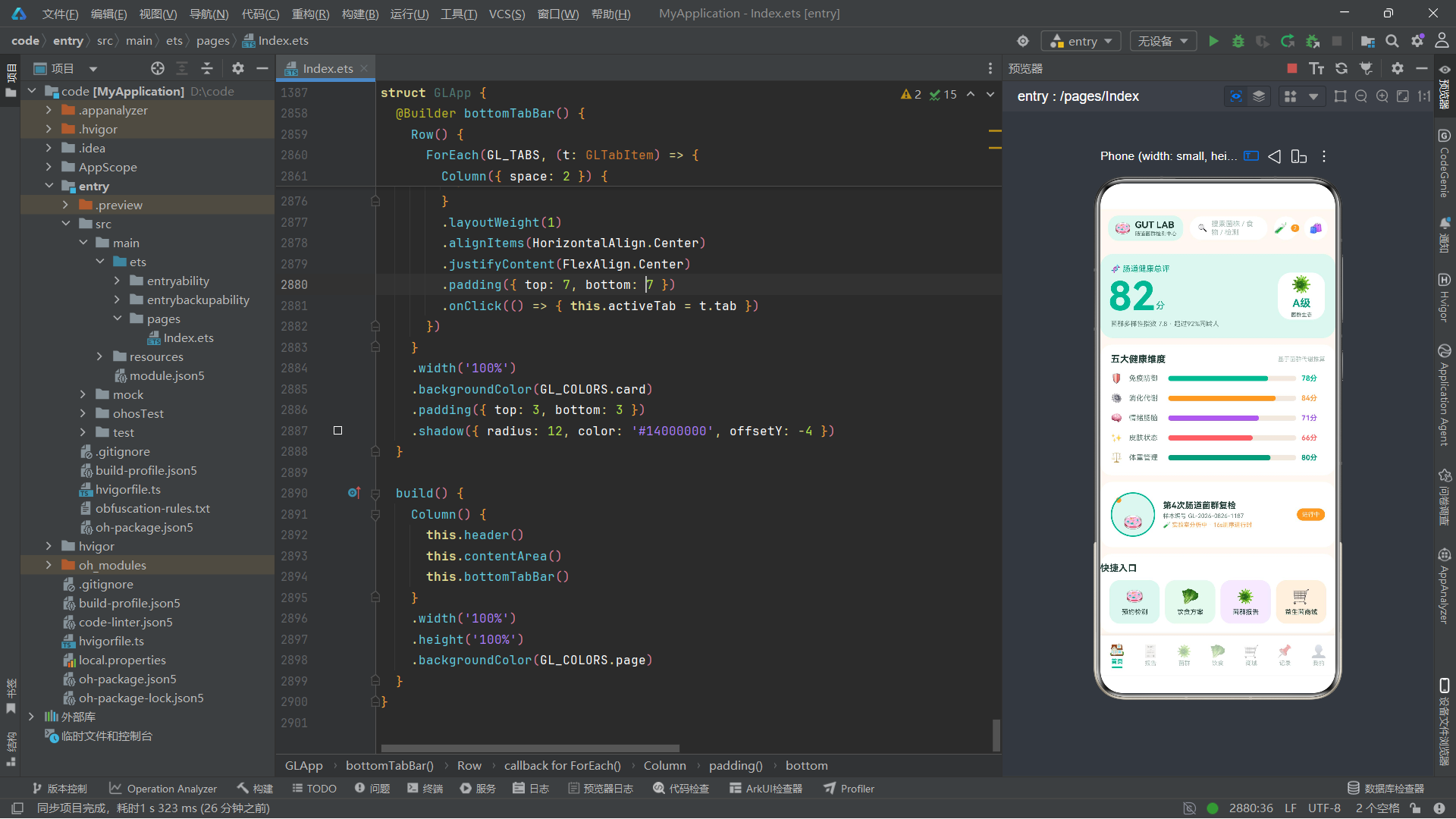
从动画层面来看,三组animateTo驱动的动画特效——菌泡上浮(translate, 2400ms, Alternate, EaseInOut)、培养皿旋转(rotate, 9000ms, Normal, Linear)、菌群脉冲(scale, 1500ms, Alternate, EaseOut)——分别赋予了首页总评分、在检样本和打卡图标以生命感。三组动画使用不同的duration、playMode和curve参数,呈现出各异其趣的动态效果,且全程不使用定时器,符合鸿蒙动画系统的最佳实践。
从UI层面来看,七个Tab页面各具特色:首页以健康总评为核心,配合五大维度进度条和快捷入口;报告页以历次报告列表和趋势双柱图为重点,展示历史检测数据的纵向对比;菌群页以菌泡特效和丰度横条图为亮点,可视化呈现9个主要菌属的生态分布;饮食页以时间轴、进度环和红绿灯宫格为特色,指导用户的日常饮食选择;商城页以冷链横幅和商品大卡列表为主体,展示益生菌补剂产品线;记录页以打卡时间轴和月度统计为内容,跟踪用户的日常打卡行为;我的页以个人档案和家庭管理为核心,支持多用户场景。
从技术深度来看,应用展示了ArkTS声明式UI的诸多核心能力:@State响应式状态管理、@Builder布局方法复用、animateTo属性动画、ForEach列表渲染、Scroll滚动容器、Stack层叠布局、Flex换行布局、Circle组件绘制圆环进度、条件渲染if-else、strokeDashArray实现弧线进度、layoutWeight按比例布局等。这些技术点的综合运用,使得一个约2900行的单文件应用能够呈现出完整的、功能丰富的、视觉精致的移动端交互体验。

作为“人工智能6S店”的官方数字引擎,为AI开发者与企业提供一个覆盖软硬件全栈、一站式门户。
更多推荐

 6
6 0
0- 0


 已为社区贡献44条内容

所有评论(0)