
HarmonyOS 6.1 实战:this.lists = this.lists.filter(...) 是不可变数据更新的标准写法,不直接修改原数组(如 splice),而是生成新数组赋值
每一段代码都是一个现场。开发者留下了数据结构作为指纹、状态声明作为足迹、事件回调作为动机。我们需要做的不是阅读代码,而是勘验代码——从线索中推理出设计意图,从证据中还原出架构决策的完整逻辑链。
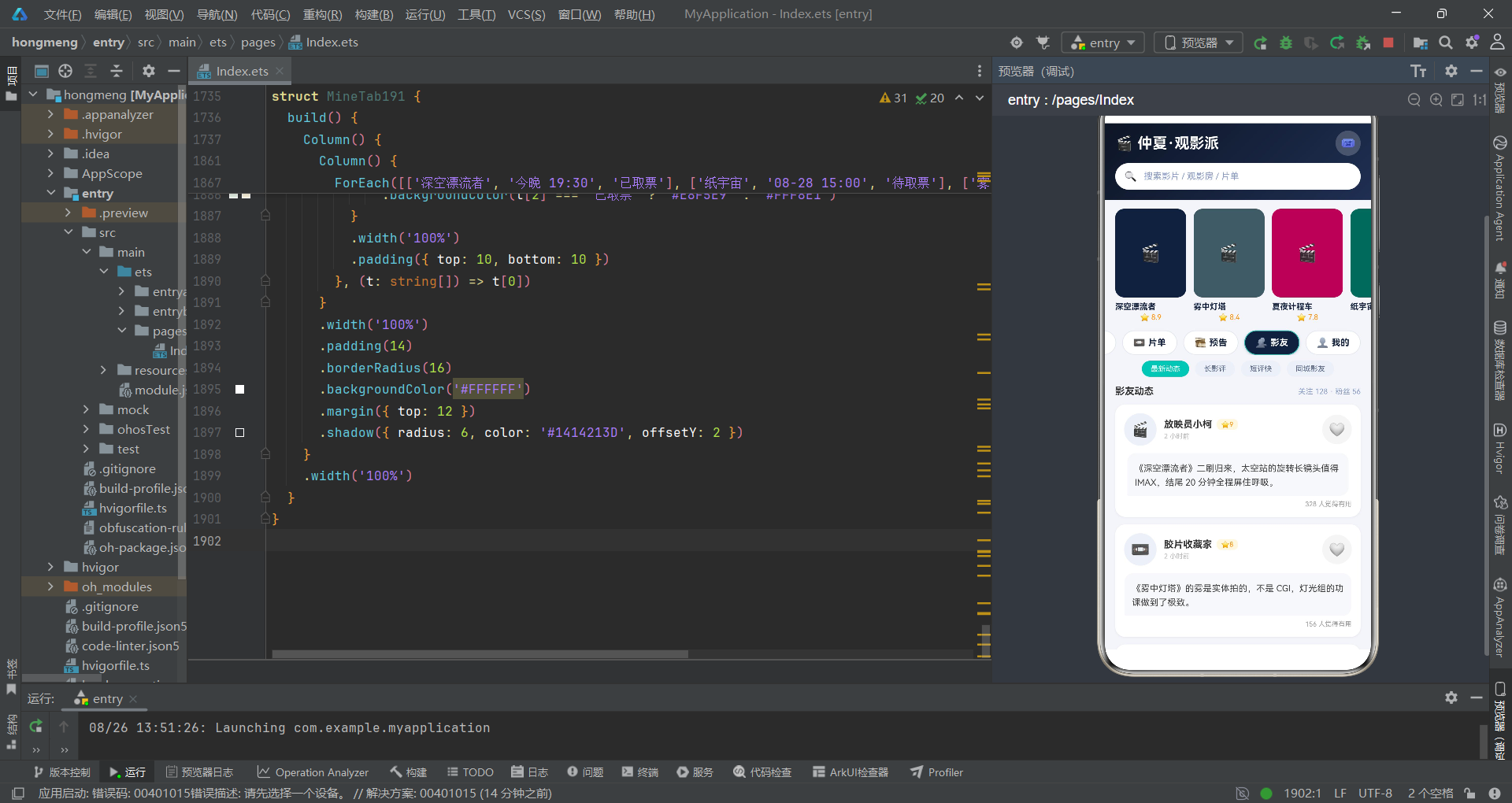
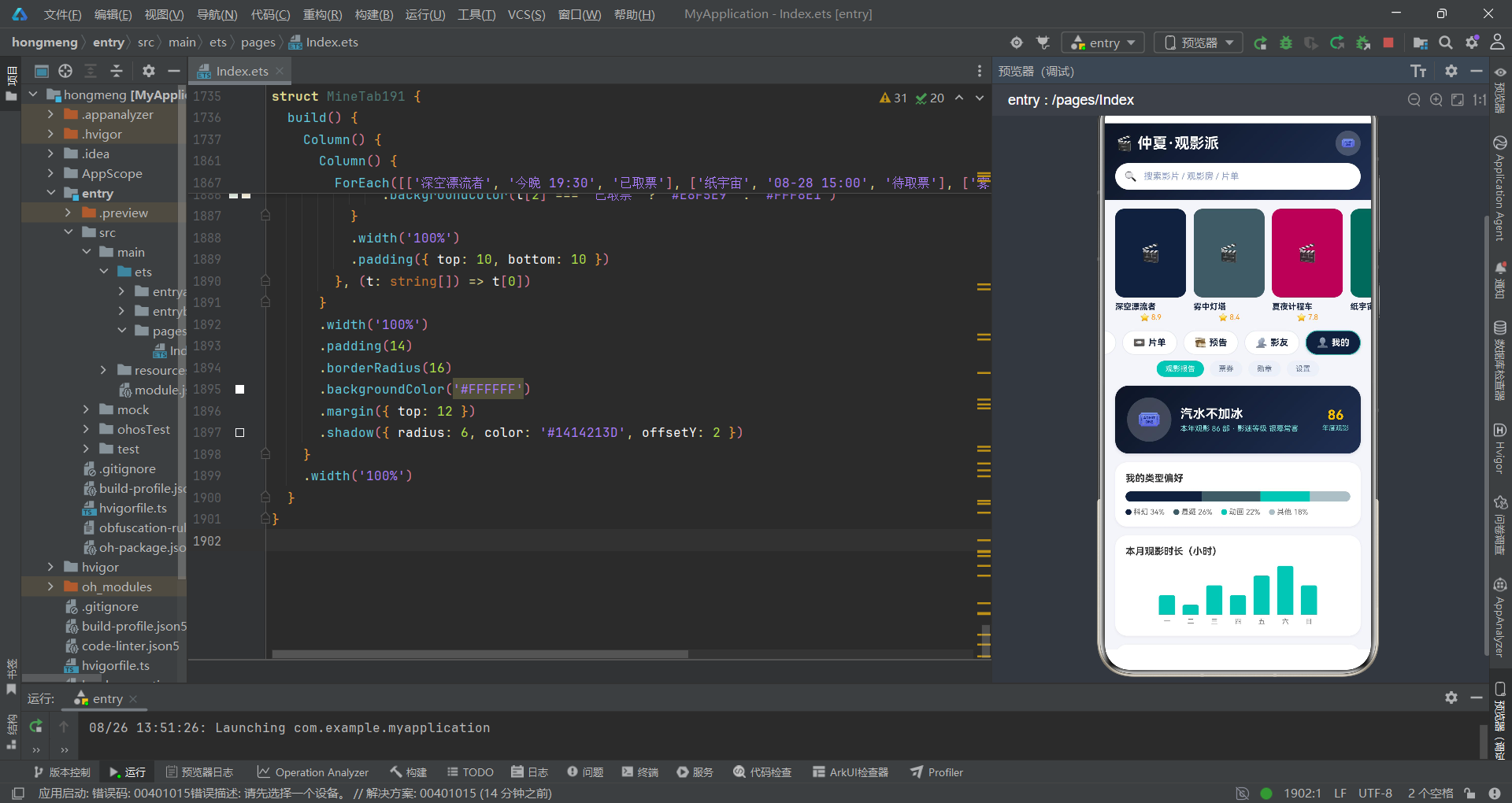
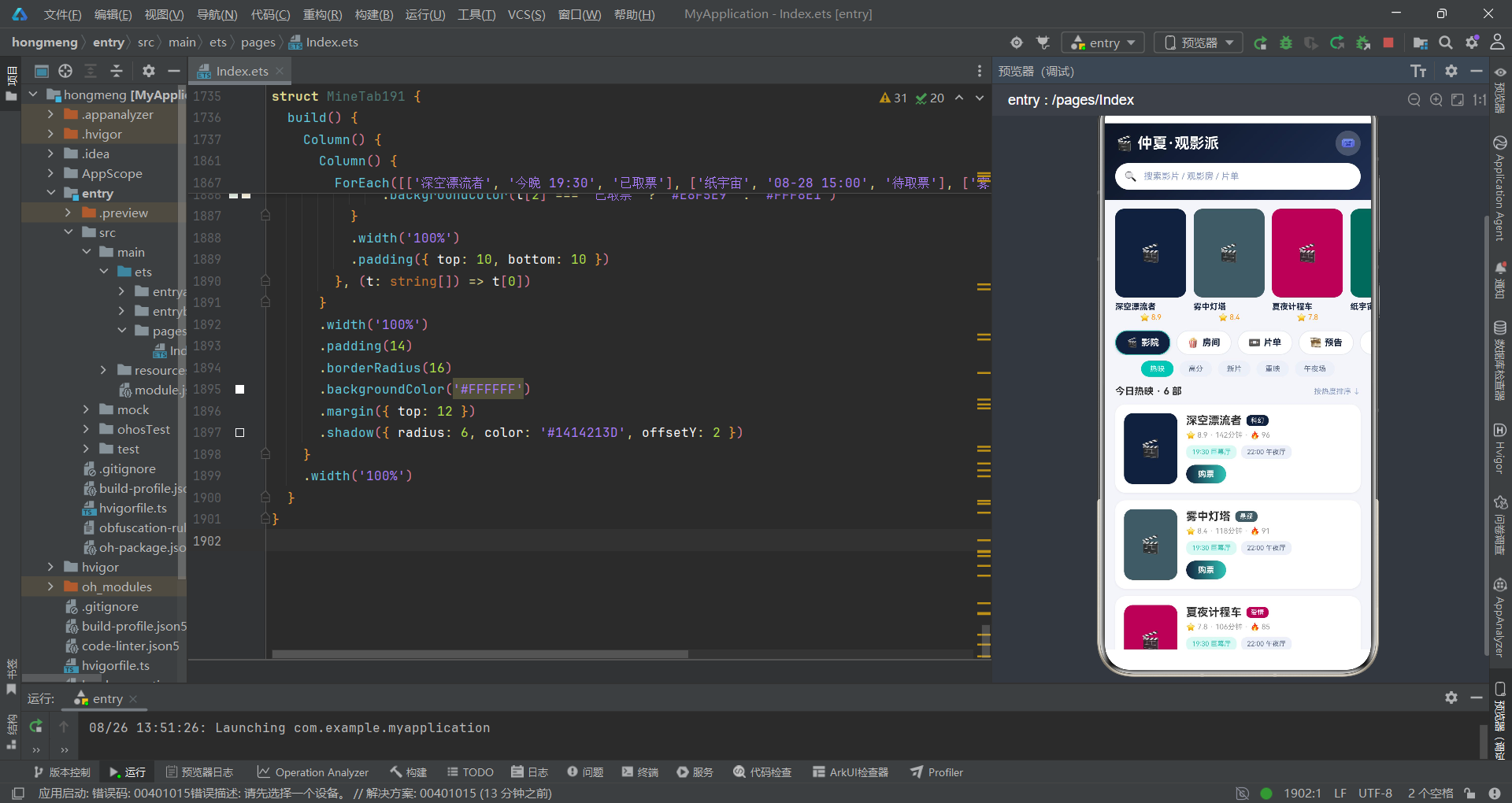
午夜蓝 #14213D 与荧光青 #2EC4B6 的配色不是审美选择,而是业务推理的结论。蓝色承担信息层的稳定感,青色标记交互层的活跃度,票根黄 #FFC300 则是唯一的价值锚点——它只出现在"年度观影数"上,暗示了观影统计是这个应用的核心叙事。
引言:案件背景与技术架构勘查
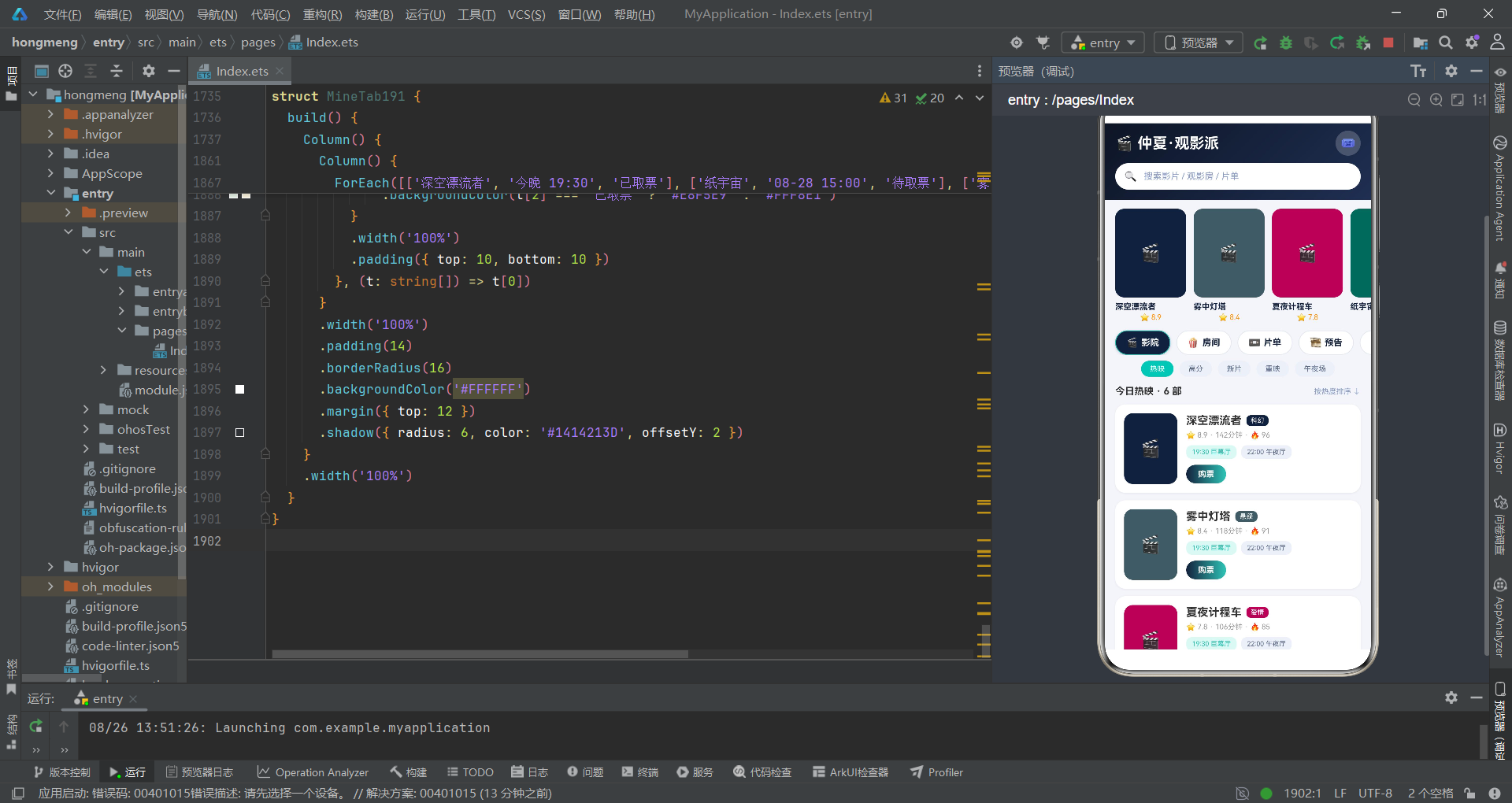
本案涉及一个名为"仲夏·观影派"的线上同步观影应用。场景设定为影友通过类似腾讯会议式的视频连麦架构,创建线上观影房进行同步播放、弹幕连麦、片单管理与观影派对。应用的配色方案采用午夜蓝、荧光青与票根黄的三色体系,整体视觉风格沉稳而富有夜场气质。我们需要勘查的,是这套代码背后隐藏的完整设计逻辑。
从技术架构层面来看,整个应用基于 ArkTS 声明式 UI 范式构建,采用 @Entry 注解挂载主入口组件 Index191。该组件内部维护了 curTab 和 subIdx 两个整型状态变量,分别控制主 Tab 切换和副分类芯片切换——这是本案最关键的线索之一:双行联动导航系统。此外,应用还维护了 lists 数组状态用于片单的增删改,以及五个 show* 布尔状态控制弹层显隐。所有交互弹层通过 bindSheet 和 bindContentCover 两种方式挂载,分别在抽屉和全屏遮罩两种模式间分工。
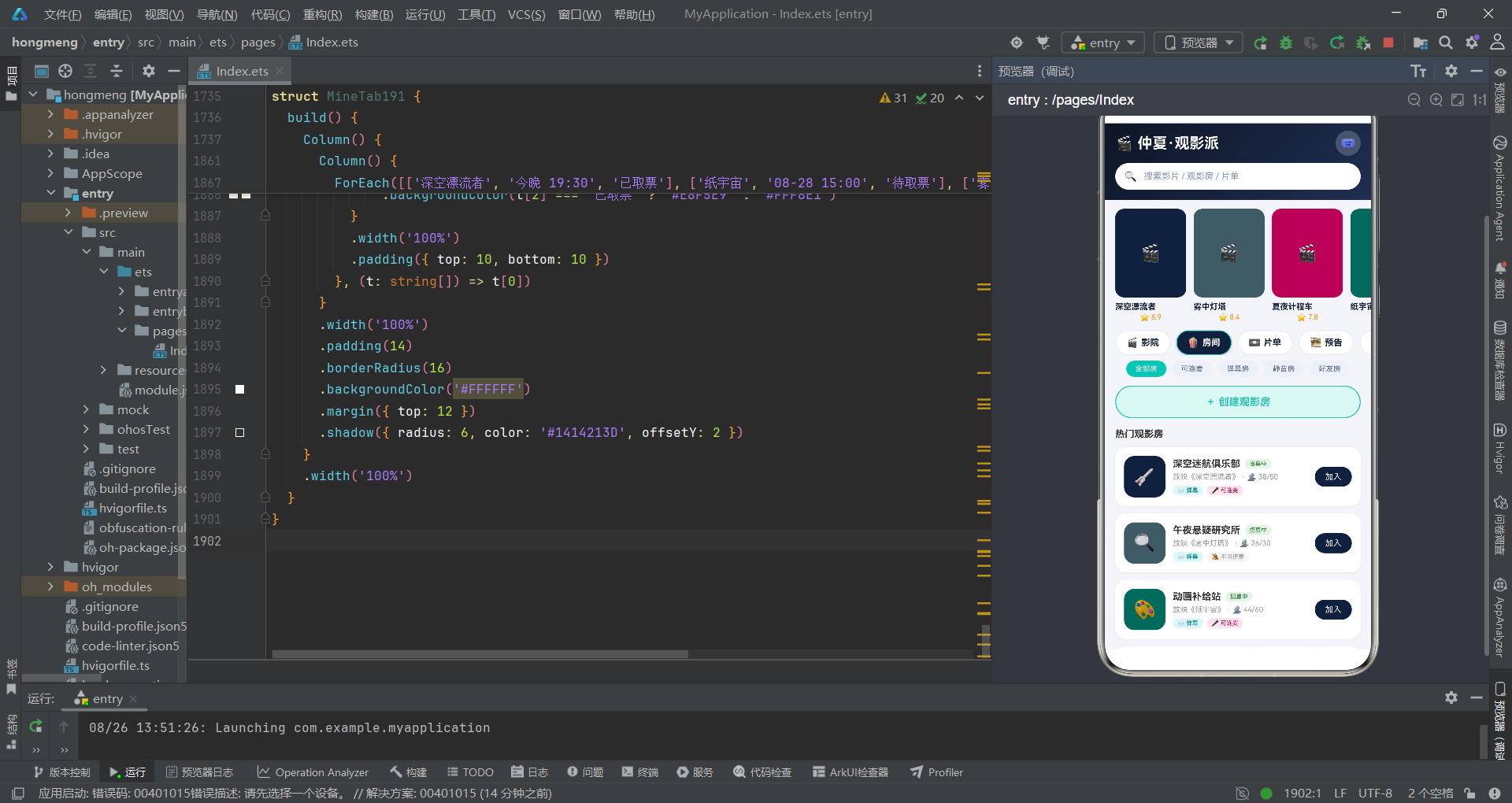
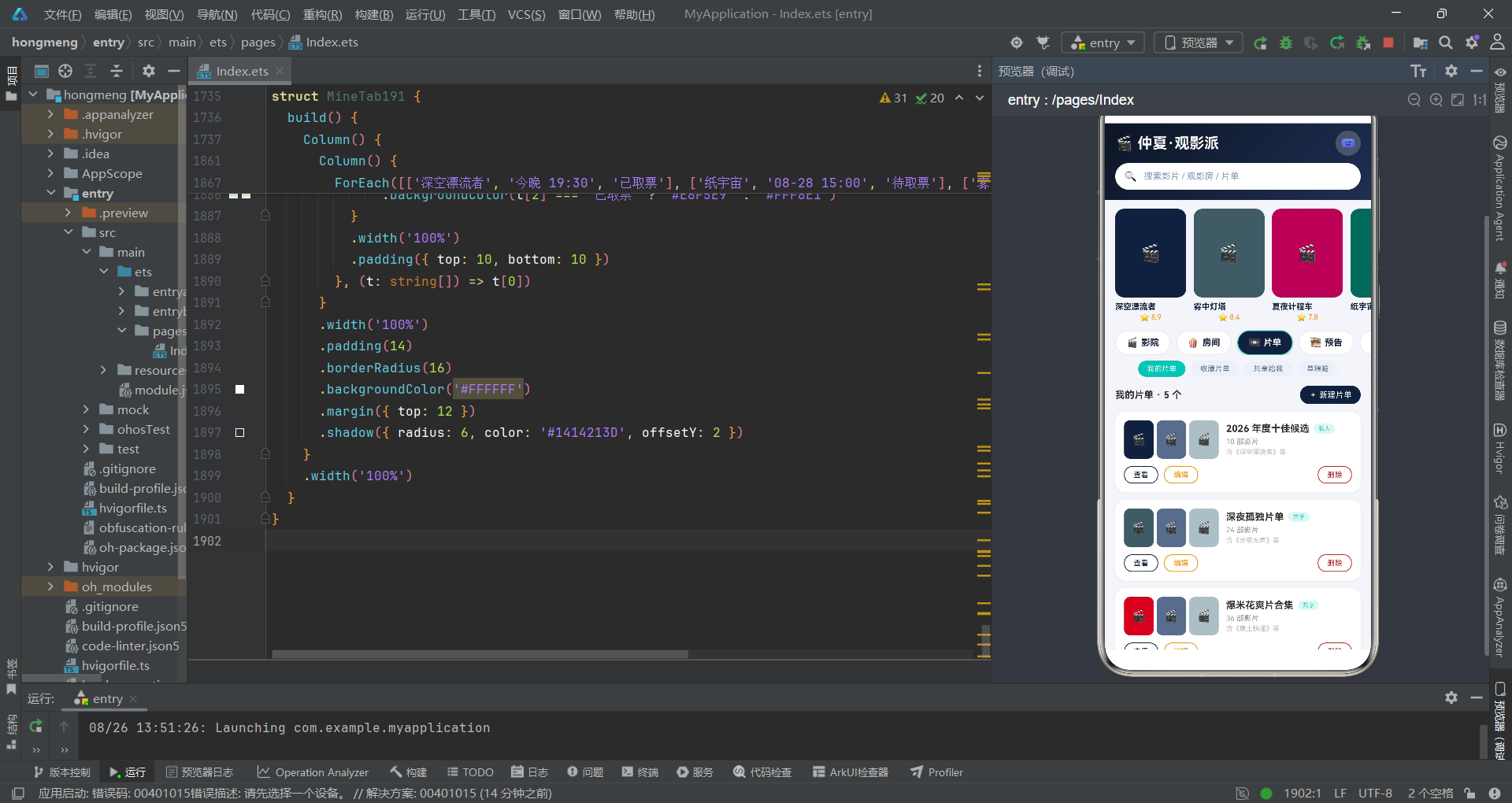
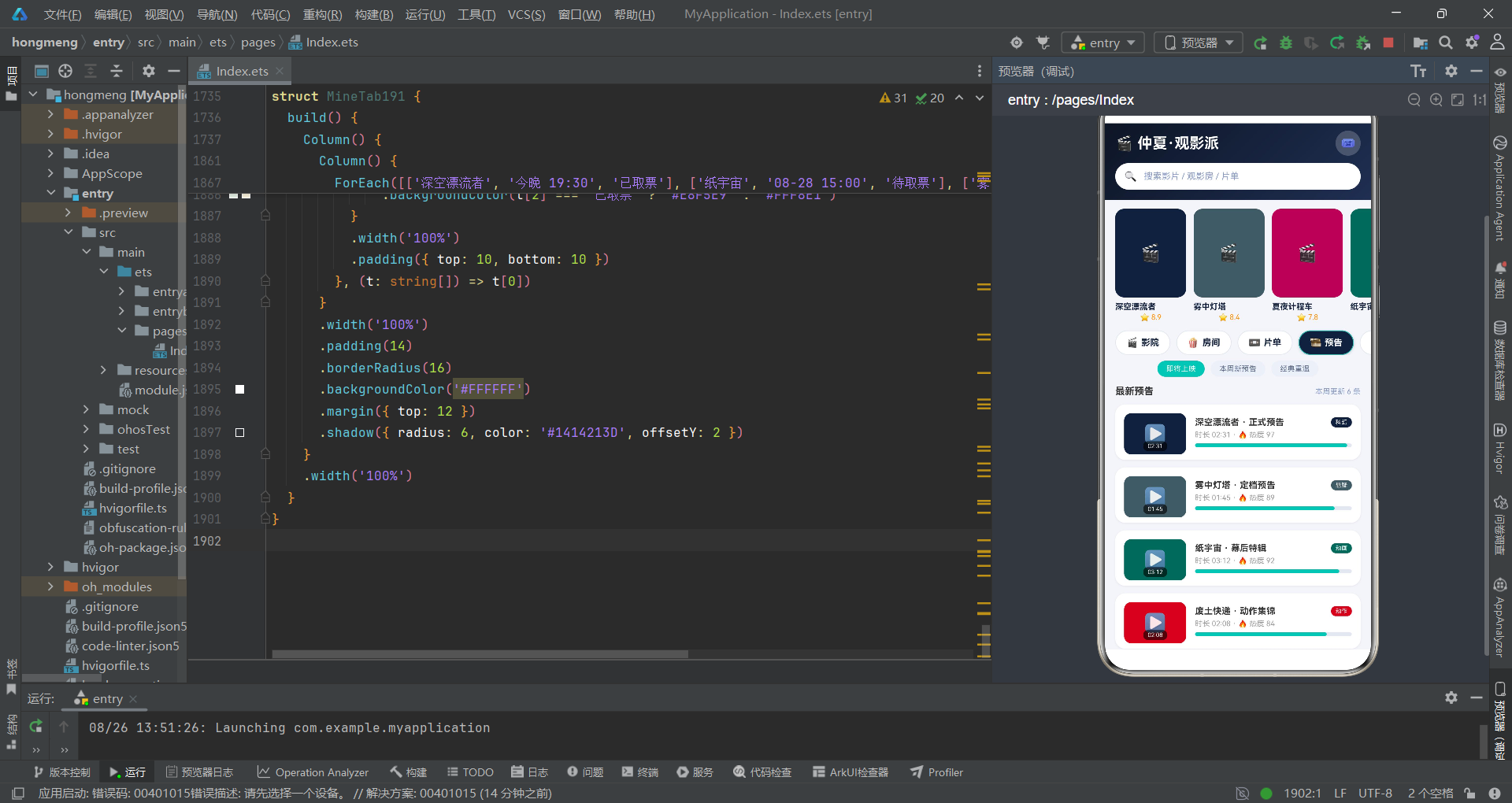
从业务设计层面来看,应用将观影生态拆解为六大模块:影院(购票与热映)、房间(观影房管理)、片单(收藏与协作)、预告(即将上映)、影友(社区动态)、我的(观影报告与票券)。这六个模块通过顶部双行导航串联——第一行是主胶囊 Tab,第二行是随主 Tab 联动切换的副分类芯片。这种双层导航设计是本案的核心推理对象:为什么不用底部 Tab?为什么副分类需要联动?答案就藏在代码的证据链中。
一、数据模型勘查:接口定义中的动机线索
1.1 接口指纹采集
勘查从数据结构入手。接口定义是开发者最早写下的代码,也是动机最直接的证据。
interface TabItem191 {
  icon: string;
  name: string;
}

interface Movie191 {
  id: string;
  title: string;
  type: string;
  color: string;
  score: number;
  dur: number;
  heat: number;
}

interface Room191 {
  id: string;
  name: string;
  movie: string;
  color: string;
  joined: number;
  seats: number;
  danmu: boolean;
  mic: boolean;
  emoji: string;
}

interface List191 {
  id: string;
  name: string;
  tag: string;
  count: number;
  color: string;
  films: string[];
}

interface Trailer191 {
  id: string;
  title: string;
  dur: string;
  type: string;
  color: string;
  hot: number;
}

interface Post191 {
  id: string;
  user: string;
  emoji: string;
  content: string;
  score: number;
  likes: number;
  color: string;
}

interface Week191 {
  day: string;
  hrs: number;
}

interface TShare191 {
  label: string;
  w: number;
  c: string;
}

interface Sess191 {
  time: string;
  hall: string;
  pct: number;
}
线索分析:Movie191 接口中同时包含 score(评分)和 heat(热度)两个字段——这两个维度的并存说明应用不仅关注影片质量,更关注影片的社交热度。Room191 中 danmu 和 mic 两个布尔字段是关键证据:观影房分四种模式——弹幕+连麦、仅弹幕、仅连麦、全静音。这四种组合暗示了观影房的社交强度分级。List191 中的 films: string[] 数组字段表明片单不仅仅是元数据容器,它还携带了影片列表本身——这意味着编辑片单时需要处理嵌套数组的变更。Sess191 中的 pct(上座率百分比)字段是另一个关键线索:观影房详情弹窗中需要展示场次余座,上座率超过 85% 时进度条变红——这是通过 s.pct > 85 ? '#C62828' : '#2EC4B6' 的条件表达式实现的预警机制。
证据链第一条:接口定义中的布尔字段数量直接反映了业务场景的分支复杂度。
Room191拥有两个布尔字段,意味着观影房有 2^2=4 种状态组合,这是导航系统必须双层联动的根本原因。
1.2 副分类芯片联动机制
const SUB0_191: string[] = ['热映', '高分', '新片', '重映', '午夜场'];
const SUB1_191: string[] = ['全部房', '可连麦', '弹幕房', '静音房', '好友房'];
const SUB2_191: string[] = ['我的片单', '收藏片单', '共享给我', '草稿箱'];
const SUB3_191: string[] = ['即将上映', '本周新预告', '经典重温'];
const SUB4_191: string[] = ['最新动态', '长影评', '短评快', '同城影友'];
const SUB5_191: string[] = ['观影报告', '票券', '勋章', '设置'];

function subChips191(i: number): string[] {
  if (i === 0) {
    return SUB0_191;
  }
  if (i === 1) {
    return SUB1_191;
  }
  if (i === 2) {
    return SUB2_191;
  }
  if (i === 3) {
    return SUB3_191;
  }
  if (i === 4) {
    return SUB4_191;
  }
  return SUB5_191;
}
这是本案的关键证据。subChips191 函数接受主 Tab 索引 i,返回对应的副分类数组。六个主 Tab 各有独立的副分类集——影院有 5 个、房间有 5 个、片单有 4 个、预告有 3 个、影友有 4 个、我的有 4 个。副分类数量不等,说明各模块的筛选粒度不同。注意 SUB1_191 中出现了"可连麦"和"弹幕房"——这与 Room191 的 danmu 和 mic 字段形成了完整的证据闭环:观影房的两种社交属性(弹幕、连麦)不仅在数据层有布尔字段标记,在导航层也有对应的筛选入口。
推理结论:双层联动导航系统的设计动机是"每个主模块需要独立的筛选维度"。如果用底部 Tab,副分类无处安放;如果副分类固定不变,无法匹配各模块的筛选差异。因此,顶部双行联动是唯一的合理解。
1.3 静态数据中的行为痕迹
const MOVIES191: Movie191[] = [
  { id: 'v1', title: '深空漂流者', type: '科幻', color: '#14213D', score: 8.9, dur: 142, heat: 96 },
  { id: 'v2', title: '雾中灯塔', type: '悬疑', color: '#455A64', score: 8.4, dur: 118, heat: 91 },
  { id: 'v3', title: '夏夜计程车', type: '爱情', color: '#AD1457', score: 7.8, dur: 106, heat: 85 },
  { id: 'v4', title: '纸宇宙', type: '动画', color: '#00695C', score: 9.1, dur: 98, heat: 94 },
  { id: 'v5', title: '废土快递', type: '动作', color: '#C62828', score: 7.5, dur: 131, heat: 82 },
  { id: 'v6', title: '长夜无声', type: '剧情', color: '#37474F', score: 8.6, dur: 156, heat: 78 }
];

const ROOMS191: Room191[] = [
  { id: 'w1', name: '深空迷航俱乐部', movie: '深空漂流者', color: '#14213D', joined: 38, seats: 50, danmu: true, mic: true, emoji: '🚀' },
  { id: 'w2', name: '午夜悬疑研究所', movie: '雾中灯塔', color: '#455A64', joined: 26, seats: 30, danmu: true, mic: false, emoji: '🔍' },
  { id: 'w3', name: '动画补给站', movie: '纸宇宙', color: '#00695C', joined: 44, seats: 60, danmu: true, mic: true, emoji: '🎨' },
  { id: 'w4', name: '深夜静音放映厅', movie: '长夜无声', color: '#37474F', joined: 18, seats: 20, danmu: false, mic: false, emoji: '🌙' },
  { id: 'w5', name: '爆米花动作夜', movie: '废土快递', color: '#C62828', joined: 31, seats: 40, danmu: true, mic: false, emoji: '💥' },
  { id: 'w6', name: '周五爱情专题', movie: '夏夜计程车', color: '#AD1457', joined: 22, seats: 30, danmu: true, mic: true, emoji: '💗' }
];

const POSTS191: Post191[] = [
  { id: 'o1', user: '放映员小柯', emoji: '🎬', content: '《深空漂流者》二刷归来,太空站旋转长镜头值得 IMAX,结尾 20 分钟全程屏住呼吸。', score: 9, likes: 328, color: '#14213D' },
  { id: 'o2', user: '胶片收藏家', emoji: '📼', content: '《雾中灯塔》的雾是实体拍的,不是 CGI,灯光组的功课做到了极致。', score: 8, likes: 156, color: '#455A64' },
  { id: 'o3', user: '爆米花队长', emoji: '🍿', content: '周五动作夜房间爆满,《废土快递》追逐戏全程弹幕刷屏,太欢乐了!', score: 7, likes: 89, color: '#C62828' },
  { id: 'o4', user: '纸片人太太', emoji: '🎨', content: '《纸宇宙》手绘帧数按秒计都是钱的味道,每一帧都想截图当壁纸。', score: 10, likes: 442, color: '#00695C' },
  { id: 'o5', user: '夜航西飞', emoji: '✈️', content: '《长夜无声》适合一个人在静音房看,看完在片尾字幕停留了很久。', score: 9, likes: 203, color: '#37474F' },
  { id: 'o6', user: '汽水不加冰', emoji: '🥤', content: '和对象连麦看《夏夜计程车》,片尾曲一响两个人都没说话,值回票价。', score: 8, likes: 176, color: '#AD1457' }
];
行为痕迹分析:六个观影房各对应一部影片,每部影片的 color 与对应观影房的 color 完全一致——这是颜色作为"身份指纹"的证据。六条影评中,用户"夜航西飞"提到"静音房",用户"汽水不加冰"提到"连麦看"——影评内容与观影房的 danmu/mic 属性形成了交叉印证。POSTS191 中每条影评的 color 也与对应影片一致,说明颜色在整个应用中是贯穿数据到 UI 的统一标识符。
证据链第二条:颜色不是视觉装饰,而是数据实体的唯一指纹。同一部电影、对应观影房、对应影评共享同一色值,形成跨模块的颜色追踪链。
二、主入口组件勘查:状态声明中的架构动机
2.1 状态变量清单
@Entry
@Component
struct Index191 {
  @State curTab: number = 0;
  @State subIdx: number = 0;
  @State lists: List191[] = LISTS191;
  @State showBookSheet: boolean = false;
  @State showCreateSheet: boolean = false;
  @State showEditSheet: boolean = false;
  @State showDelDialog: boolean = false;
  @State showDetailDialog: boolean = false;
  @State selRoom: Room191 = ROOMS191[0];
  @State selList: List191 = LISTS191[0];
  @State bkSess: number = 0;
  @State bkHall: number = 0;
  @State bkMic: boolean = true;
  @State bkSnack: boolean = false;
  @State bkCnt: number = 2;
  @State crMovie: number = 0;
  @State crTime: number = 0;
  @State crDanmu: boolean = true;
  @State crMic: boolean = false;
  @State crSeats: number = 30;
  @State edName: string = '';
  @State edTag: number = 0;
  @State edShare: boolean = true;
  @State delSync: boolean = true;
状态变量勘查结果:curTab 和 subIdx 是导航双引擎——前者驱动主 Tab 切换,后者驱动副分类芯片切换。注意一个关键设计:当主 Tab 切换时,subIdx 必须重置为 0,这发生在主 Tab 的 onClick 回调中(后文将证实)。lists 是唯一以完整数组形式存在的可变状态——它意味着片单模块支持增删改,而其他模块(影院、房间、预告等)的数据是只读静态常量。
购票相关的 bk* 系列状态有六个:场次、影厅偏好、连麦、零食、张数。创建观影房的 cr* 系列有五个。编辑片单的 ed* 系列有三个。删除确认的 delSync 是一个独立的"同步删除观影进度"开关。这些临时表单状态全部集中在主组件中,而非分散到各子组件——这是"状态上提"模式,确保了所有可变状态的单一追踪源。
推理结论:主组件是所有可变状态的唯一持有者。子组件是无状态的视图代理,通过构造参数和回调函数与主组件通信。这种模式确保了状态变更的可追溯性——任何 UI 变化都能追踪到一个
@State的变更点。
2.2 顶部导航栏的勘查
  build() {
    Column() {
      Column() {
        Row() {
          Text('🎬 仲夏·观影派')
            .fontSize(20)
            .fontWeight(FontWeight.Bold)
            .fontColor('#FFFFFF')
          Text('')
            .layoutWeight(1)
          Text('🎟️')
            .fontSize(16)
            .width(34)
            .height(34)
            .textAlign(TextAlign.Center)
            .borderRadius(17)
            .backgroundColor('#33FFFFFF')
        }
        .width('100%')

        Row() {
          Text('🔍')
            .fontSize(14)
            .margin({ left: 12 })
          Text(' 搜索影片 / 观影房 / 片单')
            .fontSize(12)
            .fontColor('#8A9BC4')
            .margin({ left: 6 })
        }
        .width('100%')
        .height(36)
        .borderRadius(18)
        .backgroundColor('#FFFFFF')
        .margin({ top: 10 })
      }
      .width('100%')
      .padding({ left: 14, right: 14, top: 10, bottom: 14 })
      .linearGradient({
        angle: 135,
        colors: [['#0D1526', 0], ['#1F2F52', 1]]
      }
顶部栏使用 #0D1526 到 #1F2F52 的 135 度线性渐变——比标准午夜蓝 #14213D 更深,营造夜场氛围。搜索框用白底圆角 18、高度 36,内部文字 #8A9BC4 是带蓝灰调的浅色——这不是标准的灰色占位符,而是经过调色的蓝灰,与夜场蓝形成同色系层次。右侧 🎟️ 票务图标用半透明白 #33FFFFFF 作底——33 是十六进制的透明度前缀,约 20% 不透明度。
2.3 双行联动导航的核心证据
      Scroll() {
        Row({ space: 8 }) {
          ForEach(TABS191, (t: TabItem191, i: number) => {
            Row({ space: 4 }) {
              Text(t.icon)
                .fontSize(13)
              Text(t.name)
                .fontSize(12)
                .fontWeight(FontWeight.Bold)
                .fontColor(this.curTab === i ? '#FFFFFF' : '#14213D')
            }
            .padding({ left: 14, right: 14, top: 8, bottom: 8 })
            .borderRadius(18)
            .backgroundColor(this.curTab === i ? '#14213D' : '#FFFFFF')
            .border({
              width: 1,
              color: this.curTab === i ? '#2EC4B6' : '#E3E7F0'
            })
            .shadow({
              radius: this.curTab === i ? 8 : 0,
              color: this.curTab === i ? '#3314213D' : '#00000000',
              offsetY: 3
            })
            .onClick(() => {
              this.curTab = i;
              this.subIdx = 0;
            })
          }, (t: TabItem191) => t.name)
        }
        .padding({ left: 14, right: 14 })
      }
      .scrollable(ScrollDirection.Horizontal)
      .scrollBar(BarState.Off)
      .width('100%')
      .margin({ top: 12 })

      Scroll() {
        Row({ space: 8 }) {
          ForEach(subChips191(this.curTab), (c: string, i: number) => {
            Text(c)
              .fontSize(10)
              .fontColor(this.subIdx === i ? '#FFFFFF' : '#5C6B8A')
              .padding({ left: 12, right: 12, top: 5, bottom: 5 })
              .borderRadius(13)
              .backgroundColor(this.subIdx === i ? '#2EC4B6' : '#EDF0F7')
              .onClick(() => {
                this.subIdx = i;
              })
          }, (c: string) => c + this.curTab)
        }
        .padding({ left: 14, right: 14 })
      }
      .scrollable(ScrollDirection.Horizontal)
      .scrollBar(BarState.Off)
      .width('100%')
      .margin({ top: 8 })
这是整个案件的核心证据。主 Tab 行用 Scroll 水平滚动,选中项为午夜蓝底白字加荧光青边框,并附带 radius: 8 的阴影投影——"浮起"效果。关键证据在 onClick 回调中:点击主 Tab 时同时执行 this.curTab = i 和 this.subIdx = 0。第二行副分类芯片通过 subChips191(this.curTab) 动态获取当前主 Tab 对应的副分类数组——当 curTab 变化时,ForEach 的数据源自动变化,副分类行重新渲染。
注意副分类的 ForEach 键值生成函数是 c + this.curTab——这意味着同一个副分类文本在不同主 Tab 下被视为不同元素,确保切换主 Tab 时副分类行完全重建而非复用。副分类选中态用荧光青 #2EC4B6 标记,与主 Tab 的午夜蓝形成冷暖对比——蓝色管结构,青色管筛选。
证据链第三条:
onClick中的this.subIdx = 0是防止"幽灵选中"的关键防线。如果没有这行代码,从影院 Tab(5 个副分类,选中第 3 个)切换到预告 Tab(只有 3 个副分类),subIdx仍为 2,但语义已经错位。重置为 0 确保了每次切换的干净状态。
2.4 内容区路由与弹层挂载
      Scroll() {
        Column() {
          if (this.curTab === 0) {
            CinemaTab191({
              onBook: () => {
                this.showBookSheet = true;
              }
            })
          } else if (this.curTab === 1) {
            RoomTab191({
              onCreate: () => {
                this.showCreateSheet = true;
              },
              onDetail: (r: Room191) => {
                this.selRoom = r;
                this.showDetailDialog = true;
              }
            })
          } else if (this.curTab === 2) {
            ListTab191({
              lists: this.lists,
              onEdit: (l: List191) => {
                this.selList = l;
                this.edName = l.name;
                this.showEditSheet = true;
              },
              onDel: (l: List191) => {
                this.selList = l;
                this.showDelDialog = true;
              }
            })
          } else if (this.curTab === 3) {
            TrailerTab191()
          } else if (this.curTab === 4) {
            FriendTab191()
          } else {
            MineTab191()
          }
        }
        .width('100%')
        .padding({ left: 14, right: 14, top: 12, bottom: 24 })
      }
      .scrollable(ScrollDirection.Vertical)
      .scrollBar(BarState.Off)
      .layoutWeight(1)
      .align(Alignment.TopStart)
    }
    .width('100%')
    .height('100%')
    .backgroundColor('#F4F5FA')
    .bindSheet($$this.showBookSheet, this.bookSheet191(), {
      height: 580,
      dragBar: true,
      showClose: false,
      backgroundColor: '#FFFFFF'
    })
    .bindSheet($$this.showCreateSheet, this.createSheet191(), {
      height: 560,
      dragBar: true,
      showClose: false,
      backgroundColor: '#FFFFFF'
    })
    .bindSheet($$this.showEditSheet, this.editSheet191(), {
      height: 500,
      dragBar: true,
      showClose: false,
      backgroundColor: '#FFFFFF'
    })
    .bindContentCover($$this.showDelDialog, this.delDialog191(), {
    })
    .bindContentCover($$this.showDetailDialog, this.detailDialog191(), {
    })
  }
内容区使用 if-else if 链进行条件渲染——与 190.ets 的模式完全一致,但有一个关键差异:ListTab191 接收 lists: this.lists 作为构造参数,而非像其他子组件那样自包含静态数据。这是本案的重要线索:lists 是可变状态,子组件需要通过 @Prop 接收最新数组。而 CinemaTab191、TrailerTab191、FriendTab191 不接收任何数据参数——它们直接引用模块级静态常量。弹层挂载方面,三个 bindSheet 的 height 分别为 580、560、500——购票抽屉最高(因为表单最复杂),编辑片单最矮。两个 bindContentCover 用于删除和详情——破坏性操作和展示性操作都需要全屏遮罩。
证据链第四条:子组件是否接收构造参数,直接暴露了该模块的数据可变性。接收参数的模块有增删改需求,不接收的模块是只读展示。
ListTab191是唯一的"可变数据模块"。
三、购票抽屉勘查:表单交互中的计价逻辑
3.1 场次选择与偏好
  @Builder
  bookSheet191() {
    Column() {
      Row() {
        Column() {
          Text('')
            .width(36)
            .height(4)
            .borderRadius(2)
            .backgroundColor('#E0E0E0')
        }
        .width('100%')
        .alignItems(HorizontalAlign.Center)
        .margin({ top: 8 })
      }
      .width('100%')

      Row({ space: 10 }) {
        Text('🎬')
          .fontSize(24)
          .width(52)
          .height(68)
          .textAlign(TextAlign.Center)
          .borderRadius(10)
          .backgroundColor('#14213D')
        Column() {
          Text('深空漂流者')
            .fontSize(16)
            .fontWeight(FontWeight.Bold)
            .fontColor('#14213D')
          Text('科幻 · 142分钟 · ⭐8.9')
            .fontSize(10)
            .fontColor('#999999')
            .margin({ top: 3 })
        }
        .alignItems(HorizontalAlign.Start)
        .layoutWeight(1)
      }
      .width('100%')
      .margin({ top: 10 })

      Text('选择场次')
        .fontSize(13)
        .fontWeight(FontWeight.Bold)
        .fontColor('#333333')
        .width('100%')
        .margin({ top: 16 })
      Scroll() {
        Row({ space: 8 }) {
          ForEach(SEATCHIPS191, (c: string, i: number) => {
            Column() {
              Text(c.split(' ')[0])
                .fontSize(12)
                .fontWeight(FontWeight.Bold)
                .fontColor(this.bkSess === i ? '#FFFFFF' : '#14213D')
              Text(c.split(' ')[1])
                .fontSize(9)
                .fontColor(this.bkSess === i ? '#7FE8DE' : '#999999')
                .margin({ top: 2 })
            }
            .padding({ left: 14, right: 14, top: 8, bottom: 8 })
            .borderRadius(10)
            .backgroundColor(this.bkSess === i ? '#14213D' : '#EDF0F7')
            .border({ width: 1, color: this.bkSess === i ? '#2EC4B6' : '#E3E7F0' })
            .onClick(() => {
              this.bkSess = i;
            })
          }, (c: string) => c)
        }
      }
      .scrollable(ScrollDirection.Horizontal)
      .scrollBar(BarState.Off)
      .width('100%')
      .margin({ top: 8 })
购票抽屉的顶部是影片信息摘要——注意这里的影片信息是硬编码的"深空漂流者",而非从 selRoom 或某个选中状态动态获取。这是一个值得注意的线索:购票抽屉是"当前热映"的快捷入口,影片信息在抽屉中是固定的。场次选择器用 c.split(' ') 将场次字符串拆分为时间和影厅两部分——时间用粗体,影厅用细体,选中时时间变白、影厅变为荧光青的浅色变体 #7FE8DE。这种同色系的不同明度变化,是视觉层级最精细的表达。
3.2 计价逻辑的最终证据
      Text('合计 ¥' + (this.bkCnt * 48 + (this.bkSnack ? 40 : 0)) + ' · 确认购票')
        .fontSize(15)
        .fontWeight(FontWeight.Bold)
        .fontColor('#FFFFFF')
        .width('100%')
        .height(46)
        .textAlign(TextAlign.Center)
        .borderRadius(23)
        .linearGradient({
          angle: 90,
          colors: [['#14213D', 0], ['#2EC4B6', 1]]
        })
        .margin({ top: 24 })
        .onClick(() => {
          this.showBookSheet = false;
        })
这是整个购票流程的终极证据。计价公式为 this.bkCnt * 48 + (this.bkSnack ? 40 : 0)——单张票价 48 元,零食礼包 40 元。这个内联表达式直接写在 Text 的字符串模板中,意味着每次 bkCnt 或 bkSnack 变化时,@State 响应式机制会自动重新计算并更新显示。按钮渐变从午夜蓝过渡到荧光青——这是整个应用中最重要的渐变方向,蓝色代表"确认"的沉稳,青色代表"行动"的活跃。点击后仅关闭抽屉,没有实际下单逻辑——这验证了应用是 UI 原型而非完整后端。
证据链第五条:计价逻辑以内联表达式形式存在于 UI 声明中,依赖
@State响应式自动更新。这是声明式 UI 范式的核心优势——数据驱动视图,开发者无需手动调用setText或invalidate。
四、片单模块勘查:可变数据的增删改证据
4.1 片单列表组件
@Component
struct ListTab191 {
  @Prop lists: List191[];
  onEdit: (l: List191) => void = () => {
  };
  onDel: (l: List191) => void = () => {
  };

  build() {
    Column() {
      Row() {
        Text('我的片单 · ' + this.lists.length + ' 个')
          .fontSize(13)
          .fontWeight(FontWeight.Bold)
          .fontColor('#333333')
        Text('')
          .layoutWeight(1)
        Text('+ 新建片单')
          .fontSize(11)
          .fontColor('#FFFFFF')
          .padding({ left: 12, right: 12, top: 6, bottom: 6 })
          .borderRadius(13)
          .backgroundColor('#14213D')
      }
      .width('100%')

      ForEach(this.lists, (l: List191) => {
        Column() {
          Row() {
            Row({ space: 4 }) {
              Text('🎬')
                .fontSize(16)
                .width(40)
                .height(52)
                .textAlign(TextAlign.Center)
                .borderRadius(8)
                .backgroundColor(l.color)
              Text('🎬')
                .fontSize(16)
                .width(40)
                .height(52)
                .textAlign(TextAlign.Center)
                .borderRadius(8)
                .backgroundColor('#5C6B8A')
              Text('🎬')
                .fontSize(16)
                .width(40)
                .height(52)
                .textAlign(TextAlign.Center)
                .borderRadius(8)
                .backgroundColor('#B0BEC5')
            }
            Column() {
              Row({ space: 6 }) {
                Text(l.name)
                  .fontSize(13)
                  .fontWeight(FontWeight.Bold)
                  .fontColor('#333333')
                Text(l.tag)
                  .fontSize(8)
                  .fontColor('#2EC4B6')
                  .padding({ left: 6, right: 6, top: 2, bottom: 2 })
                  .borderRadius(6)
                  .backgroundColor('#E0F7F4')
              }
              Text(l.count + ' 部影片')
                .fontSize(10)
                .fontColor('#999999')
                .margin({ top: 4 })
              Text('含《' + l.films[0] + '》等')
                .fontSize(9)
                .fontColor('#BBBBBB')
                .margin({ top: 3 })
            }
            .alignItems(HorizontalAlign.Start)
            .layoutWeight(1)
            .margin({ left: 10 })
          }
          .width('100%')

          Row({ space: 8 }) {
            Text('查看')
              .fontSize(10)
              .fontColor('#14213D')
              .padding({ left: 12, right: 12, top: 5, bottom: 5 })
              .borderRadius(11)
              .border({ width: 1, color: '#14213D' })
            Text('编辑')
              .fontSize(10)
              .fontColor('#FF8F00')
              .padding({ left: 12, right: 12, top: 5, bottom: 5 })
              .borderRadius(11)
              .border({ width: 1, color: '#FF8F00' })
              .onClick(() => {
                this.onEdit(l);
              })
            Text('')
              .layoutWeight(1)
            Text('删除')
              .fontSize(10)
              .fontColor('#C62828')
              .padding({ left: 12, right: 12, top: 5, bottom: 5 })
              .borderRadius(11)
              .border({ width: 1, color: '#C62828' })
              .onClick(() => {
                this.onDel(l);
              })
          }
          .width('100%')
          .margin({ top: 10 })
        }
        .width('100%')
        .padding(12)
        .borderRadius(14)
        .backgroundColor('#FFFFFF')
        .margin({ top: 10 })
        .shadow({ radius: 6, color: '#1414213D', offsetY: 2 })
      }, (l: List191) => l.id)
    }
    .width('100%')
  }
}
关键证据:@Prop lists: List191[]——这是整个应用中唯一使用 @Prop 接收数组数据的子组件。@Prop 在 ArkTS 中是单向只读传递:父组件修改 lists 后,子组件自动收到新数组并重新渲染,但子组件自身不能修改 lists。片单卡片中每张有三个电影图标占位——第一个用片单自身颜色 l.color,后两个用渐变色 #5C6B8A 和 #B0BEC5,暗示多部电影封面。操作按钮分为三色:查看(午夜蓝)、编辑(橙色 #FF8F00)、删除(红色 #C62828)——三色对应三种操作权重:安全、注意、危险。
4.2 删除片单的确认逻辑
  @Builder
  delDialog191() {
    Column() {
      Column() {
        Text('📼')
          .fontSize(34)
          .width(64)
          .height(64)
          .textAlign(TextAlign.Center)
          .borderRadius(16)
          .backgroundColor(this.selList.color)
          .margin({ top: 24 })
        Text(this.selList.name)
          .fontSize(16)
          .fontWeight(FontWeight.Bold)
          .fontColor('#333333')
          .margin({ top: 10 })
        Text(this.selList.count + ' 部影片 · ' + this.selList.tag + '片单')
          .fontSize(11)
          .fontColor('#999999')
          .margin({ top: 4 })
      }
      .width('100%')
      .alignItems(HorizontalAlign.Center)

      Text('删除后片单及其排序信息将被移除,无法恢复。')
        .fontSize(12)
        .fontColor('#C62828')
        .textAlign(TextAlign.Center)
        .margin({ top: 14 })

      Row() {
        Text('同步删除观影进度')
          .fontSize(12)
          .fontColor('#333333')
        Text('')
          .layoutWeight(1)
        Toggle({ type: ToggleType.Switch, isOn: this.delSync })
          .onChange((v: boolean) => {
            this.delSync = v;
          })
      }
      .width('100%')
      .padding({ left: 16, right: 16 })
      .margin({ top: 14 })

      Row({ space: 12 }) {
        Text('取消')
          .fontSize(14)
          .fontWeight(FontWeight.Bold)
          .fontColor('#666666')
          .layoutWeight(1)
          .height(42)
          .textAlign(TextAlign.Center)
          .borderRadius(21)
          .backgroundColor('#F5F5F5')
          .onClick(() => {
            this.showDelDialog = false;
          })
        Text('确认删除')
          .fontSize(14)
          .fontWeight(FontWeight.Bold)
          .fontColor('#FFFFFF')
          .layoutWeight(1)
          .height(42)
          .textAlign(TextAlign.Center)
          .borderRadius(21)
          .backgroundColor('#C62828')
          .onClick(() => {
            this.lists = this.lists.filter((x: List191) => {
              return x.id !== this.selList.id;
            });
            this.showDelDialog = false;
          })
      }
      .width('100%')
      .padding({ left: 16, right: 16 })
      .margin({ top: 20, bottom: 24 })
    }
    .width('86%')
    .borderRadius(20)
    .backgroundColor('#FFFFFF')
  }
删除确认对话框中有一个 delSync 的 Toggle 开关——“同步删除观影进度”。这是一个被容易忽略但极为重要的证据:删除片单时,片单关联的观影进度数据是否一并清除,是一个用户需要知情同意的决策。确认删除的 onClick 回调中执行了 this.lists = this.lists.filter(...)——生成一个不包含被删片单的新数组,赋值回 @State lists。这一赋值触发了响应式更新:ListTab191 的 @Prop lists 自动收到新数组,ForEach 重新渲染,被删的片单从列表中消失。整个数据流从主组件出发,经过 filter 变换,通过 @Prop 传递到子组件,最终反映到 UI——单向数据流的完整闭环。
证据链第六条:
this.lists = this.lists.filter(...)是不可变数据更新的标准写法。不直接修改原数组(如splice),而是生成新数组赋值——这是 ArkTS 响应式系统能够检测到变化的前提。
4.3 编辑片单的数据更新
          .onClick(() => {
            const nl: List191 = {
              id: this.selList.id,
              name: this.edName === '' ? this.selList.name : this.edName,
              tag: ['私人', '共享', '共享'][this.edTag],
              count: this.selList.count,
              color: this.selList.color,
              films: this.selList.films
            };
            this.lists = this.lists.map((x: List191) => {
              return x.id === nl.id ? nl : x;
            });
            this.showEditSheet = false;
          })
编辑保存逻辑使用了 map 而非 filter——遍历所有片单,匹配到目标 ID 时用新对象替换,其余保持不变。注意 name 字段的处理:this.edName === '' ? this.selList.name : this.edName——如果用户未输入新名称,保留原名称。tag 字段通过数组索引 ['私人', '共享', '共享'][this.edTag] 映射——注意索引 1 和 2 都映射为"共享",说明"好友可见"和"公开"在后端存储中共享同一个标签。这种"前端多选后端合并"的设计是数据归一化的常见手法。
五、社区模块勘查:点赞交互的证据
5.1 影友动态与点赞逻辑
@Component
struct FriendTab191 {
  @State likedIds: string[] = [];

  build() {
    Column() {
      Row() {
        Text('影友动态')
          .fontSize(13)
          .fontWeight(FontWeight.Bold)
          .fontColor('#333333')
        Text('')
          .layoutWeight(1)
        Text('关注 128 · 粉丝 56')
          .fontSize(10)
          .fontColor('#8A9BC4')
      }
      .width('100%')

      ForEach(POSTS191, (p: Post191) => {
        Column() {
          Row() {
            Text(p.emoji)
              .fontSize(20)
              .width(44)
              .height(44)
              .textAlign(TextAlign.Center)
              .borderRadius(22)
              .backgroundColor('#EDF0F7')
            Column() {
              Row({ space: 6 }) {
                Text(p.user)
                  .fontSize(13)
                  .fontWeight(FontWeight.Bold)
                  .fontColor('#333333')
                Text('⭐' + p.score)
                  .fontSize(9)
                  .fontColor('#FF8F00')
                  .padding({ left: 6, right: 6, top: 2, bottom: 2 })
                  .borderRadius(6)
                  .backgroundColor('#FFF8E1')
              }
              Text('2 小时前')
                .fontSize(9)
                .fontColor('#BBBBBB')
                .margin({ top: 3 })
            }
            .alignItems(HorizontalAlign.Start)
            .layoutWeight(1)
            .margin({ left: 10 })

            Text(isLiked191(this.likedIds, p.id) ? '❤️' : '🤍')
              .fontSize(18)
              .width(40)
              .height(40)
              .textAlign(TextAlign.Center)
              .borderRadius(20)
              .backgroundColor(isLiked191(this.likedIds, p.id) ? '#FCE4EC' : '#F5F5F5')
              .onClick(() => {
                this.likedIds = toggleLike191(this.likedIds, p.id);
              })
          }
          .width('100%')

          Text(p.content)
            .fontSize(12)
            .fontColor('#444444')
            .lineHeight(19)
            .padding({ left: 10, right: 10, top: 10, bottom: 10 })
            .borderRadius({ topLeft: 12, topRight: 12, bottomLeft: 2, bottomRight: 12 })
            .backgroundColor('#F7F8FC')
            .margin({ top: 10 })

          Row() {
            Text('')
              .layoutWeight(1)
            Text((p.likes + (isLiked191(this.likedIds, p.id) ? 1 : 0)) + ' 人觉得有用')
              .fontSize(9)
              .fontColor('#999999')
          }
          .width('100%')
          .margin({ top: 6 })
        }
        .width('100%')
        .padding(12)
        .borderRadius(14)
        .backgroundColor('#FFFFFF')
        .margin({ top: 10 })
        .shadow({ radius: 6, color: '#1414213D', offsetY: 2 })
      }, (p: Post191) => p.id)
    }
    .width('100%')
  }
}

function isLiked191(ids: string[], id: string): boolean {
  return ids.indexOf(id) >= 0;
}

function toggleLike191(ids: string[], id: string): string[] {
  if (ids.indexOf(id) >= 0) {
    return ids.filter((x: string) => {
      return x !== id;
    });
  }
  return ids.concat([id]);
}
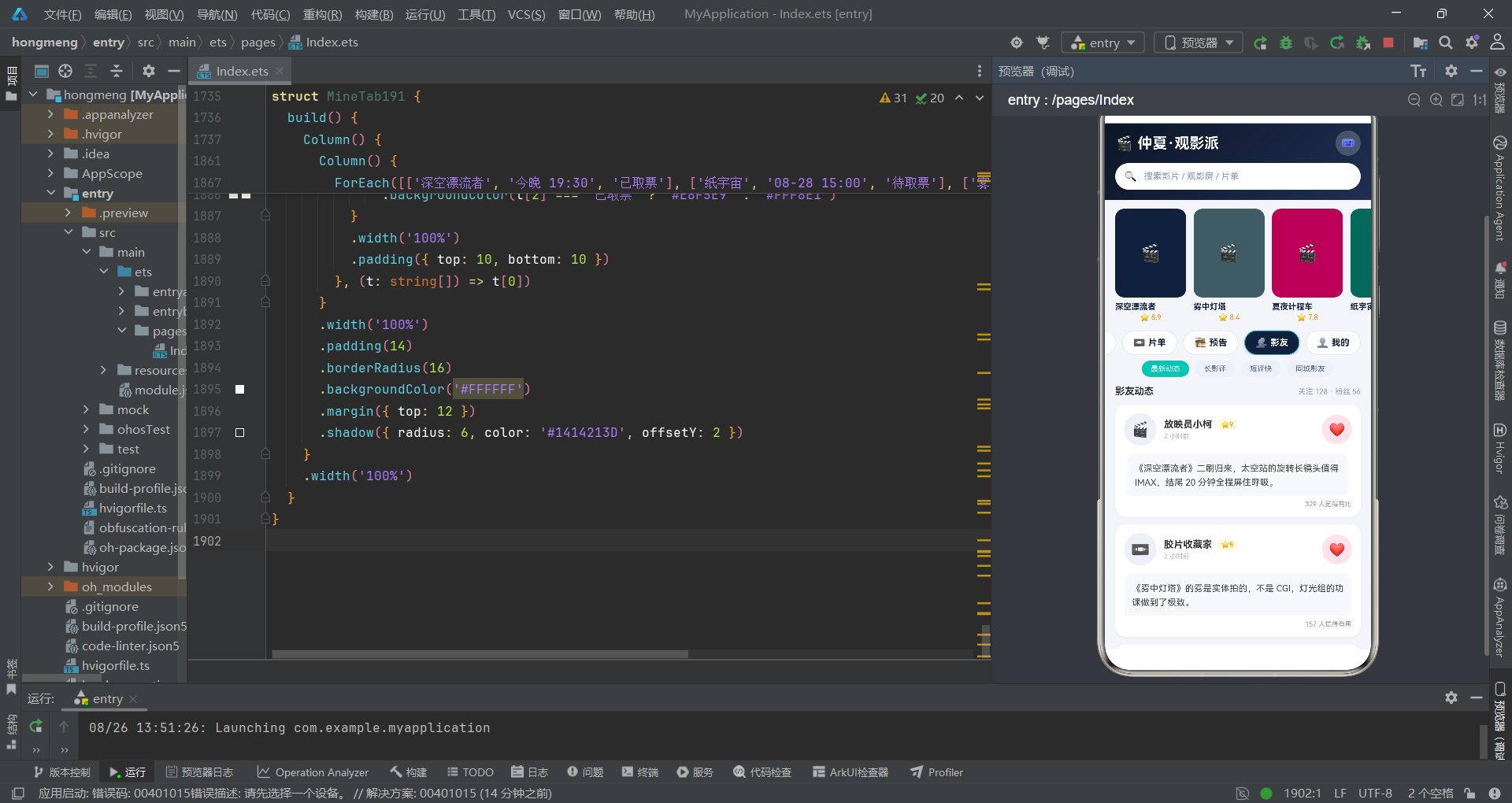
点赞逻辑是本案中最精巧的证据。likedIds 是一个字符串数组,存储已点赞的帖子 ID。isLiked191 用 indexOf 检查是否包含——存在则返回 true,图标变红心 ❤️,背景变粉色 #FCE4EC。toggleLike191 用 filter 移除(取消点赞)或用 concat 添加(点赞)——两种操作都生成新数组,符合不可变数据原则。
点赞数显示用 p.likes + (isLiked191(...) ? 1 : 0)——基础点赞数加上当前用户的点赞状态。这是一个即时的视觉反馈:点击瞬间,likedIds 更新,@State 触发重渲染,点赞数 +1、图标变红心——全部在同一帧内完成。影评内容区域用 borderRadius 的非对称圆角 { topLeft: 12, topRight: 12, bottomLeft: 2, bottomRight: 12 }——模拟聊天气泡的指向效果,左下角保留小圆角暗示"来自左侧头像"的方向感。
证据链第七条:点赞状态用 ID 数组而非对象映射存储,是 ArkTS 中数组操作比对象操作更原生支持
@State响应式的体现。filter和concat都返回新数组,天然触发响应式更新。
六、流程图:导航联动的完整推理链
七、技术要素对比
| 技术要素 | 实现方式 | 侦探推理结论 |
|---|---|---|
| 双行联动导航 | 主Tab onClick 重置 subIdx=0 + subChips191 动态返回 | 防止幽灵选中,确保副分类与主Tab语义一致 |
| 数据可变性判定 | @Prop 接收 vs 静态常量引用 | 接收 @Prop 的模块有增删改需求,其余为只读 |
| 颜色指纹系统 | 影片、观影房、影评共享同色值 | 颜色是跨模块数据追踪的唯一标识符 |
| 计价逻辑 | 内联表达式 bkCnt*48+(bkSnack?40:0) | 依赖 @State 响应式自动更新,无需手动刷新 |
| 点赞状态存储 | ID 数组 + filter/concat | 不可变数组操作天然触发响应式更新 |
| 片单删除 | this.lists = this.lists.filter(...) | 生成新数组赋值,是 @Prop 能感知变化的前提 |
| 片单编辑 | this.lists = this.lists.map(...) | 匹配ID替换,保留未变项,不可变更新 |
| 弹层分工 | bindSheet(抽屉)+ bindContentCover(遮罩) | 日常表单用抽屉,破坏性确认用全屏遮罩 |
| 副分类键值 | c + this.curTab | 跨Tab的相同文本视为不同元素,确保完全重建 |
| 上座率预警 | s.pct > 85 ? '#C62828' : '#2EC4B6' | 85%是满员预警阈值,红色触发紧迫感 |
安装DevEco Studio程序

选择目标安装目录:

设置环境变量,但是需要重启一下:

新建一个空白模板:

设置API为24的模板项目:

初始化项目,自动下载相关依赖:

完整代码:
// 场景:影友创建线上观影房,同步播放、弹幕连麦、片单管理与观影派对
// 配色:午夜蓝 #14213D × 荧光青 #2EC4B6 × 票根黄 #FFC300
// Tab布局:顶部双行导航——主胶囊tab(6个)+ 副分类chips随主tab联动切换
// 弹框:购票预约(抽屉)/创建观影房(抽屉)/编辑片单(抽屉)/删除片单(居中)/观影房详情(居中)
interface TabItem191 {
icon: string;
name: string;
}
interface Movie191 {
id: string;
title: string;
type: string;
color: string;
score: number;
dur: number;
heat: number;
}
interface Room191 {
id: string;
name: string;
movie: string;
color: string;
joined: number;
seats: number;
danmu: boolean;
mic: boolean;
emoji: string;
}
interface List191 {
id: string;
name: string;
tag: string;
count: number;
color: string;
films: string[];
}
interface Trailer191 {
id: string;
title: string;
dur: string;
type: string;
color: string;
hot: number;
}
interface Post191 {
id: string;
user: string;
emoji: string;
content: string;
score: number;
likes: number;
color: string;
}
interface Week191 {
day: string;
hrs: number;
}
interface TShare191 {
label: string;
w: number;
c: string;
}
interface Sess191 {
time: string;
hall: string;
pct: number;
}
const TABS191: TabItem191[] = [
{ icon: '🎬', name: '影院' },
{ icon: '🍿', name: '房间' },
{ icon: '📼', name: '片单' },
{ icon: '🎞️', name: '预告' },
{ icon: '👥', name: '影友' },
{ icon: '👤', name: '我的' }
];
const SUB0_191: string[] = ['热映', '高分', '新片', '重映', '午夜场'];
const SUB1_191: string[] = ['全部房', '可连麦', '弹幕房', '静音房', '好友房'];
const SUB2_191: string[] = ['我的片单', '收藏片单', '共享给我', '草稿箱'];
const SUB3_191: string[] = ['即将上映', '本周新预告', '经典重温'];
const SUB4_191: string[] = ['最新动态', '长影评', '短评快', '同城影友'];
const SUB5_191: string[] = ['观影报告', '票券', '勋章', '设置'];
const MOVIES191: Movie191[] = [
{ id: 'v1', title: '深空漂流者', type: '科幻', color: '#14213D', score: 8.9, dur: 142, heat: 96 },
{ id: 'v2', title: '雾中灯塔', type: '悬疑', color: '#455A64', score: 8.4, dur: 118, heat: 91 },
{ id: 'v3', title: '夏夜计程车', type: '爱情', color: '#AD1457', score: 7.8, dur: 106, heat: 85 },
{ id: 'v4', title: '纸宇宙', type: '动画', color: '#00695C', score: 9.1, dur: 98, heat: 94 },
{ id: 'v5', title: '废土快递', type: '动作', color: '#C62828', score: 7.5, dur: 131, heat: 82 },
{ id: 'v6', title: '长夜无声', type: '剧情', color: '#37474F', score: 8.6, dur: 156, heat: 78 }
];
const ROOMS191: Room191[] = [
{ id: 'w1', name: '深空迷航俱乐部', movie: '深空漂流者', color: '#14213D', joined: 38, seats: 50, danmu: true, mic: true, emoji: '🚀' },
{ id: 'w2', name: '午夜悬疑研究所', movie: '雾中灯塔', color: '#455A64', joined: 26, seats: 30, danmu: true, mic: false, emoji: '🔍' },
{ id: 'w3', name: '动画补给站', movie: '纸宇宙', color: '#00695C', joined: 44, seats: 60, danmu: true, mic: true, emoji: '🎨' },
{ id: 'w4', name: '深夜静音放映厅', movie: '长夜无声', color: '#37474F', joined: 18, seats: 20, danmu: false, mic: false, emoji: '🌙' },
{ id: 'w5', name: '爆米花动作夜', movie: '废土快递', color: '#C62828', joined: 31, seats: 40, danmu: true, mic: false, emoji: '💥' },
{ id: 'w6', name: '周五爱情专题', movie: '夏夜计程车', color: '#AD1457', joined: 22, seats: 30, danmu: true, mic: true, emoji: '💗' }
];
const LISTS191: List191[] = [
{ id: 'L1', name: '2026 年度十佳候选', tag: '私人', count: 10, color: '#14213D', films: ['深空漂流者', '纸宇宙', '雾中灯塔'] },
{ id: 'L2', name: '深夜孤独片单', tag: '共享', count: 24, color: '#455A64', films: ['长夜无声', '雾中灯塔', '冬眠者'] },
{ id: 'L3', name: '爆米花爽片合集', tag: '共享', count: 36, color: '#C62828', films: ['废土快递', '极速档案', '钢铁风暴'] },
{ id: 'L4', name: '陪 TA 看的爱情片', tag: '私人', count: 15, color: '#AD1457', films: ['夏夜计程车', '风的季节', '咖啡与雨'] },
{ id: 'L5', name: '动画补完计划', tag: '私人', count: 42, color: '#00695C', films: ['纸宇宙', '云端小镇', '银河铁道'] }
];
const TRAILERS191: Trailer191[] = [
{ id: 't1', title: '深空漂流者 · 正式预告', dur: '02:31', type: '科幻', color: '#14213D', hot: 97 },
{ id: 't2', title: '雾中灯塔 · 定档预告', dur: '01:45', type: '悬疑', color: '#455A64', hot: 89 },
{ id: 't3', title: '纸宇宙 · 幕后特辑', dur: '03:12', type: '动画', color: '#00695C', hot: 92 },
{ id: 't4', title: '废土快递 · 动作集锦', dur: '02:08', type: '动作', color: '#C62828', hot: 84 },
{ id: 't5', title: '夏夜计程车 · 情感片段', dur: '01:22', type: '爱情', color: '#AD1457', hot: 76 },
{ id: 't6', title: '长夜无声 · 角色预告', dur: '01:58', type: '剧情', color: '#37474F', hot: 71 }
];
const POSTS191: Post191[] = [
{ id: 'o1', user: '放映员小柯', emoji: '🎬', content: '《深空漂流者》二刷归来,太空站的旋转长镜头值得 IMAX,结尾 20 分钟全程屏住呼吸。', score: 9, likes: 328, color: '#14213D' },
{ id: 'o2', user: '胶片收藏家', emoji: '📼', content: '《雾中灯塔》的雾是实体拍的,不是 CGI,灯光组的功课做到了极致。', score: 8, likes: 156, color: '#455A64' },
{ id: 'o3', user: '爆米花队长', emoji: '🍿', content: '周五动作夜房间爆满,《废土快递》追逐戏全程弹幕刷屏,太欢乐了!', score: 7, likes: 89, color: '#C62828' },
{ id: 'o4', user: '纸片人太太', emoji: '🎨', content: '《纸宇宙》手绘帧数按秒计都是钱的味道,每一帧都想截图当壁纸。', score: 10, likes: 442, color: '#00695C' },
{ id: 'o5', user: '夜航西飞', emoji: '✈️', content: '《长夜无声》适合一个人在静音房看,看完在片尾字幕停留了很久。', score: 9, likes: 203, color: '#37474F' },
{ id: 'o6', user: '汽水不加冰', emoji: '🥤', content: '和对象连麦看《夏夜计程车》,片尾曲一响两个人都没说话,值回票价。', score: 8, likes: 176, color: '#AD1457' }
];
const WEEK191: Week191[] = [
{ day: '一', hrs: 2 },
{ day: '二', hrs: 1 },
{ day: '三', hrs: 3 },
{ day: '四', hrs: 2 },
{ day: '五', hrs: 4 },
{ day: '六', hrs: 5 },
{ day: '日', hrs: 3 }
];
const TSHARE191: TShare191[] = [
{ label: '科幻', w: 34, c: '#14213D' },
{ label: '悬疑', w: 26, c: '#455A64' },
{ label: '动画', w: 22, c: '#2EC4B6' },
{ label: '其他', w: 18, c: '#B0BEC5' }
];
const SESS191: Sess191[] = [
{ time: '14:30', hall: '青 3 厅', pct: 42 },
{ time: '17:00', hall: '青 3 厅', pct: 68 },
{ time: '19:30', hall: '巨幕厅', pct: 91 },
{ time: '22:00', hall: '午夜厅', pct: 55 }
];
const SEATCHIPS191: string[] = ['19:30 巨幕厅', '17:00 青3厅', '14:30 青3厅', '22:00 午夜厅'];
function subChips191(i: number): string[] {
if (i === 0) {
return SUB0_191;
}
if (i === 1) {
return SUB1_191;
}
if (i === 2) {
return SUB2_191;
}
if (i === 3) {
return SUB3_191;
}
if (i === 4) {
return SUB4_191;
}
return SUB5_191;
}
@Entry
@Component
struct Index191 {
@State curTab: number = 0;
@State subIdx: number = 0;
@State lists: List191[] = LISTS191;
@State showBookSheet: boolean = false;
@State showCreateSheet: boolean = false;
@State showEditSheet: boolean = false;
@State showDelDialog: boolean = false;
@State showDetailDialog: boolean = false;
@State selRoom: Room191 = ROOMS191[0];
@State selList: List191 = LISTS191[0];
@State bkSess: number = 0;
@State bkHall: number = 0;
@State bkMic: boolean = true;
@State bkSnack: boolean = false;
@State bkCnt: number = 2;
@State crMovie: number = 0;
@State crTime: number = 0;
@State crDanmu: boolean = true;
@State crMic: boolean = false;
@State crSeats: number = 30;
@State edName: string = '';
@State edTag: number = 0;
@State edShare: boolean = true;
@State delSync: boolean = true;
build() {
Column() {
Column() {
Row() {
Text('🎬 仲夏·观影派')
.fontSize(20)
.fontWeight(FontWeight.Bold)
.fontColor('#FFFFFF')
Text('')
.layoutWeight(1)
Text('🎟️')
.fontSize(16)
.width(34)
.height(34)
.textAlign(TextAlign.Center)
.borderRadius(17)
.backgroundColor('#33FFFFFF')
}
.width('100%')
Row() {
Text('🔍')
.fontSize(14)
.margin({ left: 12 })
Text(' 搜索影片 / 观影房 / 片单')
.fontSize(12)
.fontColor('#8A9BC4')
.margin({ left: 6 })
}
.width('100%')
.height(36)
.borderRadius(18)
.backgroundColor('#FFFFFF')
.margin({ top: 10 })
}
.width('100%')
.padding({ left: 14, right: 14, top: 10, bottom: 14 })
.linearGradient({
angle: 135,
colors: [['#0D1526', 0], ['#1F2F52', 1]]
})
Scroll() {
Row({ space: 10 }) {
ForEach(MOVIES191, (m: Movie191) => {
Column() {
Text('🎬')
.fontSize(24)
.width(96)
.height(120)
.textAlign(TextAlign.Center)
.borderRadius(12)
.backgroundColor(m.color)
Text(m.title)
.fontSize(11)
.fontWeight(FontWeight.Bold)
.fontColor('#14213D')
.maxLines(1)
.textOverflow({ overflow: TextOverflow.Ellipsis })
.width(96)
.margin({ top: 6 })
Text('⭐ ' + m.score)
.fontSize(10)
.fontColor('#FF8F00')
.margin({ top: 2 })
}
.onClick(() => {
this.curTab = 0;
this.showBookSheet = true;
})
}, (m: Movie191) => m.id)
}
.padding({ left: 14, right: 14 })
}
.scrollable(ScrollDirection.Horizontal)
.scrollBar(BarState.Off)
.width('100%')
.margin({ top: 12 })
Scroll() {
Row({ space: 8 }) {
ForEach(TABS191, (t: TabItem191, i: number) => {
Row({ space: 4 }) {
Text(t.icon)
.fontSize(13)
Text(t.name)
.fontSize(12)
.fontWeight(FontWeight.Bold)
.fontColor(this.curTab === i ? '#FFFFFF' : '#14213D')
}
.padding({ left: 14, right: 14, top: 8, bottom: 8 })
.borderRadius(18)
.backgroundColor(this.curTab === i ? '#14213D' : '#FFFFFF')
.border({
width: 1,
color: this.curTab === i ? '#2EC4B6' : '#E3E7F0'
})
.shadow({
radius: this.curTab === i ? 8 : 0,
color: this.curTab === i ? '#3314213D' : '#00000000',
offsetY: 3
})
.onClick(() => {
this.curTab = i;
this.subIdx = 0;
})
}, (t: TabItem191) => t.name)
}
.padding({ left: 14, right: 14 })
}
.scrollable(ScrollDirection.Horizontal)
.scrollBar(BarState.Off)
.width('100%')
.margin({ top: 12 })
Scroll() {
Row({ space: 8 }) {
ForEach(subChips191(this.curTab), (c: string, i: number) => {
Text(c)
.fontSize(10)
.fontColor(this.subIdx === i ? '#FFFFFF' : '#5C6B8A')
.padding({ left: 12, right: 12, top: 5, bottom: 5 })
.borderRadius(13)
.backgroundColor(this.subIdx === i ? '#2EC4B6' : '#EDF0F7')
.onClick(() => {
this.subIdx = i;
})
}, (c: string) => c + this.curTab)
}
.padding({ left: 14, right: 14 })
}
.scrollable(ScrollDirection.Horizontal)
.scrollBar(BarState.Off)
.width('100%')
.margin({ top: 8 })
Scroll() {
Column() {
if (this.curTab === 0) {
CinemaTab191({
onBook: () => {
this.showBookSheet = true;
}
})
} else if (this.curTab === 1) {
RoomTab191({
onCreate: () => {
this.showCreateSheet = true;
},
onDetail: (r: Room191) => {
this.selRoom = r;
this.showDetailDialog = true;
}
})
} else if (this.curTab === 2) {
ListTab191({
lists: this.lists,
onEdit: (l: List191) => {
this.selList = l;
this.edName = l.name;
this.showEditSheet = true;
},
onDel: (l: List191) => {
this.selList = l;
this.showDelDialog = true;
}
})
} else if (this.curTab === 3) {
TrailerTab191()
} else if (this.curTab === 4) {
FriendTab191()
} else {
MineTab191()
}
}
.width('100%')
.padding({ left: 14, right: 14, top: 12, bottom: 24 })
}
.scrollable(ScrollDirection.Vertical)
.scrollBar(BarState.Off)
.layoutWeight(1)
.align(Alignment.TopStart)
}
.width('100%')
.height('100%')
.backgroundColor('#F4F5FA')
.bindSheet($$this.showBookSheet, this.bookSheet191(), {
height: 580,
dragBar: true,
showClose: false,
backgroundColor: '#FFFFFF'
})
.bindSheet($$this.showCreateSheet, this.createSheet191(), {
height: 560,
dragBar: true,
showClose: false,
backgroundColor: '#FFFFFF'
})
.bindSheet($$this.showEditSheet, this.editSheet191(), {
height: 500,
dragBar: true,
showClose: false,
backgroundColor: '#FFFFFF'
})
.bindContentCover($$this.showDelDialog, this.delDialog191(), {
})
.bindContentCover($$this.showDetailDialog, this.detailDialog191(), {
})
}
@Builder
bookSheet191() {
Column() {
Row() {
Column() {
Text('')
.width(36)
.height(4)
.borderRadius(2)
.backgroundColor('#E0E0E0')
}
.width('100%')
.alignItems(HorizontalAlign.Center)
.margin({ top: 8 })
}
.width('100%')
Row({ space: 10 }) {
Text('🎬')
.fontSize(24)
.width(52)
.height(68)
.textAlign(TextAlign.Center)
.borderRadius(10)
.backgroundColor('#14213D')
Column() {
Text('深空漂流者')
.fontSize(16)
.fontWeight(FontWeight.Bold)
.fontColor('#14213D')
Text('科幻 · 142分钟 · ⭐8.9')
.fontSize(10)
.fontColor('#999999')
.margin({ top: 3 })
}
.alignItems(HorizontalAlign.Start)
.layoutWeight(1)
}
.width('100%')
.margin({ top: 10 })
Text('选择场次')
.fontSize(13)
.fontWeight(FontWeight.Bold)
.fontColor('#333333')
.width('100%')
.margin({ top: 16 })
Scroll() {
Row({ space: 8 }) {
ForEach(SEATCHIPS191, (c: string, i: number) => {
Column() {
Text(c.split(' ')[0])
.fontSize(12)
.fontWeight(FontWeight.Bold)
.fontColor(this.bkSess === i ? '#FFFFFF' : '#14213D')
Text(c.split(' ')[1])
.fontSize(9)
.fontColor(this.bkSess === i ? '#7FE8DE' : '#999999')
.margin({ top: 2 })
}
.padding({ left: 14, right: 14, top: 8, bottom: 8 })
.borderRadius(10)
.backgroundColor(this.bkSess === i ? '#14213D' : '#EDF0F7')
.border({ width: 1, color: this.bkSess === i ? '#2EC4B6' : '#E3E7F0' })
.onClick(() => {
this.bkSess = i;
})
}, (c: string) => c)
}
}
.scrollable(ScrollDirection.Horizontal)
.scrollBar(BarState.Off)
.width('100%')
.margin({ top: 8 })
Text('观影偏好')
.fontSize(13)
.fontWeight(FontWeight.Bold)
.fontColor('#333333')
.width('100%')
.margin({ top: 18 })
Row({ space: 8 }) {
Text('IMAX 激光')
.fontSize(11)
.fontColor(this.bkHall === 0 ? '#FFFFFF' : '#14213D')
.padding({ left: 12, right: 12, top: 7, bottom: 7 })
.borderRadius(14)
.backgroundColor(this.bkHall === 0 ? '#14213D' : '#EDF0F7')
.onClick(() => {
this.bkHall = 0;
})
Text('杜比影院')
.fontSize(11)
.fontColor(this.bkHall === 1 ? '#FFFFFF' : '#14213D')
.padding({ left: 12, right: 12, top: 7, bottom: 7 })
.borderRadius(14)
.backgroundColor(this.bkHall === 1 ? '#14213D' : '#EDF0F7')
.onClick(() => {
this.bkHall = 1;
})
Text('普通厅')
.fontSize(11)
.fontColor(this.bkHall === 2 ? '#FFFFFF' : '#14213D')
.padding({ left: 12, right: 12, top: 7, bottom: 7 })
.borderRadius(14)
.backgroundColor(this.bkHall === 2 ? '#14213D' : '#EDF0F7')
.onClick(() => {
this.bkHall = 2;
})
}
.margin({ top: 8 })
Row() {
Column() {
Text('观影连麦')
.fontSize(13)
.fontColor('#333333')
Text('与同场影友语音连麦讨论')
.fontSize(10)
.fontColor('#999999')
.margin({ top: 3 })
}
.alignItems(HorizontalAlign.Start)
.layoutWeight(1)
Toggle({ type: ToggleType.Switch, isOn: this.bkMic })
.onChange((v: boolean) => {
this.bkMic = v;
})
}
.width('100%')
.margin({ top: 18 })
Row() {
Column() {
Text('零食礼包加购')
.fontSize(13)
.fontColor('#333333')
Text('大爆米花 + 双人可乐 ¥39.9')
.fontSize(10)
.fontColor('#999999')
.margin({ top: 3 })
}
.alignItems(HorizontalAlign.Start)
.layoutWeight(1)
Toggle({ type: ToggleType.Switch, isOn: this.bkSnack })
.onChange((v: boolean) => {
this.bkSnack = v;
})
}
.width('100%')
.margin({ top: 14 })
Row() {
Text('购票张数')
.fontSize(13)
.fontColor('#333333')
Text('')
.layoutWeight(1)
Text('−')
.fontSize(18)
.fontWeight(FontWeight.Bold)
.fontColor('#14213D')
.width(30)
.height(30)
.textAlign(TextAlign.Center)
.borderRadius(15)
.backgroundColor('#EDF0F7')
.onClick(() => {
if (this.bkCnt > 1) {
this.bkCnt = this.bkCnt - 1;
}
})
Text(' ' + this.bkCnt + ' 张 ')
.fontSize(14)
.fontWeight(FontWeight.Bold)
.fontColor('#14213D')
Text('+')
.fontSize(18)
.fontWeight(FontWeight.Bold)
.fontColor('#FFFFFF')
.width(30)
.height(30)
.textAlign(TextAlign.Center)
.borderRadius(15)
.backgroundColor('#14213D')
.onClick(() => {
if (this.bkCnt < 6) {
this.bkCnt = this.bkCnt + 1;
}
})
}
.width('100%')
.margin({ top: 18 })
Text('合计 ¥' + (this.bkCnt * 48 + (this.bkSnack ? 40 : 0)) + ' · 确认购票')
.fontSize(15)
.fontWeight(FontWeight.Bold)
.fontColor('#FFFFFF')
.width('100%')
.height(46)
.textAlign(TextAlign.Center)
.borderRadius(23)
.linearGradient({
angle: 90,
colors: [['#14213D', 0], ['#2EC4B6', 1]]
})
.margin({ top: 24 })
.onClick(() => {
this.showBookSheet = false;
})
}
.width('100%')
.padding({ left: 20, right: 20, bottom: 24 })
}
@Builder
createSheet191() {
Column() {
Row() {
Column() {
Text('')
.width(36)
.height(4)
.borderRadius(2)
.backgroundColor('#E0E0E0')
}
.width('100%')
.alignItems(HorizontalAlign.Center)
.margin({ top: 8 })
}
.width('100%')
Text('创建观影房')
.fontSize(17)
.fontWeight(FontWeight.Bold)
.fontColor('#14213D')
.margin({ top: 10 })
Text('放映影片')
.fontSize(13)
.fontWeight(FontWeight.Bold)
.fontColor('#333333')
.width('100%')
.margin({ top: 16 })
Scroll() {
Row({ space: 8 }) {
ForEach(MOVIES191, (m: Movie191, i: number) => {
Text(m.title)
.fontSize(11)
.fontColor(this.crMovie === i ? '#FFFFFF' : '#14213D')
.padding({ left: 12, right: 12, top: 7, bottom: 7 })
.borderRadius(14)
.backgroundColor(this.crMovie === i ? '#14213D' : '#EDF0F7')
.onClick(() => {
this.crMovie = i;
})
}, (m: Movie191) => m.id)
}
}
.scrollable(ScrollDirection.Horizontal)
.scrollBar(BarState.Off)
.width('100%')
.margin({ top: 8 })
Text('开播时间')
.fontSize(13)
.fontWeight(FontWeight.Bold)
.fontColor('#333333')
.width('100%')
.margin({ top: 18 })
Row({ space: 8 }) {
ForEach(['立即开播', '20:00', '21:30', '23:00'], (c: string, i: number) => {
Text(c)
.fontSize(12)
.fontColor(this.crTime === i ? '#FFFFFF' : '#14213D')
.padding({ left: 14, right: 14, top: 7, bottom: 7 })
.borderRadius(14)
.backgroundColor(this.crTime === i ? '#2EC4B6' : '#EDF0F7')
.onClick(() => {
this.crTime = i;
})
}, (c: string) => c)
}
.margin({ top: 8 })
Row() {
Column() {
Text('开启弹幕')
.fontSize(13)
.fontColor('#333333')
Text('观影中可发送时间轴弹幕')
.fontSize(10)
.fontColor('#999999')
.margin({ top: 3 })
}
.alignItems(HorizontalAlign.Start)
.layoutWeight(1)
Toggle({ type: ToggleType.Switch, isOn: this.crDanmu })
.onChange((v: boolean) => {
this.crDanmu = v;
})
}
.width('100%')
.margin({ top: 18 })
Row() {
Column() {
Text('允许连麦')
.fontSize(13)
.fontColor('#333333')
Text('影友可申请语音连麦解说')
.fontSize(10)
.fontColor('#999999')
.margin({ top: 3 })
}
.alignItems(HorizontalAlign.Start)
.layoutWeight(1)
Toggle({ type: ToggleType.Switch, isOn: this.crMic })
.onChange((v: boolean) => {
this.crMic = v;
})
}
.width('100%')
.margin({ top: 14 })
Row() {
Text('房间人数上限')
.fontSize(13)
.fontColor('#333333')
Text('')
.layoutWeight(1)
Text('−')
.fontSize(18)
.fontWeight(FontWeight.Bold)
.fontColor('#14213D')
.width(30)
.height(30)
.textAlign(TextAlign.Center)
.borderRadius(15)
.backgroundColor('#EDF0F7')
.onClick(() => {
if (this.crSeats > 10) {
this.crSeats = this.crSeats - 5;
}
})
Text(' ' + this.crSeats + ' 人 ')
.fontSize(14)
.fontWeight(FontWeight.Bold)
.fontColor('#14213D')
Text('+')
.fontSize(18)
.fontWeight(FontWeight.Bold)
.fontColor('#FFFFFF')
.width(30)
.height(30)
.textAlign(TextAlign.Center)
.borderRadius(15)
.backgroundColor('#14213D')
.onClick(() => {
if (this.crSeats < 100) {
this.crSeats = this.crSeats + 5;
}
})
}
.width('100%')
.margin({ top: 18 })
Text('创建房间')
.fontSize(15)
.fontWeight(FontWeight.Bold)
.fontColor('#FFFFFF')
.width('100%')
.height(46)
.textAlign(TextAlign.Center)
.borderRadius(23)
.linearGradient({
angle: 90,
colors: [['#14213D', 0], ['#2EC4B6', 1]]
})
.margin({ top: 24 })
.onClick(() => {
this.showCreateSheet = false;
})
}
.width('100%')
.padding({ left: 20, right: 20, bottom: 24 })
}
@Builder
editSheet191() {
Column() {
Row() {
Column() {
Text('')
.width(36)
.height(4)
.borderRadius(2)
.backgroundColor('#E0E0E0')
}
.width('100%')
.alignItems(HorizontalAlign.Center)
.margin({ top: 8 })
}
.width('100%')
Text('编辑片单')
.fontSize(17)
.fontWeight(FontWeight.Bold)
.fontColor('#14213D')
.margin({ top: 10 })
Text('片单名称')
.fontSize(13)
.fontWeight(FontWeight.Bold)
.fontColor('#333333')
.width('100%')
.margin({ top: 16 })
TextInput({ placeholder: '请输入片单名称', text: this.edName })
.fontSize(13)
.height(42)
.borderRadius(10)
.backgroundColor('#EDF0F7')
.margin({ top: 8 })
.onChange((v: string) => {
this.edName = v;
})
Text('片单属性')
.fontSize(13)
.fontWeight(FontWeight.Bold)
.fontColor('#333333')
.width('100%')
.margin({ top: 18 })
Row({ space: 8 }) {
ForEach(['私人', '好友可见', '公开'], (c: string, i: number) => {
Text(c)
.fontSize(12)
.fontColor(this.edTag === i ? '#FFFFFF' : '#14213D')
.padding({ left: 14, right: 14, top: 7, bottom: 7 })
.borderRadius(14)
.backgroundColor(this.edTag === i ? '#14213D' : '#EDF0F7')
.onClick(() => {
this.edTag = i;
})
}, (c: string) => c)
}
.margin({ top: 8 })
Row() {
Column() {
Text('允许影友协作')
.fontSize(13)
.fontColor('#333333')
Text('好友可向片单推荐影片')
.fontSize(10)
.fontColor('#999999')
.margin({ top: 3 })
}
.alignItems(HorizontalAlign.Start)
.layoutWeight(1)
Toggle({ type: ToggleType.Switch, isOn: this.edShare })
.onChange((v: boolean) => {
this.edShare = v;
})
}
.width('100%')
.margin({ top: 18 })
Row() {
Text('片单内影片')
.fontSize(13)
.fontColor('#333333')
Text('')
.layoutWeight(1)
Text(this.selList.count + ' 部')
.fontSize(13)
.fontWeight(FontWeight.Bold)
.fontColor('#2EC4B6')
}
.width('100%')
.margin({ top: 18 })
Text('保存修改')
.fontSize(15)
.fontWeight(FontWeight.Bold)
.fontColor('#FFFFFF')
.width('100%')
.height(46)
.textAlign(TextAlign.Center)
.borderRadius(23)
.linearGradient({
angle: 90,
colors: [['#14213D', 0], ['#2EC4B6', 1]]
})
.margin({ top: 24 })
.onClick(() => {
const nl: List191 = {
id: this.selList.id,
name: this.edName === '' ? this.selList.name : this.edName,
tag: ['私人', '共享', '共享'][this.edTag],
count: this.selList.count,
color: this.selList.color,
films: this.selList.films
};
this.lists = this.lists.map((x: List191) => {
return x.id === nl.id ? nl : x;
});
this.showEditSheet = false;
})
}
.width('100%')
.padding({ left: 20, right: 20, bottom: 24 })
}
@Builder
delDialog191() {
Column() {
Column() {
Text('📼')
.fontSize(34)
.width(64)
.height(64)
.textAlign(TextAlign.Center)
.borderRadius(16)
.backgroundColor(this.selList.color)
.margin({ top: 24 })
Text(this.selList.name)
.fontSize(16)
.fontWeight(FontWeight.Bold)
.fontColor('#333333')
.margin({ top: 10 })
Text(this.selList.count + ' 部影片 · ' + this.selList.tag + '片单')
.fontSize(11)
.fontColor('#999999')
.margin({ top: 4 })
}
.width('100%')
.alignItems(HorizontalAlign.Center)
Text('删除后片单及其排序信息将被移除,无法恢复。')
.fontSize(12)
.fontColor('#C62828')
.textAlign(TextAlign.Center)
.margin({ top: 14 })
Row() {
Text('同步删除观影进度')
.fontSize(12)
.fontColor('#333333')
Text('')
.layoutWeight(1)
Toggle({ type: ToggleType.Switch, isOn: this.delSync })
.onChange((v: boolean) => {
this.delSync = v;
})
}
.width('100%')
.padding({ left: 16, right: 16 })
.margin({ top: 14 })
Row({ space: 12 }) {
Text('取消')
.fontSize(14)
.fontWeight(FontWeight.Bold)
.fontColor('#666666')
.layoutWeight(1)
.height(42)
.textAlign(TextAlign.Center)
.borderRadius(21)
.backgroundColor('#F5F5F5')
.onClick(() => {
this.showDelDialog = false;
})
Text('确认删除')
.fontSize(14)
.fontWeight(FontWeight.Bold)
.fontColor('#FFFFFF')
.layoutWeight(1)
.height(42)
.textAlign(TextAlign.Center)
.borderRadius(21)
.backgroundColor('#C62828')
.onClick(() => {
this.lists = this.lists.filter((x: List191) => {
return x.id !== this.selList.id;
});
this.showDelDialog = false;
})
}
.width('100%')
.padding({ left: 16, right: 16 })
.margin({ top: 20, bottom: 24 })
}
.width('86%')
.borderRadius(20)
.backgroundColor('#FFFFFF')
}
@Builder
detailDialog191() {
Column() {
Column() {
Text(this.selRoom.emoji)
.fontSize(30)
Text(this.selRoom.name)
.fontSize(19)
.fontWeight(FontWeight.Bold)
.fontColor('#FFFFFF')
.margin({ top: 6 })
Text('正在放映《' + this.selRoom.movie + '》')
.fontSize(11)
.fontColor('#7FE8DE')
.margin({ top: 4 })
}
.width('100%')
.alignItems(HorizontalAlign.Center)
.padding({ top: 22, bottom: 18 })
.borderRadius({ topLeft: 20, topRight: 20 })
.linearGradient({
angle: 135,
colors: [['#0D1526', 0], ['#1F2F52', 1]]
})
Row() {
Column() {
Text(this.selRoom.joined + '/' + this.selRoom.seats)
.fontSize(18)
.fontWeight(FontWeight.Bold)
.fontColor('#14213D')
Text('房间人数')
.fontSize(10)
.fontColor('#999999')
.margin({ top: 2 })
}
.layoutWeight(1)
Column() {
Text(this.selRoom.danmu ? '已开启' : '关闭')
.fontSize(18)
.fontWeight(FontWeight.Bold)
.fontColor(this.selRoom.danmu ? '#2EC4B6' : '#9E9E9E')
Text('弹幕')
.fontSize(10)
.fontColor('#999999')
.margin({ top: 2 })
}
.layoutWeight(1)
Column() {
Text(this.selRoom.mic ? '可连麦' : '静音')
.fontSize(18)
.fontWeight(FontWeight.Bold)
.fontColor(this.selRoom.mic ? '#2EC4B6' : '#9E9E9E')
Text('语音')
.fontSize(10)
.fontColor('#999999')
.margin({ top: 2 })
}
.layoutWeight(1)
}
.width('100%')
.padding({ top: 14, bottom: 14 })
.backgroundColor('#EDF0F7')
Column() {
Text('房间满员度')
.fontSize(13)
.fontWeight(FontWeight.Bold)
.fontColor('#333333')
.width('100%')
Column() {
Row() {
Text('')
.width(this.selRoom.joined / this.selRoom.seats * 100 + '%')
.height(12)
.borderRadius(6)
.backgroundColor(this.selRoom.joined / this.selRoom.seats > 0.85 ? '#FF8F00' : '#2EC4B6')
}
.width('100%')
.height(12)
.borderRadius(6)
.backgroundColor('#E3E7F0')
}
.width('100%')
.margin({ top: 10 })
Text('剩余 ' + (this.selRoom.seats - this.selRoom.joined) + ' 个席位')
.fontSize(10)
.fontColor('#999999')
.margin({ top: 6 })
}
.width('100%')
.padding(16)
Column() {
Text('今日各场次余座')
.fontSize(13)
.fontWeight(FontWeight.Bold)
.fontColor('#333333')
.width('100%')
ForEach(SESS191, (s: Sess191) => {
Row() {
Text(s.time)
.fontSize(11)
.fontWeight(FontWeight.Bold)
.fontColor('#14213D')
.width(44)
Text(s.hall)
.fontSize(10)
.fontColor('#999999')
.width(64)
Column() {
Row() {
Text('')
.width(s.pct + '%')
.height(6)
.borderRadius(3)
.backgroundColor(s.pct > 85 ? '#C62828' : '#2EC4B6')
}
.width('100%')
.height(6)
.borderRadius(3)
.backgroundColor('#E3E7F0')
}
.layoutWeight(1)
Text(s.pct + '%')
.fontSize(9)
.fontColor('#999999')
.margin({ left: 8 })
.width(32)
}
.width('100%')
.margin({ top: 8 })
}, (s: Sess191) => s.time + s.hall)
}
.width('100%')
.padding({ left: 16, right: 16, bottom: 16 })
Text('加入观影房')
.fontSize(14)
.fontWeight(FontWeight.Bold)
.fontColor('#FFFFFF')
.width('86%')
.height(42)
.textAlign(TextAlign.Center)
.borderRadius(21)
.linearGradient({
angle: 90,
colors: [['#14213D', 0], ['#2EC4B6', 1]]
})
.margin({ bottom: 20 })
.onClick(() => {
this.showDetailDialog = false;
})
}
.width('86%')
.borderRadius(20)
.backgroundColor('#FFFFFF')
.constraintSize({ maxHeight: '85%' })
}
}
@Component
struct CinemaTab191 {
onBook: () => void = () => {
};
build() {
Column() {
Row() {
Text('今日热映 · 6 部')
.fontSize(13)
.fontWeight(FontWeight.Bold)
.fontColor('#333333')
Text('')
.layoutWeight(1)
Text('按热度排序 ↓')
.fontSize(10)
.fontColor('#8A9BC4')
}
.width('100%')
ForEach(MOVIES191, (m: Movie191) => {
Row() {
Text('🎬')
.fontSize(24)
.width(72)
.height(96)
.textAlign(TextAlign.Center)
.borderRadius(12)
.backgroundColor(m.color)
Column() {
Row({ space: 6 }) {
Text(m.title)
.fontSize(15)
.fontWeight(FontWeight.Bold)
.fontColor('#333333')
Text(m.type)
.fontSize(9)
.fontColor('#FFFFFF')
.padding({ left: 6, right: 6, top: 2, bottom: 2 })
.borderRadius(6)
.backgroundColor(m.color)
}
Text('⭐ ' + m.score + ' · ' + m.dur + '分钟 · 🔥 ' + m.heat)
.fontSize(10)
.fontColor('#999999')
.margin({ top: 5 })
Row({ space: 6 }) {
Text('19:30 巨幕厅')
.fontSize(9)
.fontColor('#2EC4B6')
.padding({ left: 8, right: 8, top: 4, bottom: 4 })
.borderRadius(8)
.backgroundColor('#E0F7F4')
Text('22:00 午夜厅')
.fontSize(9)
.fontColor('#5C6B8A')
.padding({ left: 8, right: 8, top: 4, bottom: 4 })
.borderRadius(8)
.backgroundColor('#EDF0F7')
}
.margin({ top: 8 })
Text('购票')
.fontSize(11)
.fontWeight(FontWeight.Bold)
.fontColor('#FFFFFF')
.padding({ left: 16, right: 16, top: 6, bottom: 6 })
.borderRadius(14)
.linearGradient({
angle: 90,
colors: [['#14213D', 0], ['#2EC4B6', 1]]
})
.margin({ top: 8 })
.onClick(() => {
this.onBook();
})
}
.alignItems(HorizontalAlign.Start)
.layoutWeight(1)
.margin({ left: 12 })
}
.width('100%')
.padding(12)
.borderRadius(14)
.backgroundColor('#FFFFFF')
.margin({ top: 10 })
.shadow({ radius: 6, color: '#1414213D', offsetY: 2 })
}, (m: Movie191) => m.id)
}
.width('100%')
}
}
@Component
struct RoomTab191 {
onCreate: () => void = () => {
};
onDetail: (r: Room191) => void = () => {
};
build() {
Column() {
Text('+ 创建观影房')
.fontSize(14)
.fontWeight(FontWeight.Bold)
.fontColor('#2EC4B6')
.width('100%')
.height(44)
.textAlign(TextAlign.Center)
.borderRadius(22)
.border({ width: 1.5, color: '#2EC4B6' })
.backgroundColor('#E0F7F4')
.onClick(() => {
this.onCreate();
})
Text('热门观影房')
.fontSize(13)
.fontWeight(FontWeight.Bold)
.fontColor('#333333')
.width('100%')
.margin({ top: 14 })
ForEach(ROOMS191, (r: Room191) => {
Row() {
Text(r.emoji)
.fontSize(24)
.width(56)
.height(56)
.textAlign(TextAlign.Center)
.borderRadius(14)
.backgroundColor(r.color)
Column() {
Row({ space: 6 }) {
Text(r.name)
.fontSize(13)
.fontWeight(FontWeight.Bold)
.fontColor('#333333')
Text(r.joined >= r.seats ? '已满员' : '招募中')
.fontSize(8)
.fontColor(r.joined >= r.seats ? '#9E9E9E' : '#2E7D32')
.padding({ left: 6, right: 6, top: 2, bottom: 2 })
.borderRadius(6)
.backgroundColor(r.joined >= r.seats ? '#F5F5F5' : '#E8F5E9')
}
Text('放映《' + r.movie + '》 · 👥 ' + r.joined + '/' + r.seats)
.fontSize(10)
.fontColor('#999999')
.margin({ top: 4 })
Row({ space: 6 }) {
Text(r.danmu ? '💬 弹幕' : '🚫 静音')
.fontSize(8)
.fontColor(r.danmu ? '#00838F' : '#9E9E9E')
.padding({ left: 6, right: 6, top: 2, bottom: 2 })
.borderRadius(6)
.backgroundColor(r.danmu ? '#E0F7FA' : '#F5F5F5')
Text(r.mic ? '🎤 可连麦' : '🔕 不可连麦')
.fontSize(8)
.fontColor(r.mic ? '#AD1457' : '#9E9E9E')
.padding({ left: 6, right: 6, top: 2, bottom: 2 })
.borderRadius(6)
.backgroundColor(r.mic ? '#FCE4EC' : '#F5F5F5')
}
.margin({ top: 6 })
}
.alignItems(HorizontalAlign.Start)
.layoutWeight(1)
.margin({ left: 10 })
Text('加入')
.fontSize(11)
.fontColor('#FFFFFF')
.padding({ left: 14, right: 14, top: 7, bottom: 7 })
.borderRadius(15)
.backgroundColor(r.joined >= r.seats ? '#B0BEC5' : '#14213D')
}
.width('100%')
.padding(12)
.borderRadius(14)
.backgroundColor('#FFFFFF')
.margin({ top: 10 })
.shadow({ radius: 6, color: '#1414213D', offsetY: 2 })
.onClick(() => {
this.onDetail(r);
})
}, (r: Room191) => r.id)
}
.width('100%')
}
}
@Component
struct ListTab191 {
@Prop lists: List191[];
onEdit: (l: List191) => void = () => {
};
onDel: (l: List191) => void = () => {
};
build() {
Column() {
Row() {
Text('我的片单 · ' + this.lists.length + ' 个')
.fontSize(13)
.fontWeight(FontWeight.Bold)
.fontColor('#333333')
Text('')
.layoutWeight(1)
Text('+ 新建片单')
.fontSize(11)
.fontColor('#FFFFFF')
.padding({ left: 12, right: 12, top: 6, bottom: 6 })
.borderRadius(13)
.backgroundColor('#14213D')
}
.width('100%')
ForEach(this.lists, (l: List191) => {
Column() {
Row() {
Row({ space: 4 }) {
Text('🎬')
.fontSize(16)
.width(40)
.height(52)
.textAlign(TextAlign.Center)
.borderRadius(8)
.backgroundColor(l.color)
Text('🎬')
.fontSize(16)
.width(40)
.height(52)
.textAlign(TextAlign.Center)
.borderRadius(8)
.backgroundColor('#5C6B8A')
Text('🎬')
.fontSize(16)
.width(40)
.height(52)
.textAlign(TextAlign.Center)
.borderRadius(8)
.backgroundColor('#B0BEC5')
}
Column() {
Row({ space: 6 }) {
Text(l.name)
.fontSize(13)
.fontWeight(FontWeight.Bold)
.fontColor('#333333')
Text(l.tag)
.fontSize(8)
.fontColor('#2EC4B6')
.padding({ left: 6, right: 6, top: 2, bottom: 2 })
.borderRadius(6)
.backgroundColor('#E0F7F4')
}
Text(l.count + ' 部影片')
.fontSize(10)
.fontColor('#999999')
.margin({ top: 4 })
Text('含《' + l.films[0] + '》等')
.fontSize(9)
.fontColor('#BBBBBB')
.margin({ top: 3 })
}
.alignItems(HorizontalAlign.Start)
.layoutWeight(1)
.margin({ left: 10 })
}
.width('100%')
Row({ space: 8 }) {
Text('查看')
.fontSize(10)
.fontColor('#14213D')
.padding({ left: 12, right: 12, top: 5, bottom: 5 })
.borderRadius(11)
.border({ width: 1, color: '#14213D' })
Text('编辑')
.fontSize(10)
.fontColor('#FF8F00')
.padding({ left: 12, right: 12, top: 5, bottom: 5 })
.borderRadius(11)
.border({ width: 1, color: '#FF8F00' })
.onClick(() => {
this.onEdit(l);
})
Text('')
.layoutWeight(1)
Text('删除')
.fontSize(10)
.fontColor('#C62828')
.padding({ left: 12, right: 12, top: 5, bottom: 5 })
.borderRadius(11)
.border({ width: 1, color: '#C62828' })
.onClick(() => {
this.onDel(l);
})
}
.width('100%')
.margin({ top: 10 })
}
.width('100%')
.padding(12)
.borderRadius(14)
.backgroundColor('#FFFFFF')
.margin({ top: 10 })
.shadow({ radius: 6, color: '#1414213D', offsetY: 2 })
}, (l: List191) => l.id)
}
.width('100%')
}
}
@Component
struct TrailerTab191 {
build() {
Column() {
Row() {
Text('最新预告')
.fontSize(13)
.fontWeight(FontWeight.Bold)
.fontColor('#333333')
Text('')
.layoutWeight(1)
Text('本周更新 6 条')
.fontSize(10)
.fontColor('#8A9BC4')
}
.width('100%')
ForEach(TRAILERS191, (t: Trailer191) => {
Row() {
Column() {
Text('▶️')
.fontSize(24)
.width(84)
.height(56)
.textAlign(TextAlign.Center)
.borderRadius(10)
.backgroundColor(t.color)
Text(t.dur)
.fontSize(8)
.fontColor('#FFFFFF')
.padding({ left: 6, right: 6, top: 2, bottom: 2 })
.borderRadius(6)
.backgroundColor('#99000000')
.margin({ top: -18 })
}
Column() {
Row({ space: 6 }) {
Text(t.title)
.fontSize(12)
.fontWeight(FontWeight.Bold)
.fontColor('#333333')
.maxLines(1)
.textOverflow({ overflow: TextOverflow.Ellipsis })
.layoutWeight(1)
Text(t.type)
.fontSize(8)
.fontColor('#FFFFFF')
.padding({ left: 6, right: 6, top: 2, bottom: 2 })
.borderRadius(6)
.backgroundColor(t.color)
}
.width('100%')
Text('时长 ' + t.dur + ' · 🔥 热度 ' + t.hot)
.fontSize(10)
.fontColor('#999999')
.margin({ top: 4 })
Column() {
Row() {
Text('')
.width(t.hot + '%')
.height(5)
.borderRadius(3)
.backgroundColor('#2EC4B6')
}
.width('100%')
.height(5)
.borderRadius(3)
.backgroundColor('#E3E7F0')
}
.width('100%')
.margin({ top: 6 })
}
.alignItems(HorizontalAlign.Start)
.layoutWeight(1)
.margin({ left: 12 })
}
.width('100%')
.padding(12)
.borderRadius(14)
.backgroundColor('#FFFFFF')
.margin({ top: 10 })
.shadow({ radius: 6, color: '#1414213D', offsetY: 2 })
}, (t: Trailer191) => t.id)
Column() {
Text('本周观影时长(小时)')
.fontSize(13)
.fontWeight(FontWeight.Bold)
.fontColor('#333333')
.width('100%')
Row({ space: 12 }) {
ForEach(WEEK191, (w: Week191) => {
Column({ space: 4 }) {
Column() {
Text('')
.width('100%')
.height(w.hrs / 5 * 100 + '%')
.borderRadius({ topLeft: 3, topRight: 3 })
.backgroundColor(w.hrs >= 4 ? '#14213D' : '#2EC4B6')
}
.width(24)
.height(72)
.justifyContent(FlexAlign.End)
Text(w.day)
.fontSize(9)
.fontColor('#666666')
}
}, (w: Week191) => w.day)
}
.width('100%')
.justifyContent(FlexAlign.Center)
.margin({ top: 12 })
}
.width('100%')
.padding(14)
.borderRadius(16)
.backgroundColor('#FFFFFF')
.shadow({ radius: 8, color: '#1414213D', offsetY: 3 })
.margin({ top: 14 })
}
.width('100%')
}
}
@Component
struct FriendTab191 {
@State likedIds: string[] = [];
build() {
Column() {
Row() {
Text('影友动态')
.fontSize(13)
.fontWeight(FontWeight.Bold)
.fontColor('#333333')
Text('')
.layoutWeight(1)
Text('关注 128 · 粉丝 56')
.fontSize(10)
.fontColor('#8A9BC4')
}
.width('100%')
ForEach(POSTS191, (p: Post191) => {
Column() {
Row() {
Text(p.emoji)
.fontSize(20)
.width(44)
.height(44)
.textAlign(TextAlign.Center)
.borderRadius(22)
.backgroundColor('#EDF0F7')
Column() {
Row({ space: 6 }) {
Text(p.user)
.fontSize(13)
.fontWeight(FontWeight.Bold)
.fontColor('#333333')
Text('⭐' + p.score)
.fontSize(9)
.fontColor('#FF8F00')
.padding({ left: 6, right: 6, top: 2, bottom: 2 })
.borderRadius(6)
.backgroundColor('#FFF8E1')
}
Text('2 小时前')
.fontSize(9)
.fontColor('#BBBBBB')
.margin({ top: 3 })
}
.alignItems(HorizontalAlign.Start)
.layoutWeight(1)
.margin({ left: 10 })
Text(isLiked191(this.likedIds, p.id) ? '❤️' : '🤍')
.fontSize(18)
.width(40)
.height(40)
.textAlign(TextAlign.Center)
.borderRadius(20)
.backgroundColor(isLiked191(this.likedIds, p.id) ? '#FCE4EC' : '#F5F5F5')
.onClick(() => {
this.likedIds = toggleLike191(this.likedIds, p.id);
})
}
.width('100%')
Text(p.content)
.fontSize(12)
.fontColor('#444444')
.lineHeight(19)
.padding({ left: 10, right: 10, top: 10, bottom: 10 })
.borderRadius({ topLeft: 12, topRight: 12, bottomLeft: 2, bottomRight: 12 })
.backgroundColor('#F7F8FC')
.margin({ top: 10 })
Row() {
Text('')
.layoutWeight(1)
Text((p.likes + (isLiked191(this.likedIds, p.id) ? 1 : 0)) + ' 人觉得有用')
.fontSize(9)
.fontColor('#999999')
}
.width('100%')
.margin({ top: 6 })
}
.width('100%')
.padding(12)
.borderRadius(14)
.backgroundColor('#FFFFFF')
.margin({ top: 10 })
.shadow({ radius: 6, color: '#1414213D', offsetY: 2 })
}, (p: Post191) => p.id)
}
.width('100%')
}
}
function isLiked191(ids: string[], id: string): boolean {
return ids.indexOf(id) >= 0;
}
function toggleLike191(ids: string[], id: string): string[] {
if (ids.indexOf(id) >= 0) {
return ids.filter((x: string) => {
return x !== id;
});
}
return ids.concat([id]);
}
@Component
struct MineTab191 {
build() {
Column() {
Column() {
Row() {
Text('🎟️')
.fontSize(26)
.width(60)
.height(60)
.textAlign(TextAlign.Center)
.borderRadius(30)
.backgroundColor('#33FFFFFF')
Column() {
Text('汽水不加冰')
.fontSize(17)
.fontWeight(FontWeight.Bold)
.fontColor('#FFFFFF')
Text('本年观影 86 部 · 影迷等级 银幕常客')
.fontSize(10)
.fontColor('#7FE8DE')
.margin({ top: 4 })
}
.alignItems(HorizontalAlign.Start)
.margin({ left: 12 })
Text('')
.layoutWeight(1)
Column() {
Text('86')
.fontSize(18)
.fontWeight(FontWeight.Bold)
.fontColor('#FFC300')
Text('年度观影')
.fontSize(9)
.fontColor('#7FE8DE')
.margin({ top: 2 })
}
}
.width('100%')
}
.width('100%')
.padding(16)
.borderRadius(18)
.linearGradient({
angle: 135,
colors: [['#0D1526', 0], ['#1F2F52', 1]]
})
.shadow({ radius: 10, color: '#2214213D', offsetY: 4 })
Column() {
Text('我的类型偏好')
.fontSize(13)
.fontWeight(FontWeight.Bold)
.fontColor('#333333')
.width('100%')
Row() {
ForEach(TSHARE191, (t: TShare191) => {
Text('')
.layoutWeight(t.w)
.height(14)
.backgroundColor(t.c)
}, (t: TShare191) => t.label)
}
.width('100%')
.clip(true)
.borderRadius(7)
.margin({ top: 10 })
Row({ space: 12 }) {
ForEach(TSHARE191, (t: TShare191) => {
Row() {
Text('')
.width(8)
.height(8)
.borderRadius(4)
.backgroundColor(t.c)
Text(' ' + t.label + ' ' + t.w + '%')
.fontSize(10)
.fontColor('#666666')
}
}, (t: TShare191) => t.label + 't')
}
.width('100%')
.margin({ top: 8 })
}
.width('100%')
.padding(14)
.borderRadius(16)
.backgroundColor('#FFFFFF')
.margin({ top: 12 })
.shadow({ radius: 8, color: '#1414213D', offsetY: 3 })
Column() {
Text('本月观影时长(小时)')
.fontSize(13)
.fontWeight(FontWeight.Bold)
.fontColor('#333333')
.width('100%')
Row({ space: 10 }) {
ForEach(WEEK191, (w: Week191) => {
Column({ space: 4 }) {
Column() {
Text('')
.width('100%')
.height(w.hrs / 5 * 100 + '%')
.borderRadius({ topLeft: 3, topRight: 3 })
.backgroundColor('#2EC4B6')
}
.width(22)
.height(66)
.justifyContent(FlexAlign.End)
Text(w.day)
.fontSize(9)
.fontColor('#666666')
}
}, (w: Week191) => 'mw' + w.day)
}
.width('100%')
.justifyContent(FlexAlign.Center)
.margin({ top: 12 })
}
.width('100%')
.padding(14)
.borderRadius(16)
.backgroundColor('#FFFFFF')
.margin({ top: 12 })
.shadow({ radius: 8, color: '#1414213D', offsetY: 3 })
Column() {
Text('🎟️ 我的票券')
.fontSize(13)
.fontWeight(FontWeight.Bold)
.fontColor('#333333')
.width('100%')
ForEach([['深空漂流者', '今晚 19:30', '已取票'], ['纸宇宙', '08-28 15:00', '待取票'], ['雾中灯塔', '09-02 20:00', '待取票']], (t: string[]) => {
Row() {
Column() {
Text(t[0])
.fontSize(12)
.fontWeight(FontWeight.Bold)
.fontColor('#333333')
Text(t[1])
.fontSize(9)
.fontColor('#999999')
.margin({ top: 3 })
}
.alignItems(HorizontalAlign.Start)
.layoutWeight(1)
Text(t[2])
.fontSize(9)
.fontColor(t[2] === '已取票' ? '#2E7D32' : '#FF8F00')
.padding({ left: 8, right: 8, top: 3, bottom: 3 })
.borderRadius(8)
.backgroundColor(t[2] === '已取票' ? '#E8F5E9' : '#FFF8E1')
}
.width('100%')
.padding({ top: 10, bottom: 10 })
}, (t: string[]) => t[0])
}
.width('100%')
.padding(14)
.borderRadius(16)
.backgroundColor('#FFFFFF')
.margin({ top: 12 })
.shadow({ radius: 6, color: '#1414213D', offsetY: 2 })
}
.width('100%')
}
}
总结
经过对这份观影派应用代码的全面勘查,我们还原了一个完整的架构推理链。从 subChips191 函数的副分类联动,到 onClick 中 subIdx = 0 的重置防线,再到 @Prop lists 的单向数据流——每一处代码都不是孤立的语句,而是一条证据链上的一环。开发者通过状态上提模式将所有可变状态集中在主组件中,子组件作为无状态视图代理通过构造参数和回调与主组件通信,确保了状态变更的可追溯性。
从导航设计来看,顶部双行联动是本案最核心的架构决策。六个主 Tab 各有不同数量和语义的副分类,如果用底部 Tab 布局则副分类无处安放,如果副分类固定不变则无法匹配各模块的筛选差异。主 Tab 选中时 subIdx 重置为 0 的设计,防止了切换 Tab 后副分类"幽灵选中"的状态错位——这是一个容易被忽略但极为关键的防御性编程实践。副分类的 ForEach 键值用 c + this.curTab 拼接,确保跨 Tab 的相同文本被视为不同元素,触发完全重建而非复用。
从数据流来看,整个应用的可变数据仅有 lists(片单数组)和 likedIds(点赞ID数组)两处。两者都采用不可变数据更新模式——filter 生成新数组、concat 添加元素、map 替换匹配项——这是 ArkTS 响应式系统能够检测到变化的前提。颜色作为跨模块的数据指纹,从影片到观影房到影评贯穿始终,形成了一条隐形的追踪链。计价逻辑以内联表达式形式存在于 UI 声明中,依赖 @State 响应式自动更新,无需任何手动刷新调用——这正是指令式 UI 到声明式 UI 范式跃迁后最本质的开发效率提升。案件的每一处细节都指向同一个结论:这套代码的设计是有预谋的、有逻辑的、有证据链支撑的。

作为“人工智能6S店”的官方数字引擎,为AI开发者与企业提供一个覆盖软硬件全栈、一站式门户。
更多推荐


 7
7 0
0- 0


 已为社区贡献52条内容

所有评论(0)