
HarmonyOS 6.1 实战:步进器手写加减 Text + onClick,Toggle 开关组件用 isOn 绑定布尔状态,onChange 回调同步翻转
代码是凝固的音乐,音乐是流动的代码。当 ArkTS 的声明式布局遇见乐队的线上排练场景,每一个组件都是一段旋律,每一层嵌套都是一个和弦。靛蓝是深夜隧道中的沉吟,珊瑚橙是吉他失真踏板的呐喊,而云白则是曲谱纸背面的留白。
在这个应用中,界面不再只是界面的堆砌,它是一场永远不会结束的合奏。底部导航栏上跳动的那三根均衡器小条,是整个排练房的心跳——选中即跳动,静默即沉睡,如同真实调音台上永不熄灭的 VU 表灯。
我们不是在写一个 App,我们是在用代码搭建一座声音的教堂。每一个 @State 是一根琴弦的张力,每一个 @Builder 是一段反复排练的乐句,每一次 bindSheet 的弹出与收起,是乐手上台与谢幕的呼吸。
引言:当代码学会歌唱
在音乐人的世界里,排练从来不是一个人的独白。异地乐手需要低延迟的云排练房,需要同步合奏的节拍器,需要共享曲谱的视奏界面,需要在混音推子上找到属于自己的声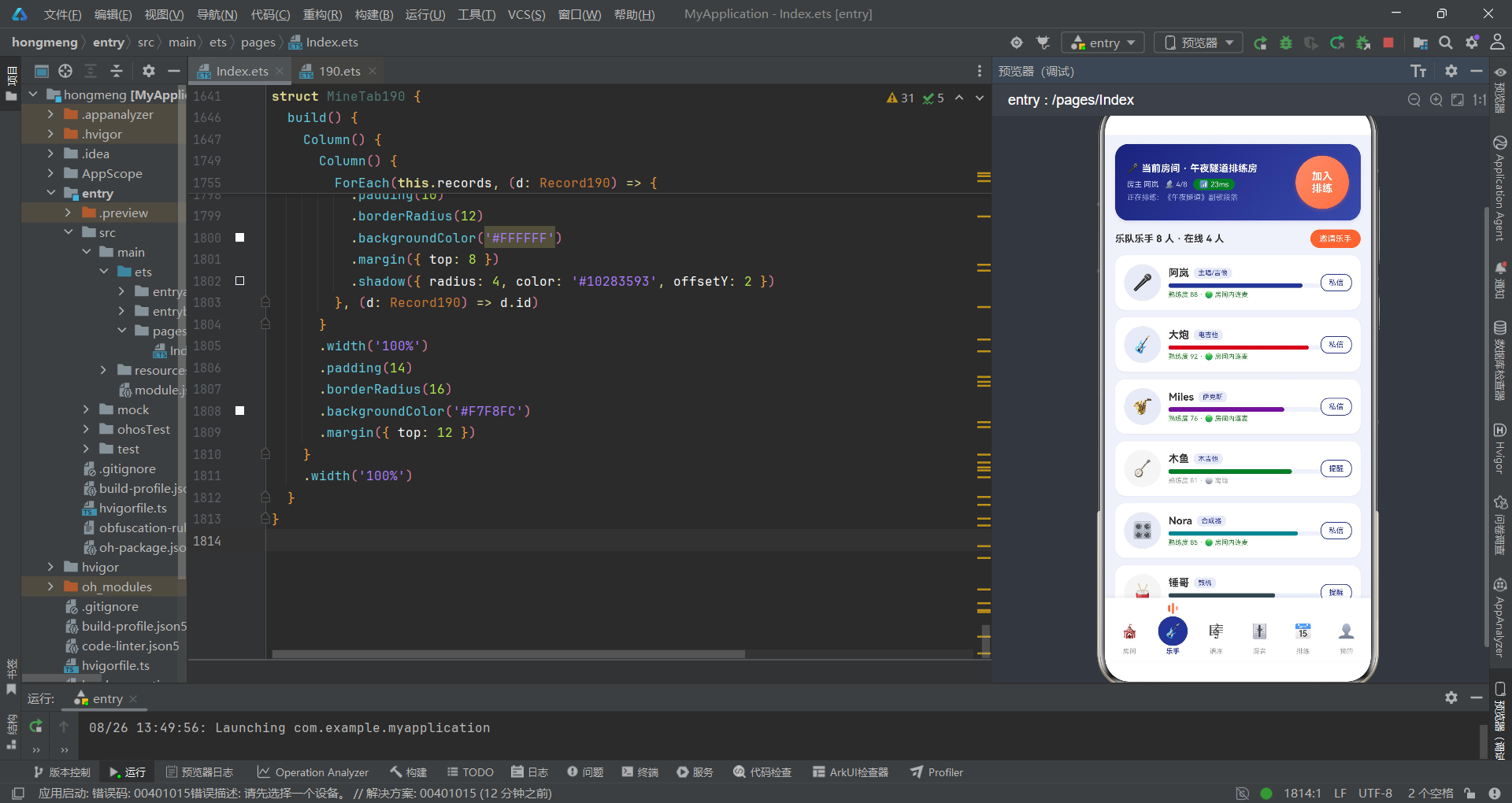
部位置。这个应用正是为这些需求而生——它仿照腾讯会议式的实时连麦架构,将乐队排练的完整工作流搬进了 HarmonyOS 的方寸屏幕之中。
从技术架构来看,整个应用基于 ArkTS 的声明式 UI 范式构建,采用单入口组件 @Entry 挂载主结构体,通过 @State 管理全局可变状态,以 curTab 整型变量驱动六大功能模块的切换。配色体系采用靛蓝 #283593 与珊瑚橙 #FF7043 的高对比冷暖搭配,辅以云白 #F0F2FA 作为画布底色,形成深邃而温暖的视觉语境。每一处颜色都不是随意的涂抹,而是与音乐场景深度绑定的情绪符号——靛蓝是后摇的深沉,珊瑚橙是朋克的灼热。
从业务设计来看,应用将排练生命周期拆解为六个有机阶段:房间管理(创建与加入排练房)、乐手管理(在线状态与熟练度)、谱库管理(曲谱上传与变调)、混音控制(声部推子与总线效果)、排练计划(周排程与提醒)、个人中心(录音回放与统计)。这六个模块通过底部 Tab 导航串联,每个 Tab 的选中态都以三根不同高度的圆角竖条模拟均衡器跳动,是整个应用最具诗意的微交互。
一、数据模型的诗篇:接口定义与静态数据
1.1 接口的雕刻
在 ArkTS 的世界里,interface 是数据的骨架,是流动信息凝固后的浮雕。开发者用接口为每一个业务实体塑形,让无序的数据获得秩序。
interface TabItem190 {
  icon: string;
  name: string;
}

interface Room190 {
  id: string;
  name: string;
  genre: string;
  color: string;
  joined: number;
  seats: number;
  ping: number;
  owner: string;
  emoji: string;
}

interface Player190 {
  id: string;
  name: string;
  instrument: string;
  emoji: string;
  level: number;
  online: boolean;
  color: string;
}

interface Sheet190 {
  id: string;
  name: string;
  instrument: string;
  tune: string;
  bpm: number;
  stars: number;
  color: string;
}

interface Mix190 {
  instrument: string;
  level: number;
  color: string;
}

interface Bus190 {
  label: string;
  w: number;
  c: string;
}

interface Rehearse190 {
  id: string;
  week: string;
  time: string;
  song: string;
  dur: string;
  done: boolean;
  color: string;
}

interface Record190 {
  id: string;
  name: string;
  dur: string;
  date: string;
  color: string;
}
看这些接口,它们像极了乐谱上的拍号标记——Room190 是排练房的空间定义,joined 与 seats 描绘了房间内的容量呼吸;Player190 是乐手的肖像,level 是熟练度的温度计,online 是那盏在黑暗中亮起的指示灯;Sheet190 是曲谱的身份证,tune 是调性的签名,bpm 是心脏跳动的频率。而 Mix190 和 Bus190 则是混音台上的旋钮与总线,它们共同构成了声音流动的管道系统。每一个字段名都是经过推敲的词语,短促而精确,如同音符在五线谱上的落位。
接口是代码世界中的乐理——它不发出声音,却规定了所有声音的可能形态。没有接口约束的数据如同没有拍号的即兴,终将沦为噪音。
1.2 静态数据的织体
数据常量是这首乐曲的织体,是排练前已经摆好位置的乐器阵列。
const BTABS190: TabItem190[] = [
  { icon: '🎪', name: '房间' },
  { icon: '🎸', name: '乐手' },
  { icon: '🎼', name: '谱库' },
  { icon: '🎚️', name: '混音' },
  { icon: '📅', name: '排练' },
  { icon: '👤', name: '我的' }
];

const ROOMS190: Room190[] = [
  { id: 'r1', name: '午夜隧道排练房', genre: '后摇', color: '#283593', joined: 4, seats: 8, ping: 23, owner: '阿岚', emoji: '🌙' },
  { id: 'r2', name: '车库朋克联社', genre: '朋克', color: '#C62828', joined: 5, seats: 6, ping: 31, owner: '大炮', emoji: '⚡' },
  { id: 'r3', name: '爵士即兴小馆', genre: '爵士', color: '#6A1B9A', joined: 6, seats: 9, ping: 19, owner: 'Miles', emoji: '🎷' },
  { id: 'r4', name: '民谣篝火院子', genre: '民谣', color: '#2E7D32', joined: 3, seats: 8, ping: 27, owner: '木鱼', emoji: '🔥' },
  { id: 'r5', name: '电子音效实验室', genre: '电子', color: '#00838F', joined: 2, seats: 5, ping: 15, owner: 'Nora', emoji: '🎛️' },
  { id: 'r6', name: '金属地堡', genre: '金属', color: '#37474F', joined: 4, seats: 6, ping: 38, owner: '锤哥', emoji: '🤘' },
  { id: 'r7', name: 'city pop 天台', genre: 'City Pop', color: '#F57F17', joined: 5, seats: 7, ping: 21, owner: 'Yuki', emoji: '🌆' }
];

const PLAYERS190: Player190[] = [
  { id: 'p1', name: '阿岚', instrument: '主唱/吉他', emoji: '🎤', level: 88, online: true, color: '#283593' },
  { id: 'p2', name: '大炮', instrument: '电吉他', emoji: '🎸', level: 92, online: true, color: '#C62828' },
  { id: 'p3', name: 'Miles', instrument: '萨克斯', emoji: '🎷', level: 76, online: true, color: '#6A1B9A' },
  { id: 'p4', name: '木鱼', instrument: '木吉他', emoji: '🪕', level: 81, online: false, color: '#2E7D32' },
  { id: 'p5', name: 'Nora', instrument: '合成器', emoji: '🎛️', level: 85, online: true, color: '#00838F' },
  { id: 'p6', name: '锤哥', instrument: '鼓机', emoji: '🥁', level: 70, online: false, color: '#37474F' },
  { id: 'p7', name: '低音鲸', instrument: '贝斯', emoji: '🐟', level: 78, online: true, color: '#1565C0' },
  { id: 'p8', name: '小夏', instrument: '小提琴', emoji: '🎻', level: 66, online: false, color: '#AD1457' }
];

const MIXES190: Mix190[] = [
  { instrument: '主唱', level: 86, color: '#283593' },
  { instrument: '电吉', level: 72, color: '#C62828' },
  { instrument: '贝斯', level: 64, color: '#1565C0' },
  { instrument: '键盘', level: 55, color: '#6A1B9A' },
  { instrument: '鼓组', level: 90, color: '#37474F' },
  { instrument: '萨克斯', level: 48, color: '#00838F' }
];

const BUS190: Bus190[] = [
  { label: '干声', w: 34, c: '#283593' },
  { label: '混响', w: 28, c: '#5C6BC0' },
  { label: '延迟', w: 22, c: '#9FA8DA' },
  { label: '失真', w: 16, c: '#FF7043' }
];
七个排练房如同七个平行宇宙——后摇的午夜隧道用靛蓝描绘孤独,朋克的车库用红色喷吐火焰,爵士的小馆在紫色中摇摆,民谣的院子在绿色篝火旁低吟。每一位乐手都有自己的颜色烙印,level 数值是他们的技艺标尺,online 布尔值是他们在排练房中是否亮着的那盏灯。混音数据 MIXES190 中鼓组以 90 的高位雄踞——因为鼓是骨架,是一切节奏的锚。而总线效果 BUS190 中干声占 34%、失真仅 16%,说明这不是一场金属专场,而是一次均衡的后摇合奏。
颜色不是装饰,颜色是叙事。在这个应用中,每一种色值都是一个音乐流派的签名,是数据在被看见之前就已经被听见的秘密。
1.3 辅助函数的装饰音
function pingC190(p: number): string {
  if (p <= 25) {
    return '#2E7D32';
  }
  if (p <= 35) {
    return '#FF8F00';
  }
  return '#C62828';
}

function starsText190(n: number): string {
  if (n === 5) {
    return '★★★★★';
  }
  if (n === 4) {
    return '★★★★☆';
  }
  if (n === 3) {
    return '★★★☆☆';
  }
  return '★★☆☆☆';
}
pingC190 是延迟质量的温度计——25 毫秒以下绿意盎然,35 毫秒以下橙黄警告,超过则血红告急。这个函数虽只有几行,却是整个应用中最具人文关怀的逻辑:它知道,当延迟超过 35 毫秒时,合奏就不可能同步,贝斯手和鼓手之间会出现撕裂感。starsText190 则将数字的难度等级翻译为人类可读的星号序列,是数据到视觉的最后一道翻译工序。这些函数如同乐曲中的装饰音——不构成主旋律,但缺了它们,音乐就失去了韵味。
二、主入口组件:排练房的乐章结构
2.1 状态的琴弦
@Entry
@Component
struct Index190 {
  @State curTab: number = 0;
  @State records: Record190[] = RECORDS190;
  @State showCreateSheet: boolean = false;
  @State showUploadSheet: boolean = false;
  @State showEditSheet: boolean = false;
  @State showDissolveDialog: boolean = false;
  @State showDetailDialog: boolean = false;
  @State selRoom: Room190 = ROOMS190[0];
  @State selRehearse: Rehearse190 = REHEARSES190[2];
  @State crSong: string = '';
  @State crGenre: number = 0;
  @State crOpen: boolean = true;
  @State crSeats: number = 6;
  @State crRecord: boolean = true;
  @State upName: string = '';
  @State upInst: number = 0;
  @State upTune: number = 0;
  @State upShare: boolean = true;
  @State edName: string = '';
  @State edWeek: number = 2;
  @State edDur: number = 90;
  @State edRemind: boolean = true;
  @State dsKeep: boolean = true;
这一整列 @State 声明,如同一架多弦琴的调音过程。curTab 是主旋律——它决定了当前奏响的是哪一个乐章;五个 show* 布尔值是五个踏板,控制抽屉和对话框的进退;crSong、crGenre、crSeats 等创建房间的临时状态,是即兴片段的草稿纸;selRoom 和 selRehearse 是被选中后摆到舞台中央的乐谱。每一个状态变量都是一根可以被拨动的弦,当它变化时,整个 UI 树会自动重新渲染——这就是 ArkTS 声明式范式中响应式的力量,如同声波在空气中自动传播。
状态管理是应用的神经系统。
@State让数据与视图保持心跳同步——数据变,视图变;视图变,数据亦知。这种双向感知,是声明式 UI 最优雅的承诺。
2.2 顶部当前房间卡片的视觉赋格
build() {
    Column() {
      Column() {
        Row() {
          Column() {
            Text('🎤 当前房间 · 午夜隧道排练房')
              .fontSize(13)
              .fontWeight(FontWeight.Bold)
              .fontColor('#FFFFFF')
            Row({ space: 8 }) {
              Text('房主 阿岚')
                .fontSize(10)
                .fontColor('#C5CAE9')
              Text('👥 4/8')
                .fontSize(10)
                .fontColor('#C5CAE9')
              Text('📶 23ms')
                .fontSize(10)
                .fontColor('#FFFFFF')
                .padding({ left: 8, right: 8, top: 2, bottom: 2 })
                .borderRadius(8)
                .backgroundColor('#2E7D32')
            }
            .margin({ top: 6 })
            Text('正在排练:《午夜隧道》副歌段落')
              .fontSize(10)
              .fontColor('#9FA8DA')
              .margin({ top: 4 })
          }
          .alignItems(HorizontalAlign.Start)
          .layoutWeight(1)

          Text('加入\n排练')
            .fontSize(14)
            .fontWeight(FontWeight.Bold)
            .fontColor('#FFFFFF')
            .width(72)
            .height(72)
            .textAlign(TextAlign.Center)
            .borderRadius(36)
            .linearGradient({
              angle: 135,
              colors: [['#FF8A65', 0], ['#FF7043', 1]]
            })
            .shadow({ radius: 12, color: '#66FF7043', offsetY: 4 })
            .onClick(() => {
              this.showDetailDialog = true;
            })
        }
        .width('100%')
        .padding(16)
        .borderRadius(18)
        .linearGradient({
          angle: 130,
          colors: [['#1A237E', 0], ['#3949AB', 1]]
        })
        .shadow({ radius: 12, color: '#22283593', offsetY: 6 })
      }
      .width('100%')
      .padding({ left: 14, right: 14, top: 12 })
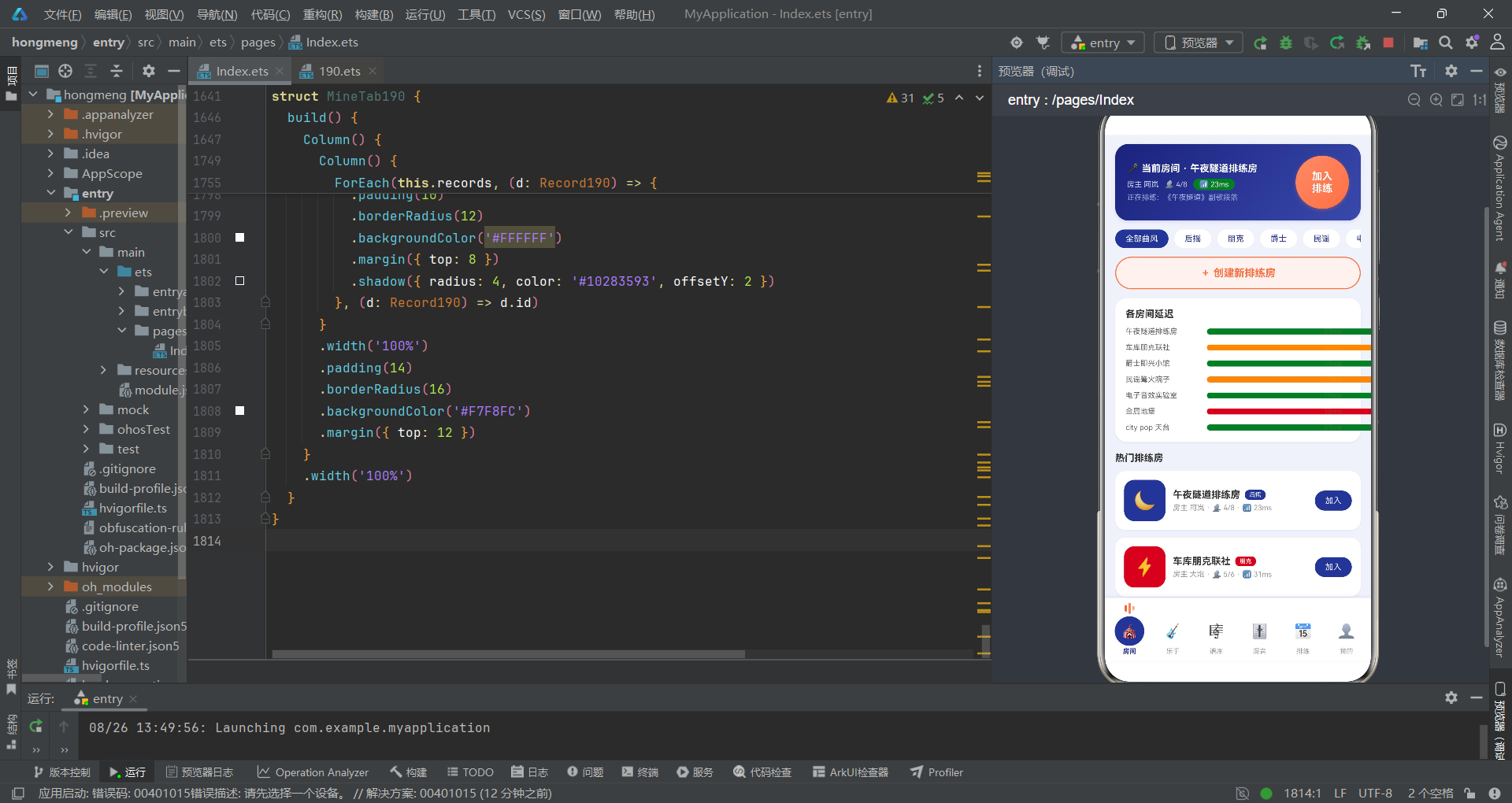
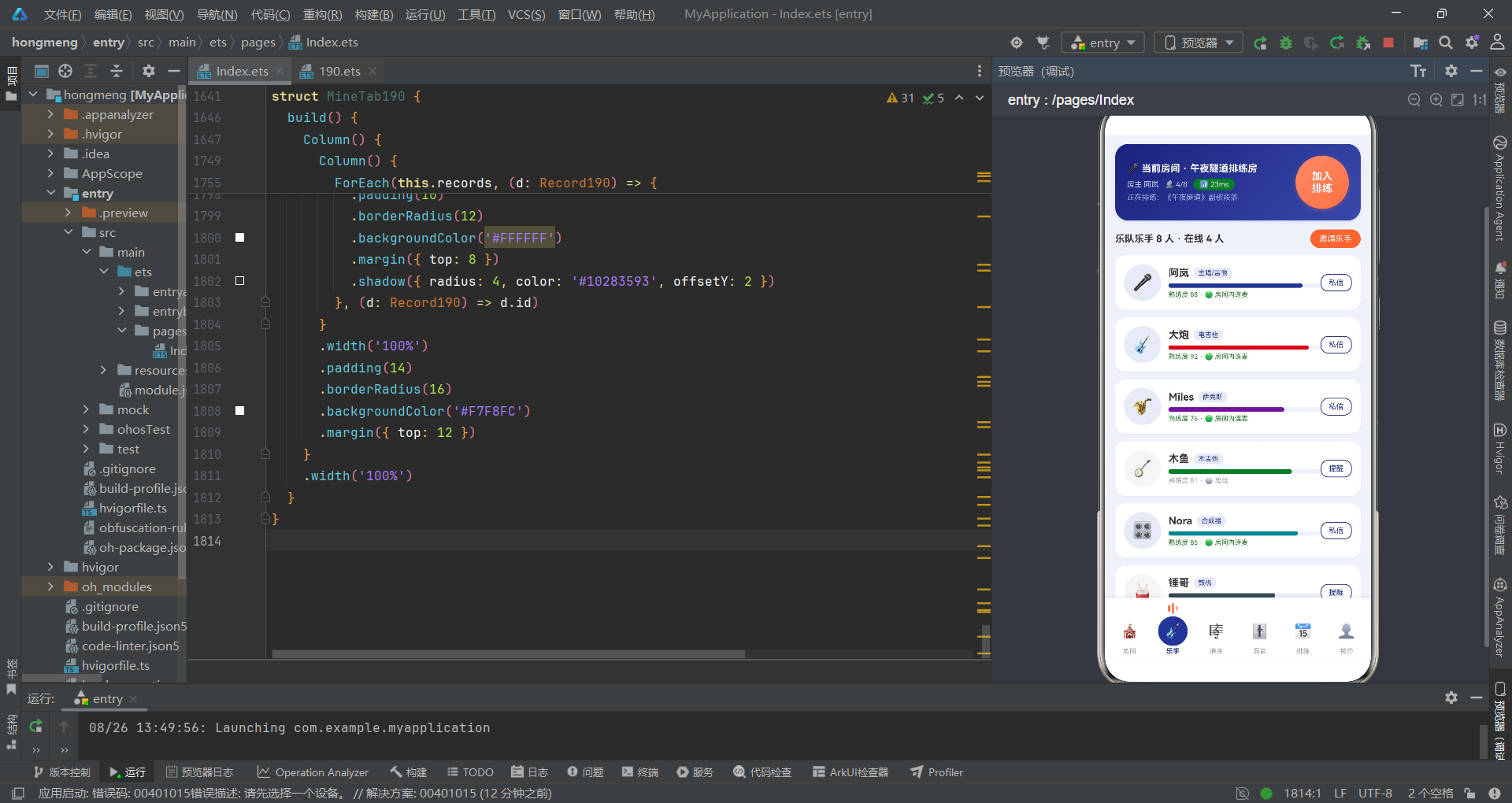
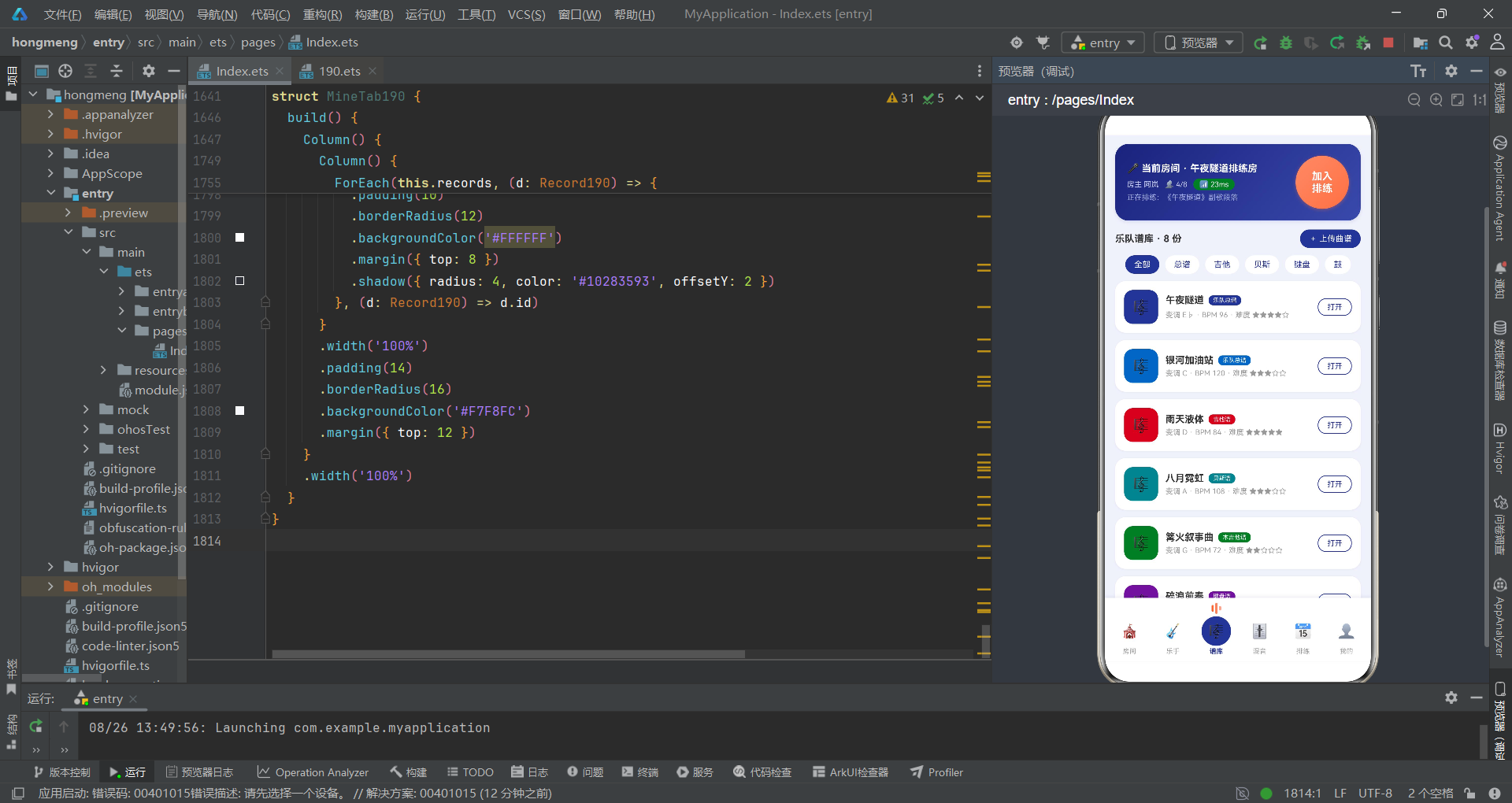
这是排练房入口的第一视觉焦点——一张深靛蓝渐变的卡片,上面用白色文字写着当前房间名、房主、在线人数和延迟值。右侧那个 72x72 的珊瑚橙圆形按钮"加入排练"是整张卡片的视觉高潮,它使用 linearGradient 制造从浅橙到深橙的光泽渐变,再用 shadow 投下带有半透明橙色的长投影,在深蓝底色上如同舞台聚光灯打出的光斑。23ms 延迟值用绿色背景标记——因为 23 小于 25,pingC190 返回了绿色,意味着这个房间的网络质量足够支撑同步合奏。这不仅仅是一张信息卡片,它是整个排练房场景的情绪入口:深夜、低延迟、有人正在合奏。
2.3 中间内容区与 Tab 路由
      Scroll() {
        Column() {
          if (this.curTab === 0) {
            RoomTab190({
              onCreate: () => {
                this.showCreateSheet = true;
              },
              onDetail: (r: Room190) => {
                this.selRoom = r;
                this.showDetailDialog = true;
              }
            })
          } else if (this.curTab === 1) {
            PlayerTab190()
          } else if (this.curTab === 2) {
            SheetTab190({
              onUpload: () => {
                this.showUploadSheet = true;
              }
            })
          } else if (this.curTab === 3) {
            MixTab190()
          } else if (this.curTab === 4) {
            RehearseTab190({
              onEdit: (h: Rehearse190) => {
                this.selRehearse = h;
                this.edName = h.song;
                this.showEditSheet = true;
              }
            })
          } else {
            MineTab190({
              records: this.records,
              onDelRecord: (d: Record190) => {
                this.records = this.records.filter((x: Record190) => {
                  return x.id !== d.id;
                });
              }
            })
          }
        }
        .width('100%')
        .padding({ left: 14, right: 14, top: 12, bottom: 20 })
      }
      .scrollable(ScrollDirection.Vertical)
      .scrollBar(BarState.Off)
      .layoutWeight(1)
      .align(Alignment.TopStart)
中间内容区是一段被 Scroll 包裹的垂直滚动容器,它用 if-else if 链实现了六个 Tab 组件的条件渲染。这种模式如同乐谱中的反复记号——根据 curTab 的值,选择性地"演奏"对应的子组件。值得注意的是 MineTab190 中使用了 onDelRecord 回调,当用户在个人中心删除录音时,通过 filter 生成新数组赋值给 this.records,触发 @State 响应式更新——删除即刻可见。子组件通过构造参数接收回调函数,这是 ArkTS 中父向子传递事件的标准范式,如同乐队指挥向各声部乐手递出的手势信号。
条件渲染是代码的"选曲"机制——同一时刻只奏一个乐章,但所有乐章的曲谱都已备好,只待
curTab指挥棒的挥动。
2.4 底部导航的均衡器之舞
      Row() {
        ForEach(BTABS190, (t: TabItem190, i: number) => {
          Column() {
            Row({ space: 2 }) {
              Text('')
                .width(3)
                .height(9)
                .borderRadius(2)
                .backgroundColor(this.curTab === i ? '#FF7043' : '#00000000')
              Text('')
                .width(3)
                .height(15)
                .borderRadius(2)
                .backgroundColor(this.curTab === i ? '#FF8A65' : '#00000000')
              Text('')
                .width(3)
                .height(6)
                .borderRadius(2)
                .backgroundColor(this.curTab === i ? '#FFAB91' : '#00000000')
            }
            .height(16)
            .margin({ bottom: 3 })
            Text(t.icon)
              .fontSize(19)
              .width(40)
              .height(40)
              .textAlign(TextAlign.Center)
              .borderRadius(20)
              .backgroundColor(this.curTab === i ? '#283593' : '#00000000')
            Text(t.name)
              .fontSize(9)
              .fontColor(this.curTab === i ? '#283593' : '#9E9E9E')
              .fontWeight(this.curTab === i ? FontWeight.Bold : FontWeight.Normal)
              .margin({ top: 2 })
          }
          .layoutWeight(1)
          .onClick(() => {
            this.curTab = i;
          })
        }, (t: TabItem190) => t.name)
      }
      .width('100%')
      .padding({ top: 6, bottom: 8, left: 4, right: 4 })
      .backgroundColor('#FFFFFF')
      .shadow({ radius: 12, color: '#1A283593', offsetY: -4 })
这是整个应用中最具诗意的部分。每个 Tab 项上方有三根 Text('') 竖条——宽度 3,高度分别为 9、15、6,模拟均衡器中不同频段的跳动幅度。当 curTab === i 时,三根竖条变为珊瑚橙的不同明度(#FF7043、#FF8A65、#FFAB91),如同真实的 LED VU 表在信号到达时逐级点亮;未选中时则变为全透明 #00000000,消隐于白底之中。底栏整体使用白色背景加向上投影 offsetY: -4,从视觉上"浮起"于内容区之上。这段代码将音乐的视觉语言翻译为 UI 语言,是整个应用设计哲学的缩影——代码不只是功能,代码是情绪。
2.5 弹层绑定
    .width('100%')
    .height('100%')
    .backgroundColor('#F0F2FA')
    .bindSheet($$this.showCreateSheet, this.createSheet190(), {
      height: 560,
      dragBar: true,
      showClose: false,
      backgroundColor: '#FFFFFF'
    })
    .bindSheet($$this.showUploadSheet, this.uploadSheet190(), {
      height: 540,
      dragBar: true,
      showClose: false,
      backgroundColor: '#FFFFFF'
    })
    .bindSheet($$this.showEditSheet, this.editSheet190(), {
      height: 540,
      dragBar: true,
      showClose: false,
      backgroundColor: '#FFFFFF'
    })
    .bindContentCover($$this.showDissolveDialog, this.dissolveDialog190(), {
    })
    .bindContentCover($$this.showDetailDialog, this.detailDialog190(), {
    })
bindSheet 是抽屉式弹层的绑定方法,$$ 双向绑定语法让布尔状态可以直接控制弹层的显示与隐藏。三个抽屉分别对应创建房间、上传曲谱、编辑排练计划,各自有独立的高度设定。而 bindContentCover 是全屏遮罩式对话框,用于解散房间和房间详情两个需要强确认的场景。这种区分——日常操作用抽屉、关键决策用居中弹窗——是交互层级设计中的音乐性体现:抽屉如弱拍,弹窗如强拍。
三、抽屉乐句:表单交互的复调书写
3.1 创建排练房抽屉
  @Builder
  createSheet190() {
    Column() {
      Row() {
        Column() {
          Text('')
            .width(36)
            .height(4)
            .borderRadius(2)
            .backgroundColor('#E0E0E0')
        }
        .width('100%')
        .alignItems(HorizontalAlign.Center)
        .margin({ top: 8 })
      }
      .width('100%')

      Text('创建排练房')
        .fontSize(17)
        .fontWeight(FontWeight.Bold)
        .fontColor('#283593')
        .margin({ top: 10 })

      Text('排练曲目')
        .fontSize(13)
        .fontWeight(FontWeight.Bold)
        .fontColor('#333333')
        .width('100%')
        .margin({ top: 16 })
      TextInput({ placeholder: '例如:午夜隧道(完整连排)', text: this.crSong })
        .fontSize(13)
        .height(42)
        .borderRadius(10)
        .backgroundColor('#EEF1FA')
        .margin({ top: 8 })
        .onChange((v: string) => {
          this.crSong = v;
        })

      Text('曲风')
        .fontSize(13)
        .fontWeight(FontWeight.Bold)
        .fontColor('#333333')
        .width('100%')
        .margin({ top: 18 })
      Row({ space: 8 }) {
        ForEach(['后摇', '朋克', '爵士', '民谣', '电子'], (c: string, i: number) => {
          Text(c)
            .fontSize(12)
            .fontColor(this.crGenre === i ? '#FFFFFF' : '#283593')
            .padding({ left: 14, right: 14, top: 7, bottom: 7 })
            .borderRadius(14)
            .backgroundColor(this.crGenre === i ? '#283593' : '#EEF1FA')
            .onClick(() => {
              this.crGenre = i;
            })
        }, (c: string) => c)
      }
      .margin({ top: 8 })
创建排练房抽屉是一段完整的表单乐句。顶部那个 36x4 的灰色圆角条是 dragBar 的视觉把手——用户可以拖拽它来收起抽屉,是整个交互中最具物理质感的细节。TextInput 使用 text: this.crSong 实现了双向绑定,onChange 中将输入值同步回状态变量。曲风选择器用 ForEach 渲染五个胶囊按钮,选中态为靛蓝底白字,未选中为浅蓝底靛蓝字——这种"反转色"的选中反馈是整个应用中最统一的设计语言,如同和弦中大七度的色彩翻转。
      Row() {
        Column() {
          Text('开放加入')
            .fontSize(13)
            .fontColor('#333333')
          Text('允许乐队外乐手申请上麦合奏')
            .fontSize(10)
            .fontColor('#999999')
            .margin({ top: 3 })
        }
        .alignItems(HorizontalAlign.Start)
        .layoutWeight(1)

        Toggle({ type: ToggleType.Switch, isOn: this.crOpen })
          .onChange((v: boolean) => {
            this.crOpen = v;
          })
      }
      .width('100%')
      .margin({ top: 18 })

      Row() {
        Text('人数上限')
          .fontSize(13)
          .fontColor('#333333')
        Text('')
          .layoutWeight(1)
        Text('−')
          .fontSize(18)
          .fontWeight(FontWeight.Bold)
          .fontColor('#283593')
          .width(30)
          .height(30)
          .textAlign(TextAlign.Center)
          .borderRadius(15)
          .backgroundColor('#EEF1FA')
          .onClick(() => {
            if (this.crSeats > 2) {
              this.crSeats = this.crSeats - 1;
            }
          })
        Text(' ' + this.crSeats + ' 人 ')
          .fontSize(14)
          .fontWeight(FontWeight.Bold)
          .fontColor('#283593')
        Text('+')
          .fontSize(18)
          .fontWeight(FontWeight.Bold)
          .fontColor('#FFFFFF')
          .width(30)
          .height(30)
          .textAlign(TextAlign.Center)
          .borderRadius(15)
          .backgroundColor('#283593')
          .onClick(() => {
            if (this.crSeats < 12) {
              this.crSeats = this.crSeats + 1;
            }
          })
      }
      .width('100%')
      .margin({ top: 18 })

      Text('创建房间')
        .fontSize(15)
        .fontWeight(FontWeight.Bold)
        .fontColor('#FFFFFF')
        .width('100%')
        .height(46)
        .textAlign(TextAlign.Center)
        .borderRadius(23)
        .linearGradient({
          angle: 90,
          colors: [['#283593', 0], ['#5C6BC0', 1]]
        })
        .margin({ top: 24 })
        .onClick(() => {
          this.showCreateSheet = false;
        })
    }
    .width('100%')
    .padding({ left: 20, right: 20, bottom: 24 })
  }
Toggle 开关组件用 isOn 绑定布尔状态,onChange 回调同步翻转——这是布尔值最自然的交互形态。人数步进器是手写的加减按钮:减号用浅蓝底靛蓝字,加号用靛蓝底白字,两者视觉重量不等,暗示了"增加"是正向操作、"减少"是负向操作的语义区分。底部提交按钮用 90 度线性渐变从靛蓝过渡到浅靛蓝,圆角 23、高度 46,是整个抽屉的终止线——点击后设置 showCreateSheet = false,抽屉收起,如同乐句结束时的休止符。
表单是代码中的慢板乐章——它不追求速度,追求的是每一次输入都被聆听、每一次选择都被回应的从容。
3.2 解散房间对话框
  @Builder
  dissolveDialog190() {
    Column() {
      Text('🎸')
        .fontSize(34)
        .width(64)
        .height(64)
        .textAlign(TextAlign.Center)
        .borderRadius(32)
        .backgroundColor('#EEF1FA')
        .margin({ top: 24 })

      Text('确认解散当前房间?')
        .fontSize(16)
        .fontWeight(FontWeight.Bold)
        .fontColor('#333333')
        .margin({ top: 12 })

      Text('午夜隧道排练房 · 房间内 4 位乐手将被移出')
        .fontSize(11)
        .fontColor('#999999')
        .margin({ top: 6 })

      Column() {
        Text('⚠️ 解散后房间配置(曲风/人数上限/混音预设)将被清除,重新创建需要重新设置。')
          .fontSize(11)
          .fontColor('#C62828')
          .lineHeight(18)
          .textAlign(TextAlign.Center)
      }
      .width('100%')
      .alignItems(HorizontalAlign.Center)
      .padding(12)
      .borderRadius(12)
      .backgroundColor('#FDECEA')
      .margin({ top: 14 })

      Row() {
        Text('保留云端录制文件')
          .fontSize(12)
          .fontColor('#333333')
        Text('')
          .layoutWeight(1)
        Toggle({ type: ToggleType.Switch, isOn: this.dsKeep })
          .onChange((v: boolean) => {
            this.dsKeep = v;
          })
      }
      .width('100%')
      .padding({ left: 16, right: 16 })
      .margin({ top: 14 })

      Row({ space: 12 }) {
        Text('取消')
          .fontSize(14)
          .fontWeight(FontWeight.Bold)
          .fontColor('#666666')
          .layoutWeight(1)
          .height(42)
          .textAlign(TextAlign.Center)
          .borderRadius(21)
          .backgroundColor('#F5F5F5')
          .onClick(() => {
            this.showDissolveDialog = false;
          })
        Text('确认解散')
          .fontSize(14)
          .fontWeight(FontWeight.Bold)
          .fontColor('#FFFFFF')
          .layoutWeight(1)
          .height(42)
          .textAlign(TextAlign.Center)
          .borderRadius(21)
          .backgroundColor('#C62828')
          .onClick(() => {
            this.showDissolveDialog = false;
          })
      }
      .width('100%')
      .padding({ left: 16, right: 16 })
      .margin({ top: 20, bottom: 24 })
    }
    .width('86%')
    .borderRadius(20)
    .backgroundColor('#FFFFFF')
  }
解散房间的对话框是整个应用中最沉重的和弦。红色的警告框 #FDECEA 底配 #C62828 文字,用 lineHeight(18) 给出足够行距让警告信息呼吸。“保留云端录制文件"的 Toggle 是一个温柔的设计——即便房间消亡,录音仍可存续,如同乐谱不会因为演奏结束而消失。底部双按钮采用等宽 layoutWeight(1) 布局,取消按钮灰色底、确认按钮红色底,视觉天平向"确认"倾斜,但不阻止"取消”——这是破坏性操作应有的尊重。
四、子组件的诗意展开
4.1 房间 Tab:排练房的画廊
@Component
struct RoomTab190 {
  @State filterIdx: number = 0;
  onCreate: () => void = () => {
  };
  onDetail: (r: Room190) => void = () => {
  };

  build() {
    Column() {
      Scroll() {
        Row({ space: 8 }) {
          ForEach(GENRECHIPS190, (c: string, i: number) => {
            Text(c)
              .fontSize(11)
              .fontColor(this.filterIdx === i ? '#FFFFFF' : '#283593')
              .padding({ left: 14, right: 14, top: 6, bottom: 6 })
              .borderRadius(14)
              .backgroundColor(this.filterIdx === i ? '#283593' : '#FFFFFF')
              .onClick(() => {
                this.filterIdx = i;
              })
          }, (c: string) => c)
        }
      }
      .scrollable(ScrollDirection.Horizontal)
      .scrollBar(BarState.Off)
      .width('100%')

      Text('+ 创建新排练房')
        .fontSize(14)
        .fontWeight(FontWeight.Bold)
        .fontColor('#FF7043')
        .width('100%')
        .height(44)
        .textAlign(TextAlign.Center)
        .borderRadius(22)
        .border({ width: 1.5, color: '#FF7043' })
        .backgroundColor('#FFF3EF')
        .margin({ top: 12 })
        .onClick(() => {
          this.onCreate();
        })

      Column() {
        Text('各房间延迟')
          .fontSize(13)
          .fontWeight(FontWeight.Bold)
          .fontColor('#333333')
          .width('100%')
        ForEach(ROOMS190, (r: Room190) => {
          Row() {
            Text(r.name)
              .fontSize(10)
              .fontColor('#666666')
              .width(110)
              .maxLines(1)
              .textOverflow({ overflow: TextOverflow.Ellipsis })
            Column() {
              Row() {
                Text('')
                  .width((100 - r.ping) / 40 * 100 + '%')
                  .height(8)
                  .borderRadius(4)
                  .backgroundColor(pingC190(r.ping))
              }
              .width('100%')
              .height(8)
              .borderRadius(4)
              .backgroundColor('#E8EAF6')
            }
            .layoutWeight(1)
            Text(r.ping + 'ms')
              .fontSize(10)
              .fontColor(pingC190(r.ping))
              .margin({ left: 8 })
              .width(36)
          }
          .width('100%')
          .margin({ top: 10 })
        }, (r: Room190) => 'ping' + r.id)
      }
      .width('100%')
      .padding(14)
      .borderRadius(16)
      .backgroundColor('#FFFFFF')
      .shadow({ radius: 8, color: '#14283593', offsetY: 3 })
      .margin({ top: 12 })

      Text('热门排练房')
        .fontSize(13)
        .fontWeight(FontWeight.Bold)
        .fontColor('#333333')
        .width('100%')
        .margin({ top: 14 })

      ForEach(ROOMS190, (r: Room190) => {
        Row() {
          Text(r.emoji)
            .fontSize(24)
            .width(56)
            .height(56)
            .textAlign(TextAlign.Center)
            .borderRadius(14)
            .backgroundColor(r.color)
          Column() {
            Row({ space: 6 }) {
              Text(r.name)
                .fontSize(13)
                .fontWeight(FontWeight.Bold)
                .fontColor('#333333')
              Text(r.genre)
                .fontSize(8)
                .fontColor('#FFFFFF')
                .padding({ left: 6, right: 6, top: 2, bottom: 2 })
                .borderRadius(6)
                .backgroundColor(r.color)
            }
            Text('房主 ' + r.owner + ' · 👥 ' + r.joined + '/' + r.seats + ' · 📶 ' + r.ping + 'ms')
              .fontSize(10)
              .fontColor('#999999')
              .margin({ top: 4 })
          }
          .alignItems(HorizontalAlign.Start)
          .layoutWeight(1)
          .margin({ left: 10 })

          Text('加入')
            .fontSize(11)
            .fontColor('#FFFFFF')
            .padding({ left: 14, right: 14, top: 7, bottom: 7 })
            .borderRadius(15)
            .backgroundColor(r.joined >= r.seats ? '#B0BEC5' : '#283593')
        }
        .width('100%')
        .padding(12)
        .borderRadius(14)
        .backgroundColor('#FFFFFF')
        .margin({ top: 10 })
        .shadow({ radius: 6, color: '#14283593', offsetY: 2 })
        .onClick(() => {
          this.onDetail(r);
        })
      }, (r: Room190) => r.id)
    }
    .width('100%')
  }
}
RoomTab190 是排练房的画廊入口。顶部曲风筛选器是水平滚动的胶囊条,选中态靛蓝填充。"创建新排练房"按钮用珊瑚橙描边和浅橙底色,是整个靛蓝世界中唯一的暖色信号——它召唤用户去创造。各房间延迟的可视化是这段代码中最精妙的段落:每个房间的 ping 值通过 (100 - r.ping) / 40 * 100 + '%' 计算出进度条宽度——ping 越低条越长,颜色由 pingC190 函数决定。这是一个反向映射:条越长代表延迟越低,网络越好。热门排练房列表中每张卡片都是一个微缩的房间肖像——emoji 图标、流派色标、房主与人数信息一应俱全。"加入"按钮在 joined >= seats 时变为灰色 #B0BEC5——满员即沉寂,如同乐谱上的休止符。
每一个房间都是一座临时搭建的声音剧场。代码用颜色、进度条和文字为它绘制了门牌,而用户推门而入的那一刻,合奏才真正开始。
4.2 混音 Tab:声部的柱状图交响
@Component
struct MixTab190 {
  @State presetIdx: number = 0;

  build() {
    Column() {
      Column() {
        Text('🎚️ 排练房混音台')
          .fontSize(13)
          .fontWeight(FontWeight.Bold)
          .fontColor('#333333')
          .width('100%')
        Row({ space: 4 }) {
          ForEach(['排练', 'Live', '录音', '平直'], (c: string, i: number) => {
            Text(c)
              .fontSize(11)
              .fontColor(this.presetIdx === i ? '#FFFFFF' : '#283593')
              .padding({ left: 14, right: 14, top: 6, bottom: 6 })
              .borderRadius(14)
              .backgroundColor(this.presetIdx === i ? '#FF7043' : '#EEF1FA')
              .onClick(() => {
                this.presetIdx = i;
              })
          }, (c: string) => c)
        }
        .width('100%')
        .margin({ top: 10 })

        Row({ space: 10 }) {
          ForEach(MIXES190, (m: Mix190) => {
            Column({ space: 4 }) {
              Text(m.level + '')
                .fontSize(9)
                .fontColor('#666666')
              Column() {
                Text('')
                  .width('100%')
                  .height(m.level + '%')
                  .borderRadius({ topLeft: 3, topRight: 3 })
                  .backgroundColor(m.level > 80 ? '#FF7043' : m.color)
              }
              .width(26)
              .height(96)
              .justifyContent(FlexAlign.End)
              Text(m.instrument)
                .fontSize(9)
                .fontColor('#666666')
            }
          }, (m: Mix190) => m.instrument)
        }
        .width('100%')
        .justifyContent(FlexAlign.Center)
        .margin({ top: 12 })
      }
      .width('100%')
      .padding(14)
      .borderRadius(16)
      .backgroundColor('#FFFFFF')
      .shadow({ radius: 8, color: '#14283593', offsetY: 3 })

      Column() {
        Text('总线效果占比')
          .fontSize(13)
          .fontWeight(FontWeight.Bold)
          .fontColor('#333333')
          .width('100%')
        Row() {
          ForEach(BUS190, (b: Bus190) => {
            Text('')
              .layoutWeight(b.w)
              .height(14)
              .backgroundColor(b.c)
          }, (b: Bus190) => b.label)
        }
        .width('100%')
        .clip(true)
        .borderRadius(7)
        .margin({ top: 10 })
        Row({ space: 12 }) {
          ForEach(BUS190, (b: Bus190) => {
            Row() {
              Text('')
                .width(8)
                .height(8)
                .borderRadius(4)
                .backgroundColor(b.c)
              Text(' ' + b.label + ' ' + b.w + '%')
                .fontSize(10)
                .fontColor('#666666')
            }
          }, (b: Bus190) => b.label + 'b')
        }
        .width('100%')
        .margin({ top: 8 })
      }
      .width('100%')
      .padding(14)
      .borderRadius(16)
      .backgroundColor('#FFFFFF')
      .shadow({ radius: 8, color: '#14283593', offsetY: 3 })
      .margin({ top: 12 })

      Column() {
        Text('⚠️ 延迟提示')
          .fontSize(13)
          .fontWeight(FontWeight.Bold)
          .fontColor('#C62828')
          .width('100%')
        Text('当房间延迟超过 35ms 时,建议关闭混响与延迟效果,并将监听音量降至 60% 以下,以保持节奏同步。')
          .fontSize(11)
          .fontColor('#666666')
          .lineHeight(18)
          .margin({ top: 8 })
      }
      .width('100%')
      .padding(14)
      .borderRadius(16)
      .backgroundColor('#FFF8F0')
      .border({ width: 1, color: '#FFCCBC' })
      .margin({ top: 12 })
    }
    .width('100%')
  }
}
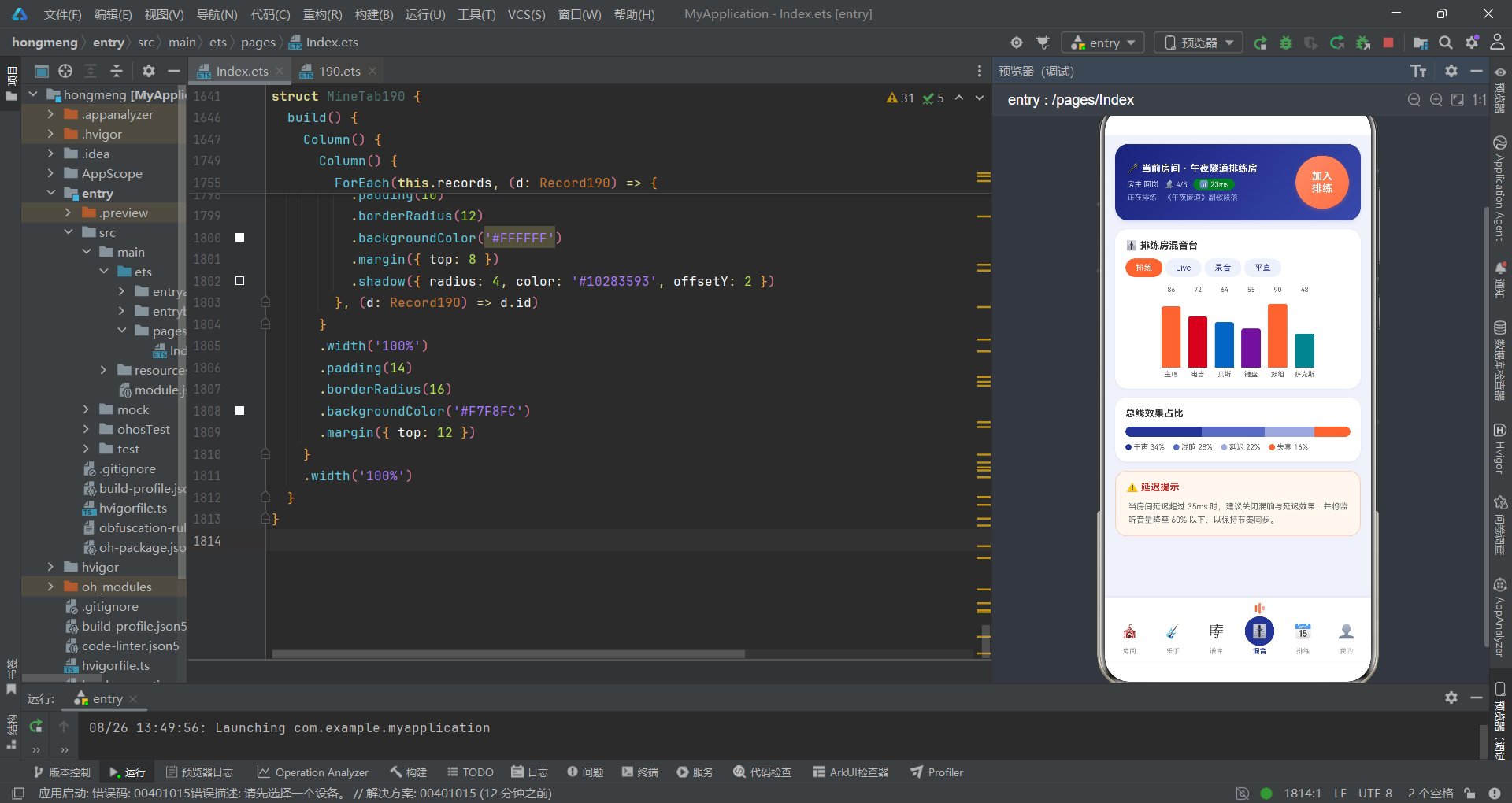
混音台是声音的调色板。预设按钮组"排练/Live/录音/平直"用珊瑚橙标记当前选中——混音预设切换就是整首乐曲的色彩变换。六个声部的柱状图以 m.level + '%' 的高度从 96 像素高的容器底部向上生长,justifyContent(FlexAlign.End) 确保柱子从底部对齐——这模拟了真实调音台推子的物理形态。鼓组以 90 的高位雄踞且超过 80 阈值变为珊瑚橙,其余声部保留各自颜色。总线效果占比用 layoutWeight(b.w) 实现比例宽度分配——干声 34%、混响 28%、延迟 22%、失真 16%,一条被 clip(true) 裁切为圆角的水平堆叠条,是声学空间的全景。底部延迟提示用暖底色加珊瑚边框,提醒用户网络与效果器之间的物理博弈。
4.3 个人中心:排练者的独奏档案
@Component
struct MineTab190 {
  @Prop records: Record190[];
  onDelRecord: (d: Record190) => void = () => {
  };

  build() {
    Column() {
      Column() {
        Row() {
          Text('🎸')
            .fontSize(26)
            .width(60)
            .height(60)
            .textAlign(TextAlign.Center)
            .borderRadius(30)
            .backgroundColor('#33FFFFFF')
          Column() {
            Text('阿岚')
              .fontSize(17)
              .fontWeight(FontWeight.Bold)
              .fontColor('#FFFFFF')
            Text('主唱/吉他 · 午夜隧道乐队 · 云排练 156 次')
              .fontSize(10)
              .fontColor('#C5CAE9')
              .margin({ top: 4 })
          }
          .alignItems(HorizontalAlign.Start)
          .margin({ left: 12 })
          Text('')
            .layoutWeight(1)
          Column() {
            Text('LV.7')
              .fontSize(16)
              .fontWeight(FontWeight.Bold)
              .fontColor('#FFAB91')
            Text('乐手等级')
              .fontSize(9)
              .fontColor('#C5CAE9')
              .margin({ top: 2 })
          }
        }
        .width('100%')
      }
      .width('100%')
      .padding(16)
      .borderRadius(18)
      .linearGradient({
        angle: 135,
        colors: [['#1A237E', 0], ['#3949AB', 1]]
      })
      .shadow({ radius: 10, color: '#22283593', offsetY: 4 })

      Row() {
        Column() {
          Text('156')
            .fontSize(18)
            .fontWeight(FontWeight.Bold)
            .fontColor('#283593')
          Text('云排练次数')
            .fontSize(10)
            .fontColor('#999999')
            .margin({ top: 2 })
        }
        .layoutWeight(1)

        Column() {
          Text('212h')
            .fontSize(18)
            .fontWeight(FontWeight.Bold)
            .fontColor('#283593')
          Text('累计时长')
            .fontSize(10)
            .fontColor('#999999')
            .margin({ top: 2 })
        }
        .layoutWeight(1)

        Column() {
          Text('28')
            .fontSize(18)
            .fontWeight(FontWeight.Bold)
            .fontColor('#283593')
          Text('上传曲谱')
            .fontSize(10)
            .fontColor('#999999')
            .margin({ top: 2 })
        }
        .layoutWeight(1)

        Column() {
          Text('5')
            .fontSize(18)
            .fontWeight(FontWeight.Bold)
            .fontColor('#FF7043')
          Text('原创demo')
            .fontSize(10)
            .fontColor('#999999')
            .margin({ top: 2 })
        }
        .layoutWeight(1)
      }
      .width('100%')
      .padding(14)
      .borderRadius(16)
      .backgroundColor('#FFFFFF')
      .margin({ top: 12 })
      .shadow({ radius: 6, color: '#14283593', offsetY: 2 })

      Column() {
        Text('🎧 我的排练录音')
          .fontSize(13)
          .fontWeight(FontWeight.Bold)
          .fontColor('#333333')
          .width('100%')
        ForEach(this.records, (d: Record190) => {
          Row() {
            Text('▶️')
              .fontSize(16)
              .width(36)
              .height(36)
              .textAlign(TextAlign.Center)
              .borderRadius(18)
              .backgroundColor('#EEF1FA')
            Column() {
              Text(d.name)
                .fontSize(12)
                .fontWeight(FontWeight.Bold)
                .fontColor('#333333')
                .maxLines(1)
                .textOverflow({ overflow: TextOverflow.Ellipsis })
              Text(d.date + ' · 时长 ' + d.dur)
                .fontSize(9)
                .fontColor('#999999')
                .margin({ top: 3 })
            }
            .alignItems(HorizontalAlign.Start)
            .layoutWeight(1)
            .margin({ left: 10 })

            Text('分享')
              .fontSize(10)
              .fontColor('#283593')
              .padding({ left: 10, right: 10, top: 5, bottom: 5 })
              .borderRadius(10)
              .border({ width: 1, color: '#283593' })
              .margin({ right: 8 })
            Text('删除')
              .fontSize(10)
              .fontColor('#C62828')
              .padding({ left: 10, right: 10, top: 5, bottom: 5 })
              .borderRadius(10)
              .border({ width: 1, color: '#C62828' })
              .onClick(() => {
                this.onDelRecord(d);
              })
          }
          .width('100%')
          .padding(10)
          .borderRadius(12)
          .backgroundColor('#FFFFFF')
          .margin({ top: 8 })
          .shadow({ radius: 4, color: '#10283593', offsetY: 2 })
        }, (d: Record190) => d.id)
      }
      .width('100%')
      .padding(14)
      .borderRadius(16)
      .backgroundColor('#F7F8FC')
      .margin({ top: 12 })
    }
    .width('100%')
  }
}
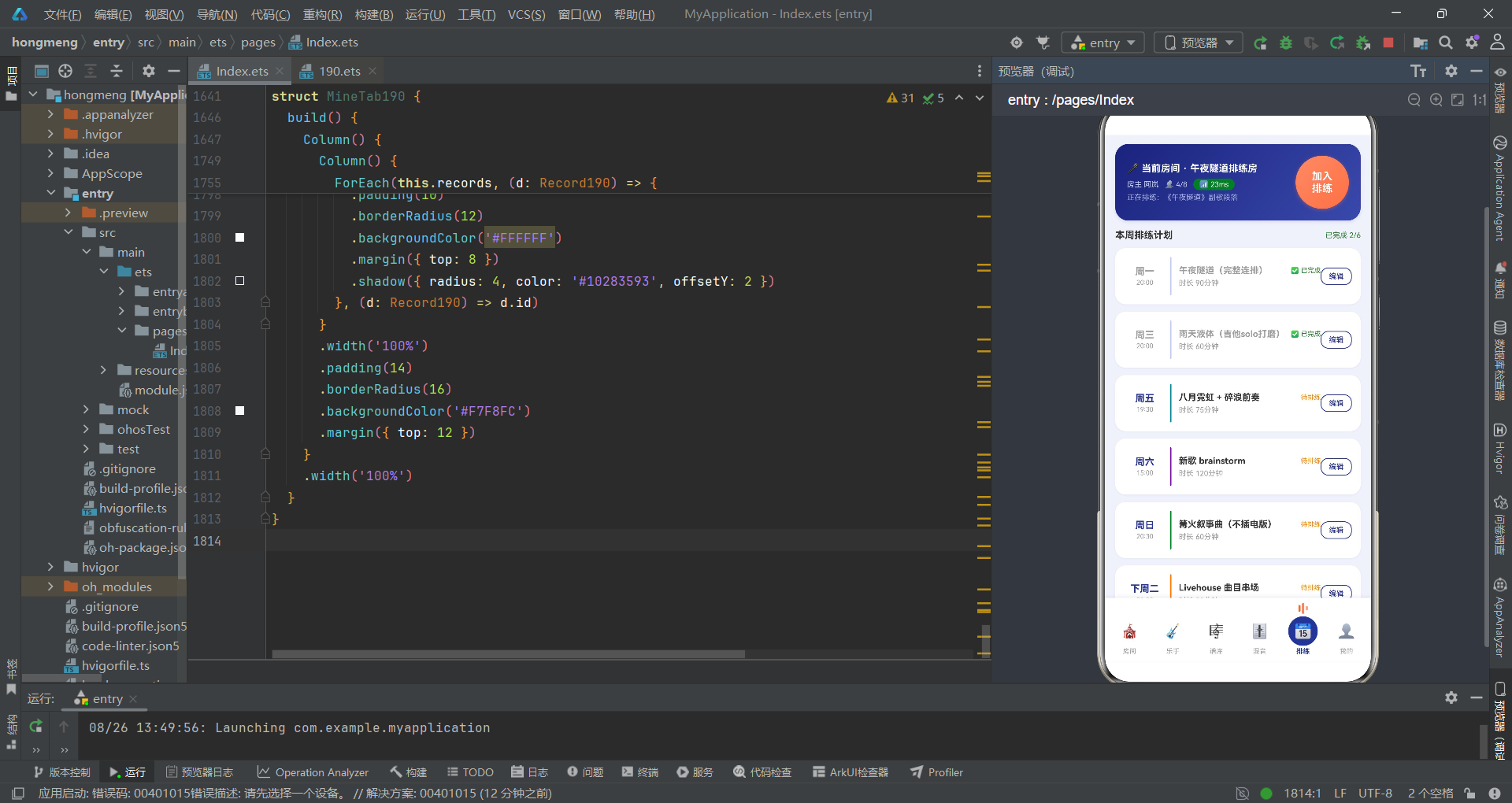
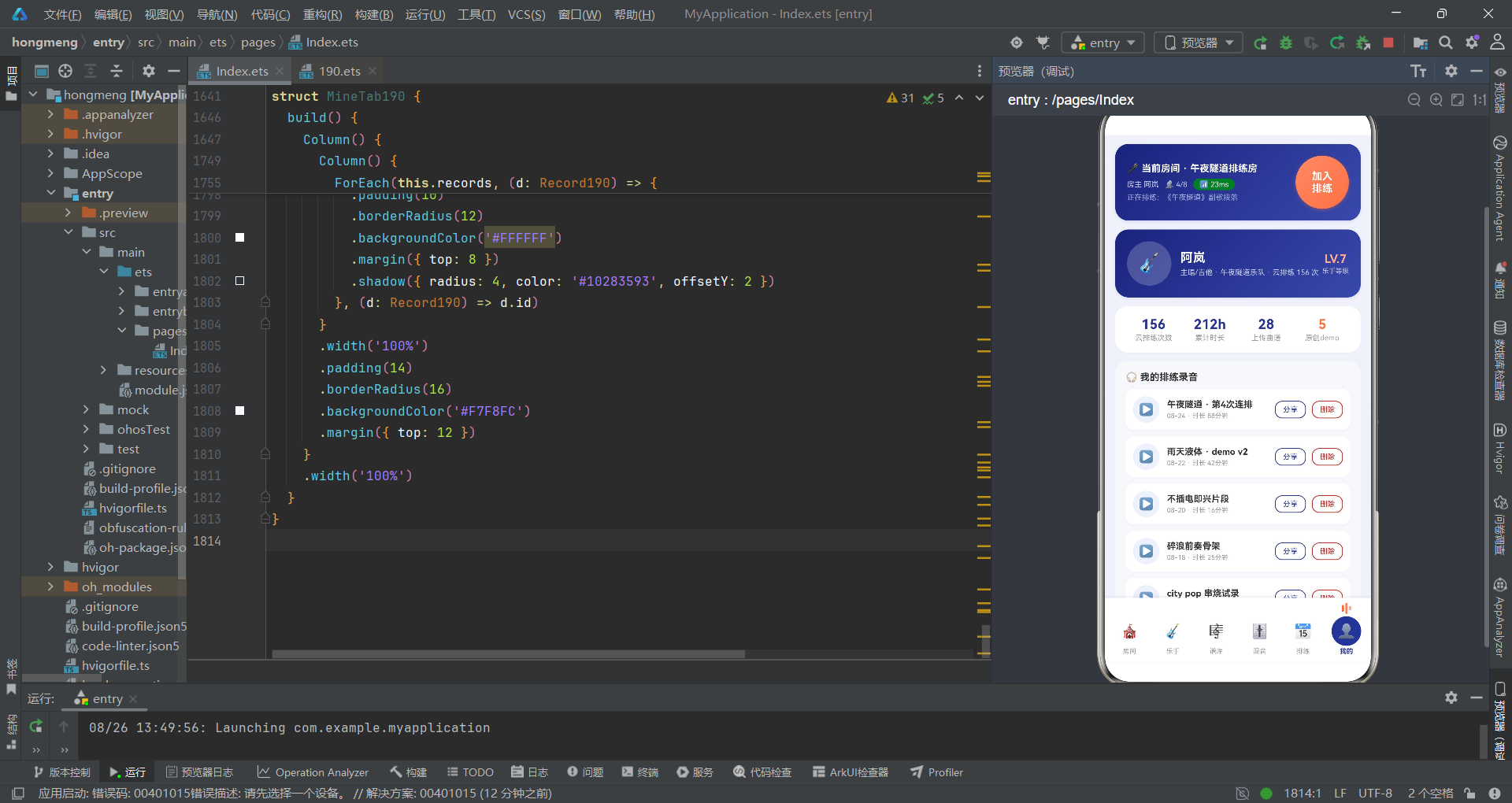
个人中心是排练者的独奏档案。顶部个人卡片用与房间入口卡完全一致的靛蓝渐变——这是视觉一致性最深层的承诺:用户在哪里,哪里就有这片深夜的靛蓝。四宫格统计用 layoutWeight(1) 等分展示排练次数、累计时长、上传曲谱和原创 demo——最后一项用珊瑚橙标记,因为原创是乐队中最珍贵的产出。录音列表用 @Prop records 接收父组件传入的数组——@Prop 是单向只读传递,子组件不可修改,删除操作通过 onDelRecord 回调交给父组件处理。这种单向数据流确保了状态的可预测性,如同乐谱一旦写定,演奏者只负责奏响,不负责改写。
@Prop是代码中的乐谱传递——父组件是作曲家,子组件是演奏者。演奏者可以改变力度和速度,但不能改变音符本身。数据流向永远是单向的、清晰的、可追溯的。
五、流程总览:从打开应用到加入排练
六、技术要素对比
| 技术要素 | 实现方式 | 诗意解读 |
|---|---|---|
| 状态管理 | @State + @Prop 双向/单向分层 | @State 是可变弦,@Prop 是只读谱 |
| 弹层机制 | bindSheet + bindContentCover | 抽屉如弱拍上行,遮罩如强拍终止 |
| Tab 路由 | if-else if 条件渲染 | 同一时刻只奏一个乐章 |
| 视觉反馈 | linearGradient + shadow | 渐变是光泽,投影是纵深 |
| 均衡器动画 | 三根 Text('') 竖条 + 条件色 | VU 表的代码投影,选中即跳动 |
| 延迟可视化 | (100-ping)/40*100% 反向进度条 | 条越长延迟越低,是声音的近场 |
| 数据传递 | 构造参数回调函数 | 父组件是指挥,子组件是声部 |
| 列表渲染 | ForEach + key 生成函数 | 每个元素都有唯一的节拍编号 |
| 步进器 | 手写加减 Text + onClick | 正向操作用深色,负向用浅色 |
| 卡片投影 | shadow 带 offsetY | 浮起的高度是情绪的重量 |
安装DevEco Studio程序

选择目标安装目录:

设置环境变量,但是需要重启一下:

新建一个空白模板:

设置API为24的模板项目:

初始化项目,自动下载相关依赖:

完整代码:
// 场景:异地乐手进入低延迟云排练房,同步合奏、曲谱共享、混音推子与排练计划管理
// 配色:靛蓝 #283593 × 珊瑚橙 #FF7043 × 云白 #F0F2FA
// Tab布局:底部 6 tab 导航(选中项图标上方显示三根静态「均衡器」跳动条)
// 弹框:创建房间(抽屉)/上传曲谱(抽屉)/编辑排练计划(抽屉)/解散房间(居中)/房间详情(居中)
interface TabItem190 {
icon: string;
name: string;
}
interface Room190 {
id: string;
name: string;
genre: string;
color: string;
joined: number;
seats: number;
ping: number;
owner: string;
emoji: string;
}
interface Player190 {
id: string;
name: string;
instrument: string;
emoji: string;
level: number;
online: boolean;
color: string;
}
interface Sheet190 {
id: string;
name: string;
instrument: string;
tune: string;
bpm: number;
stars: number;
color: string;
}
interface Rehearse190 {
id: string;
week: string;
time: string;
song: string;
dur: string;
done: boolean;
color: string;
}
interface Mix190 {
instrument: string;
level: number;
color: string;
}
interface Bus190 {
label: string;
w: number;
c: string;
}
interface Record190 {
id: string;
name: string;
dur: string;
date: string;
color: string;
}
const BTABS190: TabItem190[] = [
{ icon: '🎪', name: '房间' },
{ icon: '🎸', name: '乐手' },
{ icon: '🎼', name: '谱库' },
{ icon: '🎚️', name: '混音' },
{ icon: '📅', name: '排练' },
{ icon: '👤', name: '我的' }
];
const ROOMS190: Room190[] = [
{ id: 'r1', name: '午夜隧道排练房', genre: '后摇', color: '#283593', joined: 4, seats: 8, ping: 23, owner: '阿岚', emoji: '🌙' },
{ id: 'r2', name: '车库朋克联社', genre: '朋克', color: '#C62828', joined: 5, seats: 6, ping: 31, owner: '大炮', emoji: '⚡' },
{ id: 'r3', name: '爵士即兴小馆', genre: '爵士', color: '#6A1B9A', joined: 6, seats: 9, ping: 19, owner: 'Miles', emoji: '🎷' },
{ id: 'r4', name: '民谣篝火院子', genre: '民谣', color: '#2E7D32', joined: 3, seats: 8, ping: 27, owner: '木鱼', emoji: '🔥' },
{ id: 'r5', name: '电子音效实验室', genre: '电子', color: '#00838F', joined: 2, seats: 5, ping: 15, owner: 'Nora', emoji: '🎛️' },
{ id: 'r6', name: '金属地堡', genre: '金属', color: '#37474F', joined: 4, seats: 6, ping: 38, owner: '锤哥', emoji: '🤘' },
{ id: 'r7', name: 'city pop 天台', genre: 'City Pop', color: '#F57F17', joined: 5, seats: 7, ping: 21, owner: 'Yuki', emoji: '🌆' }
];
const PLAYERS190: Player190[] = [
{ id: 'p1', name: '阿岚', instrument: '主唱/吉他', emoji: '🎤', level: 88, online: true, color: '#283593' },
{ id: 'p2', name: '大炮', instrument: '电吉他', emoji: '🎸', level: 92, online: true, color: '#C62828' },
{ id: 'p3', name: 'Miles', instrument: '萨克斯', emoji: '🎷', level: 76, online: true, color: '#6A1B9A' },
{ id: 'p4', name: '木鱼', instrument: '木吉他', emoji: '🪕', level: 81, online: false, color: '#2E7D32' },
{ id: 'p5', name: 'Nora', instrument: '合成器', emoji: '🎛️', level: 85, online: true, color: '#00838F' },
{ id: 'p6', name: '锤哥', instrument: '鼓机', emoji: '🥁', level: 70, online: false, color: '#37474F' },
{ id: 'p7', name: '低音鲸', instrument: '贝斯', emoji: '🐟', level: 78, online: true, color: '#1565C0' },
{ id: 'p8', name: '小夏', instrument: '小提琴', emoji: '🎻', level: 66, online: false, color: '#AD1457' }
];
const SHEETS190: Sheet190[] = [
{ id: 'm1', name: '午夜隧道', instrument: '乐队总谱', tune: 'E♭', bpm: 96, stars: 4, color: '#283593' },
{ id: 'm2', name: '银河加油站', instrument: '乐队总谱', tune: 'C', bpm: 120, stars: 3, color: '#1565C0' },
{ id: 'm3', name: '雨天液体', instrument: '吉他谱', tune: 'D', bpm: 84, stars: 5, color: '#C62828' },
{ id: 'm4', name: '八月霓虹', instrument: '贝斯谱', tune: 'A', bpm: 108, stars: 3, color: '#00838F' },
{ id: 'm5', name: '篝火叙事曲', instrument: '木吉他谱', tune: 'G', bpm: 72, stars: 2, color: '#2E7D32' },
{ id: 'm6', name: '碎浪前奏', instrument: '键盘谱', tune: 'F', bpm: 132, stars: 5, color: '#6A1B9A' },
{ id: 'm7', name: '旧城电报', instrument: '鼓谱', tune: '-', bpm: 100, stars: 4, color: '#37474F' },
{ id: 'm8', name: '晨光序曲', instrument: '小提琴谱', tune: 'B♭', bpm: 66, stars: 3, color: '#AD1457' }
];
const REHEARSES190: Rehearse190[] = [
{ id: 'h1', week: '周一', time: '20:00', song: '午夜隧道(完整连排)', dur: '90分钟', done: true, color: '#283593' },
{ id: 'h2', week: '周三', time: '20:00', song: '雨天液体(吉他solo打磨)', dur: '60分钟', done: true, color: '#C62828' },
{ id: 'h3', week: '周五', time: '19:30', song: '八月霓虹 + 碎浪前奏', dur: '75分钟', done: false, color: '#00838F' },
{ id: 'h4', week: '周六', time: '15:00', song: '新歌 brainstorm', dur: '120分钟', done: false, color: '#6A1B9A' },
{ id: 'h5', week: '周日', time: '20:30', song: '篝火叙事曲(不插电版)', dur: '60分钟', done: false, color: '#2E7D32' },
{ id: 'h6', week: '下周二', time: '21:00', song: 'Livehouse 曲目串场', dur: '90分钟', done: false, color: '#F57F17' }
];
const MIXES190: Mix190[] = [
{ instrument: '主唱', level: 86, color: '#283593' },
{ instrument: '电吉', level: 72, color: '#C62828' },
{ instrument: '贝斯', level: 64, color: '#1565C0' },
{ instrument: '键盘', level: 55, color: '#6A1B9A' },
{ instrument: '鼓组', level: 90, color: '#37474F' },
{ instrument: '萨克斯', level: 48, color: '#00838F' }
];
const BUS190: Bus190[] = [
{ label: '干声', w: 34, c: '#283593' },
{ label: '混响', w: 28, c: '#5C6BC0' },
{ label: '延迟', w: 22, c: '#9FA8DA' },
{ label: '失真', w: 16, c: '#FF7043' }
];
const RECORDS190: Record190[] = [
{ id: 'd1', name: '午夜隧道 · 第4次连排', dur: '88分钟', date: '08-24', color: '#283593' },
{ id: 'd2', name: '雨天液体 · demo v2', dur: '42分钟', date: '08-22', color: '#C62828' },
{ id: 'd3', name: '不插电即兴片段', dur: '16分钟', date: '08-20', color: '#2E7D32' },
{ id: 'd4', name: '碎浪前奏骨架', dur: '25分钟', date: '08-18', color: '#6A1B9A' },
{ id: 'd5', name: 'city pop 串烧试录', dur: '31分钟', date: '08-15', color: '#F57F17' }
];
const GENRECHIPS190: string[] = ['全部曲风', '后摇', '朋克', '爵士', '民谣', '电子'];
function pingC190(p: number): string {
if (p <= 25) {
return '#2E7D32';
}
if (p <= 35) {
return '#FF8F00';
}
return '#C62828';
}
function starsText190(n: number): string {
if (n === 5) {
return '★★★★★';
}
if (n === 4) {
return '★★★★☆';
}
if (n === 3) {
return '★★★☆☆';
}
return '★★☆☆☆';
}
@Entry
@Component
struct Index190 {
@State curTab: number = 0;
@State records: Record190[] = RECORDS190;
@State showCreateSheet: boolean = false;
@State showUploadSheet: boolean = false;
@State showEditSheet: boolean = false;
@State showDissolveDialog: boolean = false;
@State showDetailDialog: boolean = false;
@State selRoom: Room190 = ROOMS190[0];
@State selRehearse: Rehearse190 = REHEARSES190[2];
@State crSong: string = '';
@State crGenre: number = 0;
@State crOpen: boolean = true;
@State crSeats: number = 6;
@State crRecord: boolean = true;
@State upName: string = '';
@State upInst: number = 0;
@State upTune: number = 0;
@State upShare: boolean = true;
@State edName: string = '';
@State edWeek: number = 2;
@State edDur: number = 90;
@State edRemind: boolean = true;
@State dsKeep: boolean = true;
build() {
Column() {
Column() {
Row() {
Column() {
Text('🎤 当前房间 · 午夜隧道排练房')
.fontSize(13)
.fontWeight(FontWeight.Bold)
.fontColor('#FFFFFF')
Row({ space: 8 }) {
Text('房主 阿岚')
.fontSize(10)
.fontColor('#C5CAE9')
Text('👥 4/8')
.fontSize(10)
.fontColor('#C5CAE9')
Text('📶 23ms')
.fontSize(10)
.fontColor('#FFFFFF')
.padding({ left: 8, right: 8, top: 2, bottom: 2 })
.borderRadius(8)
.backgroundColor('#2E7D32')
}
.margin({ top: 6 })
Text('正在排练:《午夜隧道》副歌段落')
.fontSize(10)
.fontColor('#9FA8DA')
.margin({ top: 4 })
}
.alignItems(HorizontalAlign.Start)
.layoutWeight(1)
Text('加入\n排练')
.fontSize(14)
.fontWeight(FontWeight.Bold)
.fontColor('#FFFFFF')
.width(72)
.height(72)
.textAlign(TextAlign.Center)
.borderRadius(36)
.linearGradient({
angle: 135,
colors: [['#FF8A65', 0], ['#FF7043', 1]]
})
.shadow({ radius: 12, color: '#66FF7043', offsetY: 4 })
.onClick(() => {
this.showDetailDialog = true;
})
}
.width('100%')
.padding(16)
.borderRadius(18)
.linearGradient({
angle: 130,
colors: [['#1A237E', 0], ['#3949AB', 1]]
})
.shadow({ radius: 12, color: '#22283593', offsetY: 6 })
}
.width('100%')
.padding({ left: 14, right: 14, top: 12 })
Scroll() {
Column() {
if (this.curTab === 0) {
RoomTab190({
onCreate: () => {
this.showCreateSheet = true;
},
onDetail: (r: Room190) => {
this.selRoom = r;
this.showDetailDialog = true;
}
})
} else if (this.curTab === 1) {
PlayerTab190()
} else if (this.curTab === 2) {
SheetTab190({
onUpload: () => {
this.showUploadSheet = true;
}
})
} else if (this.curTab === 3) {
MixTab190()
} else if (this.curTab === 4) {
RehearseTab190({
onEdit: (h: Rehearse190) => {
this.selRehearse = h;
this.edName = h.song;
this.showEditSheet = true;
}
})
} else {
MineTab190({
records: this.records,
onDelRecord: (d: Record190) => {
this.records = this.records.filter((x: Record190) => {
return x.id !== d.id;
});
}
})
}
}
.width('100%')
.padding({ left: 14, right: 14, top: 12, bottom: 20 })
}
.scrollable(ScrollDirection.Vertical)
.scrollBar(BarState.Off)
.layoutWeight(1)
.align(Alignment.TopStart)
Row() {
ForEach(BTABS190, (t: TabItem190, i: number) => {
Column() {
Row({ space: 2 }) {
Text('')
.width(3)
.height(9)
.borderRadius(2)
.backgroundColor(this.curTab === i ? '#FF7043' : '#00000000')
Text('')
.width(3)
.height(15)
.borderRadius(2)
.backgroundColor(this.curTab === i ? '#FF8A65' : '#00000000')
Text('')
.width(3)
.height(6)
.borderRadius(2)
.backgroundColor(this.curTab === i ? '#FFAB91' : '#00000000')
}
.height(16)
.margin({ bottom: 3 })
Text(t.icon)
.fontSize(19)
.width(40)
.height(40)
.textAlign(TextAlign.Center)
.borderRadius(20)
.backgroundColor(this.curTab === i ? '#283593' : '#00000000')
Text(t.name)
.fontSize(9)
.fontColor(this.curTab === i ? '#283593' : '#9E9E9E')
.fontWeight(this.curTab === i ? FontWeight.Bold : FontWeight.Normal)
.margin({ top: 2 })
}
.layoutWeight(1)
.onClick(() => {
this.curTab = i;
})
}, (t: TabItem190) => t.name)
}
.width('100%')
.padding({ top: 6, bottom: 8, left: 4, right: 4 })
.backgroundColor('#FFFFFF')
.shadow({ radius: 12, color: '#1A283593', offsetY: -4 })
}
.width('100%')
.height('100%')
.backgroundColor('#F0F2FA')
.bindSheet($$this.showCreateSheet, this.createSheet190(), {
height: 560,
dragBar: true,
showClose: false,
backgroundColor: '#FFFFFF'
})
.bindSheet($$this.showUploadSheet, this.uploadSheet190(), {
height: 540,
dragBar: true,
showClose: false,
backgroundColor: '#FFFFFF'
})
.bindSheet($$this.showEditSheet, this.editSheet190(), {
height: 540,
dragBar: true,
showClose: false,
backgroundColor: '#FFFFFF'
})
.bindContentCover($$this.showDissolveDialog, this.dissolveDialog190(), {
})
.bindContentCover($$this.showDetailDialog, this.detailDialog190(), {
})
}
@Builder
createSheet190() {
Column() {
Row() {
Column() {
Text('')
.width(36)
.height(4)
.borderRadius(2)
.backgroundColor('#E0E0E0')
}
.width('100%')
.alignItems(HorizontalAlign.Center)
.margin({ top: 8 })
}
.width('100%')
Text('创建排练房')
.fontSize(17)
.fontWeight(FontWeight.Bold)
.fontColor('#283593')
.margin({ top: 10 })
Text('排练曲目')
.fontSize(13)
.fontWeight(FontWeight.Bold)
.fontColor('#333333')
.width('100%')
.margin({ top: 16 })
TextInput({ placeholder: '例如:午夜隧道(完整连排)', text: this.crSong })
.fontSize(13)
.height(42)
.borderRadius(10)
.backgroundColor('#EEF1FA')
.margin({ top: 8 })
.onChange((v: string) => {
this.crSong = v;
})
Text('曲风')
.fontSize(13)
.fontWeight(FontWeight.Bold)
.fontColor('#333333')
.width('100%')
.margin({ top: 18 })
Row({ space: 8 }) {
ForEach(['后摇', '朋克', '爵士', '民谣', '电子'], (c: string, i: number) => {
Text(c)
.fontSize(12)
.fontColor(this.crGenre === i ? '#FFFFFF' : '#283593')
.padding({ left: 14, right: 14, top: 7, bottom: 7 })
.borderRadius(14)
.backgroundColor(this.crGenre === i ? '#283593' : '#EEF1FA')
.onClick(() => {
this.crGenre = i;
})
}, (c: string) => c)
}
.margin({ top: 8 })
Row() {
Column() {
Text('开放加入')
.fontSize(13)
.fontColor('#333333')
Text('允许乐队外乐手申请上麦合奏')
.fontSize(10)
.fontColor('#999999')
.margin({ top: 3 })
}
.alignItems(HorizontalAlign.Start)
.layoutWeight(1)
Toggle({ type: ToggleType.Switch, isOn: this.crOpen })
.onChange((v: boolean) => {
this.crOpen = v;
})
}
.width('100%')
.margin({ top: 18 })
Row() {
Column() {
Text('自动云端录制')
.fontSize(13)
.fontColor('#333333')
Text('排练全程录制,结束后生成回放')
.fontSize(10)
.fontColor('#999999')
.margin({ top: 3 })
}
.alignItems(HorizontalAlign.Start)
.layoutWeight(1)
Toggle({ type: ToggleType.Switch, isOn: this.crRecord })
.onChange((v: boolean) => {
this.crRecord = v;
})
}
.width('100%')
.margin({ top: 14 })
Row() {
Text('人数上限')
.fontSize(13)
.fontColor('#333333')
Text('')
.layoutWeight(1)
Text('−')
.fontSize(18)
.fontWeight(FontWeight.Bold)
.fontColor('#283593')
.width(30)
.height(30)
.textAlign(TextAlign.Center)
.borderRadius(15)
.backgroundColor('#EEF1FA')
.onClick(() => {
if (this.crSeats > 2) {
this.crSeats = this.crSeats - 1;
}
})
Text(' ' + this.crSeats + ' 人 ')
.fontSize(14)
.fontWeight(FontWeight.Bold)
.fontColor('#283593')
Text('+')
.fontSize(18)
.fontWeight(FontWeight.Bold)
.fontColor('#FFFFFF')
.width(30)
.height(30)
.textAlign(TextAlign.Center)
.borderRadius(15)
.backgroundColor('#283593')
.onClick(() => {
if (this.crSeats < 12) {
this.crSeats = this.crSeats + 1;
}
})
}
.width('100%')
.margin({ top: 18 })
Text('创建房间')
.fontSize(15)
.fontWeight(FontWeight.Bold)
.fontColor('#FFFFFF')
.width('100%')
.height(46)
.textAlign(TextAlign.Center)
.borderRadius(23)
.linearGradient({
angle: 90,
colors: [['#283593', 0], ['#5C6BC0', 1]]
})
.margin({ top: 24 })
.onClick(() => {
this.showCreateSheet = false;
})
}
.width('100%')
.padding({ left: 20, right: 20, bottom: 24 })
}
@Builder
uploadSheet190() {
Column() {
Row() {
Column() {
Text('')
.width(36)
.height(4)
.borderRadius(2)
.backgroundColor('#E0E0E0')
}
.width('100%')
.alignItems(HorizontalAlign.Center)
.margin({ top: 8 })
}
.width('100%')
Text('上传曲谱')
.fontSize(17)
.fontWeight(FontWeight.Bold)
.fontColor('#283593')
.margin({ top: 10 })
Text('曲谱名称')
.fontSize(13)
.fontWeight(FontWeight.Bold)
.fontColor('#333333')
.width('100%')
.margin({ top: 16 })
TextInput({ placeholder: '例如:碎浪前奏(键盘)', text: this.upName })
.fontSize(13)
.height(42)
.borderRadius(10)
.backgroundColor('#EEF1FA')
.margin({ top: 8 })
.onChange((v: string) => {
this.upName = v;
})
Text('乐器声部')
.fontSize(13)
.fontWeight(FontWeight.Bold)
.fontColor('#333333')
.width('100%')
.margin({ top: 18 })
Row({ space: 8 }) {
ForEach(['乐队总谱', '吉他', '贝斯', '键盘', '鼓'], (c: string, i: number) => {
Text(c)
.fontSize(12)
.fontColor(this.upInst === i ? '#FFFFFF' : '#283593')
.padding({ left: 12, right: 12, top: 7, bottom: 7 })
.borderRadius(14)
.backgroundColor(this.upInst === i ? '#283593' : '#EEF1FA')
.onClick(() => {
this.upInst = i;
})
}, (c: string) => c)
}
.margin({ top: 8 })
Text('默认变调')
.fontSize(13)
.fontWeight(FontWeight.Bold)
.fontColor('#333333')
.width('100%')
.margin({ top: 18 })
Row({ space: 8 }) {
ForEach(['原调', '+1', '-1', '+2', '-2'], (c: string, i: number) => {
Text(c)
.fontSize(12)
.fontColor(this.upTune === i ? '#FFFFFF' : '#283593')
.padding({ left: 14, right: 14, top: 7, bottom: 7 })
.borderRadius(14)
.backgroundColor(this.upTune === i ? '#FF7043' : '#EEF1FA')
.onClick(() => {
this.upTune = i;
})
}, (c: string) => c)
}
.margin({ top: 8 })
Row() {
Column() {
Text('共享到乐队谱库')
.fontSize(13)
.fontColor('#333333')
Text('全队乐手可在排练房内查看')
.fontSize(10)
.fontColor('#999999')
.margin({ top: 3 })
}
.alignItems(HorizontalAlign.Start)
.layoutWeight(1)
Toggle({ type: ToggleType.Switch, isOn: this.upShare })
.onChange((v: boolean) => {
this.upShare = v;
})
}
.width('100%')
.margin({ top: 18 })
Text('上传曲谱')
.fontSize(15)
.fontWeight(FontWeight.Bold)
.fontColor('#FFFFFF')
.width('100%')
.height(46)
.textAlign(TextAlign.Center)
.borderRadius(23)
.linearGradient({
angle: 90,
colors: [['#283593', 0], ['#5C6BC0', 1]]
})
.margin({ top: 24 })
.onClick(() => {
this.showUploadSheet = false;
})
}
.width('100%')
.padding({ left: 20, right: 20, bottom: 24 })
}
@Builder
editSheet190() {
Column() {
Row() {
Column() {
Text('')
.width(36)
.height(4)
.borderRadius(2)
.backgroundColor('#E0E0E0')
}
.width('100%')
.alignItems(HorizontalAlign.Center)
.margin({ top: 8 })
}
.width('100%')
Text('编辑排练计划')
.fontSize(17)
.fontWeight(FontWeight.Bold)
.fontColor('#283593')
.margin({ top: 10 })
Text('排练内容')
.fontSize(13)
.fontWeight(FontWeight.Bold)
.fontColor('#333333')
.width('100%')
.margin({ top: 16 })
TextInput({ placeholder: '请输入排练内容', text: this.edName })
.fontSize(13)
.height(42)
.borderRadius(10)
.backgroundColor('#EEF1FA')
.margin({ top: 8 })
.onChange((v: string) => {
this.edName = v;
})
Text('排练日')
.fontSize(13)
.fontWeight(FontWeight.Bold)
.fontColor('#333333')
.width('100%')
.margin({ top: 18 })
Row({ space: 8 }) {
ForEach(['周一', '周三', '周五', '周六', '周日'], (c: string, i: number) => {
Text(c)
.fontSize(12)
.fontColor(this.edWeek === i ? '#FFFFFF' : '#283593')
.padding({ left: 14, right: 14, top: 7, bottom: 7 })
.borderRadius(14)
.backgroundColor(this.edWeek === i ? '#283593' : '#EEF1FA')
.onClick(() => {
this.edWeek = i;
})
}, (c: string) => c)
}
.margin({ top: 8 })
Row() {
Text('时长(分钟)')
.fontSize(13)
.fontColor('#333333')
Text('')
.layoutWeight(1)
Text('−')
.fontSize(18)
.fontWeight(FontWeight.Bold)
.fontColor('#283593')
.width(30)
.height(30)
.textAlign(TextAlign.Center)
.borderRadius(15)
.backgroundColor('#EEF1FA')
.onClick(() => {
if (this.edDur > 30) {
this.edDur = this.edDur - 15;
}
})
Text(' ' + this.edDur + ' ')
.fontSize(14)
.fontWeight(FontWeight.Bold)
.fontColor('#283593')
Text('+')
.fontSize(18)
.fontWeight(FontWeight.Bold)
.fontColor('#FFFFFF')
.width(30)
.height(30)
.textAlign(TextAlign.Center)
.borderRadius(15)
.backgroundColor('#283593')
.onClick(() => {
if (this.edDur < 180) {
this.edDur = this.edDur + 15;
}
})
}
.width('100%')
.margin({ top: 18 })
Row() {
Column() {
Text('开排提醒')
.fontSize(13)
.fontColor('#333333')
Text('开始前 15 分钟推送提醒全队')
.fontSize(10)
.fontColor('#999999')
.margin({ top: 3 })
}
.alignItems(HorizontalAlign.Start)
.layoutWeight(1)
Toggle({ type: ToggleType.Switch, isOn: this.edRemind })
.onChange((v: boolean) => {
this.edRemind = v;
})
}
.width('100%')
.margin({ top: 14 })
Text('保存修改')
.fontSize(15)
.fontWeight(FontWeight.Bold)
.fontColor('#FFFFFF')
.width('100%')
.height(46)
.textAlign(TextAlign.Center)
.borderRadius(23)
.linearGradient({
angle: 90,
colors: [['#283593', 0], ['#5C6BC0', 1]]
})
.margin({ top: 24 })
.onClick(() => {
this.showEditSheet = false;
})
}
.width('100%')
.padding({ left: 20, right: 20, bottom: 24 })
}
@Builder
dissolveDialog190() {
Column() {
Text('🎸')
.fontSize(34)
.width(64)
.height(64)
.textAlign(TextAlign.Center)
.borderRadius(32)
.backgroundColor('#EEF1FA')
.margin({ top: 24 })
Text('确认解散当前房间?')
.fontSize(16)
.fontWeight(FontWeight.Bold)
.fontColor('#333333')
.margin({ top: 12 })
Text('午夜隧道排练房 · 房间内 4 位乐手将被移出')
.fontSize(11)
.fontColor('#999999')
.margin({ top: 6 })
Column() {
Text('⚠️ 解散后房间配置(曲风/人数上限/混音预设)将被清除,重新创建需要重新设置。')
.fontSize(11)
.fontColor('#C62828')
.lineHeight(18)
.textAlign(TextAlign.Center)
}
.width('100%')
.alignItems(HorizontalAlign.Center)
.padding(12)
.borderRadius(12)
.backgroundColor('#FDECEA')
.margin({ top: 14 })
Row() {
Text('保留云端录制文件')
.fontSize(12)
.fontColor('#333333')
Text('')
.layoutWeight(1)
Toggle({ type: ToggleType.Switch, isOn: this.dsKeep })
.onChange((v: boolean) => {
this.dsKeep = v;
})
}
.width('100%')
.padding({ left: 16, right: 16 })
.margin({ top: 14 })
Row({ space: 12 }) {
Text('取消')
.fontSize(14)
.fontWeight(FontWeight.Bold)
.fontColor('#666666')
.layoutWeight(1)
.height(42)
.textAlign(TextAlign.Center)
.borderRadius(21)
.backgroundColor('#F5F5F5')
.onClick(() => {
this.showDissolveDialog = false;
})
Text('确认解散')
.fontSize(14)
.fontWeight(FontWeight.Bold)
.fontColor('#FFFFFF')
.layoutWeight(1)
.height(42)
.textAlign(TextAlign.Center)
.borderRadius(21)
.backgroundColor('#C62828')
.onClick(() => {
this.showDissolveDialog = false;
})
}
.width('100%')
.padding({ left: 16, right: 16 })
.margin({ top: 20, bottom: 24 })
}
.width('86%')
.borderRadius(20)
.backgroundColor('#FFFFFF')
}
@Builder
detailDialog190() {
Column() {
Column() {
Text(this.selRoom.emoji)
.fontSize(30)
Text(this.selRoom.name)
.fontSize(19)
.fontWeight(FontWeight.Bold)
.fontColor('#FFFFFF')
.margin({ top: 6 })
Text(this.selRoom.genre + ' · 房主 ' + this.selRoom.owner)
.fontSize(11)
.fontColor('#C5CAE9')
.margin({ top: 4 })
}
.width('100%')
.alignItems(HorizontalAlign.Center)
.padding({ top: 22, bottom: 18 })
.borderRadius({ topLeft: 20, topRight: 20 })
.linearGradient({
angle: 135,
colors: [['#1A237E', 0], ['#3949AB', 1]]
})
Row() {
Column() {
Text(this.selRoom.joined + '/' + this.selRoom.seats)
.fontSize(18)
.fontWeight(FontWeight.Bold)
.fontColor('#283593')
Text('在房乐手')
.fontSize(10)
.fontColor('#999999')
.margin({ top: 2 })
}
.layoutWeight(1)
Column() {
Text(this.selRoom.ping + 'ms')
.fontSize(18)
.fontWeight(FontWeight.Bold)
.fontColor(pingC190(this.selRoom.ping))
Text('房间延迟')
.fontSize(10)
.fontColor('#999999')
.margin({ top: 2 })
}
.layoutWeight(1)
Column() {
Text('48kHz')
.fontSize(18)
.fontWeight(FontWeight.Bold)
.fontColor('#283593')
Text('采样音质')
.fontSize(10)
.fontColor('#999999')
.margin({ top: 2 })
}
.layoutWeight(1)
}
.width('100%')
.padding({ top: 14, bottom: 14 })
.backgroundColor('#EEF1FA')
Column() {
Text('网延质量测试')
.fontSize(13)
.fontWeight(FontWeight.Bold)
.fontColor('#333333')
.width('100%')
Column() {
Row() {
Text('')
.width((100 - this.selRoom.ping) + '%')
.height(12)
.borderRadius(6)
.backgroundColor(pingC190(this.selRoom.ping))
}
.width('100%')
.height(12)
.borderRadius(6)
.backgroundColor('#E8EAF6')
}
.width('100%')
.margin({ top: 10 })
Text(this.selRoom.ping + 'ms · ' + (this.selRoom.ping <= 25 ? '适合同步合奏' : '建议关闭混响降低延迟'))
.fontSize(10)
.fontColor('#999999')
.margin({ top: 6 })
}
.width('100%')
.padding(16)
Column() {
Text('在房乐手')
.fontSize(13)
.fontWeight(FontWeight.Bold)
.fontColor('#333333')
.width('100%')
Row({ space: 10 }) {
ForEach(PLAYERS190.slice(0, 5), (p: Player190) => {
Column() {
Text(p.emoji)
.fontSize(18)
.width(44)
.height(44)
.textAlign(TextAlign.Center)
.borderRadius(22)
.backgroundColor(p.online ? '#E8EAF6' : '#F5F5F5')
Text(p.name)
.fontSize(9)
.fontColor('#333333')
.margin({ top: 4 })
Text(p.online ? '已连麦' : '旁观')
.fontSize(8)
.fontColor(p.online ? '#2E7D32' : '#9E9E9E')
.margin({ top: 2 })
}
.alignItems(HorizontalAlign.Center)
}, (p: Player190) => p.id)
}
.width('100%')
.margin({ top: 10 })
}
.width('100%')
.padding({ left: 16, right: 16, bottom: 16 })
Text('进入房间合奏')
.fontSize(14)
.fontWeight(FontWeight.Bold)
.fontColor('#FFFFFF')
.width('86%')
.height(42)
.textAlign(TextAlign.Center)
.borderRadius(21)
.linearGradient({
angle: 90,
colors: [['#FF8A65', 0], ['#FF7043', 1]]
})
.margin({ bottom: 20 })
.onClick(() => {
this.showDetailDialog = false;
})
}
.width('86%')
.borderRadius(20)
.backgroundColor('#FFFFFF')
.constraintSize({ maxHeight: '85%' })
}
}
@Component
struct RoomTab190 {
@State filterIdx: number = 0;
onCreate: () => void = () => {
};
onDetail: (r: Room190) => void = () => {
};
build() {
Column() {
Scroll() {
Row({ space: 8 }) {
ForEach(GENRECHIPS190, (c: string, i: number) => {
Text(c)
.fontSize(11)
.fontColor(this.filterIdx === i ? '#FFFFFF' : '#283593')
.padding({ left: 14, right: 14, top: 6, bottom: 6 })
.borderRadius(14)
.backgroundColor(this.filterIdx === i ? '#283593' : '#FFFFFF')
.onClick(() => {
this.filterIdx = i;
})
}, (c: string) => c)
}
}
.scrollable(ScrollDirection.Horizontal)
.scrollBar(BarState.Off)
.width('100%')
Text('+ 创建新排练房')
.fontSize(14)
.fontWeight(FontWeight.Bold)
.fontColor('#FF7043')
.width('100%')
.height(44)
.textAlign(TextAlign.Center)
.borderRadius(22)
.border({ width: 1.5, color: '#FF7043' })
.backgroundColor('#FFF3EF')
.margin({ top: 12 })
.onClick(() => {
this.onCreate();
})
Column() {
Text('各房间延迟')
.fontSize(13)
.fontWeight(FontWeight.Bold)
.fontColor('#333333')
.width('100%')
ForEach(ROOMS190, (r: Room190) => {
Row() {
Text(r.name)
.fontSize(10)
.fontColor('#666666')
.width(110)
.maxLines(1)
.textOverflow({ overflow: TextOverflow.Ellipsis })
Column() {
Row() {
Text('')
.width((100 - r.ping) / 40 * 100 + '%')
.height(8)
.borderRadius(4)
.backgroundColor(pingC190(r.ping))
}
.width('100%')
.height(8)
.borderRadius(4)
.backgroundColor('#E8EAF6')
}
.layoutWeight(1)
Text(r.ping + 'ms')
.fontSize(10)
.fontColor(pingC190(r.ping))
.margin({ left: 8 })
.width(36)
}
.width('100%')
.margin({ top: 10 })
}, (r: Room190) => 'ping' + r.id)
}
.width('100%')
.padding(14)
.borderRadius(16)
.backgroundColor('#FFFFFF')
.shadow({ radius: 8, color: '#14283593', offsetY: 3 })
.margin({ top: 12 })
Text('热门排练房')
.fontSize(13)
.fontWeight(FontWeight.Bold)
.fontColor('#333333')
.width('100%')
.margin({ top: 14 })
ForEach(ROOMS190, (r: Room190) => {
Row() {
Text(r.emoji)
.fontSize(24)
.width(56)
.height(56)
.textAlign(TextAlign.Center)
.borderRadius(14)
.backgroundColor(r.color)
Column() {
Row({ space: 6 }) {
Text(r.name)
.fontSize(13)
.fontWeight(FontWeight.Bold)
.fontColor('#333333')
Text(r.genre)
.fontSize(8)
.fontColor('#FFFFFF')
.padding({ left: 6, right: 6, top: 2, bottom: 2 })
.borderRadius(6)
.backgroundColor(r.color)
}
Text('房主 ' + r.owner + ' · 👥 ' + r.joined + '/' + r.seats + ' · 📶 ' + r.ping + 'ms')
.fontSize(10)
.fontColor('#999999')
.margin({ top: 4 })
}
.alignItems(HorizontalAlign.Start)
.layoutWeight(1)
.margin({ left: 10 })
Text('加入')
.fontSize(11)
.fontColor('#FFFFFF')
.padding({ left: 14, right: 14, top: 7, bottom: 7 })
.borderRadius(15)
.backgroundColor(r.joined >= r.seats ? '#B0BEC5' : '#283593')
}
.width('100%')
.padding(12)
.borderRadius(14)
.backgroundColor('#FFFFFF')
.margin({ top: 10 })
.shadow({ radius: 6, color: '#14283593', offsetY: 2 })
.onClick(() => {
this.onDetail(r);
})
}, (r: Room190) => r.id)
}
.width('100%')
}
}
@Component
struct PlayerTab190 {
build() {
Column() {
Row() {
Text('乐队乐手 8 人 · 在线 4 人')
.fontSize(13)
.fontWeight(FontWeight.Bold)
.fontColor('#333333')
Text('')
.layoutWeight(1)
Text('邀请乐手')
.fontSize(11)
.fontColor('#FFFFFF')
.padding({ left: 12, right: 12, top: 6, bottom: 6 })
.borderRadius(13)
.backgroundColor('#FF7043')
}
.width('100%')
ForEach(PLAYERS190, (p: Player190) => {
Row() {
Text(p.emoji)
.fontSize(22)
.width(50)
.height(50)
.textAlign(TextAlign.Center)
.borderRadius(25)
.backgroundColor(p.online ? '#E8EAF6' : '#F5F5F5')
Column() {
Row({ space: 6 }) {
Text(p.name)
.fontSize(14)
.fontWeight(FontWeight.Bold)
.fontColor('#333333')
Text(p.instrument)
.fontSize(9)
.fontColor('#283593')
.padding({ left: 6, right: 6, top: 2, bottom: 2 })
.borderRadius(6)
.backgroundColor('#E8EAF6')
}
Column() {
Row() {
Text('')
.width(p.level + '%')
.height(6)
.borderRadius(3)
.backgroundColor(p.color)
}
.width('100%')
.height(6)
.borderRadius(3)
.backgroundColor('#EEF1FA')
}
.width('100%')
.margin({ top: 6 })
Text('熟练度 ' + p.level + ' · ' + (p.online ? '🟢 房间内连麦' : '⚪ 离线'))
.fontSize(9)
.fontColor(p.online ? '#2E7D32' : '#9E9E9E')
.margin({ top: 4 })
}
.alignItems(HorizontalAlign.Start)
.layoutWeight(1)
.margin({ left: 10 })
Text(p.online ? '私信' : '提醒')
.fontSize(10)
.fontColor('#283593')
.padding({ left: 10, right: 10, top: 5, bottom: 5 })
.borderRadius(10)
.border({ width: 1, color: '#283593' })
}
.width('100%')
.padding(12)
.borderRadius(14)
.backgroundColor('#FFFFFF')
.margin({ top: 10 })
.shadow({ radius: 6, color: '#14283593', offsetY: 2 })
}, (p: Player190) => p.id)
}
.width('100%')
}
}
@Component
struct SheetTab190 {
@State filterIdx: number = 0;
onUpload: () => void = () => {
};
build() {
Column() {
Row() {
Text('乐队谱库 · ' + SHEETS190.length + ' 份')
.fontSize(13)
.fontWeight(FontWeight.Bold)
.fontColor('#333333')
Text('')
.layoutWeight(1)
Text('+ 上传曲谱')
.fontSize(11)
.fontColor('#FFFFFF')
.padding({ left: 12, right: 12, top: 6, bottom: 6 })
.borderRadius(13)
.backgroundColor('#283593')
.onClick(() => {
this.onUpload();
})
}
.width('100%')
Scroll() {
Row({ space: 8 }) {
ForEach(['全部', '总谱', '吉他', '贝斯', '键盘', '鼓'], (c: string, i: number) => {
Text(c)
.fontSize(11)
.fontColor(this.filterIdx === i ? '#FFFFFF' : '#283593')
.padding({ left: 12, right: 12, top: 6, bottom: 6 })
.borderRadius(14)
.backgroundColor(this.filterIdx === i ? '#283593' : '#FFFFFF')
.onClick(() => {
this.filterIdx = i;
})
}, (c: string) => c)
}
}
.scrollable(ScrollDirection.Horizontal)
.scrollBar(BarState.Off)
.width('100%')
.margin({ top: 10 })
ForEach(SHEETS190, (s: Sheet190) => {
Row() {
Text('🎼')
.fontSize(20)
.width(46)
.height(46)
.textAlign(TextAlign.Center)
.borderRadius(12)
.backgroundColor(s.color)
Column() {
Row({ space: 6 }) {
Text(s.name)
.fontSize(13)
.fontWeight(FontWeight.Bold)
.fontColor('#333333')
Text(s.instrument)
.fontSize(8)
.fontColor('#FFFFFF')
.padding({ left: 6, right: 6, top: 2, bottom: 2 })
.borderRadius(6)
.backgroundColor(s.color)
}
Text('变调 ' + s.tune + ' · BPM ' + s.bpm + ' · 难度 ' + starsText190(s.stars))
.fontSize(10)
.fontColor('#999999')
.margin({ top: 4 })
}
.alignItems(HorizontalAlign.Start)
.layoutWeight(1)
.margin({ left: 10 })
Text('打开')
.fontSize(10)
.fontColor('#283593')
.padding({ left: 12, right: 12, top: 5, bottom: 5 })
.borderRadius(11)
.border({ width: 1, color: '#283593' })
}
.width('100%')
.padding(12)
.borderRadius(14)
.backgroundColor('#FFFFFF')
.margin({ top: 10 })
.shadow({ radius: 6, color: '#14283593', offsetY: 2 })
}, (s: Sheet190) => s.id)
}
.width('100%')
}
}
@Component
struct MixTab190 {
@State presetIdx: number = 0;
build() {
Column() {
Column() {
Text('🎚️ 排练房混音台')
.fontSize(13)
.fontWeight(FontWeight.Bold)
.fontColor('#333333')
.width('100%')
Row({ space: 4 }) {
ForEach(['排练', 'Live', '录音', '平直'], (c: string, i: number) => {
Text(c)
.fontSize(11)
.fontColor(this.presetIdx === i ? '#FFFFFF' : '#283593')
.padding({ left: 14, right: 14, top: 6, bottom: 6 })
.borderRadius(14)
.backgroundColor(this.presetIdx === i ? '#FF7043' : '#EEF1FA')
.onClick(() => {
this.presetIdx = i;
})
}, (c: string) => c)
}
.width('100%')
.margin({ top: 10 })
Row({ space: 10 }) {
ForEach(MIXES190, (m: Mix190) => {
Column({ space: 4 }) {
Text(m.level + '')
.fontSize(9)
.fontColor('#666666')
Column() {
Text('')
.width('100%')
.height(m.level + '%')
.borderRadius({ topLeft: 3, topRight: 3 })
.backgroundColor(m.level > 80 ? '#FF7043' : m.color)
}
.width(26)
.height(96)
.justifyContent(FlexAlign.End)
Text(m.instrument)
.fontSize(9)
.fontColor('#666666')
}
}, (m: Mix190) => m.instrument)
}
.width('100%')
.justifyContent(FlexAlign.Center)
.margin({ top: 12 })
}
.width('100%')
.padding(14)
.borderRadius(16)
.backgroundColor('#FFFFFF')
.shadow({ radius: 8, color: '#14283593', offsetY: 3 })
Column() {
Text('总线效果占比')
.fontSize(13)
.fontWeight(FontWeight.Bold)
.fontColor('#333333')
.width('100%')
Row() {
ForEach(BUS190, (b: Bus190) => {
Text('')
.layoutWeight(b.w)
.height(14)
.backgroundColor(b.c)
}, (b: Bus190) => b.label)
}
.width('100%')
.clip(true)
.borderRadius(7)
.margin({ top: 10 })
Row({ space: 12 }) {
ForEach(BUS190, (b: Bus190) => {
Row() {
Text('')
.width(8)
.height(8)
.borderRadius(4)
.backgroundColor(b.c)
Text(' ' + b.label + ' ' + b.w + '%')
.fontSize(10)
.fontColor('#666666')
}
}, (b: Bus190) => b.label + 'b')
}
.width('100%')
.margin({ top: 8 })
}
.width('100%')
.padding(14)
.borderRadius(16)
.backgroundColor('#FFFFFF')
.shadow({ radius: 8, color: '#14283593', offsetY: 3 })
.margin({ top: 12 })
Column() {
Text('⚠️ 延迟提示')
.fontSize(13)
.fontWeight(FontWeight.Bold)
.fontColor('#C62828')
.width('100%')
Text('当房间延迟超过 35ms 时,建议关闭混响与延迟效果,并将监听音量降至 60% 以下,以保持节奏同步。')
.fontSize(11)
.fontColor('#666666')
.lineHeight(18)
.margin({ top: 8 })
}
.width('100%')
.padding(14)
.borderRadius(16)
.backgroundColor('#FFF8F0')
.border({ width: 1, color: '#FFCCBC' })
.margin({ top: 12 })
}
.width('100%')
}
}
@Component
struct RehearseTab190 {
onEdit: (h: Rehearse190) => void = () => {
};
build() {
Column() {
Row() {
Text('本周排练计划')
.fontSize(13)
.fontWeight(FontWeight.Bold)
.fontColor('#333333')
Text('')
.layoutWeight(1)
Text('已完成 2/6')
.fontSize(10)
.fontColor('#2E7D32')
}
.width('100%')
ForEach(REHEARSES190, (h: Rehearse190) => {
Row() {
Column() {
Text(h.week)
.fontSize(13)
.fontWeight(FontWeight.Bold)
.fontColor(h.done ? '#9E9E9E' : '#283593')
Text(h.time)
.fontSize(9)
.fontColor('#999999')
.margin({ top: 2 })
}
.width(56)
.alignItems(HorizontalAlign.Center)
Text('')
.width(2)
.height(52)
.backgroundColor(h.done ? '#C5CAE9' : h.color)
.borderRadius(1)
.margin({ left: 6 })
Column() {
Row({ space: 6 }) {
Text(h.song)
.fontSize(12)
.fontWeight(FontWeight.Bold)
.fontColor(h.done ? '#9E9E9E' : '#333333')
.maxLines(1)
.textOverflow({ overflow: TextOverflow.Ellipsis })
.layoutWeight(1)
Text(h.done ? '✅ 已完成' : '待排练')
.fontSize(9)
.fontColor(h.done ? '#2E7D32' : '#FF8F00')
}
.width('100%')
Text('时长 ' + h.dur)
.fontSize(10)
.fontColor('#999999')
.margin({ top: 4 })
}
.alignItems(HorizontalAlign.Start)
.layoutWeight(1)
.margin({ left: 10 })
Text('编辑')
.fontSize(10)
.fontColor('#283593')
.padding({ left: 10, right: 10, top: 5, bottom: 5 })
.borderRadius(10)
.border({ width: 1, color: '#283593' })
.onClick(() => {
this.onEdit(h);
})
}
.width('100%')
.padding(12)
.borderRadius(14)
.backgroundColor('#FFFFFF')
.margin({ top: 10 })
.shadow({ radius: 6, color: '#14283593', offsetY: 2 })
}, (h: Rehearse190) => h.id)
Column() {
Text('曲目熟练度')
.fontSize(13)
.fontWeight(FontWeight.Bold)
.fontColor('#333333')
.width('100%')
ForEach(SHEETS190.slice(0, 5), (s: Sheet190) => {
Row() {
Text(s.name)
.fontSize(11)
.fontColor('#666666')
.width(72)
Column() {
Row() {
Text('')
.width((s.stars * 20) + '%')
.height(8)
.borderRadius(4)
.backgroundColor(s.stars >= 4 ? '#FF7043' : '#5C6BC0')
}
.width('100%')
.height(8)
.borderRadius(4)
.backgroundColor('#EEF1FA')
}
.layoutWeight(1)
Text(starsText190(s.stars))
.fontSize(9)
.fontColor('#FF8F00')
.margin({ left: 8 })
}
.width('100%')
.margin({ top: 10 })
}, (s: Sheet190) => 'mast' + s.id)
}
.width('100%')
.padding(14)
.borderRadius(16)
.backgroundColor('#FFFFFF')
.shadow({ radius: 8, color: '#14283593', offsetY: 3 })
.margin({ top: 12 })
}
.width('100%')
}
}
@Component
struct MineTab190 {
@Prop records: Record190[];
onDelRecord: (d: Record190) => void = () => {
};
build() {
Column() {
Column() {
Row() {
Text('🎸')
.fontSize(26)
.width(60)
.height(60)
.textAlign(TextAlign.Center)
.borderRadius(30)
.backgroundColor('#33FFFFFF')
Column() {
Text('阿岚')
.fontSize(17)
.fontWeight(FontWeight.Bold)
.fontColor('#FFFFFF')
Text('主唱/吉他 · 午夜隧道乐队 · 云排练 156 次')
.fontSize(10)
.fontColor('#C5CAE9')
.margin({ top: 4 })
}
.alignItems(HorizontalAlign.Start)
.margin({ left: 12 })
Text('')
.layoutWeight(1)
Column() {
Text('LV.7')
.fontSize(16)
.fontWeight(FontWeight.Bold)
.fontColor('#FFAB91')
Text('乐手等级')
.fontSize(9)
.fontColor('#C5CAE9')
.margin({ top: 2 })
}
}
.width('100%')
}
.width('100%')
.padding(16)
.borderRadius(18)
.linearGradient({
angle: 135,
colors: [['#1A237E', 0], ['#3949AB', 1]]
})
.shadow({ radius: 10, color: '#22283593', offsetY: 4 })
Row() {
Column() {
Text('156')
.fontSize(18)
.fontWeight(FontWeight.Bold)
.fontColor('#283593')
Text('云排练次数')
.fontSize(10)
.fontColor('#999999')
.margin({ top: 2 })
}
.layoutWeight(1)
Column() {
Text('212h')
.fontSize(18)
.fontWeight(FontWeight.Bold)
.fontColor('#283593')
Text('累计时长')
.fontSize(10)
.fontColor('#999999')
.margin({ top: 2 })
}
.layoutWeight(1)
Column() {
Text('28')
.fontSize(18)
.fontWeight(FontWeight.Bold)
.fontColor('#283593')
Text('上传曲谱')
.fontSize(10)
.fontColor('#999999')
.margin({ top: 2 })
}
.layoutWeight(1)
Column() {
Text('5')
.fontSize(18)
.fontWeight(FontWeight.Bold)
.fontColor('#FF7043')
Text('原创demo')
.fontSize(10)
.fontColor('#999999')
.margin({ top: 2 })
}
.layoutWeight(1)
}
.width('100%')
.padding(14)
.borderRadius(16)
.backgroundColor('#FFFFFF')
.margin({ top: 12 })
.shadow({ radius: 6, color: '#14283593', offsetY: 2 })
Column() {
Text('🎧 我的排练录音')
.fontSize(13)
.fontWeight(FontWeight.Bold)
.fontColor('#333333')
.width('100%')
ForEach(this.records, (d: Record190) => {
Row() {
Text('▶️')
.fontSize(16)
.width(36)
.height(36)
.textAlign(TextAlign.Center)
.borderRadius(18)
.backgroundColor('#EEF1FA')
Column() {
Text(d.name)
.fontSize(12)
.fontWeight(FontWeight.Bold)
.fontColor('#333333')
.maxLines(1)
.textOverflow({ overflow: TextOverflow.Ellipsis })
Text(d.date + ' · 时长 ' + d.dur)
.fontSize(9)
.fontColor('#999999')
.margin({ top: 3 })
}
.alignItems(HorizontalAlign.Start)
.layoutWeight(1)
.margin({ left: 10 })
Text('分享')
.fontSize(10)
.fontColor('#283593')
.padding({ left: 10, right: 10, top: 5, bottom: 5 })
.borderRadius(10)
.border({ width: 1, color: '#283593' })
.margin({ right: 8 })
Text('删除')
.fontSize(10)
.fontColor('#C62828')
.padding({ left: 10, right: 10, top: 5, bottom: 5 })
.borderRadius(10)
.border({ width: 1, color: '#C62828' })
.onClick(() => {
this.onDelRecord(d);
})
}
.width('100%')
.padding(10)
.borderRadius(12)
.backgroundColor('#FFFFFF')
.margin({ top: 8 })
.shadow({ radius: 4, color: '#10283593', offsetY: 2 })
}, (d: Record190) => d.id)
}
.width('100%')
.padding(14)
.borderRadius(16)
.backgroundColor('#F7F8FC')
.margin({ top: 12 })
}
.width('100%')
}
}
总结
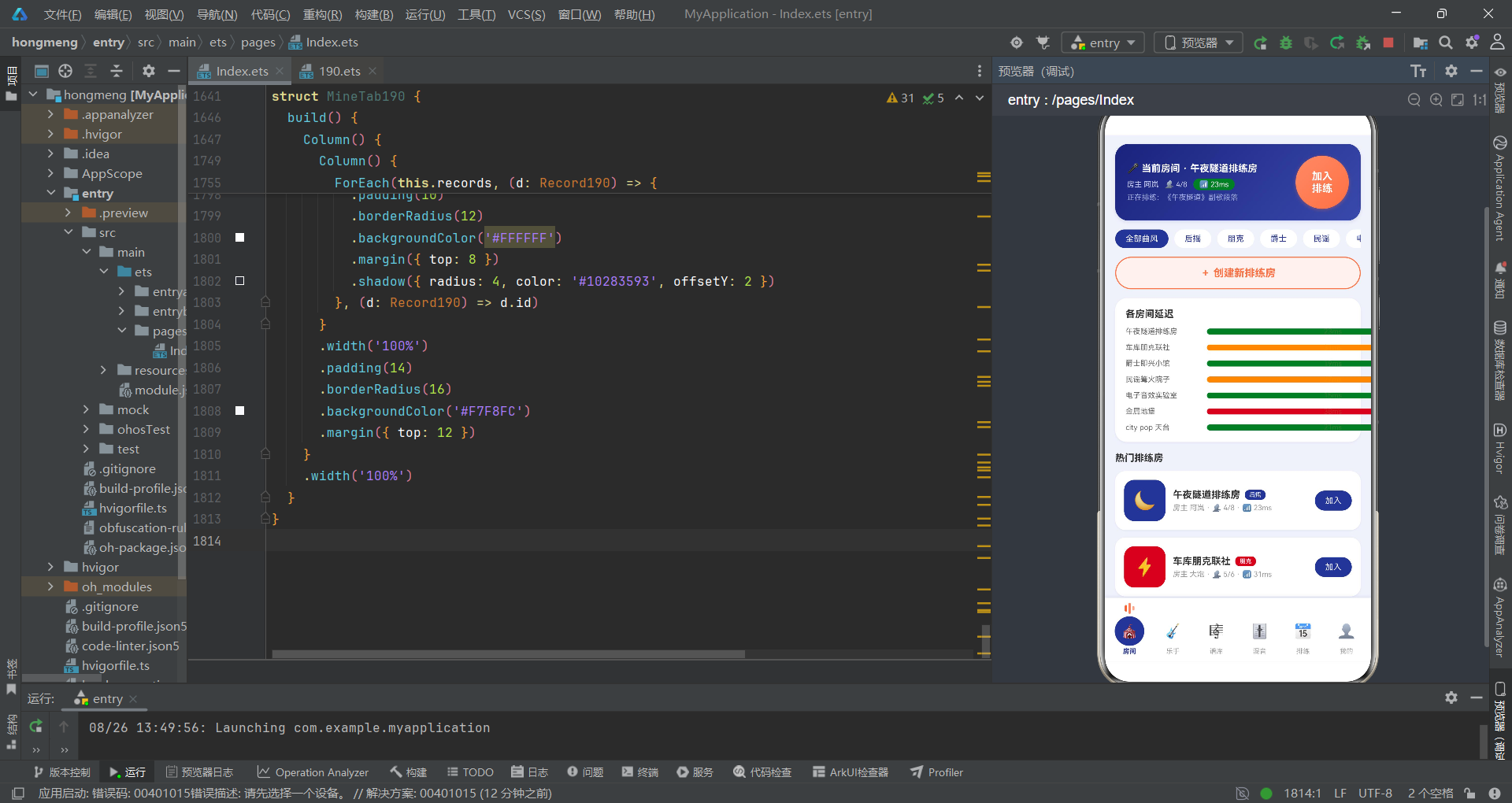
这首以 ArkTS 书写的排练房诗篇,将音乐人的线上合奏场景拆解为六个有机模块,每一个模块都有自己的视觉语法和交互节奏。从顶部那张深夜靛蓝的当前房间卡片,到底部那三根跳动的均衡器竖条,整个应用的设计语言如同一条贯穿始终的低音线——沉稳、精确、富有呼吸感。开发者没有将 UI 视为功能的容器,而是将每一处颜色、每一个圆角、每一次渐变都当作音乐情绪的视觉翻译。
从架构层面来看,应用采用了典型的"主入口 + 子组件"分层模式。@Entry 主组件持有所有全局状态并通过 if-else if 链路由到六个子 Tab 组件;子组件通过构造参数接收回调和数据,通过 @Prop 实现只读数据传递。弹层交互通过 bindSheet 和 bindContentCover 两种方式分层——日常表单用抽屉、关键确认用居中弹窗。这种分层不是随意的,它是交互节奏的编排:弱操作轻弹出,强操作重确认。
延迟值不只是数字,它关乎合奏是否可能;混音推子不只是百分比,它关乎每个声部在合奏中的呼吸空间;解散房间的弹窗不只问"确定吗",它还问"你要保留录音吗"。这些细节是代码写给音乐人的情书——在方寸屏幕上,为每一次合奏留出足够的体面。

作为“人工智能6S店”的官方数字引擎,为AI开发者与企业提供一个覆盖软硬件全栈、一站式门户。
更多推荐


 8
8 0
0- 0


 已为社区贡献52条内容

所有评论(0)