
## 一、鸿蒙生态与 ArkTS 声明式 UI 范式的前沿探索 HarmonyOS 6.1.1 作为华为全场景分布式操作系统的最新演进版本,其应用开发框架在跨设备协同、声明式 UI 渲染引擎以及
一、鸿蒙生态与 ArkTS 声明式 UI 范式的前沿探索
HarmonyOS 6.1.1 作为华为全场景分布式操作系统的最新演进版本,其应用开发框架在跨设备协同、声明式 UI 渲染引擎以及状态管理模型方面实现了跨越式升级。ArkTS 作为鸿蒙生态的主力开发语言,在 TypeScript 静态类型体系的基础上进行了深度定制与扩展,既保留了前端开发者熟悉的类型安全特性,又针对鸿蒙的方舟编译器和方舟渲染引擎做了底层优化,使得基于 HarmonyOS ArkTS API 24 开发的应用在启动速度、内存占用和帧率稳定性方面均达到了业界领先水平。本文所剖析的 PULSE WEAR 智穿商城项目,正是一个完全运行在 HarmonyOS API 24 之上的单文件 ArkTS 应用,它将智能手表与手环的电商购物、健康数据可视化、运动记录管理、社区社交互动四大核心场景融合在一个页面结构中,充分展现了 ArkTS 在复杂业务场景下的表达能力和渲染性能。
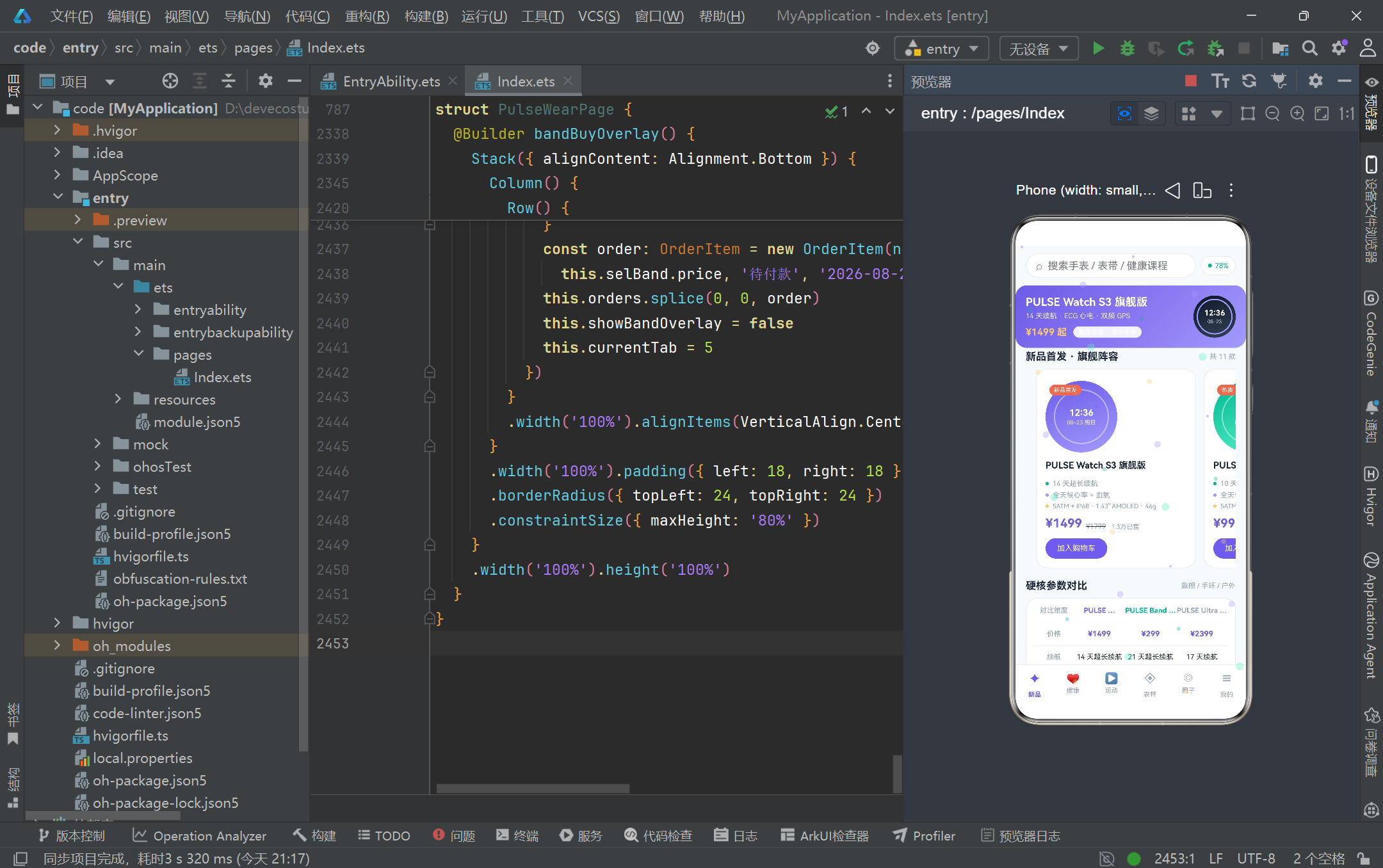
从声明式 UI 范式的角度来看,HarmonyOS 的 ArkUI 框架采用了"状态驱动视图"的核心哲学。开发者只需声明界面在不同状态下的最终样貌,框架内部的差分算法会自动计算状态变化前后的最小差异并高效更新真实 DOM 节点。PULSE WEAR 项目中大量使用了 @State、@Observed 等装饰器来构建响应式数据流:当用户在底部 Tab 之间切换时,@State currentTab 的值改变会触发条件渲染分支的重新评估;当用户在社区帖子中点击点赞按钮时,@State posts 数组中被替换的元素会驱动对应卡片的点赞数字实时更新。这种"数据即真相来源"的设计模式,使得整个应用的 UI 逻辑清晰可追踪,彻底告别了命令式开发中手动操作 DOM 节点的繁琐与易错。
在状态管理模型方面,ArkTS 提供了多层级的状态装饰器体系来满足不同粒度的响应式需求。@State 用于组件内部的状态管理,任何对 @State 变量的赋值都会触发当前组件的重新渲染;@Observed 则用于标记可观察的类,使得类的实例在被 @State、@Link、@ObjectLink 等装饰器引用时,其内部属性的变化也能被框架精确追踪。PULSE WEAR 项目定义了从 Product、WeekStep、SleepNight、HeartZone 到 WorkoutRecord、Course、BandItem、PostItem、OrderItem、DeviceModel、Particle 等十余个 @Observed 数据模型类,配合 @State 数组变量实现了商城列表、健康图表、运动记录、社区动态、订单管理等场景的完整数据绑定。这种将数据模型与 UI 组件解耦的架构设计,使得业务逻辑的变更不会波及视图层,视图层的调整也不会破坏数据完整性。
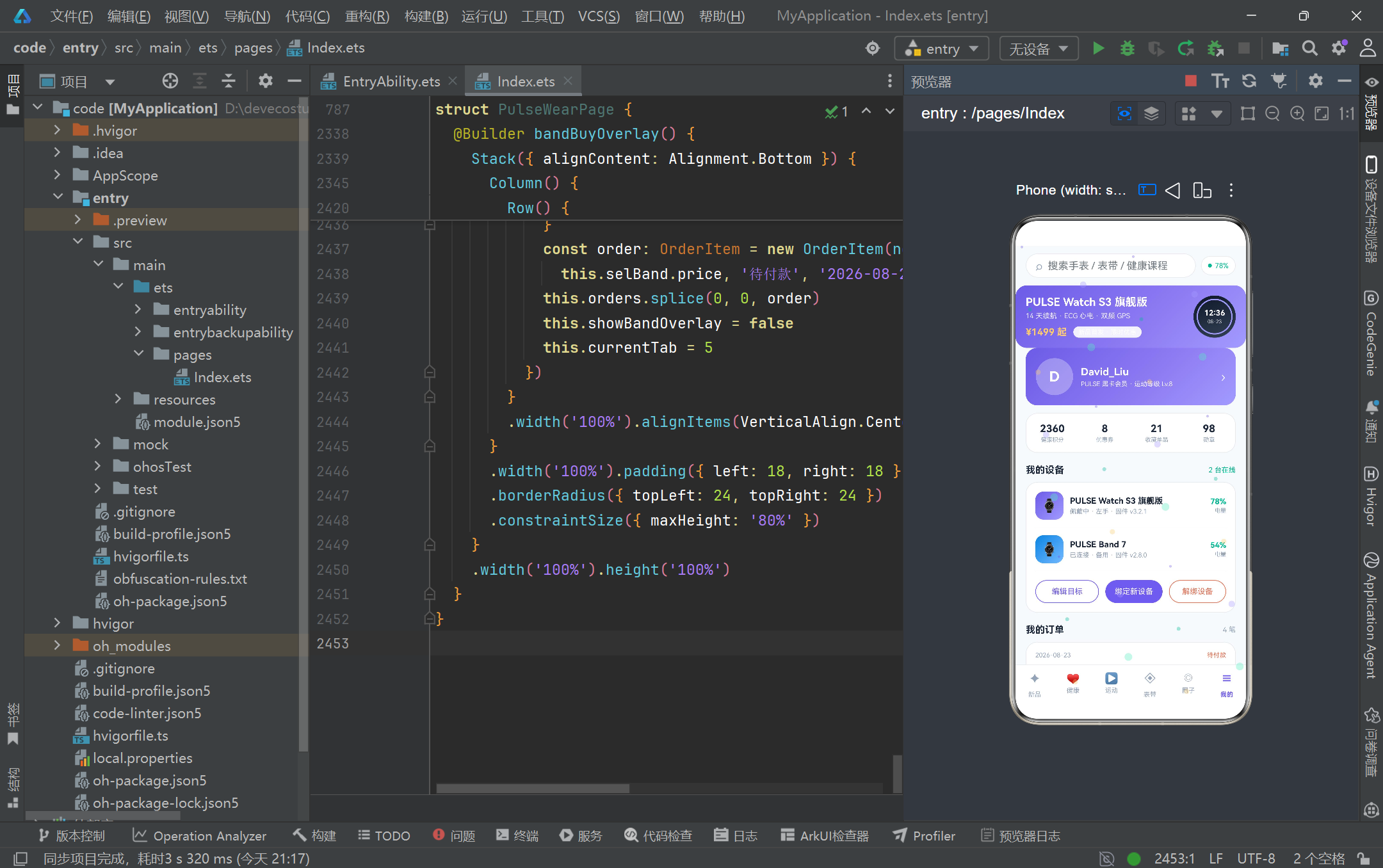
智能穿戴商城与健康数据管理平台的架构设计是本项目的核心亮点。整个应用采用"电商静态头部 + 六底部 Tab + 四弹框悬浮层 + 心跳脉冲粒子特效层"的四层叠加架构。头部区域集成了搜索框、设备电量指示器和新品推广 Banner,通过 linearGradient 渐变背景营造品牌氛围;六个底部 Tab 分别承载新品商城、健康数据大屏、运动记录管理、表带配件商城、社区圈子互动和个人中心六大功能模块;四个弹框采用 Stack + modalOverlay 模式实现,涵盖设备绑定、目标编辑、解绑确认和表带搭配购买四种交互场景;心跳脉冲粒子特效层则通过 setInterval 定时器驱动三十个彩色粒子持续向上飘动,并以 hitTestBehavior(HitTestMode.None) 确保不阻挡用户点击。这种多层 Stack 叠加的布局策略,既保证了视觉层次的丰富性,又维持了交互逻辑的清晰边界。
二、应用整体架构流程图
三、逐段代码深度解析
3.1 全局颜色常量与设计令牌体系
// ---------------- 全局颜色常量 ----------------
const COLOR_BG: string = '#F8FAFC'
const COLOR_PRIMARY: string = '#6C5CE7'
const COLOR_PRIMARY_LIGHT: string = '#A29BFE'
const COLOR_MINT: string = '#00B894'
const COLOR_MINT_LIGHT: string = '#55EFC4'
const COLOR_YELLOW: string = '#FDCB6E'
const COLOR_RED: string = '#E17055'
const COLOR_TEXT_MAIN: string = '#1E293B'
const COLOR_TEXT_SUB: string = '#94A3B8'
const COLOR_CARD: string = '#FFFFFF'
const COLOR_BORDER: string = '#E8ECF1'
const COLOR_TRACK: string = '#EEF0F6'
项目在文件最顶部定义了一套完整的设计令牌体系,以全局常量的形式管理所有视觉颜色。这种做法在前端工程化实践中被称为"Design Token"模式,其核心价值在于将视觉设计规范与代码实现解耦。PULSE WEAR 采用了"极简白活力渐变风"的设计语言:云白 #F8FAFC 作为背景基底提供干净的视觉底色,活力紫 #6C5CE7 作为品牌主色调贯穿按钮、高亮文字和渐变背景,薄荷绿 #00B894 用于健康数据正向反馈和成功状态提示,能量黄 #FDCB6E 用于活动消耗进度和警示提示,暖红 #E17055 则用于限时标签和解绑警示等需要引起用户注意的场景。通过将这些颜色提取为 const 常量,开发者可以在整个项目中保持视觉一致性,当品牌色彩需要调整时只需修改一处即可全局生效。值得注意的是,ArkTS 中的 const 常量具有编译时常量折叠优化,不会产生额外的运行时查找开销,这与 TypeScript 中的 const 在编译后可能被内联的处理方式一脉相承,体现了 ArkTS 对性能的极致追求。
3.2 interface 接口与 @Observed 可观察类的双层模型定义
interface ProductModel {
  id: number
  name: string
  price: number
  oldPrice: number
  tag: string
  battery: string
  waterproof: string
  heartRate: string
  screen: string
  weight: string
  rating: number
  sold: number
  gradFrom: string
  gradTo: string
}

@Observed
class Product implements ProductModel {
  id: number = 0
  name: string = ''
  price: number = 0
  oldPrice: number = 0
  tag: string = ''
  battery: string = ''
  waterproof: string = ''
  heartRate: string = ''
  screen: string = ''
  weight: string = ''
  rating: number = 0
  sold: number = 0
  gradFrom: string = '#6C5CE7'
  gradTo: string = '#A29BFE'

  constructor(id: number, name: string, price: number, oldPrice: number, tag: string,
    battery: string, waterproof: string, heartRate: string, screen: string, weight: string,
    rating: number, sold: number, gradFrom: string, gradTo: string) {
    this.id = id
    this.name = name
    this.price = price
    this.oldPrice = oldPrice
    this.tag = tag
    this.battery = battery
    this.waterproof = waterproof
    this.heartRate = heartRate
    this.screen = screen
    this.weight = weight
    this.rating = rating
    this.sold = sold
    this.gradFrom = gradFrom
    this.gradTo = gradTo
  }
}
这里展示了 PULSE WEAR 项目中数据模型定义的经典范式:先通过 interface 声明纯数据契约 ProductModel,再用 @Observed 装饰的 class Product 实现该接口。这种"接口先行"的设计模式带来了三重工程价值。第一,interface 提供了类型层面的数据形状约束,任何使用 ProductModel 类型的地方都获得了编译时类型检查保护,避免拼写错误或类型不匹配的问题。第二,@Observed 装饰器将普通类标记为"可观察对象",当该类的实例被 @State、@Link 或 @ObjectLink 引用时,框架的响应式系统会为其实例属性建立依赖追踪。第三,class 中为每个属性提供了默认初始值,这不仅是 ArkTS 的语法要求(避免 undefined 导致渲染异常),也使得在不传入完整参数时仍能安全创建对象实例。构造函数接收所有参数并逐一赋值,配合类属性的默认值机制,构成了完整的数据初始化链路。项目中所有数据模型——包括 WeekStep、SleepNight、HeartZone、WorkoutRecord、Course、BandItem、PostItem、OrderItem、DeviceModel 和 Particle——都遵循这一统一的定义范式,保证了代码风格的高度一致性。
3.3 写死数据集与 Product 产品列表的构建
const PRODUCTS: Product[] = [
  new Product(1, 'PULSE Watch S3 旗舰版', 1499, 1799, '新品首发', '14 天超长续航', '5ATM + IP68',
    '全天候心率 + 血氧', '1.43" AMOLED', '46g', 4.9, 12800, '#6C5CE7', '#A29BFE'),
  new Product(2, 'PULSE Watch S3 青春版', 999, 1199, '热卖', '10 天续航', '5ATM 防水',
    '全天候心率监测', '1.39" AMOLED', '38g', 4.8, 23600, '#00B894', '#55EFC4'),
  new Product(3, 'PULSE Band 7 智能手环', 299, 349, '爆款', '21 天超长续航', '50m 防水',
    '心率 + 睡眠监测', '1.1" AMOLED', '22g', 4.7, 89200, '#0984E3', '#74B9FF'),
  new Product(4, 'PULSE Band 7 NFC 版', 349, 399, '通勤', '18 天续航', '50m 防水',
    '心率 + 血氧监测', '1.1" AMOLED', '23g', 4.7, 45300, '#E17055', '#FAB1A0'),
  new Product(5, 'PULSE Watch GT 长续航', 1199, 1399, '长续航', '30 天极限续航', '5ATM',
    '心率 + 压力监测', '1.39" AMOLED', '42g', 4.8, 17800, '#636E72', '#B2BEC3'),
  new Product(6, 'PULSE Sport ECG 版', 1899, 2199, '专业运动', '12 天续航', '10ATM 游泳级',
    'ECG 心电 + 心率', '1.43" AMOLED', '52g', 4.9, 9600, '#00CEC9', '#81ECEC'),
  new Product(7, 'PULSE Kids 儿童版', 499, 599, '亲子守护', '8 天续航', 'IP68 生活防水',
    '心率 + 安全定位', '1.0" IPS', '28g', 4.6, 31200, '#FDCB6E', '#FFEAA7'),
  new Product(8, 'PULSE Band 6 SE', 199, 249, '百元机皇', '16 天续航', '30m 防水',
    '静息心率监测', '0.95" AMOLED', '20g', 4.5, 156000, '#FD79A8', '#FDA7DF'),
  new Product(9, 'PULSE Watch SE', 799, 899, '性价比', '12 天续航', '5ATM',
    '心率 + 血氧监测', '1.2" AMOLED', '33g', 4.6, 27400, '#00B894', '#55EFC4'),
  new Product(10, 'PULSE Fashion 方屏版', 1099, 1299, '时尚', '9 天续航', '3ATM',
    '心率 + 经期管理', '1.4" AMOLED 方屏', '35g', 4.7, 13800, '#A29BFE', '#DFE6E9'),
  new Product(11, 'PULSE Ultra 户外双频', 2399, 2699, '年度旗舰', '17 天续航', '10ATM',
    '双频 GPS + 心率', '1.43" 蓝宝石屏', '58g', 4.9, 6800, '#2D3436', '#636E72')
]
作为一款静态原型应用,PULSE WEAR 将所有业务数据以 const 数组的形式直接写死在源文件中。PRODUCTS 数组包含了 11 款智能手表与手环产品,每款产品通过 new Product(…) 构造函数实例化,携带了从产品名称、价格、原价、标签到续航、防水等级、心率功能、屏幕规格、重量、评分、销量以及渐变色起止值的完整元数据。这种做法在原型开发和视觉验证阶段非常高效——开发者无需搭建后端服务或 Mock 数据层,即可获得完整的视觉呈现效果。值得注意的是每个产品的 gradFrom 和 gradTo 渐变色参数各不相同:旗舰版使用活力紫渐变,青春版使用薄荷绿渐变,手环版使用天蓝渐变,NFC 版使用暖橙渐变,ECG 版使用青色渐变,儿童版使用黄色渐变,Ultra 版则使用深灰渐变。这些精心搭配的渐变色为每个产品卡片赋予了独特的视觉身份,在 ForEach 列表渲染时通过 linearGradient 动态应用,使得横滑产品列表呈现出丰富多彩的视觉节奏感。除了产品数据外,项目还以同样的方式定义了 WEEK_STEPS(周步数趋势)、SLEEP_NIGHTS(近五晚睡眠)、HEART_ZONES(心率区间分布)、RECORDS(运动记录)、COURSES(训练课程)、BANDS(表带配件)、POSTS(社区帖子)、ORDERS(订单记录)和 DEVICES(绑定设备)等完整的业务数据集。
3.4 全局纯函数工具集的设计与实现
function soldText(n: number): string {
  if (n >= 10000) {
    return (n / 10000).toFixed(1) + '万'
  }
  return n.toString() + ''
}

function fmtSteps(n: number): string {
  if (n >= 10000) {
    return (n / 10000).toFixed(1) + '万'
  }
  return n.toString()
}

function pctText(value: number, total: number): string {
  let pct = 0
  if (total > 0) {
    pct = Math.round(value / total * 100)
  }
  if (pct > 999) {
    pct = 999
  }
  return pct.toString() + '%'
}

function getBarHeight(steps: number): number {
  let h = Math.round(steps / 15000 * 112)
  if (h < 16) {
    h = 16
  }
  if (h > 116) {
    h = 116
  }
  return h
}

function getSleepBarWidth(hours: number): number {
  let w = Math.round(hours / 9 * 236)
  if (w < 30) {
    w = 30
  }
  if (w > 236) {
    w = 236
  }
  return w
}

function getWaterfallBands(bands: BandItem[], isLeft: boolean): BandItem[] {
  const result: BandItem[] = []
  for (let i = 0; i < bands.length; i++) {
    if (isLeft && i % 2 === 0) {
      result.push(bands[i])
    }
    if (!isLeft && i % 2 === 1) {
      result.push(bands[i])
    }
  }
  return result
}
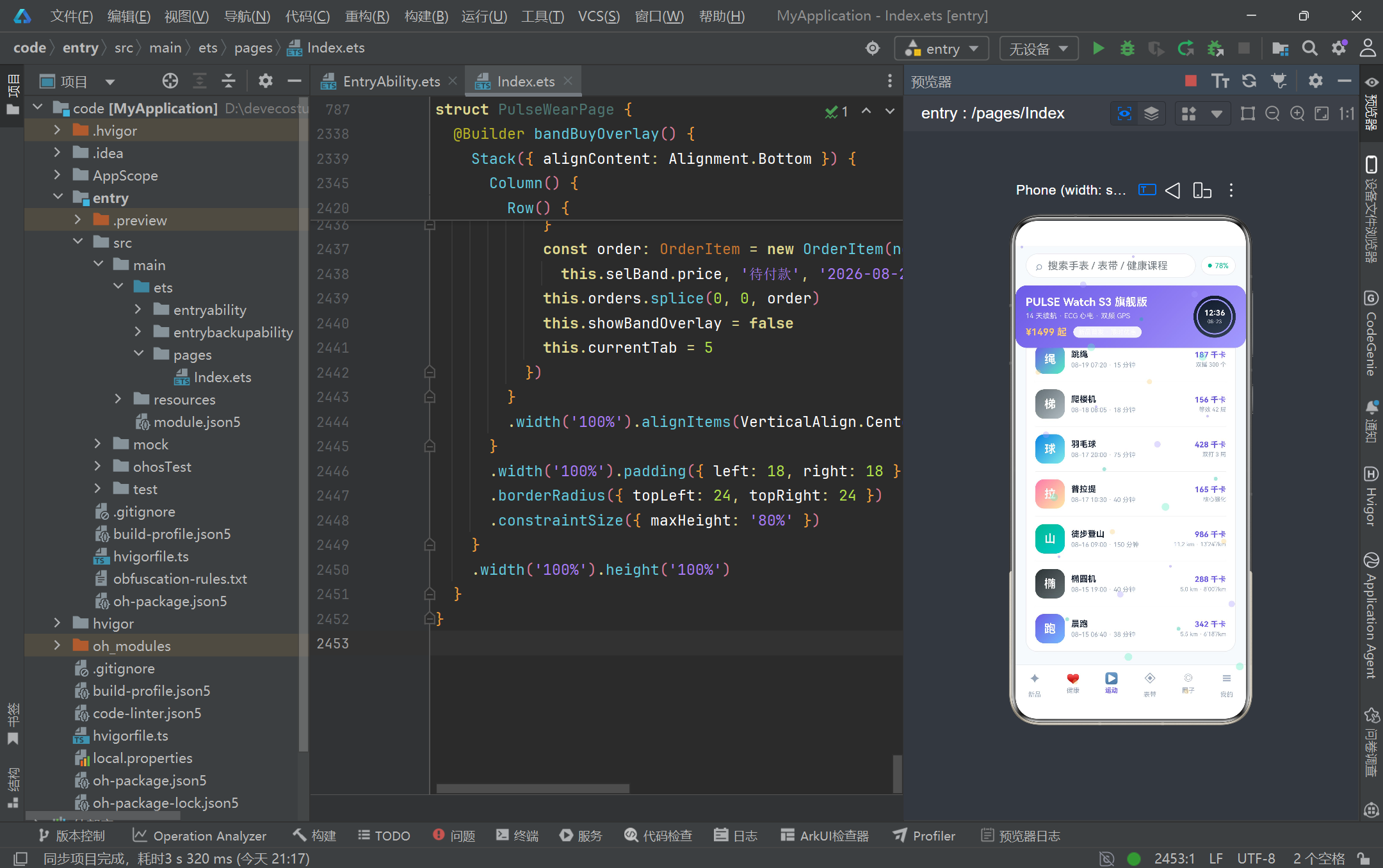
项目在数据模型与页面组件之间,精心设计了一层全局纯函数工具集。这些函数不依赖任何组件状态,接收原始数据作为输入并返回格式化后的字符串或数值,是典型的无副作用函数。soldText 和 fmtSteps 负责将大数字格式化为"万"为单位的中式表达,这在电商和健康数据场景中极为常见。pctText 计算百分比并做了除零保护和上限钳制,getBarHeight 和 getSleepBarWidth 则将原始数据值映射为 UI 渲染所需的像素高度和宽度,同时通过上下限钳制确保柱状图和进度条的视觉表现始终在合理范围内。特别值得关注的是 getWaterfallBands 和 getWaterfallPosts 两个瀑布流分列函数:它们根据 isLeft 布尔参数和元素索引的奇偶性,将原始数组拆分为左右两列。这种在纯函数层面处理瀑布流布局逻辑的做法,使得视图层只需调用函数获取对应列的数据即可渲染,将布局算法与 UI 组件彻底解耦。在运动记录统计方面,sumMinutes 和 sumCalories 通过 for 循环遍历累加运动时长和卡路里消耗,nextOrderId 和 findOrderIndex/findDeviceIndex/findPostIndex 则提供了数组操作的通用辅助能力。likedPost 函数通过创建新的 PostItem 实例来实现"不可变更新"模式——不直接修改原对象而是返回新对象,这与 ArkTS 响应式系统检测数组元素替换的机制完美契合。
3.5 心跳脉冲粒子系统的初始化与帧驱动更新
function initParticles(): Particle[] {
  const list: Particle[] = []
  const colors: string[] = [COLOR_PRIMARY, COLOR_MINT, COLOR_YELLOW, COLOR_PRIMARY_LIGHT, COLOR_MINT_LIGHT]
  for (let i = 0; i < 30; i++) {
    const px = 8 + (i * 11.6) % 344
    const py = (i * 97) % 720
    const size = 4 + (i % 5) * 2
    const speed = 1.2 + (i % 4) * 0.8
    list.push(new Particle(px, py, size, colors[i % 5], 0.35, speed, false))
  }
  return list
}

function nextParticles(list: Particle[]): Particle[] {
  const result: Particle[] = []
  for (let i = 0; i < list.length; i++) {
    const old = list[i]
    let ny = old.y - old.speed
    if (ny < -16) {
      ny = 732
    }
    const na = old.flip ? 0.6 : 0.16
    result.push(new Particle(old.x, ny, old.size, old.color, na, old.speed, !old.flip))
  }
  return result
}
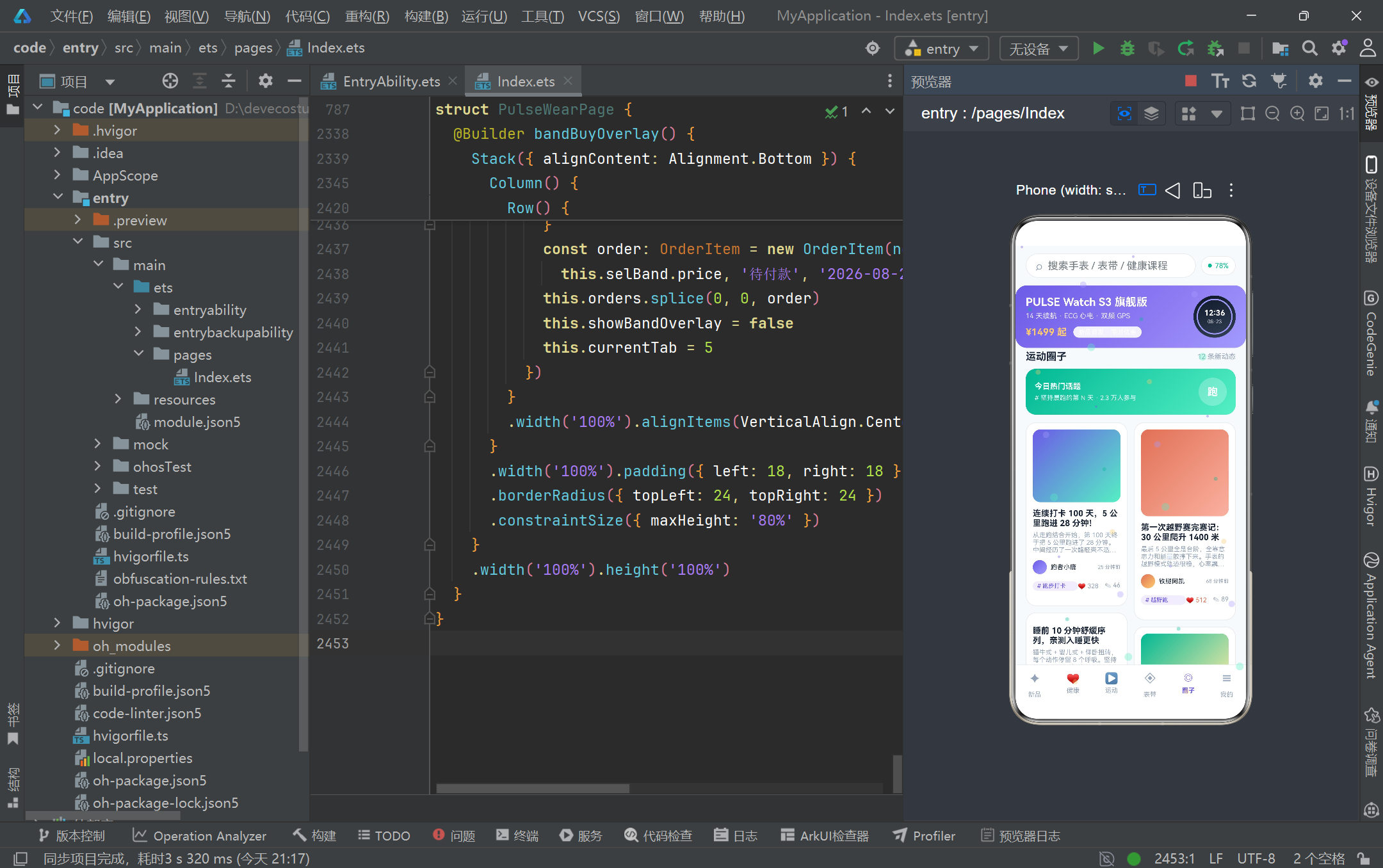
心跳脉冲粒子特效层是整个应用中最具视觉辨识度的动态元素。initParticles 函数在应用启动时初始化 30 个彩色粒子,每个粒子的初始位置通过模运算分散在屏幕范围内——px 坐标利用 (i * 11.6) % 344 实现水平方向的均匀分布,py 坐标利用 (i * 97) % 720 实现垂直方向的伪随机散布。粒子大小在 4 到 12 像素之间变化,上升速度在 1.2 到 3.6 之间分档,颜色从五种主题色中循环选取。nextParticles 函数是粒子状态的单帧更新逻辑:每个粒子的 y 坐标减去自身速度实现向上飘动,当 y 超出屏幕顶部(小于 -16)时重置到底部(732)实现循环往复。透明度通过 flip 布尔标志在 0.16 和 0.6 之间交替切换,模拟心跳脉冲般的呼吸闪烁效果。关键在于,每次更新都创建全新的 Particle 实例数组返回,而非修改原数组——这种不可变更新模式确保 ArkTS 的 @State 粒子数组能够正确检测到引用变化并触发 ForEach 重新渲染。整个粒子系统通过 setInterval 以 240 毫秒为间隔驱动,既保证了视觉流畅度又避免了高频定时器对性能的过度消耗。
3.6 @Entry 组件的状态变量声明与生命周期管理
@Entry
@Component
struct PulseWearPage {
  @State currentTab: number = 0
  @State showBindOverlay: boolean = false
  @State showGoalOverlay: boolean = false
  @State showUnbindOverlay: boolean = false
  @State showBandOverlay: boolean = false
  @State products: Product[] = []
  @State records: WorkoutRecord[] = []
  @State courses: Course[] = []
  @State bands: BandItem[] = []
  @State posts: PostItem[] = []
  @State orders: OrderItem[] = []
  @State devices: DeviceModel[] = []
  @State weekSteps: WeekStep[] = []
  @State sleepNights: SleepNight[] = []
  @State heartZones: HeartZone[] = []
  @State particles: Particle[] = []
  @State selBand: BandItem = emptyBand()
  @State selModel: string = 'PULSE Watch S3 旗舰版'
  @State selWear: string = '左手佩戴'
  @State selGoal: string = '减脂塑形'
  @State selSize: string = 'M (140-160mm)'
  @State selColorIdx: number = 0
  @State engraveText: string = ''
  @State tempStepGoal: number = 10000
  @State tempSleepGoal: number = 8
  @State tempReminder: boolean = true
  @State stepGoal: number = 10000
  @State sleepGoal: number = 8
  @State reminderOn: boolean = true
  @State todaySteps: number = 8642
  @State todayCalories: number = 412
  @State todaySleep: number = 7.5
  @State restHeart: number = 62
  @State battery: number = 78
  @State deviceBound: boolean = true
  @State unbindTargetId: number = -1
  @State searchKey: string = ''
  private timerId: number = -1

  aboutToAppear(): void {
    this.products = PRODUCTS
    this.records = RECORDS
    this.courses = COURSES
    this.bands = BANDS
    this.posts = POSTS
    this.orders = ORDERS
    this.devices = DEVICES
    this.weekSteps = WEEK_STEPS
    this.sleepNights = SLEEP_NIGHTS
    this.heartZones = HEART_ZONES
    this.selBand = BANDS[0]
    this.particles = initParticles()
    this.timerId = setInterval(() => {
      this.particles = nextParticles(this.particles)
    }, 240)
  }

  aboutToDisappear(): void {
    if (this.timerId !== -1) {
      clearInterval(this.timerId)
      this.timerId = -1
    }
  }
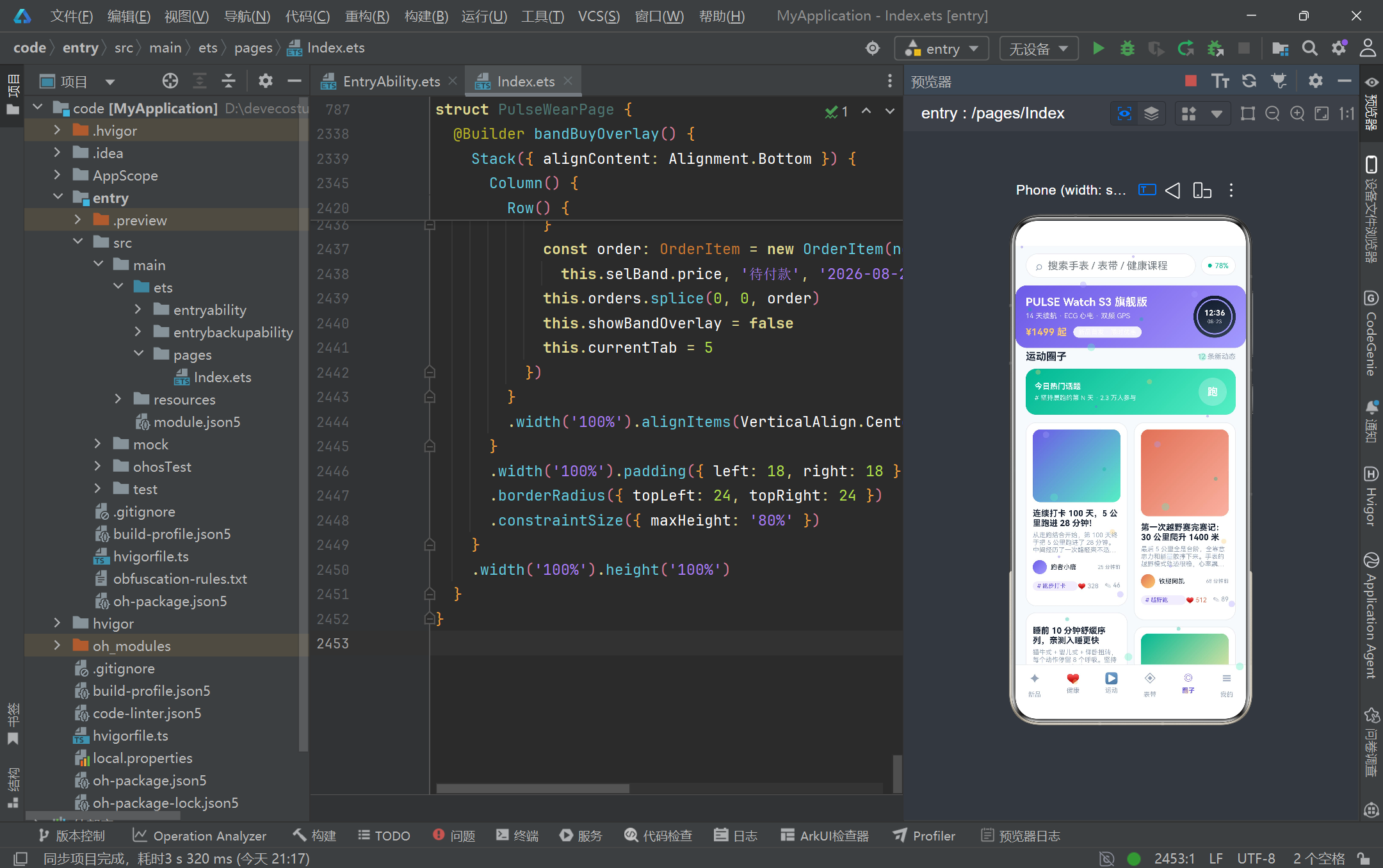
@Entry 和 @Component 装饰器将 PulseWearPage 结构体标记为应用的入口页面组件。@Entry 确保该组件被框架注册为路由根节点,@Component 则声明其为一个可复用的 UI 组件单元。组件内部声明了超过三十个 @State 状态变量,覆盖了从 UI 交互状态(currentTab、四个弹框开关布尔值)到业务数据集合(products、records、courses 等数组)再到表单临时状态(selModel、selWear、tempStepGoal 等)的全量状态空间。这种将所有状态集中在单一组件中管理的做法,在中小型应用中具有调试直观、数据流清晰的优势。生命周期方面,aboutToAppear 在组件创建后、渲染前被调用,负责将全局 const 数据集赋值给 @State 数组变量以触发首次渲染,同时调用 initParticles 初始化粒子系统并通过 setInterval 注册 240 毫秒间隔的定时器回调。定时器的 ID 被保存在 private timerId 属性中(注意 private 非 @State,因为定时器 ID 的变化不需要触发 UI 更新)。aboutToDisappear 在组件销毁时被调用,通过 clearInterval 清除定时器以防止内存泄漏——这是 HarmonyOS 应用开发中资源管理的标准最佳实践,任何在 aboutToAppear 中申请的定时器、监听器或订阅都必须在 aboutToDisappear 中释放。
3.7 build 方法的 Stack 四层叠加布局架构
  build() {
    Stack() {
      Column() {
        this.headerBar()
        Stack() {
          if (this.currentTab === 0) {
            this.newProductTab()
          }
          if (this.currentTab === 1) {
            this.healthTab()
          }
          if (this.currentTab === 2) {
            this.sportTab()
          }
          if (this.currentTab === 3) {
            this.bandTab()
          }
          if (this.currentTab === 4) {
            this.circleTab()
          }
          if (this.currentTab === 5) {
            this.mineTab()
          }
        }
        .layoutWeight(1).width('100%')

        this.tabBar()
      }
      .width('100%').height('100%').backgroundColor(COLOR_BG)

      this.particleLayer()

      if (this.showBindOverlay) {
        this.bindDeviceOverlay()
      }
      if (this.showGoalOverlay) {
        this.editGoalOverlay()
      }
      if (this.showUnbindOverlay) {
        this.unbindConfirmOverlay()
      }
      if (this.showBandOverlay) {
        this.bandBuyOverlay()
      }
    }
    .width('100%').height('100%')
  }
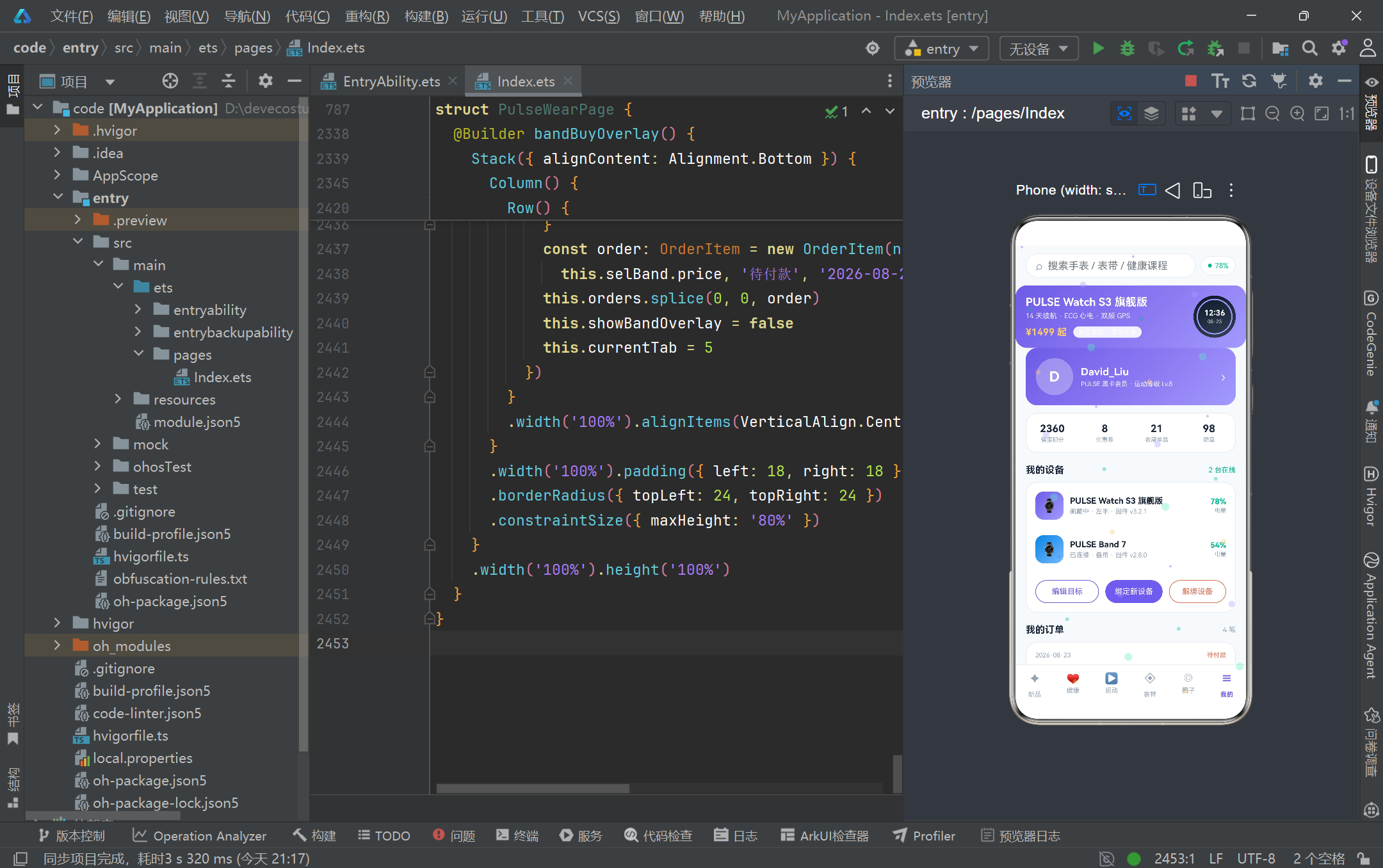
build 方法是 ArkTS 声明式 UI 的核心入口,它返回一个描述界面结构的组件树。PULSE WEAR 的 build 方法采用了 Stack 容器实现四层叠加布局:最底层是 Column 主体容器,包含 headerBar(静态头部)、Stack(Tab 内容区,layoutWeight(1) 占据剩余空间)和 tabBar(底部导航栏)三个垂直排列的子组件。第二层是 particleLayer 粒子特效层,覆盖在整个主体容器之上但由于 hitTestBehavior(HitTestMode.None) 的设置,触摸事件会穿透该层到达下方的主体容器。第三层和第四层是四个条件渲染的弹框,分别由 showBindOverlay、showGoalOverlay、showUnbindOverlay 和 showBandOverlay 四个布尔状态变量控制显隐。Tab 内容区内部使用 if 条件语句根据 currentTab 的值渲染对应的 Tab 内容构建器,这种方式虽然简单直接,但在 Tab 数量较多时会产生较多条件分支。值得注意的是 ArkTS 中的 @Builder 方法通过 this.methodName() 的方式调用,它们在编译期会被内联展开为组件树节点,而非运行时函数调用,因此不会产生额外的调用开销。整个 Stack 的宽高均设为 ‘100%’,确保四层叠加精确覆盖整个屏幕区域。
3.8 静态电商头部 headerBar 的搜索框与渐变 Banner
  @Builder headerBar() {
    Column() {
      Row() {
        Row() {
          Text('⌕').fontSize(18).fontColor(COLOR_TEXT_SUB).margin({ right: 8 })
          TextInput({ placeholder: '搜索手表 / 表带 / 健康课程', text: this.searchKey })
            .layoutWeight(1).height(34).fontSize(13).fontColor(COLOR_TEXT_MAIN)
            .backgroundColor(Color.Transparent).padding({ left: 0, right: 0 })
            .onChange((v: string) => {
              this.searchKey = v
            })
        }
        .layoutWeight(1).height(38).padding({ left: 14, right: 14 })
        .backgroundColor(COLOR_CARD).borderRadius(19).border({ width: 1, color: COLOR_BORDER })

        Row() {
          Circle({ width: 6, height: 6 }).fill(COLOR_MINT).margin({ right: 5 })
          Text(this.deviceBound ? (this.battery.toString() + '%') : '未绑定')
            .fontSize(11).fontColor(this.deviceBound ? COLOR_MINT : COLOR_TEXT_SUB)
        }
        .height(30).padding({ left: 10, right: 10 }).backgroundColor(COLOR_CARD)
        .borderRadius(15).border({ width: 1, color: COLOR_BORDER }).margin({ left: 8 })
      }
      .width('100%').padding({ left: 16, right: 16, top: 12 })

      Row() {
        Column() {
          Text('PULSE Watch S3 旗舰版')
            .fontSize(17).fontWeight(FontWeight.Bold).fontColor(Color.White)
          Text('14 天续航 · ECG 心电 · 双频 GPS')
            .fontSize(11).fontColor('#FFFFFF').opacity(0.85).margin({ top: 5 })
          Row() {
            Text('¥1499 起').fontSize(15).fontWeight(FontWeight.Bold).fontColor(COLOR_YELLOW)
            Text('新品首发 · 限时优惠')
              .fontSize(10).fontColor(Color.White).padding({ left: 8, right: 8, top: 3, bottom: 3 })
              .backgroundColor('#FFFFFF').opacity(0.9).borderRadius(10).margin({ left: 10 })
          }
          .margin({ top: 10 })
        }
        .layoutWeight(1).alignItems(HorizontalAlign.Start)

        Stack() {
          Column().width(66).height(66).borderRadius(33)
            .linearGradient({ angle: 160, colors: [['#0F172A', 0], ['#334155', 1]] })
          Circle({ width: 54, height: 54 }).fill(Color.Transparent)
            .stroke(COLOR_PRIMARY_LIGHT).strokeWidth(2)
          Column() {
            Text('12:36').fontSize(12).fontWeight(FontWeight.Bold).fontColor(Color.White)
            Text('08-23').fontSize(8).fontColor('#FFFFFF').opacity(0.8).margin({ top: 2 })
          }
        }
        .width(66).height(66).margin({ left: 12 })
      }
      .width('100%').padding(16).margin({ left: 16, right: 16, top: 12 }).borderRadius(18)
      .linearGradient({ angle: 135, colors: [[COLOR_PRIMARY, 0], ['#8E7CF3', 0.6], [COLOR_PRIMARY_LIGHT, 1]] })
    }
    .width('100%').backgroundColor(COLOR_BG)
  }
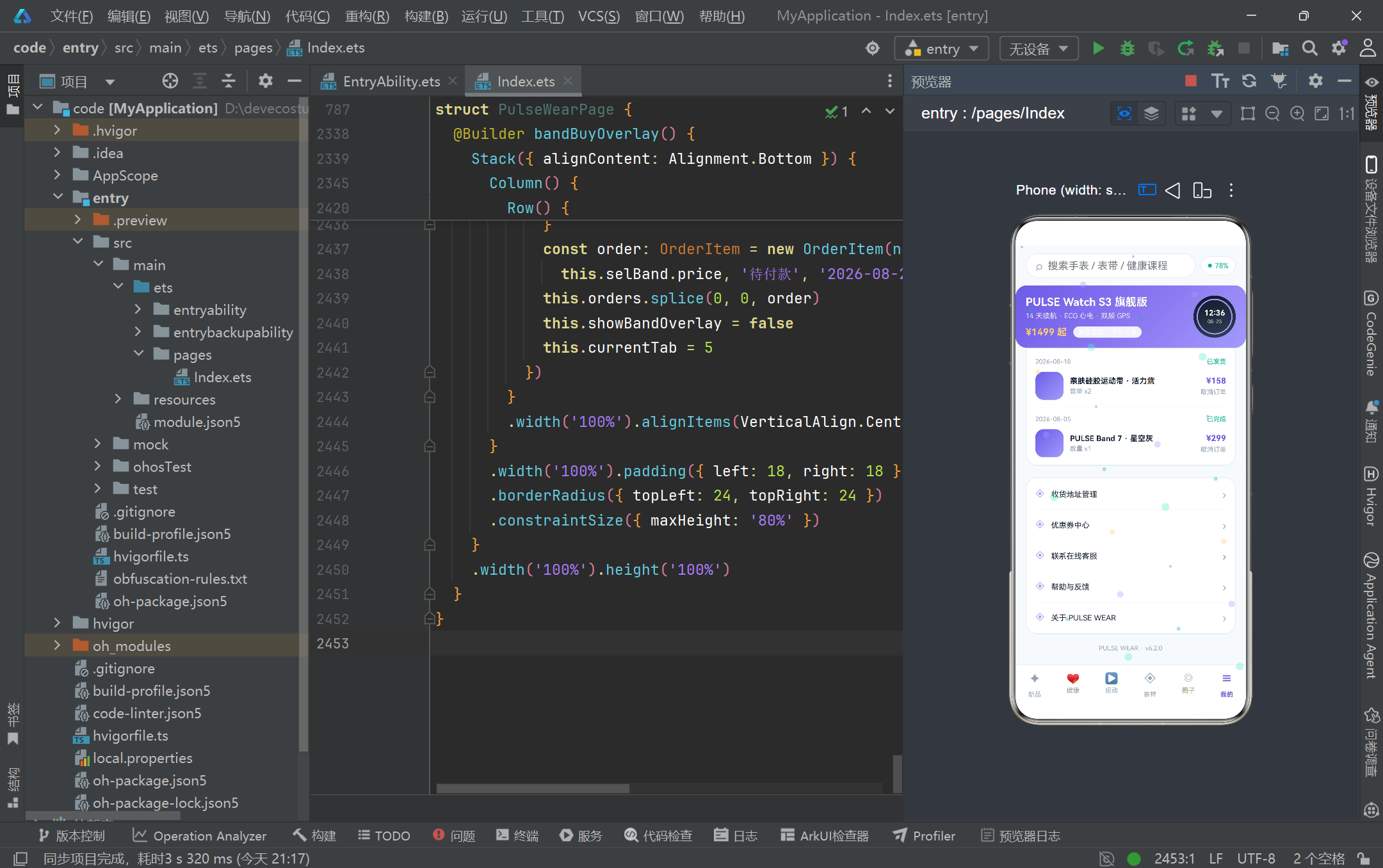
headerBar 构建器实现了应用顶部的静态电商头部区域,分为上下两段。上段是一个水平排列的 Row,左侧是搜索框容器——内含放大镜图标和 TextInput 组件,TextInput 的 text 参数绑定到 @State searchKey 实现受控输入,onChange 回调中更新 searchKey 状态。搜索框通过 layoutWeight(1) 占据剩余空间,height(38) 和 borderRadius(19) 构成胶囊形状。右侧是设备电量指示器,通过 Circle 组件绘制薄荷绿小圆点作为"在线"状态标识,文字内容根据 deviceBound 布尔值动态切换为电量百分比或"未绑定"提示。下段是新品推广 Banner,采用 linearGradient 三色渐变背景(从活力紫到浅紫),左侧文字区域展示产品名称、核心卖点参数和价格信息,右侧用 Stack 叠加了一个模拟手表表盘——深灰渐变圆形背景上叠加浅紫色描边圆环和白色时间文字,营造出真实手表的视觉质感。这种在纯代码中通过几何图形组合模拟产品外观的手法,避免了对外部图片资源的依赖,使得整个应用保持了单文件的自包含特性。Banner 的 angle: 135 渐变角度营造出从左上到右下的光影方向,与整体极简白活力渐变风的设计语言高度统一。
3.9 底部 Tab 导航栏的 ForEach 渲染与选中态切换
  @Builder tabBar() {
    Column() {
      Divider().color(COLOR_BORDER).strokeWidth(1)

      Row() {
        ForEach(TAB_ITEMS, (item: TabItem, idx: number) => {
          Column() {
            Text(item.icon).fontSize(17)
              .fontColor(this.currentTab === idx ? COLOR_PRIMARY : COLOR_TEXT_SUB)
            Text(item.name).fontSize(10).margin({ top: 3 })
              .fontColor(this.currentTab === idx ? COLOR_PRIMARY : COLOR_TEXT_SUB)
              .fontWeight(this.currentTab === idx ? FontWeight.Bold : FontWeight.Normal)
          }
          .layoutWeight(1).padding({ top: 8, bottom: 8 })
          .onClick(() => {
            this.currentTab = idx
          })
        }, (item: TabItem) => item.name)
      }
      .width('100%').height(56).alignItems(VerticalAlign.Center)
    }
    .width('100%').backgroundColor(COLOR_CARD)
  }
底部导航栏是应用的核心导航控件,通过 ForEach 遍历 TAB_ITEMS 常量数组渲染六个 Tab 项。ForEach 的第一个参数是数据源数组,第二个参数是项渲染函数(接收 item 和 index 两个参数),第三个参数是键值生成函数——这里使用 item.name 作为唯一键,确保列表项在数据变化时能被正确复用和更新。每个 Tab 项是一个 Column 容器,垂直排列图标 Text 和名称 Text,通过 layoutWeight(1) 等分水平空间。选中态的视觉反馈通过三元运算符实现:当 currentTab === idx 时,图标和名称文字使用 COLOR_PRIMARY 活力紫色并加粗显示;未选中时则使用 COLOR_TEXT_SUB 灰色并保持常规字重。onClick 回调将 currentTab 赋值为当前点击的 idx,由于 currentTab 是 @State 变量,赋值后会触发 build 方法的重新执行,进而重新评估 Stack 内部的 if 条件分支,渲染对应的新 Tab 内容。这种"状态驱动导航"的模式是声明式 UI 的精髓——开发者只需声明"currentTab 为 0 时渲染新品 Tab,为 1 时渲染健康 Tab",框架自动完成视图切换的差分更新,无需手动管理 Tab 的显示隐藏逻辑。底部导航栏顶部还有一个 Divider 分隔线,将导航栏与内容区视觉分隔。
3.10 新品商城 Tab 的横滑产品卡与参数对比表
  @Builder newProductTab() {
    Scroll() {
      Column() {
        Row() {
          Text('新品首发 · 旗舰阵容').fontSize(16).fontWeight(FontWeight.Bold)
            .fontColor(COLOR_TEXT_MAIN).layoutWeight(1)
          Text('共 ' + this.products.length.toString() + ' 款')
            .fontSize(11).fontColor(COLOR_TEXT_SUB)
        }
        .width('100%').margin({ top: 4, bottom: 10 })

        Scroll() {
          Row() {
            ForEach(this.products, (p: Product) => {
              Column() {
                Stack() {
                  Column().width(112).height(112).borderRadius(56)
                    .linearGradient({ angle: 160, colors: [[p.gradFrom, 0], [p.gradTo, 1]] })
                  Circle({ width: 84, height: 84 }).fill(Color.Transparent)
                    .stroke('#FFFFFF').strokeWidth(2).opacity(0.45)
                  Column() {
                    Text('12:36').fontSize(14).fontWeight(FontWeight.Bold).fontColor(Color.White)
                    Text('08-23 周日').fontSize(9).fontColor(Color.White)
                      .opacity(0.85).margin({ top: 2 })
                  }
                  Text(p.tag).fontSize(9).fontColor(Color.White)
                    .padding({ left: 7, right: 7, top: 3, bottom: 3 })
                    .backgroundColor(COLOR_RED).borderRadius(9).position({ x: 6, y: 6 })
                }
                .width(112).height(112).margin({ top: 18 })

                Text(p.name).fontSize(14).fontWeight(FontWeight.Bold).fontColor(COLOR_TEXT_MAIN)
                  .maxLines(1).textOverflow({ overflow: TextOverflow.Ellipsis }).margin({ top: 12 })

                Column() {
                  Row() {
                    Circle({ width: 5, height: 5 }).fill(COLOR_MINT)
                    Text(p.battery).fontSize(11).fontColor(COLOR_TEXT_SUB).margin({ left: 6 })
                  }
                  .margin({ top: 6 })

                  Row() {
                    Circle({ width: 5, height: 5 }).fill(COLOR_PRIMARY_LIGHT)
                    Text(p.heartRate).fontSize(11).fontColor(COLOR_TEXT_SUB).margin({ left: 6 })
                  }
                  .margin({ top: 5 })
                }
                .alignItems(HorizontalAlign.Start).width('100%').margin({ top: 8 })

                Row() {
                  Text('¥' + p.price.toString()).fontSize(19).fontWeight(FontWeight.Bold)
                    .fontColor(COLOR_PRIMARY)
                  Text('¥' + p.oldPrice.toString()).fontSize(11).fontColor(COLOR_TEXT_SUB)
                    .decoration({ type: TextDecorationType.LineThrough }).margin({ left: 6 })
                  Text(soldText(p.sold) + '已售').fontSize(10)
                    .fontColor(COLOR_TEXT_SUB).margin({ left: 8 })
                }
                .width('100%').alignItems(VerticalAlign.Bottom).margin({ top: 10 })

                Button() {
                  Text('加入购物车').fontSize(12).fontColor(Color.White)
                }
                .height(32).padding({ left: 18, right: 18 }).backgroundColor(COLOR_PRIMARY)
                .borderRadius(16).margin({ top: 12, bottom: 14 })
                .onClick(() => {
                  const order: OrderItem = new OrderItem(nextOrderId(this.orders),
                    p.name, p.price, '待付款', '2026-08-23', 1)
                  this.orders.splice(0, 0, order)
                  this.currentTab = 5
                })
              }
              .width(250).alignItems(HorizontalAlign.Start).backgroundColor(COLOR_CARD)
              .borderRadius(18).border({ width: 1, color: COLOR_BORDER })
              .padding({ left: 14, right: 14 }).margin({ right: 12 })
            }, (p: Product) => p.id.toString())
          }
          .padding({ left: 16, right: 4 })
        }
        .scrollable(ScrollDirection.Horizontal).scrollBar(BarState.Off).width('100%')
新品商城 Tab 的核心是一个水平滚动的产品卡片列表。外层 Scroll 实现垂直滚动以容纳全部内容,内层嵌套一个 Scroll 并设置 scrollable(ScrollDirection.Horizontal) 实现产品卡片的横向滑动。ForEach 遍历 products 数组渲染每张产品卡,键值生成函数使用 p.id.toString() 确保每个产品卡的唯一标识。产品卡顶部是 Stack 叠加的圆形产品图标——渐变色 Column 圆形背景上叠加白色半透明描边圆环和模拟时间文字,左上角通过 position 绝对定位放置红色标签徽章。卡片中部展示产品名称(maxLines(1) 配合 textOverflow Ellipsis 实现单行省略)和参数列表(续航、心率、防水等用彩色小圆点标识)。价格区域使用 TextDecorationType.LineThrough 给原价添加删除线效果,已售数量通过 soldText 函数格式化。底部"加入购物车"按钮的 onClick 回调展示了状态更新的完整流程:先通过 nextOrderId 生成新订单 ID,创建 OrderItem 实例,然后使用 splice(0, 0, order) 将新订单插入到 orders 数组头部(unshift 语义),最后将 currentTab 切换为 5 跳转到个人中心 Tab 查看订单。这种在 onClick 中同时操作多个 @State 变量的做法,会触发框架的批量更新机制,确保 UI 只在所有状态变更完成后统一渲染一次。卡片下方还有一个硬核参数对比表,通过固定取 products[0]、products[2] 和 products[10] 三款产品,在 Row 和 Divider 交替排列中展示价格、续航、防水、心率、屏幕、重量和口碑七个维度的对比数据。
3.11 健康数据大屏的环形进度与图表可视化
  @Builder metricRing(label: string, value: number, total: number, unit: string, ringColor: string) {
    Column() {
      Stack() {
        Progress({ value: value, total: total, type: ProgressType.Ring })
          .style({ strokeWidth: 7 }).color(ringColor).width(74).height(74)
        Column() {
          Text(value.toString()).fontSize(17).fontWeight(FontWeight.Bold).fontColor(COLOR_TEXT_MAIN)
          Text(unit).fontSize(9).fontColor(COLOR_TEXT_SUB).margin({ top: 1 })
        }
      }
      .width(74).height(74)

      Text(label).fontSize(11).fontColor(COLOR_TEXT_SUB).margin({ top: 8 })
      Text('达成 ' + pctText(value, total)).fontSize(9).fontColor(ringColor).margin({ top: 2 })
    }
    .layoutWeight(1).padding({ top: 14, bottom: 12, left: 4, right: 4 })
    .backgroundColor(COLOR_CARD).borderRadius(16).border({ width: 1, color: COLOR_BORDER })
  }

  @Builder healthTab() {
    Scroll() {
      Column() {
        Column() {
          Row() {
            Text('今日健康大屏').fontSize(16).fontWeight(FontWeight.Bold)
              .fontColor(Color.White).layoutWeight(1)
            Text('已同步 · 刚刚').fontSize(10).fontColor('#FFFFFF').opacity(0.85)
          }
          .width('100%')

          Row() {
            Column() {
              Text(this.todaySteps.toString()).fontSize(38).fontWeight(FontWeight.Bold)
                .fontColor(Color.White)
              Text('今日步数 / 目标 ' + this.stepGoal.toString() + ' 步')
                .fontSize(11).fontColor('#FFFFFF').opacity(0.85).margin({ top: 4 })
            }
            .alignItems(HorizontalAlign.Start).layoutWeight(1)

            Stack() {
              Progress({ value: this.todayCalories, total: 600, type: ProgressType.Ring })
                .style({ strokeWidth: 6 }).color(COLOR_YELLOW).width(64).height(64)
              Column() {
                Text(this.todayCalories.toString()).fontSize(14)
                  .fontWeight(FontWeight.Bold).fontColor(Color.White)
                Text('千卡').fontSize(8).fontColor('#FFFFFF').opacity(0.85)
              }
            }
            .width(64).height(64)
          }
          .width('100%').alignItems(VerticalAlign.Bottom).margin({ top: 14 })

          Column() {
            Row() {
              Text('活动消耗进度').fontSize(11).fontColor(Color.White).layoutWeight(1)
              Text(this.todayCalories.toString() + ' / 600 kcal')
                .fontSize(11).fontColor('#FFFFFF').opacity(0.9)
            }
            .width('100%')

            Stack({ alignContent: Alignment.Start }) {
              Row().width('100%').height(8).borderRadius(4)
                .backgroundColor('#FFFFFF').opacity(0.25)
              Row().width(getCalPercent(this.todayCalories)).height(8).borderRadius(4)
                .linearGradient({ angle: 90, colors: [[COLOR_YELLOW, 0], [COLOR_MINT, 1]] })
            }
            .width('100%').margin({ top: 7 })
          }
          .width('100%').margin({ top: 16 })
        }
        .width('100%').padding(18).borderRadius(20)
        .linearGradient({ angle: 135, colors: [[COLOR_PRIMARY, 0], ['#7F6FF0', 0.55], [COLOR_PRIMARY_LIGHT, 1]] })
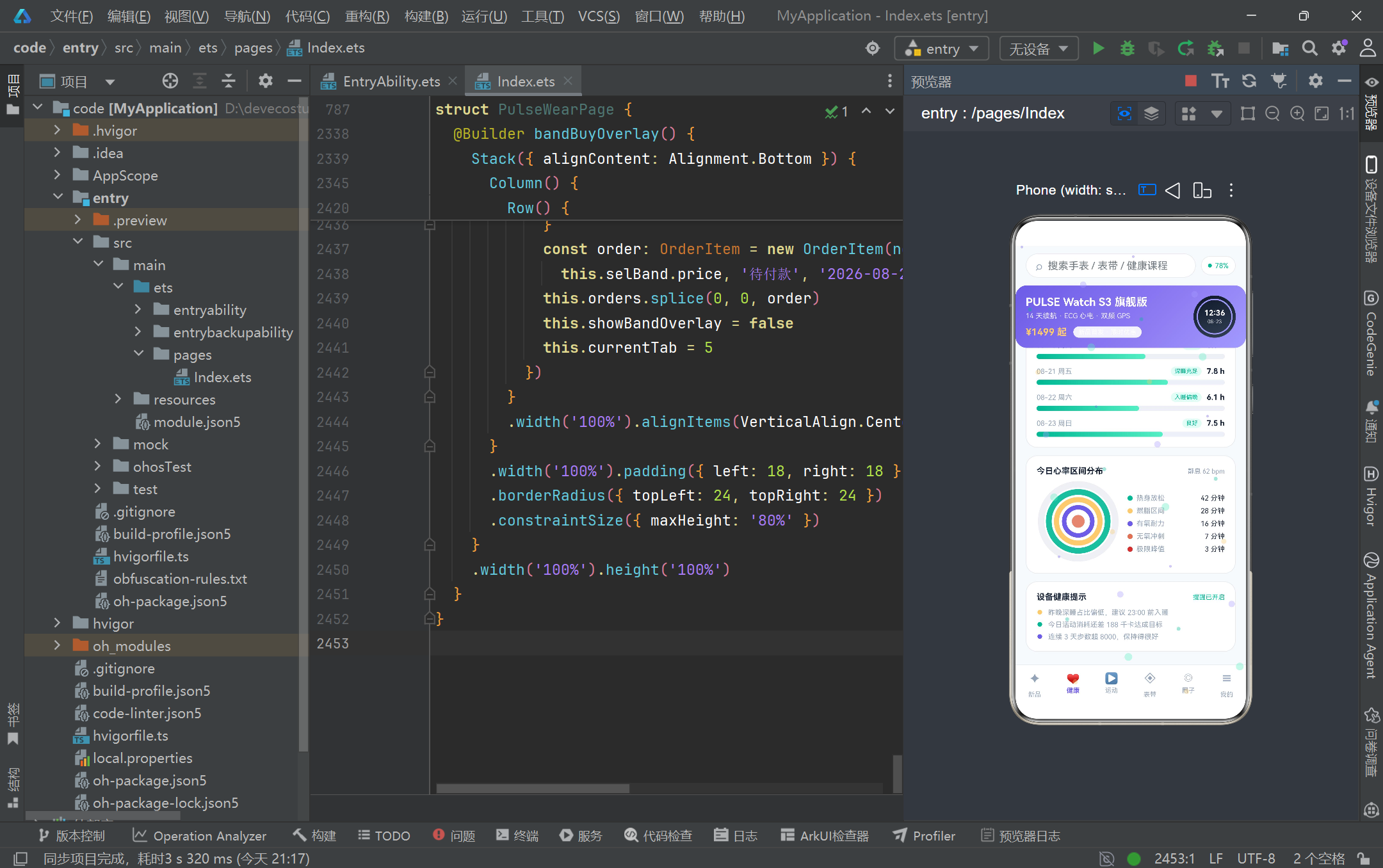
健康数据大屏 Tab 是整个应用数据可视化密度最高的区域。metricRing 是一个可复用的环形进度指标构建器,接收标签、当前值、目标值、单位和颜色五个参数,通过 Progress 组件的 ProgressType.Ring 类型绘制环形进度条,中心叠加数值和单位文字。healthTab 顶部是一个渐变背景的数据概览卡片,左侧用 38 像素超大字号展示今日步数,右侧用黄色环形进度展示卡路里消耗。卡片底部是活动消耗进度条——通过 Stack 叠加两层 Row 实现:底层是半透明白色背景条,上层是 getCalPercent 函数计算宽度的渐变前景条(从能量黄到薄荷绿的横向渐变)。这种"背景轨道 + 前景填充"的进度条实现模式在整个健康 Tab 中被反复使用。下方的三个 metricRing 分别展示今日步数、睡眠时长和静息心率的环形进度,每个环的颜色对应不同的健康维度。再往下是本周步数趋势柱状图——ForEach 遍历 weekSteps 数组,每根柱子通过 getBarHeight 函数将步数映射为像素高度,今日柱子使用薄荷绿渐变以区分其他日期。睡眠时长列表用横向进度条展示近五晚睡眠,心率区间分布则用同心圆嵌套的方式可视化五个心率区间的占比——从外到内依次是热身放松(薄荷绿)、燃脂区间(能量黄)、有氧耐力(活力紫)、无氧冲刺(暖红)和极限峰值(深红),配合右侧的图例列表呈现完整的心率分布全貌。
3.12 运动 Tab 的课程横滑卡与运动记录列表
  @Builder sportTab() {
    Scroll() {
      Column() {
        Row() {
          Column() {
            Text(this.records.length.toString()).fontSize(20).fontWeight(FontWeight.Bold)
              .fontColor(COLOR_PRIMARY)
            Text('本周运动次数').fontSize(9).fontColor(COLOR_TEXT_SUB).margin({ top: 3 })
          }
          .layoutWeight(1).alignItems(HorizontalAlign.Center)

          Column() {
            Text(sumMinutes(this.records).toString()).fontSize(20).fontWeight(FontWeight.Bold)
              .fontColor(COLOR_MINT)
            Text('累计运动分钟').fontSize(9).fontColor(COLOR_TEXT_SUB).margin({ top: 3 })
          }
          .layoutWeight(1).alignItems(HorizontalAlign.Center)

          Column() {
            Text(sumCalories(this.records).toString()).fontSize(20).fontWeight(FontWeight.Bold)
              .fontColor(COLOR_YELLOW)
            Text('累计消耗千卡').fontSize(9).fontColor(COLOR_TEXT_SUB).margin({ top: 3 })
          }
          .layoutWeight(1).alignItems(HorizontalAlign.Center)
        }
        .width('100%').padding({ top: 16, bottom: 16 }).backgroundColor(COLOR_CARD)
        .borderRadius(18).border({ width: 1, color: COLOR_BORDER }).margin({ top: 4 })

        Scroll() {
          Row() {
            ForEach(this.courses, (co: Course) => {
              Column() {
                Stack({ alignContent: Alignment.TopStart }) {
                  Column().width('100%').height(86)
                    .linearGradient({ angle: 135, colors: [[co.gradFrom, 0], [co.gradTo, 1]] })

                  Text(co.tag).fontSize(9).fontColor(Color.White)
                    .padding({ left: 7, right: 7, top: 3, bottom: 3 })
                    .backgroundColor('#FFFFFF').opacity(0.9).borderRadius(9).margin(8)

                  Column() {
                    Text(co.minutes.toString() + (co.minutes > 100 ? ' 天计划' : ' 分钟'))
                      .fontSize(11).fontWeight(FontWeight.Bold).fontColor(Color.White)
                      .margin({ bottom: 8 })
                  }
                  .width('100%').height(86).justifyContent(FlexAlign.End)
                  .alignItems(HorizontalAlign.End).padding(8)
                }
                .width('100%')

                Column() {
                  Text(co.title).fontSize(12).fontWeight(FontWeight.Bold).fontColor(COLOR_TEXT_MAIN)
                    .maxLines(2).textOverflow({ overflow: TextOverflow.Ellipsis }).minLines(2)

                  Text(co.coach + ' · ' + co.level).fontSize(9)
                    .fontColor(COLOR_TEXT_SUB).margin({ top: 4 })

                  Row() {
                    Text(co.calories > 1000 ? '共 ' + co.calories.toString() + ' 千卡'
                      : co.calories.toString() + ' 千卡')
                      .fontSize(10).fontColor(COLOR_MINT).layoutWeight(1)
                    Text('跟练').fontSize(10).fontColor(Color.White)
                      .padding({ left: 10, right: 10, top: 3, bottom: 3 })
                      .backgroundColor(COLOR_PRIMARY).borderRadius(10)
                  }
                  .width('100%').alignItems(VerticalAlign.Center).margin({ top: 8, bottom: 2 })
                }
                .width('100%').padding(10).alignItems(HorizontalAlign.Start)
              }
              .width(148).backgroundColor(COLOR_CARD).borderRadius(16)
              .border({ width: 1, color: COLOR_BORDER }).margin({ right: 12 })
            }, (co: Course) => co.id.toString())
          }
          .padding({ left: 2, right: 2 })
        }
        .scrollable(ScrollDirection.Horizontal).scrollBar(BarState.Off).width('100%')
运动 Tab 顶部是三列数据统计卡,分别展示本周运动次数、累计运动分钟和累计消耗千卡。其中 sumMinutes 和 sumCalories 两个纯函数在渲染时被直接调用——它们遍历 records 数组累加计算,结果通过 Text 组件即时展示。由于 records 是 @State 数组,当运动记录发生变化时(虽然当前版本未实现新增记录功能),统计数据会自动重新计算并更新。下方是训练课程横滑卡片列表,ForEach 遍历 courses 数组渲染每张课程卡。卡片顶部是渐变色背景的封面区域,通过 Stack({ alignContent: Alignment.TopStart }) 设置内容顶部左对齐,叠加白色半透明标签和右下角的时长信息。这里有一个巧妙的条件判断:co.minutes > 100 ? ’ 天计划’ : ’ 分钟’,用于区分 21 天养成计划类课程和单次训练课程。卡片下半部分展示课程标题(maxLines(2) 配合 minLines(2) 固定两行高度避免列表不齐)、教练和难度信息、卡路里消耗(同样用 > 1000 的条件区分总计划消耗和单次消耗)以及"跟练"按钮。再下方是运动记录列表,ForEach 遍历 records 数组,每条记录是一个 Row:左侧渐变色圆角方块内放置运动类型图标文字(如"跑"“骑”“泳”),中间展示运动类型、日期和时长,右侧展示卡路里消耗和距离/配速信息,记录之间用 Divider 分隔。整个列表包裹在白色圆角卡片容器中,视觉层次清晰分明。
3.13 表带商城与社区圈子的双列瀑布流布局
  @Builder bandTab() {
    Scroll() {
      Column() {
        Row() {
          Text('表带 · 表盘商城').fontSize(16).fontWeight(FontWeight.Bold)
            .fontColor(COLOR_TEXT_MAIN).layoutWeight(1)
          Text(this.bands.length.toString() + ' 件单品').fontSize(11).fontColor(COLOR_TEXT_SUB)
        }
        .width('100%').margin({ top: 4, bottom: 10 })

        Row() {
          Column() {
            ForEach(getWaterfallBands(this.bands, true), (b: BandItem) => {
              this.bandCard(b)
            }, (b: BandItem) => b.id.toString())
          }
          .layoutWeight(1)

          Column().width(10)

          Column() {
            ForEach(getWaterfallBands(this.bands, false), (b: BandItem) => {
              this.bandCard(b)
            }, (b: BandItem) => b.id.toString())
          }
          .layoutWeight(1)
        }
        .width('100%').alignItems(VerticalAlign.Top)

        Text('表带需搭配对应表壳规格使用,购买前请确认尺寸')
          .fontSize(10).fontColor(COLOR_TEXT_SUB).margin({ top: 6, bottom: 20 })
      }
      .width('100%').padding({ left: 16, right: 16 }).constraintSize({ minHeight: 400 })
    }
    .width('100%').height('100%').scrollBar(BarState.Off)
  }

  @Builder bandCard(b: BandItem) {
    Column() {
      Stack({ alignContent: Alignment.TopStart }) {
        Column().width('100%').height(86 + (b.id % 3) * 24).borderRadius(14)
          .linearGradient({ angle: 135, colors: [[b.gradFrom, 0], [b.gradTo, 1]] })

        if (b.hot) {
          Text('热卖 TOP').fontSize(9).fontColor(Color.White)
            .padding({ left: 7, right: 7, top: 3, bottom: 3 })
            .backgroundColor(COLOR_RED).borderRadius(9).margin(8)
        }

        Stack() {
          Circle({ width: 30, height: 30 }).fill(Color.Transparent)
            .stroke('#FFFFFF').strokeWidth(2).opacity(0.7)
          Text(b.material.slice(0, 1)).fontSize(13).fontWeight(FontWeight.Bold).fontColor(Color.White)
        }
        .width('100%').height(86 + (b.id % 3) * 24)
      }
      .width('100%')

      Text(b.name).fontSize(13).fontWeight(FontWeight.Bold).fontColor(COLOR_TEXT_MAIN)
        .maxLines(1).textOverflow({ overflow: TextOverflow.Ellipsis }).margin({ top: 10 })

      Row() {
        ForEach(b.colors, (c: string) => {
          Circle({ width: 12, height: 12 }).fill(c).margin({ right: 6 })
        }, (c: string) => b.id.toString() + '-' + c)
      }
      .margin({ top: 8 })

      Row() {
        Text('¥' + b.price.toString()).fontSize(15).fontWeight(FontWeight.Bold)
          .fontColor(COLOR_PRIMARY).layoutWeight(1)
        Text(soldText(b.sold) + '已售').fontSize(9).fontColor(COLOR_TEXT_SUB)
      }
      .width('100%').alignItems(VerticalAlign.Bottom).margin({ top: 8, bottom: 12 })
    }
    .width('100%').alignItems(HorizontalAlign.Start).backgroundColor(COLOR_CARD)
    .borderRadius(16).border({ width: 1, color: COLOR_BORDER })
    .padding(10).margin({ bottom: 10 })
    .onClick(() => {
      this.selBand = b
      this.selSize = BAND_SIZES[1]
      this.selColorIdx = 0
      this.engraveText = ''
      this.showBandOverlay = true
    })
  }
表带商城 Tab 和社区圈子 Tab 都采用了双列瀑布流布局,这是电商和社交应用中最常见的列表布局形态。瀑布流的实现核心在于 getWaterfallBands 和 getWaterfallPosts 两个分列纯函数——它们根据 isLeft 参数将数组按索引奇偶性拆分为两列,然后在视图中用两个 layoutWeight(1) 的 Column 容器分别渲染,中间夹一个 width(10) 的空白 Column 作为列间距。bandCard 构建器渲染单个表带卡片,其封面区域高度通过 86 + (b.id % 3) * 24 公式产生 86、110、134 三种不同高度,正是这种高度差异创造了瀑布流参差不齐的视觉效果。卡片封面使用渐变背景,热卖商品叠加红色"热卖 TOP"标签,中央放置材质首字母的白色描边圆形图标。卡片下方依次展示表带名称(单行省略)、材质描述、可用颜色圆点列表(ForEach 遍历 colors 数组渲染 Circle)和价格销量信息。整个卡片的 onClick 回调将选中表带赋值给 selBand 状态,重置尺寸、颜色和刻字等表单状态,然后打开表带购买弹框。社区圈子的 postCard 构建器采用了类似的瀑布流卡片设计,但增加了帖子图片(hasImage 条件渲染)、用户头像渐变圆、帖子内容多行省略、话题标签和点赞评论互动区域。点赞按钮的 onClick 通过 findPostIndex 定位帖子在数组中的位置,再用 splice(idx, 1, likedPost(this.posts[idx])) 替换为点赞数加一的新帖子实例——这种"定位-替换"的不可变更新模式确保了 @State 数组的响应式检测能够正确触发。
四、弹框交互系统的状态流转
3.14 绑定设备弹框的底部滑出面板与表单选择
  @Builder bindDeviceOverlay() {
    Stack({ alignContent: Alignment.Bottom }) {
      Column().width('100%').height('100%').backgroundColor('#0F172A').opacity(0.45)
        .onClick(() => {
          this.showBindOverlay = false
        })

      Column() {
        Column().width(40).height(4).borderRadius(2)
          .backgroundColor(COLOR_BORDER).margin({ top: 10 })

        Row() {
          Text('绑定新设备').fontSize(16).fontWeight(FontWeight.Bold)
            .fontColor(COLOR_TEXT_MAIN).layoutWeight(1)
          Text('✕').fontSize(14).fontColor(COLOR_TEXT_SUB).padding(6)
            .onClick(() => {
              this.showBindOverlay = false
            })
        }
        .width('100%').margin({ top: 14 })

        Text('设备型号').fontSize(12).fontWeight(FontWeight.Bold)
          .fontColor(COLOR_TEXT_MAIN).width('100%').margin({ top: 12 })

        Flex({ wrap: FlexWrap.Wrap }) {
          ForEach(DEVICE_MODELS, (m: string) => {
            Text(m).fontSize(12)
              .fontColor(this.selModel === m ? Color.White : COLOR_TEXT_MAIN)
              .padding({ left: 12, right: 12, top: 7, bottom: 7 })
              .backgroundColor(this.selModel === m ? COLOR_PRIMARY : COLOR_TRACK)
              .borderRadius(15).margin({ right: 8, top: 8 })
              .onClick(() => {
                this.selModel = m
              })
          }, (m: string) => m)
        }
        .width('100%')

        Text('佩戴方式').fontSize(12).fontWeight(FontWeight.Bold)
          .fontColor(COLOR_TEXT_MAIN).width('100%').margin({ top: 14 })

        Flex({ wrap: FlexWrap.Wrap }) {
          ForEach(WEAR_MODES, (m: string) => {
            Text(m).fontSize(12)
              .fontColor(this.selWear === m ? Color.White : COLOR_TEXT_MAIN)
              .padding({ left: 12, right: 12, top: 7, bottom: 7 })
              .backgroundColor(this.selWear === m ? COLOR_MINT : COLOR_TRACK)
              .borderRadius(15).margin({ right: 8, top: 8 })
              .onClick(() => {
                this.selWear = m
              })
          }, (m: string) => m)
        }
        .width('100%')

        Button() {
          Text('立即绑定').fontSize(15).fontWeight(FontWeight.Bold).fontColor(Color.White)
        }
        .width('100%').height(46).backgroundColor(COLOR_PRIMARY).borderRadius(23)
        .margin({ top: 16, bottom: 18 })
        .onClick(() => {
          const device: DeviceModel = new DeviceModel(nextOrderId(this.orders) + 100,
            this.selModel, 86, '固件 v3.2.1', this.selWear + ' · 新绑定',
            COLOR_PRIMARY, COLOR_PRIMARY_LIGHT)
          this.devices.splice(this.devices.length, 0, device)
          this.deviceBound = true
          this.battery = 86
          this.showBindOverlay = false
        })
      }
      .width('100%').padding({ left: 18, right: 18 }).backgroundColor(COLOR_CARD)
      .borderRadius({ topLeft: 24, topRight: 24 })
      .constraintSize({ maxHeight: '80%' })
    }
    .width('100%').height('100%')
  }
绑定设备弹框采用了"底部滑出面板"的交互模式,通过 Stack({ alignContent: Alignment.Bottom }) 将面板内容对齐到底部。弹框结构分为两层:底层是半透明深色遮罩 Column(#0F172A 配合 opacity(0.45)),点击遮罩区域会关闭弹框;上层是白色圆角面板,顶部有一个 40x4 的小圆角拖拽指示条。面板内包含三组选择项:设备型号(DEVICE_MODELS 常量数组,六款设备)、佩戴方式(WEAR_MODES,四种模式)和目标设定(BIND_GOALS,四个目标)。每组选择项通过 Flex({ wrap: FlexWrap.Wrap }) 容器实现自动换行的标签流布局,ForEach 遍历选项数组渲染胶囊形 Text 组件。选中态通过三元运算符动态切换文字颜色(白色/深色)和背景色(主题色/浅灰轨道色),每组分别使用活力紫、薄荷绿和能量黄作为选中色,既保持了视觉层次又体现了功能区分。onClick 回调将选中值赋给对应的 @State 变量(selModel、selWear、selGoal),由于这些变量绑定在 Text 的 fontColor 和 backgroundColor 属性上,赋值后会立即触发选中态的视觉切换。底部"立即绑定"按钮的 onClick 创建新的 DeviceModel 实例(ID 使用 nextOrderId 加 100 避免与订单 ID 冲突),通过 splice 追加到 devices 数组末尾,同时更新 deviceBound 和 battery 状态,最后关闭弹框。面板的 constraintSize({ maxHeight: ‘80%’ }) 确保内容过多时不会超出屏幕 80% 高度。
3.15 编辑目标弹框的步进器与临时状态暂存模式
  @Builder editGoalOverlay() {
    Stack({ alignContent: Alignment.Center }) {
      Column().width('100%').height('100%').backgroundColor('#0F172A').opacity(0.45)
        .onClick(() => {
          this.showGoalOverlay = false
        })

      Column() {
        Text('编辑运动目标').fontSize(16).fontWeight(FontWeight.Bold).fontColor(COLOR_TEXT_MAIN)
        Text('目标会同步到手环的久坐与目标提醒')
          .fontSize(10).fontColor(COLOR_TEXT_SUB).margin({ top: 5 })

        Row() {
          Column() {
            Text('每日步数目标').fontSize(13).fontWeight(FontWeight.Bold).fontColor(COLOR_TEXT_MAIN)
            Text('当前 ' + this.stepGoal.toString() + ' 步/天')
              .fontSize(10).fontColor(COLOR_TEXT_SUB).margin({ top: 3 })
          }
          .layoutWeight(1).alignItems(HorizontalAlign.Start)

          Button() {
            Text('−').fontSize(16).fontColor(COLOR_PRIMARY)
          }
          .width(32).height(32).backgroundColor(COLOR_TRACK).borderRadius(16)
          .onClick(() => {
            if (this.tempStepGoal > 2000) {
              this.tempStepGoal -= 500
            }
          })

          Text(this.tempStepGoal.toString()).fontSize(15).fontWeight(FontWeight.Bold)
            .fontColor(COLOR_PRIMARY).width(70).textAlign(TextAlign.Center)

          Button() {
            Text('+').fontSize(16).fontColor(COLOR_PRIMARY)
          }
          .width(32).height(32).backgroundColor(COLOR_TRACK).borderRadius(16)
          .onClick(() => {
            if (this.tempStepGoal < 30000) {
              this.tempStepGoal += 500
            }
          })
        }
        .width('100%').alignItems(VerticalAlign.Center).margin({ top: 18 })

        Row() {
          Column() {
            Text('每日睡眠目标').fontSize(13).fontWeight(FontWeight.Bold).fontColor(COLOR_TEXT_MAIN)
            Text('当前 ' + this.sleepGoal.toFixed(1) + ' 小时/天')
              .fontSize(10).fontColor(COLOR_TEXT_SUB).margin({ top: 3 })
          }
          .layoutWeight(1).alignItems(HorizontalAlign.Start)

          Button() {
            Text('−').fontSize(16).fontColor(COLOR_MINT)
          }
          .width(32).height(32).backgroundColor(COLOR_TRACK).borderRadius(16)
          .onClick(() => {
            if (this.tempSleepGoal > 5) {
              this.tempSleepGoal -= 0.5
            }
          })

          Text(this.tempSleepGoal.toFixed(1) + ' h').fontSize(15).fontWeight(FontWeight.Bold)
            .fontColor(COLOR_MINT).width(70).textAlign(TextAlign.Center)

          Button() {
            Text('+').fontSize(16).fontColor(COLOR_MINT)
          }
          .width(32).height(32).backgroundColor(COLOR_TRACK).borderRadius(16)
          .onClick(() => {
            if (this.tempSleepGoal < 10) {
              this.tempSleepGoal += 0.5
            }
          })
        }
        .width('100%').alignItems(VerticalAlign.Center).margin({ top: 16 })

        Row() {
          Button() {
            Text('取消').fontSize(14).fontColor(COLOR_TEXT_SUB)
          }
          .layoutWeight(1).height(42).backgroundColor(COLOR_TRACK).borderRadius(21)
          .onClick(() => {
            this.showGoalOverlay = false
          })

          Button() {
            Text('保存目标').fontSize(14).fontWeight(FontWeight.Bold).fontColor(Color.White)
          }
          .layoutWeight(1.4).height(42).backgroundColor(COLOR_PRIMARY).borderRadius(21)
          .margin({ left: 12 })
          .onClick(() => {
            this.stepGoal = this.tempStepGoal
            this.sleepGoal = this.tempSleepGoal
            this.reminderOn = this.tempReminder
            this.showGoalOverlay = false
          })
        }
        .width('100%')
      }
      .width('86%').padding(22).backgroundColor(COLOR_CARD).borderRadius(20)
    }
    .width('100%').height('100%')
  }
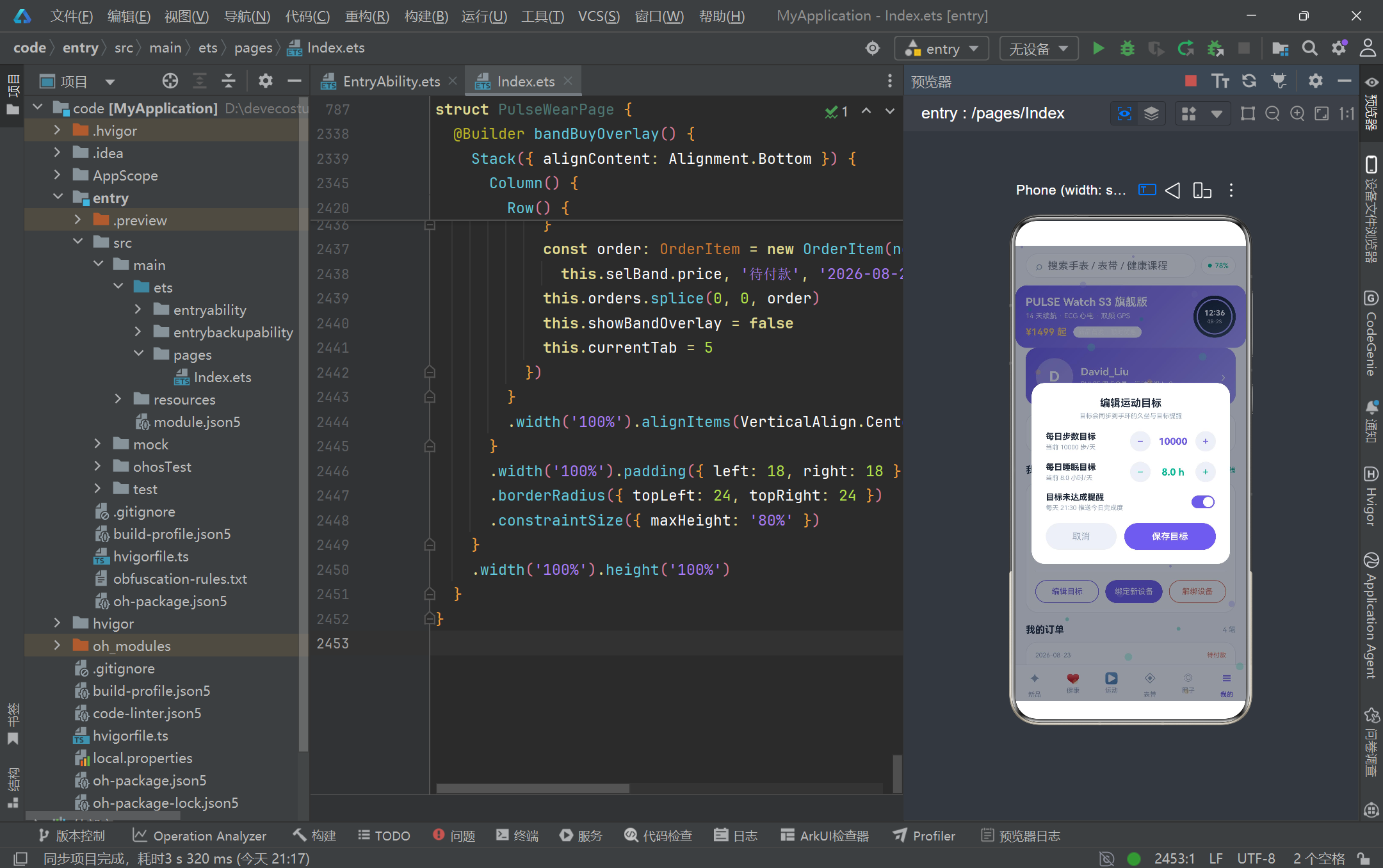
编辑目标弹框采用了"居中卡片"的交互模式,通过 Stack({ alignContent: Alignment.Center }) 将面板居中显示。这个弹框最值得关注的设计是"临时状态暂存"模式:它没有直接修改 stepGoal、sleepGoal 和 reminderOn 这三个正式状态变量,而是使用了 tempStepGoal、tempSleepGoal 和 tempReminder 三个临时变量作为编辑缓冲区。弹框打开时(在我的 Tab 的"编辑目标"按钮 onClick 中),会将当前正式值复制到临时变量:this.tempStepGoal = this.stepGoal。用户在弹框中的所有增减操作只影响临时变量,只有点击"保存目标"按钮时才会将临时值同步回正式变量。这种设计确保了用户取消编辑时不会污染原有数据,是表单交互中的标准最佳实践。步数目标使用 500 为步进单位,范围限制在 2000 到 30000 之间;睡眠目标使用 0.5 小时为步进单位,范围限制在 5 到 10 小时之间。每个步进器由减号按钮、数值显示和加号按钮三部分组成,数值显示区域固定 width(70) 并居中对齐,确保加减时数字不会产生布局抖动。弹框还包含一个 Toggle 开关组件用于控制目标未达成提醒,通过 onChange 回调更新 tempReminder 状态。底部双按钮通过 layoutWeight 比例分配空间——取消按钮 layoutWeight(1),保存按钮 layoutWeight(1.4),使保存按钮视觉上更突出,引导用户优先选择保存操作。
3.16 解绑确认弹框与表带购买弹框的差异化设计
  @Builder unbindConfirmOverlay() {
    Stack({ alignContent: Alignment.Center }) {
      Column().width('100%').height('100%').backgroundColor('#0F172A').opacity(0.45)
        .onClick(() => {
          this.showUnbindOverlay = false
        })

      Column() {
        Stack() {
          Column().width(56).height(56).borderRadius(28).backgroundColor('#FDEDEC')
          Text('!').fontSize(26).fontWeight(FontWeight.Bold).fontColor(COLOR_RED)
        }
        .width(56).height(56)

        Text('确认解绑设备?').fontSize(16).fontWeight(FontWeight.Bold)
          .fontColor(COLOR_TEXT_MAIN).margin({ top: 14 })

        Text('解绑后将停止同步健康数据与运动记录,历史数据仍会云端保留 90 天。')
          .fontSize(11).fontColor(COLOR_TEXT_SUB).textAlign(TextAlign.Center).margin({ top: 8 })

        Row() {
          Button() {
            Text('取消').fontSize(14).fontColor(COLOR_TEXT_SUB)
          }
          .layoutWeight(1).height(42).backgroundColor(COLOR_TRACK).borderRadius(21)
          .onClick(() => {
            this.showUnbindOverlay = false
          })

          Button() {
            Text('确认解绑').fontSize(14).fontWeight(FontWeight.Bold).fontColor(Color.White)
          }
          .layoutWeight(1).height(42).backgroundColor(COLOR_RED).borderRadius(21)
          .margin({ left: 12 })
          .onClick(() => {
            const idx = findDeviceIndex(this.devices, this.unbindTargetId)
            if (idx >= 0) {
              this.devices.splice(idx, 1)
            }
            this.deviceBound = this.devices.length > 0
            this.battery = this.devices.length > 0 ? this.devices[0].battery : 0
            this.unbindTargetId = -1
            this.showUnbindOverlay = false
          })
        }
        .width('100%').margin({ top: 20 })
      }
      .width('78%').padding(22).backgroundColor(COLOR_CARD).borderRadius(20)
    }
    .width('100%').height('100%')
  }
解绑确认弹框是一个警示类对话框,视觉设计与编辑目标弹框有显著差异。它使用了更小的宽度(78% vs 86%)和更紧凑的内容布局,顶部是一个 56x56 的圆形警示图标——浅红色背景圆上叠加红色感叹号,通过色彩心理学向用户传递"此操作需谨慎"的视觉信号。警示文案明确告知解绑后果(停止同步)和数据保留策略(云端保留 90 天),帮助用户做出知情决策。确认按钮使用 COLOR_RED 红色背景而非主题紫色,进一步强化危险操作的视觉警示。onClick 回调通过 findDeviceIndex 定位目标设备在数组中的索引,splice 删除后同步更新 deviceBound 和 battery 状态——如果还有剩余设备则绑定状态保持 true 并取第一个设备的电量,否则设为 false 和 0。表带购买弹框 bandBuyOverlay 则是功能最复杂的表单类弹框,它同样采用底部滑出面板模式,但内容包含尺寸选择(Flex 标签流)、颜色选择(Circle 圆点带选中描边环)、刻字内容输入(TextInput 带字符提示)和价格汇总区域。颜色选择的实现尤为巧妙:ForEach 遍历 selBand.colors 数组,每个颜色渲染为一个 Stack 容器,内层 Circle 填充颜色,当 selColorIdx === ci 时外层叠加一个透明填充、紫色描边的 Circle 作为选中指示环。"加入订单"按钮的 onClick 将表带名称、尺寸和刻字内容拼接为订单名称,创建 OrderItem 并插入 orders 数组头部,然后关闭弹框并跳转到个人中心 Tab。
3.17 心跳脉冲粒子特效层的穿透式渲染
  @Builder particleLayer() {
    Column() {
      ForEach(this.particles, (p: Particle) => {
        Circle({ width: p.size, height: p.size })
          .fill(p.color).opacity(p.alpha).position({ x: p.x, y: p.y })
      }, (p: Particle, idx: number) => idx.toString())
    }
    .width('100%').height('100%').hitTestBehavior(HitTestMode.None)
  }
心跳脉冲粒子特效层是整个应用在交互架构上最精妙的设计。它作为 Stack 的第二层覆盖在主体容器之上,通过 ForEach 遍历 particles 数组渲染 30 个彩色 Circle 粒子,每个粒子的位置通过 position({ x: p.x, y: p.y }) 绝对定位,大小、颜色和透明度均由 Particle 实例属性驱动。关键的交互处理在于 hitTestBehavior(HitTestMode.None)——这个属性使得整个粒子层成为"点击穿透层",所有触摸事件都会忽略该层直接传递到下方的主体容器。这意味着粒子在屏幕上飘动时,用户仍然可以正常点击搜索框、切换 Tab、滚动列表和打开弹框,粒子特效完全不影响应用的交互功能。ForEach 的键值生成函数使用 idx.toString()(粒子索引)而非粒子属性,因为粒子系统是整体替换式更新(nextParticles 返回全新数组),使用索引作为键可以确保 ForEach 在每次定时器触发时高效复用 DOM 节点,仅更新位置和透明度属性而非销毁重建。整个粒子层被包裹在一个 width(‘100%’).height(‘100%’) 的 Column 容器中,确保覆盖整个屏幕区域。配合 aboutToAppear 中的 setInterval 每 240 毫秒调用 nextParticles 更新粒子状态,整个特效层呈现出持续向上飘动的彩色光点流,为这个健康主题的应用营造出心跳脉冲般的生命活力氛围。
五、四种弹框交互模式的技术对比
| 对比维度 | bindDeviceOverlay 绑定设备 | editGoalOverlay 编辑目标 | unbindConfirmOverlay 解绑确认 | bandBuyOverlay 表带购买 |
|---|---|---|---|---|
| 对齐方式 | Alignment.Bottom 底部滑出 | Alignment.Center 居中卡片 | Alignment.Center 居中小窗 | Alignment.Bottom 底部滑出 |
| 面板宽度 | 100% 全宽 | 86% 中等宽度 | 78% 紧凑宽度 | 100% 全宽 |
| 最大高度 | constraintSize 80% | 自适应内容 | 自适应内容 | constraintSize 80% |
| 圆角设计 | topLeft/topRight 24 顶部圆角 | 20 四角圆角 | 20 四角圆角 | topLeft/topRight 24 顶部圆角 |
| 遮罩点击 | 关闭弹框 | 关闭弹框 | 关闭弹框 | 关闭弹框 |
| 表单状态 | selModel/selWear/selGoal | tempStepGoal/tempSleepGoal/tempReminder | unbindTargetId | selSize/selColorIdx/engraveText |
| 状态暂存 | 直接修改选中值 | 临时变量暂存模式 | 仅记录目标 ID | 直接修改选中值 |
| 确认按钮 | 立即绑定(紫色主调) | 保存目标(紫色主调) | 确认解绑(红色警示) | 加入订单(紫色主调) |
| 数据操作 | splice 追加设备到数组 | temp 值同步到正式变量 | splice 删除设备 | splice 插入订单到头部 |
| 关联 Tab | 我的 Tab 设备管理 | 我的 Tab 编辑目标按钮 | 我的 Tab 解绑设备按钮 | 表带 Tab 卡片点击 |
| 触发后跳转 | 无跳转 | 无跳转 | 无跳转 | currentTab=5 跳转个人中心 |
安装DevEco Studio程序

选择目标安装目录:

设置环境变量,但是需要重启一下:

新建一个空白模板:

设置API为24的模板项目:
初始化项目,自动下载相关依赖:

完整代码:
// ============================================================================
// 场景:智穿商城 PULSE WEAR —— 智能手表 / 手环商城 + 健康数据管理平台
// 风格:极简白活力渐变风(云白 #F8FAFC / 活力紫 #6C5CE7 / 薄荷绿 #00B894 / 能量黄 #FDCB6E)
// 结构:电商静态头部 + 6 底部 Tab + 4 个弹框(Stack + modalOverlay 悬浮层)
// + 心跳脉冲粒子特效层(setInterval 驱动,不阻挡点击)
// ============================================================================
// ===== PART 1 ===== 数据模型 / 全局常量 / 写死数据 / 全局纯函数
// ---------------- 全局颜色常量 ----------------
const COLOR_BG: string = '#F8FAFC'
const COLOR_PRIMARY: string = '#6C5CE7'
const COLOR_PRIMARY_LIGHT: string = '#A29BFE'
const COLOR_MINT: string = '#00B894'
const COLOR_MINT_LIGHT: string = '#55EFC4'
const COLOR_YELLOW: string = '#FDCB6E'
const COLOR_RED: string = '#E17055'
const COLOR_TEXT_MAIN: string = '#1E293B'
const COLOR_TEXT_SUB: string = '#94A3B8'
const COLOR_CARD: string = '#FFFFFF'
const COLOR_BORDER: string = '#E8ECF1'
const COLOR_TRACK: string = '#EEF0F6'
// ---------------- Tab 元数据 ----------------
interface TabItemModel {
name: string
icon: string
}
@Observed
class TabItem implements TabItemModel {
name: string = ''
icon: string = ''
constructor(name: string, icon: string) {
this.name = name
this.icon = icon
}
}
const TAB_ITEMS: TabItem[] = [
new TabItem('新品', '✦'),
new TabItem('健康', '♥'),
new TabItem('运动', '▶'),
new TabItem('表带', '◈'),
new TabItem('圈子', '◎'),
new TabItem('我的', '☰')
]
// ---------------- 产品模型 ----------------
interface ProductModel {
id: number
name: string
price: number
oldPrice: number
tag: string
battery: string
waterproof: string
heartRate: string
screen: string
weight: string
rating: number
sold: number
gradFrom: string
gradTo: string
}
@Observed
class Product implements ProductModel {
id: number = 0
name: string = ''
price: number = 0
oldPrice: number = 0
tag: string = ''
battery: string = ''
waterproof: string = ''
heartRate: string = ''
screen: string = ''
weight: string = ''
rating: number = 0
sold: number = 0
gradFrom: string = '#6C5CE7'
gradTo: string = '#A29BFE'
constructor(id: number, name: string, price: number, oldPrice: number, tag: string,
battery: string, waterproof: string, heartRate: string, screen: string, weight: string,
rating: number, sold: number, gradFrom: string, gradTo: string) {
this.id = id
this.name = name
this.price = price
this.oldPrice = oldPrice
this.tag = tag
this.battery = battery
this.waterproof = waterproof
this.heartRate = heartRate
this.screen = screen
this.weight = weight
this.rating = rating
this.sold = sold
this.gradFrom = gradFrom
this.gradTo = gradTo
}
}
const PRODUCTS: Product[] = [
new Product(1, 'PULSE Watch S3 旗舰版', 1499, 1799, '新品首发', '14 天超长续航', '5ATM + IP68',
'全天候心率 + 血氧', '1.43" AMOLED', '46g', 4.9, 12800, '#6C5CE7', '#A29BFE'),
new Product(2, 'PULSE Watch S3 青春版', 999, 1199, '热卖', '10 天续航', '5ATM 防水',
'全天候心率监测', '1.39" AMOLED', '38g', 4.8, 23600, '#00B894', '#55EFC4'),
new Product(3, 'PULSE Band 7 智能手环', 299, 349, '爆款', '21 天超长续航', '50m 防水',
'心率 + 睡眠监测', '1.1" AMOLED', '22g', 4.7, 89200, '#0984E3', '#74B9FF'),
new Product(4, 'PULSE Band 7 NFC 版', 349, 399, '通勤', '18 天续航', '50m 防水',
'心率 + 血氧监测', '1.1" AMOLED', '23g', 4.7, 45300, '#E17055', '#FAB1A0'),
new Product(5, 'PULSE Watch GT 长续航', 1199, 1399, '长续航', '30 天极限续航', '5ATM',
'心率 + 压力监测', '1.39" AMOLED', '42g', 4.8, 17800, '#636E72', '#B2BEC3'),
new Product(6, 'PULSE Sport ECG 版', 1899, 2199, '专业运动', '12 天续航', '10ATM 游泳级',
'ECG 心电 + 心率', '1.43" AMOLED', '52g', 4.9, 9600, '#00CEC9', '#81ECEC'),
new Product(7, 'PULSE Kids 儿童版', 499, 599, '亲子守护', '8 天续航', 'IP68 生活防水',
'心率 + 安全定位', '1.0" IPS', '28g', 4.6, 31200, '#FDCB6E', '#FFEAA7'),
new Product(8, 'PULSE Band 6 SE', 199, 249, '百元机皇', '16 天续航', '30m 防水',
'静息心率监测', '0.95" AMOLED', '20g', 4.5, 156000, '#FD79A8', '#FDA7DF'),
new Product(9, 'PULSE Watch SE', 799, 899, '性价比', '12 天续航', '5ATM',
'心率 + 血氧监测', '1.2" AMOLED', '33g', 4.6, 27400, '#00B894', '#55EFC4'),
new Product(10, 'PULSE Fashion 方屏版', 1099, 1299, '时尚', '9 天续航', '3ATM',
'心率 + 经期管理', '1.4" AMOLED 方屏', '35g', 4.7, 13800, '#A29BFE', '#DFE6E9'),
new Product(11, 'PULSE Ultra 户外双频', 2399, 2699, '年度旗舰', '17 天续航', '10ATM',
'双频 GPS + 心率', '1.43" 蓝宝石屏', '58g', 4.9, 6800, '#2D3436', '#636E72')
]
// ---------------- 周步数 / 睡眠 / 心率区间 ----------------
interface WeekStepModel {
day: string
steps: number
goal: number
}
@Observed
class WeekStep implements WeekStepModel {
day: string = ''
steps: number = 0
goal: number = 10000
constructor(day: string, steps: number, goal: number) {
this.day = day
this.steps = steps
this.goal = goal
}
}
const WEEK_STEPS: WeekStep[] = [
new WeekStep('一', 8642, 10000),
new WeekStep('二', 10231, 10000),
new WeekStep('三', 7520, 10000),
new WeekStep('四', 11860, 10000),
new WeekStep('五', 9340, 10000),
new WeekStep('六', 14205, 12000),
new WeekStep('今日', 8642, 10000)
]
interface SleepNightModel {
label: string
hours: number
quality: string
}
@Observed
class SleepNight implements SleepNightModel {
label: string = ''
hours: number = 0
quality: string = ''
constructor(label: string, hours: number, quality: string) {
this.label = label
this.hours = hours
this.quality = quality
}
}
const SLEEP_NIGHTS: SleepNight[] = [
new SleepNight('08-19 周三', 7.2, '优质'),
new SleepNight('08-20 周四', 6.5, '良好'),
new SleepNight('08-21 周五', 7.8, '深睡充足'),
new SleepNight('08-22 周六', 6.1, '入睡偏晚'),
new SleepNight('08-23 周日', 7.5, '良好')
]
interface HeartZoneModel {
name: string
minutes: number
color: string
percent: number
}
@Observed
class HeartZone implements HeartZoneModel {
name: string = ''
minutes: number = 0
color: string = '#6C5CE7'
percent: number = 0
constructor(name: string, minutes: number, color: string, percent: number) {
this.name = name
this.minutes = minutes
this.color = color
this.percent = percent
}
}
const HEART_ZONES: HeartZone[] = [
new HeartZone('热身放松', 42, '#00B894', 38),
new HeartZone('燃脂区间', 28, '#FDCB6E', 24),
new HeartZone('有氧耐力', 16, '#6C5CE7', 15),
new HeartZone('无氧冲刺', 7, '#E17055', 9),
new HeartZone('极限峰值', 3, '#D63031', 4)
]
// ---------------- 运动记录模型 ----------------
interface WorkoutRecordModel {
id: number
type: string
icon: string
date: string
duration: number
distance: number
calories: number
pace: string
gradFrom: string
gradTo: string
}
@Observed
class WorkoutRecord implements WorkoutRecordModel {
id: number = 0
type: string = ''
icon: string = '跑'
date: string = ''
duration: number = 0
distance: number = 0
calories: number = 0
pace: string = '-'
gradFrom: string = '#6C5CE7'
gradTo: string = '#A29BFE'
constructor(id: number, type: string, icon: string, date: string, duration: number,
distance: number, calories: number, pace: string, gradFrom: string, gradTo: string) {
this.id = id
this.type = type
this.icon = icon
this.date = date
this.duration = duration
this.distance = distance
this.calories = calories
this.pace = pace
this.gradFrom = gradFrom
this.gradTo = gradTo
}
}
const RECORDS: WorkoutRecord[] = [
new WorkoutRecord(1, '晨跑', '跑', '08-23 06:32', 42, 6.2, 386, "5'48\"/km", '#6C5CE7', '#A29BFE'),
new WorkoutRecord(2, '夜跑', '跑', '08-22 20:15', 55, 8.4, 512, "6'02\"/km", '#0984E3', '#74B9FF'),
new WorkoutRecord(3, '骑行', '骑', '08-22 07:40', 68, 21.6, 598, "3'08\"/km", '#00B894', '#55EFC4'),
new WorkoutRecord(4, '游泳', '泳', '08-21 19:20', 45, 1.8, 405, "2'12\"/100m", '#00CEC9', '#81ECEC'),
new WorkoutRecord(5, '力量训练', '力', '08-21 18:30', 60, 0, 348, '器械 · 5 组', '#E17055', '#FAB1A0'),
new WorkoutRecord(6, '瑜伽', '瑜', '08-20 21:00', 35, 0, 132, '舒缓流瑜伽', '#FD79A8', '#FDA7DF'),
new WorkoutRecord(7, '健走', '走', '08-20 12:10', 28, 2.1, 98, "11'20\"/km", '#00B894', '#FFEAA7'),
new WorkoutRecord(8, 'HIIT 间歇', '燃', '08-19 19:45', 22, 0, 268, '高强度间歇', '#E17055', '#FDCB6E'),
new WorkoutRecord(9, '跳绳', '绳', '08-19 07:20', 15, 0, 187, '双摇 300 个', '#6C5CE7', '#55EFC4'),
new WorkoutRecord(10, '爬楼机', '梯', '08-18 08:05', 18, 0, 156, '等效 42 层', '#636E72', '#B2BEC3'),
new WorkoutRecord(11, '羽毛球', '球', '08-17 20:00', 75, 0, 428, '双打 3 局', '#0984E3', '#81ECEC'),
new WorkoutRecord(12, '普拉提', '拉', '08-17 10:30', 40, 0, 165, '核心强化', '#FD79A8', '#FFEAA7'),
new WorkoutRecord(13, '徒步登山', '山', '08-16 09:00', 150, 11.2, 986, "13'24\"/km", '#00B894', '#00CEC9'),
new WorkoutRecord(14, '椭圆机', '椭', '08-15 19:00', 40, 5.0, 288, "8'00\"/km", '#2D3436', '#636E72'),
new WorkoutRecord(15, '晨跑', '跑', '08-15 06:40', 38, 5.5, 342, "6'18\"/km", '#6C5CE7', '#74B9FF')
]
// ---------------- 课程模型 ----------------
interface CourseModel {
id: number
title: string
coach: string
level: string
minutes: number
calories: number
tag: string
gradFrom: string
gradTo: string
}
@Observed
class Course implements CourseModel {
id: number = 0
title: string = ''
coach: string = ''
level: string = ''
minutes: number = 0
calories: number = 0
tag: string = ''
gradFrom: string = '#6C5CE7'
gradTo: string = '#A29BFE'
constructor(id: number, title: string, coach: string, level: string, minutes: number,
calories: number, tag: string, gradFrom: string, gradTo: string) {
this.id = id
this.title = title
this.coach = coach
this.level = level
this.minutes = minutes
this.calories = calories
this.tag = tag
this.gradFrom = gradFrom
this.gradTo = gradTo
}
}
const COURSES: Course[] = [
new Course(1, '零基础 5K 跑步养成计划', '教练 · 林岚', '入门', 21, 4800, '21天计划', '#6C5CE7', '#A29BFE'),
new Course(2, 'HIIT 燃脂 20 分钟', '教练 · 陈锋', '进阶', 20, 268, '高强度', '#E17055', '#FDCB6E'),
new Course(3, '办公室肩颈放松操', '教练 · 苏晴', '入门', 12, 45, '碎片化', '#0984E3', '#74B9FF'),
new Course(4, '动感单车燃脂骑行', '教练 · Leo', '高阶', 35, 420, '节奏骑行', '#00B894', '#55EFC4'),
new Course(5, '核心力量进阶训练', '教练 · 韩雪', '进阶', 30, 215, '塑形', '#00CEC9', '#81ECEC'),
new Course(6, '睡前舒缓瑜伽', '教练 · 米娅', '入门', 18, 68, '助眠', '#FD79A8', '#FDA7DF'),
new Course(7, '跳绳速燃挑战', '教练 · 阿凯', '进阶', 15, 230, '速燃', '#6C5CE7', '#55EFC4'),
new Course(8, '自由泳进阶技术课', '教练 · 周洲', '高阶', 40, 385, '泳姿改善', '#0984E3', '#81ECEC'),
new Course(9, '马甲线养成计划', '教练 · 苏晴', '进阶', 28, 3200, '28天计划', '#E17055', '#FAB1A0'),
new Course(10, '晨间唤醒流瑜伽', '教练 · 米娅', '入门', 15, 72, '唤醒', '#00B894', '#FFEAA7')
]
// ---------------- 表带模型 ----------------
interface BandItemModel {
id: number
name: string
price: number
material: string
colors: string[]
sold: number
gradFrom: string
gradTo: string
hot: boolean
}
@Observed
class BandItem implements BandItemModel {
id: number = 0
name: string = ''
price: number = 0
material: string = ''
colors: string[] = []
sold: number = 0
gradFrom: string = '#6C5CE7'
gradTo: string = '#A29BFE'
hot: boolean = false
constructor(id: number, name: string, price: number, material: string, colors: string[],
sold: number, gradFrom: string, gradTo: string, hot: boolean) {
this.id = id
this.name = name
this.price = price
this.material = material
this.colors = colors
this.sold = sold
this.gradFrom = gradFrom
this.gradTo = gradTo
this.hot = hot
}
}
const BANDS: BandItem[] = [
new BandItem(1, '亲肤硅胶运动带', 79, '液态硅胶',
['#6C5CE7', '#00B894', '#2D3436', '#FD79A8'], 12400, '#6C5CE7', '#A29BFE', true),
new BandItem(2, '米兰尼斯不锈钢带', 199, '精织不锈钢',
['#2D3436', '#B2BEC3'], 8600, '#636E72', '#B2BEC3', false),
new BandItem(3, '头层牛皮商务带', 249, '意大利牛皮',
['#6D4C41', '#2D3436'], 5300, '#5D4037', '#8D6E63', false),
new BandItem(4, '尼龙编织回环带', 99, '双层尼龙',
['#00B894', '#FDCB6E', '#0984E3'], 9800, '#00B894', '#55EFC4', true),
new BandItem(5, '氟橡胶夜光运动带', 129, '氟橡胶',
['#6C5CE7', '#00CEC9', '#E17055'], 7700, '#00CEC9', '#81ECEC', false),
new BandItem(6, '磁吸快拆真皮带', 219, '小牛皮 + 磁吸',
['#E17055', '#2D3436'], 4100, '#E17055', '#FAB1A0', false),
new BandItem(7, '编织单圈弹力带', 89, '弹性编织',
['#FDA7DF', '#55EFC4', '#FFEAA7'], 6900, '#FD79A8', '#FDA7DF', true),
new BandItem(8, '链式不锈钢表带', 189, '316L 不锈钢',
['#B2BEC3', '#2D3436'], 5800, '#0984E3', '#74B9FF', false),
new BandItem(9, '渐变晕染硅胶带', 99, '渐变染色硅胶',
['#A29BFE', '#81ECEC', '#FFB4A2'], 8300, '#A29BFE', '#DFE6E9', true),
new BandItem(10, '碳纤维纹理表带', 169, '碳纤维复合',
['#2D3436', '#636E72'], 3600, '#2D3436', '#636E72', false),
new BandItem(11, '珍珠白陶瓷感表带', 229, '陶瓷质感树脂',
['#DFE6E9', '#FDCB6E'], 2900, '#DFE6E9', '#FDCB6E', false),
new BandItem(12, '布洛克雕花皮带', 269, '手工雕花牛皮',
['#5D4037', '#8D6E63'], 2100, '#5D4037', '#A1887F', false)
]
// ---------------- 社区帖子模型 ----------------
interface PostItemModel {
id: number
user: string
avatarFrom: string
avatarTo: string
title: string
content: string
topic: string
likes: number
comments: number
minutesAgo: number
hasImage: boolean
imgFrom: string
imgTo: string
}
@Observed
class PostItem implements PostItemModel {
id: number = 0
user: string = ''
avatarFrom: string = '#6C5CE7'
avatarTo: string = '#A29BFE'
title: string = ''
content: string = ''
topic: string = ''
likes: number = 0
comments: number = 0
minutesAgo: number = 0
hasImage: boolean = false
imgFrom: string = '#6C5CE7'
imgTo: string = '#A29BFE'
constructor(id: number, user: string, avatarFrom: string, avatarTo: string, title: string,
content: string, topic: string, likes: number, comments: number, minutesAgo: number,
hasImage: boolean, imgFrom: string, imgTo: string) {
this.id = id
this.user = user
this.avatarFrom = avatarFrom
this.avatarTo = avatarTo
this.title = title
this.content = content
this.topic = topic
this.likes = likes
this.comments = comments
this.minutesAgo = minutesAgo
this.hasImage = hasImage
this.imgFrom = imgFrom
this.imgTo = imgTo
}
}
const POSTS: PostItem[] = [
new PostItem(1, '跑者小鹿', '#6C5CE7', '#A29BFE', '连续打卡 100 天,5 公里跑进 28 分钟!',
'从走跑结合开始,第 100 天终于把 5 公里跑进了 28 分钟。中间经历了一次髂胫束不适,靠拉伸和冰敷熬过来的。' +
'几点心得:心率控制比配速重要,跑鞋别穿到 800 公里以上,睡眠真的会影响晨跑状态。',
'跑步打卡', 328, 46, 25, true, '#6C5CE7', '#55EFC4'),
new PostItem(2, '铁腿阿凯', '#E17055', '#FDCB6E', '第一次越野赛完赛记:30 公里爬升 1400 米',
'最后 5 公里全是台阶,全靠意志力和能量胶撑下来。手表的越野模式轨迹很稳,心率飘移也小。' +
'下次想试试 50 公里,先从背靠背长距离拉练开始。', '越野跑', 512, 89, 68, true, '#E17055', '#FAB1A0'),
new PostItem(3, '瑜伽米娅', '#FD79A8', '#FDA7DF', '睡前 10 分钟舒缓序列,亲测入睡更快',
'猫牛式 + 婴儿式 + 仰卧扭转,每个动作停留 8 个呼吸。坚持两周,深睡时长从 1.2 小时涨到了 1.8 小时。',
'瑜伽日常', 276, 31, 112, false, '#FD79A8', '#FDA7DF'),
new PostItem(4, '减脂中的Lisa', '#00B894', '#55EFC4', '三个月体脂 31% 到 24%,没有节食',
'每周 4 练:两次力量 + 两次 HIIT,饮食只做了两件事:把饮料换成无糖茶,把一半主食换成粗粮。' +
'体重掉了 6.8kg,腰围小了 9cm。手表的卡路里预估和体脂秤趋势基本对得上。', '减脂日记', 893, 120, 190, true, '#00B894', '#FFEAA7'),
new PostItem(5, '泳不离周洲', '#00CEC9', '#81ECEC', '自由泳换气终于不呛水了',
'教练一句话点醒我:换气不是转头,是跟着身体的侧转一起走。单侧换气改双侧,配速反而快了 8 秒。',
'游泳技术', 158, 22, 240, false, '#00CEC9', '#81ECEC'),
new PostItem(6, '力量举老王', '#636E72', '#B2BEC3', '深蹲 100kg 达成,纪念一下',
'从空杆到 100kg 用了 14 个月,中间因为膝盖不舒服停了两个月。结论:热身和拉伸不是可选项,是训练的一部分。',
'力量训练', 641, 97, 300, true, '#2D3436', '#636E72'),
new PostItem(7, '晨型人大乔', '#0984E3', '#74B9FF', '早上 5:30 起床的第 365 天',
'秘诀只有一个:前一晚 22:30 前放下手机。手表的睡眠分期报告让我承认了一个事实——熬夜刷手机的睡眠质量是真的差。',
'自律打卡', 423, 156, 420, false, '#0984E3', '#74B9FF'),
new PostItem(8, '骑行川西', '#00B894', '#00CEC9', '周末刷了个世纪骑行 105km',
'平均时速 26.4,消耗 2380 千卡,中途补了两次能量胶一次电解质。码表和手表的心率数据几乎一致,续航还剩 41%。',
'骑行长途', 376, 54, 510, true, '#00B894', '#00CEC9'),
new PostItem(9, '跳绳少女', '#6C5CE7', '#55EFC4', '每天 3000 个跳绳,膝盖还好吗?',
'体重 52kg,跳了三个月,膝盖目前没异常。重点:前脚掌落地、膝盖微屈、别在水泥地上硬跳,垫一张跳绳垫。',
'跳绳燃脂', 209, 88, 600, false, '#6C5CE7', '#55EFC4'),
new PostItem(10, '程序员健身', '#E17055', '#FAB1A0', '久坐 8 小时,工位拉伸自救指南',
'颈椎米字操 + 肩袖外旋弹力带 + 靠墙天使,每 90 分钟起来做一轮。腰突星人亲测有效,配合手环久坐提醒更佳。',
'办公健康', 534, 142, 730, true, '#E17055', '#FDCB6E'),
new PostItem(11, '山系小野', '#00CEC9', '#FFEAA7', '夜爬看日出:配速不重要,心态重要',
'凌晨 3 点出发,手电的光柱里全是雾。山顶的日出值回一切。手表海拔曲线记录了 1180 米爬升,很酷的纪念。',
'徒步登山', 287, 39, 880, true, '#00CEC9', '#FFEAA7'),
new PostItem(12, '马甲线苏晴', '#FD79A8', '#FFEAA7', '腹部训练别只做卷腹,试试这三个动作',
'死虫式、侧支撑、悬垂举腿,比 100 个卷腹更安全有效。核心练的是稳定,不是次数。四周下来腰围肉眼可见地紧致了。',
'塑形课堂', 462, 75, 960, false, '#FD79A8', '#FFEAA7')
]
// ---------------- 订单 / 设备模型 ----------------
interface OrderItemModel {
id: number
name: string
price: number
status: string
date: string
count: number
}
@Observed
class OrderItem implements OrderItemModel {
id: number = 0
name: string = ''
price: number = 0
status: string = ''
date: string = ''
count: number = 1
constructor(id: number, name: string, price: number, status: string, date: string, count: number) {
this.id = id
this.name = name
this.price = price
this.status = status
this.date = date
this.count = count
}
}
const ORDERS: OrderItem[] = [
new OrderItem(1001, 'PULSE Watch S3 旗舰版 · 曜石黑', 1499, '待收货', '2026-08-20', 1),
new OrderItem(1002, '亲肤硅胶运动带 · 活力紫', 79, '已发货', '2026-08-18', 2),
new OrderItem(1003, 'PULSE Band 7 · 星空灰', 299, '已完成', '2026-08-05', 1)
]
interface DeviceModelInfo {
id: number
name: string
battery: number
firmware: string
status: string
gradFrom: string
gradTo: string
}
@Observed
class DeviceModel implements DeviceModelInfo {
id: number = 0
name: string = ''
battery: number = 0
firmware: string = ''
status: string = ''
gradFrom: string = '#6C5CE7'
gradTo: string = '#A29BFE'
constructor(id: number, name: string, battery: number, firmware: string, status: string,
gradFrom: string, gradTo: string) {
this.id = id
this.name = name
this.battery = battery
this.firmware = firmware
this.status = status
this.gradFrom = gradFrom
this.gradTo = gradTo
}
}
const DEVICES: DeviceModel[] = [
new DeviceModel(1, 'PULSE Watch S3 旗舰版', 78, '固件 v3.2.1', '佩戴中 · 左手', '#6C5CE7', '#A29BFE'),
new DeviceModel(2, 'PULSE Band 7', 54, '固件 v2.8.0', '已连接 · 备用', '#0984E3', '#74B9FF')
]
// ---------------- 粒子特效模型 ----------------
interface ParticleModel {
x: number
y: number
size: number
color: string
alpha: number
speed: number
flip: boolean
}
@Observed
class ParticleItem implements ParticleModel {
x: number = 0
y: number = 0
size: number = 6
color: string = '#6C5CE7'
alpha: number = 0.35
speed: number = 1.5
flip: boolean = false
constructor(x: number, y: number, size: number, color: string, alpha: number,
speed: number, flip: boolean) {
this.x = x
this.y = y
this.size = size
this.color = color
this.alpha = alpha
this.speed = speed
this.flip = flip
}
}
// ---------------- 弹框选项常量 ----------------
const DEVICE_MODELS: string[] = [
'PULSE Watch S3 旗舰版', 'PULSE Watch SE', 'PULSE Band 7', 'PULSE Band 7 NFC',
'PULSE Ultra 户外双频', 'PULSE Kids 儿童版'
]
const WEAR_MODES: string[] = ['左手佩戴', '右手佩戴', '口袋模式', '挂脖模式']
const BIND_GOALS: string[] = ['减脂塑形', '耐力提升', '日常健康', '睡眠改善']
const BAND_SIZES: string[] = ['S (120-140mm)', 'M (140-160mm)', 'L (160-185mm)']
const SERVICE_ITEMS: string[] = [
'收货地址管理', '优惠券中心', '联系在线客服', '帮助与反馈', '关于 PULSE WEAR'
]
// ---------------- 全局纯函数 ----------------
function emptyBand(): BandItem {
return new BandItem(0, '', 0, '', [], 0, '#E8ECF1', '#E8ECF1', false)
}
function soldText(n: number): string {
if (n >= 10000) {
return (n / 10000).toFixed(1) + '万'
}
return n.toString() + ''
}
function fmtSteps(n: number): string {
if (n >= 10000) {
return (n / 10000).toFixed(1) + '万'
}
return n.toString()
}
function pctText(value: number, total: number): string {
let pct = 0
if (total > 0) {
pct = Math.round(value / total * 100)
}
if (pct > 999) {
pct = 999
}
return pct.toString() + '%'
}
function getCalPercent(c: number): string {
let pct = Math.round(c / 600 * 100)
if (pct > 100) {
pct = 100
}
if (pct < 4) {
pct = 4
}
return pct.toString() + '%'
}
function getBarHeight(steps: number): number {
let h = Math.round(steps / 15000 * 112)
if (h < 16) {
h = 16
}
if (h > 116) {
h = 116
}
return h
}
function getSleepBarWidth(hours: number): number {
let w = Math.round(hours / 9 * 236)
if (w < 30) {
w = 30
}
if (w > 236) {
w = 236
}
return w
}
function sumMinutes(records: WorkoutRecord[]): number {
let total = 0
for (let i = 0; i < records.length; i++) {
total += records[i].duration
}
return total
}
function sumCalories(records: WorkoutRecord[]): number {
let total = 0
for (let i = 0; i < records.length; i++) {
total += records[i].calories
}
return total
}
function nextOrderId(orders: OrderItem[]): number {
let maxId = 1000
for (let i = 0; i < orders.length; i++) {
if (orders[i].id > maxId) {
maxId = orders[i].id
}
}
return maxId + 1
}
function findOrderIndex(orders: OrderItem[], id: number): number {
for (let i = 0; i < orders.length; i++) {
if (orders[i].id === id) {
return i
}
}
return -1
}
function findDeviceIndex(devices: DeviceModel[], id: number): number {
for (let i = 0; i < devices.length; i++) {
if (devices[i].id === id) {
return i
}
}
return -1
}
function findPostIndex(posts: PostItem[], id: number): number {
for (let i = 0; i < posts.length; i++) {
if (posts[i].id === id) {
return i
}
}
return -1
}
function likedPost(old: PostItem): PostItem {
return new PostItem(old.id, old.user, old.avatarFrom, old.avatarTo, old.title, old.content,
old.topic, old.likes + 1, old.comments, old.minutesAgo, old.hasImage, old.imgFrom, old.imgTo)
}
function getWaterfallBands(bands: BandItem[], isLeft: boolean): BandItem[] {
const result: BandItem[] = []
for (let i = 0; i < bands.length; i++) {
if (isLeft && i % 2 === 0) {
result.push(bands[i])
}
if (!isLeft && i % 2 === 1) {
result.push(bands[i])
}
}
return result
}
function getWaterfallPosts(posts: PostItem[], isLeft: boolean): PostItem[] {
const result: PostItem[] = []
for (let i = 0; i < posts.length; i++) {
if (isLeft && i % 2 === 0) {
result.push(posts[i])
}
if (!isLeft && i % 2 === 1) {
result.push(posts[i])
}
}
return result
}
function initParticles(): ParticleItem[] {
const list: ParticleItem[] = []
const colors: string[] = [COLOR_PRIMARY, COLOR_MINT, COLOR_YELLOW, COLOR_PRIMARY_LIGHT, COLOR_MINT_LIGHT]
for (let i = 0; i < 30; i++) {
const px = 8 + (i * 11.6) % 344
const py = (i * 97) % 720
const size = 4 + (i % 5) * 2
const speed = 1.2 + (i % 4) * 0.8
list.push(new ParticleItem(px, py, size, colors[i % 5], 0.35, speed, false))
}
return list
}
function nextParticles(list: ParticleItem[]): ParticleItem[] {
const result: ParticleItem[] = []
for (let i = 0; i < list.length; i++) {
const old = list[i]
let ny = old.y - old.speed
if (ny < -16) {
ny = 732
}
const na = old.flip ? 0.6 : 0.16
result.push(new ParticleItem(old.x, ny, old.size, old.color, na, old.speed, !old.flip))
}
return result
}
// ===== PART 2 ===== 页面骨架:状态变量 / 生命周期 / 头部 / 底部Tab / 新品Tab
@Entry
@Component
struct PulseWearPage {
@State currentTab: number = 0
@State showBindOverlay: boolean = false
@State showGoalOverlay: boolean = false
@State showUnbindOverlay: boolean = false
@State showBandOverlay: boolean = false
@State products: Product[] = []
@State records: WorkoutRecord[] = []
@State courses: Course[] = []
@State bands: BandItem[] = []
@State posts: PostItem[] = []
@State orders: OrderItem[] = []
@State devices: DeviceModel[] = []
@State weekSteps: WeekStep[] = []
@State sleepNights: SleepNight[] = []
@State heartZones: HeartZone[] = []
@State particles: ParticleItem[] = []
@State selBand: BandItem = emptyBand()
@State selModel: string = 'PULSE Watch S3 旗舰版'
@State selWear: string = '左手佩戴'
@State selGoal: string = '减脂塑形'
@State selSize: string = 'M (140-160mm)'
@State selColorIdx: number = 0
@State engraveText: string = ''
@State tempStepGoal: number = 10000
@State tempSleepGoal: number = 8
@State tempReminder: boolean = true
@State stepGoal: number = 10000
@State sleepGoal: number = 8
@State reminderOn: boolean = true
@State todaySteps: number = 8642
@State todayCalories: number = 412
@State todaySleep: number = 7.5
@State restHeart: number = 62
@State battery: number = 78
@State deviceBound: boolean = true
@State unbindTargetId: number = -1
@State searchKey: string = ''
private timerId: number = -1
aboutToAppear(): void {
this.products = PRODUCTS
this.records = RECORDS
this.courses = COURSES
this.bands = BANDS
this.posts = POSTS
this.orders = ORDERS
this.devices = DEVICES
this.weekSteps = WEEK_STEPS
this.sleepNights = SLEEP_NIGHTS
this.heartZones = HEART_ZONES
this.selBand = BANDS[0]
this.particles = initParticles()
this.timerId = setInterval(() => {
this.particles = nextParticles(this.particles)
}, 240)
}
aboutToDisappear(): void {
if (this.timerId !== -1) {
clearInterval(this.timerId)
this.timerId = -1
}
}
// ---------------- 页面主体 ----------------
build() {
Stack() {
Column() {
this.headerBar()
Stack() {
if (this.currentTab === 0) {
this.newProductTab()
}
if (this.currentTab === 1) {
this.healthTab()
}
if (this.currentTab === 2) {
this.sportTab()
}
if (this.currentTab === 3) {
this.bandTab()
}
if (this.currentTab === 4) {
this.circleTab()
}
if (this.currentTab === 5) {
this.mineTab()
}
}
.layoutWeight(1).width('100%')
this.tabBar()
}
.width('100%').height('100%').backgroundColor(COLOR_BG)
this.particleLayer()
if (this.showBindOverlay) {
this.bindDeviceOverlay()
}
if (this.showGoalOverlay) {
this.editGoalOverlay()
}
if (this.showUnbindOverlay) {
this.unbindConfirmOverlay()
}
if (this.showBandOverlay) {
this.bandBuyOverlay()
}
}
.width('100%').height('100%')
}
// ---------------- 静态电商头部:搜索框 + 设备电量 + 新品 Banner ----------------
@Builder headerBar() {
Column() {
Row() {
Row() {
Text('⌕').fontSize(18).fontColor(COLOR_TEXT_SUB).margin({ right: 8 })
TextInput({ placeholder: '搜索手表 / 表带 / 健康课程', text: this.searchKey })
.layoutWeight(1).height(34).fontSize(13).fontColor(COLOR_TEXT_MAIN)
.backgroundColor(Color.Transparent).padding({ left: 0, right: 0 })
.onChange((v: string) => {
this.searchKey = v
})
}
.layoutWeight(1).height(38).padding({ left: 14, right: 14 })
.backgroundColor(COLOR_CARD).borderRadius(19).border({ width: 1, color: COLOR_BORDER })
Row() {
Circle({ width: 6, height: 6 }).fill(COLOR_MINT).margin({ right: 5 })
Text(this.deviceBound ? (this.battery.toString() + '%') : '未绑定')
.fontSize(11).fontColor(this.deviceBound ? COLOR_MINT : COLOR_TEXT_SUB)
}
.height(30).padding({ left: 10, right: 10 }).backgroundColor(COLOR_CARD)
.borderRadius(15).border({ width: 1, color: COLOR_BORDER }).margin({ left: 8 })
}
.width('100%').padding({ left: 16, right: 16, top: 12 })
Row() {
Column() {
Text('PULSE Watch S3 旗舰版')
.fontSize(17).fontWeight(FontWeight.Bold).fontColor(Color.White)
Text('14 天续航 · ECG 心电 · 双频 GPS')
.fontSize(11).fontColor('#FFFFFF').opacity(0.85).margin({ top: 5 })
Row() {
Text('¥1499 起').fontSize(15).fontWeight(FontWeight.Bold).fontColor(COLOR_YELLOW)
Text('新品首发 · 限时优惠')
.fontSize(10).fontColor(Color.White).padding({ left: 8, right: 8, top: 3, bottom: 3 })
.backgroundColor('#FFFFFF').opacity(0.9).borderRadius(10).margin({ left: 10 })
}
.margin({ top: 10 })
}
.layoutWeight(1).alignItems(HorizontalAlign.Start)
Stack() {
Column().width(66).height(66).borderRadius(33)
.linearGradient({ angle: 160, colors: [['#0F172A', 0], ['#334155', 1]] })
Circle({ width: 54, height: 54 }).fill(Color.Transparent)
.stroke(COLOR_PRIMARY_LIGHT).strokeWidth(2)
Column() {
Text('12:36').fontSize(12).fontWeight(FontWeight.Bold).fontColor(Color.White)
Text('08-23').fontSize(8).fontColor('#FFFFFF').opacity(0.8).margin({ top: 2 })
}
}
.width(66).height(66).margin({ left: 12 })
}
.width('100%').padding(16).margin({ left: 16, right: 16, top: 12 }).borderRadius(18)
.linearGradient({ angle: 135, colors: [[COLOR_PRIMARY, 0], ['#8E7CF3', 0.6], [COLOR_PRIMARY_LIGHT, 1]] })
}
.width('100%').backgroundColor(COLOR_BG)
}
// ---------------- 底部 Tab(单排 6 个) ----------------
@Builder tabBar() {
Column() {
Divider().color(COLOR_BORDER).strokeWidth(1)
Row() {
ForEach(TAB_ITEMS, (item: TabItem, idx: number) => {
Column() {
Text(item.icon).fontSize(17)
.fontColor(this.currentTab === idx ? COLOR_PRIMARY : COLOR_TEXT_SUB)
Text(item.name).fontSize(10).margin({ top: 3 })
.fontColor(this.currentTab === idx ? COLOR_PRIMARY : COLOR_TEXT_SUB)
.fontWeight(this.currentTab === idx ? FontWeight.Bold : FontWeight.Normal)
}
.layoutWeight(1).padding({ top: 8, bottom: 8 })
.onClick(() => {
this.currentTab = idx
})
}, (item: TabItem) => item.name)
}
.width('100%').height(56).alignItems(VerticalAlign.Center)
}
.width('100%').backgroundColor(COLOR_CARD)
}
// ---------------- Tab 1 新品:横滑产品大卡 + 参数对比表 ----------------
@Builder newProductTab() {
Scroll() {
Column() {
Row() {
Text('新品首发 · 旗舰阵容').fontSize(16).fontWeight(FontWeight.Bold)
.fontColor(COLOR_TEXT_MAIN).layoutWeight(1)
Text('共 ' + this.products.length.toString() + ' 款')
.fontSize(11).fontColor(COLOR_TEXT_SUB)
}
.width('100%').margin({ top: 4, bottom: 10 })
Scroll() {
Row() {
ForEach(this.products, (p: Product) => {
Column() {
Stack() {
Column().width(112).height(112).borderRadius(56)
.linearGradient({ angle: 160, colors: [[p.gradFrom, 0], [p.gradTo, 1]] })
Circle({ width: 84, height: 84 }).fill(Color.Transparent)
.stroke('#FFFFFF').strokeWidth(2).opacity(0.45)
Column() {
Text('12:36').fontSize(14).fontWeight(FontWeight.Bold).fontColor(Color.White)
Text('08-23 周日').fontSize(9).fontColor(Color.White)
.opacity(0.85).margin({ top: 2 })
}
Text(p.tag).fontSize(9).fontColor(Color.White)
.padding({ left: 7, right: 7, top: 3, bottom: 3 })
.backgroundColor(COLOR_RED).borderRadius(9).position({ x: 6, y: 6 })
}
.width(112).height(112).margin({ top: 18 })
Text(p.name).fontSize(14).fontWeight(FontWeight.Bold).fontColor(COLOR_TEXT_MAIN)
.maxLines(1).textOverflow({ overflow: TextOverflow.Ellipsis }).margin({ top: 12 })
Column() {
Row() {
Circle({ width: 5, height: 5 }).fill(COLOR_MINT)
Text(p.battery).fontSize(11).fontColor(COLOR_TEXT_SUB).margin({ left: 6 })
}
.margin({ top: 6 })
Row() {
Circle({ width: 5, height: 5 }).fill(COLOR_PRIMARY_LIGHT)
Text(p.heartRate).fontSize(11).fontColor(COLOR_TEXT_SUB).margin({ left: 6 })
}
.margin({ top: 5 })
Row() {
Circle({ width: 5, height: 5 }).fill(COLOR_YELLOW)
Text(p.waterproof + ' · ' + p.screen + ' · ' + p.weight)
.fontSize(10).fontColor(COLOR_TEXT_SUB).margin({ left: 6 })
}
.margin({ top: 5 })
}
.alignItems(HorizontalAlign.Start).width('100%').margin({ top: 8 })
Row() {
Text('¥' + p.price.toString()).fontSize(19).fontWeight(FontWeight.Bold)
.fontColor(COLOR_PRIMARY)
Text('¥' + p.oldPrice.toString()).fontSize(11).fontColor(COLOR_TEXT_SUB)
.decoration({ type: TextDecorationType.LineThrough }).margin({ left: 6 })
Text(soldText(p.sold) + '已售').fontSize(10)
.fontColor(COLOR_TEXT_SUB).margin({ left: 8 })
}
.width('100%').alignItems(VerticalAlign.Bottom).margin({ top: 10 })
Button() {
Text('加入购物车').fontSize(12).fontColor(Color.White)
}
.height(32).padding({ left: 18, right: 18 }).backgroundColor(COLOR_PRIMARY)
.borderRadius(16).margin({ top: 12, bottom: 14 })
.onClick(() => {
const order: OrderItem = new OrderItem(nextOrderId(this.orders),
p.name, p.price, '待付款', '2026-08-23', 1)
this.orders.splice(0, 0, order)
this.currentTab = 5
})
}
.width(250).alignItems(HorizontalAlign.Start).backgroundColor(COLOR_CARD)
.borderRadius(18).border({ width: 1, color: COLOR_BORDER })
.padding({ left: 14, right: 14 }).margin({ right: 12 })
}, (p: Product) => p.id.toString())
}
.padding({ left: 16, right: 4 })
}
.scrollable(ScrollDirection.Horizontal).scrollBar(BarState.Off).width('100%')
Row() {
Text('硬核参数对比').fontSize(16).fontWeight(FontWeight.Bold)
.fontColor(COLOR_TEXT_MAIN).layoutWeight(1)
Text('旗舰 / 手环 / 户外').fontSize(11).fontColor(COLOR_TEXT_SUB)
}
.width('100%').margin({ top: 18, bottom: 10 })
Column() {
Row() {
Text('对比维度').fontSize(11).fontColor(COLOR_TEXT_SUB)
.width(62).textAlign(TextAlign.Center)
Text(this.products[0].name).fontSize(11).fontWeight(FontWeight.Bold)
.fontColor(COLOR_PRIMARY).layoutWeight(1).textAlign(TextAlign.Center)
.maxLines(1).textOverflow({ overflow: TextOverflow.Ellipsis })
Text(this.products[2].name).fontSize(11).fontWeight(FontWeight.Bold)
.fontColor(COLOR_MINT).layoutWeight(1).textAlign(TextAlign.Center)
.maxLines(1).textOverflow({ overflow: TextOverflow.Ellipsis })
Text(this.products[10].name).fontSize(11).fontWeight(FontWeight.Bold)
.fontColor(COLOR_TEXT_SUB).layoutWeight(1).textAlign(TextAlign.Center)
.maxLines(1).textOverflow({ overflow: TextOverflow.Ellipsis })
}
.width('100%').padding({ top: 12, bottom: 12 })
Divider().color(COLOR_BORDER)
Row() {
Text('价格').fontSize(11).fontColor(COLOR_TEXT_SUB).width(62).textAlign(TextAlign.Center)
Text('¥' + this.products[0].price.toString()).fontSize(12).fontWeight(FontWeight.Bold)
.fontColor(COLOR_PRIMARY).layoutWeight(1).textAlign(TextAlign.Center)
Text('¥' + this.products[2].price.toString()).fontSize(12).fontWeight(FontWeight.Bold)
.fontColor(COLOR_PRIMARY).layoutWeight(1).textAlign(TextAlign.Center)
Text('¥' + this.products[10].price.toString()).fontSize(12).fontWeight(FontWeight.Bold)
.fontColor(COLOR_PRIMARY).layoutWeight(1).textAlign(TextAlign.Center)
}
.width('100%').padding({ top: 11, bottom: 11 })
Divider().color(COLOR_BORDER)
Row() {
Text('续航').fontSize(11).fontColor(COLOR_TEXT_SUB).width(62).textAlign(TextAlign.Center)
Text(this.products[0].battery).fontSize(11).fontColor(COLOR_TEXT_MAIN)
.layoutWeight(1).textAlign(TextAlign.Center)
Text(this.products[2].battery).fontSize(11).fontColor(COLOR_TEXT_MAIN)
.layoutWeight(1).textAlign(TextAlign.Center)
Text(this.products[10].battery).fontSize(11).fontColor(COLOR_TEXT_MAIN)
.layoutWeight(1).textAlign(TextAlign.Center)
}
.width('100%').padding({ top: 11, bottom: 11 })
Divider().color(COLOR_BORDER)
Row() {
Text('防水').fontSize(11).fontColor(COLOR_TEXT_SUB).width(62).textAlign(TextAlign.Center)
Text(this.products[0].waterproof).fontSize(11).fontColor(COLOR_TEXT_MAIN)
.layoutWeight(1).textAlign(TextAlign.Center)
Text(this.products[2].waterproof).fontSize(11).fontColor(COLOR_TEXT_MAIN)
.layoutWeight(1).textAlign(TextAlign.Center)
Text(this.products[10].waterproof).fontSize(11).fontColor(COLOR_TEXT_MAIN)
.layoutWeight(1).textAlign(TextAlign.Center)
}
.width('100%').padding({ top: 11, bottom: 11 })
Divider().color(COLOR_BORDER)
Row() {
Text('心率').fontSize(11).fontColor(COLOR_TEXT_SUB).width(62).textAlign(TextAlign.Center)
Text(this.products[0].heartRate).fontSize(11).fontColor(COLOR_TEXT_MAIN)
.layoutWeight(1).textAlign(TextAlign.Center).maxLines(2)
Text(this.products[2].heartRate).fontSize(11).fontColor(COLOR_TEXT_MAIN)
.layoutWeight(1).textAlign(TextAlign.Center).maxLines(2)
Text(this.products[10].heartRate).fontSize(11).fontColor(COLOR_TEXT_MAIN)
.layoutWeight(1).textAlign(TextAlign.Center).maxLines(2)
}
.width('100%').padding({ top: 11, bottom: 11 })
Divider().color(COLOR_BORDER)
Row() {
Text('屏幕').fontSize(11).fontColor(COLOR_TEXT_SUB).width(62).textAlign(TextAlign.Center)
Text(this.products[0].screen).fontSize(11).fontColor(COLOR_TEXT_MAIN)
.layoutWeight(1).textAlign(TextAlign.Center)
Text(this.products[2].screen).fontSize(11).fontColor(COLOR_TEXT_MAIN)
.layoutWeight(1).textAlign(TextAlign.Center)
Text(this.products[10].screen).fontSize(11).fontColor(COLOR_TEXT_MAIN)
.layoutWeight(1).textAlign(TextAlign.Center)
}
.width('100%').padding({ top: 11, bottom: 11 })
Divider().color(COLOR_BORDER)
Row() {
Text('重量').fontSize(11).fontColor(COLOR_TEXT_SUB).width(62).textAlign(TextAlign.Center)
Text(this.products[0].weight).fontSize(11).fontColor(COLOR_TEXT_MAIN)
.layoutWeight(1).textAlign(TextAlign.Center)
Text(this.products[2].weight).fontSize(11).fontColor(COLOR_TEXT_MAIN)
.layoutWeight(1).textAlign(TextAlign.Center)
Text(this.products[10].weight).fontSize(11).fontColor(COLOR_TEXT_MAIN)
.layoutWeight(1).textAlign(TextAlign.Center)
}
.width('100%').padding({ top: 11, bottom: 11 })
Divider().color(COLOR_BORDER)
Row() {
Text('口碑').fontSize(11).fontColor(COLOR_TEXT_SUB).width(62).textAlign(TextAlign.Center)
Text(this.products[0].rating.toString() + ' 分 / ' + soldText(this.products[0].sold) + '条评价')
.fontSize(10).fontColor(COLOR_TEXT_MAIN).layoutWeight(1).textAlign(TextAlign.Center)
Text(this.products[2].rating.toString() + ' 分 / ' + soldText(this.products[2].sold) + '条评价')
.fontSize(10).fontColor(COLOR_TEXT_MAIN).layoutWeight(1).textAlign(TextAlign.Center)
Text(this.products[10].rating.toString() + ' 分 / ' + soldText(this.products[10].sold) + '条评价')
.fontSize(10).fontColor(COLOR_TEXT_MAIN).layoutWeight(1).textAlign(TextAlign.Center)
}
.width('100%').padding({ top: 11, bottom: 12 })
}
.width('100%').backgroundColor(COLOR_CARD).borderRadius(18)
.border({ width: 1, color: COLOR_BORDER }).padding({ left: 12, right: 12, bottom: 4 })
Row() {
Text('为什么选择 PULSE WEAR').fontSize(13).fontWeight(FontWeight.Bold)
.fontColor(COLOR_TEXT_MAIN)
}
.width('100%').margin({ top: 18, bottom: 10 })
Row() {
Column() {
Text('30天').fontSize(16).fontWeight(FontWeight.Bold).fontColor(COLOR_PRIMARY)
Text('不满意可退货').fontSize(10).fontColor(COLOR_TEXT_SUB).margin({ top: 4 })
}
.layoutWeight(1).alignItems(HorizontalAlign.Center)
Column() {
Text('2年').fontSize(16).fontWeight(FontWeight.Bold).fontColor(COLOR_MINT)
Text('官方质保服务').fontSize(10).fontColor(COLOR_TEXT_SUB).margin({ top: 4 })
}
.layoutWeight(1).alignItems(HorizontalAlign.Center)
Column() {
Text('7x24').fontSize(16).fontWeight(FontWeight.Bold).fontColor(COLOR_YELLOW)
Text('在线健康顾问').fontSize(10).fontColor(COLOR_TEXT_SUB).margin({ top: 4 })
}
.layoutWeight(1).alignItems(HorizontalAlign.Center)
}
.width('100%').padding({ top: 14, bottom: 14 }).backgroundColor(COLOR_CARD)
.borderRadius(18).border({ width: 1, color: COLOR_BORDER }).margin({ bottom: 20 })
}
.width('100%').padding({ left: 16, right: 16 }).constraintSize({ minHeight: 400 })
}
.width('100%').height('100%').scrollBar(BarState.Off)
}
// ===== PART 3 ===== 健康 Tab(数据大屏 + 图表) / 运动 Tab(记录列表 + 课程卡)
// ---------------- Tab 2 健康:今日数据大屏 ----------------
@Builder metricRing(label: string, value: number, total: number, unit: string, ringColor: string) {
Column() {
Stack() {
Progress({ value: value, total: total, type: ProgressType.Ring })
.style({ strokeWidth: 7 }).color(ringColor).width(74).height(74)
Column() {
Text(value.toString()).fontSize(17).fontWeight(FontWeight.Bold).fontColor(COLOR_TEXT_MAIN)
Text(unit).fontSize(9).fontColor(COLOR_TEXT_SUB).margin({ top: 1 })
}
}
.width(74).height(74)
Text(label).fontSize(11).fontColor(COLOR_TEXT_SUB).margin({ top: 8 })
Text('达成 ' + pctText(value, total)).fontSize(9).fontColor(ringColor).margin({ top: 2 })
}
.layoutWeight(1).padding({ top: 14, bottom: 12, left: 4, right: 4 })
.backgroundColor(COLOR_CARD).borderRadius(16).border({ width: 1, color: COLOR_BORDER })
}
@Builder healthTab() {
Scroll() {
Column() {
Column() {
Row() {
Text('今日健康大屏').fontSize(16).fontWeight(FontWeight.Bold)
.fontColor(Color.White).layoutWeight(1)
Text('已同步 · 刚刚').fontSize(10).fontColor('#FFFFFF').opacity(0.85)
}
.width('100%')
Row() {
Column() {
Text(this.todaySteps.toString()).fontSize(38).fontWeight(FontWeight.Bold)
.fontColor(Color.White)
Text('今日步数 / 目标 ' + this.stepGoal.toString() + ' 步')
.fontSize(11).fontColor('#FFFFFF').opacity(0.85).margin({ top: 4 })
}
.alignItems(HorizontalAlign.Start).layoutWeight(1)
Stack() {
Progress({ value: this.todayCalories, total: 600, type: ProgressType.Ring })
.style({ strokeWidth: 6 }).color(COLOR_YELLOW).width(64).height(64)
Column() {
Text(this.todayCalories.toString()).fontSize(14)
.fontWeight(FontWeight.Bold).fontColor(Color.White)
Text('千卡').fontSize(8).fontColor('#FFFFFF').opacity(0.85)
}
}
.width(64).height(64)
}
.width('100%').alignItems(VerticalAlign.Bottom).margin({ top: 14 })
Column() {
Row() {
Text('活动消耗进度').fontSize(11).fontColor(Color.White).layoutWeight(1)
Text(this.todayCalories.toString() + ' / 600 kcal')
.fontSize(11).fontColor('#FFFFFF').opacity(0.9)
}
.width('100%')
Stack({ alignContent: Alignment.Start }) {
Row().width('100%').height(8).borderRadius(4)
.backgroundColor('#FFFFFF').opacity(0.25)
Row().width(getCalPercent(this.todayCalories)).height(8).borderRadius(4)
.linearGradient({ angle: 90, colors: [[COLOR_YELLOW, 0], [COLOR_MINT, 1]] })
}
.width('100%').margin({ top: 7 })
}
.width('100%').margin({ top: 16 })
}
.width('100%').padding(18).borderRadius(20)
.linearGradient({ angle: 135, colors: [[COLOR_PRIMARY, 0], ['#7F6FF0', 0.55], [COLOR_PRIMARY_LIGHT, 1]] })
Row() {
this.metricRing('今日步数', this.todaySteps, this.stepGoal, '步', COLOR_PRIMARY)
this.metricRing('睡眠时长', this.todaySleep, 9, '小时', COLOR_MINT)
this.metricRing('静息心率', this.restHeart, 100, '次/分', COLOR_YELLOW)
}
.width('100%').margin({ top: 12 })
Row() {
Column() {
Text(this.restHeart.toString()).fontSize(22).fontWeight(FontWeight.Bold)
.fontColor(COLOR_TEXT_MAIN)
Text('静息心率 (次/分)').fontSize(10).fontColor(COLOR_TEXT_SUB).margin({ top: 3 })
}
.layoutWeight(1).alignItems(HorizontalAlign.Center)
Column() {
Text('98').fontSize(22).fontWeight(FontWeight.Bold).fontColor(COLOR_TEXT_MAIN)
Text('血氧饱和度 (%)').fontSize(10).fontColor(COLOR_TEXT_SUB).margin({ top: 3 })
}
.layoutWeight(1).alignItems(HorizontalAlign.Center)
Column() {
Text('64').fontSize(22).fontWeight(FontWeight.Bold).fontColor(COLOR_TEXT_MAIN)
Text('压力指数').fontSize(10).fontColor(COLOR_TEXT_SUB).margin({ top: 3 })
}
.layoutWeight(1).alignItems(HorizontalAlign.Center)
}
.width('100%').padding({ top: 16, bottom: 16 }).backgroundColor(COLOR_CARD)
.borderRadius(18).border({ width: 1, color: COLOR_BORDER }).margin({ top: 12 })
Column() {
Row() {
Text('本周步数趋势').fontSize(13).fontWeight(FontWeight.Bold)
.fontColor(COLOR_TEXT_MAIN).layoutWeight(1)
Text('目标 ' + this.stepGoal.toString() + ' 步/天').fontSize(10).fontColor(COLOR_TEXT_SUB)
}
.width('100%')
Row() {
ForEach(this.weekSteps, (w: WeekStep) => {
Column() {
Column().width(16).height(getBarHeight(w.steps)).borderRadius(8)
.linearGradient(w.day === '今日'
? { angle: 180, colors: [[COLOR_MINT, 0], [COLOR_MINT_LIGHT, 1]] }
: { angle: 180, colors: [[COLOR_PRIMARY, 0], [COLOR_PRIMARY_LIGHT, 1]] })
Text(w.day).fontSize(9).margin({ top: 6 })
.fontColor(w.day === '今日' ? COLOR_MINT : COLOR_TEXT_SUB)
Text(fmtSteps(w.steps)).fontSize(8).fontColor(COLOR_TEXT_SUB).margin({ top: 2 })
}
.alignItems(HorizontalAlign.Center)
}, (w: WeekStep) => w.day)
}
.width('100%').height(168).alignItems(VerticalAlign.Bottom)
.justifyContent(FlexAlign.SpaceBetween).padding({ top: 8 })
}
.width('100%').padding(16).backgroundColor(COLOR_CARD).borderRadius(18)
.border({ width: 1, color: COLOR_BORDER }).margin({ top: 12 })
Column() {
Row() {
Text('近 5 晚睡眠时长').fontSize(13).fontWeight(FontWeight.Bold)
.fontColor(COLOR_TEXT_MAIN).layoutWeight(1)
Text('平均 7.0 小时').fontSize(10).fontColor(COLOR_MINT)
}
.width('100%')
ForEach(this.sleepNights, (s: SleepNight) => {
Column() {
Row() {
Text(s.label).fontSize(11).fontColor(COLOR_TEXT_SUB).layoutWeight(1)
Text(s.quality).fontSize(9).fontColor(COLOR_MINT)
.padding({ left: 6, right: 6, top: 2, bottom: 2 })
.backgroundColor('#E6FCF5').borderRadius(8).margin({ right: 8 })
Text(s.hours.toFixed(1) + ' h').fontSize(12).fontWeight(FontWeight.Bold)
.fontColor(COLOR_TEXT_MAIN)
}
.width('100%')
Stack({ alignContent: Alignment.Start }) {
Row().width('100%').height(8).borderRadius(4).backgroundColor(COLOR_TRACK)
Row().width(getSleepBarWidth(s.hours)).height(8).borderRadius(4)
.linearGradient({ angle: 90, colors: [[COLOR_MINT, 0], [COLOR_MINT_LIGHT, 1]] })
}
.width('100%').margin({ top: 6 })
}
.width('100%').alignItems(HorizontalAlign.Start).margin({ top: 12 })
}, (s: SleepNight) => s.label)
}
.width('100%').padding(16).backgroundColor(COLOR_CARD).borderRadius(18)
.border({ width: 1, color: COLOR_BORDER }).margin({ top: 12 })
Column() {
Row() {
Text('今日心率区间分布').fontSize(13).fontWeight(FontWeight.Bold)
.fontColor(COLOR_TEXT_MAIN).layoutWeight(1)
Text('静息 ' + this.restHeart.toString() + ' bpm')
.fontSize(10).fontColor(COLOR_TEXT_SUB)
}
.width('100%').margin({ bottom: 6 })
Row() {
Stack() {
Circle({ width: 116, height: 116 }).fill(Color.Transparent)
.stroke(COLOR_TRACK).strokeWidth(10)
Circle({ width: 92, height: 92 }).fill(Color.Transparent)
.stroke(COLOR_MINT).strokeWidth(9).opacity(0.9)
Circle({ width: 68, height: 68 }).fill(Color.Transparent)
.stroke(COLOR_YELLOW).strokeWidth(8)
Circle({ width: 44, height: 44 }).fill(Color.Transparent)
.stroke(COLOR_PRIMARY).strokeWidth(7)
Circle({ width: 20, height: 20 }).fill(COLOR_RED).opacity(0.85)
}
.width(130).height(130)
Column() {
ForEach(this.heartZones, (z: HeartZone) => {
Row() {
Circle({ width: 8, height: 8 }).fill(z.color)
Text(z.name).fontSize(11).fontColor(COLOR_TEXT_SUB)
.layoutWeight(1).margin({ left: 6 })
Text(z.minutes.toString() + ' 分钟').fontSize(11).fontColor(COLOR_TEXT_MAIN)
}
.width('100%').margin({ top: 7 })
}, (z: HeartZone) => z.name)
}
.layoutWeight(1).margin({ left: 12 }).alignItems(HorizontalAlign.Start)
}
.width('100%').alignItems(VerticalAlign.Center)
}
.width('100%').padding(16).backgroundColor(COLOR_CARD).borderRadius(18)
.border({ width: 1, color: COLOR_BORDER }).margin({ top: 12 })
Column() {
Row() {
Text('设备健康提示').fontSize(13).fontWeight(FontWeight.Bold)
.fontColor(COLOR_TEXT_MAIN).layoutWeight(1)
Text(this.reminderOn ? '提醒已开启' : '提醒已关闭').fontSize(10)
.fontColor(this.reminderOn ? COLOR_MINT : COLOR_TEXT_SUB)
}
.width('100%')
Row() {
Text('●').fontSize(10).fontColor(COLOR_YELLOW)
Text('昨晚深睡占比偏低,建议 23:00 前入睡')
.fontSize(11).fontColor(COLOR_TEXT_SUB).margin({ left: 8 })
}
.width('100%').margin({ top: 10 })
Row() {
Text('●').fontSize(10).fontColor(COLOR_MINT)
Text('今日活动消耗还差 ' + (600 - this.todayCalories).toString() + ' 千卡达成目标')
.fontSize(11).fontColor(COLOR_TEXT_SUB).margin({ left: 8 })
}
.width('100%').margin({ top: 6 })
Row() {
Text('●').fontSize(10).fontColor(COLOR_PRIMARY)
Text('连续 3 天步数超 8000,保持得很好')
.fontSize(11).fontColor(COLOR_TEXT_SUB).margin({ left: 8 })
}
.width('100%').margin({ top: 6 })
}
.width('100%').padding(16).backgroundColor(COLOR_CARD).borderRadius(18)
.border({ width: 1, color: COLOR_BORDER }).margin({ top: 12, bottom: 20 })
}
.width('100%').padding({ left: 16, right: 16 }).constraintSize({ minHeight: 400 })
}
.width('100%').height('100%').scrollBar(BarState.Off)
}
// ---------------- Tab 3 运动:记录列表 + 课程横滑卡 ----------------
@Builder sportTab() {
Scroll() {
Column() {
Row() {
Column() {
Text(this.records.length.toString()).fontSize(20).fontWeight(FontWeight.Bold)
.fontColor(COLOR_PRIMARY)
Text('本周运动次数').fontSize(9).fontColor(COLOR_TEXT_SUB).margin({ top: 3 })
}
.layoutWeight(1).alignItems(HorizontalAlign.Center)
Column() {
Text(sumMinutes(this.records).toString()).fontSize(20).fontWeight(FontWeight.Bold)
.fontColor(COLOR_MINT)
Text('累计运动分钟').fontSize(9).fontColor(COLOR_TEXT_SUB).margin({ top: 3 })
}
.layoutWeight(1).alignItems(HorizontalAlign.Center)
Column() {
Text(sumCalories(this.records).toString()).fontSize(20).fontWeight(FontWeight.Bold)
.fontColor(COLOR_YELLOW)
Text('累计消耗千卡').fontSize(9).fontColor(COLOR_TEXT_SUB).margin({ top: 3 })
}
.layoutWeight(1).alignItems(HorizontalAlign.Center)
}
.width('100%').padding({ top: 16, bottom: 16 }).backgroundColor(COLOR_CARD)
.borderRadius(18).border({ width: 1, color: COLOR_BORDER }).margin({ top: 4 })
Row() {
Text('精选训练课程').fontSize(16).fontWeight(FontWeight.Bold)
.fontColor(COLOR_TEXT_MAIN).layoutWeight(1)
Text(this.courses.length.toString() + ' 门').fontSize(11).fontColor(COLOR_TEXT_SUB)
}
.width('100%').margin({ top: 16, bottom: 10 })
Scroll() {
Row() {
ForEach(this.courses, (co: Course) => {
Column() {
Stack({ alignContent: Alignment.TopStart }) {
Column().width('100%').height(86)
.linearGradient({ angle: 135, colors: [[co.gradFrom, 0], [co.gradTo, 1]] })
Text(co.tag).fontSize(9).fontColor(Color.White)
.padding({ left: 7, right: 7, top: 3, bottom: 3 })
.backgroundColor('#FFFFFF').opacity(0.9).borderRadius(9).margin(8)
Column() {
Text(co.minutes.toString() + (co.minutes > 100 ? ' 天计划' : ' 分钟'))
.fontSize(11).fontWeight(FontWeight.Bold).fontColor(Color.White)
.margin({ bottom: 8 })
}
.width('100%').height(86).justifyContent(FlexAlign.End)
.alignItems(HorizontalAlign.End).padding(8)
}
.width('100%')
Column() {
Text(co.title).fontSize(12).fontWeight(FontWeight.Bold).fontColor(COLOR_TEXT_MAIN)
.maxLines(2).textOverflow({ overflow: TextOverflow.Ellipsis }).minLines(2)
Text(co.coach + ' · ' + co.level).fontSize(9)
.fontColor(COLOR_TEXT_SUB).margin({ top: 4 })
Row() {
Text(co.calories > 1000 ? '共 ' + co.calories.toString() + ' 千卡'
: co.calories.toString() + ' 千卡')
.fontSize(10).fontColor(COLOR_MINT).layoutWeight(1)
Text('跟练').fontSize(10).fontColor(Color.White)
.padding({ left: 10, right: 10, top: 3, bottom: 3 })
.backgroundColor(COLOR_PRIMARY).borderRadius(10)
}
.width('100%').alignItems(VerticalAlign.Center).margin({ top: 8, bottom: 2 })
}
.width('100%').padding(10).alignItems(HorizontalAlign.Start)
}
.width(148).backgroundColor(COLOR_CARD).borderRadius(16)
.border({ width: 1, color: COLOR_BORDER }).margin({ right: 12 })
}, (co: Course) => co.id.toString())
}
.padding({ left: 2, right: 2 })
}
.scrollable(ScrollDirection.Horizontal).scrollBar(BarState.Off).width('100%')
Row() {
Text('运动记录').fontSize(16).fontWeight(FontWeight.Bold)
.fontColor(COLOR_TEXT_MAIN).layoutWeight(1)
Text('最近 ' + this.records.length.toString() + ' 条')
.fontSize(11).fontColor(COLOR_TEXT_SUB)
}
.width('100%').margin({ top: 18, bottom: 10 })
Column() {
ForEach(this.records, (r: WorkoutRecord) => {
Column() {
Row() {
Column() {
Text(r.icon).fontSize(18).fontWeight(FontWeight.Bold).fontColor(Color.White)
}
.width(46).height(46).borderRadius(14).justifyContent(FlexAlign.Center)
.alignItems(HorizontalAlign.Center)
.linearGradient({ angle: 135, colors: [[r.gradFrom, 0], [r.gradTo, 1]] })
Column() {
Text(r.type).fontSize(13).fontWeight(FontWeight.Bold).fontColor(COLOR_TEXT_MAIN)
Text(r.date + ' · ' + r.duration.toString() + ' 分钟')
.fontSize(10).fontColor(COLOR_TEXT_SUB).margin({ top: 3 })
}
.layoutWeight(1).alignItems(HorizontalAlign.Start).margin({ left: 10 })
Column() {
Text(r.calories.toString() + ' 千卡').fontSize(12).fontWeight(FontWeight.Bold)
.fontColor(COLOR_PRIMARY)
Text(r.distance > 0 ? r.distance.toFixed(1) + ' km · ' + r.pace : r.pace)
.fontSize(9).fontColor(COLOR_TEXT_SUB).margin({ top: 3 })
}
.alignItems(HorizontalAlign.End)
}
.width('100%').padding({ top: 12, bottom: 12 })
}
.width('100%')
Divider().color(COLOR_BORDER)
}, (r: WorkoutRecord) => r.id.toString())
}
.width('100%').backgroundColor(COLOR_CARD).borderRadius(18)
.border({ width: 1, color: COLOR_BORDER })
.padding({ left: 14, right: 14, top: 2 }).margin({ bottom: 20 })
}
.width('100%').padding({ left: 16, right: 16 }).constraintSize({ minHeight: 400 })
}
.width('100%').height('100%').scrollBar(BarState.Off)
}
// ===== PART 4 ===== 表带 Tab(商城瀑布) / 圈子 Tab(社区瀑布) / 我的 Tab(设备 + 订单)
// ---------------- Tab 4 表带:双列瀑布商城卡 ----------------
@Builder bandCard(b: BandItem) {
Column() {
Stack({ alignContent: Alignment.TopStart }) {
Column().width('100%').height(86 + (b.id % 3) * 24).borderRadius(14)
.linearGradient({ angle: 135, colors: [[b.gradFrom, 0], [b.gradTo, 1]] })
if (b.hot) {
Text('热卖 TOP').fontSize(9).fontColor(Color.White)
.padding({ left: 7, right: 7, top: 3, bottom: 3 })
.backgroundColor(COLOR_RED).borderRadius(9).margin(8)
}
Stack() {
Circle({ width: 30, height: 30 }).fill(Color.Transparent)
.stroke('#FFFFFF').strokeWidth(2).opacity(0.7)
Text(b.material.slice(0, 1)).fontSize(13).fontWeight(FontWeight.Bold).fontColor(Color.White)
}
.width('100%').height(86 + (b.id % 3) * 24)
}
.width('100%')
Text(b.name).fontSize(13).fontWeight(FontWeight.Bold).fontColor(COLOR_TEXT_MAIN)
.maxLines(1).textOverflow({ overflow: TextOverflow.Ellipsis }).margin({ top: 10 })
Text(b.material).fontSize(10).fontColor(COLOR_TEXT_SUB).margin({ top: 3 })
Row() {
ForEach(b.colors, (c: string) => {
Circle({ width: 12, height: 12 }).fill(c).margin({ right: 6 })
}, (c: string) => b.id.toString() + '-' + c)
}
.margin({ top: 8 })
Row() {
Text('¥' + b.price.toString()).fontSize(15).fontWeight(FontWeight.Bold)
.fontColor(COLOR_PRIMARY).layoutWeight(1)
Text(soldText(b.sold) + '已售').fontSize(9).fontColor(COLOR_TEXT_SUB)
}
.width('100%').alignItems(VerticalAlign.Bottom).margin({ top: 8, bottom: 12 })
}
.width('100%').alignItems(HorizontalAlign.Start).backgroundColor(COLOR_CARD)
.borderRadius(16).border({ width: 1, color: COLOR_BORDER })
.padding(10).margin({ bottom: 10 })
.onClick(() => {
this.selBand = b
this.selSize = BAND_SIZES[1]
this.selColorIdx = 0
this.engraveText = ''
this.showBandOverlay = true
})
}
@Builder bandTab() {
Scroll() {
Column() {
Row() {
Text('表带 · 表盘商城').fontSize(16).fontWeight(FontWeight.Bold)
.fontColor(COLOR_TEXT_MAIN).layoutWeight(1)
Text(this.bands.length.toString() + ' 件单品').fontSize(11).fontColor(COLOR_TEXT_SUB)
}
.width('100%').margin({ top: 4, bottom: 10 })
Scroll() {
Row() {
Text('全部').fontSize(11).fontColor(Color.White)
.padding({ left: 14, right: 14, top: 6, bottom: 6 })
.backgroundColor(COLOR_PRIMARY).borderRadius(14).margin({ right: 8 })
Text('硅胶').fontSize(11).fontColor(COLOR_TEXT_SUB)
.padding({ left: 14, right: 14, top: 6, bottom: 6 })
.backgroundColor(COLOR_CARD).borderRadius(14)
.border({ width: 1, color: COLOR_BORDER }).margin({ right: 8 })
Text('金属').fontSize(11).fontColor(COLOR_TEXT_SUB)
.padding({ left: 14, right: 14, top: 6, bottom: 6 })
.backgroundColor(COLOR_CARD).borderRadius(14)
.border({ width: 1, color: COLOR_BORDER }).margin({ right: 8 })
Text('真皮').fontSize(11).fontColor(COLOR_TEXT_SUB)
.padding({ left: 14, right: 14, top: 6, bottom: 6 })
.backgroundColor(COLOR_CARD).borderRadius(14)
.border({ width: 1, color: COLOR_BORDER }).margin({ right: 8 })
Text('编织').fontSize(11).fontColor(COLOR_TEXT_SUB)
.padding({ left: 14, right: 14, top: 6, bottom: 6 })
.backgroundColor(COLOR_CARD).borderRadius(14)
.border({ width: 1, color: COLOR_BORDER })
}
.padding({ left: 2, right: 2 })
}
.scrollable(ScrollDirection.Horizontal).scrollBar(BarState.Off)
.width('100%').margin({ bottom: 12 })
Row() {
Column() {
ForEach(getWaterfallBands(this.bands, true), (b: BandItem) => {
this.bandCard(b)
}, (b: BandItem) => b.id.toString())
}
.layoutWeight(1)
Column().width(10)
Column() {
ForEach(getWaterfallBands(this.bands, false), (b: BandItem) => {
this.bandCard(b)
}, (b: BandItem) => b.id.toString())
}
.layoutWeight(1)
}
.width('100%').alignItems(VerticalAlign.Top)
Text('表带需搭配对应表壳规格使用,购买前请确认尺寸')
.fontSize(10).fontColor(COLOR_TEXT_SUB).margin({ top: 6, bottom: 20 })
}
.width('100%').padding({ left: 16, right: 16 }).constraintSize({ minHeight: 400 })
}
.width('100%').height('100%').scrollBar(BarState.Off)
}
// ---------------- Tab 5 圈子:运动社区双列瀑布 ----------------
@Builder postCard(po: PostItem) {
Column() {
if (po.hasImage) {
Column().width('100%').height(92 + (po.id % 4) * 22).borderRadius(12)
.linearGradient({ angle: 135, colors: [[po.imgFrom, 0], [po.imgTo, 1]] })
}
Text(po.title).fontSize(13).fontWeight(FontWeight.Bold).fontColor(COLOR_TEXT_MAIN)
.maxLines(2).textOverflow({ overflow: TextOverflow.Ellipsis }).margin({ top: 10 })
Text(po.content).fontSize(10).fontColor(COLOR_TEXT_SUB)
.maxLines(3).textOverflow({ overflow: TextOverflow.Ellipsis }).margin({ top: 5 })
Row() {
Column().width(22).height(22).borderRadius(11)
.linearGradient({ angle: 135, colors: [[po.avatarFrom, 0], [po.avatarTo, 1]] })
Text(po.user).fontSize(10).fontColor(COLOR_TEXT_MAIN).margin({ left: 6 })
.layoutWeight(1).maxLines(1).textOverflow({ overflow: TextOverflow.Ellipsis })
Text(po.minutesAgo.toString() + ' 分钟前').fontSize(8).fontColor(COLOR_TEXT_SUB)
}
.width('100%').alignItems(VerticalAlign.Center).margin({ top: 10 })
Row() {
Text('# ' + po.topic).fontSize(9).fontColor(COLOR_PRIMARY)
.padding({ left: 7, right: 7, top: 2, bottom: 2 })
.backgroundColor('#F0EDFF').borderRadius(8).layoutWeight(1)
Text('♥ ' + po.likes.toString()).fontSize(10)
.fontColor(po.likes > 400 ? COLOR_RED : COLOR_TEXT_SUB).margin({ right: 10 })
.onClick(() => {
const idx = findPostIndex(this.posts, po.id)
if (idx >= 0) {
this.posts.splice(idx, 1, likedPost(this.posts[idx]))
}
})
Text('✎ ' + po.comments.toString()).fontSize(10).fontColor(COLOR_TEXT_SUB)
}
.width('100%').alignItems(VerticalAlign.Center).margin({ top: 10, bottom: 12 })
}
.width('100%').alignItems(HorizontalAlign.Start).backgroundColor(COLOR_CARD)
.borderRadius(16).border({ width: 1, color: COLOR_BORDER })
.padding(10).margin({ bottom: 10 })
}
@Builder circleTab() {
Scroll() {
Column() {
Row() {
Text('运动圈子').fontSize(16).fontWeight(FontWeight.Bold)
.fontColor(COLOR_TEXT_MAIN).layoutWeight(1)
Text(this.posts.length.toString() + ' 条新动态')
.fontSize(11).fontColor(COLOR_TEXT_SUB)
}
.width('100%').margin({ top: 4, bottom: 10 })
Row() {
Column() {
Text('今日热门话题').fontSize(12).fontWeight(FontWeight.Bold).fontColor(Color.White)
Text('# 坚持晨跑的第 N 天 · 2.3 万人参与')
.fontSize(10).fontColor('#FFFFFF').opacity(0.9).margin({ top: 5 })
}
.layoutWeight(1).alignItems(HorizontalAlign.Start)
Stack() {
Column().width(44).height(44).borderRadius(22).backgroundColor('#FFFFFF').opacity(0.25)
Text('跑').fontSize(16).fontWeight(FontWeight.Bold).fontColor(Color.White)
}
.width(44).height(44).margin({ left: 10 })
}
.width('100%').padding(14).borderRadius(16)
.linearGradient({ angle: 135, colors: [[COLOR_MINT, 0], [COLOR_MINT_LIGHT, 1]] })
.margin({ bottom: 12 })
Row() {
Column() {
ForEach(getWaterfallPosts(this.posts, true), (po: PostItem) => {
this.postCard(po)
}, (po: PostItem) => po.id.toString())
}
.layoutWeight(1)
Column().width(10)
Column() {
ForEach(getWaterfallPosts(this.posts, false), (po: PostItem) => {
this.postCard(po)
}, (po: PostItem) => po.id.toString())
}
.layoutWeight(1)
}
.width('100%').alignItems(VerticalAlign.Top)
Text('— 已经到底啦,去运动发一条动态吧 —')
.fontSize(10).fontColor(COLOR_TEXT_SUB).margin({ top: 6, bottom: 20 })
}
.width('100%').padding({ left: 16, right: 16 }).constraintSize({ minHeight: 400 })
}
.width('100%').height('100%').scrollBar(BarState.Off)
}
// ---------------- Tab 6 我的:设备管理 + 订单 ----------------
@Builder mineTab() {
Scroll() {
Column() {
Row() {
Stack() {
Column().width(58).height(58).borderRadius(29).backgroundColor('#FFFFFF').opacity(0.3)
Text('D').fontSize(22).fontWeight(FontWeight.Bold).fontColor(Color.White)
}
.width(58).height(58)
Column() {
Text('David_Liu').fontSize(16).fontWeight(FontWeight.Bold).fontColor(Color.White)
Text('PULSE 黑卡会员 · 运动等级 Lv.8')
.fontSize(10).fontColor('#FFFFFF').opacity(0.9).margin({ top: 4 })
}
.layoutWeight(1).alignItems(HorizontalAlign.Start).margin({ left: 12 })
Text('›').fontSize(20).fontColor(Color.White).opacity(0.8)
}
.width('100%').padding(16).borderRadius(18)
.linearGradient({ angle: 135, colors: [[COLOR_PRIMARY, 0], ['#8E7CF3', 0.6], [COLOR_PRIMARY_LIGHT, 1]] })
Row() {
Column() {
Text('2360').fontSize(16).fontWeight(FontWeight.Bold).fontColor(COLOR_TEXT_MAIN)
Text('健康积分').fontSize(9).fontColor(COLOR_TEXT_SUB).margin({ top: 3 })
}
.layoutWeight(1).alignItems(HorizontalAlign.Center)
Column() {
Text('8').fontSize(16).fontWeight(FontWeight.Bold).fontColor(COLOR_TEXT_MAIN)
Text('优惠券').fontSize(9).fontColor(COLOR_TEXT_SUB).margin({ top: 3 })
}
.layoutWeight(1).alignItems(HorizontalAlign.Center)
Column() {
Text('21').fontSize(16).fontWeight(FontWeight.Bold).fontColor(COLOR_TEXT_MAIN)
Text('收藏单品').fontSize(9).fontColor(COLOR_TEXT_SUB).margin({ top: 3 })
}
.layoutWeight(1).alignItems(HorizontalAlign.Center)
Column() {
Text('98').fontSize(16).fontWeight(FontWeight.Bold).fontColor(COLOR_TEXT_MAIN)
Text('勋章').fontSize(9).fontColor(COLOR_TEXT_SUB).margin({ top: 3 })
}
.layoutWeight(1).alignItems(HorizontalAlign.Center)
}
.width('100%').padding({ top: 14, bottom: 14 }).backgroundColor(COLOR_CARD)
.borderRadius(18).border({ width: 1, color: COLOR_BORDER }).margin({ top: 12 })
Row() {
Text('我的设备').fontSize(15).fontWeight(FontWeight.Bold)
.fontColor(COLOR_TEXT_MAIN).layoutWeight(1)
Text(this.devices.length.toString() + ' 台在线').fontSize(11).fontColor(COLOR_MINT)
}
.width('100%').margin({ top: 18, bottom: 10 })
Column() {
ForEach(this.devices, (d: DeviceModel) => {
Row() {
Column() {
Text('⌚').fontSize(20).fontColor(Color.White)
}
.width(44).height(44).borderRadius(13).justifyContent(FlexAlign.Center)
.alignItems(HorizontalAlign.Center)
.linearGradient({ angle: 135, colors: [[d.gradFrom, 0], [d.gradTo, 1]] })
Column() {
Text(d.name).fontSize(13).fontWeight(FontWeight.Bold).fontColor(COLOR_TEXT_MAIN)
Text(d.status + ' · ' + d.firmware)
.fontSize(10).fontColor(COLOR_TEXT_SUB).margin({ top: 3 })
}
.layoutWeight(1).alignItems(HorizontalAlign.Start).margin({ left: 10 })
Column() {
Text(d.battery.toString() + '%').fontSize(12).fontWeight(FontWeight.Bold)
.fontColor(d.battery > 30 ? COLOR_MINT : COLOR_RED)
Text('电量').fontSize(9).fontColor(COLOR_TEXT_SUB).margin({ top: 2 })
}
.alignItems(HorizontalAlign.End)
}
.width('100%').padding({ top: 12, bottom: 12 })
Divider().color(COLOR_BORDER)
}, (d: DeviceModel) => d.id.toString())
if (this.devices.length === 0) {
Text('暂无绑定设备,点击下方按钮添加')
.fontSize(11).fontColor(COLOR_TEXT_SUB).margin({ top: 14, bottom: 14 })
}
Row() {
Button() {
Text('编辑目标').fontSize(12).fontColor(COLOR_PRIMARY)
}
.layoutWeight(1).height(36).backgroundColor(Color.Transparent).borderRadius(18)
.border({ width: 1, color: COLOR_PRIMARY })
.onClick(() => {
this.tempStepGoal = this.stepGoal
this.tempSleepGoal = this.sleepGoal
this.tempReminder = this.reminderOn
this.showGoalOverlay = true
})
Button() {
Text('绑定新设备').fontSize(12).fontColor(Color.White)
}
.layoutWeight(1).height(36).backgroundColor(COLOR_PRIMARY).borderRadius(18)
.margin({ left: 10 })
.onClick(() => {
this.selModel = DEVICE_MODELS[0]
this.selWear = WEAR_MODES[0]
this.selGoal = BIND_GOALS[0]
this.showBindOverlay = true
})
Button() {
Text('解绑设备').fontSize(12).fontColor(COLOR_RED)
}
.layoutWeight(1).height(36).backgroundColor(Color.Transparent).borderRadius(18)
.border({ width: 1, color: COLOR_RED }).margin({ left: 10 })
.onClick(() => {
if (this.devices.length > 0) {
this.unbindTargetId = this.devices[0].id
this.showUnbindOverlay = true
}
})
}
.width('100%').margin({ top: 14, bottom: 14 })
}
.width('100%').backgroundColor(COLOR_CARD).borderRadius(18)
.border({ width: 1, color: COLOR_BORDER })
.padding({ left: 14, right: 14, top: 2 })
Row() {
Text('我的订单').fontSize(15).fontWeight(FontWeight.Bold)
.fontColor(COLOR_TEXT_MAIN).layoutWeight(1)
Text(this.orders.length.toString() + ' 笔').fontSize(11).fontColor(COLOR_TEXT_SUB)
}
.width('100%').margin({ top: 18, bottom: 10 })
Column() {
ForEach(this.orders, (o: OrderItem) => {
Column() {
Row() {
Text(o.date).fontSize(10).fontColor(COLOR_TEXT_SUB).layoutWeight(1)
Text(o.status).fontSize(10)
.fontColor(o.status === '待付款' ? COLOR_RED
: (o.status === '待收货' ? COLOR_PRIMARY : COLOR_MINT))
}
.width('100%')
Row() {
Column().width(44).height(44).borderRadius(13)
.linearGradient({ angle: 135, colors: [[COLOR_PRIMARY, 0], [COLOR_PRIMARY_LIGHT, 1]] })
Column() {
Text(o.name).fontSize(12).fontWeight(FontWeight.Bold).fontColor(COLOR_TEXT_MAIN)
.maxLines(1).textOverflow({ overflow: TextOverflow.Ellipsis })
Text('数量 x' + o.count.toString())
.fontSize(10).fontColor(COLOR_TEXT_SUB).margin({ top: 3 })
}
.layoutWeight(1).alignItems(HorizontalAlign.Start).margin({ left: 10 })
Column() {
Text('¥' + (o.price * o.count).toString()).fontSize(13)
.fontWeight(FontWeight.Bold).fontColor(COLOR_PRIMARY)
Text('取消订单').fontSize(10).fontColor(COLOR_TEXT_SUB).margin({ top: 4 })
.onClick(() => {
const idx = findOrderIndex(this.orders, o.id)
if (idx >= 0) {
this.orders.splice(idx, 1)
}
})
}
.alignItems(HorizontalAlign.End)
}
.width('100%').margin({ top: 10 })
}
.width('100%').padding({ top: 12, bottom: 12 })
Divider().color(COLOR_BORDER)
}, (o: OrderItem) => o.id.toString())
if (this.orders.length === 0) {
Text('暂无订单,去新品页逛逛吧')
.fontSize(11).fontColor(COLOR_TEXT_SUB).margin({ top: 14, bottom: 14 })
}
}
.width('100%').backgroundColor(COLOR_CARD).borderRadius(18)
.border({ width: 1, color: COLOR_BORDER })
.padding({ left: 14, right: 14, top: 2 })
Column() {
ForEach(SERVICE_ITEMS, (s: string) => {
Row() {
Text('◈').fontSize(13).fontColor(COLOR_PRIMARY_LIGHT).margin({ right: 10 })
Text(s).fontSize(12).fontColor(COLOR_TEXT_MAIN).layoutWeight(1)
Text('›').fontSize(16).fontColor(COLOR_TEXT_SUB)
}
.width('100%').padding({ top: 13, bottom: 13 })
Divider().color(COLOR_BORDER)
}, (s: string) => s)
}
.width('100%').backgroundColor(COLOR_CARD).borderRadius(18)
.border({ width: 1, color: COLOR_BORDER })
.padding({ left: 14, right: 14, top: 2 }).margin({ top: 18 })
Text('PULSE WEAR · v6.2.0')
.fontSize(10).fontColor(COLOR_TEXT_SUB).margin({ top: 16, bottom: 20 })
}
.width('100%').padding({ left: 16, right: 16 }).constraintSize({ minHeight: 400 })
}
.width('100%').height('100%').scrollBar(BarState.Off)
}
// ===== PART 5 ===== 心跳脉冲粒子特效层 + 4 个 modalOverlay 弹框 + 收尾
// ---------------- 全屏心跳脉冲粒子特效层(不阻挡点击) ----------------
@Builder particleLayer() {
Column() {
ForEach(this.particles, (p: ParticleItem) => {
Circle({ width: p.size, height: p.size })
.fill(p.color).opacity(p.alpha).position({ x: p.x, y: p.y })
}, (p: ParticleItem, idx: number) => idx.toString())
}
.width('100%').height('100%').hitTestBehavior(HitTestMode.None)
}
// ---------------- 弹框 1:绑定新设备(底部滑出面板,Stack + modalOverlay) ----------------
@Builder bindDeviceOverlay() {
Stack({ alignContent: Alignment.Bottom }) {
Column().width('100%').height('100%').backgroundColor('#0F172A').opacity(0.45)
.onClick(() => {
this.showBindOverlay = false
})
Column() {
Column().width(40).height(4).borderRadius(2)
.backgroundColor(COLOR_BORDER).margin({ top: 10 })
Row() {
Text('绑定新设备').fontSize(16).fontWeight(FontWeight.Bold)
.fontColor(COLOR_TEXT_MAIN).layoutWeight(1)
Text('✕').fontSize(14).fontColor(COLOR_TEXT_SUB).padding(6)
.onClick(() => {
this.showBindOverlay = false
})
}
.width('100%').margin({ top: 14 })
Text('设备型号').fontSize(12).fontWeight(FontWeight.Bold)
.fontColor(COLOR_TEXT_MAIN).width('100%').margin({ top: 12 })
Flex({ wrap: FlexWrap.Wrap }) {
ForEach(DEVICE_MODELS, (m: string) => {
Text(m).fontSize(12)
.fontColor(this.selModel === m ? Color.White : COLOR_TEXT_MAIN)
.padding({ left: 12, right: 12, top: 7, bottom: 7 })
.backgroundColor(this.selModel === m ? COLOR_PRIMARY : COLOR_TRACK)
.borderRadius(15).margin({ right: 8, top: 8 })
.onClick(() => {
this.selModel = m
})
}, (m: string) => m)
}
.width('100%')
Text('佩戴方式').fontSize(12).fontWeight(FontWeight.Bold)
.fontColor(COLOR_TEXT_MAIN).width('100%').margin({ top: 14 })
Flex({ wrap: FlexWrap.Wrap }) {
ForEach(WEAR_MODES, (m: string) => {
Text(m).fontSize(12)
.fontColor(this.selWear === m ? Color.White : COLOR_TEXT_MAIN)
.padding({ left: 12, right: 12, top: 7, bottom: 7 })
.backgroundColor(this.selWear === m ? COLOR_MINT : COLOR_TRACK)
.borderRadius(15).margin({ right: 8, top: 8 })
.onClick(() => {
this.selWear = m
})
}, (m: string) => m)
}
.width('100%')
Text('目标设定').fontSize(12).fontWeight(FontWeight.Bold)
.fontColor(COLOR_TEXT_MAIN).width('100%').margin({ top: 14 })
Flex({ wrap: FlexWrap.Wrap }) {
ForEach(BIND_GOALS, (g: string) => {
Text(g).fontSize(12)
.fontColor(this.selGoal === g ? Color.White : COLOR_TEXT_MAIN)
.padding({ left: 12, right: 12, top: 7, bottom: 7 })
.backgroundColor(this.selGoal === g ? COLOR_YELLOW : COLOR_TRACK)
.borderRadius(15).margin({ right: 8, top: 8 })
.onClick(() => {
this.selGoal = g
})
}, (g: string) => g)
}
.width('100%')
Row() {
Text('●').fontSize(9).fontColor(COLOR_PRIMARY)
Text('绑定后健康数据将自动同步至当前账号,可在「我的-设备管理」中切换')
.fontSize(10).fontColor(COLOR_TEXT_SUB).margin({ left: 6 }).layoutWeight(1)
}
.width('100%').alignItems(VerticalAlign.Top).margin({ top: 16 })
Button() {
Text('立即绑定').fontSize(15).fontWeight(FontWeight.Bold).fontColor(Color.White)
}
.width('100%').height(46).backgroundColor(COLOR_PRIMARY).borderRadius(23)
.margin({ top: 16, bottom: 18 })
.onClick(() => {
const device: DeviceModel = new DeviceModel(nextOrderId(this.orders) + 100,
this.selModel, 86, '固件 v3.2.1', this.selWear + ' · 新绑定',
COLOR_PRIMARY, COLOR_PRIMARY_LIGHT)
this.devices.splice(this.devices.length, 0, device)
this.deviceBound = true
this.battery = 86
this.showBindOverlay = false
})
}
.width('100%').padding({ left: 18, right: 18 }).backgroundColor(COLOR_CARD)
.borderRadius({ topLeft: 24, topRight: 24 })
.constraintSize({ maxHeight: '80%' })
}
.width('100%').height('100%')
}
// ---------------- 弹框 2:编辑运动目标(居中卡片) ----------------
@Builder editGoalOverlay() {
Stack({ alignContent: Alignment.Center }) {
Column().width('100%').height('100%').backgroundColor('#0F172A').opacity(0.45)
.onClick(() => {
this.showGoalOverlay = false
})
Column() {
Text('编辑运动目标').fontSize(16).fontWeight(FontWeight.Bold).fontColor(COLOR_TEXT_MAIN)
Text('目标会同步到手环的久坐与目标提醒')
.fontSize(10).fontColor(COLOR_TEXT_SUB).margin({ top: 5 })
Row() {
Column() {
Text('每日步数目标').fontSize(13).fontWeight(FontWeight.Bold).fontColor(COLOR_TEXT_MAIN)
Text('当前 ' + this.stepGoal.toString() + ' 步/天')
.fontSize(10).fontColor(COLOR_TEXT_SUB).margin({ top: 3 })
}
.layoutWeight(1).alignItems(HorizontalAlign.Start)
Button() {
Text('−').fontSize(16).fontColor(COLOR_PRIMARY)
}
.width(32).height(32).backgroundColor(COLOR_TRACK).borderRadius(16)
.onClick(() => {
if (this.tempStepGoal > 2000) {
this.tempStepGoal -= 500
}
})
Text(this.tempStepGoal.toString()).fontSize(15).fontWeight(FontWeight.Bold)
.fontColor(COLOR_PRIMARY).width(70).textAlign(TextAlign.Center)
Button() {
Text('+').fontSize(16).fontColor(COLOR_PRIMARY)
}
.width(32).height(32).backgroundColor(COLOR_TRACK).borderRadius(16)
.onClick(() => {
if (this.tempStepGoal < 30000) {
this.tempStepGoal += 500
}
})
}
.width('100%').alignItems(VerticalAlign.Center).margin({ top: 18 })
Row() {
Column() {
Text('每日睡眠目标').fontSize(13).fontWeight(FontWeight.Bold).fontColor(COLOR_TEXT_MAIN)
Text('当前 ' + this.sleepGoal.toFixed(1) + ' 小时/天')
.fontSize(10).fontColor(COLOR_TEXT_SUB).margin({ top: 3 })
}
.layoutWeight(1).alignItems(HorizontalAlign.Start)
Button() {
Text('−').fontSize(16).fontColor(COLOR_MINT)
}
.width(32).height(32).backgroundColor(COLOR_TRACK).borderRadius(16)
.onClick(() => {
if (this.tempSleepGoal > 5) {
this.tempSleepGoal -= 0.5
}
})
Text(this.tempSleepGoal.toFixed(1) + ' h').fontSize(15).fontWeight(FontWeight.Bold)
.fontColor(COLOR_MINT).width(70).textAlign(TextAlign.Center)
Button() {
Text('+').fontSize(16).fontColor(COLOR_MINT)
}
.width(32).height(32).backgroundColor(COLOR_TRACK).borderRadius(16)
.onClick(() => {
if (this.tempSleepGoal < 10) {
this.tempSleepGoal += 0.5
}
})
}
.width('100%').alignItems(VerticalAlign.Center).margin({ top: 16 })
Row() {
Column() {
Text('目标未达成提醒').fontSize(13).fontWeight(FontWeight.Bold).fontColor(COLOR_TEXT_MAIN)
Text('每天 21:30 推送今日完成度')
.fontSize(10).fontColor(COLOR_TEXT_SUB).margin({ top: 3 })
}
.layoutWeight(1).alignItems(HorizontalAlign.Start)
Toggle({ type: ToggleType.Switch, isOn: this.tempReminder })
.selectedColor(COLOR_PRIMARY)
.onChange((isOn: boolean) => {
this.tempReminder = isOn
})
}
.width('100%').alignItems(VerticalAlign.Center).margin({ top: 16, bottom: 18 })
Row() {
Button() {
Text('取消').fontSize(14).fontColor(COLOR_TEXT_SUB)
}
.layoutWeight(1).height(42).backgroundColor(COLOR_TRACK).borderRadius(21)
.onClick(() => {
this.showGoalOverlay = false
})
Button() {
Text('保存目标').fontSize(14).fontWeight(FontWeight.Bold).fontColor(Color.White)
}
.layoutWeight(1.4).height(42).backgroundColor(COLOR_PRIMARY).borderRadius(21)
.margin({ left: 12 })
.onClick(() => {
this.stepGoal = this.tempStepGoal
this.sleepGoal = this.tempSleepGoal
this.reminderOn = this.tempReminder
this.showGoalOverlay = false
})
}
.width('100%')
}
.width('86%').padding(22).backgroundColor(COLOR_CARD).borderRadius(20)
}
.width('100%').height('100%')
}
// ---------------- 弹框 3:解绑设备确认(警示小窗) ----------------
@Builder unbindConfirmOverlay() {
Stack({ alignContent: Alignment.Center }) {
Column().width('100%').height('100%').backgroundColor('#0F172A').opacity(0.45)
.onClick(() => {
this.showUnbindOverlay = false
})
Column() {
Stack() {
Column().width(56).height(56).borderRadius(28).backgroundColor('#FDEDEC')
Text('!').fontSize(26).fontWeight(FontWeight.Bold).fontColor(COLOR_RED)
}
.width(56).height(56)
Text('确认解绑设备?').fontSize(16).fontWeight(FontWeight.Bold)
.fontColor(COLOR_TEXT_MAIN).margin({ top: 14 })
Text('解绑后将停止同步健康数据与运动记录,历史数据仍会云端保留 90 天。')
.fontSize(11).fontColor(COLOR_TEXT_SUB).textAlign(TextAlign.Center).margin({ top: 8 })
Row() {
Button() {
Text('取消').fontSize(14).fontColor(COLOR_TEXT_SUB)
}
.layoutWeight(1).height(42).backgroundColor(COLOR_TRACK).borderRadius(21)
.onClick(() => {
this.showUnbindOverlay = false
})
Button() {
Text('确认解绑').fontSize(14).fontWeight(FontWeight.Bold).fontColor(Color.White)
}
.layoutWeight(1).height(42).backgroundColor(COLOR_RED).borderRadius(21)
.margin({ left: 12 })
.onClick(() => {
const idx = findDeviceIndex(this.devices, this.unbindTargetId)
if (idx >= 0) {
this.devices.splice(idx, 1)
}
this.deviceBound = this.devices.length > 0
this.battery = this.devices.length > 0 ? this.devices[0].battery : 0
this.unbindTargetId = -1
this.showUnbindOverlay = false
})
}
.width('100%').margin({ top: 20 })
}
.width('78%').padding(22).backgroundColor(COLOR_CARD).borderRadius(20)
}
.width('100%').height('100%')
}
// ---------------- 弹框 4:表带搭配购买(表单式底部面板) ----------------
@Builder bandBuyOverlay() {
Stack({ alignContent: Alignment.Bottom }) {
Column().width('100%').height('100%').backgroundColor('#0F172A').opacity(0.45)
.onClick(() => {
this.showBandOverlay = false
})
Column() {
Column().width(40).height(4).borderRadius(2)
.backgroundColor(COLOR_BORDER).margin({ top: 10 })
Row() {
Column() {
Text('搭配购买 · ' + this.selBand.name).fontSize(15).fontWeight(FontWeight.Bold)
.fontColor(COLOR_TEXT_MAIN).maxLines(1)
.textOverflow({ overflow: TextOverflow.Ellipsis })
Text(this.selBand.material + ' · 现货 48 小时内发货')
.fontSize(10).fontColor(COLOR_TEXT_SUB).margin({ top: 4 })
}
.layoutWeight(1).alignItems(HorizontalAlign.Start)
Text('✕').fontSize(14).fontColor(COLOR_TEXT_SUB).padding(6)
.onClick(() => {
this.showBandOverlay = false
})
}
.width('100%').margin({ top: 14 })
Text('尺寸选择').fontSize(12).fontWeight(FontWeight.Bold)
.fontColor(COLOR_TEXT_MAIN).width('100%').margin({ top: 12 })
Flex({ wrap: FlexWrap.Wrap }) {
ForEach(BAND_SIZES, (s: string) => {
Text(s).fontSize(12)
.fontColor(this.selSize === s ? Color.White : COLOR_TEXT_MAIN)
.padding({ left: 12, right: 12, top: 7, bottom: 7 })
.backgroundColor(this.selSize === s ? COLOR_PRIMARY : COLOR_TRACK)
.borderRadius(15).margin({ right: 8, top: 8 })
.onClick(() => {
this.selSize = s
})
}, (s: string) => s)
}
.width('100%')
Text('颜色选择').fontSize(12).fontWeight(FontWeight.Bold)
.fontColor(COLOR_TEXT_MAIN).width('100%').margin({ top: 14 })
Row() {
ForEach(this.selBand.colors, (c: string, ci: number) => {
Stack() {
Circle({ width: 30, height: 30 }).fill(c)
if (this.selColorIdx === ci) {
Circle({ width: 38, height: 38 }).fill(Color.Transparent)
.stroke(COLOR_PRIMARY).strokeWidth(2)
}
}
.width(38).height(38).margin({ right: 14 })
.onClick(() => {
this.selColorIdx = ci
})
}, (c: string) => this.selBand.id.toString() + '-' + c)
}
.width('100%').margin({ top: 10 })
Text('刻字内容(选填)').fontSize(12).fontWeight(FontWeight.Bold)
.fontColor(COLOR_TEXT_MAIN).width('100%').margin({ top: 14 })
TextInput({ placeholder: '最多 12 个字符,如 KEEP RUNNING', text: this.engraveText })
.width('100%').height(42).fontSize(13).fontColor(COLOR_TEXT_MAIN)
.backgroundColor(COLOR_TRACK).borderRadius(10).margin({ top: 8 })
.onChange((v: string) => {
this.engraveText = v
})
Row() {
Text('●').fontSize(9).fontColor(COLOR_YELLOW)
Text('刻字服务免费,将在表扣背面激光雕刻,不支持无理由退货')
.fontSize(10).fontColor(COLOR_TEXT_SUB).margin({ left: 6 }).layoutWeight(1)
}
.width('100%').alignItems(VerticalAlign.Top).margin({ top: 10 })
Row() {
Column() {
Text('合计').fontSize(10).fontColor(COLOR_TEXT_SUB)
Text('¥' + this.selBand.price.toString()).fontSize(19).fontWeight(FontWeight.Bold)
.fontColor(COLOR_PRIMARY).margin({ top: 2 })
}
.alignItems(HorizontalAlign.Start).layoutWeight(1)
Button() {
Text('加入订单').fontSize(14).fontWeight(FontWeight.Bold).fontColor(Color.White)
}
.width(150).height(44).backgroundColor(COLOR_PRIMARY).borderRadius(22)
.onClick(() => {
let orderName: string = this.selBand.name + ' · ' + this.selSize
if (this.engraveText.length > 0) {
orderName = orderName + ' · 刻字「' + this.engraveText + '」'
}
const order: OrderItem = new OrderItem(nextOrderId(this.orders), orderName,
this.selBand.price, '待付款', '2026-08-23', 1)
this.orders.splice(0, 0, order)
this.showBandOverlay = false
this.currentTab = 5
})
}
.width('100%').alignItems(VerticalAlign.Center).margin({ top: 16, bottom: 18 })
}
.width('100%').padding({ left: 18, right: 18 }).backgroundColor(COLOR_CARD)
.borderRadius({ topLeft: 24, topRight: 24 })
.constraintSize({ maxHeight: '80%' })
}
.width('100%').height('100%')
}
}
六、总结
PULSE WEAR 项目作为一款基于 HarmonyOS ArkTS API 24 开发的智能穿戴商城与健康数据管理平台,在单文件架构下实现了令人印象深刻的功能密度与视觉完成度。从数据模型层面来看,项目定义了从产品、步数、睡眠、心率到运动记录、训练课程、表带配件、社区帖子、订单、设备和粒子的十余个 @Observed 可观察类,配合 interface 接口契约构成了完整的类型安全数据层。每个数据模型都遵循"接口声明形状、类提供实现、@Observed 启用响应式追踪、构造函数完成初始化"的统一范式,这种高度一致的代码风格使得整个项目即使在没有注释的情况下也具备良好的可读性。全局纯函数工具层将所有数据格式化、布局计算和数组操作逻辑从视图组件中抽离,实现了业务算法与 UI 渲染的彻底解耦,为后续的单元测试和逻辑复用奠定了基础。
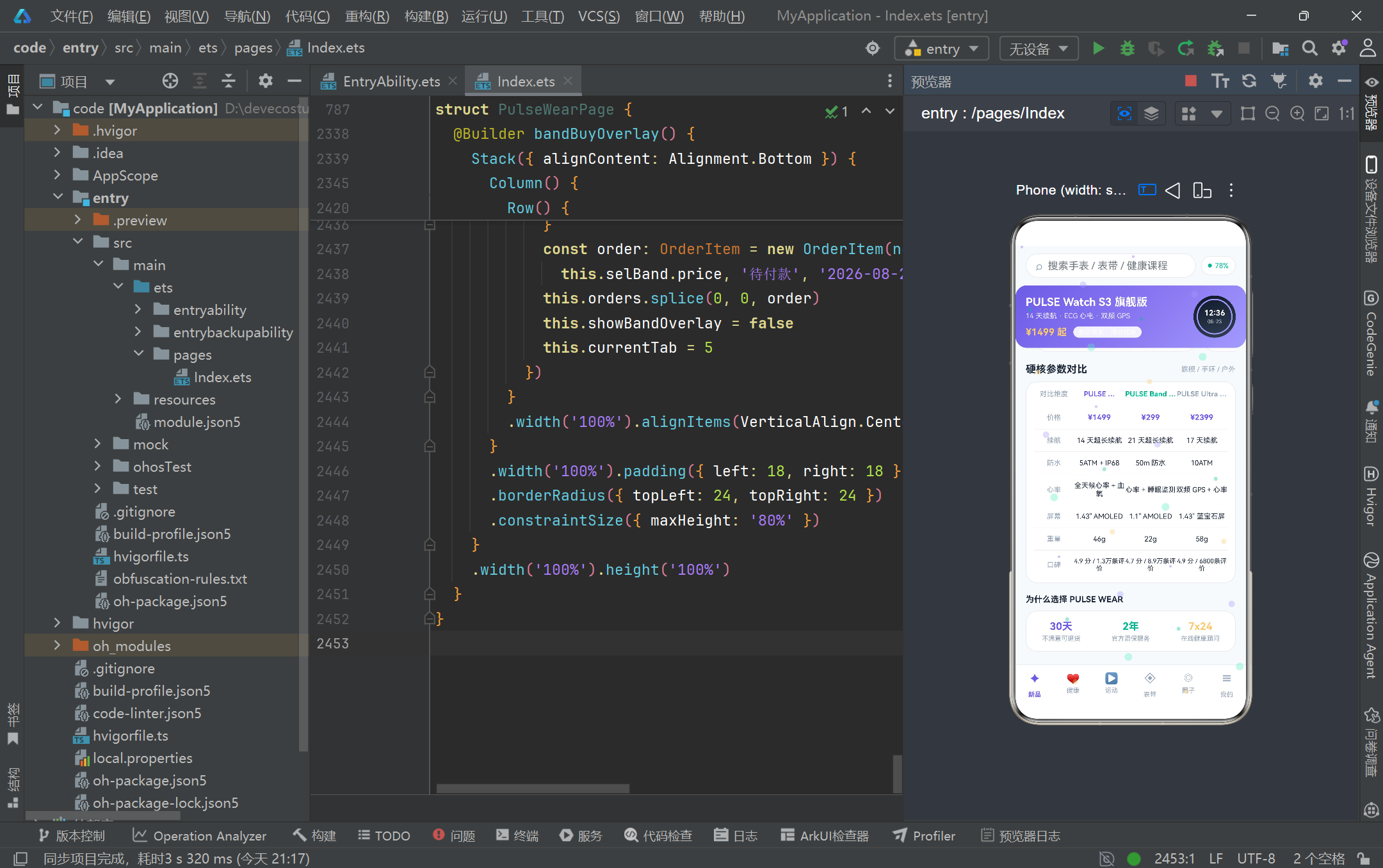
在 UI 架构层面,项目通过 Stack 四层叠加布局巧妙地解决了"主体内容 + 粒子特效 + 弹框悬浮"的共存问题。主体容器采用 Column 三段式(头部-内容-导航栏)布局,内容区通过 if 条件渲染实现六 Tab 切换,每个 Tab 都是一个独立的 @Builder 方法,编译期内联展开为零开销的组件树。粒子特效层通过 hitTestBehavior(HitTestMode.None) 实现点击穿透,是 HarmonyOS ArkUI 框架中处理"装饰性浮层"的标准方案——它既保证了视觉层的全覆盖,又维护了交互层的通透性。四个弹框采用 Stack + modalOverlay 模式实现,通过不同的 alignContent 对齐方式(Bottom 底部滑出 vs Center 居中卡片)和面板宽度(100% 全宽 vs 78% 紧凑)适应不同的交互场景,遮罩层的 onClick 统一提供"点击外部关闭"的交互约定。
在状态管理层面,项目展示了 ArkTS 响应式系统的多种使用模式。最基本的是 @State 单变量驱动——currentTab 的赋值触发 Tab 切换,showXxxOverlay 布尔值控制弹框显隐。进阶的是 @State 数组的不可变更新——posts 数组通过 splice(idx, 1, likedPost(…)) 替换元素实现点赞,orders 数组通过 splice(0, 0, order) 插入新订单,devices 数组通过 splice(idx, 1) 删除设备,每次数组操作都产生新的引用以触发 ForEach 的差分更新。最精妙的是编辑目标弹框的"临时状态暂存"模式——tempStepGoal 等临时变量作为编辑缓冲区,打开弹框时从正式变量复制,保存时才同步回去,取消时直接丢弃,完美避免了编辑过程中的中间状态污染正式数据。这种模式在表单交互开发中具有普适性的参考价值。
从工程化角度来看,PULSE WEAR 项目仍有进一步优化的空间。当前的 if 条件渲染 Tab 切换在 Tab 数量增多时会产生较多分支判断,可以考虑引入 Tabs 组件或 Navigation 路由实现更规范的页面管理。所有数据写死在源文件中的做法适合原型验证,但接入真实后端时需要引入 @LocalStorageLink 或 AppStorage 实现跨组件状态共享和数据持久化。粒子特效的 setInterval 驱动方式虽然简单直接,但在低端设备上可能造成帧率波动,可以考虑迁移到 Canvas 组件的 onDraw 回调中实现更高效的逐帧渲染。弹框系统目前通过四个独立的 @State 布尔值控制,当弹框数量继续增加时可以抽象为统一的 OverlayManager 状态机。尽管如此,PULSE WEAR 项目作为 HarmonyOS ArkTS 声明式 UI 开发的教学范例,已经完整展示了数据建模、状态管理、布局架构、列表渲染、图表可视化、弹框交互和动画特效等核心技能点,为开发者深入理解鸿蒙生态的应用开发范式提供了极具价值的实践参考。

作为“人工智能6S店”的官方数字引擎,为AI开发者与企业提供一个覆盖软硬件全栈、一站式门户。
更多推荐
 0
0 0
0- 0


 已为社区贡献97条内容

所有评论(0)