
基于HarmonyOS ArkTS API 24的QQ汉服同袍社古风社区应用花瓣粒子特效与多级Tab架构及四类弹框交互全维度深度解析——HarmonyOS 6.1.1声明式UI实战
引言:鸿蒙生态下的古风文化社区新范式
在HarmonyOS 6.1.1全面普及与HarmonyOS ArkTS API 24持续演进的背景下,鸿蒙原生应用的开发范式正在从简单的功能堆砌走向深度的文化融合与视觉表达。声明式UI以其链式调用、装饰器驱动的状态管理、组件化拆分等核心特性,为构建具有独特视觉风格和文化内涵的应用提供了强大的技术支撑。本文将围绕一个功能完整的"QQ汉服·同袍社"文化社区应用展开深度剖析,该应用以汉服文化为核心主题,融合了穿搭分享、朝代科普、发型教程、配饰商城、线下活动报名、形制百科等多种功能模块,采用了朱砂红(#B03A2E)搭配黛青(#1F5F5B)的古风宣纸设计语言,构建了一个兼具文化深度与社交活力的同袍社区平台。
从技术架构层面来看,该应用充分运用了ArkTS的@Observed可观察类装饰器实现数据响应式绑定,通过@Entry主入口结构体的多级Tab状态管理(底部4个Tab + 顶部6个Tab)实现了页面的差异化切换。底部Tab覆盖了首页(推荐/朝代/发型/配饰/活动/形制六个子频道)、衣橱(个人汉服管理)、集市(租赁交易)、我的(个人主页)四大核心场景,顶部Tab则在首页内实现了六个维度的内容分发。应用通过@Builder装饰器定义了headerBuilder、homeTopTabs、recommendContent、dynastyContent等十余个可复用UI构建块,配合四个布尔状态变量控制四种弹框的显隐(发布穿搭新增弹框、出租汉服编辑弹框、移出衣橱删除弹框、穿搭详情查看弹框),形成了一套覆盖增删改查全生命周期的模态交互机制。
从视觉设计层面来看,该应用构建了独特的古风色彩体系——朱砂红系列用于头部渐变和主操作按钮、黛青系列用于辅助信息和次级强调、妙金(#D4A373)用于装饰性标签和等级标识、宣纸背景色(#F7F3EA)营造古风纸质感。同时,应用实现了花瓣灯笼粒子飘落特效,通过setInterval定时器驱动16个粒子(🌸❀🏮✨🌺五种图标)在屏幕上持续飘动,配合Math.sin函数实现水平摇摆效果,当粒子飘出顶部时自动回到底部循环往复。朝代人气柱状图通过纯CSS高度映射(barHeight函数将热度值乘以1.3转为vp单位)实现了唐宋明魏晋汉五个朝代的可视化对比,活动日历通过Flex布局渲染31天网格并高亮特定日期,这些视觉效果充分展现了ArkTS声明式UI在数据可视化和动效实现方面的表达能力。
一、设计令牌层:古风色彩体系与Tab配置
1.1 ColorPalette接口与COLORS常量
在基于HarmonyOS ArkTS API 24的ArkTS开发中,接口类型系统是确保数据在组件间传递时类型安全的核心机制。该应用首先定义了一个ColorPalette接口来约束整个应用的古风设计令牌系统:
interface ColorPalette {
  zhuSha: string;
  zhuShaLight: string;
  daiQing: string;
  daiQingLight: string;
  miaoJin: string;
  bg: string;
  cardBg: string;
  cardBgDark: string;
  textPrimary: string;
  textSecondary: string;
  textHint: string;
  white: string;
  border: string;
  danger: string;
  success: string;
}

const COLORS: ColorPalette = {
  zhuSha: '#B03A2E',
  zhuShaLight: '#D96A5C',
  daiQing: '#1F5F5B',
  daiQingLight: '#4A8A86',
  miaoJin: '#D4A373',
  bg: '#F7F3EA',
  cardBg: '#FFFFFF',
  cardBgDark: '#EFE8DA',
  textPrimary: '#3A2E28',
  textSecondary: '#7D6E62',
  textHint: '#B8AB9E',
  white: '#FFFFFF',
  border: '#E5DCCC',
  danger: '#C0392B',
  success: '#4C8A6E'
};
ColorPalette接口定义了15个色彩字段,构建了一套完整的古风色彩体系。zhuSha系列(朱砂红)是应用的主色调——主色#B03A2E用于头部渐变背景和主要操作按钮,浅色#D96A5C用于辅助强调场景。daiQing系列(黛青)是应用的次级色调——主色#1F5F5B用于发型教程的序号背景和形制百科的标题文字,浅色#4A8A86用于辅助信息展示。miaoJin(妙金#D4A373)是装饰性色彩,用于朝代标签背景、等级标识和出租弹框的头部渐变。
bg背景色#F7F3EA是仿宣纸的暖黄色调,营造古风纸质感。cardBg纯白和cardBgDark暖灰#EFE8DA分别用于卡片和卡片内的暗色区域,形成层次感。textPrimary深棕#3A2E28用于主要文字,textSecondary中灰#7D6E62用于辅助文字,textHint浅灰#B8AB9E用于占位符。border边框色#E5DCCC和bg同系,保持整体暖色调统一。danger红色#C0392B用于移出衣框等危险操作的按钮,success绿色#4C8A6E用于成色标签和已参加状态。这种将所有色彩集中管理的模式,使得主题切换和色彩微调只需修改一处常量定义。
1.2 TabItem接口与Tab配置数组
interface TabItem {
  label: string;
  icon: string;
}

const BOTTOM_TABS: TabItem[] = [
  { label: '首页', icon: '🏠' },
  { label: '衣橱', icon: '👘' },
  { label: '集市', icon: '🛍️' },
  { label: '我的', icon: '👤' }
];

const TOP_TABS: TabItem[] = [
  { label: '推荐', icon: '✨' },
  { label: '朝代', icon: '🏛️' },
  { label: '发型', icon: '💇' },
  { label: '配饰', icon: '📿' },
  { label: '活动', icon: '🏮' },
  { label: '形制', icon: '📖' }
];

const DYNASTY_NAMES: string[] = ['唐', '宋', '明', '魏晋', '汉'];
const DYNASTY_HEAT: number[] = [92, 78, 85, 60, 70];
TabItem接口定义了Tab项的两个字段——label显示文本和icon图标Emoji,简洁而清晰。BOTTOM_TABS数组配置了底部4个Tab页(首页🏠/衣橱👘/集市🛍️/我的👤),通过currentBottomTab数字索引驱动切换。TOP_TABS数组配置了首页内的6个顶部子Tab(推荐✨/朝代🏛️/发型💇/配饰📿/活动🏮/形制📖),通过currentTopTab数字索引驱动首页内容的差异化展示。
DYNASTY_NAMES和DYNASTY_HEAT两个平行数组分别定义了五个朝代名称和对应的人气热度值——唐制以92分霸榜、明制85分紧随其后、宋制78分居中、汉制70分和魏晋60分分列四五位。这种平行数组的设计模式简单直接,通过相同的索引下标即可关联朝代名称和热度数据,在柱状图渲染时通过ForEach同时遍历两个数组实现一一对应的数据绑定。
二、@Observed数据模型层:可观察的业务实体类
2.1 HanfuItem汉服穿搭实体
@Observed装饰器是ArkTS中实现数据响应式的核心机制,被@Observed修饰的类其属性变更将自动触发关联的UI刷新。该应用定义了六个@Observed类来构建完整的业务数据模型:
@Observed
class HanfuItem {
  id: number;
  name: string;
  dynasty: string;
  form: string;
  cover: string;
  price: number;
  likes: number;
  author: string;
  intro: string;

  constructor(id: number, name: string, dynasty: string, form: string,
    cover: string, price: number, likes: number, author: string, intro: string) {
    this.id = id;
    this.name = name;
    this.dynasty = dynasty;
    this.form = form;
    this.cover = cover;
    this.price = price;
    this.likes = likes;
    this.author = author;
    this.intro = intro;
  }
}
HanfuItem是汉服穿搭的核心实体类,包含9个字段:id唯一标识、name穿搭名称(如"齐胸襦裙·牡丹亭")、dynasty所属朝代(唐/宋/明/魏晋/汉)、form形制名称(如齐胸襦裙、马面裙、袄裙等)、cover封面Emoji图标、price参考价格、likes点赞数、author发布作者、intro简介描述。constructor构造函数接收所有字段参数进行初始化,确保每个实例创建时数据完整性。
@Observed装饰器的关键作用在于:当HanfuItem实例的属性发生变化时(如likes增加、price调整),关联的UI组件会自动刷新显示最新值。这对于点赞交互、价格更新等场景至关重要,无需手动调用setState或通知机制,框架自动处理了数据到视图的响应式更新。
2.2 buildHanfus数据工厂与瀑布流分组
function buildHanfus(): HanfuItem[] {
  return [
    new HanfuItem(1, '齐胸襦裙·牡丹亭', '唐', '齐胸襦裙', '🌸', 368, 2412, '月出', '重工刺绣牡丹,走动间流光溢彩的唐制经典'),
    new HanfuItem(2, '马面裙·云锦纹', '明', '马面裙', '🐉', 499, 3105, '青梧', '云锦提花织金马面,明制端庄大气的顶流单品'),
    new HanfuItem(3, '袄裙·缠枝莲', '明', '袄裙', '🪷', 459, 1804, '阿沅', '缠枝莲暗纹竖领斜襟,冬日里的温柔铠甲'),
    new HanfuItem(4, '褙子·月白', '宋', '褙子', '🌙', 329, 2230, '临安', '月白色素雅褙子,宋人极简美学的日常演绎'),
    new HanfuItem(5, '齐腰襦裙·烟霞', '汉', '齐腰襦裙', '🌫️', 389, 1521, '子衿', '渐变烟霞色裙摆,层层叠出山河远阔'),
    new HanfuItem(6, '圆领袍·墨麟', '唐', '圆领袍', '🐎', 559, 982, '折柳', '墨色圆领缺胯袍,一秒入长安的侠气选择'),
    new HanfuItem(7, '大袖衫·惊鸿', '魏晋', '大袖衫', '🕊️', 629, 2738, '白鹭', '广袖翩然如惊鸿照影,魏晋风骨的天花板'),
    new HanfuItem(8, '旋裙·青绿', '宋', '旋裙', '🏔️', 299, 1234, '疏影', '青绿山水配色旋裙,只此青绿的平价替代'),
    new HanfuItem(9, '直裾·玄端', '汉', '直裾', '🖤', 479, 897, '守拙', '玄色直裾深衣,最接近汉原本貌的庄重选择'),
    new HanfuItem(10, '比甲·海棠', '明', '比甲', '🌺', 269, 1146, '棠梨', '海棠红无袖比甲,叠穿层次感的点睛之笔'),
    new HanfuItem(11, '诃子裙·霓裳', '唐', '诃子裙', '🌈', 529, 2050, '扶光', '霓裳羽衣配色,唐风宴会的全场焦点'),
    new HanfuItem(12, '交领襦裙·竹影', '魏晋', '交领襦裙', '🎋', 349, 1328, '山鬼', '竹影墨绘交领,山中何事松花酿酒'),
    new HanfuItem(13, '百迭裙·远山', '宋', '百迭裙', '⛰️', 319, 1642, '砚青', '远山黛色百迭裙,行走时裙褶如山峦起伏'),
    new HanfuItem(14, '短袄·瑞雪', '明', '短袄', '❄️', 399, 943, '雪衣', '瑞雪白短袄立领,配马面裙的冬日限定'),
    new HanfuItem(15, '曲裾·青霜', '汉', '曲裾', '💎', 439, 1120, '未央', '青霜色曲裾绕襟,深衣制度的流动诗篇')
  ];
}

const ALL_HANFUS: HanfuItem[] = buildHanfus();

function leftHanfus(): HanfuItem[] {
  const res: HanfuItem[] = [];
  for (let i = 0; i < ALL_HANFUS.length; i += 2) {
    res.push(ALL_HANFUS[i]);
  }
  return res;
}

function rightHanfus(): HanfuItem[] {
  const res: HanfuItem[] = [];
  for (let i = 1; i < ALL_HANFUS.length; i += 2) {
    res.push(ALL_HANFUS[i]);
  }
  return res;
}
buildHanfus是一个纯工厂函数,返回15条汉服穿搭数据,覆盖了唐(4件)、明(4件)、宋(3件)、汉(3件)、魏晋(2件)五个朝代的多种形制。每条数据都包含了富有诗意的名称(如"褙子·月白"“旋裙·青绿”“曲裾·青霜”)和文雅的简介文案(如"月白色素雅褙子,宋人极简美学的日常演绎"“广袖翩然如惊鸿照影,魏晋风骨的天花板”),充分体现了汉服文化的审美意境。
leftHanfus和rightHanfus两个函数通过奇偶索引分组实现了瀑布流双列布局的数据准备——leftHanfus提取索引0、2、4…的偶数项,rightHanfus提取索引1、3、5…的奇数项。这种设计使得瀑布流的两列可以分别独立渲染,互不干扰,同时也简化了ForEach的key生成逻辑(左列key前缀’l’,右列key前缀’r’)。
2.3 其他@Observed实体类
@Observed
class HairTutItem {
  id: number;
  name: string;
  difficulty: string;
  steps: number;
  tool: string;

  constructor(id: number, name: string, difficulty: string, steps: number, tool: string) {
    this.id = id;
    this.name = name;
    this.difficulty = difficulty;
    this.steps = steps;
    this.tool = tool;
  }
}

@Observed
class AccessoryItem {
  id: number;
  name: string;
  icon: string;
  price: number;
  tag: string;

  constructor(id: number, name: string, icon: string, price: number, tag: string) {
    this.id = id;
    this.name = name;
    this.icon = icon;
    this.price = price;
    this.tag = tag;
  }
}

@Observed
class EventItem {
  id: number;
  name: string;
  city: string;
  date: string;
  type: string;
  joined: number;

  constructor(id: number, name: string, city: string, date: string, type: string, joined: number) {
    this.id = id;
    this.name = name;
    this.city = city;
    this.date = date;
    this.type = type;
    this.joined = joined;
  }
}

@Observed
class ClosetItem {
  id: number;
  name: string;
  dynasty: string;
  lastWorn: string;
  condition: string;

  constructor(id: number, name: string, dynasty: string, lastWorn: string, condition: string) {
    this.id = id;
    this.name = name;
    this.dynasty = dynasty;
    this.lastWorn = lastWorn;
    this.condition = condition;
  }
}

@Observed
class MarketItem {
  id: number;
  name: string;
  seller: string;
  price: number;
  mode: string;
  cover: string;

  constructor(id: number, name: string, seller: string, price: number, mode: string, cover: string) {
    this.id = id;
    this.name = name;
    this.seller = seller;
    this.price = price;
    this.mode = mode;
    this.cover = cover;
  }
}
HairTutItem定义了发型教程实体,包含difficulty难度星级(★到★★★★)、steps步骤数和tool所需工具材料。6条教程数据从灵蛇髻(★★★5步)到垂挂髻(★3步),覆盖了不同难度梯度。
AccessoryItem定义了配饰商品实体,包含price价格和tag标签(热卖/新品/古典/平价)。12条配饰数据从鎏金发簪到缠花发簪,价格区间29元到158元,覆盖了从平价到中端的消费层次。
EventItem定义了线下活动实体,包含city举办城市、date日期、type活动类型(雅集/踏青/展会/礼仪/灯会/游园/演出)和joined已报名人数。8条活动数据覆盖了花朝节、上巳节、西塘汉服文化周等知名汉服活动。
ClosetItem定义了衣橱条目实体,包含lastWorn上次穿着日期和condition成色状态(全新/九成新/八成新/轻微勾丝等)。6条衣橱数据展示了用户个人收藏的汉服管理场景。
MarketItem定义了集市交易实体,包含seller卖家、mode交易模式(日租/转卖)和cover封面图标。8条集市数据展示了同袍之间的汉服租赁和二手转卖场景。
2.4 静态接口与常量数据
interface FormIntroItem {
  name: string;
  dynasty: string;
  desc: string;
  feature: string;
}

const FORM_INTROS: FormIntroItem[] = [
  { name: '齐胸襦裙', dynasty: '唐', desc: '裙腰束于胸上的襦裙,配大袖衫飘逸出尘', feature: '飘逸' },
  { name: '马面裙', dynasty: '明', desc: '前后共有四个裙门两两重合的马面结构', feature: '端庄' },
  { name: '袄裙', dynasty: '明', desc: '上袄下裙的典型明制穿法,冬暖夏凉', feature: '日常' },
  { name: '褙子', dynasty: '宋', desc: '直领对襟两侧开衩的长衣,宋人最爱', feature: '素雅' },
  { name: '直裾', dynasty: '汉', desc: '裾垂直而下不绕襟的深衣制式', feature: '庄重' },
  { name: '曲裾', dynasty: '汉', desc: '衣襟层层缠绕的深衣,线条流动', feature: '古典' },
  { name: '圆领袍', dynasty: '唐', desc: '圆领右衽的通裁袍服,男女皆可着', feature: '英气' },
  { name: '大袖衫', dynasty: '魏晋', desc: '宽袖广身的外衫,仙气飘飘的担当', feature: '仙气' }
];

interface CommentItem {
  name: string;
  avatar: string;
  content: string;
}

const OUTFIT_COMMENTS: CommentItem[] = [
  { name: '青梧', avatar: '🌿', content: '这套配色绝了,已下单同款马面,蹲一个上身图!' },
  { name: '子衿', avatar: '🍂', content: '妆造也好用心,发簪和裙子是同色系的吧?' },
  { name: '临安', avatar: '🏮', content: '拍出画卷感了,请问是在哪个园子取的景?' }
];

interface SingleItem {
  name: string;
  detail: string;
}

const OUTFIT_PIECES: SingleItem[] = [
  { name: '上襦', detail: '交领上襦 · 藕荷色 · M码' },
  { name: '下裙', detail: '六米摆齐胸裙 · 雾蓝渐变' },
  { name: '大袖衫', detail: '月白纱质 · 刺绣云纹' },
  { name: '配饰', detail: '珍珠步摇 · 玉禁步' }
];
FormIntroItem是形制百科的静态数据接口,包含name形制名称、dynasty所属朝代、desc描述和feature特征关键词(飘逸/端庄/日常/素雅/庄重/古典/英气/仙气)。8条形制数据覆盖了从汉制到明制的主要形制类型,每条都配有简明扼要的描述和特征标签,为用户提供了汉服形制知识的科普参考。
CommentItem和SingleItem是穿搭详情弹框中使用的辅助接口。CommentItem定义了评论数据的三字段结构(name/avatar/content),3条评论数据模拟了同袍之间的社交互动场景。SingleItem定义了穿搭单品清单的名称和详情,4条单品数据(上襦/下裙/大袖衫/配饰)展示了穿搭的组成拆解。这些静态接口不需要@Observed装饰器,因为它们在应用运行期间不会发生变化。
三、粒子特效系统:花瓣灯笼飘落动画
3.1 粒子数据模型与初始化
interface ParticleItem {
  id: number;
  x: number;
  y: number;
  size: number;
  opacity: number;
  icon: string;
}

const PARTICLE_ICONS: string[] = ['🌸', '❀', '🏮', '✨', '🌺'];

function buildParticles(): ParticleItem[] {
  const arr: ParticleItem[] = [];
  for (let i = 0; i < 16; i++) {
    arr.push({
      id: i,
      x: (i * 41) % 340 + 10,
      y: 80 + (i * 67) % 560,
      size: 10 + (i * 5) % 14,
      opacity: 0.2 + (i % 4) * 0.1,
      icon: PARTICLE_ICONS[i % PARTICLE_ICONS.length]
    });
  }
  return arr;
}
ParticleItem接口定义了粒子特效的数据模型,包含6个字段:id唯一标识、x水平坐标、y垂直坐标、size字体大小、opacity透明度和icon图标内容。PARTICLE_ICONS数组定义了5种粒子图标——樱花🌸、花瓣❀、灯笼🏮、星光✨和花朵🌺,通过取模运算实现图标循环分配。
buildParticles函数初始化了16个粒子实例,其坐标和大小通过数学公式计算得出:x坐标通过(i * 41) % 340 + 10在10到350之间分布,y坐标通过80 + (i * 67) % 560在80到640之间分布,size通过10 + (i * 5) % 14在10到24之间变化,opacity通过0.2 + (i % 4) * 0.1在0.2到0.5之间分级。这种基于索引的数学计算确保了粒子初始分布的均匀性和多样性,同时避免了使用随机数导致的不可预测性问题。
3.2 粒子飘落动画驱动函数
function driftParticles(list: ParticleItem[]): ParticleItem[] {
  const next: ParticleItem[] = [];
  for (let i = 0; i < list.length; i++) {
    const p = list[i];
    const ny = p.y - 3;
    next.push({
      id: p.id,
      x: p.x + Math.sin(p.id + p.y / 50) * 3,
      y: ny < 60 ? 640 : ny,
      opacity: p.opacity,
      size: p.size,
      icon: p.icon
    });
  }
  return next;
}
driftParticles是粒子飘落动画的核心驱动函数,接收当前粒子数组返回更新后的新数组。每次调用时,每个粒子的y坐标减少3(向上飘动),x坐标通过Math.sin(p.id + p.y / 50) * 3实现水平摇摆效果——sin函数的周期性使得粒子在水平方向上呈现自然的左右摆动,摆动幅度为±3像素。当粒子的y坐标小于60(飘出屏幕顶部上方区域)时,重置为640(屏幕底部),实现粒子的循环复用。
这个函数体现了函数式编程的不可变数据模式——不修改原数组,而是创建新数组返回。这种设计在ArkTS中尤为重要,因为@State变量的赋值需要是全新的引用才能触发UI刷新。通过创建全新的ParticleItem数组和对象,确保了框架能正确检测到状态变化并重新渲染粒子位置。
四、辅助函数层:纯函数工具集
4.1 朝代色彩映射函数
function dynastyColor(dynasty: string): string {
  if (dynasty === '唐') {
    return COLORS.zhuSha;
  }
  if (dynasty === '宋') {
    return COLORS.daiQing;
  }
  if (dynasty === '明') {
    return COLORS.miaoJin;
  }
  if (dynasty === '魏晋') {
    return '#6B5B95';
  }
  return '#4A6FA5';
}

function tagBg(tag: string): string {
  if (tag === '热卖') {
    return '#F7E3DF';
  }
  if (tag === '新品') {
    return '#E3EFEA';
  }
  if (tag === '古典') {
    return '#F0E8DA';
  }
  return COLORS.cardBgDark;
}

function formatLikes(likes: number): string {
  if (likes >= 1000) {
    return (likes / 1000).toFixed(1) + 'k';
  }
  return likes.toString();
}

function barHeight(v: number): string {
  return (v * 1.3).toFixed(0) + 'vp';
}

function marketColor(mode: string): string {
  if (mode === '日租') {
    return COLORS.daiQing;
  }
  return COLORS.zhuSha;
}
dynastyColor函数实现了朝代到主题色的映射——唐制映射为朱砂红#B03A2E(对应唐代的华丽大气)、宋制映射为黛青#1F5F5B(对应宋代的清雅含蓄)、明制映射为妙金#D4A373(对应明代的端庄富丽)、魏晋映射为紫色#6B5B95(对应魏晋的飘逸玄远)、汉制默认映射为蓝色#4A6FA5(对应汉代的古朴沉稳)。这种色彩编码不仅增强了视觉辨识度,还暗含了各朝代的审美特质。
tagBg函数为配饰标签提供背景色映射——热卖映射为浅红#F7E3DF、新品映射为浅绿#E3EFEA、古典映射为浅金#F0E8DA、其他默认使用cardBgDark暖灰色。这种分类着色使得标签信息一目了然。
formatLikes函数实现了点赞数的格式化显示——超过1000的显示为k单位(如2412显示为"2.4k"),小于1000的直接显示数字。barHeight函数将热度数值转换为柱状图高度字符串(乘以1.3系数并拼接’vp’单位)。marketColor函数为集市交易模式提供颜色区分——日租使用黛青色、转卖使用朱砂红色,通过色彩差异帮助用户快速识别交易类型。
五、@Entry主入口:多级Tab状态管理与页面架构
5.1 状态变量声明与生命周期
@Entry
struct Index {
  @State currentBottomTab: number = 0;
  @State currentTopTab: number = 0;
  @State showPostModal: boolean = false;
  @State showRentModal: boolean = false;
  @State showRemoveModal: boolean = false;
  @State showDetailModal: boolean = false;
  @State selectedHanfu: HanfuItem | null = null;
  @State particles: ParticleItem[] = buildParticles();
  @State postDesc: string = '';
  @State postDynasty: number = 0;
  @State postScene: number = 0;
  @State rentPrice: string = '';
  @State rentDeposit: number = 0;
  @State rentDays: number = 3;
  private timerId: number = -1;

  aboutToAppear() {
    this.timerId = setInterval(() => {
      this.particles = driftParticles(this.particles);
    }, 130);
  }

  aboutToDisappear() {
    if (this.timerId >= 0) {
      clearInterval(this.timerId);
    }
  }
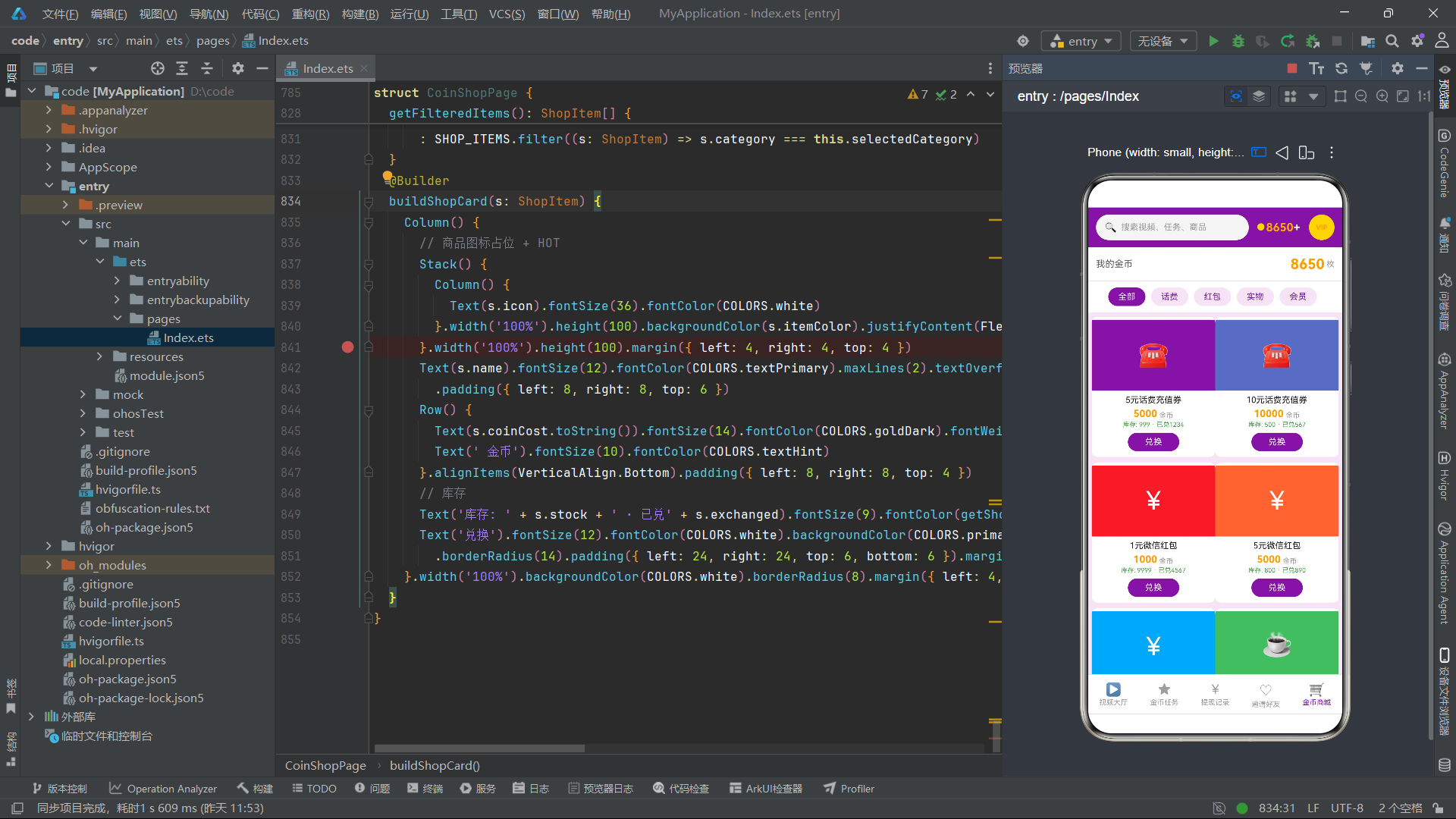
@Entry装饰器标记Index为应用的入口结构体,@State装饰器为每个状态变量提供响应式能力。currentBottomTab和currentTopTab两个数字索引驱动了多级Tab切换——底部Tab索引0-3对应首页/衣橱/集市/我的四个页面,首页内的顶部Tab索引0-5对应推荐/朝代/发型/配饰/活动/形制六个子频道。
四个布尔状态变量(showPostModal/showRentModal/showRemoveModal/showDetailModal)分别控制四种弹框的显隐,形成了一套完整的增删改查模态交互体系。selectedHanfu使用联合类型HanfuItem | null实现了可选的数据绑定——为null时表示未选中任何汉服,为HanfuItem实例时表示用户点击了某个汉服卡片,详情弹框据此渲染对应数据。
particles粒子数组在初始化时调用buildParticles()生成16个粒子,aboutToAppear生命周期中通过setInterval每130毫秒调用driftParticles更新粒子位置实现飘落动画。timerId保存定时器ID用于aboutToDisappear时清除定时器,防止组件销毁后定时器继续运行导致内存泄漏。postDesc/postDynasty/postScene三个状态变量服务于发布穿搭弹框的表单输入,rentPrice/rentDeposit/rentDays三个状态变量服务于出租汉服弹框的表单输入。
5.2 build方法:Stack层叠布局主结构
  build() {
    Stack() {
      Column() {
        this.headerBuilder()
        if (this.currentBottomTab === 0) {
          this.homeTopTabs()
        } else if (this.currentBottomTab === 1) {
          this.closetTopBar()
        } else if (this.currentBottomTab === 2) {
          this.marketTopBar()
        } else {
          this.mineTopBar()
        }
        Scroll() {
          Column() {
            if (this.currentBottomTab === 0) {
              this.homeContent()
            } else if (this.currentBottomTab === 1) {
              this.closetContent()
            } else if (this.currentBottomTab === 2) {
              this.marketContent()
            } else {
              this.mineContent()
            }
          }
          .width('100%')
          .alignItems(HorizontalAlign.Start)
        }
        .layoutWeight(1)
        .scrollable(ScrollDirection.Vertical)
        .scrollBar(BarState.Off)
        this.bottomTabs()
      }
      .width('100%')
      .height('100%')
      .backgroundColor(COLORS.bg)

      ForEach(this.particles, (p: ParticleItem) => {
        Text(p.icon)
          .fontSize(p.size)
          .opacity(p.opacity)
          .position({ x: p.x, y: p.y })
      }, (p: ParticleItem) => p.id.toString() + '_' + p.y.toFixed(0))

      if (this.showPostModal) {
        this.postOutfitModal()
      }
      if (this.showRentModal) {
        this.rentOutModal()
      }
      if (this.showRemoveModal) {
        this.removeClosetModal()
      }
      if (this.showDetailModal) {
        this.outfitDetailModal()
      }
    }
    .width('100%')
    .height('100%')
  }
build方法使用Stack层叠布局构建了三层结构:第一层是Column主内容层(headerBuilder头部 + 条件渲染的顶部Tab栏 + Scroll滚动内容区 + bottomTabs底部导航栏),第二层是ForEach粒子层(16个Text组件通过position绝对定位在屏幕上飘动),第三层是四个条件渲染的弹框层。
主内容层的if-else条件渲染链根据currentBottomTab的值(0/1/2/3)分别渲染不同的顶部栏和内容区,实现了底部Tab的页面切换。Scroll组件设置了layoutWeight(1)占满中间区域、scrollable垂直滚动、scrollBar隐藏,为内容区提供了流畅的滚动体验。粒子层的ForEach使用p.id.toString() + '_' + p.y.toFixed(0)作为复合key,确保粒子位置变化时框架能正确识别并更新对应组件。四个弹框通过独立的布尔状态变量控制显隐,互不干扰,同时只有一个弹框可以显示(因为用户一次只能执行一个操作)。
六、头部构建器:古风宣纸朱砂渐变
6.1 headerBuilder头部区域
  @Builder
  headerBuilder() {
    Column() {
      Row() {
        Column() {
          Text('🏮 QQ汉服')
            .fontSize(21)
            .fontWeight(FontWeight.Bold)
            .fontColor(COLORS.white)
          Text('与子同袍 · 今日有 1.2万 同袍在线')
            .fontSize(11)
            .fontColor('#F2DFC5')
            .margin({ top: 2 })
        }
        .alignItems(HorizontalAlign.Start)
        .layoutWeight(1)

        Column() {
          Text('🧧')
            .fontSize(20)
          Text('签到')
            .fontSize(10)
            .fontColor('#F2DFC5')
            .margin({ top: 2 })
        }
        .alignItems(HorizontalAlign.Center)
        .padding({ left: 12, right: 12, top: 6, bottom: 6 })
        .borderRadius(12)
        .backgroundColor('33FFFFFF')
        .margin({ right: 8 })
        .onClick(() => {
          this.currentBottomTab = 3;
        })

        Column() {
          Text('📷')
          Text('发布')
            .fontSize(10)
            .fontColor(COLORS.white)
            .margin({ top: 2 })
        }
        .alignItems(HorizontalAlign.Center)
        .padding({ left: 12, right: 12, top: 6, bottom: 6 })
        .borderRadius(12)
        .backgroundColor(COLORS.zhuSha)
        .onClick(() => {
          this.showPostModal = true;
        })
      }
      .width('100%')
      .padding({ left: 16, right: 16, top: 10 })

      Row() {
        Text('🔍')
          .fontSize(14)
          .margin({ left: 12 })
        Text('搜索汉服 / 形制 / 同袍')
          .fontSize(12)
          .fontColor('#F2DFC5')
          .margin({ left: 8 })
        Column().layoutWeight(1)
        Text('🏮 花朝节活动报名中')
          .fontSize(10)
          .fontColor(COLORS.miaoJin)
          .margin({ right: 12 })
      }
      .width('92%')
      .height(34)
      .borderRadius(17)
      .backgroundColor('44FFFFFF')
      .margin({ top: 10, bottom: 12 })
    }
    .width('100%')
    .linearGradient({
      angle: 135,
      colors: [[COLORS.zhuSha, 0], ['#8A2B22', 1]]
    })
  }
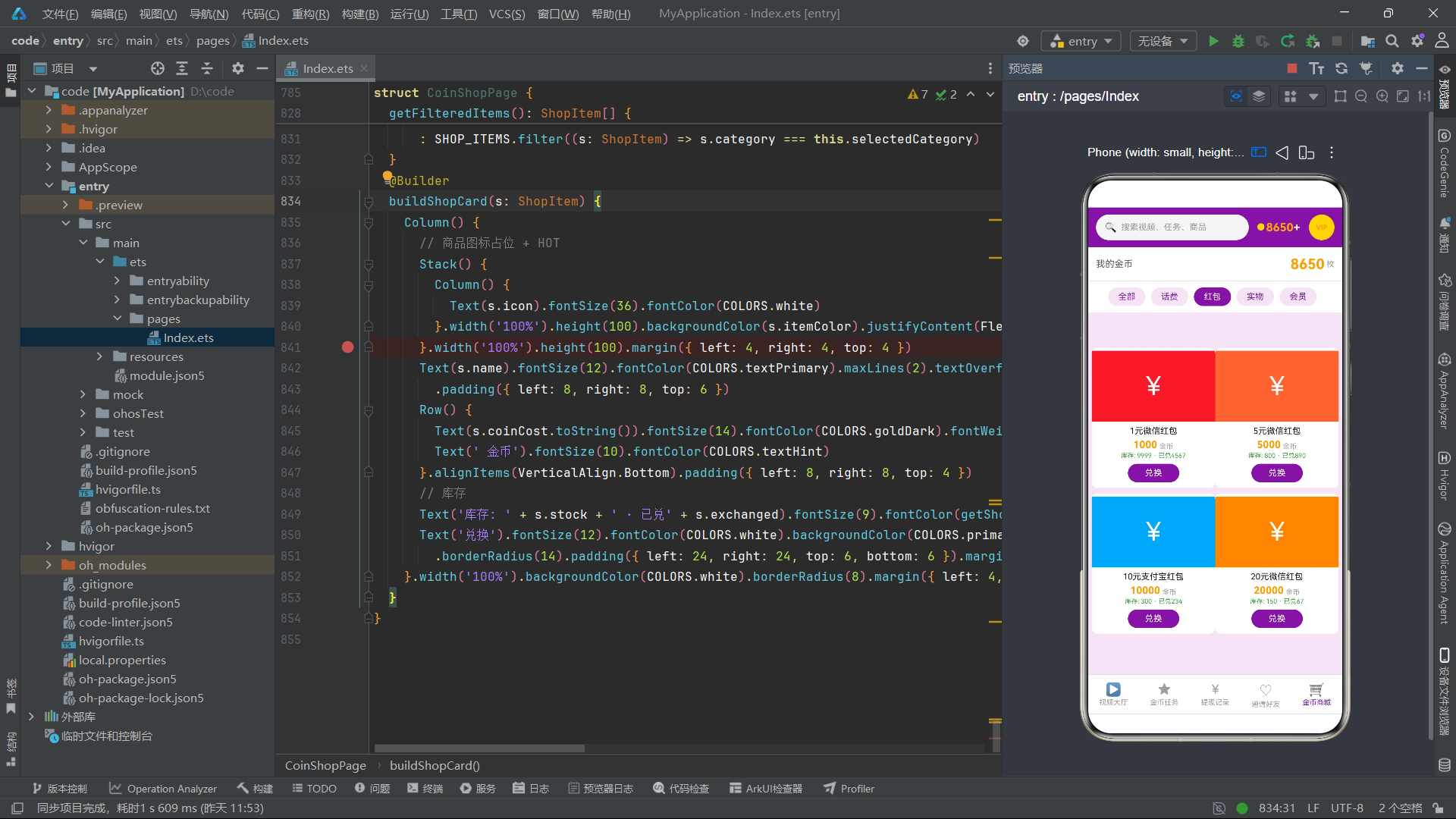
headerBuilder构建了应用的头部区域,整体采用linearGradient线性渐变背景——从朱砂红#B03A2E到深红#8A2B22的135度对角渐变,营造了古风宣纸上的朱砂印记效果。头部包含两行内容:第一行是品牌标识区(左侧"🏮 QQ汉服"标题和"与子同袍 · 今日有 1.2万 同袍在线"副标题,右侧签到按钮和发布按钮),第二行是搜索栏(搜索图标+占位文本+"花朝节活动报名中"活动入口提示)。
签到按钮使用半透明白色背景(‘33FFFFFF’,33为十六进制透明度约20%),点击后切换到"我的"Tab。发布按钮使用朱砂红色背景,点击后设置showPostModal为true触发发布穿搭弹框。搜索栏使用更高的半透明白色背景(‘44FFFFFF’,约27%透明度),通过layoutWeight(1)的空Column实现左右两端对齐布局。
七、首页内容区:六频道差异化展示
7.1 推荐频道:双列瀑布流穿搭展示
  @Builder
  recommendContent() {
    Column() {
      Row() {
        Text('✨ 今日精选穿搭')
          .fontSize(15)
          .fontWeight(FontWeight.Bold)
          .fontColor(COLORS.textPrimary)
          .layoutWeight(1)
        Text('换一批')
          .fontSize(11)
          .fontColor(COLORS.zhuSha)
      }
      .width('92%')
      .margin({ top: 14 })

      Row() {
        Column() {
          ForEach(leftHanfus(), (h: HanfuItem) => {
            Column() {
              Column() {
                Text(h.cover)
                  .fontSize(42)
                Text(h.dynasty)
                  .fontSize(10)
                  .fontColor(COLORS.white)
                  .padding({ left: 8, right: 8, top: 2, bottom: 2 })
                  .borderRadius(4)
                  .backgroundColor(dynastyColor(h.dynasty))
                  .margin({ top: 6 })
              }
              .width('100%')
              .padding({ top: 14, bottom: 14 })
              .borderRadius({ topLeft: 12, topRight: 12 })
              .backgroundColor(COLORS.cardBgDark)
              .alignItems(HorizontalAlign.Center)

              Column() {
                Text(h.name)
                  .fontSize(13)
                  .fontWeight(FontWeight.Bold)
                  .fontColor(COLORS.textPrimary)
                Text('@' + h.author + ' · ' + h.form)
                  .fontSize(10)
                  .fontColor(COLORS.textSecondary)
                  .margin({ top: 3 })
                Row() {
                  Text('❤️ ' + formatLikes(h.likes))
                    .fontSize(10)
                    .fontColor(COLORS.zhuSha)
                  Text('¥' + h.price.toString())
                    .fontSize(10)
                    .fontColor(COLORS.daiQing)
                    .margin({ left: 10 })
                }
                .margin({ top: 6 })
              }
              .width('100%')
              .alignItems(HorizontalAlign.Start)
              .padding(10)
            }
            .width('100%')
            .borderRadius(12)
            .backgroundColor(COLORS.cardBg)
            .border({ width: 1, color: COLORS.border })
            .margin({ left: 16, right: 6, top: 10 })
            .onClick(() => {
              this.selectedHanfu = h;
              this.showDetailModal = true;
            })
          }, (h: HanfuItem) => 'l' + h.id.toString())
        }
        .layoutWeight(1)

        Column() {
          ForEach(rightHanfus(), (h: HanfuItem) {
            // ... 右列卡片结构与左列完全一致,仅margin和key前缀不同
          }, (h: HanfuItem) => 'r' + h.id.toString())
        }
        .layoutWeight(1)
      }
      .width('100%')
      .alignItems(VerticalAlign.Top)
    }
    .width('100%')
  }
推荐频道采用双列瀑布流布局展示今日精选穿搭。Row容器内包含两个等宽的Column(各layoutWeight(1)),左列通过leftHanfus()获取偶数索引汉服数据,右列通过rightHanfus()获取奇数索引数据。每个卡片包含三部分:封面区(Emoji图标42号字体居中显示+朝代标签角标)、信息区(穿搭名称+作者形制+点赞数和价格)、整体卡片(白底圆角12+边框+点击触发详情弹框)。
卡片点击事件设置this.selectedHanfu = h将选中的汉服实例赋值给状态变量,同时this.showDetailModal = true触发详情弹框显示。这种通过状态变量传递数据的方式是ArkTS中实现跨组件通信的典型模式——选中的数据通过@State变量在组件树中共享,详情弹框通过this.selectedHanfu!.field安全访问(!非空断言保证已赋值)。
7.2 朝代频道:横滑大卡+柱状图+列表
  @Builder
  dynastyContent() {
    Column() {
      Scroll() {
        Row() {
          ForEach(DYNASTY_NAMES, (d: string, idx: number) => {
            Column() {
              Text(d)
                .fontSize(24)
                .fontWeight(FontWeight.Bold)
                .fontColor(COLORS.white)
              Text('制式')
                .fontSize(10)
                .fontColor('#F2DFC5')
                .margin({ top: 4 })
            }
            .width(96)
            .height(110)
            .justifyContent(FlexAlign.Center)
            .borderRadius(14)
            .linearGradient({
              angle: 135,
              colors: [[dynastyColor(d), 0], ['#8A2B22', 1]]
            })
            .margin({ left: idx === 0 ? 16 : 10, top: 12 })
          }, (d: string) => 'dy' + d)
        }
      }
      .scrollable(ScrollDirection.Horizontal)
      .scrollBar(BarState.Off)
      .width('100%')

      Column() {
        Text('📊 朝代人气榜')
          .fontSize(14)
          .fontWeight(FontWeight.Bold)
          .fontColor(COLORS.daiQing)
          .alignSelf(ItemAlign.Start)
        Text('按同袍收藏量统计,唐制持续霸榜')
          .fontSize(10)
          .fontColor(COLORS.textSecondary)
          .margin({ top: 4 })
          .alignSelf(ItemAlign.Start)
        Row() {
          ForEach(DYNASTY_NAMES, (d: string, idx: number) => {
            Column() {
              Text(DYNASTY_HEAT[idx].toString())
                .fontSize(10)
                .fontColor(dynastyColor(d))
                .margin({ bottom: 3 })
              Column()
                .width(22)
                .height(barHeight(DYNASTY_HEAT[idx]))
                .borderRadius({ topLeft: 4, topRight: 4 })
                .backgroundColor(dynastyColor(d))
              Text(d)
                .fontSize(10)
                .fontColor(COLORS.textSecondary)
                .margin({ top: 4 })
            }
            .layoutWeight(1)
            .alignItems(HorizontalAlign.Center)
          }, (d: string) => 'b' + d)
        }
        .width('100%')
        .margin({ top: 12 })
      }
      .width('92%')
      .borderRadius(14)
      .backgroundColor(COLORS.cardBg)
      .border({ width: 1, color: COLORS.border })
      .padding(14)
      .margin({ top: 14 })
朝代频道包含三个区块:顶部横滑大卡片(5个朝代各96x110的渐变色卡片,通过Scroll+Row实现水平滑动)、中部人气柱状图(5个柱子通过Column的height属性映射热度值,barHeight函数将92/78/85/60/70分别转为120vp/101vp/111vp/78vp/91vp的高度)、底部分朝代单品列表(15条汉服数据通过ForEach渲染为Row列表,左侧朝代色标+中间名称形制简介+右侧价格)。
柱状图的实现非常精妙——纯CSS方式,通过Column组件的height属性直接映射数值大小,无需引入图表库。每个柱子使用dynastyColor函数获取对应朝代的主题色,顶部圆角,宽度22vp,等间距排列(layoutWeight(1)均分)。柱子上方显示热度数值,下方显示朝代名称,形成了完整的图表标注。
7.3 发型频道:时间轴教程步骤
  @Builder
  hairstyleContent() {
    Column() {
      Text('💇 古典发型教程')
        .fontSize(15)
        .fontWeight(FontWeight.Bold)
        .fontColor(COLORS.textPrimary)
        .margin({ left: 16, top: 14 })
      Text('跟着视频学,手残党也能盘出古风髻')
        .fontSize(10)
        .fontColor(COLORS.textSecondary)
        .margin({ left: 16, top: 4 })

      ForEach(HAIR_TUTS, (t: HairTutItem, idx: number) => {
        Column() {
          Row() {
            Column() {
              Text((idx + 1).toString())
                .fontSize(13)
                .fontWeight(FontWeight.Bold)
                .fontColor(COLORS.white)
                .width(30)
                .height(30)
                .textAlign(TextAlign.Center)
                .borderRadius(15)
                .backgroundColor(COLORS.daiQing)
            }
            .alignItems(HorizontalAlign.Center)

            Column() {
              Row() {
                Text(t.name)
                  .fontSize(14)
                  .fontWeight(FontWeight.Bold)
                  .fontColor(COLORS.textPrimary)
                Text(t.difficulty)
                  .fontSize(10)
                  .fontColor(COLORS.miaoJin)
                  .margin({ left: 10 })
              }
              Text(t.tool)
                .fontSize(10)
                .fontColor(COLORS.textSecondary)
                .margin({ top: 3 })
              Text(t.steps.toString() + ' 步完成 · 视频时长 ' + (t.steps * 2).toString() + ' 分钟')
                .fontSize(10)
                .fontColor(COLORS.textHint)
                .margin({ top: 2 })
            }
            .alignItems(HorizontalAlign.Start)
            .layoutWeight(1)
            .margin({ left: 12 })

            Text('学它')
              .fontSize(11)
              .fontColor(COLORS.white)
              .padding({ left: 12, right: 12, top: 6, bottom: 6 })
              .borderRadius(12)
              .backgroundColor(COLORS.zhuSha)
          }
          .width('100%')
          .alignItems(VerticalAlign.Top)

          if (idx < HAIR_TUTS.length - 1) {
            Row() {
              Column()
                .width(2)
                .height(18)
                .backgroundColor(COLORS.border)
                .margin({ left: 14 })
              Column().layoutWeight(1)
            }
            .width('100%')
          }
        }
        .width('92%')
        .margin({ top: 6 })
      }, (t: HairTutItem) => 'ht' + t.id.toString())
    }
    .width('100%')
  }
发型频道采用时间轴样式展示6个发型教程。每个教程项包含:左侧序号圆球(30x30圆形黛青色背景+白色序号数字)、中间教程信息(名称+难度星级+所需工具+步骤数和视频时长)、右侧"学它"操作按钮(朱砂红色)。步骤数和视频时长的关联计算t.steps * 2将步骤数乘以2得到预估视频时长(分钟),为用户提供了直观的学习成本参考。
时间轴效果通过条件渲染实现——除最后一个教程外,每个教程项底部渲染一个2x18的竖线连接器(border色),形成从上到下的时间轴视觉效果。这种设计让教程列表呈现出清晰的步骤递进感,符合"跟着学"的引导式交互设计。
7.4 配饰频道与活动频道
  @Builder
  accessoryContent() {
    Column() {
      Text('📿 配饰铺子')
        .fontSize(15)
        .fontWeight(FontWeight.Bold)
        .fontColor(COLORS.textPrimary)
        .margin({ left: 16, top: 14 })
      Text('簪钗步摇 · 点翠缠花 · 平价古典都有')
        .fontSize(10)
        .fontColor(COLORS.textSecondary)
        .margin({ left: 16, top: 4 })

      Flex({ wrap: FlexWrap.Wrap }) {
        ForEach(ALL_ACCESSORIES, (a: AccessoryItem) => {
          Column() {
            Text(a.icon)
              .fontSize(30)
              .margin({ top: 12 })
            Text(a.name)
              .fontSize(12)
              .fontWeight(FontWeight.Bold)
              .fontColor(COLORS.textPrimary)
              .margin({ top: 6 })
            Text('¥' + a.price.toString())
              .fontSize(11)
              .fontWeight(FontWeight.Bold)
              .fontColor(COLORS.zhuSha)
              .margin({ top: 4 })
            Text(a.tag)
              .fontSize(9)
              .fontColor(COLORS.daiQing)
              .padding({ left: 8, right: 8, top: 2, bottom: 2 })
              .borderRadius(6)
              .backgroundColor(tagBg(a.tag))
              .margin({ top: 4, bottom: 12 })
          }
          .width('30%')
          .borderRadius(12)
          .backgroundColor(COLORS.cardBg)
          .border({ width: 1, color: COLORS.border })
          .alignItems(HorizontalAlign.Center)
          .margin({ left: '1.6%', top: 10 })
        }, (a: AccessoryItem) => 'ac' + a.id.toString())
      }
      .width('96%')
      .margin({ top: 6 })
    }
    .width('100%')
  }
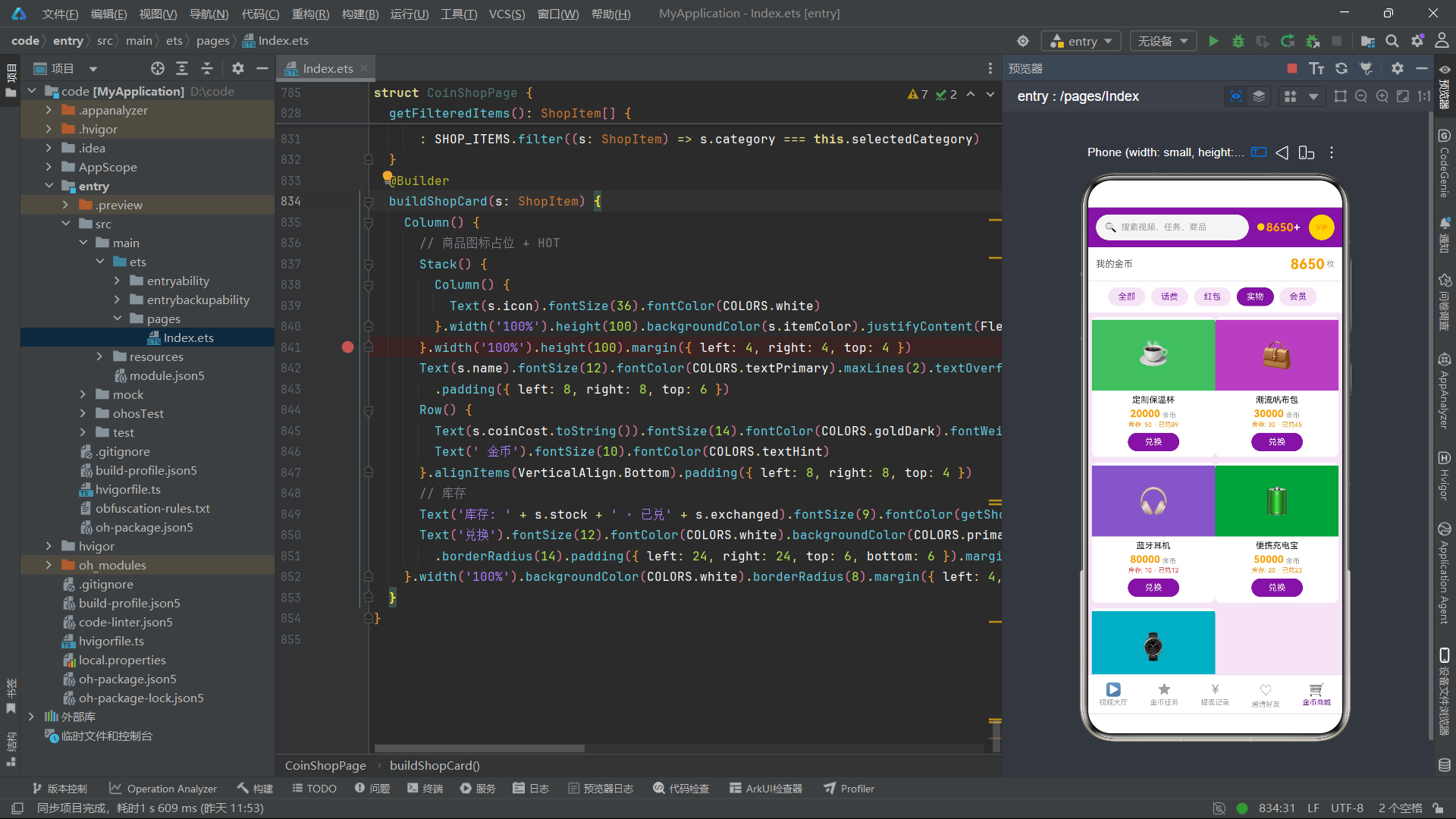
配饰频道使用Flex({ wrap: FlexWrap.Wrap })换行布局展示12个配饰商品,每个卡片宽度30%(一行约3个),通过margin left '1.6%'实现间距。每个卡片包含图标(30号字体)、名称、价格、标签四个信息层级,标签通过tagBg函数获取对应背景色,实现了视觉分类。
  @Builder
  eventContent() {
    Column() {
      Column() {
        Text('🏮 八月活动日历')
          .fontSize(14)
          .fontWeight(FontWeight.Bold)
          .fontColor(COLORS.zhuSha)
          .alignSelf(ItemAlign.Start)
        Row() {
          ForEach(['日', '一', '二', '三', '四', '五', '六'], (d: string) => {
            Text(d)
              .fontSize(10)
              .fontColor(COLORS.textSecondary)
              .layoutWeight(1)
              .textAlign(TextAlign.Center)
              .padding({ top: 8 })
          }, (d: string) => 'w' + d)
        }
        .width('100%')
        Flex({ wrap: FlexWrap.Wrap }) {
          ForEach([1, 2, 3, 4, 5, 6, 7, 8, 9, 10, 11, 12, 13, 14, 15, 16, 17, 18, 19, 20, 21, 22, 23, 24, 25, 26, 27, 28, 29, 30, 31], (d: number) => {
            Column() {
              Text(d.toString())
                .fontSize(11)
                .fontColor(d === 24 ? COLORS.white : COLORS.textPrimary)
              if (d === 24) {
                Text('🏮')
                  .fontSize(8)
              }
            }
            .width('12.5%')
            .padding({ top: 8, bottom: 8 })
            .borderRadius(8)
            .backgroundColor(d === 24 ? COLORS.zhuSha : 'transparent')
            .margin({ top: 4 })
            .alignItems(HorizontalAlign.Center)
          }, (d: number) => 'day' + d.toString())
        }
        .width('100%')
        Text('· 8月24日 中秋拜月雅集 ·')
          .fontSize(10)
          .fontColor(COLORS.zhuSha)
          .margin({ top: 8 })
          .alignSelf(ItemAlign.Center)
      }
      .width('92%')
      .borderRadius(14)
      .backgroundColor(COLORS.cardBg)
      .border({ width: 1, color: COLORS.border })
      .padding(14)
      .margin({ top: 14 })
活动频道的日历组件是纯ArkTS实现的月历视图——通过Flex换行布局渲染31个日期数字,每个占12.5%宽度(一行8个,4x8=32格放31天)。第24日被特殊高亮(朱砂红背景+白色文字+🏮图标),表示当天有中秋拜月雅集活动。日历下方是活动列表,每个活动卡片左侧显示日期(月+日分离显示),中间显示活动名称和类型标签,右侧显示报名按钮。
八、衣橱与集市:个人管理与交易模块
8.1 衣橱管理
  @Builder
  closetContent() {
    Column() {
      Row() {
        Column() {
          Text('👘 衣橱总览')
            .fontSize(14)
            .fontWeight(FontWeight.Bold)
            .fontColor(COLORS.white)
          Text('汉服 6 · 配饰 12 · 总价值 ¥3,248')
            .fontSize(10)
            .fontColor('#F2DFC5')
            .margin({ top: 4 })
        }
        .alignItems(HorizontalAlign.Start)
        .layoutWeight(1)
        Text('整理衣橱')
          .fontSize(11)
          .fontColor(COLORS.daiQing)
          .padding({ left: 12, right: 12, top: 7, bottom: 7 })
          .borderRadius(12)
          .backgroundColor(COLORS.white)
          .onClick(() => {
            this.showRemoveModal = true;
          })
      }
      .width('92%')
      .padding(14)
      .borderRadius(14)
      .linearGradient({
        angle: 135,
        colors: [[COLORS.daiQing, 0], ['#143B38', 1]]
      })
      .margin({ top: 14 })

      ForEach(MY_CLOSET, (c: ClosetItem) => {
        Row() {
          Text(c.dynasty)
            .fontSize(12)
            .fontWeight(FontWeight.Bold)
            .fontColor(COLORS.white)
            .width(36)
            .height(36)
            .textAlign(TextAlign.Center)
            .borderRadius(10)
            .backgroundColor(dynastyColor(c.dynasty))
          Column() {
            Text(c.name)
              .fontSize(13)
              .fontWeight(FontWeight.Bold)
              .fontColor(COLORS.textPrimary)
            Row() {
              Text(c.condition)
                .fontSize(9)
                .fontColor(COLORS.success)
                .padding({ left: 6, right: 6, top: 1, bottom: 1 })
                .borderRadius(4)
                .backgroundColor('#E3EFEA')
              Text('上次穿着 ' + c.lastWorn)
                .fontSize(10)
                .fontColor(COLORS.textSecondary)
                .margin({ left: 8 })
            }
            .margin({ top: 3 })
          }
          .alignItems(HorizontalAlign.Start)
          .layoutWeight(1)
          .margin({ left: 10 })

          Text('📤')
            .fontSize(16)
            .padding(8)
            .onClick(() => {
              this.showRemoveModal = true;
            })
        }
        .width('92%')
        .padding(12)
        .borderRadius(12)
        .backgroundColor(COLORS.cardBg)
        .border({ width: 1, color: COLORS.border })
        .margin({ top: 8 })
      }, (c: ClosetItem) => 'cl' + c.id.toString())
    }
    .width('100%')
    .padding({ bottom: 12 })
  }
衣橱页面顶部使用黛青色渐变头部卡片展示总览统计(6件汉服、12件配饰、总价值3248元),右侧"整理衣橱"按钮点击触发移出衣橱弹框。下方通过ForEach渲染6个衣橱条目,每个条目左侧是朝代色标方块(36x36圆角+朝代名),中间是汉服名称和成色标签(success绿色背景+上次穿着日期),右侧是移出按钮(📤图标)。成色标签通过不同的文字描述(全新/九成新/八成新/轻微勾丝/全新带吊牌)展示了衣物的使用状态。
8.2 集市交易
  @Builder
  marketContent() {
    Column() {
      Row() {
        Text('🛍️ 今日集市')
          .fontSize(15)
          .fontWeight(FontWeight.Bold)
          .fontColor(COLORS.textPrimary)
          .layoutWeight(1)
        Text('共 86 件')
          .fontSize(11)
          .fontColor(COLORS.textSecondary)
      }
      .width('92%')
      .margin({ top: 14 })

      ForEach(MARKET_ITEMS, (m: MarketItem) => {
        Row() {
          Text(m.cover)
            .fontSize(26)
            .width(52)
            .height(52)
            .textAlign(TextAlign.Center)
            .borderRadius(12)
            .backgroundColor(COLORS.cardBgDark)
          Column() {
            Text(m.name)
              .fontSize(13)
              .fontWeight(FontWeight.Bold)
              .fontColor(COLORS.textPrimary)
            Row() {
              Text(m.mode)
                .fontSize(9)
                .fontColor(COLORS.white)
                .padding({ left: 6, right: 6, top: 1, bottom: 1 })
                .borderRadius(4)
                .backgroundColor(marketColor(m.mode))
              Text('@' + m.seller)
                .fontSize(10)
                .fontColor(COLORS.textSecondary)
                .margin({ left: 8 })
            }
            .margin({ top: 3 })
          }
          .alignItems(HorizontalAlign.Start)
          .layoutWeight(1)
          .margin({ left: 12 })

          Column() {
            Text(m.mode === '日租' ? '¥' + m.price.toString() + '/天' : '¥' + m.price.toString())
              .fontSize(13)
              .fontWeight(FontWeight.Bold)
              .fontColor(COLORS.zhuSha)
            Text('聊一聊')
              .fontSize(10)
              .fontColor(COLORS.white)
              .padding({ left: 10, right: 10, top: 4, bottom: 4 })
              .borderRadius(10)
              .backgroundColor(COLORS.daiQing)
              .margin({ top: 4 })
          }
          .alignItems(HorizontalAlign.End)
        }
        .width('92%')
        .padding(12)
        .borderRadius(12)
        .backgroundColor(COLORS.cardBg)
        .border({ width: 1, color: COLORS.border })
        .margin({ top: 8 })
        .onClick(() => {
          this.showRentModal = true;
        })
      }, (m: MarketItem) => 'mk' + m.id.toString())
    }
    .width('100%')
    .padding({ bottom: 12 })
  }
集市页面通过ForEach渲染8个集市商品条目。每个条目左侧是52x52的封面图标区,中间是商品名称+交易模式标签(日租/转卖,通过marketColor函数着色区分)+卖家信息,右侧是价格和"聊一聊"按钮。价格显示逻辑通过条件表达式区分——日租模式显示"¥XX/天",转卖模式显示"¥XX"。点击商品卡片触发出租汉服弹框,实现了从浏览到发布的交易闭环。
九、弹框交互层:四种模态对话框
9.1 发布穿搭弹框(新增)
  @Builder
  postOutfitModal() {
    Column() {
      Column() {
        Column() {
          Text('📷 发布穿搭')
            .fontSize(17)
            .fontWeight(FontWeight.Bold)
            .fontColor(COLORS.white)
          Text('记录今日份的古风美丽')
            .fontSize(11)
            .fontColor('#F2DFC5')
            .margin({ top: 4 })
        }
        .width('100%')
        .padding(16)
        .alignItems(HorizontalAlign.Start)
        .linearGradient({
          angle: 135,
          colors: [[COLORS.zhuSha, 0], ['#8A2B22', 1]]
        })

        Scroll() {
          Column() {
            Text('穿搭描述')
              .fontSize(13)
              .fontColor(COLORS.textSecondary)
              .margin({ top: 14 })
            TextInput({ placeholder: '例如:今日份宋制通勤,月白褙子配远山百迭裙', text: this.postDesc })
              .fontSize(13)
              .fontColor(COLORS.textPrimary)
              .placeholderColor(COLORS.textHint)
              .backgroundColor(COLORS.cardBgDark)
              .borderRadius(10)
              .padding({ left: 12, right: 12 })
              .height(42)
              .margin({ top: 6 })
              .onChange((v: string) => {
                this.postDesc = v;
              })

            Text('朝代制式')
              .fontSize(13)
              .fontColor(COLORS.textSecondary)
              .margin({ top: 14 })
            Flex({ wrap: FlexWrap.Wrap }) {
              ForEach(DYNASTY_NAMES, (d: string, idx: number) => {
                Text(d)
                  .fontSize(12)
                  .fontColor(this.postDynasty === idx ? COLORS.white : COLORS.textSecondary)
                  .padding({ left: 16, right: 16, top: 7, bottom: 7 })
                  .borderRadius(16)
                  .backgroundColor(this.postDynasty === idx ? dynastyColor(d) : COLORS.cardBgDark)
                  .margin({ right: 8, top: 6 })
                  .onClick(() => {
                    this.postDynasty = idx;
                  })
              }, (d: string) => 'pd' + d)
            }
            .width('100%')

            Text('穿着场合')
              .fontSize(13)
              .fontColor(COLORS.textSecondary)
              .margin({ top: 14 })
            Row() {
              ForEach(['日常通勤', '节日雅集', '旅行拍照'], (s: string, idx: number) => {
                Column() {
                  Text(s)
                    .fontSize(12)
                    .fontColor(this.postScene === idx ? COLORS.white : COLORS.textSecondary)
                }
                .layoutWeight(1)
                .padding({ top: 9, bottom: 9 })
                .borderRadius(10)
                .backgroundColor(this.postScene === idx ? COLORS.daiQing : 'transparent')
                .border({ width: 1, color: this.postScene === idx ? COLORS.daiQing : COLORS.border })
                .margin({ left: idx === 0 ? 0 : 6 })
                .onClick(() => {
                  this.postScene = idx;
                })
              }, (s: string) => 'ps' + s)
            }
            .width('100%')

            Row() {
              Text('存草稿')
                .fontSize(13)
                .fontColor(COLORS.textSecondary)
                .padding({ left: 18, right: 18, top: 10, bottom: 10 })
                .borderRadius(18)
                .border({ width: 1, color: COLORS.border })
                .onClick(() => {
                  this.showPostModal = false;
                })
              Text('🏮 发布')
                .fontSize(13)
                .fontWeight(FontWeight.Bold)
                .fontColor(COLORS.white)
                .padding({ left: 24, right: 24, top: 10, bottom: 10 })
                .borderRadius(18)
                .backgroundColor(COLORS.zhuSha)
                .margin({ left: 10 })
                .onClick(() => {
                  this.showPostModal = false;
                })
            }
            .margin({ top: 20, bottom: 16 })
          }
          .width('100%')
          .alignItems(HorizontalAlign.Start)
          .padding({ left: 18, right: 18 })
        }
        .scrollable(ScrollDirection.Vertical)
        .constraintSize({ maxHeight: '58%' })
      }
      .width('86%')
      .borderRadius(16)
      .backgroundColor(COLORS.white)
      .clip(true)
    }
    .width('100%')
    .height('100%')
    .justifyContent(FlexAlign.Center)
    .alignItems(HorizontalAlign.Center)
    .backgroundColor('99000000')
    .onClick(() => {
      this.showPostModal = false;
    })
  }
发布穿搭弹框是应用的核心新增交互,采用朱砂红渐变头部+白色表单体的设计。表单包含三个输入项:穿搭描述(TextInput文本输入,通过onChange事件绑定到postDesc状态变量)、朝代制式选择(Flex布局的5个朝代标签按钮,通过postDynasty索引记录选中状态,选中时使用对应朝代主题色背景)、穿着场合选择(Row布局的3个选项按钮,通过postScene索引记录选中状态,选中时使用黛青色背景)。
底部操作区提供"存草稿"和"🏮 发布"两个按钮,点击后都设置showPostModal为false关闭弹框。整个弹框外层使用半透明黑色背景(‘99000000’,99为十六进制约60%透明度),点击弹框外部区域也能关闭弹框。Scroll滚动区域设置constraintSize({ maxHeight: ‘58%’ })限制最大高度,防止表单内容过多时溢出屏幕。clip(true)确保圆角内的内容不超出边界。
9.2 出租汉服弹框(编辑)
  @Builder
  rentOutModal() {
    Column() {
      Column() {
        Column() {
          Text('🧧 出租我的汉服')
            .fontSize(17)
            .fontWeight(FontWeight.Bold)
            .fontColor(COLORS.white)
          Text('闲置生灰,不如租给同袍穿')
            .fontSize(11)
            .fontColor('#F2E3CE')
            .margin({ top: 4 })
        }
        .width('100%')
        .padding(16)
        .alignItems(HorizontalAlign.Start)
        .linearGradient({
          angle: 135,
          colors: [[COLORS.miaoJin, 0], ['#A87E4F', 1]]
        })

        Scroll() {
          Column() {
            Text('日租金(元/天)')
              .fontSize(13)
              .fontColor(COLORS.textSecondary)
              .margin({ top: 14 })
            TextInput({ placeholder: '例如:35', text: this.rentPrice })
              .fontSize(13)
              .fontColor(COLORS.textPrimary)
              .placeholderColor(COLORS.textHint)
              .backgroundColor(COLORS.cardBgDark)
              .borderRadius(10)
              .padding({ left: 12, right: 12 })
              .height(42)
              .margin({ top: 6 })
              .onChange((v: string) => {
                this.rentPrice = v;
              })
              .type(InputType.Number)

            Text('押金档位')
              .fontSize(13)
              .fontColor(COLORS.textSecondary)
              .margin({ top: 14 })
            Row() {
              ForEach(['¥100', '¥200', '¥300'], (d: string, idx: number) => {
                Text(d)
                  .fontSize(12)
                  .fontColor(this.rentDeposit === idx ? COLORS.white : COLORS.textSecondary)
                  .layoutWeight(1)
                  .textAlign(TextAlign.Center)
                  .padding({ top: 8, bottom: 8 })
                  .borderRadius(10)
                  .backgroundColor(this.rentDeposit === idx ? COLORS.miaoJin : 'transparent')
                  .border({ width: 1, color: this.rentDeposit === idx ? COLORS.miaoJin : COLORS.border })
                  .margin({ left: idx === 0 ? 0 : 6 })
                  .onClick(() => {
                    this.rentDeposit = idx;
                  })
              }, (d: string) => 'rd' + d)
            }
            .width('100%')

            Text('最长可租:' + this.rentDays.toString() + ' 天')
              .fontSize(13)
              .fontColor(COLORS.textSecondary)
              .margin({ top: 16 })
            Row() {
              Text('−')
                .fontSize(20)
                .fontColor(COLORS.daiQing)
                .width(38)
                .height(38)
                .textAlign(TextAlign.Center)
                .borderRadius(19)
                .backgroundColor(COLORS.cardBgDark)
                .onClick(() => {
                  if (this.rentDays > 1) {
                    this.rentDays = this.rentDays - 1;
                  }
                })
              Text(this.rentDays.toString())
                .fontSize(18)
                .fontWeight(FontWeight.Bold)
                .fontColor(COLORS.textPrimary)
                .layoutWeight(1)
                .textAlign(TextAlign.Center)
              Text('+')
                .fontSize(20)
                .fontColor(COLORS.daiQing)
                .width(38)
                .height(38)
                .textAlign(TextAlign.Center)
                .borderRadius(19)
                .backgroundColor(COLORS.cardBgDark)
                .onClick(() => {
                  if (this.rentDays < 15) {
                    this.rentDays = this.rentDays + 1;
                  }
                })
            }
            .width('100%')
            .margin({ top: 8 })

            Text('清洗说明')
              .fontSize(13)
              .fontColor(COLORS.textSecondary)
              .margin({ top: 14 })
            Flex({ wrap: FlexWrap.Wrap }) {
              ForEach(['手洗', '不可机洗', '阴干', '熨烫低温'], (w: string) => {
                Text(w)
                  .fontSize(11)
                  .fontColor(COLORS.daiQing)
                  .padding({ left: 10, right: 10, top: 6, bottom: 6 })
                  .borderRadius(10)
                  .backgroundColor('#E3EFEA')
                  .margin({ right: 8, top: 6 })
              }, (w: string) => 'rw' + w)
            }
            .width('100%')

            Row() {
              Text('取消')
                .onClick(() => { this.showRentModal = false; })
              Text('🧧 上架集市')
                .backgroundColor(COLORS.miaoJin)
                .onClick(() => { this.showRentModal = false; })
            }
            .margin({ top: 20, bottom: 16 })
          }
        }
        .scrollable(ScrollDirection.Vertical)
        .constraintSize({ maxHeight: '58%' })
      }
      .width('86%')
      .borderRadius(16)
      .backgroundColor(COLORS.white)
      .clip(true)
    }
    .width('100%')
    .height('100%')
    .justifyContent(FlexAlign.Center)
    .alignItems(HorizontalAlign.Center)
    .backgroundColor('99000000')
    .onClick(() => { this.showRentModal = false; })
  }
出租汉服弹框使用妙金渐变头部(#D4A373到#A87E4F),是应用的编辑交互入口。表单包含四个输入项:日租金(TextInput数字输入,type设置为InputType.Number弹出数字键盘)、押金档位(3档选择按钮¥100/¥200/¥300,通过rentDeposit索引记录)、最长可租天数(加减步进器,通过rentDays记录,范围1-15天,点击减号在大于1时递减、点击加号在小于15时递增)、清洗说明(4个标签手洗/不可机洗/阴干/熨烫低温,Flex布局展示)。
步进器是这个弹框中最有特色的交互组件——两个38x38的圆形按钮(减号−和加号+),中间是当前天数的居中显示。通过if条件判断实现边界控制(不低于1天、不超过15天),每次点击增减1天。这种步进器交互模式在数量选择场景中非常直观,比直接输入数字更符合移动端的触控操作习惯。
9.3 移出衣橱弹框(删除)与穿搭详情弹框(查看)
  @Builder
  removeClosetModal() {
    Column() {
      Column() {
        Text('📤')
          .fontSize(40)
        Text('把这件汉服移出衣橱?')
          .fontSize(16)
          .fontWeight(FontWeight.Bold)
          .fontColor(COLORS.textPrimary)
          .margin({ top: 10 })
        Text('移出后将从衣橱列表删除,购买记录仍会保留')
          .fontSize(11)
          .fontColor(COLORS.textSecondary)
          .textAlign(TextAlign.Center)
          .margin({ top: 8, left: 20, right: 20 })
        Row() {
          Text('再想想')
            .fontSize(13)
            .fontColor(COLORS.textSecondary)
            .padding({ left: 20, right: 20, top: 10, bottom: 10 })
            .borderRadius(18)
            .border({ width: 1, color: COLORS.border })
            .onClick(() => { this.showRemoveModal = false; })
          Text('移出衣橱')
            .fontSize(13)
            .fontWeight(FontWeight.Bold)
            .fontColor(COLORS.white)
            .padding({ left: 20, right: 20, top: 10, bottom: 10 })
            .borderRadius(18)
            .backgroundColor(COLORS.danger)
            .margin({ left: 10 })
            .onClick(() => { this.showRemoveModal = false; })
        }
        .margin({ top: 20, bottom: 18 })
      }
      .width('78%')
      .borderRadius(16)
      .backgroundColor(COLORS.white)
      .alignItems(HorizontalAlign.Center)
      .padding({ top: 24 })
    }
    .width('100%')
    .height('100%')
    .justifyContent(FlexAlign.Center)
    .alignItems(HorizontalAlign.Center)
    .backgroundColor('99000000')
    .onClick(() => { this.showRemoveModal = false; })
  }
移出衣橱弹框是应用的删除确认交互,采用简洁的居中卡片设计(78%宽度)。弹框内容包含:📤大图标(40号字体)、提示标题"把这件汉服移出衣橱?“、说明文字"移出后将从衣橱列表删除,购买记录仍会保留”,以及两个操作按钮——“再想想”(描边样式取消按钮)和"移出衣橱"(danger红色填充按钮)。这种二次确认的设计模式在删除操作中是必要的UX实践,防止用户误触导致数据丢失。
  @Builder
  outfitDetailModal() {
    Column() {
      Column() {
        Column() {
          Row() {
            Column() {
              Text('👗 穿搭详情')
                .fontSize(16)
                .fontWeight(FontWeight.Bold)
                .fontColor(COLORS.white)
              Text(this.selectedHanfu!.name + ' · @' + this.selectedHanfu!.author)
                .fontSize(11)
                .fontColor('#F2DFC5')
                .margin({ top: 3 })
            }
            .alignItems(HorizontalAlign.Start)
            .layoutWeight(1)

            Text('✕')
              .fontSize(18)
              .fontColor(COLORS.white)
              .padding(8)
              .onClick(() => { this.showDetailModal = false; })
          }
        }
        .linearGradient({ angle: 135, colors: [[COLORS.zhuSha, 0], ['#8A2B22', 1]] })

        Scroll() {
          Column() {
            Row() {
              Text(this.selectedHanfu!.cover)
                .fontSize(48)
                .width(84).height(84)
                .borderRadius(14)
                .backgroundColor(COLORS.cardBgDark)
              Column() {
                Text(this.selectedHanfu!.dynasty + '制 · ' + this.selectedHanfu!.form)
                Text('❤️ ' + formatLikes(this.selectedHanfu!.likes) + ' 人喜欢')
                Text('参考价 ¥' + this.selectedHanfu!.price.toString())
              }
            }

            Text(this.selectedHanfu!.intro)

            Text('🧵 单品清单')
            ForEach(OUTFIT_PIECES, (p: SingleItem) => {
              Row() {
                Text(p.name).width(52)
                Text(p.detail).layoutWeight(1)
              }
              Divider().color(COLORS.border)
            })

            Text('💬 同袍评论')
            ForEach(OUTFIT_COMMENTS, (c: CommentItem) => {
              Column() {
                Row() {
                  Text(c.avatar).fontSize(20)
                  Text(c.name).margin({ left: 8 })
                }
                Text(c.content).margin({ top: 6 })
              }
              .backgroundColor(COLORS.cardBgDark)
            })

            Row() {
              Text('❤️ 喜欢')
                .border({ width: 1, color: COLORS.zhuSha })
              Text('去购买')
                .backgroundColor(COLORS.zhuSha)
                .onClick(() => { this.showDetailModal = false; })
            }
          }
        }
        .constraintSize({ maxHeight: '58%' })
      }
      .width('88%')
      .borderRadius(16)
      .clip(true)
    }
    .backgroundColor('99000000')
  }
穿搭详情弹框是应用的查看交互,宽度88%为四个弹框中最宽。朱砂红渐变头部展示穿搭名称和作者,右上角✕关闭按钮。内容区包含:穿搭封面(84x84大图标+朝代制式形制信息+点赞数+参考价)、简介文字、单品清单(4件单品通过ForEach渲染,每行包含名称和详情+分割线)、同袍评论(3条评论通过ForEach渲染,每条包含头像+名称+内容,背景为cardBgDark)、底部操作区(❤️喜欢描边按钮+去购买填充按钮)。通过this.selectedHanfu!.field的非空断言访问选中汉服的数据,确保在弹框显示时数据已正确赋值。
十、底部导航与页面切换逻辑
  @Builder
  bottomTabs() {
    Row() {
      ForEach(BOTTOM_TABS, (t: TabItem, idx: number) => {
        Column() {
          Text(t.icon)
            .fontSize(20)
            .opacity(this.currentBottomTab === idx ? 1 : 0.5)
          Text(t.label)
            .fontSize(10)
            .fontColor(this.currentBottomTab === idx ? COLORS.zhuSha : COLORS.textHint)
            .margin({ top: 3 })
        }
        .layoutWeight(1)
        .padding({ top: 8, bottom: 8 })
        .onClick(() => {
          this.currentBottomTab = idx;
          this.currentTopTab = 0;
        })
      }, (t: TabItem) => t.label)
    }
    .width('100%')
    .backgroundColor(COLORS.white)
    .border({ width: 1, color: COLORS.border })
  }
底部导航栏通过ForEach渲染4个Tab项,每个项包含图标和文字标签。选中状态通过opacity(1 vs 0.5)和fontColor(朱砂红 vs 浅灰)两个维度区分。点击Tab时同时更新currentBottomTab和currentTopTab——切换底部Tab时重置顶部Tab为0(推荐频道),确保每次进入首页都从推荐频道开始展示。这种设计避免了用户从其他Tab返回首页时停留在之前浏览的子频道,提供了更符合直觉的导航体验。
十一、应用交互流程图
十二、核心技术点对比总结
| 技术维度 | 实现方式 | 关键API/装饰器 | 设计特点 | 适用场景 |
|---|---|---|---|---|
| 数据响应式 | @Observed类装饰器 | @Observed class | 属性变更自动触发UI刷新 | 6个业务实体类数据绑定 |
| 多级Tab | 数字索引+if-else链 | @State number | 底部4Tab+顶部6Tab双层切换 | 首页6频道差异化展示 |
| 弹框管理 | 4个布尔状态变量 | @State boolean | 独立控制4种弹框显隐 | 增删改查全生命周期 |
| 粒子特效 | setInterval+不可变数组 | setInterval+driftParticles | 16粒子sin摇摆飘落循环 | 花瓣灯笼背景动画 |
| 瀑布流 | 奇偶索引分组双列 | leftHanfus/rightHanfus | 纯函数分组,ForEach独立渲染 | 15件汉服双列展示 |
| 柱状图 | Column height映射 | barHeight函数 | 纯CSS高度映射数值,无图表库 | 朝代人气5柱可视化 |
| 日历 | Flex布局31天网格 | Flex+ForEach | 12.5%宽度7列+条件高亮 | 活动日历月视图 |
| 时间轴 | 序号圆球+竖线连接 | if条件渲染 | 非末项渲染连接线 | 发型教程6步展示 |
| 色彩编码 | 朝代→主题色映射 | dynastyColor函数 | 5朝5色,语义化着色 | 朝代标签/柱状图/色标 |
| 安全访问 | 联合类型null+!断言 | selectedHanfu | null | null表示未选中,!访问已选数据 | 穿搭详情弹框数据绑定 |
| 渐变背景 | linearGradient | linearGradient({angle,colors}) | 135度双色渐变营造层次 | 头部/弹框头部/衣橱总览 |
| 步进器 | 加减按钮+边界判断 | if条件+状态增减 | 1-15天范围控制 | 出租天数选择 |
| 表单输入 | TextInput+onChange | @State string/number | 双向绑定到状态变量 | 发布穿搭/出租汉服表单 |
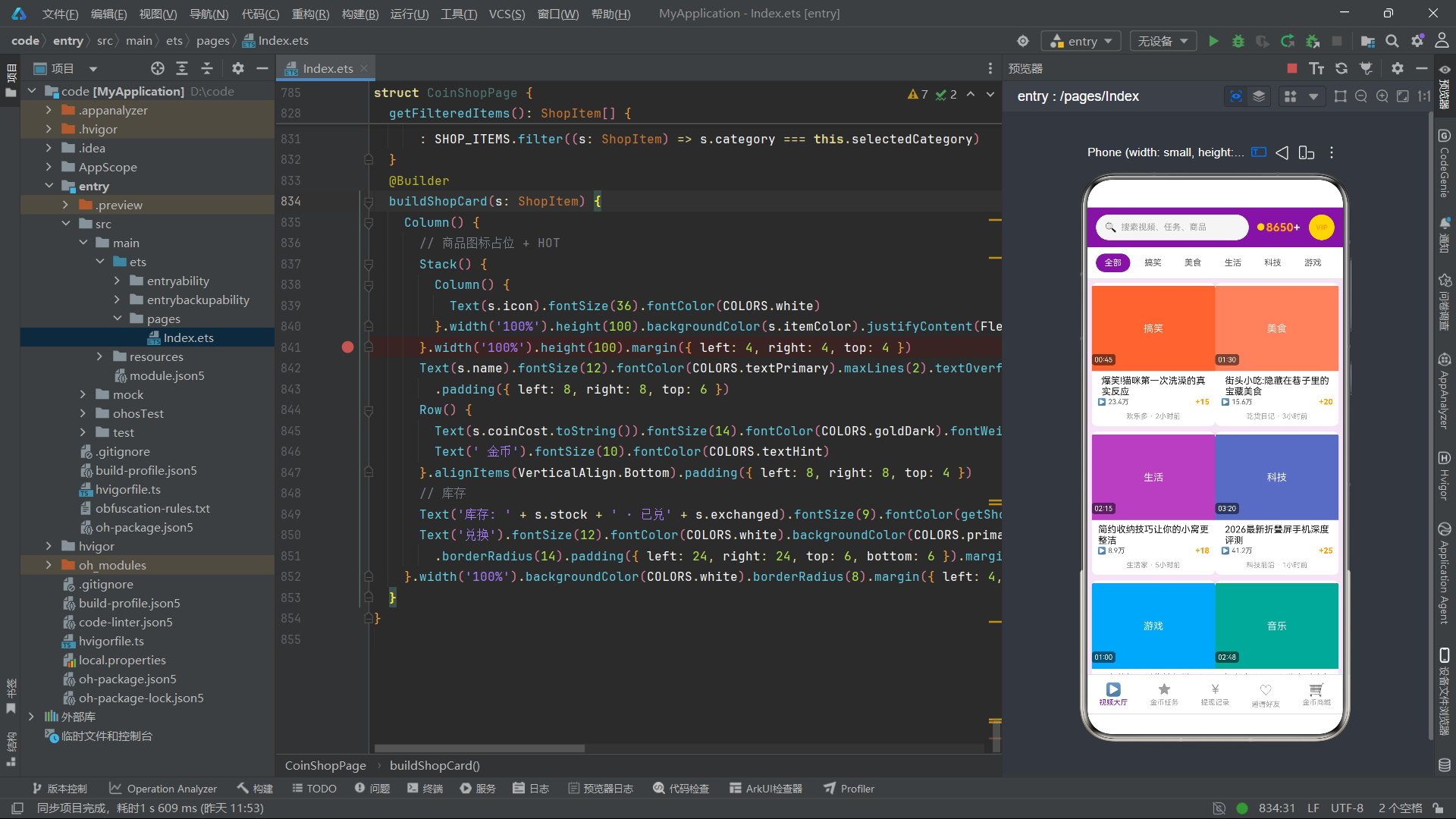
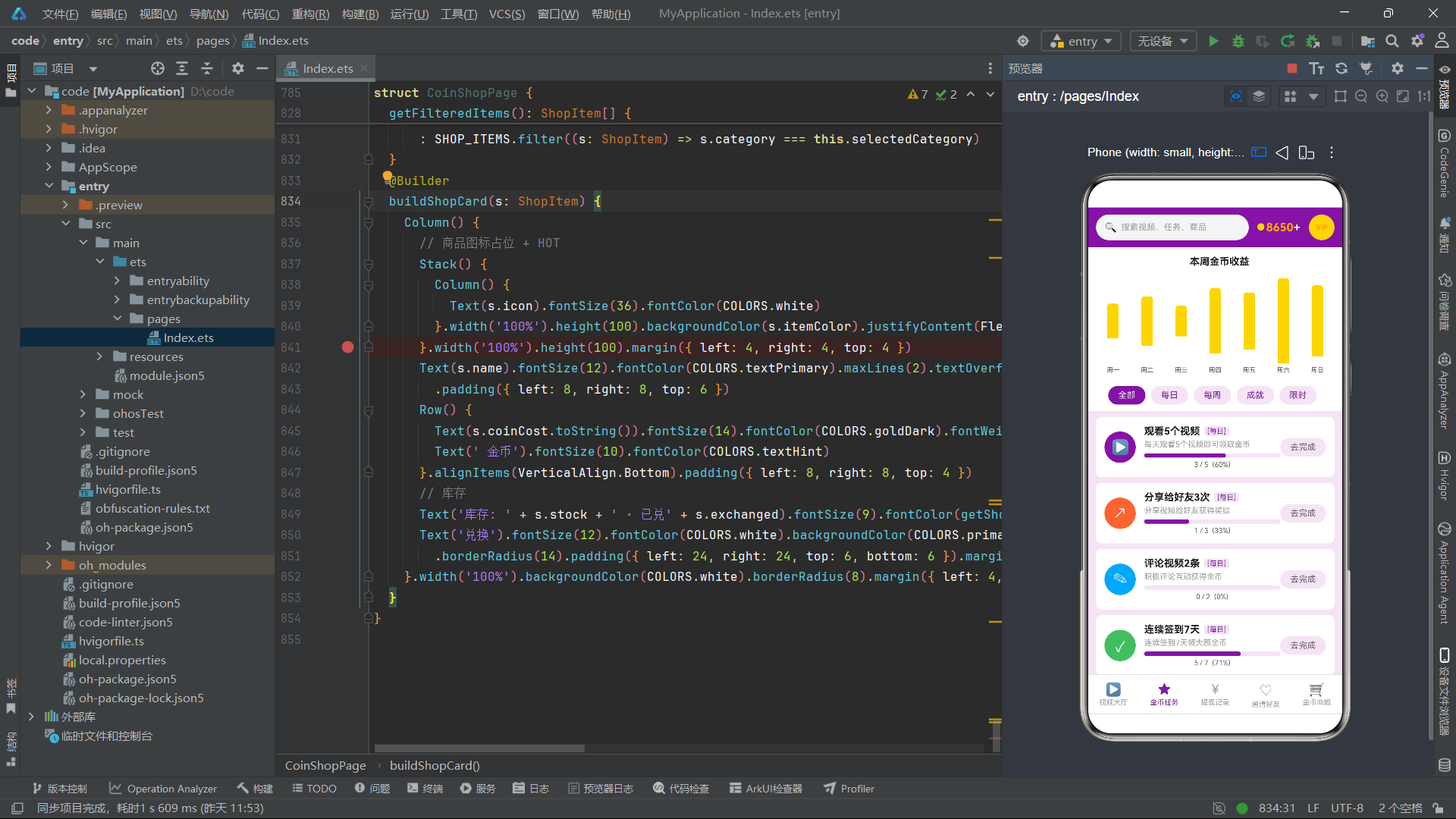
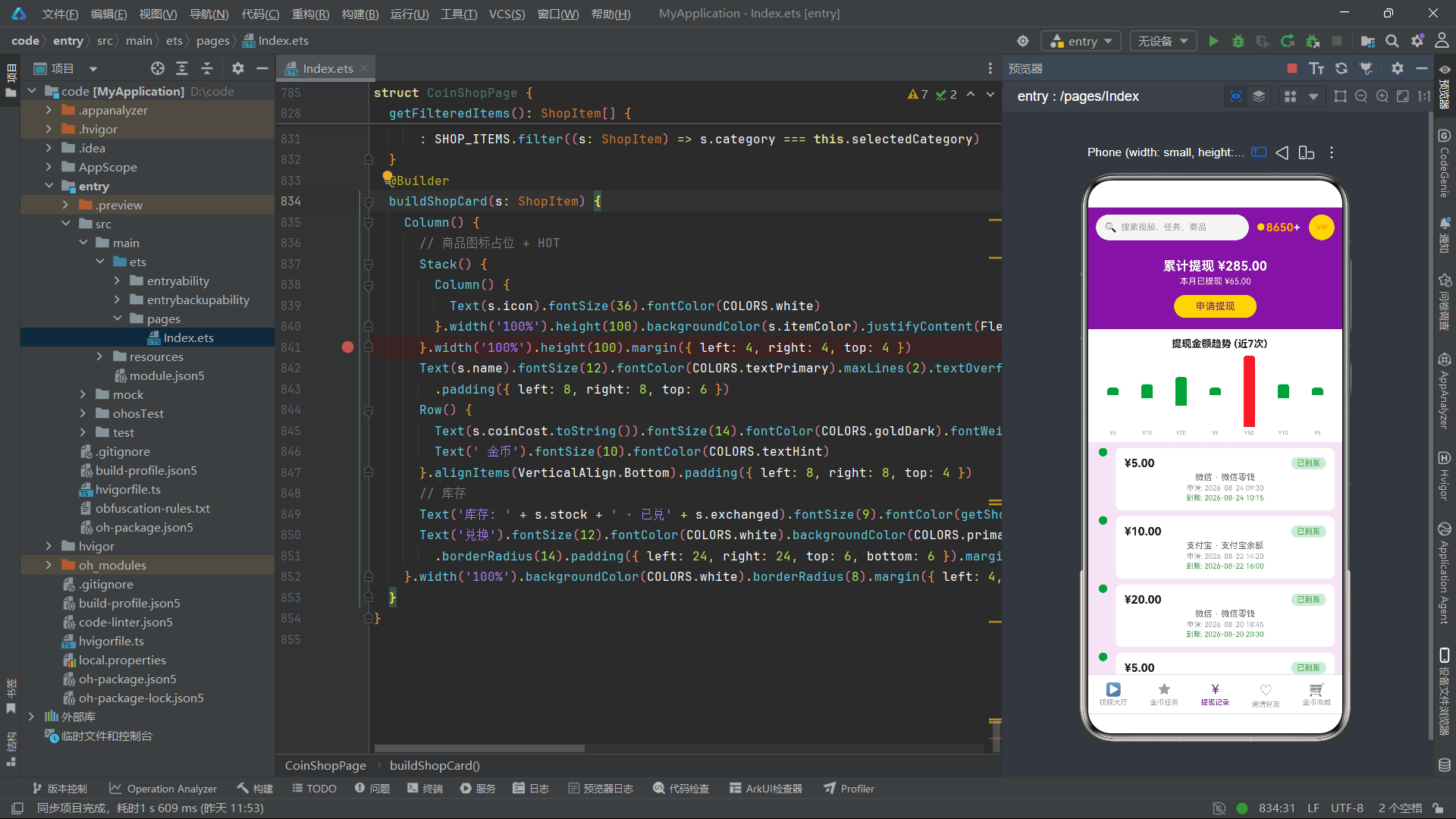
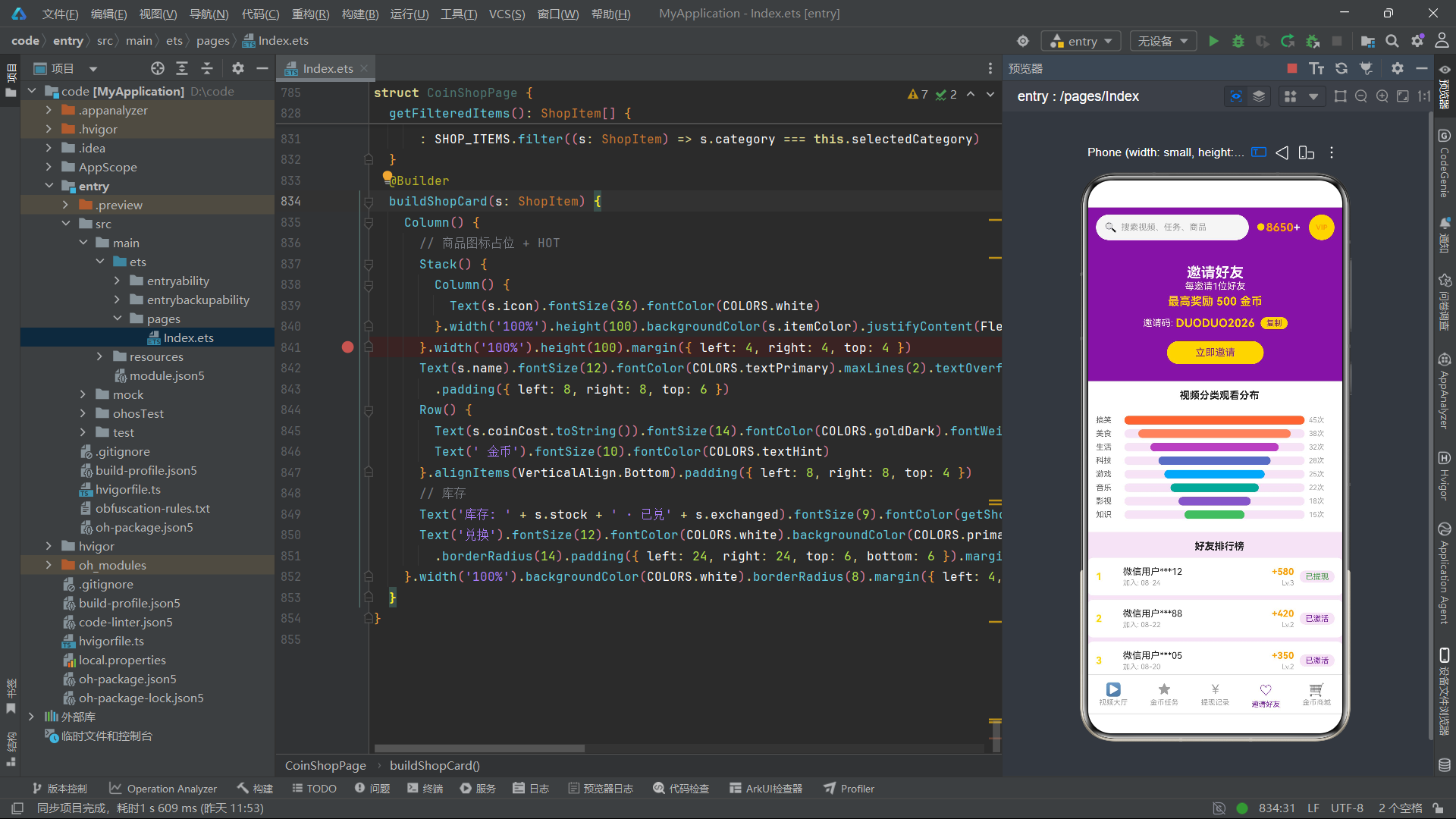
安装DevEco Studio程序

选择目标安装目录:

设置环境变量,但是需要重启一下:

新建一个空白模板:

设置API为24的模板项目:
初始化项目,自动下载相关依赖:

完整代码:
// 多多视频刷金币APP - HarmonyOS ArkTS
// 主题: 视频紫 + 金币黄

// ============ 接口定义 ============
interface ColorPalette {
  primary: string; primaryDark: string; primaryLight: string
  gold: string; goldDark: string; goldLight: string
  bg: string; bgCard: string; white: string
  textPrimary: string; textSecondary: string; textHint: string
  red: string; green: string; orange: string; divider: string
}
interface VideoItem {
  id: number; title: string; category: string; duration: string
  coinReward: number; playCount: number; likeCount: number
  uploader: string; uploadTime: string; videoColor: string
  tags: string[]; watched: boolean; hot: boolean
}
interface TaskItem {
  id: number; name: string; type: string; reward: number
  progress: number; target: number; completed: boolean; claimed: boolean
  icon: string; taskColor: string; description: string
}
interface WithdrawRecord {
  id: number; amount: number; method: string; requestDate: string
  status: string; account: string; arriveDate: string
}
interface InviteFriend {
  id: number; name: string; avatarColor: string; joinDate: string
  coinsEarned: number; level: number; status: string
}
interface ShopItem {
  id: number; name: string; category: string; coinCost: number
  stock: number; exchanged: number; icon: string
  itemColor: string; hot: boolean
}
interface WeeklyCoin { day: string; coins: number }
interface CategoryStat { name: string; count: number; color: string }

// ============ 颜色配置 ============
const COLORS: ColorPalette = {
  primary: '#7B1FA2', primaryDark: '#4A0072', primaryLight: '#E1BEE7',
  gold: '#FFD700', goldDark: '#FFA000', goldLight: '#FFF8E1',
  bg: '#F3E5F5', bgCard: '#FFFFFF', white: '#FFFFFF',
  textPrimary: '#212121', textSecondary: '#616161', textHint: '#9E9E9E',
  red: '#E53935', green: '#43A047', orange: '#FB8C00', divider: '#E0E0E0'
}
const VIDEO_COLORS: Record<string, string> = {
  '搞笑': '#FF7043', '美食': '#FF8A65', '生活': '#AB47BC', '科技': '#5C6BC0',
  '游戏': '#42A5F5', '音乐': '#26A69A', '影视': '#7E57C2', '知识': '#66BB6A'
}

// ============ Mock 数据 ============
const VIDEOS: VideoItem[] = [
  { id: 1, title: '爆笑!猫咪第一次洗澡的真实反应', category: '搞笑', duration: '00:45', coinReward: 15, playCount: 234000, likeCount: 12000, uploader: '欢乐多', uploadTime: '2小时前', videoColor: '#FF7043', tags: ['萌宠','搞笑'], watched: false, hot: true },
  { id: 2, title: '街头小吃:隐藏在巷子里的宝藏美食', category: '美食', duration: '01:30', coinReward: 20, playCount: 156000, likeCount: 8500, uploader: '吃货日记', uploadTime: '3小时前', videoColor: '#FF8A65', tags: ['美食','探店'], watched: false, hot: true },
  { id: 3, title: '简约收纳技巧让你的小窝更整洁', category: '生活', duration: '02:15', coinReward: 18, playCount: 89000, likeCount: 5600, uploader: '生活家', uploadTime: '5小时前', videoColor: '#AB47BC', tags: ['收纳','家居'], watched: true, hot: false },
  { id: 4, title: '2026最新折叠屏手机深度评测', category: '科技', duration: '03:20', coinReward: 25, playCount: 412000, likeCount: 23000, uploader: '科技前沿', uploadTime: '1小时前', videoColor: '#5C6BC0', tags: ['数码','评测'], watched: false, hot: true },
  { id: 5, title: '王者荣耀五杀集锦超燃瞬间', category: '游戏', duration: '01:00', coinReward: 22, playCount: 325000, likeCount: 18000, uploader: '游戏达人', uploadTime: '4小时前', videoColor: '#42A5F5', tags: ['游戏','集锦'], watched: false, hot: true },
  { id: 6, title: '街头歌手翻唱经典老歌太好听了', category: '音乐', duration: '02:48', coinReward: 16, playCount: 198000, likeCount: 11000, uploader: '音乐巴士', uploadTime: '6小时前', videoColor: '#26A69A', tags: ['翻唱','街头'], watched: true, hot: false },
  { id: 7, title: '治愈系电影推荐周末必看清单', category: '影视', duration: '01:15', coinReward: 19, playCount: 145000, likeCount: 7200, uploader: '影视杂谈', uploadTime: '8小时前', videoColor: '#7E57C2', tags: ['推荐','治愈'], watched: false, hot: false },
  { id: 8, title: '三分钟搞懂量子计算基本原理', category: '知识', duration: '03:00', coinReward: 28, playCount: 76000, likeCount: 4500, uploader: '知识小站', uploadTime: '10小时前', videoColor: '#66BB6A', tags: ['科普','科技'], watched: false, hot: false },
  { id: 9, title: '狗狗偷吃主人的午餐被发现了', category: '搞笑', duration: '00:38', coinReward: 14, playCount: 287000, likeCount: 15000, uploader: '欢乐多', uploadTime: '12小时前', videoColor: '#FF7043', tags: ['萌宠','搞笑'], watched: true, hot: true },
  { id: 10, title: '家常菜教程:三道简易下饭菜', category: '美食', duration: '04:20', coinReward: 24, playCount: 132000, likeCount: 6800, uploader: '吃货日记', uploadTime: '15小时前', videoColor: '#FF8A65', tags: ['教程','家常菜'], watched: false, hot: false },
  { id: 11, title: '极简生活方式:断舍离实践指南', category: '生活', duration: '02:50', coinReward: 17, playCount: 98000, likeCount: 5200, uploader: '生活家', uploadTime: '18小时前', videoColor: '#AB47BC', tags: ['极简','生活'], watched: false, hot: false },
  { id: 12, title: 'AI芯片行业现状深度解析', category: '科技', duration: '05:30', coinReward: 30, playCount: 265000, likeCount: 14000, uploader: '科技前沿', uploadTime: '20小时前', videoColor: '#5C6BC0', tags: ['AI','行业'], watched: false, hot: true },
  { id: 13, title: '原神新角色技能实测对比', category: '游戏', duration: '02:20', coinReward: 21, playCount: 354000, likeCount: 19500, uploader: '游戏达人', uploadTime: '22小时前', videoColor: '#42A5F5', tags: ['原神','测评'], watched: false, hot: true },
  { id: 14, title: '钢琴独奏:治愈系动漫主题曲', category: '音乐', duration: '03:10', coinReward: 18, playCount: 167000, likeCount: 9300, uploader: '音乐巴士', uploadTime: '1天前', videoColor: '#26A69A', tags: ['钢琴','动漫'], watched: true, hot: false },
  { id: 15, title: '悬疑烧脑电影盘点不容错过', category: '影视', duration: '02:00', coinReward: 20, playCount: 121000, likeCount: 6100, uploader: '影视杂谈', uploadTime: '1天前', videoColor: '#7E57C2', tags: ['悬疑','推荐'], watched: false, hot: false },
  { id: 16, title: '宇宙黑洞最新观测结果解读', category: '知识', duration: '04:15', coinReward: 27, playCount: 88000, likeCount: 4900, uploader: '知识小站', uploadTime: '2天前', videoColor: '#66BB6A', tags: ['天文','科普'], watched: false, hot: false }
]
const TASKS: TaskItem[] = [
  { id: 1, name: '观看5个视频', type: '每日', reward: 50, progress: 3, target: 5, completed: false, claimed: false, icon: '▶', taskColor: '#7B1FA2', description: '每天观看5个视频即可领取金币' },
  { id: 2, name: '分享给好友3次', type: '每日', reward: 30, progress: 1, target: 3, completed: false, claimed: false, icon: '↗', taskColor: '#FF7043', description: '分享视频给好友获得奖励' },
  { id: 3, name: '评论视频2条', type: '每日', reward: 20, progress: 0, target: 2, completed: false, claimed: false, icon: '✎', taskColor: '#42A5F5', description: '积极评论互动获得金币' },
  { id: 4, name: '连续签到7天', type: '每日', reward: 100, progress: 5, target: 7, completed: false, claimed: false, icon: '✓', taskColor: '#66BB6A', description: '连续签到7天领大额金币' },
  { id: 5, name: '邀请5位新用户', type: '每周', reward: 500, progress: 2, target: 5, completed: false, claimed: false, icon: '★', taskColor: '#AB47BC', description: '邀请好友注册得丰厚奖励' },
  { id: 6, name: '累计观看100个视频', type: '每周', reward: 300, progress: 67, target: 100, completed: false, claimed: false, icon: '◎', taskColor: '#5C6BC0', description: '本周累计观看达标领奖' },
  { id: 7, name: '获得100个点赞', type: '每周', reward: 200, progress: 45, target: 100, completed: false, claimed: false, icon: '♥', taskColor: '#26A69A', description: '视频获赞100个领金币' },
  { id: 8, name: '完成新手教程', type: '成就', reward: 1000, progress: 1, target: 1, completed: true, claimed: false, icon: '◆', taskColor: '#FFA000', description: '完成所有新手教程任务' },
  { id: 9, name: '累计金币达10000', type: '成就', reward: 2000, progress: 6500, target: 10000, completed: false, claimed: false, icon: '◇', taskColor: '#FFD700', description: '累计金币达到目标值' },
  { id: 10, name: '限时双倍金币活动', type: '限时', reward: 80, progress: 0, target: 1, completed: false, claimed: false, icon: '⚡', taskColor: '#E53935', description: '限时参与双倍金币活动' },
  { id: 11, name: '观看15个视频', type: '每日', reward: 80, progress: 8, target: 15, completed: false, claimed: false, icon: '▶', taskColor: '#7B1FA2', description: '每日观看15个视频' },
  { id: 12, name: '夜间签到福利', type: '限时', reward: 50, progress: 0, target: 1, completed: false, claimed: false, icon: '☾', taskColor: '#7E57C2', description: '22点-24点签到领福利' }
]
const WITHDRAW_RECORDS: WithdrawRecord[] = [
  { id: 1, amount: 5.00, method: '微信', requestDate: '2026-08-24 09:30', status: '已到账', account: '微信零钱', arriveDate: '2026-08-24 10:15' },
  { id: 2, amount: 10.00, method: '支付宝', requestDate: '2026-08-22 14:20', status: '已到账', account: '支付宝余额', arriveDate: '2026-08-22 16:00' },
  { id: 3, amount: 20.00, method: '微信', requestDate: '2026-08-20 18:45', status: '已到账', account: '微信零钱', arriveDate: '2026-08-20 20:30' },
  { id: 4, amount: 5.00, method: '支付宝', requestDate: '2026-08-19 11:10', status: '已到账', account: '支付宝余额', arriveDate: '2026-08-19 12:45' },
  { id: 5, amount: 50.00, method: '微信', requestDate: '2026-08-17 16:00', status: '已拒绝', account: '微信零钱', arriveDate: '-' },
  { id: 6, amount: 10.00, method: '支付宝', requestDate: '2026-08-15 13:25', status: '已到账', account: '支付宝余额', arriveDate: '2026-08-15 15:10' },
  { id: 7, amount: 5.00, method: '微信', requestDate: '2026-08-13 10:00', status: '已到账', account: '微信零钱', arriveDate: '2026-08-13 11:20' },
  { id: 8, amount: 30.00, method: '微信', requestDate: '2026-08-11 19:30', status: '已到账', account: '微信零钱', arriveDate: '2026-08-11 21:00' },
  { id: 9, amount: 15.00, method: '支付宝', requestDate: '2026-08-09 12:00', status: '审核中', account: '支付宝余额', arriveDate: '-' },
  { id: 10, amount: 5.00, method: '微信', requestDate: '2026-08-07 08:15', status: '已到账', account: '微信零钱', arriveDate: '2026-08-07 09:30' },
  { id: 11, amount: 20.00, method: '支付宝', requestDate: '2026-08-05 17:00', status: '已到账', account: '支付宝余额', arriveDate: '2026-08-05 18:45' },
  { id: 12, amount: 10.00, method: '微信', requestDate: '2026-08-03 14:30', status: '已到账', account: '微信零钱', arriveDate: '2026-08-03 16:00' },
  { id: 13, amount: 5.00, method: '支付宝', requestDate: '2026-08-01 09:00', status: '已到账', account: '支付宝余额', arriveDate: '2026-08-01 10:15' },
  { id: 14, amount: 25.00, method: '微信', requestDate: '2026-07-29 15:45', status: '已到账', account: '微信零钱', arriveDate: '2026-07-29 17:30' },
  { id: 15, amount: 50.00, method: '支付宝', requestDate: '2026-07-27 11:20', status: '已到账', account: '支付宝余额', arriveDate: '2026-07-27 13:00' }
]
const INVITE_FRIENDS: InviteFriend[] = [
  { id: 1, name: '微信用户***12', avatarColor: '#7B1FA2', joinDate: '08-24', coinsEarned: 580, level: 3, status: '已提现' },
  { id: 2, name: '微信用户***88', avatarColor: '#FF7043', joinDate: '08-22', coinsEarned: 420, level: 2, status: '已激活' },
  { id: 3, name: '微信用户***05', avatarColor: '#42A5F5', joinDate: '08-20', coinsEarned: 350, level: 2, status: '已激活' },
  { id: 4, name: '微信用户***37', avatarColor: '#66BB6A', joinDate: '08-18', coinsEarned: 280, level: 1, status: '已注册' },
  { id: 5, name: '微信用户***91', avatarColor: '#AB47BC', joinDate: '08-15', coinsEarned: 750, level: 4, status: '已提现' },
  { id: 6, name: '微信用户***46', avatarColor: '#FFD700', joinDate: '08-13', coinsEarned: 180, level: 1, status: '已激活' },
  { id: 7, name: '微信用户***23', avatarColor: '#5C6BC0', joinDate: '08-10', coinsEarned: 920, level: 5, status: '已提现' },
  { id: 8, name: '微信用户***77', avatarColor: '#26A69A', joinDate: '08-08', coinsEarned: 120, level: 1, status: '已注册' },
  { id: 9, name: '微信用户***64', avatarColor: '#7E57C2', joinDate: '08-05', coinsEarned: 510, level: 3, status: '已提现' },
  { id: 10, name: '微信用户***19', avatarColor: '#E53935', joinDate: '08-03', coinsEarned: 240, level: 2, status: '已激活' },
  { id: 11, name: '微信用户***52', avatarColor: '#FF8A65', joinDate: '08-01', coinsEarned: 380, level: 2, status: '已激活' },
  { id: 12, name: '微信用户***08', avatarColor: '#FB8C00', joinDate: '07-29', coinsEarned: 650, level: 4, status: '已提现' },
  { id: 13, name: '微信用户***33', avatarColor: '#43A047', joinDate: '07-27', coinsEarned: 90, level: 1, status: '已注册' },
  { id: 14, name: '微信用户***71', avatarColor: '#FFA000', joinDate: '07-25', coinsEarned: 470, level: 3, status: '已提现' },
  { id: 15, name: '微信用户***95', avatarColor: '#00ACC1', joinDate: '07-23', coinsEarned: 320, level: 2, status: '已激活' }
]
const SHOP_ITEMS: ShopItem[] = [
  { id: 1, name: '5元话费充值券', category: '话费', coinCost: 5000, stock: 999, exchanged: 1234, icon: '☎', itemColor: '#7B1FA2', hot: true },
  { id: 2, name: '10元话费充值券', category: '话费', coinCost: 10000, stock: 500, exchanged: 567, icon: '☎', itemColor: '#5C6BC0', hot: false },
  { id: 3, name: '1元微信红包', category: '红包', coinCost: 1000, stock: 9999, exchanged: 4567, icon: '¥', itemColor: '#E53935', hot: true },
  { id: 4, name: '5元微信红包', category: '红包', coinCost: 5000, stock: 800, exchanged: 890, icon: '¥', itemColor: '#FF7043', hot: true },
  { id: 5, name: '10元支付宝红包', category: '红包', coinCost: 10000, stock: 300, exchanged: 234, icon: '¥', itemColor: '#42A5F5', hot: false },
  { id: 6, name: '定制保温杯', category: '实物', coinCost: 20000, stock: 50, exchanged: 89, icon: '☕', itemColor: '#66BB6A', hot: false },
  { id: 7, name: '潮流帆布包', category: '实物', coinCost: 30000, stock: 30, exchanged: 45, icon: '👜', itemColor: '#AB47BC', hot: true },
  { id: 8, name: '蓝牙耳机', category: '实物', coinCost: 80000, stock: 10, exchanged: 12, icon: '🎧', itemColor: '#7E57C2', hot: true },
  { id: 9, name: '月度VIP会员', category: '会员', coinCost: 15000, stock: 999, exchanged: 678, icon: '★', itemColor: '#FFD700', hot: true },
  { id: 10, name: '季度VIP会员', category: '会员', coinCost: 40000, stock: 200, exchanged: 123, icon: '★', itemColor: '#FFA000', hot: false },
  { id: 11, name: '年度VIP会员', category: '会员', coinCost: 120000, stock: 100, exchanged: 56, icon: '★', itemColor: '#FF7043', hot: true },
  { id: 12, name: '20元话费充值券', category: '话费', coinCost: 20000, stock: 200, exchanged: 78, icon: '☎', itemColor: '#26A69A', hot: false },
  { id: 13, name: '20元微信红包', category: '红包', coinCost: 20000, stock: 150, exchanged: 67, icon: '¥', itemColor: '#FB8C00', hot: false },
  { id: 14, name: '便携充电宝', category: '实物', coinCost: 50000, stock: 20, exchanged: 23, icon: '🔋', itemColor: '#43A047', hot: true },
  { id: 15, name: '智能手环', category: '实物', coinCost: 100000, stock: 5, exchanged: 8, icon: '⌚', itemColor: '#00ACC1', hot: true },
  { id: 16, name: '50元话费充值券', category: '话费', coinCost: 50000, stock: 80, exchanged: 34, icon: '☎', itemColor: '#7B1FA2', hot: false }
]
const WEEKLY_COINS: WeeklyCoin[] = [
  { day: '周一', coins: 320 }, { day: '周二', coins: 450 }, { day: '周三', coins: 280 },
  { day: '周四', coins: 600 }, { day: '周五', coins: 520 }, { day: '周六', coins: 780 }, { day: '周日', coins: 650 }
]
const CATEGORY_STATS: CategoryStat[] = [
  { name: '搞笑', count: 45, color: '#FF7043' }, { name: '美食', count: 38, color: '#FF8A65' },
  { name: '生活', count: 32, color: '#AB47BC' }, { name: '科技', count: 28, color: '#5C6BC0' },
  { name: '游戏', count: 25, color: '#42A5F5' }, { name: '音乐', count: 22, color: '#26A69A' },
  { name: '影视', count: 18, color: '#7E57C2' }, { name: '知识', count: 15, color: '#66BB6A' }
]

// ============ 辅助函数 ============
function formatPlayCount(count: number): string {
  return count > 10000 ? (count / 10000).toFixed(1) + '万' : count.toString()
}
function getVideoColor(category: string): string {
  return VIDEO_COLORS[category] ?? '#7B1FA2'
}
function filterVideosByCategory(category: string): VideoItem[] {
  return category === '全部' ? VIDEOS : VIDEOS.filter((v: VideoItem) => v.category === category)
}
function filterTasksByType(type: string): TaskItem[] {
  return type === '全部' ? TASKS : TASKS.filter((t: TaskItem) => t.type === type)
}
function getProgressPercent(progress: number, target: number): number {
  return target > 0 ? Math.floor((progress / target) * 100) : 0
}
function getTaskStatusColor(status: string): string {
  return status === '已到账' ? COLORS.green : (status === '审核中' ? COLORS.orange : COLORS.red)
}
function getInviteStatusColor(status: string): string {
  return status === '已提现' ? COLORS.green : (status === '已激活' ? COLORS.primary : COLORS.textHint)
}
function getShopStatusColor(stock: number): string {
  return stock > 100 ? COLORS.green : (stock > 10 ? COLORS.orange : COLORS.red)
}
function getBarHeight(coins: number, max: number): number {
  return max > 0 ? Math.floor((coins / max) * 120) : 0
}
function getMaxWeeklyCoins(): number {
  let max = 0
  for (let i = 0; i < WEEKLY_COINS.length; i++) {
    if (WEEKLY_COINS[i].coins > max) { max = WEEKLY_COINS[i].coins }
  }
  return max
}
function getMaxCategoryCount(): number {
  let max = 0
  for (let i = 0; i < CATEGORY_STATS.length; i++) {
    if (CATEGORY_STATS[i].count > max) { max = CATEGORY_STATS[i].count }
  }
  return max
}

// ============ Tab 枚举 ============
enum TabIndex { VideoHall = 0, CoinTasks = 1, WithdrawRecords = 2, InviteFriends = 3, CoinShop = 4 }
const TAB_NAMES: Record<number, string> = {
  0: '视频大厅', 1: '金币任务', 2: '提现记录', 3: '邀请好友', 4: '金币商城'
}
const TAB_ICONS: Record<number, string> = {
  0: '▶', 1: '★', 2: '¥', 3: '♡', 4: '🛒'
}

// ============ 全局模态弹框构建器 ============
@Builder
function modalOverlay(onClose: () => void) {
  Stack() {
    Column().width('100%').height('100%').backgroundColor('#000000').opacity(0.5).onClick(() => onClose())
  }.width('100%').height('100%').backgroundColor(Color.Transparent)
}

// ============ 主入口 ============
@Entry
@Component
struct DuoduoApp {
  @State currentTab: number = TabIndex.VideoHall
  @State coinBalance: number = 8650
  @State showVideoDialog: boolean = false
  @State showTaskDialog: boolean = false
  @State showWithdrawDialog: boolean = false
  @State showInviteDialog: boolean = false
  @State showShopDialog: boolean = false
  @State showVideoDetail: boolean = false
  @State selectedVideo: VideoItem | null = null
  @State selectedTask: TaskItem | null = null
  @State selectedShopItem: ShopItem | null = null
  build() {
    Column() {
      this.buildHeader()
      Stack() {
        // ============ Tab内容区域 ============
        if(this.currentTab === TabIndex.VideoHall){
          VideoHallPage({
            onPlay:(v:VideoItem)=>{
              this.selectedVideo = v
              this.showVideoDetail = true
            }
          })
        }
        else if(this.currentTab === TabIndex.CoinTasks){
          CoinTasksPage({
            onClaim:(t:TaskItem)=>{
              this.selectedTask = t
              this.showTaskDialog = true
            }
          })
        }
        else if(this.currentTab === TabIndex.WithdrawRecords){
          WithdrawRecordsPage({
            onRequest:()=>{
              this.showWithdrawDialog = true
            }
          })
        }
        else if(this.currentTab === TabIndex.InviteFriends){
          InviteFriendsPage({
            onShare:()=>{
              this.showInviteDialog = true
            }
          })
        }
        else if(this.currentTab === TabIndex.CoinShop){
          CoinShopPage({
            onExchange:(s:ShopItem)=>{
              this.selectedShopItem = s
              this.showShopDialog = true
            }
          })
        }
        // 弹框 1: 视频详情
        if (this.showVideoDetail && this.selectedVideo) { this.buildVideoDetailDialog() }
        // 弹框 2: 任务领取
        if (this.showTaskDialog && this.selectedTask) { this.buildTaskClaimDialog() }
        // 弹框 3: 提现申请
        if (this.showWithdrawDialog) { this.buildWithdrawDialog() }
        // 弹框 4: 邀请奖励
        if (this.showInviteDialog) { this.buildInviteRewardDialog() }
        // 弹框 5: 兑换确认
        if (this.showShopDialog && this.selectedShopItem) { this.buildExchangeDialog() }
        // 弹框 6: 视频赚币提示
        if (this.showVideoDialog) { this.buildVideoCoinDialog() }
      }.layoutWeight(1).width('100%')
      this.buildBottomTabs()
    }.width('100%').height('100%').backgroundColor(COLORS.bg)
  }
  @Builder
  buildHeader() {
    Row() {
      // 搜索框
      Row() {
        Text('🔍').fontSize(14).fontColor(COLORS.textHint)
        Text('搜索视频、任务、商品').fontSize(12).fontColor(COLORS.textHint).margin({ left: 6 })
      }.layoutWeight(1).height(36).backgroundColor('#F5F5F5').borderRadius(18).padding({ left: 12, right: 12 }).alignItems(VerticalAlign.Center)
      Blank()
      // 金币余额
      Row() {
        Text('●').fontSize(14).fontColor(COLORS.gold)
        Text(this.coinBalance.toString()).fontSize(16).fontColor(COLORS.goldDark).fontWeight(FontWeight.Bold)
        Text('+').fontSize(16).fontColor(COLORS.white).fontWeight(FontWeight.Bold)
      }.height(36).backgroundColor(COLORS.primary).borderRadius(18).padding({ left: 10, right: 6 }).alignItems(VerticalAlign.Center)
      // VIP 徽章
      Row() {
        Text('VIP').fontSize(10).fontColor(COLORS.goldDark).fontWeight(FontWeight.Bold)
      }.width(36).height(36).backgroundColor(COLORS.gold).borderRadius(18)
      .justifyContent(FlexAlign.Center).alignItems(VerticalAlign.Center).margin({ left: 6 })
    }.width('100%').height(56).backgroundColor(COLORS.primary).padding({ left: 12, right: 12 }).alignItems(VerticalAlign.Center)
  }
  @Builder
  buildBottomTabs() {
    Row() {
      ForEach([0, 1, 2, 3, 4], (idx: number) => {
        Column() {
          Text(TAB_ICONS[idx]).fontSize(18).fontColor(this.currentTab === idx ? COLORS.primary : COLORS.textHint)
          Text(TAB_NAMES[idx]).fontSize(10).fontColor(this.currentTab === idx ? COLORS.primary : COLORS.textHint).margin({ top: 2 })
        }.layoutWeight(1).height(56).justifyContent(FlexAlign.Center).onClick(() => { this.currentTab = idx })
      }, (idx: number) => idx.toString())
    }.width('100%').height(56).backgroundColor(COLORS.white).border({ width: 1, color: COLORS.divider }).alignItems(VerticalAlign.Center)
  }
  @Builder
  buildVideoDetailDialog() {
    Stack() {
      Column().width('100%').height('100%').backgroundColor('#000000').opacity(0.6).onClick(() => { this.showVideoDetail = false })
      Column() {
        // 视频预览占位
        Column() {
          Text('▶').fontSize(48).fontColor(COLORS.white)
        }.width('100%').height(220).backgroundColor(this.selectedVideo?.videoColor ?? COLORS.primary)
        .justifyContent(FlexAlign.Center)
        Column() {
          Text(this.selectedVideo?.title ?? '').fontSize(16).fontColor(COLORS.textPrimary).fontWeight(FontWeight.Bold)
            .maxLines(2).textOverflow({ overflow: TextOverflow.Ellipsis })
          Row() {
            Text(this.selectedVideo?.uploader ?? '').fontSize(12).fontColor(COLORS.textSecondary)
            Text('·').fontSize(12).fontColor(COLORS.textHint).margin({ left: 6, right: 6 })
            Text(this.selectedVideo?.uploadTime ?? '').fontSize(12).fontColor(COLORS.textHint)
          }.margin({ top: 8 }).alignItems(VerticalAlign.Center)
          Row() {
            Text('▶ ' + formatPlayCount(this.selectedVideo?.playCount ?? 0)).fontSize(12).fontColor(COLORS.textSecondary)
            Text('♥ ' + this.selectedVideo?.likeCount).fontSize(12).fontColor(COLORS.textSecondary).margin({ left: 16 })
            Text('⏱ ' + this.selectedVideo?.duration).fontSize(12).fontColor(COLORS.textSecondary).margin({ left: 16 })
          }.margin({ top: 8 }).alignItems(VerticalAlign.Center)
          // 标签
          Row() {
            ForEach(this.selectedVideo?.tags ?? [], (tag: string) => {
              Text('#' + tag).fontSize(11).fontColor(COLORS.primary).backgroundColor(COLORS.bg)
                .borderRadius(10).padding({ left: 8, right: 8, top: 4, bottom: 4 }).margin({ right: 6 })
            }, (tag: string) => tag)
          }.margin({ top: 10 }).alignItems(VerticalAlign.Center)
          // 赚币按钮
          Text('观看赚 ' + this.selectedVideo?.coinReward + ' 金币').fontSize(16).fontColor(COLORS.white)
            .fontWeight(FontWeight.Bold).backgroundColor(COLORS.primary).borderRadius(22)
            .padding({ left: 40, right: 40, top: 10, bottom: 10 }).margin({ top: 16 })
            .onClick(() => { this.showVideoDetail = false; this.showVideoDialog = true })
        }.width('100%').padding(16).backgroundColor(COLORS.white)
      }.width('90%').backgroundColor(COLORS.white).borderRadius(16).clip(true)
    }.width('100%').height('100%')
  }
  @Builder
  buildVideoCoinDialog() {
    Stack() {
      Column().width('100%').height('100%').backgroundColor('#000000').opacity(0.6).onClick(() => { this.showVideoDialog = false })
      Column() {
        Text('+ ' + (this.selectedVideo?.coinReward ?? 0)).fontSize(48).fontColor(COLORS.gold).fontWeight(FontWeight.Bold).margin({ top: 24 })
        Text('金币已到账').fontSize(14).fontColor(COLORS.textSecondary).margin({ top: 8, bottom: 16 })
        Text('继续观看').fontSize(14).fontColor(COLORS.white).backgroundColor(COLORS.primary)
          .borderRadius(20).padding({ left: 30, right: 30, top: 8, bottom: 8 }).onClick(() => { this.showVideoDialog = false })
      }.width('70%').backgroundColor(COLORS.white).borderRadius(16).alignItems(HorizontalAlign.Center)
    }.width('100%').height('100%')
  }
  @Builder
  buildTaskClaimDialog() {
    Stack() {
      Column().width('100%').height('100%').backgroundColor('#000000').opacity(0.6).onClick(() => { this.showTaskDialog = false })
      Column() {
        Text('🎉').fontSize(48).margin({ top: 20 })
        Text('任务完成').fontSize(18).fontColor(COLORS.textPrimary).fontWeight(FontWeight.Bold).margin({ top: 8 })
        Text(this.selectedTask?.name ?? '').fontSize(14).fontColor(COLORS.textSecondary).margin({ top: 6 })
        Row() {
          Text('+ ' + this.selectedTask?.reward).fontSize(32).fontColor(COLORS.gold).fontWeight(FontWeight.Bold)
          Text(' 金币').fontSize(14).fontColor(COLORS.goldDark)
        }.margin({ top: 12 }).alignItems(VerticalAlign.Bottom)
        Text('领取奖励').fontSize(14).fontColor(COLORS.white).backgroundColor(COLORS.primary)
          .borderRadius(20).padding({ left: 40, right: 40, top: 8, bottom: 8 }).margin({ top: 16, bottom: 16 })
          .onClick(() => { this.coinBalance += this.selectedTask?.reward ?? 0; this.showTaskDialog = false })
      }.width('70%').backgroundColor(COLORS.white).borderRadius(16).alignItems(HorizontalAlign.Center)
    }.width('100%').height('100%')
  }
  @Builder
  buildWithdrawDialog() {
    Stack() {
      Column().width('100%').height('100%').backgroundColor('#000000').opacity(0.6).onClick(() => { this.showWithdrawDialog = false })
      Column() {
        Text('申请提现').fontSize(18).fontColor(COLORS.textPrimary).fontWeight(FontWeight.Bold).margin({ top: 16, bottom: 12 })
        Divider().color(COLORS.divider)
        Text('提现金额').fontSize(12).fontColor(COLORS.textSecondary).margin({ top: 12, left: 16, right: 16 })
        Row() {
          Text('¥').fontSize(20).fontColor(COLORS.textPrimary)
          Text('5.00').fontSize(24).fontColor(COLORS.textPrimary).fontWeight(FontWeight.Bold).margin({ left: 4 })
        }.width('100%').padding({ left: 16, right: 16, top: 6, bottom: 6 }).alignItems(VerticalAlign.Center)
        Text('可提现金币: ' + this.coinBalance).fontSize(11).fontColor(COLORS.textHint).margin({ top: 4, left: 16, right: 16 })
        Text('提现方式').fontSize(12).fontColor(COLORS.textSecondary).margin({ top: 14, left: 16, right: 16 })
        Row() {
          Text('微信').fontSize(13).fontColor(COLORS.white).backgroundColor(COLORS.primary)
            .borderRadius(16).padding({ left: 20, right: 20, top: 6, bottom: 6 }).margin({ right: 8 })
          Text('支付宝').fontSize(13).fontColor(COLORS.primary).backgroundColor(COLORS.bg)
            .borderRadius(16).padding({ left: 20, right: 20, top: 6, bottom: 6 })
        }.margin({ top: 6, left: 16, right: 16 }).alignItems(VerticalAlign.Center)
        Text('确认提现').fontSize(14).fontColor(COLORS.white).backgroundColor(COLORS.primary)
          .borderRadius(20).padding({ left: 60, right: 60, top: 10, bottom: 10 }).margin({ top: 16, bottom: 16 })
          .onClick(() => { this.showWithdrawDialog = false })
      }.width('85%').backgroundColor(COLORS.white).borderRadius(16)
    }.width('100%').height('100%')
  }
  @Builder
  buildInviteRewardDialog() {
    Stack() {
      Column().width('100%').height('100%').backgroundColor('#000000').opacity(0.6).onClick(() => { this.showInviteDialog = false })
      Column() {
        // 海报顶部
        Column() {
          Text('邀请好友').fontSize(20).fontColor(COLORS.white).fontWeight(FontWeight.Bold)
          Text('每邀请1位好友奖励500金币').fontSize(12).fontColor(COLORS.goldLight).margin({ top: 6 })
        }.width('100%').height(100).backgroundColor(COLORS.primary).justifyContent(FlexAlign.Center).alignItems(HorizontalAlign.Center)
        // 二维码占位
        Column() {
          Column() {
            Row() {
              Column().width(8).height(8).backgroundColor(COLORS.textPrimary)
              Blank()
              Column().width(8).height(8).backgroundColor(COLORS.textPrimary)
            }.width(80).height(8).justifyContent(FlexAlign.SpaceBetween)
            Row() {
              Column().width(8).height(8).backgroundColor(COLORS.textPrimary)
              Column().width(40).height(40).backgroundColor(COLORS.textPrimary)
              Column().width(8).height(8).backgroundColor(COLORS.textPrimary)
            }.width(80).height(40).justifyContent(FlexAlign.SpaceBetween).alignItems(VerticalAlign.Center)
            Row() {
              Column().width(8).height(8).backgroundColor(COLORS.textPrimary)
              Blank()
              Column().width(8).height(8).backgroundColor(COLORS.textPrimary)
            }.width(80).height(8).justifyContent(FlexAlign.SpaceBetween)
          }.width(80).height(80).backgroundColor(COLORS.white).justifyContent(FlexAlign.SpaceBetween)
          Text('扫码下载').fontSize(11).fontColor(COLORS.textSecondary).margin({ top: 8 })
        }.margin({ top: 16 }).alignItems(HorizontalAlign.Center)
        // 分享按钮
        Row() {
          Text('微信分享').fontSize(12).fontColor(COLORS.white).backgroundColor(COLORS.green)
            .borderRadius(16).padding({ left: 16, right: 16, top: 6, bottom: 6 }).margin({ right: 8 })
          Text('复制链接').fontSize(12).fontColor(COLORS.primary).backgroundColor(COLORS.bg)
            .borderRadius(16).padding({ left: 16, right: 16, top: 6, bottom: 6 })
        }.margin({ top: 16, bottom: 16 }).alignItems(VerticalAlign.Center)
      }.width('80%').backgroundColor(COLORS.white).borderRadius(16).clip(true)
    }.width('100%').height('100%')
  }
  @Builder
  buildExchangeDialog() {
    Stack() {
      Column().width('100%').height('100%').backgroundColor('#000000').opacity(0.6).onClick(() => { this.showShopDialog = false })
      Column() {
        Text('确认兑换').fontSize(18).fontColor(COLORS.textPrimary).fontWeight(FontWeight.Bold).margin({ top: 16, bottom: 12 })
        Divider().color(COLORS.divider)
        Row() {
          Text(this.selectedShopItem?.icon ?? '').fontSize(36).fontColor(COLORS.white)
            .backgroundColor(this.selectedShopItem?.itemColor ?? COLORS.primary).width(56).height(56).borderRadius(12).textAlign(TextAlign.Center)
          Column() {
            Text(this.selectedShopItem?.name ?? '').fontSize(14).fontColor(COLORS.textPrimary).fontWeight(FontWeight.Bold)
            Text('库存: ' + this.selectedShopItem?.stock + ' 件').fontSize(11)
              .fontColor(getShopStatusColor(this.selectedShopItem?.stock ?? 0)).margin({ top: 4 })
          }.margin({ left: 12 }).alignItems(HorizontalAlign.Start)
        }.width('100%').padding({ left: 16, right: 16, top: 12 }).alignItems(VerticalAlign.Center)
        // 金币扣减明细
        Column() {
          Row() {
            Text('商品价格').fontSize(13).fontColor(COLORS.textSecondary)
            Blank()
            Text(this.selectedShopItem?.coinCost.toString() + ' 金币').fontSize(13).fontColor(COLORS.textPrimary)
          }.width('100%').margin({ top: 8 }).alignItems(VerticalAlign.Center)
          Row() {
            Text('当前余额').fontSize(13).fontColor(COLORS.textSecondary)
            Blank()

      // 库存
      Text('库存: ' + s.stock + ' · 已兑' + s.exchanged).fontSize(9).fontColor(getShopStatusColor(s.stock)).padding({ left: 8, right: 8, top: 2 })
      Text('兑换').fontSize(12).fontColor(COLORS.white).backgroundColor(COLORS.primary)
        .borderRadius(14).padding({ left: 24, right: 24, top: 6, bottom: 6 }).margin({ top: 6, bottom: 8 }).onClick(() => this.onExchange(s))
    }.width('100%').backgroundColor(COLORS.white).borderRadius(8).margin({ left: 4, right: 4, bottom: 8 }).clip(true)
  }
}
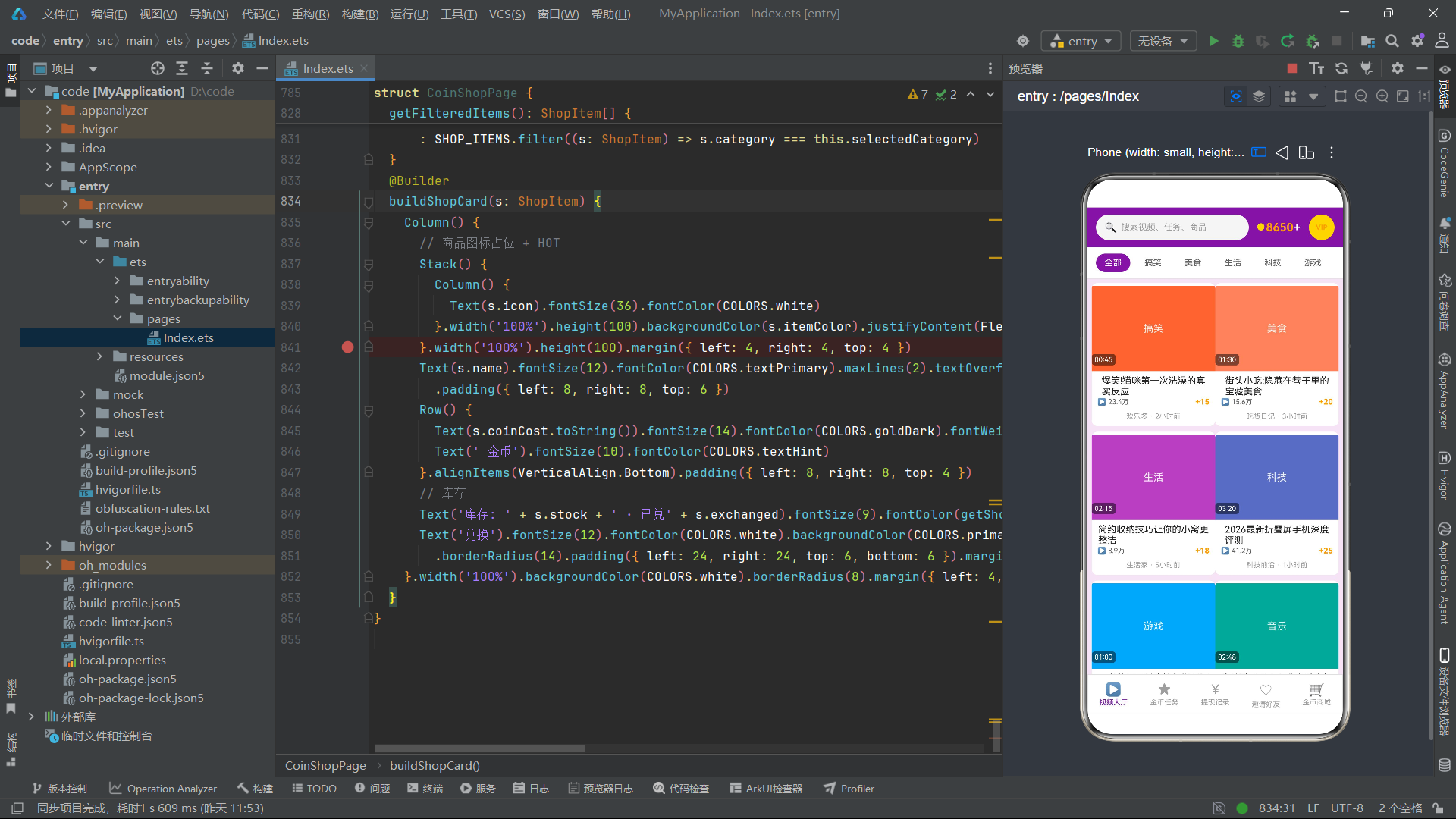
总结
本文围绕一个功能完整的QQ汉服·同袍社文化社区应用展开了深度技术剖析,从ColorPalette古风设计令牌到@Observed可观察实体类群,从粒子飘落特效系统到多级Tab条件渲染架构,从六个首页子频道的差异化展示到四种弹框交互模态的完整解读,全方位呈现了基于HarmonyOS ArkTS API 24的声明式UI在文化社交类应用中的工程实践。
从架构设计角度,该应用采用了"@Entry主入口多级Tab状态驱动+@Builder方法分块构建+@Observed实体响应式绑定"的三层架构模式。底部4个Tab通过currentBottomTab数字索引驱动if-else条件渲染链切换页面,首页内6个顶部Tab通过currentTopTab索引驱动子频道差异化展示,实现了两级Tab的完全解耦。四个弹框通过独立的布尔状态变量控制显隐,分别对应新增(发布穿搭)、编辑(出租汉服)、删除(移出衣橱)、查看(穿搭详情)四种操作,形成了完整的CRUD模态交互闭环。@Observed装饰器为6个业务实体类提供了自动响应式能力,属性变更时无需手动通知框架即可触发UI刷新。
从视觉设计角度,该应用构建了独特的古风色彩体系——朱砂红(#B03A2E)和黛青(#1F5F5B)的主色调搭配妙金(#D4A373)的装饰色,配合宣纸背景色(#F7F3EA)营造了浓郁的古风氛围。linearGradient渐变背景在头部、弹框头部和衣橱总览卡片中反复使用,通过135度对角双色渐变增强了视觉层次感。花瓣灯笼粒子特效通过setInterval每130毫秒驱动16个粒子(5种图标)在屏幕上飘落,配合Math.sin函数实现水平摇摆,当粒子飘出顶部时自动回到底部循环,为应用增添了灵动的动态氛围。朝代人气柱状图通过纯CSS的Column height属性映射数值大小(barHeight函数将热度值乘以1.3转为vp单位),无需引入任何图表库即可实现数据可视化。
从代码质量角度,纯函数的无副作用设计(leftHanfus/rightHanfus分组、driftParticles粒子更新、dynastyColor/tagBg/marketColor色彩映射、formatLikes/barHeight格式化)、不可变数据模式(driftParticles创建新数组而非修改原数组)、联合类型安全访问(selectedHanfu: HanfuItem | null配合!非空断言)、定时器的生命周期管理(aboutToAppear启动/aboutToDisappear清除防止内存泄漏)、步进器的边界控制(rentDays 1-15范围限制),这些工程实践为基于HarmonyOS 6.1.1的大型文化社交应用开发提供了可参考的代码组织范式。整个应用以"与子同袍"的社区理念贯穿始终,通过15件汉服穿搭、6个发型教程、12件配饰商品、8场线下活动、8种形制百科、6件衣橱管理和8条集市交易数据,构建了一个内容丰富、交互多元、视觉独特的汉服文化社区平台。

作为“人工智能6S店”的官方数字引擎,为AI开发者与企业提供一个覆盖软硬件全栈、一站式门户。
更多推荐
 0
0 0
0- 0


 已为社区贡献29条内容

所有评论(0)