
基于 HarmonyOS API 24 的周边游特卖应用双重导航架构与日期选择拼团进度二维码网格全维度深度解析
一、引言
鸿蒙生态在 HarmonyOS 6.1.1 版本中持续深化其声明式 UI 框架的布局能力与组件化开发范式。ArkTS 作为鸿蒙应用开发的核心语言,以其强类型约束、声明式语法结构和丰富的内置组件库,为开发者提供了构建复杂商业级移动应用的完整工具链。在 HarmonyOS ArkTS API 24 中,Scroll 容器、Flex 弹性布局、linearGradient 线性渐变、ForEach 列表渲染等核心能力已经高度成熟,能够支撑包含多 Tab 导航、底部抽屉弹框、进度条可视化、伪二维码渲染等多种交互模式的复杂应用场景。
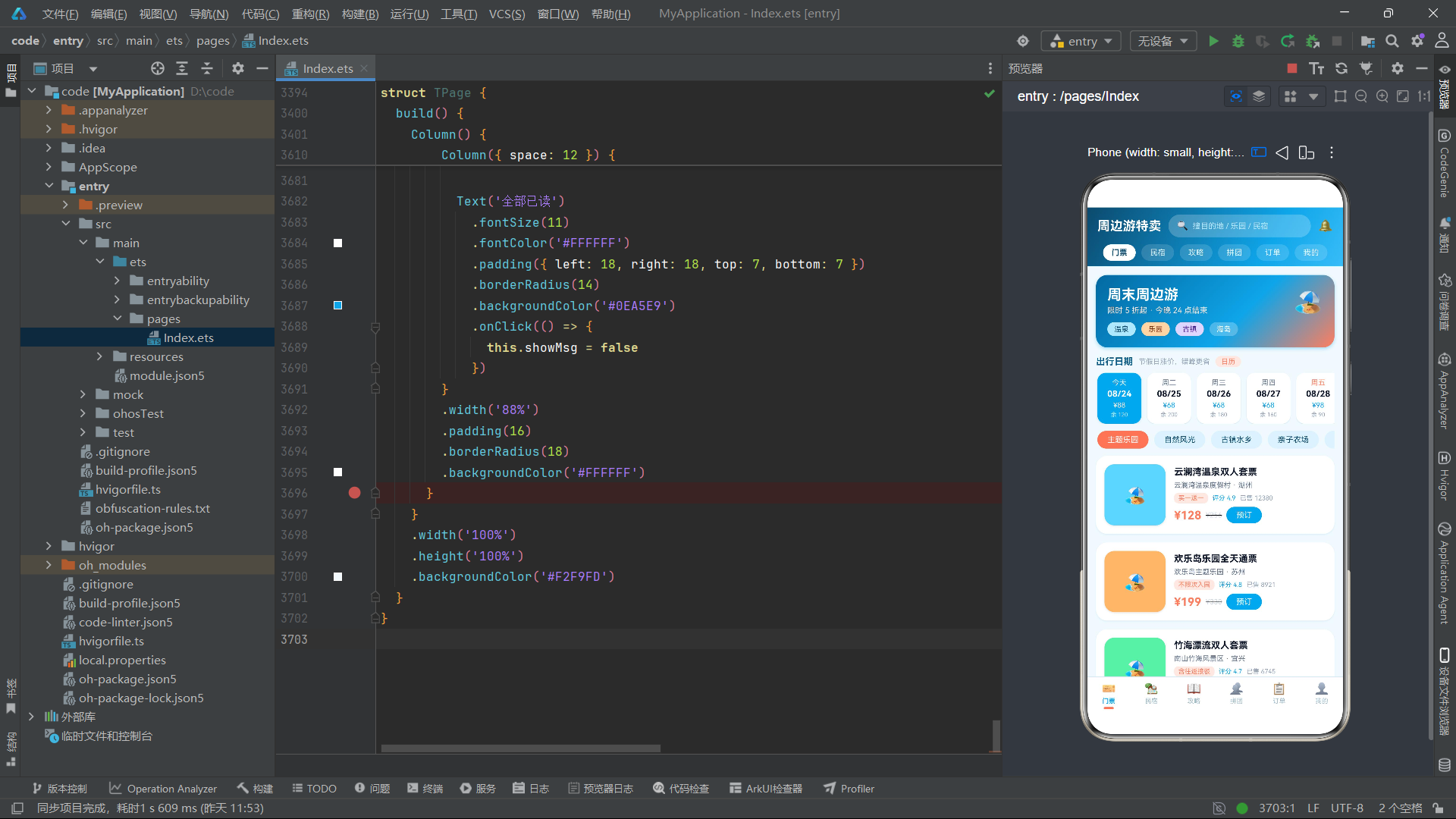
周边游特卖应用是一个面向城市周边短途出游需求的全功能电商平台,其业务覆盖门票预订、民宿住宿、旅游攻略、拼团优惠、订单管理和个人中心六大核心模块。该应用采用海洋蓝(#0EA5E9)与珊瑚橙(#FF7E5F)作为主色调,底色为清新淡蓝(#F2F9FD),营造出清凉明快的出游氛围。整体界面设计采用"顶部频道 pill 横滑 + 底部 Tab 导航"的双重导航架构,用户既可以通过顶部快速切换频道,也可以通过底部 Tab 进行主功能模块的跳转,这种设计在电商类应用中具有极高的用户认知度和操作效率。
从技术架构层面来看,该应用实现了 12 个接口定义、5 个全局纯函数、6 个 @Component 组件和 1 个 @Entry 主入口组件。每个 Tab 组件内部都维护了丰富的 @State 状态变量,用于管理弹框显隐、列表数据 CRUD、筛选索引、选中项等交互状态。全局 @Builder 函数 modalOverlay 提供了统一的半透明遮罩层渲染能力,所有弹框交互都基于该遮罩层进行构建。应用中的数据操作大量采用不可变更新模式(immutable update pattern),即通过创建新数组来替换原数组,而非直接修改原数组元素,这一模式确保了 ArkTS 响应式系统能够正确检测到数据变化并触发 UI 重渲染。
在视觉交互层面,该应用实现了多种富有特色的 UI 组件:14 天横向滚动日期选择器、6x6 伪二维码像素网格、拼团进度条可视化、季节筛选攻略榜单、出游账单柱状图、客服会话气泡等。这些组件不仅展现了 ArkTS 声明式 UI 的强大渲染能力,也体现了开发者对用户体验的精细打磨。本文将从接口定义层、全局常量与枚举、全局纯函数、各 Tab 组件、主入口页面等多个维度进行逐段代码展示与深度解析。
二、接口定义层分析
2.1 门票商品接口 TicketGoods
interface TicketGoods {
  id: number
  name: string
  spot: string
  price: number
  originPrice: number
  sold: number
  tag: string
  score: string
  cat: string
  color: string
  city: string
}
TicketGoods 接口定义了门票商品的核心数据结构。id 字段作为唯一标识符用于 ForEach 列表渲染的键值绑定;name 字段存储门票名称;spot 字段记录景区名称;price 和 originPrice 分别表示当前售价和原价,两者的差值用于计算折扣力度并在 UI 上展示"已省"金额;sold 字段记录已售数量,用于社交证明展示;tag 字段存储促销标签如"买一送一"“含往返接驳"等;score 字段以字符串形式存储评分(如"4.9”);cat 字段是分类标识,与 CAT_CHIPS_T 数组中的分类名对应,用于筛选逻辑;color 字段存储卡片背景色值,实现每个商品的差异化视觉呈现;city 字段记录所在城市,用于地域筛选和展示。
2.2 日期单元格接口 DateCell
interface DateCell {
  id: number
  day: string
  date: string
  price: string
  left: number
  off: boolean
}
DateCell 接口定义了日期选择器中每个日期单元格的数据结构。day 字段存储日期的显示名称(如"今天"“周二”“周六”);date 字段存储格式化的日期字符串(如"08/24");price 字段以字符串形式存储当日价格(如"¥88"),使用字符串类型是因为需要在价格前添加货币符号;left 字段记录当日剩余票量,用于库存紧张程度提示;off 字段是布尔类型,标记当日是否为休息日或节假日,true 表示周末或节假日(价格通常更高),这一字段直接影响 UI 上的颜色区分——off 为 true 时价格文字显示珊瑚橙色,否则显示海洋蓝色。
2.3 行程清单接口 TripRow
interface TripRow {
  id: number
  name: string
  spec: string
  date: string
  price: number
  num: number
}
TripRow 接口定义了用户行程清单中的每一行数据。该接口是 TicketTab 组件中行程管理功能的核心数据模型。name 字段存储门票名称;spec 字段存储票种规格(如"成人票"“儿童票”);date 字段记录出行日期;price 字段存储单价;num 字段存储购买数量。行程清单支持完整的 CRUD 操作:addToTrip 方法实现新增、removeTrip 方法实现删除、changeTripNum 方法实现数量调整、tripTotal 方法实现金额合计计算。
2.4 民宿接口 StayRow
interface StayRow {
  id: number
  name: string
  place: string
  score: string
  price: number
  originPrice: number
  tag: string
  dist: string
  color: string
  rooms: string
}
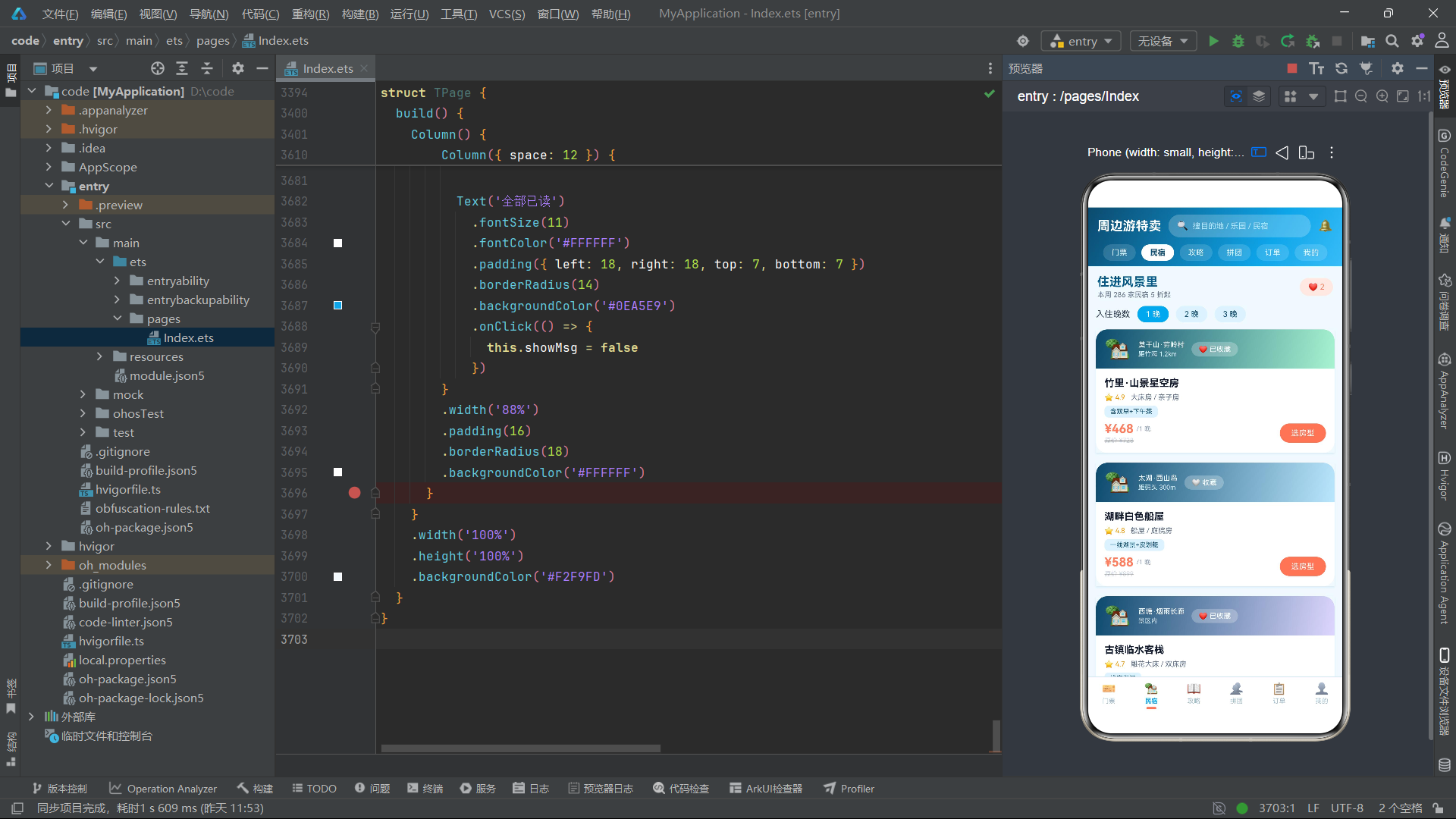
StayRow 接口定义了民宿住宿的数据结构。place 字段存储民宿所在地区(如"莫干山·劳岭村");dist 字段记录与景区的距离信息(如"距竹海 1.2km"),帮助用户评估住宿位置便利性;rooms 字段存储可用房型描述(如"大床房 / 亲子房"),在列表卡片上直接展示。tag 字段存储民宿特色标签如"含双早+下午茶""一线湖景+皮划艇"等,是吸引用户决策的重要信息。
2.5 攻略接口 GuideRow
interface GuideRow {
  id: number
  title: string
  author: string
  views: number
  likes: number
  days: string
  route: string
  color: string
  season: string
}
GuideRow 接口定义了旅游攻略的数据结构。author 字段存储作者昵称;views 和 likes 字段分别记录浏览量和点赞数,用于社交热度展示;days 字段存储行程天数(如"2 天"“1 晚”);route 字段是攻略路线的关键信息,采用"景点A → 景点B → 景点C → 景点D"的格式存储,全局函数 seg() 通过分割该字符串来提取各段路线;season 字段存储适宜季节(如"夏秋"“四季”),与季节筛选器 seasonHit 函数配合使用;color 字段用于攻略卡片的边框着色,实现视觉差异化。
2.6 拼团接口 GroupRow
interface GroupRow {
  id: number
  name: string
  spot: string
  price: number
  groupPrice: number
  total: number
  joined: number
  endIn: string
  color: string
  master: string
}
GroupRow 接口定义了拼团活动的数据结构。price 字段存储单买价格,groupPrice 字段存储拼团价格,两者的差值即为拼团优惠金额;total 字段记录成团所需人数,joined 字段记录已参团人数,这两个字段的比值用于计算拼团进度百分比;endIn 字段存储成团状态描述(如"还差 1 人"“已成团”),在 UI 上根据是否满员显示不同颜色;master 字段记录团长昵称,在拼团详情弹框中以"👑"头像标识展示。
2.7 订单接口 OrderRowT
interface OrderRowT {
  id: number
  name: string
  spot: string
  date: string
  price: number
  status: string
  num: number
  code: string
}
OrderRowT 接口定义了周边游订单的数据结构。status 字段存储订单状态,可能的值包括"待出行"“待使用”“待付款”“已完成”“退款/售后"等,这些值与 ORDER_FILTERS 数组中的筛选项一一对应;code 字段存储取票码(如"HW-8837”),在核销码弹框中以大字号、字母间距加宽的方式展示;date 字段存储出行或使用日期信息,不同状态的订单显示不同的日期文案。
2.8 二维码单元格接口 QrCell
interface QrCell {
  id: number
  on: boolean
}
QrCell 接口定义了伪二维码像素网格中每个单元格的数据结构。on 字段是布尔类型,true 表示该单元格为黑色(实心),false 表示为白色(空心)。整个二维码由 36 个 QrCell 组成,形成 6x6 的网格矩阵。在 build 方法中,通过 ForEach 遍历 QR_CELLS 数组,根据每个单元格的 on 值设置不同的 backgroundColor,从而渲染出类似真实二维码的视觉效果。
2.9 账单柱状图接口 TripBar
interface TripBar {
  month: string
  amount: number
}
TripBar 接口定义了出游账单柱状图中每个月份柱子的数据结构。month 字段存储月份名称(如"3月"“4月”),amount 字段存储该月的消费金额。全局函数 barHT 根据 amount 值计算柱子高度,当金额超过 1500 时柱子使用珊瑚橙渐变色,否则使用海洋蓝渐变色,实现高消费月份的视觉强调。
2.10 优惠券、菜单与导航接口
interface CouponRow {
id: number
title: string
amount: string
cond: string
expire: string
kind: string
}
icon: string
name: string
desc: string
color: string
}
interface TabMetaT {
name: string
icon: string
}
CouponRow 接口定义了优惠券数据结构,amount 字段以字符串形式存储金额(如"¥30"),kind 字段标识优惠券类别(“门票”“民宿”"通用"等),用于横向卡片的不同颜色边框渲染。MineMenuT 接口定义了"我的"页面功能宫格的每一项,icon 字段存储 emoji 图标,color 字段存储图标背景色。TabMetaT 接口定义了底部导航 Tab 的元数据,name 字段存储 Tab 名称,icon 字段存储对应的 emoji 图标。
三、全局常量与枚举分析
3.1 分类与规格常量
const CAT_CHIPS_T: string[] = ['主题乐园', '自然风光', '古镇水乡', '亲子农场', '温泉滑雪', '演出展览']

const TICKET_SPECS: string[] = ['成人票', '儿童票', '长者票', '学生票']

const ROOM_TYPES: string[] = ['星空大床房', '亲子双床房', '复式小院房']

const ORDER_FILTERS: string[] = ['全部', '待出行', '待使用', '待付款', '已完成', '退款/售后']
CAT_CHIPS_T 常量定义了门票分类的六个维度,覆盖了周边游的主要场景类型。该数组在 TicketTab 组件中通过 ForEach 渲染为横向可滑动的分类筛选 chips,选中第一个元素(索引 0)时表示"全部"分类,此时不做筛选过滤,展示所有门票商品。TICKET_SPECS 常量定义了四种票种规格,在规格选择弹框中通过 Flex 弹性布局换行排列,用户点击后更新 specIdx 状态变量。ROOM_TYPES 常量定义了三种民宿房型,每种房型在房型选择弹框中有对应的描述文案和价格递增规则(基础价格 + 房型索引 × 80 元)。ORDER_FILTERS 常量定义了订单列表的六个筛选维度,与 OrderRowT 接口的 status 字段值一一对应。
3.2 门票商品数据
const TICKET_GOODS: TicketGoods[] = [
  { id: 1, name: '云澜湾温泉双人套票', spot: '云澜湾温泉度假村', price: 128, originPrice: 256, sold: 12380, tag: '买一送一', score: '4.9', cat: '温泉滑雪', color: '#7DD3FC', city: '湖州' },
  { id: 2, name: '欢乐岛乐园全天通票', spot: '欢乐岛主题乐园', price: 199, originPrice: 330, sold: 8921, tag: '不限次入园', score: '4.8', cat: '主题乐园', color: '#FDBA74', city: '苏州' },
  { id: 3, name: '竹海漂流双人套票', spot: '南山竹海风景区', price: 168, originPrice: 280, sold: 6745, tag: '含往返接驳', score: '4.7', cat: '自然风光', color: '#86EFAC', city: '宜兴' },
  // ... 共 10 条门票数据
]
TICKET_GOODS 常量是门票 Tab 的核心数据源,包含 10 条门票商品数据。每条数据都精心设置了不同的 color 色值(如 #7DD3FC 浅蓝、#FDBA74 浅橙、#86EFAC 浅绿等),使得每个商品卡片在视觉上具有独特的色彩标识。cat 字段覆盖了 CAT_CHIPS_T 中的所有分类,确保筛选功能可以正常工作。price 与 originPrice 的比值大多在 0.4~0.6 之间,体现了"5 折起"的促销定位。
3.3 日期网格数据
const DATE_CELLS: DateCell[] = [
  { id: 1, day: '今天', date: '08/24', price: '¥88', left: 120, off: true },
  { id: 2, day: '周二', date: '08/25', price: '¥68', left: 200, off: false },
  { id: 3, day: '周三', date: '08/26', price: '¥68', left: 180, off: false },
  // ... 共 14 天日期数据
]
DATE_CELLS 常量定义了 14 天的日期选择数据,覆盖两周的时间范围。off 字段为 true 的日期(今天、周五、周六、周日)价格通常更高,体现了周末和节假日涨价的真实业务场景。left 字段记录剩余票量,周末的余票明显少于工作日,增强了紧迫感。该数据在 TicketTab 中以横向滚动 Scroll + Row 布局呈现,选中的日期单元格以海洋蓝实心背景突出显示。
3.4 民宿、攻略、拼团数据
const STAY_ROWS: StayRow[] = [
  { id: 1, name: '竹里·山景星空房', place: '莫干山·劳岭村', score: '4.9', price: 468, originPrice: 728, tag: '含双早+下午茶', dist: '距竹海 1.2km', color: '#A7F3D0', rooms: '大床房 / 亲子房' },
  // ... 共 6 条民宿数据
]

const GUIDE_ROWS: GuideRow[] = [
  { id: 1, title: '莫干山 2 天 1 夜避坑路线', author: '背包客小鹿', views: 128600, likes: 8642, days: '2 天', route: '竹海 → 剑池 → 芦花荡 → 篝火', color: '#86EFAC', season: '夏秋' },
  // ... 共 6 条攻略数据
]

const GROUP_ROWS: GroupRow[] = [
  { id: 1, name: '云澜湾温泉双人拼团', spot: '云澜湾温泉度假村', price: 128, groupPrice: 99, total: 4, joined: 3, endIn: '还差 1 人', color: '#7DD3FC', master: '柠檬不酸' },
  // ... 共 6 条拼团数据
]
这三个常量数组分别定义了民宿、攻略和拼团的数据源。STAY_ROWS 包含 6 条精选民宿数据,每条数据都有独特的 tag 标签和 rooms 房型描述。GUIDE_ROWS 包含 6 条攻略数据,route 字段采用"→"分隔符存储路线节点,配合全局函数 seg() 实现路线分段展示。GROUP_ROWS 包含 6 条拼团数据,其中第 4 条(西塘夜游闺蜜拼)的 joined 等于 total,状态为"已成团",用于展示满员拼团的 UI 状态。
3.5 二维码与柱状图数据
const QR_CELLS: QrCell[] = [
  { id: 1, on: true }, { id: 2, on: true }, { id: 3, on: false }, { id: 4, on: true }, { id: 5, on: true }, { id: 6, on: false },
  { id: 7, on: true }, { id: 8, on: false }, { id: 9, on: true }, { id: 10, on: false }, { id: 11, on: true }, { id: 12, on: true },
  { id: 13, on: false }, { id: 14, on: true }, { id: 15, on: true }, { id: 16, on: true }, { id: 17, on: false }, { id: 18, on: true },
  { id: 19, on: true }, { id: 20, on: true }, { id: 21, on: false }, { id: 22, on: true }, { id: 23, on: false }, { id: 24, on: true },
  { id: 25, on: false }, { id: 26, on: true }, { id: 27, on: true }, { id: 28, on: false }, { id: 29, on: true }, { id: 30, on: false },
  { id: 31, on: true }, { id: 32, on: true }, { id: 33, on: false }, { id: 34, on: true }, { id: 35, on: true }, { id: 36, on: false }
]

const TRIP_BARS: TripBar[] = [
  { month: '3月', amount: 680 },
  { month: '4月', amount: 1240 },
  { month: '5月', amount: 890 },
  { month: '6月', amount: 1560 },
  { month: '7月', amount: 2180 },
  { month: '8月', amount: 1940 }
]
QR_CELLS 常量定义了 36 个二维码单元格数据,形成 6x6 的伪二维码矩阵。在 build 方法中,通过 Flex 组件的 FlexWrap.Wrap 换行布局,将 36 个单元格排列为 6 行 6 列的网格。每个单元格根据 on 值渲染为深色(#075985)或白色背景,模拟真实二维码的视觉外观。TRIP_BARS 常量定义了近 6 个月的出游消费数据,7 月份消费最高(2180 元),3 月份最低(680 元),柱状图通过 barHT 函数将金额映射为像素高度。
3.6 优惠券、菜单与导航常量
const COUPON_ROWS: CouponRow[] = [
  { id: 1, title: '周边游立减券', amount: '¥30', cond: '满 199 可用', expire: '09/30 前有效', kind: '门票' },
  { id: 2, title: '民宿满减券', amount: '¥80', cond: '满 499 可用', expire: '10/07 前有效', kind: '民宿' },
  // ... 共 4 条优惠券数据
]

const MINE_MENUS_T: MineMenuT[] = [
  { id: 1, icon: '🎫', name: '我的门票', desc: '3 张待使用', color: '#0EA5E9' },
  { id: 2, icon: '🏠', name: '我的民宿', desc: '1 个待入住', color: '#FF7E5F' },
  // ... 共 6 个菜单项
]

const MAIN_TABS_T: TabMetaT[] = [
  { name: '门票', icon: '🎫' },
  { name: '民宿', icon: '🏡' },
  { name: '攻略', icon: '📖' },
  { name: '拼团', icon: '👥' },
  { name: '订单', icon: '📋' },
  { name: '我的', icon: '👤' }
]
COUPON_ROWS 定义了 4 张优惠券数据,kind 字段区分"门票"“民宿”"通用"等类别,在横滑卡片中根据 kind 值渲染不同的边框颜色。MINE_MENUS_T 定义了 6 个功能菜单项,每个项都有独特的 emoji 图标和主题色。MAIN_TABS_T 定义了底部导航的 6 个 Tab 元数据,该数组同时在顶部频道 pill 和底部导航栏两处使用,实现了数据源的复用。
四、全局纯函数分析
4.1 百分比计算函数 pctW
function pctW(a: number, b: number): string {
  return ((a / b) * 100).toFixed(0) + '%'
}
pctW 函数接收两个数值参数 a 和 b,计算 a 占 b 的百分比并以字符串形式返回结果(如"75%")。该函数主要用于拼团进度条的可视化渲染——在 GroupTab 组件中,拼团进度条的填充宽度通过 pctW(g.joined, g.total) 计算得出,即将已参团人数除以成团总人数得到进度百分比。函数内部先进行除法运算得到小数形式的百分比,乘以 100 后使用 toFixed(0) 取整,最后拼接百分号返回。这种将数值计算封装为纯函数的设计方式提高了代码的可读性和复用性。
4.2 柱状图高度函数 barHT
function barHT(v: number): number {
  return (v / 2400) * 110
}
barHT 函数将消费金额映射为柱状图柱子的像素高度。函数以 2400 作为参考最大值(略高于数据中的最大值 2180),将输入金额 v 除以 2400 后乘以 110,得到 0~110 像素范围内的高度值。这种归一化映射方式确保了所有柱子的高度都在合理范围内,最大值对应的柱子高度约为 100 像素,不会超出容器边界。在 TMineTab 组件的出游账单柱状图中,每个柱子的高度通过 barHT(b.amount) 计算得出,并根据金额是否超过 1500 选择不同的渐变色方案。
4.3 路线分段函数 seg
function seg(route: string, idx: number): string {
  return route.split(' → ')[idx]
}
seg 函数是攻略路线分段展示的核心工具函数。它接收完整的路线字符串 route 和段索引 idx 作为参数,先以" → “(箭头前后各有一个空格)为分隔符将路线字符串拆分为数组,然后返回指定索引位置的路线段。例如,对于路线"竹海 → 剑池 → 芦花荡 → 篝火”,seg(route, 0) 返回"竹海",seg(route, 1) 返回"剑池",以此类推。在 GuideTab 组件的攻略详情弹框中,该函数被调用四次,分别提取 D1 上午、D1 下午、D2 全天和傍晚四个时段的路线节点,以不同背景色的卡片逐段展示行程安排。
4.4 日期截取函数 dayOf
function dayOf(d: string): string {
  return d.substring(3)
}
dayOf 函数从格式化的日期字符串中提取日期部分。对于输入"08/26",函数从索引 3 开始截取子字符串,返回"26"。该函数在行程清单弹框中使用,将日期"08/26"截取为"26"后显示在行程卡片的日期徽章上,以更简洁的形式呈现出行日期信息。
4.5 季节匹配函数 seasonHit
function seasonHit(season: string, idx: number): boolean {
  const arr: string[] = ['全部', '春', '夏', '秋', '冬']
  return season.indexOf(arr[idx]) >= 0
}
seasonHit 函数用于攻略列表的季节筛选逻辑。函数内部定义了季节映射数组 arr,将筛选索引映射为季节字符。当 idx 为 0 时,arr[0] 为"全部",由于任何字符串都包含空子串但这里"全部"是一个特定字符串,实际上 season 字段不太可能包含"全部"二字,因此 idx 为 0 时在 GuideTab 中不做筛选(通过 if 条件判断直接通过)。当 idx 为 1~4 时,分别检查攻略的 season 字段是否包含"春"“夏”“秋”"冬"字符。例如,season 值为"夏秋"时,idx 为 2(夏)或 3(秋)均返回 true,idx 为 1(春)或 4(冬)返回 false。这种设计使得一条攻略可以匹配多个季节,提高了筛选的灵活性。
五、各 Tab 组件深度分析
5.1 门票组件 TicketTab
5.1.1 状态变量与关键方法
@Component
export struct TicketTab {
  @State dateIdx: number = 0
  @State catIdxT: number = 0
  @State specIdx: number = 0
  @State specNum: number = 1
  @State curTicket: TicketGoods = TICKET_GOODS[0]
  @State tripList: TripRow[] = [
    { id: 1, name: '水乡乌篷船夜游票', spec: '成人票', date: '08/26', price: 88, num: 2 },
    { id: 2, name: '国风灯会夜场票', spec: '成人票', date: '08/27', price: 68, num: 1 }
  ]
  @State showSpec: boolean = false
  @State showTrip: boolean = false
  @State showCalendar: boolean = false

  addToTrip() {
    const t: TicketGoods = this.curTicket
    const d: DateCell = DATE_CELLS[this.dateIdx]
    const r: TripRow[] = []
    for (let i = 0; i < this.tripList.length; i++) {
      r.push(this.tripList[i])
    }
    r.push({ id: this.tripList.length + 1, name: t.name, spec: TICKET_SPECS[this.specIdx], date: d.date, price: t.price, num: this.specNum })
    this.tripList = r
    this.showSpec = false
  }

  removeTrip(id: number) {
    const r: TripRow[] = []
    for (let i = 0; i < this.tripList.length; i++) {
      if (this.tripList[i].id !== id) {
        r.push(this.tripList[i])
      }
    }
    this.tripList = r
  }

  changeTripNum(id: number, delta: number) {
    const r: TripRow[] = []
    for (let i = 0; i < this.tripList.length; i++) {
      if (this.tripList[i].id === id) {
        const n: number = this.tripList[i].num + delta
        if (n > 0) {
          r.push({ id: this.tripList[i].id, name: this.tripList[i].name, spec: this.tripList[i].spec, date: this.tripList[i].date, price: this.tripList[i].price, num: n })
        }
      } else {
        r.push(this.tripList[i])
      }
    }
    this.tripList = r
  }

  tripTotal(): number {
    let s: number = 0
    for (let i = 0; i < this.tripList.length; i++) {
      s = s + this.tripList[i].price * this.tripList[i].num
    }
    return s
  }
}
TicketTab 组件维护了 9 个 @State 状态变量。dateIdx 记录选中的日期索引,默认为 0(今天);catIdxT 记录选中的分类索引,默认为 0(全部);specIdx 记录选中的票种索引;specNum 记录购买数量,默认为 1;curTicket 记录当前选中的门票商品实例;tripList 是行程清单数组,初始包含两条预设数据。
addToTrip 方法是行程清单的"创建"操作,它从 curTicket 获取门票信息、从 DATE_CELLS 获取日期信息、从 TICKET_SPECS 获取票种信息,组装为新的 TripRow 对象后追加到行程清单末尾。整个方法采用不可变更新模式——先创建空数组 r,遍历原数组将所有元素推入 r,最后 push 新元素并整体赋值给 this.tripList。
removeTrip 方法通过 id 过滤实现"删除"操作,遍历原数组时跳过 id 匹配的元素。changeTripNum 方法实现数量调整的"更新"操作,当目标行的 num 加上 delta 后仍大于 0 时更新数量,否则从数组中移除(自然删除)。tripTotal 方法遍历行程清单累加每行的 price 乘以 num,返回总金额。
5.1.2 build 方法关键代码段
build() {
  Scroll() {
    Column() {
      // 特卖 banner
      Column() {
        Row({ space: 10 }) {
          Column({ space: 4 }) {
            Text('周末周边游')
              .fontSize(20)
              .fontWeight(FontWeight.Bold)
              .fontColor('#FFFFFF')
            Text('限时 5 折起 · 今晚 24 点结束')
              .fontSize(11)
              .fontColor('#FFE4D6')
          }
          .alignItems(HorizontalAlign.Start)
          .layoutWeight(1)

          Text('🏖️')
            .fontSize(34)
        }
        .width('100%')

        Row({ space: 8 }) {
          Text('温泉')
            .fontSize(10)
            .fontColor('#0C4A6E')
            .padding({ left: 10, right: 10, top: 4, bottom: 4 })
            .borderRadius(10)
            .backgroundColor('#BAE6FD')
          // ... 更多标签
        }
        .width('100%')
        .margin({ top: 10 })
      }
      .width('100%')
      .padding(16)
      .borderRadius(16)
      .linearGradient({
        angle: 135,
        colors: [['#0369A1', 0], ['#0EA5E9', 0.6], ['#FF7E5F', 1]]
      })
      .shadow({
        radius: 12,
        color: 'rgba(14,165,233,0.35)',
        offsetX: 0,
        offsetY: 6
      })
build 方法以 Scroll 组件作为根容器,内部 Column 垂直排列各个功能区块。顶部特卖 banner 使用 linearGradient 渐变背景,从深蓝(#0369A1)过渡到海洋蓝(#0EA5E9)再到珊瑚橙(#FF7E5F),角度为 135 度对角渐变。banner 内部左侧展示标题和副标题,右侧放置 emoji 图标。底部一行展示四个分类标签 chips,每个标签使用不同的背景色和文字颜色,实现视觉差异化。
      // 日期横滑
      Row({ space: 8 }) {
        Text('出行日期')
          .fontSize(13)
          .fontWeight(FontWeight.Bold)
          .fontColor('#075985')
        Text('节假日涨价,错峰更省')
          .fontSize(10)
          .fontColor('#94A3B8')
        Text('日历')
          .fontSize(10)
          .fontColor('#FF7E5F')
          .padding({ left: 8, right: 8, top: 2, bottom: 2 })
          .borderRadius(8)
          .backgroundColor('#FFE9E3')
          .onClick(() => {
            this.showCalendar = true
          })
      }
      .width('100%')
      .margin({ top: 12, bottom: 8 })

      Scroll() {
        Row({ space: 8 }) {
          ForEach(DATE_CELLS, (d: DateCell, i: number) => {
            Column({ space: 3 }) {
              Text(d.day)
                .fontSize(10)
                .fontColor(this.dateIdx === i ? '#FFFFFF' : (d.off ? '#FF7E5F' : '#64748B'))
              Text(d.date)
                .fontSize(12)
                .fontWeight(FontWeight.Bold)
                .fontColor(this.dateIdx === i ? '#FFFFFF' : '#0F172A')
              Text(d.price)
                .fontSize(10)
                .fontColor(this.dateIdx === i ? '#FFE4D6' : '#0EA5E9')
              Text('余 ' + d.left.toString())
                .fontSize(8)
                .fontColor(this.dateIdx === i ? '#BAE6FD' : '#94A3B8')
            }
            .width(62)
            .padding({ top: 8, bottom: 8 })
            .borderRadius(12)
            .alignItems(HorizontalAlign.Center)
            .backgroundColor(this.dateIdx === i ? '#0EA5E9' : '#FFFFFF')
            .shadow({
              radius: this.dateIdx === i ? 8 : 2,
              color: 'rgba(2,132,199,0.18)',
              offsetX: 0,
              offsetY: 2
            })
            .onClick(() => {
              this.dateIdx = i
            })
          }, (d: DateCell) => d.id.toString())
        }
        .padding({ left: 2, right: 2 })
      }
      .scrollable(ScrollDirection.Horizontal)
      .scrollBar(BarState.Off)
      .width('100%')
日期横滑区域是 TicketTab 的核心交互组件之一。日期标题行右侧的"日历"按钮点击后弹出日历价格弹框(showCalendar)。日期横滑器使用 Scroll + Row 布局,通过 ForEach 遍历 DATE_CELLS 数组渲染 14 个日期单元格。每个单元格包含四行文字:星期/日期/价格/余票。选中状态(dateIdx === i)时单元格背景为海洋蓝实心,文字为白色;未选中时背景为白色,日期文字为深色,价格文字为海洋蓝,余票文字为灰色。值得注意的是,未选中状态下如果该日期是休息日(d.off 为 true),星期文字显示珊瑚橙色,提示用户这是高价日。选中状态下的阴影半径(8)明显大于未选中状态(2),增强了选中视觉反馈。
5.1.3 规格选择弹框
      // 规格弹框(底部抽屉样式)
      if (this.showSpec) {
        modalOverlay(() => {
          this.showSpec = false
        })
        Column({ space: 14 }) {
          Column()
            .width(44)
            .height(4)
            .borderRadius(2)
            .backgroundColor('#CBD5E1')

          Text(this.curTicket.name)
            .fontSize(15)
            .fontWeight(FontWeight.Bold)
            .fontColor('#0F172A')

          Text(this.curTicket.spot + ' · 随买随用 · 无需取票')
            .fontSize(10)
            .fontColor('#64748B')

          Column({ space: 8 }) {
            Text('选择票种')
              .fontSize(11)
              .fontWeight(FontWeight.Bold)
              .fontColor('#075985')
              .width('100%')
            Flex({ wrap: FlexWrap.Wrap, direction: FlexDirection.Row }) {
              ForEach(TICKET_SPECS, (s: string, i: number) => {
                Text(s)
                  .fontSize(11)
                  .fontColor(this.specIdx === i ? '#FFFFFF' : '#0C4A6E')
                  .padding({ left: 14, right: 14, top: 6, bottom: 6 })
                  .borderRadius(12)
                  .backgroundColor(this.specIdx === i ? '#0EA5E9' : '#E0F2FE')
                  .margin(4)
                  .onClick(() => {
                    this.specIdx = i
                  })
              }, (s: string) => s)
            }
            .width('100%')
          }
          .width('100%')
规格弹框采用底部抽屉样式,首先渲染 modalOverlay 遮罩层,然后渲染弹框主体。弹框顶部的小灰条(44x4 像素圆角矩形)是底部抽屉的标准视觉元素,暗示用户可以下拉关闭。弹框展示当前选中门票的名称和景区信息,下方通过 Flex 弹性布局换行排列四种票种选项。票种选中时背景为海洋蓝实心,未选中时为浅蓝背景。数量选择器采用减号/数字/加号的水平排列,减号按钮背景为浅蓝,加号按钮背景为浅橙,形成颜色对比。底部展示总价和节省金额,右侧的"加入行程"按钮使用海洋蓝到珊瑚橙的渐变背景,点击后调用 addToTrip 方法将行程加入清单。
5.2 民宿组件 StayTab
@Component
export struct StayTab {
  @State favIds: number[] = [1, 3]
  @State nightIdx: number = 1
  @State roomIdx: number = 0
  @State curStay: StayRow = STAY_ROWS[0]
  @State showRoom: boolean = false
  @State showBook: boolean = false
  @State showFav: boolean = false
  @State showHouseRule: boolean = false

  toggleFav(id: number) {
    const r: number[] = []
    let found: boolean = false
    for (let i = 0; i < this.favIds.length; i++) {
      if (this.favIds[i] === id) {
        found = true
      } else {
        r.push(this.favIds[i])
      }
    }
    if (!found) {
      r.push(id)
    }
    this.favIds = r
  }
StayTab 组件维护了 8 个状态变量。favIds 是收藏的民宿 id 数组,初始包含 id 为 1 和 3 的两条收藏;nightIdx 记录入住晚数,默认为 1 晚;roomIdx 记录选中的房型索引。toggleFav 方法实现收藏的切换逻辑——遍历 favIds 数组,如果找到目标 id 则设 found 为 true 并跳过该元素(取消收藏),如果未找到则将 id 追加到数组末尾(添加收藏)。这种"存在则移除、不存在则添加"的切换模式是收藏功能的经典实现。
民宿列表卡片采用上下大卡布局,顶部是带渐变背景的图片区域,底部是白色背景的信息区域。价格计算采用动态模式:显示价格 = 民宿基础价格 × 入住晚数(nightIdx),原价同理。房型选择弹框中,三种房型的价格递增规则为基础价格 + 房型索引 × 80 元,选中状态通过边框宽度和背景色变化来区分。
5.3 攻略组件 GuideTab
@Component
export struct GuideTab {
  @State likedIds: number[] = [1]
  @State curGuide: GuideRow = GUIDE_ROWS[0]
  @State showGuideDetail: boolean = false
  @State showComment: boolean = false
  @State seasonIdx: number = 0

  toggleLike(id: number) {
    const r: number[] = []
    let found: boolean = false
    for (let i = 0; i < this.likedIds.length; i++) {
      if (this.likedIds[i] === id) {
        found = true
      } else {
        r.push(this.likedIds[i])
      }
    }
    if (!found) {
      r.push(id)
    }
    this.likedIds = r
  }
GuideTab 组件维护了 5 个状态变量。likedIds 是已点赞攻略的 id 数组,初始包含 id 为 1 的攻略。seasonIdx 记录选中的季节筛选索引,默认为 0(全部)。toggleLike 方法与 StayTab 的 toggleFav 方法逻辑完全一致,实现点赞的切换。
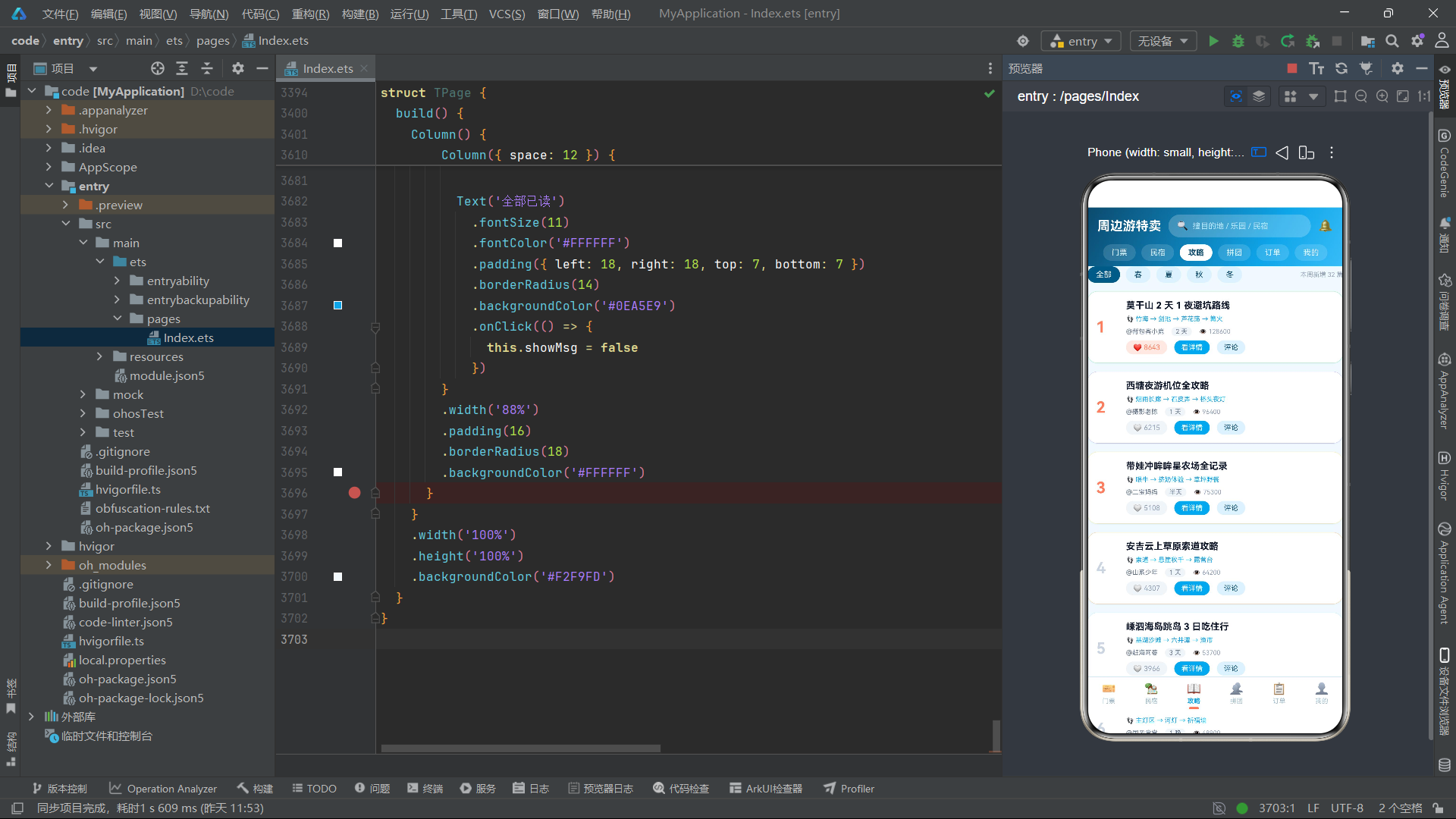
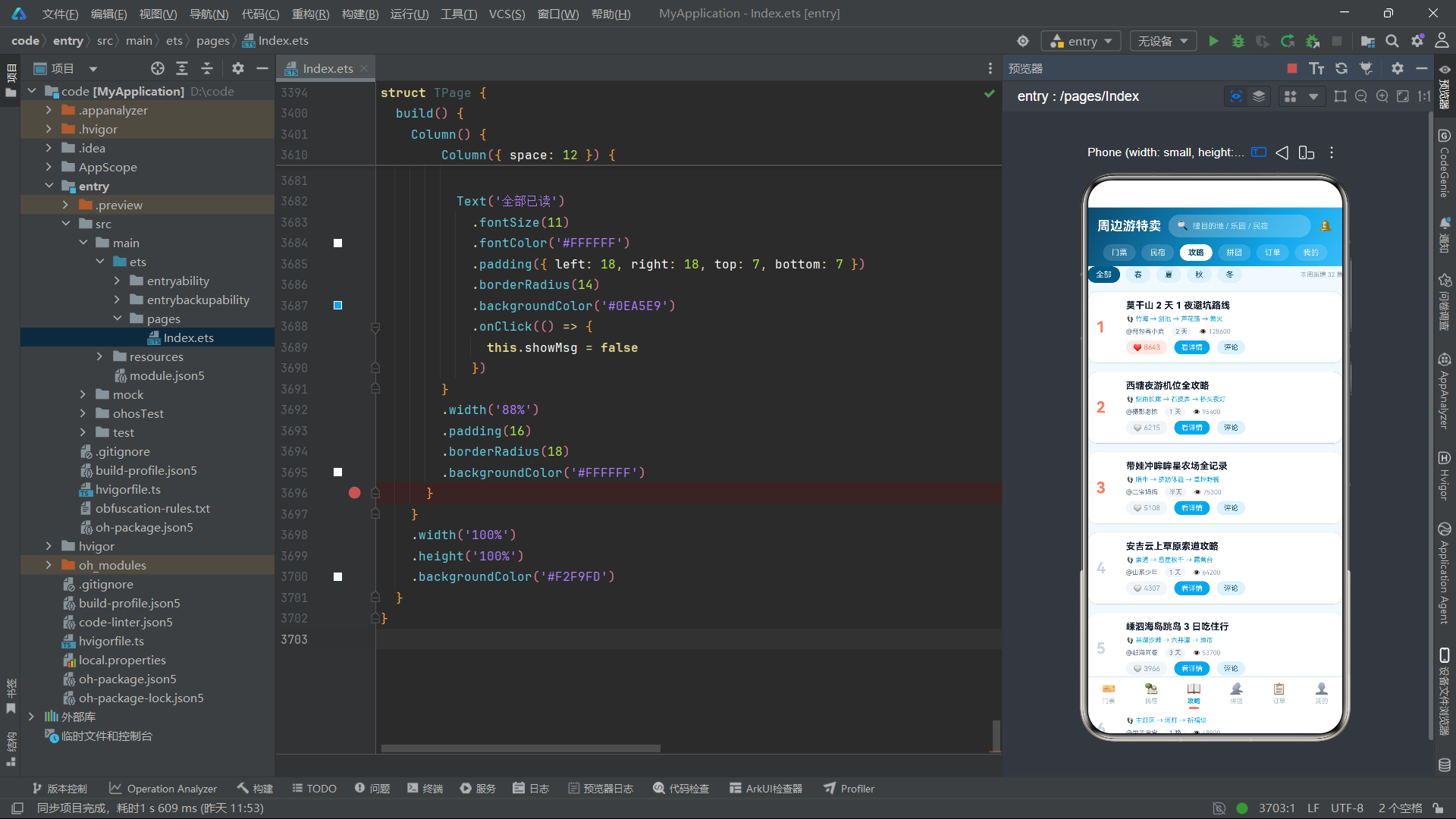
攻略列表采用编号榜单样式,前三名(i < 3)的编号显示珊瑚橙色,其余显示灰色。每条攻略卡片的边框使用 g.color 着色,实现视觉差异化。季节筛选器是 5 个水平排列的 chips(全部/春/夏/秋/冬),选中时背景为深蓝。筛选逻辑通过 if 条件判断实现:当 seasonIdx 为 0 时展示所有攻略,否则通过 seasonHit 函数判断攻略的 season 字段是否包含当前选中的季节。
攻略详情弹框采用时间线样式,通过 seg 函数将 route 字符串分割为四段,分别以"D1 上午"“D1 下午”“D2 全天”"傍晚"为标题,配合不同背景色的卡片逐段展示。评论弹框以对话气泡样式展示热门评论,每条评论由 emoji 头像、昵称和评论内容组成。
5.4 拼团组件 GroupTab
@Component
export struct GroupTab {
  @State groupList: GroupRow[] = [
    { id: 1, name: '云澜湾温泉双人拼团', spot: '云澜湾温泉度假村', price: 128, groupPrice: 99, total: 4, joined: 3, endIn: '还差 1 人', color: '#7DD3FC', master: '柠檬不酸' },
    // ... 共 6 条拼团数据(与 GROUP_ROWS 相同但为组件内部状态)
  ]
  @State curGroup: GroupRow = GROUP_ROWS[0]
  @State showJoin: boolean = false
  @State showCreate: boolean = false
  @State showRule: boolean = false
  @State showDetail: boolean = false

  joinGroup() {
    const r: GroupRow[] = []
    for (let i = 0; i < this.groupList.length; i++) {
      if (this.groupList[i].id === this.curGroup.id) {
        const nj: number = this.groupList[i].joined + 1
        const done: boolean = nj >= this.groupList[i].total
        r.push({
          id: this.groupList[i].id,
          name: this.groupList[i].name,
          spot: this.groupList[i].spot,
          price: this.groupList[i].price,
          groupPrice: this.groupList[i].groupPrice,
          total: this.groupList[i].total,
          joined: nj,
          endIn: done ? '已成团' : '还差 ' + (this.groupList[i].total - nj).toString() + ' 人',
          color: this.groupList[i].color,
          master: this.groupList[i].master
        })
      } else {
        r.push(this.groupList[i])
      }
    }
    this.groupList = r
    this.showJoin = false
  }

  createGroup(name: string, spot: string, groupPrice: number, total: number) {
    const r: GroupRow[] = []
    for (let i = 0; i < this.groupList.length; i++) {
      r.push(this.groupList[i])
    }
    r.unshift({
      id: this.groupList.length + 1,
      name: name,
      spot: spot,
      price: groupPrice + 60,
      groupPrice: groupPrice,
      total: total,
      joined: 1,
      endIn: '还差 ' + (total - 1).toString() + ' 人',
      color: '#FF7E5F',
      master: '我'
    })
    this.groupList = r
    this.showCreate = false
  }
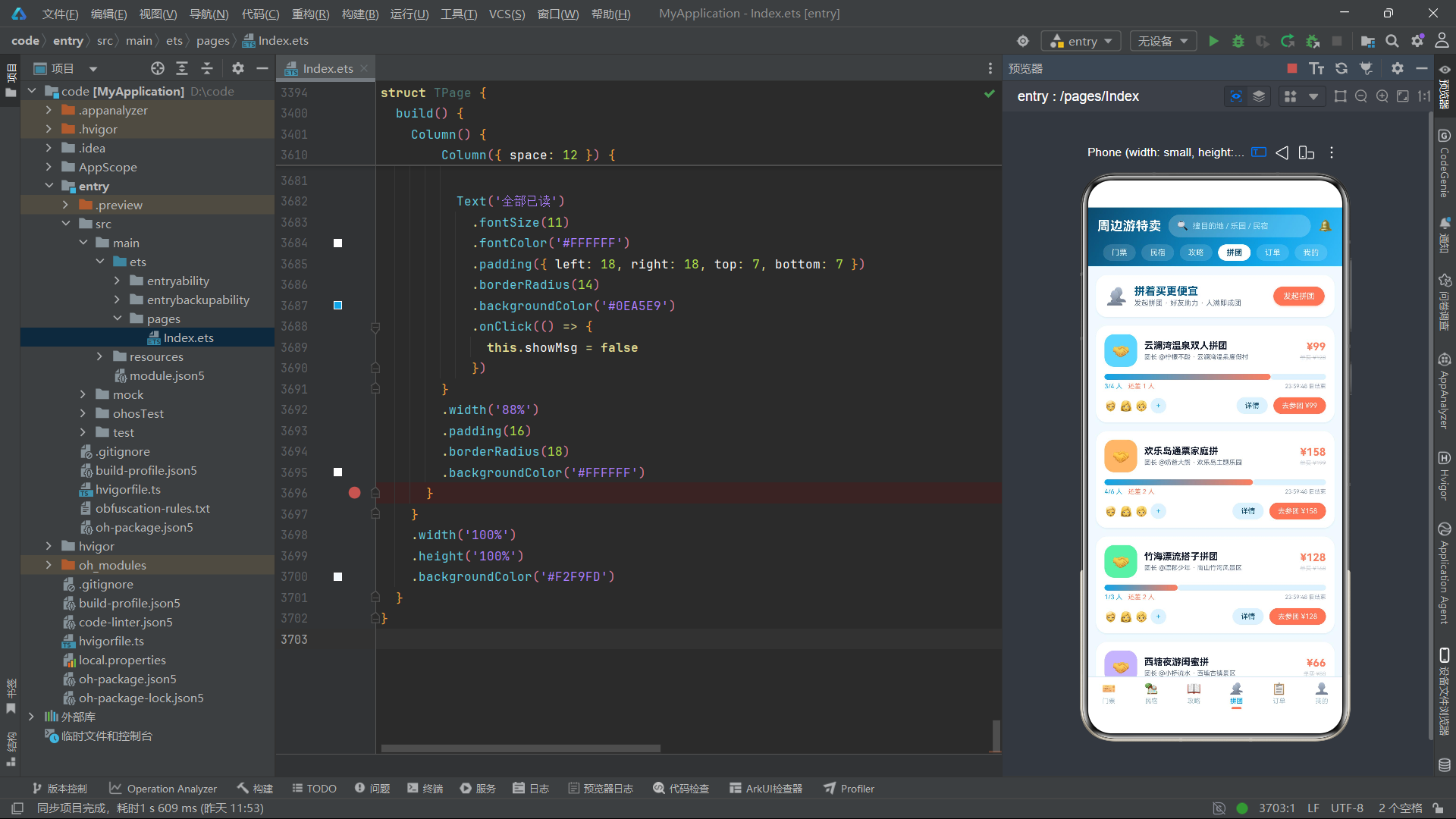
GroupTab 组件是拼团功能的核心组件,维护了 6 个状态变量。groupList 是组件内部的拼团数据数组(从 GROUP_ROWS 复制),支持动态修改。joinGroup 方法实现参团操作——遍历 groupList 找到目标拼团,将 joined 加 1,同时更新 endIn 状态文案。当 nj(新参团人数)大于等于 total(成团人数)时,endIn 更新为"已成团",UI 上的按钮也会从"去参团"变为"已满员"。
createGroup 方法实现发起拼团操作,接收拼团名称、目的地、拼团价和成团人数四个参数。新拼团的 price(单买价)设为 groupPrice + 60,体现拼团优惠力度。新拼团使用 unshift 方法插入到数组头部,使其在列表中排名第一,master 设为"我",color 设为珊瑚橙(#FF7E5F)作为视觉标识。
拼团列表卡片的核心视觉元素是进度条,通过 pctW(g.joined, g.total) 计算填充宽度,使用海洋蓝到珊瑚橙的渐变色。进度条下方显示"3/4 人"的人数比和"还差 1 人"的状态文案,当已成团时状态文案变为绿色。头像排区域展示 3 个固定头像和动态的"+"占位符(仅在未满员时显示)。
5.5 订单组件 TOrderTab
@Component
export struct TOrderTab {
  @State orderList: OrderRowT[] = [
    { id: 1, name: '云澜湾温泉双人套票', spot: '云澜湾温泉度假村', date: '08/29 出行', price: 128, status: '待出行', num: 2, code: 'HW-8837' },
    // ... 共 6 条订单数据
  ]
  @State filterIdx: number = 0
  @State curOrder: OrderRowT = ORDER_ROWS_T[0]
  @State showQr: boolean = false
  @State showCancel: boolean = false
  @State showRefund: boolean = false
  @State showPay: boolean = false

  cancelOrder() {
    const r: OrderRowT[] = []
    for (let i = 0; i < this.orderList.length; i++) {
      if (this.orderList[i].id === this.curOrder.id) {
        r.push({
          id: this.orderList[i].id,
          name: this.orderList[i].name,
          spot: this.orderList[i].spot,
          date: '已取消',
          price: this.orderList[i].price,
          status: '退款/售后',
          num: this.orderList[i].num,
          code: this.orderList[i].code
        })
      } else {
        r.push(this.orderList[i])
      }
    }
    this.orderList = r
    this.showCancel = false
  }

  payOrder() {
    const r: OrderRowT[] = []
    for (let i = 0; i < this.orderList.length; i++) {
      if (this.orderList[i].id === this.curOrder.id) {
        r.push({
          id: this.orderList[i].id,
          name: this.orderList[i].name,
          spot: this.orderList[i].spot,
          date: this.orderList[i].date.replace('使用', '出行'),
          price: this.orderList[i].price,
          status: '待出行',
          num: this.orderList[i].num,
          code: this.orderList[i].code
        })
      } else {
        r.push(this.orderList[i])
      }
    }
    this.orderList = r
    this.showPay = false
  }

  statusColor(s: string): string {
    if (s === '待出行') {
      return '#0EA5E9'
    }
    if (s === '待使用') {
      return '#FF7E5F'
    }
    if (s === '待付款') {
      return '#F59E0B'
    }
    if (s === '已完成') {
      return '#10B981'
    }
    return '#94A3B8'
  }
TOrderTab 组件维护了 7 个状态变量。orderList 是组件内部的订单数据数组,支持状态变更。cancelOrder 方法将目标订单的状态修改为"退款/售后",日期修改为"已取消"。payOrder 方法将"待付款"订单的状态修改为"待出行",同时将日期文案中的"使用"替换为"出行"。statusColor 方法是一个颜色映射工具,根据订单状态返回对应的主题色——待出行返回海洋蓝、待使用返回珊瑚橙、待付款返回琥珀色、已完成返回绿色、退款返回灰色。
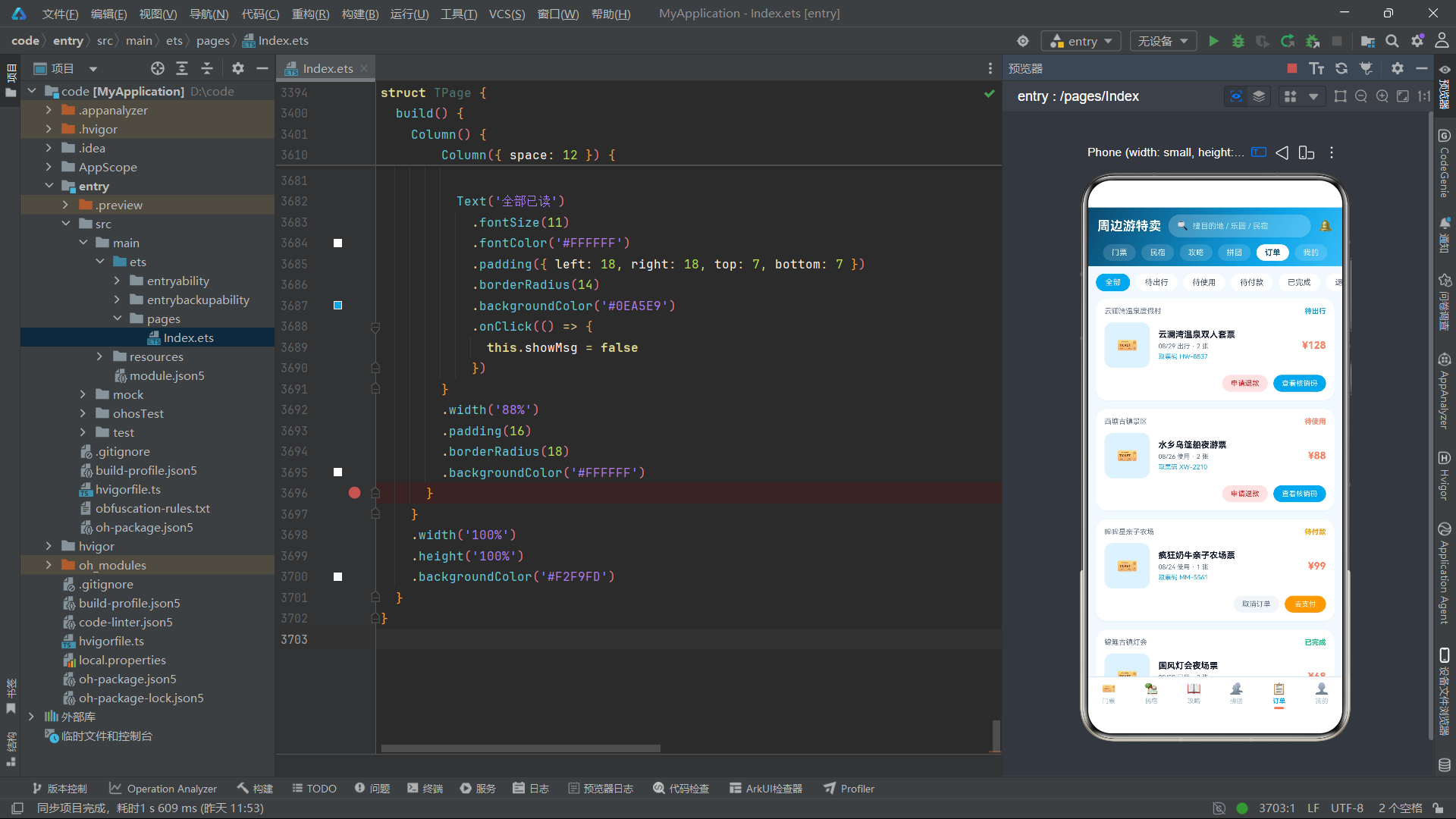
订单列表的筛选逻辑通过 if 条件判断实现:当 filterIdx 为 0(全部)时展示所有订单,否则仅展示 status 与 ORDER_FILTERS[filterIdx] 匹配的订单。不同状态的订单显示不同的操作按钮——待付款订单显示"取消订单"和"去支付",待使用/待出行订单显示"申请退款"和"查看核销码",已完成订单显示"再来一单"。
核销码弹框是该组件的特色功能,通过 ForEach 遍历 QR_CELLS 数组,以 Flex 弹性换行布局渲染 36 个单元格,每个单元格根据 on 值设置深色或白色背景,形成 6x6 的伪二维码矩阵。二维码下方以大字号、字母间距加宽(letterSpacing: 3)的方式展示取票码,并提示"30 秒自动刷新"。
5.6 我的组件 TMineTab
@Component
export struct TMineTab {
  @State showCoupon: boolean = false
  @State showService: boolean = false
  @State showSetting: boolean = false
  @State showMap: boolean = false

  build() {
    Scroll() {
      Column() {
        // 渐变会员头部
        Column({ space: 12 }) {
          Row({ space: 12 }) {
            Column() {
              Text('🧭')
                .fontSize(28)
            }
            .width(58)
            .height(58)
            .borderRadius(29)
            .justifyContent(FlexAlign.Center)
            .backgroundColor('rgba(255,255,255,0.28)')
            .shadow({
              radius: 8,
              color: 'rgba(7,89,133,0.35)',
              offsetX: 0,
              offsetY: 3
            })

            Column({ space: 3 }) {
              Text('云上飞鸟')
                .fontSize(17)
                .fontWeight(FontWeight.Bold)
                .fontColor('#FFFFFF')
              Text('Lv.6 旅行家 · 已解锁 9 座城市')
                .fontSize(10)
                .fontColor('#BAE6FD')
            }
            .alignItems(HorizontalAlign.Start)
            .layoutWeight(1)

            Text('签到')
              .fontSize(10)
              .fontColor('#FFFFFF')
              .padding({ left: 12, right: 12, top: 5, bottom: 5 })
              .borderRadius(12)
              .backgroundColor('rgba(255,255,255,0.25)')
          }
          .width('100%')

          // 数据三格
          Row({ space: 0 }) {
            Column({ space: 2 }) {
              Text('2860')
                .fontSize(15)
                .fontWeight(FontWeight.Bold)
                .fontColor('#FFE4D6')
              Text('出游里程 km')
                .fontSize(9)
                .fontColor('#BAE6FD')
            }
            .layoutWeight(1)

            Column()
              .width(1)
              .height(26)
              .backgroundColor('rgba(255,255,255,0.3)')

            Column({ space: 2 }) {
              Text('4')
                .fontSize(15)
                .fontWeight(FontWeight.Bold)
                .fontColor('#FFE4D6')
              Text('可用优惠券')
                .fontSize(9)
                .fontColor('#BAE6FD')
            }
            .layoutWeight(1)
            .onClick(() => {
              this.showCoupon = true
            })
            // ... 第三格
          }
          .width('100%')
          .padding({ top: 10, bottom: 10 })
          .borderRadius(14)
          .backgroundColor('rgba(255,255,255,0.14)')
        }
        .width('100%')
        .padding(16)
        .borderRadius({ bottomLeft: 22, bottomRight: 22 })
        .linearGradient({
          angle: 140,
          colors: [['#075985', 0], ['#0EA5E9', 0.55], ['#FF7E5F', 1]]
        })
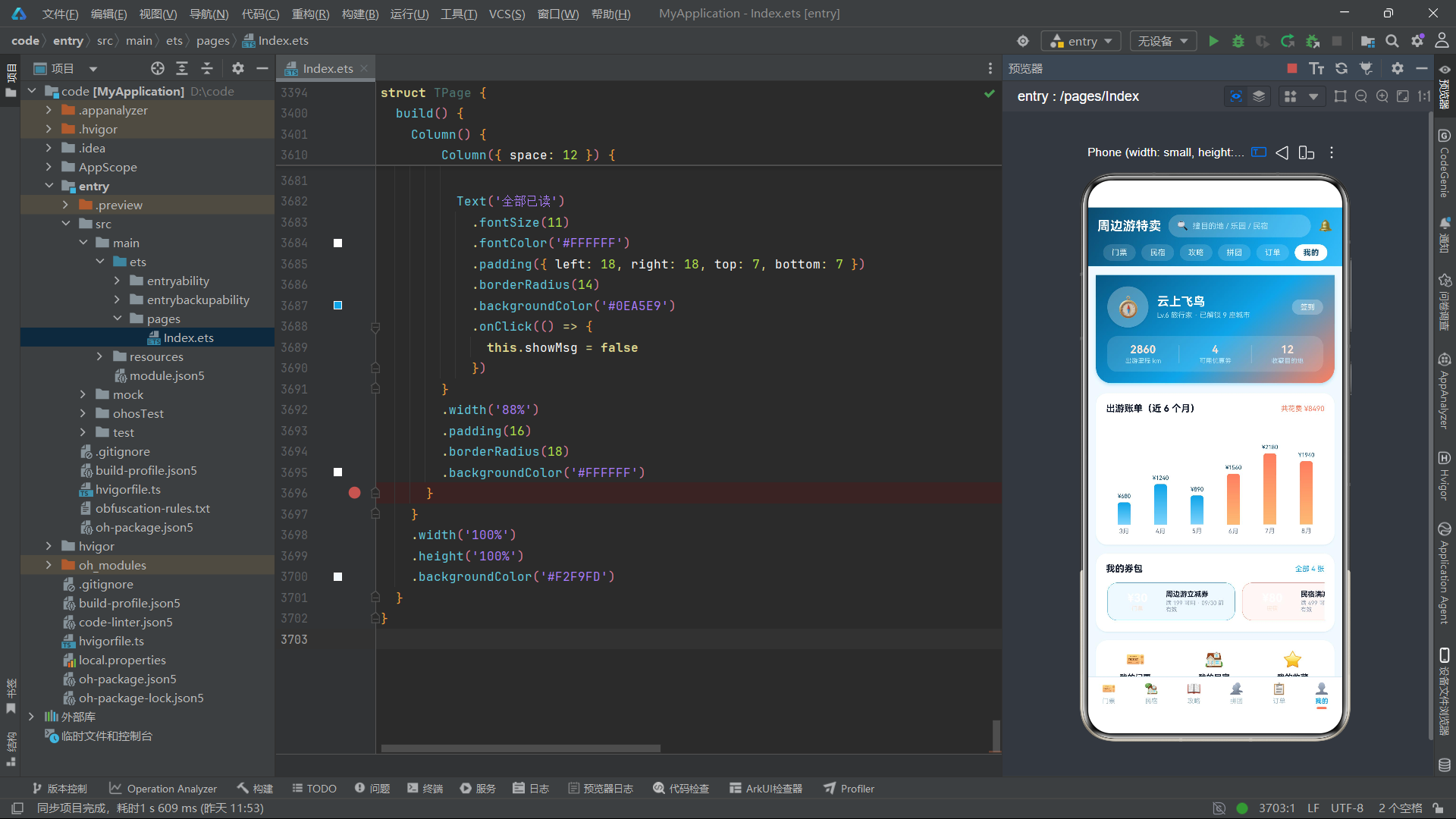
TMineTab 组件维护了 4 个弹框显隐状态变量。会员头部采用 140 度对角渐变背景,从深蓝(#075985)过渡到海洋蓝(#0EA5E9)再到珊瑚橙(#FF7E5F),底部圆角仅设置左下和右下两个角。头部包含用户头像(emoji 图标 + 半透明圆形背景)、昵称、等级标签和签到按钮。数据三格区域使用 Row + Column 布局,每格之间用 1 像素宽的半透明分隔线分隔,中间格"可用优惠券"可点击进入券包弹框。
出游账单柱状图区域通过 ForEach 遍历 TRIP_BARS 数组渲染 6 个柱子,每个柱子的颜色根据金额是否超过 1500 动态选择——超过 1500 使用珊瑚橙渐变(#FF7E5F → #FDBA74),否则使用海洋蓝渐变(#0EA5E9 → #7DD3FC)。柱子高度通过 barHT 函数计算,最大高度约为 100 像素。优惠券横滑卡片区域展示所有优惠券,每张卡片的边框颜色根据 kind 字段区分——民宿类使用珊瑚橙边框,门票类使用海洋蓝边框。
功能宫格区域使用 Flex 弹性换行布局,每个菜单项占 33% 宽度(每行 3 个),点击后根据 id 路由到不同的弹框。设置入口位于页面底部,点击后弹出设置弹框,展示出行提醒、价格降价通知、个性化推荐三个开关项。
六、主入口页面分析
@Entry
@Component
struct TPage {
  @State activeTab: number = 0
  @State showSearch: boolean = false
  @State searchKw: string = ''
  @State showMsg: boolean = false

  build() {
    Column() {
      // 电商风格头部
      Column() {
        Row({ space: 10 }) {
          Text('周边游特卖')
            .fontSize(18)
            .fontWeight(FontWeight.Bold)
            .fontColor('#FFFFFF')

          Row({ space: 6 }) {
            Text('🔍')
              .fontSize(13)
            Text('搜目的地 / 乐园 / 民宿')
              .fontSize(11)
              .fontColor('#BAE6FD')
              .layoutWeight(1)
          }
          .layoutWeight(1)
          .height(32)
          .padding({ left: 12, right: 12 })
          .borderRadius(16)
          .backgroundColor('rgba(255,255,255,0.22)')
          .onClick(() => {
            this.showSearch = true
          })

          Text('🔔')
            .fontSize(17)
            .onClick(() => {
              this.showMsg = true
            })
        }
        .width('100%')
        .padding({ left: 14, right: 14, top: 10, bottom: 10 })

        // 顶部 6 个频道 pill
        Scroll() {
          Row({ space: 8 }) {
            ForEach(MAIN_TABS_T, (t: TabMetaT, i: number) => {
              Text(t.name)
                .fontSize(11)
                .fontWeight(this.activeTab === i ? FontWeight.Bold : FontWeight.Normal)
                .fontColor(this.activeTab === i ? '#0C4A6E' : '#E0F2FE')
                .padding({ left: 12, right: 12, top: 5, bottom: 5 })
                .borderRadius(13)
                .backgroundColor(this.activeTab === i ? '#FFFFFF' : 'rgba(255,255,255,0.14)')
                .onClick(() => {
                  this.activeTab = i
                })
            }, (t: TabMetaT) => t.name)
          }
          .padding({ left: 14, right: 14 })
        }
        .scrollable(ScrollDirection.Horizontal)
        .scrollBar(BarState.Off)
        .width('100%')
        .margin({ bottom: 8 })
      }
      .width('100%')
      .linearGradient({
        angle: 120,
        colors: [['#0C4A6E', 0], ['#0EA5E9', 0.7], ['#38BDF8', 1]]
      })

      // tab 内容
      Column() {
        if (this.activeTab === 0) {
          TicketTab()
        } else if (this.activeTab === 1) {
          StayTab()
        } else if (this.activeTab === 2) {
          GuideTab()
        } else if (this.activeTab === 3) {
          GroupTab()
        } else if (this.activeTab === 4) {
          TOrderTab()
        } else {
          TMineTab()
        }
      }
      .layoutWeight(1)
      .width('100%')

      Column()
        .height(1)
        .width('100%')
        .backgroundColor('#D6EBF5')

      // 底部导航(6 tab)
      Row({ space: 0 }) {
        ForEach(MAIN_TABS_T, (t: TabMetaT, i: number) => {
          Column({ space: 3 }) {
            Text(t.icon)
              .fontSize(16)
            Text(t.name)
              .fontSize(9)
              .fontWeight(this.activeTab === i ? FontWeight.Bold : FontWeight.Normal)
              .fontColor(this.activeTab === i ? '#0EA5E9' : '#9DB8C6')
            if (this.activeTab === i) {
              Column()
                .width(14)
                .height(3)
                .borderRadius(2)
                .backgroundColor('#FF7E5F')
            } else {
              Column()
                .width(14)
                .height(3)
                .borderRadius(2)
                .backgroundColor('rgba(0,0,0,0)')
            }
          }
          .layoutWeight(1)
          .padding({ top: 7, bottom: 7 })
          .alignItems(HorizontalAlign.Center)
          .onClick(() => {
            this.activeTab = i
          })
        }, (t: TabMetaT) => t.name)
      }
      .width('100%')
      .backgroundColor('#FFFFFF')
TPage 是整个应用的 @Entry 主入口组件,维护了 4 个状态变量:activeTab 记录当前激活的 Tab 索引,showSearch 控制搜索弹框显隐,searchKw 存储搜索关键词,showMsg 控制消息通知弹框显隐。
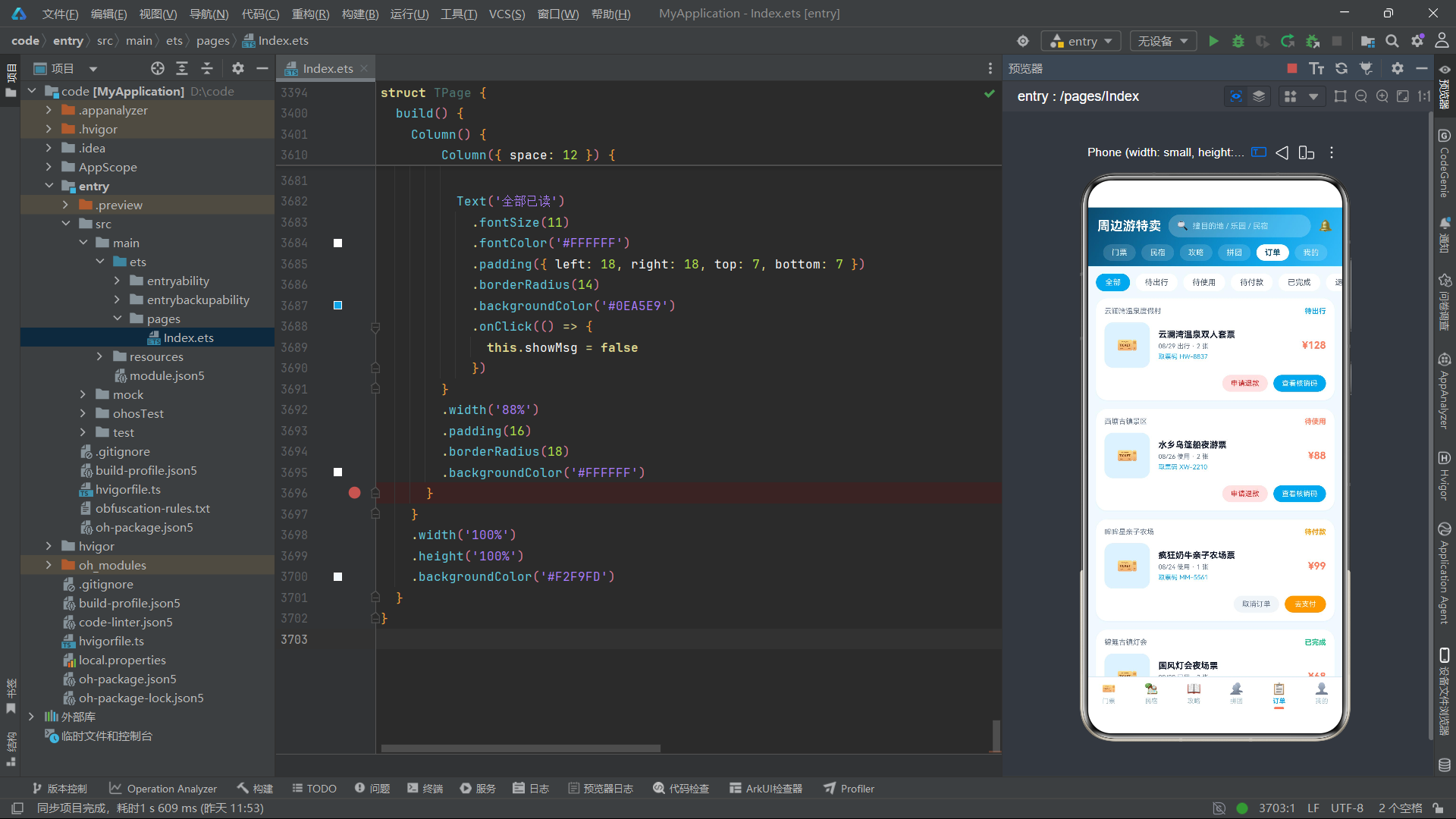
页面整体采用 Column 垂直布局,从上到下依次为:头部渐变区域、Tab 内容区域、分隔线、底部导航栏。头部区域使用 120 度线性渐变背景,包含应用标题"周边游特卖"、搜索框(点击弹出搜索弹框)和消息铃铛图标(点击弹出消息通知弹框)。搜索框采用半透明白色背景,内部包含搜索图标和提示文字。
顶部频道 pill 是该应用双重导航架构的第一重导航——通过 Scroll + Row 横向排列 6 个频道按钮,选中频道以白色实心背景突出显示,未选中频道以半透明背景呈现。点击频道按钮更新 activeTab 状态变量,触发下方 Tab 内容区域的条件渲染切换。
Tab 内容区域通过 if-else 条件链根据 activeTab 的值渲染对应的组件实例。这种条件渲染方式是 ArkTS 中实现多 Tab 切换的常见模式,每次切换时前一个组件被销毁、新组件被创建,确保各 Tab 之间的状态完全隔离。
底部导航栏是双重导航架构的第二重导航——通过 Row + ForEach 水平排列 6 个 Tab 按钮,每个按钮包含图标、名称和选中指示器。选中 Tab 的图标和名称显示海洋蓝色,下方显示珊瑚橙色的指示条(14x3 像素圆角矩形);未选中 Tab 显示灰蓝色,下方指示条为透明色。这种双重导航设计使得用户既可以通过顶部频道 pill 快速预览各频道,也可以通过底部导航栏在功能模块间切换,提供了灵活的导航体验。
搜索弹框包含 TextInput 输入框和热门搜索标签墙,标签墙通过 Flex 弹性换行布局排列,每个标签使用不同的背景色,点击后填入搜索框。消息通知弹框以列表样式展示降价提醒、拼团进展和出行提醒三类消息,每条消息包含图标、标题、内容和时间戳。
七、流程图
7.1 应用架构流程图
7.2 弹框交互流程图
八、技术对比表格
| 技术维度 | 门票 Tab | 民宿 Tab | 攻略 Tab | 拼团 Tab | 订单 Tab | 我的 Tab |
|---|---|---|---|---|---|---|
| 核心交互 | 日期横滑+规格选择 | 晚数选择+房型选择 | 季节筛选+路线分段 | 进度条+参团/发起 | 状态筛选+核销码 | 数据展示+功能宫格 |
| 弹框数量 | 3 个 | 5 个 | 2 个 | 5 个 | 4 个 | 4 个 |
| 弹框样式 | 底部抽屉+居中卡 | 居中卡+表单 | 时间线+对话 | 表单+成员列表 | 二维码+确认 | 列表+会话 |
| CRUD 操作 | 增删改查全支持 | 收藏切换 | 点赞切换 | 参团+发起 | 取消+支付 | 无 |
| 数据不可变性 | 全部不可变更新 | 全部不可变更新 | 全部不可变更新 | 全部不可变更新 | 全部不可变更新 | 无数据操作 |
| 列表渲染键值 | id.toString() | id.toString() + 状态 | id.toString() + 状态 | id.toString() + joined | id.toString() + status | id.toString() |
| 渐变色使用 | 蓝→橙对角渐变 | 深蓝→彩色渐变 | 无 | 蓝→橙进度条 | 无 | 三色头部渐变 |
| ForEach 使用次数 | 3 次 | 2 次 | 2 次 | 1 次 | 2 次 | 3 次 |
| 状态变量数量 | 9 个 | 8 个 | 5 个 | 6 个 | 7 个 | 4 个 |
| 特色组件 | 14 天日期网格 | 房型递增定价 | 路线分段展示 | 拼团进度条 | 6x6 二维码 | 消费柱状图 |
安装DevEco Studio程序

选择目标安装目录:

设置环境变量,但是需要重启一下:

新建一个空白模板:

设置API为24的模板项目:
初始化项目,自动下载相关依赖:

完整代码:
// 主题:海洋蓝 #0EA5E9 × 珊瑚橙 #FF7E5F,底色 #F2F9FD,清新出游风
// 6 个底部 Tab:门票 / 民宿 / 攻略 / 拼团 / 订单 / 我的
interface TicketGoods {
id: number
name: string
spot: string
price: number
originPrice: number
sold: number
tag: string
score: string
cat: string
color: string
city: string
}
interface DateCell {
id: number
day: string
date: string
price: string
left: number
off: boolean
}
interface TripRow {
id: number
name: string
spec: string
date: string
price: number
num: number
}
interface StayRow {
id: number
name: string
place: string
score: string
price: number
originPrice: number
tag: string
dist: string
color: string
rooms: string
}
interface GuideRow {
id: number
title: string
author: string
views: number
likes: number
days: string
route: string
color: string
season: string
}
interface GroupRow {
id: number
name: string
spot: string
price: number
groupPrice: number
total: number
joined: number
endIn: string
color: string
master: string
}
interface OrderRowT {
id: number
name: string
spot: string
date: string
price: number
status: string
num: number
code: string
}
interface QrCell {
id: number
on: boolean
}
interface TripBar {
month: string
amount: number
}
interface CouponRow {
id: number
title: string
amount: string
cond: string
expire: string
kind: string
}
interface MineMenuT {
id: number
icon: string
name: string
desc: string
color: string
}
interface TabMetaT {
name: string
icon: string
}
const CAT_CHIPS_T: string[] = ['主题乐园', '自然风光', '古镇水乡', '亲子农场', '温泉滑雪', '演出展览']
const TICKET_SPECS: string[] = ['成人票', '儿童票', '长者票', '学生票']
const TICKET_GOODS: TicketGoods[] = [
{ id: 1, name: '云澜湾温泉双人套票', spot: '云澜湾温泉度假村', price: 128, originPrice: 256, sold: 12380, tag: '买一送一', score: '4.9', cat: '温泉滑雪', color: '#7DD3FC', city: '湖州' },
{ id: 2, name: '欢乐岛乐园全天通票', spot: '欢乐岛主题乐园', price: 199, originPrice: 330, sold: 8921, tag: '不限次入园', score: '4.8', cat: '主题乐园', color: '#FDBA74', city: '苏州' },
{ id: 3, name: '竹海漂流双人套票', spot: '南山竹海风景区', price: 168, originPrice: 280, sold: 6745, tag: '含往返接驳', score: '4.7', cat: '自然风光', color: '#86EFAC', city: '宜兴' },
{ id: 4, name: '水乡乌篷船夜游票', spot: '西塘古镇景区', price: 88, originPrice: 140, sold: 15206, tag: '含船夫讲解', score: '4.9', cat: '古镇水乡', color: '#C4B5FD', city: '嘉兴' },
{ id: 5, name: '疯狂奶牛亲子农场票', spot: '哞哞星亲子农场', price: 99, originPrice: 158, sold: 5432, tag: '含喂养体验', score: '4.6', cat: '亲子农场', color: '#FDE68A', city: '上海' },
{ id: 6, name: '星野滑雪场初级雪票', spot: '星野滑雪度假区', price: 238, originPrice: 398, sold: 4310, tag: '含雪具租赁', score: '4.8', cat: '温泉滑雪', color: '#BAE6FD', city: '杭州' },
{ id: 7, name: '萤火虫洞穴探险票', spot: '天目溪溶洞群', price: 118, originPrice: 188, sold: 3987, tag: '向导带队', score: '4.7', cat: '自然风光', color: '#A5B4FC', city: '临安' },
{ id: 8, name: '国风灯会夜场票', spot: '锦鲤古镇灯会', price: 68, originPrice: 120, sold: 18760, tag: '穿汉服半价', score: '4.9', cat: '演出展览', color: '#FCA5A5', city: '无锡' },
{ id: 9, name: '茶山采茶体验套票', spot: '莫干山茶人谷', price: 79, originPrice: 128, sold: 2654, tag: '可带走茶样', score: '4.6', cat: '亲子农场', color: '#BEF264', city: '德清' },
{ id: 10, name: '天穹摩天轮夜景票', spot: '天穹之眼乐园', price: 58, originPrice: 98, sold: 20154, tag: '双人更优惠', score: '4.8', cat: '主题乐园', color: '#FDA4AF', city: '常州' }
]
const DATE_CELLS: DateCell[] = [
{ id: 1, day: '今天', date: '08/24', price: '¥88', left: 120, off: true },
{ id: 2, day: '周二', date: '08/25', price: '¥68', left: 200, off: false },
{ id: 3, day: '周三', date: '08/26', price: '¥68', left: 180, off: false },
{ id: 4, day: '周四', date: '08/27', price: '¥68', left: 160, off: false },
{ id: 5, day: '周五', date: '08/28', price: '¥98', left: 90, off: true },
{ id: 6, day: '周六', date: '08/29', price: '¥128', left: 45, off: true },
{ id: 7, day: '周日', date: '08/30', price: '¥128', left: 60, off: true },
{ id: 8, day: '周一', date: '08/31', price: '¥68', left: 210, off: false },
{ id: 9, day: '周二', date: '09/01', price: '¥68', left: 240, off: false },
{ id: 10, day: '周三', date: '09/02', price: '¥58', left: 300, off: false },
{ id: 11, day: '周四', date: '09/03', price: '¥58', left: 280, off: false },
{ id: 12, day: '周五', date: '09/04', price: '¥88', left: 150, off: true },
{ id: 13, day: '周六', date: '09/05', price: '¥118', left: 70, off: true },
{ id: 14, day: '周日', date: '09/06', price: '¥118', left: 88, off: true }
]
const STAY_ROWS: StayRow[] = [
{ id: 1, name: '竹里·山景星空房', place: '莫干山·劳岭村', score: '4.9', price: 468, originPrice: 728, tag: '含双早+下午茶', dist: '距竹海 1.2km', color: '#A7F3D0', rooms: '大床房 / 亲子房' },
{ id: 2, name: '湖畔白色船屋', place: '太湖·西山岛', score: '4.8', price: 588, originPrice: 899, tag: '一线湖景+皮划艇', dist: '距码头 300m', color: '#BAE6FD', rooms: '船屋 / 庭院房' },
{ id: 3, name: '古镇临水客栈', place: '西塘·烟雨长廊', score: '4.7', price: 268, originPrice: 420, tag: '推窗即河', dist: '景区内', color: '#DDD6FE', rooms: '雕花大床 / 双床房' },
{ id: 4, name: '云顶帐篷营地', place: '安吉·云上草原', score: '4.8', price: 388, originPrice: 560, tag: '含篝火晚会', dist: '索道旁 500m', color: '#FED7AA', rooms: '星空帐 / 家庭帐' },
{ id: 5, name: '茶田泡泡屋', place: '杭州·龙坞茶镇', score: '4.9', price: 528, originPrice: 798, tag: '可撸猫+围炉煮茶', dist: '地铁 0.8km', color: '#BEF264', rooms: '泡泡屋 / 复式小院' },
{ id: 6, name: '海盐蓝白民宿', place: '嵊泗·六井潭', score: '4.6', price: 328, originPrice: 480, tag: '看日出绝佳', dist: '海边 100m', color: '#BFDBFE', rooms: '海景房 / 阁楼房' }
]
const GUIDE_ROWS: GuideRow[] = [
{ id: 1, title: '莫干山 2 天 1 夜避坑路线', author: '背包客小鹿', views: 128600, likes: 8642, days: '2 天', route: '竹海 → 剑池 → 芦花荡 → 篝火', color: '#86EFAC', season: '夏秋' },
{ id: 2, title: '西塘夜游机位全攻略', author: '摄影老陈', views: 96400, likes: 6215, days: '1 天', route: '烟雨长廊 → 石皮弄 → 桥头夜灯', color: '#C4B5FD', season: '四季' },
{ id: 3, title: '带娃冲哞哞星农场全记录', author: '二宝妈妈', views: 75300, likes: 5108, days: '半天', route: '喂牛 → 挤奶体验 → 草坪野餐', color: '#FDE68A', season: '春秋' },
{ id: 4, title: '安吉云上草原索道攻略', author: '山系少年', views: 64200, likes: 4307, days: '1 天', route: '索道 → 悬崖秋千 → 露营台', color: '#FDBA74', season: '夏' },
{ id: 5, title: '嵊泗海岛跳岛 3 日吃住行', author: '赶海阿婆', views: 53700, likes: 3966, days: '3 天', route: '基湖沙滩 → 六井潭 → 渔市', color: '#BAE6FD', season: '夏' },
{ id: 6, title: '锦鲤灯会汉服拍照指南', author: '国风棠棠', views: 48900, likes: 3575, days: '1 晚', route: '主灯区 → 河灯 → 祈福墙', color: '#FCA5A5', season: '冬春' }
]
const GROUP_ROWS: GroupRow[] = [
{ id: 1, name: '云澜湾温泉双人拼团', spot: '云澜湾温泉度假村', price: 128, groupPrice: 99, total: 4, joined: 3, endIn: '还差 1 人', color: '#7DD3FC', master: '柠檬不酸' },
{ id: 2, name: '欢乐岛通票家庭拼', spot: '欢乐岛主题乐园', price: 199, groupPrice: 158, total: 6, joined: 4, endIn: '还差 2 人', color: '#FDBA74', master: '奶爸大熊' },
{ id: 3, name: '竹海漂流搭子拼团', spot: '南山竹海风景区', price: 168, groupPrice: 128, total: 3, joined: 1, endIn: '还差 2 人', color: '#86EFAC', master: '漂移少年' },
{ id: 4, name: '西塘夜游闺蜜拼', spot: '西塘古镇景区', price: 88, groupPrice: 66, total: 5, joined: 5, endIn: '已成团', color: '#C4B5FD', master: '小桥流水' },
{ id: 5, name: '星野滑雪新手拼团', spot: '星野滑雪度假区', price: 238, groupPrice: 188, total: 4, joined: 2, endIn: '还差 2 人', color: '#BAE6FD', master: '雪季第一滑' },
{ id: 6, name: '摩天轮情侣票拼团', spot: '天穹之眼乐园', price: 58, groupPrice: 44, total: 2, joined: 1, endIn: '还差 1 人', color: '#FDA4AF', master: '晚风信箱' }
]
const ORDER_FILTERS: string[] = ['全部', '待出行', '待使用', '待付款', '已完成', '退款/售后']
const ORDER_ROWS_T: OrderRowT[] = [
{ id: 1, name: '云澜湾温泉双人套票', spot: '云澜湾温泉度假村', date: '08/29 出行', price: 128, status: '待出行', num: 2, code: 'HW-8837' },
{ id: 2, name: '水乡乌篷船夜游票', spot: '西塘古镇景区', date: '08/26 使用', price: 88, status: '待使用', num: 2, code: 'XW-2210' },
{ id: 3, name: '疯狂奶牛亲子农场票', spot: '哞哞星亲子农场', date: '08/24 使用', price: 99, status: '待付款', num: 1, code: 'MM-5561' },
{ id: 4, name: '国风灯会夜场票', spot: '锦鲤古镇灯会', date: '08/20 已用', price: 68, status: '已完成', num: 2, code: 'JL-0934' },
{ id: 5, name: '天穹摩天轮夜景票', spot: '天穹之眼乐园', date: '08/15 已用', price: 58, status: '已完成', num: 1, code: 'TQ-7788' },
{ id: 6, name: '星野滑雪场初级雪票', spot: '星野滑雪度假区', date: '08/10 退款', price: 238, status: '退款/售后', num: 1, code: 'XY-3355' }
]
const QR_CELLS: QrCell[] = [
{ id: 1, on: true }, { id: 2, on: true }, { id: 3, on: false }, { id: 4, on: true }, { id: 5, on: true }, { id: 6, on: false },
{ id: 7, on: true }, { id: 8, on: false }, { id: 9, on: true }, { id: 10, on: false }, { id: 11, on: true }, { id: 12, on: true },
{ id: 13, on: false }, { id: 14, on: true }, { id: 15, on: true }, { id: 16, on: true }, { id: 17, on: false }, { id: 18, on: true },
{ id: 19, on: true }, { id: 20, on: true }, { id: 21, on: false }, { id: 22, on: true }, { id: 23, on: false }, { id: 24, on: true },
{ id: 25, on: false }, { id: 26, on: true }, { id: 27, on: true }, { id: 28, on: false }, { id: 29, on: true }, { id: 30, on: false },
{ id: 31, on: true }, { id: 32, on: true }, { id: 33, on: false }, { id: 34, on: true }, { id: 35, on: true }, { id: 36, on: false }
]
const TRIP_BARS: TripBar[] = [
{ month: '3月', amount: 680 },
{ month: '4月', amount: 1240 },
{ month: '5月', amount: 890 },
{ month: '6月', amount: 1560 },
{ month: '7月', amount: 2180 },
{ month: '8月', amount: 1940 }
]
const COUPON_ROWS: CouponRow[] = [
{ id: 1, title: '周边游立减券', amount: '¥30', cond: '满 199 可用', expire: '09/30 前有效', kind: '门票' },
{ id: 2, title: '民宿满减券', amount: '¥80', cond: '满 499 可用', expire: '10/07 前有效', kind: '民宿' },
{ id: 3, title: '温泉专享券', amount: '¥50', cond: '满 128 可用', expire: '09/15 前有效', kind: '门票' },
{ id: 4, title: '拼团返现券', amount: '¥15', cond: '无门槛', expire: '08/31 前有效', kind: '通用' }
]
const MINE_MENUS_T: MineMenuT[] = [
{ id: 1, icon: '🎫', name: '我的门票', desc: '3 张待使用', color: '#0EA5E9' },
{ id: 2, icon: '🏠', name: '我的民宿', desc: '1 个待入住', color: '#FF7E5F' },
{ id: 3, icon: '⭐', name: '我的收藏', desc: '12 个目的地', color: '#F59E0B' },
{ id: 4, icon: '👥', name: '我的拼团', desc: '2 个进行中', color: '#8B5CF6' },
{ id: 5, icon: '📍', name: '足迹地图', desc: '解锁 9 座城市', color: '#10B981' },
{ id: 6, icon: '🛡️', name: '出游保障', desc: '行程意外险', color: '#6366F1' }
]
const MAIN_TABS_T: TabMetaT[] = [
{ name: '门票', icon: '🎫' },
{ name: '民宿', icon: '🏡' },
{ name: '攻略', icon: '📖' },
{ name: '拼团', icon: '👥' },
{ name: '订单', icon: '📋' },
{ name: '我的', icon: '👤' }
]
const ROOM_TYPES: string[] = ['星空大床房', '亲子双床房', '复式小院房']
function pctW(a: number, b: number): string {
return ((a / b) * 100).toFixed(0) + '%'
}
function barHT(v: number): number {
return (v / 2400) * 110
}
function seg(route: string, idx: number): string {
return route.split(' → ')[idx]
}
function dayOf(d: string): string {
return d.substring(3)
}
function seasonHit(season: string, idx: number): boolean {
const arr: string[] = ['全部', '春', '夏', '秋', '冬']
return season.indexOf(arr[idx]) >= 0
}
@Builder
function modalOverlay(onClose: () => void) {
Column()
.width('100%')
.height('100%')
.backgroundColor('rgba(8,47,73,0.55)')
.onClick(() => {
onClose()
})
}
// ==================== Tab 1 门票 ====================
@Component
export struct TicketTab {
@State dateIdx: number = 0
@State catIdxT: number = 0
@State specIdx: number = 0
@State specNum: number = 1
@State curTicket: TicketGoods = TICKET_GOODS[0]
@State tripList: TripRow[] = [
{ id: 1, name: '水乡乌篷船夜游票', spec: '成人票', date: '08/26', price: 88, num: 2 },
{ id: 2, name: '国风灯会夜场票', spec: '成人票', date: '08/27', price: 68, num: 1 }
]
@State showSpec: boolean = false
@State showTrip: boolean = false
@State showCalendar: boolean = false
addToTrip() {
const t: TicketGoods = this.curTicket
const d: DateCell = DATE_CELLS[this.dateIdx]
const r: TripRow[] = []
for (let i = 0; i < this.tripList.length; i++) {
r.push(this.tripList[i])
}
r.push({ id: this.tripList.length + 1, name: t.name, spec: TICKET_SPECS[this.specIdx], date: d.date, price: t.price, num: this.specNum })
this.tripList = r
this.showSpec = false
}
removeTrip(id: number) {
const r: TripRow[] = []
for (let i = 0; i < this.tripList.length; i++) {
if (this.tripList[i].id !== id) {
r.push(this.tripList[i])
}
}
this.tripList = r
}
changeTripNum(id: number, delta: number) {
const r: TripRow[] = []
for (let i = 0; i < this.tripList.length; i++) {
if (this.tripList[i].id === id) {
const n: number = this.tripList[i].num + delta
if (n > 0) {
r.push({ id: this.tripList[i].id, name: this.tripList[i].name, spec: this.tripList[i].spec, date: this.tripList[i].date, price: this.tripList[i].price, num: n })
}
} else {
r.push(this.tripList[i])
}
}
this.tripList = r
}
tripTotal(): number {
let s: number = 0
for (let i = 0; i < this.tripList.length; i++) {
s = s + this.tripList[i].price * this.tripList[i].num
}
return s
}
build() {
Scroll() {
Column() {
// 特卖 banner
Column() {
Row({ space: 10 }) {
Column({ space: 4 }) {
Text('周末周边游')
.fontSize(20)
.fontWeight(FontWeight.Bold)
.fontColor('#FFFFFF')
Text('限时 5 折起 · 今晚 24 点结束')
.fontSize(11)
.fontColor('#FFE4D6')
}
.alignItems(HorizontalAlign.Start)
.layoutWeight(1)
Text('🏖️')
.fontSize(34)
}
.width('100%')
Row({ space: 8 }) {
Text('温泉')
.fontSize(10)
.fontColor('#0C4A6E')
.padding({ left: 10, right: 10, top: 4, bottom: 4 })
.borderRadius(10)
.backgroundColor('#BAE6FD')
Text('乐园')
.fontSize(10)
.fontColor('#7C2D12')
.padding({ left: 10, right: 10, top: 4, bottom: 4 })
.borderRadius(10)
.backgroundColor('#FED7AA')
Text('古镇')
.fontSize(10)
.fontColor('#4C1D95')
.padding({ left: 10, right: 10, top: 4, bottom: 4 })
.borderRadius(10)
.backgroundColor('#DDD6FE')
Text('海岛')
.fontSize(10)
.fontColor('#FFFFFF')
.padding({ left: 10, right: 10, top: 4, bottom: 4 })
.borderRadius(10)
.backgroundColor('rgba(255,255,255,0.25)')
}
.width('100%')
.margin({ top: 10 })
}
.width('100%')
.padding(16)
.borderRadius(16)
.linearGradient({
angle: 135,
colors: [['#0369A1', 0], ['#0EA5E9', 0.6], ['#FF7E5F', 1]]
})
.shadow({
radius: 12,
color: 'rgba(14,165,233,0.35)',
offsetX: 0,
offsetY: 6
})
// 日期横滑
Row({ space: 8 }) {
Text('出行日期')
.fontSize(13)
.fontWeight(FontWeight.Bold)
.fontColor('#075985')
Text('节假日涨价,错峰更省')
.fontSize(10)
.fontColor('#94A3B8')
Text('日历')
.fontSize(10)
.fontColor('#FF7E5F')
.padding({ left: 8, right: 8, top: 2, bottom: 2 })
.borderRadius(8)
.backgroundColor('#FFE9E3')
.onClick(() => {
this.showCalendar = true
})
}
.width('100%')
.margin({ top: 12, bottom: 8 })
Scroll() {
Row({ space: 8 }) {
ForEach(DATE_CELLS, (d: DateCell, i: number) => {
Column({ space: 3 }) {
Text(d.day)
.fontSize(10)
.fontColor(this.dateIdx === i ? '#FFFFFF' : (d.off ? '#FF7E5F' : '#64748B'))
Text(d.date)
.fontSize(12)
.fontWeight(FontWeight.Bold)
.fontColor(this.dateIdx === i ? '#FFFFFF' : '#0F172A')
Text(d.price)
.fontSize(10)
.fontColor(this.dateIdx === i ? '#FFE4D6' : '#0EA5E9')
Text('余 ' + d.left.toString())
.fontSize(8)
.fontColor(this.dateIdx === i ? '#BAE6FD' : '#94A3B8')
}
.width(62)
.padding({ top: 8, bottom: 8 })
.borderRadius(12)
.alignItems(HorizontalAlign.Center)
.backgroundColor(this.dateIdx === i ? '#0EA5E9' : '#FFFFFF')
.shadow({
radius: this.dateIdx === i ? 8 : 2,
color: 'rgba(2,132,199,0.18)',
offsetX: 0,
offsetY: 2
})
.onClick(() => {
this.dateIdx = i
})
}, (d: DateCell) => d.id.toString())
}
.padding({ left: 2, right: 2 })
}
.scrollable(ScrollDirection.Horizontal)
.scrollBar(BarState.Off)
.width('100%')
// 分类 chips
Scroll() {
Row({ space: 8 }) {
ForEach(CAT_CHIPS_T, (c: string, i: number) => {
Text(c)
.fontSize(11)
.fontColor(this.catIdxT === i ? '#FFFFFF' : '#0C4A6E')
.padding({ left: 14, right: 14, top: 6, bottom: 6 })
.borderRadius(14)
.backgroundColor(this.catIdxT === i ? '#FF7E5F' : '#E0F2FE')
.onClick(() => {
this.catIdxT = i
})
}, (c: string) => c)
}
.padding({ left: 2, right: 2 })
}
.scrollable(ScrollDirection.Horizontal)
.scrollBar(BarState.Off)
.width('100%')
.margin({ top: 10, bottom: 10 })
// 门票列表
Column({ space: 12 }) {
ForEach(TICKET_GOODS, (g: TicketGoods) => {
if (this.catIdxT === 0 || g.cat === CAT_CHIPS_T[this.catIdxT]) {
Row({ space: 12 }) {
Column() {
Text('🏖')
.fontSize(26)
.fontColor('#075985')
}
.width(86)
.height(86)
.borderRadius(14)
.justifyContent(FlexAlign.Center)
.backgroundColor(g.color)
.shadow({
radius: 6,
color: 'rgba(15,23,42,0.12)',
offsetX: 0,
offsetY: 3
})
Column({ space: 5 }) {
Text(g.name)
.fontSize(13)
.fontWeight(FontWeight.Bold)
.fontColor('#0F172A')
.maxLines(1)
.textOverflow({ overflow: TextOverflow.Ellipsis })
Text(g.spot + ' · ' + g.city)
.fontSize(10)
.fontColor('#64748B')
Row({ space: 6 }) {
Text(g.tag)
.fontSize(9)
.fontColor('#FF7E5F')
.padding({ left: 6, right: 6, top: 2, bottom: 2 })
.borderRadius(6)
.backgroundColor('#FFE9E3')
Text('评分 ' + g.score)
.fontSize(9)
.fontColor('#0EA5E9')
Text('已售 ' + g.sold.toString())
.fontSize(9)
.fontColor('#94A3B8')
}
Row({ space: 6 }) {
Text('¥' + g.price.toString())
.fontSize(16)
.fontWeight(FontWeight.Bold)
.fontColor('#FF7E5F')
Text('¥' + g.originPrice.toString())
.fontSize(10)
.fontColor('#CBD5E1')
.decoration({ type: TextDecorationType.LineThrough })
Text('预订')
.fontSize(11)
.fontColor('#FFFFFF')
.padding({ left: 14, right: 14, top: 5, bottom: 5 })
.borderRadius(13)
.backgroundColor('#0EA5E9')
.onClick(() => {
this.curTicket = g
this.showSpec = true
})
}
}
.alignItems(HorizontalAlign.Start)
.layoutWeight(1)
}
.width('100%')
.padding(12)
.borderRadius(16)
.backgroundColor('#FFFFFF')
.shadow({
radius: 5,
color: 'rgba(2,132,199,0.10)',
offsetX: 0,
offsetY: 3
})
}
}, (g: TicketGoods) => g.id.toString())
}
.width('100%')
// 行程清单入口
Row({ space: 10 }) {
Text('🧳')
.fontSize(18)
Column({ space: 2 }) {
Text('我的行程清单')
.fontSize(12)
.fontWeight(FontWeight.Bold)
.fontColor('#FFFFFF')
Text('已加入 ' + this.tripList.length.toString() + ' 个 · 合计 ¥' + this.tripTotal().toString())
.fontSize(10)
.fontColor('#BAE6FD')
}
.alignItems(HorizontalAlign.Start)
.layoutWeight(1)
Text('查看')
.fontSize(11)
.fontColor('#0C4A6E')
.padding({ left: 14, right: 14, top: 6, bottom: 6 })
.borderRadius(13)
.backgroundColor('#FFFFFF')
.onClick(() => {
this.showTrip = true
})
}
.width('100%')
.padding({ left: 14, right: 14, top: 10, bottom: 10 })
.borderRadius(14)
.backgroundColor('#075985')
.margin({ top: 12 })
.shadow({
radius: 8,
color: 'rgba(7,89,133,0.30)',
offsetX: 0,
offsetY: 4
})
// 规格弹框(底部抽屉样式)
if (this.showSpec) {
modalOverlay(() => {
this.showSpec = false
})
Column({ space: 14 }) {
Column()
.width(44)
.height(4)
.borderRadius(2)
.backgroundColor('#CBD5E1')
Text(this.curTicket.name)
.fontSize(15)
.fontWeight(FontWeight.Bold)
.fontColor('#0F172A')
Text(this.curTicket.spot + ' · 随买随用 · 无需取票')
.fontSize(10)
.fontColor('#64748B')
Column({ space: 8 }) {
Text('选择票种')
.fontSize(11)
.fontWeight(FontWeight.Bold)
.fontColor('#075985')
.width('100%')
Flex({ wrap: FlexWrap.Wrap, direction: FlexDirection.Row }) {
ForEach(TICKET_SPECS, (s: string, i: number) => {
Text(s)
.fontSize(11)
.fontColor(this.specIdx === i ? '#FFFFFF' : '#0C4A6E')
.padding({ left: 14, right: 14, top: 6, bottom: 6 })
.borderRadius(12)
.backgroundColor(this.specIdx === i ? '#0EA5E9' : '#E0F2FE')
.margin(4)
.onClick(() => {
this.specIdx = i
})
}, (s: string) => s)
}
.width('100%')
}
.width('100%')
Column({ space: 8 }) {
Text('出行日期:' + DATE_CELLS[this.dateIdx].date + '(' + DATE_CELLS[this.dateIdx].day + ')')
.fontSize(11)
.fontColor('#075985')
.width('100%')
Row({ space: 10 }) {
Text('数量')
.fontSize(12)
.fontColor('#334155')
.layoutWeight(1)
Text('−')
.fontSize(15)
.fontWeight(FontWeight.Bold)
.fontColor('#0EA5E9')
.width(28)
.height(28)
.borderRadius(14)
.textAlign(TextAlign.Center)
.backgroundColor('#E0F2FE')
.onClick(() => {
if (this.specNum > 1) {
this.specNum = this.specNum - 1
}
})
Text(this.specNum.toString())
.fontSize(13)
.fontWeight(FontWeight.Bold)
.fontColor('#0F172A')
Text('+')
.fontSize(15)
.fontWeight(FontWeight.Bold)
.fontColor('#FF7E5F')
.width(28)
.height(28)
.borderRadius(14)
.textAlign(TextAlign.Center)
.backgroundColor('#FFE9E3')
.onClick(() => {
this.specNum = this.specNum + 1
})
}
.width('100%')
}
.width('100%')
Row({ space: 10 }) {
Column({ space: 2 }) {
Text('¥' + (this.curTicket.price * this.specNum).toString())
.fontSize(18)
.fontWeight(FontWeight.Bold)
.fontColor('#FF7E5F')
Text('已省 ¥' + ((this.curTicket.originPrice - this.curTicket.price) * this.specNum).toString())
.fontSize(10)
.fontColor('#10B981')
}
.alignItems(HorizontalAlign.Start)
.layoutWeight(1)
Text('加入行程')
.fontSize(13)
.fontWeight(FontWeight.Bold)
.fontColor('#FFFFFF')
.padding({ left: 24, right: 24, top: 10, bottom: 10 })
.borderRadius(20)
.linearGradient({
angle: 90,
colors: [['#0EA5E9', 0], ['#FF7E5F', 1]]
})
.onClick(() => {
this.addToTrip()
})
}
.width('100%')
}
.width('100%')
.padding(18)
.borderRadius({ topLeft: 20, topRight: 20 })
.backgroundColor('#FFFFFF')
.constraintSize({ maxHeight: '80%' })
}
// 行程清单弹框(居中卡片样式)
if (this.showTrip) {
modalOverlay(() => {
this.showTrip = false
})
Column({ space: 12 }) {
Text('行程清单')
.fontSize(15)
.fontWeight(FontWeight.Bold)
.fontColor('#075985')
Column({ space: 10 }) {
ForEach(this.tripList, (t: TripRow) => {
Row({ space: 10 }) {
Column() {
Text(dayOf(t.date))
.fontSize(14)
.fontWeight(FontWeight.Bold)
.fontColor('#FFFFFF')
}
.width(40)
.height(40)
.borderRadius(12)
.justifyContent(FlexAlign.Center)
.backgroundColor('#0EA5E9')
Column({ space: 2 }) {
Text(t.name)
.fontSize(11)
.fontWeight(FontWeight.Bold)
.fontColor('#0F172A')
.maxLines(1)
.textOverflow({ overflow: TextOverflow.Ellipsis })
Text(t.spec + ' × ' + t.num.toString())
.fontSize(9)
.fontColor('#64748B')
}
.alignItems(HorizontalAlign.Start)
.layoutWeight(1)
Column({ space: 4 }) {
Text('¥' + (t.price * t.num).toString())
.fontSize(12)
.fontWeight(FontWeight.Bold)
.fontColor('#FF7E5F')
Row({ space: 4 }) {
Text('−')
.fontSize(12)
.fontColor('#0EA5E9')
.width(18)
.height(18)
.borderRadius(9)
.textAlign(TextAlign.Center)
.backgroundColor('#E0F2FE')
.onClick(() => {
this.changeTripNum(t.id, -1)
})
Text('+')
.fontSize(12)
.fontColor('#FF7E5F')
.width(18)
.height(18)
.borderRadius(9)
.textAlign(TextAlign.Center)
.backgroundColor('#FFE9E3')
.onClick(() => {
this.changeTripNum(t.id, 1)
})
Text('删')
.fontSize(10)
.fontColor('#DC2626')
.width(18)
.height(18)
.borderRadius(9)
.textAlign(TextAlign.Center)
.backgroundColor('#FEE2E2')
.onClick(() => {
this.removeTrip(t.id)
})
}
}
.alignItems(HorizontalAlign.End)
}
.width('100%')
.padding(10)
.borderRadius(12)
.backgroundColor('#F0F9FF')
}, (t: TripRow) => t.id.toString())
}
.width('100%')
.constraintSize({ maxHeight: '50%' })
Row({ space: 10 }) {
Text('合计 ¥' + this.tripTotal().toString())
.fontSize(15)
.fontWeight(FontWeight.Bold)
.fontColor('#FF7E5F')
.layoutWeight(1)
Text('关闭')
.fontSize(12)
.fontColor('#FFFFFF')
.padding({ left: 20, right: 20, top: 8, bottom: 8 })
.borderRadius(16)
.backgroundColor('#075985')
.onClick(() => {
this.showTrip = false
})
}
.width('100%')
}
.width('88%')
.padding(16)
.borderRadius(18)
.backgroundColor('#FFFFFF')
.constraintSize({ maxHeight: '80%' })
}
// 日历价格弹框(居中小卡样式)
if (this.showCalendar) {
modalOverlay(() => {
this.showCalendar = false
})
Column({ space: 10 }) {
Text('08 月价格日历')
.fontSize(14)
.fontWeight(FontWeight.Bold)
.fontColor('#075985')
Flex({ wrap: FlexWrap.Wrap, direction: FlexDirection.Row }) {
ForEach(DATE_CELLS, (d: DateCell, i: number) => {
Column({ space: 2 }) {
Text(d.date)
.fontSize(10)
.fontColor(this.dateIdx === i ? '#FFFFFF' : '#334155')
Text(d.off ? '休' : '班')
.fontSize(9)
.fontColor(this.dateIdx === i ? '#FFE4D6' : (d.off ? '#FF7E5F' : '#94A3B8'))
Text(d.price)
.fontSize(10)
.fontWeight(FontWeight.Bold)
.fontColor(this.dateIdx === i ? '#FFFFFF' : '#0EA5E9')
}
.width('22%')
.padding({ top: 6, bottom: 6 })
.borderRadius(10)
.alignItems(HorizontalAlign.Center)
.backgroundColor(this.dateIdx === i ? '#0EA5E9' : '#F0F9FF')
.margin(4)
.onClick(() => {
this.dateIdx = i
this.showCalendar = false
})
}, (d: DateCell) => d.id.toString())
}
.width('100%')
Text('蓝色为工作日低价 · 橙色为周末节假日价')
.fontSize(9)
.fontColor('#94A3B8')
}
.width('86%')
.padding(16)
.borderRadius(18)
.backgroundColor('#FFFFFF')
.shadow({
radius: 20,
color: 'rgba(2,132,199,0.35)',
offsetX: 0,
offsetY: 10
})
}
}
.width('100%')
.padding({ left: 12, right: 12, top: 12, bottom: 20 })
.alignItems(HorizontalAlign.Start)
}
.scrollable(ScrollDirection.Vertical)
.scrollBar(BarState.Off)
.width('100%')
.height('100%')
.backgroundColor('#F2F9FD')
.align(Alignment.Top)
}
}
// ==================== Tab 2 民宿 ====================
@Component
export struct StayTab {
@State favIds: number[] = [1, 3]
@State nightIdx: number = 1
@State roomIdx: number = 0
@State curStay: StayRow = STAY_ROWS[0]
@State showRoom: boolean = false
@State showBook: boolean = false
@State showFav: boolean = false
@State showHouseRule: boolean = false
toggleFav(id: number) {
const r: number[] = []
let found: boolean = false
for (let i = 0; i < this.favIds.length; i++) {
if (this.favIds[i] === id) {
found = true
} else {
r.push(this.favIds[i])
}
}
if (!found) {
r.push(id)
}
this.favIds = r
}
build() {
Scroll() {
Column() {
// 顶部搜索条样式头
Row({ space: 10 }) {
Column({ space: 2 }) {
Text('住进风景里')
.fontSize(17)
.fontWeight(FontWeight.Bold)
.fontColor('#075985')
Text('本周 286 家民宿 5 折起')
.fontSize(10)
.fontColor('#64748B')
}
.alignItems(HorizontalAlign.Start)
.layoutWeight(1)
Text('❤ ' + this.favIds.length.toString())
.fontSize(11)
.fontColor('#FF7E5F')
.padding({ left: 12, right: 12, top: 6, bottom: 6 })
.borderRadius(13)
.backgroundColor('#FFE9E3')
.onClick(() => {
this.showFav = true
})
}
.width('100%')
.padding({ left: 2, right: 2 })
.margin({ bottom: 10 })
// 入住晚数选择
Row({ space: 10 }) {
Text('入住晚数')
.fontSize(12)
.fontColor('#334155')
ForEach([1, 2, 3], (n: number) => {
Text(n.toString() + ' 晚')
.fontSize(11)
.fontColor(this.nightIdx === n ? '#FFFFFF' : '#0C4A6E')
.padding({ left: 12, right: 12, top: 5, bottom: 5 })
.borderRadius(12)
.backgroundColor(this.nightIdx === n ? '#0EA5E9' : '#E0F2FE')
.onClick(() => {
this.nightIdx = n
})
}, (n: number) => n.toString())
}
.width('100%')
.margin({ bottom: 10 })
// 民宿列表(上下大卡布局)
Column({ space: 14 }) {
ForEach(STAY_ROWS, (s: StayRow) => {
Column({ space: 0 }) {
Column() {
Row({ space: 10 }) {
Text('🏡')
.fontSize(30)
Column({ space: 2 }) {
Text(s.place)
.fontSize(10)
.fontColor('#FFFFFF')
Text(s.dist)
.fontSize(9)
.fontColor('#E0F2FE')
}
.alignItems(HorizontalAlign.Start)
Text(this.favIds.indexOf(s.id) >= 0 ? '❤ 已收藏' : '🤍 收藏')
.fontSize(10)
.fontColor('#FFFFFF')
.padding({ left: 10, right: 10, top: 4, bottom: 4 })
.borderRadius(10)
.backgroundColor('rgba(255,255,255,0.25)')
.onClick(() => {
this.toggleFav(s.id)
})
}
.width('100%')
.padding({ left: 12, right: 12, top: 10, bottom: 10 })
}
.width('100%')
.borderRadius({ topLeft: 16, topRight: 16 })
.linearGradient({
angle: 100,
colors: [['#0C4A6E', 0], [s.color, 1]]
})
Column({ space: 6 }) {
Text(s.name)
.fontSize(14)
.fontWeight(FontWeight.Bold)
.fontColor('#0F172A')
.width('100%')
Row({ space: 8 }) {
Text('⭐ ' + s.score)
.fontSize(10)
.fontColor('#F59E0B')
Text(s.rooms)
.fontSize(10)
.fontColor('#64748B')
}
.width('100%')
Text(s.tag)
.fontSize(9)
.fontColor('#0C4A6E')
.padding({ left: 8, right: 8, top: 3, bottom: 3 })
.borderRadius(6)
.backgroundColor('#E0F2FE')
.alignSelf(ItemAlign.Start)
Row({ space: 8 }) {
Column({ space: 1 }) {
Row({ space: 4 }) {
Text('¥' + (s.price * this.nightIdx).toString())
.fontSize(17)
.fontWeight(FontWeight.Bold)
.fontColor('#FF7E5F')
Text('/' + this.nightIdx.toString() + ' 晚')
.fontSize(9)
.fontColor('#94A3B8')
}
Text('原价 ¥' + (s.originPrice * this.nightIdx).toString())
.fontSize(9)
.fontColor('#CBD5E1')
.decoration({ type: TextDecorationType.LineThrough })
}
.alignItems(HorizontalAlign.Start)
.layoutWeight(1)
Text('选房型')
.fontSize(11)
.fontColor('#FFFFFF')
.padding({ left: 16, right: 16, top: 7, bottom: 7 })
.borderRadius(14)
.backgroundColor('#FF7E5F')
.onClick(() => {
this.curStay = s
this.showRoom = true
})
}
.width('100%')
}
.width('100%')
.padding(12)
.borderRadius({ bottomLeft: 16, bottomRight: 16 })
.backgroundColor('#FFFFFF')
}
.width('100%')
.shadow({
radius: 6,
color: 'rgba(2,132,199,0.12)',
offsetX: 0,
offsetY: 4
})
}, (s: StayRow) => s.id.toString() + '-' + this.favIds.indexOf(s.id).toString() + '-' + this.nightIdx.toString())
}
.width('100%')
// 入住须知入口
Row({ space: 8 }) {
Text('📢')
.fontSize(14)
Text('入住须知与退改政策')
.fontSize(11)
.fontColor('#075985')
.layoutWeight(1)
Text('查看')
.fontSize(10)
.fontColor('#FF7E5F')
.onClick(() => {
this.showHouseRule = true
})
}
.width('100%')
.padding(12)
.borderRadius(12)
.backgroundColor('#E0F2FE')
.margin({ top: 14 })
// 房型选择弹框(左图右文样式)
if (this.showRoom) {
modalOverlay(() => {
this.showRoom = false
})
Column({ space: 14 }) {
Row({ space: 10 }) {
Text(this.curStay.name)
.fontSize(14)
.fontWeight(FontWeight.Bold)
.fontColor('#0F172A')
.layoutWeight(1)
Text('✕')
.fontSize(14)
.fontColor('#94A3B8')
.onClick(() => {
this.showRoom = false
})
}
.width('100%')
Column({ space: 8 }) {
ForEach(ROOM_TYPES, (rt: string, i: number) => {
Row({ space: 10 }) {
Column() {
Text('🛏')
.fontSize(20)
}
.width(52)
.height(52)
.borderRadius(12)
.justifyContent(FlexAlign.Center)
.backgroundColor(this.roomIdx === i ? '#FFE9E3' : '#F0F9FF')
Column({ space: 3 }) {
Text(rt)
.fontSize(12)
.fontWeight(FontWeight.Bold)
.fontColor(this.roomIdx === i ? '#C2410C' : '#0F172A')
Text(i === 0 ? '1.8m 大床 · 观景阳台' : (i === 1 ? '双 1.2m 床 · 儿童护栏' : '上下两层 · 独立小院'))
.fontSize(9)
.fontColor('#64748B')
}
.alignItems(HorizontalAlign.Start)
.layoutWeight(1)
Text('¥' + (this.curStay.price + i * 80).toString())
.fontSize(12)
.fontWeight(FontWeight.Bold)
.fontColor('#FF7E5F')
}
.width('100%')
.padding(10)
.borderRadius(14)
.backgroundColor(this.roomIdx === i ? '#FFF7F5' : '#FFFFFF')
.border({ width: this.roomIdx === i ? 1.5 : 0, color: '#FF7E5F' })
.onClick(() => {
this.roomIdx = i
})
}, (rt: string) => rt)
}
.width('100%')
Text('下一步:填写入住信息')
.fontSize(12)
.fontWeight(FontWeight.Bold)
.fontColor('#FFFFFF')
.padding({ left: 0, right: 0, top: 10, bottom: 10 })
.borderRadius(14)
.width('100%')
.textAlign(TextAlign.Center)
.backgroundColor('#0EA5E9')
.onClick(() => {
this.showRoom = false
this.showBook = true
})
}
.width('90%')
.padding(16)
.borderRadius(18)
.backgroundColor('#FFFFFF')
}
// 预订确认弹框(表单样式)
if (this.showBook) {
modalOverlay(() => {
this.showBook = false
})
Column({ space: 12 }) {
Text('预订确认')
.fontSize(15)
.fontWeight(FontWeight.Bold)
.fontColor('#075985')
Column({ space: 6 }) {
Text('民宿:' + this.curStay.name)
.fontSize(11)
.fontColor('#334155')
.width('100%')
Text('房型:' + ROOM_TYPES[this.roomIdx])
.fontSize(11)
.fontColor('#334155')
.width('100%')
Text('晚数:' + this.nightIdx.toString() + ' 晚 · 入住 08/29')
.fontSize(11)
.fontColor('#334155')
.width('100%')
Text('入住人:云上飞鸟(138****6672)')
.fontSize(11)
.fontColor('#334155')
.width('100%')
}
.width('100%')
.padding(12)
.borderRadius(12)
.backgroundColor('#F0F9FF')
Row({ space: 8 }) {
Text('合计')
.fontSize(12)
.fontColor('#64748B')
.layoutWeight(1)
Text('¥' + ((this.curStay.price + this.roomIdx * 80) * this.nightIdx).toString())
.fontSize(18)
.fontWeight(FontWeight.Bold)
.fontColor('#FF7E5F')
}
.width('100%')
Row({ space: 10 }) {
Text('再想想')
.fontSize(12)
.fontColor('#64748B')
.padding({ left: 18, right: 18, top: 9, bottom: 9 })
.borderRadius(16)
.backgroundColor('#F1F5F9')
.onClick(() => {
this.showBook = false
})
Text('立即预订')
.fontSize(12)
.fontColor('#FFFFFF')
.padding({ left: 18, right: 18, top: 9, bottom: 9 })
.borderRadius(16)
.backgroundColor('#FF7E5F')
.layoutWeight(1)
.textAlign(TextAlign.Center)
.onClick(() => {
this.showBook = false
})
}
.width('100%')
}
.width('86%')
.padding(16)
.borderRadius(18)
.backgroundColor('#FFFFFF')
}
// 收藏夹弹框(列表样式)
if (this.showFav) {
modalOverlay(() => {
this.showFav = false
})
Column({ space: 10 }) {
Text('我的收藏(' + this.favIds.length.toString() + ')')
.fontSize(14)
.fontWeight(FontWeight.Bold)
.fontColor('#075985')
ForEach(STAY_ROWS, (s: StayRow) => {
if (this.favIds.indexOf(s.id) >= 0) {
Row({ space: 10 }) {
Text('🏡')
.fontSize(18)
Column({ space: 2 }) {
Text(s.name)
.fontSize(11)
.fontWeight(FontWeight.Bold)
.fontColor('#0F172A')
Text(s.place + ' · ¥' + s.price.toString() + '/晚')
.fontSize(9)
.fontColor('#64748B')
}
.alignItems(HorizontalAlign.Start)
.layoutWeight(1)
Text('移除')
.fontSize(10)
.fontColor('#DC2626')
.padding({ left: 10, right: 10, top: 4, bottom: 4 })
.borderRadius(10)
.backgroundColor('#FEE2E2')
.onClick(() => {
this.toggleFav(s.id)
})
}
.width('100%')
.padding(10)
.borderRadius(12)
.backgroundColor('#FFF7F5')
}
}, (s: StayRow) => s.id.toString())
Text('关闭')
.fontSize(12)
.fontColor('#FFFFFF')
.padding({ left: 24, right: 24, top: 8, bottom: 8 })
.borderRadius(16)
.backgroundColor('#0EA5E9')
.onClick(() => {
this.showFav = false
})
}
.width('80%')
.padding(16)
.borderRadius(18)
.backgroundColor('#FFFFFF')
}
// 入住须知弹框(条款样式)
if (this.showHouseRule) {
modalOverlay(() => {
this.showHouseRule = false
})
Column({ space: 10 }) {
Text('入住须知')
.fontSize(14)
.fontWeight(FontWeight.Bold)
.fontColor('#075985')
Text('1. 入住时间 14:00 后,退房时间 12:00 前')
.fontSize(10)
.fontColor('#334155')
.width('100%')
Text('2. 入住需出示身份证原件,一人一证')
.fontSize(10)
.fontColor('#334155')
.width('100%')
Text('3. 提前 3 天取消可全额退款')
.fontSize(10)
.fontColor('#334155')
.width('100%')
Text('4. 部分民宿不可携带宠物,以下单页提示为准')
.fontSize(10)
.fontColor('#334155')
.width('100%')
Text('我知道了')
.fontSize(12)
.fontColor('#FFFFFF')
.padding({ left: 24, right: 24, top: 8, bottom: 8 })
.borderRadius(16)
.backgroundColor('#075985')
.margin({ top: 4 })
.onClick(() => {
this.showHouseRule = false
})
}
.width('78%')
.padding(16)
.borderRadius(18)
.backgroundColor('#FFFFFF')
}
}
.width('100%')
.padding({ left: 12, right: 12, top: 12, bottom: 20 })
.alignItems(HorizontalAlign.Start)
}
.scrollable(ScrollDirection.Vertical)
.scrollBar(BarState.Off)
.width('100%')
.height('100%')
.backgroundColor('#F2F9FD')
.align(Alignment.Top)
}
}
// ==================== Tab 3 攻略 ====================
@Component
export struct GuideTab {
@State likedIds: number[] = [1]
@State curGuide: GuideRow = GUIDE_ROWS[0]
@State showGuideDetail: boolean = false
@State showComment: boolean = false
@State seasonIdx: number = 0
toggleLike(id: number) {
const r: number[] = []
let found: boolean = false
for (let i = 0; i < this.likedIds.length; i++) {
if (this.likedIds[i] === id) {
found = true
} else {
r.push(this.likedIds[i])
}
}
if (!found) {
r.push(id)
}
this.likedIds = r
}
build() {
Column() {
Column() {
// 季节筛选头
Row({ space: 8 }) {
ForEach(['全部', '春', '夏', '秋', '冬'], (s: string, i: number) => {
Text(s)
.fontSize(11)
.fontColor(this.seasonIdx === i ? '#FFFFFF' : '#0C4A6E')
.padding({ left: 12, right: 12, top: 5, bottom: 5 })
.borderRadius(12)
.backgroundColor(this.seasonIdx === i ? '#075985' : '#E0F2FE')
.onClick(() => {
this.seasonIdx = i
})
}, (s: string) => s)
Text('本周新增 32 篇')
.fontSize(9)
.fontColor('#94A3B8')
.layoutWeight(1)
.textAlign(TextAlign.End)
}
.width('100%')
.margin({ bottom: 12 })
// 攻略列表(编号榜单样式)
Column({ space: 12 }) {
ForEach(GUIDE_ROWS, (g: GuideRow, i: number) => {
if (this.seasonIdx === 0 || seasonHit(g.season, this.seasonIdx)) {
Row({ space: 12 }) {
Text((i + 1).toString())
.fontSize(22)
.fontWeight(FontWeight.Bold)
.fontColor(i < 3 ? '#FF7E5F' : '#CBD5E1')
.width(30)
Column({ space: 6 }) {
Text(g.title)
.fontSize(13)
.fontWeight(FontWeight.Bold)
.fontColor('#0F172A')
.maxLines(2)
.textOverflow({ overflow: TextOverflow.Ellipsis })
Text('👣 ' + g.route)
.fontSize(9)
.fontColor('#0EA5E9')
.maxLines(1)
.textOverflow({ overflow: TextOverflow.Ellipsis })
Row({ space: 10 }) {
Text('@' + g.author)
.fontSize(9)
.fontColor('#64748B')
Text(g.days)
.fontSize(9)
.fontColor('#64748B')
.padding({ left: 6, right: 6, top: 1, bottom: 1 })
.borderRadius(6)
.backgroundColor('#F1F5F9')
Text('👁 ' + g.views.toString())
.fontSize(9)
.fontColor('#94A3B8')
}
Row({ space: 10 }) {
Text(this.likedIds.indexOf(g.id) >= 0 ? '❤ ' + (g.likes + 1).toString() : '🤍 ' + g.likes.toString())
.fontSize(10)
.fontColor(this.likedIds.indexOf(g.id) >= 0 ? '#FF7E5F' : '#94A3B8')
.padding({ left: 10, right: 10, top: 4, bottom: 4 })
.borderRadius(10)
.backgroundColor(this.likedIds.indexOf(g.id) >= 0 ? '#FFE9E3' : '#F1F5F9')
.onClick(() => {
this.toggleLike(g.id)
})
Text('看详情')
.fontSize(10)
.fontColor('#FFFFFF')
.padding({ left: 10, right: 10, top: 4, bottom: 4 })
.borderRadius(10)
.backgroundColor('#0EA5E9')
.onClick(() => {
this.curGuide = g
this.showGuideDetail = true
})
Text('评论')
.fontSize(10)
.fontColor('#0C4A6E')
.padding({ left: 10, right: 10, top: 4, bottom: 4 })
.borderRadius(10)
.backgroundColor('#E0F2FE')
.onClick(() => {
this.curGuide = g
this.showComment = true
})
}
}
.alignItems(HorizontalAlign.Start)
.layoutWeight(1)
}
.width('100%')
.padding(12)
.borderRadius(14)
.backgroundColor('#FFFFFF')
.border({ width: 0.5, color: g.color })
.shadow({
radius: 4,
color: 'rgba(2,132,199,0.08)',
offsetX: 0,
offsetY: 2
})
}
}, (g: GuideRow) => g.id.toString() + '-' + this.likedIds.indexOf(g.id).toString())
}
.width('100%')
}
// 攻略详情弹框(图文时间线样式)
if (this.showGuideDetail) {
modalOverlay(() => {
this.showGuideDetail = false
})
Column({ space: 12 }) {
Text(this.curGuide.title)
.fontSize(14)
.fontWeight(FontWeight.Bold)
.fontColor('#075985')
Text('@' + this.curGuide.author + ' · ' + this.curGuide.days + ' · 适宜' + this.curGuide.season)
.fontSize(9)
.fontColor('#64748B')
Column({ space: 8 }) {
Text('D1 上午 · ' + seg(this.curGuide.route, 0))
.fontSize(10)
.fontColor('#334155')
.width('100%')
.padding(10)
.borderRadius(10)
.backgroundColor('#E0F2FE')
Text('D1 下午 · ' + seg(this.curGuide.route, 1))
.fontSize(10)
.fontColor('#334155')
.width('100%')
.padding(10)
.borderRadius(10)
.backgroundColor('#F0F9FF')
Text('D2 全天 · ' + seg(this.curGuide.route, 2))
.fontSize(10)
.fontColor('#334155')
.width('100%')
.padding(10)
.borderRadius(10)
.backgroundColor('#FFF7F5')
Text('傍晚 · ' + seg(this.curGuide.route, 3))
.fontSize(10)
.fontColor('#334155')
.width('100%')
.padding(10)
.borderRadius(10)
.backgroundColor('#FEF9C3')
}
.width('100%')
Row({ space: 10 }) {
Text('👍 有用 ' + this.curGuide.likes.toString())
.fontSize(11)
.fontColor('#FF7E5F')
.padding({ left: 16, right: 16, top: 8, bottom: 8 })
.borderRadius(14)
.backgroundColor('#FFE9E3')
.layoutWeight(1)
.textAlign(TextAlign.Center)
.onClick(() => {
this.toggleLike(this.curGuide.id)
})
Text('收下攻略')
.fontSize(11)
.fontColor('#FFFFFF')
.padding({ left: 16, right: 16, top: 8, bottom: 8 })
.borderRadius(14)
.backgroundColor('#0EA5E9')
.layoutWeight(1)
.textAlign(TextAlign.Center)
.onClick(() => {
this.showGuideDetail = false
})
}
.width('100%')
}
.width('88%')
.padding(16)
.borderRadius(18)
.backgroundColor('#FFFFFF')
.constraintSize({ maxHeight: '80%' })
}
// 评论弹框(对话样式)
if (this.showComment) {
modalOverlay(() => {
this.showComment = false
})
Column({ space: 10 }) {
Text('热门评论 · ' + this.curGuide.title)
.fontSize(12)
.fontWeight(FontWeight.Bold)
.fontColor('#075985')
.maxLines(1)
.textOverflow({ overflow: TextOverflow.Ellipsis })
Column({ space: 10 }) {
Row({ space: 8 }) {
Text('🧢')
.fontSize(16)
Column({ space: 2 }) {
Text('山那边')
.fontSize(10)
.fontWeight(FontWeight.Bold)
.fontColor('#0F172A')
Text('按这个路线走完全程不累,第二天看日出绝了!')
.fontSize(9)
.fontColor('#475569')
}
.alignItems(HorizontalAlign.Start)
.layoutWeight(1)
}
.width('100%')
Row({ space: 8 }) {
Text('🎒')
.fontSize(16)
Column({ space: 2 }) {
Text('橘子汽水')
.fontSize(10)
.fontWeight(FontWeight.Bold)
.fontColor('#0F172A')
Text('带娃亲测可行,建议把下午那段改成缆车。')
.fontSize(9)
.fontColor('#475569')
}
.alignItems(HorizontalAlign.Start)
.layoutWeight(1)
}
.width('100%')
Row({ space: 8 }) {
Text('📸')
.fontSize(16)
Column({ space: 2 }) {
Text('快门手老周')
.fontSize(10)
.fontWeight(FontWeight.Bold)
.fontColor('#0F172A')
Text('机位补充:桥往东 50 米的台阶,晚上蓝调时刻最佳。')
.fontSize(9)
.fontColor('#475569')
}
.alignItems(HorizontalAlign.Start)
.layoutWeight(1)
}
.width('100%')
}
.width('100%')
Text('知道了')
.fontSize(11)
.fontColor('#FFFFFF')
.padding({ left: 20, right: 20, top: 7, bottom: 7 })
.borderRadius(14)
.backgroundColor('#075985')
.onClick(() => {
this.showComment = false
})
}
.width('84%')
.padding(16)
.borderRadius(18)
.backgroundColor('#FFFFFF')
}
}
}
}
// ==================== Tab 4 拼团 ====================
@Component
export struct GroupTab {
@State groupList: GroupRow[] = [
{ id: 1, name: '云澜湾温泉双人拼团', spot: '云澜湾温泉度假村', price: 128, groupPrice: 99, total: 4, joined: 3, endIn: '还差 1 人', color: '#7DD3FC', master: '柠檬不酸' },
{ id: 2, name: '欢乐岛通票家庭拼', spot: '欢乐岛主题乐园', price: 199, groupPrice: 158, total: 6, joined: 4, endIn: '还差 2 人', color: '#FDBA74', master: '奶爸大熊' },
{ id: 3, name: '竹海漂流搭子拼团', spot: '南山竹海风景区', price: 168, groupPrice: 128, total: 3, joined: 1, endIn: '还差 2 人', color: '#86EFAC', master: '漂移少年' },
{ id: 4, name: '西塘夜游闺蜜拼', spot: '西塘古镇景区', price: 88, groupPrice: 66, total: 5, joined: 5, endIn: '已成团', color: '#C4B5FD', master: '小桥流水' },
{ id: 5, name: '星野滑雪新手拼团', spot: '星野滑雪度假区', price: 238, groupPrice: 188, total: 4, joined: 2, endIn: '还差 2 人', color: '#BAE6FD', master: '雪季第一滑' },
{ id: 6, name: '摩天轮情侣票拼团', spot: '天穹之眼乐园', price: 58, groupPrice: 44, total: 2, joined: 1, endIn: '还差 1 人', color: '#FDA4AF', master: '晚风信箱' }
]
@State curGroup: GroupRow = GROUP_ROWS[0]
@State showJoin: boolean = false
@State showCreate: boolean = false
@State showRule: boolean = false
@State showDetail: boolean = false
joinGroup() {
const r: GroupRow[] = []
for (let i = 0; i < this.groupList.length; i++) {
if (this.groupList[i].id === this.curGroup.id) {
const nj: number = this.groupList[i].joined + 1
const done: boolean = nj >= this.groupList[i].total
r.push({
id: this.groupList[i].id,
name: this.groupList[i].name,
spot: this.groupList[i].spot,
price: this.groupList[i].price,
groupPrice: this.groupList[i].groupPrice,
total: this.groupList[i].total,
joined: nj,
endIn: done ? '已成团' : '还差 ' + (this.groupList[i].total - nj).toString() + ' 人',
color: this.groupList[i].color,
master: this.groupList[i].master
})
} else {
r.push(this.groupList[i])
}
}
this.groupList = r
this.showJoin = false
}
createGroup(name: string, spot: string, groupPrice: number, total: number) {
const r: GroupRow[] = []
for (let i = 0; i < this.groupList.length; i++) {
r.push(this.groupList[i])
}
r.unshift({
id: this.groupList.length + 1,
name: name,
spot: spot,
price: groupPrice + 60,
groupPrice: groupPrice,
total: total,
joined: 1,
endIn: '还差 ' + (total - 1).toString() + ' 人',
color: '#FF7E5F',
master: '我'
})
this.groupList = r
this.showCreate = false
}
build() {
Scroll() {
Column() {
// 拼团说明头
Row({ space: 10 }) {
Text('👥')
.fontSize(24)
Column({ space: 2 }) {
Text('拼着买更便宜')
.fontSize(15)
.fontWeight(FontWeight.Bold)
.fontColor('#075985')
Text('发起拼团 · 好友助力 · 人满即成团')
.fontSize(10)
.fontColor('#64748B')
}
.alignItems(HorizontalAlign.Start)
.layoutWeight(1)
Text('发起拼团')
.fontSize(11)
.fontColor('#FFFFFF')
.padding({ left: 14, right: 14, top: 7, bottom: 7 })
.borderRadius(15)
.backgroundColor('#FF7E5F')
.shadow({
radius: 6,
color: 'rgba(255,126,95,0.4)',
offsetX: 0,
offsetY: 3
})
.onClick(() => {
this.showCreate = true
})
}
.width('100%')
.padding(14)
.borderRadius(16)
.backgroundColor('#FFFFFF')
.margin({ bottom: 12 })
.shadow({
radius: 5,
color: 'rgba(2,132,199,0.10)',
offsetX: 0,
offsetY: 3
})
// 拼团列表(进度条卡片)
Column({ space: 12 }) {
ForEach(this.groupList, (g: GroupRow) => {
Column({ space: 10 }) {
Row({ space: 10 }) {
Column() {
Text('🤝')
.fontSize(20)
}
.width(46)
.height(46)
.borderRadius(14)
.justifyContent(FlexAlign.Center)
.backgroundColor(g.color)
Column({ space: 3 }) {
Text(g.name)
.fontSize(13)
.fontWeight(FontWeight.Bold)
.fontColor('#0F172A')
.maxLines(1)
.textOverflow({ overflow: TextOverflow.Ellipsis })
Text('团长 @' + g.master + ' · ' + g.spot)
.fontSize(9)
.fontColor('#64748B')
.maxLines(1)
.textOverflow({ overflow: TextOverflow.Ellipsis })
}
.alignItems(HorizontalAlign.Start)
.layoutWeight(1)
Column({ space: 2 }) {
Text('¥' + g.groupPrice.toString())
.fontSize(15)
.fontWeight(FontWeight.Bold)
.fontColor('#FF7E5F')
Text('单买 ¥' + g.price.toString())
.fontSize(8)
.fontColor('#CBD5E1')
.decoration({ type: TextDecorationType.LineThrough })
}
.alignItems(HorizontalAlign.End)
}
.width('100%')
// 拼团进度条
Column({ space: 4 }) {
Row() {
Column()
.width(pctW(g.joined, g.total))
.height(8)
.borderRadius(4)
.linearGradient({
angle: 90,
colors: [['#0EA5E9', 0], ['#FF7E5F', 1]]
})
Column()
.layoutWeight(1)
.height(8)
.borderRadius(4)
.backgroundColor('#E0F2FE')
}
.width('100%')
Row({ space: 8 }) {
Text(g.joined.toString() + '/' + g.total.toString() + ' 人')
.fontSize(9)
.fontColor('#0EA5E9')
Text(g.endIn)
.fontSize(9)
.fontColor(g.joined >= g.total ? '#10B981' : '#FF7E5F')
.layoutWeight(1)
Text('23:59:48 后结束')
.fontSize(8)
.fontColor('#94A3B8')
}
.width('100%')
}
.width('100%')
// 头像排 + 操作
Row({ space: 8 }) {
Row({ space: 4 }) {
Text('🧑')
.fontSize(14)
Text('👩')
.fontSize(14)
Text('🧒')
.fontSize(14)
if (g.joined < g.total) {
Text('+')
.fontSize(11)
.fontColor('#0EA5E9')
.width(22)
.height(22)
.borderRadius(11)
.textAlign(TextAlign.Center)
.backgroundColor('#E0F2FE')
}
}
.layoutWeight(1)
})
}
.width('88%')
.padding(16)
.borderRadius(18)
.backgroundColor('#FFFFFF')
}
}
.width('100%')
.height('100%')
.backgroundColor('#F2F9FD')
}
}
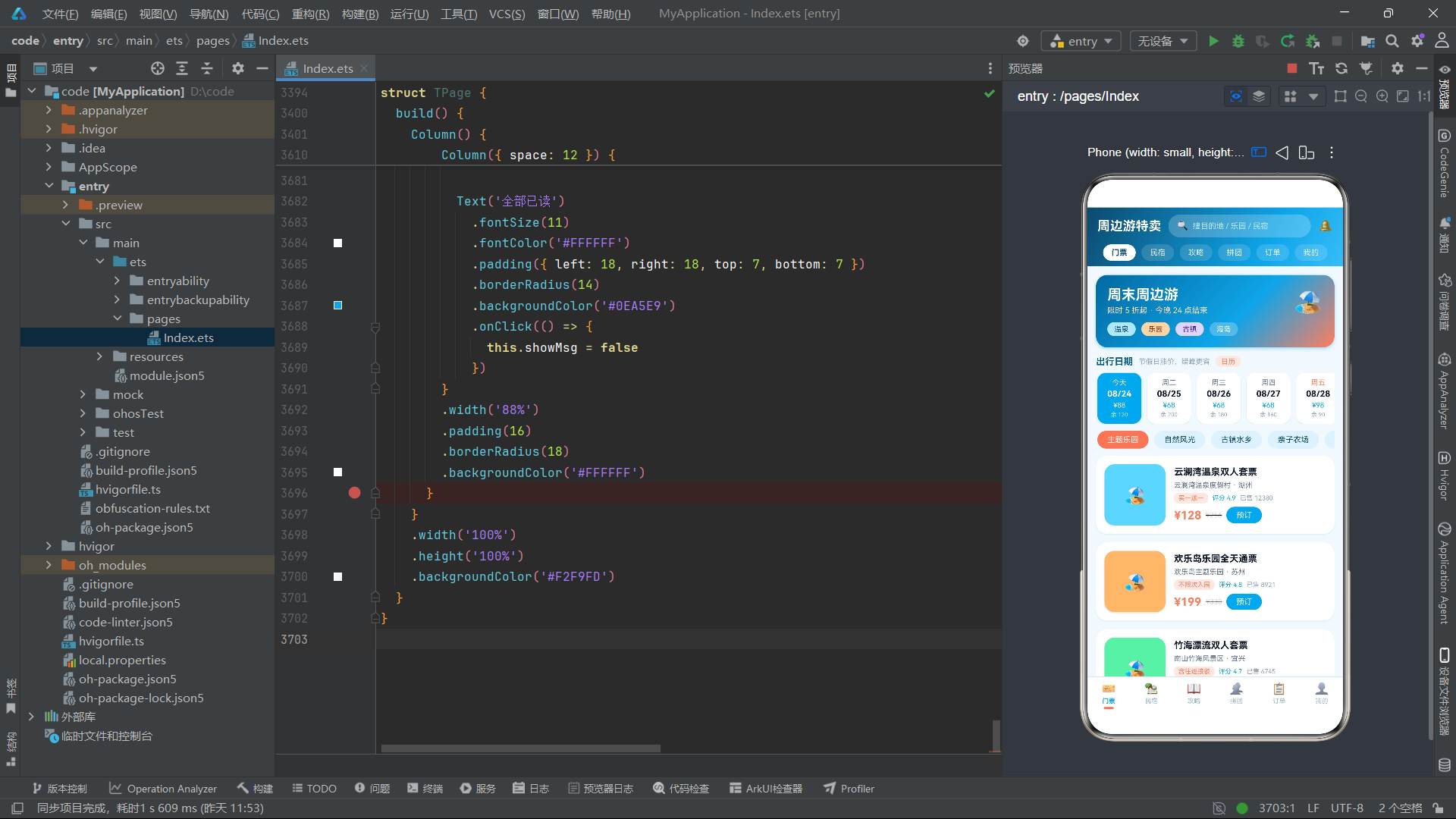
九、总结
本文对基于 HarmonyOS ArkTS API 24 构建的周边游特卖应用进行了全维度的深度技术解析。该应用以海洋蓝与珊瑚橙为主色调,采用"顶部频道 pill 横滑 + 底部 Tab 导航"的双重导航架构,覆盖了门票预订、民宿住宿、旅游攻略、拼团优惠、订单管理和个人中心六大核心业务模块。从接口定义层到组件实现层,从全局常量配置到全局纯函数封装,本文逐段展示了代码并详细解释了每个设计决策背后的技术考量。
在数据架构层面,该应用定义了 12 个接口类型覆盖全部业务数据模型,采用不可变更新模式(immutable update pattern)进行所有数据操作——无论是行程清单的增删改查、收藏的切换、拼团的参团与发起,还是订单的状态变更,都通过创建新数组替换原数组的方式实现,确保了 ArkTS 响应式系统能够正确检测数据变化并触发 UI 重渲染。5 个全局纯函数(pctW、barHT、seg、dayOf、seasonHit)封装了进度百分比计算、柱状图高度映射、路线分段、日期截取和季节匹配等通用逻辑,提高了代码的复用性和可维护性。
在 UI 交互层面,该应用展现了丰富的视觉组件和交互模式。14 天横向滚动日期选择器通过 off 字段区分工作日和节假日,实现了价格差异化展示。6x6 伪二维码网格通过 ForEach 遍历 36 个 QrCell 渲染出类似真实二维码的视觉效果。拼团进度条通过 pctW 函数动态计算填充宽度,配合渐变色和头像横排展示成团进度。攻略路线分段展示通过 seg 函数将"→"分隔的路线字符串拆解为四个时段,以不同背景色的卡片逐段呈现。出游账单柱状图通过 barHT 函数将金额映射为像素高度,并根据金额阈值动态切换渐变色方案。
通过 @State 装饰器管理交互状态。全局 @Builder 函数 modalOverlay 提供了统一的半透明遮罩层渲染能力,所有弹框都基于该遮罩层构建。@Entry 主入口组件 TPage 通过 activeTab 状态变量和 if-else 条件链实现 Tab 切换,每次切换时组件实例完全重建,确保了各 Tab 之间状态的完全隔离。这种设计虽然牺牲了一定的组件复用性,但保证了状态管理的清晰性和可预测性,适合功能模块差异较大的电商类应用场景。整体来看,该应用的代码结构清晰、数据流单向可控、UI 交互丰富,充分展现了 HarmonyOS 6.1.1 平台上 ArkTS 声明式 UI 框架的成熟开发能力。

作为“人工智能6S店”的官方数字引擎,为AI开发者与企业提供一个覆盖软硬件全栈、一站式门户。
更多推荐



 0
0 0
0- 0


 已为社区贡献2条内容

所有评论(0)