
基于HarmonyOS API 24的ArkTS运动户外装备城:步数柱状图、跑步打卡CRUD与私教预约在HarmonyOS 6.1.1下的黑红运动风架构深度解析
一、引言
鸿蒙生态自诞生以来,始终以"万物互联"为核心理念,致力于打造跨设备、跨场景的统一开发框架。HarmonyOS 6.1.1 作为鸿蒙操作系统的最新迭代版本,在分布式软总线、全栈自研开发语言和声明式 UI 框架三个方面实现了全面跃升。其中,HarmonyOS ArkTS API 24 为开发者提供了更加丰富的组件能力与更高效的渲染管线,使得复杂交互场景下的应用开发变得更加从容。
ArkTS 声明式 UI 的核心在于通过 @Component 装饰器声明组件结构,通过 @State 装饰器声明可观察的状态变量,通过 @Builder 装饰器声明可复用的 UI 片段。当状态变量发生变化时,框架自动触发依赖该状态的 UI 组件进行精确刷新,无需开发者手动操作 DOM 节点。这种"数据驱动视图"的范式在运动健身类应用中尤为适用——用户的跑步记录、步数统计、装备清单等数据频繁变化,ArkTS 的响应式系统能够确保每一次数据更新都被准确捕获并高效渲染到界面。
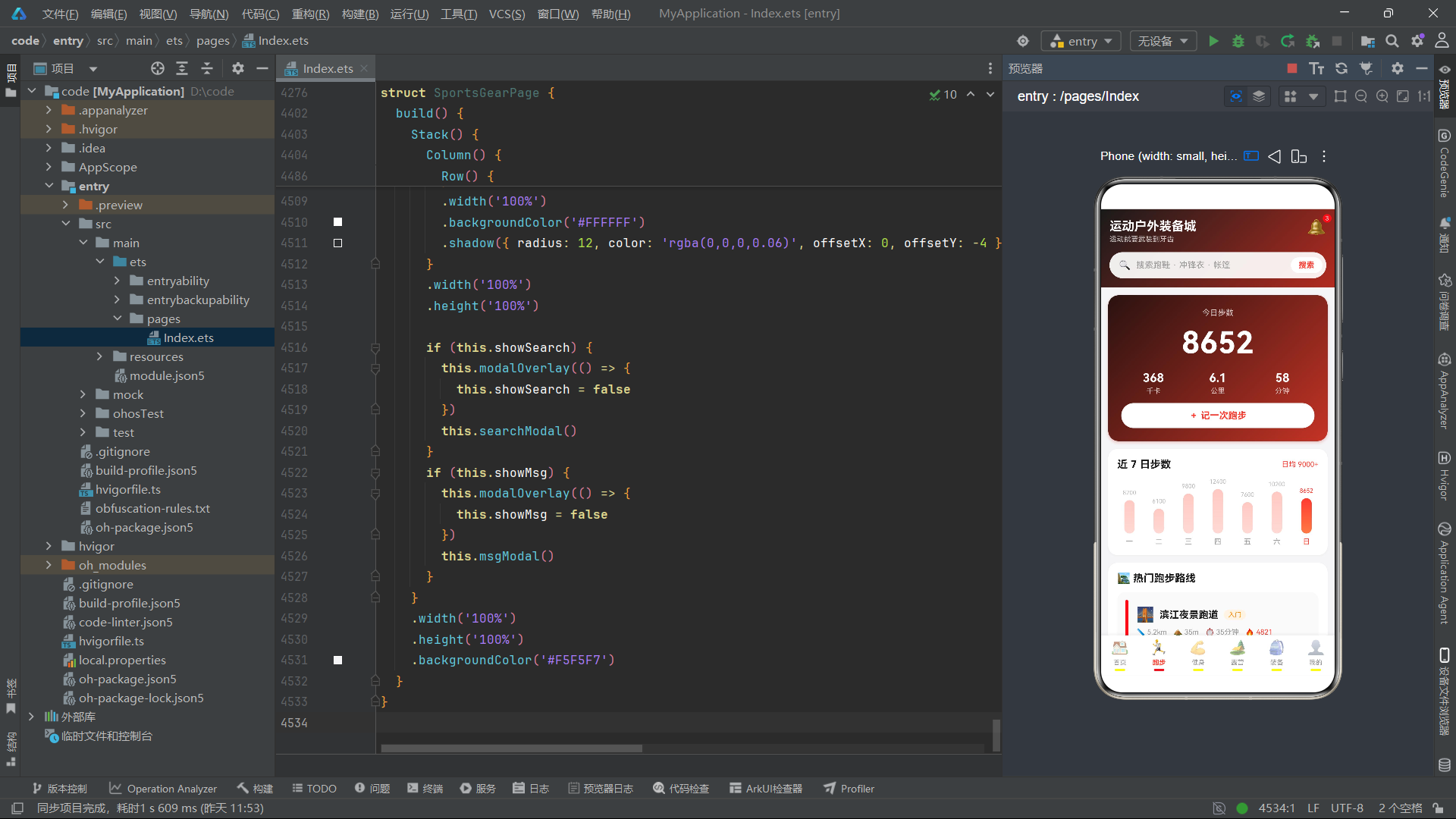
运动户外装备城是一款面向运动爱好者的垂直电商与运动管理综合应用。它不仅提供了装备商城的核心功能(限时秒杀、热卖排行、商品瀑布流、规格选择、装备对比),还深度集成了运动管理能力——跑步打卡(含距离、时长、配速自动计算)、步数柱状图可视化、跑步路线推荐、健身课程筛选与私教预约、露营清单 CRUD 管理、成就徽章系统、个人装备库管理等。这种"电商+运动管理"的复合产品定位,使得应用的交互复杂度和数据模型丰富度远超普通电商应用。
在视觉设计上,本应用采用黑红运动风主题——主渐变从近黑色 #1A1A1A 过渡到运动红 #B32B20,搭配纯白卡片(#FFFFFF)和浅灰背景(#F5F5F7),强调色为鲜红 #FF3B30。整体风格硬朗有力,大量使用直角圆角混合(按钮圆角 22、卡片圆角 14-16)、深色渐变头部和红色进度条/选中态,营造出运动品牌特有的力量感与速度感。底部导航 6 Tab 架构——首页 / 跑步 / 健身 / 露营 / 装备 / 我的,每个 Tab 拥有完全差异化的布局结构和独立的状态管理空间。
本文将基于 HarmonyOS ArkTS API 24 的技术视角,从 18 个接口定义、8 个全局纯函数、6 个 Tab 组件、主入口页面等维度,对该应用的完整源码进行逐层拆解与深度剖析。
二、接口定义层分析
本应用定义了 18 个接口,覆盖了从电商商品到运动数据、从营地信息到成就徽章的全量业务实体。
2.1 电商商品接口群
interface FlashMeta {
  id: number
  name: string
  price: number
  oldPrice: number
  sold: number
  total: number
  pic: string
}

interface RankMeta {
  id: number
  name: string
  brand: string
  heat: number
  trend: string
  pic: string
}

interface GoodsMeta {
  id: number
  name: string
  price: number
  oldPrice: number
  sold: number
  rate: number
  tag: string
  pic: string
}
FlashMeta 描述限时秒杀商品,sold 和 total 字段用于计算抢购百分比(通过全局函数 flashPct 转换为进度条宽度)。RankMeta 描述热卖排行榜商品,heat 为热度数值,trend 存储趋势文本(如 “↑12%”),通过 indexOf('↑') 判断涨跌方向并动态着色。GoodsMeta 用于首页"猜你喜欢"瀑布流,rate 为评分(如 4.9),tag 存储促销标签(如"爆款"、“补贴”),在卡片左上角以红色标签呈现。
2.2 运动数据接口群
interface StepWeekMeta {
  day: string
  steps: number
}

interface RouteMeta {
  id: number
  name: string
  dist: string
  climb: string
  hard: string
  time: string
  hot: number
  scenery: string
}

interface RunLogMeta {
  id: number
  date: string
  dist: number
  duration: string
  pace: string
  feeling: string
}
StepWeekMeta 描述一周步数数据,day 为星期缩写,steps 为步数数值,通过全局函数 stepBarH 转换为柱状图高度。RouteMeta 描述跑步路线,包含距离 dist、爬升 climb、难度 hard、预计用时 time、热度 hot 和风景 Emoji scenery。RunLogMeta 描述跑步记录,dist 为数值类型(如 5.2),pace 存储配速文本(如 “5’58"”),feeling 存储感受标签。
2.3 健身课程接口群
interface CourseMeta {
  id: number
  name: string
  coach: string
  level: string
  minutes: number
  people: number
  cat: string
  pic: string
  kcal: number
}

interface DayCalMeta {
  day: string
  date: string
  done: boolean
}
CourseMeta 描述健身课程,level 使用星号字符串(如 “★★★”)表示难度等级,cat 为分类标签(如"燃脂"、“增肌”),kcal 为预计消耗千卡数。在课程详情弹框中,minutes 字段被用于动态计算课程安排(“主体训练 " + (minutes - 8) + " 分钟”),体现了数据驱动的详情展示逻辑。DayCalMeta 描述本周训练日历,done 布尔值标记当天是否已完成训练。
2.4 露营数据接口群
interface CampMeta {
  id: number
  name: string
  loc: string
  price: number
  score: number
  tags: string
  pic: string
}

interface CheckItemMeta {
  id: number
  name: string
  cat: string
  done: boolean
}

interface TipMeta {
  id: number
  title: string
  read: number
  pic: string
  summary: string
}
CampMeta 描述营地信息,tags 使用管道符分隔的字符串(如 “可携带宠物|湖景|篝火”),在弹框中通过 tags.split('|') 拆分为标签数组渲染。CheckItemMeta 描述出行清单条目,done 布尔值标记是否已准备,支持完整的 toggle/add/edit/delete CRUD 操作。TipMeta 描述露营技巧文章,read 为阅读量数值。
2.5 装备与对比接口群
interface GearGoodsMeta {
  id: number
  name: string
  price: number
  oldPrice: number
  sold: number
  rate: number
  tag: string
  pic: string
  cat: string
}

interface CompareMeta {
  field: string
  a: string
  b: string
}
GearGoodsMeta 在 GoodsMeta 基础上增加了 cat 分类字段(如"鞋靴"、“服饰”),支持按分类筛选。CompareMeta 描述装备对比表的一行数据,field 为对比维度名称,a 和 b 分别为两款产品的参数值,用于渲染三列对比表格。
2.6 个人中心接口群
interface BadgeMeta {
  id: number
  name: string
  pic: string
  got: boolean
}

interface OrderMeta {
  id: string
  name: string
  price: number
  count: number
  status: string
  date: string
  pic: string
}

interface MyGearMeta {
  id: number
  name: string
  useCount: number
  note: string
  pic: string
}
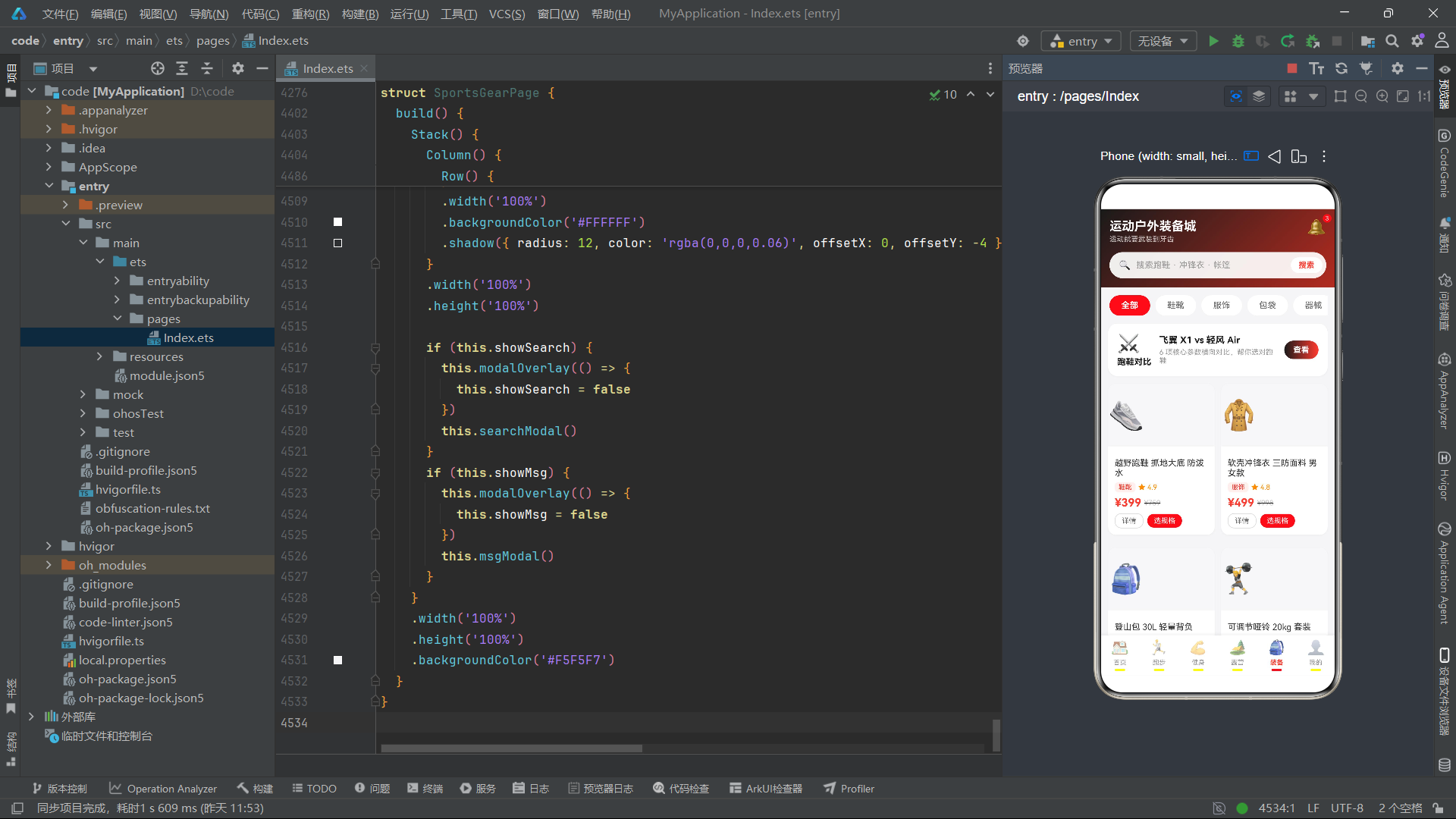
BadgeMeta 描述成就徽章,got 布尔值标记是否已获得。未获得的徽章通过 opacity(0.45) 降低视觉权重。OrderMeta 描述订单信息,count 为购买数量,用于计算实付金额(price * count)。MyGearMeta 描述个人装备库条目,useCount 为使用次数,note 存储装备备注(如"已跑 520km,建议 800km 更换"),支持编辑和删除操作。
2.7 全局配置接口群
interface TabMeta {
  id: number
  name: string
  icon: string
}

interface MsgMeta {
  id: number
  title: string
  time: string
  detail: string
}
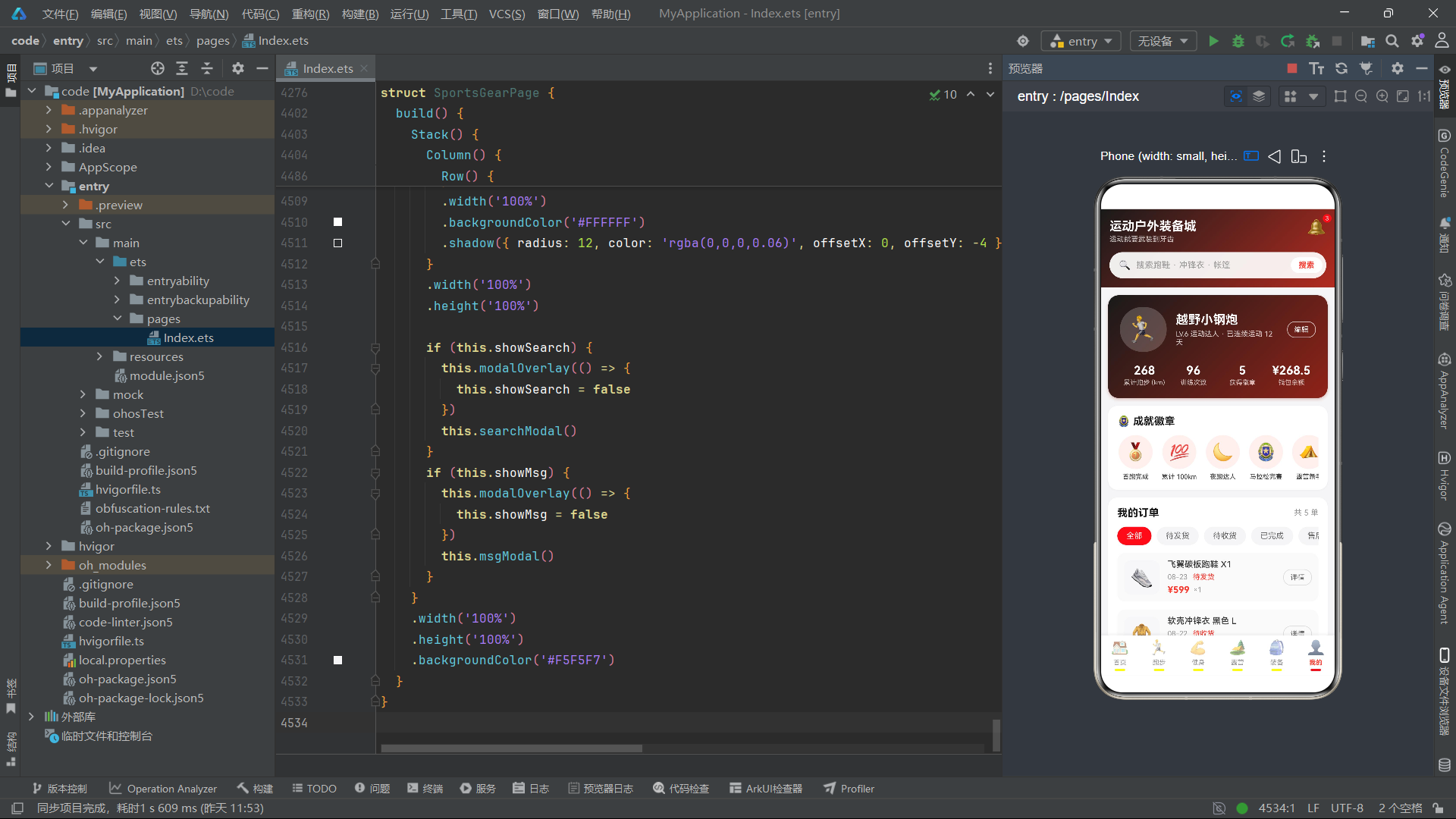
TabMeta 描述底部导航 Tab 配置,id 为数字索引。MsgMeta 描述消息中心的消息条目,detail 为消息详情文本。
三、全局常量与数据配置分析
3.1 电商数据配置
应用定义了大量静态数据数组作为业务数据源:
FLASH_LIST(6 条):限时秒杀商品列表,包含碳板竞速跑鞋、冲锋衣、登山杖等。RANK_LIST(8 条):运动装备热卖排行榜,携带热度值和趋势方向。HOME_GOODS(10 条):首页"猜你喜欢"商品列表,覆盖跑鞋、冲锋衣、帐篷、运动手表等品类。
3.2 运动数据配置
const STEP_WEEK: StepWeekMeta[] = [
  { day: '一', steps: 8200 },
  { day: '二', steps: 6100 },
  { day: '三', steps: 9800 },
  { day: '四', steps: 12400 },
  { day: '五', steps: 7600 },
  { day: '六', steps: 10200 },
  { day: '日', steps: 8652 }
]

const RUN_ROUTES: RouteMeta[] = [
  { id: 1, name: '滨江夜景跑道', dist: '5.2km', climb: '35m', hard: '入门', time: '35分钟', hot: 4821, scenery: '🌉' },
  // ...共 5 条路线
]

const RUN_LOGS: RunLogMeta[] = [
  { id: 1, date: '今天 07:20', dist: 5.2, duration: '31分钟', pace: "5'58\"", feeling: '状态在线' },
  // ...共 6 条记录
]

const FEEL_TAGS: string[] = ['状态在线', '轻松完成', '有点疲惫', '越跑越爽', '恢复慢跑']
STEP_WEEK 驱动 7 日步数柱状图渲染,RUN_ROUTES 提供跑步路线推荐,RUN_LOGS 作为跑步记录的初始数据(支持动态增删),FEEL_TAGS 为跑步打卡时的感受标签选项。
3.3 健身与露营数据配置
const COURSE_LIST: CourseMeta[] = [ // 8 条课程 ]
const COURSE_CATS: string[] = ['全部', '燃脂', '增肌', '瑜伽', '跑步', '拉伸']
const WEEK_CAL: DayCalMeta[] = [ // 7 天打卡日历 ]
const BOOK_TIMES: string[] = ['09:00', '11:00', '15:00', '19:00', '20:30']
const BOOK_COACHES: string[] = ['王猛教练', '李铁教练', '林悠教练', '陈静教练']

const CAMPS: CampMeta[] = [ // 4 个营地 ]
const CHECK_ITEMS: CheckItemMeta[] = [ // 8 条清单项 ]
const CHECK_CATS: string[] = ['装备', '工具', '食材', '衣物']
const CAMP_TIPS: TipMeta[] = [ // 4 篇技巧文章 ]
3.4 装备与个人中心数据配置
const GEAR_GOODS: GearGoodsMeta[] = [ // 10 件装备商品 ]
const GEAR_CATS: string[] = ['全部', '鞋靴', '服饰', '包袋', '器械', '配件']
const SIZE_OPTS: string[] = ['S', 'M', 'L', 'XL', 'XXL']
const COLOR_OPTS: string[] = ['#1A1A1A', '#FF3B30', '#2F5AF5', '#34C759', '#FFB800']
const COMPARE_ROWS: CompareMeta[] = [ // 6 行对比数据 ]

const BADGES: BadgeMeta[] = [ // 8 枚徽章 ]
const MY_ORDERS: OrderMeta[] = [ // 5 条订单 ]
const ORDER_STATES: string[] = ['全部', '待发货', '待收货', '已完成', '售后中']
const MY_GEARS: MyGearMeta[] = [ // 4 件个人装备 ]

const MAIN_TABS: TabMeta[] = [
  { id: 0, name: '首页', icon: '🏠' },
  { id: 1, name: '跑步', icon: '🏃' },
  { id: 2, name: '健身', icon: '💪' },
  { id: 3, name: '露营', icon: '🏕️' },
  { id: 4, name: '装备', icon: '🎒' },
  { id: 5, name: '我的', icon: '👤' }
]
const MSG_LIST: MsgMeta[] = [ // 5 条消息 ]
COLOR_OPTS 存储 5 个十六进制色值,在规格选择弹框中直接渲染为圆形色块。COMPARE_ROWS 存储 6 行对比数据(重量、中底材料、碳板、适用距离、参考价格、推荐人群),用于装备对比表弹框。
四、全局纯函数分析
4.1 瀑布流分列函数
function getLeftHomeGoods(): GoodsMeta[] {
  const r: GoodsMeta[] = []
  for (let i = 0; i < HOME_GOODS.length; i += 2) {
    r.push(HOME_GOODS[i])
  }
  return r
}

function getRightHomeGoods(): GoodsMeta[] {
  const r: GoodsMeta[] = []
  for (let i = 1; i < HOME_GOODS.length; i += 2) {
    r.push(HOME_GOODS[i])
  }
  return r
}
与美妆应用类似,这两个函数将商品数组按奇偶索引拆分为左右两列。首页的"猜你喜欢"区域通过双 Column + layoutWeight(1) 实现双列瀑布流。
4.2 抢购百分比函数
function flashPct(sold: number, total: number): string {
  return Math.round(sold / total * 100) + '%'
}
flashPct 接收已售数量和总量,返回百分比字符串(如 “93%”)。该函数在秒杀卡片的进度条渲染中被调用两次——一次用于进度条宽度(width(flashPct(item.sold, item.total))),一次用于进度条上方的文字标签。
4.3 步数柱状图高度函数
function stepBarH(v: number): number {
  let h: number = Math.round(v / 160)
  if (h > 68) {
    h = 68
  }
  if (h < 20) {
    h = 20
  }
  return h
}
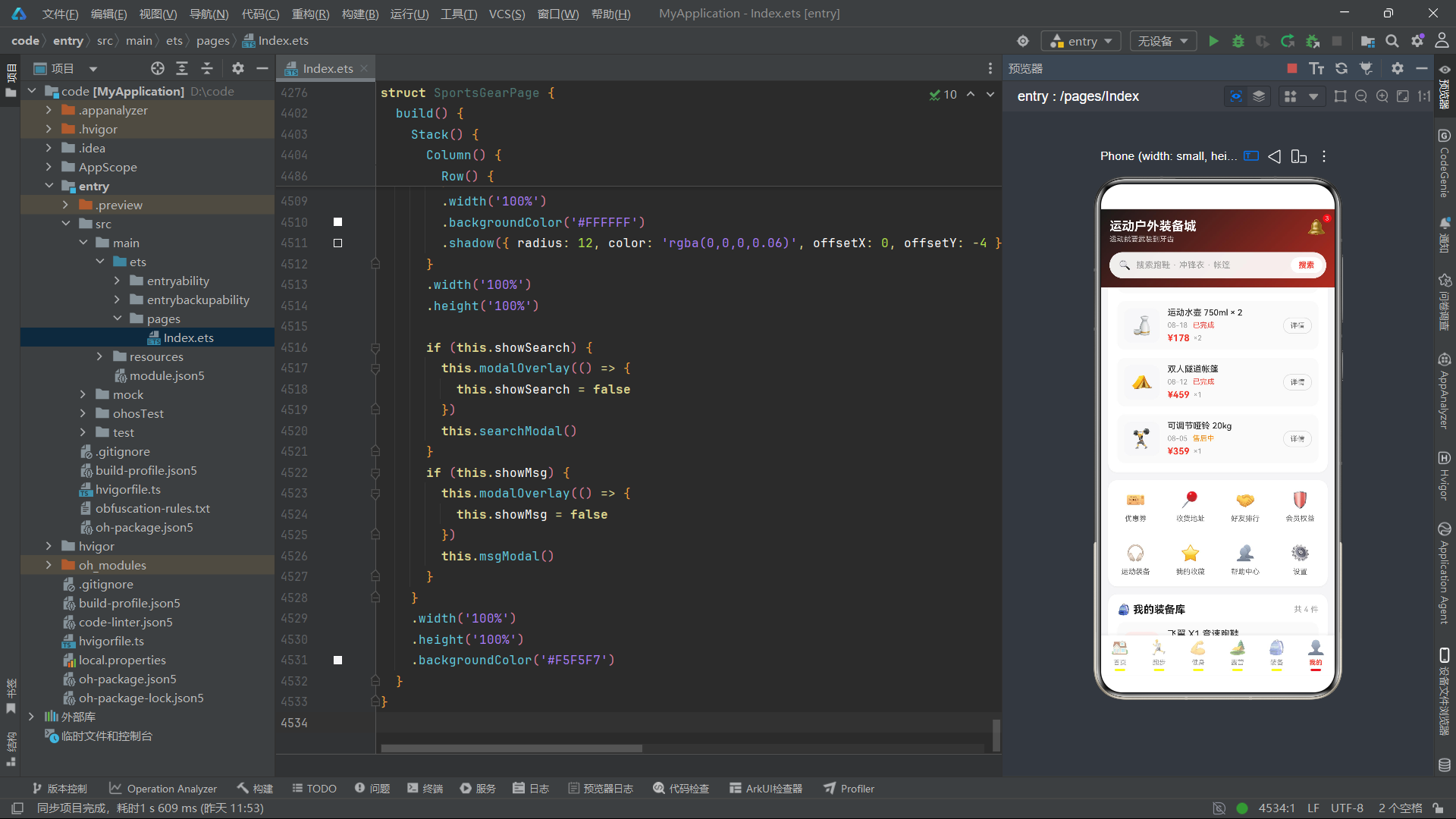
stepBarH 将步数数值转换为柱状图高度值。除以 160 是一个经验系数——8000 步约等于 50vp 高度,12000 步约等于 75vp(被截断为 68vp 上限)。通过 Math.round 取整确保高度为整数像素值。上下限钳制(20-68vp)确保最低柱和最高柱都有合理的视觉高度。
4.4 课程筛选函数
function getCourses(cat: string): CourseMeta[] {
  if (cat === '全部') {
    return COURSE_LIST
  }
  const r: CourseMeta[] = []
  for (let i = 0; i < COURSE_LIST.length; i++) {
    if (COURSE_LIST[i].cat === cat) {
      r.push(COURSE_LIST[i])
    }
  }
  return r
}
getCourses 按分类名称筛选课程列表。当分类为"全部"时返回完整列表,否则通过遍历匹配 cat 字段筛选。与美妆应用的 getSkinByEffect 不同,此函数在筛选结果为空时不会回退返回完整列表。
4.5 装备分类筛选与分列函数
function getGearByCat(cat: string): GearGoodsMeta[] {
  if (cat === '全部') {
    return GEAR_GOODS
  }
  const r: GearGoodsMeta[] = []
  for (let i = 0; i < GEAR_GOODS.length; i++) {
    if (GEAR_GOODS[i].cat === cat) {
      r.push(GEAR_GOODS[i])
    }
  }
  return r
}

function getLeftGear(cat: string): GearGoodsMeta[] {
  const all: GearGoodsMeta[] = getGearByCat(cat)
  const r: GearGoodsMeta[] = []
  for (let i = 0; i < all.length; i += 2) {
    r.push(all[i])
  }
  return r
}

function getRightGear(cat: string): GearGoodsMeta[] {
  const all: GearGoodsMeta[] = getGearByCat(cat)
  const r: GearGoodsMeta[] = []
  for (let i = 1; i < all.length; i += 2) {
    r.push(all[i])
  }
  return r
}
这三个函数构成了装备 Tab 的筛选+分列管线。getGearByCat 先按分类筛选,getLeftGear 和 getRightGear 再将筛选结果按奇偶索引拆分为双列。由于筛选后数组长度会变化,分列逻辑必须基于筛选后的数组而非原始数组,因此这两个函数接收 cat 参数而非直接操作 GEAR_GOODS。
五、各 Tab 组件深度分析
5.1 Tab1 首页(HomeTab):Banner + 秒杀 + 排行 + 瀑布
5.1.1 @State 状态变量
@State showDetail: boolean = false
@State showSeckill: boolean = false
@State showOk: boolean = false
@State curName: string = ''
@State curPrice: number = 0
@State buyCount: number = 1
HomeTab 维护 6 个状态变量。curName 和 curPrice 使用基础类型(string 和 number)而非对象引用,在弹框间传递当前选中商品的信息。buyCount 初始值为 1,在秒杀弹框中通过加减按钮调整(范围 1-5)。
5.1.2 doSeckill 方法
doSeckill(name: string, price: number) {
  this.curName = name
  this.curPrice = price
  this.showSeckill = true
}
doSeckill 方法接收商品名称和价格,赋值给状态变量后打开秒杀弹框。这种"先赋值再开弹框"的模式确保弹框渲染时能正确读取当前商品信息。
5.1.3 弹框群:detailModal、seckillModal、okToast
@Builder seckillModal() {
  Column({ space: 14 }) {
    Text('限时秒杀确认').fontSize(18).fontWeight(FontWeight.Bold).fontColor('#1A1A1A')
    Text(this.curName).fontSize(14).fontColor('#666666')
      .maxLines(1).textOverflow({ overflow: TextOverflow.Ellipsis })
    Row() {
      Text('秒杀价').fontSize(13).fontColor('#999999')
      Text('¥' + this.curPrice).fontSize(26).fontWeight(FontWeight.Bold)
        .fontColor('#FF3B30').margin({ left: 8 })
    }
    .width('100%')

    Divider().color('#F0F0F0')

    Row() {
      Text('购买数量').fontSize(14).fontColor('#333333')
      Row().layoutWeight(1)
      Row({ space: 0 }) {
        Text('−')
          .fontSize(20)
          .fontColor(this.buyCount > 1 ? '#FF3B30' : '#CCCCCC')
          .width(34).height(34)
          .textAlign(TextAlign.Center)
          .backgroundColor('#F5F5F7')
          .borderRadius({ topLeft: 8, bottomLeft: 8 })
          .onClick(() => {
            if (this.buyCount > 1) {
              this.buyCount -= 1
            }
          })
        Text(this.buyCount + '')
          .fontSize(15).fontWeight(FontWeight.Bold)
          .fontColor('#1A1A1A')
          .width(44).height(34)
          .textAlign(TextAlign.Center)
          .backgroundColor('#FAFAFA')
        Text('+')
          .fontSize(20)
          .fontColor('#FF3B30')
          .width(34).height(34)
          .textAlign(TextAlign.Center)
          .backgroundColor('#FFF0EE')
          .borderRadius({ topRight: 8, bottomRight: 8 })
          .onClick(() => {
            if (this.buyCount < 5) {
              this.buyCount += 1
            }
          })
      }
    }
    .width('100%')

    Row() {
      Text('合计:¥' + (this.curPrice * this.buyCount))
        .fontSize(15).fontWeight(FontWeight.Bold).fontColor('#FF3B30')
      Text('限时优惠 · 每人限购5件')
        .fontSize(11).fontColor('#999999').margin({ left: 8 })
    }
    .width('100%')

    Row({ space: 12 }) {
      Text('再看看')
        .fontSize(14).fontColor('#666666').layoutWeight(1)
        .textAlign(TextAlign.Center)
        .padding({ top: 11, bottom: 11 })
        .backgroundColor('#F5F5F7').borderRadius(22)
        .onClick(() => { this.showSeckill = false })
      Text('立即抢购')
        .fontSize(14).fontWeight(FontWeight.Bold).fontColor('#FFFFFF').layoutWeight(1)
        .textAlign(TextAlign.Center)
        .padding({ top: 11, bottom: 11 })
        .linearGradient({ angle: 90, colors: [['#FF3B30', 0.0], ['#FF7A45', 1.0]] })
        .borderRadius(22)
        .onClick(() => {
          this.showSeckill = false
          this.showOk = true
        })
    }
    .width('100%')
  }
  .padding(18).backgroundColor('#FFFFFF').borderRadius(16)
  .width('86%').position({ x: '7%', y: '18%' })
  .constraintSize({ maxHeight: '70%' })
}
seckillModal 是秒杀确认弹框,是首页最复杂的弹框之一。它包含商品名称(单行省略)、秒杀价格(大号红色数字)、数量选择器(减号-数字-加号三段式布局,减号在 buyCount 为 1 时变灰禁用,加号在 buyCount 为 5 时不再增加)、合计金额(curPrice * buyCount 实时计算)和双按钮操作区。
数量选择器的视觉设计值得注意——减号按钮背景为灰色(#F5F5F7),加号按钮背景为浅红(#FFF0EE),中间数字区域为更浅的灰色(#FAFAFA),左右圆角分别设置(topLeft/bottomLeft 和 topRight/bottomRight),形成一体化的步进器外观。
5.1.4 flashCard 与 goodsCard 构建器
@Builder flashCard(item: FlashMeta) {
  Column({ space: 6 }) {
    Text(item.pic).fontSize(34).padding({ top: 10, bottom: 6 })
    Text(item.name).fontSize(12).fontColor('#333333')
      .maxLines(1).textOverflow({ overflow: TextOverflow.Ellipsis }).width('100%')
    Row({ space: 4 }) {
      Text('¥' + item.price).fontSize(15).fontWeight(FontWeight.Bold).fontColor('#FF3B30')
      Text('¥' + item.oldPrice).fontSize(11).fontColor('#BBBBBB')
        .decoration({ type: TextDecorationType.LineThrough })
    }
    .width('100%')

    Column({ space: 4 }) {
      Row() {
        Column() {
          Text('已抢 ' + flashPct(item.sold, item.total))
            .fontSize(10).fontColor('#FFFFFF')
        }
        .height(8).borderRadius(4)
        .backgroundColor('#FF3B30')
        .width(flashPct(item.sold, item.total))
      }
      .width('100%')
      .backgroundColor('#FFE1DE')
      .borderRadius(4)
    }
    .width('100%')

    Text('马上抢')
      .fontSize(11).fontColor('#FFFFFF').width('100%')
      .textAlign(TextAlign.Center)
      .padding({ top: 5, bottom: 5 })
      .backgroundColor('#FF3B30').borderRadius(12)
      .onClick(() => { this.doSeckill(item.name, item.price) })
  }
  .padding(10).backgroundColor('#FFFFFF').borderRadius(12)
  .width(116).margin({ right: 10 })
  .shadow({ radius: 8, color: 'rgba(0,0,0,0.05)', offsetX: 0, offsetY: 2 })
}
flashCard 是秒杀商品横滑卡片构建器,宽度固定为 116vp。进度条实现采用嵌套 Row + Column 结构——外层 Row 为浅红色轨道(#FFE1DE),内层 Column 为红色进度条(#FF3B30),宽度通过 flashPct 函数返回的百分比字符串驱动。
@Builder goodsCard(item: GoodsMeta) {
  Column({ space: 8 }) {
    Stack({ alignContent: Alignment.TopStart }) {
      Text(item.pic)
        .fontSize(46)
        .padding({ top: 26, bottom: 26, left: 40, right: 40 })
        .backgroundColor('#F7F7F9')
        .borderRadius({ topLeft: 12, topRight: 12 })
      Text(item.tag)
        .fontSize(10).fontColor('#FFFFFF')
        .padding({ left: 8, right: 8, top: 3, bottom: 3 })
        .backgroundColor('#FF3B30')
        .borderRadius({ topRight: 10, bottomRight: 10 })
    }
    .width('100%')

    Column({ space: 6 }) {
      Text(item.name).fontSize(13).fontColor('#333333')
        .maxLines(2).textOverflow({ overflow: TextOverflow.Ellipsis })
      Row({ space: 4 }) {
        Text('★ ' + item.rate).fontSize(11).fontColor('#FF8C00')
        Text(item.sold + '人付款').fontSize(11).fontColor('#999999')
      }
      .width('100%')

      Row() {
        Text('¥' + item.price).fontSize(17).fontWeight(FontWeight.Bold).fontColor('#FF3B30')
        Text('¥' + item.oldPrice).fontSize(11).fontColor('#BBBBBB')
          .decoration({ type: TextDecorationType.LineThrough }).margin({ left: 4 })
      }
      .width('100%')

      Text('看详情')
        .fontSize(11).fontColor('#FF3B30')
        .padding({ left: 12, right: 12, top: 4, bottom: 4 })
        .borderRadius(10)
        .border({ width: 1, color: '#FF3B30' })
        .alignSelf(ItemAlign.Start)
        .onClick(() => {
          this.curName = item.name
          this.curPrice = item.price
          this.showDetail = true
        })
    }
    .padding(10).alignItems(HorizontalAlign.Start)
  }
  .backgroundColor('#FFFFFF').borderRadius(12)
  .margin({ bottom: 10 })
  .shadow({ radius: 6, color: 'rgba(0,0,0,0.04)', offsetX: 0, offsetY: 2 })
}
goodsCard 是首页瀑布流商品卡片构建器。图标区域使用 Stack 层叠布局——底层为 46 号 Emoji 图标(居中大内边距),上层叠加红色促销标签(TopStart 对齐,仅右侧圆角形成标签条效果)。alignSelf(ItemAlign.Start) 使"看详情"按钮左对齐而非撑满宽度。
5.1.5 build 方法
首页 build 方法包含五个区域:Banner(黑红渐变,标题+副标题+双按钮)、快捷入口(4 列宫格)、限时秒杀(横滑卡片列表)、TOP 榜单(前三名高亮+趋势箭头)、猜你喜欢双列瀑布。排行榜中前三名(idx < 3)使用红色序号和浅红色背景,趋势文本通过 indexOf('↑') 判断涨跌——上涨为红色,下跌为绿色(#34C759)。
5.2 Tab2 跑步(RunTab):步数柱状图 + 路线推荐 + 跑步打卡 CRUD
5.2.1 @State 状态变量
@State logs: RunLogMeta[] = RUN_LOGS
@State showRoute: boolean = false
@State showCheckin: boolean = false
@State showDelLog: boolean = false
@State showOk: boolean = false
@State curRoute: RouteMeta = RUN_ROUTES[0]
@State delLogId: number = 0
@State inputDist: string = ''
@State inputMin: string = ''
@State feelIdx: number = 0
RunTab 维护 10 个状态变量。logs 以 RUN_LOGS 为初始值,支持完整的增删操作。curRoute 使用对象类型并初始化为 RUN_ROUTES[0],在路线弹框中展示选中路线的详细信息。inputDist 和 inputMin 为字符串类型,存储跑步打卡弹框中的距离和时长输入值。
5.2.2 confirmCheckin:跑步打卡创建方法
confirmCheckin() {
  const d: number = parseFloat(this.inputDist)
  const m: number = parseFloat(this.inputMin)
  if (d > 0 && m > 0) {
    const pace: string = Math.round(m / d) + "'00\""
    const log: RunLogMeta = {
      id: this.logs.length + 1,
      date: '刚刚',
      dist: d,
      duration: m + '分钟',
      pace: pace,
      feeling: FEEL_TAGS[this.feelIdx]
    }
    const r: RunLogMeta[] = [log]
    for (let i = 0; i < this.logs.length; i++) {
      r.push(this.logs[i])
    }
    this.logs = r
    this.showCheckin = false
    this.inputDist = ''
    this.inputMin = ''
    this.showOk = true
  }
}
confirmCheckin 是跑步打卡的核心方法。它首先通过 parseFloat 将输入的距离和时长从字符串转为数值,验证有效性后自动计算配速(Math.round(m / d) 取整分钟数 + “'00"”)。新记录以 date: '刚刚' 标记,并通过"头部插入"策略(新记录推入空数组后再追加旧记录)实现列表顶部展示最新数据。这种不可变更新模式确保 ArkTS 框架能正确检测到数组变化。
5.2.3 deleteLog:跑步记录删除方法
deleteLog(id: number) {
  const r: RunLogMeta[] = []
  for (let i = 0; i < this.logs.length; i++) {
    if (this.logs[i].id !== id) {
      r.push(this.logs[i])
    }
  }
  this.logs = r
  this.showDelLog = false
}
deleteLog 通过 id 而非索引来过滤记录,避免了索引偏移问题。删除后关闭确认弹框。
5.2.4 7 日步数柱状图
Row({ space: 8 }) {
  ForEach(STEP_WEEK, (item: StepWeekMeta, idx: number) => {
    Column({ space: 6 }) {
      Text(item.steps + '')
        .fontSize(9)
        .fontColor(idx === 6 ? '#FF3B30' : '#BBBBBB')
      Column()
        .width(16)
        .height(stepBarH(item.steps))
        .borderRadius(8)
        .linearGradient(idx === 6
          ? { angle: 180, colors: [['#FF3B30', 0.0], ['#FF7A45', 1.0]] }
          : { angle: 180, colors: [['#FFC9C2', 0.0], ['#FFD9D4', 1.0]] })
      Text(item.day)
        .fontSize(11)
        .fontColor(idx === 6 ? '#FF3B30' : '#999999')
    }
    .layoutWeight(1)
  })
}
.width('100%')
.alignItems(VerticalAlign.Bottom)
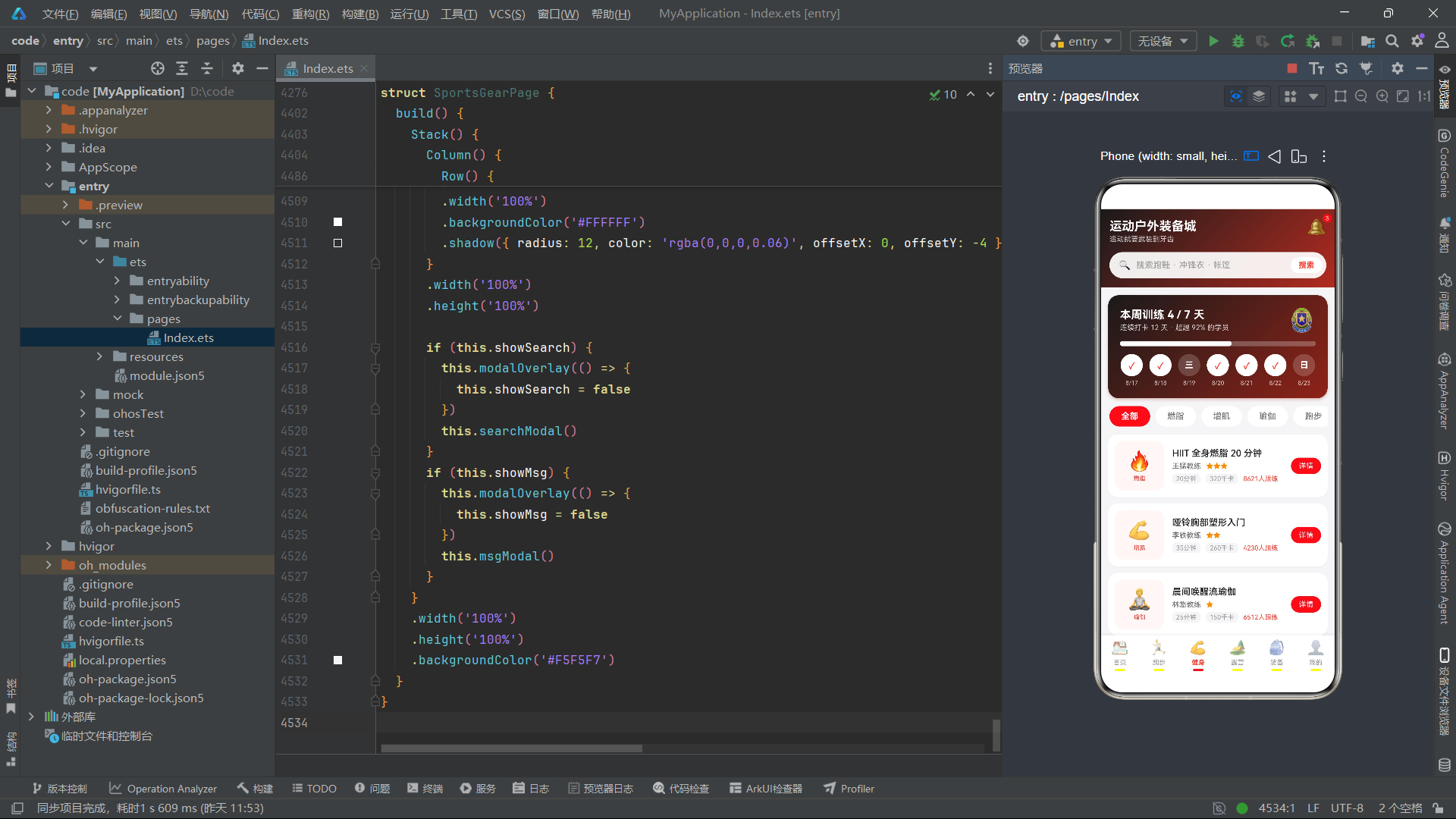
7 日步数柱状图是跑步 Tab 的视觉亮点。通过 ForEach 遍历 STEP_WEEK,每个柱子为一个 Column 容器——顶部步数数字、中间渐变柱体(高度由 stepBarH 计算)、底部星期文字。今日(idx === 6,即第 7 天)使用红色渐变柱体和红色文字,其他日使用浅粉色渐变柱体和灰色文字。alignItems(VerticalAlign.Bottom) 确保所有柱子底部对齐。
5.2.5 build 方法
跑步 Tab 的 build 方法包含四个区域:今日运动数据卡(黑红渐变,步数+千卡+公里+分钟四宫格,底部"记一次跑步"按钮)、7 日步数柱状图、热门跑步路线列表(红色竖条+路线信息+参数标签)、我的跑步记录列表(距离卡片+日期/配速/感受标签+删除按钮)。列表标题显示动态总数('共 ' + this.logs.length + ' 条'),当增删记录时自动更新。
5.3 Tab3 健身(FitTab):训练日历 + 课程筛选 + 私教预约
5.3.1 @State 状态变量与弹框
@State catIdx: number = 0
@State showCourse: boolean = false
@State showBook: boolean = false
@State showOk: boolean = false
@State curCourse: CourseMeta = COURSE_LIST[0]
@State timeIdx: number = 0
@State coachIdx: number = 0
FitTab 维护 7 个状态变量。catIdx 驱动课程分类筛选,curCourse 在课程详情弹框中展示选中课程信息,timeIdx 和 coachIdx 分别记录私教预约弹框中选中的时间段和教练索引。
courseModal 展示课程详情,包含三宫格数据展示(时长/消耗/跟练人数)、课程安排列表(热身+主体训练+放松,其中主体训练时长通过 minutes - 8 动态计算),底部双按钮——“免费跟练”(描边样式)和"预约私教"(黑红渐变样式,点击后级联打开预约弹框)。
bookModal 是私教预约弹框,包含时间段选择器(5 个时间段标签)和教练选择器(4 位教练标签),教练选中态使用黑色背景(#1A1A1A),与时间段的红色选中态形成视觉区分。底部提示"预约将消耗 1 次私教卡 · 剩余 6 次"。
5.3.2 build 方法
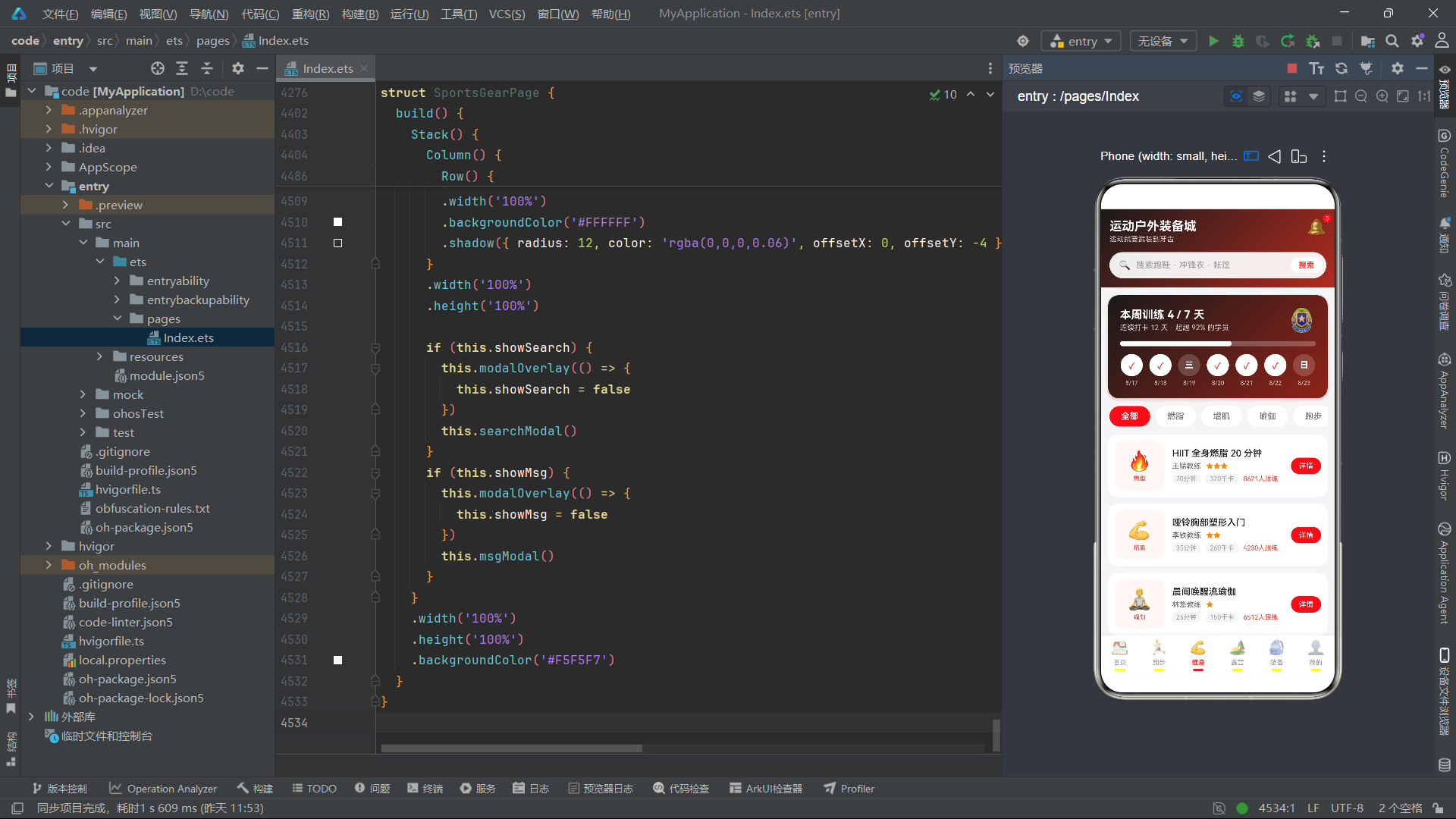
健身 Tab 的 build 方法包含三个区域:本周训练进度卡(黑红渐变头部,训练天数进度条+7 日打卡圆点+徽章图标)、分类筛选 chips(横滑列表,选中态红色填充+白色文字)、课程列表(76x76 图标区+课程名称+教练/难度+时长/千卡/跟练人数标签+"详情"按钮)。
7 日打卡圆点的实现值得注意——已完成日显示 ✓ 标记(红色文字+白色背景),未完成日显示星期文字(白色文字+半透明白色背景),通过条件渲染 Text(item.done ? '✓' : item.day) 实现。
5.4 Tab4 露营(CampTab):营地推荐 + 清单 CRUD + 技巧课堂
5.4.1 @State 状态变量
@State checkList: CheckItemMeta[] = CHECK_ITEMS
@State showCamp: boolean = false
@State showAdd: boolean = false
@State showEdit: boolean = false
@State showDel: boolean = false
@State showTip: boolean = false
@State showOk: boolean = false
@State curCamp: CampMeta = CAMPS[0]
@State curTip: TipMeta = CAMP_TIPS[0]
@State inputName: string = ''
@State editName: string = ''
@State catIdx: number = 0
@State editCatIdx: number = 0
@State editId: number = 0
@State delId: number = 0
CampTab 维护 14 个状态变量,是全应用状态最丰富的组件。checkList 以 CHECK_ITEMS 为初始值,支持完整的 toggle/add/edit/delete CRUD 操作。catIdx 和 editCatIdx 分别管理新增和编辑弹框中的分类选择索引(两者独立,避免互相干扰)。editId 和 delId 记录当前编辑/删除的条目 ID。
5.4.2 CRUD 方法群
toggleCheck(id: number) {
  const r: CheckItemMeta[] = []
  for (let i = 0; i < this.checkList.length; i++) {
    if (this.checkList[i].id === id) {
      const it: CheckItemMeta = {
        id: this.checkList[i].id,
        name: this.checkList[i].name,
        cat: this.checkList[i].cat,
        done: !this.checkList[i].done
      }
      r.push(it)
    } else {
      r.push(this.checkList[i])
    }
  }
  this.checkList = r
}
toggleCheck 切换指定条目的完成状态。通过遍历数组,找到匹配 id 的条目时创建新对象(done 取反),其他条目原样推入新数组。这种"重建数组+新建对象"的模式确保了不可变性。
addCheck 方法在输入名称非空时创建新条目,id 使用 checkList.length + 1 生成,分类取自 CHECK_CATS[this.catIdx],初始 done 为 false。新条目追加到数组末尾(与跑步打卡的头部插入不同)。
saveEdit 方法通过 editId 定位目标条目,用 editName 和 CHECK_CATS[this.editCatIdx] 替换名称和分类,保持 done 状态不变。
delCheck 方法通过 delId 过滤删除。
5.4.3 清单条目渲染
ForEach(this.checkList, (item: CheckItemMeta) => {
  Row({ space: 10 }) {
    Text(item.done ? '✓' : '')
      .fontSize(14).fontWeight(FontWeight.Bold).fontColor('#FFFFFF')
      .width(22).height(22)
      .textAlign(TextAlign.Center)
      .backgroundColor(item.done ? '#FF3B30' : '#FFFFFF')
      .borderRadius(11)
      .border({ width: 1, color: item.done ? '#FF3B30' : '#DDDDDD' })
      .onClick(() => { this.toggleCheck(item.id) })

    Column({ space: 3 }) {
      Text(item.name)
        .fontSize(14)
        .fontColor(item.done ? '#BBBBBB' : '#333333')
        .decoration(item.done ? { type: TextDecorationType.LineThrough } : { type: TextDecorationType.None })
      Text(item.cat)
        .fontSize(10).fontColor('#FF8C00')
        .padding({ left: 6, right: 6, top: 1, bottom: 1 })
        .backgroundColor('#FFF4E5').borderRadius(6)
    }
    .layoutWeight(1).alignItems(HorizontalAlign.Start)

    Text('改')
      .fontSize(11).fontColor('#666666')
      .padding({ left: 9, right: 9, top: 4, bottom: 4 })
      .border({ width: 1, color: '#DDDDDD' }).borderRadius(12)
      .onClick(() => {
        this.editId = item.id
        this.editName = item.name
        this.editCatIdx = CHECK_CATS.indexOf(item.cat)
        this.showEdit = true
      })
    Text('删')
      .fontSize(11).fontColor('#FF3B30')
      .padding({ left: 9, right: 9, top: 4, bottom: 4 })
      .border({ width: 1, color: '#FFC9C2' }).borderRadius(12)
      .onClick(() => {
        this.delId = item.id
        this.showDel = true
      })
  }
  .width('100%')
  .padding({ top: 9, bottom: 9 })
  .borderRadius(12)
  .backgroundColor('#FAFAFA')
})
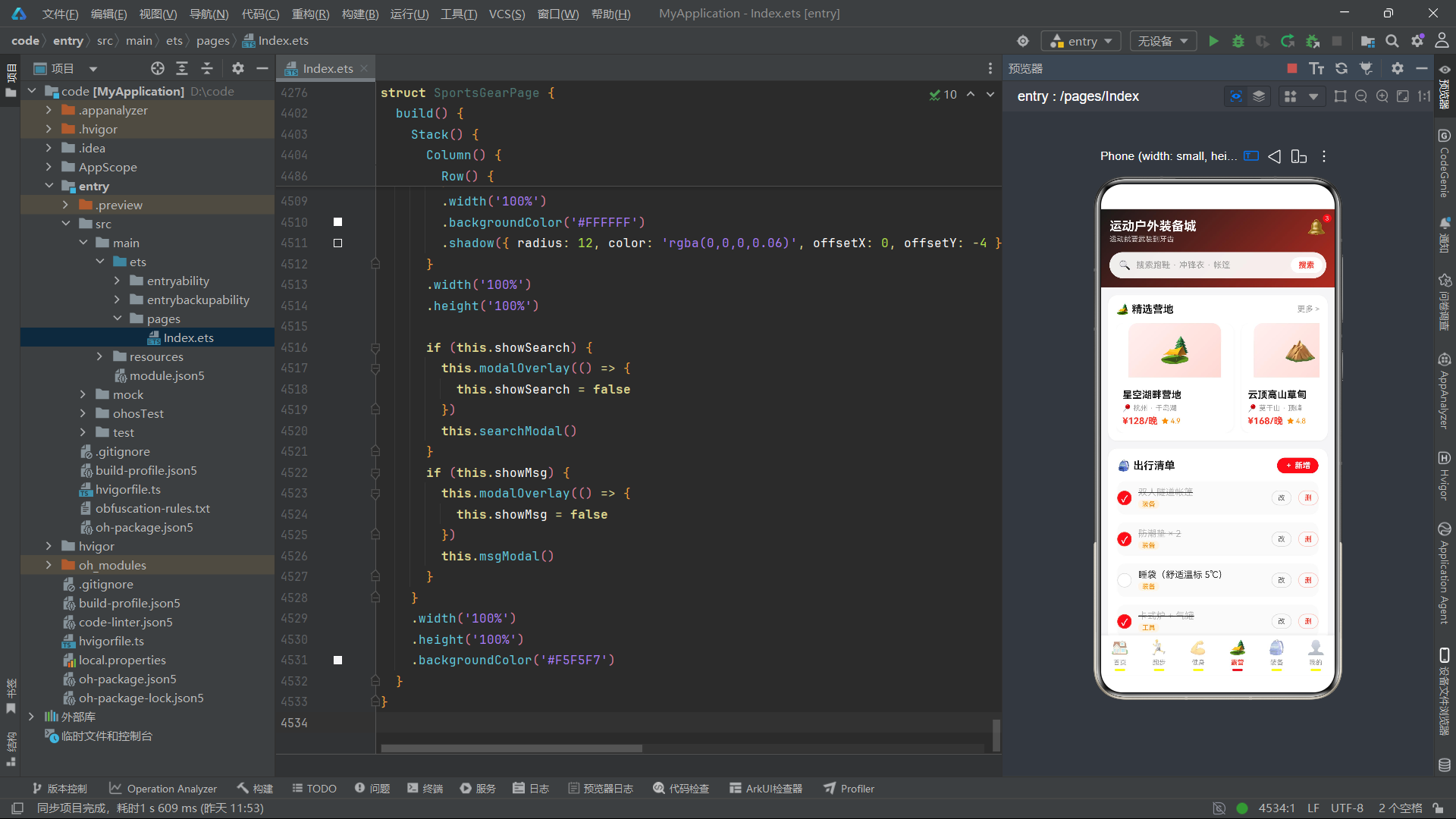
清单条目渲染体现了完整的 CRUD 交互——左侧圆形勾选框(点击 toggle 状态)、中间物品名称(已完成时变灰+删除线)和分类标签、右侧"改"和"删"按钮。编辑按钮点击时同时回显名称和分类索引(通过 CHECK_CATS.indexOf(item.cat) 反查索引)。
5.4.4 build 方法
露营 Tab 的 build 方法包含三个区域:精选营地横滑卡片(180vp 宽,渐变图标区+名称+位置+价格+评分)、出行清单列表(CRUD 完整交互)、露营小课堂文章列表(点击打开技巧详情弹框)。
5.5 Tab5 装备(GearTab):分类筛选 + 对比表 + 规格选择
5.5.1 @State 状态变量与弹框
@State catIdx: number = 0
@State showSize: boolean = false
@State showCompare: boolean = false
@State showDetail: boolean = false
@State showOk: boolean = false
@State sizeIdx: number = 1
@State colorIdx: number = 1
@State curName: string = ''
@State curPrice: number = 0
GearTab 维护 9 个状态变量。sizeIdx 和 colorIdx 分别记录规格选择弹框中的尺码和颜色选中索引。
sizeModal 是规格选择弹框,包含尺码选择器(5 个选项,选中态红色填充+白色文字+加粗)和颜色选择器(5 个圆形色块,选中态放大并添加红色边框)。底部显示当前选中规格的文本摘要(尺码+中文名称,颜色通过 colorIdx 索引映射为"曜石黑"/"能量红"等中文名称)。
compareModal 是装备对比表弹框,使用三列布局(对比项/产品A/产品B),通过 ForEach 遍历 COMPARE_ROWS 渲染 6 行对比数据,产品 A 列文字为红色,产品 B 列文字为深色,形成视觉对比。
5.5.2 build 方法
装备 Tab 的 build 方法包含三个区域:分类横滑标签(6 个分类)、装备对比入口卡片(黑红渐变按钮)、双列瀑布商品列表(使用 getLeftGear/getRightGear 按当前分类筛选后分列)。商品卡片底部双按钮——“详情”(描边样式,打开详情弹框)和"选规格"(红色填充样式,打开规格弹框)。
5.6 Tab6 我的(MineTab):徽章系统 + 订单 + 装备库 CRUD
5.6.1 @State 状态变量
@State gears: MyGearMeta[] = MY_GEARS
@State orderIdx: number = 0
@State showProfile: boolean = false
@State showBadge: boolean = false
@State showOrder: boolean = false
@State showGearEdit: boolean = false
@State showGearDel: boolean = false
@State showWithdraw: boolean = false
@State showSettings: boolean = false
@State showOk: boolean = false
@State curOrder: OrderMeta = MY_ORDERS[0]
@State curBadge: BadgeMeta = BADGES[0]
@State editId: number = 0
@State editNote: string = ''
@State delId: number = 0
MineTab 维护 15 个状态变量和 8 个弹框,是全应用弹框最多的组件。弹框覆盖个人资料、徽章详情、订单详情、装备备注编辑、装备删除确认、钱包提现、设置和操作成功 Toast。
5.6.2 saveGearNote 与 delGear 方法
saveGearNote() {
  const r: MyGearMeta[] = []
  for (let i = 0; i < this.gears.length; i++) {
    if (this.gears[i].id === this.editId) {
      const it: MyGearMeta = {
        id: this.gears[i].id,
        name: this.gears[i].name,
        useCount: this.gears[i].useCount,
        note: this.editNote,
        pic: this.gears[i].pic
      }
      r.push(it)
    } else {
      r.push(this.gears[i])
    }
  }
  this.gears = r
  this.showGearEdit = false
}

delGear() {
  const r: MyGearMeta[] = []
  for (let i = 0; i < this.gears.length; i++) {
    if (this.gears[i].id !== this.delId) {
      r.push(this.gears[i])
    }
  }
  this.gears = r
  this.showGearDel = false
}
saveGearNote 通过 editId 定位目标条目,用 editNote 替换备注字段,其他字段保持不变。delGear 通过 delId 过滤删除。两个方法都遵循不可变更新模式。
5.6.3 build 方法
“我的” Tab 的 build 方法包含五个区域:头部卡片(黑红渐变,头像+昵称+等级+四宫格统计:累计跑步/训练次数/获得徽章/钱包余额)、成就徽章横滑列表(已获得徽章正常显示,未获得徽章 opacity(0.45) 半透明)、订单列表(状态筛选标签+订单卡片+详情按钮)、8 宫格功能入口、个人装备库列表(CRUD 交互)。
六、主入口页面分析
@Entry
@Component
struct SportsGearPage {
  @State activeTab: number = 0
  @State showSearch: boolean = false
  @State showMsg: boolean = false
  @State searchKey: string = ''
  @State inputKey: string = ''
SportsGearPage 是应用的 @Entry 入口组件,维护 5 个状态变量。activeTab 初始值为 0(首页),searchKey 和 inputKey 分别存储已搜索的关键词和当前输入框文本——搜索后头部搜索栏会显示 searchKey 而非占位符。
6.1 搜索弹框
@Builder searchModal() {
  Column({ space: 14 }) {
    Text('🔍 搜索装备').fontSize(18).fontWeight(FontWeight.Bold).fontColor('#1A1A1A')
    TextInput({ placeholder: '跑鞋 / 冲锋衣 / 帐篷…', text: this.inputKey })
      .fontSize(14).height(46)
      .backgroundColor('#F5F5F7').borderRadius(12)
      .onChange((v: string) => { this.inputKey = v })

    Column({ space: 8 }) {
      Text('热门搜索').fontSize(12).fontColor('#999999').width('100%')
      Flex({ wrap: FlexWrap.Wrap }) {
        ForEach(['碳板跑鞋', '冲锋衣', '帐篷', '运动手表', '瑜伽垫', '登山杖'], (k: string) => {
          Text(k)
            .fontSize(12).fontColor('#666666')
            .padding({ left: 12, right: 12, top: 7, bottom: 7 })
            .backgroundColor('#F5F5F7').borderRadius(16)
            .margin({ right: 8, bottom: 8 })
            .onClick(() => { this.inputKey = k })
        })
      }
      .width('100%')
    }
    .width('100%')

    Text('搜索')
      .fontSize(15).fontWeight(FontWeight.Bold).fontColor('#FFFFFF')
      .width('100%').textAlign(TextAlign.Center)
      .padding({ top: 12, bottom: 12 })
      .linearGradient({ angle: 90, colors: [['#FF3B30', 0.0], ['#FF7A45', 1.0]] })
      .borderRadius(22)
      .onClick(() => {
        this.searchKey = this.inputKey
        this.showSearch = false
      })
  }
  .padding(18).backgroundColor('#FFFFFF').borderRadius(16)
  .width('86%').position({ x: '7%', y: '18%' })
}
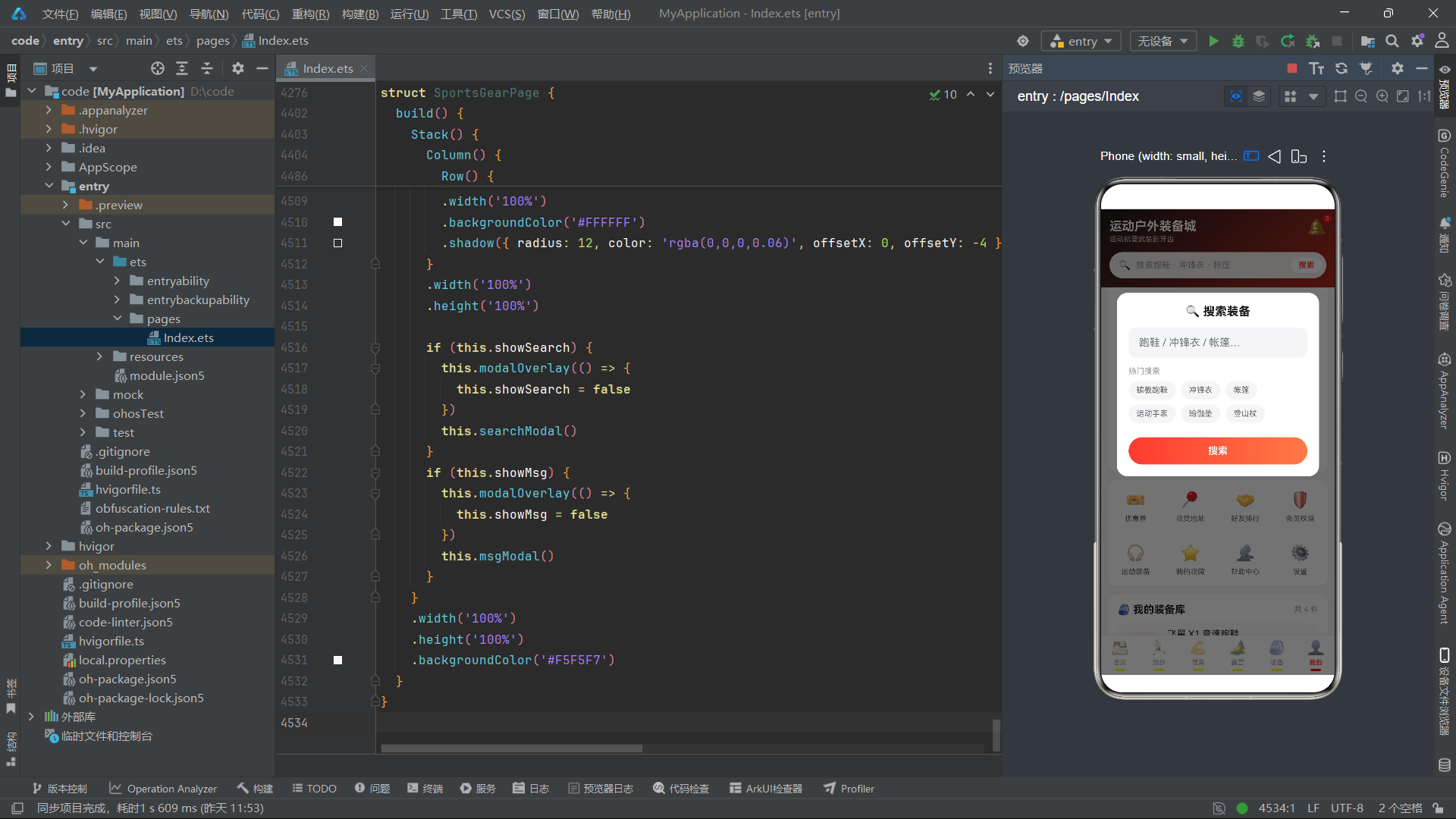
搜索弹框包含输入框和热门搜索标签云。点击热门标签会将关键词填入输入框(this.inputKey = k),点击搜索按钮将 inputKey 赋值给 searchKey 并关闭弹框。头部搜索栏根据 searchKey 是否为空来决定显示搜索关键词还是占位文本。
6.2 消息中心弹框
@Builder msgModal() {
  Column({ space: 12 }) {
    Text('消息中心').fontSize(18).fontWeight(FontWeight.Bold).fontColor('#1A1A1A')
    ForEach(MSG_LIST, (m: MsgMeta) => {
      Column({ space: 5 }) {
        Row() {
          Text(m.title).fontSize(14).fontWeight(FontWeight.Bold).fontColor('#1A1A1A')
          Row().layoutWeight(1)
          Text(m.time).fontSize(10).fontColor('#BBBBBB')
        }
        .width('100%')
        Text(m.detail).fontSize(12).fontColor('#666666').lineHeight(18)
      }
      .width('100%')
      .padding(12).backgroundColor('#FAFAFA').borderRadius(12)
    })
    Text('关闭')
      .fontSize(14).fontWeight(FontWeight.Bold).fontColor('#666666')
      .width('100%').textAlign(TextAlign.Center)
      .padding({ top: 11, bottom: 11 })
      .backgroundColor('#F5F5F7').borderRadius(22)
      .onClick(() => { this.showMsg = false })
  }
  .padding(18).backgroundColor('#FFFFFF').borderRadius(16)
  .width('88%').position({ x: '6%', y: '8%' })
  .constraintSize({ maxHeight: '82%' })
}
消息中心弹框遍历 MSG_LIST 渲染 5 条消息,每条包含标题+时间行和详情文本,使用 lineHeight(18) 控制行高提升可读性。
6.3 build 方法
build() {
  Stack() {
    Column() {
      Column({ space: 12 }) {
        Row() {
          Column({ space: 2 }) {
            Text('运动户外装备城').fontSize(19).fontWeight(FontWeight.Bold).fontColor('#FFFFFF')
            Text('运动就要武装到牙齿').fontSize(11).fontColor('rgba(255,255,255,0.75)')
          }
          .alignItems(HorizontalAlign.Start)
          .layoutWeight(1)

          Stack({ alignContent: Alignment.TopEnd }) {
            Text('🔔').fontSize(24)
              .onClick(() => { this.showMsg = true })
            Text('3')
              .fontSize(9).fontColor('#FFFFFF')
              .padding({ left: 4, right: 4, top: 1, bottom: 1 })
              .backgroundColor('#FF3B30').borderRadius(8)
              .offset({ x: 8, y: -6 })
          }
          .width(40).height(40)
        }
        .width('100%')

        Row({ space: 8 }) {
          Text('🔍').fontSize(15)
          Text(this.searchKey.length > 0 ? this.searchKey : '搜索跑鞋 · 冲锋衣 · 帐篷')
            .fontSize(13)
            .fontColor(this.searchKey.length > 0 ? '#333333' : '#999999')
            .layoutWeight(1)
          Text('搜索')
            .fontSize(12).fontWeight(FontWeight.Bold).fontColor('#FF3B30')
            .padding({ left: 12, right: 12, top: 5, bottom: 5 })
            .backgroundColor('#FFFFFF').borderRadius(14)
        }
        .width('100%')
        .padding({ left: 14, right: 6, top: 8, bottom: 8 })
        .backgroundColor('rgba(255,255,255,0.92)')
        .borderRadius(22)
        .onClick(() => { this.showSearch = true })
      }
      .width('100%')
      .padding({ left: 14, right: 14, top: 14, bottom: 14 })
      .linearGradient({ angle: 135, colors: [['#1A1A1A', 0.0], ['#B32B20', 1.0]] })

      Column() {
        if (this.activeTab === 0) {
          HomeTab()
        } else if (this.activeTab === 1) {
          RunTab()
        } else if (this.activeTab === 2) {
          FitTab()
        } else if (this.activeTab === 3) {
          CampTab()
        } else if (this.activeTab === 4) {
          GearTab()
        } else {
          MineTab()
        }
      }
      .layoutWeight(1).width('100%')

      Row() {
        ForEach(MAIN_TABS, (tab: TabMeta) => {
          Column({ space: 4 }) {
            Text(tab.icon)
              .fontSize(22)
              .opacity(this.activeTab === tab.id ? 1 : 0.55)
            Text(tab.name)
              .fontSize(10)
              .fontWeight(this.activeTab === tab.id ? FontWeight.Bold : FontWeight.Normal)
              .fontColor(this.activeTab === tab.id ? '#FF3B30' : '#999999')
            Column()
              .width(16).height(3)
              .borderRadius(2)
              .backgroundColor(this.activeTab === tab.id ? '#FF3B30' : '#FFFFFF00')
          }
          .layoutWeight(1)
          .padding({ top: 6, bottom: 6 })
          .onClick(() => { this.activeTab = tab.id })
        })
      }
      .width('100%')
      .backgroundColor('#FFFFFF')
      .shadow({ radius: 12, color: 'rgba(0,0,0,0.06)', offsetX: 0, offsetY: -4 })
    }
    .width('100%').height('100%')

    if (this.showSearch) {
      this.modalOverlay(() => { this.showSearch = false })
      this.searchModal()
    }
    if (this.showMsg) {
      this.modalOverlay(() => { this.showMsg = false })
      this.msgModal()
    }
  }
  .width('100%').height('100%')
  .backgroundColor('#F5F5F7')
}
主入口的 build 方法由三部分构成:
头部区域:#1A1A1A → #B32B20 黑红渐变背景。左侧双行标题(应用名+ Slogan),右侧通知铃铛使用 Stack 层叠实现红点角标——底层 Emoji 图标,上层红色数字"3"通过 offset({ x: 8, y: -6 }) 偏移到右上角。搜索栏使用半透明白色背景(rgba(255,255,255,0.92)),当 searchKey 非空时显示已搜索的关键词(深灰色文字),为空时显示占位文本(灰色文字)。
内容区域:通过 if-else 链根据 activeTab 渲染对应的 Tab 组件。
底部导航:遍历 MAIN_TABS 渲染 6 个 Tab 项。选中态通过 opacity(1) vs opacity(0.55)、FontWeight.Bold vs Normal、红色 vs 灰色文字、红色 vs 透明指示条四重差异实现。指示条背景使用 #FFFFFF00(完全透明白色)而非 Color.Transparent,确保占位高度一致。
弹框层:使用 Stack 根容器,搜索弹框和消息弹框通过条件判断渲染在上层。
七、流程图
7.1 应用架构图
7.2 跑步打卡与露营清单 CRUD 流程图
八、技术对比表格
| 技术维度 | 实现方案 | 设计特点 | 性能考量 |
|---|---|---|---|
| UI 范式 | ArkTS 声明式 UI (@Component + @State + @Builder) | 状态驱动视图,组件级隔离 | 框架 diff 精确到组件级 |
| Tab 切换 | if-else 条件渲染 + layoutWeight | 每次切换重建组件,状态独立 | 大组件重建开销通过 Scroll 懒加载缓解 |
| 弹框管理 | @State 布尔 + @Builder + Stack 层叠 | 弹框与内容同级渲染,遮罩独立 | 多弹框互斥,同一时刻仅一组渲染 |
| CRUD 模式 | 数组重建 + ID 定位 | 不可变更新,ID 避免索引偏移 | 数组重建 O(n),n < 20 时可忽略 |
| 柱状图 | Column + height(函数值) + linearGradient | 纯布局实现,无图表库依赖 | 无 Canvas 渲染开销 |
| 进度条 | 嵌套 Row + Column + width(百分比) | 外层轨道+内层填充,百分比字符串驱动 | 纯属性绑定 |
| 数量步进器 | 三段式 Row + 条件禁用 | 减号/数字/加号,范围 1-5 | 状态驱动颜色变化 |
| 筛选逻辑 | 全局纯函数 + ForEach 遍历匹配 | 筛选后分列函数复用基础筛选 | 每次渲染重新计算,数据量小时可忽略 |
| 标签选择器 | Flex + FlexWrap.Wrap + ForEach | 自动换行,选中态填充/边框双重区分 | 固定标签数量 |
| 徽章系统 | opacity 条件渲染 | 已获得 opacity=1,未获得 opacity=0.45 | 纯属性变化,无额外组件 |
| 对比表格 | 三列 Row + ForEach + layoutWeight | 纯布局表格,无 Table 组件 | 轻量渲染 |
| 搜索状态 | inputKey + searchKey 双变量 | 输入态与已搜索态分离 | 避免搜索过程中头部频繁刷新 |
| 通知角标 | Stack 层叠 + offset 偏移 | Emoji + 红色数字角标 | 无图片资源 |
| 渐变背景 | linearGradient + angle | 黑红渐变贯穿头部/按钮/卡片 | GPU 加速渲染 |
安装DevEco Studio程序

选择目标安装目录:

设置环境变量,但是需要重启一下:

新建一个空白模板:

设置API为24的模板项目:
初始化项目,自动下载相关依赖:

完整代码:
// ============================================================
// 底部 6 Tab:首页 / 跑步 / 健身 / 露营 / 装备 / 我的
// ============================================================
// ---------------- 数据模型 ----------------
interface FlashMeta {
id: number
name: string
price: number
oldPrice: number
sold: number
total: number
pic: string
}
const FLASH_LIST: FlashMeta[] = [
{ id: 1, name: '专业碳板竞速跑鞋 Pro', price: 599, oldPrice: 1099, sold: 186, total: 200, pic: '👟' },
{ id: 2, name: '冲锋衣三合一防风防水', price: 459, oldPrice: 899, sold: 143, total: 180, pic: '🧥' },
{ id: 3, name: '超轻钛合金登山杖', price: 268, oldPrice: 459, sold: 96, total: 150, pic: '🥾' },
{ id: 4, name: '骨传导运动蓝牙耳机', price: 329, oldPrice: 599, sold: 210, total: 260, pic: '🎧' },
{ id: 5, name: '速干T恤透气排汗', price: 89, oldPrice: 169, sold: 328, total: 400, pic: '👕' },
{ id: 6, name: '户外折叠桌椅套装', price: 399, oldPrice: 699, sold: 87, total: 120, pic: '🏕️' }
]
interface RankMeta {
id: number
name: string
brand: string
heat: number
trend: string
pic: string
}
const RANK_LIST: RankMeta[] = [
{ id: 1, name: '碳板竞速跑鞋 X1', brand: '飞翼', heat: 98, trend: '↑12%', pic: '👟' },
{ id: 2, name: '轻量冲锋衣 Storm', brand: '山野', heat: 95, trend: '↑8%', pic: '🧥' },
{ id: 3, name: '越野背包 12L', brand: '猎风', heat: 91, trend: '↑6%', pic: '🎒' },
{ id: 4, name: '运动水壶 750ml', brand: '清泉', heat: 88, trend: '↑5%', pic: '🍶' },
{ id: 5, name: '速干运动短裤', brand: '飞翼', heat: 85, trend: '↑3%', pic: '🩳' },
{ id: 6, name: '防滑登山鞋 Grip', brand: '山野', heat: 83, trend: '↓2%', pic: '🥾' },
{ id: 7, name: '压缩腿套 Pro', brand: '劲能', heat: 80, trend: '↑4%', pic: '🦵' },
{ id: 8, name: '运动墨镜 Pilot', brand: '猎风', heat: 77, trend: '↑1%', pic: '🕶️' }
]
interface GoodsMeta {
id: number
name: string
price: number
oldPrice: number
sold: number
rate: number
tag: string
pic: string
}
const HOME_GOODS: GoodsMeta[] = [
{ id: 1, name: '越野跑鞋 缓震回弹 男女同款', price: 369, oldPrice: 699, sold: 2341, rate: 4.9, tag: '爆款', pic: '👟' },
{ id: 2, name: '抓绒卫衣 加厚保暖 户外防风', price: 199, oldPrice: 399, sold: 1876, rate: 4.8, tag: '补贴', pic: '🧥' },
{ id: 3, name: '双人帐篷 超轻铝合金 自动搭建', price: 459, oldPrice: 899, sold: 986, rate: 4.9, tag: '新品', pic: '⛺' },
{ id: 4, name: '运动手表 血氧心率 GPS定位', price: 899, oldPrice: 1599, sold: 1543, rate: 4.7, tag: '热卖', pic: '⌚' },
{ id: 5, name: '瑜伽垫 加宽加厚 防滑纹理', price: 79, oldPrice: 159, sold: 3210, rate: 4.8, tag: '爆款', pic: '🧘' },
{ id: 6, name: '保温壶 1L 户外便携', price: 129, oldPrice: 259, sold: 1678, rate: 4.6, tag: '囤货', pic: '🍶' },
{ id: 7, name: '折叠躺椅 承重150kg', price: 169, oldPrice: 329, sold: 756, rate: 4.7, tag: '补贴', pic: '🪑' },
{ id: 8, name: '运动袜 5双装 透气网眼', price: 49, oldPrice: 99, sold: 5623, rate: 4.9, tag: '爆款', pic: '🧦' },
{ id: 9, name: '登山包 40L 专业背负系统', price: 329, oldPrice: 659, sold: 1123, rate: 4.8, tag: '新品', pic: '🎒' },
{ id: 10, name: '骑行头盔 MIPS防撞 轻量', price: 279, oldPrice: 529, sold: 892, rate: 4.8, tag: '热卖', pic: '🚴' }
]
function getLeftHomeGoods(): GoodsMeta[] {
const r: GoodsMeta[] = []
for (let i = 0; i < HOME_GOODS.length; i += 2) {
r.push(HOME_GOODS[i])
}
return r
}
function getRightHomeGoods(): GoodsMeta[] {
const r: GoodsMeta[] = []
for (let i = 1; i < HOME_GOODS.length; i += 2) {
r.push(HOME_GOODS[i])
}
return r
}
function flashPct(sold: number, total: number): string {
return Math.round(sold / total * 100) + '%'
}
// ---------------- 首页 Tab ----------------
@Component
struct HomeTab {
@State showDetail: boolean = false
@State showSeckill: boolean = false
@State showOk: boolean = false
@State curName: string = ''
@State curPrice: number = 0
@State buyCount: number = 1
doSeckill(name: string, price: number) {
this.curName = name
this.curPrice = price
this.showSeckill = true
}
@Builder modalOverlay(onClose: () => void) {
Column()
.width('100%')
.height('100%')
.backgroundColor('rgba(0,0,0,0.55)')
.onClick(() => {
onClose()
})
}
@Builder detailModal() {
Column({ space: 12 }) {
Text('商品详情')
.fontSize(18)
.fontWeight(FontWeight.Bold)
.fontColor('#1A1A1A')
Row({ space: 10 }) {
Text('👟')
.fontSize(40)
.padding(16)
.backgroundColor('#FFF0EE')
.borderRadius(12)
Column({ space: 4 }) {
Text(this.curName)
.fontSize(15)
.fontWeight(FontWeight.Bold)
.fontColor('#1A1A1A')
.maxLines(2)
Text('¥' + this.curPrice)
.fontSize(20)
.fontWeight(FontWeight.Bold)
.fontColor('#FF3B30')
}
.alignItems(HorizontalAlign.Start)
}
.width('100%')
.alignItems(VerticalAlign.Center)
Divider().color('#F0F0F0')
Row() {
Text('材质').fontSize(13).fontColor('#999999')
Row().layoutWeight(1)
Text('飞织网面 + 橡胶大底').fontSize(13).fontColor('#333333')
}
.width('100%')
Row() {
Text('适用场景').fontSize(13).fontColor('#999999')
Row().layoutWeight(1)
Text('路跑 / 越野 / 日常通勤').fontSize(13).fontColor('#333333')
}
.width('100%')
Row() {
Text('质保').fontSize(13).fontColor('#999999')
Row().layoutWeight(1)
Text('一年质保 · 七天无理由').fontSize(13).fontColor('#333333')
}
.width('100%')
Row() {
Text('发货地').fontSize(13).fontColor('#999999')
Row().layoutWeight(1)
Text('福建泉州 · 48小时内发货').fontSize(13).fontColor('#333333')
}
.width('100%')
Row() {
Text('总分 4.9')
.fontSize(12)
.fontColor('#FF3B30')
.padding({ left: 8, right: 8, top: 3, bottom: 3 })
.backgroundColor('#FFF0EE')
.borderRadius(8)
Text('已售 2000+')
.fontSize(12)
.fontColor('#666666')
.padding({ left: 8, right: 8, top: 3, bottom: 3 })
.backgroundColor('#F5F5F7')
.borderRadius(8)
}
.width('100%')
Text('加入购物车')
.fontSize(15)
.fontWeight(FontWeight.Bold)
.fontColor('#FFFFFF')
.width('100%')
.textAlign(TextAlign.Center)
.padding({ top: 12, bottom: 12 })
.linearGradient({ angle: 90, colors: [['#FF3B30', 0.0], ['#FF7A45', 1.0]] })
.borderRadius(22)
.onClick(() => {
this.showDetail = false
this.showOk = true
})
}
.padding(18)
.backgroundColor('#FFFFFF')
.borderRadius(16)
.width('86%')
.position({ x: '7%', y: '14%' })
.constraintSize({ maxHeight: '74%' })
}
@Builder seckillModal() {
Column({ space: 14 }) {
Text('限时秒杀确认')
.fontSize(18)
.fontWeight(FontWeight.Bold)
.fontColor('#1A1A1A')
Text(this.curName)
.fontSize(14)
.fontColor('#666666')
.maxLines(1)
.textOverflow({ overflow: TextOverflow.Ellipsis })
Row() {
Text('秒杀价')
.fontSize(13)
.fontColor('#999999')
Text('¥' + this.curPrice)
.fontSize(26)
.fontWeight(FontWeight.Bold)
.fontColor('#FF3B30')
.margin({ left: 8 })
}
.width('100%')
Divider().color('#F0F0F0')
Row() {
Text('购买数量')
.fontSize(14)
.fontColor('#333333')
Row().layoutWeight(1)
Row({ space: 0 }) {
Text('−')
.fontSize(20)
.fontColor(this.buyCount > 1 ? '#FF3B30' : '#CCCCCC')
.width(34)
.height(34)
.textAlign(TextAlign.Center)
.backgroundColor('#F5F5F7')
.borderRadius({ topLeft: 8, bottomLeft: 8 })
.onClick(() => {
if (this.buyCount > 1) {
this.buyCount -= 1
}
})
Text(this.buyCount + '')
.fontSize(15)
.fontWeight(FontWeight.Bold)
.fontColor('#1A1A1A')
.width(44)
.height(34)
.textAlign(TextAlign.Center)
.backgroundColor('#FAFAFA')
Text('+')
.fontSize(20)
.fontColor('#FF3B30')
.width(34)
.height(34)
.textAlign(TextAlign.Center)
.backgroundColor('#FFF0EE')
.borderRadius({ topRight: 8, bottomRight: 8 })
.onClick(() => {
if (this.buyCount < 5) {
this.buyCount += 1
}
})
}
}
.width('100%')
Row() {
Text('合计:¥' + (this.curPrice * this.buyCount))
.fontSize(15)
.fontWeight(FontWeight.Bold)
.fontColor('#FF3B30')
Text('限时优惠 · 每人限购5件')
.fontSize(11)
.fontColor('#999999')
.margin({ left: 8 })
}
.width('100%')
Row({ space: 12 }) {
Text('再看看')
.fontSize(14)
.fontColor('#666666')
.layoutWeight(1)
.textAlign(TextAlign.Center)
.padding({ top: 11, bottom: 11 })
.backgroundColor('#F5F5F7')
.borderRadius(22)
.onClick(() => {
this.showSeckill = false
})
Text('立即抢购')
.fontSize(14)
.fontWeight(FontWeight.Bold)
.fontColor('#FFFFFF')
.layoutWeight(1)
.textAlign(TextAlign.Center)
.padding({ top: 11, bottom: 11 })
.linearGradient({ angle: 90, colors: [['#FF3B30', 0.0], ['#FF7A45', 1.0]] })
.borderRadius(22)
.onClick(() => {
this.showSeckill = false
this.showOk = true
})
}
.width('100%')
}
.padding(18)
.backgroundColor('#FFFFFF')
.borderRadius(16)
.width('86%')
.position({ x: '7%', y: '18%' })
.constraintSize({ maxHeight: '70%' })
}
@Builder okToast() {
Column({ space: 8 }) {
Text('✅')
.fontSize(34)
Text('操作成功')
.fontSize(15)
.fontWeight(FontWeight.Bold)
.fontColor('#1A1A1A')
}
.padding({ top: 24, bottom: 24, left: 40, right: 40 })
.backgroundColor('#FFFFFF')
.borderRadius(16)
.shadow({ radius: 20, color: 'rgba(0,0,0,0.15)', offsetX: 0, offsetY: 6 })
.position({ x: '50%', y: '42%' })
.translate({ x: '-27%' })
}
@Builder flashCard(item: FlashMeta) {
Column({ space: 6 }) {
Text(item.pic)
.fontSize(34)
.padding({ top: 10, bottom: 6 })
Text(item.name)
.fontSize(12)
.fontColor('#333333')
.maxLines(1)
.textOverflow({ overflow: TextOverflow.Ellipsis })
.width('100%')
Row({ space: 4 }) {
Text('¥' + item.price)
.fontSize(15)
.fontWeight(FontWeight.Bold)
.fontColor('#FF3B30')
Text('¥' + item.oldPrice)
.fontSize(11)
.fontColor('#BBBBBB')
.decoration({ type: TextDecorationType.LineThrough })
}
.width('100%')
Column({ space: 4 }) {
Row() {
Column() {
Text('已抢 ' + flashPct(item.sold, item.total))
.fontSize(10)
.fontColor('#FFFFFF')
}
.height(8)
.borderRadius(4)
.backgroundColor('#FF3B30')
.width(flashPct(item.sold, item.total))
}
.width('100%')
.backgroundColor('#FFE1DE')
.borderRadius(4)
}
.width('100%')
Text('马上抢')
.fontSize(11)
.fontColor('#FFFFFF')
.width('100%')
.textAlign(TextAlign.Center)
.padding({ top: 5, bottom: 5 })
.backgroundColor('#FF3B30')
.borderRadius(12)
.onClick(() => {
this.doSeckill(item.name, item.price)
})
}
.padding(10)
.backgroundColor('#FFFFFF')
.borderRadius(12)
.width(116)
.margin({ right: 10 })
.shadow({ radius: 8, color: 'rgba(0,0,0,0.05)', offsetX: 0, offsetY: 2 })
}
@Builder goodsCard(item: GoodsMeta) {
Column({ space: 8 }) {
Stack({ alignContent: Alignment.TopStart }) {
Text(item.pic)
.fontSize(46)
.padding({ top: 26, bottom: 26, left: 40, right: 40 })
.backgroundColor('#F7F7F9')
.borderRadius({ topLeft: 12, topRight: 12 })
Text(item.tag)
.fontSize(10)
.fontColor('#FFFFFF')
.padding({ left: 8, right: 8, top: 3, bottom: 3 })
.backgroundColor('#FF3B30')
.borderRadius({ topRight: 10, bottomRight: 10 })
}
.width('100%')
Column({ space: 6 }) {
Text(item.name)
.fontSize(13)
.fontColor('#333333')
.maxLines(2)
.textOverflow({ overflow: TextOverflow.Ellipsis })
Row({ space: 4 }) {
Text('★ ' + item.rate)
.fontSize(11)
.fontColor('#FF8C00')
Text(item.sold + '人付款')
.fontSize(11)
.fontColor('#999999')
}
.width('100%')
Row() {
Text('¥' + item.price)
.fontSize(17)
.fontWeight(FontWeight.Bold)
.fontColor('#FF3B30')
Text('¥' + item.oldPrice)
.fontSize(11)
.fontColor('#BBBBBB')
.decoration({ type: TextDecorationType.LineThrough })
.margin({ left: 4 })
}
.width('100%')
Text('看详情')
.fontSize(11)
.fontColor('#FF3B30')
.padding({ left: 12, right: 12, top: 4, bottom: 4 })
.borderRadius(10)
.border({ width: 1, color: '#FF3B30' })
.alignSelf(ItemAlign.Start)
.onClick(() => {
this.curName = item.name
this.curPrice = item.price
this.showDetail = true
})
}
.padding(10)
.alignItems(HorizontalAlign.Start)
}
.backgroundColor('#FFFFFF')
.borderRadius(12)
.margin({ bottom: 10 })
.shadow({ radius: 6, color: 'rgba(0,0,0,0.04)', offsetX: 0, offsetY: 2 })
}
build() {
Column() {
Scroll() {
Column({ space: 12 }) {
// Banner
Column({ space: 8 }) {
Text('全民运动季 · 装备狂欢')
.fontSize(22)
.fontWeight(FontWeight.Bold)
.fontColor('#FFFFFF')
Text('爆款装备低至 5 折 · 满 299 减 60')
.fontSize(12)
.fontColor('rgba(255,255,255,0.85)')
Row({ space: 10 }) {
Text('领券中心')
.fontSize(12)
.fontColor('#FF3B30')
.padding({ left: 16, right: 16, top: 7, bottom: 7 })
.backgroundColor('#FFFFFF')
.borderRadius(16)
.onClick(() => {
this.showOk = true
})
Text('秒杀专场')
.fontSize(12)
.fontColor('#FFFFFF')
.padding({ left: 16, right: 16, top: 6, bottom: 6 })
.borderRadius(16)
.border({ width: 1, color: 'rgba(255,255,255,0.8)' })
}
.margin({ top: 6 })
}
.width('100%')
.padding({ top: 24, bottom: 24 })
.borderRadius(16)
.linearGradient({ angle: 135, colors: [['#1A1A1A', 0.0], ['#B32B20', 1.0]] })
.shadow({ radius: 12, color: 'rgba(179,43,32,0.25)', offsetX: 0, offsetY: 6 })
// 快捷入口
Row() {
Column({ space: 6 }) {
Text('⚡').fontSize(26)
Text('限时秒杀').fontSize(11).fontColor('#333333')
}
.layoutWeight(1)
.onClick(() => {
this.showOk = true
})
Column({ space: 6 }) {
Text('🆕').fontSize(26)
Text('新品首发').fontSize(11).fontColor('#333333')
}
.layoutWeight(1)
Column({ space: 6 }) {
Text('💰').fontSize(26)
Text('大牌补贴').fontSize(11).fontColor('#333333')
}
.layoutWeight(1)
Column({ space: 6 }) {
Text('🏃').fontSize(26)
Text('运动课堂').fontSize(11).fontColor('#333333')
}
.layoutWeight(1)
}
.width('100%')
.padding({ top: 14, bottom: 14 })
.backgroundColor('#FFFFFF')
.borderRadius(14)
.shadow({ radius: 6, color: 'rgba(0,0,0,0.04)', offsetX: 0, offsetY: 2 })
// 限时秒杀
Column({ space: 12 }) {
Row() {
Column({ space: 2 }) {
Text('限时秒杀')
.fontSize(17)
.fontWeight(FontWeight.Bold)
.fontColor('#1A1A1A')
Text('整点场 · 手慢无')
.fontSize(11)
.fontColor('#FF3B30')
}
.alignItems(HorizontalAlign.Start)
Row().layoutWeight(1)
Text('更多 >')
.fontSize(12)
.fontColor('#999999')
}
.width('100%')
Scroll() {
Row() {
ForEach(FLASH_LIST, (item: FlashMeta) => {
this.flashCard(item)
})
}
}
.scrollable(ScrollDirection.Horizontal)
.scrollBar(BarState.Off)
.width('100%')
}
.padding(12)
.backgroundColor('#FFFFFF')
.borderRadius(14)
.width('100%')
.shadow({ radius: 6, color: 'rgba(0,0,0,0.04)', offsetX: 0, offsetY: 2 })
// TOP 榜单
Column({ space: 12 }) {
Row() {
Text('🔥 运动装备热卖榜')
.fontSize(17)
.fontWeight(FontWeight.Bold)
.fontColor('#1A1A1A')
Row().layoutWeight(1)
Text('完整榜单 >')
.fontSize(12)
.fontColor('#999999')
}
.width('100%')
ForEach(RANK_LIST, (item: RankMeta, idx: number) => {
Row({ space: 12 }) {
Text((idx + 1) + '')
.fontSize(idx < 3 ? 18 : 14)
.fontWeight(FontWeight.Bold)
.fontColor(idx < 3 ? '#FF3B30' : '#BBBBBB')
.width(30)
.textAlign(TextAlign.Center)
Text(item.pic)
.fontSize(26)
.padding(8)
.backgroundColor('#F7F7F9')
.borderRadius(10)
Column({ space: 4 }) {
Text(item.name)
.fontSize(14)
.fontWeight(FontWeight.Medium)
.fontColor('#333333')
.maxLines(1)
Row({ space: 6 }) {
Text(item.brand)
.fontSize(10)
.fontColor('#666666')
.padding({ left: 6, right: 6, top: 2, bottom: 2 })
.backgroundColor('#F5F5F7')
.borderRadius(6)
Text('热度 ' + item.heat)
.fontSize(10)
.fontColor('#FF8C00')
}
.width('100%')
}
.layoutWeight(1)
.alignItems(HorizontalAlign.Start)
Text(item.trend)
.fontSize(12)
.fontWeight(FontWeight.Bold)
.fontColor(item.trend.indexOf('↑') >= 0 ? '#FF3B30' : '#34C759')
}
.width('100%')
.padding({ top: 8, bottom: 8 })
.borderRadius(12)
.backgroundColor(idx < 3 ? '#FFF7F6' : '#FFFFFF')
})
}
.padding(14)
.backgroundColor('#FFFFFF')
.borderRadius(14)
.width('100%')
.shadow({ radius: 6, color: 'rgba(0,0,0,0.04)', offsetX: 0, offsetY: 2 })
// 猜你喜欢 双列瀑布
Column({ space: 0 }) {
Text('— 猜你喜欢 —')
.fontSize(15)
.fontWeight(FontWeight.Bold)
.fontColor('#666666')
.margin({ top: 4, bottom: 12 })
Row({ space: 10 }) {
Column({ space: 10 }) {
ForEach(getLeftHomeGoods(), (item: GoodsMeta) => {
this.goodsCard(item)
})
}
.layoutWeight(1)
Column({ space: 10 }) {
ForEach(getRightHomeGoods(), (item: GoodsMeta) => {
this.goodsCard(item)
})
}
.layoutWeight(1)
}
.width('100%')
.alignItems(VerticalAlign.Top)
}
.width('100%')
}
.padding(12)
.width('100%')
}
.scrollBar(BarState.Off)
.width('100%')
.height('100%')
.backgroundColor('#F5F5F7')
if (this.showDetail) {
this.modalOverlay(() => {
this.showDetail = false
})
this.detailModal()
}
if (this.showSeckill) {
this.modalOverlay(() => {
this.showSeckill = false
})
this.seckillModal()
}
if (this.showOk) {
Column()
.width('100%')
.height('100%')
.backgroundColor('rgba(0,0,0,0.3)')
.onClick(() => {
this.showOk = false
})
this.okToast()
}
}
}
}
// ---------------- 跑步 Tab 数据 ----------------
interface StepWeekMeta {
day: string
steps: number
}
const STEP_WEEK: StepWeekMeta[] = [
{ day: '一', steps: 8200 },
{ day: '二', steps: 6100 },
{ day: '三', steps: 9800 },
{ day: '四', steps: 12400 },
{ day: '五', steps: 7600 },
{ day: '六', steps: 10200 },
{ day: '日', steps: 8652 }
]
function stepBarH(v: number): number {
let h: number = Math.round(v / 160)
if (h > 68) {
h = 68
}
if (h < 20) {
h = 20
}
return h
}
interface RouteMeta {
id: number
name: string
dist: string
climb: string
hard: string
time: string
hot: number
scenery: string
}
const RUN_ROUTES: RouteMeta[] = [
{ id: 1, name: '滨江夜景跑道', dist: '5.2km', climb: '35m', hard: '入门', time: '35分钟', hot: 4821, scenery: '🌉' },
{ id: 2, name: '西山越野环线', dist: '10.8km', climb: '420m', hard: '进阶', time: '78分钟', hot: 2315, scenery: '⛰️' },
{ id: 3, name: '城市公园缓坡', dist: '3.6km', climb: '18m', hard: '轻松', time: '24分钟', hot: 6720, scenery: '🌳' },
{ id: 4, name: '湖畔晨跑绿道', dist: '7.4km', climb: '60m', hard: '入门', time: '48分钟', hot: 3906, scenery: '🏞️' },
{ id: 5, name: '江大桥折返线', dist: '15.2km', climb: '150m', hard: '挑战', time: '105分钟', hot: 1208, scenery: '🌊' }
]
interface RunLogMeta {
id: number
date: string
dist: number
duration: string
pace: string
feeling: string
}
const RUN_LOGS: RunLogMeta[] = [
{ id: 1, date: '今天 07:20', dist: 5.2, duration: '31分钟', pace: "5'58\"", feeling: '状态在线' },
{ id: 2, date: '昨天 06:50', dist: 8.0, duration: '49分钟', pace: "6'08\"", feeling: '轻松完成' },
{ id: 3, date: '前天 19:30', dist: 4.5, duration: '28分钟', pace: "6'13\"", feeling: '有点疲惫' },
{ id: 4, date: '周六 07:00', dist: 12.6, duration: '80分钟', pace: "6'21\"", feeling: '越跑越爽' },
{ id: 5, date: '周五 18:40', dist: 3.0, duration: '19分钟', pace: "6'20\"", feeling: '恢复慢跑' },
{ id: 6, date: '周四 07:10', dist: 6.4, duration: '40分钟', pace: "6'15\"", feeling: '节奏稳定' }
]
const FEEL_TAGS: string[] = ['状态在线', '轻松完成', '有点疲惫', '越跑越爽', '恢复慢跑']
// ---------------- 跑步 Tab ----------------
@Component
struct RunTab {
@State logs: RunLogMeta[] = RUN_LOGS
@State showRoute: boolean = false
@State showCheckin: boolean = false
@State showDelLog: boolean = false
@State showOk: boolean = false
@State curRoute: RouteMeta = RUN_ROUTES[0]
@State delLogId: number = 0
@State inputDist: string = ''
@State inputMin: string = ''
@State feelIdx: number = 0
confirmCheckin() {
const d: number = parseFloat(this.inputDist)
const m: number = parseFloat(this.inputMin)
if (d > 0 && m > 0) {
const pace: string = Math.round(m / d) + "'00\""
const log: RunLogMeta = {
id: this.logs.length + 1,
date: '刚刚',
dist: d,
duration: m + '分钟',
pace: pace,
feeling: FEEL_TAGS[this.feelIdx]
}
const r: RunLogMeta[] = [log]
for (let i = 0; i < this.logs.length; i++) {
r.push(this.logs[i])
}
this.logs = r
this.showCheckin = false
this.inputDist = ''
this.inputMin = ''
this.showOk = true
}
}
deleteLog(id: number) {
const r: RunLogMeta[] = []
for (let i = 0; i < this.logs.length; i++) {
if (this.logs[i].id !== id) {
r.push(this.logs[i])
}
}
this.logs = r
this.showDelLog = false
}
@Builder modalOverlay(onClose: () => void) {
Column()
.width('100%')
.height('100%')
.backgroundColor('rgba(0,0,0,0.55)')
.onClick(() => {
onClose()
})
}
@Builder routeModal() {
Column({ space: 12 }) {
Row({ space: 10 }) {
Text(this.curRoute.scenery)
.fontSize(30)
.padding(12)
.backgroundColor('#FFF0EE')
.borderRadius(12)
Column({ space: 3 }) {
Text(this.curRoute.name)
.fontSize(17)
.fontWeight(FontWeight.Bold)
.fontColor('#1A1A1A')
Text(this.curRoute.hard + ' · ' + this.curRoute.time + ' · ' + this.curRoute.hot + '人跑过')
.fontSize(11)
.fontColor('#999999')
}
.alignItems(HorizontalAlign.Start)
.layoutWeight(1)
}
.width('100%')
Row({ space: 10 }) {
Column({ space: 4 }) {
Text(this.curRoute.dist)
.fontSize(18)
.fontWeight(FontWeight.Bold)
.fontColor('#FF3B30')
Text('总距离')
.fontSize(11)
.fontColor('#999999')
}
.layoutWeight(1)
.padding({ top: 10, bottom: 10 })
.backgroundColor('#FFF7F6')
.borderRadius(10)
Column({ space: 4 }) {
Text(this.curRoute.climb)
.fontSize(18)
.fontWeight(FontWeight.Bold)
.fontColor('#1A1A1A')
Text('累计爬升')
.fontSize(11)
.fontColor('#999999')
}
.layoutWeight(1)
.padding({ top: 10, bottom: 10 })
.backgroundColor('#F5F5F7')
.borderRadius(10)
Column({ space: 4 }) {
Text(this.curRoute.time)
.fontSize(16)
.fontWeight(FontWeight.Bold)
.fontColor('#1A1A1A')
Text('预计用时')
.fontSize(11)
.fontColor('#999999')
}
.layoutWeight(1)
.padding({ top: 10, bottom: 10 })
.backgroundColor('#F5F5F7')
.borderRadius(10)
}
.width('100%')
Column({ space: 8 }) {
Text('📍 路线亮点')
.fontSize(14)
.fontWeight(FontWeight.Bold)
.fontColor('#1A1A1A')
.width('100%')
Text('· 全程塑胶跑道,膝盖友好')
.fontSize(12)
.fontColor('#666666')
.width('100%')
Text('· 每 2km 设有补水站与卫生间')
.fontSize(12)
.fontColor('#666666')
.width('100%')
Text('· 夜跑段全程照明,安全无忧')
.fontSize(12)
.fontColor('#666666')
.width('100%')
}
.width('100%')
.padding(12)
.backgroundColor('#FAFAFA')
.borderRadius(12)
Text('开始此路线')
.fontSize(15)
.fontWeight(FontWeight.Bold)
.fontColor('#FFFFFF')
.width('100%')
.textAlign(TextAlign.Center)
.padding({ top: 12, bottom: 12 })
.linearGradient({ angle: 90, colors: [['#1A1A1A', 0.0], ['#FF3B30', 1.0]] })
.borderRadius(22)
.onClick(() => {
this.showRoute = false
this.showOk = true
})
}
.padding(18)
.backgroundColor('#FFFFFF')
.borderRadius(16)
.width('86%')
.position({ x: '7%', y: '10%' })
.constraintSize({ maxHeight: '78%' })
}
@Builder checkinModal() {
Column({ space: 14 }) {
Text('🏃 记录跑步')
.fontSize(18)
.fontWeight(FontWeight.Bold)
.fontColor('#1A1A1A')
Row({ space: 10 }) {
Column({ space: 6 }) {
Text('距离 (km)')
.fontSize(12)
.fontColor('#666666')
TextInput({ placeholder: '如 5.2', text: this.inputDist })
.fontSize(14)
.height(42)
.backgroundColor('#F5F5F7')
.borderRadius(10)
.onChange((v: string) => {
this.inputDist = v
})
}
.layoutWeight(1)
.alignItems(HorizontalAlign.Start)
Column({ space: 6 }) {
Text('时长 (分钟)')
.fontSize(12)
.fontColor('#666666')
TextInput({ placeholder: '如 32', text: this.inputMin })
.fontSize(14)
.height(42)
.backgroundColor('#F5F5F7')
.borderRadius(10)
.onChange((v: string) => {
this.inputMin = v
})
}
.layoutWeight(1)
.alignItems(HorizontalAlign.Start)
}
.width('100%')
Column({ space: 8 }) {
Text('今日感受')
.fontSize(12)
.fontColor('#666666')
.width('100%')
Flex({ wrap: FlexWrap.Wrap }) {
ForEach(FEEL_TAGS, (tag: string, idx: number) => {
Text(tag)
.fontSize(12)
.fontColor(this.feelIdx === idx ? '#FFFFFF' : '#666666')
.padding({ left: 14, right: 14, top: 7, bottom: 7 })
.backgroundColor(this.feelIdx === idx ? '#FF3B30' : '#F5F5F7')
.borderRadius(16)
.margin({ right: 8, bottom: 8 })
.onClick(() => {
this.feelIdx = idx
})
})
}
.width('100%')
}
.width('100%')
Row({ space: 12 }) {
Text('取消')
.fontSize(14)
.fontColor('#666666')
.layoutWeight(1)
.textAlign(TextAlign.Center)
.padding({ top: 11, bottom: 11 })
.backgroundColor('#F5F5F7')
.borderRadius(22)
.onClick(() => {
this.showCheckin = false
})
Text('保存记录')
.fontSize(14)
.fontWeight(FontWeight.Bold)
.fontColor('#FFFFFF')
.layoutWeight(1)
.textAlign(TextAlign.Center)
.padding({ top: 11, bottom: 11 })
.linearGradient({ angle: 90, colors: [['#FF3B30', 0.0], ['#FF7A45', 1.0]] })
.borderRadius(22)
.onClick(() => {
this.confirmCheckin()
})
}
.width('100%')
}
.padding(18)
.backgroundColor('#FFFFFF')
.borderRadius(16)
.width('86%')
.position({ x: '7%', y: '16%' })
.constraintSize({ maxHeight: '74%' })
}
@Builder delLogModal() {
Column({ space: 14 }) {
Text('🗑️')
.fontSize(36)
Text('删除这条跑步记录?')
.fontSize(16)
.fontWeight(FontWeight.Bold)
.fontColor('#1A1A1A')
Text('删除后无法恢复,请确认')
.fontSize(12)
.fontColor('#999999')
Row({ space: 12 }) {
Text('再想想')
.fontSize(14)
.fontColor('#666666')
.layoutWeight(1)
.textAlign(TextAlign.Center)
.padding({ top: 11, bottom: 11 })
.backgroundColor('#F5F5F7')
.borderRadius(22)
.onClick(() => {
this.showDelLog = false
})
Text('确认删除')
.fontSize(14)
.fontWeight(FontWeight.Bold)
.fontColor('#FFFFFF')
.layoutWeight(1)
.textAlign(TextAlign.Center)
.padding({ top: 11, bottom: 11 })
.backgroundColor('#FF3B30')
.borderRadius(22)
.onClick(() => {
this.deleteLog(this.delLogId)
})
}
.width('100%')
.margin({ top: 6 })
}
.padding(22)
.backgroundColor('#FFFFFF')
.borderRadius(16)
.width('78%')
.position({ x: '11%', y: '34%' })
}
@Builder okToast() {
Column({ space: 8 }) {
Text('✅')
.fontSize(34)
Text('操作成功')
.fontSize(15)
.fontWeight(FontWeight.Bold)
.fontColor('#1A1A1A')
}
.padding({ top: 24, bottom: 24, left: 40, right: 40 })
.backgroundColor('#FFFFFF')
.borderRadius(16)
.shadow({ radius: 20, color: 'rgba(0,0,0,0.15)', offsetX: 0, offsetY: 6 })
.position({ x: '50%', y: '42%' })
.translate({ x: '-27%' })
}
build() {
Column() {
Scroll() {
Column({ space: 12 }) {
// 今日运动数据卡
Column({ space: 12 }) {
Text('今日步数')
.fontSize(12)
.fontColor('rgba(255,255,255,0.8)')
Text('8652')
.fontSize(46)
.fontWeight(FontWeight.Bold)
.fontColor('#FFFFFF')
Row({ space: 0 }) {
Column({ space: 3 }) {
Text('368')
.fontSize(18)
.fontWeight(FontWeight.Bold)
.fontColor('#FFFFFF')
Text('千卡')
.fontSize(11)
.fontColor('rgba(255,255,255,0.75)')
}
.layoutWeight(1)
Column({ space: 3 }) {
Text('6.1')
.fontSize(18)
.fontWeight(FontWeight.Bold)
.fontColor('#FFFFFF')
Text('公里')
.fontSize(11)
.fontColor('rgba(255,255,255,0.75)')
}
.layoutWeight(1)
Column({ space: 3 }) {
Text('58')
.fontSize(18)
.fontWeight(FontWeight.Bold)
.fontColor('#FFFFFF')
Text('分钟')
.fontSize(11)
.fontColor('rgba(255,255,255,0.75)')
}
.layoutWeight(1)
}
.width('100%')
.margin({ top: 4 })
Text('+ 记一次跑步')
.fontSize(14)
.fontWeight(FontWeight.Bold)
.fontColor('#FF3B30')
.width('100%')
.textAlign(TextAlign.Center)
.padding({ top: 11, bottom: 11 })
.backgroundColor('#FFFFFF')
.borderRadius(22)
.onClick(() => {
this.showCheckin = true
})
}
.width('100%')
.padding(20)
.borderRadius(16)
.linearGradient({ angle: 135, colors: [['#2A1210', 0.0], ['#C43325', 1.0]] })
.shadow({ radius: 12, color: 'rgba(196,51,37,0.3)', offsetX: 0, offsetY: 6 })
// 7日步数柱状图
Column({ space: 12 }) {
Row() {
Text('近 7 日步数')
.fontSize(16)
.fontWeight(FontWeight.Bold)
.fontColor('#1A1A1A')
Row().layoutWeight(1)
Text('日均 9000+')
.fontSize(11)
.fontColor('#FF3B30')
}
.width('100%')
Row({ space: 8 }) {
ForEach(STEP_WEEK, (item: StepWeekMeta, idx: number) => {
Column({ space: 6 }) {
Text(item.steps + '')
.fontSize(9)
.fontColor(idx === 6 ? '#FF3B30' : '#BBBBBB')
Column()
.width(16)
.height(stepBarH(item.steps))
.borderRadius(8)
.linearGradient(idx === 6
? { angle: 180, colors: [['#FF3B30', 0.0], ['#FF7A45', 1.0]] }
: { angle: 180, colors: [['#FFC9C2', 0.0], ['#FFD9D4', 1.0]] })
Text(item.day)
.fontSize(11)
.fontColor(idx === 6 ? '#FF3B30' : '#999999')
}
.layoutWeight(1)
})
}
.width('100%')
.alignItems(VerticalAlign.Bottom)
}
.padding(14)
.backgroundColor('#FFFFFF')
.borderRadius(14)
.width('100%')
.shadow({ radius: 6, color: 'rgba(0,0,0,0.04)', offsetX: 0, offsetY: 2 })
// 热门路线
Column({ space: 12 }) {
Text('🏞️ 热门跑步路线')
.fontSize(16)
.fontWeight(FontWeight.Bold)
.fontColor('#1A1A1A')
.width('100%')
ForEach(RUN_ROUTES, (item: RouteMeta) => {
Row({ space: 12 }) {
Column()
.width(5)
.height(86)
.backgroundColor('#FF3B30')
.borderRadius(3)
Column({ space: 7 }) {
Row({ space: 8 }) {
Text(item.scenery)
.fontSize(22)
Text(item.name)
.fontSize(15)
.fontWeight(FontWeight.Bold)
.fontColor('#1A1A1A')
Text(item.hard)
.fontSize(10)
.fontColor('#FF8C00')
.padding({ left: 7, right: 7, top: 2, bottom: 2 })
.backgroundColor('#FFF4E5')
.borderRadius(8)
}
.width('100%')
Row({ space: 10 }) {
Text('📏 ' + item.dist)
.fontSize(11)
.fontColor('#999999')
Text('⛰ ' + item.climb)
.fontSize(11)
.fontColor('#999999')
Text('⏱ ' + item.time)
.fontSize(11)
.fontColor('#999999')
Text('🔥 ' + item.hot)
.fontSize(11)
.fontColor('#FF3B30')
}
.width('100%')
Text('查看路线详情 >')
.fontSize(12)
.fontWeight(FontWeight.Medium)
.fontColor('#FF3B30')
.onClick(() => {
this.curRoute = item
this.showRoute = true
})
}
.layoutWeight(1)
.alignItems(HorizontalAlign.Start)
}
.width('100%')
.padding(12)
.backgroundColor('#FAFAFA')
.borderRadius(12)
})
}
.padding(14)
.backgroundColor('#FFFFFF')
.borderRadius(14)
.width('100%')
.shadow({ radius: 6, color: 'rgba(0,0,0,0.04)', offsetX: 0, offsetY: 2 })
// 我的跑步记录
Column({ space: 10 }) {
Row() {
Text('我的跑步记录')
.fontSize(16)
.fontWeight(FontWeight.Bold)
.fontColor('#1A1A1A')
Row().layoutWeight(1)
Text('共 ' + this.logs.length + ' 条')
.fontSize(12)
.fontColor('#999999')
}
.width('100%')
ForEach(this.logs, (item: RunLogMeta) => {
Row({ space: 12 }) {
Column({ space: 2 }) {
Text(item.dist + ' km')
.fontSize(17)
.fontWeight(FontWeight.Bold)
.fontColor('#FF3B30')
Text(item.duration)
.fontSize(10)
.fontColor('#999999')
}
.width(74)
.padding({ top: 8, bottom: 8 })
.backgroundColor('#FFF0EE')
.borderRadius(10)
Column({ space: 4 }) {
Text(item.date)
.fontSize(13)
.fontWeight(FontWeight.Medium)
.fontColor('#333333')
Row({ space: 8 }) {
Text('配速 ' + item.pace)
.fontSize(11)
.fontColor('#999999')
Text(item.feeling)
.fontSize(10)
.fontColor('#34C759')
.padding({ left: 6, right: 6, top: 2, bottom: 2 })
.backgroundColor('#EAFBF1')
.borderRadius(6)
}
.width('100%')
}
.layoutWeight(1)
.alignItems(HorizontalAlign.Start)
Text('删除')
.fontSize(11)
.fontColor('#FF3B30')
.padding({ left: 10, right: 10, top: 5, bottom: 5 })
.border({ width: 1, color: '#FFC9C2' })
.borderRadius(12)
.onClick(() => {
this.delLogId = item.id
this.showDelLog = true
})
}
.width('100%')
.padding(10)
.backgroundColor('#FAFAFA')
.borderRadius(12)
})
}
.padding(14)
.backgroundColor('#FFFFFF')
.borderRadius(14)
.width('100%')
.shadow({ radius: 6, color: 'rgba(0,0,0,0.04)', offsetX: 0, offsetY: 2 })
}
.padding(12)
.width('100%')
}
.scrollBar(BarState.Off)
.width('100%')
.height('100%')
.backgroundColor('#F5F5F7')
if (this.showRoute) {
this.modalOverlay(() => {
this.showRoute = false
})
this.routeModal()
}
if (this.showCheckin) {
this.modalOverlay(() => {
this.showCheckin = false
})
this.checkinModal()
}
if (this.showDelLog) {
this.modalOverlay(() => {
this.showDelLog = false
})
this.delLogModal()
}
if (this.showOk) {
Column()
.width('100%')
.height('100%')
.backgroundColor('rgba(0,0,0,0.3)')
.onClick(() => {
this.showOk = false
})
this.okToast()
}
}
}
}
// ---------------- 健身 Tab 数据 ----------------
interface CourseMeta {
id: number
name: string
coach: string
level: string
minutes: number
people: number
cat: string
pic: string
kcal: number
}
const COURSE_LIST: CourseMeta[] = [
{ id: 1, name: 'HIIT 全身燃脂 20 分钟', coach: '王猛教练', level: '★★★', minutes: 20, people: 8621, cat: '燃脂', pic: '🔥', kcal: 320 },
{ id: 2, name: '哑铃胸部塑形入门', coach: '李铁教练', level: '★★', minutes: 35, people: 4230, cat: '增肌', pic: '💪', kcal: 260 },
{ id: 3, name: '晨间唤醒流瑜伽', coach: '林悠教练', level: '★', minutes: 25, people: 6512, cat: '瑜伽', pic: '🧘', kcal: 150 },
{ id: 4, name: '跑步机坡度间歇课', coach: '王猛教练', level: '★★★', minutes: 40, people: 3105, cat: '跑步', pic: '🏃', kcal: 420 },
{ id: 5, name: '办公室颈肩拉伸', coach: '陈静教练', level: '★', minutes: 10, people: 9802, cat: '拉伸', pic: '🤸', kcal: 60 },
{ id: 6, name: '核心腹肌撕裂者进阶', coach: '李铁教练', level: '★★★', minutes: 30, people: 7533, cat: '增肌', pic: '🥊', kcal: 290 },
{ id: 7, name: '晚间助眠阴瑜伽', coach: '林悠教练', level: '★', minutes: 30, people: 5240, cat: '瑜伽', pic: '🌙', kcal: 120 },
{ id: 8, name: '跳绳趣味燃脂挑战', coach: '陈静教练', level: '★★', minutes: 15, people: 6917, cat: '燃脂', pic: '🪢', kcal: 230 }
]
const COURSE_CATS: string[] = ['全部', '燃脂', '增肌', '瑜伽', '跑步', '拉伸']
function getCourses(cat: string): CourseMeta[] {
if (cat === '全部') {
return COURSE_LIST
}
const r: CourseMeta[] = []
for (let i = 0; i < COURSE_LIST.length; i++) {
if (COURSE_LIST[i].cat === cat) {
r.push(COURSE_LIST[i])
}
}
return r
}
interface DayCalMeta {
day: string
date: string
done: boolean
}
const WEEK_CAL: DayCalMeta[] = [
{ day: '一', date: '8/17', done: true },
{ day: '二', date: '8/18', done: true },
{ day: '三', date: '8/19', done: false },
{ day: '四', date: '8/20', done: true },
{ day: '五', date: '8/21', done: true },
{ day: '六', date: '8/22', done: true },
{ day: '日', date: '8/23', done: false }
]
const BOOK_TIMES: string[] = ['09:00', '11:00', '15:00', '19:00', '20:30']
const BOOK_COACHES: string[] = ['王猛教练', '李铁教练', '林悠教练', '陈静教练']
// ---------------- 健身 Tab ----------------
@Component
struct FitTab {
@State catIdx: number = 0
@State showCourse: boolean = false
@State showBook: boolean = false
@State showOk: boolean = false
@State curCourse: CourseMeta = COURSE_LIST[0]
@State timeIdx: number = 0
@State coachIdx: number = 0
@Builder modalOverlay(onClose: () => void) {
Column()
.width('100%')
.height('100%')
.backgroundColor('rgba(0,0,0,0.55)')
.onClick(() => {
onClose()
})
}
@Builder courseModal() {
Column({ space: 12 }) {
Row({ space: 10 }) {
Text(this.curCourse.pic)
.fontSize(32)
.padding(14)
.backgroundColor('#FFF0EE')
.borderRadius(12)
Column({ space: 3 }) {
Text(this.curCourse.name)
.fontSize(15)
.fontWeight(FontWeight.Bold)
.fontColor('#1A1A1A')
.maxLines(2)
Text(this.curCourse.coach + ' · 难度 ' + this.curCourse.level)
.fontSize(11)
.fontColor('#999999')
}
.alignItems(HorizontalAlign.Start)
.layoutWeight(1)
}
.width('100%')
Row({ space: 8 }) {
Column({ space: 2 }) {
Text(this.curCourse.minutes + 'min')
.fontSize(15)
.fontWeight(FontWeight.Bold)
.fontColor('#FF3B30')
Text('时长')
.fontSize(10)
.fontColor('#999999')
}
.layoutWeight(1)
.padding({ top: 8, bottom: 8 })
.backgroundColor('#FFF7F6')
.borderRadius(10)
Column({ space: 2 }) {
Text(this.curCourse.kcal + '')
.fontSize(15)
.fontWeight(FontWeight.Bold)
.fontColor('#1A1A1A')
Text('预计消耗(千卡)')
.fontSize(10)
.fontColor('#999999')
}
.layoutWeight(1)
.padding({ top: 8, bottom: 8 })
.backgroundColor('#F5F5F7')
.borderRadius(10)
Column({ space: 2 }) {
Text(this.curCourse.people + '')
.fontSize(15)
.fontWeight(FontWeight.Bold)
.fontColor('#1A1A1A')
Text('跟练人数')
.fontSize(10)
.fontColor('#999999')
}
.layoutWeight(1)
.padding({ top: 8, bottom: 8 })
.backgroundColor('#F5F5F7')
.borderRadius(10)
}
.width('100%')
Column({ space: 8 }) {
Text('课程安排')
.fontSize(14)
.fontWeight(FontWeight.Bold)
.fontColor('#1A1A1A')
.width('100%')
Text('01 · 热身激活 3 分钟')
.fontSize(12)
.fontColor('#666666')
.width('100%')
Text('02 · 主体训练 ' + (this.curCourse.minutes - 8) + ' 分钟')
.fontSize(12)
.fontColor('#666666')
.width('100%')
Text('03 · 放松拉伸 5 分钟')
.fontSize(12)
.fontColor('#666666')
.width('100%')
}
.width('100%')
.padding(12)
.backgroundColor('#FAFAFA')
.borderRadius(12)
Row({ space: 12 }) {
Text('免费跟练')
.fontSize(14)
.fontColor('#FF3B30')
.layoutWeight(1)
.textAlign(TextAlign.Center)
.padding({ top: 11, bottom: 11 })
.border({ width: 1, color: '#FF3B30' })
.borderRadius(22)
.onClick(() => {
this.showCourse = false
this.showOk = true
})
Text('预约私教')
.fontSize(14)
.fontWeight(FontWeight.Bold)
.fontColor('#FFFFFF')
.layoutWeight(1)
.textAlign(TextAlign.Center)
.padding({ top: 11, bottom: 11 })
.linearGradient({ angle: 90, colors: [['#1A1A1A', 0.0], ['#FF3B30', 1.0]] })
.borderRadius(22)
.onClick(() => {
this.showCourse = false
this.showBook = true
})
}
.width('100%')
}
.padding(18)
.backgroundColor('#FFFFFF')
.borderRadius(16)
.width('86%')
.position({ x: '7%', y: '12%' })
.constraintSize({ maxHeight: '76%' })
}
@Builder bookModal() {
Column({ space: 14 }) {
Text('📅 预约私教课')
.fontSize(18)
.fontWeight(FontWeight.Bold)
.fontColor('#1A1A1A')
Text(this.curCourse.name)
.fontSize(13)
.fontColor('#666666')
Column({ space: 8 }) {
Text('选择时间')
.fontSize(12)
.fontColor('#666666')
.width('100%')
Flex({ wrap: FlexWrap.Wrap }) {
ForEach(BOOK_TIMES, (t: string, idx: number) => {
Text(t)
.fontSize(13)
.fontColor(this.timeIdx === idx ? '#FFFFFF' : '#666666')
.padding({ left: 18, right: 18, top: 8, bottom: 8 })
.backgroundColor(this.timeIdx === idx ? '#FF3B30' : '#F5F5F7')
.borderRadius(18)
.margin({ right: 8, bottom: 8 })
.onClick(() => {
this.timeIdx = idx
})
})
}
.width('100%')
}
.width('100%')
Column({ space: 8 }) {
Text('选择教练')
.fontSize(12)
.fontColor('#666666')
.width('100%')
Flex({ wrap: FlexWrap.Wrap }) {
ForEach(BOOK_COACHES, (c: string, idx: number) => {
Text(c)
.fontSize(13)
.fontColor(this.coachIdx === idx ? '#FFFFFF' : '#666666')
.padding({ left: 14, right: 14, top: 8, bottom: 8 })
.backgroundColor(this.coachIdx === idx ? '#1A1A1A' : '#F5F5F7')
.borderRadius(18)
.margin({ right: 8, bottom: 8 })
.onClick(() => {
this.coachIdx = idx
})
})
}
.width('100%')
}
.width('100%')
Row({ space: 8 }) {
Text('预约将消耗 1 次私教卡 · 剩余 6 次')
.fontSize(11)
.fontColor('#FF8C00')
}
.width('100%')
Text('确认预约')
.fontSize(15)
.fontWeight(FontWeight.Bold)
.fontColor('#FFFFFF')
.width('100%')
.textAlign(TextAlign.Center)
.padding({ top: 12, bottom: 12 })
.linearGradient({ angle: 90, colors: [['#FF3B30', 0.0], ['#FF7A45', 1.0]] })
.borderRadius(22)
.onClick(() => {
this.showBook = false
this.showOk = true
})
}
.padding(18)
.backgroundColor('#FFFFFF')
.borderRadius(16)
.width('86%')
.position({ x: '7%', y: '14%' })
.constraintSize({ maxHeight: '74%' })
}
@Builder okToast() {
Column({ space: 8 }) {
Text('✅')
.fontSize(34)
Text('预约成功,请准时到店')
.fontSize(15)
.fontWeight(FontWeight.Bold)
.fontColor('#1A1A1A')
}
.padding({ top: 24, bottom: 24, left: 32, right: 32 })
.backgroundColor('#FFFFFF')
.borderRadius(16)
.shadow({ radius: 20, color: 'rgba(0,0,0,0.15)', offsetX: 0, offsetY: 6 })
.position({ x: '50%', y: '42%' })
.translate({ x: '-27%' })
}
build() {
Column() {
Scroll() {
Column({ space: 12 }) {
// 本周训练进度
Column({ space: 12 }) {
Row() {
Column({ space: 3 }) {
Text('本周训练 4 / 7 天')
.fontSize(17)
.fontWeight(FontWeight.Bold)
.fontColor('#FFFFFF')
Text('连续打卡 12 天 · 超越 92% 的学员')
.fontSize(11)
.fontColor('rgba(255,255,255,0.8)')
}
.alignItems(HorizontalAlign.Start)
.layoutWeight(1)
Text('🏅')
.fontSize(34)
}
.width('100%')
Column({ space: 6 }) {
Row() {
Column()
.height(8)
.borderRadius(4)
.backgroundColor('#FFFFFF')
.width('57%')
}
.width('100%')
.backgroundColor('rgba(255,255,255,0.25)')
.borderRadius(4)
}
.width('100%')
Row({ space: 8 }) {
ForEach(WEEK_CAL, (item: DayCalMeta) => {
Column({ space: 5 }) {
Text(item.done ? '✓' : item.day)
.fontSize(13)
.fontWeight(FontWeight.Bold)
.fontColor(item.done ? '#FF3B30' : '#FFFFFF')
.width(34)
.height(34)
.textAlign(TextAlign.Center)
.backgroundColor(item.done ? '#FFFFFF' : 'rgba(255,255,255,0.18)')
.borderRadius(17)
Text(item.date)
.fontSize(9)
.fontColor('rgba(255,255,255,0.75)')
}
.layoutWeight(1)
})
}
.width('100%')
}
.padding(18)
.borderRadius(16)
.linearGradient({ angle: 135, colors: [['#1A1A1A', 0.0], ['#8F2318', 1.0]] })
.width('100%')
.shadow({ radius: 12, color: 'rgba(143,35,24,0.3)', offsetX: 0, offsetY: 6 })
// 分类 chips
Scroll() {
Row({ space: 8 }) {
ForEach(COURSE_CATS, (cat: string, idx: number) => {
Text(cat)
.fontSize(13)
.fontWeight(this.catIdx === idx ? FontWeight.Bold : FontWeight.Normal)
.fontColor(this.catIdx === idx ? '#FFFFFF' : '#666666')
.padding({ left: 18, right: 18, top: 8, bottom: 8 })
.backgroundColor(this.catIdx === idx ? '#FF3B30' : '#FFFFFF')
.borderRadius(18)
.onClick(() => {
this.catIdx = idx
})
})
}
.padding({ left: 2, right: 2 })
}
.scrollable(ScrollDirection.Horizontal)
.scrollBar(BarState.Off)
.width('100%')
// 课程列表
Column({ space: 10 }) {
ForEach(getCourses(COURSE_CATS[this.catIdx]), (item: CourseMeta) => {
Row({ space: 12 }) {
Column({ space: 4 }) {
Text(item.pic)
.fontSize(30)
Text(item.cat)
.fontSize(9)
.fontColor('#FF3B30')
}
.width(76)
.height(76)
.justifyContent(FlexAlign.Center)
.backgroundColor('#FFF7F6')
.borderRadius(14)
Column({ space: 5 }) {
Text(item.name)
.fontSize(14)
.fontWeight(FontWeight.Medium)
.fontColor('#1A1A1A')
.maxLines(1)
.textOverflow({ overflow: TextOverflow.Ellipsis })
Row({ space: 8 }) {
Text(item.coach)
.fontSize(11)
.fontColor('#666666')
Text(item.level)
.fontSize(11)
.fontColor('#FF8C00')
}
.width('100%')
Row({ space: 8 }) {
Text(item.minutes + '分钟')
.fontSize(10)
.fontColor('#999999')
.padding({ left: 6, right: 6, top: 2, bottom: 2 })
.backgroundColor('#F5F5F7')
.borderRadius(6)
Text(item.kcal + '千卡')
.fontSize(10)
.fontColor('#999999')
.padding({ left: 6, right: 6, top: 2, bottom: 2 })
.backgroundColor('#F5F5F7')
.borderRadius(6)
Text(item.people + '人跟练')
.fontSize(10)
.fontColor('#FF3B30')
}
.width('100%')
}
.layoutWeight(1)
.alignItems(HorizontalAlign.Start)
Text('详情')
.fontSize(11)
.fontColor('#FFFFFF')
.padding({ left: 12, right: 12, top: 6, bottom: 6 })
.backgroundColor('#FF3B30')
.borderRadius(14)
.onClick(() => {
this.curCourse = item
this.showCourse = true
})
}
.width('100%')
.padding(10)
.backgroundColor('#FFFFFF')
.borderRadius(14)
.shadow({ radius: 6, color: 'rgba(0,0,0,0.04)', offsetX: 0, offsetY: 2 })
})
}
.width('100%')
}
.padding(12)
.width('100%')
}
.scrollBar(BarState.Off)
.width('100%')
.height('100%')
.backgroundColor('#F5F5F7')
if (this.showCourse) {
this.modalOverlay(() => {
this.showCourse = false
})
this.courseModal()
}
if (this.showBook) {
this.modalOverlay(() => {
this.showBook = false
})
this.bookModal()
}
if (this.showOk) {
Column()
.width('100%')
.height('100%')
.backgroundColor('rgba(0,0,0,0.3)')
.onClick(() => {
this.showOk = false
})
this.okToast()
}
}
}
}
// ---------------- 露营 Tab 数据 ----------------
interface CampMeta {
id: number
name: string
loc: string
price: number
score: number
tags: string
pic: string
}
const CAMPS: CampMeta[] = [
{ id: 1, name: '星空湖畔营地', loc: '杭州 · 千岛湖', price: 128, score: 4.9, tags: '可携带宠物|湖景|篝火', pic: '🏕️' },
{ id: 2, name: '云顶高山草甸', loc: '莫干山 · 顶峰', price: 168, score: 4.8, tags: '观星|日出|帐篷租赁', pic: '⛰️' },
{ id: 3, name: '森林溪谷营地', loc: '安吉 · 竹海', price: 98, score: 4.7, tags: '溯溪|树荫|亲子', pic: '🌳' },
{ id: 4, name: '沙漠星空基地', loc: '中卫 · 沙坡头', price: 218, score: 4.9, tags: '沙漠|越野|烧烤', pic: '🏜️' }
]
interface CheckItemMeta {
id: number
name: string
cat: string
done: boolean
}
const CHECK_ITEMS: CheckItemMeta[] = [
{ id: 1, name: '双人隧道帐篷', cat: '装备', done: true },
{ id: 2, name: '防潮垫 × 2', cat: '装备', done: true },
{ id: 3, name: '睡袋(舒适温标 5℃)', cat: '装备', done: false },
{ id: 4, name: '卡式炉 + 气罐', cat: '工具', done: true },
{ id: 5, name: '便携折叠桌椅', cat: '装备', done: false },
{ id: 6, name: '牛排 / 玉米 / 棉花糖', cat: '食材', done: false },
{ id: 7, name: '驱蚊液 + 急救包', cat: '工具', done: true },
{ id: 8, name: '冲锋衣 / 速干衣', cat: '衣物', done: false }
]
const CHECK_CATS: string[] = ['装备', '工具', '食材', '衣物']
interface TipMeta {
id: number
title: string
read: number
pic: string
summary: string
}
const CAMP_TIPS: TipMeta[] = [
{ id: 1, title: '新手第一次露营怎么选营地?', read: 128000, pic: '📝', summary: '距离市区 2 小时车程内、有水源与卫生间的正规营地最适合新手起步。' },
{ id: 2, title: '帐篷搭建 5 步图解', read: 96000, pic: '⛺', summary: '选平地 → 展开帐底 → 穿杆定型 → 打钉固定 → 拉防风绳,10 分钟搞定。' },
{ id: 3, title: '野外用火安全指南', read: 73000, pic: '🔥', summary: '务必使用焚火台,远离帐篷 3 米以上,离开前用水彻底浇灭余烬。' },
{ id: 4, title: '秋夜保暖穿搭三层法则', read: 65000, pic: '🧥', summary: '排汗层 + 保暖层 + 防风层,睡袋里加一件抓绒能提升 5℃ 体感。' }
]
// ---------------- 露营 Tab ----------------
@Component
struct CampTab {
@State checkList: CheckItemMeta[] = CHECK_ITEMS
@State showCamp: boolean = false
@State showAdd: boolean = false
@State showEdit: boolean = false
@State showDel: boolean = false
@State showTip: boolean = false
@State showOk: boolean = false
@State curCamp: CampMeta = CAMPS[0]
@State curTip: TipMeta = CAMP_TIPS[0]
@State inputName: string = ''
@State editName: string = ''
@State catIdx: number = 0
@State editCatIdx: number = 0
@State editId: number = 0
@State delId: number = 0
toggleCheck(id: number) {
const r: CheckItemMeta[] = []
for (let i = 0; i < this.checkList.length; i++) {
const GEAR_CATS: string[] = ['全部', '鞋靴', '服饰', '包袋', '器械', '配件']
function getGearByCat(cat: string): GearGoodsMeta[] {
if (cat === '全部') {
return GEAR_GOODS
}
const r: GearGoodsMeta[] = []
for (let i = 0; i < GEAR_GOODS.length; i++) {
if (GEAR_GOODS[i].cat === cat) {
r.push(GEAR_GOODS[i])
}
}
return r
}
function getLeftGear(cat: string): GearGoodsMeta[] {
const all: GearGoodsMeta[] = getGearByCat(cat)
const r: GearGoodsMeta[] = []
for (let i = 0; i < all.length; i += 2) {
r.push(all[i])
}
return r
}
function getRightGear(cat: string): GearGoodsMeta[] {
const all: GearGoodsMeta[] = getGearByCat(cat)
const r: GearGoodsMeta[] = []
for (let i = 1; i < all.length; i += 2) {
r.push(all[i])
}
return r
}
const SIZE_OPTS: string[] = ['S', 'M', 'L', 'XL', 'XXL']
const COLOR_OPTS: string[] = ['#1A1A1A', '#FF3B30', '#2F5AF5', '#34C759', '#FFB800']
interface CompareMeta {
field: string
a: string
b: string
}
})
this.msgModal()
}
}
.width('100%')
.height('100%')
.backgroundColor('#F5F5F7')
}
}
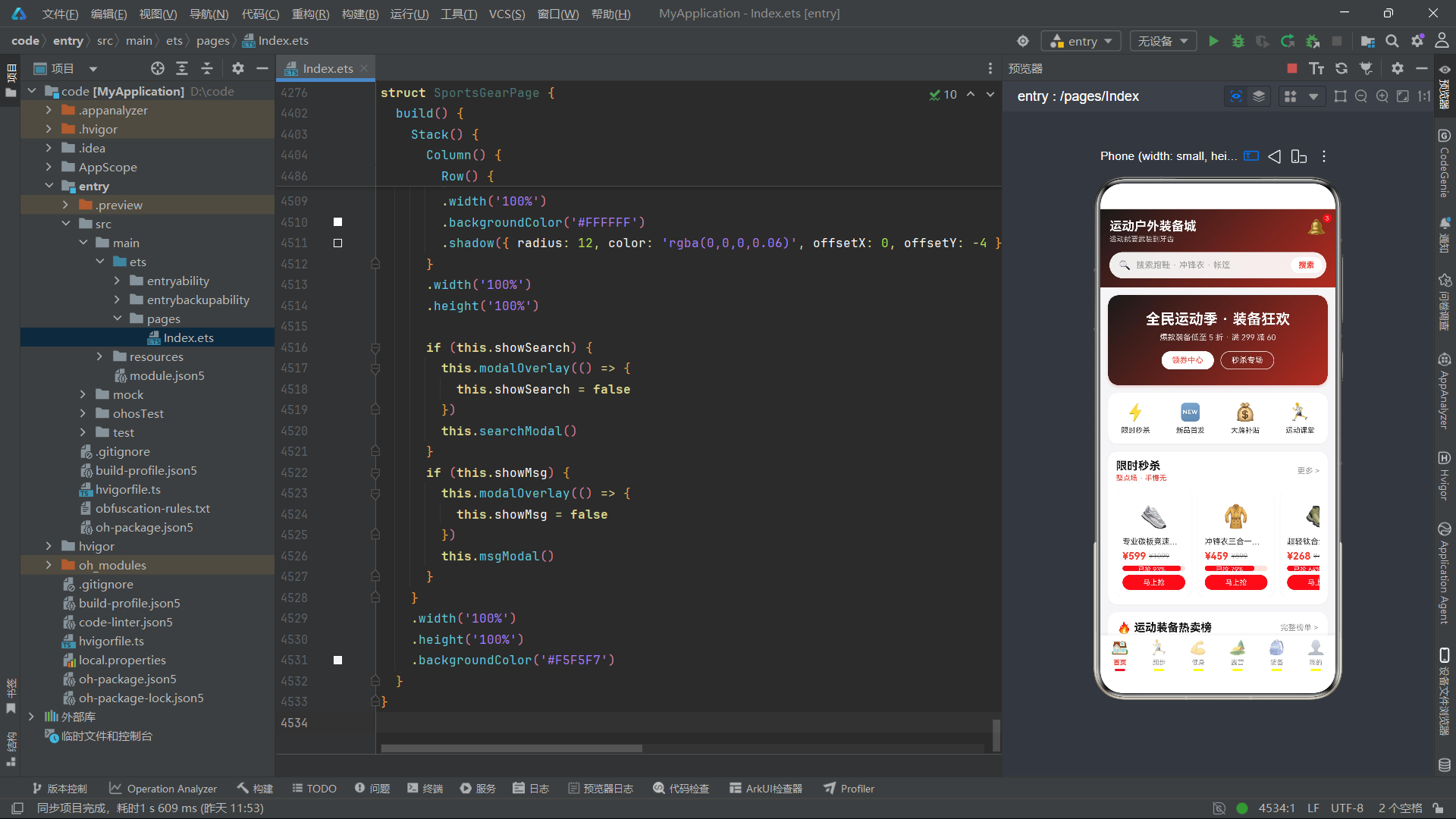
九、总结
本文对基于 HarmonyOS API 24 的运动户外装备城应用进行了完整的源码级深度剖析。从 18 个接口定义到 8 个全局纯函数,从 6 个 Tab 组件到主入口页面,从电商功能到运动管理功能,我们看到了 ArkTS 声明式 UI 在复合型应用场景下的全面实践。
在架构设计层面,该应用的 18 个接口覆盖了电商商品(FlashMeta/RankMeta/GoodsMeta/GearGoodsMeta)、运动数据(StepWeekMeta/RouteMeta/RunLogMeta)、健身课程(CourseMeta/DayCalMeta)、露营信息(CampMeta/CheckItemMeta/TipMeta)、装备对比(CompareMeta)、个人中心(BadgeMeta/OrderMeta/MyGearMeta)和全局配置(TabMeta/MsgMeta)七大业务域。8 个全局纯函数实现了瀑布流分列(getLeftHomeGoods/getRightHomeGoods/getLeftGear/getRightGear)、抢购百分比计算(flashPct)、柱状图高度转换(stepBarH)、课程筛选(getCourses)和装备分类筛选(getGearByCat)等核心数据转换逻辑。这些函数不依赖任何组件实例状态,可在任意上下文中调用,体现了数据逻辑与视图逻辑的彻底分离。
在交互设计层面,该应用的三个 CRUD 模块——跑步打卡(RunTab)、露营清单(CampTab)和装备库(MineTab)——完整实现了创建、读取、更新、删除四个操作。跑步打卡的 confirmCheckin 方法通过 parseFloat 解析输入、自动计算配速、头部插入新记录的流程,体现了"用户输入最少化"的产品理念。露营清单的 toggleCheck 方法通过"重建数组+新建对象"的模式切换完成状态,确保了不可变性。装备库的 saveGearNote 方法通过 ID 定位实现字段级更新,其他字段保持不变。三个 CRUD 模块共享相同的"数组过滤重建"删除模式和"ID 定位替换"更新模式,在代码风格上保持了一致性。全应用共计 30 余个弹框,覆盖了商品详情、秒杀确认、路线详情、跑步打卡、课程详情、私教预约、营地详情、清单增删改、技巧详情、规格选择、装备对比、个人资料、徽章详情、订单详情、装备编辑/删除、钱包提现、设置、搜索和消息中心等全部业务场景。
在视觉设计层面,黑红运动风主题(#1A1A1A → #B32B20)贯穿头部渐变、按钮渐变和卡片渐变,强调色 #FF3B30 用于价格数字、选中态、进度条和按钮背景。7 日步数柱状图通过 stepBarH 函数将步数数值映射为 20-68vp 的高度区间,配合红色渐变柱体和底部对齐布局,实现了纯代码的数据可视化。装备对比表使用三列 Row + layoutWeight(1) 布局,无需 Table 组件即可呈现清晰的横向对比效果。

作为“人工智能6S店”的官方数字引擎,为AI开发者与企业提供一个覆盖软硬件全栈、一站式门户。
更多推荐


 0
0 0
0- 0


 已为社区贡献2条内容

所有评论(0)