
鸿蒙 ArkTS 实战|万能绿茶通用词汇库:20 词六大类 + 搜索筛选 + 潜台词解析
·
一、设计思路
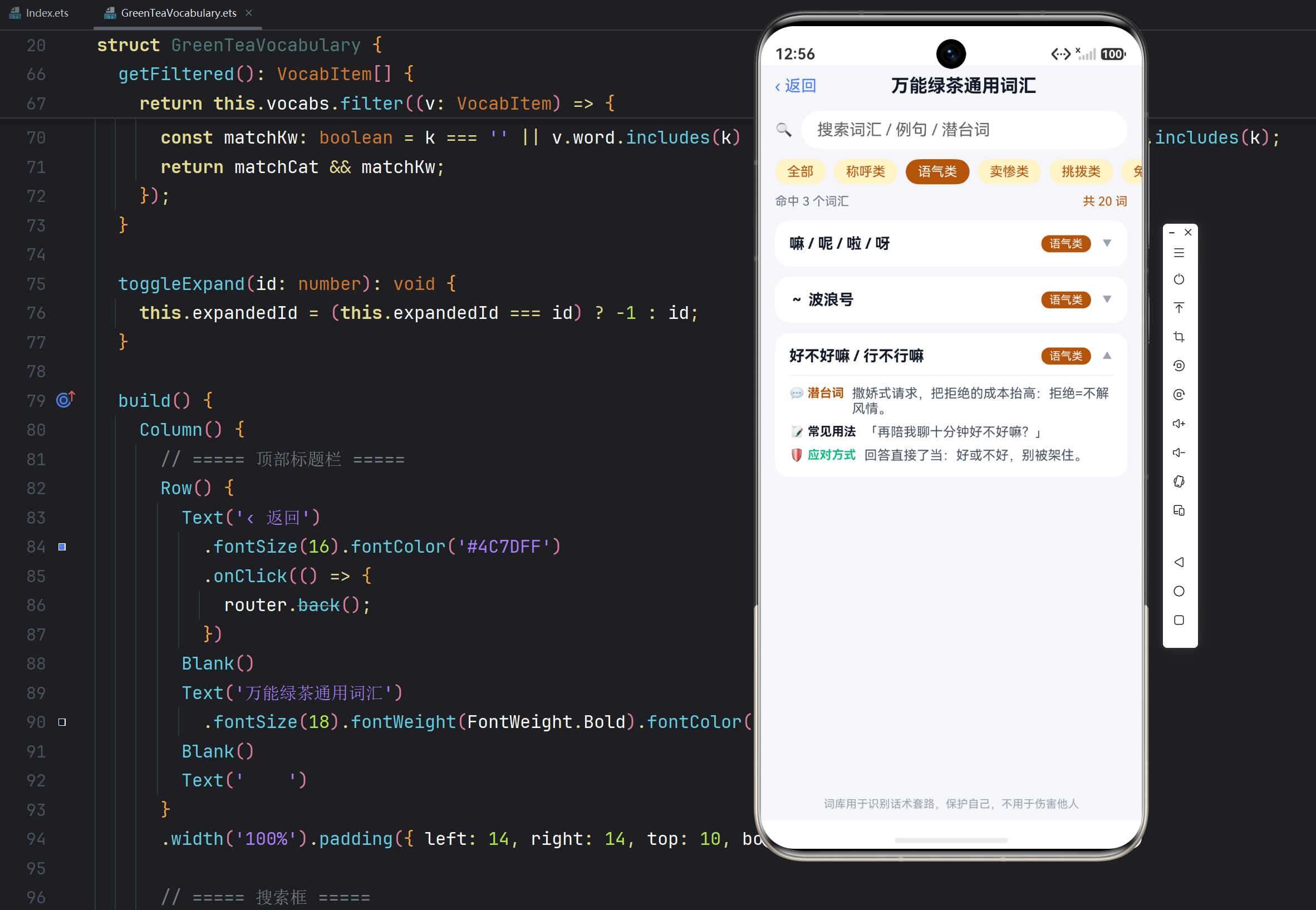
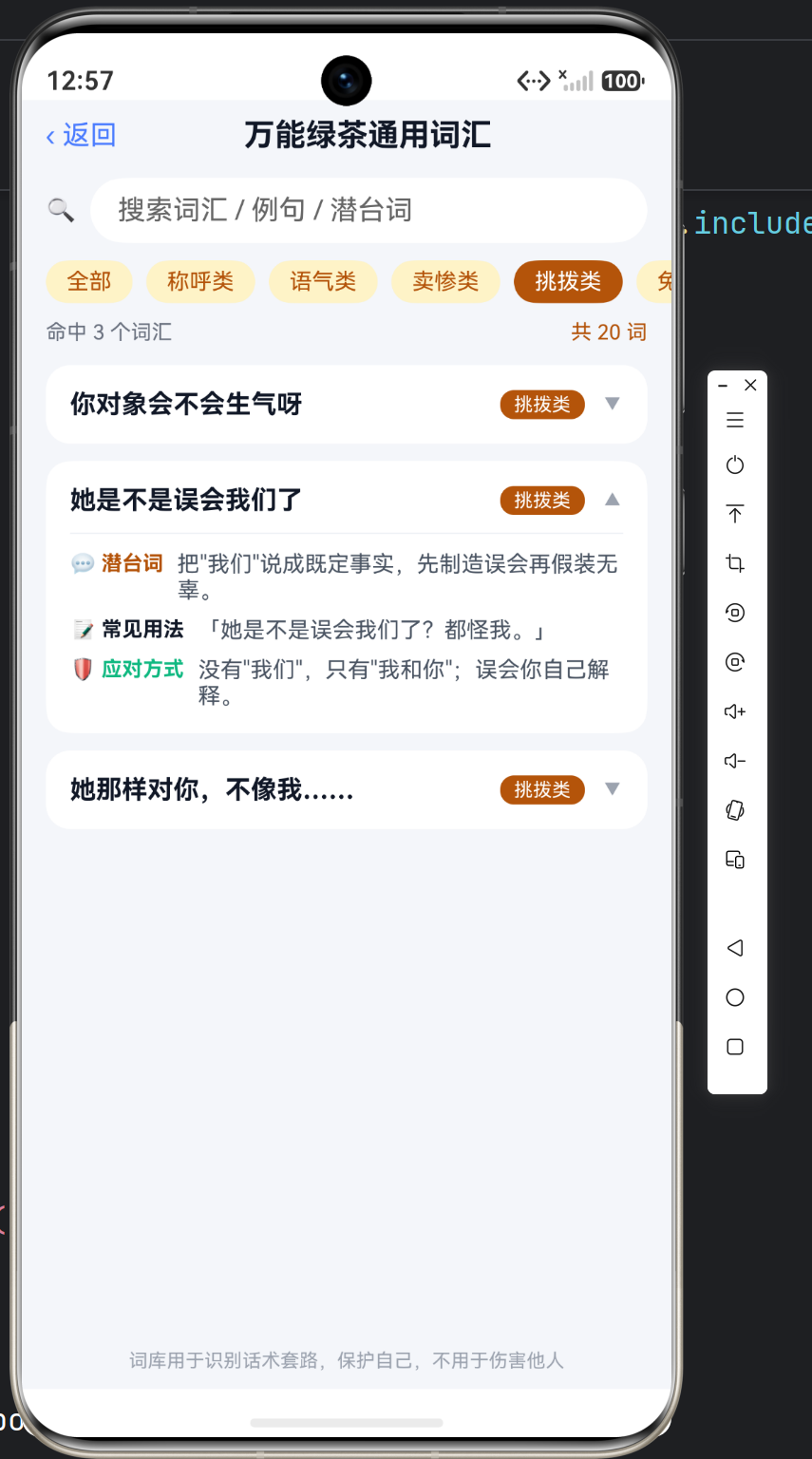
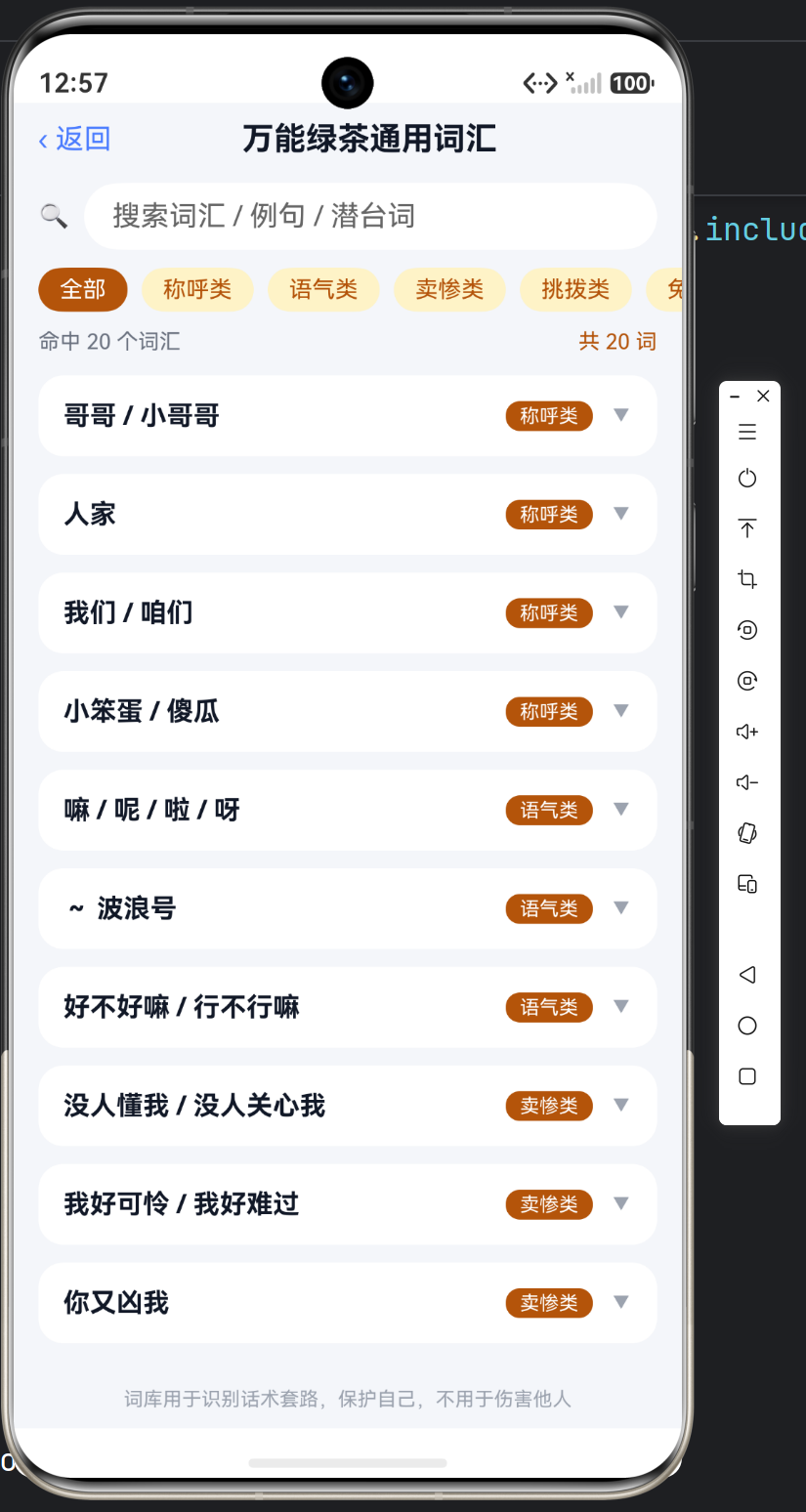
词库类应用的核心是三件事:建库、检索、解释。建库用结构化数组,检索用"分类筛选 + 关键词搜索"双通道,解释用可展开卡片展示潜台词 / 例句 / 应对方式。本应用 20 个高频绿茶词汇分六大类,输入关键字即可实时过滤,是标准的数据驱动 UI 范例。
二、数据模型:词汇 = 五字段记录
interface VocabItem {
  id: number;
  word: string;        // 词汇/句式
  category: string;    // 分类
  meaning: string;     // 潜台词
  example: string;     // 常见用法
  defense: string;     // 应对方式
}
20 词六大类分布:
| 分类 | 词条数 | 代表词 |
|---|---|---|
| 称呼类 | 4 | 哥哥 / 人家 / 我们 / 小笨蛋 |
| 语气类 | 3 | 嘛呢啦呀 / ~波浪号 / 好不好嘛 |
| 卖惨类 | 3 | 没人懂我 / 我好可怜 / 你又凶我 |
| 挑拨类 | 3 | 你对象会不会生气呀 / 她是不是误会了 |
| 免责类 | 3 | 我不是那个意思 / 你别多想 / 都怪我不该说 |
| 捧杀类 | 4 | 你真好 / 只有你最懂我 / 你肯定不会让我失望的 |
三、双通道检索:分类筛选 + 关键词搜索
3.1 分类动态生成
分类不写死,从数据里动态提取(去重),新增词条自动进入筛选栏:
getCategories(): string[] {
  const cats: string[] = [];
  this.vocabs.forEach((v: VocabItem) => {
    if (!cats.includes(v.category)) {
      cats.push(v.category);
    }
  });
  return cats;
}
3.2 核心过滤函数
getFiltered(): VocabItem[] {
  return this.vocabs.filter((v: VocabItem) => {
    const matchCat: boolean = this.category === '全部' || v.category === this.category;
    const k: string = this.keyword.trim();
    const matchKw: boolean =
      k === '' ||
      v.word.includes(k) ||       // 搜词本身
      v.example.includes(k) ||    // 搜例句
      v.meaning.includes(k);      // 搜潜台词
    return matchCat && matchKw;
  });
}
&& 组合分类条件与关键词条件,实现"分类内搜索"的叠加过滤。
3.3 搜索框绑定
TextInput({ placeholder: '搜索词汇 / 例句 / 潜台词', text: this.keyword })
  .fontSize(14).height(38).layoutWeight(1)
  .backgroundColor('#FFFFFF')
  .onChange((val: string) => {
    this.keyword = val;    // 每次输入即触发 getFiltered 重算
  })
onChange 每次输入更新 @State keyword,列表实时刷新——无需搜索按钮,零延迟。
四、分类筛选栏:横向滚动 Scroll
分类多时一行放不下,用横向 Scroll 包裹,保持单行胶囊样式:
Scroll() {
  Row({ space: 8 }) {
    ForEach(['全部'].concat(this.getCategories()), (cat: string) => {
      Text(cat)
        .fontSize(13)
        .fontColor(this.category === cat ? Color.White : '#B45309')
        .backgroundColor(this.category === cat ? '#B45309' : '#FEF3C7')
        .borderRadius(14)
        .padding({ left: 12, right: 12, top: 5, bottom: 5 })
        .onClick(() => { this.category = cat; })
    }, (cat: string) => cat)
  }
  .padding({ left: 14, right: 14, top: 10 })
}
.scrollable(ScrollDirection.Horizontal)
.scrollBar(BarState.Off)
.width('100%')
五、结果计数 + 词汇卡片
计数行给用户即时反馈,命中数为 0 时列表自然为空:
Row() {
  Text('命中 ' + this.getFiltered().length + ' 个词汇')
    .fontSize(12).fontColor('#6B7280')
  Blank()
  Text('共 ' + this.vocabs.length + ' 词')
    .fontSize(12).fontColor('#B45309')
}
.width('100%').padding({ left: 14, right: 14, top: 10 })
卡片点击展开三段解释(潜台词 / 常见用法 / 应对方式),交互与语录分析表一致:
@Builder
vocabCard(item: VocabItem) {
  Column() {
    Row({ space: 10 }) {
      Text(item.word)          // 词汇
        .fontSize(15).fontWeight(FontWeight.Bold).fontColor('#111827')
        .layoutWeight(1)
      Text(item.category)      // 分类徽章
        .fontSize(11).fontColor(Color.White)
        .backgroundColor('#B45309').borderRadius(8)
        .padding({ left: 8, right: 8, top: 2, bottom: 2 })
      Text(this.expandedId === item.id ? '▲' : '▼')
    }
    .width('100%').alignItems(VerticalAlign.Center)

    if (this.expandedId === item.id) {
      Column({ space: 8 }) {
        this.infoRow('💬 潜台词', item.meaning, '#B45309')
        this.infoRow('📝 常见用法', '「' + item.example + '」', '#111827')
        this.infoRow('🛡️ 应对方式', item.defense, '#10B981')
      }
      .width('100%').margin({ top: 10 })
      .padding({ top: 10 })
      .border({ width: { top: 1 }, color: '#EEF1F6' })
    }
  }
  .width('100%').padding(14)
  .backgroundColor(Color.White).borderRadius(14)
  .onClick(() => { this.toggleExpand(item.id); })
}
六、词库速查表(节选)
| 词条 | 分类 | 潜台词一句话 |
|---|---|---|
| 哥哥 / 小哥哥 | 称呼类 | 亲属称谓拉近距离,兄妹可进可退 |
| 人家 | 称呼类 | 第三人称自称,藏起责任主体 |
| 嘛 / 呢 / 啦 / 呀 | 语气类 | 软化命令,撒娇包装 |
| ~波浪号 | 语气类 | 文字甩尾音,模糊认真程度 |
| 没人懂我 | 卖惨类 | 虚构匮乏,激发拯救欲 |
| 你对象会不会生气呀 | 挑拨类 | 替你预设矛盾,动摇信任 |
| 我不是那个意思 | 免责类 | 万能否认,意图先洗白 |
| 你真好 / 你好厉害 | 捧杀类 | 无内容夸奖,抬高后索取 |
| 你肯定不会让我失望的 | 捧杀类 | 架起期待,拒绝=让你失望 |
七、技术要点总结
| 技术点 | 实现方式 |
|---|---|
| 动态分类 | getCategories() 数组去重,加词自动进筛选栏 |
| 叠加过滤 | filter 内 && 组合分类与关键词条件 |
| 实时搜索 | TextInput.onChange → @State → 自动重渲染 |
| 横向滚动 | Scroll(scrollable: Horizontal) + 单行胶囊 |
| 展开互斥 | expandedId 记录当前项,点击切换 |
| 卡片复用 | @Builder vocabCard(item) |
搜索 + 分类 + 展开三合一,是词库 / 词典 / 错题本类应用的通用模板:数据驱动、加词不改代码、搜索零延迟。

作为“人工智能6S店”的官方数字引擎,为AI开发者与企业提供一个覆盖软硬件全栈、一站式门户。
更多推荐

 0
0 0
0- 0


 已为社区贡献31条内容

所有评论(0)