
鸿蒙 ArkTS 实战|四象限动画设计:圆形轨迹绕行 + 四象限着色背景 + 波点绘制
·
一、设计思路
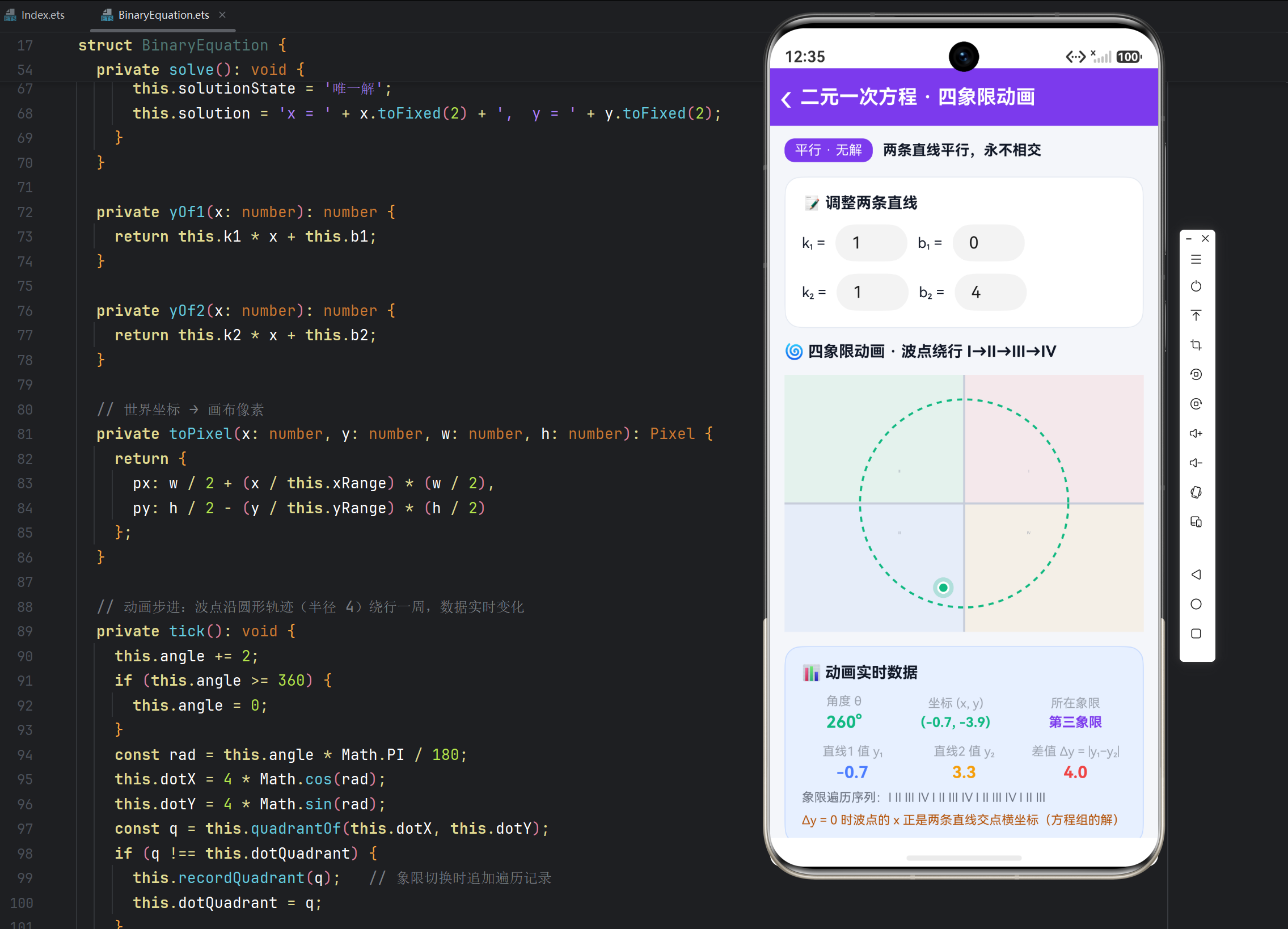
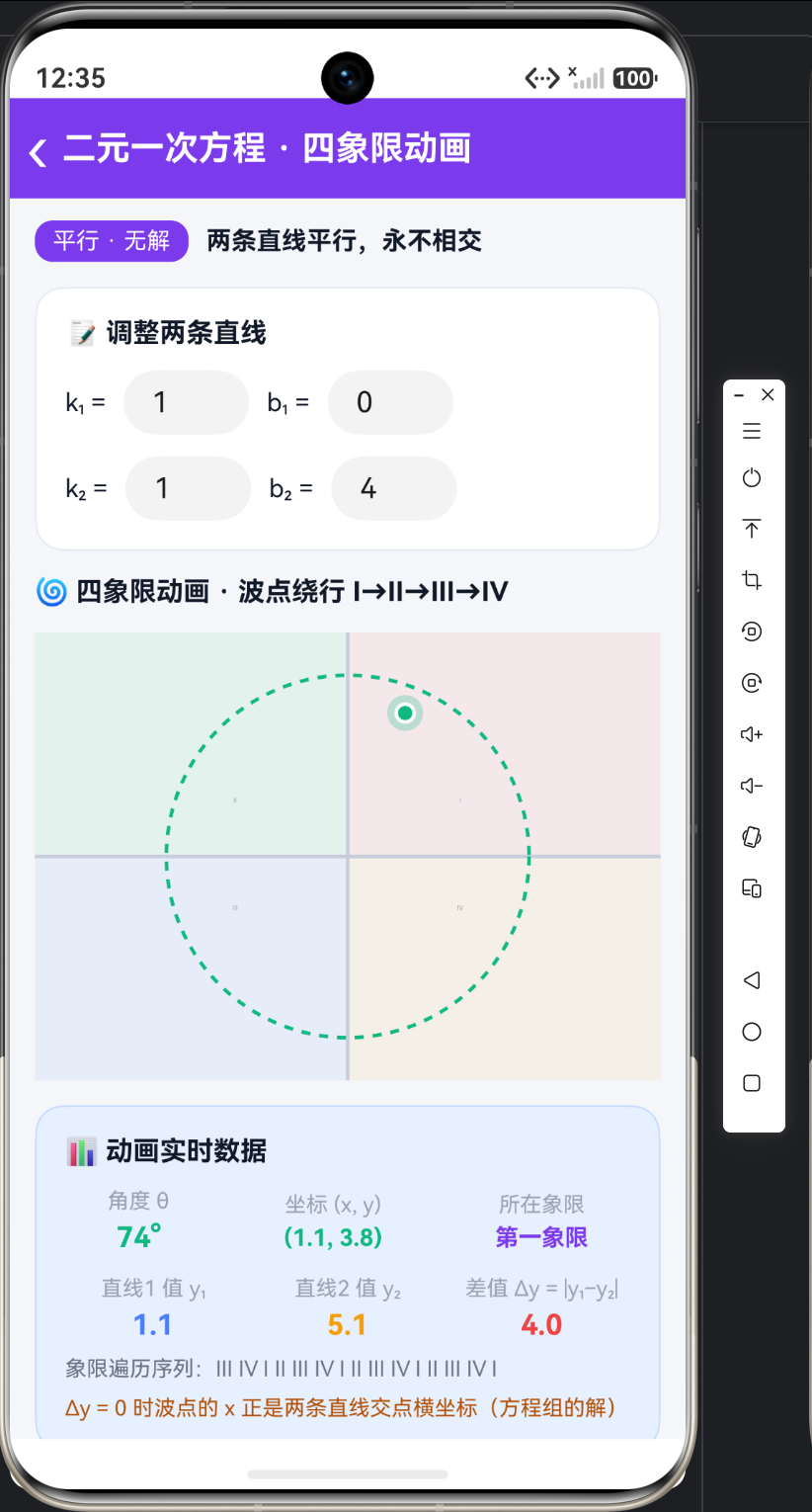
四象限动画让"象限"从静态概念变成动态过程:一个波点沿圆形轨迹绕原点旋转,依次穿过Ⅰ→Ⅱ→Ⅲ→Ⅳ四个象限。技术要点:①四象限背景用四个半透明色块着色区分;②波点坐标由角度参数化(x = r·cosθ, y = r·sinθ)驱动;③圆形轨迹用虚线画出,暗示运动路径。页面第二块 Canvas 专门承载这段动画。
二、动画状态与角度驱动
@Entry
@Component
struct BinaryEquation {
  // 四象限动画状态
  @State angle: number = 0;         // 当前角度(度),每帧 +2
  @State dotX: number = 4;          // 波点横坐标(由角度算出)
  @State dotY: number = 0;          // 波点纵坐标
  @State dotQuadrant: string = '第一象限';
  @State quadLog: string = 'Ⅰ ';   // 象限遍历序列(切换时追加)

  private timer: number = 0;

  // 动画步进:角度递增,坐标由三角函数实时生成
  private tick(): void {
    this.angle += 2;
    if (this.angle >= 360) {
      this.angle = 0;               // 一周 360° 循环
    }
    const rad = this.angle * Math.PI / 180;   // 角度 → 弧度
    this.dotX = 4 * Math.cos(rad);            // 圆轨迹:半径 4
    this.dotY = 4 * Math.sin(rad);
    const q = this.quadrantOf(this.dotX, this.dotY);
    if (q !== this.dotQuadrant) {             // 象限切换时才记录
      this.recordQuadrant(q);
      this.dotQuadrant = q;
    }
    // 其余数据更新(y1/y2/Δy)见第三篇
    this.drawQuad();                          // 每帧重绘
  }
}
角度 → 坐标的映射关系:
| 角度 θ | cos θ | sin θ | 坐标 | 象限 |
|---|---|---|---|---|
| 0° | 1 | 0 | (4, 0) | Ⅰ |
| 90° | 0 | 1 | (0, 4) | Ⅱ |
| 180° | −1 | 0 | (−4, 0) | Ⅲ |
| 270° | 0 | −1 | (0, −4) | Ⅳ |
三、象限判定与遍历序列记录
  // 象限判定:坐标符号 → 象限名
  private quadrantOf(x: number, y: number): string {
    if (x >= 0 && y >= 0) return '第一象限';
    if (x <= 0 && y >= 0) return '第二象限';
    if (x <= 0 && y <= 0) return '第三象限';
    return '第四象限';
  }

  // 记录遍历序列:仅象限变化时追加罗马数字简称
  private recordQuadrant(q: string): void {
    const symbols: string[] = ['Ⅰ', 'Ⅱ', 'Ⅲ', 'Ⅳ'];
    const names: string[] = ['第一象限', '第二象限', '第三象限', '第四象限'];
    const idx = names.indexOf(q);
    if (idx < 0) return;
    const ch = symbols[idx];
    if (this.quadLog.slice(-1) === ch) return;  // 连续重复不记录
    this.quadLog = this.quadLog + ch + ' ';
    if (this.quadLog.length > 30) {
      this.quadLog = this.quadLog.slice(-30);   // 只保留最近序列
    }
  }
四、Canvas 四象限着色背景
  private drawQuad(): void {
    const ctx = this.ctx;
    const w = ctx.width;
    const h = ctx.height;
    ctx.clearRect(0, 0, w, h);
    const ox = w / 2;    // 原点像素坐标
    const oy = h / 2;

    // 四象限背景着色:Ⅰ右上 / Ⅱ左上 / Ⅲ左下 / Ⅳ右下(半透明区分)
    ctx.fillStyle = 'rgba(239,68,68,0.08)';      // Ⅰ 淡红
    ctx.fillRect(ox, 0, w - ox, oy);
    ctx.fillStyle = 'rgba(34,197,94,0.08)';      // Ⅱ 淡绿
    ctx.fillRect(0, 0, ox, oy);
    ctx.fillStyle = 'rgba(59,130,246,0.08)';     // Ⅲ 淡蓝
    ctx.fillRect(0, oy, ox, h - oy);
    ctx.fillStyle = 'rgba(245,158,11,0.08)';     // Ⅳ 淡黄
    ctx.fillRect(ox, oy, w - ox, h - oy);

    // 坐标轴
    ctx.strokeStyle = '#C7CDDA';
    ctx.lineWidth = 2;
    ctx.beginPath(); ctx.moveTo(0, oy); ctx.lineTo(w, oy); ctx.stroke();
    ctx.beginPath(); ctx.moveTo(ox, 0); ctx.lineTo(ox, h); ctx.stroke();

    // 象限角标:Ⅰ Ⅱ Ⅲ Ⅳ
    ctx.fillStyle = '#9CA3AF';
    ctx.font = '13px sans-serif';
    ctx.textAlign = 'center';
    ctx.fillText('Ⅰ', ox + w * 0.18, oy - h * 0.12);
    ctx.fillText('Ⅱ', ox - w * 0.18, oy - h * 0.12);
    ctx.fillText('Ⅲ', ox - w * 0.18, oy + h * 0.12);
    ctx.fillText('Ⅳ', ox + w * 0.18, oy + h * 0.12);
  }
四个 fillRect 正好把画布按原点切成四块——这是"象限可视化"最直白的实现。
五、圆形轨迹与波点绘制
    // 圆形轨迹:虚线圆(暗示运动路径),半径取画布宽的 29%
    ctx.setLineDash([5, 5]);              // 虚线样式
    ctx.strokeStyle = '#10B981';
    ctx.lineWidth = 2;
    ctx.beginPath();
    ctx.arc(ox, oy, w * 0.29, 0, Math.PI * 2);
    ctx.stroke();
    ctx.setLineDash([]);                  // 画完必须恢复实线!

    // 波点:光晕 + 实心 + 白描边(与一元页同款三层画法)
    const dp = this.toPixel(this.dotX, this.dotY, w, h);
    ctx.beginPath(); ctx.arc(dp.px, dp.py, 10, 0, Math.PI * 2);
    ctx.fillStyle = 'rgba(16,185,129,0.25)';
    ctx.fill();
    ctx.beginPath(); ctx.arc(dp.px, dp.py, 5, 0, Math.PI * 2);
    ctx.fillStyle = '#10B981';
    ctx.fill();
    ctx.strokeStyle = Color.White;
    ctx.lineWidth = 2;
    ctx.stroke();
setLineDash([5, 5]) 是 Canvas 标准 API:5px 实线 + 5px 空白交替;用完必须 setLineDash([]) 恢复实线,否则后续所有线条都变虚线。
六、动画节奏控制
| 参数 | 值 | 效果 |
|---|---|---|
| 每帧角度增量 | 2° | 一圈 180 帧 |
| 帧间隔 | 40ms | 25 帧/秒,流畅 |
| 绕行一圈耗时 | 180 × 40ms = 7.2s | 每个象限停留约 1.8s,足够观察 |
七、代码要点
- 参数化运动:波点坐标完全由角度算出,
angle += 2是唯一的运动源,无需记录速度/位置。 - 切换记录:
quadLog只在象限变化时追加,避免每帧拼接字符串的性能浪费。 - 符号即象限:
quadrantOf本质是符号表;圆形轨迹绕一圈,四个象限按顺序各出现一次。 - 视觉三层:背景着色 → 虚线轨迹 → 波点,先背景后前景,层次由绘制顺序天然决定。
八、四象限知识对照
| 象限 | 位置 | 符号 | 圆轨迹上的角度范围 |
|---|---|---|---|
| Ⅰ | 右上 | (+, +) | 0° ~ 90° |
| Ⅱ | 左上 | (−, +) | 90° ~ 180° |
| Ⅲ | 左下 | (−, −) | 180° ~ 270° |
| Ⅳ | 右下 | (+, −) | 270° ~ 360° |
动画把"符号规律"变成"时空规律":波点在哪一象限,那一组符号就成立,眼睛看到比背诵记得牢。

作为“人工智能6S店”的官方数字引擎,为AI开发者与企业提供一个覆盖软硬件全栈、一站式门户。
更多推荐


 5
5 0
0- 0


 已为社区贡献31条内容

所有评论(0)