
鸿蒙 ArkTS 实战|一元一次方程计算器:ax+b=0 求解 + Canvas 直线图像 + 波点变动
·
一、设计思路
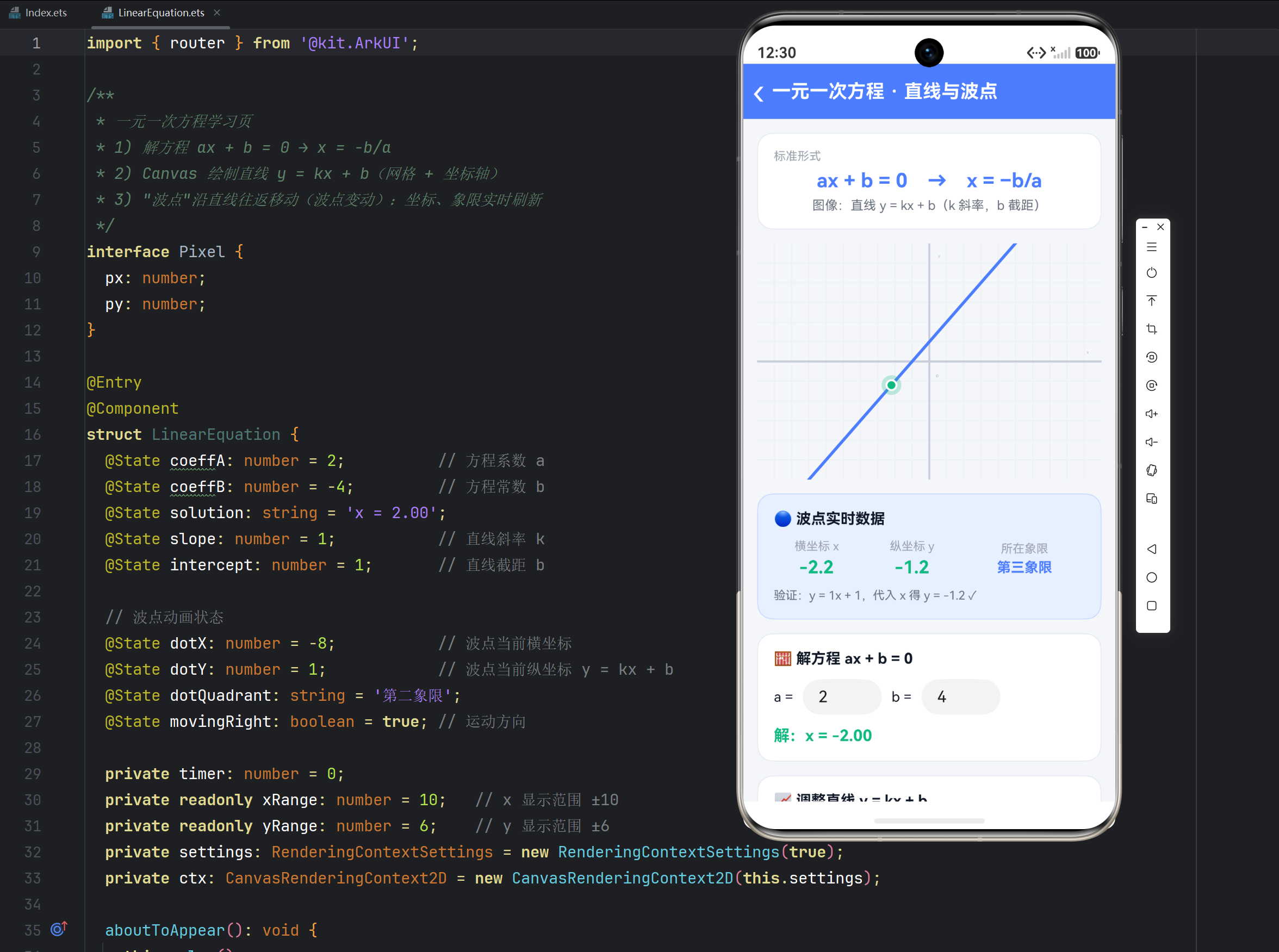
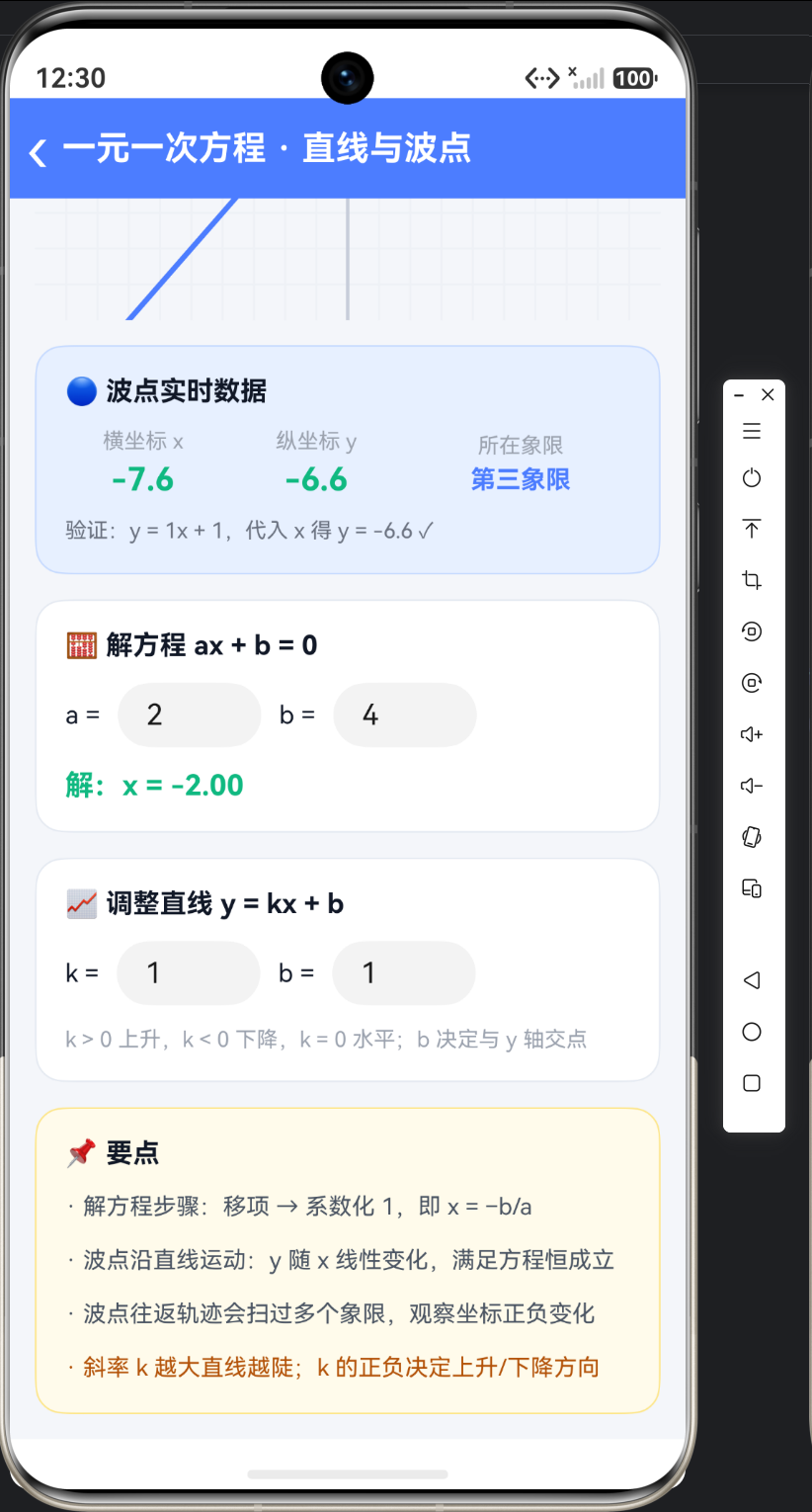
一元一次方程是代数起点,本页把一个方程做透:①求解——输入 a、b,由 ax + b = 0 反推 x = −b/a;②图像——用 Canvas 画坐标系与直线 y = kx + b;③波点变动——一个亮色波点沿直线往返移动,坐标与象限实时刷新,把"代数解"变成"看得见的点"。三个功能共用一套 @State,输入即重算、重绘。
二、状态与核心求解逻辑
import { router } from '@kit.ArkUI';

interface Pixel { px: number; py: number; }

@Entry
@Component
struct LinearEquation {
  @State coeffA: number = 2;          // 方程系数 a
  @State coeffB: number = -4;         // 方程常数 b
  @State solution: string = 'x = 2.00';
  @State slope: number = 1;           // 直线斜率 k
  @State intercept: number = 1;       // 直线截距 b

  // 波点动画状态
  @State dotX: number = -8;           // 波点当前横坐标
  @State dotY: number = 1;            // 波点当前纵坐标 y = kx + b
  @State dotQuadrant: string = '第二象限';
  @State movingRight: boolean = true; // 运动方向(碰到边界反向)

  private timer: number = 0;
  private readonly xRange: number = 10;   // x 显示范围 ±10
  private readonly yRange: number = 6;    // y 显示范围 ±6
  private settings: RenderingContextSettings = new RenderingContextSettings(true);
  private ctx: CanvasRenderingContext2D = new CanvasRenderingContext2D(this.settings);

  // 解方程 ax + b = 0:移项 + 系数化1
  private solve(): void {
    const a = this.coeffA;
    const b = this.coeffB;
    if (a === 0) {
      this.solution = (b === 0) ? '任意实数' : '无解';
    } else {
      this.solution = 'x = ' + (-b / a).toFixed(2);
    }
  }

  // 直线函数值
  private yOf(x: number): number {
    return this.slope * x + this.intercept;
  }
}
三、波点变动动画(setInterval 驱动)
  aboutToAppear(): void {
    this.solve();
    this.draw();
    // 波点变动:每 30ms 步进一次,x 每次 ±0.2
    this.timer = setInterval(() => { this.tick(); }, 30);
  }

  aboutToDisappear(): void {
    clearInterval(this.timer);   // 页面销毁必须清理定时器
  }

  // 波点步进:沿直线平移,碰到显示边界反向(波点变动核心)
  private tick(): void {
    let nx = this.dotX + (this.movingRight ? 0.2 : -0.2);
    if (nx >= this.xRange) {
      nx = this.xRange;
      this.movingRight = false;
    }
    if (nx <= -this.xRange) {
      nx = -this.xRange;
      this.movingRight = true;
    }
    this.dotX = nx;
    this.dotY = this.yOf(nx);              // y 由直线方程实时算出
    this.dotQuadrant = this.quadrantOf(nx, this.dotY);
    this.draw();                           // 每帧重绘
  }

  // 象限判定:按坐标符号
  private quadrantOf(x: number, y: number): string {
    if (x >= 0 && y >= 0) return '第一象限';
    if (x <= 0 && y >= 0) return '第二象限';
    if (x <= 0 && y <= 0) return '第三象限';
    return '第四象限';
  }
四、Canvas 绘制:网格 + 坐标轴 + 直线 + 波点
  // 世界坐标 → 画布像素(画布中心即原点,y 轴向上)
  private toPixel(x: number, y: number, w: number, h: number): Pixel {
    return {
      px: w / 2 + (x / this.xRange) * (w / 2),
      py: h / 2 - (y / this.yRange) * (h / 2)
    };
  }

  private draw(): void {
    const ctx = this.ctx;
    const w = ctx.width;
    const h = ctx.height;
    ctx.clearRect(0, 0, w, h);

    // 网格:x、y 方向各画 20 条浅色线
    ctx.strokeStyle = '#EEF1F6';
    ctx.lineWidth = 1;
    for (let gx = -this.xRange + 1; gx < this.xRange; gx++) {
      const p1 = this.toPixel(gx, -this.yRange, w, h);
      const p2 = this.toPixel(gx, this.yRange, w, h);
      ctx.beginPath(); ctx.moveTo(p1.px, p1.py); ctx.lineTo(p2.px, p2.py); ctx.stroke();
    }
    for (let gy = -this.yRange + 1; gy < this.yRange; gy++) {
      const p1 = this.toPixel(-this.xRange, gy, w, h);
      const p2 = this.toPixel(this.xRange, gy, w, h);
      ctx.beginPath(); ctx.moveTo(p1.px, p1.py); ctx.lineTo(p2.px, p2.py); ctx.stroke();
    }

    // 坐标轴与标签
    const origin = this.toPixel(0, 0, w, h);
    ctx.strokeStyle = '#C7CDDA';
    ctx.lineWidth = 2;
    ctx.beginPath(); ctx.moveTo(0, origin.py); ctx.lineTo(w, origin.py); ctx.stroke();
    ctx.beginPath(); ctx.moveTo(origin.px, 0); ctx.lineTo(origin.px, h); ctx.stroke();
    ctx.fillStyle = '#9CA3AF';
    ctx.font = '12px sans-serif';
    ctx.textAlign = 'center';
    ctx.fillText('x', w - 14, origin.py - 8);
    ctx.fillText('y', origin.px + 10, 14);
    ctx.fillText('O', origin.px + 8, origin.py + 16);

    // 直线 y = kx + b:取 x = ±10 两端连线(超出自动裁剪)
    const lp1 = this.toPixel(-this.xRange, this.yOf(-this.xRange), w, h);
    const lp2 = this.toPixel(this.xRange, this.yOf(this.xRange), w, h);
    ctx.strokeStyle = '#4C7DFF';
    ctx.lineWidth = 3;
    ctx.beginPath(); ctx.moveTo(lp1.px, lp1.py); ctx.lineTo(lp2.px, lp2.py); ctx.stroke();

    // 波点:外圈光晕 + 实心圆 + 白描边
    const dp = this.toPixel(this.dotX, this.dotY, w, h);
    ctx.beginPath(); ctx.arc(dp.px, dp.py, 10, 0, Math.PI * 2);
    ctx.fillStyle = 'rgba(16,185,129,0.25)';
    ctx.fill();
    ctx.beginPath(); ctx.arc(dp.px, dp.py, 5, 0, Math.PI * 2);
    ctx.fillStyle = '#10B981';
    ctx.fill();
    ctx.strokeStyle = Color.White;
    ctx.lineWidth = 2;
    ctx.stroke();
  }
五、UI 组装(波点数据面板 + 双输入区)
  build() {
    Column() {
      // 顶部标题栏(返回 + 标题,略)

      Scroll() {
        Column({ space: 14 }) {
          // 公式卡
          Text('ax + b = 0 → x = −b/a')
            .fontSize(20).fontWeight(FontWeight.Bold)
            .fontColor('#4C7DFF').width('100%').textAlign(TextAlign.Center)

          // 直线与波点
          Canvas(this.ctx)
            .width('100%').height(240)
            .onReady(() => { this.draw(); })

          // 波点实时数据面板(@State 自动刷新,无需手动 setState)
          Row({ space: 10 }) {
            Column({ space: 4 }) {
              Text('横坐标 x').fontSize(12).fontColor('#9CA3AF')
              Text(this.dotX.toFixed(1))
                .fontSize(18).fontWeight(FontWeight.Bold).fontColor('#10B981')
            }.layoutWeight(1)
            Column({ space: 4 }) {
              Text('纵坐标 y').fontSize(12).fontColor('#9CA3AF')
              Text(this.dotY.toFixed(1))
                .fontSize(18).fontWeight(FontWeight.Bold).fontColor('#10B981')
            }.layoutWeight(1)
            Column({ space: 4 }) {
              Text('所在象限').fontSize(12).fontColor('#9CA3AF')
              Text(this.dotQuadrant)
                .fontSize(14).fontWeight(FontWeight.Bold).fontColor('#4C7DFF')
            }.layoutWeight(1.4)
          }.width('100%').margin({ top: 4 })

          // 方程求解输入区
          Row({ space: 10 }) {
            Text('a =').fontSize(14).fontColor('#111827')
            TextInput({ text: this.coeffA.toString() })
              .width(80).height(36).type(InputType.Number)
              .onChange((v: string) => {
                this.coeffA = Number(v) || 0;
                this.solve();          // 改 a 立即重算解
              })
            Text('b =').fontSize(14).fontColor('#111827')
            TextInput({ text: this.coeffB.toString() })
              .width(80).height(36).type(InputType.Number)
              .onChange((v: string) => {
                this.coeffB = Number(v) || 0;
                this.solve();
              })
            Blank()
          }.width('100%')

          // 直线参数输入区(k、b 输入同构,改后 this.draw() 重绘)
          // (略,与上同理)
        }
        .padding(14)
      }
      .layoutWeight(1).scrollBar(BarState.Off)
    }
    .height('100%').width('100%').backgroundColor('#F4F6FA')
  }
六、代码要点
- 一帧一步:
setInterval(tick, 30)每次只挪0.2个单位,形成平滑的波点变动;aboutToDisappear里clearInterval防止泄漏。 - 往返边界:
movingRight布尔状态,碰到±xRange翻转,波点往复扫过整条可见直线。 - 坐标映射:
toPixel把数学坐标(中心原点、y 向上)转成画布像素(左上原点、y 向下),负号只出现在一处。 - 声明式刷新:波点坐标是
@State,数据面板自动更新;Canvas 需手动调draw(),两种刷新模式配合。
七、一元一次方程核心知识点
| 要点 | 内容 |
|---|---|
| 定义 | 只含一个未知数、未知数次数为 1、系数不为 0 的方程:ax + b = 0(a ≠ 0) |
| 求解 | 移项 → 系数化 1:x = −b/a |
| 特殊情况 | a = 0 且 b = 0:任意实数;a = 0 且 b ≠ 0:无解 |
| 图像 | 一次函数 y = kx + b 是一条直线;k 斜率、b 与 y 轴交点 |
| 性质 | 波点沿直线运动时 y 恒等于 kx + b,任意时刻都"满足方程" |
| 易错 | 移项要变号;系数化 1 要除系数而不是减系数 |
| 口诀 | 一元一次解方程,移项变号系数分;k 正上升 k 负降,b 是 y 轴相交点 |

作为“人工智能6S店”的官方数字引擎,为AI开发者与企业提供一个覆盖软硬件全栈、一站式门户。
更多推荐

 10
10 0
0- 0


 已为社区贡献29条内容

所有评论(0)