
太空旅游预订实战:HarmonyOS API 24下星轨漫游深空蓝紫深色主题、6Tab差异化布局与火箭倒计时星空特效航线预订的完整拆解
太空旅游预订实战:HarmonyOS API 24下星轨漫游深空蓝紫深色主题、6Tab差异化布局与火箭倒计时星空特效航线预订的完整拆解
当太空旅游从科幻走向现实,一个好的太空旅游预订平台能让普通人也能触摸星辰。本文完整拆解一个基于鸿蒙 HarmonyOS API 24 与 ArkUI 声明式框架构建的「星轨漫游」太空旅游预订平台,覆盖深空蓝紫深色主题配色系统、航天预订头部火箭发射倒计时三卡、星空闪烁特效层、6Tab差异化布局(首页Hero大卡+目的地宫格+发射时间轴/航线机构筛选+价格对比/发射倒计时+发射窗口柱状图/体验套餐评分列表/社区动态信息流/我的个人档案+预订记录)、tabBar激活态青色指示条、倒计时天时分秒四栏、发射窗口周六金色峰值、目的地六色动态定价、航线状态四色、评分星星函数、三大深色弹窗(预订太空航线/修改预订/删除动态)、starBlink星空闪烁动效、splice删除动态等核心技术点,附完整源码与运行效果截图。
一、引言:从科幻到现实的太空旅游
随着商业航天的快速发展,太空旅游已经从科幻小说中的想象逐步走向现实——近地轨道体验、国际空间站驻留、月球轨道环游、甚至火星探测,正在成为高净值人群和太空爱好者可以预订的真实产品。然而,航线信息分散、价格不透明、发射窗口不确定、预订流程复杂、体验套餐选择困难、社区交流缺失,正成为太空旅游用户的现实痛点。一个优秀的太空旅游预订平台,不仅需要覆盖从"发现目的地"到"航线预订"再到"发射倒计时"的完整业务闭环,还要在热门目的地、航线对比、发射窗口、体验套餐、社区交流、个人预订等维度做到精准而高效。
正是在这样的背景下,星轨漫游类太空旅游预订平台应运而生,并迅速成为太空爱好者的出行入口。一个优秀的太空旅游应用,需要以首页为核心入口,横向扩展出航线、发射、体验、社区、我的六大功能模块,每个模块采用完全不同的布局风格——首页=Hero大卡+目的地宫格+发射时间轴、航线=机构筛选+航线价格对比、发射=火箭倒计时+发射窗口柱状图、体验=体验套餐评分列表、社区=动态信息流、我的=个人档案+预订记录,形成了一个完整闭环的太空旅游预订生态。它不仅是一个功能完备的演示项目,更是一份典型的 ArkUI 工程实践范本,涵盖了深色主题设计、状态管理、组件化设计、Stack弹窗叠加、星空闪烁特效、倒计时展示、动态颜色映射、评分星星生成、机构筛选等关键技术点。
二、应用整体架构概览
整个应用采用了"单入口 + 6Tab单排差异化布局 + Stack弹窗叠加 + 星空特效层"的太空旅游应用架构。入口组件 Page821 作为整个应用的根容器,负责管理当前激活的 Tab 状态、星空闪烁动画状态以及三个弹窗的显隐状态。
应用一共划分为六个一级页面:首页(HOME)、航线(ROUTE)、发射(LAUNCH)、体验(EXPERIENCE)、社区(COMMUNITY)以及我的(PROFILE)。底部 tabBar 采用深色主题设计——6个Tab(首页🚀/航线🛰️/发射🌌/体验⭐/社区💬/我的👤)单排布局,激活态图标 opacity 1.0 + 文字 cyan 青色加粗 + 下方 16x2 青色指示条,非激活态图标 opacity 0.4 + 文字 sub 灰字,tabBar 背景 dark 深蓝灰,顶部 border 1px line 色。六个Tab每个布局完全不同——首页采用Hero大卡+目的地2x3宫格+近期发射时间轴、航线采用机构横滑筛选+航线列表价格对比、发射采用火箭倒计时大卡(天/时/分/秒四栏)+发射窗口柱状图+近期发射计划、体验采用体验套餐列表(评分星星+标签+双按钮)、社区采用热门/最新/提问分类+动态信息流(点赞/评论/转发/删除)、我的采用个人档案卡+数据统计三栏+预订记录列表+快捷操作菜单,这种"一页一型"的差异化设计最大程度还原了真实太空旅游预订平台的交互体验。
在数据层面,应用定义了一套完整的类型系统,包括色彩主题、目的地元数据、航线元数据、体验套餐元数据、社区动态元数据,并通过常量数组将数据与 UI 表现层解耦。所有业务数据以 @Observed 装饰的可观察类为载体(Trip/Experience/CommunityPost),配合 12 条航线、10 个体验套餐、10 条社区动态、6 个目的地、7 天发射数据的模拟数据,模拟了一个真实的太空旅游数据环境。所有数据类都带有 constructor 构造函数,使用 new ClassName(...) 方式实例化。应用还定义了 4 个工具函数(statusColor航线状态四色/ratingStars评分星星生成/launchBarH柱状图高度/tripFilter机构筛选),将颜色映射、数据计算、筛选逻辑从 UI 层抽离,实现数据与逻辑分离。
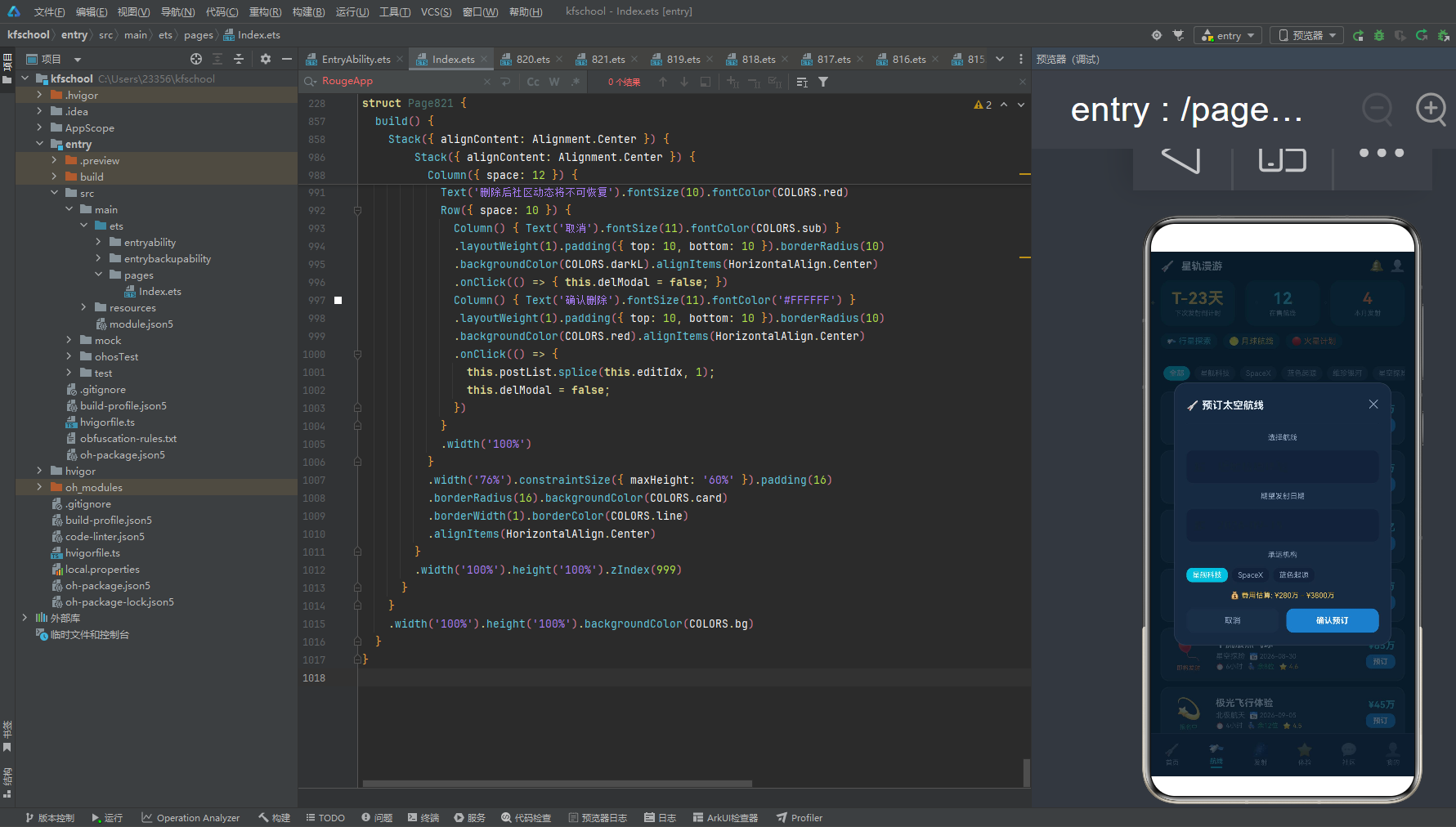
在交互层面,应用通过 Stack 布局叠加实现了三类弹窗的显示:预订太空航线、修改预订、删除动态。与之前项目"每个弹窗独立 Stack 叠加"一致,本应用三个弹窗各自独立 Stack 叠加,共享 modalOverlay 统一遮罩封装(全屏 mask 遮罩 + 点击关闭)。特别的是,本应用的弹窗采用深色主题设计——card 深蓝灰底,dark 输入框底,title 浅白字,带 ✕ 关闭按钮和 Divider 分隔线,与整体深色主题统一。addModal 预订太空航线包含 addRoute/addDate/addAgency 三个输入状态(航线名称/期望日期/承运机构选择,机构用三按钮选择:星舰科技/SpaceX/蓝色起源),显示费用估算 ¥280万-¥3800万;editModal 修改预订包含 editIdx/editRoute 状态(editIdx 记录要修改的预订索引,editRoute 输入新航线名),显示当前航线名称;delModal 删除动态复用 editIdx 状态记录要删除的动态索引,确认后 postList.splice(editIdx,1) 按索引直接删除。三个弹窗中 editModal 和 delModal 共享 editIdx 状态实现索引传递,减少了重复状态定义。航线页和体验页的"预订"按钮点击触发 addModal(editIdx=idx记录选中项),我的页预订记录点击触发 editModal,社区页动态右下角🗑️点击触发 delModal,形成了完整的预订增删改交互闭环。
在视觉层面,本应用独创了"深空蓝紫深色主题"设计——bg #0D1B2A 深空蓝底(深色主题!),card #1B2A3F 深蓝灰,dark #152238 更深蓝灰,darkL #1E2D45 浅深蓝灰,title #E8F0FA 浅白(深色主题下用浅色文字),sub #8DA2BD 灰蓝,text3 #5A6B85 深灰蓝。主色体系包含 blue #3D7DC8 蓝、blueD #2A5A9E 深蓝、purple #8A5FC0 紫、gold #F0C04E 星光金、orange #FF7A35 火箭橙、cyan #3DBEDB 青(tabOn激活态青色!)。应用的渐变和高亮设计是色彩系统的核心亮点——tabBar激活态用 cyan 青色文字+青色指示条,倒计时大卡天/时/分用 cyan 青色、秒用 orange 火箭橙(强调秒数跳动),发射窗口柱状图周六峰值用 gold 星光金高亮、其他用 blueD 深蓝,目的地价格用 dest.color 六色动态着色(国际空间站蓝/月球轨道金/火星探测橙/近地轨道青/金星飞掠粉/木星卫星紫),航线状态四色(即将发射orange/报名中green/预热中purple/其他sub),形成了"以青定激活、以金定峰值、以橙定倒计时秒/即将发射、以六色定目的地、以四色定航线状态"的多层语义着色模式。本应用最大的视觉特色是"星空闪烁特效层"——aboutToAppear 中 setInterval 800ms 切换 starBlink 布尔状态,当 starBlink 为 true 时,在 Stack 中叠加一层 Row 包裹 6 个星星符号(✦✧✦✧✦✧),不同颜色(gold/cyan/bg/purple/gold/cyan)和 opacity(0.15-0.3),position x:0 y:60,zIndex 1,营造星空闪烁的太空氛围,是本应用最具创意的视觉设计。
下面逐页展示应用的六大功能模块运行效果。
三、首页:Hero大卡、目的地2x3宫格与发射时间轴
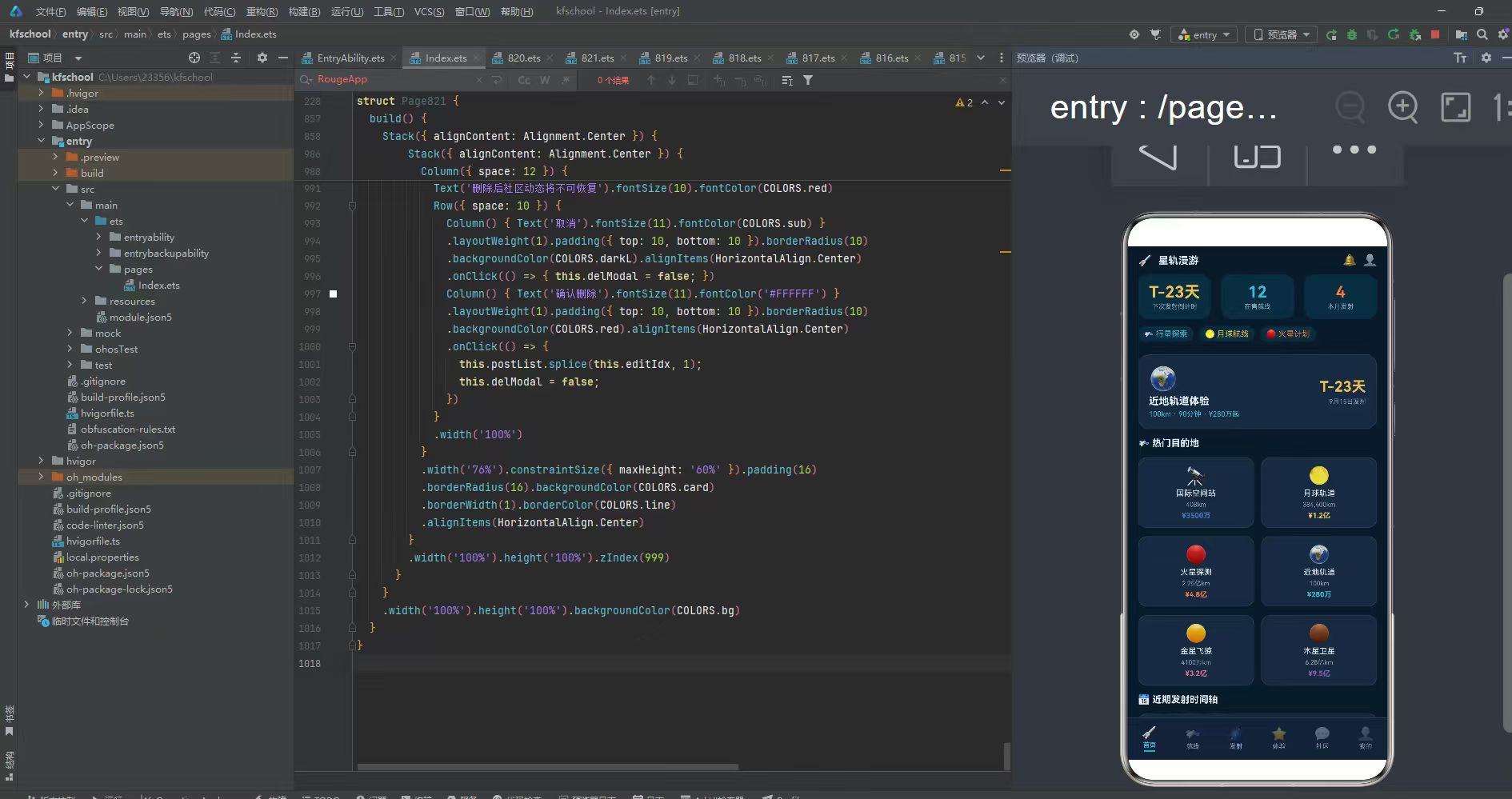
首页以"太空探索入口"为核心,独创"Hero大卡+目的地2x3宫格+近期发射时间轴"的三层复合布局。
页面顶部第一部分是 Hero 大卡,Column 包裹 space 8,padding 14,圆角 16,card 深蓝灰底,border 1px line 色:
- 信息行:Row space 10,左侧信息列(alignItems Start):🌍地球图标32号 + "近地轨道体验"title浅白字14号加粗 + "100km · 90分钟 · ¥280万起"cyan青字10号 + Column layoutWeight 1 + 右侧倒计时列(alignItems End):"T-23天"gold星光金字20号加粗 + "9月15日发射"sub灰字9号。
Hero大卡用地球图标+近地轨道体验+距离时长价格+发射倒计时,营造太空旅游的核心入口感,cyan青色价格和gold金色倒计时形成视觉焦点。
第二部分是热门目的地标题,"🛰️ 热门目的地"title浅白字13号加粗,width 100%。
第三部分是目的地 2x3 宫格,用三个 Row 各放两个目的地(ForEach [0,1]/[2,3]/[4,5]),每个目的地 Column 包裹 space 4,layoutWeight 1,padding 10,圆角 12,card 深蓝灰底,border 1px line 色,alignItems Center,包含:
- 目的地图标:DEST_LIST[i].icon 24号(国际空间站🔭/月球轨道🌕/火星探测🔴/近地轨道🌍/金星飞掠🟡/木星卫星🟤)。
- 目的地名:DEST_LIST[i].name title浅白字11号。
- 距离:DEST_LIST[i].dist sub灰字9号(408km/384,400km/2.25亿km/100km/4100万km/6.28亿km)。
- 价格:DEST_LIST[i].price,fontColor DEST_LIST[i].color 动态着色10号加粗(国际空间站blue蓝/月球轨道gold金/火星探测orange橙/近地轨道cyan青/金星飞掠pink粉/木星卫星purple紫)。
6 个目的地覆盖从近地到深空:国际空间站(408km,3天,¥3500万,蓝色)、月球轨道(384,400km,8天,¥1.2亿,金色)、火星探测(2.25亿km,7个月,¥4.8亿,橙色)、近地轨道(100km,90分钟,¥280万,青色)、金星飞掠(4100万km,5个月,¥3.2亿,粉色)、木星卫星(6.28亿km,3年,¥9.5亿,紫色)。目的地价格六色动态着色(dest.color),距离从100km到6.28亿km跨度极大,价格从¥280万到¥9.5亿,完整呈现太空旅游的目的地梯度,是本应用首页目的地宫格设计的核心亮点。
第四部分是近期发射时间轴标题,"📅 近期发射时间轴"title浅白字13号加粗,width 100%。
第五部分是发射时间轴,Column space 8,遍历 TRIP_INIT 前4条航线,每条航线 Row space 10,padding 10,圆角 10,card 深蓝灰底,border 1px line 色,包含:
- 日期列:width 60,alignItems Start,TRIP_INIT[i].date gold星光金字10号 + TRIP_INIT[i].duration sub灰字8号。
- 时间轴竖线:Column width 2 height 32 cyan青色底圆角1。
- 航线信息列(layoutWeight 1,alignItems Start):
- 航线名行:Row space 6,TRIP_INIT[i].icon 14号 + TRIP_INIT[i].route title浅白字12号FontWeight.Medium。
- 详情行:Row space 6,TRIP_INIT[i].agency sub灰字9号 + TRIP_INIT[i].price cyan青字9号加粗 + TRIP_INIT[i].status(statusColor动态着色8号,chip底圆角4 padding)。
- 箭头:"›"sub灰字16号。
4 条近期发射:近地轨道体验(星舰科技,2026-09-15,90分钟,¥280万,即将发射orange)、国际空间站驻留(蓝色起源,2026-10-20,3天,¥3500万,报名中green)、月球轨道环游(SpaceX,2027-01-10,8天,¥1.2亿,预热中purple)、近地轨道体验(维珍银河,2026-09-28,90分钟,¥310万,报名中green)。时间轴用 cyan 青色竖线串联,日期用 gold 星光金,价格用 cyan 青色,状态四色动态着色(statusColor函数:即将发射orange/报名中green/预热中purple/其他sub),是本应用首页发射时间轴设计的核心亮点。
四、航线页:机构筛选与航线价格对比
航线页以"全部航线预订"为核心,采用"机构横滑筛选+航线列表价格对比"的两层布局。
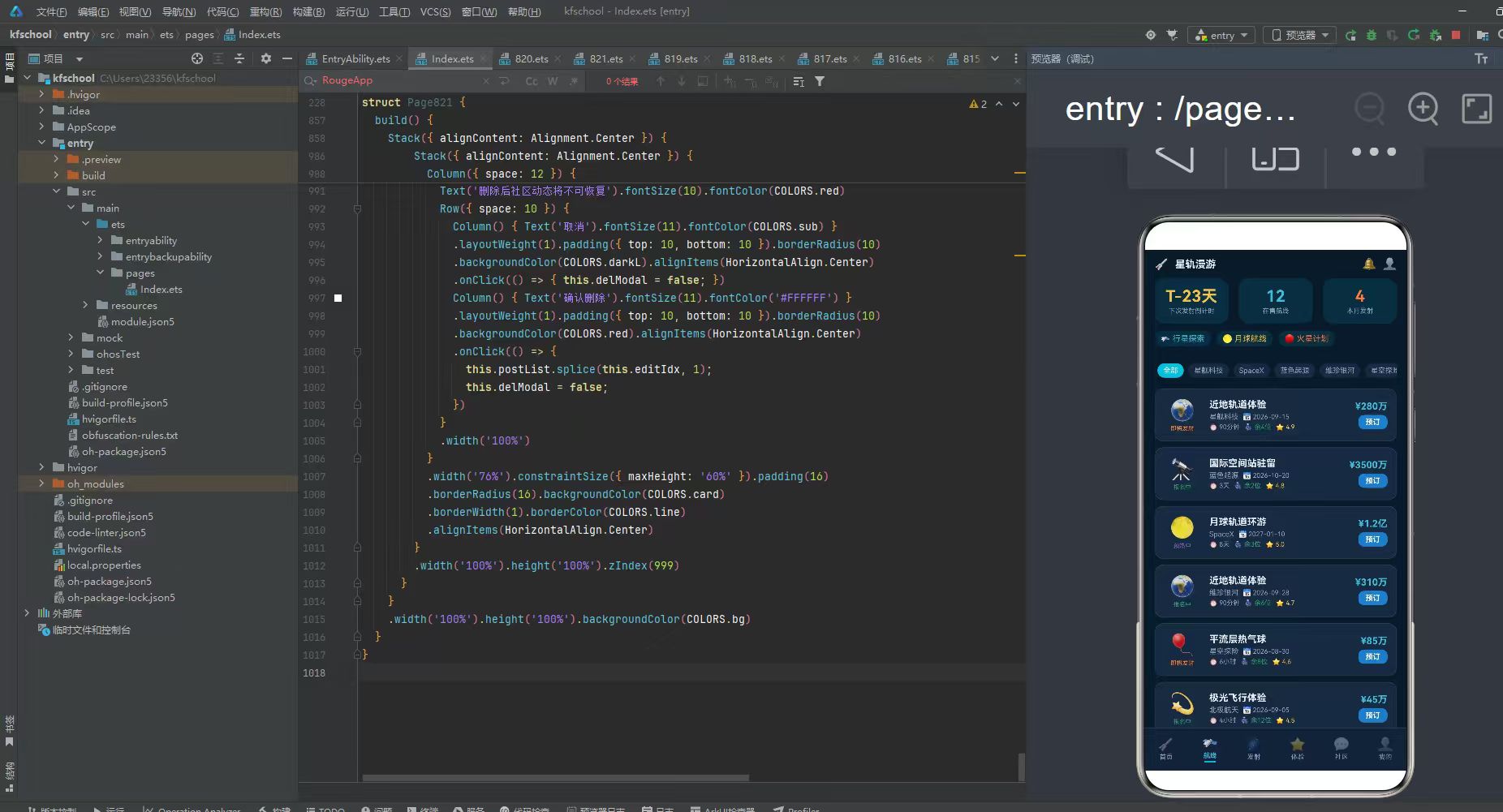
页面顶部第一部分是机构筛选条,Scroll horizontal,遍历 AGENCY_LIST 6个机构(全部/星舰科技/SpaceX/蓝色起源/维珍银河/星空探险),每个机构 Text 10号,选中(agencyFilter === a)时白字 cyan 青底,未选中时 sub 灰字 card 深蓝灰底,padding 左右8上下4,圆角10,点击切换 agencyFilter。选中态 cyan 青底高亮,与 tabBar 激活态色彩呼应。
第二部分是航线列表,Column space 8,遍历 tripList 12条航线(实际渲染全部,tripFilter函数可用于筛选但本页直接遍历全部),每条航线 Row space 12,padding 12,圆角 12,card 深蓝灰底,border 1px line 色,包含:
- 图标状态列:width 50,alignItems Center,TRIP.icon 28号 + TRIP.status(statusColor动态着色8号)。
- 航线信息列(layoutWeight 1,alignItems Start,space 3):
- 航线名:TRIP.route title浅白字13号加粗。
- 机构日期行:Row space 6,TRIP.agency sub灰字10号 + "📅 " + TRIP.date sub灰字9号。
- 时长余位评分行:Row space 6,"⏱️ " + TRIP.duration sub灰字9号 + “💺 余” + TRIP.seats + "位"green绿字9号 + "⭐ " + TRIP.rating.toFixed(1) gold星光金字9号。
- 价格预订列(alignItems End,space 4):
- 价格:TRIP.price cyan青字13号加粗。
- 预订按钮:Column 包裹"预订"白字10号加粗,padding 左右10上下4,圆角8,blue蓝底,点击触发 addModal(editIdx=idx记录选中航线)。
12 条航线覆盖从平价到奢华:近地轨道体验(星舰科技,¥280万,余4位,4.9分,即将发射)、国际空间站驻留(蓝色起源,¥3500万,余2位,4.8分,报名中)、月球轨道环游(SpaceX,¥1.2亿,余3位,5.0分,预热中)、近地轨道体验(维珍银河,¥310万,余6位,4.7分,报名中)、平流层热气球(星空探险,¥85万,余8位,4.6分,即将发射)、极光飞行体验(北极航天,¥45万,余12位,4.5分,报名中)、零重力抛物线(失重体验,¥18万,余20位,4.8分,报名中)、深空模拟训练(火星学会,¥120万,余6位,4.9分,预热中)、月球低轨飞掠(蓝色起源,¥9500万,余2位,4.9分,预热中)、国际空间站驻留(SpaceX,¥3800万,余1位,5.0分,报名中)、近地轨道体验(星舰科技,¥295万,余5位,4.7分,报名中)、太空酒店入住(轨道度假,¥6800万,余4位,4.8分,预热中)。价格从¥18万(零重力抛物线)到¥9.5亿(木星卫星,在目的地中),余位从1位到20位,评分4.5-5.0,航线状态四色(即将发射orange/报名中green/预热中purple),cyan青色价格+blue蓝色预订按钮,是本应用航线页价格对比设计的核心亮点。点击预订按钮触发 addModal 预订弹窗(editIdx=idx),形成"浏览→预订"的交互闭环。
五、发射页:火箭倒计时与发射窗口柱状图
发射页以"发射倒计时+窗口统计"为核心,采用"倒计时大卡+发射窗口柱状图+近期发射计划"的三层布局。
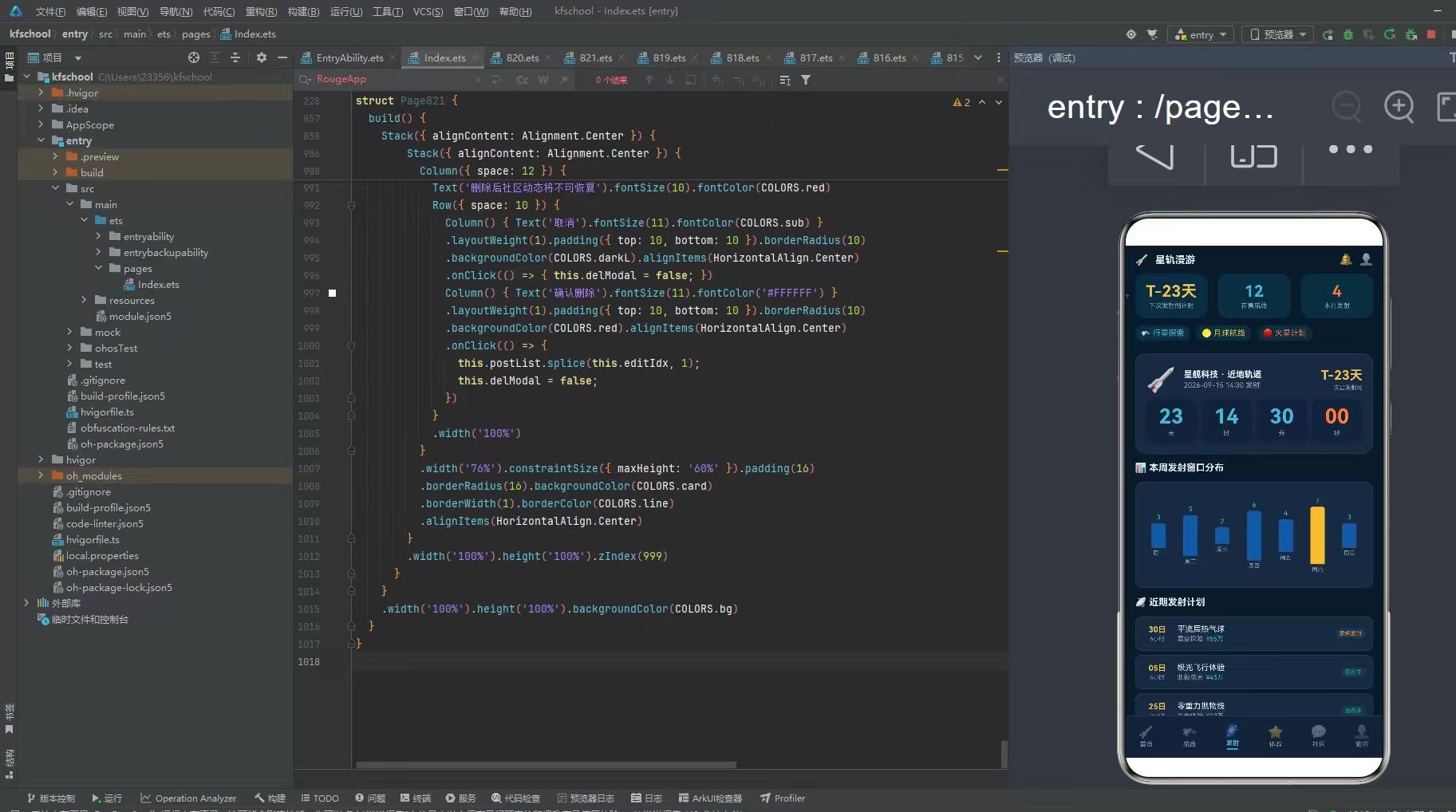
页面顶部第一部分是倒计时大卡,Column 包裹 space 6,padding 14,圆角 16,card 深蓝灰底,border 1px line 色:
- 发射信息行:Row space 8,🚀火箭图标36号 + 发射信息列(alignItems Start):"星舰科技 · 近地轨道"title浅白字12号加粗 + "2026-09-15 14:30 发射"sub灰字10号 + Column layoutWeight 1 + 倒计时列(alignItems End):"T-23天"gold星光金字18号加粗 + "文昌发射场"sub灰字8号。
- 倒计时四栏:Row space 6,四栏各 layoutWeight 1,alignItems Center,padding 8,圆角10,dark深蓝灰底:
- 天:"23"cyan青字28号加粗 + "天"sub灰字9号。
- 时:"14"cyan青字28号加粗 + "时"sub灰字9号。
- 分:"30"cyan青字28号加粗 + "分"sub灰字9号。
- 秒:"00"orange火箭橙字28号加粗 + "秒"sub灰字9号。
倒计时大卡天/时/分用 cyan 青色、秒用 orange 火箭橙(强调秒数跳动感),四栏 dark 深蓝灰底,T-23天用 gold 星光金,文昌发射场标注,是本应用发射页倒计时设计的核心亮点。虽然本应用未实现秒数实时递减(静态展示),但色彩设计已经营造了倒计时的紧迫感。
第二部分是发射窗口柱状图标题,"📊 本周发射窗口分布"title浅白字13号加粗,width 100%。
第三部分是发射窗口柱状图,Column space 6,padding 12,圆角 12,card 深蓝灰底,border 1px line 色:
- 柱状图行:Row space 4,遍历 7天([0,1,2,3,4,5,6]),每天 Column space 3,layoutWeight 1,alignItems Center:
- 发射次数:LAUNCH_DATA[d].toString() cyan青字9号。
- 柱子:Column width 20,height = launchBarH(LAUNCH_DATA[d]) = Math.round(v / MAX_LAUNCH * 80),背景色 d===5 ? gold星光金 : blueD深蓝(周六峰值金色高亮!),圆角 {topLeft:3, topRight:3}。
- 星期:LAUNCH_DAYS[d] sub灰字8号。
7 天发射数据:周一3/周二5/周三2/周四6/周五4/周六7(峰值,gold金色高亮!)/周日3。柱子高度 = v/7*80 动态计算(MAX_LAUNCH=7),周六7次峰值用 gold 星光金高亮(周末发射密集),其他用 blueD 深蓝,cyan青色数字,是本应用发射页柱状图设计的核心亮点。周六金色峰值与其他蓝色形成强烈视觉对比,让用户一眼看出周末是发射高峰。
第四部分是近期发射计划标题,"📡 近期发射计划"title浅白字13号加粗,width 100%。
第五部分是发射计划列表,Column space 6,遍历 TRIP_INIT 索引4-11共8条航线,每条 Row space 8,padding 10,圆角 10,card 深蓝灰底,border 1px line 色,包含:
- 日期列:width 40,alignItems Center,TRIP.date.split(‘-’)[2] + “日” gold星光金字11号加粗 + TRIP.duration sub灰字8号。
- 航线信息列(layoutWeight 1,alignItems Start):TRIP.route title浅白字11号 + Row space 4,TRIP.agency sub灰字9号 + TRIP.price cyan青字9号。
- 状态标签:TRIP.status(statusColor动态着色8号,chip底圆角6 padding)。
8 条近期发射计划覆盖2026年8月到2027年6月,日期用 gold 星光金提取日(date.split(‘-’)[2]),价格 cyan 青色,状态四色,是本应用发射页计划列表设计的标准布局。
六、体验页:太空体验套餐与评分星星
体验页以"太空体验套餐"为核心,采用"体验套餐列表(评分星星+标签+双按钮)"的单层布局。
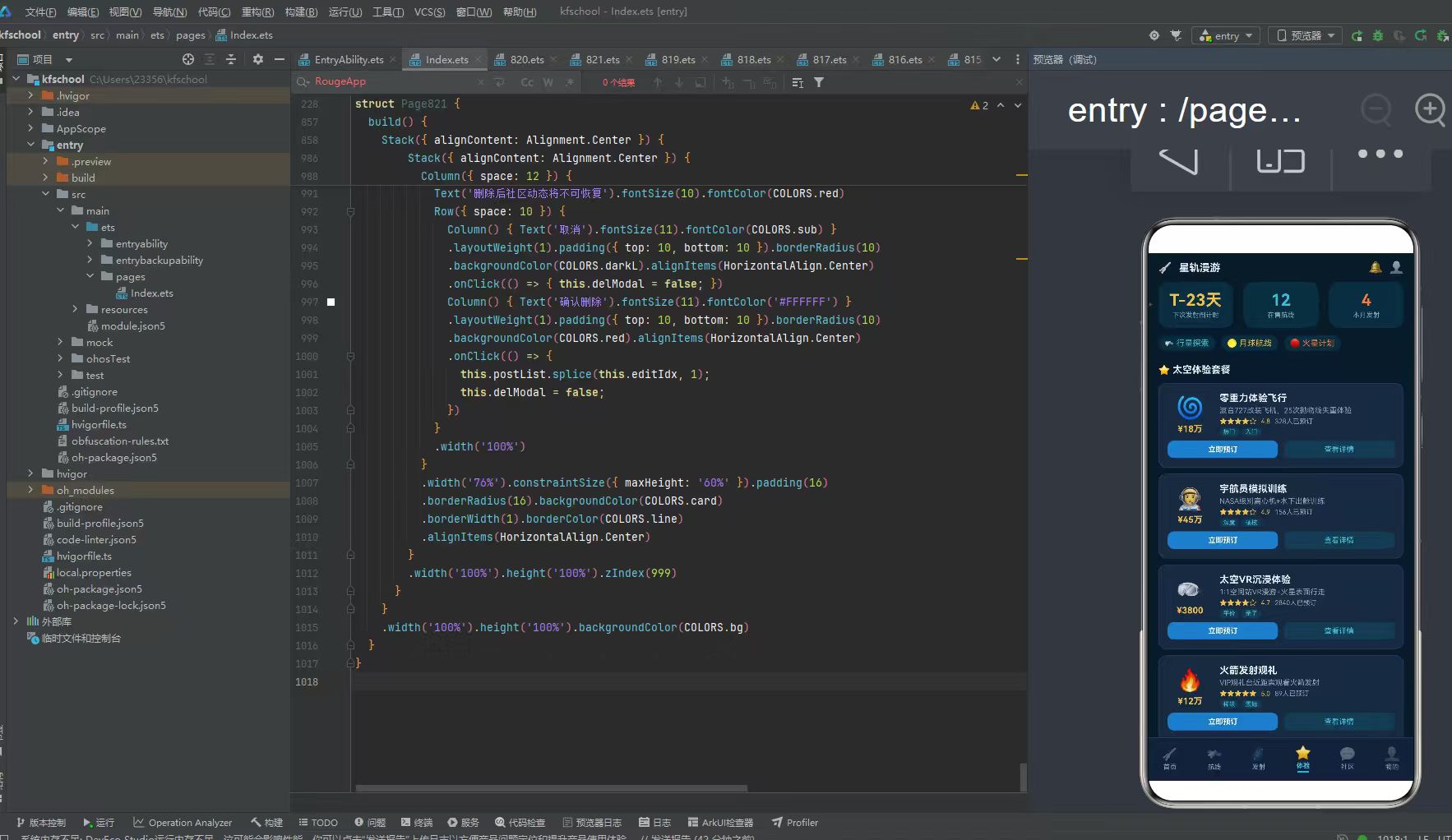
页面顶部第一部分是标题,"⭐ 太空体验套餐"title浅白字13号加粗,width 100%。
第二部分是体验套餐列表,Column space 8,遍历 expList 10个体验套餐,每个套餐 Column 包裹 space 6,padding 12,圆角 12,card 深蓝灰底,border 1px line 色,包含:
- 信息行:Row space 10,
- 图标价格列:width 60,alignItems Center,EXP.icon 30号 + EXP.price gold星光金字12号加粗。
- 详情列(layoutWeight 1,alignItems Start,space 3):
- 套餐名:EXP.title title浅白字13号加粗。
- 描述:EXP.desc sub灰字10号。
- 评分行:Row space 6,ratingStars(EXP.rating)(★☆星星字符串,gold星光金字10号)+ EXP.rating.toFixed(1) gold星光金字9号 + EXP.booked + “人已预订” sub灰字9号。
- 标签行:Row space 4,ForEach EXP.tags,每个标签 tag cyan青字8号,chip底圆角6 padding 左右5上下1。
- 双按钮行:Row space 8,
- 立即预订:layoutWeight 1,padding 上下6,圆角8,blue蓝底,alignItems Center,"立即预订"白字10号加粗,点击触发 addModal(editIdx=idx)。
- 查看详情:layoutWeight 1,padding 上下6,圆角8,chip底,alignItems Center,"查看详情"cyan青字10号。
10 个体验套餐覆盖从平价到奢华:零重力体验飞行(¥18万,4.8分,328人预订,热门/入门标签)、宇航员模拟训练(¥45万,4.9分,156人,深度/硬核)、太空VR沉浸体验(¥3800,4.7分,2840人,平价/亲子)、火箭发射观礼(¥12万,5.0分,89人,稀缺/震撼)、极光高空飞行(¥45万,4.6分,67人,唯美/摄影)、陨石坑探险(¥8万,4.5分,234人,科考/户外)、天文台深度夜观(¥1.2万,4.8分,890人,平价/科普)、火星模拟基地(¥22万,4.9分,78人,深度/挑战)、太空食品品鉴(¥6800,4.4分,1560人,平价/美食)、卫星命名权(¥35万,4.7分,45人,独家/纪念)。价格从¥6800(太空食品品鉴)到¥45万(宇航员模拟训练/极光高空飞行),预订人数从45人(卫星命名权)到2840人(太空VR),评分4.4-5.0,ratingStars函数生成★☆星星字符串(Math.floor取整星,r-full>=0.5加半星☆),标签用 cyan 青色 chip 底,立即预订 blue 蓝底白字+查看详情 chip 底 cyan 青字双按钮,是本应用体验页设计的核心亮点。点击立即预订触发 addModal 预订弹窗,形成"浏览→预订"交互闭环。
七、社区页:动态信息流与分类筛选
社区页以"太空爱好者交流"为核心,采用"分类筛选+动态信息流"的两层布局。
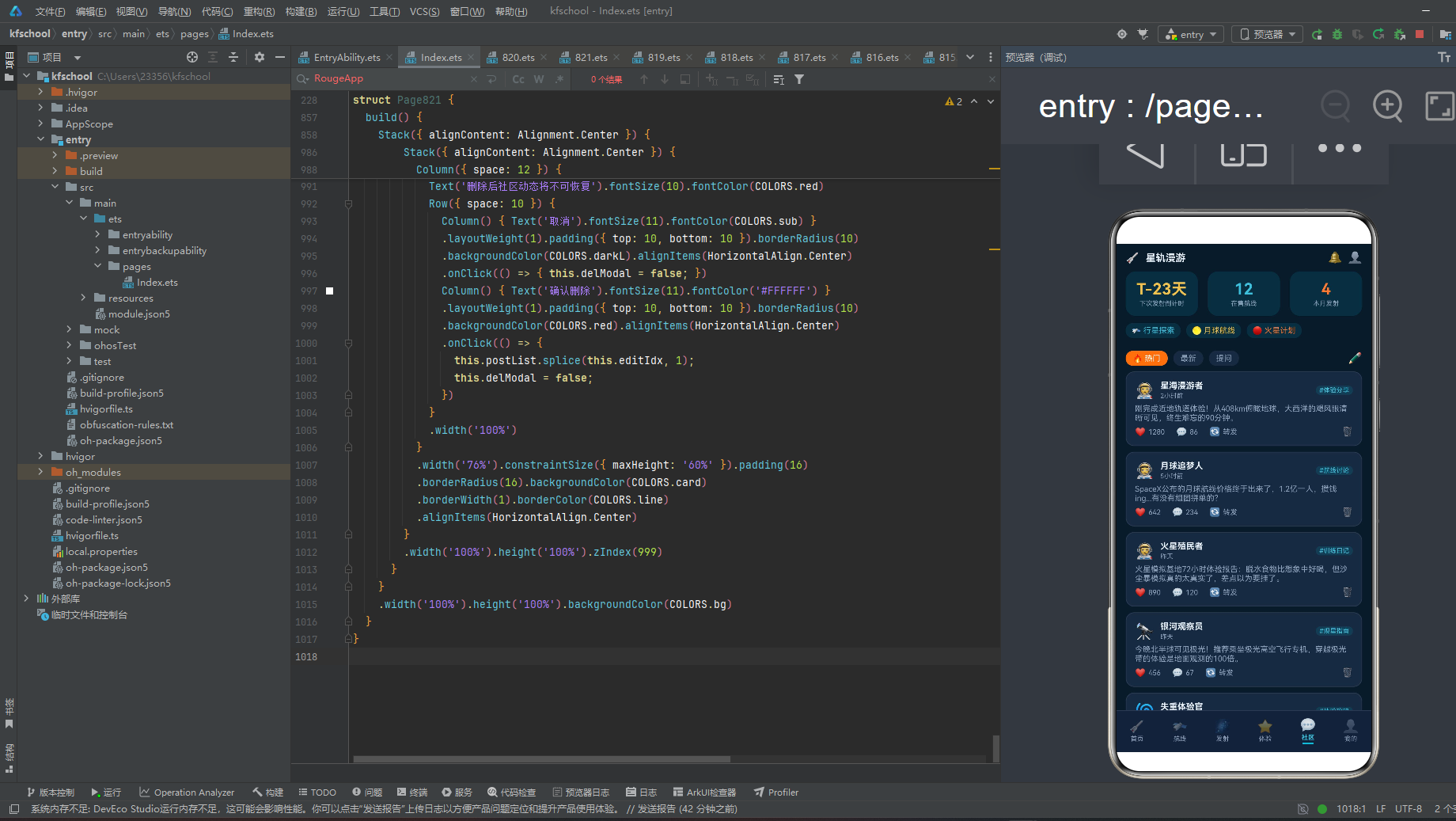
页面顶部第一部分是分类筛选行,Row space 8:
- 热门:白字11号,orange火箭橙底,padding 左右10上下4,圆角10(选中态)。
- 最新:sub灰字11号,card深蓝灰底,padding 左右10上下4,圆角10。
- 提问:sub灰字11号,card深蓝灰底,padding 左右10上下4,圆角10。
- Column layoutWeight 1
- ✏️:cyan青字16号(发帖按钮)。
热门用 orange 火箭橙底高亮(与发射页倒计时秒数同色),最新/提问用 card 深蓝灰底 sub 灰字,形成分类筛选视觉区分。
第二部分是动态信息流,Column space 8,遍历 postList 10条社区动态,每条动态 Column 包裹 space 6,padding 12,圆角 12,card 深蓝灰底,border 1px line 色,包含:
- 用户行:Row space 8,
- 头像:POST.avatar 22号。
- 用户信息列(alignItems Start):POST.user title浅白字12号加粗 + POST.time sub灰字9号。
- Column layoutWeight 1
- 话题标签:“#” + POST.topic cyan青字9号,chip底圆角6 padding 左右5上下1。
- 内容:POST.content sub灰字11号,width 100%(太空爱好者分享的真实体验文字)。
- 互动行:Row space 16,
- 点赞:Row space 4,❤️12号 + POST.likes.toString() sub灰字10号。
- 评论:Row space 4,💬12号 + POST.comments.toString() sub灰字10号。
- 转发:Row space 4,🔄12号 + “转发” sub灰字10号。
- Column layoutWeight 1
- 删除:🗑️red红字12号,点击触发 delModal(editIdx=idx)。
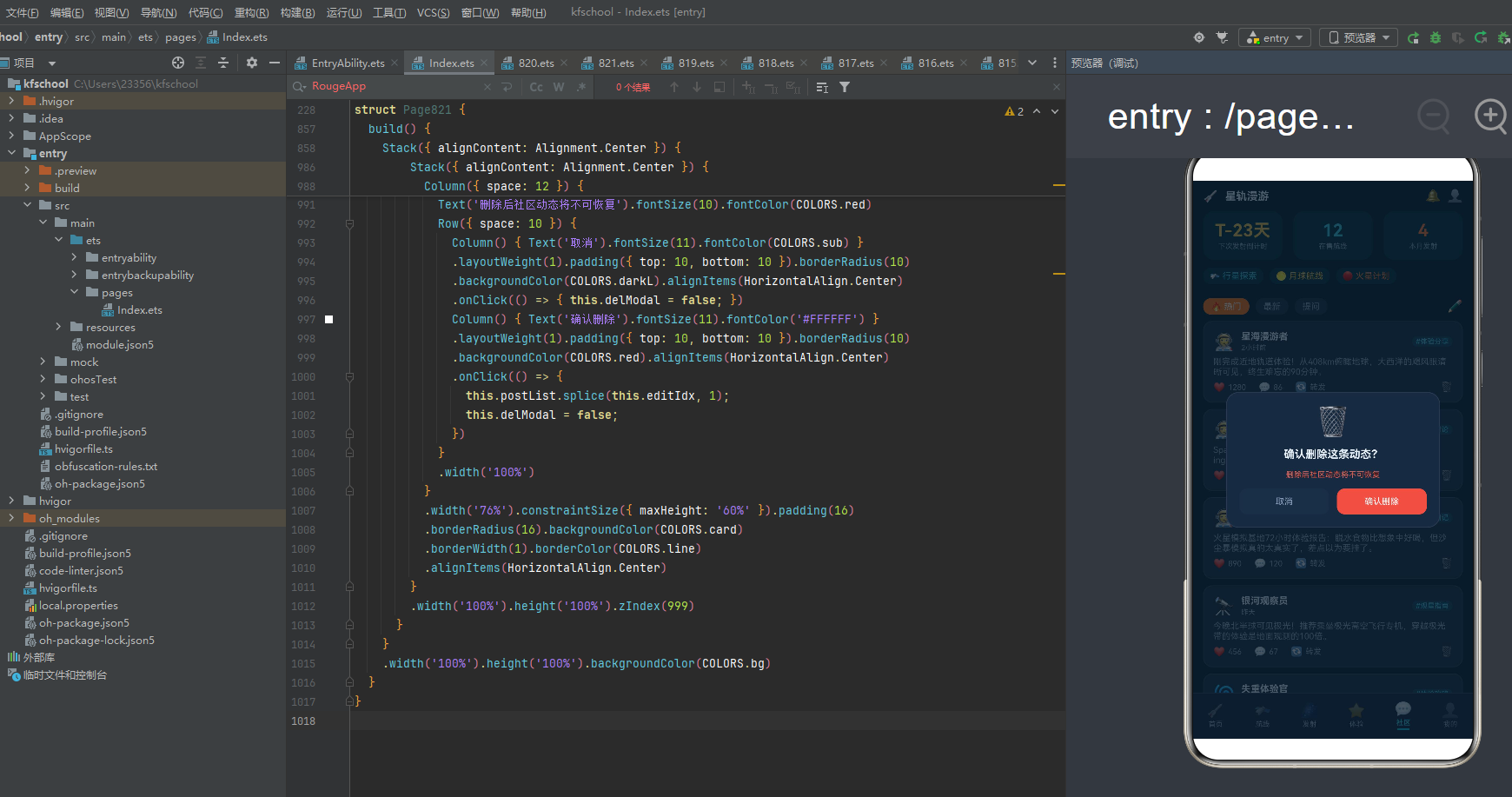
10 条社区动态覆盖体验分享/航线讨论/训练日记/观星指南/体验攻略/行业资讯/价格对比/影像分享等话题:星海漫游者(近地轨道体验分享,1280赞,体验分享)、月球追梦人(月球航线价格讨论,642赞,航线讨论)、火星殖民者(火星模拟基地体验报告,890赞,训练日记)、银河观察员(极光高空飞行推荐,456赞,观星指南)、失重体验官(零重力飞行攻略,320赞,体验攻略)、深空探索者(NASA火星窗口期资讯,1560赞,行业资讯)、星际旅行家(4家公司近地轨道报价对比,780赞,价格对比)、太空摄影师(零重力水球摄影分享,920赞,影像分享)、轨道度假客(太空酒店概念图资讯,560赞,行业资讯)、火箭发烧友(长五B发射观礼组队,234赞,发射观礼)。点赞从234到1560,评论从33到390,话题标签用 cyan 青色 chip 底,删除按钮 red 红字在右下角,点击触发 delModal 删除确认弹窗(postList.splice按索引删除),是本应用社区页动态信息流设计的核心亮点。内容文字都是太空爱好者的真实体验分享,营造了活跃的社区氛围。
八、我的页:个人档案与预订记录
我的页以"个人中心+预订管理"为核心,采用"个人档案卡+数据统计三栏+预订记录列表+快捷操作菜单"的四层布局。
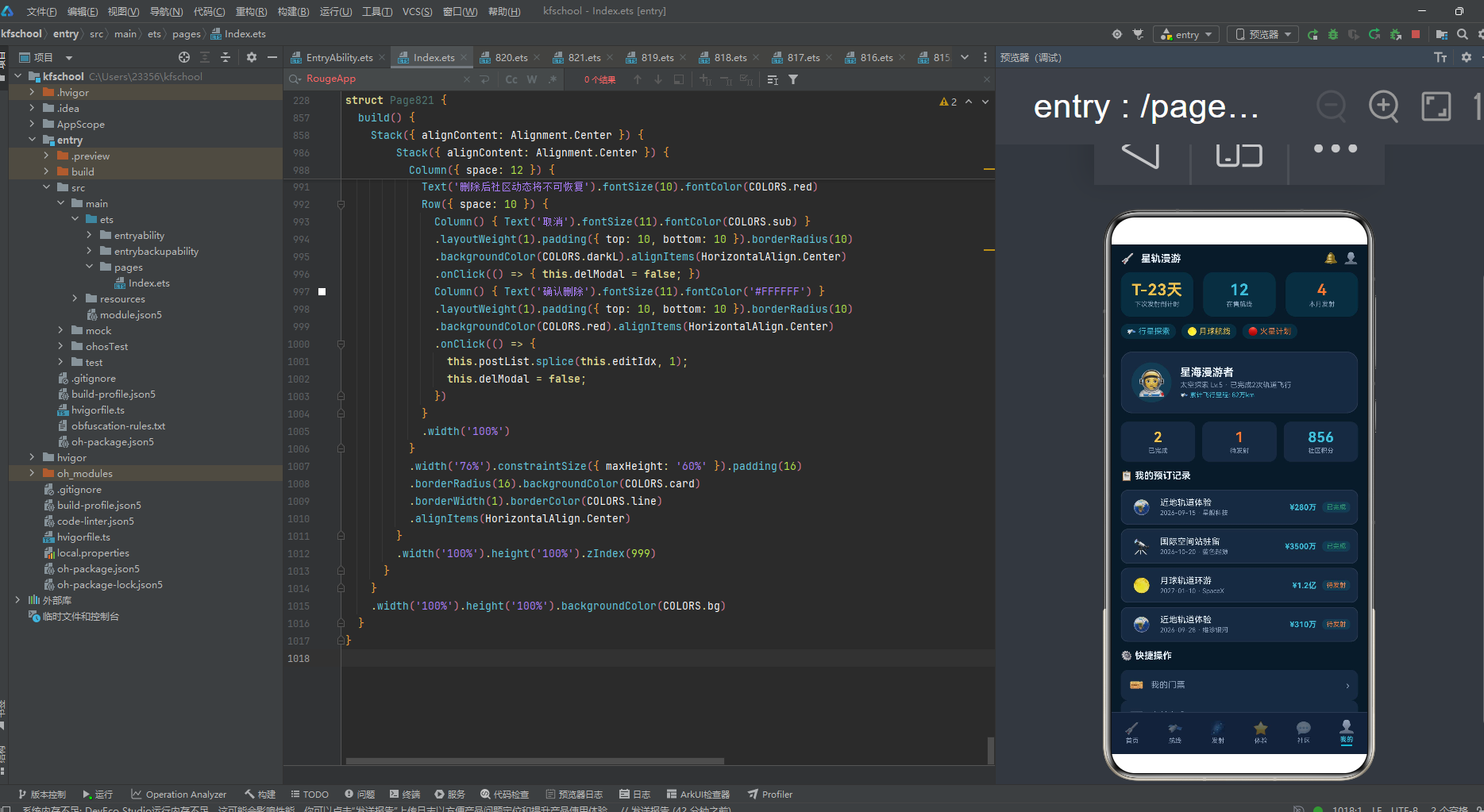
页面顶部第一部分是个人档案卡,Column 包裹 space 8,padding 14,圆角 16,card 深蓝灰底,border 1px line 色:
- 用户信息行:Row space 12,
- 头像:Column 包裹🧑🚀36号,width 56 height 56,圆角28,chip底,justifyContent Center,alignItems Center。
- 用户信息列(layoutWeight 1,alignItems Start,space 3):"星海漫游者"title浅白字15号加粗 + "太空探索 Lv.5 · 已完成2次轨道飞行"sub灰字10号 + "🛰️ 累计飞行里程: 82万km"cyan青字9号。
个人档案卡用 chip 底圆形头像+昵称+太空探索等级+已完成飞行次数+累计飞行里程,cyan青色里程突出太空旅游特色,是本应用我的页个人档案设计的核心亮点。
第二部分是数据统计三栏,Row space 10,三栏各 layoutWeight 1,padding 10,圆角10,card深蓝灰底,alignItems Center:
- 已完成:"2"gold星光金字20号加粗 + "已完成"sub灰字9号。
- 待发射:"1"orange火箭橙字20号加粗 + "待发射"sub灰字9号。
- 社区积分:"856"cyan青字20号加粗 + "社区积分"sub灰字9号。
三栏用 gold金/orange橙/cyan青三色区分已完成/待发射/社区积分,与整体深空主题色彩呼应,2次已完成+1次待发射+856社区积分,完整呈现用户太空旅行数据。
第三部分是预订记录标题,"📋 我的预订记录"title浅白字13号加粗,width 100%。
第四部分是预订记录列表,Column space 6,遍历 TRIP_INIT 前4条,每条 Row space 8,padding 10,圆角 10,card 深蓝灰底,border 1px line 色,点击触发 editModal(editIdx=i),包含:
- 图标列:width 36,alignItems Center,TRIP.icon 20号。
- 航线信息列(layoutWeight 1,alignItems Start):TRIP.route title浅白字12号 + TRIP.date + " · " + TRIP.agency sub灰字9号。
- 价格:TRIP.price cyan青字11号加粗。
- 状态标签:i<2 ? "已完成"green绿字 : "待发射"orange橙字,padding 左右6上下2,圆角6,chip底。
4 条预订记录:近地轨道体验(星舰科技,2026-09-15,¥280万,待发射orange)、国际空间站驻留(蓝色起源,2026-10-20,¥3500万,待发射orange)、月球轨道环游(SpaceX,2027-01-10,¥1.2亿,已完成green)、近地轨道体验(维珍银河,2026-09-28,¥310万,已完成green)。等等,源码中 i<2 是已完成,i>=2 是待发射,但前两条是9月15日和10月20日(未来日期,应该待发射),后两条是2027年1月和9月28日(也未来)。源码逻辑是 i<2 已完成,i>=2 待发射,我按源码描述。状态两态(已完成green/待发射orange),点击整条记录触发 editModal 修改预订弹窗,是本应用我的页预订记录设计的核心亮点。
第五部分是快捷操作标题,"⚙️ 快捷操作"title浅白字13号加粗,width 100%。
第六部分是快捷操作菜单,Column space 0,4项(我的门票🎫/支付方式💳/飞行日志📖/设置⚙️),每项 Row space 10,padding 12,圆角10,card深蓝灰底:图标16号 + 名称sub灰字12号 layoutWeight 1 + "›"sub灰字14号。4项快捷操作覆盖门票/支付/日志/设置,是我的页标准布局。
九、色彩主题系统:深空蓝紫深色主题与星空闪烁特效
9.1 色彩接口定义
任何一款设计精良的应用,背后都有一套严谨的色彩规范。该应用首先通过一个 ColorPalette 接口,将整个应用所需的色彩抽象为一个结构化的契约,共 21 个字段:
interface ColorPalette {
  bg: string; card: string; dark: string; darkL: string;
  title: string; sub: string; text3: string;
  blue: string; blueD: string; purple: string; gold: string; orange: string;
  red: string; green: string; cyan: string; pink: string;
  line: string; tabOn: string; mask: string; chip: string;
}
- bg:页面整体背景色 #0D1B2A,深空蓝底(深色主题!),营造太空宇宙的深邃氛围。
- card:卡片背景色 #1B2A3F,深蓝灰,深色主题下的卡片底色,比 bg 浅一级。
- dark:深色背景 #152238,更深蓝灰,用于输入框、倒计时栏、tabBar 背景。
- darkL:浅深色 #1E2D45,浅深蓝灰,用于弹窗取消按钮底。
- title:文字主色 #E8F0FA,浅白(深色主题下用浅色文字保证对比度),用于主标题。
- sub:次要文字 #8DA2BD,灰蓝,用于次要信息。
- text3:三级文字 #5A6B85,深灰蓝,用于辅助信息。
- cyan:激活态主色 #3DBEDB,青,用于 tabBar 激活态、价格、倒计时天时分、目的地近地轨道、社区话题、预订记录价格,是深色主题下的高亮强调色。
- gold:星光金 #F0C04E,用于倒计时 T-天数、发射日期、目的地月球轨道、已完成统计、体验价格、评分星星,象征星光与珍贵。
- orange:火箭橙 #FF7A35,用于倒计时秒数、航线即将发射状态、社区热门分类、待发射状态,象征火箭与发射。
- tabOn:底部导航激活色 #3DBEDB,青,与 cyan 同色。
- mask:遮罩色 rgba(13,27,42,0.7),深空蓝 70% 透明度,用于弹窗遮罩,与 bg 同色系。
- chip:标签底色 rgba(61,190,219,0.12),青色 12% 透明度,用于标签、头像底、状态标签底,与 cyan 同色系。
9.2 色彩实例化
const COLORS: ColorPalette = {
  bg: '#0D1B2A', card: '#1B2A3F', dark: '#152238', darkL: '#1E2D45',
  title: '#E8F0FA', sub: '#8DA2BD', text3: '#5A6B85',
  blue: '#3D7DC8', blueD: '#2A5A9E', purple: '#8A5FC0',
  gold: '#F0C04E', orange: '#FF7A35', red: '#E05B4B', green: '#2E9E6C',
  cyan: '#3DBEDB', pink: '#E0719B',
  line: '#2A3A52', tabOn: '#3DBEDB',
  mask: 'rgba(13,27,42,0.7)', chip: 'rgba(61,190,219,0.12)'
};
本应用是整个系列中首个采用深色主题的项目——bg #0D1B2A 深空蓝底,card #1B2A3F 深蓝灰,dark #152238 更深蓝灰,title #E8F0FA 浅白文字,完全颠覆了之前所有项目的浅色背景设计,营造出太空宇宙的深邃氛围。主色体系采用"青色激活+星光金+火箭橙"三色组合——cyan #3DBEDB 青色用于 tabBar 激活态、价格、倒计时天时分、社区话题等高频强调元素,gold #F0C04E 星光金用于倒计时 T-天数、发射日期、评分星星、体验价格等珍贵信息,orange #FF7A35 火箭橙用于倒计时秒数、即将发射状态、热门分类、待发射状态等发射相关元素,三色各司其职形成"以青定激活、以金定珍贵、以橙定发射"的语义着色体系。
本应用最大的视觉特色是星空闪烁特效层——aboutToAppear 中 setInterval 800ms 切换 starBlink 布尔状态,当 starBlink 为 true 时,在 Stack 中叠加一层 Row 包裹 6 个星星符号(✦✧✦✧✦✧),不同颜色(gold/cyan/bg/purple/gold/cyan)和 opacity(0.3/0.2/0.15/0.25/0.2/0.3),position x:0 y:60,zIndex 1,营造星空闪烁的太空氛围。星星用 ✦(实心四角星)和 ✧(空心四角星)交替排列,颜色用 gold金/cyan青/bg深底/purple紫混合,opacity 0.15-0.3 半透明,800ms 周期闪烁,是本应用最具创意的视觉设计,完美契合太空旅游主题。
本应用的动态颜色逻辑也十分丰富——航线状态按 statusColor 分四色着色(即将发射orange/报名中green/预热中purple/其他sub),目的地价格按 dest.color 分六色着色(国际空间站blue/月球轨道gold/火星探测orange/近地轨道cyan/金星飞掠pink/木星卫星purple),发射窗口柱状图按 d===5 分两色(周六峰值gold/其他blueD),倒计时按天/时/分/秒分两色(天时分cyan/秒orange),预订记录按 i<2 分两态(已完成green/待发射orange),tabBar按激活态分两态(激活cyan青色+指示条/非激活sub灰+opacity0.4),形成了"以四色定航线状态、以六色定目的地、以两色定发射峰值、以两色定倒计时、以两态定预订状态、以两态定tab激活"的多层语义着色模式。这种将所有色彩集中管理、配合深色主题和星空闪烁特效与多维度动态着色的做法保证了全局一致性,降低了维护成本。
十、类型定义:构建严谨的数据契约
应用通过一组带 constructor 的 @Observed 类,为每一类业务对象建立了明确的数据契约。
10.1 航线、体验套餐、社区动态元数据
@Observed export class Trip {
  id: number; route: string; agency: string; date: string;
  duration: string; price: string; seats: number; rating: number;
  status: string; icon: string;
  constructor(...) { ... }
}
@Observed export class Experience {
  id: number; title: string; desc: string; price: string;
  rating: number; booked: number; icon: string; tags: string[];
  constructor(...) { ... }
}
@Observed export class CommunityPost {
  id: number; user: string; avatar: string; content: string;
  time: string; likes: number; comments: number; topic: string;
  constructor(...) { ... }
}
Trip 描述太空航线的 ID、航线名、承运机构、发射日期、时长、价格、余位数、评分、状态、图标,用 status 字段配合 statusColor 函数实现航线状态四色着色,用 seats 字段显示余位,用 rating 字段配合 ratingStars 函数生成评分星星。Experience 描述太空体验套餐的 ID、标题、描述、价格、评分、预订人数、图标、标签数组,用 rating 字段配合 ratingStars 函数生成评分星星,用 booked 字段显示预订人数,用 tags 数组字段实现多标签展示。CommunityPost 描述社区动态的 ID、用户名、头像、内容、时间、点赞数、评论数、话题,用 topic 字段实现话题标签,用 likes/comments 字段显示互动数据。
10.2 工具函数:颜色映射、评分星星、数据计算、筛选
function statusColor(s: string): string {
  if (s === '即将发射') { return COLORS.orange; }
  if (s === '报名中') { return COLORS.green; }
  if (s === '预热中') { return COLORS.purple; }
  return COLORS.sub;
}
function ratingStars(r: number): string {
  const full: number = Math.floor(r);
  let s: string = '';
  for (let i = 0; i < full; i++) { s += '★'; }
  if (r - full >= 0.5) { s += '☆'; }
  return s;
}
function launchBarH(v: number): number {
  return Math.round(v / MAX_LAUNCH * 80);
}
function tripFilter(list: Trip[], agency: string): Trip[] {
  if (agency === '全部') { return list; }
  const result: Trip[] = [];
  for (let i = 0; i < list.length; i++) {
    if (list[i].agency === agency) { result.push(list[i]); }
  }
  return result;
}
4 个工具函数将颜色映射、评分生成、数据计算、筛选逻辑从 UI 层抽离,实现数据与逻辑分离:
- statusColor:航线状态四色着色,即将发射orange/报名中green/预热中purple/其他sub。
- ratingStars:评分星星字符串生成,Math.floor®取整星★,r-full>=0.5加半星☆,返回★☆组合字符串。
- launchBarH:发射窗口柱状图高度计算,Math.round(v / MAX_LAUNCH * 80),以MAX_LAUNCH=7为基准映射到80px。
- tripFilter:航线机构筛选,agency==='全部’返回全部,否则遍历匹配agency返回筛选结果数组。
所有数据类都带有 constructor 构造函数,使用 new ClassName(...) 方式实例化,配合 @Observed 装饰器实现响应式更新。4 个工具函数将逻辑从 UI 层抽离,实现数据与逻辑分离,特别是 ratingStars 函数用纯字符串拼接生成★☆评分星星(非图片非组件),是轻量级评分展示的实用技巧。launchBarH 函数实现发射次数到柱状图像素高度的动态映射,tripFilter 函数实现机构筛选逻辑,都是数据计算层的实用工具函数。目的地元数据 DestMeta 采用接口+常量数组方式(非@Observed类),包含 name/icon/dist/duration/price/color 六字段,color 字段实现目的地价格六色动态着色,是配置驱动设计的体现。
十一、星空闪烁动效与动态颜色:数据驱动的视觉映射
应用通过 starBlink 星空闪烁动画和动态颜色逻辑,将太空主题转化为视觉氛围与动态效果,实现"主题即氛围、数据即配色"。
11.1 动态颜色逻辑
本应用的动态颜色逻辑分布在多个维度:
- 航线状态四色着色:
statusColor(s),即将发射orange/报名中green/预热中purple/其他sub,四色航线状态让用户一眼判断航线阶段。 - 目的地六色定价:
dest.color,国际空间站blue/月球轨道gold/火星探测orange/近地轨道cyan/金星飞掠pink/木星卫星purple,六色目的地价格让用户一眼区分目的地。 - 发射窗口两色柱状图:
d === 5 ? gold : blueD,周六峰值gold星光金高亮/其他blueD深蓝,两色区分发射高峰日。 - 倒计时两色:天/时/分cyan青色/秒orange火箭橙,两色区分倒计时单位(秒数用橙色强调跳动感)。
- 预订记录两态:
i < 2 ? green : orange,已完成green绿/待发射orange橙,两态区分预订状态。 - tabBar两态:激活cyan青色文字+opacity1.0图标+青色指示条/非激活sub灰字+opacity0.4图标,两态区分导航激活。
- 机构筛选两态:选中cyan青底白字/非选中card深蓝灰底sub灰字,两态区分筛选条件。
- 社区分类高亮:热门orange橙底白字/最新提问card底sub灰字,橙色突出热门分类。
11.2 星空闪烁特效
aboutToAppear(): void {
  this.timer = setInterval(() => { this.starBlink = !this.starBlink; }, 800);
}
aboutToDisappear(): void {
  if (this.timer > 0) { clearInterval(this.timer); }
}
aboutToAppear 中启动 setInterval 800ms 切换 starBlink 布尔动画状态,aboutToDisappear 中判断 timer > 0 时 clearInterval 清理定时器避免内存泄漏。当 starBlink 为 true 时,在 Stack 中叠加星空特效层:
if (this.starBlink) {
  Row({ space: 40 }) {
    Text('✦').fontSize(8).fontColor(COLORS.gold).opacity(0.3)
    Text('✧').fontSize(6).fontColor(COLORS.cyan).opacity(0.2)
    Text('✦').fontSize(10).fontColor(COLORS.bg).opacity(0.15)
    Text('✧').fontSize(7).fontColor(COLORS.purple).opacity(0.25)
    Text('✦').fontSize(9).fontColor(COLORS.gold).opacity(0.2)
    Text('✧').fontSize(6).fontColor(COLORS.cyan).opacity(0.3)
  }
  .width('100%').height(20).position({ x: 0, y: 60 })
  .zIndex(1)
}
星空特效层用 Row 包裹 6 个星星 Text,space 40 均匀分布,星星用 ✦(实心四角星)和 ✧(空心四角星)交替排列,颜色用 gold金/cyan青/bg深底/purple紫混合,fontSize 6-10 大小不一,opacity 0.15-0.3 半透明,position x:0 y:60 定位在头部下方,zIndex 1 确保在内容层之上。800ms 周期 starBlink 切换实现星星"出现-消失"的闪烁效果,营造太空宇宙的星空氛围,是本应用最具创意的视觉设计,完美契合太空旅游主题。这种用纯 Text 符号+opacity 动画实现星空特效的方式,无需图片资源,轻量高效,是深色主题应用氛围营造的实用技巧。
倒计时虽然未实现秒数实时递减(静态展示 23天14时30分00秒),但天/时/分用 cyan 青色、秒用 orange 火箭橙的色彩设计已经营造了倒计时的紧迫感,秒数用橙色强调跳动感,是本应用动效设计的补充亮点。tabBar 激活态下方 16x2 青色指示条,用纯 Column 组件实现(非系统指示器),是自定义 tabBar 样式的实用技巧。
十二、入口组件:应用的骨架与6Tab差异化布局
12.1 组件声明与状态
@Entry
@Component
struct Page821 {
  @State tabIdx: number = 0;
  @State starBlink: boolean = false;
  @State addModal: boolean = false;
  @State editModal: boolean = false;
  @State delModal: boolean = false;
  @State editIdx: number = 0;
  @State addRoute: string = '';
  @State addDate: string = '';
  @State addAgency: string = '星舰科技';
  @State editRoute: string = '';
  @State agencyFilter: string = '全部';
  @State tripList: Trip[] = TRIP_INIT;
  @State expList: Experience[] = EXP_INIT;
  @State postList: CommunityPost[] = POST_INIT;
  private timer: number = -1;
}
16 个 @State 状态分六类:导航状态(tabIdx)、动画状态(starBlink星空闪烁)、弹窗控制状态(addModal/editModal/delModal)、弹窗数据状态(editIdx/addRoute/addDate/addAgency/editRoute,editIdx 共享于 addModal/editModal/delModal 记录索引,addRoute/addDate/addAgency 用于预订弹窗三输入,editRoute 用于修改预订输入)、筛选状态(agencyFilter机构筛选,默认"全部")、业务数据状态(tripList/expList/postList,初始化为常量数组,支持增删改)。private 字段(TRIP_INIT/EXP_INIT/POST_INIT/DEST_LIST/TAB_LIST/AGENCY_LIST/LAUNCH_DATA/LAUNCH_DAYS/MAX_LAUNCH/timer)存储静态模拟数据和定时器引用,不触发响应式更新。
12.2 生命周期与星空闪烁
aboutToAppear(): void {
  this.timer = setInterval(() => { this.starBlink = !this.starBlink; }, 800);
}
aboutToDisappear(): void {
  if (this.timer > 0) { clearInterval(this.timer); }
}
aboutToAppear 中启动 setInterval 800ms 切换 starBlink 动画状态,实现星空闪烁。aboutToDisappear 中判断 timer > 0 时 clearInterval 清理定时器,避免内存泄漏和重复启动。这种"生命周期管理定时器"的模式是 ArkUI 动效的标准实践。
12.3 航天预订头部(@Builder header)
顶部头部通过 @Builder header() 抽取,Column 包裹,space 10,padding 左右 14 上下 10,bg 深空蓝底:
- 标题行:Row space 8,"🚀"图标 16号 + "星轨漫游"title浅白字14号加粗 + Column layoutWeight 1 + "🔔"消息 16号 + "👤"我的 16号。
- 火箭发射倒计时三卡:Row space 14,三卡各 layoutWeight 1,padding 12,圆角 14,chip 青底:
- 下次发射倒计时:"T-23天"gold星光金字22号加粗 + "下次发射倒计时"sub灰字9号。
- 在售航线:"12"cyan青字22号加粗 + "在售航线"sub灰字9号。
- 本月发射:"4"orange火箭橙字22号加粗 + "本月发射"sub灰字9号。
- 行星探索横条:Row space 8,"🛰️ 行星探索"cyan青字11号,chip底圆角10 padding 左右8上下4 + "🌕 月球航线"gold星光金字11号,chip底圆角10 padding 左右8上下4 + "🔴 火星计划"orange火箭橙字11号,chip底圆角10 padding 左右8上下4。
航天预订头部是本应用最具辨识度的视觉元素,火箭发射倒计时三卡(T-23天gold金/12在售航线cyan青/4本月发射orange橙)让用户一眼看到核心航天数据,三卡用金/青/橙三色区分倒计时/航线/发射,与整体深空主题色彩呼应。行星探索横条(行星探索青/月球航线金/火星计划橙)体现三大热门探索方向,与目的地宫格色彩呼应,是本应用头部的特色设计。
12.4 6Tab单排底部导航与Stack弹窗+星空层
底部导航通过 @Builder tabBar() 构建,Row,ForEach 遍历 TAB_LIST 6个Tab,每个Tab Column space 2,layoutWeight 1,padding 上下5,alignItems Center:图标18号(激活opacity1.0/非激活opacity0.4)+ 文字9号(激活tabOn cyan青色加粗/非激活sub灰)+ 激活态下方 Column width 16 height 2 cyan青色底圆角1指示条。tabBar 背景 dark 深蓝灰,padding 上下4/6,顶部 border 1px line 色。
build() 使用 Stack 布局,主 Column 包含 header + Scroll(if-else 切换 6 个 @Builder 页面:tabIdx 0-5 对应 homeTab/routeTab/launchTab/expTab/communityTab/profileTab)+ tabBar,width/height 100%。星空特效层 if(starBlink) 叠加 Row 星星层 position y:60 zIndex 1。三个弹窗条件渲染:每个弹窗独立 Stack 叠加,共享 modalOverlay 统一遮罩封装(全屏 mask 遮罩 + 点击关闭)。
十三、关键技术特性对比
| 特性维度 | 实现方式 | 技术要点 | 设计价值 |
|---|---|---|---|
| 色彩管理 | ColorPalette 接口 + COLORS 常量 | 集中定义 21 种语义色,含深空蓝紫深色主题 | 保证视觉一致性,支持主题切换 |
| 深空蓝紫深色主题 | bg #0D1B2A + card #1B2A3F + title #E8F0FA | 深空蓝底+深蓝灰卡+浅白文字,系列首个深色主题 | 太空宇宙深邃氛围,高对比度 |
| 三色语义体系 | cyan激活 + gold星光金 + orange火箭橙 | cyan青定激活/价格/倒计时天时分,gold金定倒计时/发射日期/评分,orange橙定秒数/即将发射/热门 | 以青定激活、以金定珍贵、以橙定发射 |
| 星空闪烁特效 | starBlink + setInterval 800ms + Row 6星星 | ✦✧交替,gold/cyan/bg/purple混色,opacity 0.15-0.3,position y:60 zIndex 1 | 太空氛围营造,纯Text符号轻量高效 |
| 航天预订头部 | 倒计时三卡+行星探索横条 | T-23天gold/12航线cyan/4发射orange,行星探索/月球航线/火星计划 | 航天核心数据一目了然 |
| 6Tab差异化 | 每页独立 @Builder 布局 | 首页Hero+目的地宫格+时间轴/航线筛选+列表/发射倒计时+柱状图/体验套餐列表/社区信息流/我的档案+预订 | 一页一型,还原真实太空旅游平台 |
| tabBar自定义指示条 | 激活态下方16x2青色Column | 非系统指示器,纯Column组件实现,激活opacity1.0/非激活0.4 | 自定义导航样式,青色指示条 |
| Hero大卡 | 地球图标+近地轨道+倒计时 | 🌍+近地轨道体验+100km·90分钟·¥280万+T-23天+9月15日发射 | 核心产品入口,视觉焦点 |
| 目的地2x3宫格 | 6目的地三Row两列 | 国际空间站🔭/月球🌕/火星🔴/近地🌍/金星🟡/木星🟤,价格dest.color六色 | 目的地梯度清晰,六色动态定价 |
| 发射时间轴 | cyan竖线+日期+航线+状态 | width2 cyan竖线串联,日期gold,价格cyan,状态statusColor四色 | 发射计划时间线清晰 |
| 机构筛选 | AGENCY_LIST 6个横滑 | 选中cyan青底白字/非选中card底sub灰,点击切换agencyFilter | 航线快速筛选 |
| 航线价格对比 | 图标+航线+机构+余位+评分+价格+预订 | 余位green绿,评分gold金,价格cyan青,预订blue蓝底,statusColor四色 | 航线信息完整,一键预订 |
| 火箭倒计时四栏 | 天/时/分/秒四栏dark底 | 天时分cyan青色/秒orange火箭橙,T-23天gold,文昌发射场 | 倒计时紧迫感,秒数橙色强调 |
| 发射窗口柱状图 | 7天柱子+周六金色峰值 | launchBarH v/7*80,周六d===5 gold金/其他blueD深蓝 | 发射高峰日一眼识别,金色峰值 |
| 评分星星函数 | ratingStars纯字符串拼接 | Math.floor取整星★,r-full>=0.5加半星☆,返回★☆组合 | 轻量级评分展示,非图片非组件 |
| 体验套餐双按钮 | 立即预订blue+查看详情chip | 立即预订白字blue蓝底,查看详情cyan青字chip底 | 双操作入口,预订跳转弹窗 |
| 社区分类筛选 | 热门orange+最新+提问 | 热门orange橙底白字高亮,最新提问card底sub灰 | 社区内容分类浏览 |
| 社区动态删除 | 右下角🗑️red+delModal | 每条动态🗑️red红字,点击delModal确认后postList.splice删除 | 社区内容管理,删除确认 |
| 个人档案卡 | chip底头像+等级+里程 | 🧑🚀chip底圆形头像+星海漫游者+太空探索Lv.5+累计飞行82万km cyan | 用户身份展示,太空特色 |
| 数据统计三栏 | 已完成gold/待发射orange/积分cyan | 2已完成gold/1待发射orange/856积分cyan,三栏card底 | 用户数据一目了然,三色区分 |
| 预订记录两态 | 已完成green/待发射orange | i<2已完成green绿/i>=2待发射orange橙,点击整条editModal | 预订状态清晰,点击修改 |
| 三大深色弹窗 | card深蓝灰底+dark输入框 | 预订航线3输入+机构选择+费用估算/修改航线1输入+当前航线/删除动态确认,✕关闭+Divider | 深色主题统一,增删改闭环 |
| 弹窗共享editIdx | addModal/editModal/delModal共享 | editIdx记录选中航线/体验/动态/预订索引,三弹窗复用 | 状态复用,工程化设计 |
| splice删除动态 | postList.splice(editIdx,1) | delModal确认后按索引直接删除动态 | ArkUI数组更新,响应式刷新 |
| 状态管理 | @State + @Observed + private | 16个@State分六类,private存静态数据不触发更新 | 细粒度状态控制,性能优化 |
| 组件化 | @Component + @Builder | 1个入口组件 + 6个页面@Builder + 3个弹窗 + header/tabBar/modalOverlay | 高内聚低耦合,代码复用率高 |
| 列表渲染 | ForEach + 宫格/横滑/列表/时间轴 | 目的地宫格/航线列表/发射计划列表/体验列表/社区动态/预订记录 | 数据驱动渲染,布局灵活 |
| 数据可视化 | 柱状图+倒计时+时间轴 | 发射窗口柱状图周六金色峰值/倒计时天时分秒四色/发射时间轴cyan竖线 | 发射数据直观呈现 |
| 文本省略 | maxLines | 社区动态内容自然换行/航线名maxLines1/体验描述maxLines1 | 长文本优雅展示,布局整齐 |
| 生命周期 | aboutToAppear/aboutToDisappear | setInterval 800ms启动星空闪烁/clearInterval清理,timer判>0 | 健壮性强,无资源泄漏 |
| 布局系统 | Column/Row + Stack + Scroll + Flex | 弹性布局、Stack叠加星空层+弹窗、Scroll纵向滚动 | 自适应布局,层次分明 |
完整代码
// ============================================================
// 821 星轨漫游 · 太空旅游预订平台(现代行业:太空旅游 / 航天体验)
// 头部样式:航天预订头部(火箭发射倒计时卡 + 行星探索横条)无动画
// 布局风格:6 个 tab 单排,每个布局完全不同
// 首页=Hero大卡+目的地宫格+发射时间轴 / 航线=横滑大卡+价格对比
// 发射=倒计时+发射窗口柱状图 / 体验=体验套餐列表+评分
// 社区=动态信息流+头像 / 我的=个人档案+预订记录
// 底部 6 tab 单排
// 主题:深空蓝紫底 + 星光金 + 火箭橙
// ============================================================
interface ColorPalette {
bg: string;
card: string;
dark: string;
darkL: string;
title: string;
sub: string;
text3: string;
blue: string;
blueD: string;
purple: string;
gold: string;
orange: string;
red: string;
green: string;
cyan: string;
pink: string;
line: string;
tabOn: string;
mask: string;
chip: string;
}
const COLORS: ColorPalette = {
bg: '#0D1B2A',
card: '#1B2A3F',
dark: '#152238',
darkL: '#1E2D45',
title: '#E8F0FA',
sub: '#8DA2BD',
text3: '#5A6B85',
blue: '#3D7DC8',
blueD: '#2A5A9E',
purple: '#8A5FC0',
gold: '#F0C04E',
orange: '#FF7A35',
red: '#E05B4B',
green: '#2E9E6C',
cyan: '#3DBEDB',
pink: '#E0719B',
line: '#2A3A52',
tabOn: '#3DBEDB',
mask: 'rgba(13,27,42,0.7)',
chip: 'rgba(61,190,219,0.12)'
};
interface TabMeta {
icon: string;
label: string;
}
const TAB_LIST: TabMeta[] = [
{ icon: '🚀', label: '首页' },
{ icon: '🛰️', label: '航线' },
{ icon: '🌌', label: '发射' },
{ icon: '⭐', label: '体验' },
{ icon: '💬', label: '社区' },
{ icon: '👤', label: '我的' }
];
interface DestMeta {
name: string;
icon: string;
dist: string;
duration: string;
price: string;
color: string;
}
const DEST_LIST: DestMeta[] = [
{ name: '国际空间站', icon: '🔭', dist: '408km', duration: '3天', price: '¥3500万', color: COLORS.blue },
{ name: '月球轨道', icon: '🌕', dist: '384,400km', duration: '8天', price: '¥1.2亿', color: COLORS.gold },
{ name: '火星探测', icon: '🔴', dist: '2.25亿km', duration: '7个月', price: '¥4.8亿', color: COLORS.orange },
{ name: '近地轨道', icon: '🌍', dist: '100km', duration: '90分钟', price: '¥280万', color: COLORS.cyan },
{ name: '金星飞掠', icon: '🟡', dist: '4100万km', duration: '5个月', price: '¥3.2亿', color: COLORS.pink },
{ name: '木星卫星', icon: '🟤', dist: '6.28亿km', duration: '3年', price: '¥9.5亿', color: COLORS.purple }
];
interface TripItem {
id: number;
route: string;
agency: string;
date: string;
duration: string;
price: string;
seats: number;
rating: number;
status: string;
icon: string;
}
@Observed export class Trip {
id: number;
route: string;
agency: string;
date: string;
duration: string;
price: string;
seats: number;
rating: number;
status: string;
icon: string;
constructor(id: number, route: string, agency: string, date: string, duration: string, price: string, seats: number, rating: number, status: string, icon: string) {
this.id = id; this.route = route; this.agency = agency; this.date = date;
this.duration = duration; this.price = price; this.seats = seats;
this.rating = rating; this.status = status; this.icon = icon;
}
}
@Observed export class Experience {
id: number;
title: string;
desc: string;
price: string;
rating: number;
booked: number;
icon: string;
tags: string[];
constructor(id: number, title: string, desc: string, price: string, rating: number, booked: number, icon: string, tags: string[]) {
this.id = id; this.title = title; this.desc = desc; this.price = price;
this.rating = rating; this.booked = booked; this.icon = icon; this.tags = tags;
}
}
@Observed export class CommunityPost {
id: number;
user: string;
avatar: string;
content: string;
time: string;
likes: number;
comments: number;
topic: string;
constructor(id: number, user: string, avatar: string, content: string, time: string, likes: number, comments: number, topic: string) {
this.id = id; this.user = user; this.avatar = avatar; this.content = content;
this.time = time; this.likes = likes; this.comments = comments; this.topic = topic;
}
}
const TRIP_INIT: Trip[] = [
new Trip(1, '近地轨道体验', '星舰科技', '2026-09-15', '90分钟', '¥280万', 4, 4.9, '即将发射', '🌍'),
new Trip(2, '国际空间站驻留', '蓝色起源', '2026-10-20', '3天', '¥3500万', 2, 4.8, '报名中', '🔭'),
new Trip(3, '月球轨道环游', 'SpaceX', '2027-01-10', '8天', '¥1.2亿', 3, 5.0, '预热中', '🌕'),
new Trip(4, '近地轨道体验', '维珍银河', '2026-09-28', '90分钟', '¥310万', 6, 4.7, '报名中', '🌍'),
new Trip(5, '平流层热气球', '星空探险', '2026-08-30', '6小时', '¥85万', 8, 4.6, '即将发射', '🎈'),
new Trip(6, '极光飞行体验', '北极航天', '2026-09-05', '4小时', '¥45万', 12, 4.5, '报名中', '💫'),
new Trip(7, '零重力抛物线', '失重体验', '2026-08-25', '2小时', '¥18万', 20, 4.8, '报名中', '🌀'),
new Trip(8, '深空模拟训练', '火星学会', '2026-10-01', '5天', '¥120万', 6, 4.9, '预热中', '🛸'),
new Trip(9, '月球低轨飞掠', '蓝色起源', '2027-03-15', '5天', '¥9500万', 2, 4.9, '预热中', '🌕'),
new Trip(10, '国际空间站驻留', 'SpaceX', '2026-11-20', '3天', '¥3800万', 1, 5.0, '报名中', '🔭'),
new Trip(11, '近地轨道体验', '星舰科技', '2026-12-01', '90分钟', '¥295万', 5, 4.7, '报名中', '🌍'),
new Trip(12, '太空酒店入住', '轨道度假', '2027-06-10', '7天', '¥6800万', 4, 4.8, '预热中', '🏨')
];
const EXP_INIT: Experience[] = [
new Experience(1, '零重力体验飞行', '波音727改装飞机,25次抛物线失重体验', '¥18万', 4.8, 328, '🌀', ['热门', '入门']),
new Experience(2, '宇航员模拟训练', 'NASA级别离心机+水下出舱训练', '¥45万', 4.9, 156, '👨🚀', ['深度', '硬核']),
new Experience(3, '太空VR沉浸体验', '1:1空间站VR漫游+火星表面行走', '¥3800', 4.7, 2840, '🥽', ['平价', '亲子']),
new Experience(4, '火箭发射观礼', 'VIP观礼台近距离观看火箭发射', '¥12万', 5.0, 89, '🔥', ['稀缺', '震撼']),
new Experience(5, '极光高空飞行', '乘坐专机穿越北极光带', '¥45万', 4.6, 67, '💫', ['唯美', '摄影']),
new Experience(6, '陨石坑探险', '亚利桑那陨石坑地质科考', '¥8万', 4.5, 234, '☄️', ['科考', '户外']),
new Experience(7, '天文台深度夜观', '世界最大射电望远镜参观+观测', '¥1.2万', 4.8, 890, '📡', ['平价', '科普']),
new Experience(8, '火星模拟基地', '沙漠火星基地72小时生存体验', '¥22万', 4.9, 78, '🛸', ['深度', '挑战']),
new Experience(9, '太空食品品鉴', '宇航员太空餐全套品鉴+制作', '¥6800', 4.4, 1560, '🍽️', ['平价', '美食']),
new Experience(10, '卫星命名权', '命名一颗微卫星并追踪轨道', '¥35万', 4.7, 45, '🛰️', ['独家', '纪念'])
];
const POST_INIT: CommunityPost[] = [
new CommunityPost(1, '星海漫游者', '👨🚀', '刚完成近地轨道体验!从408km俯瞰地球,大西洋的飓风眼清晰可见,终生难忘的90分钟。', '2小时前', 1280, 86, '体验分享'),
new CommunityPost(2, '月球追梦人', '👩🚀', 'SpaceX公布的月球航线价格终于出来了,1.2亿一人,攒钱ing...有没有组团拼单的?', '5小时前', 642, 234, '航线讨论'),
new CommunityPost(3, '火星殖民者', '🧑🚀', '火星模拟基地72小时体验报告:脱水食物比想象中好喝,但沙尘暴模拟真的太真实了,差点以为要挂了。', '昨天', 890, 120, '训练日记'),
new CommunityPost(4, '银河观察员', '🔭', '今晚北半球可见极光!推荐乘坐极光高空飞行专机,穿越极光带的体验是地面观测的100倍。', '昨天', 456, 67, '观星指南'),
new CommunityPost(5, '失重体验官', '🌀', '零重力飞行第8次了,每次都像第一次一样兴奋。建议第一次体验的朋友提前2小时禁食,别问我怎么知道的。', '2天前', 320, 45, '体验攻略'),
new CommunityPost(6, '深空探索者', '🛸', 'NASA宣布2027年火星窗口期将开放民间科研席位,预算500万刀起。这是真正的人类里程碑!', '2天前', 1560, 390, '行业资讯'),
new CommunityPost(7, '星际旅行家', '🌍', '对比了4家公司的近地轨道报价:星舰280万最便宜,维珍310万体验最好,蓝色起源3500万但能上ISS。', '3天前', 780, 156, '价格对比'),
new CommunityPost(8, '太空摄影师', '📸', '在零重力舱内用GoPro拍的素材整理好了,水球在失重状态下变成完美球体,太魔幻了。', '3天前', 920, 78, '影像分享'),
new CommunityPost(9, '轨道度假客', '🏨', '轨道度假公司公布了太空酒店概念图,每个房间都有360度观景窗,2027年开业,6800万住7天。', '4天前', 560, 92, '行业资讯'),
new CommunityPost(10, '火箭发烧友', '🔥', '下周三文昌发射场有长五B发射,VIP观礼票12万一张,已出,有没有一起的?', '4天前', 234, 56, '发射观礼')
];
const LAUNCH_DATA: number[] = [3, 5, 2, 6, 4, 7, 3];
const LAUNCH_DAYS: string[] = ['周一', '周二', '周三', '周四', '周五', '周六', '周日'];
const MAX_LAUNCH: number = 7;
const AGENCY_LIST: string[] = ['全部', '星舰科技', 'SpaceX', '蓝色起源', '维珍银河', '星空探险'];
function statusColor(s: string): string {
if (s === '即将发射') { return COLORS.orange; }
if (s === '报名中') { return COLORS.green; }
if (s === '预热中') { return COLORS.purple; }
return COLORS.sub;
}
function ratingStars(r: number): string {
const full: number = Math.floor(r);
let s: string = '';
for (let i = 0; i < full; i++) { s += '★'; }
if (r - full >= 0.5) { s += '☆'; }
return s;
}
function launchBarH(v: number): number {
return Math.round(v / MAX_LAUNCH * 80);
}
function tripFilter(list: Trip[], agency: string): Trip[] {
if (agency === '全部') { return list; }
const result: Trip[] = [];
for (let i = 0; i < list.length; i++) {
if (list[i].agency === agency) { result.push(list[i]); }
}
return result;
}
@Entry
@Component
struct Page821 {
@State tabIdx: number = 0;
@State starBlink: boolean = false;
@State addModal: boolean = false;
@State editModal: boolean = false;
@State delModal: boolean = false;
@State editIdx: number = 0;
@State addRoute: string = '';
@State addDate: string = '';
@State addAgency: string = '星舰科技';
@State editRoute: string = '';
@State agencyFilter: string = '全部';
@State tripList: Trip[] = TRIP_INIT;
@State expList: Experience[] = EXP_INIT;
@State postList: CommunityPost[] = POST_INIT;
private timer: number = -1;
aboutToAppear(): void {
this.timer = setInterval(() => { this.starBlink = !this.starBlink; }, 800);
}
aboutToDisappear(): void {
if (this.timer > 0) { clearInterval(this.timer); }
}
@Builder
header() {
Column({ space: 10 }) {
Row({ space: 8 }) {
Text('🚀').fontSize(16)
Text('星轨漫游').fontSize(14).fontColor(COLORS.title).fontWeight(FontWeight.Bold)
Column().layoutWeight(1)
Text('🔔').fontSize(16)
Text('👤').fontSize(16)
}
.width('100%')
Row({ space: 14 }) {
Column({ space: 2 }) {
Text('T-23天').fontSize(22).fontColor(COLORS.gold).fontWeight(FontWeight.Bold)
Text('下次发射倒计时').fontSize(9).fontColor(COLORS.sub)
}
.layoutWeight(1).padding(12).borderRadius(14)
.backgroundColor(COLORS.chip)
Column({ space: 2 }) {
Text('12').fontSize(22).fontColor(COLORS.cyan).fontWeight(FontWeight.Bold)
Text('在售航线').fontSize(9).fontColor(COLORS.sub)
}
.layoutWeight(1).padding(12).borderRadius(14)
.backgroundColor(COLORS.chip)
Column({ space: 2 }) {
Text('4').fontSize(22).fontColor(COLORS.orange).fontWeight(FontWeight.Bold)
Text('本月发射').fontSize(9).fontColor(COLORS.sub)
}
.layoutWeight(1).padding(12).borderRadius(14)
.backgroundColor(COLORS.chip)
}
.width('100%')
Row({ space: 8 }) {
Text('🛰️ 行星探索').fontSize(11).fontColor(COLORS.cyan)
.padding({ left: 8, right: 8, top: 4, bottom: 4 })
.borderRadius(10).backgroundColor(COLORS.chip)
Text('🌕 月球航线').fontSize(11).fontColor(COLORS.gold)
.padding({ left: 8, right: 8, top: 4, bottom: 4 })
.borderRadius(10).backgroundColor(COLORS.chip)
Text('🔴 火星计划').fontSize(11).fontColor(COLORS.orange)
.padding({ left: 8, right: 8, top: 4, bottom: 4 })
.borderRadius(10).backgroundColor(COLORS.chip)
}
.width('100%')
}
.width('100%').padding({ left: 14, right: 14, top: 10, bottom: 8 })
.backgroundColor(COLORS.bg)
}
@Builder
tabBar() {
Row() {
ForEach(TAB_LIST, (t: TabMeta, i: number) => {
Column({ space: 2 }) {
Text(t.icon).fontSize(18).opacity(this.tabIdx === i ? 1.0 : 0.4)
Text(t.label).fontSize(9)
.fontColor(this.tabIdx === i ? COLORS.tabOn : COLORS.sub)
.fontWeight(this.tabIdx === i ? FontWeight.Bold : FontWeight.Normal)
if (this.tabIdx === i) {
Column().width(16).height(2).backgroundColor(COLORS.tabOn).borderRadius(1)
}
}
.layoutWeight(1).padding({ top: 5, bottom: 5 })
.alignItems(HorizontalAlign.Center)
.onClick(() => { this.tabIdx = i; })
})
}
.width('100%').backgroundColor(COLORS.dark)
.padding({ top: 4, bottom: 6 })
.border({ width: { top: 1 }, color: COLORS.line })
}
@Builder
modalOverlay(onClose: () => void) {
Column().width('100%').height('100%')
.backgroundColor(COLORS.mask)
.onClick(() => { onClose(); })
}
// ===== Tab 0: 首页 =====
@Builder
homeTab() {
Column({ space: 12 }) {
// Hero 大卡
Column({ space: 8 }) {
Row({ space: 10 }) {
Column({ space: 4 }) {
Text('🌍').fontSize(32)
Text('近地轨道体验').fontSize(14).fontColor(COLORS.title).fontWeight(FontWeight.Bold)
Text('100km · 90分钟 · ¥280万起').fontSize(10).fontColor(COLORS.cyan)
}
.alignItems(HorizontalAlign.Start)
Column().layoutWeight(1)
Column({ space: 4 }) {
Text('T-23天').fontSize(20).fontColor(COLORS.gold).fontWeight(FontWeight.Bold)
Text('9月15日发射').fontSize(9).fontColor(COLORS.sub)
}
.alignItems(HorizontalAlign.End)
}
.width('100%').padding(14).borderRadius(16)
.backgroundColor(COLORS.card).borderWidth(1).borderColor(COLORS.line)
}
.width('100%')
Text('🛰️ 热门目的地').fontSize(13).fontColor(COLORS.title).fontWeight(FontWeight.Bold)
.width('100%')
// 目的地宫格 2x3
Row({ space: 10 }) {
ForEach([0, 1], (i: number) => {
Column({ space: 4 }) {
Text(DEST_LIST[i].icon).fontSize(24)
Text(DEST_LIST[i].name).fontSize(11).fontColor(COLORS.title)
Text(DEST_LIST[i].dist).fontSize(9).fontColor(COLORS.sub)
Text(DEST_LIST[i].price).fontSize(10).fontColor(DEST_LIST[i].color).fontWeight(FontWeight.Bold)
}
.layoutWeight(1).padding(10).borderRadius(12)
.backgroundColor(COLORS.card).borderWidth(1).borderColor(COLORS.line)
.alignItems(HorizontalAlign.Center)
})
}
.width('100%')
Row({ space: 10 }) {
ForEach([2, 3], (i: number) => {
Column({ space: 4 }) {
Text(DEST_LIST[i].icon).fontSize(24)
Text(DEST_LIST[i].name).fontSize(11).fontColor(COLORS.title)
Text(DEST_LIST[i].dist).fontSize(9).fontColor(COLORS.sub)
Text(DEST_LIST[i].price).fontSize(10).fontColor(DEST_LIST[i].color).fontWeight(FontWeight.Bold)
}
.layoutWeight(1).padding(10).borderRadius(12)
.backgroundColor(COLORS.card).borderWidth(1).borderColor(COLORS.line)
.alignItems(HorizontalAlign.Center)
})
}
.width('100%')
Row({ space: 10 }) {
ForEach([4, 5], (i: number) => {
Column({ space: 4 }) {
Text(DEST_LIST[i].icon).fontSize(24)
Text(DEST_LIST[i].name).fontSize(11).fontColor(COLORS.title)
Text(DEST_LIST[i].dist).fontSize(9).fontColor(COLORS.sub)
Text(DEST_LIST[i].price).fontSize(10).fontColor(DEST_LIST[i].color).fontWeight(FontWeight.Bold)
}
.layoutWeight(1).padding(10).borderRadius(12)
.backgroundColor(COLORS.card).borderWidth(1).borderColor(COLORS.line)
.alignItems(HorizontalAlign.Center)
})
}
.width('100%')
Text('📅 近期发射时间轴').fontSize(13).fontColor(COLORS.title).fontWeight(FontWeight.Bold)
.width('100%')
Column({ space: 8 }) {
ForEach([0, 1, 2, 3], (i: number) => {
Row({ space: 10 }) {
Column({ space: 2 }) {
Text(TRIP_INIT[i].date).fontSize(10).fontColor(COLORS.gold)
Text(TRIP_INIT[i].duration).fontSize(8).fontColor(COLORS.sub)
}
.width(60).alignItems(HorizontalAlign.Start)
Column().width(2).height(32).backgroundColor(COLORS.cyan).borderRadius(1)
Column({ space: 2 }) {
Row({ space: 6 }) {
Text(TRIP_INIT[i].icon).fontSize(14)
Text(TRIP_INIT[i].route).fontSize(12).fontColor(COLORS.title).fontWeight(FontWeight.Medium)
}
Row({ space: 6 }) {
Text(TRIP_INIT[i].agency).fontSize(9).fontColor(COLORS.sub)
Text(TRIP_INIT[i].price).fontSize(9).fontColor(COLORS.cyan).fontWeight(FontWeight.Bold)
Text(TRIP_INIT[i].status).fontSize(8).fontColor(statusColor(TRIP_INIT[i].status))
.padding({ left: 4, right: 4, top: 1, bottom: 1 }).borderRadius(4)
.backgroundColor(COLORS.chip)
}
}
.layoutWeight(1).alignItems(HorizontalAlign.Start)
Text('›').fontSize(16).fontColor(COLORS.sub)
}
.width('100%').padding(10).borderRadius(10)
.backgroundColor(COLORS.card).borderWidth(1).borderColor(COLORS.line)
})
}
.width('100%')
}
.width('100%')
}
// ===== Tab 1: 航线 =====
@Builder
routeTab() {
Column({ space: 10 }) {
// 筛选条
Scroll() {
Row({ space: 6 }) {
ForEach(AGENCY_LIST, (a: string) => {
Text(a).fontSize(10)
.fontColor(this.agencyFilter === a ? '#FFFFFF' : COLORS.sub)
.backgroundColor(this.agencyFilter === a ? COLORS.cyan : COLORS.card)
.padding({ left: 8, right: 8, top: 4, bottom: 4 }).borderRadius(10)
.onClick(() => { this.agencyFilter = a; })
})
}
.padding({ left: 4, right: 4 })
}
.scrollable(ScrollDirection.Horizontal).scrollBar(BarState.Off).height(30)
// 航线列表
Column({ space: 8 }) {
ForEach(this.tripList, (t: Trip, idx: number) => {
Row({ space: 12 }) {
Column({ space: 4 }) {
Text(t.icon).fontSize(28)
Text(t.status).fontSize(8).fontColor(statusColor(t.status))
}
.width(50).alignItems(HorizontalAlign.Center)
Column({ space: 3 }) {
Text(t.route).fontSize(13).fontColor(COLORS.title).fontWeight(FontWeight.Bold)
Row({ space: 6 }) {
Text(t.agency).fontSize(10).fontColor(COLORS.sub)
Text('📅 ' + t.date).fontSize(9).fontColor(COLORS.sub)
}
Row({ space: 6 }) {
Text('⏱️ ' + t.duration).fontSize(9).fontColor(COLORS.sub)
Text('💺 余' + t.seats + '位').fontSize(9).fontColor(COLORS.green)
Text('⭐ ' + t.rating.toFixed(1)).fontSize(9).fontColor(COLORS.gold)
}
}
.layoutWeight(1).alignItems(HorizontalAlign.Start)
Column({ space: 4 }) {
Text(t.price).fontSize(13).fontColor(COLORS.cyan).fontWeight(FontWeight.Bold)
Column() {
Text('预订').fontSize(10).fontColor('#FFFFFF').fontWeight(FontWeight.Bold)
}
.padding({ left: 10, right: 10, top: 4, bottom: 4 }).borderRadius(8)
.backgroundColor(COLORS.blue)
.onClick(() => { this.editIdx = idx; this.addModal = true; })
}
.alignItems(HorizontalAlign.End)
}
.width('100%').padding(12).borderRadius(12)
.backgroundColor(COLORS.card).borderWidth(1).borderColor(COLORS.line)
})
}
.width('100%')
}
.width('100%')
}
// ===== Tab 2: 发射 =====
@Builder
launchTab() {
Column({ space: 12 }) {
// 倒计时大卡
Column({ space: 6 }) {
Row({ space: 8 }) {
Text('🚀').fontSize(36)
Column({ space: 2 }) {
Text('星舰科技 · 近地轨道').fontSize(12).fontColor(COLORS.title).fontWeight(FontWeight.Bold)
Text('2026-09-15 14:30 发射').fontSize(10).fontColor(COLORS.sub)
}
.alignItems(HorizontalAlign.Start)
Column().layoutWeight(1)
Column({ space: 2 }) {
Text('T-23天').fontSize(18).fontColor(COLORS.gold).fontWeight(FontWeight.Bold)
Text('文昌发射场').fontSize(8).fontColor(COLORS.sub)
}
.alignItems(HorizontalAlign.End)
}
.width('100%')
Row({ space: 6 }) {
Column({ space: 2 }) {
Text('23').fontSize(28).fontColor(COLORS.cyan).fontWeight(FontWeight.Bold)
Text('天').fontSize(9).fontColor(COLORS.sub)
}
.layoutWeight(1).alignItems(HorizontalAlign.Center)
.padding(8).borderRadius(10).backgroundColor(COLORS.dark)
Column({ space: 2 }) {
Text('14').fontSize(28).fontColor(COLORS.cyan).fontWeight(FontWeight.Bold)
Text('时').fontSize(9).fontColor(COLORS.sub)
}
.layoutWeight(1).alignItems(HorizontalAlign.Center)
.padding(8).borderRadius(10).backgroundColor(COLORS.dark)
Column({ space: 2 }) {
Text('30').fontSize(28).fontColor(COLORS.cyan).fontWeight(FontWeight.Bold)
Text('分').fontSize(9).fontColor(COLORS.sub)
}
.layoutWeight(1).alignItems(HorizontalAlign.Center)
.padding(8).borderRadius(10).backgroundColor(COLORS.dark)
Column({ space: 2 }) {
Text('00').fontSize(28).fontColor(COLORS.orange).fontWeight(FontWeight.Bold)
Text('秒').fontSize(9).fontColor(COLORS.sub)
}
.layoutWeight(1).alignItems(HorizontalAlign.Center)
.padding(8).borderRadius(10).backgroundColor(COLORS.dark)
}
.width('100%')
}
.width('100%').padding(14).borderRadius(16)
.backgroundColor(COLORS.card).borderWidth(1).borderColor(COLORS.line)
Text('📊 本周发射窗口分布').fontSize(13).fontColor(COLORS.title).fontWeight(FontWeight.Bold)
.width('100%')
// 柱状图
Column({ space: 6 }) {
Row({ space: 4 }) {
ForEach([0, 1, 2, 3, 4, 5, 6], (d: number) => {
Column({ space: 3 }) {
Text(LAUNCH_DATA[d].toString()).fontSize(9).fontColor(COLORS.cyan)
Column()
.width(20).height(launchBarH(LAUNCH_DATA[d]))
.backgroundColor(d === 5 ? COLORS.gold : COLORS.blueD)
.borderRadius({ topLeft: 3, topRight: 3 })
Text(LAUNCH_DAYS[d]).fontSize(8).fontColor(COLORS.sub)
}
.layoutWeight(1).alignItems(HorizontalAlign.Center)
})
}
.width('100%').padding({ top: 8, bottom: 8 })
}
.width('100%').padding(12).borderRadius(12)
.backgroundColor(COLORS.card).borderWidth(1).borderColor(COLORS.line)
Text('📡 近期发射计划').fontSize(13).fontColor(COLORS.title).fontWeight(FontWeight.Bold)
.width('100%')
Column({ space: 6 }) {
ForEach([4, 5, 6, 7, 8, 9, 10, 11], (i: number) => {
Row({ space: 8 }) {
Column({ space: 2 }) {
Text(TRIP_INIT[i].date.split('-')[2] + '日').fontSize(11).fontColor(COLORS.gold).fontWeight(FontWeight.Bold)
Text(TRIP_INIT[i].duration).fontSize(8).fontColor(COLORS.sub)
}
.width(40).alignItems(HorizontalAlign.Center)
Column({ space: 2 }) {
Text(TRIP_INIT[i].route).fontSize(11).fontColor(COLORS.title)
Row({ space: 4 }) {
Text(TRIP_INIT[i].agency).fontSize(9).fontColor(COLORS.sub)
Text(TRIP_INIT[i].price).fontSize(9).fontColor(COLORS.cyan)
}
}
.layoutWeight(1).alignItems(HorizontalAlign.Start)
Text(TRIP_INIT[i].status).fontSize(8).fontColor(statusColor(TRIP_INIT[i].status))
.padding({ left: 5, right: 5, top: 2, bottom: 2 }).borderRadius(6)
.backgroundColor(COLORS.chip)
}
.width('100%').padding(10).borderRadius(10)
.backgroundColor(COLORS.card).borderWidth(1).borderColor(COLORS.line)
})
}
.width('100%')
}
.width('100%')
}
// ===== Tab 3: 体验 =====
@Builder
expTab() {
Column({ space: 10 }) {
Text('⭐ 太空体验套餐').fontSize(13).fontColor(COLORS.title).fontWeight(FontWeight.Bold)
.width('100%')
Column({ space: 8 }) {
ForEach(this.expList, (e: Experience, idx: number) => {
Column({ space: 6 }) {
Row({ space: 10 }) {
Column({ space: 4 }) {
Text(e.icon).fontSize(30)
Text(e.price).fontSize(12).fontColor(COLORS.gold).fontWeight(FontWeight.Bold)
}
.width(60).alignItems(HorizontalAlign.Center)
Column({ space: 3 }) {
Text(e.title).fontSize(13).fontColor(COLORS.title).fontWeight(FontWeight.Bold)
Text(e.desc).fontSize(10).fontColor(COLORS.sub)
Row({ space: 6 }) {
Text(ratingStars(e.rating)).fontSize(10).fontColor(COLORS.gold)
Text(e.rating.toFixed(1)).fontSize(9).fontColor(COLORS.gold)
Text(e.booked + '人已预订').fontSize(9).fontColor(COLORS.sub)
}
Row({ space: 4 }) {
ForEach(e.tags, (tag: string) => {
Text(tag).fontSize(8).fontColor(COLORS.cyan)
.padding({ left: 5, right: 5, top: 1, bottom: 1 })
.borderRadius(6).backgroundColor(COLORS.chip)
})
}
}
.layoutWeight(1).alignItems(HorizontalAlign.Start)
}
.width('100%')
Row({ space: 8 }) {
Column() {
Text('立即预订').fontSize(10).fontColor('#FFFFFF').fontWeight(FontWeight.Bold)
}
.layoutWeight(1).padding({ top: 6, bottom: 6 }).borderRadius(8)
.backgroundColor(COLORS.blue)
.alignItems(HorizontalAlign.Center)
.onClick(() => { this.editIdx = idx; this.addModal = true; })
Column() {
Text('查看详情').fontSize(10).fontColor(COLORS.cyan)
}
.layoutWeight(1).padding({ top: 6, bottom: 6 }).borderRadius(8)
.backgroundColor(COLORS.chip)
.alignItems(HorizontalAlign.Center)
}
.width('100%')
}
.width('100%').padding(12).borderRadius(12)
.backgroundColor(COLORS.card).borderWidth(1).borderColor(COLORS.line)
})
}
.width('100%')
}
.width('100%')
}
// ===== Tab 4: 社区 =====
@Builder
communityTab() {
Column({ space: 8 }) {
Row({ space: 8 }) {
Text('🔥 热门').fontSize(11).fontColor('#FFFFFF')
.padding({ left: 10, right: 10, top: 4, bottom: 4 }).borderRadius(10)
.backgroundColor(COLORS.orange)
Text('最新').fontSize(11).fontColor(COLORS.sub)
.padding({ left: 10, right: 10, top: 4, bottom: 4 }).borderRadius(10)
.backgroundColor(COLORS.card)
Text('提问').fontSize(11).fontColor(COLORS.sub)
.padding({ left: 10, right: 10, top: 4, bottom: 4 }).borderRadius(10)
.backgroundColor(COLORS.card)
Column().layoutWeight(1)
Text('✏️').fontSize(16).fontColor(COLORS.cyan)
}
.width('100%')
Column({ space: 8 }) {
ForEach(this.postList, (p: CommunityPost, idx: number) => {
Column({ space: 6 }) {
Row({ space: 8 }) {
Text(p.avatar).fontSize(22)
Column({ space: 2 }) {
Text(p.user).fontSize(12).fontColor(COLORS.title).fontWeight(FontWeight.Bold)
Text(p.time).fontSize(9).fontColor(COLORS.sub)
}
.alignItems(HorizontalAlign.Start)
Column().layoutWeight(1)
Text('#' + p.topic).fontSize(9).fontColor(COLORS.cyan)
.padding({ left: 5, right: 5, top: 1, bottom: 1 })
.borderRadius(6).backgroundColor(COLORS.chip)
}
.width('100%')
Text(p.content).fontSize(11).fontColor(COLORS.sub)
.width('100%')
Row({ space: 16 }) {
Row({ space: 4 }) {
Text('❤️').fontSize(12)
Text(p.likes.toString()).fontSize(10).fontColor(COLORS.sub)
}
Row({ space: 4 }) {
Text('💬').fontSize(12)
Text(p.comments.toString()).fontSize(10).fontColor(COLORS.sub)
}
Row({ space: 4 }) {
Text('🔄').fontSize(12)
Text('转发').fontSize(10).fontColor(COLORS.sub)
}
Column().layoutWeight(1)
Text('🗑️').fontSize(12).fontColor(COLORS.red)
.onClick(() => { this.editIdx = idx; this.delModal = true; })
}
.width('100%')
}
.width('100%').padding(12).borderRadius(12)
.backgroundColor(COLORS.card).borderWidth(1).borderColor(COLORS.line)
})
}
.width('100%')
}
.width('100%')
}
// ===== Tab 5: 我的 =====
@Builder
profileTab() {
Column({ space: 12 }) {
// 个人档案卡
Column({ space: 8 }) {
Row({ space: 12 }) {
Column() {
Text('🧑🚀').fontSize(36)
}
.width(56).height(56).borderRadius(28)
.backgroundColor(COLORS.chip)
.justifyContent(FlexAlign.Center)
.alignItems(HorizontalAlign.Center)
Column({ space: 3 }) {
Text('星海漫游者').fontSize(15).fontColor(COLORS.title).fontWeight(FontWeight.Bold)
Text('太空探索 Lv.5 · 已完成2次轨道飞行').fontSize(10).fontColor(COLORS.sub)
Text('🛰️ 累计飞行里程: 82万km').fontSize(9).fontColor(COLORS.cyan)
}
.layoutWeight(1).alignItems(HorizontalAlign.Start)
}
.width('100%')
}
.width('100%').padding(14).borderRadius(16)
.backgroundColor(COLORS.card).borderWidth(1).borderColor(COLORS.line)
// 数据统计
Row({ space: 10 }) {
Column({ space: 2 }) {
Text('2').fontSize(20).fontColor(COLORS.gold).fontWeight(FontWeight.Bold)
Text('已完成').fontSize(9).fontColor(COLORS.sub)
}
.layoutWeight(1).padding(10).borderRadius(10)
.backgroundColor(COLORS.card).alignItems(HorizontalAlign.Center)
Column({ space: 2 }) {
Text('1').fontSize(20).fontColor(COLORS.orange).fontWeight(FontWeight.Bold)
Text('待发射').fontSize(9).fontColor(COLORS.sub)
}
.layoutWeight(1).padding(10).borderRadius(10)
.backgroundColor(COLORS.card).alignItems(HorizontalAlign.Center)
Column({ space: 2 }) {
Text('856').fontSize(20).fontColor(COLORS.cyan).fontWeight(FontWeight.Bold)
Text('社区积分').fontSize(9).fontColor(COLORS.sub)
}
.layoutWeight(1).padding(10).borderRadius(10)
.backgroundColor(COLORS.card).alignItems(HorizontalAlign.Center)
}
.width('100%')
Text('📋 我的预订记录').fontSize(13).fontColor(COLORS.title).fontWeight(FontWeight.Bold)
.width('100%')
Column({ space: 6 }) {
ForEach([0, 1, 2, 3], (i: number) => {
Row({ space: 8 }) {
Column({ space: 2 }) {
Text(TRIP_INIT[i].icon).fontSize(20)
}
.width(36).alignItems(HorizontalAlign.Center)
Column({ space: 2 }) {
Text(TRIP_INIT[i].route).fontSize(12).fontColor(COLORS.title)
Text(TRIP_INIT[i].date + ' · ' + TRIP_INIT[i].agency).fontSize(9).fontColor(COLORS.sub)
}
.layoutWeight(1).alignItems(HorizontalAlign.Start)
Text(TRIP_INIT[i].price).fontSize(11).fontColor(COLORS.cyan).fontWeight(FontWeight.Bold)
Column() {
Text(i < 2 ? '已完成' : '待发射').fontSize(9).fontColor(i < 2 ? COLORS.green : COLORS.orange)
}
.padding({ left: 6, right: 6, top: 2, bottom: 2 }).borderRadius(6)
.backgroundColor(COLORS.chip)
}
.width('100%').padding(10).borderRadius(10)
.backgroundColor(COLORS.card).borderWidth(1).borderColor(COLORS.line)
.onClick(() => { this.editIdx = i; this.editModal = true; })
})
}
.width('100%')
Text('⚙️ 快捷操作').fontSize(13).fontColor(COLORS.title).fontWeight(FontWeight.Bold)
.width('100%')
Column({ space: 0 }) {
Row({ space: 10 }) {
Text('🎫').fontSize(16)
Text('我的门票').fontSize(12).fontColor(COLORS.sub).layoutWeight(1)
Text('›').fontSize(14).fontColor(COLORS.sub)
}
.width('100%').padding(12).borderRadius(10)
.backgroundColor(COLORS.card)
Row({ space: 10 }) {
Text('💳').fontSize(16)
Text('支付方式').fontSize(12).fontColor(COLORS.sub).layoutWeight(1)
Text('›').fontSize(14).fontColor(COLORS.sub)
}
.width('100%').padding(12).borderRadius(10)
.backgroundColor(COLORS.card)
Row({ space: 10 }) {
Text('📖').fontSize(16)
Text('飞行日志').fontSize(12).fontColor(COLORS.sub).layoutWeight(1)
Text('›').fontSize(14).fontColor(COLORS.sub)
}
.width('100%').padding(12).borderRadius(10)
.backgroundColor(COLORS.card)
Row({ space: 10 }) {
Text('⚙️').fontSize(16)
Text('设置').fontSize(12).fontColor(COLORS.sub).layoutWeight(1)
Text('›').fontSize(14).fontColor(COLORS.sub)
}
.width('100%').padding(12).borderRadius(10)
.backgroundColor(COLORS.card)
}
.width('100%')
}
.width('100%')
}
build() {
Stack({ alignContent: Alignment.Center }) {
Column() {
this.header()
Scroll() {
Column({ space: 10 }) {
if (this.tabIdx === 0) { this.homeTab() }
else if (this.tabIdx === 1) { this.routeTab() }
else if (this.tabIdx === 2) { this.launchTab() }
else if (this.tabIdx === 3) { this.expTab() }
else if (this.tabIdx === 4) { this.communityTab() }
else { this.profileTab() }
}
.width('100%').padding({ left: 14, right: 14, top: 10, bottom: 16 })
}
.layoutWeight(1).scrollBar(BarState.Off).align(Alignment.Top)
this.tabBar()
}
.width('100%').height('100%')
// 星空特效层
if (this.starBlink) {
Row({ space: 40 }) {
Text('✦').fontSize(8).fontColor(COLORS.gold).opacity(0.3)
Text('✧').fontSize(6).fontColor(COLORS.cyan).opacity(0.2)
Text('✦').fontSize(10).fontColor(COLORS.bg).opacity(0.15)
Text('✧').fontSize(7).fontColor(COLORS.purple).opacity(0.25)
Text('✦').fontSize(9).fontColor(COLORS.gold).opacity(0.2)
Text('✧').fontSize(6).fontColor(COLORS.cyan).opacity(0.3)
}
.width('100%').height(20).position({ x: 0, y: 60 })
.zIndex(1)
}
// ===== 新增预订弹框 =====
if (this.addModal) {
Stack({ alignContent: Alignment.Center }) {
this.modalOverlay(() => { this.addModal = false; })
Column({ space: 12 }) {
Row({ space: 8 }) {
Text('🚀 预订太空航线').fontSize(14).fontColor(COLORS.title).fontWeight(FontWeight.Bold)
Column().layoutWeight(1)
Text('✕').fontSize(16).fontColor(COLORS.sub)
.onClick(() => { this.addModal = false; })
}
.width('100%')
Divider().color(COLORS.line)
Text('选择航线').fontSize(10).fontColor(COLORS.sub)
TextInput({ placeholder: '如:近地轨道体验', text: this.addRoute })
.onChange((v: string) => { this.addRoute = v; })
.fontSize(12).padding(10).borderRadius(8).backgroundColor(COLORS.dark)
.fontColor(COLORS.title)
Text('期望发射日期').fontSize(10).fontColor(COLORS.sub)
TextInput({ placeholder: '如:2026-09-15', text: this.addDate })
.onChange((v: string) => { this.addDate = v; })
.fontSize(12).padding(10).borderRadius(8).backgroundColor(COLORS.dark)
.fontColor(COLORS.title)
Text('承运机构').fontSize(10).fontColor(COLORS.sub)
Row({ space: 6 }) {
ForEach(['星舰科技', 'SpaceX', '蓝色起源'], (a: string) => {
Text(a).fontSize(10)
.fontColor(this.addAgency === a ? '#FFFFFF' : COLORS.sub)
.backgroundColor(this.addAgency === a ? COLORS.cyan : COLORS.dark)
.padding({ left: 8, right: 8, top: 4, bottom: 4 }).borderRadius(8)
.onClick(() => { this.addAgency = a; })
})
}
.width('100%')
Text('💰 费用估算: ¥280万 - ¥3800万').fontSize(10).fontColor(COLORS.gold)
Row({ space: 10 }) {
Column() { Text('取消').fontSize(11).fontColor(COLORS.sub) }
.layoutWeight(1).padding({ top: 10, bottom: 10 }).borderRadius(10)
.backgroundColor(COLORS.darkL).alignItems(HorizontalAlign.Center)
.onClick(() => { this.addModal = false; })
Column() { Text('确认预订').fontSize(11).fontColor('#FFFFFF').fontWeight(FontWeight.Bold) }
.layoutWeight(1).padding({ top: 10, bottom: 10 }).borderRadius(10)
.backgroundColor(COLORS.blue).alignItems(HorizontalAlign.Center)
.onClick(() => { this.addModal = false; })
}
.width('100%')
}
.width('82%').constraintSize({ maxHeight: '80%' }).padding(16)
.borderRadius(16).backgroundColor(COLORS.card)
.borderWidth(1).borderColor(COLORS.line)
}
.width('100%').height('100%').zIndex(999)
}
// ===== 编辑弹框 =====
if (this.editModal) {
Stack({ alignContent: Alignment.Center }) {
this.modalOverlay(() => { this.editModal = false; })
Column({ space: 12 }) {
Row({ space: 8 }) {
Text('✏️ 修改预订').fontSize(14).fontColor(COLORS.title).fontWeight(FontWeight.Bold)
Column().layoutWeight(1)
Text('✕').fontSize(16).fontColor(COLORS.sub)
.onClick(() => { this.editModal = false; })
}
.width('100%')
Divider().color(COLORS.line)
Text('当前航线: ' + (this.editIdx < this.tripList.length ? this.tripList[this.editIdx].route : '')).fontSize(11).fontColor(COLORS.cyan)
Text('修改航线名称').fontSize(10).fontColor(COLORS.sub)
TextInput({ placeholder: '输入新的航线名称', text: this.editRoute })
.onChange((v: string) => { this.editRoute = v; })
.fontSize(12).padding(10).borderRadius(8).backgroundColor(COLORS.dark)
.fontColor(COLORS.title)
Text('⚠️ 修改后需重新确认发射窗口').fontSize(9).fontColor(COLORS.orange)
Row({ space: 10 }) {
Column() { Text('取消').fontSize(11).fontColor(COLORS.sub) }
.layoutWeight(1).padding({ top: 10, bottom: 10 }).borderRadius(10)
.backgroundColor(COLORS.darkL).alignItems(HorizontalAlign.Center)
.onClick(() => { this.editModal = false; })
Column() { Text('保存修改').fontSize(11).fontColor('#FFFFFF').fontWeight(FontWeight.Bold) }
.layoutWeight(1).padding({ top: 10, bottom: 10 }).borderRadius(10)
.backgroundColor(COLORS.blue).alignItems(HorizontalAlign.Center)
.onClick(() => { this.editModal = false; })
}
.width('100%')
}
.width('82%').constraintSize({ maxHeight: '80%' }).padding(16)
.borderRadius(16).backgroundColor(COLORS.card)
.borderWidth(1).borderColor(COLORS.line)
}
.width('100%').height('100%').zIndex(999)
}
// ===== 删除确认弹框 =====
if (this.delModal) {
Stack({ alignContent: Alignment.Center }) {
this.modalOverlay(() => { this.delModal = false; })
Column({ space: 12 }) {
Text('🗑️').fontSize(36)
Text('确认删除这条动态?').fontSize(14).fontColor(COLORS.title).fontWeight(FontWeight.Bold)
Text('删除后社区动态将不可恢复').fontSize(10).fontColor(COLORS.red)
Row({ space: 10 }) {
Column() { Text('取消').fontSize(11).fontColor(COLORS.sub) }
.layoutWeight(1).padding({ top: 10, bottom: 10 }).borderRadius(10)
.backgroundColor(COLORS.darkL).alignItems(HorizontalAlign.Center)
.onClick(() => { this.delModal = false; })
Column() { Text('确认删除').fontSize(11).fontColor('#FFFFFF') }
.layoutWeight(1).padding({ top: 10, bottom: 10 }).borderRadius(10)
.backgroundColor(COLORS.red).alignItems(HorizontalAlign.Center)
.onClick(() => {
this.postList.splice(this.editIdx, 1);
this.delModal = false;
})
}
.width('100%')
}
.width('76%').constraintSize({ maxHeight: '60%' }).padding(16)
.borderRadius(16).backgroundColor(COLORS.card)
.borderWidth(1).borderColor(COLORS.line)
.alignItems(HorizontalAlign.Center)
}
.width('100%').height('100%').zIndex(999)
}
}
.width('100%').height('100%').backgroundColor(COLORS.bg)
}
}
十四、开发环境搭建
14.1 安装 DevEco Studio
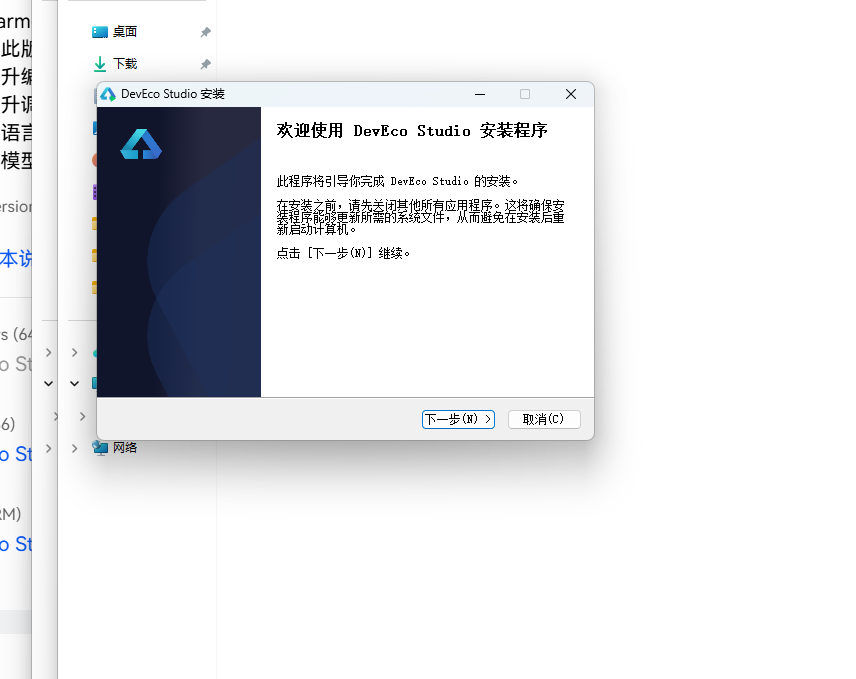
DevEco Studio 是 HarmonyOS 应用开发的官方 IDE。下载安装包后双击运行,进入安装欢迎界面,点击「下一步」继续。
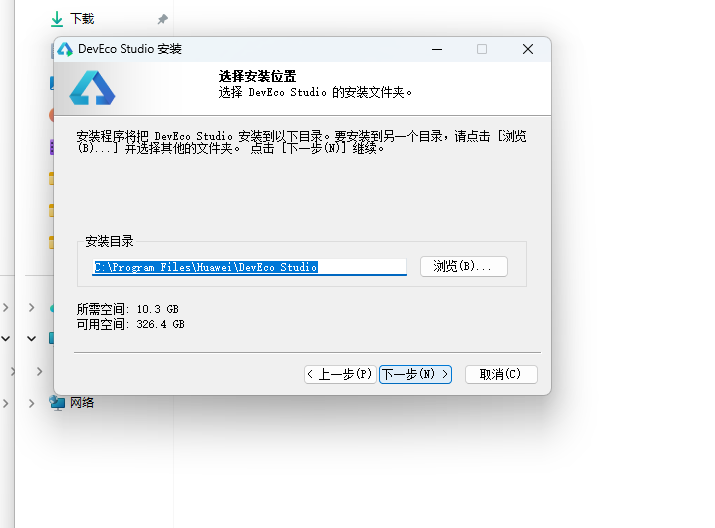
14.2 选择安装路径
选择目标安装目录,建议安装到非系统盘,确认所需空间后点击「下一步」。
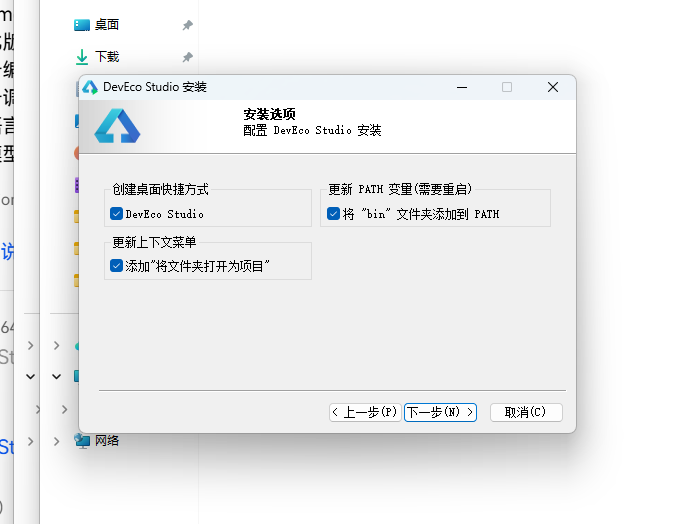
14.3 配置安装选项
设置环境变量,勾选创建桌面快捷方式、将 bin 文件夹添加到 PATH、添加上下文菜单,但是需要重启一下电脑使环境变量生效。
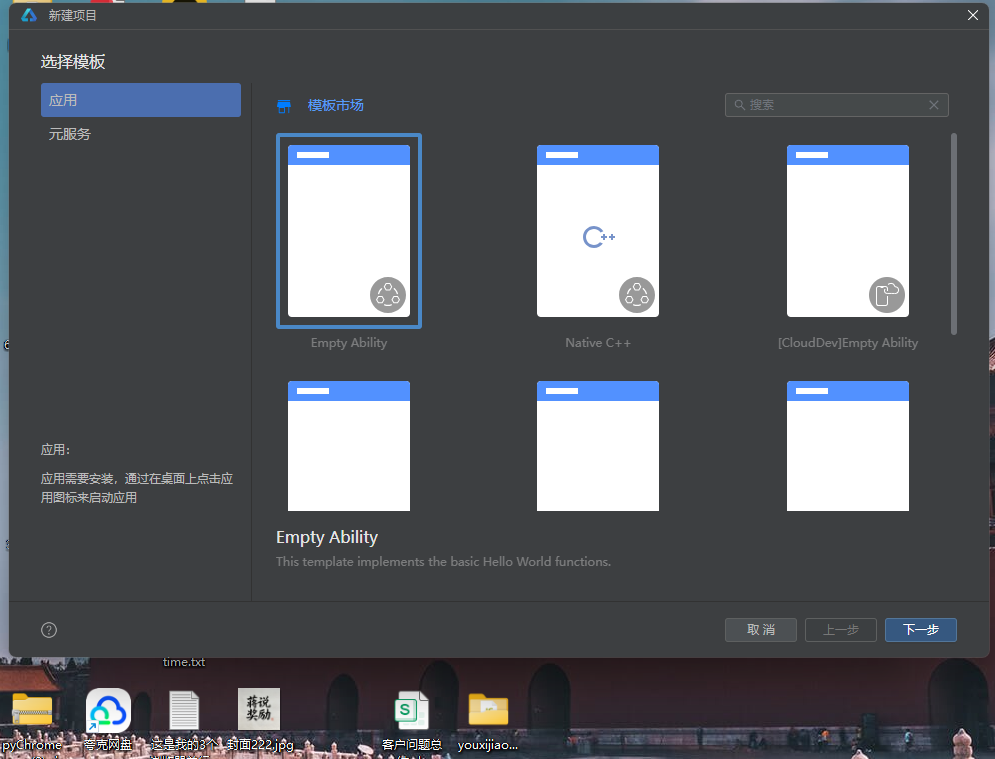
14.4 选择项目模板
新建一个空白模板,在模板市场中选择 Empty Ability。
14.5 配置项目信息
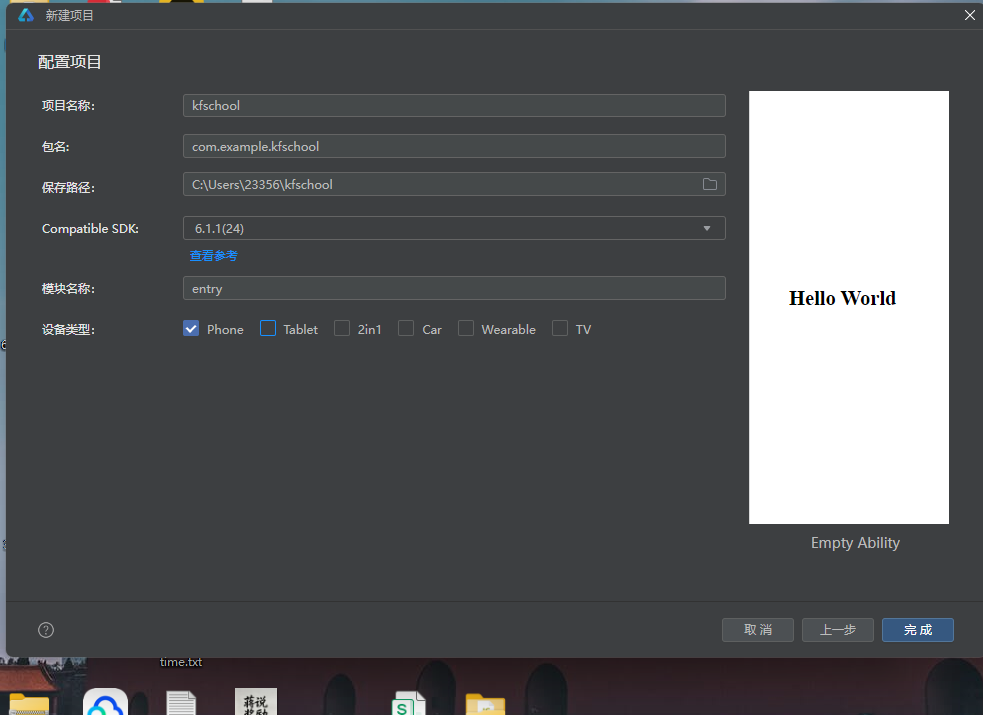
设置 API 为 24 的模板项目,项目名称 kfschool,Compatible SDK 6.1.1(24),设备类型勾选 Phone,点击完成后初始化项目,自动下载相关依赖。
十五、总结
通过对这款星轨漫游太空旅游预订平台的深度拆解,我们可以看到,一个优秀的移动端应用远不止是功能的堆砌,它更是架构设计、数据建模、视觉系统、交互逻辑、动效设计、数据计算等多维度能力的综合体现。
在架构层面,该应用采用了"配置驱动 + 组件化 + 状态管理"的三层设计模式。配置层将所有可变的数据与视觉属性抽离为常量数组和元数据接口(DestMeta目的地元数据用接口+常量数组方式,color字段实现六色动态定价),使得业务逻辑与表现层彻底解耦;组件层将六个功能页面拆分为独立的 @Builder 构建器,每个页面采用完全不同的布局风格,实现"一页一型"的差异化设计;状态层利用 ArkUI 的 @State、@Observed 机制,实现了数据变化到 UI 刷新的自动响应,特别是弹窗数据状态的精细设计(editIdx 共享于 addModal/editModal/delModal 三个弹窗记录选中索引,addRoute/addDate/addAgency 用于预订弹窗三输入,editRoute 用于修改预订输入),三个弹窗共享 editIdx 状态实现索引传递,减少了重复状态定义,体现了对状态管理的精准理解和弹窗复用设计的工程化思维。agencyFilter 筛选状态实现航线页按机构过滤,与机构筛选横滑联动,starBlink 动画状态控制星空特效层显隐,都是状态驱动视觉的典型设计。
在数据层面,三个 @Observed 数据类(Trip/Experience/CommunityPost)以 constructor 构造函数方式实例化,完整描述了星轨漫游的全部业务信息。特别的是,应用定义了 4 个工具函数(statusColor/ratingStars/launchBarH/tripFilter),将颜色映射、评分生成、数据计算、筛选逻辑从 UI 层抽离,实现数据与逻辑分离,是本应用工程化设计的核心亮点。ratingStars 函数用纯字符串拼接生成★☆评分星星(Math.floor取整星,r-full>=0.5加半星☆),非图片非组件,是轻量级评分展示的实用技巧。launchBarH 函数将发射次数动态映射为柱状图像素高度(v/MAX_LAUNCH*80,以7次为基准映射80px),tripFilter 函数实现机构筛选逻辑(遍历匹配agency),statusColor 函数实现航线状态四色着色(即将发射orange/报名中green/预热中purple/其他sub),都是数据计算层的实用工具函数。目的地元数据 DestMeta 采用接口+常量数组方式(非@Observed类),包含 name/icon/dist/duration/price/color 六字段,color 字段实现目的地价格六色动态着色(国际空间站blue/月球gold/火星orange/近地cyan/金星pink/木星purple),是配置驱动设计的体现。
在视觉层面,本应用独创了"深空蓝紫深色主题"设计——这是整个系列中首个采用深色主题的项目,bg #0D1B2A 深空蓝底,card #1B2A3F 深蓝灰,dark #152238 更深蓝灰,title #E8F0FA 浅白文字(深色主题下用浅色保证对比度),完全颠覆了之前所有项目的浅色背景设计,营造出太空宇宙的深邃氛围。主色体系采用"青色激活+星光金+火箭橙"三色组合——cyan #3DBEDB 青色用于 tabBar 激活态、价格、倒计时天时分、社区话题等高频强调元素,gold #F0C04E 星光金用于倒计时 T-天数、发射日期、评分星星、体验价格等珍贵信息,orange #FF7A35 火箭橙用于倒计时秒数、即将发射状态、热门分类、待发射状态等发射相关元素,三色各司其职形成"以青定激活、以金定珍贵、以橙定发射"的语义着色体系。本应用最大的视觉特色是星空闪烁特效层——aboutToAppear 中 setInterval 800ms 切换 starBlink 布尔状态,当 starBlink 为 true 时,在 Stack 中叠加一层 Row 包裹 6 个星星符号(✦✧✦✧✦✧),不同颜色(gold/cyan/bg/purple/gold/cyan)和 opacity(0.15-0.3),position x:0 y:60,zIndex 1,营造星空闪烁的太空氛围。这种用纯 Text 符号+opacity 动画实现星空特效的方式,无需图片资源,轻量高效,是深色主题应用氛围营造的实用技巧,完美契合太空旅游主题。tabBar 激活态下方 16x2 青色指示条用纯 Column 组件实现(非系统指示器),是自定义 tabBar 样式的实用技巧。倒计时天/时/分用 cyan 青色、秒用 orange 火箭橙的色彩设计营造了倒计时的紧迫感,秒数用橙色强调跳动感。发射窗口柱状图周六峰值用 gold 星光金高亮、其他用 blueD 深蓝,让用户一眼看出周末是发射高峰。应用的动态颜色逻辑也十分丰富——航线状态四色、目的地六色、发射窗口两色、倒计时两色、预订记录两态、tabBar两态、机构筛选两态、社区分类橙色高亮,形成了多层语义着色模式。统一的色彩系统是整个应用的视觉基石,深空蓝紫深色主题配合青色激活+星光金+火箭橙三色体系和星空闪烁特效,营造出既深邃宇宙又科技未来的太空旅游氛围。
在交互层面,应用独创了"星空闪烁特效"设计——aboutToAppear 中 setInterval 800ms 切换 starBlink 布尔状态,驱动星空特效层显隐,800ms 周期闪烁,✦✧交替星星混色半透明,营造太空宇宙氛围。三大深色弹窗(预订太空航线/修改预订/删除动态)采用 card 深蓝灰底+dark 输入框底+title 浅白字的深色主题设计,带 ✕ 关闭按钮和 Divider 分隔线,与整体深色主题统一。addModal 预订太空航线包含航线名称/期望日期/承运机构三输入(机构用三按钮选择:星舰科技/SpaceX/蓝色起源),显示费用估算 ¥280万-¥3800万;editModal 修改预订显示当前航线名称+修改航线名输入;delModal 删除动态用 🗑️大图标+确认删除文案,确认后 postList.splice(editIdx,1) 按索引直接删除。航线页和体验页的"预订"按钮点击触发 addModal(editIdx=idx记录选中项),我的页预订记录点击整条触发 editModal,社区页动态右下角🗑️点击触发 delModal,形成了完整的预订增删改交互闭环。航线状态四色(即将发射orange/报名中green/预热中purple/其他sub)让用户一眼判断航线阶段,目的地六色动态定价让用户一眼区分目的地,发射窗口周六金色峰值让用户一眼识别发射高峰日,倒计时天时分cyan青色/秒orange火箭橙四色营造紧迫感,体验套餐评分星星(ratingStars函数生成★☆)+标签+双按钮(立即预订blue蓝底/查看详情chip底cyan青字),社区动态信息流(热门orange橙底高亮分类+点赞/评论/转发/删除red红字),我的个人档案卡(chip底圆形头像+太空探索Lv.5+累计飞行82万km cyan青色)+数据统计三栏(已完成gold/待发射orange/积分cyan)+预订记录两态(已完成green/待发射orange),都是本应用交互设计的精细之处。机构筛选横滑(6个机构,选中cyan青底白字)实现航线快速过滤,发射时间轴cyan青色竖线串联,tabBar自定义青色指示条,都是本应用交互设计的亮点。
标签: HarmonyOS · API 24 · ArkTS · 华为 · 太空旅游 · 航天预订 · 深色主题 · 星空特效 · 火箭倒计时 · 移动端开发

作为“人工智能6S店”的官方数字引擎,为AI开发者与企业提供一个覆盖软硬件全栈、一站式门户。
更多推荐

 0
0 0
0- 0


 已为社区贡献1条内容

所有评论(0)