
HarmonyOS 6.1.1 ArkTS实战:基于HarmonyOS API 24的「乡音唱片」方言说唱音乐社区全链路架构解析
一、HarmonyOS技术生态与ArkTS开发新范式
HarmonyOS 6.1.1标志着华为全场景分布式操作系统进入了全新的成熟阶段。作为鸿蒙生态的核心开发语言,ArkTS在HarmonyOS ArkTS API 24版本中已经形成了一套完整且高效的应用开发范式。ArkTS以TypeScript为语言基础,融合了声明式UI编程理念和响应式状态管理机制,通过丰富的装饰器系统(@Entry、@Component、@State、@Builder、@Observed等)让开发者能够以声明式的方式描述界面结构与数据绑定关系,大幅降低了跨设备UI开发的复杂度。在ArkTS中,开发者不需要像传统Android开发那样编写大量的命令式UI操作代码,而是通过状态驱动的方式让UI自动响应数据变化,这种范式特别适合社交音乐类应用中高频的状态更新场景。
声明式状态管理的核心思想是"数据即视图"。在「乡音唱片」这类方言说唱音乐社区中,用户发布作品、编辑歌词、发起Battle、给词人投票等操作都伴随着频繁的数据变更。ArkTS通过@State装饰器将组件内的可变状态声明为响应式变量,当这些变量的值发生变化时,框架自动触发依赖该变量的UI组件进行重新渲染。配合@Observed装饰器标记的数据模型类,对象级别的属性变化也能被框架精确追踪。这种细粒度的依赖追踪机制确保了只有真正受影响的UI部分才会被重新构建,避免了全局重渲染带来的性能开销,为流畅的用户体验奠定了技术基础。
方言说唱作为一种独特的文化现象和音乐形式,近年来在中国各地蓬勃发展。从川渝Trap到粤语BoomBap,从东北喊麦到上海Jazz Rap,各地方言正在通过说唱这一年轻化的音乐载体焕发新的生命力。「乡音唱片」正是面向这一文化场景设计的社区型应用,其核心价值在于为方言说唱爱好者提供一个集作品发布、方言地图探索、Beat伴奏库、Battle对战、词人排行和乡音词典于一体的垂直社交平台。这种垂直领域社区应用的技术挑战在于:多维度内容数据的统一管理、实时音波与唱片旋转等视觉特效的流畅渲染、以及复杂的弹窗表单交互设计。本文将从源码层面逐段解析该应用的完整架构实现。
二、色彩体系与视觉风格
「乡音唱片」采用了电音青与落日紫的撞色配色方案,这种配色完美契合了方言说唱的音乐调性——电音青代表着数字音乐制作的技术感和电子节拍的冷峻律动,落日紫则象征着方言文化中的人文温度和地域情感。
2.1 ColorPalette接口与色彩常量
interface ColorPalette {
  primary: string;
  primaryLight: string;
  primaryDark: string;
  accent: string;
  accentLight: string;
  bg: string;
  cardBg: string;
  textPrimary: string;
  textSecondary: string;
  textHint: string;
  border: string;
  success: string;
  warning: string;
  danger: string;
  white: string;
  gold: string;
}
接口ColorPalette定义了16个色彩字段的标准契约,确保色彩管理的一致性和类型安全性。通过接口约束,在实例化COLORS常量时如果遗漏任何字段,编译器将立即报错。这种防御式编程策略在大型项目中尤为重要,可以避免因颜色字段缺失导致的运行时UI异常。
const COLORS: ColorPalette = {
  primary: '#00838F',
  primaryLight: '#E0F7FA',
  primaryDark: '#005662',
  accent: '#7C4DFF',
  accentLight: '#EDE7F6',
  bg: '#F2F7F8',
  cardBg: '#FFFFFF',
  textPrimary: '#12343A',
  textSecondary: '#4E6E74',
  textHint: '#9FBCC1',
  border: '#DCEAEC',
  success: '#66BB6A',
  warning: '#FFA726',
  danger: '#EF5350',
  white: '#FFFFFF',
  gold: '#FFB300'
};
主色#00838F是Material Design Cyan 800色值,这是一种深邃的青绿色调,在音乐播放器界面中传达沉稳与专业感。强调色#7C4DFF是Material Design Deep Purple A200色值,这是一种饱和度极高的紫色,在深色背景上具有强烈的视觉穿透力,用于突出选中状态、交互按钮和Battle对战标识。浅色背景#F2F7F8带有微弱的青色调,与主色系保持色温一致性。文本三级层次中,主文本#12343A带有青蓝绿色调,次文本和提示文本则逐级降低饱和度,形成清晰的阅读层次。
三、数据模型层设计
3.1 TrackItem——作品数据模型
@Observed
class TrackItem {
  id: number = 0;
  title: string = '';
  icon: string = '';
  dialect: string = '';
  style: string = '';
  rapper: string = '';
  plays: number = 0;
  likes: number = 0;
  liked: number = 0;
  constructor(id: number, title: string, icon: string, dialect: string,
    style: string, rapper: number, plays: number, likes: number, liked: number) {
    this.id = id; this.title = title; this.icon = icon; this.dialect = dialect;
    this.style = style; this.rapper = rapper; this.plays = plays;
    this.likes = likes; this.liked = liked;
  }
}
TrackItem是作品流页面的核心数据模型,使用@Observed装饰器标记为可观察类。该模型包含9个字段:title存储作品标题(如"川渝Trap·勒是雾都"),icon使用emoji表达地域特征,dialect标注方言种类,style标记说唱风格(Trap/BoomBap/Jazz Rap等),rapper为创作者昵称,plays和likes分别记录播放量和点赞数,liked标记当前用户是否已点赞。@Observed装饰器使得TrackItem实例的属性变化能够被ArkTS框架的响应式系统追踪,当配合@State声明的数组使用时,通过splice操作即可触发列表的局部更新。
3.2 RegionItem——方言地图数据模型
@Observed
class RegionItem {
  id: number = 0;
  province: string = '';
  dialect: string = '';
  icon: string = '';
  tracks: number = 0;
  rappers: number = 0;
  hot: number = 0;
  supported: number = 0;
  constructor(id: number, province: string, dialect: string, icon: string,
    tracks: number, rappers: number, hot: number, supported: number) {
    this.id = id; this.province = province; this.dialect = dialect; this.icon = icon;
    this.tracks = tracks; this.rappers = rappers; this.hot = hot;
    this.supported = supported;
  }
}
RegionItem服务于方言音乐地图页面,每个条目对应一个省份的方言说唱生态数据。tracks和rappers分别记录该方言的作品总数和说唱玩家数量,hot为热度指数,supported标记当前用户是否已为该方言应援。这种将社交互动状态直接嵌入数据模型的设计,使得ForEach渲染时可以零成本地读取交互状态,避免了额外的状态映射逻辑。
3.3 BeatItem与BattleItem
@Observed
class BeatItem {
  id: number = 0;
  name: string = '';
  icon: string = '';
  bpm: number = 0;
  mood: string = '';
  uses: number = 0;
  taken: number = 0;
  constructor(id: number, name: string, icon: string, bpm: number,
    mood: string, uses: number, taken: number) {
    this.id = id; this.name = name; this.icon = icon; this.bpm = bpm;
    this.mood = mood; this.uses = uses; this.taken = taken;
  }
}

@Observed
class BattleItem {
  id: number = 0;
  title: string = '';
  icon: string = '';
  mode: string = '';
  prize: string = '';
  days: number = 0;
  entrants: number = 0;
  joined: number = 0;
  constructor(id: number, title: string, icon: string, mode: string,
    prize: string, days: number, entrants: number, joined: number) {
    this.id = id; this.title = title; this.icon = icon; this.mode = mode;
    this.prize = prize; this.days = days; this.entrants = entrants;
    this.joined = joined;
  }
}
BeatItem对应Beat伴奏库,记录伴奏名称、BPM(每分钟节拍数)、情绪标签(迷幻/慵懒/炸裂等)、使用次数和收藏状态。BattleItem对应Battle对战页面,存储对战标题、模式(1v1接力/即兴Cypher/单句对决等)、奖池描述、剩余天数、报名人数和当前用户的报名状态。两个模型都通过@Observed确保交互状态变化(收藏/报名)能被框架追踪。
3.4 LyricistItem、WordItem与ChartItem
@Observed
class LyricistItem {
  id: number = 0;
  name: string = '';
  avatar: string = '';
  dialect: string = '';
  works: number = 0;
  punchlines: number = 0;
  followed: number = 0;
  constructor(id: number, name: string, avatar: string, dialect: string,
    works: number, punchlines: number, followed: number) {
    this.id = id; this.name = name; this.avatar = avatar; this.dialect = dialect;
    this.works = works; this.punchlines = punchlines; this.followed = followed;
  }
}

@Observed
class WordItem {
  id: number = 0;
  word: string = '';
  meaning: string = '';
  dialect: string = '';
  votes: number = 0;
  voted: number = 0;
  constructor(id: number, word: string, meaning: string, dialect: string,
    votes: number, voted: number) {
    this.id = id; this.word = word; this.meaning = meaning; this.dialect = dialect;
    this.votes = votes; this.voted = voted;
  }
}

@Observed
class ChartItem {
  id: number = 0;
  month: string = '';
  tracks: number = 0;
  plays: number = 0;
  constructor(id: number, month: string, tracks: number, plays: number) {
    this.id = id; this.month = month; this.tracks = tracks; this.plays = plays;
  }
}
LyricistItem服务于词人排行榜,记录词人昵称、头像、方言、作品数、金句(Punchline)数和关注状态。WordItem对应乡音词典页面,存储方言热词、释义、所属方言、投票数和当前用户的投票状态。ChartItem为月度热度图表数据,记录每月新作品数和播放量。三个模型各司其职,分别支撑不同的内容页面。
四、静态数据初始化与工具函数
4.1 作品与方言数据
const TRACK_LIST: TrackItem[] = [
  new TrackItem(1, '川渝Trap·勒是雾都', '🌫️', '重庆话', 'Trap', 'GAI式老幺', 890000, 76000, 0),
  new TrackItem(2, '粤语Flow·饮茶先啦', '🍵', '粤语', 'BoomBap', '茶楼MC', 670000, 52000, 0),
  new TrackItem(3, '东北喊麦·这嘎达贼拉硬', '🧊', '东北话', 'Hardcore', '老铁666', 1200000, 98000, 0),
  new TrackItem(4, '沪上Jazz·侬晓得伐', '🌃', '上海话', 'Jazz Rap', '弄堂诗人', 340000, 28000, 0),
  new TrackItem(5, '陕西民谣说唱·嘹咋咧', '🏜️', '陕西话', '民谣说唱', '城墙根老王', 560000, 45000, 0),
  // ... 更多作品
];

const REGION_LIST: RegionItem[] = [
  new RegionItem(1, '重庆', '川渝方言', '🌫️', 12800, 3200, 9800000, 0),
  new RegionItem(2, '广东', '粤语', '🍵', 15600, 4100, 12500000, 0),
  new RegionItem(3, '东北', '东北话', '🧊', 18200, 5600, 15800000, 0),
  // ... 更多省份
];
静态数据数组在模块加载阶段通过构造函数批量创建实例。每条作品数据都融合了地域文化特色和说唱风格标签,从标题到创作者昵称都充满方言韵味。省份数据则涵盖了从北到南的主要方言区域,作品数和玩家数的分布反映了各方言说唱生态的活跃程度。
4.2 选项数组与工具函数
const ADD_DIALECTS: string[] = ['🌫️ 重庆话', '🍵 粤语', '🧊 东北话', '🌃 上海话', '🏜️ 陕西话'];
const ADD_STYLES: string[] = ['Trap', 'BoomBap', 'Jazz说唱', '民谣说唱', 'Hardcore'];
const EDIT_RHYMES: string[] = ['双押', '三押', '跳押', '连环押'];
const BIZ_MODES: string[] = ['⚔️ 1v1对决', '🎤 即兴Cypher', '👥 团体接力'];

function numText(n: number): string {
  if (n >= 10000) {
    return (n / 10000).toFixed(1) + 'w';
  }
  return n.toString();
}

function maxTracks(): number {
  let m: number = 0;
  for (let i: number = 0; i < CHART_LIST.length; i++) {
    if (CHART_LIST[i].tracks > m) {
      m = CHART_LIST[i].tracks;
    }
  }
  return m;
}

function barHeight(v: number): number {
  return Math.round(v * 100 / maxTracks());
}
选项数组为弹窗表单提供预设选项数据:ADD_DIALECTS用于发布作品时的方言选择,ADD_STYLES用于曲风选择,EDIT_RHYMES用于歌词编辑时的押韵方式选择,BIZ_MODES用于发起Battle时的对战模式选择。工具函数numText将大数值转换为"w"为单位的中文简写格式,maxTracks和barHeight配合计算月度热度柱状图的柱体高度。
五、主组件状态与生命周期
5.1 状态声明
@Entry
@Component
struct PageDialectRap {
  @State currentTab: number = 0;
  @State bottomTab: number = 0;
  @State trackList: TrackItem[] = TRACK_LIST;
  @State regionList: RegionItem[] = REGION_LIST;
  @State beatList: BeatItem[] = BEAT_LIST;
  @State battleList: BattleItem[] = BATTLE_LIST;
  @State lyricistList: LyricistItem[] = LYRICIST_LIST;
  @State wordList: WordItem[] = WORD_LIST;
  @State addOpen: boolean = false;
  @State editOpen: boolean = false;
  @State delOpen: boolean = false;
  @State bizOpen: boolean = false;
  @State addTitle: string = '';
  @State addDialect: number = 0;
  @State addStyle: number = 0;
  @State editRhyme: number = 0;
  @State editSpeed: number = 90;
  @State delIndex: number = 0;
  @State bizMode: number = 0;
  @State bizRounds: number = 3;
  @State fxTick: number = 0;
  private timer: number = -1;
  // ...
}
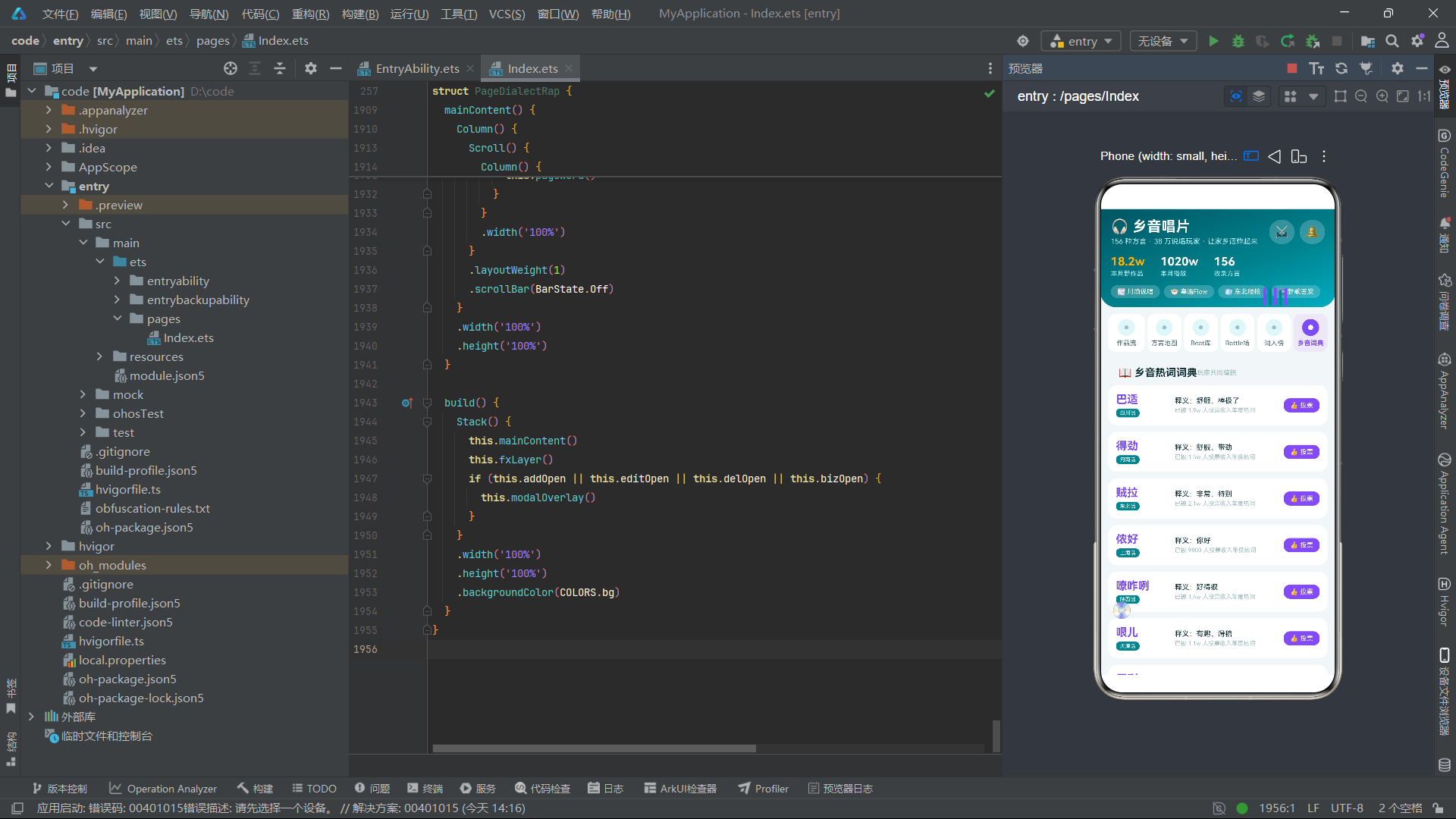
主组件PageDialectRap的状态分为四层:导航层(currentTab控制6个内容页面切换,bottomTab控制5个底部Tab高亮)、数据层(7个@State数组绑定各页面的数据源)、弹窗层(4个布尔值控制4个弹窗的显隐)、表单层(发布作品的标题/方言/曲风、编辑歌词的押韵方式/语速、删除索引、Battle的模式/回合数等选择状态)。fxTick是特效动画的全局帧时钟。
5.2 生命周期与定时器
aboutToAppear(): void {
  this.timer = setInterval(() => {
    this.fxTick += 1;
  }, 105);
}

aboutToDisappear(): void {
  if (this.timer >= 0) {
    clearInterval(this.timer);
  }
}
定时器以105毫秒为间隔递增fxTick,略慢于标准60帧的16.67毫秒间隔,这种选择使得唱片旋转和音波波动呈现出"呼吸感"而非高频闪烁的视觉疲劳感。aboutToDisappear中清理定时器是防止组件销毁后定时器继续执行导致内存泄漏的标准操作。
5.3 业务操作方法
doAdd(): void {
  if (this.addTitle.length > 0) {
    this.trackList.unshift(new TrackItem(995, this.addTitle, '🎵',
      ADD_DIALECTS[this.addDialect].substring(3), ADD_STYLES[this.addStyle],
      '我', 0, 0, 0));
  }
  this.addOpen = false;
}

doEdit(): void {
  if (this.trackList.length > 0) {
    this.trackList[0].style = ADD_STYLES[this.editRhyme % 5];
    this.trackList.splice(0, 1, this.trackList[0]);
  }
  this.editOpen = false;
}

doDel(): void {
  if (this.delIndex >= 0 && this.delIndex < this.trackList.length) {
    this.trackList.splice(this.delIndex, 1);
  }
  this.delOpen = false;
}

doBiz(): void {
  if (this.battleList.length > 0) {
    this.battleList[0].joined = 1;
    this.battleList.splice(0, 1, this.battleList[0]);
  }
  this.bizOpen = false;
}
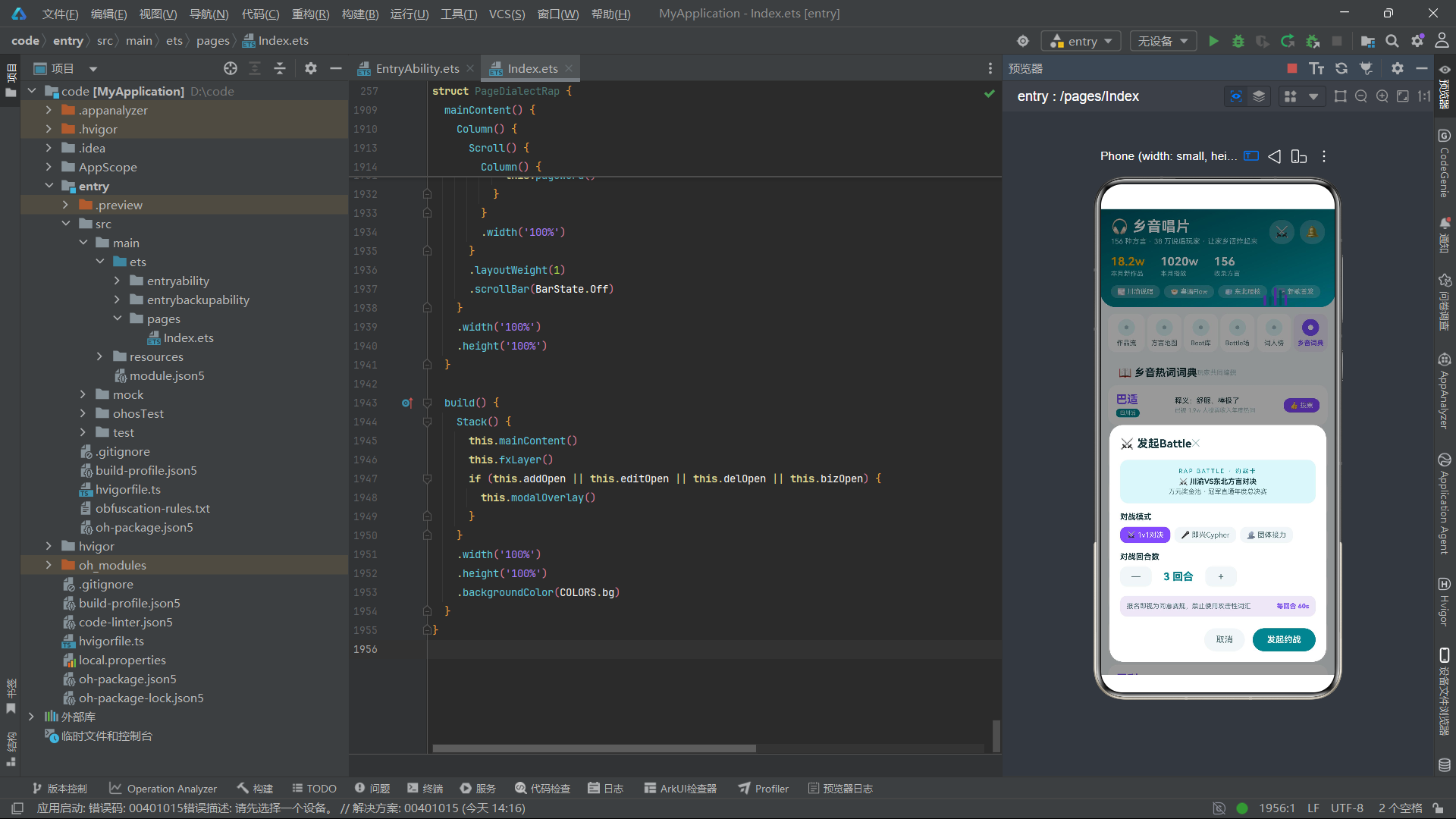
四个业务方法处理四个弹窗的提交逻辑。doAdd在标题非空时创建新作品并插入到列表头部。doEdit修改列表首项的曲风字段,通过splice(0, 1, arr[0])触发响应式更新——这是ArkTS中让@Observed对象属性变更反映到UI上的标准技巧。doDel从作品列表中删除指定索引。doBiz将第一个Battle条目标记为已报名。
5.4 步进器方法
incSpeed(): void {
  if (this.editSpeed < 160) {
    this.editSpeed += 5;
  }
}

decSpeed(): void {
  if (this.editSpeed > 60) {
    this.editSpeed -= 5;
  }
}

incRounds(): void {
  if (this.bizRounds < 7) {
    this.bizRounds += 1;
  }
}

decRounds(): void {
  if (this.bizRounds > 1) {
    this.bizRounds -= 1;
  }
}
步进器方法为弹窗中的数值选择器提供边界约束。语速BPM限制在60-160之间,每次步进5;Battle回合数限制在1-7之间,每次步进1。这种内置边界检查的设计确保了表单数据始终处于合理范围内。
六、特效动画层——唱片旋转与音波波动
@Builder
fxLayer() {
  Column() {
    Text('💿')
      .fontSize(24)
      .rotate({ angle: this.fxTick * 18, centerX: '50%', centerY: '50%' })
      .position({ x: 18, y: 600 })
    Row() {
      Column()
        .width(4)
        .height(10 + (this.fxTick % 4) * 6)
        .borderRadius(2)
        .backgroundColor(COLORS.accent)
      Column()
        .width(4)
        .height(14 + (this.fxTick % 3) * 7)
        .borderRadius(2)
        .backgroundColor(COLORS.primary)
        .margin({ left: 4 })
      Column()
        .width(4)
        .height(8 + (this.fxTick % 5) * 5)
        .borderRadius(2)
        .backgroundColor(COLORS.accent)
        .margin({ left: 4 })
      Column()
        .width(4)
        .height(16 + (this.fxTick % 2) * 8)
        .borderRadius(2)
        .backgroundColor(COLORS.primary)
        .margin({ left: 4 })
      Column()
        .width(4)
        .height(12 + (this.fxTick % 4) * 5)
        .borderRadius(2)
        .backgroundColor(COLORS.accent)
        .margin({ left: 4 })
    }
    .alignItems(VerticalAlign.Bottom)
    .position({ x: 250, y: 120 })
    .hitTestBehavior(HitTestMode.None)
  }
  .width('100%')
  .height('100%')
  .hitTestBehavior(HitTestMode.None)
  .position({ x: 0, y: 0 })
}
特效层实现了两个核心动效。第一个是唱片旋转:💿emoji通过rotate属性以fxTick * 18为角度持续旋转,中心点设为50%确保旋转以自身中心为轴,模拟黑胶唱片匀速转动的效果。第二个是音波竖条波动:5个4px宽的Column柱体排列成一行,各自通过(this.fxTick % N) * M的取模运算产生不同频率和振幅的高度变化——第一个柱体以% 4为周期,第二个以% 3,第三个以% 5,第四个以% 2,第五个以% 4,这种错频设计使得5个柱体的高度变化呈现自然的律动感,模拟音频可视化器中频率柱的跳动效果。颜色交替使用强调紫色和主色青色,增强视觉节奏感。整个特效层通过hitTestBehavior(HitTestMode.None)设置为不拦截触摸事件。
七、头部区域与导航设计
7.1 渐变头部
@Builder
header() {
  Column() {
    Row() {
      Column() {
        Text('🎧 乡音唱片')
          .fontSize(22)
          .fontWeight(FontWeight.Bold)
          .fontColor(COLORS.white)
        Text('156 种方言 · 38 万说唱玩家 · 让家乡话炸起来')
          .fontSize(11)
          .fontColor('#B2EBF2')
          .margin({ top: 3 })
      }
      .alignItems(HorizontalAlign.Start)

      Row() {
        Text('⚔️')
          .fontSize(18)
          .padding(8)
          .backgroundColor('#33FFFFFF')
          .borderRadius(18)
          .onClick(() => { this.bizOpen = true; })
        Text('🔔')
          .fontSize(18)
          .padding(8)
          .backgroundColor('#33FFFFFF')
          .borderRadius(18)
          .margin({ left: 8 })
      }
    }
    .width('100%')
    .justifyContent(FlexAlign.SpaceBetween)
    .padding({ left: 16, right: 16, top: 14 })

    Row() {
      Column() {
        Text('18.2w')
          .fontSize(18)
          .fontWeight(FontWeight.Bold)
          .fontColor(COLORS.gold)
        Text('本月新作品')
          .fontSize(10)
          .fontColor('#B2EBF2')
          .margin({ top: 2 })
      }
      .alignItems(HorizontalAlign.Start)
      // ... 更多统计列
    }
    .width('100%')
    .padding({ left: 16, top: 14 })

    Row() {
      Text('🌫️ 川渝说唱')
        .fontSize(10)
        .fontColor(COLORS.white)
        .padding({ left: 10, right: 10, top: 4, bottom: 4 })
        .backgroundColor('#33FFFFFF')
        .borderRadius(12)
      // ... 更多标签
    }
    .width('100%')
    .padding({ left: 16, top: 12, bottom: 14 })
  }
  .width('100%')
  .linearGradient({
    angle: 160,
    colors: [['#005662', 0], ['#00838F', 0.6], ['#00ACC1', 1]]
  })
  .borderRadius({ bottomLeft: 24, bottomRight: 24 })
}
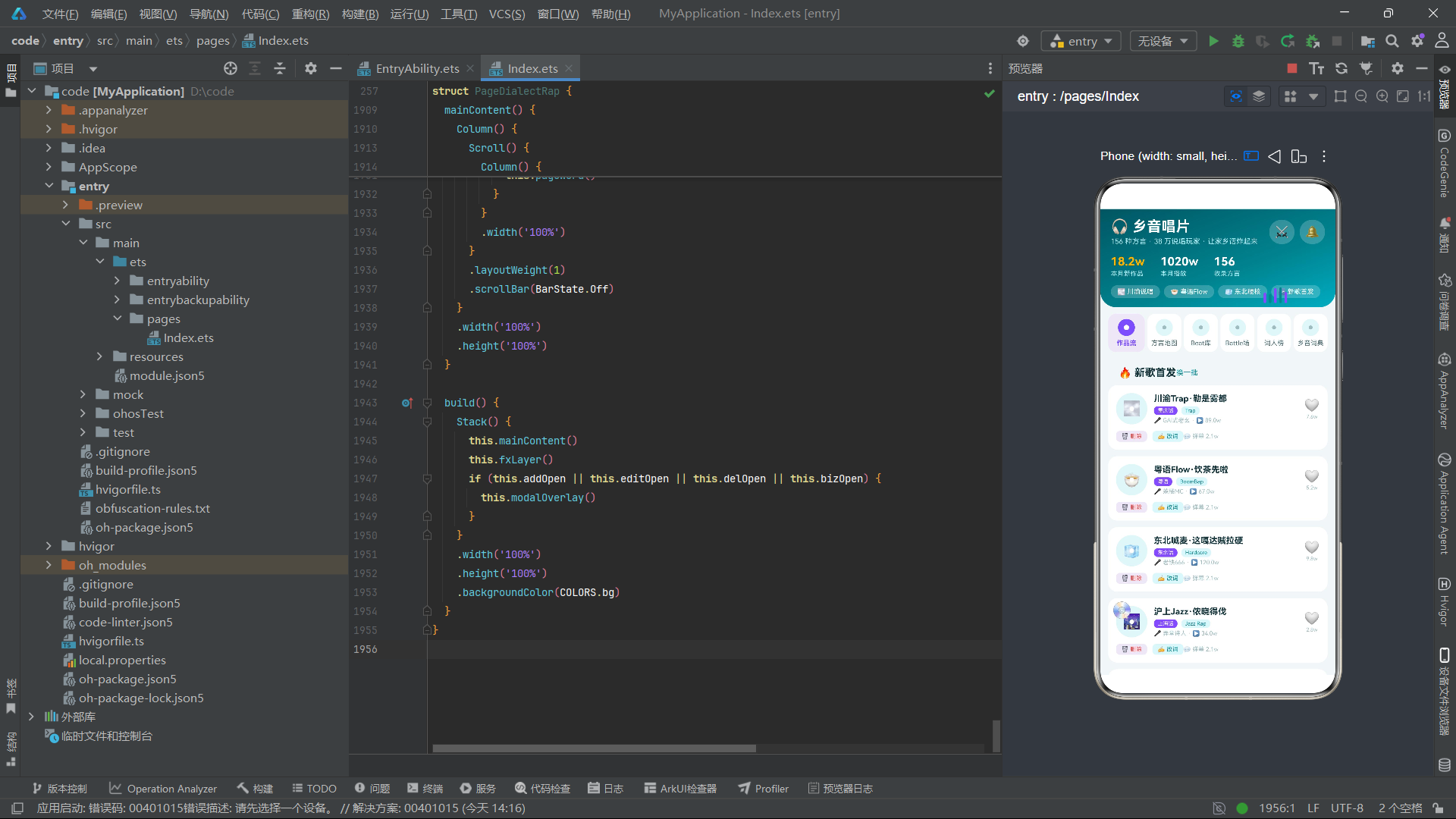
头部采用三段式结构:品牌标识行(应用名"乡音唱片"配以副标题展示方言数量和玩家规模)、数据统计行("18.2w"月新作品使用金色COLORS.gold突出、"1020w"月播放使用白色、"156"收录方言使用白色)、快捷标签行(川渝说唱/粤语Flow/东北硬核/新歌首发四个半透明标签按钮)。渐变背景从最深的#005662过渡到主色#00838F再到亮色#00ACC1,配合底部24圆角形成沉浸感。"⚔️"按钮直接触发Battle弹窗,为高频操作提供快捷入口。
7.2 唱片圆标导航Tab
@Builder
subNav() {
  Row() {
    ForEach(['作品流', '方言地图', 'Beat库', 'Battle场', '词人榜', '乡音词典'], (name: string, idx: number) => {
      Column() {
        Stack() {
          Circle()
            .width(26)
            .height(26)
            .fill(idx === this.currentTab ? COLORS.accent : COLORS.primaryLight)
          if (idx === this.currentTab) {
            Circle()
              .width(8)
              .height(8)
              .fill(COLORS.white)
          } else {
            Circle()
              .width(6)
              .height(6)
              .fill(COLORS.textHint)
          }
        }
        .width(26)
        .height(26)

        Text(name)
          .fontSize(10)
          .fontWeight(idx === this.currentTab ? FontWeight.Bold : FontWeight.Normal)
          .fontColor(idx === this.currentTab ? COLORS.accent : COLORS.textSecondary)
          .margin({ top: 5 })
      }
      .layoutWeight(1)
      .alignItems(HorizontalAlign.Center)
      .padding({ top: 8, bottom: 8 })
      .backgroundColor(idx === this.currentTab ? COLORS.accentLight : COLORS.cardBg)
      .borderRadius(12)
      .margin({ left: idx === 0 ? 0 : 4 })
      .onClick(() => { this.currentTab = idx; })
    }, (name: string) => 'nav' + name)
  }
  .width('100%')
  .padding({ left: 12, right: 12, top: 10, bottom: 10 })
  .backgroundColor(COLORS.bg)
}
导航Tab采用唱片圆标设计——这是本应用最标志性的视觉创意。每个Tab项顶部使用Stack叠加两层Circle:外层26px大圆模拟唱片外形(选中时填充强调紫色,未选中时填充浅色),内层小圆模拟唱片中心孔(选中时8px白色实心,未选中时6px灰色),整体造型完美还原了黑胶唱片从正面观察的视觉特征。选中状态下Tab容器背景变为浅紫色COLORS.accentLight,文字变粗变紫,形成清晰的选中反馈。6个Tab在一行内等宽排列,通过layoutWeight(1)实现自适应分布。
八、内容页面构建
8.1 作品流页面
@Builder
pageTrack() {
  Column() {
    Row() {
      Text('🔥 新歌首发')
        .fontSize(16)
        .fontWeight(FontWeight.Bold)
        .fontColor(COLORS.textPrimary)
      Text('换一批')
        .fontSize(11)
        .fontColor(COLORS.primary)
        .margin({ left: 'auto' })
        .onClick(() => {
          if (this.trackList.length > 2) {
            let tail: TrackItem = this.trackList[this.trackList.length - 1];
            this.trackList.splice(this.trackList.length - 1, 1);
            this.trackList.splice(0, 0, tail);
          }
        })
    }
    .width('100%')
    .padding({ left: 16, right: 16, top: 12 })

    ForEach(this.trackList, (t: TrackItem) => {
      Column() {
        Row() {
          Stack() {
            Circle()
              .width(48)
              .height(48)
              .fill(COLORS.primaryLight)
            Text(t.icon)
              .fontSize(22)
            Circle()
              .width(7)
              .height(7)
              .fill(COLORS.white)
          }
          .width(48)
          .height(48)

          Column() {
            Text(t.title)
              .fontSize(13)
              .fontWeight(FontWeight.Bold)
              .fontColor(COLORS.textPrimary)
              .maxLines(1)
            Row() {
              Text(t.dialect)
                .fontSize(8)
                .fontColor(COLORS.white)
                .padding({ left: 6, right: 6, top: 2, bottom: 2 })
                .backgroundColor(COLORS.accent)
                .borderRadius(6)
              Text(t.style)
                .fontSize(8)
                .fontColor(COLORS.primary)
                .padding({ left: 6, right: 6, top: 2, bottom: 2 })
                .backgroundColor(COLORS.primaryLight)
                .borderRadius(6)
                .margin({ left: 6 })
            }
            .margin({ top: 4 })
            Text('🎤 ' + t.rapper + ' · ▶ ' + numText(t.plays))
              .fontSize(9)
              .fontColor(COLORS.textHint)
              .margin({ top: 3 })
          }
          .alignItems(HorizontalAlign.Start)
          .layoutWeight(1)
          .margin({ left: 10 })

          Column() {
            Text(t.liked === 1 ? '❤️' : '🤍')
              .fontSize(19)
              .onClick(() => {
                t.liked = t.liked === 1 ? 0 : 1;
                this.trackList.splice(0, 1, this.trackList[0]);
              })
            Text(numText(t.likes))
              .fontSize(8)
              .fontColor(COLORS.textHint)
              .margin({ top: 2 })
          }
          .alignItems(HorizontalAlign.Center)
        }
        .width('100%')

        Row() {
          Text('🗑️ 删除')
            .fontSize(9)
            .fontColor(COLORS.danger)
            .padding({ left: 8, right: 8, top: 3, bottom: 3 })
            .backgroundColor(COLORS.accentLight)
            .borderRadius(6)
            .onClick(() => {
              this.delIndex = t.id - 1;
              this.delOpen = true;
            })
          Text('✍️ 改词')
            .fontSize(9)
            .fontColor(COLORS.primary)
            .padding({ left: 8, right: 8, top: 3, bottom: 3 })
            .backgroundColor(COLORS.primaryLight)
            .borderRadius(6)
            .margin({ left: 8 })
            .onClick(() => { this.editOpen = true; })
          Text('💬 弹幕 2.1w')
            .fontSize(9)
            .fontColor(COLORS.textHint)
            .margin({ left: 'auto' })
        }
        .width('100%')
        .margin({ top: 10 })
      }
      .width('100%')
      .padding(12)
      .backgroundColor(COLORS.cardBg)
      .borderRadius(14)
      .margin({ top: 10 })
    }, (t: TrackItem) => 'tk' + t.id.toString() + '_' + t.liked.toString())

    Column() {
      Text('📊 方言音乐月度热度(新作品数)')
        .fontSize(13)
        .fontWeight(FontWeight.Bold)
        .fontColor(COLORS.textPrimary)
      Row() {
        ForEach(CHART_LIST, (c: ChartItem) => {
          Column() {
            Text(numText(c.tracks))
              .fontSize(8)
              .fontColor(COLORS.primary)
            Column()
              .width(20)
              .height(barHeight(c.tracks))
              .backgroundColor(c.month === '8月' ? COLORS.accent : COLORS.primary)
              .borderRadius(4)
              .margin({ top: 3 })
            Text(c.month)
              .fontSize(9)
              .fontColor(COLORS.textSecondary)
              .margin({ top: 4 })
          }
          .layoutWeight(1)
          .alignItems(HorizontalAlign.Center)
        }, (c: ChartItem) => 'ct' + c.id.toString())
      }
      .width('100%')
      .margin({ top: 10 })
    }
    .width('100%')
    .padding(12)
    .backgroundColor(COLORS.cardBg)
    .borderRadius(14)
    .margin({ top: 14 })
    .alignItems(HorizontalAlign.Start)
  }
  .width('100%')
  .padding({ left: 12, right: 12, bottom: 16 })
}
作品流页面是应用的核心内容页。顶部"换一批"按钮通过将数组末尾元素移至头部实现轮换效果。每条作品卡片的左侧使用三层Stack叠加的Circle+Text模拟唱片造型(与导航Tab的唱片圆标设计呼应),中间展示标题、方言标签(紫色背景白字)和曲风标签(浅青背景青字),右侧为点赞按钮。底部操作栏提供删除(触发删除弹窗)、改词(触发歌词编辑弹窗)和弹幕数展示。页面底部嵌入了月度热度柱状图,8月(最新月)柱体使用强调紫色高亮,其余月份使用主色青色。
8.2 方言地图页面
@Builder
pageRegion() {
  Column() {
    Row() {
      Text('🗺️ 方言音乐地图')
        .fontSize(16)
        .fontWeight(FontWeight.Bold)
        .fontColor(COLORS.textPrimary)
      Text('为家乡打call')
        .fontSize(10)
        .fontColor(COLORS.accent)
        .margin({ left: 'auto' })
    }
    .width('100%')
    .padding({ left: 16, right: 16, top: 12 })

    ForEach(this.regionList, (r: RegionItem) => {
      Row() {
        Text(r.icon)
          .fontSize(24)
          .padding(11)
          .backgroundColor(COLORS.primaryLight)
          .borderRadius(12)
        Column() {
          Row() {
            Text(r.province)
              .fontSize(14)
              .fontWeight(FontWeight.Bold)
              .fontColor(COLORS.textPrimary)
            Text(r.dialect)
              .fontSize(8)
              .fontColor(COLORS.white)
              .padding({ left: 6, right: 6, top: 2, bottom: 2 })
              .backgroundColor(COLORS.accent)
              .borderRadius(6)
              .margin({ left: 8 })
          }
          Text('🎵 ' + numText(r.tracks) + ' 首作品 · 🎤 ' + numText(r.rappers) + ' 位玩家')
            .fontSize(9)
            .fontColor(COLORS.textSecondary)
            .margin({ top: 3 })
          Column() {
            Column()
              .width(r.id * 9 + 40)
              .height(6)
              .borderRadius(3)
              .backgroundColor(COLORS.primary)
          }
          .width('100%')
          .alignItems(HorizontalAlign.Start)
          .margin({ top: 5 })
        }
        .alignItems(HorizontalAlign.Start)
        .layoutWeight(1)
        .margin({ left: 10 })

        Column() {
          Text(r.supported === 1 ? '✅ 已应援' : '应援')
            .fontSize(10)
            .fontColor(r.supported === 1 ? COLORS.success : COLORS.white)
            .padding({ left: 12, right: 12, top: 5, bottom: 5 })
            .backgroundColor(r.supported === 1 ? '#E8F5E9' : COLORS.accent)
            .borderRadius(10)
            .onClick(() => {
              r.supported = r.supported === 1 ? 0 : 1;
              this.regionList.splice(0, 1, this.regionList[0]);
            })
          Text('🔥 ' + numText(r.hot))
            .fontSize(8)
            .fontColor(COLORS.textHint)
            .margin({ top: 3 })
        }
        .alignItems(HorizontalAlign.End)
      }
      .width('100%')
      .padding(12)
      .backgroundColor(COLORS.cardBg)
      .borderRadius(14)
      .margin({ top: 10 })
    }, (r: RegionItem) => 'rg' + r.id.toString() + '_' + r.supported.toString())
  }
  .width('100%')
  .padding({ left: 12, right: 12, bottom: 16 })
}
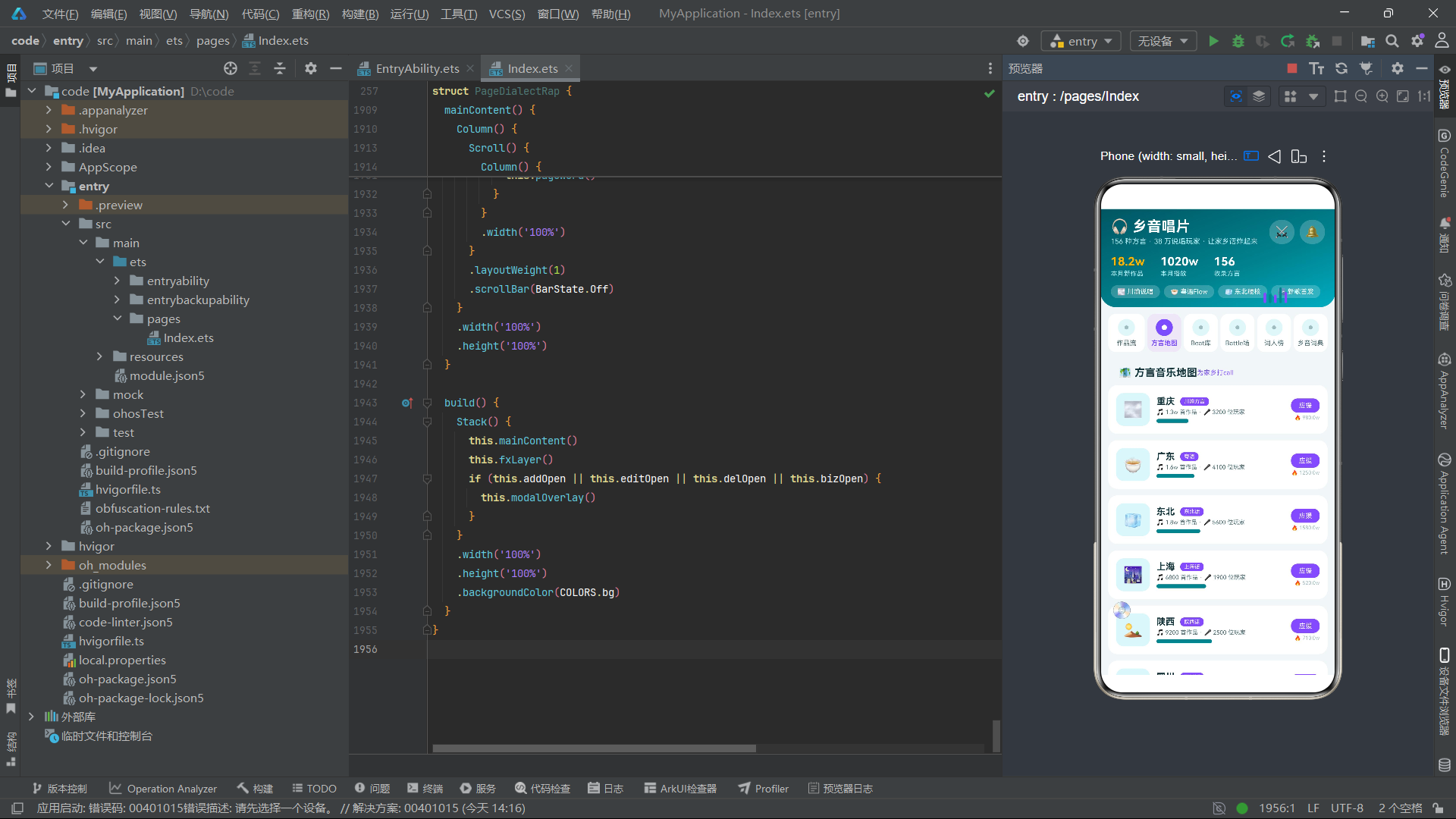
方言地图页面以省份为单位展示各方言的说唱生态。每个省份卡片包含省份名、方言标签、作品数和玩家数统计、基于r.id * 9 + 40计算的动态宽度进度条(模拟该方言的相对活跃度),以及右侧的应援按钮和热度数值。应援按钮通过supported状态切换"已应援"(绿色)和"应援"(紫色)两种形态,形成用户与方言文化的情感连接。
8.3 Beat库与Battle对战页面
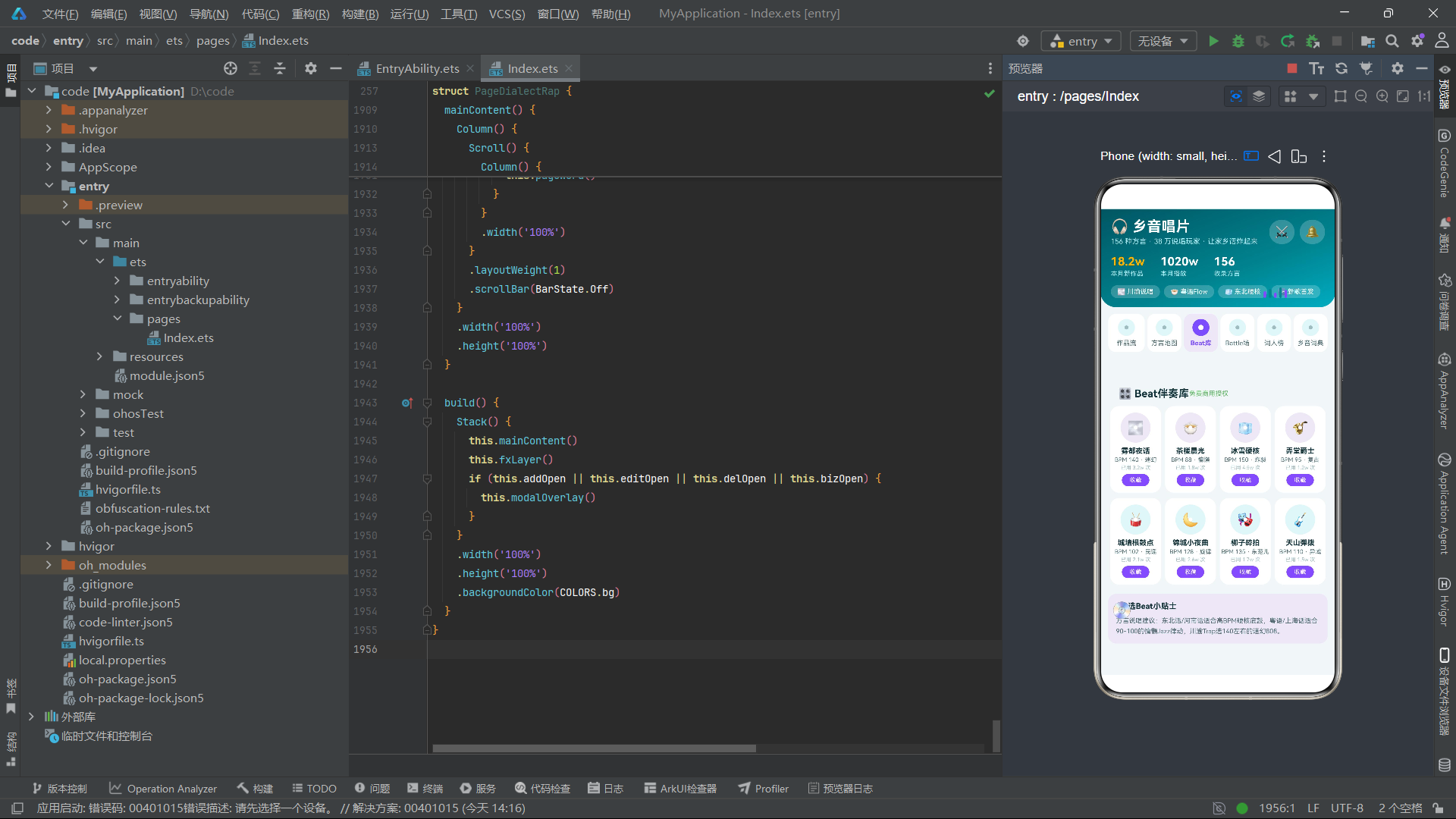
Beat库页面pageBeat将8个Beat伴奏分为上下两行4+4网格展示,每个Beat卡片包含唱片造型图标、名称、BPM值、情绪标签、使用次数和收藏按钮。页面底部附加了选Beat小贴士,根据不同方言特点推荐适配的BPM范围——东北话/河南话适合高BPM硬核底鼓,粤语/上海话适合90-100的慵懒Jazz律动,川渝Trap选140左右的迷幻808。
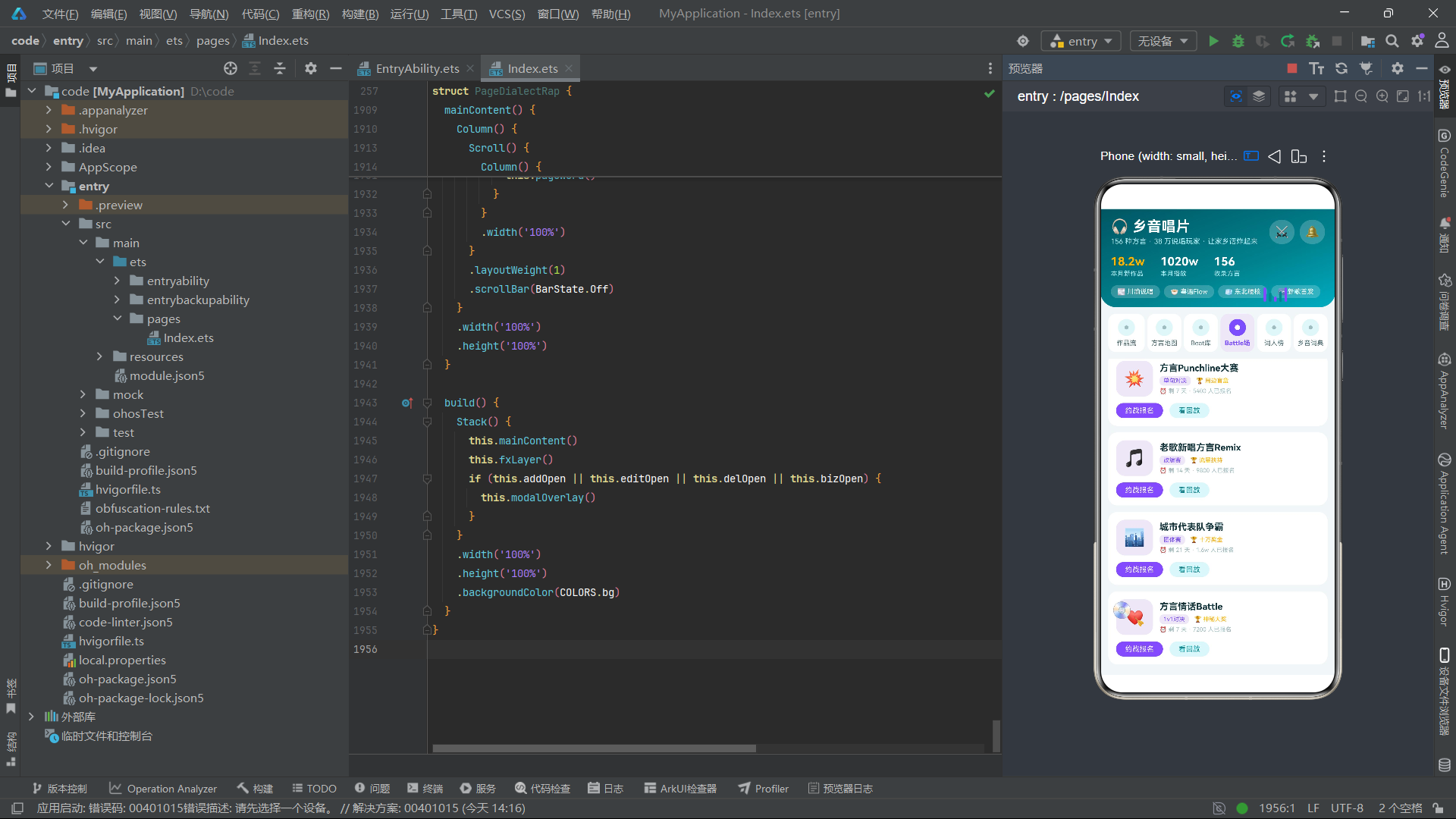
Battle对战页面pageBattle展示进行中的对战信息,每场Battle包含模式标签、奖池描述、剩余天数、报名人数和报名按钮。点击报名按钮触发Battle发起弹窗。
8.4 词人榜与乡音词典页面
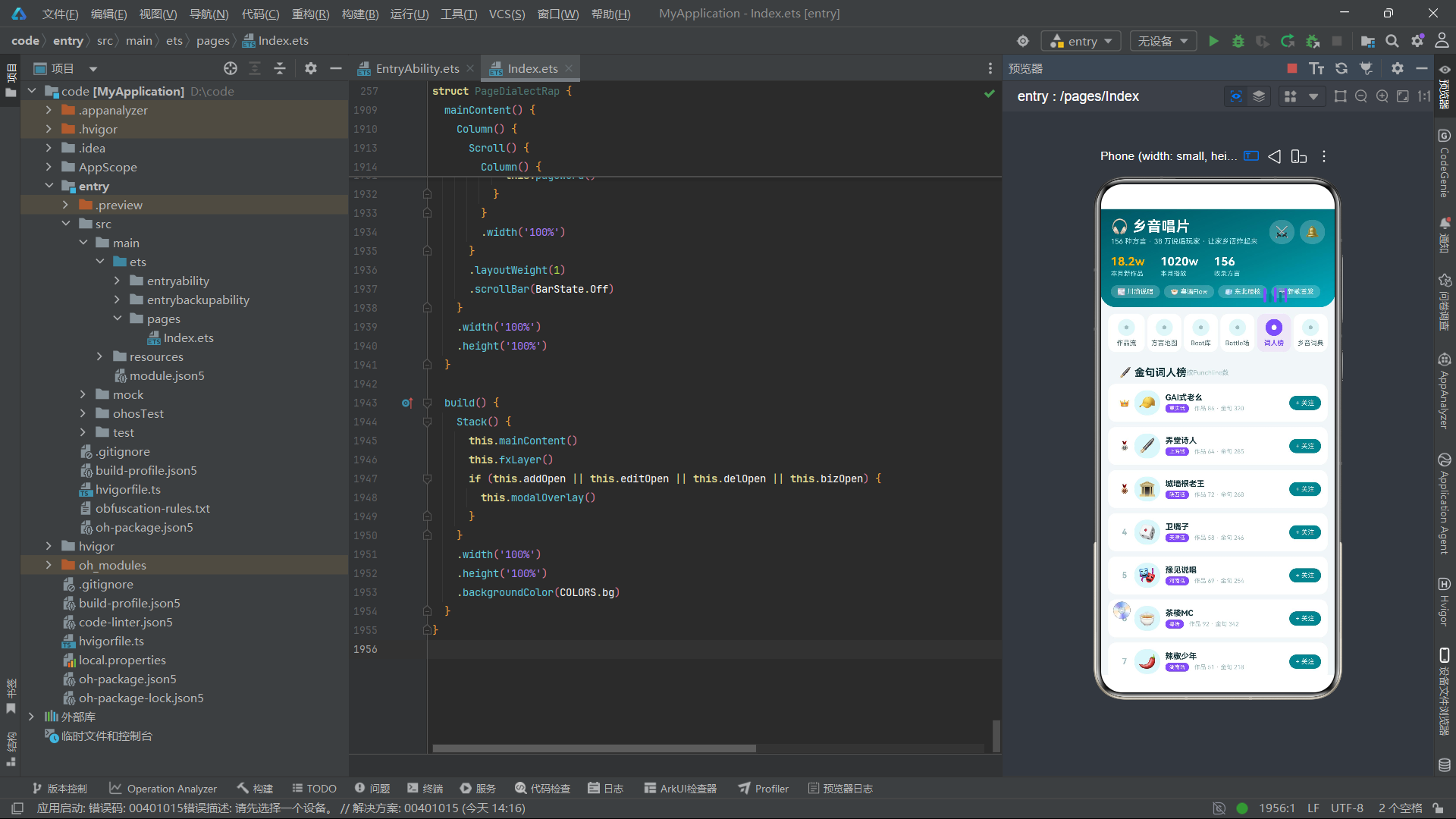
词人榜页面pageLyricist以Punchline数量为排序依据展示词人排行,前三名分别显示皇冠、银牌、铜牌emoji,其余显示序号。每个词人卡片包含方言标签、作品数、金句数和关注按钮。
乡音词典页面pageWord展示方言热词及其释义,用户可对热词进行投票。页面底部的年度热词评选进度条展示当前票数第一的热词,投票截止时票数第一的热词将印上年度限定周边。
九、弹窗组件架构
9.1 弹窗遮罩层
@Builder
modalOverlay() {
  Stack({ alignContent: Alignment.Bottom }) {
    Column()
      .width('100%')
      .height('100%')
      .backgroundColor('#66000000')
      .onClick(() => {
        this.addOpen = false;
        this.editOpen = false;
        this.delOpen = false;
        this.bizOpen = false;
      })

    Column() {
      if (this.addOpen) { modalBodyAdd() }
      if (this.editOpen) { modalBodyEdit() }
      if (this.delOpen) { modalBodyDel() }
      if (this.bizOpen) { modalBodyBiz() }
    }
    .width('92%')
    .margin({ bottom: 20 })
  }
  .width('100%')
  .height('100%')
}
弹窗遮罩层与健身应用采用相同的架构模式:Stack底部对齐叠加半透明遮罩和弹窗内容,点击遮罩关闭所有弹窗。四个if条件分支根据布尔状态变量决定渲染内容,确保同一时间只有一个弹窗可见。弹窗内容区宽度92%,底部边距20,形成从底部向上弹出的视觉效果。
9.2 发布作品弹窗
@Builder
modalBodyAdd() {
  Column() {
    Row() {
      Text('🎧 发布作品')
        .fontSize(17)
        .fontWeight(FontWeight.Bold)
        .fontColor(COLORS.textPrimary)
      Text('✕')
        .fontSize(15)
        .fontColor(COLORS.textHint)
        .margin({ left: 'auto' })
        .onClick(() => { this.addOpen = false; })
    }
    .width('100%')

    Column() {
      Text('TRACK RELEASE · 发歌卡')
        .fontSize(9)
        .fontColor(COLORS.primary)
        .letterSpacing(2)
      Text('用家乡话,唱给全世界听')
        .fontSize(10)
        .fontColor(COLORS.textSecondary)
        .margin({ top: 3 })
    }
    .width('100%')
    .padding(12)
    .backgroundColor(COLORS.primaryLight)
    .borderRadius(12)
    .margin({ top: 12 })

    Column() {
      Text('歌曲名称')
        .fontSize(12)
        .fontWeight(FontWeight.Bold)
        .fontColor(COLORS.textPrimary)
      TextInput({ placeholder: '如:川渝Trap·勒是雾都' })
        .fontSize(12)
        .placeholderFont({ size: 11 })
        .placeholderColor(COLORS.textHint)
        .padding(10)
        .backgroundColor(COLORS.bg)
        .borderRadius(10)
        .margin({ top: 6 })
        .onChange((v: string) => { this.addTitle = v; })
    }
    .width('100%')
    .alignItems(HorizontalAlign.Start)
    .margin({ top: 14 })

    // 方言选择、曲风选择、流量加持提示、操作按钮...
  }
  .width('100%')
  .padding(16)
  .backgroundColor(COLORS.cardBg)
  .borderRadius(20)
  .constraintSize({ maxHeight: '80%' })
}
发布作品弹窗以"TRACK RELEASE·发歌卡"为主题,顶部信息卡使用浅色背景展示标语"用家乡话,唱给全世界听"。表单包含歌曲名称输入框、方言选择标签(5个方言选项,选中时紫色背景白字)、曲风选择标签(5种说唱风格,选中时青色背景白字)。底部流量加持提示以浅紫色背景标签呈现"首发作品自动进入本周新歌推荐池"的运营激励信息。
9.3 编辑歌词弹窗
@Builder
modalBodyEdit() {
  Column() {
    Row() {
      Text('✍️ 编辑歌词')
        .fontSize(17)
        .fontWeight(FontWeight.Bold)
        .fontColor(COLORS.textPrimary)
      Text('✕')
        .fontSize(15)
        .fontColor(COLORS.textHint)
        .margin({ left: 'auto' })
        .onClick(() => { this.editOpen = false; })
    }
    .width('100%')

    Column() {
      Text('LYRIC CARD · 歌词卡')
        .fontSize(9)
        .fontColor(COLORS.primary)
        .letterSpacing(2)
      Text('🎵 川渝Trap·勒是雾都 · 主歌 Verse 2')
        .fontSize(11)
        .fontWeight(FontWeight.Bold)
        .fontColor(COLORS.textPrimary)
        .margin({ top: 4 })
    }
    .width('100%')
    .padding(12)
    .backgroundColor(COLORS.primaryLight)
    .borderRadius(12)
    .margin({ top: 12 })

    Column() {
      Text('押韵方式')
        .fontSize(12)
        .fontWeight(FontWeight.Bold)
        .fontColor(COLORS.textPrimary)
      Row() {
        ForEach(EDIT_RHYMES, (r: string, i: number) => {
          Text(r)
            .fontSize(11)
            .fontColor(this.editRhyme === i ? COLORS.white : COLORS.textSecondary)
            .padding({ left: 14, right: 14, top: 6, bottom: 6 })
            .backgroundColor(this.editRhyme === i ? COLORS.accent : COLORS.bg)
            .borderRadius(10)
            .margin({ right: 8 })
            .onClick(() => { this.editRhyme = i; })
        }, (r: string) => 'er' + r)
      }
      .margin({ top: 8 })
    }
    .width('100%')
    .alignItems(HorizontalAlign.Start)
    .margin({ top: 14 })

    Column() {
      Text('语速(BPM)')
        .fontSize(12)
        .fontWeight(FontWeight.Bold)
        .fontColor(COLORS.textPrimary)
      Row() {
        Text('-')
          .fontSize(16)
          .fontColor(COLORS.textSecondary)
          .padding({ left: 16, right: 16, top: 6, bottom: 6 })
          .backgroundColor(COLORS.bg)
          .borderRadius(10)
          .onClick(() => { this.decSpeed(); })
        Text(this.editSpeed.toString() + ' BPM')
          .fontSize(16)
          .fontWeight(FontWeight.Bold)
          .fontColor(COLORS.primary)
          .padding({ left: 18, right: 18 })
        Text('+')
          .fontSize(16)
          .padding({ left: 16, right: 16, top: 6, bottom: 6 })
          .backgroundColor(COLORS.bg)
          .borderRadius(10)
          .onClick(() => { this.incSpeed(); })
      }
      .margin({ top: 8 })
    }
    .width('100%')
    .alignItems(HorizontalAlign.Start)
    .margin({ top: 14 })

    // 押韵提示、操作按钮...
  }
  .width('100%')
  .padding(16)
  .backgroundColor(COLORS.cardBg)
  .borderRadius(20)
  .constraintSize({ maxHeight: '80%' })
}
编辑歌词弹窗以"LYRIC CARD·歌词卡"为主题,展示当前编辑的曲目和段落信息。表单包含押韵方式选择(双押/三押/跳押/连环押,选中时紫色背景白字)和语速BPM步进器(60-160范围,步进5)。底部押韵提示提供了方言说唱的专业知识——“当前词段检测到4处韵脚。方言韵母与普通话差异较大,建议按方言语感押韵;重庆话的「的」「勒」「嘞」可作万能语气垫字”,这种将说唱教学融入编辑工具的设计提升了产品的专业价值。
9.4 删除作品弹窗
@Builder
modalBodyDel() {
  Column() {
    Text('🗑️ 删除作品')
      .fontSize(17)
      .fontWeight(FontWeight.Bold)
      .fontColor(COLORS.danger)

    Column() {
      Text('⚠️ TRACK DELETE · 作品下架确认')
        .fontSize(9)
        .fontColor(COLORS.danger)
        .letterSpacing(2)
    }
    .width('100%')
    .padding(10)
    .backgroundColor(COLORS.accentLight)
    .borderRadius(10)
    .margin({ top: 14 })

    Text('作品下架后,评论区、弹幕和收藏将一并清空,已计入榜单的播放数据将被移除,收益按当月已结算部分照常发放。此操作不可恢复,确定下架吗?')
      .fontSize(12)
      .fontColor(COLORS.textSecondary)
      .margin({ top: 14 })
      .lineHeight(20)

    Row() {
      Column() {
        Text('89w')
          .fontSize(16)
          .fontWeight(FontWeight.Bold)
          .fontColor(COLORS.textPrimary)
        Text('累计播放')
          .fontSize(9)
          .fontColor(COLORS.textHint)
          .margin({ top: 2 })
      }
      .layoutWeight(1)
      .padding({ top: 10, bottom: 10 })
      .backgroundColor(COLORS.bg)
      .borderRadius(10)

      Column() {
        Text('7.6w')
          .fontSize(16)
          .fontWeight(FontWeight.Bold)
          .fontColor(COLORS.textPrimary)
        Text('获赞')
          .fontSize(9)
          .fontColor(COLORS.textHint)
          .margin({ top: 2 })
      }
      .layoutWeight(1)
      .padding({ top: 10, bottom: 10 })
      .backgroundColor(COLORS.bg)
      .borderRadius(10)
      .margin({ left: 8 })

      Column() {
        Text('No.3')
          .fontSize(16)
          .fontWeight(FontWeight.Bold)
          .fontColor(COLORS.accent)
        Text('川渝榜排名')
          .fontSize(9)
          .fontColor(COLORS.textHint)
          .margin({ top: 2 })
      }
      .layoutWeight(1)
      .padding({ top: 10, bottom: 10 })
      .backgroundColor(COLORS.bg)
      .borderRadius(10)
      .margin({ left: 8 })
    }
    .width('100%')
    .margin({ top: 14 })

    // 取消与确认下架按钮...
  }
  .width('100%')
  .padding(16)
  .backgroundColor(COLORS.cardBg)
  .borderRadius(20)
  .constraintSize({ maxHeight: '80%' })
}
删除作品弹窗以警示性设计呈现,标题使用红色字体,顶部使用浅紫色背景的"TRACK DELETE"警示标签。正文详细说明了下架后果:评论区/弹幕/收藏清空、榜单播放数据移除、收益按已结算部分发放。三栏数据卡展示"89w累计播放"、"7.6w获赞"和"No.3川渝榜排名"的具体影响数据,其中"No.3"排名数字使用强调紫色突出,帮助用户感知删除操作的价值损失。
9.5 发起Battle弹窗
发起Battle弹窗modalBodyBiz以"RAP BATTLE·约战卡"为主题,顶部信息卡展示对战标题和奖池描述。表单包含对战模式选择(1v1对决/即兴Cypher/团体接力,选中时紫色背景白字)和回合数步进器(1-7范围,步进1)。底部规则提示"报名即视为同意赛规,禁止使用攻击性词汇"和"每回合60s"的赛制信息以浅紫色背景标签呈现。
十、底部导航栏与主布局
@Builder
bottomBar() {
  Row() {
    Column() {
      Text('🎧')
        .fontSize(20)
      Text('作品')
        .fontSize(10)
        .fontColor(this.bottomTab === 0 ? COLORS.primary : COLORS.textHint)
        .margin({ top: 2 })
    }
    .layoutWeight(1)
    .onClick(() => { this.bottomTab = 0; this.currentTab = 0; })

    Column() {
      Text('🗺️')
        .fontSize(20)
      Text('方言地图')
        .fontSize(10)
        .fontColor(this.bottomTab === 1 ? COLORS.primary : COLORS.textHint)
        .margin({ top: 2 })
    }
    .layoutWeight(1)
    .onClick(() => { this.bottomTab = 1; this.currentTab = 1; })

    Column() {
      Column() {
        Text('➕')
          .fontSize(22)
          .fontWeight(FontWeight.Bold)
          .fontColor(COLORS.white)
      }
      .width(48)
      .height(48)
      .justifyContent(FlexAlign.Center)
      .backgroundColor(COLORS.accent)
      .borderRadius(24)
      .offset({ y: -14 })
      .onClick(() => { this.addOpen = true; })
    }
    .layoutWeight(1)

    Column() {
      Text('⚔️')
        .fontSize(20)
      Text('Battle')
        .fontSize(10)
        .fontColor(this.bottomTab === 3 ? COLORS.primary : COLORS.textHint)
        .margin({ top: 2 })
    }
    .layoutWeight(1)
    .onClick(() => { this.bottomTab = 3; this.currentTab = 3; })

    Column() {
      Text('🎤')
        .fontSize(20)
      Text('我的主页')
        .fontSize(10)
        .fontColor(this.bottomTab === 4 ? COLORS.primary : COLORS.textHint)
        .margin({ top: 2 })
    }
    .layoutWeight(1)
    .onClick(() => { this.bottomTab = 4; this.currentTab = 5; })
  }
  .width('100%')
  .padding({ top: 8, bottom: 8 })
  .backgroundColor(COLORS.cardBg)
  .borderRadius({ topLeft: 20, topRight: 20 })
}
底部导航栏采用5Tab布局,中间为悬浮的圆形创建按钮。值得注意的是,创建按钮使用强调紫色COLORS.accent作为背景色(而非健身应用中使用的主色),与导航Tab选中态的紫色形成色彩呼应,强化了应用的紫色品牌色感。创建按钮通过offset({ y: -14 })向上偏移形成悬浮效果,点击时直接触发发布作品弹窗。五个Tab分别对应作品流(currentTab=0)、方言地图(currentTab=1)、创建按钮(触发弹窗)、Battle场(currentTab=3)和我的主页(currentTab=5映射到乡音词典),实现了底部Tab与顶部导航Tab的联动控制。
主布局与build方法
@Builder
mainContent() {
  Column() {
    header()
    subNav()
    Scroll() {
      Column() {
        if (this.currentTab === 0) { pageTrack() }
        if (this.currentTab === 1) { pageRegion() }
        if (this.currentTab === 2) { pageBeat() }
        if (this.currentTab === 3) { pageBattle() }
        if (this.currentTab === 4) { pageLyricist() }
        if (this.currentTab === 5) { pageWord() }
      }
      .width('100%')
    }
    .layoutWeight(1)
    .scrollBar(BarState.Off)
    bottomBar()
  }
  .width('100%')
  .height('100%')
}

build() {
  Stack() {
    mainContent()
    fxLayer()
    if (this.addOpen || this.editOpen || this.delOpen || this.bizOpen) {
      modalOverlay()
    }
  }
  .width('100%')
  .height('100%')
  .backgroundColor(COLORS.bg)
}
build方法使用Stack将三层UI叠加:底层为主内容区、中层为特效动画层、顶层为弹窗遮罩层(条件渲染)。Scroll包裹6个内容页面通过if条件路由切换,scrollBar(BarState.Off)隐藏滚动条,layoutWeight(1)占满头部和底部栏之间的剩余空间。这种三层Stack叠加架构是ArkTS中实现沉浸式动效和弹窗交互的标准模式。
十一、架构流程图
十二、数据模型对比表格
| 数据模型 | 服务页面 | 核心字段 | 交互状态 | 对应弹窗 |
|---|---|---|---|---|
| TrackItem | 作品流 | title, dialect, style, rapper, plays, likes | liked (点赞) | modalBodyDel (删除作品) / modalBodyEdit (编辑歌词) |
| RegionItem | 方言地图 | province, dialect, tracks, rappers, hot | supported (应援) | 无 |
| BeatItem | Beat库 | name, bpm, mood, uses | taken (收藏) | 无 |
| BattleItem | Battle场 | title, mode, prize, days, entrants | joined (报名) | modalBodyBiz (发起Battle) |
| LyricistItem | 词人榜 | name, dialect, works, punchlines | followed (关注) | 无 |
| WordItem | 乡音词典 | word, meaning, dialect, votes | voted (投票) | 无 |
| ChartItem | 作品流图表 | month, tracks, plays | 无 | 无 |
十三、技术总结与架构思考
13.1 唱片圆标设计的视觉一致性
本应用在视觉设计上最突出的特点是唱片圆标造型的全局一致性。导航Tab的6个选项使用"外圆+内圆"的Stack叠加结构模拟唱片正面视图,作品流列表项的左侧图标同样采用48px的三层Stack(外圆背景+emoji+中心白点),这种跨层级的视觉语言统一性极大地增强了应用的品牌识别度。在HarmonyOS ArkTS中,Stack组件天然支持子元素的层叠布局,配合Circle图形组件可以轻松实现这种复合圆形造型,无需引入图片资源或自定义绘制。
13.2 错频音波动效的实现原理
特效层的5个音波竖条通过不同的取模周期(% 4、% 3、% 5、% 2、% 4)实现了错频波动效果。这种设计的数学本质是利用不同的取模周期产生不同频率的周期性高度变化,类似于真实音频可视化器中不同频段柱体的独立跳动。每个柱体的高度公式为基础高度 + (fxTick % N) * 增量系数,基础高度确保柱体始终可见,取模部分产生周期性变化,增量系数控制振幅。颜色交替使用强调紫色和主色青色,在视觉上形成双色律动感。这种纯数学驱动的动效方案无需任何音频分析API或复杂动画框架,在HarmonyOS 6.1.1的实际运行中表现出极佳的性能和流畅度。
13.3 弹窗表单的状态管理策略
四个弹窗的表单状态全部声明在主组件中,通过@State管理。这种集中式状态管理策略的优势在于:所有弹窗的状态变化都能直接触发依赖该状态的UI重新渲染,无需额外的状态提升或跨组件通信。每个弹窗的选项数组(如ADD_DIALECTS、EDIT_RHYMES、BIZ_MODES)作为模块级常量声明,在ForEach渲染时直接引用。选中状态通过索引变量(addDialect、editRhyme、bizMode)控制,点击选项时更新索引值即可。这种"常量数据+索引状态"的模式在表单项数量固定的场景中简洁高效,是ArkTS弹窗开发的推荐范式。
13.4 键值追踪与渲染性能
ForEach的键值设计在本应用中同样遵循了"包含变化字段"的原则。例如作品流的键值为'tk' + t.id.toString() + '_' + t.liked.toString(),将liked状态纳入键值,确保点赞状态变化时对应的列表项能被正确识别和更新。方言地图的键值'rg' + r.id.toString() + '_' + r.supported.toString()包含应援状态,Beat库的键值'bt' + b.id.toString() + '_' + b.taken.toString()包含收藏状态。这种一致的键值设计模式贯穿了所有7个列表渲染场景,为应用的响应式性能提供了可靠保障。
安装DevEco Studio程序

选择目标安装目录:

设置环境变量,但是需要重启一下:

新建一个空白模板:

设置API为24的模板项目:
初始化项目,自动下载相关依赖:

完整代码:
// 方言说唱·家乡话音乐社区「乡音唱片」(快手app类)
// 风格:电音青+落日紫;内容tab:6个单排唱片圆标式(顶部小圆唱片,选中的唱片实心变色+中心小孔);底部5主tab
// 弹框:发布作品(发歌卡)/ 编辑歌词(歌词卡)/ 删除作品(青紫警示卡)/ 发起Battle(约战卡)
// 特效:唱片旋转 + 音波竖条波动
interface ColorPalette {
primary: string;
primaryLight: string;
primaryDark: string;
accent: string;
accentLight: string;
bg: string;
cardBg: string;
textPrimary: string;
textSecondary: string;
textHint: string;
border: string;
success: string;
warning: string;
danger: string;
white: string;
gold: string;
}
const COLORS: ColorPalette = {
primary: '#00838F',
primaryLight: '#E0F7FA',
primaryDark: '#005662',
accent: '#7C4DFF',
accentLight: '#EDE7F6',
bg: '#F2F7F8',
cardBg: '#FFFFFF',
textPrimary: '#12343A',
textSecondary: '#4E6E74',
textHint: '#9FBCC1',
border: '#DCEAEC',
success: '#66BB6A',
warning: '#FFA726',
danger: '#EF5350',
white: '#FFFFFF',
gold: '#FFB300'
};
@Observed
class TrackItem {
id: number = 0;
title: string = '';
icon: string = '';
dialect: string = '';
style: string = '';
rapper: string = '';
plays: number = 0;
likes: number = 0;
liked: number = 0;
constructor(id: number, title: string, icon: string, dialect: string, style: string, rapper: string, plays: number, likes: number, liked: number) {
this.id = id; this.title = title; this.icon = icon; this.dialect = dialect; this.style = style;
this.rapper = rapper; this.plays = plays; this.likes = likes; this.liked = liked;
}
}
@Observed
class RegionItem {
id: number = 0;
province: string = '';
dialect: string = '';
icon: string = '';
tracks: number = 0;
rappers: number = 0;
hot: number = 0;
supported: number = 0;
constructor(id: number, province: string, dialect: string, icon: string, tracks: number, rappers: number, hot: number, supported: number) {
this.id = id; this.province = province; this.dialect = dialect; this.icon = icon;
this.tracks = tracks; this.rappers = rappers; this.hot = hot; this.supported = supported;
}
}
@Observed
class BeatItem {
id: number = 0;
name: string = '';
icon: string = '';
bpm: number = 0;
mood: string = '';
uses: number = 0;
taken: number = 0;
constructor(id: number, name: string, icon: string, bpm: number, mood: string, uses: number, taken: number) {
this.id = id; this.name = name; this.icon = icon; this.bpm = bpm; this.mood = mood;
this.uses = uses; this.taken = taken;
}
}
@Observed
class BattleItem {
id: number = 0;
title: string = '';
icon: string = '';
mode: string = '';
prize: string = '';
days: number = 0;
entrants: number = 0;
joined: number = 0;
constructor(id: number, title: string, icon: string, mode: string, prize: string, days: number, entrants: number, joined: number) {
this.id = id; this.title = title; this.icon = icon; this.mode = mode; this.prize = prize;
this.days = days; this.entrants = entrants; this.joined = joined;
}
}
@Observed
class LyricistItem {
id: number = 0;
name: string = '';
avatar: string = '';
dialect: string = '';
works: number = 0;
punchlines: number = 0;
followed: number = 0;
constructor(id: number, name: string, avatar: string, dialect: string, works: number, punchlines: number, followed: number) {
this.id = id; this.name = name; this.avatar = avatar; this.dialect = dialect; this.works = works;
this.punchlines = punchlines; this.followed = followed;
}
}
@Observed
class WordItem {
id: number = 0;
word: string = '';
meaning: string = '';
dialect: string = '';
votes: number = 0;
voted: number = 0;
constructor(id: number, word: string, meaning: string, dialect: string, votes: number, voted: number) {
this.id = id; this.word = word; this.meaning = meaning; this.dialect = dialect;
this.votes = votes; this.voted = voted;
}
}
@Observed
class ChartItem {
id: number = 0;
month: string = '';
tracks: number = 0;
plays: number = 0;
constructor(id: number, month: string, tracks: number, plays: number) {
this.id = id; this.month = month; this.tracks = tracks; this.plays = plays;
}
}
const TRACK_LIST: TrackItem[] = [
new TrackItem(1, '川渝Trap·勒是雾都', '🌫️', '重庆话', 'Trap', 'GAI式老幺', 890000, 76000, 0),
new TrackItem(2, '粤语Flow·饮茶先啦', '🍵', '粤语', 'BoomBap', '茶楼MC', 670000, 52000, 0),
new TrackItem(3, '东北喊麦·这嘎达贼拉硬', '🧊', '东北话', 'Hardcore', '老铁666', 1200000, 98000, 0),
new TrackItem(4, '沪上Jazz·侬晓得伐', '🌃', '上海话', 'Jazz Rap', '弄堂诗人', 340000, 28000, 0),
new TrackItem(5, '陕西民谣说唱·嘹咋咧', '🏜️', '陕西话', '民谣说唱', '城墙根老王', 560000, 45000, 0),
new TrackItem(6, '川蜀竹琴·巴适得板', '🎋', '四川话', 'Melodic', '锦城小调', 430000, 36000, 0),
new TrackItem(7, '河南梆子Rap·中不中', '🎭', '河南话', '东范儿', '豫见说唱', 780000, 61000, 0),
new TrackItem(8, '湘韵说唱·恰饭冒', '🌶️', '湖南话', 'Trap', '辣椒少年', 390000, 31000, 0),
new TrackItem(9, '津味快板·倍儿哏儿', '🎲', '天津话', '快板说唱', '卫嘴子', 620000, 50000, 0),
new TrackItem(10, '客家山歌·涯系客家人', '⛰️', '客家话', '山歌新编', '围屋之声', 280000, 22000, 0),
new TrackItem(11, '温州鼓词·难懂の浪漫', '🌊', '温州话', '鼓词说唱', '瓯江游吟', 210000, 18000, 0),
new TrackItem(12, '新疆弹唱·亚克西', '🎸', '新疆话', '弹唱Rap', '天山节拍', 520000, 42000, 0)
];
const REGION_LIST: RegionItem[] = [
new RegionItem(1, '重庆', '川渝方言', '🌫️', 12800, 3200, 9800000, 0),
new RegionItem(2, '广东', '粤语', '🍵', 15600, 4100, 12500000, 0),
new RegionItem(3, '东北', '东北话', '🧊', 18200, 5600, 15800000, 0),
new RegionItem(4, '上海', '上海话', '🌃', 6800, 1900, 5200000, 0),
new RegionItem(5, '陕西', '陕西话', '🏜️', 9200, 2500, 7100000, 0),
new RegionItem(6, '四川', '四川话', '🎋', 11400, 3000, 8600000, 0),
new RegionItem(7, '河南', '河南话', '🎭', 13900, 3700, 10600000, 0),
new RegionItem(8, '湖南', '湖南话', '🌶️', 7600, 2100, 5800000, 0),
new RegionItem(9, '天津', '天津话', '🎲', 5900, 1600, 4500000, 0),
new RegionItem(10, '新疆', '新疆话', '🎸', 8400, 2200, 6300000, 0)
];
const BEAT_LIST: BeatItem[] = [
new BeatItem(1, '雾都夜话', '🌫️', 140, '迷幻', 32000, 0),
new BeatItem(2, '茶楼晨光', '🍵', 88, '慵懒', 18000, 0),
new BeatItem(3, '冰雪硬核', '🧊', 150, '炸裂', 45000, 0),
new BeatItem(4, '弄堂爵士', '🎷', 95, '复古', 12000, 0),
new BeatItem(5, '城墙根鼓点', '🥁', 102, '民谣', 21000, 0),
new BeatItem(6, '锦城小夜曲', '🌙', 128, '旋律', 26000, 0),
new BeatItem(7, '梆子碎拍', '🎭', 135, '东范儿', 17000, 0),
new BeatItem(8, '天山弹拨', '🎸', 110, '异域', 15000, 0)
];
const BATTLE_LIST: BattleItem[] = [
new BattleItem(1, '川渝VS东北方言对决', '⚔️', '1v1接力', '万元奖金', 3, 8600, 0),
new BattleItem(2, '家乡话Freestyle之夜', '🎤', '即兴Cypher', '官方签约', 5, 12000, 0),
new BattleItem(3, '方言Punchline大赛', '💥', '单句对决', '周边盲盒', 7, 5400, 0),
new BattleItem(4, '老歌新唱方言Remix', '🎵', '改编赛', '流量扶持', 14, 9800, 0),
new BattleItem(5, '城市代表队争霸', '🏙️', '团体赛', '十万奖金', 21, 15600, 0),
new BattleItem(6, '方言情话Battle', '💘', '1v1对决', '神秘大奖', 7, 7200, 0)
];
const LYRICIST_LIST: LyricistItem[] = [
new LyricistItem(1, 'GAI式老幺', '🧢', '重庆话', 86, 320, 0),
new LyricistItem(2, '弄堂诗人', '🖋️', '上海话', 64, 285, 0),
new LyricistItem(3, '城墙根老王', '🏛️', '陕西话', 72, 268, 0),
new LyricistItem(4, '卫嘴子', '🎲', '天津话', 58, 246, 0),
new LyricistItem(5, '豫见说唱', '🎭', '河南话', 69, 254, 0),
new LyricistItem(6, '茶楼MC', '🍵', '粤语', 92, 342, 0),
new LyricistItem(7, '辣椒少年', '🌶️', '湖南话', 51, 218, 0),
new LyricistItem(8, '天山节拍', '🎸', '新疆话', 47, 196, 0),
new LyricistItem(9, '围屋之声', '⛰️', '客家话', 43, 178, 0),
new LyricistItem(10, '瓯江游吟', '🌊', '温州话', 38, 165, 0)
];
const WORD_LIST: WordItem[] = [
new WordItem(1, '巴适', '舒服、棒极了', '四川话', 18600, 0),
new WordItem(2, '得劲', '舒服、带劲', '河南话', 15200, 0),
new WordItem(3, '贼拉', '非常、特别', '东北话', 21000, 0),
new WordItem(4, '侬好', '你好', '上海话', 9800, 0),
new WordItem(5, '嘹咋咧', '好得很', '陕西话', 13500, 0),
new WordItem(6, '哏儿', '有趣、滑稽', '天津话', 11200, 0),
new WordItem(7, '犀利', '厉害、出色', '粤语', 16800, 0),
new WordItem(8, '恰饭', '吃饭', '湖南话', 14500, 0)
];
const CHART_LIST: ChartItem[] = [
new ChartItem(1, '3月', 8600, 4200000),
new ChartItem(2, '4月', 10200, 5100000),
new ChartItem(3, '5月', 11800, 6300000),
new ChartItem(4, '6月', 13400, 7200000),
new ChartItem(5, '7月', 15900, 8800000),
new ChartItem(6, '8月', 18200, 10200000)
];
const ADD_DIALECTS: string[] = ['🌫️ 重庆话', '🍵 粤语', '🧊 东北话', '🌃 上海话', '🏜️ 陕西话'];
const ADD_STYLES: string[] = ['Trap', 'BoomBap', 'Jazz说唱', '民谣说唱', 'Hardcore'];
const EDIT_RHYMES: string[] = ['双押', '三押', '跳押', '连环押'];
const BIZ_MODES: string[] = ['⚔️ 1v1对决', '🎤 即兴Cypher', '👥 团体接力'];
function numText(n: number): string {
if (n >= 10000) {
return (n / 10000).toFixed(1) + 'w';
}
return n.toString();
}
function maxTracks(): number {
let m: number = 0;
for (let i: number = 0; i < CHART_LIST.length; i++) {
if (CHART_LIST[i].tracks > m) {
m = CHART_LIST[i].tracks;
}
}
return m;
}
function barHeight(v: number): number {
return Math.round(v * 100 / maxTracks());
}
@Entry
@Component
struct PageDialectRap {
@State currentTab: number = 0;
@State bottomTab: number = 0;
@State trackList: TrackItem[] = TRACK_LIST;
@State regionList: RegionItem[] = REGION_LIST;
@State beatList: BeatItem[] = BEAT_LIST;
@State battleList: BattleItem[] = BATTLE_LIST;
@State lyricistList: LyricistItem[] = LYRICIST_LIST;
@State wordList: WordItem[] = WORD_LIST;
@State addOpen: boolean = false;
@State editOpen: boolean = false;
@State delOpen: boolean = false;
@State bizOpen: boolean = false;
@State addTitle: string = '';
@State addDialect: number = 0;
@State addStyle: number = 0;
@State editRhyme: number = 0;
@State editSpeed: number = 90;
@State delIndex: number = 0;
@State bizMode: number = 0;
@State bizRounds: number = 3;
@State fxTick: number = 0;
private timer: number = -1;
aboutToAppear(): void {
this.timer = setInterval(() => {
this.fxTick += 1;
}, 105);
}
aboutToDisappear(): void {
if (this.timer >= 0) {
clearInterval(this.timer);
}
}
doAdd(): void {
if (this.addTitle.length > 0) {
this.trackList.unshift(new TrackItem(995, this.addTitle, '🎵', ADD_DIALECTS[this.addDialect].substring(3), ADD_STYLES[this.addStyle], '我', 0, 0, 0));
}
this.addOpen = false;
}
doEdit(): void {
if (this.trackList.length > 0) {
this.trackList[0].style = ADD_STYLES[this.editRhyme % 5];
this.trackList.splice(0, 1, this.trackList[0]);
}
this.editOpen = false;
}
doDel(): void {
if (this.delIndex >= 0 && this.delIndex < this.trackList.length) {
this.trackList.splice(this.delIndex, 1);
}
this.delOpen = false;
}
doBiz(): void {
if (this.battleList.length > 0) {
this.battleList[0].joined = 1;
this.battleList.splice(0, 1, this.battleList[0]);
}
this.bizOpen = false;
}
incSpeed(): void {
if (this.editSpeed < 160) {
this.editSpeed += 5;
}
}
decSpeed(): void {
if (this.editSpeed > 60) {
this.editSpeed -= 5;
}
}
incRounds(): void {
if (this.bizRounds < 7) {
this.bizRounds += 1;
}
}
decRounds(): void {
if (this.bizRounds > 1) {
this.bizRounds -= 1;
}
}
@Builder
fxLayer() {
Column() {
Text('💿')
.fontSize(24)
.rotate({ angle: this.fxTick * 18, centerX: '50%', centerY: '50%' })
.position({ x: 18, y: 600 })
Row() {
Column()
.width(4)
.height(10 + (this.fxTick % 4) * 6)
.borderRadius(2)
.backgroundColor(COLORS.accent)
Column()
.width(4)
.height(14 + (this.fxTick % 3) * 7)
.borderRadius(2)
.backgroundColor(COLORS.primary)
.margin({ left: 4 })
Column()
.width(4)
.height(8 + (this.fxTick % 5) * 5)
.borderRadius(2)
.backgroundColor(COLORS.accent)
.margin({ left: 4 })
Column()
.width(4)
.height(16 + (this.fxTick % 2) * 8)
.borderRadius(2)
.backgroundColor(COLORS.primary)
.margin({ left: 4 })
Column()
.width(4)
.height(12 + (this.fxTick % 4) * 5)
.borderRadius(2)
.backgroundColor(COLORS.accent)
.margin({ left: 4 })
}
.alignItems(VerticalAlign.Bottom)
.position({ x: 250, y: 120 })
.hitTestBehavior(HitTestMode.None)
}
.width('100%')
.height('100%')
.hitTestBehavior(HitTestMode.None)
.position({ x: 0, y: 0 })
}
@Builder
header() {
Column() {
Row() {
Column() {
Text('🎧 乡音唱片')
.fontSize(22)
.fontWeight(FontWeight.Bold)
.fontColor(COLORS.white)
Text('156 种方言 · 38 万说唱玩家 · 让家乡话炸起来')
.fontSize(11)
.fontColor('#B2EBF2')
.margin({ top: 3 })
}
.alignItems(HorizontalAlign.Start)
Row() {
Text('⚔️')
.fontSize(18)
.padding(8)
.backgroundColor('#33FFFFFF')
.borderRadius(18)
.onClick(() => {
this.bizOpen = true;
})
Text('🔔')
.fontSize(18)
.padding(8)
.backgroundColor('#33FFFFFF')
.borderRadius(18)
.margin({ left: 8 })
}
}
.width('100%')
.justifyContent(FlexAlign.SpaceBetween)
.padding({ left: 16, right: 16, top: 14 })
Row() {
Column() {
Text('18.2w')
.fontSize(18)
.fontWeight(FontWeight.Bold)
.fontColor(COLORS.gold)
Text('本月新作品')
.fontSize(10)
.fontColor('#B2EBF2')
.margin({ top: 2 })
}
.alignItems(HorizontalAlign.Start)
Column() {
Text('1020w')
.fontSize(18)
.fontWeight(FontWeight.Bold)
.fontColor(COLORS.white)
Text('本月播放')
.fontSize(10)
.fontColor('#B2EBF2')
.margin({ top: 2 })
}
.alignItems(HorizontalAlign.Start)
.margin({ left: 24 })
Column() {
Text('156')
.fontSize(18)
.fontWeight(FontWeight.Bold)
.fontColor(COLORS.white)
Text('收录方言')
.fontSize(10)
.fontColor('#B2EBF2')
.margin({ top: 2 })
}
.alignItems(HorizontalAlign.Start)
.margin({ left: 24 })
}
.width('100%')
.padding({ left: 16, top: 14 })
Row() {
Text('🌫️ 川渝说唱')
.fontSize(10)
.fontColor(COLORS.white)
.padding({ left: 10, right: 10, top: 4, bottom: 4 })
.backgroundColor('#33FFFFFF')
.borderRadius(12)
Text('🍵 粤语Flow')
.fontSize(10)
.fontColor(COLORS.white)
.padding({ left: 10, right: 10, top: 4, bottom: 4 })
.backgroundColor('#33FFFFFF')
.borderRadius(12)
.margin({ left: 6 })
Text('🧊 东北硬核')
.fontSize(10)
.fontColor(COLORS.white)
.padding({ left: 10, right: 10, top: 4, bottom: 4 })
.backgroundColor('#33FFFFFF')
.borderRadius(12)
.margin({ left: 6 })
Text('🆕 新歌首发')
.fontSize(10)
.fontColor(COLORS.white)
.padding({ left: 10, right: 10, top: 4, bottom: 4 })
.backgroundColor('#33FFFFFF')
.borderRadius(12)
.margin({ left: 6 })
}
.width('100%')
.padding({ left: 16, top: 12, bottom: 14 })
}
.width('100%')
.linearGradient({
angle: 160,
colors: [['#005662', 0], ['#00838F', 0.6], ['#00ACC1', 1]]
})
.borderRadius({ bottomLeft: 24, bottomRight: 24 })
}
@Builder
subNav() {
Row() {
ForEach(['作品流', '方言地图', 'Beat库', 'Battle场', '词人榜', '乡音词典'], (name: string, idx: number) => {
Column() {
Stack() {
Circle()
.width(26)
.height(26)
.fill(idx === this.currentTab ? COLORS.accent : COLORS.primaryLight)
if (idx === this.currentTab) {
Circle()
.width(8)
.height(8)
.fill(COLORS.white)
} else {
Circle()
.width(6)
.height(6)
.fill(COLORS.textHint)
}
}
.width(26)
.height(26)
Text(name)
.fontSize(10)
.fontWeight(idx === this.currentTab ? FontWeight.Bold : FontWeight.Normal)
.fontColor(idx === this.currentTab ? COLORS.accent : COLORS.textSecondary)
.margin({ top: 5 })
}
.layoutWeight(1)
.alignItems(HorizontalAlign.Center)
.padding({ top: 8, bottom: 8 })
.backgroundColor(idx === this.currentTab ? COLORS.accentLight : COLORS.cardBg)
.borderRadius(12)
.margin({ left: idx === 0 ? 0 : 4 })
.onClick(() => {
this.currentTab = idx;
})
}, (name: string) => 'nav' + name)
}
.width('100%')
.padding({ left: 12, right: 12, top: 10, bottom: 10 })
.backgroundColor(COLORS.bg)
}
@Builder
pageTrack() {
Column() {
Row() {
Text('🔥 新歌首发')
.fontSize(16)
.fontWeight(FontWeight.Bold)
.fontColor(COLORS.textPrimary)
Text('换一批')
.fontSize(11)
.fontColor(COLORS.primary)
.margin({ left: 'auto' })
.onClick(() => {
if (this.trackList.length > 2) {
let tail: TrackItem = this.trackList[this.trackList.length - 1];
this.trackList.splice(this.trackList.length - 1, 1);
this.trackList.splice(0, 0, tail);
}
})
}
.width('100%')
.padding({ left: 16, right: 16, top: 12 })
ForEach(this.trackList, (t: TrackItem) => {
Column() {
Row() {
Stack() {
Circle()
.width(48)
.height(48)
.fill(COLORS.primaryLight)
Text(t.icon)
.fontSize(22)
Circle()
.width(7)
.height(7)
.fill(COLORS.white)
}
.width(48)
.height(48)
Column() {
Text(t.title)
.fontSize(13)
.fontWeight(FontWeight.Bold)
.fontColor(COLORS.textPrimary)
.maxLines(1)
Row() {
Text(t.dialect)
.fontSize(8)
.fontColor(COLORS.white)
.padding({ left: 6, right: 6, top: 2, bottom: 2 })
.backgroundColor(COLORS.accent)
.borderRadius(6)
Text(t.style)
.fontSize(8)
.fontColor(COLORS.primary)
.padding({ left: 6, right: 6, top: 2, bottom: 2 })
.backgroundColor(COLORS.primaryLight)
.borderRadius(6)
.margin({ left: 6 })
}
.margin({ top: 4 })
Text('🎤 ' + t.rapper + ' · ▶ ' + numText(t.plays))
.fontSize(9)
.fontColor(COLORS.textHint)
.margin({ top: 3 })
}
.alignItems(HorizontalAlign.Start)
.layoutWeight(1)
.margin({ left: 10 })
Column() {
Text(t.liked === 1 ? '❤️' : '🤍')
.fontSize(19)
.onClick(() => {
t.liked = t.liked === 1 ? 0 : 1;
this.trackList.splice(0, 1, this.trackList[0]);
})
Text(numText(t.likes))
.fontSize(8)
.fontColor(COLORS.textHint)
.margin({ top: 2 })
}
.alignItems(HorizontalAlign.Center)
}
.width('100%')
Row() {
Text('🗑️ 删除')
.fontSize(9)
.fontColor(COLORS.danger)
.padding({ left: 8, right: 8, top: 3, bottom: 3 })
.backgroundColor(COLORS.accentLight)
.borderRadius(6)
.onClick(() => {
this.delIndex = t.id - 1;
this.delOpen = true;
})
Text('✍️ 改词')
.fontSize(9)
.fontColor(COLORS.primary)
.padding({ left: 8, right: 8, top: 3, bottom: 3 })
.backgroundColor(COLORS.primaryLight)
.borderRadius(6)
.margin({ left: 8 })
.onClick(() => {
this.editOpen = true;
})
Text('💬 弹幕 2.1w')
.fontSize(9)
.fontColor(COLORS.textHint)
.margin({ left: 'auto' })
}
.width('100%')
.margin({ top: 10 })
}
.width('100%')
.padding(12)
.backgroundColor(COLORS.cardBg)
.borderRadius(14)
.margin({ top: 10 })
}, (t: TrackItem) => 'tk' + t.id.toString() + '_' + t.liked.toString())
Column() {
Text('📊 方言音乐月度热度(新作品数)')
.fontSize(13)
.fontWeight(FontWeight.Bold)
.fontColor(COLORS.textPrimary)
Row() {
ForEach(CHART_LIST, (c: ChartItem) => {
Column() {
Text(numText(c.tracks))
.fontSize(8)
.fontColor(COLORS.primary)
Column()
.width(20)
.height(barHeight(c.tracks))
.backgroundColor(c.month === '8月' ? COLORS.accent : COLORS.primary)
.borderRadius(4)
.margin({ top: 3 })
Text(c.month)
.fontSize(9)
.fontColor(COLORS.textSecondary)
.margin({ top: 4 })
}
.layoutWeight(1)
.alignItems(HorizontalAlign.Center)
}, (c: ChartItem) => 'ct' + c.id.toString())
}
.width('100%')
.margin({ top: 10 })
}
.width('100%')
.padding(12)
.backgroundColor(COLORS.cardBg)
.borderRadius(14)
.margin({ top: 14 })
.alignItems(HorizontalAlign.Start)
}
.width('100%')
.padding({ left: 12, right: 12, bottom: 16 })
}
@Builder
pageRegion() {
Column() {
Row() {
Text('🗺️ 方言音乐地图')
.fontSize(16)
.fontWeight(FontWeight.Bold)
.fontColor(COLORS.textPrimary)
Text('为家乡打call')
.fontSize(10)
.fontColor(COLORS.accent)
.margin({ left: 'auto' })
}
.width('100%')
.padding({ left: 16, right: 16, top: 12 })
ForEach(this.regionList, (r: RegionItem) => {
Row() {
Text(r.icon)
.fontSize(24)
.padding(11)
.backgroundColor(COLORS.primaryLight)
.borderRadius(12)
Column() {
Row() {
Text(r.province)
.fontSize(14)
.fontWeight(FontWeight.Bold)
.fontColor(COLORS.textPrimary)
Text(r.dialect)
.fontSize(8)
.fontColor(COLORS.white)
.padding({ left: 6, right: 6, top: 2, bottom: 2 })
.backgroundColor(COLORS.accent)
.borderRadius(6)
.margin({ left: 8 })
}
Text('🎵 ' + numText(r.tracks) + ' 首作品 · 🎤 ' + numText(r.rappers) + ' 位玩家')
.fontSize(9)
.fontColor(COLORS.textSecondary)
.margin({ top: 3 })
Column() {
Column()
.width(r.id * 9 + 40)
.height(6)
.borderRadius(3)
.backgroundColor(COLORS.primary)
}
.width('100%')
.alignItems(HorizontalAlign.Start)
.margin({ top: 5 })
}
.alignItems(HorizontalAlign.Start)
.layoutWeight(1)
.margin({ left: 10 })
Column() {
Text(r.supported === 1 ? '✅ 已应援' : '应援')
.fontSize(10)
.fontColor(r.supported === 1 ? COLORS.success : COLORS.white)
.padding({ left: 12, right: 12, top: 5, bottom: 5 })
.backgroundColor(r.supported === 1 ? '#E8F5E9' : COLORS.accent)
.borderRadius(10)
.onClick(() => {
r.supported = r.supported === 1 ? 0 : 1;
this.regionList.splice(0, 1, this.regionList[0]);
})
Text('🔥 ' + numText(r.hot))
.fontSize(8)
.fontColor(COLORS.textHint)
.margin({ top: 3 })
}
.alignItems(HorizontalAlign.End)
}
.width('100%')
.padding(12)
.backgroundColor(COLORS.cardBg)
.borderRadius(14)
.margin({ top: 10 })
}, (r: RegionItem) => 'rg' + r.id.toString() + '_' + r.supported.toString())
}
.width('100%')
.padding({ left: 12, right: 12, bottom: 16 })
}
@Builder
pageBeat() {
Column() {
Row() {
Text('🎛️ Beat伴奏库')
.fontSize(16)
.fontWeight(FontWeight.Bold)
.fontColor(COLORS.textPrimary)
Text('免费商用授权')
.fontSize(10)
.fontColor(COLORS.success)
.margin({ left: 'auto' })
}
.width('100%')
.padding({ left: 16, right: 16, top: 12 })
Row() {
ForEach(this.beatList.slice(0, 4), (b: BeatItem) => {
Column() {
Stack() {
Circle()
.width(46)
.height(46)
.fill(COLORS.accentLight)
Text(b.icon)
.fontSize(20)
Circle()
.width(6)
.height(6)
.fill(COLORS.white)
}
.width(46)
.height(46)
Text(b.name)
.fontSize(11)
.fontWeight(FontWeight.Bold)
.fontColor(COLORS.textPrimary)
.maxLines(1)
.margin({ top: 6 })
Text('BPM ' + b.bpm.toString() + ' · ' + b.mood)
.fontSize(9)
.fontColor(COLORS.textSecondary)
.margin({ top: 2 })
Text('已用 ' + numText(b.uses) + ' 次')
.fontSize(8)
.fontColor(COLORS.textHint)
.margin({ top: 2 })
Text(b.taken === 1 ? '✅ 已收藏' : '收藏')
.fontSize(9)
.fontColor(b.taken === 1 ? COLORS.success : COLORS.white)
.padding({ left: 12, right: 12, top: 4, bottom: 4 })
.backgroundColor(b.taken === 1 ? '#E8F5E9' : COLORS.accent)
.borderRadius(10)
.margin({ top: 5 })
.onClick(() => {
b.taken = b.taken === 1 ? 0 : 1;
this.beatList.splice(0, 1, this.beatList[0]);
})
}
.layoutWeight(1)
.padding({ top: 10, bottom: 10 })
.backgroundColor(COLORS.cardBg)
.borderRadius(14)
.margin({ left: 3, right: 3 })
}, (b: BeatItem) => 'bt1' + b.id.toString() + '_' + b.taken.toString())
}
.width('100%')
.margin({ top: 10 })
Row() {
ForEach(this.beatList.slice(4), (b: BeatItem) => {
Column() {
Stack() {
Circle()
.width(46)
.height(46)
.fill(COLORS.primaryLight)
Text(b.icon)
.fontSize(20)
Circle()
.width(6)
.height(6)
.fill(COLORS.white)
}
.width(46)
.height(46)
Text(b.name)
.fontSize(11)
.fontWeight(FontWeight.Bold)
.fontColor(COLORS.textPrimary)
.maxLines(1)
.margin({ top: 6 })
Text('BPM ' + b.bpm.toString() + ' · ' + b.mood)
.fontSize(9)
.fontColor(COLORS.textSecondary)
.margin({ top: 2 })
Text('已用 ' + numText(b.uses) + ' 次')
.fontSize(8)
.fontColor(COLORS.textHint)
.margin({ top: 2 })
Text(b.taken === 1 ? '✅ 已收藏' : '收藏')
.fontSize(9)
.fontColor(b.taken === 1 ? COLORS.success : COLORS.white)
.padding({ left: 12, right: 12, top: 4, bottom: 4 })
.backgroundColor(b.taken === 1 ? '#E8F5E9' : COLORS.accent)
.borderRadius(10)
.margin({ top: 5 })
.onClick(() => {
b.taken = b.taken === 1 ? 0 : 1;
this.beatList.splice(0, 1, this.beatList[0]);
})
}
.layoutWeight(1)
.padding({ top: 10, bottom: 10 })
.backgroundColor(COLORS.cardBg)
.borderRadius(14)
.margin({ left: 3, right: 3 })
}, (b: BeatItem) => 'bt2' + b.id.toString() + '_' + b.taken.toString())
}
.width('100%')
.margin({ top: 8 })
Column() {
Text('💡 选Beat小贴士')
.fontSize(12)
.fontWeight(FontWeight.Bold)
.fontColor(COLORS.textPrimary)
Text('方言说唱建议:东北话/河南话适合高BPM硬核底鼓,粤语/上海话适合90-100的慵懒Jazz律动,川渝Trap选140左右的迷幻808。')
.fontSize(10)
.fontColor(COLORS.textSecondary)
.margin({ top: 6 })
.lineHeight(16)
}
.width('100%')
.padding(12)
.backgroundColor(COLORS.accentLight)
.borderRadius(12)
.margin({ top: 14 })
.alignItems(HorizontalAlign.Start)
}
.width('100%')
.padding({ left: 12, right: 12, bottom: 16 })
}
@Builder
pageBattle() {
Column() {
Row() {
Text('⚔️ Battle对战现场')
.fontSize(16)
.fontWeight(FontWeight.Bold)
.fontColor(COLORS.textPrimary)
Text('今晚 3 场直播')
.fontSize(10)
.fontColor(COLORS.danger)
.margin({ left: 'auto' })
}
.width('100%')
.padding({ left: 16, right: 16, top: 12 })
ForEach(this.battleList, (b: BattleItem) => {
Column() {
Row() {
Text(b.icon)
.fontSize(26)
.padding(12)
.backgroundColor(COLORS.accentLight)
.borderRadius(14)
Column() {
Text(b.title)
.fontSize(14)
.fontWeight(FontWeight.Bold)
.fontColor(COLORS.textPrimary)
.maxLines(1)
Row() {
Text(b.mode)
.fontSize(9)
.fontColor(COLORS.accent)
.padding({ left: 6, right: 6, top: 2, bottom: 2 })
.backgroundColor(COLORS.accentLight)
.borderRadius(6)
Text('🏆 ' + b.prize)
.fontSize(9)
.fontColor(COLORS.gold)
.margin({ left: 8 })
}
.margin({ top: 4 })
Text('⏰ 剩 ' + b.days.toString() + ' 天 · ' + numText(b.entrants) + ' 人已报名')
.fontSize(9)
.fontColor(COLORS.textHint)
.margin({ top: 3 })
}
.alignItems(HorizontalAlign.Start)
.layoutWeight(1)
.margin({ left: 10 })
}
.width('100%')
Row() {
Text(b.joined === 1 ? '✅ 已报名 · 等待配对' : '约战报名')
.fontSize(11)
.fontColor(b.joined === 1 ? COLORS.success : COLORS.white)
.padding({ left: 14, right: 14, top: 5, bottom: 5 })
.backgroundColor(b.joined === 1 ? '#E8F5E9' : COLORS.accent)
.borderRadius(12)
.onClick(() => {
this.bizOpen = true;
})
Text('看回放')
.fontSize(11)
.fontColor(COLORS.primary)
.padding({ left: 14, right: 14, top: 5, bottom: 5 })
.backgroundColor(COLORS.primaryLight)
.borderRadius(12)
.margin({ left: 10 })
.onClick(() => {
this.currentTab = 0;
})
}
.width('100%')
.margin({ top: 10 })
}
.width('100%')
.padding(12)
.backgroundColor(COLORS.cardBg)
.borderRadius(14)
.margin({ top: 10 })
}, (b: BattleItem) => 'ba' + b.id.toString() + '_' + b.joined.toString())
}
.width('100%')
.padding({ left: 12, right: 12, bottom: 16 })
}
@Builder
pageLyricist() {
Column() {
Row() {
Text('🖋️ 金句词人榜')
.fontSize(16)
.fontWeight(FontWeight.Bold)
.fontColor(COLORS.textPrimary)
Text('按Punchline数')
.fontSize(10)
.fontColor(COLORS.textHint)
.margin({ left: 'auto' })
}
.width('100%')
.padding({ left: 16, right: 16, top: 12 })
ForEach(this.lyricistList, (l: LyricistItem) => {
Row() {
Text(l.id <= 3 ? (l.id === 1 ? '👑' : (l.id === 2 ? '🥈' : '🥉')) : l.id.toString())
.fontSize(13)
.fontWeight(FontWeight.Bold)
.fontColor(l.id <= 3 ? COLORS.gold : COLORS.textHint)
.width(30)
.textAlign(TextAlign.Center)
Text(l.avatar)
.fontSize(22)
.padding(6)
.backgroundColor(COLORS.primaryLight)
.borderRadius(18)
Column() {
Text(l.name)
.fontSize(12)
.fontWeight(FontWeight.Bold)
.fontColor(COLORS.textPrimary)
Row() {
Text(l.dialect)
.fontSize(8)
.fontColor(COLORS.white)
.padding({ left: 6, right: 6, top: 2, bottom: 2 })
.backgroundColor(COLORS.accent)
.borderRadius(6)
Text(' 作品 ' + l.works.toString() + ' · 金句 ' + l.punchlines.toString())
.fontSize(9)
.fontColor(COLORS.textHint)
.margin({ left: 6 })
}
.margin({ top: 3 })
}
.alignItems(HorizontalAlign.Start)
.layoutWeight(1)
.margin({ left: 8 })
Text(l.followed === 1 ? '✓ 已关注' : '+ 关注')
.fontSize(10)
.fontColor(l.followed === 1 ? COLORS.success : COLORS.white)
.padding({ left: 10, right: 10, top: 5, bottom: 5 })
.backgroundColor(l.followed === 1 ? '#E8F5E9' : COLORS.primary)
.borderRadius(12)
.onClick(() => {
l.followed = l.followed === 1 ? 0 : 1;
this.lyricistList.splice(0, 1, this.lyricistList[0]);
})
}
.width('100%')
.padding(10)
.backgroundColor(COLORS.cardBg)
.borderRadius(12)
.margin({ top: 8 })
}, (l: LyricistItem) => 'ly' + l.id.toString() + '_' + l.followed.toString())
}
.width('100%')
.padding({ left: 12, right: 12, bottom: 16 })
}
@Builder
pageWord() {
Column() {
Row() {
Text('📖 乡音热词词典')
.fontSize(16)
.fontWeight(FontWeight.Bold)
.fontColor(COLORS.textPrimary)
Text('玩家共同编撰')
.fontSize(10)
.fontColor(COLORS.textHint)
.margin({ left: 'auto' })
}
.width('100%')
.padding({ left: 16, right: 16, top: 12 })
ForEach(this.wordList, (w: WordItem) => {
Row() {
Column() {
Text(w.word)
.fontSize(17)
.fontWeight(FontWeight.Bold)
.fontColor(COLORS.accent)
Text(w.dialect)
.fontSize(8)
.fontColor(COLORS.white)
.padding({ left: 6, right: 6, top: 2, bottom: 2 })
.backgroundColor(COLORS.primary)
.borderRadius(6)
.margin({ top: 4 })
}
.alignItems(HorizontalAlign.Start)
.width(80)
Column() {
Text('释义:' + w.meaning)
.fontSize(11)
.fontColor(COLORS.textPrimary)
Text('已被 ' + numText(w.votes) + ' 人投票收入年度热词')
.fontSize(9)
.fontColor(COLORS.textHint)
.margin({ top: 3 })
}
.alignItems(HorizontalAlign.Start)
.layoutWeight(1)
.margin({ left: 10 })
Column() {
Text(w.voted === 1 ? '✅ 已投' : '👍 投票')
.fontSize(10)
.fontColor(w.voted === 1 ? COLORS.success : COLORS.white)
.padding({ left: 10, right: 10, top: 5, bottom: 5 })
.backgroundColor(w.voted === 1 ? '#E8F5E9' : COLORS.accent)
.borderRadius(10)
.onClick(() => {
w.voted = w.voted === 1 ? 0 : 1;
this.wordList.splice(0, 1, this.wordList[0]);
})
}
.alignItems(HorizontalAlign.Center)
}
.width('100%')
.padding(12)
.backgroundColor(COLORS.cardBg)
.borderRadius(14)
.margin({ top: 10 })
}, (w: WordItem) => 'wd' + w.id.toString() + '_' + w.voted.toString())
Column() {
Text('🗳️ 年度方言热词评选进行中')
.fontSize(12)
.fontWeight(FontWeight.Bold)
.fontColor(COLORS.textPrimary)
Row() {
Row() {
Text('贼拉')
.fontSize(9)
.fontColor(COLORS.white)
.padding({ left: 8, right: 8, top: 3, bottom: 3 })
.backgroundColor(COLORS.primary)
.borderRadius(6)
Column()
.width(120)
.height(8)
.backgroundColor(COLORS.primaryLight)
.borderRadius(4)
.margin({ left: 6 })
}
.layoutWeight(1)
}
.margin({ top: 8 })
Text('票数第一的热词将印上年度限定周边,投票截止本月 28 日。')
.fontSize(10)
.fontColor(COLORS.textSecondary)
.margin({ top: 8 })
}
.width('100%')
.padding(12)
.backgroundColor(COLORS.accentLight)
.borderRadius(12)
.margin({ top: 14 })
.alignItems(HorizontalAlign.Start)
}
.width('100%')
.padding({ left: 12, right: 12, bottom: 16 })
}
@Builder
modalBodyAdd() {
Column() {
Row() {
Text('🎧 发布作品')
.fontSize(17)
.fontWeight(FontWeight.Bold)
.fontColor(COLORS.textPrimary)
Text('✕')
.fontSize(15)
.fontColor(COLORS.textHint)
.margin({ left: 'auto' })
.onClick(() => {
this.addOpen = false;
})
}
.width('100%')
Column() {
Text('TRACK RELEASE · 发歌卡')
.fontSize(9)
.fontColor(COLORS.primary)
.letterSpacing(2)
Text('用家乡话,唱给全世界听')
.fontSize(10)
.fontColor(COLORS.textSecondary)
.margin({ top: 3 })
}
.width('100%')
.padding(12)
.backgroundColor(COLORS.primaryLight)
.borderRadius(12)
.margin({ top: 12 })
Column() {
Text('歌曲名称')
.fontSize(12)
.fontWeight(FontWeight.Bold)
.fontColor(COLORS.textPrimary)
TextInput({ placeholder: '如:川渝Trap·勒是雾都' })
.fontSize(12)
.placeholderFont({ size: 11 })
.placeholderColor(COLORS.textHint)
.padding(10)
.backgroundColor(COLORS.bg)
.borderRadius(10)
.margin({ top: 6 })
.onChange((v: string) => {
this.addTitle = v;
})
}
.width('100%')
.alignItems(HorizontalAlign.Start)
.margin({ top: 14 })
Column() {
Text('方言选择')
.fontSize(12)
.fontWeight(FontWeight.Bold)
.fontColor(COLORS.textPrimary)
Row() {
ForEach(ADD_DIALECTS, (d: string, i: number) => {
Text(d)
.fontSize(11)
.fontColor(this.addDialect === i ? COLORS.white : COLORS.textSecondary)
.padding({ left: 10, right: 10, top: 6, bottom: 6 })
.backgroundColor(this.addDialect === i ? COLORS.accent : COLORS.bg)
.borderRadius(10)
.margin({ right: 6, bottom: 6 })
.onClick(() => {
this.addDialect = i;
})
}, (d: string) => 'ad' + d)
}
.margin({ top: 6 })
}
.width('100%')
.alignItems(HorizontalAlign.Start)
.margin({ top: 14 })
Column() {
Text('曲风选择')
.fontSize(12)
.fontWeight(FontWeight.Bold)
.fontColor(COLORS.textPrimary)
Row() {
ForEach(ADD_STYLES, (s: string, i: number) => {
Text(s)
.fontSize(11)
.fontColor(this.addStyle === i ? COLORS.white : COLORS.textSecondary)
.padding({ left: 12, right: 12, top: 6, bottom: 6 })
.backgroundColor(this.addStyle === i ? COLORS.primary : COLORS.bg)
.borderRadius(10)
.margin({ right: 6 })
.onClick(() => {
this.addStyle = i;
})
}, (s: string) => 'as' + s)
}
.margin({ top: 6 })
}
.width('100%')
.alignItems(HorizontalAlign.Start)
.margin({ top: 14 })
Row() {
Text('首发作品自动进入本周新歌推荐池')
.fontSize(10)
.fontColor(COLORS.textSecondary)
Text('流量加持')
.fontSize(10)
.fontColor(COLORS.success)
.padding({ left: 8, right: 8, top: 3, bottom: 3 })
.backgroundColor('#E8F5E9')
.borderRadius(6)
.margin({ left: 'auto' })
}
.width('100%')
.padding(10)
.backgroundColor(COLORS.accentLight)
.borderRadius(10)
.margin({ top: 14 })
Row() {
Text('取消')
.fontSize(13)
.fontColor(COLORS.textSecondary)
.padding({ left: 18, right: 18, top: 10, bottom: 10 })
.backgroundColor(COLORS.bg)
.borderRadius(20)
.onClick(() => {
this.addOpen = false;
})
Text('发布作品')
.fontSize(13)
.fontWeight(FontWeight.Bold)
.fontColor(COLORS.white)
.padding({ left: 22, right: 22, top: 10, bottom: 10 })
.backgroundColor(COLORS.primary)
.borderRadius(20)
.margin({ left: 12 })
.onClick(() => {
this.doAdd();
})
}
.width('100%')
.justifyContent(FlexAlign.End)
.margin({ top: 18 })
}
.width('100%')
.padding(16)
.backgroundColor(COLORS.cardBg)
.borderRadius(20)
.constraintSize({ maxHeight: '80%' })
}
@Builder
modalBodyEdit() {
Column() {
Row() {
Text('✍️ 编辑歌词')
.fontSize(17)
.fontWeight(FontWeight.Bold)
.fontColor(COLORS.textPrimary)
Text('✕')
.fontSize(15)
.fontColor(COLORS.textHint)
.margin({ left: 'auto' })
.onClick(() => {
this.editOpen = false;
})
}
.width('100%')
Column() {
Text('LYRIC CARD · 歌词卡')
.fontSize(9)
.fontColor(COLORS.primary)
.letterSpacing(2)
Text('🎵 川渝Trap·勒是雾都 · 主歌 Verse 2')
.fontSize(11)
.fontWeight(FontWeight.Bold)
.fontColor(COLORS.textPrimary)
.margin({ top: 4 })
}
.width('100%')
.padding(12)
.backgroundColor(COLORS.primaryLight)
.borderRadius(12)
.margin({ top: 12 })
Column() {
Text('押韵方式')
.fontSize(12)
.fontWeight(FontWeight.Bold)
.fontColor(COLORS.textPrimary)
Row() {
ForEach(EDIT_RHYMES, (r: string, i: number) => {
Text(r)
.fontSize(11)
.fontColor(this.editRhyme === i ? COLORS.white : COLORS.textSecondary)
.padding({ left: 14, right: 14, top: 6, bottom: 6 })
.backgroundColor(this.editRhyme === i ? COLORS.accent : COLORS.bg)
.borderRadius(10)
.margin({ right: 8 })
.onClick(() => {
this.editRhyme = i;
})
}, (r: string) => 'er' + r)
}
.margin({ top: 8 })
}
.width('100%')
.alignItems(HorizontalAlign.Start)
.margin({ top: 14 })
Column() {
Text('语速(BPM)')
.fontSize(12)
.fontWeight(FontWeight.Bold)
.fontColor(COLORS.textPrimary)
Row() {
Text('-')
.fontSize(16)
.fontColor(COLORS.textSecondary)
.padding({ left: 16, right: 16, top: 6, bottom: 6 })
.backgroundColor(COLORS.bg)
.borderRadius(10)
.onClick(() => {
this.decSpeed();
})
Text(this.editSpeed.toString() + ' BPM')
.fontSize(16)
.fontWeight(FontWeight.Bold)
.fontColor(COLORS.primary)
.padding({ left: 18, right: 18 })
Text('+')
.fontSize(16)
.fontColor(COLORS.textSecondary)
.padding({ left: 16, right: 16, top: 6, bottom: 6 })
.backgroundColor(COLORS.bg)
.borderRadius(10)
.onClick(() => {
this.incSpeed();
})
}
.margin({ top: 8 })
}
.width('100%')
.alignItems(HorizontalAlign.Start)
.margin({ top: 14 })
Column() {
Text('💡 押韵提示')
.fontSize(12)
.fontWeight(FontWeight.Bold)
.fontColor(COLORS.textPrimary)
Text('当前词段检测到 4 处韵脚。方言韵母与普通话差异较大,建议按方言语感押韵;重庆话的「的」「勒」「嘞」可作万能语气垫字。')
.fontSize(10)
.fontColor(COLORS.textSecondary)
.margin({ top: 6 })
.lineHeight(16)
}
.width('100%')
.padding(12)
.backgroundColor(COLORS.accentLight)
.borderRadius(12)
.margin({ top: 14 })
.alignItems(HorizontalAlign.Start)
Row() {
Text('取消')
.fontSize(13)
.fontColor(COLORS.textSecondary)
.padding({ left: 18, right: 18, top: 10, bottom: 10 })
.backgroundColor(COLORS.bg)
.borderRadius(20)
.onClick(() => {
this.editOpen = false;
})
Text('保存歌词')
.fontSize(13)
.fontWeight(FontWeight.Bold)
.fontColor(COLORS.white)
.padding({ left: 22, right: 22, top: 10, bottom: 10 })
.backgroundColor(COLORS.primary)
.borderRadius(20)
.margin({ left: 12 })
.onClick(() => {
this.doEdit();
})
}
.width('100%')
.justifyContent(FlexAlign.End)
.margin({ top: 18 })
}
.width('100%')
.padding(16)
.backgroundColor(COLORS.cardBg)
.borderRadius(20)
.constraintSize({ maxHeight: '80%' })
}
@Builder
modalBodyDel() {
Column() {
Text('🗑️ 删除作品')
.fontSize(17)
.fontWeight(FontWeight.Bold)
.fontColor(COLORS.danger)
Column() {
Text('⚠️ TRACK DELETE · 作品下架确认')
.fontSize(9)
.fontColor(COLORS.danger)
.letterSpacing(2)
}
.width('100%')
.padding(10)
.backgroundColor(COLORS.accentLight)
.borderRadius(10)
.margin({ top: 14 })
Text('作品下架后,评论区、弹幕和收藏将一并清空,已计入榜单的播放数据将被移除,收益按当月已结算部分照常发放。此操作不可恢复,确定下架吗?')
.fontSize(12)
.fontColor(COLORS.textSecondary)
.margin({ top: 14 })
.lineHeight(20)
Row() {
Column() {
Text('89w')
.fontSize(16)
.fontWeight(FontWeight.Bold)
.fontColor(COLORS.textPrimary)
Text('累计播放')
.fontSize(9)
.fontColor(COLORS.textHint)
.margin({ top: 2 })
}
.layoutWeight(1)
.padding({ top: 10, bottom: 10 })
.backgroundColor(COLORS.bg)
.borderRadius(10)
Column() {
Text('7.6w')
.fontSize(16)
.fontWeight(FontWeight.Bold)
.fontColor(COLORS.textPrimary)
Text('获赞')
.fontSize(9)
.fontColor(COLORS.textHint)
.margin({ top: 2 })
}
.layoutWeight(1)
.padding({ top: 10, bottom: 10 })
.backgroundColor(COLORS.bg)
.borderRadius(10)
.margin({ left: 8 })
Column() {
Text('No.3')
.fontSize(16)
.fontWeight(FontWeight.Bold)
.fontColor(COLORS.accent)
Text('川渝榜排名')
.fontSize(9)
.fontColor(COLORS.textHint)
.margin({ top: 2 })
}
.layoutWeight(1)
.padding({ top: 10, bottom: 10 })
.backgroundColor(COLORS.bg)
.borderRadius(10)
.margin({ left: 8 })
}
.width('100%')
.margin({ top: 14 })
Row() {
Text('再想想')
.fontSize(13)
.fontColor(COLORS.textSecondary)
.padding({ left: 18, right: 18, top: 10, bottom: 10 })
.backgroundColor(COLORS.bg)
.borderRadius(20)
.onClick(() => {
this.delOpen = false;
})
Text('确认下架')
.fontSize(13)
.fontWeight(FontWeight.Bold)
.fontColor(COLORS.white)
.padding({ left: 22, right: 22, top: 10, bottom: 10 })
.backgroundColor(COLORS.danger)
.borderRadius(20)
.margin({ left: 12 })
.onClick(() => {
this.doDel();
})
}
.width('100%')
.justifyContent(FlexAlign.End)
.margin({ top: 18 })
}
.width('100%')
.padding(16)
.backgroundColor(COLORS.cardBg)
.borderRadius(20)
.constraintSize({ maxHeight: '80%' })
}
@Builder
modalBodyBiz() {
Column() {
Row() {
Text('⚔️ 发起Battle')
.fontSize(17)
.fontWeight(FontWeight.Bold)
.fontColor(COLORS.textPrimary)
Text('✕')
.fontSize(15)
.fontColor(COLORS.textHint)
.margin({ left: 'auto' })
.onClick(() => {
this.bizOpen = false;
})
}
.width('100%')
Column() {
Text('RAP BATTLE · 约战卡')
.fontSize(9)
.fontColor(COLORS.primary)
.letterSpacing(2)
Text('⚔️ 川渝VS东北方言对决')
.fontSize(11)
.fontWeight(FontWeight.Bold)
.fontColor(COLORS.textPrimary)
.margin({ top: 4 })
Text('万元奖金池 · 冠军直通年度总决赛')
.fontSize(10)
.fontColor(COLORS.textSecondary)
.margin({ top: 3 })
}
.width('100%')
.padding(12)
.backgroundColor(COLORS.primaryLight)
.borderRadius(12)
.margin({ top: 12 })
Column() {
Text('对战模式')
.fontSize(12)
.fontWeight(FontWeight.Bold)
.fontColor(COLORS.textPrimary)
Row() {
ForEach(BIZ_MODES, (m: string, i: number) => {
Text(m)
.fontSize(11)
.fontColor(this.bizMode === i ? COLORS.white : COLORS.textSecondary)
.padding({ left: 10, right: 10, top: 6, bottom: 6 })
.backgroundColor(this.bizMode === i ? COLORS.accent : COLORS.bg)
.borderRadius(10)
.margin({ right: 6 })
.onClick(() => {
this.bizMode = i;
})
}, (m: string) => 'bm' + m)
}
.margin({ top: 8 })
}
.width('100%')
.alignItems(HorizontalAlign.Start)
.margin({ top: 14 })
Column() {
Text('对战回合数')
.fontSize(12)
.fontWeight(FontWeight.Bold)
.fontColor(COLORS.textPrimary)
Row() {
Text('-')
.fontSize(16)
.fontColor(COLORS.textSecondary)
.padding({ left: 16, right: 16, top: 6, bottom: 6 })
.backgroundColor(COLORS.bg)
.borderRadius(10)
.onClick(() => {
this.decRounds();
})
Text(this.bizRounds.toString() + ' 回合')
.fontSize(16)
.fontWeight(FontWeight.Bold)
.fontColor(COLORS.primary)
.padding({ left: 18, right: 18 })
Text('+')
.fontSize(16)
.fontColor(COLORS.textSecondary)
.padding({ left: 16, right: 16, top: 6, bottom: 6 })
.backgroundColor(COLORS.bg)
.borderRadius(10)
.onClick(() => {
this.incRounds();
})
}
.margin({ top: 8 })
}
.width('100%')
.alignItems(HorizontalAlign.Start)
.margin({ top: 14 })
Row() {
Text('报名即视为同意赛规,禁止使用攻击性词汇')
.fontSize(10)
.fontColor(COLORS.textSecondary)
.layoutWeight(1)
Text('每回合 60s')
.fontSize(10)
.fontWeight(FontWeight.Bold)
.fontColor(COLORS.accent)
.margin({ left: 8 })
}
.width('100%')
.padding(10)
.backgroundColor(COLORS.accentLight)
.borderRadius(10)
.margin({ top: 14 })
Row() {
Text('取消')
.fontSize(13)
.fontColor(COLORS.textSecondary)
.padding({ left: 18, right: 18, top: 10, bottom: 10 })
.backgroundColor(COLORS.bg)
.borderRadius(20)
.onClick(() => {
this.bizOpen = false;
})
Text('发起约战')
.fontSize(13)
.fontWeight(FontWeight.Bold)
.fontColor(COLORS.white)
.padding({ left: 22, right: 22, top: 10, bottom: 10 })
.backgroundColor(COLORS.primary)
.borderRadius(20)
.margin({ left: 12 })
.onClick(() => {
this.doBiz();
})
}
.width('100%')
.justifyContent(FlexAlign.End)
.margin({ top: 18 })
}
.width('100%')
.padding(16)
.backgroundColor(COLORS.cardBg)
.borderRadius(20)
.constraintSize({ maxHeight: '80%' })
}
@Builder
modalOverlay() {
Stack({ alignContent: Alignment.Bottom }) {
Column()
.width('100%')
.height('100%')
.backgroundColor('#66000000')
.onClick(() => {
this.addOpen = false;
this.editOpen = false;
this.delOpen = false;
this.bizOpen = false;
})
Column() {
if (this.addOpen) {
this.modalBodyAdd()
}
if (this.editOpen) {
this.modalBodyEdit()
}
if (this.delOpen) {
this.modalBodyDel()
}
if (this.bizOpen) {
this.modalBodyBiz()
}
}
.width('92%')
.margin({ bottom: 20 })
}
.width('100%')
.height('100%')
}
@Builder
bottomBar() {
Row() {
Column() {
Text('🎧')
.fontSize(20)
Text('作品')
.fontSize(10)
.fontColor(this.bottomTab === 0 ? COLORS.primary : COLORS.textHint)
.margin({ top: 2 })
}
.layoutWeight(1)
.onClick(() => {
this.bottomTab = 0;
this.currentTab = 0;
})
Column() {
Text('🗺️')
.fontSize(20)
Text('方言地图')
.fontSize(10)
.fontColor(this.bottomTab === 1 ? COLORS.primary : COLORS.textHint)
.margin({ top: 2 })
}
.layoutWeight(1)
.onClick(() => {
this.bottomTab = 1;
this.currentTab = 1;
})
Column() {
Column() {
Text('➕')
.fontSize(22)
.fontWeight(FontWeight.Bold)
.fontColor(COLORS.white)
}
.width(48)
.height(48)
.justifyContent(FlexAlign.Center)
.backgroundColor(COLORS.accent)
.borderRadius(24)
.offset({ y: -14 })
.onClick(() => {
this.addOpen = true;
})
}
.layoutWeight(1)
Column() {
Text('⚔️')
.fontSize(20)
Text('Battle')
.fontSize(10)
.fontColor(this.bottomTab === 3 ? COLORS.primary : COLORS.textHint)
.margin({ top: 2 })
}
.layoutWeight(1)
.onClick(() => {
this.bottomTab = 3;
this.currentTab = 3;
})
Column() {
Text('🎤')
.fontSize(20)
Text('我的主页')
.fontSize(10)
.fontColor(this.bottomTab === 4 ? COLORS.primary : COLORS.textHint)
.margin({ top: 2 })
}
.layoutWeight(1)
.onClick(() => {
this.bottomTab = 4;
this.currentTab = 5;
})
}
.width('100%')
.padding({ top: 8, bottom: 8 })
.backgroundColor(COLORS.cardBg)
.borderRadius({ topLeft: 20, topRight: 20 })
}
@Builder
mainContent() {
Column() {
this.header()
this.subNav()
Scroll() {
Column() {
if (this.currentTab === 0) {
this.pageTrack()
}
if (this.currentTab === 1) {
this.pageRegion()
}
if (this.currentTab === 2) {
this.pageBeat()
}
if (this.currentTab === 3) {
this.pageBattle()
}
if (this.currentTab === 4) {
this.pageLyricist()
}
if (this.currentTab === 5) {
this.pageWord()
}
}
.width('100%')
}
.layoutWeight(1)
.scrollBar(BarState.Off)
}
.width('100%')
.height('100%')
}
build() {
Stack() {
this.mainContent()
this.fxLayer()
if (this.addOpen || this.editOpen || this.delOpen || this.bizOpen) {
this.modalOverlay()
}
}
.width('100%')
.height('100%')
.backgroundColor(COLORS.bg)
}
}
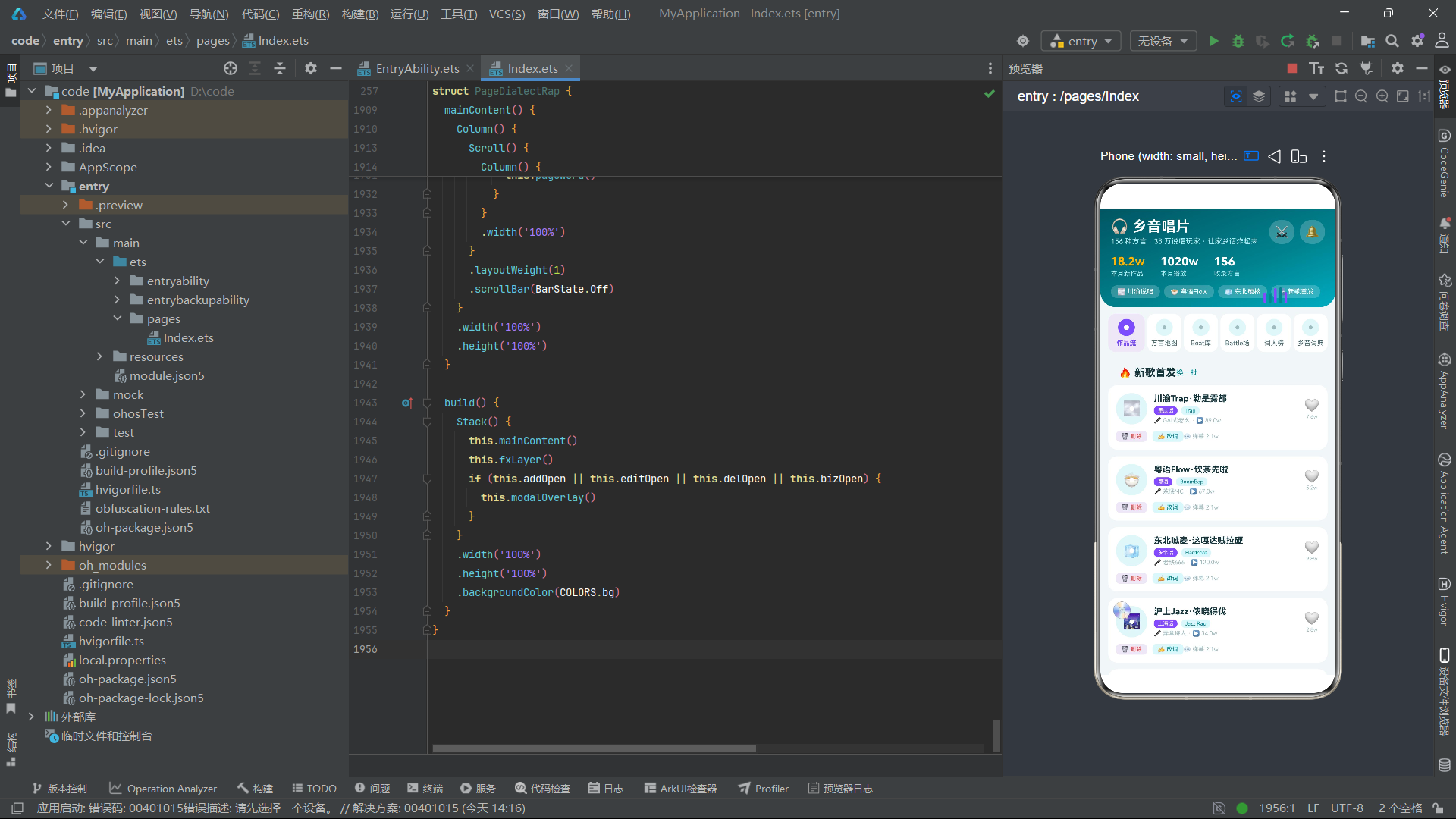
13.6 总结:
第一,@Observed+@State数组+splice触发更新的三件套是目前最稳定的可观察列表渲染方案,适用于绝大多数社交型应用场景。第二,@Builder装饰器的参数化复用能力使得UI组件的复用程度可以大幅提升,减少重复代码。第三,定时器驱动的状态变量变化配合取模运算是实现轻量级连续动效的高效方案,无需引入复杂动画API。第四,ForEach的键值函数必须包含所有需要追踪的变化字段,否则将导致UI不更新。第五,Stack三层叠加(主内容+特效层+弹窗层)是构建沉浸式应用的推荐布局架构。这些实践启示对于HarmonyOS 6.1.1生态中的ArkTS开发者具有直接的参考价值。

作为“人工智能6S店”的官方数字引擎,为AI开发者与企业提供一个覆盖软硬件全栈、一站式门户。
更多推荐


 2
2 0
0- 0


 已为社区贡献3条内容

所有评论(0)