
鸿蒙ArkTS精品咖啡工坊实战解析
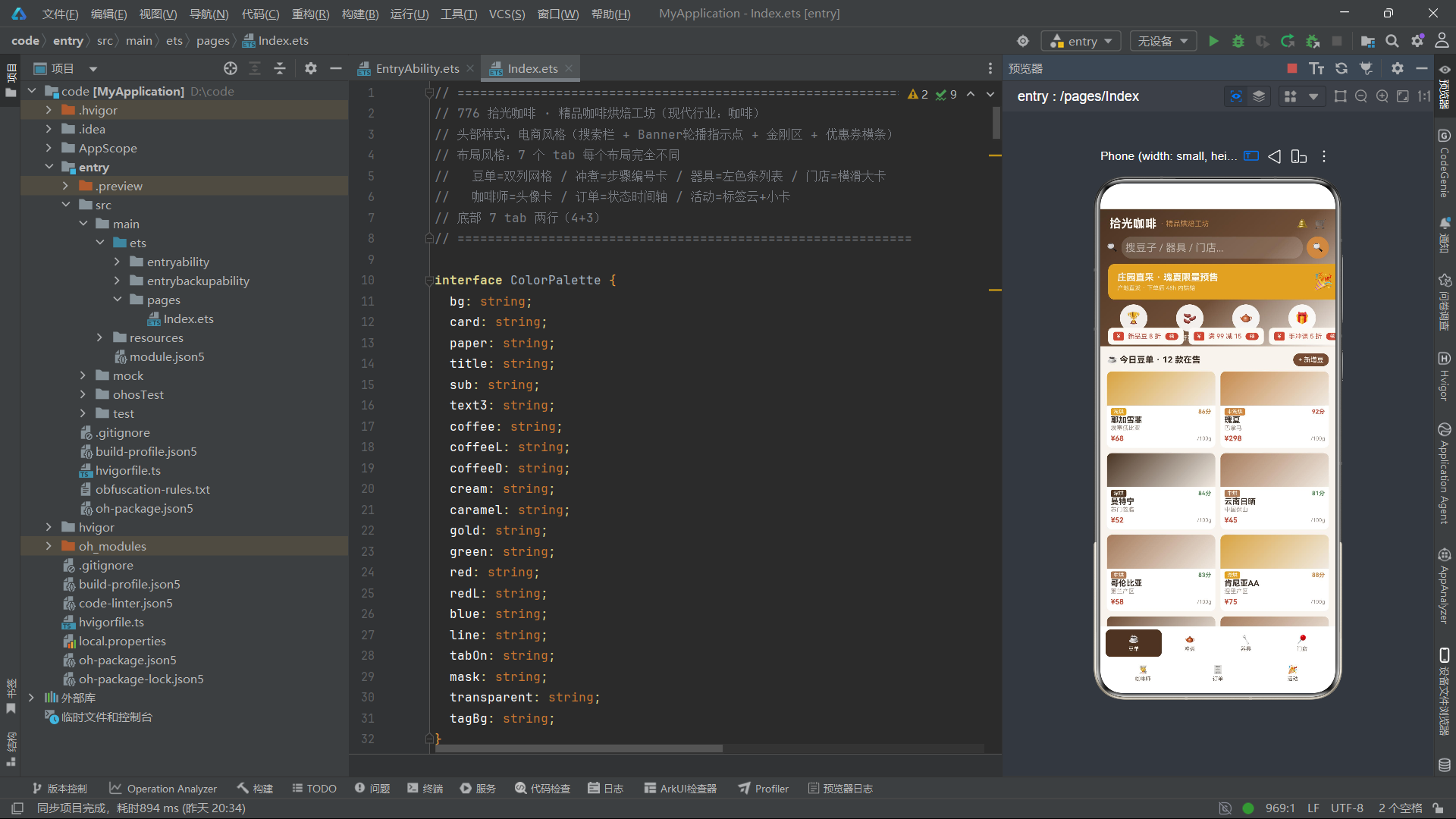
本篇博文基于HarmonyOS Next API24 ArkTS完整业务案例:拾光咖啡·精品咖啡烘焙工坊应用做逐段源码拆解。该项目属于消费行业垂直电商类移动端页面,完整实现电商首页头部、多Tab业务模块、多套差异化布局、模拟数据模型、弹窗模态交互、简易数据可视化图表、动画呼吸动效整套业务闭环。和普通Demo不同,该案例不是简单演示组件API,而是贴近真实商业项目的工程写法:统一设计Token色板、业务实体类封装、状态驱动UI、@Builder拆分业务片段、Mock模拟业务数据集、交互状态管理、条件渲染、循环渲染、定位布局、遮罩弹窗全套能力,非常适合做HarmonyOS Next ArkTS商业应用学习参考。
在鸿蒙应用开发中,很多开发者写业务页面习惯把所有逻辑堆砌在build函数内部,UI结构、数据模型、样式硬编码全部混杂在一起,后期维护迭代成本极高。而这套咖啡工坊案例提供一套可复用的业务分层范式:颜色常量定义→TypeScript业务实体Model→Mock模拟业务数据→工具辅助函数→页面组件入口→@Builder拆分各个业务UI片段→状态管理与生命周期→弹窗组件封装。
页面整体业务能力梳理:
- 电商风格首页头部:渐变背景、标题栏、搜索组件、Banner轮播切换、呼吸动画效果、金刚功能入口、横向滚动优惠券栏
- 7个业务Tab页面,每一个Tab采用完全不同的布局方案,分别是双列网格、步骤编号卡片、左侧彩色标识条列表、横向滑动大卡片、头像信息卡片、时间轴订单流、标签云+活动卡片
- 底部Tab栏特殊布局:7个导航按钮拆分成两行4+3排版,突破传统底部固定5个Tab限制
- 内置柱状简易图表实现月度业务数据可视化
- 完整弹窗体系:新增弹窗、编辑弹窗、删除确认弹窗,遮罩层封装复用
- 生命周期定时器实现Banner切换、呼吸闪烁动画
- 业务工具函数,根据业务字段动态计算颜色,实现UI和业务数据联动
下面针对完整源码逐段拆解,细分段落,针对每一块代码做原理讲解、业务意图、鸿蒙API知识点、工程实践建议。
说明:文件编号767‑777,本次案例为776号案例,输出文档命名
776.md。
一、模块注释与业务说明头部
// ============================================================
// 776 拾光咖啡 · 精品咖啡烘焙工坊(现代行业:咖啡)
// 头部样式:电商风格(搜索栏 + Banner轮播指示点 + 金刚区 + 优惠券横条)
// 布局风格:7 个 tab 每个布局完全不同
//   豆单=双列网格 / 冲煮=步骤编号卡 / 器具=左色条列表 / 门店=横滑大卡
//   咖啡师=头像卡 / 订单=状态时间轴 / 活动=标签云+小卡
// 底部 7 tab 两行(4+3)
// ============================================================
这一段属于项目模块说明注释,在正式工程中非常推荐编写大段模块头部注释。很多开发者会忽略注释价值,但对于后续接手维护、多人协作、自己隔一段时间回看代码,头部注释可以快速知晓整个页面的定位、所属业务行业、页面核心特性、关键布局约定。
这里明确标注本页面核心约束:7个Tab,每一个Tab布局完全不同,这是本案例最大的学习亮点。绝大多数鸿蒙多Tab案例,所有Tab复用同一套卡片布局,而实际商业项目中,不同业务板块天然需要完全差异化UI。豆单需要商品双列网格方便浏览商品;冲煮教程适合步骤编号引导用户跟着流程操作;器具列表适合紧凑带标识条列表;门店适合横向滑动浏览线下门店;咖啡师侧重头像人物卡片;订单需要时间轴表达流转状态;活动页面需要标签云做分类筛选+活动卡片。
同时备注底部导航特殊实现:7个Tab无法单行放下,采用4+3两行排版,打破鸿蒙应用常见底部导航最多5个的固有思维。
💡工程实践建议:业务页面文件头部增加模块注释,写清楚业务定位、特殊布局约束、核心特性,不要把信息全部藏在代码内部。
二、颜色调色板接口定义 ColorPalette
interface ColorPalette {
  bg: string;
  card: string;
  paper: string;
  title: string;
  sub: string;
  text3: string;
  coffee: string;
  coffeeL: string;
  coffeeD: string;
  cream: string;
  caramel: string;
  gold: string;
  green: string;
  red: string;
  redL: string;
  blue: string;
  line: string;
  tabOn: string;
  mask: string;
  transparent: string;
  tagBg: string;
}
这里定义ColorPalette接口,统一约束整个页面全部使用到的颜色Token字段。这就是设计系统中Design Token思想。
如果不做统一接口约束,开发过程中会直接在组件写死'#xxxxxx'十六进制色值,会出现几个严重问题:第一,颜色散落在代码各个位置,后续UI改版需要全局搜索替换所有色值,漏改概率很大;第二,无法做类型约束,写错字符串不会有编译提示;第三,无法区分语义,不知道这个颜色代表背景、卡片、标题文字还是强调色。
接口ColorPalette把页面内所有颜色按语义命名,而不是写死color1、color2这种无意义命名:
bg页面全局背景色card卡片底色paper纸张次级背景,用于交替行背景title/sub/text3三级文字体系,主标题、次要说明文字、弱化辅助文字coffee / coffeeL / coffeeD咖啡主题色系:基础、浅色、深色,贴合咖啡行业调性cream奶油色、caramel焦糖色、gold金色,业务主题辅助色green/red状态色:成功、警告价格红色line分割线颜色mask弹窗遮罩半透明黑色tagBg标签组件半透明背景
通过接口,TS会强制后续COLORS常量对象必须实现全部字段,少写字段ArkTS编译阶段直接报错,提前捕获错误。
💡工程实践:复杂业务页面,优先定义Design Token接口,语义化命名颜色,禁止组件内硬编码十六进制色值。
三、颜色常量对象 COLORS
const COLORS: ColorPalette = {
  bg: '#F7F3EE',
  card: '#FFFFFF',
  paper: '#F0EAE2',
  title: '#3B2E25',
  sub: '#6B5B4E',
  text3: '#A2938A',
  coffee: '#6F4E37',
  coffeeL: '#A67B5B',
  coffeeD: '#4A3423',
  cream: '#FBF8F4',
  caramel: '#C68B4E',
  gold: '#D9A441',
  green: '#5E8C61',
  red: '#C0503C',
  redL: '#F6E3DE',
  blue: '#4E7C9B',
  line: '#E5DCD2',
  tabOn: '#4A3423',
  mask: 'rgba(0,0,0,0.5)',
  transparent: 'rgba(0,0,0,0)',
  tagBg: 'rgba(111,78,55,0.12)'
};
基于上面ColorPalette接口,实例化颜色常量对象。全部色值采用咖啡烘焙工坊行业的暖棕、焦糖、奶油色系,整套页面视觉风格高度统一。
页面中所有组件,不再直接写色值,全部引用COLORS.xxx。后续UI设计师改版,只需要修改这一处常量对象,整个页面全部组件颜色自动同步更新。同时支持rgba透明色,用于弹窗遮罩、标签半透明背景。
扩展思路:大型项目中,可以把COLORS抽离单独ts文件,全局多组件共享一套设计Token。
四、Tab元数据接口与常量定义
interface TabMeta {
icon: string;
label: string;
}
const TAB_LIST: TabMeta[] = [
{ icon: '☕', label: '豆单' },
{ icon: '🫖', label: '冲煮' },
{ icon: '🔧', label: '器具' },
{ icon: '📍', label: '门店' },
{ icon: '🧑🍳', label: '咖啡师' },
{ icon: '🧾', label: '订单' },
{ icon: '🎉', label: '活动' }
];
const ROW1_IDX: number[] = [0, 1, 2, 3];
const ROW2_IDX: number[] = [4, 5, 6];
const DOT_IDX: number[] = [0, 1, 2];
const KING_IDX: number[] = [0, 1, 2, 3];
const KING_ICON: string[] = ['🏆', '🫘', '🫖', '🎁'];
const KING_TXT: string[] = ['庄园榜', '新豆到', '冲煮赛', '领券'];
const COUPON_IDX: number[] = [0, 1, 2];
const COUPON_VAL: string[] = ['新品豆 8 折', '满 99 减 15', '手冲课 5 折'];
const MONTH_IDX: number[] = [0, 1, 2, 3, 4, 5];
const MONTH_NAME: string[] = ['2月', '3月', '4月', '5月', '6月', '7月'];
const CUP_IDX: number[] = [320, 410, 380, 520, 460, 610];
const TAGS: string[] = ['手冲入门', '意式拉花', '杯测会', '烘焙体验', '云南豆', '瑰夏', '冷萃', '耶加雪菲'];
TabMeta接口定义每一个底部Tab的数据结构,包含emoji图标字段icon和显示文字label。没有直接在UI硬编码写死图标和文字,而是使用数组驱动渲染。后续新增、修改Tab,只修改数组数据,不需要改动@Builder内部UI代码,实现数据驱动视图。
TAB_LIST完整存放7个Tab元数据。
因为底部导航需要拆分成两行4+3,单独抽离索引数组ROW1_IDX第一行索引集合,ROW2_IDX第二行索引集合,后续ForEach循环分别遍历两组索引渲染两行Tab。
后面一系列常量数组,全部属于页面静态配置数据:
KING_IDX / KING_ICON / KING_TXT:首页金刚区功能入口索引、图标、文字;电商首页常见的快捷功能入口COUPON_IDX / COUPON_VAL:优惠券横向滚动栏的文案配置MONTH_IDX / MONTH_NAME / CUP_IDX:柱状图表的月份名称、月度出杯模拟数值,用于底部业务图表渲染TAGS:活动页面标签云的标签文本集合
核心开发思想:静态配置全部抽离常量,UI只负责渲染,业务修改只改配置数组,做到数据和视图分离。
五、@Observed 业务实体 Model 类定义
@Observed
export class BeanItem {
  name: string;
  origin: string;
  roast: string;
  price: number;
  score: number;
  constructor(name: string, origin: string, roast: string, price: number, score: number) {
    this.name = name; this.origin = origin; this.roast = roast; this.price = price;
    this.score = score;
  }
}
@Observed
export class BrewStep {
  step: number;
  name: string;
  param: string;
  seconds: number;
  constructor(step: number, name: string, param: string, seconds: number) {
    this.step = step; this.name = name; this.param = param; this.seconds = seconds;
  }
}
@Observed
export class GearItem {
  name: string;
  kind: string;
  brand: string;
  price: number;
  constructor(name: string, kind: string, brand: string, price: number) {
    this.name = name; this.kind = kind; this.brand = brand; this.price = price;
  }
}
@Observed
export class ShopItem {
  name: string;
  addr: string;
  seats: number;
  rating: number;
  open: boolean;
  constructor(name: string, addr: string, seats: number, rating: number, open: boolean) {
    this.name = name; this.addr = addr; this.seats = seats; this.rating = rating; this.open = open;
  }
}
@Observed
export class BaristaItem {
  name: string;
  title: string;
  years: number;
  awards: string;
  constructor(name: string, title: string, years: number, awards: string) {
    this.name = name; this.title = title; this.years = years; this.awards = awards;
  }
}
@Observed
export class OrderItem {
  no: string;
  drink: string;
  status: string;
  time: string;
  done: boolean;
  constructor(no: string, drink: string, status: string, time: string, done: boolean) {
    this.no = no; this.drink = drink; this.status = status; this.time = time; this.done = done;
  }
}
@Observed
export class EventItemX {
  name: string;
  date: string;
  fee: number;
  joined: number;
  constructor(name: string, date: string, fee: number, joined: number) {
    this.name = name; this.date = date; this.fee = fee; this.joined = joined;
  }
}
这里定义7个业务实体类,全部加上@Observed装饰器。
@Observed是ArkTS状态管理核心装饰器:标记普通class,当class实例内部属性发生修改,@State持有这个对象数组的组件,能够感知对象内部属性变化,触发UI刷新。如果不加@Observed,仅仅修改对象内部字段,ArkTS无法检测,UI不会自动更新。
每一个实体类对应页面一个业务板块的数据模型:
BeanItem咖啡豆实体:豆子名称、产地、烘焙度、价格、评分;对应豆单Tab商品BrewStep手冲步骤实体:步骤序号、步骤名称、参数、耗时秒数;冲煮教程TabGearItem器具实体:器具名称、类别、品牌、价格;器具列表TabShopItem门店实体:门店名字、地址、座位数量、评分、是否营业;门店TabBaristaItem咖啡师实体:名字、头衔、从业年限、获奖信息;咖啡师TabOrderItem订单实体:订单编号、饮品名称、状态、下单时间、是否完成;订单时间轴TabEventItemX活动实体:活动名称、日期、费用、已报名人数;活动Tab
全部实体使用constructor构造函数,实例化对象时直接传参赋值,比字面量对象可读性更强,适合复杂业务。同时export导出,支持其他组件导入复用Model。
对比直接使用interface+字面量对象的区别:interface只是编译期类型检查,运行时不存在;class+@Observed可以实现对象内部属性变更监听,适合编辑弹窗修改单条数据后UI自动刷新。
六、Mock模拟数据集
const mockBeanList: BeanItem[] = [
  new BeanItem('耶加雪菲', '埃塞俄比亚', '浅烘', 68, 86),
  new BeanItem('瑰夏', '巴拿马', '中浅烘', 298, 92),
  new BeanItem('曼特宁', '苏门答腊', '深烘', 52, 84),
  new BeanItem('云南日晒', '中国保山', '中烘', 45, 81),
  new BeanItem('哥伦比亚', '蕙兰产区', '中烘', 58, 83),
  new BeanItem('肯尼亚AA', '涅里产区', '浅烘', 75, 88),
  new BeanItem('危地马拉', '安提瓜', '中深烘', 62, 82),
  new BeanItem('蓝山一号', '牙买加', '中烘', 388, 94),
  new BeanItem('西达摩', '埃塞俄比亚', '浅烘', 65, 85),
  new BeanItem('黄金曼特宁', '苏门答腊', '深烘', 78, 86),
  new BeanItem('花魁', '埃塞俄比亚', '浅烘', 98, 89),
  new BeanItem('云南水洗', '中国普洱', '中烘', 42, 80)
];
const mockBrewList: BrewStep[] = [
  new BrewStep(1, '润湿滤纸', '热水 90°C 冲洗', 15),
  new BrewStep(2, '称豆磨粉', '20g · 中细研磨', 40),
  new BrewStep(3, '闷蒸', '注水 40g 膨胀排气', 30),
  new BrewStep(4, '第一段注水', '画圈注水至 120g', 25),
  new BrewStep(5, '第二段注水', '中心注水至 240g', 30),
  new BrewStep(6, '第三段注水', '轻柔注水至 320g', 25),
  new BrewStep(7, '滴滤完成', '移开滤杯轻摇', 20),
  new BrewStep(8, '闻香品鉴', '轻晃杯身闻干香', 10),
  new BrewStep(9, '测温出品', '68°C 最佳饮用', 5),
  new BrewStep(10, '风味记录', '记录酸质与甜感', 15)
];
const mockGearList: GearItem[] = [
  new GearItem('Hario V60', '滤杯', 'Hario', 128),
  new GearItem('Kalita 蛋糕杯', '滤杯', 'Kalita', 158),
  new GearItem('Origami 折纸杯', '滤杯', 'Origami', 188),
  new GearItem('手冲壶 0.7L', '细口壶', 'Brewista', 398),
  new GearItem('磨豆机 C40', '研磨', 'Comandante', 2680),
  new GearItem('电子秤 0.1g', '称量', 'Acaia', 980),
  new GearItem('温控分享壶', '壶具', 'Fellow', 520),
  new GearItem('咖啡杯 220ml', '杯具', 'Kinto', 210),
  new GearItem('布粉针 WDT', '配件', '自制', 65),
  new GearItem('法压壶 350ml', '壶具', 'Bodum', 168),
  new GearItem('爱乐压', '器具', 'AeroPress', 258),
  new GearItem('聪明杯', '滤杯', 'Mr.Clever', 98)
];
const mockShopList: ShopItem[] = [
  new ShopItem('拾光 · 老城巷店', '梧桐巷 12 号', 24, 4.8, true),
  new ShopItem('拾光 · 江畔灯塔店', '滨江东路 88 号', 38, 4.9, true),
  new ShopItem('拾光 · 烘焙工厂店', '创意园 A3 栋', 52, 4.7, true),
  new ShopItem('拾光 · 山间小屋', '青岭路 6 号', 16, 4.9, false),
  new ShopItem('拾光 · 中央车站店', '高铁站 2F', 30, 4.6, true),
  new ShopItem('拾光 · 书店联名店', '万象城 4F', 28, 4.7, true)
];
const mockBaristaList: BaristaItem[] = [
  new BaristaItem('阿岚', '主理人 / 烘焙师', 9, '城市杯测赛冠军'),
  new BaristaItem('老周', '意式吧台长', 12, '拉花艺术赛亚军'),
  new BaristaItem('小鹿', '手冲师', 5, '金豆杯八强'),
  new BaristaItem('Kevin', '品控师', 8, 'Q‑Grader 认证'),
  new BaristaItem('苏苏', '培训导师', 7, 'SCA 高级文凭'),
  new BaristaItem('大树', '烘焙助手', 3, '新锐烘焙赛新秀'),
  new BaristaItem('米娅', '创意特调师', 4, '特调大赛金奖'),
  new BaristaItem('阿川', '值班咖啡师', 2, '门店服务之星')
];
const mockOrderList: OrderItem[] = [
  new OrderItem('NO.10241', '燕麦拿铁 · 大杯', '已完成', '09:12', true),
  new OrderItem('NO.10240', '耶加手冲 · 单品', '已完成', '09:03', true),
  new OrderItem('NO.10239', '脏咖啡 · 双份', '制作中', '08:58', false),
  new OrderItem('NO.10238', '冷萃 · 500ml', '已完成', '08:41', true),
  new OrderItem('NO.10237', '拿铁 · 少糖', '已完成', '08:30', true),
  new OrderItem('NO.10236', '澳白 · 双份浓缩', '已取消', '08:15', false),
  new OrderItem('NO.10235', '卡布奇诺 · 中杯', '已完成', '08:02', true),
  new OrderItem('NO.10234', '瑰夏手冲 · 限量', '已完成', '07:48', true),
  new OrderItem('NO.10233', '美式 · 冰', '已完成', '07:30', true),
  new OrderItem('NO.10232', '摩卡 · 加奶油', '已完成', '07:15', true)
];
const mockEventList: EventItemX[] = [
  new EventItemX('周三杯测夜 · 非洲专场', '8月26日', 0, 18),
  new EventItemX('手冲入门课 · 第二期', '8月29日', 128, 9),
  new EventItemX('烘焙开放日 · 观火记', '9月02日', 88, 12),
  new EventItemX('拉花工作坊 · 叶形进阶', '9月05日', 158, 7),
  new EventItemX('冷萃实验室 · 特调之夜', '9月09日', 68, 15),
  new EventItemX('庄园主分享会 · 云南行', '9月13日', 0, 22)
];
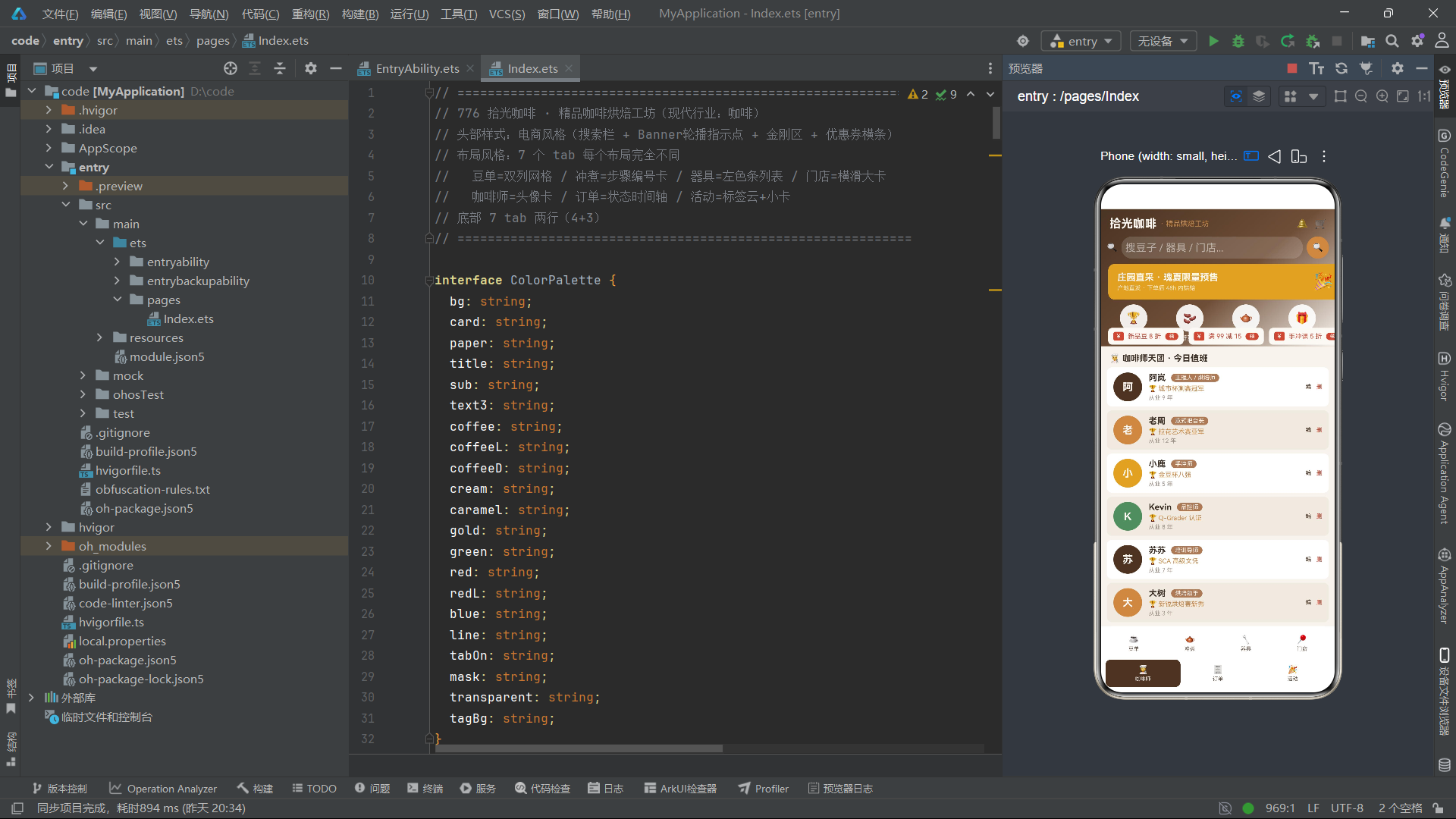
Mock数据集,使用上面定义好的实体class new实例生成模拟业务数组。在业务开发前期,后端接口还没有完成的阶段,前端可以编写Mock数据,完整调试页面布局、交互逻辑,前后端并行开发。每一套mock数组对应一个Tab页面渲染数据源。
每一组mock数据都尽可能贴近真实业务数据:咖啡豆有不同产地烘焙度价格;订单包含多种状态:已完成、制作中、已取消;门店包含营业/休店两种状态;活动区分免费和收费活动。
后续对接后端接口,只需要把接口返回JSON,映射转换为对应Class实例,赋值给@State变量,UI层代码完全不需要改动。实现Mock开发阶段和线上业务阶段无缝切换。
七、业务工具辅助函数
function roastColor(r: string): string {
  if (r === '浅烘') {
    return COLORS.gold;
  }
  if (r === '中浅烘') {
    return COLORS.caramel;
  }
  if (r === '中烘') {
    return COLORS.coffeeL;
  }
  if (r === '中深烘') {
    return COLORS.coffee;
  }
  return COLORS.coffeeD;
}
function scoreColor(s: number): string {
  if (s >= 90) {
    return COLORS.red;
  }
  if (s >= 85) {
    return COLORS.caramel;
  }
  return COLORS.green;
}
function steamX(i: number): number {
  return 40 + i * 90;
}
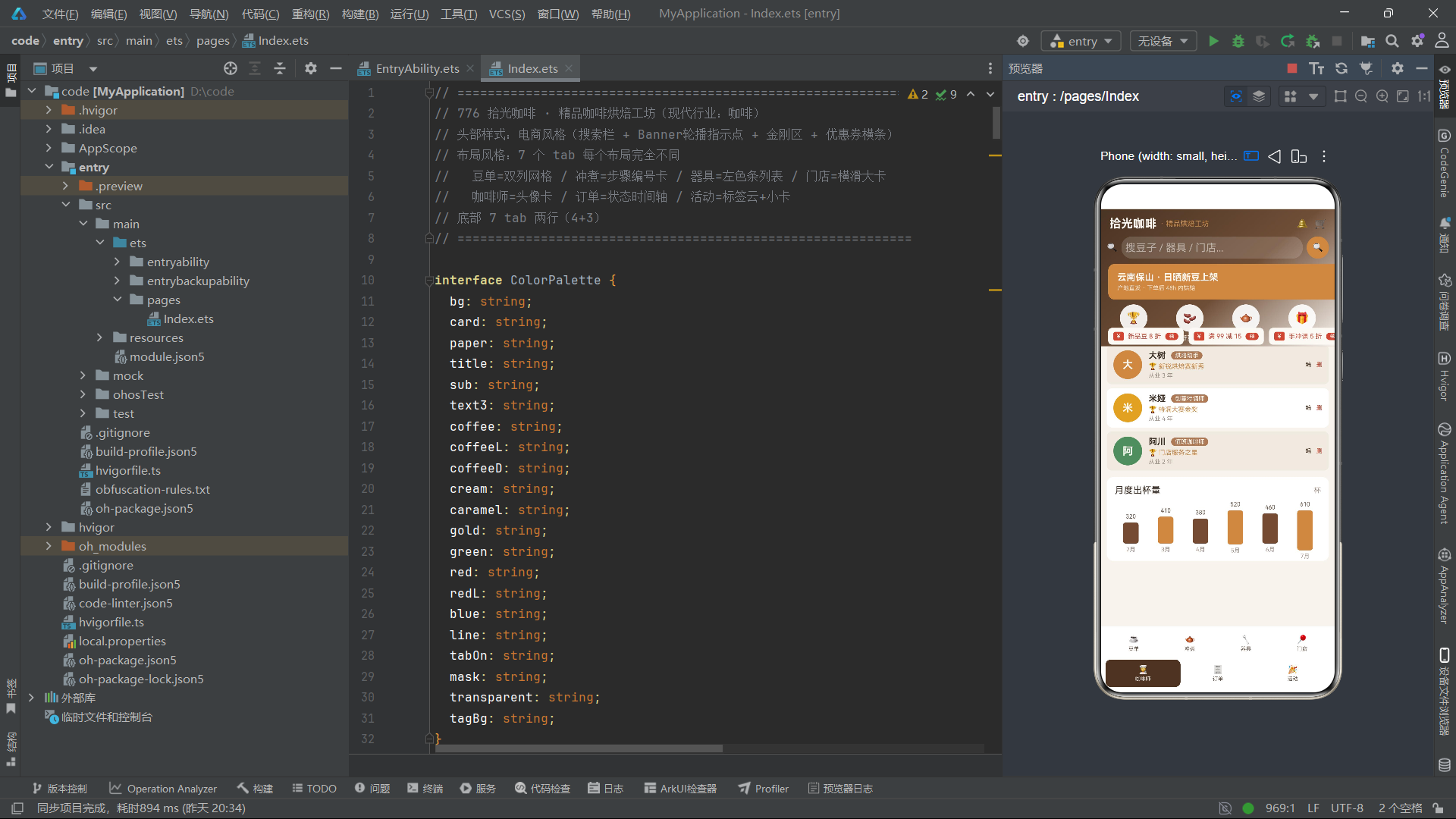
抽离纯工具函数,实现数据驱动UI颜色。不把if‑else判断写在组件内部,把业务判断逻辑抽离独立函数,组件只负责接收返回色值,UI代码保持干净。
roastColor:接收烘焙度字符串,根据浅烘/中浅烘/中烘/中深烘/深烘返回不同主题色,豆子卡片顶部渐变、标签背景都调用这个函数,同一个业务规则多处复用。如果后续烘焙度对应的配色需要修改,只修改一处函数,全部组件同步生效。
scoreColor:根据咖啡豆评分数字动态返回颜色,90分以上高分红色,85‑89焦糖色,其余绿色。商品评分标签颜色完全由业务字段驱动。
steamX是预留蒸汽动画坐标计算工具函数。
最佳实践:复杂业务判断、颜色换算、单位计算全部抽离独立工具函数,减少build和@Builder内部代码体积。
八、页面入口@Component @Entry 组件,@State状态定义
@Entry
@Component
struct Page776 {
  @State selTab: number = 0;
  @State breath: boolean = false;
  @State bannerOn: boolean = false;
  @State showAdd: boolean = false;
  @State showEdit: boolean = false;
  @State showDel: boolean = false;
  @State editIdx: number = 0;
  @State delIdx: number = 0;
  @State beanList: BeanItem[] = mockBeanList;
  @State brewList: BrewStep[] = mockBrewList;
  @State gearList: GearItem[] = mockGearList;
  @State shopList: ShopItem[] = mockShopList;
  @State baristaList: BaristaItem[] = mockBaristaList;
  @State orderList: OrderItem[] = mockOrderList;
  @State eventList: EventItemX[] = mockEventList;
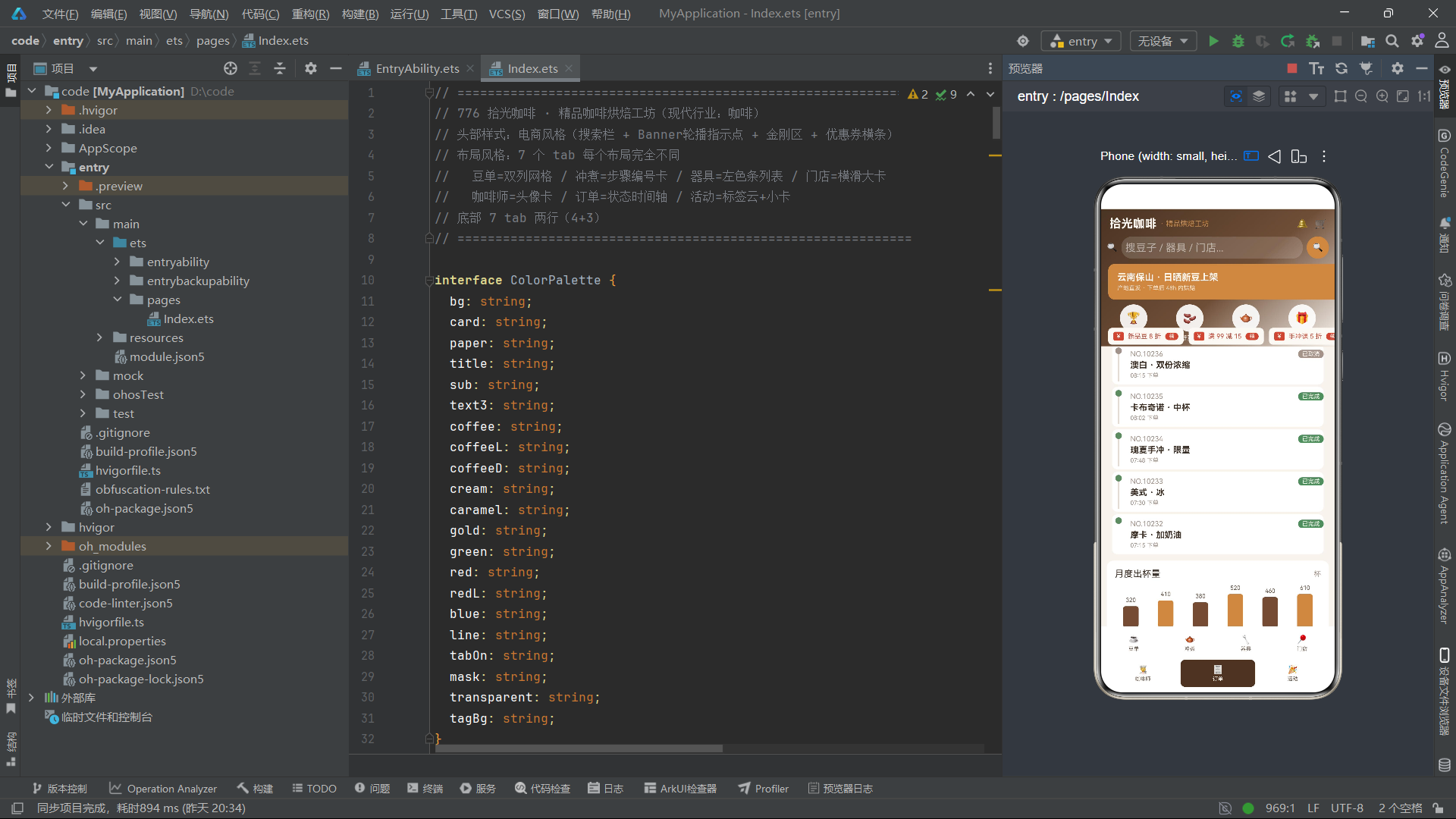
@Entry标记页面入口组件,操作系统可以直接启动这个页面;@Component声明自定义ArkTS组件struct。
全部状态变量使用@State装饰器:组件内部状态,变量发生改变时,触发页面UI重新渲染。逐一解析每一个状态业务含义:
selTab:当前选中Tab索引,默认0(豆单页面),点击底部导航修改这个数字,页面根据数字条件渲染不同@Builder模块breath:布尔值,用于全局呼吸闪烁动画,定时器定时翻转布尔,绑定组件animation实现呼吸明暗效果;制作中订单、Banner图标都使用这个状态bannerOn:布尔状态,控制Banner两套文案轮播切换,定时器定时取反showAdd / showEdit / showDel:弹窗显示开关,布尔控制新增、编辑、删除确认弹窗是否渲染;true渲染弹窗,false不渲染editIdx:编辑弹窗,保存当前要编辑数组的下标索引;delIdx保存待删除条目下标- 后面一系列@State数组,把mock模拟数据赋值给组件状态变量。因为被@State持有,数组内部@Observed对象属性修改,UI自动刷新。
注意:@State存放class实例数组,必须配合class上面@Observed,否则对象内部修改不会刷新界面。
九、生命周期 aboutToAppear
  aboutToAppear() {
    setInterval(() => { this.breath = !this.breath; }, 600);
    setInterval(() => { this.bannerOn = !this.bannerOn; }, 2500);
  }
aboutToAppear属于鸿蒙组件生命周期函数,组件即将显示到屏幕上触发执行。这里开启两个定时器。
第一个定时器600ms翻转一次breath布尔变量,绑定组件animation动画,实现呼吸闪烁动效。例如制作中的订单节点图标,会明暗交替。
第二个定时器2500ms翻转bannerOn布尔值,控制Banner区域两套业务文案自动轮播切换,模拟电商Banner轮播效果。
⚠️工程坑点提醒:实际项目,页面销毁aboutToDisappear的时候,必须调用clearInterval清除定时器,否则页面退出定时器依旧后台运行,造成内存泄漏。本Demo为简化省略清除逻辑,生产环境务必补充。
十、主build函数整体页面骨架
  build() {
    Column() {
      this.headerShop()
      Divider().strokeWidth(1).color(COLORS.line)
      Scroll() {
        Column() {
          if (this.selTab === 0) {
            this.beansTab()
          } else if (this.selTab === 1) {
            this.brewTab()
          } else if (this.selTab === 2) {
            this.gearTab()
          } else if (this.selTab === 3) {
            this.shopsTab()
          } else if (this.selTab === 4) {
            this.baristaTab()
          } else if (this.selTab === 5) {
            this.ordersTab()
          } else {
            this.eventsTab()
          }
          this.cupChart()
        }.width('100%').padding({ left: 10, right: 10, top: 10, bottom: 100 })
      }.constraintSize({ maxHeight: '60%' }).scrollBar(BarState.Off)
      this.tabBar()
      if (this.showAdd) {
        this.addModal()
      }
      if (this.showEdit) {
        this.editModal()
      }
      if (this.showDel) {
        this.delModal()
      }
    }.width('100%').height('100%').backgroundColor(COLORS.bg)
  }
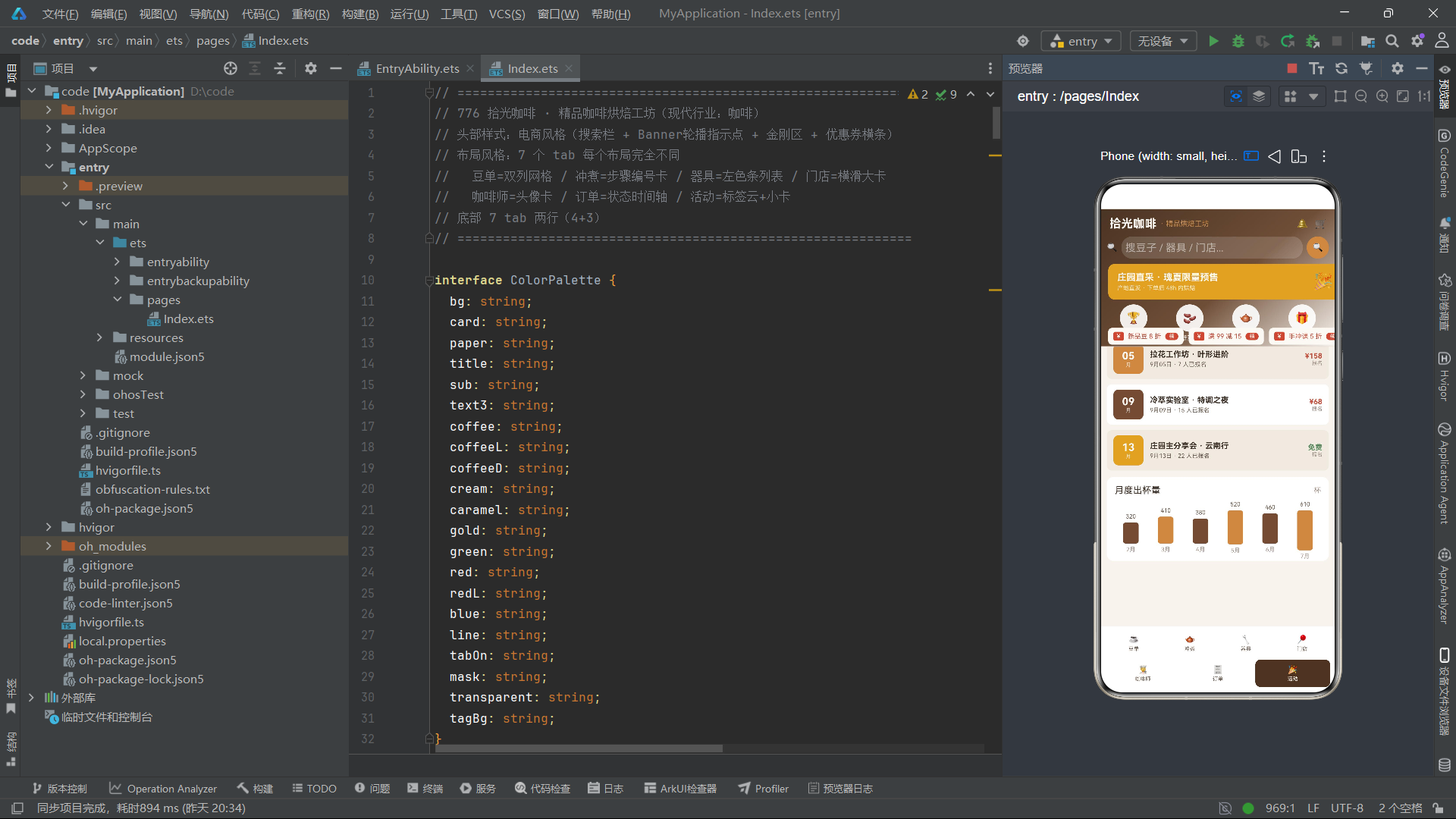
build函数是组件UI描述入口,整个页面最外层Column铺满全屏,背景色使用全局背景COLORS.bg。
页面骨架从上到下层级:
this.headerShop()调用@Builder,渲染电商风格头部区域- Divider分割线,分隔头部和滚动内容区
- Scroll滚动容器:设置
constraintSize({maxHeight:'60%'}),限制滚动区域最大高度占屏幕60%,避免滚动区域把底部Tab导航挤出屏幕外;关闭滚动条scrollBar(BarState.Off)。
Scroll内部Column,通过if‑else条件判断selTab,调用不同@Builder渲染7套完全不一样业务布局。无论选中哪一个Tab,底部都会渲染cupChart()月度出杯统计图表。padding底部设置100,给底部两行Tab留出内容留白,避免内容被导航遮挡。 this.tabBar()调用@Builder渲染两行式底部Tab导航栏- 三个if条件判断弹窗开关状态,如果布尔值为true,则渲染对应弹窗组件。弹窗使用Stack+zIndex层级置顶,覆盖全部页面内容。
页面渲染简易流程图:
十一、@Builder headerShop电商头部模块
  @Builder
  headerShop() {
    Stack({ alignContent: Alignment.TopStart }) {
      Column()
        .width('100%')
        .height(210)
        .linearGradient({
          angle: 140,
          colors: [[COLORS.coffeeD, 0.0], [COLORS.coffee, 0.55], [COLORS.bg, 1.0]]
        })
      // 顶部标题行
      Row() {
        Text('拾光咖啡').fontSize(18).fontColor(COLORS.cream).fontWeight(FontWeight.Bold)
        Text('· 精品烘焙工坊').fontSize(11).fontColor(COLORS.caramel).margin({ left: 6 })
        Column().layoutWeight(1)
        Text('🔔').fontSize(14).fontColor(COLORS.cream).margin({ right: 10 })
        Text('🛒').fontSize(14).fontColor(COLORS.cream)
      }
      .width('100%').padding({ left: 14, right: 14, top: 12 })
      // 搜索栏
      Row() {
        Text('🔍').fontSize(13).margin({ left: 10 })
        TextInput({ placeholder: '搜豆子 / 器具 / 门店...' })
          .placeholderColor('rgba(255,255,255,0.5)')
          .fontSize(12).fontColor(COLORS.cream).layoutWeight(1)
          .backgroundColor('rgba(255,255,255,0.15)').borderRadius(16)
          .margin({ left: 6, right: 6 }).height(34)
          .padding({ left: 6, right: 6 })
        Column() {
          Text('🔍').fontSize(13).fontColor(COLORS.cream)
        }
        .width(34).height(34).backgroundColor(COLORS.caramel).borderRadius(17)
        .justifyContent(FlexAlign.Center).margin({ right: 10 })
        .onClick(() => { this.showAdd = true; })
      }
      .width('100%').position({ x: 0, y: 42 })
      // Banner 轮播
      Column() {
        Row() {
          Column() {
            Text(this.bannerOn ? '云南保山 · 日晒新豆上架' : '庄园直采 · 瑰夏限量预售').fontSize(14)
              .fontColor(COLORS.cream).fontWeight(FontWeight.Bold)
            Text('产地直发 · 下单后 48h 内烘焙').fontSize(9)
              .fontColor('rgba(255,255,255,0.75)').margin({ top: 3 })
          }.alignItems(HorizontalAlign.Start)
          Column().layoutWeight(1)
          Text('🎉').fontSize(26)
            .opacity(this.breath ? 1.0 : 0.7)
            .animation({ duration: 600, iterations: -1, playMode: PlayMode.Alternate })
        }
        .width('100%').padding({ left: 14, right: 14, top: 12, bottom: 12 })
        .backgroundColor(this.bannerOn ? COLORS.caramel : COLORS.gold)
        .borderRadius(10)
      }
      .width('100%').position({ x: 12, y: 84 })
      // 金刚区
      Row() {
        ForEach(KING_IDX, (k: number) => {
          Column({ space: 4 }) {
            Column() {
              Text(KING_ICON[k]).fontSize(17)
            }
            .width(42).height(42).borderRadius(21)
            .backgroundColor('rgba(255,255,255,0.9)')
            .justifyContent(FlexAlign.Center)
            .animation({ duration: 600, iterations: -1, playMode: PlayMode.Alternate })
            Text(KING_TXT[k]).fontSize(9).fontColor(COLORS.cream)
          }
          .layoutWeight(1).alignItems(HorizontalAlign.Center)
          .onClick(() => { this.selTab = k === 0 ? 0 : k === 1 ? 0 : k === 2 ? 1 : 6; })
        }, (k: number) => 'kg' + k)
      }
      .width('100%').padding({ left: 8, right: 8, top: 6 })
      .position({ x: 0, y: 140 })
      // 优惠券横条
      Scroll() {
        Row({ space: 8 }) {
          ForEach(COUPON_IDX, (c: number) => {
            Row({ space: 6 }) {
              Text('¥').fontSize(10).fontColor(COLORS.cream)
                .backgroundColor(COLORS.red)
                .padding({ left: 5, right: 5, top: 1, bottom: 1 }).borderRadius(3)
              Text(COUPON_VAL[c]).fontSize(10).fontColor(COLORS.red)
              Text('领').fontSize(8).fontColor(COLORS.cream)
                .backgroundColor(COLORS.red)
                .padding({ left: 6, right: 6, top: 1, bottom: 1 }).borderRadius(6)
            }
            .padding({ left: 8, right: 8, top: 6, bottom: 6 })
            .backgroundColor(COLORS.cream).borderRadius(6)
            .onClick(() => { this.showAdd = true; })
          }, (c: number) => 'cp' + c)
        }
        .padding({ left: 12, right: 12 })
      }
      .scrollable(ScrollDirection.Horizontal).scrollBar(BarState.Off)
      .width('100%')
      .position({ x: 0, y: 182 })
    }
    .width('100%').height(210)
  }
@Builder装饰器把独立UI片段抽离出来,避免build函数代码臃肿。headerShop实现电商APP首页复合头部,高度210,整体容器Stack堆叠布局,使用position绝对定位摆放各个子模块。Stack非常适合多层UI重叠场景。
第一层底层Column绘制140度角三色线性渐变背景,咖啡深色逐步过渡到页面背景色,营造电商首页氛围感。
第一块子组件顶部标题行Row:页面标题、副标题,布局权重Column占满剩余空间做弹性占位,右侧放置消息铃铛、购物车emoji图标。
第二块搜索栏Row:使用position定位y=42,放置在渐变背景区域。TextInput半透明白色背景,适配深色渐变底色,右侧圆形搜索按钮,点击打开新增弹窗。
第三块Banner模块position y=84。使用三元表达式this.bannerOn ? A : B,布尔状态切换两套文案。🎉图标绑定animation无限交替动画,和全局breath状态联动实现呼吸闪烁。背景色也跟随bannerOn状态切换焦糖色/金色。
第四块金刚功能入口区域position y=140。ForEach循环遍历KING_IDX索引数组,读取KING_ICON、KING_TXT渲染4个圆形图标入口。每个入口绑定onClick点击事件,直接修改selTab,点击金刚区快速跳转到对应Tab页面,实现首页快捷跳转。动画设置无限交替,图标有微弱呼吸效果。
第五块横向滚动优惠券栏position y=182。外层Scroll设置ScrollDirection.Horizontal开启横向滚动,关闭滚动条。ForEach循环渲染优惠券标签卡片,点击唤起弹窗。
知识点:Stack + position绝对定位,实现复杂多层堆叠头部,电商首页非常常用。
十二、7套差异化Tab @Builder模块简要解析
因篇幅,重点讲设计思想,每一套Tab的核心布局手段:
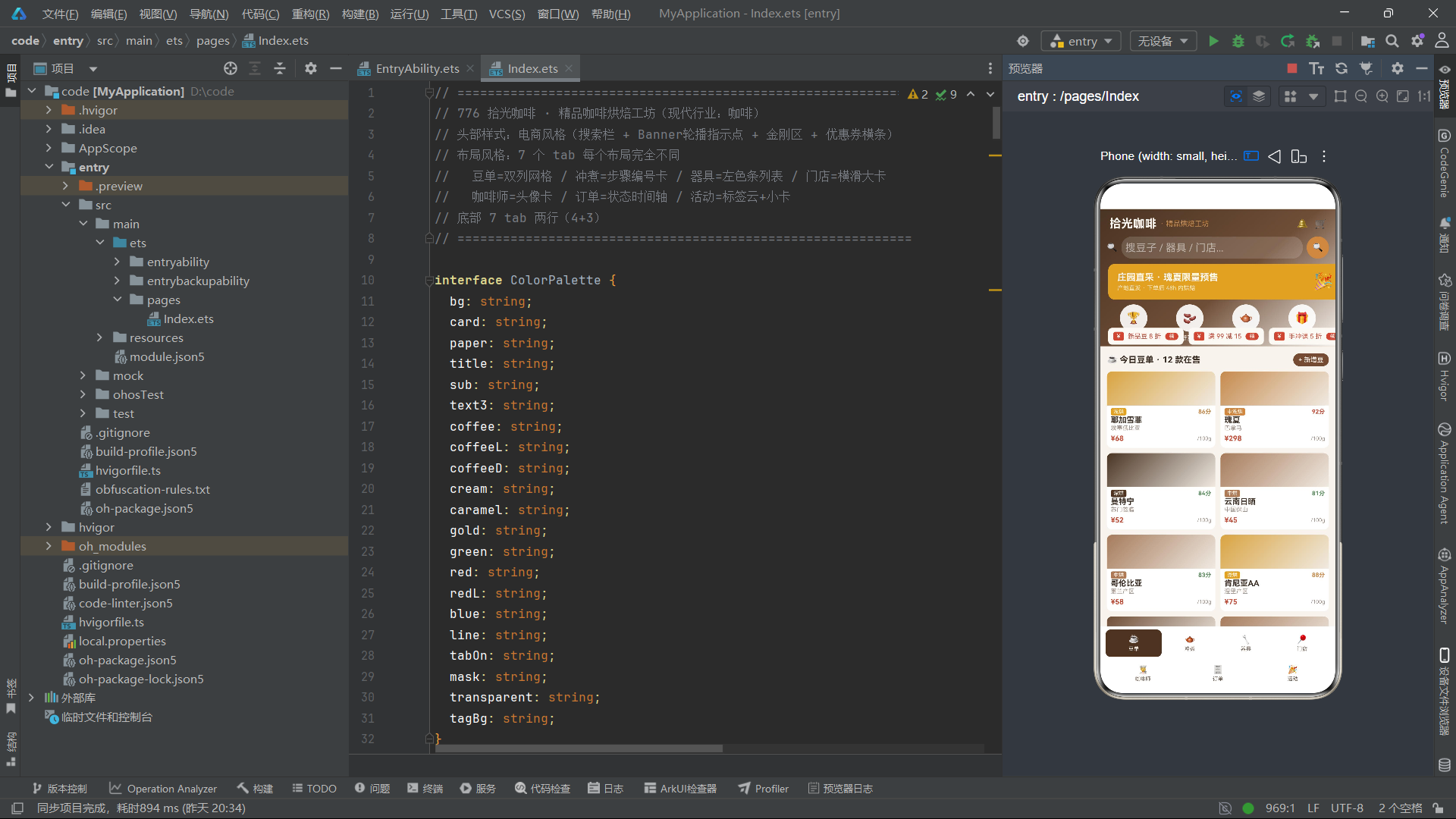
beansTab 豆单Tab 双列网格布局
利用外层Row,两个Column,分别渲染数组下标偶数、奇数条目,实现双列网格。ForEach循环内部增加if(idx%2===0)放入左列,if(idx%2===1)放入右列。卡片顶部使用linearGradient线性渐变,调用roastColor(item.roast)拿到烘焙度对应颜色。调用scoreColor(item.score)动态渲染评分标签颜色。卡片绑定onClick,记录editIdx,打开编辑弹窗。
鸿蒙没有网页CSS Grid,双列网格常用Row+双Column,分别渲染奇偶项方案。
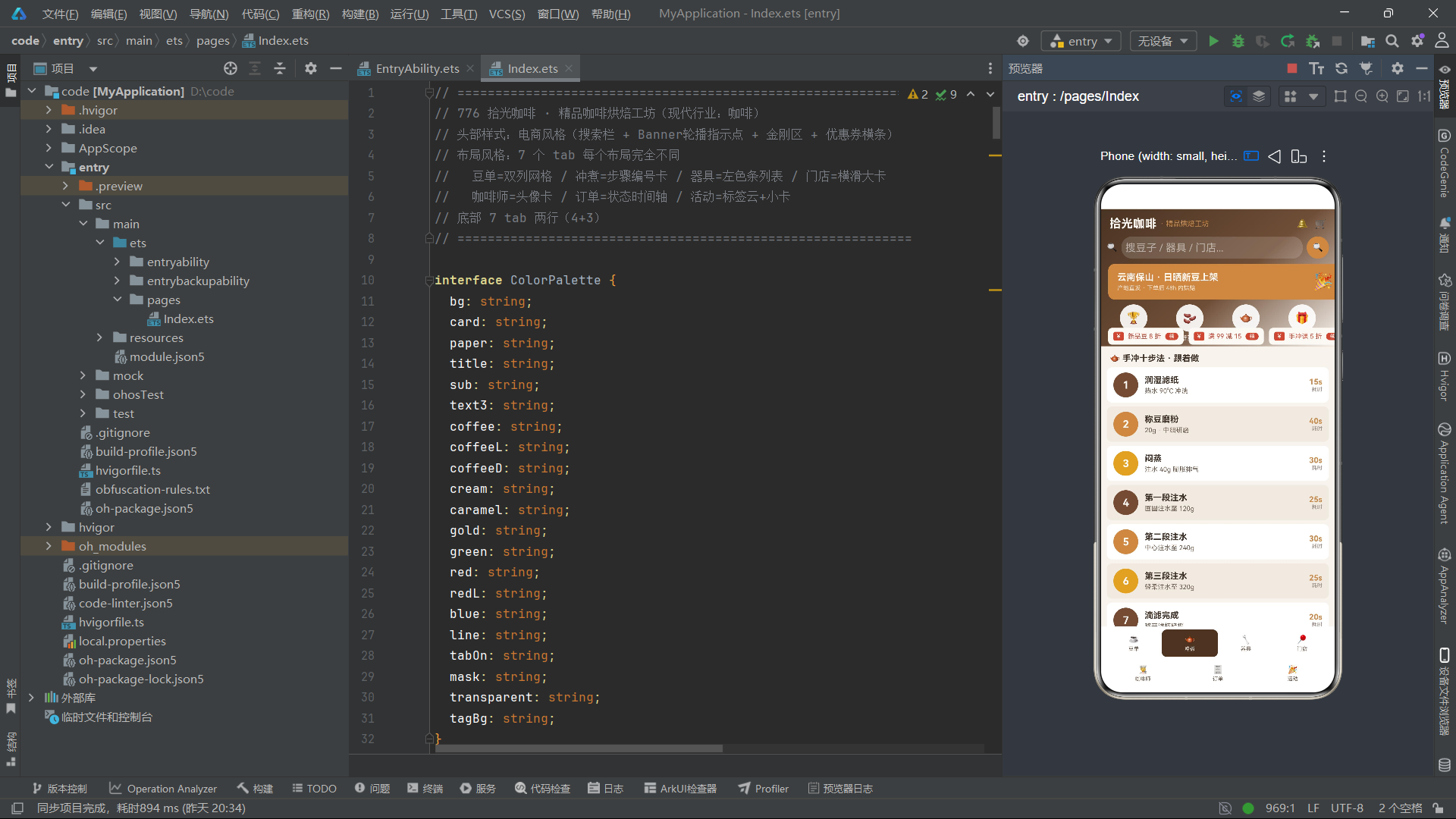
brewTab 冲煮Tab 步骤编号卡片
每一行Row左侧圆形背景放置步骤数字,中间步骤说明,右侧展示耗时秒。卡片隔行切换背景色idx%2===0切换card/paper底色,提升可读性。适合教程流程类页面。
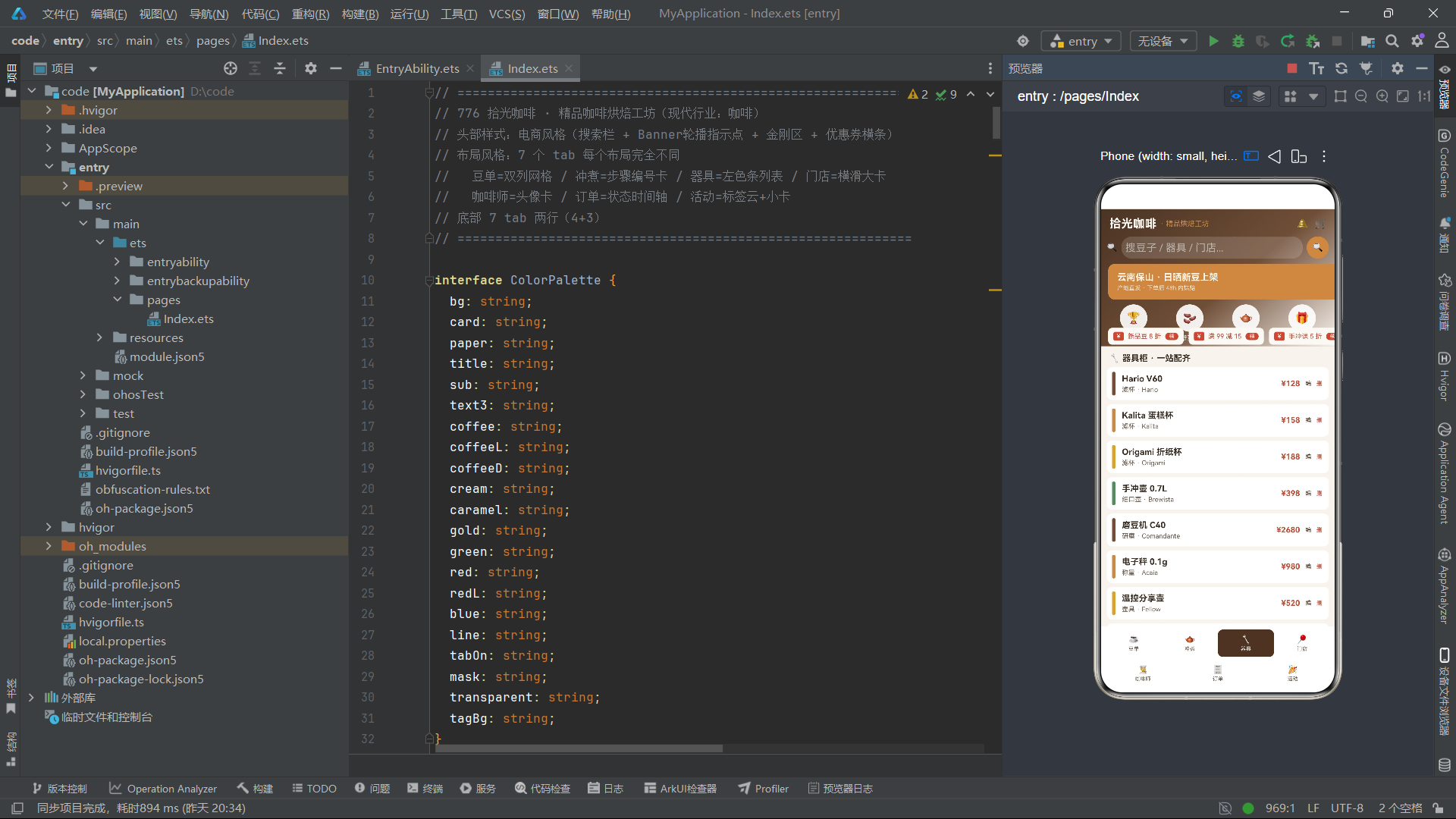
gearTab 器具Tab 左侧彩色标识条列表
Row最左侧放置窄Column宽度5px高度36px彩色竖条,根据索引取不同主题色,作为视觉标识。行内展示器具名称、分类品牌、价格,增加编辑、删除点击按钮,触发编辑/删除弹窗。
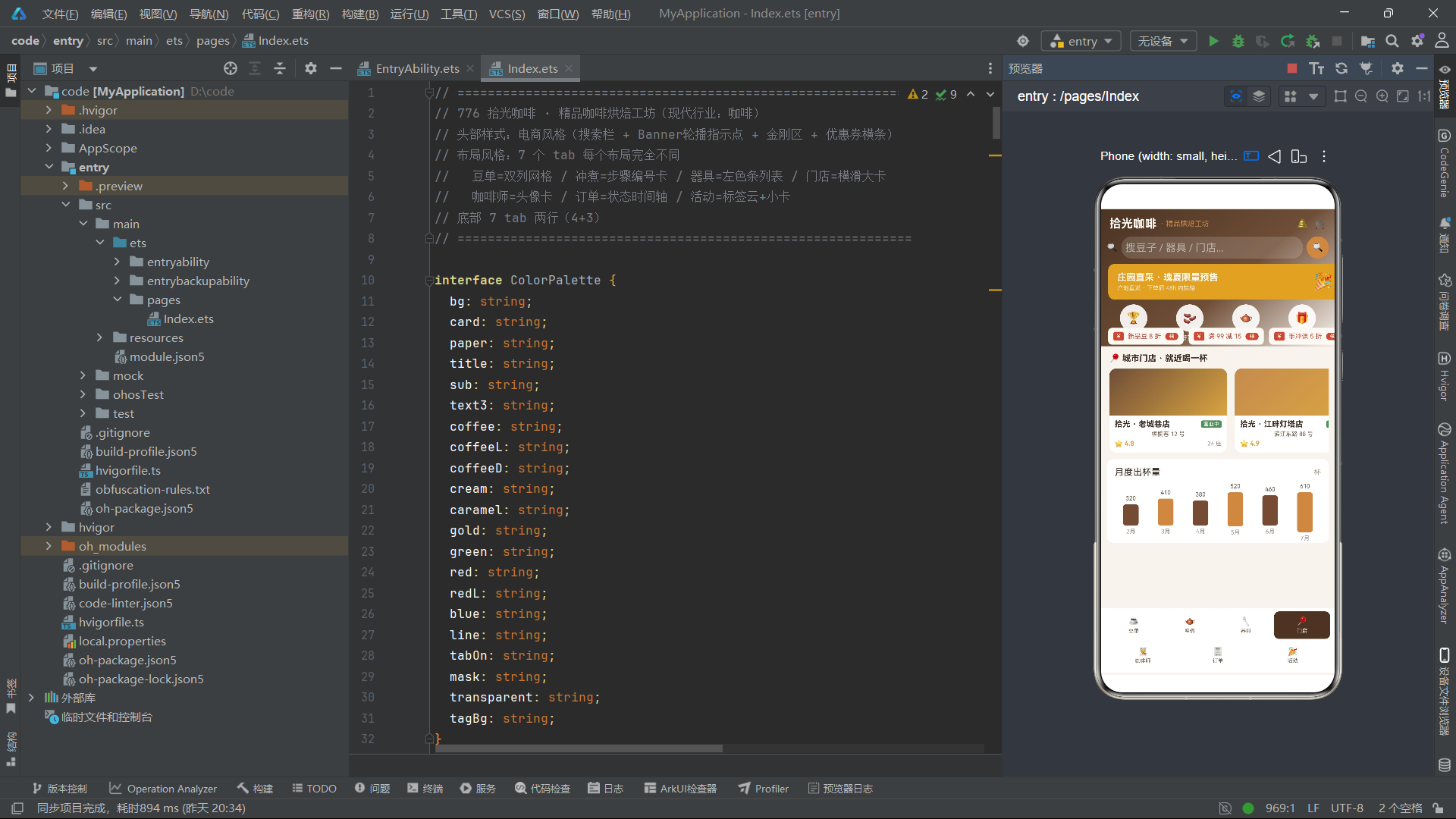
shopsTab 门店Tab横向滑动大卡片
外层Scroll横向滚动ScrollDirection.Horizontal,内部Row放置固定宽度180卡片。卡片顶部渐变模拟图片占位区域,展示门店名称、地址、座位、评分,营业状态标签使用条件色,营业绿色,休店灰色。
baristaTab咖啡师Tab头像卡片
使用文字首字符Text作为头像替代图片,圆形背景色根据索引循环取主题色。绑定呼吸动画,卡片交替背景色,展示头衔标签、获奖信息、从业年限。
ordersTab订单Tab时间轴布局
时间轴实现思路:左侧Column,上层Circle圆点,下面如果不是最后一条,渲染一条竖直2px宽度Column作为连接线。圆点fill填充颜色由订单状态决定,制作中订单圆点绑定breath呼吸闪烁动画。右侧Column展示订单号、状态标签、饮品名称、下单时间。整套时间轴完全使用基础组件组合,不依赖第三方自定义组件。
eventsTab活动Tab标签云
外层Flex组件,设置wrap:FlexWrap.Wrap自动换行,ForEach循环TAGS数组渲染标签,实现标签云流式布局。下方渲染活动卡片,左侧圆形日期块,中间活动信息,右侧价格,免费活动绿色,收费红色。
十三、cupChart月度柱状图表
  @Builder
  cupChart() {
    Column({ space: 8 }) {
      Row() {
        Text('月度出杯量').fontSize(14).fontColor(COLORS.title).layoutWeight(1)
        Text('杯').fontSize(11).fontColor(COLORS.text3)
      }.width('100%')
      Row({ space: 4 }) {
        ForEach(MONTH_IDX, (m: number) => {
          Column({ space: 4 }) {
            Text(CUP_IDX[m].toString())
              .fontSize(9).fontColor(COLORS.sub)
            Column()
              .width(24)
              .height(CUP_IDX[m] * 0.1)
              .backgroundColor(m % 2 === 0 ? COLORS.coffee : COLORS.caramel)
              .borderRadius(4)
            Text(MONTH_NAME[m])
              .fontSize(9)
              .fontColor(COLORS.text3)
          }
          .layoutWeight(1)
          .alignItems(HorizontalAlign.Center)
        }, (m: number) => 'cc' + m)
      }
      .width('100%').height(80)
      .alignItems(VerticalAlign.Bottom)
    }
    .width('100%').padding(12)
    .backgroundColor(COLORS.card).borderRadius(10)
    .margin({ top: 10 })
  }
简易柱状图,完全基于基础组件实现,不需要图表三方库。外层Row设置alignItems(VerticalAlign.Bottom),所有柱子底部对齐。每一个柱子高度等于业务数值乘以系数0.1做缩放。循环月份数组渲染数值文本、柱子、月份文本。偶数索引咖啡色,奇数索引焦糖色区分柱子。适合简单业务统计展示。
十四、tabBar两行4+3底部导航
  @Builder
  tabBar() {
    Column({ space: 4 }) {
      Row() {
        ForEach(ROW1_IDX, (i: number) => {
          Column({ space: 2 }) {
            Text(TAB_LIST[i].icon).fontSize(13).fontColor(this.selTab === i ? COLORS.cream : COLORS.sub)
            Text(TAB_LIST[i].label).fontSize(8).fontColor(this.selTab === i ? COLORS.cream : COLORS.sub)
          }
          .layoutWeight(1).height(42)
          .backgroundColor(this.selTab === i ? COLORS.coffeeD : COLORS.card)
          .borderRadius(8)
          .justifyContent(FlexAlign.Center)
          .onClick(() => { this.selTab = i; })
        }, (i: number) => 'r1' + i)
      }.width('100%')
      Row() {
        ForEach(ROW2_IDX, (i: number) => {
          Column({ space: 2 }) {
            Text(TAB_LIST[i].icon).fontSize(13).fontColor(this.selTab === i ? COLORS.cream : COLORS.sub)
            Text(TAB_LIST[i].label).fontSize(8).fontColor(this.selTab === i ? COLORS.cream : COLORS.sub)
          }
          .layoutWeight(1).height(42)
          .backgroundColor(this.selTab === i ? COLORS.coffeeD : COLORS.card)
          .borderRadius(8)
          .justifyContent(FlexAlign.Center)
          .onClick(() => { this.selTab = i; })
        }, (i: number) => 'r2' + i)
      }.width('100%')
    }
    .width('100%').padding({ left: 8, right: 8, top: 5, bottom: 6 })
    .backgroundColor(COLORS.card)
  }
突破传统单行底部导航,使用Column嵌套两行Row。第一行循环ROW1_IDX[0‑3],第二行循环ROW2_IDX[4‑6]。选中状态判断selTab和循环索引i是否相等,切换文字颜色、背景色。点击onClick修改selTab状态,触发页面切换。
ArkTS实战深度复盘:拾光咖啡工坊全案例拆解,从Demo演进到可落地工程化方案
在鸿蒙应用开发学习路径中,很多开发者会陷入一个典型误区:把绝大多数精力投入记忆组件API,熟练掌握ForEach循环、Stack层叠、状态装饰器的基础用法,可以快速跑通一个个碎片化小Demo,但一旦面对真实的综合业务页面,就会出现代码臃肿、状态混乱、样式硬编码、数据和视图强耦合、交互逻辑散落各处等一系列问题。写出来的页面能够正常展示效果,却完全不具备迭代维护能力,修改一处样式就要遍历整个文件,新增一个业务字段就要改动十多处UI判断逻辑,弹窗、动画、列表数据操作经常出现异常,定时器泄漏、多弹窗叠加、数据渲染错位这类bug反复出现。拾光咖啡工坊776案例,恰恰就是用来填补“API学习”和“真实业务开发”中间这道鸿沟的综合性示例。它不只是一个咖啡主题的UI演示页面,而是一套完整模拟中小型垂直业务App首页的原型工程,把电商首页头部运营区、多模块Tab导航、多类型业务列表、流程步骤组件、人员档案卡片、时间轴订单流水、活动运营模块、轻量数据统计图表、完整弹窗交互体系、状态驱动动画全部整合在单页面内。本篇不会浅尝辄止讲解组件调用,会从需求背景、分层架构设计、每一个模块的设计取舍、潜在坑点、工程化改造、边界场景处理、生产环境迁移的全维度展开剖析,完整讲明白这个案例背后的工程思维,同时对比Demo写法和正式业务代码之间的巨大差距。
一、案例业务背景梳理:还原真实产品需求
我们先站在产品视角看待拾光咖啡工坊,模拟这款App面向线下精品咖啡门店的内部运营首页,这款应用的目标用户包含门店店长、咖啡师两类角色,首页需要同时承载商品管理、冲煮教学、器具库存、门店信息、人员管理、订单流转、线下活动统计多类业务。店长打开首页之后,可以快速浏览咖啡豆库存商品、查看手冲咖啡标准化冲煮流程、管理门店器具台账、查看合作门店档案、浏览在岗咖啡师资料、实时跟进全部订单流转状态、管理线下品鉴沙龙活动,同时查看门店月度出杯量统计数据。
基于这份产品需求,页面就自然衍生出七个独立业务Tab模块,每个模块对应完全不一样的数据模型、业务规则、UI交互范式,并不是简单把同样的列表组件复制七遍。这也是这个案例和普通Demo最大的区别,普通示例大多是单业务场景,比如单纯商品列表,而真实业务中同一个首页需要承接异构化的多类业务数据,不同数据需要适配专属的展示逻辑。举个实际业务场景,咖啡豆商品需要重点突出价格、产地、烘焙度、风味评分;订单模块核心是状态流转、时间节点;冲煮教程核心是步骤顺序、操作参数、耗时;咖啡师模块重点展示头像、从业资历;线下活动需要展示报名人数、活动时间费用。不同业务对象的核心信息优先级完全不同,直接复用同一套卡片模板,就会出现关键信息被压缩、次要信息占据主要视觉位置的问题。
很多初学者拿到需求第一反应直接进入build函数写UI,先搭Column、Row,再填充Text、Image组件,一边写页面一边临时定义变量,遇到颜色直接复制色值粘贴到backgroundColor,遇到业务判断直接三目运算符写在组件属性内部。这种开发模式在页面只有几十行代码的时候看不出问题,但是当页面膨胀到上千行,新增字段、修改业务规则、调整主题样式的时候,维护成本会指数级上涨。而拾光咖啡案例给我们示范了一套标准前置流程:先梳理业务对象,定义数据模型,构造模拟业务数据,抽象视觉Design Token,封装业务规则工具函数,再编写UI模块,最后实现交互状态逻辑。这套顺序是工程开发的标准流程,很多新手完全颠倒,先写视图,再补数据和业务逻辑,后期会埋下大量技术债务。
二、整体分层架构深度解析,每一层的职责、收益与注意事项
整个页面自上而下完整划分为视觉主题层、数据模型层、模拟数据层、业务工具函数层、页面状态管理层、业务组件模块层、交互反馈层七大层级,每一层各司其职,层与层之间保持单向依赖,上层可以调用下层能力,下层不能反向依赖上层UI组件,这也是低耦合代码的核心原则。
视觉主题层以ColorPalette接口和COLORS常量作为核心载体,承担整个页面全部视觉属性的统一管理工作,不仅仅局限于颜色,正式项目中还可以继续扩展字体大小、行高、圆角、间距、阴影、描边等全部Design Token。很多开发者对于Design Token的理解仅仅停留在“统一颜色方便改主题”,但它的真实价值远不止于此。第一是语义化隔离,不再使用#6F4E37这类无意义十六进制色值,而是使用coffee、coffeeD、caramel、cream这类具备业务语义的命名,看到代码就能理解这个颜色代表什么业务含义,不用反复对照设计稿;第二是多主题快速切换,如果产品后续需要增加深色模式、节日限定主题,只需要替换一套COLORS常量对象,不需要改动任何业务UI代码;第三是约束开发,强制所有页面都复用统一的视觉变量,避免开发人员随意写自定义色值,造成页面UI碎片化,出现同一个功能按钮在不同页面颜色不一致的问题。这里需要区分一个关键点,接口ColorPalette仅仅是编译期类型约束,保证我们定义的COLORS常量不会漏掉必要语义字段,真正运行时生效的是COLORS常量对象。在实际开发中很多同学会犯一个错误,直接在组件内硬编码大量色值,后续UI改版,需要全局搜索替换每一处颜色,极容易出现遗漏,产生隐性UI bug。
数据模型层使用@Observed装饰class类定义BeanItem、BrewStep、GearItem、ShopItem、BaristaItem、OrderItem、EventItemX共七套业务实体。这里会产生一个高频疑问:既然ArkTS支持interface,为什么案例中优先使用class实体类,而不是直接使用字面量对象配合interface做类型校验。interface仅仅是编译阶段的类型检查,代码编译完成之后interface会直接被移除,运行时不存在任何实体。而class类在运行时是真实存在的对象实体,除了可以保存属性字段,后续迭代可以直接在类内部封装属于这个业务对象自身的业务方法。以咖啡豆BeanItem举例,未来可以封装getRoastDisplayColor获取烘焙对应的展示色、getScoreTag返回评分标签文本、getPriceText格式化展示价格字符串。把属于实体自身的业务逻辑收敛到实体内部,而不是散落在页面各个Builder组件当中。如果单纯使用interface加普通对象字面量,业务处理函数就只能全部写在页面组件内,造成页面代码臃肿。当然也需要客观看待,class不是万能方案,如果是极其简单只读展示数据,没有任何自定义业务方法,使用interface配合mock对象也完全可行。但面向可编辑、新增删除、携带业务计算逻辑的业务实体,@Observed class是更优解。同时@Observed装饰器的作用是开启类对象内部属性的深度观测,当对象内部字段发生修改,绑定该对象的UI组件可以自动触发刷新,这也是后续编辑功能可以正常生效的基础前提。
模拟数据层也就是Mock数据,在前后端并行开发的项目当中扮演着至关重要的角色。绝大多数真实项目开发流程,前端页面开发和后端接口开发是同步推进,后端接口并不能第一时间提供完整可用返回数据,如果前端开发完全等待接口完成之后再写页面,会严重拖慢整体迭代进度。Mock模拟数据就可以让前端完全解耦后端进度,独立完成页面布局、交互逻辑、边界场景测试。案例当中每一类业务实体都构造了多条Mock样本,样本数据不是简单随便填写,而是刻意覆盖多种边界场景,订单包含已完成、制作中、已取消不同状态;咖啡豆包含不同烘焙梯度、高低不同评分;门店包含营业中、休息两种营业状态。高质量的Mock数据不仅仅用来把页面填满,还可以用来验证UI组件在极端数据下的表现,比如超长名称文本、高分低分对比、进行中的状态。这里补充工程实践注意点,正式开发中建议把全部mock数据抽离到独立的ts文件,不要全部堆砌在页面组件内部,后续接口调试阶段,可以直接替换数据源,不需要改动页面业务代码。
业务工具函数层承载所有业务规则向UI表现转换的逻辑,案例中roastColor烘焙颜色映射、scoreColor评分颜色映射就是典型代表。很多新手会直接在组件fontColor属性写多层三目运算判断,把业务规则直接嵌入UI渲染代码。这种写法短期写起来很快,但是缺点十分突出:同样一套业务规则,多个地方需要使用的时候必须重复复制粘贴代码;后续业务规则发生变更,例如调整烘焙度对应的配色、修改评分档位分界线,就需要找到所有写过该判断的位置逐一修改,一旦漏掉一处就会出现UI表现不一致;Builder组件代码会被大量判断逻辑污染,阅读代码的时候很难分辨哪些是布局逻辑,哪些是业务规则。把规则抽离独立工具函数之后,UI组件只负责调用函数拿到最终结果,不需要关心内部判断细节,业务规则只维护一份,修改只需要改动函数一处。拓展到真实业务,类似的工具函数还有时间格式化函数、状态转文本标签函数、价格格式化、状态图标映射等等,都应该抽离出来。
页面状态管理层,由一堆@State装饰变量构成,包含导航状态selTab,动画状态breath,轮播状态bannerOn,弹窗显示布尔变量showAdd、showEdit、showDel,操作索引editIdx、delIdx。所有页面交互全部依靠修改状态变量驱动UI刷新,这就是鸿蒙声明式UI核心思想:UI是状态的映射,不去直接操作DOM节点,只修改数据状态,框架自动更新界面。我们把现有状态做归类梳理,导航状态selTab控制七个业务Tab切换,本质就是通过数值判断渲染哪一个@Builder内容;动画状态breath驱动订单制作中的呼吸闪烁效果,依靠定时器周期性切换布尔值;bannerOn用来切换运营Banner的文案内容;三个弹窗布尔变量控制新增、编辑、删除确认弹窗的显隐;editIdx和delIdx记录当前操作数组元素的下标,弹窗打开的时候拿到对应位置的数据。这里要指出Demo版本的重大缺陷:使用多个独立布尔变量控制弹窗,会出现逻辑漏洞,理论上存在多个布尔同时为true,多个弹窗叠加同时渲染在页面上,造成交互错乱。正式工程代码必须优化,使用枚举ModalType,一个状态变量控制弹窗类型,枚举None代表关闭所有弹窗,Add代表新增弹窗,Edit编辑弹窗,Delete删除弹窗,同一时刻只允许一种弹窗激活,从根源杜绝弹窗重叠问题。
业务组件模块层依靠大量@Builder装饰器拆分页面,headerShop头部模块、beansTab咖啡豆模块、ordersTab订单模块、cupChart统计图表等等,把庞大的build方法拆解成一个个独立的模块Builder。如果不做拆分,所有视图逻辑全部写在build函数内部,上千行的build函数阅读、调试、修改都会极其痛苦。@Builder相当于页面内的组件拆分,把大页面切割成头部、内容区、各个Tab内容、底部导航、弹窗层,build主函数只负责组装各个模块,整体结构一目了然。但也要牢记官方约束,不可以在@Builder内部声明@State等装饰状态变量,状态统一收敛到主组件当中。
交互反馈层包含弹窗遮罩、呼吸动画、Banner轮播、订单状态点动画,全部是给用户操作提供反馈的UI。弹窗使用Stack全屏叠加zIndex层级实现,动画依靠组件animation属性配合状态变化实现。定时器开启轮播和呼吸效果,Demo版本这里存在严重内存泄漏风险,在aboutToAppear生命周期开启setInterval定时器,但是没有在页面销毁生命周期aboutToDisappear调用clearInterval清除定时器,如果页面销毁定时器依旧后台运行,会持续修改已经销毁组件的状态,造成内存占用持续上涨,还会抛出异常,生产环境必须补充定时器销毁逻辑。
三、核心模块逐点深度剖析,设计思路、优势、缺陷、优化方案
3.1 Stack实现复杂运营头部headerShop模块
页面头部总高度固定210vp,内部包含渐变背景层、顶部标题栏、搜索输入框、运营Banner轮播、金刚区功能入口、横向滚动优惠券栏,多层元素互相叠加错位,Column纵向布局完全无法实现这种多层交错布局,所以选用Stack容器。Stack核心能力是子组件按照渲染顺序层叠摆放,配合position绝对定位控制每一块子元素的坐标。最底层放置带角度线性渐变的Column作为全局背景,之后依次叠加标题行、搜索栏、Banner、金刚区、优惠券滚动组件,每一层通过position设置x、y坐标完成定位。
这种实现方式的优势非常明显,可以高度还原设计稿复杂分层运营头部,自由度极高。但同时也存在不可忽视短板,大量使用position绝对定位写死坐标,适配不同尺寸屏幕会出现隐患。在固定尺寸模拟器展示一切正常,切换小屏设备,或者横屏模式,硬编码坐标会出现元素重叠溢出。在真实业务开发中,如果要做全设备适配,不能全部硬编码position数值,可以一部分使用相对布局结合margin,仅少量悬浮装饰元素使用position定位。也可以借助Layout约束、百分比尺寸减少硬编码数字。头部当中的Banner轮播,Demo实现相对简易,仅仅依靠布尔变量切换两段文本,真实项目中可以扩展为图片轮播,增加指示器、自动切换、手动滑动能力。金刚区入口现在仅为静态展示,实际业务绑定点击事件跳转对应页面。优惠券横向Scroll滚动,给运营位提供多内容横向浏览能力。
3.2 七大Tab异构化业务模块,不同业务场景的UI选型逻辑
七个Tab没有套用统一模板,每一个都贴合业务场景选择最合适布局方案,这部分是案例产品思维的集中体现。
咖啡豆Tab使用双列网格布局,Grid或者ForEach结合2等分layoutWeight实现双列卡片。咖啡豆属于商品浏览场景,用户需求是同一屏幕尽可能浏览更多商品,快速对比价格、评分、烘焙属性,双列网格最大化利用屏幕横向空间。卡片内部布局信息层级划分清晰,顶部展示咖啡豆名称,紧接着产地标签,烘焙度标签使用烘焙工具函数拿到对应颜色,价格突出展示,底部展示风味评分,评分文本颜色调用scoreColor函数,根据分数区间自动切换。卡片后续业务扩展可以增加点击跳转详情页、加入购物车等交互。
冲煮教程Tab采用顺序步骤卡片,面向流程类业务。手冲咖啡操作有严格先后顺序,每一步包含步骤序号、操作名称、操作参数、耗时信息,所以卡片左侧突出序号,强化流程顺序感知。这类流程组件可以复用在教程、办理流程、任务进度等各类业务当中。每一个步骤实体BrewStep保存stepNo步骤号、name操作名称、params参数、costTime耗时字段。
器具Tab采用带左侧彩色标识条的纵向列表,器具属于台账类列表,追求更高信息密度,不需要大卡片占用大量屏幕空间。左侧窄竖条颜色区分器具分类,右侧摆放器具名称、品牌、价格,适合大量条目快速浏览。
门店Tab采用横向可滑动卡片,Scroll设置横向滚动方向。门店信息包含地址、座位数量、营业状态、评分,信息量较大,不适合压缩到紧凑列表,横向滑动大卡片体验更佳,用户可以左右滑动浏览合作门店,不需要跳转新页面。
咖啡师Tab是人物档案卡片,把头像作为视觉第一优先级,搭配姓名、头衔、从业年限、获奖描述,人物类业务UI设计核心就是头像突出展示。
订单Tab采用纯基础组件组合实现时间轴,没有引入任何第三方图表库,非常值得学习拆解。整体每一条订单使用Row布局,左侧Column专门绘制时间轴节点,Circle圆形组件作为状态节点,不同订单状态填充不同颜色,制作中状态额外绑定呼吸动画效果,节点下方条件渲染竖线Column,作为连接下一条订单的连接线;Row右侧放置订单文本信息,订单编号、饮品名称、状态、下单时间。时间轴的关键点在于布局约束,constraintSize设置最小高度,避免内容太少连接线高度异常。制作中订单绑定breath状态,opacity透明度交替变化,搭配animation循环动画,实现呼吸闪烁,用来向用户反馈该订单处于正在处理的活跃状态。这里要区分动画的意义,动画不是单纯美化页面,它承担状态反馈的产品作用,告诉用户这条订单还没有结束。
活动Tab结合标签云加活动小卡片,面向运营活动业务,标签可以用来做分类筛选,卡片展示活动名称、时间、费用、报名人数,适配沙龙、品鉴会这类线下活动业务。
3.3 弹窗交互体系实现与现存业务缺口
整套弹窗基于Stack全屏容器加高zIndex实现,最底层是半透明遮罩modalOverlay,点击遮罩可以关闭弹窗,遮罩之上摆放弹窗主体Column表单。Demo当中的弹窗仅仅完成UI外壳搭建,并没有实现完整业务逻辑,这也是很多初学者容易忽略的点,看着弹窗可以弹出来,就认为功能完成,实际上缺少大量生产必备逻辑。
新增弹窗现在Input输入框没有绑定任何状态变量,输入的内容无法保存;编辑弹窗没有做数据回填,打开编辑弹窗输入框是空的,无法读取当前选中条目的原有数据;删除弹窗仅仅关闭弹窗,不会真正从数组移除目标数据。表单没有做输入校验,允许空名称、负数价格提交;提交没有loading状态,用户点击确认之后没有反馈;操作完成之后列表不会自动刷新。
生产环境完整流程应该是:打开新增弹窗,初始化清空全部表单状态;用户输入内容,输入框双向绑定页面@State表单变量;点击确认按钮执行表单校验,如果字段为空弹出提示,不允许提交;校验通过,实例化新的class业务对象,push进列表数组,关闭弹窗;打开编辑弹窗的时候,根据editIdx下标读取数组对应实体,把实体属性赋值给表单变量完成回填;确认编辑之后,修改数组对应下标对象属性;删除弹窗点击确认,调用splice根据下标删除数组元素,关闭弹窗。同时所有操作异常需要增加Toast提示。而目前Demo只完成UI外壳,业务操作链路全部缺失,需要自行补齐。
3.4 轻量月度出杯统计图表
页面底部的出杯量柱状图,完全由基础Column、Text组件搭建,不依赖第三方图表库。整体外层Row容器设置垂直对齐方式VerticalAlign.Bottom,让所有柱子统一从底部向上生长,每一个月份对应一组Column,上方展示出杯数字文本,中间Column作为柱状图形,高度由业务数值乘以缩放系数计算而来,不能直接使用原始业务数字,否则数值过大柱子会超出屏幕,通过倍率压缩映射到vp尺寸;下方展示月份名称。奇偶柱子使用不同颜色做视觉区分。
这套方案优势是零依赖,简单统计图表开箱即用,减少引入组件库包体积,适合简单内部运营看板。同时有明确局限,没有坐标轴、tooltip悬浮提示、点击交互,数据量大之后渲染性能变差。业务如果需要折线图、饼图、多维度复杂统计,就需要引入鸿蒙官方或者第三方图表组件库,不要强行用基础组件硬写复杂图表。
3.5 双行底部Tab导航设计取舍
常规移动端App底部导航大多控制在3‑5个入口,而这个案例业务模块达到7个,如果全部挤在单行底部导航,每一个Tab空间被极度压缩,图标文字拥挤,极易出现点击误触。因此案例采用两行Row组合Column的双行底部导航,把七个入口拆分成两行展示。优点就是可以容纳更多业务入口,不需要把部分功能收进更多二级菜单,店长高频访问的业务全部可以在首页直接点击切换。但是短板同样客观存在:会占用更多屏幕垂直空间,压缩页面内容可视区域;单手操作的时候上方一行Tab点击距离更远,操作成本上升。这种方案更适合工具型、运营管理类App,不适合面向C端极简消费类应用。实际开发中可以根据业务入口数量做取舍,如果业务入口超过5个,评估是采用双行导航,还是把低频入口收拢到侧边菜单、更多页面当中。
3.6 动画体系:区分装饰动画与状态反馈动画
页面两套核心动画:Banner文本轮播动画,订单制作中呼吸闪烁动画。一定要建立一个开发准则:动画必须具备业务意义,不要为了动而去添加动画。呼吸动画只用在“制作中”的订单,代表任务正在进行;如果给全部列表条目加上呼吸动画,页面持续闪烁,会严重干扰用户阅读,造成视觉疲劳。animation配置参数也需要仔细调试,duration动画时长不要设置过长或者过短,iterations‑1代表无限循环,playMode设置Alternate来回播放实现呼吸效果。定时器不要滥用,非必要不要使用无限循环定时器,页面销毁务必清除。
四、从Demo迁移生产工程化改造全清单
想要把这个原型Demo改造为可以上线的正式业务代码,除了前面提到的弹窗枚举改造、定时器销毁、补齐增删改业务逻辑之外,还需要完成一系列工程优化,下面完整梳理全部改造点。
第一点,代码分层文件拆分。不要把所有代码全部放置在同一个页面文件。将Design Token颜色、字体间距等抽离独立constants/design_token.ets;全部class业务实体BeanItem、OrderItem等抽离model目录;mock模拟数据全部移动mock文件夹;工具函数roastColor、时间格式化、价格格式化统一放到utils工具目录;体积较大的@Builder模块,可以封装为自定义组件,拆分到components目录;页面只保留页面状态、生命周期、业务处理函数,主build组装页面。完成拆分之后单文件代码量大幅下降,各司其职,多人协作开发也不会出现大量代码冲突。
第二点,完善表单校验逻辑。新增编辑弹窗内所有输入项增加校验,名称不能为空字符串,价格不能为负数,评分限制合理区间,输入非法的时候弹出Toast提示,阻断提交流程,避免脏数据写入内存数组。
第三点,增加操作反馈与加载状态。点击新增、编辑、删除确认按钮,模拟后端接口请求过程,增加loading状态,禁止重复点击按钮;操作成功弹出成功提示,失败弹出错误提示。
第四点,边界数据兼容处理。处理空列表场景,当咖啡豆列表、订单列表为空的时候,渲染空状态占位组件,展示空数据提示文本,而不是空白页面;处理超长文本溢出,卡片内名称、地址文本设置textOverflow文本截断,避免超长文本撑破卡片布局;处理大量数据长列表性能问题,现在案例使用普通ForEach,真实大量数据场景替换为LazyForEach懒加载,实现列表复用,优化内存和滑动性能。
安装DevEco Studio程序
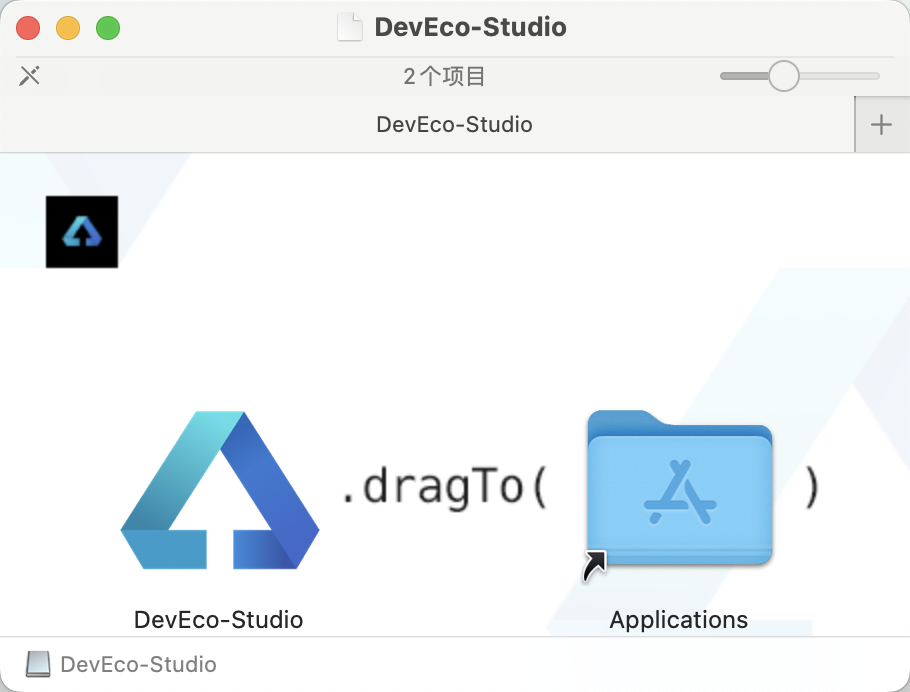
第一次打开需要点击同意一下: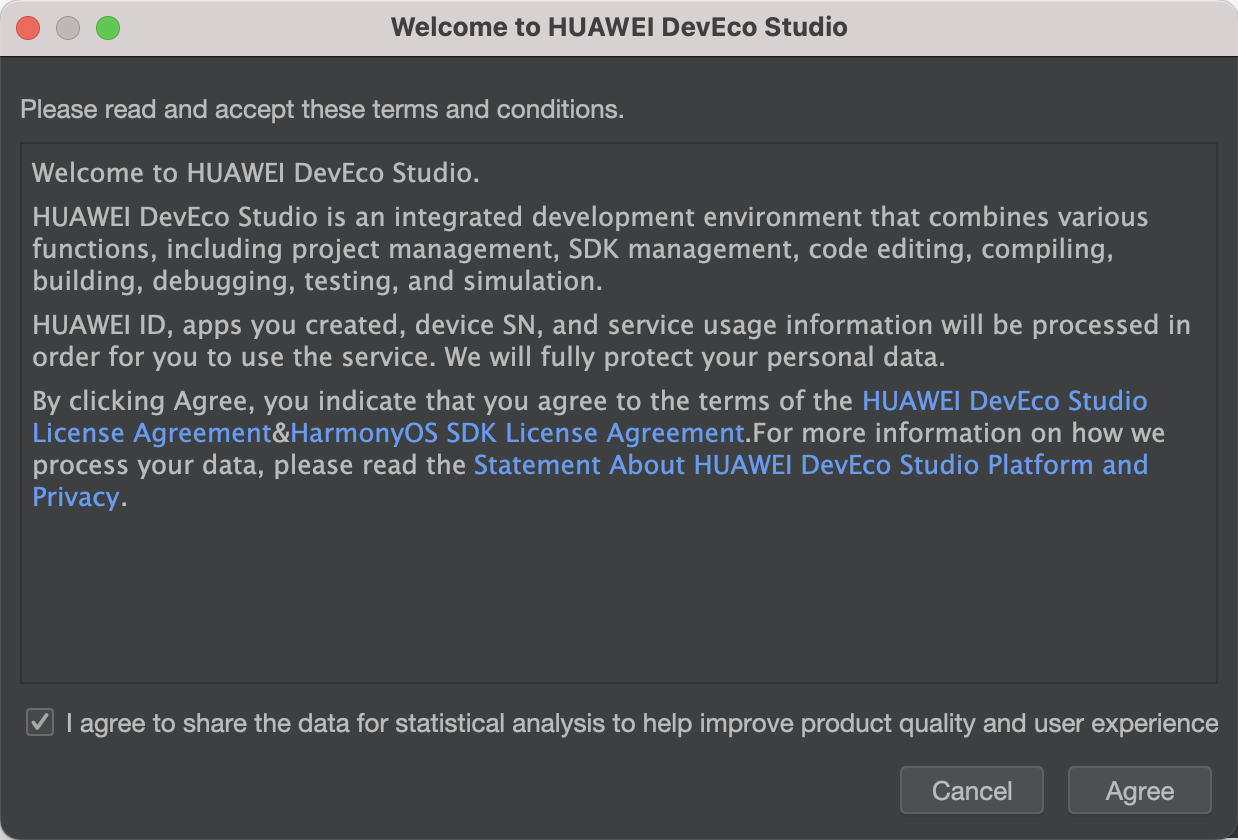
新建一个空白模板:
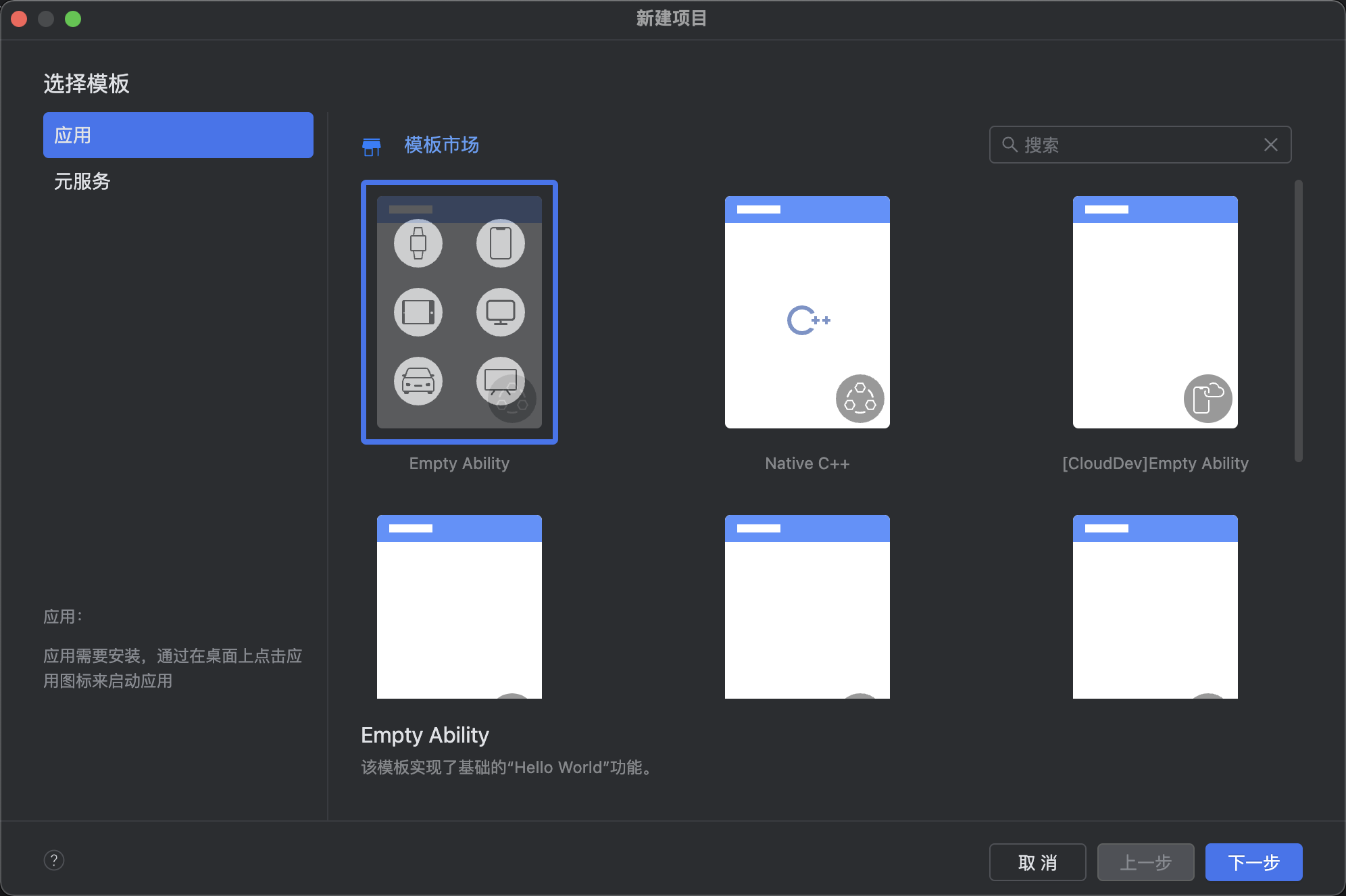
设置API为24的模板项目: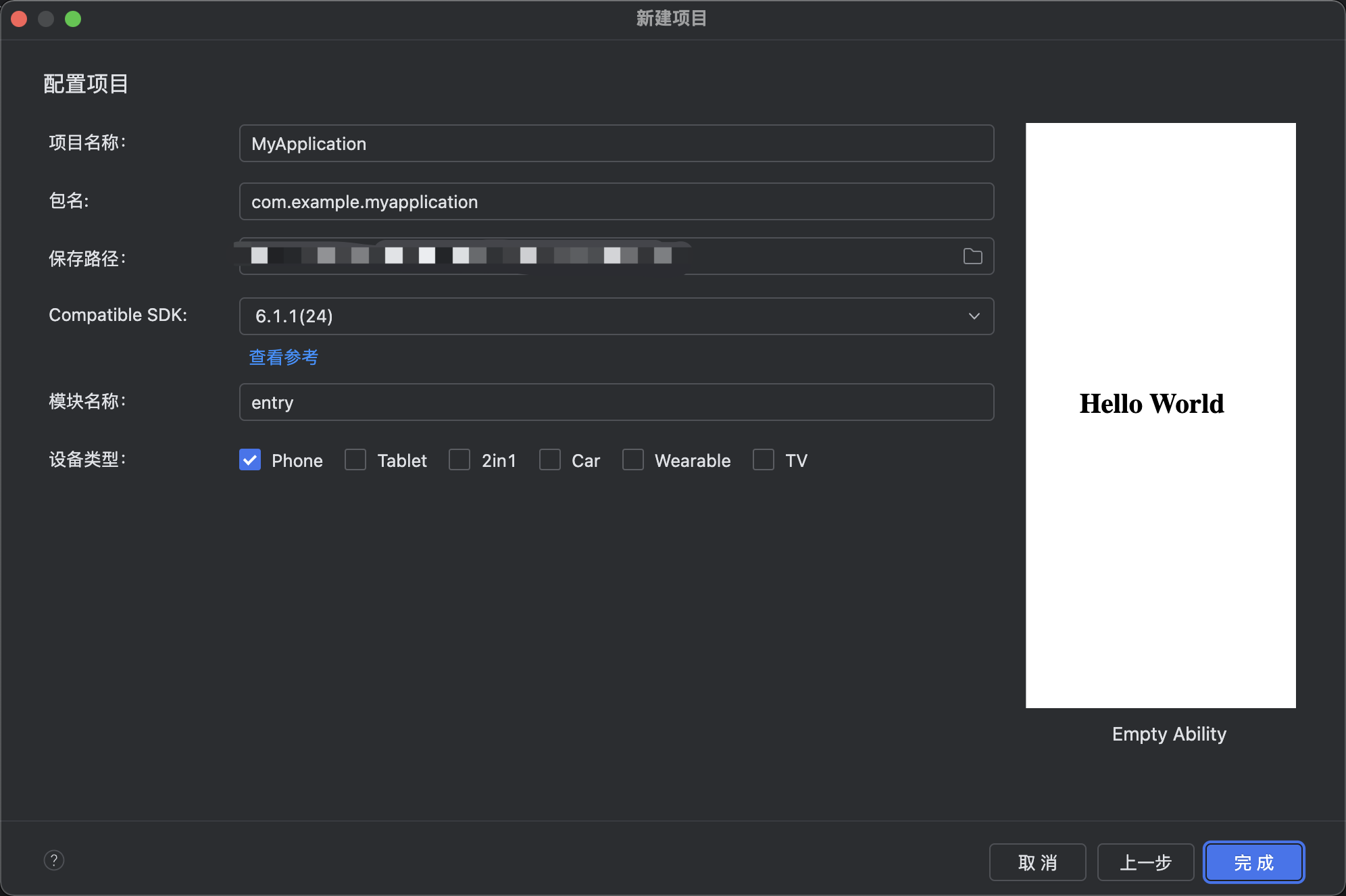
初始化项目,自动下载相关依赖:

完整代码:
// ============================================================
// 776 拾光咖啡 · 精品咖啡烘焙工坊(现代行业:咖啡)
// 头部样式:电商风格(搜索栏 + Banner轮播指示点 + 金刚区 + 优惠券横条)
// 布局风格:7 个 tab 每个布局完全不同
// 豆单=双列网格 / 冲煮=步骤编号卡 / 器具=左色条列表 / 门店=横滑大卡
// 咖啡师=头像卡 / 订单=状态时间轴 / 活动=标签云+小卡
// 底部 7 tab 两行(4+3)
// ============================================================
interface ColorPalette {
bg: string;
card: string;
paper: string;
title: string;
sub: string;
text3: string;
coffee: string;
coffeeL: string;
coffeeD: string;
cream: string;
caramel: string;
gold: string;
green: string;
red: string;
redL: string;
blue: string;
line: string;
tabOn: string;
mask: string;
transparent: string;
tagBg: string;
}
const COLORS: ColorPalette = {
bg: '#F7F3EE',
card: '#FFFFFF',
paper: '#F0EAE2',
title: '#3B2E25',
sub: '#6B5B4E',
text3: '#A2938A',
coffee: '#6F4E37',
coffeeL: '#A67B5B',
coffeeD: '#4A3423',
cream: '#FBF8F4',
caramel: '#C68B4E',
gold: '#D9A441',
green: '#5E8C61',
red: '#C0503C',
redL: '#F6E3DE',
blue: '#4E7C9B',
line: '#E5DCD2',
tabOn: '#4A3423',
mask: 'rgba(0,0,0,0.5)',
transparent: 'rgba(0,0,0,0)',
tagBg: 'rgba(111,78,55,0.12)'
};
interface TabMeta {
icon: string;
label: string;
}
const TAB_LIST: TabMeta[] = [
{ icon: '☕', label: '豆单' },
{ icon: '🫖', label: '冲煮' },
{ icon: '🔧', label: '器具' },
{ icon: '📍', label: '门店' },
{ icon: '🧑🍳', label: '咖啡师' },
{ icon: '🧾', label: '订单' },
{ icon: '🎉', label: '活动' }
];
const ROW1_IDX: number[] = [0, 1, 2, 3];
const ROW2_IDX: number[] = [4, 5, 6];
const DOT_IDX: number[] = [0, 1, 2];
const KING_IDX: number[] = [0, 1, 2, 3];
const KING_ICON: string[] = ['🏆', '🫘', '🫖', '🎁'];
const KING_TXT: string[] = ['庄园榜', '新豆到', '冲煮赛', '领券'];
const COUPON_IDX: number[] = [0, 1, 2];
const COUPON_VAL: string[] = ['新品豆 8 折', '满 99 减 15', '手冲课 5 折'];
const MONTH_IDX: number[] = [0, 1, 2, 3, 4, 5];
const MONTH_NAME: string[] = ['2月', '3月', '4月', '5月', '6月', '7月'];
const CUP_IDX: number[] = [320, 410, 380, 520, 460, 610];
const TAGS: string[] = ['手冲入门', '意式拉花', '杯测会', '烘焙体验', '云南豆', '瑰夏', '冷萃', '耶加雪菲'];
@Observed
export class BeanItem {
name: string;
origin: string;
roast: string;
price: number;
score: number;
constructor(name: string, origin: string, roast: string, price: number, score: number) {
this.name = name; this.origin = origin; this.roast = roast; this.price = price; this.score = score;
}
}
@Observed
export class BrewStep {
step: number;
name: string;
param: string;
seconds: number;
constructor(step: number, name: string, param: string, seconds: number) {
this.step = step; this.name = name; this.param = param; this.seconds = seconds;
}
}
@Observed
export class GearItem {
name: string;
kind: string;
brand: string;
price: number;
constructor(name: string, kind: string, brand: string, price: number) {
this.name = name; this.kind = kind; this.brand = brand; this.price = price;
}
}
@Observed
export class ShopItem {
name: string;
addr: string;
seats: number;
rating: number;
open: boolean;
constructor(name: string, addr: string, seats: number, rating: number, open: boolean) {
this.name = name; this.addr = addr; this.seats = seats; this.rating = rating; this.open = open;
}
}
@Observed
export class BaristaItem {
name: string;
title: string;
years: number;
awards: string;
constructor(name: string, title: string, years: number, awards: string) {
this.name = name; this.title = title; this.years = years; this.awards = awards;
}
}
@Observed
export class OrderItem {
no: string;
drink: string;
status: string;
time: string;
done: boolean;
constructor(no: string, drink: string, status: string, time: string, done: boolean) {
this.no = no; this.drink = drink; this.status = status; this.time = time; this.done = done;
}
}
@Observed
export class EventItemX {
name: string;
date: string;
fee: number;
joined: number;
constructor(name: string, date: string, fee: number, joined: number) {
this.name = name; this.date = date; this.fee = fee; this.joined = joined;
}
}
const mockBeanList: BeanItem[] = [
new BeanItem('耶加雪菲', '埃塞俄比亚', '浅烘', 68, 86),
new BeanItem('瑰夏', '巴拿马', '中浅烘', 298, 92),
new BeanItem('曼特宁', '苏门答腊', '深烘', 52, 84),
new BeanItem('云南日晒', '中国保山', '中烘', 45, 81),
new BeanItem('哥伦比亚', '蕙兰产区', '中烘', 58, 83),
new BeanItem('肯尼亚AA', '涅里产区', '浅烘', 75, 88),
new BeanItem('危地马拉', '安提瓜', '中深烘', 62, 82),
new BeanItem('蓝山一号', '牙买加', '中烘', 388, 94),
new BeanItem('西达摩', '埃塞俄比亚', '浅烘', 65, 85),
new BeanItem('黄金曼特宁', '苏门答腊', '深烘', 78, 86),
new BeanItem('花魁', '埃塞俄比亚', '浅烘', 98, 89),
new BeanItem('云南水洗', '中国普洱', '中烘', 42, 80)
];
const mockBrewList: BrewStep[] = [
new BrewStep(1, '润湿滤纸', '热水 90°C 冲洗', 15),
new BrewStep(2, '称豆磨粉', '20g · 中细研磨', 40),
new BrewStep(3, '闷蒸', '注水 40g 膨胀排气', 30),
new BrewStep(4, '第一段注水', '画圈注水至 120g', 25),
new BrewStep(5, '第二段注水', '中心注水至 240g', 30),
new BrewStep(6, '第三段注水', '轻柔注水至 320g', 25),
new BrewStep(7, '滴滤完成', '移开滤杯轻摇', 20),
new BrewStep(8, '闻香品鉴', '轻晃杯身闻干香', 10),
new BrewStep(9, '测温出品', '68°C 最佳饮用', 5),
new BrewStep(10, '风味记录', '记录酸质与甜感', 15)
];
const mockGearList: GearItem[] = [
new GearItem('Hario V60', '滤杯', 'Hario', 128),
new GearItem('Kalita 蛋糕杯', '滤杯', 'Kalita', 158),
new GearItem('Origami 折纸杯', '滤杯', 'Origami', 188),
new GearItem('手冲壶 0.7L', '细口壶', 'Brewista', 398),
new GearItem('磨豆机 C40', '研磨', 'Comandante', 2680),
new GearItem('电子秤 0.1g', '称量', 'Acaia', 980),
new GearItem('温控分享壶', '壶具', 'Fellow', 520),
new GearItem('咖啡杯 220ml', '杯具', 'Kinto', 210),
new GearItem('布粉针 WDT', '配件', '自制', 65),
new GearItem('法压壶 350ml', '壶具', 'Bodum', 168),
new GearItem('爱乐压', '器具', 'AeroPress', 258),
new GearItem('聪明杯', '滤杯', 'Mr.Clever', 98)
];
const mockShopList: ShopItem[] = [
new ShopItem('拾光 · 老城巷店', '梧桐巷 12 号', 24, 4.8, true),
new ShopItem('拾光 · 江畔灯塔店', '滨江东路 88 号', 38, 4.9, true),
new ShopItem('拾光 · 烘焙工厂店', '创意园 A3 栋', 52, 4.7, true),
new ShopItem('拾光 · 山间小屋', '青岭路 6 号', 16, 4.9, false),
new ShopItem('拾光 · 中央车站店', '高铁站 2F', 30, 4.6, true),
new ShopItem('拾光 · 书店联名店', '万象城 4F', 28, 4.7, true)
];
const mockBaristaList: BaristaItem[] = [
new BaristaItem('阿岚', '主理人 / 烘焙师', 9, '城市杯测赛冠军'),
new BaristaItem('老周', '意式吧台长', 12, '拉花艺术赛亚军'),
new BaristaItem('小鹿', '手冲师', 5, '金豆杯八强'),
new BaristaItem('Kevin', '品控师', 8, 'Q-Grader 认证'),
new BaristaItem('苏苏', '培训导师', 7, 'SCA 高级文凭'),
new BaristaItem('大树', '烘焙助手', 3, '新锐烘焙赛新秀'),
new BaristaItem('米娅', '创意特调师', 4, '特调大赛金奖'),
new BaristaItem('阿川', '值班咖啡师', 2, '门店服务之星')
];
const mockOrderList: OrderItem[] = [
new OrderItem('NO.10241', '燕麦拿铁 · 大杯', '已完成', '09:12', true),
new OrderItem('NO.10240', '耶加手冲 · 单品', '已完成', '09:03', true),
new OrderItem('NO.10239', '脏咖啡 · 双份', '制作中', '08:58', false),
new OrderItem('NO.10238', '冷萃 · 500ml', '已完成', '08:41', true),
new OrderItem('NO.10237', '拿铁 · 少糖', '已完成', '08:30', true),
new OrderItem('NO.10236', '澳白 · 双份浓缩', '已取消', '08:15', false),
new OrderItem('NO.10235', '卡布奇诺 · 中杯', '已完成', '08:02', true),
new OrderItem('NO.10234', '瑰夏手冲 · 限量', '已完成', '07:48', true),
new OrderItem('NO.10233', '美式 · 冰', '已完成', '07:30', true),
new OrderItem('NO.10232', '摩卡 · 加奶油', '已完成', '07:15', true)
];
const mockEventList: EventItemX[] = [
new EventItemX('周三杯测夜 · 非洲专场', '8月26日', 0, 18),
new EventItemX('手冲入门课 · 第二期', '8月29日', 128, 9),
new EventItemX('烘焙开放日 · 观火记', '9月02日', 88, 12),
new EventItemX('拉花工作坊 · 叶形进阶', '9月05日', 158, 7),
new EventItemX('冷萃实验室 · 特调之夜', '9月09日', 68, 15),
new EventItemX('庄园主分享会 · 云南行', '9月13日', 0, 22)
];
function roastColor(r: string): string {
if (r === '浅烘') {
return COLORS.gold;
}
if (r === '中浅烘') {
return COLORS.caramel;
}
if (r === '中烘') {
return COLORS.coffeeL;
}
if (r === '中深烘') {
return COLORS.coffee;
}
return COLORS.coffeeD;
}
function scoreColor(s: number): string {
if (s >= 90) {
return COLORS.red;
}
if (s >= 85) {
return COLORS.caramel;
}
return COLORS.green;
}
function steamX(i: number): number {
return 40 + i * 90;
}
@Entry
@Component
struct Page776 {
@State selTab: number = 0;
@State breath: boolean = false;
@State bannerOn: boolean = false;
@State showAdd: boolean = false;
@State showEdit: boolean = false;
@State showDel: boolean = false;
@State editIdx: number = 0;
@State delIdx: number = 0;
@State beanList: BeanItem[] = mockBeanList;
@State brewList: BrewStep[] = mockBrewList;
@State gearList: GearItem[] = mockGearList;
@State shopList: ShopItem[] = mockShopList;
@State baristaList: BaristaItem[] = mockBaristaList;
@State orderList: OrderItem[] = mockOrderList;
@State eventList: EventItemX[] = mockEventList;
aboutToAppear() {
setInterval(() => { this.breath = !this.breath; }, 600);
setInterval(() => { this.bannerOn = !this.bannerOn; }, 2500);
}
build() {
Column() {
this.headerShop()
Divider().strokeWidth(1).color(COLORS.line)
Scroll() {
Column() {
if (this.selTab === 0) {
this.beansTab()
} else if (this.selTab === 1) {
this.brewTab()
} else if (this.selTab === 2) {
this.gearTab()
} else if (this.selTab === 3) {
this.shopsTab()
} else if (this.selTab === 4) {
this.baristaTab()
} else if (this.selTab === 5) {
this.ordersTab()
} else {
this.eventsTab()
}
this.cupChart()
}.width('100%').padding({ left: 10, right: 10, top: 10, bottom: 100 })
}.constraintSize({ maxHeight: '60%' }).scrollBar(BarState.Off)
this.tabBar()
if (this.showAdd) {
this.addModal()
}
if (this.showEdit) {
this.editModal()
}
if (this.showDel) {
this.delModal()
}
}.width('100%').height('100%').backgroundColor(COLORS.bg)
}
// ============ 电商风格头部:搜索 + Banner + 金刚区 + 优惠券 ============
@Builder
headerShop() {
Stack({ alignContent: Alignment.TopStart }) {
Column()
.width('100%')
.height(210)
.linearGradient({
angle: 140,
colors: [[COLORS.coffeeD, 0.0], [COLORS.coffee, 0.55], [COLORS.bg, 1.0]]
})
// 顶部标题行
Row() {
Text('拾光咖啡').fontSize(18).fontColor(COLORS.cream).fontWeight(FontWeight.Bold)
Text('· 精品烘焙工坊').fontSize(11).fontColor(COLORS.caramel).margin({ left: 6 })
Column().layoutWeight(1)
Text('🔔').fontSize(14).fontColor(COLORS.cream).margin({ right: 10 })
Text('🛒').fontSize(14).fontColor(COLORS.cream)
}
.width('100%').padding({ left: 14, right: 14, top: 12 })
// 搜索栏
Row() {
Text('🔍').fontSize(13).margin({ left: 10 })
TextInput({ placeholder: '搜豆子 / 器具 / 门店...' })
.placeholderColor('rgba(255,255,255,0.5)')
.fontSize(12).fontColor(COLORS.cream).layoutWeight(1)
.backgroundColor('rgba(255,255,255,0.15)').borderRadius(16)
.margin({ left: 6, right: 6 }).height(34)
.padding({ left: 6, right: 6 })
Column() {
Text('🔍').fontSize(13).fontColor(COLORS.cream)
}
.width(34).height(34).backgroundColor(COLORS.caramel).borderRadius(17)
.justifyContent(FlexAlign.Center).margin({ right: 10 })
.onClick(() => { this.showAdd = true; })
}
.width('100%').position({ x: 0, y: 42 })
// Banner 轮播
Column() {
Row() {
Column() {
Text(this.bannerOn ? '云南保山 · 日晒新豆上架' : '庄园直采 · 瑰夏限量预售').fontSize(14)
.fontColor(COLORS.cream).fontWeight(FontWeight.Bold)
Text('产地直发 · 下单后 48h 内烘焙').fontSize(9)
.fontColor('rgba(255,255,255,0.75)').margin({ top: 3 })
}.alignItems(HorizontalAlign.Start)
Column().layoutWeight(1)
Text('🎉').fontSize(26)
.opacity(this.breath ? 1.0 : 0.7)
.animation({ duration: 600, iterations: -1, playMode: PlayMode.Alternate })
}
.width('100%').padding({ left: 14, right: 14, top: 12, bottom: 12 })
.backgroundColor(this.bannerOn ? COLORS.caramel : COLORS.gold)
.borderRadius(10)
}
.width('100%').position({ x: 12, y: 84 })
// 金刚区
Row() {
ForEach(KING_IDX, (k: number) => {
Column({ space: 4 }) {
Column() {
Text(KING_ICON[k]).fontSize(17)
}
.width(42).height(42).borderRadius(21)
.backgroundColor('rgba(255,255,255,0.9)')
.justifyContent(FlexAlign.Center)
.animation({ duration: 600, iterations: -1, playMode: PlayMode.Alternate })
Text(KING_TXT[k]).fontSize(9).fontColor(COLORS.cream)
}
.layoutWeight(1).alignItems(HorizontalAlign.Center)
.onClick(() => { this.selTab = k === 0 ? 0 : k === 1 ? 0 : k === 2 ? 1 : 6; })
}, (k: number) => 'kg' + k)
}
.width('100%').padding({ left: 8, right: 8, top: 6 })
.position({ x: 0, y: 140 })
// 优惠券横条
Scroll() {
Row({ space: 8 }) {
ForEach(COUPON_IDX, (c: number) => {
Row({ space: 6 }) {
Text('¥').fontSize(10).fontColor(COLORS.cream)
.backgroundColor(COLORS.red)
.padding({ left: 5, right: 5, top: 1, bottom: 1 }).borderRadius(3)
Text(COUPON_VAL[c]).fontSize(10).fontColor(COLORS.red)
Text('领').fontSize(8).fontColor(COLORS.cream)
.backgroundColor(COLORS.red)
.padding({ left: 6, right: 6, top: 1, bottom: 1 }).borderRadius(6)
}
.padding({ left: 8, right: 8, top: 6, bottom: 6 })
.backgroundColor(COLORS.cream).borderRadius(6)
.onClick(() => { this.showAdd = true; })
}, (c: number) => 'cp' + c)
}
.padding({ left: 12, right: 12 })
}
.scrollable(ScrollDirection.Horizontal).scrollBar(BarState.Off)
.width('100%')
.position({ x: 0, y: 182 })
}
.width('100%').height(210)
}
// ============ Tab0:豆单(双列网格卡片)============
@Builder
beansTab() {
Column({ space: 8 }) {
Row() {
Text('☕ 今日豆单 · 12 款在售').fontSize(13).fontColor(COLORS.title).fontWeight(FontWeight.Bold)
Column().layoutWeight(1)
Text('+ 新增豆').fontSize(10).fontColor(COLORS.cream)
.backgroundColor(COLORS.coffee).padding({ left: 8, right: 8, top: 4, bottom: 4 }).borderRadius(10)
.onClick(() => { this.showAdd = true; })
}.width('100%')
Row({ space: 8 }) {
Column({ space: 8 }) {
ForEach(this.beanList, (item: BeanItem, idx: number) => {
if (idx % 2 === 0) {
Column() {
Column()
.width('100%').height(52)
.linearGradient({
angle: 135,
colors: [[roastColor(item.roast), 0.0], [COLORS.paper, 1.0]]
})
.borderRadius({ topLeft: 8, topRight: 8, bottomLeft: 0, bottomRight: 0 })
Row() {
Text(item.roast).fontSize(8).fontColor(COLORS.cream)
.backgroundColor(roastColor(item.roast))
.padding({ left: 4, right: 4, top: 1, bottom: 1 }).borderRadius(3)
Column().layoutWeight(1)
Text(item.score + '分').fontSize(9).fontColor(scoreColor(item.score))
.fontWeight(FontWeight.Bold)
}.width('100%').padding({ left: 6, right: 6, top: 4 })
Text(item.name).fontSize(12).fontColor(COLORS.title).fontWeight(FontWeight.Bold)
.width('100%').padding({ left: 6 })
Text(item.origin).fontSize(9).fontColor(COLORS.text3)
.width('100%').padding({ left: 6, bottom: 4 })
Row() {
Text('¥' + item.price).fontSize(11).fontColor(COLORS.red).fontWeight(FontWeight.Bold)
Column().layoutWeight(1)
Text('/100g').fontSize(8).fontColor(COLORS.text3)
}.width('100%').padding({ left: 6, right: 6, bottom: 8 })
}
.width('100%').backgroundColor(COLORS.card).borderRadius(8)
.onClick(() => { this.editIdx = idx; this.showEdit = true; })
}
}, (item: BeanItem) => 'be' + item.name)
}.layoutWeight(1)
Column({ space: 8 }) {
ForEach(this.beanList, (item: BeanItem, idx: number) => {
if (idx % 2 === 1) {
Column() {
Column()
.width('100%').height(52)
.linearGradient({
angle: 135,
colors: [[roastColor(item.roast), 0.0], [COLORS.paper, 1.0]]
})
.borderRadius({ topLeft: 8, topRight: 8, bottomLeft: 0, bottomRight: 0 })
Row() {
Text(item.roast).fontSize(8).fontColor(COLORS.cream)
.backgroundColor(roastColor(item.roast))
.padding({ left: 4, right: 4, top: 1, bottom: 1 }).borderRadius(3)
Column().layoutWeight(1)
Text(item.score + '分').fontSize(9).fontColor(scoreColor(item.score))
.fontWeight(FontWeight.Bold)
}.width('100%').padding({ left: 6, right: 6, top: 4 })
Text(item.name).fontSize(12).fontColor(COLORS.title).fontWeight(FontWeight.Bold)
.width('100%').padding({ left: 6 })
Text(item.origin).fontSize(9).fontColor(COLORS.text3)
.width('100%').padding({ left: 6, bottom: 4 })
Row() {
Text('¥' + item.price).fontSize(11).fontColor(COLORS.red).fontWeight(FontWeight.Bold)
Column().layoutWeight(1)
Text('/100g').fontSize(8).fontColor(COLORS.text3)
}.width('100%').padding({ left: 6, right: 6, bottom: 8 })
}
.width('100%').backgroundColor(COLORS.card).borderRadius(8)
.onClick(() => { this.editIdx = idx; this.showEdit = true; })
}
}, (item: BeanItem) => 'bo' + item.name)
}.layoutWeight(1)
}.width('100%')
}.width('100%')
}
// ============ Tab1:冲煮(步骤编号卡片)============
@Builder
brewTab() {
Column({ space: 6 }) {
Text('🫖 手冲十步法 · 跟着做').fontSize(13).fontColor(COLORS.title).fontWeight(FontWeight.Bold)
.width('100%').padding({ left: 4 })
ForEach(this.brewList, (item: BrewStep, idx: number) => {
Row({ space: 10 }) {
Column() {
Text(item.step.toString()).fontSize(16).fontColor(COLORS.cream).fontWeight(FontWeight.Bold)
}
.width(38).height(38)
.backgroundColor(idx % 3 === 0 ? COLORS.coffee : idx % 3 === 1 ? COLORS.caramel : COLORS.gold)
.borderRadius(19).justifyContent(FlexAlign.Center)
Column({ space: 3 }) {
Text(item.name).fontSize(13).fontColor(COLORS.title).fontWeight(FontWeight.Bold)
Text(item.param).fontSize(10).fontColor(COLORS.sub)
}
.layoutWeight(1).alignItems(HorizontalAlign.Start)
Column() {
Text(item.seconds + 's').fontSize(12).fontColor(COLORS.caramel).fontWeight(FontWeight.Bold)
Text('耗时').fontSize(8).fontColor(COLORS.text3)
}.alignItems(HorizontalAlign.End)
}
.width('100%').padding({ left: 10, right: 10, top: 8, bottom: 8 })
.backgroundColor(idx % 2 === 0 ? COLORS.card : COLORS.paper)
.borderRadius(8)
.onClick(() => { this.editIdx = idx; this.showEdit = true; })
}, (item: BrewStep) => 'bw' + item.step)
}.width('100%')
}
// ============ Tab2:器具(左色条列表)============
@Builder
gearTab() {
Column({ space: 6 }) {
Text('🔧 器具柜 · 一站配齐').fontSize(13).fontColor(COLORS.title).fontWeight(FontWeight.Bold)
.width('100%').padding({ left: 4 })
ForEach(this.gearList, (item: GearItem, idx: number) => {
Row() {
Column().width(5).height(36)
.backgroundColor(idx % 4 === 0 ? COLORS.coffee : idx % 4 === 1 ? COLORS.caramel : idx % 4 === 2 ? COLORS.gold : COLORS.green)
.borderRadius(2)
Column({ space: 3 }) {
Text(item.name).fontSize(13).fontColor(COLORS.title).fontWeight(FontWeight.Bold)
Text(item.kind + ' · ' + item.brand).fontSize(10).fontColor(COLORS.sub)
}
.layoutWeight(1).alignItems(HorizontalAlign.Start).padding({ left: 10 })
Text('¥' + item.price).fontSize(12).fontColor(COLORS.red).fontWeight(FontWeight.Bold)
Row({ space: 8 }) {
Text('编').fontSize(9).fontColor(COLORS.tabOn)
.onClick(() => { this.editIdx = idx; this.showEdit = true; })
Text('删').fontSize(9).fontColor(COLORS.red)
.onClick(() => { this.delIdx = idx; this.showDel = true; })
}.margin({ left: 8 })
}
.width('100%').padding({ left: 8, right: 10, top: 7, bottom: 7 })
.backgroundColor(COLORS.card).borderRadius(8)
}, (item: GearItem) => 'gr' + item.name)
}.width('100%')
}
// ============ Tab3:门店(横滑大卡 + 信息行)============
@Builder
shopsTab() {
Column({ space: 8 }) {
Text('📍 城市门店 · 就近喝一杯').fontSize(13).fontColor(COLORS.title).fontWeight(FontWeight.Bold)
.width('100%').padding({ left: 4 })
Scroll() {
Row({ space: 12 }) {
ForEach(this.shopList, (item: ShopItem, idx: number) => {
Column() {
Column()
.width(180).height(72)
.linearGradient({
angle: 135,
colors: [[idx % 2 === 0 ? COLORS.coffee : COLORS.caramel, 0.0], [COLORS.gold, 1.0]]
})
.borderRadius({ topLeft: 10, topRight: 10, bottomLeft: 0, bottomRight: 0 })
Column({ space: 3 }) {
Row() {
Text(item.name).fontSize(12).fontColor(COLORS.title).fontWeight(FontWeight.Bold)
.layoutWeight(1)
Text(item.open ? '营业中' : '休店').fontSize(8).fontColor(COLORS.cream)
.backgroundColor(item.open ? COLORS.green : COLORS.text3)
.padding({ left: 4, right: 4, top: 1, bottom: 1 }).borderRadius(3)
}.width('100%')
Text(item.addr).fontSize(9).fontColor(COLORS.sub)
Row() {
Text('⭐ ' + item.rating).fontSize(10).fontColor(COLORS.gold).fontWeight(FontWeight.Bold)
Column().layoutWeight(1)
Text(item.seats + ' 座').fontSize(9).fontColor(COLORS.text3)
}.width('100%')
}
.width(180).padding({ left: 8, right: 8, top: 6, bottom: 8 })
}
.width(180).backgroundColor(COLORS.card).borderRadius(10)
.onClick(() => { this.editIdx = idx; this.showEdit = true; })
}, (item: ShopItem) => 'sp' + item.name)
}
.padding({ left: 4, right: 4 })
}
.scrollable(ScrollDirection.Horizontal).scrollBar(BarState.Off)
.width('100%')
}.width('100%')
}
// ============ Tab4:咖啡师(头像卡列表)============
@Builder
baristaTab() {
Column({ space: 6 }) {
Text('🧑🍳 咖啡师天团 · 今日值班').fontSize(13).fontColor(COLORS.title).fontWeight(FontWeight.Bold)
.width('100%').padding({ left: 4 })
ForEach(this.baristaList, (item: BaristaItem, idx: number) => {
Row() {
Column() {
Text(item.name.charAt(0)).fontSize(16).fontColor(COLORS.cream).fontWeight(FontWeight.Bold)
}
.width(44).height(44)
.backgroundColor(idx % 4 === 0 ? COLORS.coffeeD : idx % 4 === 1 ? COLORS.caramel : idx % 4 === 2 ? COLORS.gold : COLORS.green)
.borderRadius(22).justifyContent(FlexAlign.Center)
.animation({ duration: 600, iterations: -1, playMode: PlayMode.Alternate })
Column({ space: 3 }) {
Row() {
Text(item.name).fontSize(13).fontColor(COLORS.title).fontWeight(FontWeight.Bold)
Text(item.title).fontSize(9).fontColor(COLORS.cream)
.backgroundColor(COLORS.coffeeL)
.padding({ left: 6, right: 6, top: 1, bottom: 1 }).borderRadius(8)
.margin({ left: 8 })
}
Text('🏆 ' + item.awards).fontSize(10).fontColor(COLORS.caramel)
Text('从业 ' + item.years + ' 年').fontSize(9).fontColor(COLORS.text3)
}
.layoutWeight(1).alignItems(HorizontalAlign.Start).padding({ left: 10 })
Row({ space: 8 }) {
Text('编').fontSize(9).fontColor(COLORS.tabOn)
.onClick(() => { this.editIdx = idx; this.showEdit = true; })
Text('删').fontSize(9).fontColor(COLORS.red)
.onClick(() => { this.delIdx = idx; this.showDel = true; })
}
}
.width('100%').padding({ left: 10, right: 10, top: 8, bottom: 8 })
.backgroundColor(idx % 2 === 0 ? COLORS.card : COLORS.paper)
.borderRadius(8)
}, (item: BaristaItem) => 'bs' + item.name)
}.width('100%')
}
// ============ Tab5:订单(状态时间轴)============
@Builder
ordersTab() {
Column({ space: 0 }) {
Text('🧾 今日订单 · 实时流水').fontSize(13).fontColor(COLORS.title).fontWeight(FontWeight.Bold)
.width('100%').padding({ left: 4, bottom: 6 })
Column() {
ForEach(this.orderList, (item: OrderItem, idx: number) => {
Row() {
// 时间轴轨道
Column({ space: 0 }) {
Circle().width(10).height(10)
.fill(item.done ? COLORS.green : (item.status === '制作中' ? COLORS.caramel : COLORS.text3))
.opacity(item.status === '制作中' ? (this.breath ? 1.0 : 0.4) : 1.0)
.animation({ duration: 600 })
if (idx < this.orderList.length - 1) {
Column().width(2).layoutWeight(1).backgroundColor(COLORS.line)
}
}
.width(20).alignItems(HorizontalAlign.Center)
.constraintSize({ minHeight: 52 })
Column({ space: 3 }) {
Row() {
Text(item.no).fontSize(11).fontColor(COLORS.text3)
Column().layoutWeight(1)
Text(item.status).fontSize(9).fontColor(COLORS.cream)
.backgroundColor(item.done ? COLORS.green : item.status === '制作中' ? COLORS.caramel : COLORS.text3)
.padding({ left: 6, right: 6, top: 1, bottom: 1 }).borderRadius(6)
.opacity(item.status === '制作中' ? (this.breath ? 1.0 : 0.6) : 1.0)
.animation({ duration: 600 })
}.width('100%')
Text(item.drink).fontSize(13).fontColor(COLORS.title).fontWeight(FontWeight.Bold)
Text(item.time + ' 下单').fontSize(9).fontColor(COLORS.text3)
}
.layoutWeight(1).alignItems(HorizontalAlign.Start).padding({ left: 8, top: 8, bottom: 8 })
}
.width('100%').backgroundColor(COLORS.card)
.borderRadius(8)
.margin({ top: 4 })
.onClick(() => { this.editIdx = idx; this.showEdit = true; })
}, (item: OrderItem) => 'od' + item.no)
}.width('100%').padding({ left: 8, right: 8 })
}.width('100%')
}
// ============ Tab6:活动(标签云 + 小卡)============
@Builder
eventsTab() {
Column({ space: 8 }) {
Text('🎉 门店活动 · 一起玩咖啡').fontSize(13).fontColor(COLORS.title).fontWeight(FontWeight.Bold)
.width('100%').padding({ left: 4 })
// 标签云
Flex({ wrap: FlexWrap.Wrap }) {
ForEach(TAGS, (t: string) => {
Text('#' + t).fontSize(10).fontColor(COLORS.coffee)
.backgroundColor(COLORS.tagBg)
.padding({ left: 8, right: 8, top: 4, bottom: 4 }).borderRadius(10)
.margin({ right: 6, bottom: 6 })
}, (t: string) => 'tg' + t)
}.width('100%')
// 活动小卡
ForEach(this.eventList, (item: EventItemX, idx: number) => {
Row({ space: 10 }) {
Column() {
Text(item.date.split('月')[1].split('日')[0]).fontSize(16).fontColor(COLORS.cream).fontWeight(FontWeight.Bold)
Text('月').fontSize(8).fontColor('rgba(255,255,255,0.8)')
}
.width(46).height(46)
.backgroundColor(idx % 3 === 0 ? COLORS.caramel : idx % 3 === 1 ? COLORS.coffee : COLORS.gold)
.borderRadius(8).justifyContent(FlexAlign.Center)
Column({ space: 3 }) {
Text(item.name).fontSize(12).fontColor(COLORS.title).fontWeight(FontWeight.Bold)
Text(item.date + ' · ' + item.joined + ' 人已报名').fontSize(9).fontColor(COLORS.sub)
}
.layoutWeight(1).alignItems(HorizontalAlign.Start)
Column() {
Text(item.fee === 0 ? '免费' : '¥' + item.fee).fontSize(11)
.fontColor(item.fee === 0 ? COLORS.green : COLORS.red).fontWeight(FontWeight.Bold)
Text('报名').fontSize(8).fontColor(COLORS.text3)
}.alignItems(HorizontalAlign.End)
}
.width('100%').padding({ left: 10, right: 10, top: 8, bottom: 8 })
.backgroundColor(idx % 2 === 0 ? COLORS.card : COLORS.paper)
.borderRadius(8)
.onClick(() => { this.editIdx = idx; this.showEdit = true; })
}, (item: EventItemX) => 'ev' + item.name)
}.width('100%')
}
// ============ 月度出杯柱状图 ============
@Builder
cupChart() {
Column({ space: 8 }) {
Row() {
Text('月度出杯量').fontSize(14).fontColor(COLORS.title).layoutWeight(1)
Text('杯').fontSize(11).fontColor(COLORS.text3)
}.width('100%')
Row({ space: 4 }) {
ForEach(MONTH_IDX, (m: number) => {
Column({ space: 4 }) {
Text(CUP_IDX[m].toString())
.fontSize(9).fontColor(COLORS.sub)
Column()
.width(24)
.height(CUP_IDX[m] * 0.1)
.backgroundColor(m % 2 === 0 ? COLORS.coffee : COLORS.caramel)
.borderRadius(4)
Text(MONTH_NAME[m])
.fontSize(9)
.fontColor(COLORS.text3)
}
.layoutWeight(1)
.alignItems(HorizontalAlign.Center)
}, (m: number) => 'cc' + m)
}
.width('100%').height(80)
.alignItems(VerticalAlign.Bottom)
}
.width('100%').padding(12)
.backgroundColor(COLORS.card).borderRadius(10)
.margin({ top: 10 })
}
// ============ 底部 7 tab 两行(4+3)============
@Builder
tabBar() {
Column({ space: 4 }) {
Row() {
ForEach(ROW1_IDX, (i: number) => {
Column({ space: 2 }) {
Text(TAB_LIST[i].icon).fontSize(13).fontColor(this.selTab === i ? COLORS.cream : COLORS.sub)
Text(TAB_LIST[i].label).fontSize(8).fontColor(this.selTab === i ? COLORS.cream : COLORS.sub)
}
.layoutWeight(1).height(42)
.backgroundColor(this.selTab === i ? COLORS.coffeeD : COLORS.card)
.borderRadius(8)
.justifyContent(FlexAlign.Center)
.onClick(() => { this.selTab = i; })
}, (i: number) => 'r1' + i)
}.width('100%')
Row() {
ForEach(ROW2_IDX, (i: number) => {
Column({ space: 2 }) {
Text(TAB_LIST[i].icon).fontSize(13).fontColor(this.selTab === i ? COLORS.cream : COLORS.sub)
Text(TAB_LIST[i].label).fontSize(8).fontColor(this.selTab === i ? COLORS.cream : COLORS.sub)
}
.layoutWeight(1).height(42)
.backgroundColor(this.selTab === i ? COLORS.coffeeD : COLORS.card)
.borderRadius(8)
.justifyContent(FlexAlign.Center)
.onClick(() => { this.selTab = i; })
}, (i: number) => 'r2' + i)
}.width('100%')
}
.width('100%').padding({ left: 8, right: 8, top: 5, bottom: 6 })
.backgroundColor(COLORS.card)
}
// ============ 弹框 ============
@Builder
modalOverlay(onClose: () => void) {
Column()
.width('100%')
.height('100%')
.backgroundColor(COLORS.mask)
.onClick(() => { onClose(); })
}
@Builder
addModal() {
Stack({ alignContent: Alignment.Center }) {
this.modalOverlay(() => { this.showAdd = false; })
Column({ space: 12 }) {
Text('☕ 新增条目').fontSize(16).fontColor(COLORS.title)
TextInput({ placeholder: '名称' })
.fontSize(13).fontColor(COLORS.title)
.backgroundColor(COLORS.paper).borderRadius(8)
TextInput({ placeholder: '类别 / 产地' })
.fontSize(13).fontColor(COLORS.title)
.backgroundColor(COLORS.paper).borderRadius(8)
TextInput({ placeholder: '参数 / 烘焙度' })
.fontSize(13).fontColor(COLORS.title)
.backgroundColor(COLORS.paper).borderRadius(8)
TextInput({ placeholder: '价格' })
.fontSize(13).fontColor(COLORS.title)
.backgroundColor(COLORS.paper).borderRadius(8)
Row({ space: 10 }) {
Column() {
Text('确定').fontSize(13).fontColor(COLORS.cream)
}
.layoutWeight(1).height(38)
.backgroundColor(COLORS.coffeeD).borderRadius(8)
.justifyContent(FlexAlign.Center)
.onClick(() => { this.showAdd = false; })
Column() {
Text('取消').fontSize(13).fontColor(COLORS.sub)
}
.layoutWeight(1).height(38)
.backgroundColor(COLORS.line).borderRadius(8)
.justifyContent(FlexAlign.Center)
.onClick(() => { this.showAdd = false; })
}.width('100%')
}
.width('80%').padding(20)
.backgroundColor(COLORS.card).borderRadius(12)
.constraintSize({ maxHeight: '80%' })
}
.width('100%').height('100%')
.position({ x: 0, y: 0 })
.zIndex(999)
.backgroundColor(COLORS.transparent)
}
@Builder
editModal() {
Stack({ alignContent: Alignment.Center }) {
this.modalOverlay(() => { this.showEdit = false; })
Column({ space: 12 }) {
Text('✏️ 编辑第 ' + (this.editIdx + 1) + ' 条').fontSize(16).fontColor(COLORS.title)
TextInput({ placeholder: '名称' })
.fontSize(13).fontColor(COLORS.title)
.backgroundColor(COLORS.paper).borderRadius(8)
TextInput({ placeholder: '类别 / 产地' })
.fontSize(13).fontColor(COLORS.title)
.backgroundColor(COLORS.paper).borderRadius(8)
TextInput({ placeholder: '参数 / 烘焙度' })
.fontSize(13).fontColor(COLORS.title)
.backgroundColor(COLORS.paper).borderRadius(8)
TextInput({ placeholder: '价格' })
.fontSize(13).fontColor(COLORS.title)
.backgroundColor(COLORS.paper).borderRadius(8)
Row({ space: 10 }) {
Column() {
Text('保存').fontSize(13).fontColor(COLORS.cream)
}
.layoutWeight(1).height(38)
.backgroundColor(COLORS.coffeeD).borderRadius(8)
.justifyContent(FlexAlign.Center)
.onClick(() => { this.showEdit = false; })
Column() {
Text('取消').fontSize(13).fontColor(COLORS.sub)
}
.layoutWeight(1).height(38)
.backgroundColor(COLORS.line).borderRadius(8)
.justifyContent(FlexAlign.Center)
.onClick(() => { this.showEdit = false; })
}.width('100%')
}
.width('80%').padding(20)
.backgroundColor(COLORS.card).borderRadius(12)
.constraintSize({ maxHeight: '80%' })
}
.width('100%').height('100%')
.position({ x: 0, y: 0 })
.zIndex(999)
.backgroundColor(COLORS.transparent)
}
@Builder
delModal() {
Stack({ alignContent: Alignment.Center }) {
this.modalOverlay(() => { this.showDel = false; })
Column({ space: 12 }) {
Text('确认删除').fontSize(16).fontColor(COLORS.title)
Text('删除第 ' + (this.delIdx + 1) + ' 条记录?').fontSize(13).fontColor(COLORS.sub)
Text('删除后不可恢复,请谨慎操作。').fontSize(11).fontColor(COLORS.text3)
Row({ space: 10 }) {
Column() {
Text('确认删除').fontSize(13).fontColor(COLORS.cream)
}
.layoutWeight(1).height(38)
.backgroundColor(COLORS.red).borderRadius(8)
.justifyContent(FlexAlign.Center)
.onClick(() => { this.showDel = false; })
Column() {
Text('取消').fontSize(13).fontColor(COLORS.sub)
}
.layoutWeight(1).height(38)
.backgroundColor(COLORS.line).borderRadius(8)
.justifyContent(FlexAlign.Center)
.onClick(() => { this.showDel = false; })
}.width('100%')
}
.width('70%').padding(20)
.backgroundColor(COLORS.card).borderRadius(12)
.constraintSize({ maxHeight: '80%' })
}
.width('100%').height('100%')
.position({ x: 0, y: 0 })
.zIndex(999)
.backgroundColor(COLORS.transparent)
}
}
第五点,状态管理升级。当前Demo所有数据全部保存在页面组件@State变量,只适合单页面演示。真实项目中,业务数据会跨多个页面共享,跳转到详情页、子页面都需要读取咖啡豆、订单数据。此时就不适合全部放在页面本地状态,可以使用AppStorage全局状态,或者引入状态管理方案,把业务数据提升全局,实现跨页面数据共享。
第六点,样式统一,消除硬编码数字。页面当中大量写死的vp数值,比如210头部高度、position坐标、卡片margin、圆角,逐步迁移到Design Token常量,减少代码当中散落的魔法数字。
第七点,异常状态模拟与测试。利用Mock数据构造各类异常场景,测试页面表现,例如空列表、大量条目、超长文本、全部订单都处于制作中状态,验证UI不会错乱。
第八点,对接真实后端接口。把mock数据源替换为网络请求,页面加载aboutToAppear生命周期调用接口拉取业务数据;新增、编辑、删除操作不再只修改内存数组,调用对应后端接口,接口回调成功之后再更新本地数据,保证内存数据和服务端数据同步。
第九点,多设备适配增强。去掉大量硬编码position绝对定位,增加响应式适配逻辑,兼容手机、平板,区分横屏竖屏场景,避免布局错位溢出。
第十点,增加简单埋点,页面Tab切换、新增编辑删除操作记录埋点,方便后续产品统计用户行为。

作为“人工智能6S店”的官方数字引擎,为AI开发者与企业提供一个覆盖软硬件全栈、一站式门户。
更多推荐
 1
1 0
0- 0


 已为社区贡献1条内容

所有评论(0)