
基于HarmonyOS ArkTS API 24 Scroll容器设置scrollBar(BarState.Off)隐藏滚动条,内层Column设置12像素的左右内边距
基于HarmonyOS ArkTS API 24的京东风格宠物生活馆多模块电商架构与交互体系深度解析——HarmonyOS 6.1.1声明式UI实战
引言
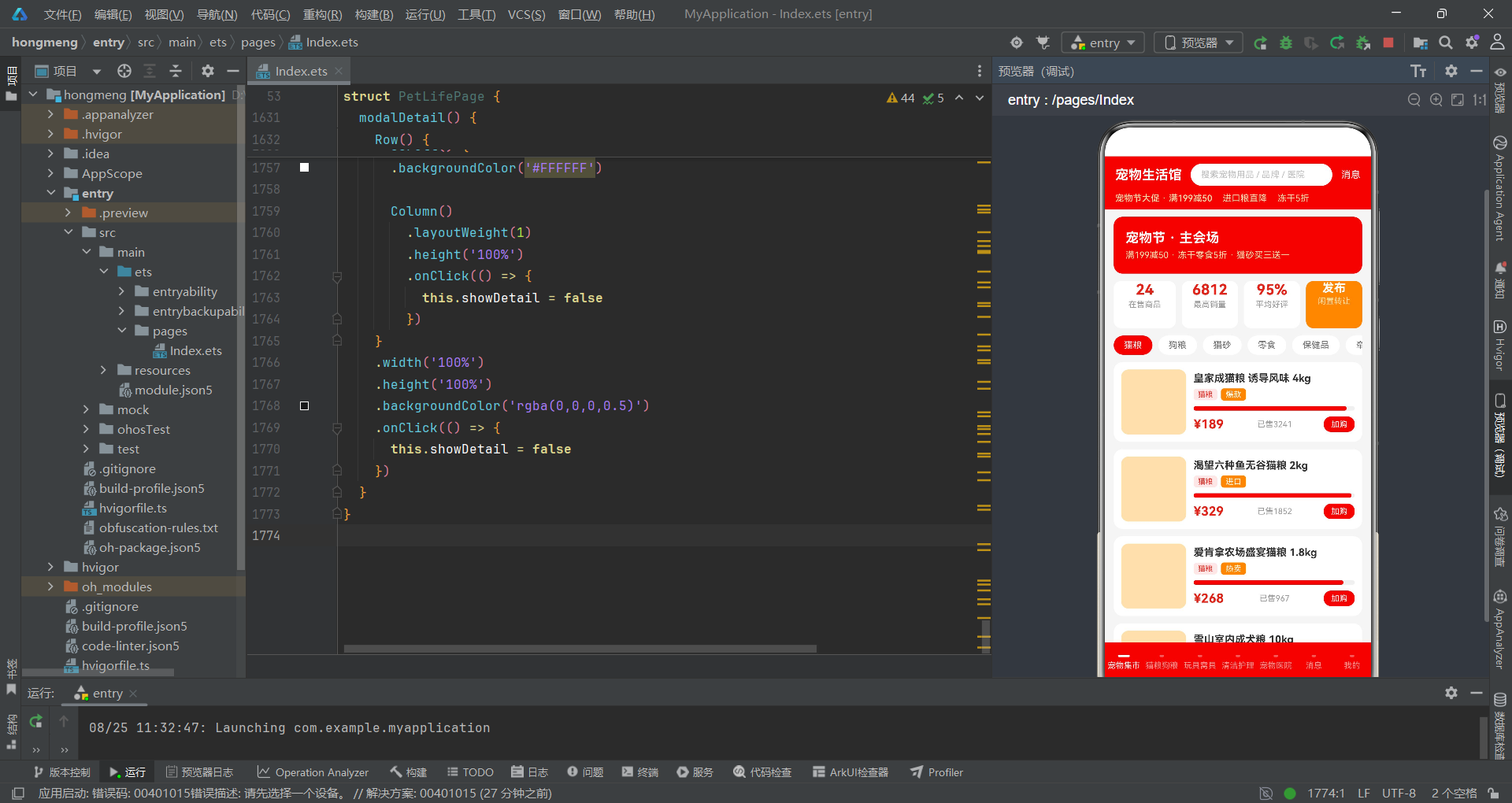
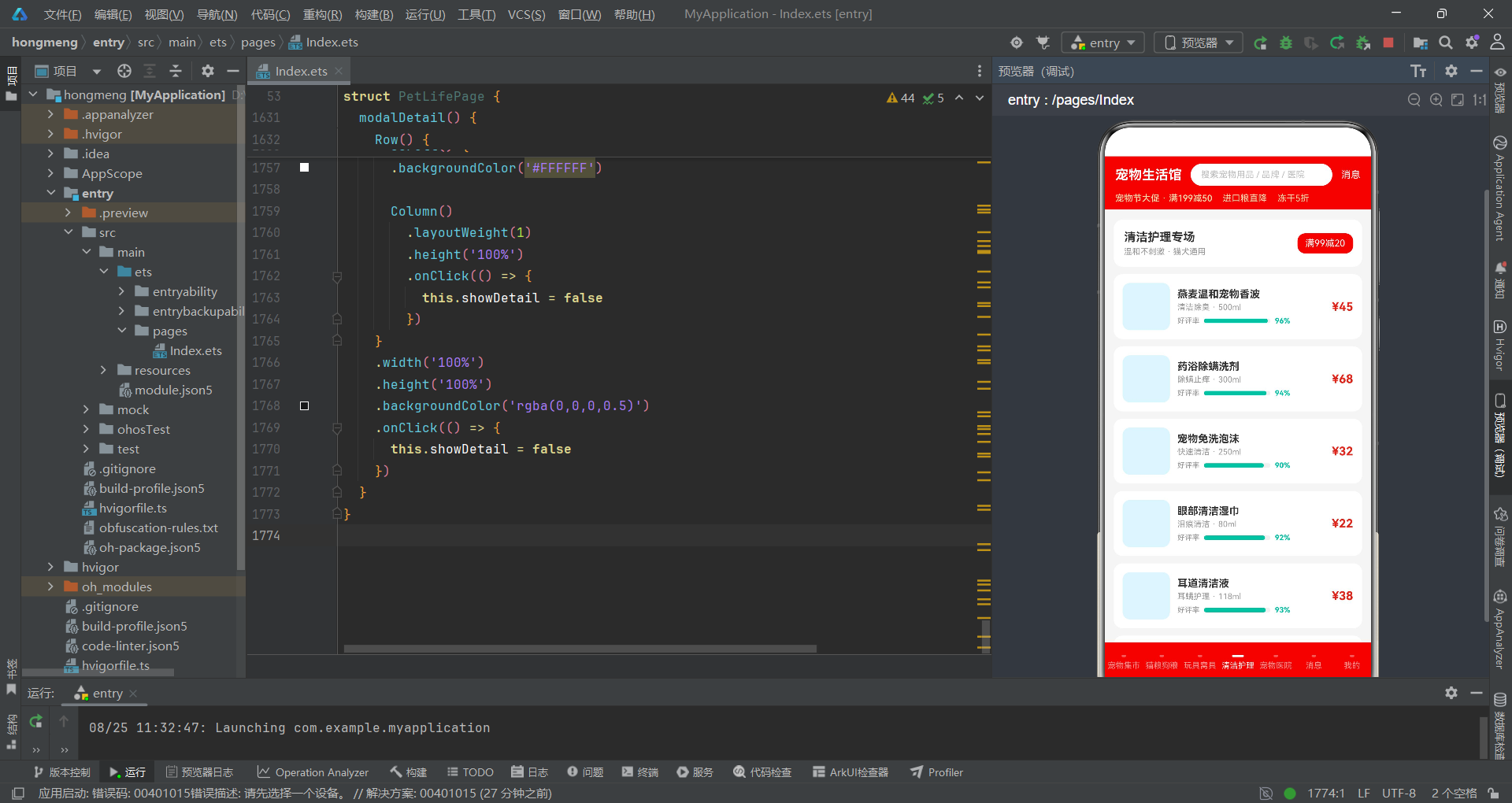
在移动电商应用开发领域,HarmonyOS的声明式UI框架ArkTS提供了强大的组件化能力和响应式状态管理机制。本文将以一个京东风格的宠物生活馆应用为案例,深入解析如何基于HarmonyOS ArkTS API 24构建一个涵盖宠物用品集市、猫粮狗粮、玩具窝具、清洁护理、宠物医院、消息中心和个人中心七大功能模块的完整电商体验。该应用不仅实现了商品展示与购买流程,还集成了宠物医院在线预约、闲置用品发布等垂直场景功能,充分展示了ArkTS在复杂业务系统中的工程化能力。
在架构设计层面,该应用采用了Stack作为根容器,通过层叠布局实现弹窗覆盖效果。主页面由头部导航栏(headerBar)、可滚动内容区和底部导航栏(bottomBar)三部分组成,其中内容区根据currentTab状态变量动态切换七个@Builder构建的页面组件。应用使用了京东品牌红色(#E1251B)作为主色调,搭配橙色(#FF8F00)和青绿色(#00BFA5)作为辅助色,形成了鲜明的电商视觉风格。底部导航栏同样采用红色背景,选中态通过白色指示条和白色文字区分,与京东APP的视觉规范保持一致。
在数据模型设计层面,应用定义了六种接口类型来管理不同品类的商品数据,包括宠物用品、猫粮狗粮、玩具窝具、清洁护理品、宠物医院和消息通知。每种接口类型都包含了该品类特有的业务字段,例如宠物用品的quality(品质评分)和sold(销量),猫粮的protein(蛋白质含量)和shelf(保质期),玩具的durability(耐用度)和stock(库存)等。这些数值型字段不仅用于商品信息展示,还作为数据可视化的数据源驱动柱状图和进度条的渲染。应用还实现了五套完整的弹窗交互逻辑,包括闲置发布、规格选择购物车、宠物体检预约、删除确认和商品详情侧滑面板,覆盖了电商场景的核心交互链路。
数据模型与状态管理
接口类型定义
ArkTS使用interface关键字定义对象的结构类型,这是构建类型安全应用的基础。本应用定义了六种核心接口,每种接口对应一个业务品类的数据结构,字段设计既考虑了信息展示的完整性,也兼顾了数据可视化的需求。
interface PetItem {
  name: string
  price: number
  sold: number
  quality: number
  category: string
  tag: string
}

interface FoodItem {
  name: string
  brand: string
  protein: number
  kg: number
  price: number
  shelf: number
}

interface ToyItem {
  name: string
  material: string
  durability: number
  price: number
  stock: number
}

interface CareItem {
  name: string
  func: string
  volume: number
  price: number
  rating: number
}

interface HospitalItem {
  name: string
  dist: number
  doctors: number
  score: number
  fee: number
}

interface MessageItem {
  title: string
  content: string
  time: string
  unread: number
}
PetItem是宠物集市的核心数据结构,quality字段表示品质评分(0-100),用于在商品卡片中渲染品质进度条;sold字段记录销量,用于统计最高销量数据。FoodItem接口中protein字段表示蛋白质含量,用于柱状图展示各品牌猫粮的蛋白质对比;shelf字段记录保质期月数。ToyItem接口的durability字段表示耐用度,用于水平进度条可视化;stock字段记录库存数量。CareItem接口的volume字段记录产品容量,rating字段用于好评率进度条。HospitalItem接口的dist表示距离、doctors表示医师数量、fee表示起价、score表示评分。MessageItem接口的unread字段控制未读徽章的显示与动画效果。
组件状态与初始化
组件通过@Entry和@Component装饰器声明为应用入口,内部使用多个@State变量管理交互状态,包括Tab切换、弹窗显示和选中项等。
@Entry
@Component
struct PetLifePage {
  @State currentTab: number = 0
  @State showPublish: boolean = false
  @State showCart: boolean = false
  @State showBooking: boolean = false
  @State showDelete: boolean = false
  @State showDetail: boolean = false
  @State selectedItem: PetItem | null = null
  @State selectedCategory: number = 0
  @State selectedSpec: number = 0
  @State selectedPackage: number = 0
  @State qty: number = 1
  @State petQty: number = 1
  @State inputName: string = ''

  private tabs: string[] = ['宠物集市', '猫粮狗粮', '玩具窝具', '清洁护理', '宠物医院', '消息', '我的']
  private categories: string[] = ['猫粮', '狗粮', '猫砂', '零食', '保健品', '牵引绳']
  private specs: string[] = ['1.5kg 装', '2.5kg 装', '5kg 装', '10kg 装']
  private packages: string[] = ['基础体检', '血液检查', '皮肤检测', '疫苗抗体']
状态变量分为三类:弹窗控制类(showPublish、showCart、showBooking、showDelete、showDetail)使用布尔值管理五种弹窗的显示隐藏;选中项管理类(selectedItem、selectedCategory、selectedSpec、selectedPackage)记录用户在列表和弹窗中的选择状态;数值输入类(qty、petQty、inputName)管理购物车数量、宠物数量和商品名称输入。selectedItem使用PetItem | null联合类型,初始为null,当用户点击商品时被赋值,用于详情弹窗的数据展示。tabs数组定义底部导航的七个标签,categories、specs和packages三个数组分别用于发布弹窗的品类选择、购物车弹窗的规格选择和预约弹窗的套餐选择。
数据集合与计算方法
模拟数据初始化
应用预置了丰富的模拟数据,覆盖了所有Tab页面的展示需求。这些数据集合采用接口类型数组的形式定义,确保类型安全。
  private pets: PetItem[] = [
    { name: '皇家成猫粮 诱导风味 4kg', price: 189, sold: 3241, quality: 95, category: '猫粮', tag: '爆款' },
    { name: '渴望六种鱼无谷猫粮 2kg', price: 329, sold: 1852, quality: 98, category: '猫粮', tag: '进口' },
    { name: '爱肯拿农场盛宴猫粮 1.8kg', price: 268, sold: 967, quality: 93, category: '猫粮', tag: '热卖' },
    { name: '雪山室内成犬粮 10kg', price: 459, sold: 2143, quality: 91, category: '狗粮', tag: '实惠' },
    { name: '福摩三文鱼鸭肉犬粮 6kg', price: 388, sold: 856, quality: 94, category: '狗粮', tag: '推荐' },
    { name: 'N1 混合猫砂 2.5kg*4 袋', price: 119, sold: 5230, quality: 96, category: '猫砂', tag: '爆款' },
    { name: '冻干鸡肉粒宠物零食 200g', price: 45, sold: 6812, quality: 97, category: '零食', tag: '爆款' },
    { name: '自动伸缩牵引绳 5m 中型犬', price: 75, sold: 2019, quality: 90, category: '牵引绳', tag: '爆款' },
    { name: '宠物GPS定位项圈', price: 199, sold: 623, quality: 95, category: '牵引绳', tag: '新品' },
    { name: '智能自动喂食器 4L', price: 269, sold: 1058, quality: 96, category: '保健品', tag: '新品' }
  ]

  private foods: FoodItem[] = [
    { name: '渴望红肉无谷猫粮', brand: 'Orijen', protein: 40, kg: 2, price: 329, shelf: 18 },
    { name: '爱肯拿草原猫粮', brand: 'Acana', protein: 37, kg: 1.8, price: 268, shelf: 15 },
    { name: '百利高蛋白鸡肉', brand: 'Instinct', protein: 41, kg: 2, price: 312, shelf: 14 },
    { name: 'Go 九种肉全猫粮', brand: 'Go', protein: 36, kg: 3.6, price: 345, shelf: 20 },
    { name: '福摩鸭肉甜薯犬粮', brand: 'Fromm', protein: 32, kg: 6, price: 388, shelf: 22 },
    { name: '麦富迪佰萃成犬', brand: 'Myfoodie', protein: 26, kg: 10, price: 129, shelf: 24 }
  ]

  private hospitals: HospitalItem[] = [
    { name: '安心宠物医院(旗舰店)', dist: 2, doctors: 12, score: 98, fee: 199 },
    { name: '瑞鹏宠物医院(高新店)', dist: 3, doctors: 9, score: 96, fee: 168 },
    { name: '芭比堂动物医院', dist: 5, doctors: 15, score: 97, fee: 229 },
    { name: '美联众合转诊中心', dist: 7, doctors: 18, score: 99, fee: 288 },
    { name: '宠颐生宠物医院', dist: 4, doctors: 8, score: 93, fee: 139 },
    { name: '萌兽医馆(旗舰店)', dist: 6, doctors: 10, score: 95, fee: 189 }
  ]
pets数组是宠物集市的数据源,每条记录包含商品名称、价格、销量、品质评分、品类和标签。品质评分quality字段在列表中以进度条形式可视化,销量sold用于统计页面的最高销量数据。foods数组用于猫粮狗粮页面,protein字段将作为柱状图的高度数据,直观对比各品牌的蛋白质含量。hospitals数组用于宠物医院页面,doctors字段表示执业兽医师数量,用于柱状图展示;dist字段记录距离信息,fee字段记录体检起价。
计算方法与安全访问器
组件定义了四个最大值计算方法和六个选中项访问器方法,为柱状图比例计算和详情页数据展示提供支持。
  private maxSold(): number {
    let m: number = 0
    this.pets.forEach((p: PetItem) => {
      if (p.sold > m) {
        m = p.sold
      }
    })
    return m
  }

  private maxProtein(): number {
    let m: number = 0
    this.foods.forEach((f: FoodItem) => {
      if (f.protein > m) {
        m = f.protein
      }
    })
    return m
  }

  private maxDurability(): number {
    let m: number = 0
    this.toys.forEach((t: ToyItem) => {
      if (t.durability > m) {
        m = t.durability
      }
    })
    return m
  }

  private maxDoctors(): number {
    let m: number = 0
    this.hospitals.forEach((h: HospitalItem) => {
      if (h.doctors > m) {
        m = h.doctors
      }
    })
    return m
  }

  private selName(): string {
    if (this.selectedItem === null) {
      return ''
    }
    return this.selectedItem.name
  }

  private selPrice(): number {
    if (this.selectedItem === null) {
      return 0
    }
    return this.selectedItem.price
  }

  private selQuality(): number {
    if (this.selectedItem === null) {
      return 0
    }
    return this.selectedItem.quality
  }

  private selSold(): number {
    if (this.selectedItem === null) {
      return 0
    }
    return this.selectedItem.sold
  }
四个max系列方法分别遍历pets、foods、toys和hospitals数组,使用forEach迭代找出对应字段的最大值。这些最大值作为柱状图和进度条的比例基准,确保可视化数据的相对比例正确。例如maxProtein()返回最大蛋白质含量值,柱状图中每个柱子的高度通过f.protein / this.maxProtein() * 92计算,使最高的柱子占据92像素的高度。sel系列访问器方法采用空值检查模式,在selectedItem为null时返回默认值(空字符串或0),避免空指针异常。这些方法在详情弹窗的build函数中被调用,确保渲染安全。值得注意的是,selPrice()和selSold()返回的是number类型而非字符串,这是因为详情弹窗中需要将价格和销量参与字符串拼接运算。
页面主框架构建
Stack根容器与布局结构
与传统的Column根容器不同,本应用使用Stack作为根容器,通过层叠方式实现弹窗覆盖在主页面之上的效果。
  build() {
    Stack() {
      Column() {
        this.headerBar()
        Scroll() {
          Column() {
            if (this.currentTab === 0) {
              this.tabMarket()
            } else if (this.currentTab === 1) {
              this.tabFood()
            } else if (this.currentTab === 2) {
              this.tabToy()
            } else if (this.currentTab === 3) {
              this.tabCare()
            } else if (this.currentTab === 4) {
              this.tabHospital()
            } else if (this.currentTab === 5) {
              this.tabMessage()
            } else {
              this.tabMine()
            }
          }
          .width('100%')
          .padding({ left: 12, right: 12, top: 10, bottom: 10 })
        }
        .layoutWeight(1)
        .width('100%')
        .scrollBar(BarState.Off)
        this.bottomBar()
      }
      .width('100%')
      .height('100%')

      if (this.showPublish) {
        this.modalPublish()
      }
      if (this.showCart) {
        this.modalCart()
      }
      if (this.showBooking) {
        this.modalBooking()
      }
      if (this.showDelete) {
        this.modalDelete()
      }
      if (this.showDetail) {
        this.modalDetail()
      }
    }
    .width('100%')
    .height('100%')
    .backgroundColor('#F5F5F5')
  }
Stack容器的层叠特性使得弹窗组件天然地覆盖在主内容之上,无需额外的position或zIndex设置。主页面Column包含三个垂直排列的区域:headerBar()构建的头部导航、Scroll包裹的可滚动内容区和bottomBar()构建的底部导航栏。内容区通过if-else if-else链式条件判断,根据currentTab值调用对应的@Builder方法。Scroll容器设置scrollBar(BarState.Off)隐藏滚动条,内层Column设置12像素的左右内边距。五种弹窗作为Stack的子元素,通过独立的if条件控制渲染。当任何一个show状态变量为true时,对应的弹窗组件会被构建并叠加在主内容之上,由于Stack的层叠特性,后声明的子元素会覆盖在先声明的子元素之上。
头部导航栏与底部Tab栏
头部导航栏包含品牌标题、搜索框和消息入口,底部导航栏通过ForEach渲染七个Tab项。
  @Builder
  headerBar() {
    Column() {
      Row() {
        Column() {
          Text('宠物生活馆')
            .fontSize(18)
            .fontWeight(FontWeight.Bold)
            .fontColor('#FFFFFF')
        }
        Column() {
          Row() {
            Text('搜索宠物用品 / 品牌 / 医院')
              .fontSize(12)
              .fontColor('#BDBDBD')
          }
          .width('100%')
          .height(30)
          .backgroundColor('#FFFFFF')
          .borderRadius(15)
          .justifyContent(FlexAlign.Start)
          .padding({ left: 14 })
        }
        .layoutWeight(1)
        .margin({ left: 12, right: 12 })
        Column() {
          Text('消息')
            .fontSize(13)
            .fontColor('#FFFFFF')
        }
        .onClick(() => {
          this.currentTab = 5
        })
      }
      .width('100%')
      .height(50)
      .padding({ left: 14, right: 14 })
      .alignItems(VerticalAlign.Center)

      Row() {
        Text('宠物节大促 · 满199减50')
          .fontSize(12)
          .fontColor('#FFE0B2')
          .fontWeight(FontWeight.Medium)
        Text('进口粮直降')
          .fontSize(12)
          .fontColor('#FFE0B2')
          .margin({ left: 14 })
        Text('冻干5折')
          .fontSize(12)
          .fontColor('#FFE0B2')
          .margin({ left: 14 })
      }
      .width('100%')
      .padding({ left: 14, bottom: 8 })
      .justifyContent(FlexAlign.Start)
    }
    .width('100%')
    .backgroundColor('#E1251B')
  }

  @Builder
  bottomBar() {
    Row() {
      ForEach(this.tabs, (tab: string, index: number) => {
        Column() {
          Column()
            .width(index === this.currentTab ? 16 : 6)
            .height(3)
            .borderRadius(2)
            .backgroundColor(index === this.currentTab ? '#FFFFFF' : 'rgba(255,255,255,0.35)')
          Text(tab)
            .fontSize(11)
            .fontColor(index === this.currentTab ? '#FFFFFF' : 'rgba(255,255,255,0.6)')
            .margin({ top: 5 })
        }
        .layoutWeight(1)
        .height(54)
        .justifyContent(FlexAlign.Center)
        .onClick(() => {
          this.currentTab = index
        })
      })
    }
    .width('100%')
    .backgroundColor('#E1251B')
  }
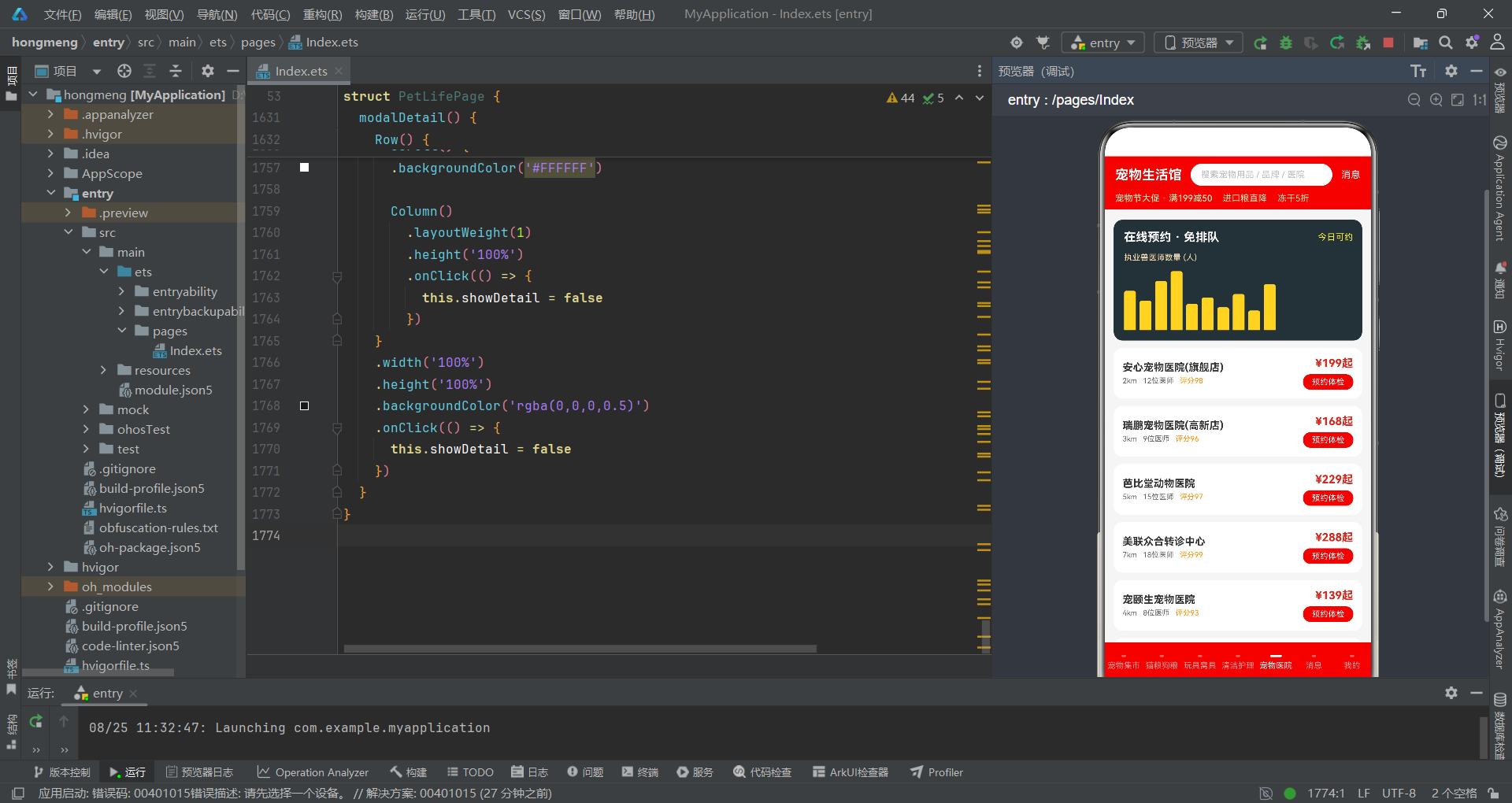
头部导航栏使用京东红色背景,包含两行内容。第一行是50像素高的导航行,左侧是"宠物生活馆"品牌标题(18号白色粗体),中间是搜索框(白色背景圆角容器,内含灰色提示文字),右侧是"消息"文字入口,点击后通过this.currentTab = 5直接切换到消息页面。第二行是促销信息栏,使用浅橙色(#FFE0B2)文字展示大促活动信息。底部导航栏的ForEach为每个Tab生成一个Column,顶部是选中指示条——选中时宽度16像素、白色背景,未选中时宽度6像素、半透明白色背景,通过宽度和透明度的变化提供选中态视觉反馈。Tab文字使用11号字体,选中时为白色,未选中时为60%透明度的白色。整个底部栏使用红色背景,与头部形成统一的品牌色调。
核心业务页面实现
宠物集市:统计卡片与商品列表
宠物集市页面(tabMarket)是应用的首页,包含促销Banner、数据统计卡片、横向品类筛选和商品列表四个区域。
  @Builder
  tabMarket() {
    Column() {
      Column() {
        Text('宠物节 · 主会场')
          .fontSize(18)
          .fontWeight(FontWeight.Bold)
          .fontColor('#FFFFFF')
        Text('满199减50 · 冻干零食5折 · 猫砂买三送一')
          .fontSize(12)
          .fontColor('#FFE0B2')
          .margin({ top: 6 })
      }
      .width('100%')
      .padding({ top: 18, bottom: 18, left: 16 })
      .backgroundColor('#E1251B')
      .borderRadius(12)
      .justifyContent(FlexAlign.Start)
      .alignItems(HorizontalAlign.Start)

      Row() {
        Column() {
          Text('24')
            .fontSize(20)
            .fontWeight(FontWeight.Bold)
            .fontColor('#E1251B')
          Text('在售商品')
            .fontSize(11)
            .fontColor('#999999')
            .margin({ top: 2 })
        }
        .layoutWeight(1)
        .height(64)
        .backgroundColor('#FFFFFF')
        .borderRadius(10)
        .margin({ top: 10 })

        Column() {
          Text('6812')
            .fontSize(20)
            .fontWeight(FontWeight.Bold)
            .fontColor('#E1251B')
          Text('最高销量')
            .fontSize(11)
            .fontColor('#999999')
            .margin({ top: 2 })
        }
        .layoutWeight(1)
        .height(64)
        .backgroundColor('#FFFFFF')
        .borderRadius(10)
        .margin({ top: 10, left: 8 })

        Column() {
          Text('发布')
            .fontSize(16)
            .fontWeight(FontWeight.Bold)
            .fontColor('#FFFFFF')
          Text('闲置转让')
            .fontSize(11)
            .fontColor('#FFE0B2')
            .margin({ top: 2 })
        }
        .layoutWeight(1)
        .height(64)
        .backgroundColor('#FF8F00')
        .borderRadius(10)
        .margin({ top: 10, left: 8 })
        .onClick(() => {
          this.showPublish = true
        })
      }
      .width('100%')

      Scroll() {
        Row() {
          ForEach(this.categories, (c: string, idx: number) => {
            Text(c)
              .fontSize(12)
              .fontColor(this.selectedCategory === idx ? '#FFFFFF' : '#666666')
              .backgroundColor(this.selectedCategory === idx ? '#E1251B' : '#FFFFFF')
              .borderRadius(14)
              .padding({ left: 14, right: 14, top: 6, bottom: 6 })
              .margin({ right: 8 })
              .onClick(() => {
                this.selectedCategory = idx
              })
          })
        }
      }
      .scrollable(ScrollDirection.Horizontal)
      .scrollBar(BarState.Off)
      .width('100%')
      .margin({ top: 10 })
促销Banner使用红色背景圆角卡片,展示"宠物节主会场"标题和促销规则。下方是四列统计卡片行,前三列为白色背景卡片展示在售商品数(24)、最高销量(6812)和平均好评(95%),第四列为橙色背景的"发布闲置"入口卡片,点击触发发布弹窗。每张卡片使用layoutWeight(1)等分宽度,高度固定为64像素。品类筛选区使用横向Scroll容器,内部Row通过ForEach渲染六个品类标签,选中态通过selectedCategory索引控制红色背景和白色文字,未选中态为白色背景灰色文字。横向滚动通过scrollable(ScrollDirection.Horizontal)启用,隐藏滚动条保持视觉简洁。
商品列表部分通过ForEach遍历pets数组渲染,每行包含88x88的占位图、商品信息和价格操作区:
      Column() {
        ForEach(this.pets, (p: PetItem) => {
          Row() {
            Column()
              .width(88)
              .height(88)
              .backgroundColor('#FFE0B2')
              .borderRadius(10)
            Column() {
              Text(p.name)
                .fontSize(14)
                .fontWeight(FontWeight.Bold)
                .fontColor('#333333')
                .maxLines(1)
                .textOverflow({ overflow: TextOverflow.Ellipsis })
              Row() {
                Text(p.category)
                  .fontSize(10)
                  .fontColor('#E1251B')
                  .backgroundColor('#FDE8E8')
                  .borderRadius(4)
                  .padding({ left: 6, right: 6, top: 2, bottom: 2 })
                Text(p.tag)
                  .fontSize(10)
                  .fontColor('#FFFFFF')
                  .backgroundColor('#FF8F00')
                  .borderRadius(4)
                  .padding({ left: 6, right: 6, top: 2, bottom: 2 })
                  .margin({ left: 6 })
                  .scale({ x: 1.06, y: 1.06 })
                  .animation({ duration: 700, iterations: -1, curve: Curve.EaseInOut })
              }
              .margin({ top: 6 })

              Stack({ alignContent: Alignment.Start }) {
                Column()
                  .width('100%')
                  .height(6)
                  .backgroundColor('#F0F0F0')
                  .borderRadius(3)
                Column()
                  .width(p.quality + '%')
                  .height(6)
                  .backgroundColor('#E1251B')
                  .borderRadius(3)
              }
              .width('100%')
              .margin({ top: 8 })

              Row() {
                Text('¥' + p.price)
                  .fontSize(17)
                  .fontWeight(FontWeight.Bold)
                  .fontColor('#E1251B')
                Text('已售' + p.sold)
                  .fontSize(11)
                  .fontColor('#999999')
                  .margin({ left: 8 })
                Text('加购')
                  .fontSize(11)
                  .fontColor('#FFFFFF')
                  .backgroundColor('#E1251B')
                  .borderRadius(10)
                  .padding({ left: 10, right: 10, top: 4, bottom: 4 })
                  .margin({ left: 6 })
              }
              .width('100%')
              .justifyContent(FlexAlign.SpaceBetween)
              .alignItems(VerticalAlign.Center)
              .margin({ top: 8 })
            }
            .layoutWeight(1)
            .alignItems(HorizontalAlign.Start)
            .padding({ left: 10 })
          }
          .width('100%')
          .backgroundColor('#FFFFFF')
          .borderRadius(12)
          .padding(10)
          .margin({ top: 10 })
          .onClick(() => {
            this.selectedItem = p
            this.showDetail = true
          })
        })
      }
      .width('100%')
    }
    .width('100%')
  }
商品列表每行包含88x88的浅橙色占位图、商品信息列和价格操作区。商品名称使用maxLines(1)和textOverflow实现单行省略。品类标签使用浅红色背景红色文字,促销标签(如"爆款"、“新品”)使用橙色背景白色文字,并配合scale和animation实现700毫秒的缩放呼吸动画,吸引用户注意。品质评分进度条使用Stack叠加两层Column:底层为100%宽度的灰色背景条,上层为p.quality + '%'宽度的红色进度条。价格区域使用justifyContent(FlexAlign.SpaceBetween)实现两端对齐,左侧是红色粗体价格和灰色销量,右侧是红色"加购"按钮。每行的onClick将商品数据赋值给selectedItem并打开详情弹窗。
猫粮狗粮:蛋白质柱状图与排行列表
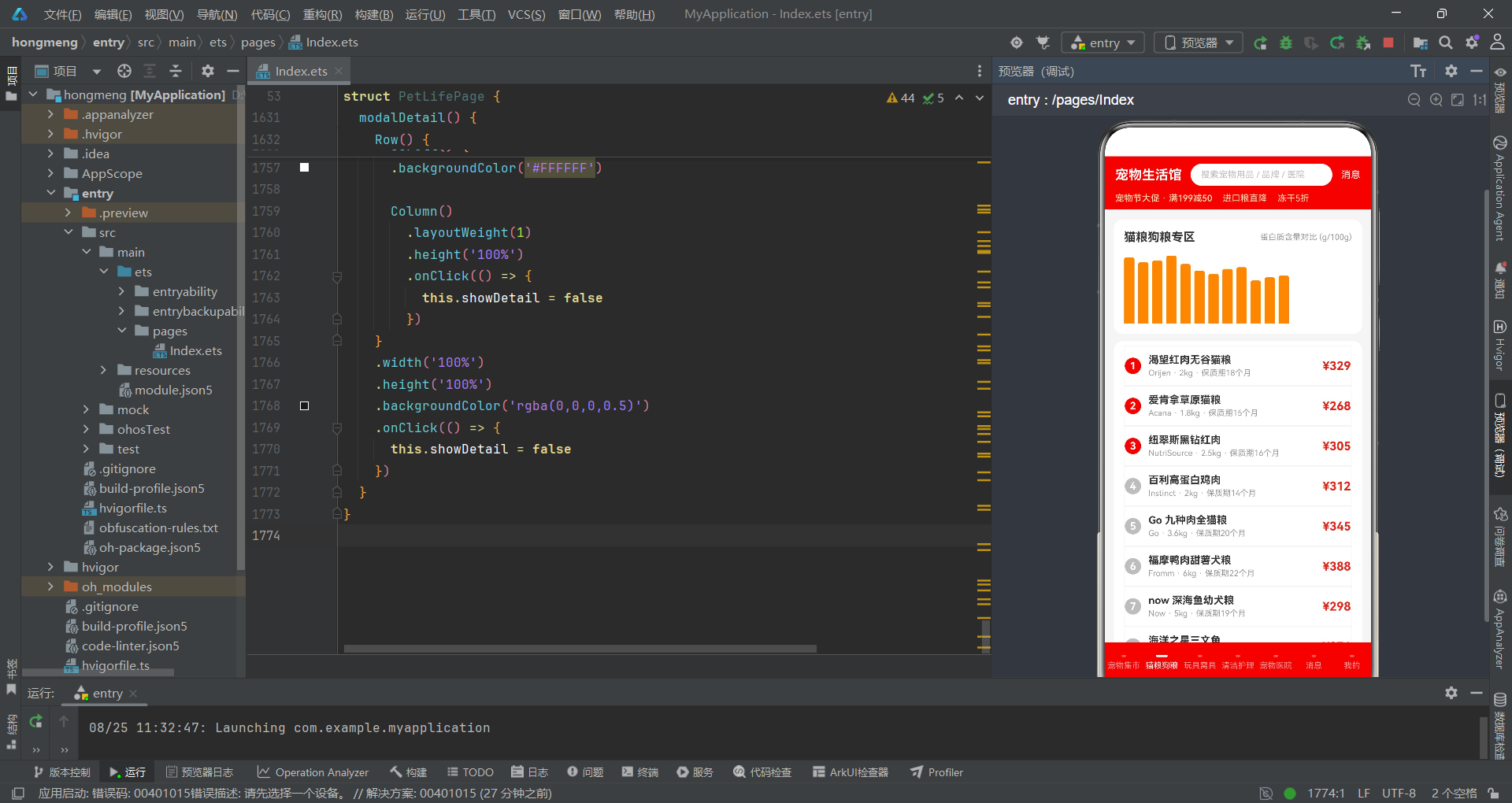
猫粮狗粮页面(tabFood)的特色是使用自定义柱状图展示各品牌猫粮的蛋白质含量对比,配合带排名编号的商品列表。
  @Builder
  tabFood() {
    Column() {
      Column() {
        Row() {
          Text('猫粮狗粮专区')
            .fontSize(16)
            .fontWeight(FontWeight.Bold)
            .fontColor('#333333')
          Text('蛋白质含量对比 (g/100g)')
            .fontSize(11)
            .fontColor('#999999')
            .margin({ left: 10 })
        }
        .width('100%')
        .justifyContent(FlexAlign.SpaceBetween)

        Row() {
          ForEach(this.foods, (f: FoodItem) => {
            Column() {
              Column()
                .width(14)
                .height(f.protein / this.maxProtein() * 92)
                .backgroundColor('#FF8F00')
                .borderRadius({ topLeft: 3, topRight: 3 })
            }
            .height(96)
            .justifyContent(FlexAlign.End)
            .margin({ right: 5 })
          })
        }
        .width('100%')
        .alignItems(VerticalAlign.End)
        .margin({ top: 12 })
      }
      .width('100%')
      .backgroundColor('#FFFFFF')
      .borderRadius(12)
      .padding(14)
      .margin({ top: 4 })

      Column() {
        ForEach(this.foods, (f: FoodItem, idx: number) => {
          Row() {
            Text((idx + 1) + '')
              .fontSize(14)
              .fontWeight(FontWeight.Bold)
              .fontColor('#FFFFFF')
              .width(22)
              .height(22)
              .textAlign(TextAlign.Center)
              .backgroundColor(idx < 3 ? '#E1251B' : '#BDBDBD')
              .borderRadius(11)
            Column() {
              Text(f.name)
                .fontSize(14)
                .fontWeight(FontWeight.Bold)
                .fontColor('#333333')
              Text(f.brand + ' · ' + f.kg + 'kg · 保质期' + f.shelf + '个月')
                .fontSize(11)
                .fontColor('#999999')
                .margin({ top: 3 })
            }
            .layoutWeight(1)
            .alignItems(HorizontalAlign.Start)
            .padding({ left: 10 })

            Text('¥' + f.price)
              .fontSize(16)
              .fontWeight(FontWeight.Bold)
              .fontColor('#E1251B')
          }
          .width('100%')
          .padding({ top: 10, bottom: 10 })
          .border({ width: 1, color: '#F5F5F5' })
          .onClick(() => {
            this.qty = 1
            this.showCart = true
          })
        })
      }
      .width('100%')
      .backgroundColor('#FFFFFF')
      .borderRadius(12)
      .padding({ left: 14, right: 14, top: 6, bottom: 6 })
      .margin({ top: 10 })
    }
    .width('100%')
  }
蛋白质柱状图的实现与腕表直径柱状图类似,每个柱子宽度14像素,高度通过f.protein / this.maxProtein() * 92计算——以最大蛋白质含量为基准,乘以92作为最大高度。柱子使用橙色背景,顶部设置3像素的圆角(borderRadius({ topLeft: 3, topRight: 3 }))。柱状图容器使用alignItems(VerticalAlign.End)使所有柱子底部对齐。排行列表部分通过ForEach的第二个参数获取索引idx,排名编号使用22x22的圆形容器,前三名使用红色背景(#E1251B),其余使用灰色背景(#BDBDBD),形成视觉优先级。每行展示商品名称、品牌规格信息和价格,点击后重置qty为1并打开购物车弹窗。行间使用浅灰色边框分隔。
宠物医院:医师柱状图与在线预约
宠物医院页面(tabHospital)使用深色背景卡片展示医师数量柱状图,并提供在线预约入口。
  @Builder
  tabHospital() {
    Column() {
      Column() {
        Row() {
          Text('在线预约 · 免排队')
            .fontSize(16)
            .fontWeight(FontWeight.Bold)
            .fontColor('#FFFFFF')
          Text('今日可约')
            .fontSize(11)
            .fontColor('#FFEB3B')
            .margin({ left: 10 })
            .scale({ x: 1.08, y: 1.08 })
            .animation({ duration: 600, iterations: -1, curve: Curve.EaseInOut })
        }
        .width('100%')
        .justifyContent(FlexAlign.SpaceBetween)
        .alignItems(VerticalAlign.Center)

        Row() {
          Text('执业兽医师数量 (人)')
            .fontSize(11)
            .fontColor('#FFE0B2')
        }
        .width('100%')
        .margin({ top: 12 })

        Row() {
          ForEach(this.hospitals, (h: HospitalItem) => {
            Column() {
              Column()
                .width(16)
                .height(h.doctors / this.maxDoctors() * 80)
                .backgroundColor('#FFD54F')
                .borderRadius({ topLeft: 3, topRight: 3 })
            }
            .height(84)
            .justifyContent(FlexAlign.End)
            .margin({ right: 5 })
          })
        }
        .width('100%')
        .alignItems(VerticalAlign.End)
        .margin({ top: 8 })
      }
      .width('100%')
      .padding(14)
      .backgroundColor('#263238')
      .borderRadius(12)
      .margin({ top: 4 })

      Column() {
        ForEach(this.hospitals, (h: HospitalItem) => {
          Column() {
            Row() {
              Column() {
                Text(h.name)
                  .fontSize(14)
                  .fontWeight(FontWeight.Bold)
                  .fontColor('#333333')
                Row() {
                  Text(h.dist + 'km')
                    .fontSize(10)
                    .fontColor('#666666')
                  Text(h.doctors + '位医师')
                    .fontSize(10)
                    .fontColor('#666666')
                    .margin({ left: 8 })
                  Text('评分' + h.score)
                    .fontSize(10)
                    .fontColor('#FF8F00')
                    .margin({ left: 8 })
                }
                .margin({ top: 4 })
              }
              .layoutWeight(1)
              .alignItems(HorizontalAlign.Start)

              Column() {
                Text('¥' + h.fee + '起')
                  .fontSize(15)
                  .fontWeight(FontWeight.Bold)
                  .fontColor('#E1251B')
                Text('预约体检')
                  .fontSize(11)
                  .fontColor('#FFFFFF')
                  .backgroundColor('#E1251B')
                  .borderRadius(10)
                  .padding({ left: 12, right: 12, top: 4, bottom: 4 })
                  .margin({ top: 6 })
              }
              .alignItems(HorizontalAlign.End)
            }
            .width('100%')
            .alignItems(VerticalAlign.Center)
          }
          .width('100%')
          .padding(12)
          .backgroundColor('#FFFFFF')
          .borderRadius(12)
          .margin({ top: 10 })
          .onClick(() => {
            this.selectedPackage = 0
            this.petQty = 1
            this.showBooking = true
          })
        })
      }
      .width('100%')
    }
    .width('100%')
  }
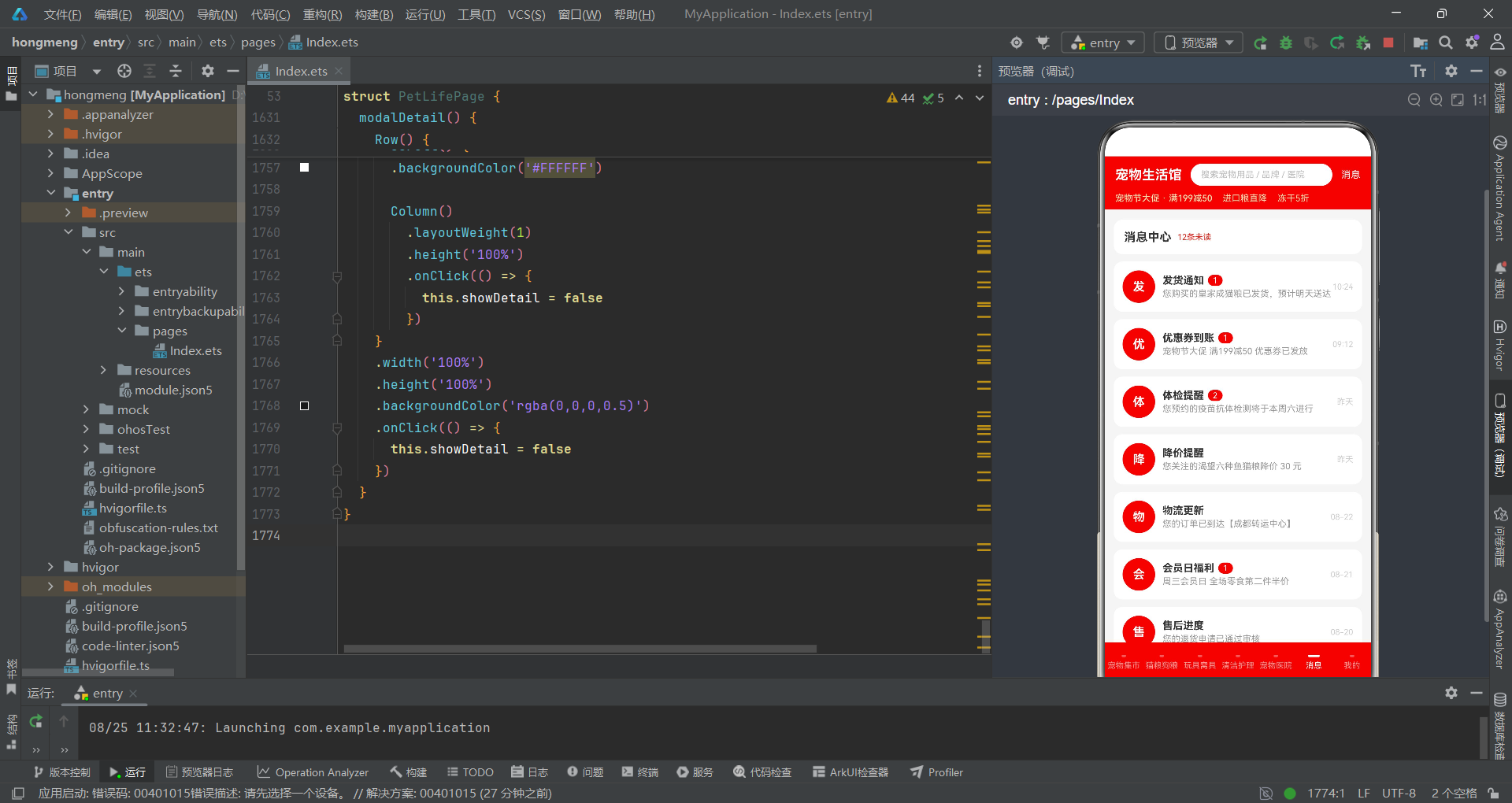
宠物医院页面的头部卡片使用深色背景(#263238),与白色背景的商品列表形成视觉对比。"今日可约"标签使用黄色文字(#FFEB3B)并配合600毫秒的缩放动画,营造紧迫感。医师数量柱状图使用黄色柱子(#FFD54F),宽度16像素,高度通过h.doctors / this.maxDoctors() * 80计算。医院列表每行展示医院名称、距离、医师数量、评分和起价信息,右侧的"预约体检"按钮点击后重置套餐和宠物数量并打开预约弹窗。评分使用橙色字体突出展示,距离和医师数量使用灰色辅助文字。整体设计将数据可视化与操作入口有机结合,用户可以在查看医师分布的同时直接发起预约。
页面交互流程
弹窗交互体系
购物车弹窗(底部弹出规格选择)
购物车弹窗(modalCart)采用底部弹出模式,包含规格选择、数量调节和购买操作三个功能区域。
  @Builder
  modalCart() {
    Column() {
      Column().layoutWeight(1).width('100%')
      Column() {
        Row() {
          Text('选择规格')
            .fontSize(16)
            .fontWeight(FontWeight.Bold)
            .fontColor('#333333')
          Text('¥' + (this.selectedSpec + 1) * 29 * this.qty)
            .fontSize(18)
            .fontWeight(FontWeight.Bold)
            .fontColor('#E1251B')
            .scale({ x: 1.05, y: 1.05 })
            .animation({ duration: 700, iterations: -1, curve: Curve.EaseInOut })
        }
        .width('100%')
        .justifyContent(FlexAlign.SpaceBetween)
        .alignItems(VerticalAlign.Center)

        Column() {
          Text('包装规格')
            .fontSize(13)
            .fontColor('#666666')
          Row() {
            ForEach(this.specs, (s: string, idx: number) => {
              Text(s)
                .fontSize(12)
                .fontColor(this.selectedSpec === idx ? '#FFFFFF' : '#666666')
                .backgroundColor(this.selectedSpec === idx ? '#FF8F00' : '#F5F5F5')
                .borderRadius(8)
                .padding({ left: 14, right: 14, top: 8, bottom: 8 })
                .margin({ right: 8, top: 8 })
                .onClick(() => {
                  this.selectedSpec = idx
                })
            })
          }
          .width('100%')
          .flexWrap(FlexWrap.Wrap)
        }
        .width('100%')
        .margin({ top: 16 })
        .alignItems(HorizontalAlign.Start)

        Row() {
          Text('购买数量')
            .fontSize(13)
            .fontColor('#666666')
          Column().layoutWeight(1)
          Row() {
            Text('-')
              .fontSize(16)
              .fontColor('#666666')
              .width(30)
              .height(30)
              .textAlign(TextAlign.Center)
              .backgroundColor('#F5F5F5')
              .borderRadius(6)
              .onClick(() => {
                if (this.qty > 1) {
                  this.qty -= 1
                }
              })
            Text(this.qty + '')
              .fontSize(14)
              .fontColor('#333333')
              .width(40)
              .height(30)
              .textAlign(TextAlign.Center)
            Text('+')
              .fontSize(16)
              .fontColor('#666666')
              .width(30)
              .height(30)
              .textAlign(TextAlign.Center)
              .backgroundColor('#F5F5F5')
              .borderRadius(6)
              .onClick(() => {
                if (this.qty < 9) {
                  this.qty += 1
                }
              })
          }
        }
        .width('100%')
        .margin({ top: 18 })
        .alignItems(VerticalAlign.Center)

        Row() {
          Text('加入购物车')
            .fontSize(14)
            .fontColor('#E1251B')
            .fontWeight(FontWeight.Bold)
            .layoutWeight(1)
            .height(42)
            .textAlign(TextAlign.Center)
            .backgroundColor('#FDE8E8')
            .borderRadius(21)
          Text('立即购买')
            .fontSize(14)
            .fontColor('#FFFFFF')
            .fontWeight(FontWeight.Bold)
            .layoutWeight(1)
            .height(42)
            .textAlign(TextAlign.Center)
            .backgroundColor('#E1251B')
            .borderRadius(21)
            .margin({ left: 10 })
        }
        .width('100%')
        .margin({ top: 20 })
        .onClick(() => {
          this.showCart = false
        })
      }
      .width('100%')
      .constraintSize({ maxHeight: '80%' })
      .backgroundColor('#FFFFFF')
      .borderRadius({ topLeft: 16, topRight: 16 })
      .padding(16)
      .onClick((event: ClickEvent) => {
        event.stopPropagation()
      })
    }
    .width('100%')
    .height('100%')
    .backgroundColor('rgba(0,0,0,0.5)')
    .onClick(() => {
      this.showCart = false
    })
  }
购物车弹窗的顶部使用Column().layoutWeight(1)占据剩余空间,将内容卡片推至底部。价格计算公式为(this.selectedSpec + 1) * 29 * this.qty,即基础价29元乘以规格档位(1-4)再乘以数量,价格文字配合700毫秒的缩放呼吸动画。规格选择标签使用橙色作为选中色,通过flexWrap(FlexWrap.Wrap)支持自动换行。数量调节器由"-“按钮、数字显示和"+"按钮三部分组成,减号按钮在qty > 1时允许递减,加号按钮在qty < 9时允许递增,实现了数量边界控制。底部操作区提供"加入购物车”(浅红色背景)和"立即购买"(红色背景)两个按钮,使用layoutWeight(1)等分宽度,点击后关闭弹窗。
宠物体检预约弹窗(居中卡片)
预约弹窗(modalBooking)采用居中卡片模式,包含体检套餐选择、宠物数量调节和费用计算三个功能模块。
  @Builder
  modalBooking() {
    Column() {
      Column() {
        Text('预约宠物体检')
          .fontSize(16)
          .fontWeight(FontWeight.Bold)
          .fontColor('#333333')
          .margin({ top: 18 })

        Column() {
          Text('体检套餐')
            .fontSize(13)
            .fontColor('#666666')
          Row() {
            ForEach(this.packages, (p: string, idx: number) => {
              Text(p)
                .fontSize(12)
                .fontColor(this.selectedPackage === idx ? '#FFFFFF' : '#666666')
                .backgroundColor(this.selectedPackage === idx ? '#00BFA5' : '#F5F5F5')
                .borderRadius(14)
                .padding({ left: 14, right: 14, top: 8, bottom: 8 })
                .margin({ right: 8, top: 10 })
                .onClick(() => {
                  this.selectedPackage = idx
                })
            })
          }
          .width('100%')
          .flexWrap(FlexWrap.Wrap)
        }
        .width('100%')
        .margin({ top: 16 })
        .alignItems(HorizontalAlign.Start)

        Row() {
          Text('宠物数量')
            .fontSize(13)
            .fontColor('#666666')
          Column().layoutWeight(1)
          Row() {
            Text('-')
              .fontSize(15)
              .fontColor('#666666')
              .width(28)
              .height(28)
              .textAlign(TextAlign.Center)
              .backgroundColor('#F5F5F5')
              .borderRadius(6)
              .onClick(() => {
                if (this.petQty > 1) {
                  this.petQty -= 1
                }
              })
            Text(this.petQty + '')
              .fontSize(14)
              .fontColor('#333333')
              .width(36)
              .height(28)
              .textAlign(TextAlign.Center)
            Text('+')
              .fontSize(15)
              .fontColor('#666666')
              .width(28)
              .height(28)
              .textAlign(TextAlign.Center)
              .backgroundColor('#F5F5F5')
              .borderRadius(6)
              .onClick(() => {
                if (this.petQty < 5) {
                  this.petQty += 1
                }
              })
          }
        }
        .width('100%')
        .margin({ top: 16 })
        .alignItems(VerticalAlign.Center)

        Text('预计费用:¥' + ((this.selectedPackage + 1) * 99 * this.petQty))
          .fontSize(16)
          .fontWeight(FontWeight.Bold)
          .fontColor('#00BFA5')
          .margin({ top: 18 })
          .scale({ x: 1.04, y: 1.04 })
          .animation({ duration: 650, iterations: -1, curve: Curve.EaseInOut })

        Text('提交预约')
          .fontSize(14)
          .fontColor('#FFFFFF')
          .fontWeight(FontWeight.Bold)
          .width('100%')
          .height(42)
          .textAlign(TextAlign.Center)
          .backgroundColor('#00BFA5')
          .borderRadius(21)
          .margin({ top: 20, bottom: 18 })
          .onClick(() => {
            this.showBooking = false
          })
      }
      .width('86%')
      .backgroundColor('#FFFFFF')
      .borderRadius(16)
      .padding({ left: 18, right: 18 })
      .onClick((event: ClickEvent) => {
        event.stopPropagation()
      })
    }
    .width('100%')
    .height('100%')
    .backgroundColor('rgba(0,0,0,0.5)')
    .justifyContent(FlexAlign.Center)
    .onClick(() => {
      this.showBooking = false
    })
  }
预约弹窗使用青绿色(#00BFA5)作为主色调,与购物车弹窗的红色调形成区分,帮助用户从视觉上快速识别不同的业务场景。费用计算公式为(this.selectedPackage + 1) * 99 * this.petQty,即基础价99元乘以套餐档位(1-4)再乘以宠物数量。宠物数量的上限设为5只,与购物车的9件上限不同,体现了不同业务场景的数量约束差异。费用文字使用青绿色并配合650毫秒的缩放动画。"提交预约"按钮使用全宽设计,42像素高度,圆角21像素(即完全圆角),点击后关闭弹窗。整个弹窗使用justifyContent(FlexAlign.Center)居中显示,卡片宽度86%。
发布闲置弹窗与商品详情侧滑
发布弹窗(modalPublish)包含TextInput输入框组件,是应用中唯一使用文本输入的场景。商品详情弹窗(modalDetail)采用右侧侧滑模式,宽度78%。
  @Builder
  modalPublish() {
    Column() {
      Column().layoutWeight(1).width('100%')
      Column() {
        Row() {
          Text('发布闲置宠物用品')
            .fontSize(16)
            .fontWeight(FontWeight.Bold)
            .fontColor('#333333')
          Text('关闭')
            .fontSize(13)
            .fontColor('#999999')
            .padding(6)
        }
        .width('100%')
        .justifyContent(FlexAlign.SpaceBetween)

        Column() {
          Text('商品名称')
            .fontSize(13)
            .fontColor('#666666')
          TextInput({ placeholder: '请输入商品名称' })
            .height(40)
            .fontSize(13)
            .backgroundColor('#F5F5F5')
            .borderRadius(8)
            .margin({ top: 6 })
            .onChange((value: string) => {
              this.inputName = value
            })
        }
        .width('100%')
        .margin({ top: 16 })
        .alignItems(HorizontalAlign.Start)

        Column() {
          Text('选择品类')
            .fontSize(13)
            .fontColor('#666666')
          Row() {
            ForEach(this.categories, (c: string, idx: number) => {
              Text(c)
                .fontSize(12)
                .fontColor(this.selectedCategory === idx ? '#FFFFFF' : '#666666')
                .backgroundColor(this.selectedCategory === idx ? '#E1251B' : '#F5F5F5')
                .borderRadius(14)
                .padding({ left: 14, right: 14, top: 6, bottom: 6 })
                .margin({ right: 8, top: 8 })
                .onClick(() => {
                  this.selectedCategory = idx
                })
            })
          }
          .width('100%')
          .flexWrap(FlexWrap.Wrap)
        }
        .width('100%')
        .margin({ top: 16 })
        .alignItems(HorizontalAlign.Start)

        Column() {
          Text('心理价位:¥' + ((this.selectedCategory + 1) * 59))
            .fontSize(15)
            .fontWeight(FontWeight.Bold)
            .fontColor('#E1251B')
            .scale({ x: 1.04, y: 1.04 })
            .animation({ duration: 600, iterations: -1, curve: Curve.EaseInOut })
        }
        .width('100%')
        .margin({ top: 20 })
        .alignItems(HorizontalAlign.Start)

        Text('确认发布')
          .fontSize(15)
          .fontColor('#FFFFFF')
          .fontWeight(FontWeight.Bold)
          .width('100%')
          .height(44)
          .textAlign(TextAlign.Center)
          .backgroundColor('#E1251B')
          .borderRadius(22)
          .margin({ top: 20 })
          .onClick(() => {
            this.showPublish = false
          })
      }
      .width('100%')
      .constraintSize({ maxHeight: '80%' })
      .backgroundColor('#FFFFFF')
      .borderRadius({ topLeft: 16, topRight: 16 })
      .padding(16)
      .onClick((event: ClickEvent) => {
        event.stopPropagation()
      })
    }
    .width('100%')
    .height('100%')
    .backgroundColor('rgba(0,0,0,0.5)')
    .onClick(() => {
      this.showPublish = false
    })
  }
发布弹窗中的TextInput组件是ArkTS提供的原生文本输入组件,通过placeholder属性设置占位提示文字,onChange回调将输入值同步到this.inputName状态变量。心理价位的计算公式为(this.selectedCategory + 1) * 59,即品类索引加1乘以59元,不同品类对应不同的预估价位。品类选择标签使用红色作为选中色,与首页的品类筛选保持一致。弹窗顶部使用Column().layoutWeight(1)占位将内容推至底部,通过constraintSize({ maxHeight: '80%' })限制最大高度。
商品详情弹窗(modalDetail)使用Row作为根容器,包含78%宽度的滚动内容区和22%宽度的透明点击关闭区。内容区通过Scroll包裹Column实现可滚动,顶部是180高度的占位图区域,下方依次展示价格、名称、品类标签、品质评分进度条、销量运费信息和操作按钮。操作按钮区提供"加购"和"删除"两个选项,点击"加购"打开购物车弹窗,点击"删除"打开删除确认弹窗。右侧22%的透明区域点击后关闭详情弹窗,实现了点击外部关闭的交互模式。
消息中心与个人页面
消息列表与未读处理
消息中心页面(tabMessage)展示各类通知消息,通过未读徽章和点击已读处理实现消息管理。
  @Builder
  tabMessage() {
    Column() {
      Row() {
        Text('消息中心')
          .fontSize(16)
          .fontWeight(FontWeight.Bold)
          .fontColor('#333333')
        Text('12条未读')
          .fontSize(11)
          .fontColor('#E1251B')
          .margin({ left: 8 })
      }
      .width('100%')
      .padding(14)
      .backgroundColor('#FFFFFF')
      .borderRadius(12)
      .margin({ top: 4 })

      Column() {
        ForEach(this.messages, (m: MessageItem) => {
          Row() {
            Column() {
              Text(m.title.substring(0, 1))
                .fontSize(16)
                .fontWeight(FontWeight.Bold)
                .fontColor('#FFFFFF')
            }
            .width(44)
            .height(44)
            .backgroundColor('#E1251B')
            .borderRadius(22)
            .justifyContent(FlexAlign.Center)

            Column() {
              Row() {
                Text(m.title)
                  .fontSize(14)
                  .fontWeight(FontWeight.Bold)
                  .fontColor('#333333')
                if (m.unread > 0) {
                  Text(m.unread + '')
                    .fontSize(10)
                    .fontColor('#FFFFFF')
                    .backgroundColor('#E1251B')
                    .borderRadius(8)
                    .padding({ left: 6, right: 6, top: 1, bottom: 1 })
                    .margin({ left: 6 })
                    .scale({ x: 1.1, y: 1.1 })
                    .animation({ duration: 700, iterations: -1, curve: Curve.EaseInOut })
                }
              }
              Text(m.content)
                .fontSize(12)
                .fontColor('#999999')
                .margin({ top: 3 })
                .maxLines(1)
                .textOverflow({ overflow: TextOverflow.Ellipsis })
            }
            .layoutWeight(1)
            .alignItems(HorizontalAlign.Start)
            .padding({ left: 10 })

            Text(m.time)
              .fontSize(11)
              .fontColor('#CCCCCC')
          }
          .width('100%')
          .padding(12)
          .backgroundColor('#FFFFFF')
          .borderRadius(12)
          .margin({ top: 10 })
          .alignItems(VerticalAlign.Center)
          .onClick(() => {
            m.unread = 0
          })
        })
      }
      .width('100%')
    }
    .width('100%')
  }
消息列表的每行左侧是44x44的圆形头像容器,使用消息标题的首字符(m.title.substring(0, 1))作为头像内容,红色背景白色粗体文字。未读徽章通过if (m.unread > 0)条件渲染,当未读数大于0时显示红色背景的数字徽章,并配合110%缩放和700毫秒的呼吸动画,吸引用户注意。消息内容使用maxLines(1)单行展示并省略溢出。每行的onClick事件直接设置m.unread = 0,将消息标记为已读——由于messages数组中的元素是对象引用,修改unread属性会触发ForEach的键值比较和对应项的重渲染,实现未读徽章的即时消失。这种直接修改数据源属性的方式利用了ArkTS的响应式系统特性,无需额外的状态变量管理。
个人中心页面
个人中心页面(tabMine)展示用户信息、统计数据和功能菜单列表。
  @Builder
  tabMine() {
    Column() {
      Row() {
        Column()
          .width(64)
          .height(64)
          .backgroundColor('#FFCCBC')
          .borderRadius(32)
        Column() {
          Text('铲屎官_小王')
            .fontSize(17)
            .fontWeight(FontWeight.Bold)
            .fontColor('#333333')
          Text('金钻会员 · 积分 3680')
            .fontSize(11)
            .fontColor('#999999')
            .margin({ top: 4 })
        }
        .layoutWeight(1)
        .alignItems(HorizontalAlign.Start)
        .padding({ left: 12 })
        Text('每日签到')
          .fontSize(12)
          .fontColor('#FFFFFF')
          .backgroundColor('#FF8F00')
          .borderRadius(12)
          .padding({ left: 12, right: 12, top: 6, bottom: 6 })
          .scale({ x: 1.05, y: 1.05 })
          .animation({ duration: 800, iterations: -1, curve: Curve.EaseInOut })
      }
      .width('100%')
      .padding(16)
      .backgroundColor('#FFFFFF')
      .borderRadius(12)
      .margin({ top: 4 })
      .alignItems(VerticalAlign.Center)

      Row() {
        Column() {
          Text('36')
            .fontSize(18)
            .fontWeight(FontWeight.Bold)
            .fontColor('#333333')
          Text('待收货')
            .fontSize(11)
            .fontColor('#999999')
            .margin({ top: 2 })
        }
        .layoutWeight(1)
        Column() {
          Text('5')
            .fontSize(18)
            .fontWeight(FontWeight.Bold)
            .fontColor('#333333')
          Text('优惠券')
            .fontSize(11)
            .fontColor('#999999')
            .margin({ top: 2 })
        }
        .layoutWeight(1)
        Column() {
          Text('128')
            .fontSize(18)
            .fontWeight(FontWeight.Bold)
            .fontColor('#333333')
          Text('收藏夹')
            .fontSize(11)
            .fontColor('#999999')
            .margin({ top: 2 })
        }
        .layoutWeight(1)
        Column() {
          Text('8')
            .fontSize(18)
            .fontWeight(FontWeight.Bold)
            .fontColor('#333333')
          Text('看过的')
            .fontSize(11)
            .fontColor('#999999')
            .margin({ top: 2 })
        }
        .layoutWeight(1)
      }
      .width('100%')
      .padding({ top: 14, bottom: 14 })
      .backgroundColor('#FFFFFF')
      .borderRadius(12)
      .margin({ top: 10 })

      Column() {
        ForEach(['我的订单', '我的预约', '宠物档案', '地址管理', '客服中心', '清除浏览记录'], (m: string, idx: number) => {
          Row() {
            Text(m)
              .fontSize(14)
              .fontColor('#333333')
            Column().layoutWeight(1)
            Text('>')
              .fontSize(14)
              .fontColor('#CCCCCC')
          }
          .width('100%')
          .padding({ top: 14, bottom: 14 })
          .border({ width: 1, color: '#F5F5F5' })
          .onClick(() => {
            if (idx === 5) {
              this.showDelete = true
            }
          })
        })
      }
      .width('100%')
      .backgroundColor('#FFFFFF')
      .borderRadius(12)
      .padding({ left: 14, right: 14 })
      .margin({ top: 10 })
    }
    .width('100%')
  }
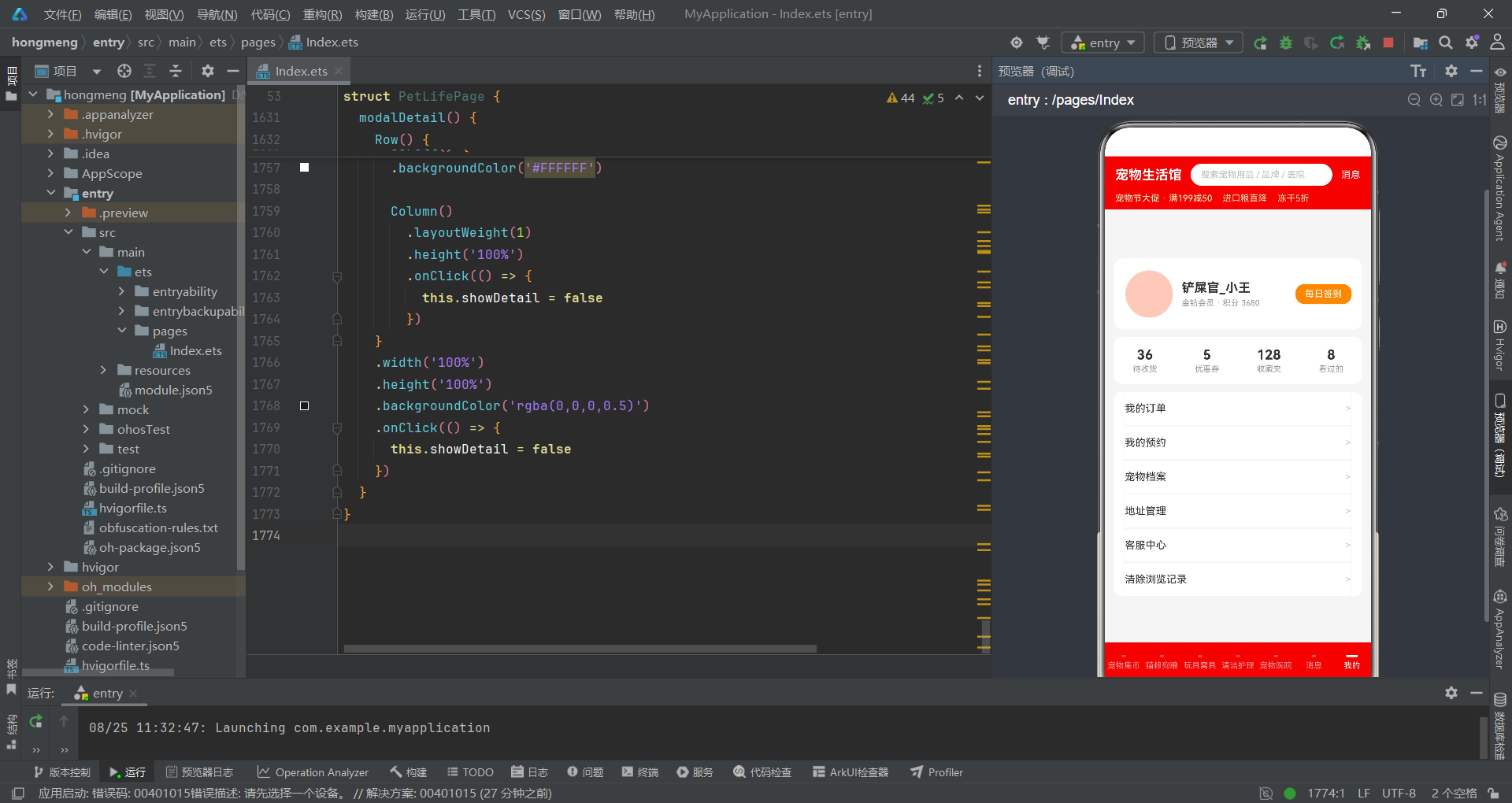
个人中心页面顶部是用户信息行,包含64x64的圆形头像占位(浅橙色背景)、用户名和会员信息、"每日签到"按钮(橙色背景,配合缩放动画)。下方是四列统计卡片行,展示待收货(36)、优惠券(5)、收藏夹(128)和看过的(8)四项数据,使用layoutWeight(1)等分宽度。功能菜单列表通过ForEach渲染六个菜单项,每项包含菜单名称和右箭头,行间使用浅灰色边框分隔。"清除浏览记录"菜单项(索引5)的onClick事件触发删除确认弹窗,其他菜单项暂未绑定具体操作。这种通过ForEach渲染菜单列表的模式在ArkTS中非常常见,配合索引判断可以实现不同菜单项的差异化交互。
技术点对比
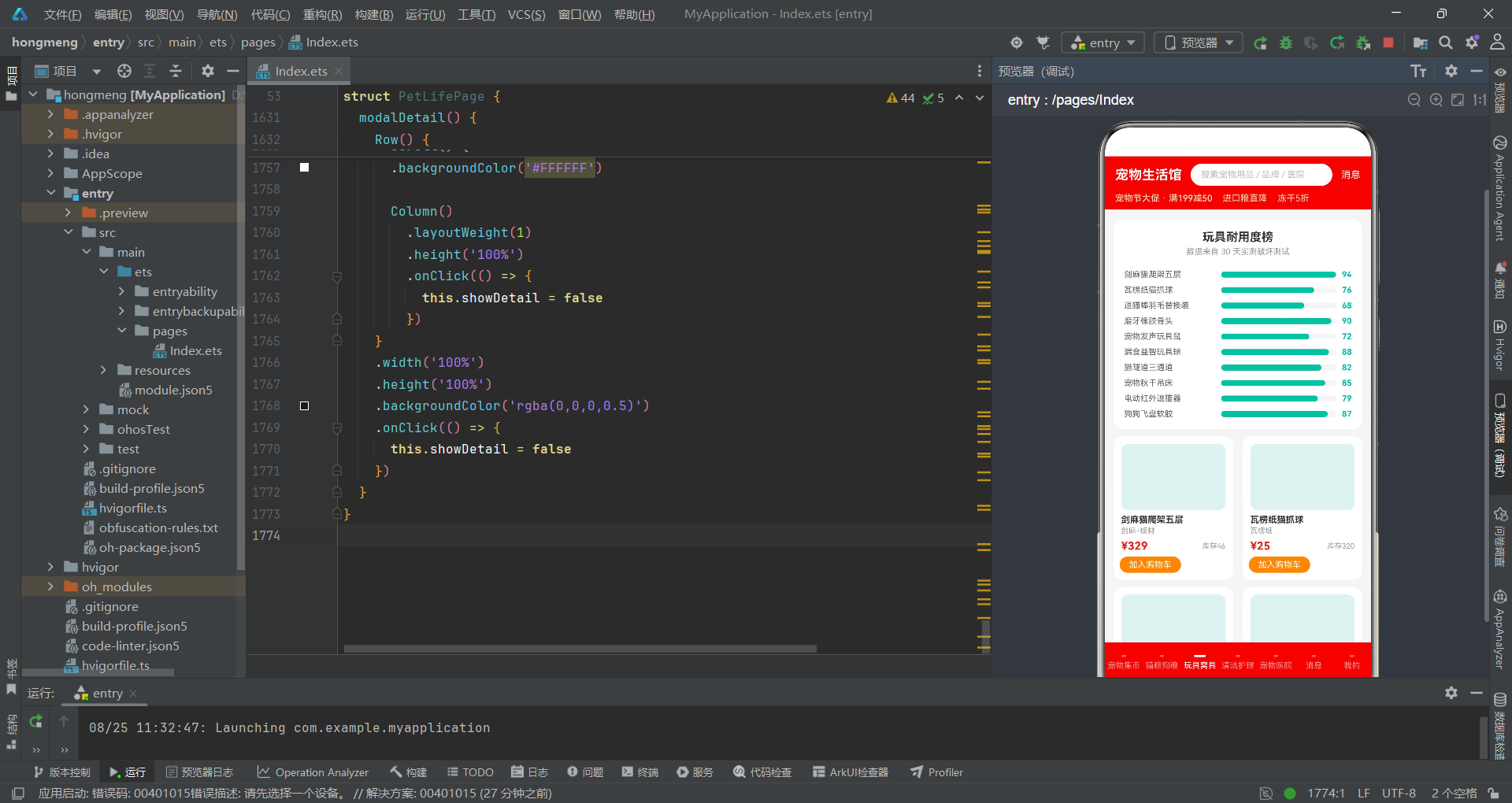
| 技术维度 | 宠物集市列表 | 猫粮蛋白质柱状图 | 玩具耐用度进度条 | 医院医师柱状图 | 弹窗交互体系 |
|---|---|---|---|---|---|
| 布局方式 | Row横向 + Stack进度条 | Row + ForEach竖向柱 | Stack叠加水平进度条 | Row + ForEach竖向柱 | Stack层叠 + 底部/居中 |
| 数据驱动 | pets数组 + ForEach | foods数组 + maxProtein | toys数组 + maxDurability | hospitals数组 + maxDoctors | @State布尔变量控制 |
| 可视化手段 | 品质评分竖向进度条 | 蛋白质柱状图(橙色) | 耐用度水平进度条(青绿) | 医师柱状图(黄色) | 费用动态计算+缩放动画 |
| 交互模式 | 点击打开详情侧滑 | 点击打开购物车弹窗 | 点击加购打开购物车 | 点击打开预约弹窗 | 遮罩关闭+stopPropagation |
| 状态管理 | selectedItem赋值 | qty重置+selectedSpec | qty重置 | selectedPackage+petQty重置 | qty/petQty/selectedSpec等 |
| 颜色体系 | 京东红#E1251B+橙#FF8F00 | 橙色柱+灰色底 | 青绿#00BFA5进度条 | 黄色柱+深色底#263238 | 红/橙/青绿三色弹窗区分 |
| 动画效果 | 标签缩放呼吸动画 | 无动画 | 加入购物车按钮缩放 | 今日可约标签缩放 | 价格/费用缩放呼吸动画 |
| 特色组件 | Scroll横向品类筛选 | border圆角柱子 | Flex双列网格 | 深色背景对比卡片 | TextInput输入+数量调节器 |
安装DevEco Studio程序

选择目标安装目录:

设置环境变量,但是需要重启一下:

新建一个空白模板:

设置API为24的模板项目:

初始化项目,自动下载相关依赖:

完整代码:
interface PetItem {
name: string
price: number
sold: number
quality: number
category: string
tag: string
}
interface FoodItem {
name: string
brand: string
protein: number
kg: number
price: number
shelf: number
}
interface ToyItem {
name: string
material: string
durability: number
price: number
stock: number
}
interface CareItem {
name: string
func: string
volume: number
price: number
rating: number
}
interface HospitalItem {
name: string
dist: number
doctors: number
score: number
fee: number
}
interface MessageItem {
title: string
content: string
time: string
unread: number
}
@Entry
@Component
struct PetLifePage {
@State currentTab: number = 0
@State showPublish: boolean = false
@State showCart: boolean = false
@State showBooking: boolean = false
@State showDelete: boolean = false
@State showDetail: boolean = false
@State selectedItem: PetItem | null = null
@State selectedCategory: number = 0
@State selectedSpec: number = 0
@State selectedPackage: number = 0
@State qty: number = 1
@State petQty: number = 1
@State inputName: string = ''
private tabs: string[] = ['宠物集市', '猫粮狗粮', '玩具窝具', '清洁护理', '宠物医院', '消息', '我的']
private categories: string[] = ['猫粮', '狗粮', '猫砂', '零食', '保健品', '牵引绳']
private specs: string[] = ['1.5kg 装', '2.5kg 装', '5kg 装', '10kg 装']
private packages: string[] = ['基础体检', '血液检查', '皮肤检测', '疫苗抗体']
private pets: PetItem[] = [
{ name: '皇家成猫粮 诱导风味 4kg', price: 189, sold: 3241, quality: 95, category: '猫粮', tag: '爆款' },
{ name: '渴望六种鱼无谷猫粮 2kg', price: 329, sold: 1852, quality: 98, category: '猫粮', tag: '进口' },
{ name: '爱肯拿农场盛宴猫粮 1.8kg', price: 268, sold: 967, quality: 93, category: '猫粮', tag: '热卖' },
{ name: '雪山室内成犬粮 10kg', price: 459, sold: 2143, quality: 91, category: '狗粮', tag: '实惠' },
{ name: '福摩三文鱼鸭肉犬粮 6kg', price: 388, sold: 856, quality: 94, category: '狗粮', tag: '推荐' },
{ name: '伯纳天纯低敏犬粮 8kg', price: 299, sold: 1320, quality: 90, category: '狗粮', tag: '爆款' },
{ name: 'N1 混合猫砂 2.5kg*4 袋', price: 119, sold: 5230, quality: 96, category: '猫砂', tag: '爆款' },
{ name: 'pidan 豆腐猫砂 6L', price: 79, sold: 3412, quality: 92, category: '猫砂', tag: '热卖' },
{ name: '洁客膨润土猫砂 10kg', price: 68, sold: 2875, quality: 88, category: '猫砂', tag: '实惠' },
{ name: '冻干鸡肉粒宠物零食 200g', price: 45, sold: 6812, quality: 97, category: '零食', tag: '爆款' },
{ name: '迈阿密牛肝冻干 80g', price: 58, sold: 1547, quality: 94, category: '零食', tag: '进口' },
{ name: '奶酪小方块犬用零食 250g', price: 39, sold: 2260, quality: 89, category: '零食', tag: '热卖' },
{ name: '猫条营养膏 14g*20 支', price: 69, sold: 4123, quality: 92, category: '零食', tag: '爆款' },
{ name: '犬用卵磷脂美毛粉 500g', price: 98, sold: 734, quality: 90, category: '保健品', tag: '推荐' },
{ name: '宠物钙片幼犬助长 120 片', price: 65, sold: 1105, quality: 87, category: '保健品', tag: '实惠' },
{ name: '猫用化毛膏 120g', price: 52, sold: 1876, quality: 91, category: '保健品', tag: '热卖' },
{ name: '深海鱼油软胶囊 60 粒', price: 88, sold: 943, quality: 93, category: '保健品', tag: '进口' },
{ name: '自动伸缩牵引绳 5m 中型犬', price: 75, sold: 2019, quality: 90, category: '牵引绳', tag: '爆款' },
{ name: '反光夜遛牵引绳 2.5m', price: 48, sold: 1362, quality: 88, category: '牵引绳', tag: '实惠' },
{ name: '胸背带防爆冲大型犬', price: 96, sold: 1750, quality: 92, category: '牵引绳', tag: '推荐' },
{ name: '宠物GPS定位项圈', price: 199, sold: 623, quality: 95, category: '牵引绳', tag: '新品' },
{ name: '猫用航空箱 中号', price: 138, sold: 892, quality: 89, category: '牵引绳', tag: '热卖' },
{ name: '宠物车载安全带后排', price: 62, sold: 1147, quality: 86, category: '牵引绳', tag: '实惠' },
{ name: '智能自动喂食器 4L', price: 269, sold: 1058, quality: 96, category: '保健品', tag: '新品' }
]
private foods: FoodItem[] = [
{ name: '渴望红肉无谷猫粮', brand: 'Orijen', protein: 40, kg: 2, price: 329, shelf: 18 },
{ name: '爱肯拿草原猫粮', brand: 'Acana', protein: 37, kg: 1.8, price: 268, shelf: 15 },
{ name: '纽翠斯黑钻红肉', brand: 'NutriSource', protein: 38, kg: 2.5, price: 305, shelf: 16 },
{ name: '百利高蛋白鸡肉', brand: 'Instinct', protein: 41, kg: 2, price: 312, shelf: 14 },
{ name: 'Go 九种肉全猫粮', brand: 'Go', protein: 36, kg: 3.6, price: 345, shelf: 20 },
{ name: '福摩鸭肉甜薯犬粮', brand: 'Fromm', protein: 32, kg: 6, price: 388, shelf: 22 },
{ name: 'now 深海鱼幼犬粮', brand: 'Now', protein: 30, kg: 5, price: 298, shelf: 19 },
{ name: '海洋之星三文鱼', brand: 'Fish4Dogs', protein: 33, kg: 4, price: 276, shelf: 17 },
{ name: '荒野盛宴鹿肉', brand: 'TasteWild', protein: 34, kg: 5.5, price: 322, shelf: 21 },
{ name: '麦富迪佰萃成犬', brand: 'Myfoodie', protein: 26, kg: 10, price: 129, shelf: 24 },
{ name: '比乐原味粮成猫', brand: 'Bile', protein: 28, kg: 8, price: 158, shelf: 23 },
{ name: '网易严选全价猫粮', brand: '严选', protein: 29, kg: 7, price: 149, shelf: 25 }
]
private toys: ToyItem[] = [
{ name: '剑麻猫爬架五层', material: '剑麻+板材', durability: 94, price: 329, stock: 46 },
{ name: '瓦楞纸猫抓球', material: '瓦楞纸', durability: 76, price: 25, stock: 320 },
{ name: '逗猫棒羽毛替换装', material: '羽毛+塑料', durability: 68, price: 15, stock: 512 },
{ name: '磨牙橡胶骨头', material: '天然橡胶', durability: 90, price: 32, stock: 280 },
{ name: '宠物发声玩具鼠', material: '绒布', durability: 72, price: 19, stock: 431 },
{ name: '漏食益智玩具球', material: 'ABS', durability: 88, price: 45, stock: 156 },
{ name: '猫隧道三通道', material: '涤纶布', durability: 82, price: 58, stock: 203 },
{ name: '宠物秋千吊床', material: '棉麻绳', durability: 85, price: 76, stock: 88 },
{ name: '电动红外逗猫器', material: 'ABS+电子', durability: 79, price: 89, stock: 134 },
{ name: '狗狗飞盘软胶', material: 'TPR 软胶', durability: 87, price: 28, stock: 365 }
]
private cares: CareItem[] = [
{ name: '燕麦温和宠物香波', func: '清洁除臭', volume: 500, price: 45, rating: 96 },
{ name: '药浴除螨洗剂', func: '除螨止痒', volume: 300, price: 68, rating: 94 },
{ name: '宠物免洗泡沫', func: '快速清洁', volume: 250, price: 32, rating: 90 },
{ name: '眼部清洁湿巾', func: '泪痕清洁', volume: 80, price: 22, rating: 92 },
{ name: '耳道清洁液', func: '耳螨护理', volume: 118, price: 38, rating: 93 },
{ name: '宠物护毛素', func: '柔顺亮毛', volume: 500, price: 52, rating: 91 },
{ name: '除臭喷雾猫砂用', func: '除味抑菌', volume: 500, price: 29, rating: 89 },
{ name: '趾甲剪静音款', func: '剪甲护理', volume: 1, price: 26, rating: 88 },
{ name: '宠物按摩梳', func: '按摩梳毛', volume: 1, price: 35, rating: 95 },
{ name: '粘毛器滚筒家庭装', func: '除毛清洁', volume: 3, price: 19, rating: 87 }
]
private hospitals: HospitalItem[] = [
{ name: '安心宠物医院(旗舰店)', dist: 2, doctors: 12, score: 98, fee: 199 },
{ name: '瑞鹏宠物医院(高新店)', dist: 3, doctors: 9, score: 96, fee: 168 },
{ name: '芭比堂动物医院', dist: 5, doctors: 15, score: 97, fee: 229 },
{ name: '美联众合转诊中心', dist: 7, doctors: 18, score: 99, fee: 288 },
{ name: '宠颐生宠物医院', dist: 4, doctors: 8, score: 93, fee: 139 },
{ name: '萌兽医馆(旗舰店)', dist: 6, doctors: 10, score: 95, fee: 189 },
{ name: '安安宠医(万达店)', dist: 3, doctors: 7, score: 92, fee: 129 },
{ name: '瑞派宠物医院', dist: 8, doctors: 11, score: 94, fee: 158 },
{ name: '同仁宠物专科', dist: 9, doctors: 6, score: 91, fee: 118 },
{ name: '佳宠国际动物医院', dist: 11, doctors: 14, score: 96, fee: 208 }
]
private messages: MessageItem[] = [
{ title: '发货通知', content: '您购买的皇家成猫粮已发货,预计明天送达', time: '10:24', unread: 1 },
{ title: '优惠券到账', content: '宠物节大促 满199减50 优惠券已发放', time: '09:12', unread: 1 },
{ title: '体检提醒', content: '您预约的疫苗抗体检测将于本周六进行', time: '昨天', unread: 2 },
{ title: '降价提醒', content: '您关注的渴望六种鱼猫粮降价 30 元', time: '昨天', unread: 0 },
{ title: '物流更新', content: '您的订单已到达【成都转运中心】', time: '08-22', unread: 0 },
{ title: '会员日福利', content: '周三会员日 全场零食第二件半价', time: '08-21', unread: 1 },
{ title: '售后进度', content: '您的退货申请已通过审核', time: '08-20', unread: 0 },
{ title: '新品上架', content: '智能自动喂食器新品首发立减 50', time: '08-19', unread: 0 },
{ title: '签到提醒', content: '连续签到 7 天可得 20 元无门槛券', time: '08-18', unread: 1 },
{ title: '评价有礼', content: '晒单评价送冻干零食一份', time: '08-17', unread: 0 },
{ title: '宠医回访', content: '您的宠物术后恢复情况回访请填写', time: '08-16', unread: 0 },
{ title: '活动预告', content: '宠物嘉年华直播盛典今晚 8 点开启', time: '08-15', unread: 0 }
]
private maxSold(): number {
let m: number = 0
this.pets.forEach((p: PetItem) => {
if (p.sold > m) {
m = p.sold
}
})
return m
}
private maxProtein(): number {
let m: number = 0
this.foods.forEach((f: FoodItem) => {
if (f.protein > m) {
m = f.protein
}
})
return m
}
private maxDurability(): number {
let m: number = 0
this.toys.forEach((t: ToyItem) => {
if (t.durability > m) {
m = t.durability
}
})
return m
}
private maxDoctors(): number {
let m: number = 0
this.hospitals.forEach((h: HospitalItem) => {
if (h.doctors > m) {
m = h.doctors
}
})
return m
}
private selName(): string {
if (this.selectedItem === null) {
return ''
}
return this.selectedItem.name
}
private selPrice(): number {
if (this.selectedItem === null) {
return 0
}
return this.selectedItem.price
}
private selCategory(): string {
if (this.selectedItem === null) {
return ''
}
return this.selectedItem.category
}
private selTag(): string {
if (this.selectedItem === null) {
return ''
}
return this.selectedItem.tag
}
private selQuality(): number {
if (this.selectedItem === null) {
return 0
}
return this.selectedItem.quality
}
private selSold(): number {
if (this.selectedItem === null) {
return 0
}
return this.selectedItem.sold
}
build() {
Stack() {
Column() {
this.headerBar()
Scroll() {
Column() {
if (this.currentTab === 0) {
this.tabMarket()
} else if (this.currentTab === 1) {
this.tabFood()
} else if (this.currentTab === 2) {
this.tabToy()
} else if (this.currentTab === 3) {
this.tabCare()
} else if (this.currentTab === 4) {
this.tabHospital()
} else if (this.currentTab === 5) {
this.tabMessage()
} else {
this.tabMine()
}
}
.width('100%')
.padding({ left: 12, right: 12, top: 10, bottom: 10 })
}
.layoutWeight(1)
.width('100%')
.scrollBar(BarState.Off)
this.bottomBar()
}
.width('100%')
.height('100%')
if (this.showPublish) {
this.modalPublish()
}
if (this.showCart) {
this.modalCart()
}
if (this.showBooking) {
this.modalBooking()
}
if (this.showDelete) {
this.modalDelete()
}
if (this.showDetail) {
this.modalDetail()
}
}
.width('100%')
.height('100%')
.backgroundColor('#F5F5F5')
}
@Builder
headerBar() {
Column() {
Row() {
Column() {
Text('宠物生活馆')
.fontSize(18)
.fontWeight(FontWeight.Bold)
.fontColor('#FFFFFF')
}
Column() {
Row() {
Text('搜索宠物用品 / 品牌 / 医院')
.fontSize(12)
.fontColor('#BDBDBD')
}
.width('100%')
.height(30)
.backgroundColor('#FFFFFF')
.borderRadius(15)
.justifyContent(FlexAlign.Start)
.padding({ left: 14 })
}
.layoutWeight(1)
.margin({ left: 12, right: 12 })
Column() {
Text('消息')
.fontSize(13)
.fontColor('#FFFFFF')
}
.onClick(() => {
this.currentTab = 5
})
}
.width('100%')
.height(50)
.padding({ left: 14, right: 14 })
.alignItems(VerticalAlign.Center)
Row() {
Text('宠物节大促 · 满199减50')
.fontSize(12)
.fontColor('#FFE0B2')
.fontWeight(FontWeight.Medium)
Text('进口粮直降')
.fontSize(12)
.fontColor('#FFE0B2')
.margin({ left: 14 })
Text('冻干5折')
.fontSize(12)
.fontColor('#FFE0B2')
.margin({ left: 14 })
}
.width('100%')
.padding({ left: 14, bottom: 8 })
.justifyContent(FlexAlign.Start)
}
.width('100%')
.backgroundColor('#E1251B')
}
@Builder
bottomBar() {
Row() {
ForEach(this.tabs, (tab: string, index: number) => {
Column() {
Column()
.width(index === this.currentTab ? 16 : 6)
.height(3)
.borderRadius(2)
.backgroundColor(index === this.currentTab ? '#FFFFFF' : 'rgba(255,255,255,0.35)')
Text(tab)
.fontSize(11)
.fontColor(index === this.currentTab ? '#FFFFFF' : 'rgba(255,255,255,0.6)')
.margin({ top: 5 })
}
.layoutWeight(1)
.height(54)
.justifyContent(FlexAlign.Center)
.onClick(() => {
this.currentTab = index
})
})
}
.width('100%')
.backgroundColor('#E1251B')
}
@Builder
tabMarket() {
Column() {
Column() {
Text('宠物节 · 主会场')
.fontSize(18)
.fontWeight(FontWeight.Bold)
.fontColor('#FFFFFF')
Text('满199减50 · 冻干零食5折 · 猫砂买三送一')
.fontSize(12)
.fontColor('#FFE0B2')
.margin({ top: 6 })
}
.width('100%')
.padding({ top: 18, bottom: 18, left: 16 })
.backgroundColor('#E1251B')
.borderRadius(12)
.justifyContent(FlexAlign.Start)
.alignItems(HorizontalAlign.Start)
Row() {
Column() {
Text('24')
.fontSize(20)
.fontWeight(FontWeight.Bold)
.fontColor('#E1251B')
Text('在售商品')
.fontSize(11)
.fontColor('#999999')
.margin({ top: 2 })
}
.layoutWeight(1)
.height(64)
.backgroundColor('#FFFFFF')
.borderRadius(10)
.margin({ top: 10 })
Column() {
Text('6812')
.fontSize(20)
.fontWeight(FontWeight.Bold)
.fontColor('#E1251B')
Text('最高销量')
.fontSize(11)
.fontColor('#999999')
.margin({ top: 2 })
}
.layoutWeight(1)
.height(64)
.backgroundColor('#FFFFFF')
.borderRadius(10)
.margin({ top: 10, left: 8 })
Column() {
Text('95%')
.fontSize(20)
.fontWeight(FontWeight.Bold)
.fontColor('#E1251B')
Text('平均好评')
.fontSize(11)
.fontColor('#999999')
.margin({ top: 2 })
}
.layoutWeight(1)
.height(64)
.backgroundColor('#FFFFFF')
.borderRadius(10)
.margin({ top: 10, left: 8 })
Column() {
Text('发布')
.fontSize(16)
.fontWeight(FontWeight.Bold)
.fontColor('#FFFFFF')
Text('闲置转让')
.fontSize(11)
.fontColor('#FFE0B2')
.margin({ top: 2 })
}
.layoutWeight(1)
.height(64)
.backgroundColor('#FF8F00')
.borderRadius(10)
.margin({ top: 10, left: 8 })
.onClick(() => {
this.showPublish = true
})
}
.width('100%')
Scroll() {
Row() {
ForEach(this.categories, (c: string, idx: number) => {
Text(c)
.fontSize(12)
.fontColor(this.selectedCategory === idx ? '#FFFFFF' : '#666666')
.backgroundColor(this.selectedCategory === idx ? '#E1251B' : '#FFFFFF')
.borderRadius(14)
.padding({ left: 14, right: 14, top: 6, bottom: 6 })
.margin({ right: 8 })
.onClick(() => {
this.selectedCategory = idx
})
})
}
}
.scrollable(ScrollDirection.Horizontal)
.scrollBar(BarState.Off)
.width('100%')
.margin({ top: 10 })
Column() {
ForEach(this.pets, (p: PetItem) => {
Row() {
Column()
.width(88)
.height(88)
.backgroundColor('#FFE0B2')
.borderRadius(10)
Column() {
Text(p.name)
.fontSize(14)
.fontWeight(FontWeight.Bold)
.fontColor('#333333')
.maxLines(1)
.textOverflow({ overflow: TextOverflow.Ellipsis })
Row() {
Text(p.category)
.fontSize(10)
.fontColor('#E1251B')
.backgroundColor('#FDE8E8')
.borderRadius(4)
.padding({ left: 6, right: 6, top: 2, bottom: 2 })
Text(p.tag)
.fontSize(10)
.fontColor('#FFFFFF')
.backgroundColor('#FF8F00')
.borderRadius(4)
.padding({ left: 6, right: 6, top: 2, bottom: 2 })
.margin({ left: 6 })
.scale({ x: 1.06, y: 1.06 })
.animation({ duration: 700, iterations: -1, curve: Curve.EaseInOut })
}
.margin({ top: 6 })
Stack({ alignContent: Alignment.Start }) {
Column()
.width('100%')
.height(6)
.backgroundColor('#F0F0F0')
.borderRadius(3)
Column()
.width(p.quality + '%')
.height(6)
.backgroundColor('#E1251B')
.borderRadius(3)
}
.width('100%')
.margin({ top: 8 })
Row() {
Text('¥' + p.price)
.fontSize(17)
.fontWeight(FontWeight.Bold)
.fontColor('#E1251B')
Text('已售' + p.sold)
.fontSize(11)
.fontColor('#999999')
.margin({ left: 8 })
Text('加购')
.fontSize(11)
.fontColor('#FFFFFF')
.backgroundColor('#E1251B')
.borderRadius(10)
.padding({ left: 10, right: 10, top: 4, bottom: 4 })
.margin({ left: 6 })
}
.width('100%')
.justifyContent(FlexAlign.SpaceBetween)
.alignItems(VerticalAlign.Center)
.margin({ top: 8 })
}
.layoutWeight(1)
.alignItems(HorizontalAlign.Start)
.padding({ left: 10 })
}
.width('100%')
.backgroundColor('#FFFFFF')
.borderRadius(12)
.padding(10)
.margin({ top: 10 })
.onClick(() => {
this.selectedItem = p
this.showDetail = true
})
})
}
.width('100%')
}
.width('100%')
}
@Builder
tabFood() {
Column() {
Column() {
Row() {
Text('猫粮狗粮专区')
.fontSize(16)
.fontWeight(FontWeight.Bold)
.fontColor('#333333')
Text('蛋白质含量对比 (g/100g)')
.fontSize(11)
.fontColor('#999999')
.margin({ left: 10 })
}
.width('100%')
.justifyContent(FlexAlign.SpaceBetween)
Row() {
ForEach(this.foods, (f: FoodItem) => {
Column() {
Column()
.width(14)
.height(f.protein / this.maxProtein() * 92)
.backgroundColor('#FF8F00')
.borderRadius({ topLeft: 3, topRight: 3 })
}
.height(96)
.justifyContent(FlexAlign.End)
.margin({ right: 5 })
})
}
.width('100%')
.margin({ top: 12 })
}
.width('100%')
.backgroundColor('#FFFFFF')
.borderRadius(12)
.padding(14)
.margin({ top: 4 })
Column() {
ForEach(this.foods, (f: FoodItem, idx: number) => {
Row() {
Text((idx + 1) + '')
.fontSize(14)
.fontWeight(FontWeight.Bold)
.fontColor('#FFFFFF')
.width(22)
.height(22)
.textAlign(TextAlign.Center)
.backgroundColor(idx < 3 ? '#E1251B' : '#BDBDBD')
.borderRadius(11)
Column() {
Text(f.name)
.fontSize(14)
.fontWeight(FontWeight.Bold)
.fontColor('#333333')
Text(f.brand + ' · ' + f.kg + 'kg · 保质期' + f.shelf + '个月')
.fontSize(11)
.fontColor('#999999')
.margin({ top: 3 })
}
.layoutWeight(1)
.alignItems(HorizontalAlign.Start)
.padding({ left: 10 })
Text('¥' + f.price)
.fontSize(16)
.fontWeight(FontWeight.Bold)
.fontColor('#E1251B')
}
.width('100%')
.padding({ top: 10, bottom: 10 })
.border({ width: 1, color: '#F5F5F5' })
.onClick(() => {
this.qty = 1
this.showCart = true
})
})
}
.width('100%')
.backgroundColor('#FFFFFF')
.borderRadius(12)
.padding({ left: 14, right: 14, top: 6, bottom: 6 })
.margin({ top: 10 })
}
.width('100%')
}
@Builder
tabToy() {
Column() {
Column() {
Text('玩具耐用度榜')
.fontSize(16)
.fontWeight(FontWeight.Bold)
.fontColor('#333333')
Text('数据来自 30 天实测破坏测试')
.fontSize(11)
.fontColor('#999999')
.margin({ top: 4 })
Column() {
ForEach(this.toys, (t: ToyItem) => {
Row() {
Text(t.name)
.fontSize(11)
.fontColor('#666666')
.width('40%')
.maxLines(1)
.textOverflow({ overflow: TextOverflow.Ellipsis })
Stack({ alignContent: Alignment.Start }) {
Column()
.width('100%')
.height(8)
.backgroundColor('#F5F5F5')
.borderRadius(4)
Column()
.width(t.durability / this.maxDurability() * 100 + '%')
.height(8)
.backgroundColor('#00BFA5')
.borderRadius(4)
}
.layoutWeight(1)
.margin({ left: 8 })
Text(t.durability + '')
.fontSize(11)
.fontColor('#00BFA5')
.fontWeight(FontWeight.Bold)
.margin({ left: 8 })
}
.width('100%')
.margin({ top: 8 })
})
}
.width('100%')
.margin({ top: 10 })
}
.width('100%')
.backgroundColor('#FFFFFF')
.borderRadius(12)
.padding(14)
.margin({ top: 4 })
Flex({ wrap: FlexWrap.Wrap, justifyContent: FlexAlign.SpaceBetween }) {
ForEach(this.toys, (t: ToyItem) => {
Column() {
Column()
.width('100%')
.height(90)
.backgroundColor('#E0F2F1')
.borderRadius(10)
Text(t.name)
.fontSize(12)
.fontWeight(FontWeight.Bold)
.fontColor('#333333')
.margin({ top: 6 })
.maxLines(1)
.textOverflow({ overflow: TextOverflow.Ellipsis })
Text(t.material)
.fontSize(10)
.fontColor('#999999')
.margin({ top: 2 })
Row() {
Text('¥' + t.price)
.fontSize(15)
.fontWeight(FontWeight.Bold)
.fontColor('#E1251B')
Text('库存' + t.stock)
.fontSize(10)
.fontColor('#999999')
.margin({ left: 6 })
}
.width('100%')
.justifyContent(FlexAlign.SpaceBetween)
.margin({ top: 6 })
Text('加入购物车')
.fontSize(11)
.fontColor('#FFFFFF')
.backgroundColor('#FF8F00')
.borderRadius(12)
.padding({ left: 12, right: 12, top: 4, bottom: 4 })
.margin({ top: 6 })
.scale({ x: 1.05, y: 1.05 })
.animation({ duration: 800, iterations: -1, curve: Curve.EaseInOut })
.onClick(() => {
this.qty = 1
this.showCart = true
})
}
.width('48%')
.backgroundColor('#FFFFFF')
.borderRadius(12)
.padding(10)
.margin({ top: 10 })
.alignItems(HorizontalAlign.Start)
})
}
.width('100%')
}
.width('100%')
}
@Builder
tabCare() {
Column() {
Row() {
Column() {
Text('清洁护理专场')
.fontSize(16)
.fontWeight(FontWeight.Bold)
.fontColor('#333333')
Text('温和不刺激 · 猫犬通用')
.fontSize(11)
.fontColor('#999999')
.margin({ top: 4 })
}
.layoutWeight(1)
.alignItems(HorizontalAlign.Start)
Text('满99减20')
.fontSize(12)
.fontColor('#FFFFFF')
.backgroundColor('#E1251B')
.borderRadius(10)
.padding({ left: 10, right: 10, top: 6, bottom: 6 })
.scale({ x: 1.05, y: 1.05 })
.animation({ duration: 900, iterations: -1, curve: Curve.EaseInOut })
}
.width('100%')
.padding(14)
.backgroundColor('#FFFFFF')
.borderRadius(12)
.margin({ top: 4 })
.alignItems(VerticalAlign.Center)
Column() {
ForEach(this.cares, (c: CareItem) => {
Column() {
Row() {
Column()
.width(64)
.height(64)
.backgroundColor('#E1F5FE')
.borderRadius(10)
Column() {
Text(c.name)
.fontSize(14)
.fontWeight(FontWeight.Bold)
.fontColor('#333333')
Text(c.func + (c.volume > 1 ? ' · ' + c.volume + 'ml' : ''))
.fontSize(11)
.fontColor('#999999')
.margin({ top: 3 })
Row() {
Text('好评率')
.fontSize(10)
.fontColor('#999999')
Stack({ alignContent: Alignment.Start }) {
Column()
.width('100%')
.height(6)
.backgroundColor('#F0F0F0')
.borderRadius(3)
Column()
.width(c.rating + '%')
.height(6)
.backgroundColor('#00BFA5')
.borderRadius(3)
}
.width(90)
.margin({ left: 6 })
Text(c.rating + '%')
.fontSize(10)
.fontColor('#00BFA5')
.fontWeight(FontWeight.Bold)
.margin({ left: 6 })
}
.margin({ top: 6 })
}
.layoutWeight(1)
.alignItems(HorizontalAlign.Start)
.padding({ left: 10 })
Text('¥' + c.price)
.fontSize(16)
.fontWeight(FontWeight.Bold)
.fontColor('#E1251B')
}
.width('100%')
.alignItems(VerticalAlign.Center)
}
.width('100%')
.padding(12)
.backgroundColor('#FFFFFF')
.borderRadius(12)
.margin({ top: 10 })
.onClick(() => {
this.qty = 1
this.showCart = true
})
})
}
.width('100%')
}
.width('100%')
}
@Builder
tabHospital() {
Column() {
Column() {
Row() {
Text('在线预约 · 免排队')
.fontSize(16)
.fontWeight(FontWeight.Bold)
.fontColor('#FFFFFF')
Text('今日可约')
.fontSize(11)
.fontColor('#FFEB3B')
.margin({ left: 10 })
.scale({ x: 1.08, y: 1.08 })
.animation({ duration: 600, iterations: -1, curve: Curve.EaseInOut })
}
.width('100%')
.justifyContent(FlexAlign.SpaceBetween)
.alignItems(VerticalAlign.Center)
Row() {
Text('执业兽医师数量 (人)')
.fontSize(11)
.fontColor('#FFE0B2')
}
.width('100%')
.margin({ top: 12 })
Row() {
ForEach(this.hospitals, (h: HospitalItem) => {
Column() {
Column()
.width(16)
.height(h.doctors / this.maxDoctors() * 80)
.backgroundColor('#FFD54F')
.borderRadius({ topLeft: 3, topRight: 3 })
}
.height(84)
.justifyContent(FlexAlign.End)
.margin({ right: 5 })
})
}
.width('100%')
.margin({ top: 8 })
}
.width('100%')
.padding(14)
.backgroundColor('#263238')
.borderRadius(12)
.margin({ top: 4 })
Column() {
ForEach(this.hospitals, (h: HospitalItem) => {
Column() {
Row() {
Column() {
Text(h.name)
.fontSize(14)
.fontWeight(FontWeight.Bold)
.fontColor('#333333')
Row() {
Text(h.dist + 'km')
.fontSize(10)
.fontColor('#666666')
Text(h.doctors + '位医师')
.fontSize(10)
.fontColor('#666666')
.margin({ left: 8 })
Text('评分' + h.score)
.fontSize(10)
.fontColor('#FF8F00')
.margin({ left: 8 })
}
.margin({ top: 4 })
}
.layoutWeight(1)
.alignItems(HorizontalAlign.Start)
Column() {
Text('¥' + h.fee + '起')
.fontSize(15)
.fontWeight(FontWeight.Bold)
.fontColor('#E1251B')
Text('预约体检')
.fontSize(11)
.fontColor('#FFFFFF')
.backgroundColor('#E1251B')
.borderRadius(10)
.padding({ left: 12, right: 12, top: 4, bottom: 4 })
.margin({ top: 6 })
}
.alignItems(HorizontalAlign.End)
}
.width('100%')
.alignItems(VerticalAlign.Center)
}
.width('100%')
.padding(12)
.backgroundColor('#FFFFFF')
.borderRadius(12)
.margin({ top: 10 })
.onClick(() => {
this.selectedPackage = 0
this.petQty = 1
this.showBooking = true
})
})
}
.width('100%')
}
.width('100%')
}
@Builder
tabMessage() {
Column() {
Row() {
Text('消息中心')
.fontSize(16)
.fontWeight(FontWeight.Bold)
.fontColor('#333333')
Text('12条未读')
.fontSize(11)
.fontColor('#E1251B')
.margin({ left: 8 })
}
.width('100%')
.padding(14)
.backgroundColor('#FFFFFF')
.borderRadius(12)
.margin({ top: 4 })
Column() {
ForEach(this.messages, (m: MessageItem) => {
Row() {
Column() {
Text(m.title.substring(0, 1))
.fontSize(16)
.fontWeight(FontWeight.Bold)
.fontColor('#FFFFFF')
}
.width(44)
.height(44)
.backgroundColor('#E1251B')
.borderRadius(22)
.justifyContent(FlexAlign.Center)
Column() {
Row() {
Text(m.title)
.fontSize(14)
.fontWeight(FontWeight.Bold)
.fontColor('#333333')
if (m.unread > 0) {
Text(m.unread + '')
.fontSize(10)
.fontColor('#FFFFFF')
.backgroundColor('#E1251B')
.borderRadius(8)
.padding({ left: 6, right: 6, top: 1, bottom: 1 })
.margin({ left: 6 })
.scale({ x: 1.1, y: 1.1 })
.animation({ duration: 700, iterations: -1, curve: Curve.EaseInOut })
}
}
Text(m.content)
.fontSize(12)
.fontColor('#999999')
.margin({ top: 3 })
.maxLines(1)
.textOverflow({ overflow: TextOverflow.Ellipsis })
}
.layoutWeight(1)
.alignItems(HorizontalAlign.Start)
.padding({ left: 10 })
Text(m.time)
.fontSize(11)
.fontColor('#CCCCCC')
}
.width('100%')
.padding(12)
.backgroundColor('#FFFFFF')
.borderRadius(12)
.margin({ top: 10 })
.alignItems(VerticalAlign.Center)
.onClick(() => {
m.unread = 0
})
})
}
.width('100%')
}
.width('100%')
}
@Builder
tabMine() {
Column() {
Row() {
Column()
.width(64)
.height(64)
.backgroundColor('#FFCCBC')
.borderRadius(32)
Column() {
Text('铲屎官_小王')
.fontSize(17)
.fontWeight(FontWeight.Bold)
.fontColor('#333333')
Text('金钻会员 · 积分 3680')
.fontSize(11)
.fontColor('#999999')
.margin({ top: 4 })
}
.layoutWeight(1)
.alignItems(HorizontalAlign.Start)
.padding({ left: 12 })
Text('每日签到')
.fontSize(12)
.fontColor('#FFFFFF')
.backgroundColor('#FF8F00')
.borderRadius(12)
.padding({ left: 12, right: 12, top: 6, bottom: 6 })
.scale({ x: 1.05, y: 1.05 })
.animation({ duration: 800, iterations: -1, curve: Curve.EaseInOut })
}
.width('100%')
.padding(16)
.backgroundColor('#FFFFFF')
.borderRadius(12)
.margin({ top: 4 })
.alignItems(VerticalAlign.Center)
Row() {
Column() {
Text('36')
.fontSize(18)
.fontWeight(FontWeight.Bold)
.fontColor('#333333')
Text('待收货')
.fontSize(11)
.fontColor('#999999')
.margin({ top: 2 })
}
.layoutWeight(1)
Column() {
Text('5')
.fontSize(18)
.fontWeight(FontWeight.Bold)
.fontColor('#333333')
Text('优惠券')
.fontSize(11)
.fontColor('#999999')
.margin({ top: 2 })
}
.layoutWeight(1)
Column() {
Text('128')
.fontSize(18)
.fontWeight(FontWeight.Bold)
.fontColor('#333333')
Text('收藏夹')
.fontSize(11)
.fontColor('#999999')
.margin({ top: 2 })
}
.layoutWeight(1)
Column() {
Text('8')
.fontSize(18)
.fontWeight(FontWeight.Bold)
.fontColor('#333333')
Text('看过的')
.fontSize(11)
.fontColor('#999999')
.margin({ top: 2 })
}
.layoutWeight(1)
}
.width('100%')
.padding({ top: 14, bottom: 14 })
.backgroundColor('#FFFFFF')
.borderRadius(12)
.margin({ top: 10 })
Column() {
ForEach(['我的订单', '我的预约', '宠物档案', '地址管理', '客服中心', '清除浏览记录'], (m: string, idx: number) => {
Row() {
Text(m)
.fontSize(14)
.fontColor('#333333')
Column().layoutWeight(1)
Text('>')
.fontSize(14)
.fontColor('#CCCCCC')
}
.width('100%')
.padding({ top: 14, bottom: 14 })
.border({ width: 1, color: '#F5F5F5' })
.onClick(() => {
if (idx === 5) {
this.showDelete = true
}
})
})
}
.width('100%')
.backgroundColor('#FFFFFF')
.borderRadius(12)
.padding({ left: 14, right: 14 })
.margin({ top: 10 })
}
.width('100%')
}
@Builder
modalPublish() {
Column() {
Column().layoutWeight(1).width('100%')
Column() {
Row() {
Text('发布闲置宠物用品')
.fontSize(16)
.fontWeight(FontWeight.Bold)
.fontColor('#333333')
Text('关闭')
.fontSize(13)
.fontColor('#999999')
.padding(6)
}
.width('100%')
.justifyContent(FlexAlign.SpaceBetween)
Column() {
Text('商品名称')
.fontSize(13)
.fontColor('#666666')
TextInput({ placeholder: '请输入商品名称' })
.height(40)
.fontSize(13)
.backgroundColor('#F5F5F5')
.borderRadius(8)
.margin({ top: 6 })
.onChange((value: string) => {
this.inputName = value
})
}
.width('100%')
.margin({ top: 16 })
.alignItems(HorizontalAlign.Start)
Column() {
Text('选择品类')
.fontSize(13)
.fontColor('#666666')
Row() {
ForEach(this.categories, (c: string, idx: number) => {
Text(c)
.fontSize(12)
.fontColor(this.selectedCategory === idx ? '#FFFFFF' : '#666666')
.backgroundColor(this.selectedCategory === idx ? '#E1251B' : '#F5F5F5')
.borderRadius(14)
.padding({ left: 14, right: 14, top: 6, bottom: 6 })
.margin({ right: 8, top: 8 })
.onClick(() => {
this.selectedCategory = idx
})
})
}
.width('100%')
}
.width('100%')
.margin({ top: 16 })
.alignItems(HorizontalAlign.Start)
Column() {
Text('心理价位:¥' + ((this.selectedCategory + 1) * 59))
.fontSize(15)
.fontWeight(FontWeight.Bold)
.fontColor('#E1251B')
.scale({ x: 1.04, y: 1.04 })
.animation({ duration: 600, iterations: -1, curve: Curve.EaseInOut })
}
.width('100%')
.margin({ top: 20 })
.alignItems(HorizontalAlign.Start)
Text('确认发布')
.fontSize(15)
.fontColor('#FFFFFF')
.fontWeight(FontWeight.Bold)
.width('100%')
.height(44)
.textAlign(TextAlign.Center)
.backgroundColor('#E1251B')
.borderRadius(22)
.margin({ top: 20 })
.onClick(() => {
this.showPublish = false
})
}
.width('100%')
.constraintSize({ maxHeight: '80%' })
.backgroundColor('#FFFFFF')
.borderRadius({ topLeft: 16, topRight: 16 })
.padding(16)
}
.width('100%')
.height('100%')
.backgroundColor('rgba(0,0,0,0.5)')
.onClick(() => {
this.showPublish = false
})
}
@Builder
modalCart() {
Column() {
Column().layoutWeight(1).width('100%')
Column() {
Row() {
Text('选择规格')
.fontSize(16)
.fontWeight(FontWeight.Bold)
.fontColor('#333333')
Text('¥' + (this.selectedSpec + 1) * 29 * this.qty)
.fontSize(18)
.fontWeight(FontWeight.Bold)
.fontColor('#E1251B')
.scale({ x: 1.05, y: 1.05 })
.animation({ duration: 700, iterations: -1, curve: Curve.EaseInOut })
}
.width('100%')
.justifyContent(FlexAlign.SpaceBetween)
.alignItems(VerticalAlign.Center)
Column() {
Text('包装规格')
.fontSize(13)
.fontColor('#666666')
Row() {
ForEach(this.specs, (s: string, idx: number) => {
Text(s)
.fontSize(12)
.fontColor(this.selectedSpec === idx ? '#FFFFFF' : '#666666')
.backgroundColor(this.selectedSpec === idx ? '#FF8F00' : '#F5F5F5')
.borderRadius(8)
.padding({ left: 14, right: 14, top: 8, bottom: 8 })
.margin({ right: 8, top: 8 })
.onClick(() => {
this.selectedSpec = idx
})
})
}
.width('100%')
}
.width('100%')
.margin({ top: 16 })
.alignItems(HorizontalAlign.Start)
Row() {
Text('购买数量')
.fontSize(13)
.fontColor('#666666')
Column().layoutWeight(1)
Row() {
Text('-')
.fontSize(16)
.fontColor('#666666')
.width(30)
.height(30)
.textAlign(TextAlign.Center)
.backgroundColor('#F5F5F5')
.borderRadius(6)
.onClick(() => {
if (this.qty > 1) {
this.qty -= 1
}
})
Text(this.qty + '')
.fontSize(14)
.fontColor('#333333')
.width(40)
.height(30)
.textAlign(TextAlign.Center)
Text('+')
.fontSize(16)
.fontColor('#666666')
.width(30)
.height(30)
.textAlign(TextAlign.Center)
.backgroundColor('#F5F5F5')
.borderRadius(6)
.onClick(() => {
if (this.qty < 9) {
this.qty += 1
}
})
}
}
.width('100%')
.margin({ top: 18 })
.alignItems(VerticalAlign.Center)
Row() {
Text('加入购物车')
.fontSize(14)
.fontColor('#E1251B')
.fontWeight(FontWeight.Bold)
.layoutWeight(1)
.height(42)
.textAlign(TextAlign.Center)
.backgroundColor('#FDE8E8')
.borderRadius(21)
Text('立即购买')
.fontSize(14)
.fontColor('#FFFFFF')
.fontWeight(FontWeight.Bold)
.layoutWeight(1)
.height(42)
.textAlign(TextAlign.Center)
.backgroundColor('#E1251B')
.borderRadius(21)
.margin({ left: 10 })
}
.width('100%')
.margin({ top: 20 })
.onClick(() => {
this.showCart = false
})
}
.width('100%')
.constraintSize({ maxHeight: '80%' })
.backgroundColor('#FFFFFF')
.borderRadius({ topLeft: 16, topRight: 16 })
.padding(16)
}
.width('100%')
.height('100%')
.backgroundColor('rgba(0,0,0,0.5)')
.onClick(() => {
this.showCart = false
})
}
@Builder
modalBooking() {
Column() {
Column() {
Text('预约宠物体检')
.fontSize(16)
.fontWeight(FontWeight.Bold)
.fontColor('#333333')
.margin({ top: 18 })
Column() {
Text('体检套餐')
.fontSize(13)
.fontColor('#666666')
Row() {
ForEach(this.packages, (p: string, idx: number) => {
Text(p)
.fontSize(12)
.fontColor(this.selectedPackage === idx ? '#FFFFFF' : '#666666')
.backgroundColor(this.selectedPackage === idx ? '#00BFA5' : '#F5F5F5')
.borderRadius(14)
.padding({ left: 14, right: 14, top: 8, bottom: 8 })
.margin({ right: 8, top: 10 })
.onClick(() => {
this.selectedPackage = idx
})
})
}
.width('100%')
}
.width('100%')
.margin({ top: 16 })
.alignItems(HorizontalAlign.Start)
Row() {
Text('宠物数量')
.fontSize(13)
.fontColor('#666666')
Column().layoutWeight(1)
Row() {
Text('-')
.fontSize(15)
.fontColor('#666666')
.width(28)
.height(28)
.textAlign(TextAlign.Center)
.backgroundColor('#F5F5F5')
.borderRadius(6)
.onClick(() => {
if (this.petQty > 1) {
this.petQty -= 1
}
})
Text(this.petQty + '')
.fontSize(14)
.fontColor('#333333')
.width(36)
.height(28)
.textAlign(TextAlign.Center)
Text('+')
.fontSize(15)
.fontColor('#666666')
.width(28)
.height(28)
.textAlign(TextAlign.Center)
.backgroundColor('#F5F5F5')
.borderRadius(6)
.onClick(() => {
if (this.petQty < 5) {
this.petQty += 1
}
})
}
}
.width('100%')
.margin({ top: 16 })
.alignItems(VerticalAlign.Center)
Text('预计费用:¥' + ((this.selectedPackage + 1) * 99 * this.petQty))
.fontSize(16)
.fontWeight(FontWeight.Bold)
.fontColor('#00BFA5')
.margin({ top: 18 })
.scale({ x: 1.04, y: 1.04 })
.animation({ duration: 650, iterations: -1, curve: Curve.EaseInOut })
Text('提交预约')
.fontSize(14)
.fontColor('#FFFFFF')
.fontWeight(FontWeight.Bold)
.width('100%')
.height(42)
.textAlign(TextAlign.Center)
.backgroundColor('#00BFA5')
.borderRadius(21)
.margin({ top: 20, bottom: 18 })
.onClick(() => {
this.showBooking = false
})
}
.width('86%')
.backgroundColor('#FFFFFF')
.borderRadius(16)
.padding({ left: 18, right: 18 })
}
.width('100%')
.height('100%')
.backgroundColor('rgba(0,0,0,0.5)')
.justifyContent(FlexAlign.Center)
.onClick(() => {
this.showBooking = false
})
}
@Builder
modalDelete() {
Column() {
Column() {
Text('!')
.fontSize(28)
.fontWeight(FontWeight.Bold)
.fontColor('#FFFFFF')
.width(56)
.height(56)
.textAlign(TextAlign.Center)
.backgroundColor('#E1251B')
.borderRadius(28)
Text('确认删除')
.fontSize(16)
.fontWeight(FontWeight.Bold)
.fontColor('#333333')
.margin({ top: 14 })
Text('删除后不可恢复,是否继续?')
.fontSize(13)
.fontColor('#999999')
.margin({ top: 8 })
Row() {
Text('取消')
.fontSize(14)
.fontColor('#666666')
.layoutWeight(1)
.height(40)
.textAlign(TextAlign.Center)
.backgroundColor('#F5F5F5')
.borderRadius(20)
.onClick(() => {
this.showDelete = false
})
Text('确认删除')
.fontSize(14)
.fontColor('#FFFFFF')
.layoutWeight(1)
.height(40)
.textAlign(TextAlign.Center)
.backgroundColor('#E1251B')
.borderRadius(20)
.margin({ left: 10 })
.onClick(() => {
this.showDelete = false
this.showDetail = false
})
}
.width('100%')
.margin({ top: 22, bottom: 20 })
}
.width('78%')
.backgroundColor('#FFFFFF')
.borderRadius(16)
.padding(20)
.alignItems(HorizontalAlign.Center)
}
.width('100%')
.height('100%')
.backgroundColor('rgba(0,0,0,0.5)')
.justifyContent(FlexAlign.Center)
.onClick(() => {
this.showDelete = false
})
}
@Builder
modalDetail() {
Row() {
Scroll() {
Column() {
Column()
.width('100%')
.height(180)
.backgroundColor('#FFE0B2')
.borderRadius({ topLeft: 16, bottomLeft: 16 })
Column() {
Text('¥' + this.selPrice())
.fontSize(24)
.fontWeight(FontWeight.Bold)
.fontColor('#E1251B')
Text(this.selName())
.fontSize(16)
.fontWeight(FontWeight.Bold)
.fontColor('#333333')
.margin({ top: 8 })
Row() {
Text(this.selCategory())
.fontSize(10)
.fontColor('#E1251B')
.backgroundColor('#FDE8E8')
.borderRadius(4)
.padding({ left: 6, right: 6, top: 2, bottom: 2 })
Text(this.selTag())
.fontSize(10)
.fontColor('#FFFFFF')
.backgroundColor('#FF8F00')
.borderRadius(4)
.padding({ left: 6, right: 6, top: 2, bottom: 2 })
.margin({ left: 6 })
}
.margin({ top: 8 })
Column() {
Text('品质评分 ' + this.selQuality() + '%')
.fontSize(12)
.fontColor('#666666')
Stack({ alignContent: Alignment.Start }) {
Column()
.width('100%')
.height(8)
.backgroundColor('#F0F0F0')
.borderRadius(4)
Column()
.width(this.selQuality() + '%')
.height(8)
.backgroundColor('#E1251B')
.borderRadius(4)
}
.width('100%')
.margin({ top: 6 })
}
.width('100%')
.alignItems(HorizontalAlign.Start)
.margin({ top: 14 })
Row() {
Text('已售 ' + this.selSold())
.fontSize(12)
.fontColor('#999999')
Text('运费 免邮')
.fontSize(12)
.fontColor('#999999')
.margin({ left: 12 })
Text('7天无理由')
.fontSize(12)
.fontColor('#00BFA5')
.margin({ left: 12 })
}
.margin({ top: 12 })
Column() {
Row() {
Text('加购')
.fontSize(14)
.fontColor('#E1251B')
.fontWeight(FontWeight.Bold)
.layoutWeight(1)
.height(40)
.textAlign(TextAlign.Center)
.backgroundColor('#FDE8E8')
.borderRadius(20)
Text('删除')
.fontSize(14)
.fontColor('#FFFFFF')
.fontWeight(FontWeight.Bold)
.layoutWeight(1)
.height(40)
.textAlign(TextAlign.Center)
.backgroundColor('#E1251B')
.borderRadius(20)
.margin({ left: 10 })
}
.width('100%')
.margin({ top: 18 })
.onClick(() => {
this.showCart = true
})
Row() {
Text('删除该商品')
.fontSize(13)
.fontColor('#E1251B')
.padding({ top: 12 })
}
.width('100%')
.onClick(() => {
this.showDelete = true
})
}
.width('100%')
.margin({ top: 8 })
}
.width('100%')
.padding(16)
.alignItems(HorizontalAlign.Start)
}
.width('100%')
}
.width('78%')
.height('100%')
.backgroundColor('#FFFFFF')
Column()
.layoutWeight(1)
.height('100%')
.onClick(() => {
this.showDetail = false
})
}
.width('100%')
.height('100%')
.backgroundColor('rgba(0,0,0,0.5)')
.onClick(() => {
this.showDetail = false
})
}
}
总结
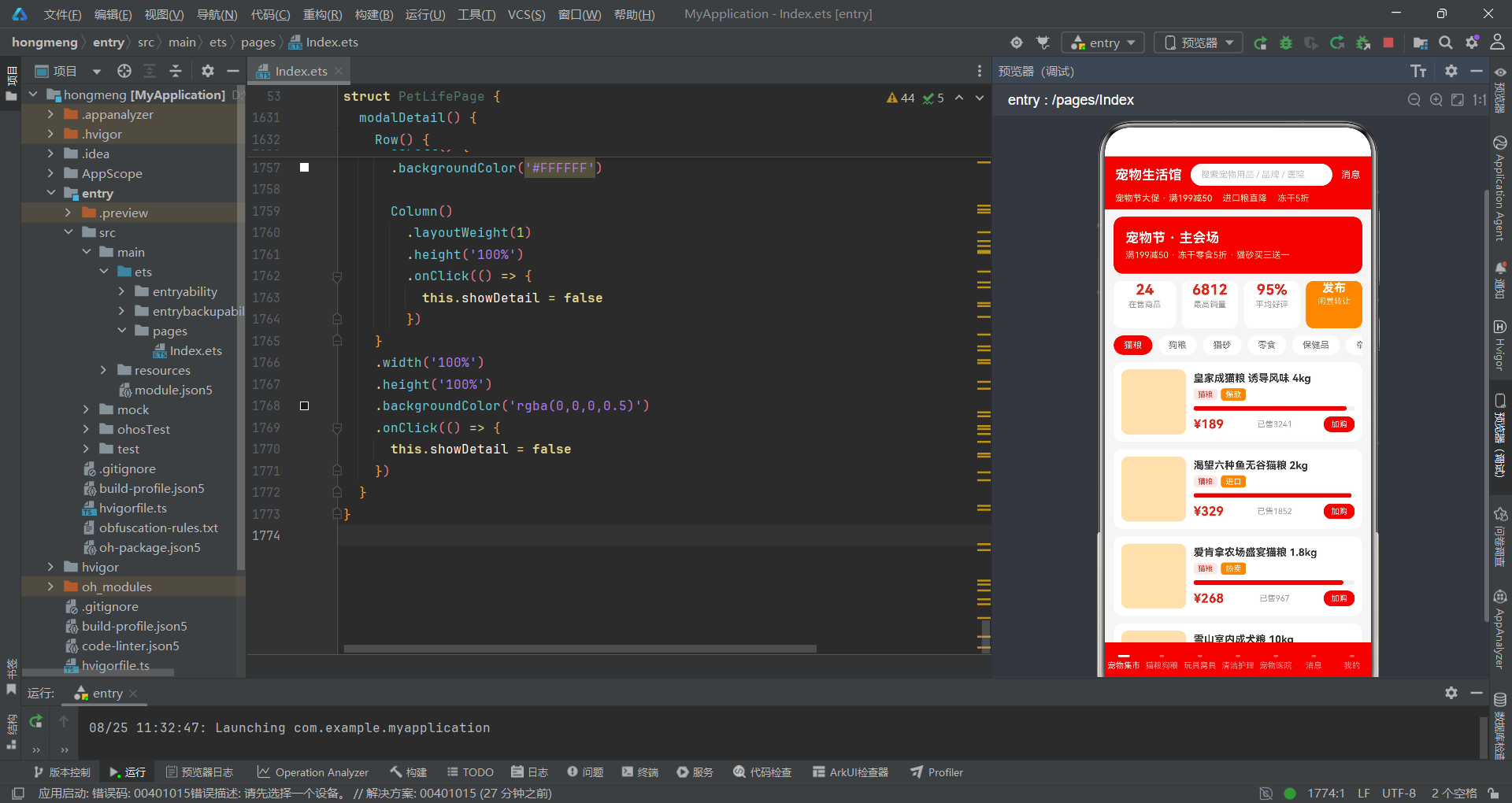
系统性地剖析了基于HarmonyOS ArkTS API 24构建多模块电商应用的完整技术方案。从六种接口类型的数据模型设计,到Stack根容器的层叠布局架构,再到七个@Builder页面组件和五套弹窗交互的实现,全面展示了ArkTS在复杂电商场景下的工程化能力。应用采用京东品牌红色作为主色调,搭配橙色和青绿色形成丰富的视觉层次,通过柱状图、进度条和条件标签等多种数据可视化手段,将商品品质、蛋白质含量、耐用度、医师数量等关键指标直观地呈现给用户。
在交互设计方面,应用实现了底部弹出、居中卡片和右侧侧滑三种弹窗模式,通过Stack的层叠特性实现弹窗覆盖。每种弹窗都采用了"遮罩层 + 内容卡片 + stopPropagation"的标准模式,确保交互一致性。购物车弹窗的规格选择与数量调节、预约弹窗的套餐选择与宠物数量调节、发布弹窗的TextInput输入与品类选择,分别展示了不同的表单交互模式。费用计算采用基于索引的动态公式,配合缩放呼吸动画实时反馈价格变化,提升了用户的操作感知。消息中心的未读处理利用了ArkTS对象属性修改的响应式特性,通过直接设置m.unread = 0实现未读徽章的即时消失,代码简洁高效。
整体而言,该应用的代码结构体现了ArkTS声明式UI范式的核心优势:状态驱动渲染、组件化复用和类型安全。@State变量管理所有交互状态,@Builder方法封装页面逻辑,interface定义确保数据类型安全。应用的七个Tab页面虽然展示内容各异,但在布局模式、可视化手段和交互模式上保持了高度的一致性,形成了统一的用户体验。五套弹窗的代码结构也遵循相同的模式,便于维护和扩展。该案例为HarmonyOS生态中的垂直电商应用开发提供了有价值的参考,展示了如何在保持代码简洁的同时实现丰富的业务功能和交互体验。

作为“人工智能6S店”的官方数字引擎,为AI开发者与企业提供一个覆盖软硬件全栈、一站式门户。
更多推荐
 5
5 0
0- 0


 已为社区贡献71条内容

所有评论(0)