
HarmonyOS 6机械腕表页面(WristTab)的特色在于使用自定义柱状图展示各腕表的表壳直径分布,同时配合动储进度条展示动力储存信息
引言
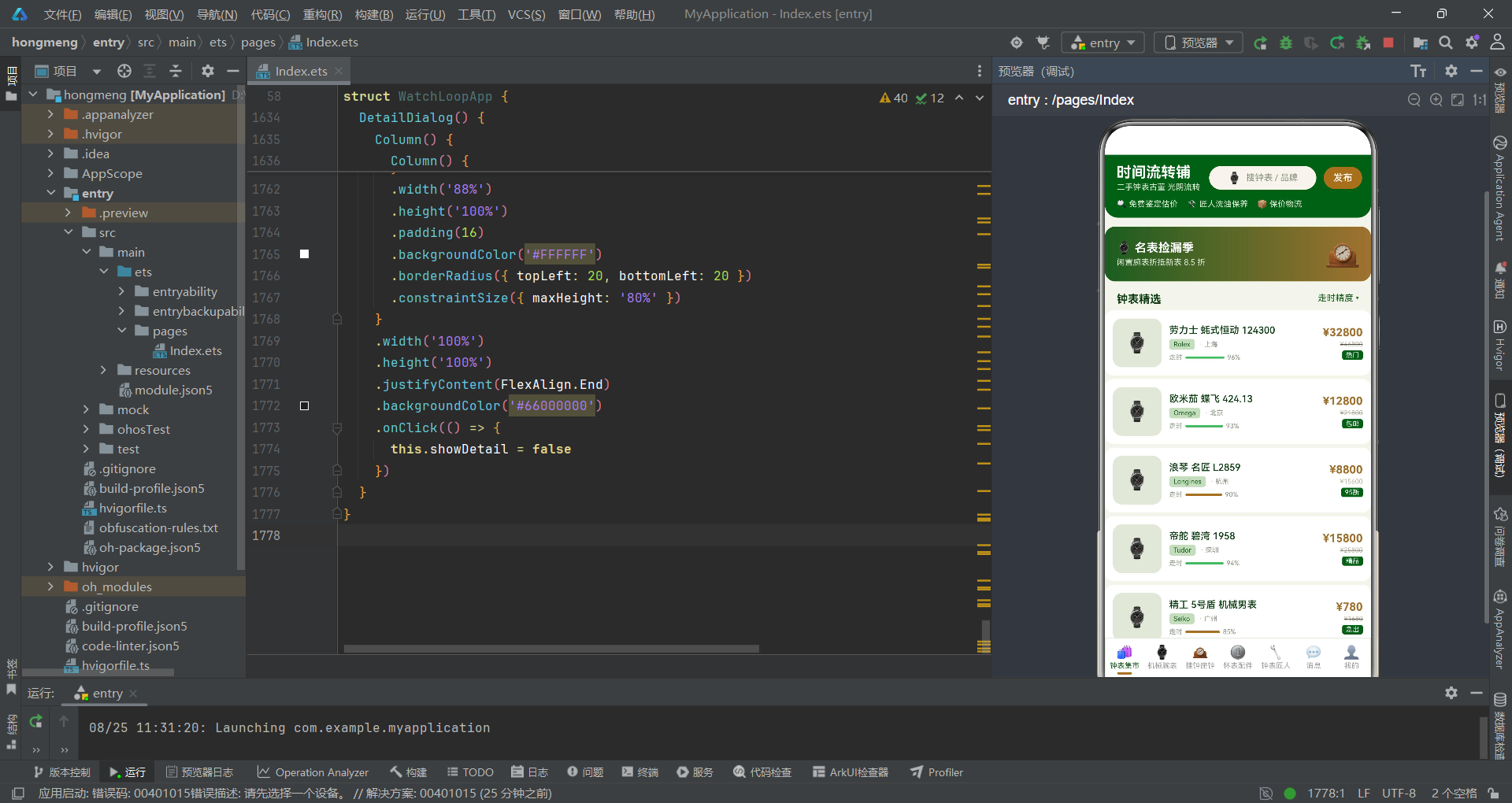
随着HarmonyOS生态的持续演进,声明式UI开发范式已经成为构建原生应用的核心方式。本文将以一个二手复古钟表交易平台为案例,深入剖析基于HarmonyOS ArkTS API 24的复杂业务页面架构设计与实现细节。该应用涵盖了钟表集市、机械腕表、挂钟座钟、怀表配件、钟表匠人、消息中心和个人中心共七大功能模块,通过多Tab切换与五种弹窗交互模式,构建了一个完整的二手钟表电商体验闭环。
在技术架构层面,该应用采用了典型的"头部导航 + 滚动内容区 + 底部Tab栏"三段式布局结构。头部区域承载品牌标识、搜索入口和发布按钮;中间内容区通过Scroll容器实现可滚动的内容展示,根据currentTab状态变量动态切换不同的@Builder构建函数;底部Tab栏则使用ForEach动态渲染,配合选中态指示器实现视觉反馈。整个页面通过@Entry和@Component装饰器声明为应用入口组件,利用@State管理十余个响应式状态变量,驱动UI的实时更新与弹窗的显示隐藏。
在业务设计层面,该应用精心设计了墨绿与黄铜金的复古配色方案(墨绿#1B5E20、黄铜金#A0722F、象牙白#F7F4EC、深棕#5D4037),营造出浓厚的古董钟表铺氛围。数据层面定义了六种接口类型来管理不同品类的钟表信息,包括腕表、挂钟座钟、怀表配件、钟表匠人和消息通知等,每种类型都包含了丰富的业务字段。此外,应用还集成了发布闲置、钟表保养预约、鉴定估价、删除确认和钟表详情五种弹窗交互,覆盖了二手交易场景中的核心业务流程,充分展示了ArkTS在复杂交互场景下的表达能力。
数据模型与接口定义
接口类型体系设计
在ArkTS中,接口(interface)用于定义对象的结构类型,是构建类型安全应用的基础。本应用定义了六个核心接口类型,分别对应不同品类的钟表数据和业务实体。每个接口都精心设计了业务字段,既包含了展示所需的基础信息,也涵盖了用于数据可视化计算的数值型字段。
interface WatchItem {
  name: string
  brand: string
  price: number
  originPrice: number
  accuracy: number
  city: string
  tag: string
}

interface WristItem {
  name: string
  movement: string
  diameter: number
  price: number
  power: number
}

interface WallItem {
  name: string
  type: string
  height: number
  price: number
  chime: boolean
}

interface PocketItem {
  name: string
  era: string
  cover: string
  price: number
  runs: boolean
}

interface MasterItem {
  name: string
  skill: string
  years: number
  orders: number
  rate: number
}

interface NoteItem {
  name: string
  content: string
  time: string
  unread: number
  type: string
}
上述代码展示了六种接口类型的完整定义。WatchItem接口是钟表集市页面的核心数据结构,其中accuracy字段表示走时精度,用于在列表中渲染精度进度条;originPrice字段记录原价,与price配合实现折价展示。WristItem接口专门用于机械腕表专区,diameter字段表示表壳直径,power字段记录动储时长,这两个数值字段分别用于柱状图和进度条的数据可视化。WallItem接口中chime是布尔类型字段,用于标记挂钟是否具备整点报时功能,通过条件渲染来控制报时标签的显示。PocketItem接口的runs字段同样是布尔值,决定怀表是显示"走时正常"还是"待修复"的状态标签。MasterItem接口记录钟表匠人的技能信息,其中orders字段用于柱状图展示接单量,rate字段用于好评率进度条。NoteItem接口则定义了消息通知的数据结构,unread字段控制未读徽章的显示,type字段决定消息图标的类型。
组件状态管理
ArkTS的声明式UI核心在于状态驱动渲染。@State装饰器标记的变量一旦发生变化,框架会自动重新调用build函数,更新对应的UI组件树。本应用定义了十余个状态变量,覆盖了Tab切换、弹窗显示隐藏和选中项管理等多种交互场景。
@Entry
@Component
struct WatchLoopApp {
  @State currentTab: number = 0
  @State showPublish: boolean = false
  @State showCare: boolean = false
  @State showVerify: boolean = false
  @State showDelete: boolean = false
  @State showDetail: boolean = false
  @State selectedItem: WatchItem | null = null
  @State careKind: number = 0
  @State careProject: number = 0
  @State verifyBrand: number = 0
  @State verifyMovement: number = 0
  @State itemKind: number = 0
  @State priceField: string = ''

  private tabs: string[] = ['钟表集市', '机械腕表', '挂钟座钟', '怀表配件', '钟表匠人', '消息', '我的']
这段代码定义了组件的入口结构和状态变量。currentTab是Tab切换的核心状态,初始值为0,对应"钟表集市"页面。五个show开头的布尔变量分别控制五种弹窗的显示与隐藏,初始值均为false。selectedItem使用联合类型WatchItem | null,当用户点击列表项时被赋值,用于在详情弹窗中展示选中钟表的完整信息。careKind和careProject是保养弹窗中钟表类型和保养项目的选中索引,verifyBrand和verifyMovement是鉴定估价弹窗中品牌和机芯的选中索引。itemKind和priceField则服务于发布闲置弹窗,分别记录钟表类别和期望售价。tabs数组定义了底部导航栏的七个标签名称,作为私有属性不参与状态驱动。
模拟数据与业务方法
数据集合初始化
应用通过私有属性方式预置了大量模拟数据,覆盖了各个Tab页面所需展示的内容。这些数据集合采用接口类型数组的形式定义,每个数组元素都严格遵守对应的接口结构。
  private watchList: WatchItem[] = [
    { name: '劳力士 蚝式恒动 124300', brand: 'Rolex', price: 32800, originPrice: 46800, accuracy: 96, city: '上海', tag: '热门' },
    { name: '欧米茄 蝶飞 424.13', brand: 'Omega', price: 12800, originPrice: 21800, accuracy: 93, city: '北京', tag: '包邮' },
    { name: '浪琴 名匠 L2859', brand: 'Longines', price: 8800, originPrice: 15600, accuracy: 90, city: '杭州', tag: '95新' },
    { name: '帝舵 碧湾 1958', brand: 'Tudor', price: 15800, originPrice: 25800, accuracy: 94, city: '深圳', tag: '精品' },
    { name: '精工 5号盾 机械男表', brand: 'Seiko', price: 780, originPrice: 1680, accuracy: 85, city: '广州', tag: '急出' },
    { name: '天梭 力洛克 皮 带', brand: 'Tissot', price: 1580, originPrice: 3200, accuracy: 88, city: '成都', tag: '包邮' },
    { name: '梅花 空中霸王 老款', brand: 'Titoni', price: 2280, originPrice: 4800, accuracy: 82, city: '南京', tag: '老物' },
    { name: '西铁城 光动能电波', brand: 'Citizen', price: 1280, originPrice: 2680, accuracy: 95, city: '武汉', tag: '95新' },
    { name: '卡西欧 小方块 GW-5000', brand: 'Casio', price: 2380, originPrice: 4200, accuracy: 97, city: '苏州', tag: '热门' },
    { name: '上海牌 A581 古董机芯', brand: '上海', price: 680, originPrice: 1580, accuracy: 78, city: '天津', tag: '老物' }
  ]

  private wristList: WristItem[] = [
    { name: '劳力士 蚝式恒动', movement: '3230机芯', diameter: 41, price: 32800, power: 70 },
    { name: '帝舵 碧湾1958', movement: 'MT5402机芯', diameter: 39, price: 15800, power: 70 },
    { name: '欧米茄 蝶飞', movement: '2500机芯', diameter: 39.5, price: 12800, power: 48 },
    { name: '浪琴 名匠', movement: 'L888机芯', diameter: 40, price: 8800, power: 72 },
    { name: '海鸥 1963', movement: 'ST19机芯', diameter: 38, price: 2180, power: 40 },
    { name: '汉密尔顿 卡其野战', movement: 'H-10机芯', diameter: 38, price: 2680, power: 80 }
  ]

  private wallList: WallItem[] = [
    { name: '肯宁家 挂钟 三重奏', type: '机械挂钟', height: 85, price: 4800, chime: true },
    { name: '黑森林 布谷鸟钟', type: '布谷鸟钟', height: 45, price: 2680, chime: true },
    { name: '赫姆勒 落地钟', type: '落地钟', height: 180, price: 12800, chime: true },
    { name: '上海 大礼堂座钟', type: '机械座钟', height: 40, price: 680, chime: true },
    { name: '三五牌 十五天座钟', type: '机械座钟', height: 36, price: 480, chime: false },
    { name: '德国统一 双铃闹钟', type: '机械闹钟', height: 14, price: 220, chime: false }
  ]
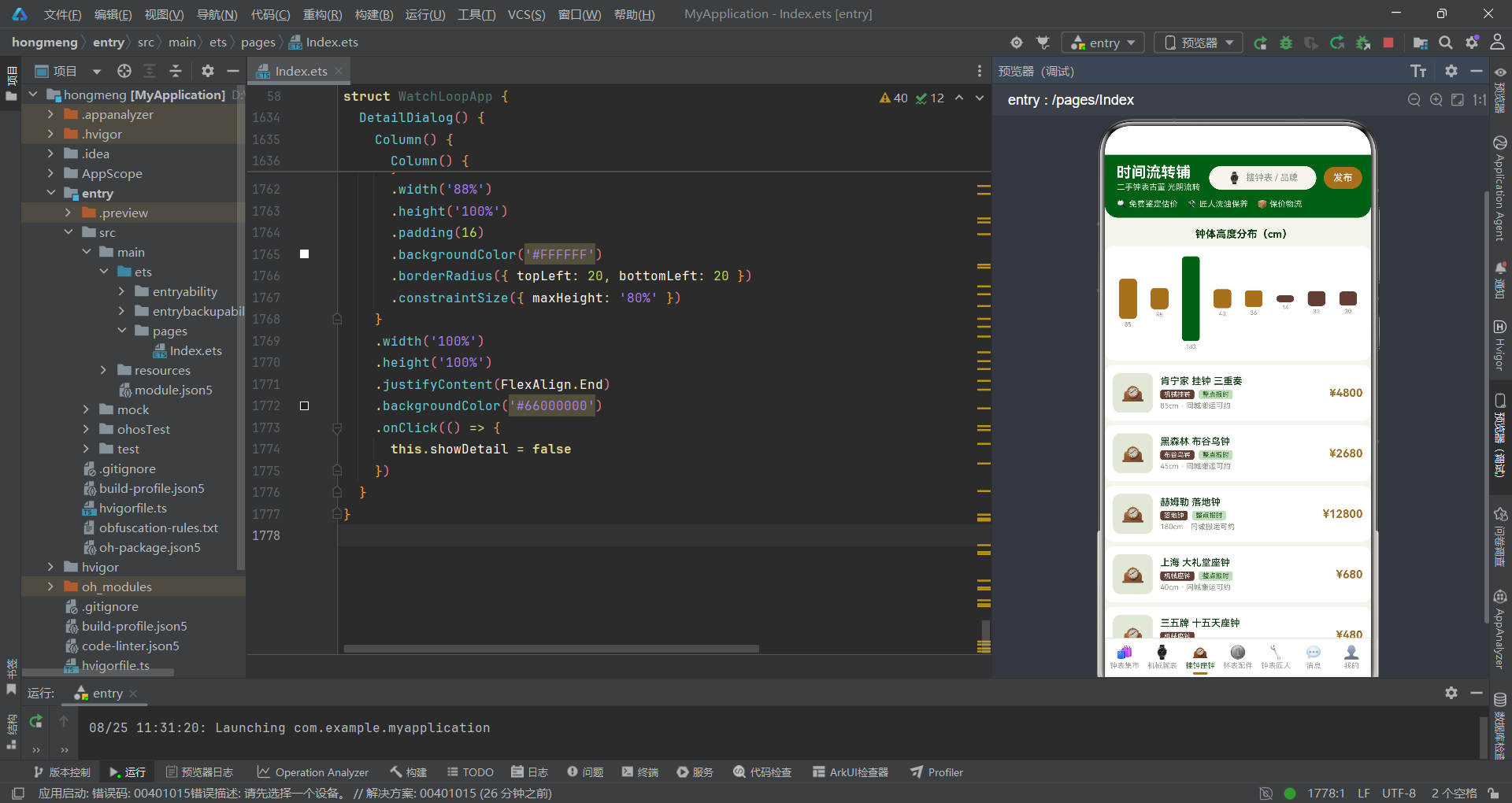
上述代码展示了三个主要数据集合的初始化。watchList数组是钟表集市页面的数据源,每条记录包含了腕表的名称、品牌、售价、原价、走时精度、所在城市和标签信息,这些字段在列表渲染时分别映射到不同的UI组件上。wristList数组用于机械腕表专区,其中的diameter字段将作为柱状图的高度数据,power字段将转化为动储进度条的宽度比例。wallList数组则用于挂钟座钟页面,height字段表示钟体高度,用于柱状图可视化,chime布尔字段通过条件渲染控制"整点报时"标签的显示。数据集合的设计充分考虑了后续可视化展示的需求,数值型字段都可以直接参与布局计算。
计算方法与选中项访问器
除了数据集合,组件还定义了一系列私有方法,用于计算最大值和访问选中项的属性。这些方法在build函数中被调用,为柱状图比例计算和详情页数据展示提供支持。
  private maxDiameter(): number {
    let max: number = 0
    for (let i = 0; i < this.wristList.length; i++) {
      if (this.wristList[i].diameter > max) {
        max = this.wristList[i].diameter
      }
    }
    return max
  }

  private maxOrders(): number {
    let max: number = 0
    for (let i = 0; i < this.masterList.length; i++) {
      if (this.masterList[i].orders > max) {
        max = this.masterList[i].orders
      }
    }
    return max
  }

  private selName(): string {
    if (this.selectedItem === null) {
      return ''
    }
    return this.selectedItem.name
  }

  private selPrice(): string {
    if (this.selectedItem === null) {
      return ''
    }
    return this.selectedItem.price + ''
  }

  private selAccuracy(): number {
    if (this.selectedItem === null) {
      return 0
    }
    return this.selectedItem.accuracy
  }

  private selCity(): string {
    if (this.selectedItem === null) {
      return ''
    }
    return this.selectedItem.city
  }
maxDiameter方法通过遍历wristList数组找到最大的表壳直径值,这个值作为柱状图的高度基准,其他腕表的柱状高度按比例缩放。maxOrders方法的逻辑类似,用于计算钟表匠人接单量柱状图的最大值。selName、selPrice、selAccuracy、selCity等方法是一组安全访问器,它们首先检查selectedItem是否为null,在空值情况下返回默认值(空字符串或0),避免空指针异常。这些访问器在详情弹窗的build函数中被调用,确保即使未选中任何项时也不会因空引用而导致渲染错误。这种防御性编程模式在ArkTS中尤为重要,因为声明式UI的渲染时机由框架控制,开发者无法保证访问器被调用时selectedItem一定有值。
页面主框架与导航体系
三段式布局结构
build函数是ArkTS组件的核心,它定义了组件的UI结构。本应用采用了"头部 + 滚动内容 + 底部Tab"的经典三段式布局,通过Column容器垂直排列三个主要区域。
  build() {
    Column() {
      // 头部:静态钟表电商风
      Column() {
        Row() {
          Column() {
            Text('时间流转铺')
              .fontSize(20)
              .fontWeight(FontWeight.Bold)
              .fontColor('#FFFFFF')
            Text('二手钟表古董 光阴流转')
              .fontSize(11)
              .fontColor('#DDE8D5')
              .margin({ top: 2 })
          }
          .alignItems(HorizontalAlign.Start)

          Row() {
            Text('⌚')
              .fontSize(15)
            Text('搜钟表 / 品牌')
              .fontSize(12)
              .fontColor('#8A9482')
              .margin({ left: 6 })
          }
          .width(145)
          .height(32)
          .justifyContent(FlexAlign.Center)
          .backgroundColor('#F7F4EC')
          .borderRadius(16)
          .margin({ left: 12 })

          Text('发布')
            .fontSize(13)
            .fontWeight(FontWeight.Medium)
            .fontColor('#FFFFFF')
            .width(52)
            .height(30)
            .textAlign(TextAlign.Center)
            .backgroundColor('#A0722F')
            .borderRadius(15)
            .margin({ left: 10 })
            .onClick(() => {
              this.showPublish = true
            })
        }
        .width('100%')
        .padding({ left: 16, right: 16, top: 12, bottom: 10 })

        Row() {
          Text('🔍 免费鉴定估价')
            .fontSize(11)
            .fontColor('#DDE8D5')
            .margin({ right: 12 })
          Text('🛠️ 匠人洗油保养')
            .fontSize(11)
            .fontColor('#DDE8D5')
            .margin({ right: 12 })
          Text('📦 保价物流')
            .fontSize(11)
            .fontColor('#DDE8D5')
        }
        .width('100%')
        .padding({ left: 16, bottom: 12 })
      }
      .width('100%')
      .backgroundColor('#1B5E20')
      .borderRadius({ bottomLeft: 18, bottomRight: 18 })
头部区域由两个Row组成。第一个Row包含品牌标题列、搜索入口和发布按钮。品牌标题使用20号粗体白色字体,下方副标题使用11号浅绿色字体,形成主次分明的视觉层次。搜索入口是一个145x32的圆角容器,背景色为象牙白,内部放置钟表emoji和提示文字,通过justifyContent(FlexAlign.Center)实现居中对齐。发布按钮使用黄铜金背景色,点击后触发this.showPublish = true,驱动发布弹窗的显示。头部第二行是服务标签栏,展示免费鉴定、匠人保养和保价物流三项核心服务,使用浅绿色字体在墨绿背景上呈现。整个头部区域通过backgroundColor('#1B5E20')设置墨绿背景,并通过borderRadius({ bottomLeft: 18, bottomRight: 18 })实现底部圆角效果,营造出沉浸式的品牌视觉。
内容区与Tab切换逻辑
内容区使用Scroll容器包裹,通过layoutWeight(1)占据剩余空间。内部根据currentTab的值条件性地调用不同的@Builder方法来渲染对应的Tab页面。
      Scroll() {
        Column() {
          if (this.currentTab === 0) {
            this.MarketTab()
          } else if (this.currentTab === 1) {
            this.WristTab()
          } else if (this.currentTab === 2) {
            this.WallTab()
          } else if (this.currentTab === 3) {
            this.PocketTab()
          } else if (this.currentTab === 4) {
            this.MasterTab()
          } else if (this.currentTab === 5) {
            this.NoteTab()
          } else {
            this.MineTab()
          }
        }
        .width('100%')
        .alignItems(HorizontalAlign.Start)
      }
      .layoutWeight(1)
      .scrollBar(BarState.Off)
      .width('100%')
Scroll组件是ArkTS提供的可滚动容器,通过scrollBar(BarState.Off)隐藏原生滚动条,保持视觉简洁。内部的Column通过alignItems(HorizontalAlign.Start)设置子元素左对齐。Tab切换逻辑使用if-else if-else链式条件判断,根据currentTab的整数值调用对应的@Builder构建函数。当currentTab为0时调用MarketTab()渲染钟表集市页面,为1时调用WristTab()渲染机械腕表页面,依此类推。这种条件渲染方式在ArkTS中是惯用模式,每次currentTab值变化时,框架会自动重新执行build函数,销毁旧的Tab内容并构建新的Tab内容。
底部Tab栏与弹窗挂载
底部Tab栏通过ForEach动态渲染七个标签项,每个项包含图标、文字和选中指示器。弹窗则通过独立的条件判断挂载在主布局之外。
      Row() {
        ForEach(this.tabs, (tab: string, index: number) => {
          Column() {
            Text(this.tabIcon(index))
              .fontSize(18)
              .fontColor(this.currentTab === index ? '#1B5E20' : '#9E9E9E')
            Text(tab)
              .fontSize(10)
              .fontColor(this.currentTab === index ? '#1B5E20' : '#9E9E9E')
              .margin({ top: 2 })
            if (this.currentTab === index) {
              Column()
                .width(20)
                .height(3)
                .backgroundColor('#A0722F')
                .borderRadius(2)
                .margin({ top: 3 })
            } else {
              Column()
                .width(20)
                .height(3)
                .backgroundColor('#00000000')
                .margin({ top: 3 })
            }
          }
          .justifyContent(FlexAlign.Center)
          .layoutWeight(1)
          .onClick(() => {
            this.currentTab = index
          })
        }, (tab: string) => tab)
      }
      .width('100%')
      .height(58)
      .backgroundColor('#FFFFFF')
      .border({ width: 1, color: '#DDE8D5', radius: 0 })
    }
    .width('100%')
    .height('100%')
    .backgroundColor('#F3F5EC')

    if (this.showPublish) {
      this.PublishDialog()
    }
    if (this.showCare) {
      this.CareDialog()
    }
    if (this.showVerify) {
      this.VerifyDialog()
    }
    if (this.showDelete) {
      this.DeleteDialog()
    }
    if (this.showDetail) {
      this.DetailDialog()
    }
  }
底部Tab栏的ForEach接收tabs数组作为数据源,为每个标签生成一个Column。每个Column内包含emoji图标、标签文字和选中指示器三部分。图标和文字的颜色通过三元运算符this.currentTab === index ? '#1B5E20' : '#9E9E9E'动态控制,选中时为墨绿色,未选中时为灰色。选中指示器使用条件渲染:当前Tab索引匹配时渲染一个20x3的黄铜金圆角条,否则渲染一个透明色(#00000000)的同尺寸条,保持布局高度一致避免跳动。每个Tab项的onClick事件简单地设置this.currentTab = index,触发状态更新和UI重渲染。弹窗部分使用五个独立的if语句分别控制五种弹窗的渲染,它们被放置在主Column之外,通过Stack或绝对定位覆盖在页面上层。每个弹窗的状态变量独立控制,可以同时显示或分别关闭。
核心业务页面实现
钟表集市:行式列表与走时精度条
钟表集市页面(MarketTab)是应用的首页,采用行式列表布局展示二手腕表商品。每行包含商品图标、名称品牌信息、走时精度进度条和价格区域。
  @Builder
  MarketTab() {
    Column() {
      Row() {
        Column() {
          Text('⌚ 名表捡漏季')
            .fontSize(16)
            .fontWeight(FontWeight.Bold)
            .fontColor('#FFFFFF')
          Text('闲置腕表折抵新表 8.5 折')
            .fontSize(11)
            .fontColor('#DDE8D5')
            .margin({ top: 4 })
        }
        .alignItems(HorizontalAlign.Start)
        .layoutWeight(1)

        Text('🕰️')
          .fontSize(36)
          .scale({ x: 1.12, y: 1.12 })
          .animation({ duration: 1000, iterations: -1, curve: Curve.EaseInOut })
      }
      .width('100%')
      .padding(16)
      .linearGradient({
        direction: GradientDirection.Right,
        colors: [['#1B5E20', 0], ['#A0722F', 1]]
      })
      .borderRadius(14)
      .margin({ top: 12, left: 12, right: 12 })

      ForEach(this.watchList, (item: WatchItem) => {
        Row() {
          Column() {
            Text('⌚')
              .fontSize(26)
          }
          .width(66)
          .height(66)
          .justifyContent(FlexAlign.Center)
          .backgroundColor('#E2E8D9')
          .borderRadius(12)

          Column() {
            Text(item.name)
              .fontSize(13)
              .fontWeight(FontWeight.Medium)
              .fontColor('#0D3B11')
              .maxLines(1)
              .textOverflow({ overflow: TextOverflow.Ellipsis })
            Row() {
              Text(item.brand)
                .fontSize(9)
                .fontColor('#1B5E20')
                .padding({ left: 6, right: 6, top: 2, bottom: 2 })
                .backgroundColor('#C8DCC0')
                .borderRadius(4)
              Text('· ' + item.city)
                .fontSize(9)
                .fontColor('#8A9482')
                .margin({ left: 6 })
            }
            .margin({ top: 4 })
            Row() {
              Text('走时')
                .fontSize(9)
                .fontColor('#8A9482')
              Column()
                .width(item.accuracy / 100 * 55)
                .height(3)
                .backgroundColor(item.accuracy > 90 ? '#66BB6A' : '#A0722F')
                .borderRadius(2)
                .margin({ left: 4 })
              Text(item.accuracy + '%')
                .fontSize(9)
                .fontColor('#8A9482')
                .margin({ left: 4 })
            }
            .margin({ top: 5 })
          }
          .alignItems(HorizontalAlign.Start)
          .layoutWeight(1)
          .margin({ left: 10 })

          Column() {
            Text('¥' + item.price)
              .fontSize(15)
              .fontWeight(FontWeight.Bold)
              .fontColor('#A0722F')
            Text('¥' + item.originPrice)
              .fontSize(9)
              .fontColor('#BDB49E')
              .decoration({ type: TextDecorationType.LineThrough })
              .margin({ top: 2 })
            Text(item.tag)
              .fontSize(9)
              .fontColor('#FFFFFF')
              .padding({ left: 5, right: 5, top: 1, bottom: 1 })
              .backgroundColor('#1B5E20')
              .borderRadius(3)
              .margin({ top: 3 })
          }
          .alignItems(HorizontalAlign.End)
        }
        .width('100%')
        .padding(11)
        .backgroundColor('#FFFFFF')
        .borderRadius(12)
        .margin({ left: 12, right: 12, top: 5 })
        .onClick(() => {
          this.selectedItem = item
          this.showDetail = true
        })
      }, (item: WatchItem) => item.name)
    }
    .width('100%')
  }
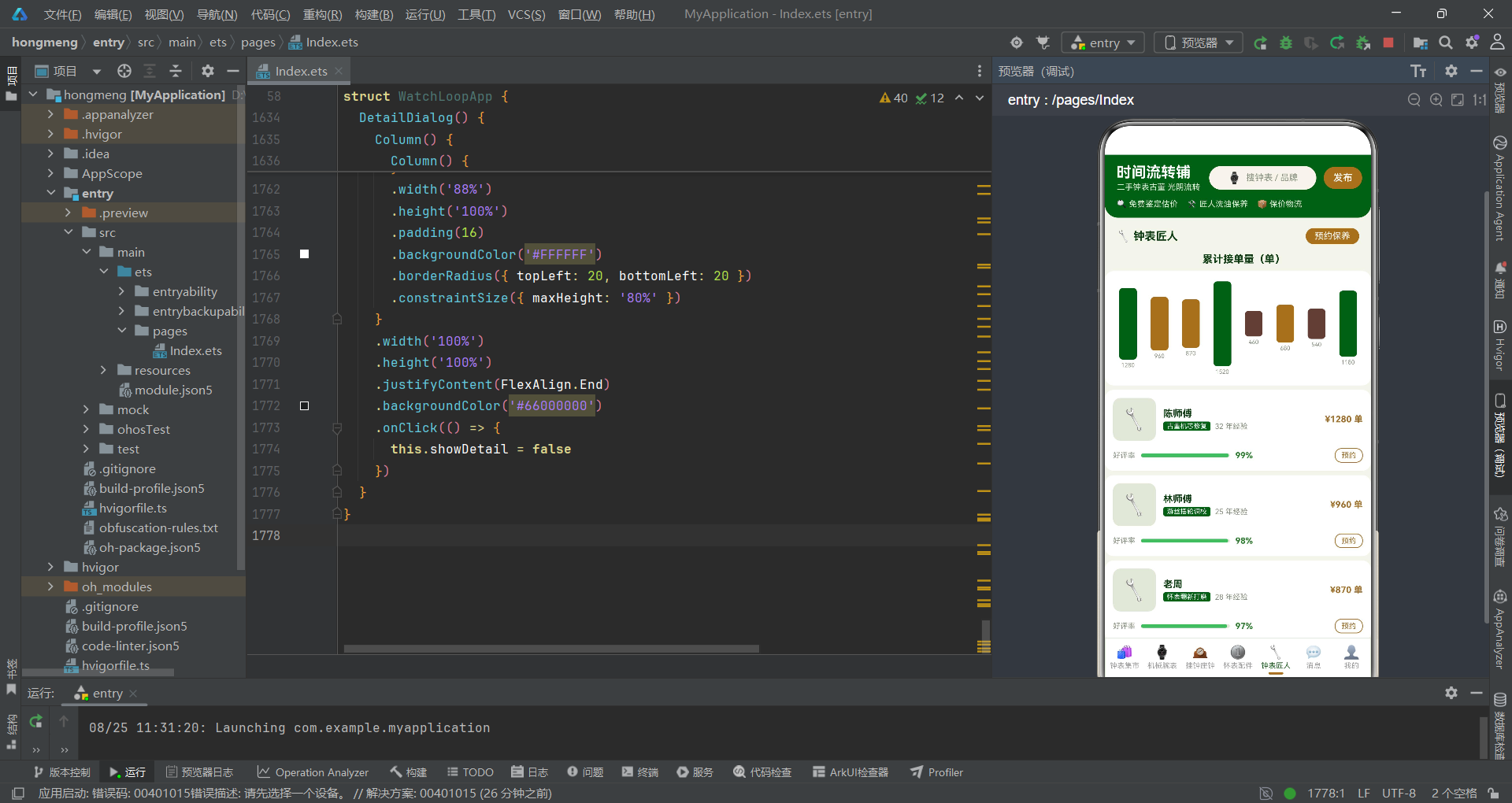
页面顶部是一个渐变Banner,使用linearGradient属性设置从墨绿到黄铜金的水平渐变背景,右侧放置一个36号钟表emoji,通过scale和animation属性实现持续放大缩小的动画效果,动画时长1000毫秒,无限循环,缓动曲线为EaseInOut。商品列表通过ForEach遍历watchList数组渲染,每个商品行包含三列:左侧66x66的图标容器、中间的商品信息列和右侧的价格标签列。商品名称使用maxLines(1)和textOverflow({ overflow: TextOverflow.Ellipsis })实现单行省略,防止过长名称破坏布局。走时精度进度条的宽度通过item.accuracy / 100 * 55动态计算,背景色根据精度值是否大于90来选择绿色或黄铜金。价格区域包含现价(黄铜金粗体)、原价(浅灰色带删除线,通过decoration({ type: TextDecorationType.LineThrough })实现)和标签徽章。每行的onClick事件将当前item赋值给this.selectedItem并设置this.showDetail = true,触发详情弹窗的显示。
机械腕表专区:表径柱状图
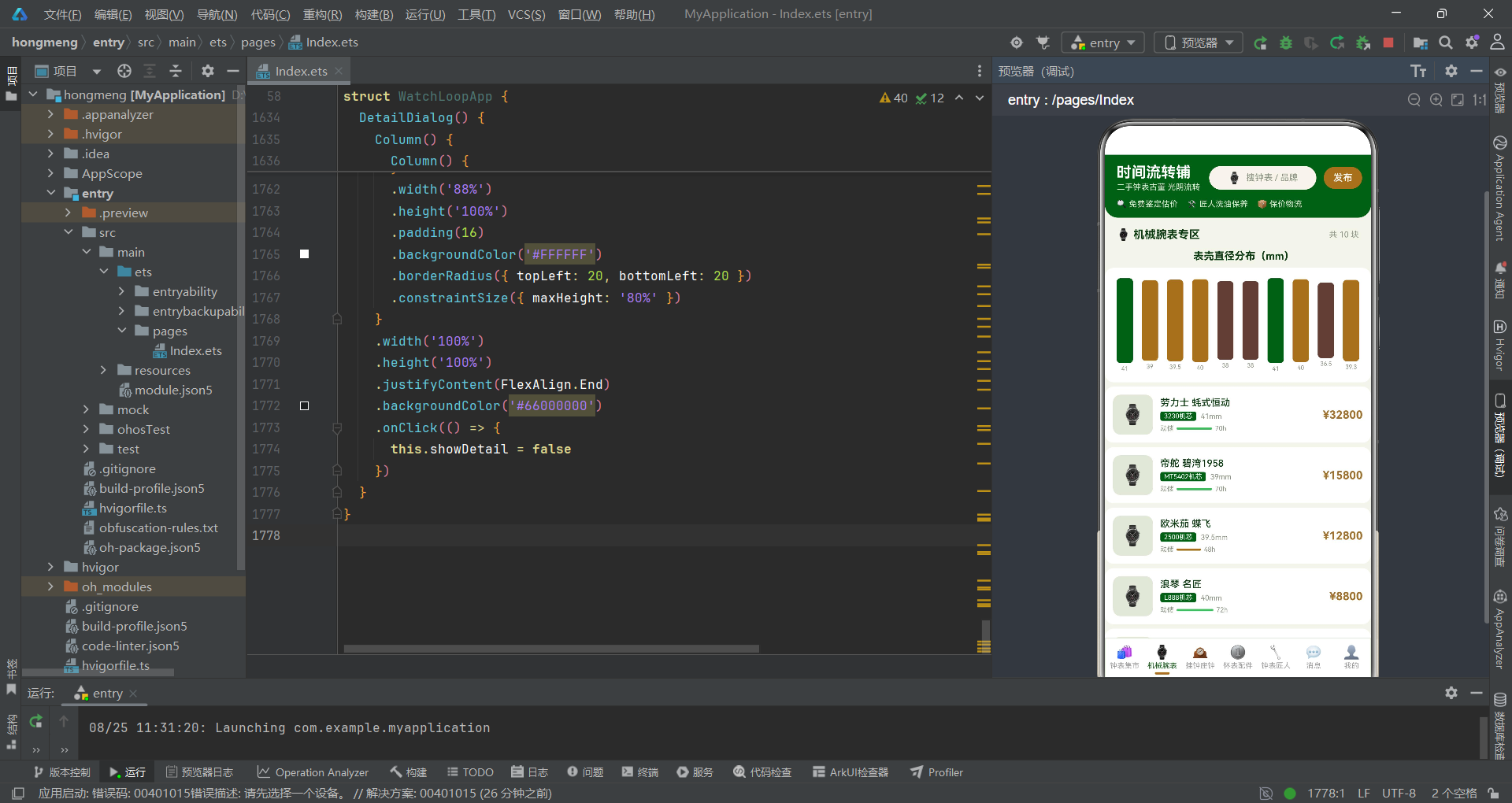
机械腕表页面(WristTab)的特色在于使用自定义柱状图展示各腕表的表壳直径分布,同时配合动储进度条展示动力储存信息。
  @Builder
  WristTab() {
    Column() {
      Text('表壳直径分布(mm)')
        .fontSize(14)
        .fontWeight(FontWeight.Bold)
        .fontColor('#0D3B11')
        .margin({ top: 12, left: 16 })

      Row() {
        ForEach(this.wristList, (item: WristItem) => {
          Column() {
            Column()
              .width(22)
              .height(item.diameter / this.maxDiameter() * 115)
              .backgroundColor(item.diameter > 40 ? '#1B5E20' : (item.diameter > 38.5 ? '#A0722F' : '#5D4037'))
              .borderRadius(5)
            Text(item.diameter + '')
              .fontSize(8)
              .fontColor('#8A9482')
              .margin({ top: 3 })
          }
          .justifyContent(FlexAlign.End)
          .alignItems(HorizontalAlign.Center)
          .layoutWeight(1)
        }, (item: WristItem) => item.name)
      }
      .width('100%')
      .height(155)
      .padding({ left: 10, right: 10 })
      .backgroundColor('#FFFFFF')
      .borderRadius(12)
      .margin({ top: 8, left: 12, right: 12 })
      .justifyContent(FlexAlign.End)

      ForEach(this.wristList, (item: WristItem) => {
        Row() {
          Column() {
            Text('⌚')
              .fontSize(26)
          }
          .width(54)
          .height(54)
          .justifyContent(FlexAlign.Center)
          .backgroundColor('#E2E8D9')
          .borderRadius(10)

          Column() {
            Text(item.name)
              .fontSize(13)
              .fontWeight(FontWeight.Medium)
              .fontColor('#0D3B11')
              .maxLines(1)
            Row() {
              Text(item.movement)
                .fontSize(9)
                .fontColor('#FFFFFF')
                .padding({ left: 5, right: 5, top: 1, bottom: 1 })
                .backgroundColor('#1B5E20')
                .borderRadius(3)
              Text(item.diameter + 'mm')
                .fontSize(10)
                .fontColor('#8A9482')
                .margin({ left: 6 })
            }
            .margin({ top: 4 })
            Row() {
              Text('动储')
                .fontSize(9)
                .fontColor('#8A9482')
              Column()
                .width(item.power / 80 * 55)
                .height(3)
                .backgroundColor(item.power >= 70 ? '#66BB6A' : '#A0722F')
                .borderRadius(2)
                .margin({ left: 4 })
              Text(item.power + 'h')
                .fontSize(9)
                .fontColor('#8A9482')
                .margin({ left: 4 })
            }
            .margin({ top: 5 })
          }
          .alignItems(HorizontalAlign.Start)
          .layoutWeight(1)
          .margin({ left: 10 })

          Text('¥' + item.price)
            .fontSize(15)
            .fontWeight(FontWeight.Bold)
            .fontColor('#A0722F')
        }
        .width('100%')
        .padding(11)
        .backgroundColor('#FFFFFF')
        .borderRadius(12)
        .margin({ left: 12, right: 12, top: 6 })
      }, (item: WristItem) => item.name)
    }
    .width('100%')
  }
柱状图的实现是本页面的技术亮点。每个柱子是一个Column组件,宽度固定为22,高度通过item.diameter / this.maxDiameter() * 115动态计算——以最大直径为基准值,乘以115作为最大高度,确保最高的柱子不超过155像素的容器高度。柱子的背景色通过嵌套三元运算符实现三色分级:直径大于40mm为墨绿色、大于38.5mm为黄铜金、其余为深棕色。柱状图容器使用justifyContent(FlexAlign.End)使所有柱子底部对齐,模拟传统柱状图的视觉效果。柱子下方显示对应的直径数值,使用8号灰色字体。列表部分每行包含腕表图标、名称机芯信息和价格。机芯型号使用墨绿色背景的圆角标签展示,动储进度条的宽度通过item.power / 80 * 55计算,以80小时为满储基准,背景色根据动储是否达到70小时来选择绿色或黄铜金。
怀表配件专区:双列网格布局
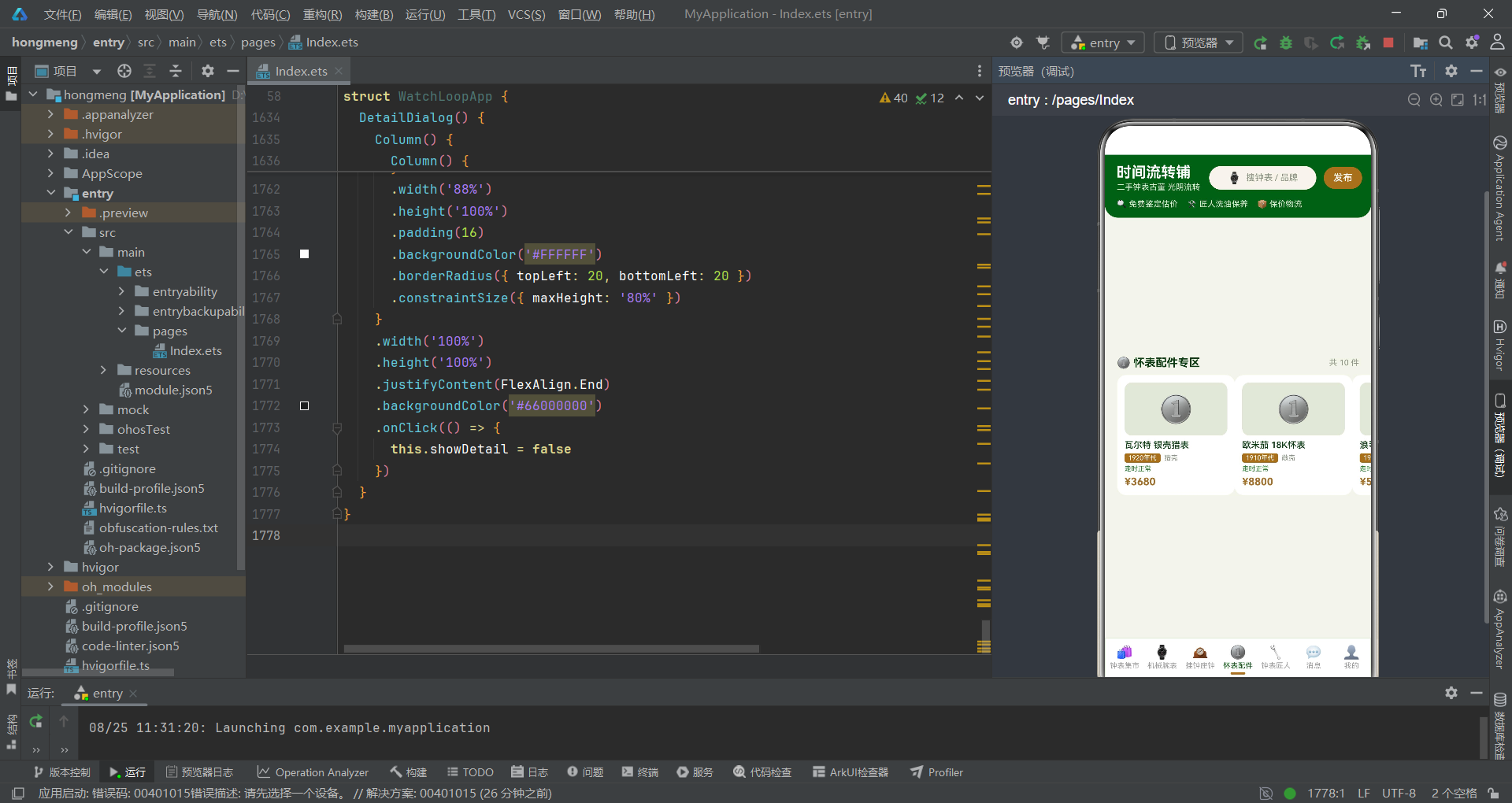
怀表配件页面(PocketTab)采用flexWrap(FlexWrap.Wrap)实现双列网格布局,每个怀表卡片占据47%的宽度,两列之间自然换行排列。
  @Builder
  PocketTab() {
    Column() {
      Row() {
        Text('🪙 怀表配件专区')
          .fontSize(15)
          .fontWeight(FontWeight.Bold)
          .fontColor('#0D3B11')
        Column()
          .layoutWeight(1)
        Text('共 ' + this.pocketList.length + ' 件')
          .fontSize(11)
          .fontColor('#8A9482')
      }
      .width('100%')
      .padding({ left: 16, right: 16, top: 14 })

      Row() {
        ForEach(this.pocketList, (item: PocketItem) => {
          Column() {
            Column() {
              Text('🪙')
                .fontSize(34)
                .scale({ x: 1.08, y: 1.08 })
                .animation({ duration: 1100, iterations: -1, curve: Curve.EaseInOut })
            }
            .width('100%')
            .height(72)
            .justifyContent(FlexAlign.Center)
            .backgroundColor('#E2E8D9')
            .borderRadius(10)

            Text(item.name)
              .fontSize(12)
              .fontWeight(FontWeight.Medium)
              .fontColor('#0D3B11')
              .margin({ top: 6 })
              .maxLines(1)
            Row() {
              Text(item.era)
                .fontSize(9)
                .fontColor('#FFFFFF')
                .padding({ left: 5, right: 5, top: 1, bottom: 1 })
                .backgroundColor('#A0722F')
                .borderRadius(3)
              Text(item.cover)
                .fontSize(9)
                .fontColor('#8A9482')
                .margin({ left: 5 })
            }
            .margin({ top: 4 })
            if (item.runs) {
              Text('走时正常')
                .fontSize(9)
                .fontColor('#2E7D32')
                .margin({ top: 3 })
            } else {
              Text('待修复')
                .fontSize(9)
                .fontColor('#EF6C00')
                .margin({ top: 3 })
            }
            Text('¥' + item.price)
              .fontSize(14)
              .fontWeight(FontWeight.Bold)
              .fontColor('#A0722F')
              .margin({ top: 4 })
          }
          .width('47%')
          .padding(10)
          .backgroundColor('#FFFFFF')
          .borderRadius(12)
          .margin({ top: 8 })
          .alignItems(HorizontalAlign.Start)
        }, (item: PocketItem) => item.name)
      }
      .width('94%')
      .margin({ left: 12 })
      .flexWrap(FlexWrap.Wrap)
    }
    .width('100%')
  }
双列网格布局的核心在于Row容器设置flexWrap(FlexWrap.Wrap),允许子元素在空间不足时自动换行。每个怀表卡片设置width('47%'),两列总宽度约94%,剩余6%作为列间距。卡片内部的怀表图标区域使用scale和animation属性实现1100毫秒的缩放动画,营造出复古钟表的"呼吸感"。年代标签使用黄铜金背景的圆角小标签,壳型信息以灰色文字展示。item.runs布尔字段通过if-else条件渲染控制状态文字:true时显示绿色"走时正常",false时显示橙色"待修复"。这种条件渲染模式在ArkTS中非常直观,开发者无需额外的样式切换逻辑,直接通过控制组件树的分支来实现状态差异化展示。
页面交互流程
钟表匠人与消息中心
匠人列表与好评率进度条
钟表匠人页面(MasterTab)展示了匠人的接单量柱状图和好评率进度条,并提供预约保养的入口。
  @Builder
  MasterTab() {
    Column() {
      Row() {
        Text('🔧 钟表匠人')
          .fontSize(15)
          .fontWeight(FontWeight.Bold)
          .fontColor('#0D3B11')
        Column()
          .layoutWeight(1)
        Text('预约保养')
          .fontSize(12)
          .fontColor('#FFFFFF')
          .padding({ left: 12, right: 12, top: 4, bottom: 4 })
          .backgroundColor('#A0722F')
          .borderRadius(12)
          .onClick(() => {
            this.showCare = true
          })
      }
      .width('100%')
      .padding({ left: 16, right: 16, top: 14 })

      Text('累计接单量(单)')
        .fontSize(14)
        .fontWeight(FontWeight.Bold)
        .fontColor('#0D3B11')
        .margin({ top: 12, left: 16 })

      Row() {
        ForEach(this.masterList, (item: MasterItem) => {
          Column() {
            Column()
              .width(24)
              .height(item.orders / this.maxOrders() * 115)
              .backgroundColor(item.orders > 1000 ? '#1B5E20' : (item.orders > 600 ? '#A0722F' : '#5D4037'))
              .borderRadius(5)
            Text(item.orders + '')
              .fontSize(8)
              .fontColor('#8A9482')
              .margin({ top: 3 })
          }
          .justifyContent(FlexAlign.End)
          .alignItems(HorizontalAlign.Center)
          .layoutWeight(1)
        }, (item: MasterItem) => item.name)
      }
      .width('100%')
      .height(155)
      .padding({ left: 10, right: 10 })
      .backgroundColor('#FFFFFF')
      .borderRadius(12)
      .margin({ top: 8, left: 12, right: 12 })
      .justifyContent(FlexAlign.End)

      ForEach(this.masterList, (item: MasterItem) => {
        Column() {
          Row() {
            Column() {
              Text('🔧')
                .fontSize(28)
            }
            .width(58)
            .height(58)
            .justifyContent(FlexAlign.Center)
            .backgroundColor('#E2E8D9')
            .borderRadius(10)

            Column() {
              Text(item.name)
                .fontSize(13)
                .fontWeight(FontWeight.Bold)
                .fontColor('#0D3B11')
                .maxLines(1)
              Row() {
                Text(item.skill)
                  .fontSize(9)
                  .fontColor('#FFFFFF')
                  .padding({ left: 5, right: 5, top: 1, bottom: 1 })
                  .backgroundColor('#1B5E20')
                  .borderRadius(3)
                Text(item.years + ' 年经验')
                  .fontSize(10)
                  .fontColor('#8A9482')
                  .margin({ left: 6 })
              }
              .margin({ top: 3 })
            }
            .alignItems(HorizontalAlign.Start)
            .layoutWeight(1)
            .margin({ left: 10 })

            Text('¥' + item.orders + ' 单')
              .fontSize(12)
              .fontWeight(FontWeight.Bold)
              .fontColor('#A0722F')
          }
          .width('100%')

          Row() {
            Text('好评率')
              .fontSize(10)
              .fontColor('#8A9482')
            Stack({ alignContent: Alignment.Start }) {
              Column()
                .width(120)
                .height(5)
                .backgroundColor('#E2E8D9')
                .borderRadius(3)
              Column()
                .width(item.rate / 100 * 120)
                .height(5)
                .backgroundColor('#66BB6A')
                .borderRadius(3)
            }
            .width(120)
            .height(5)
            .margin({ left: 8 })
            Text(item.rate + '%')
              .fontSize(11)
              .fontWeight(FontWeight.Bold)
              .fontColor('#2E7D32')
              .margin({ left: 8 })
              .scale({ x: 1.04, y: 1.04 })
              .animation({ duration: 900, iterations: -1, curve: Curve.EaseInOut })
            Column()
              .layoutWeight(1)
            Text('预约')
              .fontSize(10)
              .fontColor('#A0722F')
              .padding({ left: 8, right: 8, top: 3, bottom: 3 })
              .border({ width: 1, color: '#A0722F', radius: 9 })
              .onClick(() => {
                this.showCare = true
              })
          }
          .width('100%')
          .margin({ top: 10 })
        }
        .width('100%')
        .padding(11)
        .backgroundColor('#FFFFFF')
        .borderRadius(12)
        .margin({ left: 12, right: 12, top: 6 })
      }, (item: MasterItem) => item.name)
    }
    .width('100%')
  }
匠人页面的柱状图逻辑与腕表页面类似,柱子高度通过item.orders / this.maxOrders() * 115计算,颜色按接单量分为三档:大于1000单为墨绿、大于600单为黄铜金、其余为深棕。好评率进度条使用Stack容器叠加两层Column:底层是120x5的灰色背景条,上层是宽度为item.rate / 100 * 120的绿色进度条,通过alignContent: Alignment.Start确保上层从左侧开始填充。好评率百分比文字配合scale和animation属性实现轻微的缩放呼吸动画,时长900毫秒。每个匠人卡片底部的"预约"按钮使用border属性绘制黄铜金描边,点击后触发保养弹窗。
消息中心与会话管理
消息页面(NoteTab)展示了各类通知消息,通过不同图标和未读徽章区分消息类型和状态。
  @Builder
  NoteTab() {
    Column() {
      Text('消息')
        .fontSize(16)
        .fontWeight(FontWeight.Bold)
        .fontColor('#0D3B11')
        .margin({ top: 14, left: 16 })

      ForEach(this.noteList, (item: NoteItem) => {
        Row() {
          Column() {
            Text(this.noteIcon(item.type))
              .fontSize(22)
          }
          .width(46)
          .height(46)
          .justifyContent(FlexAlign.Center)
          .backgroundColor(item.type === '官方' ? '#E2E8D9' : '#E8E2D0')
          .borderRadius(23)

          Column() {
            Row() {
              Text(item.name)
                .fontSize(13)
                .fontWeight(FontWeight.Medium)
                .fontColor('#0D3B11')
                .maxLines(1)
              Column()
                .layoutWeight(1)
              Text(item.time)
                .fontSize(10)
                .fontColor('#BDB49E')
            }
            .width('100%')
            Row() {
              Text(item.content)
                .fontSize(11)
                .fontColor('#8A9482')
                .maxLines(1)
                .layoutWeight(1)
              if (item.unread > 0) {
                Text(item.unread + '')
                  .fontSize(9)
                  .fontColor('#FFFFFF')
                  .padding({ left: 5, right: 5, top: 1, bottom: 1 })
                  .backgroundColor('#A0722F')
                  .borderRadius(8)
                  .margin({ left: 6 })
              }
            }
            .width('100%')
            .margin({ top: 3 })
          }
          .layoutWeight(1)
          .margin({ left: 10 })
        }
        .width('100%')
        .padding(12)
        .backgroundColor('#FFFFFF')
        .borderRadius(12)
        .margin({ left: 12, right: 12, top: 5 })
        .onClick(() => {
          this.showDelete = true
        })
      }, (item: NoteItem) => item.name)
    }
    .width('100%')
  }

  private noteIcon(type: string): string {
    if (type === '官方') {
      return '📢'
    }
    if (type === '商家') {
      return '🏪'
    }
    return '💬'
  }
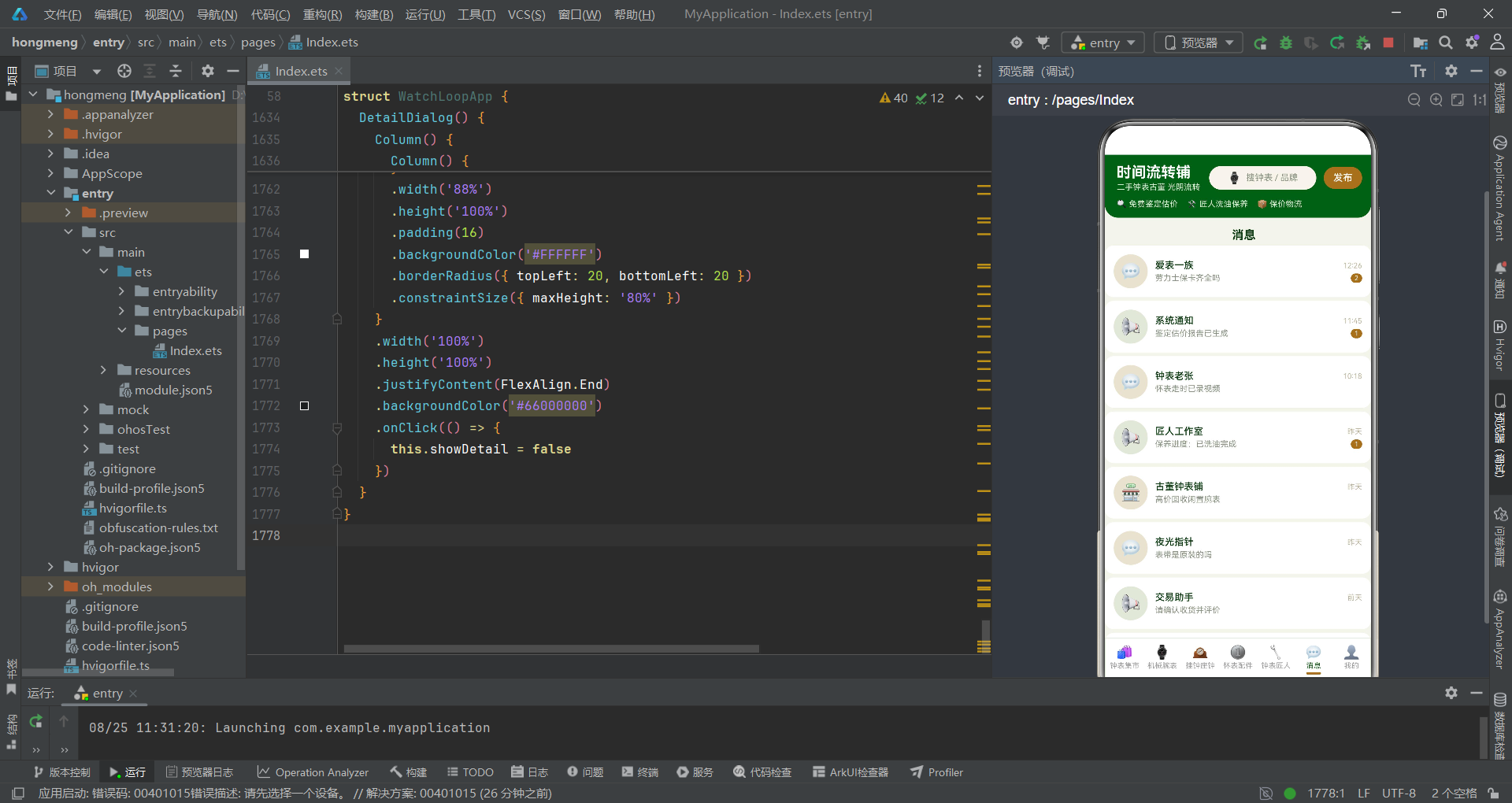
消息列表中每个消息行的左侧是46x46的圆形图标容器,背景色根据消息类型区分:官方消息为#E2E8D9(浅绿灰),其他为#E8E2D0(浅棕灰)。图标通过noteIcon方法动态返回:官方消息返回"📢"、商家消息返回"🏪"、买家消息返回"💬"。消息内容使用maxLines(1)单行展示并省略溢出文字。未读徽章通过if (item.unread > 0)条件渲染,仅在未读数大于0时显示黄铜金背景的圆形数字徽章。每条消息的onClick事件触发删除确认弹窗,模拟会话管理操作。这种简洁的消息列表设计涵盖了图标区分、内容摘要、时间戳和未读计数四个核心信息维度。
弹窗交互体系
发布闲置弹窗(底部弹出)
发布弹窗(PublishDialog)采用底部弹出模式,从屏幕底部滑入,占据约80%的高度,覆盖在主页面上方。
  @Builder
  PublishDialog() {
    Column() {
      Column() {
        Row() {
          Text('发布闲置钟表')
            .fontSize(16)
            .fontWeight(FontWeight.Bold)
            .fontColor('#0D3B11')
          Column()
            .layoutWeight(1)
          Text('✕')
            .fontSize(16)
            .fontColor('#9E9E9E')
            .onClick(() => {
              this.showPublish = false
            })
        }
        .width('100%')

        Text('钟表类别')
          .fontSize(12)
          .fontColor('#8A9482')
          .margin({ top: 14 })
        Row() {
          ForEach(this.itemKinds, (k: string, index: number) => {
            Text(k)
              .fontSize(11)
              .fontColor(this.itemKind === index ? '#FFFFFF' : '#1B5E20')
              .padding({ left: 10, right: 10, top: 5, bottom: 5 })
              .backgroundColor(this.itemKind === index ? '#1B5E20' : '#E2E8D9')
              .borderRadius(13)
              .margin({ right: 8 })
              .onClick(() => {
                this.itemKind = index
              })
          }, (k: string) => k)
        }
        .margin({ top: 8 })

        Text('期望售价(¥)')
          .fontSize(12)
          .fontColor('#8A9482')
          .margin({ top: 14 })
        Text(this.priceField === '' ? '输入价格,如 8800' : '¥ ' + this.priceField)
          .fontSize(14)
          .fontColor(this.priceField === '' ? '#BDB49E' : '#0D3B11')
          .padding(12)
          .backgroundColor('#E2E8D9')
          .borderRadius(10)
          .width('100%')
          .margin({ top: 8 })
          .onClick(() => {
            this.priceField = '8800'
          })

        Text('立即发布')
          .fontSize(15)
          .fontWeight(FontWeight.Bold)
          .fontColor('#FFFFFF')
          .width('100%')
          .textAlign(TextAlign.Center)
          .padding({ top: 12, bottom: 12 })
          .backgroundColor('#A0722F')
          .borderRadius(24)
          .margin({ top: 16 })
          .onClick(() => {
            this.showPublish = false
          })
      }
      .width('100%')
      .padding(16)
      .backgroundColor('#FFFFFF')
      .borderRadius({ topLeft: 20, topRight: 20 })
      .constraintSize({ maxHeight: '80%' })
      .onClick((event: ClickEvent) => {
        event.stopPropagation()
      })
    }
    .width('100%')
    .height('100%')
    .justifyContent(FlexAlign.End)
    .backgroundColor('#66000000')
    .onClick(() => {
      this.showPublish = false
    })
  }
发布弹窗的外层Column设置height('100%')和justifyContent(FlexAlign.End),使内容卡片贴底显示。背景色#66000000是40%透明度的黑色遮罩,通过onClick实现点击遮罩关闭弹窗的功能。内层内容卡片使用borderRadius({ topLeft: 20, topRight: 20 })设置顶部圆角,模拟从底部弹出的卡片效果。constraintSize({ maxHeight: '80%' })限制卡片最大高度不超过屏幕的80%,防止内容过多时溢出。卡片内部的onClick使用event.stopPropagation()阻止事件冒泡,避免点击卡片内部时触发外层遮罩的关闭逻辑。钟表类别选择使用ForEach渲染标签列表,选中态通过itemKind索引控制颜色切换。售价输入框模拟了TextInput的效果,点击后预设值为"8800"。
钟表保养弹窗(居中卡片)
保养弹窗(CareDialog)采用居中卡片模式,包含钟表类型选择、保养项目选择和动态费用计算三个功能模块。
  @Builder
  CareDialog() {
    Column() {
      Column() {
        Text('🛠️ 钟表保养预约')
          .fontSize(16)
          .fontWeight(FontWeight.Bold)
          .fontColor('#0D3B11')

        Text('选择钟表类型')
          .fontSize(12)
          .fontColor('#8A9482')
          .margin({ top: 14 })
          .width('100%')

        Row() {
          ForEach(this.careKinds, (k: string, index: number) => {
            Text(k)
              .fontSize(10)
              .fontColor(this.careKind === index ? '#FFFFFF' : '#1B5E20')
              .padding({ left: 8, right: 8, top: 5, bottom: 5 })
              .backgroundColor(this.careKind === index ? '#1B5E20' : '#E2E8D9')
              .borderRadius(12)
              .margin({ right: 6, top: 6 })
              .onClick(() => {
                this.careKind = index
              })
          }, (k: string) => k)
        }
        .width('100%')
        .flexWrap(FlexWrap.Wrap)

        Text('保养项目')
          .fontSize(12)
          .fontColor('#8A9482')
          .margin({ top: 14 })
          .width('100%')

        Row() {
          ForEach(this.careProjects, (p: string, index: number) => {
            Text(p)
              .fontSize(10)
              .fontColor(this.careProject === index ? '#FFFFFF' : '#A0722F')
              .padding({ left: 8, right: 8, top: 5, bottom: 5 })
              .backgroundColor(this.careProject === index ? '#A0722F' : '#E8E2D0')
              .borderRadius(12)
              .margin({ right: 6, top: 6 })
              .onClick(() => {
                this.careProject = index
              })
          }, (p: string) => p)
        }
        .width('100%')
        .flexWrap(FlexWrap.Wrap)

        Row() {
          Column() {
            Row() {
              Text('费用:')
                .fontSize(12)
                .fontColor('#8D6E63')
              Text('¥ ' + (128 + this.careKind * 46 + this.careProject * 32))
                .fontSize(13)
                .fontWeight(FontWeight.Bold)
                .fontColor('#A0722F')
                .scale({ x: 1.06, y: 1.06 })
                .animation({ duration: 800, iterations: -1, curve: Curve.EaseInOut })
            }
          }
          .alignItems(HorizontalAlign.Start)
        }
        .margin({ top: 12 })

        Row() {
          Text('预约保养')
            .fontSize(14)
            .fontWeight(FontWeight.Bold)
            .fontColor('#FFFFFF')
            .padding({ left: 22, right: 22, top: 10, bottom: 10 })
            .backgroundColor('#1B5E20')
            .borderRadius(20)
            .onClick(() => {
              this.showCare = false
            })
          Text('取消')
            .fontSize(14)
            .fontColor('#8A9482')
            .padding({ left: 22, right: 22, top: 10, bottom: 10 })
            .backgroundColor('#E2E8D9')
            .borderRadius(20)
            .margin({ left: 12 })
            .onClick(() => {
              this.showCare = false
            })
        }
        .margin({ top: 18 })
      }
      .width('86%')
      .padding(20)
      .backgroundColor('#FFFFFF')
      .borderRadius(16)
      .onClick((event: ClickEvent) => {
        event.stopPropagation()
      })
    }
    .width('100%')
    .height('100%')
    .justifyContent(FlexAlign.Center)
    .backgroundColor('#66000000')
    .onClick(() => {
      this.showCare = false
    })
  }
保养弹窗的布局与发布弹窗有所不同,它使用justifyContent(FlexAlign.Center)实现居中显示,卡片宽度为86%。钟表类型标签使用墨绿色作为选中色,保养项目标签使用黄铜金作为选中色,形成视觉区分。两个标签组都设置了flexWrap(FlexWrap.Wrap),允许标签在空间不足时自动换行。费用计算是本弹窗的技术亮点:费用公式为128 + this.careKind * 46 + this.careProject * 32,基础费用128元,钟表类型每增加一档加46元,保养项目每增加一档加32元。当用户切换类型或项目时,@State变量变化触发UI重渲染,费用文字自动更新。费用金额还配合scale和animation属性实现800毫秒的缩放动画,吸引用户注意价格变化。底部操作区提供"预约保养"和"取消"两个按钮,分别使用墨绿和浅灰背景。
鉴定估价弹窗与详情侧滑
鉴定估价弹窗(VerifyDialog)包含品牌和机芯的双级选择,并基于选中索引动态计算预估行情价格区间。详情弹窗(DetailDialog)则采用右侧滑出的交互模式。
  @Builder
  VerifyDialog() {
    Column() {
      Column() {
        Text('🔍 鉴定估价')
          .fontSize(16)
          .fontWeight(FontWeight.Bold)
          .fontColor('#0D3B11')

        Text('选择品牌')
          .fontSize(12)
          .fontColor('#8A9482')
          .margin({ top: 14 })
          .width('100%')

        Row() {
          ForEach(this.verifyBrands, (b: string, index: number) => {
            Text(b)
              .fontSize(10)
              .fontColor(this.verifyBrand === index ? '#FFFFFF' : '#1B5E20')
              .padding({ left: 8, right: 8, top: 5, bottom: 5 })
              .backgroundColor(this.verifyBrand === index ? '#1B5E20' : '#E2E8D9')
              .borderRadius(12)
              .margin({ right: 6, top: 6 })
              .onClick(() => {
                this.verifyBrand = index
              })
          }, (b: string) => b)
        }
        .width('100%')
        .flexWrap(FlexWrap.Wrap)

        Text('机芯型号')
          .fontSize(12)
          .fontColor('#8A9482')
          .margin({ top: 14 })
          .width('100%')

        Row() {
          ForEach(this.verifyMovements, (m: string, index: number) => {
            Text(m)
              .fontSize(10)
              .fontColor(this.verifyMovement === index ? '#FFFFFF' : '#A0722F')
              .padding({ left: 8, right: 8, top: 5, bottom: 5 })
              .backgroundColor(this.verifyMovement === index ? '#A0722F' : '#E8E2D0')
              .borderRadius(12)
              .margin({ right: 6, top: 6 })
              .onClick(() => {
                this.verifyMovement = index
              })
          }, (m: string) => m)
        }
        .width('100%')
        .flexWrap(FlexWrap.Wrap)

        Column() {
          Row() {
            Text('预估行情:')
              .fontSize(12)
              .fontColor('#8D6E63')
            Text('¥ ' + (3600 + this.verifyBrand * 2800) + ' ~ ' + (5200 + this.verifyBrand * 3200))
              .fontSize(12)
              .fontWeight(FontWeight.Bold)
              .fontColor('#A0722F')
              .scale({ x: 1.06, y: 1.06 })
              .animation({ duration: 800, iterations: -1, curve: Curve.EaseInOut })
          }
          .width('100%')
          Text('三家行家联合报价 · 附鉴定证书')
            .fontSize(10)
            .fontColor('#8A9482')
            .margin({ top: 6 })
        }
        .width('100%')
        .padding(12)
        .backgroundColor('#F3F5EC')
        .borderRadius(10)
        .margin({ top: 14 })

        Row() {
          Text('提交鉴定')
            .fontSize(14)
            .fontWeight(FontWeight.Bold)
            .fontColor('#FFFFFF')
            .padding({ left: 22, right: 22, top: 10, bottom: 10 })
            .backgroundColor('#A0722F')
            .borderRadius(20)
            .onClick(() => {
              this.showVerify = false
            })
          Text('取消')
            .fontSize(14)
            .fontColor('#8A9482')
            .padding({ left: 22, right: 22, top: 10, bottom: 10 })
            .backgroundColor('#E2E8D9')
            .borderRadius(20)
            .margin({ left: 12 })
            .onClick(() => {
              this.showVerify = false
            })
        }
        .margin({ top: 18 })
      }
      .width('86%')
      .padding(20)
      .backgroundColor('#FFFFFF')
      .borderRadius(16)
      .onClick((event: ClickEvent) => {
        event.stopPropagation()
      })
    }
    .width('100%')
    .height('100%')
    .justifyContent(FlexAlign.Center)
    .backgroundColor('#66000000')
    .onClick(() => {
      this.showVerify = false
    })
  }
鉴定估价弹窗的品牌选择使用墨绿色作为选中色,机芯选择使用黄铜金作为选中色,两者形成层次分明的视觉区分。预估行情的计算公式为3600 + this.verifyBrand * 2800到5200 + this.verifyBrand * 3200,即基础区间3600-5200元,品牌每升一档区间上下限分别增加2800和3200元。这种基于索引的动态计算方式简洁高效,无需额外的数据映射表。行情价格区域使用浅色背景卡片包裹,配合缩放动画突出展示。底部操作区提供"提交鉴定"和"取消"两个按钮。
详情弹窗(DetailDialog)采用justifyContent(FlexAlign.End)和borderRadius({ topLeft: 20, bottomLeft: 20 })实现从右侧滑出的效果,卡片宽度为88%。弹窗内容通过selName()、selPrice()、selBrand()等安全访问器方法获取选中项数据,走时精度进度条根据selAccuracy()的值动态渲染宽度和颜色。详情页底部提供"鉴定估价"和"聊卖家"两个操作按钮,点击"鉴定估价"时会先关闭详情弹窗再打开鉴定弹窗,实现弹窗间的跳转联动。
技术点对比
| 技术维度 | 钟表集市行式列表 | 机械腕表柱状图 | 怀表双列网格 | 弹窗交互体系 |
|---|---|---|---|---|
| 布局方式 | Row + Column 横向排列 | Row + ForEach 竖向柱状 | Row + flexWrap 自动换行 | Stack/Column 覆盖层 |
| 数据驱动 | ForEach + watchList | ForEach + wristList | ForEach + pocketList | @State 布尔变量控制 |
| 可视化手段 | 走时精度进度条 | 表径柱状图 + 动储进度条 | 年代标签 + 状态条件渲染 | 动态费用计算 + 缩放动画 |
| 交互模式 | 点击行打开详情 | 纯展示型 | 纯展示型 | 点击遮罩关闭 + stopPropagation |
| 动画效果 | Banner缩放动画 | 无动画 | 怀表图标呼吸动画 | 费用/价格缩放呼吸动画 |
| 状态管理 | selectedItem赋值 | maxDiameter()计算 | 无额外状态 | careKind/careProject/verifyBrand等 |
| 颜色体系 | 墨绿+黄铜金+象牙白 | 三色分级(绿/金/棕) | 复古色调一致 | 选中态墨绿/黄铜金切换 |
| 响应式特性 | maxLines省略+onClick | layoutWeight等分 | 47%宽度自适应 | constraintSize maxHeight限制 |
安装DevEco Studio程序

选择目标安装目录:

设置环境变量,但是需要重启一下:

新建一个空白模板:

设置API为24的模板项目:

初始化项目,自动下载相关依赖:

完整代码:
// 墨绿铜金风格:墨绿 #1B5E20 / 黄铜金 #A0722F / 象牙白 #F7F4EC / 深棕 #5D4037
// 7 Tab:钟表集市 / 机械腕表 / 挂钟座钟 / 怀表配件 / 钟表匠人 / 消息 / 我的
// 5 弹框:发布钟表(底部) / 钟表保养(类型+项目) / 鉴定估价(品牌+机芯) / 删除确认(警示) / 钟表详情(右侧滑出)
interface WatchItem {
name: string
brand: string
price: number
originPrice: number
accuracy: number
city: string
tag: string
}
interface WristItem {
name: string
movement: string
diameter: number
price: number
power: number
}
interface WallItem {
name: string
type: string
height: number
price: number
chime: boolean
}
interface PocketItem {
name: string
era: string
cover: string
price: number
runs: boolean
}
interface MasterItem {
name: string
skill: string
years: number
orders: number
rate: number
}
interface NoteItem {
name: string
content: string
time: string
unread: number
type: string
}
@Entry
@Component
struct WatchLoopApp {
@State currentTab: number = 0
@State showPublish: boolean = false
@State showCare: boolean = false
@State showVerify: boolean = false
@State showDelete: boolean = false
@State showDetail: boolean = false
@State selectedItem: WatchItem | null = null
@State careKind: number = 0
@State careProject: number = 0
@State verifyBrand: number = 0
@State verifyMovement: number = 0
@State itemKind: number = 0
@State priceField: string = ''
private tabs: string[] = ['钟表集市', '机械腕表', '挂钟座钟', '怀表配件', '钟表匠人', '消息', '我的']
private watchList: WatchItem[] = [
{ name: '劳力士 蚝式恒动 124300', brand: 'Rolex', price: 32800, originPrice: 46800, accuracy: 96, city: '上海', tag: '热门' },
{ name: '欧米茄 蝶飞 424.13', brand: 'Omega', price: 12800, originPrice: 21800, accuracy: 93, city: '北京', tag: '包邮' },
{ name: '浪琴 名匠 L2859', brand: 'Longines', price: 8800, originPrice: 15600, accuracy: 90, city: '杭州', tag: '95新' },
{ name: '帝舵 碧湾 1958', brand: 'Tudor', price: 15800, originPrice: 25800, accuracy: 94, city: '深圳', tag: '精品' },
{ name: '精工 5号盾 机械男表', brand: 'Seiko', price: 780, originPrice: 1680, accuracy: 85, city: '广州', tag: '急出' },
{ name: '天梭 力洛克 皮 带', brand: 'Tissot', price: 1580, originPrice: 3200, accuracy: 88, city: '成都', tag: '包邮' },
{ name: '梅花 空中霸王 老款', brand: 'Titoni', price: 2280, originPrice: 4800, accuracy: 82, city: '南京', tag: '老物' },
{ name: '西铁城 光动能电波', brand: 'Citizen', price: 1280, originPrice: 2680, accuracy: 95, city: '武汉', tag: '95新' },
{ name: '卡西欧 小方块 GW-5000', brand: 'Casio', price: 2380, originPrice: 4200, accuracy: 97, city: '苏州', tag: '热门' },
{ name: '上海牌 A581 古董机芯', brand: '上海', price: 680, originPrice: 1580, accuracy: 78, city: '天津', tag: '老物' },
{ name: '海鸥 1963 复刻飞行员', brand: '海鸥', price: 2180, originPrice: 3980, accuracy: 86, city: '西安', tag: '精品' },
{ name: '北京牌 燕山 机械怀表款', brand: '北京', price: 480, originPrice: 980, accuracy: 75, city: '重庆', tag: '急出' },
{ name: '双狮 大力神 自动老表', brand: '双狮', price: 380, originPrice: 880, accuracy: 72, city: '青岛', tag: '老物' },
{ name: '荣汉斯 马克斯比尔', brand: 'Junghans', price: 3880, originPrice: 7200, accuracy: 91, city: '大连', tag: '95新' },
{ name: '摩凡陀 博物馆盘', brand: 'Movado', price: 1880, originPrice: 3800, accuracy: 87, city: '厦门', tag: '包邮' },
{ name: '汉密尔顿 卡其野战', brand: 'Hamilton', price: 2680, originPrice: 5200, accuracy: 89, city: '宁波', tag: '热门' },
{ name: '泰格豪雅 F1 计时', brand: 'TAG', price: 6800, originPrice: 12800, accuracy: 92, city: '无锡', tag: '精品' },
{ name: '美度 贝伦赛丽', brand: 'Mido', price: 3280, originPrice: 6400, accuracy: 90, city: '济南', tag: '包邮' },
{ name: '东方双狮 小狮子 半金', brand: '东方', price: 580, originPrice: 1280, accuracy: 76, city: '合肥', tag: '急出' },
{ name: '雪铁纳 DS 动能', brand: 'Certina', price: 2280, originPrice: 4400, accuracy: 88, city: '郑州', tag: '95新' },
{ name: '英纳格 大三针 老款', brand: 'Enicar', price: 680, originPrice: 1580, accuracy: 74, city: '佛山', tag: '老物' },
{ name: '罗马表 海马 老古董', brand: 'Roamer', price: 520, originPrice: 1180, accuracy: 71, city: '东莞', tag: '老物' },
{ name: '西马表 超薄 手动上链', brand: 'Cyma', price: 880, originPrice: 1880, accuracy: 79, city: '福州', tag: '急出' },
{ name: '摩凡陀 不锈钢网带款', brand: 'Movado', price: 1280, originPrice: 2600, accuracy: 85, city: '长沙', tag: '包邮' }
]
private wristList: WristItem[] = [
{ name: '劳力士 蚝式恒动', movement: '3230机芯', diameter: 41, price: 32800, power: 70 },
{ name: '帝舵 碧湾1958', movement: 'MT5402机芯', diameter: 39, price: 15800, power: 70 },
{ name: '欧米茄 蝶飞', movement: '2500机芯', diameter: 39.5, price: 12800, power: 48 },
{ name: '浪琴 名匠', movement: 'L888机芯', diameter: 40, price: 8800, power: 72 },
{ name: '海鸥 1963', movement: 'ST19机芯', diameter: 38, price: 2180, power: 40 },
{ name: '汉密尔顿 卡其野战', movement: 'H-10机芯', diameter: 38, price: 2680, power: 80 },
{ name: '泰格豪雅 F1', movement: 'Calibre 5', diameter: 41, price: 6800, power: 38 },
{ name: '美度 贝伦赛丽', movement: 'Calibre 80', diameter: 40, price: 3280, power: 80 },
{ name: '精工 5号盾', movement: '4R36机芯', diameter: 36.5, price: 780, power: 41 },
{ name: '天梭 力洛克', movement: 'Powermatic 80', diameter: 39.3, price: 1580, power: 80 }
]
private wallList: WallItem[] = [
{ name: '肯宁家 挂钟 三重奏', type: '机械挂钟', height: 85, price: 4800, chime: true },
{ name: '黑森林 布谷鸟钟', type: '布谷鸟钟', height: 45, price: 2680, chime: true },
{ name: '赫姆勒 落地钟', type: '落地钟', height: 180, price: 12800, chime: true },
{ name: '上海 大礼堂座钟', type: '机械座钟', height: 40, price: 680, chime: true },
{ name: '三五牌 十五天座钟', type: '机械座钟', height: 36, price: 480, chime: false },
{ name: '德国统一 双铃闹钟', type: '机械闹钟', height: 14, price: 220, chime: false },
{ name: '北极星 挂钟 老款', type: '机械挂钟', height: 32, price: 160, chime: false },
{ name: '西门子 电波挂钟', type: '电波挂钟', height: 30, price: 380, chime: false }
]
private pocketList: PocketItem[] = [
{ name: '瓦尔特 银壳猎表', era: '1920年代', cover: '猎壳', price: 3680, runs: true },
{ name: '欧米茄 18K怀表', era: '1910年代', cover: '敞壳', price: 8800, runs: true },
{ name: '浪琴 铁路怀表', era: '1930年代', cover: '敞壳', price: 5800, runs: true },
{ name: '美国 沃尔瑟姆 16型', era: '1915年代', cover: '猎壳', price: 2200, runs: true },
{ name: '伊利诺伊 三夹板', era: '1925年代', cover: '敞壳', price: 1880, runs: false },
{ name: '汉密尔顿 992B', era: '1940年代', cover: '铁路表', price: 6800, runs: true },
{ name: '瑞士 银质珐琅女表', era: '1900年代', cover: '画壳', price: 12800, runs: false },
{ name: '德国 军用怀表', era: '1943年代', cover: '军壳', price: 4800, runs: true },
{ name: '伦敦 珐琅对表', era: '1890年代', cover: '画壳', price: 15800, runs: false },
{ name: '国产 早期统一机芯', era: '1960年代', cover: '敞壳', price: 380, runs: true }
]
private masterList: MasterItem[] = [
{ name: '陈师傅', skill: '古董机芯修复', years: 32, orders: 1280, rate: 99 },
{ name: '林师傅', skill: '游丝摆轮调校', years: 25, orders: 960, rate: 98 },
{ name: '老周', skill: '怀表翻新打磨', years: 28, orders: 870, rate: 97 },
{ name: '何师傅', skill: '座钟布谷鸟修复', years: 35, orders: 1520, rate: 99 },
{ name: '小吴', skill: '防水检测换底盖', years: 8, orders: 460, rate: 96 },
{ name: '赵师傅', skill: '表盘翻修描字', years: 22, orders: 680, rate: 98 },
{ name: '老郑', skill: '古董钟外壳木工', years: 30, orders: 540, rate: 97 },
{ name: '刘师傅', skill: '机芯洗油保养', years: 18, orders: 1180, rate: 98 }
]
private noteList: NoteItem[] = [
{ name: '爱表一族', content: '劳力士保卡齐全吗', time: '12:26', unread: 2, type: '买家' },
{ name: '系统通知', content: '鉴定估价报告已生成', time: '11:45', unread: 1, type: '官方' },
{ name: '钟表老张', content: '怀表走时已录视频', time: '10:18', unread: 0, type: '买家' },
{ name: '匠人工作室', content: '保养进度:已洗油完成', time: '昨天', unread: 1, type: '官方' },
{ name: '古董钟表铺', content: '高价回收闲置腕表', time: '昨天', unread: 0, type: '商家' },
{ name: '夜光指针', content: '表带是原装的吗', time: '昨天', unread: 0, type: '买家' },
{ name: '交易助手', content: '请确认收货并评价', time: '前天', unread: 0, type: '官方' },
{ name: '摆轮人生', content: '机芯图拍得很清楚', time: '前天', unread: 0, type: '买家' },
{ name: '安全提醒', content: '贵重钟表请走保价顺丰', time: '3天前', unread: 0, type: '官方' },
{ name: '陈师傅', content: '您送修的表已好', time: '3天前', unread: 0, type: '官方' },
{ name: '钟表俱乐部', content: '9月古董表品鉴会', time: '4天前', unread: 0, type: '官方' },
{ name: '时间收藏家', content: '布谷鸟钟很完整', time: '4天前', unread: 0, type: '买家' }
]
private careKinds: string[] = ['机械腕表', '石英腕表', '机械座钟', '布谷鸟钟', '古董怀表']
private careProjects: string[] = ['机芯洗油', '更换防水圈', '游丝调校', '表盘翻修', '外壳抛光']
private verifyBrands: string[] = ['Rolex', 'Omega', 'Longines', 'Tudor', 'Seiko', '海鸥']
private verifyMovements: string[] = ['3230机芯', '2500机芯', 'L888机芯', 'MT5402机芯', 'ST19机芯']
private itemKinds: string[] = ['机械腕表', '石英腕表', '挂钟座钟', '古董怀表', '表带表链', '钟表工具']
private maxDiameter(): number {
let max: number = 0
for (let i = 0; i < this.wristList.length; i++) {
if (this.wristList[i].diameter > max) {
max = this.wristList[i].diameter
}
}
return max
}
private maxOrders(): number {
let max: number = 0
for (let i = 0; i < this.masterList.length; i++) {
if (this.masterList[i].orders > max) {
max = this.masterList[i].orders
}
}
return max
}
private selName(): string {
if (this.selectedItem === null) {
return ''
}
return this.selectedItem.name
}
private selPrice(): string {
if (this.selectedItem === null) {
return ''
}
return this.selectedItem.price + ''
}
private selBrand(): string {
if (this.selectedItem === null) {
return ''
}
return this.selectedItem.brand
}
private selAccuracy(): number {
if (this.selectedItem === null) {
return 0
}
return this.selectedItem.accuracy
}
private selCity(): string {
if (this.selectedItem === null) {
return ''
}
return this.selectedItem.city
}
private selOrigin(): string {
if (this.selectedItem === null) {
return ''
}
return this.selectedItem.originPrice + ''
}
build() {
Column() {
Column() {
// 头部:静态钟表电商风
Column() {
Row() {
Column() {
Text('时间流转铺')
.fontSize(20)
.fontWeight(FontWeight.Bold)
.fontColor('#FFFFFF')
Text('二手钟表古董 光阴流转')
.fontSize(11)
.fontColor('#DDE8D5')
.margin({ top: 2 })
}
.alignItems(HorizontalAlign.Start)
Row() {
Text('⌚')
.fontSize(15)
Text('搜钟表 / 品牌')
.fontSize(12)
.fontColor('#8A9482')
.margin({ left: 6 })
}
.width(145)
.height(32)
.justifyContent(FlexAlign.Center)
.backgroundColor('#F7F4EC')
.borderRadius(16)
.margin({ left: 12 })
Text('发布')
.fontSize(13)
.fontWeight(FontWeight.Medium)
.fontColor('#FFFFFF')
.width(52)
.height(30)
.textAlign(TextAlign.Center)
.backgroundColor('#A0722F')
.borderRadius(15)
.margin({ left: 10 })
.onClick(() => {
this.showPublish = true
})
}
.width('100%')
.padding({ left: 16, right: 16, top: 12, bottom: 10 })
Row() {
Text('🔍 免费鉴定估价')
.fontSize(11)
.fontColor('#DDE8D5')
.margin({ right: 12 })
Text('🛠️ 匠人洗油保养')
.fontSize(11)
.fontColor('#DDE8D5')
.margin({ right: 12 })
Text('📦 保价物流')
.fontSize(11)
.fontColor('#DDE8D5')
}
.width('100%')
.padding({ left: 16, bottom: 12 })
}
.width('100%')
.backgroundColor('#1B5E20')
.borderRadius({ bottomLeft: 18, bottomRight: 18 })
Scroll() {
Column() {
if (this.currentTab === 0) {
this.MarketTab()
} else if (this.currentTab === 1) {
this.WristTab()
} else if (this.currentTab === 2) {
this.WallTab()
} else if (this.currentTab === 3) {
this.PocketTab()
} else if (this.currentTab === 4) {
this.MasterTab()
} else if (this.currentTab === 5) {
this.NoteTab()
} else {
this.MineTab()
}
}
.width('100%')
.alignItems(HorizontalAlign.Start)
}
.layoutWeight(1)
.scrollBar(BarState.Off)
.width('100%')
Row() {
ForEach(this.tabs, (tab: string, index: number) => {
Column() {
Text(this.tabIcon(index))
.fontSize(18)
.fontColor(this.currentTab === index ? '#1B5E20' : '#9E9E9E')
Text(tab)
.fontSize(10)
.fontColor(this.currentTab === index ? '#1B5E20' : '#9E9E9E')
.margin({ top: 2 })
if (this.currentTab === index) {
Column()
.width(20)
.height(3)
.backgroundColor('#A0722F')
.borderRadius(2)
.margin({ top: 3 })
} else {
Column()
.width(20)
.height(3)
.backgroundColor('#00000000')
.margin({ top: 3 })
}
}
.justifyContent(FlexAlign.Center)
.layoutWeight(1)
.onClick(() => {
this.currentTab = index
})
}, (tab: string) => tab)
}
.width('100%')
.height(58)
.backgroundColor('#FFFFFF')
.border({ width: 1, color: '#DDE8D5', radius: 0 })
}
.width('100%')
.height('100%')
.backgroundColor('#F3F5EC')
if (this.showPublish) {
this.PublishDialog()
}
if (this.showCare) {
this.CareDialog()
}
if (this.showVerify) {
this.VerifyDialog()
}
if (this.showDelete) {
this.DeleteDialog()
}
if (this.showDetail) {
this.DetailDialog()
}
}
}
private tabIcon(index: number): string {
let icons: string[] = ['🛍️', '⌚', '🕰️', '🪙', '🔧', '💬', '👤']
return icons[index]
}
// Tab1 钟表集市:行式列表
@Builder
MarketTab() {
Column() {
Row() {
Column() {
Text('⌚ 名表捡漏季')
.fontSize(16)
.fontWeight(FontWeight.Bold)
.fontColor('#FFFFFF')
Text('闲置腕表折抵新表 8.5 折')
.fontSize(11)
.fontColor('#DDE8D5')
.margin({ top: 4 })
}
.alignItems(HorizontalAlign.Start)
.layoutWeight(1)
Text('🕰️')
.fontSize(36)
.scale({ x: 1.12, y: 1.12 })
.animation({ duration: 1000, iterations: -1, curve: Curve.EaseInOut })
}
.width('100%')
.padding(16)
.linearGradient({
direction: GradientDirection.Right,
colors: [['#1B5E20', 0], ['#A0722F', 1]]
})
.borderRadius(14)
.margin({ top: 12, left: 12, right: 12 })
Row() {
Text('钟表精选')
.fontSize(15)
.fontWeight(FontWeight.Bold)
.fontColor('#0D3B11')
Column()
.layoutWeight(1)
Text('走时精度 ▾')
.fontSize(12)
.fontColor('#1B5E20')
}
.width('100%')
.padding({ left: 16, right: 16, top: 14 })
ForEach(this.watchList, (item: WatchItem) => {
Row() {
Column() {
Text('⌚')
.fontSize(26)
}
.width(66)
.height(66)
.justifyContent(FlexAlign.Center)
.backgroundColor('#E2E8D9')
.borderRadius(12)
Column() {
Text(item.name)
.fontSize(13)
.fontWeight(FontWeight.Medium)
.fontColor('#0D3B11')
.maxLines(1)
.textOverflow({ overflow: TextOverflow.Ellipsis })
Row() {
Text(item.brand)
.fontSize(9)
.fontColor('#1B5E20')
.padding({ left: 6, right: 6, top: 2, bottom: 2 })
.backgroundColor('#C8DCC0')
.borderRadius(4)
Text('· ' + item.city)
.fontSize(9)
.fontColor('#8A9482')
.margin({ left: 6 })
}
.margin({ top: 4 })
Row() {
Text('走时')
.fontSize(9)
.fontColor('#8A9482')
Column()
.width(item.accuracy / 100 * 55)
.height(3)
.backgroundColor(item.accuracy > 90 ? '#66BB6A' : '#A0722F')
.borderRadius(2)
.margin({ left: 4 })
Text(item.accuracy + '%')
.fontSize(9)
.fontColor('#8A9482')
.margin({ left: 4 })
}
.margin({ top: 5 })
}
.alignItems(HorizontalAlign.Start)
.layoutWeight(1)
.margin({ left: 10 })
Column() {
Text('¥' + item.price)
.fontSize(15)
.fontWeight(FontWeight.Bold)
.fontColor('#A0722F')
Text('¥' + item.originPrice)
.fontSize(9)
.fontColor('#BDB49E')
.decoration({ type: TextDecorationType.LineThrough })
.margin({ top: 2 })
Text(item.tag)
.fontSize(9)
.fontColor('#FFFFFF')
.padding({ left: 5, right: 5, top: 1, bottom: 1 })
.backgroundColor('#1B5E20')
.borderRadius(3)
.margin({ top: 3 })
}
.alignItems(HorizontalAlign.End)
}
.width('100%')
.padding(11)
.backgroundColor('#FFFFFF')
.borderRadius(12)
.margin({ left: 12, right: 12, top: 5 })
.onClick(() => {
this.selectedItem = item
this.showDetail = true
})
}, (item: WatchItem) => item.name)
Column()
.height(20)
}
.width('100%')
}
// Tab2 机械腕表:表径柱状图 + 动储进度
@Builder
WristTab() {
Column() {
Row() {
Text('⌚ 机械腕表专区')
.fontSize(15)
.fontWeight(FontWeight.Bold)
.fontColor('#0D3B11')
Column()
.layoutWeight(1)
Text('共 ' + this.wristList.length + ' 块')
.fontSize(11)
.fontColor('#8A9482')
}
.width('100%')
.padding({ left: 16, right: 16, top: 14 })
Text('表壳直径分布(mm)')
.fontSize(14)
.fontWeight(FontWeight.Bold)
.fontColor('#0D3B11')
.margin({ top: 12, left: 16 })
Row() {
ForEach(this.wristList, (item: WristItem) => {
Column() {
Column()
.width(22)
.height(item.diameter / this.maxDiameter() * 115)
.backgroundColor(item.diameter > 40 ? '#1B5E20' : (item.diameter > 38.5 ? '#A0722F' : '#5D4037'))
.borderRadius(5)
Text(item.diameter + '')
.fontSize(8)
.fontColor('#8A9482')
.margin({ top: 3 })
}
.justifyContent(FlexAlign.End)
.alignItems(HorizontalAlign.Center)
.layoutWeight(1)
}, (item: WristItem) => item.name)
}
.width('100%')
.height(155)
.padding({ left: 10, right: 10 })
.backgroundColor('#FFFFFF')
.borderRadius(12)
.margin({ top: 8, left: 12, right: 12 })
.justifyContent(FlexAlign.End)
ForEach(this.wristList, (item: WristItem) => {
Row() {
Column() {
Text('⌚')
.fontSize(26)
}
.width(54)
.height(54)
.justifyContent(FlexAlign.Center)
.backgroundColor('#E2E8D9')
.borderRadius(10)
Column() {
Text(item.name)
.fontSize(13)
.fontWeight(FontWeight.Medium)
.fontColor('#0D3B11')
.maxLines(1)
Row() {
Text(item.movement)
.fontSize(9)
.fontColor('#FFFFFF')
.padding({ left: 5, right: 5, top: 1, bottom: 1 })
.backgroundColor('#1B5E20')
.borderRadius(3)
Text(item.diameter + 'mm')
.fontSize(10)
.fontColor('#8A9482')
.margin({ left: 6 })
}
.margin({ top: 4 })
Row() {
Text('动储')
.fontSize(9)
.fontColor('#8A9482')
Column()
.width(item.power / 80 * 55)
.height(3)
.backgroundColor(item.power >= 70 ? '#66BB6A' : '#A0722F')
.borderRadius(2)
.margin({ left: 4 })
Text(item.power + 'h')
.fontSize(9)
.fontColor('#8A9482')
.margin({ left: 4 })
}
.margin({ top: 5 })
}
.alignItems(HorizontalAlign.Start)
.layoutWeight(1)
.margin({ left: 10 })
Text('¥' + item.price)
.fontSize(15)
.fontWeight(FontWeight.Bold)
.fontColor('#A0722F')
}
.width('100%')
.padding(11)
.backgroundColor('#FFFFFF')
.borderRadius(12)
.margin({ left: 12, right: 12, top: 6 })
}, (item: WristItem) => item.name)
Column()
.height(20)
}
.width('100%')
}
// Tab3 挂钟座钟:高度柱状图 + 报时标签
@Builder
WallTab() {
Column() {
Text('钟体高度分布(cm)')
.fontSize(14)
.fontWeight(FontWeight.Bold)
.fontColor('#0D3B11')
.margin({ top: 14, left: 16 })
Row() {
ForEach(this.wallList, (item: WallItem) => {
Column() {
Column()
.width(24)
.height(item.height / 180 * 115)
.backgroundColor(item.height > 100 ? '#1B5E20' : (item.height > 35 ? '#A0722F' : '#5D4037'))
.borderRadius(5)
Text(item.height + '')
.fontSize(8)
.fontColor('#8A9482')
.margin({ top: 3 })
}
.justifyContent(FlexAlign.End)
.alignItems(HorizontalAlign.Center)
.layoutWeight(1)
}, (item: WallItem) => item.name)
}
.width('100%')
.height(155)
.padding({ left: 10, right: 10 })
.backgroundColor('#FFFFFF')
.borderRadius(12)
.margin({ top: 8, left: 12, right: 12 })
.justifyContent(FlexAlign.End)
ForEach(this.wallList, (item: WallItem) => {
Row() {
Column() {
Text('🕰️')
.fontSize(26)
}
.width(54)
.height(54)
.justifyContent(FlexAlign.Center)
.backgroundColor('#E2E8D9')
.borderRadius(10)
Column() {
Text(item.name)
.fontSize(13)
.fontWeight(FontWeight.Medium)
.fontColor('#0D3B11')
.maxLines(1)
Row() {
Text(item.type)
.fontSize(9)
.fontColor('#FFFFFF')
.padding({ left: 5, right: 5, top: 1, bottom: 1 })
.backgroundColor('#5D4037')
.borderRadius(3)
if (item.chime) {
Text('整点报时')
.fontSize(9)
.fontColor('#1B5E20')
.padding({ left: 5, right: 5, top: 1, bottom: 1 })
.backgroundColor('#C8DCC0')
.borderRadius(3)
.margin({ left: 6 })
}
}
.margin({ top: 4 })
Text(item.height + 'cm · 同城搬运可约')
.fontSize(10)
.fontColor('#8A9482')
.margin({ top: 3 })
}
.alignItems(HorizontalAlign.Start)
.layoutWeight(1)
.margin({ left: 10 })
Text('¥' + item.price)
.fontSize(15)
.fontWeight(FontWeight.Bold)
.fontColor('#A0722F')
}
.width('100%')
.padding(11)
.backgroundColor('#FFFFFF')
.borderRadius(12)
.margin({ left: 12, right: 12, top: 6 })
}, (item: WallItem) => item.name)
Column()
.height(20)
}
.width('100%')
}
// Tab4 怀表配件:双列网格 + 年代
@Builder
PocketTab() {
Column() {
Row() {
Text('🪙 怀表配件专区')
.fontSize(15)
.fontWeight(FontWeight.Bold)
.fontColor('#0D3B11')
Column()
.layoutWeight(1)
Text('共 ' + this.pocketList.length + ' 件')
.fontSize(11)
.fontColor('#8A9482')
}
.width('100%')
.padding({ left: 16, right: 16, top: 14 })
Row() {
ForEach(this.pocketList, (item: PocketItem) => {
Column() {
Column() {
Text('🪙')
.fontSize(34)
.scale({ x: 1.08, y: 1.08 })
.animation({ duration: 1100, iterations: -1, curve: Curve.EaseInOut })
}
.width('100%')
.height(72)
.justifyContent(FlexAlign.Center)
.backgroundColor('#E2E8D9')
.borderRadius(10)
Text(item.name)
.fontSize(12)
.fontWeight(FontWeight.Medium)
.fontColor('#0D3B11')
.margin({ top: 6 })
.maxLines(1)
Row() {
Text(item.era)
.fontSize(9)
.fontColor('#FFFFFF')
.padding({ left: 5, right: 5, top: 1, bottom: 1 })
.backgroundColor('#A0722F')
.borderRadius(3)
Text(item.cover)
.fontSize(9)
.fontColor('#8A9482')
.margin({ left: 5 })
}
.margin({ top: 4 })
if (item.runs) {
Text('走时正常')
.fontSize(9)
.fontColor('#2E7D32')
.margin({ top: 3 })
} else {
Text('待修复')
.fontSize(9)
.fontColor('#EF6C00')
.margin({ top: 3 })
}
Text('¥' + item.price)
.fontSize(14)
.fontWeight(FontWeight.Bold)
.fontColor('#A0722F')
.margin({ top: 4 })
}
.width('47%')
.padding(10)
.backgroundColor('#FFFFFF')
.borderRadius(12)
.margin({ top: 8 })
.alignItems(HorizontalAlign.Start)
}, (item: PocketItem) => item.name)
}
.width('94%')
.margin({ left: 12 })
Column()
.height(20)
}
.width('100%')
}
// Tab5 钟表匠人:接单量柱状图 + 评分进度
@Builder
MasterTab() {
Column() {
Row() {
Text('🔧 钟表匠人')
.fontSize(15)
.fontWeight(FontWeight.Bold)
.fontColor('#0D3B11')
Column()
.layoutWeight(1)
Text('预约保养')
.fontSize(12)
.fontColor('#FFFFFF')
.padding({ left: 12, right: 12, top: 4, bottom: 4 })
.backgroundColor('#A0722F')
.borderRadius(12)
.onClick(() => {
this.showCare = true
})
}
.width('100%')
.padding({ left: 16, right: 16, top: 14 })
Text('累计接单量(单)')
.fontSize(14)
.fontWeight(FontWeight.Bold)
.fontColor('#0D3B11')
.margin({ top: 12, left: 16 })
Row() {
ForEach(this.masterList, (item: MasterItem) => {
Column() {
Column()
.width(24)
.height(item.orders / this.maxOrders() * 115)
.backgroundColor(item.orders > 1000 ? '#1B5E20' : (item.orders > 600 ? '#A0722F' : '#5D4037'))
.borderRadius(5)
Text(item.orders + '')
.fontSize(8)
.fontColor('#8A9482')
.margin({ top: 3 })
}
.justifyContent(FlexAlign.End)
.alignItems(HorizontalAlign.Center)
.layoutWeight(1)
}, (item: MasterItem) => item.name)
}
.width('100%')
.height(155)
.padding({ left: 10, right: 10 })
.backgroundColor('#FFFFFF')
.borderRadius(12)
.margin({ top: 8, left: 12, right: 12 })
.justifyContent(FlexAlign.End)
ForEach(this.masterList, (item: MasterItem) => {
Column() {
Row() {
Column() {
Text('🔧')
.fontSize(28)
}
.width(58)
.height(58)
.justifyContent(FlexAlign.Center)
.backgroundColor('#E2E8D9')
.borderRadius(10)
Column() {
Text(item.name)
.fontSize(13)
.fontWeight(FontWeight.Bold)
.fontColor('#0D3B11')
.maxLines(1)
Row() {
Text(item.skill)
.fontSize(9)
.fontColor('#FFFFFF')
.padding({ left: 5, right: 5, top: 1, bottom: 1 })
.backgroundColor('#1B5E20')
.borderRadius(3)
Text(item.years + ' 年经验')
.fontSize(10)
.fontColor('#8A9482')
.margin({ left: 6 })
}
.margin({ top: 3 })
}
.alignItems(HorizontalAlign.Start)
.layoutWeight(1)
.margin({ left: 10 })
Text('¥' + item.orders + ' 单')
.fontSize(12)
.fontWeight(FontWeight.Bold)
.fontColor('#A0722F')
}
.width('100%')
Row() {
Text('好评率')
.fontSize(10)
.fontColor('#8A9482')
Stack({ alignContent: Alignment.Start }) {
Column()
.width(120)
.height(5)
.backgroundColor('#E2E8D9')
.borderRadius(3)
Column()
.width(item.rate / 100 * 120)
.height(5)
.backgroundColor('#66BB6A')
.borderRadius(3)
}
.width(120)
.height(5)
.margin({ left: 8 })
Text(item.rate + '%')
.fontSize(11)
.fontWeight(FontWeight.Bold)
.fontColor('#2E7D32')
.margin({ left: 8 })
.scale({ x: 1.04, y: 1.04 })
.animation({ duration: 900, iterations: -1, curve: Curve.EaseInOut })
Column()
.layoutWeight(1)
Text('预约')
.fontSize(10)
.fontColor('#A0722F')
.padding({ left: 8, right: 8, top: 3, bottom: 3 })
.border({ width: 1, color: '#A0722F', radius: 9 })
.onClick(() => {
this.showCare = true
})
}
.width('100%')
.margin({ top: 10 })
}
.width('100%')
.padding(11)
.backgroundColor('#FFFFFF')
.borderRadius(12)
.margin({ left: 12, right: 12, top: 6 })
}, (item: MasterItem) => item.name)
Column()
.height(20)
}
.width('100%')
}
// Tab6 消息
@Builder
NoteTab() {
Column() {
Text('消息')
.fontSize(16)
.fontWeight(FontWeight.Bold)
.fontColor('#0D3B11')
.margin({ top: 14, left: 16 })
ForEach(this.noteList, (item: NoteItem) => {
Row() {
Column() {
Text(this.noteIcon(item.type))
.fontSize(22)
}
.width(46)
.height(46)
.justifyContent(FlexAlign.Center)
.backgroundColor(item.type === '官方' ? '#E2E8D9' : '#E8E2D0')
.borderRadius(23)
Column() {
Row() {
Text(item.name)
.fontSize(13)
.fontWeight(FontWeight.Medium)
.fontColor('#0D3B11')
.maxLines(1)
Column()
.layoutWeight(1)
Text(item.time)
.fontSize(10)
.fontColor('#BDB49E')
}
.width('100%')
Row() {
Text(item.content)
.fontSize(11)
.fontColor('#8A9482')
.maxLines(1)
.layoutWeight(1)
if (item.unread > 0) {
Text(item.unread + '')
.fontSize(9)
.fontColor('#FFFFFF')
.padding({ left: 5, right: 5, top: 1, bottom: 1 })
.backgroundColor('#A0722F')
.borderRadius(8)
.margin({ left: 6 })
}
}
.width('100%')
.margin({ top: 3 })
}
.layoutWeight(1)
.margin({ left: 10 })
}
.width('100%')
.padding(12)
.backgroundColor('#FFFFFF')
.borderRadius(12)
.margin({ left: 12, right: 12, top: 5 })
.onClick(() => {
this.showDelete = true
})
}, (item: NoteItem) => item.name)
Column()
.height(20)
}
.width('100%')
}
private noteIcon(type: string): string {
if (type === '官方') {
return '📢'
}
if (type === '商家') {
return '🏪'
}
return '💬'
}
// Tab7 我的
@Builder
MineTab() {
Column() {
Row() {
Column() {
Text('⌚')
.fontSize(36)
}
.width(64)
.height(64)
.justifyContent(FlexAlign.Center)
.backgroundColor('#C8DCC0')
.borderRadius(32)
Column() {
Text('时间收藏家')
.fontSize(17)
.fontWeight(FontWeight.Bold)
.fontColor('#FFFFFF')
Text('藏表二十年 · 信用极好')
.fontSize(11)
.fontColor('#DDE8D5')
.margin({ top: 4 })
}
.alignItems(HorizontalAlign.Start)
.margin({ left: 12 })
}
.width('100%')
.padding(16)
.linearGradient({
direction: GradientDirection.Right,
colors: [['#1B5E20', 0], ['#A0722F', 1]]
})
.borderRadius(14)
.margin({ top: 12, left: 12, right: 12 })
Row() {
Column() {
Text('11')
.fontSize(18)
.fontWeight(FontWeight.Bold)
.fontColor('#0D3B11')
Text('在售')
.fontSize(10)
.fontColor('#8A9482')
.margin({ top: 2 })
}
.layoutWeight(1)
Column() {
Text('34')
.fontSize(18)
.fontWeight(FontWeight.Bold)
.fontColor('#0D3B11')
Text('卖出')
.fontSize(10)
.fontColor('#8A9482')
.margin({ top: 2 })
}
.layoutWeight(1)
Column() {
Text('5.0')
.fontSize(18)
.fontWeight(FontWeight.Bold)
.fontColor('#0D3B11')
Text('评分')
.fontSize(10)
.fontColor('#8A9482')
.margin({ top: 2 })
}
.layoutWeight(1)
Column() {
Text('7 块')
.fontSize(18)
.fontWeight(FontWeight.Bold)
.fontColor('#A0722F')
Text('在藏好表')
.fontSize(10)
.fontColor('#8A9482')
.margin({ top: 2 })
}
.layoutWeight(1)
}
.width('100%')
.padding(14)
.backgroundColor('#FFFFFF')
.borderRadius(12)
.margin({ top: 10, left: 12, right: 12 })
Text('我的服务')
.fontSize(14)
.fontWeight(FontWeight.Bold)
.fontColor('#0D3B11')
.margin({ top: 16, left: 16 })
Column() {
Row() {
Text('🔍')
.fontSize(18)
Text('鉴定估价')
.fontSize(13)
.fontColor('#0D3B11')
.margin({ left: 10 })
Column()
.layoutWeight(1)
Text('已鉴定 5 件')
.fontSize(11)
.fontColor('#2E7D32')
.margin({ right: 6 })
Text('>')
.fontSize(14)
.fontColor('#BDB49E')
}
.padding(14)
.onClick(() => {
this.showVerify = true
})
Row() {
Text('🛠️')
.fontSize(18)
Text('钟表保养预约')
.fontSize(13)
.fontColor('#0D3B11')
.margin({ left: 10 })
Column()
.layoutWeight(1)
Text('在保 2 块')
.fontSize(11)
.fontColor('#1B5E20')
.margin({ right: 6 })
Text('>')
.fontSize(14)
.fontColor('#BDB49E')
}
.padding(14)
.onClick(() => {
this.showCare = true
})
Row() {
Text('💰')
.fontSize(18)
Text('我的钱包')
.fontSize(13)
.fontColor('#0D3B11')
.margin({ left: 10 })
Column()
.layoutWeight(1)
Text('¥18,600.00')
.fontSize(12)
.fontColor('#A0722F')
.margin({ right: 6 })
Text('>')
.fontSize(14)
.fontColor('#BDB49E')
}
.padding(14)
Row() {
Text('📦')
.fontSize(18)
Text('我的订单')
.fontSize(13)
.fontColor('#0D3B11')
.margin({ left: 10 })
Column()
.layoutWeight(1)
Text('1 待收货')
.fontSize(11)
.fontColor('#EF6C00')
.margin({ right: 6 })
Text('>')
.fontSize(14)
.fontColor('#BDB49E')
}
.padding(14)
}
.width('100%')
.backgroundColor('#FFFFFF')
.borderRadius(12)
.margin({ top: 8, left: 12, right: 12 })
Column()
.height(20)
}
.width('100%')
}
// 弹框1:发布钟表(底部)
@Builder
PublishDialog() {
Column() {
Column() {
Row() {
Text('发布闲置钟表')
.fontSize(16)
.fontWeight(FontWeight.Bold)
.fontColor('#0D3B11')
Column()
.layoutWeight(1)
Text('✕')
.fontSize(16)
.fontColor('#9E9E9E')
.onClick(() => {
this.showPublish = false
})
}
.width('100%')
Text('钟表类别')
.fontSize(12)
.fontColor('#8A9482')
.margin({ top: 14 })
Row() {
ForEach(this.itemKinds, (k: string, index: number) => {
Text(k)
.fontSize(11)
.fontColor(this.itemKind === index ? '#FFFFFF' : '#1B5E20')
.padding({ left: 10, right: 10, top: 5, bottom: 5 })
.backgroundColor(this.itemKind === index ? '#1B5E20' : '#E2E8D9')
.borderRadius(13)
.margin({ right: 8 })
.onClick(() => {
this.itemKind = index
})
}, (k: string) => k)
}
.margin({ top: 8 })
Text('期望售价(¥)')
.fontSize(12)
.fontColor('#8A9482')
.margin({ top: 14 })
Text(this.priceField === '' ? '输入价格,如 8800' : '¥ ' + this.priceField)
.fontSize(14)
.fontColor(this.priceField === '' ? '#BDB49E' : '#0D3B11')
.padding(12)
.backgroundColor('#E2E8D9')
.borderRadius(10)
.width('100%')
.margin({ top: 8 })
.onClick(() => {
this.priceField = '8800'
})
Text('名表支持鉴定复核 · 附走时视频更易出手')
.fontSize(10)
.fontColor('#8A9482')
.margin({ top: 10 })
Text('立即发布')
.fontSize(15)
.fontWeight(FontWeight.Bold)
.fontColor('#FFFFFF')
.width('100%')
.textAlign(TextAlign.Center)
.padding({ top: 12, bottom: 12 })
.backgroundColor('#A0722F')
.borderRadius(24)
.margin({ top: 16 })
.onClick(() => {
this.showPublish = false
})
}
.width('100%')
.padding(16)
.backgroundColor('#FFFFFF')
.borderRadius({ topLeft: 20, topRight: 20 })
.constraintSize({ maxHeight: '80%' })
}
.width('100%')
.height('100%')
.justifyContent(FlexAlign.End)
.backgroundColor('#66000000')
.onClick(() => {
this.showPublish = false
})
}
// 弹框2:钟表保养(类型 + 项目)
@Builder
CareDialog() {
Column() {
Column() {
Text('🛠️ 钟表保养预约')
.fontSize(16)
.fontWeight(FontWeight.Bold)
.fontColor('#0D3B11')
Text('选择钟表类型')
.fontSize(12)
.fontColor('#8A9482')
.margin({ top: 14 })
.width('100%')
Row() {
ForEach(this.careKinds, (k: string, index: number) => {
Text(k)
.fontSize(10)
.fontColor(this.careKind === index ? '#FFFFFF' : '#1B5E20')
.padding({ left: 8, right: 8, top: 5, bottom: 5 })
.backgroundColor(this.careKind === index ? '#1B5E20' : '#E2E8D9')
.borderRadius(12)
.margin({ right: 6, top: 6 })
.onClick(() => {
this.careKind = index
})
}, (k: string) => k)
}
.width('100%')
Text('保养项目')
.fontSize(12)
.fontColor('#8A9482')
.margin({ top: 14 })
.width('100%')
Row() {
ForEach(this.careProjects, (p: string, index: number) => {
Text(p)
.fontSize(10)
.fontColor(this.careProject === index ? '#FFFFFF' : '#A0722F')
.padding({ left: 8, right: 8, top: 5, bottom: 5 })
.backgroundColor(this.careProject === index ? '#A0722F' : '#E8E2D0')
.borderRadius(12)
.margin({ right: 6, top: 6 })
.onClick(() => {
this.careProject = index
})
}, (p: string) => p)
}
.width('100%')
Row() {
Column() {
Row() {
Text('费用:')
.fontSize(12)
.fontColor('#8D6E63')
Text('¥ ' + (128 + this.careKind * 46 + this.careProject * 32))
.fontSize(13)
.fontWeight(FontWeight.Bold)
.fontColor('#A0722F')
.scale({ x: 1.06, y: 1.06 })
.animation({ duration: 800, iterations: -1, curve: Curve.EaseInOut })
}
}
.alignItems(HorizontalAlign.Start)
}
.margin({ top: 12 })
Row() {
Text('预约保养')
.fontSize(14)
.fontWeight(FontWeight.Bold)
.fontColor('#FFFFFF')
.padding({ left: 22, right: 22, top: 10, bottom: 10 })
.backgroundColor('#1B5E20')
.borderRadius(20)
.onClick(() => {
this.showCare = false
})
Text('取消')
.fontSize(14)
.fontColor('#8A9482')
.padding({ left: 22, right: 22, top: 10, bottom: 10 })
.backgroundColor('#E2E8D9')
.borderRadius(20)
.margin({ left: 12 })
.onClick(() => {
this.showCare = false
})
}
.margin({ top: 18 })
}
.width('86%')
.padding(20)
.backgroundColor('#FFFFFF')
.borderRadius(16)
}
.width('100%')
.height('100%')
.justifyContent(FlexAlign.Center)
.backgroundColor('#66000000')
.onClick(() => {
this.showCare = false
})
}
// 弹框3:鉴定估价(品牌 + 机芯)
@Builder
VerifyDialog() {
Column() {
Column() {
Text('🔍 鉴定估价')
.fontSize(16)
.fontWeight(FontWeight.Bold)
.fontColor('#0D3B11')
Text('选择品牌')
.fontSize(12)
.fontColor('#8A9482')
.margin({ top: 14 })
.width('100%')
Row() {
ForEach(this.verifyBrands, (b: string, index: number) => {
Text(b)
.fontSize(10)
.fontColor(this.verifyBrand === index ? '#FFFFFF' : '#1B5E20')
.padding({ left: 8, right: 8, top: 5, bottom: 5 })
.backgroundColor(this.verifyBrand === index ? '#1B5E20' : '#E2E8D9')
.borderRadius(12)
.margin({ right: 6, top: 6 })
.onClick(() => {
this.verifyBrand = index
})
}, (b: string) => b)
}
.width('100%')
Text('机芯型号')
.fontSize(12)
.fontColor('#8A9482')
.margin({ top: 14 })
.width('100%')
Row() {
ForEach(this.verifyMovements, (m: string, index: number) => {
Text(m)
.fontSize(10)
.fontColor(this.verifyMovement === index ? '#FFFFFF' : '#A0722F')
.padding({ left: 8, right: 8, top: 5, bottom: 5 })
.backgroundColor(this.verifyMovement === index ? '#A0722F' : '#E8E2D0')
.borderRadius(12)
.margin({ right: 6, top: 6 })
.onClick(() => {
this.verifyMovement = index
})
}, (m: string) => m)
}
.width('100%')
Column() {
Row() {
Text('预估行情:')
.fontSize(12)
.fontColor('#8D6E63')
Text('¥ ' + (3600 + this.verifyBrand * 2800) + ' ~ ' + (5200 + this.verifyBrand * 3200))
.fontSize(12)
.fontWeight(FontWeight.Bold)
.fontColor('#A0722F')
.scale({ x: 1.06, y: 1.06 })
.animation({ duration: 800, iterations: -1, curve: Curve.EaseInOut })
}
.width('100%')
Text('三家行家联合报价 · 附鉴定证书')
.fontSize(10)
.fontColor('#8A9482')
.margin({ top: 6 })
}
.width('100%')
.padding(12)
.backgroundColor('#F3F5EC')
.borderRadius(10)
.margin({ top: 14 })
Row() {
Text('提交鉴定')
.fontSize(14)
.fontWeight(FontWeight.Bold)
.fontColor('#FFFFFF')
.padding({ left: 22, right: 22, top: 10, bottom: 10 })
.backgroundColor('#A0722F')
.borderRadius(20)
.onClick(() => {
this.showVerify = false
})
Text('取消')
.fontSize(14)
.fontColor('#8A9482')
.padding({ left: 22, right: 22, top: 10, bottom: 10 })
.backgroundColor('#E2E8D9')
.borderRadius(20)
.margin({ left: 12 })
.onClick(() => {
this.showVerify = false
})
}
.margin({ top: 18 })
}
.width('86%')
.padding(20)
.backgroundColor('#FFFFFF')
.borderRadius(16)
}
.width('100%')
.height('100%')
.justifyContent(FlexAlign.Center)
.backgroundColor('#66000000')
.onClick(() => {
this.showVerify = false
})
}
// 弹框4:删除确认(警示小卡)
@Builder
DeleteDialog() {
Column() {
Column() {
Text('⌛')
.fontSize(36)
.margin({ top: 8 })
Text('删除该会话?')
.fontSize(15)
.fontWeight(FontWeight.Bold)
.fontColor('#0D3B11')
.margin({ top: 10 })
Text('删除后聊天记录不可恢复哦')
.fontSize(12)
.fontColor('#8A9482')
.margin({ top: 6 })
Row() {
Text('取消')
.fontSize(14)
.fontColor('#8A9482')
.padding({ left: 24, right: 24, top: 9, bottom: 9 })
.backgroundColor('#E2E8D9')
.borderRadius(18)
.onClick(() => {
this.showDelete = false
})
Text('删除')
.fontSize(14)
.fontWeight(FontWeight.Bold)
.fontColor('#FFFFFF')
.padding({ left: 24, right: 24, top: 9, bottom: 9 })
.backgroundColor('#1B5E20')
.borderRadius(18)
.margin({ left: 12 })
.onClick(() => {
this.showDelete = false
})
}
.margin({ top: 16 })
}
.width('70%')
.padding(20)
.backgroundColor('#FFFFFF')
.borderRadius(16)
}
.width('100%')
.height('100%')
.justifyContent(FlexAlign.Center)
.backgroundColor('#66000000')
.onClick(() => {
this.showDelete = false
})
}
// 弹框5:钟表详情(右侧滑出)
@Builder
DetailDialog() {
Column() {
Column() {
Row() {
Text('钟表详情')
.fontSize(16)
.fontWeight(FontWeight.Bold)
.fontColor('#0D3B11')
Column()
.layoutWeight(1)
Text('✕')
.fontSize(16)
.fontColor('#9E9E9E')
.onClick(() => {
this.showDetail = false
})
}
.width('100%')
Column() {
Text('⌚')
.fontSize(54)
}
.width('100%')
.height(120)
.justifyContent(FlexAlign.Center)
.backgroundColor('#E2E8D9')
.borderRadius(12)
.margin({ top: 14 })
Text(this.selName())
.fontSize(17)
.fontWeight(FontWeight.Bold)
.fontColor('#0D3B11')
.margin({ top: 12 })
.width('100%')
Row() {
Text(this.selBrand())
.fontSize(11)
.fontColor('#1B5E20')
.padding({ left: 8, right: 8, top: 3, bottom: 3 })
.backgroundColor('#C8DCC0')
.borderRadius(4)
Text('· ' + this.selCity())
.fontSize(11)
.fontColor('#8A9482')
}
.margin({ top: 8 })
Row() {
Text('¥' + this.selPrice())
.fontSize(26)
.fontWeight(FontWeight.Bold)
.fontColor('#A0722F')
Text('原价 ¥' + this.selOrigin())
.fontSize(12)
.fontColor('#BDB49E')
.decoration({ type: TextDecorationType.LineThrough })
.margin({ left: 10 })
}
.margin({ top: 12 })
Column() {
Row() {
Text('走时精度')
.fontSize(12)
.fontColor('#8A9482')
Column()
.layoutWeight(1)
Text(this.selAccuracy() + '%')
.fontSize(12)
.fontWeight(FontWeight.Bold)
.fontColor(this.selAccuracy() > 90 ? '#2E7D32' : '#EF6C00')
}
.width('100%')
Stack({ alignContent: Alignment.Start }) {
Column()
.width('100%')
.height(6)
.backgroundColor('#E2E8D9')
.borderRadius(3)
Column()
.width(this.selAccuracy() + '%')
.height(6)
.backgroundColor(this.selAccuracy() > 90 ? '#66BB6A' : '#A0722F')
.borderRadius(3)
}
.width('100%')
.height(6)
.margin({ top: 6 })
Text('附实拍走时视频 · 平台保价顺丰发货')
.fontSize(9)
.fontColor('#8A9482')
.margin({ top: 4 })
}
.width('100%')
.padding(12)
.backgroundColor('#F3F5EC')
.borderRadius(10)
.margin({ top: 14 })
Row() {
Text('鉴定估价')
.fontSize(14)
.fontWeight(FontWeight.Bold)
.fontColor('#1B5E20')
.padding({ left: 24, right: 24, top: 10, bottom: 10 })
.backgroundColor('#FFFFFF')
.border({ width: 1, color: '#1B5E20', radius: 20 })
.onClick(() => {
this.showDetail = false
this.showVerify = true
})
Text('聊卖家')
.fontSize(14)
.fontWeight(FontWeight.Bold)
.fontColor('#FFFFFF')
.padding({ left: 24, right: 24, top: 10, bottom: 10 })
.backgroundColor('#A0722F')
.borderRadius(20)
.margin({ left: 12 })
.onClick(() => {
this.showDetail = false
})
}
.margin({ top: 16 })
}
.width('88%')
.height('100%')
.padding(16)
.backgroundColor('#FFFFFF')
.borderRadius({ topLeft: 20, bottomLeft: 20 })
.constraintSize({ maxHeight: '80%' })
}
.width('100%')
.height('100%')
.justifyContent(FlexAlign.End)
.backgroundColor('#66000000')
.onClick(() => {
this.showDetail = false
})
}
}
总结
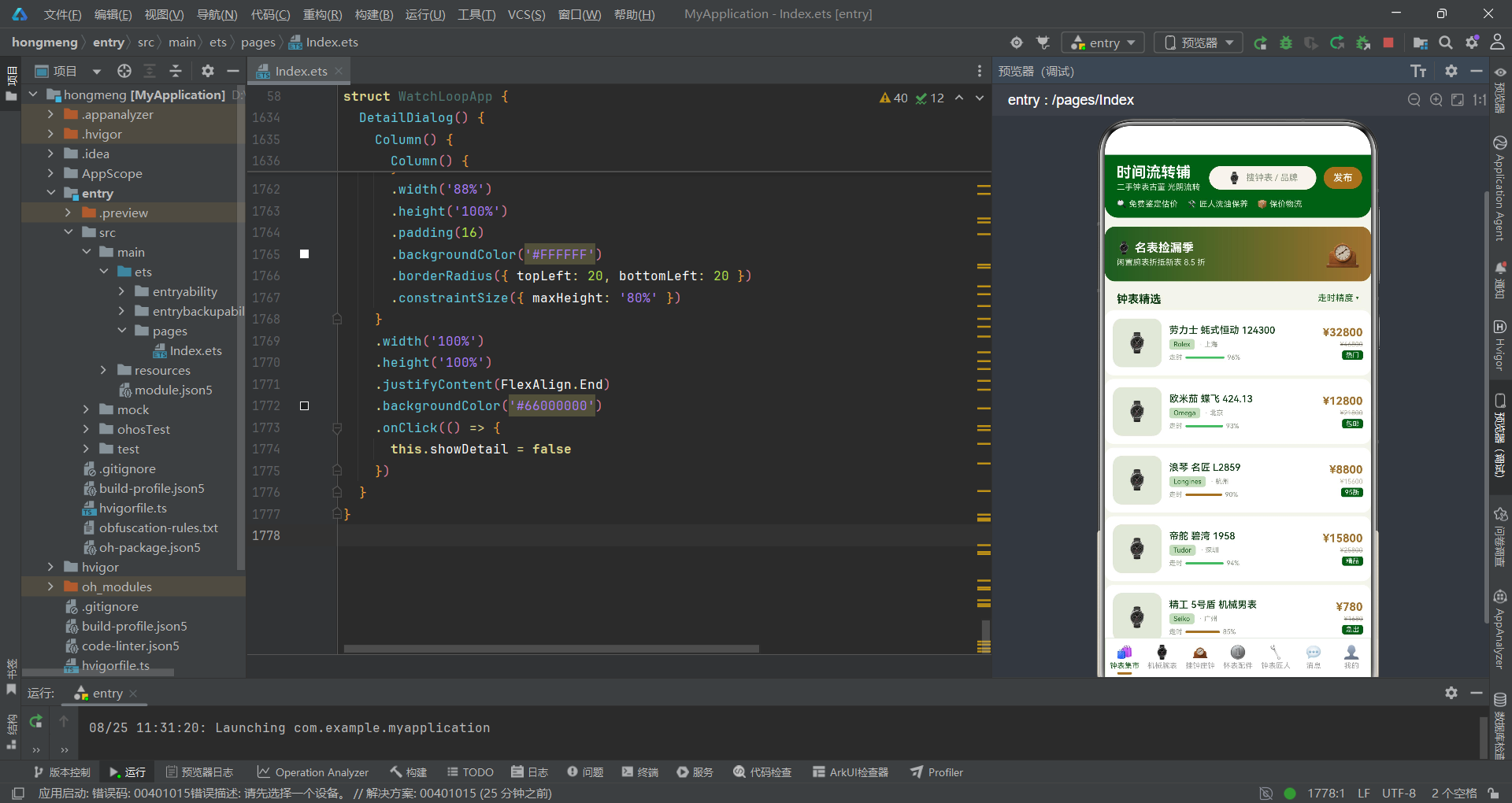
本文以一个二手复古钟表交易平台为案例,完整剖析了基于HarmonyOS ArkTS API 24的复杂电商应用开发实践。从数据模型定义、组件状态管理到页面布局架构,再到多种弹窗交互模式的实现,全面展示了ArkTS声明式UI范式在真实业务场景中的应用能力。应用通过六个接口类型构建了类型安全的数据体系,通过十余个@State变量驱动响应式渲染,通过七个@Builder方法实现模块化页面构建,充分体现了ArkTS"状态驱动+声明式描述"的核心设计理念。
在数据可视化方面,应用巧妙地利用ArkTS的基础组件实现了柱状图、进度条和条件标签等多种可视化效果。柱状图通过Column的高度动态计算和三色分级实现,进度条通过Stack叠加两层Column实现,条件标签通过if语句的分支渲染实现。这些实现无需引入图表库,纯靠ArkTS原生的布局能力和样式属性即可完成,展现了框架在数据可视化方面的灵活性。同时,应用大量使用了scale和animation属性实现呼吸动画效果,为复古钟表的展示增添了动态生命力。
在交互设计方面,应用实现了底部弹出、居中卡片和右侧侧滑三种弹窗模式,覆盖了不同业务场景的交互需求。每种弹窗都采用了"遮罩层 + 内容卡片 + stopPropagation"的标准模式,确保点击遮罩关闭而点击内容不关闭的交互一致性。弹窗间的联动跳转(如详情页跳转鉴定估价)通过先关闭当前弹窗再打开目标弹窗的方式实现,逻辑清晰且状态管理简洁。整体而言,该应用的代码结构清晰、复用性高,为HarmonyOS生态中的复杂业务页面开发提供了有价值的参考范例。

作为“人工智能6S店”的官方数字引擎,为AI开发者与企业提供一个覆盖软硬件全栈、一站式门户。
更多推荐
 1
1 0
0- 0


 已为社区贡献71条内容

所有评论(0)