
HarmonyOS 6 selPlant* 系列安全访问器方法是对在 build() 中通过 this.selectedPlant.name 访问属性,将导致运行时空指针异常
引言
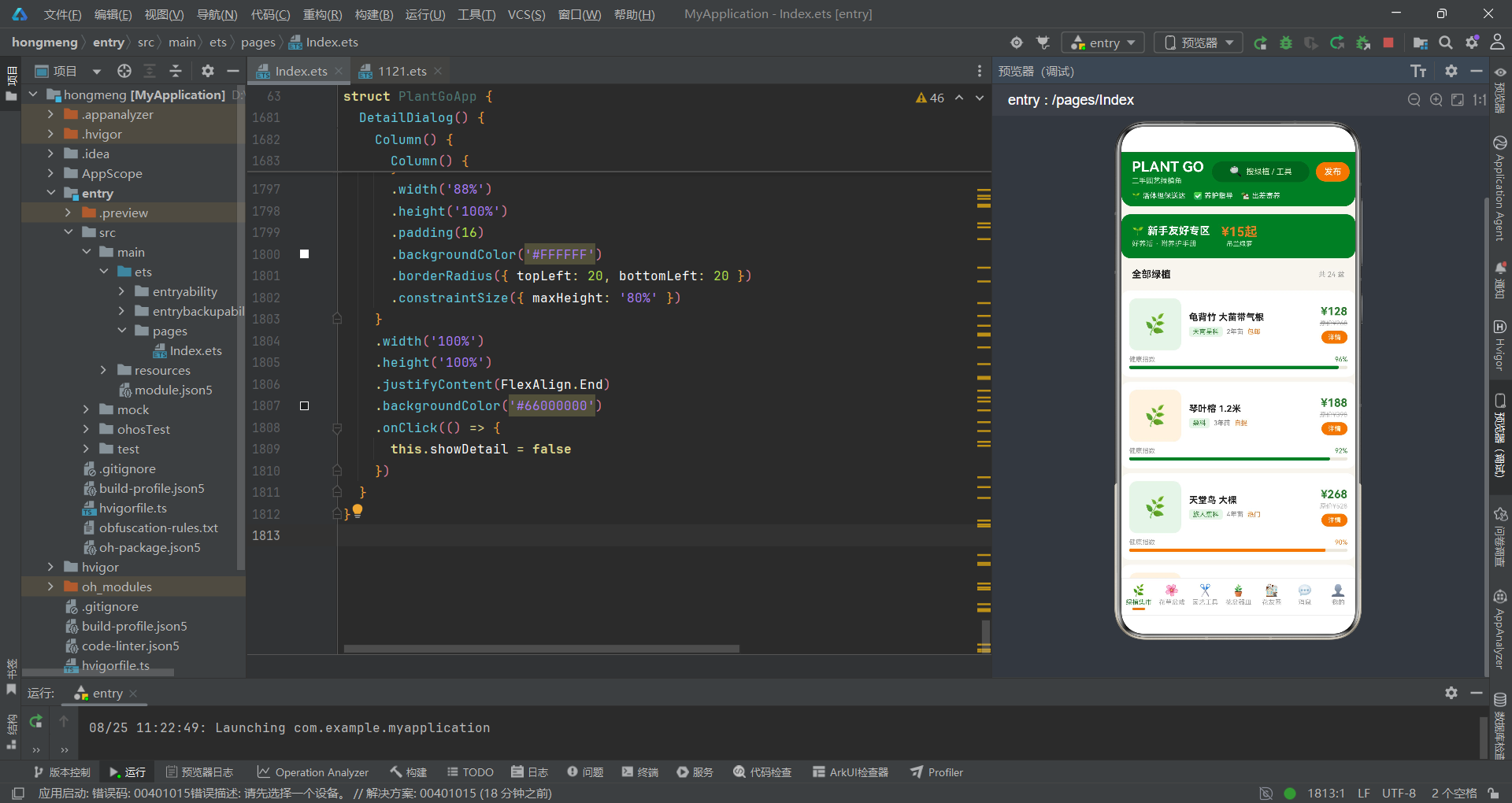
随着城市绿植文化的兴起,越来越多的都市居民开始在阳台、窗台和室内空间培育绿植,这不仅是一种生活美学的追求,更是一种与自然连接的方式。然而,绿植养护本身具有一定的学习门槛,而园艺工具和花盆器皿的购置成本也不容忽视。许多资深花友在升级装备或搬迁时会产生大量闲置绿植和园艺用品,而新手又需要以更低成本入门。本文所分析的这款二手园艺绿植角应用,正是基于 HarmonyOS ArkTS 声明式 UI 框架构建的垂直领域交易平台,它将绿植买卖、出差寄养、花友社区和消息通知融为一体,为园艺爱好者打造了一个充满绿色生机的线上集市。
从技术架构维度审视,该应用与同类型的二手交易平台共享了相似的基础架构,但在业务逻辑和数据模型上展现了鲜明的领域特色。应用以单一入口组件 PlantGoApp 为核心,通过 @Entry 和 @Component 装饰器注册为页面级组件,内部使用十余个 @State 变量构建了完整的状态驱动模型。七个功能 Tab 页和五个弹窗对话框均通过 @Builder 装饰器封装为独立的 UI 构建方法,实现了关注点分离。与烘焙器具应用不同,绿植应用引入了社区互动维度——花友圈 Tab 展示用户发布的帖子,包含点赞数和评论数等社交数据,并提供了花友求助弹窗,使得应用从单纯的交易平台升级为社区型电商。
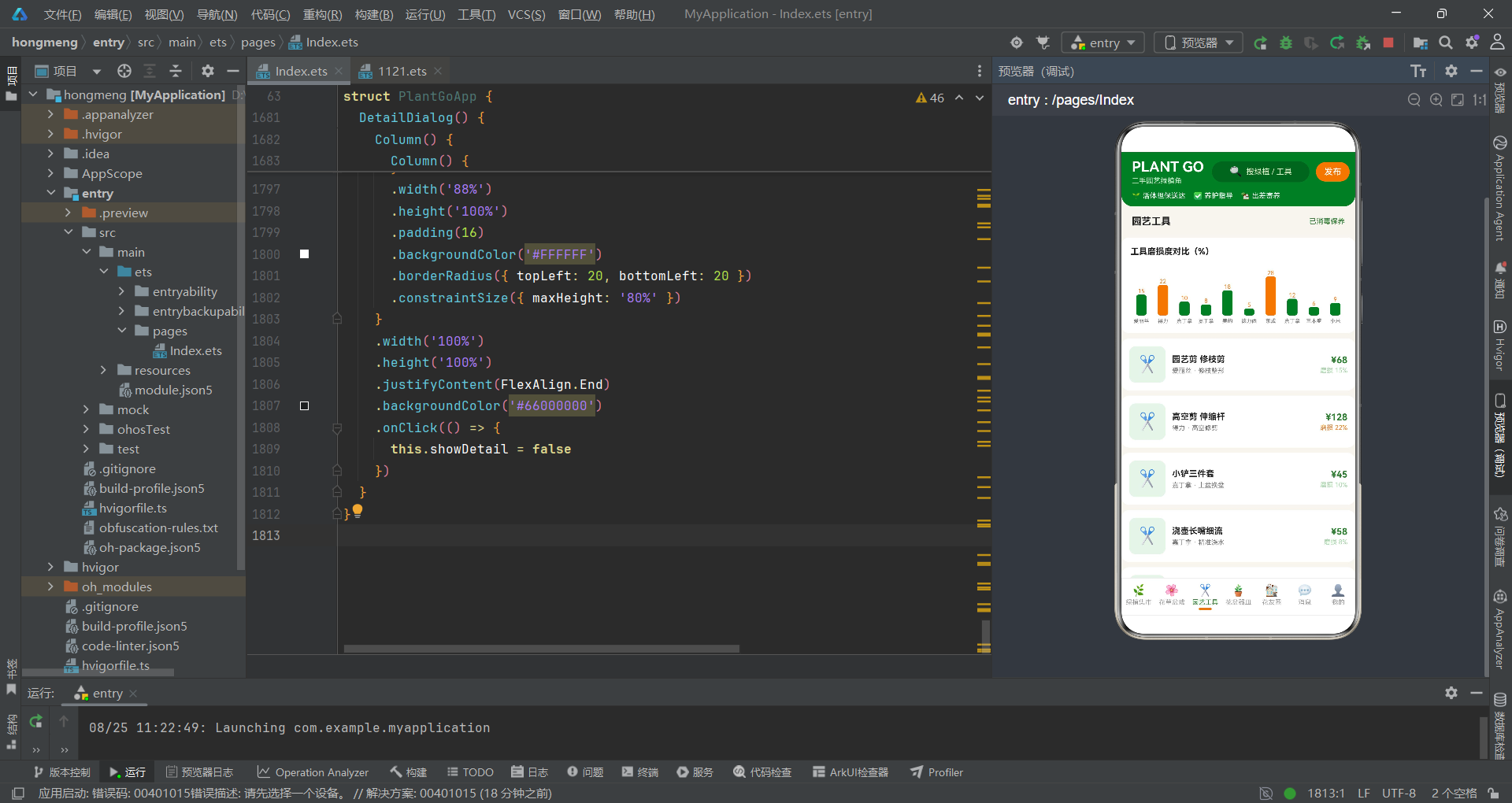
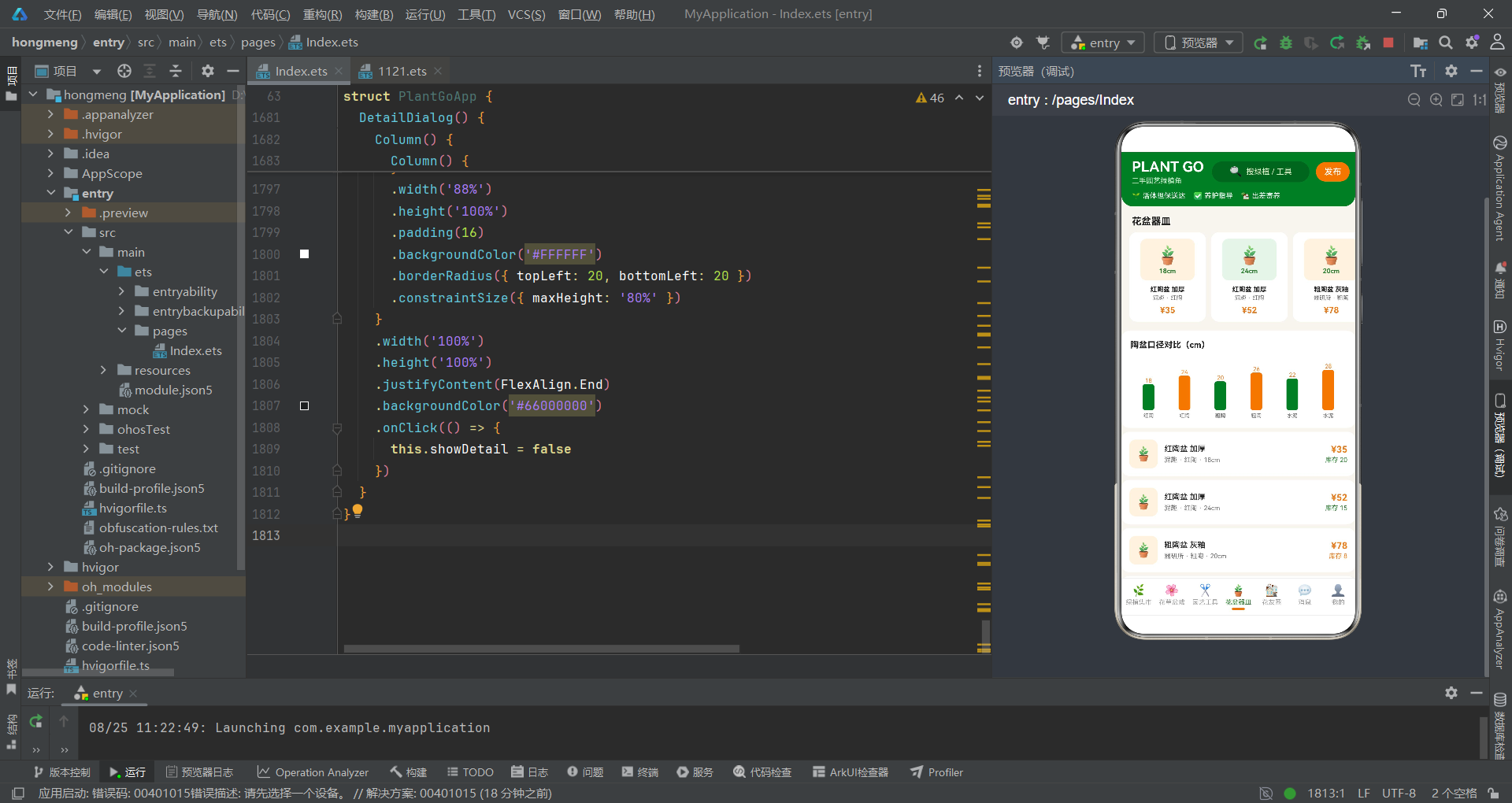
在视觉设计策略上,该应用采用了"清新草绿陶土风"的配色体系。主色调为森林绿 #2E7D32,这种深沉的绿色不仅呼应了绿植主题,更在视觉心理学上传达了健康和生长的意象。强调色为陶土橙 #E67E22,模拟花盆陶土的质感,与绿色形成了经典的互补色搭配。辅助色包括鼠尾草绿 #A5D6A7(用于选中态指示器)和米白底 #F7F5EF(用于页面背景),整体营造出自然温馨的园艺氛围。在数据可视化层面,应用通过健康指数进度条、磨损度柱状图、价格对比图和盆栽口径柱状图等多种图表形式,将植物状态和商品参数转化为直观的视觉信息。
一、领域数据模型与接口架构
应用的数据建模紧密围绕园艺绿植领域的业务需求展开,通过六组 TypeScript interface 定义了覆盖绿植交易全流程的数据结构。每个接口都针对特定的业务场景设计了专属字段,体现了领域驱动设计中"精准建模"的原则。
interface PlantItem {
  name: string
  species: string
  price: number
  originPrice: number
  condition: string
  health: number
  age: string
  tag: string
}

interface FlowerItem {
  name: string
  species: string
  pot: string
  bloom: string
  price: number
  level: string
}

interface ToolItem {
  name: string
  brand: string
  func: string
  wear: number
  price: number
  stock: number
}

interface PotItem {
  name: string
  brand: string
  size: number
  material: string
  price: number
  stock: number
}

interface PostItem {
  name: string
  title: string
  content: string
  likes: number
  comments: number
  time: string
}

interface MessageItem {
  name: string
  content: string
  time: string
  unread: number
  type: string
}
这六组接口的设计反映了不同业务实体的特征差异。PlantItem 中最核心的字段是 health(健康指数,数值型)和 age(苗龄,字符串型),这两个字段直接驱动了列表页健康度进度条和苗龄标签的渲染。与烘焙器具的 wear(磨损度)不同,绿植的 health 是正向指标——数值越高表示越健康,这影响了后续进度条颜色映射的逻辑方向。FlowerItem 增加了 bloom(开花状态)和 level(养护难度等级)字段,前者用于标注当前花况,后者用于区分新手友好和进阶挑战品种。PostItem 是社区功能的核心实体,包含 likes(点赞数)和 comments(评论数)两个社交互动指标,这两个字段在帖子列表中以脉冲动画的形式展示,增强了社交氛围。
二、组件状态体系与数据初始化
入口组件 PlantGoApp 的状态管理设计体现了从用户交互到数据渲染的完整闭环。状态变量覆盖了 Tab 导航、弹窗控制、选中实体和用户输入四个维度,构建了一个自洽的状态机模型。
@Entry
@Component
struct PlantGoApp {
  @State currentTab: number = 0
  @State showPublish: boolean = false
  @State showFoster: boolean = false
  @State showHelp: boolean = false
  @State showDelete: boolean = false
  @State showDetail: boolean = false
  @State selectedPlant: PlantItem | null = null
  @State fosterMonths: number = 1
  @State helpIndex: number = 0
  @State plantType: number = 0
  @State inputPrice: string = ''

  private tabs: string[] = ['绿植集市', '花草盆栽', '园艺工具', '花盆器皿', '花友圈', '消息', '我的']

  private plantList: PlantItem[] = [
    { name: '龟背竹 大苗带气根', species: '天南星科', price: 128, originPrice: 268, condition: '健康', health: 96, age: '2年苗', tag: '包邮' },
    { name: '琴叶榕 1.2米', species: '桑科', price: 188, originPrice: 398, condition: '健康', health: 92, age: '3年苗', tag: '自提' },
    { name: '天堂鸟 大棵', species: '旅人蕉科', price: 268, originPrice: 528, condition: '健康', health: 90, age: '4年苗', tag: '热门' },
    { name: '散尾葵 丛生', species: '棕榈科', price: 98, originPrice: 198, condition: '健康', health: 94, age: '2年苗', tag: '包邮' },
    { name: '橡皮树 黑金刚', species: '桑科', price: 78, originPrice: 158, condition: '健康', health: 95, age: '1年苗', tag: '包邮' },
    { name: '虎皮兰 金边', species: '龙血树属', price: 45, originPrice: 98, condition: '健康', health: 98, age: '1年苗', tag: '包邮' },
    // ... 更多绿植数据
  ]

  private plantTypes: string[] = ['观叶绿植', '开花植物', '多肉仙人', '盆景造型', '水苔苔藓', '种球种苗']
  private helpTypes: string[] = ['黄叶掉叶', '虫害防治', '浇水频率', '换盆施肥', '光照不足']
fosterMonths 状态变量是绿植寄养功能的关键参数,初始值为 1(个月),用户可在弹窗中切换为 1 个月、3 个月或半年。这个变量直接参与 fosterTotal() 费用计算函数的运算,状态变更会即时反映到弹窗中的价格显示上。helpIndex 用于追踪花友求助弹窗中用户选择的问题类型索引,配合 helpTypes 数组实现类型切换。plantType 则用于发布弹窗中的品类选择。这三个索引型状态变量的设计模式一致:初始值为 0,通过 onClick 修改为对应索引值,再通过条件表达式驱动 UI 样式切换。
数据列表方面,plantList 包含了 24 棵绿植的详细信息,从龟背竹、琴叶榕到罗汉松盆景,覆盖了观叶植物、开花植物、多肉和盆景等多个品类。每条数据都包含了 species(科属)字段,这在列表渲染时作为科学分类标签展示,增添了专业感。postList 包含了 10 条花友圈帖子,内容涵盖了开背庆祝、爆花实录、求助问答和造型心得等真实社区场景,likes 和 comments 数值的差异分布使得帖子列表呈现出自然的热度梯度。
三、辅助计算方法与安全访问器
组件内部定义的 private 方法承担了两类职责:数据聚合计算和空安全属性访问。这些方法在 build() 的渲染过程中被同步调用,为 UI 提供计算结果和安全的数据访问路径。
  private maxFlowerPrice(): number {
    let max: number = 0
    for (let i = 0; i < this.flowerList.length; i++) {
      if (this.flowerList[i].price > max) {
        max = this.flowerList[i].price
      }
    }
    return max
  }

  private maxToolWear(): number {
    let max: number = 0
    for (let i = 0; i < this.toolList.length; i++) {
      if (this.toolList[i].wear > max) {
        max = this.toolList[i].wear
      }
    }
    return max
  }

  private fosterTotal(): number {
    let base: number = 0
    if (this.selectedPlant !== null) {
      base = Math.max(20, Math.round(this.selectedPlant.price * 0.1))
    }
    return base * this.fosterMonths
  }
maxFlowerPrice() 和 maxToolWear() 分别找出花草盆栽列表中的最高价格和园艺工具列表中的最大磨损度,这两个最大值在对应的柱状图渲染中用作比例基准。fosterTotal() 实现了寄养费用计算:基础月费为绿植售价的 10%,但设置了 20 元的最低保障价。与烘焙器具应用的租赁费用计算(售价 5%/天)相比,寄养费用按月计算且费率更高(10%),这反映了绿植寄养需要持续的人工养护和场地成本,定价逻辑更加合理。
  private selPlantName(): string {
    if (this.selectedPlant === null) {
      return ''
    }
    return this.selectedPlant.name
  }

  private selPlantSpecies(): string {
    if (this.selectedPlant === null) {
      return ''
    }
    return this.selectedPlant.species
  }

  private selPlantHealth(): number {
    if (this.selectedPlant === null) {
      return 0
    }
    return this.selectedPlant.health
  }
selPlant* 系列安全访问器方法是对 selectedPlant 可空状态的防御性处理。由于 selectedPlant 的类型为 PlantItem | null,在用户尚未点击任何商品详情时,该值为 null。如果直接在 build() 中通过 this.selectedPlant.name 访问属性,将导致运行时空指针异常。这些方法将空值检查封装在内部,对外提供确定性的返回值(空字符串或零),确保了 UI 渲染的安全性。这种模式虽然增加了代码量,但在 ArkTS 强类型的约束下,能有效避免最常见的运行时崩溃。
四、主体框架与头部品牌区
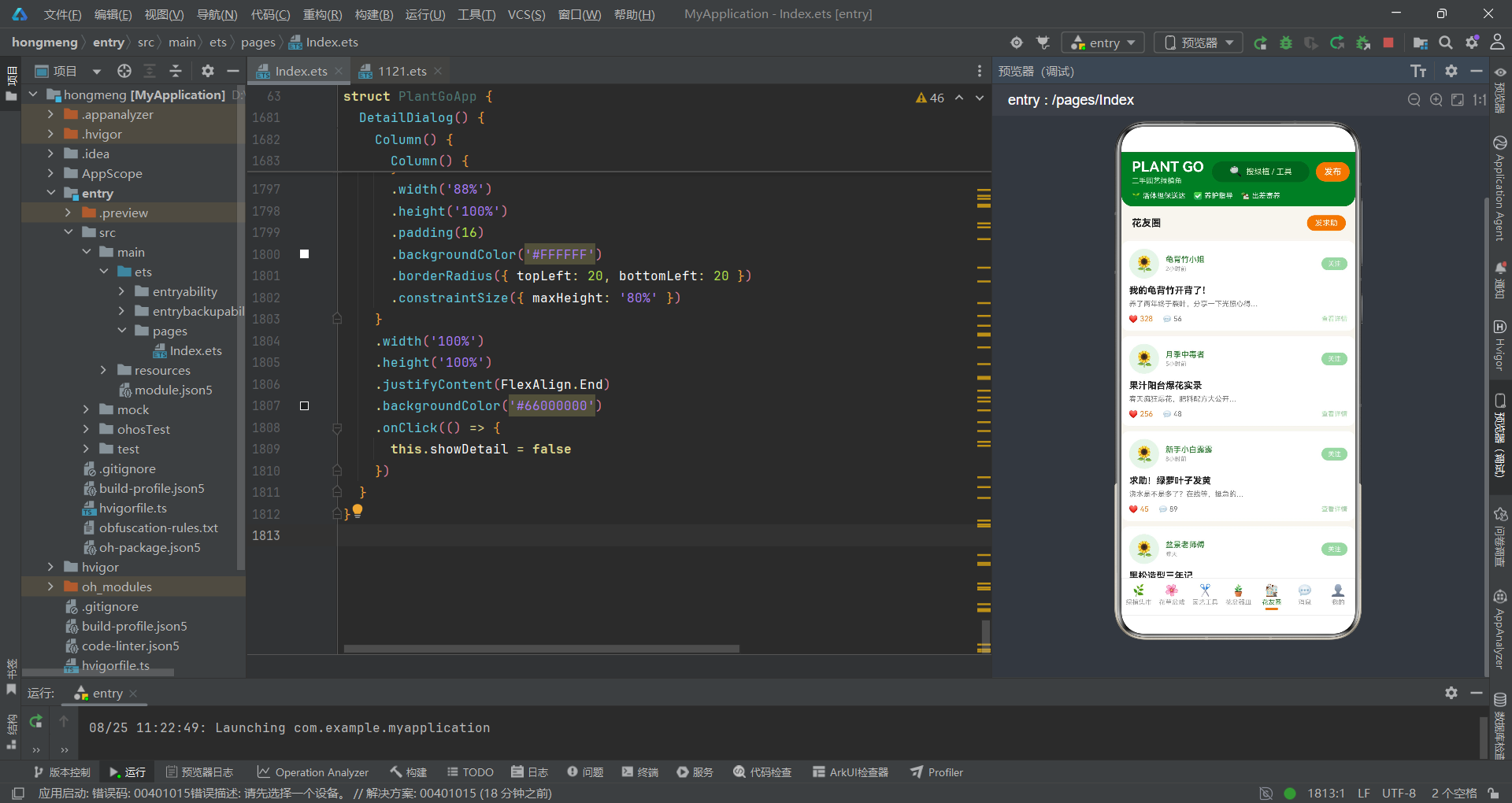
build() 方法构建了应用的三段式骨架结构,头部品牌区在视觉上奠定了整个应用的园艺风格基调。
  build() {
    Column() {
      // 头部:静态园艺市集风格
      Column() {
        Row() {
          Column() {
            Text('PLANT GO')
              .fontSize(22)
              .fontWeight(FontWeight.Bold)
              .fontColor('#FFFFFF')
            Text('二手园艺绿植角')
              .fontSize(11)
              .fontColor('#C8E6C9')
              .margin({ top: 2 })
          }
          .alignItems(HorizontalAlign.Start)

          Column() {
            Row() {
              Text('🔍')
                .fontSize(16)
              Text('搜绿植 / 工具')
                .fontSize(12)
                .fontColor('#DCEDC8')
                .margin({ left: 6 })
            }
            .width(150)
            .height(32)
            .justifyContent(FlexAlign.Center)
            .backgroundColor('#33000000')
            .borderRadius(16)
          }
          .margin({ left: 12 })

          Column() {
            Text('发布')
              .fontSize(13)
              .fontWeight(FontWeight.Medium)
              .fontColor('#FFFFFF')
          }
          .width(52)
          .height(30)
          .justifyContent(FlexAlign.Center)
          .backgroundColor('#E67E22')
          .borderRadius(15)
          .margin({ left: 10 })
          .onClick(() => {
            this.showPublish = true
          })
        }
        .width('100%')
        .padding({ left: 16, right: 16, top: 10, bottom: 10 })
        .justifyContent(FlexAlign.Start)

        Row() {
          Text('🌱 活体担保送达')
            .fontSize(11)
            .fontColor('#FFFFFF')
            .margin({ right: 12 })
          Text('✅ 养护指导')
            .fontSize(11)
            .fontColor('#FFFFFF')
            .margin({ right: 12 })
          Text('🏡 出差寄养')
            .fontSize(11)
            .fontColor('#FFFFFF')
        }
        .width('100%')
        .padding({ left: 16, bottom: 10 })
      }
      .width('100%')
      .backgroundColor('#2E7D32')
      .borderRadius({ bottomLeft: 18, bottomRight: 18 })
头部区域的品牌名"PLANT GO"使用 22 号白色粗体字,副标题"二手园艺绿植角"使用浅绿色 #C8E6C9,在森林绿背景上形成了清晰的主次关系。搜索框采用了与烘焙应用一致的半透明设计(#33000000),但文字颜色使用了 #DCEDC8(淡绿色),比烘焙应用的 #D7CCC8(暖灰)更贴合绿植主题。发布按钮使用陶土橙 #E67E22 作为背景色,与烘焙应用的焦糖橙 #FF8A3D 形成了主题色的差异化。
服务标签栏的三个标签——“活体担保送达”、“养护指导”、“出差寄养”——直接反映了绿植交易的核心痛点:活体运输安全、养护知识支持和出差期间的植物托管。其中"出差寄养"标签预告了应用独有的寄养功能,这个功能通过 FosterDialog 弹窗实现,是绿植应用区别于一般二手交易平台的特色业务模块。
五、内容滚动区与底部导航
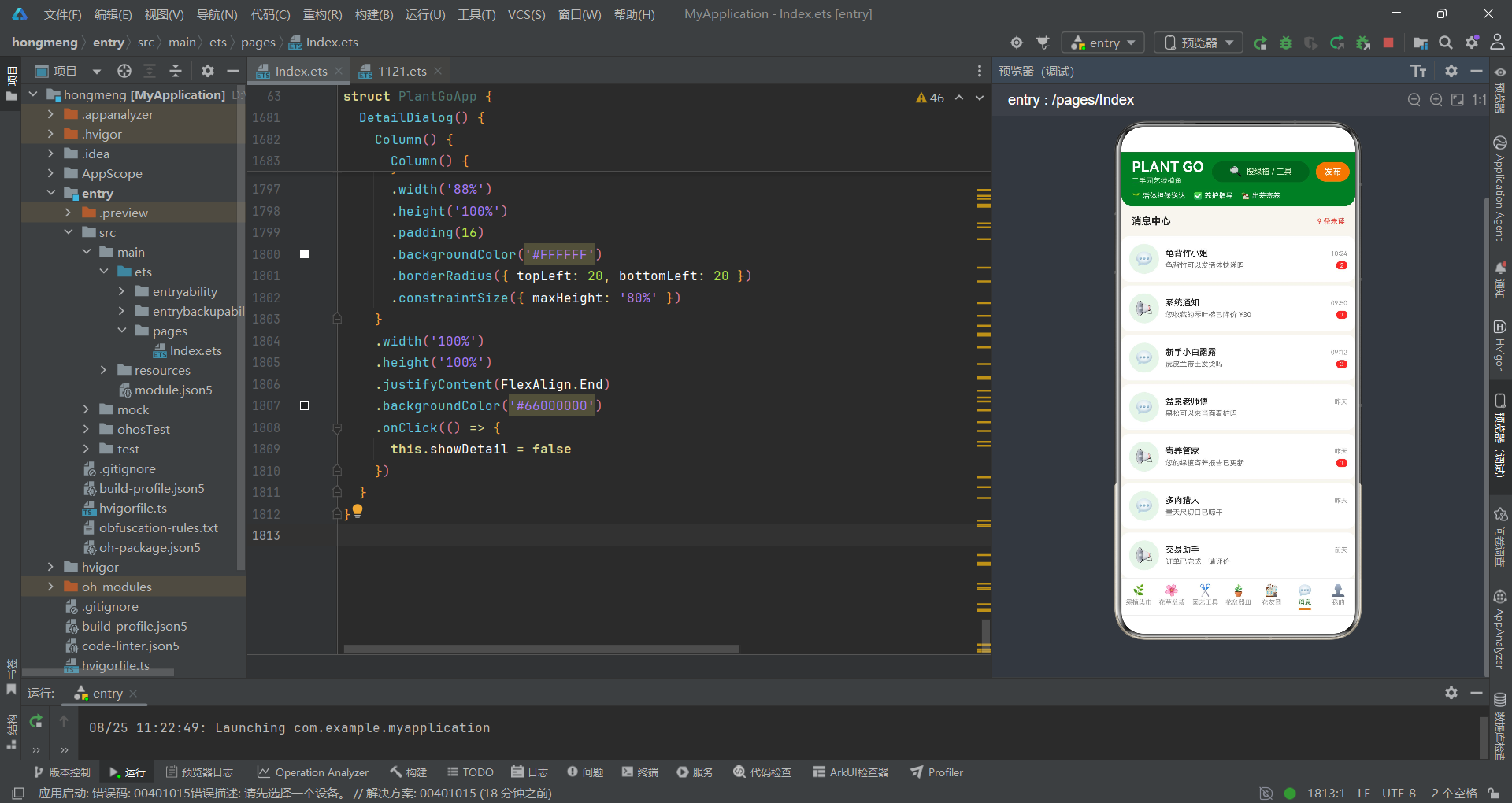
内容区和导航栏的实现采用了与同系列应用一致的模式,但在配色和图标选择上体现了绿植主题的个性。
      // 内容区
      Scroll() {
        Column() {
          if (this.currentTab === 0) {
            this.MarketTab()
          } else if (this.currentTab === 1) {
            this.FlowerTab()
          } else if (this.currentTab === 2) {
            this.ToolTab()
          } else if (this.currentTab === 3) {
            this.PotTab()
          } else if (this.currentTab === 4) {
            this.CommunityTab()
          } else if (this.currentTab === 5) {
            this.MessageTab()
          } else {
            this.MineTab()
          }
        }
        .width('100%')
        .alignItems(HorizontalAlign.Start)
      }
      .layoutWeight(1)
      .scrollBar(BarState.Off)
      .width('100%')

      // 底部 Tab
      Row() {
        ForEach(this.tabs, (tab: string, index: number) => {
          Column() {
            Text(this.tabIcon(index))
              .fontSize(18)
              .fontColor(this.currentTab === index ? '#2E7D32' : '#9E9E9E')
            Text(tab)
              .fontSize(10)
              .fontColor(this.currentTab === index ? '#2E7D32' : '#9E9E9E')
              .margin({ top: 2 })
            if (this.currentTab === index) {
              Column()
                .width(20)
                .height(3)
                .backgroundColor('#E67E22')
                .borderRadius(2)
                .margin({ top: 3 })
            } else {
              Column()
                .width(20)
                .height(3)
                .backgroundColor('#00000000')
                .margin({ top: 3 })
            }
          }
          .justifyContent(FlexAlign.Center)
          .layoutWeight(1)
          .onClick(() => {
            this.currentTab = index
          })
        }, (tab: string) => tab)
      }
      .width('100%')
      .height(58)
      .backgroundColor('#FFFFFF')
      .border({ width: 1, color: '#EEEEEE', radius: 0 })
    }
    .width('100%')
    .height('100%')
    .backgroundColor('#F7F5EF')
底部导航栏的选中态颜色使用森林绿 #2E7D32,选中指示器使用陶土橙 #E67E22,这两色的组合构成了应用的主题色对。图标选择上,七个 Tab 分别使用了 🌿(绿植集市)、🌸(花草盆栽)、✂️(园艺工具)、🪴(花盆器皿)、🏘️(花友圈)、💬(消息)和 👤(我的),每个图标都直观地对应了其功能含义。页面背景色为米白 #F7F5EF,比纯白色更柔和,在长时间浏览时对眼睛更加友好,也更贴合园艺的自然主题。
tabIcon 方法的实现简洁明了,通过索引从预定义的 emoji 数组中返回对应图标。这种基于数组查表的图标映射方式虽然简单,但在应用图标数量固定且数量不多的情况下,是最高效的实现方案。
  private tabIcon(index: number): string {
    let icons: string[] = ['🌿', '🌸', '✂️', '🪴', '🏘️', '💬', '👤']
    return icons[index]
  }
六、绿植集市与健康指数可视化
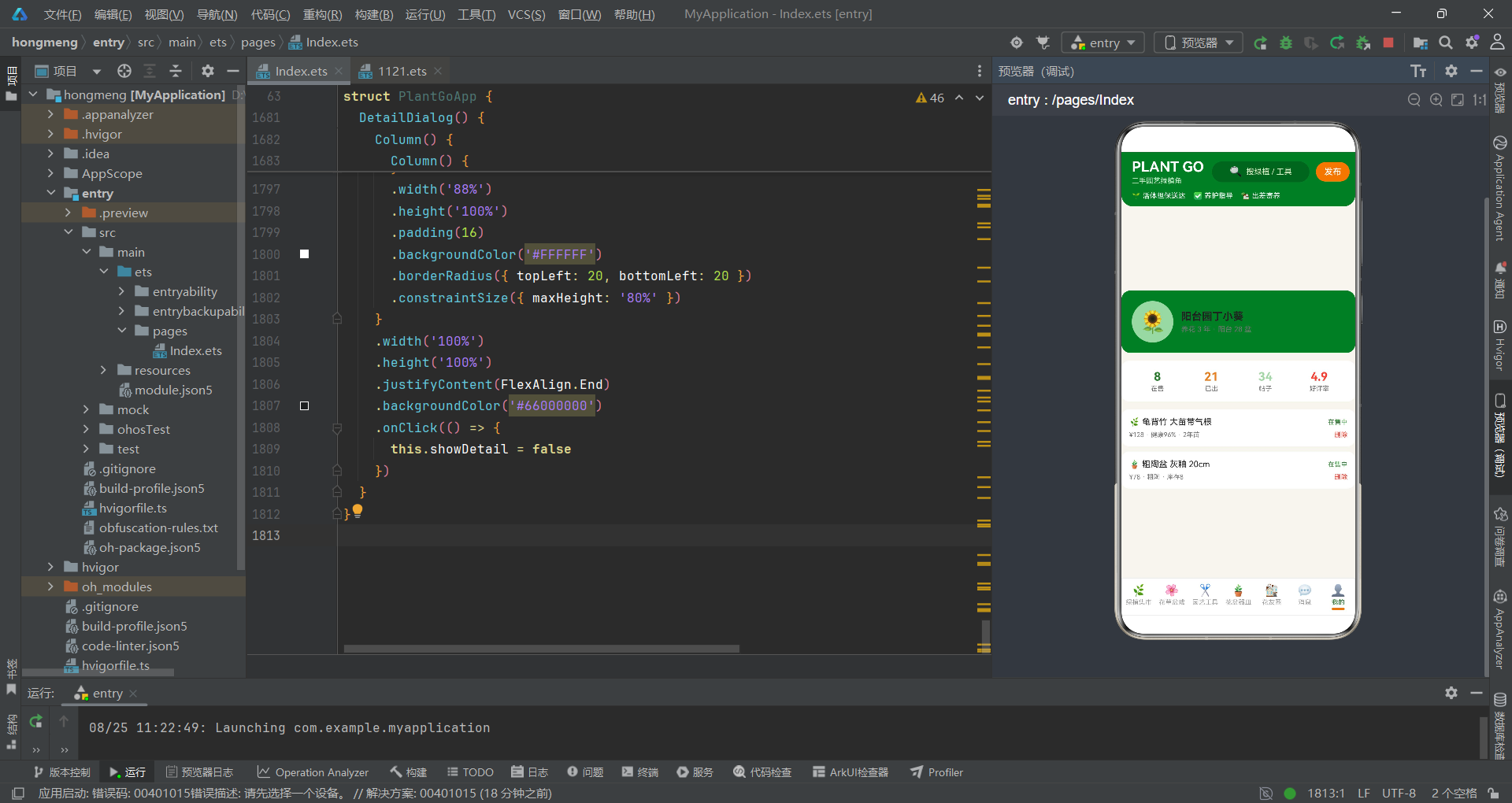
绿植集市是应用的首屏 Tab,通过行式列表展示 24 棵待售绿植。每个列表项的核心可视化元素是健康指数进度条,它使用 Stack 层叠布局将绿植的健康状态转化为直观的颜色条。
  @Builder
  MarketTab() {
    Column() {
      Row() {
        Column() {
          Text('🌱 新手友好专区')
            .fontSize(16)
            .fontWeight(FontWeight.Bold)
            .fontColor('#FFFFFF')
          Text('好养活 · 附养护手册')
            .fontSize(11)
            .fontColor('#C8E6C9')
            .margin({ top: 4 })
        }
        .alignItems(HorizontalAlign.Start)

        Column() {
          Text('¥15起')
            .fontSize(18)
            .fontWeight(FontWeight.Bold)
            .fontColor('#E67E22')
            .scale({ x: 1.1, y: 1.1 })
            .animation({ duration: 800, iterations: -1, curve: Curve.EaseInOut })
          Text('吊兰绿萝')
            .fontSize(10)
            .fontColor('#C8E6C9')
            .margin({ top: 2 })
        }
        .margin({ left: 20 })
      }
      .width('100%')
      .padding(16)
      .backgroundColor('#2E7D32')
      .borderRadius(14)
      .margin({ top: 12, left: 12, right: 12 })
页面顶部的推广卡片展示"新手友好专区",起售价 ¥15 以陶土橙大字配合脉冲缩放动画呈现,与烘焙应用的 ¥3980 打包价形成了鲜明的价格定位差异——绿植应用面向的是低门槛的大众消费场景。推广文案"好养活 · 附养护手册"直接回应了新手的核心顾虑:成活率和养护知识。
      ForEach(this.plantList, (item: PlantItem, index: number) => {
        Column() {
          Row() {
            Column() {
              Text('🌿')
                .fontSize(32)
            }
            .width(80)
            .height(80)
            .justifyContent(FlexAlign.Center)
            .backgroundColor(index % 2 === 0 ? '#E8F5E9' : '#FFF3E0')
            .borderRadius(12)

            Column() {
              Text(item.name)
                .fontSize(14)
                .fontWeight(FontWeight.Bold)
                .fontColor('#212121')
                .maxLines(1)
                .textOverflow({ overflow: TextOverflow.Ellipsis })
              Row() {
                Text(item.species)
                  .fontSize(10)
                  .fontColor('#2E7D32')
                  .padding({ left: 6, right: 6, top: 2, bottom: 2 })
                  .backgroundColor('#E8F5E9')
                  .borderRadius(4)
                Text(item.age)
                  .fontSize(10)
                  .fontColor('#757575')
                  .margin({ left: 6 })
                Text(item.tag)
                  .fontSize(10)
                  .fontColor('#E67E22')
                  .margin({ left: 6 })
              }
              .margin({ top: 6 })
            }
            .layoutWeight(1)
            .alignItems(HorizontalAlign.Start)
            .margin({ left: 12 })

            Column() {
              Text('¥' + item.price)
                .fontSize(17)
                .fontWeight(FontWeight.Bold)
                .fontColor('#2E7D32')
              Text('原价¥' + item.originPrice)
                .fontSize(10)
                .fontColor('#BDBDBD')
                .decoration({ type: TextDecorationType.LineThrough })
                .margin({ top: 2 })
              Text('详情')
                .fontSize(10)
                .fontColor('#FFFFFF')
                .padding({ left: 10, right: 10, top: 4, bottom: 4 })
                .backgroundColor('#E67E22')
                .borderRadius(10)
                .margin({ top: 6 })
                .onClick(() => {
                  this.selectedPlant = item
                  this.showDetail = true
                })
            }
            .alignItems(HorizontalAlign.End)
          }
          .width('100%')

          Row() {
            Text('健康指数')
              .fontSize(10)
              .fontColor('#9E9E9E')
            Column()
              .layoutWeight(1)
            Text(item.health + '%')
              .fontSize(10)
              .fontColor(item.health > 90 ? '#2E7D32' : '#E67E22')
          }
          .width('100%')
          .margin({ top: 8 })
          Stack({ alignContent: Alignment.Start }) {
            Column()
              .width('100%')
              .height(5)
              .backgroundColor('#EAE7DD')
              .borderRadius(3)
            Column()
              .width(item.health + '%')
              .height(5)
              .backgroundColor(item.health > 90 ? '#2E7D32' : '#E67E22')
              .borderRadius(3)
          }
          .width('100%')
          .height(5)
          .margin({ top: 4 })
        }
        .width('100%')
        .padding(12)
        .backgroundColor('#FFFFFF')
        .borderRadius(12)
        .margin({ left: 12, right: 12, top: 8 })
      }, (item: PlantItem, index: number) => item.name + index)
    }
    .width('100%')
    .padding({ bottom: 20 })
  }
健康指数进度条的实现逻辑值得深入分析。进度条宽度直接使用 item.health + '%',即健康指数值本身就是百分比宽度——health 为 96 时进度条宽度为 96%。颜色映射的条件是 item.health > 90:高于 90 显示森林绿(健康),低于 90 显示陶土橙(需关注)。这种"正向高值为绿色"的映射方式与烘焙应用的磨损度进度条恰好相反——烘焙应用中磨损度低(100-wear 高)才显示绿色,因为磨损度是负向指标。这种方向性的差异体现了数据语义对可视化设计的影响。
图标区的交替背景色使用了 #E8F5E9(极浅绿)和 #FFF3E0(极浅橙),分别对应绿植和陶土的主题色,比烘焙应用的奶油橙和抹茶绿搭配更加柔和。品牌标签使用 #2E7D32 绿色文字配 #E8F5E9 浅绿背景,形成同色系标签效果,强化了植物科属的科学属性。详情按钮使用陶土橙背景,与价格文字的绿色形成对比,在视觉上引导用户点击查看详情。
七、花草盆栽双列网格与价格柱状图
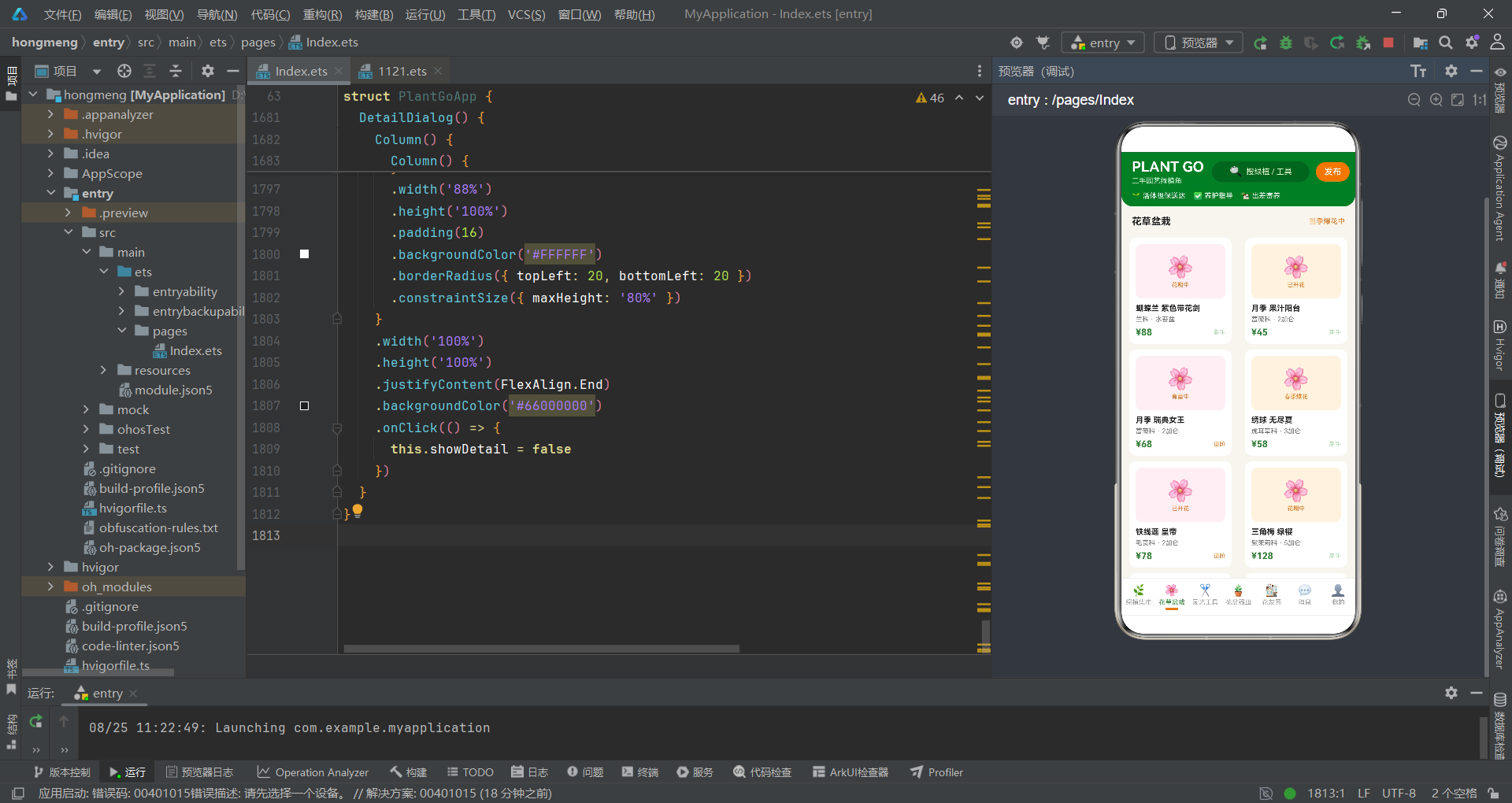
花草盆栽 Tab 采用了双列网格布局展示开花植物,并在底部附带了价格对比柱状图,将商品参数可视化推向了更丰富的层次。
  @Builder
  FlowerTab() {
    Column() {
      Flex({ wrap: FlexWrap.Wrap, justifyContent: FlexAlign.SpaceBetween }) {
        ForEach(this.flowerList, (fl: FlowerItem, index: number) => {
          Column() {
            Column() {
              Text('🌸')
                .fontSize(34)
              Text(fl.bloom)
                .fontSize(9)
                .fontColor('#E67E22')
                .margin({ top: 2 })
            }
            .width('100%')
            .height(84)
            .justifyContent(FlexAlign.Center)
            .backgroundColor(index % 2 === 0 ? '#FDEFF4' : '#FFF3E0')
            .borderRadius(10)

            Text(fl.name)
              .fontSize(12)
              .fontWeight(FontWeight.Bold)
              .fontColor('#212121')
              .maxLines(1)
              .textOverflow({ overflow: TextOverflow.Ellipsis })
              .margin({ top: 8 })
              .width('100%')
            Text(fl.species + ' · ' + fl.pot)
              .fontSize(10)
              .fontColor('#757575')
              .margin({ top: 4 })
              .width('100%')
            Row() {
              Text('¥' + fl.price)
                .fontSize(14)
                .fontWeight(FontWeight.Bold)
                .fontColor('#2E7D32')
              Column()
                .layoutWeight(1)
              Text(fl.level)
                .fontSize(9)
                .fontColor(fl.level === '进阶' ? '#E67E22' : '#A5D6A7')
            }
            .width('100%')
            .margin({ top: 6 })
          }
          .width('47%')
          .padding(10)
          .backgroundColor('#FFFFFF')
          .borderRadius(12)
          .margin({ top: 8 })
          .onClick(() => {
            this.showDetail = true
          })
        }, (fl: FlowerItem, index: number) => 'fl' + fl.name + index)
      }
      .width('100%')
      .padding({ left: 12, right: 12 })
双列网格中的每个卡片包含了图标区(花朵 emoji 和开花状态)、植物名称、科属和盆器信息、价格和养护难度等级。图标区高度为 84 像素,比烘焙应用烤箱卡片的 78 像素更高,为花朵 emoji 的 34 号大字留出了充分的展示空间。开花状态标签(如"花期中"、“育蕾中”、“已开花”)以陶土橙色显示在图标区底部,让用户在浏览时能快速了解每株花当前的开放状况。养护难度等级使用了条件颜色:进阶品种显示陶土橙,新手品种显示鼠尾草绿,通过颜色差异帮助新手用户筛选适合自己的品种。
      Column() {
        Text('盆栽价格对比(¥)')
          .fontSize(13)
          .fontWeight(FontWeight.Bold)
          .fontColor('#212121')
          .width('100%')
        Row() {
          ForEach(this.flowerList, (fl: FlowerItem, index: number) => {
            Column() {
              Text(fl.price + '')
                .fontSize(9)
                .fontColor('#2E7D32')
              Column()
                .width(14)
                .height(fl.price / this.maxFlowerPrice() * 62)
                .backgroundColor(index % 2 === 0 ? '#2E7D32' : '#E67E22')
                .borderRadius(4)
              Text(fl.bloom)
                .fontSize(8)
                .fontColor('#757575')
                .maxLines(1)
                .margin({ top: 4 })
            }
            .layoutWeight(1)
          }, (fl: FlowerItem, index: number) => 'fp' + fl.name + index)
        }
        .alignItems(VerticalAlign.Bottom)
        .height(98)
        .width('100%')
        .margin({ top: 8 })
      }
      .width('100%')
      .padding(14)
      .backgroundColor('#FFFFFF')
      .borderRadius(12)
      .margin({ left: 12, right: 12, top: 14 })
    }
    .width('100%')
    .padding({ bottom: 20 })
  }
价格对比柱状图的实现模式与厨师机容量柱状图一致,但柱体宽度更窄(14 像素 vs 16 像素),因为花草盆栽列表有 12 个数据项,比厨师机的 10 个更多,需要更窄的柱体以避免溢出。柱体颜色在森林绿和陶土橙之间交替,与页面主题色保持一致。柱体底部标签使用的是开花状态 fl.bloom 而非品牌名,这是因为花草盆栽的消费者更关注花况而非品牌。maxFlowerPrice() 作为分母将所有价格归一化到 0-62 像素的高度范围内,使得价格差异在视觉上一目了然。
八、花友圈社区帖子与社交互动
花友圈 Tab 是该应用区别于纯交易型平台的社区功能模块,展示了花友发布的帖子,包含点赞和评论两种社交互动指标,并通过脉冲动画增强社交氛围。
  @Builder
  CommunityTab() {
    Column() {
      Row() {
        Text('花友圈')
          .fontSize(15)
          .fontWeight(FontWeight.Bold)
          .fontColor('#212121')
        Column()
          .layoutWeight(1)
        Text('发求助')
          .fontSize(11)
          .fontColor('#FFFFFF')
          .padding({ left: 12, right: 12, top: 5, bottom: 5 })
          .backgroundColor('#E67E22')
          .borderRadius(14)
          .scale({ x: 1.05, y: 1.05 })
          .animation({ duration: 700, iterations: -1, curve: Curve.EaseInOut })
          .onClick(() => {
            this.showHelp = true
          })
      }
      .width('100%')
      .padding({ left: 16, right: 16, top: 14, bottom: 8 })
页面顶部的"发求助"按钮使用陶土橙背景配合脉冲缩放动画,点击后打开花友求助弹窗。这个按钮的脉冲效果比推广卡片中的价格脉冲更加微妙(1.05 倍 vs 1.1 倍),因为它的功能是引导操作而非吸引注意力到价格上。求助功能是社区互动的入口,用户可以发布黄叶掉叶、虫害防治等常见问题,寻求其他花友的帮助。
      ForEach(this.postList, (post: PostItem, index: number) => {
        Column() {
          Row() {
            Column() {
              Text('🌻')
                .fontSize(24)
            }
            .width(46)
            .height(46)
            .justifyContent(FlexAlign.Center)
            .backgroundColor('#E8F5E9')
            .borderRadius(23)

            Column() {
              Text(post.name)
                .fontSize(12)
                .fontWeight(FontWeight.Medium)
                .fontColor('#2E7D32')
              Text(post.time)
                .fontSize(9)
                .fontColor('#9E9E9E')
                .margin({ top: 2 })
            }
            .layoutWeight(1)
            .alignItems(HorizontalAlign.Start)
            .margin({ left: 10 })

            Text('关注')
              .fontSize(10)
              .fontColor('#FFFFFF')
              .padding({ left: 10, right: 10, top: 4, bottom: 4 })
              .backgroundColor('#A5D6A7')
              .borderRadius(10)
          }
          .width('100%')

          Text(post.title)
            .fontSize(14)
            .fontWeight(FontWeight.Bold)
            .fontColor('#212121')
            .margin({ top: 10 })
            .width('100%')
          Text(post.content)
            .fontSize(11)
            .fontColor('#757575')
            .maxLines(2)
            .textOverflow({ overflow: TextOverflow.Ellipsis })
            .margin({ top: 6 })
            .width('100%')

          Row() {
            Text('❤️ ' + post.likes)
              .fontSize(11)
              .fontColor('#E67E22')
              .scale({ x: 1.05, y: 1.05 })
              .animation({ duration: 900, iterations: -1, curve: Curve.EaseInOut })
            Text('💬 ' + post.comments)
              .fontSize(11)
              .fontColor('#757575')
              .margin({ left: 16 })
            Column()
              .layoutWeight(1)
            Text('查看详情')
              .fontSize(10)
              .fontColor('#A5D6A7')
          }
          .width('100%')
          .margin({ top: 10 })
        }
        .width('100%')
        .padding(12)
        .backgroundColor('#FFFFFF')
        .borderRadius(12)
        .margin({ left: 12, right: 12, top: 8 })
      }, (post: PostItem, index: number) => 'post' + post.title + index)
    }
    .width('100%')
    .padding({ bottom: 20 })
  }
帖子卡片的结构分为三个层次:顶部是用户头像(向日葵 emoji)、用户名(绿色文字)和关注按钮(鼠尾草绿胶囊);中部是帖子标题(粗体)和内容摘要(两行截断);底部是点赞数和评论数。点赞数 ❤️ post.likes 使用陶土橙色并配合 1.05 倍脉冲动画,动画周期为 900ms,比其他脉冲动画稍长,营造出心跳般的节奏感。评论数使用💬 emoji 配灰色文字,不做动画处理,通过动静对比突出了点赞的社交激励属性。帖子内容使用 maxLines(2) 和 textOverflow 实现两行截断,在有限的卡片空间内展示了足够的信息预览。
"关注"按钮使用 #A5D6A7 鼠尾草绿背景配白色文字,这是一个非主题色的辅助色,在视觉上不与主要的操作按钮(发布、租赁等)形成竞争,符合其"可选操作"的定位。
九、绿植寄养弹窗与月度费用计算
绿植寄养是该应用最具特色的业务功能,它解决了花友出差或短期无法养护植物时的托管需求。寄养弹窗采用居中显示模式,通过月数选择和费用脉冲动画引导用户完成寄养预约。
  @Builder
  FosterDialog() {
    Column() {
      Column() {
        Text('出差绿植寄养')
          .fontSize(16)
          .fontWeight(FontWeight.Bold)
          .fontColor('#212121')

        Text(this.selPlantName() === '' ? '龟背竹 大苗带气根' : this.selPlantName())
          .fontSize(13)
          .fontColor('#616161')
          .margin({ top: 8 })

        Text('¥ ' + this.fosterTotal())
          .fontSize(30)
          .fontWeight(FontWeight.Bold)
          .fontColor('#2E7D32')
          .margin({ top: 12 })
          .scale({ x: 1.08, y: 1.08 })
          .animation({ duration: 700, iterations: -1, curve: Curve.EaseInOut })

        Row() {
          Text('寄养月数')
            .fontSize(12)
            .fontColor('#757575')
          Column()
            .layoutWeight(1)
          Text(this.fosterMonths + ' 个月')
            .fontSize(12)
            .fontColor('#2E7D32')
            .fontWeight(FontWeight.Bold)
        }
        .width('100%')
        .margin({ top: 14 })

        Row() {
          Column() {
            Text('1个月')
              .fontSize(12)
              .fontColor(this.fosterMonths === 1 ? '#FFFFFF' : '#616161')
          }
          .padding({ left: 16, right: 16, top: 8, bottom: 8 })
          .backgroundColor(this.fosterMonths === 1 ? '#2E7D32' : '#F5F5F5')
          .borderRadius(18)
          .onClick(() => {
            this.fosterMonths = 1
          })

          Column() {
            Text('3个月')
              .fontSize(12)
              .fontColor(this.fosterMonths === 3 ? '#FFFFFF' : '#616161')
          }
          .padding({ left: 16, right: 16, top: 8, bottom: 8 })
          .backgroundColor(this.fosterMonths === 3 ? '#2E7D32' : '#F5F5F5')
          .borderRadius(18)
          .margin({ left: 10 })
          .onClick(() => {
            this.fosterMonths = 3
          })

          Column() {
            Text('半年')
              .fontSize(12)
              .fontColor(this.fosterMonths === 6 ? '#FFFFFF' : '#616161')
          }
          .padding({ left: 16, right: 16, top: 8, bottom: 8 })
          .backgroundColor(this.fosterMonths === 6 ? '#2E7D32' : '#F5F5F5')
          .borderRadius(18)
          .margin({ left: 10 })
          .onClick(() => {
            this.fosterMonths = 6
          })
        }
        .margin({ top: 10 })

        Row() {
          Text('每周发送养护照片 · 伤亡全赔')
            .fontSize(10)
            .fontColor('#9E9E9E')
        }
        .margin({ top: 10 })
寄养费用以 30 号大字森林绿显示,配合 1.08 倍脉冲缩放和 700ms 无限循环动画,视觉冲击力与租赁弹窗的费用展示一致,但颜色从焦糖橙变为了森林绿,保持了主题一致性。月数选择提供了 1 个月、3 个月和半年三个选项,选中态使用森林绿填充。费用计算公式为 Math.max(20, Math.round(this.selectedPlant.price * 0.1)) * this.fosterMonths,即基础月费为售价的 10% 且不低于 20 元。以龟背竹(售价 128 元)为例:基础月费 = max(20, round(128 * 0.1)) = max(20, 13) = 20 元,选择 3 个月则总费用为 60 元。
服务承诺"每周发送养护照片 · 伤亡全赔"以小字灰色显示在选项下方,这是寄养服务的核心信任建立机制——透明化的养护过程和全额赔付承诺,有效降低了用户将心爱植物托付给陌生人的心理门槛。
        Row() {
          Text('确认寄养')
            .fontSize(14)
            .fontWeight(FontWeight.Bold)
            .fontColor('#FFFFFF')
            .textAlign(TextAlign.Center)
            .layoutWeight(1)
            .padding({ top: 10, bottom: 10 })
            .backgroundColor('#2E7D32')
            .borderRadius(22)
            .onClick(() => {
              this.showFoster = false
            })

          Text('取消')
            .fontSize(14)
            .fontColor('#757575')
            .textAlign(TextAlign.Center)
            .layoutWeight(1)
            .padding({ top: 10, bottom: 10 })
            .backgroundColor('#F5F5F5')
            .borderRadius(22)
            .margin({ left: 10 })
            .onClick(() => {
              this.showFoster = false
            })
        }
        .width('100%')
        .margin({ top: 16 })
      }
      .width('86%')
      .padding(18)
      .backgroundColor('#FFFFFF')
      .borderRadius(16)
      .constraintSize({ maxHeight: '80%' })
      .onClick((event: ClickEvent) => {
        event.stopPropagation()
      })
    }
    .width('100%')
    .height('100%')
    .justifyContent(FlexAlign.Center)
    .backgroundColor('#66000000')
    .onClick(() => {
      this.showFoster = false
    })
  }
弹窗的双按钮设计与租赁弹窗一致,确认按钮使用主题色(森林绿),取消按钮使用浅灰。弹窗居中显示通过 justifyContent(FlexAlign.Center) 实现,内容卡片宽度为 86%,四角圆角 16px,遮罩层为 40% 不透明度的黑色。constraintSize({ maxHeight: '80%' }) 限制了弹窗最大高度为屏幕的 80%,当内容过多时可以内部滚动而不遮挡整个屏幕。
十、花友求助弹窗与问题分类
花友求助弹窗是社区功能的延伸,它让用户能够快速发布植物养护问题,寻求花友圈的帮助。弹窗提供了问题类型选择和描述输入两个核心交互。
  @Builder
  HelpDialog() {
    Column() {
      Column() {
        Text('发布花友求助')
          .fontSize(16)
          .fontWeight(FontWeight.Bold)
          .fontColor('#212121')

        Text('选择问题类型')
          .fontSize(12)
          .fontColor('#757575')
          .margin({ top: 14 })
          .width('100%')

        Row() {
          ForEach(this.helpTypes, (t: string, index: number) => {
            Text(t)
              .fontSize(11)
              .fontColor(this.helpIndex === index ? '#FFFFFF' : '#616161')
              .padding({ left: 10, right: 10, top: 6, bottom: 6 })
              .backgroundColor(this.helpIndex === index ? '#E67E22' : '#F5F5F5')
              .borderRadius(13)
              .margin({ right: 8 })
              .onClick(() => {
                this.helpIndex = index
              })
          }, (t: string) => t)
        }
        .margin({ top: 8 })

        Text('问题描述')
          .fontSize(12)
          .fontColor('#757575')
          .margin({ top: 14 })
          .width('100%')
        Text('叶子边缘发黄,一周浇两次水,放在北阳台…')
          .fontSize(13)
          .fontColor('#212121')
          .padding(12)
          .backgroundColor('#F5F5F5')
          .borderRadius(10)
          .width('100%')
          .margin({ top: 8 })

        Row() {
          Text('发布后花友将快速响应')
            .fontSize(10)
            .fontColor('#9E9E9E')
        }
        .margin({ top: 10 })

        Text('发布求助')
          .fontSize(14)
          .fontWeight(FontWeight.Bold)
          .fontColor('#FFFFFF')
          .width('100%')
          .textAlign(TextAlign.Center)
          .padding({ top: 10, bottom: 10 })
          .backgroundColor('#E67E22')
          .borderRadius(22)
          .margin({ top: 14 })
          .onClick(() => {
            this.showHelp = false
          })
      }
      .width('86%')
      .padding(18)
      .backgroundColor('#FFFFFF')
      .borderRadius(16)
      .constraintSize({ maxHeight: '80%' })
      .onClick((event: ClickEvent) => {
        event.stopPropagation()
      })
    }
    .width('100%')
    .height('100%')
    .justifyContent(FlexAlign.Center)
    .backgroundColor('#66000000')
    .onClick(() => {
      this.showHelp = false
    })
  }
问题类型标签使用 ForEach 遍历 helpTypes 数组(“黄叶掉叶”、“虫害防治”、“浇水频率”、“换盆施肥”、“光照不足”),选中态使用陶土橙背景白色文字,未选中态使用浅灰背景深灰文字。这五个类型覆盖了绿植养护中最常见的求助场景,是根据实际养花痛点精心设计的分类。问题描述区域预填了一条示例文本(“叶子边缘发黄,一周浇两次水,放在北阳台…”),这种占位文案既充当输入提示,又为用户提供了描述格式参考。"发布后花友将快速响应"的提示文案建立了社区即时性的预期,鼓励用户积极发布求助。
十一、绿植详情右侧滑出面板
详情面板从右侧滑出,展示了绿植的完整信息,并在底部提供了寄养入口,形成了从浏览到寄养的转化闭环。
  @Builder
  DetailDialog() {
    Column() {
      Column() {
        Row() {
          Text('绿植详情')
            .fontSize(16)
            .fontWeight(FontWeight.Bold)
            .fontColor('#212121')
          Column()
            .layoutWeight(1)
          Text('✕')
            .fontSize(16)
            .fontColor('#9E9E9E')
            .onClick(() => {
              this.showDetail = false
            })
        }
        .width('100%')

        Column() {
          Text('🌿')
            .fontSize(56)
        }
        .width('100%')
        .height(120)
        .justifyContent(FlexAlign.Center)
        .backgroundColor('#E8F5E9')
        .borderRadius(12)
        .margin({ top: 14 })

        Text(this.selPlantName())
          .fontSize(17)
          .fontWeight(FontWeight.Bold)
          .fontColor('#212121')
          .margin({ top: 12 })
          .width('100%')

        Row() {
          Text(this.selPlantSpecies())
            .fontSize(11)
            .fontColor('#2E7D32')
            .padding({ left: 8, right: 8, top: 3, bottom: 3 })
            .backgroundColor('#E8F5E9')
            .borderRadius(4)
          Text(this.selPlantCondition())
            .fontSize(11)
            .fontColor('#757575')
            .margin({ left: 8 })
          Text('· ' + this.selPlantAge())
            .fontSize(11)
            .fontColor('#757575')
        }
        .margin({ top: 8 })

        Row() {
          Text('¥' + this.selPlantPrice())
            .fontSize(26)
            .fontWeight(FontWeight.Bold)
            .fontColor('#2E7D32')
          Text('原价 ¥' + this.selPlantOrigin())
            .fontSize(12)
            .fontColor('#BDBDBD')
            .decoration({ type: TextDecorationType.LineThrough })
            .margin({ left: 10 })
        }
        .margin({ top: 12 })
详情面板的布局结构与烘焙应用的厨具详情面板保持一致,但配色方案完全不同。图标区使用浅绿背景 #E8F5E9(烘焙用浅橙 #FFF3E0),价格文字使用森林绿(烘焙用焦糖橙),科属标签使用绿色文字配浅绿背景(烘焙用橙色文字配浅橙背景)。这些颜色差异使得两个应用在相同布局结构下呈现出截然不同的主题氛围。
        Column() {
          Row() {
            Text('健康指数')
              .fontSize(12)
              .fontColor('#757575')
            Column()
              .layoutWeight(1)
            Text(this.selPlantHealth() + '%')
              .fontSize(12)
              .fontColor(this.selPlantHealth() > 90 ? '#2E7D32' : '#E67E22')
          }
          .width('100%')
          Stack({ alignContent: Alignment.Start }) {
            Column()
              .width('100%')
              .height(6)
              .backgroundColor('#EEEEEE')
              .borderRadius(3)
            Column()
              .width(this.selPlantHealth() + '%')
              .height(6)
              .backgroundColor(this.selPlantHealth() > 90 ? '#2E7D32' : '#E67E22')
              .borderRadius(3)
          }
          .width('100%')
          .height(6)
          .margin({ top: 6 })
        }
        .width('100%')
        .padding(12)
        .backgroundColor('#FAFAFA')
        .borderRadius(10)
        .margin({ top: 14 })

        Text('出差寄养')
          .fontSize(15)
          .fontWeight(FontWeight.Bold)
          .fontColor('#FFFFFF')
          .width('100%')
          .textAlign(TextAlign.Center)
          .padding({ top: 12, bottom: 12 })
          .backgroundColor('#2E7D32')
          .borderRadius(24)
          .margin({ top: 16 })
          .onClick(() => {
            this.showDetail = false
            this.showFoster = true
          })
      }
      .width('88%')
      .height('100%')
      .padding(16)
      .backgroundColor('#FFFFFF')
      .borderRadius({ topLeft: 20, bottomLeft: 20 })
      .constraintSize({ maxHeight: '80%' })
      .onClick((event: ClickEvent) => {
        event.stopPropagation()
      })
    }
    .width('100%')
    .height('100%')
    .justifyContent(FlexAlign.End)
    .backgroundColor('#66000000')
    .onClick(() => {
      this.showDetail = false
    })
  }
详情面板底部的"出差寄养"按钮实现了从详情到寄养的弹窗跳转链:this.showDetail = false 关闭详情面板,this.showFoster = true 打开寄养弹窗。这种跨弹窗的导航设计在烘焙应用中也有体现(详情跳转租赁),但这里的业务场景更加贴合——用户在查看绿植详情后,如果暂时不想购买但有寄养需求,可以直接预约寄养,形成了"不想买但想托管"的转化路径。
健康指数进度条的宽度直接使用 this.selPlantHealth() + '%',颜色判断条件为 > 90 显示森林绿,否则显示陶土橙。安全访问器 selPlantHealth() 在 selectedPlant 为空时返回 0,此时进度条宽度为 0%,颜色为陶土橙(因为 0 不大于 90),这种降级处理保证了面板在无数据时的安全渲染。
应用交互流程图
技术要点对比表
| 技术维度 | 绿植集市列表 | 花草盆栽网格 | 花友圈社区 | 寄养弹窗 | 求助弹窗 |
|---|---|---|---|---|---|
| 布局组件 | ForEach + Column | Flex(Wrap) + Column | ForEach + Column | Column居中 | Column居中 |
| 核心数据 | plantList(24项) | flowerList(12项) | postList(10项) | selectedPlant | helpTypes |
| 可视化 | 健康指数进度条 | 价格柱状图 | 点赞脉冲动画 | 费用脉冲动画 | 问题类型标签 |
| 状态驱动 | health值映射颜色 | price/max比例 | likes值显示 | fosterMonths | helpIndex |
| 颜色逻辑 | >90绿色/否则橙色 | index%2交替 | 陶土橙脉冲 | 主题绿脉冲 | 选中橙色 |
| 交互入口 | 详情按钮 | 卡片点击 | 发求助按钮 | 确认寄养 | 发布求助 |
| 动画参数 | 无 | 无 | 900ms/1.05x | 700ms/1.08x | 700ms/1.05x |
| 空值保护 | 无(直接遍历) | 无(直接遍历) | 无(直接遍历) | selPlant*系列 | 无 |
| 业务特色 | 健康度正向指标 | 开花状态标签 | 社交互动指标 | 月度寄养计算 | 问题分类求助 |
| 弹窗联动 | 无 | 跳转详情 | 跳转求助 | 从详情跳入 | 独立使用 |
安装DevEco Studio程序

选择目标安装目录:

设置环境变量,但是需要重启一下:

新建一个空白模板:

设置API为24的模板项目:

初始化项目,自动下载相关依赖:

完整代码:
// 清新草绿陶土风:森林绿 #2E7D32 / 陶土橙 #E67E22 / 鼠尾草 #A5D6A7 / 米白底 #F7F5EF
// 7 Tab:绿植集市 / 花草盆栽 / 园艺工具 / 花盆器皿 / 花友圈 / 消息 / 我的
// 5 弹框:发布绿植(底部+品类选择) / 绿植寄养(居中+月数+费用脉冲) / 花友求助(居中+问题类型) / 删除确认(警示) / 绿植详情(右侧滑出)
interface PlantItem {
name: string
species: string
price: number
originPrice: number
condition: string
health: number
age: string
tag: string
}
interface FlowerItem {
name: string
species: string
pot: string
bloom: string
price: number
level: string
}
interface ToolItem {
name: string
brand: string
func: string
wear: number
price: number
stock: number
}
interface PotItem {
name: string
brand: string
size: number
material: string
price: number
stock: number
}
interface PostItem {
name: string
title: string
content: string
likes: number
comments: number
time: string
}
interface MessageItem {
name: string
content: string
time: string
unread: number
type: string
}
@Entry
@Component
struct PlantGoApp {
@State currentTab: number = 0
@State showPublish: boolean = false
@State showFoster: boolean = false
@State showHelp: boolean = false
@State showDelete: boolean = false
@State showDetail: boolean = false
@State selectedPlant: PlantItem | null = null
@State fosterMonths: number = 1
@State helpIndex: number = 0
@State plantType: number = 0
@State inputPrice: string = ''
private tabs: string[] = ['绿植集市', '花草盆栽', '园艺工具', '花盆器皿', '花友圈', '消息', '我的']
private plantList: PlantItem[] = [
{ name: '龟背竹 大苗带气根', species: '天南星科', price: 128, originPrice: 268, condition: '健康', health: 96, age: '2年苗', tag: '包邮' },
{ name: '琴叶榕 1.2米', species: '桑科', price: 188, originPrice: 398, condition: '健康', health: 92, age: '3年苗', tag: '自提' },
{ name: '天堂鸟 大棵', species: '旅人蕉科', price: 268, originPrice: 528, condition: '健康', health: 90, age: '4年苗', tag: '热门' },
{ name: '散尾葵 丛生', species: '棕榈科', price: 98, originPrice: 198, condition: '健康', health: 94, age: '2年苗', tag: '包邮' },
{ name: '橡皮树 黑金刚', species: '桑科', price: 78, originPrice: 158, condition: '健康', health: 95, age: '1年苗', tag: '包邮' },
{ name: '虎皮兰 金边', species: '龙血树属', price: 45, originPrice: 98, condition: '健康', health: 98, age: '1年苗', tag: '包邮' },
{ name: '量天尺 柱状', species: '仙人掌科', price: 158, originPrice: 328, condition: '健康', health: 93, age: '3年苗', tag: '精品' },
{ name: '百合竹 双头', species: '龙舌兰属', price: 88, originPrice: 178, condition: '健康', health: 91, age: '2年苗', tag: '自提' },
{ name: '千年木 三色', species: '龙血树属', price: 68, originPrice: 138, condition: '健康', health: 95, age: '1年苗', tag: '包邮' },
{ name: '鸭脚木 编辫', species: '五加科', price: 58, originPrice: 128, condition: '健康', health: 89, age: '2年苗', tag: '急出' },
{ name: '鹤望兰 小苗', species: '旅人蕉科', price: 78, originPrice: 168, condition: '健康', health: 92, age: '1年苗', tag: '包邮' },
{ name: '春羽 裂叶', species: '天南星科', price: 65, originPrice: 138, condition: '健康', health: 90, age: '2年苗', tag: '包邮' },
{ name: '幸福树 大棵', species: '紫葳科', price: 118, originPrice: 248, condition: '健康', health: 88, age: '3年苗', tag: '自提' },
{ name: '发财树 编辫', species: '木棉科', price: 88, originPrice: 188, condition: '健康', health: 93, age: '2年苗', tag: '热门' },
{ name: '绿萝 垂吊', species: '天南星科', price: 18, originPrice: 45, condition: '健康', health: 99, age: '半年苗', tag: '包邮' },
{ name: '吊兰 金边', species: '百合科', price: 15, originPrice: 38, condition: '健康', health: 97, age: '半年苗', tag: '包邮' },
{ name: '芦荟 库拉索', species: '百合科', price: 25, originPrice: 58, condition: '健康', health: 96, age: '1年苗', tag: '包邮' },
{ name: '龙骨 三棱', species: '大戟科', price: 98, originPrice: 198, condition: '健康', health: 92, age: '3年苗', tag: '自提' },
{ name: '文竹 造型', species: '天门冬科', price: 38, originPrice: 88, condition: '健康', health: 90, age: '1年苗', tag: '包邮' },
{ name: '罗汉松 小盆景', species: '罗汉松科', price: 268, originPrice: 528, condition: '健康', health: 94, age: '5年造型', tag: '精品' },
{ name: '黑松 盆景', species: '松科', price: 388, originPrice: 788, condition: '健康', health: 91, age: '6年造型', tag: '精品' },
{ name: '仙人球 金琥', species: '仙人掌科', price: 48, originPrice: 98, condition: '健康', health: 98, age: '2年苗', tag: '包邮' },
{ name: '豆瓣绿 桌面款', species: '胡椒科', price: 22, originPrice: 48, condition: '健康', health: 96, age: '半年苗', tag: '包邮' },
{ name: '一叶兰 带根', species: '百合科', price: 32, originPrice: 68, condition: '健康', health: 95, age: '1年苗', tag: '包邮' }
]
private flowerList: FlowerItem[] = [
{ name: '蝴蝶兰 紫色带花剑', species: '兰科', pot: '水苔盆', bloom: '花期中', price: 88, level: '新手' },
{ name: '月季 果汁阳台', species: '蔷薇科', pot: '2加仑', bloom: '已开花', price: 45, level: '新手' },
{ name: '月季 瑞典女王', species: '蔷薇科', pot: '2加仑', bloom: '育蕾中', price: 68, level: '进阶' },
{ name: '绣球 无尽夏', species: '虎耳草科', pot: '3加仑', bloom: '春季爆花', price: 58, level: '新手' },
{ name: '铁线莲 皇帝', species: '毛茛科', pot: '2加仑', bloom: '已开花', price: 78, level: '进阶' },
{ name: '三角梅 绿樱', species: '紫茉莉科', pot: '5加仑', bloom: '花期中', price: 128, level: '新手' },
{ name: '茉莉 双瓣', species: '木犀科', pot: '2加仑', bloom: '已开花', price: 38, level: '新手' },
{ name: '栀子花 大叶', species: '茜草科', pot: '3加仑', bloom: '育蕾中', price: 42, level: '新手' },
{ name: '天竺葵 直立红', species: '牻牛儿苗科', pot: '1.5加仑', bloom: '花期中', price: 32, level: '新手' },
{ name: '矮牵牛 垂吊', species: '茄科', pot: '吊盆', bloom: '爆花中', price: 28, level: '新手' },
{ name: '长寿花 重瓣', species: '景天科', pot: '小方盆', bloom: '花期中', price: 22, level: '新手' },
{ name: '蟹爪兰 嫁接', species: '仙人掌科', pot: '中盆', bloom: '冬季开花', price: 55, level: '进阶' }
]
private toolList: ToolItem[] = [
{ name: '园艺剪 修枝剪', brand: '爱丽丝', func: '修枝整形', wear: 15, price: 68, stock: 9 },
{ name: '高空剪 伸缩杆', brand: '得力', func: '高空修剪', wear: 22, price: 128, stock: 5 },
{ name: '小铲三件套', brand: '嘉丁拿', func: '上盆换盆', wear: 10, price: 45, stock: 14 },
{ name: '浇壶长嘴细流', brand: '嘉丁拿', func: '精准浇水', wear: 8, price: 58, stock: 11 },
{ name: '喷雾壶 2L加压', brand: '美的', func: '叶面加湿', wear: 18, price: 38, stock: 12 },
{ name: '土壤湿度计', brand: '德力西', func: '测墒情', wear: 5, price: 25, stock: 16 },
{ name: '电动修枝剪', brand: '东成', func: '粗枝快剪', wear: 28, price: 268, stock: 4 },
{ name: '松土耙 三齿', brand: '嘉丁拿', func: '松土除草', wear: 12, price: 32, stock: 10 },
{ name: '嫁接刀套装', brand: '三本盛', func: '嫁接育苗', wear: 6, price: 78, stock: 7 },
{ name: '智能补光灯', brand: '小米', func: '室内补光', wear: 9, price: 158, stock: 6 }
]
private potList: PotItem[] = [
{ name: '红陶盆 加厚', brand: '泥趣', size: 18, material: '红陶', price: 35, stock: 20 },
{ name: '红陶盆 加厚', brand: '泥趣', size: 24, material: '红陶', price: 52, stock: 15 },
{ name: '粗陶盆 灰釉', brand: '器研所', size: 20, material: '粗陶', price: 78, stock: 8 },
{ name: '粗陶盆 青釉', brand: '器研所', size: 26, material: '粗陶', price: 108, stock: 6 },
{ name: '水泥盆 方形', brand: '素工', size: 22, material: '水泥', price: 68, stock: 9 },
{ name: '水泥盆 圆形', brand: '素工', size: 28, material: '水泥', price: 88, stock: 5 },
{ name: '加仑盆 控根', brand: '德沃多', size: 3, material: '塑料', price: 12, stock: 50 },
{ name: '青山盆 方形', brand: '德沃多', size: 5, material: '塑料', price: 18, stock: 40 },
{ name: '陶盆 手绘', brand: '手作坊', size: 15, material: '陶土', price: 98, stock: 4 },
{ name: '紫砂盆 经典', brand: '荆溪', size: 20, material: '紫砂', price: 168, stock: 3 },
{ name: '悬挂吊盆', brand: '美乐棵', size: 20, material: '椰棕', price: 28, stock: 18 },
{ name: '自动吸水盆', brand: '美乐棵', size: 18, material: '树脂', price: 42, stock: 12 }
]
private postList: PostItem[] = [
{ name: '龟背竹小姐', title: '我的龟背竹开背了!', content: '养了两年终于裂叶,分享一下光照心得…', likes: 328, comments: 56, time: '2小时前' },
{ name: '月季中毒者', title: '果汁阳台爆花实录', content: '春天疯狂爆花,肥料配方大公开…', likes: 256, comments: 48, time: '5小时前' },
{ name: '新手小白露露', title: '求助!绿萝叶子发黄', content: '浇水是不是多了?在线等,挺急的…', likes: 45, comments: 89, time: '8小时前' },
{ name: '盆景老师傅', title: '黑松造型三年记', content: '从铝丝蟠扎到摘芽控针,图多慎入…', likes: 412, comments: 67, time: '昨天' },
{ name: '阳台农场主', title: '封闭阳台也能养好天堂鸟', content: '补光灯+风扇方案,亲测有效…', likes: 198, comments: 34, time: '昨天' },
{ name: '多肉猎人', title: '夏天多肉渡劫指南', content: '遮阳断水通风,一个都不能少…', likes: 176, comments: 41, time: '2天前' },
{ name: '蝴蝶兰达人', title: '花后不要扔!复花攻略', content: '剪掉花剑换水苔,明年照样开…', likes: 234, comments: 52, time: '2天前' },
{ name: '铁线莲坑主', title: '皇帝的花色比照片还仙', content: '清晨开花实拍,手机直出无滤镜…', likes: 189, comments: 28, time: '3天前' },
{ name: '苔藓微景观', title: '桌面苔藓瓶三个月记录', content: '喷水频率和光照亲测总结…', likes: 145, comments: 32, time: '3天前' },
{ name: '果树嫁接控', title: '柠檬树嫁接成功第一果', content: '从开花到坐果全程记录…', likes: 267, comments: 43, time: '4天前' }
]
private messageList: MessageItem[] = [
{ name: '龟背竹小姐', content: '龟背竹可以发活体快递吗', time: '10:24', unread: 2, type: '买家' },
{ name: '系统通知', content: '您收藏的琴叶榕已降价 ¥30', time: '09:50', unread: 1, type: '官方' },
{ name: '新手小白露露', content: '虎皮兰带土发货吗', time: '09:12', unread: 3, type: '买家' },
{ name: '盆景老师傅', content: '黑松可以来当面看桩吗', time: '昨天', unread: 0, type: '买家' },
{ name: '寄养管家', content: '您的绿植寄养报告已更新', time: '昨天', unread: 1, type: '官方' },
{ name: '多肉猎人', content: '量天尺切口已晾干', time: '昨天', unread: 0, type: '买家' },
{ name: '交易助手', content: '订单已完成,请评价', time: '前天', unread: 0, type: '官方' },
{ name: '花友小圈', content: '您求助的问题有新回复', time: '前天', unread: 2, type: '官方' },
{ name: '月季中毒者', content: '月季明早挖苗发货', time: '前天', unread: 0, type: '买家' },
{ name: '园艺资材行', content: '大量回收闲置园艺工具', time: '3天前', unread: 0, type: '商家' },
{ name: '苔藓微景观', content: '苔藓瓶配件齐全吗', time: '3天前', unread: 0, type: '买家' },
{ name: '安全提醒', content: '活体绿植请确认当面验货', time: '4天前', unread: 0, type: '官方' }
]
private plantTypes: string[] = ['观叶绿植', '开花植物', '多肉仙人', '盆景造型', '水苔苔藓', '种球种苗']
private helpTypes: string[] = ['黄叶掉叶', '虫害防治', '浇水频率', '换盆施肥', '光照不足']
private maxFlowerPrice(): number {
let max: number = 0
for (let i = 0; i < this.flowerList.length; i++) {
if (this.flowerList[i].price > max) {
max = this.flowerList[i].price
}
}
return max
}
private maxToolWear(): number {
let max: number = 0
for (let i = 0; i < this.toolList.length; i++) {
if (this.toolList[i].wear > max) {
max = this.toolList[i].wear
}
}
return max
}
private selPlantName(): string {
if (this.selectedPlant === null) {
return ''
}
return this.selectedPlant.name
}
private selPlantSpecies(): string {
if (this.selectedPlant === null) {
return ''
}
return this.selectedPlant.species
}
private selPlantPrice(): string {
if (this.selectedPlant === null) {
return ''
}
return this.selectedPlant.price + ''
}
private selPlantOrigin(): string {
if (this.selectedPlant === null) {
return ''
}
return this.selectedPlant.originPrice + ''
}
private selPlantCondition(): string {
if (this.selectedPlant === null) {
return ''
}
return this.selectedPlant.condition
}
private selPlantAge(): string {
if (this.selectedPlant === null) {
return ''
}
return this.selectedPlant.age
}
private selPlantHealth(): number {
if (this.selectedPlant === null) {
return 0
}
return this.selectedPlant.health
}
private fosterTotal(): number {
let base: number = 0
if (this.selectedPlant !== null) {
base = Math.max(20, Math.round(this.selectedPlant.price * 0.1))
}
return base * this.fosterMonths
}
build() {
Column() {
Column() {
// 头部:静态园艺市集风格
Column() {
Row() {
Column() {
Text('PLANT GO')
.fontSize(22)
.fontWeight(FontWeight.Bold)
.fontColor('#FFFFFF')
Text('二手园艺绿植角')
.fontSize(11)
.fontColor('#C8E6C9')
.margin({ top: 2 })
}
.alignItems(HorizontalAlign.Start)
Column() {
Row() {
Text('🔍')
.fontSize(16)
Text('搜绿植 / 工具')
.fontSize(12)
.fontColor('#DCEDC8')
.margin({ left: 6 })
}
.width(150)
.height(32)
.justifyContent(FlexAlign.Center)
.backgroundColor('#33000000')
.borderRadius(16)
}
.margin({ left: 12 })
Column() {
Text('发布')
.fontSize(13)
.fontWeight(FontWeight.Medium)
.fontColor('#FFFFFF')
}
.width(52)
.height(30)
.justifyContent(FlexAlign.Center)
.backgroundColor('#E67E22')
.borderRadius(15)
.margin({ left: 10 })
.onClick(() => {
this.showPublish = true
})
}
.width('100%')
.padding({ left: 16, right: 16, top: 10, bottom: 10 })
.justifyContent(FlexAlign.Start)
Row() {
Text('🌱 活体担保送达')
.fontSize(11)
.fontColor('#FFFFFF')
.margin({ right: 12 })
Text('✅ 养护指导')
.fontSize(11)
.fontColor('#FFFFFF')
.margin({ right: 12 })
Text('🏡 出差寄养')
.fontSize(11)
.fontColor('#FFFFFF')
}
.width('100%')
.padding({ left: 16, bottom: 10 })
}
.width('100%')
.backgroundColor('#2E7D32')
.borderRadius({ bottomLeft: 18, bottomRight: 18 })
// 内容区
Scroll() {
Column() {
if (this.currentTab === 0) {
this.MarketTab()
} else if (this.currentTab === 1) {
this.FlowerTab()
} else if (this.currentTab === 2) {
this.ToolTab()
} else if (this.currentTab === 3) {
this.PotTab()
} else if (this.currentTab === 4) {
this.CommunityTab()
} else if (this.currentTab === 5) {
this.MessageTab()
} else {
this.MineTab()
}
}
.width('100%')
.alignItems(HorizontalAlign.Start)
}
.layoutWeight(1)
.scrollBar(BarState.Off)
.width('100%')
// 底部 Tab
Row() {
ForEach(this.tabs, (tab: string, index: number) => {
Column() {
Text(this.tabIcon(index))
.fontSize(18)
.fontColor(this.currentTab === index ? '#2E7D32' : '#9E9E9E')
Text(tab)
.fontSize(10)
.fontColor(this.currentTab === index ? '#2E7D32' : '#9E9E9E')
.margin({ top: 2 })
if (this.currentTab === index) {
Column()
.width(20)
.height(3)
.backgroundColor('#E67E22')
.borderRadius(2)
.margin({ top: 3 })
} else {
Column()
.width(20)
.height(3)
.backgroundColor('#00000000')
.margin({ top: 3 })
}
}
.justifyContent(FlexAlign.Center)
.layoutWeight(1)
.onClick(() => {
this.currentTab = index
})
}, (tab: string) => tab)
}
.width('100%')
.height(58)
.backgroundColor('#FFFFFF')
.border({ width: 1, color: '#EEEEEE', radius: 0 })
}
.width('100%')
.height('100%')
.backgroundColor('#F7F5EF')
if (this.showPublish) {
this.PublishDialog()
}
if (this.showFoster) {
this.FosterDialog()
}
if (this.showHelp) {
this.HelpDialog()
}
if (this.showDelete) {
this.DeleteDialog()
}
if (this.showDetail) {
this.DetailDialog()
}
}
}
private tabIcon(index: number): string {
let icons: string[] = ['🌿', '🌸', '✂️', '🪴', '🏘️', '💬', '👤']
return icons[index]
}
// Tab1 绿植集市:行式列表 + 健康度进度
@Builder
MarketTab() {
Column() {
Row() {
Column() {
Text('🌱 新手友好专区')
.fontSize(16)
.fontWeight(FontWeight.Bold)
.fontColor('#FFFFFF')
Text('好养活 · 附养护手册')
.fontSize(11)
.fontColor('#C8E6C9')
.margin({ top: 4 })
}
.alignItems(HorizontalAlign.Start)
Column() {
Text('¥15起')
.fontSize(18)
.fontWeight(FontWeight.Bold)
.fontColor('#E67E22')
.scale({ x: 1.1, y: 1.1 })
.animation({ duration: 800, iterations: -1, curve: Curve.EaseInOut })
Text('吊兰绿萝')
.fontSize(10)
.fontColor('#C8E6C9')
.margin({ top: 2 })
}
.margin({ left: 20 })
}
.width('100%')
.padding(16)
.backgroundColor('#2E7D32')
.borderRadius(14)
.margin({ top: 12, left: 12, right: 12 })
Row() {
Text('全部绿植')
.fontSize(15)
.fontWeight(FontWeight.Bold)
.fontColor('#212121')
Column()
.layoutWeight(1)
Text('共 ' + this.plantList.length + ' 盆')
.fontSize(11)
.fontColor('#9E9E9E')
}
.width('100%')
.padding({ left: 16, right: 16, top: 16, bottom: 8 })
ForEach(this.plantList, (item: PlantItem, index: number) => {
Column() {
Row() {
Column() {
Text('🌿')
.fontSize(32)
}
.width(80)
.height(80)
.justifyContent(FlexAlign.Center)
.backgroundColor(index % 2 === 0 ? '#E8F5E9' : '#FFF3E0')
.borderRadius(12)
Column() {
Text(item.name)
.fontSize(14)
.fontWeight(FontWeight.Bold)
.fontColor('#212121')
.maxLines(1)
.textOverflow({ overflow: TextOverflow.Ellipsis })
Row() {
Text(item.species)
.fontSize(10)
.fontColor('#2E7D32')
.padding({ left: 6, right: 6, top: 2, bottom: 2 })
.backgroundColor('#E8F5E9')
.borderRadius(4)
Text(item.age)
.fontSize(10)
.fontColor('#757575')
.margin({ left: 6 })
Text(item.tag)
.fontSize(10)
.fontColor('#E67E22')
.margin({ left: 6 })
}
.margin({ top: 6 })
}
.layoutWeight(1)
.alignItems(HorizontalAlign.Start)
.margin({ left: 12 })
Column() {
Text('¥' + item.price)
.fontSize(17)
.fontWeight(FontWeight.Bold)
.fontColor('#2E7D32')
Text('原价¥' + item.originPrice)
.fontSize(10)
.fontColor('#BDBDBD')
.decoration({ type: TextDecorationType.LineThrough })
.margin({ top: 2 })
Text('详情')
.fontSize(10)
.fontColor('#FFFFFF')
.padding({ left: 10, right: 10, top: 4, bottom: 4 })
.backgroundColor('#E67E22')
.borderRadius(10)
.margin({ top: 6 })
.onClick(() => {
this.selectedPlant = item
this.showDetail = true
})
}
.alignItems(HorizontalAlign.End)
}
.width('100%')
Row() {
Text('健康指数')
.fontSize(10)
.fontColor('#9E9E9E')
Column()
.layoutWeight(1)
Text(item.health + '%')
.fontSize(10)
.fontColor(item.health > 90 ? '#2E7D32' : '#E67E22')
}
.width('100%')
.margin({ top: 8 })
Stack({ alignContent: Alignment.Start }) {
Column()
.width('100%')
.height(5)
.backgroundColor('#EAE7DD')
.borderRadius(3)
Column()
.width(item.health + '%')
.height(5)
.backgroundColor(item.health > 90 ? '#2E7D32' : '#E67E22')
.borderRadius(3)
}
.width('100%')
.height(5)
.margin({ top: 4 })
}
.width('100%')
.padding(12)
.backgroundColor('#FFFFFF')
.borderRadius(12)
.margin({ left: 12, right: 12, top: 8 })
}, (item: PlantItem, index: number) => item.name + index)
}
.width('100%')
.padding({ bottom: 20 })
}
// Tab2 花草盆栽:双列网格 + 价格柱状图
@Builder
FlowerTab() {
Column() {
Row() {
Text('花草盆栽')
.fontSize(15)
.fontWeight(FontWeight.Bold)
.fontColor('#212121')
Column()
.layoutWeight(1)
Text('当季爆花中')
.fontSize(11)
.fontColor('#E67E22')
}
.width('100%')
.padding({ left: 16, right: 16, top: 14, bottom: 8 })
Flex({ wrap: FlexWrap.Wrap, justifyContent: FlexAlign.SpaceBetween }) {
ForEach(this.flowerList, (fl: FlowerItem, index: number) => {
Column() {
Column() {
Text('🌸')
.fontSize(34)
Text(fl.bloom)
.fontSize(9)
.fontColor('#E67E22')
.margin({ top: 2 })
}
.width('100%')
.height(84)
.justifyContent(FlexAlign.Center)
.backgroundColor(index % 2 === 0 ? '#FDEFF4' : '#FFF3E0')
.borderRadius(10)
Text(fl.name)
.fontSize(12)
.fontWeight(FontWeight.Bold)
.fontColor('#212121')
.maxLines(1)
.textOverflow({ overflow: TextOverflow.Ellipsis })
.margin({ top: 8 })
.width('100%')
Text(fl.species + ' · ' + fl.pot)
.fontSize(10)
.fontColor('#757575')
.margin({ top: 4 })
.width('100%')
Row() {
Text('¥' + fl.price)
.fontSize(14)
.fontWeight(FontWeight.Bold)
.fontColor('#2E7D32')
Column()
.layoutWeight(1)
Text(fl.level)
.fontSize(9)
.fontColor(fl.level === '进阶' ? '#E67E22' : '#A5D6A7')
}
.width('100%')
.margin({ top: 6 })
}
.width('47%')
.padding(10)
.backgroundColor('#FFFFFF')
.borderRadius(12)
.margin({ top: 8 })
.onClick(() => {
this.showDetail = true
})
}, (fl: FlowerItem, index: number) => 'fl' + fl.name + index)
}
.width('100%')
.padding({ left: 12, right: 12 })
Column() {
Text('盆栽价格对比(¥)')
.fontSize(13)
.fontWeight(FontWeight.Bold)
.fontColor('#212121')
.width('100%')
Row() {
ForEach(this.flowerList, (fl: FlowerItem, index: number) => {
Column() {
Text(fl.price + '')
.fontSize(9)
.fontColor('#2E7D32')
Column()
.width(14)
.height(fl.price / this.maxFlowerPrice() * 62)
.backgroundColor(index % 2 === 0 ? '#2E7D32' : '#E67E22')
.borderRadius(4)
Text(fl.bloom)
.fontSize(8)
.fontColor('#757575')
.maxLines(1)
.margin({ top: 4 })
}
.layoutWeight(1)
}, (fl: FlowerItem, index: number) => 'fp' + fl.name + index)
}
.alignItems(VerticalAlign.Bottom)
.height(98)
.width('100%')
.margin({ top: 8 })
}
.width('100%')
.padding(14)
.backgroundColor('#FFFFFF')
.borderRadius(12)
.margin({ left: 12, right: 12, top: 14 })
}
.width('100%')
.padding({ bottom: 20 })
}
// Tab3 园艺工具:列表 + 磨损柱状图
@Builder
ToolTab() {
Column() {
Row() {
Text('园艺工具')
.fontSize(15)
.fontWeight(FontWeight.Bold)
.fontColor('#212121')
Column()
.layoutWeight(1)
Text('已消毒保养')
.fontSize(11)
.fontColor('#2E7D32')
}
.width('100%')
.padding({ left: 16, right: 16, top: 14, bottom: 8 })
Column() {
Text('工具磨损度对比(%)')
.fontSize(13)
.fontWeight(FontWeight.Bold)
.fontColor('#212121')
.width('100%')
Row() {
ForEach(this.toolList, (tool: ToolItem, index: number) => {
Column() {
Text(tool.wear + '')
.fontSize(9)
.fontColor('#E67E22')
Column()
.width(16)
.height(tool.wear / this.maxToolWear() * 60)
.backgroundColor(tool.wear > 20 ? '#E67E22' : '#2E7D32')
.borderRadius(4)
Text(tool.brand)
.fontSize(8)
.fontColor('#757575')
.maxLines(1)
.margin({ top: 4 })
}
.layoutWeight(1)
}, (tool: ToolItem, index: number) => 'tw' + tool.name + index)
}
.alignItems(VerticalAlign.Bottom)
.height(96)
.width('100%')
.margin({ top: 8 })
}
.width('100%')
.padding(14)
.backgroundColor('#FFFFFF')
.borderRadius(12)
.margin({ left: 12, right: 12, top: 8 })
ForEach(this.toolList, (tool: ToolItem, index: number) => {
Row() {
Column() {
Text('✂️')
.fontSize(26)
}
.width(56)
.height(56)
.justifyContent(FlexAlign.Center)
.backgroundColor('#E8F5E9')
.borderRadius(10)
Column() {
Text(tool.name)
.fontSize(13)
.fontWeight(FontWeight.Bold)
.fontColor('#212121')
.maxLines(1)
Text(tool.brand + ' · ' + tool.func)
.fontSize(10)
.fontColor('#757575')
.margin({ top: 4 })
}
.layoutWeight(1)
.alignItems(HorizontalAlign.Start)
.margin({ left: 10 })
Column() {
Text('¥' + tool.price)
.fontSize(14)
.fontWeight(FontWeight.Bold)
.fontColor('#2E7D32')
Text('磨损 ' + tool.wear + '%')
.fontSize(10)
.fontColor(tool.wear > 20 ? '#E67E22' : '#A5D6A7')
.margin({ top: 2 })
}
.alignItems(HorizontalAlign.End)
}
.width('100%')
.padding(12)
.backgroundColor('#FFFFFF')
.borderRadius(12)
.margin({ left: 12, right: 12, top: 8 })
}, (tool: ToolItem, index: number) => 'tl' + tool.name + index)
}
.width('100%')
.padding({ bottom: 20 })
}
// Tab4 花盆器皿:横滚卡 + 口径柱状图 + 列表
@Builder
PotTab() {
Column() {
Text('花盆器皿')
.fontSize(15)
.fontWeight(FontWeight.Bold)
.fontColor('#212121')
.width('100%')
.padding({ left: 16, top: 14, bottom: 8 })
Scroll() {
Row() {
ForEach(this.potList, (pot: PotItem, index: number) => {
Column() {
Column() {
Text('🪴')
.fontSize(28)
Text(pot.size + (pot.material === '塑料' ? '加仑' : 'cm'))
.fontSize(10)
.fontWeight(FontWeight.Bold)
.fontColor('#2E7D32')
.margin({ top: 2 })
}
.width(84)
.height(64)
.justifyContent(FlexAlign.Center)
.backgroundColor(index % 2 === 0 ? '#FFF3E0' : '#E8F5E9')
.borderRadius(10)
Text(pot.name)
.fontSize(10)
.fontWeight(FontWeight.Bold)
.fontColor('#212121')
.maxLines(1)
.margin({ top: 8 })
Text(pot.brand + ' · ' + pot.material)
.fontSize(9)
.fontColor('#757575')
.margin({ top: 2 })
Text('¥' + pot.price)
.fontSize(13)
.fontWeight(FontWeight.Bold)
.fontColor('#E67E22')
.margin({ top: 6 })
}
.width(118)
.padding(10)
.backgroundColor('#FFFFFF')
.borderRadius(12)
.margin({ left: index === 0 ? 12 : 0, right: 8 })
}, (pot: PotItem, index: number) => 'pt' + pot.name + index)
}
}
.scrollable(ScrollDirection.Horizontal)
.scrollBar(BarState.Off)
.width('100%')
Column() {
Text('陶盆口径对比(cm)')
.fontSize(13)
.fontWeight(FontWeight.Bold)
.fontColor('#212121')
.width('100%')
Row() {
ForEach(this.potList.slice(0, 6), (pot: PotItem, index: number) => {
Column() {
Text(pot.size + '')
.fontSize(9)
.fontColor('#E67E22')
Column()
.width(18)
.height(pot.size / 28 * 62)
.backgroundColor(index % 2 === 0 ? '#2E7D32' : '#E67E22')
.borderRadius(4)
Text(pot.material)
.fontSize(8)
.fontColor('#757575')
.maxLines(1)
.margin({ top: 4 })
}
.layoutWeight(1)
}, (pot: PotItem, index: number) => 'ps' + pot.name + index)
}
.alignItems(VerticalAlign.Bottom)
.height(98)
.width('100%')
.margin({ top: 8 })
}
.width('100%')
.padding(14)
.backgroundColor('#FFFFFF')
.borderRadius(12)
.margin({ left: 12, right: 12, top: 14 })
ForEach(this.potList, (pot: PotItem, index: number) => {
Row() {
Column() {
Text('🪴')
.fontSize(22)
}
.width(44)
.height(44)
.justifyContent(FlexAlign.Center)
.backgroundColor('#FFF3E0')
.borderRadius(10)
Column() {
Text(pot.name)
.fontSize(12)
.fontWeight(FontWeight.Medium)
.fontColor('#212121')
.maxLines(1)
Text(pot.brand + ' · ' + pot.material + ' · ' + pot.size + (pot.material === '塑料' ? '加仑' : 'cm'))
.fontSize(10)
.fontColor('#757575')
.margin({ top: 4 })
}
.layoutWeight(1)
.alignItems(HorizontalAlign.Start)
.margin({ left: 10 })
Column() {
Text('¥' + pot.price)
.fontSize(14)
.fontWeight(FontWeight.Bold)
.fontColor('#E67E22')
Text('库存 ' + pot.stock)
.fontSize(10)
.fontColor(pot.stock > 10 ? '#2E7D32' : '#E67E22')
.margin({ top: 2 })
}
.alignItems(HorizontalAlign.End)
}
.width('100%')
.padding(12)
.backgroundColor('#FFFFFF')
.borderRadius(12)
.margin({ left: 12, right: 12, top: 6 })
}, (pot: PotItem, index: number) => 'pl' + pot.name + index)
}
.width('100%')
.padding({ bottom: 20 })
}
// Tab5 花友圈:帖子列表 + 点赞脉冲
@Builder
CommunityTab() {
Column() {
Row() {
Text('花友圈')
.fontSize(15)
.fontWeight(FontWeight.Bold)
.fontColor('#212121')
Column()
.layoutWeight(1)
Text('发求助')
.fontSize(11)
.fontColor('#FFFFFF')
.padding({ left: 12, right: 12, top: 5, bottom: 5 })
.backgroundColor('#E67E22')
.borderRadius(14)
.scale({ x: 1.05, y: 1.05 })
.animation({ duration: 700, iterations: -1, curve: Curve.EaseInOut })
.onClick(() => {
this.showHelp = true
})
}
.width('100%')
.padding({ left: 16, right: 16, top: 14, bottom: 8 })
ForEach(this.postList, (post: PostItem, index: number) => {
Column() {
Row() {
Column() {
Text('🌻')
.fontSize(24)
}
.width(46)
.height(46)
.justifyContent(FlexAlign.Center)
.backgroundColor('#E8F5E9')
.borderRadius(23)
Column() {
Text(post.name)
.fontSize(12)
.fontWeight(FontWeight.Medium)
.fontColor('#2E7D32')
Text(post.time)
.fontSize(9)
.fontColor('#9E9E9E')
.margin({ top: 2 })
}
.layoutWeight(1)
.alignItems(HorizontalAlign.Start)
.margin({ left: 10 })
Text('关注')
.fontSize(10)
.fontColor('#FFFFFF')
.padding({ left: 10, right: 10, top: 4, bottom: 4 })
.backgroundColor('#A5D6A7')
.borderRadius(10)
}
.width('100%')
Text(post.title)
.fontSize(14)
.fontWeight(FontWeight.Bold)
.fontColor('#212121')
.margin({ top: 10 })
.width('100%')
Text(post.content)
.fontSize(11)
.fontColor('#757575')
.maxLines(2)
.textOverflow({ overflow: TextOverflow.Ellipsis })
.margin({ top: 6 })
.width('100%')
Row() {
Text('❤️ ' + post.likes)
.fontSize(11)
.fontColor('#E67E22')
.scale({ x: 1.05, y: 1.05 })
.animation({ duration: 900, iterations: -1, curve: Curve.EaseInOut })
Text('💬 ' + post.comments)
.fontSize(11)
.fontColor('#757575')
.margin({ left: 16 })
Column()
.layoutWeight(1)
Text('查看详情')
.fontSize(10)
.fontColor('#A5D6A7')
}
.width('100%')
.margin({ top: 10 })
}
.width('100%')
.padding(12)
.backgroundColor('#FFFFFF')
.borderRadius(12)
.margin({ left: 12, right: 12, top: 8 })
}, (post: PostItem, index: number) => 'post' + post.title + index)
}
.width('100%')
.padding({ bottom: 20 })
}
// Tab6 消息
@Builder
MessageTab() {
Column() {
Row() {
Text('消息中心')
.fontSize(15)
.fontWeight(FontWeight.Bold)
.fontColor('#212121')
Column()
.layoutWeight(1)
Text('9 条未读')
.fontSize(11)
.fontColor('#F44336')
}
.width('100%')
.padding({ left: 16, right: 16, top: 14, bottom: 8 })
ForEach(this.messageList, (msg: MessageItem, index: number) => {
Row() {
Column() {
Text(this.msgIcon(msg.type))
.fontSize(22)
}
.width(46)
.height(46)
.justifyContent(FlexAlign.Center)
.backgroundColor('#E8F5E9')
.borderRadius(23)
Column() {
Row() {
Text(msg.name)
.fontSize(13)
.fontWeight(FontWeight.Medium)
.fontColor('#212121')
Column()
.layoutWeight(1)
Text(msg.time)
.fontSize(10)
.fontColor('#9E9E9E')
}
.width('100%')
Row() {
Text(msg.content)
.fontSize(11)
.fontColor('#757575')
.maxLines(1)
.textOverflow({ overflow: TextOverflow.Ellipsis })
.layoutWeight(1)
if (msg.unread > 0) {
Text(msg.unread + '')
.fontSize(9)
.fontColor('#FFFFFF')
.padding({ left: 6, right: 6, top: 1, bottom: 1 })
.backgroundColor('#F44336')
.borderRadius(9)
}
}
.width('100%')
.margin({ top: 4 })
}
.layoutWeight(1)
.margin({ left: 10 })
}
.width('100%')
.padding(12)
.backgroundColor('#FFFFFF')
.borderRadius(12)
.margin({ left: 12, right: 12, top: 6 })
}, (msg: MessageItem, index: number) => 'msg' + msg.name + index)
}
.width('100%')
.padding({ bottom: 20 })
}
private msgIcon(type: string): string {
if (type === '官方') {
return '📢'
}
if (type === '商家') {
return '🏪'
}
return '💬'
}
// Tab7 我的
@Builder
MineTab() {
Column() {
Row() {
Column() {
Text('🌻')
.fontSize(34)
}
.width(64)
.height(64)
.justifyContent(FlexAlign.Center)
.backgroundColor('#A5D6A7')
.borderRadius(32)
Column() {
Text('阳台园丁小葵')
.fontSize(16)
.fontWeight(FontWeight.Bold)
.fontColor('#212121')
Text('养花 3 年 · 阳台 28 盆')
.fontSize(11)
.fontColor('#757575')
.margin({ top: 4 })
}
.layoutWeight(1)
.alignItems(HorizontalAlign.Start)
.margin({ left: 12 })
}
.width('100%')
.padding(16)
.backgroundColor('#2E7D32')
.borderRadius(14)
.margin({ top: 12, left: 12, right: 12 })
Row() {
Column() {
Text('8')
.fontSize(18)
.fontWeight(FontWeight.Bold)
.fontColor('#2E7D32')
Text('在售')
.fontSize(10)
.fontColor('#757575')
.margin({ top: 2 })
}
.layoutWeight(1)
Column() {
Text('21')
.fontSize(18)
.fontWeight(FontWeight.Bold)
.fontColor('#E67E22')
Text('已出')
.fontSize(10)
.fontColor('#757575')
.margin({ top: 2 })
}
.layoutWeight(1)
Column() {
Text('34')
.fontSize(18)
.fontWeight(FontWeight.Bold)
.fontColor('#A5D6A7')
Text('帖子')
.fontSize(10)
.fontColor('#757575')
.margin({ top: 2 })
}
.layoutWeight(1)
Column() {
Text('4.9')
.fontSize(18)
.fontWeight(FontWeight.Bold)
.fontColor('#F44336')
Text('好评率')
.fontSize(10)
.fontColor('#757575')
.margin({ top: 2 })
}
.layoutWeight(1)
}
.width('100%')
.padding(14)
.backgroundColor('#FFFFFF')
.borderRadius(12)
.margin({ left: 12, right: 12, top: 12 })
Column() {
Row() {
Text('🌿 龟背竹 大苗带气根')
.fontSize(13)
.fontColor('#212121')
Column()
.layoutWeight(1)
Text('在售中')
.fontSize(10)
.fontColor('#2E7D32')
}
.width('100%')
Row() {
Text('¥128 · 健康96% · 2年苗')
.fontSize(10)
.fontColor('#757575')
Column()
.layoutWeight(1)
Text('删除')
.fontSize(10)
.fontColor('#F44336')
.onClick(() => {
this.showDelete = true
})
}
.width('100%')
.margin({ top: 6 })
}
.width('100%')
.padding(12)
.backgroundColor('#FFFFFF')
.borderRadius(12)
.margin({ left: 12, right: 12, top: 12 })
Column() {
Row() {
Text('🪴 粗陶盆 灰釉 20cm')
.fontSize(13)
.fontColor('#212121')
Column()
.layoutWeight(1)
Text('在售中')
.fontSize(10)
.fontColor('#2E7D32')
}
.width('100%')
Row() {
Text('¥78 · 粗陶 · 库存8')
.fontSize(10)
.fontColor('#757575')
Column()
.layoutWeight(1)
Text('删除')
.fontSize(10)
.fontColor('#F44336')
.onClick(() => {
this.showDelete = true
})
}
.width('100%')
.margin({ top: 6 })
}
.width('100%')
.padding(12)
.backgroundColor('#FFFFFF')
.borderRadius(12)
.margin({ left: 12, right: 12, top: 8 })
}
.width('100%')
.padding({ bottom: 20 })
}
// 弹框1:发布绿植(底部 + 品类选择)
@Builder
PublishDialog() {
Column() {
Column() {
Row() {
Text('发布闲置绿植')
.fontSize(16)
.fontWeight(FontWeight.Bold)
.fontColor('#212121')
Column()
.layoutWeight(1)
Text('✕')
.fontSize(16)
.fontColor('#9E9E9E')
.onClick(() => {
this.showPublish = false
})
}
.width('100%')
Text('绿植品类')
.fontSize(12)
.fontColor('#757575')
.margin({ top: 14 })
Row() {
ForEach(this.plantTypes, (t: string, index: number) => {
Text(t)
.fontSize(11)
.fontColor(this.plantType === index ? '#FFFFFF' : '#616161')
.padding({ left: 10, right: 10, top: 5, bottom: 5 })
.backgroundColor(this.plantType === index ? '#2E7D32' : '#F5F5F5')
.borderRadius(13)
.margin({ right: 8 })
.onClick(() => {
this.plantType = index
})
}, (t: string) => t)
}
.margin({ top: 8 })
Text('期望售价(¥)')
.fontSize(12)
.fontColor('#757575')
.margin({ top: 14 })
Text(this.inputPrice === '' ? '输入价格,如 128' : '¥ ' + this.inputPrice)
.fontSize(14)
.fontColor(this.inputPrice === '' ? '#BDBDBD' : '#212121')
.padding(12)
.backgroundColor('#F5F5F5')
.borderRadius(10)
.width('100%')
.margin({ top: 8 })
.onClick(() => {
this.inputPrice = '128'
})
Row() {
Text('活体绿植由平台专线下单配送 · 保活 7 天')
.fontSize(10)
.fontColor('#9E9E9E')
}
.margin({ top: 10 })
Text('立即发布')
.fontSize(15)
.fontWeight(FontWeight.Bold)
.fontColor('#FFFFFF')
.width('100%')
.textAlign(TextAlign.Center)
.padding({ top: 12, bottom: 12 })
.backgroundColor('#2E7D32')
.borderRadius(24)
.margin({ top: 16 })
.onClick(() => {
this.showPublish = false
})
}
.width('100%')
.padding(16)
.backgroundColor('#FFFFFF')
.borderRadius({ topLeft: 20, topRight: 20 })
.constraintSize({ maxHeight: '80%' })
}
.width('100%')
.height('100%')
.justifyContent(FlexAlign.End)
.backgroundColor('#66000000')
.onClick(() => {
this.showPublish = false
})
}
// 弹框2:绿植寄养(居中 + 月数 + 费用脉冲)
@Builder
FosterDialog() {
Column() {
Column() {
Text('出差绿植寄养')
.fontSize(16)
.fontWeight(FontWeight.Bold)
.fontColor('#212121')
Text(this.selPlantName() === '' ? '龟背竹 大苗带气根' : this.selPlantName())
.fontSize(13)
.fontColor('#616161')
.margin({ top: 8 })
Text('¥ ' + this.fosterTotal())
.fontSize(30)
.fontWeight(FontWeight.Bold)
.fontColor('#2E7D32')
.margin({ top: 12 })
.scale({ x: 1.08, y: 1.08 })
.animation({ duration: 700, iterations: -1, curve: Curve.EaseInOut })
Row() {
Text('寄养月数')
.fontSize(12)
.fontColor('#757575')
Column()
.layoutWeight(1)
Text(this.fosterMonths + ' 个月')
.fontSize(12)
.fontColor('#2E7D32')
.fontWeight(FontWeight.Bold)
}
.width('100%')
.margin({ top: 14 })
Row() {
Column() {
Text('1个月')
.fontSize(12)
.fontColor(this.fosterMonths === 1 ? '#FFFFFF' : '#616161')
}
.padding({ left: 16, right: 16, top: 8, bottom: 8 })
.backgroundColor(this.fosterMonths === 1 ? '#2E7D32' : '#F5F5F5')
.borderRadius(18)
.onClick(() => {
this.fosterMonths = 1
})
Column() {
Text('3个月')
.fontSize(12)
.fontColor(this.fosterMonths === 3 ? '#FFFFFF' : '#616161')
}
.padding({ left: 16, right: 16, top: 8, bottom: 8 })
.backgroundColor(this.fosterMonths === 3 ? '#2E7D32' : '#F5F5F5')
.borderRadius(18)
.margin({ left: 10 })
.onClick(() => {
this.fosterMonths = 3
})
Column() {
Text('半年')
.fontSize(12)
.fontColor(this.fosterMonths === 6 ? '#FFFFFF' : '#616161')
}
.padding({ left: 16, right: 16, top: 8, bottom: 8 })
.backgroundColor(this.fosterMonths === 6 ? '#2E7D32' : '#F5F5F5')
.borderRadius(18)
.margin({ left: 10 })
.onClick(() => {
this.fosterMonths = 6
})
}
.margin({ top: 10 })
Row() {
Text('每周发送养护照片 · 伤亡全赔')
.fontSize(10)
.fontColor('#9E9E9E')
}
.margin({ top: 10 })
Row() {
Text('确认寄养')
.fontSize(14)
.fontWeight(FontWeight.Bold)
.fontColor('#FFFFFF')
.textAlign(TextAlign.Center)
.layoutWeight(1)
.padding({ top: 10, bottom: 10 })
.backgroundColor('#2E7D32')
.borderRadius(22)
.onClick(() => {
this.showFoster = false
})
Text('取消')
.fontSize(14)
.fontColor('#757575')
.textAlign(TextAlign.Center)
.layoutWeight(1)
.padding({ top: 10, bottom: 10 })
.backgroundColor('#F5F5F5')
.borderRadius(22)
.margin({ left: 10 })
.onClick(() => {
this.showFoster = false
})
}
.width('100%')
.margin({ top: 16 })
}
.width('86%')
.padding(18)
.backgroundColor('#FFFFFF')
.borderRadius(16)
.constraintSize({ maxHeight: '80%' })
}
.width('100%')
.height('100%')
.justifyContent(FlexAlign.Center)
.backgroundColor('#66000000')
.onClick(() => {
this.showFoster = false
})
}
// 弹框3:花友求助(居中 + 问题类型)
@Builder
HelpDialog() {
Column() {
Column() {
Text('发布花友求助')
.fontSize(16)
.fontWeight(FontWeight.Bold)
.fontColor('#212121')
Text('选择问题类型')
.fontSize(12)
.fontColor('#757575')
.margin({ top: 14 })
.width('100%')
Row() {
ForEach(this.helpTypes, (t: string, index: number) => {
Text(t)
.fontSize(11)
.fontColor(this.helpIndex === index ? '#FFFFFF' : '#616161')
.padding({ left: 10, right: 10, top: 6, bottom: 6 })
.backgroundColor(this.helpIndex === index ? '#E67E22' : '#F5F5F5')
.borderRadius(13)
.margin({ right: 8 })
.onClick(() => {
this.helpIndex = index
})
}, (t: string) => t)
}
.margin({ top: 8 })
Text('问题描述')
.fontSize(12)
.fontColor('#757575')
.margin({ top: 14 })
.width('100%')
Text('叶子边缘发黄,一周浇两次水,放在北阳台…')
.fontSize(13)
.fontColor('#212121')
.padding(12)
.backgroundColor('#F5F5F5')
.borderRadius(10)
.width('100%')
.margin({ top: 8 })
Row() {
Text('发布后花友将快速响应')
.fontSize(10)
.fontColor('#9E9E9E')
}
.margin({ top: 10 })
Text('发布求助')
.fontSize(14)
.fontWeight(FontWeight.Bold)
.fontColor('#FFFFFF')
.width('100%')
.textAlign(TextAlign.Center)
.padding({ top: 10, bottom: 10 })
.backgroundColor('#E67E22')
.borderRadius(22)
.margin({ top: 14 })
.onClick(() => {
this.showHelp = false
})
}
.width('86%')
.padding(18)
.backgroundColor('#FFFFFF')
.borderRadius(16)
.constraintSize({ maxHeight: '80%' })
}
.width('100%')
.height('100%')
.justifyContent(FlexAlign.Center)
.backgroundColor('#66000000')
.onClick(() => {
this.showHelp = false
})
}
// 弹框4:删除确认(警示样式)
@Builder
DeleteDialog() {
Column() {
Column() {
Column() {
Text('⚠️')
.fontSize(34)
}
.width(60)
.height(60)
.justifyContent(FlexAlign.Center)
.backgroundColor('#FFEBEE')
.borderRadius(30)
Text('确认删除该在售绿植?')
.fontSize(15)
.fontWeight(FontWeight.Bold)
.fontColor('#212121')
.margin({ top: 12 })
Text('删除后将下架并清空咨询记录,7 天内可在回收站找回')
.fontSize(11)
.fontColor('#9E9E9E')
.textAlign(TextAlign.Center)
.margin({ top: 8 })
Row() {
Text('再想想')
.fontSize(14)
.fontColor('#757575')
.textAlign(TextAlign.Center)
.layoutWeight(1)
.padding({ top: 10, bottom: 10 })
.backgroundColor('#F5F5F5')
.borderRadius(22)
.onClick(() => {
this.showDelete = false
})
Text('确认删除')
.fontSize(14)
.fontWeight(FontWeight.Bold)
.fontColor('#FFFFFF')
.textAlign(TextAlign.Center)
.layoutWeight(1)
.padding({ top: 10, bottom: 10 })
.backgroundColor('#F44336')
.borderRadius(22)
.margin({ left: 10 })
.onClick(() => {
this.showDelete = false
})
}
.width('100%')
.margin({ top: 18 })
}
.width('80%')
.padding(20)
.backgroundColor('#FFFFFF')
.borderRadius(16)
}
.width('100%')
.height('100%')
.justifyContent(FlexAlign.Center)
.backgroundColor('#66000000')
.onClick(() => {
this.showDelete = false
})
}
// 弹框5:绿植详情(右侧滑出)
@Builder
DetailDialog() {
Column() {
Column() {
Row() {
Text('绿植详情')
.fontSize(16)
.fontWeight(FontWeight.Bold)
.fontColor('#212121')
Column()
.layoutWeight(1)
Text('✕')
.fontSize(16)
.fontColor('#9E9E9E')
.onClick(() => {
this.showDetail = false
})
}
.width('100%')
Column() {
Text('🌿')
.fontSize(56)
}
.width('100%')
.height(120)
.justifyContent(FlexAlign.Center)
.backgroundColor('#E8F5E9')
.borderRadius(12)
.margin({ top: 14 })
Text(this.selPlantName())
.fontSize(17)
.fontWeight(FontWeight.Bold)
.fontColor('#212121')
.margin({ top: 12 })
.width('100%')
Row() {
Text(this.selPlantSpecies())
.fontSize(11)
.fontColor('#2E7D32')
.padding({ left: 8, right: 8, top: 3, bottom: 3 })
.backgroundColor('#E8F5E9')
.borderRadius(4)
Text(this.selPlantCondition())
.fontSize(11)
.fontColor('#757575')
.margin({ left: 8 })
Text('· ' + this.selPlantAge())
.fontSize(11)
.fontColor('#757575')
}
.margin({ top: 8 })
Row() {
Text('¥' + this.selPlantPrice())
.fontSize(26)
.fontWeight(FontWeight.Bold)
.fontColor('#2E7D32')
Text('原价 ¥' + this.selPlantOrigin())
.fontSize(12)
.fontColor('#BDBDBD')
.decoration({ type: TextDecorationType.LineThrough })
.margin({ left: 10 })
}
.margin({ top: 12 })
Column() {
Row() {
Text('健康指数')
.fontSize(12)
.fontColor('#757575')
Column()
.layoutWeight(1)
Text(this.selPlantHealth() + '%')
.fontSize(12)
.fontColor(this.selPlantHealth() > 90 ? '#2E7D32' : '#E67E22')
}
.width('100%')
Stack({ alignContent: Alignment.Start }) {
Column()
.width('100%')
.height(6)
.backgroundColor('#EEEEEE')
.borderRadius(3)
Column()
.width(this.selPlantHealth() + '%')
.height(6)
.backgroundColor(this.selPlantHealth() > 90 ? '#2E7D32' : '#E67E22')
.borderRadius(3)
}
.width('100%')
.height(6)
.margin({ top: 6 })
}
.width('100%')
.padding(12)
.backgroundColor('#FAFAFA')
.borderRadius(10)
.margin({ top: 14 })
Text('出差寄养')
.fontSize(15)
.fontWeight(FontWeight.Bold)
.fontColor('#FFFFFF')
.width('100%')
.textAlign(TextAlign.Center)
.padding({ top: 12, bottom: 12 })
.backgroundColor('#2E7D32')
.borderRadius(24)
.margin({ top: 16 })
.onClick(() => {
this.showDetail = false
this.showFoster = true
})
}
.width('88%')
.height('100%')
.padding(16)
.backgroundColor('#FFFFFF')
.borderRadius({ topLeft: 20, bottomLeft: 20 })
.constraintSize({ maxHeight: '80%' })
}
.width('100%')
.height('100%')
.justifyContent(FlexAlign.End)
.backgroundColor('#66000000')
.onClick(() => {
this.showDetail = false
})
}
}
总结
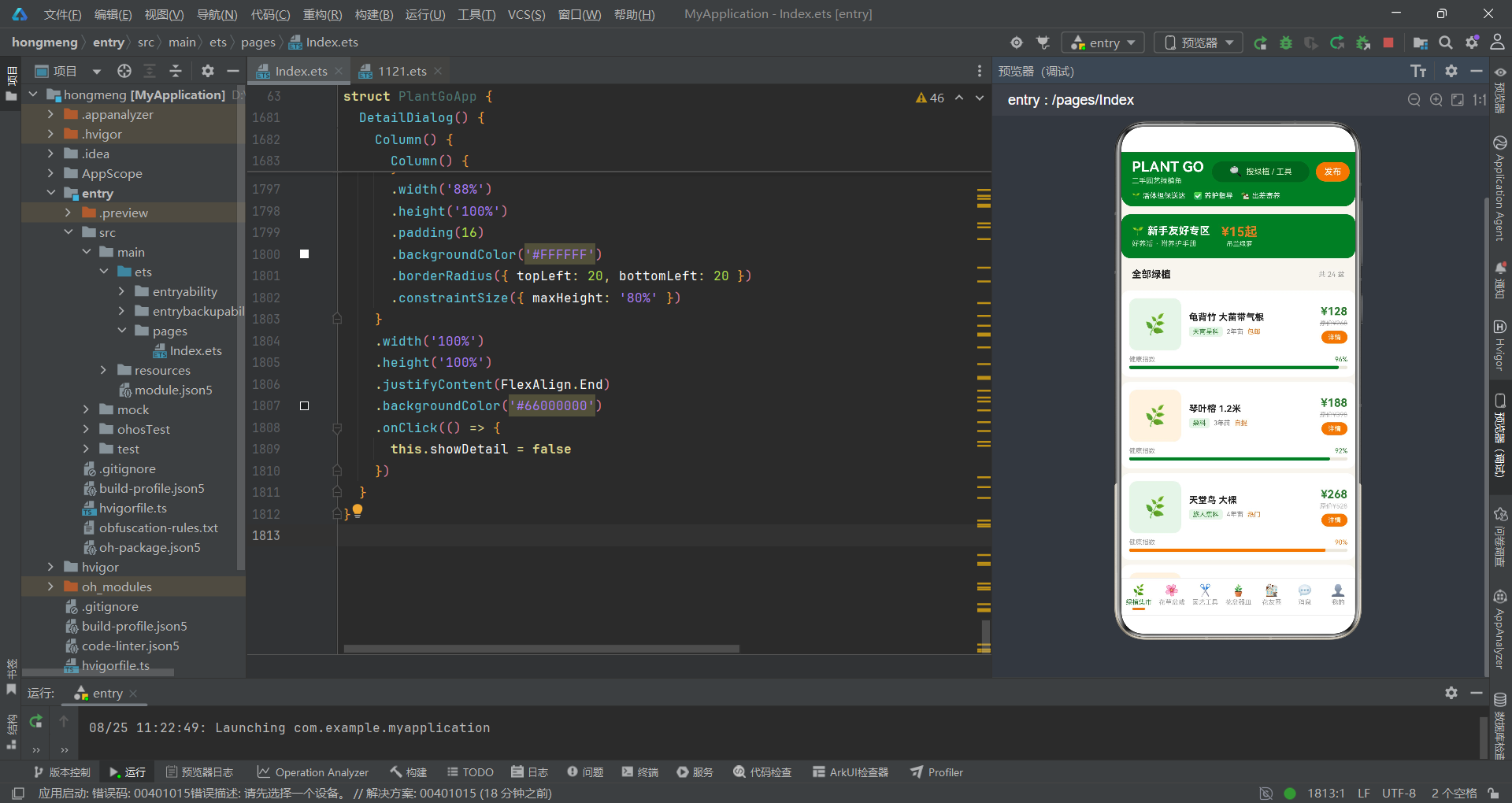
本文深入解析了一款基于 HarmonyOS ArkTS API 24 构建的二手园艺绿植角应用,从数据模型设计到组件状态管理,从七大功能页面到五个弹窗交互,全面展示了声明式 UI 框架在垂直领域电商应用中的实践成果。与一般的二手交易平台相比,该应用最大的特色在于将社区互动(花友圈)、特色服务(出差寄养)和知识求助(花友求助)三大功能融入了交易流程,形成了一个以绿植为纽带的社交化电商生态。@State 驱动的状态管理确保了从商品浏览到寄养预约的全链路数据流畅传递,@Builder 的模块化拆分使得每个功能页面都能独立维护和迭代。
在数据可视化层面,该应用展现了丰富的纯 ArkTS 图表实现能力。健康指数进度条通过 Stack 层叠布局和条件颜色映射(health > 90 为绿色),将植物的健康状态转化为直观的视觉信号。花草盆栽价格柱状图和园艺工具磨损度柱状图通过 Row 配合 VerticalAlign.Bottom 和比例计算(value / max * 62)实现,无需引入任何图表库。花友圈帖子中的点赞脉冲动画(scale + animation + iterations: -1)为社区注入了社交活力,这些动画效果的参数差异(时长 700-900ms、缩放 1.05-1.08 倍)体现了对不同交互场景的精细化调优。
从工程架构的角度审视,该应用的安全访问器模式(selPlant* 系列方法)有效处理了 selectedPlant 可空状态下的属性访问问题,是 ArkTS 强类型约束下的务实解决方案。跨弹窗状态联动(详情面板跳转寄养弹窗)通过简单的状态变量赋值实现,无需路由框架支持,降低了应用的架构复杂度。event.stopPropagation() 配合遮罩层点击关闭的模式贯穿了所有五个弹窗,形成了统一的交互范式。这些设计模式不仅适用于园艺绿植领域,也为任何需要复杂弹窗交互的 HarmonyOS 应用提供了可复用的工程参考。随着 HarmonyOS 6.1.1 生态的持续发展,ArkTS 声明式 UI 框架将在更多垂直领域应用中展现其构建效率和表达力优势。

作为“人工智能6S店”的官方数字引擎,为AI开发者与企业提供一个覆盖软硬件全栈、一站式门户。
更多推荐
 6
6 0
0- 0


 已为社区贡献71条内容

所有评论(0)