
鸿蒙实战 -资料征集分发台:单列双列三列视图切换
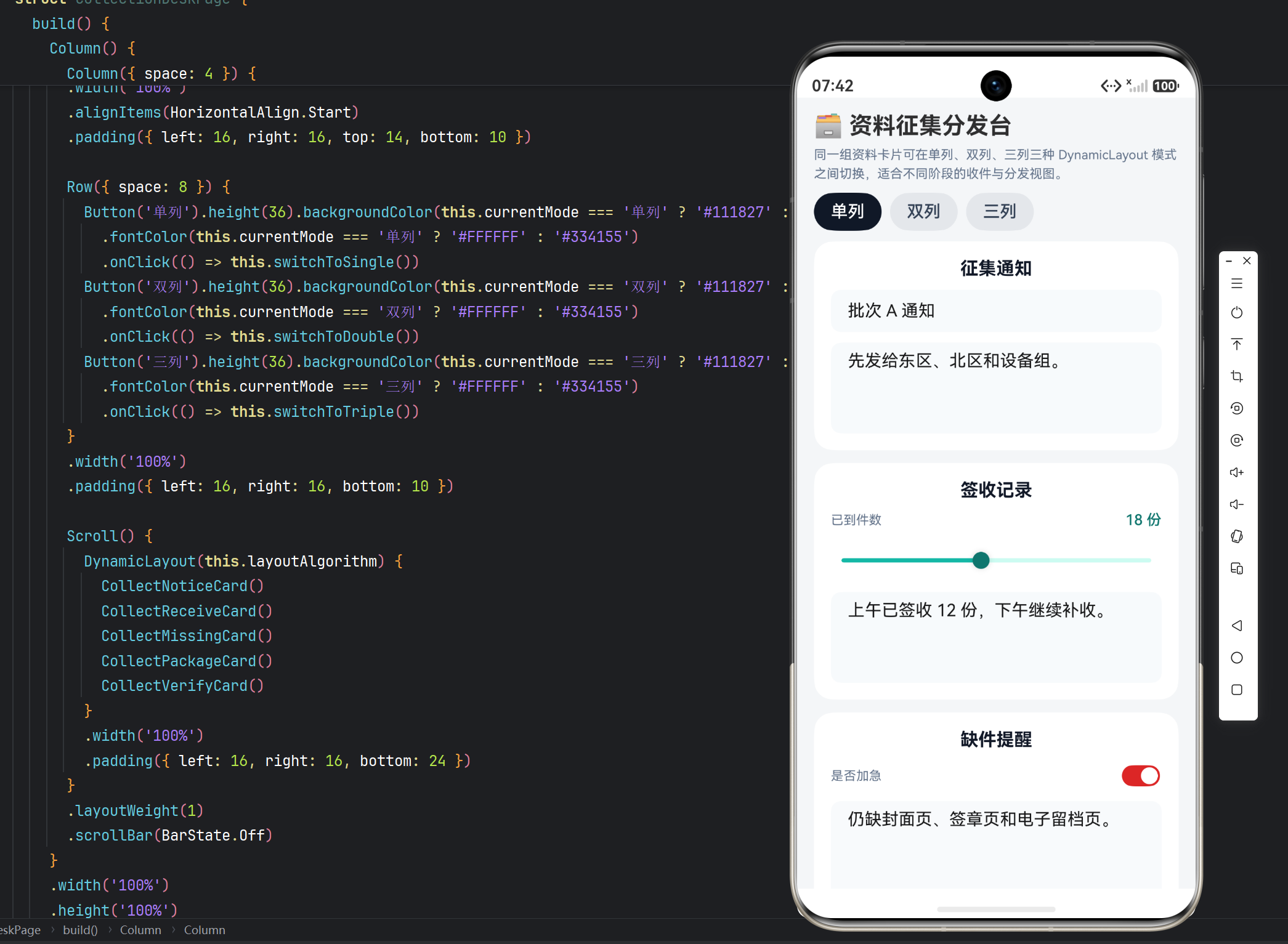
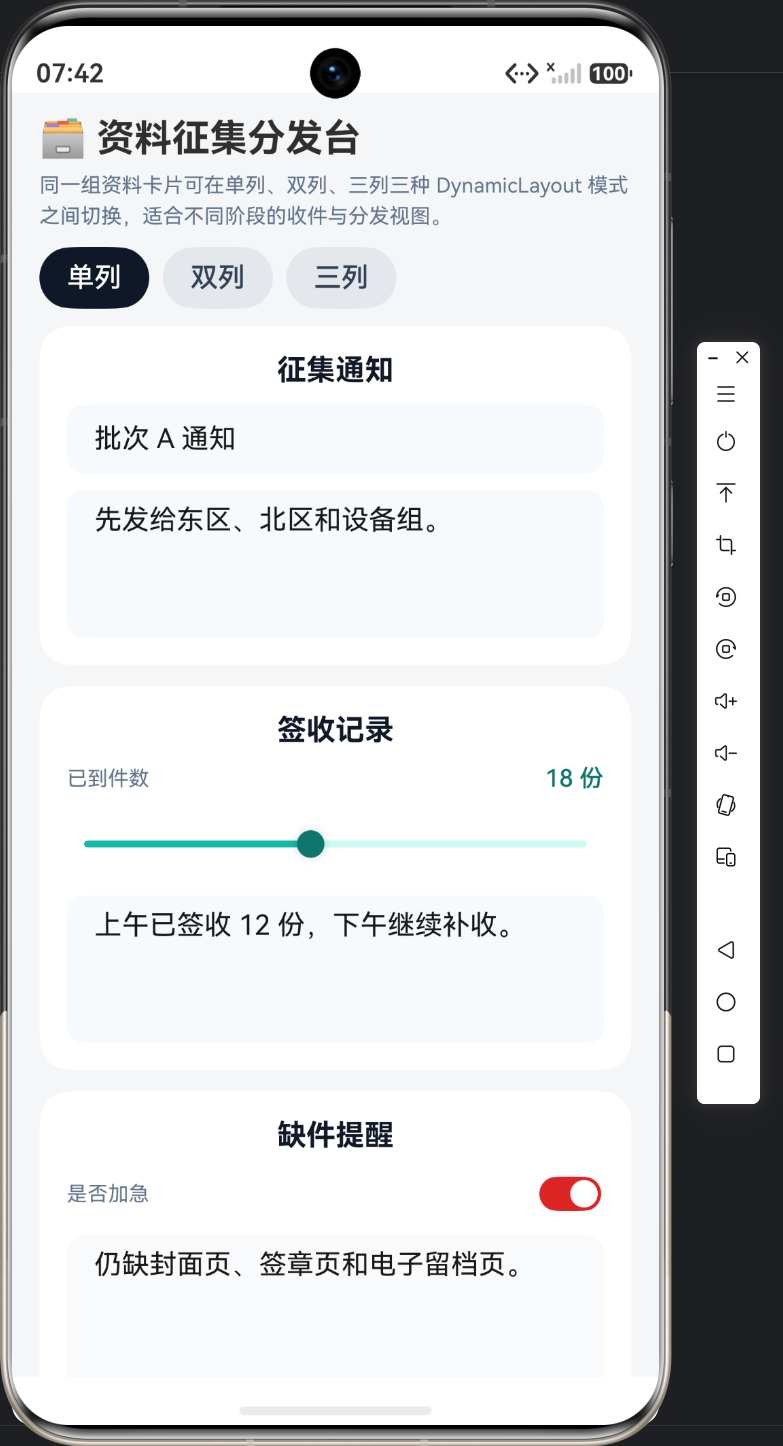
实例:资料征集分发台|技术:DynamicLayout、ColumnLayoutAlgorithm、GridLayoutAlgorithm、三模式切换、animateTo
一、本篇范围
本篇只看视图切换代码。和 58 不同,这一页不是单列 / 双列,而是单列 / 双列 / 三列三种模式,因此文章重点要放在三个切换函数和 layoutAlgorithm 的替换方式上。
二、导入与布局依赖
import { ColumnLayoutAlgorithm, DynamicLayout, DynamicLayoutAttribute, GridLayoutAlgorithm, LayoutAlgorithm, LengthMetrics, curves } from '@kit.ArkUI';
这里依赖的仍然是 ColumnLayoutAlgorithm 与 GridLayoutAlgorithm 两条路线,只不过组合出了三种模式。单列用 ColumnLayoutAlgorithm,双列和三列都使用 GridLayoutAlgorithm,区别只在 columnsTemplate 和间距参数。
三、页面入口与三种切换函数
@Entry
@ComponentV2
struct CollectionDeskPage {
  @Local currentMode: string = '双列';
  @Local layoutAlgorithm: LayoutAlgorithm = new GridLayoutAlgorithm({
    columnsTemplate: '1fr 1fr',
    rowsGap: LengthMetrics.vp(12),
    columnsGap: LengthMetrics.vp(12)
  });

  private switchToSingle(): void {
    this.getUIContext()?.animateTo({ curve: curves.springMotion(0.45, 0.82) }, () => {
      this.layoutAlgorithm = new ColumnLayoutAlgorithm({
        space: LengthMetrics.vp(12)
      });
      this.currentMode = '单列';
    });
  }

  private switchToDouble(): void {
    this.getUIContext()?.animateTo({ curve: curves.springMotion(0.45, 0.82) }, () => {
      this.layoutAlgorithm = new GridLayoutAlgorithm({
        columnsTemplate: '1fr 1fr',
        rowsGap: LengthMetrics.vp(12),
        columnsGap: LengthMetrics.vp(12)
      });
      this.currentMode = '双列';
    });
  }

  private switchToTriple(): void {
    this.getUIContext()?.animateTo({ curve: curves.springMotion(0.45, 0.82) }, () => {
      this.layoutAlgorithm = new GridLayoutAlgorithm({
        columnsTemplate: '1fr 1fr 1fr',
        rowsGap: LengthMetrics.vp(10),
        columnsGap: LengthMetrics.vp(10)
      });
      this.currentMode = '三列';
    });
  }

  build() {
    Column() {
      Column({ space: 4 }) {
        Text('🗃️ 62 资料征集分发台').fontSize(22).fontWeight(FontWeight.Bold)
        Text('同一组资料卡片可在单列、双列、三列三种 DynamicLayout 模式之间切换,适合不同阶段的收件与分发视图。')
          .fontSize(12).fontColor('#64748B').lineHeight(18)
      }
      .width('100%')
      .alignItems(HorizontalAlign.Start)
      .padding({ left: 16, right: 16, top: 14, bottom: 10 })

      Row({ space: 8 }) {
        Button('单列').height(36).backgroundColor(this.currentMode === '单列' ? '#111827' : '#E5E7EB')
          .fontColor(this.currentMode === '单列' ? '#FFFFFF' : '#334155')
          .onClick(() => this.switchToSingle())
        Button('双列').height(36).backgroundColor(this.currentMode === '双列' ? '#111827' : '#E5E7EB')
          .fontColor(this.currentMode === '双列' ? '#FFFFFF' : '#334155')
          .onClick(() => this.switchToDouble())
        Button('三列').height(36).backgroundColor(this.currentMode === '三列' ? '#111827' : '#E5E7EB')
          .fontColor(this.currentMode === '三列' ? '#FFFFFF' : '#334155')
          .onClick(() => this.switchToTriple())
      }
      .width('100%')
      .padding({ left: 16, right: 16, bottom: 10 })

      Scroll() {
        DynamicLayout(this.layoutAlgorithm) {
          CollectNoticeCard()
          CollectReceiveCard()
          CollectMissingCard()
          CollectPackageCard()
          CollectVerifyCard()
        }
        .width('100%')
        .padding({ left: 16, right: 16, bottom: 24 })
      }
      .layoutWeight(1)
      .scrollBar(BarState.Off)
    }
    .width('100%')
    .height('100%')
    .backgroundColor('#F4F6F8')
  }
}
页面入口里最关键的是三个切换函数:switchToSingle、switchToDouble、switchToTriple。它们都在动画回调里替换 layoutAlgorithm,并同步写入 currentMode。这意味着页面展示密度完全由算法实例决定,而不是靠条件渲染三套卡片。
四、代表性卡片:签收记录
@ComponentV2
struct CollectReceiveCard {
  @Local count: number = 18;
  @Local note: string = '上午已签收 12 份,下午继续补收。';

  build() {
    Column({ space: 10 }) {
      Text('签收记录').fontSize(17).fontWeight(FontWeight.Bold).fontColor('#111827')
      Row() {
        Text('已到件数').fontSize(12).fontColor('#64748B')
        Blank()
        Text(`${Math.round(this.count)} 份`).fontSize(14).fontWeight(FontWeight.Medium).fontColor('#0F766E')
      }.width('100%')
      Slider({ value: this.count, min: 0, max: 40, step: 1 })
        .selectedColor('#14B8A6')
        .trackColor('#CCFBF1')
        .blockColor('#0F766E')
        .onChange((value: number) => this.count = value)
      TextArea({ text: this.note, placeholder: '签收说明' })
        .height(86)
        .backgroundColor('#F8FAFC')
        .borderRadius(10)
        .onChange((value: string) => this.note = value)
    }
    .width('100%')
    .padding(16)
    .backgroundColor('#FFFFFF')
    .borderRadius(18)
  }
}
这张卡用 Slider + TextArea 表示收件数量和说明。它是验证“多视图切换后仍保留输入状态”的第一张代表卡,因为数值和文本都必须留在原组件内部。
五、代表性卡片:缺件提醒
@ComponentV2
struct CollectMissingCard {
  @Local urgent: boolean = true;
  @Local note: string = '仍缺封面页、签章页和电子留档页。';

  build() {
    Column({ space: 10 }) {
      Text('缺件提醒').fontSize(17).fontWeight(FontWeight.Bold).fontColor('#111827')
      Row() {
        Text('是否加急').fontSize(12).fontColor('#64748B')
        Blank()
        Toggle({ type: ToggleType.Switch, isOn: this.urgent })
          .selectedColor('#DC2626')
          .onChange((value: boolean) => this.urgent = value)
      }.width('100%')
      TextArea({ text: this.note, placeholder: '缺件项目' })
        .height(102)
        .backgroundColor('#F8FAFC')
        .borderRadius(10)
        .onChange((value: string) => this.note = value)
    }
    .width('100%')
    .padding(16)
    .backgroundColor('#FFFFFF')
    .borderRadius(18)
  }
}
Toggle + TextArea 这一组控件可以证明:即使切到三列,卡片内部状态依然由组件自己保存。技术文必须把这类代码直接给出来,才能说明“状态保持”不是口头描述。
六、布局层代码定位表
| 代码块 | 关注点 | 改动入口 |
|---|---|---|
| 导入与布局依赖 | 三模式布局依赖 | 增减模式先看 import |
| 页面入口与三种切换函数 | 单列双列三列算法切换 | 改单列/双列/三列参数看这里 |
| 代表性卡片:签收记录 | 收件数量卡片 | 件数与说明字段改这里 |
| 代表性卡片:缺件提醒 | 缺件与加急卡片 | 缺件字段与加急状态改这里 |
七、本篇小结
资料征集分发台的第一篇核心就是三模式切换本身。只要三个切换函数和 layoutAlgorithm 的替换关系讲清楚,这页的技术骨架就已经完整。

作为“人工智能6S店”的官方数字引擎,为AI开发者与企业提供一个覆盖软硬件全栈、一站式门户。
更多推荐
 8
8 0
0- 0


 已为社区贡献30条内容

所有评论(0)