
鸿蒙项目实战 - 住户报修派单台:Stack 层叠调度视图设计
·
一、本篇范围
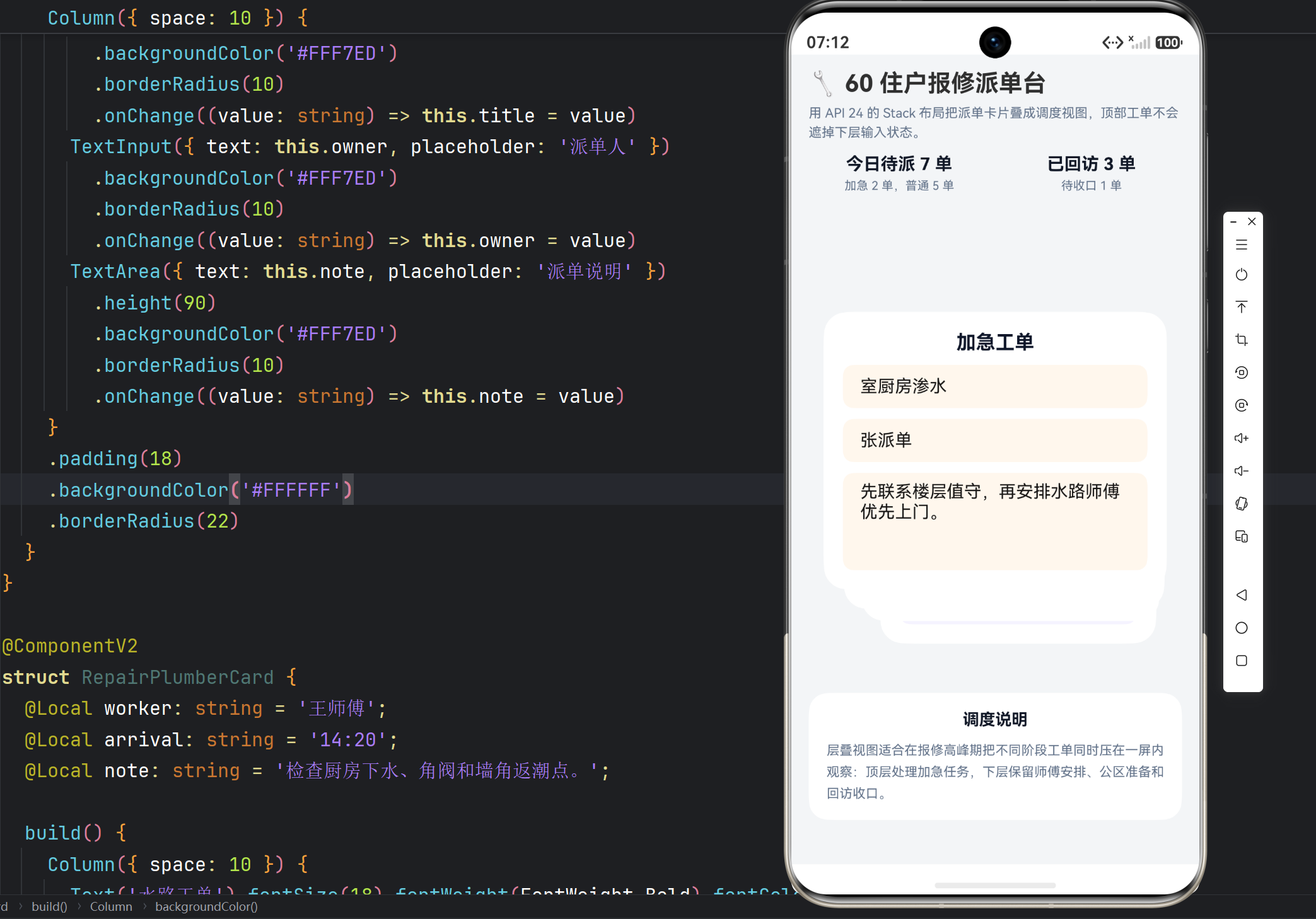
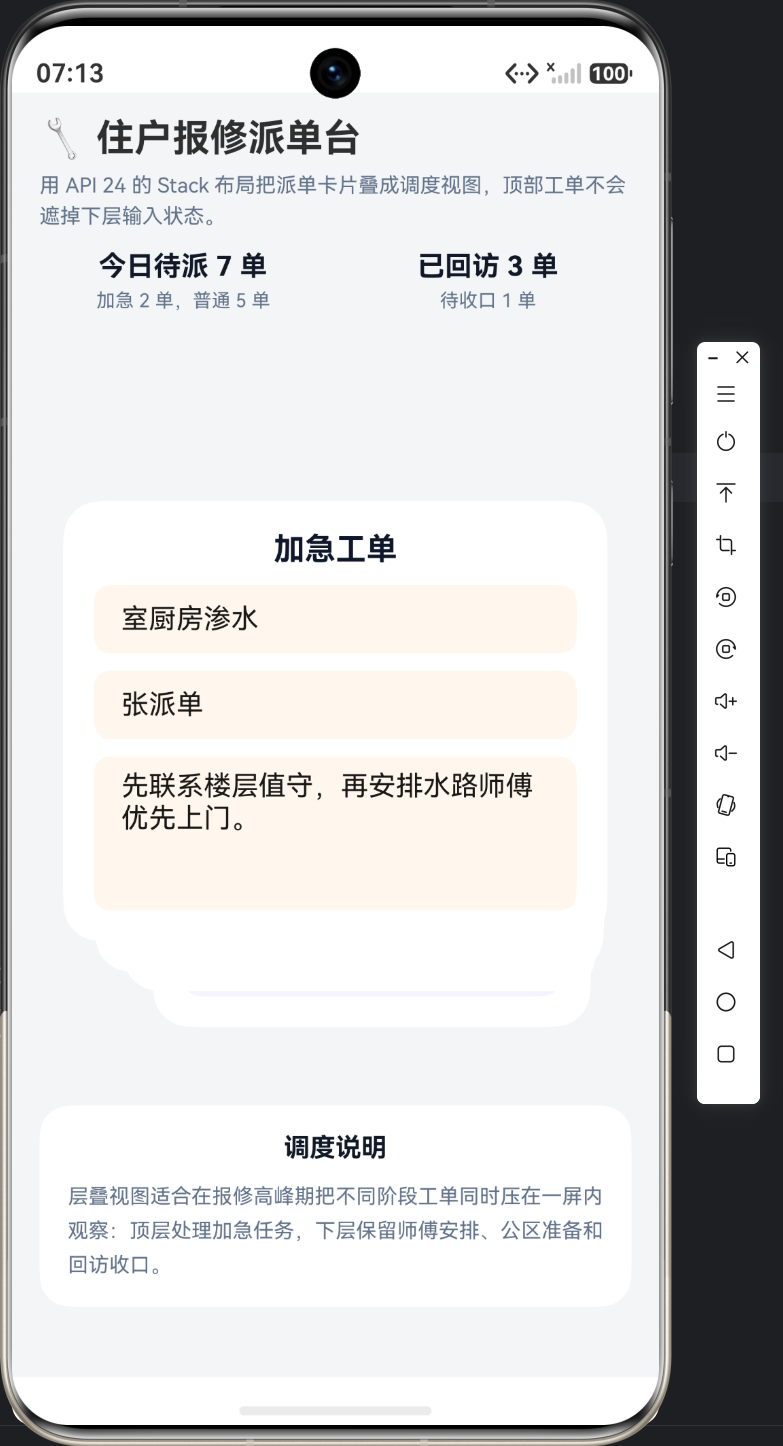
本篇只看层叠调度视图本身。这里没有自定义 CustomLayoutAlgorithm,但 StackLayoutAlgorithm 配合不同宽度和 margin 仍然能形成层叠关系,因此文章重点要回到页面挂载代码本身。
二、导入与布局类型
import { DynamicLayout, DynamicLayoutAttribute, StackLayoutAlgorithm } from '@kit.ArkUI';
这页的布局依赖很少,只有 DynamicLayout、DynamicLayoutAttribute 和 StackLayoutAlgorithm。因为层叠效果主要靠 StackLayoutAlgorithm 与不同宽度、margin 偏移共同完成,不需要额外引入自定义测量逻辑。
三、页面入口与层叠挂载
@Entry
@ComponentV2
struct RepairDispatchPage {
  @Local layoutAlgorithm: StackLayoutAlgorithm = new StackLayoutAlgorithm();

  build() {
    Column() {
      Column({ space: 4 }) {
        Text('🔧 60 住户报修派单台').fontSize(22).fontWeight(FontWeight.Bold)
        Text('用 API 24 的 Stack 布局把派单卡片叠成调度视图,顶部工单不会遮掉下层输入状态。')
          .fontSize(12).fontColor('#64748B').lineHeight(18)
      }
      .width('100%')
      .alignItems(HorizontalAlign.Start)
      .padding({ left: 16, right: 16, top: 14, bottom: 12 })

      Row({ space: 10 }) {
        Column({ space: 4 }) {
          Text('今日待派 7 单').fontSize(16).fontWeight(FontWeight.Bold).fontColor('#111827')
          Text('加急 2 单,普通 5 单').fontSize(11).fontColor('#64748B')
        }.layoutWeight(1)
        Column({ space: 4 }) {
          Text('已回访 3 单').fontSize(16).fontWeight(FontWeight.Bold).fontColor('#111827')
          Text('待收口 1 单').fontSize(11).fontColor('#64748B')
        }.layoutWeight(1)
      }
      .width('100%')
      .padding({ left: 16, right: 16, bottom: 12 })

      Scroll() {
        Column({ space: 14 }) {
          DynamicLayout(this.layoutAlgorithm) {
            RepairReturnCard()
              .width('74%')
              .margin({ top: 128, left: 42 })
            RepairPublicAreaCard()
              .width('80%')
              .margin({ top: 86, left: 28 })
            RepairPlumberCard()
              .width('86%')
              .margin({ top: 42, left: 16 })
            RepairUrgentCard()
              .width('92%')
          }
          .width('100%')
          .height(420)

          Column({ space: 8 }) {
            Text('调度说明').fontSize(15).fontWeight(FontWeight.Bold).fontColor('#111827')
            Text('层叠视图适合在报修高峰期把不同阶段工单同时压在一屏内观察:顶层处理加急任务,下层保留师傅安排、公区准备和回访收口。')
              .fontSize(12).fontColor('#64748B').lineHeight(20)
          }
          .width('100%')
          .padding(16)
          .backgroundColor('#FFFFFF')
          .borderRadius(18)
        }
        .width('100%')
        .padding({ left: 16, right: 16, bottom: 24 })
      }
      .layoutWeight(1)
      .scrollBar(BarState.Off)
    }
    .width('100%')
    .height('100%')
    .backgroundColor('#F3F5F7')
  }
}
页面入口里的关键不在按钮,而在 DynamicLayout(this.layoutAlgorithm) 下面这四张卡的宽度与 margin。每张卡宽度递减、顶部偏移递增,StackLayoutAlgorithm 因此能把它们压成“上层突出、下层留头”的调度视图。
四、代表性卡片:加急工单
@ComponentV2
struct RepairUrgentCard {
  @Local title: string = '0601 室厨房渗水';
  @Local owner: string = '张派单';
  @Local note: string = '先联系楼层值守,再安排水路师傅优先上门。';

  build() {
    Column({ space: 10 }) {
      Text('加急工单').fontSize(18).fontWeight(FontWeight.Bold).fontColor('#0F172A')
      TextInput({ text: this.title, placeholder: '工单标题' })
        .backgroundColor('#FFF7ED')
        .borderRadius(10)
        .onChange((value: string) => this.title = value)
      TextInput({ text: this.owner, placeholder: '派单人' })
        .backgroundColor('#FFF7ED')
        .borderRadius(10)
        .onChange((value: string) => this.owner = value)
      TextArea({ text: this.note, placeholder: '派单说明' })
        .height(90)
        .backgroundColor('#FFF7ED')
        .borderRadius(10)
        .onChange((value: string) => this.note = value)
    }
    .padding(18)
    .backgroundColor('#FFFFFF')
    .borderRadius(22)
  }
}
顶层卡片必须具备完整输入能力,所以这里放了两个 TextInput 和一个 TextArea。如果顶层卡只是静态摘要,这页就无法证明叠层视图下仍可直接编辑当前工单。
五、代表性卡片:水路工单
@ComponentV2
struct RepairPlumberCard {
  @Local worker: string = '王师傅';
  @Local arrival: string = '14:20';
  @Local note: string = '检查厨房下水、角阀和墙角返潮点。';

  build() {
    Column({ space: 10 }) {
      Text('水路工单').fontSize(18).fontWeight(FontWeight.Bold).fontColor('#0F172A')
      TextInput({ text: this.worker, placeholder: '处理师傅' })
        .backgroundColor('#EFF6FF')
        .borderRadius(10)
        .onChange((value: string) => this.worker = value)
      TextInput({ text: this.arrival, placeholder: '预计到场' })
        .backgroundColor('#EFF6FF')
        .borderRadius(10)
        .onChange((value: string) => this.arrival = value)
      TextArea({ text: this.note, placeholder: '现场要点' })
        .height(84)
        .backgroundColor('#EFF6FF')
        .borderRadius(10)
        .onChange((value: string) => this.note = value)
    }
    .padding(18)
    .backgroundColor('#FFFFFF')
    .borderRadius(22)
  }
}
第二层卡片仍然保留完整录入,而不是被压成只读摘要。技术上,这说明层叠布局并没有吞掉组件状态,只是把不同阶段卡片叠到了同一屏里。
六、布局层代码定位表
| 代码块 | 关注点 | 改动入口 |
|---|---|---|
| 导入与布局类型 | Stack 布局依赖 | 改布局能力先看 import |
| 页面入口与层叠挂载 | 层叠视图的页面挂载 | 调叠层深度和偏移就改这里 |
| 代表性卡片:加急工单 | 顶层工单卡的输入能力 | 加急单字段从这里扩 |
| 代表性卡片:水路工单 | 下层卡片仍保留输入 | 师傅与到场字段改这里 |
七、本篇小结
住户报修派单台的布局重点不在自定义算法,而在 StackLayoutAlgorithm 与挂载区宽度、偏移的组合。第一篇必须把这个关系讲透,页面才算讲到点上。

作为“人工智能6S店”的官方数字引擎,为AI开发者与企业提供一个覆盖软硬件全栈、一站式门户。
更多推荐
 0
0 0
0- 0


 已为社区贡献13条内容

所有评论(0)