
蹴鞠社:用鸿蒙 ArkTS 重现「一鞠穿云,万众喝彩」的草场碧绿足球盛景
蹴鞠社:用鸿蒙 ArkTS 重现「一鞠穿云,万众喝彩」的草场碧绿足球盛景
一、写在前面:千年蹴鞠,数字绿茵
1.1 蹴鞠:世界足球的东方鼻祖
在许多人眼中,足球是一项现代西方运动。但鲜为人知的是,早在两千多年前的战国时期,中国就有了"蹴鞠"——一种以皮革裹制、内填毛发,用脚踢击的球类运动。汉代刘向《别录》记载:"蹴鞠者,传言黄帝所作,或曰起战国之时。"到了宋代,蹴鞠更是风靡朝野:汴京御街上蹴鞠艺人云集,《水浒传》里高俅凭一脚好球平步青云的典故,正是那个时代蹴鞠文化鼎盛的缩影。“凤点头”“鸳鸯拐”"流星赶月"这些充满武侠气息的招式名,就诞生于那个全民皆鞠的年代。
这份代码的主角,正是一座名为 “蹴鞠社” 的鸿蒙应用。它用草场碧绿与明黄为基调,试图在数字世界里搭建一座宋代风格的足球俱乐部:球艺、阵型、赛事、战绩、球迷五大板块,从招式到兵法、从赛场到看台,一应俱全。
二、项目总览:四层架构与一张全景图
在进入逐段解析之前,先用一张架构图把整份代码的"骨架"立起来。整份代码依然可以清晰划分成四个层次:
- 类型与常量层:
CujuPalette色板接口、COLORS色板常量、CujuTab页签枚举、STabMeta页签元数据(含 color)、五组业务接口、WEEK_GOAL/FORMATION_POS图表常量。 - 数据模型层:
@Observed修饰的CujuData数据类,持有球艺、阵型、赛事、战绩、球迷五组数据。 - 工具函数层:
getSkillColor、getCrewColor、getResultColor、getFanColor四个取色映射函数。 - 界面层:
@Entry @Component修饰的主组件CujuApp、三个模态弹窗构建器、一个通用标签组件、五个内容子组件。
@Observe -----------------------^ Expecting 'AMP', 'COLON', 'PIPE', 'TESTSTR', 'DOWN', 'DEFAULT', 'NUM', 'COMMA', 'NODE_STRING', 'BRKT', 'MINUS', 'MULT', 'UNICODE_TEXT', got 'LINK_ID'
这张图揭示了一个关键事实:界面层的数据全部来自 CujuData 单例对象,子组件通过 @ObjectLink 与其建立深度绑定,主组件通过 @State 管理页签和弹窗的可见性。四层各司其职、互不越界。而阵型布阵图作为最大的差异化亮点,其棋子位置完全由 FORMATION_POS 里的 x/y 坐标数据驱动——数据即位置。
三、逐段代码解析(全量呈现,一字不落)
3.1 主题色板:草场碧绿的 CujuPalette 与 COLORS
代码的第一段,是定义"蹴鞠社"视觉基调的色板接口与色板常量。草场的绿、太阳的黄、球衣的红、天空的蓝、应援的紫,是这份代码想传递的全部热血。
// ============ 蹴鞠社 · 草场碧绿 ============
export interface CujuPalette {
primary: string;
primaryLight: string;
primaryDark: string;
accent: string;
accentLight: string;
bg: string;
cardBg: string;
cardAlt: string;
textPrimary: string;
textSecondary: string;
textHint: string;
border: string;
line: string;
success: string;
warning: string;
danger: string;
white: string;
pitch: string;
chalk: string;
}
export const COLORS: CujuPalette = {
primary: '#2E7D32',
primaryLight: '#81C784',
primaryDark: '#1B3A1D',
accent: '#F9A825',
accentLight: '#FDD835',
bg: '#EDF5EE',
cardBg: '#FFFFFF',
cardAlt: '#DDEAD2',
textPrimary: '#1B3A1D',
textSecondary: '#5A6D4A',
textHint: '#9CAE8E',
border: '#C5D9B8',
line: '#E2EAD6',
success: '#2E7D32',
warning: '#F9A825',
danger: '#C62828',
white: '#FFFFFF',
pitch: '#3A7D3E',
chalk: '#FFFFFF'
};
export enum CujuTab {
SKILL = 0,
FORMATION = 1,
EVENT = 2,
RECORD = 3,
FAN = 4
}
export interface STabMeta {
key: string;
icon: string;
label: string;
color: string;
}
export const TAB_LIST: STabMeta[] = [
{ key: 'skill', icon: '⚽', label: '球艺', color: '#2E7D32' },
{ key: 'formation', icon: '🛡️', label: '阵型', color: '#F9A825' },
{ key: 'event', icon: '🏟️', label: '赛事', color: '#1565C0' },
{ key: 'record', icon: '🏆', label: '战绩', color: '#C62828' },
{ key: 'fan', icon: '📣', label: '球迷', color: '#7B1FA2' }
];
export interface SkillItem {
name: string;
level: number;
master: string;
crew: string;
emoji: string;
}
export interface FormationItem {
name: string;
shape: string;
forwards: number;
backs: number;
emoji: string;
}
export interface EventItem {
name: string;
date: string;
venue: string;
teams: number;
emoji: string;
}
export interface RecordItem {
name: string;
result: string;
score: string;
rival: string;
emoji: string;
}
export interface FanItem {
name: string;
city: string;
cheers: number;
years: number;
emoji: string;
}
export interface WeekGoalMeta {
day: string;
value: number;
}
export interface FormationPosMeta {
name: string;
x: number;
y: number;
color: string;
}
export const WEEK_GOAL: WeekGoalMeta[] = [
{ day: '周一', value: 4 },
{ day: '周二', value: 6 },
{ day: '周三', value: 5 },
{ day: '周四', value: 8 },
{ day: '周五', value: 7 },
{ day: '周六', value: 12 },
{ day: '周日', value: 9 }
];
export const FORMATION_POS: FormationPosMeta[] = [
{ name: '门将', x: 50, y: 88, color: '#F9A825' },
{ name: '左卫', x: 22, y: 66, color: '#2E7D32' },
{ name: '中卫', x: 50, y: 70, color: '#2E7D32' },
{ name: '右卫', x: 78, y: 66, color: '#2E7D32' },
{ name: '左前', x: 28, y: 38, color: '#1565C0' },
{ name: '中前', x: 50, y: 30, color: '#C62828' },
{ name: '右前', x: 72, y: 38, color: '#1565C0' },
{ name: '锋头', x: 50, y: 12, color: '#C62828' }
];
@Observed
export class CujuData {
skills: SkillItem[] = [
{ name: '凤点头', level: 95, master: '张蹴', crew: '锋线', emoji: '🦅' },
{ name: '鸳鸯拐', level: 92, master: '李鞠', crew: '中场', emoji: '🦢' },
{ name: '流星赶月', level: 90, master: '王蹴', crew: '锋线', emoji: '☄️' },
{ name: '魁星踢斗', level: 88, master: '赵鞠', crew: '中场', emoji: '⭐' },
{ name: '金丝缠腕', level: 86, master: '钱蹴', crew: '后卫', emoji: '🪢' },
{ name: '海底捞月', level: 84, master: '孙鞠', crew: '门将', emoji: '🌙' },
{ name: '燕子穿林', level: 89, master: '周蹴', crew: '锋线', emoji: '🐦' },
{ name: '老虎摆尾', level: 87, master: '吴鞠', crew: '后卫', emoji: '🐯' },
{ name: '童子拜佛', level: 83, master: '郑蹴', crew: '中场', emoji: '🧒' },
{ name: '斜插梅花', level: 85, master: '王鞠', crew: '锋线', emoji: '🌸' },
{ name: '转身倒勾', level: 91, master: '冯蹴', crew: '锋线', emoji: '🌀' },
{ name: '老将绝技', level: 96, master: '堂主', crew: '全能', emoji: '📜' }
];
formations: FormationItem[] = [
{ name: '一锋七卫', shape: '1-3-3-1', forwards: 1, backs: 7, emoji: '🛡️' },
{ name: '三星阵', shape: '3-3-1', forwards: 3, backs: 4, emoji: '⭐' },
{ name: '梅花阵', shape: '5-2', forwards: 5, backs: 2, emoji: '🌸' },
{ name: '北斗阵', shape: '2-3-2', forwards: 2, backs: 5, emoji: '🌌' },
{ name: '雁翅阵', shape: '4-3', forwards: 4, backs: 3, emoji: '🦢' },
{ name: '长蛇阵', shape: '1-6-1', forwards: 1, backs: 6, emoji: '🐍' },
{ name: '八卦阵', shape: '3-4-1', forwards: 3, backs: 5, emoji: '☯️' },
{ name: '锋矢阵', shape: '5-2-1', forwards: 5, backs: 3, emoji: '🏹' },
{ name: '鸳鸯阵', shape: '2-4-2', forwards: 2, backs: 6, emoji: '🦆' },
{ name: '六合阵', shape: '2-4-2', forwards: 2, backs: 6, emoji: '🎴' },
{ name: '风火阵', shape: '4-3-1', forwards: 4, backs: 4, emoji: '🔥' },
{ name: '老堂秘阵', shape: '秘制', forwards: 3, backs: 5, emoji: '📜' }
];
events: EventItem[] = [
{ name: '端阳蹴鞠大赛', date: '06-10', venue: '汴京御街', teams: 16, emoji: '🐉' },
{ name: '中秋鞠会', date: '09-15', venue: '临安涌金门', teams: 12, emoji: '🌕' },
{ name: '重阳登高赛', date: '10-09', venue: '长安乐游原', teams: 8, emoji: '🍂' },
{ name: '上元灯夕赛', date: '02-14', venue: '洛阳天津桥', teams: 20, emoji: '🏮' },
{ name: '寒食踏青赛', date: '04-05', venue: '成都锦江畔', teams: 10, emoji: '🌱' },
{ name: '端午龙舟鞠', date: '06-02', venue: '苏州金鸡湖', teams: 14, emoji: '🐲' },
{ name: '七夕乞巧赛', date: '08-10', venue: '杭州西湖', teams: 12, emoji: '💕' },
{ name: '社日乡赛', date: '03-21', venue: '乡间社坛', teams: 6, emoji: '🌾' },
{ name: '立春开鞠赛', date: '02-04', venue: '京华鞠场', teams: 18, emoji: '🌸' },
{ name: '冬至贺岁赛', date: '12-22', venue: '汴京州桥', teams: 8, emoji: '❄️' },
{ name: '清明蹴鞠会', date: '04-05', venue: '曲江芙蓉园', teams: 16, emoji: '🌷' },
{ name: '腊月封场赛', date: '12-08', venue: '临安涌金门', teams: 10, emoji: '⛄' }
];
records: RecordItem[] = [
{ name: '端阳大赛决赛', result: '胜', score: '3:1', rival: '临安社', emoji: '🏆' },
{ name: '中秋鞠会半决赛', result: '胜', score: '2:0', rival: '长安社', emoji: '🥇' },
{ name: '重阳登高赛', result: '负', score: '1:2', rival: '洛阳社', emoji: '🥈' },
{ name: '上元灯夕赛决赛', result: '胜', score: '4:2', rival: '苏州社', emoji: '🏆' },
{ name: '寒食踏青赛', result: '平', score: '2:2', rival: '成都社', emoji: '🤝' },
{ name: '端午龙舟鞠', result: '胜', score: '3:0', rival: '扬州社', emoji: '🥇' },
{ name: '七夕乞巧赛', result: '胜', score: '2:1', rival: '钱塘社', emoji: '🏆' },
{ name: '社日乡赛', result: '负', score: '0:1', rival: '乡勇队', emoji: '🥈' },
{ name: '立春开鞠赛', result: '胜', score: '5:1', rival: '京华社', emoji: '🏆' },
{ name: '冬至贺岁赛', result: '胜', score: '3:2', rival: '汴京社', emoji: '🥇' },
{ name: '清明蹴鞠会', result: '平', score: '1:1', rival: '曲江社', emoji: '🤝' },
{ name: '腊月封场赛', result: '胜', score: '4:0', rival: '临安社', emoji: '🏆' }
];
fans: FanItem[] = [
{ name: '汴京老张', city: '汴京', cheers: 1200, years: 30, emoji: '👴' },
{ name: '临安小李', city: '临安', cheers: 980, years: 12, emoji: '👨' },
{ name: '长安王二', city: '长安', cheers: 860, years: 25, emoji: '🧔' },
{ name: '洛阳赵姐', city: '洛阳', cheers: 760, years: 8, emoji: '👩' },
{ name: '苏州钱三', city: '苏州', cheers: 640, years: 15, emoji: '🧑' },
{ name: '成都孙四', city: '成都', cheers: 720, years: 10, emoji: '👱' },
{ name: '杭州周伯', city: '杭州', cheers: 1100, years: 40, emoji: '🧓' },
{ name: '扬州吴娘', city: '扬州', cheers: 540, years: 6, emoji: '👧' },
{ name: '京华郑少', city: '京华', cheers: 880, years: 20, emoji: '🧒' },
{ name: '钱塘冯嫂', city: '钱塘', cheers: 460, years: 4, emoji: '👩🦰' },
{ name: '乡勇陈头', city: '乡间', cheers: 380, years: 18, emoji: '🧙' },
{ name: '曲江楚公子', city: '曲江', cheers: 920, years: 22, emoji: '🤵' }
];
}
export function getSkillColor(level: number): string {
if (level >= 95) {
return '#C62828';
} else if (level >= 90) {
return '#F9A825';
} else if (level >= 86) {
return '#1565C0';
}
return '#2E7D32';
}
export function getCrewColor(crew: string): string {
if (crew === '锋线') {
return '#C62828';
} else if (crew === '中场') {
return '#1565C0';
} else if (crew === '后卫' || crew === '门将') {
return '#2E7D32';
}
return '#7B1FA2';
}
export function getResultColor(result: string): string {
if (result === '胜') {
return '#2E7D32';
} else if (result === '平') {
return '#F9A825';
}
return '#C62828';
}
export function getFanColor(cheers: number): string {
if (cheers >= 900) {
return '#7B1FA2';
} else if (cheers >= 700) {
return '#F9A825';
} else if (cheers >= 500) {
return '#1565C0';
}
return '#5A6D4A';
}
@Component
struct CujuTag {
@Prop text: string;
@Prop color: string;
build() {
Text(this.text)
.fontSize(9)
.fontColor(this.color)
.padding({ left: 7, right: 7, top: 2, bottom: 2 })
.backgroundColor(this.color + '1F')
.borderRadius(9)
.border({ width: 1, color: this.color + '40' })
}
}
@Component
struct CujuSkillContent {
@ObjectLink data: CujuData;
onAdd: () => void = () => {};
build() {
Scroll() {
Column() {
Column() {
Row() {
Text('📈 本周社中进球')
.fontSize(13)
.fontWeight(FontWeight.Bold)
.fontColor(COLORS.textPrimary)
Text('周六12球')
.fontSize(9)
.fontColor(COLORS.accent)
.margin({ left: 8 })
}
.width('100%')
.justifyContent(FlexAlign.SpaceBetween)
Row() {
ForEach(WEEK_GOAL, (w: WeekGoalMeta) => {
Column() {
Text(w.value + '')
.fontSize(8)
.fontColor(w.value >= 9 ? COLORS.accent : COLORS.primaryLight)
Column()
.width(20)
.height(w.value * 6)
.backgroundColor(w.value >= 9 ? COLORS.accent : COLORS.primaryLight)
.borderRadius(10)
.margin({ top: 4 })
Text(w.day)
.fontSize(9)
.fontColor(COLORS.textSecondary)
.margin({ top: 4 })
}
.layoutWeight(1)
.alignItems(HorizontalAlign.Center)
}, (w: WeekGoalMeta) => w.day)
}
.width('100%')
.alignItems(VerticalAlign.Bottom)
.height(120)
.margin({ top: 10 })
}
.width('100%')
.padding(14)
.backgroundColor(COLORS.cardBg)
.borderRadius(16)
.border({ width: 1, color: COLORS.accent + '55' })
Row() {
Text('⚽ 球艺谱')
.fontSize(13)
.fontWeight(FontWeight.Bold)
.fontColor(COLORS.textPrimary)
Column().layoutWeight(1)
Text('点击➕练艺')
.fontSize(9)
.fontColor(COLORS.textHint)
Text('➕')
.fontSize(14)
.margin({ left: 6 })
.onClick(() => { this.onAdd(); })
}
.width('100%')
.margin({ top: 14, bottom: 4 })
ForEach(this.data.skills, (s: SkillItem, i: number) => {
Row() {
Column() {
Text(s.emoji)
.fontSize(22)
}
.width(50)
.height(50)
.justifyContent(FlexAlign.Center)
.alignItems(HorizontalAlign.Center)
.backgroundColor(getSkillColor(s.level) + '22')
.borderRadius(25)
.border({ width: 2, color: getSkillColor(s.level) + '80' })
Column() {
Text(s.name)
.fontSize(13)
.fontWeight(FontWeight.Bold)
.fontColor(COLORS.textPrimary)
Row() {
CujuTag({ text: s.crew, color: getCrewColor(s.crew) })
CujuTag({ text: '难' + s.level, color: COLORS.primaryLight })
}
.margin({ top: 6 })
Text('传人 ' + s.master)
.fontSize(9)
.fontColor(COLORS.textSecondary)
.margin({ top: 4 })
}
.layoutWeight(1)
.alignItems(HorizontalAlign.Start)
.margin({ left: 12 })
Text(s.level + '')
.fontSize(16)
.fontWeight(FontWeight.Bold)
.fontColor(getSkillColor(s.level))
}
.width('100%')
.padding(12)
.backgroundColor(i % 2 === 0 ? COLORS.cardBg : COLORS.cardAlt)
.borderRadius(16)
.border({ width: 1, color: COLORS.line })
.margin({ top: 8 })
}, (s: SkillItem, i: number) => 'sk' + s.name + i)
}
.width('100%')
.padding({ left: 12, right: 12, bottom: 16 })
}
.width('100%')
.layoutWeight(1)
.scrollable(ScrollDirection.Vertical)
.scrollBar(BarState.Off)
}
}
@Component
struct CujuFormationContent {
@ObjectLink data: CujuData;
onEdit: () => void = () => {};
build() {
Scroll() {
Column() {
Column() {
Row() {
Text('🛡️ 阵型布阵图')
.fontSize(13)
.fontWeight(FontWeight.Bold)
.fontColor(COLORS.chalk)
Column().layoutWeight(1)
Text('点击✏️调配')
.fontSize(9)
.fontColor(COLORS.primaryLight)
.onClick(() => { this.onEdit(); })
}
.width('100%')
Stack() {
Column()
.width('100%')
.height(220)
.backgroundColor(COLORS.pitch)
.borderRadius(12)
Column()
.width('100%')
.height(1)
.backgroundColor(COLORS.chalk + '66')
.position({ x: 0, y: 110 })
Column()
.width(60)
.height(1)
.backgroundColor(COLORS.chalk + '66')
.position({ x: 0, y: 55 })
Column()
.width(60)
.height(1)
.backgroundColor(COLORS.chalk + '66')
.position({ x: 0, y: 165 })
Column()
.width(40)
.height(60)
.border({ width: 1, color: COLORS.chalk + '66' })
.position({ x: 0, y: 80 })
ForEach(FORMATION_POS, (p: FormationPosMeta, idx: number) => {
Column() {
Text(p.name)
.fontSize(8)
.fontColor(COLORS.chalk)
.margin({ bottom: 2 })
Column()
.width(18)
.height(18)
.backgroundColor(p.color)
.borderRadius(9)
.border({ width: 2, color: COLORS.chalk })
}
.position({ x: (p.x - 9) + '%', y: (p.y * 2.2) })
}, (p: FormationPosMeta) => p.name)
}
.width('100%')
.height(220)
.margin({ top: 10 })
}
.width('100%')
.padding(14)
.backgroundColor(COLORS.primaryDark)
.borderRadius(16)
Row() {
Text('🛡️ 阵型总览')
.fontSize(13)
.fontWeight(FontWeight.Bold)
.fontColor(COLORS.textPrimary)
Column().layoutWeight(1)
Text('12套阵法')
.fontSize(9)
.fontColor(COLORS.textHint)
}
.width('100%')
.margin({ top: 14, bottom: 4 })
ForEach(this.data.formations, (f: FormationItem, i: number) => {
Row() {
Column() {
Text(f.emoji)
.fontSize(18)
}
.width(42)
.height(42)
.justifyContent(FlexAlign.Center)
.alignItems(HorizontalAlign.Center)
.backgroundColor(COLORS.accent + '22')
.borderRadius(21)
.border({ width: 1, color: COLORS.accent + '55' })
Column() {
Row() {
Text(f.name)
.fontSize(13)
.fontWeight(FontWeight.Bold)
.fontColor(COLORS.textPrimary)
Text(f.shape)
.fontSize(9)
.fontColor(COLORS.accent)
.margin({ left: 8 })
}
.width('100%')
Row() {
Text('锋' + f.forwards + ' · 卫' + f.backs)
.fontSize(9)
.fontColor(COLORS.textSecondary)
Text('阵型')
.fontSize(9)
.fontColor(COLORS.textHint)
.margin({ left: 8 })
}
.width('100%')
.margin({ top: 6 })
}
.layoutWeight(1)
.alignItems(HorizontalAlign.Start)
.margin({ left: 10 })
}
.width('100%')
.padding(10)
.backgroundColor(i % 2 === 0 ? COLORS.cardBg : COLORS.cardAlt)
.borderRadius(14)
.border({ width: 1, color: COLORS.line })
.margin({ top: 8 })
}, (f: FormationItem, i: number) => 'fm' + f.name + i)
}
.width('100%')
.padding({ left: 12, right: 12, bottom: 16 })
}
.width('100%')
.layoutWeight(1)
.scrollable(ScrollDirection.Vertical)
.scrollBar(BarState.Off)
}
}
@Component
struct CujuEventContent {
@ObjectLink data: CujuData;
build() {
Scroll() {
Column() {
Row() {
Text('🏟️ 赛事年历')
.fontSize(13)
.fontWeight(FontWeight.Bold)
.fontColor(COLORS.textPrimary)
Column().layoutWeight(1)
Text('12场赛事')
.fontSize(9)
.fontColor(COLORS.textHint)
}
.width('100%')
.margin({ bottom: 6 })
ForEach(this.data.events, (e: EventItem, i: number) => {
Row() {
Column() {
Text(e.emoji)
.fontSize(16)
}
.width(40)
.height(40)
.justifyContent(FlexAlign.Center)
.alignItems(HorizontalAlign.Center)
.backgroundColor(COLORS.accent + '22')
.borderRadius(20)
.border({ width: 1, color: COLORS.accent + '55' })
Column() {
Text(e.name)
.fontSize(13)
.fontWeight(FontWeight.Bold)
.fontColor(COLORS.textPrimary)
Row() {
Text(e.date + ' · ' + e.venue)
.fontSize(9)
.fontColor(COLORS.textSecondary)
Text(e.teams + '队')
.fontSize(9)
.fontColor(COLORS.accent)
.margin({ left: 8 })
}
.width('100%')
.margin({ top: 6 })
}
.layoutWeight(1)
.alignItems(HorizontalAlign.Start)
.margin({ left: 10 })
}
.width('100%')
.padding(10)
.backgroundColor(i % 2 === 0 ? COLORS.cardBg : COLORS.cardAlt)
.borderRadius(14)
.border({ width: 1, color: COLORS.line })
.margin({ top: 8 })
}, (e: EventItem, i: number) => 'ev' + e.name + i)
}
.width('100%')
.padding({ left: 12, right: 12, bottom: 16 })
}
.width('100%')
.layoutWeight(1)
.scrollable(ScrollDirection.Vertical)
.scrollBar(BarState.Off)
}
}
@Component
struct CujuRecordContent {
@ObjectLink data: CujuData;
onDel: (n: string) => void = () => {};
build() {
Scroll() {
Column() {
Row() {
Text('🏆 战绩榜')
.fontSize(13)
.fontWeight(FontWeight.Bold)
.fontColor(COLORS.textPrimary)
Column().layoutWeight(1)
Text('8胜2平2负')
.fontSize(9)
.fontColor(COLORS.textHint)
}
.width('100%')
.margin({ bottom: 6 })
ForEach(this.data.records, (r: RecordItem, i: number) => {
Row() {
Column() {
Text(r.emoji)
.fontSize(16)
}
.width(40)
.height(40)
.justifyContent(FlexAlign.Center)
.alignItems(HorizontalAlign.Center)
.backgroundColor(getResultColor(r.result) + '22')
.borderRadius(20)
.border({ width: 1, color: getResultColor(r.result) + '55' })
Column() {
Row() {
Text(r.name)
.fontSize(13)
.fontWeight(FontWeight.Bold)
.fontColor(COLORS.textPrimary)
Text('🗑️')
.fontSize(12)
.margin({ left: 8 })
.onClick(() => { this.onDel(r.name); })
}
.width('100%')
Row() {
Text(r.score + ' vs ' + r.rival)
.fontSize(9)
.fontColor(COLORS.textSecondary)
CujuTag({ text: r.result, color: getResultColor(r.result) })
.margin({ left: 8 })
}
.width('100%')
.margin({ top: 6 })
}
.layoutWeight(1)
.alignItems(HorizontalAlign.Start)
.margin({ left: 10 })
}
.width('100%')
.padding(10)
.backgroundColor(i % 2 === 0 ? COLORS.cardBg : COLORS.cardAlt)
.borderRadius(14)
.border({ width: 1, color: COLORS.line })
.margin({ top: 8 })
}, (r: RecordItem, i: number) => 'rd' + r.name + i)
}
.width('100%')
.padding({ left: 12, right: 12, bottom: 16 })
}
.width('100%')
.layoutWeight(1)
.scrollable(ScrollDirection.Vertical)
.scrollBar(BarState.Off)
}
}
@Component
struct CujuFanContent {
@ObjectLink data: CujuData;
build() {
Scroll() {
Column() {
Row() {
Text('📣 球迷会')
.fontSize(13)
.fontWeight(FontWeight.Bold)
.fontColor(COLORS.textPrimary)
Column().layoutWeight(1)
Text('12城助威')
.fontSize(9)
.fontColor(COLORS.textHint)
}
.width('100%')
.margin({ bottom: 6 })
ForEach(this.data.fans, (f: FanItem, i: number) => {
Row() {
Column() {
Text(f.emoji)
.fontSize(16)
}
.width(40)
.height(40)
.justifyContent(FlexAlign.Center)
.alignItems(HorizontalAlign.Center)
.backgroundColor(getFanColor(f.cheers) + '22')
.borderRadius(20)
.border({ width: 1, color: getFanColor(f.cheers) + '55' })
Column() {
Text(f.name)
.fontSize(13)
.fontWeight(FontWeight.Bold)
.fontColor(COLORS.textPrimary)
Row() {
Text(f.city + ' · 助威' + f.cheers + '次')
.fontSize(9)
.fontColor(getFanColor(f.cheers))
Text('球迷')
.fontSize(9)
.fontColor(COLORS.textHint)
.margin({ left: 8 })
}
.width('100%')
.margin({ top: 6 })
}
.layoutWeight(1)
.alignItems(HorizontalAlign.Start)
.margin({ left: 10 })
Text(f.years + '年')
.fontSize(11)
.fontColor(getFanColor(f.cheers))
}
.width('100%')
.padding(10)
.backgroundColor(i % 2 === 0 ? COLORS.cardBg : COLORS.cardAlt)
.borderRadius(14)
.border({ width: 1, color: COLORS.line })
.margin({ top: 8 })
}, (f: FanItem, i: number) => 'fn' + f.name + i)
}
.width('100%')
.padding({ left: 12, right: 12, bottom: 16 })
}
.width('100%')
.layoutWeight(1)
.scrollable(ScrollDirection.Vertical)
.scrollBar(BarState.Off)
}
}
@Entry
@Component
export default struct CujuApp {
@State curTab: number = 0;
@State data: CujuData = new CujuData();
@State showAddSkill: boolean = false;
@State showEditFormation: boolean = false;
@State showDeleteRecord: boolean = false;
@State delRecordName: string = '';
@State ballBounce: boolean = false;
@State whistle: boolean = false;
@Builder modalOverlay(onClose: () => void) {
Column()
.width('100%')
.height('100%')
.backgroundColor('#66000000')
.onClick(() => { onClose(); })
}
@Builder addSkillModal() {
Stack() {
this.modalOverlay(() => { this.showAddSkill = false; })
Column() {
Row() {
Text('⚽ 新练球艺')
.fontSize(16)
.fontWeight(FontWeight.Bold)
.fontColor(COLORS.textPrimary)
Column().layoutWeight(1)
Text('✕')
.fontSize(16)
.fontColor(COLORS.textHint)
.onClick(() => { this.showAddSkill = false; })
}
.width('100%')
Column() {
Text('🦅')
.fontSize(30)
Text('凤点头')
.fontSize(14)
.fontWeight(FontWeight.Bold)
.fontColor(COLORS.textPrimary)
.margin({ top: 6 })
}
.width('100%')
.padding(14)
.backgroundColor(COLORS.cardAlt)
.borderRadius(14)
.margin({ top: 12 })
Row() {
Text('传人')
.fontSize(11)
.fontColor(COLORS.textSecondary)
.width(56)
Text('张蹴 · 锋线')
.fontSize(11)
.fontColor(getCrewColor('锋线'))
}
.width('100%')
.padding(10)
.backgroundColor(COLORS.cardAlt)
.borderRadius(12)
.margin({ top: 8 })
Row() {
Text('难度')
.fontSize(11)
.fontColor(COLORS.textSecondary)
.width(56)
Text('★★★★★ · 95 分')
.fontSize(11)
.fontColor(getSkillColor(95))
}
.width('100%')
.padding(10)
.backgroundColor(COLORS.cardAlt)
.borderRadius(12)
.margin({ top: 8 })
Row() {
Text('要诀')
.fontSize(11)
.fontColor(COLORS.textSecondary)
.width(56)
Text('凌空点球 · 一击破门')
.fontSize(11)
.fontColor(COLORS.textPrimary)
}
.width('100%')
.padding(10)
.backgroundColor(COLORS.cardAlt)
.borderRadius(12)
.margin({ top: 8 })
Row() {
Text('再想想')
.fontSize(12)
.fontColor(COLORS.textSecondary)
.padding({ left: 16, right: 16, top: 7, bottom: 7 })
.borderRadius(14)
.border({ width: 1, color: COLORS.border })
.onClick(() => { this.showAddSkill = false; })
Text('确认入册')
.fontSize(12)
.fontWeight(FontWeight.Bold)
.fontColor(COLORS.white)
.padding({ left: 16, right: 16, top: 7, bottom: 7 })
.backgroundColor(COLORS.primary)
.borderRadius(14)
.margin({ left: 10 })
.onClick(() => { this.showAddSkill = false; })
}
.width('100%')
.justifyContent(FlexAlign.End)
.margin({ top: 14 })
}
.width('86%')
.padding(16)
.backgroundColor(COLORS.cardBg)
.borderRadius(18)
.constraintSize({ maxHeight: '80%' })
}
.width('100%')
.height('100%')
.position({ x: 0, y: 0 })
}
@Builder editFormationModal() {
Stack() {
this.modalOverlay(() => { this.showEditFormation = false; })
Column() {
Row() {
Text('🛡️ 调配阵型')
.fontSize(16)
.fontWeight(FontWeight.Bold)
.fontColor(COLORS.textPrimary)
Column().layoutWeight(1)
Text('✕')
.fontSize(16)
.fontColor(COLORS.textHint)
.onClick(() => { this.showEditFormation = false; })
}
.width('100%')
Column() {
Text('🌸')
.fontSize(30)
Text('梅花阵')
.fontSize(14)
.fontWeight(FontWeight.Bold)
.fontColor(COLORS.textPrimary)
.margin({ top: 6 })
}
.width('100%')
.padding(14)
.backgroundColor(COLORS.cardAlt)
.borderRadius(14)
.margin({ top: 12 })
Row() {
Text('原阵')
.fontSize(11)
.fontColor(COLORS.textSecondary)
.width(56)
Text('5-2 · 五锋两卫')
.fontSize(11)
.fontColor(COLORS.textPrimary)
}
.width('100%')
.padding(10)
.backgroundColor(COLORS.cardAlt)
.borderRadius(12)
.margin({ top: 8 })
Row() {
Text('新阵')
.fontSize(11)
.fontColor(COLORS.textSecondary)
.width(56)
Text('5-2 → 3-3-1')
.fontSize(11)
.fontColor(COLORS.accent)
}
.width('100%')
.padding(10)
.backgroundColor(COLORS.cardAlt)
.borderRadius(12)
.margin({ top: 8 })
Row() {
Text('锋卫')
.fontSize(11)
.fontColor(COLORS.textSecondary)
.width(56)
Text('锋5卫2 → 锋3卫5')
.fontSize(11)
.fontColor(getCrewColor('锋线'))
}
.width('100%')
.padding(10)
.backgroundColor(COLORS.cardAlt)
.borderRadius(12)
.margin({ top: 8 })
Row() {
Text('再想想')
.fontSize(12)
.fontColor(COLORS.textSecondary)
.padding({ left: 16, right: 16, top: 7, bottom: 7 })
.borderRadius(14)
.border({ width: 1, color: COLORS.border })
.onClick(() => { this.showEditFormation = false; })
Text('保存调配')
.fontSize(12)
.fontWeight(FontWeight.Bold)
.fontColor(COLORS.white)
.padding({ left: 16, right: 16, top: 7, bottom: 7 })
.backgroundColor(COLORS.primary)
.borderRadius(14)
.margin({ left: 10 })
.onClick(() => { this.showEditFormation = false; })
}
.width('100%')
.justifyContent(FlexAlign.End)
.margin({ top: 14 })
}
.width('86%')
.padding(16)
.backgroundColor(COLORS.cardBg)
.borderRadius(18)
.constraintSize({ maxHeight: '80%' })
}
.width('100%')
.height('100%')
.position({ x: 0, y: 0 })
}
@Builder deleteRecordModal() {
Stack() {
this.modalOverlay(() => { this.showDeleteRecord = false; })
Column() {
Text('🗑️ 移出战绩')
.fontSize(16)
.fontWeight(FontWeight.Bold)
.fontColor(COLORS.textPrimary)
Text('确定移出「' + this.delRecordName + '」吗?')
.fontSize(12)
.fontColor(COLORS.textSecondary)
.margin({ top: 10 })
Text('移出的战绩将从榜单移除。')
.fontSize(10)
.fontColor(COLORS.textHint)
.margin({ top: 4 })
Row() {
Text('再想想')
.fontSize(12)
.fontColor(COLORS.textSecondary)
.padding({ left: 16, right: 16, top: 7, bottom: 7 })
.borderRadius(14)
.border({ width: 1, color: COLORS.border })
.onClick(() => { this.showDeleteRecord = false; })
Text('确认移出')
.fontSize(12)
.fontWeight(FontWeight.Bold)
.fontColor(COLORS.white)
.padding({ left: 16, right: 16, top: 7, bottom: 7 })
.backgroundColor(COLORS.danger)
.borderRadius(14)
.margin({ left: 10 })
.onClick(() => { this.showDeleteRecord = false; })
}
.width('100%')
.justifyContent(FlexAlign.End)
.margin({ top: 16 })
}
.width('86%')
.padding(16)
.backgroundColor(COLORS.cardBg)
.borderRadius(18)
.constraintSize({ maxHeight: '78%' })
}
.width('100%')
.height('100%')
.position({ x: 0, y: 0 })
}
@Builder topBar() {
Column() {
Row() {
Column() {
Text('⚽ 蹴鞠社')
.fontSize(20)
.fontWeight(FontWeight.Bold)
.fontColor(COLORS.white)
Text('Cuju · 一鞠穿云 万众喝彩')
.fontSize(10)
.fontColor(COLORS.primaryLight)
.margin({ top: 3 })
}
.alignItems(HorizontalAlign.Start)
.layoutWeight(1)
Row() {
Text('⚽')
.fontSize(18)
.translate({ y: this.ballBounce ? -8 : 4 })
.animation({ duration: 500, curve: Curve.EaseOut })
.onClick(() => { this.ballBounce = !this.ballBounce; })
Text('📣')
.fontSize(16)
.margin({ left: 10 })
.scale({ x: this.whistle ? 1.3 : 0.9, y: this.whistle ? 1.3 : 0.9 })
.animation({ duration: 400, curve: Curve.EaseOut })
.onClick(() => { this.whistle = !this.whistle; })
Text('🏆')
.fontSize(14)
.margin({ left: 6 })
}
.padding({ left: 10, right: 10, top: 6, bottom: 6 })
.backgroundColor(COLORS.accent + '2E')
.borderRadius(16)
.border({ width: 1, color: COLORS.accent + '80' })
}
.width('100%')
Row() {
ForEach([0, 1, 2, 3, 4, 5, 6], (r: number) => {
Column()
.width(10)
.height(10)
.backgroundColor(r % 2 === 0 ? COLORS.accent : COLORS.primaryLight)
.borderRadius(5)
}, (r: number) => 'pk' + r)
}
.width('100%')
.justifyContent(FlexAlign.SpaceBetween)
.margin({ top: 12 })
Row() {
Column()
.layoutWeight(1)
.height(1)
.backgroundColor(COLORS.primaryLight + '66')
Text('⚽ 一鞠穿云 · 万众喝彩 📣')
.fontSize(9)
.fontColor(COLORS.primaryLight)
.margin({ left: 8, right: 8 })
Column()
.layoutWeight(1)
.height(1)
.backgroundColor(COLORS.primaryLight + '66')
}
.width('100%')
.margin({ top: 10 })
}
.width('100%')
.padding({ left: 16, right: 16, top: 12, bottom: 12 })
.backgroundColor(COLORS.primaryDark)
}
build() {
Column() {
this.topBar()
if (this.curTab === CujuTab.SKILL) {
CujuSkillContent({ data: this.data, onAdd: () => { this.showAddSkill = true; } })
} else if (this.curTab === CujuTab.FORMATION) {
CujuFormationContent({ data: this.data, onEdit: () => { this.showEditFormation = true; } })
} else if (this.curTab === CujuTab.EVENT) {
CujuEventContent({ data: this.data })
} else if (this.curTab === CujuTab.RECORD) {
CujuRecordContent({ data: this.data, onDel: (n: string) => {
this.delRecordName = n;
this.showDeleteRecord = true;
} })
} else {
CujuFanContent({ data: this.data })
}
Column()
.width('100%')
.height(3)
.backgroundColor(COLORS.primary)
Row() {
ForEach(TAB_LIST, (t: STabMeta, idx: number) => {
Column() {
Text(t.icon)
.fontSize(19)
Text(t.label)
.fontSize(10)
.fontColor(this.curTab === idx ? t.color : COLORS.textHint)
.fontWeight(this.curTab === idx ? FontWeight.Bold : FontWeight.Normal)
.margin({ top: 2 })
}
.layoutWeight(1)
.justifyContent(FlexAlign.Center)
.padding({ top: 7, bottom: 7 })
.backgroundColor(this.curTab === idx ? t.color + '18' : '#00000000')
.borderRadius(16)
.onClick(() => { this.curTab = idx; })
}, (t: STabMeta) => t.key)
}
.width('100%')
.height(60)
.padding({ left: 8, right: 8 })
.backgroundColor(COLORS.cardBg)
if (this.showAddSkill) {
this.addSkillModal()
}
if (this.showEditFormation) {
this.editFormationModal()
}
if (this.showDeleteRecord) {
this.deleteRecordModal()
}
}
.width('100%')
.height('100%')
.backgroundColor(COLORS.bg)
}
}
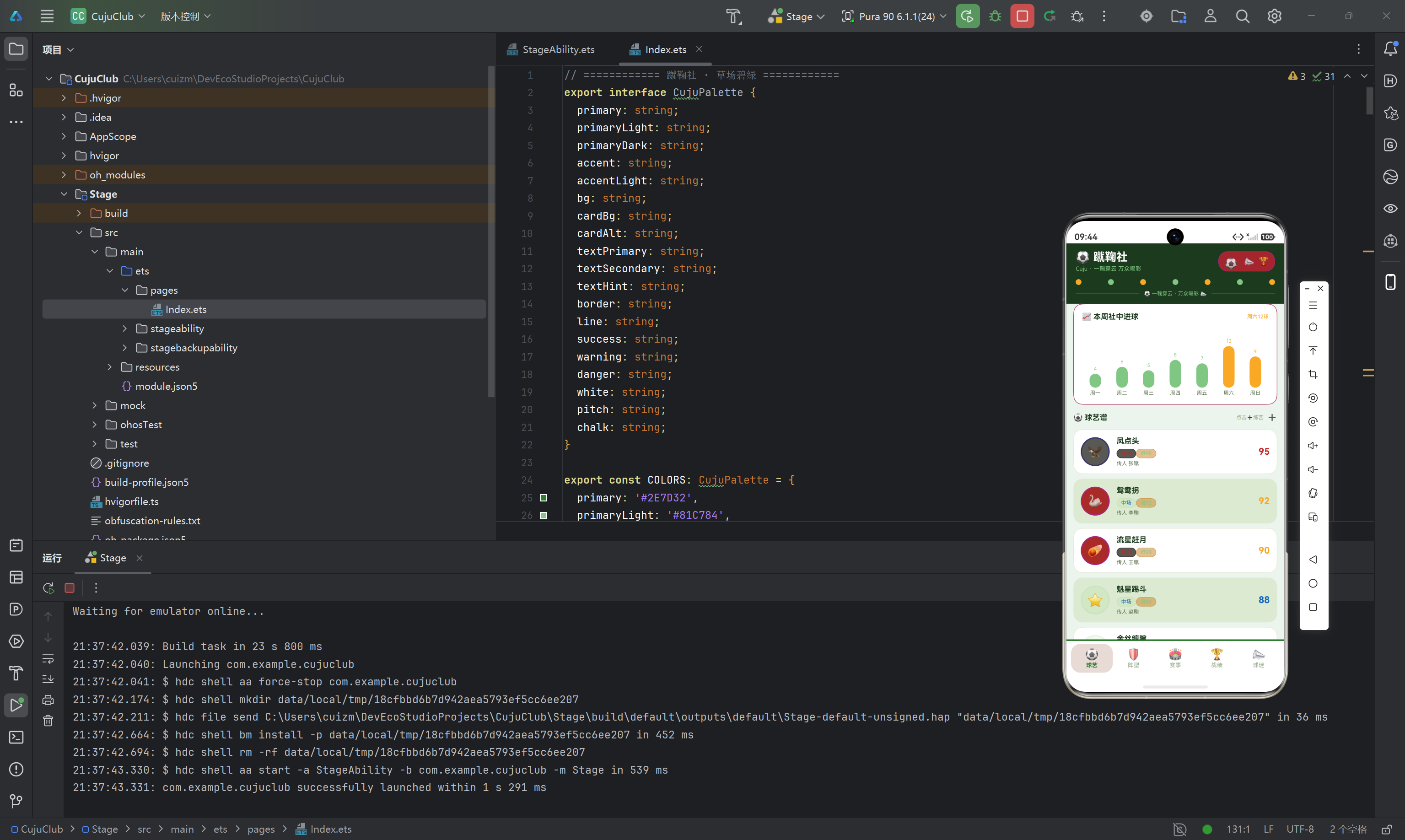
逐点拆解:
第一,结构同构,气质迥异。蹴鞠社的主色是 #2E7D32(草场绿)——Material Design 标准绿 800 号,饱满而富有生机。#1B3A1D(primaryDark)是深夜球场般的墨绿,#81C784(primaryLight)是新芽般的嫩绿。
第二,本系列第一次出现"高饱和五色"。除了绿色系,还引入了明黄 #F9A825(accent,赛场金哨般的醒目色)、球场红 #C62828(danger)、天空蓝 #1565C0、球迷紫 #7B1FA2。这四种颜色并不是随意堆砌——它们分别对应页签体系里的四个非绿色页签(阵型黄、赛事蓝、战绩红、球迷紫),与"页签即主题"的设计一脉相承。足球运动的活力,靠的就是这份高饱和色彩。
第三,接口末尾多出两个主题点色:pitch(草场色,#3A7D3E)与 chalk(白垩线色,#FFFFFF)。这两个色用于阵型布阵图:pitch 是球场草地底色,chalk 是边线、中线、禁区线的白色线条色。"草场 + 白线"的意象,就是一张标准的足球场。
第四,色板完整体系:primary/primaryLight/primaryDark 绿色梯度、accent/accentLight 明黄强调、bg/cardBg/cardAlt 背景层次(bg 是带一点绿的米白 #EDF5EE)、textPrimary/textSecondary/textHint 文字三级密度(textPrimary 用墨绿 #1B3A1D 而非纯黑)、success/warning/danger 状态色。整体气质:清爽、活力、阳光。
3.2 页签体系:五色齐飞的 CujuTab、STabMeta 与 TAB_LIST
接下来是页签枚举、页签元数据接口与页签列表。这一节延续了榫卯工坊"页签即主题"的设计,并把五色体系推向极致。
enum CujuTab {
  SKILL = 0,
  FORMATION = 1,
  EVENT = 2,
  RECORD = 3,
  FAN = 4
}

interface STabMeta {
  key: string;
  icon: string;
  label: string;
  color: string;
}

const TAB_LIST: STabMeta[] = [
  { key: 'skill', icon: '⚽', label: '球艺', color: '#2E7D32' },
  { key: 'formation', icon: '🛡️', label: '阵型', color: '#F9A825' },
  { key: 'event', icon: '🏟️', label: '赛事', color: '#1565C0' },
  { key: 'record', icon: '🏆', label: '战绩', color: '#C62828' },
  { key: 'fan', icon: '📣', label: '球迷', color: '#7B1FA2' }
];
逐点拆解:
其一,enum CujuTab 把五个页签的索引语义化:SKILL(球艺)、FORMATION(阵型)、EVENT(赛事)、RECORD(战绩)、FAN(球迷)。代码里 this.curTab === CujuTab.SKILL 比 this.curTab === 0 可读性强得多。
其二,五色齐飞的页签配色:球艺页草绿 #2E7D32、阵型页明黄 #F9A825、赛事页天空蓝 #1565C0、战绩页球场红 #C62828、球迷页应援紫 #7B1FA2。五个颜色各有语义:球艺是球场本体的绿,阵型是战术板标记的黄,赛事是广阔天空的蓝,战绩是热血拼搏的红,球迷是狂热应援的紫。每个页签颜色都与该板块的业务语义绑定——这是"页签即主题"设计的高级形态。
其三,底部导航渲染时,选中态直接用 t.color——文字颜色、加粗、背景色(t.color + '18')全部跟随页签自身颜色变化。切到"赛事"页高亮是蓝,切到"球迷"页高亮是紫,视觉上比前两篇更加活泼跳跃。
3.3 业务实体接口:五组数据契约
紧随页签体系,定义了五组业务实体的接口。
interface SkillItem {
  name: string;
  level: number;
  master: string;
  crew: string;
  emoji: string;
}

interface FormationItem {
  name: string;
  shape: string;
  forwards: number;
  backs: number;
  emoji: string;
}

interface EventItem {
  name: string;
  date: string;
  venue: string;
  teams: number;
  emoji: string;
}

interface RecordItem {
  name: string;
  result: string;
  score: string;
  rival: string;
  emoji: string;
}

interface FanItem {
  name: string;
  city: string;
  cheers: number;
  years: number;
  emoji: string;
}

interface WeekGoalMeta {
  day: string;
  value: number;
}

interface FormationPosMeta {
  name: string;
  x: number;
  y: number;
  color: string;
}
逐点拆解:
第一,五组业务接口各有侧重:
SkillItem(球艺):name(招式名,如"凤点头")、level(难度分)、master(传人)、crew(司职,如"锋线"“中场”“后卫”“门将”)、emoji。level喂给getSkillColor,crew喂给getCrewColor。FormationItem(阵型):name(阵法名,如"梅花阵")、shape(阵形代号,如"5-2")、forwards(前锋数)、backs(后卫数)、emoji。EventItem(赛事):name(赛事名,如"端阳蹴鞠大赛")、date(日期)、venue(赛场,如"汴京御街")、teams(参赛队数)、emoji。RecordItem(战绩):name(赛事名)、result(结果:胜/平/负)、score(比分)、rival(对手)、emoji。result喂给getResultColor——这是本系列第一次出现"胜平负"三分语义。FanItem(球迷):name(球迷名)、city(城市)、cheers(助威次数)、years(球迷年限)、emoji。cheers喂给getFanColor。
第二,两个图表元数据:WeekGoalMeta(周进球:天 + 数值)与 FormationPosMeta(阵型站位:名称 + x/y 坐标 + 颜色)。其中 FormationPosMeta 是本系列第一次出现坐标类元数据——x/y 是两个 0-100 的百分比坐标,直接决定球员棋子在球场画布上的精确位置,后面会详述。
3.4 图表数据常量:WEEK_GOAL 与 FORMATION_POS
const WEEK_GOAL: WeekGoalMeta[] = [
  { day: '周一', value: 4 },
  { day: '周二', value: 6 },
  { day: '周三', value: 5 },
  { day: '周四', value: 8 },
  { day: '周五', value: 7 },
  { day: '周六', value: 12 },
  { day: '周日', value: 9 }
];

const FORMATION_POS: FormationPosMeta[] = [
  { name: '门将', x: 50, y: 88, color: '#F9A825' },
  { name: '左卫', x: 22, y: 66, color: '#2E7D32' },
  { name: '中卫', x: 50, y: 70, color: '#2E7D32' },
  { name: '右卫', x: 78, y: 66, color: '#2E7D32' },
  { name: '左前', x: 28, y: 38, color: '#1565C0' },
  { name: '中前', x: 50, y: 30, color: '#C62828' },
  { name: '右前', x: 72, y: 38, color: '#1565C0' },
  { name: '锋头', x: 50, y: 12, color: '#C62828' }
];
逐点拆解:
WEEK_GOAL 是一周社中进球数据,峰值出现在周六(12 球)——延续"周末是旺季"的叙事设定。数据里"周六 12 球"的数字直接决定了页面右上角提示语"周六12球"的来源,柱状图里 value >= 9 的柱子(周六 12、周日 9)会被高亮为强调色。注意柱高计算是 w.value * 6——进球数 × 6 = 像素高度,12 球就是 72px 高的柱子。
FORMATION_POS 是阵型布阵图的核心数据,需要重点解读:
- 8 个站位:门将(y=88,靠近底线)、左卫/中卫/右卫(y=6670,防线)、左前/中前/右前(y=3038,中场)、锋头(y=12,最前方)——y 坐标从小到大对应从后场到前场,88 是门将、12 是锋头,天然构成纵向的球场位置关系;
- x 坐标左右对称:左卫 22 / 右卫 78、左前 28 / 右前 72,中卫、中前、锋头都在 x=50 的中轴线上——对称性一目了然;
- 颜色语义:门将明黄、后卫绿、中前红、边前蓝、锋头红——与前场攻击手用红、防守用绿、门将用黄的足球惯例一致。
这套坐标数据是"数据驱动图形"的教科书案例:8 个棋子完全由数据摆位,改数据即改阵型,无需改任何 UI 代码。
3.5 数据模型层:@Observed 修饰的 CujuData
这是应用的灵魂底层——被观察的核心数据实体,完整包含 12×5 共计 60 条蹴鞠业务数据,一字不落。
@Observed
export class CujuData {
skills: SkillItem[] = [
{ name: '凤点头', level: 95, master: '张蹴', crew: '锋线', emoji: '🦅' },
{ name: '鸳鸯拐', level: 92, master: '李鞠', crew: '中场', emoji: '🦢' },
{ name: '流星赶月', level: 90, master: '王蹴', crew: '锋线', emoji: '☄️' },
{ name: '魁星踢斗', level: 88, master: '赵鞠', crew: '中场', emoji: '⭐' },
{ name: '金丝缠腕', level: 86, master: '钱蹴', crew: '后卫', emoji: '🪢' },
{ name: '海底捞月', level: 84, master: '孙鞠', crew: '门将', emoji: '🌙' },
{ name: '燕子穿林', level: 89, master: '周蹴', crew: '锋线', emoji: '🐦' },
{ name: '老虎摆尾', level: 87, master: '吴鞠', crew: '后卫', emoji: '🐯' },
{ name: '童子拜佛', level: 83, master: '郑蹴', crew: '中场', emoji: '🧒' },
{ name: '斜插梅花', level: 85, master: '王鞠', crew: '锋线', emoji: '🌸' },
{ name: '转身倒勾', level: 91, master: '冯蹴', crew: '锋线', emoji: '🌀' },
{ name: '老将绝技', level: 96, master: '堂主', crew: '全能', emoji: '📜' }
];
formations: FormationItem[] = [
{ name: '一锋七卫', shape: '1-3-3-1', forwards: 1, backs: 7, emoji: '🛡️' },
{ name: '三星阵', shape: '3-3-1', forwards: 3, backs: 4, emoji: '⭐' },
{ name: '梅花阵', shape: '5-2', forwards: 5, backs: 2, emoji: '🌸' },
{ name: '北斗阵', shape: '2-3-2', forwards: 2, backs: 5, emoji: '🌌' },
{ name: '雁翅阵', shape: '4-3', forwards: 4, backs: 3, emoji: '🦢' },
{ name: '长蛇阵', shape: '1-6-1', forwards: 1, backs: 6, emoji: '🐍' },
{ name: '八卦阵', shape: '3-4-1', forwards: 3, backs: 5, emoji: '☯️' },
{ name: '锋矢阵', shape: '5-2-1', forwards: 5, backs: 3, emoji: '🏹' },
{ name: '鸳鸯阵', shape: '2-4-2', forwards: 2, backs: 6, emoji: '🦆' },
{ name: '六合阵', shape: '2-4-2', forwards: 2, backs: 6, emoji: '🎴' },
{ name: '风火阵', shape: '4-3-1', forwards: 4, backs: 4, emoji: '🔥' },
{ name: '老堂秘阵', shape: '秘制', forwards: 3, backs: 5, emoji: '📜' }
];
events: EventItem[] = [
{ name: '端阳蹴鞠大赛', date: '06-10', venue: '汴京御街', teams: 16, emoji: '🐉' },
{ name: '中秋鞠会', date: '09-15', venue: '临安涌金门', teams: 12, emoji: '🌕' },
{ name: '重阳登高赛', date: '10-09', venue: '长安乐游原', teams: 8, emoji: '🍂' },
{ name: '上元灯夕赛', date: '02-14', venue: '洛阳天津桥', teams: 20, emoji: '🏮' },
{ name: '寒食踏青赛', date: '04-05', venue: '成都锦江畔', teams: 10, emoji: '🌱' },
{ name: '端午龙舟鞠', date: '06-02', venue: '苏州金鸡湖', teams: 14, emoji: '🐲' },
{ name: '七夕乞巧赛', date: '08-10', venue: '杭州西湖', teams: 12, emoji: '💕' },
{ name: '社日乡赛', date: '03-21', venue: '乡间社坛', teams: 6, emoji: '🌾' },
{ name: '立春开鞠赛', date: '02-04', venue: '京华鞠场', teams: 18, emoji: '🌸' },
{ name: '冬至贺岁赛', date: '12-22', venue: '汴京州桥', teams: 8, emoji: '❄️' },
{ name: '清明蹴鞠会', date: '04-05', venue: '曲江芙蓉园', teams: 16, emoji: '🌷' },
{ name: '腊月封场赛', date: '12-08', venue: '临安涌金门', teams: 10, emoji: '⛄' }
];
records: RecordItem[] = [
{ name: '端阳大赛决赛', result: '胜', score: '3:1', rival: '临安社', emoji: '🏆' },
{ name: '中秋鞠会半决赛', result: '胜', score: '2:0', rival: '长安社', emoji: '🥇' },
{ name: '重阳登高赛', result: '负', score: '1:2', rival: '洛阳社', emoji: '🥈' },
{ name: '上元灯夕赛决赛', result: '胜', score: '4:2', rival: '苏州社', emoji: '🏆' },
{ name: '寒食踏青赛', result: '平', score: '2:2', rival: '成都社', emoji: '🤝' },
{ name: '端午龙舟鞠', result: '胜', score: '3:0', rival: '扬州社', emoji: '🥇' },
{ name: '七夕乞巧赛', result: '胜', score: '2:1', rival: '钱塘社', emoji: '🏆' },
{ name: '社日乡赛', result: '负', score: '0:1', rival: '乡勇队', emoji: '🥈' },
{ name: '立春开鞠赛', result: '胜', score: '5:1', rival: '京华社', emoji: '🏆' },
{ name: '冬至贺岁赛', result: '胜', score: '3:2', rival: '汴京社', emoji: '🥇' },
{ name: '清明蹴鞠会', result: '平', score: '1:1', rival: '曲江社', emoji: '🤝' },
{ name: '腊月封场赛', result: '胜', score: '4:0', rival: '临安社', emoji: '🏆' }
];
fans: FanItem[] = [
{ name: '汴京老张', city: '汴京', cheers: 1200, years: 30, emoji: '👴' },
{ name: '临安小李', city: '临安', cheers: 980, years: 12, emoji: '👨' },
{ name: '长安王二', city: '长安', cheers: 860, years: 25, emoji: '🧔' },
{ name: '洛阳赵姐', city: '洛阳', cheers: 760, years: 8, emoji: '👩' },
{ name: '苏州钱三', city: '苏州', cheers: 640, years: 15, emoji: '🧑' },
{ name: '成都孙四', city: '成都', cheers: 720, years: 10, emoji: '👱' },
{ name: '杭州周伯', city: '杭州', cheers: 1100, years: 40, emoji: '🧓' },
{ name: '扬州吴娘', city: '扬州', cheers: 540, years: 6, emoji: '👧' },
{ name: '京华郑少', city: '京华', cheers: 880, years: 20, emoji: '🧒' },
{ name: '钱塘冯嫂', city: '钱塘', cheers: 460, years: 4, emoji: '👩🦰' },
{ name: '乡勇陈头', city: '乡间', cheers: 380, years: 18, emoji: '🧙' },
{ name: '曲江楚公子', city: '曲江', cheers: 920, years: 22, emoji: '🤵' }
];
}
逐点拆解:
第一,@Observed 深度绑定机制与系列前两篇完全一致:@Observed 让 CujuData 成为可观察对象,主组件 @State data 持有单例,子组件 @ObjectLink 深度绑定。单一数据源、多端同步。
第二,数据的叙事性与覆盖面:
- 球艺的
level从 83(童子拜佛)到 96(老将绝技),覆盖getSkillColor全部档位(≥95 红 / ≥90 黄 / ≥86 蓝 / 其余绿);crew覆盖锋线、中场、后卫、门将、全能五类,喂给getCrewColor四档映射; - 阵型的
forwards/backs组合多样——"一锋七卫"极致防守(1 前锋 7 后卫)、"梅花阵"重攻轻守(5 前锋 2 后卫)、“老堂秘阵"是保密的秘制阵型(shape 直接写"秘制”); - 战绩的
result恰好 8 胜 2 平 2 负——页头提示语"8胜2平2负"就是从数据统计来的; - 球迷的
cheers从 380(乡勇陈头)到 1200(汴京老张),覆盖getFanColor全部档位(≥900 紫 / ≥700 黄 / ≥500 蓝 / 其余棕绿);years从 4 年到 40 年,杭州周伯 40 年是元老级球迷。
数据字段的取值区间,决定了取色函数的分档是否"看得见差异"——每一档都要有数据命中,颜色阶梯才有意义。这与前两篇一脉相承。
第三,数据里的历史温度:赛事名全是宋代节日——端阳、中秋、重阳、上元、寒食、七夕、社日、立春、冬至、清明、腊月,赛场横跨汴京御街、临安涌金门、长安乐游原、洛阳天津桥……一份代码读下来,仿佛翻开了《东京梦华录》的蹴鞠篇章。
3.6 工具函数层:四种取色映射策略
function getSkillColor(level: number): string {
  if (level >= 95) {
    return '#C62828';
  } else if (level >= 90) {
    return '#F9A825';
  } else if (level >= 86) {
    return '#1565C0';
  }
  return '#2E7D32';
}

function getCrewColor(crew: string): string {
  if (crew === '锋线') {
    return '#C62828';
  } else if (crew === '中场') {
    return '#1565C0';
  } else if (crew === '后卫' || crew === '门将') {
    return '#2E7D32';
  }
  return '#7B1FA2';
}

function getResultColor(result: string): string {
  if (result === '胜') {
    return '#2E7D32';
  } else if (result === '平') {
    return '#F9A825';
  }
  return '#C62828';
}

function getFanColor(cheers: number): string {
  if (cheers >= 900) {
    return '#7B1FA2';
  } else if (cheers >= 700) {
    return '#F9A825';
  } else if (cheers >= 500) {
    return '#1565C0';
  }
  return '#5A6D4A';
}
逐点拆解:
四个函数呈现了三种映射策略,与前两篇形成有趣的对照:
第一,getSkillColor 是同构的阈值分级:难度 ≥95 球场红、≥90 明黄、≥86 天空蓝、其余草绿——“越高越重”(红 > 黄 > 蓝 > 绿)。这与糖画坊的匠级取色同构,只是色板换成了足球五色。
第二,getCrewColor 是白名单分级:锋线红、中场蓝、后卫与门将绿、全能紫。司职颜色与足球惯例高度吻合——进攻端用红(热血)、组织端用蓝(冷静)、防守端用绿(稳固)、全能用紫(稀有)。注意"后卫 || 门将"被归为一档——都是防守职责,语义上天然同类。
第三,getResultColor 是本系列最值得玩味的三分映射:胜 → 草绿、平 → 明黄、负 → 球场红。这里红色代表的不是"危险"而是"失利"——颜色的语义随业务语境而变。在糖画坊里红色 #A8362A 代表高匠级(珍贵),在榫卯工坊里红色 #8E3B2E 代表高磨损(警示),而在蹴鞠社里红色 #C62828 代表败仗(失利)。同一个色相,在不同语境下被赋予了不同的含义——这就是"颜色即语义"的动态性。
第四,getFanColor 也是阈值分级:助威 ≥900 球迷紫、≥700 明黄、≥500 天空蓝、其余棕绿——“越高越紫”(紫 > 黄 > 蓝 > 棕绿),最忠实的球迷用最热烈的应援紫。
把取色逻辑收敛成独立函数,颜色计算只发生一次、只在一处——后续如果换球队配色(比如改成皇马白、巴萨红蓝),只需改函数返回值,全应用联动。
3.7 主组件 CujuApp:状态中枢与三大弹窗构建器
@Entry
@Component
struct CujuApp {
  @State curTab: number = 0;
  @State data: CujuData = new CujuData();
  @State showAddSkill: boolean = false;
  @State showEditFormation: boolean = false;
  @State showDeleteRecord: boolean = false;
  @State delRecordName: string = '';
  @State ballBounce: boolean = false;
  @State whistle: boolean = false;

  @Builder modalOverlay(onClose: () => void) {
    Column()
      .width('100%')
      .height('100%')
      .backgroundColor('#66000000')
      .onClick(() => { onClose(); })
  }
逐点拆解:
CujuApp 是整个应用的状态中枢,@State 变量依然分成三组:
- 导航状态:
curTab记录当前页签索引; - 弹窗状态:
showAddSkill / showEditFormation / showDeleteRecord三个布尔控制弹窗显隐,delRecordName记录"要移出的战绩名"(注意:这里没有第二个操作对象名——因为editFormationModal是纯展示的,不需要知道具体阵型名); - 动画状态:
ballBounce(足球弹跳)与whistle(喇叭缩放)。
modalOverlay 与系列前两篇完全一致——参数化 @Builder,接受"关闭回调",渲染约 40% 不透明度的黑色全屏蒙层,点击蒙层触发回调。控制反转:遮罩组件不关心"关闭后做什么",只负责"点击了我就要通知你"。
3.7.1 弹窗一:addSkillModal(新练球艺)
  @Builder addSkillModal() {
    Stack() {
      this.modalOverlay(() => { this.showAddSkill = false; })
      Column() {
        Row() {
          Text('⚽ 新练球艺')
            .fontSize(16)
            .fontWeight(FontWeight.Bold)
            .fontColor(COLORS.textPrimary)
          Column().layoutWeight(1)
          Text('✕')
            .fontSize(16)
            .fontColor(COLORS.textHint)
            .onClick(() => { this.showAddSkill = false; })
        }
        .width('100%')
        Column() {
          Text('🦅')
            .fontSize(30)
          Text('凤点头')
            .fontSize(14)
            .fontWeight(FontWeight.Bold)
            .fontColor(COLORS.textPrimary)
            .margin({ top: 6 })
        }
        .width('100%')
        .padding(14)
        .backgroundColor(COLORS.cardAlt)
        .borderRadius(14)
        .margin({ top: 12 })
        Row() {
          Text('传人')
            .fontSize(11)
            .fontColor(COLORS.textSecondary)
            .width(56)
          Text('张蹴 · 锋线')
            .fontSize(11)
            .fontColor(getCrewColor('锋线'))
        }
        .width('100%')
        .padding(10)
        .backgroundColor(COLORS.cardAlt)
        .borderRadius(12)
        .margin({ top: 8 })
        Row() {
          Text('难度')
            .fontSize(11)
            .fontColor(COLORS.textSecondary)
            .width(56)
          Text('★★★★★ · 95 分')
            .fontSize(11)
            .fontColor(getSkillColor(95))
        }
        .width('100%')
        .padding(10)
        .backgroundColor(COLORS.cardAlt)
        .borderRadius(12)
        .margin({ top: 8 })
        Row() {
          Text('要诀')
            .fontSize(11)
            .fontColor(COLORS.textSecondary)
            .width(56)
          Text('凌空点球 · 一击破门')
            .fontSize(11)
            .fontColor(COLORS.textPrimary)
        }
        .width('100%')
        .padding(10)
        .backgroundColor(COLORS.cardAlt)
        .borderRadius(12)
        .margin({ top: 8 })
        Row() {
          Text('再想想')
            .fontSize(12)
            .fontColor(COLORS.textSecondary)
            .padding({ left: 16, right: 16, top: 7, bottom: 7 })
            .borderRadius(14)
            .border({ width: 1, color: COLORS.border })
            .onClick(() => { this.showAddSkill = false; })
          Text('确认入册')
            .fontSize(12)
            .fontWeight(FontWeight.Bold)
            .fontColor(COLORS.white)
            .padding({ left: 16, right: 16, top: 7, bottom: 7 })
            .backgroundColor(COLORS.primary)
            .borderRadius(14)
            .margin({ left: 10 })
            .onClick(() => { this.showAddSkill = false; })
        }
        .width('100%')
        .justifyContent(FlexAlign.End)
        .margin({ top: 14 })
      }
      .width('86%')
      .padding(16)
      .backgroundColor(COLORS.cardBg)
      .borderRadius(18)
      .constraintSize({ maxHeight: '80%' })
    }
    .width('100%')
    .height('100%')
    .position({ x: 0, y: 0 })
  }
逐点拆解:
addSkillModal 是"新练球艺"的录入确认弹窗,结构分为四层:
第一层遮罩:this.modalOverlay(() => { this.showAddSkill = false; })。
第二层卡片容器:宽 86%、白底、圆角 18、constraintSize({ maxHeight: '80%' }) 限制最大高度。
第三层内容区:标题行 + emoji 徽标块(🦅 凤点头)+ 三行信息行(传人、难度、要诀)。注意两处取色细节:
- "传人"行的值
'张蹴 · 锋线'用getCrewColor('锋线')着色——锋线红; - "难度"行的值
'★★★★★ · 95 分'用getSkillColor(95)着色——95 分落在 ≥95 档,球场红。
弹窗内的展示数据同样复用映射函数,同一套业务规则贯穿全应用。
第四层操作区:实底(确认入册,COLORS.primary)与描边(再想想,COLORS.border)区分权重。
3.7.2 弹窗二:editFormationModal(调配阵型)
  @Builder editFormationModal() {
    Stack() {
      this.modalOverlay(() => { this.showEditFormation = false; })
      Column() {
        Row() {
          Text('🛡️ 调配阵型')
            .fontSize(16)
            .fontWeight(FontWeight.Bold)
            .fontColor(COLORS.textPrimary)
          Column().layoutWeight(1)
          Text('✕')
            .fontSize(16)
            .fontColor(COLORS.textHint)
            .onClick(() => { this.showEditFormation = false; })
        }
        .width('100%')
        Column() {
          Text('🌸')
            .fontSize(30)
          Text('梅花阵')
            .fontSize(14)
            .fontWeight(FontWeight.Bold)
            .fontColor(COLORS.textPrimary)
            .margin({ top: 6 })
        }
        .width('100%')
        .padding(14)
        .backgroundColor(COLORS.cardAlt)
        .borderRadius(14)
        .margin({ top: 12 })
        Row() {
          Text('原阵')
            .fontSize(11)
            .fontColor(COLORS.textSecondary)
            .width(56)
          Text('5-2 · 五锋两卫')
            .fontSize(11)
            .fontColor(COLORS.textPrimary)
        }
        .width('100%')
        .padding(10)
        .backgroundColor(COLORS.cardAlt)
        .borderRadius(12)
        .margin({ top: 8 })
        Row() {
          Text('新阵')
            .fontSize(11)
            .fontColor(COLORS.textSecondary)
            .width(56)
          Text('5-2 → 3-3-1')
            .fontSize(11)
            .fontColor(COLORS.accent)
        }
        .width('100%')
        .padding(10)
        .backgroundColor(COLORS.cardAlt)
        .borderRadius(12)
        .margin({ top: 8 })
        Row() {
          Text('锋卫')
            .fontSize(11)
            .fontColor(COLORS.textSecondary)
            .width(56)
          Text('锋5卫2 → 锋3卫5')
            .fontSize(11)
            .fontColor(getCrewColor('锋线'))
        }
        .width('100%')
        .padding(10)
        .backgroundColor(COLORS.cardAlt)
        .borderRadius(12)
        .margin({ top: 8 })
        Row() {
          Text('再想想')
            .fontSize(12)
            .fontColor(COLORS.textSecondary)
            .padding({ left: 16, right: 16, top: 7, bottom: 7 })
            .borderRadius(14)
            .border({ width: 1, color: COLORS.border })
            .onClick(() => { this.showEditFormation = false; })
          Text('保存调配')
            .fontSize(12)
            .fontWeight(FontWeight.Bold)
            .fontColor(COLORS.white)
            .padding({ left: 16, right: 16, top: 7, bottom: 7 })
            .backgroundColor(COLORS.primary)
            .borderRadius(14)
            .margin({ left: 10 })
            .onClick(() => { this.showEditFormation = false; })
        }
        .width('100%')
        .justifyContent(FlexAlign.End)
        .margin({ top: 14 })
      }
      .width('86%')
      .padding(16)
      .backgroundColor(COLORS.cardBg)
      .borderRadius(18)
      .constraintSize({ maxHeight: '80%' })
    }
    .width('100%')
    .height('100%')
    .position({ x: 0, y: 0 })
  }
逐点拆解:
editFormationModal 是"调配阵型"的变更对比弹窗,与榫卯工坊的 editPatternModal 结构一致,用"原 → 新"的箭头展示变更:
- "原阵"显示
'5-2 · 五锋两卫'(旧值); - "新阵"显示
'5-2 → 3-3-1',用COLORS.accent(明黄)高亮——变更后的新值用强调色标注; - "锋卫"显示
'锋5卫2 → 锋3卫5',用getCrewColor('锋线')(红)着色——复用了司职取色函数。
3.7.3 弹窗三:deleteRecordModal(移出战绩)
  @Builder deleteRecordModal() {
    Stack() {
      this.modalOverlay(() => { this.showDeleteRecord = false; })
      Column() {
        Text('🗑️ 移出战绩')
          .fontSize(16)
          .fontWeight(FontWeight.Bold)
          .fontColor(COLORS.textPrimary)
        Text('确定移出「' + this.delRecordName + '」吗?')
          .fontSize(12)
          .fontColor(COLORS.textSecondary)
          .margin({ top: 10 })
        Text('移出的战绩将从榜单移除。')
          .fontSize(10)
          .fontColor(COLORS.textHint)
          .margin({ top: 4 })
        Row() {
          Text('再想想')
            .fontSize(12)
            .fontColor(COLORS.textSecondary)
            .padding({ left: 16, right: 16, top: 7, bottom: 7 })
            .borderRadius(14)
            .border({ width: 1, color: COLORS.border })
            .onClick(() => { this.showDeleteRecord = false; })
          Text('确认移出')
            .fontSize(12)
            .fontWeight(FontWeight.Bold)
            .fontColor(COLORS.white)
            .padding({ left: 16, right: 16, top: 7, bottom: 7 })
            .backgroundColor(COLORS.danger)
            .borderRadius(14)
            .margin({ left: 10 })
            .onClick(() => { this.showDeleteRecord = false; })
        }
        .width('100%')
        .justifyContent(FlexAlign.End)
        .margin({ top: 16 })
      }
      .width('86%')
      .padding(16)
      .backgroundColor(COLORS.cardBg)
      .borderRadius(18)
      .constraintSize({ maxHeight: '78%' })
    }
    .width('100%')
    .height('100%')
    .position({ x: 0, y: 0 })
  }
逐点拆解:
deleteRecordModal 是确认型弹窗,与前两篇的删除弹窗同构:
- 动态文案:
'确定移出「' + this.delRecordName + '」吗?'——delRecordName由战绩列表点击 🗑️ 时通过回调上抛赋值; - 危险操作强调:确认按钮用
COLORS.danger(球场红#C62828)实底; - 文案的足球语境:“移出战绩"而非"删除战绩”,“从榜单移除”——贴合体育记录的语义。
3.8 顶栏 topBar:圆点装饰与足球弹跳动画
  @Builder topBar() {
    Column() {
      Row() {
        Column() {
          Text('⚽ 蹴鞠社')
            .fontSize(20)
            .fontWeight(FontWeight.Bold)
            .fontColor(COLORS.white)
          Text('Cuju · 一鞠穿云 万众喝彩')
            .fontSize(10)
            .fontColor(COLORS.primaryLight)
            .margin({ top: 3 })
        }
        .alignItems(HorizontalAlign.Start)
        .layoutWeight(1)
        Row() {
          Text('⚽')
            .fontSize(18)
            .translate({ y: this.ballBounce ? -8 : 4 })
            .animation({ duration: 500, curve: Curve.EaseOut })
            .onClick(() => { this.ballBounce = !this.ballBounce; })
          Text('📣')
            .fontSize(16)
            .margin({ left: 10 })
            .scale({ x: this.whistle ? 1.3 : 0.9, y: this.whistle ? 1.3 : 0.9 })
            .animation({ duration: 400, curve: Curve.EaseOut })
            .onClick(() => { this.whistle = !this.whistle; })
          Text('🏆')
            .fontSize(14)
            .margin({ left: 6 })
        }
        .padding({ left: 10, right: 10, top: 6, bottom: 6 })
        .backgroundColor(COLORS.accent + '2E')
        .borderRadius(16)
        .border({ width: 1, color: COLORS.accent + '80' })
      }
      .width('100%')
      Row() {
        ForEach([0, 1, 2, 3, 4, 5, 6], (r: number) => {
          Column()
            .width(10)
            .height(10)
            .backgroundColor(r % 2 === 0 ? COLORS.accent : COLORS.primaryLight)
            .borderRadius(5)
        }, (r: number) => 'pk' + r)
      }
      .width('100%')
      .justifyContent(FlexAlign.SpaceBetween)
      .margin({ top: 12 })
      Row() {
        Column()
          .layoutWeight(1)
          .height(1)
          .backgroundColor(COLORS.primaryLight + '66')
        Text('⚽ 一鞠穿云 · 万众喝彩 📣')
          .fontSize(9)
          .fontColor(COLORS.primaryLight)
          .margin({ left: 8, right: 8 })
        Column()
          .layoutWeight(1)
          .height(1)
          .backgroundColor(COLORS.primaryLight + '66')
      }
      .width('100%')
      .margin({ top: 10 })
    }
    .width('100%')
    .padding({ left: 16, right: 16, top: 12, bottom: 12 })
    .backgroundColor(COLORS.primaryDark)
  }
逐点拆解:
topBar 是"深色底 + 三行结构"的顶栏,三个细节值得注意:
第一,足球的弹跳动画:Text('⚽').translate({ y: this.ballBounce ? -8 : 4 })——点击后在 y 轴 -8 与 +4 之间位移,500ms Curve.EaseOut 缓出。只做垂直位移,模拟足球的起落弹跳,这是 translate 位移动画在本系列的第二次登场(榫卯工坊是凿子滑动)。
第二,喇叭的缩放动画:Text('📣').scale({ x: this.whistle ? 1.3 : 0.9, y: ... })——点击后在 1.3 与 0.9 之间缩放,400ms 缓出,模拟"吹喇叭鼓劲"。这是 scale 缩放动画的回归(糖画坊是糖葫芦脉冲)。
第三,装饰与分割:7 个 10px 圆点交替明黄与嫩绿(比前两篇更圆润饱满,呼应足球的圆形),分割线用 COLORS.primaryLight + '66'(约 40% 透明度的嫩绿),标语"⚽ 一鞠穿云 · 万众喝彩 📣"用 COLORS.primaryLight 着色——顶栏文字、副标语、装饰全部围绕草绿与明黄展开。
3.9 主构建函数 build():页签切换、底部导航与弹窗挂载
  build() {
    Column() {
      this.topBar()
      if (this.curTab === CujuTab.SKILL) {
        CujuSkillContent({ data: this.data, onAdd: () => { this.showAddSkill = true; } })
      } else if (this.curTab === CujuTab.FORMATION) {
        CujuFormationContent({ data: this.data, onEdit: () => { this.showEditFormation = true; } })
      } else if (this.curTab === CujuTab.EVENT) {
        CujuEventContent({ data: this.data })
      } else if (this.curTab === CujuTab.RECORD) {
        CujuRecordContent({ data: this.data, onDel: (n: string) => {
          this.delRecordName = n;
          this.showDeleteRecord = true;
        } })
      } else {
        CujuFanContent({ data: this.data })
      }
      Column()
        .width('100%')
        .height(3)
        .backgroundColor(COLORS.primary)
      Row() {
        ForEach(TAB_LIST, (t: STabMeta, idx: number) => {
          Column() {
            Text(t.icon)
              .fontSize(19)
            Text(t.label)
              .fontSize(10)
              .fontColor(this.curTab === idx ? t.color : COLORS.textHint)
              .fontWeight(this.curTab === idx ? FontWeight.Bold : FontWeight.Normal)
              .margin({ top: 2 })
          }
          .layoutWeight(1)
          .justifyContent(FlexAlign.Center)
          .padding({ top: 7, bottom: 7 })
          .backgroundColor(this.curTab === idx ? t.color + '18' : '#00000000')
          .border(this.curTab === idx ? { width: 0 } : { width: 0 })
          .borderRadius(16)
          .onClick(() => { this.curTab = idx; })
        }, (t: STabMeta) => t.key)
      }
      .width('100%')
      .height(60)
      .padding({ left: 8, right: 8 })
      .backgroundColor(COLORS.cardBg)

      if (this.showAddSkill) {
        this.addSkillModal()
      }
      if (this.showEditFormation) {
        this.editFormationModal()
      }
      if (this.showDeleteRecord) {
        this.deleteRecordModal()
      }
    }
    .width('100%')
    .height('100%')
    .backgroundColor(COLORS.bg)
  }
}
逐点拆解:
build() 的布局是标准的"三段式",与系列前两篇一致。几个细节值得注意:
第一,内容区的条件渲染与回调传递:CujuSkillContent 收到 onAdd、CujuFormationContent 收到 onEdit(无参——因为它只需要打开弹窗,不需要知道具体阵型)、CujuRecordContent 收到 onDel(n)。子组件不直接改弹窗状态,只喊"我要练艺/我要调配/我要移出",组件间通信方向保持单向清晰。
第二,底部导航的选中态:文字变色(t.color)+ 加粗 + 背景变淡(t.color + '18',约 9% 透明度)三重重反馈。有趣的是这里 .border() 选中与非选中都传 { width: 0 }——描边被显式禁用,与榫卯工坊的描边选中态形成对照:本系列的每一篇都在微调导航选中态的视觉细节,这正是"模板之上的差异化"的又一例证。圆角 16 比前两篇略圆润。
第三,弹窗按需挂载:三个 if 只有在对应布尔为 true 时才把弹窗加入渲染树,未打开的弹窗不消耗渲染内存。
3.10 通用标签组件 CujuTag
@Component
struct CujuTag {
  @Prop text: string;
  @Prop color: string;

  build() {
    Text(this.text)
      .fontSize(9)
      .fontColor(this.color)
      .padding({ left: 7, right: 7, top: 2, bottom: 2 })
      .backgroundColor(this.color + '1F')
      .borderRadius(9)
      .border({ width: 1, color: this.color + '40' })
  }
}
逐点拆解:
CujuTag 与糖画坊的 SugarTag、榫卯工坊的 SunmaoTag 完全同构(只是名字不同)——"通用胶囊标签"在这套模板里的可复用地位再次得到印证:文字 @Prop 单向传入,背景 this.color + '1F'(约 12% 透明度)同色系浅底,边框 this.color + '40'(约 25% 透明度)同色系描边。
3.11 内容子组件一:CujuSkillContent(球艺谱)
@Component
struct CujuSkillContent {
  @ObjectLink data: CujuData;
  onAdd: () => void = () => {};

  build() {
    Scroll() {
      Column() {
        Column() {
          Row() {
            Text('📈 本周社中进球')
              .fontSize(13)
              .fontWeight(FontWeight.Bold)
              .fontColor(COLORS.textPrimary)
            Text('周六12球')
              .fontSize(9)
              .fontColor(COLORS.accent)
              .margin({ left: 8 })
          }
          .width('100%')
          .justifyContent(FlexAlign.SpaceBetween)
          Row() {
            ForEach(WEEK_GOAL, (w: WeekGoalMeta) => {
              Column() {
                Text(w.value + '')
                  .fontSize(8)
                  .fontColor(w.value >= 9 ? COLORS.accent : COLORS.primaryLight)
                Column()
                  .width(20)
                  .height(w.value * 6)
                  .backgroundColor(w.value >= 9 ? COLORS.accent : COLORS.primaryLight)
                  .borderRadius(10)
                  .margin({ top: 4 })
                Text(w.day)
                  .fontSize(9)
                  .fontColor(COLORS.textSecondary)
                  .margin({ top: 4 })
              }
              .layoutWeight(1)
              .alignItems(HorizontalAlign.Center)
            }, (w: WeekGoalMeta) => w.day)
          }
          .width('100%')
          .alignItems(VerticalAlign.Bottom)
          .height(120)
          .margin({ top: 10 })
        }
        .width('100%')
        .padding(14)
        .backgroundColor(COLORS.cardBg)
        .borderRadius(16)
        .border({ width: 1, color: COLORS.accent + '55' })

        Row() {
          Text('⚽ 球艺谱')
            .fontSize(13)
            .fontWeight(FontWeight.Bold)
            .fontColor(COLORS.textPrimary)
          Column().layoutWeight(1)
          Text('点击➕练艺')
            .fontSize(9)
            .fontColor(COLORS.textHint)
          Text('➕')
            .fontSize(14)
            .margin({ left: 6 })
            .onClick(() => { this.onAdd(); })
        }
        .width('100%')
        .margin({ top: 14, bottom: 4 })

        ForEach(this.data.skills, (s: SkillItem, i: number) => {
          Row() {
            Column() {
              Text(s.emoji)
                .fontSize(22)
            }
            .width(50)
            .height(50)
            .justifyContent(FlexAlign.Center)
            .alignItems(HorizontalAlign.Center)
            .backgroundColor(getSkillColor(s.level) + '22')
            .borderRadius(25)
            .border({ width: 2, color: getSkillColor(s.level) + '80' })

            Column() {
              Text(s.name)
                .fontSize(13)
                .fontWeight(FontWeight.Bold)
                .fontColor(COLORS.textPrimary)
              Row() {
                CujuTag({ text: s.crew, color: getCrewColor(s.crew) })
                CujuTag({ text: '难' + s.level, color: COLORS.primaryLight })
              }
              .margin({ top: 6 })
              Text('传人 ' + s.master)
                .fontSize(9)
                .fontColor(COLORS.textSecondary)
                .margin({ top: 4 })
            }
            .layoutWeight(1)
            .alignItems(HorizontalAlign.Start)
            .margin({ left: 12 })

            Text(s.level + '')
              .fontSize(16)
              .fontWeight(FontWeight.Bold)
              .fontColor(getSkillColor(s.level))
          }
          .width('100%')
          .padding(12)
          .backgroundColor(i % 2 === 0 ? COLORS.cardBg : COLORS.cardAlt)
          .borderRadius(16)
          .border({ width: 1, color: COLORS.line })
          .margin({ top: 8 })
        }, (s: SkillItem, i: number) => 'sk' + s.name + i)
      }
      .width('100%')
      .padding({ left: 12, right: 12, bottom: 16 })
    }
    .width('100%')
    .layoutWeight(1)
    .scrollable(ScrollDirection.Vertical)
    .scrollBar(BarState.Off)
  }
}
逐点拆解:
CujuSkillContent 的结构是"统计卡片 + 列表"的复合体,拆开看有三层:
第一层是柱状图卡片。与前两篇的柱状图不同的是柱高计算:height(w.value * 6)——进球数 × 6 = 像素高度,容器高度 120。整行 alignItems(VerticalAlign.Bottom) 让柱子底部对齐。进球 ≥9 的柱子(周六 12、周日 9)用明黄高亮——"周六 12 球"的数字与页头提示语互相印证。
第二层是列表头:标题 + 弹性占位 + 提示语 + 加号按钮,onClick 调用 this.onAdd()。
第三层是列表项:回归"圆形色块"形态(糖画坊式)——50px 圆形内 emoji + 难度分,背景 getSkillColor(s.level) + '22'、描边 + '80'(同色系深浅梯度);右侧名称行下叠两个标签——CujuTag(司职,getCrewColor(s.crew) 着色)+ CujuTag(难度);再下一行"传人 张蹴"小字;最右侧难度分大字 getSkillColor(s.level) 着色。三段式行布局 + 双标签 + 副信息行,信息密度比前两篇更丰富。
斑马纹背景(i % 2 === 0)、'sk' + s.name + i 稳定键值——系列惯例。
3.12 内容子组件二:CujuFormationContent(阵型布阵图)——全文最大亮点
@Component
struct CujuFormationContent {
  @ObjectLink data: CujuData;
  onEdit: () => void = () => {};

  build() {
    Scroll() {
      Column() {
        Column() {
          Row() {
            Text('🛡️ 阵型布阵图')
              .fontSize(13)
              .fontWeight(FontWeight.Bold)
              .fontColor(COLORS.chalk)
            Column().layoutWeight(1)
            Text('点击✏️调配')
              .fontSize(9)
              .fontColor(COLORS.primaryLight)
              .onClick(() => { this.onEdit(); })
          }
          .width('100%')
          Stack() {
            Column()
              .width('100%')
              .height(220)
              .backgroundColor(COLORS.pitch)
              .borderRadius(12)
            Column()
              .width('100%')
              .height(1)
              .backgroundColor(COLORS.chalk + '66')
              .position({ x: 0, y: 110 })
            Column()
              .width(60)
              .height(1)
              .backgroundColor(COLORS.chalk + '66')
              .position({ x: 0, y: 55 })
            Column()
              .width(60)
              .height(1)
              .backgroundColor(COLORS.chalk + '66')
              .position({ x: 0, y: 165 })
            Column()
              .width(40)
              .height(60)
              .border({ width: 1, color: COLORS.chalk + '66' })
              .position({ x: 0, y: 80 })
            ForEach(FORMATION_POS, (p: FormationPosMeta, idx: number) => {
              Column() {
                Text(p.name)
                  .fontSize(8)
                  .fontColor(COLORS.chalk)
                  .margin({ bottom: 2 })
                Column()
                  .width(18)
                  .height(18)
                  .backgroundColor(p.color)
                  .borderRadius(9)
                  .border({ width: 2, color: COLORS.chalk })
              }
              .position({ x: (p.x - 9) + '%', y: (p.y * 2.2) })
            }, (p: FormationPosMeta) => p.name)
          }
          .width('100%')
          .height(220)
          .margin({ top: 10 })
        }
        .width('100%')
        .padding(14)
        .backgroundColor(COLORS.primaryDark)
        .borderRadius(16)

        Row() {
          Text('🛡️ 阵型总览')
            .fontSize(13)
            .fontWeight(FontWeight.Bold)
            .fontColor(COLORS.textPrimary)
          Column().layoutWeight(1)
          Text('12套阵法')
            .fontSize(9)
            .fontColor(COLORS.textHint)
        }
        .width('100%')
        .margin({ top: 14, bottom: 4 })

        ForEach(this.data.formations, (f: FormationItem, i: number) => {
          Row() {
            Column() {
              Text(f.emoji)
                .fontSize(18)
            }
            .width(42)
            .height(42)
            .justifyContent(FlexAlign.Center)
            .alignItems(HorizontalAlign.Center)
            .backgroundColor(COLORS.accent + '22')
            .borderRadius(21)
            .border({ width: 1, color: COLORS.accent + '55' })

            Column() {
              Row() {
                Text(f.name)
                  .fontSize(13)
                  .fontWeight(FontWeight.Bold)
                  .fontColor(COLORS.textPrimary)
                Text(f.shape)
                  .fontSize(9)
                  .fontColor(COLORS.accent)
                  .margin({ left: 8 })
              }
              .width('100%')
              Row() {
                Text('锋' + f.forwards + ' · 卫' + f.backs)
                  .fontSize(9)
                  .fontColor(COLORS.textSecondary)
                Text('阵型')
                  .fontSize(9)
                  .fontColor(COLORS.textHint)
                  .margin({ left: 8 })
              }
              .width('100%')
              .margin({ top: 6 })
            }
            .layoutWeight(1)
            .alignItems(HorizontalAlign.Start)
            .margin({ left: 10 })
          }
          .width('100%')
          .padding(10)
          .backgroundColor(i % 2 === 0 ? COLORS.cardBg : COLORS.cardAlt)
          .borderRadius(14)
          .border({ width: 1, color: COLORS.line })
          .margin({ top: 8 })
        }, (f: FormationItem, i: number) => 'fm' + f.name + i)
      }
      .width('100%')
      .padding({ left: 12, right: 12, bottom: 16 })
    }
    .width('100%')
    .layoutWeight(1)
    .scrollable(ScrollDirection.Vertical)
    .scrollBar(BarState.Off)
  }
}
逐点拆解:
CujuFormationContent 是全文最大的技术亮点,包含布阵图卡片与阵型总览列表两大部分。我们先重点剖析布阵图:
第一,布阵图的画布构建——Stack() 叠层布局,由五层组成:
- 草地底色:
Column().width('100%').height(220).backgroundColor(COLORS.pitch)——全宽 220 高的草场绿画布,圆角 12; - 中线:
Column().width('100%').height(1).backgroundColor(COLORS.chalk + '66').position({ x: 0, y: 110 })——全宽 1px 白线,y=110 正好是 220 的一半,横向对半切开球场; - 上禁区线:
width(60).height(1)白线,y=55——前场 1/4 处的短横线; - 下禁区线:
width(60).height(1)白线,y=165——后场 3/4 处的短横线; - 禁区矩形:
width(40).height(60).border({ width: 1, color: COLORS.chalk + '66' }).position({ x: 0, y: 80 })——40×60 的描边矩形,构成小禁区。
这是一个纯代码手绘的足球场——没有引入任何绘图库,全部用最基础的 Column + position 绝对定位拼装而成。chalk + '66'(约 40% 透明度白线)让线条在草绿色上若隐若现,接近真实球场白线的视觉效果。
第二,球员棋子的数据坐标驱动——这是本系列最精妙的一段:
ForEach(FORMATION_POS, (p: FormationPosMeta, idx: number) => {
  Column() {
    Text(p.name)          // 站位名(门将/左卫/...)
      .fontSize(8)
      .fontColor(COLORS.chalk)
      .margin({ bottom: 2 })
    Column()              // 棋子圆点
      .width(18)
      .height(18)
      .backgroundColor(p.color)
      .borderRadius(9)
      .border({ width: 2, color: COLORS.chalk })
  }
  .position({ x: (p.x - 9) + '%', y: (p.y * 2.2) })
}, (p: FormationPosMeta) => p.name)
- 每个棋子是一个"站位名 + 18px 圆点"的迷你 Column;
- 圆点颜色
p.color直接来自数据(门将黄、后卫绿、中前红、边前蓝、锋头红); - 核心公式:
position({ x: (p.x - 9) + '%', y: (p.y * 2.2) })——x 是 0-100 的百分比坐标(减 9 让棋子居中偏移修正),y 是 0-100 的百分比坐标乘以 2.2 换算成 220 高度画布上的实际像素(100 × 2.2 = 220,正好铺满画布高度)。数据里的坐标百分比,经过一次乘法就变成了画布上的像素位置——改数据即改站位,改站位即改阵型,UI 代码零改动。
第三,深色卡片容器:整个布阵图卡片用 COLORS.primaryDark(墨绿)做底、COLORS.chalk 做文字色——深底白字的高对比,让球场画布"亮"起来,是全应用唯一一张深色卡片,视觉上形成强烈记忆点。
第四,阵型总览列表:12 条阵型记录,图标容器统一用 COLORS.accent + '22'(明黄系),名称旁显示阵形代号 f.shape(如"5-2"),信息行显示 '锋' + f.forwards + ' · 卫' + f.backs(如"锋5 · 卫2")。
3.13 内容子组件三:CujuEventContent(赛事年历)
@Component
struct CujuEventContent {
  @ObjectLink data: CujuData;

  build() {
    Scroll() {
      Column() {
        Row() {
          Text('🏟️ 赛事年历')
            .fontSize(13)
            .fontWeight(FontWeight.Bold)
            .fontColor(COLORS.textPrimary)
          Column().layoutWeight(1)
          Text('12场赛事')
            .fontSize(9)
            .fontColor(COLORS.textHint)
        }
        .width('100%')
        .margin({ bottom: 6 })
        ForEach(this.data.events, (e: EventItem, i: number) => {
          Row() {
            Column() {
              Text(e.emoji)
                .fontSize(16)
            }
            .width(40)
            .height(40)
            .justifyContent(FlexAlign.Center)
            .alignItems(HorizontalAlign.Center)
            .backgroundColor(COLORS.accent + '22')
            .borderRadius(20)
            .border({ width: 1, color: COLORS.accent + '55' })

            Column() {
              Text(e.name)
                .fontSize(13)
                .fontWeight(FontWeight.Bold)
                .fontColor(COLORS.textPrimary)
              Row() {
                Text(e.date + ' · ' + e.venue)
                  .fontSize(9)
                  .fontColor(COLORS.textSecondary)
                Text(e.teams + '队')
                  .fontSize(9)
                  .fontColor(COLORS.accent)
                  .margin({ left: 8 })
              }
              .width('100%')
              .margin({ top: 6 })
            }
            .layoutWeight(1)
            .alignItems(HorizontalAlign.Start)
            .margin({ left: 10 })
          }
          .width('100%')
          .padding(10)
          .backgroundColor(i % 2 === 0 ? COLORS.cardBg : COLORS.cardAlt)
          .borderRadius(14)
          .border({ width: 1, color: COLORS.line })
          .margin({ top: 8 })
        }, (e: EventItem, i: number) => 'ev' + e.name + i)
      }
      .width('100%')
      .padding({ left: 12, right: 12, bottom: 16 })
    }
    .width('100%')
    .layoutWeight(1)
    .scrollable(ScrollDirection.Vertical)
    .scrollBar(BarState.Off)
  }
}
逐点拆解:
CujuEventContent 是最纯粹的列表页之一(没有统计卡片、没有操作按钮):图标容器统一明黄系,名称行显示赛事名,信息行显示 e.date + ' · ' + e.venue(如"06-10 · 汴京御街")+ e.teams + '队'(如"16队")。斑马纹 + 稳定键值——系列惯例。赛事名与赛场名的历史感(端午龙舟鞠在苏州金鸡湖、上元灯夕赛在洛阳天津桥)让这个列表读起来像一本赛事日历。
3.14 内容子组件四:CujuRecordContent(战绩榜)
@Component
struct CujuRecordContent {
  @ObjectLink data: CujuData;
  onDel: (n: string) => void = () => {};

  build() {
    Scroll() {
      Column() {
        Row() {
          Text('🏆 战绩榜')
            .fontSize(13)
            .fontWeight(FontWeight.Bold)
            .fontColor(COLORS.textPrimary)
          Column().layoutWeight(1)
          Text('8胜2平2负')
            .fontSize(9)
            .fontColor(COLORS.textHint)
        }
        .width('100%')
        .margin({ bottom: 6 })
        ForEach(this.data.records, (r: RecordItem, i: number) => {
          Row() {
            Column() {
              Text(r.emoji)
                .fontSize(16)
            }
            .width(40)
            .height(40)
            .justifyContent(FlexAlign.Center)
            .alignItems(HorizontalAlign.Center)
            .backgroundColor(getResultColor(r.result) + '22')
            .borderRadius(20)
            .border({ width: 1, color: getResultColor(r.result) + '55' })

            Column() {
              Row() {
                Text(r.name)
                  .fontSize(13)
                  .fontWeight(FontWeight.Bold)
                  .fontColor(COLORS.textPrimary)
                Text('🗑️')
                  .fontSize(12)
                  .margin({ left: 8 })
                  .onClick(() => { this.onDel(r.name); })
              }
              .width('100%')
              Row() {
                Text(r.score + ' vs ' + r.rival)
                  .fontSize(9)
                  .fontColor(COLORS.textSecondary)
                CujuTag({ text: r.result, color: getResultColor(r.result) })
                  .margin({ left: 8 })
              }
              .width('100%')
              .margin({ top: 6 })
            }
            .layoutWeight(1)
            .alignItems(HorizontalAlign.Start)
            .margin({ left: 10 })
          }
          .width('100%')
          .padding(10)
          .backgroundColor(i % 2 === 0 ? COLORS.cardBg : COLORS.cardAlt)
          .borderRadius(14)
          .border({ width: 1, color: COLORS.line })
          .margin({ top: 8 })
        }, (r: RecordItem, i: number) => 'rd' + r.name + i)
      }
      .width('100%')
      .padding({ left: 12, right: 12, bottom: 16 })
    }
    .width('100%')
    .layoutWeight(1)
    .scrollable(ScrollDirection.Vertical)
    .scrollBar(BarState.Off)
  }
}
逐点拆解:
CujuRecordContent 是战绩列表,两个细节值得注意:
第一,胜负平的语义着色:图标容器背景 getResultColor(r.result) + '22'、描边 + '55'——胜的绿色系、平的黄色系、负的红色系。页头提示语"8胜2平2负"直接来自数据统计(8 条胜、2 条平、2 条负)。
第二,结果标签的复用:CujuTag({ text: r.result, color: getResultColor(r.result) })——“胜/平/负"三个字用胶囊标签呈现,颜色随结果变化。比分文案 r.score + ' vs ' + r.rival(如"3:1 vs 临安社”)。点击 🗑️ 调用 this.onDel(r.name) 上抛——删除回调上抛的系列惯例。
3.15 内容子组件五:CujuFanContent(球迷会)
@Component
struct CujuFanContent {
  @ObjectLink data: CujuData;

  build() {
    Scroll() {
      Column() {
        Row() {
          Text('📣 球迷会')
            .fontSize(13)
            .fontWeight(FontWeight.Bold)
            .fontColor(COLORS.textPrimary)
          Column().layoutWeight(1)
          Text('12城助威')
            .fontSize(9)
            .fontColor(COLORS.textHint)
        }
        .width('100%')
        .margin({ bottom: 6 })
        ForEach(this.data.fans, (f: FanItem, i: number) => {
          Row() {
            Column() {
              Text(f.emoji)
                .fontSize(16)
            }
            .width(40)
            .height(40)
            .justifyContent(FlexAlign.Center)
            .alignItems(HorizontalAlign.Center)
            .backgroundColor(getFanColor(f.cheers) + '22')
            .borderRadius(20)
            .border({ width: 1, color: getFanColor(f.cheers) + '55' })

            Column() {
              Text(f.name)
                .fontSize(13)
                .fontWeight(FontWeight.Bold)
                .fontColor(COLORS.textPrimary)
              Row() {
                Text(f.city + ' · 助威' + f.cheers + '次')
                  .fontSize(9)
                  .fontColor(getFanColor(f.cheers))
                Text('球迷')
                  .fontSize(9)
                  .fontColor(COLORS.textHint)
                  .margin({ left: 8 })
              }
              .width('100%')
              .margin({ top: 6 })
            }
            .layoutWeight(1)
            .alignItems(HorizontalAlign.Start)
            .margin({ left: 10 })
            Text(f.years + '年')
              .fontSize(11)
              .fontColor(getFanColor(f.cheers))
          }
          .width('100%')
          .padding(10)
          .backgroundColor(i % 2 === 0 ? COLORS.cardBg : COLORS.cardAlt)
          .borderRadius(14)
          .border({ width: 1, color: COLORS.line })
          .margin({ top: 8 })
        }, (f: FanItem, i: number) => 'fn' + f.name + i)
      }
      .width('100%')
      .padding({ left: 12, right: 12, bottom: 16 })
    }
    .width('100%')
    .layoutWeight(1)
    .scrollable(ScrollDirection.Vertical)
    .scrollBar(BarState.Off)
  }
}
逐点拆解:
CujuFanContent 是最纯粹的列表页,两个细节值得注意:
第一,助威色阶的可视化:图标容器、信息行文字、右侧年限数字全部用 getFanColor(f.cheers) 着色——汴京老张(1200 次)紫、杭州周伯(1100 次)紫、临安小李(980 次)紫、曲江楚公子(920 次)紫……助威 900 次以上是应援紫,一眼扫过就知道谁是死忠。
第二,信息文案的拼串:f.city + ' · 助威' + f.cheers + '次'(如"汴京 · 助威1200次")+ 右侧 f.years + '年'(如"30年")——城市、助威、年限三个字段融合成两段文字。12 城球迷的设定(汴京、临安、长安、洛阳、苏州、成都、杭州、扬州、京华、钱塘、乡间、曲江)与赛事年历的地理叙事相互呼应,构建了一个完整的"宋代足球世界"。
四、数据流全景:从点击到重绘的闭环
把上面的代码串起来,一条完整的数据流闭环就清晰了。用一张时序图来收束:
这条闭环印证了本项目的核心设计:状态在顶层(主组件),数据在模型(数据类),展示在底层(内容组件),一切变更都通过状态驱动回流。而布阵图作为数据驱动的极致形态——棋子位置完全由 FORMATION_POS 的坐标数据决定,改数据即改阵型。
五、写在最后:从"模板复用"到"主题演绎"再到"数据图形化"
回顾整份代码,它用大约 1185 行 ArkTS 呈现了一个完整、可交互、有主题质感的蹴鞠俱乐部应用。如果说糖画坊展示了"如何从零搭起一套架构"、榫卯工坊展示了"如何在同一套架构上演绎主题",那么蹴鞠社展示的就是**“如何让数据直接驱动图形”**。至少有三个经验值得吸收:
其一,数据坐标化是图形化的钥匙。FORMATION_POS 用 0-100 的百分比坐标描述球员站位,配合一次简单的乘法换算(y * 2.2)就铺满了画布。这告诉我们:当你想让 UI 具备"可配置的形状"时,先把形状抽象成数据——坐标、颜色、尺寸都可以是数据,UI 只是数据的投影。
其二,颜色的语义是动态的。红色在糖画坊代表"珍贵匠级"、在榫卯工坊代表"高磨损警示"、在蹴鞠社代表"失利"——同一色相在不同语境下被赋予不同含义。设计取色逻辑时,先想清楚"在这个业务语境里,深色/亮色/红/绿分别代表什么",而不是机械套用统一约定。
其三,主题演绎的颗粒度可以无限下沉。从配色体系(草场绿 vs 原木棕)、页签颜色(五色齐飞 vs 一色到底)、装饰元素(7 圆点 vs 10 木栅栏)、动画维度(translate 弹跳 vs translate 滑动)、到卡片形态(深色布阵图 vs 浅色统计卡)——同一个骨架,换了血肉就是另一款应用。架构的价值,恰恰在于它允许主题的无限演绎。
当然,与系列其他代码一样,它也有可优化的空间:取色函数里的硬编码色值未收敛进 COLORS、三个弹窗的重复布局可抽象通用组件、FORMATION_POS 的 y 坐标换算(y * 2.2)略显魔法数字、布阵图的禁区线坐标靠手写。这些既是瑕疵,也是读者动手重构的练习点。
六、技术要点对比表:糖画坊 vs 榫卯工坊 vs 蹴鞠社
| 对比维度 | 糖画坊 | 榫卯工坊 | 蹴鞠社(本篇) |
|---|---|---|---|
| 主题色系 | 焦糖棕 + 琥珀金 | 原木深棕 + 米白 | 草场碧绿 + 明黄 |
| 色板丰富度 | 双色系(棕/金) | 双色系(棕/白) | 五色齐飞(绿/黄/蓝/红/紫) |
| 页签配色 | 全局主色 | 每页签独立主题色 | 每页签独立主题色(含蓝/紫) |
| 顶栏装饰 | 8 个圆点 | 10 根竖条"木栅栏" | 7 个圆点 |
| 动画维度 | scale、opacity | translate、opacity | translate(弹跳)、scale |
| 列表图标形态 | 圆形色块 + 双标签 | 左侧 4px 色条 + 标签 | 圆形色块 + 双标签 + 副信息行 |
| 取色函数 | 4 个 | 5 个 | 4 个 |
| 取色语义 | 匠级/工艺/金额/客评 | 强度/磨损/热门/产量/客评 | 难度/司职/胜负平/助威 |
| 图形化能力 | 柱状图 | 柱状图 | 柱状图 + 坐标驱动布阵图 |
| 卡片形态 | 浅色统计卡 | 浅色统计卡 | 深色布阵图 + 浅色统计卡 |
| 差异化亮点 | 透明度十六进制拼接 | 数据内嵌 color | FORMATION_POS 坐标驱动图形 |
| 通用标签组件 | SugarTag | SunmaoTag | CujuTag |
这张表清晰地展示了系列三篇的演进脉络:糖画坊搭骨架,榫卯工坊玩主题,蹴鞠社玩数据图形化。模板是骨架,主题是血肉,数据是灵魂——这就是本系列代码最想传达的工程思想。从一勺糖浆到一根榫条再到一粒鞠球,非遗与代码的碰撞,正在这 1185 行里持续发酵。

作为“人工智能6S店”的官方数字引擎,为AI开发者与企业提供一个覆盖软硬件全栈、一站式门户。
更多推荐

 5
5 0
0- 0


 已为社区贡献39条内容

所有评论(0)