
鸿蒙实战:图书借阅管理——列表、借还流程与历史抽屉(中)
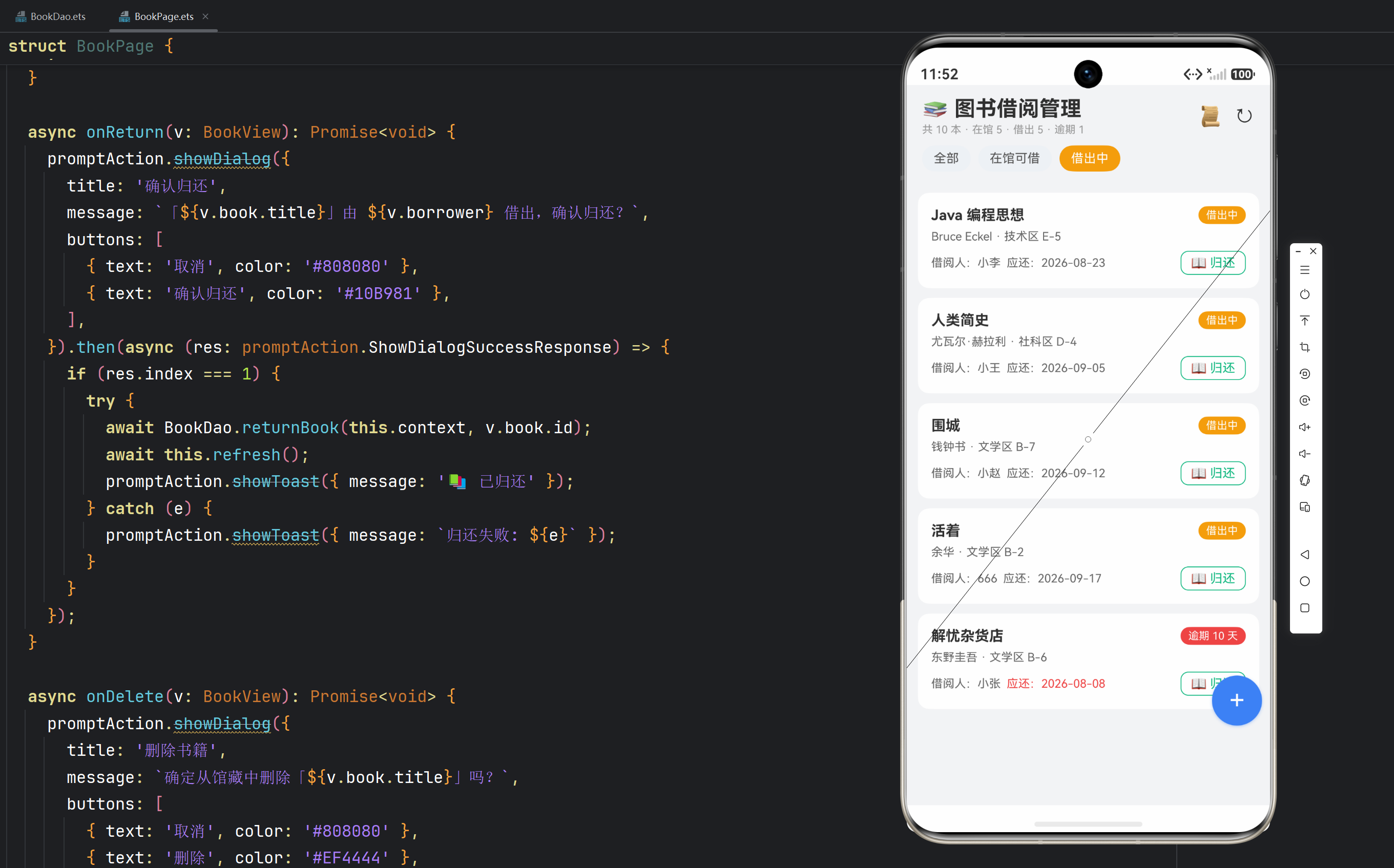
实例:图书借阅管理(Book Library)|技术:状态 Tab、卡片列表、借出/归还确认、借阅历史抽屉、逾期红标
一、页面架构总览
图书页面的布局与 26 快递包裹同构(Stack 层叠 + 列表 + 弹窗),但交互更丰富:三种弹层(入库/借出/历史抽屉)+ 卡片内操作按钮(借出/归还/删除)+ 状态徽标三色语义。
Stack
├── Column                    // 主内容
│   ├── 标题栏                // 标题 + 统计文案 + 历史入口 + 刷新
│   ├── 状态 Tab              // 全部 / 在馆可借 / 借出中
│   └── 书籍列表              // 卡片:书名/作者/位置 + 状态徽标 + 操作按钮
├── 悬浮入库按钮(+)
├── 新书入库弹窗
├── 借出弹窗                  // 借阅人输入
└── 借阅历史抽屉              // 全部借还记录
二、状态管理与数据加载
@State views: BookView[] = [];        // 当前筛选下的书籍视图(含逾期)
@State filter: number = -1;           // -1 全部 / 0 在馆 / 1 借出中
@State summaryText: string = '';      // 顶部统计文案
@State formVisible: boolean = false;  // 入库弹窗
@State borrowVisible: boolean = false;// 借出弹窗
@State borrowBook: BookView | null = null;  // 正在借出的书
@State fBorrower: string = '';        // 借阅人输入
@State historyVisible: boolean = false;     // 历史抽屉
@State history: BorrowView[] = [];    // 历史数据
@State fTitle/fAuthor/fIsbn/fLocation: string = '';
设计要点:borrowBook 存"当前要借出的那本书",借出弹窗标题动态显示 借出「${this.borrowBook.book.title}」——弹窗内容跟随操作对象,而不是写死文案。这是"数据驱动 UI"在弹窗场景的体现。
refresh 与 loadList
async refresh(): Promise<void> {
  try {
    await BookDao.initSeedData(this.context);
    const s = await BookDao.summary(this.context);
    this.summaryText = `共 ${s.total} 本 · 在馆 ${s.available} · 借出 ${s.borrowed} · 逾期 ${s.overdue}`;
    await this.loadList();
  } catch (e) {
    promptAction.showToast({ message: `加载失败: ${e}` });
  }
}

async loadList(): Promise<void> {
  this.views = await BookDao.queryBookViews(this.context, this.filter);
}
统计文案一行展示四个数字:总藏书/在馆/借出/逾期——用户一屏掌握馆藏全貌。逾期数是动态的(随当前时间变化),所以每次 refresh 都会重新计算。
三、状态 Tab
Row({ space: 8 }) {
  Text('全部')
    .fontSize(13)
    .padding({ left: 12, right: 12, top: 6, bottom: 6 })
    .backgroundColor(this.filter === -1 ? '#3B82F6' : '#EEF2F7')
    .fontColor(this.filter === -1 ? Color.White : '#555555')
    .borderRadius(16)
    .onClick(() => { this.filter = -1; this.loadList(); })
  Text('在馆可借')
    .fontSize(13)
    .padding({ left: 12, right: 12, top: 6, bottom: 6 })
    .backgroundColor(this.filter === 0 ? '#10B981' : '#EEF2F7')
    .fontColor(this.filter === 0 ? Color.White : '#555555')
    .borderRadius(16)
    .onClick(() => { this.filter = 0; this.loadList(); })
  Text('借出中')
    .fontSize(13)
    .padding({ left: 12, right: 12, top: 6, bottom: 6 })
    .backgroundColor(this.filter === 1 ? '#F59E0B' : '#EEF2F7')
    .fontColor(this.filter === 1 ? Color.White : '#555555')
    .borderRadius(16)
    .onClick(() => { this.filter = 1; this.loadList(); })
}
.padding({ left: 16, right: 16 })
.width('100%').margin({ top: 10 })
与 26 相比,本页 Tab 只有三个且固定,直接硬编码三个 Text 即可(不需要 PARCEL_STATUS 数组驱动——没有扩展需求就不要过度设计)。但每个 Tab 用不同选中色(全部蓝、在馆绿、借出橙),与列表卡片的状态徽标颜色呼应,形成视觉语义链。
四、书籍卡片列表 ★核心 UI
ForEach(this.views, (v: BookView) => {
  Column() {
    // 第一行:书名 + 状态徽标
    Row({ space: 8 }) {
      Text(v.book.title).fontSize(15).fontWeight(FontWeight.Bold).layoutWeight(1)
      if (v.book.status === 0) {
        Text('在馆')
          .fontSize(11).fontColor(Color.White)
          .backgroundColor('#10B981')
          .padding({ left: 8, right: 8, top: 3, bottom: 3 }).borderRadius(10)
      } else {
        Text(v.overDays > 0 ? `逾期 ${v.overDays} 天` : '借出中')
          .fontSize(11).fontColor(Color.White)
          .backgroundColor(v.overDays > 0 ? '#EF4444' : '#F59E0B')
          .padding({ left: 8, right: 8, top: 3, bottom: 3 }).borderRadius(10)
      }
    }.width('100%')

    // 第二行:作者 + 位置
    Text(`${v.book.author || '佚名'} · ${v.book.location || '未定位'}`)
      .fontSize(12).fontColor('#666666').width('100%').margin({ top: 6 })

    // 第三行:借出中的书显示借阅人 + 应还 + 归还按钮
    if (v.book.status === 1) {
      Row({ space: 6 }) {
        Text(`借阅人:${v.borrower}`).fontSize(12).fontColor('#666666')
        Text(`应还:${this.fmtDate(v.dueTime)}`)
          .fontSize(12).fontColor(v.overDays > 0 ? '#EF4444' : '#666666')
        Blank()
        Text('📖 归还')
          .fontSize(13).fontColor('#10B981')
          .padding({ left: 10, right: 10, top: 4, bottom: 4 })
          .border({ width: 1, color: '#10B981' }).borderRadius(8)
          .onClick(() => this.onReturn(v))
      }.width('100%').margin({ top: 8 })
    } else {
      // 在馆的书:借出 + 删除
      Row({ space: 6 }) {
        Text('可借').fontSize(12).fontColor('#10B981')
        Blank()
        Text('📤 借出')
          .fontSize(13).fontColor('#3B82F6')
          .padding({ left: 10, right: 10, top: 4, bottom: 4 })
          .border({ width: 1, color: '#3B82F6' }).borderRadius(8)
          .onClick(() => { this.borrowBook = v; this.fBorrower = ''; this.borrowVisible = true; })
        Text('🗑')
          .fontSize(14).fontColor('#EF4444')
          .padding({ left: 8, right: 8, top: 4, bottom: 4 })
          .onClick(() => this.onDelete(v))
      }.width('100%').margin({ top: 8 })
    }
  }
  .width('94%').padding(14)
  .backgroundColor(Color.White).borderRadius(12)
}, (v: BookView) => `${v.book.id}-${v.book.status}`)
卡片设计解析:
① 状态徽标三色语义:在馆绿(#10B981)、借出中橙(#F59E0B)、逾期红(#EF4444)。逾期优先于借出中——v.overDays > 0 ? '逾期 X 天' : '借出中' 的三元判断,让"问题书籍"(逾期)比"正常借出"更醒目。颜色是状态最直接的可视化语言。
② 条件渲染两套操作区:if (v.book.status === 1) 渲染归还行(借阅人+应还+归还按钮),else 渲染借出行(可借+借出+删除)。同一卡片两种状态、两套操作,互斥且完整——每本书在任意时刻恰好显示一套操作。
③ 描边按钮 vs 实心按钮:借出/归还用 border + 透明底 的描边按钮,与悬浮实心入库按钮、弹窗实心确认按钮形成层次——卡片内低频操作用轻量描边,主操作用实心高对比。这是按钮层级设计的基本功。
④ 逾期红标联动:应还日期文字在逾期时也变红(fontColor(v.overDays > 0 ? '#EF4444' : '#666666')),与徽标呼应,双重强调。
⑤ keyGenerator:${v.book.id}-${v.book.status} 包含状态——借出/归还后状态变化,key 变化触发正确刷新。注意借出人不含在 key 里(归还后借出人清空,状态 key 已变,足够)。
五、借出弹窗
if (this.borrowVisible && this.borrowBook !== null) {
  Column() {
    Text(`📤 借出「${this.borrowBook.book.title}」`).fontSize(18).fontWeight(FontWeight.Bold)
    Text('借阅周期:30 天').fontSize(12).fontColor('#999999').margin({ top: 4 })
    TextInput({ placeholder: '借阅人姓名 *', text: this.fBorrower })
      .margin({ top: 12 }).onChange((v: string) => this.fBorrower = v)
    Row({ space: 8 }) {
      Button('取消').layoutWeight(1).backgroundColor('#EEF2F7').fontColor('#555555')
        .onClick(() => this.borrowVisible = false)
      Button('确认借出').layoutWeight(1).backgroundColor('#3B82F6')
        .onClick(() => this.onBorrow())
    }.margin({ top: 16 })
  }
  .padding(20).borderRadius(16).backgroundColor(Color.White).width('88%')
  .position({ x: '6%', y: '26%' })
}
交互设计:标题带上书名(“借出「三体」”)明确操作对象;"借阅周期:30 天"提前告知归还期限,减少后续疑问;借阅人必填,onBorrow 里校验。
async onBorrow(): Promise<void> {
  if (this.borrowBook === null) {
    return;
  }
  if (!this.fBorrower.trim()) {
    promptAction.showToast({ message: '请输入借阅人' });
    return;
  }
  try {
    await BookDao.borrow(this.context, this.borrowBook.book.id, this.fBorrower.trim(), 30);
    this.borrowVisible = false;
    this.fBorrower = '';
    await this.refresh();
    promptAction.showToast({ message: '✅ 借出成功(30 天)' });
  } catch (e) {
    promptAction.showToast({ message: `借出失败: ${e}` });
  }
}
成功闭环:关弹窗 → 清输入 → 全量刷新(这本书状态变借出中、统计更新)→ toast 反馈。
六、归还与删除的确认流程
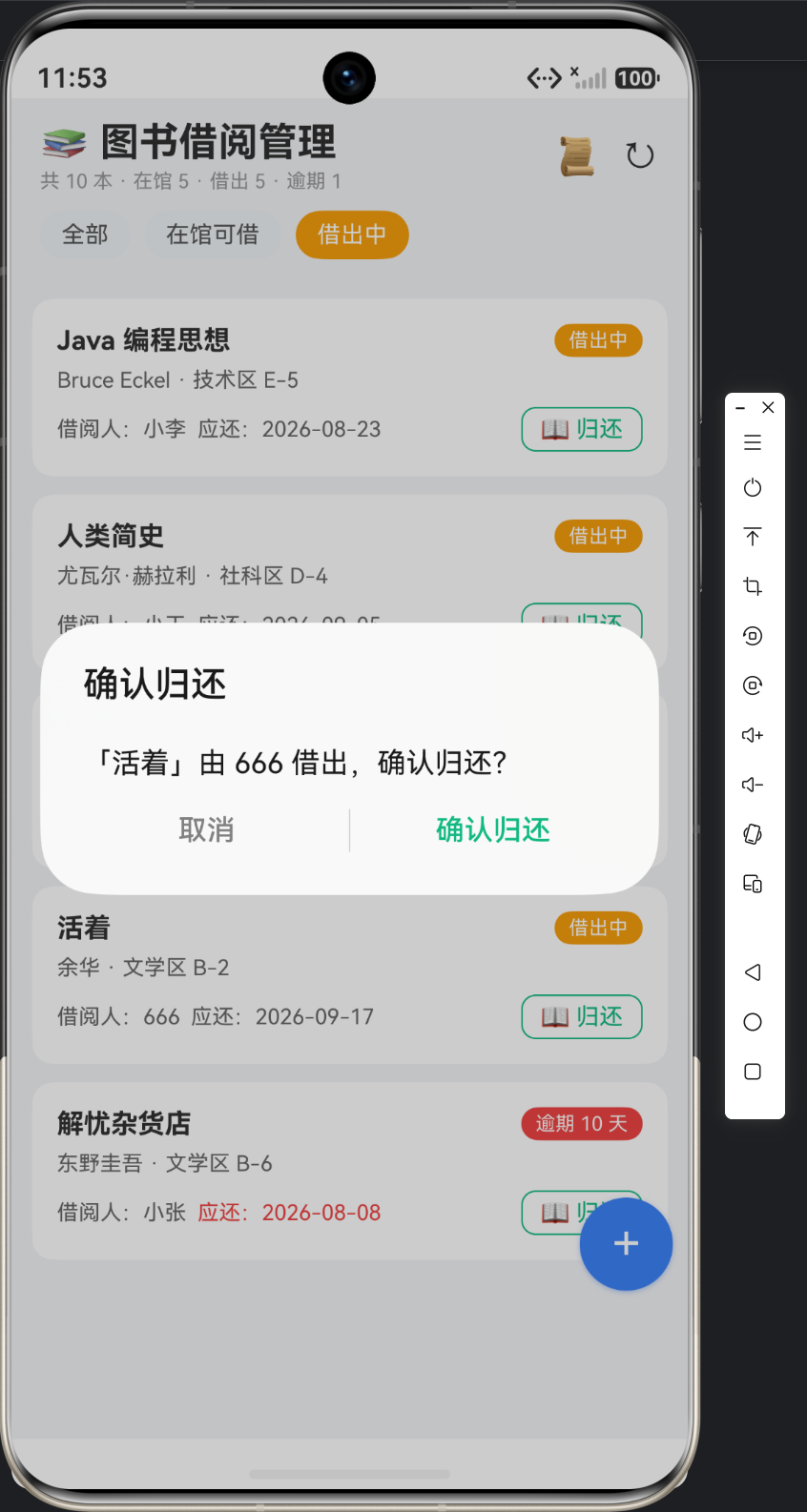
async onReturn(v: BookView): Promise<void> {
  promptAction.showDialog({
    title: '确认归还',
    message: `「${v.book.title}」由 ${v.borrower} 借出,确认归还?`,
    buttons: [
      { text: '取消', color: '#808080' },
      { text: '确认归还', color: '#10B981' },
    ],
  }).then(async (res: promptAction.ShowDialogSuccessResponse) => {
    if (res.index === 1) {
      try {
        await BookDao.returnBook(this.context, v.book.id);
        await this.refresh();
        promptAction.showToast({ message: '📚 已归还' });
      } catch (e) {
        promptAction.showToast({ message: `归还失败: ${e}` });
      }
    }
  });
}
归还确认信息包含书名 + 借阅人,让用户核对"还的是不是这本、借的人对不对"。确认键用绿色(#10B981,与"归还"语义一致)。
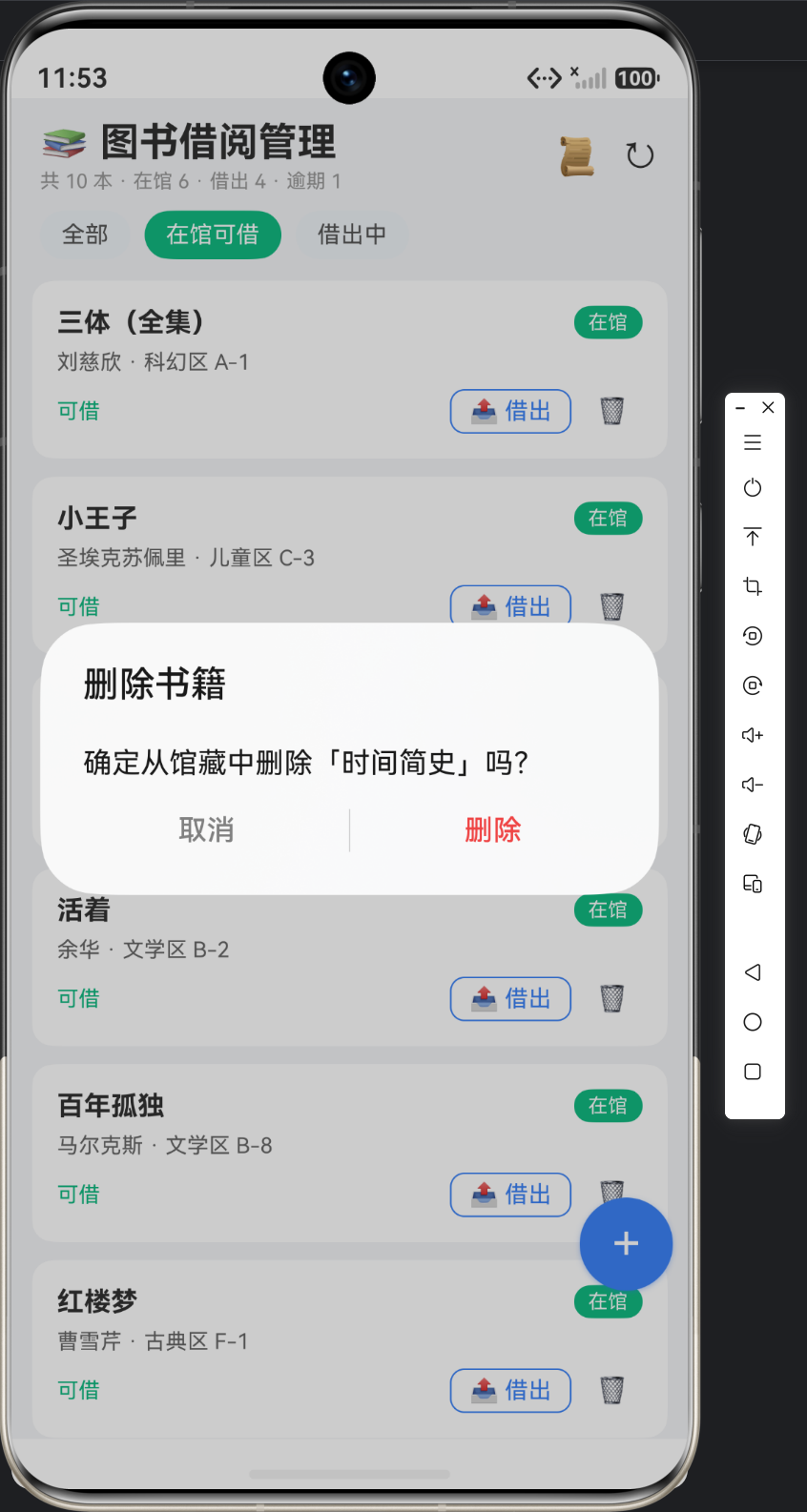
async onDelete(v: BookView): Promise<void> {
  promptAction.showDialog({
    title: '删除书籍',
    message: `确定从馆藏中删除「${v.book.title}」吗?`,
    buttons: [
      { text: '取消', color: '#808080' },
      { text: '删除', color: '#EF4444' },
    ],
  }).then(async (res: promptAction.ShowDialogSuccessResponse) => {
    if (res.index === 1) {
      const ok = await BookDao.deleteBook(this.context, v.book.id);
      if (!ok) {
        promptAction.showToast({ message: '⚠️ 该书借出中,不能删除' });
        return;
      }
      await this.refresh();
      promptAction.showToast({ message: '🗑 已删除' });
    }
  });
}
删除的两种结果:DAO 返回 false(借出中)→ toast 解释原因;返回 true(删除成功)→ 刷新。页面不判断状态,只消费 DAO 的布尔返回值——业务规则的判定权在数据层,页面只负责呈现。
七、借阅历史抽屉
async openHistory(): Promise<void> {
  this.history = await BookDao.queryBorrowHistory(this.context);
  this.historyVisible = true;
}

// 标题栏历史入口
Text('📜').fontSize(20).margin({ right: 12 }).onClick(() => this.openHistory())
抽屉内容:
if (this.historyVisible) {
  Column() {
    Row() {
      Text('📜 借阅历史').fontSize(16).fontWeight(FontWeight.Bold).layoutWeight(1)
      Text('✕').fontSize(20).onClick(() => this.historyVisible = false)
    }.width('100%')
    Scroll() {
      Column({ space: 8 }) {
        ForEach(this.history, (h: BorrowView) => {
          Column() {
            Row({ space: 8 }) {
              Text(h.title).fontSize(14).fontWeight(FontWeight.Medium).layoutWeight(1)
              Text(h.record.returnTime === 0 ? '借出中' : '已归还')
                .fontSize(11)
                .fontColor(h.record.returnTime === 0 ? '#F59E0B' : '#10B981')
                .padding({ left: 8, right: 8, top: 3, bottom: 3 })
                .backgroundColor(h.record.returnTime === 0 ? '#FEF3C7' : '#D1FAE5')
                .borderRadius(10)
            }.width('100%')
            Text(`借阅人 ${h.record.borrower} · ${h.author || ''}`)
              .fontSize(12).fontColor('#666666').width('100%').margin({ top: 4 })
            Text(`借出 ${this.fmtDate(h.record.borrowTime)} → 应还 ${this.fmtDate(h.record.dueTime)}${h.record.returnTime !== 0 ? ` → 归还 ${this.fmtDate(h.record.returnTime)}` : ''}`)
              .fontSize(11).fontColor('#9CA3AF').width('100%').margin({ top: 2 })
          }
          .width('100%').padding(12)
          .backgroundColor('#F8FAFC').borderRadius(10)
        }, (h: BorrowView) => `${h.record.id}`)
      }
      .width('100%').padding({ top: 10, bottom: 10 })
    }
    .layoutWeight(1).width('100%').scrollBar(BarState.Off)
  }
  .padding(20).borderRadius(16).backgroundColor(Color.White)
  .width('92%').height('70%')
  .position({ x: '4%', y: '18%' })
}
历史条目设计:
- 状态徽标:"借出中"浅橙底 / "已归还"浅绿底(浅色系,与列表页深色徽标区分层级——历史条目是次要信息,用低饱和背景);
- 三段时间线文案:
借出 X → 应还 Y → 归还 Z,未归还的省略最后一段。时间顺序横排,一眼看出借阅周期; - LEFT JOIN 的兜底生效:书已删除的历史条目,title 显示"(已删除书籍)",历史不丢。
八、工具方法
private fmtDate(ts: number): string {
  if (ts === 0) {
    return '—';
  }
  const d = new Date(ts);
  return `${d.getFullYear()}-${String(d.getMonth() + 1).padStart(2, '0')}-${String(d.getDate()).padStart(2, '0')}`;
}
注意历史/应还日期只需要到"日"精度(借阅以天为单位),所以 fmtDate 不输出时分——与 26 快递的 fmtTime(带时分)不同。工具方法按需裁剪精度,不要一刀切复用。
九、交互流程图
启动 ──► aboutToAppear ──► refresh
                              ├─ initSeedData
                              ├─ summary(统计文案)
                              └─ queryBookViews(列表)
                                   │
              ┌────────────────────┼─────────────────────┐
              │                    │                     │
         切 Tab ──► loadList    点+ ──► 入库弹窗          │
              │                    │   └─ onAddBook      │
              │              ┌─────┴───────────┐         │
              │              │                 │         │
         点"借出" ──► 借出弹窗  点"归还" ──► 确认框        │
              │   └─ onBorrow   │    └─ onReturn         │
              │       事务双写  │        事务双写         │
              │                 │                         │
              │            点"🗑" ──► 确认框 ──► onDelete  │
              │                 │       └─ DAO 返回 false → 提示不能删
              │                 │                         │
              │            点"📜" ──► 历史抽屉             │
              │                    └─ queryBorrowHistory  │
              └──────────────────────────────────────────┘
                       所有增删改后 refresh(统计+列表)
十、UI 与交互技术要点对照表
| 技术点 | 实现方式 | 生产价值 |
|---|---|---|
| 统计文案 | summary 一行四数 | 馆藏全貌一屏掌握 |
| 状态 Tab | 三 Tab 硬编码 + 语义色 | 无扩展需求不抽象 |
| 状态徽标 | 三色语义(绿/橙/红) | 逾期问题醒目 |
| 条件操作区 | status 分支渲染两套按钮 | 每本书恰好一套操作 |
| 描边 vs 实心按钮 | 层级化按钮样式 | 主次分明 |
| 借出弹窗 | 标题带书名 + 周期提示 | 操作对象明确 |
| 归还/删除确认 | showDialog + 语义色确认键 | 防误操作 |
| 历史抽屉 | LEFT JOIN + 三段时间线 | 完整借阅周期可视化 |
十一、本篇小结
本篇完成了图书借阅的全部界面:统计文案让馆藏全貌一目了然,三色状态徽标让"哪本书有问题"瞬间可辨,借出/归还/删除三个确认流程保证操作安全,历史抽屉用三段时间线还原每次借阅的完整周期。UI 设计始终遵循一条主线:状态可视化(颜色)+ 操作确认(对话框)+ 反馈闭环(toast + 刷新)。
下一篇《完整代码与运行效果》将给出 BookDao 与 BookPage 全量源码解读、完整操作剧本演示,以及"借阅台账"通用模式抽象——适用于设备借用、资产领用、工具外借等一切"物品 + 流转记录"业务。
十二、UI 深度扩展
1. 为什么借出用弹窗、归还用对话框?
借出需要收集输入(借阅人姓名),所以用弹窗表单;归还不需要输入(只有确认语义),所以用 showDialog。输入型操作用表单弹窗,确认型操作用对话框——这是交互设计的常识,工具选型跟着操作类型走。
2. 空态与边界
- 全部 Tab 无书 → “暂无书籍”;
- 筛选结果为空 → 同文案;
- 历史无记录 → 抽屉内空(可加"暂无借阅记录")。
生产页面四态(加载/空/错误/正常)中的空态与错误态,本页均已覆盖(错误态用 try/catch + toast)。
3. 抽屉/弹窗的可达性
- 关闭途径:点 ✕ 或取消按钮;建议补充点击遮罩关闭(Stack 最外层加透明点击层),本实例为简洁未加,读者可扩展;
- 键盘弹出时弹窗位置(y: 26%)可能被遮挡,可用
keyboardAvoidMode或监听键盘高度微调,教学场景固定位置够用。
4. FAQ
Q1:为什么借出/归还后要整体 refresh 而不是局部更新?
A:状态变更影响三处:卡片徽标、操作区按钮、统计文案(借出数/逾期数)。局部更新要改多处状态量,代码分散易漏;全量 refresh 一次拉齐,数据量小(几十本)开销可忽略。局部更新的前提是数据量大到全量刷新有感知,否则全量刷新更简单可靠。
Q2:借出弹窗为什么复用 borrowBook 而不是传 id?
A:弹窗要显示书名(借出「三体」),传 id 还得回查。直接把 BookView 对象存入 @State,UI 直接取字段。弹窗需要展示对象的哪些字段,就传整个对象。
Q3:历史抽屉的 key 为什么用 record.id?
A:借阅记录 id 唯一稳定(自增主键),不会因刷新变化。用 title 做 key 会因同名书冲突,用 borrowTime 可能因毫秒级重复冲突。key 必须稳定且唯一,主键是最安全的选择。
Q4:逾期红标要不要定时刷新?
A:页面停留期间时间流逝,逾期数理论上会变化。教学实例在每次 refresh 时计算,足够演示。真实场景可加 60 秒定时器刷新,或只在进出页面时刷新——根据业务对"实时性"的要求取舍。
十三、下篇预告
最后一篇《完整代码与运行效果》将:给出 BookDao.ets 与 BookPage.ets 完整源码解读;演示入库 → 借出 → 逾期 → 归还 → 历史的完整操作链;抽象"借阅台账"通用模式(物品档案 + 流转记录),并给出设备借用、资产领用两个改写场景。

作为“人工智能6S店”的官方数字引擎,为AI开发者与企业提供一个覆盖软硬件全栈、一站式门户。
更多推荐

 1
1 0
0- 0


 已为社区贡献66条内容

所有评论(0)