
鸿蒙第一课:在项目里用 ArkTS 为待办清单打好 SQLite 数据地基
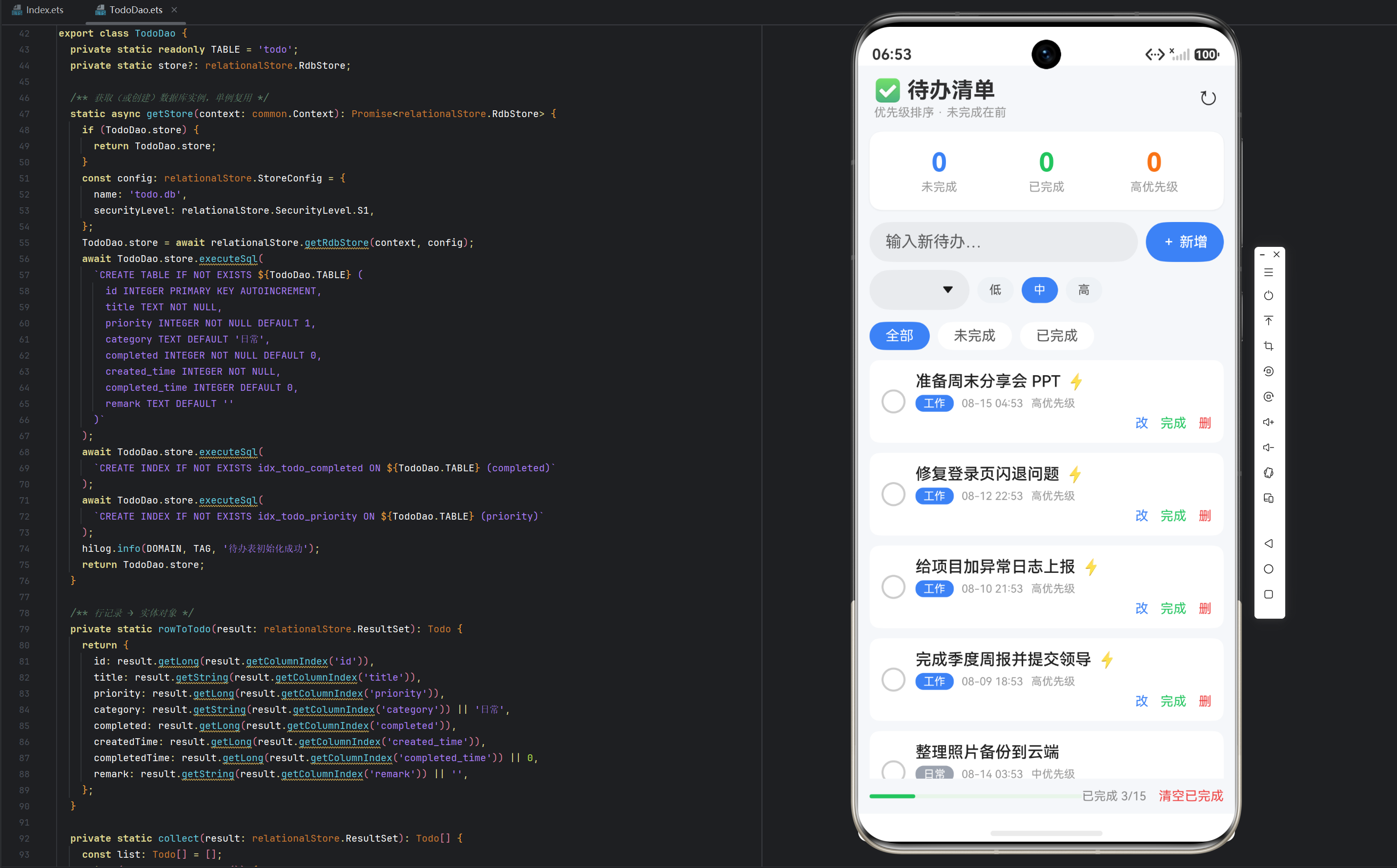
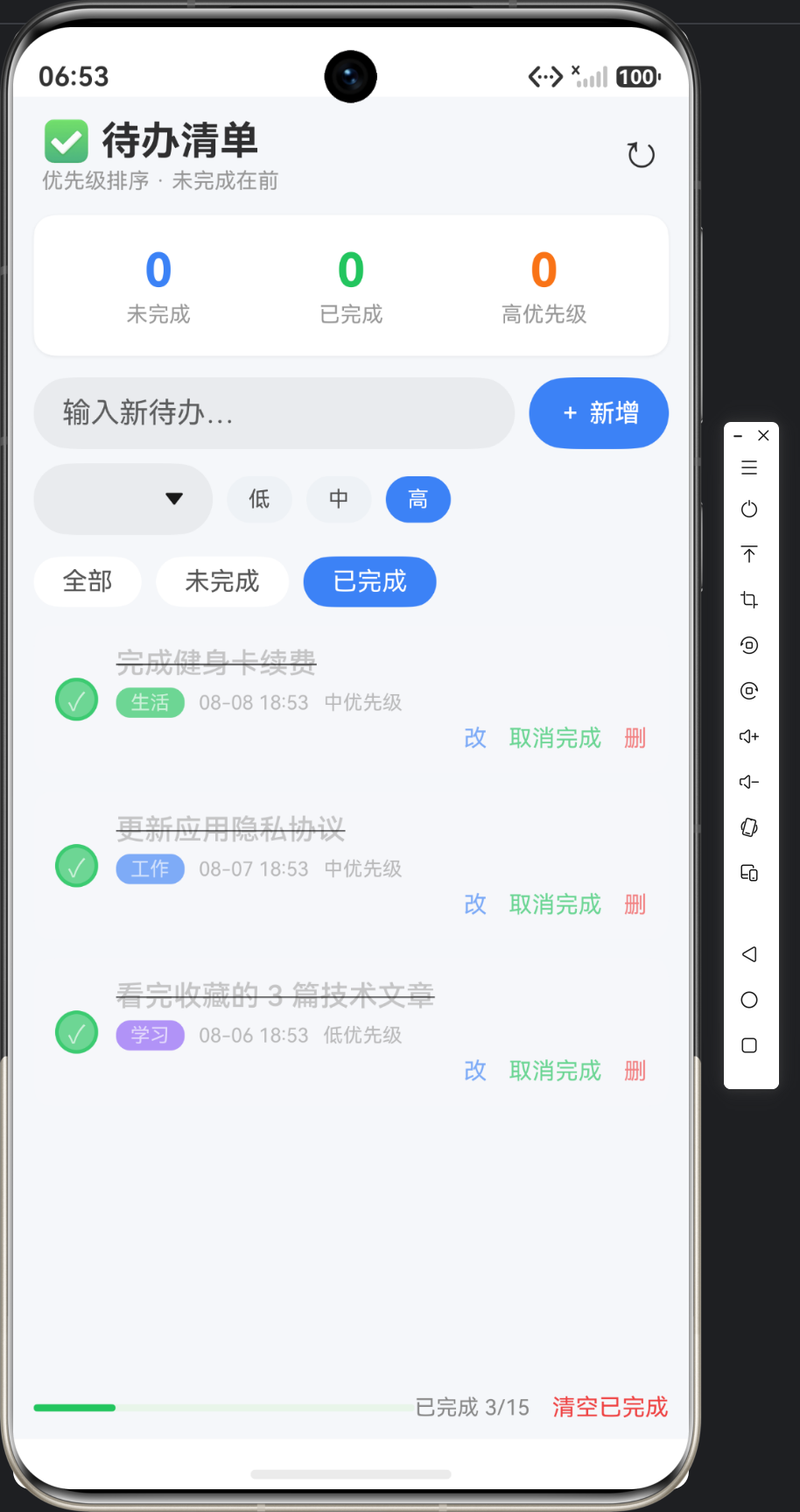
实例:待办事项清单(Todo List)|技术:RDB 基础 CRUD、状态字段过滤
一、业务需求分析
待办事项是几乎所有业务 App 的第一块数据库功能。本实例要满足:
- 新增一条待办(内容、优先级、分类)
- 标记完成 / 取消完成(状态切换)
- 修改待办内容
- 删除待办
- 按状态(未完成 / 已完成)分类查看
- 按优先级排序,未完成在前
二、字段设计表
| 字段名 | 类型 | 约束 | 说明 |
|---|---|---|---|
| id | INTEGER | PRIMARY KEY AUTOINCREMENT | 自增主键 |
| title | TEXT | NOT NULL | 待办内容 |
| priority | INTEGER | NOT NULL DEFAULT 1 | 优先级 0低 1中 2高 |
| category | TEXT | DEFAULT ‘日常’ | 分类(工作/生活/学习…) |
| completed | INTEGER | NOT NULL DEFAULT 0 | 完成状态 0未完成 1已完成 |
| created_time | INTEGER | NOT NULL | 创建时间戳(毫秒) |
| completed_time | INTEGER | DEFAULT 0 | 完成时间戳(0 表示未完成) |
| remark | TEXT | DEFAULT ‘’ | 备注说明 |
设计要点:
- 用
INTEGER存布尔(0/1),比 SQLite 的 BOOLEAN 更通用; - 时间统一存毫秒时间戳(INTEGER),方便排序与格式化,避免时区问题;
priority用数字而非字符串,便于ORDER BY priority DESC排序。
三、建表 SQL
CREATE TABLE IF NOT EXISTS todo (
  id INTEGER PRIMARY KEY AUTOINCREMENT,
  title TEXT NOT NULL,
  priority INTEGER NOT NULL DEFAULT 1,
  category TEXT DEFAULT '日常',
  completed INTEGER NOT NULL DEFAULT 0,
  created_time INTEGER NOT NULL,
  completed_time INTEGER DEFAULT 0,
  remark TEXT DEFAULT ''
);
CREATE INDEX IF NOT EXISTS idx_todo_completed ON todo (completed);
CREATE INDEX IF NOT EXISTS idx_todo_priority ON todo (priority);
索引说明:completed 和 priority 是高频过滤/排序字段,加索引后查询性能显著提升。
四、TodoDao 封装(数据访问层)
import { relationalStore } from '@kit.ArkData';
import { common } from '@kit.AbilityKit';

export interface Todo {
  id: number;
  title: string;
  priority: number;   // 0 低 / 1 中 / 2 高
  category: string;
  completed: number;  // 0 未完成 / 1 已完成
  createdTime: number;
  completedTime: number;
  remark: string;
}

export class TodoDao {
  private static readonly TABLE = 'todo';
  private static store?: relationalStore.RdbStore;

  /** 获取(或创建)数据库实例,单例复用 */
  static async getStore(context: common.UIAbilityContext): Promise<relationalStore.RdbStore> {
    if (this.store) return this.store;
    const config: relationalStore.StoreConfig = {
      name: 'todo.db',
      securityLevel: relationalStore.SecurityLevel.S1,
    };
    this.store = await relationalStore.getRdbStore(context, config);
    await this.store.executeSql(
      `CREATE TABLE IF NOT EXISTS ${this.TABLE} (
        id INTEGER PRIMARY KEY AUTOINCREMENT,
        title TEXT NOT NULL,
        priority INTEGER NOT NULL DEFAULT 1,
        category TEXT DEFAULT '日常',
        completed INTEGER NOT NULL DEFAULT 0,
        created_time INTEGER NOT NULL,
        completed_time INTEGER DEFAULT 0,
        remark TEXT DEFAULT ''
      )`
    );
    return this.store;
  }

  /** 行记录 → 实体对象 */
  private static rowToTodo(row: relationalStore.ValuesBucket): Todo {
    return {
      id: row.id as number,
      title: row.title as string,
      priority: row.priority as number,
      category: (row.category as string) || '日常',
      completed: row.completed as number,
      createdTime: row.created_time as number,
      completedTime: (row.completed_time as number) || 0,
      remark: (row.remark as string) || '',
    };
  }

  /** 新增待办,返回新 id */
  static async insert(context: common.UIAbilityContext, t: Todo): Promise<number> {
    const store = await this.getStore(context);
    const values: relationalStore.ValuesBucket = {
      title: t.title,
      priority: t.priority,
      category: t.category,
      completed: t.completed,
      created_time: t.createdTime,
      completed_time: t.completedTime,
      remark: t.remark,
    };
    return await store.insert(this.TABLE, values);
  }

  /** 查询全部,未完成在前、按优先级+时间排序 */
  static async queryAll(context: common.UIAbilityContext): Promise<Todo[]> {
    const store = await this.getStore(context);
    const predicates = new relationalStore.RdbPredicates(this.TABLE);
    predicates.orderByDesc('completed').orderByDesc('priority').orderByDesc('created_time');
    const result = await store.query(predicates);
    const list: Todo[] = [];
    while (result.goToNextRow()) {
      list.push(this.rowToTodo(result.getRow()));
    }
    result.close();
    return list;
  }

  /** 按状态查询:completed 0/1 */
  static async queryByCompleted(context: common.UIAbilityContext, completed: number): Promise<Todo[]> {
    const store = await this.getStore(context);
    const predicates = new relationalStore.RdbPredicates(this.TABLE);
    predicates.equalTo('completed', completed)
      .orderByDesc('priority').orderByDesc('created_time');
    const result = await store.query(predicates);
    const list: Todo[] = [];
    while (result.goToNextRow()) {
      list.push(this.rowToTodo(result.getRow()));
    }
    result.close();
    return list;
  }

  /** 更新待办内容 */
  static async update(context: common.UIAbilityContext, t: Todo): Promise<number> {
    const store = await this.getStore(context);
    const values: relationalStore.ValuesBucket = {
      title: t.title, priority: t.priority,
      category: t.category, remark: t.remark,
    };
    const predicates = new relationalStore.RdbPredicates(this.TABLE);
    predicates.equalTo('id', t.id);
    return await store.update(values, predicates);
  }

  /** 切换完成状态(只更新一个字段,部分更新) */
  static async toggleCompleted(context: common.UIAbilityContext, id: number, completed: number): Promise<number> {
    const store = await this.getStore(context);
    const values: relationalStore.ValuesBucket = {
      completed: completed,
      completed_time: completed === 1 ? Date.now() : 0,
    };
    const predicates = new relationalStore.RdbPredicates(this.TABLE);
    predicates.equalTo('id', id);
    return await store.update(values, predicates);
  }

  /** 删除 */
  static async delete(context: common.UIAbilityContext, id: number): Promise<number> {
    const store = await this.getStore(context);
    const predicates = new relationalStore.RdbPredicates(this.TABLE);
    predicates.equalTo('id', id);
    return await store.delete(predicates);
  }

  /** 统计:总数 / 未完成 / 已完成 / 高优先级 */
  static async statistics(context: common.UIAbilityContext): Promise<{ total: number; pending: number; done: number; high: number }> {
    const store = await this.getStore(context);
    let total = 0, pending = 0, done = 0, high = 0;
    const result = await store.querySql(
      `SELECT COUNT(*) AS total,
        SUM(CASE WHEN completed=0 THEN 1 ELSE 0 END) AS pending,
        SUM(CASE WHEN completed=1 THEN 1 ELSE 0 END) AS done,
        SUM(CASE WHEN priority=2 AND completed=0 THEN 1 ELSE 0 END) AS high
       FROM ${this.TABLE}`
    );
    if (result.goToNextRow()) {
      total = result.getLong(result.getColumnIndex('total'));
      pending = result.getLong(result.getColumnIndex('pending'));
      done = result.getLong(result.getColumnIndex('done'));
      high = result.getLong(result.getColumnIndex('high'));
    }
    result.close();
    return { total, pending, done, high };
  }
}
五、技术要点对照表
| 技术点 | 实现方式 | 生产价值 |
|---|---|---|
| 单例复用 RdbStore | static store 缓存 | 避免重复建库,性能好 |
| 自增主键 | AUTOINCREMENT | 保证 id 不回填复用 |
| 状态过滤 | equalTo('completed', n) | 列表按状态分视图 |
| 部分更新 | 只 update 变更字段 | 减少写入量 |
| 聚合统计 | COUNT/SUM + CASE WHEN | 一个 SQL 出 4 个统计数 |
| 索引 | 对过滤/排序字段建索引 | 大数据量查询提速 |
六、文章小结
本篇完成了待办事项的数据层设计:字段覆盖了生产场景的常见需求(优先级、分类、状态、时间、备注),DAO 提供 insert / query / update / toggle / delete / statistics 六个方法,正好支撑后续页面的全部交互。下一篇《页面 UI 与面板布局》基于该 DAO 搭建界面。
七、建表与数据层深度扩展
1. RdbStore 建表执行细节:executeSql 与 StoreConfig
relationalStore.getRdbStore(context, config) 返回的 store 只是「打开/创建」了数据库文件,真正的表结构要靠 executeSql 逐条落地。StoreConfig 里 name 决定磁盘文件名,securityLevel 决定安全等级:S1 仅本应用可见、S2 同设备信任应用可访问、S3 支持跨设备加密同步。等级越高,加密与同步开销越大,待办数据用 S1 足够。
执行要点:
executeSql可执行任意 DDL(建表、建索引、加列),CREATE TABLE IF NOT EXISTS保证页面重复进入不报「表已存在」,天然幂等;- 建索引的 SQL 与建表语句放同一初始化流程,保证索引随库一起就绪。
2. 字段设计权衡:为什么状态用数字枚举、priority 的语义
| 设计选择 | 方案 | 理由 |
|---|---|---|
| 完成状态 | INTEGER 0/1 | SQLite 无原生 BOOLEAN;0/1 可直接参与 COUNT/SUM 聚合,WHERE completed=1 无需转换 |
| 优先级 | INTEGER 0/1/2 | 数字可直接 ORDER BY priority DESC;若存「低/中/高」字符串,排序必须写 CASE WHEN |
| 时间 | INTEGER 毫秒戳 | new Date(ts) 直接格式化,避免字符串时间跨时区产生歧义 |
completed 本质是二值枚举,priority 是三值枚举。数字枚举的代价是「可读性下降」,所以 DAO 里用注释把 0/1/2 语义固化(如 priority: number; // 0 低 / 1 中 / 2 高),页面侧只读写数字,避免魔法字符串散落各处。
3. RdbPredicates 核心 API 分类
RdbPredicates 是 ArkTS 的「条件构造器」,不用手拼 SQL 字符串即可完成 WHERE、ORDER BY、LIMIT:
| 分类 | API | 对应 SQL |
|---|---|---|
| 等值 / 范围 | equalTo / notEqualTo / greaterThan / between | = / != / > / BETWEEN |
| 模糊匹配 | like / contains / beginsWith / endsWith | LIKE '%kw%' 等 |
| 逻辑组合 | and / or / andGroup / orGroup | AND / OR / ( ... ) |
| 排序分页 | orderByAsc / orderByDesc / limitAs | ORDER BY / LIMIT |
| 聚合去重 | groupBy / distinct | GROUP BY / DISTINCT |
predicates 是链式调用,多个条件按书写顺序拼接,条件越具体查询结果集越小,配合索引走得更快。本文 queryAll 里的 orderByDesc('completed').orderByDesc('priority') 就是「未完成在前、高优在前」的典型链式写法。
4. 数据库版本与升级策略
getRdbStore 的第三个参数可传版本号,配合 onUpgrade 回调做增量升级,老用户升级时数据零丢失:
relationalStore.getRdbStore(context, config, {
  version: 2,
  onUpgrade: (store, oldV, newV) => {
    if (oldV < 2) {
      store.executeSql('ALTER TABLE todo ADD COLUMN remind_time INTEGER DEFAULT 0');
    }
  },
});
| 场景 | 做法 |
|---|---|
| 首版建表 | version=1,executeSql 建全部表与索引 |
| 加字段 | version=2,ALTER TABLE ... ADD COLUMN,旧数据自动补默认值 |
| 改表结构 | 建临时表迁移数据后 drop 旧表重命名,避免破坏已有数据 |
升级原则:只增不改、逐版本递进,onUpgrade 里按旧版本号分支处理,保证老用户升级数据零丢失。
5. FAQ
Q1:建表为什么不能省?getRdbStore 不是已经建好了吗?
A:getRdbStore 只负责打开数据库文件,表结构必须显式 executeSql 创建。把建表 SQL 集中放在 DAO 的 getStore 里,便于统一维护与升级。
Q2:predicates 和 querySql 怎么选?
A:简单条件优先 predicates(链式 API 类型安全、防注入);多表 JOIN、复杂聚合用 querySql 更直观,如 statistics() 的 CASE WHEN。
Q3:升级版本号却忘了写 onUpgrade 会怎样?
A:库结构仍是旧版,查询新字段会报错。务必在递增 version 的同时同步 onUpgrade 逻辑。

作为“人工智能6S店”的官方数字引擎,为AI开发者与企业提供一个覆盖软硬件全栈、一站式门户。
更多推荐

 8
8 0
0- 0


 已为社区贡献74条内容

所有评论(0)