
鸿蒙国际化高级适配:多语言资源管理/多时区处理/RTL布局/货币/日期/数字格式化/本地化测试方案
·
一、前置思考
1.1 出海应用为什么必须国际化?
硬编码中文的代价:
  → 每个市场一套代码 (维护地狱)
  → 翻译依赖发版 (改文案要重新上架)
  → 时区/货币/日期全是坑 (用户投诉)

国际化的本质:
  → 文案与代码分离 (资源文件)
  → 格式随区域自动变化 (时区/货币/日期)
  → 布局适配语言习惯 (RTL 阿拉伯语/希伯来语)
1.2 国际化的四个层次
L1 文案: 多语言资源 + 占位符
L2 格式: 日期/时间/数字/货币本地化
L3 布局: RTL 镜像 / 文案长度自适应
L4 文化: 图片/颜色/图标/禁忌适配
二、核心原理
2.1 多语言资源管理
资源限定词机制:
  base/          默认资源 (中文或英文)
  en_US/         美式英文
  en_GB/         英式英文
  zh_CN/         简体中文
  ar/            阿拉伯语 (RTL)

资源文件:
  base/element/string.json:
    { "app_name": "我的应用" }
  en_US/element/string.json:
    { "app_name": "My App" }

代码引用:
  $r('app.string.app_name')   // 自动按区域取资源
  getContext().resourceManager.getStringSync($r('app.string.app_name'))

占位符:
  "welcome": "你好,{name}!"
  → resourceManager.getStringSync($r('app.string.welcome'), '张三')
2.2 日期时间本地化
DateTimeFormat 国际化:
  zh: 2025年4月1日 下午2:30
  en: Apr 1, 2025 2:30 PM
  ja: 2025年4月1日 14:30
  ar: ١ أبريل ٢٠٢٥

实现:
  Intl.DateTimeFormat(locale, options).format(date)
  → 自动处理: 月日顺序/12小时制/数字写法/星期名称

时区处理:
  → 存储用 UTC 时间戳
  → 展示按用户时区格式化
  → 绝对时间与相对时间区分
2.3 数字与货币本地化
数字格式差异:
  en: 1,234,567.89
  de: 1.234.567,89
  ar: ١٬٢٣٤٬٥٦٧٫٨٩ (阿拉伯数字)

货币差异:
  USD: $1,234.56
  EUR: €1.234,56
  JPY: ¥1,235 (无小数)
  CNY: ¥1,234.56

实现:
  Intl.NumberFormat(locale, { style: 'currency', currency: 'USD' })
  → 自动处理符号位置/千分位/小数位/货币代码

关键: 货币金额存"分"整数, 避免浮点误差
2.4 RTL 布局
RTL (Right-To-Left) 语言: 阿拉伯语/希伯来语/波斯语
  → 阅读方向从右到左, 布局整体镜像

实现:
  → 布局方向跟随系统语言 (自动镜像)
  → 不用绝对定位, 用 flex/grid 相对布局
  → 图标/箭头方向语义化 (前进=右, 在RTL中自动镜像)

RTL 检查清单:
  □ 文本对齐跟随方向
  □ 图标翻转 (前进/后退/播放)
  □ 时间线/进度条方向
  □ 内边距/边距镜像
  □ 手势方向 (滑动返回)
三、源码/API 深度解析
3.1 多语言资源与格式化
// 资源引用 (UI 层)
Text($r('app.string.welcome'))
  .fontSize(16)

// 代码层获取
import { resourceManager } from '@kit.LocalizationKit';

async function getLocalizedText(): Promise<string> {
  const ctx = getContext(this) as common.UIAbilityContext;
  const rm = ctx.resourceManager;
  // 带占位符
  const msg = await rm.getStringSync($r('app.string.welcome'), '张三');
  return msg;
}

// 日期本地化
import { Intl } from '@kit.ArkTS';

function formatDate(ts: number, locale: string): string {
  const dtf = new Intl.DateTimeFormat(locale, {
    year: 'numeric', month: 'long', day: 'numeric',
    hour: '2-digit', minute: '2-digit'
  });
  return dtf.format(ts);
}

// 货币本地化
function formatMoney(cents: number, currency: string, locale: string): string {
  const nf = new Intl.NumberFormat(locale, {
    style: 'currency', currency: currency
  });
  return nf.format(cents / 100);  // 分 → 元
}
3.2 获取当前语言与时区
// 获取当前系统语言区域
import { i18n } from '@kit.ArkTS';

const systemLanguage = i18n.getSystemLanguage();   // e.g. 'zh-Hans'
const systemRegion = i18n.getSystemRegion();       // e.g. 'CN'

// 判断 RTL
function isRtl(locale: string): boolean {
  return locale.startsWith('ar') || locale.startsWith('he') || locale.startsWith('fa');
}

// 时区
const tz = i18n.getSystemTimezone();  // e.g. 'Asia/Shanghai'

// 应用内切换语言 (不跟随系统)
// → 保存用户偏好语言, 手动覆盖系统语言
3.3 本地化测试
测试维度:
  1. 文案完整性: 所有 key 在各语言都有翻译
  2. 占位符正确: {name} 不缺失/不错位
  3. 格式正确: 日期/货币/数字符合当地习惯
  4. RTL 布局: 镜像后无重叠/溢出
  5. 文案溢出: 长语言 (德语) 不截断/不换行崩

自动化:
  → 资源 key 一致性检查 (CI 脚本)
  → 各语言截图对比 (UI 测试)
  → 文案长度最大语言渲染测试
四、企业级实战落地
4.1 国际化资源管理
| 场景 | 方案 |
|---|---|
| 文案 | base + en_US + zh_CN + ar 资源目录 |
| 占位符 | {name} 语法 + 顺序占位 |
| 日期 | Intl.DateTimeFormat |
| 货币 | Intl.NumberFormat (分存储) |
| 数字 | Intl.NumberFormat |
| RTL | 相对布局 + 方向跟随 |
| 图片 | 多语言资源目录覆盖 |
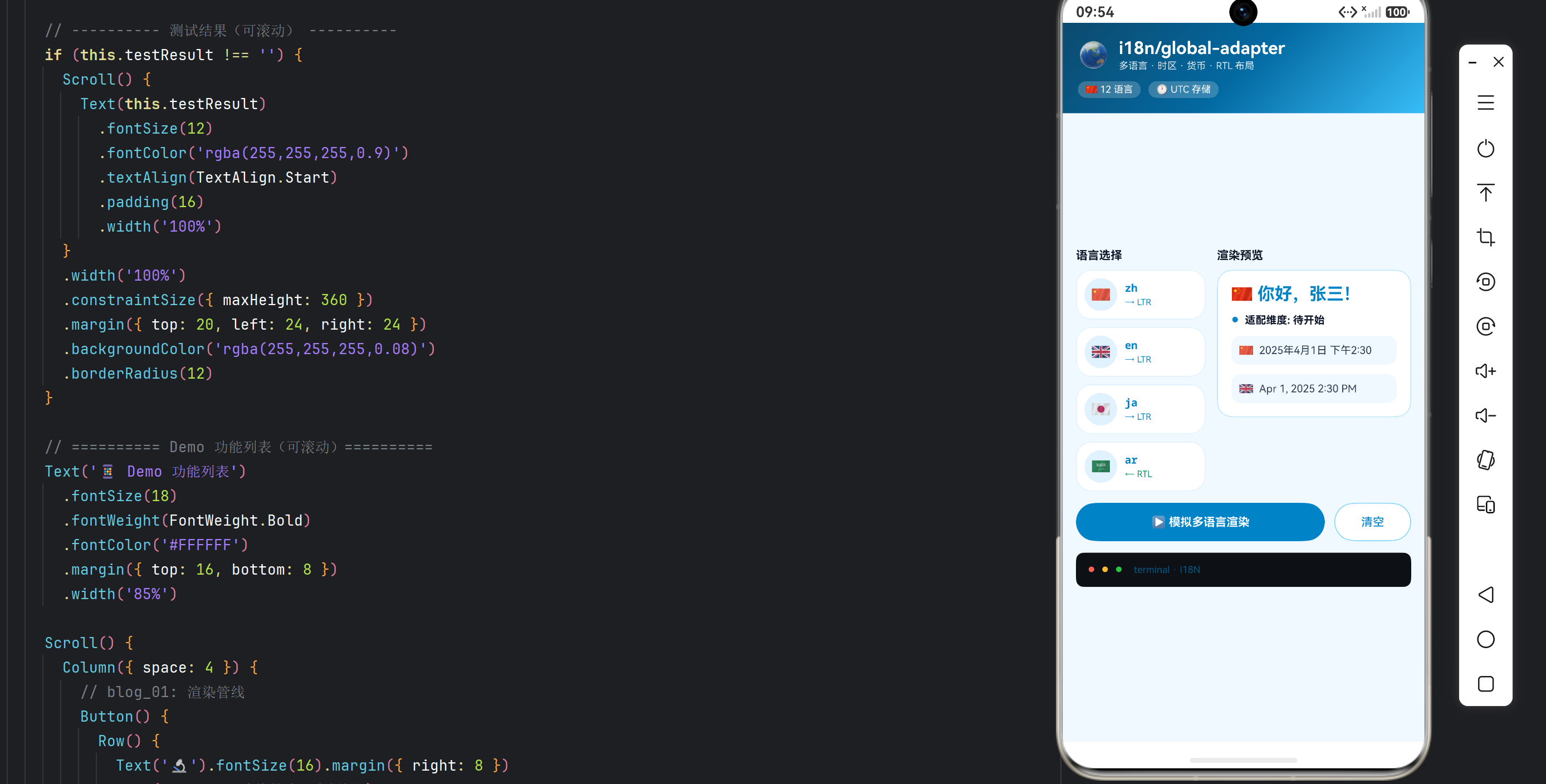
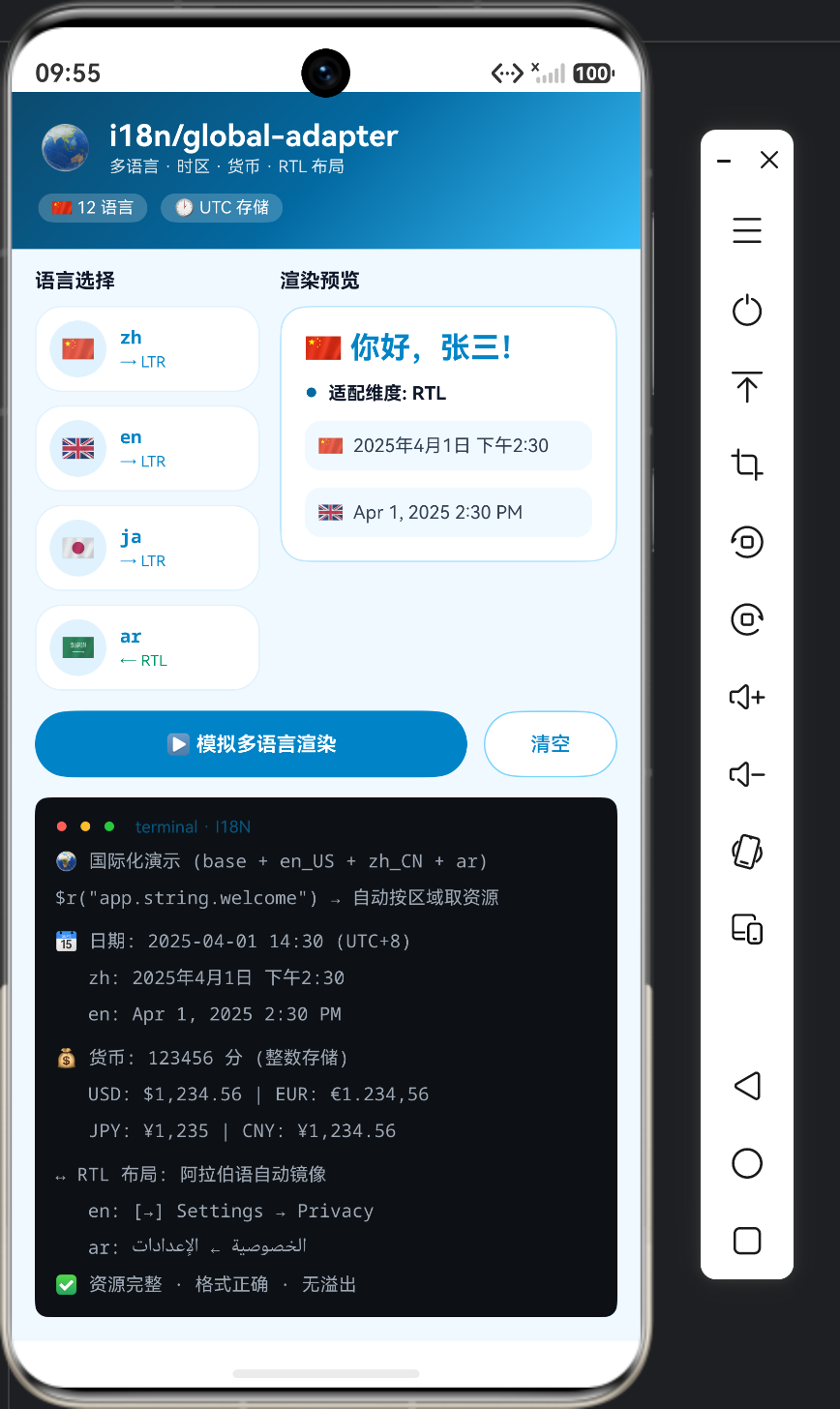
4.2 完整示例:国际化演示
@Entry
@ComponentV2
struct I18nDemo {
  @Local locale: string = 'zh-CN';
  @Local logs: string[] = [];

  private runI18n(): void {
    this.logs = [];
    this.log('🌍 国际化适配演示 (locale: ' + this.locale + ')');
    this.log('');
    this.log('① 文案: 通过 $r 资源引用');
    this.log('   zh: 你好,张三!');
    this.log('   en: Hello, Zhang San!');
    this.log('   ja: こんにちは、張三さん!');
    this.log('');
    this.log('② 日期: 2025-04-01 14:30 (UTC+8)');
    this.log('   zh: 2025年4月1日 下午2:30');
    this.log('   en: Apr 1, 2025 2:30 PM');
    this.log('   ja: 2025年4月1日 14:30');
    this.log('');
    this.log('③ 货币: 123456 分');
    this.log('   USD: $1,234.56 | EUR: €1.234,56');
    this.log('   JPY: ¥1,235 | CNY: ¥1,234.56');
    this.log('');
    this.log('④ RTL: 阿拉伯语布局镜像');
    this.log('   en: [🔙] Settings → [🛡️] Privacy');
    this.log('   ar: [🛡️] الخصوصية ← [🔙] الإعدادات');
    this.log('');
    this.log('✅ 国际化验证: 资源完整 / 格式正确 / RTL 无溢出');
  }

  build() {
    Column({ space: 12 }) {
      Text('🌏 国际化适配演示').fontSize(20).fontWeight(FontWeight.Bold)
      Text('区域: ' + this.locale).fontSize(13).fontColor('#0E8A16')

      Row({ space: 8 }) {
        Button('▶ 模拟多语言渲染').layoutWeight(1).height(40).fontSize(12)
          .onClick(() => this.runI18n())
        Button('清空').height(40).fontSize(12)
          .onClick(() => this.logs = [])
      }
      .width('100%')

      Scroll() {
        Column() {
          ForEach(this.logs, (l: string) => {
            Text(l).fontSize(11).lineHeight(18).fontColor('#24292F').width('100%')
          }, (l: string, i: number) => l + i)
        }.width('100%')
      }
      .layoutWeight(1).width('100%').scrollBar(BarState.Off)
    }
    .width('100%').height('100%').padding(16)
    .backgroundColor('#F6F8FA')
  }
}
4.3 国际化落地清单
1. 文案全部资源化: 禁止硬编码, CI 检查遗漏
2. 金额用分存储: 浮点误差是货币大忌
3. 时间用 UTC 存储: 展示才转本地时区
4. 布局用相对定位: RTL 自动镜像不出错
5. 翻译流程化: 文案平台 + 审校 + 版本管理
6. 本地化测试: 资源完整性 + 截图对比 + 溢出检查
五、问题排查与性能优化
| 问题 | 原因 | 解决 |
|---|---|---|
| 文案漏翻译 | key 缺失 | CI 资源完整性检查 |
| 日期错乱 | 时区没处理 | UTC 存储 + 本地格式化 |
| 货币精度 | 浮点运算 | 分整数存储 |
| RTL 错乱 | 绝对定位 | 相对布局 + 方向跟随 |
| 文案溢出 | 长语言 | 弹性布局 + 字号自适应 |
| 数字格式错 | locale 传递错误 | 统一格式化工具 |
5.1 国际化性能优化
1. 资源懒加载: 只加载当前语言的资源
2. 格式化缓存: 高频格式化的 Intl 实例复用
3. 长文案预测量: 关键按钮预留弹性空间
4. 资源压缩: 图片按语言差异化按需下载
六、高阶总结与最佳实践
- 文案与代码分离:资源文件化是国际化的地基,CI 保证无遗漏。
- 格式交给 Intl:日期/货币/数字用标准 API,不自己拼格式。
- 存储用规范格式:金额存分、时间存 UTC,展示层才本地化。
- RTL 靠相对布局:不写死方向,让系统自动镜像。
- 测试自动化:资源完整性 + 截图对比,让本地化可回归。
一句话记住:国际化 = 资源文件管文案 + Intl 管格式 + UTC/分管存储 + 相对布局管 RTL + 自动化测试管质量,让一套代码走向全球市场。

作为“人工智能6S店”的官方数字引擎,为AI开发者与企业提供一个覆盖软硬件全栈、一站式门户。
更多推荐
 2
2 0
0- 0


 已为社区贡献11条内容

所有评论(0)