
HarmonyOS 6外层 Row 设置固定高度和灰色背景,内层 Column 的宽度通过 pctOf(t.sold, t.total) 函数计算百分比字符串实现销售进度条和七日柱状图
一、技术概述与架构总览
HarmonyOS 6.1.1 作为华为全场景分布式操作系统的最新迭代版本,其 ArkUI 声明式开发框架在 HarmonyOS ArkTS API 24 的基础上提供了更为完善的组件化能力和状态管理机制。本文将以"音浪货运 SONIC FREIGHT"——一个面向音乐节/演出设备运输与周边商城的综合管理平台为案例,深入剖析如何基于 HarmonyOS API 24 的 ArkTS 语言特性构建一个深紫舞台霓虹风格的完整单文件应用页面。该应用涵盖了演出管理、装备库存、票务仪表盘、周边商城、后台时间线和个人中心六大核心模块,充分展现了 ArkTS 在复杂业务场景下的组件拆分策略与数据流管理能力。
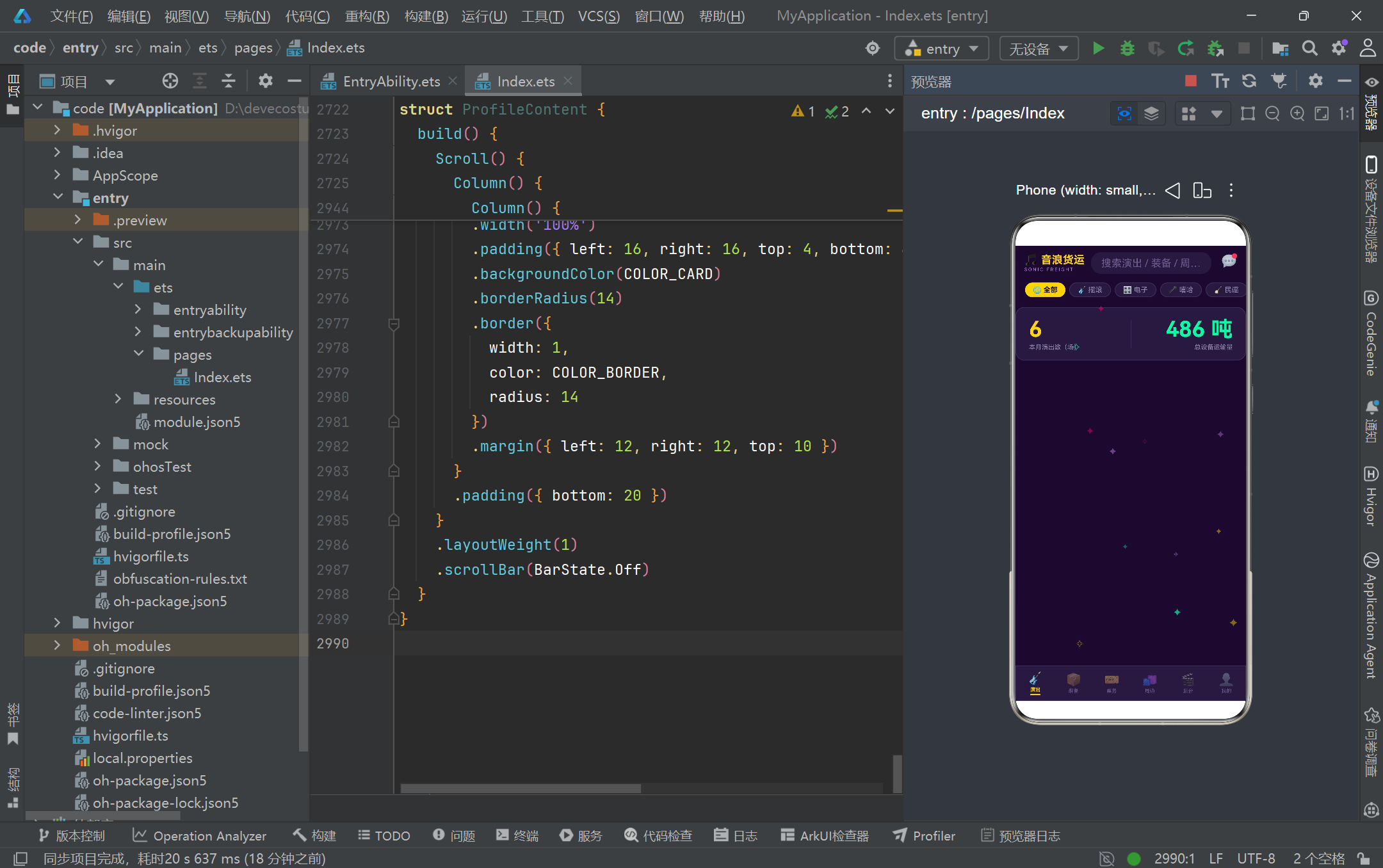
在 HarmonyOS 6.1.1 的 ArkTS 开发体系中,@Entry、@Component、@State、@Builder、@Observed 等装饰器构成了声明式 UI 的核心骨架。本案例通过 @Entry 装饰的 SonicFreightApp 作为应用入口,内部以 @State 管理全局可变状态(当前选中 Tab、搜索关键词、选中的音乐类型、粒子数组),并通过 @Builder 将头部导航栏、内容区、底部 Tab 栏和粒子层拆分为独立构建单元。六个业务 Tab 各自封装为 @Component struct,实现了真正的关注点分离——每个 Tab 拥有独立的 @State 状态空间和 @Builder 弹框组件,互不干扰。这种"入口壳 + 子组件"的架构模式正是 HarmonyOS ArkTS API 24 推荐的页面级组织方式。
数据模型层面,本案例采用 interface 定义数据契约、@Observed class 实现实例化的双轨设计。ShowModel、GearStockModel、TicketModel、MerchModel、TaskModel、ParticleModel 六个接口分别声明了演出、装备、票务、周边、任务、粒子的字段结构,而对应的 @Observed 类则通过构造函数完成数据初始化。@Observed 装饰器使得这些类的实例在被 @State 或 @ObjectLink 引用时具备深层属性变更的观测能力,是 HarmonyOS 6.1.1 状态管理二三级观测机制的重要基础。所有静态数据通过 mockShows、mockGears 等数组在文件顶层定义,辅以纯函数进行过滤、排序和聚合计算,确保了数据逻辑与视图渲染的彻底解耦。
视觉设计层面,本案例构建了一套完整的"深紫舞台霓虹"色彩系统,以 #1A0A2E 为背景基调,配合 #7B2CBF(主紫色)、#FFD60A(金色高亮)、#FF006E(粉色)、#06FFA5(荧光绿)等高饱和度霓虹色,营造出强烈的舞台灯光氛围。通过 linearGradient 线性渐变实现海报色块和卡片背景的层次过渡,配合 position 定位和百分比布局构建粒子动画层,让整个界面在静态卡片列表的基础上增添了动态舞台光效。这套视觉语言不仅服务于美学表达,更通过颜色编码(状态色、类型色、功能色)为用户提供了快速信息识别的认知锚点。
二、架构流程图
以下是音浪货运应用的整体架构与数据流转关系图:
三、逐段代码深度解析
3.1 颜色常量与深紫霓虹设计系统
const COLOR_BG: string = '#1A0A2E'
const COLOR_CARD: string = '#251A3D'
const COLOR_CARD_LIGHT: string = '#2D2150'
const COLOR_PRIMARY: string = '#7B2CBF'
const COLOR_PRIMARY_LIGHT: string = '#C77DFF'
const COLOR_GOLD: string = '#FFD60A'
const COLOR_PINK: string = '#FF006E'
const COLOR_GREEN: string = '#06FFA5'
const COLOR_TEXT: string = '#F0E6FF'
const COLOR_TEXT_SUB: string = '#9A8FB5'
const COLOR_HINT: string = '#6B5B8E'
const COLOR_BORDER: string = '#3D2E5C'
const COLOR_RED: string = '#FF4D6A'
const COLOR_BLUE: string = '#4DA8FF'
本段定义了应用全局使用的十四个颜色常量,构成了完整的"深紫舞台霓虹"设计系统。这套色彩体系以 COLOR_BG(#1A0A2E)极深紫为背景基底,通过 COLOR_CARD(#251A3D)和 COLOR_CARD_LIGHT(#2D2150)两级卡片色构建层次感。主色调 COLOR_PRIMARY(#7B2CBF)和 COLOR_PRIMARY_LIGHT(#C77DFF)用于交互高亮和渐变过渡,COLOR_GOLD(#FFD60A)作为核心强调色用于选中态和行动按钮,COLOR_PINK、COLOR_GREEN、COLOR_RED、COLOR_BLUE 分别承担不同语义的角色编码。文字层次通过 COLOR_TEXT、COLOR_TEXT_SUB、COLOR_HINT 三级灰度紫实现信息密度控制。将所有颜色提取为文件级常量而非散落在组件内部,是 HarmonyOS ArkTS 项目中保证视觉一致性的关键工程实践——任何主题色的调整只需修改一处即可全局生效,避免了魔法字符串泛滥带来的维护困境。
3.2 数据模型:interface 与 @Observed class 双轨设计
interface ShowModel {
  id: number
  name: string
  date: string
  venue: string
  lineup: string
  status: string
  genre: string
  posterColor: string
}

@Observed
class ShowItem implements ShowModel {
  id: number = 0
  name: string = ''
  date: string = ''
  venue: string = ''
  lineup: string = ''
  status: string = '筹备中'
  genre: string = '摇滚'
  posterColor: string = COLOR_PRIMARY
  constructor(id: number, name: string, date: string, venue: string, lineup: string,
    status: string, genre: string, posterColor: string) {
    this.id = id; this.name = name; this.date = date; this.venue = venue
    this.lineup = lineup; this.status = status; this.genre = genre; this.posterColor = posterColor
  }
}
本段以演出模型为例展示了整个应用采用的"interface 契约 + @Observed class 实现"双轨数据建模策略。ShowModel 接口定义了演出实体的八字段契约(id、名称、日期、场馆、阵容、状态、音乐类型、海报色),确保所有消费方在类型层面获得统一约束。ShowItem 类通过 implements ShowModel 实现该接口,并在字段声明时赋予默认值(如 status 默认为 '筹备中'、genre 默认为 '摇滚'),同时提供全参数构造函数。@Observed 装饰器是 HarmonyOS ArkTS API 24 状态管理体系的关键:被其标注的类实例在作为 @State 的属性被赋值、或被 @ObjectLink 引用时,其内部属性的变更能够被框架观测到并触发对应组件的精确刷新。这种设计既保留了 interface 的类型安全,又通过 @Observed 赋予了运行时可观测能力,是构建响应式数据层的标准范式。应用中其余五个模型(GearStockItem、TicketItem、MerchItem、TaskItem、ParticleItem)均遵循同一模式。
3.3 配置映射:状态元信息系统
interface StatusMeta {
  label: string
  icon: string
  color: string
  bg: string
}

const SHOW_STATUS_CONFIG: Record<string, StatusMeta> = {
  '筹备中': { label: '筹备中', icon: '🎛️', color: COLOR_GOLD, bg: 'rgba(255,214,10,0.15)' },
  '进行中': { label: '进行中', icon: '🔴', color: COLOR_GREEN, bg: 'rgba(6,255,165,0.12)' },
  '已结束': { label: '已结束', icon: '⚫', color: COLOR_HINT, bg: 'rgba(107,91,142,0.18)' }
}

const GEAR_STATUS_CONFIG: Record<string, StatusMeta> = {
  '在库': { label: '在库', icon: '📦', color: COLOR_BLUE, bg: 'rgba(77,168,255,0.14)' },
  '在途': { label: '在途', icon: '🚚', color: COLOR_GOLD, bg: 'rgba(255,214,10,0.14)' },
  '使用中': { label: '使用中', icon: '🎛️', color: COLOR_GREEN, bg: 'rgba(6,255,165,0.12)' }
}
本段定义了 StatusMeta 接口和两组状态配置映射表,展示了配置驱动 UI 的核心思想。StatusMeta 将一个业务状态的视觉表现拆解为四个维度:标签文字(label)、图标表情(icon)、前景色(color)和背景色(bg)。通过 Record<string, StatusMeta> 将字符串状态值映射到完整的视觉描述对象,实现了"状态到样式"的声明式查找。例如演出状态"筹备中"映射到金色(COLOR_GOLD)搭配半透明金色背景,而装备状态"在库"映射到蓝色(COLOR_BLUE)。这种设计使得在渲染组件时无需编写冗长的 if-else 分支,只需通过 SHOW_STATUS_CONFIG[s.status]?.color ?? COLOR_HINT 这种安全访问语法即可获取对应样式,极大降低了视图层的条件复杂度。应用中还有 GEAR_TYPE_CONFIG(装备类型)、TASK_STATUS_CONFIG(任务状态)等同类配置表,共同构成了完整的元信息系统。
3.4 音乐类型与周边Banner配置
interface GenreMeta {
  label: string
  icon: string
  color: string
}

const GENRE_CONFIG: Record<string, GenreMeta> = {
  '摇滚': { label: '摇滚', icon: '🎸', color: COLOR_PINK },
  '电子': { label: '电子', icon: '🎛️', color: COLOR_PRIMARY_LIGHT },
  '嘻哈': { label: '嘻哈', icon: '🎤', color: COLOR_GOLD },
  '民谣': { label: '民谣', icon: '🪕', color: COLOR_GREEN },
  '古典': { label: '古典', icon: '🎻', color: COLOR_BLUE }
}

interface BannerMeta {
  id: number
  title: string
  sub: string
  cta: string
  color: string
}


const MERCH_BANNERS: BannerMeta[] = [
  { id: 1, title: '星轨音乐节官方周边', sub: '全场 8 折 · 限时 3 天', cta: '去逛逛 →', color: COLOR_PRIMARY },
  { id: 2, title: '新品上市', sub: '舞台灯光小夜灯 梦幻开灯', cta: '立即查看 →', color: COLOR_PINK },
  { id: 3, title: '会员日福利', sub: '荧光手环买三送一', cta: '领券购买 →', color: COLOR_GOLD }
]
本段定义了音乐类型和周边横幅两组配置数据。GENRE_CONFIG 将五种音乐类型(摇滚、电子、嘻哈、民谣、古典)分别映射到独立的图标和主题色,使得演出卡片海报区域能够根据 genre 字段动态渲染对应的表情图标和配色。MERCH_BANNERS 数组定义了三个促销横幅的完整数据结构(标题、副标题、行动号召文案、主题色),每个横幅使用不同的主题色来营造视觉差异。这些配置数据在构建时即被确定,运行时通过 ForEach 直接遍历渲染,无需额外的网络请求或异步加载。这种将视觉配置与业务数据分离的模式,使得运营人员只需修改配置表即可调整展示策略,而不需要触碰视图组件代码。同时 PROFILE_SETTINGS 数组定义了个人中心的五项设置入口,SORT_PILLS、SIZE_OPTIONS、COLOR_OPTIONS 等静态选项数组则服务于各种筛选和选择交互场景。
3.5 静态Mock数据体系
const mockShows: ShowItem[] = [
  new ShowItem(1, '星轨电子音乐节', '2026-09-12', '星海跨江公园', 'DJ Nova · DJ Loki · 星云组合 · 电音工厂',
    '进行中', '电子', COLOR_PRIMARY),
  new ShowItem(2, '荒原之声摇滚音乐节', '2026-09-18', '钢铁仓库 Livehouse', '铁幕乐队 · 岩浆合唱团 · 电锯三人组',
    '筹备中', '摇滚', COLOR_PINK),
  new ShowItem(3, '江畔民谣之夜', '2026-08-28', '滨江文化中心', '南山乐队 · 麦浪 · 小酒馆组合',
    '筹备中', '民谣', COLOR_GREEN),
  new ShowItem(4, '地下嘻哈风暴', '2026-09-25', '地下车库艺术区', 'MC猎户 · 双押王 · 街头诗人',
    '筹备中', '嘻哈', COLOR_GOLD),
  new ShowItem(5, '城市交响电声夜', '2026-08-15', '大都会音乐厅', '陈指挥 · 城市爱乐 · 弦上四重奏',
    '已结束', '古典', COLOR_BLUE),
  new ShowItem(6, '霓虹电子实验室', '2026-08-20', '798 艺术仓库', '合成器兄弟 · 光子计划',
    '已结束', '电子', COLOR_PRIMARY_LIGHT)
]
本段以 mockShows 为例展示了应用的静态数据初始化模式。六场演出通过 new ShowItem(...) 构造函数实例化,每场演出包含唯一 ID、名称、日期、场馆、演出阵容、状态、音乐类型和海报主色调。数据覆盖了三种状态(进行中、筹备中、已结束)和五种音乐类型,为前端的过滤和分类功能提供了完整的测试覆盖。同样模式下,mockGears 定义了十二件专业演出装备(线阵音箱、摇头灯、桁架、烟雾机等),mockTickets 定义了六组票务销售数据,mockMerch 定义了十款周边商品,mockTasks 定义了四个后台阶段任务(装卸台、调试、演出、撤场),SALES_TREND 和 SALES_DAYS 定义了七日销售趋势数据。所有数据在文件加载时即初始化完毕,通过模块级常量导出,各子组件可直接引用。这种前端 Mock 数据策略在 HarmonyOS 6.1.1 开发阶段尤为实用——它允许开发者在后端 API 尚未就绪时完整构建和验证前端 UI,后续只需将常量替换为异步请求即可平滑切换到真实数据源。
3.6 舞台光点粒子系统:初始化
interface ParticleModel {
  id: number
  x: number
  y: number
  size: number
  opacity: number
  color: string
  symbol: string
}

@Observed
class ParticleItem implements ParticleModel {
  id: number = 0
  x: number = 0
  y: number = 0
  size: number = 10
  opacity: number = 0.4
  color: string = COLOR_PRIMARY_LIGHT
  symbol: string = '✦'
  constructor(id: number, x: number, y: number, size: number,
    opacity: number, color: string, symbol: string) {
    this.id = id; this.x = x; this.y = y; this.size = size
    this.opacity = opacity; this.color = color; this.symbol = symbol
  }
}

const PARTICLE_COLORS: string[] = [COLOR_PRIMARY_LIGHT, COLOR_GOLD, COLOR_PINK, COLOR_GREEN]
const PARTICLE_SYMBOLS: string[] = ['✦', '✧', '✦']

function initParticles(): ParticleItem[] {
  const list: ParticleItem[] = []
  for (let i = 0; i < 12; i++) {
    list.push(new ParticleItem(i, Math.random() * 100, Math.random() * 100,
      8 + Math.random() * 8, 0.15 + Math.random() * 0.5,
      PARTICLE_COLORS[i % 4], PARTICLE_SYMBOLS[i % 3]))
  }
  return list
}
本段实现了舞台光点粒子系统的数据模型与初始化逻辑。ParticleModel 定义了七字段粒子结构:位置坐标(x、y 以百分比表示)、尺寸(fontSize)、透明度、颜色和符号字符。@Observed class ParticleItem 提供可观测的粒子实例。initParticles 函数生成十二个随机分布的粒子,位置在 0-100 的百分比范围内随机,尺寸在 8-16 之间浮动,透明度在 0.15-0.65 之间随机,颜色从四种霓虹色中循环选取,符号从 ✦ 和 ✧ 中交替选择。十二个粒子覆盖了整个屏幕区域,为应用营造出舞台光点漂浮的氛围感。粒子初始化在入口组件的 @State 声明时即调用 initParticles(),确保首帧渲染时粒子已就位。由于 ParticleItem 被 @Observed 标注,当粒子数组被整体替换时,ForEach 能够感知到变更并重新渲染粒子层,这是 HarmonyOS ArkTS API 24 状态观测在动画场景下的典型应用。
3.7 粒子动画引擎:tickParticles 逐帧推进
function tickParticles(list: ParticleItem[]): ParticleItem[] {
  const next: ParticleItem[] = []
  for (let i = 0; i < list.length; i++) {
    const p: ParticleItem = list[i]
    let ny: number = p.y - (0.35 + (i % 3) * 0.18)
    if (ny < -6) {
      ny = 104
    }
    const nx: number = (p.x + Math.sin(p.y * 0.35 + i) * 0.6 + 100) % 100
    const no: number = 0.15 + Math.abs(Math.sin(p.y * 0.2 + i)) * 0.55
    next.push(new ParticleItem(p.id, nx, ny, p.size, no, p.color, p.symbol))
  }
  return next
}
本段是粒子动画的核心推进函数,实现了类似舞台灯光缓缓上升的效果。tickParticles 接收当前帧的粒子数组,返回下一帧的全新粒子数组——这种纯函数式设计确保了状态变更的可预测性。每个粒子的纵向位移 ny 通过 p.y - (0.35 + (i % 3) * 0.18) 计算,即每帧向上移动 0.35 到 0.71 个百分比单位,不同索引的粒子以不同速度上升以营造层次感。当粒子飘出屏幕顶部(ny < -6)时,将其重置到底部(ny = 104)实现循环。横向位移通过 Math.sin(p.y * 0.35 + i) * 0.6 叠加正弦波动,模拟粒子在上升过程中的轻微摇摆。透明度则通过 Math.abs(Math.sin(p.y * 0.2 + i)) 动态计算,使粒子在飘动过程中产生明暗呼吸效果。函数整体生成全新的 ParticleItem 数组而非原地修改,这在 HarmonyOS 的状态管理体系中至关重要——只有整体替换 @State 引用的数组才能触发 ForEach 的重新渲染。
3.8 辅助纯函数体系
function getFilteredShows(genre: string, keyword: string): ShowItem[] {
  const kw: string = keyword.trim()
  return mockShows.filter((s: ShowItem) => {
    const genreOk: boolean = genre === '全部' || s.genre === genre
    const kwOk: boolean = kw === '' || s.name.indexOf(kw) >= 0 || s.venue.indexOf(kw) >= 0
    return genreOk && kwOk
  })
}

function getGearTotalCount(): number {
  return mockGears.reduce((sum: number, g: GearStockItem) => sum + g.quantity, 0)
}

function getGearCountByStatus(status: string): number {
  return mockGears.filter((g: GearStockItem) => g.status === status)
    .reduce((sum: number, g: GearStockItem) => sum + g.quantity, 0)
}

function getSortedMerch(sort: string): MerchItem[] {
  const arr: MerchItem[] = mockMerch.slice()
  if (sort === '价格') {
    arr.sort((a: MerchItem, b: MerchItem) => a.price - b.price)
  } else if (sort === '销量') {
    arr.sort((a: MerchItem, b: MerchItem) => b.sales - a.sales)
  } else {
    arr.sort((a: MerchItem, b: MerchItem) => b.id - a.id)
  }
  return arr
}

function toggleSelect(list: string[], v: string): string[] {
  if (list.indexOf(v) >= 0) {
    return list.filter((x: string) => x !== v)
  }
  return list.concat([v])
}
本段展示了应用的核心业务逻辑层——一组无副作用的纯函数,涵盖了过滤、聚合、排序和选择切换四大类操作。getFilteredShows 根据音乐类型和关键词双条件过滤演出列表,当类型为"全部"时跳过类型检查,当关键词为空时跳过文本匹配。getGearTotalCount 和 getGearCountByStatus 分别统计装备总数和按状态分组的数量,通过 reduce 累加 quantity 字段实现聚合。getSortedMerch 先用 slice() 复制数组避免修改原始数据,再根据排序条件选择升序、降序或默认排序。toggleSelect 实现了多选列表的切换逻辑:已选中则过滤移除,未选中则拼接添加,始终返回新数组而非原地修改。这些纯函数的设计理念是将所有数据计算逻辑从视图组件中剥离,使得组件的 build 方法只负责"调用函数并渲染结果",极大地提升了代码的可测试性和可维护性。在 HarmonyOS ArkTS 中,由于 @State 的变更触发机制依赖于引用比较,返回新数组的纯函数模式天然适配了状态更新需求。
3.9 Tab枚举设计
enum SonicTab {
  SHOW = 0,
  GEAR = 1,
  TICKET = 2,
  MERCH = 3,
  BACKSTAGE = 4,
  PROFILE = 5
}
本段定义了应用的六个 Tab 枚举,将演出、装备、票务、周边、后台、个人中心六个功能模块编码为 0-5 的数值常量。使用枚举而非魔法数字(如直接使用 0、1、2)是 HarmonyOS ArkTS 工程中的基本类型安全实践——枚举值在编译期完成类型检查,避免了字符串比较的拼写错误和数字比较的语义模糊。入口组件中 @State activeTab: SonicTab = SonicTab.SHOW 声明了当前激活的 Tab,初始值为演出页。内容路由通过 if (this.activeTab === SonicTab.SHOW) 的链式判断决定渲染哪个子组件,底部 Tab 栏的 tabItem Builder 通过比较 this.activeTab === tab 来切换选中态样式。这种基于枚举的 Tab 管理模式简洁高效,在 Tab 数量固定且不频繁变化的场景下是最优选择。
3.10 @Entry主页面与生命周期管理
@Entry
@Component
struct SonicFreightApp {
  @State activeTab: SonicTab = SonicTab.SHOW
  @State searchKeyword: string = ''
  @State selectedGenre: string = '全部'
  @State particles: ParticleItem[] = initParticles()
  private particleTimerId: number = -1

  aboutToAppear(): void {
    this.particleTimerId = setInterval(() => {
      this.particles = tickParticles(this.particles)
    }, 250)
  }

  aboutToDisappear(): void {
    if (this.particleTimerId >= 0) {
      clearInterval(this.particleTimerId)
      this.particleTimerId = -1
    }
  }
本段是应用入口组件 SonicFreightApp 的核心状态声明与生命周期管理。四个 @State 变量分别管理当前 Tab、搜索关键词、选中的音乐类型和粒子数组——这些是需要在多个子 Builder 之间共享的全局可变状态。aboutToAppear 是 HarmonyOS ArkTS API 24 的组件生命周期回调,在组件实例创建后、build 执行前调用。此处通过 setInterval 以 250 毫秒的间隔定时调用 tickParticles 更新粒子数组,实现每秒四帧的粒子动画。particleTimerId 使用 private 修饰符声明为组件私有属性(非 @State,因为它不驱动 UI 刷新),用于保存定时器 ID。aboutToDisappear 生命周期回调在组件销毁时清除定时器,防止内存泄漏和后台持续执行——这是 HarmonyOS 开发中资源管理的标准实践。粒子更新的关键在于 this.particles = tickParticles(this.particles) 这一行:它将 tickParticles 返回的新数组整体赋值给 @State 变量,触发框架的变更检测并重新渲染粒子层。
3.11 头部Builder与搜索过滤交互
@Builder headerBar() {
  Column() {
    Row() {
      Column() {
        Text('🎵 音浪货运')
          .fontSize(17)
          .fontWeight(FontWeight.Bold)
          .fontColor(COLOR_GOLD)
        Text('SONIC FREIGHT')
          .fontSize(7)
          .fontColor(COLOR_PRIMARY_LIGHT)
          .letterSpacing(2)
          .margin({ top: 1 })
      }
      .alignItems(HorizontalAlign.Start)

      TextInput({ placeholder: '搜索演出 / 装备 / 周边…' })
        .placeholderColor(COLOR_HINT)
        .fontSize(12)
        .fontColor(COLOR_TEXT)
        .backgroundColor(COLOR_CARD)
        .borderRadius(16)
        .height(34)
        .layoutWeight(1)
        .margin({ left: 10, right: 10 })
        .onChange((v: string) => {
          this.searchKeyword = v
        })

      Stack({ alignContent: Alignment.TopEnd }) {
        Text('💬')
          .fontSize(20)
          .opacity(0.9)
        Column()
          .width(8)
          .height(8)
          .borderRadius(4)
          .backgroundColor(COLOR_RED)
      }
      .width(30)
      .height(30)
    }
    .alignItems(VerticalAlign.Center)
    .padding({ left: 14, right: 14, top: 10, bottom: 8 })
本段是头部导航栏的 Builder 实现,包含了 Logo 标识、搜索输入框和消息入口三个核心元素。Logo 区域采用双行文字布局:主标题"🎵 音浪货运"使用金色加粗 17 号字体,副标题"SONIC FREIGHT"使用浅紫色 7 号字体配合 letterSpacing(2) 字间距,营造出品牌标识的层次感。搜索框 TextInput 通过 layoutWeight(1) 占据中间弹性空间,onChange 回调将输入值实时同步到 this.searchKeyword 状态变量,驱动演出列表的即时过滤。消息入口使用 Stack 叠加布局,在消息图标的右上角放置一个 8x8 的红色圆点作为未读消息提示。第二行是音乐类型药丸的横向滚动区域,通过 Scroll + Row + ForEach 组合实现可横向滑动的类型选择器。选中态药丸使用金色背景加深色文字,未选中态使用卡片色背景配边框,点击时更新 this.selectedGenre 状态。整个头部 Builder 展示了 HarmonyOS ArkTS 中通过 @Builder 封装复杂布局并绑定 @State 变量实现响应式交互的标准模式。
3.12 内容区路由与底部Tab导航
@Builder contentArea() {
  Column() {
    if (this.activeTab === SonicTab.SHOW) {
      ShowContent()
    } else if (this.activeTab === SonicTab.GEAR) {
      GearContent()
    } else if (this.activeTab === SonicTab.TICKET) {
      TicketContent()
    } else if (this.activeTab === SonicTab.MERCH) {
      MerchContent()
    } else if (this.activeTab === SonicTab.BACKSTAGE) {
      BackstageContent()
    } else {
      ProfileContent()
    }
  }
  .layoutWeight(1)
  .width('100%')
}

@Builder tabItem(icon: string, label: string, tab: SonicTab) {
  Column() {
    Text(icon)
      .fontSize(19)
      .opacity(this.activeTab === tab ? 1.0 : 0.45)
    Text(label)
      .fontSize(8)
      .fontColor(this.activeTab === tab ? COLOR_GOLD : COLOR_HINT)
      .fontWeight(this.activeTab === tab ? FontWeight.Bold : FontWeight.Normal)
      .margin({ top: 2 })
    if (this.activeTab === tab) {
      Column()
        .width(16)
        .height(2)
        .backgroundColor(COLOR_GOLD)
        .borderRadius(1)
        .margin({ top: 2 })
    }
  }
  .layoutWeight(1)
  .alignItems(HorizontalAlign.Center)
  .padding({ top: 6, bottom: 6 })
  .onClick(() => {
    this.activeTab = tab
  })
}
本段实现了内容区的条件路由和底部 Tab 栏的通用项构建器。contentArea Builder 通过 if-else if-else 链式条件判断,根据 this.activeTab 的值决定渲染哪个子组件。这种条件渲染模式在 HarmonyOS ArkTS 中是最高效的 Tab 切换方式——每次 activeTab 变更时,框架只会创建新 Tab 对应的组件实例并销毁旧实例,不会同时保留所有 Tab 的组件树。tabItem Builder 是底部导航的核心复用单元,接收图标、标签和目标 Tab 枚举三个参数。选中态通过三重视觉差异来强调:图标透明度从 0.45 提升到 1.0、文字颜色从灰色变为金色、字重从 Normal 变为 Bold,并在底部额外渲染一条 16x2 的金色指示条。onClick 回调将 this.activeTab 设置为目标值,触发内容区重新渲染。六个 tabItem 调用以等宽 layoutWeight(1) 方式排列在 tabBar 的 Row 中,确保底部导航栏的均匀分布。
3.13 演出海报卡片与渐变色块
@Builder showCardBuilder(s: ShowItem) {
  Row() {
    Column() {
      Text(GENRE_CONFIG[s.genre]?.icon ?? '🎵')
        .fontSize(34)
      Text(s.genre)
        .fontSize(9)
        .fontColor(COLOR_TEXT)
        .backgroundColor('rgba(26,10,46,0.45)')
        .padding({ left: 6, right: 6, top: 2, bottom: 2 })
        .borderRadius(8)
        .margin({ top: 6 })
    }
    .width(88)
    .height(116)
    .linearGradient({
      angle: 140,
      colors: [[s.posterColor, 0.0], ['#1A0A2E', 1.0]]
    })
    .borderRadius(12)
    .justifyContent(FlexAlign.Center)
    .alignItems(HorizontalAlign.Center)

    Column() {
      Text(s.name)
        .fontSize(15)
        .fontWeight(FontWeight.Bold)
        .fontColor(COLOR_TEXT)
        .maxLines(1)
        .textOverflow({ overflow: TextOverflow.Ellipsis })
      // ... 日期、场馆、阵容、状态标签、编辑和预约按钮
    }
    .layoutWeight(1)
    .padding({ left: 12 })
  }
  .padding(10)
  .backgroundColor(COLOR_CARD)
  .borderRadius(14)
  .border({ width: 1, color: COLOR_BORDER, radius: 14 })
}
本段是演出卡片的 Builder 实现,展现了 HarmonyOS ArkTS 中渐变色块和卡片布局的高级技巧。卡片整体采用 Row 水平布局,左侧是 88x116 的海报区域,右侧是自适应宽度的信息区域。海报区域的核心是 linearGradient 属性,通过 angle: 140 和 colors 数组定义从演出主题色(s.posterColor)到深紫背景色(#1A0A2E)的 140 度对角渐变,模拟舞台灯光投射效果。海报内部居中显示音乐类型的图标表情(34 号字体)和类型标签。右侧信息区依次展示演出名称(15 号加粗,单行省略)、日期与场馆(10 号灰色)、阵容预览(通过 lineupPreview 函数截取前三个艺人和分隔符转换)以及状态标签和操作按钮。状态标签通过 SHOW_STATUS_CONFIG[s.status] 查表获取对应的图标、颜色和背景色。"编辑"按钮触发编辑弹框,"预约运输"按钮触发运输预约弹框,两个按钮的点击回调分别设置不同的 @State 变量并打开对应的模态框。这张卡片是整个应用中信息密度最高的组件之一,通过颜色编码、字号层级和间距控制实现了丰富的视觉层次。
3.14 装备库存统计与网格布局
@Builder gearCardBuilder(g: GearStockItem) {
  Column() {
    Row() {
      Text(g.icon)
        .fontSize(26)
      Column()
        .layoutWeight(1)
      Text((GEAR_STATUS_CONFIG[g.status]?.icon ?? '📦') + ' ' + g.status)
        .fontSize(8)
        .fontColor(GEAR_STATUS_CONFIG[g.status]?.color ?? COLOR_HINT)
        .backgroundColor(GEAR_STATUS_CONFIG[g.status]?.bg ?? 'rgba(107,91,142,0.18)')
        .padding({ left: 6, right: 6, top: 2, bottom: 2 })
        .borderRadius(8)
    }
    .width('100%')
    .alignItems(VerticalAlign.Center)

    Text(g.name)
      .fontSize(12)
      .fontWeight(FontWeight.Bold)
      .fontColor(COLOR_TEXT)
      .maxLines(1)
      .textOverflow({ overflow: TextOverflow.Ellipsis })
      .margin({ top: 8 })

    Row() {
      Text((GEAR_TYPE_CONFIG[g.type]?.icon ?? '🔊') + ' ' + g.type)
        .fontSize(9)
        .fontColor(GEAR_TYPE_CONFIG[g.type]?.color ?? COLOR_HINT)
        .backgroundColor(GEAR_TYPE_CONFIG[g.type]?.bg ?? 'rgba(107,91,142,0.18)')
      // ... 数量、重量、取消订单按钮
    }
  }
  .padding(10)
  .backgroundColor(COLOR_CARD)
  .borderRadius(12)
  .border({ width: 1, color: COLOR_BORDER, radius: 12 })
}

@Builder gearRowBuilder(g1: GearStockItem, g2: GearStockItem) {
  Row() {
    Column() { this.gearCardBuilder(g1) }.layoutWeight(1)
    Column() { this.gearCardBuilder(g2) }.layoutWeight(1).margin({ left: 8 })
  }
  .width('100%')
  .margin({ top: 8 })
}
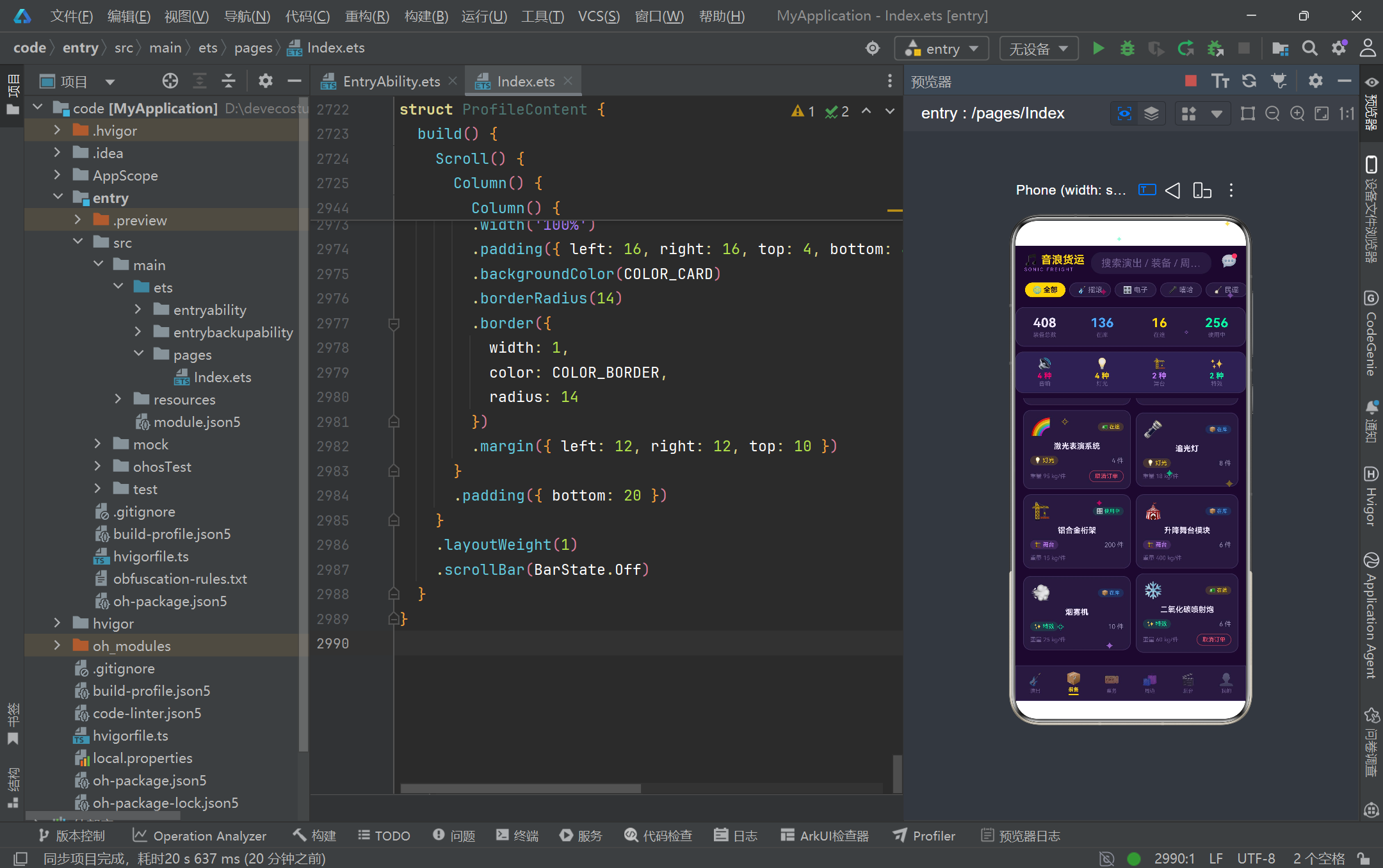
本段实现了装备库存的卡片构建器和双列网格行构建器。gearCardBuilder 接收一个 GearStockItem 参数,渲染包含装备图标、状态标签、名称、类型标签、数量和重量信息的垂直卡片。状态标签和类型标签均通过配置映射表查表获取视觉样式,展现了配置驱动 UI 的一致性。卡片底部的"取消订单"按钮仅在装备状态为"在途"时显示,点击后设置 selectedGear 并打开取消订单弹框。gearRowBuilder 是双列布局的关键——它接收两个装备参数,分别放入两个等宽的 Column 中(各占 layoutWeight(1)),中间通过 margin({ left: 8 }) 留出间距。装备页面通过六次 gearRowBuilder 调用将十二件装备排列为六行两列的网格,上方还配有库存统计横条(总数、在库、在途、使用中四个数据)和装备类型分布四格。这种手动配对的网格布局方式虽然在灵活性上不如 Grid 组件,但在固定数据量场景下具有更好的渲染性能和精确的间距控制能力。
3.15 票务仪表盘与柱状图
@Builder ticketProgressBuilder(t: TicketItem) {
  Column() {
    Row() {
      Text(t.showName)
        .fontSize(11)
        .fontWeight(FontWeight.Medium)
        .fontColor(COLOR_TEXT)
        .maxLines(1)
        .textOverflow({ overflow: TextOverflow.Ellipsis })
        .layoutWeight(1)
      Text(t.sold + ' / ' + t.total)
        .fontSize(10)
        .fontColor(COLOR_TEXT_SUB)
    }
    .width('100%')

    Row() {
      Column()
        .width(pctOf(t.sold, t.total))
        .height(6)
        .linearGradient({
          angle: 0,
          colors: [[COLOR_PRIMARY, 0.0], [COLOR_PRIMARY_LIGHT, 1.0]]
        })
        .borderRadius(3)
    }
    .width('100%')
    .height(6)
    .backgroundColor(COLOR_CARD_LIGHT)
    .borderRadius(3)
    .margin({ top: 6 })
  }
  .width('100%')
  .padding({ top: 8, bottom: 8 })
}
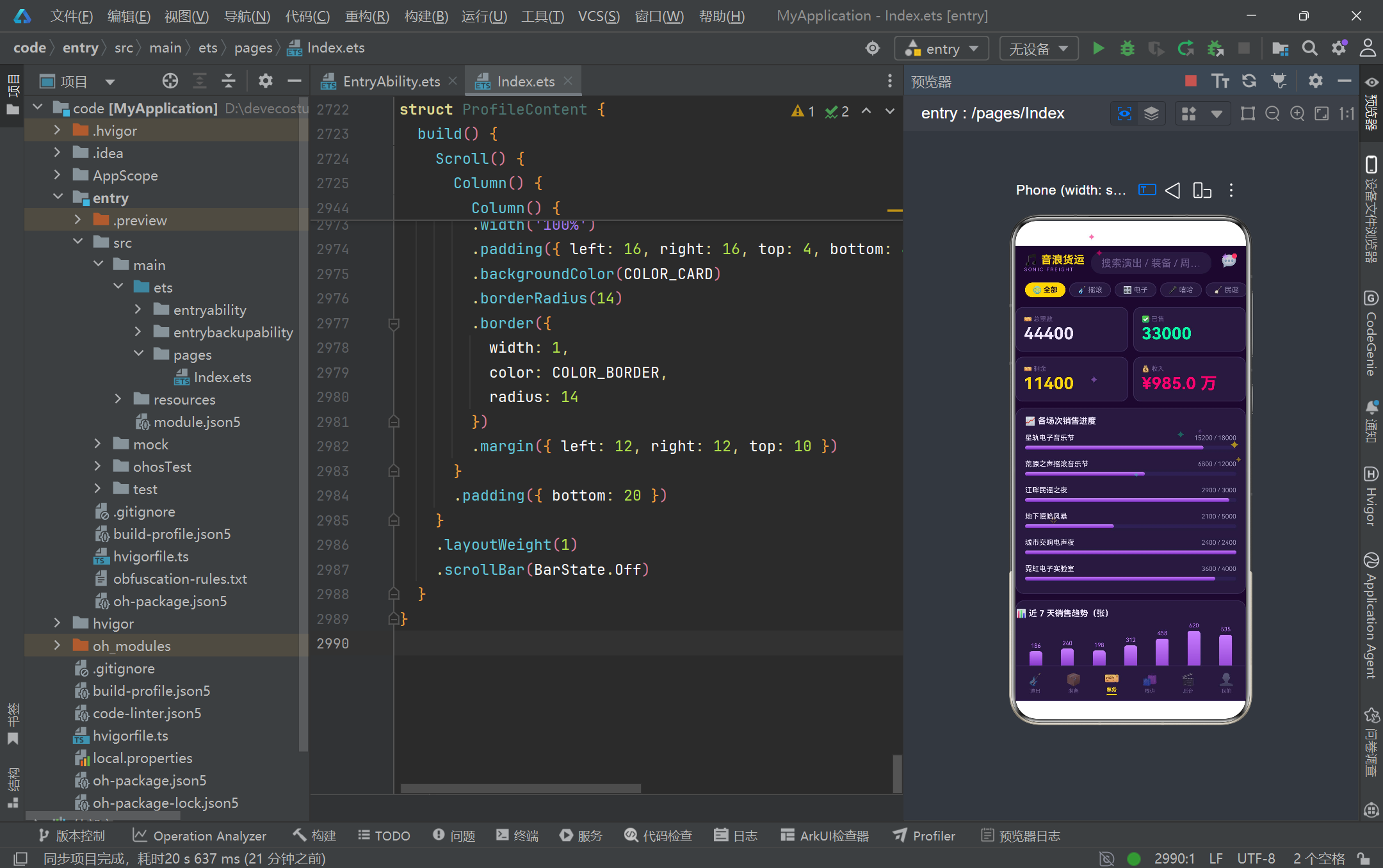
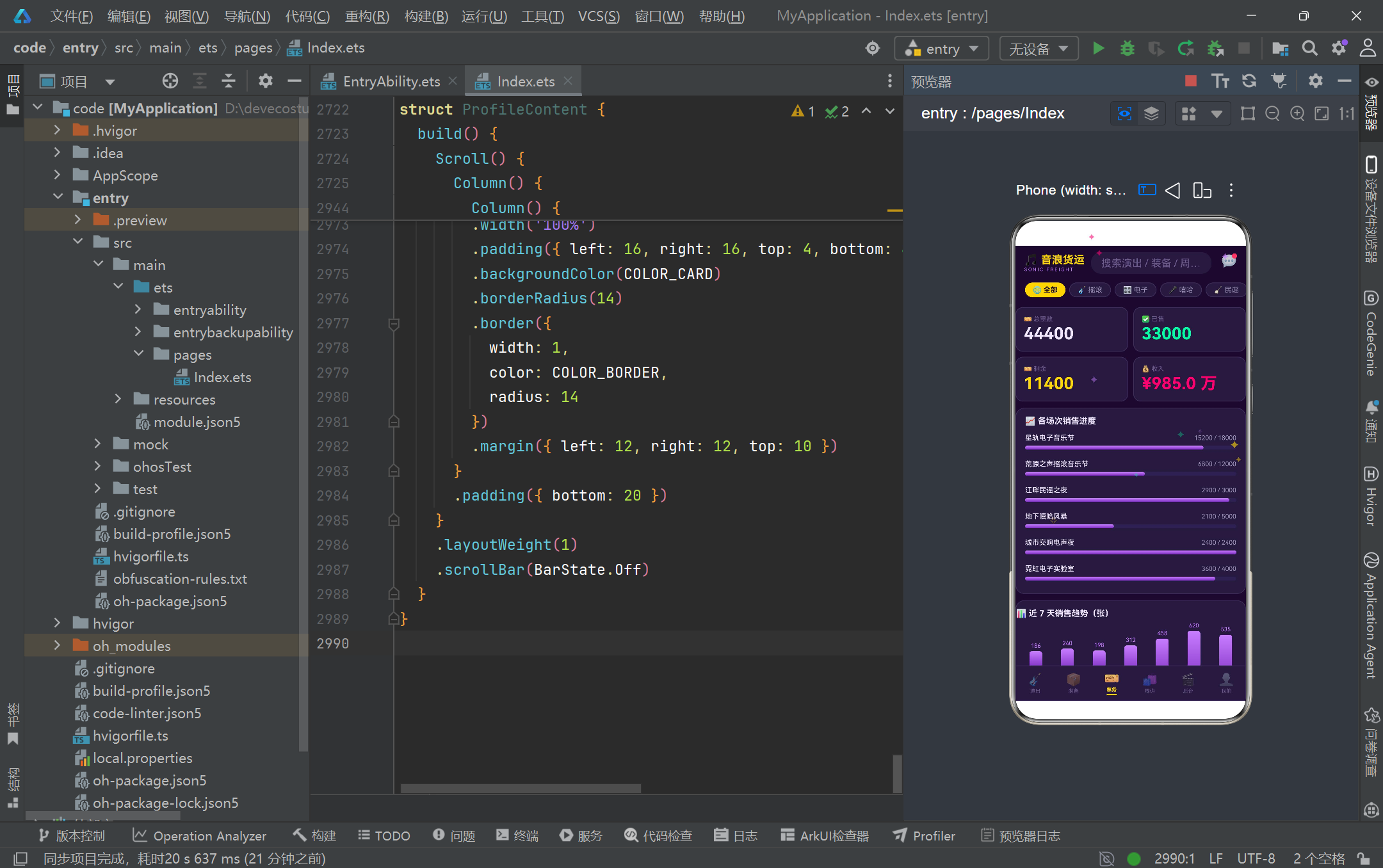
本段实现了票务页面的销售进度条和七日柱状图。ticketProgressBuilder 为每场演出渲染一个进度条:上方显示演出名称和"已售/总数"的数字比,下方是一个 6vp 高的进度条。进度条通过两个嵌套的 Row + Column 实现——外层 Row 设置固定高度和灰色背景,内层 Column 的宽度通过 pctOf(t.sold, t.total) 函数计算百分比字符串(如 "76.2%"),并叠加从 COLOR_PRIMARY 到 COLOR_PRIMARY_LIGHT 的水平线性渐变。七日销售趋势柱状图则通过 ForEach 遍历 [0, 1, 2, 3, 4, 5, 6] 七个索引,每个柱子的高度通过 (SALES_TREND[d] / getMaxSales() * 90).toFixed(0) + 'vp' 动态计算,最高柱子为 90vp。柱子使用从 COLOR_PRIMARY_LIGHT 到 COLOR_PRIMARY 的 180 度垂直渐变,顶部圆角。柱子上方显示数值,下方显示星期标签。这种纯声明式柱状图无需引入任何第三方图表库,完全依靠 ArkTS 的布局能力和渐变属性实现,充分展示了 HarmonyOS ArkTS API 24 在数据可视化方面的原生能力。票务页面顶部还有 2x2 的大数字网格,展示总票数、已售、剩余和收入四项核心指标。
3.16 周边商城轮播与购买弹框
@Builder merchCardBuilder(m: MerchItem) {
  Column() {
    Column() {
      Text(m.tag)
        .fontSize(8)
        .fontColor(COLOR_BG)
        .backgroundColor(COLOR_GOLD)
        .padding({ left: 6, right: 6, top: 2, bottom: 2 })
        .borderRadius(8)
        .alignSelf(ItemAlign.Start)
        .margin({ left: 6, top: 6 })
      Text(m.name.substring(0, 1))
        .fontSize(30)
        .fontWeight(FontWeight.Bold)
        .fontColor('rgba(240,230,255,0.85)')
    }
    .width('100%')
    .height(86)
    .linearGradient({
      angle: 135,
      colors: [[m.color, 0.0], ['#1A0A2E', 1.0]]
    })
    .borderRadius(10)
    .justifyContent(FlexAlign.Center)
    .alignItems(HorizontalAlign.Center)

    Text(m.name)
      .fontSize(11)
      .maxLines(1)
      .textOverflow({ overflow: TextOverflow.Ellipsis })
      .margin({ top: 6 })

    Row() {
      Text('¥' + m.price)
        .fontSize(14)
        .fontWeight(FontWeight.Bold)
        .fontColor(COLOR_GOLD)
      Column().layoutWeight(1)
      Text('已售' + m.sales)
        .fontSize(9)
        .fontColor(COLOR_HINT)
    }
    .margin({ top: 4 })

    Row() {
      Text('库存 ' + m.stock)
        .fontSize(9)
        .fontColor(COLOR_TEXT_SUB)
      Column().layoutWeight(1)
      Text('购买')
        .fontSize(10)
        .fontWeight(FontWeight.Bold)
        .fontColor(COLOR_BG)
        .backgroundColor(COLOR_GREEN)
        .padding({ left: 14, right: 14, top: 4, bottom: 4 })
        .borderRadius(11)
        .onClick(() => {
          this.selectedMerch = m
          this.buyCount = 1
          this.buySize = 'M'
          this.buyColor = '紫'
          this.showBuyModal = true
        })
    }
    .margin({ top: 6 })
  }
  .width('48.5%')
  .padding(8)
  .backgroundColor(COLOR_CARD)
  .borderRadius(12)
  .border({ width: 1, color: COLOR_BORDER, radius: 12 })
  .margin({ bottom: 8 })
}
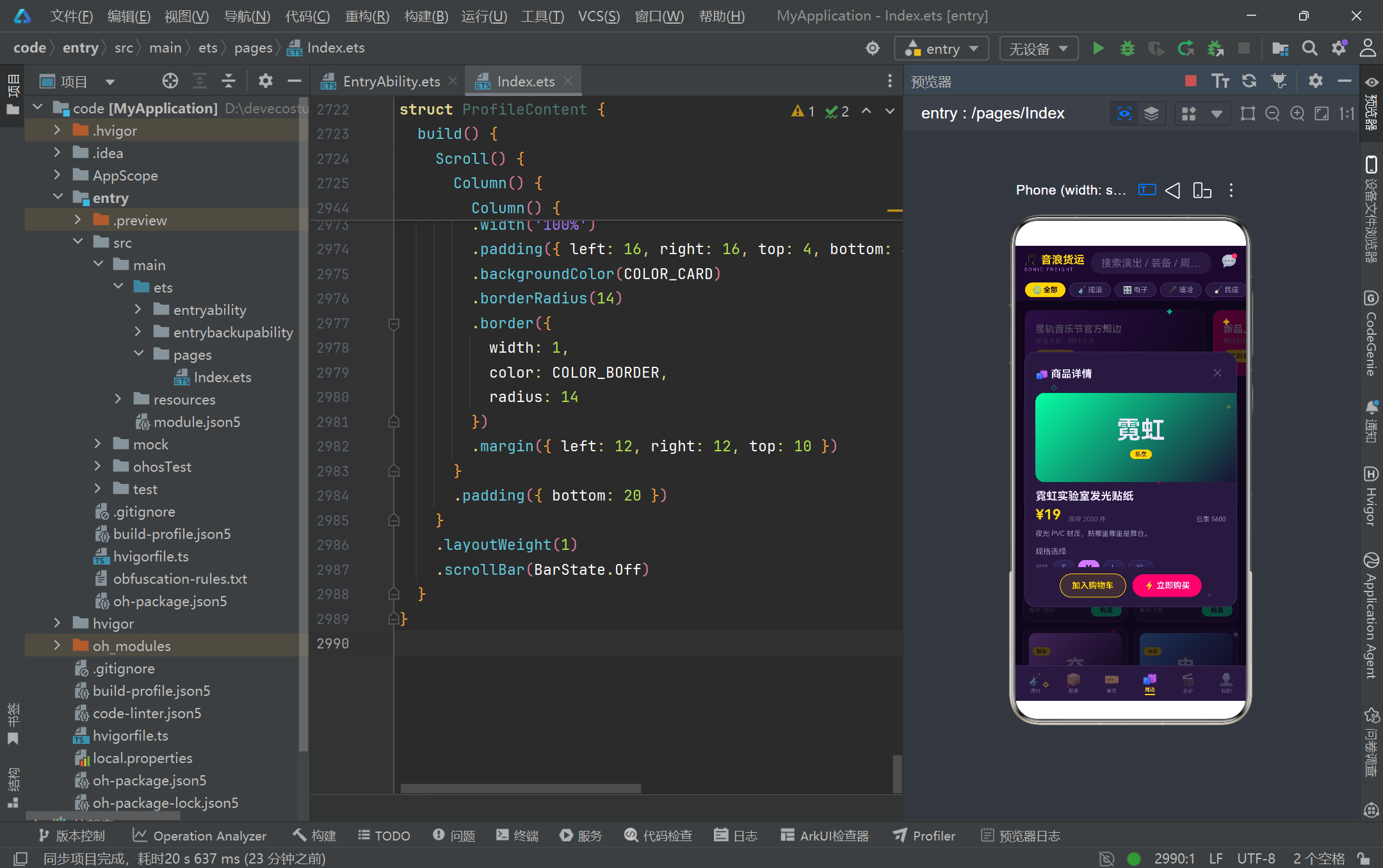
本段实现了周边商品卡片和购买弹框的交互逻辑。商品卡片宽度设为 48.5%,通过 Flex({ wrap: FlexWrap.Wrap }) 实现两列自动换行布局。卡片顶部是 86vp 高的渐变色块,取商品名首字作为大号装饰文字,配合商品主题色的 135 度渐变背景。下方依次展示商品名、价格(金色加粗)、已售数量、库存和绿色"购买"按钮。点击购买按钮时,将当前商品赋值给 selectedMerch,重置购买数量为 1、尺码为 M、颜色为紫,然后打开 showBuyModal 弹框。购买弹框 buyMerchModal 是一个功能完整的商品详情页,包含商品大图色块(使用 selectedMerch?.color 渐变)、价格、库存、已售、描述、尺码选择(S/M/L/XL)、颜色选择(紫/金/粉/绿,通过 COLOR_OPTION_MAP 映射到实际色值)、数量加减器和底部"加入购物车"+"立即购买"双按钮。弹框通过 position 绝对定位覆盖在全屏之上,使用 zIndex(999) 确保层叠优先级,背景遮罩通过 modalOverlay Builder 实现半透明点击关闭。
3.17 后台时间线与当前任务卡
@Builder timelineItemBuilder(t: TaskItem, isLast: boolean) {
  Row() {
    Column() {
      Text(t.time)
        .fontSize(8)
        .fontColor(COLOR_HINT)
        .textAlign(TextAlign.Center)
      Column()
        .width(14)
        .height(14)
        .borderRadius(7)
        .backgroundColor(COLOR_BG)
        .border({
          width: 3,
          color: TASK_STATUS_CONFIG[t.status]?.color ?? COLOR_BORDER,
          radius: 7
        })
        .margin({ top: 6 })
      if (!isLast) {
        Column()
          .width(2)
          .layoutWeight(1)
          .backgroundColor(COLOR_BORDER)
          .margin({ top: 4 })
      }
    }
    .width(72)
    .alignItems(HorizontalAlign.Center)

    Column() {
      Row() {
        Text(t.stage)
          .fontSize(14)
          .fontWeight(FontWeight.Bold)
          .fontColor(COLOR_TEXT)
        Column().layoutWeight(1)
        Text((TASK_STATUS_CONFIG[t.status]?.icon ?? '⏳') + ' ' + t.status)
          .fontSize(9)
          .fontColor(TASK_STATUS_CONFIG[t.status]?.color ?? COLOR_HINT)
          .backgroundColor(TASK_STATUS_CONFIG[t.status]?.bg ?? 'rgba(107,91,142,0.18)')
          .padding({ left: 8, right: 8, top: 3, bottom: 3 })
          .borderRadius(9)
      }

      Text('👤 负责人:' + t.manager)
        .fontSize(10)
        .fontColor(COLOR_TEXT_SUB)
        .margin({ top: 6 })

      Column() {
        ForEach(splitTasks(t.tasks), (task: string) => {
          Row() {
            Text('▸').fontSize(10).fontColor(COLOR_PRIMARY_LIGHT)
            Text(task).fontSize(11).fontColor(COLOR_TEXT_SUB).margin({ left: 6 })
          }
          .padding({ top: 4, bottom: 4 })
        })
      }
      .backgroundColor(COLOR_CARD_LIGHT)
      .borderRadius(10)
      .padding({ left: 10, right: 10, top: 4, bottom: 4 })
      .margin({ top: 8 })
    }
    .layoutWeight(1)
    .backgroundColor(COLOR_CARD)
    .borderRadius(14)
    .border({ width: 1, color: COLOR_BORDER, radius: 14 })
    .margin({ left: 8, bottom: 12 })
  }
  .alignItems(VerticalAlign.Top)
}
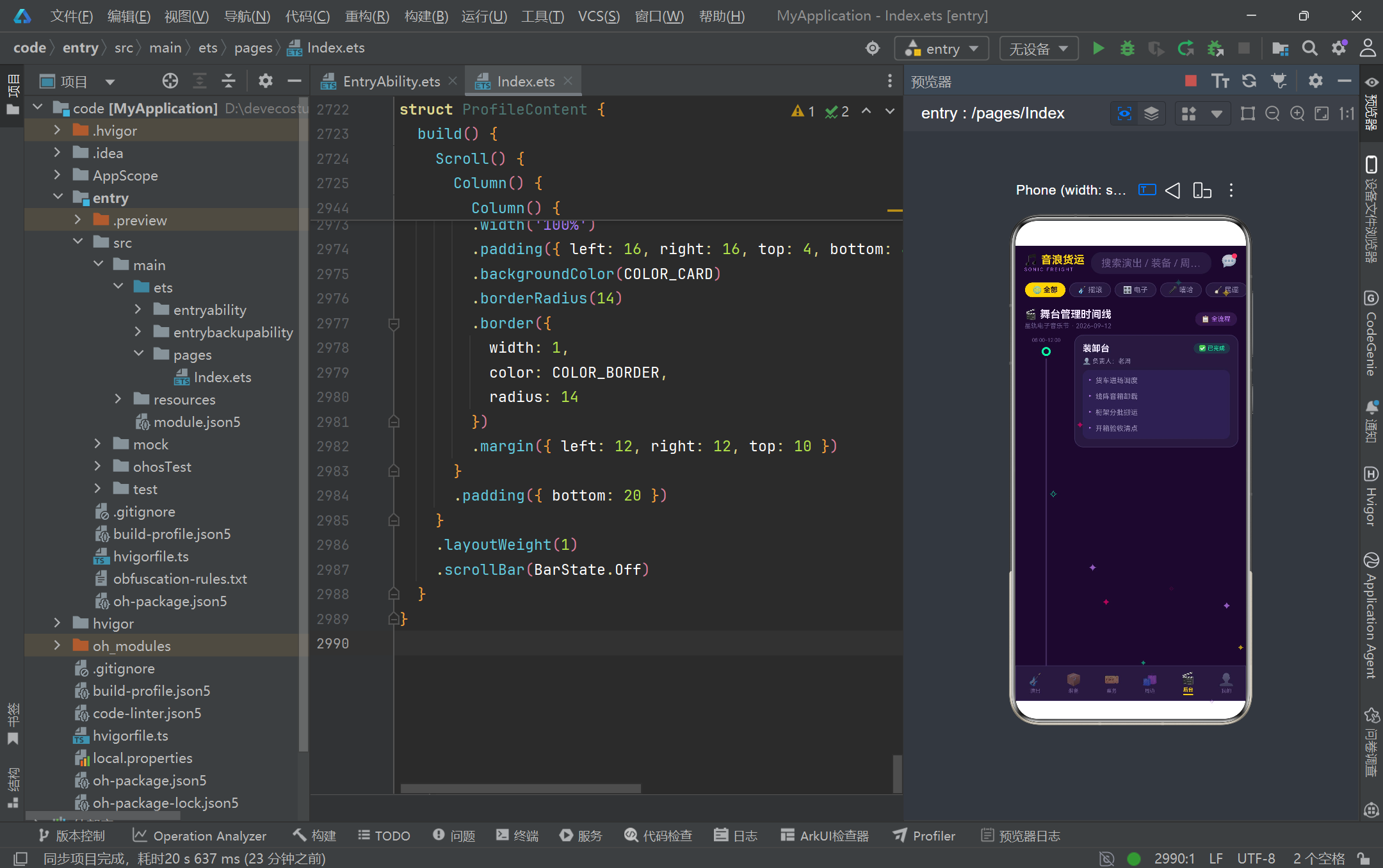
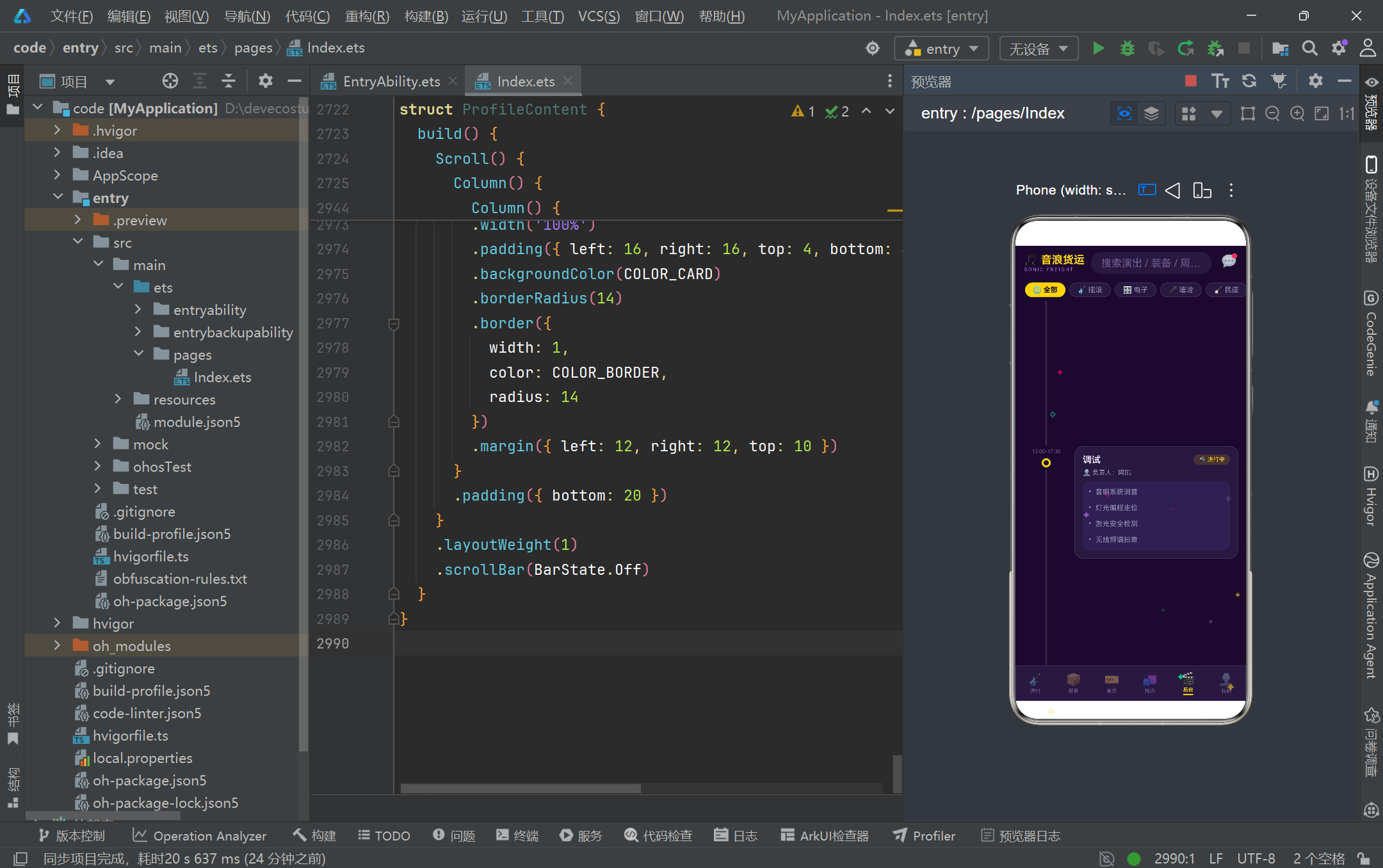
本段实现了后台管理页面的竖向时间线构建器。时间线采用经典的"左侧轴 + 右侧卡片"双列布局:左侧 72vp 宽的列包含时间标签、状态圆点和连接线。状态圆点是一个 14x14 的圆形,通过 border 的 width: 3 和 color 属性设置环形边框,颜色从 TASK_STATUS_CONFIG 查表获取——已完成为绿色、进行中为金色、待开始为灰色。连接线是 2vp 宽的 Column,通过 layoutWeight(1) 撑满剩余高度,最后一个节点的 isLast 参数为 true 时不渲染连接线。右侧卡片展示阶段名称、状态标签、负责人和子任务列表。子任务通过 splitTasks(t.tasks) 函数将竖线分隔的字符串拆分为数组后遍历渲染,每项前缀 ▸ 符号。时间线下方还有"当前任务"实时卡片,展示进行中阶段的详情,包含任务进度条(50% 金粉渐变)、"联系负责人"和"广播通知全员"两个行动按钮,整体使用金色边框高亮以区别于普通时间线节点。这个时间线组件是 HarmonyOS ArkTS 中实现复杂垂直列表布局的优秀范例。
3.18 个人资料页与设置列表
build() {
  Scroll() {
    Column() {
      Column() {
        Row() {
          Column() {
            Text('🎧').fontSize(34)
          }
          .width(64).height(64).borderRadius(32)
          .backgroundColor(COLOR_CARD_LIGHT)
          .border({ width: 2, color: COLOR_GOLD, radius: 32 })
          .justifyContent(FlexAlign.Center)

          Column() {
            Text('陆星野')
              .fontSize(18).fontWeight(FontWeight.Bold).fontColor(COLOR_TEXT)
            Row() {
              Text('🚚 物流统筹')
                .fontSize(10).fontColor(COLOR_BG).backgroundColor(COLOR_GOLD)
                .padding({ left: 8, right: 8, top: 3, bottom: 3 }).borderRadius(9)
              Text('金牌认证')
                .fontSize(10).fontColor(COLOR_GREEN)
                .backgroundColor('rgba(6,255,165,0.12)')
                .padding({ left: 8, right: 8, top: 3, bottom: 3 }).borderRadius(9)
                .margin({ left: 6 })
            }
            .margin({ top: 6 })
          }
          .alignItems(HorizontalAlign.Start)
          .layoutWeight(1)

          Text('👤 编辑')
            .fontSize(10).fontColor(COLOR_TEXT_SUB)
            .backgroundColor(COLOR_CARD_LIGHT)
            .padding({ left: 10, right: 10, top: 5, bottom: 5 }).borderRadius(11)
        }
        // 统计数据三列 + 渐变背景
      }
      .linearGradient({
        angle: 135,
        colors: [[COLOR_PRIMARY, 0.0], ['#1A0A2E', 1.0]]
      })
      .borderRadius(16)

      // 2x2 统计网格 + 设置列表
    }
  }
}
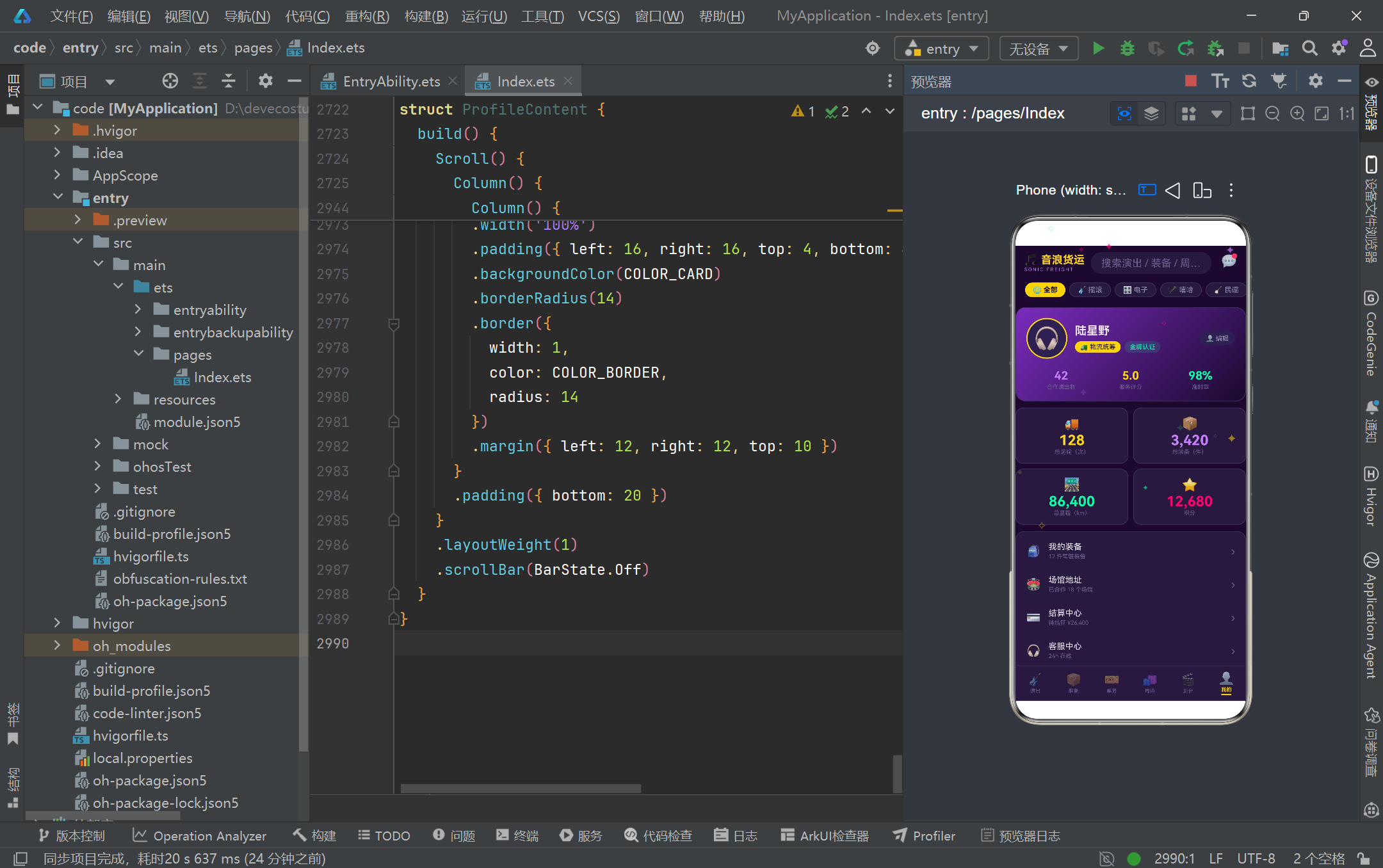
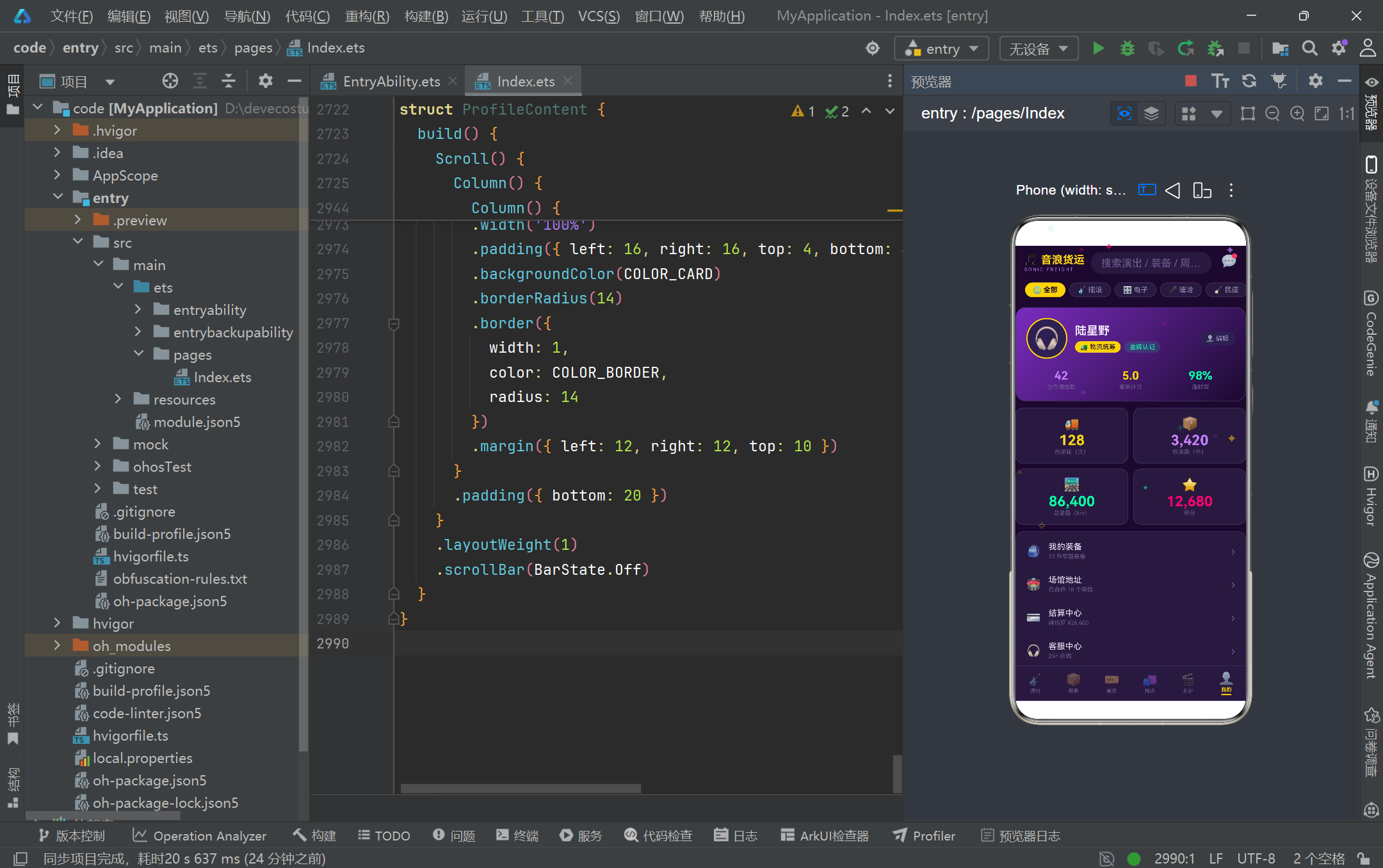
本段是个人资料页的构建方法,展示了渐变资料卡和设置列表的实现。资料卡头部使用 135 度渐变背景(从 COLOR_PRIMARY 到 #1A0A2E),内含圆形头像(64x64,金色双层边框)、用户名"陆星野"、角色标签"物流统筹"和"金牌认证"徽章。下方三列统计数据展示合作演出数(42)、服务评分(5.0)和准时率(98%)。资料卡下方是 2x2 的统计网格,分别展示总运输次数(128)、总装备件数(3420)、总里程(86400km)和积分(12680),每个数据块使用不同的主题色高亮。最底部是设置列表,通过 ForEach(PROFILE_SETTINGS, ...) 遍历五项设置(我的装备、场馆地址、结算中心、客服中心、设置),每项包含图标、标签、提示文案和右侧箭头 ›。设置列表整体使用卡片背景和圆角边框包裹,每行通过 padding 控制间距。个人资料页是六个 Tab 中唯一不包含弹框的页面,其 build 方法结构最为简洁,全部内容通过 Scroll 包裹以支持内容超长时的滚动浏览。
3.19 弹框系统架构
@Builder modalOverlay(onClose: () => void) {
  Column()
    .width('100%')
    .height('100%')
    .backgroundColor('rgba(10,4,20,0.72)')
    .onClick(onClose)
}

@Builder bookingModal() {
  Column() {
    this.modalOverlay(() => {
      this.showBookingModal = false
    })
    Column() {
      // 弹框标题栏 + 金色分割线 + 表单内容 + 底部按钮
    }
    .width('90%')
    .height('75%')
    .backgroundColor(COLOR_CARD)
    .borderRadius(18)
    .border({ width: 1, color: COLOR_BORDER, radius: 18 })
    .position({ x: '5%', y: '11%' })
  }
  .width('100%')
  .height('100%')
  .position({ x: 0, y: 0 })
  .zIndex(999)
}
本段展示了应用弹框系统的通用架构模式。modalOverlay 是一个可复用的遮罩层 Builder,接收一个 onClose 回调函数,渲染全屏半透明遮罩并绑定点击关闭事件。每个弹框 Builder(如 bookingModal)都遵循相同的结构:外层 Column 全屏覆盖并设置 zIndex(999) 确保层叠在最上层;内部先渲染遮罩层,再渲染实际的弹框卡片。弹框卡片通过 position 绝对定位控制在屏幕中的位置(如 position({ x: '5%', y: '11%' })),通过 width 和 height 百分比控制尺寸。应用共有四个弹框:运输预约表单(演出 Tab,包含演出选择、装备多选、起止场馆、装台时间、特殊要求和备注)、编辑演出信息(演出 Tab,包含名称、日期、容量、场馆、阵容和备注)、取消运输订单(装备 Tab,警示式确认框,包含演出、装备、路线和金额信息)、购买周边(周边 Tab,商品详情式,包含规格选择和数量加减器)。弹框的显示通过 @State 布尔变量控制(如 showBookingModal),在 build 方法中通过 if (this.showBookingModal) { this.bookingModal() } 条件渲染。这种"状态开关 + 条件渲染 + 绝对定位"的弹框模式是 HarmonyOS ArkTS 中实现模态交互的标准方案。
四、Tab切换与状态流转
以下是用户在六个 Tab 之间切换时的状态流转和组件生命周期关系:
五、粒子动画循环机制
以下是舞台光点粒子从初始化到逐帧推进再到界面渲染的完整循环流程:
六、六大Tab模块对比
| Tab模块 | 组件名 | 核心数据源 | 主要交互 | 弹框数量 | 布局特征 |
|---|---|---|---|---|---|
| 演出 SHOW | ShowContent | mockShows (6场) | 搜索过滤、类型筛选、编辑、预约运输 | 2个 | 海报卡片列表 + 统计带 |
| 装备 GEAR | GearContent | mockGears (12件) | 查看库存、取消在途订单 | 1个 | 双列网格 + 类型分布 |
| 票务 TICKET | TicketContent | mockTickets (6组) | 查看进度、趋势 | 0个 | 2x2数字 + 进度条 + 柱状图 |
| 周边商城 MERCH | MerchContent | mockMerch (10款) | 排序、轮播、购买 | 1个 | 轮播 + Flex换行网格 |
| 后台 BACKSTAGE | BackstageContent | mockTasks (4阶段) | 查看时间线、联系负责人 | 0个 | 竖向时间线 + 当前任务卡 |
| 我的 PROFILE | ProfileContent | 静态数据 | 查看、编辑资料 | 0个 | 渐变资料卡 + 设置列表 |
从上表可以看出,六个 Tab 模块在数据源规模、交互复杂度和弹框数量上呈现出合理的梯度分布。演出模块作为首页承担了最丰富的交互(搜索、筛选、编辑、预约),配备了两个弹框;装备和周边模块各有一个弹框用于详情确认和购买操作;票务和后台模块以数据展示为主,无需弹框交互;个人资料页则完全静态。这种交互密度的差异化设计符合用户从"浏览发现"到"深度操作"再到"个人管理"的使用路径,也体现了组件职责的合理分配。
七、数据模型体系对比
| 模型 | 接口名 | 类名 | 字段数 | 核心用途 | 观测特性 |
|---|---|---|---|---|---|
| 演出 | ShowModel | ShowItem | 8 | 演出信息管理 | @Observed 深层观测 |
| 装备 | GearStockModel | GearStockItem | 7 | 库存设备管理 | @Observed 深层观测 |
| 票务 | TicketModel | TicketItem | 6 | 票务销售统计 | @Observed 深层观测 |
| 周边 | MerchModel | MerchItem | 8 | 商品信息展示 | @Observed 深层观测 |
| 任务 | TaskModel | TaskItem | 6 | 后台阶段管理 | @Observed 深层观测 |
| 粒子 | ParticleModel | ParticleItem | 7 | 动画粒子渲染 | @Observed 深层观测 |
六个数据模型均采用 interface 定义契约、@Observed class 实现实例化的统一模式。@Observed 装饰器使得每个模型实例在作为 @State 变量被引用时,其属性变更能够被框架的观察者系统捕获并触发精确的组件级刷新。粒子模型虽然同样被 @Observed 标注,但其更新方式是整体替换数组而非修改单个粒子属性,因此在实际运行中触发的是 @State 的一级观测(引用变更)而非 @Observed 的二级观测(属性变更)。这种设计选择确保了粒子动画的高效渲染——每帧只需替换数组引用即可触发 ForEach 重新执行,无需逐个通知粒子属性变更。
八、弹框系统对比
| 弹框名称 | 所属Tab | 触发方式 | 卡片尺寸 | 核心交互组件 | 主色调 |
|---|---|---|---|---|---|
| 运输预约 bookingModal | 演出 | 点击"预约运输" | 90% x 75% | Flex多选药丸 + TextInput + TextArea | 金色 COLOR_GOLD |
| 编辑演出 editShowModal | 演出 | 点击"编辑" | 85% x 60% | TextInput + TextArea + 双列布局 | 紫色 COLOR_PRIMARY_LIGHT |
| 取消订单 cancelOrderModal | 装备 | 点击"取消订单" | 80% x 自适应 | 警示图标 + 信息确认表 | 红色 COLOR_RED |
| 购买周边 buyMerchModal | 周边 | 点击"购买" | 92% x 70% | 渐变商品图 + 尺码颜色选择 + 数量加减器 | 粉色 COLOR_PINK |
四个弹框虽然共享相同的架构模式(遮罩层 + 绝对定位卡片 + zIndex 层叠),但在视觉风格上各有特色:运输预约使用金色作为主色调,配合大量表单输入组件和 Flex 多选药丸,是信息密度最高的弹框;编辑演出使用浅紫主色调,采用双列布局优化日期和容量的并排输入;取消订单是唯一的警示型弹框,使用红色边框和红色确认按钮,配合 rgba(255,77,106,0.08) 的红色信息卡片传达警示语义;购买周边弹框最为复杂,包含渐变商品色块、规格选择器(尺码 S/M/L/XL + 颜色紫/金/粉/绿)、数量加减器和双行动按钮,是完整的电商商品详情页组件。
安装DevEco Studio程序

选择目标安装目录:

设置环境变量,但是需要重启一下:

新建一个空白模板:

设置API为24的模板项目:

初始化项目,自动下载相关依赖:

完整代码:
// ============================================================================
// 音浪货运 SONIC FREIGHT — 音乐节/演出设备运输 + 周边商城平台
// 深紫舞台霓虹风 · ArkTS 单文件页面
// 结构:颜色常量 -> 数据模型(interface + @Observed class) -> 配置映射 -> 静态数据
// -> 辅助纯函数 -> Tab枚举 -> @Entry 主页面 -> 6个Tab内容struct -> 弹框@Builder
// ============================================================================
// ============ 颜色常量 ============
const COLOR_BG: string = '#1A0A2E'
const COLOR_CARD: string = '#251A3D'
const COLOR_CARD_LIGHT: string = '#2D2150'
const COLOR_PRIMARY: string = '#7B2CBF'
const COLOR_PRIMARY_LIGHT: string = '#C77DFF'
const COLOR_GOLD: string = '#FFD60A'
const COLOR_PINK: string = '#FF006E'
const COLOR_GREEN: string = '#06FFA5'
const COLOR_TEXT: string = '#F0E6FF'
const COLOR_TEXT_SUB: string = '#9A8FB5'
const COLOR_HINT: string = '#6B5B8E'
const COLOR_BORDER: string = '#3D2E5C'
const COLOR_RED: string = '#FF4D6A'
const COLOR_BLUE: string = '#4DA8FF'
// ============ 数据模型:演出 ============
interface ShowModel {
id: number
name: string
date: string
venue: string
lineup: string
status: string
genre: string
posterColor: string
}
@Observed
class ShowItem implements ShowModel {
id: number = 0
name: string = ''
date: string = ''
venue: string = ''
lineup: string = ''
status: string = '筹备中'
genre: string = '摇滚'
posterColor: string = COLOR_PRIMARY
constructor(id: number, name: string, date: string, venue: string, lineup: string,
status: string, genre: string, posterColor: string) {
this.id = id; this.name = name; this.date = date; this.venue = venue
this.lineup = lineup; this.status = status; this.genre = genre; this.posterColor = posterColor
}
}
// ============ 数据模型:装备库存 ============
interface GearStockModel {
id: number
name: string
type: string
icon: string
quantity: number
status: string
weight: number
}
@Observed
class GearStockItem implements GearStockModel {
id: number = 0
name: string = ''
type: string = '音响'
icon: string = '🔊'
quantity: number = 0
status: string = '在库'
weight: number = 0
constructor(id: number, name: string, type: string, icon: string,
quantity: number, status: string, weight: number) {
this.id = id; this.name = name; this.type = type; this.icon = icon
this.quantity = quantity; this.status = status; this.weight = weight
}
}
// ============ 数据模型:票务 ============
interface TicketModel {
id: number
showName: string
total: number
sold: number
revenue: number
date: string
}
@Observed
class TicketItem implements TicketModel {
id: number = 0
showName: string = ''
total: number = 0
sold: number = 0
revenue: number = 0
date: string = ''
constructor(id: number, showName: string, total: number, sold: number,
revenue: number, date: string) {
this.id = id; this.showName = showName; this.total = total
this.sold = sold; this.revenue = revenue; this.date = date
}
}
// ============ 数据模型:周边商品 ============
interface MerchModel {
id: number
name: string
price: number
stock: number
color: string
tag: string
sales: number
desc: string
}
@Observed
class MerchItem implements MerchModel {
id: number = 0
name: string = ''
price: number = 0
stock: number = 0
color: string = COLOR_PRIMARY
tag: string = '常规'
sales: number = 0
desc: string = ''
constructor(id: number, name: string, price: number, stock: number, color: string,
tag: string, sales: number, desc: string) {
this.id = id; this.name = name; this.price = price; this.stock = stock
this.color = color; this.tag = tag; this.sales = sales; this.desc = desc
}
}
// ============ 数据模型:后台阶段任务 ============
interface TaskModel {
id: number
stage: string
time: string
manager: string
status: string
tasks: string
}
@Observed
class TaskItem implements TaskModel {
id: number = 0
stage: string = ''
time: string = ''
manager: string = ''
status: string = '待开始'
tasks: string = ''
constructor(id: number, stage: string, time: string, manager: string,
status: string, tasks: string) {
this.id = id; this.stage = stage; this.time = time
this.manager = manager; this.status = status; this.tasks = tasks
}
}
// ============ 数据模型:舞台光点粒子 ============
interface ParticleModel {
id: number
x: number
y: number
size: number
opacity: number
color: string
symbol: string
}
@Observed
class ParticleItem implements ParticleModel {
id: number = 0
x: number = 0
y: number = 0
size: number = 10
opacity: number = 0.4
color: string = COLOR_PRIMARY_LIGHT
symbol: string = '✦'
constructor(id: number, x: number, y: number, size: number,
opacity: number, color: string, symbol: string) {
this.id = id; this.x = x; this.y = y; this.size = size
this.opacity = opacity; this.color = color; this.symbol = symbol
}
}
// ============ 配置:状态元信息 ============
interface StatusMeta {
label: string
icon: string
color: string
bg: string
}
const SHOW_STATUS_CONFIG: Record<string, StatusMeta> = {
'筹备中': { label: '筹备中', icon: '🎛️', color: COLOR_GOLD, bg: 'rgba(255,214,10,0.15)' },
'进行中': { label: '进行中', icon: '🔴', color: COLOR_GREEN, bg: 'rgba(6,255,165,0.12)' },
'已结束': { label: '已结束', icon: '⚫', color: COLOR_HINT, bg: 'rgba(107,91,142,0.18)' }
}
const GEAR_STATUS_CONFIG: Record<string, StatusMeta> = {
'在库': { label: '在库', icon: '📦', color: COLOR_BLUE, bg: 'rgba(77,168,255,0.14)' },
'在途': { label: '在途', icon: '🚚', color: COLOR_GOLD, bg: 'rgba(255,214,10,0.14)' },
'使用中': { label: '使用中', icon: '🎛️', color: COLOR_GREEN, bg: 'rgba(6,255,165,0.12)' }
}
const GEAR_TYPE_CONFIG: Record<string, StatusMeta> = {
'音响': { label: '音响', icon: '🔊', color: COLOR_PINK, bg: 'rgba(255,0,110,0.14)' },
'灯光': { label: '灯光', icon: '💡', color: COLOR_GOLD, bg: 'rgba(255,214,10,0.14)' },
'舞台': { label: '舞台', icon: '🏗️', color: COLOR_PRIMARY_LIGHT, bg: 'rgba(199,125,255,0.14)' },
'特效': { label: '特效', icon: '✨', color: COLOR_GREEN, bg: 'rgba(6,255,165,0.12)' }
}
const TASK_STATUS_CONFIG: Record<string, StatusMeta> = {
'已完成': { label: '已完成', icon: '✅', color: COLOR_GREEN, bg: 'rgba(6,255,165,0.12)' },
'进行中': { label: '进行中', icon: '🎬', color: COLOR_GOLD, bg: 'rgba(255,214,10,0.14)' },
'待开始': { label: '待开始', icon: '⏳', color: COLOR_HINT, bg: 'rgba(107,91,142,0.18)' }
}
// ============ 配置:音乐类型 ============
interface GenreMeta {
label: string
icon: string
color: string
}
const GENRE_CONFIG: Record<string, GenreMeta> = {
'摇滚': { label: '摇滚', icon: '🎸', color: COLOR_PINK },
'电子': { label: '电子', icon: '🎛️', color: COLOR_PRIMARY_LIGHT },
'嘻哈': { label: '嘻哈', icon: '🎤', color: COLOR_GOLD },
'民谣': { label: '民谣', icon: '🪕', color: COLOR_GREEN },
'古典': { label: '古典', icon: '🎻', color: COLOR_BLUE }
}
// ============ 配置:周边banner ============
interface BannerMeta {
id: number
title: string
sub: string
cta: string
color: string
}
const MERCH_BANNERS: BannerMeta[] = [
{ id: 1, title: '星轨音乐节官方周边', sub: '全场 8 折 · 限时 3 天', cta: '去逛逛 →', color: COLOR_PRIMARY },
{ id: 2, title: '新品上市', sub: '舞台灯光小夜灯 梦幻开灯', cta: '立即查看 →', color: COLOR_PINK },
{ id: 3, title: '会员日福利', sub: '荧光手环买三送一', cta: '领券购买 →', color: COLOR_GOLD }
]
// ============ 配置:我的页设置项 ============
interface SettingMeta {
icon: string
label: string
hint: string
color: string
}
const PROFILE_SETTINGS: SettingMeta[] = [
{ icon: '🎒', label: '我的装备', hint: '12 件常驻装备', color: COLOR_PINK },
{ icon: '🏟️', label: '场馆地址', hint: '已合作 18 个场馆', color: COLOR_GOLD },
{ icon: '💳', label: '结算中心', hint: '待结算 ¥26,400', color: COLOR_GREEN },
{ icon: '🎧', label: '客服中心', hint: '24h 在线', color: COLOR_BLUE },
{ icon: '⚙️', label: '设置', hint: '通知 / 安全 / 关于', color: COLOR_PRIMARY_LIGHT }
]
// ============ 静态选项 ============
const GENRE_PILLS: string[] = ['全部', '摇滚', '电子', '嘻哈', '民谣', '古典']
const SORT_PILLS: string[] = ['新品', '价格', '销量']
const SPECIAL_OPTIONS: string[] = ['防潮', '防震', '加急', '夜间运输']
const SIZE_OPTIONS: string[] = ['S', 'M', 'L', 'XL']
const COLOR_OPTIONS: string[] = ['紫', '金', '粉', '绿']
const COLOR_OPTION_MAP: Record<string, string> = {
'紫': COLOR_PRIMARY_LIGHT,
'金': COLOR_GOLD,
'粉': COLOR_PINK,
'绿': COLOR_GREEN
}
// ============ 静态数据:6场演出 ============
const mockShows: ShowItem[] = [
new ShowItem(1, '星轨电子音乐节', '2026-09-12', '星海跨江公园', 'DJ Nova · DJ Loki · 星云组合 · 电音工厂',
'进行中', '电子', COLOR_PRIMARY),
new ShowItem(2, '荒原之声摇滚音乐节', '2026-09-18', '钢铁仓库 Livehouse', '铁幕乐队 · 岩浆合唱团 · 电锯三人组',
'筹备中', '摇滚', COLOR_PINK),
new ShowItem(3, '江畔民谣之夜', '2026-08-28', '滨江文化中心', '南山乐队 · 麦浪 · 小酒馆组合',
'筹备中', '民谣', COLOR_GREEN),
new ShowItem(4, '地下嘻哈风暴', '2026-09-25', '地下车库艺术区', 'MC猎户 · 双押王 · 街头诗人',
'筹备中', '嘻哈', COLOR_GOLD),
new ShowItem(5, '城市交响电声夜', '2026-08-15', '大都会音乐厅', '陈指挥 · 城市爱乐 · 弦上四重奏',
'已结束', '古典', COLOR_BLUE),
new ShowItem(6, '霓虹电子实验室', '2026-08-20', '798 艺术仓库', '合成器兄弟 · 光子计划',
'已结束', '电子', COLOR_PRIMARY_LIGHT)
]
// ============ 静态数据:12件装备 ============
const mockGears: GearStockItem[] = [
new GearStockItem(1, '线阵音箱系统', '音响', '🔊', 24, '使用中', 480),
new GearStockItem(2, '超低音炮', '音响', '🎛️', 12, '在库', 260),
new GearStockItem(3, '数字调音台', '音响', '🎚️', 6, '在途', 45),
new GearStockItem(4, '无线麦克风套装', '音响', '🎤', 40, '在库', 30),
new GearStockItem(5, '光束摇头灯', '灯光', '💡', 32, '使用中', 120),
new GearStockItem(6, 'LED 帕灯', '灯光', '🔆', 60, '在库', 55),
new GearStockItem(7, '激光表演系统', '灯光', '🌈', 4, '在途', 95),
new GearStockItem(8, '追光灯', '灯光', '🔦', 8, '在库', 18),
new GearStockItem(9, '铝合金桁架', '舞台', '🏗️', 200, '使用中', 15),
new GearStockItem(10, '升降舞台模块', '舞台', '🎪', 6, '在库', 400),
new GearStockItem(11, '烟雾机', '特效', '💨', 10, '在库', 25),
new GearStockItem(12, '二氧化碳喷射炮', '特效', '❄️', 6, '在途', 60)
]
// ============ 静态数据:6条票务 ============
const mockTickets: TicketItem[] = [
new TicketItem(1, '星轨电子音乐节', 18000, 15200, 4560000, '2026-09-12'),
new TicketItem(2, '荒原之声摇滚音乐节', 12000, 6800, 2040000, '2026-09-18'),
new TicketItem(3, '江畔民谣之夜', 3000, 2900, 580000, '2026-08-28'),
new TicketItem(4, '地下嘻哈风暴', 5000, 2100, 630000, '2026-09-25'),
new TicketItem(5, '城市交响电声夜', 2400, 2400, 960000, '2026-08-15'),
new TicketItem(6, '霓虹电子实验室', 4000, 3600, 1080000, '2026-08-20')
]
// ============ 静态数据:10个周边商品 ============
const mockMerch: MerchItem[] = [
new MerchItem(1, '星轨限定T恤', 129, 350, COLOR_PRIMARY, '新品', 1200, '重磅纯棉,胸口夜光星轨印花,音乐节现场同款。'),
new MerchItem(2, '荒原摇滚帆布包', 89, 200, COLOR_PINK, '热卖', 980, '加厚帆布 + 金属铆钉,装得下所有躁动。'),
new MerchItem(3, '江畔民谣黑胶复刻', 299, 80, COLOR_GOLD, '限量', 150, '180g 黑胶复刻,含手写歌词卡,编号限量发行。'),
new MerchItem(4, '嘻哈风暴棒球帽', 99, 260, COLOR_GREEN, '新品', 870, '平檐帽型,刺绣双押 Logo,双面可戴。'),
new MerchItem(5, '电子音乐节荧光手环', 39, 1000, COLOR_BLUE, '热卖', 3200, 'RF 控制同步闪频,入场即点亮人海。'),
new MerchItem(6, '交响夜纪念徽章套装', 59, 500, COLOR_PRIMARY_LIGHT, '新品', 460, '五枚装金属徽章,对应五大乐章。'),
new MerchItem(7, '音浪货运货车模型', 199, 120, COLOR_RED, '限量', 210, '1:64 合金货车模型,可开货箱门,粉丝抢藏。'),
new MerchItem(8, '霓虹实验室发光贴纸', 19, 2000, COLOR_GREEN, '热卖', 5600, '夜光 PVC 材质,贴哪里哪里是舞台。'),
new MerchItem(9, '舞台灯光小夜灯', 159, 150, COLOR_GOLD, '新品', 330, '还原摇头灯光束,三档色温,卧室秒变 Livehouse。'),
new MerchItem(10, '传奇调音台马克杯', 69, 400, COLOR_BLUE, '常规', 750, '推子造型杯柄,喝咖啡也能推一段混音。')
]
// ============ 静态数据:4个后台阶段 ============
const mockTasks: TaskItem[] = [
new TaskItem(1, '装卸台', '08:00-12:00', '老周', '已完成',
'货车进场调度|线阵音箱卸载|桁架分批搬运|开箱验收清点'),
new TaskItem(2, '调试', '13:00-17:30', '阿凯', '进行中',
'音响系统调音|灯光编程走位|激光安全检测|无线频谱排查'),
new TaskItem(3, '演出', '19:00-23:00', '莉莉', '待开始',
'开场前终检|设备巡场值守|特效 cues 跟场|应急备件待命'),
new TaskItem(4, '撤场', '23:30-02:00', '老周', '待开始',
'设备回收清点|线缆分类捆扎|货车装载固定|场馆卫生交接')
]
// ============ 静态数据:7天销售趋势 ============
const SALES_TREND: number[] = [186, 240, 198, 312, 458, 620, 535]
const SALES_DAYS: string[] = ['周一', '周二', '周三', '周四', '周五', '周六', '周日']
// ============ 粒子配置 ============
const PARTICLE_COLORS: string[] = [COLOR_PRIMARY_LIGHT, COLOR_GOLD, COLOR_PINK, COLOR_GREEN]
const PARTICLE_SYMBOLS: string[] = ['✦', '✧', '✦']
function initParticles(): ParticleItem[] {
const list: ParticleItem[] = []
for (let i = 0; i < 12; i++) {
list.push(new ParticleItem(i, Math.random() * 100, Math.random() * 100,
8 + Math.random() * 8, 0.15 + Math.random() * 0.5,
PARTICLE_COLORS[i % 4], PARTICLE_SYMBOLS[i % 3]))
}
return list
}
function tickParticles(list: ParticleItem[]): ParticleItem[] {
const next: ParticleItem[] = []
for (let i = 0; i < list.length; i++) {
const p: ParticleItem = list[i]
let ny: number = p.y - (0.35 + (i % 3) * 0.18)
if (ny < -6) {
ny = 104
}
const nx: number = (p.x + Math.sin(p.y * 0.35 + i) * 0.6 + 100) % 100
const no: number = 0.15 + Math.abs(Math.sin(p.y * 0.2 + i)) * 0.55
next.push(new ParticleItem(p.id, nx, ny, p.size, no, p.color, p.symbol))
}
return next
}
// ============ 辅助纯函数 ============
function getFilteredShows(genre: string, keyword: string): ShowItem[] {
const kw: string = keyword.trim()
return mockShows.filter((s: ShowItem) => {
const genreOk: boolean = genre === '全部' || s.genre === genre
const kwOk: boolean = kw === '' || s.name.indexOf(kw) >= 0 || s.venue.indexOf(kw) >= 0
return genreOk && kwOk
})
}
function lineupPreview(lineup: string): string {
const arr: string[] = lineup.split(' · ')
return arr.slice(0, 3).join(' / ')
}
function getMonthShowCount(): number {
return mockShows.length
}
function getTotalFreightTons(): string {
return '486'
}
function getGearTotalCount(): number {
return mockGears.reduce((sum: number, g: GearStockItem) => sum + g.quantity, 0)
}
function getGearCountByStatus(status: string): number {
return mockGears.filter((g: GearStockItem) => g.status === status)
.reduce((sum: number, g: GearStockItem) => sum + g.quantity, 0)
}
function getGearTypeCount(type: string): number {
return mockGears.filter((g: GearStockItem) => g.type === type).length
}
function getTicketTotal(): number {
return mockTickets.reduce((sum: number, t: TicketItem) => sum + t.total, 0)
}
function getTicketSold(): number {
return mockTickets.reduce((sum: number, t: TicketItem) => sum + t.sold, 0)
}
function getTicketRemain(): number {
return getTicketTotal() - getTicketSold()
}
function getTicketRevenue(): string {
return (getTicketTotalRevenue() / 10000).toFixed(1)
}
function getTicketTotalRevenue(): number {
return mockTickets.reduce((sum: number, t: TicketItem) => sum + t.revenue, 0)
}
function pctOf(v: number, t: number): string {
return (Math.min(v / t, 1) * 100).toFixed(1) + '%'
}
function getMaxSales(): number {
return 620
}
function getSortedMerch(sort: string): MerchItem[] {
const arr: MerchItem[] = mockMerch.slice()
if (sort === '价格') {
arr.sort((a: MerchItem, b: MerchItem) => a.price - b.price)
} else if (sort === '销量') {
arr.sort((a: MerchItem, b: MerchItem) => b.sales - a.sales)
} else {
arr.sort((a: MerchItem, b: MerchItem) => b.id - a.id)
}
return arr
}
function toggleSelect(list: string[], v: string): string[] {
if (list.indexOf(v) >= 0) {
return list.filter((x: string) => x !== v)
}
return list.concat([v])
}
function splitTasks(tasks: string): string[] {
return tasks.split('|')
}
function getCurrentTask(): TaskItem {
return mockTasks[1]
}
// ============ Tab 枚举 ============
enum SonicTab {
SHOW = 0,
GEAR = 1,
TICKET = 2,
MERCH = 3,
BACKSTAGE = 4,
PROFILE = 5
}
// ============ 入口页面 ============
@Entry
@Component
struct SonicFreightApp {
@State activeTab: SonicTab = SonicTab.SHOW
@State searchKeyword: string = ''
@State selectedGenre: string = '全部'
@State particles: ParticleItem[] = initParticles()
private particleTimerId: number = -1
aboutToAppear(): void {
this.particleTimerId = setInterval(() => {
this.particles = tickParticles(this.particles)
}, 250)
}
aboutToDisappear(): void {
if (this.particleTimerId >= 0) {
clearInterval(this.particleTimerId)
this.particleTimerId = -1
}
}
// ========== 舞台光点粒子层 ==========
@Builder particleLayer() {
Column() {
ForEach(this.particles, (p: ParticleItem) => {
Text(p.symbol)
.fontSize(p.size)
.fontColor(p.color)
.opacity(p.opacity)
.position({ x: p.x + '%', y: p.y + '%' })
})
}
.width('100%')
.height('100%')
.hitTestBehavior(HitTestMode.None)
}
// ========== 头部:演出海报风格(无动画) ==========
@Builder headerBar() {
Column() {
// 第一行:Logo + 搜索框 + 消息
Row() {
Column() {
Text('🎵 音浪货运')
.fontSize(17)
.fontWeight(FontWeight.Bold)
.fontColor(COLOR_GOLD)
Text('SONIC FREIGHT')
.fontSize(7)
.fontColor(COLOR_PRIMARY_LIGHT)
.letterSpacing(2)
.margin({ top: 1 })
}
.alignItems(HorizontalAlign.Start)
TextInput({ placeholder: '搜索演出 / 装备 / 周边…' })
.placeholderColor(COLOR_HINT)
.fontSize(12)
.fontColor(COLOR_TEXT)
.backgroundColor(COLOR_CARD)
.borderRadius(16)
.height(34)
.layoutWeight(1)
.margin({ left: 10, right: 10 })
.onChange((v: string) => {
this.searchKeyword = v
})
Stack({ alignContent: Alignment.TopEnd }) {
Text('💬')
.fontSize(20)
.opacity(0.9)
Column()
.width(8)
.height(8)
.borderRadius(4)
.backgroundColor(COLOR_RED)
.margin({ top: 0, right: 0 })
}
.width(30)
.height(30)
}
.width('100%')
.alignItems(VerticalAlign.Center)
.padding({ left: 14, right: 14, top: 10, bottom: 8 })
// 第二行:音乐类型药丸横向滚动
Scroll() {
Row() {
ForEach(GENRE_PILLS, (g: string) => {
if (this.selectedGenre === g) {
Text(g === '全部' ? '🌐 全部' : ((GENRE_CONFIG[g]?.icon ?? '🎵') + ' ' + g))
.fontSize(11)
.fontColor(COLOR_BG)
.fontWeight(FontWeight.Bold)
.backgroundColor(COLOR_GOLD)
.padding({ left: 12, right: 12, top: 5, bottom: 5 })
.borderRadius(13)
.margin({ left: 3, right: 3 })
} else {
Text(g === '全部' ? '🌐 全部' : ((GENRE_CONFIG[g]?.icon ?? '🎵') + ' ' + g))
.fontSize(11)
.fontColor(COLOR_TEXT_SUB)
.backgroundColor(COLOR_CARD)
.border({
width: 1,
color: COLOR_BORDER,
radius: 13
})
.padding({ left: 12, right: 12, top: 4, bottom: 4 })
.borderRadius(13)
.margin({ left: 3, right: 3 })
.onClick(() => {
this.selectedGenre = g
})
}
})
}
.padding({ left: 12, right: 12 })
}
.scrollable(ScrollDirection.Horizontal)
.scrollBar(BarState.Off)
.height(34)
}
.width('100%')
.backgroundColor(COLOR_BG)
}
// ========== 内容区 ==========
@Builder contentArea() {
Column() {
if (this.activeTab === SonicTab.SHOW) {
ShowContent()
} else if (this.activeTab === SonicTab.GEAR) {
GearContent()
} else if (this.activeTab === SonicTab.TICKET) {
TicketContent()
} else if (this.activeTab === SonicTab.MERCH) {
MerchContent()
} else if (this.activeTab === SonicTab.BACKSTAGE) {
BackstageContent()
} else {
ProfileContent()
}
}
.layoutWeight(1)
.width('100%')
}
// ========== 底部Tab ==========
@Builder tabItem(icon: string, label: string, tab: SonicTab) {
Column() {
Text(icon)
.fontSize(19)
.opacity(this.activeTab === tab ? 1.0 : 0.45)
Text(label)
.fontSize(8)
.fontColor(this.activeTab === tab ? COLOR_GOLD : COLOR_HINT)
.fontWeight(this.activeTab === tab ? FontWeight.Bold : FontWeight.Normal)
.margin({ top: 2 })
if (this.activeTab === tab) {
Column()
.width(16)
.height(2)
.backgroundColor(COLOR_GOLD)
.borderRadius(1)
.margin({ top: 2 })
}
}
.layoutWeight(1)
.alignItems(HorizontalAlign.Center)
.padding({ top: 6, bottom: 6 })
.onClick(() => {
this.activeTab = tab
})
}
@Builder tabBar() {
Row() {
this.tabItem('🎸', '演出', SonicTab.SHOW)
this.tabItem('📦', '装备', SonicTab.GEAR)
this.tabItem('🎫', '票务', SonicTab.TICKET)
this.tabItem('🛍️', '周边', SonicTab.MERCH)
this.tabItem('🎬', '后台', SonicTab.BACKSTAGE)
this.tabItem('👤', '我的', SonicTab.PROFILE)
}
.width('100%')
.backgroundColor(COLOR_CARD)
.border({
width: 1,
color: COLOR_BORDER,
radius: 0
})
.padding({ top: 2, bottom: 2 })
}
build() {
Stack() {
Column() {
this.headerBar()
this.contentArea()
this.tabBar()
}
.width('100%')
.height('100%')
this.particleLayer()
}
.width('100%')
.height('100%')
.backgroundColor(COLOR_BG)
}
}
// ============ Tab1:演出 SHOW(海报卡片列表) ============
@Component
struct ShowContent {
@State showBookingModal: boolean = false
@State showEditModal: boolean = false
@State editingShow: ShowItem | null = null
@State bookingShow: string = '星轨电子音乐节'
@State bookingGears: string[] = ['线阵音箱系统']
@State bookingFrom: string = ''
@State bookingTo: string = ''
@State bookingTime: string = ''
@State bookingSpecials: string[] = ['防震']
@State bookingNote: string = ''
@State editName: string = ''
@State editDate: string = ''
@State editVenue: string = ''
@State editCapacity: string = ''
@State editLineup: string = ''
@State editNote: string = ''
@Builder modalOverlay(onClose: () => void) {
Column()
.width('100%')
.height('100%')
.backgroundColor('rgba(10,4,20,0.72)')
.onClick(onClose)
}
// ========== 弹框1:设备运输预约(新增 · 深紫表单 · 金色高亮) ==========
@Builder bookingModal() {
Column() {
this.modalOverlay(() => {
this.showBookingModal = false
})
Column() {
Row() {
Text('📦 设备运输预约')
.fontSize(17)
.fontWeight(FontWeight.Bold)
.fontColor(COLOR_GOLD)
Column()
.layoutWeight(1)
Text('✕')
.fontSize(17)
.fontColor(COLOR_HINT)
.padding(6)
.onClick(() => {
this.showBookingModal = false
})
}
.width('100%')
.padding({ left: 16, right: 16, top: 16, bottom: 10 })
Column()
.height(2)
.width('40%')
.backgroundColor(COLOR_GOLD)
.borderRadius(1)
.alignSelf(ItemAlign.Start)
.margin({ left: 16 })
.opacity(0.8)
Scroll() {
Column() {
Text('选择演出')
.fontSize(12)
.fontColor(COLOR_TEXT_SUB)
.alignSelf(ItemAlign.Start)
.margin({ top: 12, left: 16 })
Flex({ wrap: FlexWrap.Wrap }) {
ForEach(mockShows, (s: ShowItem) => {
if (this.bookingShow === s.name) {
Text('🎤 ' + s.name)
.fontSize(10)
.fontColor(COLOR_BG)
.fontWeight(FontWeight.Bold)
.backgroundColor(COLOR_GOLD)
.padding({ left: 9, right: 9, top: 5, bottom: 5 })
.borderRadius(12)
.margin({ right: 6, bottom: 6 })
} else {
Text('🎤 ' + s.name)
.fontSize(10)
.fontColor(COLOR_TEXT_SUB)
.backgroundColor(COLOR_CARD_LIGHT)
.border({
width: 1,
color: COLOR_BORDER,
radius: 12
})
.padding({ left: 9, right: 9, top: 4, bottom: 4 })
.borderRadius(12)
.margin({ right: 6, bottom: 6 })
.onClick(() => {
this.bookingShow = s.name
})
}
})
}
.width('100%')
.padding({ left: 16, right: 16, top: 4 })
Text('装备清单(多选)')
.fontSize(12)
.fontColor(COLOR_TEXT_SUB)
.alignSelf(ItemAlign.Start)
.margin({ top: 12, left: 16 })
Flex({ wrap: FlexWrap.Wrap }) {
ForEach(mockGears, (g: GearStockItem) => {
if (this.bookingGears.indexOf(g.name) >= 0) {
Text(g.icon + ' ' + g.name)
.fontSize(10)
.fontColor(COLOR_GREEN)
.backgroundColor('rgba(6,255,165,0.12)')
.border({
width: 1,
color: COLOR_GREEN,
radius: 12
})
.padding({ left: 9, right: 9, top: 4, bottom: 4 })
.borderRadius(12)
.margin({ right: 6, bottom: 6 })
.onClick(() => {
this.bookingGears = toggleSelect(this.bookingGears, g.name)
})
} else {
Text(g.icon + ' ' + g.name)
.fontSize(10)
.fontColor(COLOR_TEXT_SUB)
.backgroundColor(COLOR_CARD_LIGHT)
.padding({ left: 9, right: 9, top: 4, bottom: 4 })
.borderRadius(12)
.margin({ right: 6, bottom: 6 })
.onClick(() => {
this.bookingGears = toggleSelect(this.bookingGears, g.name)
})
}
})
}
.width('100%')
.padding({ left: 16, right: 16, top: 4 })
Text('出发场馆')
.fontSize(12)
.fontColor(COLOR_TEXT_SUB)
.alignSelf(ItemAlign.Start)
.margin({ top: 10, left: 16 })
TextInput({ placeholder: '如:滨江装备总仓' })
.placeholderColor(COLOR_HINT)
.fontSize(12)
.fontColor(COLOR_TEXT)
.backgroundColor(COLOR_CARD_LIGHT)
.borderRadius(8)
.margin({ left: 16, right: 16, top: 4 })
.onChange((v: string) => {
this.bookingFrom = v
})
Text('目的场馆')
.fontSize(12)
.fontColor(COLOR_TEXT_SUB)
.alignSelf(ItemAlign.Start)
.margin({ top: 10, left: 16 })
TextInput({ placeholder: '如:星海跨江公园东门' })
.placeholderColor(COLOR_HINT)
.fontSize(12)
.fontColor(COLOR_TEXT)
.backgroundColor(COLOR_CARD_LIGHT)
.borderRadius(8)
.margin({ left: 16, right: 16, top: 4 })
.onChange((v: string) => {
this.bookingTo = v
})
Text('装台时间')
.fontSize(12)
.fontColor(COLOR_TEXT_SUB)
.alignSelf(ItemAlign.Start)
.margin({ top: 10, left: 16 })
TextInput({ placeholder: '如:2026-09-10 08:00' })
.placeholderColor(COLOR_HINT)
.fontSize(12)
.fontColor(COLOR_TEXT)
.backgroundColor(COLOR_CARD_LIGHT)
.borderRadius(8)
.margin({ left: 16, right: 16, top: 4 })
.onChange((v: string) => {
this.bookingTime = v
})
Text('特殊要求')
.fontSize(12)
.fontColor(COLOR_TEXT_SUB)
.alignSelf(ItemAlign.Start)
.margin({ top: 12, left: 16 })
Row() {
ForEach(SPECIAL_OPTIONS, (o: string) => {
if (this.bookingSpecials.indexOf(o) >= 0) {
Text('☑ ' + o)
.fontSize(10)
.fontColor(COLOR_GOLD)
.backgroundColor('rgba(255,214,10,0.14)')
.border({
width: 1,
color: COLOR_GOLD,
radius: 11
})
.padding({ left: 9, right: 9, top: 4, bottom: 4 })
.borderRadius(11)
.margin({ right: 6 })
.onClick(() => {
this.bookingSpecials = toggleSelect(this.bookingSpecials, o)
})
} else {
Text('☐ ' + o)
.fontSize(10)
.fontColor(COLOR_TEXT_SUB)
.backgroundColor(COLOR_CARD_LIGHT)
.padding({ left: 9, right: 9, top: 4, bottom: 4 })
.borderRadius(11)
.margin({ right: 6 })
.onClick(() => {
this.bookingSpecials = toggleSelect(this.bookingSpecials, o)
})
}
})
}
.width('100%')
.padding({ left: 16, right: 16, top: 4 })
Text('备注')
.fontSize(12)
.fontColor(COLOR_TEXT_SUB)
.alignSelf(ItemAlign.Start)
.margin({ top: 12, left: 16 })
TextArea({ placeholder: '通道尺寸、限高限重、对接人等…' })
.placeholderColor(COLOR_HINT)
.fontSize(12)
.fontColor(COLOR_TEXT)
.backgroundColor(COLOR_CARD_LIGHT)
.borderRadius(8)
.width('100%')
.constraintSize({ maxHeight: '80%' })
.margin({ left: 16, right: 16, top: 4, bottom: 12 })
.onChange((v: string) => {
this.bookingNote = v
})
}
.width('100%')
.alignItems(HorizontalAlign.Start)
}
.layoutWeight(1)
.scrollBar(BarState.Off)
Row() {
Text('取消')
.fontSize(13)
.fontColor(COLOR_TEXT_SUB)
.backgroundColor(COLOR_CARD_LIGHT)
.borderRadius(18)
.padding({ left: 26, right: 26, top: 10, bottom: 10 })
.onClick(() => {
this.showBookingModal = false
})
Text('✅ 确认预约')
.fontSize(13)
.fontWeight(FontWeight.Bold)
.fontColor(COLOR_BG)
.backgroundColor(COLOR_GOLD)
.borderRadius(18)
.padding({ left: 26, right: 26, top: 10, bottom: 10 })
.margin({ left: 12 })
.onClick(() => {
this.showBookingModal = false
})
}
.width('100%')
.justifyContent(FlexAlign.Center)
.padding({ top: 12, bottom: 16 })
}
.width('90%')
.height('75%')
.backgroundColor(COLOR_CARD)
.borderRadius(18)
.border({
width: 1,
color: COLOR_BORDER,
radius: 18
})
.alignItems(HorizontalAlign.Center)
.position({ x: '5%', y: '11%' })
}
.width('100%')
.height('100%')
.position({ x: 0, y: 0 })
.zIndex(999)
}
// ========== 弹框2:编辑演出信息(编辑 · 卡片式) ==========
@Builder editShowModal() {
Column() {
this.modalOverlay(() => {
this.showEditModal = false
})
Column() {
Row() {
Column() {
Text('✏️ 编辑演出')
.fontSize(16)
.fontWeight(FontWeight.Bold)
.fontColor(COLOR_TEXT)
Text('更新演出档案与运输计划')
.fontSize(10)
.fontColor(COLOR_HINT)
.margin({ top: 2 })
}
.alignItems(HorizontalAlign.Start)
.layoutWeight(1)
Text('✕')
.fontSize(16)
.fontColor(COLOR_HINT)
.padding(6)
.onClick(() => {
this.showEditModal = false
})
}
.width('100%')
.padding({ left: 16, right: 16, top: 16, bottom: 12 })
Scroll() {
Column() {
Text('演出名')
.fontSize(11)
.fontColor(COLOR_TEXT_SUB)
.alignSelf(ItemAlign.Start)
.margin({ top: 6, left: 16 })
TextInput({ text: this.editName })
.fontSize(12)
.fontColor(COLOR_TEXT)
.backgroundColor(COLOR_CARD_LIGHT)
.borderRadius(8)
.margin({ left: 16, right: 16, top: 4 })
.onChange((v: string) => {
this.editName = v
})
Row() {
Column() {
Text('日期')
.fontSize(11)
.fontColor(COLOR_TEXT_SUB)
.alignSelf(ItemAlign.Start)
TextInput({ text: this.editDate })
.fontSize(11)
.fontColor(COLOR_TEXT)
.backgroundColor(COLOR_CARD_LIGHT)
.borderRadius(8)
.margin({ top: 4 })
.onChange((v: string) => {
this.editDate = v
})
}
.layoutWeight(1)
.alignItems(HorizontalAlign.Start)
Column() {
Text('容量')
.fontSize(11)
.fontColor(COLOR_TEXT_SUB)
.alignSelf(ItemAlign.Start)
.margin({ left: 8 })
TextInput({ text: this.editCapacity })
.fontSize(11)
.fontColor(COLOR_TEXT)
.backgroundColor(COLOR_CARD_LIGHT)
.borderRadius(8)
.margin({ top: 4, left: 8 })
.onChange((v: string) => {
this.editCapacity = v
})
}
.layoutWeight(1)
.alignItems(HorizontalAlign.Start)
}
.width('100%')
.padding({ left: 16, right: 16, top: 8 })
Text('场馆')
.fontSize(11)
.fontColor(COLOR_TEXT_SUB)
.alignSelf(ItemAlign.Start)
.margin({ top: 10, left: 16 })
TextInput({ text: this.editVenue })
.fontSize(12)
.fontColor(COLOR_TEXT)
.backgroundColor(COLOR_CARD_LIGHT)
.borderRadius(8)
.margin({ left: 16, right: 16, top: 4 })
.onChange((v: string) => {
this.editVenue = v
})
Text('阵容')
.fontSize(11)
.fontColor(COLOR_TEXT_SUB)
.alignSelf(ItemAlign.Start)
.margin({ top: 10, left: 16 })
TextArea({ text: this.editLineup })
.fontSize(12)
.fontColor(COLOR_TEXT)
.backgroundColor(COLOR_CARD_LIGHT)
.borderRadius(8)
.width('100%')
.constraintSize({ maxHeight: '80%' })
.margin({ left: 16, right: 16, top: 4 })
.onChange((v: string) => {
this.editLineup = v
})
Text('备注')
.fontSize(11)
.fontColor(COLOR_TEXT_SUB)
.alignSelf(ItemAlign.Start)
.margin({ top: 10, left: 16 })
TextArea({ placeholder: '舞台朝向、供电要求等…' })
.placeholderColor(COLOR_HINT)
.fontSize(12)
.fontColor(COLOR_TEXT)
.backgroundColor(COLOR_CARD_LIGHT)
.borderRadius(8)
.width('100%')
.constraintSize({ maxHeight: '80%' })
.margin({ left: 16, right: 16, top: 4, bottom: 12 })
.onChange((v: string) => {
this.editNote = v
})
}
.width('100%')
.alignItems(HorizontalAlign.Start)
}
.layoutWeight(1)
.scrollBar(BarState.Off)
Row() {
Text('取消')
.fontSize(13)
.fontColor(COLOR_TEXT_SUB)
.backgroundColor(COLOR_CARD_LIGHT)
.borderRadius(16)
.padding({ left: 24, right: 24, top: 9, bottom: 9 })
.onClick(() => {
this.showEditModal = false
})
Text('💾 保存')
.fontSize(13)
.fontWeight(FontWeight.Bold)
.fontColor(COLOR_BG)
.backgroundColor(COLOR_PRIMARY_LIGHT)
.borderRadius(16)
.padding({ left: 24, right: 24, top: 9, bottom: 9 })
.margin({ left: 12 })
.onClick(() => {
this.showEditModal = false
})
}
.width('100%')
.justifyContent(FlexAlign.Center)
.padding({ top: 12, bottom: 14 })
}
.width('85%')
.height('60%')
.backgroundColor(COLOR_CARD)
.borderRadius(16)
.border({
width: 1,
color: COLOR_BORDER,
radius: 16
})
.alignItems(HorizontalAlign.Center)
.position({ x: '7.5%', y: '16%' })
}
.width('100%')
.height('100%')
.position({ x: 0, y: 0 })
.zIndex(999)
}
// ========== 演出卡片 ==========
@Builder showCardBuilder(s: ShowItem) {
Row() {
// 海报渐变色块
Column() {
Text(GENRE_CONFIG[s.genre]?.icon ?? '🎵')
.fontSize(34)
Text(s.genre)
.fontSize(9)
.fontColor(COLOR_TEXT)
.backgroundColor('rgba(26,10,46,0.45)')
.padding({ left: 6, right: 6, top: 2, bottom: 2 })
.borderRadius(8)
.margin({ top: 6 })
}
.width(88)
.height(116)
.linearGradient({
angle: 140,
colors: [[s.posterColor, 0.0], ['#1A0A2E', 1.0]]
})
.borderRadius(12)
.justifyContent(FlexAlign.Center)
.alignItems(HorizontalAlign.Center)
Column() {
Text(s.name)
.fontSize(15)
.fontWeight(FontWeight.Bold)
.fontColor(COLOR_TEXT)
.maxLines(1)
.textOverflow({ overflow: TextOverflow.Ellipsis })
Row() {
Text('📅 ' + s.date)
.fontSize(10)
.fontColor(COLOR_TEXT_SUB)
Text('📍 ' + s.venue)
.fontSize(10)
.fontColor(COLOR_TEXT_SUB)
.maxLines(1)
.textOverflow({ overflow: TextOverflow.Ellipsis })
.margin({ left: 10 })
}
.width('100%')
.margin({ top: 5 })
Text('🎤 ' + lineupPreview(s.lineup))
.fontSize(10)
.fontColor(COLOR_PRIMARY_LIGHT)
.maxLines(1)
.textOverflow({ overflow: TextOverflow.Ellipsis })
.margin({ top: 5 })
Row() {
Text((SHOW_STATUS_CONFIG[s.status]?.icon ?? '⚫') + ' ' + s.status)
.fontSize(9)
.fontColor(SHOW_STATUS_CONFIG[s.status]?.color ?? COLOR_HINT)
.backgroundColor(SHOW_STATUS_CONFIG[s.status]?.bg ?? 'rgba(107,91,142,0.18)')
.padding({ left: 8, right: 8, top: 3, bottom: 3 })
.borderRadius(9)
Column()
.layoutWeight(1)
Text('✏️ 编辑')
.fontSize(9)
.fontColor(COLOR_PRIMARY_LIGHT)
.backgroundColor(COLOR_CARD_LIGHT)
.border({
width: 1,
color: COLOR_BORDER,
radius: 10
})
.padding({ left: 9, right: 9, top: 4, bottom: 4 })
.borderRadius(10)
.onClick(() => {
this.editingShow = s
this.editName = s.name
this.editDate = s.date
this.editVenue = s.venue
this.editCapacity = ''
this.editLineup = s.lineup
this.showEditModal = true
})
Text('🚚 预约运输')
.fontSize(9)
.fontWeight(FontWeight.Bold)
.fontColor(COLOR_BG)
.backgroundColor(COLOR_GOLD)
.padding({ left: 9, right: 9, top: 4, bottom: 4 })
.borderRadius(10)
.margin({ left: 6 })
.onClick(() => {
this.bookingShow = s.name
this.showBookingModal = true
})
}
.width('100%')
.margin({ top: 8 })
}
.layoutWeight(1)
.alignItems(HorizontalAlign.Start)
.padding({ left: 12 })
}
.width('100%')
.alignItems(VerticalAlign.Top)
.padding(10)
.backgroundColor(COLOR_CARD)
.borderRadius(14)
.border({
width: 1,
color: COLOR_BORDER,
radius: 14
})
.margin({ left: 12, right: 12, top: 8 })
}
build() {
Stack() {
Column() {
// 顶部统计带:本月演出大数字 + 总设备运输量
Row() {
Column() {
Text(getMonthShowCount().toString())
.fontSize(34)
.fontWeight(FontWeight.Bold)
.fontColor(COLOR_GOLD)
Text('本月演出数(场)')
.fontSize(10)
.fontColor(COLOR_TEXT_SUB)
.margin({ top: 2 })
}
.alignItems(HorizontalAlign.Start)
.layoutWeight(1)
Column()
.width(1)
.height(44)
.backgroundColor(COLOR_BORDER)
Column() {
Text(getTotalFreightTons() + ' 吨')
.fontSize(34)
.fontWeight(FontWeight.Bold)
.fontColor(COLOR_GREEN)
Text('总设备运输量')
.fontSize(10)
.fontColor(COLOR_TEXT_SUB)
.margin({ top: 2 })
}
.alignItems(HorizontalAlign.End)
.layoutWeight(1)
}
.width('100%')
.padding({ left: 20, right: 20, top: 14, bottom: 14 })
.backgroundColor(COLOR_CARD)
.borderRadius(14)
.border({
width: 1,
color: COLOR_BORDER,
radius: 14
})
.margin({ left: 12, right: 12, top: 10 })
}
.width('100%')
.height('100%')
if (this.showBookingModal) {
this.bookingModal()
}
if (this.showEditModal) {
this.editShowModal()
}
}
.width('100%')
.height('100%')
}
}
// ============ Tab2:装备 GEAR(库存网格) ============
@Component
struct GearContent {
@State showCancelModal: boolean = false
@State selectedGear: GearStockItem | null = null
@Builder modalOverlay(onClose: () => void) {
Column()
.width('100%')
.height('100%')
.backgroundColor('rgba(10,4,20,0.72)')
.onClick(onClose)
}
// ========== 弹框3:取消运输订单(删除 · 警示式) ==========
@Builder cancelOrderModal() {
Column() {
this.modalOverlay(() => {
this.showCancelModal = false
})
Column() {
Text('⚠️')
.fontSize(44)
.margin({ top: 22 })
Text('确认取消此运输订单?')
.fontSize(16)
.fontWeight(FontWeight.Bold)
.fontColor(COLOR_TEXT)
.margin({ top: 8 })
Text('取消后车辆与装卸班组将立即释放')
.fontSize(11)
.fontColor(COLOR_RED)
.margin({ top: 4 })
Column() {
Row() {
Text('演出')
.fontSize(11)
.fontColor(COLOR_HINT)
Column()
.layoutWeight(1)
Text('星轨电子音乐节')
.fontSize(11)
.fontColor(COLOR_TEXT)
}
.width('100%')
.margin({ top: 12 })
Row() {
Text('装备')
.fontSize(11)
.fontColor(COLOR_HINT)
Column()
.layoutWeight(1)
Text((this.selectedGear?.quantity ?? 0).toString() + ' 件 · ' + (this.selectedGear?.name ?? ''))
.fontSize(11)
.fontColor(COLOR_TEXT)
}
.width('100%')
.margin({ top: 8 })
Row() {
Text('路线')
.fontSize(11)
.fontColor(COLOR_HINT)
Column()
.layoutWeight(1)
Text('滨江装备总仓 → 星海跨江公园')
.fontSize(11)
.fontColor(COLOR_TEXT)
}
.width('100%')
.margin({ top: 8 })
Row() {
Text('金额')
.fontSize(11)
.fontColor(COLOR_HINT)
Column()
.layoutWeight(1)
Text('¥3,800')
.fontSize(13)
.fontWeight(FontWeight.Bold)
.fontColor(COLOR_GOLD)
}
.width('100%')
.margin({ top: 8, bottom: 14 })
}
.width('100%')
.backgroundColor('rgba(255,77,106,0.08)')
.borderRadius(12)
.border({
width: 1,
color: 'rgba(255,77,106,0.35)',
radius: 12
})
.padding({ left: 14, right: 14, top: 6 })
.margin({ top: 16, left: 18, right: 18 })
Row() {
Text('取消')
.fontSize(13)
.fontColor(COLOR_TEXT_SUB)
.backgroundColor(COLOR_CARD_LIGHT)
.borderRadius(18)
.padding({ left: 26, right: 26, top: 10, bottom: 10 })
.onClick(() => {
this.showCancelModal = false
})
Text('确认取消')
.fontSize(13)
.fontWeight(FontWeight.Bold)
.fontColor(COLOR_TEXT)
.backgroundColor(COLOR_RED)
.borderRadius(18)
.padding({ left: 26, right: 26, top: 10, bottom: 10 })
.margin({ left: 12 })
.onClick(() => {
this.showCancelModal = false
})
}
.width('100%')
.justifyContent(FlexAlign.Center)
.padding({ top: 18, bottom: 22 })
}
.width('80%')
.backgroundColor(COLOR_CARD)
.borderRadius(16)
.border({
width: 1,
color: 'rgba(255,77,106,0.4)',
radius: 16
})
.alignItems(HorizontalAlign.Center)
.position({ x: '10%', y: '26%' })
}
.width('100%')
.height('100%')
.position({ x: 0, y: 0 })
.zIndex(999)
}
// ========== 装备卡片 ==========
@Builder gearCardBuilder(g: GearStockItem) {
Column() {
Row() {
Text(g.icon)
.fontSize(26)
Column()
.layoutWeight(1)
Text((GEAR_STATUS_CONFIG[g.status]?.icon ?? '📦') + ' ' + g.status)
.fontSize(8)
.fontColor(GEAR_STATUS_CONFIG[g.status]?.color ?? COLOR_HINT)
.backgroundColor(GEAR_STATUS_CONFIG[g.status]?.bg ?? 'rgba(107,91,142,0.18)')
.padding({ left: 6, right: 6, top: 2, bottom: 2 })
.borderRadius(8)
}
.width('100%')
.alignItems(VerticalAlign.Center)
Text(g.name)
.fontSize(12)
.fontWeight(FontWeight.Bold)
.fontColor(COLOR_TEXT)
.maxLines(1)
.textOverflow({ overflow: TextOverflow.Ellipsis })
.margin({ top: 8 })
Row() {
Text((GEAR_TYPE_CONFIG[g.type]?.icon ?? '🔊') + ' ' + g.type)
.fontSize(9)
.fontColor(GEAR_TYPE_CONFIG[g.type]?.color ?? COLOR_HINT)
.backgroundColor(GEAR_TYPE_CONFIG[g.type]?.bg ?? 'rgba(107,91,142,0.18)')
.padding({ left: 6, right: 6, top: 2, bottom: 2 })
.borderRadius(8)
Column()
.layoutWeight(1)
Text(g.quantity + ' 件')
.fontSize(10)
.fontColor(COLOR_TEXT_SUB)
}
.width('100%')
.margin({ top: 8 })
Row() {
Text('重量 ' + g.weight + ' kg/件')
.fontSize(9)
.fontColor(COLOR_HINT)
Column()
.layoutWeight(1)
if (g.status === '在途') {
Text('取消订单')
.fontSize(9)
.fontColor(COLOR_RED)
.border({
width: 1,
color: 'rgba(255,77,106,0.5)',
radius: 9
})
.padding({ left: 8, right: 8, top: 3, bottom: 3 })
.borderRadius(9)
.onClick(() => {
this.selectedGear = g
this.showCancelModal = true
})
}
}
.width('100%')
.margin({ top: 8 })
}
.width('100%')
.padding(10)
.backgroundColor(COLOR_CARD)
.borderRadius(12)
.border({
width: 1,
color: COLOR_BORDER,
radius: 12
})
}
// ========== 一行两件 ==========
@Builder gearRowBuilder(g1: GearStockItem, g2: GearStockItem) {
Row() {
Column() {
this.gearCardBuilder(g1)
}
.layoutWeight(1)
Column() {
this.gearCardBuilder(g2)
}
.layoutWeight(1)
.margin({ left: 8 })
}
.width('100%')
.margin({ top: 8 })
}
build() {
Stack() {
Column() {
// 库存统计横条
Row() {
Column() {
Text(getGearTotalCount().toString())
.fontSize(20)
.fontWeight(FontWeight.Bold)
.fontColor(COLOR_TEXT)
Text('装备总数')
.fontSize(9)
.fontColor(COLOR_HINT)
.margin({ top: 2 })
}
.layoutWeight(1)
.alignItems(HorizontalAlign.Center)
Column() {
Text(getGearCountByStatus('在库').toString())
.fontSize(20)
.fontWeight(FontWeight.Bold)
.fontColor(COLOR_BLUE)
Text('在库')
.fontSize(9)
.fontColor(COLOR_HINT)
.margin({ top: 2 })
}
.layoutWeight(1)
.alignItems(HorizontalAlign.Center)
Column() {
Text(getGearCountByStatus('在途').toString())
.fontSize(20)
.fontWeight(FontWeight.Bold)
.fontColor(COLOR_GOLD)
Text('在途')
.fontSize(9)
.fontColor(COLOR_HINT)
.margin({ top: 2 })
}
.layoutWeight(1)
.alignItems(HorizontalAlign.Center)
Column() {
Text(getGearCountByStatus('使用中').toString())
.fontSize(20)
.fontWeight(FontWeight.Bold)
.fontColor(COLOR_GREEN)
Text('使用中')
.fontSize(9)
.fontColor(COLOR_HINT)
.margin({ top: 2 })
}
.layoutWeight(1)
.alignItems(HorizontalAlign.Center)
}
.width('100%')
.padding({ top: 12, bottom: 12 })
.backgroundColor(COLOR_CARD)
.borderRadius(14)
.border({
width: 1,
color: COLOR_BORDER,
radius: 14
})
.margin({ left: 12, right: 12, top: 10 })
// 装备类型分布(4格)
Row() {
Column() {
Text('🔊')
.fontSize(17)
Text(getGearTypeCount('音响').toString() + ' 种')
.fontSize(12)
.fontWeight(FontWeight.Bold)
.fontColor(COLOR_PINK)
.margin({ top: 2 })
Text('音响')
.fontSize(9)
.fontColor(COLOR_HINT)
}
.layoutWeight(1)
.alignItems(HorizontalAlign.Center)
.padding({ top: 8, bottom: 8 })
Column() {
Text('💡')
.fontSize(17)
Text(getGearTypeCount('灯光').toString() + ' 种')
.fontSize(12)
.fontWeight(FontWeight.Bold)
.fontColor(COLOR_GOLD)
.margin({ top: 2 })
Text('灯光')
.fontSize(9)
.fontColor(COLOR_HINT)
}
.layoutWeight(1)
.alignItems(HorizontalAlign.Center)
.padding({ top: 8, bottom: 8 })
Column() {
Text('🏗️')
.fontSize(17)
Text(getGearTypeCount('舞台').toString() + ' 种')
.fontSize(12)
.fontWeight(FontWeight.Bold)
.fontColor(COLOR_PRIMARY_LIGHT)
.margin({ top: 2 })
Text('舞台')
.fontSize(9)
.fontColor(COLOR_HINT)
}
.layoutWeight(1)
.alignItems(HorizontalAlign.Center)
.padding({ top: 8, bottom: 8 })
Column() {
Text('✨')
.fontSize(17)
Text(getGearTypeCount('特效').toString() + ' 种')
.fontSize(12)
.fontWeight(FontWeight.Bold)
.fontColor(COLOR_GREEN)
.margin({ top: 2 })
Text('特效')
.fontSize(9)
.fontColor(COLOR_HINT)
}
.layoutWeight(1)
.alignItems(HorizontalAlign.Center)
.padding({ top: 8, bottom: 8 })
}
.width('100%')
.backgroundColor(COLOR_CARD_LIGHT)
.borderRadius(12)
.border({
width: 1,
color: COLOR_BORDER,
radius: 12
})
.margin({ left: 12, right: 12, top: 8 })
// 装备网格(2列 x 6行)
Scroll() {
Column() {
this.gearRowBuilder(mockGears[0], mockGears[1])
this.gearRowBuilder(mockGears[2], mockGears[3])
this.gearRowBuilder(mockGears[4], mockGears[5])
this.gearRowBuilder(mockGears[6], mockGears[7])
this.gearRowBuilder(mockGears[8], mockGears[9])
this.gearRowBuilder(mockGears[10], mockGears[11])
}
.padding({ left: 12, right: 12, bottom: 20 })
}
.layoutWeight(1)
.scrollBar(BarState.Off)
.margin({ top: 8 })
}
.width('100%')
.height('100%')
if (this.showCancelModal) {
this.cancelOrderModal()
}
}
.width('100%')
.height('100%')
}
}
// ============ Tab3:票务 TICKET(销售仪表盘) ============
@Component
struct TicketContent {
@Builder ticketProgressBuilder(t: TicketItem) {
Column() {
Row() {
Text(t.showName)
.fontSize(11)
.fontWeight(FontWeight.Medium)
.fontColor(COLOR_TEXT)
.maxLines(1)
.textOverflow({ overflow: TextOverflow.Ellipsis })
.layoutWeight(1)
Text(t.sold + ' / ' + t.total)
.fontSize(10)
.fontColor(COLOR_TEXT_SUB)
}
.width('100%')
Row() {
Column()
.width(pctOf(t.sold, t.total))
.height(6)
.linearGradient({
angle: 0,
colors: [[COLOR_PRIMARY, 0.0], [COLOR_PRIMARY_LIGHT, 1.0]]
})
.borderRadius(3)
}
.width('100%')
.height(6)
.backgroundColor(COLOR_CARD_LIGHT)
.borderRadius(3)
.margin({ top: 6 })
}
.width('100%')
.padding({ top: 8, bottom: 8 })
}
build() {
Scroll() {
Column() {
// 2x2 大数字网格
Row() {
Column() {
Text('🎫 总票数')
.fontSize(10)
.fontColor(COLOR_HINT)
Text(getTicketTotal().toString())
.fontSize(26)
.fontWeight(FontWeight.Bold)
.fontColor(COLOR_TEXT)
.margin({ top: 2 })
}
.layoutWeight(1)
.alignItems(HorizontalAlign.Start)
.padding(12)
.backgroundColor(COLOR_CARD)
.borderRadius(12)
.border({
width: 1,
color: COLOR_BORDER,
radius: 12
})
.margin({ right: 4 })
Column() {
Text('✅ 已售')
.fontSize(10)
.fontColor(COLOR_HINT)
Text(getTicketSold().toString())
.fontSize(26)
.fontWeight(FontWeight.Bold)
.fontColor(COLOR_GREEN)
.margin({ top: 2 })
}
.layoutWeight(1)
.alignItems(HorizontalAlign.Start)
.padding(12)
.backgroundColor(COLOR_CARD)
.borderRadius(12)
.border({
width: 1,
color: COLOR_BORDER,
radius: 12
})
.margin({ left: 4 })
}
.width('100%')
.margin({ left: 12, right: 12, top: 10 })
Row() {
Column() {
Text('🎫 剩余')
.fontSize(10)
.fontColor(COLOR_HINT)
Text(getTicketRemain().toString())
.fontSize(26)
.fontWeight(FontWeight.Bold)
.fontColor(COLOR_GOLD)
.margin({ top: 2 })
}
.layoutWeight(1)
.alignItems(HorizontalAlign.Start)
.padding(12)
.backgroundColor(COLOR_CARD)
.borderRadius(12)
.border({
width: 1,
color: COLOR_BORDER,
radius: 12
})
.margin({ right: 4, top: 8 })
Column() {
Text('💰 收入')
.fontSize(10)
.fontColor(COLOR_HINT)
Text('¥' + getTicketRevenue() + ' 万')
.fontSize(26)
.fontWeight(FontWeight.Bold)
.fontColor(COLOR_PINK)
.margin({ top: 2 })
}
.layoutWeight(1)
.alignItems(HorizontalAlign.Start)
.padding(12)
.backgroundColor(COLOR_CARD)
.borderRadius(12)
.border({
width: 1,
color: COLOR_BORDER,
radius: 12
})
.margin({ left: 4, top: 8 })
}
.width('100%')
.margin({ left: 12, right: 12 })
// 各场次销售进度
Column() {
Text('📈 各场次销售进度')
.fontSize(13)
.fontWeight(FontWeight.Bold)
.fontColor(COLOR_TEXT)
.width('100%')
.margin({ top: 12, bottom: 4 })
ForEach(mockTickets, (t: TicketItem) => {
this.ticketProgressBuilder(t)
})
}
.width('100%')
.padding({ left: 14, right: 14, bottom: 12 })
.backgroundColor(COLOR_CARD)
.borderRadius(14)
.border({
width: 1,
color: COLOR_BORDER,
radius: 14
})
.margin({ left: 12, right: 12, top: 10 })
// 7天销售趋势柱状图
Column() {
Text('📊 近 7 天销售趋势(张)')
.fontSize(13)
.fontWeight(FontWeight.Bold)
.fontColor(COLOR_TEXT)
.width('100%')
.margin({ top: 12, bottom: 6 })
Row() {
ForEach([0, 1, 2, 3, 4, 5, 6], (d: number) => {
Column() {
Text(SALES_TREND[d].toString())
.fontSize(9)
.fontColor(COLOR_PRIMARY_LIGHT)
.margin({ bottom: 3 })
Column()
.width(20)
.height((SALES_TREND[d] / getMaxSales() * 90).toFixed(0) + 'vp')
.linearGradient({
angle: 180,
colors: [[COLOR_PRIMARY_LIGHT, 0.0], [COLOR_PRIMARY, 1.0]]
})
.borderRadius({ topLeft: 4, topRight: 4 })
Text(SALES_DAYS[d])
.fontSize(9)
.fontColor(COLOR_HINT)
.margin({ top: 4 })
}
.layoutWeight(1)
.alignItems(HorizontalAlign.Center)
})
}
.width('100%')
.padding({ left: 6, right: 6, bottom: 12 })
}
.width('100%')
.backgroundColor(COLOR_CARD)
.borderRadius(14)
.border({
width: 1,
color: COLOR_BORDER,
radius: 14
})
.margin({ left: 12, right: 12, top: 10 })
}
.padding({ bottom: 20 })
}
.layoutWeight(1)
.scrollBar(BarState.Off)
}
}
// ============ Tab4:周边 MERCH(轮播 + 商品网格) ============
@Component
struct MerchContent {
@State merchSort: string = '新品'
@State showBuyModal: boolean = false
@State selectedMerch: MerchItem | null = null
@State buySize: string = 'M'
@State buyColor: string = '紫'
@State buyCount: number = 1
@Builder modalOverlay(onClose: () => void) {
Column()
.width('100%')
.height('100%')
.backgroundColor('rgba(10,4,20,0.72)')
.onClick(onClose)
}
// ========== 弹框4:购买周边(商品详情式) ==========
@Builder buyMerchModal() {
Column() {
this.modalOverlay(() => {
this.showBuyModal = false
})
Column() {
Row() {
Text('🛍️ 商品详情')
.fontSize(16)
.fontWeight(FontWeight.Bold)
.fontColor(COLOR_TEXT)
Column()
.layoutWeight(1)
Text('✕')
.fontSize(16)
.fontColor(COLOR_HINT)
.padding(6)
.onClick(() => {
this.showBuyModal = false
})
}
.width('100%')
.padding({ left: 16, right: 16, top: 14, bottom: 10 })
Scroll() {
Column() {
// 商品图色块
Column() {
Text((this.selectedMerch?.name ?? '').substring(0, 2))
.fontSize(38)
.fontWeight(FontWeight.Bold)
.fontColor(COLOR_TEXT)
Text(this.selectedMerch?.tag ?? '')
.fontSize(9)
.fontColor(COLOR_BG)
.backgroundColor(COLOR_GOLD)
.padding({ left: 8, right: 8, top: 2, bottom: 2 })
.borderRadius(8)
.margin({ top: 8 })
}
.width('100%')
.height(140)
.linearGradient({
angle: 135,
colors: [[this.selectedMerch?.color ?? COLOR_PRIMARY, 0.0], ['#1A0A2E', 1.0]]
})
.borderRadius(14)
.justifyContent(FlexAlign.Center)
.alignItems(HorizontalAlign.Center)
.margin({ left: 16, right: 16 })
Text(this.selectedMerch?.name ?? '')
.fontSize(17)
.fontWeight(FontWeight.Bold)
.fontColor(COLOR_TEXT)
.width('100%')
.margin({ top: 12, left: 16 })
Row() {
Text('¥' + (this.selectedMerch?.price ?? 0).toString())
.fontSize(22)
.fontWeight(FontWeight.Bold)
.fontColor(COLOR_GOLD)
Text('库存 ' + (this.selectedMerch?.stock ?? 0).toString() + ' 件')
.fontSize(10)
.fontColor(COLOR_HINT)
.margin({ left: 12 })
Column()
.layoutWeight(1)
Text('已售 ' + (this.selectedMerch?.sales ?? 0).toString())
.fontSize(10)
.fontColor(COLOR_TEXT_SUB)
}
.width('100%')
.alignItems(VerticalAlign.Bottom)
.padding({ left: 16, right: 16 })
.margin({ top: 6 })
Text(this.selectedMerch?.desc ?? '')
.fontSize(11)
.fontColor(COLOR_TEXT_SUB)
.width('100%')
.margin({ top: 8, left: 16, right: 16 })
.lineHeight(16)
Text('规格选择')
.fontSize(12)
.fontColor(COLOR_TEXT_SUB)
.width('100%')
.margin({ top: 14, left: 16 })
Row() {
Text('尺码')
.fontSize(10)
.fontColor(COLOR_HINT)
.margin({ right: 8 })
ForEach(SIZE_OPTIONS, (sz: string) => {
if (this.buySize === sz) {
Text(sz)
.fontSize(11)
.fontWeight(FontWeight.Bold)
.fontColor(COLOR_BG)
.backgroundColor(COLOR_PRIMARY_LIGHT)
.padding({ left: 12, right: 12, top: 5, bottom: 5 })
.borderRadius(12)
.margin({ right: 6 })
} else {
Text(sz)
.fontSize(11)
.fontColor(COLOR_TEXT_SUB)
.backgroundColor(COLOR_CARD_LIGHT)
.border({
width: 1,
color: COLOR_BORDER,
radius: 12
})
.padding({ left: 12, right: 12, top: 4, bottom: 4 })
.borderRadius(12)
.margin({ right: 6 })
.onClick(() => {
this.buySize = sz
})
}
})
}
.width('100%')
.padding({ left: 16, right: 16, top: 6 })
Row() {
Text('颜色')
.fontSize(10)
.fontColor(COLOR_HINT)
.margin({ right: 8 })
ForEach(COLOR_OPTIONS, (c: string) => {
if (this.buyColor === c) {
Row() {
Column()
.width(10)
.height(10)
.borderRadius(5)
.backgroundColor(COLOR_OPTION_MAP[c] ?? COLOR_PRIMARY_LIGHT)
Text(c)
.fontSize(11)
.fontWeight(FontWeight.Bold)
.fontColor(COLOR_BG)
.margin({ left: 4 })
}
.backgroundColor(COLOR_PRIMARY_LIGHT)
.padding({ left: 10, right: 10, top: 4, bottom: 4 })
.borderRadius(12)
.margin({ right: 6 })
} else {
Row() {
Column()
.width(10)
.height(10)
.borderRadius(5)
.backgroundColor(COLOR_OPTION_MAP[c] ?? COLOR_PRIMARY_LIGHT)
Text(c)
.fontSize(11)
.fontColor(COLOR_TEXT_SUB)
.margin({ left: 4 })
}
.backgroundColor(COLOR_CARD_LIGHT)
.border({
width: 1,
color: COLOR_BORDER,
radius: 12
})
.padding({ left: 10, right: 10, top: 4, bottom: 4 })
.borderRadius(12)
.margin({ right: 6 })
.onClick(() => {
this.buyColor = c
})
}
})
}
.width('100%')
.padding({ left: 16, right: 16, top: 8 })
// 数量选择
Row() {
Text('数量')
.fontSize(12)
.fontColor(COLOR_TEXT_SUB)
Column()
.layoutWeight(1)
Text('−')
.fontSize(17)
.fontColor(COLOR_TEXT)
.backgroundColor(COLOR_CARD_LIGHT)
.width(30)
.height(30)
.borderRadius(15)
.textAlign(TextAlign.Center)
.onClick(() => {
if (this.buyCount > 1) {
this.buyCount = this.buyCount - 1
}
})
Text(this.buyCount.toString())
.fontSize(14)
.fontWeight(FontWeight.Bold)
.fontColor(COLOR_TEXT)
.width(40)
.textAlign(TextAlign.Center)
Text('+')
.fontSize(17)
.fontColor(COLOR_TEXT)
.backgroundColor(COLOR_CARD_LIGHT)
.width(30)
.height(30)
.borderRadius(15)
.textAlign(TextAlign.Center)
.onClick(() => {
this.buyCount = this.buyCount + 1
})
}
.width('100%')
.alignItems(VerticalAlign.Center)
.padding({ left: 16, right: 16, top: 14, bottom: 14 })
}
.width('100%')
.alignItems(HorizontalAlign.Start)
}
.layoutWeight(1)
.scrollBar(BarState.Off)
// 底部按钮
Row() {
Text('加入购物车')
.fontSize(13)
.fontWeight(FontWeight.Bold)
.fontColor(COLOR_GOLD)
.backgroundColor('rgba(255,214,10,0.1)')
.border({
width: 1,
color: COLOR_GOLD,
radius: 18
})
.padding({ left: 18, right: 18, top: 10, bottom: 10 })
.borderRadius(18)
.onClick(() => {
this.showBuyModal = false
})
Text('⚡ 立即购买')
.fontSize(13)
.fontWeight(FontWeight.Bold)
.fontColor(COLOR_TEXT)
.backgroundColor(COLOR_PINK)
.borderRadius(18)
.padding({ left: 18, right: 18, top: 10, bottom: 10 })
.margin({ left: 10 })
.onClick(() => {
this.showBuyModal = false
})
}
.width('100%')
.justifyContent(FlexAlign.Center)
.padding({ top: 10, bottom: 14 })
}
.width('92%')
.height('70%')
.backgroundColor(COLOR_CARD)
.borderRadius(18)
.border({
width: 1,
color: COLOR_BORDER,
radius: 18
})
.alignItems(HorizontalAlign.Center)
.position({ x: '4%', y: '14%' })
}
.width('100%')
.height('100%')
.position({ x: 0, y: 0 })
.zIndex(999)
}
// ========== 轮播banner ==========
@Builder bannerBuilder(b: BannerMeta) {
Column() {
Text(b.title)
.fontSize(15)
.fontWeight(FontWeight.Bold)
.fontColor(COLOR_TEXT)
Text(b.sub)
.fontSize(10)
.fontColor(COLOR_TEXT_SUB)
.margin({ top: 4 })
Text(b.cta)
.fontSize(10)
.fontColor(COLOR_BG)
.backgroundColor(COLOR_GOLD)
.padding({ left: 10, right: 10, top: 4, bottom: 4 })
.borderRadius(11)
.margin({ top: 8 })
}
.width('82%')
.height(104)
.linearGradient({
angle: 120,
colors: [[b.color, 0.0], ['#1A0A2E', 1.0]]
})
.borderRadius(14)
.border({
width: 1,
color: COLOR_BORDER,
radius: 14
})
.justifyContent(FlexAlign.Center)
.alignItems(HorizontalAlign.Start)
.padding({ left: 16 })
.margin({ left: 6, right: 6 })
}
// ========== 商品卡片 ==========
@Builder merchCardBuilder(m: MerchItem) {
Column() {
Column() {
Text(m.tag)
.fontSize(8)
.fontColor(COLOR_BG)
.backgroundColor(COLOR_GOLD)
.padding({ left: 6, right: 6, top: 2, bottom: 2 })
.borderRadius(8)
.alignSelf(ItemAlign.Start)
.margin({ left: 6, top: 6 })
Text(m.name.substring(0, 1))
.fontSize(30)
.fontWeight(FontWeight.Bold)
.fontColor('rgba(240,230,255,0.85)')
}
.width('100%')
.height(86)
.linearGradient({
angle: 135,
colors: [[m.color, 0.0], ['#1A0A2E', 1.0]]
})
.borderRadius(10)
.justifyContent(FlexAlign.Center)
.alignItems(HorizontalAlign.Center)
Text(m.name)
.fontSize(11)
.fontWeight(FontWeight.Medium)
.fontColor(COLOR_TEXT)
.maxLines(1)
.textOverflow({ overflow: TextOverflow.Ellipsis })
.margin({ top: 6 })
Row() {
Text('¥' + m.price)
.fontSize(14)
.fontWeight(FontWeight.Bold)
.fontColor(COLOR_GOLD)
Column()
.layoutWeight(1)
Text('已售' + m.sales)
.fontSize(9)
.fontColor(COLOR_HINT)
}
.width('100%')
.margin({ top: 4 })
Row() {
Text('库存 ' + m.stock)
.fontSize(9)
.fontColor(COLOR_TEXT_SUB)
Column()
.layoutWeight(1)
Text('购买')
.fontSize(10)
.fontWeight(FontWeight.Bold)
.fontColor(COLOR_BG)
.backgroundColor(COLOR_GREEN)
.padding({ left: 14, right: 14, top: 4, bottom: 4 })
.borderRadius(11)
.onClick(() => {
this.selectedMerch = m
this.buyCount = 1
this.buySize = 'M'
this.buyColor = '紫'
this.showBuyModal = true
})
}
.width('100%')
.margin({ top: 6 })
}
.width('48.5%')
.padding(8)
.backgroundColor(COLOR_CARD)
.borderRadius(12)
.border({
width: 1,
color: COLOR_BORDER,
radius: 12
})
.margin({ bottom: 8 })
}
build() {
Stack() {
Column() {
// 顶部banner轮播(横滑)
Scroll() {
Row() {
ForEach(MERCH_BANNERS, (b: BannerMeta) => {
this.bannerBuilder(b)
})
}
.padding({ left: 8, right: 8 })
}
.scrollable(ScrollDirection.Horizontal)
.scrollBar(BarState.Off)
.height(112)
.margin({ top: 10 })
// 排序药丸
Row() {
Text('🔥 周边商城')
.fontSize(15)
.fontWeight(FontWeight.Bold)
.fontColor(COLOR_TEXT)
.layoutWeight(1)
ForEach(SORT_PILLS, (sp: string) => {
if (this.merchSort === sp) {
Text(sp)
.fontSize(10)
.fontWeight(FontWeight.Bold)
.fontColor(COLOR_BG)
.backgroundColor(COLOR_PRIMARY_LIGHT)
.padding({ left: 11, right: 11, top: 4, bottom: 4 })
.borderRadius(11)
.margin({ left: 6 })
} else {
Text(sp)
.fontSize(10)
.fontColor(COLOR_TEXT_SUB)
.backgroundColor(COLOR_CARD)
.padding({ left: 11, right: 11, top: 4, bottom: 4 })
.borderRadius(11)
.margin({ left: 6 })
.onClick(() => {
this.merchSort = sp
})
}
})
}
.width('100%')
.alignItems(VerticalAlign.Center)
.padding({ left: 14, right: 14, top: 10, bottom: 6 })
// 商品网格(2列)
Scroll() {
Flex({ wrap: FlexWrap.Wrap, justifyContent: FlexAlign.SpaceBetween }) {
ForEach(getSortedMerch(this.merchSort), (m: MerchItem) => {
this.merchCardBuilder(m)
})
}
.width('100%')
.padding({ left: 12, right: 12, bottom: 20 })
}
.layoutWeight(1)
.scrollBar(BarState.Off)
}
.width('100%')
.height('100%')
if (this.showBuyModal) {
this.buyMerchModal()
}
}
.width('100%')
.height('100%')
}
}
// ============ Tab5:后台 BACKSTAGE(舞台管理时间线) ============
@Component
struct BackstageContent {
@Builder timelineItemBuilder(t: TaskItem, isLast: boolean) {
Row() {
// 左侧时间轴
Column() {
Text(t.time)
.fontSize(8)
.fontColor(COLOR_HINT)
.textAlign(TextAlign.Center)
Column()
.width(14)
.height(14)
.borderRadius(7)
.backgroundColor(COLOR_BG)
.border({
width: 3,
color: TASK_STATUS_CONFIG[t.status]?.color ?? COLOR_BORDER,
radius: 7
})
.margin({ top: 6 })
if (!isLast) {
Column()
.width(2)
.layoutWeight(1)
.backgroundColor(COLOR_BORDER)
.margin({ top: 4 })
}
}
.width(72)
.alignItems(HorizontalAlign.Center)
.padding({ top: 4 })
// 右侧阶段卡片
Column() {
Row() {
Text(t.stage)
.fontSize(14)
.fontWeight(FontWeight.Bold)
.fontColor(COLOR_TEXT)
Column()
.layoutWeight(1)
Text((TASK_STATUS_CONFIG[t.status]?.icon ?? '⏳') + ' ' + t.status)
.fontSize(9)
.fontColor(TASK_STATUS_CONFIG[t.status]?.color ?? COLOR_HINT)
.backgroundColor(TASK_STATUS_CONFIG[t.status]?.bg ?? 'rgba(107,91,142,0.18)')
.padding({ left: 8, right: 8, top: 3, bottom: 3 })
.borderRadius(9)
}
.width('100%')
.alignItems(VerticalAlign.Center)
Text('👤 负责人:' + t.manager)
.fontSize(10)
.fontColor(COLOR_TEXT_SUB)
.margin({ top: 6 })
Column() {
ForEach(splitTasks(t.tasks), (task: string) => {
Row() {
Text('▸')
.fontSize(10)
.fontColor(COLOR_PRIMARY_LIGHT)
Text(task)
.fontSize(11)
.fontColor(COLOR_TEXT_SUB)
.margin({ left: 6 })
}
.width('100%')
.padding({ top: 4, bottom: 4 })
})
}
.width('100%')
.backgroundColor(COLOR_CARD_LIGHT)
.borderRadius(10)
.padding({ left: 10, right: 10, top: 4, bottom: 4 })
.margin({ top: 8 })
}
.layoutWeight(1)
.alignItems(HorizontalAlign.Start)
.padding(12)
.backgroundColor(COLOR_CARD)
.borderRadius(14)
.border({
width: 1,
color: COLOR_BORDER,
radius: 14
})
.margin({ left: 8, bottom: 12 })
}
.width('100%')
.alignItems(VerticalAlign.Top)
}
build() {
Scroll() {
Column() {
Row() {
Column() {
Text('🎬 舞台管理时间线')
.fontSize(16)
.fontWeight(FontWeight.Bold)
.fontColor(COLOR_TEXT)
Text('星轨电子音乐节 · 2026-09-12')
.fontSize(10)
.fontColor(COLOR_HINT)
.margin({ top: 3 })
}
.alignItems(HorizontalAlign.Start)
.layoutWeight(1)
Text('📋 全流程')
.fontSize(10)
.fontColor(COLOR_PRIMARY_LIGHT)
.backgroundColor('rgba(199,125,255,0.12)')
.padding({ left: 10, right: 10, top: 5, bottom: 5 })
.borderRadius(11)
}
.width('100%')
.alignItems(VerticalAlign.Center)
.padding({ left: 14, right: 14, top: 12, bottom: 8 })
// 竖向时间线:装卸台 → 调试 → 演出 → 撤场
Column() {
this.timelineItemBuilder(mockTasks[0], false)
this.timelineItemBuilder(mockTasks[1], false)
this.timelineItemBuilder(mockTasks[2], false)
this.timelineItemBuilder(mockTasks[3], true)
}
.width('100%')
.padding({ left: 12, right: 12 })
// 当前任务卡(进行中详情)
Column() {
Row() {
Column()
.width(8)
.height(8)
.borderRadius(4)
.backgroundColor(COLOR_GOLD)
.margin({ right: 8 })
Text('当前任务 · ' + getCurrentTask().stage)
.fontSize(14)
.fontWeight(FontWeight.Bold)
.fontColor(COLOR_GOLD)
Column()
.layoutWeight(1)
Text('LIVE')
.fontSize(9)
.fontWeight(FontWeight.Bold)
.fontColor(COLOR_RED)
.backgroundColor('rgba(255,77,106,0.14)')
.padding({ left: 8, right: 8, top: 3, bottom: 3 })
.borderRadius(8)
}
.width('100%')
.alignItems(VerticalAlign.Center)
Text(getCurrentTask().time + ' · 负责人 ' + getCurrentTask().manager)
.fontSize(11)
.fontColor(COLOR_TEXT_SUB)
.margin({ top: 8 })
Row() {
Text('任务进度')
.fontSize(10)
.fontColor(COLOR_HINT)
Column()
.layoutWeight(1)
Text('2 / 4 项完成')
.fontSize(10)
.fontColor(COLOR_GREEN)
}
.width('100%')
.margin({ top: 10 })
Row() {
Column()
.width('50%')
.height(6)
.borderRadius(3)
.linearGradient({
angle: 0,
colors: [[COLOR_GOLD, 0.0], [COLOR_PINK, 1.0]]
})
}
.width('100%')
.height(6)
.backgroundColor(COLOR_CARD_LIGHT)
.borderRadius(3)
.margin({ top: 6 })
Row() {
Text('📞 联系负责人')
.fontSize(11)
.fontWeight(FontWeight.Bold)
.fontColor(COLOR_BG)
.backgroundColor(COLOR_GREEN)
.padding({ left: 14, right: 14, top: 7, bottom: 7 })
.borderRadius(14)
Text('📢 广播通知全员')
.fontSize(11)
.fontColor(COLOR_PRIMARY_LIGHT)
.backgroundColor('rgba(199,125,255,0.12)')
.border({
width: 1,
color: COLOR_PRIMARY_LIGHT,
radius: 14
})
.padding({ left: 14, right: 14, top: 6, bottom: 6 })
.borderRadius(14)
.margin({ left: 10 })
}
.width('100%')
.margin({ top: 14 })
}
.width('100%')
.padding(14)
.backgroundColor(COLOR_CARD)
.borderRadius(14)
.border({
width: 1,
color: 'rgba(255,214,10,0.4)',
radius: 14
})
.margin({ left: 12, right: 12, top: 4 })
}
.padding({ bottom: 20 })
}
.layoutWeight(1)
.scrollBar(BarState.Off)
}
}
// ============ Tab6:我的 PROFILE(资料卡) ============
@Component
struct ProfileContent {
build() {
Scroll() {
Column() {
// 深紫资料卡
Column() {
Row() {
Column() {
Text('🎧')
.fontSize(34)
}
.width(64)
.height(64)
.borderRadius(32)
.backgroundColor(COLOR_CARD_LIGHT)
.border({
width: 2,
color: COLOR_GOLD,
radius: 32
})
.justifyContent(FlexAlign.Center)
.alignItems(HorizontalAlign.Center)
Column() {
Text('陆星野')
.fontSize(18)
.fontWeight(FontWeight.Bold)
.fontColor(COLOR_TEXT)
Row() {
Text('🚚 物流统筹')
.fontSize(10)
.fontColor(COLOR_BG)
.backgroundColor(COLOR_GOLD)
.padding({ left: 8, right: 8, top: 3, bottom: 3 })
.borderRadius(9)
Text('金牌认证')
.fontSize(10)
.fontColor(COLOR_GREEN)
.backgroundColor('rgba(6,255,165,0.12)')
.padding({ left: 8, right: 8, top: 3, bottom: 3 })
.borderRadius(9)
.margin({ left: 6 })
}
.margin({ top: 6 })
}
.alignItems(HorizontalAlign.Start)
.layoutWeight(1)
.padding({ left: 12 })
Text('👤 编辑')
.fontSize(10)
.fontColor(COLOR_TEXT_SUB)
.backgroundColor(COLOR_CARD_LIGHT)
.padding({ left: 10, right: 10, top: 5, bottom: 5 })
.borderRadius(11)
}
.width('100%')
.alignItems(VerticalAlign.Center)
Row() {
Column() {
Text('42')
.fontSize(18)
.fontWeight(FontWeight.Bold)
.fontColor(COLOR_PRIMARY_LIGHT)
Text('合作演出数')
.fontSize(9)
.fontColor(COLOR_HINT)
.margin({ top: 2 })
}
.layoutWeight(1)
.alignItems(HorizontalAlign.Center)
Column() {
Text('5.0')
.fontSize(18)
.fontWeight(FontWeight.Bold)
.fontColor(COLOR_GOLD)
Text('服务评分')
.fontSize(9)
.fontColor(COLOR_HINT)
.margin({ top: 2 })
}
.layoutWeight(1)
.alignItems(HorizontalAlign.Center)
Column() {
Text('98%')
.fontSize(18)
.fontWeight(FontWeight.Bold)
.fontColor(COLOR_GREEN)
Text('准时率')
.fontSize(9)
.fontColor(COLOR_HINT)
.margin({ top: 2 })
}
.layoutWeight(1)
.alignItems(HorizontalAlign.Center)
}
.width('100%')
.margin({ top: 16 })
}
.width('100%')
.padding(16)
.linearGradient({
angle: 135,
colors: [[COLOR_PRIMARY, 0.0], ['#1A0A2E', 1.0]]
})
.borderRadius(16)
.border({
width: 1,
color: COLOR_BORDER,
radius: 16
})
.margin({ left: 12, right: 12, top: 10 })
// 统计网格 2x2
Row() {
Column() {
Text('🚛')
.fontSize(20)
Text('128')
.fontSize(22)
.fontWeight(FontWeight.Bold)
.fontColor(COLOR_GOLD)
.margin({ top: 2 })
Text('总运输(次)')
.fontSize(9)
.fontColor(COLOR_HINT)
}
.layoutWeight(1)
.alignItems(HorizontalAlign.Center)
.padding({ top: 12, bottom: 12 })
.backgroundColor(COLOR_CARD)
.borderRadius(12)
.border({
width: 1,
color: COLOR_BORDER,
radius: 12
})
.margin({ right: 4 })
Column() {
Text('📦')
.fontSize(20)
Text('3,420')
.fontSize(22)
.fontWeight(FontWeight.Bold)
.fontColor(COLOR_PRIMARY_LIGHT)
.margin({ top: 2 })
Text('总装备(件)')
.fontSize(9)
.fontColor(COLOR_HINT)
}
.layoutWeight(1)
.alignItems(HorizontalAlign.Center)
.padding({ top: 12, bottom: 12 })
.backgroundColor(COLOR_CARD)
.borderRadius(12)
.border({
width: 1,
color: COLOR_BORDER,
radius: 12
})
.margin({ left: 4 })
}
.width('100%')
.margin({ left: 12, right: 12, top: 10 })
Row() {
Column() {
Text('🛣️')
.fontSize(20)
Text('86,400')
.fontSize(22)
.fontWeight(FontWeight.Bold)
.fontColor(COLOR_GREEN)
.margin({ top: 2 })
Text('总里程(km)')
.fontSize(9)
.fontColor(COLOR_HINT)
}
.layoutWeight(1)
.alignItems(HorizontalAlign.Center)
.padding({ top: 12, bottom: 12 })
.backgroundColor(COLOR_CARD)
.borderRadius(12)
.border({
width: 1,
color: COLOR_BORDER,
radius: 12
})
.margin({ right: 4 })
Column() {
Text('⭐')
.fontSize(20)
Text('12,680')
.fontSize(22)
.fontWeight(FontWeight.Bold)
.fontColor(COLOR_PINK)
.margin({ top: 2 })
Text('积分')
.fontSize(9)
.fontColor(COLOR_HINT)
}
.layoutWeight(1)
.alignItems(HorizontalAlign.Center)
.padding({ top: 12, bottom: 12 })
.backgroundColor(COLOR_CARD)
.borderRadius(12)
.border({
width: 1,
color: COLOR_BORDER,
radius: 12
})
.margin({ left: 4 })
}
.width('100%')
.margin({ left: 12, right: 12, top: 8 })
// 设置列表
Column() {
ForEach(PROFILE_SETTINGS, (sItem: SettingMeta) => {
Row() {
Text(sItem.icon)
.fontSize(18)
Column() {
Text(sItem.label)
.fontSize(13)
.fontColor(COLOR_TEXT)
Text(sItem.hint)
.fontSize(9)
.fontColor(COLOR_HINT)
.margin({ top: 2 })
}
.alignItems(HorizontalAlign.Start)
.layoutWeight(1)
.padding({ left: 12 })
Text('›')
.fontSize(18)
.fontColor(COLOR_HINT)
}
.width('100%')
.alignItems(VerticalAlign.Center)
.padding({ top: 12, bottom: 12 })
.onClick(() => {
})
})
}
.width('100%')
.padding({ left: 16, right: 16, top: 4, bottom: 8 })
.backgroundColor(COLOR_CARD)
.borderRadius(14)
.border({
width: 1,
color: COLOR_BORDER,
radius: 14
})
.margin({ left: 12, right: 12, top: 10 })
}
.padding({ bottom: 20 })
}
.layoutWeight(1)
.scrollBar(BarState.Off)
}
}
九、总结
综上所述,音浪货运 SONIC FREIGHT 应用基于 HarmonyOS 6.1.1 和 HarmonyOS ArkTS API 24 构建,完整展示了声明式 UI 开发在复杂业务场景下的工程实践。从颜色常量到数据模型、从配置映射到静态数据、从纯函数到 Builder 组件,整个应用的代码组织遵循了"数据层—逻辑层—视图层"的三层分离原则。@Entry 入口组件负责全局状态管理和粒子动画驱动,六个 @Component 子组件各自封装独立的业务 Tab,四个 @Builder 弹框提供了模态交互能力。这种模块化的组织方式使得三百余行入口组件代码能够支撑起六个功能完整的业务页面,充分体现了 ArkTS 声明式范式在代码复用和关注点分离方面的优势。
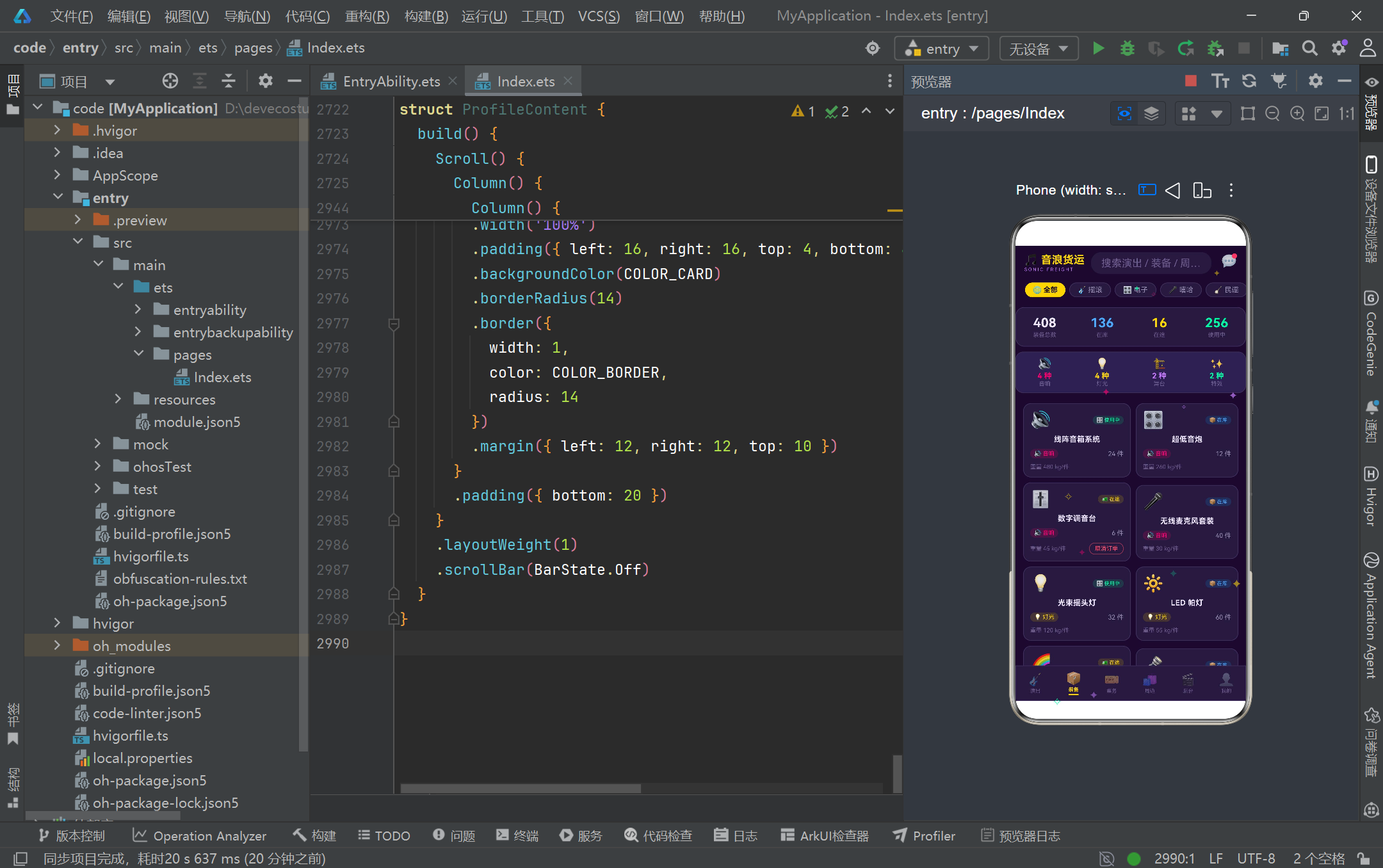
在状态管理层面,应用充分利用了 HarmonyOS ArkTS API 24 的 @State、@Observed 和 @Builder 三大核心机制。@State 管理组件级可变状态(如 activeTab、searchKeyword、showBookingModal),任何变更都会自动触发依赖该状态的 Builder 重新执行。@Observed 为数据模型类赋予深层属性观测能力,虽然本案例中粒子动画采用的是整体数组替换策略,但 @Observed 的存在为未来扩展(如单条演出状态变更)预留了响应式基础。@Builder 则将复杂的 UI 结构封装为可复用的构建单元,如 showCardBuilder、gearCardBuilder、merchCardBuilder 等卡片构建器在各 Tab 内部被多次调用,实现了视图层的 DRY 原则。粒子动画的 setInterval + tickParticles + 数组替换组合,更是展示了 ArkTS 中定时器驱动动画的标准实现路径。
视觉设计层面,应用构建了一套完整的"深紫舞台霓虹"设计语言系统。十四个颜色常量覆盖了背景、卡片、主色、强调色、状态色和文字层次等全场景需求,通过 linearGradient 渐变属性在海报色块、资料卡和柱状图等位置实现了从霓虹色到深紫背景的过渡效果。配置映射表(SHOW_STATUS_CONFIG、GEAR_STATUS_CONFIG、GENRE_CONFIG 等)将业务状态与视觉表现一一绑定,使得组件代码中只需通过安全的可选链查表(CONFIG[key]?.color ?? fallback)即可获取完整的样式信息,避免了条件分支的泛滥。粒子动画层通过 hitTestBehavior(HitTestMode.None) 设置为穿透点击,既提供了视觉装饰又不影响下层组件的交互响应,是 HarmonyOS ArkTS 中覆盖层设计的细节体现。
展望未来,该应用架构具备良好的扩展基础。当前的前端 Mock 数据体系可以通过引入 HarmonyOS 的 @ohos.net.http 网络模块替换为异步请求,只需将常量数组改为 @State 变量并在 aboutToAppear 中发起请求即可。@Observed 数据模型已为深层属性变更预留了响应式能力,后续可引入 @ObjectLink 实现子组件对单个数据项的精确观测,避免列表级别的全量刷新。弹框系统可进一步抽象为通用模态组件,通过参数化标题、内容和按钮配置实现更高程度的复用。粒子动画系统可通过引入 animateTo 显式动画或 @Animatable 自定义动画属性实现更平滑的过渡效果。整体而言,该案例为基于 HarmonyOS 6.1.1 ArkTS API 24 构建音乐节/演出行业管理平台提供了完整的架构参考和代码范本。

作为“人工智能6S店”的官方数字引擎,为AI开发者与企业提供一个覆盖软硬件全栈、一站式门户。
更多推荐
 8
8 0
0- 0


 已为社区贡献88条内容

所有评论(0)