
基于HarmonyOS ArkTS API 24 HitTestMode 还有 Default(默认阻断)和 Block(阻断父级)两种模式,None 适用于纯装饰覆盖层
一、技术概述与设计理念
在 HarmonyOS 6.1.1 的全场景智慧化生态中,ArkTS 作为新一代声明式开发语言,为开发者提供了类型安全、性能高效且贴近原生体验的应用构建能力。本项目"潮玩手办物流 COLLECTIBLE CARGO"正是基于 HarmonyOS ArkTS API 24 体系构建的单文件页面应用,它将潮玩手办这一细分垂类的三大核心业务——专业运输(防震、防潮、恒温)、在线拍卖竞拍、第三方鉴定评级——整合到一个 ArkUI 声明式页面之中,并通过波普艺术(Pop Art)的高饱和彩色风格呈现出强烈的视觉冲击力。选择 ArkTS 而非传统 Web 栈或原生 Java 栈,核心原因在于 ArkTS 的 @Entry/@Component 装饰器体系与 @State 响应式状态管理天然契合"单页面多业务"的聚合型应用场景,能在保证类型严格的同时,以接近声明式 UI 的简洁度完成复杂交互编排。
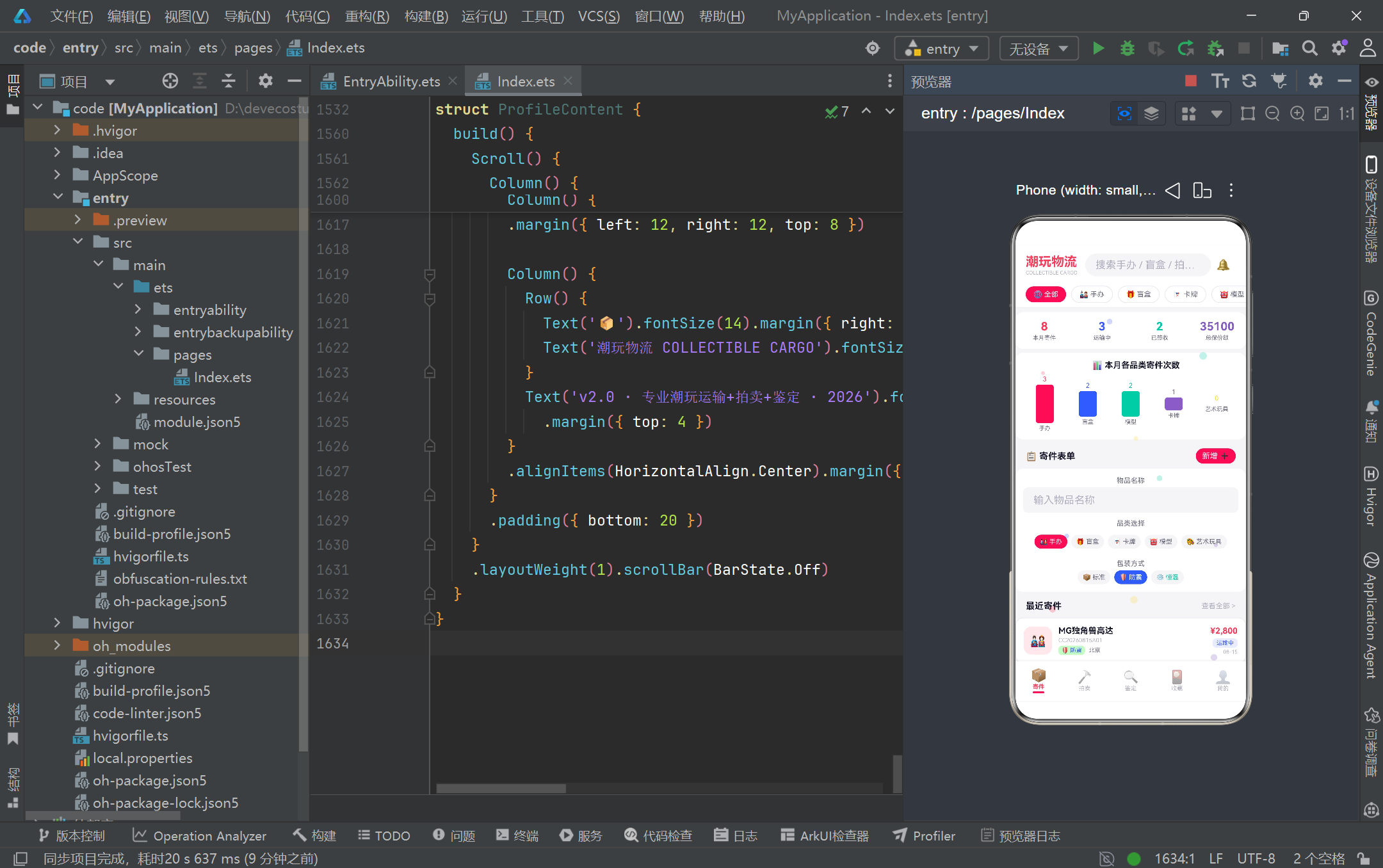
从架构层面看,该页面采用"主页面 + 五个独立子组件"的分层组织方式。主页面 CollectibleCargoApp 使用 @Entry 声明为入口组件,通过 @State activeTab 这一枚举状态变量驱动底部 TabBar 与内容区的联动切换,内容区通过条件渲染(if/else if 分支)将不同的子组件(ShipContent、AuctionContent、GradeContent、CollectionContent、ProfileContent)挂载到同一布局槽位中。这种设计既保证了各业务模块的物理隔离与可维护性,又通过统一的底部导航与全局粒子动效层实现了视觉与交互的一致性。值得注意的是,主页面在 aboutToAppear 生命周期中通过 setInterval 以 300ms 间隔驱动粒子坐标更新,这一轻量级动画策略在 HarmonyOS ArkTS API 24 的渲染管线中表现稳定,不会阻塞主线程的 UI 响应。
数据建模方面,项目采用"接口契约 + @Observed 可观察类"的双层模型设计。首先以 interface(CargoModel、AuctionModel、GradeModel、CollectionModel 等)定义纯数据结构契约,明确字段名称与类型;随后用 @Observed 装饰的同名实现类(CargoItem、AuctionItem 等)继承接口并补充构造函数,使其具备被 ArkUI 框架监听变化的能力。@Observed 是 HarmonyOS ArkTS API 24 中实现细粒度响应式的关键装饰器:当被观察类的实例属性发生变化时,框架会自动触发依赖该属性的 UI 组件重新渲染。这种"接口定义类型、可观察类承载行为"的模式,既保留了 ArkTS 类型系统的严格性(编译期校验字段完整性),又为后续将静态 mock 数据替换为真实网络数据留出了平滑的迁移路径——只需让数据层返回同样接口的实现即可,消费侧的 UI 代码无需改动。
视觉风格上,项目刻意采用波普艺术的高饱和配色体系:以 #FF3B5C(玫红)、#3B5BFF(亮蓝)、#FFD93D(明黄)、#00C9A7(薄荷绿)、#845EC2(紫罗兰)五色作为主调,分别对应手办、盲盒、模型、卡牌、艺术玩具五大品类,形成强烈的品类色彩识别。所有颜色被抽取为顶层 const 常量(COLOR_PRIMARY、COLOR_BLUE 等),并在 CATEGORY_CONFIG、RARITY_CONFIG、PACKAGING_CONFIG 等 Record<string, Meta> 映射表中集中管理"颜色 + 图标 + 标签 + 背景色"的元数据组合。这种"配色常量化 + 元数据映射化"的策略,使得整个应用在保持视觉一致性的同时,具备极强的主题可配置性——若要切换为暗色或冬季主题,只需替换常量与映射表,无需改动任何组件逻辑代码。
二、整体架构流程图
在深入逐段代码分析之前,我们先用一张 Mermaid 流程图梳理整个应用的组件层级与数据流向,帮助读者建立全局认知:
这张图清晰地展示了应用从入口组件出发,通过一个枚举状态变量分发到五个业务子组件的"一主多从"结构。数据层与配置层作为横切关注点,被各子组件共享复用;纯函数层则承担派生计算(如粒子更新、价格格式化、稀有度百分比)职责,保持组件本身的"瘦视图"特性。
三、逐段代码深度解析
3.1 颜色常量体系:波普艺术配色的工程化落地
// ============ 颜色常量 ============
const COLOR_BG: string = '#F5F5F7'
const COLOR_CARD: string = '#FFFFFF'
const COLOR_PRIMARY: string = '#FF3B5C'
const COLOR_BLUE: string = '#3B5BFF'
const COLOR_YELLOW: string = '#FFD93D'
const COLOR_MINT: string = '#00C9A7'
const COLOR_PURPLE: string = '#845EC2'
const COLOR_TEXT_MAIN: string = '#1A1A2E'
const COLOR_TEXT_SUB: string = '#6B6B80'
const COLOR_TEXT_HINT: string = '#B0B0C0'
const COLOR_BORDER: string = '#E8E8F0'
const COLOR_SUCCESS: string = '#00C9A7'
const COLOR_WARNING: string = '#FFD93D'
const COLOR_DANGER: string = '#FF3B5C'
项目首先用一整段 const 常量定义了全局配色体系,这是整个波普艺术视觉风格的"单一数据源"(single source of truth)。可以看到,常量被分为三组:业务主色(PRIMARY 玫红、BLUE 亮蓝、YELLOW 明黄、MINT 薄荷、PURPLE 紫罗兰)对应五大品类与五大功能场景;中性色(BG 背景、CARD 卡片、TEXT_MAIN/SUB/HINT 三级文字灰阶、BORDER 描边)承担信息层级的视觉区分;语义色(SUCCESS 成功绿、WARNING 警告黄、DANGER 危险红)则与业务状态绑定。值得注意的是 SUCCESS 与 MINT、DANGER 与 PRIMARY 实际指向同一色值,这种复用体现了设计语言的克制——用尽可能少的色相覆盖尽可能多的语义场景,避免视觉噪声。在 HarmonyOS ArkTS API 24 中,顶层 const 是编译期常量,会被内联优化,不会产生额外的运行时开销,因此将配色抽离为常量既提升了可读性,又兼顾了性能。
3.2 数据模型接口:TypeScript 风格的契约定义
// ============ 数据模型接口 ============
interface CargoModel {
  id: number;
  orderNo: string;
  itemName: string;
  category: string;
  insuredValue: number;
  packaging: string;
  destination: string;
  status: string;
  date: string;
}
interface AuctionModel {
  id: number;
  name: string;
  series: string;
  currentBid: number;
  bidCount: number;
  endTime: string;
  color: string;
  tag: string;
}
interface GradeModel {
  id: number;
  applyNo: string;
  itemName: string;
  brand: string;
  currentStep: string;
  date: string;
  status: string;
  expectedGrade: string;
}
interface CollectionModel {
  id: number;
  name: string;
  series: string;
  rarity: string;
  purchasePrice: number;
  currentValue: number;
  color: string;
  cardHeight: number;
  tag: string;
}
四个 interface 定义了四类核心业务实体的数据契约。CargoModel(寄件订单)关注物品名称、品类、保价额、包装方式、目的地与物流状态;AuctionModel(拍卖品)关注当前出价、出价人数、结拍倒计时与标签;GradeModel(鉴定申请)关注申请单号、当前步骤、期望评级与状态;CollectionModel(藏品)则额外携带 cardHeight 字段——这是为瀑布流布局服务的,不同藏品卡片高度不同,通过该字段控制视觉错落感。接口中大量使用 string 而非联合类型(如 category、status、rarity),这是因为在 HarmonyOS ArkTS API 24 的严格类型约束下,联合字面量类型在跨组件传递和映射表查找时会增加类型断言成本,用 string 配合配置映射表(如 CATEGORY_CONFIG)做运行时查找是更务实的工程折中。接口不包含方法,仅描述"形状",符合 ArkTS 推荐的数据与行为分离原则。
3.3 @Observed 可观察类:响应式数据的承载载体
// ============ @Observed 数据类 ============
@Observed
class CargoItem implements CargoModel {
  id: number = 0;
  orderNo: string = '';
  itemName: string = '';
  category: string = '';
  insuredValue: number = 0;
  packaging: string = '';
  destination: string = '';
  status: string = '';
  date: string = '';
  constructor(id: number, orderNo: string, itemName: string, category: string,
              insuredValue: number, packaging: string, destination: string,
              status: string, date: string) {
    this.id = id; this.orderNo = orderNo; this.itemName = itemName;
    this.category = category; this.insuredValue = insuredValue;
    this.packaging = packaging; this.destination = destination;
    this.status = status; this.date = date;
  }
}
这里展示的是 CargoItem,其余 AuctionItem、GradeItem、CollectionItem 结构同构。@Observed 装饰器是 HarmonyOS ArkTS API 24 响应式体系的核心:被装饰的类其实例属性变化会被框架劫持监听,当这些属性被 @State、@Prop、@ObjectLink 等状态装饰器引用时,变化会自动驱动对应 UI 重建。每个字段都显式赋初值(如 id: number = 0),这是 ArkTS 区别于普通 TypeScript 的严格要求——ArkTS 不允许类的实例属性在未初始化的情况下被访问,显式默认值既是编译约束,也是运行时安全保证。构造函数采用位置参数 + 单行赋值的紧凑写法,虽然牺牲了部分可读性,但在 mock 数据批量构造时能显著减少样板代码。implements CargoModel 使得类必须满足接口契约,编译器会校验所有字段是否齐全,这一层校验在多人协作中能有效防止字段遗漏导致的运行时 undefined。
3.4 配置元数据接口与映射表:数据驱动 UI 的基石
interface CategoryMeta {
  label: string;
  icon: string;
  color: string;
  bg: string;
}
interface RarityMeta {
  label: string;
  color: string;
  bg: string;
  glow: string;
}
const CATEGORY_CONFIG: Record<string, CategoryMeta> = {
  '手办': { label: '手办', icon: '🎎', color: '#FF3B5C', bg: '#FFE8EC' },
  '盲盒': { label: '盲盒', icon: '🎁', color: '#3B5BFF', bg: '#E8ECFF' },
  '卡牌': { label: '卡牌', icon: '🃏', color: '#845EC2', bg: '#F0E8FF' },
  '模型': { label: '模型', icon: '🤖', color: '#00C9A7', bg: '#E0F5F0' },
  '艺术玩具': { label: '艺术玩具', icon: '🎨', color: '#FFD93D', bg: '#FFF8E0' }
}
const RARITY_CONFIG: Record<string, RarityMeta> = {
  '普通': { label: '普通', color: '#6B6B80', bg: '#F0F0F5', glow: '#E0E0E8' },
  '稀有': { label: '稀有', color: '#3B5BFF', bg: '#E8ECFF', glow: '#C0C8FF' },
  '史诗': { label: '史诗', color: '#845EC2', bg: '#F0E8FF', glow: '#D0C0FF' },
  '传说': { label: '传说', color: '#FF3B5C', bg: '#FFE8EC', glow: '#FFB0C0' }
}
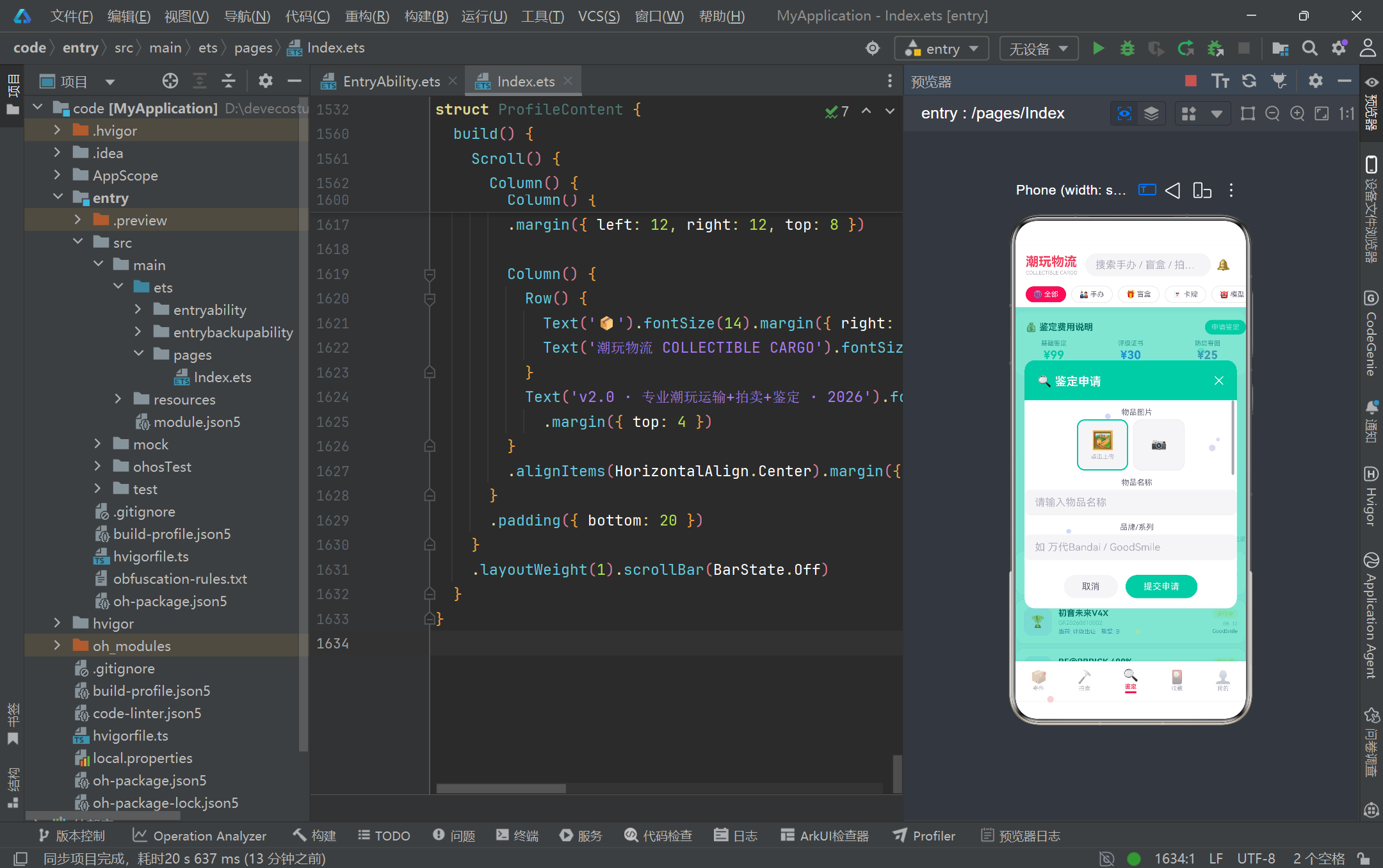
配置体系是整个应用"数据驱动 UI"理念的基石。每个业务维度的展示元数据(标签文案、Emoji 图标、前景色、背景色、辉光色)都被封装进一个 Meta 接口,再用 Record<string, Meta> 建立从业务字符串键(如’手办’、‘传说’)到元数据的映射。以 RarityMeta 为例,它额外携带 glow 字段用于辉光特效(虽然当前 UI 暂未渲染辉光,但接口预留体现了前瞻性设计)。这种做法的最大价值在于"查表式渲染":UI 组件只需根据数据中的 rarity 字段去 RARITY_CONFIG 查一次,就能拿到完整的颜色与文案组合,避免了在组件里写大量 if-else 分支判断稀有度。Record<string, T> 是 ArkTS 对"键值映射"的标准类型表达,比普通对象字面量更具类型安全性,访问时配合可选链(?.)即可优雅处理键不存在的边界情况,例如 CATEGORY_CONFIG[c.category]?.icon ?? ‘📦’ 提供了缺失时的默认值兜底。
3.5 状态与流程配置:枚举式业务状态的定义
const CARGO_STATUS_CONFIG: Record<string, StatusMeta> = {
  '待揽收': { label: '待揽收', color: '#FFD93D', bg: '#FFF8E0' },
  '运输中': { label: '运输中', color: '#3B5BFF', bg: '#E8ECFF' },
  '派送中': { label: '派送中', color: '#845EC2', bg: '#F0E8FF' },
  '已签收': { label: '已签收', color: '#00C9A7', bg: '#E0F5F0' }
}
const GRADE_STEP_CONFIG: Record<string, GradeStepMeta> = {
  '提交申请': { label: '提交申请', icon: '📝', color: '#3B5BFF', bg: '#E8ECFF' },
  '实物检测': { label: '实物检测', icon: '🔬', color: '#FFD93D', bg: '#FFF8E0' },
  '评级出证': { label: '评级出证', icon: '🏆', color: '#845EC2', bg: '#F0E8FF' },
  '寄回': { label: '寄回', icon: '📦', color: '#00C9A7', bg: '#E0F5F0' }
}
const GRADE_STEPS: string[] = ['提交申请', '实物检测', '评级出证', '寄回']
const SORT_OPTIONS: SortMeta[] = [
  { label: '最新', value: 'new' },
  { label: '热度', value: 'hot' },
  { label: '价格↑', value: 'price_asc' },
  { label: '价格↓', value: 'price_desc' },
  { label: '即将结拍', value: 'ending' }
]
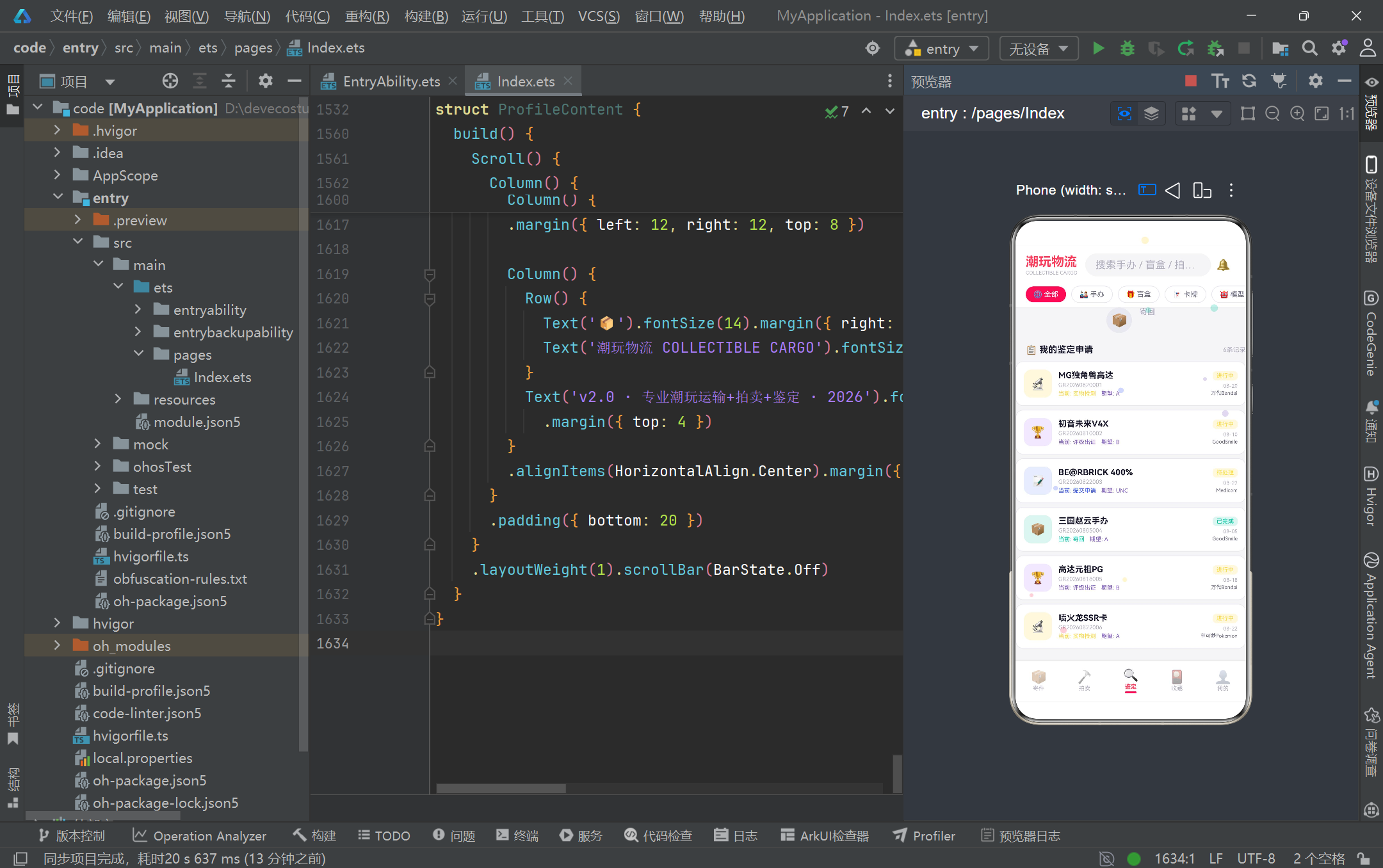
这段配置将"业务状态机"与"流程步骤序列"以纯数据的形式固化。CARGO_STATUS_CONFIG 把物流的四个状态(待揽收→运输中→派送中→已签收)各自映射到一套黄/蓝/紫/绿的视觉语义,颜色由警示向成功渐变,直观传达进度。GRADE_STEP_CONFIG 与 GRADE_STEPS 的配合尤为关键:GRADE_STEPS 是一个有序字符串数组,定义了鉴定流程的四个步骤的先后顺序;而 GRADE_STEP_CONFIG 是无序映射,提供每个步骤的展示元数据。UI 在渲染流程进度条时,会用 GRADE_STEPS 的索引作为"当前位置"判断依据,再用索引去 GRADE_STEP_CONFIG 查元数据——这种"顺序数组 + 元数据映射"的解耦设计,让流程的顺序调整(如新增"复核"步骤)只需改数组,无需触碰映射表。SORT_OPTIONS 则展示了拍卖排序维度的选项配置,label 用于展示、value 用于逻辑判断,是典型的选项列表双字段模式。
3.6 静态 mock 数据:贴近真实的业务样本
const mockCargos: CargoItem[] = [
  new CargoItem(1, 'CC20260815A01', 'MG独角兽高达', '手办', 2800, '防震', '北京', '运输中', '08-15'),
  new CargoItem(2, 'CC20260814B02', '星之卡比盲盒Set', '盲盒', 500, '标准', '上海', '已签收', '08-14'),
  new CargoItem(3, 'CC20260813C03', '三国无双赵云', '模型', 1500, '防震', '广州', '运输中', '08-13'),
  new CargoItem(4, 'CC20260812D04', '喷火龙SSR卡牌', '卡牌', 8000, '恒温', '深圳', '待揽收', '08-12'),
  new CargoItem(5, 'CC20260811E05', '初音未来V4X', '手办', 6800, '恒温', '杭州', '运输中', '08-11')
]
const mockAuctions: AuctionItem[] = [
  new AuctionItem(1, '限定初音未来V4X', 'Vocaloid系列', 3200, 12, '02:15:30', '#FF3B5C', 'HOT'),
  new AuctionItem(3, 'BE@RBRICK 1000% Supreme', '联名系列', 8800, 23, '01:08:45', '#FFD93D', 'HOT'),
  new AuctionItem(4, '喷火龙25周年卡', '宝可梦系列', 5500, 15, '00:32:20', '#845EC2', 'RARE')
]
mock 数据是连接数据模型与 UI 渲染的"活样本"。项目为四个业务实体各准备了一组贴近真实场景的样本数据:寄件订单涵盖高达、初音、BE@RBRICK 等真实潮玩 IP,保价额从 300 元到 12000 元跨度,包装方式覆盖标准/防震/恒温三种,状态覆盖待揽收到已签收全流程;拍卖数据则携带 HOT/NEW/RARE/LOW 四类标签与倒计时格式的时间,模拟真实拍卖场的紧迫感。这些样本数据的价值不仅在于让 UI"有东西可渲染",更在于它们能在开发期暴露边界情况——例如高价藏品的金额格式化(formatPrice 的 toLocaleString)、稀有度百分比的除法运算、瀑布流不同 cardHeight 的错落布局,都能在 mock 数据上得到验证。未来接入真实后端时,只需将 mockCargos 替换为异步请求返回的 CargoItem[],UI 侧无需任何改动,这正是 mock 优先策略的工程红利。
3.7 纯函数层:派生计算与动画更新
function getRarityCount(rarity: string): number {
  if (rarity === '普通') return 2
  if (rarity === '稀有') return 2
  if (rarity === '史诗') return 3
  if (rarity === '传说') return 3
  return 0
}
function getRarityPercent(rarity: string): number {
  return Math.round(getRarityCount(rarity) / getCollectionTotal() * 100)
}
function updateParticles(particles: ParticleModel[]): ParticleModel[] {
  return particles.map((p: ParticleModel) => {
    let ny: number = p.y - p.speed
    if (ny < -5) { ny = 105 }
    let nx: number = p.x + p.drift * 0.3
    if (nx > 100) { nx = 0 }
    if (nx < 0) { nx = 100 }
    return { x: nx, y: ny, size: p.size, color: p.color, speed: p.speed, drift: p.drift }
  })
}
function formatPrice(v: number): string {
  return '¥' + v.toLocaleString()
}
项目将所有"派生计算"逻辑抽离为顶层纯函数,这是保持组件"瘦视图"的关键工程实践。getRarityCount/getRarityPercent 是统计类派生函数,后者调用前者并做除法与四舍五入,得到稀有度分布的百分比用于渲染进度条;formatPrice 利用原生 Number.prototype.toLocaleString 实现千分位分隔,避免手写正则替换。updateParticles 是粒子动画的核心算法:它接收当前粒子数组,对每个粒子做"上升 + 横向漂移"的坐标更新,并处理出界回绕(y 超出顶部回到 105、x 超出 100 回到 0)。这里使用坐标百分比(0-100)而非像素值,是因为粒子层用 position({ x: p.x + ‘%’, y: p.y + ‘%’ }) 定位,百分比能自适应不同屏幕尺寸。map 返回新数组而非原地修改,符合 ArkTS 响应式体系"赋值即触发"的语义——aboutToAppear 中的 setInterval 每 300ms 调用一次 updateParticles 并赋值给 this.particles,框架检测到引用变化即重新渲染粒子层,形成连续动画。
3.8 入口主页面:@Entry 装饰与状态驱动架构
enum CargoTab {
  SHIP = 0,
  AUCTION = 1,
  GRADE = 2,
  COLLECTION = 3,
  PROFILE = 4
}

@Entry
@Component
struct CollectibleCargoApp {
  @State activeTab: CargoTab = CargoTab.SHIP
  @State searchKeyword: string = ''
  @State selectedCatFilter: string = '全部'
  @State particles: ParticleModel[] = [ /* 10 个粒子初始坐标 */ ]

  aboutToAppear() {
    setInterval(() => {
      this.particles = updateParticles(this.particles)
    }, 300)
  }

  @Builder contentArea() {
    Column() {
      if (this.activeTab === CargoTab.SHIP) {
        ShipContent()
      } else if (this.activeTab === CargoTab.AUCTION) {
        AuctionContent()
      } else if (this.activeTab === CargoTab.GRADE) {
        GradeContent()
      } else if (this.activeTab === CargoTab.COLLECTION) {
        CollectionContent()
      } else {
        ProfileContent()
      }
    }
    .layoutWeight(1)
  }
}
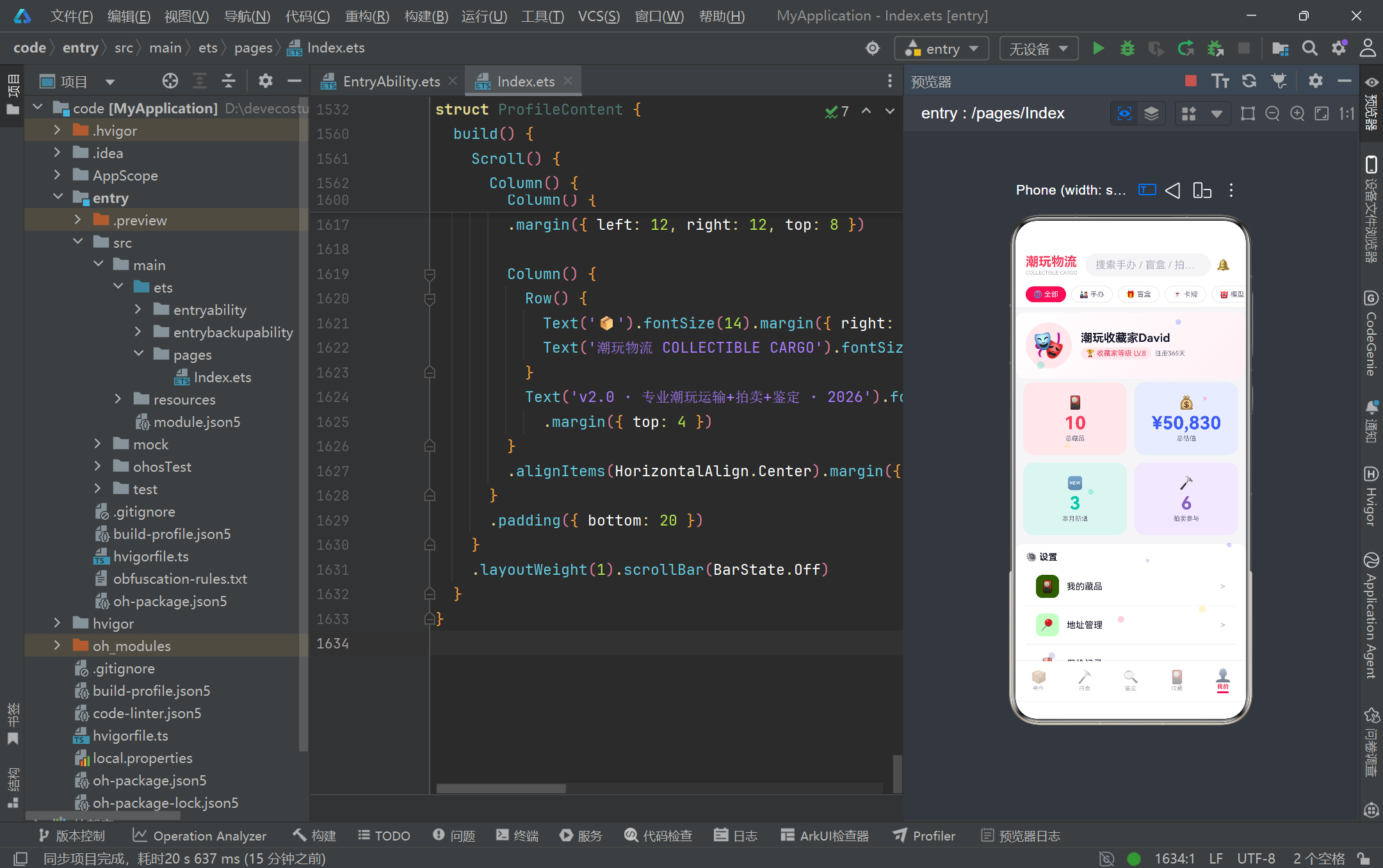
主页面是整个应用的调度中枢。CargoTab 枚举将五个业务 Tab 定义为数字常量,比裸字符串更具类型安全性,编译期即可发现拼写错误。@Entry 装饰器声明该 struct 为应用入口,@Component 标记为可复用组件。三个 @State 变量分别承载当前激活 Tab、搜索关键词、选中的品类筛选——它们的变化都会触发依赖 UI 的重建。contentArea Builder 通过 if/else if 链对 activeTab 做条件分发,将对应子组件挂载到布局中,这种"枚举状态 + 条件渲染"是单页面多 Tab 应用的经典模式,比使用 Router 多页面跳转更轻量,切换无白屏、状态可保留。aboutToAppear 是组件生命周期钩子,在组件实例创建后、build 执行前调用,这里启动粒子动画的定时器。需要注意的是,setInterval 在组件销毁时不会自动清理,严谨做法应配合 aboutToDisappear 清除定时器,本项目作为演示页未做此处理,生产环境应补充。
3.9 粒子动画层:HitTestMode 透传与装饰性动效
@Builder particleLayer() {
  Stack() {
    ForEach(this.particles, (p: ParticleModel) => {
      Text('●')
        .fontSize(p.size)
        .fontColor(p.color)
        .opacity(0.25)
        .position({ x: p.x + '%', y: p.y + '%' })
    })
  }
  .width('100%').height('100%')
  .hitTestBehavior(HitTestMode.None)
}
particleLayer 是覆盖在整页之上的装饰性粒子层。它用 Stack 作为绝对定位容器,ForEach 遍历粒子数组生成多个 Text(‘●’) 圆点,每个圆点用 position 按百分比坐标定位、fontSize 控制大小、fontColor 取自粒子颜色、opacity 降至 0.25 形成若隐若现的悬浮感。关键细节是 hitTestBehavior(HitTestMode.None)——这告诉框架该层不参与命中测试,鼠标/触摸事件会"穿透"粒子层传递到下方的真实可交互组件。若不设置此项,粒子层会像一层透明玻璃拦截所有点击,导致底部 Tab 和按钮无法响应,这是 ArkUI 多层叠加场景的常见陷阱。HitTestMode 还有 Default(默认阻断)和 Block(阻断父级)两种模式,None 适用于纯装饰覆盖层。这种粒子方案相比真正的 ParticleComponent 粒子组件更轻量,代价是性能略低(每帧重建 Text 节点),但对于 10 个粒子的规模完全可接受,是"够用即美"的工程取舍。
3.10 头部 Builder:搜索与品类横向滚动筛选
@Builder appHeader() {
  Column() {
    Row() {
      Column() {
        Text('潮玩物流').fontSize(20).fontWeight(FontWeight.Bold).fontColor(COLOR_PRIMARY)
        Text('COLLECTIBLE CARGO').fontSize(8).fontColor(COLOR_TEXT_HINT).margin({ top: 1 })
      }.alignItems(HorizontalAlign.Start)
      Row() {
        TextInput({ placeholder: '搜索手办 / 盲盒 / 拍卖...' })
          .placeholderColor(COLOR_TEXT_HINT).fontSize(12).layoutWeight(1)
          .backgroundColor(COLOR_BG).borderRadius(20).height(36)
          .margin({ left: 12, right: 8 })
          .onChange((v: string) => { this.searchKeyword = v })
        Text('🔔').fontSize(18).margin({ right: 8 })
      }.layoutWeight(1)
    }.width('100%').padding({ left: 16, right: 16, top: 12, bottom: 8 })

    Scroll() {
      Row() {
        ForEach(CAT_FILTERS, (cat: string) => {
          if (this.selectedCatFilter === cat) {
            Text(cat === '全部' ? '🌐 全部' : ((CATEGORY_CONFIG[cat]?.icon ?? '') + ' ' + cat))
              .fontSize(11).fontColor('#FFFFFF').backgroundColor(COLOR_PRIMARY)
              .padding({ left: 12, right: 12, top: 6, bottom: 6 }).borderRadius(16)
              .margin({ left: 4, right: 4 })
          } else {
            Text(/* 同上文案 */)
              .fontSize(11).fontColor(COLOR_TEXT_SUB).backgroundColor(COLOR_CARD)
              .padding(/* 同上 */).borderRadius(16).margin({ left: 4, right: 4 })
              .border({ width: 1, color: COLOR_BORDER })
              .onClick(() => { this.selectedCatFilter = cat })
          }
        })
      }.padding({ left: 12, right: 12 })
    }
    .scrollable(ScrollDirection.Horizontal).scrollBar(BarState.Off).height(40)
  }
  .width('100%').backgroundColor(COLOR_CARD)
  .shadow({ radius: 4, color: '#10000000', offsetY: 2 })
}
appHeader 承载应用品牌标识、全局搜索框与品类横向筛选条三部分。顶部 Row 用 layoutWeight(1) 让搜索框自适应剩余宽度,onChange 实时同步关键词到 @State。下方的 Scroll 配合 scrollable(ScrollDirection.Horizontal) 与 scrollBar(BarState.Off) 实现无滚动条的水平横向滚动筛选条,这是移动端"标签胶囊"交互的标准实现。ForEach 遍历 CAT_FILTERS 数组,对当前选中项与未选中项分别渲染不同样式:选中项白字红底实心胶囊,未选中项灰字白底描边胶囊,并通过 onClick 切换 selectedCatFilter。这里用 if/else 在 ForEach 内部做条件分支,是 ArkUI 声明式渲染的常见写法——虽然代码略显重复,但保证了每次渲染的样式确定性,避免动态切换 class 带来的闪烁。底部 shadow 给头部增加悬浮投影,offsetY: 2 让阴影向下偏移,模拟自然光照下的层次感。
3.11 底部导航 Builder:高亮指示与图标语义
@Builder bottomTabItem(icon: string, label: string, tab: CargoTab) {
  Column() {
    Text(icon).fontSize(20).opacity(this.activeTab === tab ? 1.0 : 0.45)
    Text(label).fontSize(9)
      .fontColor(this.activeTab === tab ? COLOR_PRIMARY : COLOR_TEXT_HINT)
      .fontWeight(this.activeTab === tab ? FontWeight.Bold : FontWeight.Normal)
      .margin({ top: 1 })
    if (this.activeTab === tab) {
      Column().width(18).height(3)
        .backgroundColor(COLOR_PRIMARY).borderRadius(2).margin({ top: 2 })
    }
  }
  .layoutWeight(1)
  .alignItems(HorizontalAlign.Center)
  .padding({ top: 6, bottom: 6 })
  .onClick(() => { this.activeTab = tab })
}
bottomTabItem 是底部导航单项的通用 Builder,通过参数化(icon、label、tab)实现五个 Tab 项的复用,避免重复书写五遍相同结构。选中态通过三元运算符动态切换 opacity(1.0 vs 0.45)、fontColor(主色 vs 提示灰)、fontWeight(Bold vs Normal)三重视觉差异,强化"当前所在位置"的感知。最精妙的是 if (this.activeTab === tab) 条件渲染的小指示条——一个 18×3 的主色圆角小柱,仅对当前 Tab 显示,这种 iOS 风格的顶部小条指示器在视觉上比整项变色更克制、更现代。layoutWeight(1) 让五个 Tab 项在 Row 中均分宽度,padding 控制上下留白。onClick 直接赋值 activeTab 即可触发整页内容区切换,无需任何命令式导航调用,充分体现声明式 UI"状态即视图"的哲学。这种 Builder 参数化复用模式,是 ArkTS 减少样板代码、提升可维护性的推荐实践。
3.12 ShipContent 寄件卡片:查表式渲染与状态徽章
@Builder cargoItemBuilder(c: CargoItem) {
  Row() {
    Column() {
      Text(CATEGORY_CONFIG[c.category]?.icon ?? '📦').fontSize(20)
    }
    .width(44).height(44).backgroundColor(CATEGORY_CONFIG[c.category]?.bg ?? '#F5F5F7')
    .borderRadius(12).alignItems(HorizontalAlign.Center).justifyContent(FlexAlign.Center)

    Column() {
      Text(c.itemName).fontSize(13).fontWeight(FontWeight.Bold).fontColor(COLOR_TEXT_MAIN)
      Text(c.orderNo).fontSize(9).fontColor(COLOR_TEXT_HINT).margin({ top: 2 })
      Row() {
        Text(PACKAGING_CONFIG[c.packaging]?.icon + ' ' + c.packaging).fontSize(9)
          .fontColor(PACKAGING_CONFIG[c.packaging]?.color ?? COLOR_TEXT_SUB)
          .backgroundColor(PACKAGING_CONFIG[c.packaging]?.color + '15')
          .padding({ left: 5, right: 5, top: 2, bottom: 2 }).borderRadius(6)
        Text(c.destination).fontSize(9).fontColor(COLOR_TEXT_SUB).margin({ left: 6 })
      }.margin({ top: 3 })
    }
    .layoutWeight(1).alignItems(HorizontalAlign.Start).padding({ left: 10 })

    Column() {
      Text(formatPrice(c.insuredValue)).fontSize(13).fontWeight(FontWeight.Bold).fontColor(COLOR_PRIMARY)
      Text(CARGO_STATUS_CONFIG[c.status]?.label ?? c.status).fontSize(9)
        .fontColor(CARGO_STATUS_CONFIG[c.status]?.color ?? COLOR_TEXT_SUB)
        .backgroundColor(CARGO_STATUS_CONFIG[c.status]?.bg ?? '#F5F5F7')
        .padding({ left: 6, right: 6, top: 2, bottom: 2 }).borderRadius(6)
        .margin({ top: 4 })
      Text(c.date).fontSize(8).fontColor(COLOR_TEXT_HINT).margin({ top: 2 })
    }.alignItems(HorizontalAlign.End)
  }
  .width('100%').padding(12).backgroundColor(COLOR_CARD)
  .borderRadius(12).margin({ left: 12, right: 12, top: 6 })
  .border({ width: 1, color: COLOR_BORDER })
}
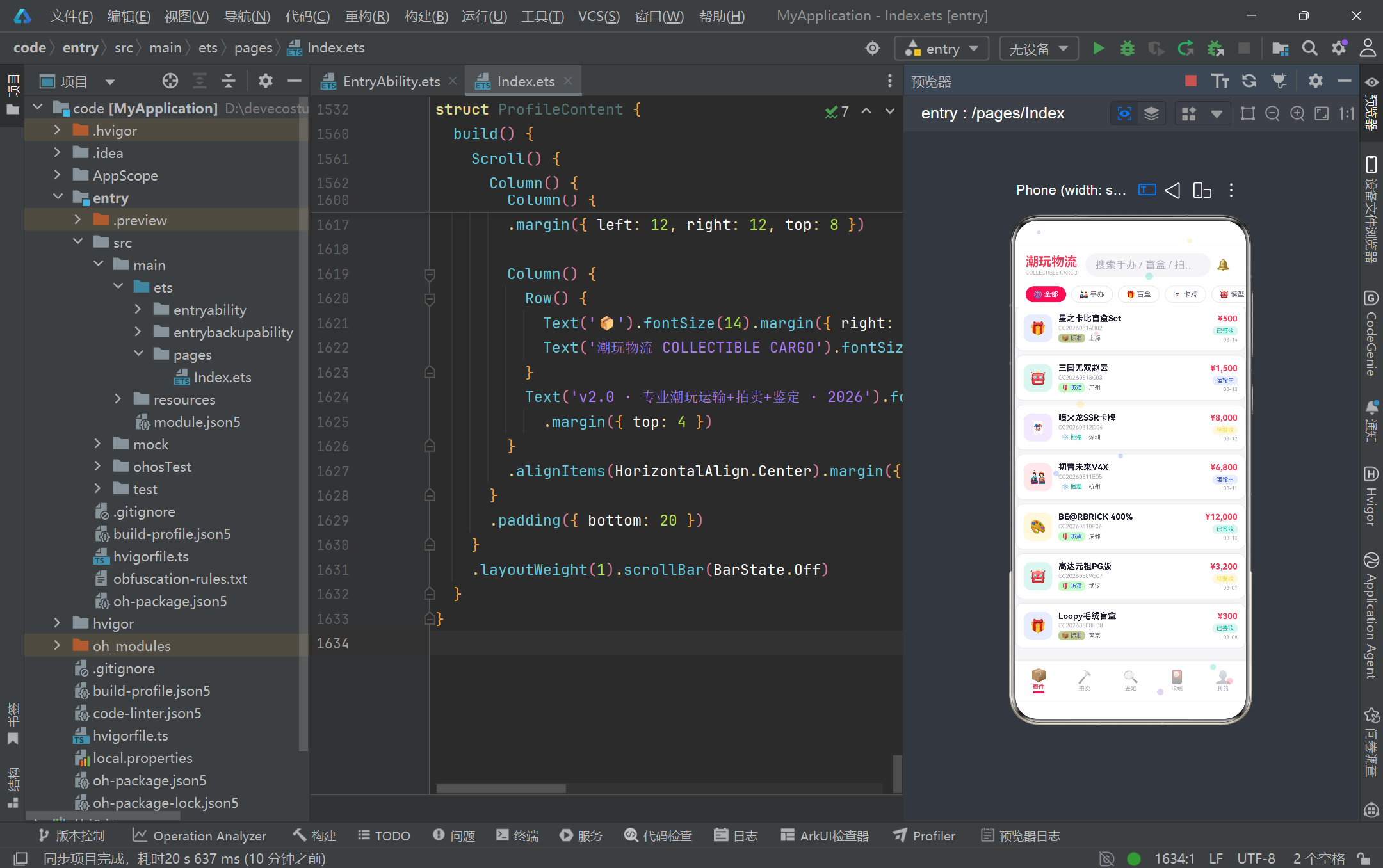
cargoItemBuilder 是寄件列表单项的渲染逻辑,完美诠释了"查表式渲染"的工程美学。左侧品类图标 Column 的背景色与图标 Emoji 都来自 CATEGORY_CONFIG 查表,配合 ?? ‘📦’ 的空值兜底,即使数据中出现未配置的品类也能优雅降级。中间信息区展示物品名、订单号、包装徽章与目的地,其中包装徽章的颜色取自 PACKAGING_CONFIG 的 color,背景色则在 color 后拼接 ‘15’(即 8 位十六进制的低透明度),这种"主色 + 15 后缀"的透明色生成技巧无需额外定义背景色字段,是轻量化的视觉处理。右侧展示保价额(formatPrice 格式化)、状态徽章(CARGO_STATUS_CONFIG 查表取色与文案)、日期。三个区域用 layoutWeight(1) 让中间自适应、左右定宽,形成经典的"图标-信息-数值"三段式卡片布局。整张卡片用 borderRadius(12) 圆角、border 描边、margin 间距组合出 Material Design 风格的卡片质感。
3.13 ShipContent 弹窗:表单交互与模态遮罩
@Builder shipModal() {
  Column() {
    this.modalOverlay(() => { this.showShipModal = false })
    Column() {
      Row() {
        Text('📦 寄件预约').fontSize(18).fontWeight(FontWeight.Bold).fontColor('#FFFFFF')
        Column().layoutWeight(1)
        Text('✕').fontSize(18).fontColor('#FFFFFF')
          .onClick(() => { this.showShipModal = false })
      }
      .width('100%').padding({ left: 20, right: 20, top: 18, bottom: 14 })
      .backgroundColor(COLOR_PRIMARY).borderRadius({ topLeft: 16, topRight: 16 })

      Scroll() {
        Column() {
          Text('物品名称').fontSize(12).fontColor(COLOR_TEXT_SUB).margin({ top: 12, left: 20 })
          TextInput({ placeholder: '请输入物品名称' })
            .placeholderColor(COLOR_TEXT_HINT).fontSize(14).width('100%')
            .backgroundColor(COLOR_BG).borderRadius(8)
            .margin({ left: 20, right: 20, top: 4 })
            .onChange((v: string) => { this.formItemName = v })

          Text('品类').fontSize(12).fontColor(COLOR_TEXT_SUB).margin({ top: 12, left: 20 })
          Scroll() {
            Row() {
              ForEach(CAT_FILTERS.slice(1), (cat: string) => {
                if (this.formCategory === cat) { /* 选中样式 */ }
                else { /* 未选中样式 + onClick */ }
              })
            }
          }.scrollable(ScrollDirection.Horizontal).scrollBar(BarState.Off).height(40)

          Text('保价金额(¥)').fontSize(12).fontColor(COLOR_TEXT_SUB).margin({ top: 12, left: 20 })
          TextInput({ placeholder: '请输入保价金额' })
            .type(InputType.Number)
            .onChange((v: string) => { this.formInsuredValue = v })
          // ... 包装方式 / 目的地 / 备注 ...
        }.padding({ bottom: 20 })
      }.layoutWeight(1)

      Row() {
        Text('取消').onClick(() => { this.showShipModal = false })
        Text('确认寄件').backgroundColor(COLOR_PRIMARY)
          .onClick(() => { this.showShipModal = false })
      }.width('100%').justifyContent(FlexAlign.Center)
    }
    .width('90%').height('75%').backgroundColor(COLOR_CARD).borderRadius(16)
    .position({ x: '5%', y: '12%' })
  }
  .width('100%').height('100%').position({ x: 0, y: 0 }).zIndex(999)
}
shipModal 是寄件预约的模态弹窗,展示了 ArkUI 模态交互的完整范式。结构分三层:最外层 Column 全屏覆盖(width/height 100%、position 0,0、zIndex 999 确保置顶);第二层是 modalOverlay——一个半透明黑层(rgba(26,26,46,0.6))作为点击遮罩,点击它即关闭弹窗,这是模态交互的"点外关闭"标准行为;第三层是弹窗主体,顶部红色标题栏(borderRadius 仅设 topLeft/topRight 实现上圆下平)、中部 Scroll 包裹表单、底部按钮区。表单包含物品名称 TextInput、品类横向滚动选择、保价金额(type(InputType.Number) 调起数字键盘)、包装方式单选、目的地、备注 TextArea。每个输入项都用 onChange 同步到 @State 表单字段。CAT_FILTERS.slice(1) 跳过’全部’选项,因为表单中品类必选具体值。position({ x: ‘5%’, y: ‘12%’ }) 用百分比定位弹窗,使其在不同屏幕尺寸下都能居中偏上显示。整个弹窗通过 showShipModal 布尔状态控制显隐,是 ArkUI 声明式模态的典型实现。
3.14 AuctionContent 拍卖卡片:渐变 Banner 与出价交互
@Builder auctionCard(a: AuctionItem, isLeft: boolean) {
  Column() {
    Column() {
      Text(a.color === '#FF3B5C' ? '🎨' : a.color === '#3B5BFF' ? '🤖'
        : a.color === '#FFD93D' ? '🐻' : a.color === '#00C9A7' ? '🐲' : '⭐')
        .fontSize(32)
    }
    .width('100%').height(80).backgroundColor(a.color)
    .borderRadius({ topLeft: 12, topRight: 12 })
    .alignItems(HorizontalAlign.Center).justifyContent(FlexAlign.Center)

    Column() {
      Row() {
        Text(AUCTION_TAG_CONFIG[a.tag]?.label ?? a.tag).fontSize(8)
          .fontColor(AUCTION_TAG_CONFIG[a.tag]?.color ?? COLOR_TEXT_SUB)
          .backgroundColor(AUCTION_TAG_CONFIG[a.tag]?.bg ?? '#F5F5F7')
          .padding({ left: 4, right: 4, top: 1, bottom: 1 }).borderRadius(4)
        Column().layoutWeight(1)
        Text('⚡').fontSize(10).fontColor(COLOR_DANGER)
      }.width('100%')
      Text(a.name).fontSize(12).fontWeight(FontWeight.Bold).fontColor(COLOR_TEXT_MAIN)
        .maxLines(1).margin({ top: 4 })
      Text(a.series).fontSize(9).fontColor(COLOR_TEXT_HINT).margin({ top: 1 })
      Row() {
        Text('当前出价').fontSize(8).fontColor(COLOR_TEXT_SUB)
        Column().layoutWeight(1)
        Text(formatPrice(a.currentBid)).fontSize(13).fontWeight(FontWeight.Bold).fontColor(COLOR_PRIMARY)
      }.width('100%').margin({ top: 6 })
      Row() {
        Text('⏰ ' + a.endTime).fontSize(10).fontWeight(FontWeight.Bold).fontColor(COLOR_DANGER)
        Column().layoutWeight(1)
        Text('👥 ' + a.bidCount + '人').fontSize(9).fontColor(COLOR_TEXT_SUB)
      }.width('100%').margin({ top: 4 })
      Row() {
        if (this.bidItemId === a.id) {
          Text('已出价 ✓').fontSize(11).fontColor('#FFFFFF').backgroundColor(COLOR_SUCCESS)
            .layoutWeight(1).textAlign(TextAlign.Center)
            .borderRadius(16).padding({ top: 7, bottom: 7 })
        } else {
          Text('出价').fontSize(11).fontColor('#FFFFFF').backgroundColor(COLOR_PRIMARY)
            .layoutWeight(1).textAlign(TextAlign.Center)
            .borderRadius(16).padding({ top: 7, bottom: 7 })
            .onClick(() => { this.bidItemId = a.id })
        }
      }.width('100%').margin({ top: 8, bottom: 8 })
    }.padding(10)
  }
  .width('100%').backgroundColor(COLOR_CARD).borderRadius(12)
  .border({ width: 1, color: COLOR_BORDER })
  .margin({ left: isLeft ? 12 : 6, right: isLeft ? 6 : 12, top: 6 })
}
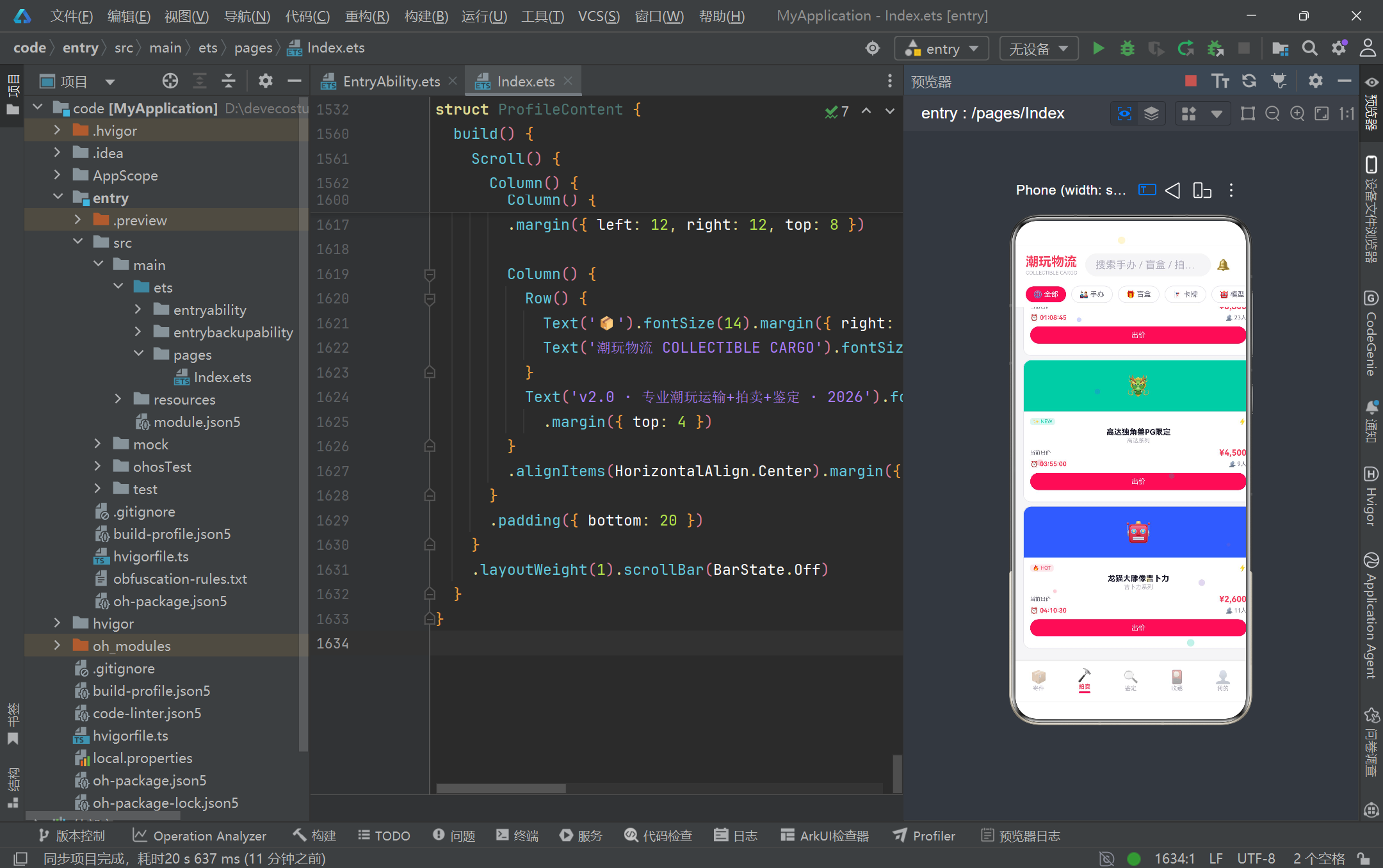
auctionCard 是拍卖竞品卡片的渲染逻辑,采用双列瀑布流布局(通过 isLeft 参数控制左右 margin 实现错落)。顶部彩色色块根据 a.color 映射不同 Emoji 图标,用嵌套三元运算符做"色值→图标"的查找,虽然不如配置表优雅,但在单字段简单映射场景下可读性尚可。卡片中部依次展示标签徽章(AUCTION_TAG_CONFIG 查表,支持 HOT/NEW/RARE/LOW 四类)、物品名(maxLines(1) 单行截断)、系列、当前出价、倒计时(红色突出紧迫感)、参与人数。底部出价按钮是状态化的——bidItemId @State 记录当前已出价的拍卖品 id,点击"出价"按钮将 bidItemId 设为该卡片 id,按钮立即变为绿色"已出价 ✓"状态,这是 ArkUI 声明式状态驱动交互的典型示范:UI 只是状态的映射,状态变了视图自动更新,无需手动操作 DOM。isLeft 参数通过 margin 左右值的差异(12 vs 6)让双列卡片形成视觉错落,模拟瀑布流的非对称美感。
3.15 GradeContent 鉴定流程步骤:纵向时间轴与进度指示
@Builder gradeStepBuilder(step: string, idx: number, currentIdx: number) {
  Row() {
    Column() {
      Text(GRADE_STEP_CONFIG[step]?.icon ?? '📌').fontSize(20)
    }
    .width(40).height(40).borderRadius(20)
    .backgroundColor(idx <= currentIdx ? (GRADE_STEP_CONFIG[step]?.color ?? COLOR_PRIMARY) : COLOR_BORDER)
    .alignItems(HorizontalAlign.Center).justifyContent(FlexAlign.Center)

    Column() {
      Text(GRADE_STEP_CONFIG[step]?.label ?? step).fontSize(12).fontWeight(FontWeight.Bold)
        .fontColor(idx <= currentIdx ? COLOR_TEXT_MAIN : COLOR_TEXT_HINT)
      if (idx < GRADE_STEPS.length - 1) {
        Column().width(2).height(30).backgroundColor(idx < currentIdx ? COLOR_MINT : COLOR_BORDER)
          .margin({ top: 4 })
      }
    }
    .alignItems(HorizontalAlign.Start).padding({ left: 12 })
  }
  .alignItems(VerticalAlign.Top)
}
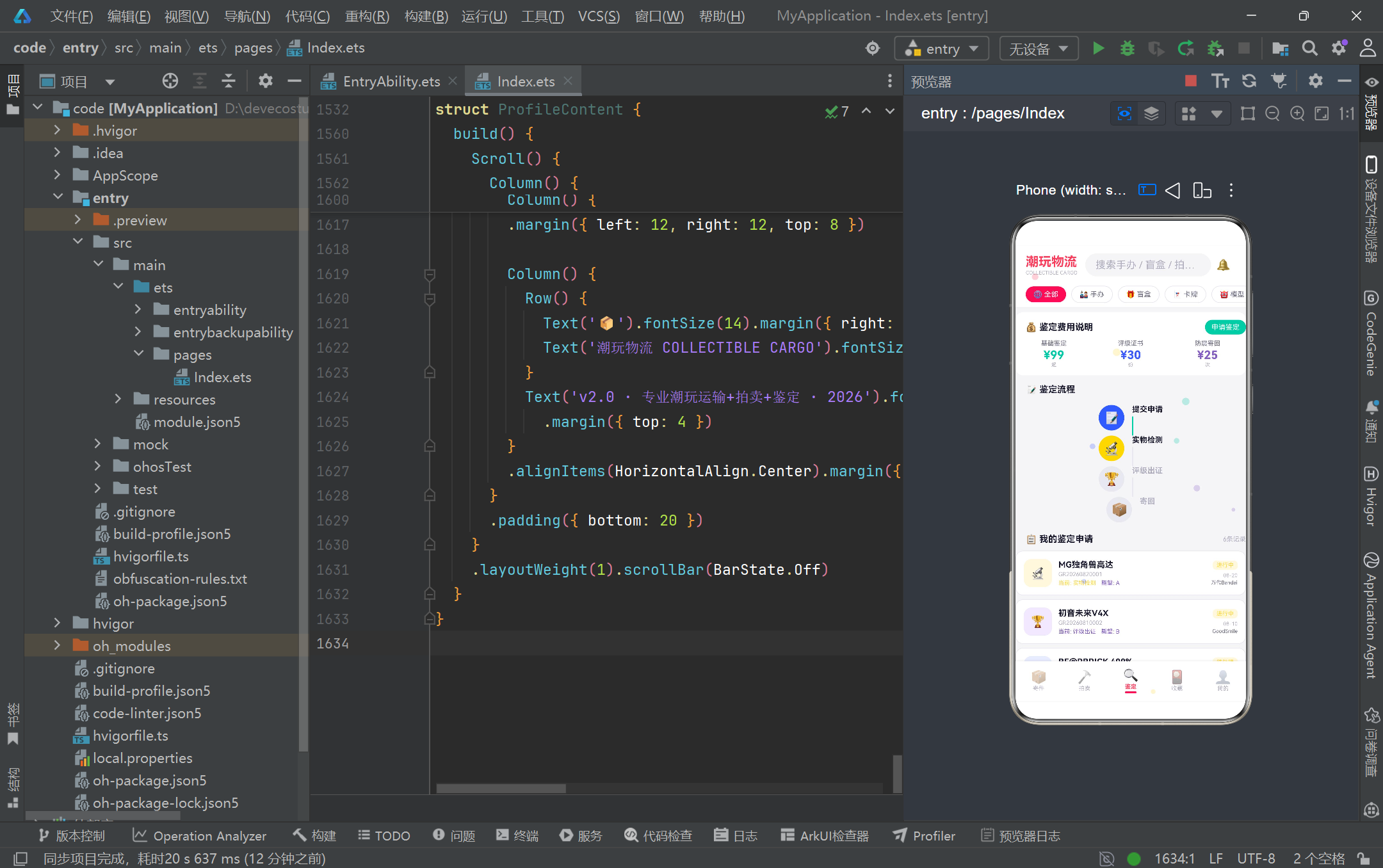
gradeStepBuilder 渲染鉴定流程的纵向时间轴步骤,是"进度可视化"的经典实现。每个步骤由一个圆形图标节点 + 文字标签 + 连接线组成。关键逻辑在 idx 与 currentIdx 的比较:idx <= currentIdx 表示当前步骤及之前已完成的步骤,节点背景用该步骤的主题色(GRADE_STEP_CONFIG 查表),文字用主色;idx > currentIdx 的未来步骤节点用灰色 COLOR_BORDER、文字用提示灰。步骤之间的连接线(Column().width(2).height(30))颜色同样根据 idx < currentIdx 判断——已走过的连线用薄荷绿 COLOR_MINT,未走过的用灰色,形成清晰的"已完成-未完成"视觉分界。最后一步不渲染连线(if (idx < GRADE_STEPS.length - 1)),避免时间轴尾部多余线条。调用时传入 currentIdx: 1 表示当前进行到第二步"实物检测",前两步节点高亮、后两步节点置灰,配合连线颜色,用户一眼即知进度位置。这种纵向时间轴在订单追踪、审批流、鉴定流程等"阶段式业务"中通用性极强。
3.16 CollectionContent 瀑布流与编辑/移出弹窗
@Builder collectionCard(c: CollectionItem, isLeft: boolean) {
  Column() {
    Column() {
      Text(/* color→Emoji 映射 */).fontSize(28)
      Text(c.tag).fontSize(8).fontColor('#FFFFFF')
        .backgroundColor('rgba(0,0,0,0.3)')
        .padding({ left: 4, right: 4, top: 1, bottom: 1 }).borderRadius(4)
        .margin({ top: 4 })
    }
    .width('100%').height(c.cardHeight)
    .backgroundColor(c.color)
    .borderRadius({ topLeft: 12, topRight: 12 })
    .alignItems(HorizontalAlign.Center).justifyContent(FlexAlign.Center)

    Column() {
      Text(c.name).fontSize(12).fontWeight(FontWeight.Bold).fontColor(COLOR_TEXT_MAIN).maxLines(1)
      Text(c.series).fontSize(9).fontColor(COLOR_TEXT_HINT).margin({ top: 1 })
      Text(RARITY_CONFIG[c.rarity]?.label ?? c.rarity).fontSize(8)
        .fontColor(RARITY_CONFIG[c.rarity]?.color ?? COLOR_TEXT_SUB)
        .backgroundColor(RARITY_CONFIG[c.rarity]?.bg ?? '#F5F5F7')
        .padding({ left: 5, right: 5, top: 2, bottom: 2 }).borderRadius(6)
        .margin({ top: 4 })
      Row() {
        Column() {
          Text('估值').fontSize(7).fontColor(COLOR_TEXT_HINT)
          Text(formatPrice(c.currentValue)).fontSize(11).fontWeight(FontWeight.Bold).fontColor(COLOR_PRIMARY)
        }.alignItems(HorizontalAlign.Start)
        Column().layoutWeight(1)
        Column() {
          Text('购入').fontSize(7).fontColor(COLOR_TEXT_HINT)
          Text(formatPrice(c.purchasePrice)).fontSize(10).fontColor(COLOR_TEXT_SUB)
        }.alignItems(HorizontalAlign.End)
      }.width('100%').margin({ top: 6 })
      Row() {
        Text('✏️ 编辑').fontSize(9).fontColor(COLOR_BLUE)
          .layoutWeight(1).textAlign(TextAlign.Center).padding({ top: 4, bottom: 4 })
          .onClick(() => {
            this.selectedCollection = c
            this.editName = c.name
            this.editSeries = c.series
            this.editRarity = c.rarity
            this.editPurchasePrice = c.purchasePrice.toString()
            this.editCurrentValue = c.currentValue.toString()
            this.showEditModal = true
          })
        Text('🗑️ 移出').fontSize(9).fontColor(COLOR_DANGER)
          .layoutWeight(1).textAlign(TextAlign.Center).padding({ top: 4, bottom: 4 })
          .onClick(() => { this.selectedCollection = c; this.showRemoveModal = true })
      }.width('100%').margin({ top: 4, bottom: 6 })
    }.padding(10)
  }
  .width('100%').backgroundColor(COLOR_CARD).borderRadius(12)
  .border({ width: 1, color: COLOR_BORDER })
  .margin({ left: isLeft ? 12 : 6, right: isLeft ? 6 : 12, top: 6 })
}
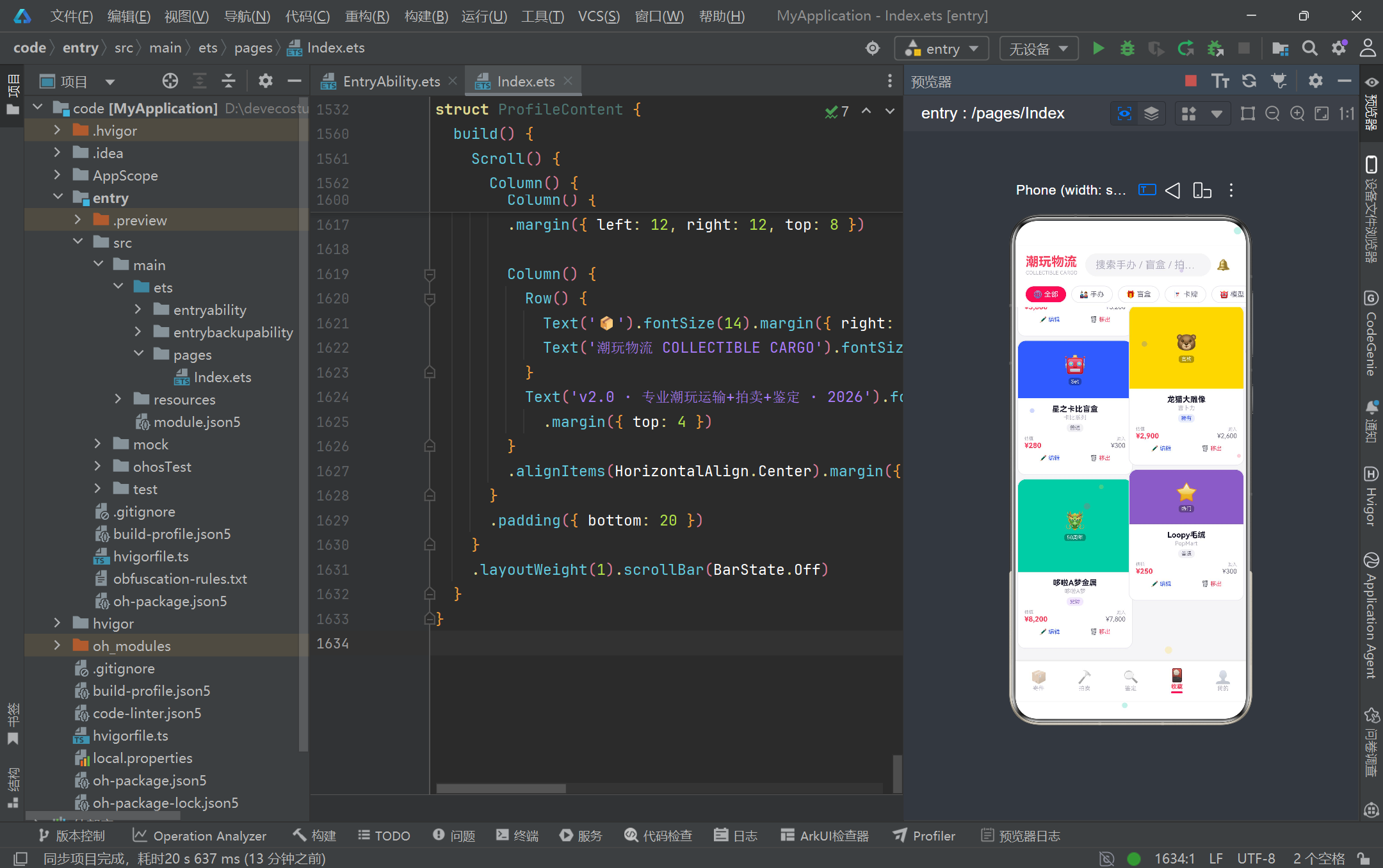
collectionCard 是藏品卡片,其核心亮点是 cardHeight 字段驱动的瀑布流高度差异——不同藏品的色块高度从 85vp 到 180vp 不等,双列排布时形成参差错落的瀑布流视觉。顶部色块用 c.color 作背景,叠加半透明黑色标签(rgba(0,0,0,0.3))展示藏品 tag(如"绝版"“限定”“联名”)。卡片中部展示名称、系列、稀有度徽章(RARITY_CONFIG 查表)、估值与购入价对比(让用户直观看到升值幅度)。底部"编辑"与"移出"两个操作按钮分别绑定不同弹窗:编辑按钮的 onClick 一次性将选中藏品的各字段回填到编辑表单的 @State(editName、editSeries 等),再打开 showEditModal,这是"预填表单"的标准模式;移出按钮则仅记录 selectedCollection 并打开确认弹窗。两种操作分离设计,体现了"低破坏性操作需二次确认"的交互安全原则——编辑可随时取消恢复,移出则需弹窗确认,避免误删珍贵藏品记录。
3.17 CollectionContent 稀有度分布与估值条形图
Column() {
  Text('🎨 稀有度分布').fontSize(13).fontWeight(FontWeight.Bold)
    .fontColor(COLOR_TEXT_MAIN).margin({ left: 16, top: 12, bottom: 8 })
  ForEach([0, 1, 2, 3], (i: number) => {
    Column() {
      Row() {
        Text(this.rarityCats[i]).fontSize(11)
          .fontColor(this.rarityColors[i]).layoutWeight(1)
        Text(getRarityCount(this.rarityCats[i]).toString() + '件 ('
          + getRarityPercent(this.rarityCats[i]).toString() + '%)')
          .fontSize(10).fontColor(COLOR_TEXT_SUB)
      }
      Row() {
        Column()
          .width(getRarityPercent(this.rarityCats[i]) + '%')
          .height(8).backgroundColor(this.rarityColors[i]).borderRadius(4)
        Column().layoutWeight(1)
      }
      .width('100%').height(8).backgroundColor(COLOR_BG).borderRadius(4)
      .margin({ top: 4, bottom: 10 })
    }.width('100%')
  })
}
.width('100%').backgroundColor(COLOR_CARD).borderRadius(12)
.margin({ left: 12, right: 12, top: 6 })
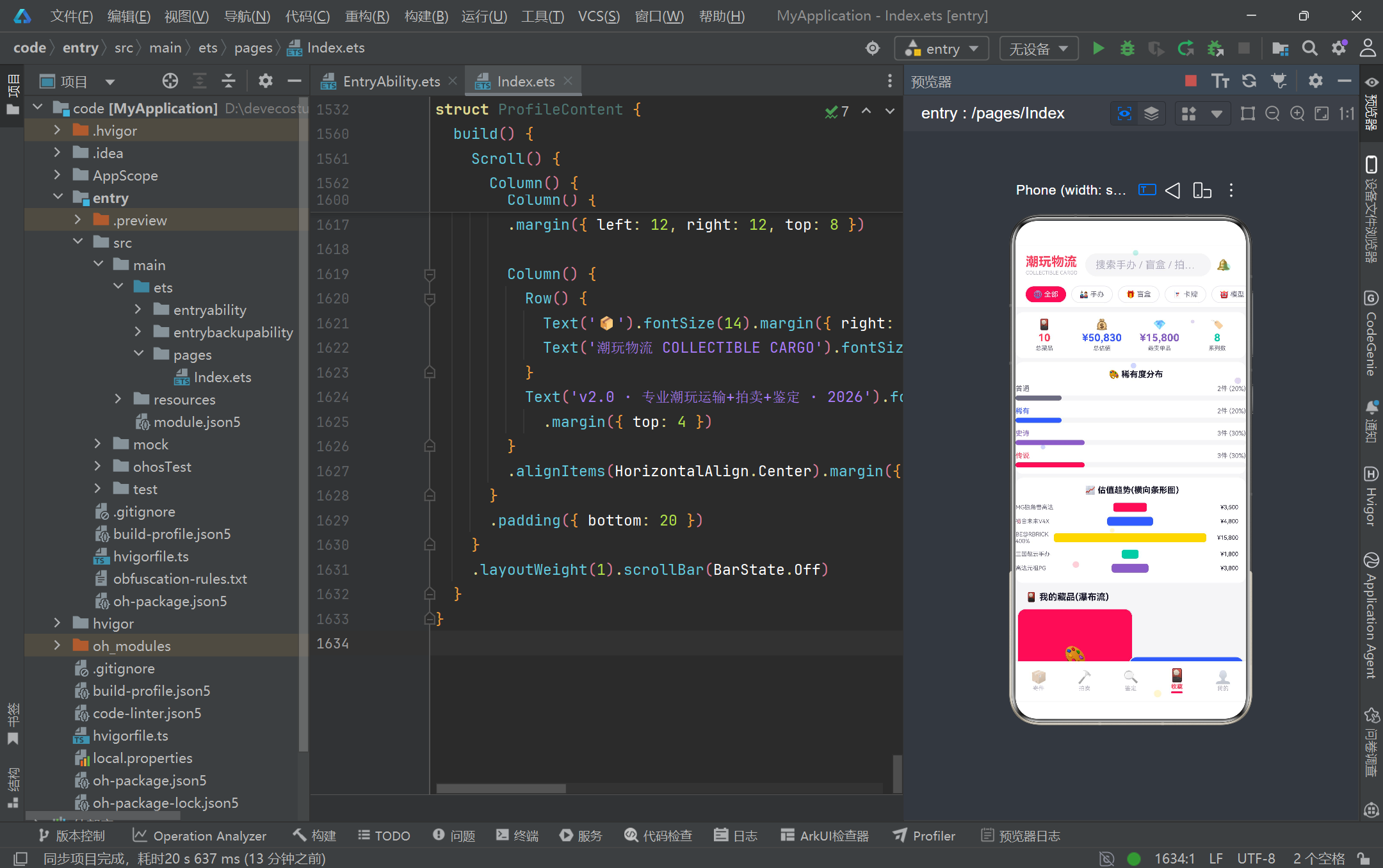
这是稀有度分布的进度条可视化,展示了 ArkUI 用纯布局组件实现数据图表的能力。ForEach 遍历 [0,1,2,3] 索引(而非直接遍历稀有度数组),通过 this.rarityCats[i] 与 this.rarityColors[i] 两个并行数组取值,这种"双数组并行索引"是 ArkTS ForEach 不支持解构参数时的常见折中写法。每行包含标签、件数与百分比文本,以及一条进度条——进度条用嵌套 Row 实现:外层 Row 高 8、背景灰、圆角;内层 Column 宽度为百分比字符串(getRarityPercent + ‘%’),背景取该稀有度颜色,剩余空间用另一个空 Column.layoutWeight(1) 填充。这种"父容器做底色、子容器做填充宽度"的双层结构是纯 ArkUI 实现横向进度条的标准模式,无需引入图表库即可完成轻量级数据可视化。下方还有估值趋势横向条形图,用类似手法按 currentValue / 最大值 * 100 计算宽度比例,绘制各藏品的估值对比柱,体现了"够用即美"的轻量图表哲学。
3.18 ProfileContent 我的页面:渐变卡片与设置列表
build() {
  Scroll() {
    Column() {
      Column() {
        Row() {
          Column() {
            Text('🎭').fontSize(40)
          }
          .width(72).height(72).backgroundColor('#FFE8EC').borderRadius(36)
          .alignItems(HorizontalAlign.Center).justifyContent(FlexAlign.Center)
          Column() {
            Text('潮玩收藏家David').fontSize(18).fontWeight(FontWeight.Bold).fontColor(COLOR_TEXT_MAIN)
            Row() {
              Text('🏆 收藏家等级 LV.8').fontSize(11).fontColor(COLOR_PRIMARY)
                .backgroundColor('#FFE8EC').padding({ left: 8, right: 8, top: 3, bottom: 3 }).borderRadius(10)
              Text('注册' + getRegisterDays().toString() + '天').fontSize(10).fontColor(COLOR_TEXT_SUB)
                .margin({ left: 6 })
            }.margin({ top: 4 })
          }
          .layoutWeight(1).alignItems(HorizontalAlign.Start).padding({ left: 14 })
        }.width('100%').padding(16)
      }
      .width('100%').backgroundColor(COLOR_CARD)
      .margin({ left: 12, right: 12, top: 8 }).borderRadius(16)
      .linearGradient({ angle: 135, colors: [[COLOR_CARD, 0], ['#FFF0F5', 1]] })

      Row() {
        this.bigStatCell('🎴', getCollectionTotal().toString(), '总藏品', COLOR_PRIMARY, '#FFE8EC')
        this.bigStatCell('💰', formatPrice(getCollectionValue()), '总估值', COLOR_BLUE, '#E8ECFF')
      }.width('100%').padding({ left: 6, right: 6 })

      Column() {
        Text('⚙️ 设置').fontSize(14).fontWeight(FontWeight.Bold)
          .fontColor(COLOR_TEXT_MAIN).width('100%').padding({ left: 16, top: 12, bottom: 8 })
        Column() {
          this.settingItem('🎴', '我的藏品', COLOR_PRIMARY)
          Divider().color(COLOR_BORDER)
          this.settingItem('📍', '地址管理', COLOR_BLUE)
          Divider().color(COLOR_BORDER)
          this.settingItem('🛡️', '保价记录', COLOR_MINT)
          Divider().color(COLOR_BORDER)
          this.settingItem('💬', '在线客服', COLOR_PURPLE)
          Divider().color(COLOR_BORDER)
          this.settingItem('🔧', '系统设置', COLOR_TEXT_SUB)
        }.padding({ left: 16, right: 16, bottom: 12 })
      }
      .width('100%').backgroundColor(COLOR_CARD).borderRadius(12)
      .margin({ left: 12, right: 12, top: 8 })
    }.padding({ bottom: 20 })
  }
  .layoutWeight(1).scrollBar(BarState.Off)
}
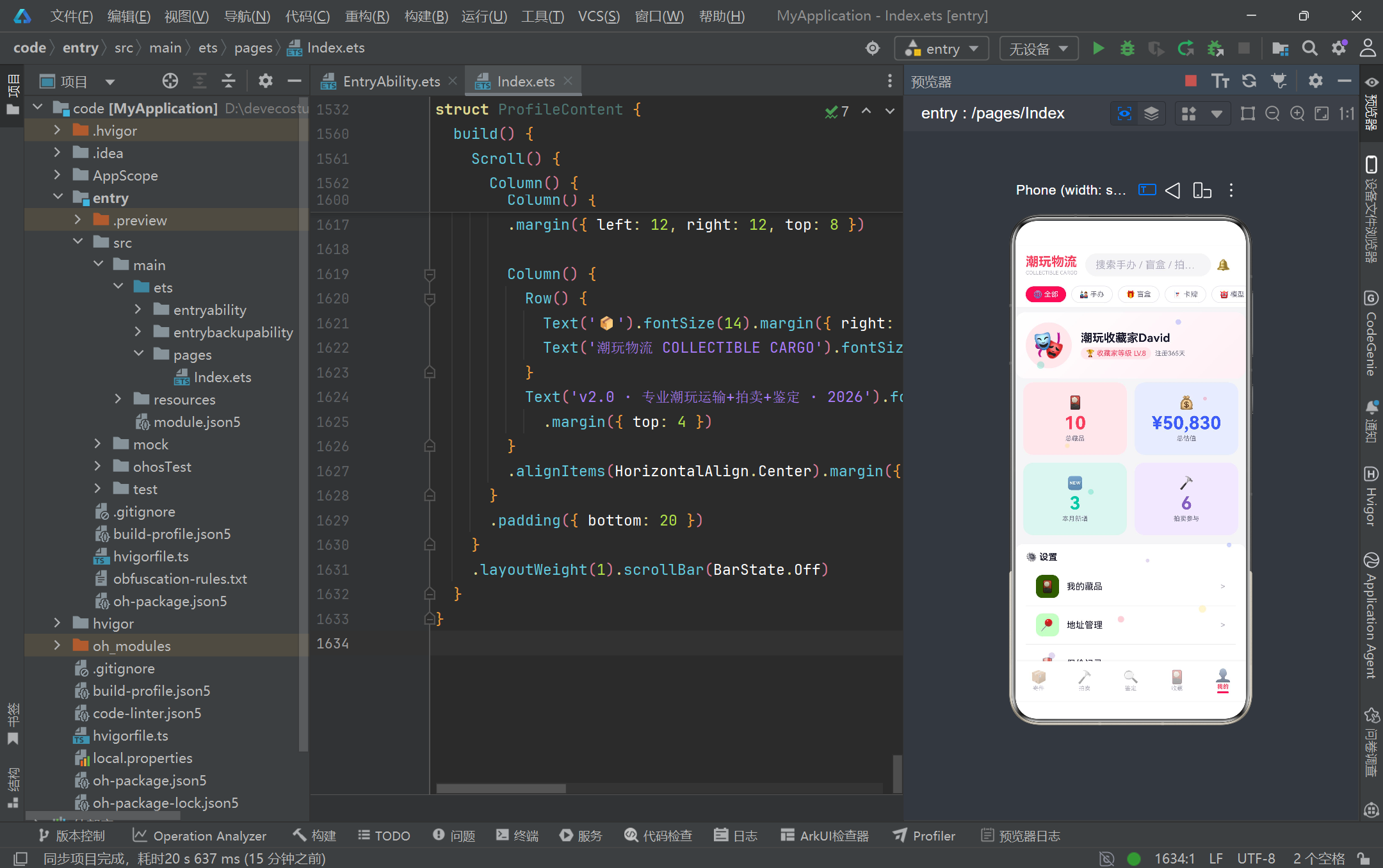
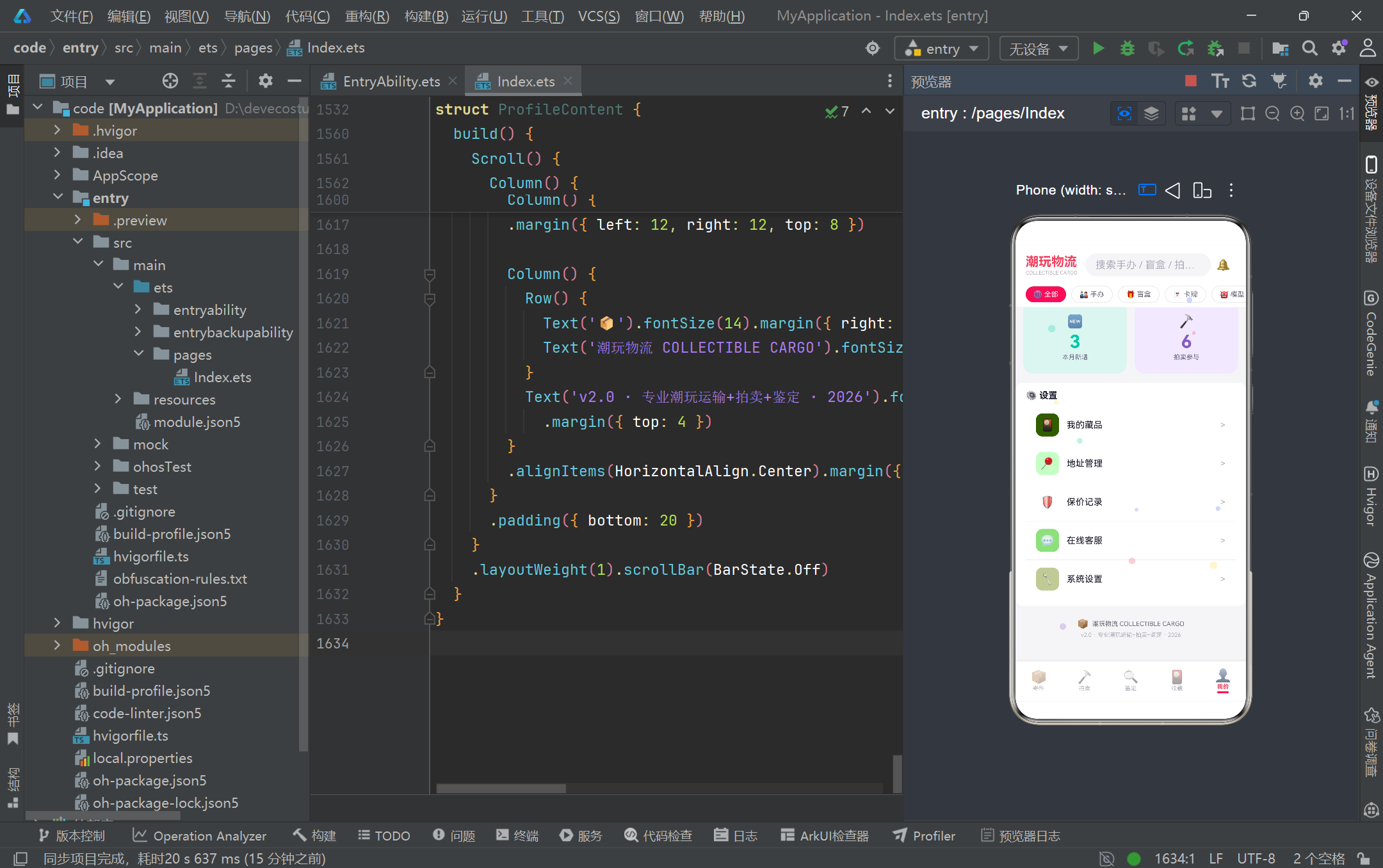
ProfileContent 是"我的"个人中心页。顶部用户卡片使用 linearGradient({ angle: 135, colors: [[COLOR_CARD, 0], [‘#FFF0F5’, 1]] }) 实现 135 度从纯白到淡粉的渐变背景,这是 ArkUI 内置的线性渐变 API,colors 数组中 [色值, 位置] 的二维数组定义渐变断点,angle 控制渐变方向。头像用 72×72 圆形(borderRadius 36 = 宽高一半)色块加 Emoji 模拟,用户名下方用两个标签徽章展示等级与注册天数。下方四个 bigStatCell 大数据格以 2×2 网格排布,每个 cell 自带彩色背景(#FFE8EC、#E8ECFF 等),形成色彩缤纷的统计仪表盘。最底部的设置列表用 settingItem + Divider 交替排列,Divider 是 ArkUI 内置分隔线组件,配合 color(COLOR_BORDER) 形成淡灰分隔,是列表项分组的标准做法。整个页面用 Scroll 包裹以适配内容超出屏幕的滚动,scrollBar(BarState.Off) 隐藏滚动条保持视觉洁净。
四、数据与配置驱动的渲染流程
下面用第二张 Mermaid 图专门刻画"数据 + 配置 → 查表 → 渲染"的核心数据流,这是整个应用最值得复用的工程模式:
从图中可以清晰看到,视图组件(V1-V4)不直接硬编码任何颜色或文案,而是从数据实例(D2)取业务值、从配置映射(C1-C4)取展示元数据、从纯函数(F1-F3)取派生计算结果,三者汇聚到组件内完成最终渲染。这种解耦带来的最大收益是"可替换性":替换数据源(mock→API)、替换主题(配色常量替换)、替换展示规则(改配置表),三者互不干扰,符合关注点分离原则。
五、关键技术特性对比
为帮助读者快速把握 ArkTS 在本项目中所用关键特性的定位与取舍,特整理如下对比表:
| 技术特性 | 本项目用法 | 适用场景 | 注意事项 / 取舍 |
|---|---|---|---|
| @Entry + @Component | 标记 CollectibleCargoApp 为入口组件 | 应用/页面根组件 | 每个工程仅一个 @Entry;@Component 可多复用 |
| @State 状态管理 | activeTab、searchKeyword、showShipModal 等 | 组件内部私有响应式状态 | 跨组件共享需用 @Prop/@Link/@Provide |
| @Observed 类 | CargoItem、AuctionItem 等 | 需要细粒度监听属性变化的模型类 | 需配合 @ObjectLink 在子组件接收才能生效 |
| @Builder 复用 | particleLayer、cargoItemBuilder、settingItem 等 | 提取重复 UI 片段,参数化复用 | Builder 无独立状态,依赖宿主组件状态 |
| ForEach 渲染 | 遍历 particles、CAT_FILTERS、mockCollections 等 | 列表/数组动态渲染 | 需提供稳定 keyGenerator 避免性能问题(本项目用索引) |
| linearGradient | ProfileContent 用户卡片、AuctionContent Banner | 实现渐变背景 | colors 数组为 [色值, 位置] 二维数组 |
| position + zIndex | shipModal、gradeModal 等弹窗 | 绝对定位模态层、置顶显示 | 需配合 hitTestBehavior 处理事件穿透 |
| HitTestMode.None | particleLayer 装饰层 | 纯装饰覆盖层需事件透传 | 否则会拦截下层点击 |
| setInterval | aboutToAppear 驱动粒子动画 | 轻量周期性动画 | 生产应在 aboutToDisappear 清理 |
| 接口 + 实现类分层 | CargoModel + CargoItem | 类型契约与可观察行为分离 | ArkTS 要求类字段显式初值 |
| Record 映射表 | CATEGORY_CONFIG、RARITY_CONFIG 等 | 业务字符串→展示元数据查表 | 配合 ?? 默认值兜底防 undefined |
| 纯函数派生 | formatPrice、getRarityPercent、updateParticles | 派生计算抽离,保持视图"瘦" | 无副作用,便于单测 |
安装DevEco Studio程序

选择目标安装目录:

设置环境变量,但是需要重启一下:

新建一个空白模板:

设置API为24的模板项目:

初始化项目,自动下载相关依赖:

完整代码:
// ============================================================
// 潮玩手办物流 COLLECTIBLE CARGO
// 潮玩手办专业运输(防震防潮恒温) + 在线拍卖 + 鉴定评级
// 波普艺术彩色风格 - ArkTS 单文件页面
// ============================================================
// ============ 颜色常量 ============
const COLOR_BG: string = '#F5F5F7'
const COLOR_CARD: string = '#FFFFFF'
const COLOR_PRIMARY: string = '#FF3B5C'
const COLOR_BLUE: string = '#3B5BFF'
const COLOR_YELLOW: string = '#FFD93D'
const COLOR_MINT: string = '#00C9A7'
const COLOR_PURPLE: string = '#845EC2'
const COLOR_TEXT_MAIN: string = '#1A1A2E'
const COLOR_TEXT_SUB: string = '#6B6B80'
const COLOR_TEXT_HINT: string = '#B0B0C0'
const COLOR_BORDER: string = '#E8E8F0'
const COLOR_SUCCESS: string = '#00C9A7'
const COLOR_WARNING: string = '#FFD93D'
const COLOR_DANGER: string = '#FF3B5C'
// ============ 数据模型接口 ============
interface CargoModel {
id: number;
orderNo: string;
itemName: string;
category: string;
insuredValue: number;
packaging: string;
destination: string;
status: string;
date: string;
}
interface AuctionModel {
id: number;
name: string;
series: string;
currentBid: number;
bidCount: number;
endTime: string;
color: string;
tag: string;
}
interface GradeModel {
id: number;
applyNo: string;
itemName: string;
brand: string;
currentStep: string;
date: string;
status: string;
expectedGrade: string;
}
interface CollectionModel {
id: number;
name: string;
series: string;
rarity: string;
purchasePrice: number;
currentValue: number;
color: string;
cardHeight: number;
tag: string;
}
// ============ @Observed 数据类 ============
@Observed
class CargoItem implements CargoModel {
id: number = 0;
orderNo: string = '';
itemName: string = '';
category: string = '';
insuredValue: number = 0;
packaging: string = '';
destination: string = '';
status: string = '';
date: string = '';
constructor(id: number, orderNo: string, itemName: string, category: string, insuredValue: number, packaging: string, destination: string, status: string, date: string) {
this.id = id; this.orderNo = orderNo; this.itemName = itemName; this.category = category;
this.insuredValue = insuredValue; this.packaging = packaging; this.destination = destination;
this.status = status; this.date = date;
}
}
@Observed
class AuctionItem implements AuctionModel {
id: number = 0;
name: string = '';
series: string = '';
currentBid: number = 0;
bidCount: number = 0;
endTime: string = '';
color: string = '';
tag: string = '';
constructor(id: number, name: string, series: string, currentBid: number, bidCount: number, endTime: string, color: string, tag: string) {
this.id = id; this.name = name; this.series = series; this.currentBid = currentBid;
this.bidCount = bidCount; this.endTime = endTime; this.color = color; this.tag = tag;
}
}
@Observed
class GradeItem implements GradeModel {
id: number = 0;
applyNo: string = '';
itemName: string = '';
brand: string = '';
currentStep: string = '';
date: string = '';
status: string = '';
expectedGrade: string = '';
constructor(id: number, applyNo: string, itemName: string, brand: string, currentStep: string, date: string, status: string, expectedGrade: string) {
this.id = id; this.applyNo = applyNo; this.itemName = itemName; this.brand = brand;
this.currentStep = currentStep; this.date = date; this.status = status; this.expectedGrade = expectedGrade;
}
}
@Observed
class CollectionItem implements CollectionModel {
id: number = 0;
name: string = '';
series: string = '';
rarity: string = '';
purchasePrice: number = 0;
currentValue: number = 0;
color: string = '';
cardHeight: number = 120;
tag: string = '';
constructor(id: number, name: string, series: string, rarity: string, purchasePrice: number, currentValue: number, color: string, cardHeight: number, tag: string) {
this.id = id; this.name = name; this.series = series; this.rarity = rarity;
this.purchasePrice = purchasePrice; this.currentValue = currentValue;
this.color = color; this.cardHeight = cardHeight; this.tag = tag;
}
}
// ============ 配置接口 ============
interface CategoryMeta {
label: string;
icon: string;
color: string;
bg: string;
}
interface PackagingMeta {
label: string;
icon: string;
color: string;
}
interface RarityMeta {
label: string;
color: string;
bg: string;
glow: string;
}
interface StatusMeta {
label: string;
color: string;
bg: string;
}
interface GradeStepMeta {
label: string;
icon: string;
color: string;
bg: string;
}
interface SortMeta {
label: string;
value: string;
}
interface ParticleModelInterface {
x: number;
y: number;
size: number;
color: string;
speed: number;
drift: number;
}
@Observed
class ParticleModel implements ParticleModelInterface {
x: number = 0;
y: number = 0;
size: number = 0;
color: string = '';
speed: number = 0;
drift: number = 0;
}
// ============ 配置映射 ============
const CATEGORY_CONFIG: Record<string, CategoryMeta> = {
'手办': { label: '手办', icon: '🎎', color: '#FF3B5C', bg: '#FFE8EC' },
'盲盒': { label: '盲盒', icon: '🎁', color: '#3B5BFF', bg: '#E8ECFF' },
'卡牌': { label: '卡牌', icon: '🃏', color: '#845EC2', bg: '#F0E8FF' },
'模型': { label: '模型', icon: '🤖', color: '#00C9A7', bg: '#E0F5F0' },
'艺术玩具': { label: '艺术玩具', icon: '🎨', color: '#FFD93D', bg: '#FFF8E0' }
}
const PACKAGING_CONFIG: Record<string, PackagingMeta> = {
'标准': { label: '标准', icon: '📦', color: '#6B6B80' },
'防震': { label: '防震', icon: '🛡️', color: '#3B5BFF' },
'恒温': { label: '恒温', icon: '❄️', color: '#00C9A7' },
'加急': { label: '加急', icon: '⚡', color: '#FF3B5C' }
}
const RARITY_CONFIG: Record<string, RarityMeta> = {
'普通': { label: '普通', color: '#6B6B80', bg: '#F0F0F5', glow: '#E0E0E8' },
'稀有': { label: '稀有', color: '#3B5BFF', bg: '#E8ECFF', glow: '#C0C8FF' },
'史诗': { label: '史诗', color: '#845EC2', bg: '#F0E8FF', glow: '#D0C0FF' },
'传说': { label: '传说', color: '#FF3B5C', bg: '#FFE8EC', glow: '#FFB0C0' }
}
const CARGO_STATUS_CONFIG: Record<string, StatusMeta> = {
'待揽收': { label: '待揽收', color: '#FFD93D', bg: '#FFF8E0' },
'运输中': { label: '运输中', color: '#3B5BFF', bg: '#E8ECFF' },
'派送中': { label: '派送中', color: '#845EC2', bg: '#F0E8FF' },
'已签收': { label: '已签收', color: '#00C9A7', bg: '#E0F5F0' }
}
const GRADE_STEP_CONFIG: Record<string, GradeStepMeta> = {
'提交申请': { label: '提交申请', icon: '📝', color: '#3B5BFF', bg: '#E8ECFF' },
'实物检测': { label: '实物检测', icon: '🔬', color: '#FFD93D', bg: '#FFF8E0' },
'评级出证': { label: '评级出证', icon: '🏆', color: '#845EC2', bg: '#F0E8FF' },
'寄回': { label: '寄回', icon: '📦', color: '#00C9A7', bg: '#E0F5F0' }
}
const AUCTION_TAG_CONFIG: Record<string, StatusMeta> = {
'HOT': { label: '🔥 HOT', color: '#FF3B5C', bg: '#FFE8EC' },
'NEW': { label: '✨ NEW', color: '#00C9A7', bg: '#E0F5F0' },
'RARE': { label: '💎 RARE', color: '#845EC2', bg: '#F0E8FF' },
'LOW': { label: '📉 LOW', color: '#FFD93D', bg: '#FFF8E0' }
}
const CAT_FILTERS: string[] = ['全部', '手办', '盲盒', '卡牌', '模型', '艺术玩具']
const PACKAGING_OPTIONS: string[] = ['标准', '防震', '恒温', '加急']
const RARITY_OPTIONS: string[] = ['普通', '稀有', '史诗', '传说']
const GRADE_OPTIONS: string[] = ['A', 'B', 'C', 'UNC']
const SORT_OPTIONS: SortMeta[] = [
{ label: '最新', value: 'new' },
{ label: '热度', value: 'hot' },
{ label: '价格↑', value: 'price_asc' },
{ label: '价格↓', value: 'price_desc' },
{ label: '即将结拍', value: 'ending' }
]
const GRADE_STEPS: string[] = ['提交申请', '实物检测', '评级出证', '寄回']
// ============ 静态数据 ============
const mockCargos: CargoItem[] = [
new CargoItem(1, 'CC20260815A01', 'MG独角兽高达', '手办', 2800, '防震', '北京', '运输中', '08-15'),
new CargoItem(2, 'CC20260814B02', '星之卡比盲盒Set', '盲盒', 500, '标准', '上海', '已签收', '08-14'),
new CargoItem(3, 'CC20260813C03', '三国无双赵云', '模型', 1500, '防震', '广州', '运输中', '08-13'),
new CargoItem(4, 'CC20260812D04', '喷火龙SSR卡牌', '卡牌', 8000, '恒温', '深圳', '待揽收', '08-12'),
new CargoItem(5, 'CC20260811E05', '初音未来V4X', '手办', 6800, '恒温', '杭州', '运输中', '08-11'),
new CargoItem(6, 'CC20260810F06', 'BE@RBRICK 400%', '艺术玩具', 12000, '防震', '成都', '已签收', '08-10'),
new CargoItem(7, 'CC20260809G07', '高达元祖PG版', '模型', 3200, '防震', '武汉', '待揽收', '08-09'),
new CargoItem(8, 'CC20260808H08', 'Loopy毛绒盲盒', '盲盒', 300, '标准', '南京', '已签收', '08-08')
]
const mockAuctions: AuctionItem[] = [
new AuctionItem(1, '限定初音未来V4X', 'Vocaloid系列', 3200, 12, '02:15:30', '#FF3B5C', 'HOT'),
new AuctionItem(2, '三国赵云典藏手办', '三国系列', 1800, 8, '05:42:10', '#3B5BFF', 'NEW'),
new AuctionItem(3, 'BE@RBRICK 1000% Supreme', '联名系列', 8800, 23, '01:08:45', '#FFD93D', 'HOT'),
new AuctionItem(4, '喷火龙25周年卡', '宝可梦系列', 5500, 15, '00:32:20', '#845EC2', 'RARE'),
new AuctionItem(5, '高达独角兽PG限定', '高达系列', 4500, 9, '03:55:00', '#00C9A7', 'NEW'),
new AuctionItem(6, '星之卡比完整Set', '卡比系列', 1200, 5, '06:20:15', '#FF3B5C', 'LOW'),
new AuctionItem(7, '龙猫大雕像吉卜力', '吉卜力系列', 2600, 11, '04:10:30', '#3B5BFF', 'HOT'),
new AuctionItem(8, '哆啦A梦金属50周年', '哆啦A梦系列', 7800, 18, '00:45:50', '#845EC2', 'RARE')
]
const mockGrades: GradeItem[] = [
new GradeItem(1, 'GR20260820001', 'MG独角兽高达', '万代Bandai', '实物检测', '08-20', '进行中', 'A'),
new GradeItem(2, 'GR20260810002', '初音未来V4X', 'GoodSmile', '评级出证', '08-10', '进行中', 'B'),
new GradeItem(3, 'GR20260822003', 'BE@RBRICK 400%', 'Medicom', '提交申请', '08-22', '待处理', 'UNC'),
new GradeItem(4, 'GR20260805004', '三国赵云手办', 'GoodSmile', '寄回', '08-05', '已完成', 'A'),
new GradeItem(5, 'GR20260818005', '高达元祖PG', '万代Bandai', '评级出证', '08-18', '进行中', 'B'),
new GradeItem(6, 'GR20260822006', '喷火龙SSR卡', '宝可梦Pokemon', '实物检测', '08-22', '进行中', 'A')
]
const mockCollections: CollectionItem[] = [
new CollectionItem(1, 'MG独角兽高达', '高达系列', '史诗', 2800, 3500, '#FF3B5C', 160, '绝版'),
new CollectionItem(2, '初音未来V4X', 'Vocaloid', '传说', 3200, 4800, '#3B5BFF', 140, '限定'),
new CollectionItem(3, 'BE@RBRICK 400%', 'Bearbrick', '传说', 12000, 15800, '#FFD93D', 180, '联名'),
new CollectionItem(4, '三国赵云手办', '三国系列', '稀有', 1500, 1800, '#00C9A7', 120, '典藏'),
new CollectionItem(5, '高达元祖PG', '高达系列', '史诗', 3200, 3800, '#845EC2', 150, '绝版'),
new CollectionItem(6, '喷火龙SSR卡', '宝可梦', '传说', 8000, 9500, '#FF3B5C', 100, '25周年'),
new CollectionItem(7, '星之卡比盲盒', '卡比系列', '普通', 300, 280, '#3B5BFF', 90, 'Set'),
new CollectionItem(8, '龙猫大雕像', '吉卜力', '稀有', 2600, 2900, '#FFD93D', 130, '官构'),
new CollectionItem(9, '哆啦A梦金属', '哆啦A梦', '史诗', 7800, 8200, '#00C9A7', 145, '50周年'),
new CollectionItem(10, 'Loopy毛绒', 'PopMart', '普通', 300, 250, '#845EC2', 85, '热门')
]
// ============ 辅助纯函数 ============
function getMonthShipCount(): number { return 8 }
function getTransitCount(): number { return 3 }
function getSignedCount(): number { return 2 }
function getTotalInsured(): number { return 35100 }
function getCollectionTotal(): number { return 10 }
function getCollectionValue(): number { return 50830 }
function getMostExpensiveValue(): number { return 15800 }
function getSeriesCount(): number { return 8 }
function getMonthNewCount(): number { return 3 }
function getAuctionParticipate(): number { return 6 }
function getRegisterDays(): number { return 365 }
function getCategoryShipCount(cat: string): number {
if (cat === '手办') return 3
if (cat === '盲盒') return 2
if (cat === '模型') return 2
if (cat === '卡牌') return 1
return 0
}
function getRarityCount(rarity: string): number {
if (rarity === '普通') return 2
if (rarity === '稀有') return 2
if (rarity === '史诗') return 3
if (rarity === '传说') return 3
return 0
}
function getRarityPercent(rarity: string): number {
return Math.round(getRarityCount(rarity) / getCollectionTotal() * 100)
}
function updateParticles(particles: ParticleModel[]): ParticleModel[] {
return particles.map((p: ParticleModel) => {
let ny: number = p.y - p.speed
if (ny < -5) { ny = 105 }
let nx: number = p.x + p.drift * 0.3
if (nx > 100) { nx = 0 }
if (nx < 0) { nx = 100 }
const particle = new ParticleModel()
particle.x = nx
particle.y = ny
particle.size = p.size
particle.color = p.color
particle.speed = p.speed
particle.drift = p.drift
return particle
})
}
function formatPrice(v: number): string {
return '¥' + v.toLocaleString()
}
// ============ Tab 枚举 ============
enum CargoTab {
SHIP = 0,
AUCTION = 1,
GRADE = 2,
COLLECTION = 3,
PROFILE = 4
}
// ============ 入口主页面 ============
@Entry
@Component
struct CollectibleCargoApp {
@State activeTab: CargoTab = CargoTab.SHIP
@State searchKeyword: string = ''
@State selectedCatFilter: string = '全部'
@State particles: ParticleModel[] = [
{ x: 10, y: 90, size: 14, color: '#FF3B5C', speed: 0.8, drift: 1 },
{ x: 25, y: 70, size: 10, color: '#3B5BFF', speed: 0.5, drift: -1 },
{ x: 45, y: 85, size: 16, color: '#FFD93D', speed: 0.6, drift: 1 },
{ x: 65, y: 60, size: 12, color: '#00C9A7', speed: 0.7, drift: -1 },
{ x: 80, y: 95, size: 14, color: '#845EC2', speed: 0.4, drift: 1 },
{ x: 15, y: 40, size: 8, color: '#FF3B5C', speed: 0.9, drift: -1 },
{ x: 35, y: 20, size: 12, color: '#3B5BFF', speed: 0.3, drift: 1 },
{ x: 55, y: 50, size: 10, color: '#FFD93D', speed: 0.6, drift: -1 },
{ x: 75, y: 30, size: 16, color: '#00C9A7', speed: 0.5, drift: 1 },
{ x: 90, y: 75, size: 8, color: '#845EC2', speed: 0.7, drift: -1 }
]
aboutToAppear() {
setInterval(() => {
this.particles = updateParticles(this.particles)
}, 300)
}
@Builder particleLayer() {
Stack() {
ForEach(this.particles, (p: ParticleModel) => {
Text('●')
.fontSize(p.size)
.fontColor(p.color)
.opacity(0.25)
.position({ x: p.x + '%', y: p.y + '%' })
})
}
.width('100%').height('100%')
.hitTestBehavior(HitTestMode.None)
}
@Builder appHeader() {
Column() {
Row() {
Column() {
Text('潮玩物流').fontSize(20).fontWeight(FontWeight.Bold).fontColor(COLOR_PRIMARY)
Text('COLLECTIBLE CARGO').fontSize(8).fontColor(COLOR_TEXT_HINT).margin({ top: 1 })
}
.alignItems(HorizontalAlign.Start)
Row() {
TextInput({ placeholder: '搜索手办 / 盲盒 / 拍卖...' })
.placeholderColor(COLOR_TEXT_HINT).fontSize(12).layoutWeight(1)
.backgroundColor(COLOR_BG).borderRadius(20).height(36)
.margin({ left: 12, right: 8 })
.onChange((v: string) => { this.searchKeyword = v })
Text('🔔').fontSize(18).margin({ right: 8 })
}
.layoutWeight(1)
}
.width('100%').padding({ left: 16, right: 16, top: 12, bottom: 8 })
Scroll() {
Row() {
ForEach(CAT_FILTERS, (cat: string) => {
if (this.selectedCatFilter === cat) {
Text(cat === '全部' ? '🌐 全部' : ((CATEGORY_CONFIG[cat]?.icon ?? '') + ' ' + cat))
.fontSize(11).fontColor('#FFFFFF').backgroundColor(COLOR_PRIMARY)
.padding({ left: 12, right: 12, top: 6, bottom: 6 }).borderRadius(16)
.margin({ left: 4, right: 4 })
} else {
Text(cat === '全部' ? '🌐 全部' : ((CATEGORY_CONFIG[cat]?.icon ?? '') + ' ' + cat))
.fontSize(11).fontColor(COLOR_TEXT_SUB).backgroundColor(COLOR_CARD)
.padding({ left: 12, right: 12, top: 6, bottom: 6 }).borderRadius(16)
.margin({ left: 4, right: 4 })
.border({ width: 1, color: COLOR_BORDER })
.onClick(() => { this.selectedCatFilter = cat })
}
})
}
.padding({ left: 12, right: 12 })
}
.scrollable(ScrollDirection.Horizontal).scrollBar(BarState.Off).height(40)
}
.width('100%').backgroundColor(COLOR_CARD)
.shadow({ radius: 4, color: '#10000000', offsetY: 2 })
}
@Builder contentArea() {
Column() {
if (this.activeTab === CargoTab.SHIP) {
ShipContent()
} else if (this.activeTab === CargoTab.AUCTION) {
AuctionContent()
} else if (this.activeTab === CargoTab.GRADE) {
GradeContent()
} else if (this.activeTab === CargoTab.COLLECTION) {
CollectionContent()
} else {
ProfileContent()
}
}
.layoutWeight(1)
}
@Builder bottomTabItem(icon: string, label: string, tab: CargoTab) {
Column() {
Text(icon).fontSize(20).opacity(this.activeTab === tab ? 1.0 : 0.45)
Text(label).fontSize(9)
.fontColor(this.activeTab === tab ? COLOR_PRIMARY : COLOR_TEXT_HINT)
.fontWeight(this.activeTab === tab ? FontWeight.Bold : FontWeight.Normal)
.margin({ top: 1 })
if (this.activeTab === tab) {
Column().width(18).height(3)
.backgroundColor(COLOR_PRIMARY).borderRadius(2).margin({ top: 2 })
}
}
.layoutWeight(1)
.alignItems(HorizontalAlign.Center)
.padding({ top: 6, bottom: 6 })
.onClick(() => { this.activeTab = tab })
}
build() {
Stack() {
Column() {
this.appHeader()
this.contentArea()
Row() {
this.bottomTabItem('📦', '寄件', CargoTab.SHIP)
this.bottomTabItem('🔨', '拍卖', CargoTab.AUCTION)
this.bottomTabItem('🔍', '鉴定', CargoTab.GRADE)
this.bottomTabItem('🎴', '收藏', CargoTab.COLLECTION)
this.bottomTabItem('👤', '我的', CargoTab.PROFILE)
}
.width('100%')
.backgroundColor(COLOR_CARD)
.padding({ top: 4, bottom: 6 })
.shadow({ radius: 8, color: '#1A000000', offsetY: -2 })
}
.width('100%').height('100%')
.backgroundColor(COLOR_BG)
this.particleLayer()
}
.width('100%').height('100%')
}
}
// ============ Tab1: 寄件 SHIP ============
@Component
struct ShipContent {
@State showShipModal: boolean = false
@State formItemName: string = ''
@State formCategory: string = '手办'
@State formInsuredValue: string = ''
@State formPackaging: string = '防震'
@State formDestination: string = ''
@State formNotes: string = ''
chartCats: string[] = ['手办', '盲盒', '模型', '卡牌', '艺术玩具']
chartColors: string[] = [COLOR_PRIMARY, COLOR_BLUE, COLOR_MINT, COLOR_PURPLE, COLOR_YELLOW]
@Builder modalOverlay(onClose: () => void) {
Column()
.width('100%').height('100%')
.backgroundColor('rgba(26,26,46,0.6)')
.onClick(onClose)
}
@Builder statItem(num: number, label: string, color: string) {
Column() {
Text(num.toString()).fontSize(18).fontWeight(FontWeight.Bold).fontColor(color)
Text(label).fontSize(9).fontColor(COLOR_TEXT_SUB).margin({ top: 2 })
}
.layoutWeight(1).alignItems(HorizontalAlign.Center)
}
@Builder cargoItemBuilder(c: CargoItem) {
Row() {
Column() {
Text(CATEGORY_CONFIG[c.category]?.icon ?? '📦').fontSize(20)
}
.width(44).height(44).backgroundColor(CATEGORY_CONFIG[c.category]?.bg ?? '#F5F5F7')
.borderRadius(12).alignItems(HorizontalAlign.Center).justifyContent(FlexAlign.Center)
Column() {
Text(c.itemName).fontSize(13).fontWeight(FontWeight.Bold).fontColor(COLOR_TEXT_MAIN)
Text(c.orderNo).fontSize(9).fontColor(COLOR_TEXT_HINT).margin({ top: 2 })
Row() {
Text(PACKAGING_CONFIG[c.packaging]?.icon + ' ' + c.packaging).fontSize(9)
.fontColor(PACKAGING_CONFIG[c.packaging]?.color ?? COLOR_TEXT_SUB)
.backgroundColor(PACKAGING_CONFIG[c.packaging]?.color + '15')
.padding({ left: 5, right: 5, top: 2, bottom: 2 }).borderRadius(6)
Text(c.destination).fontSize(9).fontColor(COLOR_TEXT_SUB).margin({ left: 6 })
}
.margin({ top: 3 })
}
.layoutWeight(1).alignItems(HorizontalAlign.Start).padding({ left: 10 })
Column() {
Text(formatPrice(c.insuredValue)).fontSize(13).fontWeight(FontWeight.Bold).fontColor(COLOR_PRIMARY)
Text(CARGO_STATUS_CONFIG[c.status]?.label ?? c.status).fontSize(9)
.fontColor(CARGO_STATUS_CONFIG[c.status]?.color ?? COLOR_TEXT_SUB)
.backgroundColor(CARGO_STATUS_CONFIG[c.status]?.bg ?? '#F5F5F7')
.padding({ left: 6, right: 6, top: 2, bottom: 2 }).borderRadius(6)
.margin({ top: 4 })
Text(c.date).fontSize(8).fontColor(COLOR_TEXT_HINT).margin({ top: 2 })
}
.alignItems(HorizontalAlign.End)
}
.width('100%').padding(12).backgroundColor(COLOR_CARD)
.borderRadius(12).margin({ left: 12, right: 12, top: 6 })
.border({ width: 1, color: COLOR_BORDER })
}
// ========== 弹框1: 寄件预约 ==========
@Builder shipModal() {
Column() {
this.modalOverlay(() => { this.showShipModal = false })
Column() {
Row() {
Text('📦 寄件预约').fontSize(18).fontWeight(FontWeight.Bold).fontColor('#FFFFFF')
Column().layoutWeight(1)
Text('✕').fontSize(18).fontColor('#FFFFFF')
.onClick(() => { this.showShipModal = false })
}
.width('100%').padding({ left: 20, right: 20, top: 18, bottom: 14 })
.backgroundColor(COLOR_PRIMARY).borderRadius({ topLeft: 16, topRight: 16 })
Scroll() {
Column() {
Text('物品名称').fontSize(12).fontColor(COLOR_TEXT_SUB).margin({ top: 12, left: 20 })
TextInput({ placeholder: '请输入物品名称' })
.placeholderColor(COLOR_TEXT_HINT).fontSize(14).width('100%')
.backgroundColor(COLOR_BG).borderRadius(8)
.margin({ left: 20, right: 20, top: 4 })
.onChange((v: string) => { this.formItemName = v })
Text('品类').fontSize(12).fontColor(COLOR_TEXT_SUB).margin({ top: 12, left: 20 })
Scroll() {
Row() {
ForEach(CAT_FILTERS.slice(1), (cat: string) => {
if (this.formCategory === cat) {
Text((CATEGORY_CONFIG[cat]?.icon ?? '') + ' ' + cat)
.fontSize(11).fontColor('#FFFFFF').backgroundColor(COLOR_PRIMARY)
.padding({ left: 10, right: 10, top: 6, bottom: 6 }).borderRadius(14)
.margin({ left: 3, right: 3 })
} else {
Text((CATEGORY_CONFIG[cat]?.icon ?? '') + ' ' + cat)
.fontSize(11).fontColor(COLOR_TEXT_SUB).backgroundColor(COLOR_BG)
.padding({ left: 10, right: 10, top: 6, bottom: 6 }).borderRadius(14)
.margin({ left: 3, right: 3 })
.onClick(() => { this.formCategory = cat })
}
})
}
.padding({ left: 16, right: 16 })
}
.scrollable(ScrollDirection.Horizontal).scrollBar(BarState.Off).height(40)
Text('保价金额(¥)').fontSize(12).fontColor(COLOR_TEXT_SUB).margin({ top: 12, left: 20 })
TextInput({ placeholder: '请输入保价金额' })
.placeholderColor(COLOR_TEXT_HINT).fontSize(14).width('100%')
.backgroundColor(COLOR_BG).borderRadius(8)
.margin({ left: 20, right: 20, top: 4 })
.type(InputType.Number)
.onChange((v: string) => { this.formInsuredValue = v })
Text('包装方式').fontSize(12).fontColor(COLOR_TEXT_SUB).margin({ top: 12, left: 20 })
Row() {
ForEach(PACKAGING_OPTIONS, (pkg: string) => {
if (this.formPackaging === pkg) {
Text((PACKAGING_CONFIG[pkg]?.icon ?? '') + ' ' + pkg)
.fontSize(11).fontColor('#FFFFFF').backgroundColor(PACKAGING_CONFIG[pkg]?.color ?? COLOR_PRIMARY)
.padding({ left: 10, right: 10, top: 6, bottom: 6 }).borderRadius(14)
.margin({ left: 3, right: 3 })
} else {
Text((PACKAGING_CONFIG[pkg]?.icon ?? '') + ' ' + pkg)
.fontSize(11).fontColor(PACKAGING_CONFIG[pkg]?.color ?? COLOR_TEXT_SUB)
.backgroundColor(COLOR_BG)
.padding({ left: 10, right: 10, top: 6, bottom: 6 }).borderRadius(14)
.margin({ left: 3, right: 3 })
.onClick(() => { this.formPackaging = pkg })
}
})
}
.margin({ left: 16, right: 16, top: 4 })
Text('目的地').fontSize(12).fontColor(COLOR_TEXT_SUB).margin({ top: 12, left: 20 })
TextInput({ placeholder: '请输入收货地址' })
.placeholderColor(COLOR_TEXT_HINT).fontSize(14).width('100%')
.backgroundColor(COLOR_BG).borderRadius(8)
.margin({ left: 20, right: 20, top: 4 })
.onChange((v: string) => { this.formDestination = v })
Text('备注').fontSize(12).fontColor(COLOR_TEXT_SUB).margin({ top: 12, left: 20 })
TextArea({ placeholder: '特殊要求(如防潮/避光/加急送达等)' })
.placeholderColor(COLOR_TEXT_HINT).fontSize(12).width('100%').height(60)
.backgroundColor(COLOR_BG).borderRadius(8)
.margin({ left: 20, right: 20, top: 4 })
.onChange((v: string) => { this.formNotes = v })
}
.padding({ bottom: 20 })
}
.layoutWeight(1)
Row() {
Text('取消').fontSize(14).fontColor(COLOR_TEXT_SUB)
.backgroundColor(COLOR_BG).borderRadius(20)
.padding({ left: 28, right: 28, top: 10, bottom: 10 })
.onClick(() => { this.showShipModal = false })
Text('确认寄件').fontSize(14).fontColor('#FFFFFF')
.backgroundColor(COLOR_PRIMARY).borderRadius(20)
.padding({ left: 28, right: 28, top: 10, bottom: 10 })
.margin({ left: 12 })
.onClick(() => { this.showShipModal = false })
}
.width('100%').justifyContent(FlexAlign.Center)
.padding({ left: 20, right: 20, top: 16, bottom: 16 })
}
.width('90%').height('75%').backgroundColor(COLOR_CARD).borderRadius(16)
.alignItems(HorizontalAlign.Center)
.position({ x: '5%', y: '12%' })
}
.width('100%').height('100%').position({ x: 0, y: 0 }).zIndex(999)
}
build() {
Stack() {
Column() {
Scroll() {
Column() {
Row() {
this.statItem(getMonthShipCount(), '本月寄件', COLOR_PRIMARY)
this.statItem(getTransitCount(), '运输中', COLOR_BLUE)
this.statItem(getSignedCount(), '已签收', COLOR_SUCCESS)
this.statItem(getTotalInsured(), '总保价额', COLOR_PURPLE)
}
.width('100%').padding({ top: 12, bottom: 12 })
.backgroundColor(COLOR_CARD)
.margin({ left: 12, right: 12, top: 8 })
.borderRadius(12)
Column() {
Text('📊 本月各品类寄件次数').fontSize(13).fontWeight(FontWeight.Bold)
.fontColor(COLOR_TEXT_MAIN).margin({ left: 16, top: 12, bottom: 8 })
Row() {
ForEach([0, 1, 2, 3, 4], (i: number) => {
Column() {
Text(getCategoryShipCount(this.chartCats[i]).toString())
.fontSize(10).fontColor(this.chartColors[i]).margin({ bottom: 3 })
Column()
.width(28)
.height((getCategoryShipCount(this.chartCats[i]) * 20).toFixed(0) + 'vp')
.backgroundColor(this.chartColors[i])
.borderRadius(4)
Text(this.chartCats[i]).fontSize(9).fontColor(COLOR_TEXT_SUB).margin({ top: 3 })
}
.layoutWeight(1).alignItems(HorizontalAlign.Center)
})
}
.padding({ left: 12, right: 12, bottom: 12 })
}
.width('100%').backgroundColor(COLOR_CARD).borderRadius(12)
.margin({ left: 12, right: 12, top: 6 })
Row() {
Text('📋 寄件表单').fontSize(14).fontWeight(FontWeight.Bold).fontColor(COLOR_TEXT_MAIN)
Column().layoutWeight(1)
Text('新增 ➕').fontSize(12).fontColor('#FFFFFF')
.backgroundColor(COLOR_PRIMARY).borderRadius(14)
.padding({ left: 10, right: 10, top: 5, bottom: 5 })
.onClick(() => { this.showShipModal = true })
}
.width('100%').padding({ left: 16, right: 16, top: 14, bottom: 8 })
Column() {
Text('物品名称').fontSize(11).fontColor(COLOR_TEXT_SUB)
TextInput({ placeholder: '输入物品名称' })
.placeholderColor(COLOR_TEXT_HINT).fontSize(13).width('100%')
.backgroundColor(COLOR_BG).borderRadius(8)
.margin({ top: 4 }).onChange((v: string) => { this.formItemName = v })
Text('品类选择').fontSize(11).fontColor(COLOR_TEXT_SUB).margin({ top: 10 })
Scroll() {
Row() {
ForEach(CAT_FILTERS.slice(1), (cat: string) => {
if (this.formCategory === cat) {
Text((CATEGORY_CONFIG[cat]?.icon ?? '') + ' ' + cat)
.fontSize(10).fontColor('#FFFFFF').backgroundColor(COLOR_PRIMARY)
.padding({ left: 8, right: 8, top: 5, bottom: 5 }).borderRadius(12)
.margin({ left: 3, right: 3 })
} else {
Text((CATEGORY_CONFIG[cat]?.icon ?? '') + ' ' + cat)
.fontSize(10).fontColor(COLOR_TEXT_SUB).backgroundColor(COLOR_BG)
.padding({ left: 8, right: 8, top: 5, bottom: 5 }).borderRadius(12)
.margin({ left: 3, right: 3 })
.onClick(() => { this.formCategory = cat })
}
})
}
}
.scrollable(ScrollDirection.Horizontal).scrollBar(BarState.Off).height(36)
.margin({ top: 4 })
Text('包装方式').fontSize(11).fontColor(COLOR_TEXT_SUB).margin({ top: 10 })
Row() {
ForEach(PACKAGING_OPTIONS.slice(0, 3), (pkg: string) => {
if (this.formPackaging === pkg) {
Text((PACKAGING_CONFIG[pkg]?.icon ?? '') + ' ' + pkg)
.fontSize(10).fontColor('#FFFFFF').backgroundColor(PACKAGING_CONFIG[pkg]?.color ?? COLOR_PRIMARY)
.padding({ left: 8, right: 8, top: 5, bottom: 5 }).borderRadius(12)
.margin({ left: 3, right: 3 })
} else {
Text((PACKAGING_CONFIG[pkg]?.icon ?? '') + ' ' + pkg)
.fontSize(10).fontColor(PACKAGING_CONFIG[pkg]?.color ?? COLOR_TEXT_SUB)
.backgroundColor(COLOR_BG)
.padding({ left: 8, right: 8, top: 5, bottom: 5 }).borderRadius(12)
.margin({ left: 3, right: 3 })
.onClick(() => { this.formPackaging = pkg })
}
})
}
.margin({ top: 4 })
}
.width('100%').padding(12).backgroundColor(COLOR_CARD)
.borderRadius(12).margin({ left: 12, right: 12 })
Row() {
Text('最近寄件').fontSize(14).fontWeight(FontWeight.Bold).fontColor(COLOR_TEXT_MAIN)
Column().layoutWeight(1)
Text('查看全部 >').fontSize(11).fontColor(COLOR_TEXT_HINT)
}
.width('100%').padding({ left: 16, right: 16, top: 14, bottom: 4 })
this.cargoItemBuilder(mockCargos[0])
this.cargoItemBuilder(mockCargos[1])
this.cargoItemBuilder(mockCargos[2])
this.cargoItemBuilder(mockCargos[3])
this.cargoItemBuilder(mockCargos[4])
this.cargoItemBuilder(mockCargos[5])
this.cargoItemBuilder(mockCargos[6])
this.cargoItemBuilder(mockCargos[7])
}
.padding({ bottom: 20 })
}
.layoutWeight(1).scrollBar(BarState.Off)
}
.width('100%').height('100%')
if (this.showShipModal) { this.shipModal() }
}
}
}
// ============ Tab2: 拍卖 AUCTION ============
@Component
struct AuctionContent {
@State selectedSort: string = 'new'
@State bidItemId: number = -1
@Builder sortPill(s: SortMeta) {
if (this.selectedSort === s.value) {
Text(s.label).fontSize(11).fontColor('#FFFFFF').backgroundColor(COLOR_PRIMARY)
.padding({ left: 12, right: 12, top: 6, bottom: 6 }).borderRadius(16)
.margin({ left: 3, right: 3 })
} else {
Text(s.label).fontSize(11).fontColor(COLOR_TEXT_SUB).backgroundColor(COLOR_CARD)
.padding({ left: 12, right: 12, top: 6, bottom: 6 }).borderRadius(16)
.margin({ left: 3, right: 3 })
.border({ width: 1, color: COLOR_BORDER })
.onClick(() => { this.selectedSort = s.value })
}
}
@Builder auctionCard(a: AuctionItem, isLeft: boolean) {
Column() {
Column() {
Text(a.color === '#FF3B5C' ? '🎨' : a.color === '#3B5BFF' ? '🤖' : a.color === '#FFD93D' ? '🐻' : a.color === '#00C9A7' ? '🐲' : '⭐')
.fontSize(32)
}
.width('100%').height(80).backgroundColor(a.color)
.borderRadius({ topLeft: 12, topRight: 12 })
.alignItems(HorizontalAlign.Center).justifyContent(FlexAlign.Center)
Column() {
Row() {
Text(AUCTION_TAG_CONFIG[a.tag]?.label ?? a.tag).fontSize(8)
.fontColor(AUCTION_TAG_CONFIG[a.tag]?.color ?? COLOR_TEXT_SUB)
.backgroundColor(AUCTION_TAG_CONFIG[a.tag]?.bg ?? '#F5F5F7')
.padding({ left: 4, right: 4, top: 1, bottom: 1 }).borderRadius(4)
Column().layoutWeight(1)
Text('⚡').fontSize(10).fontColor(COLOR_DANGER)
}
.width('100%')
Text(a.name).fontSize(12).fontWeight(FontWeight.Bold).fontColor(COLOR_TEXT_MAIN)
.maxLines(1).margin({ top: 4 })
Text(a.series).fontSize(9).fontColor(COLOR_TEXT_HINT).margin({ top: 1 })
Row() {
Text('当前出价').fontSize(8).fontColor(COLOR_TEXT_SUB)
Column().layoutWeight(1)
Text(formatPrice(a.currentBid)).fontSize(13).fontWeight(FontWeight.Bold).fontColor(COLOR_PRIMARY)
}
.width('100%').margin({ top: 6 })
Row() {
Text('⏰ ' + a.endTime).fontSize(10).fontWeight(FontWeight.Bold).fontColor(COLOR_DANGER)
Column().layoutWeight(1)
Text('👥 ' + a.bidCount + '人').fontSize(9).fontColor(COLOR_TEXT_SUB)
}
.width('100%').margin({ top: 4 })
Row() {
if (this.bidItemId === a.id) {
Text('已出价 ✓').fontSize(11).fontColor('#FFFFFF').backgroundColor(COLOR_SUCCESS)
.layoutWeight(1).textAlign(TextAlign.Center)
.borderRadius(16).padding({ top: 7, bottom: 7 })
} else {
Text('出价').fontSize(11).fontColor('#FFFFFF').backgroundColor(COLOR_PRIMARY)
.layoutWeight(1).textAlign(TextAlign.Center)
.borderRadius(16).padding({ top: 7, bottom: 7 })
.onClick(() => { this.bidItemId = a.id })
}
}
.width('100%').margin({ top: 8, bottom: 8 })
}
.padding(10)
}
.width('100%').backgroundColor(COLOR_CARD).borderRadius(12)
.border({ width: 1, color: COLOR_BORDER })
.margin({ left: isLeft ? 12 : 6, right: isLeft ? 6 : 12, top: 6 })
}
build() {
Scroll() {
Column() {
Column() {
Row() {
Column() {
Text('🔥 热门拍卖').fontSize(16).fontWeight(FontWeight.Bold).fontColor('#FFFFFF')
Text('限时竞拍 | 精品潮玩汇聚').fontSize(10).fontColor('rgba(255,255,255,0.8)').margin({ top: 3 })
}
.alignItems(HorizontalAlign.Start).layoutWeight(1)
Text('🏆').fontSize(32)
}
.width('100%').padding(16)
}
.width('100%')
.linearGradient({ angle: 135, colors: [[COLOR_PRIMARY, 0], [COLOR_PURPLE, 1]] })
.borderRadius(12).margin({ left: 12, right: 12, top: 8 })
Scroll() {
Row() {
ForEach(SORT_OPTIONS, (s: SortMeta) => {
this.sortPill(s)
})
}
.padding({ left: 8, right: 8 })
}
.scrollable(ScrollDirection.Horizontal).scrollBar(BarState.Off).height(40)
Row() {
this.auctionCard(mockAuctions[0], true)
this.auctionCard(mockAuctions[1], false)
}
Row() {
this.auctionCard(mockAuctions[2], true)
this.auctionCard(mockAuctions[3], false)
}
Row() {
this.auctionCard(mockAuctions[4], true)
this.auctionCard(mockAuctions[5], false)
}
Row() {
this.auctionCard(mockAuctions[6], true)
this.auctionCard(mockAuctions[7], false)
}
}
.padding({ bottom: 20 })
}
.layoutWeight(1).scrollBar(BarState.Off)
}
}
// ============ Tab3: 鉴定 GRADE ============
@Component
struct GradeContent {
@State showGradeModal: boolean = false
@State formItemName: string = ''
@State formBrand: string = ''
@State formExpectedGrade: string = 'A'
@State formDescription: string = ''
@Builder modalOverlay(onClose: () => void) {
Column()
.width('100%').height('100%')
.backgroundColor('rgba(0,201,167,0.5)')
.onClick(onClose)
}
@Builder gradeStepBuilder(step: string, idx: number, currentIdx: number) {
Row() {
Column() {
Text(GRADE_STEP_CONFIG[step]?.icon ?? '📌').fontSize(20)
}
.width(40).height(40).borderRadius(20)
.backgroundColor(idx <= currentIdx ? (GRADE_STEP_CONFIG[step]?.color ?? COLOR_PRIMARY) : COLOR_BORDER)
.alignItems(HorizontalAlign.Center).justifyContent(FlexAlign.Center)
Column() {
Text(GRADE_STEP_CONFIG[step]?.label ?? step).fontSize(12).fontWeight(FontWeight.Bold)
.fontColor(idx <= currentIdx ? COLOR_TEXT_MAIN : COLOR_TEXT_HINT)
if (idx < GRADE_STEPS.length - 1) {
Column().width(2).height(30).backgroundColor(idx < currentIdx ? COLOR_MINT : COLOR_BORDER)
.margin({ top: 4 })
}
}
.alignItems(HorizontalAlign.Start).padding({ left: 12 })
}
.alignItems(VerticalAlign.Top)
}
@Builder gradeItemBuilder(g: GradeItem) {
Row() {
Column() {
Text(GRADE_STEP_CONFIG[g.currentStep]?.icon ?? '📌').fontSize(18)
}
.width(44).height(44).backgroundColor(GRADE_STEP_CONFIG[g.currentStep]?.bg ?? '#F5F5F7')
.borderRadius(12).alignItems(HorizontalAlign.Center).justifyContent(FlexAlign.Center)
Column() {
Text(g.itemName).fontSize(13).fontWeight(FontWeight.Bold).fontColor(COLOR_TEXT_MAIN)
Text(g.applyNo).fontSize(9).fontColor(COLOR_TEXT_HINT).margin({ top: 2 })
Row() {
Text('当前: ' + (GRADE_STEP_CONFIG[g.currentStep]?.label ?? g.currentStep)).fontSize(9)
.fontColor(GRADE_STEP_CONFIG[g.currentStep]?.color ?? COLOR_TEXT_SUB)
Text('期望: ' + g.expectedGrade).fontSize(9).fontColor(COLOR_PURPLE)
.margin({ left: 8 })
}
.margin({ top: 3 })
}
.layoutWeight(1).alignItems(HorizontalAlign.Start).padding({ left: 10 })
Column() {
Text(g.status).fontSize(9)
.fontColor(g.status === '已完成' ? COLOR_SUCCESS : COLOR_WARNING)
.backgroundColor(g.status === '已完成' ? '#E0F5F0' : '#FFF8E0')
.padding({ left: 6, right: 6, top: 2, bottom: 2 }).borderRadius(6)
Text(g.date).fontSize(8).fontColor(COLOR_TEXT_HINT).margin({ top: 4 })
Text(g.brand).fontSize(8).fontColor(COLOR_TEXT_SUB).margin({ top: 2 })
}
.alignItems(HorizontalAlign.End)
}
.width('100%').padding(12).backgroundColor(COLOR_CARD)
.borderRadius(12).margin({ left: 12, right: 12, top: 6 })
.border({ width: 1, color: COLOR_BORDER })
}
// ========== 弹框4: 鉴定申请 ==========
@Builder gradeModal() {
Column() {
this.modalOverlay(() => { this.showGradeModal = false })
Column() {
Row() {
Text('🔍 鉴定申请').fontSize(18).fontWeight(FontWeight.Bold).fontColor('#FFFFFF')
Column().layoutWeight(1)
Text('✕').fontSize(18).fontColor('#FFFFFF')
.onClick(() => { this.showGradeModal = false })
}
.width('100%').padding({ left: 20, right: 20, top: 18, bottom: 14 })
.backgroundColor(COLOR_MINT).borderRadius({ topLeft: 16, topRight: 16 })
Scroll() {
Column() {
Text('物品图片').fontSize(12).fontColor(COLOR_TEXT_SUB).margin({ top: 12, left: 20 })
Row() {
Column() {
Text('🖼️').fontSize(28)
Text('点击上传').fontSize(9).fontColor(COLOR_TEXT_HINT).margin({ top: 4 })
}
.width(80).height(80).backgroundColor(COLOR_BG).borderRadius(12)
.border({ width: 2, color: COLOR_MINT })
.alignItems(HorizontalAlign.Center).justifyContent(FlexAlign.Center)
Column() {
Text('📷').fontSize(20)
}
.width(80).height(80).backgroundColor(COLOR_BG).borderRadius(12)
.border({ width: 1, color: COLOR_BORDER, style: BorderStyle.Dashed })
.alignItems(HorizontalAlign.Center).justifyContent(FlexAlign.Center)
.margin({ left: 8 })
}
.margin({ left: 20, right: 20, top: 4 })
Text('物品名称').fontSize(12).fontColor(COLOR_TEXT_SUB).margin({ top: 12, left: 20 })
TextInput({ placeholder: '请输入物品名称' })
.placeholderColor(COLOR_TEXT_HINT).fontSize(14).width('100%')
.backgroundColor(COLOR_BG).borderRadius(8)
.margin({ left: 20, right: 20, top: 4 })
.onChange((v: string) => { this.formItemName = v })
Text('品牌/系列').fontSize(12).fontColor(COLOR_TEXT_SUB).margin({ top: 12, left: 20 })
TextInput({ placeholder: '如 万代Bandai / GoodSmile' })
.placeholderColor(COLOR_TEXT_HINT).fontSize(14).width('100%')
.backgroundColor(COLOR_BG).borderRadius(8)
.margin({ left: 20, right: 20, top: 4 })
.onChange((v: string) => { this.formBrand = v })
Text('期望评级').fontSize(12).fontColor(COLOR_TEXT_SUB).margin({ top: 12, left: 20 })
Row() {
ForEach(GRADE_OPTIONS, (g: string) => {
if (this.formExpectedGrade === g) {
Text(g).fontSize(13).fontWeight(FontWeight.Bold).fontColor('#FFFFFF')
.backgroundColor(COLOR_MINT)
.width(50).height(40).borderRadius(10)
.textAlign(TextAlign.Center)
.margin({ left: 4, right: 4 })
} else {
Text(g).fontSize(13).fontColor(COLOR_TEXT_SUB)
.backgroundColor(COLOR_BG)
.width(50).height(40).borderRadius(10)
.textAlign(TextAlign.Center)
.margin({ left: 4, right: 4 })
.border({ width: 1, color: COLOR_BORDER })
.onClick(() => { this.formExpectedGrade = g })
}
})
}
.margin({ left: 16, right: 16, top: 4 })
Text('物品描述').fontSize(12).fontColor(COLOR_TEXT_SUB).margin({ top: 12, left: 20 })
TextArea({ placeholder: '描述物品状况(划痕/配件/原盒等)' })
.placeholderColor(COLOR_TEXT_HINT).fontSize(12).width('100%').height(60)
.backgroundColor(COLOR_BG).borderRadius(8)
.margin({ left: 20, right: 20, top: 4 })
.onChange((v: string) => { this.formDescription = v })
Text('费用明细').fontSize(13).fontWeight(FontWeight.Bold)
.fontColor(COLOR_TEXT_MAIN).margin({ top: 16, left: 20 })
Column() {
Row() {
Text('鉴定服务费').fontSize(11).fontColor(COLOR_TEXT_SUB).layoutWeight(1)
Text('¥99.00').fontSize(11).fontColor(COLOR_TEXT_MAIN)
}
.width('100%').padding({ top: 6, bottom: 4 })
Divider().color(COLOR_BORDER)
Row() {
Text('评级证书费').fontSize(11).fontColor(COLOR_TEXT_SUB).layoutWeight(1)
Text('¥30.00').fontSize(11).fontColor(COLOR_TEXT_MAIN)
}
.width('100%').padding({ top: 6, bottom: 4 })
Divider().color(COLOR_BORDER)
Row() {
Text('寄回运费(防震)').fontSize(11).fontColor(COLOR_TEXT_SUB).layoutWeight(1)
Text('¥25.00').fontSize(11).fontColor(COLOR_TEXT_MAIN)
}
.width('100%').padding({ top: 6, bottom: 4 })
Divider().color(COLOR_BORDER)
Row() {
Text('合计').fontSize(12).fontWeight(FontWeight.Bold).fontColor(COLOR_TEXT_MAIN).layoutWeight(1)
Text('¥154.00').fontSize(14).fontWeight(FontWeight.Bold).fontColor(COLOR_MINT)
}
.width('100%').padding({ top: 6, bottom: 6 })
}
.width('100%').backgroundColor('#E0F5F0').borderRadius(10)
.padding({ left: 16, right: 16 }).margin({ left: 20, right: 20, top: 8 })
}
.padding({ bottom: 20 })
}
.layoutWeight(1)
Row() {
Text('取消').fontSize(14).fontColor(COLOR_TEXT_SUB)
.backgroundColor(COLOR_BG).borderRadius(20)
.padding({ left: 28, right: 28, top: 10, bottom: 10 })
.onClick(() => { this.showGradeModal = false })
Text('提交申请').fontSize(14).fontColor('#FFFFFF')
.backgroundColor(COLOR_MINT).borderRadius(20)
.padding({ left: 28, right: 28, top: 10, bottom: 10 })
.margin({ left: 12 })
.onClick(() => { this.showGradeModal = false })
}
.width('100%').justifyContent(FlexAlign.Center)
.padding({ left: 20, right: 20, top: 16, bottom: 16 })
}
.width('92%').height('70%').backgroundColor(COLOR_CARD).borderRadius(16)
.alignItems(HorizontalAlign.Center)
.position({ x: '4%', y: '15%' })
}
.width('100%').height('100%').position({ x: 0, y: 0 }).zIndex(999)
}
build() {
Stack() {
Scroll() {
Column() {
Column() {
Row() {
Text('💰 鉴定费用说明').fontSize(14).fontWeight(FontWeight.Bold).fontColor(COLOR_TEXT_MAIN)
Column().layoutWeight(1)
Text('申请鉴定').fontSize(11).fontColor('#FFFFFF')
.backgroundColor(COLOR_MINT).borderRadius(14)
.padding({ left: 10, right: 10, top: 5, bottom: 5 })
.onClick(() => { this.showGradeModal = true })
}
.width('100%').padding({ left: 16, top: 12, bottom: 8 })
Row() {
Column() {
Text('基础鉴定').fontSize(10).fontColor(COLOR_TEXT_SUB)
Text('¥99').fontSize(18).fontWeight(FontWeight.Bold).fontColor(COLOR_MINT).margin({ top: 2 })
Text('起').fontSize(8).fontColor(COLOR_TEXT_HINT)
}
.layoutWeight(1).alignItems(HorizontalAlign.Center)
Column() {
Text('评级证书').fontSize(10).fontColor(COLOR_TEXT_SUB)
Text('¥30').fontSize(18).fontWeight(FontWeight.Bold).fontColor(COLOR_BLUE).margin({ top: 2 })
Text('份').fontSize(8).fontColor(COLOR_TEXT_HINT)
}
.layoutWeight(1).alignItems(HorizontalAlign.Center)
Column() {
Text('防震寄回').fontSize(10).fontColor(COLOR_TEXT_SUB)
Text('¥25').fontSize(18).fontWeight(FontWeight.Bold).fontColor(COLOR_PURPLE).margin({ top: 2 })
Text('次').fontSize(8).fontColor(COLOR_TEXT_HINT)
}
.layoutWeight(1).alignItems(HorizontalAlign.Center)
}
.width('100%').padding({ bottom: 12 })
}
.width('100%').backgroundColor(COLOR_CARD).borderRadius(12)
.margin({ left: 12, right: 12, top: 8 })
Text('📝 鉴定流程').fontSize(14).fontWeight(FontWeight.Bold)
.fontColor(COLOR_TEXT_MAIN).width('100%').padding({ left: 16, top: 14, bottom: 8 })
Column() {
this.gradeStepBuilder(GRADE_STEPS[0], 0, 1)
this.gradeStepBuilder(GRADE_STEPS[1], 1, 1)
this.gradeStepBuilder(GRADE_STEPS[2], 2, 1)
this.gradeStepBuilder(GRADE_STEPS[3], 3, 1)
}
.padding({ left: 16, right: 16, top: 8, bottom: 8 })
Row() {
Text('📋 我的鉴定申请').fontSize(14).fontWeight(FontWeight.Bold).fontColor(COLOR_TEXT_MAIN)
Column().layoutWeight(1)
Text('6条记录').fontSize(10).fontColor(COLOR_TEXT_HINT)
}
.width('100%').padding({ left: 16, top: 10, bottom: 4 })
this.gradeItemBuilder(mockGrades[0])
this.gradeItemBuilder(mockGrades[1])
this.gradeItemBuilder(mockGrades[2])
this.gradeItemBuilder(mockGrades[3])
this.gradeItemBuilder(mockGrades[4])
this.gradeItemBuilder(mockGrades[5])
}
.padding({ bottom: 20 })
}
.layoutWeight(1).scrollBar(BarState.Off)
if (this.showGradeModal) { this.gradeModal() }
}
.width('100%').height('100%')
}
}
// ============ Tab4: 收藏 COLLECTION ============
@Component
struct CollectionContent {
@State showEditModal: boolean = false
@State showRemoveModal: boolean = false
@State selectedCollection: CollectionItem | null = null
@State editName: string = ''
@State editSeries: string = ''
@State editRarity: string = '普通'
@State editPurchasePrice: string = ''
@State editCurrentValue: string = ''
@State editNotes: string = ''
rarityCats: string[] = ['普通', '稀有', '史诗', '传说']
rarityColors: string[] = [COLOR_TEXT_SUB, COLOR_BLUE, COLOR_PURPLE, COLOR_PRIMARY]
@Builder modalOverlay(onClose: () => void) {
Column()
.width('100%').height('100%')
.backgroundColor('rgba(26,26,46,0.6)')
.onClick(onClose)
}
@Builder statCellBig(icon: string, num: string, label: string, color: string) {
Column() {
Text(icon).fontSize(16)
Text(num).fontSize(16).fontWeight(FontWeight.Bold).fontColor(color).margin({ top: 2 })
Text(label).fontSize(9).fontColor(COLOR_TEXT_SUB).margin({ top: 2 })
}
.layoutWeight(1).alignItems(HorizontalAlign.Center).padding({ top: 10, bottom: 10 })
}
@Builder collectionCard(c: CollectionItem, isLeft: boolean) {
Column() {
Column() {
Text(c.color === '#FF3B5C' ? '🎨' : c.color === '#3B5BFF' ? '🤖' : c.color === '#FFD93D' ? '🐻' : c.color === '#00C9A7' ? '🐲' : '⭐')
.fontSize(28)
Text(c.tag).fontSize(8).fontColor('#FFFFFF')
.backgroundColor('rgba(0,0,0,0.3)')
.padding({ left: 4, right: 4, top: 1, bottom: 1 }).borderRadius(4)
.margin({ top: 4 })
}
.width('100%').height(c.cardHeight)
.backgroundColor(c.color)
.borderRadius({ topLeft: 12, topRight: 12 })
.alignItems(HorizontalAlign.Center).justifyContent(FlexAlign.Center)
Column() {
Text(c.name).fontSize(12).fontWeight(FontWeight.Bold).fontColor(COLOR_TEXT_MAIN).maxLines(1)
Text(c.series).fontSize(9).fontColor(COLOR_TEXT_HINT).margin({ top: 1 })
Text(RARITY_CONFIG[c.rarity]?.label ?? c.rarity).fontSize(8)
.fontColor(RARITY_CONFIG[c.rarity]?.color ?? COLOR_TEXT_SUB)
.backgroundColor(RARITY_CONFIG[c.rarity]?.bg ?? '#F5F5F7')
.padding({ left: 5, right: 5, top: 2, bottom: 2 }).borderRadius(6)
.margin({ top: 4 })
Row() {
Column() {
Text('估值').fontSize(7).fontColor(COLOR_TEXT_HINT)
Text(formatPrice(c.currentValue)).fontSize(11).fontWeight(FontWeight.Bold).fontColor(COLOR_PRIMARY)
}
.alignItems(HorizontalAlign.Start)
Column().layoutWeight(1)
Column() {
Text('购入').fontSize(7).fontColor(COLOR_TEXT_HINT)
Text(formatPrice(c.purchasePrice)).fontSize(10).fontColor(COLOR_TEXT_SUB)
}
.alignItems(HorizontalAlign.End)
}
.width('100%').margin({ top: 6 })
Row() {
Text('✏️ 编辑').fontSize(9).fontColor(COLOR_BLUE)
.layoutWeight(1).textAlign(TextAlign.Center)
.padding({ top: 4, bottom: 4 })
.onClick(() => {
this.selectedCollection = c
this.editName = c.name
this.editSeries = c.series
this.editRarity = c.rarity
this.editPurchasePrice = c.purchasePrice.toString()
this.editCurrentValue = c.currentValue.toString()
this.showEditModal = true
})
Text('🗑️ 移出').fontSize(9).fontColor(COLOR_DANGER)
.layoutWeight(1).textAlign(TextAlign.Center)
.padding({ top: 4, bottom: 4 })
.onClick(() => { this.selectedCollection = c; this.showRemoveModal = true })
}
.width('100%').margin({ top: 4, bottom: 6 })
}
.padding(10)
}
.width('100%').backgroundColor(COLOR_CARD).borderRadius(12)
.border({ width: 1, color: COLOR_BORDER })
.margin({ left: isLeft ? 12 : 6, right: isLeft ? 6 : 12, top: 6 })
}
// ========== 弹框2: 编辑藏品 ==========
@Builder editModal() {
Column() {
this.modalOverlay(() => { this.showEditModal = false })
Column() {
Row() {
Text('✏️ 编辑藏品').fontSize(18).fontWeight(FontWeight.Bold).fontColor(COLOR_TEXT_MAIN)
Column().layoutWeight(1)
Text('✕').fontSize(18).fontColor(COLOR_TEXT_HINT)
.onClick(() => { this.showEditModal = false })
}
.width('100%').padding({ left: 20, right: 20, top: 18, bottom: 12 })
Divider().color(COLOR_BORDER)
Scroll() {
Column() {
Text('藏品名称').fontSize(12).fontColor(COLOR_TEXT_SUB).margin({ top: 12, left: 20 })
TextInput({ placeholder: '输入藏品名称' })
.placeholderColor(COLOR_TEXT_HINT).fontSize(14).width('100%')
.backgroundColor(COLOR_BG).borderRadius(8)
.margin({ left: 20, right: 20, top: 4 })
.onChange((v: string) => { this.editName = v })
Text('系列').fontSize(12).fontColor(COLOR_TEXT_SUB).margin({ top: 12, left: 20 })
TextInput({ placeholder: '输入系列名称' })
.placeholderColor(COLOR_TEXT_HINT).fontSize(14).width('100%')
.backgroundColor(COLOR_BG).borderRadius(8)
.margin({ left: 20, right: 20, top: 4 })
.onChange((v: string) => { this.editSeries = v })
Text('稀有度').fontSize(12).fontColor(COLOR_TEXT_SUB).margin({ top: 12, left: 20 })
Row() {
ForEach(RARITY_OPTIONS, (r: string) => {
if (this.editRarity === r) {
Text(RARITY_CONFIG[r]?.label ?? r).fontSize(11).fontColor('#FFFFFF')
.backgroundColor(RARITY_CONFIG[r]?.color ?? COLOR_PRIMARY)
.padding({ left: 10, right: 10, top: 6, bottom: 6 }).borderRadius(14)
.margin({ left: 3, right: 3 })
} else {
Text(RARITY_CONFIG[r]?.label ?? r).fontSize(11)
.fontColor(RARITY_CONFIG[r]?.color ?? COLOR_TEXT_SUB)
.backgroundColor(COLOR_BG)
.padding({ left: 10, right: 10, top: 6, bottom: 6 }).borderRadius(14)
.margin({ left: 3, right: 3 })
.border({ width: 1, color: COLOR_BORDER })
.onClick(() => { this.editRarity = r })
}
})
}
.margin({ left: 16, right: 16, top: 4 })
Row() {
Column() {
Text('购入价(¥)').fontSize(12).fontColor(COLOR_TEXT_SUB)
TextInput({ placeholder: '0' })
.placeholderColor(COLOR_TEXT_HINT).fontSize(13).width('100%')
.backgroundColor(COLOR_BG).borderRadius(8)
.margin({ top: 4 })
.type(InputType.Number)
.onChange((v: string) => { this.editPurchasePrice = v })
}
.layoutWeight(1).alignItems(HorizontalAlign.Start)
Column() {
Text('当前估值(¥)').fontSize(12).fontColor(COLOR_TEXT_SUB)
TextInput({ placeholder: '0' })
.placeholderColor(COLOR_TEXT_HINT).fontSize(13).width('100%')
.backgroundColor(COLOR_BG).borderRadius(8)
.margin({ top: 4 })
.type(InputType.Number)
.onChange((v: string) => { this.editCurrentValue = v })
}
.layoutWeight(1).alignItems(HorizontalAlign.Start).padding({ left: 8 })
}
.margin({ left: 20, right: 20, top: 12 })
Text('备注').fontSize(12).fontColor(COLOR_TEXT_SUB).margin({ top: 12, left: 20 })
TextArea({ placeholder: '补充说明...' })
.placeholderColor(COLOR_TEXT_HINT).fontSize(12).width('100%').height(50)
.backgroundColor(COLOR_BG).borderRadius(8)
.margin({ left: 20, right: 20, top: 4 })
.onChange((v: string) => { this.editNotes = v })
}
.padding({ bottom: 20 })
}
.layoutWeight(1)
Row() {
Text('取消').fontSize(14).fontColor(COLOR_TEXT_SUB)
.backgroundColor(COLOR_BG).borderRadius(20)
.padding({ left: 28, right: 28, top: 10, bottom: 10 })
.onClick(() => { this.showEditModal = false })
Text('保存').fontSize(14).fontColor('#FFFFFF')
.backgroundColor(COLOR_BLUE).borderRadius(20)
.padding({ left: 28, right: 28, top: 10, bottom: 10 })
.margin({ left: 12 })
.onClick(() => { this.showEditModal = false })
}
.width('100%').justifyContent(FlexAlign.Center)
.padding({ left: 20, right: 20, top: 16, bottom: 16 })
}
.width('85%').height('65%').backgroundColor(COLOR_CARD).borderRadius(16)
.alignItems(HorizontalAlign.Center)
.position({ x: '7.5%', y: '17%' })
}
.width('100%').height('100%').position({ x: 0, y: 0 }).zIndex(999)
}
// ========== 弹框3: 移出收藏确认 ==========
@Builder removeModal() {
Column() {
this.modalOverlay(() => { this.showRemoveModal = false })
Column() {
Text('⚠️').fontSize(44).margin({ top: 24 })
Text('确认移出收藏?').fontSize(18).fontWeight(FontWeight.Bold).fontColor(COLOR_TEXT_MAIN)
.margin({ top: 8 })
Text('移出后将从收藏列表中删除,不可恢复').fontSize(12).fontColor(COLOR_DANGER).margin({ top: 4 })
Row() {
Column() {
Text(this.selectedCollection?.name ?? '').fontSize(14).fontWeight(FontWeight.Bold).fontColor(COLOR_TEXT_MAIN)
Text(this.selectedCollection?.series ?? '').fontSize(10).fontColor(COLOR_TEXT_SUB).margin({ top: 2 })
}
.alignItems(HorizontalAlign.Start).layoutWeight(1)
Column() {
Text('估值').fontSize(8).fontColor(COLOR_TEXT_HINT)
Text(formatPrice(this.selectedCollection?.currentValue ?? 0)).fontSize(16).fontWeight(FontWeight.Bold).fontColor(COLOR_PRIMARY)
}
.alignItems(HorizontalAlign.End)
}
.width('100%').padding(14).backgroundColor('#FFF5F5').borderRadius(10)
.border({ width: 1, color: '#FFE0E0' })
.margin({ left: 20, right: 20, top: 16 })
Row() {
Text('取消').fontSize(14).fontColor(COLOR_TEXT_SUB)
.backgroundColor(COLOR_BG).borderRadius(20)
.padding({ left: 28, right: 28, top: 10, bottom: 10 })
.onClick(() => { this.showRemoveModal = false })
Text('确认移出').fontSize(14).fontColor('#FFFFFF')
.backgroundColor(COLOR_DANGER).borderRadius(20)
.padding({ left: 28, right: 28, top: 10, bottom: 10 })
.margin({ left: 12 })
.onClick(() => { this.showRemoveModal = false })
}
.width('100%').justifyContent(FlexAlign.Center)
.padding({ left: 20, right: 20, top: 20, bottom: 20 })
}
.width('80%').backgroundColor(COLOR_CARD).borderRadius(16)
.alignItems(HorizontalAlign.Center)
.position({ x: '10%', y: '30%' })
}
.width('100%').height('100%').position({ x: 0, y: 0 }).zIndex(999)
}
build() {
Stack() {
Scroll() {
Column() {
Row() {
this.statCellBig('🎴', getCollectionTotal().toString(), '总藏品', COLOR_PRIMARY)
this.statCellBig('💰', formatPrice(getCollectionValue()), '总估值', COLOR_BLUE)
this.statCellBig('💎', formatPrice(getMostExpensiveValue()), '最贵单品', COLOR_PURPLE)
this.statCellBig('🏷️', getSeriesCount().toString(), '系列数', COLOR_MINT)
}
.width('100%').backgroundColor(COLOR_CARD).borderRadius(12)
.margin({ left: 12, right: 12, top: 8 })
Column() {
Text('🎨 稀有度分布').fontSize(13).fontWeight(FontWeight.Bold)
.fontColor(COLOR_TEXT_MAIN).margin({ left: 16, top: 12, bottom: 8 })
ForEach([0, 1, 2, 3], (i: number) => {
Column() {
Row() {
Text(this.rarityCats[i]).fontSize(11)
.fontColor(this.rarityColors[i]).layoutWeight(1)
Text(getRarityCount(this.rarityCats[i]).toString() + '件 (' + getRarityPercent(this.rarityCats[i]).toString() + '%)')
.fontSize(10).fontColor(COLOR_TEXT_SUB)
}
Row() {
Column()
.width(getRarityPercent(this.rarityCats[i]) + '%')
.height(8).backgroundColor(this.rarityColors[i]).borderRadius(4)
Column().layoutWeight(1)
}
.width('100%').height(8).backgroundColor(COLOR_BG).borderRadius(4)
.margin({ top: 4, bottom: 10 })
}
.width('100%')
})
}
.width('100%').backgroundColor(COLOR_CARD).borderRadius(12)
.margin({ left: 12, right: 12, top: 6 })
Column() {
Text('📈 估值趋势(横向条形图)').fontSize(13).fontWeight(FontWeight.Bold)
.fontColor(COLOR_TEXT_MAIN).margin({ left: 16, top: 12, bottom: 8 })
ForEach([0, 1, 2, 3, 4], (i: number) => {
Row() {
Text(mockCollections[i].name).fontSize(9).fontColor(COLOR_TEXT_SUB).width(60)
Column() {
Column()
.width((mockCollections[i].currentValue / 15800 * 100).toFixed(0) + '%')
.height(14).backgroundColor(mockCollections[i].color).borderRadius(4)
}
.layoutWeight(1)
Text(formatPrice(mockCollections[i].currentValue)).fontSize(9).fontColor(COLOR_TEXT_MAIN)
.width(50).textAlign(TextAlign.End)
}
.width('100%').margin({ top: 4, bottom: 4 })
})
}
.width('100%').backgroundColor(COLOR_CARD).borderRadius(12)
.margin({ left: 12, right: 12, top: 6 }).padding({ bottom: 12, right: 12 })
Text('🎴 我的藏品(瀑布流)').fontSize(14).fontWeight(FontWeight.Bold)
.fontColor(COLOR_TEXT_MAIN).width('100%').padding({ left: 16, top: 14, bottom: 4 })
Row() {
Column() {
this.collectionCard(mockCollections[0], true)
this.collectionCard(mockCollections[2], true)
this.collectionCard(mockCollections[4], true)
this.collectionCard(mockCollections[6], true)
this.collectionCard(mockCollections[8], true)
}
.layoutWeight(1)
Column() {
this.collectionCard(mockCollections[1], false)
this.collectionCard(mockCollections[3], false)
this.collectionCard(mockCollections[5], false)
this.collectionCard(mockCollections[7], false)
this.collectionCard(mockCollections[9], false)
}
.layoutWeight(1)
}
.width('100%')
}
.padding({ bottom: 20 })
}
.layoutWeight(1).scrollBar(BarState.Off)
if (this.showEditModal) { this.editModal() }
if (this.showRemoveModal) { this.removeModal() }
}
.width('100%').height('100%')
}
}
// ============ Tab5: 我的 PROFILE ============
@Component
struct ProfileContent {
@State showSettingsHint: boolean = false
@Builder bigStatCell(icon: string, num: string, label: string, color: string, bg: string) {
Column() {
Text(icon).fontSize(20)
Text(num).fontSize(28).fontWeight(FontWeight.Bold).fontColor(color).margin({ top: 4 })
Text(label).fontSize(10).fontColor(COLOR_TEXT_SUB).margin({ top: 2 })
}
.layoutWeight(1).alignItems(HorizontalAlign.Center).justifyContent(FlexAlign.Center)
.padding({ top: 20, bottom: 20 })
.backgroundColor(bg).borderRadius(16)
.margin(6)
}
@Builder settingItem(icon: string, label: string, color: string) {
Row() {
Column() {
Text(icon).fontSize(18)
}
.width(36).height(36).backgroundColor(color + '15').borderRadius(10)
.alignItems(HorizontalAlign.Center).justifyContent(FlexAlign.Center)
Text(label).fontSize(14).fontColor(COLOR_TEXT_MAIN).layoutWeight(1).margin({ left: 12 })
Text('>').fontSize(14).fontColor(COLOR_TEXT_HINT)
}
.width('100%').padding({ top: 12, bottom: 12, left: 16, right: 16 })
}
build() {
Scroll() {
Column() {
Column() {
Row() {
Column() {
Text('🎭').fontSize(40)
}
.width(72).height(72).backgroundColor('#FFE8EC').borderRadius(36)
.alignItems(HorizontalAlign.Center).justifyContent(FlexAlign.Center)
Column() {
Text('潮玩收藏家David').fontSize(18).fontWeight(FontWeight.Bold).fontColor(COLOR_TEXT_MAIN)
Row() {
Text('🏆 收藏家等级 LV.8').fontSize(11).fontColor(COLOR_PRIMARY)
.backgroundColor('#FFE8EC').padding({ left: 8, right: 8, top: 3, bottom: 3 }).borderRadius(10)
Text('注册' + getRegisterDays().toString() + '天').fontSize(10).fontColor(COLOR_TEXT_SUB)
.margin({ left: 6 })
}
.margin({ top: 4 })
}
.layoutWeight(1).alignItems(HorizontalAlign.Start).padding({ left: 14 })
}
.width('100%').padding(16)
}
.width('100%').backgroundColor(COLOR_CARD)
.margin({ left: 12, right: 12, top: 8 }).borderRadius(16)
.linearGradient({ angle: 135, colors: [[COLOR_CARD, 0], ['#FFF0F5', 1]] })
Row() {
this.bigStatCell('🎴', getCollectionTotal().toString(), '总藏品', COLOR_PRIMARY, '#FFE8EC')
this.bigStatCell('💰', formatPrice(getCollectionValue()), '总估值', COLOR_BLUE, '#E8ECFF')
}
.width('100%').padding({ left: 6, right: 6 })
Row() {
this.bigStatCell('🆕', getMonthNewCount().toString(), '本月新增', COLOR_MINT, '#E0F5F0')
this.bigStatCell('🔨', getAuctionParticipate().toString(), '拍卖参与', COLOR_PURPLE, '#F0E8FF')
}
.width('100%').padding({ left: 6, right: 6 })
Column() {
Text('⚙️ 设置').fontSize(14).fontWeight(FontWeight.Bold)
.fontColor(COLOR_TEXT_MAIN).width('100%').padding({ left: 16, top: 12, bottom: 8 })
Column() {
this.settingItem('🎴', '我的藏品', COLOR_PRIMARY)
Divider().color(COLOR_BORDER)
this.settingItem('📍', '地址管理', COLOR_BLUE)
Divider().color(COLOR_BORDER)
this.settingItem('🛡️', '保价记录', COLOR_MINT)
Divider().color(COLOR_BORDER)
this.settingItem('💬', '在线客服', COLOR_PURPLE)
Divider().color(COLOR_BORDER)
this.settingItem('🔧', '系统设置', COLOR_TEXT_SUB)
}
.padding({ left: 16, right: 16, bottom: 12 })
}
.width('100%').backgroundColor(COLOR_CARD).borderRadius(12)
.margin({ left: 12, right: 12, top: 8 })
Column() {
Row() {
Text('📦').fontSize(14).margin({ right: 6 })
Text('潮玩物流 COLLECTIBLE CARGO').fontSize(10).fontColor(COLOR_TEXT_SUB)
}
Text('v2.0 · 专业潮玩运输+拍卖+鉴定 · 2026').fontSize(9).fontColor(COLOR_TEXT_HINT)
.margin({ top: 4 })
}
.alignItems(HorizontalAlign.Center).margin({ top: 20, bottom: 16 })
}
.padding({ bottom: 20 })
}
.layoutWeight(1).scrollBar(BarState.Off)
}
}
六、总结
综合来看,本项目"潮玩手办物流 COLLECTIBLE CARGO"以一个 ArkTS 单文件页面,完整覆盖了潮玩手办垂类的运输、拍卖、鉴定、收藏、个人中心五大业务场景,是对 HarmonyOS 6.1.1 与 HarmonyOS ArkTS API 24 声明式开发能力的一次全景式演练。其架构的核心思想是"枚举状态驱动 Tab 分发 + 配置映射驱动查表渲染 + 纯函数承载派生计算",三者协同使五个业务子组件在共享同一套配色与数据契约的前提下,各自呈现出差异化的交互形态。从寄件的表单弹窗、拍卖的状态化出价按钮,到鉴定的纵向时间轴、收藏的瀑布流卡片,再到个人中心的渐变统计仪表盘,每一处都体现了 ArkUI 声明式组件"状态即视图"的设计哲学——开发者只需描述状态与 UI 的映射关系,框架自动处理变化传播与重建,无需手动操作节点。
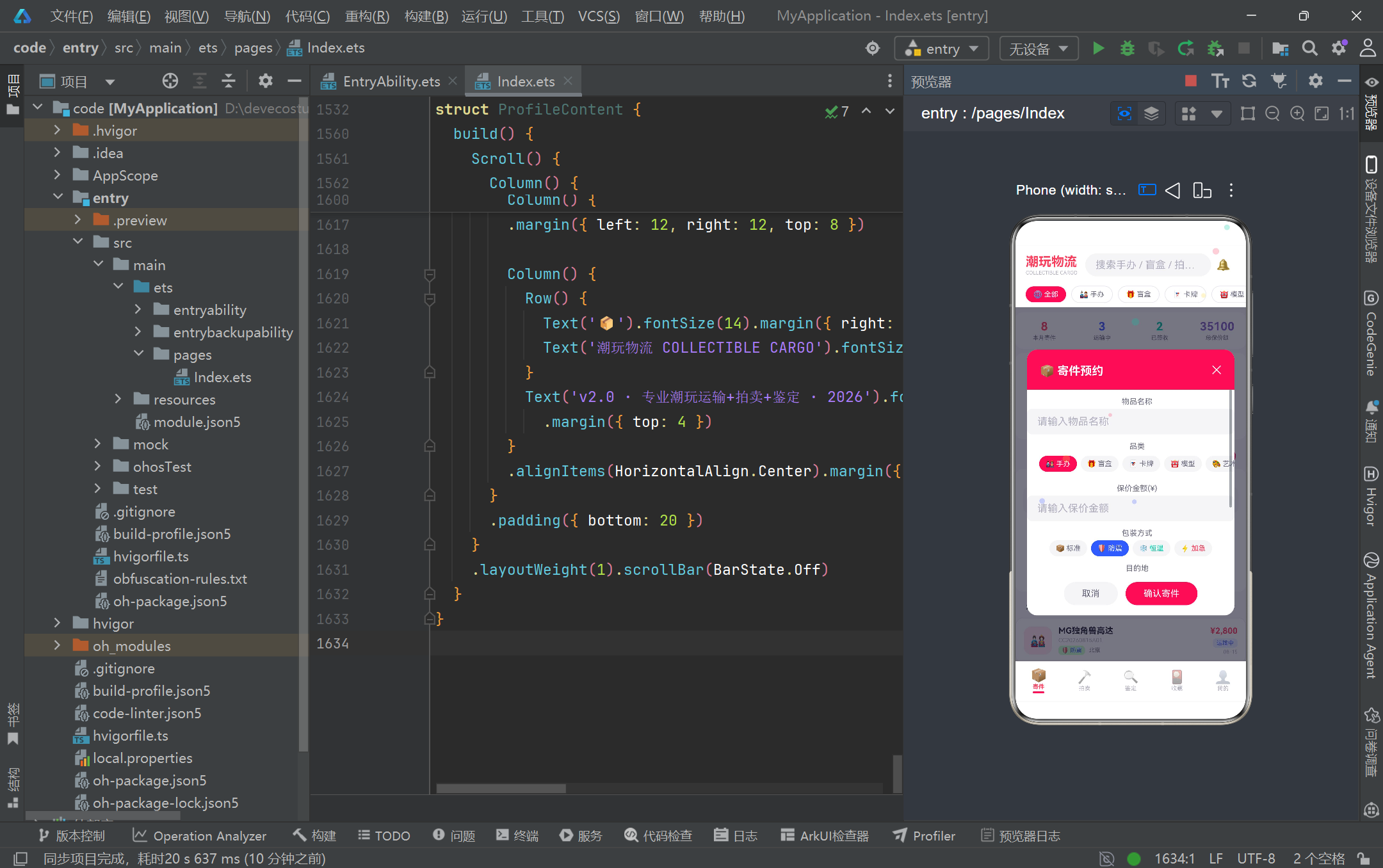
从工程实践角度,项目给我们最重要的启示是"数据与配置的彻底分离"。颜色不硬编码在组件里,而是抽为顶层 const 常量;品类、稀有度、状态、流程步骤的展示元数据不散落在 if-else 分支,而是集中到 Record 映射表;派生计算(价格格式化、百分比、粒子更新)不内联在 build 方法里,而是抽为纯函数。这种分离带来的直接收益是"三可替换":换数据源(mock→真实 API)、换主题(配色常量替换)、换展示规则(改映射表),三者互不干扰,符合关注点分离原则。同时,接口(CargoModel)与 @Observed 类(CargoItem)的分层,既保证了 ArkTS 严格类型校验(编译期防字段遗漏),又为响应式能力(运行时属性监听)留出空间,是类型安全与动态响应的平衡点。
在交互细节上,项目也示范了几项 ArkUI 的进阶技巧:HitTestMode.None 让装饰性粒子层事件透传,避免拦截下层点击;linearGradient 实现 135 度渐变背景,增强视觉层次;position + zIndex 实现模态弹窗的绝对定位与置顶;ForEach + 双数组并行索引解决不支持解构参数的列表渲染;setInterval 驱动轻量动画并在 aboutToAppear 启动。这些技巧虽不复杂,但都是 ArkTS 实战中的高频需求,掌握了它们即可举一反三地构建更复杂的业务页面。当然,项目也有可优化之处——setInterval 未在 aboutToDisappear 清理可能导致组件销毁后定时器仍在运行;ForEach 未提供显式 keyGenerator 在大数据量下可能影响 diff 性能;颜色拼接透明度(color + ‘15’)依赖字符串约定不够健壮,可改为 RGBA 函数调用。这些都是从演示项目走向生产级应用需要打磨的细节。
展望未来,基于 HarmonyOS ArkTS API 24 的潮玩手办物流平台还有广阔的演进空间。其一,可将静态 mock 数据替换为 @RemoteDataSource 或 HTTP 请求返回的接口实现,并引入 @StorageLink/@Persistent 实现跨页面与持久化的状态共享,让收藏列表在应用重启后仍可恢复。其二,可接入 HarmonyOS 的分布式能力,将"寄件订单"通过跨设备流转同步到平板或智慧屏,实现大屏查看物流详情、手机端操作的一致体验。其三,鉴定流程可引入系统级相机与图像分析能力,自动识别手办划痕与配件完整度,辅助评级判定。其四,拍卖模块可接入推送服务,在结拍前 10 分钟向参拍用户发送实时提醒,提升竞拍参与度。这些方向都能在 ArkTS 的声明式框架内自然延展,足见 HarmonyOS 6.1.1 生态为垂直业务创新提供的扎实底座。希望本篇解析能帮助开发者深入理解 ArkTS 的工程范式,并在自己的 HarmonyOS 应用中复用这些经过验证的设计模式与代码片段。

作为“人工智能6S店”的官方数字引擎,为AI开发者与企业提供一个覆盖软硬件全栈、一站式门户。
更多推荐
 2
2 0
0- 0


 已为社区贡献88条内容

所有评论(0)