
智慧理财投资平台鸿蒙基于HarmonyOS API 24的状态管理机制(如 @State、@Observed)天然契合金融应用中“数据驱动视图“的场景——行情涨跌、持仓变化、定投执行状态
一、背景与意义
随着移动互联网的深入普及和居民理财意识的全面觉醒,越来越多的普通投资者开始借助移动端应用进行基金、股票等资产的配置与管理。传统的理财方式往往依赖于 PC 端交易软件或线下柜台办理,操作链路长、信息获取滞后、决策辅助不足,已经难以满足现代投资者对"随时随地查看行情、一键完成定投、实时跟踪持仓收益"的高频诉求。
在这样的时代背景下,基于鸿蒙(HarmonyOS)生态构建一套智慧理财投资平台,具有相当重要的现实意义。鸿蒙系统凭借其分布式架构、统一开发语言 ArkTS、声明式 UI 编程范式以及接近原生的渲染性能,为金融类应用提供了极佳的运行底座。一方面,ArkTS 在 TypeScript 基础上扩展了声明式 UI 能力,使开发者可以用更接近自然语言的方式描述界面结构;另一方面,鸿蒙的状态管理机制(如 @State、@Observed)天然契合金融应用中"数据驱动视图"的场景——行情涨跌、持仓变化、定投执行状态等数据一旦更新,界面即可自动刷新,无需手动同步。
本文将要剖析的这套智慧理财投资平台,覆盖了行情浏览、持仓管理、定投计划、个人中心四大核心模块,几乎完整地还原了一个真实理财 App 的功能骨架。它不仅展示了如何用 ArkTS 组织复杂的业务页面,还演示了如何通过设计令牌(Design Token)、纯函数封装、Mock 数据驱动等工程化手段,让代码具备良好的可维护性与可扩展性。无论你是正在学习鸿蒙开发的入门者,还是希望借鉴金融类应用的架构实践,都可以从这份实现中获得启发。
接下来,我们将按照代码的自然组织顺序,从类型定义、数据模型、设计令牌、Mock 数据、纯函数工具、入口页面,到四大业务页面,逐段拆解每一处关键实现,并辅以详细的逐行解释,力求做到"看完即懂,看完能用"。
二、类型定义:构建坚实的静态类型契约
2.1 为什么先从类型定义开始
在任何一个有一定规模的前端工程中,类型定义(Type Definition)都是整个代码库的"骨架"。它不仅决定了编辑器能否给出精准的智能提示,更直接影响了运行时的数据是否可控。在金融类应用中,由于涉及大量金额、涨跌幅、风险等级等敏感数据,类型契约的严谨性尤为重要。本工程在文件最开头集中定义了一组 interface,为后续的组件、Mock 数据、纯函数提供了统一的类型约束。
2.2 基金类型元数据接口
interface FundTypeMeta {
  label: string
  icon: string
  color: string
  bg: string
}
这一段定义了"基金类型元数据"的结构。
label:类型的中文名称,例如"股票型""混合型"等,用于在界面上展示。icon:该类型对应的 emoji 图标,例如"📈"“⚖️”,用于在列表项前增加视觉辨识度。color:该类型对应的主色调,用于标签文字颜色。bg:该类型对应的背景色,用于标签底色,形成"浅底深字"的胶囊样式。
通过将基金类型的视觉属性集中到元数据中,后续新增类型时只需要在配置表里追加一行,而不需要修改任何渲染逻辑,这是典型的"数据驱动 UI"思想。
2.3 风险等级元数据接口
interface RiskMeta {
  label: string
  level: number
  color: string
  bg: string
  icon: string
}
RiskMeta 描述风险等级的元数据,比基金类型多了一个 level 字段。
label:风险等级名称,如"低风险"“高风险”。level:数值化风险等级,从 1 到 4 递增,方便做排序或比较。color、bg:风险标签的颜色与背景色,通常低风险用绿色、高风险用红色,符合用户直觉。icon:用彩色圆点 emoji(🟢🟡🟠🔴)直观传达风险高低。
风险等级是金融应用中最关键的合规要素之一,把它抽象成独立的元数据接口,有助于后续在多个页面统一复用,避免出现"同一风险等级在不同页面颜色不一致"的问题。
2.4 调色板接口
interface ColorPalette {
  primary: string
  secondary: string
  bg: string
  cardBg: string
  textPrimary: string
  textSecondary: string
  accent: string
  success: string
  warning: string
  danger: string
  border: string
}
ColorPalette 是整个应用的设计令牌容器,集中定义了 11 个语义化的颜色变量。
primary与secondary:主色与辅色,分别对应深绿与金黄,构成"金融深绿金风"的双主调。bg与cardBg:页面背景色与卡片背景色,bg用浅绿白营造柔和氛围,cardBg用纯白突出内容层级。textPrimary与textSecondary:主文字与次文字颜色,形成文字层级。accent:强调色,用于底部 Tab 选中态指示条等关键点缀。success、warning、danger:语义色,分别对应盈利、警示、亏损。border:边框色,用于分割线与卡片描边。
将颜色抽象为语义令牌后,整套应用如果想切换主题(例如夜间模式),只需要替换一个 COLORS 常量,所有引用了 COLORS.xxx 的地方都会自动跟随更新。
2.5 指数、配置、快捷操作、资讯分类、Tab 元数据接口
interface IndexMeta {
  label: string
  code: string
  icon: string
}

interface AllocMeta {
  label: string
  icon: string
  percent: number
  color: string
  amount: string
}

interface QuickActionMeta {
  label: string
  icon: string
  desc: string
}

interface NewsCatMeta {
  label: string
  icon: string
  color: string
  bg: string
}

interface TabMeta {
  label: string
  icon: string
  activeIcon: string
}
这一组接口分别服务于不同的展示场景。
IndexMeta:大盘指数(上证、深证、创业板、沪深300)的元数据,包含名称、代码与图标。AllocMeta:资产配置项,多了percent(百分比)和amount(金额字符串),用于绘制配置饼图与明细。QuickActionMeta:个人中心快捷操作项,包含标签、图标与描述,形成"图标 + 名称 + 描述"三行结构。NewsCatMeta:资讯分类元数据,结构与FundTypeMeta类似,复用了"标签 + 图标 + 颜色 + 背景"的胶囊样式。TabMeta:底部 Tab 项元数据,特别区分了icon(未选中)与activeIcon(选中)两套图标,实现选中态视觉切换。
通过这一层接口抽象,所有"可配置的展示单元"都被建模为统一的数据结构,后续的渲染逻辑可以基于这些接口编写通用模板,极大降低了重复代码。
三、数据模型:用 @Observed 让数据"活"起来
3.1 @Observed 装饰器的作用
在鸿蒙 ArkTS 中,@Observed 装饰器用于声明一个可观察的类。被它标注的类实例,其属性变化可以被框架自动追踪,从而驱动依赖该数据的 UI 自动刷新。这与 Vue 的响应式系统、React 的 state 概念异曲同工,但更加贴近语言层面。
在金融应用中,行情数据、持仓数据、定投计划数据几乎都是"动态"的,一旦后端推送了新的净值或涨跌幅,前端必须立刻反映出来。因此,本工程将四大核心业务实体都声明为 @Observed 类,为未来的实时数据接入预留了扩展空间。
3.2 基金/股票数据模型
@Observed
export class FundItem {
  id: number = 0
  name: string = ''
  code: string = ''
  type: string = ''
  nav: number = 0
  navChange: number = 0
  navChangeValue: number = 0
  riskLevel: string = ''
  scale: number = 0
  star: number = 0
  tag: string = ''
  isStock: boolean = false
  hot: boolean = false
  constructor(id: number, name: string, code: string, type: string, nav: number, navChange: number, navChangeValue: number, riskLevel: string, scale: number, star: number, tag: string, isStock: boolean, hot: boolean) {
    this.id = id; this.name = name; this.code = code; this.type = type
    this.nav = nav; this.navChange = navChange; this.navChangeValue = navChangeValue
    this.riskLevel = riskLevel; this.scale = scale; this.star = star
    this.tag = tag; this.isStock = isStock; this.hot = hot
  }
}
FundItem 是基金与股票的统一数据模型。注意它用 isStock 字段区分了两种资产类型,从而在同一个列表中混合展示。这种"统一模型 + 类型标记"的设计,让行情页可以同时展示基金和个股,而又能在渲染时通过 isStock 走不同的分支逻辑。
逐字段说明:
id:唯一标识,用于列表的 key 生成与去重。name、code:名称与代码,例如"易方达蓝筹精选混合"与"005827"。type:类型字符串,如"混合型"“股票型”“股票”。nav:净值(基金)或现价(股票),统一用nav字段承载。navChange:涨跌幅百分比,如 1.23 表示 +1.23%。navChangeValue:涨跌额,主要用于股票的绝对涨跌值展示。riskLevel:风险等级字符串,如"中高风险"。scale:基金规模(亿元),仅基金有意义,股票为 0。star:基金星级评级(1~5),股票为 0。tag:标签文字,如"消费龙头"“白酒龙头”。isStock:是否为股票。hot:是否为热门标的,用于显示"🔥HOT"标记。
构造函数采用"全参 + 行内赋值"的紧凑写法,虽然在可读性上略逊于分多行赋值,但能在数据初始化时保持代码紧凑。
3.3 持仓数据模型
@Observed
export class HoldingItem {
  id: number = 0
  name: string = ''
  code: string = ''
  type: string = ''
  shares: number = 0
  costPrice: number = 0
  currentPrice: number = 0
  marketValue: number = 0
  profit: number = 0
  profitPercent: number = 0
  dailyChange: number = 0
  isStock: boolean = false
  constructor(id: number, name: string, code: string, type: string, shares: number, costPrice: number, currentPrice: number, marketValue: number, profit: number, profitPercent: number, dailyChange: number, isStock: boolean) {
    this.id = id; this.name = name; this.code = code; this.type = type
    this.shares = shares; this.costPrice = costPrice; this.currentPrice = currentPrice
    this.marketValue = marketValue; this.profit = profit; this.profitPercent = profitPercent
    this.dailyChange = dailyChange; this.isStock = isStock
  }
}
HoldingItem 描述用户已持有的资产。与 FundItem 相比,它多了"持仓数量"“成本价”“现价”“市值”"盈亏"等持仓专属字段。
shares:持仓份额(基金)或股数(股票)。costPrice:持仓成本价。currentPrice:当前价格。marketValue:当前市值,由数量乘以现价得到。profit:累计盈亏金额。profitPercent:累计收益率百分比。dailyChange:当日涨跌幅,用于显示"今日"变化。
这一模型是持仓页的核心,所有盈亏计算、收益环展示、加仓减仓操作都围绕它展开。
3.4 定投计划数据模型
@Observed
export class PlanItem {
  id: number = 0
  fundName: string = ''
  fundCode: string = ''
  amount: number = 0
  frequency: string = ''
  day: string = ''
  totalInvested: number = 0
  totalProfit: number = 0
  times: number = 0
  nextDate: string = ''
  status: string = ''
  constructor(id: number, fundName: string, fundCode: string, amount: number, frequency: string, day: string, totalInvested: number, totalProfit: number, times: number, nextDate: string, status: string) {
    this.id = id; this.fundName = fundName; this.fundCode = fundCode
    this.amount = amount; this.frequency = frequency; this.day = day
    this.totalInvested = totalInvested; this.totalProfit = totalProfit
    this.times = times; this.nextDate = nextDate; this.status = status
  }
}
PlanItem 描述一个定投计划。定投是理财应用中非常重要的功能,它允许用户按照固定频率自动买入基金,从而摊薄成本。
amount:每期投入金额。frequency:定投频率,如"每周"“每两周”“每月”。day:执行时间,如"周一"“15日”。totalInvested:累计已投入金额。totalProfit:累计收益。times:已执行期数。nextDate:下次执行日期字符串。status:计划状态,“运行中"或"已暂停”。
通过这一模型,定投页可以完整呈现每个计划的执行进度与收益情况,并支持暂停、修改等操作。
3.5 资讯数据模型
@Observed
export class NewsItem {
  id: number = 0
  title: string = ''
  source: string = ''
  time: string = ''
  category: string = ''
  summary: string = ''
  hot: boolean = false
  constructor(id: number, title: string, source: string, time: string, category: string, summary: string, hot: boolean) {
    this.id = id; this.title = title; this.source = source; this.time = time
    this.category = category; this.summary = summary; this.hot = hot
  }
}
NewsItem 描述一条市场资讯。资讯在理财应用中承担"决策辅助"的角色,帮助用户理解行情背后的逻辑。
title:资讯标题。source:来源,如"财联社"“证券时报”。time:发布时间,如"2小时前"。category:分类,对应"政策"“板块”“资金”"数据"四种。summary:摘要,最多两行展示。hot:是否热门,用于显示🔥标记。
四、设计令牌:用一份调色板统一全局视觉
4.1 COLORS 调色板常量
const COLORS: ColorPalette = {
  primary: '#1B5E20',
  secondary: '#FFD700',
  bg: '#F1F8E9',
  cardBg: '#FFFFFF',
  textPrimary: '#1B5E20',
  textSecondary: '#558B2F',
  accent: '#FFD700',
  success: '#4CAF50',
  warning: '#FFA726',
  danger: '#D32F2F',
  border: '#E8F5E9'
}
这是全应用唯一一份调色板实例。注意它的配色策略:
primary选用#1B5E20(深绿),传达"稳健、财富、成长"的金融气质。secondary与accent选用#FFD700(金黄),呼应"金"的概念,同时作为强调色点亮关键操作。bg选用#F1F8E9(浅绿白),与主色形成同色系深浅对比,营造柔和又不失专业的氛围。success(绿)与danger(红)分别用于盈利与亏损,符合国内股市"红涨绿跌"的惯例(注意这里与欧美市场相反)。
整份调色板只有 11 个颜色,但已经足够支撑整个应用的所有视觉表达。这种"少而精"的配色策略,是金融类应用保持高级感的关键。
4.2 基金类型配置表
const FUND_TYPE_CONFIG: Record<string, FundTypeMeta> = {
  '股票型': { label: '股票型', icon: '📈', color: '#D32F2F', bg: '#FFEBEE' },
  '混合型': { label: '混合型', icon: '⚖️', color: '#1B5E20', bg: '#E8F5E9' },
  '债券型': { label: '债券型', icon: '🏦', color: '#1565C0', bg: '#E3F2FD' },
  '指数型': { label: '指数型', icon: '📊', color: '#7B1FA2', bg: '#F3E5F5' },
  'QDII': { label: 'QDII', icon: '🌍', color: '#00695C', bg: '#E0F2F1' },
  '股票': { label: '股票', icon: '💹', color: '#D32F2F', bg: '#FFEBEE' }
}
这是一个以类型名称为键、以 FundTypeMeta 为值的查找表。它把"基金类型 → 视觉表现"的映射关系完全数据化,新增类型时只需在表中追加一行。注意每种类型都配有独立的颜色与浅色背景,形成辨识度极高的胶囊标签。
4.3 风险等级配置表
const RISK_CONFIG: Record<string, RiskMeta> = {
  '低风险': { label: '低风险', level: 1, color: '#4CAF50', bg: '#E8F5E9', icon: '🟢' },
  '中风险': { label: '中风险', level: 2, color: '#FFA726', bg: '#FFF3E0', icon: '🟡' },
  '中高风险': { label: '中高风险', level: 3, color: '#FB8C00', bg: '#FFE0B2', icon: '🟠' },
  '高风险': { label: '高风险', level: 4, color: '#D32F2F', bg: '#FFEBEE', icon: '🔴' }
}
风险等级从低到高采用"绿 → 黄 → 橙 → 红"的渐进配色,与交通信号灯的色彩语义保持一致,用户无需阅读文字即可直觉性地感知风险等级。level 字段为后续可能的排序、筛选提供了数值依据。
4.4 指数、配置、快捷操作、资讯分类、Tab 配置表
const INDEX_CONFIG: IndexMeta[] = [
  { label: '上证指数', code: '000001', icon: '📈' },
  { label: '深证成指', code: '399001', icon: '📊' },
  { label: '创业板指', code: '399006', icon: '🚀' },
  { label: '沪深300', code: '000300', icon: '💎' }
]

const ALLOC_CONFIG: AllocMeta[] = [
  { label: '股票基金', icon: '📈', percent: 45, color: '#1B5E20', amount: '52,300元' },
  { label: '混合基金', icon: '⚖️', percent: 25, color: '#FFD700', amount: '29,000元' },
  { label: '债券基金', icon: '🏦', percent: 15, color: '#558B2F', amount: '17,400元' },
  { label: '股票', icon: '💹', percent: 10, color: '#D32F2F', amount: '11,600元' },
  { label: '货币基金', icon: '💰', percent: 5, color: '#4CAF50', amount: '5,800元' }
]
INDEX_CONFIG 是大盘指数列表,ALLOC_CONFIG 是资产配置明细,后者额外携带了 percent 与 amount,用于在个人中心绘制配置饼图与进度条。注意五个配置项的百分比加起来正好是 100%,数据自洽。
const QUICK_ACTION_CONFIG: QuickActionMeta[] = [
  { label: '交易记录', icon: '📋', desc: '查看买卖明细' },
  { label: '银行卡管理', icon: '💳', desc: '绑定/解绑银行卡' },
  { label: '风险评测', icon: '🎯', desc: '评估风险承受力' },
  { label: '账单导出', icon: '📤', desc: '导出投资报表' },
  { label: '消息通知', icon: '🔔', desc: '涨跌提醒设置' },
  { label: '帮助中心', icon: '❓', desc: '常见问题解答' }
]

const NEWS_CAT_CONFIG: Record<string, NewsCatMeta> = {
  '政策': { label: '政策', icon: '📜', color: '#1B5E20', bg: '#E8F5E9' },
  '板块': { label: '板块', icon: '🔥', color: '#D32F2F', bg: '#FFEBEE' },
  '资金': { label: '资金', icon: '💰', color: '#FFD700', bg: '#FFFDE7' },
  '数据': { label: '数据', icon: '📊', color: '#1565C0', bg: '#E3F2FD' }
}

const TAB_CONFIG: Record<number, TabMeta> = {
  0: { label: '行情', icon: '📉', activeIcon: '📊' },
  1: { label: '持仓', icon: '💼', activeIcon: '💼' },
  2: { label: '定投', icon: '📅', activeIcon: '📅' },
  3: { label: '我的', icon: '👤', activeIcon: '👤' }
}
这三个配置表分别服务于个人中心快捷操作、资讯分类标签、底部 Tab。TAB_CONFIG 用数字索引作为键,与后面的 InvestTab 枚举值一一对应,便于通过 Tab 枚举快速查找到对应的图标与文字。
4.5 常量数组
const FUND_FILTER: string[] = ['全部', '股票型', '混合型', '债券型', '指数型', 'QDII', '股票']
const WEEK_DAYS: string[] = ['一', '二', '三', '四', '五', '六', '日']
const MONTHS: string[] = ['1月', '2月', '3月', '4月', '5月', '6月']
const MONTHLY_RETURNS: number[] = [3.25, -1.20, 5.68, 2.15, -0.85, 4.32]
const MAX_RETURN: number = 5.68
const PLAN_FREQS: string[] = ['每周', '每两周', '每月']
const PLAN_DAYS_WEEKLY: string[] = ['周一', '周二', '周三', '周四', '周五']
const PLAN_DAYS_MONTHLY: string[] = ['1日', '5日', '10日', '15日', '20日', '25日']
这一组常量数组用于驱动各种选择器与图表。
FUND_FILTER:行情页的类型筛选标签序列。WEEK_DAYS:星期序列,用于日历或定投时间选择。MONTHS与MONTHLY_RETURNS:持仓页柱状图的横轴标签与对应收益数据。MAX_RETURN:6 个月内的最大收益绝对值,用作柱状图高度的归一化分母。PLAN_FREQS、PLAN_DAYS_WEEKLY、PLAN_DAYS_MONTHLY:定投计划表单的频率与执行时间选项。
把这些"静态选项"抽成常量,避免了在 JSX 中硬编码字符串数组,也方便后期做国际化扩展。
五、Mock 数据:让界面"先跑起来"的快速通道
5.1 为什么需要 Mock 数据
在实际项目开发中,后端接口往往滞后于前端页面。为了让前端能够独立完成界面验证、交互调试、视觉走查,必须准备一份模拟数据。本工程在文件中部集中定义了四组 Mock 数据,覆盖了行情、持仓、定投、资讯四大场景,使得整个应用无需任何后端即可独立运行展示。
5.2 基金/股票列表
const mockFunds: FundItem[] = [
  new FundItem(1, '易方达蓝筹精选混合', '005827', '混合型', 2.3456, 1.23, 0.0285, '中高风险', 412, 5, '消费龙头', false, true),
  new FundItem(2, '富国天惠成长混合', '161005', '混合型', 3.2109, 0.87, 0.0277, '中高风险', 287, 5, '成长精选', false, true),
  // ... 共 14 条
  new FundItem(14, '比亚迪', '002594', '股票', 245.60, 1.78, 4.29, '高风险', 0, 0, '新能源车', true, false)
]
mockFunds 包含 14 条数据,其中前 10 条为基金、后 4 条为股票。注意每条数据的字段顺序与 FundItem 构造函数完全一致。
- 第 1 条:易方达蓝筹精选混合,混合型,净值 2.3456,涨跌幅 +1.23%,五星评级,热门标的。
- 第 11 条起切换为股票:贵州茅台,现价 1685.50,涨跌幅 +0.89%,高风险,
isStock为true,scale与star都为 0(股票没有规模与星级)。
这种"混合列表"的设计,让行情页可以一屏展示基金与个股,更贴近真实理财 App 的体验。
5.3 持仓列表
const mockHoldings: HoldingItem[] = [
  new HoldingItem(1, '易方达蓝筹精选混合', '005827', '混合型', 5000, 2.10, 2.3456, 11728, 1228, 11.69, 1.23, false),
  // ... 共 8 条
  new HoldingItem(8, '广发科技动力', '005777', '股票型', 3000, 2.30, 2.5432, 7630, 730, 10.58, 3.21, false)
]
mockHoldings 包含 8 条持仓,覆盖了盈利与亏损两种情况。注意第 5 条招商银行的 profit 为 -1410、profitPercent 为 -7.32,这条数据用于验证亏损态的红色展示与负数格式化逻辑。每条数据都携带了成本价、现价、市值、盈亏等完整字段,足以驱动持仓页的所有展示与计算。
5.4 定投计划列表
const mockPlans: PlanItem[] = [
  new PlanItem(1, '易方达蓝筹精选混合', '005827', 500, '每周', '周一', 12000, 1567, 24, '2026-08-10', '运行中'),
  // ... 共 8 条
  new PlanItem(8, '工银前沿医疗股票', '001171', 700, '每月', '25日', 4900, -156, 7, '2026-08-25', '运行中')
]
mockPlans 包含 8 条定投计划,其中第 5 条景顺长城新兴成长的 status 为"已暂停"、totalProfit 为 -387,用于验证暂停态的橙色展示与负收益的红色展示。nextDate 字段统一使用了 2026 年 8 月的日期,体现了 Mock 数据的"当前时间快照"特性。
5.5 市场资讯列表
const mockNews: NewsItem[] = [
  new NewsItem(1, '央行宣布降准0.5个百分点 释放长期资金约1万亿元', '财联社', '2小时前', '政策', '人民银行决定于2026年8月15日下调金融机构存款准备金率0.5个百分点', true),
  // ... 共 8 条
  new NewsItem(8, '三季报业绩预告密集披露 超六成预喜', '中国证券报', '10小时前', '数据', '截至8月5日,已有1200家公司披露三季报预告,预喜率超65%', false)
]
mockNews 包含 8 条资讯,覆盖了"政策"“板块”“资金”"数据"四种分类。前两条标记为热门(hot: true),会在标题右侧显示🔥图标。资讯标题、摘要都采用了贴近真实的财经新闻话术,让 Demo 的代入感更强。
六、全局纯函数:把展示逻辑收敛到一处
6.1 纯函数的设计哲学
本工程在 Mock 数据之后定义了一组全局纯函数,把所有"颜色取值"“图标取值”"数字格式化"的逻辑统一收敛。这种做法有三个好处:第一,UI 渲染层不再需要写任何三元运算或 if 分支,代码更清爽;第二,所有展示规则集中可维护,修改一处即可全局生效;第三,纯函数无副作用,便于单元测试。
6.2 元数据取值函数
function getFundTypeColor(type: string): string { return FUND_TYPE_CONFIG[type]?.color ?? '#999999' }
function getFundTypeIcon(type: string): string { return FUND_TYPE_CONFIG[type]?.icon ?? '📊' }
function getFundTypeBg(type: string): string { return FUND_TYPE_CONFIG[type]?.bg ?? '#F5F5F5' }
function getRiskColor(level: string): string { return RISK_CONFIG[level]?.color ?? '#999999' }
function getRiskBg(level: string): string { return RISK_CONFIG[level]?.bg ?? '#F5F5F5' }
function getRiskIcon(level: string): string { return RISK_CONFIG[level]?.icon ?? '⚪' }
function getRiskLabel(level: string): string { return RISK_CONFIG[level]?.label ?? '未知' }
这一组函数都遵循相同的模式:通过可选链 ?. 从配置表中取值,并通过 ?? 提供默认值。
getFundTypeColor('股票型')返回'#D32F2F'。getFundTypeColor('未知类型')因为配置表中查不到,返回默认的'#999999'(灰色)。
这种"取值 + 兜底"的写法,保证了即使数据异常也不会导致界面崩溃,是金融类应用稳健性的重要保障。
6.3 涨跌与盈亏颜色函数
function getChangeColor(change: number): string { return change >= 0 ? '#D32F2F' : '#4CAF50' }
function getChangeIcon(change: number): string { return change >= 0 ? '↑' : '↓' }
function getProfitColor(profit: number): string { return profit >= 0 ? '#D32F2F' : '#4CAF50' }
function getProfitIcon(profit: number): string { return profit >= 0 ? '📈' : '📉' }
这四个函数封装了"红涨绿跌"的颜色与图标规则。
getChangeColor(1.23)返回红色#D32F2F。getChangeColor(-0.45)返回绿色#4CAF50。getProfitIcon(1228)返回📈,getProfitIcon(-1410)返回📉。
注意涨跌幅与盈亏使用了相同的颜色规则,这是因为它们本质上都是"正负号决定颜色"的场景,复用同一套逻辑可以减少认知负担。
6.4 状态与分类函数
function getPlanStatusColor(status: string): string { return status === '运行中' ? '#4CAF50' : '#FFA726' }
function getPlanStatusBg(status: string): string { return status === '运行中' ? '#E8F5E9' : '#FFF3E0' }
function getNewsCatColor(cat: string): string { return NEWS_CAT_CONFIG[cat]?.color ?? '#999999' }
function getNewsCatBg(cat: string): string { return NEWS_CAT_CONFIG[cat]?.bg ?? '#F5F5F5' }
function getNewsCatIcon(cat: string): string { return NEWS_CAT_CONFIG[cat]?.icon ?? '📰' }
getPlanStatusColor 与 getPlanStatusBg 用于定投计划的状态标签:运行中用绿色,已暂停用橙色。资讯分类的三个函数则复用了配置表取值的模式。
6.5 数字格式化函数
function formatProfit(profit: number): string { return profit >= 0 ? '+' + profit.toFixed(2) : profit.toFixed(2) }
function formatPercent(percent: number): string { return percent >= 0 ? '+' + percent.toFixed(2) + '%' : percent.toFixed(2) + '%' }
function formatNav(nav: number): string { return nav.toFixed(4) }
function formatPrice(price: number): string { return price.toFixed(2) }
function getStarText(star: number): string { return star > 0 ? '★'.repeat(star) + '☆'.repeat(5 - star) : '暂无评级' }
这一组函数处理数字的展示格式化。
formatProfit(1228)返回'+1228.00',formatProfit(-1410)返回'-1410.00'(负数本身带负号,无需额外加正号)。formatPercent(1.23)返回'+1.23%'。formatNav(2.3456)返回'2.3456'(基金净值保留 4 位小数)。formatPrice(1685.5)返回'1685.50'(股票价格保留 2 位小数)。getStarText(4)返回'★★★★☆',getStarText(0)返回'暂无评级'。
这些格式化函数把"金融数字展示规范"集中到一处,是保证全应用数字风格统一的关键。
6.6 汇总计算函数
function getTotalMarketValue(): number { return 11728 + 16855 + 21830 + 25687 + 17840 + 11926 + 12280 + 7630 }
function getTotalProfit(): number { return 1228 + 1055 + 2330 + 3287 - 1410 + 826 + 1280 + 730 }
function getTotalProfitPercent(): number { return (getTotalProfit() / (getTotalMarketValue() - getTotalProfit()) * 100) }
function getTodayProfit(): number { return 11728 * 0.0123 + 16855 * 0.0089 + 21830 * 0.0245 + 25687 * 0.0087 + 17840 * (-0.0056) + 11926 * 0.0215 + 12280 * 0.0178 + 7630 * 0.0321 }
function getActivePlanCount(): number { return 7 }
function getTotalInvested(): number { return 12000 + 9000 + 7200 + 6400 + 9600 + 5400 + 12000 + 4900 }
function getTotalPlanProfit(): number { return 1567 + 892 - 234 + 512 - 387 + 228 + 845 - 156 }
这一组函数计算持仓页与定投页的汇总数据。
getTotalMarketValue():8 条持仓市值累加,得到总资产。getTotalProfit():8 条持仓盈亏累加,得到总收益。getTotalProfitPercent():用总收益除以总成本(总市值减总收益)再乘 100,得到总收益率。这一公式是金融领域标准的收益率算法。getTodayProfit():用每条持仓的市值乘以当日涨跌幅,累加得到今日收益。getActivePlanCount():返回运行中的定投计划数。getTotalInvested()与getTotalPlanProfit():累加定投计划的累计投入与累计收益。
虽然这些值在 Mock 阶段是硬编码的,但函数化的封装让未来切换到真实接口时,只需要替换函数内部实现即可,调用方无需任何改动。
七、Tab 枚举与入口页面
7.1 Tab 枚举
enum InvestTab {
  MARKET = 0,
  HOLDING = 1,
  PLAN = 2,
  MINE = 3
}
InvestTab 枚举用数字 0~3 对应四个 Tab。使用枚举而非魔法数字,可以让 activeTab === InvestTab.MARKET 这样的判断语句具备自解释性,比 activeTab === 0 更易读、更安全。
7.2 入口页面结构
@Entry
@Component
struct InvestApp {
  @State activeTab: InvestTab = InvestTab.MARKET

  @Builder contentArea() {
    Column() {
      if (this.activeTab === InvestTab.MARKET) {
        MarketContent()
      } else if (this.activeTab === InvestTab.HOLDING) {
        HoldingContent()
      } else if (this.activeTab === InvestTab.PLAN) {
        PlanContent()
      } else {
        MineContent()
      }
    }
    .layoutWeight(1)
  }
  // ...
}
InvestApp 是整个应用的入口组件,用 @Entry 标注。它维护了一个核心状态 activeTab,默认值为 MARKET(行情页)。
@State activeTab:声明式状态,一旦变化,依赖它的 UI 会自动刷新。@Builder contentArea():内容区构建器,根据当前 Tab 渲染对应的子组件。if/else if/else的分支结构清晰地把四个页面分派开。.layoutWeight(1):让内容区占据除底部 Tab 外的全部剩余空间。
这种"状态驱动内容切换"的模式,是单页面多 Tab 应用的标准实现。
7.3 底部 Tab 项构建器
@Builder bottomTabItem(tab: InvestTab) {
  Column() {
    Text(this.activeTab === tab ? (TAB_CONFIG[tab]?.activeIcon ?? '📊') : (TAB_CONFIG[tab]?.icon ?? '📊'))
      .fontSize(20)
      .width('100%').textAlign(TextAlign.Center)
    Text(TAB_CONFIG[tab]?.label ?? '')
      .fontSize(10)
      .fontColor(this.activeTab === tab ? COLORS.primary : '#999999')
      .fontWeight(this.activeTab === tab ? FontWeight.Bold : FontWeight.Normal)
      .margin({ top: 2 })
      .width('100%').textAlign(TextAlign.Center)
    if (this.activeTab === tab) {
      Column().width(18).height(3)
        .backgroundColor(COLORS.accent).borderRadius(2).margin({ top: 2 })
    }
  }
  .layoutWeight(1)
  .padding({ top: 6, bottom: 6 })
  .onClick(() => { this.activeTab = tab })
}
bottomTabItem 是单个底部 Tab 项的构建器,接受一个 InvestTab 参数。
- 图标行:根据当前是否选中,从
TAB_CONFIG中取activeIcon或icon,并兜底为'📊'。 - 文字行:选中时用主色加粗,未选中时用灰色常规字重。
- 指示条:仅当
this.activeTab === tab时渲染一条 18×3 的金色小条,作为选中态的视觉锚点。 .onClick:点击后将activeTab切换为当前 Tab,触发整个内容区与所有 Tab 项的重新渲染。
这种"参数化 Builder"的写法,让四个 Tab 项可以复用同一套渲染逻辑,避免了四段几乎重复的代码。
7.4 入口 build 方法
build() {
  Column() {
    this.contentArea()
    Row() {
      this.bottomTabItem(InvestTab.MARKET)
      this.bottomTabItem(InvestTab.HOLDING)
      this.bottomTabItem(InvestTab.PLAN)
      this.bottomTabItem(InvestTab.MINE)
    }
    .width('100%')
    .backgroundColor('#FFFFFF')
    .padding({ top: 4, bottom: 6 })
    .shadow({ radius: 8, color: '#1A000000', offsetY: -2 })
  }
  .width('100%').height('100%')
  .backgroundColor(COLORS.bg)
}
build 方法把内容区与底部 Tab 拼装成一个完整的页面。
- 顶部
Column用.layoutWeight(1)的内容区撑满主区域。 - 底部
Row横向排列四个 Tab 项,用白底 + 向上投影模拟 Material Design 的底部导航栏效果。 - 最外层
Column用COLORS.bg作为页面背景色,统一全局氛围。
至此,应用的整体骨架就搭建完成了。接下来我们逐个剖析四个业务页面。
八、行情页:信息密度极高的市场看板
8.1 页面状态
@Component
struct MarketContent {
  @State searchKeyword: string = ''
  @State selectedType: string = '全部'
  // ...
}
MarketContent 维护两个状态:
searchKeyword:搜索框输入的关键词,绑定到TextInput的onChange。selectedType:当前选中的基金类型筛选标签,默认"全部"。
这两个状态共同决定了列表的展示内容,虽然当前 Mock 数据未做实际过滤,但状态已经预留,未来接入真实过滤逻辑时无需改动结构。
8.2 指数卡片构建器
@Builder indexCard(idx: number, name: string, code: string, price: string, change: number, icon: string) {
  Column() {
    Row() {
      Text(icon).fontSize(14)
      Text(name).fontSize(10).fontColor(COLORS.textSecondary).margin({ left: 3 })
    }
    .width('100%')
    Text(price).fontSize(15).fontWeight(FontWeight.Bold)
      .fontColor(getChangeColor(change))
      .width('100%').textAlign(TextAlign.Center)
      .margin({ top: 3 })
    Row() {
      Text(getChangeIcon(change)).fontSize(10)
        .fontColor(getChangeColor(change))
      Text(formatPercent(change)).fontSize(10)
        .fontColor(getChangeColor(change))
        .margin({ left: 1 })
    }
    .margin({ top: 1 })
  }
  .layoutWeight(1)
  .padding({ top: 10, bottom: 10, left: 6, right: 6 })
  .backgroundColor(idx % 2 === 0 ? '#FFFFFF' : '#F8FDF5')
  .borderRadius(8)
}
indexCard 是顶部指数卡片的构建器,参数包括序号、名称、代码、价格、涨跌幅、图标。
- 顶部行:图标 + 指数名称,用次要文字色显示。
- 中部:价格大字加粗,颜色由
getChangeColor决定红绿。 - 底部行:涨跌箭头 + 百分比,颜色与价格保持一致。
.layoutWeight(1):让四张卡片均分宽度。.backgroundColor:根据idx奇偶性切换白色与极浅绿,形成微妙的斑马纹效果。
这种细节设计让顶部四张指数卡片在视觉上既统一又有节奏感。
8.3 基金/股票列表项构建器
@Builder fundItemBuilder(f: FundItem) {
  Column() {
    Row() {
      Column() {
        Text(f.isStock ? '💹' : getFundTypeIcon(f.type)).fontSize(22)
        if (f.hot) {
          Text('🔥HOT').fontSize(8).fontColor('#FFFFFF')
            .backgroundColor('#D32F2F')
            .padding({ left: 4, right: 4, top: 1, bottom: 1 })
            .borderRadius(4).margin({ top: 2 })
        }
      }
      .width(48).padding({ top: 2 })
      // ... 中间信息列与右侧价格列
    }
    .width('100%').padding({ left: 12, right: 12, top: 10, bottom: 10 })

    Row() {
      Text('加自选').fontSize(10).fontColor(COLORS.primary)
        .padding({ left: 10, right: 10, top: 4, bottom: 4 })
        .backgroundColor('#E8F5E9').borderRadius(10)
      Text('对比').fontSize(10).fontColor('#1565C0')
        .padding({ left: 10, right: 10, top: 4, bottom: 4 })
        .backgroundColor('#E3F2FD').borderRadius(10)
        .margin({ left: 6 })
      Column().layoutWeight(1)
      Text('详情 >').fontSize(10).fontColor('#888888')
    }
    .width('100%').padding({ left: 12, right: 12, bottom: 8 })
  }
  .width('100%').backgroundColor('#FFFFFF')
  .borderRadius(12).margin({ left: 12, right: 12, top: 6 })
  .shadow({ radius: 4, color: '#0D1B5E20', offsetY: 2 })
}
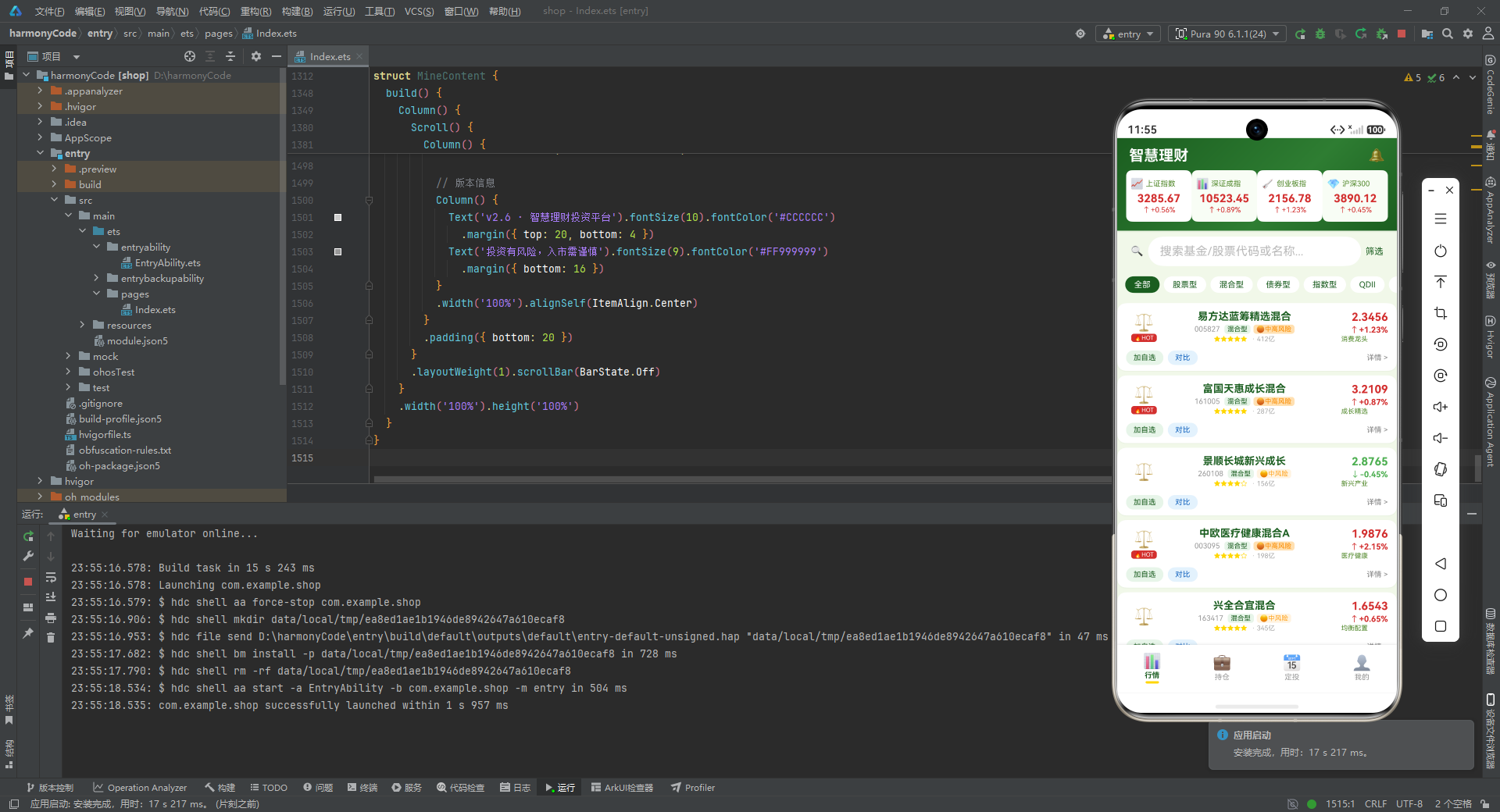
fundItemBuilder 是行情页最复杂的构建器,每个列表项分为上下两部分。
上半部分是一个三列布局:
- 左列(48px 宽):类型图标,股票用 💹,基金用
getFundTypeIcon取值;如果是热门标的,下方再追加一个红底白字的"🔥HOT"小标签。 - 中列(layoutWeight 撑满):基金名称加粗、代码与类型胶囊、星级或标签。注意基金与股票的展示分支不同——基金显示星级与规模,股票显示标签文字。
- 右列(90px 宽):净值或现价、涨跌箭头与百分比、额外信息(股票显示涨跌额,基金显示标签)。
下半部分是操作栏:加自选、对比两个胶囊按钮,右侧"详情 >"引导跳转。
整个列表项用白底圆角卡片 + 浅投影呈现,符合金融应用"卡片化、留白充足"的视觉风格。
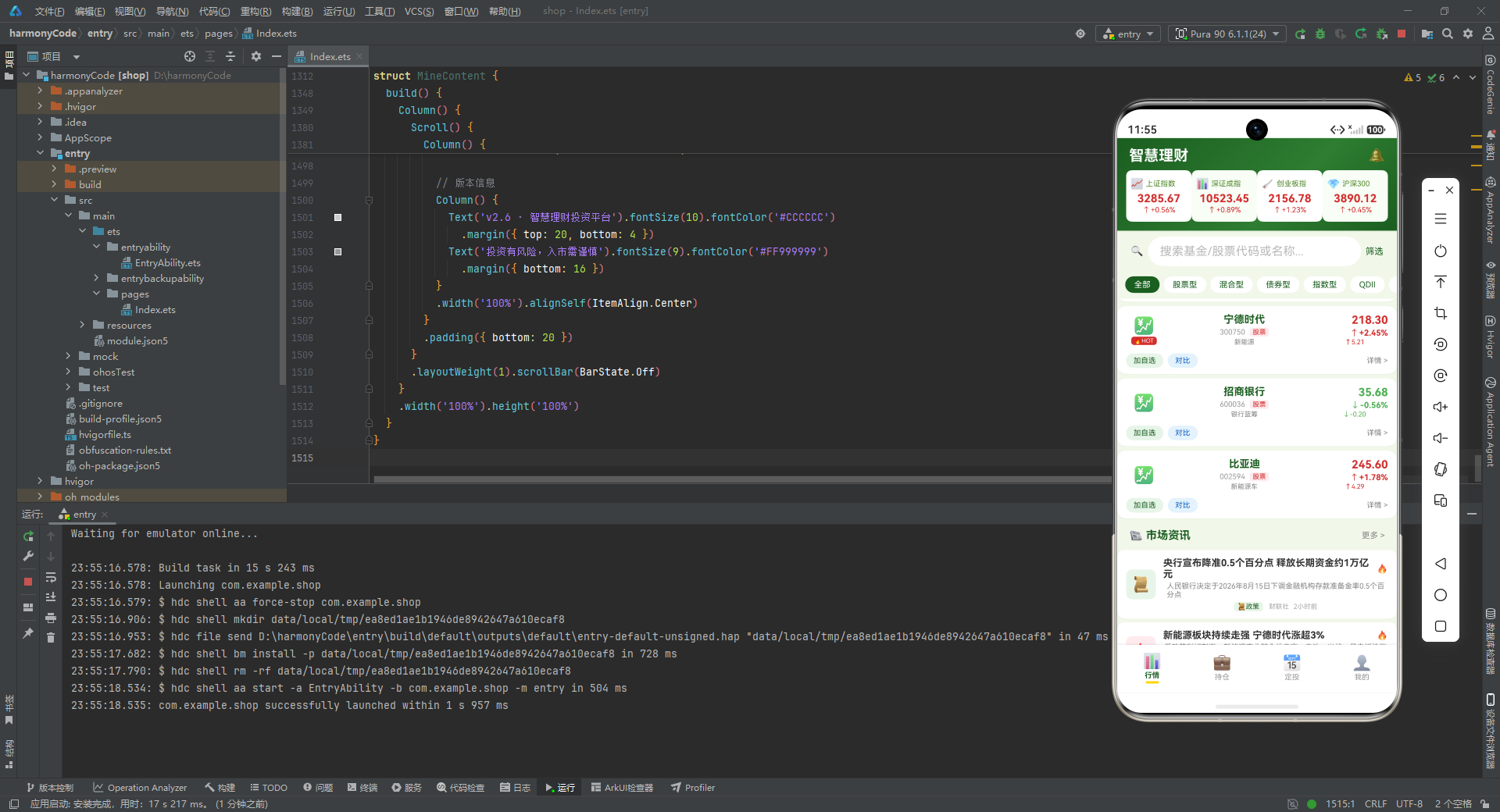
8.4 资讯列表项构建器
@Builder newsItemBuilder(n: NewsItem) {
  Column() {
    Row() {
      Column() {
        Text(getNewsCatIcon(n.category)).fontSize(20)
      }.width(40).height(40)
      .backgroundColor(getNewsCatBg(n.category)).borderRadius(8)
      .justifyContent(FlexAlign.Center)

      Column() {
        Row() {
          Text(n.title).fontSize(13).fontWeight(FontWeight.Bold).fontColor('#333333')
            .layoutWeight(1)
          if (n.hot) {
            Text('🔥').fontSize(12).margin({ left: 4 })
          }
        }
        .width('100%')
        Text(n.summary).fontSize(10).fontColor('#888888')
          .maxLines(2).textOverflow({ overflow: TextOverflow.Ellipsis })
          .margin({ top: 3 })
        Row() {
          Text(getNewsCatIcon(n.category) + NEWS_CAT_CONFIG[n.category]?.label)
            .fontSize(9).fontColor(getNewsCatColor(n.category))
            .backgroundColor(getNewsCatBg(n.category))
            .padding({ left: 5, right: 5, top: 1, bottom: 1 }).borderRadius(4)
          Text(n.source).fontSize(9).fontColor('#AAAAAA').margin({ left: 8 })
          Text(n.time).fontSize(9).fontColor('#AAAAAA').margin({ left: 6 })
        }
        .margin({ top: 4 })
      }
      .layoutWeight(1).padding({ left: 10 })
    }
    .width('100%').padding({ left: 12, right: 12, top: 10, bottom: 10 })
  }
  .width('100%').backgroundColor('#FFFFFF')
  .borderRadius(10).margin({ left: 12, right: 12, top: 5 })
  .shadow({ radius: 2, color: '#0D000000', offsetY: 1 })
}
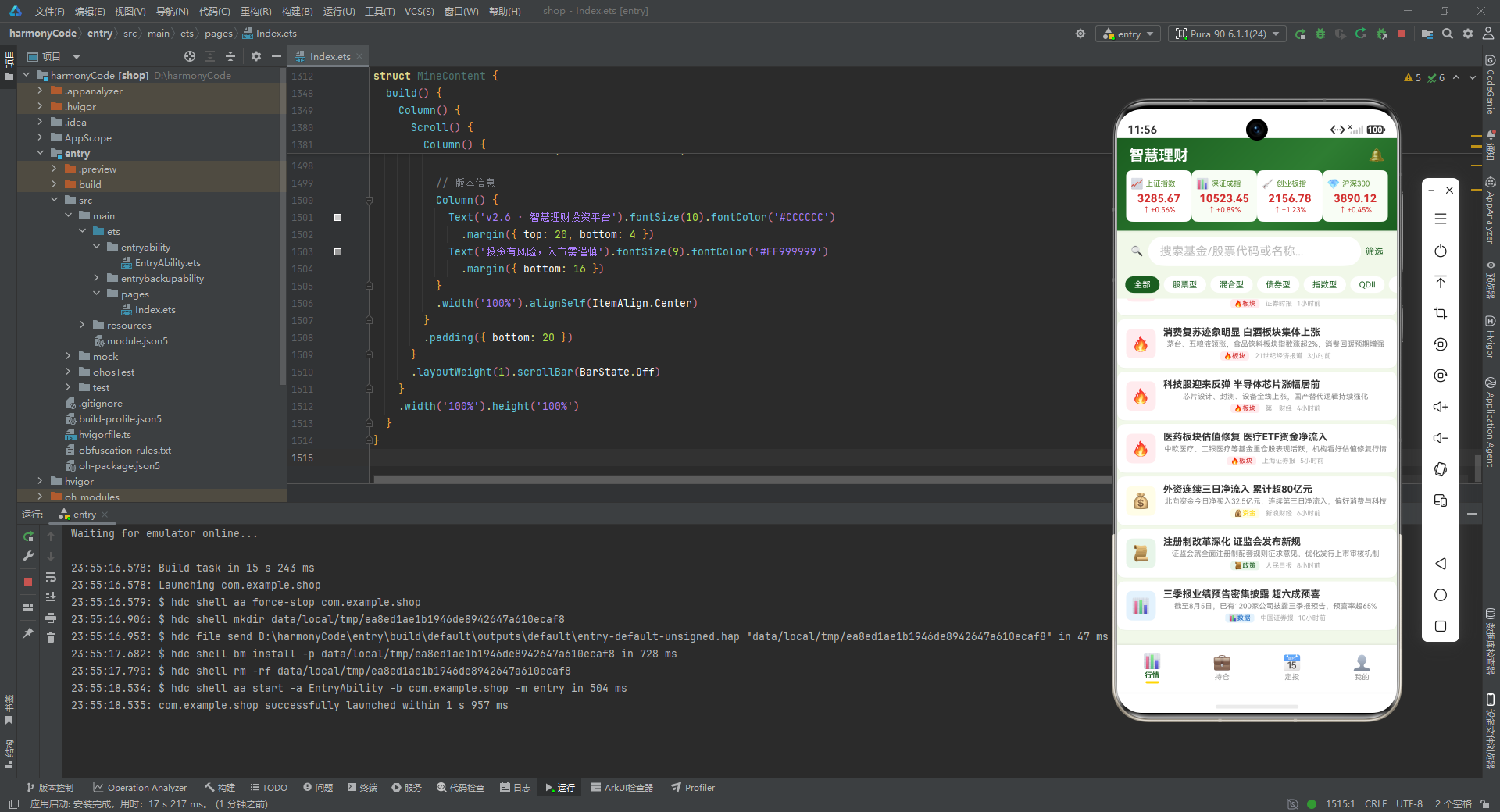
newsItemBuilder 渲染资讯卡片。
- 左侧:40×40 的彩色圆角图标块,背景色由资讯分类决定。
- 右侧:标题行(标题 + 可选的🔥)、摘要(最多两行,超出省略号)、底部行(分类胶囊 + 来源 + 时间)。
注意 maxLines(2).textOverflow({ overflow: TextOverflow.Ellipsis }) 这一行,它控制摘要最多显示两行,超出部分用省略号收尾,避免长摘要撑爆卡片高度。这是金融资讯流常见的文本截断策略。
8.5 行情页 build 方法
build() {
  Column() {
    // 顶部渐变标题栏
    Column() {
      Row() {
        Text('智慧理财').fontSize(20).fontWeight(FontWeight.Bold).fontColor('#FFFFFF')
        Column().layoutWeight(1)
        Text('🔔').fontSize(18)
      }
      .width('100%').padding({ left: 16, right: 16, top: 12, bottom: 8 })

      Row() {
        this.indexCard(0, '上证指数', '000001', '3285.67', 0.56, '📈')
        this.indexCard(1, '深证成指', '399001', '10523.45', 0.89, '📊')
        this.indexCard(2, '创业板指', '399006', '2156.78', 1.23, '🚀')
        this.indexCard(3, '沪深300', '000300', '3890.12', 0.45, '💎')
      }
      .width('100%').padding({ left: 12, right: 12, bottom: 12 })
    }
    .width('100%')
    .linearGradient({ angle: 135, colors: [['#1B5E20', 0], ['#2E7D32', 0.6], ['#1B5E20', 1]] })
    .shadow({ radius: 6, color: '#1A1B5E20', offsetY: 3 })

    // 搜索栏
    Row() {
      Text('🔍').fontSize(14).margin({ left: 10 })
      TextInput({ placeholder: '搜索基金/股票代码或名称...' })
        .placeholderColor('#BBBBBB').fontSize(13).layoutWeight(1)
        .backgroundColor('#FFFFFF').borderRadius(20)
        .margin({ left: 6, right: 6 })
        .onChange((v: string) => { this.searchKeyword = v })
      Text('筛选').fontSize(12).fontColor(COLORS.primary)
        .margin({ right: 10 })
    }
    .width('100%').padding({ left: 8, right: 8, top: 8, bottom: 6 })

    // 类型筛选
    Scroll() {
      Row() {
        ForEach(FUND_FILTER, (t: string) => {
          if (this.selectedType === t) {
            Text(t).fontSize(11).fontColor('#FFFFFF')
              .backgroundColor(COLORS.primary)
              .padding({ left: 12, right: 12, top: 5, bottom: 5 }).borderRadius(14)
              .margin({ left: 3, right: 3 })
          } else {
            Text(t).fontSize(11).fontColor(COLORS.primary)
              .backgroundColor('#FFFFFF')
              .padding({ left: 12, right: 12, top: 5, bottom: 5 }).borderRadius(14)
              .margin({ left: 3, right: 3 })
              .onClick(() => { this.selectedType = t })
          }
        }, (t: string) => t)
      }
      .padding({ left: 8, right: 8 })
    }
    .scrollable(ScrollDirection.Horizontal).scrollBar(BarState.Off).height(38)

    // 主内容列表
    Scroll() {
      Column() {
        this.fundItemBuilder(mockFunds[0])
        // ... 共 14 条
        this.fundItemBuilder(mockFunds[13])

        Row() {
          Text('📰 市场资讯').fontSize(15).fontWeight(FontWeight.Bold).fontColor(COLORS.textPrimary)
          Column().layoutWeight(1)
          Text('更多 >').fontSize(11).fontColor('#888888')
        }
        .width('100%').padding({ left: 16, right: 16, top: 14, bottom: 6 })

        this.newsItemBuilder(mockNews[0])
        // ... 共 8 条
        this.newsItemBuilder(mockNews[7])
      }
      .padding({ bottom: 20 })
    }
    .layoutWeight(1).scrollBar(BarState.Off)
  }
  .width('100%').height('100%')
}
build 方法自上而下分为四个区块:
- 渐变标题栏:白字"智慧理财"标题 + 通知图标,下方横向排列四张指数卡片。整个标题栏用
linearGradient实现 135 度角的三段式渐变(深绿 → 中绿 → 深绿),并向下投影,营造层次感。 - 搜索栏:放大镜图标 + 圆角输入框 + 筛选按钮,输入框圆角 20 形成胶囊形。
- 类型筛选条:横向可滚动的胶囊标签序列,选中态用主色实底白字,未选中态用白底主色字,点击切换。
scrollable(ScrollDirection.Horizontal)让标签可以横向滚动,scrollBar(BarState.Off)隐藏滚动条保持视觉干净。 - 主内容列表:纵向滚动区域,先渲染 14 个基金/股票列表项,再渲染"市场资讯"小标题与 8 条资讯卡片。
整个行情页信息密度极高,但通过分区、配色与卡片的合理运用,依然保持了良好的可读性。
九、持仓页:总资产卡片与收益可视化
9.1 页面状态与删除弹窗
@Component
struct HoldingContent {
  @State showDeleteModal: boolean = false
  @State selectedHolding: HoldingItem | null = null

  @Builder modalOverlay(onClose: () => void) {
    Column()
      .width('100%').height('100%')
      .backgroundColor('rgba(0,0,0,0.5)')
      .onClick(onClose)
  }
  // ...
}
HoldingContent 维护两个状态:
showDeleteModal:是否显示删除确认弹窗。selectedHolding:当前选中的待删除持仓项,类型为HoldingItem | null,用联合类型表达"可能为空"的语义。
modalOverlay 是一个通用的遮罩层构建器,接受一个 onClose 回调,点击遮罩时触发关闭。半透明黑色背景是弹窗的标准遮罩样式。
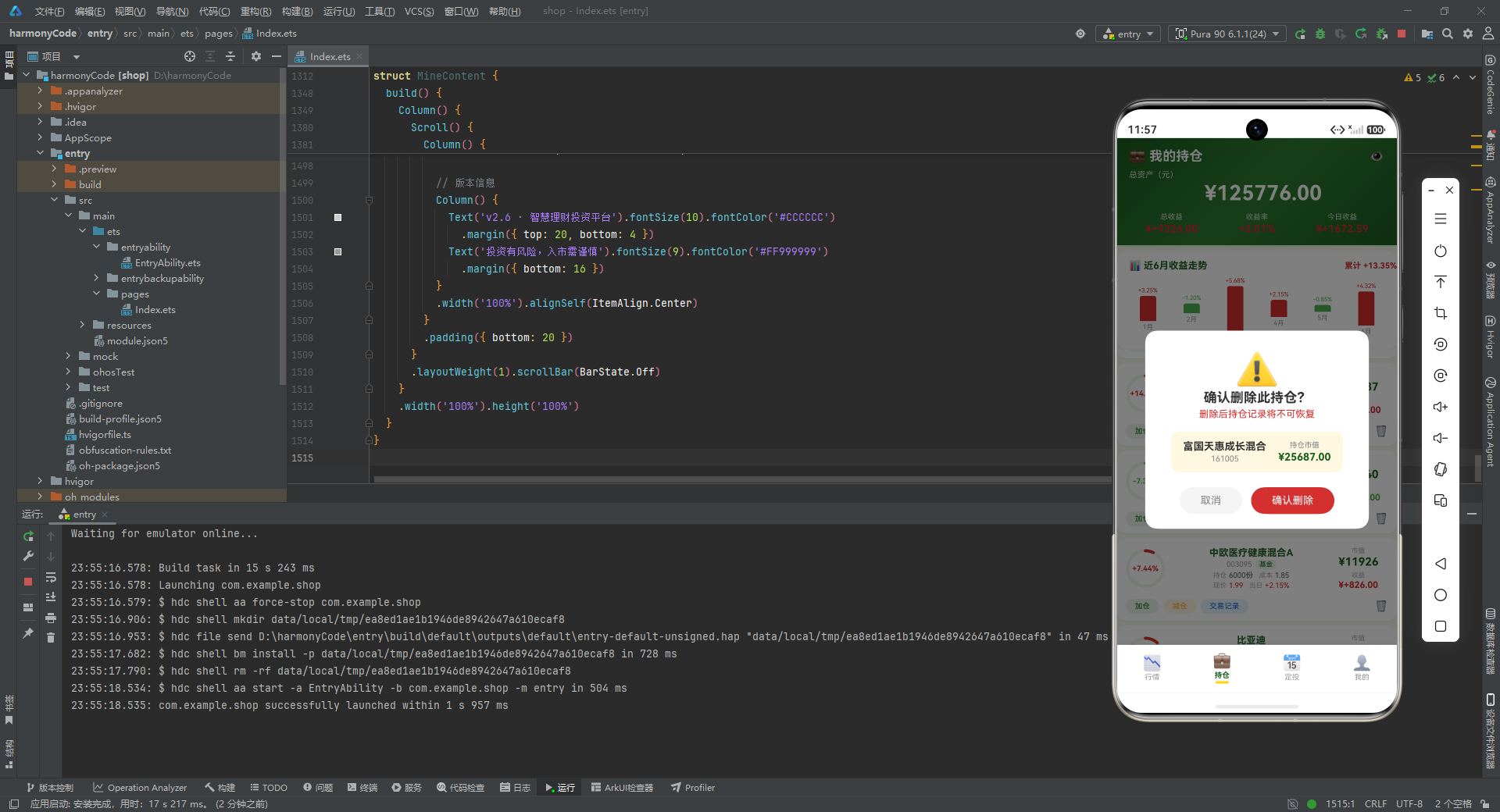
9.2 删除确认弹窗
@Builder deleteConfirmModal() {
  Column() {
    this.modalOverlay(() => { this.showDeleteModal = false })
    Column() {
      Text('⚠️').fontSize(48).margin({ top: 24 })
      Text('确认删除此持仓?').fontSize(18).fontWeight(FontWeight.Bold).fontColor('#333333')
      Text('删除后持仓记录将不可恢复').fontSize(13).fontColor('#D32F2F').margin({ top: 4 })
      Row() {
        Column() {
          Text(this.selectedHolding?.name ?? '').fontSize(14).fontColor('#333333')
            .fontWeight(FontWeight.Bold)
          Text(this.selectedHolding?.code ?? '').fontSize(11).fontColor('#888888').margin({ top: 2 })
        }
        .alignSelf(ItemAlign.Center)
        Column() {
          Text('持仓市值').fontSize(10).fontColor('#888888')
          Text('¥' + (this.selectedHolding?.marketValue ?? 0).toFixed(2))
            .fontSize(14).fontColor(COLORS.textPrimary).fontWeight(FontWeight.Bold)
            .margin({ top: 2 })
        }
        .margin({ left: 16 })
      }
      .backgroundColor('#FFF8E1').borderRadius(10)
      .padding({ left: 16, right: 16, top: 12, bottom: 12 }).margin({ top: 16 })

      Row() {
        Text('取消').fontSize(14).fontColor('#888888')
          .backgroundColor('#F5F5F5').borderRadius(20)
          .padding({ left: 28, right: 28, top: 10, bottom: 10 })
          .onClick(() => { this.showDeleteModal = false })
        Text('确认删除').fontSize(14).fontColor('#FFFFFF')
          .backgroundColor('#D32F2F').borderRadius(20)
          .padding({ left: 28, right: 28, top: 10, bottom: 10 })
          .margin({ left: 12 })
          .onClick(() => { this.showDeleteModal = false })
      }
      .width('100%').justifyContent(FlexAlign.Center)
      .padding({ left: 20, right: 20, top: 20, bottom: 20 })
    }
    .width('80%').backgroundColor('#FFFFFF').borderRadius(16)
    .alignSelf(ItemAlign.Center)
    .position({ x: '10%', y: '38%' })
  }
  .width('100%').height('100%').position({ x: 0, y: 0 }).zIndex(999)
}
deleteConfirmModal 是删除确认弹窗,结构分为遮罩层与内容卡片两层。
- 内容卡片顶部:大号警告图标 ⚠️、标题、红色提示语。
- 中部:浅黄底的信息块,展示待删除持仓的名称、代码与市值。
- 底部:取消与确认删除两个胶囊按钮,确认按钮用红色实底强调危险操作。
.position({ x: '10%', y: '38%' }):用绝对定位把卡片放在屏幕中部偏上。.zIndex(999):确保弹窗层级高于页面其他内容。
注意所有对 selectedHolding 的访问都用了 ?. 可选链与 ?? 默认值,即便 selectedHolding 为 null,界面也不会崩溃,而是显示空字符串或 0。这是金融类应用处理可空状态的典范写法。
9.3 持仓列表项构建器
@Builder holdingItemBuilder(h: HoldingItem) {
  Column() {
    Row() {
      // 收益环
      Stack() {
        Progress({ value: Math.abs(h.profitPercent), total: 100, type: ProgressType.Ring })
          .width(52).height(52)
          .color(getProfitColor(h.profit))
          .backgroundColor('#E8F5E9')
        Column() {
          Text(formatPercent(h.profitPercent)).fontSize(10)
            .fontColor(getProfitColor(h.profit))
            .fontWeight(FontWeight.Bold)
        }
        .justifyContent(FlexAlign.Center)
      }
      .width(52).height(52)

      // 中间信息
      Column() {
        Text(h.name).fontSize(13).fontWeight(FontWeight.Bold).fontColor(COLORS.textPrimary)
        Row() {
          Text(h.code).fontSize(10).fontColor('#999999')
          Text(h.isStock ? '股票' : '基金').fontSize(9).fontColor(getFundTypeColor(h.type))
            .backgroundColor(getFundTypeBg(h.type))
            .padding({ left: 4, right: 4, top: 1, bottom: 1 })
            .borderRadius(4).margin({ left: 6 })
        }
        .margin({ top: 2 })
        Row() {
          Text('持仓').fontSize(9).fontColor('#AAAAAA')
          Text(h.isStock ? h.shares + '股' : h.shares + '份').fontSize(10).fontColor('#555555')
            .margin({ left: 3 })
          Text('成本').fontSize(9).fontColor('#AAAAAA').margin({ left: 8 })
          Text(formatPrice(h.costPrice)).fontSize(10).fontColor('#555555').margin({ left: 3 })
        }
        .margin({ top: 3 })
        Row() {
          Text('现价').fontSize(9).fontColor('#AAAAAA')
          Text(formatPrice(h.currentPrice)).fontSize(10)
            .fontColor(getChangeColor(h.dailyChange))
            .margin({ left: 3 })
          Text('当日').fontSize(9).fontColor('#AAAAAA').margin({ left: 8 })
          Text(formatPercent(h.dailyChange)).fontSize(10)
            .fontColor(getChangeColor(h.dailyChange))
            .margin({ left: 3 })
        }
        .margin({ top: 2 })
      }
      .layoutWeight(1).padding({ left: 12 })

      // 右侧市值
      Column() {
        Text('市值').fontSize(9).fontColor('#AAAAAA')
        Text('¥' + h.marketValue.toFixed(0)).fontSize(15).fontWeight(FontWeight.Bold)
          .fontColor(COLORS.textPrimary).margin({ top: 1 })
        Text('收益').fontSize(9).fontColor('#AAAAAA').margin({ top: 4 })
        Text('¥' + formatProfit(h.profit)).fontSize(12)
          .fontColor(getProfitColor(h.profit))
          .fontWeight(FontWeight.Bold).margin({ top: 1 })
      }
      .width(80).alignSelf(ItemAlign.Center)
    }
    .width('100%').padding(12)

    // 操作栏
    Row() {
      Text('加仓').fontSize(10).fontColor(COLORS.primary)
        .padding({ left: 12, right: 12, top: 4, bottom: 4 })
        .backgroundColor('#E8F5E9').borderRadius(10)
      Text('减仓').fontSize(10).fontColor('#FFA726')
        .padding({ left: 12, right: 12, top: 4, bottom: 4 })
        .backgroundColor('#FFF3E0').borderRadius(10)
        .margin({ left: 6 })
      Text('交易记录').fontSize(10).fontColor('#1565C0')
        .padding({ left: 12, right: 12, top: 4, bottom: 4 })
        .backgroundColor('#E3F2FD').borderRadius(10)
        .margin({ left: 6 })
      Column().layoutWeight(1)
      Text('🗑️').fontSize(14)
        .onClick(() => {
          this.selectedHolding = h
          this.showDeleteModal = true
        })
    }
    .width('100%').padding({ left: 12, right: 12, bottom: 10 })
  }
  .width('100%').backgroundColor('#FFFFFF')
  .borderRadius(12).margin({ left: 12, right: 12, top: 6 })
  .shadow({ radius: 4, color: '#0D1B5E20', offsetY: 2 })
}
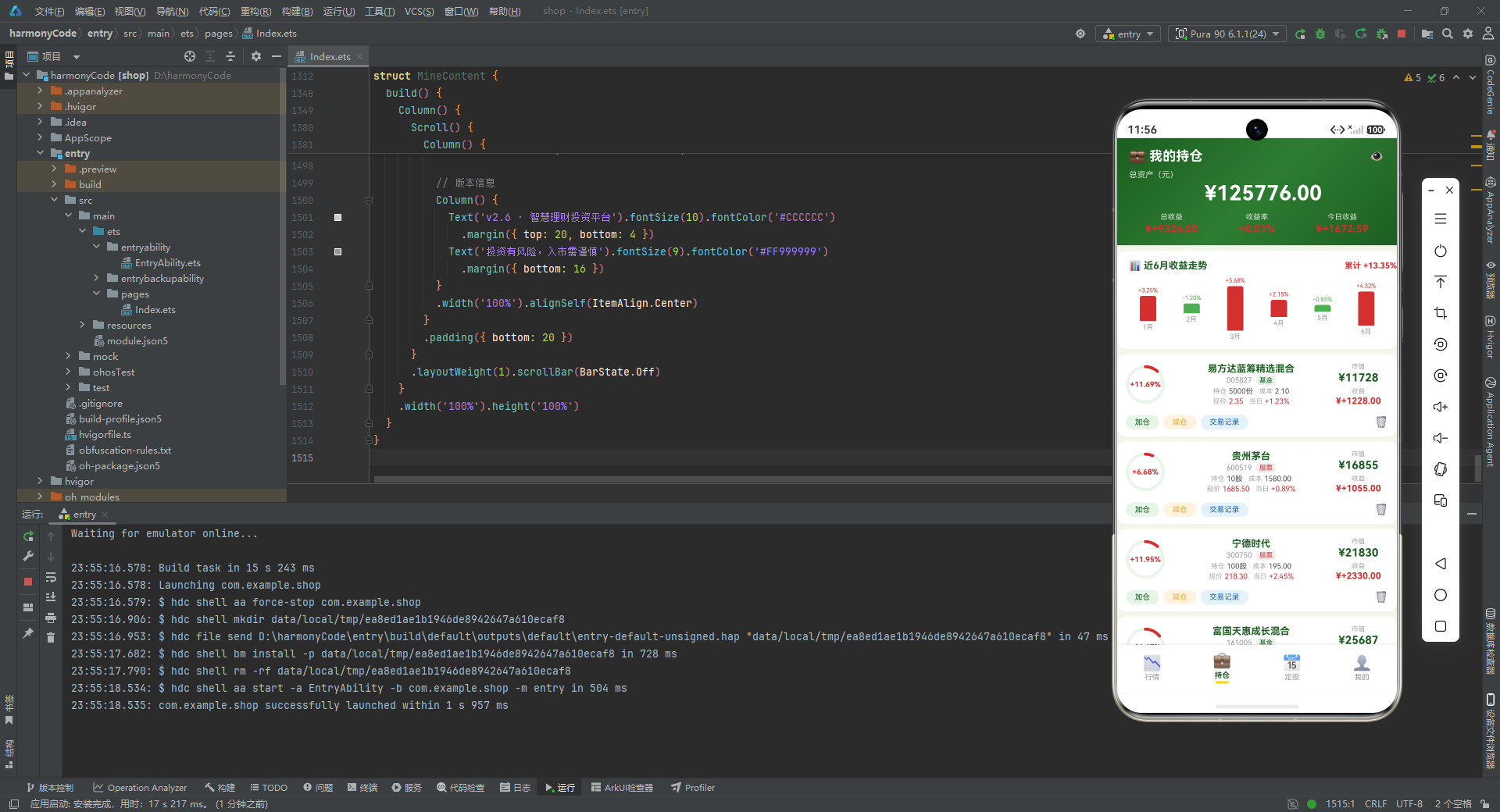
holdingItemBuilder 是持仓页的核心列表项,分为三列与一个操作栏。
左列是"收益环":用 Progress 组件的环形进度条展示收益率的绝对值,环色由盈亏决定,环中心叠加百分比文字。这种可视化方式比纯数字更直观,用户扫一眼就能感知到每条持仓的盈亏幅度。
中列是详细信息:基金/股票名称、代码与类型胶囊、持仓数量与成本、现价与当日涨跌。注意股票用"股"作为单位,基金用"份",通过 h.isStock 三元运算切换。
右列是市值与盈亏:市值用主色加粗大字展示,盈亏用 formatProfit 格式化并按红绿着色。
操作栏提供加仓、减仓、交易记录三个胶囊按钮,右侧垃圾桶图标点击后设置 selectedHolding 并打开删除弹窗。
9.4 持仓页 build 方法
build() {
  Stack() {
    Column() {
      // 顶部总资产卡片
      Column() {
        Row() {
          Text('💼 我的持仓').fontSize(18).fontWeight(FontWeight.Bold).fontColor('#FFFFFF')
          Column().layoutWeight(1)
          Text('👁️').fontSize(18)
        }
        .width('100%').padding({ left: 16, right: 16, top: 14, bottom: 8 })

        Text('总资产(元)').fontSize(11).fontColor('rgba(255,255,255,0.8)')
          .width('100%').padding({ left: 16 })
        Text('¥' + getTotalMarketValue().toFixed(2)).fontSize(28).fontWeight(FontWeight.Bold)
          .fontColor('#FFFFFF').padding({ left: 16, top: 2 })

        Row() {
          Column() {
            Text('总收益').fontSize(10).fontColor('rgba(255,255,255,0.8)')
            Text('¥' + formatProfit(getTotalProfit())).fontSize(14)
              .fontColor(getProfitColor(getTotalProfit()))
              .fontWeight(FontWeight.Bold).margin({ top: 2 })
          }.layoutWeight(1)
          Column() {
            Text('收益率').fontSize(10).fontColor('rgba(255,255,255,0.8)')
            Text(formatPercent(getTotalProfitPercent())).fontSize(14)
              .fontColor(getProfitColor(getTotalProfit()))
              .fontWeight(FontWeight.Bold).margin({ top: 2 })
          }.layoutWeight(1)
          Column() {
            Text('今日收益').fontSize(10).fontColor('rgba(255,255,255,0.8)')
            Text('¥' + formatProfit(getTodayProfit())).fontSize(14)
              .fontColor(getProfitColor(getTodayProfit()))
              .fontWeight(FontWeight.Bold).margin({ top: 2 })
          }.layoutWeight(1)
        }
        .width('100%').padding({ left: 16, right: 16, top: 10, bottom: 14 })
      }
      .width('100%')
      .linearGradient({ angle: 135, colors: [['#1B5E20', 0], ['#2E7D32', 0.5], ['#1B5E20', 1]] })
      .shadow({ radius: 6, color: '#1A1B5E20', offsetY: 3 })

      // 收益柱状图
      Column() {
        Row() {
          Text('📊 近6月收益走势').fontSize(13).fontWeight(FontWeight.Bold).fontColor(COLORS.textPrimary)
          Column().layoutWeight(1)
          Text('累计 +' + (3.25 - 1.20 + 5.68 + 2.15 - 0.85 + 4.32).toFixed(2) + '%')
            .fontSize(11).fontColor('#D32F2F').fontWeight(FontWeight.Bold)
        }
        .width('100%').padding({ left: 16, top: 12, bottom: 8 })

        Row() {
          ForEach([0, 1, 2, 3, 4, 5], (m: number) => {
            Column() {
              Text(formatPercent(MONTHLY_RETURNS[m])).fontSize(8)
                .fontColor(getChangeColor(MONTHLY_RETURNS[m]))
                .width('100%').textAlign(TextAlign.Center)
              Column()
                .width(22)
                .height((Math.abs(MONTHLY_RETURNS[m]) / MAX_RETURN * 60).toFixed(0) + 'vp')
                .backgroundColor(getChangeColor(MONTHLY_RETURNS[m]))
                .borderRadius({ topLeft: 3, topRight: 3 })
                .margin({ top: 3 })
              Text(MONTHS[m]).fontSize(9).fontColor('#999999')
                .width('100%').textAlign(TextAlign.Center)
                .margin({ top: 3 })
            }
            .layoutWeight(1)
          }, (m: number) => m.toString())
        }
        .width('100%').padding({ left: 12, right: 12, bottom: 12 })
      }
      .width('100%').backgroundColor('#FFFFFF').borderRadius(12)
      .margin({ left: 12, right: 12, top: 8 })
      .shadow({ radius: 3, color: '#0D1B5E20', offsetY: 2 })

      // 持仓列表
      Scroll() {
        Column() {
          this.holdingItemBuilder(mockHoldings[0])
          // ... 共 8 条
          this.holdingItemBuilder(mockHoldings[7])
        }
        .padding({ bottom: 20 })
      }
      .layoutWeight(1).scrollBar(BarState.Off)
    }
    .width('100%').height('100%')

    if (this.showDeleteModal) { this.deleteConfirmModal() }
  }
  .width('100%').height('100%')
}
build 方法用 Stack 作为根容器,目的是让删除弹窗能够覆盖在内容之上。
内容区从上到下:
- 总资产卡片:渐变绿底,展示总资产、总收益、收益率、今日收益四项核心数据。总资产用 28 号大字白字加粗,是整个页面的视觉焦点。三列统计数据用半透明白字展示标签,数值按盈亏红绿着色。
- 收益柱状图:用
ForEach渲染 6 个月的柱子,每根柱子的高度通过Math.abs(MONTHLY_RETURNS[m]) / MAX_RETURN * 60计算得到,归一化到 60vp 以内。柱子颜色按涨跌红绿区分,顶部圆角,下方标注月份。右上角显示累计收益率。 - 持仓列表:纵向滚动,渲染 8 条持仓项。
最后用 if (this.showDeleteModal) 条件渲染删除弹窗,实现"按需出现"的弹窗效果。
十、定投页:时间线与多模态弹窗
10.1 页面状态
@Component
struct PlanContent {
  @State showAddModal: boolean = false
  @State showEditModal: boolean = false
  @State selectedPlan: PlanItem | null = null
  @State formFundName: string = '易方达蓝筹精选混合'
  @State formAmount: string = '500'
  @State formFrequency: string = '每周'
  @State formDay: string = '周一'
  // ...
}
PlanContent 维护了 7 个状态,是四个页面中状态最多的。
showAddModal与showEditModal:分别控制新建与修改弹窗的显隐。selectedPlan:当前选中的待修改计划。formFundName、formAmount、formFrequency、formDay:新建表单的四个字段,都给了默认值,让用户打开弹窗即可直接提交,降低操作成本。
10.2 创建定投弹窗
@Builder addPlanModal() {
  Column() {
    this.modalOverlay(() => { this.showAddModal = false })
    Column() {
      Row() {
        Text('➕ 创建定投计划').fontSize(18).fontWeight(FontWeight.Bold).fontColor(COLORS.textPrimary)
        Column().layoutWeight(1)
        Text('✕').fontSize(18).fontColor('#999999')
          .onClick(() => { this.showAddModal = false })
      }
      .width('100%').padding({ left: 20, right: 20, top: 18, bottom: 12 })
      Divider().color(COLORS.border)

      Scroll() {
        Column() {
          Text('选择基金').fontSize(12).fontColor('#888888').margin({ top: 12, left: 20 })
          Scroll() {
            Row() {
              ForEach(mockFunds, (f: FundItem) => {
                if (this.formFundName === f.name) {
                  Text(f.name).fontSize(10).fontColor('#FFFFFF')
                    .backgroundColor(COLORS.primary)
                    .padding({ left: 8, right: 8, top: 5, bottom: 5 }).borderRadius(12)
                    .margin({ left: 3, right: 3 })
                } else {
                  Text(f.name).fontSize(10).fontColor(COLORS.primary)
                    .backgroundColor('#E8F5E9')
                    .padding({ left: 8, right: 8, top: 5, bottom: 5 }).borderRadius(12)
                    .margin({ left: 3, right: 3 })
                    .onClick(() => { this.formFundName = f.name })
                }
              }, (f: FundItem) => f.id.toString())
            }
            .padding({ left: 16, right: 16 })
          }
          .scrollable(ScrollDirection.Horizontal).scrollBar(BarState.Off)
          .margin({ top: 4 })

          Text('每期金额(元)').fontSize(12).fontColor('#888888').margin({ top: 14, left: 20 })
          TextInput({ placeholder: '输入金额,如 500' })
            .placeholderColor('#BBBBBB').fontSize(14).width('90%')
            .backgroundColor('#F5F7FA').borderRadius(8)
            .margin({ top: 4 })
            .onChange((v: string) => { this.formAmount = v })

          Text('定投频率').fontSize(12).fontColor('#888888').margin({ top: 14, left: 20 })
          Row() {
            ForEach(PLAN_FREQS, (freq: string) => {
              if (this.formFrequency === freq) {
                Text(freq).fontSize(11).fontColor('#FFFFFF')
                  .backgroundColor(COLORS.primary)
                  .padding({ left: 14, right: 14, top: 6, bottom: 6 }).borderRadius(16)
                  .margin({ left: 3, right: 3 })
              } else {
                Text(freq).fontSize(11).fontColor(COLORS.primary)
                  .backgroundColor('#E8F5E9')
                  .padding({ left: 14, right: 14, top: 6, bottom: 6 }).borderRadius(16)
                  .margin({ left: 3, right: 3 })
                  .onClick(() => { this.formFrequency = freq })
              }
            }, (freq: string) => freq)
          }
          .margin({ left: 16, top: 4 })

          Text('执行时间').fontSize(12).fontColor('#888888').margin({ top: 14, left: 20 })
          Scroll() {
            Row() {
              ForEach(PLAN_DAYS_WEEKLY, (d: string) => {
                if (this.formDay === d) {
                  Text(d).fontSize(11).fontColor('#FFFFFF')
                    .backgroundColor(COLORS.primary)
                    .padding({ left: 12, right: 12, top: 5, bottom: 5 }).borderRadius(14)
                    .margin({ left: 3, right: 3 })
                } else {
                  Text(d).fontSize(11).fontColor(COLORS.primary)
                    .backgroundColor('#E8F5E9')
                    .padding({ left: 12, right: 12, top: 5, bottom: 5 }).borderRadius(14)
                    .margin({ left: 3, right: 3 })
                    .onClick(() => { this.formDay = d })
                }
              }, (d: string) => d)
            }
            .padding({ left: 16, right: 16 })
          }
          .scrollable(ScrollDirection.Horizontal).scrollBar(BarState.Off)
          .margin({ top: 4 })

          Column() {
            Text('💡 定投提示').fontSize(11).fontWeight(FontWeight.Bold).fontColor(COLORS.textPrimary)
            Text('· 定投是长期投资策略,建议坚持3年以上').fontSize(10).fontColor('#888888').margin({ top: 4 })
            Text('· 基金定投利用波动摊薄成本,微笑曲线效应').fontSize(10).fontColor('#888888').margin({ top: 2 })
            Text('· 历史收益不代表未来表现,投资需谨慎').fontSize(10).fontColor('#888888').margin({ top: 2 })
          }
          .width('90%').backgroundColor('#F1F8E9').borderRadius(10)
          .padding(12).margin({ top: 16 })
        }
        .padding({ bottom: 16 })
      }
      .layoutWeight(1)

      Row() {
        Text('取消').fontSize(14).fontColor('#888888')
          .backgroundColor('#F5F5F5').borderRadius(20)
          .padding({ left: 24, right: 24, top: 10, bottom: 10 })
          .onClick(() => { this.showAddModal = false })
        Text('创建定投').fontSize(14).fontColor('#FFFFFF')
          .backgroundColor(COLORS.primary).borderRadius(20)
          .padding({ left: 24, right: 24, top: 10, bottom: 10 })
          .margin({ left: 12 })
          .onClick(() => { this.showAddModal = false })
      }
      .width('100%').justifyContent(FlexAlign.Center)
      .padding({ left: 20, right: 20, top: 12, bottom: 16 })
    }
    .width('90%').height('80%').backgroundColor('#FFFFFF').borderRadius(16)
    .position({ x: '5%', y: '10%' })
  }
  .width('100%').height('100%').position({ x: 0, y: 0 }).zIndex(999)
}
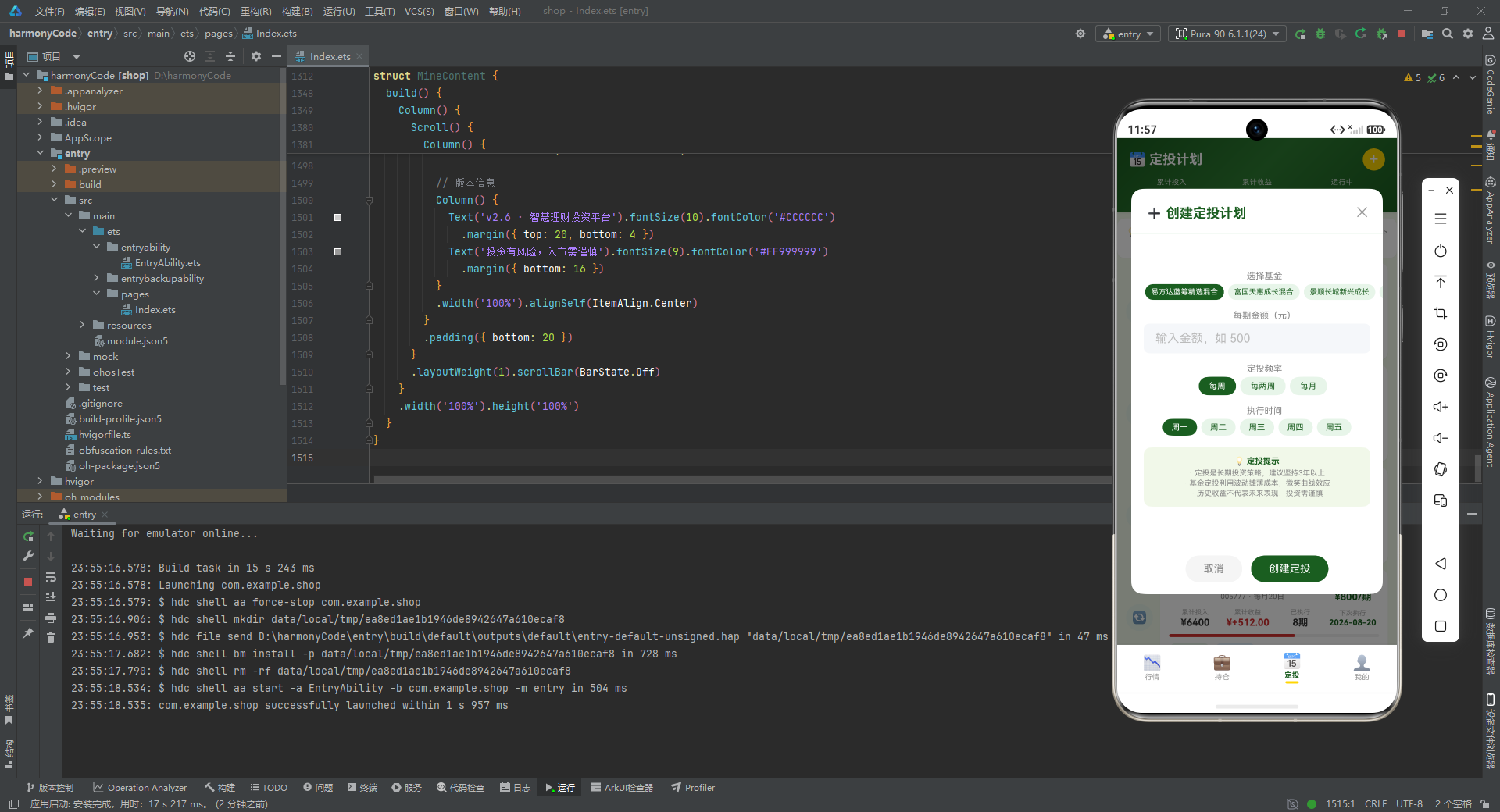
addPlanModal 是创建定投计划的弹窗,采用 90% 宽 × 80% 高的居中卡片形式。内部包含:
- 标题栏:➕ 图标 + 标题 + 关闭按钮,下方分割线。
- 可滚动表单区:选择基金(横向滚动胶囊)、每期金额(输入框)、定投频率(胶囊选择)、执行时间(横向滚动胶囊)、定投提示(浅绿底信息块,包含三条投资教育文案)。
- 底部按钮区:取消与创建定投两个胶囊按钮。
所有"胶囊选择"控件都遵循相同的交互模式——选中态主色实底白字,未选中态浅底主色字,点击切换。这种统一的交互范式让用户在不同字段间切换时无需重新学习。
10.3 修改定投弹窗
@Builder editPlanModal() {
  Column() {
    this.modalOverlay(() => { this.showEditModal = false })
    Column() {
      Row() {
        Text('✏️ 修改定投计划').fontSize(18).fontWeight(FontWeight.Bold).fontColor(COLORS.textPrimary)
        Column().layoutWeight(1)
        Text('✕').fontSize(18).fontColor('#999999')
          .onClick(() => { this.showEditModal = false })
      }
      .width('100%').padding({ left: 20, right: 20, top: 18, bottom: 12 })
      Divider().color(COLORS.border)

      Column() {
        Text('当前基金').fontSize(12).fontColor('#888888').margin({ top: 14, left: 20 })
        Row() {
          Text(this.selectedPlan?.fundName ?? '').fontSize(13).fontColor(COLORS.textPrimary)
            .fontWeight(FontWeight.Bold)
          Text(this.selectedPlan?.fundCode ?? '').fontSize(11).fontColor('#999999')
            .margin({ left: 8 })
        }
        .width('90%').backgroundColor('#F1F8E9').borderRadius(8)
        .padding({ left: 12, top: 8, bottom: 8 }).margin({ top: 4 })

        Text('每期金额(元)').fontSize(12).fontColor('#888888').margin({ top: 14, left: 20 })
        TextInput({ placeholder: (this.selectedPlan?.amount ?? 0).toString() })
          .placeholderColor('#BBBBBB').fontSize(14).width('90%')
          .backgroundColor('#F5F7FA').borderRadius(8)
          .margin({ top: 4 })
          .onChange((v: string) => { this.formAmount = v })

        Text('执行频率').fontSize(12).fontColor('#888888').margin({ top: 14, left: 20 })
        Row() {
          ForEach(PLAN_FREQS, (freq: string) => {
            if ((this.selectedPlan?.frequency ?? '') === freq) {
              Text(freq).fontSize(11).fontColor('#FFFFFF')
                .backgroundColor(COLORS.primary)
                .padding({ left: 14, right: 14, top: 6, bottom: 6 }).borderRadius(16)
                .margin({ left: 3, right: 3 })
            } else {
              Text(freq).fontSize(11).fontColor(COLORS.primary)
                .backgroundColor('#E8F5E9')
                .padding({ left: 14, right: 14, top: 6, bottom: 6 }).borderRadius(16)
                .margin({ left: 3, right: 3 })
                .onClick(() => { })
            }
          }, (freq: string) => freq)
        }
        .margin({ left: 16, top: 4 })

        Text('累计投入').fontSize(12).fontColor('#888888').margin({ top: 14, left: 20 })
        Row() {
          Text('¥' + (this.selectedPlan?.totalInvested ?? 0).toFixed(0)).fontSize(16)
            .fontColor(COLORS.textPrimary).fontWeight(FontWeight.Bold)
          Text('已执行' + (this.selectedPlan?.times ?? 0) + '期').fontSize(11).fontColor('#888888')
            .margin({ left: 12 })
        }
        .width('90%').margin({ top: 4 })

        Text('累计收益').fontSize(12).fontColor('#888888').margin({ top: 12, left: 20 })
        Text('¥' + formatProfit(this.selectedPlan?.totalProfit ?? 0)).fontSize(16)
          .fontColor(getProfitColor(this.selectedPlan?.totalProfit ?? 0))
          .fontWeight(FontWeight.Bold)
          .width('90%').margin({ top: 4 })
      }
      .layoutWeight(1)

      Row() {
        Text('暂停计划').fontSize(14).fontColor('#FFA726')
          .backgroundColor('#FFF3E0').borderRadius(20)
          .padding({ left: 20, right: 20, top: 10, bottom: 10 })
          .onClick(() => { this.showEditModal = false })
        Text('保存修改').fontSize(14).fontColor('#FFFFFF')
          .backgroundColor(COLORS.primary).borderRadius(20)
          .padding({ left: 20, right: 20, top: 10, bottom: 10 })
          .margin({ left: 10 })
          .onClick(() => { this.showEditModal = false })
      }
      .width('100%').justifyContent(FlexAlign.Center)
      .padding({ left: 20, right: 20, top: 12, bottom: 16 })
    }
    .width('88%').height('70%').backgroundColor('#FFFFFF').borderRadius(16)
    .position({ x: '6%', y: '15%' })
  }
  .width('100%').height('100%').position({ x: 0, y: 0 }).zIndex(999)
}
editPlanModal 与创建弹窗结构类似,但展示的是已存在计划的信息。注意它多了"累计投入"“累计收益"两个只读展示区,用于让用户在修改前了解当前计划的执行情况。底部按钮区也由"取消 + 创建"改为"暂停计划 + 保存修改”,暂停按钮用橙色强调警示性操作。
10.4 定投时间线构建器
@Builder planTimelineBuilder(p: PlanItem) {
  Column() {
    Row() {
      // 时间线圆点
      Stack() {
        Column()
          .width(36).height(36).borderRadius(18)
          .backgroundColor(getPlanStatusBg(p.status))
        Text(p.status === '运行中' ? '🔄' : '⏸️').fontSize(16)
      }
      .width(36).height(36)

      // 时间线竖线占位
      Column()
        .width(2).layoutWeight(0).height(0)

      // 计划卡片
      Column() {
        Row() {
          Column() {
            Text(p.fundName).fontSize(13).fontWeight(FontWeight.Bold).fontColor(COLORS.textPrimary)
            Text(p.fundCode + ' · ' + p.frequency + p.day).fontSize(10).fontColor('#888888')
              .margin({ top: 2 })
          }
          .layoutWeight(1).padding({ left: 12 })

          Column() {
            Text(p.status).fontSize(9).fontColor(getPlanStatusColor(p.status))
              .backgroundColor(getPlanStatusBg(p.status))
              .padding({ left: 6, right: 6, top: 2, bottom: 2 }).borderRadius(6)
            Text('¥' + p.amount + '/期').fontSize(13).fontColor(COLORS.textPrimary)
              .fontWeight(FontWeight.Bold).margin({ top: 4 })
          }
          .width(70).alignSelf(ItemAlign.Center)
        }
        .width('100%')

        // 统计数据行
        Row() {
          Column() {
            Text('累计投入').fontSize(9).fontColor('#AAAAAA')
            Text('¥' + p.totalInvested.toFixed(0)).fontSize(13).fontColor('#333333')
              .fontWeight(FontWeight.Bold).margin({ top: 1 })
          }.layoutWeight(1)
          Column() {
            Text('累计收益').fontSize(9).fontColor('#AAAAAA')
            Text('¥' + formatProfit(p.totalProfit)).fontSize(13)
              .fontColor(getProfitColor(p.totalProfit))
              .fontWeight(FontWeight.Bold).margin({ top: 1 })
          }.layoutWeight(1)
          Column() {
            Text('已执行').fontSize(9).fontColor('#AAAAAA')
            Text(p.times + '期').fontSize(13).fontColor('#333333')
              .fontWeight(FontWeight.Bold).margin({ top: 1 })
          }.layoutWeight(1)
          Column() {
            Text('下次执行').fontSize(9).fontColor('#AAAAAA')
            Text(p.nextDate).fontSize(11).fontColor(COLORS.primary)
              .fontWeight(FontWeight.Bold).margin({ top: 1 })
          }.layoutWeight(1)
        }
        .width('100%').margin({ top: 8 })

        // 收益进度条
        Row() {
          Column()
            .width((p.totalProfit >= 0 ? '60%' : '40%'))
            .height(4)
            .backgroundColor(getProfitColor(p.totalProfit))
            .borderRadius(2)
          Column().layoutWeight(1)
        }
        .width('100%').height(4).backgroundColor('#F0F0F0').borderRadius(2)
        .margin({ top: 8 })

        // 操作按钮
        Row() {
          Text('✏️ 修改').fontSize(10).fontColor(COLORS.primary)
            .padding({ left: 10, right: 10, top: 4, bottom: 4 })
            .backgroundColor('#E8F5E9').borderRadius(10)
            .onClick(() => {
              this.selectedPlan = p
              this.showEditModal = true
            })
          Text('📊 详情').fontSize(10).fontColor('#1565C0')
            .padding({ left: 10, right: 10, top: 4, bottom: 4 })
            .backgroundColor('#E3F2FD').borderRadius(10)
            .margin({ left: 6 })
          Column().layoutWeight(1)
          Text('下次: ' + p.nextDate).fontSize(9).fontColor('#AAAAAA')
        }
        .width('100%').margin({ top: 8 })
      }
      .layoutWeight(1).backgroundColor('#FFFFFF').borderRadius(12)
      .padding(12).margin({ left: 8 })
      .shadow({ radius: 3, color: '#0D1B5E20', offsetY: 2 })
    }
    .width('100%')
  }
  .width('100%').padding({ left: 12, right: 12, top: 6 })
}
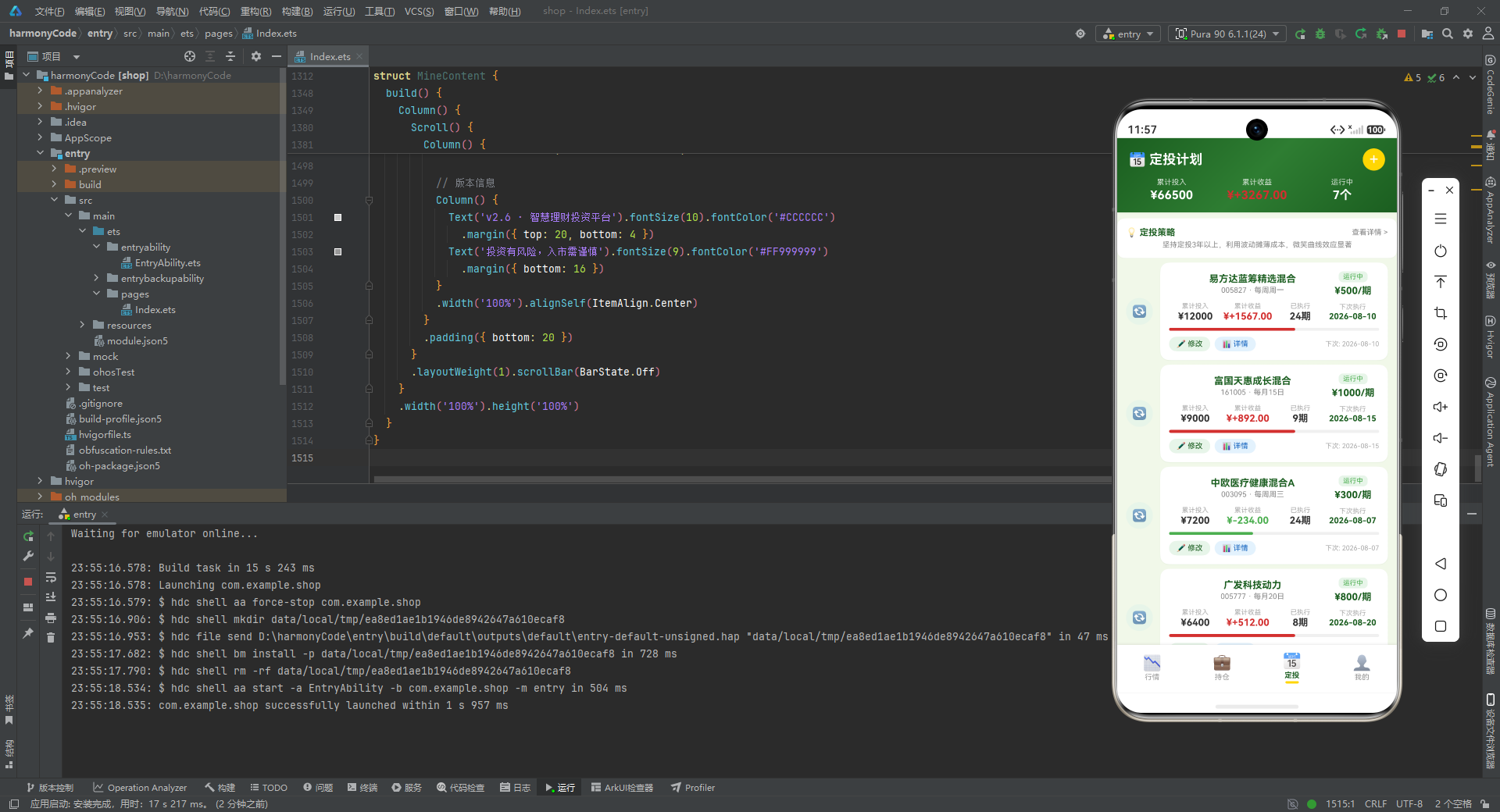
planTimelineBuilder 用"时间线"的形式展示每个定投计划。
- 左侧圆点:36×36 的圆形,背景色由状态决定,中心叠加 🔄(运行中)或 ⏸️(暂停)图标,形成时间线节点。
- 右侧卡片:四行内容——基金信息行、统计数据行(累计投入/累计收益/已执行/下次执行)、收益进度条、操作按钮行。
注意收益进度条用了一个简单但巧妙的视觉技巧:盈利时进度条占 60%、亏损时占 40%,通过长度差异暗示盈亏方向。这种"微可视化"在不增加图表组件的情况下,提供了额外的信息维度。
10.5 定投页 build 方法
build() {
  Stack() {
    Column() {
      // 顶部统计
      Column() {
        Row() {
          Text('📅 定投计划').fontSize(18).fontWeight(FontWeight.Bold).fontColor('#FFFFFF')
          Column().layoutWeight(1)
          Text('+').fontSize(22).fontColor('#FFFFFF')
            .backgroundColor(COLORS.accent).width(30).height(30).borderRadius(15)
            .textAlign(TextAlign.Center)
            .onClick(() => { this.showAddModal = true })
        }
        .width('100%').padding({ left: 16, right: 16, top: 14, bottom: 10 })

        Row() {
          Column() {
            Text('累计投入').fontSize(10).fontColor('rgba(255,255,255,0.8)')
            Text('¥' + getTotalInvested().toFixed(0)).fontSize(16).fontColor('#FFFFFF')
              .fontWeight(FontWeight.Bold).margin({ top: 2 })
          }.layoutWeight(1)
          Column() {
            Text('累计收益').fontSize(10).fontColor('rgba(255,255,255,0.8)')
            Text('¥' + formatProfit(getTotalPlanProfit())).fontSize(16)
              .fontColor(getProfitColor(getTotalPlanProfit()))
              .fontWeight(FontWeight.Bold).margin({ top: 2 })
          }.layoutWeight(1)
          Column() {
            Text('运行中').fontSize(10).fontColor('rgba(255,255,255,0.8)')
            Text(getActivePlanCount() + '个').fontSize(16).fontColor('#FFFFFF')
              .fontWeight(FontWeight.Bold).margin({ top: 2 })
          }.layoutWeight(1)
        }
        .width('100%').padding({ left: 16, right: 16, bottom: 14 })
      }
      .width('100%')
      .linearGradient({ angle: 135, colors: [['#1B5E20', 0], ['#2E7D32', 0.5], ['##1B5E20', 1]] })
      .shadow({ radius: 6, color: '#1A1B5E20', offsetY: 3 })

      // 定投提示
      Column() {
        Row() {
          Text('💡 定投策略').fontSize(12).fontWeight(FontWeight.Bold).fontColor(COLORS.textPrimary)
          Column().layoutWeight(1)
          Text('查看详情 >').fontSize(10).fontColor('#888888')
        }
        .width('100%')
        Text('坚持定投3年以上,利用波动摊薄成本,微笑曲线效应显著').fontSize(10).fontColor('#888888')
          .margin({ top: 4 })
      }
      .width('100%').backgroundColor('#FFFFFF').borderRadius(10)
      .padding(12).margin({ left: 12, right: 12, top: 8 })
      .shadow({ radius: 2, color: '#0D000000', offsetY: 1 })

      // 定投列表
      Scroll() {
        Column() {
          this.planTimelineBuilder(mockPlans[0])
          // ... 共 8 条
          this.planTimelineBuilder(mockPlans[7])
        }
        .padding({ bottom: 20 })
      }
      .layoutWeight(1).scrollBar(BarState.Off)
    }
    .width('100%').height('100%')

    if (this.showAddModal) { this.addPlanModal() }
    if (this.showEditModal) { this.editPlanModal() }
  }
  .width('100%').height('100%')
}
build 方法同样用 Stack 作为根容器,支持两个弹窗叠加。
内容区从上到下:
- 顶部统计栏:渐变绿底,左侧标题"📅 定投计划",右侧金色圆形"+"按钮(点击打开新建弹窗)。下方三列展示累计投入、累计收益、运行中计划数。
- 定投策略提示卡:白底卡片,标题 + 一句投资教育文案"坚持定投3年以上,利用波动摊薄成本,微笑曲线效应显著",起到投资者教育的作用。
- 定投列表:纵向滚动,渲染 8 个时间线计划项。
两个弹窗用 if 条件渲染,互不干扰,可以同时存在(虽然实际交互中通常只显示一个)。
十一、我的页:资产配置与快捷操作的中心
11.1 资产配置项构建器
@Builder allocItemBuilder(a: AllocMeta) {
  Column() {
    Row() {
      Text(a.icon).fontSize(14)
      Text(a.label).fontSize(12).fontColor('#333333').margin({ left: 6 })
      Column().layoutWeight(1)
      Text(a.amount).fontSize(11).fontColor('#888888')
    }
    .width('100%')
    Row() {
      Column()
        .width(a.percent + '%')
        .height(8).backgroundColor(a.color).borderRadius(4)
      Column().layoutWeight(1)
    }
    .width('100%').height(8).backgroundColor('#F0F0F0').borderRadius(4)
    .margin({ top: 6 })
    Text(a.percent + '%').fontSize(10).fontColor(a.color)
      .fontWeight(FontWeight.Bold).margin({ top: 3 })
  }
  .width('100%').padding({ top: 8, bottom: 8 })
}
allocItemBuilder 渲染单个资产配置项。
- 顶部行:图标 + 名称 + 占位 + 金额。
- 中部进度条:用
Column().width(a.percent + '%')模拟进度条,背景灰色,前景彩色,圆角 4。 - 底部:百分比文字,颜色与进度条一致。
这种"纯布局模拟进度条"的写法,避免了引入额外的图表组件,是轻量级可视化场景的常用技巧。
11.2 快捷操作项构建器
@Builder quickActionBuilder(a: QuickActionMeta) {
  Column() {
    Text(a.icon).fontSize(24)
    Text(a.label).fontSize(10).fontColor('#333333').margin({ top: 4 })
    Text(a.desc).fontSize(8).fontColor('#AAAAAA').margin({ top: 1 })
  }
  .layoutWeight(1)
  .padding({ top: 12, bottom: 12 })
  .backgroundColor('#FFFFFF').borderRadius(10)
  .margin({ left: 3, right: 3 })
}
quickActionBuilder 渲染单个快捷操作项,三行结构——大图标、名称、描述。.layoutWeight(1) 让三个操作项均分一行宽度,形成宫格布局。
11.3 我的页 build 方法
build() {
Column() {
// 顶部用户信息卡片
Column() {
Row() {
Column() {
Text('🧑💼').fontSize(40)
}
.width(64).height(64).backgroundColor('rgba(255,255,255,0.2)').borderRadius(32)
.justifyContent(FlexAlign.Center)
Column() {
Text('李投资').fontSize(18).fontWeight(FontWeight.Bold).fontColor('#FFFFFF')
Text('稳健型投资者 · VIP3会员').fontSize(11).fontColor('rgba(255,255,255,0.8)')
.margin({ top: 3 })
Row() {
Text('📱 138****8888').fontSize(10).fontColor('rgba(255,255,255,0.7)')
Text('已实名').fontSize(9).fontColor('#FFFFFF')
.backgroundColor('rgba(255,215,0,0.3)')
.padding({ left: 5, right: 5, top: 1, bottom: 1 }).borderRadius(4)
.margin({ left: 8 })
}
.margin({ top: 3 })
}
.layoutWeight(1).padding({ left: 14 })
}
.width('100%').padding({ left: 16, right: 16, top: 20, bottom: 20 })
}
.width('100%')
.linearGradient({ angle: 135, colors: [['#1B5E20', 0], ['#2E7D32', 0.5], ['#1B5E20', 1]] })
.shadow({ radius: 6, color: '#1A1B5E20', offsetY: 3 })
Scroll() {
Column() {
// 资产概览
Row() {
Column() {
Text('💰 总资产').fontSize(10).fontColor('#888888')
Text('¥' + getTotalMarketValue().toFixed(2)).fontSize(17).fontColor(COLORS.textPrimary)
.fontWeight(FontWeight.Bold).margin({ top: 2 })
}.layoutWeight(1)
Column() {
Text('📈 总收益').fontSize(10).fontColor('#888888')
Text('¥' + formatProfit(getTotalProfit())).fontSize(17)
.fontColor(getProfitColor(getTotalProfit()))
.fontWeight(FontWeight.Bold).margin({ top: 2 })
}.layoutWeight(1)
Column() {
Text('📊 收益率').fontSize(10).fontColor('#888888')
Text(formatPercent(getTotalProfitPercent())).fontSize(17)
.fontColor(getProfitColor(getTotalProfit()))
.fontWeight(FontWeight.Bold).margin({ top: 2 })
}.layoutWeight(1)
}
.width('100%').backgroundColor('#FFFFFF').borderRadius(12)
.padding({ top: 14, bottom: 14 })
.margin({ left: 12, right: 12, top: 10 })
.shadow({ radius: 3, color: '#0D1B5E20', offsetY: 2 })
// 资产配置
Column() {
Row() {
Text('📊 资产配置').fontSize(14).fontWeight(FontWeight.Bold).fontColor(COLORS.textPrimary)
Column().layoutWeight(1)
Text('查看明细 >').fontSize(10).fontColor('#888888')
}
.width('100%').padding({ left: 16, top: 12, bottom: 4 })
// 配置饼图(进度条形式)
Column() {
Row() {
ForEach(ALLOC_CONFIG, (a: AllocMeta) => {
Column()
.layoutWeight(a.percent)
.height(24)
.backgroundColor(a.color)
}, (a: AllocMeta) => a.label)
}
.width('100%').borderRadius(6).clip(true)
.margin({ top: 8 })
}
.width('100%').padding({ left: 16, right: 16 })
// 配置明细
Column() {
this.allocItemBuilder(ALLOC_CONFIG[0])
this.allocItemBuilder(ALLOC_CONFIG[1])
this.allocItemBuilder(ALLOC_CONFIG[2])
this.allocItemBuilder(ALLOC_CONFIG[3])
this.allocItemBuilder(ALLOC_CONFIG[4])
}
.padding({ left: 16, right: 16, bottom: 12 })
}
.width('100%').backgroundColor('#FFFFFF').borderRadius(12)
.margin({ left: 12, right: 12, top: 8 })
.shadow({ radius: 3, color: '#0D1B5E20', offsetY: 2 })
// 快捷操作
Column() {
Text('⚡ 快捷操作').fontSize(14).fontWeight(FontWeight.Bold).fontColor(COLORS.textPrimary)
.width('100%').padding({ left: 16, top: 12, bottom: 8 })
Row() {
this.quickActionBuilder(QUICK_ACTION_CONFIG[0])
this.quickActionBuilder(QUICK_ACTION_CONFIG[1])
this.quickActionBuilder(QUICK_ACTION_CONFIG[2])
}
.width('100%').padding({ left: 12, right: 12 })
Row() {
this.quickActionBuilder(QUICK_ACTION_CONFIG[3])
this.quickActionBuilder(QUICK_ACTION_CONFIG[4])
this.quickActionBuilder(QUICK_ACTION_CONFIG[5])
}
.width('100%').padding({ left: 12, right: 12, top: 6, bottom: 12 })
}
.width('100%').backgroundColor('#FFFFFF').borderRadius(12)
.margin({ left: 12, right: 12, top: 8 })
.shadow({ radius: 3, color: '#0D1B5E20', offsetY: 2 })
// 投资概览统计
Column() {
Text('📈 投资概览').fontSize(14).fontWeight(FontWeight.Bold).fontColor(COLORS.textPrimary)
.width('100%').padding({ left: 16, top: 12, bottom: 8 })
Row() {
Column() {
Text('🔍').fontSize(20)
Text('14').fontSize(16).fontColor(COLORS.textPrimary).fontWeight(FontWeight.Bold)
Text('关注基金').fontSize(10).fontColor('#888888')
}.layoutWeight(1).padding({ top: 10, bottom: 10 })
Column() {
Text('💼').fontSize(20)
Text('8').fontSize(16).fontColor(COLORS.textPrimary).fontWeight(FontWeight.Bold)
Text('持仓品种').fontSize(10).fontColor('#888888')
}.layoutWeight(1).padding({ top: 10, bottom: 10 })
Column() {
Text('📅').fontSize(20)
Text('8').fontSize(16).fontColor(COLORS.textPrimary).fontWeight(FontWeight.Bold)
Text('定投计划').fontSize(10).fontColor('#888888')
}.layoutWeight(1).padding({ top: 10, bottom: 10 })
Column() {
Text('⭐').fontSize(20)
Text('VIP3').fontSize(16).fontColor(COLORS.accent).fontWeight(FontWeight.Bold)
Text('会员等级').fontSize(10).fontColor('#888888')
}.layoutWeight(1).padding({ top: 10, bottom: 10 })
}
.width('100%')
}
.width('100%').backgroundColor('#FFFFFF').borderRadius(12)
.margin({ left: 12, right: 12, top: 8 })
.shadow({ radius: 3, color: '#0D1B5E20', offsetY: 2 })
// 版本信息
Column() {
Text('v2.6 · 智慧理财投资平台').fontSize(10).fontColor('#CCCCCC')
.margin({ top: 20, bottom: 4 })
Text('投资有风险,入市需谨慎').fontSize(9).fontColor('#FF999999')
.margin({ bottom: 16 })
}
.width('100%').alignSelf(ItemAlign.Center)
}
.padding({ bottom: 20 })
}
.layoutWeight(1).scrollBar(BarState.Off)
}
.width('100%').height('100%')
}
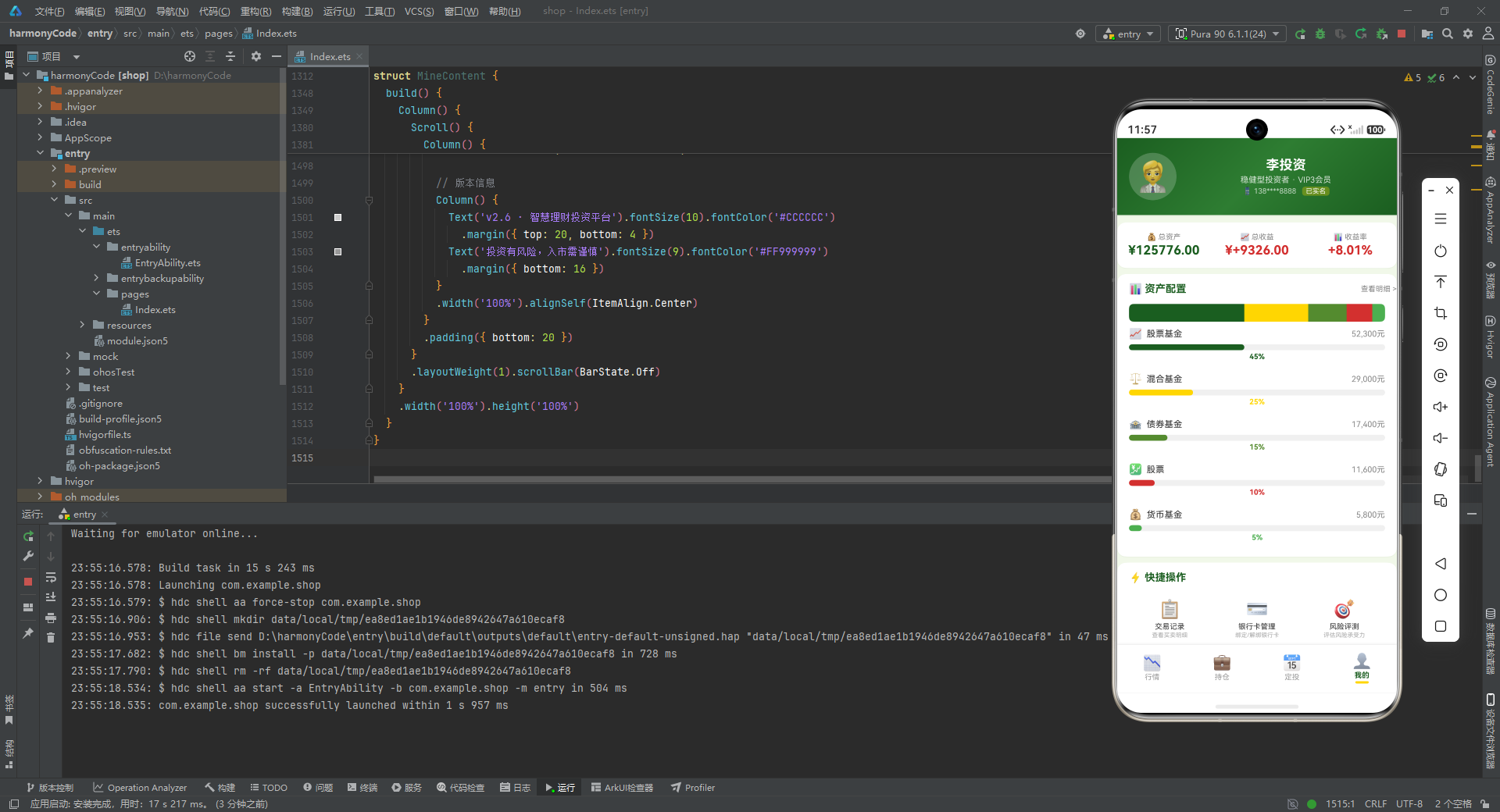
MineContent 的 build 方法是四个页面中最长的,但结构非常清晰。
- 用户信息卡片:渐变绿底,左侧 64×64 的半透明圆形头像占位,右侧用户名、投资者类型与会员等级、手机号与实名标签。
- 资产概览三宫格:总资产、总收益、收益率,三列均分。
- 资产配置卡:顶部标题,中部用
ForEach渲染的"堆叠进度条饼图"——每个配置项按percent作为layoutWeight,五种颜色横向拼接,形成一条彩色条带,模拟饼图的展开效果。下方是五个配置明细项。 - 快捷操作宫格:两行三列,共 6 个快捷操作项。
- 投资概览统计:四宫格,展示关注基金数、持仓品种数、定投计划数、会员等级。
- 版本信息:版本号 + 风险提示语"投资有风险,入市需谨慎",这是金融类应用合规要求的必备文案。
整个我的页信息量极大,但通过卡片分区、统一圆角与投影、合理的留白,依然保持了良好的视觉呼吸感。
十二、关键特性对比总结
下面用一张表格汇总这套智慧理财投资平台四个核心页面的关键特性,方便横向对比与快速回顾。
| 维度 | 行情页 | 持仓页 | 定投页 | 我的页 |
|---|---|---|---|---|
| 核心状态数 | 2 个(搜索词、筛选类型) | 2 个(弹窗显隐、选中持仓) | 7 个(双弹窗、表单四字段、选中计划) | 0 个(纯展示) |
| 顶部视觉 | 渐变标题栏 + 四指数卡片 | 渐变总资产卡片 + 三项汇总 | 渐变统计栏 + 金色加号按钮 | 渐变用户信息卡片 |
| 主要列表 | 14 项基金/股票 + 8 条资讯 | 8 项持仓 | 8 项定投时间线 | 5 项资产配置 + 6 项快捷操作 |
| 可视化组件 | 指数卡片、涨跌胶囊、资讯图标块 | 收益环(Progress Ring)、6 月柱状图 | 时间线圆点、收益进度条 | 堆叠饼图、配置进度条、四宫格统计 |
| 弹窗交互 | 无 | 删除确认弹窗(单弹窗) | 创建弹窗 + 修改弹窗(双弹窗) | 无 |
| 操作按钮 | 加自选、对比、详情 | 加仓、减仓、交易记录、删除 | 修改、详情、暂停、保存 | 快捷操作六项 |
| 滚动方向 | 横向筛选 + 纵向列表 | 纵向列表 | 纵向时间线 | 纵向列表 |
| 投资者教育 | 资讯摘要 | 无 | 定投策略提示卡、弹窗内三条提示 | 底部风险提示语 |
| 阴影策略 | radius 4,浅绿投影 | radius 4,浅绿投影 | radius 3,浅绿投影 | radius 3,浅绿投影 |
| 配色基调 | 深绿渐变 + 浅绿白底 | 深绿渐变 + 白底卡片 | 深绿渐变 + 金色点缀 | 深绿渐变 + 白底宫格 |
通过这张表格可以直观地看到,四个页面在视觉语言上保持了高度统一(渐变标题栏、白底圆角卡片、浅绿投影),但在功能密度与交互复杂度上又各有侧重,共同构成了一个完整的理财应用闭环。
安装DevEco Studio程序

选择目标安装目录:

设置环境变量,但是需要重启一下:

新建一个空白模板:

设置API为24的模板项目:
初始化项目,自动下载相关依赖:

完整代码:
// ============================================================
// 智慧理财投资平台 - 鸿蒙ArkTS
// 配色:金融深绿金风
// 主色#1B5E20 深绿 / 辅色#FFD700 金黄 / 背景#F1F8E9 浅绿白
// ============================================================
// ============ 类型定义 ============
interface FundTypeMeta {
label: string
icon: string
color: string
bg: string
}
interface RiskMeta {
label: string
level: number
color: string
bg: string
icon: string
}
interface ColorPalette {
primary: string
secondary: string
bg: string
cardBg: string
textPrimary: string
textSecondary: string
accent: string
success: string
warning: string
danger: string
border: string
}
interface IndexMeta {
label: string
code: string
icon: string
}
interface AllocMeta {
label: string
icon: string
percent: number
color: string
amount: string
}
interface QuickActionMeta {
label: string
icon: string
desc: string
}
interface NewsCatMeta {
label: string
icon: string
color: string
bg: string
}
interface TabMeta {
label: string
icon: string
activeIcon: string
}
// ============ 基金/股票数据模型 ============
@Observed
export class FundItem {
id: number = 0
name: string = ''
code: string = ''
type: string = ''
nav: number = 0
navChange: number = 0
navChangeValue: number = 0
riskLevel: string = ''
scale: number = 0
star: number = 0
tag: string = ''
isStock: boolean = false
hot: boolean = false
constructor(id: number, name: string, code: string, type: string, nav: number, navChange: number, navChangeValue: number, riskLevel: string, scale: number, star: number, tag: string, isStock: boolean, hot: boolean) {
this.id = id; this.name = name; this.code = code; this.type = type
this.nav = nav; this.navChange = navChange; this.navChangeValue = navChangeValue
this.riskLevel = riskLevel; this.scale = scale; this.star = star
this.tag = tag; this.isStock = isStock; this.hot = hot
}
}
// ============ 持仓数据模型 ============
@Observed
export class HoldingItem {
id: number = 0
name: string = ''
code: string = ''
type: string = ''
shares: number = 0
costPrice: number = 0
currentPrice: number = 0
marketValue: number = 0
profit: number = 0
profitPercent: number = 0
dailyChange: number = 0
isStock: boolean = false
constructor(id: number, name: string, code: string, type: string, shares: number, costPrice: number, currentPrice: number, marketValue: number, profit: number, profitPercent: number, dailyChange: number, isStock: boolean) {
this.id = id; this.name = name; this.code = code; this.type = type
this.shares = shares; this.costPrice = costPrice; this.currentPrice = currentPrice
this.marketValue = marketValue; this.profit = profit; this.profitPercent = profitPercent
this.dailyChange = dailyChange; this.isStock = isStock
}
}
// ============ 定投计划数据模型 ============
@Observed
export class PlanItem {
id: number = 0
fundName: string = ''
fundCode: string = ''
amount: number = 0
frequency: string = ''
day: string = ''
totalInvested: number = 0
totalProfit: number = 0
times: number = 0
nextDate: string = ''
status: string = ''
constructor(id: number, fundName: string, fundCode: string, amount: number, frequency: string, day: string, totalInvested: number, totalProfit: number, times: number, nextDate: string, status: string) {
this.id = id; this.fundName = fundName; this.fundCode = fundCode
this.amount = amount; this.frequency = frequency; this.day = day
this.totalInvested = totalInvested; this.totalProfit = totalProfit
this.times = times; this.nextDate = nextDate; this.status = status
}
}
// ============ 资讯数据模型 ============
@Observed
export class NewsItem {
id: number = 0
title: string = ''
source: string = ''
time: string = ''
category: string = ''
summary: string = ''
hot: boolean = false
constructor(id: number, title: string, source: string, time: string, category: string, summary: string, hot: boolean) {
this.id = id; this.title = title; this.source = source; this.time = time
this.category = category; this.summary = summary; this.hot = hot
}
}
// ============ 设计令牌 ============
const COLORS: ColorPalette = {
primary: '#1B5E20',
secondary: '#FFD700',
bg: '#F1F8E9',
cardBg: '#FFFFFF',
textPrimary: '#1B5E20',
textSecondary: '#558B2F',
accent: '#FFD700',
success: '#4CAF50',
warning: '#FFA726',
danger: '#D32F2F',
border: '#E8F5E9'
}
const FUND_TYPE_CONFIG: Record<string, FundTypeMeta> = {
'股票型': { label: '股票型', icon: '📈', color: '#D32F2F', bg: '#FFEBEE' },
'混合型': { label: '混合型', icon: '⚖️', color: '#1B5E20', bg: '#E8F5E9' },
'债券型': { label: '债券型', icon: '🏦', color: '#1565C0', bg: '#E3F2FD' },
'指数型': { label: '指数型', icon: '📊', color: '#7B1FA2', bg: '#F3E5F5' },
'QDII': { label: 'QDII', icon: '🌍', color: '#00695C', bg: '#E0F2F1' },
'股票': { label: '股票', icon: '💹', color: '#D32F2F', bg: '#FFEBEE' }
}
const RISK_CONFIG: Record<string, RiskMeta> = {
'低风险': { label: '低风险', level: 1, color: '#4CAF50', bg: '#E8F5E9', icon: '🟢' },
'中风险': { label: '中风险', level: 2, color: '#FFA726', bg: '#FFF3E0', icon: '🟡' },
'中高风险': { label: '中高风险', level: 3, color: '#FB8C00', bg: '#FFE0B2', icon: '🟠' },
'高风险': { label: '高风险', level: 4, color: '#D32F2F', bg: '#FFEBEE', icon: '🔴' }
}
const INDEX_CONFIG: IndexMeta[] = [
{ label: '上证指数', code: '000001', icon: '📈' },
{ label: '深证成指', code: '399001', icon: '📊' },
{ label: '创业板指', code: '399006', icon: '🚀' },
{ label: '沪深300', code: '000300', icon: '💎' }
]
const ALLOC_CONFIG: AllocMeta[] = [
{ label: '股票基金', icon: '📈', percent: 45, color: '#1B5E20', amount: '52,300元' },
{ label: '混合基金', icon: '⚖️', percent: 25, color: '#FFD700', amount: '29,000元' },
{ label: '债券基金', icon: '🏦', percent: 15, color: '#558B2F', amount: '17,400元' },
{ label: '股票', icon: '💹', percent: 10, color: '#D32F2F', amount: '11,600元' },
{ label: '货币基金', icon: '💰', percent: 5, color: '#4CAF50', amount: '5,800元' }
]
const QUICK_ACTION_CONFIG: QuickActionMeta[] = [
{ label: '交易记录', icon: '📋', desc: '查看买卖明细' },
{ label: '银行卡管理', icon: '💳', desc: '绑定/解绑银行卡' },
{ label: '风险评测', icon: '🎯', desc: '评估风险承受力' },
{ label: '账单导出', icon: '📤', desc: '导出投资报表' },
{ label: '消息通知', icon: '🔔', desc: '涨跌提醒设置' },
{ label: '帮助中心', icon: '❓', desc: '常见问题解答' }
]
const NEWS_CAT_CONFIG: Record<string, NewsCatMeta> = {
'政策': { label: '政策', icon: '📜', color: '#1B5E20', bg: '#E8F5E9' },
'板块': { label: '板块', icon: '🔥', color: '#D32F2F', bg: '#FFEBEE' },
'资金': { label: '资金', icon: '💰', color: '#FFD700', bg: '#FFFDE7' },
'数据': { label: '数据', icon: '📊', color: '#1565C0', bg: '#E3F2FD' }
}
const TAB_CONFIG: Record<number, TabMeta> = {
0: { label: '行情', icon: '📉', activeIcon: '📊' },
1: { label: '持仓', icon: '💼', activeIcon: '💼' },
2: { label: '定投', icon: '📅', activeIcon: '📅' },
3: { label: '我的', icon: '👤', activeIcon: '👤' }
}
const FUND_FILTER: string[] = ['全部', '股票型', '混合型', '债券型', '指数型', 'QDII', '股票']
const WEEK_DAYS: string[] = ['一', '二', '三', '四', '五', '六', '日']
const MONTHS: string[] = ['1月', '2月', '3月', '4月', '5月', '6月']
const MONTHLY_RETURNS: number[] = [3.25, -1.20, 5.68, 2.15, -0.85, 4.32]
const MAX_RETURN: number = 5.68
const PLAN_FREQS: string[] = ['每周', '每两周', '每月']
const PLAN_DAYS_WEEKLY: string[] = ['周一', '周二', '周三', '周四', '周五']
const PLAN_DAYS_MONTHLY: string[] = ['1日', '5日', '10日', '15日', '20日', '25日']
// ============ Mock数据 - 基金/股票列表 ============
const mockFunds: FundItem[] = [
new FundItem(1, '易方达蓝筹精选混合', '005827', '混合型', 2.3456, 1.23, 0.0285, '中高风险', 412, 5, '消费龙头', false, true),
new FundItem(2, '富国天惠成长混合', '161005', '混合型', 3.2109, 0.87, 0.0277, '中高风险', 287, 5, '成长精选', false, true),
new FundItem(3, '景顺长城新兴成长', '260108', '混合型', 2.8765, -0.45, -0.0130, '中风险', 156, 4, '新兴产业', false, false),
new FundItem(4, '中欧医疗健康混合A', '003095', '混合型', 1.9876, 2.15, 0.0418, '中高风险', 198, 4, '医疗健康', false, true),
new FundItem(5, '兴全合宜混合', '163417', '混合型', 1.6543, 0.65, 0.0107, '中风险', 345, 5, '均衡配置', false, false),
new FundItem(6, '汇添富消费升级', '005829', '混合型', 2.1234, 1.56, 0.0326, '中风险', 123, 4, '消费升级', false, false),
new FundItem(7, '广发科技动力', '005777', '股票型', 2.5432, 3.21, 0.0792, '高风险', 89, 4, '科技龙头', false, true),
new FundItem(8, '交银阿尔法核心', '519712', '混合型', 1.8765, -0.32, -0.0060, '中风险', 67, 3, '量化选股', false, false),
new FundItem(9, '工银前沿医疗股票', '001171', '股票型', 3.4321, 1.89, 0.0637, '高风险', 112, 4, '医疗前沿', false, false),
new FundItem(10, '银华富裕主题混合', '180012', '混合型', 2.0987, 0.45, 0.0094, '中风险', 95, 3, '主题投资', false, false),
new FundItem(11, '贵州茅台', '600519', '股票', 1685.50, 0.89, 14.90, '高风险', 0, 0, '白酒龙头', true, true),
new FundItem(12, '宁德时代', '300750', '股票', 218.30, 2.45, 5.21, '高风险', 0, 0, '新能源', true, true),
new FundItem(13, '招商银行', '600036', '股票', 35.68, -0.56, -0.20, '中风险', 0, 0, '银行蓝筹', true, false),
new FundItem(14, '比亚迪', '002594', '股票', 245.60, 1.78, 4.29, '高风险', 0, 0, '新能源车', true, false)
]
// ============ Mock数据 - 持仓列表 ============
const mockHoldings: HoldingItem[] = [
new HoldingItem(1, '易方达蓝筹精选混合', '005827', '混合型', 5000, 2.10, 2.3456, 11728, 1228, 11.69, 1.23, false),
new HoldingItem(2, '贵州茅台', '600519', '股票', 10, 1580.00, 1685.50, 16855, 1055, 6.68, 0.89, true),
new HoldingItem(3, '宁德时代', '300750', '股票', 100, 195.00, 218.30, 21830, 2330, 11.95, 2.45, true),
new HoldingItem(4, '富国天惠成长混合', '161005', '混合型', 8000, 2.80, 3.2109, 25687, 3287, 14.67, 0.87, false),
new HoldingItem(5, '招商银行', '600036', '股票', 500, 38.50, 35.68, 17840, -1410, -7.32, -0.56, true),
new HoldingItem(6, '中欧医疗健康混合A', '003095', '混合型', 6000, 1.85, 1.9876, 11926, 826, 7.44, 2.15, false),
new HoldingItem(7, '比亚迪', '002594', '股票', 50, 220.00, 245.60, 12280, 1280, 11.64, 1.78, true),
new HoldingItem(8, '广发科技动力', '005777', '股票型', 3000, 2.30, 2.5432, 7630, 730, 10.58, 3.21, false)
]
// ============ Mock数据 - 定投计划 ============
const mockPlans: PlanItem[] = [
new PlanItem(1, '易方达蓝筹精选混合', '005827', 500, '每周', '周一', 12000, 1567, 24, '2026-08-10', '运行中'),
new PlanItem(2, '富国天惠成长混合', '161005', 1000, '每月', '15日', 9000, 892, 9, '2026-08-15', '运行中'),
new PlanItem(3, '中欧医疗健康混合A', '003095', 300, '每周', '周三', 7200, -234, 24, '2026-08-07', '运行中'),
new PlanItem(4, '广发科技动力', '005777', 800, '每月', '20日', 6400, 512, 8, '2026-08-20', '运行中'),
new PlanItem(5, '景顺长城新兴成长', '260108', 400, '每周', '周二', 9600, -387, 24, '2026-08-06', '已暂停'),
new PlanItem(6, '兴全合宜混合', '163417', 600, '每月', '10日', 5400, 228, 9, '2026-08-10', '运行中'),
new PlanItem(7, '汇添富消费升级', '005829', 500, '每周', '周四', 12000, 845, 24, '2026-08-08', '运行中'),
new PlanItem(8, '工银前沿医疗股票', '001171', 700, '每月', '25日', 4900, -156, 7, '2026-08-25', '运行中')
]
// ============ Mock数据 - 市场资讯 ============
const mockNews: NewsItem[] = [
new NewsItem(1, '央行宣布降准0.5个百分点 释放长期资金约1万亿元', '财联社', '2小时前', '政策', '人民银行决定于2026年8月15日下调金融机构存款准备金率0.5个百分点', true),
new NewsItem(2, '新能源板块持续走强 宁德时代涨超3%', '证券时报', '1小时前', '板块', '受政策利好刺激,新能源产业链全线走高,电池、光伏、风电板块涨幅居前', true),
new NewsItem(3, '消费复苏迹象明显 白酒板块集体上涨', '21世纪经济报道', '3小时前', '板块', '茅台、五粮液领涨,食品饮料板块指数涨超2%,消费回暖预期增强', false),
new NewsItem(4, '科技股迎来反弹 半导体芯片涨幅居前', '第一财经', '4小时前', '板块', '芯片设计、封测、设备全线上涨,国产替代逻辑持续强化', false),
new NewsItem(5, '医药板块估值修复 医疗ETF资金净流入', '上海证券报', '5小时前', '板块', '中欧医疗、工银医疗等基金重仓股表现活跃,机构看好估值修复行情', false),
new NewsItem(6, '外资连续三日净流入 累计超80亿元', '新浪财经', '6小时前', '资金', '北向资金今日净买入32.5亿元,连续第三日净流入,偏好消费与科技', false),
new NewsItem(7, '注册制改革深化 证监会发布新规', '人民日报', '8小时前', '政策', '证监会就全面注册制配套规则征求意见,优化发行上市审核机制', false),
new NewsItem(8, '三季报业绩预告密集披露 超六成预喜', '中国证券报', '10小时前', '数据', '截至8月5日,已有1200家公司披露三季报预告,预喜率超65%', false)
]
// ============ 全局纯函数 ============
function getFundTypeColor(type: string): string { return FUND_TYPE_CONFIG[type]?.color ?? '#999999' }
function getFundTypeIcon(type: string): string { return FUND_TYPE_CONFIG[type]?.icon ?? '📊' }
function getFundTypeBg(type: string): string { return FUND_TYPE_CONFIG[type]?.bg ?? '#F5F5F5' }
function getRiskColor(level: string): string { return RISK_CONFIG[level]?.color ?? '#999999' }
function getRiskBg(level: string): string { return RISK_CONFIG[level]?.bg ?? '#F5F5F5' }
function getRiskIcon(level: string): string { return RISK_CONFIG[level]?.icon ?? '⚪' }
function getRiskLabel(level: string): string { return RISK_CONFIG[level]?.label ?? '未知' }
function getChangeColor(change: number): string { return change >= 0 ? '#D32F2F' : '#4CAF50' }
function getChangeIcon(change: number): string { return change >= 0 ? '↑' : '↓' }
function getProfitColor(profit: number): string { return profit >= 0 ? '#D32F2F' : '#4CAF50' }
function getProfitIcon(profit: number): string { return profit >= 0 ? '📈' : '📉' }
function getPlanStatusColor(status: string): string { return status === '运行中' ? '#4CAF50' : '#FFA726' }
function getPlanStatusBg(status: string): string { return status === '运行中' ? '#E8F5E9' : '#FFF3E0' }
function getNewsCatColor(cat: string): string { return NEWS_CAT_CONFIG[cat]?.color ?? '#999999' }
function getNewsCatBg(cat: string): string { return NEWS_CAT_CONFIG[cat]?.bg ?? '#F5F5F5' }
function getNewsCatIcon(cat: string): string { return NEWS_CAT_CONFIG[cat]?.icon ?? '📰' }
function formatProfit(profit: number): string { return profit >= 0 ? '+' + profit.toFixed(2) : profit.toFixed(2) }
function formatPercent(percent: number): string { return percent >= 0 ? '+' + percent.toFixed(2) + '%' : percent.toFixed(2) + '%' }
function formatNav(nav: number): string { return nav.toFixed(4) }
function formatPrice(price: number): string { return price.toFixed(2) }
function getStarText(star: number): string { return star > 0 ? '★'.repeat(star) + '☆'.repeat(5 - star) : '暂无评级' }
function getTotalMarketValue(): number { return 11728 + 16855 + 21830 + 25687 + 17840 + 11926 + 12280 + 7630 }
function getTotalProfit(): number { return 1228 + 1055 + 2330 + 3287 - 1410 + 826 + 1280 + 730 }
function getTotalProfitPercent(): number { return (getTotalProfit() / (getTotalMarketValue() - getTotalProfit()) * 100) }
function getTodayProfit(): number { return 11728 * 0.0123 + 16855 * 0.0089 + 21830 * 0.0245 + 25687 * 0.0087 + 17840 * (-0.0056) + 11926 * 0.0215 + 12280 * 0.0178 + 7630 * 0.0321 }
function getActivePlanCount(): number { return 7 }
function getTotalInvested(): number { return 12000 + 9000 + 7200 + 6400 + 9600 + 5400 + 12000 + 4900 }
function getTotalPlanProfit(): number { return 1567 + 892 - 234 + 512 - 387 + 228 + 845 - 156 }
// ============ Tab枚举 ============
enum InvestTab {
MARKET = 0,
HOLDING = 1,
PLAN = 2,
MINE = 3
}
// ============ 入口页面 ============
@Entry
@Component
struct InvestApp {
@State activeTab: InvestTab = InvestTab.MARKET
@Builder contentArea() {
Column() {
if (this.activeTab === InvestTab.MARKET) {
MarketContent()
} else if (this.activeTab === InvestTab.HOLDING) {
HoldingContent()
} else if (this.activeTab === InvestTab.PLAN) {
PlanContent()
} else {
MineContent()
}
}
.layoutWeight(1)
}
@Builder bottomTabItem(tab: InvestTab) {
Column() {
Text(this.activeTab === tab ? (TAB_CONFIG[tab]?.activeIcon ?? '📊') : (TAB_CONFIG[tab]?.icon ?? '📊'))
.fontSize(20)
.width('100%').textAlign(TextAlign.Center)
Text(TAB_CONFIG[tab]?.label ?? '')
.fontSize(10)
.fontColor(this.activeTab === tab ? COLORS.primary : '#999999')
.fontWeight(this.activeTab === tab ? FontWeight.Bold : FontWeight.Normal)
.margin({ top: 2 })
.width('100%').textAlign(TextAlign.Center)
if (this.activeTab === tab) {
Column().width(18).height(3)
.backgroundColor(COLORS.accent).borderRadius(2).margin({ top: 2 })
}
}
.layoutWeight(1)
.padding({ top: 6, bottom: 6 })
.onClick(() => { this.activeTab = tab })
}
build() {
Column() {
this.contentArea()
Row() {
this.bottomTabItem(InvestTab.MARKET)
this.bottomTabItem(InvestTab.HOLDING)
this.bottomTabItem(InvestTab.PLAN)
this.bottomTabItem(InvestTab.MINE)
}
.width('100%')
.backgroundColor('#FFFFFF')
.padding({ top: 4, bottom: 6 })
.shadow({ radius: 8, color: '#1A000000', offsetY: -2 })
}
.width('100%').height('100%')
.backgroundColor(COLORS.bg)
}
}
// ============ 行情页 ============
@Component
struct MarketContent {
@State searchKeyword: string = ''
@State selectedType: string = '全部'
@Builder indexCard(idx: number, name: string, code: string, price: string, change: number, icon: string) {
Column() {
Row() {
Text(icon).fontSize(14)
Text(name).fontSize(10).fontColor(COLORS.textSecondary).margin({ left: 3 })
}
.width('100%')
Text(price).fontSize(15).fontWeight(FontWeight.Bold)
.fontColor(getChangeColor(change))
.width('100%').textAlign(TextAlign.Center)
.margin({ top: 3 })
Row() {
Text(getChangeIcon(change)).fontSize(10)
.fontColor(getChangeColor(change))
Text(formatPercent(change)).fontSize(10)
.fontColor(getChangeColor(change))
.margin({ left: 1 })
}
.margin({ top: 1 })
}
.layoutWeight(1)
.padding({ top: 10, bottom: 10, left: 6, right: 6 })
.backgroundColor(idx % 2 === 0 ? '#FFFFFF' : '#F8FDF5')
.borderRadius(8)
}
@Builder fundItemBuilder(f: FundItem) {
Column() {
Row() {
Column() {
Text(f.isStock ? '💹' : getFundTypeIcon(f.type)).fontSize(22)
if (f.hot) {
Text('🔥HOT').fontSize(8).fontColor('#FFFFFF')
.backgroundColor('#D32F2F')
.padding({ left: 4, right: 4, top: 1, bottom: 1 })
.borderRadius(4).margin({ top: 2 })
}
}
.width(48).padding({ top: 2 })
Column() {
Text(f.name).fontSize(14).fontWeight(FontWeight.Bold).fontColor(COLORS.textPrimary)
Row() {
Text(f.code).fontSize(10).fontColor('#999999')
Text(getFundTypeBg(f.type) === '#F5F5F5' ? '' : '').fontSize(9)
Text(f.isStock ? '股票' : FUND_TYPE_CONFIG[f.type]?.label ?? '基金')
.fontSize(9).fontColor(getFundTypeColor(f.type))
.backgroundColor(getFundTypeBg(f.type))
.padding({ left: 4, right: 4, top: 1, bottom: 1 })
.borderRadius(4).margin({ left: 6 })
if (!f.isStock && f.riskLevel !== '') {
Text(getRiskIcon(f.riskLevel) + getRiskLabel(f.riskLevel))
.fontSize(9).fontColor(getRiskColor(f.riskLevel))
.backgroundColor(getRiskBg(f.riskLevel))
.padding({ left: 4, right: 4, top: 1, bottom: 1 })
.borderRadius(4).margin({ left: 4 })
}
}
.margin({ top: 3 })
Row() {
if (!f.isStock) {
Text(getStarText(f.star)).fontSize(9).fontColor('#FFD700')
Text('· ' + f.scale + '亿').fontSize(9).fontColor('#AAAAAA').margin({ left: 6 })
} else {
Text(f.tag).fontSize(9).fontColor('#888888')
}
}
.margin({ top: 2 })
}
.layoutWeight(1).padding({ left: 8 })
Column() {
Text(f.isStock ? formatPrice(f.nav) : formatNav(f.nav))
.fontSize(15).fontWeight(FontWeight.Bold)
.fontColor(getChangeColor(f.navChange))
.width('100%').textAlign(TextAlign.End)
Row() {
Text(getChangeIcon(f.navChange)).fontSize(11)
.fontColor(getChangeColor(f.navChange))
Text(formatPercent(f.navChange)).fontSize(11)
.fontColor(getChangeColor(f.navChange))
.fontWeight(FontWeight.Bold)
.margin({ left: 1 })
}
.width('100%').justifyContent(FlexAlign.End)
.margin({ top: 2 })
if (f.isStock) {
Text(getChangeIcon(f.navChange) + formatPrice(f.navChangeValue))
.fontSize(9).fontColor(getChangeColor(f.navChange))
.margin({ top: 1 })
} else {
Text(f.tag).fontSize(9).fontColor(COLORS.textSecondary).margin({ top: 1 })
}
}
.width(90)
}
.width('100%').padding({ left: 12, right: 12, top: 10, bottom: 10 })
Row() {
Text('加自选').fontSize(10).fontColor(COLORS.primary)
.padding({ left: 10, right: 10, top: 4, bottom: 4 })
.backgroundColor('#E8F5E9').borderRadius(10)
Text('对比').fontSize(10).fontColor('#1565C0')
.padding({ left: 10, right: 10, top: 4, bottom: 4 })
.backgroundColor('#E3F2FD').borderRadius(10)
.margin({ left: 6 })
Column().layoutWeight(1)
Text('详情 >').fontSize(10).fontColor('#888888')
}
.width('100%').padding({ left: 12, right: 12, bottom: 8 })
}
.width('100%').backgroundColor('#FFFFFF')
.borderRadius(12).margin({ left: 12, right: 12, top: 6 })
.shadow({ radius: 4, color: '#0D1B5E20', offsetY: 2 })
}
@Builder newsItemBuilder(n: NewsItem) {
Column() {
Row() {
Column() {
Text(getNewsCatIcon(n.category)).fontSize(20)
}.width(40).height(40)
.backgroundColor(getNewsCatBg(n.category)).borderRadius(8)
.justifyContent(FlexAlign.Center)
Column() {
Row() {
Text(n.title).fontSize(13).fontWeight(FontWeight.Bold).fontColor('#333333')
.layoutWeight(1)
if (n.hot) {
Text('🔥').fontSize(12).margin({ left: 4 })
}
}
.width('100%')
Text(n.summary).fontSize(10).fontColor('#888888')
.maxLines(2).textOverflow({ overflow: TextOverflow.Ellipsis })
.margin({ top: 3 })
Row() {
Text(getNewsCatIcon(n.category) + NEWS_CAT_CONFIG[n.category]?.label)
.fontSize(9).fontColor(getNewsCatColor(n.category))
.backgroundColor(getNewsCatBg(n.category))
.padding({ left: 5, right: 5, top: 1, bottom: 1 }).borderRadius(4)
Text(n.source).fontSize(9).fontColor('#AAAAAA').margin({ left: 8 })
Text(n.time).fontSize(9).fontColor('#AAAAAA').margin({ left: 6 })
}
.margin({ top: 4 })
}
.layoutWeight(1).padding({ left: 10 })
}
.width('100%').padding({ left: 12, right: 12, top: 10, bottom: 10 })
}
.width('100%').backgroundColor('#FFFFFF')
.borderRadius(10).margin({ left: 12, right: 12, top: 5 })
.shadow({ radius: 2, color: '#0D000000', offsetY: 1 })
}
build() {
Column() {
// 顶部渐变标题栏
Column() {
Row() {
Text('智慧理财').fontSize(20).fontWeight(FontWeight.Bold).fontColor('#FFFFFF')
Column().layoutWeight(1)
Text('🔔').fontSize(18)
}
.width('100%').padding({ left: 16, right: 16, top: 12, bottom: 8 })
Row() {
this.indexCard(0, '上证指数', '000001', '3285.67', 0.56, '📈')
this.indexCard(1, '深证成指', '399001', '10523.45', 0.89, '📊')
this.indexCard(2, '创业板指', '399006', '2156.78', 1.23, '🚀')
this.indexCard(3, '沪深300', '000300', '3890.12', 0.45, '💎')
}
.width('100%').padding({ left: 12, right: 12, bottom: 12 })
}
.width('100%')
.linearGradient({ angle: 135, colors: [['#1B5E20', 0], ['#2E7D32', 0.6], ['#1B5E20', 1]] })
.shadow({ radius: 6, color: '#1A1B5E20', offsetY: 3 })
// 搜索栏
Row() {
Text('🔍').fontSize(14).margin({ left: 10 })
TextInput({ placeholder: '搜索基金/股票代码或名称...' })
.placeholderColor('#BBBBBB').fontSize(13).layoutWeight(1)
.backgroundColor('#FFFFFF').borderRadius(20)
.margin({ left: 6, right: 6 })
.onChange((v: string) => { this.searchKeyword = v })
Text('筛选').fontSize(12).fontColor(COLORS.primary)
.margin({ right: 10 })
}
.width('100%').padding({ left: 8, right: 8, top: 8, bottom: 6 })
// 类型筛选
Scroll() {
Row() {
ForEach(FUND_FILTER, (t: string) => {
if (this.selectedType === t) {
Text(t).fontSize(11).fontColor('#FFFFFF')
.backgroundColor(COLORS.primary)
.padding({ left: 12, right: 12, top: 5, bottom: 5 }).borderRadius(14)
.margin({ left: 3, right: 3 })
} else {
Text(t).fontSize(11).fontColor(COLORS.primary)
.backgroundColor('#FFFFFF')
.padding({ left: 12, right: 12, top: 5, bottom: 5 }).borderRadius(14)
.margin({ left: 3, right: 3 })
.onClick(() => { this.selectedType = t })
}
}, (t: string) => t)
}
.padding({ left: 8, right: 8 })
}
.scrollable(ScrollDirection.Horizontal).scrollBar(BarState.Off).height(38)
// 主内容列表
Scroll() {
Column() {
// 基金/股票列表
this.fundItemBuilder(mockFunds[0])
this.fundItemBuilder(mockFunds[1])
this.fundItemBuilder(mockFunds[2])
this.fundItemBuilder(mockFunds[3])
this.fundItemBuilder(mockFunds[4])
this.fundItemBuilder(mockFunds[5])
this.fundItemBuilder(mockFunds[6])
this.fundItemBuilder(mockFunds[7])
this.fundItemBuilder(mockFunds[8])
this.fundItemBuilder(mockFunds[9])
this.fundItemBuilder(mockFunds[10])
this.fundItemBuilder(mockFunds[11])
this.fundItemBuilder(mockFunds[12])
this.fundItemBuilder(mockFunds[13])
// 资讯标题
Row() {
Text('📰 市场资讯').fontSize(15).fontWeight(FontWeight.Bold).fontColor(COLORS.textPrimary)
Column().layoutWeight(1)
Text('更多 >').fontSize(11).fontColor('#888888')
}
.width('100%').padding({ left: 16, right: 16, top: 14, bottom: 6 })
// 资讯列表
this.newsItemBuilder(mockNews[0])
this.newsItemBuilder(mockNews[1])
this.newsItemBuilder(mockNews[2])
this.newsItemBuilder(mockNews[3])
this.newsItemBuilder(mockNews[4])
this.newsItemBuilder(mockNews[5])
this.newsItemBuilder(mockNews[6])
this.newsItemBuilder(mockNews[7])
}
.padding({ bottom: 20 })
}
.layoutWeight(1).scrollBar(BarState.Off)
}
.width('100%').height('100%')
}
}
// ============ 持仓页 ============
@Component
struct HoldingContent {
@State showDeleteModal: boolean = false
@State selectedHolding: HoldingItem | null = null
@Builder modalOverlay(onClose: () => void) {
Column()
.width('100%').height('100%')
.backgroundColor('rgba(0,0,0,0.5)')
.onClick(onClose)
}
@Builder deleteConfirmModal() {
Column() {
this.modalOverlay(() => { this.showDeleteModal = false })
Column() {
Text('⚠️').fontSize(48).margin({ top: 24 })
Text('确认删除此持仓?').fontSize(18).fontWeight(FontWeight.Bold).fontColor('#333333')
Text('删除后持仓记录将不可恢复').fontSize(13).fontColor('#D32F2F').margin({ top: 4 })
Row() {
Column() {
Text(this.selectedHolding?.name ?? '').fontSize(14).fontColor('#333333')
.fontWeight(FontWeight.Bold)
Text(this.selectedHolding?.code ?? '').fontSize(11).fontColor('#888888').margin({ top: 2 })
}
.alignSelf(ItemAlign.Center)
Column() {
Text('持仓市值').fontSize(10).fontColor('#888888')
Text('¥' + (this.selectedHolding?.marketValue ?? 0).toFixed(2))
.fontSize(14).fontColor(COLORS.textPrimary).fontWeight(FontWeight.Bold)
.margin({ top: 2 })
}
.margin({ left: 16 })
}
.backgroundColor('#FFF8E1').borderRadius(10)
.padding({ left: 16, right: 16, top: 12, bottom: 12 }).margin({ top: 16 })
Row() {
Text('取消').fontSize(14).fontColor('#888888')
.backgroundColor('#F5F5F5').borderRadius(20)
.padding({ left: 28, right: 28, top: 10, bottom: 10 })
.onClick(() => { this.showDeleteModal = false })
Text('确认删除').fontSize(14).fontColor('#FFFFFF')
.backgroundColor('#D32F2F').borderRadius(20)
.padding({ left: 28, right: 28, top: 10, bottom: 10 })
.margin({ left: 12 })
.onClick(() => { this.showDeleteModal = false })
}
.width('100%').justifyContent(FlexAlign.Center)
.padding({ left: 20, right: 20, top: 20, bottom: 20 })
}
.width('80%').backgroundColor('#FFFFFF').borderRadius(16)
.alignSelf(ItemAlign.Center)
.position({ x: '10%', y: '38%' })
}
.width('100%').height('100%').position({ x: 0, y: 0 }).zIndex(999)
}
@Builder holdingItemBuilder(h: HoldingItem) {
Column() {
Row() {
// 收益环
Stack() {
Progress({ value: Math.abs(h.profitPercent), total: 100, type: ProgressType.Ring })
.width(52).height(52)
.color(getProfitColor(h.profit))
.backgroundColor('#E8F5E9')
Column() {
Text(formatPercent(h.profitPercent)).fontSize(10)
.fontColor(getProfitColor(h.profit))
.fontWeight(FontWeight.Bold)
}
.justifyContent(FlexAlign.Center)
}
.width(52).height(52)
// 中间信息
Column() {
Text(h.name).fontSize(13).fontWeight(FontWeight.Bold).fontColor(COLORS.textPrimary)
Row() {
Text(h.code).fontSize(10).fontColor('#999999')
Text(h.isStock ? '股票' : '基金').fontSize(9).fontColor(getFundTypeColor(h.type))
.backgroundColor(getFundTypeBg(h.type))
.padding({ left: 4, right: 4, top: 1, bottom: 1 })
.borderRadius(4).margin({ left: 6 })
}
.margin({ top: 2 })
Row() {
Text('持仓').fontSize(9).fontColor('#AAAAAA')
Text(h.isStock ? h.shares + '股' : h.shares + '份').fontSize(10).fontColor('#555555')
.margin({ left: 3 })
Text('成本').fontSize(9).fontColor('#AAAAAA').margin({ left: 8 })
Text(formatPrice(h.costPrice)).fontSize(10).fontColor('#555555').margin({ left: 3 })
}
.margin({ top: 3 })
Row() {
Text('现价').fontSize(9).fontColor('#AAAAAA')
Text(formatPrice(h.currentPrice)).fontSize(10)
.fontColor(getChangeColor(h.dailyChange))
.margin({ left: 3 })
Text('当日').fontSize(9).fontColor('#AAAAAA').margin({ left: 8 })
Text(formatPercent(h.dailyChange)).fontSize(10)
.fontColor(getChangeColor(h.dailyChange))
.margin({ left: 3 })
}
.margin({ top: 2 })
}
.layoutWeight(1).padding({ left: 12 })
// 右侧市值
Column() {
Text('市值').fontSize(9).fontColor('#AAAAAA')
Text('¥' + h.marketValue.toFixed(0)).fontSize(15).fontWeight(FontWeight.Bold)
.fontColor(COLORS.textPrimary).margin({ top: 1 })
Text('收益').fontSize(9).fontColor('#AAAAAA').margin({ top: 4 })
Text('¥' + formatProfit(h.profit)).fontSize(12)
.fontColor(getProfitColor(h.profit))
.fontWeight(FontWeight.Bold).margin({ top: 1 })
}
.width(80).alignSelf(ItemAlign.Center)
}
.width('100%').padding(12)
// 操作栏
Row() {
Text('加仓').fontSize(10).fontColor(COLORS.primary)
.padding({ left: 12, right: 12, top: 4, bottom: 4 })
.backgroundColor('#E8F5E9').borderRadius(10)
Text('减仓').fontSize(10).fontColor('#FFA726')
.padding({ left: 12, right: 12, top: 4, bottom: 4 })
.backgroundColor('#FFF3E0').borderRadius(10)
.margin({ left: 6 })
Text('交易记录').fontSize(10).fontColor('#1565C0')
.padding({ left: 12, right: 12, top: 4, bottom: 4 })
.backgroundColor('#E3F2FD').borderRadius(10)
.margin({ left: 6 })
Column().layoutWeight(1)
Text('🗑️').fontSize(14)
.onClick(() => {
this.selectedHolding = h
this.showDeleteModal = true
})
}
.width('100%').padding({ left: 12, right: 12, bottom: 10 })
}
.width('100%').backgroundColor('#FFFFFF')
.borderRadius(12).margin({ left: 12, right: 12, top: 6 })
.shadow({ radius: 4, color: '#0D1B5E20', offsetY: 2 })
}
build() {
Stack() {
Column() {
// 顶部总资产卡片
Column() {
Row() {
Text('💼 我的持仓').fontSize(18).fontWeight(FontWeight.Bold).fontColor('#FFFFFF')
Column().layoutWeight(1)
Text('👁️').fontSize(18)
}
.width('100%').padding({ left: 16, right: 16, top: 14, bottom: 8 })
Text('总资产(元)').fontSize(11).fontColor('rgba(255,255,255,0.8)')
.width('100%').padding({ left: 16 })
Text('¥' + getTotalMarketValue().toFixed(2)).fontSize(28).fontWeight(FontWeight.Bold)
.fontColor('#FFFFFF').padding({ left: 16, top: 2 })
Row() {
Column() {
Text('总收益').fontSize(10).fontColor('rgba(255,255,255,0.8)')
Text('¥' + formatProfit(getTotalProfit())).fontSize(14)
.fontColor(getProfitColor(getTotalProfit()))
.fontWeight(FontWeight.Bold).margin({ top: 2 })
}.layoutWeight(1)
Column() {
Text('收益率').fontSize(10).fontColor('rgba(255,255,255,0.8)')
Text(formatPercent(getTotalProfitPercent())).fontSize(14)
.fontColor(getProfitColor(getTotalProfit()))
.fontWeight(FontWeight.Bold).margin({ top: 2 })
}.layoutWeight(1)
Column() {
Text('今日收益').fontSize(10).fontColor('rgba(255,255,255,0.8)')
Text('¥' + formatProfit(getTodayProfit())).fontSize(14)
.fontColor(getProfitColor(getTodayProfit()))
.fontWeight(FontWeight.Bold).margin({ top: 2 })
}.layoutWeight(1)
}
.width('100%').padding({ left: 16, right: 16, top: 10, bottom: 14 })
}
.width('100%')
.l慎').fontSize(10).fontColor('#888888').margin({ top: 2 })
}
.width('90%').backgroundColor('#F1F8E9').borderRadius(10)
.padding(12).margin({ top: 16 })
}
.padding({ bottom: 16 })
}
.layoutWeight(1)
Row() {
Text('取消').fontSize(14).fontColor('#888888')
.backgroundColor('#F5F5F5').borderRadius(20)
.padding({ left: 24, right: 24, top: 10, bottom: 10 })
.onClick(() => { this.showAddModal = false })
Text('创建定投').fontSize(14).fontColor('#FFFFFF')
.backgroundColor(COLORS.primary).borderRadius(20)
.padding({ left: 24, right: 24, top: 10, bottom: 10 })
.margin({ left: 12 })
.onClick(() => { this.showAddModal = false })
}
.width('100%').justifyContent(FlexAlign.Center)
.padding({ left: 20, right: 20, top: 12, bottom: 16 })
}
.width('90%').height('80%').backgroundColor('#FFFFFF').borderRadius(16)
.position({ x: '5%', y: '10%' })
}
.width('100%').height('100%').position({ x: 0, y: 0 }).zIndex(999)
}
@Builder editPlanModal() {
Column() {
this.modalOverlay(() => { this.showEditModal = false })
Column() {
Row() {
Text('✏️ 修改定投计划').fontSize(18).fontWeight(FontWeight.Bold).fontColor(COLORS.textPrimary)
Column().layoutWeight(1)
Text('✕').fontSize(18).fontColor('#999999')
.onClick(() => { this.showEditModal = false })
}
.width('100%').padding({ left: 20, right: 20, top: 18, bottom: 12 })
Divider().color(COLORS.border)
Column() {
Text('当前基金').fontSize(12).fontColor('#888888').margin({ top: 14, left: 20 })
Row() {
Text(this.selectedPlan?.fundName ?? '').fontSize(13).fontColor(COLORS.textPrimary)
.fontWeight(FontWeight.Bold)
Text(this.selectedPlan?.fundCode ?? '').fontSize(11).fontColor('#999999')
.margin({ left: 8 })
}
.width('90%').backgroundColor('#F1F8E9').borderRadius(8)
.padding({ left: 12, top: 8, bottom: 8 }).margin({ top: 4 })
Text('每期金额(元)').fontSize(12).fontColor('#888888').margin({ top: 14, left: 20 })
TextInput({ placeholder: (this.selectedPlan?.amount ?? 0).toString() })
.placeholderColor('#BBBBBB').fontSize(14).width('90%')
.backgroundColor('#F5F7FA').borderRadius(8)
.margin({ top: 4 })
.onChange((v: string) => { this.formAmount = v })
Text('执行频率').fontSize(12).fontColor('#888888').margin({ top: 14, left: 20 })
Row() {
ForEach(PLAN_FREQS, (freq: string) => {
if ((this.selectedPlan?.frequency ?? '') === freq) {
Text(freq).fontSize(11).fontColor('#FFFFFF')
.backgroundColor(COLORS.primary)
.padding({ left: 14, right: 14, top: 6, bottom: 6 }).borderRadius(16)
.margin({ left: 3, right: 3 })
} else {
Text(freq).fontSize(11).fontColor(COLORS.primary)
.backgroundColor('#E8F5E9')
.padding({ left: 14, right: 14, top: 6, bottom: 6 }).borderRadius(16)
.margin({ left: 3, right: 3 })
.onClick(() => { })
}
}, (freq: string) => freq)
}
.margin({ left: 16, top: 4 })
Text('累计投入').fontSize(12).fontColor('#888888').margin({ top: 14, left: 20 })
Row() {
Text('¥' + (this.selectedPlan?.totalInvested ?? 0).toFixed(0)).fontSize(16)
.fontColor(COLORS.textPrimary).fontWeight(FontWeight.Bold)
Text('已执行' + (this.selectedPlan?.times ?? 0) + '期').fontSize(11).fontColor('#888888')
.margin({ left: 12 })
}
.width('90%').margin({ top: 4 })
Text('累计收益').fontSize(12).fontColor('#888888').margin({ top: 12, left: 20 })
Text('¥' + formatProfit(this.selectedPlan?.totalProfit ?? 0)).fontSize(16)
.fontColor(getProfitColor(this.selectedPlan?.totalProfit ?? 0))
.fontWeight(FontWeight.Bold)
.width('90%').margin({ top: 4 })
}
.layoutWeight(1)
Row() {
Text('暂停计划').fontSize(14).fontColor('#FFA726')
.backgroundColor('#FFF3E0').borderRadius(20)
.padding({ left: 20, right: 20, top: 10, bottom: 10 })
.onClick(() => { this.showEditModal = false })
Text('保存修改').fontSize(14).fontColor('#FFFFFF')
.backgroundColor(COLORS.primary).borderRadius(20)
.padding({ left: 20, right: 20, top: 10, bottom: 10 })
.margin({ left: 10 })
.onClick(() => { this.showEditModal = false })
}
.width('100%').justifyContent(FlexAlign.Center)
.padding({ left: 20, right: 20, top: 12, bottom: 16 })
}
.width('88%').height('70%').backgroundColor('#FFFFFF').borderRadius(16)
.position({ x: '6%', y: '15%' })
}
.width('100%').height('100%').position({ x: 0, y: 0 }).zIndex(999)
}
@Builder planTimelineBuilder(p: PlanItem) {
Column() {
Row() {
// 时间线圆点
Stack() {
Column()
.width(36).height(36).borderRadius(18)
.backgroundColor(getPlanStatusBg(p.status))
Text(p.status === '运行中' ? '🔄' : '⏸️').fontSize(16)
}
.width(36).height(36)
// 时间线竖线占位
Column()
.width(2).layoutWeight(0).height(0)
// 计划卡片
Column() {
Row() {
Column() {
Text(p.fundName).fontSize(13).fontWeight(FontWeight.Bold).fontColor(COLORS.textPrimary)
Text(p.fundCode + ' · ' + p.frequency + p.day).fontSize(10).fontColor('#888888')
.margin({ top: 2 })
}
.layoutWeight(1).padding({ left: 12 })
Column() {
Text(p.status).fontSize(9).fontColor(getPlanStatusColor(p.status))
.backgroundColor(getPlanStatusBg(p.status))
.padding({ left: 6, right: 6, top: 2, bottom: 2 }).borderRadius(6)
}.layoutWeight(1)
Column() {
Text('运行中').fontSize(10).fontColor('rgba(255,255,255,0.8)')
Text(getActivePlanCount() + '个').fontSize(16).fontColor('#FFFFFF')
.fontWeight(FontWeight.Bold).margin({ top: 2 })
}.layoutWeight(1)
}
.width('100%').padding({ left: 16, right: 16, bottom: 14 })
}
.width('100%')
.linearGradient({ angle: 135, colors: [['#1B5E20', 0], ['#2E7D32', 0.5], ['#1B5E20', 1]] })
.shadow({ radius: 6, color: '#1A1B5E20', offsetY: 3 })
// 定投提示
Column() {
Row() {
Text('💡 定投策略').fontSize(12).fontWeight(FontWeight.Bold).fontColor(COLORS.textPrimary)
Column().layoutWeight(1)
Text('查看详情 >').fontSize(10).fontColor('#888888')
}
.width('100%')
Text('坚持定投3年以上,利用波动摊薄成本,微笑曲线效应显著').fontSize(10).fontColor('#888888')
.margin({ top: 4 })
}
.width('100%').backgroundColor('#FFFFFF').borderRadius(10)
.padding(12).margin({ left: 12, right: 12, top: 8 })
.shadow({ radius: 2, color: '#0D000000', offsetY: 1 })
// 定投列表
Scroll() {
Column() {
this.planTimelineBuilder(mockPlans[0])
this.planTimelineBuilder(mockPlans[1])
this.planTimelineBuilder(mockPlans[2])
this.planTimelineBuilder(mockPlans[3])
this.planTimelineBuilder(mockPlans[4])
this.planTimelineBuilder(mockPlans[5])
this.planTimelineBuilder(mockPlans[6])
this.planTimelineBuilder(mockPlans[7])
}
.padding({ bottom: 20 })
}
.layoutWeight(1).scrollBar(BarState.Off)
}
.width('100%').height('100%')
if (this.showAddModal) { this.addPlanModal() }
if (this.showEditModal) { this.editPlanModal() }
}
.width('100%').height('100%')
}
}
// ============ 我的页 ============
@Component
struct MineContent {
@Builder allocItemBuilder(a: AllocMeta) {
Column() {
Row() {
Text(a.icon).fontSize(14)
Text(a.label).fontSize(12).fontColor('#333333').margin({ left: 6 })
Column().layoutWeight(1)
Text(a.amount).fontSize(11).fontColor('#888888')
}
.width('100%')
Row() {
Column()
.width(a.percent + '%')
.height(8).backgroundColor(a.color).borderRadius(4)
Column().layoutWeight(1)
}
.width('100%').height(8).backgroundColor('#F0F0F0').borderRadius(4)
.margin({ top: 6 })
Text(a.percent + '%').fontSize(10).fontColor(a.color)
.fontWeight(FontWeight.Bold).margin({ top: 3 })
}
.width('100%').padding({ top: 8, bottom: 8 })
}
@Builder quickActionBuilder(a: QuickActionMeta) {
Column() {
Text(a.icon).fontSize(24)
Text(a.label).fontSize(10).fontColor('#333333').margin({ top: 4 })
Text(a.desc).fontSize(8).fontColor('#AAAAAA').margin({ top: 1 })
}
.layoutWeight(1)
.padding({ top: 12, bottom: 12 })
.backgroundColor('#FFFFFF').borderRadius(10)
.margin({ left: 3, right: 3 })
}
build() {
Column() {
// 顶部用户信息卡片
Column() {
Row() {
Column() {
Text('🧑💼').fontSize(40)
}
.width(64).height(64).backgroundColor('rgba(255,255,255,0.2)').borderRadius(32)
.justifyContent(FlexAlign.Center)
Column() {
Text('李投资').fontSize(18).fontWeight(FontWeight.Bold).fontColor('#FFFFFF')
Text('稳健型投资者 · VIP3会员').fontSize(11).fontColor('rgba(255,255,255,0.8)')
.margin({ top: 3 })
Row() {
Text('📱 138****8888').fontSize(10).fontColor('rgba(255,255,255,0.7)')
Text('已实名').fontSize(9).fontColor('#FFFFFF')
.backgroundColor('rgba(255,215,0,0.3)')
.padding({ left: 5, right: 5, top: 1, bottom: 1 }).borderRadius(4)
.margin({ left: 8 })
}
.margin({ top: 3 })
}
.layoutWeight(1).padding({ left: 14 })
}
.width('100%').padding({ left: 16, right: 16, top: 20, bottom: 20 })
}
.width('100%')
.linearGradient({ angle: 135, colors: [['#1B5E20', 0], ['#2E7D32', 0.5], ['#1B5E20', 1]] })
.shadow({ radius: 6, color: '#1A1B5E20', offsetY: 3 })
Scroll() {
Column() {
// 资产概览
Row() {
Column() {
Text('💰 总资产').fontSize(10).fontColor('#888888')
Text('¥' + getTotalMarketValue().toFixed(2)).fontSize(17).fontColor(COLORS.textPrimary)
.fontWeight(FontWeight.Bold).margin({ top: 2 })
}.layoutWeight(1)
Column() {
Text('📈 总收益').fontSize(10).fontColor('#888888')
Text('¥' + formatProfit(getTotalProfit())).fontSize(17)
.fontColor(getProfitColor(getTotalProfit()))
.fontWeight(FontWeight.Bold).margin({ top: 2 })
}.layoutWeight(1)
Column() {
Text('📊 收益率').fontSize(10).fontColor('#888888')
Text(formatPercent(getTotalProfitPercent())).fontSize(17)
.fontColor(getProfitColor(getTotalProfit()))
.fontWeight(FontWeight.Bold).margin({ top: 2 })
}.layoutWeight(1)
}
.width('100%').backgroundColor('#FFFFFF').borderRadius(12)
.padding({ top: 14, bottom: 14 })
.margin({ left: 12, right: 12, top: 10 })
.shadow({ radius: 3, color: '#0D1B5E20', offsetY: 2 })
// 资产配置
Column() {
Row() {
Text('📊 资产配置').fontSize(14).fontWeight(FontWeight.Bold).fontColor(COLORS.textPrimary)
Column().layoutWeight(1)
Text('查看明细 >').fontSize(10).fontColor('#888888')
}
.width('100%').padding({ left: 16, top: 12, bottom: 4 })
// 配置饼图(进度条形式)
Column() {
Row() {
ForEach(ALLOC_CONFIG, (a: AllocMeta) => {
Column()
.layoutWeight(a.percent)
.height(24)
.backgroundColor(a.color)
}, (a: AllocMeta) => a.label)
}
.width('100%').borderRadius(6).clip(true)
.margin({ top: 8 })
}
.width('100%').padding({ left: 16, right: 16 })
// 配置明细
Column() {
this.allocItemBuilder(ALLOC_CONFIG[0])
this.allocItemBuilder(ALLOC_CONFIG[1])
this.allocItemBuilder(ALLOC_CONFIG[2])
this.allocItemBuilder(ALLOC_CONFIG[3])
this.allocItemBuilder(ALLOC_CONFIG[4])
}
.padding({ left: 16, right: 16, bottom: 12 })
}
.width('100%').backgroundColor('#FFFFFF').borderRadius(12)
.margin({ left: 12, right: 12, top: 8 })
.shadow({ radius: 3, color: '#0D1B5E20', offsetY: 2 })
// 快捷操作
Column() {
Text('⚡ 快捷操作').fontSize(14).fontWeight(FontWeight.Bold).fontColor(COLORS.textPrimary)
.width('100%').padding({ left: 16, top: 12, bottom: 8 })
Row() {
this.quickActionBuilder(QUICK_ACTION_CONFIG[0])
this.quickActionBuilder(QUICK_ACTION_CONFIG[1])
this.quickActionBuilder(QUICK_ACTION_CONFIG[2])
}
.width('100%').padding({ left: 12, right: 12 })
Row() {
this.quickActionBuilder(QUICK_ACTION_CONFIG[3])
this.quickActionBuilder(QUICK_ACTION_CONFIG[4])
this.quickActionBuilder(QUICK_ACTION_CONFIG[5])
}
.width('100%').padding({ left: 12, right: 12, top: 6, bottom: 12 })
}
.width('100%').backgroundColor('#FFFFFF').borderRadius(12)
.margin({ left: 12, right: 12, top: 8 })
.shadow({ radius: 3, color: '#0D1B5E20', offsetY: 2 })
// 投资概览统计
Column() {
Text('📈 投资概览').fontSize(14).fontWeight(FontWeight.Bold).fontColor(COLORS.textPrimary)
.width('100%').padding({ left: 16, top: 12, bottom: 8 })
Row() {
Column() {
Text('🔍').fontSize(20)
Text('14').fontSize(16).fontColor(COLORS.textPrimary).fontWeight(FontWeight.Bold)
Text('关注基金').fontSize(10).fontColor('#888888')
}.layoutWeight(1).padding({ top: 10, bottom: 10 })
Column() {
Text('💼').fontSize(20)
Text('8').fontSize(16).fontColor(COLORS.textPrimary).fontWeight(FontWeight.Bold)
Text('持仓品种').fontSize(10).fontColor('#888888')
}.layoutWeight(1).padding({ top: 10, bottom: 10 })
Column() {
Text('📅').fontSize(20)
Text('8').fontSize(16).fontColor(COLORS.textPrimary).fontWeight(FontWeight.Bold)
Text('定投计划').fontSize(10).fontColor('#888888')
}.layoutWeight(1).padding({ top: 10, bottom: 10 })
Column() {
Text('⭐').fontSize(20)
Text('VIP3').fontSize(16).fontColor(COLORS.accent).fontWeight(FontWeight.Bold)
Text('会员等级').fontSize(10).fontColor('#888888')
}.layoutWeight(1).padding({ top: 10, bottom: 10 })
}
.width('100%')
}
.width('100%').backgroundColor('#FFFFFF').borderRadius(12)
.margin({ left: 12, right: 12, top: 8 })
.shadow({ radius: 3, color: '#0D1B5E20', offsetY: 2 })
// 版本信息
Column() {
Text('v2.6 · 智慧理财投资平台').fontSize(10).fontColor('#CCCCCC')
.margin({ top: 20, bottom: 4 })
Text('投资有风险,入市需谨慎').fontSize(9).fontColor('#FF999999')
.margin({ bottom: 16 })
}
.width('100%').alignSelf(ItemAlign.Center)
}
.padding({ bottom: 20 })
}
.layoutWeight(1).scrollBar(BarState.Off)
}
.width('100%').height('100%')
}
}
十三、总结
本文对一套基于鸿蒙 ArkTS 的智慧理财投资平台进行了逐段、逐行的深度剖析。从最上层的类型定义,到数据模型、设计令牌、Mock 数据、纯函数工具,再到入口页面与四个业务页面,我们完整地走读了整个工程的每一处关键实现。
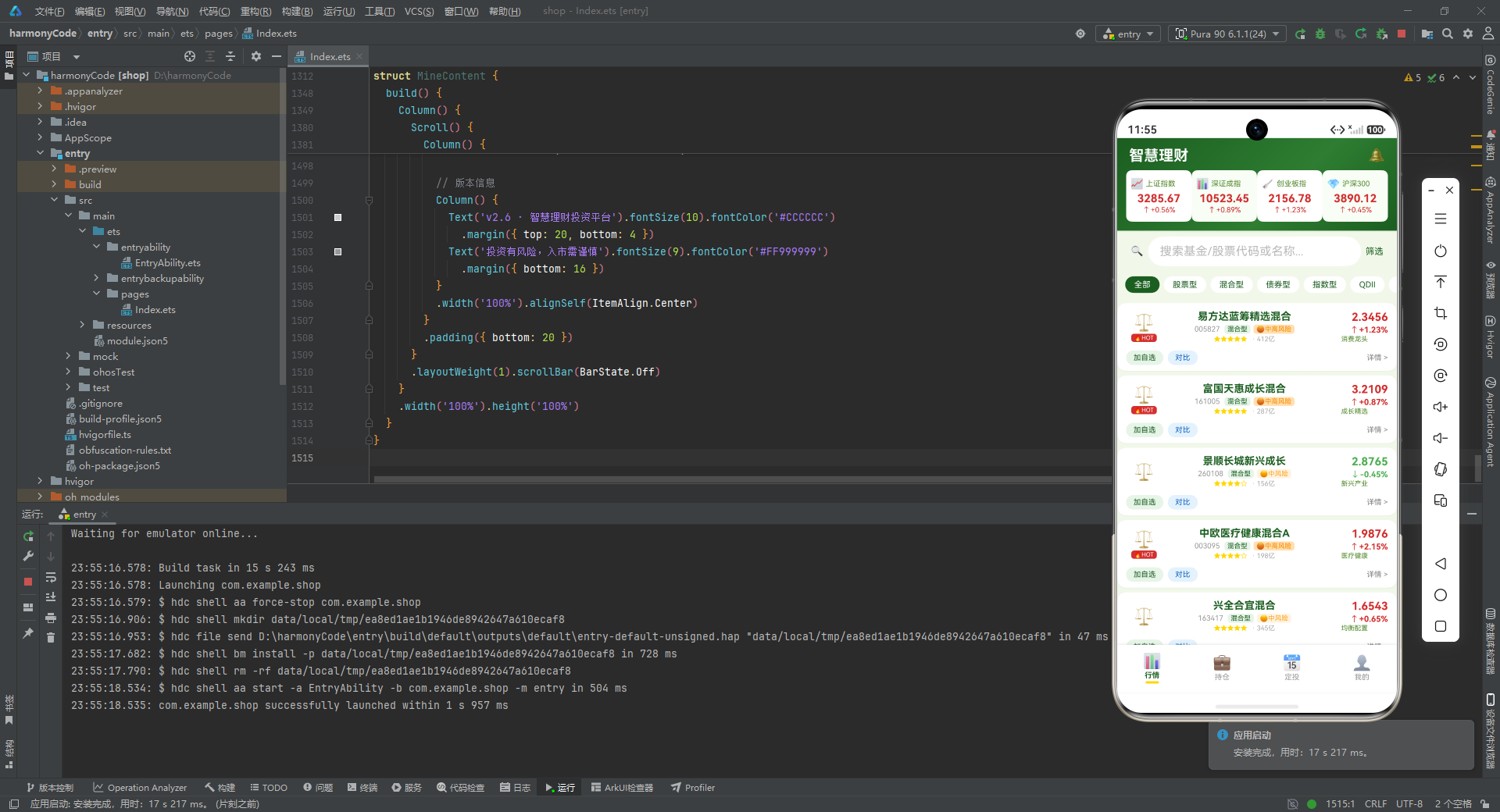
从架构层面看,这套代码体现了几个值得借鉴的工程实践:
第一,类型先行。通过 interface 与 @Observed class 把所有业务实体建模为强类型,从源头杜绝了"数据结构不明确"导致的问题。FundItem、HoldingItem、PlanItem、NewsItem 四大数据模型覆盖了基金、股票、持仓、定投、资讯五大场景,为后续的组件、Mock 数据、纯函数提供了统一的类型契约。
第二,数据驱动 UI。通过 FUND_TYPE_CONFIG、RISK_CONFIG、INDEX_CONFIG 等一组配置表,把"展示规则"与"渲染逻辑"解耦。新增一种基金类型或风险等级,只需要在配置表追加一行,无需改动任何组件代码。这种"配置化"思想是大型前端应用保持可维护性的关键。
第三,纯函数收敛展示规则。所有颜色取值、图标取值、数字格式化都通过 getXxx 系列纯函数统一处理,UI 层不再写任何三元运算或 if 分支。这不仅让渲染代码更清爽,也保证了全应用展示规则的一致性——同一种风险等级在任何页面都是同样的颜色。
第四,状态管理贴近数据本质。用 @State 管理组件内部状态,用 @Observed 标注可观察的数据模型,配合 @Builder 参数化构建器,让"数据变化驱动视图刷新"的响应式编程范式贯穿始终。弹窗的显隐、Tab 的切换、表单的输入,都通过状态变化自然地触发 UI 更新。
从业务层面看,这套应用覆盖了理财场景的核心闭环:行情页解决"看什么"的问题,让用户了解市场全景与个股基金详情;持仓页解决"持有什么"的问题,让用户实时掌握总资产、收益与每条持仓的盈亏;定投页解决"怎么投"的问题,提供创建、修改、暂停定投计划的完整能力,并辅以投资者教育文案;我的页解决"我是谁"的问题,展示用户画像、资产配置、快捷操作与投资概览。四个页面各司其职,又通过共享的 Mock 数据与纯函数形成有机整体。
从可扩展性看,这套代码为未来的真实接入预留了充足的扩展空间。当后端接口就绪后,只需要把 mockFunds、mockHoldings、mockPlans、mockNews 替换为接口返回的数据,把 getTotalMarketValue 等硬编码汇总函数替换为真实计算逻辑,整个 UI 层无需任何改动即可平滑迁移。当需要支持夜间模式时,只需要替换 COLORS 常量,所有引用了语义令牌的地方都会自动跟随更新。当需要国际化时,只需要把配置表中的 label 字段替换为 i18n key 查找即可。
从可学习性看,这份实现是一个非常好的 ArkTS 教学样本。它涵盖了声明式 UI 的核心要素:@Entry、@Component、@State、@Observed、@Builder、ForEach、Stack、Column、Row、Scroll、Progress、TextInput、Divider、linearGradient、shadow、borderRadius、layoutWeight、alignSelf、position、zIndex 等几乎全部常用能力。同时它也展示了如何用 ArkTS 组织一个中等规模的业务页面——如何拆分 Builder、如何管理状态、如何处理弹窗、如何做列表渲染、如何实现简单的可视化。
当然,这套代码也有一些可以进一步打磨的方向。例如,列表项目前是手动逐条调用 this.fundItemBuilder(mockFunds[0]) 到 mockFunds[13],未来可以用 ForEach(mockFunds, ...) 替代,让列表自动跟随数据长度变化;筛选与搜索目前只是状态预留,并未真正过滤 mockFunds,接入真实逻辑后可以让 selectedType 与 searchKeyword 真正生效;弹窗目前用 position 绝对定位,未来可以替换为鸿蒙的 bindSheet 或 CustomDialog 组件,获得更原生的弹窗体验。这些都是从 Demo 走向生产时值得优化的方向。

作为“人工智能6S店”的官方数字引擎,为AI开发者与企业提供一个覆盖软硬件全栈、一站式门户。
更多推荐

 7
7 0
0- 0


 已为社区贡献98条内容

所有评论(0)