
HarmonyOS 跨页面状态共享方案:基于 Redux 风格的状态管理实战
文章目录

每日一句正能量
允许自己慢下来,就像允许阳光慢慢铺满窗台,治愈从不需要着急。
阳光铺满窗台需要时间,但从不因为慢而减少温暖。治愈、成长、沉淀,都有其节奏,强行加速反而会打断它们。 对自己说“可以慢”,是对生命节律的尊重。
摘要
摘要:在 HarmonyOS 应用开发中,当业务复杂度提升、页面层级加深时,跨页面状态共享成为不可避免的技术挑战。本文基于 Redux 单向数据流思想,结合 HarmonyOS 提供的 AppStorage、EventHub 等系统能力,设计并实现了一套完整的跨页面状态管理方案。文章从架构设计、核心实现、多页面订阅、中间件扩展及性能优化等维度展开深度讲解,提供可直接落地的工程代码,帮助开发者构建高可维护、高可扩展的鸿蒙应用状态管理体系。
一、引言:为什么需要跨页面状态管理
在 HarmonyOS 应用开发初期,开发者通常采用 @State 管理页面内部状态,通过路由参数或事件回调在页面间传递数据。然而,随着业务规模扩大,这种"点对点"的通信模式会迅速暴露出以下痛点:
- 状态分散:每个页面维护独立的状态副本,同一数据在多处冗余存储,极易出现数据不一致。
- 通信链路复杂:深层嵌套页面之间需要层层转发事件,代码耦合度急剧上升。
- 调试困难:状态变更路径不可追溯,问题定位如同"大海捞针"。
- 生命周期敏感:页面销毁后状态丢失,返回时无法恢复,用户体验受损。
以电商应用为例:用户在商品详情页将商品加入购物车,购物车页、订单页、个人中心页的角标和数量都需要同步更新。如果采用传统的页面间通信方式,需要在每个页面手动监听事件并更新 UI,代码重复且容易遗漏。
Redux 风格的状态管理通过"单一数据源、只读状态、纯函数修改"三大原则,恰好能够系统性地解决上述问题。本文将 Redux 核心思想与 HarmonyOS 系统能力深度融合,打造一套原生、轻量、高效的跨页面状态共享方案。
二、Redux 核心思想回顾
Redux 是 JavaScript 生态中最具影响力的状态管理库之一,其核心设计哲学可以概括为三个基本原则:
2.1 单一数据源(Single Source of Truth)
整个应用的 state 被储存在一棵对象树中,并且这个对象树只存在于唯一的 Store 中。这意味着所有页面共享同一份状态数据,从根本上杜绝了数据不一致问题。
2.2 State 是只读的(State is Read-Only)
唯一改变 state 的方法就是触发 action。action 是一个用于描述已发生事件的普通对象,它保证了状态变更的可预测性和可追溯性。
2.3 使用纯函数执行修改(Changes are Made with Pure Functions)
为了描述 action 如何改变 state,你需要编写 reducers。Reducer 是纯函数,它接收先前的 state 和 action,返回新的 state,不产生副作用。
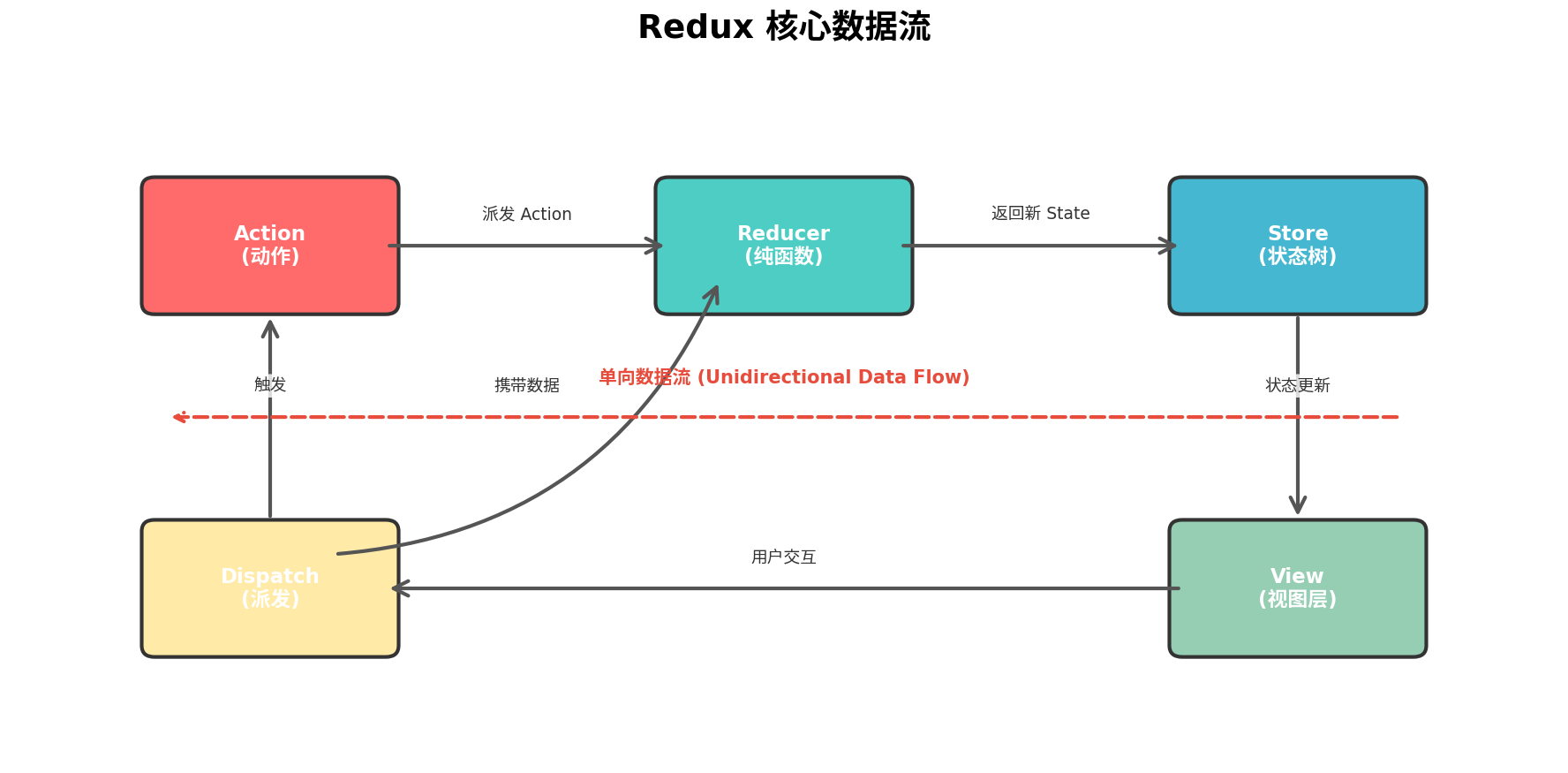
上图展示了 Redux 的核心数据流:用户交互触发 Dispatch,Dispatch 派发 Action 到 Reducer,Reducer 根据 Action 类型计算新 State,Store 更新后通知所有订阅的 View 重新渲染。整个流程是单向、闭环、可预测的。
三、HarmonyOS 状态管理现状分析
在 HarmonyOS ArkTS 开发中,官方提供了多种状态管理方案:
| 方案 | 作用域 | 适用场景 | 跨页面能力 |
|---|---|---|---|
@State | 组件内部 | 单一组件状态 | ❌ 不支持 |
@Prop | 父子组件 | 父传子单向数据 | ❌ 不支持 |
@Link | 父子组件 | 双向数据绑定 | ❌ 不支持 |
@Provide / @Consume | 跨层级组件 | 祖孙组件通信 | ❌ 不支持 |
@StorageLink / @StorageProp | 应用全局 | 全局状态绑定 | ⚠️ 需配合持久化 |
AppStorage | 应用全局 | 全局状态存储 | ✅ 支持 |
EventHub | 应用全局 | 全局事件广播 | ✅ 支持 |
从表中可以看出,AppStorage 和 EventHub 是实现跨页面状态共享的关键基础设施。AppStorage 提供了全局键值存储能力,支持状态持久化;EventHub 提供了发布-订阅模式的事件总线,支持页面间的松耦合通信。
然而,直接使用这两个 API 存在明显不足:缺乏统一的状态变更规范、没有中间件扩展机制、状态与业务逻辑混杂。因此,我们需要在它们之上封装一层 Redux 风格的抽象层。
四、整体架构设计
4.1 系统架构
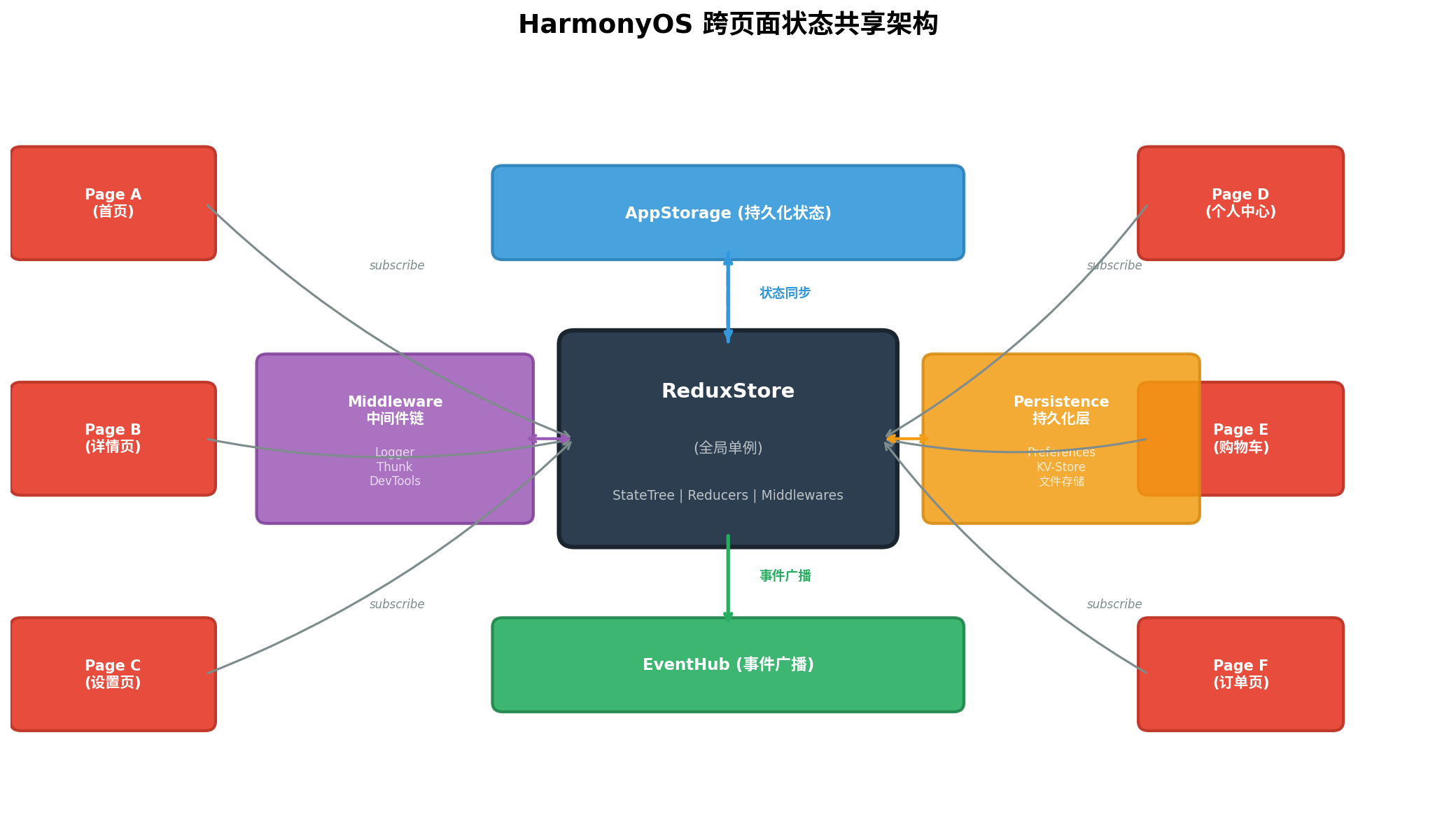
整个架构以 ReduxStore 为核心,采用全局单例模式。各页面通过 subscribe 方法注册状态变更监听器,通过 dispatch 方法提交状态变更请求。Store 内部维护状态树(StateTree)、Reducer 集合和中间件链(Middleware Chain)。
核心模块职责:
- Store:状态容器,负责状态存储、派发 Action、触发订阅回调。
- Reducer:纯函数,负责根据 Action 计算新 State。
- Action:描述状态变更意图的普通对象,包含
type和payload。 - Middleware:扩展点,在 Action 到达 Reducer 前后执行额外逻辑(如日志、异步、持久化)。
- AppStorage:状态持久化层,应用重启后可恢复状态。
- EventHub:事件广播层,实现跨 Ability/Page 的状态通知。
4.2 分层架构
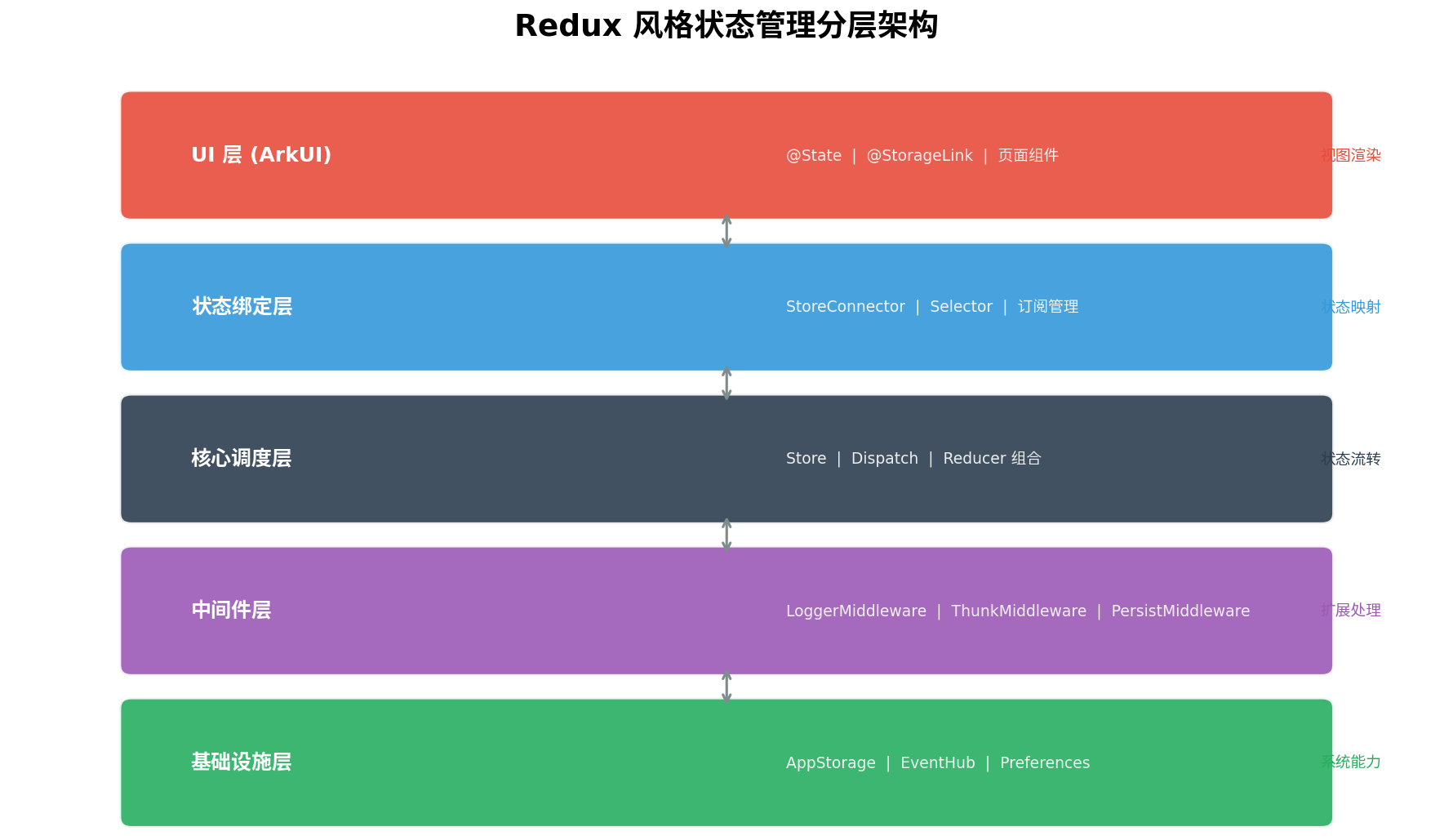
分层架构自上而下分为五层:
- UI 层:ArkUI 页面组件,通过
@StorageLink或自定义连接器绑定状态。 - 状态绑定层:
StoreConnector负责将 Store 中的状态映射到组件属性,Selector支持细粒度状态选取。 - 核心调度层:
Store接收 dispatch 请求,调用 Reducer 计算新状态,管理订阅者列表。 - 中间件层:支持
LoggerMiddleware(日志)、ThunkMiddleware(异步)、PersistMiddleware(持久化)等扩展。 - 基础设施层:基于
AppStorage和EventHub提供底层存储与通信能力。
五、核心代码实现
5.1 类型定义
首先定义核心类型,确保整个系统的类型安全:
// types/redux.types.ets

// Action 类型
type ActionType = string;

interface Action<T = object> {
  type: ActionType;
  payload?: T;
}

// Reducer 类型:纯函数,接收 state 和 action,返回新 state
type Reducer<S> = (state: S | undefined, action: Action) => S;

// 订阅者回调类型
type Subscriber<S> = (state: S, prevState: S) => void;

// 中间件类型
type Middleware<S> = (store: Store<S>) => (next: Dispatch) => (action: Action) => Action | void;

type Dispatch = (action: Action) => Action | void;

// Store 接口
interface Store<S> {
  getState(): S;
  dispatch(action: Action): Action | void;
  subscribe(listener: Subscriber<S>): () => void;
  replaceReducer(nextReducer: Reducer<S>): void;
}
5.2 Store 实现
Store 是整个状态管理系统的核心,采用单例模式确保全局唯一:
// store/ReduxStore.ets
import { AppStorage, emitter } from '@kit.ArkUI';

const STORE_KEY = 'redux_global_state';
const STATE_CHANGE_EVENT = 'REDUX_STATE_CHANGED';

class ReduxStore<S> implements Store<S> {
  private static instance: ReduxStore<any> | null = null;
  private state: S;
  private reducer: Reducer<S>;
  private subscribers: Set<Subscriber<S>> = new Set();
  private middlewares: Middleware<S>[] = [];
  private dispatchChain: Dispatch;

  // 私有构造函数,强制单例
  private constructor(reducer: Reducer<S>, preloadedState?: S) {
    this.reducer = reducer;
    this.state = preloadedState ?? reducer(undefined, { type: '@@redux/INIT' });
    this.dispatchChain = this.composeMiddlewares();
    this.persistState();
  }

  // 获取单例
  static getInstance<S>(reducer: Reducer<S>, preloadedState?: S): ReduxStore<S> {
    if (!ReduxStore.instance) {
      ReduxStore.instance = new ReduxStore(reducer, preloadedState);
    }
    return ReduxStore.instance;
  }

  // 重置单例(用于单元测试)
  static resetInstance(): void {
    ReduxStore.instance = null;
  }

  // 获取当前状态
  getState(): S {
    return this.state;
  }

  // 派发 Action
  dispatch(action: Action): Action | void {
    return this.dispatchChain(action);
  }

  // 注册订阅
  subscribe(listener: Subscriber<S>): () => void {
    this.subscribers.add(listener);
    // 立即触发一次,确保订阅者获取初始状态
    listener(this.state, this.state);

    return () => {
      this.subscribers.delete(listener);
    };
  }

  // 替换 Reducer(代码分割/热更新场景)
  replaceReducer(nextReducer: Reducer<S>): void {
    this.reducer = nextReducer;
    this.dispatch({ type: '@@redux/REPLACE' });
  }

  // 应用中间件
  applyMiddleware(...middlewares: Middleware<S>[]): void {
    this.middlewares = middlewares;
    this.dispatchChain = this.composeMiddlewares();
  }

  // 组合中间件链
  private composeMiddlewares(): Dispatch {
    const coreDispatch: Dispatch = (action: Action) => {
      const prevState = this.state;
      this.state = this.reducer(this.state, action);

      if (prevState !== this.state) {
        this.notifySubscribers(prevState);
        this.persistState();
        this.broadcastEvent();
      }
      return action;
    };

    return this.middlewares.reduceRight(
      (dispatch, middleware) => middleware(this)(dispatch),
      coreDispatch
    );
  }

  // 通知所有订阅者
  private notifySubscribers(prevState: S): void {
    this.subscribers.forEach(listener => {
      try {
        listener(this.state, prevState);
      } catch (error) {
        console.error('[ReduxStore] Subscriber error:', error);
      }
    });
  }

  // 持久化到 AppStorage
  private persistState(): void {
    AppStorage.setOrCreate(STORE_KEY, JSON.stringify(this.state));
  }

  // 从持久化恢复状态
  static restoreState<S>(): S | undefined {
    const stored = AppStorage.get(STORE_KEY) as string;
    if (stored) {
      try {
        return JSON.parse(stored);
      } catch {
        return undefined;
      }
    }
    return undefined;
  }

  // 通过 EventHub 广播状态变更(跨 Ability 通信)
  private broadcastEvent(): void {
    const event: emitter.InnerEvent = {
      eventId: 1,
      priority: emitter.EventPriority.HIGH
    };
    const eventData: emitter.EventData = {
      data: { eventType: STATE_CHANGE_EVENT, timestamp: Date.now() }
    };
    emitter.emit(event, eventData);
  }

  // 监听跨 Ability 状态变更事件
  static onCrossPageUpdate(callback: () => void): void {
    const event: emitter.InnerEvent = { eventId: 1 };
    emitter.on(event, () => {
      callback();
    });
  }
}

export { ReduxStore, Action, Reducer, Subscriber, Middleware, Dispatch };
5.3 Reducer 组合与模块化
对于复杂应用,单一 Reducer 会导致代码臃肿。我们采用 combineReducers 实现 Reducer 的模块化拆分:
// store/combineReducers.ets
import { Action, Reducer } from './ReduxStore';

// 将多个 Reducer 合并为一个根 Reducer
function combineReducers<S>(reducers: { [K in keyof S]: Reducer<S[K]> }): Reducer<S> {
  return (state: S | undefined, action: Action): S => {
    const nextState = {} as S;
    let hasChanged = false;

    for (const key in reducers) {
      const reducer = reducers[key];
      const previousStateForKey = state?.[key];
      const nextStateForKey = reducer(previousStateForKey, action);
      nextState[key] = nextStateForKey;
      hasChanged = hasChanged || nextStateForKey !== previousStateForKey;
    }

    return hasChanged ? nextState : (state ?? nextState);
  };
}

export { combineReducers };
5.4 业务状态定义示例
以电商应用为例,定义购物车、用户、订单三大模块的状态和 Reducer:
// modules/cart/cartReducer.ets
import { Action } from '../../store/ReduxStore';

interface CartItem {
  id: string;
  name: string;
  price: number;
  quantity: number;
  image: string;
}

interface CartState {
  items: CartItem[];
  totalCount: number;
  totalPrice: number;
  isLoading: boolean;
}

const initialCartState: CartState = {
  items: [],
  totalCount: 0,
  totalPrice: 0,
  isLoading: false
};

function cartReducer(state: CartState = initialCartState, action: Action): CartState {
  switch (action.type) {
    case 'CART_ADD_ITEM': {
      const newItem = action.payload as CartItem;
      const existingIndex = state.items.findIndex(item => item.id === newItem.id);
      let newItems: CartItem[];

      if (existingIndex >= 0) {
        newItems = state.items.map((item, index) =>
          index === existingIndex
            ? { ...item, quantity: item.quantity + newItem.quantity }
            : item
        );
      } else {
        newItems = [...state.items, newItem];
      }

      return {
        ...state,
        items: newItems,
        totalCount: newItems.reduce((sum, item) => sum + item.quantity, 0),
        totalPrice: newItems.reduce((sum, item) => sum + item.price * item.quantity, 0)
      };
    }

    case 'CART_REMOVE_ITEM': {
      const itemId = action.payload as string;
      const newItems = state.items.filter(item => item.id !== itemId);
      return {
        ...state,
        items: newItems,
        totalCount: newItems.reduce((sum, item) => sum + item.quantity, 0),
        totalPrice: newItems.reduce((sum, item) => sum + item.price * item.quantity, 0)
      };
    }

    case 'CART_UPDATE_QUANTITY': {
      const { id, quantity } = action.payload as { id: string; quantity: number };
      const newItems = state.items.map(item =>
        item.id === id ? { ...item, quantity: Math.max(0, quantity) } : item
      ).filter(item => item.quantity > 0);

      return {
        ...state,
        items: newItems,
        totalCount: newItems.reduce((sum, item) => sum + item.quantity, 0),
        totalPrice: newItems.reduce((sum, item) => sum + item.price * item.quantity, 0)
      };
    }

    case 'CART_CLEAR':
      return initialCartState;

    case 'CART_SET_LOADING':
      return { ...state, isLoading: action.payload as boolean };

    default:
      return state;
  }
}

export { CartState, CartItem, cartReducer };
// modules/user/userReducer.ets
import { Action } from '../../store/ReduxStore';

interface UserState {
  isLogin: boolean;
  token: string;
  userInfo: {
    userId: string;
    nickname: string;
    avatar: string;
  } | null;
}

const initialUserState: UserState = {
  isLogin: false,
  token: '',
  userInfo: null
};

function userReducer(state: UserState = initialUserState, action: Action): UserState {
  switch (action.type) {
    case 'USER_LOGIN_SUCCESS':
      return {
        ...state,
        isLogin: true,
        token: (action.payload as { token: string }).token,
        userInfo: (action.payload as { userInfo: UserState['userInfo'] }).userInfo
      };
    case 'USER_LOGOUT':
      return initialUserState;
    case 'USER_UPDATE_INFO':
      return { ...state, userInfo: { ...state.userInfo, ...(action.payload as object) } };
    default:
      return state;
  }
}

export { UserState, userReducer };
// store/rootReducer.ets
import { combineReducers } from './combineReducers';
import { cartReducer, CartState } from '../modules/cart/cartReducer';
import { userReducer, UserState } from '../modules/user/userReducer';

interface AppState {
  cart: CartState;
  user: UserState;
}

const rootReducer = combineReducers<AppState>({
  cart: cartReducer,
  user: userReducer
});

export { AppState, rootReducer };
六、跨页面状态共享实战
6.1 Store 初始化
在应用入口(如 EntryAbility 的 onCreate 或首页的 aboutToAppear)中初始化 Store:
// entry/EntryAbility.ets
import { AbilityConstant, UIAbility, Want } from '@kit.AbilityKit';
import { window } from '@kit.ArkUI';
import { ReduxStore } from '../store/ReduxStore';
import { rootReducer, AppState } from '../store/rootReducer';

export default class EntryAbility extends UIAbility {
  onCreate(want: Want, launchParam: AbilityConstant.LaunchParam): void {
    // 尝试从持久化恢复状态
    const restoredState = ReduxStore.restoreState<AppState>();

    // 初始化全局 Store
    const store = ReduxStore.getInstance(rootReducer, restoredState);

    // 应用中间件
    store.applyMiddleware(
      loggerMiddleware,
      thunkMiddleware,
      persistMiddleware
    );

    console.info('[EntryAbility] ReduxStore initialized');
  }

  onWindowStageCreate(windowStage: window.WindowStage): void {
    windowStage.loadContent('pages/Index', (err) => {
      if (err.code) {
        console.error('Failed to load content');
        return;
      }
      console.info('Succeeded in loading content');
    });
  }
}
6.2 页面中使用 Store
6.2.1 购物车页面(状态修改方)
// pages/CartPage.ets
import { ReduxStore, Action } from '../store/ReduxStore';
import { AppState } from '../store/rootReducer';
import { CartItem } from '../modules/cart/cartReducer';

@Entry
@Component
struct CartPage {
  @State private cartItems: CartItem[] = [];
  @State private totalPrice: number = 0;
  @State private isLoading: boolean = false;

  private store = ReduxStore.getInstance<AppState>(null as any);
  private unsubscribe: (() => void) | null = null;

  aboutToAppear() {
    // 订阅状态变更
    this.unsubscribe = this.store.subscribe((state: AppState, prevState: AppState) => {
      this.cartItems = state.cart.items;
      this.totalPrice = state.cart.totalPrice;
      this.isLoading = state.cart.isLoading;
    });

    // 监听跨 Ability 状态更新
    ReduxStore.onCrossPageUpdate(() => {
      const state = this.store.getState();
      this.cartItems = state.cart.items;
      this.totalPrice = state.cart.totalPrice;
    });
  }

  aboutToDisappear() {
    this.unsubscribe?.();
  }

  // 添加商品到购物车
  addToCart(item: CartItem) {
    const action: Action = {
      type: 'CART_ADD_ITEM',
      payload: item
    };
    this.store.dispatch(action);
  }

  // 更新商品数量
  updateQuantity(itemId: string, quantity: number) {
    this.store.dispatch({
      type: 'CART_UPDATE_QUANTITY',
      payload: { id: itemId, quantity }
    });
  }

  // 清空购物车
  clearCart() {
    this.store.dispatch({ type: 'CART_CLEAR' });
  }

  build() {
    Column() {
      Text('购物车')
        .fontSize(24)
        .fontWeight(FontWeight.Bold)
        .margin(16)

      if (this.isLoading) {
        LoadingProgress()
          .width(50)
          .height(50)
          .color('#FF6B6B')
      } else if (this.cartItems.length === 0) {
        Text('购物车是空的')
          .fontSize(16)
          .fontColor('#999')
          .margin(50)
      } else {
        List() {
          ForEach(this.cartItems, (item: CartItem) => {
            ListItem() {
              Row() {
                Image(item.image)
                  .width(80)
                  .height(80)
                  .borderRadius(8)

                Column() {
                  Text(item.name)
                    .fontSize(16)
                    .fontWeight(FontWeight.Medium)
                  Text(`¥${item.price.toFixed(2)}`)
                    .fontSize(14)
                    .fontColor('#FF6B6B')

                  Row() {
                    Button('-')
                      .width(32)
                      .height(32)
                      .onClick(() => this.updateQuantity(item.id, item.quantity - 1))
                    Text(`${item.quantity}`)
                      .width(40)
                      .textAlign(TextAlign.Center)
                    Button('+')
                      .width(32)
                      .height(32)
                      .onClick(() => this.updateQuantity(item.id, item.quantity + 1))
                  }
                  .margin({ top: 8 })
                }
                .layoutWeight(1)
                .alignItems(HorizontalAlign.Start)
                .margin({ left: 12 })
              }
              .width('100%')
              .padding(12)
            }
          })
        }
        .layoutWeight(1)

        Row() {
          Text(`合计: ¥${this.totalPrice.toFixed(2)}`)
            .fontSize(18)
            .fontWeight(FontWeight.Bold)
            .fontColor('#FF6B6B')

          Button('结算')
            .width(120)
            .height(44)
            .backgroundColor('#FF6B6B')
            .fontColor('#FFFFFF')
            .onClick(() => {
              // 跳转结算页
            })
        }
        .width('100%')
        .justifyContent(FlexAlign.SpaceBetween)
        .padding(16)
        .backgroundColor('#FFFFFF')
        .shadow({ radius: 8, color: 'rgba(0,0,0,0.1)', offsetY: -2 })
      }
    }
    .width('100%')
    .height('100%')
    .backgroundColor('#F5F5F5')
  }
}
6.2.2 订单页面(状态消费方)
// pages/OrderPage.ets
import { ReduxStore } from '../store/ReduxStore';
import { AppState } from '../store/rootReducer';

@Entry
@Component
struct OrderPage {
  @State private cartCount: number = 0;
  @State private isLogin: boolean = false;

  private store = ReduxStore.getInstance<AppState>(null as any);
  private unsubscribe: (() => void) | null = null;

  aboutToAppear() {
    this.unsubscribe = this.store.subscribe((state: AppState) => {
      this.cartCount = state.cart.totalCount;
      this.isLogin = state.user.isLogin;
    });
  }

  aboutToDisappear() {
    this.unsubscribe?.();
  }

  build() {
    Column() {
      // 顶部导航栏
      Row() {
        Text('订单确认')
          .fontSize(20)
          .fontWeight(FontWeight.Bold)

        Badge({
          value: this.cartCount.toString(),
          position: BadgePosition.RightTop,
          style: { badgeSize: 18, badgeColor: '#FF6B6B' }
        }) {
          Image($r('app.media.ic_cart'))
            .width(28)
            .height(28)
        }
      }
      .width('100%')
      .justifyContent(FlexAlign.SpaceBetween)
      .padding(16)

      if (!this.isLogin) {
        Column() {
          Text('请先登录')
            .fontSize(16)
            .fontColor('#999')
          Button('去登录')
            .margin({ top: 16 })
            .onClick(() => {
              // 跳转登录页
            })
        }
        .layoutWeight(1)
        .justifyContent(FlexAlign.Center)
      } else {
        // 订单内容...
        Text(`购物车共 ${this.cartCount} 件商品`)
          .fontSize(14)
          .fontColor('#666')
          .margin(16)
      }
    }
    .width('100%')
    .height('100%')
    .backgroundColor('#F5F5F5')
  }
}
6.3 状态更新时序
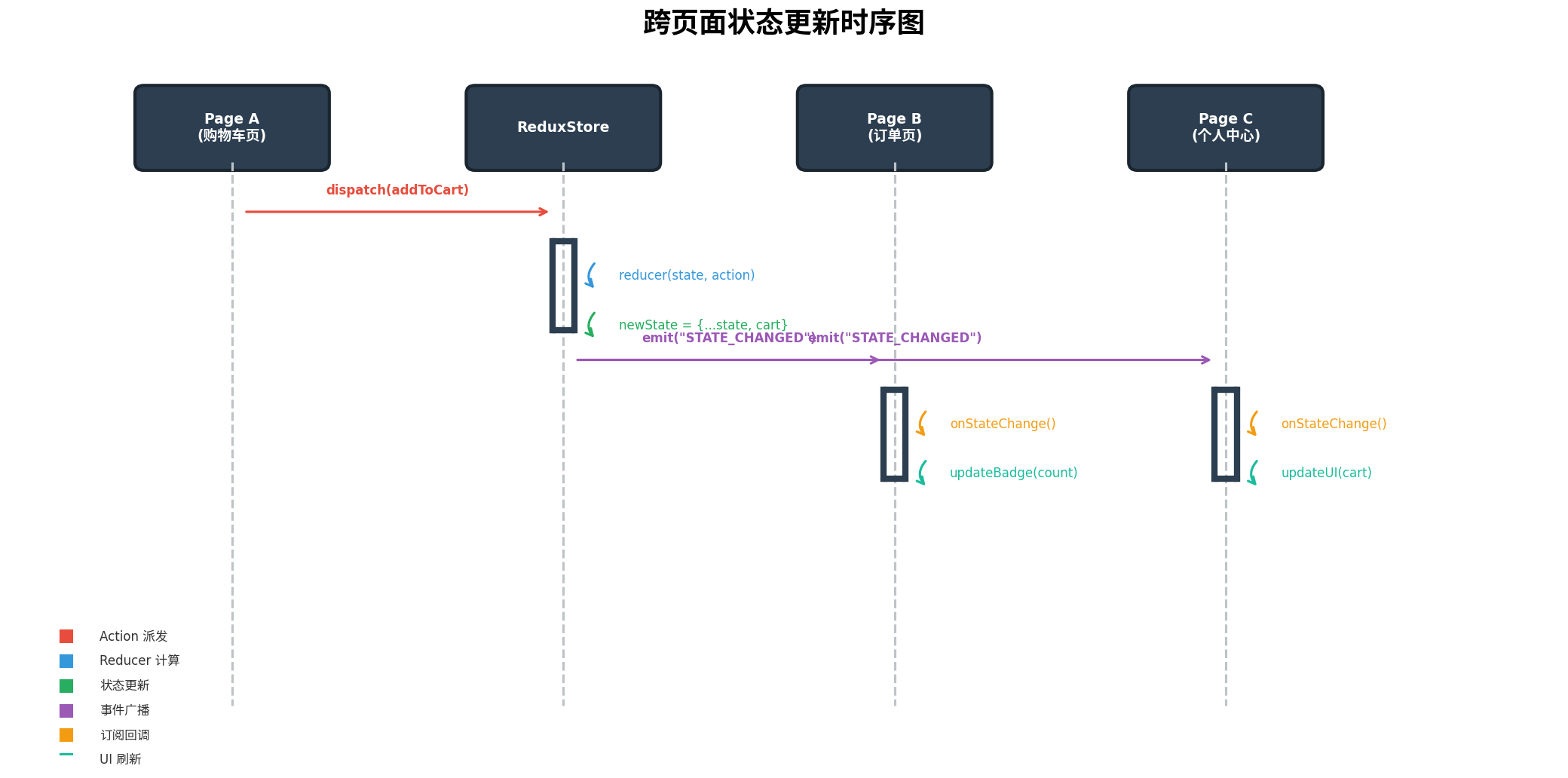
上图展示了跨页面状态更新的完整时序:当用户在购物车页(Page A)点击"加入购物车"时,触发 dispatch(addToCart),Store 调用 Reducer 计算新状态,随后通过 EventHub 广播 STATE_CHANGED 事件。订单页(Page B)和个人中心页(Page C)作为订阅方,接收到事件后调用 onStateChange() 回调,更新各自的 UI(如角标数量、购物车图标状态)。
七、中间件扩展
中间件是 Redux 最强大的扩展机制之一,它允许开发者在 Action 到达 Reducer 前后插入自定义逻辑。
7.1 日志中间件
// middleware/loggerMiddleware.ets
import { Middleware, Action } from '../store/ReduxStore';

const loggerMiddleware: Middleware<any> = (store) => (next) => (action: Action) => {
  const timestamp = new Date().toISOString();
  const prevState = store.getState();

  console.info(`[Redux Logger] ${timestamp}`);
  console.info(`  Action: ${action.type}`);
  console.info(`  Payload:`, JSON.stringify(action.payload));
  console.info(`  Prev State:`, JSON.stringify(prevState));

  const result = next(action);

  const nextState = store.getState();
  console.info(`  Next State:`, JSON.stringify(nextState));
  console.info(`  State Changed:`, prevState !== nextState);

  return result;
};

export { loggerMiddleware };
7.2 异步 Thunk 中间件
Redux 原生只支持同步 Action,通过 Thunk 中间件可以支持异步操作:
// middleware/thunkMiddleware.ets
import { Middleware, Action, Store } from '../store/ReduxStore';

// Thunk Action:返回函数而非普通对象
type ThunkAction<R, S> = (dispatch: (action: Action) => void, getState: () => S) => R;

const thunkMiddleware: Middleware<any> = (store) => (next) => (action: Action | ThunkAction<any, any>) => {
  if (typeof action === 'function') {
    return action(store.dispatch, store.getState);
  }
  return next(action);
};

export { thunkMiddleware, ThunkAction };
使用 Thunk 进行异步请求:
// modules/cart/cartActions.ets
import { ThunkAction } from '../../middleware/thunkMiddleware';
import { AppState } from '../../store/rootReducer';
import { CartItem } from './cartReducer';

// 异步获取购物车数据
function fetchCartItems(): ThunkAction<Promise<void>, AppState> {
  return async (dispatch, getState) => {
    dispatch({ type: 'CART_SET_LOADING', payload: true });

    try {
      // 模拟网络请求
      await new Promise(resolve => setTimeout(resolve, 1000));

      const mockItems: CartItem[] = [
        { id: '1', name: 'HarmonyOS 开发实战', price: 89.0, quantity: 1, image: '...' },
        { id: '2', name: 'ArkTS 编程指南', price: 69.0, quantity: 2, image: '...' }
      ];

      mockItems.forEach(item => {
        dispatch({ type: 'CART_ADD_ITEM', payload: item });
      });
    } catch (error) {
      console.error('Failed to fetch cart items:', error);
    } finally {
      dispatch({ type: 'CART_SET_LOADING', payload: false });
    }
  };
}

export { fetchCartItems };
7.3 持久化中间件
// middleware/persistMiddleware.ets
import { Middleware } from '../store/ReduxStore';
import { preferences } from '@kit.ArkData';

const PREFERENCES_NAME = 'redux_persist';

const persistMiddleware: Middleware<any> = (store) => (next) => (action) => {
  const result = next(action);

  // 关键 Action 触发持久化
  const persistActions = ['CART_ADD_ITEM', 'CART_REMOVE_ITEM', 'CART_UPDATE_QUANTITY', 'USER_LOGIN_SUCCESS'];
  if (persistActions.includes(action.type)) {
    const state = store.getState();
    const persistData = {
      cart: state.cart,
      user: state.user
    };

    // 使用 Preferences 持久化
    const pref = preferences.getPreferencesSync(getContext(), { name: PREFERENCES_NAME });
    pref.putSync('redux_state', JSON.stringify(persistData));
    pref.flush();
  }

  return result;
};

export { persistMiddleware };
八、性能优化与最佳实践
8.1 细粒度订阅(Selector 模式)
避免页面订阅整个 State 树导致不必要的重渲染。通过 Selector 只订阅需要的子状态:
// utils/selector.ets
type Selector<S, R> = (state: S) => R;

function createSelector<S, R>(selector: Selector<S, R>): Selector<S, R> {
  let lastState: S | undefined;
  let lastResult: R | undefined;

  return (state: S) => {
    if (state !== lastState) {
      lastState = state;
      lastResult = selector(state);
    }
    return lastResult!;
  };
}

// 使用示例
const selectCartCount = createSelector((state: AppState) => state.cart.totalCount);
const selectUserInfo = createSelector((state: AppState) => state.user.userInfo);

// 页面中只订阅特定状态
this.store.subscribe((state) => {
  const count = selectCartCount(state);
  if (count !== this.cartCount) {
    this.cartCount = count; // 只有 count 变化时才更新 UI
  }
});
8.2 状态不可变性优化
对于大型列表,深拷贝会导致严重性能问题。采用结构性共享(Structural Sharing)策略:
// utils/immutable.ets

// 使用 Object.assign / 展开运算符进行浅拷贝,配合 immer 思想
function updateArrayItem<T>(array: T[], index: number, updater: (item: T) => T): T[] {
  if (index < 0 || index >= array.length) return array;
  const newArray = [...array];
  newArray[index] = updater(newArray[index]);
  return newArray;
}

function updateObjectProp<T extends object, K extends keyof T>(
  obj: T, key: K, value: T[K]
): T {
  if (obj[key] === value) return obj;
  return { ...obj, [key]: value };
}

export { updateArrayItem, updateObjectProp };
8.3 防抖与节流
对于高频触发的 Action(如搜索输入、滚动加载),在中间件层添加防抖处理:
// middleware/debounceMiddleware.ets
import { Middleware, Action } from '../store/ReduxStore';

function debounceMiddleware(delay: number = 300): Middleware<any> {
  const timers: Map<string, number> = new Map();

  return (store) => (next) => (action: Action) => {
    const key = action.type;

    if (timers.has(key)) {
      clearTimeout(timers.get(key));
    }

    const timer = setTimeout(() => {
      next(action);
      timers.delete(key);
    }, delay);

    timers.set(key, timer);
  };
}

export { debounceMiddleware };
8.4 内存管理
- 页面销毁时务必调用
unsubscribe()释放订阅,避免内存泄漏。 - 对于不再使用的 Ability,及时清理 Store 中的缓存数据。
- 避免在 Reducer 中执行副作用操作(如网络请求、本地存储),保持 Reducer 的纯函数特性。
8.5 开发调试建议
// 开发环境启用 Redux DevTools 风格日志
if (BuildProfile.DEBUG) {
  store.applyMiddleware(
    loggerMiddleware,
    // 可以接入 HiLog 进行结构化日志输出
    devToolsMiddleware
  );
}
九、总结
本文从 HarmonyOS 跨页面状态共享的实际痛点出发,系统性地设计并实现了一套基于 Redux 风格的状态管理方案。通过 单一数据源 保证数据一致性,通过 纯函数 Reducer 保证状态变更的可预测性,通过 中间件机制 实现日志、异步、持久化等扩展能力,通过 AppStorage + EventHub 实现跨页面、跨 Ability 的状态同步。
该方案具有以下核心优势:
- 架构清晰:分层明确,职责单一,易于维护和扩展。
- 类型安全:全链路 TypeScript 类型约束,编译期即可发现状态错误。
- 性能可控:支持 Selector 细粒度订阅、防抖节流、结构性共享等优化手段。
- 生态兼容:与 HarmonyOS 原生能力(AppStorage、EventHub、Preferences)深度整合,无第三方依赖。
- 调试友好:完整的日志中间件支持,状态变更路径一目了然。
在实际项目中,开发者可以根据业务规模灵活调整:小型应用可直接使用 combineReducers 管理两三个模块;中大型应用可以进一步引入模块懒加载、状态分片(State Slicing)等高级特性。无论项目规模如何,遵循"单向数据流、纯函数修改、单一数据源"三大原则,都能显著提升代码质量和团队协作效率。
转载自:https://blog.csdn.net/u014727709/article/details/163513725
欢迎 👍点赞✍评论⭐收藏,欢迎指正

作为“人工智能6S店”的官方数字引擎,为AI开发者与企业提供一个覆盖软硬件全栈、一站式门户。
更多推荐

 1
1 0
0- 0


 已为社区贡献160条内容

所有评论(0)