
观鸟俱乐部与记录社区基于HarmonyOS ArkTS API 24 UI 全架构深度解析,通过 @State mainTab 状态变量控制当前激活的主 Tab,点击切换时框架自动渲染对应内容区域
一、技术背景
在当今移动端跨平台开发领域,声明式 UI 范式已经成为主流趋势。与传统的命令式 UI 编程不同,声明式 UI 允许开发者以"描述最终状态"的方式构建用户界面,框架底层自动负责从当前状态到目标状态的差异计算与渲染更新。这种编程范式极大降低了复杂界面的维护成本——开发者只需关注"界面应该是什么样子",而非"如何一步步地把界面变成那个样子"。在 ArkTS 框架中,声明式 UI 通过 @Component 装饰器标记自定义组件,通过 @State、@Prop、@Link 等状态管理装饰器建立数据与视图之间的响应式绑定关系,当状态数据发生变化时框架自动触发对应组件的重新渲染,整个过程无需开发者手动调用任何刷新方法。
ArkTS 是鸿蒙生态(HarmonyOS)应用开发的核心编程语言,它在 TypeScript 基础上进行了扩展和约束,引入了更严格的类型检查规则和更丰富的 UI 描述语法。ArkTS 保留了 TypeScript 的类型系统能力,同时增加了 @Builder、@BuilderParam、@Extend、@Style 等装饰器用于 UI 片段的封装与复用,以及 @Observed 和 @ObjectLink 用于跨组件的深度观察机制。这些语言层面的特性使得开发者可以在单一文件中完成从数据模型定义、业务逻辑处理到界面描述的全部工作,非常适合中小型应用以及功能演示页面的快速构建。ArkTS 编译器会将声明式 UI 描述转换为高效的 C++ 渲染指令,在运行时通过 ArkUI 引擎执行,保证了声明式写法在性能上不会成为瓶颈。
鸿蒙生态自推出以来,其分布式架构理念和全场景开发能力备受行业关注。对于自然观察与生态旅行这一细分领域而言,应用的核心需求在于:丰富的多媒体内容展示(鸟种图鉴、观察照片、活动宣传)、高频的数据录入与交互(观察记录的新增与编辑、路线的删除与管理)、以及社区化的社交信息流(用户动态、点赞评论、排行竞争)。这些需求共同决定了界面层需要承载大量的列表渲染、弹框交互、条件切换与动画效果。ArkTS 的 @Observed 机制为复杂数据模型提供了细粒度的变化追踪能力——被 @Observed 装饰的类实例,其属性在被赋值修改时能够自动通知依赖该属性的 UI 组件进行局部刷新,避免了全量重渲染带来的性能损耗。这在包含大量列表项和嵌套对象的应用中尤为重要。
本项目的主题色调采用森绿、米棕与暖白亮底的组合,配色方案贴合自然观察行业的视觉调性——绿色象征森林与生态,棕色代表大地与户外装备,暖白底色则提供柔和的阅读体验。从功能架构来看,应用采用底部四主 Tab(首页、图鉴、动态、我的)的导航骨架,首页内嵌七内容子 Tab,涵盖今日鸟况时间轴、观鸟路线管理、装备瀑布清单、观鸟排行榜、识鸟知识流、打卡日历与活动报名等完整功能链路。此外还包含三个核心弹框(新增观察记录、编辑装备、删除路线确认)以及基于 setInterval 驱动的羽叶飘落视觉效果层。整体设计充分展示了 ArkTS 在构建复杂垂直行业应用时的表达能力和工程组织方式。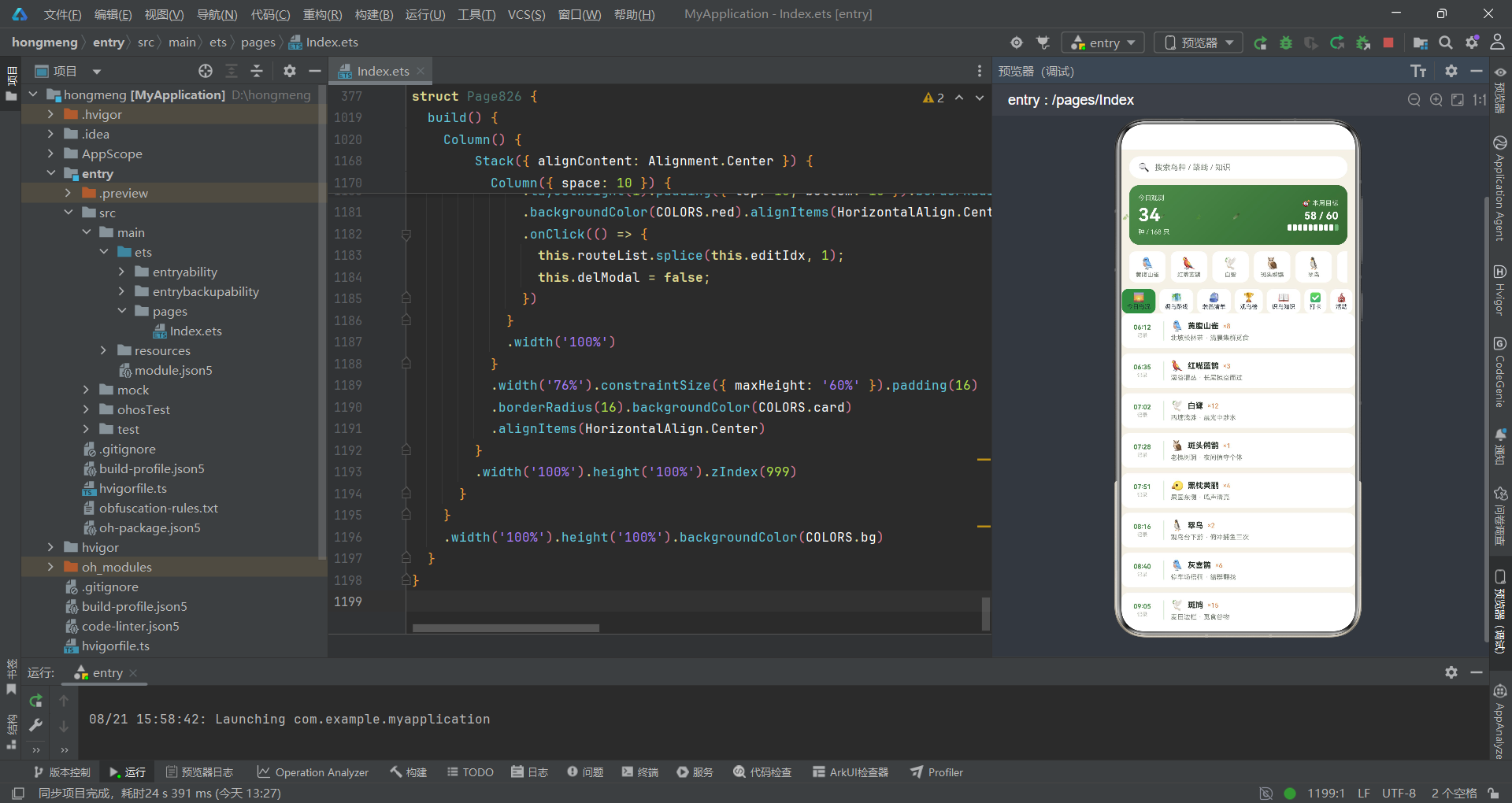
二、项目概述
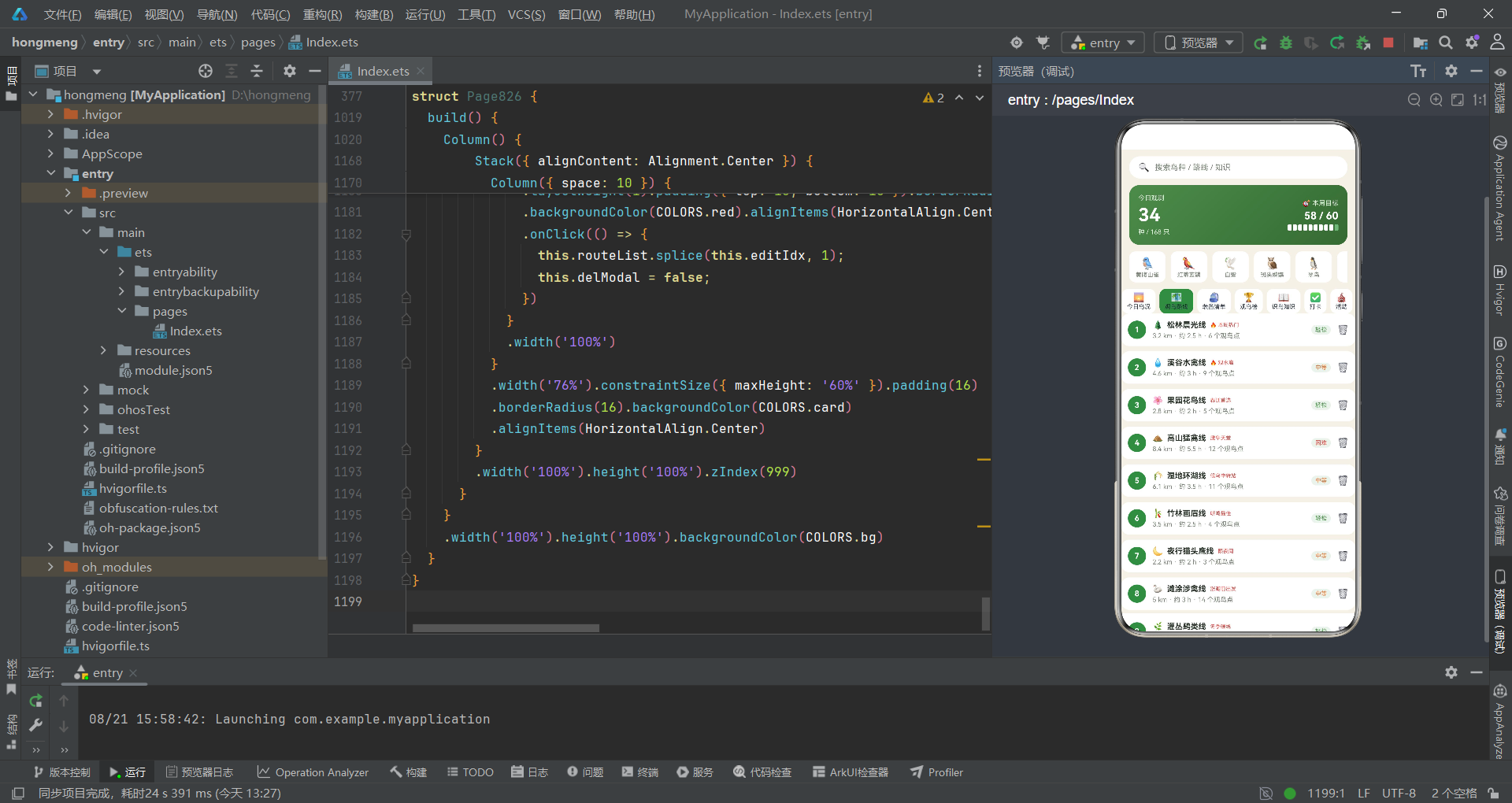
本项目是一个面向观鸟爱好者社区的全功能展示页面,涵盖从个人记录到社区互动的完整业务链条。以下对各功能模块进行说明:
底部主导航栏(4 主 Tab):应用底部固定的四个主入口——首页、图鉴、动态、我的——构成全局导航骨架。首页承载最丰富的功能内容,图鉴提供鸟种分类浏览,动态展示社区信息流,我的提供个人中心与数据统计。通过 @State mainTab 状态变量控制当前激活的主 Tab,点击切换时框架自动渲染对应内容区域。
首页头部(生态电商风格):首页顶部的复合头部区域,包含搜索栏、今日观鸟大卡和热门鸟种横滚列表三个子模块。搜索栏提供鸟种、路线、知识的搜索入口;今日观鸟大卡以渐变背景展示当日观测鸟种数和本周目标进度条;热门鸟种横滚以白色小卡形式横向滚动展示鸟种列表。
首页内嵌 7 内容子 Tab:首页内部通过 homeTab 状态变量切换七个内容子模块——今日鸟况、观鸟路线、装备清单、观鸟榜、识鸟知识、打卡和活动。子 Tab 条采用横向滚动布局,激活时以绿色背景高亮区分。
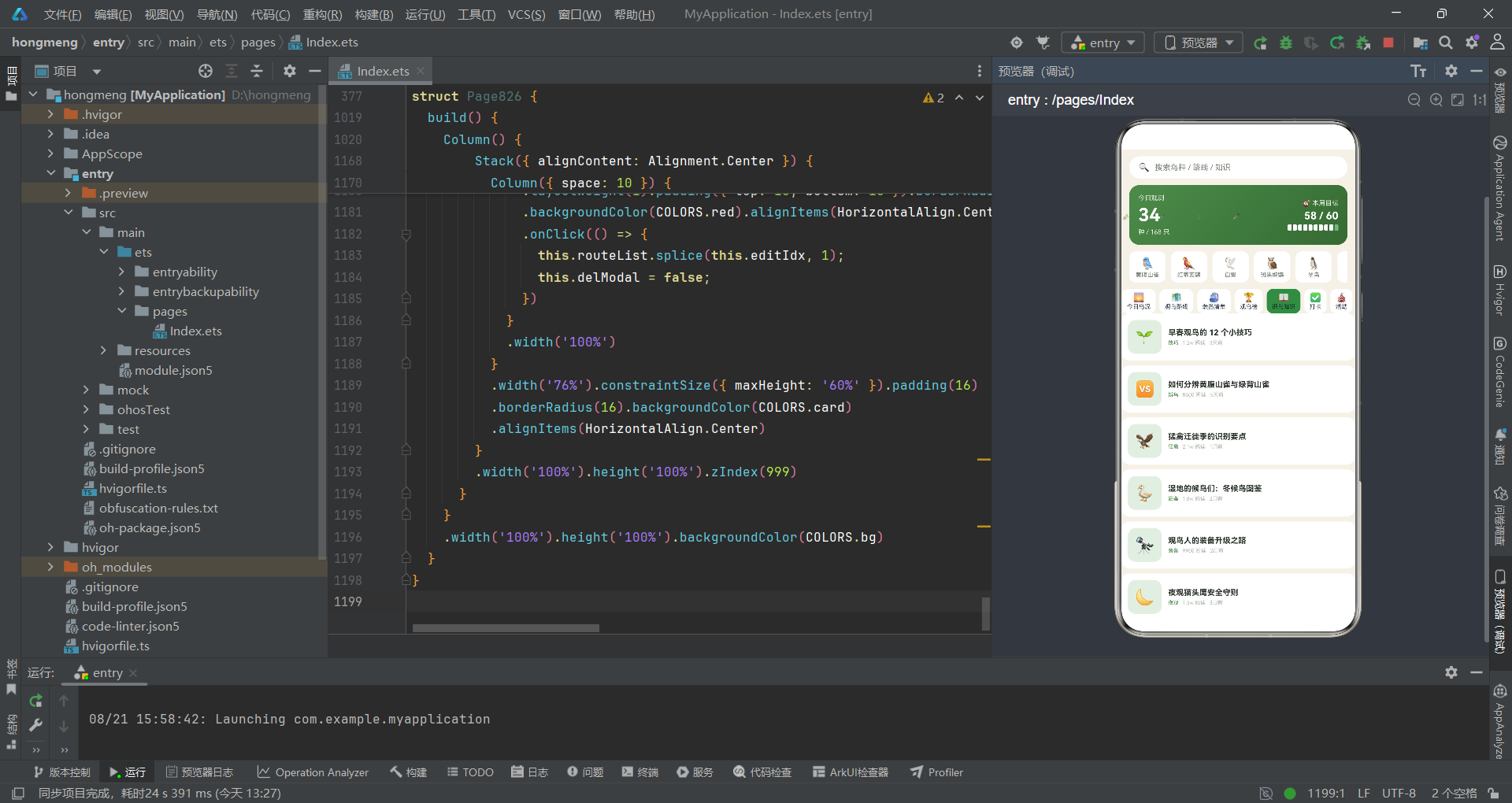
今日鸟况(时间轴列表):以时间轴形式展示当日各时间段的鸟类观察记录。每条记录包含时间、鸟种图标、名称、数量、地点和备注。时间轴左侧以绿色竖线和时间标记形成视觉引导线,右侧为详细内容卡片。
观鸟路线(编号列表,可删除):以编号卡片列表展示各条观鸟路线。每条路线包含编号徽章、图标、名称、热门标签、里程/时长/观鸟点数信息、难度等级标签和删除操作入口。点击删除图标弹出确认弹框。
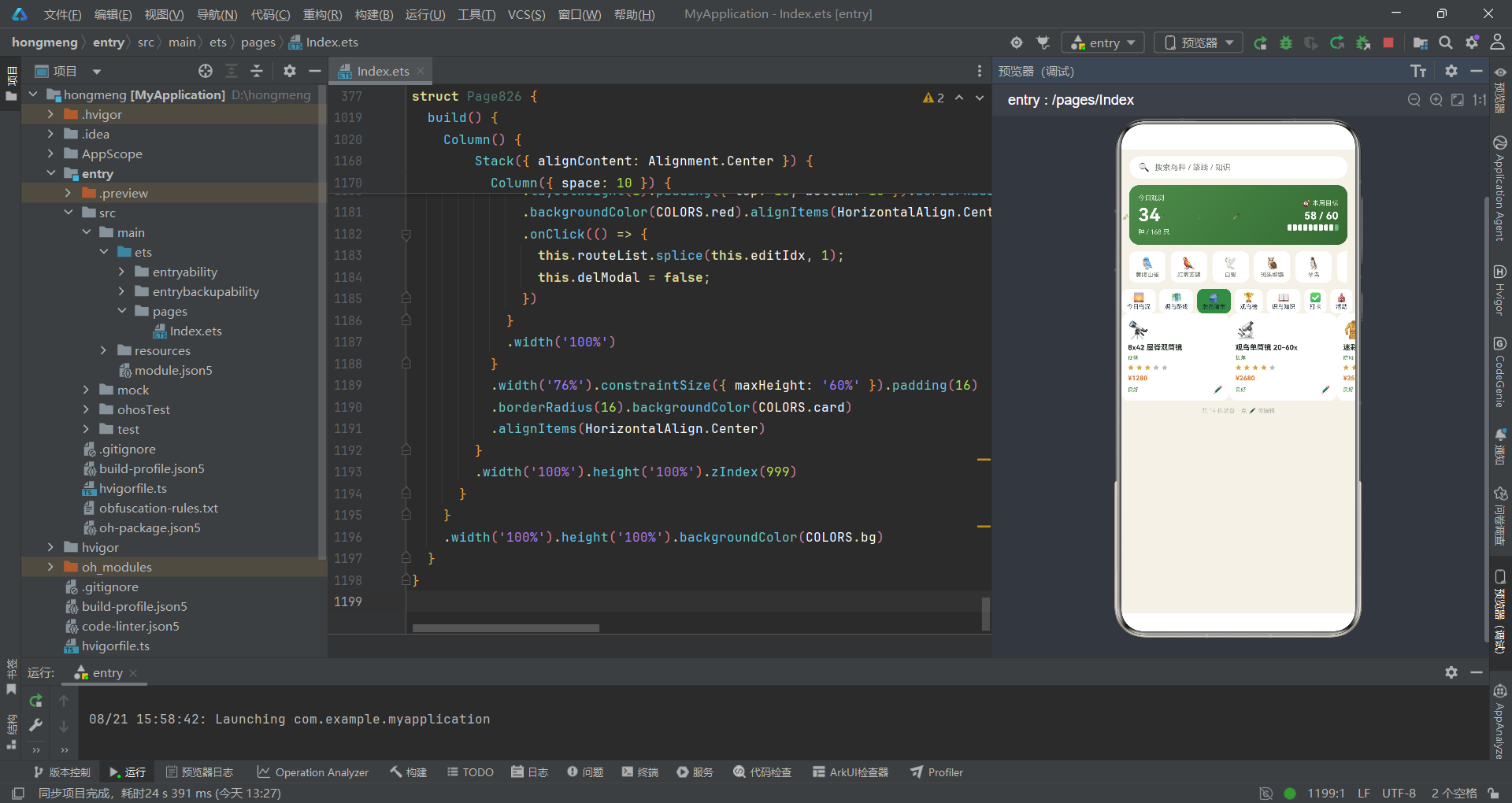
装备清单(双列瀑布,可编辑):以双列瀑布流展示观鸟装备清单。每件装备包含图标、名称、标签、星级评分、价格、使用状态和编辑入口。点击编辑图标弹出装备编辑弹框,可修改名称和使用状态。
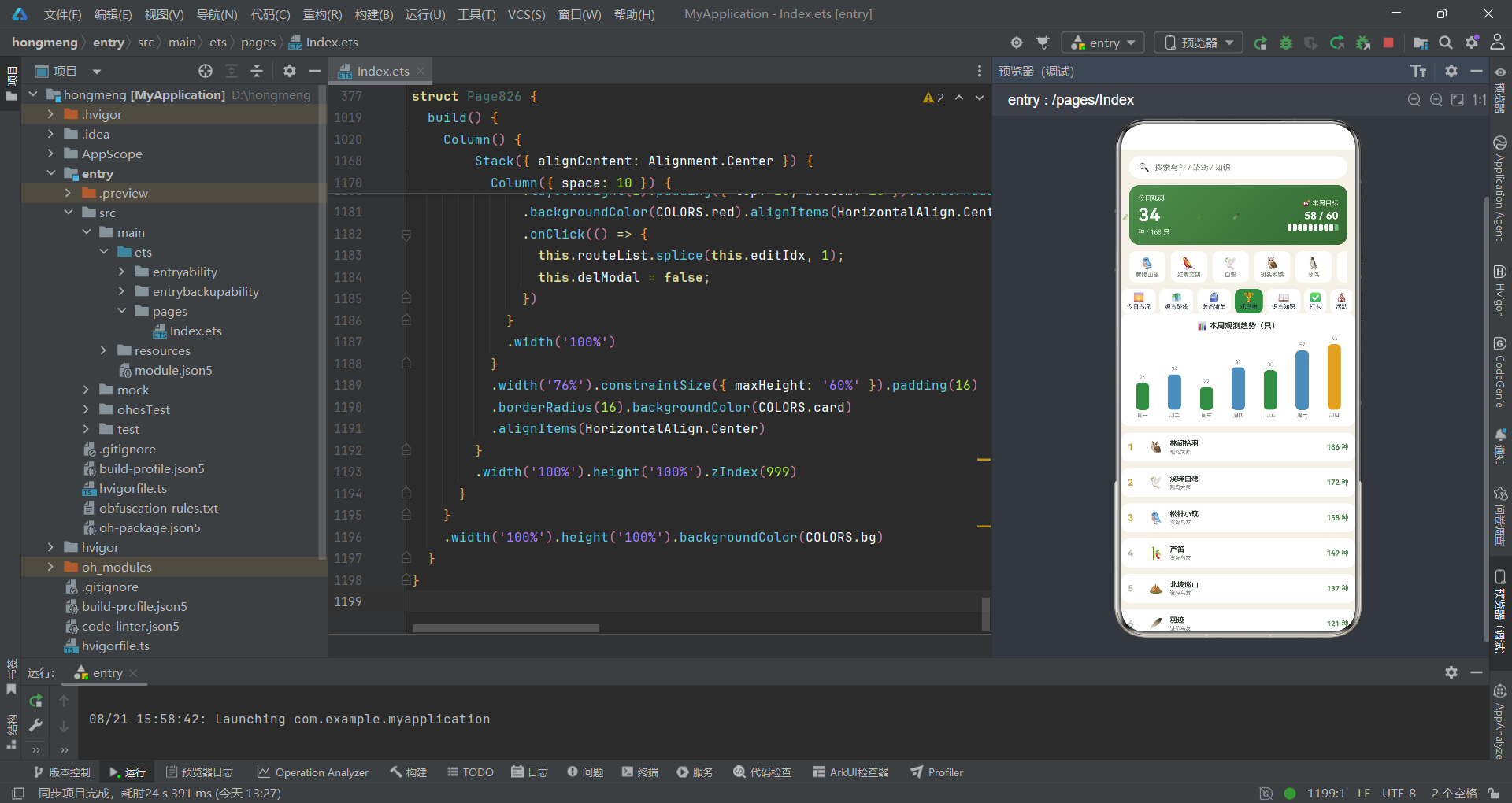
观鸟榜(柱状图 + 排行):包含本周观测趋势柱状图和观鸟排行榜。柱状图以七根柱子展示周一至周日的观测数量,柱子颜色按位置变化。排行榜展示前十名观鸟者的排名、头像、昵称、等级和累计鸟种数。
识鸟知识(图文信息流):以图文信息流展示鸟类知识文章列表。每篇文章包含图标缩略、标题、分类标签、阅读量和发布时间。标题超长时以省略号截断显示。
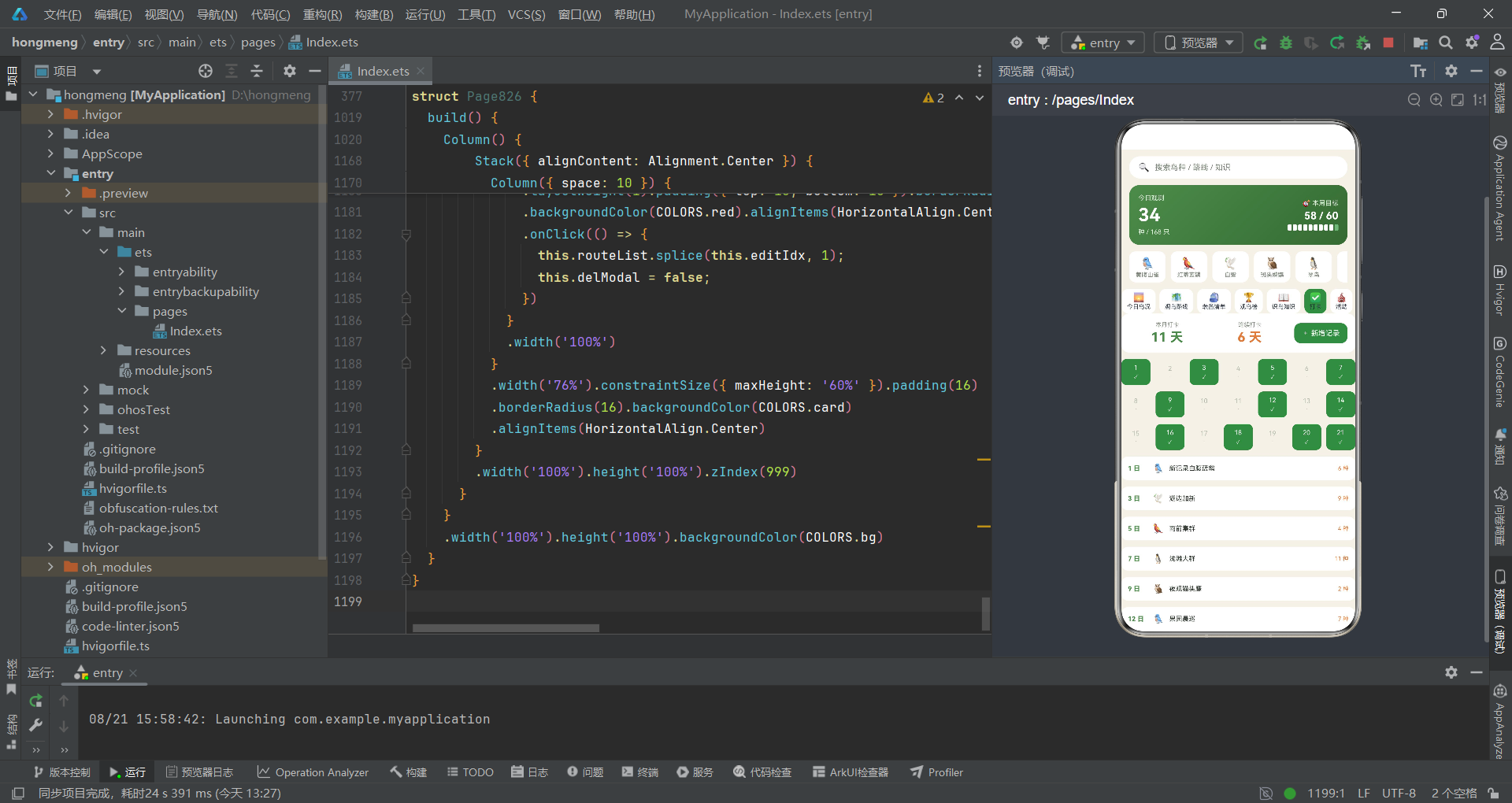
打卡(日历格 + 新增弹框):包含打卡统计摘要、日历格视图和打卡记录列表。日历格以三行七列展示当月日期,已打卡日期以绿色背景和勾号标记。点击新增记录按钮弹出观察记录新增弹框。
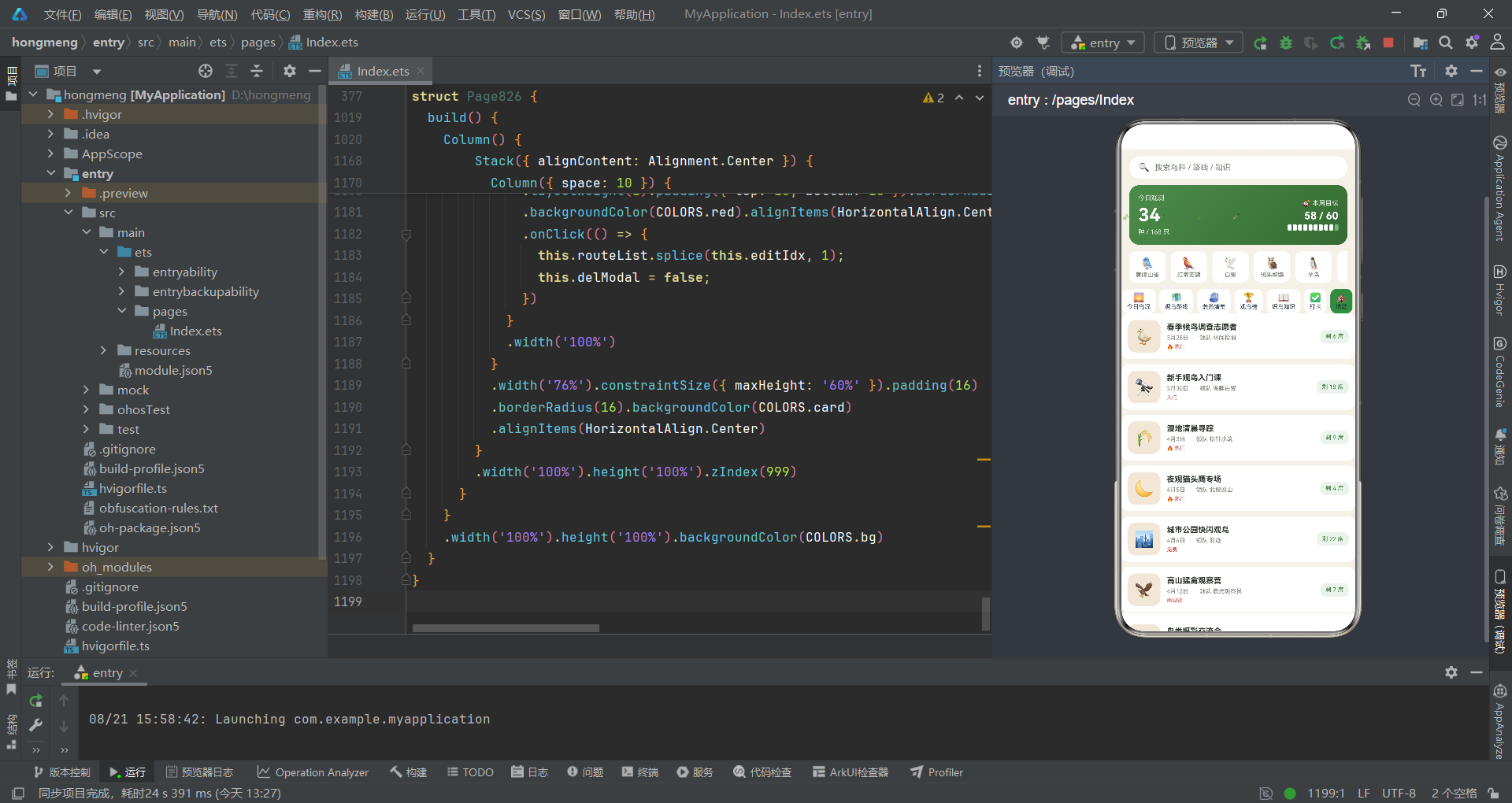
活动(报名卡流):以卡片流展示观鸟活动列表。每个活动卡片包含活动图标、名称、日期、领队信息、热门标签和剩余名额。
图鉴(网格 + 筛选):鸟种图鉴浏览页面,顶部提供分类筛选条(全部、鸣禽、涉禽、猛禽、鸮形),下方为鸟种卡片列表,包含圆形图标底座、鸟种名称、科属信息、稀有度标签和详情按钮。
动态(社区信息流):社区动态信息流页面,展示用户观鸟动态。每条动态包含用户头像、昵称、发布时间、关注按钮、动态正文、配图区域和互动栏(点赞、评论、分享)。
我的(个人中心):个人中心页面,包含个人卡片、统计四格(累计鸟种、总时长、装备数、勋章数)、功能菜单列表和成就徽章横排。
羽叶飘落视觉效果:基于 setInterval 定时器驱动的轻量级视觉效果层,每 800 毫秒切换 glow 状态,条件渲染一排叶子和羽毛 Emoji,通过不同字体大小和透明度营造飘落感。
三个核心弹框:新增观察记录弹框(鸟种/地点/数量三表单)、编辑装备弹框(名称+状态 Chip 选择)、删除路线确认弹框(二次确认+不可恢复警告)。
三、架构设计与整体技术选型
从工程架构角度审视,本项目采用"单文件全包含"的组织模式,将数据模型定义、初始数据、全局纯函数、UI 组件结构和入口渲染逻辑全部集中在一个 ArkTS 源文件中。这种模式在功能演示和原型验证场景下具有独特优势——所有上下文在同一文件内可见,函数调用和组件引用无需跨文件跳转。
在数据层,项目使用 @Observed 装饰器为所有业务数据模型类赋予变化追踪能力。每个类通过构造函数接收全部属性参数,保证对象创建时的完整性。初始数据以模块级常量数组的形式定义,作为 @State 状态变量的初始值注入到组件中。
在 UI 层,项目大量使用 @Builder 装饰器将界面拆分为独立的构建方法。每个 @Builder 方法对应一个功能区块,在 build() 方法中通过 if-else 条件分支组装最终的页面结构。在交互层,三个核心弹框统一采用 Stack 容器叠加遮罩层和内容卡片的结构,通过 @State 布尔变量控制显示与隐藏。在视觉层,通过 ColorPalette 接口定义完整配色方案,全局纯函数封装业务相关的颜色和状态判断逻辑,实现了视图与逻辑的解耦。
四、逐段代码深度分析
4.1 色彩体系:ColorPalette 接口与 COLORS 常量
interface ColorPalette {
  bg: string;
  card: string;
  deep: string;
  green: string;
  greenD: string;
  greenL: string;
  brown: string;
  brownL: string;
  title: string;
  sub: string;
  text3: string;
  gold: string;
  orange: string;
  red: string;
  blue: string;
  line: string;
  tabOn: string;
  mask: string;
  chip: string;
}

const COLORS: ColorPalette = {
  bg: '#F4F1E8',
  card: '#FFFFFF',
  deep: '#2F3B2F',
  green: '#4C8C4A',
  greenD: '#356B33',
  greenL: '#E4EFE2',
  brown: '#8A6A4B',
  brownL: '#F0E6D8',
  title: '#2A342A',
  sub: '#7A8578',
  text3: '#B4BBAF',
  gold: '#D9A441',
  orange: '#E07B39',
  red: '#D9534F',
  blue: '#5B8BB8',
  line: '#E8E3D6',
  tabOn: '#4C8C4A',
  mask: 'rgba(42,52,42,0.55)',
  chip: 'rgba(76,140,74,0.10)'
};
这段代码定义了整个应用的色彩体系基础。首先通过 interface ColorPalette 声明了一个包含 19 个字符串属性的颜色调色板接口,每个属性对应一种语义化的颜色角色。接口的作用是约束 COLORS 常量的结构——任何对 COLORS 的使用都必须符合接口定义的属性集合,这在编译期就能捕获颜色名称拼写错误或遗漏的问题。
COLORS 常量的值体现了精心设计的自然主题配色方案。背景色 bg 采用 #F4F1E8(暖米白),模拟自然纸张的柔和底色。卡片色 card 为纯白 #FFFFFF,保证内容卡片的清晰边界。主色调 green 为 #4C8C4A(森绿),深绿 greenD 为 #356B33,浅绿 greenL 为 #E4EFE2,三档绿色梯度用于按钮、高亮、背景等不同层级。棕色系 brown(#8A6A4B)和 brownL(#F0E6D8)用于户外装备和活动区域。文字色分为三档:title(深墨绿黑)用于标题,sub(灰绿)用于副文本,text3(浅灰绿)用于最弱的辅助文字。
功能性颜色包括 gold(金色,用于星级评分和前三名排名)、orange(橙色,用于数量和价格)、red(红色,用于热门标签和删除操作)、blue(蓝色,用于统计数字)。mask 使用半透明深色 rgba 值用于弹框遮罩,chip 使用极低透明度的绿色用于标签底色,两者均采用 rgba 格式以精确控制透明度。这种集中式色彩管理方案使得主题修改只需调整一处常量即可全局生效。
4.2 导航元数据:TabMeta 接口与 Tab 配置
interface TabMeta {
  icon: string;
  label: string;
}

const BOTTOM_TABS: TabMeta[] = [
  { icon: '🏕️', label: '首页' },
  { icon: '🦜', label: '图鉴' },
  { icon: '📰', label: '动态' },
  { icon: '👤', label: '我的' }
];

const HOME_TABS: TabMeta[] = [
  { icon: '🌅', label: '今日鸟况' },
  { icon: '🗺️', label: '观鸟路线' },
  { icon: '🎒', label: '装备清单' },
  { icon: '🏆', label: '观鸟榜' },
  { icon: '📖', label: '识鸟知识' },
  { icon: '✅', label: '打卡' },
  { icon: '🎪', label: '活动' }
];
TabMeta 接口定义了导航标签的统一数据结构——每个标签由 icon(Emoji 图标字符串)和 label(文字标签)两个属性组成。这种抽象使得底部导航栏和首页内嵌 Tab 条可以复用相同的数据驱动渲染逻辑,只需在 ForEach 中遍历不同的常量数组即可生成对应的 UI。
BOTTOM_TABS 定义了应用底部固定的四个主入口:首页(营地图标)、图鉴(鹦鹉图标)、动态(报纸图标)、我的(人像图标)。这四个入口覆盖了观鸟社区应用的核心使用场景——内容消费、知识查询、社交互动和个人管理。HOME_TABS 定义了首页内嵌的七个内容子模块,从今日鸟况到活动报名,完整覆盖了观鸟爱好者从记录到学习到参与的完整业务流程。使用 Emoji 作为图标既避免了图片资源管理的复杂性,又保证了在不同设备上的统一显示效果,是一种在原型和功能演示中非常实用的图标策略。
4.3 观察记录模型:BirdSighting 类与初始数据
@Observed export class BirdSighting {
  id: number = 0;
  time: string = '';
  specie: string = '';
  icon: string = '';
  place: string = '';
  count: number = 0;
  note: string = '';
  constructor(id: number, time: string, specie: string, icon: string, place: string, count: number, note: string) {
    this.id = id; this.time = time; this.specie = specie; this.icon = icon;
    this.place = place; this.count = count; this.note = note;
  }
}

const SIGHTING_INIT: BirdSighting[] = [
  new BirdSighting(1, '06:12', '黄腹山雀', '🐦', '北坡松林带', 8, '清晨集群觅食'),
  new BirdSighting(2, '06:35', '红嘴蓝鹊', '🦜', '溪谷灌丛', 3, '长尾掠空而过'),
  new BirdSighting(3, '07:02', '白鹭', '🕊️', '西塘浅滩', 12, '晨光中涉水'),
  new BirdSighting(4, '07:28', '斑头鸺鹠', '🦉', '老槐树洞', 1, '夜间值守个体'),
  new BirdSighting(5, '07:51', '黑枕黄鹂', '🐤', '果园东侧', 4, '鸣声清亮'),
  new BirdSighting(6, '08:16', '翠鸟', '🐧', '观鸟台下游', 2, '俯冲捕鱼三次'),
  new BirdSighting(7, '08:40', '灰喜鹊', '🐦', '停车场梧桐', 6, '结群翻找'),
  new BirdSighting(8, '09:05', '斑鸠', '🕊️', '麦田边栏', 15, '觅食谷物'),
  new BirdSighting(9, '09:33', '画眉', '🐤', '竹林深处', 2, '高枝对唱'),
  new BirdSighting(10, '10:02', '小䴙䴘', '🦆', '中心湖面', 5, '潜水频繁'),
  new BirdSighting(11, '10:26', '戴胜', '🐦', '草地步道', 1, '冠羽展开'),
  new BirdSighting(12, '10:55', '金腰燕', '🕊️', '管理处檐下', 20, '衔泥筑巢'),
  new BirdSighting(13, '11:20', '灰椋鸟', '🐧', '榆树阵', 9, '集群盘旋'),
  new BirdSighting(14, '11:44', '蓝翡翠', '🦜', '东堤石缝', 1, '停留良久')
];
BirdSighting 类是观察记录的核心数据模型,被 @Observed 装饰器标记。这意味着当该类的实例属性被修改时,框架能够自动检测到变化并触发依赖该实例的 UI 组件进行局部刷新。类的七个属性分别对应记录的唯一标识 id、观察时间 time、鸟种名称 specie、图标 icon、观察地点 place、观察数量 count 和备注 note。所有属性在声明时都赋予了默认值(空字符串或 0),这是 ArkTS 的类型安全要求——属性必须在声明时初始化。
构造函数采用参数列表形式接收全部七个属性值并在函数体内逐一赋值。SIGHTING_INIT 数组包含 14 条初始观察记录,时间从清晨 06:12 到上午 11:44,覆盖了从晨间集群觅食到午前停留观察的完整时段。每条记录的鸟种名称、地点和备注都经过精心编排,体现了观鸟活动的专业性——例如"斑头鸺鹠"标注"夜间值守个体",说明这条记录是在夜观中获得的;“翠鸟"标注"俯冲捕鱼三次”,体现了行为观察的细节记录。这些数据在应用运行时可通过新增记录弹框进行扩展,新记录通过 splice 方法插入到数组头部,得益于 @Observed 机制自动触发 UI 刷新。
4.4 观鸟路线模型:BirdRoute 类与初始数据
@Observed export class BirdRoute {
  id: number = 0;
  name: string = '';
  icon: string = '';
  km: number = 0;
  hours: number = 0;
  diff: string = '';
  spots: number = 0;
  hot: string = '';
  constructor(id: number, name: string, icon: string, km: number, hours: number, diff: string, spots: number, hot: string) {
    this.id = id; this.name = name; this.icon = icon; this.km = km;
    this.hours = hours; this.diff = diff; this.spots = spots; this.hot = hot;
  }
}

const ROUTE_INIT: BirdRoute[] = [
  new BirdRoute(1, '松林晨光线', '🌲', 3.2, 2.5, '轻松', 6, '🔥 本周热门'),
  new BirdRoute(2, '溪谷水禽线', '💧', 4.6, 3.0, '中等', 9, '🔥 观水禽'),
  new BirdRoute(3, '果园花鸟线', '🌸', 2.8, 2.0, '轻松', 5, '春迁首选'),
  new BirdRoute(4, '高山猛禽线', '⛰️', 8.4, 5.5, '困难', 12, '鹰隼天堂'),
  new BirdRoute(5, '湿地环湖线', '🌾', 6.1, 3.5, '中等', 11, '候鸟中转站'),
  new BirdRoute(6, '竹林画眉线', '🎋', 3.5, 2.5, '轻松', 4, '听鸣最佳'),
  new BirdRoute(7, '夜行猫头鹰线', '🌙', 2.2, 2.0, '中等', 3, '限夜间'),
  new BirdRoute(8, '滩涂涉禽线', '🦢', 5.0, 3.0, '中等', 14, '涨潮前出发'),
  new BirdRoute(9, '灌丛鹀类线', '🌿', 3.9, 2.8, '轻松', 7, '冬季暖线'),
  new BirdRoute(10, '林缘猛鸮线', '🦉', 7.2, 4.5, '困难', 8, '资深线'),
  new BirdRoute(11, '堤坝海鸥线', '🌊', 4.1, 2.2, '轻松', 10, '近海体验'),
  new BirdRoute(12, '古树乌鸦线', '🌳', 2.4, 1.8, '轻松', 6, '冬季大群')
];
BirdRoute 类定义了观鸟路线的数据模型,同样被 @Observed 装饰。八个属性中,diff 为难度等级(轻松/中等/困难),在 UI 渲染时通过全局纯函数 diffColor 动态映射为对应颜色——困难为红色、中等为橙色、轻松为绿色,实现数据驱动的颜色语义化。hot 为热门标签文字,如"本周热门"“观水禽”"春迁首选"等,这些标签不仅是视觉装饰,更是用户选择路线时的决策依据。
ROUTE_INIT 包含 12 条预设路线,覆盖了从轻松到困难的全部难度等级,以及松林、溪谷、果园、高山、湿地、竹林、夜行、滩涂、灌丛、林缘、堤坝和古树等多种生境类型。路线列表在应用运行时可通过删除弹框进行管理,删除操作使用 splice 方法直接修改 routeList 数组,得益于 @Observed 机制,UI 会自动刷新。每条路线的 spots 属性表示沿途观鸟点数量,是评估路线价值的重要指标。
4.5 装备、柱状图与排行模型
@Observed export class GearItem {
  id: number = 0;
  name: string = '';
  icon: string = '';
  price: string = '';
  status: string = '';
  level: number = 0;
  tag: string = '';
  constructor(id: number, name: string, icon: string, price: string, status: string, level: number, tag: string) {
    this.id = id; this.name = name; this.icon = icon; this.price = price;
    this.status = status; this.level = level; this.tag = tag;
  }
}

const GEAR_INIT: GearItem[] = [
  new GearItem(1, '8x42 屋脊双筒镜', '🔭', '¥1280', '良好', 3, '便携'),
  new GearItem(2, '观鸟单筒镜 20-60x', '🔬', '¥2680', '良好', 4, '长焦'),
  new GearItem(3, '迷彩防水外套', '🧥', '¥359', '良好', 3, '防风'),
  new GearItem(4, '户外徒步靴', '🥾', '¥499', '待保养', 2, '防滑'),
  new GearItem(5, '鸟类图鉴手册', '📕', '¥68', '良好', 1, '入门'),
  new GearItem(6, '录音笔阵列', '🎙️', '¥1580', '良好', 4, '录鸣'),
  new GearItem(7, '碳纤维三脚架', '🗼', '¥899', '良好', 3, '稳定'),
  new GearItem(8, '迷彩伪装帐', '⛺', '¥420', '待保养', 2, '隐蔽'),
  new GearItem(9, '防水背包 30L', '🎒', '¥329', '良好', 2, '大容量'),
  new GearItem(10, '野生动物相机', '📷', '¥3299', '良好', 5, '抓拍'),
  new GearItem(11, '指北针套装', '🧭', '¥89', '良好', 1, '导航'),
  new GearItem(12, '保温水壶 1L', '🥤', '¥129', '良好', 1, '补给'),
  new GearItem(13, '轻量折叠椅', '🪑', '¥159', '良好', 1, '休息'),
  new GearItem(14, '望远镜增倍镜', '🔍', '¥399', '待保养', 3, '配件')
];

interface BarData {
  label: string;
  value: number;
}

const WEEK_BARS: BarData[] = [
  { label: '周一', value: 26 }, { label: '周二', value: 34 },
  { label: '周三', value: 22 }, { label: '周四', value: 41 },
  { label: '周五', value: 38 }, { label: '周六', value: 57 },
  { label: '周日', value: 63 }
];

@Observed export class RankItem {
  rank: number = 0;
  name: string = '';
  icon: string = '';
  count: number = 0;
  level: string = '';
  constructor(rank: number, name: string, icon: string, count: number, level: string) {
    this.rank = rank; this.name = name; this.icon = icon; this.count = count; this.level = level;
  }
}

const RANK_INIT: RankItem[] = [
  new RankItem(1, '林间拾羽', '🦉', 186, '观鸟大师'),
  new RankItem(2, '溪畔白鹭', '🕊️', 172, '观鸟大师'),
  new RankItem(3, '松针小筑', '🐦', 158, '资深鸟友'),
  new RankItem(4, '芦笛', '🎋', 149, '资深鸟友'),
  new RankItem(5, '北坡巡山', '⛰️', 137, '资深鸟友'),
  new RankItem(6, '羽迹', '🪶', 121, '进阶鸟友'),
  new RankItem(7, '晨光观察员', '🌅', 108, '进阶鸟友'),
  new RankItem(8, '苇荡听风', '🌾', 96, '进阶鸟友'),
  new RankItem(9, '新羽', '🐤', 74, '入门鸟友'),
  new RankItem(10, '观鸟少年', '🔭', 58, '入门鸟友')
];
这一段定义了三个数据结构。GearItem 类是装备清单的数据模型,七个属性涵盖装备标识、名称、图标、价格、使用状态、等级和标签。值得注意的是 price 属性类型为 string 而非 number——价格值已包含货币符号前缀(如 ¥1280),直接以字符串形式存储和显示。status 有三种取值(良好/待保养/损坏),通过全局纯函数 statusColor 映射为不同颜色。level 为 1-5 整数,对应星级评分。GEAR_INIT 包含 14 件装备,覆盖从入门级到专业级的完整梯度,命名专业——"8x42 屋脊双筒镜"中的"8x42"表示放大倍率 8 倍、物镜口径 42mm。
BarData 接口仅含 label 和 value 两个属性,用于柱状图数据驱动。WEEK_BARS 定义了周一至周日的观测鸟种数量,呈现周末高于工作日的趋势——周六 57 只、周日 63 只,与观鸟活动集中在周末的实际情况一致。柱状图柱子高度通过 value * 1.6 计算像素值,颜色由 barColor 函数根据索引返回——周日为金色,奇数索引为蓝色,偶数索引为绿色。
RankItem 类定义排行榜项数据模型,RANK_INIT 包含前十名观鸟者,等级分为四档:观鸟大师(前 2 名)、资深鸟友(3-5 名)、进阶鸟友(6-8 名)和入门鸟友(9-10 名)。前三名排名数字以金色突出显示,形成清晰视觉层级。
4.6 知识、打卡、活动、鸟种与动态模型
@Observed export class ArticleItem {
  id: number = 0; title: string = ''; icon: string = '';
  cat: string = ''; read: string = ''; time: string = '';
  constructor(id: number, title: string, icon: string, cat: string, read: string, time: string) {
    this.id = id; this.title = title; this.icon = icon; this.cat = cat;
    this.read = read; this.time = time;
  }
}

const ARTICLE_INIT: ArticleItem[] = [
  new ArticleItem(1, '早春观鸟的 12 个小技巧', '🌱', '技巧', '1.2w', '3天前'),
  new ArticleItem(2, '如何分辨黄腹山雀与绿背山雀', '🆚', '辨鸟', '8600', '5天前'),
  new ArticleItem(3, '猛禽迁徙季的识别要点', '🦅', '猛禽', '2.1w', '1周前'),
  new ArticleItem(4, '湿地的候鸟们:冬候鸟图鉴', '🦆', '图鉴', '1.8w', '2周前'),
  new ArticleItem(5, '观鸟人的装备升级之路', '🔭', '装备', '9900', '2周前'),
  new ArticleItem(6, '夜观猫头鹰安全守则', '🌙', '夜观', '1.5w', '3周前'),
  new ArticleItem(7, '用手机拍出清晰的飞版', '📱', '摄影', '2.4w', '1月前'),
  new ArticleItem(8, '城市公园常见鸣禽速查', '🏙️', '城市鸟', '1.1w', '1月前'),
  new ArticleItem(9, '鸟巢搭建的材质观察', '🏠', '行为', '7200', '1月前'),
  new ArticleItem(10, '春季北迁时间表', '🗓️', '迁徙', '1.3w', '1月前')
];

@Observed export class CheckItem {
  day: number = 0; icon: string = ''; count: number = 0; note: string = '';
  constructor(day: number, icon: string, count: number, note: string) {
    this.day = day; this.icon = icon; this.count = count; this.note = note;
  }
}

const CHECK_INIT: CheckItem[] = [
  new CheckItem(1, '🐦', 6, '新记录白腹蓝鹟'),
  new CheckItem(3, '🕊️', 9, '湖边加新'),
  new CheckItem(5, '🦜', 4, '雨前集群'),
  new CheckItem(7, '🐧', 11, '浅滩大群'),
  new CheckItem(9, '🦉', 2, '夜观猫头鹰'),
  new CheckItem(12, '🐦', 7, '果园晨巡'),
  new CheckItem(14, '🕊️', 13, '湿地环湖'),
  new CheckItem(16, '🐤', 5, '竹林听鸣'),
  new CheckItem(18, '🦆', 8, '堤坝海鸥线'),
  new CheckItem(20, '🔭', 3, '观鸟台加新'),
  new CheckItem(21, '🐦', 10, '今日晨巡完成')
];

@Observed export class ActivityItem {
  id: number = 0; name: string = ''; icon: string = '';
  date: string = ''; quota: string = ''; guide: string = ''; hot: string = '';
  constructor(id: number, name: string, icon: string, date: string, quota: string, guide: string, hot: string) {
    this.id = id; this.name = name; this.icon = icon; this.date = date;
    this.quota = quota; this.guide = guide; this.hot = hot;
  }
}

const ACTIVITY_INIT: ActivityItem[] = [
  new ActivityItem(1, '春季候鸟调查志愿者', '🦆', '3月28日', '剩 6 席', '林间拾羽', '🔥 热门'),
  new ActivityItem(2, '新手观鸟入门课', '🔭', '3月30日', '剩 18 席', '溪畔白鹭', '入门'),
  new ActivityItem(3, '湿地清晨寻踪', '🌾', '4月3日', '剩 9 席', '松针小筑', '🔥 热门'),
  new ActivityItem(4, '夜观猫头鹰专场', '🌙', '4月5日', '剩 4 席', '北坡巡山', '🔥 热门'),
  new ActivityItem(5, '城市公园快闪观鸟', '🏙️', '4月6日', '剩 22 席', '羽迹', '免费'),
  new ActivityItem(6, '高山猛禽观察营', '🦅', '4月12日', '剩 7 席', '晨光观察员', '两日营'),
  new ActivityItem(7, '鸟类摄影交流会', '📷', '4月13日', '剩 15 席', '观鸟少年', '线下'),
  new ActivityItem(8, '春季鸟种冲刺赛', '🏆', '4月20日', '剩 30 席', '芦苇听风', '竞赛')
];

@Observed export class BirdSpecie {
  id: number = 0; name: string = ''; icon: string = '';
  type: string = ''; rarity: string = ''; color: string = '';
  constructor(id: number, name: string, icon: string, type: string, rarity: string, color: string) {
    this.id = id; this.name = name; this.icon = icon; this.type = type;
    this.rarity = rarity; this.color = color;
  }
}

const SPECIE_INIT: BirdSpecie[] = [
  new BirdSpecie(1, '黄腹山雀', '🐦', '鸣禽', '常见', '#4C8C4A'),
  new BirdSpecie(2, '红嘴蓝鹊', '🦜', '鸦科', '常见', '#5B8BB8'),
  new BirdSpecie(3, '白鹭', '🕊️', '涉禽', '常见', '#F4F1E8'),
  new BirdSpecie(4, '斑头鸺鹠', '🦉', '鸮形', '稀有', '#8A6A4B'),
  new BirdSpecie(5, '翠鸟', '🐧', '佛法僧', '少见', '#0E8F8F'),
  new BirdSpecie(6, '戴胜', '🐦', '戴胜科', '少见', '#E07B39'),
  new BirdSpecie(7, '金腰燕', '🕊️', '燕科', '常见', '#356B33'),
  new BirdSpecie(8, '蓝翡翠', '🦜', '翡翠科', '稀有', '#1F6FB2'),
  new BirdSpecie(9, '画眉', '🐤', '噪鹛', '少见', '#B08968'),
  new BirdSpecie(10, '黑枕黄鹂', '🐤', '黄鹂科', '稀有', '#D9A441'),
  new BirdSpecie(11, '小䴙䴘', '🦆', '䴙䴘科', '常见', '#7A6F5A'),
  new BirdSpecie(12, '苍鹰', '🦅', '鹰科', '稀有', '#4A4A4A')
];

@Observed export class FeedItem {
  id: number = 0; user: string = ''; avatar: string = '';
  time: string = ''; content: string = ''; img: string = '';
  likes: number = 0; comments: number = 0;
  constructor(id: number, user: string, avatar: string, time: string, content: string, img: string, likes: number, comments: number) {
    this.id = id; this.user = user; this.avatar = avatar; this.time = time;
    this.content = content; this.img = img; this.likes = likes; this.comments = comments;
  }
}

const FEED_INIT: FeedItem[] = [
  new FeedItem(1, '林间拾羽', '🦉', '25分钟前', '今早在北坡松林带记录到黄腹山雀集群,至少 8 只!', '🌲', 46, 9),
  new FeedItem(2, '溪畔白鹭', '🕊️', '1小时前', '西塘浅滩的白鹭涉水画面太治愈了,剪了一段小视频。', '🌅', 120, 23),
  new FeedItem(3, '北坡巡山', '⛰️', '3小时前', '高山线半程发现苍鹰盘旋,全程记录 12 种鸟!', '🦅', 88, 15),
  new FeedItem(4, '羽迹', '🪶', '5小时前', '新装备入手:碳纤维三脚架,稳定性提升明显。', '🗼', 32, 6),
  new FeedItem(5, '晨光观察员', '🌅', '8小时前', '中心湖面的小䴙䴘今天潜水特别频繁,应该是在捕食。', '💧', 51, 8),
  new FeedItem(6, '苇荡听风', '🌾', '昨天', '湿地环湖线涨潮前的涉禽大群,白鹭+苍鹭混合编队。', '🦢', 95, 17),
  new FeedItem(7, '观鸟少年', '🔭', '昨天', '第一次独立完成夜观,斑头鸺鹠守候在老槐树洞!', '🌙', 143, 31),
  new FeedItem(8, '新羽', '🐤', '昨天', '新手求带:果园花鸟线适合入门吗?周末想试试。', '🌸', 18, 12),
  new FeedItem(9, '芦笛', '🎋', '2天前', '竹林画眉线的画眉对唱名场面,附音频。', '🎙️', 67, 11),
  new FeedItem(10, '松针小筑', '🐦', '2天前', '本周观鸟榜刷新:个人 158 种,向大师进发!', '🏆', 76, 14),
  new FeedItem(11, '溪畔白鹭', '🕊️', '3天前', '滩涂线提醒:周六上午 8 点前出发,错过涨潮。', '⚠️', 29, 5),
  new FeedItem(12, '林间拾羽', '🦉', '3天前', '果园东侧黑枕黄鹂持续出现,抓紧时间打卡!', '🍑', 84, 19)
];
这一段集中定义了五个数据模型及其初始数据。ArticleItem 是知识文章模型,read 属性直接存储带 w 后缀的格式化阅读量。ARTICLE_INIT 的 10 篇文章分类涵盖技巧、辨鸟、猛禽、图鉴、装备等维度,在 UI 中标题通过 maxLines(1) 和省略号截断保证布局整齐。CheckItem 是打卡记录模型,CHECK_INIT 的 11 条记录覆盖当月 1-21 日,通过 isChecked 函数判断日历格是否已打卡。
ActivityItem 是活动模型,quota 以"剩 N 席"格式存储名额信息,剩余较少的活动给用户紧迫感。ACTIVITY_INIT 的 8 个活动涵盖志愿者调查、入门课程、夜观专场、摄影交流等类型。BirdSpecie 是鸟种模型,rarity 分为常见/少见/稀有三档,通过 rarityColor 函数映射颜色——稀有为红色、少见为橙色、常见为灰色。SPECIE_INIT 的 12 种鸟类涵盖鸣禽、鸦科、涉禽、鸮形等多种分类。
FeedItem 是社区动态模型,包含八个属性——是所有模型中属性最多的。FEED_INIT 的 12 条动态涵盖了观察分享、装备展示、求助提问、路线提醒等多种类型,展示了社区信息流在内容多样性方面的完整能力。
4.7 全局纯函数:颜色与状态映射工具
function diffColor(d: string): string {
  if (d === '困难') { return '#D9534F'; }
  if (d === '中等') { return '#E07B39'; }
  return '#4C8C4A';
}

function statusColor(s: string): string {
  if (s === '待保养') { return '#E07B39'; }
  if (s === '损坏') { return '#D9534F'; }
  return '#4C8C4A';
}

function rarityColor(r: string): string {
  if (r === '稀有') { return '#D9534F'; }
  if (r === '少见') { return '#E07B39'; }
  return '#7A8578';
}

function isChecked(day: number): boolean {
  if (day === 2 || day === 4 || day === 6 || day === 8 || day === 10 || day === 11 || day === 13 || day === 15 || day === 17 || day === 19) {
    return false;
  }
  return true;
}

function barColor(i: number): string {
  if (i === 6) { return '#D9A441'; }
  if (i % 2 === 1) { return '#5B8BB8'; }
  return '#4C8C4A';
}
这组全局纯函数是项目"逻辑与视图解耦"设计思想的集中体现。五个函数分别服务于不同业务场景,共同特点是接收业务数据作为输入,返回 UI 渲染所需的颜色值或布尔值。这种设计使得 UI 描述代码中不需要写 if-else 分支判断,只需调用函数即可获得正确的样式值。
diffColor、statusColor 和 rarityColor 三个函数的颜色语义一致——红色表示需关注/珍贵/困难,橙色表示中等程度,绿色/灰色表示正常/普通/安全,形成统一的视觉语言体系。isChecked 函数通过硬编码的日期列表判断某天是否已打卡。barColor 函数为柱状图柱子返回颜色——周日为金色表示最高值日,奇数索引为蓝色,偶数索引为绿色。
4.8 组件入口与状态声明
@Entry
@Component
struct Page826 {
  @State mainTab: number = 0;
  @State homeTab: number = 0;
  @State glow: boolean = false;
  @State addModal: boolean = false;
  @State editModal: boolean = false;
  @State delModal: boolean = false;
  @State editIdx: number = 0;
  @State addBird: string = '';
  @State addPlace: string = '';
  @State addNum: string = '';
  @State editName: string = '';
  @State editStatus: string = '良好';
  @State keyword: string = '';
  @State typeFilter: string = '全部';
  @State sightingList: BirdSighting[] = SIGHTING_INIT;
  @State routeList: BirdRoute[] = ROUTE_INIT;
  @State gearList: GearItem[] = GEAR_INIT;
  @State checkList: CheckItem[] = CHECK_INIT;
  timer: number = 0;
@Entry 装饰器标记 Page826 为应用入口组件,@Component 声明该 struct 为自定义组件。组件内部通过 @State 声明了 16 个响应式状态变量和一个普通变量 timer。这些状态变量分为四类:导航控制类——mainTab(主 Tab 索引 0-3)和 homeTab(子 Tab 索引 0-6);弹框控制类——addModal、editModal、delModal 三个布尔值控制弹框显隐;编辑临时数据类——editIdx、addBird/addPlace/addNum、editName/editStatus;业务数据类——sightingList、routeList、gearList、checkList 四个数组初始化自 *_INIT 常量。
当这些 @State 变量被修改时,框架会自动重新渲染依赖它们的 UI 部分。timer 变量未使用 @State 装饰,因为它仅用于存储 setInterval 的返回 ID,不需要触发 UI 更新。这种"状态分类管理"的方式使得不同类型的状态变化能够精确地触发对应 UI 的局部刷新,而非全量重渲染。
4.9 生命周期管理
  aboutToAppear() {
    this.timer = setInterval(() => { this.glow = !this.glow; }, 800);
  }

  aboutToDisappear() {
    clearInterval(this.timer);
  }
ArkTS 组件的生命周期由框架统一管理,aboutToAppear 和 aboutToDisappear 是两个关键回调。aboutToAppear 在组件创建后、build 方法执行前被调用,用于初始化数据或启动定时器。aboutToDisappear 在组件销毁前被调用,用于清理资源。
在本项目中,aboutToAppear 启动了一个 800 毫秒间隔的 setInterval 定时器,回调函数中切换 this.glow 布尔状态。由于 glow 是 @State 变量,每次切换都会触发 build 方法中依赖 glow 的条件渲染部分重新执行——即羽叶飘落视觉层的显隐切换。aboutToDisappear 调用 clearInterval 清除定时器,保证组件销毁后定时器不再执行,避免内存泄漏。这种"创建时启动、销毁时清理"的成对管理模式是资源管理的最佳实践。800 毫秒的间隔比 60fps 的 16 毫秒慢得多,因为该效果只需缓慢闪烁感而非流畅动画,较长的间隔可以降低 CPU 消耗。
4.10 头部构建器:生态电商风格头部
  @Builder
  header() {
    Column({ space: 10 }) {
      Row({ space: 8 }) {
        Text('🔍').fontSize(14)
        Text('搜索鸟种 / 路线 / 知识').fontSize(12).fontColor(COLORS.sub)
      }
      .width('100%').padding({ left: 14, right: 14, top: 9, bottom: 9 })
      .borderRadius(20).backgroundColor('#FFFFFF')

      Row({ space: 12 }) {
        Column({ space: 4 }) {
          Text('今日观测').fontSize(10).fontColor(COLORS.greenL)
          Text('34').fontSize(28).fontColor('#FFFFFF').fontWeight(FontWeight.Bold)
          Text('种 / 168 只').fontSize(10).fontColor(COLORS.greenL)
        }
        .alignItems(HorizontalAlign.Start)
        Column().layoutWeight(1)
        Column({ space: 4 }) {
          Text('🎯 本周目标').fontSize(10).fontColor(COLORS.greenL)
          Text('58 / 60').fontSize(16).fontColor('#FFFFFF').fontWeight(FontWeight.Bold)
          Row({ space: 2 }) {
            ForEach([1, 2, 3, 4, 5, 6, 7, 8, 9, 10], (i: number) => {
              Column().width(6).height(10).borderRadius(2).backgroundColor(i <= 9 ? '#FFFFFF' : '#7FB57D')
            })
          }
        }
        .alignItems(HorizontalAlign.End)
      }
      .width('100%').padding(14).borderRadius(16)
      .linearGradient({ angle: 135, colors: [['#4C8C4A', 0], ['#356B33', 1]] })

      Scroll() {
        Row({ space: 8 }) {
          ForEach(SPECIE_INIT, (s: BirdSpecie) => {
            Column({ space: 2 }) {
              Text(s.icon).fontSize(18)
              Text(s.name).fontSize(9).fontColor(COLORS.sub)
            }
            .width(56).padding({ top: 8, bottom: 6 }).borderRadius(10)
            .backgroundColor('#FFFFFF').alignItems(HorizontalAlign.Center)
          })
        }
        .padding({ right: 4 })
      }
      .scrollable(ScrollDirection.Horizontal)
      .scrollBar(BarState.Off)
      .width('100%')
    }
    .width('100%').padding({ left: 12, right: 12, top: 10, bottom: 10 })
    .backgroundColor(COLORS.bg)
  }
header 构建器以 Column 为根容器,垂直排列三个子模块。搜索栏是一个白色圆角 Row,包含放大镜 Emoji 和占位提示文字。今日观鸟大卡使用 linearGradient 线性渐变背景——从 #4C8C4A(森绿)到 #356B33(深绿),渐变角度 135 度。卡片内分为左右两栏:左栏展示"今日观测"鸟种数(34 种 / 168 只,28 号粗体白字),右栏展示"本周目标"进度(58/60),下方以 10 根小竖条可视化进度——前 9 根白色(已完成),第 10 根浅绿色(未完成),巧妙地将百分比转化为直观的分段进度条。
热门鸟种横滚使用横向 Scroll 容器,关闭滚动条保持视觉简洁。通过 ForEach 遍历 SPECIE_INIT 数组,为每个鸟种生成 56 像素宽的白色小卡。横向滚动列表是电商风格头部常见的设计模式——在有限垂直空间内展示大量可选项,用户左右滑动浏览。
4.11 首页子 Tab 条与内容切换
  @Builder
  homeTabBar() {
    Scroll() {
      Row({ space: 6 }) {
        ForEach(HOME_TABS, (t: TabMeta, i: number) => {
          Column({ space: 1 }) {
            Text(t.icon).fontSize(14)
            Text(t.label).fontSize(9)
          }
          .padding({ left: 8, right: 8, top: 5, bottom: 5 }).borderRadius(10)
          .backgroundColor(this.homeTab === i ? COLORS.green : '#FFFFFF')
          .alignItems(HorizontalAlign.Center)
          .onClick(() => { this.homeTab = i; })
        })
      }
      .padding({ right: 4 })
    }
    .scrollable(ScrollDirection.Horizontal)
    .scrollBar(BarState.Off)
    .width('100%')
  }

  @Builder
  homeContent() {
    Column({ space: 0 }) {
      this.homeTabBar()
      Scroll() {
        Column({ space: 10 }) {
          if (this.homeTab === 0) {
            this.sightingTab()
          } else if (this.homeTab === 1) {
            this.routeTab()
          } else if (this.homeTab === 2) {
            this.gearTab()
          } else if (this.homeTab === 3) {
            this.rankTab()
          } else if (this.homeTab === 4) {
            this.articleTab()
          } else if (this.homeTab === 5) {
            this.checkTab()
          } else {
            this.activityTab()
          }
        }
        .width('100%')
      }
      .scrollBar(BarState.Off)
      .align(Alignment.Top)
      .layoutWeight(1)
      .width('100%')
    }
    .width('100%').height('100%')
  }
homeTabBar 渲染首页七内容子 Tab 条。每个 Tab 项的视觉状态由 this.homeTab === i 条件驱动——选中时背景为森绿色,否则为白色。点击 Tab 设置 this.homeTab = i,触发 Tab 条和下方内容区的重新渲染。横向滚动设计确保 7 个 Tab 在小屏设备上也能完整展示。
homeContent 是首页内容区总调度器,采用"Tab 条 + 可滚动内容区"布局。下方 Scroll 容器通过 if-else 链根据 homeTab 值条件渲染七个内容构建器之一。这种"状态驱动的条件渲染"是 ArkTS 声明式 UI 的核心范式——当 homeTab 变化时框架自动执行重新构建,选择渲染对应模块。Scroll 设置 layoutWeight(1) 占据 Tab 条以外的全部空间,切换 Tab 时滚动位置不保留,符合"不同功能模块独立浏览"的交互预期。
4.12 今日鸟况时间轴构建器
  @Builder
  sightingTab() {
    Column({ space: 8 }) {
      ForEach(this.sightingList, (item: BirdSighting) => {
        Row({ space: 10 }) {
          Column({ space: 2 }) {
            Text(item.time).fontSize(10).fontColor(COLORS.green).fontWeight(FontWeight.Bold)
            Text('记录').fontSize(8).fontColor(COLORS.text3)
          }
          .width(44).alignItems(HorizontalAlign.Center)
          Column().width(2).height(30).backgroundColor(COLORS.greenL).borderRadius(1)
          Column({ space: 3 }) {
            Row({ space: 6 }) {
              Text(item.icon).fontSize(16)
              Text(item.specie).fontSize(12).fontColor(COLORS.title).fontWeight(FontWeight.Bold)
              Text('×' + item.count.toString()).fontSize(10).fontColor(COLORS.orange)
            }
            Text(item.place + ' · ' + item.note).fontSize(10).fontColor(COLORS.sub)
          }
          .alignItems(HorizontalAlign.Start)
          .layoutWeight(1)
        }
        .width('100%').padding(10).borderRadius(12).backgroundColor(COLORS.card)
      })
    }
    .width('100%')
  }
sightingTab 以时间轴形式展示观察记录。ForEach 遍历 sightingList,每条记录渲染为白色圆角卡片。卡片内 Row 从左到右分三列:时间列(44 像素宽,展示时间和"记录"标签)、分隔线列(2 像素宽浅绿色竖条,作为时间轴引导线)和内容列(占据剩余空间)。
内容列分两行:第一行是鸟种信息——图标、名称和数量(如"🐦 黄腹山雀 ×8"),鸟种名称以粗体深色呈现,数量以橙色突出;第二行是地点和备注(如"北坡松林带 · 清晨集群觅食"),以灰色字展示。这种三列布局是时间轴组件的经典设计——时间标记在左、引导线居中、内容在右,视觉流自然从上到下。当用户通过新增弹框添加记录时,新记录通过 splice 插入数组头部,ForEach 自动在列表顶部渲染新卡片。
4.13 观鸟路线编号列表构建器
  @Builder
  routeTab() {
    Column({ space: 8 }) {
      ForEach(this.routeList, (item: BirdRoute, idx: number) => {
        Row({ space: 10 }) {
          Column() {
            Text(item.id.toString()).fontSize(12).fontColor('#FFFFFF').fontWeight(FontWeight.Bold)
          }
          .width(28).height(28).borderRadius(14).backgroundColor(COLORS.green)
          .alignItems(HorizontalAlign.Center).justifyContent(FlexAlign.Center)
          Column({ space: 3 }) {
            Row({ space: 6 }) {
              Text(item.icon).fontSize(13)
              Text(item.name).fontSize(12).fontColor(COLORS.title).fontWeight(FontWeight.Bold)
              Text(item.hot).fontSize(8).fontColor(COLORS.red)
            }
            Text(item.km.toString() + ' km · 约 ' + item.hours.toString() + ' h · ' + item.spots.toString() + ' 个观鸟点').fontSize(10).fontColor(COLORS.sub)
          }
          .alignItems(HorizontalAlign.Start)
          .layoutWeight(1)
          Text(item.diff).fontSize(9).fontColor(diffColor(item.diff))
            .padding({ left: 6, right: 6, top: 2, bottom: 2 }).borderRadius(8)
            .backgroundColor(COLORS.chip)
          Text('🗑️').fontSize(14)
            .onClick(() => { this.editIdx = idx; this.delModal = true; })
        }
        .width('100%').padding(10).borderRadius(12).backgroundColor(COLORS.card)
      })
    }
    .width('100%')
  }
routeTab 以编号卡片列表展示观鸟路线。ForEach 获取第二个参数 idx(当前项索引),该索引用于删除操作定位。每个卡片从左到右排列:28x28 像素圆形绿色编号徽章、内容信息(路线图标+名称+热门标签、参数信息行)、难度标签(颜色由 diffColor 返回)和删除按钮。
删除按钮的 onClick 将当前索引存入 this.editIdx,然后设置 this.delModal = true 打开删除确认弹框。这种"先记录索引再打开弹框"的模式是列表项操作的标准范式,确保弹框中的删除操作能精确定位到正确的数据项。热门标签以 8 号红色字突出,路线参数通过" · "分隔多个信息,信息密度适中。
4.14 装备双列瀑布构建器
  @Builder
  gearTab() {
    Column({ space: 10 }) {
      Row({ space: 6 }) {
        ForEach(this.gearList.slice(0, 7), (g: GearItem, gi: number) => {
          Column({ space: 5 }) {
            Text(g.icon).fontSize(26)
            Text(g.name).fontSize(11).fontColor(COLORS.title).fontWeight(FontWeight.Bold)
            Text(g.tag).fontSize(8).fontColor(COLORS.green)
            Row({ space: 4 }) {
              ForEach([1, 2, 3, 4, 5], (lv: number) => {
                Text('★').fontSize(9).fontColor(lv <= g.level ? COLORS.gold : COLORS.text3)
              })
            }
            Text(g.price).fontSize(10).fontColor(COLORS.orange).fontWeight(FontWeight.Bold)
            Row({ space: 6 }) {
              Text(g.status).fontSize(8).fontColor(statusColor(g.status))
              Column().layoutWeight(1)
              Text('✏️').fontSize(12)
                .onClick(() => { this.editIdx = gi; this.editName = g.name; this.editStatus = g.status; this.editModal = true; })
            }
            .width('100%')
          }
          .width('46%').padding(10).borderRadius(12).backgroundColor(COLORS.card)
          .alignItems(HorizontalAlign.Start)
        })
      }
      .width('100%').justifyContent(FlexAlign.SpaceBetween)
      Text('共 ' + this.gearList.length.toString() + ' 件装备 · 点 ✏️ 可编辑').fontSize(9).fontColor(COLORS.text3)
    }
    .width('100%')
  }
gearTab 以双列瀑布流展示装备清单。使用 this.gearList.slice(0, 7) 取前 7 件装备,每个卡片宽度 46%,通过 FlexAlign.SpaceBetween 均匀分布形成双列效果。每个卡片从上到下排列:装备图标、名称、标签、星级评分行、价格和状态编辑行。
星级评分通过内层 ForEach 遍历 [1,2,3,4,5],判断 lv <= g.level 决定显示金色还是灰色星星。编辑按钮的 onClick 将当前装备的索引、名称和状态预填到 @State 变量(editIdx、editName、editStatus),然后打开编辑弹框。这种"将原始数据预填到编辑表单"的模式提供了良好用户体验——用户打开编辑框时能看到当前值,只需修改需要变更的部分。底部统计提示显示总装备数和操作引导。
4.15 观鸟榜柱状图与排行构建器
  @Builder
  rankTab() {
    Column({ space: 10 }) {
      Column({ space: 8 }) {
        Text('📊 本周观测趋势(只)').fontSize(12).fontColor(COLORS.title).fontWeight(FontWeight.Bold)
        Row({ space: 8 }) {
          ForEach(WEEK_BARS, (b: BarData, bi: number) => {
            Column({ space: 4 }) {
              Text(b.value.toString()).fontSize(8).fontColor(COLORS.sub)
              Column().width(20).height(b.value * 1.6).borderRadius(6)
                .backgroundColor(barColor(bi))
              Text(b.label).fontSize(8).fontColor(COLORS.sub)
            }
            .alignItems(HorizontalAlign.Center)
            .layoutWeight(1)
          })
        }
        .width('100%').alignItems(VerticalAlign.Bottom)
      }
      .width('100%').padding(12).borderRadius(12).backgroundColor(COLORS.card)

      ForEach(RANK_INIT, (r: RankItem) => {
        Row({ space: 10 }) {
          Text(r.rank.toString()).fontSize(14).fontColor(r.rank <= 3 ? COLORS.gold : COLORS.text3).fontWeight(FontWeight.Bold)
            .width(22)
          Text(r.icon).fontSize(18)
          Column({ space: 2 }) {
            Text(r.name).fontSize(11).fontColor(COLORS.title).fontWeight(FontWeight.Bold)
            Text(r.level).fontSize(8).fontColor(COLORS.sub)
          }
          .alignItems(HorizontalAlign.Start)
          .layoutWeight(1)
          Text(r.count.toString() + ' 种').fontSize(11).fontColor(COLORS.green).fontWeight(FontWeight.Bold)
        }
        .width('100%').padding(10).borderRadius(12).backgroundColor(COLORS.card)
      })
    }
    .width('100%')
  }
rankTab 包含柱状图和排行榜两个子模块。柱状图通过 ForEach 遍历 WEEK_BARS 的 7 个数据项,每个柱子是一个 Column——上方数值标签、中间柱体(空 Column,宽 20 像素,高 b.value * 1.6 像素,颜色由 barColor 返回)、下方日期标签。Row 的 alignItems(VerticalAlign.Bottom) 确保所有柱子底部对齐。每个柱子 Column 设置 layoutWeight(1) 等宽分布。
排行榜通过 ForEach 遍历 RANK_INIT 的 10 项,排名数字颜色根据 r.rank <= 3 判断——前三名金色突出,其余灰色。每行包含排名数字、头像 Emoji、昵称+等级和累计鸟种数,布局简洁信息密度高。
4.16 识鸟知识信息流构建器
  @Builder
  articleTab() {
    Column({ space: 8 }) {
      ForEach(ARTICLE_INIT, (a: ArticleItem) => {
        Row({ space: 10 }) {
          Column() {
            Text(a.icon).fontSize(24)
          }
          .width(52).height(52).borderRadius(12).backgroundColor(COLORS.greenL)
          .alignItems(HorizontalAlign.Center).justifyContent(FlexAlign.Center)
          Column({ space: 4 }) {
            Text(a.title).fontSize(12).fontColor(COLORS.title).fontWeight(FontWeight.Bold).maxLines(1).textOverflow({ overflow: TextOverflow.Ellipsis })
            Row({ space: 6 }) {
              Text(a.cat).fontSize(8).fontColor(COLORS.green)
              Text(a.read + ' 阅读').fontSize(8).fontColor(COLORS.text3)
              Text(a.time).fontSize(8).fontColor(COLORS.text3)
            }
          }
          .alignItems(HorizontalAlign.Start)
          .layoutWeight(1)
        }
        .width('100%').padding(10).borderRadius(12).backgroundColor(COLORS.card)
      })
    }
    .width('100%')
  }
articleTab 以图文信息流展示知识文章列表。每篇文章卡片左侧是 52x52 像素圆角图标底座(浅绿色背景),右侧是信息列。标题通过 maxLines(1) 和 textOverflow({ overflow: TextOverflow.Ellipsis }) 实现单行省略截断——保证长标题不破坏卡片布局,以"…"结尾。元信息行包含分类标签(绿色)、阅读量(灰色)和发布时间(灰色),以 6 像素间距分隔。这种"图标+标题+元信息"的列表项布局是信息流组件的经典设计。
4.17 打卡日历与记录构建器
  @Builder
  checkTab() {
    Column({ space: 10 }) {
      Row({ space: 10 }) {
        Column({ space: 2 }) {
          Text('本月打卡').fontSize(9).fontColor(COLORS.sub)
          Text(this.checkList.length.toString() + ' 天').fontSize(20).fontColor(COLORS.green).fontWeight(FontWeight.Bold)
        }
        .alignItems(HorizontalAlign.Center)
        .layoutWeight(1)
        Column({ space: 2 }) {
          Text('连续打卡').fontSize(9).fontColor(COLORS.sub)
          Text('6 天').fontSize(20).fontColor(COLORS.orange).fontWeight(FontWeight.Bold)
        }
        .alignItems(HorizontalAlign.Center)
        .layoutWeight(1)
        Column() {
          Text('+ 新增记录').fontSize(11).fontColor('#FFFFFF')
        }
        .padding({ left: 12, right: 12, top: 9, bottom: 9 }).borderRadius(10)
        .backgroundColor(COLORS.green)
        .onClick(() => { this.addModal = true; })
      }
      .width('100%').padding(12).borderRadius(12).backgroundColor(COLORS.card)

      Row({ space: 8 }) {
        ForEach([1, 2, 3, 4, 5, 6, 7], (d: number) => {
          Column({ space: 2 }) {
            Text(d.toString()).fontSize(10).fontColor(isChecked(d) ? '#FFFFFF' : COLORS.text3)
            Text(isChecked(d) ? '✓' : '·').fontSize(8).fontColor(isChecked(d) ? '#FFFFFF' : COLORS.text3)
          }
          .width(32).height(40).borderRadius(8)
          .backgroundColor(isChecked(d) ? COLORS.green : COLORS.bg)
          .alignItems(HorizontalAlign.Center).justifyContent(FlexAlign.Center)
          .layoutWeight(1)
        })
      }
      .width('100%')
      Row({ space: 8 }) {
        ForEach([8, 9, 10, 11, 12, 13, 14], (d: number) => {
          Column({ space: 2 }) {
            Text(d.toString()).fontSize(10).fontColor(isChecked(d) ? '#FFFFFF' : COLORS.text3)
            Text(isChecked(d) ? '✓' : '·').fontSize(8).fontColor(isChecked(d) ? '#FFFFFF' : COLORS.text3)
          }
          .width(32).height(40).borderRadius(8)
          .backgroundColor(isChecked(d) ? COLORS.green : COLORS.bg)
          .alignItems(HorizontalAlign.Center).justifyContent(FlexAlign.Center)
          .layoutWeight(1)
        })
      }
      .width('100%')
      Row({ space: 8 }) {
        ForEach([15, 16, 17, 18, 19, 20, 21], (d: number) => {
          Column({ space: 2 }) {
            Text(d.toString()).fontSize(10).fontColor(isChecked(d) ? '#FFFFFF' : COLORS.text3)
            Text(isChecked(d) ? '✓' : '·').fontSize(8).fontColor(isChecked(d) ? '#FFFFFF' : COLORS.text3)
          }
          .width(32).height(40).borderRadius(8)
          .backgroundColor(isChecked(d) ? COLORS.green : COLORS.bg)
          .alignItems(HorizontalAlign.Center).justifyContent(FlexAlign.Center)
          .layoutWeight(1)
        })
      }
      .width('100%')

      ForEach(this.checkList, (c: CheckItem) => {
        Row({ space: 8 }) {
          Text(c.day.toString() + ' 日').fontSize(10).fontColor(COLORS.green).fontWeight(FontWeight.Bold).width(30)
          Text(c.icon).fontSize(14)
          Text(c.note).fontSize(10).fontColor(COLORS.title).layoutWeight(1).maxLines(1).textOverflow({ overflow: TextOverflow.Ellipsis })
          Text(c.count.toString() + ' 种').fontSize(9).fontColor(COLORS.orange)
        }
        .width('100%').padding(10).borderRadius(10).backgroundColor(COLORS.card)
      })
    }
    .width('100%')
  }
checkTab 是功能最丰富的构建器之一,包含统计摘要行、日历格视图(三行)和打卡记录列表。统计摘要行展示本月打卡天数(数据来自 this.checkList.length)、连续打卡天数和新增记录按钮。日历格由三个 Row 组成,分别展示 1-7、8-14、15-21 日。每个日期格通过 isChecked(d) 判断——已打卡为绿色背景+白字勾号,未打卡为米白背景+灰字圆点。三个 Row 代码结构一致,仅遍历的日期数组不同。
打卡记录列表通过 ForEach 遍历 this.checkList,每条记录包含日期、图标、备注(单行截断)和鸟种数。新增记录按钮触发弹框,用户在弹框中输入数据后通过 splice 插入 sightingList 头部。
4.18 活动报名卡流构建器
  @Builder
  activityTab() {
    Column({ space: 8 }) {
      ForEach(ACTIVITY_INIT, (a: ActivityItem) => {
        Row({ space: 10 }) {
          Column() {
            Text(a.icon).fontSize(24)
          }
          .width(50).height(50).borderRadius(12).backgroundColor(COLORS.brownL)
          .alignItems(HorizontalAlign.Center).justifyContent(FlexAlign.Center)
          Column({ space: 4 }) {
            Text(a.name).fontSize(12).fontColor(COLORS.title).fontWeight(FontWeight.Bold)
            Row({ space: 6 }) {
              Text(a.date).fontSize(9).fontColor(COLORS.sub)
              Text('·').fontSize(9).fontColor(COLORS.text3)
              Text('领队 ' + a.guide).fontSize(9).fontColor(COLORS.sub)
            }
            Text(a.hot).fontSize(8).fontColor(COLORS.red)
          }
          .alignItems(HorizontalAlign.Start)
          .layoutWeight(1)
          Column() {
            Text(a.quota).fontSize(9).fontColor(COLORS.green)
          }
          .padding({ left: 8, right: 8, top: 5, bottom: 5 }).borderRadius(8)
          .backgroundColor(COLORS.chip)
        }
        .width('100%').padding(10).borderRadius(12).backgroundColor(COLORS.card)
      })
    }
    .width('100%')
  }
activityTab 以卡片流展示活动列表。每个活动卡片左侧是 50x50 像素圆角方形图标底座——背景色使用 COLORS.brownL(浅棕色),与装备和图鉴模块使用的浅绿色底座形成区分,在不同功能模块间建立了视觉辨识度。活动信息列包含名称(粗体)、日期+领队信息行和热门标签。名额标签是浅绿色 Chip 背景小药丸,显示剩余席位数。绿色暗示"还有名额",较少的剩余席位数给用户紧迫感。
4.19 图鉴网格与筛选构建器
  @Builder
  specieContent() {
    Column({ space: 8 }) {
      Scroll() {
        Row({ space: 6 }) {
          ForEach(['全部', '鸣禽', '涉禽', '猛禽', '鸮形'], (t: string, ti: number) => {
            Text(t).fontSize(10)
              .fontColor(this.typeFilter === t ? '#FFFFFF' : COLORS.sub)
              .backgroundColor(this.typeFilter === t ? COLORS.green : '#FFFFFF')
              .padding({ left: 10, right: 10, top: 5, bottom: 5 }).borderRadius(10)
              .onClick(() => { this.typeFilter = t; })
          })
        }
        .padding({ right: 4 })
      }
      .scrollable(ScrollDirection.Horizontal)
      .scrollBar(BarState.Off)
      .width('100%')

      Scroll() {
        Column({ space: 8 }) {
          ForEach(SPECIE_INIT, (s: BirdSpecie) => {
            Row({ space: 10 }) {
              Column() {
                Text(s.icon).fontSize(22)
              }
              .width(46).height(46).borderRadius(23).backgroundColor(COLORS.greenL)
              .alignItems(HorizontalAlign.Center).justifyContent(FlexAlign.Center)
              Column({ space: 3 }) {
                Text(s.name).fontSize(12).fontColor(COLORS.title).fontWeight(FontWeight.Bold)
                Text('科属 · ' + s.type).fontSize(9).fontColor(COLORS.sub)
              }
              .alignItems(HorizontalAlign.Start)
              .layoutWeight(1)
              Text(s.rarity).fontSize(9).fontColor(rarityColor(s.rarity))
                .padding({ left: 7, right: 7, top: 3, bottom: 3 }).borderRadius(8)
                .backgroundColor(COLORS.chip)
              Column() {
                Text('详情').fontSize(9).fontColor(COLORS.green)
              }
              .padding({ left: 10, right: 10, top: 6, bottom: 6 }).borderRadius(8)
              .backgroundColor(COLORS.greenL)
            }
            .width('100%').padding(10).borderRadius(12).backgroundColor(COLORS.card)
          })
        }
        .width('100%')
      }
      .scrollBar(BarState.Off)
      .layoutWeight(1)
      .width('100%')
    }
    .width('100%').height('100%').padding({ left: 12, right: 12, top: 8 })
  }
specieContent 包顶部分类筛选条和鸟种列表。筛选条通过 ForEach 遍历五个分类标签,选中标签为白字绿底,未选中为灰字白底。鸟种列表每个卡片包含 46x46 像素圆形图标底座(浅绿色)、鸟种信息列(名称+科属)、稀有度标签(颜色由 rarityColor 返回)和详情按钮(浅绿色底)。稀有度以颜色区分——稀有为红色、少见为橙色、常见为灰色,底色统一为浅绿色 Chip 背景。
4.20 社区动态信息流构建器
  @Builder
  feedContent() {
    Column({ space: 8 }) {
      Scroll() {
        Column({ space: 8 }) {
          ForEach(FEED_INIT, (f: FeedItem) => {
            Column({ space: 8 }) {
              Row({ space: 8 }) {
                Column() {
                  Text(f.avatar).fontSize(16)
                }
                .width(34).height(34).borderRadius(17).backgroundColor(COLORS.greenL)
                .alignItems(HorizontalAlign.Center).justifyContent(FlexAlign.Center)
                Column({ space: 2 }) {
                  Text(f.user).fontSize(11).fontColor(COLORS.title).fontWeight(FontWeight.Bold)
                  Text(f.time).fontSize(8).fontColor(COLORS.text3)
                }
                .alignItems(HorizontalAlign.Start)
                .layoutWeight(1)
                Text('关注').fontSize(9).fontColor(COLORS.green)
                  .padding({ left: 8, right: 8, top: 4, bottom: 4 }).borderRadius(8)
                  .backgroundColor(COLORS.chip)
              }
              .width('100%')
              Text(f.content).fontSize(11).fontColor(COLORS.title).lineHeight(17)
              Column() {
                Text(f.img).fontSize(28)
              }
              .width('100%').height(86).borderRadius(10).backgroundColor(COLORS.greenL)
              .alignItems(HorizontalAlign.Center).justifyContent(FlexAlign.Center)
              Row({ space: 12 }) {
                Text('❤️ ' + f.likes.toString()).fontSize(9).fontColor(COLORS.sub)
                Text('💬 ' + f.comments.toString()).fontSize(9).fontColor(COLORS.sub)
                Text('↗️ 分享').fontSize(9).fontColor(COLORS.sub)
                Column().layoutWeight(1)
              }
              .width('100%')
            }
            .width('100%').padding(10).borderRadius(12).backgroundColor(COLORS.card)
          })
        }
        .width('100%')
      }
      .scrollBar(BarState.Off)
      .layoutWeight(1)
      .width('100%')
    }
    .width('100%').height('100%').padding({ left: 12, right: 12, top: 8 })
  }
feedContent 展示社区动态信息流。每条动态卡片分为四个区域:用户信息行(34x34 圆形头像+昵称时间+关注按钮)、动态正文(lineHeight(17) 增加行高提升阅读舒适度)、配图区域(86 像素高浅绿色区域居中显示 Emoji)和互动栏(点赞+评论+分享)。这种"用户信息+正文+配图+互动"的四段式结构是社交媒体信息流的标准卡片布局。
4.21 个人中心构建器
  @Builder
  mineContent() {
    Column({ space: 10 }) {
      Scroll() {
        Column({ space: 10 }) {
          Row({ space: 10 }) {
            Column() {
              Text('🦉').fontSize(26)
            }
            .width(56).height(56).borderRadius(28).backgroundColor(COLORS.greenL)
            .alignItems(HorizontalAlign.Center).justifyContent(FlexAlign.Center)
            Column({ space: 3 }) {
              Text('林间拾羽').fontSize(14).fontColor(COLORS.title).fontWeight(FontWeight.Bold)
              Text('观鸟大师 · Lv.12').fontSize(9).fontColor(COLORS.orange)
            }
            .alignItems(HorizontalAlign.Start)
            .layoutWeight(1)
            Column() {
              Text('编辑').fontSize(9).fontColor(COLORS.green)
            }
            .padding({ left: 10, right: 10, top: 5, bottom: 5 }).borderRadius(8)
            .backgroundColor(COLORS.chip)
          }
          .width('100%').padding(12).borderRadius(14).backgroundColor(COLORS.card)

          Row({ space: 8 }) {
            Column({ space: 3 }) {
              Text('186').fontSize(18).fontColor(COLORS.green).fontWeight(FontWeight.Bold)
              Text('累计鸟种').fontSize(9).fontColor(COLORS.sub)
            }
            .layoutWeight(1).alignItems(HorizontalAlign.Center)
            Column({ space: 3 }) {
              Text('312').fontSize(18).fontColor(COLORS.orange).fontWeight(FontWeight.Bold)
              Text('总时长 h').fontSize(9).fontColor(COLORS.sub)
            }
            .layoutWeight(1).alignItems(HorizontalAlign.Center)
            Column({ space: 3 }) {
              Text('12').fontSize(18).fontColor(COLORS.blue).fontWeight(FontWeight.Bold)
              Text('装备').fontSize(9).fontColor(COLORS.sub)
            }
            .layoutWeight(1).alignItems(HorizontalAlign.Center)
            Column({ space: 3 }) {
              Text('6').fontSize(18).fontColor(COLORS.red).fontWeight(FontWeight.Bold)
              Text('勋章').fontSize(9).fontColor(COLORS.sub)
            }
            .layoutWeight(1).alignItems(HorizontalAlign.Center)
          }
          .width('100%').padding(12).borderRadius(14).backgroundColor(COLORS.card)

          ForEach([['📕', '我的收藏', '23 条'], ['📋', '我的路线', '12 条'], ['🎫', '报名记录', '4 场'], ['📷', '照片墙', '156 张']], (m: string[], mi: number) => {
            Row({ space: 10 }) {
              Text(m[0]).fontSize(15)
              Text(m[1]).fontSize(11).fontColor(COLORS.title).fontWeight(FontWeight.Bold)
              Column().layoutWeight(1)
              Text(m[2]).fontSize(9).fontColor(COLORS.text3)
              Text('›').fontSize(13).fontColor(COLORS.text3)
            }
            .width('100%').padding(10).borderRadius(12).backgroundColor(COLORS.card)
          })

          Row({ space: 8 }) {
            ForEach(['🏅', '🥇', '🦅', '🌌', '📷'], (b: string) => {
              Column() {
                Text(b).fontSize(18)
              }
              .layoutWeight(1).padding({ top: 12, bottom: 12 }).borderRadius(10)
              .backgroundColor(COLORS.bg).alignItems(HorizontalAlign.Center)
            })
          }
          .width('100%')
        }
        .width('100%')
      }
      .scrollBar(BarState.Off)
      .layoutWeight(1)
      .width('100%')
    }
    .width('100%').height('100%').padding({ left: 12, right: 12, top: 8 })
  }
mineContent 以纵向 Scroll 承载四个子模块。个人卡片左侧 56x56 像素圆形头像底座,中间昵称+等级头衔,右侧编辑按钮。统计四格等宽分布——累计鸟种 186(绿色)、总时长 312 小时(橙色)、装备 12 件(蓝色)、勋章 6 枚(红色),四个数字使用不同颜色区分数据维度。功能菜单通过 ForEach 遍历内联二维数组,每行包含图标、名称、右侧数量和箭头指示符。成就徽章横排五列展示 Emoji 徽章。
4.22 底部导航栏与弹框遮罩构建器
  @Builder
  bottomBar() {
    Row({ space: 4 }) {
      ForEach(BOTTOM_TABS, (t: TabMeta, i: number) => {
        Column({ space: 2 }) {
          Text(t.icon).fontSize(18)
          Text(t.label).fontSize(9)
            .fontColor(this.mainTab === i ? COLORS.green : COLORS.text3)
            .fontWeight(this.mainTab === i ? FontWeight.Bold : FontWeight.Normal)
        }
        .layoutWeight(1).padding({ top: 6, bottom: 6 })
        .alignItems(HorizontalAlign.Center)
        .onClick(() => { this.mainTab = i; })
      })
    }
    .width('100%').padding({ left: 8, right: 8, top: 4, bottom: 6 })
    .backgroundColor('#FFFFFF')
    .border({ width: { top: 1 }, color: COLORS.line })
  }

  @Builder
  modalOverlay(onClose: () => void) {
    Column() {
    }
    .width('100%').height('100%').backgroundColor(COLORS.mask)
    .onClick(() => { onClose(); })
  }
bottomBar 渲染底部四主 Tab 导航栏。白色背景 Row,顶部 1 像素边框线与内容区分隔。每个 Tab 等宽分布,文字标签样式通过双重条件控制——颜色选中为森绿、未选中为浅灰绿,字重选中为粗体、未选中为常规。onClick 设置 this.mainTab = i 触发全局内容区切换。
modalOverlay 是可复用的弹框遮罩构建器,接收 onClose 回调函数参数。渲染一个占满全屏的半透明深色空 Column,绑定 onClick 调用传入的关闭回调。三个弹框都复用此构建器,各自传入不同关闭逻辑。遮罩层提供"点击外部关闭弹框"的交互范式,半透明深色背景聚焦用户注意力到弹框内容卡片。
4.23 主构建方法:页面骨架与条件组装
  build() {
    Column() {
      if (this.mainTab === 0) {
        this.header()
      } else {
        Row({ space: 8 }) {
          Text('🐦').fontSize(14)
          Text(this.mainTab === 1 ? '鸟种图鉴' : (this.mainTab === 2 ? '社区动态' : '个人中心')).fontSize(14).fontColor(COLORS.title).fontWeight(FontWeight.Bold)
          Column().layoutWeight(1)
        }
        .width('100%').padding({ left: 12, right: 12, top: 12, bottom: 10 })
        .backgroundColor(COLORS.bg)
      }

      if (this.mainTab === 0) {
        this.homeContent()
      } else if (this.mainTab === 1) {
        this.specieContent()
      } else if (this.mainTab === 2) {
        this.feedContent()
      } else {
        this.mineContent()
      }

      this.bottomBar()

      if (this.glow) {
        Row({ space: 46 }) {
          Text('🍃').fontSize(10).opacity(0.5)
          Text('🪶').fontSize(7).opacity(0.4)
          Text('🍃').fontSize(8).opacity(0.35)
          Text('🪶').fontSize(11).opacity(0.45)
        }
        .width('100%').height(14).position({ x: 0, y: 96 }).zIndex(1)
      }
build 是组件核心入口,根容器 Column 从上到下组装四个层级。头部区域条件判断——首页渲染完整 header(),其他 Tab 渲染简化条(仅图标+标题)。主内容区通过 if-else 链选择四个内容构建器之一。底部导航栏所有 Tab 下都渲染。视觉效果层当 this.glow 为 true 时显示——包含四个不同大小和透明度的 Emoji,通过 position({ x: 0, y: 96 }) 定位在头部下方,zIndex(1) 保证在内容之上但不覆盖头部。glow 由定时器每 800 毫秒切换,形成周期性闪烁飘落效果。
4.24 新增观察记录弹框
      if (this.addModal) {
        Stack({ alignContent: Alignment.Center }) {
          this.modalOverlay(() => { this.addModal = false; })
          Column({ space: 10 }) {
            Row({ space: 8 }) {
              Text('✅ 新增观察记录').fontSize(14).fontColor(COLORS.title).fontWeight(FontWeight.Bold)
              Column().layoutWeight(1)
              Text('✕').fontSize(16).fontColor(COLORS.sub)
                .onClick(() => { this.addModal = false; })
            }
            .width('100%')
            Divider().color(COLORS.line)
            Text('鸟种名称').fontSize(10).fontColor(COLORS.sub)
            TextInput({ placeholder: '如 黄腹山雀', text: this.addBird })
              .onChange((v: string) => { this.addBird = v; })
              .fontSize(12).padding(10).borderRadius(8).backgroundColor(COLORS.bg)
              .fontColor(COLORS.title)
            Text('观察地点').fontSize(10).fontColor(COLORS.sub)
            TextInput({ placeholder: '如 北坡松林带', text: this.addPlace })
              .onChange((v: string) => { this.addPlace = v; })
              .fontSize(12).padding(10).borderRadius(8).backgroundColor(COLORS.bg)
              .fontColor(COLORS.title)
            Text('数量').fontSize(10).fontColor(COLORS.sub)
            TextInput({ placeholder: '如 6', text: this.addNum })
              .onChange((v: string) => { this.addNum = v; })
              .fontSize(12).padding(10).borderRadius(8).backgroundColor(COLORS.bg)
              .fontColor(COLORS.title)
            Row({ space: 10 }) {
              Column() { Text('取消').fontSize(11).fontColor(COLORS.sub) }
              .layoutWeight(1).padding({ top: 10, bottom: 10 }).borderRadius(10)
              .backgroundColor(COLORS.bg).alignItems(HorizontalAlign.Center)
              .onClick(() => { this.addModal = false; })
              Column() { Text('保存记录').fontSize(11).fontColor('#FFFFFF').fontWeight(FontWeight.Bold) }
              .layoutWeight(1).padding({ top: 10, bottom: 10 }).borderRadius(10)
              .backgroundColor(COLORS.green).alignItems(HorizontalAlign.Center)
              .onClick(() => {
                let n: number = 1;
                if (this.addNum !== '') {
                  n = parseInt(this.addNum);
                }
                this.sightingList.splice(0, 0, new BirdSighting(this.sightingList.length + 1, '12:00', this.addBird === '' ? '未命名鸟种' : this.addBird, '🐦', this.addPlace === '' ? '未记录地点' : this.addPlace, n, '手动新增'));
                this.addBird = ''; this.addPlace = ''; this.addNum = '';
                this.addModal = false;
              })
            }
            .width('100%')
          }
          .width('82%').constraintSize({ maxHeight: '80%' }).padding(16)
          .borderRadius(16).backgroundColor(COLORS.card)
        }
        .width('100%').height('100%').zIndex(999)
      }
新增记录弹框通过 if (this.addModal) 条件渲染,Stack 叠加遮罩层和内容卡片(居中对齐),zIndex(999) 确保覆盖页面所有内容。内容卡片宽 82%,最大高 80%。三个 TextInput 通过 text 参数绑定 @State 变量,onChange 实时同步——这是双向绑定机制,保证输入框内容与状态变量一致。
保存按钮的业务逻辑:parseInt 将数量输入转为数字(空则默认 1),然后 splice(0, 0, ...) 在 sightingList 头部插入新 BirdSighting 实例。新记录 ID 自动计算为 sightingList.length + 1,空输入使用默认值替换。插入后清空输入变量并关闭弹框。由于 sightingList 是 @State 数组且 BirdSighting 是 @Observed 类,插入操作自动触发列表重新渲染。
4.25 编辑装备与删除路线弹框
      if (this.editModal) {
        Stack({ alignContent: Alignment.Center }) {
          this.modalOverlay(() => { this.editModal = false; })
          Column({ space: 10 }) {
            Row({ space: 8 }) {
              Text('✏️ 编辑装备').fontSize(14).fontColor(COLORS.title).fontWeight(FontWeight.Bold)
              Column().layoutWeight(1)
              Text('✕').fontSize(16).fontColor(COLORS.sub)
                .onClick(() => { this.editModal = false; })
            }
            .width('100%')
            Divider().color(COLORS.line)
            Text('装备名称').fontSize(10).fontColor(COLORS.sub)
            TextInput({ placeholder: '输入新的名称', text: this.editName })
              .onChange((v: string) => { this.editName = v; })
              .fontSize(12).padding(10).borderRadius(8).backgroundColor(COLORS.bg)
              .fontColor(COLORS.title)
            Text('使用状态').fontSize(10).fontColor(COLORS.sub)
            Row({ space: 6 }) {
              ForEach(['良好', '待保养', '损坏'], (s: string) => {
                Text(s).fontSize(10)
                  .fontColor(this.editStatus === s ? '#FFFFFF' : COLORS.sub)
                  .backgroundColor(this.editStatus === s ? COLORS.green : COLORS.bg)
                  .padding({ left: 10, right: 10, top: 5, bottom: 5 }).borderRadius(8)
                  .onClick(() => { this.editStatus = s; })
              })
            }
            .width('100%')
            Row({ space: 10 }) {
              Column() { Text('取消').fontSize(11).fontColor(COLORS.sub) }
              .layoutWeight(1).padding({ top: 10, bottom: 10 }).borderRadius(10)
              .backgroundColor(COLORS.bg).alignItems(HorizontalAlign.Center)
              .onClick(() => { this.editModal = false; })
              Column() { Text('保存').fontSize(11).fontColor('#FFFFFF').fontWeight(FontWeight.Bold) }
              .layoutWeight(1).padding({ top: 10, bottom: 10 }).borderRadius(10)
              .backgroundColor(COLORS.green).alignItems(HorizontalAlign.Center)
              .onClick(() => {
                if (this.editIdx < this.gearList.length) {
                  this.gearList[this.editIdx].name = this.editName;
                  this.gearList[this.editIdx].status = this.editStatus;
                }
                this.editModal = false;
              })
            }
            .width('100%')
          }
          .width('82%').constraintSize({ maxHeight: '70%' }).padding(16)
          .borderRadius(16).backgroundColor(COLORS.card)
        }
        .width('100%').height('100%').zIndex(999)
      }

      if (this.delModal) {
        Stack({ alignContent: Alignment.Center }) {
          this.modalOverlay(() => { this.delModal = false; })
          Column({ space: 10 }) {
            Text('🗺️').fontSize(34)
            Text('删除这条观鸟路线?').fontSize(14).fontColor(COLORS.title).fontWeight(FontWeight.Bold)
            Text('删除后将无法恢复').fontSize(10).fontColor(COLORS.red)
            Row({ space: 10 }) {
              Column() { Text('取消').fontSize(11).fontColor(COLORS.sub) }
              .layoutWeight(1).padding({ top: 10, bottom: 10 }).borderRadius(10)
              .backgroundColor(COLORS.bg).alignItems(HorizontalAlign.Center)
              .onClick(() => { this.delModal = false; })
              Column() { Text('确认删除').fontSize(11).fontColor('#FFFFFF') }
              .layoutWeight(1).padding({ top: 10, bottom: 10 }).borderRadius(10)
              .backgroundColor(COLORS.red).alignItems(HorizontalAlign.Center)
              .onClick(() => {
                this.routeList.splice(this.editIdx, 1);
                this.delModal = false;
              })
            }
            .width('100%')
          }
          .width('76%').constraintSize({ maxHeight: '60%' }).padding(16)
          .borderRadius(16).backgroundColor(COLORS.card)
          .alignItems(HorizontalAlign.Center)
        }
        .width('100%').height('100%').zIndex(999)
      }
    }
    .width('100%').height('100%').backgroundColor(COLORS.bg)
  }
}
编辑装备弹框与新增弹框结构类似,但使用状态采用 Chip 标签选择器——通过 ForEach 遍历三个选项(良好/待保养/损坏),选中为白字绿底,点击切换 editStatus。保存逻辑直接修改已有对象属性:this.gearList[this.editIdx].name = this.editName 和 this.gearList[this.editIdx].status = this.editStatus。由于 GearItem 是 @Observed 类,属性赋值被框架检测到,自动触发对应卡片的局部刷新——名称和状态颜色立即更新。保存前的边界检查 if (this.editIdx < this.gearList.length) 防止索引越界。
删除路线确认弹框是最简洁的一个——居中对齐的 Column 内容卡片,包含路线图标、确认提示、警告文字和操作按钮行。确认删除按钮使用红色背景传达"危险操作"语义,onClick 执行 this.routeList.splice(this.editIdx, 1) 移除指定项。splice 修改原数组触发 ForEach 重新渲染路线列表,被删除的卡片消失。此弹框体现了"不可逆操作需要二次确认"的交互设计原则——删除会导致数据永久丢失,因此在执行前弹出确认并明确告知后果。
五、完整流程图
六、技术对比表
| 技术维度 | 实现方式 | 设计特点 | 性能考量 |
|---|---|---|---|
| 状态管理 | @State + @Observed 双层机制 | 组件内状态用 @State,数据模型用 @Observed | 避免全量重渲染,仅刷新依赖变化的 UI 片段 |
| 组件拆分 | @Builder 方法构建器 | 每个功能区块独立为 @Builder 方法 | 构建器方法按需执行,未使用区块不参与渲染 |
| 导航架构 | 双层 Tab(4 主 Tab + 7 子 Tab) | mainTab 和 homeTab 两个状态变量分层控制 | 条件渲染仅加载当前 Tab 内容,减少 DOM 节点 |
| 数据模型 | 9 个 @Observed 类 + 构造函数 | 每个业务实体独立建模,属性类型严格声明 | 类实例属性赋值即触发观察通知,无需额外刷新 |
| 初始数据 | 模块级常量数组 *_INIT | 数据与模型同文件定义,初始化即注入 @State | 常量在编译期确定,运行时直接引用 |
| 颜色管理 | ColorPalette 接口 + COLORS 常量 | 19 种语义化颜色集中定义,全局引用 | 编译期类型检查防止颜色名拼写错误 |
| 条件样式 | 全局纯函数返回颜色/布尔值 | diffColor/statusColor/rarityColor 封装逻辑 | 纯函数无副作用,结果可缓存,调用开销极低 |
| 弹框机制 | Stack 叠加 + @State 布尔控制 | 遮罩层+内容卡片双层结构,复用 modalOverlay | 弹框通过条件渲染控制,不显示时零开销 |
| 列表渲染 | ForEach 遍历数组生成卡片 | 数据驱动 UI,数组变化自动刷新 | ForEach 使用 key 机制优化 diff 计算 |
| 定时器动画 | setInterval + @State 布尔切换 | 800ms 间隔切换 glow,条件渲染飘落层 | 间隔较长降低 CPU 消耗,仅渲染一个小 Row |
| 表单交互 | TextInput 绑定 @State 变量 | text 参数双向绑定,onChange 实时同步 | 输入变化仅更新对应变量,不触发全组件重建 |
| 数据修改 | splice 方法操作 @State 数组 | 直接修改数组触发框架 diff 检测 | splice 原地修改,ForEach 仅重渲染变化项 |
| 属性修改 | 直接赋值 @Observed 实例属性 | gearList[idx].name = value 直接触发观察 | 属性级别变化追踪,仅刷新对应卡片 |
| 布局策略 | layoutWeight 弹性分配空间 | 关键区域用 layoutWeight 占满剩余空间 | 弹性布局减少硬编码尺寸,适配不同屏幕 |
| 滚动容器 | Scroll + scrollBar 关闭 | 横向/纵向滚动均关闭滚动条保持简洁 | 滚动区域独立于固定区域,按需渲染 |
| 视觉分层 | zIndex 控制堆叠顺序 | 遮罩层 zIndex(999),飘落层 zIndex(1) | z 轴分层避免渲染冲突,弹框始终在最上层 |
| 防御编程 | 边界检查 + 默认值兜底 | editIdx 越界检查,空输入默认值替换 | 防止运行时异常导致白屏,保证鲁棒性 |
七、总结与工程实践启示
从整体架构来看,本项目展示了 ArkTS 在构建垂直行业移动应用时的完整能力图谱。通过"接口定义数据结构—@Observed 类封装业务模型—@State 绑定组件状态—@Builder 拆分 UI 区块—build 组装最终页面"的分层设计,一个近 1200 行的单文件即可承载包含 4 主 Tab、7 子 Tab、3 个弹框和 1 个动效层的完整功能页面。这种"全包含"的单文件模式在大型项目中会导致可维护性下降,但在功能演示、原型验证和教学示例场景中具有独特优势——所有上下文集中可见,逻辑追踪无需跨文件跳转,非常适合快速展示 ArkTS 的全部核心能力。
在状态管理层面,项目同时使用了 @State 和 @Observed 两层响应式机制,形成了"组件状态—数据模型"的双层追踪体系。@State 管理组件内部的简单状态(Tab 索引、弹框显隐、输入值),@Observed 管理复杂数据模型的属性级变化。这种分层设计使得不同粒度的变化都能被精确追踪——Tab 切换触发 @State 变化导致整个内容区重建,而单个装备卡片的名称修改通过 @Observed 的属性追踪仅触发该卡片的局部刷新。这种"粗粒度+细粒度"的响应式策略在包含大量列表项的应用中能有效控制渲染开销。
在 UI 组织层面,项目大量使用 @Builder 方法将界面拆分为独立的功能区块构建器。16 个 @Builder 方法各司其职——从 header() 到 bottomBar(),从 sightingTab() 到 activityTab(),每个构建器方法封装了一个完整的 UI 区块。构建器方法可以接收参数(如 modalOverlay 接收回调函数),实现逻辑层面的复用;在 build 方法中通过条件调用组装最终页面,结构清晰一目了然。在交互设计层面,三个核心弹框形成了统一的交互范式——Stack 叠加遮罩层和内容卡片,@State 布尔变量控制显隐,遮罩层点击关闭、操作按钮各自维护关闭逻辑,覆盖了 CRUD 操作的完整交互模式。
安装DevEco Studio程序

选择目标安装目录:

设置环境变量,但是需要重启一下:

新建一个空白模板:

设置API为24的模板项目:
初始化项目,自动下载相关依赖:

完整代码:
// ============================================================
// 826 咕咕林 · 观鸟俱乐部与记录社区(现代行业:自然观察 / 生态旅行)
// 头部样式:生态电商头部(搜索栏 + 今日观鸟大卡 + 热门鸟种横滚)无动画
// 布局风格:底部 4 主 tab(首页/图鉴/动态/我的),首页内嵌 7 内容 tab
// 今日鸟况=时间轴 / 观鸟路线=编号列表(可删除) / 装备=双列瀑布(可编辑)
// 观鸟榜=柱状图+排行 / 知识=图文信息流 / 打卡=日历格+新增弹框 / 活动=报名卡流
// 弹框:新增观察记录 / 编辑装备 / 删除路线
// 特效:羽叶飘落(setInterval 驱动,不覆盖头部)
// 主题:森绿 + 米棕 + 暖白亮底
// ============================================================
interface ColorPalette {
bg: string;
card: string;
deep: string;
green: string;
greenD: string;
greenL: string;
brown: string;
brownL: string;
title: string;
sub: string;
text3: string;
gold: string;
orange: string;
red: string;
blue: string;
line: string;
tabOn: string;
mask: string;
chip: string;
}
const COLORS: ColorPalette = {
bg: '#F4F1E8',
card: '#FFFFFF',
deep: '#2F3B2F',
green: '#4C8C4A',
greenD: '#356B33',
greenL: '#E4EFE2',
brown: '#8A6A4B',
brownL: '#F0E6D8',
title: '#2A342A',
sub: '#7A8578',
text3: '#B4BBAF',
gold: '#D9A441',
orange: '#E07B39',
red: '#D9534F',
blue: '#5B8BB8',
line: '#E8E3D6',
tabOn: '#4C8C4A',
mask: 'rgba(42,52,42,0.55)',
chip: 'rgba(76,140,74,0.10)'
};
interface TabMeta {
icon: string;
label: string;
}
const BOTTOM_TABS: TabMeta[] = [
{ icon: '🏕️', label: '首页' },
{ icon: '🦜', label: '图鉴' },
{ icon: '📰', label: '动态' },
{ icon: '👤', label: '我的' }
];
const HOME_TABS: TabMeta[] = [
{ icon: '🌅', label: '今日鸟况' },
{ icon: '🗺️', label: '观鸟路线' },
{ icon: '🎒', label: '装备清单' },
{ icon: '🏆', label: '观鸟榜' },
{ icon: '📖', label: '识鸟知识' },
{ icon: '✅', label: '打卡' },
{ icon: '🎪', label: '活动' }
];
@Observed export class BirdSighting {
id: number = 0;
time: string = '';
specie: string = '';
icon: string = '';
place: string = '';
count: number = 0;
note: string = '';
constructor(id: number, time: string, specie: string, icon: string, place: string, count: number, note: string) {
this.id = id; this.time = time; this.specie = specie; this.icon = icon;
this.place = place; this.count = count; this.note = note;
}
}
const SIGHTING_INIT: BirdSighting[] = [
new BirdSighting(1, '06:12', '黄腹山雀', '🐦', '北坡松林带', 8, '清晨集群觅食'),
new BirdSighting(2, '06:35', '红嘴蓝鹊', '🦜', '溪谷灌丛', 3, '长尾掠空而过'),
new BirdSighting(3, '07:02', '白鹭', '🕊️', '西塘浅滩', 12, '晨光中涉水'),
new BirdSighting(4, '07:28', '斑头鸺鹠', '🦉', '老槐树洞', 1, '夜间值守个体'),
new BirdSighting(5, '07:51', '黑枕黄鹂', '🐤', '果园东侧', 4, '鸣声清亮'),
new BirdSighting(6, '08:16', '翠鸟', '🐧', '观鸟台下游', 2, '俯冲捕鱼三次'),
new BirdSighting(7, '08:40', '灰喜鹊', '🐦', '停车场梧桐', 6, '结群翻找'),
new BirdSighting(8, '09:05', '斑鸠', '🕊️', '麦田边栏', 15, '觅食谷物'),
new BirdSighting(9, '09:33', '画眉', '🐤', '竹林深处', 2, '高枝对唱'),
new BirdSighting(10, '10:02', '小䴙䴘', '🦆', '中心湖面', 5, '潜水频繁'),
new BirdSighting(11, '10:26', '戴胜', '🐦', '草地步道', 1, '冠羽展开'),
new BirdSighting(12, '10:55', '金腰燕', '🕊️', '管理处檐下', 20, '衔泥筑巢'),
new BirdSighting(13, '11:20', '灰椋鸟', '🐧', '榆树阵', 9, '集群盘旋'),
new BirdSighting(14, '11:44', '蓝翡翠', '🦜', '东堤石缝', 1, '停留良久')
];
@Observed export class BirdRoute {
id: number = 0;
name: string = '';
icon: string = '';
km: number = 0;
hours: number = 0;
diff: string = '';
spots: number = 0;
hot: string = '';
constructor(id: number, name: string, icon: string, km: number, hours: number, diff: string, spots: number, hot: string) {
this.id = id; this.name = name; this.icon = icon; this.km = km;
this.hours = hours; this.diff = diff; this.spots = spots; this.hot = hot;
}
}
const ROUTE_INIT: BirdRoute[] = [
new BirdRoute(1, '松林晨光线', '🌲', 3.2, 2.5, '轻松', 6, '🔥 本周热门'),
new BirdRoute(2, '溪谷水禽线', '💧', 4.6, 3.0, '中等', 9, '🔥 观水禽'),
new BirdRoute(3, '果园花鸟线', '🌸', 2.8, 2.0, '轻松', 5, '春迁首选'),
new BirdRoute(4, '高山猛禽线', '⛰️', 8.4, 5.5, '困难', 12, '鹰隼天堂'),
new BirdRoute(5, '湿地环湖线', '🌾', 6.1, 3.5, '中等', 11, '候鸟中转站'),
new BirdRoute(6, '竹林画眉线', '🎋', 3.5, 2.5, '轻松', 4, '听鸣最佳'),
new BirdRoute(7, '夜行猫头鹰线', '🌙', 2.2, 2.0, '中等', 3, '限夜间'),
new BirdRoute(8, '滩涂涉禽线', '🦢', 5.0, 3.0, '中等', 14, '涨潮前出发'),
new BirdRoute(9, '灌丛鹀类线', '🌿', 3.9, 2.8, '轻松', 7, '冬季暖线'),
new BirdRoute(10, '林缘猛鸮线', '🦉', 7.2, 4.5, '困难', 8, '资深线'),
new BirdRoute(11, '堤坝海鸥线', '🌊', 4.1, 2.2, '轻松', 10, '近海体验'),
new BirdRoute(12, '古树乌鸦线', '🌳', 2.4, 1.8, '轻松', 6, '冬季大群')
];
@Observed export class GearItem {
id: number = 0;
name: string = '';
icon: string = '';
price: string = '';
status: string = '';
level: number = 0;
tag: string = '';
constructor(id: number, name: string, icon: string, price: string, status: string, level: number, tag: string) {
this.id = id; this.name = name; this.icon = icon; this.price = price;
this.status = status; this.level = level; this.tag = tag;
}
}
const GEAR_INIT: GearItem[] = [
new GearItem(1, '8x42 屋脊双筒镜', '🔭', '¥1280', '良好', 3, '便携'),
new GearItem(2, '观鸟单筒镜 20-60x', '🔬', '¥2680', '良好', 4, '长焦'),
new GearItem(3, '迷彩防水外套', '🧥', '¥359', '良好', 3, '防风'),
new GearItem(4, '户外徒步靴', '🥾', '¥499', '待保养', 2, '防滑'),
new GearItem(5, '鸟类图鉴手册', '📕', '¥68', '良好', 1, '入门'),
new GearItem(6, '录音笔阵列', '🎙️', '¥1580', '良好', 4, '录鸣'),
new GearItem(7, '碳纤维三脚架', '🗼', '¥899', '良好', 3, '稳定'),
new GearItem(8, '迷彩伪装帐', '⛺', '¥420', '待保养', 2, '隐蔽'),
new GearItem(9, '防水背包 30L', '🎒', '¥329', '良好', 2, '大容量'),
new GearItem(10, '野生动物相机', '📷', '¥3299', '良好', 5, '抓拍'),
new GearItem(11, '指北针套装', '🧭', '¥89', '良好', 1, '导航'),
new GearItem(12, '保温水壶 1L', '🥤', '¥129', '良好', 1, '补给'),
new GearItem(13, '轻量折叠椅', '🪑', '¥159', '良好', 1, '休息'),
new GearItem(14, '望远镜增倍镜', '🔍', '¥399', '待保养', 3, '配件')
];
interface BarData {
label: string;
value: number;
}
const WEEK_BARS: BarData[] = [
{ label: '周一', value: 26 },
{ label: '周二', value: 34 },
{ label: '周三', value: 22 },
{ label: '周四', value: 41 },
{ label: '周五', value: 38 },
{ label: '周六', value: 57 },
{ label: '周日', value: 63 }
];
@Observed export class RankItem {
rank: number = 0;
name: string = '';
icon: string = '';
count: number = 0;
level: string = '';
constructor(rank: number, name: string, icon: string, count: number, level: string) {
this.rank = rank; this.name = name; this.icon = icon; this.count = count; this.level = level;
}
}
const RANK_INIT: RankItem[] = [
new RankItem(1, '林间拾羽', '🦉', 186, '观鸟大师'),
new RankItem(2, '溪畔白鹭', '🕊️', 172, '观鸟大师'),
new RankItem(3, '松针小筑', '🐦', 158, '资深鸟友'),
new RankItem(4, '芦笛', '🎋', 149, '资深鸟友'),
new RankItem(5, '北坡巡山', '⛰️', 137, '资深鸟友'),
new RankItem(6, '羽迹', '🪶', 121, '进阶鸟友'),
new RankItem(7, '晨光观察员', '🌅', 108, '进阶鸟友'),
new RankItem(8, '苇荡听风', '🌾', 96, '进阶鸟友'),
new RankItem(9, '新羽', '🐤', 74, '入门鸟友'),
new RankItem(10, '观鸟少年', '🔭', 58, '入门鸟友')
];
@Observed export class ArticleItem {
id: number = 0;
title: string = '';
icon: string = '';
cat: string = '';
read: string = '';
time: string = '';
constructor(id: number, title: string, icon: string, cat: string, read: string, time: string) {
this.id = id; this.title = title; this.icon = icon; this.cat = cat;
this.read = read; this.time = time;
}
}
const ARTICLE_INIT: ArticleItem[] = [
new ArticleItem(1, '早春观鸟的 12 个小技巧', '🌱', '技巧', '1.2w', '3天前'),
new ArticleItem(2, '如何分辨黄腹山雀与绿背山雀', '🆚', '辨鸟', '8600', '5天前'),
new ArticleItem(3, '猛禽迁徙季的识别要点', '🦅', '猛禽', '2.1w', '1周前'),
new ArticleItem(4, '湿地的候鸟们:冬候鸟图鉴', '🦆', '图鉴', '1.8w', '2周前'),
new ArticleItem(5, '观鸟人的装备升级之路', '🔭', '装备', '9900', '2周前'),
new ArticleItem(6, '夜观猫头鹰安全守则', '🌙', '夜观', '1.5w', '3周前'),
new ArticleItem(7, '用手机拍出清晰的飞版', '📱', '摄影', '2.4w', '1月前'),
new ArticleItem(8, '城市公园常见鸣禽速查', '🏙️', '城市鸟', '1.1w', '1月前'),
new ArticleItem(9, '鸟巢搭建的材质观察', '🏠', '行为', '7200', '1月前'),
new ArticleItem(10, '春季北迁时间表', '🗓️', '迁徙', '1.3w', '1月前')
];
@Observed export class CheckItem {
day: number = 0;
icon: string = '';
count: number = 0;
note: string = '';
constructor(day: number, icon: string, count: number, note: string) {
this.day = day; this.icon = icon; this.count = count; this.note = note;
}
}
const CHECK_INIT: CheckItem[] = [
new CheckItem(1, '🐦', 6, '新记录白腹蓝鹟'),
new CheckItem(3, '🕊️', 9, '湖边加新'),
new CheckItem(5, '🦜', 4, '雨前集群'),
new CheckItem(7, '🐧', 11, '浅滩大群'),
new CheckItem(9, '🦉', 2, '夜观猫头鹰'),
new CheckItem(12, '🐦', 7, '果园晨巡'),
new CheckItem(14, '🕊️', 13, '湿地环湖'),
new CheckItem(16, '🐤', 5, '竹林听鸣'),
new CheckItem(18, '🦆', 8, '堤坝海鸥线'),
new CheckItem(20, '🔭', 3, '观鸟台加新'),
new CheckItem(21, '🐦', 10, '今日晨巡完成')
];
@Observed export class ActivityItem {
id: number = 0;
name: string = '';
icon: string = '';
date: string = '';
quota: string = '';
guide: string = '';
hot: string = '';
constructor(id: number, name: string, icon: string, date: string, quota: string, guide: string, hot: string) {
this.id = id; this.name = name; this.icon = icon; this.date = date;
this.quota = quota; this.guide = guide; this.hot = hot;
}
}
const ACTIVITY_INIT: ActivityItem[] = [
new ActivityItem(1, '春季候鸟调查志愿者', '🦆', '3月28日', '剩 6 席', '林间拾羽', '🔥 热门'),
new ActivityItem(2, '新手观鸟入门课', '🔭', '3月30日', '剩 18 席', '溪畔白鹭', '入门'),
new ActivityItem(3, '湿地清晨寻踪', '🌾', '4月3日', '剩 9 席', '松针小筑', '🔥 热门'),
new ActivityItem(4, '夜观猫头鹰专场', '🌙', '4月5日', '剩 4 席', '北坡巡山', '🔥 热门'),
new ActivityItem(5, '城市公园快闪观鸟', '🏙️', '4月6日', '剩 22 席', '羽迹', '免费'),
new ActivityItem(6, '高山猛禽观察营', '🦅', '4月12日', '剩 7 席', '晨光观察员', '两日营'),
new ActivityItem(7, '鸟类摄影交流会', '📷', '4月13日', '剩 15 席', '观鸟少年', '线下'),
new ActivityItem(8, '春季鸟种冲刺赛', '🏆', '4月20日', '剩 30 席', '芦苇听风', '竞赛')
];
@Observed export class BirdSpecie {
id: number = 0;
name: string = '';
icon: string = '';
type: string = '';
rarity: string = '';
color: string = '';
constructor(id: number, name: string, icon: string, type: string, rarity: string, color: string) {
this.id = id; this.name = name; this.icon = icon; this.type = type;
this.rarity = rarity; this.color = color;
}
}
const SPECIE_INIT: BirdSpecie[] = [
new BirdSpecie(1, '黄腹山雀', '🐦', '鸣禽', '常见', '#4C8C4A'),
new BirdSpecie(2, '红嘴蓝鹊', '🦜', '鸦科', '常见', '#5B8BB8'),
new BirdSpecie(3, '白鹭', '🕊️', '涉禽', '常见', '#F4F1E8'),
new BirdSpecie(4, '斑头鸺鹠', '🦉', '鸮形', '稀有', '#8A6A4B'),
new BirdSpecie(5, '翠鸟', '🐧', '佛法僧', '少见', '#0E8F8F'),
new BirdSpecie(6, '戴胜', '🐦', '戴胜科', '少见', '#E07B39'),
new BirdSpecie(7, '金腰燕', '🕊️', '燕科', '常见', '#356B33'),
new BirdSpecie(8, '蓝翡翠', '🦜', '翡翠科', '稀有', '#1F6FB2'),
new BirdSpecie(9, '画眉', '🐤', '噪鹛', '少见', '#B08968'),
new BirdSpecie(10, '黑枕黄鹂', '🐤', '黄鹂科', '稀有', '#D9A441'),
new BirdSpecie(11, '小䴙䴘', '🦆', '䴙䴘科', '常见', '#7A6F5A'),
new BirdSpecie(12, '苍鹰', '🦅', '鹰科', '稀有', '#4A4A4A')
];
@Observed export class FeedItem {
id: number = 0;
user: string = '';
avatar: string = '';
time: string = '';
content: string = '';
img: string = '';
likes: number = 0;
comments: number = 0;
constructor(id: number, user: string, avatar: string, time: string, content: string, img: string, likes: number, comments: number) {
this.id = id; this.user = user; this.avatar = avatar; this.time = time;
this.content = content; this.img = img; this.likes = likes; this.comments = comments;
}
}
const FEED_INIT: FeedItem[] = [
new FeedItem(1, '林间拾羽', '🦉', '25分钟前', '今早在北坡松林带记录到黄腹山雀集群,至少 8 只!', '🌲', 46, 9),
new FeedItem(2, '溪畔白鹭', '🕊️', '1小时前', '西塘浅滩的白鹭涉水画面太治愈了,剪了一段小视频。', '🌅', 120, 23),
new FeedItem(3, '北坡巡山', '⛰️', '3小时前', '高山线半程发现苍鹰盘旋,全程记录 12 种鸟!', '🦅', 88, 15),
new FeedItem(4, '羽迹', '🪶', '5小时前', '新装备入手:碳纤维三脚架,稳定性提升明显。', '🗼', 32, 6),
new FeedItem(5, '晨光观察员', '🌅', '8小时前', '中心湖面的小䴙䴘今天潜水特别频繁,应该是在捕食。', '💧', 51, 8),
new FeedItem(6, '苇荡听风', '🌾', '昨天', '湿地环湖线涨潮前的涉禽大群,白鹭+苍鹭混合编队。', '🦢', 95, 17),
new FeedItem(7, '观鸟少年', '🔭', '昨天', '第一次独立完成夜观,斑头鸺鹠守候在老槐树洞!', '🌙', 143, 31),
new FeedItem(8, '新羽', '🐤', '昨天', '新手求带:果园花鸟线适合入门吗?周末想试试。', '🌸', 18, 12),
new FeedItem(9, '芦笛', '🎋', '2天前', '竹林画眉线的画眉对唱名场面,附音频。', '🎙️', 67, 11),
new FeedItem(10, '松针小筑', '🐦', '2天前', '本周观鸟榜刷新:个人 158 种,向大师进发!', '🏆', 76, 14),
new FeedItem(11, '溪畔白鹭', '🕊️', '3天前', '滩涂线提醒:周六上午 8 点前出发,错过涨潮。', '⚠️', 29, 5),
new FeedItem(12, '林间拾羽', '🦉', '3天前', '果园东侧黑枕黄鹂持续出现,抓紧时间打卡!', '🍑', 84, 19)
];
// ============ 全局纯函数 ============
function diffColor(d: string): string {
if (d === '困难') { return '#D9534F'; }
if (d === '中等') { return '#E07B39'; }
return '#4C8C4A';
}
function statusColor(s: string): string {
if (s === '待保养') { return '#E07B39'; }
if (s === '损坏') { return '#D9534F'; }
return '#4C8C4A';
}
function rarityColor(r: string): string {
if (r === '稀有') { return '#D9534F'; }
if (r === '少见') { return '#E07B39'; }
return '#7A8578';
}
function isChecked(day: number): boolean {
if (day === 2 || day === 4 || day === 6 || day === 8 || day === 10 || day === 11 || day === 13 || day === 15 || day === 17 || day === 19) {
return false;
}
return true;
}
function barColor(i: number): string {
if (i === 6) { return '#D9A441'; }
if (i % 2 === 1) { return '#5B8BB8'; }
return '#4C8C4A';
}
// ============================================================
@Entry
@Component
struct Page826 {
@State mainTab: number = 0;
@State homeTab: number = 0;
@State glow: boolean = false;
@State addModal: boolean = false;
@State editModal: boolean = false;
@State delModal: boolean = false;
@State editIdx: number = 0;
@State addBird: string = '';
@State addPlace: string = '';
@State addNum: string = '';
@State editName: string = '';
@State editStatus: string = '良好';
@State keyword: string = '';
@State typeFilter: string = '全部';
@State sightingList: BirdSighting[] = SIGHTING_INIT;
@State routeList: BirdRoute[] = ROUTE_INIT;
@State gearList: GearItem[] = GEAR_INIT;
@State checkList: CheckItem[] = CHECK_INIT;
timer: number = 0;
aboutToAppear() {
this.timer = setInterval(() => { this.glow = !this.glow; }, 800);
}
aboutToDisappear() {
clearInterval(this.timer);
}
// ============ 头部(生态电商风格,无动画) ============
@Builder
header() {
Column({ space: 10 }) {
Row({ space: 8 }) {
Text('🔍').fontSize(14)
Text('搜索鸟种 / 路线 / 知识').fontSize(12).fontColor(COLORS.sub)
}
.width('100%').padding({ left: 14, right: 14, top: 9, bottom: 9 })
.borderRadius(20).backgroundColor('#FFFFFF')
// 今日观鸟大卡(静态)
Row({ space: 12 }) {
Column({ space: 4 }) {
Text('今日观测').fontSize(10).fontColor(COLORS.greenL)
Text('34').fontSize(28).fontColor('#FFFFFF').fontWeight(FontWeight.Bold)
Text('种 / 168 只').fontSize(10).fontColor(COLORS.greenL)
}
.alignItems(HorizontalAlign.Start)
Column().layoutWeight(1)
Column({ space: 4 }) {
Text('🎯 本周目标').fontSize(10).fontColor(COLORS.greenL)
Text('58 / 60').fontSize(16).fontColor('#FFFFFF').fontWeight(FontWeight.Bold)
Row({ space: 2 }) {
ForEach([1, 2, 3, 4, 5, 6, 7, 8, 9, 10], (i: number) => {
Column().width(6).height(10).borderRadius(2).backgroundColor(i <= 9 ? '#FFFFFF' : '#7FB57D')
})
}
}
.alignItems(HorizontalAlign.End)
}
.width('100%').padding(14).borderRadius(16)
.linearGradient({ angle: 135, colors: [['#4C8C4A', 0], ['#356B33', 1]] })
// 热门鸟种横滚(静态)
Scroll() {
Row({ space: 8 }) {
ForEach(SPECIE_INIT, (s: BirdSpecie) => {
Column({ space: 2 }) {
Text(s.icon).fontSize(18)
Text(s.name).fontSize(9).fontColor(COLORS.sub)
}
.width(56).padding({ top: 8, bottom: 6 }).borderRadius(10)
.backgroundColor('#FFFFFF').alignItems(HorizontalAlign.Center)
})
}
.padding({ right: 4 })
}
.scrollable(ScrollDirection.Horizontal)
.scrollBar(BarState.Off)
.width('100%')
}
.width('100%').padding({ left: 12, right: 12, top: 10, bottom: 10 })
.backgroundColor(COLORS.bg)
}
// ============ 首页内嵌 7 内容 tab 横条 ============
@Builder
homeTabBar() {
Scroll() {
Row({ space: 6 }) {
ForEach(HOME_TABS, (t: TabMeta, i: number) => {
Column({ space: 1 }) {
Text(t.icon).fontSize(14)
Text(t.label).fontSize(9)
}
.padding({ left: 8, right: 8, top: 5, bottom: 5 }).borderRadius(10)
.backgroundColor(this.homeTab === i ? COLORS.green : '#FFFFFF')
.alignItems(HorizontalAlign.Center)
.onClick(() => { this.homeTab = i; })
})
}
.padding({ right: 4 })
}
.scrollable(ScrollDirection.Horizontal)
.scrollBar(BarState.Off)
.width('100%')
}
// ============ 首页内容切换 ============
@Builder
homeContent() {
Column({ space: 0 }) {
this.homeTabBar()
Scroll() {
Column({ space: 10 }) {
if (this.homeTab === 0) {
this.sightingTab()
} else if (this.homeTab === 1) {
this.routeTab()
} else if (this.homeTab === 2) {
this.gearTab()
} else if (this.homeTab === 3) {
this.rankTab()
} else if (this.homeTab === 4) {
this.articleTab()
} else if (this.homeTab === 5) {
this.checkTab()
} else {
this.activityTab()
}
}
.width('100%')
}
.scrollBar(BarState.Off)
.align(Alignment.Top)
.layoutWeight(1)
.width('100%')
}
.width('100%').height('100%')
}
// ============ 今日鸟况:时间轴 ============
@Builder
sightingTab() {
Column({ space: 8 }) {
ForEach(this.sightingList, (item: BirdSighting) => {
Row({ space: 10 }) {
Column({ space: 2 }) {
Text(item.time).fontSize(10).fontColor(COLORS.green).fontWeight(FontWeight.Bold)
Text('记录').fontSize(8).fontColor(COLORS.text3)
}
.width(44).alignItems(HorizontalAlign.Center)
Column().width(2).height(30).backgroundColor(COLORS.greenL).borderRadius(1)
Column({ space: 3 }) {
Row({ space: 6 }) {
Text(item.icon).fontSize(16)
Text(item.specie).fontSize(12).fontColor(COLORS.title).fontWeight(FontWeight.Bold)
Text('×' + item.count.toString()).fontSize(10).fontColor(COLORS.orange)
}
Text(item.place + ' · ' + item.note).fontSize(10).fontColor(COLORS.sub)
}
.alignItems(HorizontalAlign.Start)
.layoutWeight(1)
}
.width('100%').padding(10).borderRadius(12).backgroundColor(COLORS.card)
})
}
.width('100%')
}
// ============ 观鸟路线:编号列表(可删除) ============
@Builder
routeTab() {
Column({ space: 8 }) {
ForEach(this.routeList, (item: BirdRoute, idx: number) => {
Row({ space: 10 }) {
Column() {
Text(item.id.toString()).fontSize(12).fontColor('#FFFFFF').fontWeight(FontWeight.Bold)
}
.width(28).height(28).borderRadius(14).backgroundColor(COLORS.green)
.alignItems(HorizontalAlign.Center).justifyContent(FlexAlign.Center)
Column({ space: 3 }) {
Row({ space: 6 }) {
Text(item.icon).fontSize(13)
Text(item.name).fontSize(12).fontColor(COLORS.title).fontWeight(FontWeight.Bold)
Text(item.hot).fontSize(8).fontColor(COLORS.red)
}
Text(item.km.toString() + ' km · 约 ' + item.hours.toString() + ' h · ' + item.spots.toString() + ' 个观鸟点').fontSize(10).fontColor(COLORS.sub)
}
.alignItems(HorizontalAlign.Start)
.layoutWeight(1)
Text(item.diff).fontSize(9).fontColor(diffColor(item.diff))
.padding({ left: 6, right: 6, top: 2, bottom: 2 }).borderRadius(8)
.backgroundColor(COLORS.chip)
Text('🗑️').fontSize(14)
.onClick(() => { this.editIdx = idx; this.delModal = true; })
}
.width('100%').padding(10).borderRadius(12).backgroundColor(COLORS.card)
})
}
.width('100%')
}
// ============ 装备清单:双列瀑布(可编辑) ============
@Builder
gearTab() {
Column({ space: 10 }) {
Row({ space: 6 }) {
ForEach(this.gearList.slice(0, 7), (g: GearItem, gi: number) => {
Column({ space: 5 }) {
Text(g.icon).fontSize(26)
Text(g.name).fontSize(11).fontColor(COLORS.title).fontWeight(FontWeight.Bold)
Text(g.tag).fontSize(8).fontColor(COLORS.green)
Row({ space: 4 }) {
ForEach([1, 2, 3, 4, 5], (lv: number) => {
Text('★').fontSize(9).fontColor(lv <= g.level ? COLORS.gold : COLORS.text3)
})
}
Text(g.price).fontSize(10).fontColor(COLORS.orange).fontWeight(FontWeight.Bold)
Row({ space: 6 }) {
Text(g.status).fontSize(8).fontColor(statusColor(g.status))
Column().layoutWeight(1)
Text('✏️').fontSize(12)
.onClick(() => { this.editIdx = gi; this.editName = g.name; this.editStatus = g.status; this.editModal = true; })
}
.width('100%')
}
.width('46%').padding(10).borderRadius(12).backgroundColor(COLORS.card)
.alignItems(HorizontalAlign.Start)
})
}
.width('100%').justifyContent(FlexAlign.SpaceBetween)
Text('共 ' + this.gearList.length.toString() + ' 件装备 · 点 ✏️ 可编辑').fontSize(9).fontColor(COLORS.text3)
}
.width('100%')
}
// ============ 观鸟榜:柱状图 + 排行 ============
@Builder
rankTab() {
Column({ space: 10 }) {
// 周观测柱状图
Column({ space: 8 }) {
Text('📊 本周观测趋势(只)').fontSize(12).fontColor(COLORS.title).fontWeight(FontWeight.Bold)
Row({ space: 8 }) {
ForEach(WEEK_BARS, (b: BarData, bi: number) => {
Column({ space: 4 }) {
Text(b.value.toString()).fontSize(8).fontColor(COLORS.sub)
Column().width(20).height(b.value * 1.6).borderRadius(6)
.backgroundColor(barColor(bi))
Text(b.label).fontSize(8).fontColor(COLORS.sub)
}
.alignItems(HorizontalAlign.Center)
.layoutWeight(1)
})
}
.width('100%').alignItems(VerticalAlign.Bottom)
}
.width('100%').padding(12).borderRadius(12).backgroundColor(COLORS.card)
ForEach(RANK_INIT, (r: RankItem) => {
Row({ space: 10 }) {
Text(r.rank.toString()).fontSize(14).fontColor(r.rank <= 3 ? COLORS.gold : COLORS.text3).fontWeight(FontWeight.Bold)
.width(22)
Text(r.icon).fontSize(18)
Column({ space: 2 }) {
Text(r.name).fontSize(11).fontColor(COLORS.title).fontWeight(FontWeight.Bold)
Text(r.level).fontSize(8).fontColor(COLORS.sub)
}
.alignItems(HorizontalAlign.Start)
.layoutWeight(1)
Text(r.count.toString() + ' 种').fontSize(11).fontColor(COLORS.green).fontWeight(FontWeight.Bold)
}
.width('100%').padding(10).borderRadius(12).backgroundColor(COLORS.card)
})
}
.width('100%')
}
// ============ 识鸟知识:图文信息流 ============
@Builder
articleTab() {
Column({ space: 8 }) {
ForEach(ARTICLE_INIT, (a: ArticleItem) => {
Row({ space: 10 }) {
Column() {
Text(a.icon).fontSize(24)
}
.width(52).height(52).borderRadius(12).backgroundColor(COLORS.greenL)
.alignItems(HorizontalAlign.Center).justifyContent(FlexAlign.Center)
Column({ space: 4 }) {
Text(a.title).fontSize(12).fontColor(COLORS.title).fontWeight(FontWeight.Bold).maxLines(1).textOverflow({ overflow: TextOverflow.Ellipsis })
Row({ space: 6 }) {
Text(a.cat).fontSize(8).fontColor(COLORS.green)
Text(a.read + ' 阅读').fontSize(8).fontColor(COLORS.text3)
Text(a.time).fontSize(8).fontColor(COLORS.text3)
}
}
.alignItems(HorizontalAlign.Start)
.layoutWeight(1)
}
.width('100%').padding(10).borderRadius(12).backgroundColor(COLORS.card)
})
}
.width('100%')
}
// ============ 打卡:日历格 + 新增弹框入口 ============
@Builder
checkTab() {
Column({ space: 10 }) {
Row({ space: 10 }) {
Column({ space: 2 }) {
Text('本月打卡').fontSize(9).fontColor(COLORS.sub)
Text(this.checkList.length.toString() + ' 天').fontSize(20).fontColor(COLORS.green).fontWeight(FontWeight.Bold)
}
.alignItems(HorizontalAlign.Center)
.layoutWeight(1)
Column({ space: 2 }) {
Text('连续打卡').fontSize(9).fontColor(COLORS.sub)
Text('6 天').fontSize(20).fontColor(COLORS.orange).fontWeight(FontWeight.Bold)
}
.alignItems(HorizontalAlign.Center)
.layoutWeight(1)
Column() {
Text('+ 新增记录').fontSize(11).fontColor('#FFFFFF')
}
.padding({ left: 12, right: 12, top: 9, bottom: 9 }).borderRadius(10)
.backgroundColor(COLORS.green)
.onClick(() => { this.addModal = true; })
}
.width('100%').padding(12).borderRadius(12).backgroundColor(COLORS.card)
// 日历格
Row({ space: 8 }) {
ForEach([1, 2, 3, 4, 5, 6, 7], (d: number) => {
Column({ space: 2 }) {
Text(d.toString()).fontSize(10).fontColor(isChecked(d) ? '#FFFFFF' : COLORS.text3)
Text(isChecked(d) ? '✓' : '·').fontSize(8).fontColor(isChecked(d) ? '#FFFFFF' : COLORS.text3)
}
.width(32).height(40).borderRadius(8)
.backgroundColor(isChecked(d) ? COLORS.green : COLORS.bg)
.alignItems(HorizontalAlign.Center).justifyContent(FlexAlign.Center)
.layoutWeight(1)
})
}
.width('100%')
Row({ space: 8 }) {
ForEach([8, 9, 10, 11, 12, 13, 14], (d: number) => {
Column({ space: 2 }) {
Text(d.toString()).fontSize(10).fontColor(isChecked(d) ? '#FFFFFF' : COLORS.text3)
Text(isChecked(d) ? '✓' : '·').fontSize(8).fontColor(isChecked(d) ? '#FFFFFF' : COLORS.text3)
}
.width(32).height(40).borderRadius(8)
.backgroundColor(isChecked(d) ? COLORS.green : COLORS.bg)
.alignItems(HorizontalAlign.Center).justifyContent(FlexAlign.Center)
.layoutWeight(1)
})
}
.width('100%')
Row({ space: 8 }) {
ForEach([15, 16, 17, 18, 19, 20, 21], (d: number) => {
Column({ space: 2 }) {
Text(d.toString()).fontSize(10).fontColor(isChecked(d) ? '#FFFFFF' : COLORS.text3)
Text(isChecked(d) ? '✓' : '·').fontSize(8).fontColor(isChecked(d) ? '#FFFFFF' : COLORS.text3)
}
.width(32).height(40).borderRadius(8)
.backgroundColor(isChecked(d) ? COLORS.green : COLORS.bg)
.alignItems(HorizontalAlign.Center).justifyContent(FlexAlign.Center)
.layoutWeight(1)
})
}
.width('100%')
ForEach(this.checkList, (c: CheckItem) => {
Row({ space: 8 }) {
Text(c.day.toString() + ' 日').fontSize(10).fontColor(COLORS.green).fontWeight(FontWeight.Bold).width(30)
Text(c.icon).fontSize(14)
Text(c.note).fontSize(10).fontColor(COLORS.title).layoutWeight(1).maxLines(1).textOverflow({ overflow: TextOverflow.Ellipsis })
Text(c.count.toString() + ' 种').fontSize(9).fontColor(COLORS.orange)
}
.width('100%').padding(10).borderRadius(10).backgroundColor(COLORS.card)
})
}
.width('100%')
}
// ============ 活动:报名卡流 ============
@Builder
activityTab() {
Column({ space: 8 }) {
ForEach(ACTIVITY_INIT, (a: ActivityItem) => {
Row({ space: 10 }) {
Column() {
Text(a.icon).fontSize(24)
}
.width(50).height(50).borderRadius(12).backgroundColor(COLORS.brownL)
.alignItems(HorizontalAlign.Center).justifyContent(FlexAlign.Center)
Column({ space: 4 }) {
Text(a.name).fontSize(12).fontColor(COLORS.title).fontWeight(FontWeight.Bold)
Row({ space: 6 }) {
Text(a.date).fontSize(9).fontColor(COLORS.sub)
Text('·').fontSize(9).fontColor(COLORS.text3)
Text('领队 ' + a.guide).fontSize(9).fontColor(COLORS.sub)
}
Text(a.hot).fontSize(8).fontColor(COLORS.red)
}
.alignItems(HorizontalAlign.Start)
.layoutWeight(1)
Column() {
Text(a.quota).fontSize(9).fontColor(COLORS.green)
}
.padding({ left: 8, right: 8, top: 5, bottom: 5 }).borderRadius(8)
.backgroundColor(COLORS.chip)
}
.width('100%').padding(10).borderRadius(12).backgroundColor(COLORS.card)
})
}
.width('100%')
}
// ============ 图鉴:网格 + 筛选 ============
@Builder
specieContent() {
Column({ space: 8 }) {
Scroll() {
Row({ space: 6 }) {
ForEach(['全部', '鸣禽', '涉禽', '猛禽', '鸮形'], (t: string, ti: number) => {
Text(t).fontSize(10)
.fontColor(this.typeFilter === t ? '#FFFFFF' : COLORS.sub)
.backgroundColor(this.typeFilter === t ? COLORS.green : '#FFFFFF')
.padding({ left: 10, right: 10, top: 5, bottom: 5 }).borderRadius(10)
.onClick(() => { this.typeFilter = t; })
})
}
}
.scrollable(ScrollDirection.Horizontal)
.scrollBar(BarState.Off)
.width('100%')
Scroll() {
Column({ space: 8 }) {
ForEach(SPECIE_INIT, (s: BirdSpecie) => {
Row({ space: 10 }) {
Column() {
Text(s.icon).fontSize(22)
}
.width(46).height(46).borderRadius(23).backgroundColor(COLORS.greenL)
.alignItems(HorizontalAlign.Center).justifyContent(FlexAlign.Center)
Column({ space: 3 }) {
Text(s.name).fontSize(12).fontColor(COLORS.title).fontWeight(FontWeight.Bold)
Text('科属 · ' + s.type).fontSize(9).fontColor(COLORS.sub)
}
.alignItems(HorizontalAlign.Start)
.layoutWeight(1)
Text(s.rarity).fontSize(9).fontColor(rarityColor(s.rarity))
.padding({ left: 7, right: 7, top: 3, bottom: 3 }).borderRadius(8)
.backgroundColor(COLORS.chip)
Column() {
Text('详情').fontSize(9).fontColor(COLORS.green)
}
.padding({ left: 10, right: 10, top: 6, bottom: 6 }).borderRadius(8)
.backgroundColor(COLORS.greenL)
}
.width('100%').padding(10).borderRadius(12).backgroundColor(COLORS.card)
})
}
.width('100%')
}
.scrollBar(BarState.Off)
.layoutWeight(1)
.width('100%')
}
.width('100%').height('100%').padding({ left: 12, right: 12, top: 8 })
}
// ============ 动态:信息流 ============
@Builder
feedContent() {
Column({ space: 8 }) {
Scroll() {
Column({ space: 8 }) {
ForEach(FEED_INIT, (f: FeedItem) => {
Column({ space: 8 }) {
Row({ space: 8 }) {
Column() {
Text(f.avatar).fontSize(16)
}
.width(34).height(34).borderRadius(17).backgroundColor(COLORS.greenL)
.alignItems(HorizontalAlign.Center).justifyContent(FlexAlign.Center)
Column({ space: 2 }) {
Text(f.user).fontSize(11).fontColor(COLORS.title).fontWeight(FontWeight.Bold)
Text(f.time).fontSize(8).fontColor(COLORS.text3)
}
.alignItems(HorizontalAlign.Start)
.layoutWeight(1)
Text('关注').fontSize(9).fontColor(COLORS.green)
.padding({ left: 8, right: 8, top: 4, bottom: 4 }).borderRadius(8)
.backgroundColor(COLORS.chip)
}
.width('100%')
Text(f.content).fontSize(11).fontColor(COLORS.title).lineHeight(17)
Column() {
Text(f.img).fontSize(28)
}
.width('100%').height(86).borderRadius(10).backgroundColor(COLORS.greenL)
.alignItems(HorizontalAlign.Center).justifyContent(FlexAlign.Center)
Row({ space: 12 }) {
Text('❤️ ' + f.likes.toString()).fontSize(9).fontColor(COLORS.sub)
Text('💬 ' + f.comments.toString()).fontSize(9).fontColor(COLORS.sub)
Text('↗️ 分享').fontSize(9).fontColor(COLORS.sub)
Column().layoutWeight(1)
}
.width('100%')
}
.width('100%').padding(10).borderRadius(12).backgroundColor(COLORS.card)
})
}
.width('100%')
}
.scrollBar(BarState.Off)
.layoutWeight(1)
.width('100%')
}
.width('100%').height('100%').padding({ left: 12, right: 12, top: 8 })
}
// ============ 我的:个人中心 ============
@Builder
mineContent() {
Column({ space: 10 }) {
Scroll() {
Column({ space: 10 }) {
// 个人卡
Row({ space: 10 }) {
Column() {
Text('🦉').fontSize(26)
}
.width(56).height(56).borderRadius(28).backgroundColor(COLORS.greenL)
.alignItems(HorizontalAlign.Center).justifyContent(FlexAlign.Center)
Column({ space: 3 }) {
Text('林间拾羽').fontSize(14).fontColor(COLORS.title).fontWeight(FontWeight.Bold)
Text('观鸟大师 · Lv.12').fontSize(9).fontColor(COLORS.orange)
}
.alignItems(HorizontalAlign.Start)
.layoutWeight(1)
Column() {
Text('编辑').fontSize(9).fontColor(COLORS.green)
}
.padding({ left: 10, right: 10, top: 5, bottom: 5 }).borderRadius(8)
.backgroundColor(COLORS.chip)
}
.width('100%').padding(12).borderRadius(14).backgroundColor(COLORS.card)
// 统计三格
Row({ space: 8 }) {
Column({ space: 3 }) {
Text('186').fontSize(18).fontColor(COLORS.green).fontWeight(FontWeight.Bold)
Text('累计鸟种').fontSize(9).fontColor(COLORS.sub)
}
.layoutWeight(1).alignItems(HorizontalAlign.Center)
Column({ space: 3 }) {
Text('312').fontSize(18).fontColor(COLORS.orange).fontWeight(FontWeight.Bold)
Text('总时长 h').fontSize(9).fontColor(COLORS.sub)
}
.layoutWeight(1).alignItems(HorizontalAlign.Center)
Column({ space: 3 }) {
Text('12').fontSize(18).fontColor(COLORS.blue).fontWeight(FontWeight.Bold)
Text('装备').fontSize(9).fontColor(COLORS.sub)
}
.layoutWeight(1).alignItems(HorizontalAlign.Center)
Column({ space: 3 }) {
Text('6').fontSize(18).fontColor(COLORS.red).fontWeight(FontWeight.Bold)
Text('勋章').fontSize(9).fontColor(COLORS.sub)
}
.layoutWeight(1).alignItems(HorizontalAlign.Center)
}
.width('100%').padding(12).borderRadius(14).backgroundColor(COLORS.card)
// 菜单
ForEach([['📕', '我的收藏', '23 条'], ['📋', '我的路线', '12 条'], ['🎫', '报名记录', '4 场'], ['📷', '照片墙', '156 张']], (m: string[], mi: number) => {
Row({ space: 10 }) {
Text(m[0]).fontSize(15)
Text(m[1]).fontSize(11).fontColor(COLORS.title).fontWeight(FontWeight.Bold)
Column().layoutWeight(1)
Text(m[2]).fontSize(9).fontColor(COLORS.text3)
Text('›').fontSize(13).fontColor(COLORS.text3)
}
.width('100%').padding(10).borderRadius(12).backgroundColor(COLORS.card)
})
// 成就徽章
Row({ space: 8 }) {
ForEach(['🏅', '🥇', '🦅', '🌌', '📷'], (b: string) => {
Column() {
Text(b).fontSize(18)
}
.layoutWeight(1).padding({ top: 12, bottom: 12 }).borderRadius(10)
.backgroundColor(COLORS.bg).alignItems(HorizontalAlign.Center)
})
}
.width('100%')
}
.width('100%')
}
.scrollBar(BarState.Off)
.layoutWeight(1)
.width('100%')
}
.width('100%').height('100%').padding({ left: 12, right: 12, top: 8 })
}
// ============ 底部 4 主 tab ============
@Builder
bottomBar() {
Row({ space: 4 }) {
ForEach(BOTTOM_TABS, (t: TabMeta, i: number) => {
Column({ space: 2 }) {
Text(t.icon).fontSize(18)
Text(t.label).fontSize(9)
.fontColor(this.mainTab === i ? COLORS.green : COLORS.text3)
.fontWeight(this.mainTab === i ? FontWeight.Bold : FontWeight.Normal)
}
.layoutWeight(1).padding({ top: 6, bottom: 6 })
.alignItems(HorizontalAlign.Center)
.onClick(() => { this.mainTab = i; })
})
}
.width('100%').padding({ left: 8, right: 8, top: 4, bottom: 6 })
.backgroundColor('#FFFFFF')
.border({ width: { top: 1 }, color: COLORS.line })
}
// ============ 弹框遮罩 ============
@Builder
modalOverlay(onClose: () => void) {
Column() {
}
.width('100%').height('100%').backgroundColor(COLORS.mask)
.onClick(() => { onClose(); })
}
build() {
Column() {
// 头部(仅首页主 tab 显示完整头部,其余显示简化条)
if (this.mainTab === 0) {
this.header()
} else {
Row({ space: 8 }) {
Text('🐦').fontSize(14)
Text(this.mainTab === 1 ? '鸟种图鉴' : (this.mainTab === 2 ? '社区动态' : '个人中心')).fontSize(14).fontColor(COLORS.title).fontWeight(FontWeight.Bold)
Column().layoutWeight(1)
}
.width('100%').padding({ left: 12, right: 12, top: 12, bottom: 10 })
.backgroundColor(COLORS.bg)
}
// 主内容区
if (this.mainTab === 0) {
this.homeContent()
} else if (this.mainTab === 1) {
this.specieContent()
} else if (this.mainTab === 2) {
this.feedContent()
} else {
this.mineContent()
}
// 底部 tab
this.bottomBar()
// 羽叶飘落特效层(不覆盖头部)
if (this.glow) {
Row({ space: 46 }) {
Text('🍃').fontSize(10).opacity(0.5)
Text('🪶').fontSize(7).opacity(0.4)
Text('🍃').fontSize(8).opacity(0.35)
Text('🪶').fontSize(11).opacity(0.45)
}
.width('100%').height(14).position({ x: 0, y: 96 }).zIndex(1)
}
// ===== 新增观察记录弹框 =====
if (this.addModal) {
Stack({ alignContent: Alignment.Center }) {
this.modalOverlay(() => { this.addModal = false; })
Column({ space: 10 }) {
Row({ space: 8 }) {
Text('✅ 新增观察记录').fontSize(14).fontColor(COLORS.title).fontWeight(FontWeight.Bold)
Column().layoutWeight(1)
Text('✕').fontSize(16).fontColor(COLORS.sub)
.onClick(() => { this.addModal = false; })
}
.width('100%')
Divider().color(COLORS.line)
Text('鸟种名称').fontSize(10).fontColor(COLORS.sub)
TextInput({ placeholder: '如 黄腹山雀', text: this.addBird })
.onChange((v: string) => { this.addBird = v; })
.fontSize(12).padding(10).borderRadius(8).backgroundColor(COLORS.bg)
.fontColor(COLORS.title)
Text('观察地点').fontSize(10).fontColor(COLORS.sub)
TextInput({ placeholder: '如 北坡松林带', text: this.addPlace })
.onChange((v: string) => { this.addPlace = v; })
.fontSize(12).padding(10).borderRadius(8).backgroundColor(COLORS.bg)
.fontColor(COLORS.title)
Text('数量').fontSize(10).fontColor(COLORS.sub)
TextInput({ placeholder: '如 6', text: this.addNum })
.onChange((v: string) => { this.addNum = v; })
.fontSize(12).padding(10).borderRadius(8).backgroundColor(COLORS.bg)
.fontColor(COLORS.title)
Row({ space: 10 }) {
Column() { Text('取消').fontSize(11).fontColor(COLORS.sub) }
.layoutWeight(1).padding({ top: 10, bottom: 10 }).borderRadius(10)
.backgroundColor(COLORS.bg).alignItems(HorizontalAlign.Center)
.onClick(() => { this.addModal = false; })
Column() { Text('保存记录').fontSize(11).fontColor('#FFFFFF').fontWeight(FontWeight.Bold) }
.layoutWeight(1).padding({ top: 10, bottom: 10 }).borderRadius(10)
.backgroundColor(COLORS.green).alignItems(HorizontalAlign.Center)
.onClick(() => {
let n: number = 1;
if (this.addNum !== '') {
n = parseInt(this.addNum);
}
this.sightingList.splice(0, 0, new BirdSighting(this.sightingList.length + 1, '12:00', this.addBird === '' ? '未命名鸟种' : this.addBird, '🐦', this.addPlace === '' ? '未记录地点' : this.addPlace, n, '手动新增'));
this.addBird = ''; this.addPlace = ''; this.addNum = '';
this.addModal = false;
})
}
.width('100%')
}
.width('82%').constraintSize({ maxHeight: '80%' }).padding(16)
.borderRadius(16).backgroundColor(COLORS.card)
}
.width('100%').height('100%').zIndex(999)
}
// ===== 编辑装备弹框 =====
if (this.editModal) {
Stack({ alignContent: Alignment.Center }) {
this.modalOverlay(() => { this.editModal = false; })
Column({ space: 10 }) {
Row({ space: 8 }) {
Text('✏️ 编辑装备').fontSize(14).fontColor(COLORS.title).fontWeight(FontWeight.Bold)
Column().layoutWeight(1)
Text('✕').fontSize(16).fontColor(COLORS.sub)
.onClick(() => { this.editModal = false; })
}
.width('100%')
Divider().color(COLORS.line)
Text('装备名称').fontSize(10).fontColor(COLORS.sub)
TextInput({ placeholder: '输入新的名称', text: this.editName })
.onChange((v: string) => { this.editName = v; })
.fontSize(12).padding(10).borderRadius(8).backgroundColor(COLORS.bg)
.fontColor(COLORS.title)
Text('使用状态').fontSize(10).fontColor(COLORS.sub)
Row({ space: 6 }) {
ForEach(['良好', '待保养', '损坏'], (s: string) => {
Text(s).fontSize(10)
.fontColor(this.editStatus === s ? '#FFFFFF' : COLORS.sub)
.backgroundColor(this.editStatus === s ? COLORS.green : COLORS.bg)
.padding({ left: 10, right: 10, top: 5, bottom: 5 }).borderRadius(8)
.onClick(() => { this.editStatus = s; })
})
}
.width('100%')
Row({ space: 10 }) {
Column() { Text('取消').fontSize(11).fontColor(COLORS.sub) }
.layoutWeight(1).padding({ top: 10, bottom: 10 }).borderRadius(10)
.backgroundColor(COLORS.bg).alignItems(HorizontalAlign.Center)
.onClick(() => { this.editModal = false; })
Column() { Text('保存').fontSize(11).fontColor('#FFFFFF').fontWeight(FontWeight.Bold) }
.layoutWeight(1).padding({ top: 10, bottom: 10 }).borderRadius(10)
.backgroundColor(COLORS.green).alignItems(HorizontalAlign.Center)
.onClick(() => {
if (this.editIdx < this.gearList.length) {
this.gearList[this.editIdx].name = this.editName;
this.gearList[this.editIdx].status = this.editStatus;
}
this.editModal = false;
})
}
.width('100%')
}
.width('82%').constraintSize({ maxHeight: '70%' }).padding(16)
.borderRadius(16).backgroundColor(COLORS.card)
}
.width('100%').height('100%').zIndex(999)
}
// ===== 删除路线确认弹框 =====
if (this.delModal) {
Stack({ alignContent: Alignment.Center }) {
this.modalOverlay(() => { this.delModal = false; })
Column({ space: 10 }) {
Text('🗺️').fontSize(34)
Text('删除这条观鸟路线?').fontSize(14).fontColor(COLORS.title).fontWeight(FontWeight.Bold)
Text('删除后将无法恢复').fontSize(10).fontColor(COLORS.red)
Row({ space: 10 }) {
Column() { Text('取消').fontSize(11).fontColor(COLORS.sub) }
.layoutWeight(1).padding({ top: 10, bottom: 10 }).borderRadius(10)
.backgroundColor(COLORS.bg).alignItems(HorizontalAlign.Center)
.onClick(() => { this.delModal = false; })
Column() { Text('确认删除').fontSize(11).fontColor('#FFFFFF') }
.layoutWeight(1).padding({ top: 10, bottom: 10 }).borderRadius(10)
.backgroundColor(COLORS.red).alignItems(HorizontalAlign.Center)
.onClick(() => {
this.routeList.splice(this.editIdx, 1);
this.delModal = false;
})
}
.width('100%')
}
.width('76%').constraintSize({ maxHeight: '60%' }).padding(16)
.borderRadius(16).backgroundColor(COLORS.card)
.alignItems(HorizontalAlign.Center)
}
.width('100%').height('100%').zIndex(999)
}
}
.width('100%').height('100%').backgroundColor(COLORS.bg)
}
}
—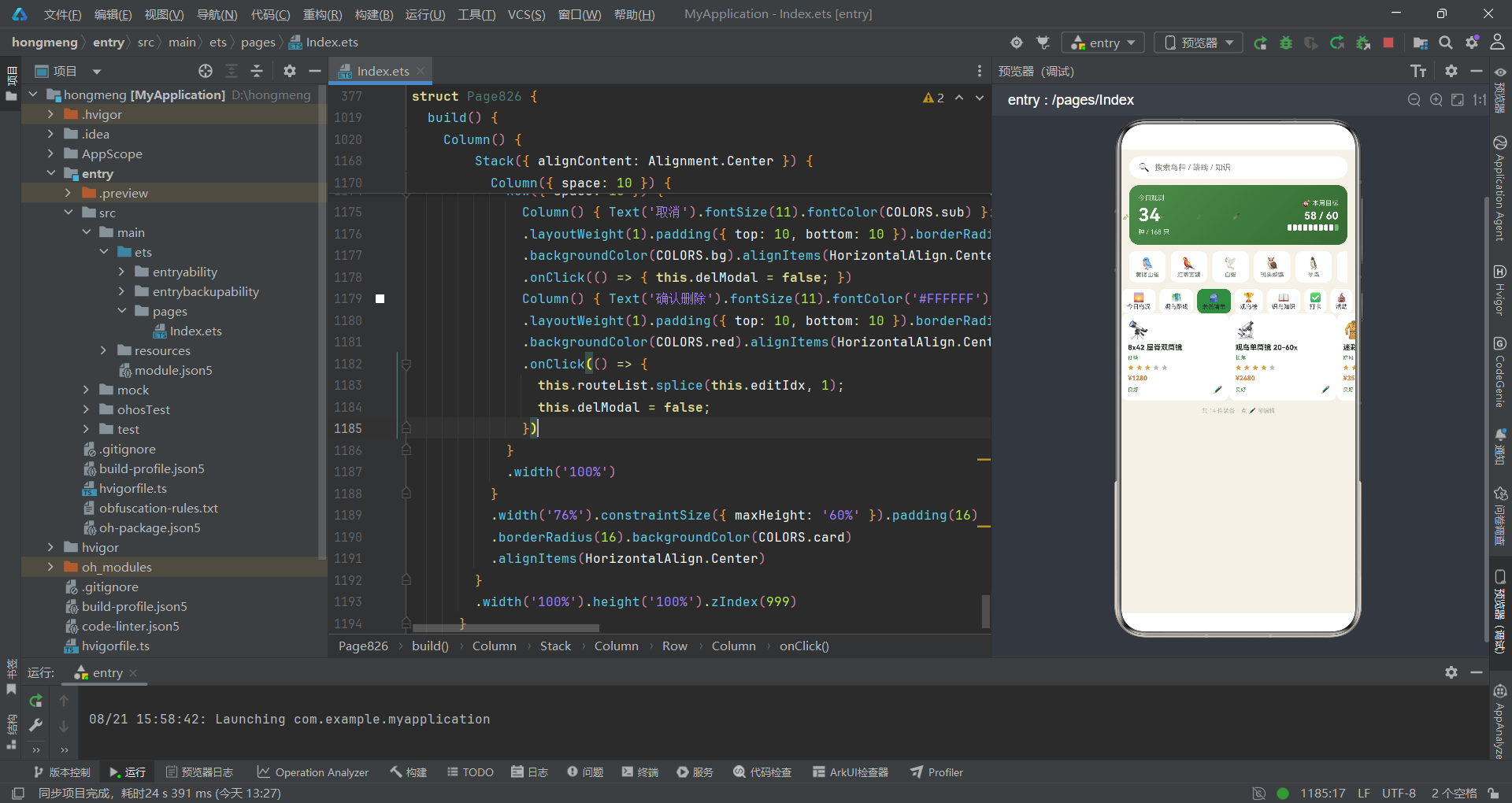
在视觉设计层面,项目的配色体系体现了对自然观察行业调性的深入理解。森绿、米棕、暖白的三色组合营造出生态、户外、自然的氛围,19 种语义化颜色通过 ColorPalette 接口集中管理,全局纯函数将业务状态映射为颜色值,形成了统一的视觉语言。柱状图、时间轴、瀑布流、日历格、星级评分等多种可视化形式的运用,展示了 ArkTS 在数据可视化方面的表达能力。在性能考量层面,定时器间隔设为 800 毫秒而非 16 毫秒、ForEach 配合 @State 数组实现数据驱动渲染、@Observed 属性级追踪、弹框条件渲染零开销、layoutWeight 弹性布局适配多屏幕——这些措施共同保证了应用在功能丰富的同时保持流畅交互。
从工程实践启示来看,本项目为 ArkTS 开发者提供了几个关键经验:第一,数据模型设计应面向 UI 需求——价格和阅读量直接存为带格式后缀的字符串,减少 UI 层的格式转换逻辑。第二,全局纯函数是解耦视图与逻辑的有效手段——颜色映射、状态判断封装为纯函数后,UI 代码只需调用函数即可获得正确样式值。第三,弹框交互应建立统一范式——所有弹框共享相同结构和显隐控制方式,复用遮罩构建器减少重复代码。第四,不可逆操作必须二次确认——删除操作通过专门确认弹框进行,并明确告知用户后果。第五,定时器等系统资源必须在组件销毁时清理——aboutToAppear 启动的定时器在 aboutToDisappear 中清除,防止内存泄漏和对已销毁组件的非法访问。

作为“人工智能6S店”的官方数字引擎,为AI开发者与企业提供一个覆盖软硬件全栈、一站式门户。
更多推荐


 5
5 0
0- 0


 已为社区贡献71条内容

所有评论(0)