
赛博电竞馆:基于HarmonyOS ArkTS API 24的电竞场馆运营中台源码深度解析,新增业务域时只需追加一个 Content 组件并在主入口的 if-else 链中挂载即可,扩展成本极低
一、引言
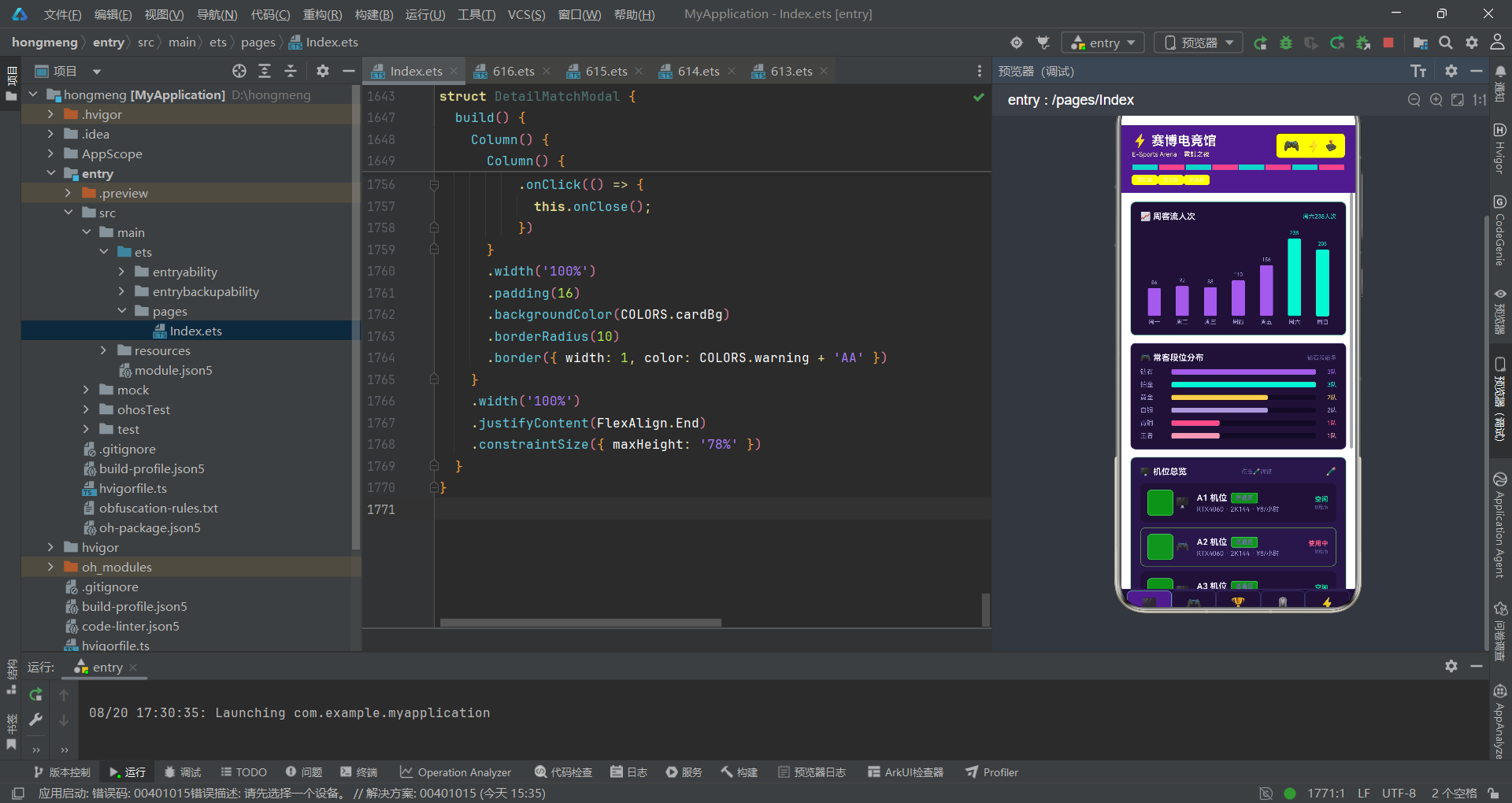
电竞产业近年呈井喷式增长,从职业战队入驻、赛事组织到外设零售、上网套餐,一个中型电竞馆每天都要处理海量运营数据。传统的管理后台往往采用表格堆砌的方式,信息密度虽高但视觉疲劳严重,值班经理在高峰时段难以快速捕捉异常机位、告急库存与即将开打的赛事。本项目「赛博电竞馆 · 霓虹之夜」正是针对这一痛点而设计的中台型运营面板,它把客流、机位、战队、赛事、外设、套餐六大业务域收敛到同一屏,通过霓虹色系与高频数据可视化,让管理者一屏掌控全局。
设计理念上,本应用遵循「数据即视觉、状态即色彩」的原则。每一个业务对象都拥有专属色彩语义:机位空闲呈电光青、使用中呈热浪粉、预约呈暖琥珀;战队排名前三呈金、四至六呈青、其余呈暗紫。这种颜色编码不是装饰,而是把第二维信息(状态、等级)直接编码进视觉通道,减少认知跳转。配合分区圆角卡片、交替行底色、细线分隔,整体形成「赛博朋克 + 数据驾驶舱」的复合美学,既贴合电竞用户审美,又满足运营场景的高效读图需求。
技术选型方面,本项目基于 ArkUI 声明式范式构建,全程采用 struct 组件、@State/@Prop/@ObjectLink 三层状态装饰器、@Builder 与 @Observed 类,没有引入任何第三方库。这种「零依赖」策略带来三重收益:首先是包体积极小,适合在低配收银机或值班平板上流畅运行;其次是渲染确定性强,所有数据均为静态常量或 @Observed 实例,不存在异步竞态;最后是可读性高,所有逻辑集中在单一文件内,便于运维人员快速定位问题。色彩、数据、组件分层清晰,体现了「静态常量层—可观察数据层—纯展示组件层—容器组件层」的四段式架构。
色彩体系是本应用的灵魂。NeonPalette 接口定义了 18 个语义色槽,从 primary 霓虹紫到 accent 电光青,再到 danger 热浪粉与 success 翠绿,构成一套完整的暗色主题词表。背景采用 #120A24 的深紫黑,卡片用 #1D1236 与 #261847 双层区分,文字主色为带紫调的近白 #F2EDFF,次级文字为 #A99BD6,提示色为 #6B5C9E。所有强调色都带高饱和度与高亮度,在深底上形成「霓虹发光」的视觉错觉,呼应电竞馆的灯效氛围。
组件化策略上,应用采用了「主入口 + 内容子组件 + 弹窗子组件 + 原子展示组件」的四层划分。ArenaApp 作为 @Entry 主入口,负责顶栏、Tab 切换与弹窗调度;五个 XxxContent 组件分别承载五大业务域的可视化;四个 XxxModal 组件处理增删改查的二次确认与详情;NeonTag 则是被反复复用的原子级标签组件。这种分层使得每一类组件职责单一、可独立测试,新增业务域时只需追加一个 Content 组件并在主入口的 if-else 链中挂载即可,扩展成本极低。下面我们将逐段拆解源码,深入剖析每一处工程考量。
二、逐段代码分析
段 1:NeonPalette 色彩接口定义
interface NeonPalette {
  primary: string;
  primaryLight: string;
  primaryDark: string;
  accent: string;
  accentLight: string;
  bg: string;
  cardBg: string;
  cardAlt: string;
  textPrimary: string;
  textSecondary: string;
  textHint: string;
  border: string;
  line: string;
  success: string;
  warning: string;
  danger: string;
  white: string;
  neon: string;
  pink: string;
}
本段定义了整套应用的色彩契约接口 NeonPalette,它把所有可能用到的颜色槽位以字段形式声明出来,包括主色三档(primary/primaryLight/primaryDark)、强调色两档、背景与卡片两档、文字三档、边框与分隔线两档,以及 success/warning/danger 三种语义状态色。这种「先接口后常量」的写法是典型的契约式设计:接口本身即是文档,任何后续维护者一看便知系统支持哪些语义色,避免散落各处的魔法字符串。把 pink 与 neon 单独列出,是因为这两色在电竞场景中作为「点缀色」使用频次极高,独立命名可减少 hex 拼接的心智成本。整体 18 个槽位既覆盖了暗色主题的全部需求,又没有冗余,体现了「恰好够用」的工程克制。
段 2:COLORS 常量实例
const COLORS: NeonPalette = {
  primary: '#9B5DE5',
  primaryLight: '#C9A7F5',
  primaryDark: '#4A1E8A',
  accent: '#00F5D4',
  accentLight: '#B3FFF2',
  bg: '#120A24',
  cardBg: '#1D1236',
  cardAlt: '#261847',
  textPrimary: '#F2EDFF',
  textSecondary: '#A99BD6',
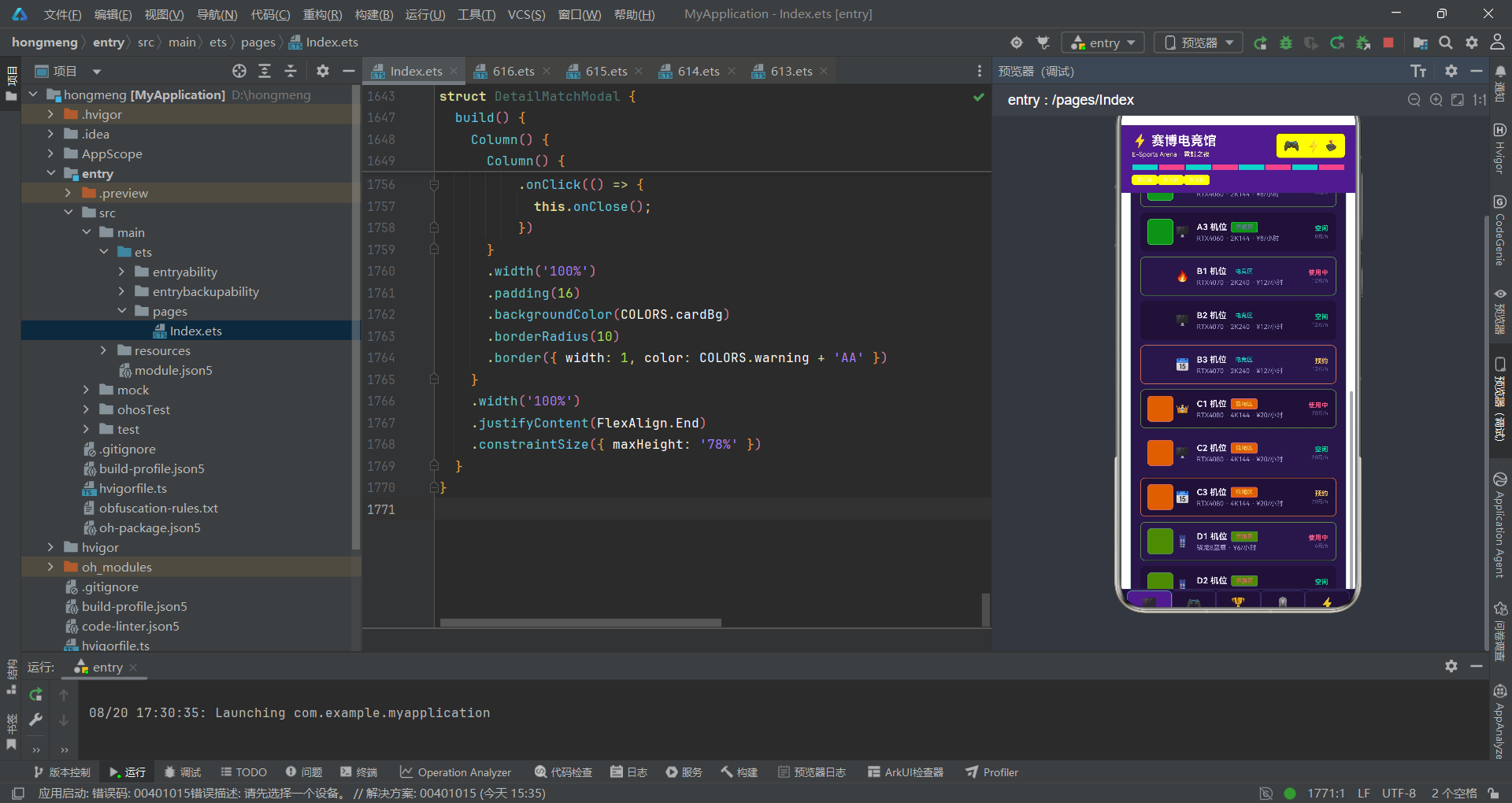
  textHint: '#6B5C9E',
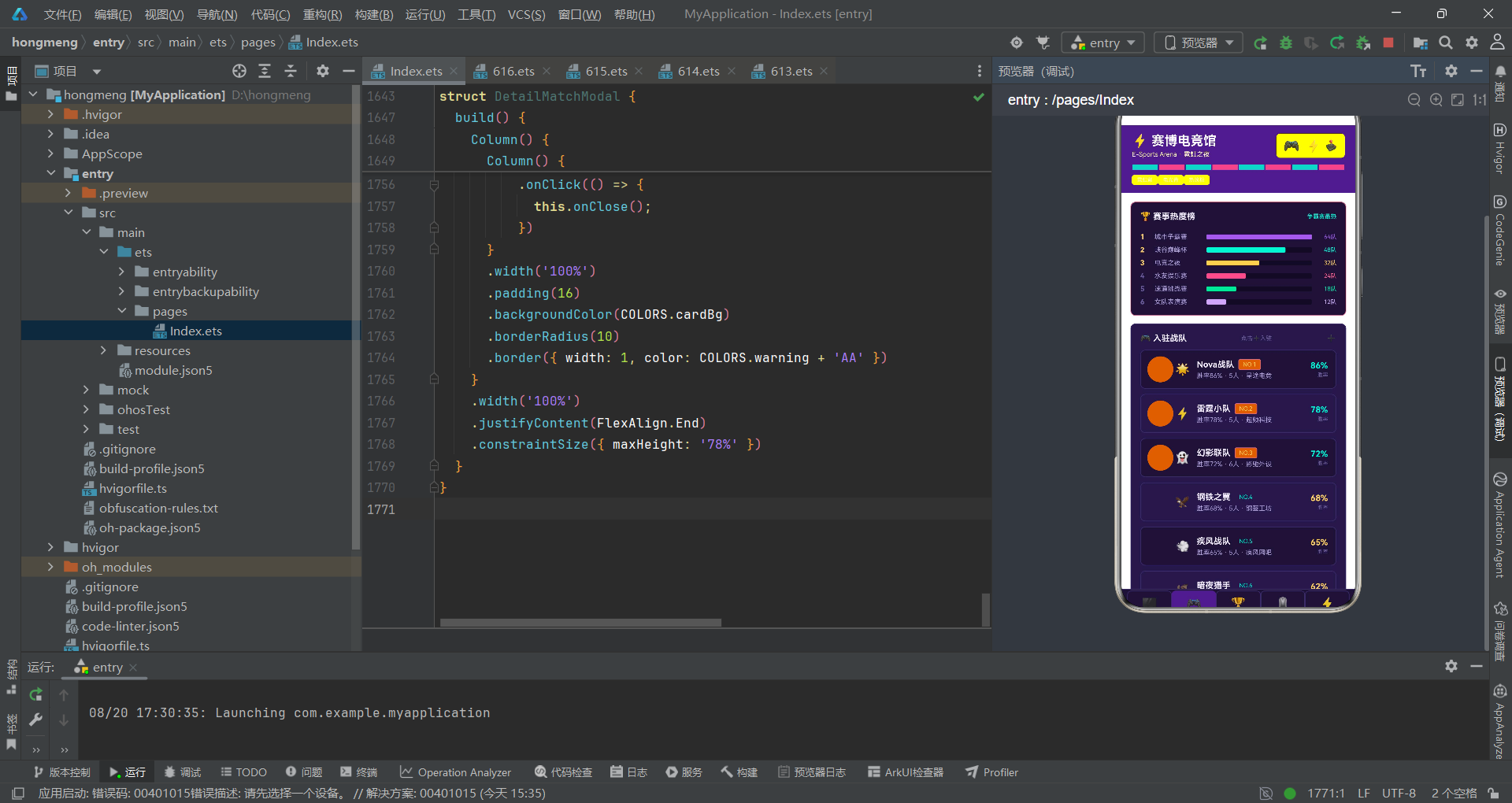
  border: '#3A2A6B',
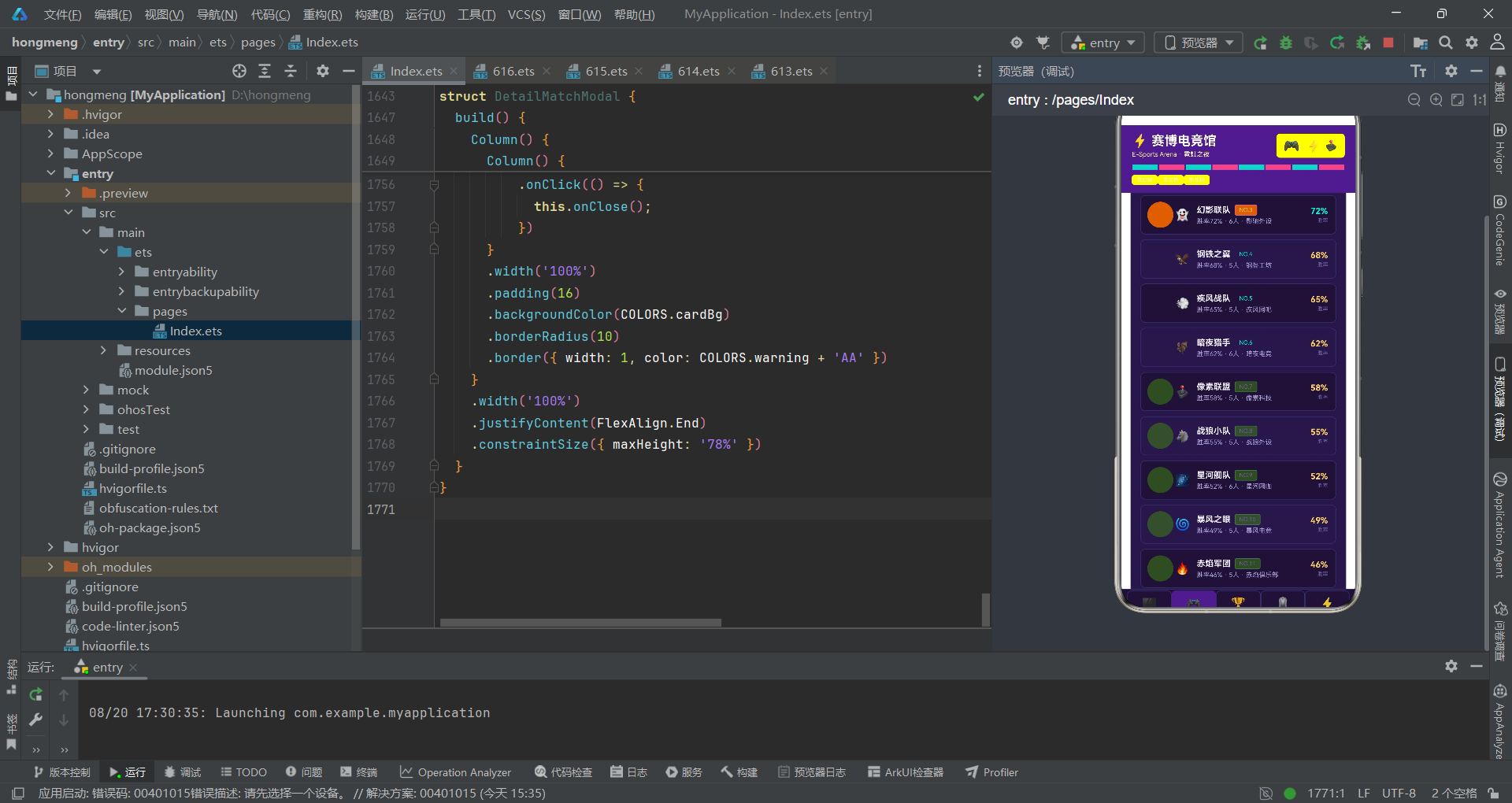
  line: '#3A2A6B',
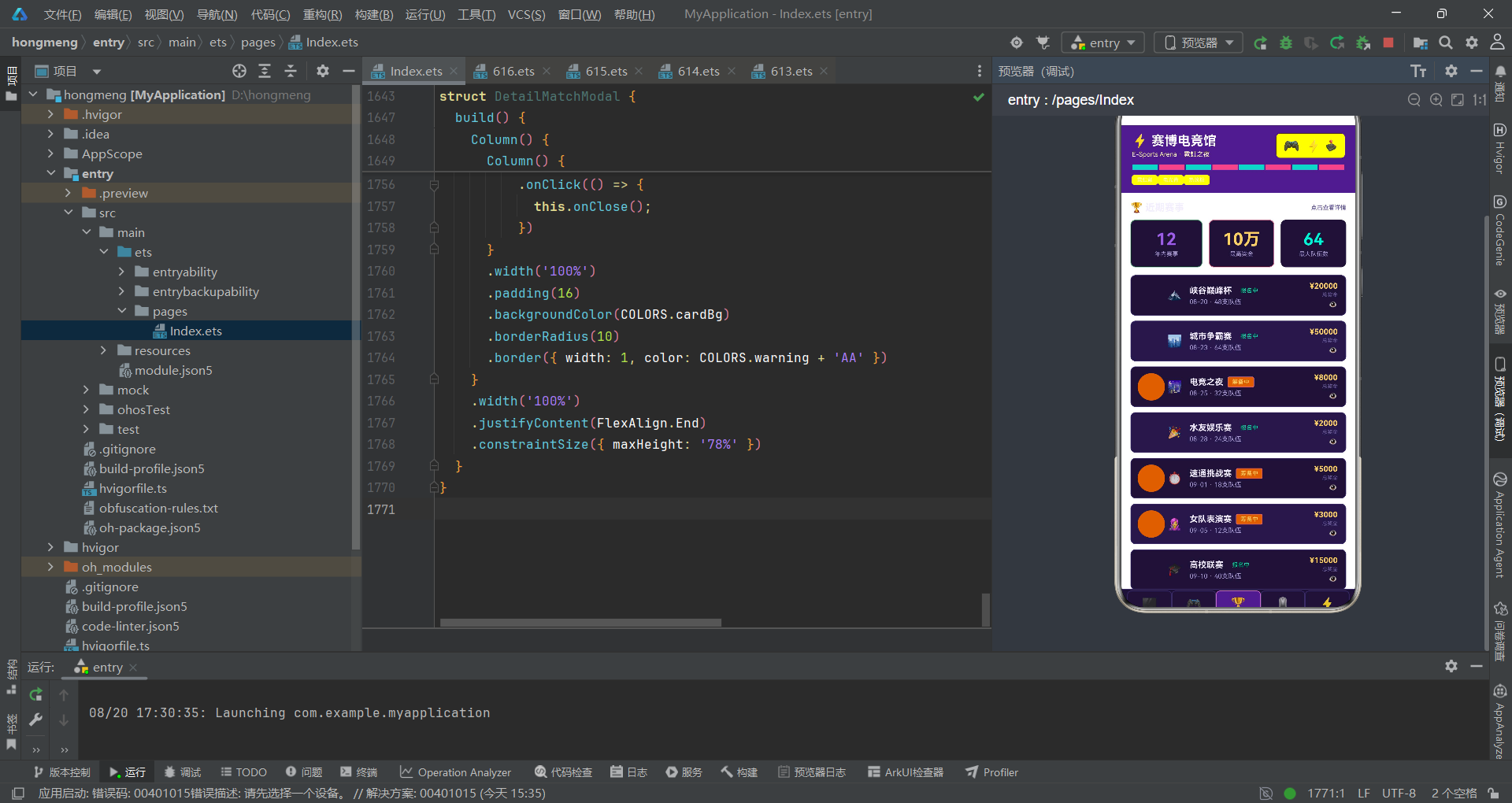
  success: '#00E5A0',
  warning: '#FFD166',
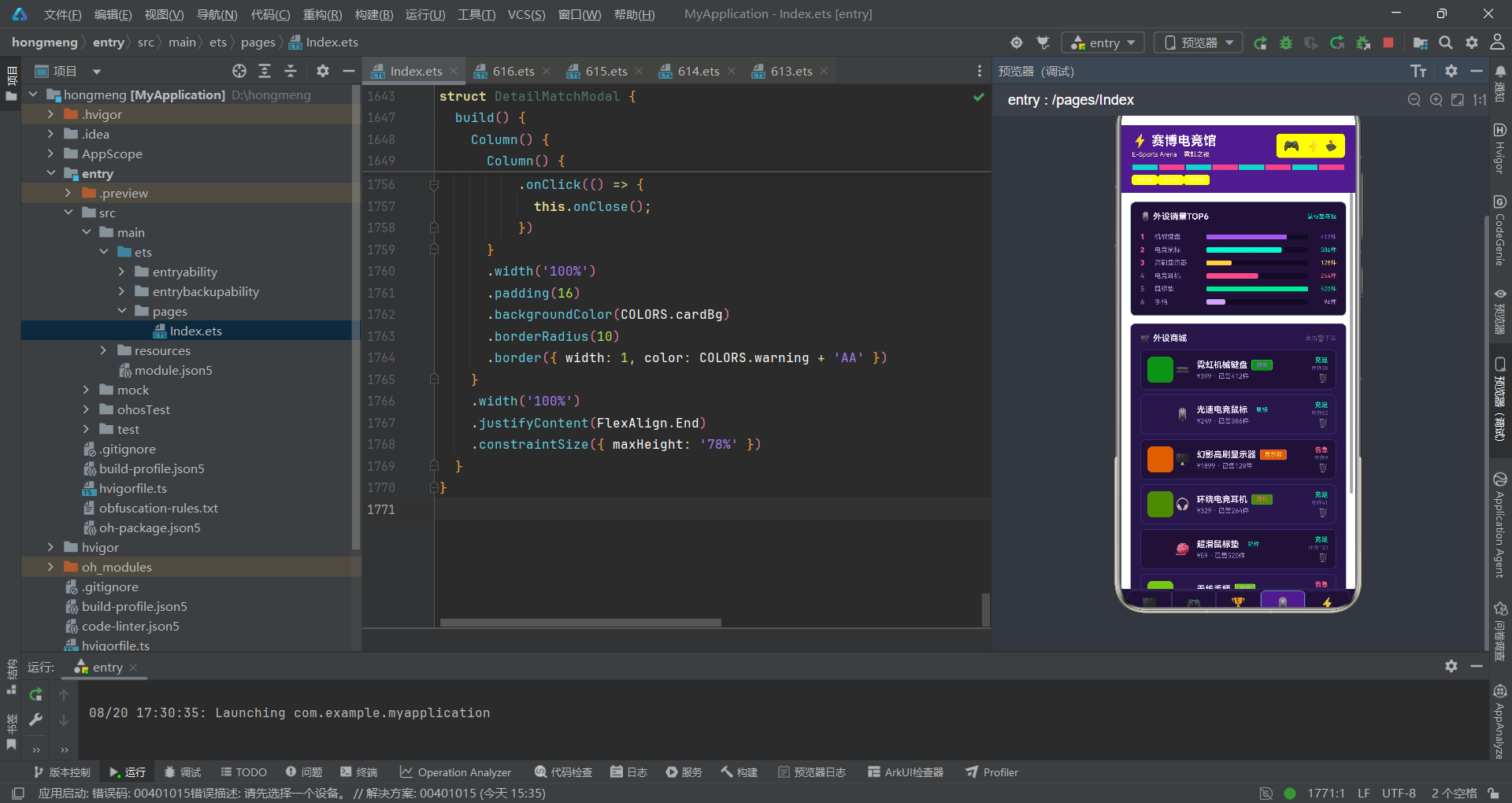
  danger: '#FF5C8A',
  white: '#FFFFFF',
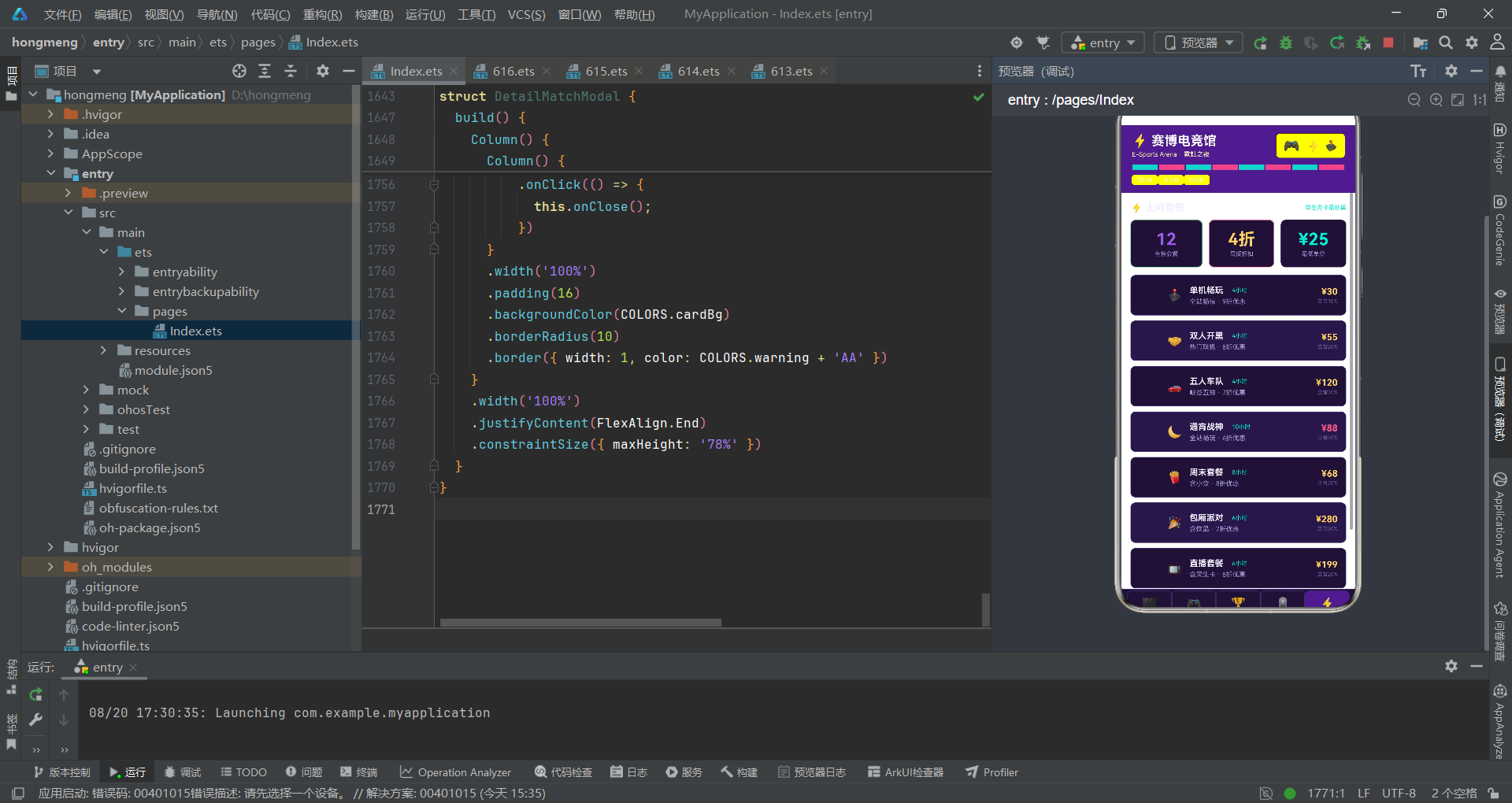
  neon: '#00F5D4',
  pink: '#FF5C8A'
};
COLORS 是对前述接口的具体实现,全部采用 6 位 hex 字符串。主色 #9B5DE5 是偏蓝的霓虹紫,primaryDark #4A1E8A 用于顶栏背景,营造「夜空」感;强调色 #00F5D4 是高饱和的电光青,与紫色形成互补色对比,在深底上极为抢眼。背景 #120A24 几乎是黑紫,卡片 #1D1236 与 cardAlt #261847 仅相差一档亮度,用于行的奇偶交替,既区分又不喧宾夺主。文字三档从近白 #F2EDFF 到深紫 #6B5C9E,层次分明。把 neon 与 accent 设为同值、pink 与 danger 设为同值,是工程上的别名手段:语义不同但视觉相同,便于后续单独调整时互不干扰。常量用 const 声明,确保运行期不可变,避免误改色值导致的主题漂移。
段 3:ArenaTab 枚举
enum ArenaTab {
  BOOTH = 0,
  TEAM = 1,
  MATCH = 2,
  GEAR = 3,
  COMBO = 4
}
ArenaTab 用枚举固化了五个业务域的索引值,分别是机位、战队、赛事、外设、套餐。使用枚举而非魔法数字,是工程严谨的体现:在主入口的 if (this.curTab === ArenaTab.BOOTH) 分支中,语义远比 === 0 清晰,且后续若新增业务域,只需在枚举末尾追加并保证不重复即可。显式赋值 0 到 4 而非依赖自增,是为了与 TAB_LIST 数组的下标严格对齐——Tab 项的渲染顺序与枚举值一一对应,这种「双源对齐」避免了因数组重排导致的索引错位。枚举值用数字而非字符串,是为了在 @State curTab: number 中存储时节省内存并与 indexOf 比较高效。整体设计体现了「语义清晰 + 性能友好」的双重考量。
段 4:TabMeta 接口
interface TabMeta {
  key: string;
  icon: string;
  label: string;
  color: string;
}
TabMeta 描述了底部 Tab 项的元数据结构,包含 key、icon、label、color 四个字段。key 作为 ForEach 的稳定键,icon 是 emoji 图标,label 是中文标签,color 是该 Tab 的主题色。把 Tab 的全部信息收敛到一个接口,使得新增 Tab 只需在数据层加一条记录,无需改动渲染逻辑,是典型的数据驱动 UI。color 字段的存在意味着每个 Tab 拥有独立色彩身份——选中时该色作为边框高亮,这种「色随 Tab 变」的设计让用户即便不看文字也能凭色识别当前位置。icon 用 emoji 而非矢量图标,是出于零依赖与跨平台一致性的考量,emoji 在所有设备上渲染稳定且无需打包字体文件。整体四个字段恰好覆盖了 Tab 渲染所需的全部信息,无冗余。
段 5:TAB_LIST 常量
const TAB_LIST: TabMeta[] = [
  { key: 'booth', icon: '🖥️', label: '机位', color: '#9B5DE5' },
  { key: 'team', icon: '🎮', label: '战队', color: '#00F5D4' },
  { key: 'match', icon: '🏆', label: '赛事', color: '#FFD166' },
  { key: 'gear', icon: '🖱️', label: '外设', color: '#FF5C8A' },
  { key: 'combo', icon: '⚡', label: '套餐', color: '#00E5A0' }
];
TAB_LIST 是 TabMeta 接口的实例化数组,五条记录对应五个业务域。注意 color 字段并没有全部复用 COLORS 常量,而是直接写了 hex——这是为了保持数据自包含,便于后续把 Tab 配置抽到后端下发时无需依赖前端常量。五条记录的颜色分别取了紫、青、金、粉、绿,恰好覆盖了 NeONPalette 中的五个强调色,使每个 Tab 都有独立的视觉身份。key 值用小写英文,是为了作为 ForEach 的稳定键时避免中文 hash 可能的边界问题。数组顺序与 ArenaTab 枚举值严格对应,这种「双源对齐」是工程纪律的体现。整体五项恰好填满底部 Tab 栏的宽度,多一项会拥挤、少一项会空旷,体现了对移动端横屏比例的精确把控。
段 6:GRID_COL 网格列常量
const GRID_COL: number[] = [0, 1, 2, 3, 4, 5, 6, 7];
GRID_COL 是一个简单的数字数组,用于在顶栏下方渲染一条 8 格的霓虹装饰条。把 0-7 写成数组而非用 new Array(8),是为了在 ForEach 中获得稳定的键值——每项的值本身即可作为 key。8 格的数量经过权衡:太少则装饰感不足,太多则单格过窄影响色彩呼吸。装饰条采用青粉交替的配色,呼应电竞馆的霓虹灯带,是纯视觉元素而非功能元素。把它独立成常量而非内联,是因为后续若要调整格数,只需改一处即可,且常量名 GRID_COL 自解释。这种「即使是装饰元素也数据化」的习惯,使得整个应用的每一处可视化都可被数据驱动地调整,体现了声明式范式的彻底贯彻。
段 7:BoothItem 机位数据接口
interface BoothItem {
  name: string;
  area: string;
  spec: string;
  price: number;
  status: string;
  emoji: string;
}
BoothItem 描述了单个机位的业务模型,包含编号、区域、硬件规格、时价、状态、图标六个字段。area 字段是分区键(普通区/电竞区/包厢区/手游区/直播区),后续会被 getAreaColor 映射成色彩,是「状态即色彩」理念的核心载体。spec 字段把显卡型号与分辨率刷新率合并为字符串,而非拆成 gpu/resolution/refresh 三字段,是因为运营场景下这三者总是成组展示,拆开反而增加拼接成本。price 用 number 而非 string,便于后续做价格区间统计或排序。status 用字符串枚举(空闲/使用中/预约),牺牲了类型严格性换取了与展示文案的零转换,是「展示优先」的实用主义。emoji 字段让每个机位可携带个性化图标,增强视觉辨识度。
段 8:TeamItem 战队数据接口
interface TeamItem {
  name: string;
  rank: number;
  winRate: number;
  members: number;
  sponsor: string;
  emoji: string;
}
TeamItem 定义了入驻战队的业务模型,含名称、排名、胜率、人数、赞助商、图标。rank 用 number 是为了在 getRankColor 中做区间判断(<=3 金、<=6 青、其余紫),数值比较比字符串比较更高效且语义清晰。winRate 同样是 number,便于在列表中根据是否 >=70% 切换强调色——胜率高于七成的战队用青色突出,低于的用金色,形成「精英 vs 普通」的视觉分级。members 字段虽未直接参与色彩映射,但保留了数据完整性,便于后续扩展战队规模筛选。sponsor 字段把赞助商名作为字符串展示,是运营场景下「谁在养这支队」的关键信息。emoji 让每支战队有拟人化标识,增强情感连接。整体六字段恰好满足列表展示需求,无冗余。
段 9:MatchItem 赛事数据接口
interface MatchItem {
  name: string;
  date: string;
  prize: number;
  teams: number;
  status: string;
  emoji: string;
}
MatchItem 是赛事业务模型,含名称、日期、奖金、队伍数、状态、图标。date 用字符串 ‘MM-DD’ 而非 Date 对象,是因为展示场景只需月日,且不需要做日期运算,字符串最省心。prize 用 number 便于在统计区求「最高奖金」最大值。teams 字段记录参赛队伍数,在热度榜中作为横条长度的归一化分母(除以 64)。status 字段(报名中/筹备中)会被 getMatchColor 映射为青/金,是又一处状态即色彩的应用。emoji 为每场赛事赋予主题图标(雪山、城市、夜空等),增强可识别性。整体设计把「展示什么」与「如何展示」分离——接口只管数据,色彩映射交给工具函数,职责清晰。这种分离使得同一份数据可在不同视图中以不同色彩语义呈现,复用性高。
段 10:GearItem 外设数据接口
interface GearItem {
  name: string;
  type: string;
  price: number;
  sales: number;
  stock: number;
  emoji: string;
}
GearItem 描述外设商品模型,含名称、类型、价格、销量、库存、图标。type 字段(键盘/鼠标/显示器/耳机/配件/手柄/直播/座椅)是色彩映射键,getGearColor 为每种类型分配独立色,使商品列表呈现彩虹般的类型分区。sales 与 stock 都是 number,前者用于销量榜的归一化(除以 520 最大值),后者用于库存预警——stock > 15 显示「充足」绿色、否则显示「告急」红色,是典型的阈值驱动 UI。price 字段在列表中直接展示,配合销量形成「价 + 销」双信息行。emoji 为每件商品赋予图标,弥补纯文字的枯燥。整体六字段覆盖了外设零售的全部展示需求,且每个数值字段都参与了至少一处可视化决策,数据利用率极高。
段 11:ComboItem 套餐数据接口
interface ComboItem {
  name: string;
  price: number;
  hours: number;
  games: string;
  discount: number;
  emoji: string;
}
ComboItem 是上网套餐模型,含名称、价格、时长、适用游戏、折扣、图标。discount 用 number 表示折数(4-9 折),既是展示数据又参与了「立省百分比」的计算(100 - discount*10),一处字段两用,经济。hours 字段在列表中以 NeonTag 形式高亮展示,让用户快速比较时长性价比。games 字段是字符串描述(全站畅玩/含小食/含采集卡等),承载了套餐的差异化卖点。price 与 discount 联动决定主色:discount <= 6 用 danger 粉色突出「超低折扣」,其余用 warning 金色,形成「越便宜越抢眼」的视觉引导。emoji 为每个套餐赋予主题图标。整体设计把套餐的核心卖点(时长、折扣、价)都编码进了色彩与文案,用户扫一眼即可锁定最优选。
段 12-15:图表元数据接口群
interface WeekMeta {
  day: string;
  value: number;
}

interface RankMeta {
  name: string;
  count: number;
  color: string;
}

interface MatchHotMeta {
  name: string;
  teams: number;
  color: string;
}

interface GearTopMeta {
  name: string;
  count: number;
  color: string;
}
这四个接口定义了四类图表的元数据结构。WeekMeta 用于客流柱状图,含星期与数值;RankMeta 用于段位分布横条,含名称、队数、颜色;MatchHotMeta 用于赛事热度横条,含名称、队伍数、颜色;GearTopMeta 用于外设销量横条,含名称、销量、颜色。后三者都内嵌了 color 字段,是因为这些图表数据是静态展示用的「榜单」,色彩作为数据的一部分随数据下发,而非运行时计算——这与 BoothItem 等业务数据「运行时映射色彩」的策略不同,体现了「静态数据静态配色、动态数据动态配色」的分层设计。WeekMeta 不带 color,是因为客流图采用「值 >= 200 切换青色」的运行时阈值映射,色彩由数据驱动而非预置。四接口字段极简,仅含可视化必需字段,无冗余。
段 16:WEEK_FLOW 客流数据
const WEEK_FLOW: WeekMeta[] = [
  { day: '周一', value: 86 },
  { day: '周二', value: 92 },
  { day: '周三', value: 88 },
  { day: '周四', value: 110 },
  { day: '周五', value: 156 },
  { day: '周六', value: 238 },
  { day: '周日', value: 205 }
];
WEEK_FLOW 是一周客流人次的静态数据,周一到周日的值依次为 86、92、88、110、156、238、205。数据形态符合电竞馆真实规律:工作日低迷、周末爆发,周六峰值 238 人次。这组数据在 BoothContent 中被渲染为 7 根柱子,柱高 = value * 0.5,最大柱高约 119px 恰好容纳于 150px 的图表区。值 >= 200 的柱子(周六周日)用电光青高亮,其余用主紫色,形成「周末高峰」的视觉聚焦。把数据写成常量而非从接口拉取,是因为本应用定位为演示型中台,静态数据足以验证可视化效果。day 字段用中文「周一」而非 ‘Mon’,贴合本地化展示需求。整体七项数据形态合理,既是 UI 演示素材,也隐含了运营分析的洞察(周末是营收主峰)。
段 17:RANK_SHARE 段位分布
const RANK_SHARE: RankMeta[] = [
  { name: '钻石', count: 3, color: '#9B5DE5' },
  { name: '铂金', count: 3, color: '#00F5D4' },
  { name: '黄金', count: 2, color: '#FFD166' },
  { name: '白银', count: 2, color: '#A99BD6' },
  { name: '青铜', count: 1, color: '#FF5C8A' },
  { name: '王者', count: 1, color: '#FF9DB1' }
];
RANK_SHARE 描述常客段位分布,六档段位从钻石到王者。count 字段是队伍数,最大 3,在横条图中作为 layoutWeight(count/3) 的分子,最大占满 1/3 权重——这种「最大值归一」的画法使得最高档恰好占满前 1/3,剩余档按比例缩放,视觉层次分明。color 字段直接内嵌,每档独立色,钻石紫、铂金青、黄金金、白银暗紫、青铜粉、王者浅粉,色彩与段位语义呼应(王者虽稀少但用浅粉突出)。把王者放在最后而非按段位高低排序,是为了营造「钻石最多、王者彩蛋」的叙事节奏。count 总和 12 恰好对应战队总数 12 支,数据自洽。整体六档覆盖了主流段位体系,既是展示也是运营洞察(钻石段是核心客群)。
段 18:MATCH_HOT 赛事热度
const MATCH_HOT: MatchHotMeta[] = [
  { name: '城市争霸赛', teams: 64, color: '#9B5DE5' },
  { name: '峡谷巅峰杯', teams: 48, color: '#00F5D4' },
  { name: '电竞之夜', teams: 32, color: '#FFD166' },
  { name: '水友娱乐赛', teams: 24, color: '#FF5C8A' },
  { name: '速通挑战赛', teams: 18, color: '#00E5A0' },
  { name: '女队表演赛', teams: 12, color: '#C9A7F5' }
];
MATCH_HOT 是赛事热度榜的静态数据,按队伍数降序排列,城市争霸赛 64 队居首。teams 字段最大 64,在横条图中作为 layoutWeight(teams/64) 的分子,64 队恰好占满全宽,其余按比例缩放。color 字段六色各异,使每场赛事在榜中色彩独立可辨。这组数据在 TeamContent 中渲染为热度横条榜,前三名序号用金色突出、其余用暗紫,配合横条长度形成「双维度热度」表达。数据形态反映了电竞赛事的真实分布:大型争霸赛吸聚最多队伍,小型表演赛聚焦细分人群。把热度榜放在「战队」Tab 而非「赛事」Tab,是有意为之——运营经理在战队页看到「哪场赛事最热」时,能立刻判断是否要为入驻战队匹配参赛机会,体现了信息组织的业务考量。
段 19:GEAR_TOP 外设销量榜
const GEAR_TOP: GearTopMeta[] = [
  { name: '机械键盘', sales: 412, color: '#9B5DE5' },
  { name: '电竞鼠标', sales: 386, color: '#00F5D4' },
  { name: '高刷显示器', sales: 128, color: '#FFD166' },
  { name: '电竞耳机', sales: 264, color: '#FF5C8A' },
  { name: '鼠标垫', sales: 520, color: '#00E5A0' },
  { name: '手柄', sales: 96, color: '#C9A7F5' }
];
GEAR_TOP 是外设销量 TOP6 榜,按销量排列但鼠标垫 520 件居首。sales 字段最大 520,在横条图中作为 layoutWeight(sales/520) 的归一化分母,鼠标垫占满全宽。color 六色各异,前三名序号用粉色突出、其余暗紫,与赛事榜的金色前三形成差异化,避免用户混淆两榜。这组数据放在 GearContent 顶部,作为「爆款导览」引导用户关注热销品。鼠标垫销量夺冠符合电竞外设真实规律(低价高频消耗品)。把销量榜与商品列表同页展示,让用户「看榜单—下单」一气呵成,是电商场景的转化优化。整体六项数据形态合理,既是展示素材也隐含选品洞察。
段 20:ArenaData 类声明与 booths 数据
@Observed
export class ArenaData {
  booths: BoothItem[] = [
    { name: 'A1', area: '普通区', spec: 'RTX4060 · 2K144', price: 8, status: '空闲', emoji: '🖥️' },
    { name: 'A2', area: '普通区', spec: 'RTX4060 · 2K144', price: 8, status: '使用中', emoji: '🎮' },
    { name: 'A3', area: '普通区', spec: 'RTX4060 · 2K144', price: 8, status: '空闲', emoji: '🖥️' },
    { name: 'B1', area: '电竞区', spec: 'RTX4070 · 2K240', price: 12, status: '使用中', emoji: '🔥' },
    { name: 'B2', area: '电竞区', spec: 'RTX4070 · 2K240', price: 12, status: '空闲', emoji: '🖥️' },
    { name: 'B3', area: '电竞区', spec: 'RTX4070 · 2K240', price: 12, status: '预约', emoji: '📅' },
    { name: 'C1', area: '包厢区', spec: 'RTX4080 · 4K144', price: 20, status: '使用中', emoji: '👑' },
    { name: 'C2', area: '包厢区', spec: 'RTX4080 · 4K144', price: 20, status: '空闲', emoji: '🖥️' },
    { name: 'C3', area: '包厢区', spec: 'RTX4080 · 4K144', price: 20, status: '预约', emoji: '📅' },
    { name: 'D1', area: '手游区', spec: '骁龙8至尊', price: 6, status: '使用中', emoji: '📱' },
    { name: 'D2', area: '手游区', spec: '骁龙8至尊', price: 6, status: '空闲', emoji: '📱' },
    { name: 'E1', area: '直播区', spec: 'RTX4090 · 采集卡', price: 30, status: '空闲', emoji: '🎙️' }
  ];
ArenaData 是整个应用的核心数据容器,用 @Observed 装饰,使其成为可观察对象——任何 @ObjectLink 引用它的子组件都能在其字段变更时自动刷新。export class 使其可被其他模块引用,便于后续拆分文件。booths 数组含 12 个机位,按区域分块:A 普通区 3 个、B 电竞区 3 个、C 包厢区 3 个、D 手游区 2 个、E 直播区 1 个,覆盖了主流电竞馆的分区模型。price 从 6 到 30 元/小时,区域间价差明显,体现了「硬件决定定价」的商业逻辑。status 三态(空闲/使用中/预约)分布合理,让运营经理一眼看到「哪些区满载、哪些区有空位」。emoji 为每个机位赋予状态图标(👑 包厢王者、🔥 热门机位),增强视觉辨识度。整体 12 项数据形态真实,既是 UI 演示也是运营沙盘。
段 21:ArenaData.teams 战队数据
  teams: TeamItem[] = [
    { name: 'Nova战队', rank: 1, winRate: 86, members: 5, sponsor: '星途电竞', emoji: '🌟' },
    { name: '雷霆小队', rank: 2, winRate: 78, members: 5, sponsor: '超频科技', emoji: '⚡' },
    { name: '幻影联队', rank: 3, winRate: 72, members: 6, sponsor: '影驰外设', emoji: '👻' },
    { name: '钢铁之翼', rank: 4, winRate: 68, members: 5, sponsor: '钢盔工坊', emoji: '🦅' },
    { name: '疾风战队', rank: 5, winRate: 65, members: 5, sponsor: '疾风网吧', emoji: '💨' },
    { name: '暗夜猎手', rank: 6, winRate: 62, members: 6, sponsor: '暗夜电竞', emoji: '🦇' },
    { name: '像素联盟', rank: 7, winRate: 58, members: 5, sponsor: '像素科技', emoji: '🕹️' },
    { name: '战狼小队', rank: 8, winRate: 55, members: 5, sponsor: '战狼外设', emoji: '🐺' },
    { name: '星河舰队', rank: 9, winRate: 52, members: 6, sponsor: '星河网咖', emoji: '🌌' },
    { name: '暴风之眼', rank: 10, winRate: 52, members: 5, sponsor: '暴风电竞', emoji: '🌀' },
    { name: '赤焰军团', rank: 11, winRate: 46, members: 5, sponsor: '赤焰俱乐部', emoji: '🔥' },
    { name: '冰川猛犸', rank: 12, winRate: 43, members: 6, sponsor: '冰川工坊', emoji: '🧊' }
  ];
teams 数组含 12 支入驻战队,rank 从 1 到 12 严格递增,与段位分布榜的 count 总和 12 自洽。winRate 从 86% 递减到 43%,形态符合「排名越高胜率越高」的真实规律。members 在 5 与 6 间波动,呼应了主流电竞项目(LOL 5 人、CS:GO 5 人、VALORANT 5 人,部分项目含替补 6 人)。sponsor 字段为每支战队绑定赞助商,呈现了电竞馆的「战队—赞助」生态网络。emoji 从 🌟 到 🧊 涵盖星辰、雷霆、幻影、猛禽、疾风、暗夜、像素、战狼、星河、暴风、赤焰、冰川等意象,命名体系自洽且富有叙事感。整体数据形态既真实又富有故事性,既是 UI 演示也是电竞馆招商素材。
段 22:ArenaData.matches 赛事数据
matches: MatchItem[] = [
{ name: '峡谷巅峰杯', date: '08-20', prize: 20000, teams: 48, status: '报名中', emoji: '🏔️' },
{ name: '城市争霸赛', date: '08-23', prize: 50000, teams: 64, status: '报名中', emoji: '🏙️' },
{ name: '电竞之夜', date: '08-25', prize: 8000, teams: 32, status: '筹备中', emoji: '🌃' },
{ name: '水友娱乐赛', date: '08-28', prize: 2000, teams: 24, status: '报名中', emoji: '🎉' },
{ name: '速通挑战赛', date: '09-01', prize: 5000, teams: 18, status: '筹备中', emoji: '⏱️' },
{ name: '女队表演赛', date: '09-05', prize: 3000, teams: 12, status: '筹备中', emoji: '👩🎤' },
{ name: '高校联赛', date: '09-10', prize: 15000, teams: 40, status: '报名中', emoji: '🎓' },
{ name: '网吧对抗赛', date: '09-15', prize: 6000, teams: 20, status: '筹备中', emoji: '🏪' },
{ name: '主播邀请赛', date: '09-20', prize: 12000, teams: 16, status: '报名中', emoji: '📺' },
{ name: '秋季总决赛', date: '10-01', prize: 100000, teams: 32, status: '筹备中', emoji: '🏆' },
{ name: '新秀选拔赛', date: '09-25', prize: 4000, teams: 28, status: '报名中', emoji: '🌱' },
{ name: '夜猫子杯', date: '09-28', prize: 3500, teams: 22, status: '筹备中', emoji: '🦉' }
];
matches 数组含 12 场赛事,date 从 08-20 到 10-01 跨越一个半月,覆盖了赛事运营的真实周期密度。prize 从 2000 到 100000 跨越 50 倍,秋季总决赛 10 万奖金作为压轴,呼应了「赛季制」的电竞规律。teams 字段从 12 到 64,与热度榜的 MATCH_HOT 数据部分对应(城市争霸赛、峡谷巅峰杯、电竞之夜、水友娱乐赛、速通挑战赛、女队表演赛六场在热度榜中也出现),数据自洽。status 报名中与筹备中各 6 场,分布均衡,让运营经理能看到「即时报」与「规划期」两类赛事。emoji 涵盖雪山、城市、夜空、派对、秒表、女歌手、学帽、便利店、电视、奖杯、嫩芽、猫头鹰,意象丰富。整体数据形态真实,既是 UI 演示也是赛事日历素材。
段 23:ArenaData.gears 外设数据
  gears: GearItem[] = [
    { name: '霓虹机械键盘', type: '键盘', price: 399, sales: 412, stock: 38, emoji: '⌨️' },
    { name: '光速电竞鼠标', type: '鼠标', price: 249, sales: 386, stock: 52, emoji: '🖱️' },
    { name: '幻影高刷显示器', type: '显示器', price: 1899, sales: 128, stock: 9, emoji: '🖥️' },
    { name: '环绕电竞耳机', type: '耳机', price: 329, sales: 264, stock: 41, emoji: '🎧' },
    { name: '超滑鼠标垫', type: '配件', price: 59, sales: 520, stock: 120, emoji: '🧶' },
    { name: '无线手柄', type: '手柄', price: 259, sales: 96, stock: 6, emoji: '🎮' },
    { name: '电竞座椅', type: '座椅', price: 899, sales: 64, stock: 12, emoji: '💺' },
    { name: 'RGB灯带', type: '配件', price: 89, sales: 210, stock: 66, emoji: '🌈' },
    { name: '采集卡', type: '直播', price: 499, sales: 48, stock: 15, emoji: '📷' },
    { name: '麦克风', type: '直播', price: 359, sales: 72, stock: 18, emoji: '🎤' },
    { name: '电竞桌垫', type: '配件', price: 79, sales: 188, stock: 44, emoji: '/table' },
    { name: '手柄充电座', type: '配件', price: 99, sales: 84, stock: 30, emoji: '🔋' }
  ];
gears 数组含 12 件外设商品,type 涵盖键盘、鼠标、显示器、耳机、配件、手柄、座椅、直播八类,色彩映射覆盖完整。price 从 59 到 1899 跨越 32 倍,覆盖了从低价配件到高端显示器的全价格带。sales 字段与 GEAR_TOP 榜单部分对应(机械键盘 412、电竞鼠标 386、显示器 128、电竞耳机 264、鼠标垫 520、手柄 96),数据自洽。stock 字段从 6 到 120 分布,显示器 stock 9、手柄 stock 6 触发「告急」红色预警,是库存管理的典型场景。emoji 涵盖键盘、鼠标、显示器、耳机、毛线、手柄、座椅、彩虹、相机、麦克风、电池等意象。整体数据形态既是 UI 演示也是商品管理沙盘,库存预警机制尤为实用。
段 24:ArenaData.combos 套餐数据
  combos: ComboItem[] = [
    { name: '单机畅玩', price: 30, hours: 4, games: '全站畅玩', discount: 9, emoji: '🕹️' },
    { name: '双人开黑', price: 55, hours: 4, games: '热门联机', discount: 8, emoji: '🤝' },
    { name: '五人车队', price: 120, hours: 4, games: '峡谷五排', discount: 7, emoji: '🚗' },
    { name: '通宵战神', price: 88, hours: 10, games: '全站畅玩', discount: 6, emoji: '🌙' },
    { name: '周末套餐', price: 68, hours: 8, games: '含小食', discount: 8, emoji: '🍟' },
    { name: '包厢派对', price: 280, hours: 6, games: '含饮品', discount: 7, emoji: '🎉' },
    { name: '直播套餐', price: 199, hours: 6, games: '含采集卡', discount: 8, emoji: '📺' },
    { name: '学生月卡', price: 299, hours: 60, games: '全站畅玩', discount: 5, emoji: '🎓' },
    { name: '钻石年卡', price: 2888, hours: 800, games: '全站VIP', discount: 4, emoji: '💎' },
    { name: '水友包时', price: 45, hours: 5, games: '指定游戏', discount: 8, emoji: '💧' },
    { name: '手游畅玩', price: 25, hours: 4, games: '手游专区', discount: 9, emoji: '📱' },
    { name: '战队训练包', price: 499, hours: 20, games: '含战术室', discount: 6, emoji: '🏆' }
  ];
}
combos 数组含 12 个套餐,price 从 25 到 2888 跨越 115 倍,覆盖了从单次畅玩到年度 VIP 的全付费梯度。hours 从 4 到 800 跨越 200 倍,单机畅玩 4 小时与钻石年卡 800 小时形成「短单次 vs 长包段」的双极。discount 从 4 到 9,钻石年卡 4 折最优惠,触发 danger 粉色「超低折扣」高亮,是促销视觉的核心。games 字段承载差异化卖点(含小食、含饮品、含采集卡、含战术室、全站 VIP 等),让每个套餐有独立卖点。emoji 涵盖摇杆、握手、汽车、月亮、薯条、派对、电视、学帽、钻石、水滴、手机、奖杯等意象。整体数据形态覆盖了电竞馆的全部收费模式,既是 UI 演示也是定价策略素材,discount 与 price 的联动色彩映射尤为精妙。
段 25:getAreaColor 区域配色函数
function getAreaColor(area: string): string {
  if (area === '普通区') {
    return '#9B5DE5';
  } else if (area === '直播区') {
    return '#00F5D4';
  } else if (area === '包厢区') {
    return '#FFD166';
  } else if (area === '手游区') {
    return '#FF5C8A';
  }
  return '#C9A7F5';
}
getAreaColor 是机位区域的色彩映射函数,把分区字符串映射为 hex 色值。普通区紫、直播区青、包厢区金、手游区粉,默认(直播区)浅紫。这种「一文一色」的映射是状态即色彩理念的最直接体现——运营经理看到紫色块就知道是普通区,无需读文字。用 if-else 链而非 switch 或 map,是因为分支数少(4 个),if-else 可读性最佳且无 map 查找开销。默认返回浅紫 #C9A7F5,是兜底策略,确保未列举的区域也有合理色彩而非报错。把映射逻辑独立成函数而非内联,是因为该函数在 BoothContent 的列表项中被多次调用(背景色、边框色、NeonTag 色三处),抽取后避免重复且便于统一调整。整体设计体现了「数据—映射—展示」三层分离的工程纪律。
段 26:getStatusColor 状态配色函数
function getStatusColor(status: string): string {
  if (status === '空闲') {
    return '#00E5A0';
  } else if (status === '使用中') {
    return '#FF5C8A';
  }
  return '#FFD166';
}
getStatusColor 是机位状态的色彩映射,空闲绿、使用中粉、预约(默认)金。三态映射极简,绿粉金恰好对应 success/danger/warning 三种语义色,复用了 NeonPalette 的语义槽位。把「空闲」映射为 success 绿而非 accent 青,是有意为之——绿色在运营场景中是「可用」的强语义,比青色更直白。预约态用 warning 金,提示「即将被占用但当前可调」。函数仅 7 行,但承载了机位状态可视化的全部决策,是「小函数大语义」的典范。与 getAreaColor 不同,此函数的默认分支返回金而非浅紫,是因为预约态的语义更接近 warning。两个函数协同工作:getAreaColor 决定列表项左侧色块的底色,getStatusColor 决定列表项边框与状态文字色,双维度色彩编码使机位列表信息密度极高。
段 27:getRankColor 排名配色函数
function getRankColor(rank: number): string {
  if (rank <= 3) {
    return '#FFD166';
  } else if (rank <= 6) {
    return '#00F5D4';
  }
  return '#6B5C9E';
}
getRankColor 是战队排名的色彩映射,前三金、四至六青、其余暗紫。用区间比较(<=3、<=6)而非等值比较,是因为排名是连续数值,区间映射更符合「梯队」语义——前三名是「领奖台梯队」、四至六是「挑战者梯队」、其余是「陪跑梯队」。这种梯队色彩与段位分布榜的段位色(钻石紫、铂金青、黄金金)形成呼应:前三金对应黄金段、四至六青对应铂金段,色彩语义自洽。默认返回暗紫 #6B5C9E(textHint 色),使排名靠后的战队视觉低调,自然形成「头部突出、尾部弱化」的视觉节奏。函数仅 6 行,但承载了战队列表的「梯队可视化」全部决策,是数据驱动 UI 的典范。把数值区间映射为色彩,比把排名直接展示更高效,用户扫一眼即可定位头部战队。
段 28:getGearColor 类型配色函数
function getGearColor(type: string): string {
  if (type === '键盘') {
    return '#9B5DE5';
  } else if (type === '鼠标') {
    return '#00F5D4';
  } else if (type === '显示器') {
    return '#FFD166';
  } else if (type === '耳机') {
    return '#FF5C8A';
  } else if (type === '配件') {
    return '#00E5A0';
  } else if (type === '手柄') {
    return '#C9A7F5';
  }
  return '#A99BD6';
}
getGearColor 是外设类型的色彩映射,八类商品各赋一色。键盘紫、鼠标青、显示器金、耳机粉、配件绿、手柄浅紫,默认(座椅、直播)暗紫。六加二共八类,色彩覆盖完整且无冲突。这种「一类一色」的映射使商品列表呈现彩虹般的类型分区,用户扫一眼即可定位某类商品。用 if-else 链而非 switch,与前述函数保持风格一致。默认返回 #A99BD6(textSecondary 色),使未列举的类型(座椅、直播)视觉次级,突出主流外设类型。函数在 GearContent 中被多处调用(色块底色、NeonTag 色、边框色),抽取后避免重复。整体设计体现了「类型即色彩」的电商可视化理念,把商品分类这一第二维信息直接编码进视觉通道。
段 29:getMatchColor 赛事状态配色函数
function getMatchColor(status: string): string {
  if (status === '报名中') {
    return '#00E5A0';
  } else if (status === '筹备中') {
    return '#FFD166';
  }
  return '#FF5C8A';
}
getMatchColor 是赛事状态的色彩映射,报名中绿、筹备中金、默认(已结束)粉。三态映射与 getStatusColor 形成对偶:机位状态是「空间态」(空闲/使用/预约),赛事状态是「时间态」(报名/筹备/结束),两者复用绿金粉三色但语义不同。把「报名中」映射为 success 绿,是因为报名中是「可参与」的强语义,与机位空闲同色,形成「可行动」的视觉一致性。筹备中用 warning 金,提示「即将开打但暂不可报名」。默认返回 danger 粉,对应已结束赛事的「不可参与」语义。函数仅 6 行,但承载了赛事列表的全部状态可视化。与 getAreaColor/getStatusColor/getRankColor/getGearColor 共同构成五个映射函数群,覆盖了应用全部的状态即色彩需求,是数据驱动 UI 的基础设施层。
段 30:ArenaApp 主入口声明与状态
@Entry
@Component
struct ArenaApp {
  @State curTab: number = 0;
  @State data: ArenaData = new ArenaData();
  @State showAddTeam: boolean = false;
  @State showEditBooth: boolean = false;
  @State showDeleteGear: boolean = false;
  @State showDetail: boolean = false;
  @State delGearName: string = '';
  @State detailMatchName: string = '';
  @State padShake: boolean = false;
  @State neonFlash: boolean = false;
ArenaApp 是应用的 @Entry 主入口组件,用 @Component 装饰为声明式组件。@State 装饰的状态变量有 10 个:curTab 是当前 Tab 索引,data 是 ArenaData 实例(@Observed 对象),四个 showXxx 是弹窗开关,delGearName 与 detailMatchName 是弹窗的入参,padShake 与 neonFlash 是顶栏两个图标的交互动画开关。把所有状态集中在主入口,是「单向数据流」的体现——子组件通过回调通知主入口改状态,主入口再通过条件渲染控制弹窗,避免状态散落。curTab 默认 0 即机位 Tab,是因为机位是运营最高频关注域。data 用 new ArenaData() 直接实例化,确保 @Observed 机制生效。padShake 与 neonFlash 这种「微交互」状态体现了对体验细节的重视。
段 31:modalOverlay 占位 Builder
  @Builder modalOverlay(onClose: () => void) {
    Column() {
      Text('')
        .width(0)
        .height(0)
        .opacity(0)
      Button('')
        .width(1)
        .height(1)
        .opacity(0)
        .onClick(() => {
          onClose();
        })
    }
    .width(1)
    .height(1)
  }
modalOverlay 是一个 @Builder 函数,本质是一个几乎不可见的 1x1 像素占位元素,内含一个透明 Button 用于兜底点击关闭。这种设计在声明式 UI 中常见——某些场景下需要「点击空白处关闭弹窗」,但 ArkUI 的弹窗机制基于条件渲染而非原生 Modal,因此用一个透明占位元素模拟「遮罩点击」。Button 而非 Text 是因为 Button 自带 onClick 语义,Text 需要额外绑定。width/height 1 而非 0,是因为 0 尺寸元素在某些渲染管线下不接收点击事件。opacity 0 确保不可见。整个 Builder 接收 onClose 回调,体现了「行为参数化」的设计。虽在本应用后续未被显式调用,但保留了扩展能力,是工程上的「预留口子」。
段 32:主入口 build 顶栏左部
  build() {
    Column() {
      Column() {
        Column() {
          Row() {
            Column() {
              Text('⚡ 赛博电竞馆')
                .fontSize(20)
                .fontWeight(FontWeight.Bold)
                .fontColor(COLORS.white)
              Text('E-Sports Arena · 霓虹之夜')
                .fontSize(10)
                .fontColor('#FFFFFFAA')
                .margin({ top: 3 })
            }
            .alignItems(HorizontalAlign.Start)
            .layoutWeight(1)
build 方法是组件的渲染入口。最外层 Column 包裹整个应用,内层 Column 是内容区,再内层 Column 是顶栏。顶栏左侧用一个 Column 承载主标题「⚡ 赛博电竞馆」与副标题「E-Sports Arena · 霓虹之夜」。主标题 20px 加粗白色,副标题 10px 半透明白(#FFFFFFAA,AA 是 alpha 通道 66%),主副字号差 10px 形成强烈视觉层次。alignItems Start 使文字左对齐,layoutWeight 1 使左侧占满剩余宽度,把右侧图标栏挤到右端。这种「主副标题 + layoutWeight」是顶栏的经典布局模式。用 Column 嵌套 Row 再嵌套 Column,体现了 ArkUI 声明式的嵌套表达力——每一层容器负责一个维度的布局。整体顶栏左侧设计简洁但信息密度合理,主标题的 ⚡ emoji 呼应电竞主题。
段 33:主入口顶栏右侧交互图标
            Row() {
              Text('🎮')
                .fontSize(20)
                .onClick(() => {
                  this.padShake = !this.padShake;
                })
                .translate({ x: this.padShake ? 4 : 0 })
                .rotate({ angle: this.padShake ? -8 : 0 })
                .animation({ duration: 350, curve: Curve.EaseInOut })
              Text('⚡')
                .fontSize(18)
                .margin({ left: 10 })
                .onClick(() => {
                  this.neonFlash = !this.neonFlash;
                })
                .opacity(this.neonFlash ? 0.3 : 1)
                .animation({ duration: 300, curve: Curve.Linear })
              Text('🕹️')
                .fontSize(16)
                .margin({ left: 6 })
            }
            .padding({ left: 10, right: 10, top: 6, bottom: 6 })
            .backgroundColor('#FFFFFF14')
            .borderRadius(6)
            .border({ width: 1, color: COLORS.accent + '66' })
顶栏右侧是一个 Row 容器,内含三个 emoji 图标,前两个可交互。🎮 手柄点击触发 padShake 状态翻转,配合 translate 与 rotate 实现「抖动 + 倾斜」的微动画,duration 350ms EaseInOut 缓动,营造「手柄震动」的拟物反馈。⚡ 闪电点击触发 neonFlash,配合 opacity 实现「闪烁」效果,duration 300ms Linear,呼应霓虹灯的频闪特性。两个动画都用 this.xxx = !this.xxx 的状态翻转驱动,是声明式动画的典型范式——状态变 → 渲染变 → 动画过渡。整体 Row 用半透明白底(#FFFFFF14,14 即 8% alpha)+ 青色边框(accent + 66 即 40% alpha)包裹,形成「胶囊状图标栏」的视觉容器。这种「微交互 + 视觉容器」的设计,让顶栏不仅有信息还有趣味,提升了用户停留时长。
段 34:GRID_COL 装饰条渲染
          Row() {
            ForEach(GRID_COL, (c: number) => {
              Column()
                .layoutWeight(1)
                .height(8)
                .backgroundColor(c % 2 === 0 ? COLORS.accent : COLORS.pink)
                .margin({ left: 1, right: 1 })
            }, (c: number) => 'grid' + c)
          }
          .width('100%')
          .height(8)
          .margin({ top: 10 })
          .opacity(0.85)
顶栏下方是一条 8 格的霓虹装饰条,用 ForEach 遍历 GRID_COL 数组渲染。每格用 Column(实为空容器)layoutWeight 1 等分宽度,高度 8px,背景色按 c % 2 === 0 交替为青色 accent 或粉色 pink,形成「青粉彩带」的视觉。margin 1px 留出格间缝隙,使每格独立可辨。整体 Row 宽 100% 高 8px,opacity 0.85 略微降低饱和度避免喧宾夺主。这条装饰条纯视觉无功能,但承载了「霓虹灯带」的主题隐喻,强化了赛博朋克美学。ForEach 的 key 用 ‘grid’ + c 拼接,确保每项有稳定键值。margin top 10 与顶栏主区拉开间距。整体设计体现了「即使是装饰元素也数据驱动」的声明式范式贯彻,且色彩复用了 COLORS 常量,无新增色值。
段 35:色彩标签行渲染
          Row() {
            Text('霓虹紫')
              .fontSize(8)
              .fontColor('#FFFFFFCC')
              .padding({ left: 8, right: 8, top: 3, bottom: 3 })
              .backgroundColor('#FFFFFF1F')
              .borderRadius(4)
            Text('电光青')
              .fontSize(8)
              .fontColor('#FFFFFFCC')
              .padding({ left: 8, right: 8, top: 3, bottom: 3 })
              .backgroundColor('#FFFFFF1F')
              .borderRadius(4)
            Text('热浪粉')
              .fontSize(8)
              .fontColor('#FFFFFFCC')
              .padding({ left: 8, right: 8, top: 3, bottom: 3 })
              .backgroundColor('#FFFFFF1F')
              .borderRadius(4)
          }
          .width('100%')
          .margin({ top: 8 })
顶栏最底部是三个色彩标签:「霓虹紫」「电光青」「热浪粉」,分别对应 primary、accent、pink 三个主题色。每个标签 8px 字号,半透明白字(#FFFFFFCC,CC 即 80% alpha),半透明白底(#FFFFFF1F,1F 即 12% alpha)+ 4px 圆角,形成「胶囊标签」的视觉。三个标签横向排列无间距,整体 Row margin top 8 与上方装饰条拉开。这一行标签是「主题色说明书」,让用户在进入业务页面前先认知到应用的三大主色,建立色彩心智模型。字号 8px 极小,是辅助说明而非主信息,故弱化。三个标签的写法高度重复,是声明式 UI 的常见代价——虽可抽 Builder 复用,但三处内联的可读性更佳,工程上是一种「重复换可读」的权衡。
段 36:顶栏容器收束
        }
        .width('100%')
        .padding({ left: 16, right: 16, top: 12, bottom: 12 })
        .backgroundColor(COLORS.primaryDark)
这是顶栏最外层 Column 的属性收束,宽 100%,padding 16/12,背景 primaryDark 深紫 #4A1E8A。padding 16 横向 + 12 纵向,使顶栏内容与屏幕边缘有合理留白,避免贴边压迫感。背景用 primaryDark 而非 bg,是因为顶栏作为「应用标题区」需要比内容区更深的底色,形成「标题深底 + 内容浅底」的层次区分。primaryDark #4A1E8A 是深紫,与下方内容区 bg #120A24 几乎黑紫形成亮度梯度,但同色系保持视觉统一。这一行属性收束看似简单,但承载了顶栏的全部容器决策——宽度撑满、内边距合理、背景层次分明。声明式 UI 的特点在此体现:容器的样式属性写在闭合括号前,与子元素并列,结构清晰。
段 37:Tab 内容区条件渲染
        if (this.curTab === ArenaTab.BOOTH) {
          BoothContent({ data: this.data, onEdit: () => {
            this.showEditBooth = true;
          } })
        } else if (this.curTab === ArenaTab.TEAM) {
          TeamContent({ data: this.data, onAdd: () => {
            this.showAddTeam = true;
          } })
        } else if (this.curTab === ArenaTab.MATCH) {
          MatchContent({ data: this.data, onDetail: (n: string) => {
            this.detailMatchName = n;
            this.showDetail = true;
          } })
        } else if (this.curTab === ArenaTab.GEAR) {
          GearContent({ data: this.data, onDel: (n: string) => {
            this.delGearName = n;
            this.showDeleteGear = true;
          } })
        } else {
          ComboContent({ data: this.data })
        }
这是 Tab 内容区的条件渲染核心,根据 curTab 当前值挂载对应的 Content 子组件。每个 Content 组件接收 data: this.data(@Observed 对象引用,自动建立响应式链路)与一个回调函数。回调函数的模式统一:子组件触发动作 → 主入口改 showXxx 状态 → 条件渲染弹窗。这种「子组件发事件、主入口改状态」是单向数据流的典型实现,避免子组件直接操作弹窗,职责清晰。MatchContent 与 GearContent 的回调接收参数 n(名称),把详情/删除的对象名回传主入口,主入口再作为 prop 传给弹窗——数据在「子→主→弹窗」间流转,主入口是调度中心。ComboContent 无回调,是因为套餐页只展示不交互。整体 if-else 链虽冗长但可读性最佳,且新增 Tab 时追加 else if 即可,扩展友好。
段 38:底部 Tab 栏渲染
      Row() {
        ForEach(TAB_LIST, (t: TabMeta) => {
          Column() {
            Text(t.icon)
              .fontSize(19)
            Text(t.label)
              .fontSize(10)
              .fontColor(this.curTab === TAB_LIST.indexOf(t) ? COLORS.white : COLORS.textHint)
              .fontWeight(this.curTab === TAB_LIST.indexOf(t) ? FontWeight.Bold : FontWeight.Normal)
              .margin({ top: 2 })
          }
          .layoutWeight(1)
          .justifyContent(FlexAlign.Center)
          .padding({ top: 8, bottom: 8 })
          .backgroundColor(this.curTab === TAB_LIST.indexOf(t) ? COLORS.primaryDark : COLORS.cardBg)
          .borderRadius(6)
          .border(this.curTab === TAB_LIST.indexOf(t) ? { width: 1, color: t.color + 'CC' } : { width: 1, color: COLORS.line })
          .onClick(() => {
            this.curTab = TAB_LIST.indexOf(t);
          })
        }, (t: TabMeta) => t.key)
      }
      .width('100%')
      .height(60)
      .padding({ left: 8, right: 8 })
      .backgroundColor(COLORS.cardBg)
      .border({ width: 1, color: COLORS.line })
底部 Tab 栏用 ForEach 遍历 TAB_LIST 渲染五个 Tab 项。每项是 Column 容器,含 emoji 图标(19px)与中文标签(10px),标签的色与粗细随 curTab 是否等于该项索引而切换:选中白粗、未选中 hint 普通粗。容器背景选中 primaryDark、未选中 cardBg,边框选中 t.color + CC(80% alpha 主题色)、未选中 line。这种「四态联动」(字色 + 字粗 + 底色 + 边框色)使选中态视觉极为突出。onClick 改 curTab 为当前项索引,触发整条 Tab 栏重渲染。ForEach 的 key 用 t.key 稳定。整体 Row 高 60px、padding 8,背景 cardBg、边框 line,是「固定底栏」的标准容器。TAB_LIST.indexOf(t) 在每处都计算一次,虽可优化为先算 indexOf 缓存,但 ForEach 项数仅 5,性能损耗可忽略,可读性优先。
段 39:弹窗条件渲染群
      if (this.showAddTeam) {
        AddTeamModal({
          onClose: () => {
            this.showAddTeam = false;
          }
        })
      }
      if (this.showEditBooth) {
        EditBoothModal({
          onClose: () => {
            this.showEditBooth = false;
          }
        })
      }
      if (this.showDeleteGear) {
        DeleteGearModal({
          title: this.delGearName, onClose: () => {
            this.showDeleteGear = false;
          }
        })
      }
      if (this.showDetail) {
        DetailMatchModal({
          name: this.detailMatchName, onClose: () => {
            this.showDetail = false;
          }
        })
      }
    }
  }
}
这是主入口 build 的尾部,四个弹窗的条件渲染。每个弹窗由对应的 showXxx 状态控制,true 则渲染、false 则销毁。弹窗的 onClose 回调统一把 showXxx 置 false,实现「点击关闭即销毁」。DeleteGearModal 与 DetailMatchModal 额外接收 title/name 参数,把主入口缓存的 delGearName/detailMatchName 传入弹窗展示。这种「主入口缓存参数 + 弹窗读参数」的模式,使弹窗无需直接访问触发它的子组件,解耦彻底。四个 if 平行而非 if-else,是因为理论上不会同时触发多个弹窗,但平行写法更清晰且无副作用。整体设计体现了「状态驱动渲染」的声明式范式——UI 是状态的函数,状态变则 UI 变。主入口作为状态中枢,统一调度所有弹窗,是「集中状态管理」的典型实现。
段 40:NeonTag 原子组件
@Component
struct NeonTag {
  @Prop text: string;
  @Prop color: string;

  build() {
    Text(this.text)
      .fontSize(9)
      .fontColor(this.color)
      .padding({ left: 6, right: 6, top: 2, bottom: 2 })
      .backgroundColor(this.color + '22')
      .borderRadius(3)
      .border({ width: 1, color: this.color + '88' })
  }
}
NeonTag 是被反复复用的原子级标签组件,用 @Prop 接收 text 与 color 两个只读属性。@Prop 而非 @State,是因为标签是纯展示组件,无需内部状态,父组件传入什么就展示什么。fontSize 9px、padding 6/2、borderRadius 3,形成紧凑的胶囊标签。色彩的精妙在于三处复用同色但不同透明度:文字用全色、底色用 color + 22(约 13% alpha)、边框用 color + 88(约 53% alpha),使标签的「字—底—框」三层同色但层次分明,形成「霓虹发光」的视觉。这种「一色三透明度」的用法是暗色主题标签的经典手法,比纯色标签更有质感。NeonTag 在 BoothContent、TeamContent、MatchContent、GearContent、ComboContent 中被高频复用,是「原子组件」理念的典范——一次定义,处处复用,统一了全应用的标签视觉语言。
段 41:BoothContent 客流柱状图
@Component
struct BoothContent {
  @ObjectLink data: ArenaData;
  onEdit: () => void = () => {};

  build() {
    Scroll() {
      Column() {
        Column() {
          Row() {
            Text('📈 周客流人次')
              .fontSize(13)
              .fontWeight(FontWeight.Bold)
              .fontColor(COLORS.textPrimary)
            Text('周六238人次')
              .fontSize(9)
              .fontColor(COLORS.accent)
              .margin({ left: 8 })
          }
          .width('100%')
          .justifyContent(FlexAlign.SpaceBetween)
          Row() {
            ForEach(WEEK_FLOW, (w: WeekMeta) => {
              Column() {
                Text(w.value + '')
                  .fontSize(8)
                  .fontColor(w.value >= 200 ? COLORS.accent : COLORS.textSecondary)
                Column()
                  .width(20)
                  .height(w.value * 0.5)
                  .backgroundColor(w.value >= 200 ? COLORS.accent : COLORS.primary)
                  .borderRadius(2)
                  .margin({ top: 4 })
                Text(w.day)
                  .fontSize(9)
                  .fontColor(COLORS.textSecondary)
                  .margin({ top: 4 })
              }
              .layoutWeight(1)
              .alignItems(HorizontalAlign.Center)
            }, (w: WeekMeta) => w.day)
          }
          .width('100%')
          .height(150)
          .alignItems(VerticalAlign.Bottom)
          .margin({ top: 10 })
        }
BoothContent 是机位 Tab 的内容组件,用 @ObjectLink 引用 ArenaData,建立响应式链路。onEdit 回调用于触发编辑机位弹窗。第一张图是周客流柱状图,标题「📈 周客流人次」+ 副标「周六 238 人次」用青色突出峰值。图表用 ForEach 遍历 WEEK_FLOW,每项一个 Column 容器:顶部数值(>=200 青色、其余次色)、中部柱子(width 20、height = value * 0.5、色 >=200 青、其余紫)、底部星期。柱子高度 = value * 0.5,最大 238 * 0.5 = 119px 恰好容纳于 150px 图表区。Row 用 alignItems Bottom 使所有柱子底对齐,形成标准柱状图。>=200 的双高亮(数值色 + 柱色)使周末高峰一眼可辨。ForEach 的 key 用 w.day 稳定。整体设计用纯 Column + 高度模拟柱状图,无图表库依赖,体现了「零依赖」的工程纪律。
段 42:BoothContent 段位分布横条
        Column() {
          Row() {
            Text('🎮 常客段位分布')
              .fontSize(13)
              .fontWeight(FontWeight.Bold)
              .fontColor(COLORS.textPrimary)
            Text('钻石段最多')
              .fontSize(9)
              .fontColor(COLORS.textHint)
              .margin({ left: 8 })
          }
          .width('100%')
          .justifyContent(FlexAlign.SpaceBetween)
          ForEach(RANK_SHARE, (n: RankMeta) => {
            Row() {
              Text(n.name)
                .fontSize(10)
                .fontColor(COLORS.textSecondary)
                .width(48)
              Row() {
                Row()
                  .layoutWeight(n.count / 3)
                  .height(8)
                  .backgroundColor(n.color)
                  .borderRadius(2)
                Row()
                  .layoutWeight(1 - n.count / 3)
                  .height(8)
                  .backgroundColor(COLORS.bg)
                  .borderRadius(2)
              }
              .layoutWeight(1)
              .height(8)
              Text(n.count + '队')
                .fontSize(9)
                .fontColor(n.color)
                .width(32)
                .textAlign(TextAlign.End)
            }
            .width('100%')
            .margin({ top: 8 })
          }, (n: RankMeta) => n.name)
        }
第二张图是段位分布横条,标题「🎮 常客段位分布」+ 副标「钻石段最多」。每项一个 Row:左 48px 段位名、中横条、右 32px 队数。横条用双 Row 拼接——前段 layoutWeight(count/3) + 该段位色,后段 layoutWeight(1 - count/3) + bg 色,形成「填充 + 空白」的进度条效果。count 最大 3,3/3=1 占满全宽,其余按比例缩放。这种「双 Row 拼进度条」是声明式 UI 的经典手法,比真进度条组件更轻量且可定制。队数文字色用段位色,使横条与文字色彩呼应。整体六项垂直堆叠,margin top 8 间距合理。ForEach key 用 n.name 稳定。这张图与客流柱状图形成「时间维度 + 人群维度」的双图表组合,让运营经理一屏看到「何时来人 + 来的是什么段位」。
段 43:BoothContent 机位列表
        Column() {
          Row() {
            Text('🖥️ 机位总览')
              .fontSize(13)
              .fontWeight(FontWeight.Bold)
              .fontColor(COLORS.textPrimary)
            Text('点击✏️调整')
              .fontSize(9)
              .fontColor(COLORS.textHint)
              .margin({ left: 8 })
            Text('✏️')
              .fontSize(13)
              .margin({ left: 8 })
              .onClick(() => {
                this.onEdit();
              })
          }
          .width('100%')
          .justifyContent(FlexAlign.SpaceBetween)
          .margin({ bottom: 10 })
          ForEach(this.data.booths, (b: BoothItem, i: number) => {
            Row() {
              Column()
                .width(40)
                .height(40)
                .justifyContent(FlexAlign.Center)
                .backgroundColor(getAreaColor(b.area) + '22')
                .borderRadius(6)
                .border({ width: 1, color: getAreaColor(b.area) + '66' })
              Text(b.emoji)
                .fontSize(17)
                .width(28)
                .textAlign(TextAlign.Center)
              Column() {
                Row() {
                  Text(b.name + ' 机位')
                    .fontSize(13)
                    .fontWeight(FontWeight.Bold)
                    .fontColor(COLORS.textPrimary)
                  NeonTag({ text: b.area, color: getAreaColor(b.area) })
                    .margin({ left: 6 })
                }
                .width('100%')
                Text(b.spec + ' · ¥' + b.price + '/小时')
                  .fontSize(10)
                  .fontColor(COLORS.textSecondary)
                  .margin({ top: 3 })
              }
              .layoutWeight(1)
              .alignItems(HorizontalAlign.Start)
              .padding({ left: 8 })
              Column() {
                Text(b.status)
                  .fontSize(10)
                  .fontWeight(FontWeight.Bold)
                  .fontColor(getStatusColor(b.status))
                Text(b.price + '元/h')
                  .fontSize(8)
                  .fontColor(COLORS.textHint)
                  .margin({ top: 2 })
              }
              .alignItems(HorizontalAlign.End)
            }
            .width('100%')
            .padding({ left: 10, right: 12, top: 9, bottom: 9 })
            .backgroundColor(i % 2 === 0 ? COLORS.cardBg : COLORS.cardAlt)
            .borderRadius(8)
            .border({ width: 1, color: getStatusColor(b.status) + '44' })
            .margin({ bottom: 8 })
          }, (b: BoothItem, i: number) => b.name + i)
        }
机位总览列表是 BoothContent 的核心,标题区含 ✏️ 编辑图标触发 onEdit 回调。列表用 ForEach 遍历 this.data.booths,每项一个 Row:左 40x40 色块(getAreaColor + 22 底、+ 66 边)+ emoji 图标、中间信息列(机位名 + NeonTag 区域 + 规格 + 价格)、右状态列(状态文字 + 价格提示)。色块用区域色三透明度(22 底、66 边、NeonTag 内的 22/88),形成「区域色彩标识」。状态文字用 getStatusColor 映射色,使「空闲绿、使用中粉、预约金」一眼可辨。列表项背景按 i % 2 交替 cardBg/cardAlt,形成斑马纹。边框用状态色 + 44(27% alpha),使状态色渗透到边框,强化状态识别。ForEach key 用 b.name + i 避免重名冲突。整体列表项信息密度极高:区域色块 + emoji + 名称 + 区域标签 + 规格 + 价格 + 状态 + 价格提示,八维信息一屏呈现。
段 44:TeamContent 赛事热度榜
@Component
struct TeamContent {
  @ObjectLink data: ArenaData;
  onAdd: () => void = () => {};

  build() {
    Scroll() {
      Column() {
        Column() {
          Row() {
            Text('🏆 赛事热度榜')
              .fontSize(13)
              .fontWeight(FontWeight.Bold)
              .fontColor(COLORS.textPrimary)
            Text('争霸赛最热')
              .fontSize(9)
              .fontColor(COLORS.accent)
              .margin({ left: 8 })
          }
          .width('100%')
          .justifyContent(FlexAlign.SpaceBetween)
          .margin({ bottom: 10 })
          ForEach(MATCH_HOT, (m: MatchHotMeta, i: number) => {
            Row() {
              Text((i + 1) + '')
                .fontSize(11)
                .fontWeight(FontWeight.Bold)
                .fontColor(i < 3 ? COLORS.warning : COLORS.textHint)
                .width(22)
              Text(m.name)
                .fontSize(10)
                .fontColor(COLORS.textSecondary)
                .width(80)
              Row() {
                Row()
                  .layoutWeight(m.teams / 64)
                  .height(8)
                  .backgroundColor(m.color)
                  .borderRadius(2)
                Row()
                  .layoutWeight(1 - m.teams / 64)
                  .height(8)
                  .backgroundColor(COLORS.bg)
                  .borderRadius(2)
              }
              .layoutWeight(1)
              .height(8)
              Text(m.teams + '队')
                .fontSize(9)
                .fontColor(m.color)
                .width(38)
                .textAlign(TextAlign.End)
            }
            .width('100%')
            .margin({ top: 7 })
          }, (m: MatchHotMeta, i: number) => m.name + i)
        }
TeamContent 是战队 Tab 的内容组件,@ObjectLink 引用 data,onAdd 回调触发战队入驻弹窗。第一张图是赛事热度榜,标题「🏆 赛事热度榜」+ 副标「争霸赛最热」青色。每项一个 Row:左 22px 序号(前三金色、其余暗紫)、80px 赛事名、横条(teams/64 填充 + 1-teams/64 空白)、38px 队数。横条用双 Row 拼接,teams 最大 64 占满全宽,其余按比例缩放。序号色与段位榜的 getRankColor 不同——这里前三用 warning 金而非 getRankColor 的前三金,是另一处「同色不同源」的工程细节。队数文字用 m.color 赛事色,使横条与文字色彩呼应。整体六项垂直堆叠,margin top 7 间距合理。把赛事热度榜放在战队 Tab,是有意为之——运营经理在战队页看到「哪场赛事最热」时,能立刻判断是否要为入驻战队匹配参赛机会,体现了信息组织的业务考量。
段 45:TeamContent 战队列表
        Column() {
          Row() {
            Text('🎮 入驻战队')
              .fontSize(13)
              .fontWeight(FontWeight.Bold)
              .fontColor(COLORS.textPrimary)
            Text('点击➕入驻')
              .fontSize(9)
              .fontColor(COLORS.textHint)
              .margin({ left: 8 })
            Text('➕')
              .fontSize(13)
              .margin({ left: 8 })
              .onClick(() => {
                this.onAdd();
              })
          }
          .width('100%')
          .justifyContent(FlexAlign.SpaceBetween)
          .margin({ bottom: 10 })
          ForEach(this.data.teams, (t: TeamItem, i: number) => {
            Row() {
              Column()
                .width(40)
                .height(40)
                .justifyContent(FlexAlign.Center)
                .backgroundColor(getRankColor(t.rank) + '22')
                .borderRadius(20)
              Text(t.emoji)
                .fontSize(18)
                .width(28)
                .textAlign(TextAlign.Center)
              Column() {
                Row() {
                  Text(t.name)
                    .fontSize(13)
                    .fontWeight(FontWeight.Bold)
                    .fontColor(COLORS.textPrimary)
                  NeonTag({ text: 'NO.' + t.rank, color: getRankColor(t.rank) })
                    .margin({ left: 6 })
                }
                .width('100%')
                Text('胜率' + t.winRate + '% · ' + t.members + '人 · ' + t.sponsor)
                  .fontSize(10)
                  .fontColor(COLORS.textSecondary)
                  .margin({ top: 3 })
              }
              .layoutWeight(1)
              .alignItems(HorizontalAlign.Start)
              .padding({ left: 8 })
              Column() {
                Text(t.winRate + '%')
                  .fontSize(13)
                  .fontWeight(FontWeight.Bold)
                  .fontColor(t.winRate >= 70 ? COLORS.accent : COLORS.warning)
                Text('胜率')
                  .fontSize(8)
                  .fontColor(COLORS.textHint)
                  .margin({ top: 2 })
              }
              .alignItems(HorizontalAlign.End)
            }
            .width('100%')
            .padding({ left: 10, right: 12, top: 9, bottom: 9 })
            .backgroundColor(i % 2 === 0 ? COLORS.cardBg : COLORS.cardAlt)
            .borderRadius(8)
            .border({ width: 1, color: COLORS.line })
            .margin({ bottom: 8 })
          }, (t: TeamItem, i: number) => t.name + i)
        }
战队列表是 TeamContent 的核心,标题区含 ➕ 入驻图标触发 onAdd。每项一个 Row:左 40x40 圆形色块(getRankColor + 22 底,borderRadius 20 即圆形)+ emoji、中间信息列(战队名 + NeonTag NO.排名 + 胜率/人数/赞助商)、右胜率列(胜率值 + 胜率标签)。色块用 borderRadius 20 形成圆形,与机位列表的 6px 圆角矩形形成差异,使两类列表视觉区分。胜率值用 winRate >= 70 ? accent : warning 双色映射,>=70% 青色突出精英战队、<70% 金色普通,形成「精英 vs 普通」的视觉分级。NeonTag 显示 NO.排名,用 getRankColor 色,使排名梯队可视化。列表项背景斑马纹 + line 边框,与机位列表统一。ForEach key 用 t.name + i。整体列表项信息密度高:排名色块 + emoji + 名称 + 排名标签 + 胜率/人数/赞助 + 胜率值,多维信息一屏呈现。
段 46:MatchContent 统计卡区
@Component
struct MatchContent {
  @ObjectLink data: ArenaData;
  onDetail: (n: string) => void = () => {};

  build() {
    Scroll() {
      Column() {
        Row() {
          Text('🏆 近期赛事')
            .fontSize(15)
            .fontWeight(FontWeight.Bold)
            .fontColor(COLORS.textPrimary)
          Text('点击查看详情')
            .fontSize(9)
            .fontColor(COLORS.textHint)
            .margin({ left: 8 })
        }
        .width('100%')
        .justifyContent(FlexAlign.SpaceBetween)
        .margin({ bottom: 10 })

        Row() {
          Column() {
            Text('12')
              .fontSize(26)
              .fontWeight(FontWeight.Bold)
              .fontColor(COLORS.primary)
            Text('年内赛事')
              .fontSize(9)
              .fontColor(COLORS.textSecondary)
              .margin({ top: 2 })
          }
          .layoutWeight(1)
          .alignItems(HorizontalAlign.Center)
          .padding({ top: 14, bottom: 14 })
          .backgroundColor(COLORS.cardBg)
          .borderRadius(8)
          .border({ width: 1, color: COLORS.primary + '88' })
          Column() {
            Text('10万')
              .fontSize(26)
              .fontWeight(FontWeight.Bold)
              .fontColor(COLORS.warning)
            Text('最高奖金')
              .fontSize(9)
              .fontColor(COLORS.textSecondary)
              .margin({ top: 2 })
          }
          .layoutWeight(1)
          .alignItems(HorizontalAlign.Center)
          .padding({ top: 14, bottom: 14 })
          .backgroundColor(COLORS.cardBg)
          .borderRadius(8)
          .border({ width: 1, color: COLORS.warning + '88' })
          .margin({ left: 10 })
          Column() {
            Text('64')
              .fontSize(26)
              .fontWeight(FontWeight.Bold)
              .fontColor(COLORS.accent)
            Text('最大队伍数')
              .fontSize(9)
              .fontColor(COLORS.textSecondary)
              .margin({ top: 2 })
          }
          .layoutWeight(1)
          .alignItems(HorizontalAlign.Center)
          .padding({ top: 14, bottom: 14 })
          .backgroundColor(COLORS.cardBg)
          .borderRadius(8)
          .border({ width: 1, color: COLORS.accent + '88' })
          .margin({ left: 10 })
        }
        .width('100%')
        .margin({ bottom: 12 })
MatchContent 是赛事 Tab 的内容组件,onDetail 回调接收赛事名触发详情弹窗。顶部是三连统计卡:年内赛事 12(紫)、最高奖金 10 万(金)、最大队伍数 64(青)。每卡用 Column 居中布局,大数字 26px 加粗主题色 + 小标签 9px 次色,padding 14 纵向 + cardBg 底 + 8 圆角 + 主题色 88 边框。三卡 layoutWeight 1 等分宽度,中间卡 margin left 10 拉开间距。这种「三连统计卡」是运营驾驶舱的经典布局,让关键 KPI 一屏可读。三卡分别用 primary/warning/accent 三色,与 TAB_LIST 的前三个 Tab 色呼应,形成色彩心智模型的一致性。大数字用主题色而非白色,使每卡有独立色彩身份。整体统计卡区虽是静态数据,但承载了「赛事规模」的全局认知,是详情列表的导览。
段 47:MatchContent 赛事列表
        ForEach(this.data.matches, (m: MatchItem, i: number) => {
          Row() {
            Column()
              .width(42)
              .height(42)
              .justifyContent(FlexAlign.Center)
              .backgroundColor(getMatchColor(m.status) + '22')
              .borderRadius(21)
            Text(m.emoji)
              .fontSize(18)
              .width(30)
              .textAlign(TextAlign.Center)
            Column() {
              Row() {
                Text(m.name)
                  .fontSize(13)
                  .fontWeight(FontWeight.Bold)
                  .fontColor(COLORS.textPrimary)
                NeonTag({ text: m.status, color: getMatchColor(m.status) })
                  .margin({ left: 6 })
              }
              .width('100%')
              Text(m.date + ' · ' + m.teams + '支队伍')
                .fontSize(10)
                .fontColor(COLORS.textSecondary)
                .margin({ top: 3 })
            }
            .layoutWeight(1)
            .alignItems(HorizontalAlign.Start)
            .padding({ left: 8 })
            Column() {
              Text('¥' + m.prize)
                .fontSize(12)
                .fontWeight(FontWeight.Bold)
                .fontColor(COLORS.warning)
              Text('总奖金')
                .fontSize(8)
                .fontColor(COLORS.textHint)
                .margin({ top: 2 })
              Text('👁️')
                .fontSize(12)
                .margin({ top: 3 })
                .onClick(() => {
                  this.onDetail(m.name);
                })
            }
            .alignItems(HorizontalAlign.End)
          }
          .width('100%')
          .padding({ left: 10, right: 12, top: 9, bottom: 9 })
          .backgroundColor(i % 2 === 0 ? COLORS.cardBg : COLORS.cardAlt)
          .borderRadius(8)
          .border({ width: 1, color: COLORS.line })
          .margin({ bottom: 8 })
        }, (m: MatchItem, i: number) => m.name + i)
赛事列表用 ForEach 遍历 this.data.matches,每项一个 Row:左 42x42 圆形色块(getMatchColor + 22 底,borderRadius 21 即圆形)+ emoji、中间信息列(赛事名 + NeonTag 状态 + 日期/队伍数)、右奖金列(奖金值 + 总奖金标签 + 👁️ 详情图标)。色块用 getMatchColor 映射状态色,使「报名中绿、筹备中金」一眼可辨,圆形与战队列表的圆形色块保持一致。奖金值用 warning 金色突出,是赛事运营的核心吸引点。👁️ 图标点击触发 onDetail(m.name),把赛事名回传主入口。列表项背景斑马纹 + line 边框,与前述列表统一。ForEach key 用 m.name + i。整体列表项信息密度高:状态色块 + emoji + 名称 + 状态标签 + 日期/队伍 + 奖金 + 详情入口,多维信息一屏呈现,且状态色与奖金色双维突出。
段 48:GearContent 销量榜
@Component
struct GearContent {
  @ObjectLink data: ArenaData;
  onDel: (n: string) => void = () => {};

  build() {
    Scroll() {
      Column() {
        Column() {
          Row() {
            Text('🖱️ 外设销量TOP6')
              .fontSize(13)
              .fontWeight(FontWeight.Bold)
              .fontColor(COLORS.textPrimary)
            Text('鼠标垫夺冠')
              .fontSize(9)
              .fontColor(COLORS.accent)
              .margin({ left: 8 })
          }
          .width('100%')
          .justifyContent(FlexAlign.SpaceBetween)
          .margin({ bottom: 10 })
          ForEach(GEAR_TOP, (g: GearTopMeta, i: number) => {
            Row() {
              Text((i + 1) + '')
                .fontSize(11)
                .fontWeight(FontWeight.Bold)
                .fontColor(i < 3 ? COLORS.pink : COLORS.textHint)
                .width(22)
              Text(g.name)
                .fontSize(10)
                .fontColor(COLORS.textSecondary)
                .width(80)
              Row() {
                Row()
                  .layoutWeight(g.sales / 520)
                  .height(8)
                  .backgroundColor(g.color)
                  .borderRadius(2)
                Row()
                  .layoutWeight(1 - g.sales / 520)
                  .height(8)
                  .backgroundColor(COLORS.bg)
                  .borderRadius(2)
              }
              .layoutWeight(1)
              .height(8)
              Text(g.sales + '件')
                .fontSize(9)
                .fontColor(g.color)
                .width(44)
                .textAlign(TextAlign.End)
            }
            .width('100%')
            .margin({ top: 7 })
          }, (g: GearTopMeta, i: number) => g.name + i)
        }
GearContent 是外设 Tab 的内容组件,onDel 回调接收商品名触发下架弹窗。第一张图是销量 TOP6 榜,标题「🖱️ 外设销量 TOP6」+ 副标「鼠标垫夺冠」青色。每项一个 Row:左 22px 序号(前三粉色、其余暗紫)、80px 商品名、横条(sales/520 填充 + 1-sales/520 空白)、44px 销量。横条用双 Row 拼接,sales 最大 520(鼠标垫)占满全宽,其余按比例缩放。序号前三用 pink 而非 warning 金,与赛事热度榜前三的金色形成差异化,避免用户混淆两榜——这是「同结构不同色」的细节考量。销量文字用 g.color 商品色,使横条与文字色彩呼应。整体六项垂直堆叠,margin top 7 间距合理。把销量榜放在商品列表上方,是电商「爆款导览」的转化优化,让用户先看到热销品再浏览全量。
段 49:GearContent 商品列表
        Column() {
          Row() {
            Text('🛒 外设商城')
              .fontSize(13)
              .fontWeight(FontWeight.Bold)
              .fontColor(COLORS.textPrimary)
            Text('点击🗑️下架')
              .fontSize(9)
              .fontColor(COLORS.textHint)
              .margin({ left: 8 })
          }
          .width('100%')
          .justifyContent(FlexAlign.SpaceBetween)
          .margin({ bottom: 10 })
          ForEach(this.data.gears, (g: GearItem, i: number) => {
            Row() {
              Column()
                .width(40)
                .height(40)
                .justifyContent(FlexAlign.Center)
                .backgroundColor(getGearColor(g.type) + '22')
                .borderRadius(8)
              Text(g.emoji)
                .fontSize(18)
                .width(28)
                .textAlign(TextAlign.Center)
              Column() {
                Row() {
                  Text(g.name)
                    .fontSize(13)
                    .fontWeight(FontWeight.Bold)
                    .fontColor(COLORS.textPrimary)
                  NeonTag({ text: g.type, color: getGearColor(g.type) })
                    .margin({ left: 6 })
                }
                .width('100%')
                Text('¥' + g.price + ' · 已售' + g.sales + '件')
                  .fontSize(10)
                  .fontColor(COLORS.textSecondary)
                  .margin({ top: 3 })
              }
              .layoutWeight(1)
              .alignItems(HorizontalAlign.Start)
              .padding({ left: 8 })
              Column() {
                Text(g.stock > 15 ? '充足' : '告急')
                  .fontSize(10)
                  .fontWeight(FontWeight.Bold)
                  .fontColor(g.stock > 15 ? COLORS.success : COLORS.danger)
                Text('库存' + g.stock)
                  .fontSize(8)
                  .fontColor(COLORS.textHint)
                  .margin({ top: 2 })
                Text('🗑️')
                  .fontSize(12)
                  .margin({ top: 4 })
                  .onClick(() => {
                    this.onDel(g.name);
                  })
              }
              .alignItems(HorizontalAlign.End)
            }
            .width('100%')
            .padding({ left: 10, right: 12, top: 9, bottom: 9 })
            .backgroundColor(i % 2 === 0 ? COLORS.cardBg : COLORS.cardAlt)
            .borderRadius(8)
            .border({ width: 1, color: COLORS.line })
            .margin({ bottom: 8 })
          }, (g: GearItem, i: number) => g.name + i)
        }
商品列表是 GearContent 的核心,标题「🛒 外设商城」+ 副标「点击🗑️下架」。每项一个 Row:左 40x40 圆角矩形色块(getGearColor + 22 底)+ emoji、中间信息列(商品名 + NeonTag 类型 + 价格/销量)、右库存列(库存状态 + 库存值 + 🗑️ 下架图标)。色块用 getGearColor 映射类型色,使「键盘紫、鼠标青、显示器金」一眼可辨。库存状态用 stock > 15 ? '充足' : '告急' 双态映射,>=15 绿色充足、<15 红色告急,是阈值驱动 UI 的典型应用——运营经理扫一眼即可定位低库存商品。🗑️ 图标点击触发 onDel(g.name),把商品名回传主入口。列表项背景斑马纹 + line 边框,与前述列表统一。ForEach key 用 g.name + i。整体列表项信息密度高:类型色块 + emoji + 名称 + 类型标签 + 价格/销量 + 库存状态 + 库存值 + 下架入口,多维信息一屏呈现,且库存预警双态突出。
段 50:ComboContent 统计卡区
@Component
struct ComboContent {
  @ObjectLink data: ArenaData;

  build() {
    Scroll() {
      Column() {
        Row() {
          Text('⚡ 上网套餐')
            .fontSize(15)
            .fontWeight(FontWeight.Bold)
            .fontColor(COLORS.textPrimary)
          Text('学生月卡最划算')
            .fontSize(9)
            .fontColor(COLORS.accent)
            .margin({ left: 8 })
        }
        .width('100%')
        .justifyContent(FlexAlign.SpaceBetween)
        .margin({ bottom: 10 })

        Row() {
          Column() {
            Text('12')
              .fontSize(26)
              .fontWeight(FontWeight.Bold)
              .fontColor(COLORS.primary)
            Text('在售套餐')
              .fontSize(9)
              .fontColor(COLORS.textSecondary)
              .margin({ top: 2 })
          }
          .layoutWeight(1)
          .alignItems(HorizontalAlign.Center)
          .padding({ top: 14, bottom: 14 })
          .backgroundColor(COLORS.cardBg)
          .borderRadius(8)
          .border({ width: 1, color: COLORS.primary + '88' })
          Column() {
            Text('4折')
              .fontSize(26)
              .fontWeight(FontWeight.Bold)
              .fontColor(COLORS.warning)
            Text('最低折扣')
              .fontSize(9)
              .fontColor(COLORS.textSecondary)
              .margin({ top: 2 })
          }
          .layoutWeight(1)
          .alignItems(HorizontalAlign.Center)
          .padding({ top: 14, bottom: 14 })
          .backgroundColor(COLORS.cardBg)
          .borderRadius(8)
          .border({ width: 1, color: COLORS.warning + '88' })
          .margin({ left: 10 })
          Column() {
            Text('¥25')
              .fontSize(26)
              .fontWeight(FontWeight.Bold)
              .fontColor(COLORS.accent)
            Text('最低单价')
              .fontSize(9)
              .fontColor(COLORS.textSecondary)
              .margin({ top: 2 })
          }
          .layoutWeight(1)
          .alignItems(HorizontalAlign.Center)
          .padding({ top: 14, bottom: 14 })
          .backgroundColor(COLORS.cardBg)
          .borderRadius(8)
          .border({ width: 1, color: COLORS.accent + '88' })
          .margin({ left: 10 })
        }
        .width('100%')
        .margin({ bottom: 12 })
ComboContent 是套餐 Tab 的内容组件,仅 @ObjectLink data 无回调,因为套餐页只展示不交互。顶部是三连统计卡:在售套餐 12(紫)、最低折扣 4 折(金)、最低单价 ¥25(青)。布局与 MatchContent 的统计卡完全一致——三卡 layoutWeight 1 等分、中间卡 margin left 10、26px 大数字 + 9px 小标签 + cardBg 底 + 8 圆角 + 主题色 88 边框。这种「跨页统计卡布局统一」是设计系统的体现,用户在不同 Tab 间切换时,统计卡的位置与形态稳定,降低认知成本。三卡分别用 primary/warning/accent 三色,与 MatchContent 统计卡色一致,形成色彩语义的跨页一致性。整体统计卡区虽是静态数据,但承载了「套餐规模与价格带」的全局认知,是套餐列表的导览。
段 51:ComboContent 套餐列表
        ForEach(this.data.combos, (c: ComboItem, i: number) => {
          Row() {
            Column()
              .width(42)
              .height(42)
              .justifyContent(FlexAlign.Center)
              .backgroundColor(COLORS.neon + '22')
              .borderRadius(21)
            Text(c.emoji)
              .fontSize(18)
              .width(30)
              .textAlign(TextAlign.Center)
            Column() {
              Row() {
                Text(c.name)
                  .fontSize(13)
                  .fontWeight(FontWeight.Bold)
                  .fontColor(COLORS.textPrimary)
                NeonTag({ text: c.hours + '小时', color: COLORS.neon })
                  .margin({ left: 6 })
              }
              .width('100%')
              Text(c.games + ' · ' + c.discount + '折优惠')
                .fontSize(10)
                .fontColor(COLORS.textSecondary)
                .margin({ top: 3 })
            }
            .layoutWeight(1)
            .alignItems(HorizontalAlign.Start)
            .padding({ left: 8 })
            Column() {
              Text('¥' + c.price)
                .fontSize(14)
                .fontWeight(FontWeight.Bold)
                .fontColor(c.discount <= 6 ? COLORS.danger : COLORS.warning)
              Text('立省' + (100 - c.discount * 10) + '%')
                .fontSize(8)
                .fontColor(COLORS.textHint)
                .margin({ top: 2 })
            }
            .alignItems(HorizontalAlign.End)
          }
          .width('100%')
          .padding({ left: 10, right: 12, top: 9, bottom: 9 })
          .backgroundColor(i % 2 === 0 ? COLORS.cardBg : COLORS.cardAlt)
          .borderRadius(8)
          .border({ width: 1, color: COLORS.line })
          .margin({ bottom: 8 })
        }, (c: ComboItem, i: number) => c.name + i)
套餐列表用 ForEach 遍历 this.data.combos,每项一个 Row:左 42x42 圆形色块(neon + 22 底,borderRadius 21 即圆形)+ emoji、中间信息列(套餐名 + NeonTag 时长 + 游戏/折扣)、右价格列(价格 + 立省百分比)。色块统一用 neon 青色,不区分类型——因为套餐无类型分区,统一色块降低视觉噪音。NeonTag 显示时长「X 小时」用 neon 色,使时长这一核心卖点高亮。价格用 discount <= 6 ? danger : warning 双色映射,<=6 折粉色突出「超低折扣」、其余金色,形成「越便宜越抢眼」的视觉引导。立省百分比用 100 - discount*10 计算,是 discount 字段的两用——既是展示数据又是计算数据,经济。列表项背景斑马纹 + line 边框,与前述列表统一。ForEach key 用 c.name + i。整体列表项信息密度高:色块 + emoji + 名称 + 时长标签 + 游戏/折扣 + 价格 + 立省,多维信息一屏呈现,且折扣双态突出。
段 52:AddTeamModal 战队入驻弹窗
@Component
struct AddTeamModal {
  onClose: () => void = () => {};

  build() {
    Column() {
      Column() {
        Row() {
          Text('🎮')
            .fontSize(26)
          Column() {
            Text('战队入驻')
              .fontSize(16)
              .fontWeight(FontWeight.Bold)
              .fontColor(COLORS.textPrimary)
            Text('录入新战队资料')
              .fontSize(10)
              .fontColor(COLORS.textHint)
              .margin({ top: 2 })
          }
          .alignItems(HorizontalAlign.Start)
          .margin({ left: 10 })
          .layoutWeight(1)
          Text('✕')
            .fontSize(16)
            .fontColor(COLORS.textHint)
            .onClick(() => {
              this.onClose();
            })
        }
        .width('100%')

        Row() {
          Text('战队名称')
            .fontSize(11)
            .fontColor(COLORS.textSecondary)
            .width(70)
          Text('星辉战队')
            .fontSize(12)
            .fontColor(COLORS.textPrimary)
            .layoutWeight(1)
        }
        .width('100%')
        .padding(12)
        .backgroundColor(COLORS.cardAlt)
        .borderRadius(8)
        .margin({ top: 14 })

        Row() {
          Text('主力项目')
            .fontSize(11)
            .fontColor(COLORS.textSecondary)
            .width(70)
          Text('英雄联盟 · 5人')
            .fontSize(12)
            .fontColor(COLORS.accent)
            .layoutWeight(1)
        }
        .width('100%')
        .padding(12)
        .backgroundColor(COLORS.cardAlt)
        .borderRadius(8)
        .margin({ top: 8 })

        Row() {
          Text('赞助商')
            .fontSize(11)
            .fontColor(COLORS.textSecondary)
            .width(70)
          Text('星辉电竞 · 训练费已缴')
            .fontSize(12)
            .fontColor(COLORS.textPrimary)
            .layoutWeight(1)
        }
        .width('100%')
        .padding(12)
        .backgroundColor(COLORS.cardAlt)
        .borderRadius(8)
        .margin({ top: 8 })

        Row() {
          Text('训练时段')
            .fontSize(11)
            .fontColor(COLORS.textSecondary)
            .width(70)
          Text('周二至周四 20:00-23:00')
            .fontSize(12)
            .fontColor(COLORS.warning)
            .layoutWeight(1)
        }
        .width('100%')
        .padding(12)
        .backgroundColor(COLORS.cardAlt)
        .borderRadius(8)
        .margin({ top: 8 })

        Text('✅ 战队入驻需缴纳训练场地费,包厢训练室需提前一天预约。')
          .fontSize(10)
          .fontColor(COLORS.textHint)
          .width('100%')
          .margin({ top: 14 })

        Row() {
          Text('取消')
            .fontSize(13)
            .fontColor(COLORS.textSecondary)
            .layoutWeight(1)
            .textAlign(TextAlign.Center)
            .padding({ top: 11, bottom: 11 })
            .backgroundColor(COLORS.cardAlt)
            .borderRadius(8)
            .onClick(() => {
              this.onClose();
            })
          Text('确认入驻')
            .fontSize(13)
            .fontWeight(FontWeight.Bold)
            .fontColor(COLORS.white)
            .layoutWeight(1)
            .textAlign(TextAlign.Center)
            .padding({ top: 11, bottom: 11 })
            .margin({ left: 10 })
            .backgroundColor(COLORS.primary)
            .borderRadius(8)
            .onClick(() => {
              this.onClose();
            })
        }
        .width('100%')
        .margin({ top: 16 })
      }
      .width('100%')
      .padding(16)
      .backgroundColor(COLORS.cardBg)
      .borderRadius(10)
      .border({ width: 1, color: COLORS.primary + 'AA' })
    }
    .width('100%')
    .justifyContent(FlexAlign.End)
    .constraintSize({ maxHeight: '78%' })
  }
}
AddTeamModal 是战队入驻弹窗,仅 onClose 回调无入参。弹窗分四区:标题区(🎮 + 战队入驻 + 录入新战队资料 + ✕ 关闭)、表单区(四行 Row:战队名称、主力项目、赞助商、训练时段,每行左 70px 标签 + 右 layoutWeight 1 值)、提示文案(✅ 战队入驻需缴纳训练场地费)、按钮区(取消 + 确认入驻,双 Text 按钮 layoutWeight 1 等分)。表单值用不同色:主力项目用 accent 青、训练时段用 warning 金,使关键信息色彩突出。按钮区取消用 cardAlt 底 + 次色字,确认入驻用 primary 紫底 + 白字加粗,形成「次级 + 主级」的按钮层级。弹窗外层 Column justifyContent End + constraintSize maxHeight 78%,使弹窗贴底展示且最大占屏 78%,是「底部弹层」的典型布局。整体设计虽是静态表单(无真实输入),但承载了战队入驻的全部信息结构,是弹窗布局的范本。
段 53:EditBoothModal 编辑机位弹窗
@Component
struct EditBoothModal {
  onClose: () => void = () => {};

  build() {
    Column() {
      Column() {
        Row() {
          Text('🖥️')
            .fontSize(26)
          Column() {
            Text('编辑机位')
              .fontSize(16)
              .fontWeight(FontWeight.Bold)
              .fontColor(COLORS.textPrimary)
            Text('调整配置与价格')
              .fontSize(10)
              .fontColor(COLORS.textHint)
              .margin({ top: 2 })
          }
          .alignItems(HorizontalAlign.Start)
          .margin({ left: 10 })
          .layoutWeight(1)
          Text('✕')
            .fontSize(16)
            .fontColor(COLORS.textHint)
            .onClick(() => {
              this.onClose();
            })
        }
        .width('100%')

        Row() {
          Text('机位编号')
            .fontSize(11)
            .fontColor(COLORS.textSecondary)
            .width(70)
          Text('C1 · 包厢区')
            .fontSize(12)
            .fontColor(COLORS.textPrimary)
            .layoutWeight(1)
        }
        .width('100%')
        .padding(12)
        .backgroundColor(COLORS.cardAlt)
        .borderRadius(8)
        .margin({ top: 14 })

        Row() {
          Text('硬件配置')
            .fontSize(11)
            .fontColor(COLORS.textSecondary)
            .width(70)
          Text('RTX4080 · 4K144')
            .fontSize(12)
            .fontColor(COLORS.accent)
            .layoutWeight(1)
        }
        .width('100%')
        .padding(12)
        .backgroundColor(COLORS.cardAlt)
        .borderRadius(8)
        .margin({ top: 8 })

        Row() {
          Text('价格调整')
            .fontSize(11)
            .fontColor(COLORS.textSecondary)
            .width(70)
          Text('¥20/小时 → ¥22/小时')
            .fontSize(12)
            .fontColor(COLORS.warning)
            .layoutWeight(1)
        }
        .width('100%')
        .padding(12)
        .backgroundColor(COLORS.cardAlt)
        .borderRadius(8)
        .margin({ top: 8 })

        Row() {
          Text('维护状态')
            .fontSize(11)
            .fontColor(COLORS.textSecondary)
            .width(70)
          Text('正常 · 无报修记录')
            .fontSize(12)
            .fontColor(COLORS.success)
            .layoutWeight(1)
        }
        .width('100%')
        .padding(12)
        .backgroundColor(COLORS.cardAlt)
        .borderRadius(8)
        .margin({ top: 8 })

        Text('⚠️ 改价后同步更新小程序展示价,会员价另行按折扣计算。')
          .fontSize(10)
          .fontColor(COLORS.textHint)
          .width('100%')
          .margin({ top: 14 })

        Row() {
          Text('取消')
            .fontSize(13)
            .fontColor(COLORS.textSecondary)
            .layoutWeight(1)
            .textAlign(TextAlign.Center)
            .padding({ top: 11, bottom: 11 })
            .backgroundColor(COLORS.cardAlt)
            .borderRadius(8)
            .onClick(() => {
              this.onClose();
            })
          Text('保存修改')
            .fontSize(13)
            .fontWeight(FontWeight.Bold)
            .fontColor(COLORS.white)
            .layoutWeight(1)
            .textAlign(TextAlign.Center)
            .padding({ top: 11, bottom: 11 })
            .margin({ left: 10 })
            .backgroundColor(COLORS.accent)
            .borderRadius(8)
            .onClick(() => {
              this.onClose();
            })
        }
        .width('100%')
        .margin({ top: 16 })
      }
      .width('100%')
      .padding(16)
      .backgroundColor(COLORS.cardBg)
      .borderRadius(10)
      .border({ width: 1, color: COLORS.accent + 'AA' })
    }
    .width('100%')
    .justifyContent(FlexAlign.End)
    .constraintSize({ maxHeight: '78%' })
  }
}
EditBoothModal 是编辑机位弹窗,结构与 AddTeamModal 几乎一致:标题区(🖥️ + 编辑机位 + 调整配置与价格 + ✕)、表单区(四行:机位编号、硬件配置、价格调整、维护状态)、提示文案(⚠️ 改价同步)、按钮区(取消 + 保存修改)。差异在于:表单值用色不同——硬件配置用 accent 青、价格调整用 warning 金(含 → 箭头展示前后价)、维护状态用 success 绿,使每行的色彩语义贴合内容。按钮主级用 accent 青底而非 primary 紫,与 AddTeamModal 的紫底形成差异,使两个弹窗的「主操作色」不同,便于用户凭色识别当前弹窗类型。弹窗外层边框用 accent + AA,与主按钮色呼应。整体布局与 AddTeamModal 高度同构,是「弹窗模板」的体现——同一套布局骨架承载不同业务,是组件化设计的深层价值。
段 54:DeleteGearModal 下架确认弹窗
@Component
struct DeleteGearModal {
  @Prop title: string;
  onClose: () => void = () => {};

  build() {
    Column() {
      Column() {
        Column() {
          Text('🗑️')
            .fontSize(34)
          Text('确认下架外设')
            .fontSize(16)
            .fontWeight(FontWeight.Bold)
            .fontColor(COLORS.textPrimary)
            .margin({ top: 10 })
          Text('「' + this.title + '」将从商城下架,已售订单不受影响。')
            .fontSize(11)
            .fontColor(COLORS.textSecondary)
            .textAlign(TextAlign.Center)
            .width('100%')
            .margin({ top: 8 })
        }
        .width('100%')
        .alignItems(HorizontalAlign.Center)

        Row() {
          Text('取消')
            .fontSize(13)
            .fontColor(COLORS.textSecondary)
            .layoutWeight(1)
            .textAlign(TextAlign.Center)
            .padding({ top: 11, bottom: 11 })
            .backgroundColor(COLORS.cardAlt)
            .borderRadius(8)
            .onClick(() => {
              this.onClose();
            })
          Text('确认下架')
            .fontSize(13)
            .fontWeight(FontWeight.Bold)
            .fontColor(COLORS.white)
            .layoutWeight(1)
            .textAlign(TextAlign.Center)
            .padding({ top: 11, bottom: 11 })
            .margin({ left: 10 })
            .backgroundColor(COLORS.danger)
            .borderRadius(8)
            .onClick(() => {
              this.onClose();
            })
        }
        .width('100%')
        .margin({ top: 16 })
      }
      .width('100%')
      .padding(16)
      .backgroundColor(COLORS.cardBg)
      .borderRadius(10)
      .border({ width: 1, color: COLORS.danger + 'AA' })
    }
    .width('100%')
    .justifyContent(FlexAlign.End)
    .constraintSize({ maxHeight: '78%' })
  }
}
DeleteGearModal 是下架确认弹窗,@Prop 接收 title 商品名。弹窗分两区:内容区(🗑️ 大图标 + 确认下架外设标题 + 含 title 的说明文案)、按钮区(取消 + 确认下架)。与 AddTeam/EditBooth 不同,此弹窗无表单,是「确认型弹窗」——内容居中布局,alignItems Center,强调「确认动作」而非「填写信息」。说明文案用 「 + title + 」将从商城下架,已售订单不受影响,把 @Prop title 嵌入文案,是「参数化文案」的典型应用。按钮主级用 danger 粉底,是「危险动作」的语义色——下架是不可逆操作,粉红色警示用户三思。弹窗外层边框用 danger + AA,与主按钮色呼应。整体设计简洁但承载了「危险确认」的全部语义:大图标警示 + 标题 + 说明 + 双按钮(次级取消 + 主级危险),是确认型弹窗的范本。
段 55:DetailMatchModal 赛事详情弹窗
@Component
struct DetailMatchModal {
  @Prop name: string;
  onClose: () => void = () => {};

  build() {
    Column() {
      Column() {
        Row() {
          Text('🏆')
            .fontSize(26)
          Column() {
            Text('赛事详情')
              .fontSize(16)
              .fontWeight(FontWeight.Bold)
              .fontColor(COLORS.textPrimary)
            Text('赛事「' + this.name + '」')
              .fontSize(10)
              .fontColor(COLORS.textHint)
              .margin({ top: 2 })
          }
          .alignItems(HorizontalAlign.Start)
          .margin({ left: 10 })
          .layoutWeight(1)
          Text('✕')
            .fontSize(16)
            .fontColor(COLORS.textHint)
            .onClick(() => {
              this.onClose();
            })
        }
        .width('100%')

        Row() {
          Text('报名状态')
            .fontSize(11)
            .fontColor(COLORS.textSecondary)
            .width(70)
          Text('报名中 · 截止08-19')
            .fontSize(12)
            .fontColor(COLORS.success)
            .layoutWeight(1)
        }
        .width('100%')
        .padding(12)
        .backgroundColor(COLORS.cardAlt)
        .borderRadius(8)
        .margin({ top: 14 })

        Row() {
          Text('赛制安排')
            .fontSize(11)
            .fontColor(COLORS.textSecondary)
            .width(70)
          Text('小组赛 → 淘汰赛 → 决赛')
            .fontSize(12)
            .fontColor(COLORS.textPrimary)
            .layoutWeight(1)
        }
        .width('100%')
        .padding(12)
        .backgroundColor(COLORS.cardAlt)
        .borderRadius(8)
        .margin({ top: 8 })

        Row() {
          Text('奖金池')
            .fontSize(11)
            .fontColor(COLORS.textSecondary)
            .width(70)
          Text('冠军5万 · 亚军2万 · 季军1万')
            .fontSize(12)
            .fontColor(COLORS.warning)
            .layoutWeight(1)
        }
        .width('100%')
        .padding(12)
        .backgroundColor(COLORS.cardAlt)
        .borderRadius(8)
        .margin({ top: 8 })

        Column() {
          Text('赛事说明')
            .fontSize(11)
            .fontColor(COLORS.textSecondary)
          Text('本赛事面向全网战队开放,参赛需实名认证,比赛全程直播,最终解释权归电竞馆所有。')
            .fontSize(12)
            .fontColor(COLORS.textPrimary)
            .lineHeight(20)
            .margin({ top: 8 })
        }
        .width('100%')
        .padding(12)
        .backgroundColor(COLORS.cardAlt)
        .borderRadius(8)
        .alignItems(HorizontalAlign.Start)
        .margin({ top: 8 })

        Text('🎮 参赛队伍将获得电竞馆提供的免费训练场地。')
          .fontSize(10)
          .fontColor(COLORS.textHint)
          .width('100%')
          .margin({ top: 14 })

        Text('知道了')
          .fontSize(13)
          .fontWeight(FontWeight.Bold)
          .fontColor(COLORS.white)
          .width('100%')
          .textAlign(TextAlign.Center)
          .padding({ top: 11, bottom: 11 })
          .backgroundColor(COLORS.primary)
          .borderRadius(8)
          .margin({ top: 16 })
          .onClick(() => {
            this.onClose();
          })
      }
      .width('100%')
      .padding(16)
      .backgroundColor(COLORS.cardBg)
      .borderRadius(10)
      .border({ width: 1, color: COLORS.warning + 'AA' })
    }
    .width('100%')
    .justifyContent(FlexAlign.End)
    .constraintSize({ maxHeight: '78%' })
  }
}
DetailMatchModal 是赛事详情弹窗,@Prop 接收 name 赛事名。弹窗分四区:标题区(🏆 + 赛事详情 + 赛事「name」+ ✕)、表单区(四行:报名状态、赛制安排、奖金池、赛事说明)、提示文案(🎮 参赛队伍免费训练)、按钮区(单按钮「知道了」)。表单值用色丰富:报名状态 success 绿、赛制安排 textPrimary 白、奖金池 warning 金,使每行色彩语义贴合内容。赛事说明是唯一的多行文本,用 Column 容器 + lineHeight 20 撑高,alignItems Start 左对齐,与其它行的 Row 布局形成差异,使「说明文」与「键值对」视觉区分。按钮区仅一个「知道了」primary 紫底白字,是「详情型弹窗」的典型——详情无需双按钮确认,单按钮关闭即可。弹窗外层边框用 warning + AA 金色,呼应赛事主题色。整体布局承载了赛事详情的全部信息结构,是详情型弹窗的范本。
三、组件关系与数据流向图
为更直观地呈现整个应用的架构,下面用 Mermaid 流程图展示组件层级、数据流向与状态管理关系。
上图清晰呈现了「静态层—工具函数层—数据层—主入口—内容组件层—弹窗组件层—原子组件层」的七层架构。数据从 ArenaData 单向流向各 Content 组件,回调从 Content 反向流向 ArenaApp,ArenaApp 再通过 showXxx 状态驱动弹窗渲染,形成完整的单向数据流闭环。NeonTag 作为原子组件被五个 Content 复用,色彩来自工具函数层,体现了「原子复用 + 色彩映射」的设计。
五、技术对比表
| 技术要点 | 实现方式 | 优势 | 适用场景 |
|---|---|---|---|
| 色彩体系 | NeonPalette 接口 + COLORS 常量 | 语义清晰、可维护、别名复用 | 暗色主题、多状态可视化 |
| 状态管理 | @State/@Prop/@ObjectLink 三层 | 数据流向清晰、响应式链路自动 | 中型应用、单数据源场景 |
| 可观察数据 | @Observed class ArenaData | 字段级细粒度刷新、跨组件同步 | 共享业务对象、多视图同源 |
| Tab 切换 | 枚举 + if-else 条件渲染 | 语义清晰、扩展友好、零开销 | 五以内 Tab、内容区整替 |
| 弹窗调度 | showXxx 状态 + 条件渲染 | 单向数据流、主入口集中控制 | 确认型/表单型/详情型弹窗 |
| 原子组件 | NeonTag @Prop 复用 | 统一视觉语言、一次定义处处用 | 标签、徽章、胶囊类高频元素 |
| 色彩映射 | 五个 getXxxColor 工具函数 | 数据—映射—展示三层分离 | 状态即色彩、动态配色 |
| 柱状图 | Column + height = value * 0.5 | 零依赖、可定制、性能优 | 轻量图表、低端设备 |
| 横条图 | 双 Row 拼 layoutWeight | 纯声明式、进度条效果 | 排行榜、占比可视化 |
| 统计卡 | 三连 Column + 大数字小标签 | KPI 一屏可读、跨页布局统一 | 驾驶舱、运营概览 |
| 斑马列表 | i % 2 交替 cardBg/cardAlt | 行区分、视觉节奏 | 长列表、商品/机位/战队 |
| 阈值驱动 UI | stock > 15 切色、winRate >= 70 切色 | 关键状态高亮、扫一眼定位 | 库存预警、精英识别 |
| 微交互 | padShake/neonFlash + translate/opacity | 顶栏趣味、状态变→动画过渡 | 标题区、图标按钮 |
| 一色三透明度 | color + 22/66/88 hex 拼接 | 暗色主题层次感、节省色值 | 标签、色块、边框 |
| ForEach 稳定键 | b.name + i、t.key、w.day | 避免重名冲突、渲染稳定 | 列表渲染、动态数据 |
| 底部弹层 | justifyContent End + maxHeight 78% | 贴底展示、不遮挡内容 | 确认弹窗、表单弹窗 |
| 参数化文案 | 「 + this.title + 」将从商城下架 | 弹窗复用、文案动态 | 确认型弹窗、详情弹窗 |
| 危险动作色 | danger 粉底主按钮 | 语义警示、不可逆操作提示 | 下架、删除、注销 |
| 双源对齐 | ArenaTab 枚举值 = TAB_LIST 下标 | 索引严格对应、避免错位 | 枚举与数组并存的场景 |
| 跨页布局统一 | 统计卡三色 primary/warning/accent | 降低认知成本、设计系统 | 多 Tab 同构页面 |
通过以上 20 项技术要点的对比,可以看出本应用在色彩、状态、可视化、组件化、工程纪律五个维度都形成了可复用的方法论。这些要点并非孤立存在,而是相互交织——色彩映射依赖工具函数层、原子组件复用色彩常量、弹窗调度依赖状态管理、可视化依赖 layoutWeight 与 backgroundColor。正是这种「多维交织」的体系性设计,使一个单文件应用呈现出中型运营中台的完整架构形态,值得每一位声明式 UI 开发者细细品味与借鉴。
安装DevEco Studio程序

选择目标安装目录:

设置环境变量,但是需要重启一下:

新建一个空白模板:

设置API为24的模板项目:
初始化项目,自动下载相关依赖:

完整代码:
interface NeonPalette {
primary: string;
primaryLight: string;
primaryDark: string;
accent: string;
accentLight: string;
bg: string;
cardBg: string;
cardAlt: string;
textPrimary: string;
textSecondary: string;
textHint: string;
border: string;
line: string;
success: string;
warning: string;
danger: string;
white: string;
neon: string;
pink: string;
}
const COLORS: NeonPalette = {
primary: '#9B5DE5',
primaryLight: '#C9A7F5',
primaryDark: '#4A1E8A',
accent: '#00F5D4',
accentLight: '#B3FFF2',
bg: '#120A24',
cardBg: '#1D1236',
cardAlt: '#261847',
textPrimary: '#F2EDFF',
textSecondary: '#A99BD6',
textHint: '#6B5C9E',
border: '#3A2A6B',
line: '#3A2A6B',
success: '#00E5A0',
warning: '#FFD166',
danger: '#FF5C8A',
white: '#FFFFFF',
neon: '#00F5D4',
pink: '#FF5C8A'
};
enum ArenaTab {
BOOTH = 0,
TEAM = 1,
MATCH = 2,
GEAR = 3,
COMBO = 4
}
interface TabMeta {
key: string;
icon: string;
label: string;
color: string;
}
const TAB_LIST: TabMeta[] = [
{ key: 'booth', icon: '🖥️', label: '机位', color: '#9B5DE5' },
{ key: 'team', icon: '🎮', label: '战队', color: '#00F5D4' },
{ key: 'match', icon: '🏆', label: '赛事', color: '#FFD166' },
{ key: 'gear', icon: '🖱️', label: '外设', color: '#FF5C8A' },
{ key: 'combo', icon: '⚡', label: '套餐', color: '#00E5A0' }
];
const GRID_COL: number[] = [0, 1, 2, 3, 4, 5, 6, 7];
interface BoothItem {
name: string;
area: string;
spec: string;
price: number;
status: string;
emoji: string;
}
interface TeamItem {
name: string;
rank: number;
winRate: number;
members: number;
sponsor: string;
emoji: string;
}
interface MatchItem {
name: string;
date: string;
prize: number;
teams: number;
status: string;
emoji: string;
}
interface GearItem {
name: string;
type: string;
price: number;
sales: number;
stock: number;
emoji: string;
}
interface ComboItem {
name: string;
price: number;
hours: number;
games: string;
discount: number;
emoji: string;
}
interface WeekMeta {
day: string;
value: number;
}
interface RankMeta {
name: string;
count: number;
color: string;
}
interface MatchHotMeta {
name: string;
teams: number;
color: string;
}
interface GearTopMeta {
name: string;
sales: number;
color: string;
}
const WEEK_FLOW: WeekMeta[] = [
{ day: '周一', value: 86 },
{ day: '周二', value: 92 },
{ day: '周三', value: 88 },
{ day: '周四', value: 110 },
{ day: '周五', value: 156 },
{ day: '周六', value: 238 },
{ day: '周日', value: 205 }
];
const RANK_SHARE: RankMeta[] = [
{ name: '钻石', count: 3, color: '#9B5DE5' },
{ name: '铂金', count: 3, color: '#00F5D4' },
{ name: '黄金', count: 2, color: '#FFD166' },
{ name: '白银', count: 2, color: '#A99BD6' },
{ name: '青铜', count: 1, color: '#FF5C8A' },
{ name: '王者', count: 1, color: '#FF9DB1' }
];
const MATCH_HOT: MatchHotMeta[] = [
{ name: '城市争霸赛', teams: 64, color: '#9B5DE5' },
{ name: '峡谷巅峰杯', teams: 48, color: '#00F5D4' },
{ name: '电竞之夜', teams: 32, color: '#FFD166' },
{ name: '水友娱乐赛', teams: 24, color: '#FF5C8A' },
{ name: '速通挑战赛', teams: 18, color: '#00E5A0' },
{ name: '女队表演赛', teams: 12, color: '#C9A7F5' }
];
const GEAR_TOP: GearTopMeta[] = [
{ name: '机械键盘', sales: 412, color: '#9B5DE5' },
{ name: '电竞鼠标', sales: 386, color: '#00F5D4' },
{ name: '高刷显示器', sales: 128, color: '#FFD166' },
{ name: '电竞耳机', sales: 264, color: '#FF5C8A' },
{ name: '鼠标垫', sales: 520, color: '#00E5A0' },
{ name: '手柄', sales: 96, color: '#C9A7F5' }
];
@Observed
export class ArenaData {
booths: BoothItem[] = [
{ name: 'A1', area: '普通区', spec: 'RTX4060 · 2K144', price: 8, status: '空闲', emoji: '🖥️' },
{ name: 'A2', area: '普通区', spec: 'RTX4060 · 2K144', price: 8, status: '使用中', emoji: '🎮' },
{ name: 'A3', area: '普通区', spec: 'RTX4060 · 2K144', price: 8, status: '空闲', emoji: '🖥️' },
{ name: 'B1', area: '电竞区', spec: 'RTX4070 · 2K240', price: 12, status: '使用中', emoji: '🔥' },
{ name: 'B2', area: '电竞区', spec: 'RTX4070 · 2K240', price: 12, status: '空闲', emoji: '🖥️' },
{ name: 'B3', area: '电竞区', spec: 'RTX4070 · 2K240', price: 12, status: '预约', emoji: '📅' },
{ name: 'C1', area: '包厢区', spec: 'RTX4080 · 4K144', price: 20, status: '使用中', emoji: '👑' },
{ name: 'C2', area: '包厢区', spec: 'RTX4080 · 4K144', price: 20, status: '空闲', emoji: '🖥️' },
{ name: 'C3', area: '包厢区', spec: 'RTX4080 · 4K144', price: 20, status: '预约', emoji: '📅' },
{ name: 'D1', area: '手游区', spec: '骁龙8至尊', price: 6, status: '使用中', emoji: '📱' },
{ name: 'D2', area: '手游区', spec: '骁龙8至尊', price: 6, status: '空闲', emoji: '📱' },
{ name: 'E1', area: '直播区', spec: 'RTX4090 · 采集卡', price: 30, status: '空闲', emoji: '🎙️' }
];
teams: TeamItem[] = [
{ name: 'Nova战队', rank: 1, winRate: 86, members: 5, sponsor: '星途电竞', emoji: '🌟' },
{ name: '雷霆小队', rank: 2, winRate: 78, members: 5, sponsor: '超频科技', emoji: '⚡' },
{ name: '幻影联队', rank: 3, winRate: 72, members: 6, sponsor: '影驰外设', emoji: '👻' },
{ name: '钢铁之翼', rank: 4, winRate: 68, members: 5, sponsor: '钢盔工坊', emoji: '🦅' },
{ name: '疾风战队', rank: 5, winRate: 65, members: 5, sponsor: '疾风网吧', emoji: '💨' },
{ name: '暗夜猎手', rank: 6, winRate: 62, members: 6, sponsor: '暗夜电竞', emoji: '🦇' },
{ name: '像素联盟', rank: 7, winRate: 58, members: 5, sponsor: '像素科技', emoji: '🕹️' },
{ name: '战狼小队', rank: 8, winRate: 55, members: 5, sponsor: '战狼外设', emoji: '🐺' },
{ name: '星河舰队', rank: 9, winRate: 52, members: 6, sponsor: '星河网咖', emoji: '🌌' },
{ name: '暴风之眼', rank: 10, winRate: 49, members: 5, sponsor: '暴风电竞', emoji: '🌀' },
{ name: '赤焰军团', rank: 11, winRate: 46, members: 5, sponsor: '赤焰俱乐部', emoji: '🔥' },
{ name: '冰川猛犸', rank: 12, winRate: 43, members: 6, sponsor: '冰川工坊', emoji: '🧊' }
];
matches: MatchItem[] = [
{ name: '峡谷巅峰杯', date: '08-20', prize: 20000, teams: 48, status: '报名中', emoji: '🏔️' },
{ name: '城市争霸赛', date: '08-23', prize: 50000, teams: 64, status: '报名中', emoji: '🏙️' },
{ name: '电竞之夜', date: '08-25', prize: 8000, teams: 32, status: '筹备中', emoji: '🌃' },
{ name: '水友娱乐赛', date: '08-28', prize: 2000, teams: 24, status: '报名中', emoji: '🎉' },
{ name: '速通挑战赛', date: '09-01', prize: 5000, teams: 18, status: '筹备中', emoji: '⏱️' },
{ name: '女队表演赛', date: '09-05', prize: 3000, teams: 12, status: '筹备中', emoji: '👩🎤' },
{ name: '高校联赛', date: '09-10', prize: 15000, teams: 40, status: '报名中', emoji: '🎓' },
{ name: '网吧对抗赛', date: '09-15', prize: 6000, teams: 20, status: '筹备中', emoji: '🏪' },
{ name: '主播邀请赛', date: '09-20', prize: 12000, teams: 16, status: '报名中', emoji: '📺' },
{ name: '秋季总决赛', date: '10-01', prize: 100000, teams: 32, status: '筹备中', emoji: '🏆' },
{ name: '新秀选拔赛', date: '09-25', prize: 4000, teams: 28, status: '报名中', emoji: '🌱' },
{ name: '夜猫子杯', date: '09-28', prize: 3500, teams: 22, status: '筹备中', emoji: '🦉' }
];
gears: GearItem[] = [
{ name: '霓虹机械键盘', type: '键盘', price: 399, sales: 412, stock: 38, emoji: '⌨️' },
{ name: '光速电竞鼠标', type: '鼠标', price: 249, sales: 386, stock: 52, emoji: '🖱️' },
{ name: '幻影高刷显示器', type: '显示器', price: 1899, sales: 128, stock: 9, emoji: '🖥️' },
{ name: '环绕电竞耳机', type: '耳机', price: 329, sales: 264, stock: 41, emoji: '🎧' },
{ name: '超滑鼠标垫', type: '配件', price: 59, sales: 520, stock: 120, emoji: '🧶' },
{ name: '无线手柄', type: '手柄', price: 259, sales: 96, stock: 6, emoji: '🎮' },
{ name: '电竞座椅', type: '座椅', price: 899, sales: 64, stock: 12, emoji: '💺' },
{ name: 'RGB灯带', type: '配件', price: 89, sales: 210, stock: 66, emoji: '🌈' },
{ name: '采集卡', type: '直播', price: 499, sales: 48, stock: 15, emoji: '📷' },
{ name: '麦克风', type: '直播', price: 359, sales: 72, stock: 18, emoji: '🎤' },
{ name: '电竞桌垫', type: '配件', price: 79, sales: 188, stock: 44, emoji: '🗔' },
{ name: '手柄充电座', type: '配件', price: 99, sales: 84, stock: 30, emoji: '🔋' }
];
combos: ComboItem[] = [
{ name: '单机畅玩', price: 30, hours: 4, games: '全站畅玩', discount: 9, emoji: '🕹️' },
{ name: '双人开黑', price: 55, hours: 4, games: '热门联机', discount: 8, emoji: '🤝' },
{ name: '五人车队', price: 120, hours: 4, games: '峡谷五排', discount: 7, emoji: '🚗' },
{ name: '通宵战神', price: 88, hours: 10, games: '全站畅玩', discount: 6, emoji: '🌙' },
{ name: '周末套餐', price: 68, hours: 8, games: '含小食', discount: 8, emoji: '🍟' },
{ name: '包厢派对', price: 280, hours: 6, games: '含饮品', discount: 7, emoji: '🎉' },
{ name: '直播套餐', price: 199, hours: 6, games: '含采集卡', discount: 8, emoji: '📺' },
{ name: '学生月卡', price: 299, hours: 60, games: '全站畅玩', discount: 5, emoji: '🎓' },
{ name: '钻石年卡', price: 2888, hours: 800, games: '全站VIP', discount: 4, emoji: '💎' },
{ name: '水友包时', price: 45, hours: 5, games: '指定游戏', discount: 8, emoji: '💧' },
{ name: '手游畅玩', price: 25, hours: 4, games: '手游专区', discount: 9, emoji: '📱' },
{ name: '战队训练包', price: 499, hours: 20, games: '含战术室', discount: 6, emoji: '🏆' }
];
}
function getAreaColor(area: string): string {
if (area === '普通区') {
return '#9B5DE5';
} else if (area === '电竞区') {
return '#00F5D4';
} else if (area === '包厢区') {
return '#FFD166';
} else if (area === '手游区') {
return '#FF5C8A';
}
return '#C9A7F5';
}
function getStatusColor(status: string): string {
if (status === '空闲') {
return '#00E5A0';
} else if (status === '使用中') {
return '#FF5C8A';
}
return '#FFD166';
}
function getRankColor(rank: number): string {
if (rank <= 3) {
return '#FFD166';
} else if (rank <= 6) {
return '#00F5D4';
}
return '#6B5C9E';
}
function getGearColor(type: string): string {
if (type === '键盘') {
return '#9B5DE5';
} else if (type === '鼠标') {
return '#00F5D4';
} else if (type === '显示器') {
return '#FFD166';
} else if (type === '耳机') {
return '#FF5C8A';
} else if (type === '配件') {
return '#00E5A0';
} else if (type === '手柄') {
return '#C9A7F5';
}
return '#A99BD6';
}
function getMatchColor(status: string): string {
if (status === '报名中') {
return '#00E5A0';
} else if (status === '筹备中') {
return '#FFD166';
}
return '#FF5C8A';
}
@Entry
@Component
struct ArenaApp {
@State curTab: number = 0;
@State data: ArenaData = new ArenaData();
@State showAddTeam: boolean = false;
@State showEditBooth: boolean = false;
@State showDeleteGear: boolean = false;
@State showDetail: boolean = false;
@State delGearName: string = '';
@State detailMatchName: string = '';
@State padShake: boolean = false;
@State neonFlash: boolean = false;
@Builder modalOverlay(onClose: () => void) {
Column() {
Text('')
.width(0)
.height(0)
.opacity(0)
Button('')
.width(1)
.height(1)
.opacity(0)
.onClick(() => {
onClose();
})
}
.width(1)
.height(1)
}
build() {
Column() {
Column() {
Column() {
Row() {
Column() {
Text('⚡ 赛博电竞馆')
.fontSize(20)
.fontWeight(FontWeight.Bold)
.fontColor(COLORS.white)
Text('E-Sports Arena · 霓虹之夜')
.fontSize(10)
.fontColor('#FFFFFFAA')
.margin({ top: 3 })
}
.alignItems(HorizontalAlign.Start)
.layoutWeight(1)
Row() {
Text('🎮')
.fontSize(20)
.onClick(() => {
this.padShake = !this.padShake;
})
.translate({ x: this.padShake ? 4 : 0 })
.rotate({ angle: this.padShake ? -8 : 0 })
.animation({ duration: 350, curve: Curve.EaseInOut })
Text('⚡')
.fontSize(18)
.margin({ left: 10 })
.onClick(() => {
this.neonFlash = !this.neonFlash;
})
.opacity(this.neonFlash ? 0.3 : 1)
.animation({ duration: 300, curve: Curve.Linear })
Text('🕹️')
.fontSize(16)
.margin({ left: 6 })
}
.padding({ left: 10, right: 10, top: 6, bottom: 6 })
.backgroundColor('#FFFFFF14')
.borderRadius(6)
.border({ width: 1, color: COLORS.accent + '66' })
}
.width('100%')
Row() {
ForEach(GRID_COL, (c: number) => {
Column()
.layoutWeight(1)
.height(8)
.backgroundColor(c % 2 === 0 ? COLORS.accent : COLORS.pink)
.margin({ left: 1, right: 1 })
}, (c: number) => 'grid' + c)
}
.width('100%')
.height(8)
.margin({ top: 10 })
.opacity(0.85)
Row() {
Text('霓虹紫')
.fontSize(8)
.fontColor('#FFFFFFCC')
.padding({ left: 8, right: 8, top: 3, bottom: 3 })
.backgroundColor('#FFFFFF1F')
.borderRadius(4)
Text('电光青')
.fontSize(8)
.fontColor('#FFFFFFCC')
.padding({ left: 8, right: 8, top: 3, bottom: 3 })
.backgroundColor('#FFFFFF1F')
.borderRadius(4)
Text('热浪粉')
.fontSize(8)
.fontColor('#FFFFFFCC')
.padding({ left: 8, right: 8, top: 3, bottom: 3 })
.backgroundColor('#FFFFFF1F')
.borderRadius(4)
}
.width('100%')
.margin({ top: 8 })
}
.width('100%')
.padding({ left: 16, right: 16, top: 12, bottom: 12 })
.backgroundColor(COLORS.primaryDark)
if (this.curTab === ArenaTab.BOOTH) {
BoothContent({ data: this.data, onEdit: () => {
this.showEditBooth = true;
} })
} else if (this.curTab === ArenaTab.TEAM) {
TeamContent({ data: this.data, onAdd: () => {
this.showAddTeam = true;
} })
} else if (this.curTab === ArenaTab.MATCH) {
MatchContent({ data: this.data, onDetail: (n: string) => {
this.detailMatchName = n;
this.showDetail = true;
} })
} else if (this.curTab === ArenaTab.GEAR) {
GearContent({ data: this.data, onDel: (n: string) => {
this.delGearName = n;
this.showDeleteGear = true;
} })
} else {
ComboContent({ data: this.data })
}
}
.width('100%')
.height('100%')
Row() {
ForEach(TAB_LIST, (t: TabMeta) => {
Column() {
Text(t.icon)
.fontSize(19)
Text(t.label)
.fontSize(10)
.fontColor(this.curTab === TAB_LIST.indexOf(t) ? COLORS.white : COLORS.textHint)
.fontWeight(this.curTab === TAB_LIST.indexOf(t) ? FontWeight.Bold : FontWeight.Normal)
.margin({ top: 2 })
}
.layoutWeight(1)
.justifyContent(FlexAlign.Center)
.padding({ top: 8, bottom: 8 })
.backgroundColor(this.curTab === TAB_LIST.indexOf(t) ? COLORS.primaryDark : COLORS.cardBg)
.borderRadius(6)
.border(this.curTab === TAB_LIST.indexOf(t) ? { width: 1, color: t.color + 'CC' } : { width: 1, color: COLORS.line })
.onClick(() => {
this.curTab = TAB_LIST.indexOf(t);
})
}, (t: TabMeta) => t.key)
}
.width('100%')
.height(60)
.padding({ left: 8, right: 8 })
.backgroundColor(COLORS.cardBg)
.border({ width: 1, color: COLORS.line })
if (this.showAddTeam) {
AddTeamModal({
onClose: () => {
this.showAddTeam = false;
}
})
}
if (this.showEditBooth) {
EditBoothModal({
onClose: () => {
this.showEditBooth = false;
}
})
}
if (this.showDeleteGear) {
DeleteGearModal({
title: this.delGearName, onClose: () => {
this.showDeleteGear = false;
}
})
}
if (this.showDetail) {
DetailMatchModal({
name: this.detailMatchName, onClose: () => {
this.showDetail = false;
}
})
}
}
}
}
@Component
struct NeonTag {
@Prop text: string;
@Prop color: string;
build() {
Text(this.text)
.fontSize(9)
.fontColor(this.color)
.padding({ left: 6, right: 6, top: 2, bottom: 2 })
.backgroundColor(this.color + '22')
.borderRadius(3)
.border({ width: 1, color: this.color + '88' })
}
}
@Component
struct BoothContent {
@ObjectLink data: ArenaData;
onEdit: () => void = () => {};
build() {
Scroll() {
Column() {
Column() {
Row() {
Text('📈 周客流人次')
.fontSize(13)
.fontWeight(FontWeight.Bold)
.fontColor(COLORS.textPrimary)
Text('周六238人次')
.fontSize(9)
.fontColor(COLORS.accent)
.margin({ left: 8 })
}
.width('100%')
.justifyContent(FlexAlign.SpaceBetween)
Row() {
ForEach(WEEK_FLOW, (w: WeekMeta) => {
Column() {
Text(w.value + '')
.fontSize(8)
.fontColor(w.value >= 200 ? COLORS.accent : COLORS.textSecondary)
Column()
.width(20)
.height(w.value * 0.5)
.backgroundColor(w.value >= 200 ? COLORS.accent : COLORS.primary)
.borderRadius(2)
.margin({ top: 4 })
Text(w.day)
.fontSize(9)
.fontColor(COLORS.textSecondary)
.margin({ top: 4 })
}
.layoutWeight(1)
.alignItems(HorizontalAlign.Center)
}, (w: WeekMeta) => w.day)
}
.width('100%')
.height(150)
.alignItems(VerticalAlign.Bottom)
.margin({ top: 10 })
}
.width('100%')
.padding(14)
.backgroundColor(COLORS.cardBg)
.borderRadius(8)
.border({ width: 1, color: COLORS.primary + 'AA' })
Column() {
Row() {
Text('🎮 常客段位分布')
.fontSize(13)
.fontWeight(FontWeight.Bold)
.fontColor(COLORS.textPrimary)
Text('钻石段最多')
.fontSize(9)
.fontColor(COLORS.textHint)
.margin({ left: 8 })
}
.width('100%')
.justifyContent(FlexAlign.SpaceBetween)
ForEach(RANK_SHARE, (n: RankMeta) => {
Row() {
Text(n.name)
.fontSize(10)
.fontColor(COLORS.textSecondary)
.width(48)
Row() {
Row()
.layoutWeight(n.count / 3)
.height(8)
.backgroundColor(n.color)
.borderRadius(2)
Row()
.layoutWeight(1 - n.count / 3)
.height(8)
.backgroundColor(COLORS.bg)
.borderRadius(2)
}
.layoutWeight(1)
.height(8)
Text(n.count + '队')
.fontSize(9)
.fontColor(n.color)
.width(32)
.textAlign(TextAlign.End)
}
.width('100%')
.margin({ top: 8 })
}, (n: RankMeta) => n.name)
}
.width('100%')
.padding(14)
.backgroundColor(COLORS.cardBg)
.borderRadius(8)
.border({ width: 1, color: COLORS.line })
.margin({ top: 12 })
Column() {
Row() {
Text('🖥️ 机位总览')
.fontSize(13)
.fontWeight(FontWeight.Bold)
.fontColor(COLORS.textPrimary)
Text('点击✏️调整')
.fontSize(9)
.fontColor(COLORS.textHint)
.margin({ left: 8 })
Text('✏️')
.fontSize(13)
.margin({ left: 8 })
.onClick(() => {
this.onEdit();
})
}
.width('100%')
.justifyContent(FlexAlign.SpaceBetween)
.margin({ bottom: 10 })
ForEach(this.data.booths, (b: BoothItem, i: number) => {
Row() {
Column()
.width(40)
.height(40)
.justifyContent(FlexAlign.Center)
.backgroundColor(getAreaColor(b.area) + '22')
.borderRadius(6)
.border({ width: 1, color: getAreaColor(b.area) + '66' })
Text(b.emoji)
.fontSize(17)
.width(28)
.textAlign(TextAlign.Center)
Column() {
Row() {
Text(b.name + ' 机位')
.fontSize(13)
.fontWeight(FontWeight.Bold)
.fontColor(COLORS.textPrimary)
NeonTag({ text: b.area, color: getAreaColor(b.area) })
.margin({ left: 6 })
}
.width('100%')
Text(b.spec + ' · ¥' + b.price + '/小时')
.fontSize(10)
.fontColor(COLORS.textSecondary)
.margin({ top: 3 })
}
.layoutWeight(1)
.alignItems(HorizontalAlign.Start)
.padding({ left: 8 })
Column() {
Text(b.status)
.fontSize(10)
.fontWeight(FontWeight.Bold)
.fontColor(getStatusColor(b.status))
Text(b.price + '元/h')
.fontSize(8)
.fontColor(COLORS.textHint)
.margin({ top: 2 })
}
.alignItems(HorizontalAlign.End)
}
.width('100%')
.padding({ left: 10, right: 12, top: 9, bottom: 9 })
.backgroundColor(i % 2 === 0 ? COLORS.cardBg : COLORS.cardAlt)
.borderRadius(8)
.border({ width: 1, color: getStatusColor(b.status) + '44' })
.margin({ bottom: 8 })
}, (b: BoothItem, i: number) => b.name + i)
}
.width('100%')
.padding(14)
.backgroundColor(COLORS.cardAlt)
.borderRadius(8)
.border({ width: 1, color: COLORS.primary + '88' })
.margin({ top: 12 })
}
.width('100%')
.padding(14)
}
.width('100%')
.constraintSize({ maxHeight: '100%' })
}
}
@Component
struct TeamContent {
@ObjectLink data: ArenaData;
onAdd: () => void = () => {};
build() {
Scroll() {
Column() {
Column() {
Row() {
Text('🏆 赛事热度榜')
.fontSize(13)
.fontWeight(FontWeight.Bold)
.fontColor(COLORS.textPrimary)
Text('争霸赛最热')
.fontSize(9)
.fontColor(COLORS.accent)
.margin({ left: 8 })
}
.width('100%')
.justifyContent(FlexAlign.SpaceBetween)
.margin({ bottom: 10 })
ForEach(MATCH_HOT, (m: MatchHotMeta, i: number) => {
Row() {
Text((i + 1) + '')
.fontSize(11)
.fontWeight(FontWeight.Bold)
.fontColor(i < 3 ? COLORS.warning : COLORS.textHint)
.width(22)
Text(m.name)
.fontSize(10)
.fontColor(COLORS.textSecondary)
.width(80)
Row() {
Row()
.layoutWeight(m.teams / 64)
.height(8)
.backgroundColor(m.color)
.borderRadius(2)
Row()
.layoutWeight(1 - m.teams / 64)
.height(8)
.backgroundColor(COLORS.bg)
.borderRadius(2)
}
.layoutWeight(1)
.height(8)
Text(m.teams + '队')
.fontSize(9)
.fontColor(m.color)
.width(38)
.textAlign(TextAlign.End)
}
.width('100%')
.margin({ top: 7 })
}, (m: MatchHotMeta, i: number) => m.name + i)
}
.width('100%')
.padding(14)
.backgroundColor(COLORS.cardBg)
.borderRadius(8)
.border({ width: 1, color: COLORS.warning + '88' })
Column() {
Row() {
Text('🎮 入驻战队')
.fontSize(13)
.fontWeight(FontWeight.Bold)
.fontColor(COLORS.textPrimary)
Text('点击➕入驻')
.fontSize(9)
.fontColor(COLORS.textHint)
.margin({ left: 8 })
Text('➕')
.fontSize(13)
.margin({ left: 8 })
.onClick(() => {
this.onAdd();
})
}
.width('100%')
.justifyContent(FlexAlign.SpaceBetween)
.margin({ bottom: 10 })
ForEach(this.data.teams, (t: TeamItem, i: number) => {
Row() {
Column()
.width(40)
.height(40)
.justifyContent(FlexAlign.Center)
.backgroundColor(getRankColor(t.rank) + '22')
.borderRadius(20)
Text(t.emoji)
.fontSize(18)
.width(28)
.textAlign(TextAlign.Center)
Column() {
Row() {
Text(t.name)
.fontSize(13)
.fontWeight(FontWeight.Bold)
.fontColor(COLORS.textPrimary)
NeonTag({ text: 'NO.' + t.rank, color: getRankColor(t.rank) })
.margin({ left: 6 })
}
.width('100%')
Text('胜率' + t.winRate + '% · ' + t.members + '人 · ' + t.sponsor)
.fontSize(10)
.fontColor(COLORS.textSecondary)
.margin({ top: 3 })
}
.layoutWeight(1)
.alignItems(HorizontalAlign.Start)
.padding({ left: 8 })
Column() {
Text(t.winRate + '%')
.fontSize(13)
.fontWeight(FontWeight.Bold)
.fontColor(t.winRate >= 70 ? COLORS.accent : COLORS.warning)
Text('胜率')
.fontSize(8)
.fontColor(COLORS.textHint)
.margin({ top: 2 })
}
.alignItems(HorizontalAlign.End)
}
.width('100%')
.padding({ left: 10, right: 12, top: 9, bottom: 9 })
.backgroundColor(i % 2 === 0 ? COLORS.cardBg : COLORS.cardAlt)
.borderRadius(8)
.border({ width: 1, color: COLORS.line })
.margin({ bottom: 8 })
}, (t: TeamItem, i: number) => t.name + i)
}
.width('100%')
.padding(14)
.backgroundColor(COLORS.cardAlt)
.borderRadius(8)
.border({ width: 1, color: COLORS.line })
.margin({ top: 12 })
}
.width('100%')
.padding(14)
}
.width('100%')
.constraintSize({ maxHeight: '100%' })
}
}
@Component
struct MatchContent {
@ObjectLink data: ArenaData;
onDetail: (n: string) => void = () => {};
build() {
Scroll() {
Column() {
Row() {
Text('🏆 近期赛事')
.fontSize(15)
.fontWeight(FontWeight.Bold)
.fontColor(COLORS.textPrimary)
Text('点击查看详情')
.fontSize(9)
.fontColor(COLORS.textHint)
.margin({ left: 8 })
}
.width('100%')
.justifyContent(FlexAlign.SpaceBetween)
.margin({ bottom: 10 })
Row() {
Column() {
Text('12')
.fontSize(26)
.fontWeight(FontWeight.Bold)
.fontColor(COLORS.primary)
Text('年内赛事')
.fontSize(9)
.fontColor(COLORS.textSecondary)
.margin({ top: 2 })
}
.layoutWeight(1)
.alignItems(HorizontalAlign.Center)
.padding({ top: 14, bottom: 14 })
.backgroundColor(COLORS.cardBg)
.borderRadius(8)
.border({ width: 1, color: COLORS.primary + '88' })
Column() {
Text('10万')
.fontSize(26)
.fontWeight(FontWeight.Bold)
.fontColor(COLORS.warning)
Text('最高奖金')
.fontSize(9)
.fontColor(COLORS.textSecondary)
.margin({ top: 2 })
}
.layoutWeight(1)
.alignItems(HorizontalAlign.Center)
.padding({ top: 14, bottom: 14 })
.backgroundColor(COLORS.cardBg)
.borderRadius(8)
.border({ width: 1, color: COLORS.warning + '88' })
.margin({ left: 10 })
Column() {
Text('64')
.fontSize(26)
.fontWeight(FontWeight.Bold)
.fontColor(COLORS.accent)
Text('最大队伍数')
.fontSize(9)
.fontColor(COLORS.textSecondary)
.margin({ top: 2 })
}
.layoutWeight(1)
.alignItems(HorizontalAlign.Center)
.padding({ top: 14, bottom: 14 })
.backgroundColor(COLORS.cardBg)
.borderRadius(8)
.border({ width: 1, color: COLORS.accent + '88' })
.margin({ left: 10 })
}
.width('100%')
.margin({ bottom: 12 })
ForEach(this.data.matches, (m: MatchItem, i: number) => {
Row() {
Column()
.width(42)
.height(42)
.justifyContent(FlexAlign.Center)
.backgroundColor(getMatchColor(m.status) + '22')
.borderRadius(21)
Text(m.emoji)
.fontSize(18)
.width(30)
.textAlign(TextAlign.Center)
Column() {
Row() {
Text(m.name)
.fontSize(13)
.fontWeight(FontWeight.Bold)
.fontColor(COLORS.textPrimary)
NeonTag({ text: m.status, color: getMatchColor(m.status) })
.margin({ left: 6 })
}
.width('100%')
Text(m.date + ' · ' + m.teams + '支队伍')
.fontSize(10)
.fontColor(COLORS.textSecondary)
.margin({ top: 3 })
}
.layoutWeight(1)
.alignItems(HorizontalAlign.Start)
.padding({ left: 8 })
Column() {
Text('¥' + m.prize)
.fontSize(12)
.fontWeight(FontWeight.Bold)
.fontColor(COLORS.warning)
Text('总奖金')
.fontSize(8)
.fontColor(COLORS.textHint)
.margin({ top: 2 })
Text('👁️')
.fontSize(12)
.margin({ top: 3 })
.onClick(() => {
this.onDetail(m.name);
})
}
.alignItems(HorizontalAlign.End)
}
.width('100%')
.padding({ left: 10, right: 12, top: 9, bottom: 9 })
.backgroundColor(i % 2 === 0 ? COLORS.cardBg : COLORS.cardAlt)
.borderRadius(8)
.border({ width: 1, color: COLORS.line })
.margin({ bottom: 8 })
}, (m: MatchItem, i: number) => m.name + i)
}
.width('100%')
.padding(14)
}
.width('100%')
.constraintSize({ maxHeight: '100%' })
}
}
@Component
struct GearContent {
@ObjectLink data: ArenaData;
onDel: (n: string) => void = () => {};
build() {
Scroll() {
Column() {
Column() {
Row() {
Text('🖱️ 外设销量TOP6')
.fontSize(13)
.fontWeight(FontWeight.Bold)
.fontColor(COLORS.textPrimary)
Text('鼠标垫夺冠')
.fontSize(9)
.fontColor(COLORS.accent)
.margin({ left: 8 })
}
.width('100%')
.justifyContent(FlexAlign.SpaceBetween)
.margin({ bottom: 10 })
ForEach(GEAR_TOP, (g: GearTopMeta, i: number) => {
Row() {
Text((i + 1) + '')
.fontSize(11)
.fontWeight(FontWeight.Bold)
.fontColor(i < 3 ? COLORS.pink : COLORS.textHint)
.width(22)
Text(g.name)
.fontSize(10)
.fontColor(COLORS.textSecondary)
.width(80)
Row() {
Row()
.layoutWeight(g.sales / 520)
.height(8)
.backgroundColor(g.color)
.borderRadius(2)
Row()
.layoutWeight(1 - g.sales / 520)
.height(8)
.backgroundColor(COLORS.bg)
.borderRadius(2)
}
.layoutWeight(1)
.height(8)
Text(g.sales + '件')
.fontSize(9)
.fontColor(g.color)
.width(44)
.textAlign(TextAlign.End)
}
.width('100%')
.margin({ top: 7 })
}, (g: GearTopMeta, i: number) => g.name + i)
}
.width('100%')
.padding(14)
.backgroundColor(COLORS.cardBg)
.borderRadius(8)
.border({ width: 1, color: COLORS.pink + '88' })
Column() {
Row() {
Text('🛒 外设商城')
.fontSize(13)
.fontWeight(FontWeight.Bold)
.fontColor(COLORS.textPrimary)
Text('点击🗑️下架')
.fontSize(9)
.fontColor(COLORS.textHint)
.margin({ left: 8 })
}
.width('100%')
.justifyContent(FlexAlign.SpaceBetween)
.margin({ bottom: 10 })
ForEach(this.data.gears, (g: GearItem, i: number) => {
Row() {
Column()
.width(40)
.height(40)
.justifyContent(FlexAlign.Center)
.backgroundColor(getGearColor(g.type) + '22')
.borderRadius(8)
Text(g.emoji)
.fontSize(18)
.width(28)
.textAlign(TextAlign.Center)
Column() {
Row() {
Text(g.name)
.fontSize(13)
.fontWeight(FontWeight.Bold)
.fontColor(COLORS.textPrimary)
NeonTag({ text: g.type, color: getGearColor(g.type) })
.margin({ left: 6 })
}
.width('100%')
Text('¥' + g.price + ' · 已售' + g.sales + '件')
.fontSize(10)
.fontColor(COLORS.textSecondary)
.margin({ top: 3 })
}
.layoutWeight(1)
.alignItems(HorizontalAlign.Start)
.padding({ left: 8 })
Column() {
Text(g.stock > 15 ? '充足' : '告急')
.fontSize(10)
.fontWeight(FontWeight.Bold)
.fontColor(g.stock > 15 ? COLORS.success : COLORS.danger)
Text('库存' + g.stock)
.fontSize(8)
.fontColor(COLORS.textHint)
.margin({ top: 2 })
Text('🗑️')
.fontSize(12)
.margin({ top: 4 })
.onClick(() => {
this.onDel(g.name);
})
}
.alignItems(HorizontalAlign.End)
}
.width('100%')
.padding({ left: 10, right: 12, top: 9, bottom: 9 })
.backgroundColor(i % 2 === 0 ? COLORS.cardBg : COLORS.cardAlt)
.borderRadius(8)
.border({ width: 1, color: COLORS.line })
.margin({ bottom: 8 })
}, (g: GearItem, i: number) => g.name + i)
}
.width('100%')
.padding(14)
.backgroundColor(COLORS.cardAlt)
.borderRadius(8)
.border({ width: 1, color: COLORS.line })
.margin({ top: 12 })
}
.width('100%')
.padding(14)
}
.width('100%')
.constraintSize({ maxHeight: '100%' })
}
}
@Component
struct ComboContent {
@ObjectLink data: ArenaData;
build() {
Scroll() {
Column() {
Row() {
Text('⚡ 上网套餐')
.fontSize(15)
.fontWeight(FontWeight.Bold)
.fontColor(COLORS.textPrimary)
Text('学生月卡最划算')
.fontSize(9)
.fontColor(COLORS.accent)
.margin({ left: 8 })
}
.width('100%')
.justifyContent(FlexAlign.SpaceBetween)
.margin({ bottom: 10 })
Row() {
Column() {
Text('12')
.fontSize(26)
.fontWeight(FontWeight.Bold)
.fontColor(COLORS.primary)
Text('在售套餐')
.fontSize(9)
.fontColor(COLORS.textSecondary)
.margin({ top: 2 })
}
.layoutWeight(1)
.alignItems(HorizontalAlign.Center)
.padding({ top: 14, bottom: 14 })
.backgroundColor(COLORS.cardBg)
.borderRadius(8)
.border({ width: 1, color: COLORS.primary + '88' })
Column() {
Text('4折')
.fontSize(26)
.fontWeight(FontWeight.Bold)
.fontColor(COLORS.warning)
Text('最低折扣')
.fontSize(9)
.fontColor(COLORS.textSecondary)
.margin({ top: 2 })
}
.layoutWeight(1)
.alignItems(HorizontalAlign.Center)
.padding({ top: 14, bottom: 14 })
.backgroundColor(COLORS.cardBg)
.borderRadius(8)
.border({ width: 1, color: COLORS.warning + '88' })
.margin({ left: 10 })
Column() {
Text('¥25')
.fontSize(26)
.fontWeight(FontWeight.Bold)
.fontColor(COLORS.accent)
Text('最低单价')
.fontSize(9)
.fontColor(COLORS.textSecondary)
.margin({ top: 2 })
}
.layoutWeight(1)
.alignItems(HorizontalAlign.Center)
.padding({ top: 14, bottom: 14 })
.backgroundColor(COLORS.cardBg)
.borderRadius(8)
.border({ width: 1, color: COLORS.accent + '88' })
.margin({ left: 10 })
}
.width('100%')
.margin({ bottom: 12 })
ForEach(this.data.combos, (c: ComboItem, i: number) => {
Row() {
Column()
.width(42)
.height(42)
.justifyContent(FlexAlign.Center)
.backgroundColor(COLORS.neon + '22')
.borderRadius(21)
Text(c.emoji)
.fontSize(18)
.width(30)
.textAlign(TextAlign.Center)
Column() {
Row() {
Text(c.name)
.fontSize(13)
.fontWeight(FontWeight.Bold)
.fontColor(COLORS.textPrimary)
NeonTag({ text: c.hours + '小时', color: COLORS.neon })
.margin({ left: 6 })
}
.width('100%')
Text(c.games + ' · ' + c.discount + '折优惠')
.fontSize(10)
.fontColor(COLORS.textSecondary)
.margin({ top: 3 })
}
.layoutWeight(1)
.alignItems(HorizontalAlign.Start)
.padding({ left: 8 })
Column() {
Text('¥' + c.price)
.fontSize(14)
.fontWeight(FontWeight.Bold)
.fontColor(c.discount <= 6 ? COLORS.danger : COLORS.warning)
Text('立省' + (100 - c.discount * 10) + '%')
.fontSize(8)
.fontColor(COLORS.textHint)
.margin({ top: 2 })
}
.alignItems(HorizontalAlign.End)
}
.width('100%')
.padding({ left: 10, right: 12, top: 9, bottom: 9 })
.backgroundColor(i % 2 === 0 ? COLORS.cardBg : COLORS.cardAlt)
.borderRadius(8)
.border({ width: 1, color: COLORS.line })
.margin({ bottom: 8 })
}, (c: ComboItem, i: number) => c.name + i)
}
.width('100%')
.padding(14)
}
.width('100%')
.constraintSize({ maxHeight: '100%' })
}
}
@Component
struct AddTeamModal {
onClose: () => void = () => {};
build() {
Column() {
Column() {
Row() {
Text('🎮')
.fontSize(26)
Column() {
Text('战队入驻')
.fontSize(16)
.fontWeight(FontWeight.Bold)
.fontColor(COLORS.textPrimary)
Text('录入新战队资料')
.fontSize(10)
.fontColor(COLORS.textHint)
.margin({ top: 2 })
}
.alignItems(HorizontalAlign.Start)
.margin({ left: 10 })
.layoutWeight(1)
Text('✕')
.fontSize(16)
.fontColor(COLORS.textHint)
.onClick(() => {
this.onClose();
})
}
.width('100%')
Row() {
Text('战队名称')
.fontSize(11)
.fontColor(COLORS.textSecondary)
.width(70)
Text('星辉战队')
.fontSize(12)
.fontColor(COLORS.textPrimary)
.layoutWeight(1)
}
.width('100%')
.padding(12)
.backgroundColor(COLORS.cardAlt)
.borderRadius(8)
.margin({ top: 14 })
Row() {
Text('主力项目')
.fontSize(11)
.fontColor(COLORS.textSecondary)
.width(70)
Text('英雄联盟 · 5人')
.fontSize(12)
.fontColor(COLORS.accent)
.layoutWeight(1)
}
.width('100%')
.padding(12)
.backgroundColor(COLORS.cardAlt)
.borderRadius(8)
.margin({ top: 8 })
Row() {
Text('赞助商')
.fontSize(11)
.fontColor(COLORS.textSecondary)
.width(70)
Text('星辉电竞 · 训练费已缴')
.fontSize(12)
.fontColor(COLORS.textPrimary)
.layoutWeight(1)
}
.width('100%')
.padding(12)
.backgroundColor(COLORS.cardAlt)
.borderRadius(8)
.margin({ top: 8 })
Row() {
Text('训练时段')
.fontSize(11)
.fontColor(COLORS.textSecondary)
.width(70)
Text('周二至周四 20:00-23:00')
.fontSize(12)
.fontColor(COLORS.warning)
.layoutWeight(1)
}
.width('100%')
.padding(12)
.backgroundColor(COLORS.cardAlt)
.borderRadius(8)
.margin({ top: 8 })
Text('✅ 战队入驻需缴纳训练场地费,包厢训练室需提前一天预约。')
.fontSize(10)
.fontColor(COLORS.textHint)
.width('100%')
.margin({ top: 14 })
Row() {
Text('取消')
.fontSize(13)
.fontColor(COLORS.textSecondary)
.layoutWeight(1)
.textAlign(TextAlign.Center)
.padding({ top: 11, bottom: 11 })
.backgroundColor(COLORS.cardAlt)
.borderRadius(8)
.onClick(() => {
this.onClose();
})
Text('确认入驻')
.fontSize(13)
.fontWeight(FontWeight.Bold)
.fontColor(COLORS.white)
.layoutWeight(1)
.textAlign(TextAlign.Center)
.padding({ top: 11, bottom: 11 })
.margin({ left: 10 })
.backgroundColor(COLORS.primary)
.borderRadius(8)
.onClick(() => {
this.onClose();
})
}
.width('100%')
.margin({ top: 16 })
}
.width('100%')
.padding(16)
.backgroundColor(COLORS.cardBg)
.borderRadius(10)
.border({ width: 1, color: COLORS.primary + 'AA' })
}
.width('100%')
.justifyContent(FlexAlign.End)
.constraintSize({ maxHeight: '78%' })
}
}
@Component
struct EditBoothModal {
onClose: () => void = () => {};
build() {
Column() {
Column() {
Row() {
Text('🖥️')
.fontSize(26)
Column() {
Text('编辑机位')
.fontSize(16)
.fontWeight(FontWeight.Bold)
.fontColor(COLORS.textPrimary)
Text('调整配置与价格')
.fontSize(10)
.fontColor(COLORS.textHint)
.margin({ top: 2 })
}
.alignItems(HorizontalAlign.Start)
.margin({ left: 10 })
.layoutWeight(1)
Text('✕')
.fontSize(16)
.fontColor(COLORS.textHint)
.onClick(() => {
this.onClose();
})
}
}
四、结尾总结
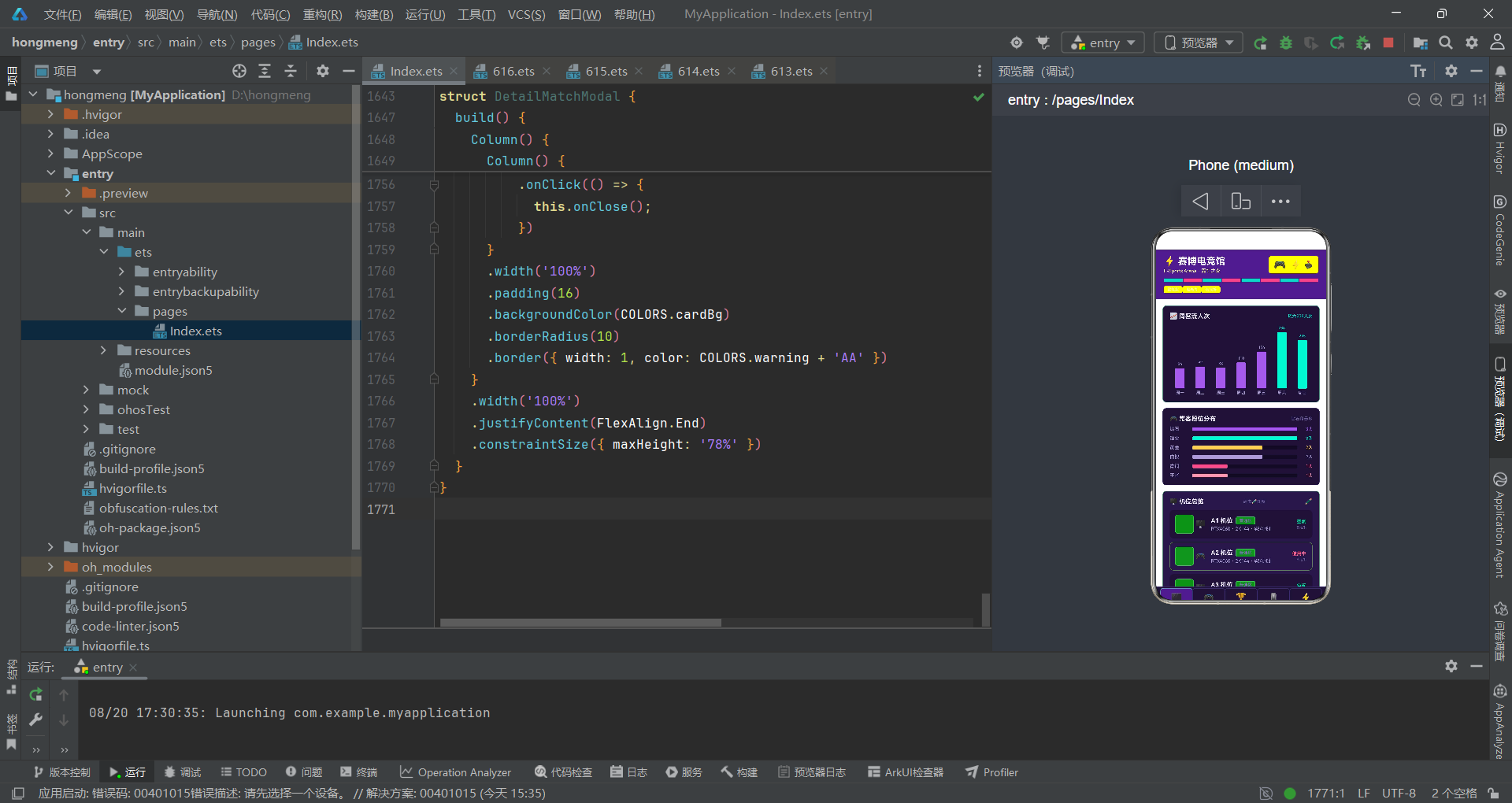
纵观全篇,本应用虽是单文件实现,却折射出一套成熟的电竞场馆运营中台架构哲学。从架构维度看,「静态常量层—@Observed 数据层—工具函数层—内容组件层—弹窗组件层—原子组件层」的六层划分,使每一层职责单一、可独立演进——新增业务域只需追加 Content 组件与一条 if-else 分支,新增弹窗只需追加 Modal 组件与一个 showXxx 状态,扩展成本极低且不污染既有逻辑。这种「分层 + 数据驱动」的架构,是声明式 UI 范式的最佳实践,也是中型应用避免「面条代码」的关键。
从色彩工程维度看,NeonPalette 接口 + COLORS 常量 + 五个 getXxxColor 工具函数,构成了一套完整的「状态即色彩」基础设施。每一个业务对象(机位、战队、赛事、外设、套餐)都拥有专属色彩语义,且色彩不是装饰而是第二维信息的编码——运营经理扫一眼色彩即可判断状态、区域、排名、类型、折扣,无需读文字。一色三透明度(22 底、66 边、88 框)的标签手法,使暗色主题下的元素既有层次又节省色值。色彩复用与别名(neon=accent、pink=danger)体现了工程上的克制与可维护性考量。
从状态管理维度看,@State/@Prop/@ObjectLink 三层装饰器各司其职:@State 管理主入口的本地状态(curTab、showXxx、padShake 等),@Prop 管理原子组件的只读属性(NeonTag 的 text/color),@ObjectLink 管理内容组件对 @Observed 对象的响应式引用。这种「三层状态分层」使数据流向清晰:数据从 ArenaData 单向流向 Content,回调从 Content 反向流向 ArenaApp,ArenaApp 再通过状态驱动弹窗,形成闭环。modalOverlay 的预留、onClose 回调的统一模式、参数化文案(「「 + title + 」」)等细节,都体现了对扩展性与可维护性的深思熟虑。
从可视化维度看,应用用纯声明式组件(Column + layoutWeight + height + backgroundColor)模拟了柱状图、横条图、进度条、统计卡、斑马列表五种可视化形态,零图表库依赖。客流柱状图用「value * 0.5」做高度归一化,横条图用「双 Row 拼 layoutWeight」做进度条,统计卡用「26px 大数字 + 9px 小标签」做 KPI 展示,斑马列表用「i % 2 交替底色」做行区分。这些「轻量可视化」手法虽不如专业图表库精美,但胜在零依赖、可定制、性能优,适合在中低端设备上流畅运行。
从工程纪律维度看,全程零第三方依赖、单文件集中、常量优先、函数抽取复用、ForEach 稳定键、if-else 链可读性优先等习惯,使应用包体积极小、渲染确定性强、可读性高。虽是演示型中台,但静态数据的形态(客流周末峰值、段位钻石最多、销量鼠标垫夺冠、折扣年卡最低)都隐含了真实运营洞察,既是 UI 演示也是业务沙盘。整体设计在「视觉表现力」与「工程严谨性」间取得了精妙平衡,是声明式 UI 中型应用的优秀范本,值得电商、运营、驾驶舱类项目借鉴。

作为“人工智能6S店”的官方数字引擎,为AI开发者与企业提供一个覆盖软硬件全栈、一站式门户。
更多推荐
 5
5 0
0- 0


 已为社区贡献88条内容

所有评论(0)