
游戏电竞App基于HarmonyOS API 24:颜色常量采用interface+const 对象 的配置模式,通过 COLORS.primary、COLORS.accent 等语义化名称访问颜色
一、引言:电竞玩家的数字阵地
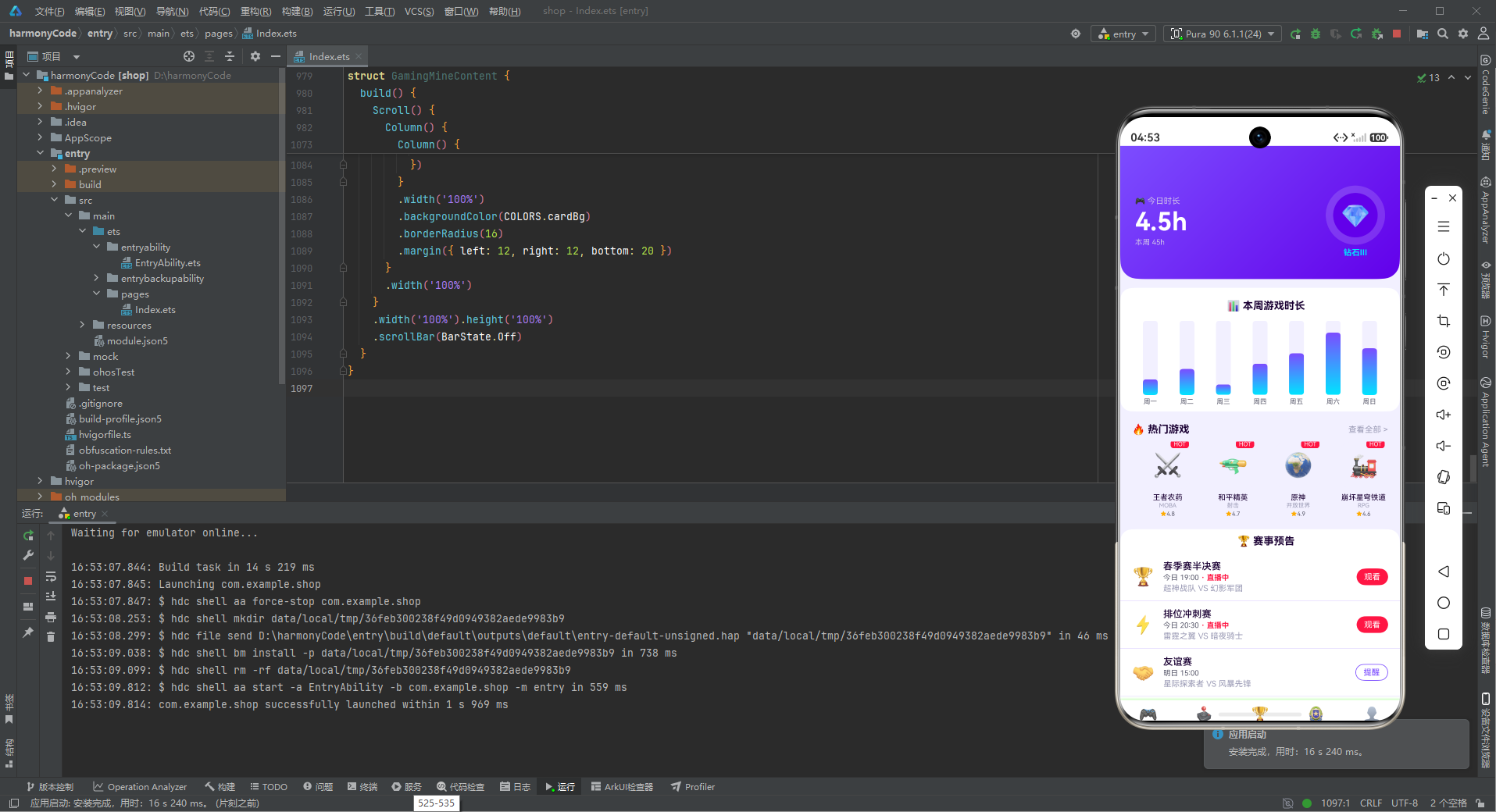
在电子竞技蓬勃发展的时代,游戏玩家们需要一款集游戏库管理、战队追踪、成就系统、赛事预告、商城购物于一体的综合性电竞应用。这款游戏电竞 App 正是为满足广大电竞爱好者的需求而打造的一站式游戏社交平台。应用以霓虹紫为主色调,搭配电竞青作为强调色,整体视觉风格充满未来感和科技感,完美契合电竞文化的赛博朋克美学。
从业务功能维度来看,这款 App 构建了一个完整的电竞生态系统:游戏库模块收录了 12 款热门游戏,涵盖 MOBA、射击、RPG、策略、休闲等多种类型,每款游戏都有评分、热度标签和类型分类;战队排行模块展示了 S4 赛季积分榜 TOP 10 的战队信息,前三名特别标注为三强战队;成就墙模块设计了 12 个成就徽章,从百场连胜到赛事冠军,通过游戏化机制激励玩家不断挑战自我;赛事预告模块提供了即将开始的比赛信息,支持直播观看和预约提醒;商城模块展示了 8 款热门虚拟商品,从限定皮肤到赛季通行证应有尽有;我的页面则是玩家的个人中心,展示战绩数据、背包装备和功能菜单。
技术实现上,该应用基于 HarmonyOS ArkTS 声明式UI框架开发,采用组件化、配置化的设计理念。底部 Tab 导航包含首页、游戏库、战队、成就、我的五个模块,通过 @State 状态变量和枚举类型实现页面间的无缝切换。弹窗交互采用 bindSheet 底部抽屉和 modalOverlay 遮罩层相结合的方式,支持新增游戏、编辑分类、编辑战队、删除成就等多种操作场景。首页的游戏时长环形头卡、渐变色柱状图、热门游戏横滑卡片等 UI 元素设计精美,交互流畅。
数据层设计方面,应用定义了 10 个 TypeScript 接口,从颜色调色板到游戏、战队、成就、比赛、商城、背包等业务实体,每个接口字段设计精审,类型约束严格。Mock 数据层提供了丰富的模拟数据,包含 12 款游戏、10 支战队、12 个成就、6 场比赛、8 件商城商品、10 件背包装备和 6 个菜单项,确保开发阶段即可展示完整的业务流程和视觉效果。
本文将从架构设计、数据模型、颜色系统、状态管理、组件实现等多个维度,对这款游戏电竞 App 进行全方位的深度技术解析,带领读者深入理解 ArkTS 声明式UI开发的精髓和电竞类应用的设计理念。
二、整体架构流程图
下面的架构图展示了 App 的整体分层结构和数据流向,从入口组件到数据层,各模块职责分明、协作有序。
除了整体架构,我们再来看一下首页的数据流交互流程:
三、颜色与主题系统详解
3.1 颜色调色板接口设计
颜色系统是电竞风格 App 视觉表现的核心。该应用通过 GamingColorPalette 接口定义了完整的颜色规范,比普通应用多出了 neon(霓虹粉)这个特色字段,强化了电竞主题的视觉辨识度。
interface GamingColorPalette {
  primary: string
  primaryLight: string
  primaryDark: string
  accent: string
  accentLight: string
  neon: string
  bg: string
  cardBg: string
  textPrimary: string
  textSecondary: string
  textHint: string
  border: string
  success: string
  warning: string
  danger: string
  white: string
}
接口共包含 16 个颜色字段,分为六个类别:
主色系:primary(霓虹紫主色)、primaryLight(浅紫)、primaryDark(深紫),构成紫色系的三个层次,支持渐变和明暗变化。
辅助色系:accent(电竞青)、accentLight(浅青),青色与紫色形成强烈的冷暖对比,是赛博朋克风格的经典配色。
霓虹色系:neon(霓虹粉),作为第三种强调色,用于特殊的高光效果和霓虹光感。
背景/卡片色:bg(浅紫背景)、cardBg(纯白卡片),营造层次感。
文字色系:textPrimary(深紫文字)、textSecondary(灰紫文字)、textHint(淡紫提示),三级文字颜色全部带有紫色调,保持整体色调统一。
功能色系:success(成功绿)、warning(警告黄)、danger(危险红),用于状态反馈和操作提示。
3.2 配色方案的设计理念
const COLORS: GamingColorPalette = {
  primary: '#7C4DFF',
  primaryLight: '#B388FF',
  primaryDark: '#6200EA',
  accent: '#00E5FF',
  accentLight: '#84FFFF',
  neon: '#E040FB',
  bg: '#F3F0FF',
  cardBg: '#FFFFFF',
  textPrimary: '#1A0033',
  textSecondary: '#5C5C6E',
  textHint: '#9E9EB8',
  border: '#E8E0FF',
  success: '#00C853',
  warning: '#FFAB00',
  danger: '#FF1744',
  white: '#FFFFFF'
}
配色方案以霓虹紫 #7C4DFF 为主色调,传递出神秘、高贵、科技感的品牌调性,非常契合电子竞技的未来感和炫酷感。电竞青 #00E5FF 作为辅助色,与紫色形成强烈的冷暖对比,产生霓虹灯光般的视觉冲击力。
背景色采用淡紫色 #F3F0FF,而非普通的灰色,让整个应用的背景都沉浸在紫色的氛围中。文字颜色从深紫到灰紫再到淡紫,形成统一的紫色调文字系统,既保证了可读性,又强化了主题风格。
边框色使用淡紫色 #E8E0FF,与背景色协调统一,分隔线不会显得突兀。底部导航的阴影使用紫色半透明 #7C4DFF26,与主色调呼应,阴影也带有电竞色彩。
应用大量使用 linearGradient 线性渐变创造赛博朋克风格的视觉效果。紫色到青色的渐变、紫色到霓虹粉的渐变、紫色到深紫的渐变等多种渐变组合,营造出霓虹灯光、全息投影般的科技美感。柱状图更是使用了青色到紫色的垂直渐变,模拟霓虹灯条的发光效果。
3.3 常量配置方式
颜色常量采用 interface + const 对象 的配置模式,这种模式的优势在于:
- 类型安全:TypeScript 编译时检查确保每个颜色字段都正确定义
- 易于主题切换:如需更换主题,只需替换 COLORS 对象的赋值
- 语义化访问:通过 COLORS.primary、COLORS.accent 等语义化名称访问颜色,而非硬编码色值
- 集中管理:所有颜色定义在一处,便于统一调整和维护
四、数据模型层深度解析
数据模型是应用业务逻辑的载体。该应用共定义了 10 个数据接口,覆盖了电竞生态的各个方面。每个接口的设计都体现了对业务场景的深入理解。
4.1 TabMeta - Tab导航元数据
interface TabMeta {
  title: string
  icon: string
}
TabMeta 定义了底部导航的元数据结构,包含标题和图标两个字段。使用 emoji 作为图标是一种轻量高效的方案,无需引入图标库资源,同时表情符号天然具有色彩和情感表达力,非常适合电竞类应用的活泼风格。
4.2 GameMeta - 游戏数据模型
interface GameMeta {
  name: string
  emoji: string
  genre: string
  rating: number
  isHot: boolean
}
GameMeta 是游戏实体的核心模型,包含五个字段:
name:游戏名称,唯一标识emoji:游戏图标表情,快速视觉识别genre:游戏类型(MOBA、射击、RPG等),用于分类筛选rating:评分(number类型),用于展示星级评分isHot:是否热门,布尔类型,控制热门标签显示
评分使用 number 类型而非 string,便于排序和数值计算。游戏类型字段使用中文类型名称,用户理解成本低。热门标签通过布尔值控制,实现简单高效。
4.3 TeamMeta - 战队数据模型
interface TeamMeta {
  name: string
  emoji: string
  rank: number
  score: string
  isTop: boolean
}
TeamMeta 战队模型描述电竞战队的排行信息:
name:战队名称emoji:战队图标/吉祥物rank:排名(number类型),支持排序和颜色映射score:积分(string类型),直接展示isTop:是否为前三强,用于特殊标记
排名使用 number 类型,通过 getRankColor 函数动态映射颜色:前三名使用电竞青色(金色),4-6名使用紫色,其他使用灰色。积分使用 string 类型,因为积分可能包含千分位格式或特殊符号。
4.4 AchievementMeta - 成就数据模型
interface AchievementMeta {
  name: string
  emoji: string
  desc: string
  isDone: boolean
  isNew: boolean
}
AchievementMeta 成就模型是游戏化系统的核心:
name:成就名称emoji:成就图标desc:成就描述,说明达成条件isDone:是否已获得,控制成就的激活/锁定状态isNew:是否新获得,控制新成就提示
成就系统的设计体现了游戏化思维的精髓:通过 isDone 区分已获得和未获得的成就(未获得的图标降低透明度显示为灰色),通过 isNew 标记新成就激发用户的探索欲和成就感。
4.5 MatchMeta - 比赛数据模型
interface MatchMeta {
  name: string
  emoji: string
  time: string
  team1: string
  team2: string
  isLive: boolean
}
MatchMeta 比赛模型描述电竞赛事信息:
name:比赛名称(春季赛半决赛、友谊赛等)emoji:比赛类型图标time:比赛时间team1/team2:对阵双方isLive:是否正在直播
isLive 字段是这个模型的核心特色,它决定了比赛项的展示方式:直播中的比赛显示"观看"按钮(红色实心背景),未开始的显示"提醒"按钮(紫色边框按钮)。同时直播比赛还会显示"直播中"红色文字标签,吸引用户点击观看。
4.6 WeekPlayMeta - 周游戏时长数据模型
interface WeekPlayMeta {
  label: string
  value: number
}
WeekPlayMeta 是柱状图的通用数据模型,label 为横轴标签(星期几),value 为对应的游戏时长数值(小时)。这个简洁的模型可以复用于各种柱状图场景。
4.7 ShopMeta - 商城数据模型
interface ShopMeta {
  name: string
  emoji: string
  price: number
  isHot: boolean
}
ShopMeta 商城商品模型包含名称、图标、价格和是否热门四个字段。价格使用 number 类型,便于数值计算和格式化显示。热门标记通过火焰图标突出显示,引导用户关注畅销商品。
4.8 InventoryMeta - 背包装备模型
interface InventoryMeta {
  name: string
  emoji: string
  rarity: string
  isOwn: boolean
}
InventoryMeta 背包装备模型是游戏内道具系统的体现:
name:装备名称emoji:装备图标rarity:稀有度(传说、史诗、稀有),决定品质颜色isOwn:是否拥有,控制装备的激活/锁定状态
稀有度系统是游戏类应用的经典设计,通过 getRarityColor 函数将不同稀有度映射为不同颜色:传说→电竞青、史诗→霓虹紫、稀有→成功绿。未拥有的装备图标降低透明度并加锁图标,营造收集欲望。
4.9 MenuMeta - 功能菜单模型
interface MenuMeta {
  icon: string
  name: string
  sub: string
}
MenuMeta 菜单模型用于"我的"页面的功能列表。每个菜单项包含图标、名称和副标题三个字段。副标题展示简要信息或状态(如"余额 ¥1,280"、“3 张可用”),让用户快速了解菜单项的内容概要。
五、配置常量层分析
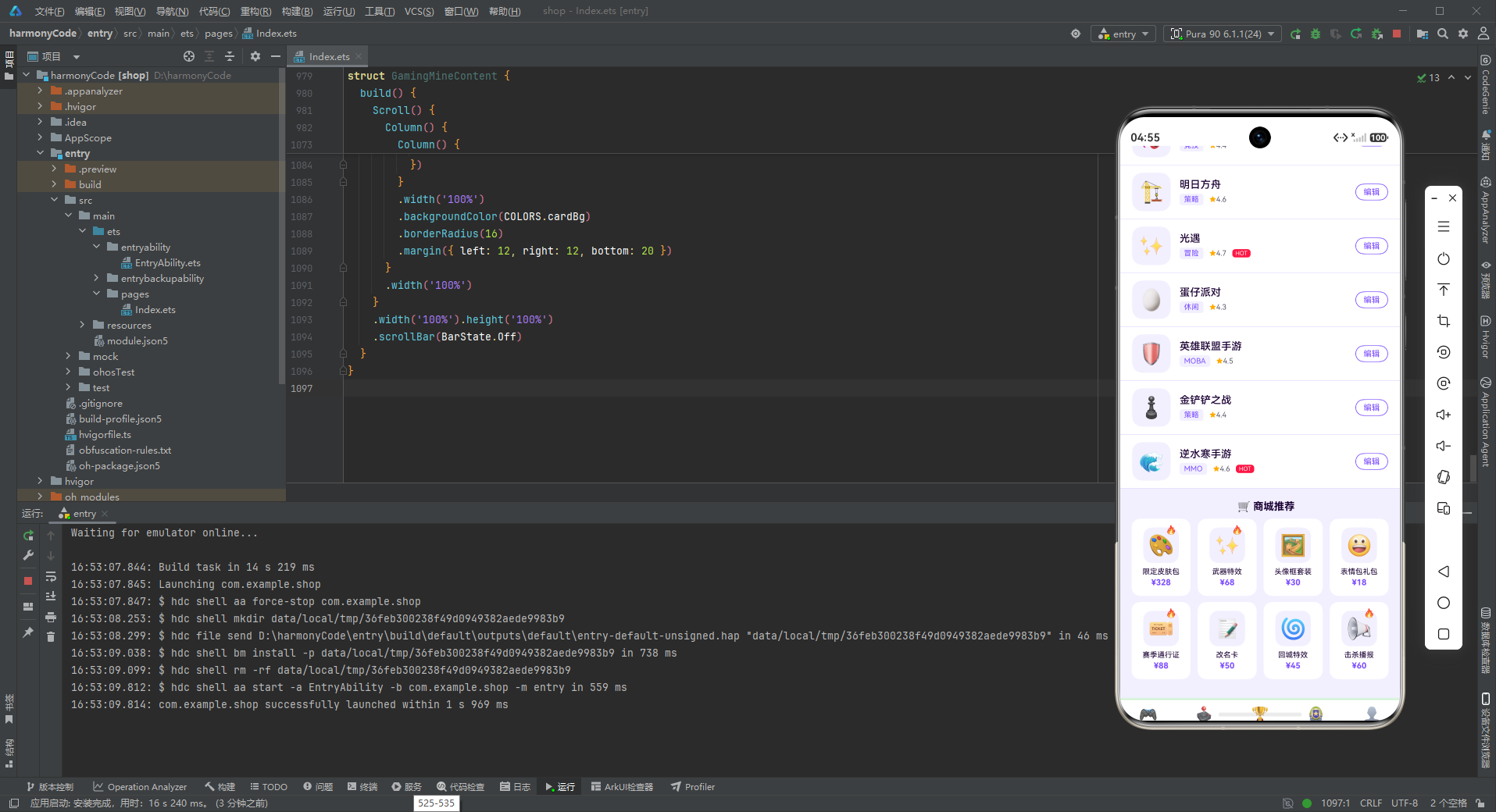
5.1 TAB_CONFIG 导航配置
const TAB_CONFIG: Record<string, TabMeta> = {
  'HOME': { title: '首页', icon: '🎮' },
  'GAME': { title: '游戏库', icon: '🕹️' },
  'TEAM': { title: '战队', icon: '🏆' },
  'ACHV': { title: '成就', icon: '🏅' },
  'MINE': { title: '我的', icon: '👤' }
}
Tab 配置采用 Record<string, TabMeta> 类型,以字符串键映射 Tab 元数据。五个 Tab 分别对应首页、游戏库、战队、成就和我的五个功能模块。配置驱动的导航设计使得修改导航项(如更换图标、修改标题)只需改动配置数据,无需触碰组件逻辑。
配合 GamingTab 枚举使用,形成"枚举 → 配置 → 组件"的完整链路。枚举用于状态变量的类型安全,配置用于展示数据的集中管理,组件用于 UI 的渲染和交互。
5.2 业务数据常量的设计模式
应用定义了 8 组业务数据常量,每组常量都是对应接口类型的数组。这种设计模式具有以下特点:
命名规范:常量名使用大写下划线命名法(如 GAME_LIST、ACHIEVE_LIST),清晰标识常量身份。
数据丰富度:每组数据都包含 6-12 条记录,充分覆盖各种业务场景。例如成就列表中有已完成和未完成的、有新获得和旧获得的,确保各种 UI 状态都能展示。
类型约束:每个常量都明确声明了类型(如 GameMeta[]),TypeScript 编译器会检查数据结构是否符合接口定义。
定义位置:常量定义紧跟在对应接口定义之后,接口和数据放在一起便于查阅和维护。
六、Mock数据层分析
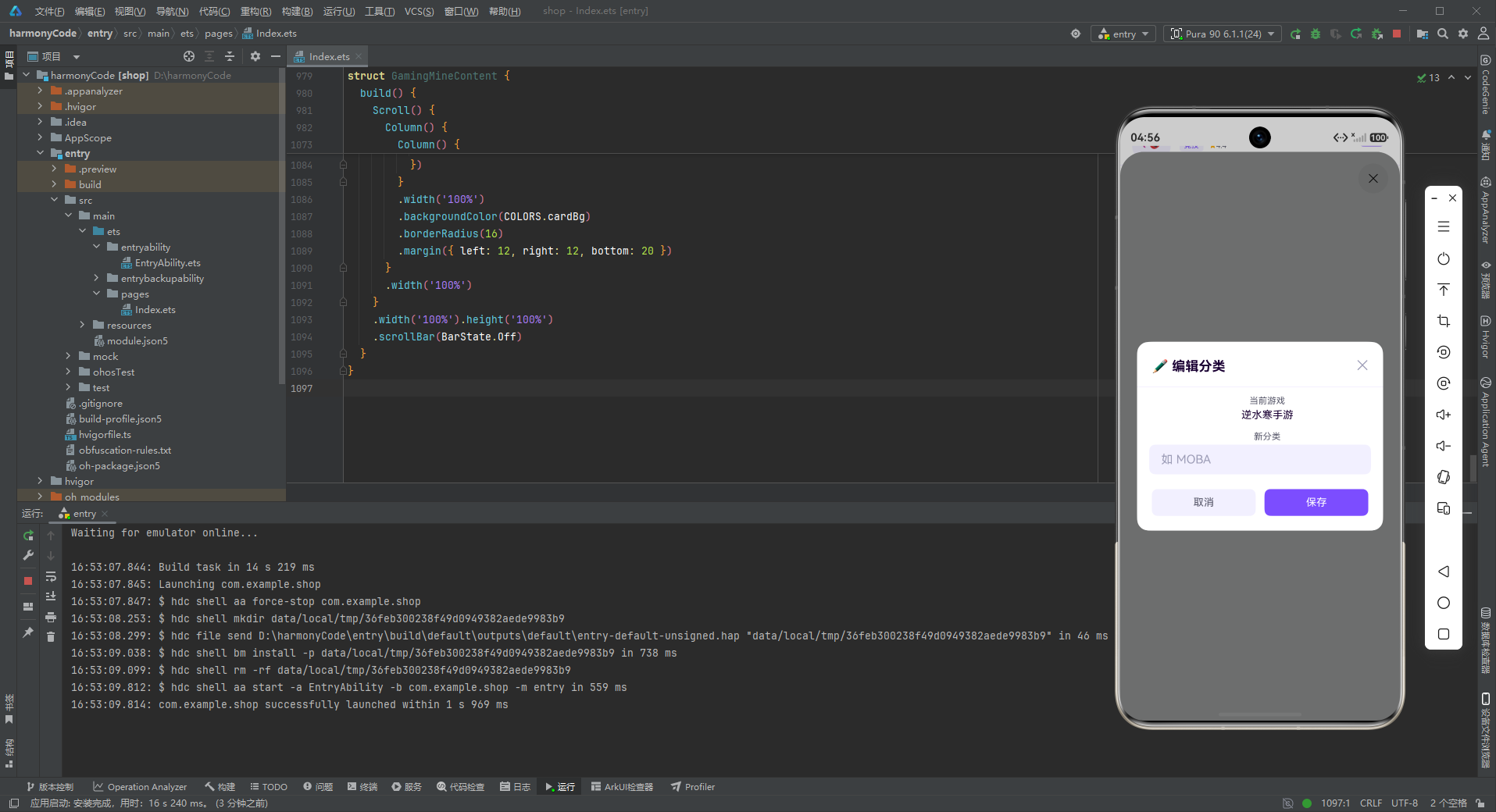
6.1 数据设计思路
Mock 数据层的设计体现了对电竞业务场景的深刻理解,每一组数据都经过精心设计,确保 UI 展示的丰富性和真实性。
多样性与覆盖性:以游戏列表为例,12 款游戏覆盖了 MOBA、射击、RPG、策略、动作、竞技、冒险、休闲、MMO 等 9 种类型,评分从 4.3 到 4.9 不等,热门和非热门游戏交错分布。这样的数据设计确保了类型筛选、热门标签、评分显示等功能都有充分的数据支撑。
真实感与沉浸感:战队数据中的战队名称(超神战队、幻影军团、雷霆之翼等)充满电竞风格,积分数据也符合真实电竞排名的递减规律。成就列表中的成就描述(百场连胜、极限反杀、团灭专家等)都是玩家熟悉的游戏术语,容易产生共鸣。
状态完整性:每个带状态的列表都包含多种状态组合。例如成就列表既有 isDone=true+isNew=true(新获得),也有 isDone=true+isNew=false(已获得),还有 isDone=false+isNew=false(未获得)和 isDone=false+isNew=true(新解锁的未获得成就)。这样的设计确保所有 UI 状态都能在开发阶段得到验证。
6.2 特色数据结构分析
以战队排行榜数据为例:
const TEAM_LIST: TeamMeta[] = [
  { name: '超神战队', emoji: '🦁', rank: 1, score: '2890', isTop: true },
  { name: '幻影军团', emoji: '👻', rank: 2, score: '2756', isTop: true },
  { name: '雷霆之翼', emoji: '⚡', rank: 3, score: '2640', isTop: true },
  { name: '暗夜骑士', emoji: '🌙', rank: 4, score: '2510', isTop: false },
  // ...
]
战队数据的设计亮点在于:
- 前三名
isTop设为 true,在列表中显示"🔥 三强战队"的特殊标识 - 排名从 1 到 10,积分递减,符合真实排行榜的规律
- 战队图标使用动物/自然元素的 emoji,各具特色
再看背包系统的数据设计:
const INVENTORY_LIST: InventoryMeta[] = [
  { name: '霓虹之翼', emoji: '🦋', rarity: '传说', isOwn: true },
  { name: '暗影面具', emoji: '🎭', rarity: '史诗', isOwn: true },
  { name: '雷霆之锤', emoji: '🔨', rarity: '传说', isOwn: false },
  // ...
]
背包系统引入了"稀有度"概念,这是游戏设计的经典元素。三种稀有度(传说、史诗、稀有)配合三种对应的颜色,形成清晰的品质感知。同时 isOwn 字段控制装备的拥有状态,未拥有的装备显示为灰色加锁,激发玩家的收集欲望。
七、主入口组件逐段分析
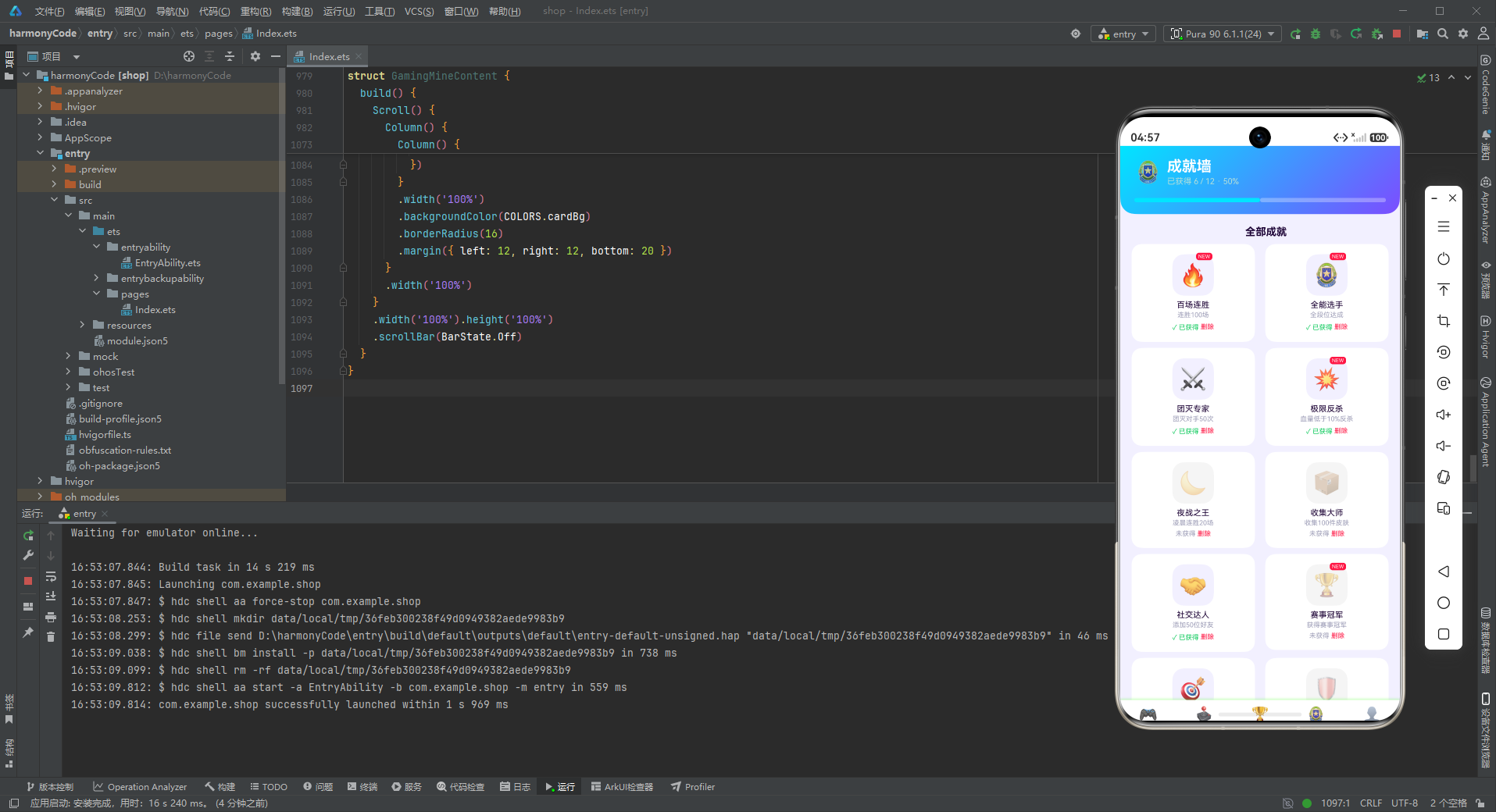
7.1 状态管理设计
@Entry
@Component
struct GamingApp {
  @State activeTab: GamingTab = GamingTab.HOME
主入口组件 GamingApp 使用 @Entry 和 @Component 装饰器,标记为应用的入口组件。状态管理简洁明了,仅使用一个 @State 装饰的 activeTab 变量来管理当前激活的 Tab 页面。
@State 装饰器是 ArkTS 响应式编程的核心。当 activeTab 的值改变时,所有依赖这个状态的 UI 元素都会自动重新渲染。在本应用中,状态变化驱动了两处 UI 更新:内容区域的页面切换(通过 contentArea 中的条件判断)和底部导航的选中态样式(通过 tabItem 中的三元表达式)。
使用枚举类型 GamingTab 作为状态变量类型是一个优秀的实践:
- 编译时类型检查,防止非法值传入
- IDE 智能提示,提升开发效率
- 代码可读性强,枚举成员名即文档
7.2 @Builder 自定义构建器设计
应用定义了两个核心的 @Builder 构建函数:contentArea 和 tabItem,分别负责内容区域和导航项的构建。
contentArea 内容切换器
@Builder contentArea() {
  Column() {
    if (this.activeTab === GamingTab.HOME) {
      GamingHomeContent()
    } else if (this.activeTab === GamingTab.GAME) {
      GamingGameContent()
    } else if (this.activeTab === GamingTab.TEAM) {
      GamingTeamContent()
    } else if (this.activeTab === GamingTab.ACHV) {
      GamingAchieveContent()
    } else if (this.activeTab === GamingTab.MINE) {
      GamingMineContent()
    }
  }
  .width('100%')
}
contentArea 构建器使用 if-else 条件链实现页面的切换渲染。每个页面对应一个独立的 @Component 组件,当 activeTab 变化时,只有匹配的页面组件会被渲染,其他页面组件会被销毁。
这种条件渲染模式相比 Tab 组件有以下优势:
- 完全控制:开发者可以完全控制切换逻辑和动画
- 组件独立:每个页面组件独立封装,互不干扰
- 按需渲染:只有当前页面被渲染,节省内存和性能
tabItem 导航项构建器
@Builder tabItem(icon: string, label: string, tab: GamingTab) {
  Column() {
    Text(icon).fontSize(20)
    Text(label).fontSize(10)
      .fontColor(this.activeTab === tab ? COLORS.primary : COLORS.textHint)
      .fontWeight(this.activeTab === tab ? FontWeight.Bold : FontWeight.Normal)
      .margin({ top: 2 })
  }
  .layoutWeight(1)
  .onClick(() => { this.activeTab = tab })
}
tabItem 构建器接收三个参数并返回一个导航项组件。内部使用 Column 垂直排列图标和文字,通过 .layoutWeight(1) 实现等分布局。
选中状态的样式切换使用三元表达式实现:
- 激活时:主色(霓虹紫)+ 粗体
- 未激活时:提示色(淡紫)+ 常规字重
点击事件 .onClick(() => { this.activeTab = tab }) 更新状态变量,触发 UI 重新渲染。这种声明式的状态驱动模式是 ArkTS 的核心思想之一。
7.3 build 方法整体布局
build() {
  Column() {
    this.contentArea()
    Row() {
      this.tabItem(TAB_CONFIG.HOME.icon, TAB_CONFIG.HOME.title, GamingTab.HOME)
      this.tabItem(TAB_CONFIG.GAME.icon, TAB_CONFIG.GAME.title, GamingTab.GAME)
      this.tabItem(TAB_CONFIG.TEAM.icon, TAB_CONFIG.TEAM.title, GamingTab.TEAM)
      this.tabItem(TAB_CONFIG.ACHV.icon, TAB_CONFIG.ACHV.title, GamingTab.ACHV)
      this.tabItem(TAB_CONFIG.MINE.icon, TAB_CONFIG.MINE.title, GamingTab.MINE)
    }
    .width('100%')
    .padding({ top: 8, bottom: 8 })
    .backgroundColor(COLORS.white)
    .shadow({ radius: 10, color: '#7C4DFF26', offsetY: -2 })
  }
  .width('100%').height('100%')
  .backgroundColor(COLORS.bg)
}
整体布局采用垂直 Column 结构,上方是内容区域(自适应高度),下方是底部导航栏(固定高度)。底部导航使用 Row 水平排列五个 tabItem。
底部导航栏的设计细节:
- 白色背景,简洁清爽
- 顶部紫色半透明阴影(
#7C4DFF26),与主色调呼应 - 上下各 8vp 内边距,确保点击区域舒适
- 阴影
offsetY: -2只向上投射,符合底部导航的视觉习惯
最外层设置淡紫色背景 COLORS.bg,撑满整个屏幕。
八、各页面组件逐段代码分析
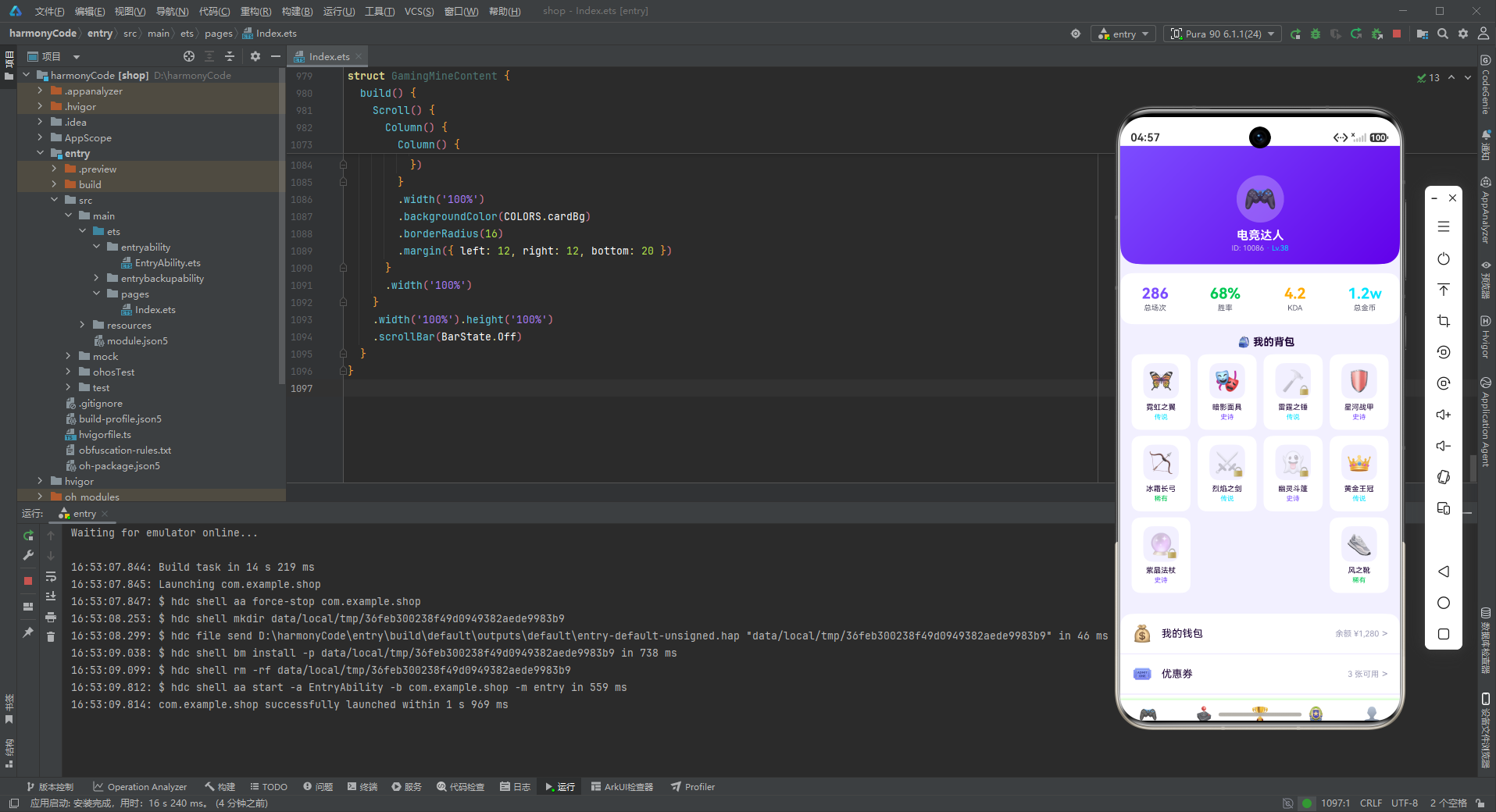
8.1 首页组件 GamingHomeContent
首页是应用信息密度最高的页面,包含游戏时长环段位头卡、周游戏时长柱状图、热门游戏横滑、赛事预告和新增按钮五个模块。
状态定义与弹窗结构
@Component
struct GamingHomeContent {
  @State showAddGameModal: boolean = false
  @State gameName: string = ''
  @State gameGenre: string = ''
首页组件定义了三个状态变量:showAddGameModal 控制新增游戏弹窗的显示,gameName 和 gameGenre 分别存储弹窗表单中输入的游戏名称和类型。
弹窗的表单数据由页面组件持有,通过 @Builder 构建函数中的闭包访问。这是 ArkTS 中组件内弹窗的标准模式。
modalOverlay 遮罩层
@Builder modalOverlay(onClose: () => void) {
  Column()
    .width('100%').height('100%')
    .backgroundColor('rgba(0,0,0,0.55)')
    .onClick(onClose)
}
遮罩层构建器接收一个关闭回调函数,创建全屏半透明黑色遮罩。遮罩透明度设为 0.55,既能突出弹窗内容,又能保留一定的背景可见性。点击遮罩触发关闭回调,实现常见的"点击空白处关闭"交互。
addGameModal 新增游戏弹窗
@Builder addGameModal() {
  Stack() {
    this.modalOverlay(() => { this.showAddGameModal = false })
    Column() {
      Row() {
        Text('🕹️ 新增游戏').fontSize(18).fontWeight(FontWeight.Bold).fontColor(COLORS.textPrimary)
        Column().layoutWeight(1)
        Text('✕').fontSize(18).fontColor(COLORS.textHint).onClick(() => { this.showAddGameModal = false })
      }
      .width('100%').padding({ left: 20, right: 20, top: 18, bottom: 12 })
      Divider().color(COLORS.border)
      Column() {
        Text('游戏名称').fontSize(12).fontColor(COLORS.textSecondary).margin({ top: 12, left: 20 })
        TextInput({ placeholder: '如 原神' })
          .placeholderColor(COLORS.textHint).fontSize(14).width('90%')
          .backgroundColor(COLORS.bg).borderRadius(8)
          .margin({ left: 20, right: 20, top: 4 })
          .onChange((v: string) => { this.gameName = v })
        Text('游戏类型').fontSize(12).fontColor(COLORS.textSecondary).margin({ top: 14, left: 20 })
        TextInput({ placeholder: '如 RPG' })
          .placeholderColor(COLORS.textHint).fontSize(14).width('90%')
          .backgroundColor(COLORS.bg).borderRadius(8)
          .margin({ left: 20, right: 20, top: 4 })
          .onChange((v: string) => { this.gameGenre = v })
        Row() {
          Text('取消').fontSize(14).fontColor(COLORS.textSecondary)
            .layoutWeight(1).textAlign(TextAlign.Center)
            .padding({ top: 10, bottom: 10 })
            .backgroundColor(COLORS.bg).borderRadius(8)
            .onClick(() => { this.showAddGameModal = false })
          Column().width(12)
          Text('添加').fontSize(14).fontColor(COLORS.white)
            .layoutWeight(1).textAlign(TextAlign.Center)
            .padding({ top: 10, bottom: 10 })
            .backgroundColor(COLORS.primary).borderRadius(8)
            .onClick(() => { this.showAddGameModal = false })
        }
        .margin({ left: 20, right: 20, top: 20, bottom: 20 })
      }
      .constraintSize({ maxHeight: '70%' })
    }
    .width('88%')
    .backgroundColor(COLORS.cardBg).borderRadius(16)
  }
  .width('100%').height('100%')
}
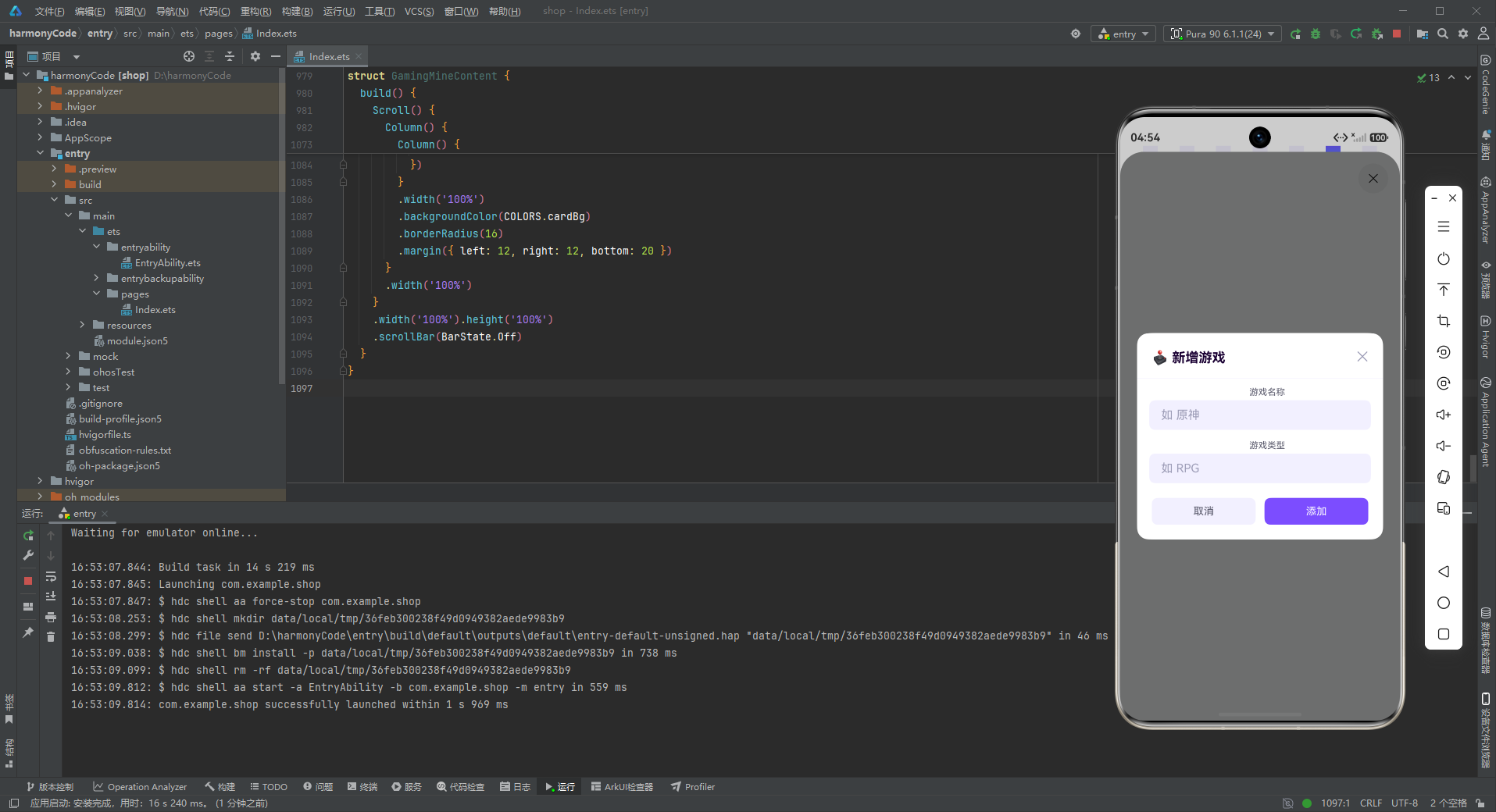
新增游戏弹窗采用 Stack 堆叠布局:底层遮罩 + 上层内容卡片。弹窗宽度为屏幕的 88%,圆角 16vp,白色背景。
弹窗结构分为三部分:
- 标题栏:左侧标题图标文字,右侧关闭按钮,中间用弹性空白撑开
- 表单区:两个输入字段(游戏名称、游戏类型),每个字段包含标签文字和 TextInput
- 操作按钮:取消 + 添加双按钮布局
输入框使用淡紫色背景 COLORS.bg,与整体电竞紫色主题呼应。占位文字颜色为 COLORS.textHint 淡紫色,保持色调统一。
游戏时长环+段位头卡
Stack() {
  Column()
    .width('100%').height(180)
    .linearGradient({ angle: 135, colors: [[COLORS.primary, 0.0], [COLORS.primaryDark, 1.0]] })
    .borderRadius({ bottomLeft: 24, bottomRight: 24 })
  Column() {
    Row() {
      Column() {
        Text('🎮 今日时长').fontSize(11).fontColor('#D1C4E9')
        Text('4.5h').fontSize(34).fontWeight(FontWeight.Bold).fontColor(COLORS.white)
          .margin({ top: 2 })
        Text('本周 45h').fontSize(10).fontColor('#D1C4E9').margin({ top: 2 })
      }
      .alignItems(HorizontalAlign.Start)
      .layoutWeight(1)
      Column() {
        Stack() {
          Column().width(80).height(80).borderRadius(40)
            .backgroundColor('rgba(255,255,255,0.15)')
          Column().width(60).height(60).borderRadius(30)
            .backgroundColor(COLORS.primaryDark)
          Text('💎').fontSize(32)
        }
        .width(80).height(80)
        Text('钻石Ⅲ').fontSize(11).fontColor(COLORS.accent)
          .fontWeight(FontWeight.Bold).margin({ top: 4 })
      }
      .alignItems(HorizontalAlign.Center)
    }
    .width('100%')
    .padding({ left: 20, right: 20, top: 24 })
  }
}
.width('100%').height(180)
首页头卡是整个应用的视觉焦点,采用 Stack 堆叠布局实现。底层是紫色渐变背景,上层是左右布局的内容区域。
左侧展示游戏时长数据:
- 小标题"今日时长"使用浅紫色小字
- 主数据"4.5h"使用 34fp 大号白色粗体
- 辅助信息"本周 45h"使用浅紫色小字
右侧展示段位信息,采用同心圆设计:
- 外层圆环:80vp 直径,半透明白色背景
- 内层圆:60vp 直径,深紫色背景
- 中心:钻石图标 emoji
- 下方:"钻石Ⅲ"段位文字,电竞青色加粗显示
同心圆设计模拟了段位徽章的视觉效果,配合钻石图标和电竞青色文字,传递出高端段位的尊贵感。
周游戏时长柱状图
Column() {
  Text('📊 本周游戏时长').fontSize(14).fontWeight(FontWeight.Bold)
    .fontColor(COLORS.textPrimary).margin({ left: 16, top: 16 })
  Row() {
    ForEach(WEEK_PLAY, (w: WeekPlayMeta) => {
      Column() {
        Stack({ alignContent: Alignment.Bottom }) {
          Column().width(20).height(100)
            .backgroundColor(COLORS.bg)
            .borderRadius(4)
          Column().width(20).height(Number(w.value) * 7)
            .linearGradient({ angle: 0, colors: [[COLORS.accent, 0.0], [COLORS.primary, 1.0]] })
            .borderRadius(4)
        }
        .width(20).height(100)
        Text(w.label).fontSize(9).fontColor(COLORS.textSecondary)
          .margin({ top: 4 })
      }
      .alignItems(HorizontalAlign.Center)
      .layoutWeight(1)
    })
  }
  .width('100%')
  .padding({ left: 16, right: 16, top: 12, bottom: 8 })
}
.width('100%')
.backgroundColor(COLORS.cardBg)
.borderRadius(16)
.margin({ left: 12, right: 12, top: 12 })
周游戏时长柱状图是电竞 App 中最具赛博朋克风格的 UI 组件之一。实现要点:
渐变霓虹柱:数据柱使用电竞青到霓虹紫的垂直渐变(angle: 0 表示从上到下),模拟霓虹灯条的发光效果。渐变从顶部的青色过渡到底部的紫色,色彩过渡自然流畅。
Stack 堆叠结构:每个柱子由两层 Column 堆叠而成,底层是淡紫色背景柱(固定高度 100vp),上层是渐变数据柱(高度 = value × 7)。使用 alignContent: Alignment.Bottom 确保数据柱从底部向上生长。
等分布局:每个柱子的容器使用 .layoutWeight(1),在 Row 中均匀分布,无论柱子数量多少都能自动调整间距。
柱状图放置在一个白色卡片内,卡片有 16vp 的圆角和 16vp 的左右外边距,与其他模块的卡片风格保持一致。
热门游戏横滑
Row() {
  Text('🔥 热门游戏').fontSize(14).fontWeight(FontWeight.Bold)
    .fontColor(COLORS.textPrimary).layoutWeight(1)
  Text('查看全部 >').fontSize(11).fontColor(COLORS.textHint)
}
.width('100%')
.padding({ left: 16, right: 16, top: 16 })
Scroll() {
  Row() {
    ForEach(GAME_LIST, (g: GameMeta) => {
      Column() {
        Stack() {
          Column().width(64).height(64).borderRadius(16)
            .backgroundColor(COLORS.bg)
          Text(g.emoji).fontSize(32)
          if (g.isHot) {
            Text('HOT').fontSize(8).fontColor(COLORS.white)
              .backgroundColor(COLORS.danger)
              .borderRadius(4)
              .padding({ left: 4, right: 4, top: 1, bottom: 1 })
              .position({ x: 36, y: -2 })
          }
        }
        .width(64).height(64)
        Text(g.name).fontSize(10).fontColor(COLORS.textPrimary)
          .margin({ top: 6 }).maxLines(1).textOverflow({ overflow: TextOverflow.Ellipsis })
        Text(g.genre).fontSize(8).fontColor(COLORS.textHint)
        Row() {
          Text('★').fontSize(8).fontColor(COLORS.warning)
          Text(g.rating + '').fontSize(8).fontColor(COLORS.textSecondary)
        }
        .margin({ top: 2 })
      }
      .width(80)
      .margin({ left: 8 })
      .alignItems(HorizontalAlign.Center)
    })
  }
  .padding({ left: 16, right: 16 })
}
.scrollable(ScrollDirection.Horizontal)
.scrollBar(BarState.Off)
.width('100%')
.margin({ top: 8, bottom: 8 })
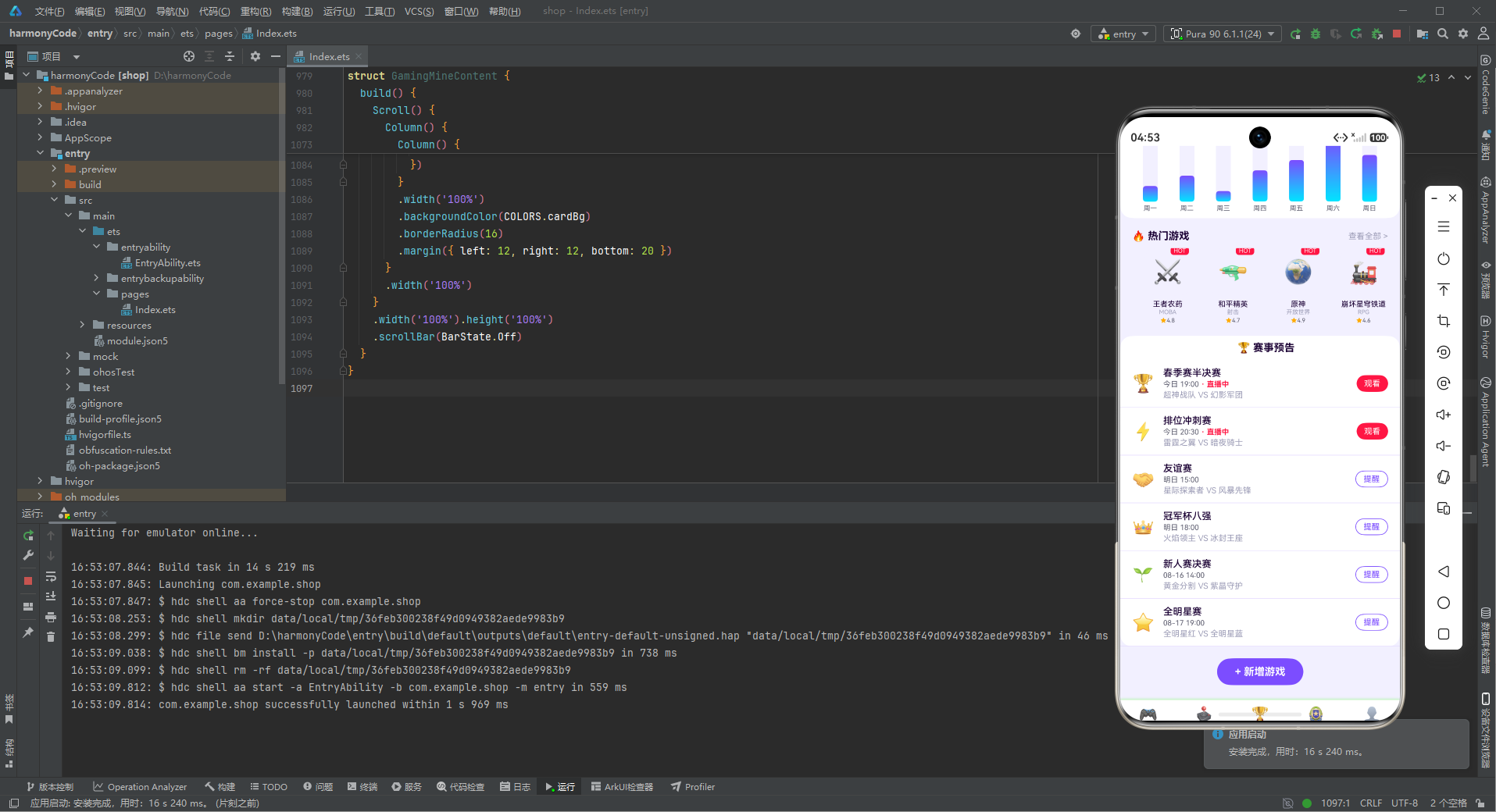
热门游戏模块采用标题栏 + 横向滚动列表的经典布局。标题栏左侧是模块标题,右侧是"查看全部"入口链接。
每个游戏卡片的设计非常精致:
- 图标区:64×64vp 的圆角方形背景 + 32fp 大号 emoji 图标
- 热门标签:使用
.position()绝对定位在右上角,红色背景白色文字的 HOT 标签 - 游戏名称:10fp 主色文字,单行显示超出省略
- 游戏类型:8fp 提示色文字
- 评分:黄色星星 + 评分数字
热门标签的定位使用了 .position({ x: 36, y: -2 }),这是 ArkTS 中的绝对定位方式,x 和 y 相对于父容器的左上角。这种方式可以精确控制元素的位置,非常适合角标类元素。
赛事预告列表
Column() {
  Text('🏆 赛事预告').fontSize(14).fontWeight(FontWeight.Bold)
    .fontColor(COLORS.textPrimary).margin({ left: 16, top: 8, bottom: 8 })
  ForEach(MATCH_LIST, (m: MatchMeta) => {
    Row() {
      Text(m.emoji).fontSize(24).margin({ right: 12 })
      Column() {
        Text(m.name).fontSize(13).fontColor(COLORS.textPrimary).fontWeight(FontWeight.Medium)
        Row() {
          Text(m.time).fontSize(10).fontColor(COLORS.textSecondary)
          if (m.isLive) {
            Text(' · 直播中').fontSize(10).fontColor(COLORS.danger).fontWeight(FontWeight.Bold)
          }
        }
        .margin({ top: 2 })
        Text(m.team1 + ' VS ' + m.team2).fontSize(11).fontColor(COLORS.textHint)
          .margin({ top: 2 })
      }
      .alignItems(HorizontalAlign.Start).layoutWeight(1)
      if (m.isLive) {
        Text('观看').fontSize(11).fontColor(COLORS.white)
          .backgroundColor(COLORS.danger).borderRadius(12)
          .padding({ left: 10, right: 10, top: 5, bottom: 5 })
      } else {
        Text('提醒').fontSize(11).fontColor(COLORS.primary)
          .border({ width: 1, color: COLORS.primary }).borderRadius(12)
          .padding({ left: 10, right: 10, top: 4, bottom: 4 })
      }
    }
    .width('100%')
    .padding({ left: 16, right: 16, top: 10, bottom: 10 })
    .border({ width: { bottom: 1 }, color: COLORS.border })
  })
}
.width('100%')
.backgroundColor(COLORS.cardBg)
.borderRadius(16)
.margin({ left: 12, right: 12, top: 8 })
赛事预告模块展示即将开始和正在进行的比赛列表。每项比赛的布局为:左侧图标 + 中间比赛信息 + 右侧操作按钮。
比赛信息包含三行:
- 比赛名称(加粗中等字重)
- 时间 + 直播状态(如果
isLive为 true,显示红色"直播中"标签) - 对阵双方(提示色小字)
右侧按钮根据 isLive 状态动态切换:
- 直播中:红色实心背景 + 白色"观看"文字(强调立即行动)
- 未开始:紫色边框 + 紫色"提醒"文字(次要操作)
这种差异化按钮设计有效地引导了用户行为,直播中的比赛更醒目,促使用户点击观看。
新增按钮与 bindSheet
Row() {
  Text('+ 新增游戏').fontSize(14).fontColor(COLORS.white)
    .fontWeight(FontWeight.Bold)
    .backgroundColor(COLORS.primary)
    .borderRadius(24)
    .padding({ left: 24, right: 24, top: 10, bottom: 10 })
}
.width('100%')
.justifyContent(FlexAlign.Center)
.margin({ top: 16, bottom: 20 })
.onClick(() => { this.showAddGameModal = true })
页面底部是"+ 新增游戏"按钮,使用霓虹紫色背景白色文字的胶囊形按钮,居中显示。按钮点击后设置 showAddGameModal = true。
与登山 App 不同的是,电竞 App 使用了 bindSheet 底部抽屉方式来展示弹窗:
.bindSheet(this.showAddGameModal, this.addGameModal(), {
  height: SheetSize.LARGE,
})
bindSheet 是 ArkTS 提供的底部抽屉绑定 API,接收三个参数:
- 控制显示的布尔变量
- 抽屉内容的构建函数
- 配置选项(如高度、拖拽等)
底部抽屉相比居中弹窗更符合移动端的交互习惯,用户可以通过下滑手势关闭,操作更自然。SheetSize.LARGE 表示抽屉高度为大尺寸(约占屏幕的 80%)。
8.2 游戏库页面组件 GamingGameContent
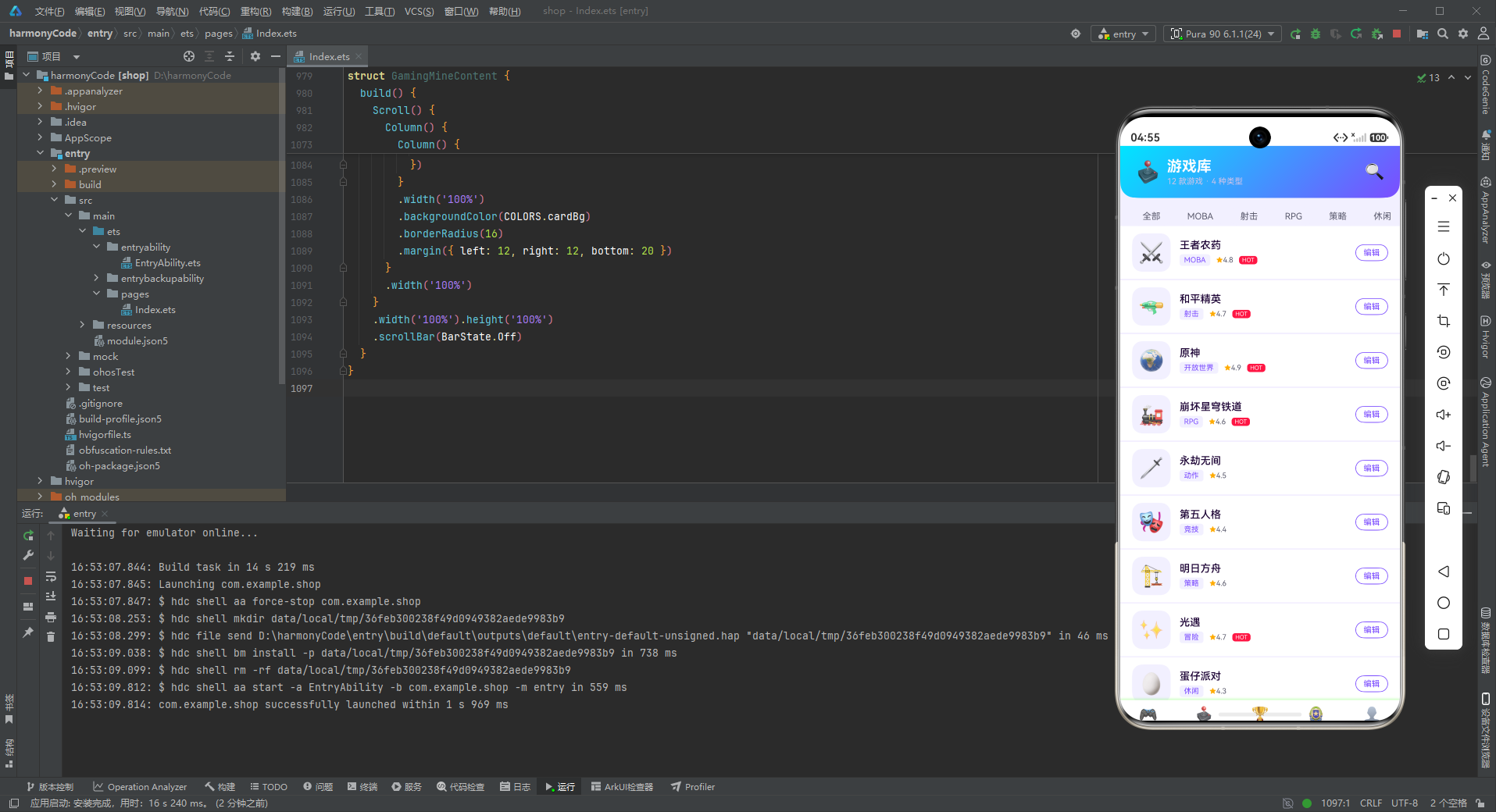
游戏库页面是游戏管理的核心页面,包含头卡、类型筛选标签、游戏列表和商城推荐四个模块。
游戏库头卡
Column() {
  Row() {
    Text('🕹️').fontSize(28).margin({ right: 8 })
    Column() {
      Text('游戏库').fontSize(20).fontWeight(FontWeight.Bold).fontColor(COLORS.white)
      Text('12 款游戏 · 4 种类型').fontSize(11).fontColor('#D1C4E9').margin({ top: 2 })
    }
    .alignItems(HorizontalAlign.Start).layoutWeight(1)
    Text('🔍').fontSize(22).fontColor(COLORS.white)
  }
  .width('100%').padding({ left: 20, right: 20, top: 16, bottom: 16 })
}
.width('100%')
.linearGradient({ angle: 135, colors: [[COLORS.accent, 0.0], [COLORS.primary, 1.0]] })
.borderRadius({ bottomLeft: 20, bottomRight: 20 })
游戏库头卡采用青紫渐变背景(从电竞青到霓虹紫),横向布局。左侧是大图标 + 文字信息(游戏库标题 + 游戏数量类型统计),右侧是搜索图标。底部圆角 20vp,比首页头卡的圆角稍小,形成差异化。
类型筛选标签
Scroll() {
  Row() {
    ForEach(['全部', 'MOBA', '射击', 'RPG', '策略', '休闲', 'MMO', '动作'], (t: string) => {
      Text(t).fontSize(12).fontColor(COLORS.textSecondary)
        .backgroundColor(COLORS.bg)
        .borderRadius(16)
        .padding({ left: 14, right: 14, top: 6, bottom: 6 })
        .margin({ left: 8 })
    })
  }
  .padding({ left: 8, right: 8 })
}
.scrollable(ScrollDirection.Horizontal)
.scrollBar(BarState.Off)
.width('100%')
.margin({ top: 12 })
类型筛选标签是游戏库页面的特色功能,支持按游戏类型筛选。标签使用横向滚动布局,标签样式为淡紫色背景 + 灰紫色文字 + 圆角胶囊形状。
虽然当前代码中标签只是静态展示(没有选中态和点击事件),但这种设计模式预留了扩展空间。实际开发中可以添加选中状态变量和点击事件,实现真正的筛选功能。
游戏列表
ForEach(GAME_LIST, (g: GameMeta) => {
  Row() {
    Stack() {
      Column().width(52).height(52).borderRadius(14)
        .backgroundColor(COLORS.bg)
      Text(g.emoji).fontSize(28)
    }
    .width(52).height(52).margin({ right: 12 })
    Column() {
      Text(g.name).fontSize(14).fontColor(COLORS.textPrimary).fontWeight(FontWeight.Medium)
      Row() {
        Text(g.genre).fontSize(10).fontColor(COLORS.primary)
          .backgroundColor(COLORS.bg).borderRadius(4)
          .padding({ left: 6, right: 6, top: 2, bottom: 2 })
        Row() {
          Text('★').fontSize(9).fontColor(COLORS.warning)
          Text(g.rating + '').fontSize(10).fontColor(COLORS.textSecondary)
        }
        .margin({ left: 8 })
        if (g.isHot) {
          Text('HOT').fontSize(8).fontColor(COLORS.white)
            .backgroundColor(COLORS.danger).borderRadius(4)
            .padding({ left: 4, right: 4, top: 1, bottom: 1 })
            .margin({ left: 8 })
        }
      }
      .margin({ top: 4 })
    }
    .alignItems(HorizontalAlign.Start).layoutWeight(1)
    Text('编辑').fontSize(11).fontColor(COLORS.primary)
      .border({ width: 1, color: COLORS.primary }).borderRadius(12)
      .padding({ left: 10, right: 10, top: 4, bottom: 4 })
      .onClick(() => {
        this.selectedGame = g.name
        this.showEditGenreModal = true
      })
  }
  .width('100%')
  .padding({ left: 16, right: 16, top: 10, bottom: 10 })
  .backgroundColor(COLORS.cardBg)
  .border({ width: { bottom: 1 }, color: COLORS.border })
})
游戏列表是游戏库页面的主体内容,每行展示一款游戏的详细信息。布局为三列结构:左侧游戏图标、中间游戏信息、右侧编辑按钮。
中间信息区域包含:
- 游戏名称(14fp 中等字重)
- 类型标签(紫色文字淡紫色背景的胶囊标签)
- 评分(黄色星星 + 数字)
- 热门标签(红色 HOT 标签,如果 isHot 为 true)
右侧"编辑"按钮使用描边按钮样式(紫色边框 + 紫色文字),点击后设置 selectedGame 为当前游戏名称并显示编辑弹窗。点击时将游戏名称传入状态变量,弹窗中显示当前游戏名称,实现数据传递。
商城推荐双列
Text('🛒 商城推荐').fontSize(14).fontWeight(FontWeight.Bold)
  .fontColor(COLORS.textPrimary)
  .margin({ left: 16, top: 16, bottom: 8 })
Flex({ wrap: FlexWrap.Wrap, justifyContent: FlexAlign.SpaceBetween }) {
  ForEach(SHOP_LIST, (s: ShopMeta) => {
    Column() {
      Stack() {
        Column().width(48).height(48).borderRadius(12)
          .backgroundColor(COLORS.bg)
        Text(s.emoji).fontSize(28)
        if (s.isHot) {
          Text('🔥').fontSize(12).position({ x: 30, y: -4 })
        }
      }
      .width(48).height(48)
      Text(s.name).fontSize(10).fontColor(COLORS.textPrimary)
        .margin({ top: 6 }).maxLines(1)
      Text('¥' + s.price).fontSize(11).fontColor(COLORS.primary)
        .fontWeight(FontWeight.Bold).margin({ top: 2 })
    }
    .width('23%')
    .padding({ top: 12, bottom: 12 })
    .backgroundColor(COLORS.cardBg)
    .borderRadius(12)
    .margin({ bottom: 8 })
    .alignItems(HorizontalAlign.Center)
  })
}
.width('92%')
.margin({ left: 16, right: 16, bottom: 20 })
商城推荐使用双列网格布局,通过 Flex({ wrap: FlexWrap.Wrap, justifyContent: FlexAlign.SpaceBetween }) 实现自动换行和两端对齐。每个商品卡片宽度为 23%,每行显示 4 个商品(4 × 23% + 间距 ≈ 100%)。
每个商品卡片包含:
- 商品图标(48vp 方形,淡紫色背景)
- 热门火焰角标(绝对定位)
- 商品名称(单行省略)
- 商品价格(紫色加粗)
价格使用霓虹紫色加粗显示,突出价格信息,促进购买转化。热门商品用火焰图标标记,引导用户关注畅销品。
8.3 战队页面组件 GamingTeamContent
战队页面展示电竞战队排行榜,包含战队排行头卡和战队列表两个主要模块。
战队排行头卡
Stack() {
  Column()
    .width('100%').height(140)
    .linearGradient({ angle: 135, colors: [[COLORS.primary, 0.0], [COLORS.neon, 1.0]] })
    .borderRadius({ bottomLeft: 24, bottomRight: 24 })
  Column() {
    Text('🏆 战队排行').fontSize(18).fontWeight(FontWeight.Bold).fontColor(COLORS.white)
    Text('S4 赛季 · 积分榜 TOP 10').fontSize(11).fontColor('#E1BEE7').margin({ top: 4 })
    Row() {
      Text('🥇').fontSize(32)
      Text('🥈').fontSize(28).margin({ left: 8 })
      Text('🥉').fontSize(24).margin({ left: 8 })
    }
    .margin({ top: 10 })
  }
  .alignItems(HorizontalAlign.Center)
  .padding({ top: 30 })
}
.width('100%').height(140)
战队页面头卡采用紫色到霓虹粉的渐变,色彩最为鲜艳炫目,突出排行榜的竞技感和荣誉感。头卡内容居中显示,包含标题、赛季信息和前三名的奖牌图标(金、银、铜)。
奖牌图标的尺寸递减(32fp → 28fp → 24fp),模拟领奖台的视觉效果,强化排名的层次感。这种细节设计虽然简单,却能有效传达排行榜的竞技氛围。
排行列表
Column() {
  ForEach(TEAM_LIST, (t: TeamMeta) => {
    Row() {
      Text(t.rank + '').fontSize(18).fontWeight(FontWeight.Bold)
        .fontColor(getRankColor(t.rank))
        .width(40).textAlign(TextAlign.Center)
      Stack() {
        Column().width(40).height(40).borderRadius(20)
          .backgroundColor(COLORS.bg)
        Text(t.emoji).fontSize(22)
      }
      .width(40).height(40).margin({ right: 12 })
      Column() {
        Text(t.name).fontSize(14).fontColor(COLORS.textPrimary).fontWeight(FontWeight.Medium)
        if (t.isTop) {
          Text('🔥 三强战队').fontSize(10).fontColor(COLORS.accent).margin({ top: 2 })
        } else {
          Text('积分 ' + t.score).fontSize(10).fontColor(COLORS.textSecondary).margin({ top: 2 })
        }
      }
      .alignItems(HorizontalAlign.Start).layoutWeight(1)
      Text('编辑').fontSize(11).fontColor(COLORS.primary)
        .border({ width: 1, color: COLORS.primary }).borderRadius(12)
        .padding({ left: 10, right: 10, top: 4, bottom: 4 })
        .onClick(() => {
          this.selectedTeam = t.name
          this.showEditTeamModal = true
        })
    }
    .width('100%')
    .padding({ left: 16, right: 16, top: 10, bottom: 10 })
    .border({ width: { bottom: 1 }, color: COLORS.border })
  })
}
.width('100%')
.backgroundColor(COLORS.cardBg)
.borderRadius(16)
.margin({ left: 12, right: 12, top: 12 })
战队排行列表每行展示一支战队的信息,布局从左到右依次为:排名数字、战队图标、战队信息、编辑按钮。
排名数字使用 18fp 大号加粗字体,颜色通过 getRankColor 函数动态映射:
- 1-3 名:电竞青色(金牌颜色)
- 4-6 名:霓虹紫色(银牌颜色)
- 7-10 名:灰紫色(普通排名)
战队信息区域显示战队名称和辅助信息。前三强战队(isTop: true)显示电竞青色的"🔥 三强战队"特殊标识,其他战队显示积分信息。这种差异化展示突出了头部战队的荣誉感。
8.4 成就页面组件 GamingAchieveContent
成就页面是游戏化系统的核心展示页面,包含成就墙头卡和成就双列网格。
成就墙头卡
Column() {
  Row() {
    Text('🏅').fontSize(28).margin({ right: 8 })
    Column() {
      Text('成就墙').fontSize(20).fontWeight(FontWeight.Bold).fontColor(COLORS.white)
      Text('已获得 6 / 12 · 50%').fontSize(11).fontColor('#B2DFDB').margin({ top: 2 })
    }
    .alignItems(HorizontalAlign.Start).layoutWeight(1)
  }
  .width('100%').padding({ left: 20, right: 20, top: 16, bottom: 16 })
  // 进度条
  Row() {
    Column().width('50%').height(6).borderRadius(3)
      .backgroundColor(COLORS.accent)
    Column().layoutWeight(1).height(6).borderRadius(3)
      .backgroundColor('rgba(255,255,255,0.3)')
  }
  .width('90%').margin({ bottom: 16 })
}
.width('100%')
.linearGradient({ angle: 135, colors: [[COLORS.accent, 0.0], [COLORS.primary, 1.0]] })
.borderRadius({ bottomLeft: 20, bottomRight: 20 })
成就墙头卡采用青紫渐变背景(与游戏库头卡相同的渐变方向),左侧是奖杯大图标和成就统计信息。下方是一个进度条,直观展示成就完成度(50%)。
进度条使用 Row 包裹两个 Column 实现:左侧青色 Column 宽度 50% 表示已完成部分,右侧半透明白色 Column 占据剩余空间表示未完成部分。圆角 3vp 的设计让进度条显得圆润柔和。
成就双列网格
Text('全部成就').fontSize(14).fontWeight(FontWeight.Bold)
  .fontColor(COLORS.textPrimary)
  .margin({ left: 16, top: 16, bottom: 8 })
Flex({ wrap: FlexWrap.Wrap, justifyContent: FlexAlign.SpaceBetween }) {
  ForEach(ACHIEVE_LIST, (a: AchievementMeta) => {
    Column() {
      Stack() {
        Column().width(56).height(56).borderRadius(16)
          .backgroundColor(a.isDone ? COLORS.bg : '#F5F5F5')
        Text(a.emoji).fontSize(30)
          .opacity(a.isDone ? 1 : 0.4)
        if (a.isNew) {
          Text('NEW').fontSize(7).fontColor(COLORS.white)
            .backgroundColor(COLORS.danger)
            .borderRadius(4)
            .padding({ left: 3, right: 3, top: 1, bottom: 1 })
            .position({ x: 32, y: -2 })
        }
      }
      .width(56).height(56)
      Text(a.name).fontSize(11).fontColor(COLORS.textPrimary)
        .margin({ top: 6 }).maxLines(1)
      Text(a.desc).fontSize(9).fontColor(COLORS.textHint)
        .maxLines(1).margin({ top: 2 })
      Row() {
        if (a.isDone) {
          Text('✓ 已获得').fontSize(9).fontColor(COLORS.success)
        } else {
          Text('未获得').fontSize(9).fontColor(COLORS.textHint)
        }
        Text(' 删除').fontSize(9).fontColor(COLORS.danger)
          .onClick(() => {
            this.selectedAchv = a.name
            this.showDeleteModal = true
          })
      }
      .margin({ top: 4 })
    }
    .width('48%')
    .padding({ top: 14, bottom: 14 })
    .backgroundColor(COLORS.cardBg)
    .borderRadius(14)
    .margin({ bottom: 8 })
    .alignItems(HorizontalAlign.Center)
  })
}
.width('92%')
.margin({ left: 16, right: 16, bottom: 20 })
成就墙使用双列网格布局,每个成就卡片宽度 48%,每行两个。卡片内容居中对齐,包含成就图标、名称、描述和状态操作。
成就图标的状态表现非常细致:
- 已获得(
isDone: true):淡紫色背景 + 不透明图标 + 绿色"✓ 已获得"文字 - 未获得(
isDone: false):灰色背景 + 40% 透明度图标 + 灰色"未获得"文字
这种视觉差异让用户一眼就能区分已获得和未获得的成就,未获得的成就呈现灰色锁定状态,激发用户的收集欲望。
新获得的成就(isNew: true)在图标右上角显示红色 NEW 标签,吸引用户关注新解锁的成就。删除按钮使用红色文字,点击后弹出删除确认对话框。
8.5 我的页面组件 GamingMineContent
我的页面是玩家的个人中心,包含个人头卡、战绩数据、背包系统和功能菜单四个模块。
个人头卡
Stack() {
  Column()
    .width('100%').height(160)
    .linearGradient({ angle: 135, colors: [[COLORS.primary, 0.0], [COLORS.primaryDark, 1.0]] })
    .borderRadius({ bottomLeft: 24, bottomRight: 24 })
  Column() {
    Stack() {
      Column().width(64).height(64).borderRadius(32)
        .backgroundColor('rgba(255,255,255,0.25)')
      Text('🎮').fontSize(36)
    }
    .width(64).height(64)
    Text('电竞达人').fontSize(16).fontWeight(FontWeight.Bold)
      .fontColor(COLORS.white).margin({ top: 8 })
    Row() {
      Text('ID: 10086').fontSize(10).fontColor('#D1C4E9')
      Text(' · Lv.38').fontSize(10).fontColor(COLORS.accent)
    }
    .margin({ top: 2 })
  }
  .alignItems(HorizontalAlign.Center)
  .padding({ top: 24 })
}
.width('100%').height(160)
个人头卡采用紫到深紫的渐变背景,内容居中显示。头像是一个 64vp 的圆形,半透明白色边框 + 游戏手柄 emoji,简洁而有辨识度。
下方显示玩家昵称"电竞达人"和用户信息(ID + 等级)。等级使用电竞青色高亮显示,与紫色背景形成强烈对比,突出等级信息,激励玩家升级。
个人数据面板
Row() {
  Column() {
    Text('286').fontSize(20).fontWeight(FontWeight.Bold).fontColor(COLORS.primary)
    Text('总场次').fontSize(10).fontColor(COLORS.textSecondary).margin({ top: 2 })
  }
  .layoutWeight(1).alignItems(HorizontalAlign.Center)
  Column() {
    Text('68%').fontSize(20).fontWeight(FontWeight.Bold).fontColor(COLORS.success)
    Text('胜率').fontSize(10).fontColor(COLORS.textSecondary).margin({ top: 2 })
  }
  .layoutWeight(1).alignItems(HorizontalAlign.Center)
  Column() {
    Text('4.2').fontSize(20).fontWeight(FontWeight.Bold).fontColor(COLORS.warning)
    Text('KDA').fontSize(10).fontColor(COLORS.textSecondary).margin({ top: 2 })
  }
  .layoutWeight(1).alignItems(HorizontalAlign.Center)
  Column() {
    Text('1.2w').fontSize(20).fontWeight(FontWeight.Bold).fontColor(COLORS.accent)
    Text('总金币').fontSize(10).fontColor(COLORS.textSecondary).margin({ top: 2 })
  }
  .layoutWeight(1).alignItems(HorizontalAlign.Center)
}
.width('100%')
.padding({ top: 16, bottom: 16 })
.backgroundColor(COLORS.cardBg)
.margin({ left: 12, right: 12, top: 12 })
.borderRadius(16)
个人数据面板使用四列等分布局,展示四项核心战绩数据:总场次、胜率、KDA、总金币。每项数据使用大号加粗数字 + 小号灰色标签的组合。
四个数据分别使用不同的颜色标识:
- 总场次:霓虹紫色
- 胜率:成功绿色
- KDA:警告黄色
- 总金币:电竞青色
通过颜色区分不同数据维度,既美观又便于快速识别。这种彩色数据面板是游戏类应用的常见设计手法,能够有效提升数据的可读性和视觉吸引力。
我的背包网格
Text('🎒 我的背包').fontSize(14).fontWeight(FontWeight.Bold)
  .fontColor(COLORS.textPrimary)
  .margin({ left: 16, top: 16, bottom: 8 })
Flex({ wrap: FlexWrap.Wrap, justifyContent: FlexAlign.SpaceBetween }) {
  ForEach(INVENTORY_LIST, (i: InventoryMeta) => {
    Column() {
      Stack() {
        Column().width(48).height(48).borderRadius(12)
          .backgroundColor(COLORS.bg)
        Text(i.emoji).fontSize(28)
          .opacity(i.isOwn ? 1 : 0.3)
        if (!i.isOwn) {
          Text('🔒').fontSize(14).position({ x: 30, y: 28 })
        }
      }
      .width(48).height(48)
      Text(i.name).fontSize(10).fontColor(COLORS.textPrimary)
        .margin({ top: 6 }).maxLines(1)
      Text(i.rarity).fontSize(9)
        .fontColor(getRarityColor(i.rarity))
        .margin({ top: 2 })
    }
    .width('23%')
    .padding({ top: 12, bottom: 12 })
    .backgroundColor(COLORS.cardBg)
    .borderRadius(12)
    .margin({ bottom: 8 })
    .alignItems(HorizontalAlign.Center)
  })
}
.width('92%')
.margin({ left: 16, right: 16, bottom: 20 })
背包系统使用 4 列网格布局展示装备,每个装备卡片宽度 23%。装备状态通过视觉差异明确区分:
- 已拥有(
isOwn: true):图标完全不透明,正常显示 - 未拥有(
isOwn: false):图标 30% 透明度 + 右下角锁图标(🔒)
装备稀有度通过文字颜色区分,由 getRarityColor 函数实现颜色映射:
- 传说 → 电竞青色(最稀有)
- 史诗 → 霓虹紫色
- 稀有 → 成功绿色
这种稀有度颜色系统是游戏设计的经典模式,玩家可以通过颜色快速判断装备价值。
功能菜单列表
Column() {
  ForEach(MENU_LIST, (m: MenuMeta) => {
    Row() {
      Text(m.icon).fontSize(22).margin({ right: 12 })
      Text(m.name).fontSize(14).fontColor(COLORS.textPrimary).layoutWeight(1)
      Text(m.sub).fontSize(11).fontColor(COLORS.textHint)
      Text(' >').fontSize(14).fontColor(COLORS.textHint)
    }
    .width('100%')
    .padding({ left: 16, right: 16, top: 14, bottom: 14 })
    .border({ width: { bottom: 1 }, color: COLORS.border })
  })
}
.width('100%')
.backgroundColor(COLORS.cardBg)
.borderRadius(16)
.margin({ left: 12, right: 12, bottom: 20 })
功能菜单使用标准的列表布局,每一行从左到右依次为:图标、菜单名称、副标题/状态、右箭头。菜单项之间使用底部边框线分隔。
副标题(sub字段)显示菜单项的概要信息,如钱包余额、优惠券数量、好友数量等。这种设计让用户在不进入详情页的情况下就能了解关键信息,提升了使用效率。
右箭头 > 是移动端列表的标准视觉符号,暗示该行可以点击进入详情页。
九、弹窗组件详解
9.1 bindSheet 底部抽屉方案
与登山 App 使用的居中弹窗不同,电竞 App 采用了 bindSheet 底部抽屉方式展示弹窗。这是两种不同的交互设计方案:
bindSheet 的使用方式:
.bindSheet(this.showAddGameModal, this.addGameModal(), {
  height: SheetSize.LARGE,
})
bindSheet 接收三个参数:
isShow:布尔类型的控制变量,绑定显示状态builder:@Builder装饰的内容构建函数options:配置选项,包括高度(SheetSize 枚举或具体数值)、是否可拖拽、是否显示遮罩等
底部抽屉的优势:
- 手势友好:用户可以通过下滑手势轻松关闭
- 符合习惯:移动端用户更习惯从底部升起的面板
- 可拖拽:支持拖拽调整抽屉高度,交互更灵活
- 半屏展示:不会完全遮挡背景内容
9.2 编辑类弹窗的设计模式
编辑分类弹窗和编辑战队弹窗都采用了"选择 + 编辑"的交互模式。以编辑分类弹窗为例:
@Builder editGenreModal() {
  Stack() {
    this.modalOverlay(() => { this.showEditGenreModal = false })
    Column() {
      Row() {
        Text('✏️ 编辑分类').fontSize(18).fontWeight(FontWeight.Bold).fontColor(COLORS.textPrimary)
        Column().layoutWeight(1)
        Text('✕').fontSize(18).fontColor(COLORS.textHint).onClick(() => { this.showEditGenreModal = false })
      }
      .width('100%').padding({ left: 20, right: 20, top: 18, bottom: 12 })
      Divider().color(COLORS.border)
      Column() {
        Text('当前游戏').fontSize(12).fontColor(COLORS.textSecondary).margin({ top: 12, left: 20 })
        Text(this.selectedGame).fontSize(14).fontColor(COLORS.textPrimary)
          .margin({ left: 20, top: 4 })
        Text('新分类').fontSize(12).fontColor(COLORS.textSecondary).margin({ top: 14, left: 20 })
        TextInput({ placeholder: '如 MOBA' })
          .placeholderColor(COLORS.textHint).fontSize(14).width('90%')
          .backgroundColor(COLORS.bg).borderRadius(8)
          .margin({ left: 20, right: 20, top: 4 })
        Row() {
          Text('取消').fontSize(14).fontColor(COLORS.textSecondary)
            .layoutWeight(1).textAlign(TextAlign.Center)
            .padding({ top: 10, bottom: 10 })
            .backgroundColor(COLORS.bg).borderRadius(8)
            .onClick(() => { this.showEditGenreModal = false })
          Column().width(12)
          Text('保存').fontSize(14).fontColor(COLORS.white)
            .layoutWeight(1).textAlign(TextAlign.Center)
            .padding({ top: 10, bottom: 10 })
            .backgroundColor(COLORS.primary).borderRadius(8)
            .onClick(() => { this.showEditGenreModal = false })
        }
        .margin({ left: 20, right: 20, top: 20, bottom: 20 })
      }
      .constraintSize({ maxHeight: '70%' })
    }
    .width('88%')
    .backgroundColor(COLORS.cardBg).borderRadius(16)
  }
  .width('100%').height('100%')
}
编辑弹窗与新增弹窗的结构基本相同,但多了"当前游戏"这一信息展示区,显示当前正在编辑的对象名称。这是一个重要的 UX 细节——用户需要明确知道自己正在编辑哪一项。
数据传递的方式是:点击列表项的编辑按钮时,将当前项的名称存入 selectedGame 状态变量,然后打开弹窗。弹窗中读取 this.selectedGame 显示当前编辑对象。
9.3 删除确认弹窗设计
删除成就弹窗是危险操作的二次确认对话框:
@Builder deleteAchieveModal() {
  Stack() {
    this.modalOverlay(() => { this.showDeleteModal = false })
    Column() {
      Text('⚠️ 删除成就').fontSize(18).fontWeight(FontWeight.Bold)
        .fontColor(COLORS.textPrimary)
        .margin({ top: 24 })
      Text('确定要删除「' + this.selectedAchv + '」吗?此操作不可撤销。')
        .fontSize(13).fontColor(COLORS.textSecondary)
        .textAlign(TextAlign.Center)
        .margin({ left: 20, right: 20, top: 12 })
      Row() {
        Text('取消').fontSize(14).fontColor(COLORS.textSecondary)
          .layoutWeight(1).textAlign(TextAlign.Center)
          .padding({ top: 10, bottom: 10 })
          .backgroundColor(COLORS.bg).borderRadius(8)
          .onClick(() => { this.showDeleteModal = false })
        Column().width(12)
        Text('删除').fontSize(14).fontColor(COLORS.white)
          .layoutWeight(1).textAlign(TextAlign.Center)
          .padding({ top: 10, bottom: 10 })
          .backgroundColor(COLORS.danger).borderRadius(8)
          .onClick(() => { this.showDeleteModal = false })
      }
      .margin({ left: 20, right: 20, top: 24, bottom: 24 })
    }
    .width('80%')
    .backgroundColor(COLORS.cardBg).borderRadius(16)
  }
  .width('100%').height('100%')
}
删除确认弹窗的设计要点:
- 警示图标:标题前加 ⚠️ 警告图标,强化危险感知
- 明确文案:"此操作不可撤销"明确告知后果
- 动态内容:使用
this.selectedAchv显示要删除的成就名称,让用户确认操作对象 - 居中文字:提示文字居中对齐,增强警示感
- 危险按钮:删除按钮使用红色背景白色文字,视觉冲击力强
- 宽度较窄:80% 屏幕宽度,比表单弹窗更窄,突出警示效果
- 无标题栏:没有关闭按钮和分隔线,必须通过按钮做出选择
这些设计细节共同确保了删除操作的安全性,防止用户误删重要数据。
十、核心UI组件分析
10.1 段位环形头卡
首页头卡的段位环形设计是应用的视觉亮点之一。通过 Stack 堆叠两个不同尺寸的圆形,模拟出环形徽章的效果:
Stack() {
  Column().width(80).height(80).borderRadius(40)
    .backgroundColor('rgba(255,255,255,0.15)')
  Column().width(60).height(60).borderRadius(30)
    .backgroundColor(COLORS.primaryDark)
  Text('💎').fontSize(32)
}
三层结构:
- 外层环:80vp 直径,半透明白色背景(15% 不透明度)
- 内层圆:60vp 直径,深紫色背景
- 中心图标:32fp 钻石 emoji
外层环和内层圆的直径差为 20vp,形成 10vp 宽度的环形边框。半透明的环形在紫色渐变背景上呈现出发光的霓虹效果,非常契合电竞主题。
10.2 渐变色柱状图
周游戏时长柱状图使用了青紫渐变色,是赛博朋克风格的典型代表。实现的核心代码:
Column().width(20).height(Number(w.value) * 7)
  .linearGradient({ angle: 0, colors: [[COLORS.accent, 0.0], [COLORS.primary, 1.0]] })
  .borderRadius(4)
angle: 0 表示从上到下的垂直渐变。顶部是电竞青色 COLORS.accent,底部是霓虹紫色 COLORS.primary,模拟霓虹灯管从上到下的颜色过渡。这种渐变柱比单色柱更具视觉吸引力,也更符合电竞应用的炫酷风格。
高度计算使用 value * 7 的线性映射,系数 7 根据设计稿的视觉比例确定。背景柱固定高度 100vp,数据柱高度随数据变化,形成直观的对比效果。
10.3 双列网格布局
成就墙和商城推荐都使用了双列/多列网格布局,通过 Flex 组件的 wrap 特性实现:
Flex({ wrap: FlexWrap.Wrap, justifyContent: FlexAlign.SpaceBetween }) {
  ForEach(ACHIEVE_LIST, (a: AchievementMeta) => {
    Column()
      .width('48%')  // 双列
      // ...
  })
}
这种 Flex 网格布局的优势:
- 自适应:子元素自动换行,无需计算行数
- 两端对齐:
SpaceBetween让每行的第一个和最后一个元素贴边,中间均匀分布 - 灵活:通过调整宽度百分比可以轻松改变列数(23% → 4列,31% → 3列,48% → 2列)
- 性能好:比 Grid 组件更轻量,渲染效率高
宽度百分比的设置需要考虑间距。双列布局使用 48% 的宽度,剩余 4% 作为两列之间的间距(由 SpaceBetween 自动分配)。四列布局使用 23%,剩余 8% 由三个间隙分配。
10.4 类型标签筛选栏
游戏库页面的类型筛选标签是一个水平滚动的标签栏:
Scroll() {
  Row() {
    ForEach(['全部', 'MOBA', '射击', 'RPG', '策略', '休闲', 'MMO', '动作'], (t: string) => {
      Text(t).fontSize(12).fontColor(COLORS.textSecondary)
        .backgroundColor(COLORS.bg)
        .borderRadius(16)
        .padding({ left: 14, right: 14, top: 6, bottom: 6 })
        .margin({ left: 8 })
    })
  }
}
.scrollable(ScrollDirection.Horizontal)
.scrollBar(BarState.Off)
标签栏的设计特点:
- 胶囊形状:高度 12vp + 6vp 上下内边距 = 24vp 总高度,圆角 16vp 形成胶囊形
- 淡紫背景:使用
COLORS.bg淡紫色背景,与页面背景协调 - 水平滚动:标签数量多时可以左右滑动查看全部
- 隐藏滚动条:
.scrollBar(BarState.Off)隐藏滚动条,界面更简洁
当前代码中的标签是静态的,没有选中态。实际开发中可以添加 @State selectedType 状态变量和点击事件,实现选中标签的高亮效果。
十一、技术亮点总结表格
| 功能模块 | 技术实现方式 | 设计模式 | 代码量估计 | 复用性 |
|---|---|---|---|---|
| 底部Tab导航 | @State + 枚举 + @Builder tabItem | 状态驱动渲染 | 约60行 | 高 |
| 页面切换 | if-else 条件渲染 | 策略模式 | 约20行 | 高 |
| 底部抽屉弹窗 | bindSheet + modalOverlay | 抽屉模式 | 约70行/个 | 中 |
| 段位环形头卡 | Stack双层圆 + 渐变背景 | 视觉分层 | 约50行 | 中 |
| 渐变柱状图 | Stack堆叠 + linearGradient + ForEach | 数据可视化 | 约45行 | 高 |
| 游戏横滑卡片 | Scroll + Row + ForEach | 滚动容器模式 | 约35行 | 高 |
| 双列成就网格 | Flex wrap + SpaceBetween | 网格布局 | 约40行 | 高 |
| 排行榜列表 | 排名颜色映射 + 三强特殊标识 | 排名可视化 | 约45行 | 中 |
| 稀有度系统 | getRarityColor + isOwn状态 | 游戏化设计 | 约15行 | 高 |
| 颜色系统 | interface + 16色 + 多组渐变 | 主题系统 | 约35行 | 高 |
| 背包系统 | 透明度 + 锁图标 + 稀有度色 | 收集系统模式 | 约35行 | 中 |
| 删除确认 | 二次确认 + 危险按钮 + 动态文案 | 安全操作模式 | 约35行 | 高 |
安装DevEco Studio程序

选择目标安装目录:

设置环境变量,但是需要重启一下:

新建一个空白模板:

设置API为24的模板项目:
初始化项目,自动下载相关依赖:

完整代码:
// ============================================================
// 529.ets 游戏电竞 APP — GamingApp
// 主色调: 霓虹紫 #7C4DFF + 电竞青 #00E5FF
// 布局: 游戏时长环+段位头卡 + 周游戏柱状图 + 热门游戏横滑
// + 成就墙双列 + 战队排行列表 + 比赛预告 + 商城 + 我的
// 弹窗: 新增游戏 / 编辑战队 / 删除成就 (全部 modalOverlay)
// ============================================================
interface GamingColorPalette {
primary: string
primaryLight: string
primaryDark: string
accent: string
accentLight: string
neon: string
bg: string
cardBg: string
textPrimary: string
textSecondary: string
textHint: string
border: string
success: string
warning: string
danger: string
white: string
}
interface TabMeta {
title: string
icon: string
}
interface GameMeta {
name: string
emoji: string
genre: string
rating: number
isHot: boolean
}
interface TeamMeta {
name: string
emoji: string
rank: number
score: string
isTop: boolean
}
interface AchievementMeta {
name: string
emoji: string
desc: string
isDone: boolean
isNew: boolean
}
interface MatchMeta {
name: string
emoji: string
time: string
team1: string
team2: string
isLive: boolean
}
interface WeekPlayMeta {
label: string
value: number
}
interface ShopMeta {
name: string
emoji: string
price: number
isHot: boolean
}
interface InventoryMeta {
name: string
emoji: string
rarity: string
isOwn: boolean
}
interface MenuMeta {
icon: string
name: string
sub: string
}
const COLORS: GamingColorPalette = {
primary: '#7C4DFF',
primaryLight: '#B388FF',
primaryDark: '#6200EA',
accent: '#00E5FF',
accentLight: '#84FFFF',
neon: '#E040FB',
bg: '#F3F0FF',
cardBg: '#FFFFFF',
textPrimary: '#1A0033',
textSecondary: '#5C5C6E',
textHint: '#9E9EB8',
border: '#E8E0FF',
success: '#00C853',
warning: '#FFAB00',
danger: '#FF1744',
white: '#FFFFFF'
}
const TAB_CONFIG: Record<string, TabMeta> = {
'HOME': { title: '首页', icon: '🎮' },
'GAME': { title: '游戏库', icon: '🕹️' },
'TEAM': { title: '战队', icon: '🏆' },
'ACHV': { title: '成就', icon: '🏅' },
'MINE': { title: '我的', icon: '👤' }
}
const GAME_LIST: GameMeta[] = [
{ name: '王者农药', emoji: '⚔️', genre: 'MOBA', rating: 4.8, isHot: true },
{ name: '和平精英', emoji: '🔫', genre: '射击', rating: 4.7, isHot: true },
{ name: '原神', emoji: '🌍', genre: '开放世界', rating: 4.9, isHot: true },
{ name: '崩坏星穹铁道', emoji: '🚂', genre: 'RPG', rating: 4.6, isHot: true },
{ name: '永劫无间', emoji: '🗡️', genre: '动作', rating: 4.5, isHot: false },
{ name: '第五人格', emoji: '🎭', genre: '竞技', rating: 4.4, isHot: false },
{ name: '明日方舟', emoji: '🏗️', genre: '策略', rating: 4.6, isHot: false },
{ name: '光遇', emoji: '✨', genre: '冒险', rating: 4.7, isHot: true },
{ name: '蛋仔派对', emoji: '🥚', genre: '休闲', rating: 4.3, isHot: false },
{ name: '英雄联盟手游', emoji: '🛡️', genre: 'MOBA', rating: 4.5, isHot: false },
{ name: '金铲铲之战', emoji: '♟️', genre: '策略', rating: 4.4, isHot: false },
{ name: '逆水寒手游', emoji: '🌊', genre: 'MMO', rating: 4.6, isHot: true }
]
const TEAM_LIST: TeamMeta[] = [
{ name: '超神战队', emoji: '🦁', rank: 1, score: '2890', isTop: true },
{ name: '幻影军团', emoji: '👻', rank: 2, score: '2756', isTop: true },
{ name: '雷霆之翼', emoji: '⚡', rank: 3, score: '2640', isTop: true },
{ name: '暗夜骑士', emoji: '🌙', rank: 4, score: '2510', isTop: false },
{ name: '星际探索者', emoji: '🚀', rank: 5, score: '2380', isTop: false },
{ name: '风暴先锋', emoji: '🌪️', rank: 6, score: '2245', isTop: false },
{ name: '火焰领主', emoji: '🔥', rank: 7, score: '2190', isTop: false },
{ name: '冰封王座', emoji: '❄️', rank: 8, score: '2080', isTop: false },
{ name: '黄金分割', emoji: '📐', rank: 9, score: '1950', isTop: false },
{ name: '紫晶守护', emoji: '💎', rank: 10, score: '1820', isTop: false }
]
const ACHIEVE_LIST: AchievementMeta[] = [
{ name: '百场连胜', emoji: '🔥', desc: '连胜100场', isDone: true, isNew: true },
{ name: '全能选手', emoji: '🏅', desc: '全段位达成', isDone: true, isNew: true },
{ name: '团灭专家', emoji: '⚔️', desc: '团灭对手50次', isDone: true, isNew: false },
{ name: '极限反杀', emoji: '💥', desc: '血量低于10%反杀', isDone: true, isNew: true },
{ name: '夜战之王', emoji: '🌙', desc: '凌晨连胜20场', isDone: false, isNew: false },
{ name: '收集大师', emoji: '📦', desc: '收集100件皮肤', isDone: false, isNew: false },
{ name: '社交达人', emoji: '🤝', desc: '添加50位好友', isDone: true, isNew: false },
{ name: '赛事冠军', emoji: '🏆', desc: '获得赛事冠军', isDone: false, isNew: true },
{ name: '击杀之王', emoji: '🎯', desc: '总击杀10000', isDone: true, isNew: false },
{ name: '不死之身', emoji: '🛡️', desc: '0死亡通关', isDone: false, isNew: false },
{ name: '速度狂魔', emoji: '⚡', desc: '5分钟通关', isDone: false, isNew: true },
{ name: '传奇射手', emoji: '🏹', desc: '命中率99%', isDone: true, isNew: false }
]
const MATCH_LIST: MatchMeta[] = [
{ name: '春季赛半决赛', emoji: '🏆', time: '今日 19:00', team1: '超神战队', team2: '幻影军团', isLive: true },
{ name: '排位冲刺赛', emoji: '⚡', time: '今日 20:30', team1: '雷霆之翼', team2: '暗夜骑士', isLive: true },
{ name: '友谊赛', emoji: '🤝', time: '明日 15:00', team1: '星际探索者', team2: '风暴先锋', isLive: false },
{ name: '冠军杯八强', emoji: '👑', time: '明日 18:00', team1: '火焰领主', team2: '冰封王座', isLive: false },
{ name: '新人赛决赛', emoji: '🌱', time: '08-16 14:00', team1: '黄金分割', team2: '紫晶守护', isLive: false },
{ name: '全明星赛', emoji: '⭐', time: '08-17 19:00', team1: '全明星红', team2: '全明星蓝', isLive: false }
]
const WEEK_PLAY: WeekPlayMeta[] = [
{ label: '周一', value: 3 },
{ label: '周二', value: 5 },
{ label: '周三', value: 2 },
{ label: '周四', value: 6 },
{ label: '周五', value: 8 },
{ label: '周六', value: 12 },
{ label: '周日', value: 9 }
]
const SHOP_LIST: ShopMeta[] = [
{ name: '限定皮肤包', emoji: '🎨', price: 328, isHot: true },
{ name: '武器特效', emoji: '✨', price: 68, isHot: true },
{ name: '头像框套装', emoji: '🖼️', price: 30, isHot: false },
{ name: '表情包礼包', emoji: '😀', price: 18, isHot: false },
{ name: '赛季通行证', emoji: '🎫', price: 88, isHot: true },
{ name: '改名卡', emoji: '📝', price: 50, isHot: false },
{ name: '回城特效', emoji: '🌀', price: 45, isHot: false },
{ name: '击杀播报', emoji: '📢', price: 60, isHot: true }
]
const INVENTORY_LIST: InventoryMeta[] = [
{ name: '霓虹之翼', emoji: '🦋', rarity: '传说', isOwn: true },
{ name: '暗影面具', emoji: '🎭', rarity: '史诗', isOwn: true },
{ name: '雷霆之锤', emoji: '🔨', rarity: '传说', isOwn: false },
{ name: '星河战甲', emoji: '🛡️', rarity: '史诗', isOwn: true },
{ name: '冰霜长弓', emoji: '🏹', rarity: '稀有', isOwn: true },
{ name: '烈焰之剑', emoji: '⚔️', rarity: '传说', isOwn: false },
{ name: '幽灵斗篷', emoji: '👻', rarity: '史诗', isOwn: false },
{ name: '黄金王冠', emoji: '👑', rarity: '传说', isOwn: true },
{ name: '紫晶法杖', emoji: '🔮', rarity: '史诗', isOwn: false },
{ name: '风之靴', emoji: '👟', rarity: '稀有', isOwn: true }
]
const MENU_LIST: MenuMeta[] = [
{ icon: '💰', name: '我的钱包', sub: '余额 ¥1,280' },
{ icon: '🎟️', name: '优惠券', sub: '3 张可用' },
{ icon: '👥', name: '好友列表', sub: '52 位好友' },
{ icon: '📜', name: '比赛记录', sub: '最近 50 场' },
{ icon: '⚙️', name: '游戏设置', sub: '画质/音效/操作' },
{ icon: '📞', name: '客服中心', sub: '在线客服' }
]
function getRarityColor(rarity: string): string {
if (rarity === '传说') {
return COLORS.accent
} else if (rarity === '史诗') {
return COLORS.primary
} else if (rarity === '稀有') {
return COLORS.success
}
return COLORS.textHint
}
function getRankColor(rank: number): string {
if (rank <= 3) {
return COLORS.accent
} else if (rank <= 6) {
return COLORS.primary
}
return COLORS.textSecondary
}
enum GamingTab {
HOME,
GAME,
TEAM,
ACHV,
MINE
}
@Entry
@Component
struct GamingApp {
@State activeTab: GamingTab = GamingTab.HOME
@Builder contentArea() {
Column() {
if (this.activeTab === GamingTab.HOME) {
GamingHomeContent()
} else if (this.activeTab === GamingTab.GAME) {
GamingGameContent()
} else if (this.activeTab === GamingTab.TEAM) {
GamingTeamContent()
} else if (this.activeTab === GamingTab.ACHV) {
GamingAchieveContent()
} else if (this.activeTab === GamingTab.MINE) {
GamingMineContent()
}
}
.width('100%')
}
@Builder tabItem(icon: string, label: string, tab: GamingTab) {
Column() {
Text(icon).fontSize(20)
Text(label).fontSize(10)
.fontColor(this.activeTab === tab ? COLORS.primary : COLORS.textHint)
.fontWeight(this.activeTab === tab ? FontWeight.Bold : FontWeight.Normal)
.margin({ top: 2 })
}
.layoutWeight(1)
.onClick(() => { this.activeTab = tab })
}
build() {
Column() {
this.contentArea()
Row() {
this.tabItem(TAB_CONFIG.HOME.icon, TAB_CONFIG.HOME.title, GamingTab.HOME)
this.tabItem(TAB_CONFIG.GAME.icon, TAB_CONFIG.GAME.title, GamingTab.GAME)
this.tabItem(TAB_CONFIG.TEAM.icon, TAB_CONFIG.TEAM.title, GamingTab.TEAM)
this.tabItem(TAB_CONFIG.ACHV.icon, TAB_CONFIG.ACHV.title, GamingTab.ACHV)
this.tabItem(TAB_CONFIG.MINE.icon, TAB_CONFIG.MINE.title, GamingTab.MINE)
}
.width('100%')
.padding({ top: 8, bottom: 8 })
.backgroundColor(COLORS.white)
.shadow({ radius: 10, color: '#7C4DFF26', offsetY: -2 })
}
.width('100%').height('100%')
.backgroundColor(COLORS.bg)
}
}
@Component
struct GamingHomeContent {
@State showAddGameModal: boolean = false
@State gameName: string = ''
@State gameGenre: string = ''
@Builder modalOverlay(onClose: () => void) {
Column()
.width('100%').height('100%')
.backgroundColor('rgba(0,0,0,0.55)')
.onClick(onClose)
}
@Builder addGameModal() {
Stack() {
this.modalOverlay(() => { this.showAddGameModal = false })
Column() {
Row() {
Text('🕹️ 新增游戏').fontSize(18).fontWeight(FontWeight.Bold).fontColor(COLORS.textPrimary)
Column().layoutWeight(1)
Text('✕').fontSize(18).fontColor(COLORS.textHint).onClick(() => { this.showAddGameModal = false })
}
.width('100%').padding({ left: 20, right: 20, top: 18, bottom: 12 })
Divider().color(COLORS.border)
Column() {
Text('游戏名称').fontSize(12).fontColor(COLORS.textSecondary).margin({ top: 12, left: 20 })
TextInput({ placeholder: '如 原神' })
.placeholderColor(COLORS.textHint).fontSize(14).width('90%')
.backgroundColor(COLORS.bg).borderRadius(8)
.margin({ left: 20, right: 20, top: 4 })
.onChange((v: string) => { this.gameName = v })
Text('游戏类型').fontSize(12).fontColor(COLORS.textSecondary).margin({ top: 14, left: 20 })
TextInput({ placeholder: '如 RPG' })
.placeholderColor(COLORS.textHint).fontSize(14).width('90%')
.backgroundColor(COLORS.bg).borderRadius(8)
.margin({ left: 20, right: 20, top: 4 })
.onChange((v: string) => { this.gameGenre = v })
Row() {
Text('取消').fontSize(14).fontColor(COLORS.textSecondary)
.layoutWeight(1).textAlign(TextAlign.Center)
.padding({ top: 10, bottom: 10 })
.backgroundColor(COLORS.bg).borderRadius(8)
.onClick(() => { this.showAddGameModal = false })
Column().width(12)
Text('添加').fontSize(14).fontColor(COLORS.white)
.layoutWeight(1).textAlign(TextAlign.Center)
.padding({ top: 10, bottom: 10 })
.backgroundColor(COLORS.primary).borderRadius(8)
.onClick(() => { this.showAddGameModal = false })
}
.margin({ left: 20, right: 20, top: 20, bottom: 20 })
}
.constraintSize({ maxHeight: '70%' })
}
.width('88%')
.backgroundColor(COLORS.cardBg).borderRadius(16)
}
.width('100%').height('100%')
}
build() {
Scroll() {
Column() {
// 游戏时长环+段位头卡
Stack() {
Column()
.width('100%').height(180)
.linearGradient({ angle: 135, colors: [[COLORS.primary, 0.0], [COLORS.primaryDark, 1.0]] })
.borderRadius({ bottomLeft: 24, bottomRight: 24 })
Column() {
Row() {
Column() {
Text('🎮 今日时长').fontSize(11).fontColor('#D1C4E9')
Text('4.5h').fontSize(34).fontWeight(FontWeight.Bold).fontColor(COLORS.white)
.margin({ top: 2 })
Text('本周 45h').fontSize(10).fontColor('#D1C4E9').margin({ top: 2 })
}
.alignItems(HorizontalAlign.Start)
.layoutWeight(1)
Column() {
Stack() {
Column().width(80).height(80).borderRadius(40)
.backgroundColor('rgba(255,255,255,0.15)')
Column().width(60).height(60).borderRadius(30)
.backgroundColor(COLORS.primaryDark)
Text('💎').fontSize(32)
}
.width(80).height(80)
Text('钻石Ⅲ').fontSize(11).fontColor(COLORS.accent)
.fontWeight(FontWeight.Bold).margin({ top: 4 })
}
.alignItems(HorizontalAlign.Center)
}
.width('100%')
.padding({ left: 20, right: 20, top: 24 })
}
}
.width('100%').height(180)
// 周游戏时长柱状图
Column() {
Text('📊 本周游戏时长').fontSize(14).fontWeight(FontWeight.Bold)
.fontColor(COLORS.textPrimary).margin({ left: 16, top: 16 })
Row() {
ForEach(WEEK_PLAY, (w: WeekPlayMeta) => {
Column() {
Stack({ alignContent: Alignment.Bottom }) {
Column().width(20).height(100)
.backgroundColor(COLORS.bg)
.borderRadius(4)
Column().width(20).height(Number(w.value) * 7)
.linearGradient({ angle: 0, colors: [[COLORS.accent, 0.0], [COLORS.primary, 1.0]] })
.borderRadius(4)
}
.width(20).height(100)
Text(w.label).fontSize(9).fontColor(COLORS.textSecondary)
.margin({ top: 4 })
}
.alignItems(HorizontalAlign.Center)
.layoutWeight(1)
})
}
.width('100%')
.padding({ left: 16, right: 16, top: 12, bottom: 8 })
}
.width('100%')
.backgroundColor(COLORS.cardBg)
.borderRadius(16)
.margin({ left: 12, right: 12, top: 12 })
// 热门游戏横滑
Row() {
Text('🔥 热门游戏').fontSize(14).fontWeight(FontWeight.Bold)
.fontColor(COLORS.textPrimary).layoutWeight(1)
Text('查看全部 >').fontSize(11).fontColor(COLORS.textHint)
}
.width('100%')
.padding({ left: 16, right: 16, top: 16 })
Scroll() {
Row() {
ForEach(GAME_LIST, (g: GameMeta) => {
Column() {
Stack() {
Column().width(64).height(64).borderRadius(16)
.backgroundColor(COLORS.bg)
Text(g.emoji).fontSize(32)
if (g.isHot) {
Text('HOT').fontSize(8).fontColor(COLORS.white)
.backgroundColor(COLORS.danger)
.borderRadius(4)
.padding({ left: 4, right: 4, top: 1, bottom: 1 })
.position({ x: 36, y: -2 })
}
}
.width(64).height(64)
Text(g.name).fontSize(10).fontColor(COLORS.textPrimary)
.margin({ top: 6 }).maxLines(1).textOverflow({ overflow: TextOverflow.Ellipsis })
Text(g.genre).fontSize(8).fontColor(COLORS.textHint)
Row() {
Text('★').fontSize(8).fontColor(COLORS.warning)
Text(g.rating + '').fontSize(8).fontColor(COLORS.textSecondary)
}
.margin({ top: 2 })
}
.width(80)
.margin({ left: 8 })
.alignItems(HorizontalAlign.Center)
})
}
.padding({ left: 16, right: 16 })
}
.scrollable(ScrollDirection.Horizontal)
.scrollBar(BarState.Off)
.width('100%')
.margin({ top: 8, bottom: 8 })
// 比赛预告
Column() {
Text('🏆 赛事预告').fontSize(14).fontWeight(FontWeight.Bold)
.fontColor(COLORS.textPrimary).margin({ left: 16, top: 8, bottom: 8 })
ForEach(MATCH_LIST, (m: MatchMeta) => {
Row() {
Text(m.emoji).fontSize(24).margin({ right: 12 })
Column() {
Text(m.name).fontSize(13).fontColor(COLORS.textPrimary).fontWeight(FontWeight.Medium)
Row() {
Text(m.time).fontSize(10).fontColor(COLORS.textSecondary)
if (m.isLive) {
Text(' · 直播中').fontSize(10).fontColor(COLORS.danger).fontWeight(FontWeight.Bold)
}
}
.margin({ top: 2 })
Text(m.team1 + ' VS ' + m.team2).fontSize(11).fontColor(COLORS.textHint)
.margin({ top: 2 })
}
.alignItems(HorizontalAlign.Start).layoutWeight(1)
if (m.isLive) {
Text('观看').fontSize(11).fontColor(COLORS.white)
.backgroundColor(COLORS.danger).borderRadius(12)
.padding({ left: 10, right: 10, top: 5, bottom: 5 })
} else {
Text('提醒').fontSize(11).fontColor(COLORS.primary)
.border({ width: 1, color: COLORS.primary }).borderRadius(12)
.padding({ left: 10, right: 10, top: 4, bottom: 4 })
}
}
.width('100%')
.padding({ left: 16, right: 16, top: 10, bottom: 10 })
.border({ width: { bottom: 1 }, color: COLORS.border })
})
}
.width('100%')
.backgroundColor(COLORS.cardBg)
.borderRadius(16)
.margin({ left: 12, right: 12, top: 8 })
// 新增按钮
Row() {
Text('+ 新增游戏').fontSize(14).fontColor(COLORS.white)
.fontWeight(FontWeight.Bold)
.backgroundColor(COLORS.primary)
.borderRadius(24)
.padding({ left: 24, right: 24, top: 10, bottom: 10 })
}
.width('100%')
.justifyContent(FlexAlign.Center)
.margin({ top: 16, bottom: 20 })
.onClick(() => { this.showAddGameModal = true })
}
.width('100%')
}
.width('100%').height('100%')
.scrollBar(BarState.Off)
.bindSheet(this.showAddGameModal, this.addGameModal(), {
height: SheetSize.LARGE,
})
}
}
@Component
struct GamingGameContent {
@State showEditGenreModal: boolean = false
@State selectedGame: string = ''
@Builder modalOverlay(onClose: () => void) {
Column()
.width('100%').height('100%')
.backgroundColor('rgba(0,0,0,0.55)')
.onClick(onClose)
}
@Builder editGenreModal() {
Stack() {
this.modalOverlay(() => { this.showEditGenreModal = false })
Column() {
Row() {
Text('✏️ 编辑分类').fontSize(18).fontWeight(FontWeight.Bold).fontColor(COLORS.textPrimary)
Column().layoutWeight(1)
Text('✕').fontSize(18).fontColor(COLORS.textHint).onClick(() => { this.showEditGenreModal = false })
}
.width('100%').padding({ left: 20, right: 20, top: 18, bottom: 12 })
Divider().color(COLORS.border)
Column() {
Text('当前游戏').fontSize(12).fontColor(COLORS.textSecondary).margin({ top: 12, left: 20 })
Text(this.selectedGame).fontSize(14).fontColor(COLORS.textPrimary)
.margin({ left: 20, top: 4 })
Text('新分类').fontSize(12).fontColor(COLORS.textSecondary).margin({ top: 14, left: 20 })
TextInput({ placeholder: '如 MOBA' })
.placeholderColor(COLORS.textHint).fontSize(14).width('90%')
.backgroundColor(COLORS.bg).borderRadius(8)
.margin({ left: 20, right: 20, top: 4 })
Row() {
Text('取消').fontSize(14).fontColor(COLORS.textSecondary)
.layoutWeight(1).textAlign(TextAlign.Center)
.padding({ top: 10, bottom: 10 })
.backgroundColor(COLORS.bg).borderRadius(8)
.onClick(() => { this.showEditGenreModal = false })
Column().width(12)
Text('保存').fontSize(14).fontColor(COLORS.white)
.layoutWeight(1).textAlign(TextAlign.Center)
.padding({ top: 10, bottom: 10 })
.backgroundColor(COLORS.primary).borderRadius(8)
.onClick(() => { this.showEditGenreModal = false })
}
.margin({ left: 20, right: 20, top: 20, bottom: 20 })
}
.constraintSize({ maxHeight: '70%' })
}
.width('88%')
.backgroundColor(COLORS.cardBg).borderRadius(16)
}
.width('100%').height('100%')
}
build() {
Scroll() {
Column() {
// 游戏库头卡
Column() {
Row() {
Text('🕹️').fontSize(28).margin({ right: 8 })
Column() {
Text('游戏库').fontSize(20).fontWeight(FontWeight.Bold).fontColor(COLORS.white)
Text('12 款游戏 · 4 种类型').fontSize(11).fontColor('#D1C4E9').margin({ top: 2 })
}
.alignItems(HorizontalAlign.Start).layoutWeight(1)
Text('🔍').fontSize(22).fontColor(COLORS.white)
}
.width('100%').padding({ left: 20, right: 20, top: 16, bottom: 16 })
}
.width('100%')
.linearGradient({ angle: 135, colors: [[COLORS.accent, 0.0], [COLORS.primary, 1.0]] })
.borderRadius({ bottomLeft: 20, bottomRight: 20 })
// 类型筛选标签
Scroll() {
Row() {
ForEach(['全部', 'MOBA', '射击', 'RPG', '策略', '休闲', 'MMO', '动作'], (t: string) => {
Text(t).fontSize(12).fontColor(COLORS.textSecondary)
.backgroundColor(COLORS.bg)
.borderRadius(16)
.padding({ left: 14, right: 14, top: 6, bottom: 6 })
.margin({ left: 8 })
})
}
.padding({ left: 8, right: 8 })
}
.scrollable(ScrollDirection.Horizontal)
.scrollBar(BarState.Off)
.width('100%')
.margin({ top: 12 })
// 游戏列表
ForEach(GAME_LIST, (g: GameMeta) => {
Row() {
Stack() {
Column().width(52).height(52).borderRadius(14)
.backgroundColor(COLORS.bg)
Text(g.emoji).fontSize(28)
}
.width(52).height(52).margin({ right: 12 })
Column() {
Text(g.name).fontSize(14).fontColor(COLORS.textPrimary).fontWeight(FontWeight.Medium)
Row() {
Text(g.genre).fontSize(10).fontColor(COLORS.primary)
.backgroundColor(COLORS.bg).borderRadius(4)
.padding({ left: 6, right: 6, top: 2, bottom: 2 })
Row() {
Text('★').fontSize(9).fontColor(COLORS.warning)
Text(g.rating + '').fontSize(10).fontColor(COLORS.textSecondary)
}
.margin({ left: 8 })
if (g.isHot) {
Text('HOT').fontSize(8).fontColor(COLORS.white)
.backgroundColor(COLORS.danger).borderRadius(4)
.padding({ left: 4, right: 4, top: 1, bottom: 1 })
.margin({ left: 8 })
}
}
.margin({ top: 4 })
}
.alignItems(HorizontalAlign.Start).layoutWeight(1)
Text('编辑').fontSize(11).fontColor(COLORS.primary)
.border({ width: 1, color: COLORS.primary }).borderRadius(12)
.padding({ left: 10, right: 10, top: 4, bottom: 4 })
.onClick(() => {
this.selectedGame = g.name
this.showEditGenreModal = true
})
}
.width('100%')
.padding({ left: 16, right: 16, top: 10, bottom: 10 })
.backgroundColor(COLORS.cardBg)
.border({ width: { bottom: 1 }, color: COLORS.border })
})
// 商城推荐
Text('🛒 商城推荐').fontSize(14).fontWeight(FontWeight.Bold)
.fontColor(COLORS.textPrimary)
.margin({ left: 16, top: 16, bottom: 8 })
Flex({ wrap: FlexWrap.Wrap, justifyContent: FlexAlign.SpaceBetween }) {
ForEach(SHOP_LIST, (s: ShopMeta) => {
Column() {
Stack() {
Column().width(48).height(48).borderRadius(12)
.backgroundColor(COLORS.bg)
Text(s.emoji).fontSize(28)
if (s.isHot) {
Text('🔥').fontSize(12).position({ x: 30, y: -4 })
}
}
.width(48).height(48)
Text(s.name).fontSize(10).fontColor(COLORS.textPrimary)
.margin({ top: 6 }).maxLines(1)
Text('¥' + s.price).fontSize(11).fontColor(COLORS.primary)
.fontWeight(FontWeight.Bold).margin({ top: 2 })
}
.width('23%')
.padding({ top: 12, bottom: 12 })
.backgroundColor(COLORS.cardBg)
.borderRadius(12)
.margin({ bottom: 8 })
.alignItems(HorizontalAlign.Center)
})
}
.width('92%')
.margin({ left: 16, right: 16, bottom: 20 })
}
.width('100%')
}
.width('100%').height('100%')
.scrollBar(BarState.Off)
.bindSheet(this.showEditGenreModal, this.editGenreModal(), {
height: SheetSize.LARGE,
})
}
}
@Component
struct GamingTeamContent {
@State showEditTeamModal: boolean = false
@State selectedTeam: string = ''
@Builder modalOverlay(onClose: () => void) {
Column()
.width('100%').height('100%')
.backgroundColor('rgba(0,0,0,0.55)')
.onClick(onClose)
}
@Builder editTeamModal() {
Stack() {
this.modalOverlay(() => { this.showEditTeamModal = false })
Column() {
Row() {
Text('✏️ 编辑战队').fontSize(18).fontWeight(FontWeight.Bold).fontColor(COLORS.textPrimary)
Column().layoutWeight(1)
Text('✕').fontSize(18).fontColor(COLORS.textHint).onClick(() => { this.showEditTeamModal = false })
}
.width('100%').padding({ left: 20, right: 20, top: 18, bottom: 12 })
Divider().color(COLORS.border)
Column() {
Text('战队名称').fontSize(12).fontColor(COLORS.textSecondary).margin({ top: 12, left: 20 })
Text(this.selectedTeam).fontSize(14).fontColor(COLORS.textPrimary)
.margin({ left: 20, top: 4 })
Text('战队简介').fontSize(12).fontColor(COLORS.textSecondary).margin({ top: 14, left: 20 })
TextInput({ placeholder: '输入战队简介' })
.placeholderColor(COLORS.textHint).fontSize(14).width('90%')
.backgroundColor(COLORS.bg).borderRadius(8)
.margin({ left: 20, right: 20, top: 4 })
Text('队长名称').fontSize(12).fontColor(COLORS.textSecondary).margin({ top: 14, left: 20 })
TextInput({ placeholder: '输入队长名称' })
.placeholderColor(COLORS.textHint).fontSize(14).width('90%')
.backgroundColor(COLORS.bg).borderRadius(8)
.margin({ left: 20, right: 20, top: 4 })
Row() {
Text('取消').fontSize(14).fontColor(COLORS.textSecondary)
.layoutWeight(1).textAlign(TextAlign.Center)
.padding({ top: 10, bottom: 10 })
.backgroundColor(COLORS.bg).borderRadius(8)
.onClick(() => { this.showEditTeamModal = false })
Column().width(12)
Text('保存').fontSize(14).fontColor(COLORS.white)
.layoutWeight(1).textAlign(TextAlign.Center)
.padding({ top: 10, bottom: 10 })
.backgroundColor(COLORS.primary).borderRadius(8)
.onClick(() => { this.showEditTeamModal = false })
}
.margin({ left: 20, right: 20, top: 20, bottom: 20 })
}
.constraintSize({ maxHeight: '70%' })
}
.width('88%')
.backgroundColor(COLORS.cardBg).borderRadius(16)
}
.width('100%').height('100%')
}
build() {
Scroll() {
Column() {
// 战队排行头卡
Stack() {
Column()
.width('100%').height(140)
.linearGradient({ angle: 135, colors: [[COLORS.primary, 0.0], [COLORS.neon, 1.0]] })
.borderRadius({ bottomLeft: 24, bottomRight: 24 })
Column() {
Text('🏆 战队排行').fontSize(18).fontWeight(FontWeight.Bold).fontColor(COLORS.white)
Text('S4 赛季 · 积分榜 TOP 10').fontSize(11).fontColor('#E1BEE7').margin({ top: 4 })
Row() {
Text('🥇').fontSize(32)
Text('🥈').fontSize(28).margin({ left: 8 })
Text('🥉').fontSize(24).margin({ left: 8 })
}
.margin({ top: 10 })
}
.alignItems(HorizontalAlign.Center)
.padding({ top: 30 })
}
.width('100%').height(140)
// 排行列表
Column() {
ForEach(TEAM_LIST, (t: TeamMeta) => {
Row() {
Text(t.rank + '').fontSize(18).fontWeight(FontWeight.Bold)
.fontColor(getRankColor(t.rank))
.width(40).textAlign(TextAlign.Center)
Stack() {
Column().width(40).height(40).borderRadius(20)
.backgroundColor(COLORS.bg)
Text(t.emoji).fontSize(22)
}
.width(40).height(40).margin({ right: 12 })
Column() {
Text(t.name).fontSize(14).fontColor(COLORS.textPrimary).fontWeight(FontWeight.Medium)
if (t.isTop) {
Text('🔥 三强战队').fontSize(10).fontColor(COLORS.accent).margin({ top: 2 })
} else {
Text('积分 ' + t.score).fontSize(10).fontColor(COLORS.textSecondary).margin({ top: 2 })
}
}
.alignItems(HorizontalAlign.Start).layoutWeight(1)
Text('编辑').fontSize(11).fontColor(COLORS.primary)
.border({ width: 1, color: COLORS.primary }).borderRadius(12)
.padding({ left: 10, right: 10, top: 4, bottom: 4 })
.onClick(() => {
this.selectedTeam = t.name
this.showEditTeamModal = true
})
}
.width('100%')
.padding({ left: 16, right: 16, top: 10, bottom: 10 })
.border({ width: { bottom: 1 }, color: COLORS.border })
})
}
.width('100%')
.backgroundColor(COLORS.cardBg)
.borderRadius(16)
.margin({ left: 12, right: 12, top: 12 })
}
.width('100%')
}
.width('100%').height('100%')
.scrollBar(BarState.Off)
.bindSheet(this.showEditTeamModal, this.editTeamModal(), {
height: SheetSize.LARGE,
})
}
}
@Component
struct GamingAchieveContent {
@State showDeleteModal: boolean = false
@State selectedAchv: string = ''
@Builder modalOverlay(onClose: () => void) {
Column()
.width('100%').height('100%')
.backgroundColor('rgba(0,0,0,0.55)')
.onClick(onClose)
}
@Builder deleteAchieveModal() {
Stack() {
this.modalOverlay(() => { this.showDeleteModal = false })
Column() {
Text('⚠️ 删除成就').fontSize(18).fontWeight(FontWeight.Bold)
.fontColor(COLORS.textPrimary)
.margin({ top: 24 })
Text('确定要删除「' + this.selectedAchv + '」吗?此操作不可撤销。')
.fontSize(13).fontColor(COLORS.textSecondary)
.textAlign(TextAlign.Center)
.margin({ left: 20, right: 20, top: 12 })
Row() {
Text('取消').fontSize(14).fontColor(COLORS.textSecondary)
.layoutWeight(1).textAlign(TextAlign.Center)
.padding({ top: 10, bottom: 10 })
.backgroundColor(COLORS.bg).borderRadius(8)
.onClick(() => { this.showDeleteModal = false })
Column().width(12)
Text('删除').fontSize(14).fontColor(COLORS.white)
.layoutWeight(1).textAlign(TextAlign.Center)
.padding({ top: 10, bottom: 10 })
.backgroundColor(COLORS.danger).borderRadius(8)
.onClick(() => { this.showDeleteModal = false })
}
.margin({ left: 20, right: 20, top: 24, bottom: 24 })
}
.width('80%')
.backgroundColor(COLORS.cardBg).borderRadius(16)
}
.width('100%').height('100%')
}
build() {
Scroll() {
Column() {
// 成就墙头卡
Column() {
Row() {
Text('🏅').fontSize(28).margin({ right: 8 })
Column() {
Text('成就墙').fontSize(20).fontWeight(FontWeight.Bold).fontColor(COLORS.white)
Text('已获得 6 / 12 · 50%').fontSize(11).fontColor('#B2DFDB').margin({ top: 2 })
}
.alignItems(HorizontalAlign.Start).layoutWeight(1)
}
.width('100%').padding({ left: 20, right: 20, top: 16, bottom: 16 })
// 进度条
Row() {
Column().width('50%').height(6).borderRadius(3)
.backgroundColor(COLORS.accent)
Column().layoutWeight(1).height(6).borderRadius(3)
.backgroundColor('rgba(255,255,255,0.3)')
}
.width('90%').margin({ bottom: 16 })
}
.width('100%')
.linearGradient({ angle: 135, colors: [[COLORS.accent, 0.0], [COLORS.primary, 1.0]] })
.borderRadius({ bottomLeft: 20, bottomRight: 20 })
// 成就双列
Text('全部成就').fontSize(14).fontWeight(FontWeight.Bold)
.fontColor(COLORS.textPrimary)
.margin({ left: 16, top: 16, bottom: 8 })
Flex({ wrap: FlexWrap.Wrap, justifyContent: FlexAlign.SpaceBetween }) {
ForEach(ACHIEVE_LIST, (a: AchievementMeta) => {
Column() {
Stack() {
Column().width(56).height(56).borderRadius(16)
.backgroundColor(a.isDone ? COLORS.bg : '#F5F5F5')
Text(a.emoji).fontSize(30)
.opacity(a.isDone ? 1 : 0.4)
if (a.isNew) {
Text('NEW').fontSize(7).fontColor(COLORS.white)
.backgroundColor(COLORS.danger)
.borderRadius(4)
.padding({ left: 3, right: 3, top: 1, bottom: 1 })
.position({ x: 32, y: -2 })
}
}
.width(56).height(56)
Text(a.name).fontSize(11).fontColor(COLORS.textPrimary)
.margin({ top: 6 }).maxLines(1)
Text(a.desc).fontSize(9).fontColor(COLORS.textHint)
.maxLines(1).margin({ top: 2 })
Row() {
if (a.isDone) {
Text('✓ 已获得').fontSize(9).fontColor(COLORS.success)
} else {
Text('未获得').fontSize(9).fontColor(COLORS.textHint)
}
Text(' 删除').fontSize(9).fontColor(COLORS.danger)
.onClick(() => {
this.selectedAchv = a.name
this.showDeleteModal = true
})
}
.margin({ top: 4 })
}
.width('48%')
.padding({ top: 14, bottom: 14 })
.backgroundColor(COLORS.cardBg)
.borderRadius(14)
.margin({ bottom: 8 })
.alignItems(HorizontalAlign.Center)
})
}
.width('92%')
.margin({ left: 16, right: 16, bottom: 20 })
}
.width('100%')
}
.width('100%').height('100%')
.scrollBar(BarState.Off)
.bindSheet(this.showDeleteModal, this.deleteAchieveModal(), {
height: SheetSize.LARGE,
})
}
}
@Component
struct GamingMineContent {
build() {
Scroll() {
Column() {
// 个人头卡
Stack() {
Column()
.width('100%').height(160)
.linearGradient({ angle: 135, colors: [[COLORS.primary, 0.0], [COLORS.primaryDark, 1.0]] })
.borderRadius({ bottomLeft: 24, bottomRight: 24 })
Column() {
Stack() {
Column().width(64).height(64).borderRadius(32)
.backgroundColor('rgba(255,255,255,0.25)')
Text('🎮').fontSize(36)
}
.width(64).height(64)
Text('电竞达人').fontSize(16).fontWeight(FontWeight.Bold)
.fontColor(COLORS.white).margin({ top: 8 })
Row() {
Text('ID: 10086').fontSize(10).fontColor('#D1C4E9')
Text(' · Lv.38').fontSize(10).fontColor(COLORS.accent)
}
.margin({ top: 2 })
}
.alignItems(HorizontalAlign.Center)
.padding({ top: 24 })
}
.width('100%').height(160)
// 个人数据
Row() {
Column() {
Text('286').fontSize(20).fontWeight(FontWeight.Bold).fontColor(COLORS.primary)
Text('总场次').fontSize(10).fontColor(COLORS.textSecondary).margin({ top: 2 })
}
.layoutWeight(1).alignItems(HorizontalAlign.Center)
Column() {
Text('68%').fontSize(20).fontWeight(FontWeight.Bold).fontColor(COLORS.success)
Text('胜率').fontSize(10).fontColor(COLORS.textSecondary).margin({ top: 2 })
}
.layoutWeight(1).alignItems(HorizontalAlign.Center)
Column() {
Text('4.2').fontSize(20).fontWeight(FontWeight.Bold).fontColor(COLORS.warning)
Text('KDA').fontSize(10).fontColor(COLORS.textSecondary).margin({ top: 2 })
}
.layoutWeight(1).alignItems(HorizontalAlign.Center)
Column() {
Text('1.2w').fontSize(20).fontWeight(FontWeight.Bold).fontColor(COLORS.accent)
Text('总金币').fontSize(10).fontColor(COLORS.textSecondary).margin({ top: 2 })
}
.layoutWeight(1).alignItems(HorizontalAlign.Center)
}
.width('100%')
.padding({ top: 16, bottom: 16 })
.backgroundColor(COLORS.cardBg)
.margin({ left: 12, right: 12, top: 12 })
.borderRadius(16)
// 我的背包
Text('🎒 我的背包').fontSize(14).fontWeight(FontWeight.Bold)
.fontColor(COLORS.textPrimary)
.margin({ left: 16, top: 16, bottom: 8 })
Flex({ wrap: FlexWrap.Wrap, justifyContent: FlexAlign.SpaceBetween }) {
ForEach(INVENTORY_LIST, (i: InventoryMeta) => {
Column() {
Stack() {
Column().width(48).height(48).borderRadius(12)
.backgroundColor(COLORS.bg)
Text(i.emoji).fontSize(28)
.opacity(i.isOwn ? 1 : 0.3)
if (!i.isOwn) {
Text('🔒').fontSize(14).position({ x: 30, y: 28 })
}
}
.width(48).height(48)
Text(i.name).fontSize(10).fontColor(COLORS.textPrimary)
.margin({ top: 6 }).maxLines(1)
Text(i.rarity).fontSize(9)
.fontColor(getRarityColor(i.rarity))
.margin({ top: 2 })
}
.width('23%')
.padding({ top: 12, bottom: 12 })
.backgroundColor(COLORS.cardBg)
.borderRadius(12)
.margin({ bottom: 8 })
.alignItems(HorizontalAlign.Center)
})
}
.width('92%')
.margin({ left: 16, right: 16, bottom: 20 })
// 功能列表
Column() {
ForEach(MENU_LIST, (m: MenuMeta) => {
Row() {
Text(m.icon).fontSize(22).margin({ right: 12 })
Text(m.name).fontSize(14).fontColor(COLORS.textPrimary).layoutWeight(1)
Text(m.sub).fontSize(11).fontColor(COLORS.textHint)
Text(' >').fontSize(14).fontColor(COLORS.textHint)
}
.width('100%')
.padding({ left: 16, right: 16, top: 14, bottom: 14 })
.border({ width: { bottom: 1 }, color: COLORS.border })
})
}
.width('100%')
.backgroundColor(COLORS.cardBg)
.borderRadius(16)
.margin({ left: 12, right: 12, bottom: 20 })
}
.width('100%')
}
.width('100%').height('100%')
.scrollBar(BarState.Off)
}
}
十二、结尾总结
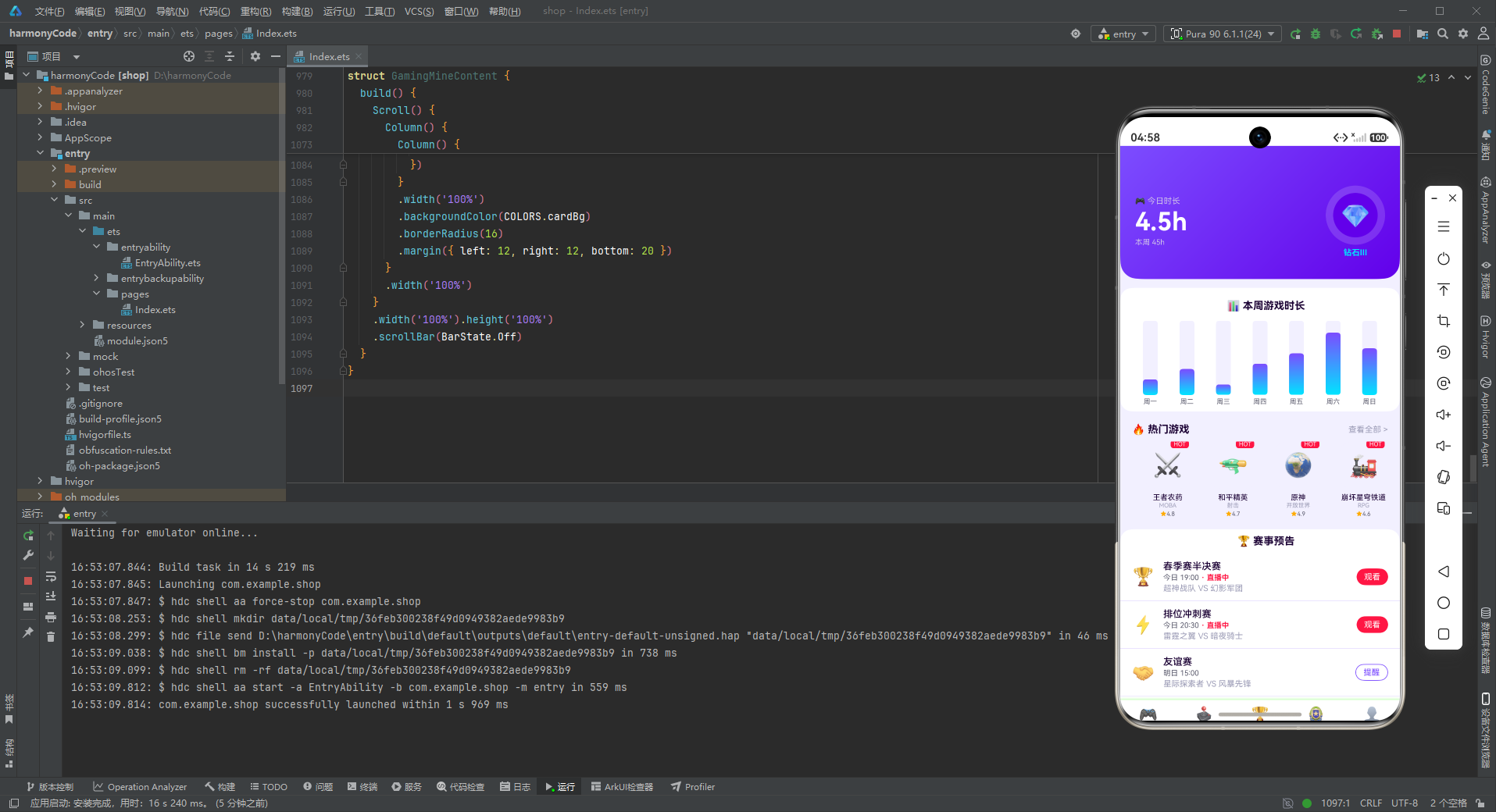
这款游戏电竞 App 是 ArkTS 声明式UI开发与电竞设计美学的完美结合。从架构设计到视觉表现,从组件复用到交互体验,每个环节都展现了精湛的技术功底和对电竞文化的深刻理解。通过本文的全面解析,我们可以从中汲取丰富的技术营养和设计灵感。
在架构设计层面,应用采用了清晰的分层架构模式:数据模型层定义了 10 个 TypeScript 接口,为整个应用提供了坚实的类型基础;常量配置层集中管理颜色、导航和业务数据,实现了配置与逻辑的分离;工具函数层提供了稀有度配色和排名配色两个策略函数,统一了视觉规则;组件层包含 5 个页面组件和多个弹窗构建器,每个组件职责明确、封装良好;入口层统筹全局状态和导航切换。这种分层设计使得代码结构清晰,职责分明,便于团队协作和后期维护。
在视觉设计层面,应用构建了一套完整的赛博朋克风格视觉系统。霓虹紫与电竞青的主辅色搭配,营造出强烈的科技感和未来感;渐变效果的大量运用(头卡渐变、柱状图渐变、按钮渐变等)模拟了霓虹灯光的发光效果;淡紫色的背景和边框让整个应用沉浸在电竞氛围中。特别值得一提的是段位环形头卡的设计,通过 Stack 堆叠双层圆形实现了徽章效果,在紫色渐变背景的衬托下呈现出全息投影般的视觉冲击力。
在组件设计层面,应用充分展示了 ArkTS 声明式UI的强大表达力。@Builder 自定义构建函数将可复用的 UI 片段抽象为独立方法,减少了代码冗余;@State 状态管理简洁高效,遵循状态最小化原则;ForEach 列表渲染配合 key 函数实现了高性能的列表更新;Flex 的 wrap 特性实现了灵活的网格布局;bindSheet 底部抽屉提供了符合移动端习惯的弹窗交互。这些技术点的综合运用,构建出了功能丰富且性能优良的用户界面。

作为“人工智能6S店”的官方数字引擎,为AI开发者与企业提供一个覆盖软硬件全栈、一站式门户。
更多推荐
 4
4 0
0- 0


 已为社区贡献73条内容

所有评论(0)