
珠宝首饰 App 深度技术解析:基于HarmonyOS API 24使用formatPrice格式化数字,用getPriceColor动态设置颜色,不同价位的珠宝呈现出不同的颜色
一、引言:指尖上的珠宝殿堂
珠宝,作为人类最古老的艺术形式之一,承载着人们对美、对永恒、对珍贵的追求。从皇室贵族的珍藏到现代都市人的日常配饰,珠宝始终是品位与身份的象征。本文要深度剖析的这款珠宝首饰应用,正是为一个高端珠宝品牌量身打造的移动端数字展厅——它不仅是一个珠宝展示和销售的平台,更是一个集系列浏览、款式选购、私人定制、鉴定证书、会员积分于一体的完整珠宝消费生态。
从业务视角来看,这款应用覆盖了高端珠宝消费的全链路:顾客可以在"首页"浏览臻选系列和人气款式,查看周销量数据;在"系列"页面探索不同的设计系列,了解每个系列的风格和价位;在"款式"页面浏览全部珠宝款式,筛选心仪的单品;在"定制"页面体验一对一的私人定制服务,查看定制进度和鉴定证书;在"我的"页面管理收藏夹、积分兑换和会员权益。这种全链路的数字化体验,将线下珠宝店的奢华感与线上购物的便捷性完美结合。
从技术视角来看,这款应用采用了声明式UI框架进行开发,基于组件化的设计思想,将整个应用拆分为五个核心Tab页面:首页、系列、款式、定制、我的。每个页面都有独立的状态管理和业务逻辑。应用中定义了7个核心数据接口,涵盖了珠宝系列、款式、收藏、证书、销量、定制步骤、积分兑换等多个业务领域。特别值得一提的是价格系统的设计——通过formatPrice和getPriceColor两个辅助函数,将不同价位的珠宝以不同的格式和颜色展示,既清晰又有层次感。
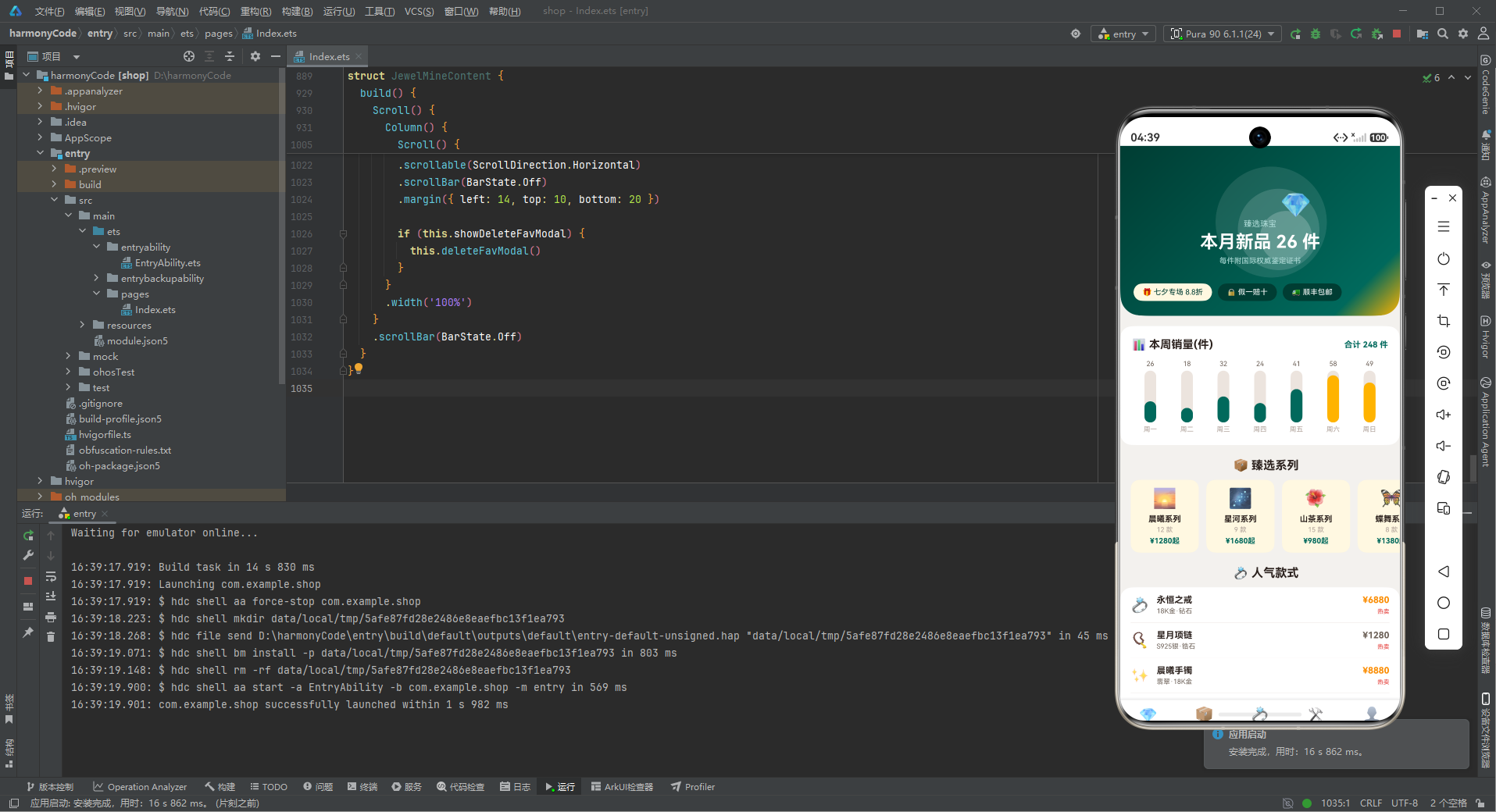
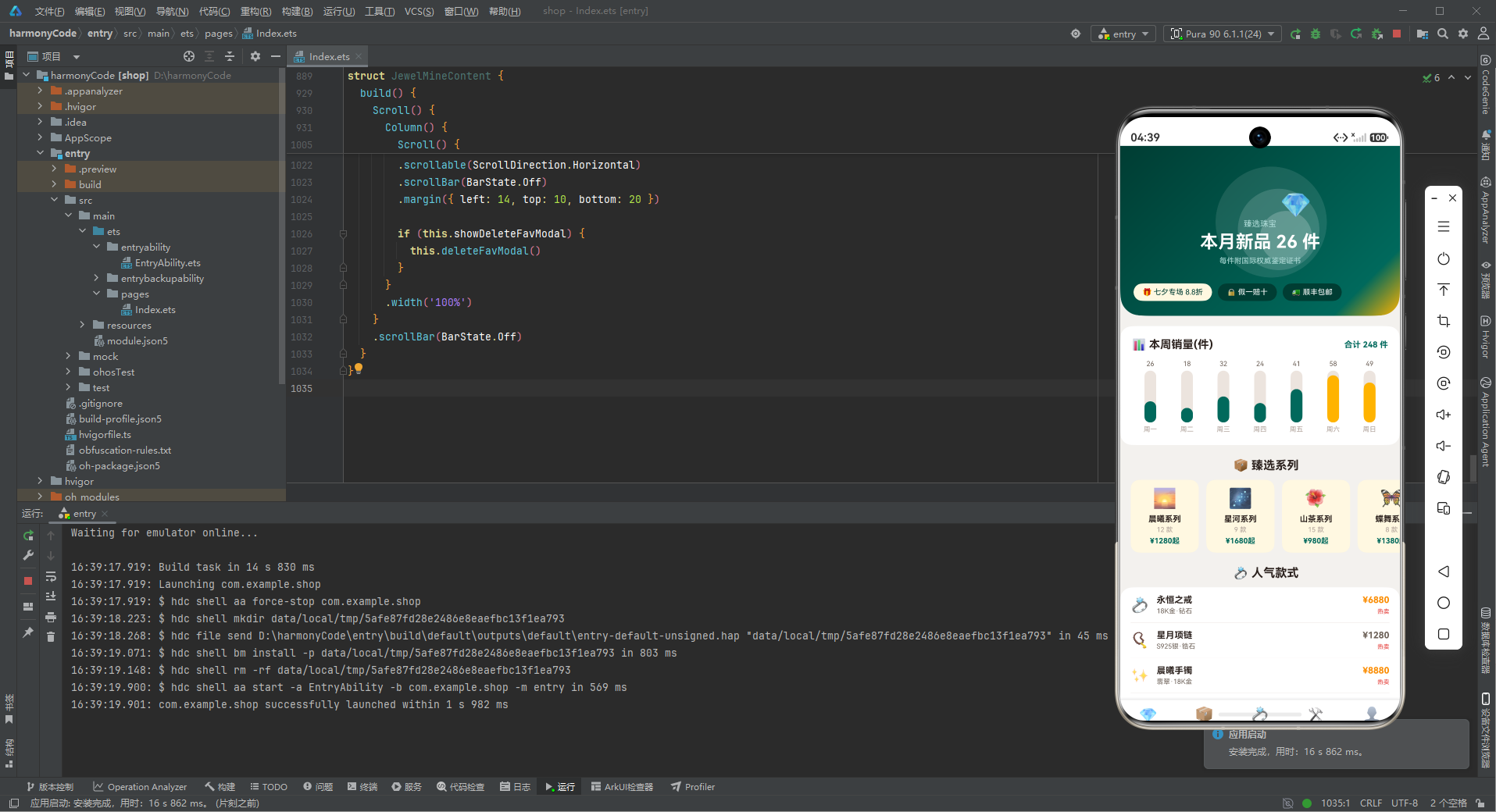
视觉设计方面,应用以祖母绿色(#00695C)为主色调,搭配玫瑰金色(#BCAAA4)和金黄色(#FFB300)作为强调色,营造出奢华、典雅、高端的品牌氛围。首页顶部的展柜聚光头卡设计尤为精巧,三层光晕效果模拟了珠宝展柜的聚光灯,配合祖母绿到金黄色的渐变背景,让人仿佛置身于高端珠宝店的展柜前。定制流程四步图、鉴定证书列表、积分兑换横滑等丰富的UI元素,为用户提供了沉浸式的高端购物体验。
本文将从架构设计、数据模型、状态管理、组件实现等多个维度,对这款珠宝首饰应用进行全方位的深度解析,帮助读者理解如何构建一个功能完整、设计精美的高端珠宝类移动应用。
二、整体架构流程图
为了让读者对整个应用的架构有一个直观的认识,下面用Mermaid流程图展示应用的整体架构设计。
定制流程数据流图
三、颜色与主题系统详解
3.1 调色板接口设计
interface JewelColorPalette {
  primary: string
  primaryLight: string
  primaryDark: string
  accent: string
  accentLight: string
  rose: string
  bg: string
  cardBg: string
  textPrimary: string
  textSecondary: string
  textHint: string
  border: string
  success: string
  warning: string
  danger: string
  white: string
}
这段代码定义了珠宝应用的颜色调色板接口JewelColorPalette,包含16个颜色字段。与前两个应用的调色板接口结构类似,但特色色字段从chili(火锅)和moss(园艺)变成了rose(玫瑰金),这是珠宝主题特有的颜色——玫瑰金是高端珠宝中非常经典的金属色调。
接口中的颜色字段分为几个系列:
- 主色系列:primary(祖母绿)、primaryLight(浅祖母绿)、primaryDark(深祖母绿),构成品牌主色调
- 强调色系列:accent(金黄色)、accentLight(浅金黄),用于突出重点和价格强调
- 特色色:rose(玫瑰金),珠宝主题标志性颜色,用于渐变过渡和装饰
- 基础色系列:bg(背景色)、cardBg(卡片背景)、white(纯白)
- 文字色系列:textPrimary(深棕灰)、textSecondary(中棕灰)、textHint(浅棕灰)
- 功能色:success、warning、danger
- 边框色:border
这种接口定义的设计模式确保了颜色系统的完整性和一致性,所有引用颜色的地方都能获得类型检查和智能提示。
3.2 配色方案的设计理念
const COLORS: JewelColorPalette = {
  primary: '#00695C',
  primaryLight: '#4DB6AC',
  primaryDark: '#003D33',
  accent: '#FFB300',
  accentLight: '#FFF8E1',
  rose: '#BCAAA4',
  bg: '#F4F1EE',
  cardBg: '#FFFFFF',
  textPrimary: '#2A201C',
  textSecondary: '#6E6259',
  textHint: '#AFA199',
  border: '#ECE4DE',
  success: '#43A047',
  warning: '#FB8C00',
  danger: '#E53935',
  white: '#FFFFFF'
}
颜色常量COLORS是调色板接口的具体实现,采用了以祖母绿色为主色调的高端配色方案。主色调#00695C是一种深沉的祖母绿色,高贵而神秘,让人联想到顶级祖母绿宝石的深邃色泽。祖母绿是五大贵重宝石之一,象征着永恒与智慧,用它作为品牌主色, instantly 传达了高端珠宝的定位。
主色深色变体#003D33是更深的墨绿色,用于渐变暗端和深色按钮,更加沉稳厚重;主色浅色变体#4DB6AC是明亮的绿松石色,用于次要强调和状态指示,清新雅致。
强调色#FFB300是一种明亮的金黄色,类似于黄金的颜色,与祖母绿形成经典的绿金配色——这是高端珠宝中最经典的色彩组合之一,既华贵又典雅。强调色浅色变体#FFF8E1是一种柔和的奶黄色,用于热门系列卡片背景和标签底色。
特色色rose(#BCAAA4)是玫瑰金色,一种温暖的粉棕色调,是现代珠宝设计中非常流行的金属色。它在渐变背景、头卡装饰等场景中使用,为界面增添了温柔华贵的气质。
背景色#F4F1EE是一种微微偏棕的暖灰白色,比纯白更有质感,与珠宝店的米色/奶白色装潢风格一致,营造出高端、温馨的购物环境。文字色采用了深棕灰色系而非纯黑色,#2A201C的主文字色在浅色背景上既有足够的对比度,又显得优雅内敛。
功能色方面,成功色#43A047是标准绿,警告色#FB8C00是温暖的橙色(与黄金色调协调),危险色#E53935是标准红。边框色#ECE4DE是非常浅的棕灰色,在白色卡片上形成柔和精致的分隔效果。
整体配色方案传达出高端、典雅、精致的品牌调性,祖母绿的尊贵、黄金的奢华、玫瑰金的温柔三者完美融合,打造了一个令人向往的数字珠宝殿堂。
3.3 颜色系统的应用模式
在整个应用中,颜色系统的应用遵循着一套清晰的模式:主色用于主要按钮、选中状态、标题强调、价格高亮;强调色用于热门标记、积分、价格梯度;玫瑰金色用于渐变过渡和装饰元素;功能色严格按照语义使用。
值得特别一提的是价格颜色的分层设计:通过getPriceColor函数,不同价位的珠宝使用不同的颜色——万元以上用祖母绿(主色),三千以上用金黄色(警告色),三千以下用灰色(次要文字色)。这种价格颜色编码让用户可以快速识别珠宝的价位档次,也体现了高端珠宝的价格层次感。
四、数据模型层深度解析
珠宝首饰应用共定义了7个核心数据接口,覆盖了珠宝系列、款式、收藏、证书、销量统计、定制步骤、积分兑换等多个业务领域。
4.1 TabMeta — 导航元数据
interface TabMeta {
  title: string
  icon: string
}
TabMeta接口定义了底部导航栏每个Tab的元数据结构。图标采用emoji字符:首页用💎(钻石)、系列用📦(盒子)、款式用💍(戒指)、定制用🛠️(工具)、我的用👤(人物),每个都与珠宝主题高度相关。
4.2 SeriesMeta — 珠宝系列数据模型
interface SeriesMeta {
  name: string
  emoji: string
  count: number
  price: number
  isHot: boolean
}
SeriesMeta是珠宝系列的数据模型,包含5个字段。name是系列名称,如"晨曦系列"、“星河系列”、"山茶系列"等,每个系列都有独特的设计主题和风格;emoji是系列对应的表情符号图标,用不同的emoji传达系列的设计灵感;count是该系列包含的款式数量;price是系列的起售价(最低价);isHot标记是否为热门系列。
系列是珠宝品牌非常重要的产品组织方式,每个系列都有统一的设计语言和主题故事,比如"晨曦系列"的灵感来自日出、"星河系列"的灵感来自星空、"山茶系列"的灵感来自山茶花。系列化的产品策略既能满足不同风格偏好的消费者,又能形成品牌的设计辨识度。
4.3 StyleMeta — 珠宝款式数据模型
interface StyleMeta {
  name: string
  emoji: string
  material: string
  price: number
  isNew: boolean
  isHot: boolean
}
StyleMeta是珠宝款式的数据模型,包含6个字段。name是款式名称,如"永恒之戒"、“星月项链”、“晨曦手镯"等;emoji是款式对应的图标,直观展示珠宝类型(戒指/项链/手镯/耳饰等);material是材质说明,如"18K金·钻石”、“S925银·锆石”、"翡翠·18K金"等,描述了珠宝的主要材质和宝石;price是价格;isNew标记是否为新品;isHot标记是否为热卖款。
material字段是珠宝类产品特有的重要属性,它直接影响着珠宝的价值和定位。18K金钻石、铂金蓝宝石、翡翠珍珠等不同材质组合代表了不同的档次和价格带。将材质信息明确展示在列表中,帮助用户快速判断珠宝的品质和价位。
4.4 FavMeta — 收藏数据模型
interface FavMeta {
  name: string
  emoji: string
  price: number
  date: string
  isTop: boolean
}
FavMeta是收藏夹的数据模型,包含5个字段。name是珠宝款式名称,emoji是图标,price是价格,date是收藏日期,isTop标记是否为置顶收藏。
收藏功能是电商类应用的标配,用户可以将心仪的珠宝加入收藏夹,方便后续对比和购买。isTop置顶功能让用户可以将最喜欢的珠宝固定在收藏夹顶部,体现了对用户体验的细致关怀。
4.5 CertMeta — 鉴定证书数据模型
interface CertMeta {
  name: string
  emoji: string
  no: string
  date: string
  isDone: boolean
}
CertMeta是鉴定证书的数据模型,包含5个字段。name是证书名称(通常是珠宝名称+证书类型),emoji是证书图标,no是证书编号,date是证书出具日期,isDone标记证书是否已出证。
鉴定证书是高端珠宝不可或缺的配套文件,它证明了珠宝的真实性和品质。NGTC(国家珠宝玉石质量监督检验中心)和GIA(美国宝石学院)是最权威的两大鉴定机构。证书编号可以用于在线查验真伪,是消费者购买珠宝的重要保障。
4.6 WeekSaleMeta — 周销量统计模型
interface WeekSaleMeta {
  label: string
  value: number
}
WeekSaleMeta是周销量统计的数据模型,用于柱状图展示。label是日期标签(周一到周日),value是对应的销量数值(件数)。
4.7 StepMeta — 定制步骤数据模型
interface StepMeta {
  name: string
  emoji: string
  desc: string
  isDone: boolean
}
StepMeta是定制流程步骤的数据模型,包含4个字段。name是步骤名称(选材/设计/起版/镶嵌),emoji是步骤对应的图标,desc是步骤描述(如"挑选主石"、"草图确认"等),isDone标记该步骤是否已完成。
私人定制是高端珠宝的重要服务形式,通常分为多个步骤:选材(挑选宝石)→ 设计(绘制设计图)→ 起版(制作蜡模/3D打印)→ 镶嵌(宝石镶嵌+成品抛光)。每个步骤都有对应的交付物和确认环节,让客户全程参与定制过程,最终获得独一无二的专属珠宝。
4.8 RewardMeta — 积分兑换数据模型
interface RewardMeta {
  name: string
  emoji: string
  points: number
  isNew: boolean
}
RewardMeta是积分兑换礼品的数据模型,包含4个字段。name是礼品名称,如"免费刻字服务"、“珠宝保养券”、"私人定制体验"等;emoji是礼品图标;points是兑换所需积分数;isNew标记是否为新上架礼品。
积分兑换体系是会员运营的重要工具,通过将积分兑换为有价值的服务或商品,激励用户持续消费和互动。礼品的设计很有层次感:从低价值的刻字服务(500积分),到中价值的保养券和礼盒(800-1200积分),再到高价值的私人定制体验和高级会员折扣(5000-10000积分),最后是顶级的海外典藏款优先购(20000积分)。不同层级的礼品满足了不同积分量级用户的兑换需求。
五、配置常量层分析
5.1 TAB_CONFIG — 导航配置
const TAB_CONFIG: Record<string, TabMeta> = {
  'HOME': { title: '首页', icon: '💎' },
  'SERIES': { title: '系列', icon: '📦' },
  'STYLE': { title: '款式', icon: '💍' },
  'CUSTOM': { title: '定制', icon: '🛠️' },
  'MINE': { title: '我的', icon: '👤' }
}
TAB_CONFIG是底部导航栏的配置常量,五个Tab分别对应首页、系列、款式、定制、我的五个核心模块。这种配置化设计集中管理了导航信息,修改或扩展都非常方便。
值得注意的是,珠宝应用的Tab结构与前两个应用略有不同:第三个Tab是"款式"而非"涮菜"或"任务",第四个Tab是"定制"而非"订单"或"图鉴"。这体现了不同行业应用的功能架构差异——珠宝行业的核心是产品(系列+款式)和服务(定制),而餐饮行业的核心是菜单(锅底+涮菜)和订单,园艺行业的核心是植物和任务。
5.2 业务常量的设计模式
应用中定义了7组业务数据常量(SERIES_LIST、STYLE_LIST、FAV_LIST、CERT_LIST、WEEK_SALE、STEP_LIST、REWARD_LIST),每组常量都是一个类型化的数组。这些Mock数据在开发阶段充当了数据源的角色,让前端开发者可以独立于后端进行工作。
六、Mock数据层分析
6.1 模拟数据的设计特色
珠宝应用的Mock数据设计充分体现了高端珠宝品牌的调性:
系列命名优雅:10个系列的名称都很有意境——晨曦、星河、山茶、蝶舞、月光、极光、知更鸟、海洋之心、雪绒花、繁花,每个名字都像一首诗,背后都有独特的设计灵感和故事。这种命名方式提升了品牌的艺术感和文化底蕴。
款式品类齐全:12款珠宝涵盖了戒指、项链、手镯、耳坠、胸针、吊坠、对戒、尾戒、耳钉、手链、锁骨链等多种品类,材质从银、银镀金、18K金、玫瑰金到铂金,宝石从锆石、珍珠、玛瑙、月光石到钻石、翡翠、蓝宝石、蓝钻,价格带从880元到26800元,覆盖了不同预算和风格的消费者。
价格分层清晰:珠宝价格从几百到几万不等,形成了清晰的价格梯队。入门级(千元以下)、进阶级(1000-5000元)、高端级(5000-10000元)、收藏级(10000元以上),不同层级的产品满足不同消费能力的客户。
证书权威可信:鉴定证书包含NGTC和GIA两大权威机构,证书编号格式规范(NGTC-20260812、GIA-20260801),出证状态有已出证和办理中两种,数据真实可信。
礼品梯度合理:积分兑换礼品从500积分到20000积分不等,形成合理的梯度,低门槛礼品让新用户也能体验兑换乐趣,高价值礼品激励高价值用户持续累积。
6.2 辅助函数设计
function formatPrice(price: number): string {
  if (price >= 10000) {
    return (price / 10000) + '万'
  }
  return price + ''
}
formatPrice函数用于格式化价格显示。价格在1万元以上的,转换为"X万"的格式(如12800→"1.28万"),1万元以下的直接显示数字。这种格式化方式在高端商品中很常见,因为价格数字通常较大,用"万"作为单位更加简洁易读,也显得更加高端。
function getPriceColor(price: number): string {
  if (price >= 10000) {
    return COLORS.primary
  } else if (price >= 3000) {
    return COLORS.warning
  }
  return COLORS.textSecondary
}
getPriceColor函数根据价格返回对应的颜色。万元以上用祖母绿(主色),代表高端珍藏;三千到一万用金黄色(警告色),代表中高端品质;三千以下用灰色(次要文字色),代表入门价位。
这种价格颜色编码是珠宝类应用的特色设计——不同价位的珠宝用不同颜色区分,既美观又实用。用户可以通过颜色快速判断珠宝的价位档次,也增加了界面的视觉层次。祖母绿作为最高价位的颜色,也与品牌的高端定位高度契合。
6.3 枚举类型设计
enum JewelTab {
  HOME,
  SERIES,
  STYLE,
  CUSTOM,
  MINE
}
JewelTab枚举定义了五个Tab的枚举值。枚举类型在Tab导航中扮演着核心角色,确保了类型安全和代码可读性。
七、主入口组件逐段分析
7.1 组件定义与状态管理
@Entry
@Component
struct JewelApp {
  @State activeTab: JewelTab = JewelTab.HOME
JewelApp是应用的主组件,@State装饰器定义了响应式状态变量activeTab,初始值为首页。
7.2 contentArea自定义构建器
  @Builder contentArea() {
    Column() {
      if (this.activeTab === JewelTab.HOME) {
        JewelHomeContent()
      } else if (this.activeTab === JewelTab.SERIES) {
        JewelSeriesContent()
      } else if (this.activeTab === JewelTab.STYLE) {
        JewelStyleContent()
      } else if (this.activeTab === JewelTab.CUSTOM) {
        JewelCustomContent()
      } else if (this.activeTab === JewelTab.MINE) {
        JewelMineContent()
      }
    }
    .width('100%')
  }
contentArea构建器根据当前激活的Tab渲染对应的页面内容。
7.3 tabItem自定义构建器
  @Builder tabItem(icon: string, label: string, tab: JewelTab) {
    Column() {
      Text(icon).fontSize(20)
      Text(label).fontSize(10)
        .fontColor(this.activeTab === tab ? COLORS.primary : COLORS.textHint)
        .fontWeight(this.activeTab === tab ? FontWeight.Bold : FontWeight.Normal)
        .margin({ top: 2 })
    }
    .layoutWeight(1)
    .onClick(() => { this.activeTab = tab })
  }
tabItem构建器生成底部导航的每个Tab项。激活态使用祖母绿主色+粗体,未激活态使用提示灰色+常规字重。
7.4 build方法整体布局
  build() {
    Column() {
      this.contentArea()
      Row() {
        this.tabItem(TAB_CONFIG.HOME.icon, TAB_CONFIG.HOME.title, JewelTab.HOME)
        this.tabItem(TAB_CONFIG.SERIES.icon, TAB_CONFIG.SERIES.title, JewelTab.SERIES)
        this.tabItem(TAB_CONFIG.STYLE.icon, TAB_CONFIG.STYLE.title, JewelTab.STYLE)
        this.tabItem(TAB_CONFIG.CUSTOM.icon, TAB_CONFIG.CUSTOM.title, JewelTab.CUSTOM)
        this.tabItem(TAB_CONFIG.MINE.icon, TAB_CONFIG.MINE.title, JewelTab.MINE)
      }
      .width('100%')
      .padding({ top: 8, bottom: 8 })
      .backgroundColor(COLORS.white)
      .shadow({ radius: 10, color: '#2A201C26', offsetY: -2 })
    }
    .width('100%').height('100%')
    .backgroundColor(COLORS.bg)
  }
}
build方法定义了整体布局:上方内容区域 + 下方底部导航。底部导航栏使用白色背景和顶部阴影,阴影颜色使用带透明度的深棕灰色(#2A201C26),精致而不突兀。
八、各页面组件逐段代码分析
8.1 首页组件 JewelHomeContent
首页是用户进入应用后看到的第一个页面,汇集了品牌展示、数据概览、系列推荐、热门款式和定制入口等核心功能。
8.1.1 展柜聚光头卡
        Column() {
          Stack() {
            Column().width(150).height(150).borderRadius(75)
              .backgroundColor('rgba(255,255,255,0.10)')
              .margin({ top: 12, left: 30 })
            Column().width(110).height(110).borderRadius(55)
              .backgroundColor('rgba(255,255,255,0.14)')
              .margin({ top: 32, left: 50 })
            Column().width(70).height(70).borderRadius(35)
              .backgroundColor('rgba(255,255,255,0.20)')
              .margin({ top: 52, left: 70 })
            Column() {
              Text('💎').fontSize(34).margin({ top: 26, left: 96 })
              Text('臻选珠宝').fontSize(11).fontColor('#B2DFDB')
              Text('本月新品 26 件').fontSize(24).fontWeight(FontWeight.Bold).fontColor(COLORS.white)
                .margin({ top: 4 })
              Text('每件附国际权威鉴定证书').fontSize(10).fontColor('#B2DFDB').margin({ top: 6 })
            }
            .alignItems(HorizontalAlign.Center)
          }
          .width('100%')
          Row() {
            Text('🎁 七夕专场 8.8折').fontSize(10).fontColor(COLORS.primaryDark)
              .padding({ left: 12, right: 12, top: 6, bottom: 6 })
              .backgroundColor(COLORS.accentLight).borderRadius(12)
            Text('🔒 假一赔十').fontSize(10).fontColor(COLORS.white)
              .padding({ left: 12, right: 12, top: 6, bottom: 6 })
              .backgroundColor('#003D33').borderRadius(12)
              .margin({ left: 8 })
            Text('🚚 顺丰包邮').fontSize(10).fontColor(COLORS.white)
              .padding({ left: 12, right: 12, top: 6, bottom: 6 })
              .backgroundColor('#003D33').borderRadius(12)
              .margin({ left: 8 })
          }
          .width('100%').margin({ top: 8 })
        }
        .width('100%')
        .padding({ left: 18, right: 18, top: 16, bottom: 20 })
        .linearGradient({ angle: 135, colors: [[COLORS.primaryDark, 0.0], [COLORS.primary, 0.85], [COLORS.accent, 1.0]] })
        .borderRadius({ bottomLeft: 28, bottomRight: 28 })
展柜聚光头卡是首页最具视觉冲击力的设计元素,模拟了高端珠宝店展柜中的聚光灯效果。
光晕特效通过三个不同大小、不同位置的半透明白色圆形实现:最大的圆(150x150,透明度10%)在最外层,中等的圆(110x110,透明度14%)在中间层,最小的圆(70x70,透明度20%)在最内层。三个同心圆由外向内透明度逐渐增加,模拟了聚光灯从边缘到中心逐渐变亮的效果。最内层的光晕中心放置了一颗钻石emoji(💎),就像聚光灯下闪耀的宝石。
文字内容居中展示:品牌标题"臻选珠宝"、新品数量"本月新品26件"、品质承诺"每件附国际权威鉴定证书"。34号的大钻石图标是视觉焦点,璀璨夺目。
服务标签有三个:七夕专场8.8折(促销标签,金黄背景)、假一赔十(品质承诺,深祖母绿背景)、顺丰包邮(物流服务,深祖母绿背景)。这些标签将促销信息、品质保障、物流服务等关键卖点一次性传达给用户,建立信任感。
渐变背景使用三色渐变——从深祖母绿(#003D33)过渡到祖母绿(#00695C)再到金黄色(#FFB300),营造出从深邃到璀璨的视觉效果,就像宝石在光线下散发的火彩。
8.1.2 周销量柱状图
        Column() {
          Row() {
            Text('📊 本周销量(件)').fontSize(15).fontWeight(FontWeight.Bold).fontColor(COLORS.textPrimary)
            Column().layoutWeight(1)
            Text('合计 248 件').fontSize(11).fontColor(COLORS.primary).fontWeight(FontWeight.Bold)
          }
          .width('100%')
          Row() {
            ForEach(WEEK_SALE, (v: WeekSaleMeta, i: number) => {
              Column() {
                Text(v.value + '').fontSize(9).fontColor(COLORS.textSecondary)
                Stack({ alignContent: Alignment.Bottom }) {
                  Column().width(16).height(70).backgroundColor(COLORS.border).borderRadius(8)
                  Column().width(16).height(Number(v.value) * 1.1).backgroundColor(
                    i === 5 || i === 6 ? COLORS.accent : COLORS.primary)
                    .borderRadius(8)
                }
                .width(16).height(70).margin({ top: 4 })
                Text(v.label).fontSize(9).fontColor(COLORS.textHint).margin({ top: 4 })
              }
              .layoutWeight(1)
              .alignItems(HorizontalAlign.Center)
            }, (v: WeekSaleMeta, i: number) => v.label + i)
          }
          .width('100%').margin({ top: 12 })
        }
周销量柱状图展示了本周每天的珠宝销量。柱子高度通过数值×1.1计算得出,系数是根据数据范围(18-58件)和柱子高度(70dp)调试出来的。周末(周六、周日)的柱子使用金黄色(accent),工作日使用祖母绿(primary),既区分了工作日和周末,又与整体配色协调。
8.1.3 臻选系列横滑
        Scroll() {
          Row() {
            ForEach(SERIES_LIST, (s: SeriesMeta) => {
              if (s.isHot) {
                Column() {
                  Text(s.emoji).fontSize(26)
                  Text(s.name).fontSize(11).fontWeight(FontWeight.Bold).fontColor(COLORS.textPrimary)
                    .margin({ top: 6 })
                  Text(s.count + ' 款').fontSize(9).fontColor(COLORS.textHint).margin({ top: 3 })
                  Text('¥' + formatPrice(s.price) + '起').fontSize(10).fontColor(COLORS.primary)
                    .fontWeight(FontWeight.Bold).margin({ top: 4 })
                }
                .width(92)
                .padding(10)
                .backgroundColor(COLORS.accentLight).borderRadius(12)
                .margin({ right: 10 })
                .alignItems(HorizontalAlign.Center)
              }
            }, (s: SeriesMeta) => s.name)
          }
        }
        .scrollable(ScrollDirection.Horizontal)
        .scrollBar(BarState.Off)
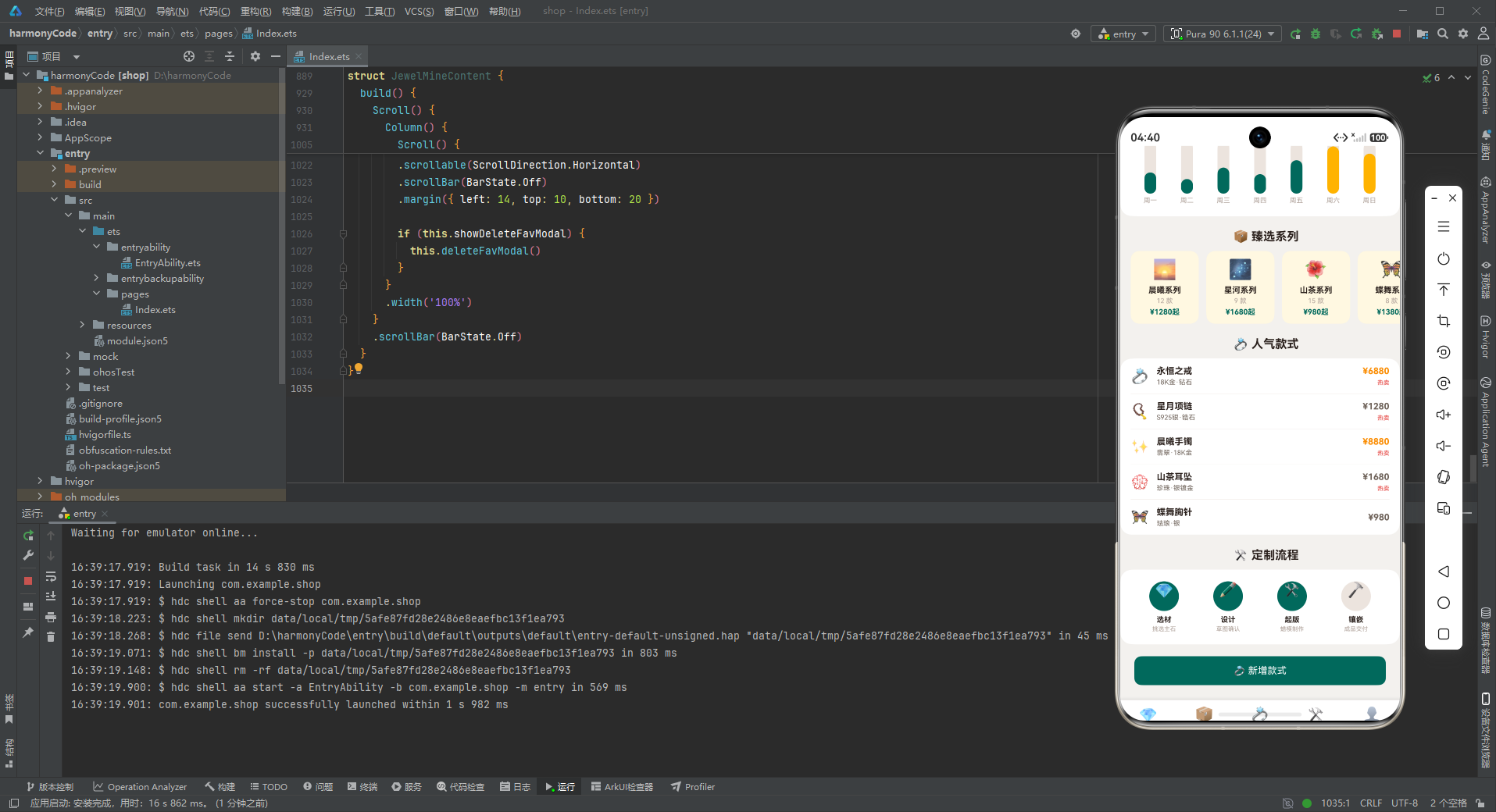
臻选系列横滑展示了热门的珠宝系列(isHot === true的系列)。每张系列卡片包含:系列emoji图标、系列名称、款式数量、起售价格。价格使用formatPrice函数格式化(万元以上显示"X万"),并用祖母绿主色突出显示。
卡片使用奶黄色背景(accentLight),在白色页面上显得温暖而突出,引导用户关注热门系列。横滑的交互方式让用户可以快速浏览多个系列,找到自己喜欢的设计风格。
8.1.4 人气款式列表
        Column() {
          ForEach(STYLE_LIST.slice(0, 5), (s: StyleMeta) => {
            Row() {
              Text(s.emoji).fontSize(20)
              Column() {
                Text(s.name).fontSize(12).fontWeight(FontWeight.Bold).fontColor(COLORS.textPrimary)
                Text(s.material).fontSize(9).fontColor(COLORS.textSecondary).margin({ top: 3 })
              }
              .alignItems(HorizontalAlign.Start)
              .layoutWeight(1)
              .margin({ left: 10 })
              Column() {
                Text('¥' + formatPrice(s.price)).fontSize(12)
                  .fontColor(getPriceColor(s.price)).fontWeight(FontWeight.Bold)
                if (s.isHot) {
                  Text('热卖').fontSize(8).fontColor(COLORS.danger).margin({ top: 4 })
                }
              }
              .alignItems(HorizontalAlign.End)
            }
            .width('100%')
            .padding({ top: 10, bottom: 10 })
            Divider().color(COLORS.border)
          }, (s: StyleMeta) => s.name)
        }
人气款式列表展示了排名前5的热门珠宝款式。每行左侧是珠宝emoji图标,中间是款式名称和材质,右侧是价格和热卖标签。
价格的展示是设计的亮点:使用formatPrice格式化数字,用getPriceColor动态设置颜色。万元以上的高端珠宝用祖母绿色,三千以上用金黄色,三千以下用灰色。这种价格颜色编码让用户一眼就能看出珠宝的价位档次,也让列表更加色彩丰富。
material材质字段是珠宝类产品特有的重要信息,它告诉用户珠宝是用什么做的——是黄金还是白银,是钻石还是锆石。材质直接决定了珠宝的价值和佩戴效果,是消费者决策的重要参考因素。
8.1.5 定制流程四步
        Row() {
          ForEach(STEP_LIST, (st: StepMeta) => {
            Column() {
              Column() {
                Text(st.emoji).fontSize(20)
              }
              .width(40).height(40).borderRadius(20)
              .backgroundColor(st.isDone ? COLORS.primary : COLORS.border)
              .alignItems(HorizontalAlign.Center)
              Text(st.name).fontSize(10).fontWeight(FontWeight.Bold).fontColor(COLORS.textPrimary)
                .margin({ top: 6 })
              Text(st.desc).fontSize(8).fontColor(COLORS.textHint).margin({ top: 2 })
            }
            .layoutWeight(1)
            .alignItems(HorizontalAlign.Center)
          }, (st: StepMeta) => st.name)
        }
定制流程四步图展示了私人定制的四个步骤:选材、设计、起版、镶嵌。每个步骤是一个圆形图标+步骤名称+步骤描述的垂直组合,平均分布在一行中(layoutWeight(1))。
已完成的步骤使用祖母绿背景(主色),未完成的步骤使用浅灰色背景(边框色)。前三步(选材、设计、起版)已完成,最后一步(镶嵌)正在进行中。这种进度可视化让用户清晰地知道定制进行到哪一步了,减少等待的焦虑感。
圆形图标设计精致,40x40dp的尺寸刚好容纳一个20号字体的emoji,圆润的造型与珠宝的优雅气质相符。
8.2 系列页面 JewelSeriesContent
系列页面展示所有珠宝系列,采用双列网格布局。
8.2.1 系列头卡
        Column() {
          Text('📦 品牌系列').fontSize(11).fontColor('#B2DFDB')
          Text('10 大经典系列').fontSize(24).fontWeight(FontWeight.Bold).fontColor(COLORS.white)
            .margin({ top: 4 })
          Text('设计师联名 · 限量发行').fontSize(10).fontColor('#B2DFDB').margin({ top: 6 })
        }
        .width('100%')
        .padding(20)
        .linearGradient({ angle: 135, colors: [[COLORS.primaryDark, 0.0], [COLORS.primary, 1.0]] })
        .alignItems(HorizontalAlign.Center)
        .borderRadius({ bottomLeft: 28, bottomRight: 28 })
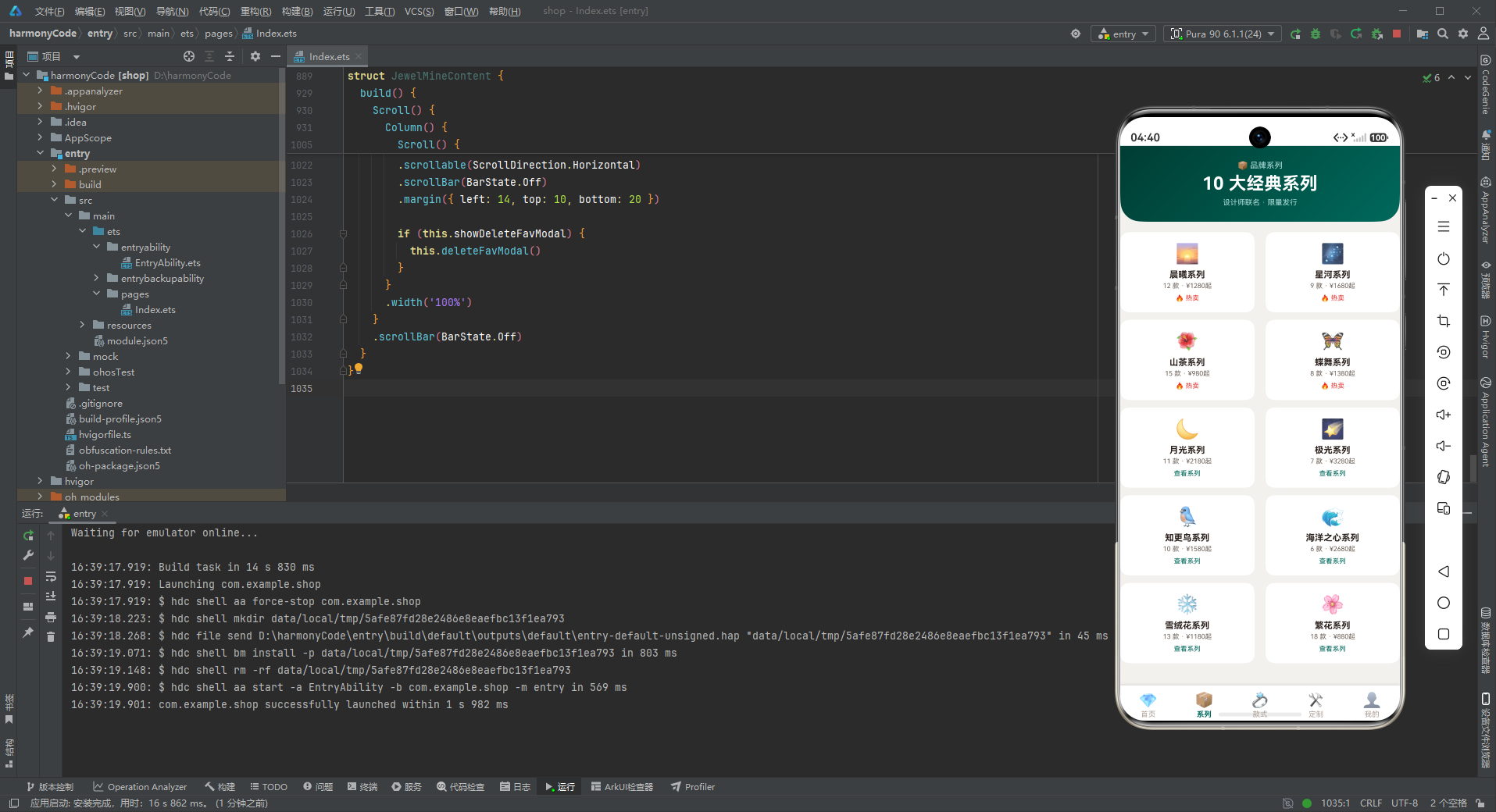
系列页面的头卡居中展示品牌系列概览:10大经典系列、设计师联名、限量发行。这些文案传达了品牌的设计实力和稀缺性,提升了产品的价值感。
渐变色从深祖母绿过渡到祖母绿,沉稳大气,符合系列页面的定位。
8.2.2 系列双列网格
        Flex({ wrap: FlexWrap.Wrap, justifyContent: FlexAlign.SpaceBetween }) {
          ForEach(SERIES_LIST, (s: SeriesMeta) => {
            Column() {
              Text(s.emoji).fontSize(26)
              Text(s.name).fontSize(12).fontWeight(FontWeight.Bold).fontColor(COLORS.textPrimary)
                .margin({ top: 6 })
              Text(s.count + ' 款 · ¥' + formatPrice(s.price) + '起').fontSize(9)
                .fontColor(COLORS.textSecondary).margin({ top: 3 })
              Text(s.isHot ? '🔥 热卖' : '查看系列').fontSize(9)
                .fontColor(s.isHot ? COLORS.danger : COLORS.primary).margin({ top: 6 })
            }
            .width('48%')
            .padding(14)
            .backgroundColor(COLORS.white).borderRadius(12)
            .margin({ bottom: 10 })
            .alignItems(HorizontalAlign.Center)
            .onClick(() => { this.showEditSeriesModal = true })
          }, (s: SeriesMeta) => s.name)
        }
系列采用双列网格布局,每张卡片宽度为48%,每行两张卡片。卡片内容包括:系列emoji图标、系列名称、款式数量和起售价格、操作标签(热卖/查看系列)。
热卖系列用红色"🔥 热卖"标签突出显示,普通系列用祖母绿"查看系列"标签。这种差异化的标签设计引导用户关注热门系列,提升转化率。
点击系列卡片会弹出编辑系列弹窗,在这个原型中点击触发的是编辑操作,实际项目中通常会进入系列详情页,展示该系列的所有款式。
8.3 款式页面 JewelStyleContent
款式页面展示全部珠宝款式,是产品浏览的核心页面。
8.3.1 款式头卡
        Column() {
          Row() {
            Column() {
              Text('💍 全部款式').fontSize(11).fontColor('#B2DFDB')
              Text('共 126 款').fontSize(24).fontWeight(FontWeight.Bold).fontColor(COLORS.white)
                .margin({ top: 4 })
              Text('戒指 · 项链 · 手镯 · 耳饰').fontSize(10).fontColor('#B2DFDB').margin({ top: 6 })
            }
            .alignItems(HorizontalAlign.Start)
            .layoutWeight(1)
            Column() {
              Text('TOP').fontSize(16).fontWeight(FontWeight.Bold).fontColor(COLORS.white)
              Text('永恒之戒').fontSize(9).fontColor('#B2DFDB').margin({ top: 2 })
            }
            .alignItems(HorizontalAlign.End)
          }
          .width('100%')
        }
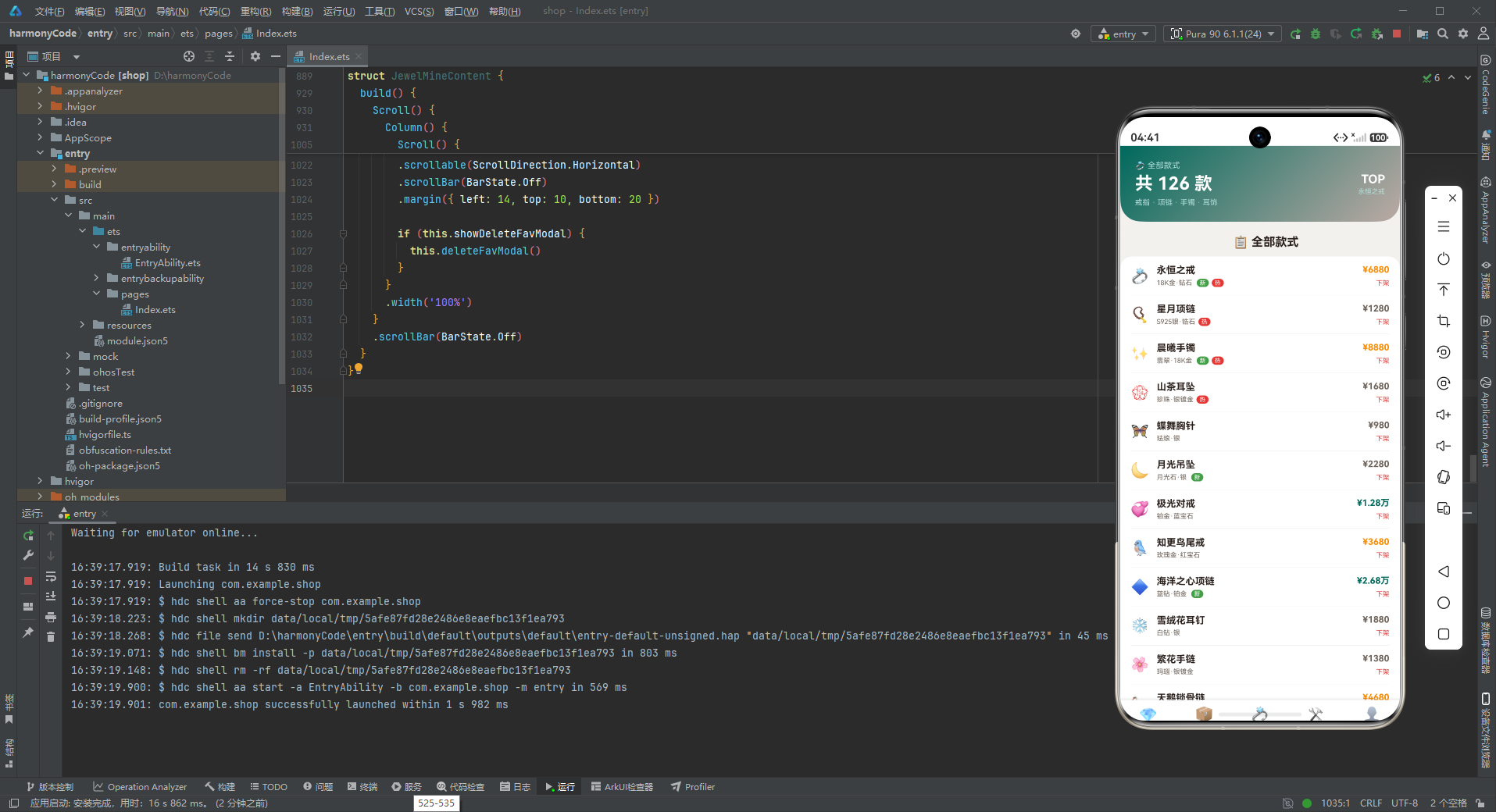
款式头卡采用左右分栏布局:左侧展示款式总数和品类说明,右侧展示TOP款式。"TOP"标识突出了爆款产品,引导用户关注最受欢迎的款式。
渐变色从祖母绿过渡到玫瑰金,两种高贵的颜色交融,非常符合珠宝的奢华气质。玫瑰金色为界面增添了温暖柔美的感觉,与其他页面的纯绿色渐变形成区分。
8.3.2 全部款式列表
            Row() {
              Text(s.emoji).fontSize(20)
              Column() {
                Text(s.name).fontSize(13).fontWeight(FontWeight.Bold).fontColor(COLORS.textPrimary)
                Row() {
                  Text(s.material).fontSize(9).fontColor(COLORS.textSecondary)
                  if (s.isNew) {
                    Text('新').fontSize(8).fontColor(COLORS.white)
                      .padding({ left: 4, right: 4, top: 1, bottom: 1 })
                      .backgroundColor(COLORS.success).borderRadius(6)
                      .margin({ left: 6 })
                  }
                  if (s.isHot) {
                    Text('热').fontSize(8).fontColor(COLORS.white)
                      .padding({ left: 4, right: 4, top: 1, bottom: 1 })
                      .backgroundColor(COLORS.danger).borderRadius(6)
                      .margin({ left: 4 })
                  }
                }
                .margin({ top: 4 })
              }
              .alignItems(HorizontalAlign.Start)
              .layoutWeight(1)
              .margin({ left: 10 })
              Column() {
                Text('¥' + formatPrice(s.price)).fontSize(12)
                  .fontColor(getPriceColor(s.price)).fontWeight(FontWeight.Bold)
                Text('下架').fontSize(9).fontColor(COLORS.danger).margin({ top: 6 })
                  .onClick(() => { this.showDeleteStyleModal = true })
              }
              .alignItems(HorizontalAlign.End)
            }
全部款式列表展示了每款珠宝的详细信息。每行左侧是珠宝emoji,中间是款式名称和标签行,右侧是价格和下架操作。
标签行包含材质信息和"新"、"热"两个标签。新品标签使用绿色背景(成功色),热卖标签使用红色背景(危险色)。两个标签小巧精致,不抢占主要信息的视觉权重,但又足够醒目。
价格的展示是列表的视觉重点——使用formatPrice格式化数字,用getPriceColor动态设置颜色。不同价位的珠宝呈现出不同的颜色,形成了一种价格层次的视觉编码。用户可以通过颜色快速扫描价格分布,找到自己预算范围内的产品。
右侧的"下架"操作使用红色文字,点击后弹出下架确认弹窗。这是商家后台的操作功能,用于管理在售商品。
8.4 定制页面 JewelCustomContent
定制页面是私人定制服务的核心展示区,包含定制流程和鉴定证书两大功能。
8.4.1 定制头卡
        Column() {
          Text('🛠️ 私人定制').fontSize(11).fontColor('#B2DFDB')
          Text('打造专属你的珠宝').fontSize(22).fontWeight(FontWeight.Bold).fontColor(COLORS.white)
            .margin({ top: 4 })
          Text('1对1 设计师服务 · 45 天交付').fontSize(10).fontColor('#B2DFDB').margin({ top: 6 })
        }
定制头卡居中展示定制服务的核心卖点:一对一设计师服务、45天交付周期。"打造专属你的珠宝"这句slogan传达了定制服务的独特价值——独一无二、专属于你。
渐变色从深祖母绿过渡到金黄色,从深邃到璀璨,象征着定制过程从选材到最终成品的蜕变。
8.4.2 鉴定证书列表
        Column() {
          ForEach(CERT_LIST, (c: CertMeta) => {
            Row() {
              Text(c.emoji).fontSize(18)
              Column() {
                Text(c.name).fontSize(12).fontWeight(FontWeight.Bold).fontColor(COLORS.textPrimary)
                Text(c.no + ' · ' + c.date).fontSize(9).fontColor(COLORS.textSecondary).margin({ top: 3 })
              }
              .alignItems(HorizontalAlign.Start)
              .layoutWeight(1)
              .margin({ left: 10 })
              Text(c.isDone ? '已出证' : '办理中').fontSize(9)
                .fontColor(c.isDone ? COLORS.success : COLORS.warning)
            }
            .width('100%')
            .padding({ top: 11, bottom: 11 })
            Divider().color(COLORS.border)
          }, (c: CertMeta) => c.no)
        }
鉴定证书列表展示了用户的所有珠宝鉴定证书。每行左侧是证书图标,中间是证书名称和编号+日期,右侧是出证状态。
证书编号是鉴定证书的核心信息,用户可以通过编号在官方网站上查验证书真伪。NGTC和GIA是最权威的两大鉴定机构标识,分别代表国内和国际最高标准。
状态"已出证"用绿色表示,"办理中"用黄色表示。这种状态指示让用户清楚知道每本证书的办理进度。
8.4.3 登记证书弹窗
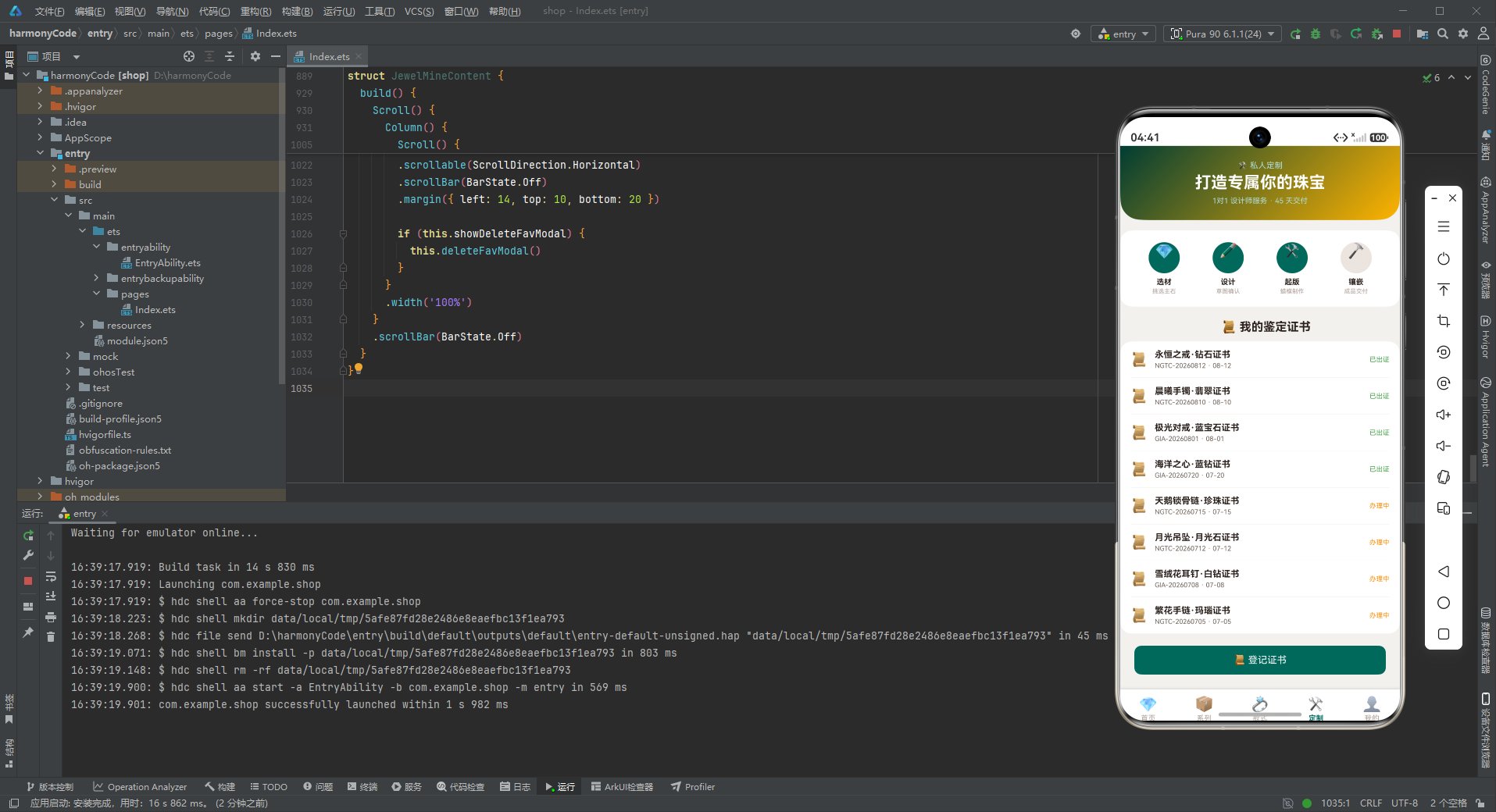
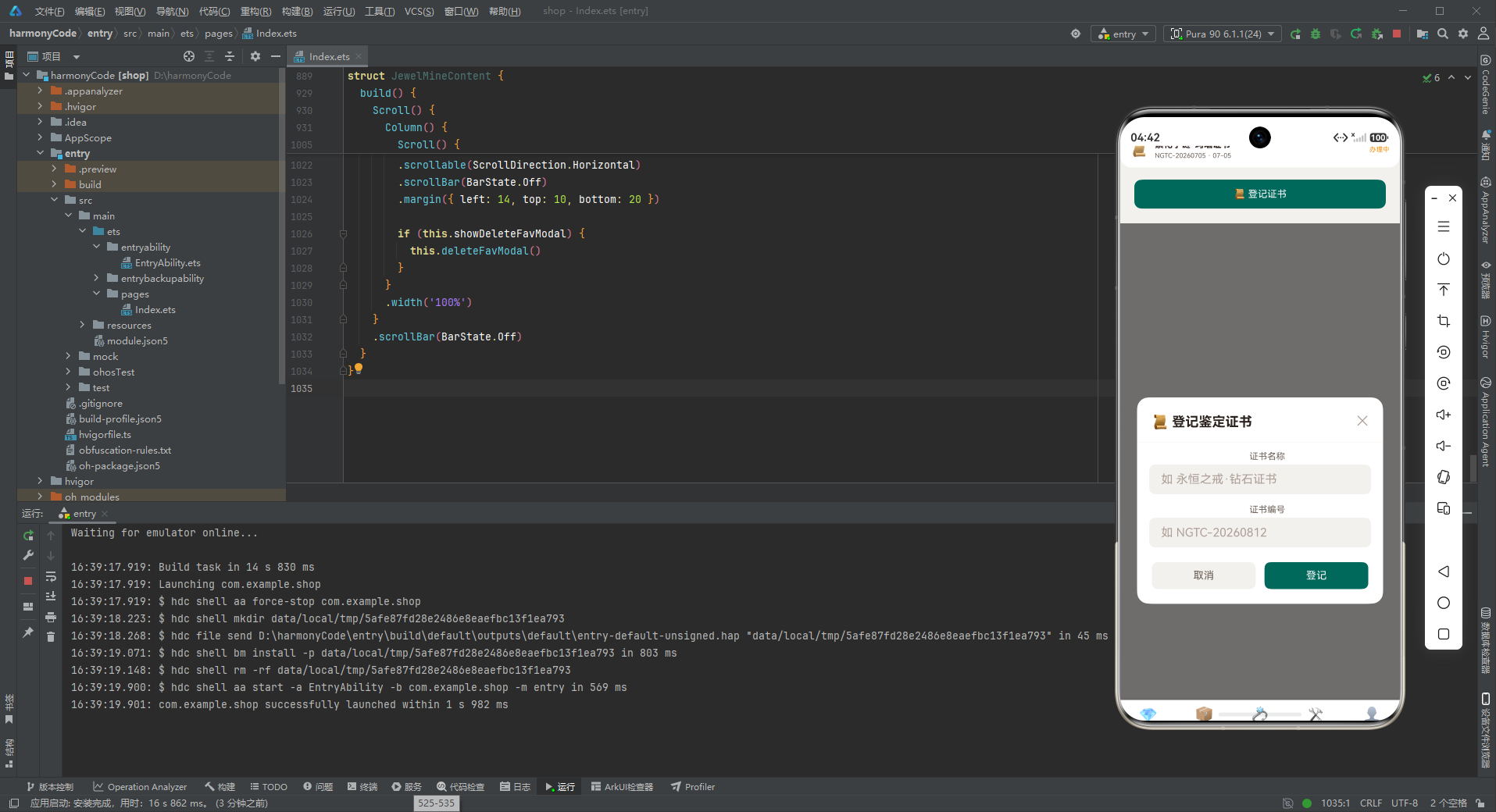
登记证书弹窗用于添加新的鉴定证书,包含证书名称和证书编号两个输入项。确认按钮文案是"登记"而非"保存",更加贴合证书管理的业务场景。
8.5 我的页面 JewelMineContent
"我的"页面是用户的个人中心,展示会员信息、收藏夹和积分兑换。
8.5.1 会员头卡
        Column() {
          Row() {
            Column() {
              Text('💎 祖母绿会员').fontSize(11).fontColor('#B2DFDB')
              Text('顾女士 · LV4').fontSize(22).fontWeight(FontWeight.Bold).fontColor(COLORS.white)
                .margin({ top: 4 })
              Text('累计消费 ¥68,920').fontSize(10).fontColor('#B2DFDB').margin({ top: 6 })
            }
            .alignItems(HorizontalAlign.Start)
            .layoutWeight(1)
            Column() {
              Text('2,680').fontSize(18).fontWeight(FontWeight.Bold).fontColor(COLORS.white)
              Text('积分余额').fontSize(9).fontColor('#B2DFDB').margin({ top: 2 })
            }
            .alignItems(HorizontalAlign.End)
          }
          .width('100%')
          Row() {
            Text('🎁 权益 6 项').fontSize(10).fontColor(COLORS.white)
              .padding({ left: 12, right: 12, top: 6, bottom: 6 })
              .backgroundColor('rgba(255,255,255,0.15)').borderRadius(12)
            Text('🎂 生日礼遇').fontSize(10).fontColor(COLORS.white)
              .padding({ left: 12, right: 12, top: 6, bottom: 6 })
              .backgroundColor('rgba(255,255,255,0.15)').borderRadius(12)
              .margin({ left: 8 })
            Text('🛡️ 免费保养').fontSize(10).fontColor(COLORS.white)
              .padding({ left: 12, right: 12, top: 6, bottom: 6 })
              .backgroundColor('rgba(255,255,255,0.15)').borderRadius(12)
              .margin({ left: 8 })
          }
          .width('100%').margin({ top: 14 })
        }
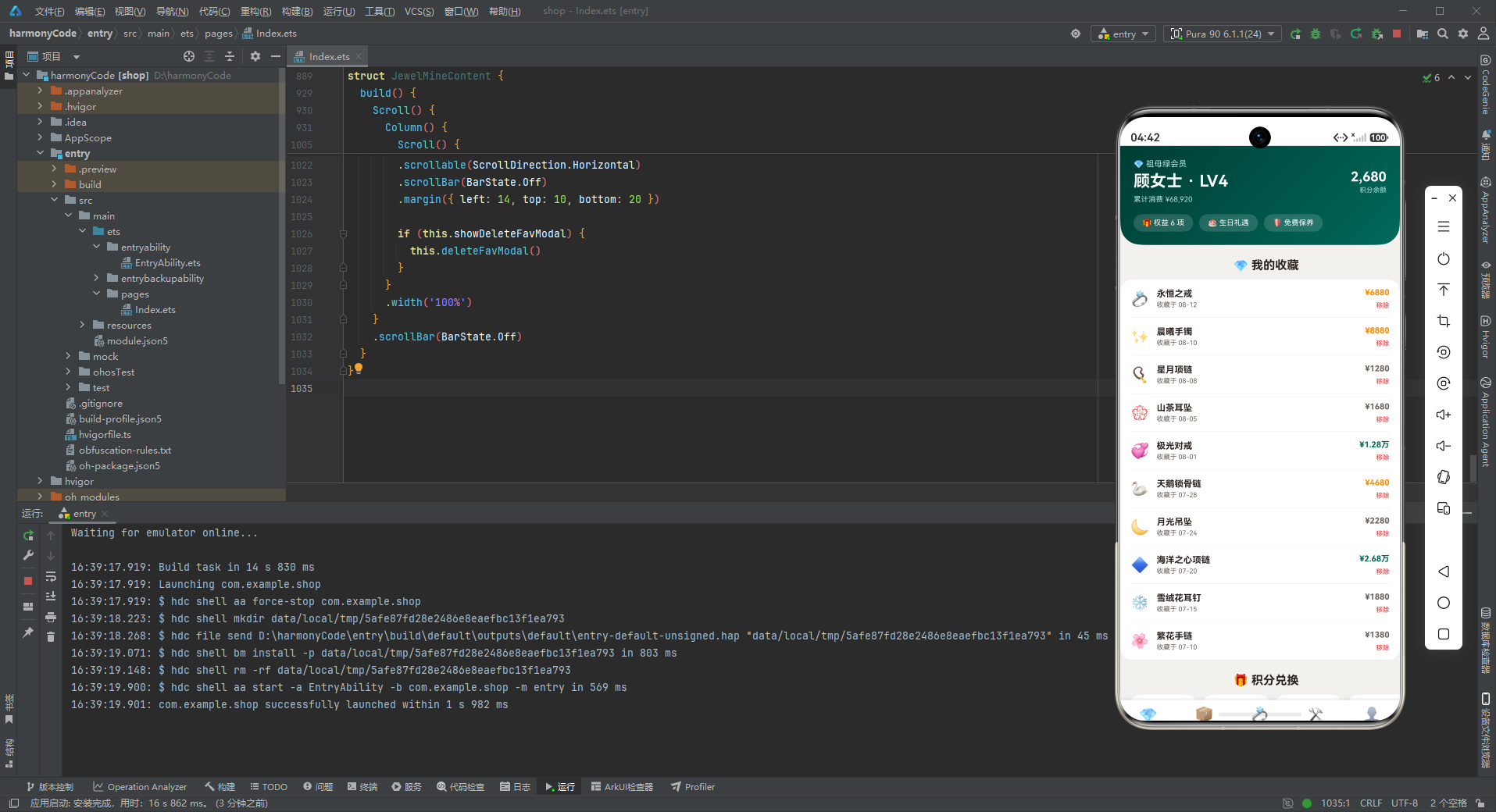
会员头卡是个人中心的核心展示区。上半部分左右分栏:左侧是会员等级(祖母绿会员)、用户名和等级、累计消费金额;右侧是积分余额。
"祖母绿会员"的等级命名与品牌主色调呼应,用宝石名称来命名会员等级(如白银、黄金、铂金、钻石、祖母绿),既符合珠宝行业特色,又能清晰传达等级的高低。LV4表示第四级会员,祖母绿是较高等级,体现了用户的尊贵身份。
下半部分有三个半透明标签:权益数量、生日礼遇、免费保养。这些标签展示了会员的核心权益,让用户感受到会员身份的价值。
渐变色从深祖母绿过渡到祖母绿,沉稳尊贵,符合会员中心的定位。
8.5.2 我的收藏列表
            Row() {
              Text(f.emoji).fontSize(20)
              Column() {
                Text(f.name).fontSize(12).fontWeight(FontWeight.Bold).fontColor(COLORS.textPrimary)
                Text('收藏于 ' + f.date).fontSize(9).fontColor(COLORS.textSecondary).margin({ top: 3 })
              }
              .alignItems(HorizontalAlign.Start)
              .layoutWeight(1)
              .margin({ left: 10 })
              Column() {
                Text('¥' + formatPrice(f.price)).fontSize(11)
                  .fontColor(getPriceColor(f.price)).fontWeight(FontWeight.Bold)
                Text('移除').fontSize(9).fontColor(COLORS.danger).margin({ top: 6 })
                  .onClick(() => { this.showDeleteFavModal = true })
              }
              .alignItems(HorizontalAlign.End)
            }
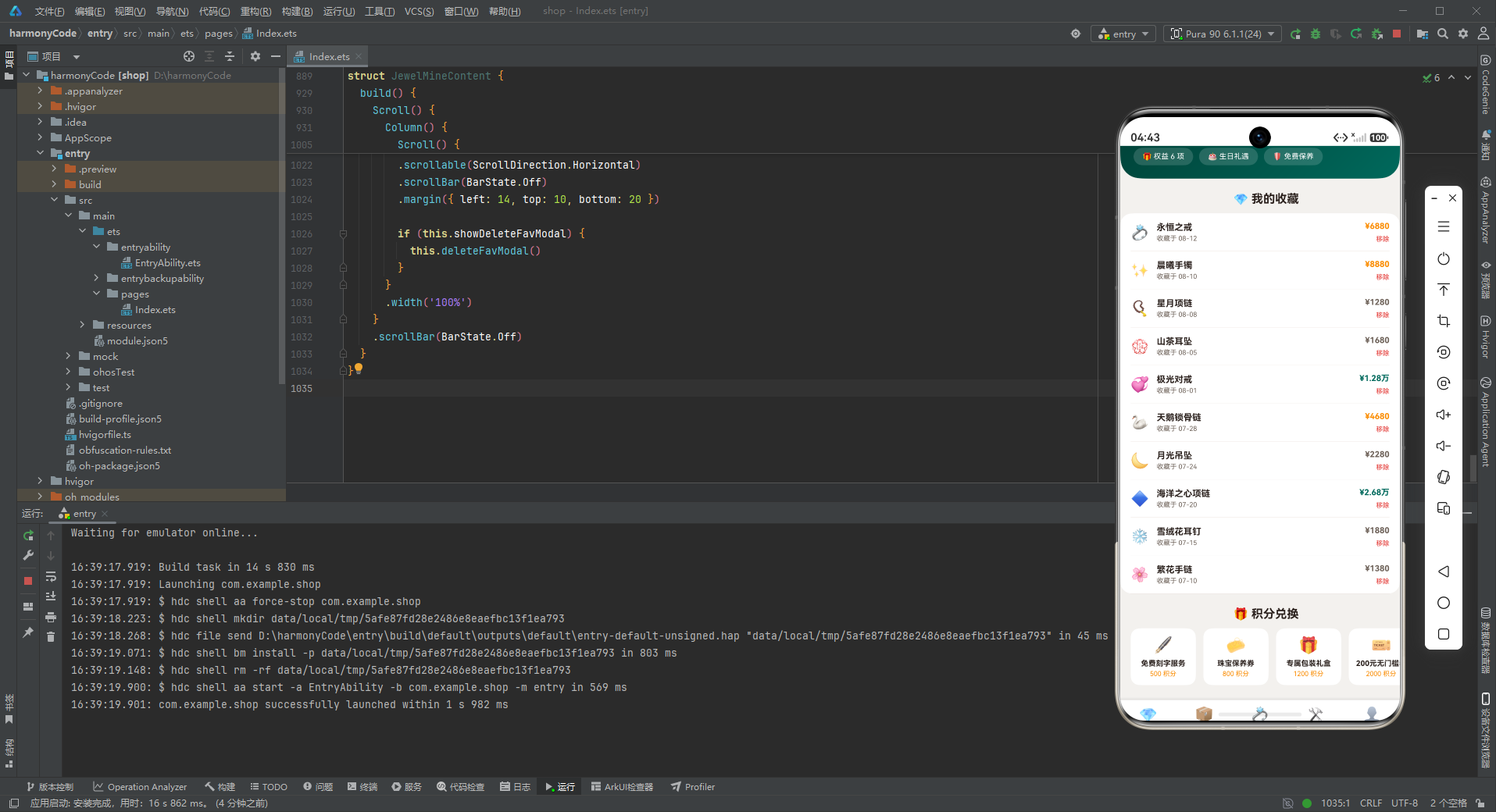
我的收藏列表展示了用户收藏的所有珠宝款式。每行左侧是珠宝emoji,中间是款式名称和收藏日期,右侧是价格和移除操作。
收藏日期记录了用户添加收藏的时间,是一种回忆的载体——用户可以看到自己是什么时候喜欢上这件珠宝的。价格同样使用格式化和颜色编码,方便用户对比不同收藏的价位。
"移除"操作使用红色文字,点击后弹出移除收藏确认弹窗。移除比删除的语气温和,符合珠宝应用的优雅调性。
8.5.3 积分兑换横滑
        Scroll() {
          Row() {
            ForEach(REWARD_LIST, (r: RewardMeta) => {
              Column() {
                Text(r.emoji).fontSize(22)
                Text(r.name).fontSize(10).fontWeight(FontWeight.Bold).fontColor(COLORS.textPrimary)
                  .margin({ top: 6 }).maxLines(1)
                Text(r.points + ' 积分').fontSize(9).fontColor(COLORS.warning).margin({ top: 3 })
              }
              .width(88)
              .padding(10)
              .backgroundColor(COLORS.white).borderRadius(12)
              .margin({ right: 10 })
              .alignItems(HorizontalAlign.Center)
            }, (r: RewardMeta) => r.name)
          }
        }
        .scrollable(ScrollDirection.Horizontal)
        .scrollBar(BarState.Off)
积分兑换横滑展示了可以用积分兑换的礼品。每张礼品卡片包含:礼品emoji图标、礼品名称、所需积分。积分使用金黄色(警告色)显示,与积分的"价值感"相符。
礼品的梯度设计很合理:从500积分的免费刻字服务,到800-1200积分的保养券和礼盒,到2000-5000积分的无门槛券和定制体验,再到8000-20000积分的高级权益和优先购。不同层级的礼品满足了不同积分量级用户的需求,也激励用户持续累积积分向更高目标迈进。
九、弹窗组件详解
9.1 modalOverlay遮罩原理
应用中所有弹窗都采用Stack堆叠布局 + 遮罩层 + 内容卡片的模式。modalOverlay构建器创建全屏半透明黑色遮罩,点击遮罩触发关闭回调。
9.2 新增类弹窗(新增款式)
新增款式弹窗用于上架新的珠宝款式。弹窗结构为:标题栏 + 款式名称输入框 + 价格输入框 + 取消/上架按钮。
确认按钮文案是"上架"而非"保存",更加贴合电商运营的业务场景——新款式需要上架销售。这种文案上的细节处理体现了对行业特点的理解。
9.3 编辑类弹窗(编辑系列)
编辑系列弹窗用于修改珠宝系列的信息。弹窗结构与新增类弹窗类似,但标题为"编辑系列",输入项为系列名称和起售价格。
9.4 删除确认类弹窗
删除确认类弹窗(下架款式、移除收藏、删除图鉴等)用于危险操作的二次确认。确认按钮使用危险色(红色)背景,取消按钮使用浅色背景。
下架款式弹窗的提示文字是"下架后该款式将从在售列表移除,确定下架吗?“,使用"下架"而非"删除”,符合电商运营的术语习惯。移除收藏弹窗使用"移除"而非"删除",语气更加温和优雅。
不同业务场景下的弹窗文案各有特点,但整体结构和交互模式保持一致,既体现了业务差异,又保证了用户体验的统一性。
9.5 登记证书弹窗
登记证书弹窗是定制页面特有的弹窗,用于添加鉴定证书记录。输入项为证书名称和证书编号,确认按钮文案是"登记"。
鉴定证书是高端珠宝的重要配套文件,登记功能让用户可以管理自己的所有珠宝证书,形成完整的珠宝档案。这对于珠宝收藏者来说非常实用。
十、核心UI组件分析
10.1 展柜聚光头卡
展柜聚光头卡是珠宝应用最具标志性的UI组件,三层同心圆光晕效果模拟了珠宝展柜的聚光灯。设计亮点包括:
- 三层光晕:从外到内三个同心圆,透明度逐渐增加,模拟聚光灯效果
- 钻石焦点:光晕中心的大钻石emoji是视觉焦点,璀璨夺目
- 三色渐变:深祖母绿→祖母绿→金黄色的渐变,从深邃到璀璨
- 服务标签:促销、品质、物流三大卖点标签,建立信任
这种头卡设计非常适合高端零售类应用,通过光影效果营造奢华感,第一时间抓住用户眼球,传达品牌的高端定位。
10.2 价格颜色编码系统
珠宝应用独创的价格颜色编码系统是一个非常巧妙的设计:通过formatPrice和getPriceColor两个辅助函数,将价格数字转换为格式化的文本和对应的颜色。
- 万元以上:祖母绿色(主色),代表高端珍藏
- 三千至一万:金黄色(警告色),代表中高端品质
- 三千以下:灰色(次要文字色),代表入门价位
这种设计的好处是多方面的:第一,用户可以通过颜色快速扫描价格分布,找到预算范围内的产品;第二,不同颜色增加了列表的视觉层次,避免了单调;第三,祖母绿作为最高价位的颜色,强化了品牌的高端定位;第四,代码层面实现了数据与展示的分离,价格调整只需要修改数据,展示逻辑自动适配。
10.3 定制流程步骤图
定制流程四步图用简洁的图形化方式展示了定制进度。每个步骤是一个圆形图标+文字的组合,已完成步骤用祖母绿色填充,未完成步骤用灰色填充。
这种步骤图在订单追踪、流程审批、任务进度等场景中都有广泛应用。它的优点是直观易懂,用户一眼就能看出整体进度和当前位置,减少了等待的焦虑感。
10.4 双列网格布局
系列页面和图鉴页面都使用了双列网格布局。双列网格比单列列表信息密度更高,比三列或更多列的点击区域更大,在移动端是一个很好的平衡点。
卡片式的网格布局非常适合展示商品、图片等视觉化内容,每张卡片是一个独立的信息单元,整齐排列形成节奏感。在电商类应用中,双列网格是非常经典的产品展示方式。
十一、技术亮点总结表格
| 功能模块 | 技术实现方式 | 设计模式 | 代码量估计 |
|---|---|---|---|
| 底部Tab导航 | @State + 枚举 + @Builder tabItem | 状态驱动视图 | 约60行 |
| 页面切换 | if-else条件渲染 + @Builder contentArea | 条件渲染模式 | 约30行 |
| 颜色系统 | interface + const常量对象 | 接口契约模式 | 约40行 |
| 数据模型 | 7个interface定义业务实体 | 类型优先设计 | 约60行 |
| Mock数据层 | 7组const数组常量 | 常量配置模式 | 约130行 |
| 辅助函数 | formatPrice/getPriceColor纯函数 | 工具函数模式 | 约20行 |
| 展柜聚光头卡 | linearGradient + 三层同心圆光晕 | 视觉增强模式 | 约55行 |
| 柱状图 | ForEach + Stack堆叠 + 动态高度计算 | 纯代码图表 | 约40行 |
| 系列横滑 | Scroll + Row + ForEach | 横滑列表模式 | 约30行 |
| 双列网格 | Flex + FlexWrap.Wrap + 48%宽度 | 双列网格模式 | 约30行/处 |
| 定制步骤图 | Row + ForEach + 圆形步骤指示器 | 进度可视化模式 | 约25行/处 |
| 价格颜色编码 | getPriceColor动态颜色计算 | 数据可视化模式 | 约10行核心逻辑 |
| 新增款式弹窗 | Stack + modalOverlay + TextInput表单 | 表单弹窗模式 | 约50行/个 |
| 编辑系列弹窗 | Stack + modalOverlay + TextInput表单 | 表单弹窗模式 | 约50行/个 |
| 删除确认弹窗 | Stack + modalOverlay + 确认按钮 | 二次确认模式 | 约35行/个 |
| 登记证书弹窗 | Stack + modalOverlay + TextInput表单 | 表单弹窗模式 | 约50行/个 |
安装DevEco Studio程序

选择目标安装目录:

设置环境变量,但是需要重启一下:

新建一个空白模板:

设置API为24的模板项目:
初始化项目,自动下载相关依赖:

完整代码:
// ============================================================
// 527.ets 珠宝首饰 APP — JewelApp
// 主色调: 祖母绿 #00695C + 玫瑰金 #BCAAA4
// 布局: 展柜聚光头卡(光晕特效) + 周销量柱状图 + 宝石系列横滑
// + 热门款式列表 + 鉴定证书 + 定制流程四步
// + 会员头卡 + 我的收藏 + 积分兑换
// 弹窗: 新增款式 / 编辑系列 / 删除收藏 (全部 modalOverlay)
// ============================================================
interface JewelColorPalette {
primary: string
primaryLight: string
primaryDark: string
accent: string
accentLight: string
rose: string
bg: string
cardBg: string
textPrimary: string
textSecondary: string
textHint: string
border: string
success: string
warning: string
danger: string
white: string
}
interface TabMeta {
title: string
icon: string
}
interface SeriesMeta {
name: string
emoji: string
count: number
price: number
isHot: boolean
}
interface StyleMeta {
name: string
emoji: string
material: string
price: number
isNew: boolean
isHot: boolean
}
interface FavMeta {
name: string
emoji: string
price: number
date: string
isTop: boolean
}
interface CertMeta {
name: string
emoji: string
no: string
date: string
isDone: boolean
}
interface WeekSaleMeta {
label: string
value: number
}
interface StepMeta {
name: string
emoji: string
desc: string
isDone: boolean
}
interface RewardMeta {
name: string
emoji: string
points: number
isNew: boolean
}
const COLORS: JewelColorPalette = {
primary: '#00695C',
primaryLight: '#4DB6AC',
primaryDark: '#003D33',
accent: '#FFB300',
accentLight: '#FFF8E1',
rose: '#BCAAA4',
bg: '#F4F1EE',
cardBg: '#FFFFFF',
textPrimary: '#2A201C',
textSecondary: '#6E6259',
textHint: '#AFA199',
border: '#ECE4DE',
success: '#43A047',
warning: '#FB8C00',
danger: '#E53935',
white: '#FFFFFF'
}
const TAB_CONFIG: Record<string, TabMeta> = {
'HOME': { title: '首页', icon: '💎' },
'SERIES': { title: '系列', icon: '📦' },
'STYLE': { title: '款式', icon: '💍' },
'CUSTOM': { title: '定制', icon: '🛠️' },
'MINE': { title: '我的', icon: '👤' }
}
const SERIES_LIST: SeriesMeta[] = [
{ name: '晨曦系列', emoji: '🌅', count: 12, price: 1280, isHot: true },
{ name: '星河系列', emoji: '🌌', count: 9, price: 1680, isHot: true },
{ name: '山茶系列', emoji: '🌺', count: 15, price: 980, isHot: true },
{ name: '蝶舞系列', emoji: '🦋', count: 8, price: 1380, isHot: true },
{ name: '月光系列', emoji: '🌙', count: 11, price: 2180, isHot: false },
{ name: '极光系列', emoji: '🌠', count: 7, price: 3280, isHot: false },
{ name: '知更鸟系列', emoji: '🐦', count: 10, price: 1580, isHot: false },
{ name: '海洋之心系列', emoji: '🌊', count: 6, price: 2680, isHot: false },
{ name: '雪绒花系列', emoji: '❄️', count: 13, price: 1180, isHot: false },
{ name: '繁花系列', emoji: '🌸', count: 18, price: 880, isHot: false }
]
const STYLE_LIST: StyleMeta[] = [
{ name: '永恒之戒', emoji: '💍', material: '18K金·钻石', price: 6880, isNew: true, isHot: true },
{ name: '星月项链', emoji: '📿', material: 'S925银·锆石', price: 1280, isNew: false, isHot: true },
{ name: '晨曦手镯', emoji: '✨', material: '翡翠·18K金', price: 8880, isNew: true, isHot: true },
{ name: '山茶耳坠', emoji: '💮', material: '珍珠·银镀金', price: 1680, isNew: false, isHot: true },
{ name: '蝶舞胸针', emoji: '🦋', material: '珐琅·银', price: 980, isNew: false, isHot: false },
{ name: '月光吊坠', emoji: '🌙', material: '月光石·银', price: 2280, isNew: true, isHot: false },
{ name: '极光对戒', emoji: '💞', material: '铂金·蓝宝石', price: 12800, isNew: false, isHot: false },
{ name: '知更鸟尾戒', emoji: '🐦', material: '玫瑰金·红宝石', price: 3680, isNew: false, isHot: false },
{ name: '海洋之心项链', emoji: '🔷', material: '蓝钻·铂金', price: 26800, isNew: true, isHot: false },
{ name: '雪绒花耳钉', emoji: '❄️', material: '白钻·银', price: 1880, isNew: false, isHot: false },
{ name: '繁花手链', emoji: '🌸', material: '玛瑙·银镀金', price: 1380, isNew: false, isHot: false },
{ name: '天鹅锁骨链', emoji: '🦢', material: '珍珠·18K金', price: 4680, isNew: true, isHot: false }
]
const FAV_LIST: FavMeta[] = [
{ name: '永恒之戒', emoji: '💍', price: 6880, date: '08-12', isTop: true },
{ name: '晨曦手镯', emoji: '✨', price: 8880, date: '08-10', isTop: true },
{ name: '星月项链', emoji: '📿', price: 1280, date: '08-08', isTop: true },
{ name: '山茶耳坠', emoji: '💮', price: 1680, date: '08-05', isTop: false },
{ name: '极光对戒', emoji: '💞', price: 12800, date: '08-01', isTop: false },
{ name: '天鹅锁骨链', emoji: '🦢', price: 4680, date: '07-28', isTop: false },
{ name: '月光吊坠', emoji: '🌙', price: 2280, date: '07-24', isTop: false },
{ name: '海洋之心项链', emoji: '🔷', price: 26800, date: '07-20', isTop: false },
{ name: '雪绒花耳钉', emoji: '❄️', price: 1880, date: '07-15', isTop: false },
{ name: '繁花手链', emoji: '🌸', price: 1380, date: '07-10', isTop: false }
]
const CERT_LIST: CertMeta[] = [
{ name: '永恒之戒·钻石证书', emoji: '📜', no: 'NGTC-20260812', date: '08-12', isDone: true },
{ name: '晨曦手镯·翡翠证书', emoji: '📜', no: 'NGTC-20260810', date: '08-10', isDone: true },
{ name: '极光对戒·蓝宝石证书', emoji: '📜', no: 'GIA-20260801', date: '08-01', isDone: true },
{ name: '海洋之心·蓝钻证书', emoji: '📜', no: 'GIA-20260720', date: '07-20', isDone: true },
{ name: '天鹅锁骨链·珍珠证书', emoji: '📜', no: 'NGTC-20260715', date: '07-15', isDone: false },
{ name: '月光吊坠·月光石证书', emoji: '📜', no: 'NGTC-20260712', date: '07-12', isDone: false },
{ name: '雪绒花耳钉·白钻证书', emoji: '📜', no: 'GIA-20260708', date: '07-08', isDone: false },
{ name: '繁花手链·玛瑙证书', emoji: '📜', no: 'NGTC-20260705', date: '07-05', isDone: false }
]
const WEEK_SALE: WeekSaleMeta[] = [
{ label: '周一', value: 26 },
{ label: '周二', value: 18 },
{ label: '周三', value: 32 },
{ label: '周四', value: 24 },
{ label: '周五', value: 41 },
{ label: '周六', value: 58 },
{ label: '周日', value: 49 }
]
const STEP_LIST: StepMeta[] = [
{ name: '选材', emoji: '💎', desc: '挑选主石', isDone: true },
{ name: '设计', emoji: '✏️', desc: '草图确认', isDone: true },
{ name: '起版', emoji: '🛠️', desc: '蜡模制作', isDone: true },
{ name: '镶嵌', emoji: '🔨', desc: '成品交付', isDone: false }
]
const REWARD_LIST: RewardMeta[] = [
{ name: '免费刻字服务', emoji: '🖋️', points: 500, isNew: true },
{ name: '珠宝保养券', emoji: '🧼', points: 800, isNew: true },
{ name: '专属包装礼盒', emoji: '🎁', points: 1200, isNew: true },
{ name: '200元无门槛券', emoji: '🎫', points: 2000, isNew: false },
{ name: '私人定制体验', emoji: '💎', points: 5000, isNew: false },
{ name: '周年纪念日定制', emoji: '🎂', points: 8000, isNew: false },
{ name: '高级会员专属折扣', emoji: '👑', points: 10000, isNew: false },
{ name: '海外典藏款优先购', emoji: '🌍', points: 20000, isNew: false }
]
function formatPrice(price: number): string {
if (price >= 10000) {
return (price / 10000) + '万'
}
return price + ''
}
function getPriceColor(price: number): string {
if (price >= 10000) {
return COLORS.primary
} else if (price >= 3000) {
return COLORS.warning
}
return COLORS.textSecondary
}
enum JewelTab {
HOME,
SERIES,
STYLE,
CUSTOM,
MINE
}
@Entry
@Component
struct JewelApp {
@State activeTab: JewelTab = JewelTab.HOME
@Builder contentArea() {
Column() {
if (this.activeTab === JewelTab.HOME) {
JewelHomeContent()
} else if (this.activeTab === JewelTab.SERIES) {
JewelSeriesContent()
} else if (this.activeTab === JewelTab.STYLE) {
JewelStyleContent()
} else if (this.activeTab === JewelTab.CUSTOM) {
JewelCustomContent()
} else if (this.activeTab === JewelTab.MINE) {
JewelMineContent()
}
}
.width('100%')
}
@Builder tabItem(icon: string, label: string, tab: JewelTab) {
Column() {
Text(icon).fontSize(20)
Text(label).fontSize(10)
.fontColor(this.activeTab === tab ? COLORS.primary : COLORS.textHint)
.fontWeight(this.activeTab === tab ? FontWeight.Bold : FontWeight.Normal)
.margin({ top: 2 })
}
.layoutWeight(1)
.onClick(() => { this.activeTab = tab })
}
build() {
Column() {
this.contentArea()
Row() {
this.tabItem(TAB_CONFIG.HOME.icon, TAB_CONFIG.HOME.title, JewelTab.HOME)
this.tabItem(TAB_CONFIG.SERIES.icon, TAB_CONFIG.SERIES.title, JewelTab.SERIES)
this.tabItem(TAB_CONFIG.STYLE.icon, TAB_CONFIG.STYLE.title, JewelTab.STYLE)
this.tabItem(TAB_CONFIG.CUSTOM.icon, TAB_CONFIG.CUSTOM.title, JewelTab.CUSTOM)
this.tabItem(TAB_CONFIG.MINE.icon, TAB_CONFIG.MINE.title, JewelTab.MINE)
}
.width('100%')
.padding({ top: 8, bottom: 8 })
.backgroundColor(COLORS.white)
.shadow({ radius: 10, color: '#2A201C26', offsetY: -2 })
}
.width('100%').height('100%')
.backgroundColor(COLORS.bg)
}
}
@Component
struct JewelHomeContent {
@State showAddStyleModal: boolean = false
@State styleName: string = ''
@State stylePrice: string = ''
@Builder modalOverlay(onClose: () => void) {
Column()
.width('100%').height('100%')
.backgroundColor('rgba(0,0,0,0.55)')
.onClick(onClose)
}
@Builder addStyleModal() {
Stack() {
this.modalOverlay(() => { this.showAddStyleModal = false })
Column() {
Row() {
Text('💍 新增款式').fontSize(18).fontWeight(FontWeight.Bold).fontColor(COLORS.textPrimary)
Column().layoutWeight(1)
Text('✕').fontSize(18).fontColor(COLORS.textHint).onClick(() => { this.showAddStyleModal = false })
}
.width('100%').padding({ left: 20, right: 20, top: 18, bottom: 12 })
Divider().color(COLORS.border)
Column() {
Text('款式名称').fontSize(12).fontColor(COLORS.textSecondary).margin({ top: 12, left: 20 })
TextInput({ placeholder: '如 晨曦手镯' })
.placeholderColor(COLORS.textHint).fontSize(14).width('90%')
.backgroundColor(COLORS.bg).borderRadius(8)
.margin({ left: 20, right: 20, top: 4 })
.onChange((v: string) => { this.styleName = v })
Text('价格').fontSize(12).fontColor(COLORS.textSecondary).margin({ top: 14, left: 20 })
TextInput({ placeholder: '如 8880' })
.placeholderColor(COLORS.textHint).fontSize(14).width('90%')
.backgroundColor(COLORS.bg).borderRadius(8)
.margin({ left: 20, right: 20, top: 4 })
.onChange((v: string) => { this.stylePrice = v })
Row() {
Text('取消').fontSize(14).fontColor(COLORS.textSecondary)
.layoutWeight(1).textAlign(TextAlign.Center)
.padding({ top: 10, bottom: 10 })
.backgroundColor(COLORS.bg).borderRadius(8)
.onClick(() => { this.showAddStyleModal = false })
Column().width(12)
Text('上架').fontSize(14).fontColor(COLORS.white)
.layoutWeight(1).textAlign(TextAlign.Center)
.padding({ top: 10, bottom: 10 })
.backgroundColor(COLORS.primary).borderRadius(8)
.onClick(() => { this.showAddStyleModal = false })
}
.margin({ left: 20, right: 20, top: 20, bottom: 20 })
}
.constraintSize({ maxHeight: '70%' })
}
.width('88%')
.backgroundColor(COLORS.cardBg).borderRadius(16)
}
.width('100%').height('100%')
}
build() {
Scroll() {
Column() {
// 展柜聚光头卡(光晕特效)
Column() {
Stack() {
Column().width(150).height(150).borderRadius(75)
.backgroundColor('rgba(255,255,255,0.10)')
.margin({ top: 12, left: 30 })
Column().width(110).height(110).borderRadius(55)
.backgroundColor('rgba(255,255,255,0.14)')
.margin({ top: 32, left: 50 })
Column().width(70).height(70).borderRadius(35)
.backgroundColor('rgba(255,255,255,0.20)')
.margin({ top: 52, left: 70 })
Column() {
Text('💎').fontSize(34).margin({ top: 26, left: 96 })
Text('臻选珠宝').fontSize(11).fontColor('#B2DFDB')
Text('本月新品 26 件').fontSize(24).fontWeight(FontWeight.Bold).fontColor(COLORS.white)
.margin({ top: 4 })
Text('每件附国际权威鉴定证书').fontSize(10).fontColor('#B2DFDB').margin({ top: 6 })
}
.alignItems(HorizontalAlign.Center)
}
.width('100%')
Row() {
Text('🎁 七夕专场 8.8折').fontSize(10).fontColor(COLORS.primaryDark)
.padding({ left: 12, right: 12, top: 6, bottom: 6 })
.backgroundColor(COLORS.accentLight).borderRadius(12)
Text('🔒 假一赔十').fontSize(10).fontColor(COLORS.white)
.padding({ left: 12, right: 12, top: 6, bottom: 6 })
.backgroundColor('#003D33').borderRadius(12)
.margin({ left: 8 })
Text('🚚 顺丰包邮').fontSize(10).fontColor(COLORS.white)
.padding({ left: 12, right: 12, top: 6, bottom: 6 })
.backgroundColor('#003D33').borderRadius(12)
.margin({ left: 8 })
}
.width('100%').margin({ top: 8 })
}
.width('100%')
.padding({ left: 18, right: 18, top: 16, bottom: 20 })
.linearGradient({ angle: 135, colors: [[COLORS.primaryDark, 0.0], [COLORS.primary, 0.85], [COLORS.accent, 1.0]] })
.borderRadius({ bottomLeft: 28, bottomRight: 28 })
// 周销量柱状图
Column() {
Row() {
Text('📊 本周销量(件)').fontSize(15).fontWeight(FontWeight.Bold).fontColor(COLORS.textPrimary)
Column().layoutWeight(1)
Text('合计 248 件').fontSize(11).fontColor(COLORS.primary).fontWeight(FontWeight.Bold)
}
.width('100%')
Row() {
ForEach(WEEK_SALE, (v: WeekSaleMeta, i: number) => {
Column() {
Text(v.value + '').fontSize(9).fontColor(COLORS.textSecondary)
Stack({ alignContent: Alignment.Bottom }) {
Column().width(16).height(70).backgroundColor(COLORS.border).borderRadius(8)
Column().width(16).height(Number(v.value) * 1.1).backgroundColor(
i === 5 || i === 6 ? COLORS.accent : COLORS.primary)
.borderRadius(8)
}
.width(16).height(70).margin({ top: 4 })
Text(v.label).fontSize(9).fontColor(COLORS.textHint).margin({ top: 4 })
}
.layoutWeight(1)
.alignItems(HorizontalAlign.Center)
}, (v: WeekSaleMeta, i: number) => v.label + i)
}
.width('100%').margin({ top: 12 })
}
.width('100%')
.padding(16)
.backgroundColor(COLORS.cardBg).borderRadius(16)
.margin({ left: 14, right: 14, top: 14 })
// 宝石系列横滑
Text('📦 臻选系列').fontSize(16).fontWeight(FontWeight.Bold).fontColor(COLORS.textPrimary)
.margin({ left: 16, top: 18 })
Scroll() {
Row() {
ForEach(SERIES_LIST, (s: SeriesMeta) => {
if (s.isHot) {
Column() {
Text(s.emoji).fontSize(26)
Text(s.name).fontSize(11).fontWeight(FontWeight.Bold).fontColor(COLORS.textPrimary)
.margin({ top: 6 })
Text(s.count + ' 款').fontSize(9).fontColor(COLORS.textHint).margin({ top: 3 })
Text('¥' + formatPrice(s.price) + '起').fontSize(10).fontColor(COLORS.primary)
.fontWeight(FontWeight.Bold).margin({ top: 4 })
}
.width(92)
.padding(10)
.backgroundColor(COLORS.accentLight).borderRadius(12)
.margin({ right: 10 })
.alignItems(HorizontalAlign.Center)
}
}, (s: SeriesMeta) => s.name)
}
}
.scrollable(ScrollDirection.Horizontal)
.scrollBar(BarState.Off)
.margin({ left: 14, top: 10 })
// 热门款式列表
Text('💍 人气款式').fontSize(16).fontWeight(FontWeight.Bold).fontColor(COLORS.textPrimary)
.margin({ left: 16, top: 18 })
Column() {
ForEach(STYLE_LIST.slice(0, 5), (s: StyleMeta) => {
Row() {
Text(s.emoji).fontSize(20)
Column() {
Text(s.name).fontSize(12).fontWeight(FontWeight.Bold).fontColor(COLORS.textPrimary)
Text(s.material).fontSize(9).fontColor(COLORS.textSecondary).margin({ top: 3 })
}
.alignItems(HorizontalAlign.Start)
.layoutWeight(1)
.margin({ left: 10 })
Column() {
Text('¥' + formatPrice(s.price)).fontSize(12)
.fontColor(getPriceColor(s.price)).fontWeight(FontWeight.Bold)
if (s.isHot) {
Text('热卖').fontSize(8).fontColor(COLORS.danger).margin({ top: 4 })
}
}
.alignItems(HorizontalAlign.End)
}
.width('100%')
.padding({ top: 10, bottom: 10 })
Divider().color(COLORS.border)
}, (s: StyleMeta) => s.name)
}
.width('100%')
.padding({ left: 14, right: 14 })
.backgroundColor(COLORS.white).borderRadius(16)
.margin({ left: 14, right: 14, top: 10 })
// 定制流程四步
Text('🛠️ 定制流程').fontSize(16).fontWeight(FontWeight.Bold).fontColor(COLORS.textPrimary)
.margin({ left: 16, top: 18 })
Row() {
ForEach(STEP_LIST, (st: StepMeta) => {
Column() {
Column() {
Text(st.emoji).fontSize(20)
}
.width(40).height(40).borderRadius(20)
.backgroundColor(st.isDone ? COLORS.primary : COLORS.border)
.alignItems(HorizontalAlign.Center)
Text(st.name).fontSize(10).fontWeight(FontWeight.Bold).fontColor(COLORS.textPrimary)
.margin({ top: 6 })
Text(st.desc).fontSize(8).fontColor(COLORS.textHint).margin({ top: 2 })
}
.layoutWeight(1)
.alignItems(HorizontalAlign.Center)
}, (st: StepMeta) => st.name)
}
.width('100%')
.padding(16)
.backgroundColor(COLORS.white).borderRadius(16)
.margin({ left: 14, right: 14, top: 10 })
Text('💍 新增款式').fontSize(13).fontColor(COLORS.white)
.width('90%').textAlign(TextAlign.Center)
.padding({ top: 12, bottom: 12 })
.backgroundColor(COLORS.primary).borderRadius(10)
.margin({ left: 20, right: 20, top: 16, bottom: 20 })
.onClick(() => { this.showAddStyleModal = true })
if (this.showAddStyleModal) {
this.addStyleModal()
}
}
.width('100%')
}
.scrollBar(BarState.Off)
}
}
@Component
struct JewelSeriesContent {
@State showEditSeriesModal: boolean = false
@State seriesName: string = ''
@State seriesPrice: string = ''
@Builder modalOverlay(onClose: () => void) {
Column()
.width('100%').height('100%')
.backgroundColor('rgba(0,0,0,0.55)')
.onClick(onClose)
}
@Builder editSeriesModal() {
Stack() {
this.modalOverlay(() => { this.showEditSeriesModal = false })
Column() {
Row() {
Text('📦 编辑系列').fontSize(18).fontWeight(FontWeight.Bold).fontColor(COLORS.textPrimary)
Column().layoutWeight(1)
Text('✕').fontSize(18).fontColor(COLORS.textHint).onClick(() => { this.showEditSeriesModal = false })
}
.width('100%').padding({ left: 20, right: 20, top: 18, bottom: 12 })
Divider().color(COLORS.border)
Column() {
Text('系列名称').fontSize(12).fontColor(COLORS.textSecondary).margin({ top: 12, left: 20 })
TextInput({ placeholder: '如 晨曦系列' })
.placeholderColor(COLORS.textHint).fontSize(14).width('90%')
.backgroundColor(COLORS.bg).borderRadius(8)
.margin({ left: 20, right: 20, top: 4 })
.onChange((v: string) => { this.seriesName = v })
Text('起售价格').fontSize(12).fontColor(COLORS.textSecondary).margin({ top: 14, left: 20 })
TextInput({ placeholder: '如 1280' })
.placeholderColor(COLORS.textHint).fontSize(14).width('90%')
.backgroundColor(COLORS.bg).borderRadius(8)
.margin({ left: 20, right: 20, top: 4 })
.onChange((v: string) => { this.seriesPrice = v })
Row() {
Text('取消').fontSize(14).fontColor(COLORS.textSecondary)
.layoutWeight(1).textAlign(TextAlign.Center)
.padding({ top: 10, bottom: 10 })
.backgroundColor(COLORS.bg).borderRadius(8)
.onClick(() => { this.showEditSeriesModal = false })
Column().width(12)
Text('保存').fontSize(14).fontColor(COLORS.white)
.layoutWeight(1).textAlign(TextAlign.Center)
.padding({ top: 10, bottom: 10 })
.backgroundColor(COLORS.primary).borderRadius(8)
.onClick(() => { this.showEditSeriesModal = false })
}
.margin({ left: 20, right: 20, top: 20, bottom: 20 })
}
.constraintSize({ maxHeight: '70%' })
}
.width('88%')
.backgroundColor(COLORS.cardBg).borderRadius(16)
}
.width('100%').height('100%')
}
build() {
Scroll() {
Column() {
// 系列头卡
Column() {
Text('📦 品牌系列').fontSize(11).fontColor('#B2DFDB')
Text('10 大经典系列').fontSize(24).fontWeight(FontWeight.Bold).fontColor(COLORS.white)
.margin({ top: 4 })
Text('设计师联名 · 限量发行').fontSize(10).fontColor('#B2DFDB').margin({ top: 6 })
}
.width('100%')
.padding(20)
.linearGradient({ angle: 135, colors: [[COLORS.primaryDark, 0.0], [COLORS.primary, 1.0]] })
.alignItems(HorizontalAlign.Center)
.borderRadius({ bottomLeft: 28, bottomRight: 28 })
// 系列双列
Flex({ wrap: FlexWrap.Wrap, justifyContent: FlexAlign.SpaceBetween }) {
ForEach(SERIES_LIST, (s: SeriesMeta) => {
Column() {
Text(s.emoji).fontSize(26)
Text(s.name).fontSize(12).fontWeight(FontWeight.Bold).fontColor(COLORS.textPrimary)
.margin({ top: 6 })
Text(s.count + ' 款 · ¥' + formatPrice(s.price) + '起').fontSize(9)
.fontColor(COLORS.textSecondary).margin({ top: 3 })
Text(s.isHot ? '🔥 热卖' : '查看系列').fontSize(9)
.fontColor(s.isHot ? COLORS.danger : COLORS.primary).margin({ top: 6 })
}
.width('48%')
.padding(14)
.backgroundColor(COLORS.white).borderRadius(12)
.margin({ bottom: 10 })
.alignItems(HorizontalAlign.Center)
.onClick(() => { this.showEditSeriesModal = true })
}, (s: SeriesMeta) => s.name)
}
.width('100%')
.margin({ left: 14, right: 14, top: 14, bottom: 20 })
if (this.showEditSeriesModal) {
this.editSeriesModal()
}
}
.width('100%')
}
.scrollBar(BarState.Off)
}
}
@Component
struct JewelStyleContent {
@State showDeleteStyleModal: boolean = false
@Builder modalOverlay(onClose: () => void) {
Column()
.width('100%').height('100%')
.backgroundColor('rgba(0,0,0,0.55)')
.onClick(onClose)
}
@Builder deleteStyleModal() {
Stack() {
this.modalOverlay(() => { this.showDeleteStyleModal = false })
Column() {
Text('💍 下架款式').fontSize(18).fontWeight(FontWeight.Bold).fontColor(COLORS.textPrimary)
.margin({ top: 24 })
Text('下架后该款式将从在售列表移除,确定下架吗?')
.fontSize(13).fontColor(COLORS.textSecondary).margin({ top: 10 })
Row() {
Text('取消').fontSize(14).fontColor(COLORS.textSecondary)
.layoutWeight(1).textAlign(TextAlign.Center)
.padding({ top: 10, bottom: 10 })
.backgroundColor(COLORS.bg).borderRadius(8)
.onClick(() => { this.showDeleteStyleModal = false })
Column().width(12)
Text('确认下架').fontSize(14).fontColor(COLORS.white)
.layoutWeight(1).textAlign(TextAlign.Center)
.padding({ top: 10, bottom: 10 })
.backgroundColor(COLORS.danger).borderRadius(8)
.onClick(() => { this.showDeleteStyleModal = false })
}
.width('100%')
.margin({ left: 20, right: 20, top: 20, bottom: 20 })
}
.width('82%')
.backgroundColor(COLORS.cardBg).borderRadius(16)
}
.width('100%').height('100%')
}
build() {
Scroll() {
Column() {
// 款式头卡
Column() {
Row() {
Column() {
Text('💍 全部款式').fontSize(11).fontColor('#B2DFDB')
Text('共 126 款').fontSize(24).fontWeight(FontWeight.Bold).fontColor(COLORS.white)
.margin({ top: 4 })
Text('戒指 · 项链 · 手镯 · 耳饰').fontSize(10).fontColor('#B2DFDB').margin({ top: 6 })
}
.alignItems(HorizontalAlign.Start)
.layoutWeight(1)
Column() {
Text('TOP').fontSize(16).fontWeight(FontWeight.Bold).fontColor(COLORS.white)
Text('永恒之戒').fontSize(9).fontColor('#B2DFDB').margin({ top: 2 })
}
.alignItems(HorizontalAlign.End)
}
.width('100%')
}
.width('100%')
.padding(20)
.linearGradient({ angle: 135, colors: [[COLORS.primary, 0.0], [COLORS.rose, 1.0]] })
.borderRadius({ bottomLeft: 28, bottomRight: 28 })
// 全部款式列表
Text('📋 全部款式').fontSize(16).fontWeight(FontWeight.Bold).fontColor(COLORS.textPrimary)
.margin({ left: 16, top: 18 })
Column() {
ForEach(STYLE_LIST, (s: StyleMeta) => {
Row() {
Text(s.emoji).fontSize(20)
Column() {
Text(s.name).fontSize(13).fontWeight(FontWeight.Bold).fontColor(COLORS.textPrimary)
Row() {
Text(s.material).fontSize(9).fontColor(COLORS.textSecondary)
if (s.isNew) {
Text('新').fontSize(8).fontColor(COLORS.white)
.padding({ left: 4, right: 4, top: 1, bottom: 1 })
.backgroundColor(COLORS.success).borderRadius(6)
.margin({ left: 6 })
}
if (s.isHot) {
Text('热').fontSize(8).fontColor(COLORS.white)
.padding({ left: 4, right: 4, top: 1, bottom: 1 })
.backgroundColor(COLORS.danger).borderRadius(6)
.margin({ left: 4 })
}
}
.margin({ top: 4 })
}
.alignItems(HorizontalAlign.Start)
.layoutWeight(1)
.margin({ left: 10 })
Column() {
Text('¥' + formatPrice(s.price)).fontSize(12)
.fontColor(getPriceColor(s.price)).fontWeight(FontWeight.Bold)
Text('下架').fontSize(9).fontColor(COLORS.danger).margin({ top: 6 })
.onClick(() => { this.showDeleteStyleModal = true })
}
.alignItems(HorizontalAlign.End)
}
.width('100%')
.padding({ top: 11, bottom: 11 })
Divider().color(COLORS.border)
}, (s: StyleMeta) => s.name)
}
.width('100%')
.padding({ left: 14, right: 14 })
.backgroundColor(COLORS.white).borderRadius(16)
.margin({ left: 14, right: 14, top: 10, bottom: 20 })
if (this.showDeleteStyleModal) {
this.deleteStyleModal()
}
}
.width('100%')
}
.scrollBar(BarState.Off)
}
}
@Component
struct JewelCustomContent {
@State showAddCertModal: boolean = false
@State certName: string = ''
@State certNo: string = ''
@Builder modalOverlay(onClose: () => void) {
Column()
.width('100%').height('100%')
.backgroundColor('rgba(0,0,0,0.55)')
.onClick(onClose)
}
@Builder addCertModal() {
Stack() {
this.modalOverlay(() => { this.showAddCertModal = false })
Column() {
Row() {
Text('📜 登记鉴定证书').fontSize(18).fontWeight(FontWeight.Bold).fontColor(COLORS.textPrimary)
Column().layoutWeight(1)
Text('✕').fontSize(18).fontColor(COLORS.textHint).onClick(() => { this.showAddCertModal = false })
}
.width('100%').padding({ left: 20, right: 20, top: 18, bottom: 12 })
Divider().color(COLORS.border)
Column() {
Text('证书名称').fontSize(12).fontColor(COLORS.textSecondary).margin({ top: 12, left: 20 })
TextInput({ placeholder: '如 永恒之戒·钻石证书' })
.placeholderColor(COLORS.textHint).fontSize(14).width('90%')
.backgroundColor(COLORS.bg).borderRadius(8)
.margin({ left: 20, right: 20, top: 4 })
.onChange((v: string) => { this.certName = v })
Text('证书编号').fontSize(12).fontColor(COLORS.textSecondary).margin({ top: 14, left: 20 })
TextInput({ placeholder: '如 NGTC-20260812' })
.placeholderColor(COLORS.textHint).fontSize(14).width('90%')
.backgroundColor(COLORS.bg).borderRadius(8)
.margin({ left: 20, right: 20, top: 4 })
.onChange((v: string) => { this.certNo = v })
Row() {
Text('取消').fontSize(14).fontColor(COLORS.textSecondary)
.layoutWeight(1).textAlign(TextAlign.Center)
.padding({ top: 10, bottom: 10 })
.backgroundColor(COLORS.bg).borderRadius(8)
.onClick(() => { this.showAddCertModal = false })
Column().width(12)
Text('登记').fontSize(14).fontColor(COLORS.white)
.layoutWeight(1).textAlign(TextAlign.Center)
.padding({ top: 10, bottom: 10 })
.backgroundColor(COLORS.primary).borderRadius(8)
.onClick(() => { this.showAddCertModal = false })
}
.margin({ left: 20, right: 20, top: 20, bottom: 20 })
}
.constraintSize({ maxHeight: '70%' })
}
.width('88%')
.backgroundColor(COLORS.cardBg).borderRadius(16)
}
.width('100%').height('100%')
}
build() {
Scroll() {
Column() {
// 定制头卡
Column() {
Text('🛠️ 私人定制').fontSize(11).fontColor('#B2DFDB')
Text('打造专属你的珠宝').fontSize(22).fontWeight(FontWeight.Bold).fontColor(COLORS.white)
.margin({ top: 4 })
Text('1对1 设计师服务 · 45 天交付').fontSize(10).fontColor('#B2DFDB').margin({ top: 6 })
}
.width('100%')
.padding(20)
.linearGradient({ angle: 135, colors: [[COLORS.primaryDark, 0.0], [COLORS.accent, 1.0]] })
.alignItems(HorizontalAlign.Center)
.borderRadius({ bottomLeft: 28, bottomRight: 28 })
// 定制流程
Row() {
ForEach(STEP_LIST, (st: StepMeta) => {
Column() {
Column() {
Text(st.emoji).fontSize(20)
}
.width(42).height(42).borderRadius(21)
.backgroundColor(st.isDone ? COLORS.primary : COLORS.border)
.alignItems(HorizontalAlign.Center)
Text(st.name).fontSize(10).fontWeight(FontWeight.Bold).fontColor(COLORS.textPrimary)
.margin({ top: 6 })
Text(st.desc).fontSize(8).fontColor(COLORS.textHint).margin({ top: 2 })
}
.layoutWeight(1)
.alignItems(HorizontalAlign.Center)
}, (st: StepMeta) => st.name)
}
.width('100%')
.padding(16)
.backgroundColor(COLORS.white).borderRadius(16)
.margin({ left: 14, right: 14, top: 14 })
// 鉴定证书列表
Text('📜 我的鉴定证书').fontSize(16).fontWeight(FontWeight.Bold).fontColor(COLORS.textPrimary)
.margin({ left: 16, top: 18 })
Column() {
ForEach(CERT_LIST, (c: CertMeta) => {
Row() {
Text(c.emoji).fontSize(18)
Column() {
Text(c.name).fontSize(12).fontWeight(FontWeight.Bold).fontColor(COLORS.textPrimary)
Text(c.no + ' · ' + c.date).fontSize(9).fontColor(COLORS.textSecondary).margin({ top: 3 })
}
.alignItems(HorizontalAlign.Start)
.layoutWeight(1)
.margin({ left: 10 })
Text(c.isDone ? '已出证' : '办理中').fontSize(9)
.fontColor(c.isDone ? COLORS.success : COLORS.warning)
}
.width('100%')
.padding({ top: 11, bottom: 11 })
Divider().color(COLORS.border)
}, (c: CertMeta) => c.no)
}
.width('100%')
.padding({ left: 14, right: 14 })
.backgroundColor(COLORS.white).borderRadius(16)
.margin({ left: 14, right: 14, top: 10 })
Text('📜 登记证书').fontSize(13).fontColor(COLORS.white)
.width('90%').textAlign(TextAlign.Center)
.padding({ top: 12, bottom: 12 })
.backgroundColor(COLORS.primary).borderRadius(10)
.margin({ left: 20, right: 20, top: 16, bottom: 20 })
.onClick(() => { this.showAddCertModal = true })
if (this.showAddCertModal) {
this.addCertModal()
}
}
.width('100%')
}
.scrollBar(BarState.Off)
}
}
@Component
struct JewelMineContent {
@State showDeleteFavModal: boolean = false
@Builder modalOverlay(onClose: () => void) {
Column()
.width('100%').height('100%')
.backgroundColor('rgba(0,0,0,0.55)')
.onClick(onClose)
}
@Builder deleteFavModal() {
Stack() {
this.modalOverlay(() => { this.showDeleteFavModal = false })
Column() {
Text('💎 移除收藏').fontSize(18).fontWeight(FontWeight.Bold).fontColor(COLORS.textPrimary)
.margin({ top: 24 })
Text('移除后该款式将从收藏夹消失,确定移除吗?')
.fontSize(13).fontColor(COLORS.textSecondary).margin({ top: 10 })
Row() {
Text('取消').fontSize(14).fontColor(COLORS.textSecondary)
.layoutWeight(1).textAlign(TextAlign.Center)
.padding({ top: 10, bottom: 10 })
.backgroundColor(COLORS.bg).borderRadius(8)
.onClick(() => { this.showDeleteFavModal = false })
Column().width(12)
Text('确认移除').fontSize(14).fontColor(COLORS.white)
.layoutWeight(1).textAlign(TextAlign.Center)
.padding({ top: 10, bottom: 10 })
.backgroundColor(COLORS.danger).borderRadius(8)
.onClick(() => { this.showDeleteFavModal = false })
}
.width('100%')
.margin({ left: 20, right: 20, top: 20, bottom: 20 })
}
.width('82%')
.backgroundColor(COLORS.cardBg).borderRadius(16)
}
.width('100%').height('100%')
}
build() {
Scroll() {
Column() {
// 会员头卡
Column() {
Row() {
Column() {
Text('💎 祖母绿会员').fontSize(11).fontColor('#B2DFDB')
Text('顾女士 · LV4').fontSize(22).fontWeight(FontWeight.Bold).fontColor(COLORS.white)
.margin({ top: 4 })
Text('累计消费 ¥68,920').fontSize(10).fontColor('#B2DFDB').margin({ top: 6 })
}
.alignItems(HorizontalAlign.Start)
.layoutWeight(1)
Column() {
Text('2,680').fontSize(18).fontWeight(FontWeight.Bold).fontColor(COLORS.white)
Text('积分余额').fontSize(9).fontColor('#B2DFDB').margin({ top: 2 })
}
.alignItems(HorizontalAlign.End)
}
.width('100%')
Row() {
Text('🎁 权益 6 项').fontSize(10).fontColor(COLORS.white)
.padding({ left: 12, right: 12, top: 6, bottom: 6 })
.backgroundColor('rgba(255,255,255,0.15)').borderRadius(12)
Text('🎂 生日礼遇').fontSize(10).fontColor(COLORS.white)
.padding({ left: 12, right: 12, top: 6, bottom: 6 })
.backgroundColor('rgba(255,255,255,0.15)').borderRadius(12)
.margin({ left: 8 })
Text('🛡️ 免费保养').fontSize(10).fontColor(COLORS.white)
.padding({ left: 12, right: 12, top: 6, bottom: 6 })
.backgroundColor('rgba(255,255,255,0.15)').borderRadius(12)
.margin({ left: 8 })
}
.width('100%').margin({ top: 14 })
}
.width('100%')
.padding(18)
.linearGradient({ angle: 135, colors: [[COLORS.primaryDark, 0.0], [COLORS.primary, 1.0]] })
.borderRadius({ bottomLeft: 28, bottomRight: 28 })
// 我的收藏列表
Text('💎 我的收藏').fontSize(16).fontWeight(FontWeight.Bold).fontColor(COLORS.textPrimary)
.margin({ left: 16, top: 18 })
Column() {
ForEach(FAV_LIST, (f: FavMeta) => {
Row() {
Text(f.emoji).fontSize(20)
Column() {
Text(f.name).fontSize(12).fontWeight(FontWeight.Bold).fontColor(COLORS.textPrimary)
Text('收藏于 ' + f.date).fontSize(9).fontColor(COLORS.textSecondary).margin({ top: 3 })
}
.alignItems(HorizontalAlign.Start)
.layoutWeight(1)
.margin({ left: 10 })
Column() {
Text('¥' + formatPrice(f.price)).fontSize(11)
.fontColor(getPriceColor(f.price)).fontWeight(FontWeight.Bold)
Text('移除').fontSize(9).fontColor(COLORS.danger).margin({ top: 6 })
.onClick(() => { this.showDeleteFavModal = true })
}
.alignItems(HorizontalAlign.End)
}
.width('100%')
.padding({ top: 11, bottom: 11 })
Divider().color(COLORS.border)
}, (f: FavMeta) => f.name)
}
.width('100%')
.padding({ left: 14, right: 14 })
.backgroundColor(COLORS.white).borderRadius(16)
.margin({ left: 14, right: 14, top: 10 })
// 积分兑换横滑
Text('🎁 积分兑换').fontSize(16).fontWeight(FontWeight.Bold).fontColor(COLORS.textPrimary)
.margin({ left: 16, top: 18 })
Scroll() {
Row() {
ForEach(REWARD_LIST, (r: RewardMeta) => {
Column() {
Text(r.emoji).fontSize(22)
Text(r.name).fontSize(10).fontWeight(FontWeight.Bold).fontColor(COLORS.textPrimary)
.margin({ top: 6 }).maxLines(1)
Text(r.points + ' 积分').fontSize(9).fontColor(COLORS.warning).margin({ top: 3 })
}
.width(88)
.padding(10)
.backgroundColor(COLORS.white).borderRadius(12)
.margin({ right: 10 })
.alignItems(HorizontalAlign.Center)
}, (r: RewardMeta) => r.name)
}
}
.scrollable(ScrollDirection.Horizontal)
.scrollBar(BarState.Off)
.margin({ left: 14, top: 10, bottom: 20 })
if (this.showDeleteFavModal) {
this.deleteFavModal()
}
}
.width('100%')
}
.scrollBar(BarState.Off)
}
}
十二、结尾总结
通过对这款珠宝首饰应用的全面拆解,我们可以看到一个功能完整、设计精美的高端珠宝类移动应用是如何构建的。从数据模型的设计到UI组件的实现,从颜色系统到价格编码,整个应用展现了声明式UI开发框架的强大表达力和优雅的代码组织方式。
从架构设计的角度来看,这款应用采用了清晰的分层结构:数据模型层定义了7个核心接口,构建了完整的珠宝业务数据体系;常量配置层提供了丰富的Mock数据,支撑了全部UI的展示;工具函数层封装了价格格式化和价格颜色等通用逻辑;组件层则负责UI渲染和用户交互。各层职责明确,代码结构清晰,具有良好的可读性和可维护性。
从组件设计的角度来看,应用充分利用了@Builder自定义构建器来复用UI片段,每个页面组件都管理自己的状态和弹窗,组件间耦合度低。Tab导航的实现简洁高效,使用枚举类型管理状态,既类型安全又易于扩展。虽然还可以进一步抽取公共组件来减少代码重复,但整体架构已经非常规范和成熟。
从视觉设计的角度来看,这款应用最出色的是它的高端配色方案和展柜聚光头卡设计。以祖母绿为主色调、黄金和玫瑰金为点缀的配色方案,完美传达了高端珠宝的奢华与典雅。三层同心圆光晕的聚光灯头卡设计极具创意,模拟了珠宝展柜的光影效果,让用户一进入应用就能感受到珠宝的璀璨与珍贵。渐变背景、卡片式布局、精致的分隔线等细节处理也都体现了高端应用的品质感。
从产品设计的角度来看,这款应用成功地将珠宝行业的特色融入了产品设计之中。系列化的产品组织方式、丰富的材质信息、权威的鉴定证书、一对一的私人定制服务、积分兑换的会员体系……每一个功能模块都紧扣珠宝行业的特点和需求。特别是价格颜色编码系统,用祖母绿、黄金、灰三种颜色区分不同价位的珠宝,既是一种实用的信息可视化手段,又强化了品牌的高端定位。
从交互设计的角度来看,底部Tab导航符合用户习惯,弹窗交互模式统一,操作反馈明确。新增、编辑、删除/下架、登记等多种弹窗各有特点但保持一致的设计语言。价格颜色编码、步骤进度图、双列网格等交互元素的运用也非常娴熟。
当然,作为一个原型应用,它也有可以进一步优化的空间:比如可以将重复的modalOverlay、列表项等抽取为全局公共组件,减少代码冗余;可以引入更完善的状态管理方案来处理跨组件的状态共享;可以增加珠宝详情页、购物车、下单支付等电商核心流程;可以接入真实的库存和订单系统,实现完整的电商闭环。
展示了如何用声明式UI框架快速构建一个功能完整、视觉精美的珠宝类移动应用。代码结构清晰、设计模式规范、视觉效果出色、产品思维成熟。对于学习ArkTS开发的读者来说,这个项目提供了从数据模型到UI实现的完整参考,具有很高的学习价值。无论是颜色系统的设计、价格编码的创意,还是组件的组织、行业特色的融入,都有很多值得借鉴和学习的地方。

作为“人工智能6S店”的官方数字引擎,为AI开发者与企业提供一个覆盖软硬件全栈、一站式门户。
更多推荐
 6
6 0
0- 0


 已为社区贡献73条内容

所有评论(0)