
HarmonyOS ArkTS API 24植物园艺 App 深度技术解析:打造你的数字花园,更是一个集种植记录、任务提醒、图鉴收集、节气指南于一体的完整园艺生态
一、引言:指尖上的绿色世界
在快节奏的都市生活中,越来越多的人开始追求"慢生活"的美好,而园艺正是其中最受欢迎的方式之一。无论是阳台上的几盆香草,还是院子里的花花草草,植物都能为人们带来宁静与治愈。本文要深度剖析的这款植物园艺应用,正是为广大园艺爱好者量身打造的移动端"数字花园"——它不仅是一个植物管理工具,更是一个集种植记录、任务提醒、图鉴收集、节气指南于一体的完整园艺生态。
从业务视角来看,这款应用覆盖了园艺爱好者的核心需求:用户可以在"花园"页面管理自己的所有植物,查看每株植物的水分状态和生长天数;在"任务"页面跟踪每日的种植任务,完成任务获取积分;在"图鉴"页面收集解锁的植物品种,体验收集的乐趣;在"首页"快速浏览今日照料进度、本周浇水统计和节气指南;在"我的"页面查看园丁档案和积分成就。这种全链路的园艺数字化体验,让养植物变得更加科学、有趣、有成就感。
从技术视角来看,这款应用采用了声明式UI框架进行开发,基于组件化的设计思想,将整个应用拆分为五个核心Tab页面:首页、花园、任务、图鉴、我的。每个页面都有独立的状态管理和业务逻辑。应用中大量使用了自定义构建器(@Builder)来复用UI片段,通过枚举类型管理Tab状态,通过接口(interface)定义数据模型。特别值得一提的是应用中丰富的数据模型——从植物档案到种植任务,从图鉴收藏到节气信息,从照料清水分项到周浇水统计,共定义了7个核心数据接口,构建了一个完整的园艺数据体系。
视觉设计方面,应用以森绿色(#2E7D32)为主色调,搭配金黄色(#FDD835)作为强调色,营造出清新自然、生机勃勃的品牌氛围。首页顶部的温室头卡设计尤为精巧,将光照、温度、湿度三项环境指标以三格卡片的形式呈现,配合渐变绿色背景,让人仿佛置身于真实的温室之中。节气横滑、植物三卡墙、图鉴双列网格等丰富的UI元素,为用户提供了沉浸式的园艺体验。
本文将从架构设计、数据模型、状态管理、组件实现等多个维度,对这款植物园艺应用进行全方位的深度解析,帮助读者理解如何构建一个功能完整、设计精美的园艺类移动应用。
二、整体架构流程图
为了让读者对整个应用的架构有一个直观的认识,下面用Mermaid流程图展示应用的整体架构设计。
数据流与状态交互图
三、颜色与主题系统详解
3.1 调色板接口设计
interface GardenColorPalette {
  primary: string
  primaryLight: string
  primaryDark: string
  accent: string
  accentLight: string
  moss: string
  bg: string
  cardBg: string
  textPrimary: string
  textSecondary: string
  textHint: string
  border: string
  success: string
  warning: string
  danger: string
  white: string
}
这段代码定义了园艺应用的颜色调色板接口GardenColorPalette,包含16个颜色字段。与火锅应用的调色板接口结构类似,但多了一个特色色字段moss(苔藓绿),这是园艺主题特有的颜色。
接口中的颜色字段可以分为几个系列:
- 主色系列:primary(森绿)、primaryLight(浅绿)、primaryDark(深绿),构成了品牌色的不同深浅变体
- 强调色系列:accent(金黄)、accentLight(浅黄),用于突出重点和温暖点缀
- 特色色:moss(苔藓绿),是园艺主题的标志性颜色,用于次强调和装饰
- 基础色系列:bg(背景色)、cardBg(卡片背景)、white(纯白)
- 文字色系列:textPrimary(主文字)、textSecondary(次要文字)、textHint(提示文字)
- 功能色:success(成功/绿色)、warning(警告/橙色)、danger(危险/红色)
- 边框色:border(分隔线和边框)
这种接口定义的设计模式确保了颜色系统的完整性和一致性,所有引用颜色的地方都能获得类型检查和智能提示。
3.2 配色方案的设计理念
const COLORS: GardenColorPalette = {
  primary: '#2E7D32',
  primaryLight: '#66BB6A',
  primaryDark: '#1B5E20',
  accent: '#FDD835',
  accentLight: '#FFF9C4',
  moss: '#7CB342',
  bg: '#F2F7EE',
  cardBg: '#FFFFFF',
  textPrimary: '#23321F',
  textSecondary: '#5C6B52',
  textHint: '#A3B298',
  border: '#E3EDDD',
  success: '#43A047',
  warning: '#FB8C00',
  danger: '#E53935',
  white: '#FFFFFF'
}
颜色常量COLORS是调色板接口的具体实现,采用了以森绿色为核心的自然配色方案。主色调#2E7D32是一种深沉的森林绿,让人联想到茂密的树叶和自然的生机,传递出清新、健康、宁静的品牌感受。主色深色变体#1B5E20是更深的森林绿,用于渐变暗端和深色按钮;主色浅色变体#66BB6A是明亮的草绿色,用于次要强调和状态指示。
强调色#FDD835是一种明亮的金黄色,类似于阳光或向日葵的颜色,与森绿色形成鲜明的冷暖对比,既醒目又和谐。强调色浅色变体#FFF9C4是一种柔和的奶黄色,用于热门标签背景和完成状态的圆形底色。
特色色moss(#7CB342)是一种苔藓黄绿色,介于主色和强调色之间,丰富了绿色系的层次。它在柱状图、标签、状态指示等场景中广泛使用,为界面增添了自然的气息。
背景色#F2F7EE是一种微微偏绿的浅灰白色,比纯白更柔和,与绿色主题高度契合,营造出清新自然的视觉氛围。文字色采用了深绿色系而非纯黑色,#23321F的主文字色在浅色背景上既有足够的对比度,又与整体色调和谐统一。
功能色方面,成功色#43A047与主色系协调统一,警告色#FB8C00是温暖的橙色(类似秋季的颜色),危险色#E53935是标准的警示红。边框色#E3EDDD是非常浅的绿色,在白色卡片上形成柔和的分隔效果。
3.3 颜色系统的应用模式
在整个应用中,颜色系统的应用遵循着一套清晰的模式:主色用于主要按钮、选中状态、标题强调;强调色用于热门标记、完成状态、装饰元素;苔藓绿用于次强调和数据可视化;功能色严格按照语义使用(成功用绿、警告用橙、危险用红)。
这种一致性的颜色应用策略使得整个应用的视觉语言高度统一,用户可以通过颜色快速理解信息的含义。同时,绿色系的多层次变化(深绿、森绿、草绿、苔藓绿、浅黄绿)为界面提供了丰富的视觉层次,避免了单调感。
四、数据模型层深度解析
植物园艺应用共定义了7个核心数据接口,覆盖了植物、任务、图鉴、节气、浇水统计、照料清单等多个业务领域。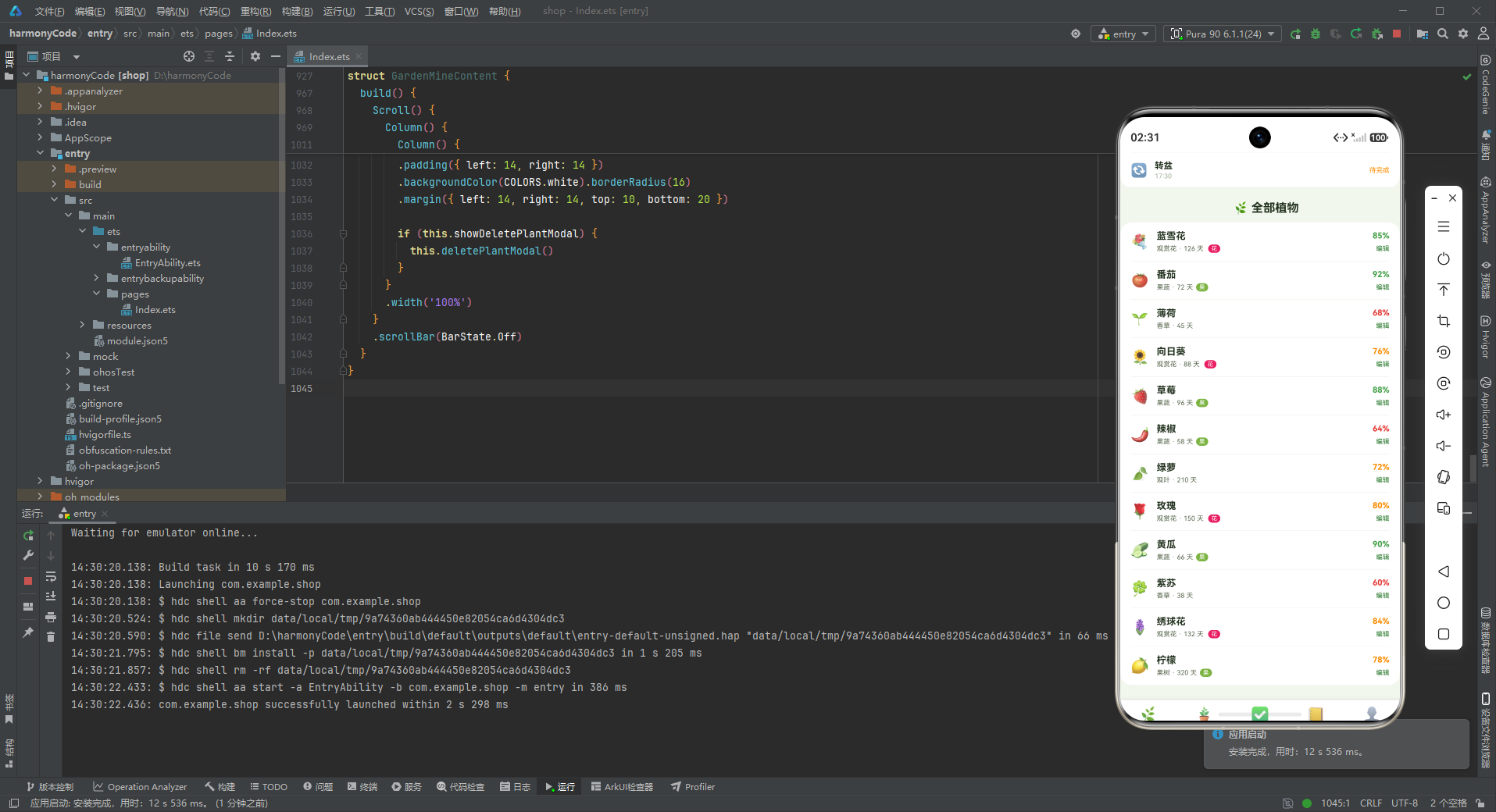
4.1 TabMeta — 导航元数据
interface TabMeta {
  title: string
  icon: string
}
TabMeta接口定义了底部导航栏每个Tab的元数据结构,包含标题(title)和图标(icon)两个字段。图标采用emoji字符:首页用🌿(草叶)、花园用🪴(盆栽)、任务用✅(对勾)、图鉴用📒(笔记本)、我的用👤(人物),每个都与园艺主题高度相关。
4.2 PlantMeta — 植物数据模型
interface PlantMeta {
  name: string
  emoji: string
  type: string
  days: number
  water: number
  isFlower: boolean
  isFruit: boolean
}
PlantMeta是植物档案的数据模型,是整个应用最核心的数据结构,包含7个字段。name是植物名称,如"蓝雪花"、“番茄”、“薄荷"等;emoji是植物对应的表情符号图标;type是植物类型,如"观赏花”、“果蔬”、“香草”、“观叶”、"果树"等,用于植物分类。
days字段记录植物的生长天数,这是一个非常有仪式感的设计——每株植物都有自己的"年龄",用户可以直观地看到自己养了多久,增强了用户与植物之间的情感连接。
water字段记录水分百分比(0-100),代表植物当前的水分状态。这个字段会配合getWaterColor()辅助函数动态显示颜色:水分充足(≥85%)显示绿色,适中(≥70%)显示黄色,不足(<70%)显示红色,让用户一眼就能判断植物是否需要浇水。
isFlower和isFruit两个布尔标记分别表示植物是否是观花类和是否是果菜类。在UI上,这两个标记会以"花"、"果"的小标签形式展示,帮助用户快速识别植物的类别属性。
这个数据模型的设计非常全面,既包含了基础信息(名称、类型),又包含了状态信息(水分、天数),还包含了分类标记(花、果),为各种筛选和展示场景提供了数据基础。
4.3 TaskMeta — 任务数据模型
interface TaskMeta {
  name: string
  emoji: string
  date: string
  points: number
  isDone: boolean
}
TaskMeta是种植任务的数据模型,包含5个字段。name是任务名称,如"给蓝雪花换盆"、“番茄整枝打杈"等,描述了具体的种植操作;emoji是任务对应的图标,直观展示任务类型;date是任务日期,格式为"MM-DD”,如"08-14";points是完成任务可获得的积分值,激励用户完成任务;isDone标记任务是否已完成。
任务模型的设计融入了游戏化思维——通过积分奖励机制,将原本枯燥的园艺劳作变成了有目标、有反馈的游戏体验。用户每完成一项任务就能获得积分,积少成多,获得成就感。这种设计能有效提升用户的活跃度和粘性。
4.4 AtlasMeta — 图鉴数据模型
interface AtlasMeta {
  name: string
  emoji: string
  count: number
  rarity: string
  isNew: boolean
}
AtlasMeta是植物图鉴的数据模型,包含5个字段。name是植物名称,emoji是图标,count是解锁的数量(即收集到多少个该品种),rarity是稀有度等级,isNew标记是否是新解锁的。
图鉴系统的核心玩法是收集,而稀有度(rarity)是收集类游戏的关键设计元素。这个应用定义了四个稀有度等级:普通、常见、稀有、珍稀、传说(从辅助函数可以看出共有5个等级)。不同稀有度的植物用不同颜色标识,让收集过程更有目标感和成就感。isNew标记则用于突出展示最新解锁的植物,给用户带来惊喜感。
4.5 SeasonMeta — 节气数据模型
interface SeasonMeta {
  name: string
  emoji: string
  date: string
  desc: string
  isHot: boolean
}
SeasonMeta是二十四节气的数据模型,包含5个字段。name是节气名称,如"立秋"、“处暑”、“白露"等;emoji是节气对应的表情符号,用不同的图标表达节气特点;date是节气日期;desc是该节气的种植建议,如"宜追肥松土”、“防涝防病”、"秋播开始"等;isHot标记是否为当前热门/临近节气。
节气功能是这款园艺应用的一大特色,它将中国传统农耕文化与现代园艺管理相结合,为用户提供了符合时令的种植指导。这种文化内涵的融入让应用不仅仅是一个工具,更具有了知识传播和文化传承的价值。
4.6 WeekWaterMeta — 周浇水统计模型
interface WeekWaterMeta {
  label: string
  value: number
}
WeekWaterMeta是周浇水次数统计的数据模型,用于柱状图展示。label是日期标签(周一到周日),value是对应的浇水次数。这个模型是数据可视化的基础,配合ForEach循环和Stack堆叠布局实现柱状图效果。
4.7 CareMeta — 照料清单数据模型
interface CareMeta {
  name: string
  emoji: string
  time: string
  isDone: boolean
}
CareMeta是每日照料清单的数据模型,包含4个字段。name是照料项目名称,如"浇水"、“光照”、“施肥”、“通风”、“除虫”、“转盆"等;emoji是对应的图标;time是建议的操作时间,如"07:00”、"08:30"等;isDone标记该项是否已完成。
照料清单的设计非常贴心,将一天中需要做的园艺工作按时间顺序排列,用户可以逐项完成并打卡。时间提醒功能帮助用户养成科学的养护习惯,比如早上7点浇水、8点半晒太阳、9点施肥,符合植物生长的自然规律。
五、配置常量层分析
5.1 TAB_CONFIG — 导航配置
const TAB_CONFIG: Record<string, TabMeta> = {
  'HOME': { title: '首页', icon: '🌿' },
  'GARDEN': { title: '花园', icon: '🪴' },
  'TASK': { title: '任务', icon: '✅' },
  'ATLAS': { title: '图鉴', icon: '📒' },
  'MINE': { title: '我的', icon: '👤' }
}
TAB_CONFIG是底部导航栏的配置常量,使用Record<string, TabMeta>类型定义。五个Tab分别对应首页、花园、任务、图鉴、我的五个核心模块。这种配置化设计集中管理了导航信息,修改或扩展都非常方便。
5.2 业务常量的设计模式
应用中定义了7组业务数据常量(PLANT_LIST、TASK_LIST、ATLAS_LIST、SEASON_LIST、WEEK_WATER、CARE_LIST),每组常量都是一个类型化的数组。这种"接口定义 + 常量数组"的模式是前端开发中非常经典的数据层设计,既保证了类型安全,又提供了灵活的数据组织方式。
这些Mock数据在开发阶段扮演着重要角色——前端开发者可以独立于后端进行工作,无需等待API就绪就能构建完整的UI和交互逻辑。数据结构一旦确定,前后端可以并行开发,最后通过API对接即可。
六、Mock数据层分析
6.1 模拟数据的设计特色
园艺应用的Mock数据设计非常有特色,充分体现了园艺主题的丰富性:
植物类型多样:12种植物涵盖了观赏花(蓝雪花、向日葵、玫瑰、绣球花)、果蔬(番茄、草莓、辣椒、黄瓜)、香草(薄荷、紫苏)、观叶(绿萝)、果树(柠檬)等多个类别,每类植物都有不同的生长天数和水分需求,数据真实可信。
任务场景丰富:10项种植任务涵盖了换盆、整枝、采收、追肥、修剪、授粉、搭架、疏苗、调蓝等各种园艺操作,任务难度和积分值相匹配——复杂的任务(如换盆30分)积分高,简单的任务(如擦叶片10分)积分低,体现了合理的激励设计。
稀有度体系完整:图鉴数据设计了5个稀有度等级(传说、稀有、珍稀、普通、常见),每种植物有不同的解锁数量,形成了完整的收集体系。传说级的柠檬(仅3个)和珍稀级的蓝雪花(6个)比常见的薄荷(9个)和绿萝(10个)更加珍贵,激发用户的收集欲望。
节气文化底蕴:8个节气从立秋到小雪,覆盖了整个秋季和初冬,每个节气都有对应的种植建议,体现了中国传统农耕文化的智慧。
6.2 辅助函数设计
function getRarityColor(rarity: string): string {
  if (rarity === '传说') {
    return '#F9A825'
  } else if (rarity === '稀有') {
    return '#7E57C2'
  } else if (rarity === '珍稀') {
    return '#039BE5'
  } else if (rarity === '普通') {
    return '#66BB6A'
  }
  return COLORS.textHint
}
getRarityColor函数根据稀有度返回对应的颜色,这是图鉴系统的核心展示逻辑。五个稀有等级对应五种颜色:
- 传说:金黄色(
#F9A825)——最高贵的颜色,对应传说级稀有度 - 稀有:紫色(
#7E57C2)——神秘高贵,对应稀有级 - 珍稀:蓝色(
#039BE5)——清新珍贵,对应珍稀级 - 普通:绿色(
#66BB6A)——自然平和,对应普通级 - 常见:灰色(textHint)——最基础的等级
这种颜色编码方式与游戏中的稀有度配色非常相似(金/紫/蓝/绿/灰),用户一眼就能判断植物的珍贵程度,是游戏化设计的典型应用。
function getWaterColor(water: number): string {
  if (water >= 85) {
    return COLORS.success
  } else if (water >= 70) {
    return COLORS.warning
  }
  return COLORS.danger
}
getWaterColor函数根据水分百分比返回对应的状态颜色:水分充足(≥85%)用绿色,水分适中(70-84%)用黄色,水分不足(<70%)用红色。这种直观的颜色编码让用户可以快速判断植物的水分状态,及时浇水。
6.3 枚举类型设计
enum GardenTab {
  HOME,
  GARDEN,
  TASK,
  ATLAS,
  MINE
}
GardenTab枚举定义了五个Tab的枚举值,使用数字枚举。枚举类型在Tab导航中扮演着核心角色,确保了类型安全和代码可读性。
七、主入口组件逐段分析
7.1 组件定义与状态管理
@Entry
@Component
struct GardenApp {
  @State activeTab: GardenTab = GardenTab.HOME
GardenApp是应用的主组件,@State装饰器定义了响应式状态变量activeTab,初始值为首页。状态管理是声明式UI的核心概念,当activeTab的值变化时,框架会自动更新所有依赖该状态的UI元素。
7.2 contentArea自定义构建器
  @Builder contentArea() {
    Column() {
      if (this.activeTab === GardenTab.HOME) {
        GardenHomeContent()
      } else if (this.activeTab === GardenTab.GARDEN) {
        GardenGardenContent()
      } else if (this.activeTab === GardenTab.TASK) {
        GardenTaskContent()
      } else if (this.activeTab === GardenTab.ATLAS) {
        GardenAtlasContent()
      } else if (this.activeTab === GardenTab.MINE) {
        GardenMineContent()
      }
    }
    .width('100%')
  }
contentArea构建器根据当前激活的Tab渲染对应的页面内容。使用@Builder将条件渲染逻辑封装为可复用的函数,使代码结构更清晰。
7.3 tabItem自定义构建器
  @Builder tabItem(icon: string, label: string, tab: GardenTab) {
    Column() {
      Text(icon).fontSize(20)
      Text(label).fontSize(10)
        .fontColor(this.activeTab === tab ? COLORS.primary : COLORS.textHint)
        .fontWeight(this.activeTab === tab ? FontWeight.Bold : FontWeight.Normal)
        .margin({ top: 2 })
    }
    .layoutWeight(1)
    .onClick(() => { this.activeTab = tab })
  }
tabItem构建器生成底部导航的每个Tab项。激活态使用主色+粗体,未激活态使用提示色+常规字重。点击事件更新activeTab状态,触发页面切换。
7.4 build方法整体布局
  build() {
    Column() {
      this.contentArea()
      Row() {
        this.tabItem(TAB_CONFIG.HOME.icon, TAB_CONFIG.HOME.title, GardenTab.HOME)
        this.tabItem(TAB_CONFIG.GARDEN.icon, TAB_CONFIG.GARDEN.title, GardenTab.GARDEN)
        this.tabItem(TAB_CONFIG.TASK.icon, TAB_CONFIG.TASK.title, GardenTab.TASK)
        this.tabItem(TAB_CONFIG.ATLAS.icon, TAB_CONFIG.ATLAS.title, GardenTab.ATLAS)
        this.tabItem(TAB_CONFIG.MINE.icon, TAB_CONFIG.MINE.title, GardenTab.MINE)
      }
      .width('100%')
      .padding({ top: 8, bottom: 8 })
      .backgroundColor(COLORS.white)
      .shadow({ radius: 10, color: '#23321F26', offsetY: -2 })
    }
    .width('100%').height('100%')
    .backgroundColor(COLORS.bg)
  }
}
build方法定义了整体布局:上方内容区域 + 下方底部导航。底部导航栏使用白色背景和顶部阴影,阴影颜色使用带透明度的深绿色(#23321F26),与园艺主题呼应。
八、各页面组件逐段代码分析
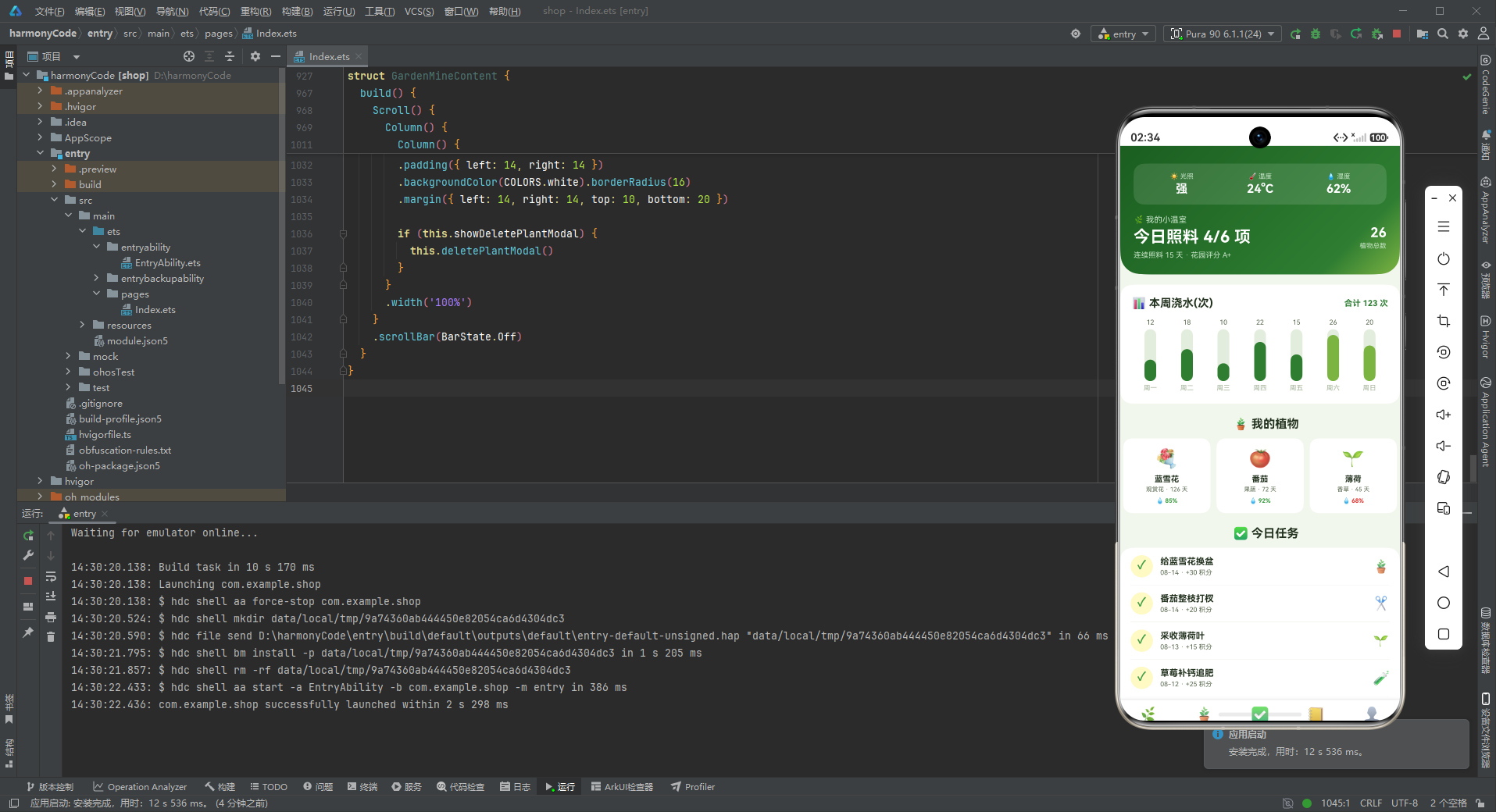
8.1 首页组件 GardenHomeContent
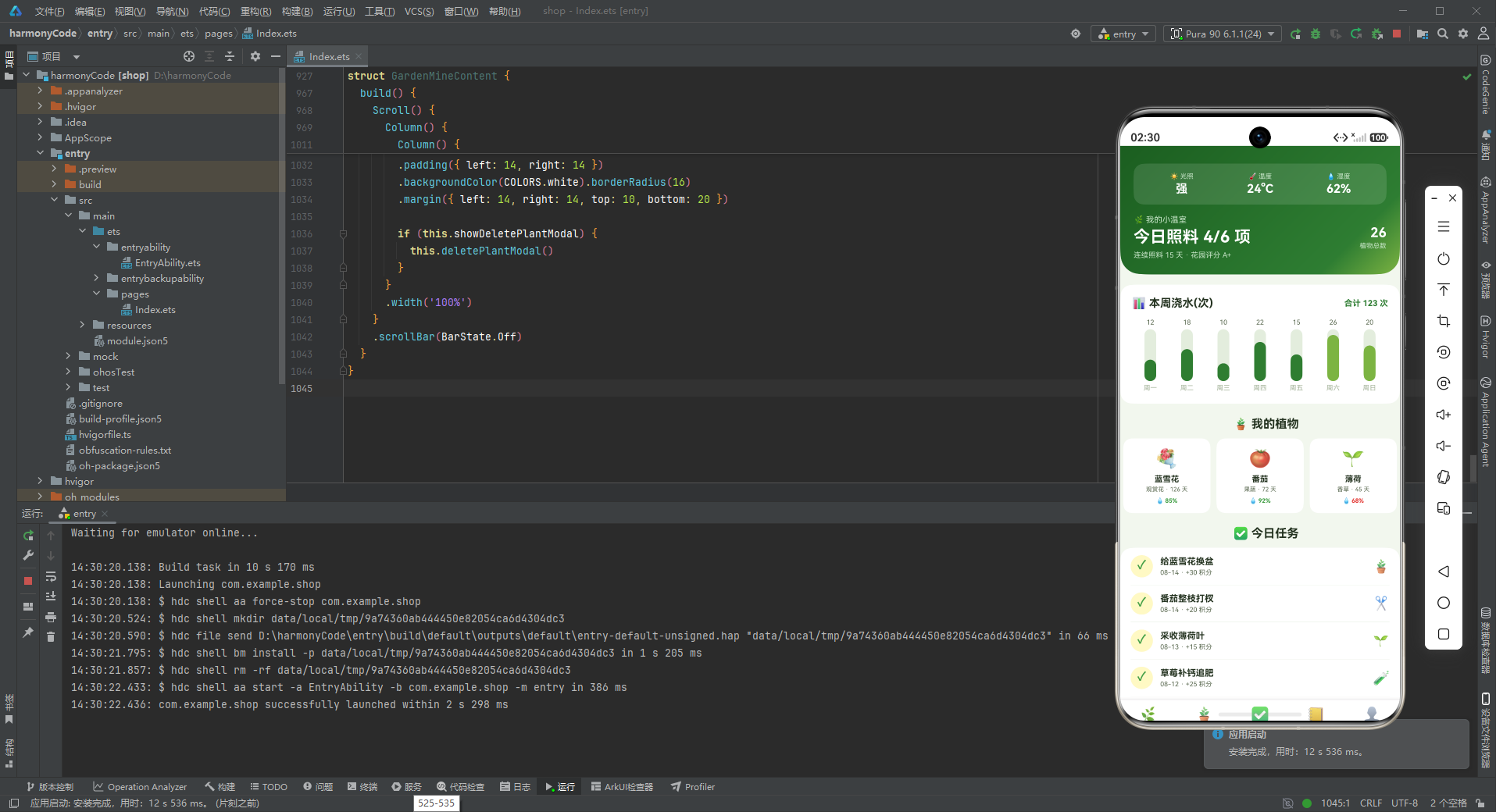
首页是应用的信息枢纽,汇集了用户最关心的核心数据和快捷入口。
8.1.1 温室头卡
        Column() {
          Row() {
            Column() {
              Text('☀️ 光照').fontSize(9).fontColor('#C8E6C9')
              Text('强').fontSize(16).fontWeight(FontWeight.Bold).fontColor(COLORS.white).margin({ top: 2 })
            }
            .layoutWeight(1)
            .alignItems(HorizontalAlign.Center)
            Column() {
              Text('🌡️ 温度').fontSize(9).fontColor('#C8E6C9')
              Text('24°C').fontSize(16).fontWeight(FontWeight.Bold).fontColor(COLORS.white).margin({ top: 2 })
            }
            .layoutWeight(1)
            .alignItems(HorizontalAlign.Center)
            Column() {
              Text('💧 湿度').fontSize(9).fontColor('#C8E6C9')
              Text('62%').fontSize(16).fontWeight(FontWeight.Bold).fontColor(COLORS.white).margin({ top: 2 })
            }
            .layoutWeight(1)
            .alignItems(HorizontalAlign.Center)
          }
          .width('100%')
          .padding(12)
          .backgroundColor('rgba(255,255,255,0.12)').borderRadius(14)
          .margin({ top: 10 })
          Row() {
            Column() {
              Text('🌿 我的小温室').fontSize(11).fontColor('#C8E6C9')
              Text('今日照料 4/6 项').fontSize(22).fontWeight(FontWeight.Bold).fontColor(COLORS.white)
                .margin({ top: 4 })
              Text('连续照料 15 天 · 花园评分 A+').fontSize(10).fontColor('#C8E6C9').margin({ top: 6 })
            }
            .alignItems(HorizontalAlign.Start)
            .layoutWeight(1)
            Column() {
              Text('26').fontSize(18).fontWeight(FontWeight.Bold).fontColor(COLORS.white)
              Text('植物总数').fontSize(9).fontColor('#C8E6C9').margin({ top: 2 })
            }
            .alignItems(HorizontalAlign.End)
          }
          .width('100%').margin({ top: 14 })
        }
        .width('100%')
        .padding({ left: 18, right: 18, top: 14, bottom: 20 })
        .linearGradient({ angle: 135, colors: [[COLORS.primaryDark, 0.0], [COLORS.primary, 0.8], [COLORS.moss, 1.0]] })
        .borderRadius({ bottomLeft: 28, bottomRight: 28 })
温室头卡是首页最具特色的设计元素,它模拟了一个真实温室的环境监测面板。头卡分为上下两部分:
上半部分——环境指标面板:使用Row水平排列三个环境指标(光照、温度、湿度),每个指标占相同宽度(layoutWeight(1)),居中显示。每个指标包含图标+名称(小字)和数值(大字)。三个指标放在一个半透明白色背景的容器中(rgba(255,255,255,0.12)),14dp圆角,形成一个数据卡片的视觉效果。
下半部分——统计信息:左右分栏布局,左侧是"我的小温室"标题、今日照料进度(4/6项)、连续照料天数和花园评分;右侧是植物总数。这些数据让用户一眼就能了解自己花园的整体状况。
渐变背景使用三色渐变——从深绿(primaryDark)到森绿(primary)再到苔藓绿(moss),营造出从深林到草地的自然过渡。底部28dp圆角让头卡呈现优雅的弧线造型。
8.1.2 周浇水柱状图
        Column() {
          Row() {
            Text('📊 本周浇水(次)').fontSize(15).fontWeight(FontWeight.Bold).fontColor(COLORS.textPrimary)
            Column().layoutWeight(1)
            Text('合计 123 次').fontSize(11).fontColor(COLORS.primary).fontWeight(FontWeight.Bold)
          }
          .width('100%')
          Row() {
            ForEach(WEEK_WATER, (v: WeekWaterMeta, i: number) => {
              Column() {
                Text(v.value + '').fontSize(9).fontColor(COLORS.textSecondary)
                Stack({ alignContent: Alignment.Bottom }) {
                  Column().width(16).height(70).backgroundColor(COLORS.border).borderRadius(8)
                  Column().width(16).height(Number(v.value) * 2.4).backgroundColor(
                    i === 5 || i === 6 ? COLORS.moss : COLORS.primary)
                    .borderRadius(8)
                }
                .width(16).height(70).margin({ top: 4 })
                Text(v.label).fontSize(9).fontColor(COLORS.textHint).margin({ top: 4 })
              }
              .layoutWeight(1)
              .alignItems(HorizontalAlign.Center)
            }, (v: WeekWaterMeta, i: number) => v.label + i)
          }
          .width('100%').margin({ top: 12 })
        }
周浇水柱状图展示了本周每天的浇水次数。柱子高度通过数值×2.4计算得出,这个系数是根据数据范围(10-26次)和柱子高度(70dp)调试出来的。周末(周六、周日)的柱子使用苔藓绿色(moss),工作日使用主色(primary),既区分了工作日和周末,又丰富了视觉层次。
8.1.3 植物三卡墙
        Text('🪴 我的植物').fontSize(16).fontWeight(FontWeight.Bold).fontColor(COLORS.textPrimary)
          .margin({ left: 16, top: 18 })
        Row() {
          ForEach(PLANT_LIST.slice(0, 3), (p: PlantMeta) => {
            Column() {
              Text(p.emoji).fontSize(26)
              Text(p.name).fontSize(11).fontWeight(FontWeight.Bold).fontColor(COLORS.textPrimary)
                .margin({ top: 6 })
              Text(p.type + ' · ' + p.days + ' 天').fontSize(8).fontColor(COLORS.textSecondary)
                .margin({ top: 3 })
              Row() {
                Text('💧').fontSize(8)
                Text(p.water + '%').fontSize(8).fontColor(getWaterColor(p.water))
                  .fontWeight(FontWeight.Bold).margin({ left: 2 })
              }
              .margin({ top: 6 })
            }
            .layoutWeight(1)
            .padding(12)
            .backgroundColor(COLORS.white).borderRadius(12)
            .margin({ right: 8 })
            .alignItems(HorizontalAlign.Center)
          }, (p: PlantMeta) => p.name)
        }
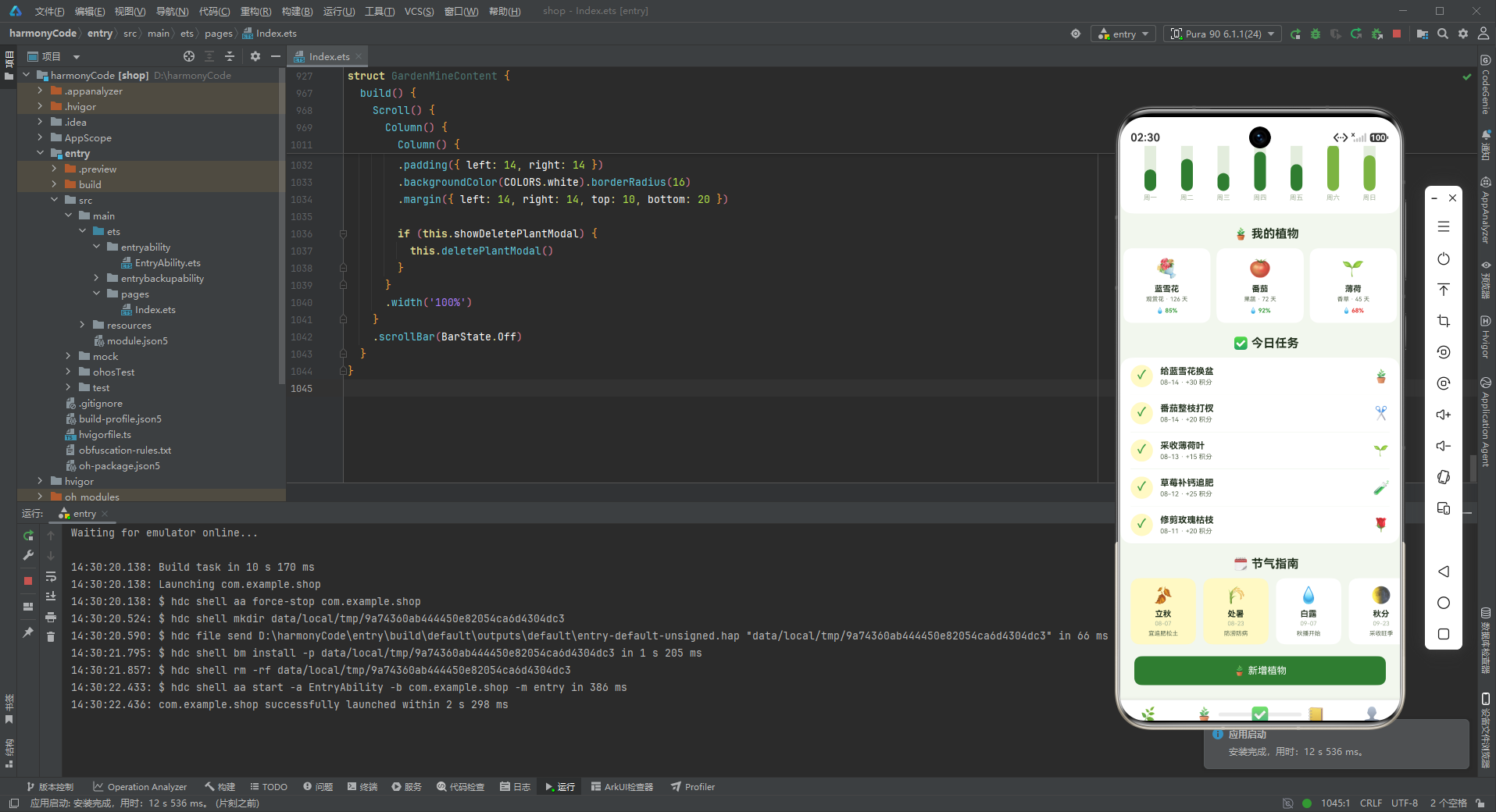
植物三卡墙是首页的特色设计,横向排列三张植物卡片,展示前三株植物的概览信息。每张卡片包含:植物emoji图标、名称、类型和生长天数、水分状态。
水分状态的展示尤为精致:使用水滴emoji + 百分比数字,数字颜色通过getWaterColor函数动态计算。水分充足显示绿色,适中显示黄色,不足显示红色。这种可视化设计让用户扫一眼就能知道哪些植物需要浇水。
三卡墙的设计兼顾了信息密度和视觉美感,是首页快速浏览的高效方式。用户可以通过这里快速查看自己最关心的几株植物的状态。
8.1.4 今日任务列表
        Column() {
          ForEach(TASK_LIST.slice(0, 5), (t: TaskMeta) => {
            Row() {
              Column() {
                Text(t.isDone ? '✓' : '○').fontSize(16).fontWeight(FontWeight.Bold)
                  .fontColor(t.isDone ? COLORS.success : COLORS.textHint)
              }
              .width(30).height(30).borderRadius(15)
              .backgroundColor(t.isDone ? COLORS.accentLight : COLORS.border)
              .alignItems(HorizontalAlign.Center)
              Column() {
                Text(t.name).fontSize(12).fontWeight(FontWeight.Bold).fontColor(COLORS.textPrimary)
                Text(t.date + ' · +' + t.points + ' 积分').fontSize(9).fontColor(COLORS.textSecondary)
                  .margin({ top: 3 })
              }
              .alignItems(HorizontalAlign.Start)
              .layoutWeight(1)
              .margin({ left: 10 })
              Text(t.emoji).fontSize(18)
            }
            .width('100%')
            .padding({ top: 10, bottom: 10 })
            Divider().color(COLORS.border)
          }, (t: TaskMeta) => t.name)
        }
今日任务列表展示了前5项种植任务。每行左侧是一个圆形复选框图标,中间是任务信息,右侧是任务emoji。
圆形复选框的设计很有特色:已完成的任务显示"✓"符号,绿色文字,浅黄色背景(accentLight);未完成的任务显示"○"符号,灰色文字,浅灰色背景(border)。这种设计让完成状态一目了然,已完成的任务用温暖的黄色背景突出,给用户带来成就感。
任务信息包含任务名称、日期和积分值。积分值用"+XX积分"的形式展示,明确告知用户完成任务能获得多少奖励,强化了游戏化激励效果。
8.1.5 节气指南横滑
        Scroll() {
          Row() {
            ForEach(SEASON_LIST, (s: SeasonMeta) => {
              Column() {
                Text(s.emoji).fontSize(22)
                Text(s.name).fontSize(11).fontWeight(FontWeight.Bold).fontColor(COLORS.textPrimary)
                  .margin({ top: 6 })
                Text(s.date).fontSize(8).fontColor(COLORS.textHint).margin({ top: 2 })
                Text(s.desc).fontSize(8).fontColor(COLORS.textSecondary).margin({ top: 4 })
              }
              .width(88)
              .padding(10)
              .backgroundColor(s.isHot ? COLORS.accentLight : COLORS.white).borderRadius(12)
              .margin({ right: 10 })
              .alignItems(HorizontalAlign.Center)
            }, (s: SeasonMeta) => s.name)
          }
        }
        .scrollable(ScrollDirection.Horizontal)
        .scrollBar(BarState.Off)
节气指南横滑是应用中最具文化特色的功能模块。横向滚动的卡片列表展示了近期的节气信息,每张卡片包含:节气emoji图标、节气名称、日期、种植建议。
热门/临近节气(isHot === true)的卡片使用浅黄色背景(accentLight),与普通节气的白色背景形成区分,引导用户关注当前节气的种植建议。这种设计将传统节气知识与现代园艺管理巧妙结合,既有文化内涵,又有实用价值。
8.2 花园页面 GardenGardenContent
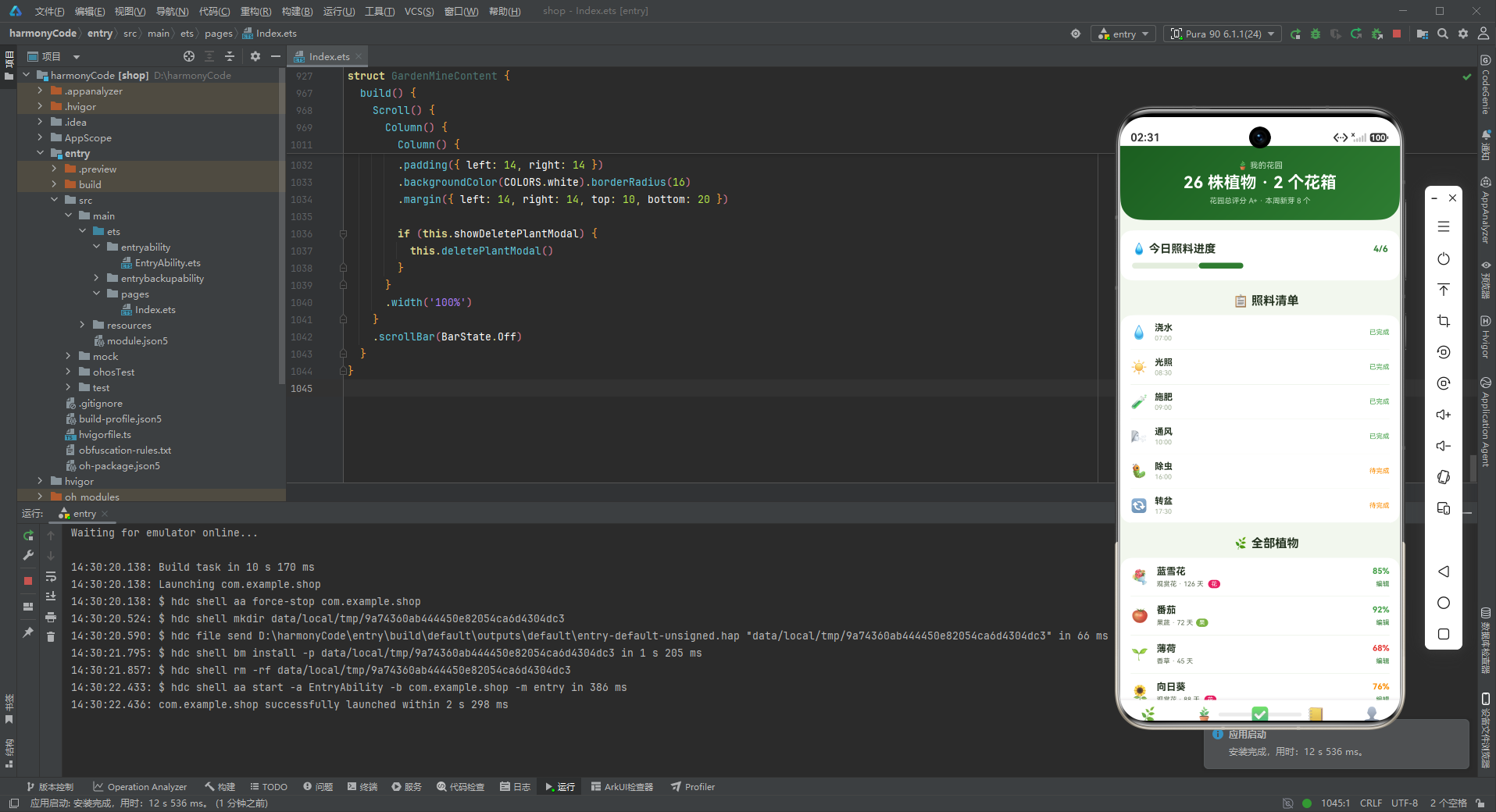
花园页面是用户管理所有植物的主要场所,包含花园头卡、照料进度、照料清单和全部植物列表。
8.2.1 花园头卡与照料进度
        Column() {
          Text('🪴 我的花园').fontSize(11).fontColor('#C8E6C9')
          Text('26 株植物 · 2 个花箱').fontSize(22).fontWeight(FontWeight.Bold).fontColor(COLORS.white)
            .margin({ top: 4 })
          Text('花园总评分 A+ · 本周新芽 8 个').fontSize(10).fontColor('#C8E6C9').margin({ top: 6 })
        }
花园头卡居中展示花园概览:植物总数、花箱数量、花园评分、本周新芽数。"本周新芽8个"是一个很有温度的数据点,它代表着生命的成长和用户的收获,能给用户带来满满的成就感。
        Column() {
          Row() {
            Text('💧 今日照料进度').fontSize(15).fontWeight(FontWeight.Bold).fontColor(COLORS.textPrimary)
            Column().layoutWeight(1)
            Text('4/6').fontSize(12).fontColor(COLORS.primary).fontWeight(FontWeight.Bold)
          }
          .width('100%')
          Row() {
            Column().width(90).height(8).borderRadius(4).backgroundColor(COLORS.border)
            Column().width(60).height(8).borderRadius(4).backgroundColor(COLORS.primary)
          }
          .width('100%').margin({ top: 10 })
        }
照料进度卡片用进度条的形式可视化展示今日照料完成度。进度条由两层Column组成:底层是灰色背景条(边框色),上层是绿色进度条(主色)。当前进度4/6对应60px/90px的比例,直观易懂。
进度条是一种高效的信息展示方式,用户一眼就能看出完成了多少、还剩多少。比起纯文字的"4/6",进度条的视觉冲击力更强,也更能激发用户完成全部任务的动力。
8.2.2 照料清单
        Column() {
          ForEach(CARE_LIST, (c: CareMeta) => {
            Row() {
              Text(c.emoji).fontSize(18)
              Column() {
                Text(c.name).fontSize(12).fontWeight(FontWeight.Bold).fontColor(COLORS.textPrimary)
                Text(c.time).fontSize(9).fontColor(COLORS.textHint).margin({ top: 2 })
              }
              .alignItems(HorizontalAlign.Start)
              .layoutWeight(1)
              .margin({ left: 10 })
              Text(c.isDone ? '已完成' : '待完成').fontSize(9)
                .fontColor(c.isDone ? COLORS.success : COLORS.warning)
            }
            .width('100%')
            .padding({ top: 10, bottom: 10 })
            Divider().color(COLORS.border)
          }, (c: CareMeta) => c.name)
        }
照料清单列出了每日需要完成的6项照料工作:浇水、光照、施肥、通风、除虫、转盆。每项都有建议的操作时间,按照时间顺序排列。已完成的项目用绿色标记,待完成的用黄色标记。
这种清单式的设计非常实用,用户可以按照清单逐项完成园艺工作,不会遗漏任何一项。时间提醒功能帮助用户养成科学的养护习惯,比如早上浇水、上午晒太阳、中午施肥、上午通风、下午除虫、傍晚转盆,这些都是符合植物生长规律的最佳时间。
8.2.3 全部植物列表
            Row() {
              Text(p.emoji).fontSize(20)
              Column() {
                Text(p.name).fontSize(13).fontWeight(FontWeight.Bold).fontColor(COLORS.textPrimary)
                Row() {
                  Text(p.type + ' · ' + p.days + ' 天').fontSize(9).fontColor(COLORS.textSecondary)
                  if (p.isFlower) {
                    Text('花').fontSize(8).fontColor(COLORS.white)
                      .padding({ left: 4, right: 4, top: 1, bottom: 1 })
                      .backgroundColor('#E91E63').borderRadius(6)
                      .margin({ left: 6 })
                  }
                  if (p.isFruit) {
                    Text('果').fontSize(8).fontColor(COLORS.white)
                      .padding({ left: 4, right: 4, top: 1, bottom: 1 })
                      .backgroundColor(COLORS.moss).borderRadius(6)
                      .margin({ left: 4 })
                  }
                }
                .margin({ top: 4 })
              }
              .alignItems(HorizontalAlign.Start)
              .layoutWeight(1)
              .margin({ left: 10 })
              Column() {
                Text(p.water + '%').fontSize(11).fontWeight(FontWeight.Bold).fontColor(getWaterColor(p.water))
                Text('编辑').fontSize(9).fontColor(COLORS.primary).margin({ top: 6 })
                  .onClick(() => { this.showEditPlantModal = true })
              }
              .alignItems(HorizontalAlign.End)
            }
全部植物列表展示了每株植物的详细信息。每行左侧是植物emoji,中间是名称和标签行,右侧是水分百分比和编辑操作。
标签行是设计的亮点:展示植物类型和生长天数,以及"花"或"果"的分类标签。观花类植物用粉色标签(#E91E63),果菜类植物用苔藓绿标签(COLORS.moss)。这些小标签虽然尺寸很小,但色彩鲜明,让列表信息更加丰富。
右侧的水分百分比使用动态颜色,绿色表示充足、黄色表示适中、红色表示不足。这种颜色编码让用户可以快速扫描列表,找出需要浇水的植物。
8.3 任务页面 GardenTaskContent
任务页面是用户管理种植任务的主要场所,包含任务统计头卡、任务筛选和全部任务列表。
8.3.1 任务统计头卡
        Column() {
          Row() {
            Column() {
              Text('✅ 种植任务').fontSize(11).fontColor('#C8E6C9')
              Text('本周完成 12 项').fontSize(22).fontWeight(FontWeight.Bold).fontColor(COLORS.white)
                .margin({ top: 4 })
              Text('累计获得 1,260 积分').fontSize(10).fontColor('#C8E6C9').margin({ top: 6 })
            }
            .alignItems(HorizontalAlign.Start)
            .layoutWeight(1)
            Column() {
              Text('86%').fontSize(18).fontWeight(FontWeight.Bold).fontColor(COLORS.white)
              Text('完成率').fontSize(9).fontColor('#C8E6C9').margin({ top: 2 })
            }
            .alignItems(HorizontalAlign.End)
          }
          .width('100%')
        }
任务头卡采用左右分栏布局:左侧展示本周完成任务数和累计积分,右侧展示完成率百分比。完成率是一个重要的激励指标,86%的完成率既肯定了用户的努力,又留下了进步的空间,激发用户向100%努力。
渐变色从苔藓绿(moss)过渡到深绿(primaryDark),方向与其他页面相反,形成独特的视觉标识。
8.3.2 任务列表
            Row() {
              Column() {
                Text(t.isDone ? '✓' : '○').fontSize(16).fontWeight(FontWeight.Bold)
                  .fontColor(t.isDone ? COLORS.success : COLORS.textHint)
              }
              .width(32).height(32).borderRadius(16)
              .backgroundColor(t.isDone ? COLORS.accentLight : COLORS.border)
              .alignItems(HorizontalAlign.Center)
              Column() {
                Text(t.name).fontSize(12).fontWeight(FontWeight.Bold).fontColor(COLORS.textPrimary)
                Text(t.date + ' · ' + t.emoji).fontSize(9).fontColor(COLORS.textSecondary)
                  .margin({ top: 3 })
              }
              .alignItems(HorizontalAlign.Start)
              .layoutWeight(1)
              .margin({ left: 10 })
              Column() {
                Text('+' + t.points).fontSize(11).fontColor(COLORS.warning).fontWeight(FontWeight.Bold)
                Text('编辑').fontSize(9).fontColor(COLORS.primary).margin({ top: 6 })
                  .onClick(() => { this.showEditTaskModal = true })
              }
              .alignItems(HorizontalAlign.End)
            }
任务列表每行包含:左侧圆形复选框、中间任务信息、右侧积分和编辑操作。积分值使用橙色(警告色)粗体显示,"+XX"的格式让奖励感更加直观。
任务信息中的日期和emoji组合在一起,增加了信息的丰富度。每个任务都有对应的emoji图标,如🪴(换盆)、✂️(修剪)、🧪(施肥)等,让任务列表更加生动有趣。
8.4 图鉴页面 GardenAtlasContent
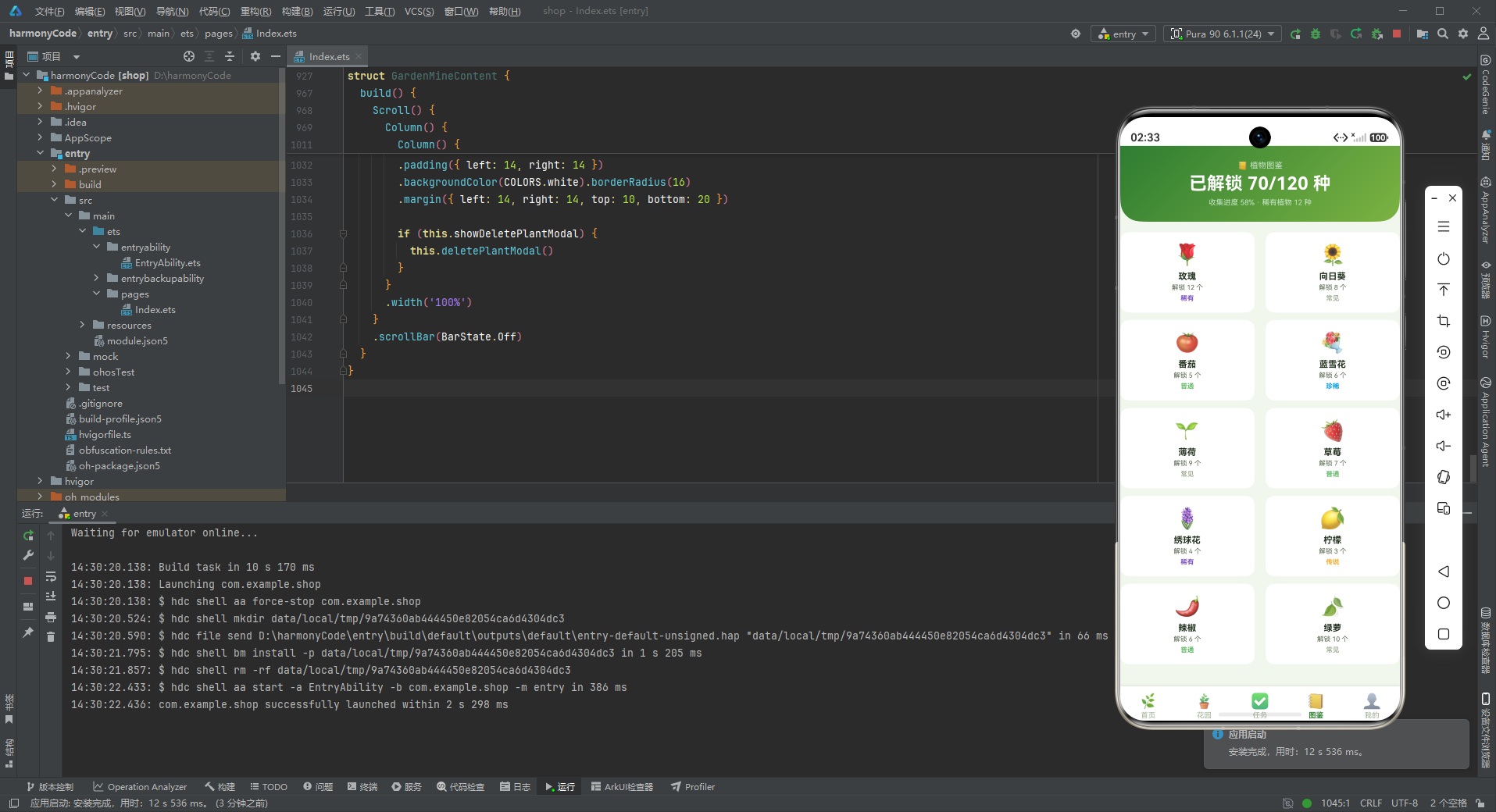
图鉴页面是收集玩法的核心展示区,采用双列网格布局展示所有已解锁的植物。
8.4.1 图鉴头卡
        Column() {
          Text('📒 植物图鉴').fontSize(11).fontColor('#C8E6C9')
          Text('已解锁 70/120 种').fontSize(24).fontWeight(FontWeight.Bold).fontColor(COLORS.white)
            .margin({ top: 4 })
          Text('收集进度 58% · 稀有植物 12 种').fontSize(10).fontColor('#C8E6C9').margin({ top: 6 })
        }
图鉴头卡居中展示收集进度:已解锁数量、总数量、进度百分比、稀有植物数量。"70/120"的数字展示方式清晰地传达了收集进度,58%的完成度给用户明确的目标感——还差42%就能集齐所有植物了。
渐变色从主色(primary)过渡到苔藓绿(moss),清新自然,与图鉴的探索主题契合。
8.4.2 图鉴双列网格
        Flex({ wrap: FlexWrap.Wrap, justifyContent: FlexAlign.SpaceBetween }) {
          ForEach(ATLAS_LIST, (a: AtlasMeta) => {
            Column() {
              Text(a.emoji).fontSize(28)
              Text(a.name).fontSize(12).fontWeight(FontWeight.Bold).fontColor(COLORS.textPrimary)
                .margin({ top: 6 })
              Text('解锁 ' + a.count + ' 个').fontSize(9).fontColor(COLORS.textSecondary).margin({ top: 3 })
              Text(a.rarity).fontSize(9).fontWeight(FontWeight.Bold)
                .fontColor(getRarityColor(a.rarity)).margin({ top: 4 })
            }
            .width('48%')
            .padding(14)
            .backgroundColor(COLORS.white).borderRadius(12)
            .margin({ bottom: 10 })
            .alignItems(HorizontalAlign.Center)
            .onClick(() => { this.showDeleteAtlasModal = true })
          }, (a: AtlasMeta) => a.name)
        }
图鉴采用双列网格布局,使用Flex组件实现换行(FlexWrap.Wrap)和两端对齐(SpaceBetween)。每张卡片宽度为48%,这样每行刚好放两张卡片,中间留4%的间距。
每张图鉴卡片包含:植物emoji图标(28号大字体,视觉冲击力强)、植物名称、解锁数量、稀有度标签。稀有度标签使用不同颜色(通过getRarityColor函数计算),金色传说、紫色稀有、蓝色珍稀、绿色普通、灰色常见,层次分明。
点击图鉴卡片会弹出删除确认弹窗,这里的交互设计稍显特别——通常图鉴卡片点击应该进入详情页,而在这个原型中点击触发删除操作,可能是为了演示删除弹窗的功能。
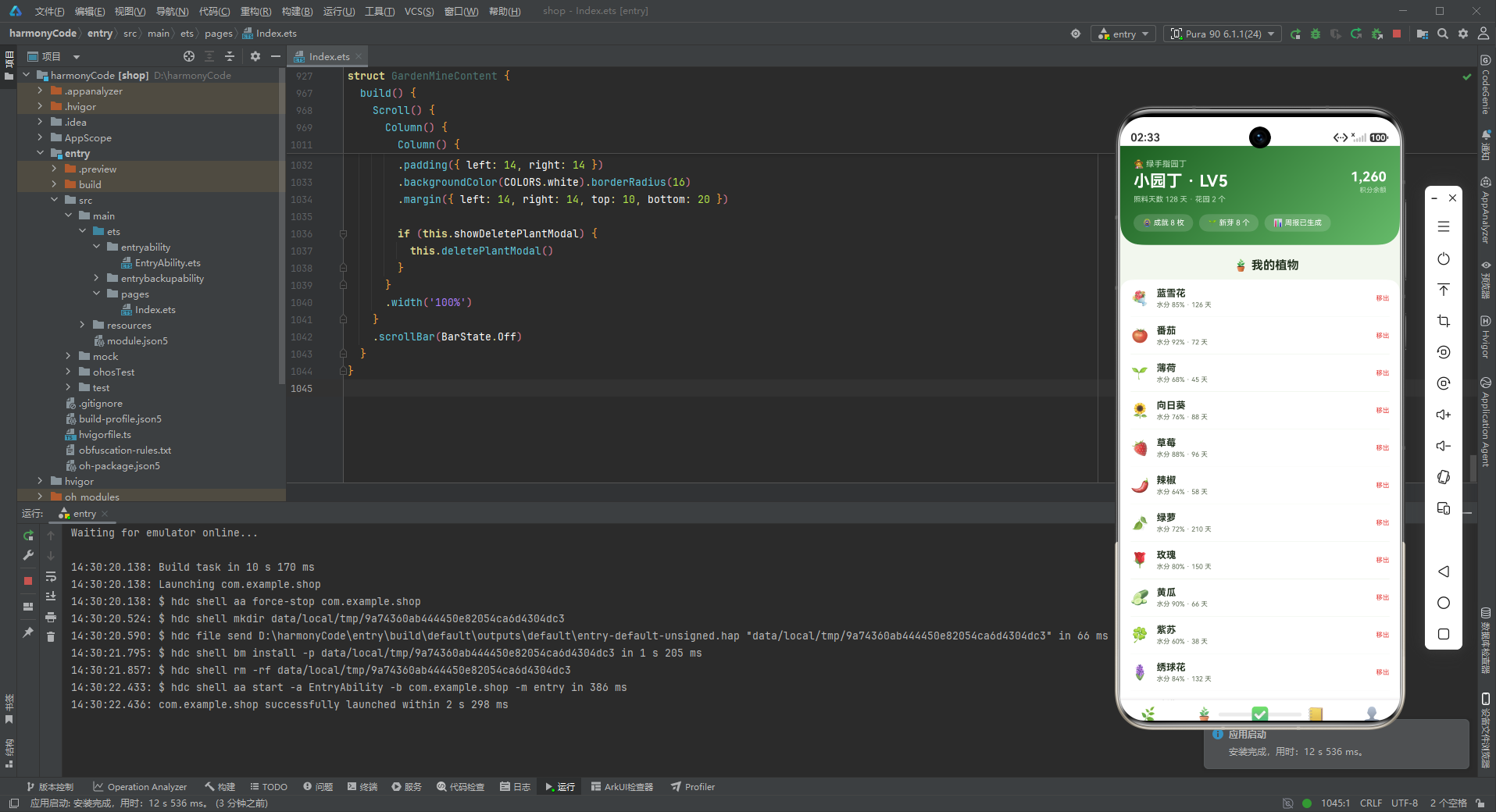
8.5 我的页面 GardenMineContent
"我的"页面是用户的个人中心,展示园丁档案和植物管理。
8.5.1 园丁档案头卡
Column() {
Row() {
Column() {
Text('👩🌾 绿手指园丁').fontSize(11).fontColor('#C8E6C9')
Text('小园丁 · LV5').fontSize(22).fontWeight(FontWeight.Bold).fontColor(COLORS.white)
.margin({ top: 4 })
Text('照料天数 128 天 · 花园 2 个').fontSize(10).fontColor('#C8E6C9').margin({ top: 6 })
}
.alignItems(HorizontalAlign.Start)
.layoutWeight(1)
Column() {
Text('1,260').fontSize(18).fontWeight(FontWeight.Bold).fontColor(COLORS.white)
Text('积分余额').fontSize(9).fontColor('#C8E6C9').margin({ top: 2 })
}
.alignItems(HorizontalAlign.End)
}
.width('100%')
Row() {
Text('🏅 成就 8 枚').fontSize(10).fontColor(COLORS.white)
.padding({ left: 12, right: 12, top: 6, bottom: 6 })
.backgroundColor('rgba(255,255,255,0.15)').borderRadius(12)
Text('🌱 新芽 8 个').fontSize(10).fontColor(COLORS.white)
.padding({ left: 12, right: 12, top: 6, bottom: 6 })
.backgroundColor('rgba(255,255,255,0.15)').borderRadius(12)
.margin({ left: 8 })
Text('📊 周报已生成').fontSize(10).fontColor(COLORS.white)
.padding({ left: 12, right: 12, top: 6, bottom: 6 })
.backgroundColor('rgba(255,255,255,0.15)').borderRadius(12)
.margin({ left: 8 })
}
.width('100%').margin({ top: 14 })
}
园丁档案头卡是个人中心的核心展示区。上半部分左右分栏:左侧是园丁称号(“绿手指园丁”)、用户名和等级、照料天数和花园数量;右侧是积分余额。
下半部分有三个半透明标签:成就数量、新芽数量、周报状态。这些标签使用半透明白色背景(rgba(255,255,255,0.15)),在渐变背景上保持通透性,同时保证文字清晰可读。
渐变色从深绿(primaryDark)过渡到浅绿(primaryLight),与其他页面的渐变方向和色彩组合都不同,形成独特的个人中心视觉标识。
8.5.2 我的植物列表
            Row() {
              Text(p.emoji).fontSize(20)
              Column() {
                Text(p.name).fontSize(13).fontWeight(FontWeight.Bold).fontColor(COLORS.textPrimary)
                Text('水分 ' + p.water + '% · ' + p.days + ' 天').fontSize(9).fontColor(COLORS.textSecondary)
                  .margin({ top: 3 })
              }
              .alignItems(HorizontalAlign.Start)
              .layoutWeight(1)
              .margin({ left: 10 })
              Text('移出').fontSize(9).fontColor(COLORS.danger)
                .onClick(() => { this.showDeletePlantModal = true })
            }
"我的"页面的植物列表与花园页面的植物列表结构类似,但操作不同——这里是"移出"操作(即从花园中移除植物),使用红色文字警示。点击后弹出移出确认弹窗,进行二次确认。
九、弹窗组件详解
9.1 modalOverlay遮罩原理
应用中所有弹窗都采用Stack堆叠布局 + 遮罩层 + 内容卡片的模式。modalOverlay构建器创建全屏半透明黑色遮罩(rgba(0,0,0,0.55)),点击遮罩触发关闭回调。
这种实现方式的核心在于Stack的堆叠特性:后声明的组件显示在上方。遮罩层在底层,内容卡片在上层。点击遮罩层关闭弹窗,点击内容卡片不关闭(点击事件不会向下穿透)。
9.2 新增植物弹窗
新增植物弹窗用于添加新的植物到花园中。弹窗结构为:标题栏 + 植物名称输入框 + 植物类型输入框 + 取消/种下按钮。
与火锅应用的新增弹窗相比,这里的确认按钮文案是"种下"而非"保存",更加贴合园艺主题。这种细节上的文案调整,让应用的沉浸感更强。
表单输入框统一使用背景色填充、8dp圆角、placeholder使用提示色的设计风格,保持了UI的一致性。
9.3 编辑植物档案弹窗
编辑植物档案弹窗用于修改植物的信息。弹窗结构与新增植物弹窗类似,但标题为"编辑植物档案",输入项为植物名称和水分含量%。确认按钮文案是"保存"。
编辑弹窗预填充了现有数据的话会更加实用,但在这个原型中为了简化,表单初始是空的。实际项目中,点击某株植物的编辑按钮时,应该将该植物的现有数据传入弹窗,方便用户在原有基础上修改。
9.4 编辑任务弹窗
编辑任务弹窗用于修改任务信息,包含任务名称和任务积分两个输入项。弹窗模式与其他编辑弹窗一致。
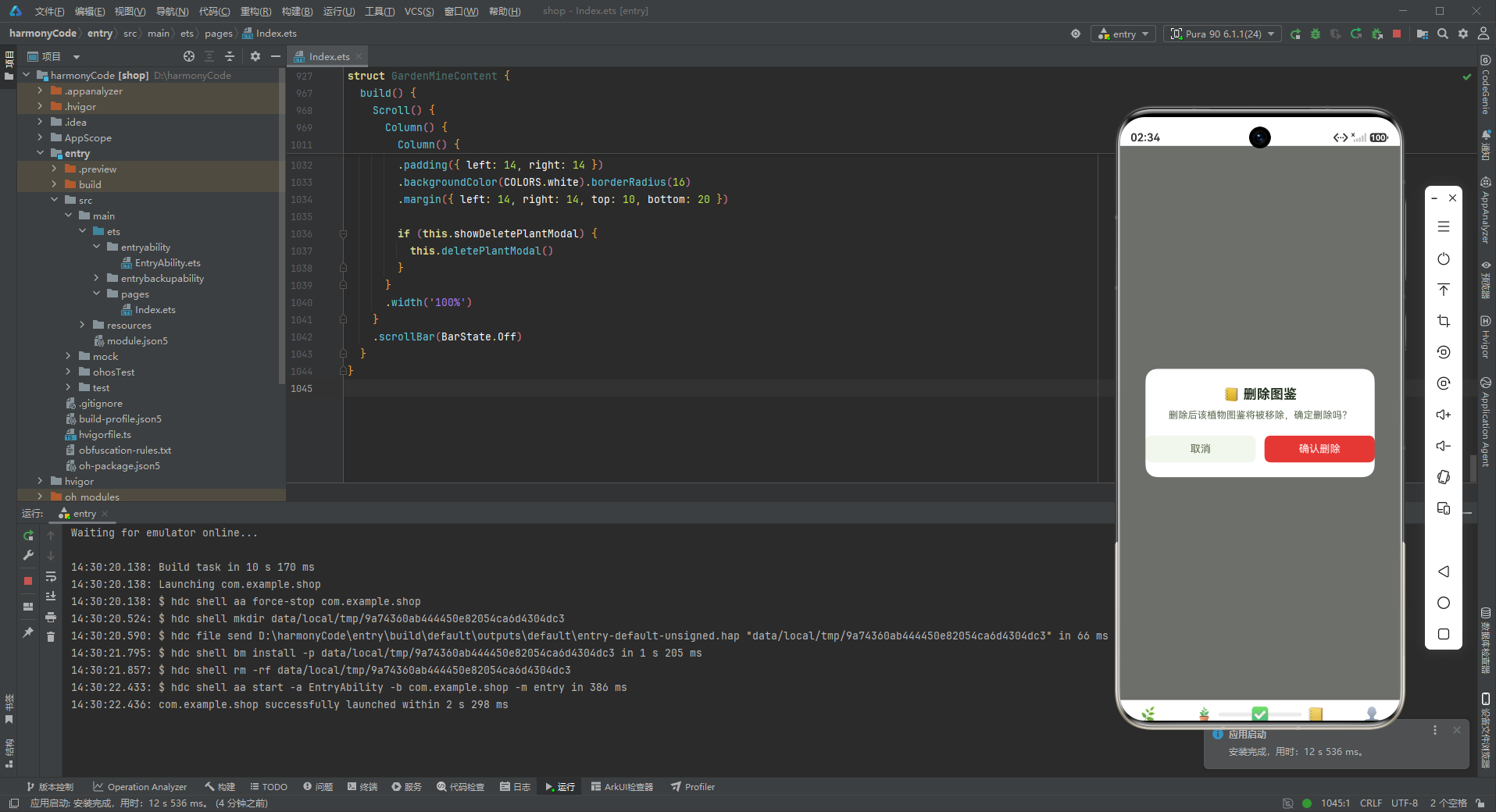
9.5 删除确认类弹窗
删除确认类弹窗(删除图鉴、移出植物)用于危险操作的二次确认。这类弹窗结构简洁:标题 + 提示文字 + 取消/确认按钮。
确认删除按钮使用危险色(红色)背景,取消按钮使用浅色背景。提示文字明确说明操作后果,如"将植物移出花园后不可撤销,确定操作吗?",帮助用户做出慎重决策。
移出植物弹窗的确认按钮文案是"确认移出"而非"确认删除",用"移出"代替"删除",语气更加温和,符合园艺应用的调性——植物不是被删除了,而是被移出了花园。
十、核心UI组件分析
10.1 温室头卡(环境数据面板)
温室头卡是园艺应用最具特色的UI组件,它将三个环境指标(光照、温度、湿度)以数据面板的形式集成在头卡中。设计亮点包括:
- 三格数据面板:三个指标平均分布,每个指标有图标+名称+数值,层次清晰
- 半透明容器:数据面板使用
rgba(255,255,255,0.12)背景,既有层次感又不破坏渐变的整体性 - 渐变背景:深绿→森绿→苔藓绿的三色渐变,营造温室的自然氛围
- 数据驱动:所有数值都是动态数据,可以实时更新
这种头卡+数据面板的设计非常适合IoT类应用(智能温室、智能家居等),将最重要的环境数据在第一屏就展示给用户,直观高效。
10.2 圆形复选框列表
任务列表中的圆形复选框设计很有特色:已完成的任务显示"✓"符号+绿色文字+浅黄色背景,未完成的显示"○"符号+灰色文字+浅灰色背景。
这种设计比传统的复选框更加美观和友好,圆润的造型符合园艺应用轻松自然的调性。完成状态用温暖的黄色背景突出,给用户带来愉悦的成就感。
10.3 图鉴双列网格
图鉴页面采用双列网格布局,每张卡片是一个独立的收集单元。卡片设计简洁但信息完整:大图标、名称、解锁数量、稀有度标签。
稀有度颜色编码是图鉴系统的核心机制——金色传说、紫色稀有、蓝色珍稀、绿色普通、灰色常见。这种游戏化的设计大大提升了收集的乐趣和动力,用户会为了获得更高稀有度的植物而持续使用应用。
10.4 进度条组件
照料进度卡片使用纯代码实现的进度条,由两层Column堆叠而成:底层是背景轨道,上层是进度指示。虽然简单,但非常实用。
进度条是一种高效的可视化方式,比起纯文字的"4/6",进度条能让用户更直观地感知完成比例和剩余工作量。在任务管理、会员等级、收集进度等场景中都有广泛应用。
十一、技术亮点总结表格
| 功能模块 | 技术实现方式 | 设计模式 | 代码量估计 |
|---|---|---|---|
| 底部Tab导航 | @State + 枚举 + @Builder tabItem | 状态驱动视图 | 约60行 |
| 页面切换 | if-else条件渲染 + @Builder contentArea | 条件渲染模式 | 约30行 |
| 颜色系统 | interface + const常量对象 | 接口契约模式 | 约40行 |
| 数据模型 | 7个interface定义业务实体 | 类型优先设计 | 约55行 |
| Mock数据层 | 7组const数组常量 | 常量配置模式 | 约110行 |
| 辅助函数 | getRarityColor/getWaterColor纯函数 | 工具函数模式 | 约20行 |
| 温室头卡 | linearGradient + 三格数据面板 | 数据可视化模式 | 约60行 |
| 柱状图 | ForEach + Stack堆叠 + 动态高度计算 | 纯代码图表 | 约40行 |
| 植物三卡墙 | Row + ForEach + layoutWeight平均分布 | 横滑卡片模式 | 约35行 |
| 节气横滑 | Scroll + Row + ForEach | 横滑列表模式 | 约30行 |
| 图鉴双列网格 | Flex + FlexWrap.Wrap + 48%宽度 | 双列网格模式 | 约30行 |
| 圆形复选框列表 | Column圆形 + 动态样式 | 状态列表模式 | 约35行/处 |
| 进度条 | 双层Column堆叠 | 纯代码进度条 | 约15行/处 |
| 新增弹窗 | Stack + modalOverlay + TextInput表单 | 表单弹窗模式 | 约50行/个 |
| 编辑弹窗 | Stack + modalOverlay + TextInput表单 | 表单弹窗模式 | 约50行/个 |
| 删除确认弹窗 | Stack + modalOverlay + 确认按钮 | 二次确认模式 | 约35行/个 |
安装DevEco Studio程序

选择目标安装目录:

设置环境变量,但是需要重启一下:

新建一个空白模板:

设置API为24的模板项目:
初始化项目,自动下载相关依赖:

完整代码:
// ============================================================
// 526.ets 植物园艺 APP — GardenApp
// 主色调: 森绿 #2E7D32 + 泥土棕 #8D6E63
// 布局: 温室头卡(光照/温度/湿度三格) + 周浇水柱状图 + 植物三卡墙
// + 种植任务列表 + 花园图鉴 + 节气横滑
// + 今日照料清单 + 我的花园 + 积分任务
// 弹窗: 新增植物 / 编辑任务 / 删除图鉴 (全部 modalOverlay)
// ============================================================
interface GardenColorPalette {
primary: string
primaryLight: string
primaryDark: string
accent: string
accentLight: string
moss: string
bg: string
cardBg: string
textPrimary: string
textSecondary: string
textHint: string
border: string
success: string
warning: string
danger: string
white: string
}
interface TabMeta {
title: string
icon: string
}
interface PlantMeta {
name: string
emoji: string
type: string
days: number
water: number
isFlower: boolean
isFruit: boolean
}
interface TaskMeta {
name: string
emoji: string
date: string
points: number
isDone: boolean
}
interface AtlasMeta {
name: string
emoji: string
count: number
rarity: string
isNew: boolean
}
interface SeasonMeta {
name: string
emoji: string
date: string
desc: string
isHot: boolean
}
interface WeekWaterMeta {
label: string
value: number
}
interface CareMeta {
name: string
emoji: string
time: string
isDone: boolean
}
const COLORS: GardenColorPalette = {
primary: '#2E7D32',
primaryLight: '#66BB6A',
primaryDark: '#1B5E20',
accent: '#FDD835',
accentLight: '#FFF9C4',
moss: '#7CB342',
bg: '#F2F7EE',
cardBg: '#FFFFFF',
textPrimary: '#23321F',
textSecondary: '#5C6B52',
textHint: '#A3B298',
border: '#E3EDDD',
success: '#43A047',
warning: '#FB8C00',
danger: '#E53935',
white: '#FFFFFF'
}
const TAB_CONFIG: Record<string, TabMeta> = {
'HOME': { title: '首页', icon: '🌿' },
'GARDEN': { title: '花园', icon: '🪴' },
'TASK': { title: '任务', icon: '✅' },
'ATLAS': { title: '图鉴', icon: '📒' },
'MINE': { title: '我的', icon: '👤' }
}
const PLANT_LIST: PlantMeta[] = [
{ name: '蓝雪花', emoji: '💐', type: '观赏花', days: 126, water: 85, isFlower: true, isFruit: false },
{ name: '番茄', emoji: '🍅', type: '果蔬', days: 72, water: 92, isFlower: false, isFruit: true },
{ name: '薄荷', emoji: '🌱', type: '香草', days: 45, water: 68, isFlower: false, isFruit: false },
{ name: '向日葵', emoji: '🌻', type: '观赏花', days: 88, water: 76, isFlower: true, isFruit: false },
{ name: '草莓', emoji: '🍓', type: '果蔬', days: 96, water: 88, isFlower: false, isFruit: true },
{ name: '辣椒', emoji: '🌶️', type: '果蔬', days: 58, water: 64, isFlower: false, isFruit: true },
{ name: '绿萝', emoji: '🍃', type: '观叶', days: 210, water: 72, isFlower: false, isFruit: false },
{ name: '玫瑰', emoji: '🌹', type: '观赏花', days: 150, water: 80, isFlower: true, isFruit: false },
{ name: '黄瓜', emoji: '🥒', type: '果蔬', days: 66, water: 90, isFlower: false, isFruit: true },
{ name: '紫苏', emoji: '🍀', type: '香草', days: 38, water: 60, isFlower: false, isFruit: false },
{ name: '绣球花', emoji: '🪻', type: '观赏花', days: 132, water: 84, isFlower: true, isFruit: false },
{ name: '柠檬', emoji: '🍋', type: '果树', days: 320, water: 78, isFlower: false, isFruit: true }
]
const TASK_LIST: TaskMeta[] = [
{ name: '给蓝雪花换盆', emoji: '🪴', date: '08-14', points: 30, isDone: true },
{ name: '番茄整枝打杈', emoji: '✂️', date: '08-14', points: 20, isDone: true },
{ name: '采收薄荷叶', emoji: '🌱', date: '08-13', points: 15, isDone: true },
{ name: '草莓补钙追肥', emoji: '🧪', date: '08-12', points: 25, isDone: true },
{ name: '修剪玫瑰枯枝', emoji: '🌹', date: '08-11', points: 20, isDone: true },
{ name: '给绿萝擦洗叶片', emoji: '💧', date: '08-10', points: 10, isDone: true },
{ name: '辣椒授粉', emoji: '🐝', date: '08-09', points: 15, isDone: false },
{ name: '黄瓜搭架', emoji: '🎋', date: '08-08', points: 30, isDone: false },
{ name: '向日葵疏苗', emoji: '🌻', date: '08-07', points: 15, isDone: false },
{ name: '绣球调蓝', emoji: '🪻', date: '08-06', points: 25, isDone: false }
]
const ATLAS_LIST: AtlasMeta[] = [
{ name: '玫瑰', emoji: '🌹', count: 12, rarity: '稀有', isNew: true },
{ name: '向日葵', emoji: '🌻', count: 8, rarity: '常见', isNew: false },
{ name: '番茄', emoji: '🍅', count: 5, rarity: '普通', isNew: false },
{ name: '蓝雪花', emoji: '💐', count: 6, rarity: '珍稀', isNew: true },
{ name: '薄荷', emoji: '🌱', count: 9, rarity: '常见', isNew: false },
{ name: '草莓', emoji: '🍓', count: 7, rarity: '普通', isNew: false },
{ name: '绣球花', emoji: '🪻', count: 4, rarity: '稀有', isNew: true },
{ name: '柠檬', emoji: '🍋', count: 3, rarity: '传说', isNew: false },
{ name: '辣椒', emoji: '🌶️', count: 6, rarity: '普通', isNew: false },
{ name: '绿萝', emoji: '🍃', count: 10, rarity: '常见', isNew: false }
]
const SEASON_LIST: SeasonMeta[] = [
{ name: '立秋', emoji: '🍂', date: '08-07', desc: '宜追肥松土', isHot: true },
{ name: '处暑', emoji: '🌾', date: '08-23', desc: '防涝防病', isHot: true },
{ name: '白露', emoji: '💧', date: '09-07', desc: '秋播开始', isHot: false },
{ name: '秋分', emoji: '🌗', date: '09-23', desc: '采收旺季', isHot: false },
{ name: '寒露', emoji: '🌬️', date: '10-08', desc: '移栽入盆', isHot: false },
{ name: '霜降', emoji: '❄️', date: '10-23', desc: '防寒覆盖', isHot: false },
{ name: '立冬', emoji: '🥶', date: '11-07', desc: '修剪冬眠', isHot: false },
{ name: '小雪', emoji: '🌨️', date: '11-22', desc: '温室保温', isHot: false }
]
const WEEK_WATER: WeekWaterMeta[] = [
{ label: '周一', value: 12 },
{ label: '周二', value: 18 },
{ label: '周三', value: 10 },
{ label: '周四', value: 22 },
{ label: '周五', value: 15 },
{ label: '周六', value: 26 },
{ label: '周日', value: 20 }
]
const CARE_LIST: CareMeta[] = [
{ name: '浇水', emoji: '💧', time: '07:00', isDone: true },
{ name: '光照', emoji: '☀️', time: '08:30', isDone: true },
{ name: '施肥', emoji: '🧪', time: '09:00', isDone: true },
{ name: '通风', emoji: '🌬️', time: '10:00', isDone: true },
{ name: '除虫', emoji: '🐛', time: '16:00', isDone: false },
{ name: '转盆', emoji: '🔄', time: '17:30', isDone: false }
]
function getRarityColor(rarity: string): string {
if (rarity === '传说') {
return '#F9A825'
} else if (rarity === '稀有') {
return '#7E57C2'
} else if (rarity === '珍稀') {
return '#039BE5'
} else if (rarity === '普通') {
return '#66BB6A'
}
return COLORS.textHint
}
function getWaterColor(water: number): string {
if (water >= 85) {
return COLORS.success
} else if (water >= 70) {
return COLORS.warning
}
return COLORS.danger
}
enum GardenTab {
HOME,
GARDEN,
TASK,
ATLAS,
MINE
}
@Entry
@Component
struct GardenApp {
@State activeTab: GardenTab = GardenTab.HOME
@Builder contentArea() {
Column() {
if (this.activeTab === GardenTab.HOME) {
GardenHomeContent()
} else if (this.activeTab === GardenTab.GARDEN) {
GardenGardenContent()
} else if (this.activeTab === GardenTab.TASK) {
GardenTaskContent()
} else if (this.activeTab === GardenTab.ATLAS) {
GardenAtlasContent()
} else if (this.activeTab === GardenTab.MINE) {
GardenMineContent()
}
}
.width('100%')
}
@Builder tabItem(icon: string, label: string, tab: GardenTab) {
Column() {
Text(icon).fontSize(20)
Text(label).fontSize(10)
.fontColor(this.activeTab === tab ? COLORS.primary : COLORS.textHint)
.fontWeight(this.activeTab === tab ? FontWeight.Bold : FontWeight.Normal)
.margin({ top: 2 })
}
.layoutWeight(1)
.onClick(() => { this.activeTab = tab })
}
build() {
Column() {
this.contentArea()
Row() {
this.tabItem(TAB_CONFIG.HOME.icon, TAB_CONFIG.HOME.title, GardenTab.HOME)
this.tabItem(TAB_CONFIG.GARDEN.icon, TAB_CONFIG.GARDEN.title, GardenTab.GARDEN)
this.tabItem(TAB_CONFIG.TASK.icon, TAB_CONFIG.TASK.title, GardenTab.TASK)
this.tabItem(TAB_CONFIG.ATLAS.icon, TAB_CONFIG.ATLAS.title, GardenTab.ATLAS)
this.tabItem(TAB_CONFIG.MINE.icon, TAB_CONFIG.MINE.title, GardenTab.MINE)
}
.width('100%')
.padding({ top: 8, bottom: 8 })
.backgroundColor(COLORS.white)
.shadow({ radius: 10, color: '#23321F26', offsetY: -2 })
}
.width('100%').height('100%')
.backgroundColor(COLORS.bg)
}
}
@Component
struct GardenHomeContent {
@State showAddPlantModal: boolean = false
@State plantName: string = ''
@State plantType: string = ''
@Builder modalOverlay(onClose: () => void) {
Column()
.width('100%').height('100%')
.backgroundColor('rgba(0,0,0,0.55)')
.onClick(onClose)
}
@Builder addPlantModal() {
Stack() {
this.modalOverlay(() => { this.showAddPlantModal = false })
Column() {
Row() {
Text('🪴 新增植物').fontSize(18).fontWeight(FontWeight.Bold).fontColor(COLORS.textPrimary)
Column().layoutWeight(1)
Text('✕').fontSize(18).fontColor(COLORS.textHint).onClick(() => { this.showAddPlantModal = false })
}
.width('100%').padding({ left: 20, right: 20, top: 18, bottom: 12 })
Divider().color(COLORS.border)
Column() {
Text('植物名称').fontSize(12).fontColor(COLORS.textSecondary).margin({ top: 12, left: 20 })
TextInput({ placeholder: '如 薄荷' })
.placeholderColor(COLORS.textHint).fontSize(14).width('90%')
.backgroundColor(COLORS.bg).borderRadius(8)
.margin({ left: 20, right: 20, top: 4 })
.onChange((v: string) => { this.plantName = v })
Text('植物类型').fontSize(12).fontColor(COLORS.textSecondary).margin({ top: 14, left: 20 })
TextInput({ placeholder: '如 香草' })
.placeholderColor(COLORS.textHint).fontSize(14).width('90%')
.backgroundColor(COLORS.bg).borderRadius(8)
.margin({ left: 20, right: 20, top: 4 })
.onChange((v: string) => { this.plantType = v })
Row() {
Text('取消').fontSize(14).fontColor(COLORS.textSecondary)
.layoutWeight(1).textAlign(TextAlign.Center)
.padding({ top: 10, bottom: 10 })
.backgroundColor(COLORS.bg).borderRadius(8)
.onClick(() => { this.showAddPlantModal = false })
Column().width(12)
Text('种下').fontSize(14).fontColor(COLORS.white)
.layoutWeight(1).textAlign(TextAlign.Center)
.padding({ top: 10, bottom: 10 })
.backgroundColor(COLORS.primary).borderRadius(8)
.onClick(() => { this.showAddPlantModal = false })
}
.margin({ left: 20, right: 20, top: 20, bottom: 20 })
}
.constraintSize({ maxHeight: '70%' })
}
.width('88%')
.backgroundColor(COLORS.cardBg).borderRadius(16)
}
.width('100%').height('100%')
}
build() {
Scroll() {
Column() {
// 温室头卡(光照/温度/湿度三格)
Column() {
Row() {
Column() {
Text('☀️ 光照').fontSize(9).fontColor('#C8E6C9')
Text('强').fontSize(16).fontWeight(FontWeight.Bold).fontColor(COLORS.white).margin({ top: 2 })
}
.layoutWeight(1)
.alignItems(HorizontalAlign.Center)
Column() {
Text('🌡️ 温度').fontSize(9).fontColor('#C8E6C9')
Text('24°C').fontSize(16).fontWeight(FontWeight.Bold).fontColor(COLORS.white).margin({ top: 2 })
}
.layoutWeight(1)
.alignItems(HorizontalAlign.Center)
Column() {
Text('💧 湿度').fontSize(9).fontColor('#C8E6C9')
Text('62%').fontSize(16).fontWeight(FontWeight.Bold).fontColor(COLORS.white).margin({ top: 2 })
}
.layoutWeight(1)
.alignItems(HorizontalAlign.Center)
}
.width('100%')
.padding(12)
.backgroundColor('rgba(255,255,255,0.12)').borderRadius(14)
.margin({ top: 10 })
Row() {
Column() {
Text('🌿 我的小温室').fontSize(11).fontColor('#C8E6C9')
Text('今日照料 4/6 项').fontSize(22).fontWeight(FontWeight.Bold).fontColor(COLORS.white)
.margin({ top: 4 })
Text('连续照料 15 天 · 花园评分 A+').fontSize(10).fontColor('#C8E6C9').margin({ top: 6 })
}
.alignItems(HorizontalAlign.Start)
.layoutWeight(1)
Column() {
Text('26').fontSize(18).fontWeight(FontWeight.Bold).fontColor(COLORS.white)
Text('植物总数').fontSize(9).fontColor('#C8E6C9').margin({ top: 2 })
}
.alignItems(HorizontalAlign.End)
}
.width('100%').margin({ top: 14 })
}
.width('100%')
.padding({ left: 18, right: 18, top: 14, bottom: 20 })
.linearGradient({ angle: 135, colors: [[COLORS.primaryDark, 0.0], [COLORS.primary, 0.8], [COLORS.moss, 1.0]] })
.borderRadius({ bottomLeft: 28, bottomRight: 28 })
// 周浇水柱状图
Column() {
Row() {
Text('📊 本周浇水(次)').fontSize(15).fontWeight(FontWeight.Bold).fontColor(COLORS.textPrimary)
Column().layoutWeight(1)
Text('合计 123 次').fontSize(11).fontColor(COLORS.primary).fontWeight(FontWeight.Bold)
}
.width('100%')
Row() {
ForEach(WEEK_WATER, (v: WeekWaterMeta, i: number) => {
Column() {
Text(v.value + '').fontSize(9).fontColor(COLORS.textSecondary)
Stack({ alignContent: Alignment.Bottom }) {
Column().width(16).height(70).backgroundColor(COLORS.border).borderRadius(8)
Column().width(16).height(Number(v.value) * 2.4).backgroundColor(
i === 5 || i === 6 ? COLORS.moss : COLORS.primary)
.borderRadius(8)
}
.width(16).height(70).margin({ top: 4 })
Text(v.label).fontSize(9).fontColor(COLORS.textHint).margin({ top: 4 })
}
.layoutWeight(1)
.alignItems(HorizontalAlign.Center)
}, (v: WeekWaterMeta, i: number) => v.label + i)
}
.width('100%').margin({ top: 12 })
}
.width('100%')
.padding(16)
.backgroundColor(COLORS.cardBg).borderRadius(16)
.margin({ left: 14, right: 14, top: 14 })
// 植物三卡墙
Text('🪴 我的植物').fontSize(16).fontWeight(FontWeight.Bold).fontColor(COLORS.textPrimary)
.margin({ left: 16, top: 18 })
Row() {
ForEach(PLANT_LIST.slice(0, 3), (p: PlantMeta) => {
Column() {
Text(p.emoji).fontSize(26)
Text(p.name).fontSize(11).fontWeight(FontWeight.Bold).fontColor(COLORS.textPrimary)
.margin({ top: 6 })
Text(p.type + ' · ' + p.days + ' 天').fontSize(8).fontColor(COLORS.textSecondary)
.margin({ top: 3 })
Row() {
Text('💧').fontSize(8)
Text(p.water + '%').fontSize(8).fontColor(getWaterColor(p.water))
.fontWeight(FontWeight.Bold).margin({ left: 2 })
}
.margin({ top: 6 })
}
.layoutWeight(1)
.padding(12)
.backgroundColor(COLORS.white).borderRadius(12)
.margin({ right: 8 })
.alignItems(HorizontalAlign.Center)
}, (p: PlantMeta) => p.name)
}
.width('100%')
.margin({ left: 14, right: 6, top: 10 })
// 种植任务列表
Text('✅ 今日任务').fontSize(16).fontWeight(FontWeight.Bold).fontColor(COLORS.textPrimary)
.margin({ left: 16, top: 18 })
Column() {
ForEach(TASK_LIST.slice(0, 5), (t: TaskMeta) => {
Row() {
Column() {
Text(t.isDone ? '✓' : '○').fontSize(16).fontWeight(FontWeight.Bold)
.fontColor(t.isDone ? COLORS.success : COLORS.textHint)
}
.width(30).height(30).borderRadius(15)
.backgroundColor(t.isDone ? COLORS.accentLight : COLORS.border)
.alignItems(HorizontalAlign.Center)
Column() {
Text(t.name).fontSize(12).fontWeight(FontWeight.Bold).fontColor(COLORS.textPrimary)
Text(t.date + ' · +' + t.points + ' 积分').fontSize(9).fontColor(COLORS.textSecondary)
.margin({ top: 3 })
}
.alignItems(HorizontalAlign.Start)
.layoutWeight(1)
.margin({ left: 10 })
Text(t.emoji).fontSize(18)
}
.width('100%')
.padding({ top: 10, bottom: 10 })
Divider().color(COLORS.border)
}, (t: TaskMeta) => t.name)
}
.width('100%')
.padding({ left: 14, right: 14 })
.backgroundColor(COLORS.white).borderRadius(16)
.margin({ left: 14, right: 14, top: 10 })
// 节气横滑
Text('🗓️ 节气指南').fontSize(16).fontWeight(FontWeight.Bold).fontColor(COLORS.textPrimary)
.margin({ left: 16, top: 18 })
Scroll() {
Row() {
ForEach(SEASON_LIST, (s: SeasonMeta) => {
Column() {
Text(s.emoji).fontSize(22)
Text(s.name).fontSize(11).fontWeight(FontWeight.Bold).fontColor(COLORS.textPrimary)
.margin({ top: 6 })
Text(s.date).fontSize(8).fontColor(COLORS.textHint).margin({ top: 2 })
Text(s.desc).fontSize(8).fontColor(COLORS.textSecondary).margin({ top: 4 })
}
.width(88)
.padding(10)
.backgroundColor(s.isHot ? COLORS.accentLight : COLORS.white).borderRadius(12)
.margin({ right: 10 })
.alignItems(HorizontalAlign.Center)
}, (s: SeasonMeta) => s.name)
}
}
.scrollable(ScrollDirection.Horizontal)
.scrollBar(BarState.Off)
.margin({ left: 14, top: 10 })
Text('🪴 新增植物').fontSize(13).fontColor(COLORS.white)
.width('90%').textAlign(TextAlign.Center)
.padding({ top: 12, bottom: 12 })
.backgroundColor(COLORS.primary).borderRadius(10)
.margin({ left: 20, right: 20, top: 16, bottom: 20 })
.onClick(() => { this.showAddPlantModal = true })
if (this.showAddPlantModal) {
this.addPlantModal()
}
}
.width('100%')
}
.scrollBar(BarState.Off)
}
}
@Component
struct GardenGardenContent {
@State showEditPlantModal: boolean = false
@State plantName2: string = ''
@State plantWater: string = ''
@Builder modalOverlay(onClose: () => void) {
Column()
.width('100%').height('100%')
.backgroundColor('rgba(0,0,0,0.55)')
.onClick(onClose)
}
@Builder editPlantModal() {
Stack() {
this.modalOverlay(() => { this.showEditPlantModal = false })
Column() {
Row() {
Text('🪴 编辑植物档案').fontSize(18).fontWeight(FontWeight.Bold).fontColor(COLORS.textPrimary)
Column().layoutWeight(1)
Text('✕').fontSize(18).fontColor(COLORS.textHint).onClick(() => { this.showEditPlantModal = false })
}
.width('100%').padding({ left: 20, right: 20, top: 18, bottom: 12 })
Divider().color(COLORS.border)
Column() {
Text('植物名称').fontSize(12).fontColor(COLORS.textSecondary).margin({ top: 12, left: 20 })
TextInput({ placeholder: '如 蓝雪花' })
.placeholderColor(COLORS.textHint).fontSize(14).width('90%')
.backgroundColor(COLORS.bg).borderRadius(8)
.margin({ left: 20, right: 20, top: 4 })
.onChange((v: string) => { this.plantName2 = v })
Text('水分含量%').fontSize(12).fontColor(COLORS.textSecondary).margin({ top: 14, left: 20 })
TextInput({ placeholder: '如 85' })
.placeholderColor(COLORS.textHint).fontSize(14).width('90%')
.backgroundColor(COLORS.bg).borderRadius(8)
.margin({ left: 20, right: 20, top: 4 })
.onChange((v: string) => { this.plantWater = v })
Row() {
Text('取消').fontSize(14).fontColor(COLORS.textSecondary)
.layoutWeight(1).textAlign(TextAlign.Center)
.padding({ top: 10, bottom: 10 })
.backgroundColor(COLORS.bg).borderRadius(8)
.onClick(() => { this.showEditPlantModal = false })
Column().width(12)
Text('保存').fontSize(14).fontColor(COLORS.white)
.layoutWeight(1).textAlign(TextAlign.Center)
.padding({ top: 10, bottom: 10 })
.backgroundColor(COLORS.primary).borderRadius(8)
.onClick(() => { this.showEditPlantModal = false })
}
.margin({ left: 20, right: 20, top: 20, bottom: 20 })
}
.constraintSize({ maxHeight: '70%' })
}
.width('88%')
.backgroundColor(COLORS.cardBg).borderRadius(16)
}
.width('100%').height('100%')
}
build() {
Scroll() {
Column() {
// 花园头卡
Column() {
Text('🪴 我的花园').fontSize(11).fontColor('#C8E6C9')
Text('26 株植物 · 2 个花箱').fontSize(22).fontWeight(FontWeight.Bold).fontColor(COLORS.white)
.margin({ top: 4 })
Text('花园总评分 A+ · 本周新芽 8 个').fontSize(10).fontColor('#C8E6C9').margin({ top: 6 })
}
.width('100%')
.padding(20)
.linearGradient({ angle: 135, colors: [[COLORS.primaryDark, 0.0], [COLORS.primary, 1.0]] })
.alignItems(HorizontalAlign.Center)
.borderRadius({ bottomLeft: 28, bottomRight: 28 })
// 照料进度
Column() {
Row() {
Text('💧 今日照料进度').fontSize(15).fontWeight(FontWeight.Bold).fontColor(COLORS.textPrimary)
Column().layoutWeight(1)
Text('4/6').fontSize(12).fontColor(COLORS.primary).fontWeight(FontWeight.Bold)
}
.width('100%')
Row() {
Column().width(90).height(8).borderRadius(4).backgroundColor(COLORS.border)
Column().width(60).height(8).borderRadius(4).backgroundColor(COLORS.primary)
}
.width('100%').margin({ top: 10 })
}
.width('100%')
.padding(16)
.backgroundColor(COLORS.cardBg).borderRadius(16)
.margin({ left: 14, right: 14, top: 14 })
// 今日照料清单
Text('📋 照料清单').fontSize(16).fontWeight(FontWeight.Bold).fontColor(COLORS.textPrimary)
.margin({ left: 16, top: 18 })
Column() {
ForEach(CARE_LIST, (c: CareMeta) => {
Row() {
Text(c.emoji).fontSize(18)
Column() {
Text(c.name).fontSize(12).fontWeight(FontWeight.Bold).fontColor(COLORS.textPrimary)
Text(c.time).fontSize(9).fontColor(COLORS.textHint).margin({ top: 2 })
}
.alignItems(HorizontalAlign.Start)
.layoutWeight(1)
.margin({ left: 10 })
Text(c.isDone ? '已完成' : '待完成').fontSize(9)
.fontColor(c.isDone ? COLORS.success : COLORS.warning)
}
.width('100%')
.padding({ top: 10, bottom: 10 })
Divider().color(COLORS.border)
}, (c: CareMeta) => c.name)
}
.width('100%')
.padding({ left: 14, right: 14 })
.backgroundColor(COLORS.white).borderRadius(16)
.margin({ left: 14, right: 14, top: 10 })
// 全部植物列表
Text('🌿 全部植物').fontSize(16).fontWeight(FontWeight.Bold).fontColor(COLORS.textPrimary)
.margin({ left: 16, top: 18 })
Column() {
ForEach(PLANT_LIST, (p: PlantMeta) => {
Row() {
Text(p.emoji).fontSize(20)
Column() {
Text(p.name).fontSize(13).fontWeight(FontWeight.Bold).fontColor(COLORS.textPrimary)
Row() {
Text(p.type + ' · ' + p.days + ' 天').fontSize(9).fontColor(COLORS.textSecondary)
if (p.isFlower) {
Text('花').fontSize(8).fontColor(COLORS.white)
.padding({ left: 4, right: 4, top: 1, bottom: 1 })
.backgroundColor('#E91E63').borderRadius(6)
.margin({ left: 6 })
}
if (p.isFruit) {
Text('果').fontSize(8).fontColor(COLORS.white)
.padding({ left: 4, right: 4, top: 1, bottom: 1 })
.backgroundColor(COLORS.moss).borderRadius(6)
.margin({ left: 4 })
}
}
.margin({ top: 4 })
}
.alignItems(HorizontalAlign.Start)
.layoutWeight(1)
.margin({ left: 10 })
Column() {
Text(p.water + '%').fontSize(11).fontWeight(FontWeight.Bold).fontColor(getWaterColor(p.water))
Text('编辑').fontSize(9).fontColor(COLORS.primary).margin({ top: 6 })
.onClick(() => { this.showEditPlantModal = true })
}
.alignItems(HorizontalAlign.End)
}
.width('100%')
.padding({ top: 11, bottom: 11 })
Divider().color(COLORS.border)
}, (p: PlantMeta) => p.name)
}
.width('100%')
.padding({ left: 14, right: 14 })
.backgroundColor(COLORS.white).borderRadius(16)
.margin({ left: 14, right: 14, top: 10, bottom: 20 })
if (this.showEditPlantModal) {
this.editPlantModal()
}
}
.width('100%')
}
.scrollBar(BarState.Off)
}
}
@Component
struct GardenTaskContent {
@State showEditTaskModal: boolean = false
@State taskName: string = ''
@State taskPoints: string = ''
@Builder modalOverlay(onClose: () => void) {
Column()
.width('100%').height('100%')
.backgroundColor('rgba(0,0,0,0.55)')
.onClick(onClose)
}
@Builder editTaskModal() {
Stack() {
this.modalOverlay(() => { this.showEditTaskModal = false })
Column() {
Row() {
Text('✅ 编辑任务').fontSize(18).fontWeight(FontWeight.Bold).fontColor(COLORS.textPrimary)
Column().layoutWeight(1)
Text('✕').fontSize(18).fontColor(COLORS.textHint).onClick(() => { this.showEditTaskModal = false })
}
.width('100%').padding({ left: 20, right: 20, top: 18, bottom: 12 })
Divider().color(COLORS.border)
Column() {
Text('任务名称').fontSize(12).fontColor(COLORS.textSecondary).margin({ top: 12, left: 20 })
TextInput({ placeholder: '如 给绿萝换盆' })
.placeholderColor(COLORS.textHint).fontSize(14).width('90%')
.backgroundColor(COLORS.bg).borderRadius(8)
.margin({ left: 20, right: 20, top: 4 })
.onChange((v: string) => { this.taskName = v })
Text('任务积分').fontSize(12).fontColor(COLORS.textSecondary).margin({ top: 14, left: 20 })
TextInput({ placeholder: '如 20' })
.placeholderColor(COLORS.textHint).fontSize(14).width('90%')
.backgroundColor(COLORS.bg).borderRadius(8)
.margin({ left: 20, right: 20, top: 4 })
.onChange((v: string) => { this.taskPoints = v })
Row() {
Text('取消').fontSize(14).fontColor(COLORS.textSecondary)
.layoutWeight(1).textAlign(TextAlign.Center)
.padding({ top: 10, bottom: 10 })
.backgroundColor(COLORS.bg).borderRadius(8)
.onClick(() => { this.showEditTaskModal = false })
Column().width(12)
Text('保存').fontSize(14).fontColor(COLORS.white)
.layoutWeight(1).textAlign(TextAlign.Center)
.padding({ top: 10, bottom: 10 })
.backgroundColor(COLORS.primary).borderRadius(8)
.onClick(() => { this.showEditTaskModal = false })
}
.margin({ left: 20, right: 20, top: 20, bottom: 20 })
}
.constraintSize({ maxHeight: '70%' })
}
.width('88%')
.backgroundColor(COLORS.cardBg).borderRadius(16)
}
.width('100%').height('100%')
}
build() {
Scroll() {
Column() {
// 任务统计头卡
Column() {
Row() {
Column() {
Text('✅ 种植任务').fontSize(11).fontColor('#C8E6C9')
Text('本周完成 12 项').fontSize(22).fontWeight(FontWeight.Bold).fontColor(COLORS.white)
.margin({ top: 4 })
Text('累计获得 1,260 积分').fontSize(10).fontColor('#C8E6C9').margin({ top: 6 })
}
.alignItems(HorizontalAlign.Start)
.layoutWeight(1)
Column() {
Text('86%').fontSize(18).fontWeight(FontWeight.Bold).fontColor(COLORS.white)
Text('完成率').fontSize(9).fontColor('#C8E6C9').margin({ top: 2 })
}
.alignItems(HorizontalAlign.End)
}
.width('100%')
}
.width('100%')
.padding(18)
.linearGradient({ angle: 135, colors: [[COLORS.moss, 0.0], [COLORS.primaryDark, 1.0]] })
.borderRadius({ bottomLeft: 28, bottomRight: 28 })
// 任务筛选
Row() {
Text('全部').fontSize(12).fontColor(COLORS.white)
.padding({ left: 12, right: 12, top: 6, bottom: 6 })
.backgroundColor(COLORS.primary).borderRadius(14)
Text('已完成').fontSize(12).fontColor(COLORS.textSecondary)
.padding({ left: 12, right: 12, top: 6, bottom: 6 })
.backgroundColor(COLORS.white).borderRadius(14)
.margin({ left: 8 })
Text('待完成').fontSize(12).fontColor(COLORS.textSecondary)
.padding({ left: 12, right: 12, top: 6, bottom: 6 })
.backgroundColor(COLORS.white).borderRadius(14)
.margin({ left: 8 })
}
.width('100%').margin({ left: 14, top: 14 })
// 全部任务列表
Text('📄 全部任务').fontSize(16).fontWeight(FontWeight.Bold).fontColor(COLORS.textPrimary)
.margin({ left: 16, top: 18 })
Column() {
ForEach(TASK_LIST, (t: TaskMeta) => {
Row() {
Column() {
Text(t.isDone ? '✓' : '○').fontSize(16).fontWeight(FontWeight.Bold)
.fontColor(t.isDone ? COLORS.success : COLORS.textHint)
}
.width(32).height(32).borderRadius(16)
.backgroundColor(t.isDone ? COLORS.accentLight : COLORS.border)
.alignItems(HorizontalAlign.Center)
Column() {
Text(t.name).fontSize(12).fontWeight(FontWeight.Bold).fontColor(COLORS.textPrimary)
Text(t.date + ' · ' + t.emoji).fontSize(9).fontColor(COLORS.textSecondary)
.margin({ top: 3 })
}
.alignItems(HorizontalAlign.Start)
.layoutWeight(1)
.margin({ left: 10 })
Column() {
Text('+' + t.points).fontSize(11).fontColor(COLORS.warning).fontWeight(FontWeight.Bold)
Text('编辑').fontSize(9).fontColor(COLORS.primary).margin({ top: 6 })
.onClick(() => { this.showEditTaskModal = true })
}
.alignItems(HorizontalAlign.End)
}
.width('100%')
.padding({ top: 11, bottom: 11 })
Divider().color(COLORS.border)
}, (t: TaskMeta) => t.name + t.date)
}
.width('100%')
.padding({ left: 14, right: 14 })
.backgroundColor(COLORS.white).borderRadius(16)
.margin({ left: 14, right: 14, top: 10, bottom: 20 })
if (this.showEditTaskModal) {
this.editTaskModal()
}
}
.width('100%')
}
.scrollBar(BarState.Off)
}
}
@Component
struct GardenAtlasContent {
@State showDeleteAtlasModal: boolean = false
@Builder modalOverlay(onClose: () => void) {
Column()
.width('100%').height('100%')
.backgroundColor('rgba(0,0,0,0.55)')
.onClick(onClose)
}
@Builder deleteAtlasModal() {
Stack() {
this.modalOverlay(() => { this.showDeleteAtlasModal = false })
Column() {
Text('📒 删除图鉴').fontSize(18).fontWeight(FontWeight.Bold).fontColor(COLORS.textPrimary)
.margin({ top: 24 })
Text('删除后该植物图鉴将被移除,确定删除吗?')
.fontSize(13).fontColor(COLORS.textSecondary).margin({ top: 10 })
Row() {
Text('取消').fontSize(14).fontColor(COLORS.textSecondary)
.layoutWeight(1).textAlign(TextAlign.Center)
.padding({ top: 10, bottom: 10 })
.backgroundColor(COLORS.bg).borderRadius(8)
.onClick(() => { this.showDeleteAtlasModal = false })
Column().width(12)
Text('确认删除').fontSize(14).fontColor(COLORS.white)
.layoutWeight(1).textAlign(TextAlign.Center)
.padding({ top: 10, bottom: 10 })
.backgroundColor(COLORS.danger).borderRadius(8)
.onClick(() => { this.showDeleteAtlasModal = false })
}
.width('100%')
.margin({ left: 20, right: 20, top: 20, bottom: 20 })
}
.width('82%')
.backgroundColor(COLORS.cardBg).borderRadius(16)
}
.width('100%').height('100%')
}
build() {
Scroll() {
Column() {
// 图鉴头卡
Column() {
Text('📒 植物图鉴').fontSize(11).fontColor('#C8E6C9')
Text('已解锁 70/120 种').fontSize(24).fontWeight(FontWeight.Bold).fontColor(COLORS.white)
.margin({ top: 4 })
Text('收集进度 58% · 稀有植物 12 种').fontSize(10).fontColor('#C8E6C9').margin({ top: 6 })
}
.width('100%')
.padding(20)
.linearGradient({ angle: 135, colors: [[COLORS.primary, 0.0], [COLORS.moss, 1.0]] })
.alignItems(HorizontalAlign.Center)
.borderRadius({ bottomLeft: 28, bottomRight: 28 })
// 图鉴双列
Flex({ wrap: FlexWrap.Wrap, justifyContent: FlexAlign.SpaceBetween }) {
ForEach(ATLAS_LIST, (a: AtlasMeta) => {
Column() {
Text(a.emoji).fontSize(28)
Text(a.name).fontSize(12).fontWeight(FontWeight.Bold).fontColor(COLORS.textPrimary)
.margin({ top: 6 })
Text('解锁 ' + a.count + ' 个').fontSize(9).fontColor(COLORS.textSecondary).margin({ top: 3 })
Text(a.rarity).fontSize(9).fontWeight(FontWeight.Bold)
.fontColor(getRarityColor(a.rarity)).margin({ top: 4 })
}
.width('48%')
.padding(14)
.backgroundColor(COLORS.white).borderRadius(12)
.margin({ bottom: 10 })
.alignItems(HorizontalAlign.Center)
.onClick(() => { this.showDeleteAtlasModal = true })
}, (a: AtlasMeta) => a.name)
}
.width('100%')
.margin({ left: 14, right: 14, top: 14, bottom: 20 })
if (this.showDeleteAtlasModal) {
this.deleteAtlasModal()
}
}
.width('100%')
}
.scrollBar(BarState.Off)
}
}
@Component
struct GardenMineContent {
@State showDeletePlantModal: boolean = false
@Builder modalOverlay(onClose: () => void) {
Column()
.width('100%').height('100%')
.backgroundColor('rgba(0,0,0,0.55)')
.onClick(onClose)
}
@Builder deletePlantModal() {
Stack() {
this.modalOverlay(() => { this.showDeletePlantModal = false })
Column() {
Text('🪴 移出植物').fontSize(18).fontWeight(FontWeight.Bold).fontColor(COLORS.textPrimary)
.margin({ top: 24 })
Text('将植物移出花园后不可撤销,确定操作吗?')
.fontSize(13).fontColor(COLORS.textSecondary).margin({ top: 10 })
Row() {
Text('取消').fontSize(14).fontColor(COLORS.textSecondary)
.layoutWeight(1).textAlign(TextAlign.Center)
.padding({ top: 10, bottom: 10 })
.backgroundColor(COLORS.bg).borderRadius(8)
.onClick(() => { this.showDeletePlantModal = false })
Column().width(12)
Text('确认移出').fontSize(14).fontColor(COLORS.white)
.layoutWeight(1).textAlign(TextAlign.Center)
.padding({ top: 10, bottom: 10 })
.backgroundColor(COLORS.danger).borderRadius(8)
.onClick(() => { this.showDeletePlantModal = false })
}
.width('100%')
.margin({ left: 20, right: 20, top: 20, bottom: 20 })
}
.width('82%')
.backgroundColor(COLORS.cardBg).borderRadius(16)
}
.width('100%').height('100%')
}
build() {
Scroll() {
Column() {
// 园丁档案头卡
Column() {
Row() {
Column() {
Text('👩🌾 绿手指园丁').fontSize(11).fontColor('#C8E6C9')
Text('小园丁 · LV5').fontSize(22).fontWeight(FontWeight.Bold).fontColor(COLORS.white)
.margin({ top: 4 })
Text('照料天数 128 天 · 花园 2 个').fontSize(10).fontColor('#C8E6C9').margin({ top: 6 })
}
.alignItems(HorizontalAlign.Start)
.layoutWeight(1)
Column() {
Text('1,260').fontSize(18).fontWeight(FontWeight.Bold).fontColor(COLORS.white)
Text('积分余额').fontSize(9).fontColor('#C8E6C9').margin({ top: 2 })
}
.alignItems(HorizontalAlign.End)
}
.width('100%')
Row() {
Text('🏅 成就 8 枚').fontSize(10).fontColor(COLORS.white)
.padding({ left: 12, right: 12, top: 6, bottom: 6 })
.backgroundColor('rgba(255,255,255,0.15)').borderRadius(12)
Text('🌱 新芽 8 个').fontSize(10).fontColor(COLORS.white)
.padding({ left: 12, right: 12, top: 6, bottom: 6 })
.backgroundColor('rgba(255,255,255,0.15)').borderRadius(12)
.margin({ left: 8 })
Text('📊 周报已生成').fontSize(10).fontColor(COLORS.white)
.padding({ left: 12, right: 12, top: 6, bottom: 6 })
.backgroundColor('rgba(255,255,255,0.15)').borderRadius(12)
.margin({ left: 8 })
}
.width('100%').margin({ top: 14 })
}
.width('100%')
.padding(18)
.linearGradient({ angle: 135, colors: [[COLORS.primaryDark, 0.0], [COLORS.primaryLight, 1.0]] })
.borderRadius({ bottomLeft: 28, bottomRight: 28 })
// 我的植物列表
Text('🪴 我的植物').fontSize(16).fontWeight(FontWeight.Bold).fontColor(COLORS.textPrimary)
.margin({ left: 16, top: 18 })
Column() {
ForEach(PLANT_LIST, (p: PlantMeta) => {
Row() {
Text(p.emoji).fontSize(20)
Column() {
Text(p.name).fontSize(13).fontWeight(FontWeight.Bold).fontColor(COLORS.textPrimary)
Text('水分 ' + p.water + '% · ' + p.days + ' 天').fontSize(9).fontColor(COLORS.textSecondary)
.margin({ top: 3 })
}
.alignItems(HorizontalAlign.Start)
.layoutWeight(1)
.margin({ left: 10 })
Text('移出').fontSize(9).fontColor(COLORS.danger)
.onClick(() => { this.showDeletePlantModal = true })
}
.width('100%')
.padding({ top: 11, bottom: 11 })
Divider().color(COLORS.border)
}, (p: PlantMeta) => p.name + p.water)
}
.width('100%')
.padding({ left: 14, right: 14 })
.backgroundColor(COLORS.white).borderRadius(16)
.margin({ left: 14, right: 14, top: 10, bottom: 20 })
if (this.showDeletePlantModal) {
this.deletePlantModal()
}
}
.width('100%')
}
.scrollBar(BarState.Off)
}
}
十二、结尾总结
通过对这款植物园艺应用的全面拆解,我们可以看到一个功能丰富、设计精美的园艺类移动应用是如何构建的。从数据模型的设计到UI组件的实现,从状态管理到交互模式,整个应用展现了声明式UI开发框架的强大能力和优雅的代码组织方式。
从架构设计的角度来看,这款应用采用了清晰的分层结构:数据模型层定义了7个核心接口,构建了完整的园艺数据体系;常量配置层提供了丰富的Mock数据,支撑了全部UI的展示;工具函数层封装了稀有度颜色和水分颜色等通用逻辑;组件层则负责UI渲染和用户交互。各层职责明确,代码结构清晰,具有良好的可读性和可维护性。
从组件设计的角度来看,应用充分利用了@Builder自定义构建器来复用UI片段,每个页面组件都管理自己的状态和弹窗,组件间耦合度低。Tab导航的实现简洁高效,使用枚举类型管理状态,既类型安全又易于扩展。虽然还可以进一步抽取公共组件(如modalOverlay、列表项等)来减少代码重复,但整体架构已经非常规范。
从视觉设计的角度来看,这款应用最出色的是它的自然主题设计。以森绿色为主色调的配色方案清新自然,与园艺主题高度契合。温室头卡的三格数据面板设计非常有创意,将光照、温度、湿度三个环境指标直观地展示出来,让人仿佛置身于真实的温室之中。渐变头卡、圆形复选框、图鉴网格等UI元素的运用也非常娴熟,视觉层次清晰、节奏明快。
从产品设计的角度来看,这款应用成功地将游戏化元素融入了园艺管理之中。任务积分系统、稀有度图鉴、等级成就、连续照料天数等设计,都能有效激发动机,提升用户粘性。特别是图鉴系统的稀有度设计(传说/稀有/珍稀/普通/常见)和颜色编码,是非常成熟的游戏化机制,能给用户带来强烈的收集动力和成就感。节气指南功能则融入了中国传统文化元素,让应用更有深度和温度。
从交互设计的角度来看,底部Tab导航符合用户习惯,弹窗交互模式统一,操作反馈明确。新增、编辑、删除三种弹窗各有特点但保持一致的设计语言。列表项的左中右三段式布局信息密度高,操作便捷。双列网格、横滑卡片、九宫格等多种布局形式的灵活运用,让界面丰富而不单调。
展示了如何用声明式UI框架快速构建一个功能完整、视觉精美的园艺类移动应用。代码结构清晰、设计模式规范、视觉效果出色、产品思维成熟。对于学习ArkTS开发的读者来说,这个项目提供了从数据模型到UI实现的完整参考,具有很高的学习价值。无论是颜色系统的设计、数据模型的规划,还是组件的组织、游戏化机制的设计,都有很多值得借鉴和学习的地方。

作为“人工智能6S店”的官方数字引擎,为AI开发者与企业提供一个覆盖软硬件全栈、一站式门户。
更多推荐

 5
5 0
0- 0


 已为社区贡献73条内容

所有评论(0)