
火锅美食 App 深度技术解析:基于HarmonyOS API 24应用中大量使用了自定义构建器(@Builder)来复用UI片段,通过枚举类型管理Tab状态
一、引言:一锅沸腾的移动应用
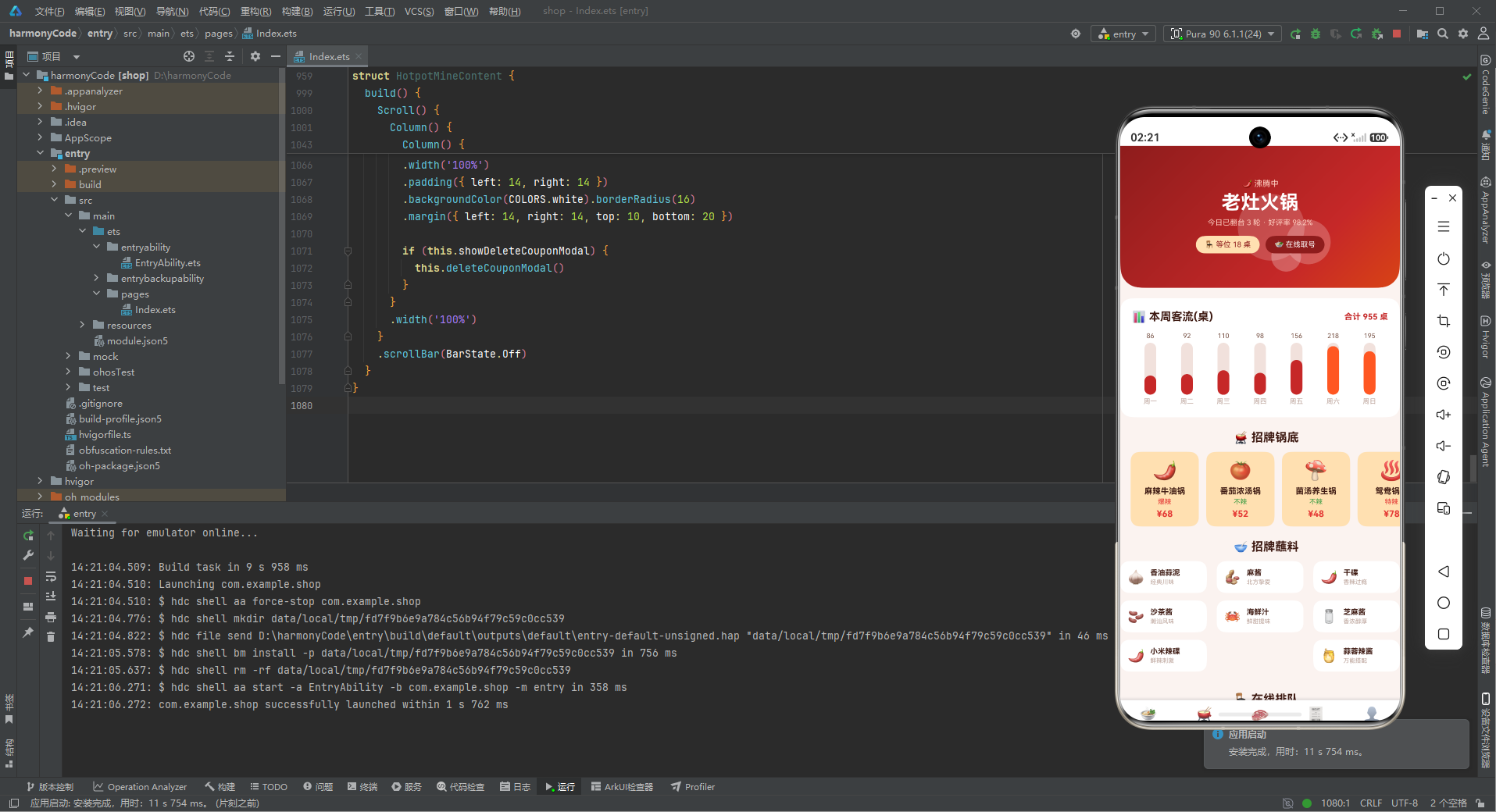
在餐饮数字化浪潮席卷而来的今天,火锅作为中国最具代表性的美食品类之一,正经历着从传统堂食到智能点餐的全面升级。本文要深度剖析的这款火锅美食应用,正是为一家定位"老灶火锅"的连锁品牌量身打造的移动端解决方案。这款应用不仅仅是一个简单的点餐工具,而是一个集锅底浏览、涮菜选购、在线排队、订单管理、会员积分于一体的完整餐饮生态系统。
从业务视角来看,这款应用覆盖了火锅消费的全链路:顾客进店前可以在线取号排队,浏览招牌锅底和人气涮菜;入座后可以快速下单,选择不同辣度的锅底和丰富的蘸料;用餐过程中可以实时查看订单状态;用餐结束后可以累积积分、兑换优惠券,享受会员专属权益。这种全链路的数字化体验,极大地提升了门店的运营效率和顾客的用餐体验。
从技术视角来看,这款应用采用了声明式UI框架进行开发,基于组件化的设计思想,将整个应用拆分为五个核心Tab页面:首页、锅底、涮菜、订单、我的。每个页面都有独立的状态管理和业务逻辑,同时又通过统一的颜色系统、数据模型和交互模式保持高度一致性。应用中大量使用了自定义构建器(@Builder)来复用UI片段,通过枚举类型管理Tab状态,通过接口(interface)定义数据模型,形成了一套清晰、规范、可扩展的代码架构。
特别值得一提的是应用中的视觉设计:以火锅红(#C62828)为主色调,搭配辣椒橙(#FF5722)作为强调色,营造出热情、沸腾的品牌氛围。首页顶部的渐变头卡配合气泡特效,模拟了火锅沸腾时的视觉感受,让人一眼就能感受到火锅的热辣与活力。周客流柱状图、招牌锅底横滑卡片、蘸料九宫格等丰富的UI元素,为用户提供了沉浸式的浏览体验。
本文将从架构设计、数据模型、状态管理、组件实现等多个维度,对这款火锅美食应用进行全方位的深度解析,帮助读者理解如何从零开始构建一个功能完整、设计精美的移动端应用。
二、整体架构流程图
为了让读者对整个应用的架构有一个直观的认识,下面用Mermaid流程图展示应用的整体架构设计。
数据流交互图
三、颜色与主题系统详解
3.1 调色板接口设计
应用首先定义了一个完整的颜色调色板接口,这是整个应用视觉系统的基石。
interface HotpotColorPalette {
  primary: string
  primaryLight: string
  primaryDark: string
  accent: string
  accentLight: string
  chili: string
  bg: string
  cardBg: string
  textPrimary: string
  textSecondary: string
  textHint: string
  border: string
  success: string
  warning: string
  danger: string
  white: string
}
这段代码定义了一个名为HotpotColorPalette的接口,包含了16个颜色字段。这种设计模式的优势在于:首先,通过接口约束了颜色系统的完整性,确保所有必要的颜色都被定义;其次,为后续的类型检查提供了保障,任何引用颜色的地方都可以获得智能提示和类型校验;最后,当需要更换主题时,只需要替换实现了该接口的颜色常量对象即可,无需修改业务代码。
接口中的颜色字段可以分为几个层次:主色系列(primary、primaryLight、primaryDark)提供了品牌色的不同深浅变体,用于按钮、渐变、强调文字等不同场景;强调色系列(accent、accentLight)用于辅助强调和标签背景;特色色(chili)是火锅品牌特有的辣椒红,用于渐变过渡;基础色系列(bg、cardBg、white)构成了页面的背景层次;文字色系列(textPrimary、textSecondary、textHint)提供了三级文字对比度;功能色(success、warning、danger)用于传达状态信息;border色用于分隔线和边框。
3.2 配色方案的设计理念
const COLORS: HotpotColorPalette = {
  primary: '#C62828',
  primaryLight: '#E57373',
  primaryDark: '#8E1C1C',
  accent: '#FF5722',
  accentLight: '#FFE0B2',
  chili: '#D84315',
  bg: '#FBF3F0',
  cardBg: '#FFFFFF',
  textPrimary: '#3E1A12',
  textSecondary: '#7A5548',
  textHint: '#BCA39A',
  border: '#F0E2DC',
  success: '#43A047',
  warning: '#FFB300',
  danger: '#E53935',
  white: '#FFFFFF'
}
颜色常量COLORS是调色板接口的具体实现,采用了以火锅红为核心的暖色调配色方案。主色调#C62828是一种深沉的红色,类似于火锅底料中辣椒熬煮后的颜色,传递出热情、浓郁的品牌感受。主色深色变体#8E1C1C用于渐变的暗端和深色按钮,主色浅色变体#E57373则用于次要强调和浅色状态。
强调色#FF5722是一种明亮的橙红色,类似于辣椒的颜色,与主色形成和谐的暖色调搭配。强调色浅色变体#FFE0B2是一种柔和的浅橙色,用于卡片背景和标签底色,营造温暖的视觉感受。chili色#D84315则是介于主色和强调色之间的辣椒红,丰富了红色系的层次感。
背景色#FBF3F0是一种微微偏红的暖白色,不同于传统的纯白或冷灰白,这种暖调背景与火锅的主题更加契合,也让整体界面显得更加温馨。文字色采用了深棕色系而非纯黑色,#3E1A12的主文字色在暖色背景上既有足够的对比度,又不会显得过于刺眼,符合美食类应用的视觉调性。
功能色方面,成功色使用了清新的绿色#43A047,警告色使用了金黄色#FFB300,危险色使用了亮红色#E53935,这三种颜色在UI中承担着状态传达的重要功能,配色标准且易于辨识。
3.3 常量配置方式
颜色系统采用了"接口定义 + 常量实现"的分离式设计,这种模式在ArkTS开发中非常常见。接口HotpotColorPalette定义了契约,常量COLORS提供了具体实现。当需要支持深色模式或多主题切换时,可以定义多个实现了同一接口的颜色常量对象,通过状态变量动态切换,而所有引用COLORS的业务代码都无需修改。
四、数据模型层深度解析
数据模型是整个应用的骨架,定义了业务实体的结构和属性。这款火锅应用共定义了8个核心数据接口,覆盖了锅底、涮菜、订单、蘸料、排队、客流、优惠券等全部业务领域。
4.1 TabMeta — 导航元数据
interface TabMeta {
  title: string
  icon: string
}
TabMeta接口定义了底部导航栏每个Tab的元数据结构,包含标题(title)和图标(icon)两个字段。这里的图标采用了emoji字符而非图片资源,这种设计在原型开发阶段非常高效——无需切图、无需资源管理,直接用字符就能表达丰富的含义。每个Tab对应一个emoji图标:首页用🍲(火锅)、锅底用🫕(火锅锅)、涮菜用🥩(肉片)、订单用🧾(小票)、我的用👤(人物),非常直观。
4.2 PotMeta — 锅底数据模型
interface PotMeta {
  name: string
  emoji: string
  spicy: number
  price: number
  isHot: boolean
}
PotMeta是锅底的数据模型,包含5个字段。name是锅底名称,如"麻辣牛油锅"、“番茄浓汤锅”;emoji是锅底的表情符号图标,用不同的emoji来代表不同类型的锅底;spicy是辣度等级,用0-5的数字表示,0为不辣,5为爆辣,这个字段会配合辅助函数转换成对应的文字描述和颜色;price是锅底价格,单位为元;isHot是招牌标记,用于区分热门招牌锅底和普通锅底。
这个数据模型的设计非常精炼,5个字段就完整描述了一个锅底的核心信息。特别是spicy字段采用数字而非字符串,使得数据更加规范,也便于后续的筛选和排序操作。配合getSpicyText()和getSpicyColor()两个辅助函数,可以灵活地将数字辣度转换成用户友好的展示形式。
4.3 DishMeta — 涮菜数据模型
interface DishMeta {
  name: string
  emoji: string
  price: number
  time: string
  isNew: boolean
  isHot: boolean
}
DishMeta是涮菜的数据模型,包含6个字段。name是菜品名称,emoji是菜品图标,price是价格。time字段特别有意思,它记录的是涮煮时间,如"8秒"、“3分”、"15分"等,这是火锅品类特有的属性,体现了对用户体验的细致关怀——告诉用户每道菜应该涮多久,避免了"毛肚老了"或"肉丸没熟"的尴尬。
isNew和isHot两个布尔标记分别表示新品和热卖,这两个标记在UI上会以"新"、"热"的小标签形式展示,帮助用户快速识别特色菜品。这种标签化的设计在电商和餐饮类应用中非常常见,能够有效引导用户注意力,提升转化率。
4.4 OrderMeta — 订单数据模型
interface OrderMeta {
  name: string
  emoji: string
  num: number
  price: number
  isDone: boolean
}
OrderMeta是订单的数据模型,包含5个字段。name是订单名称,通常是套餐名称,如"鸳鸯锅+8菜套餐";emoji是订单对应的图标;num是人数,即几人份;price是订单总价;isDone是订单状态标记,true表示已完成,false表示进行中。
订单模型的设计简洁而实用,通过isDone字段区分订单状态,配合列表中的状态标签(“已完成"或"进行中”),用户可以一目了然地了解自己的订单情况。num字段记录人数,方便用户回顾和管理不同人数的用餐订单。
4.5 DippingMeta — 蘸料数据模型
interface DippingMeta {
  name: string
  emoji: string
  desc: string
  isHot: boolean
}
DippingMeta是蘸料的数据模型,包含4个字段。name是蘸料名称,如"香油蒜泥"、“麻酱”、“干碟"等;emoji是蘸料图标;desc是蘸料描述,如"经典川味”、“北方挚爱”、"香辣过瘾"等,用简短的文字概括蘸料的风味特点;isHot标记是否为热门蘸料。
蘸料是火锅文化中非常重要的组成部分,不同地域的人有不同的蘸料偏好。将蘸料独立为一个数据模型,并提供风味描述,体现了应用对火锅文化的深度理解,也为用户选择蘸料提供了参考。
4.6 QueueMeta — 排队数据模型
interface QueueMeta {
  table: string
  people: number
  wait: string
  isDone: boolean
}
QueueMeta是排队叫号的数据模型,包含4个字段。table是桌位区域和类型,如"A 区 · 小桌"、“C 区 · 包厢”;people是用餐人数;wait是等待情况,如"等 2 桌"、“等 11 桌”;isDone标记是否已经叫号。
排队功能是火锅店的刚需,尤其是热门门店高峰期往往需要长时间等位。在线排队功能让用户可以提前取号、实时查看等待情况,大大提升了用餐体验。
4.7 WeekHotpotMeta — 周客流数据模型
interface WeekHotpotMeta {
  label: string
  value: number
}
WeekHotpotMeta是周客流统计的数据模型,用于柱状图展示。label是日期标签(周一到周日),value是对应的客流数值(桌数)。这个模型虽然简单,但它是数据可视化的基础,配合ForEach循环和Stack堆叠布局,可以实现精美的柱状图效果。
4.8 CouponMeta — 优惠券数据模型
interface CouponMeta {
  name: string
  emoji: string
  price: number
  desc: string
  isNew: boolean
}
CouponMeta是优惠券的数据模型,包含5个字段。name是优惠券名称,如"满100减20"、“新客立减30”;emoji是优惠券图标;price是优惠金额;desc是使用条件说明,如"全场通用"、“首单可用”、"工作日使用"等;isNew标记是否为新券。
优惠券是会员体系的重要组成部分,也是促进复购的有效手段。通过不同类型的优惠券(满减券、折扣券、免单券等),可以灵活地设计各种营销活动。
五、配置常量层分析
5.1 TAB_CONFIG — 导航配置
const TAB_CONFIG: Record<string, TabMeta> = {
  'HOME': { title: '首页', icon: '🍲' },
  'POT': { title: '锅底', icon: '🫕' },
  'DISH': { title: '涮菜', icon: '🥩' },
  'ORDER': { title: '订单', icon: '🧾' },
  'MINE': { title: '我的', icon: '👤' }
}
TAB_CONFIG是底部导航栏的配置常量,使用Record<string, TabMeta>类型定义,这是一种键值对的映射结构。每个键对应一个Tab的枚举值(字符串形式),值是该Tab的元数据(标题和图标)。
这种配置化的设计模式有几个显著优点:第一,集中管理,所有Tab的配置在一个地方就能看全,修改也很方便;第二,类型安全,TypeScript的Record类型确保了键的一致性和值的类型正确性;第三,易于扩展,新增Tab只需要在配置对象中添加一项,同时在枚举中添加对应值即可;第四,支持国际化,如果需要支持多语言,只需要替换配置对象或根据语言环境动态生成即可。
5.2 业务配置模式
除了TAB_CONFIG之外,应用中还有一系列业务数据常量(POT_LIST、DISH_LIST、ORDER_LIST等),这些常量采用了相同的设计模式:都是定义为数组类型,数组中的每个元素都实现了对应的接口。这种"接口 + 常量数组"的模式是前端开发中非常经典的数据层设计。
这些常量数据在开发阶段充当Mock数据的角色,让前端开发可以独立于后端进行,无需等待接口开发完成就能构建完整的UI和交互。在实际项目中,这些常量数据最终会被替换为后端API返回的数据,但数据结构保持不变,从而实现了前后端的解耦。
六、Mock数据层分析
6.1 模拟数据的设计思路
应用中定义了8组Mock数据,涵盖了所有业务模块。这些数据的设计遵循了几个原则:
数量充足:每组数据都有8-12条记录,足够展示列表滚动效果和分页概念。例如POT_LIST有10款锅底,DISH_LIST有12道涮菜,ORDER_LIST有10条订单,这样的数量既不会太少导致页面空旷,也不会太多影响加载性能。
多样性:数据在类型、状态、标记等方面保持多样性。比如锅底有辣的有不辣的,有招牌的也有普通的;订单有已完成的也有进行中的;菜品有新品也有热卖。这种多样性确保了UI中各种状态都能得到展示和验证。
真实性:数据内容贴近真实业务场景。锅底名称都是火锅店常见的品类(麻辣牛油、番茄浓汤、菌汤养生等),菜品名称也都是火锅经典涮菜(雪花肥牛、毛肚、虾滑、鸭血等)。真实的数据让原型更有说服力,也便于后续与真实业务对接。
6.2 辅助函数设计
function getSpicyText(spicy: number): string {
  if (spicy === 0) {
    return '不辣'
  } else if (spicy <= 2) {
    return '微辣'
  } else if (spicy <= 3) {
    return '中辣'
  } else if (spicy <= 4) {
    return '特辣'
  }
  return '爆辣'
}

function getSpicyColor(spicy: number): string {
  if (spicy === 0) {
    return COLORS.success
  } else if (spicy <= 3) {
    return COLORS.warning
  }
  return COLORS.danger
}
这两个辅助函数是辣度展示的核心逻辑。getSpicyText将数字辣度(0-5)转换为用户友好的中文描述(不辣/微辣/中辣/特辣/爆辣),getSpicyColor则根据辣度返回对应的颜色——不辣用绿色(成功色)、中辣及以下用黄色(警告色)、特辣及以上用红色(危险色)。这种颜色编码让用户一眼就能判断辣度等级,提升了信息传达的效率。
辅助函数的设计体现了"关注点分离"的原则:数据模型只存原始数据(数字),展示逻辑封装在函数中。如果后续需要调整辣度分级标准(比如将微辣的阈值从2改为1),只需要修改函数即可,无需改动数据和UI组件。
6.3 枚举类型设计
enum HotpotTab {
  HOME,
  POT,
  DISH,
  ORDER,
  MINE
}
HotpotTab枚举定义了五个Tab的枚举值,使用数字枚举(默认从0开始)。枚举类型在Tab导航中扮演着核心角色:activeTab状态变量的类型是HotpotTab,Tab切换时通过比较枚举值判断当前激活的Tab,内容区域通过枚举值决定渲染哪个页面组件。
使用枚举而非字符串字面量有几个好处:第一,类型安全,枚举值是有限的,不会出现拼写错误;第二,智能提示,IDE可以自动补全枚举值;第三,可读性好,HotpotTab.HOME比单纯的字符串’home’语义更清晰;第四,易于重构,如果需要修改Tab的标识,只需要改枚举定义。
七、主入口组件逐段分析
主入口组件是整个应用的骨架,负责Tab导航和页面切换。下面逐段分析其实现细节。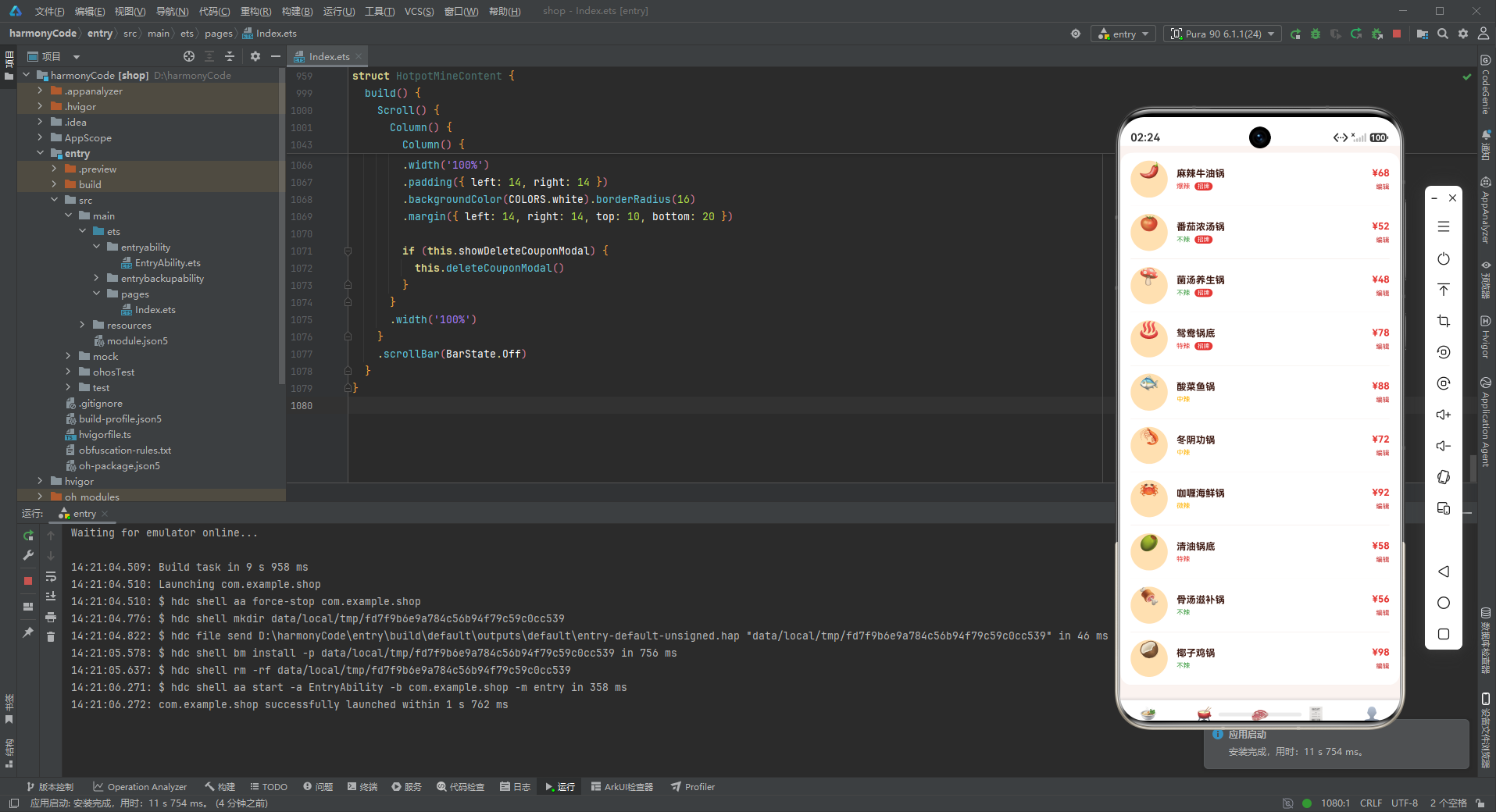
7.1 组件定义与状态管理
@Entry
@Component
struct HotpotApp {
  @State activeTab: HotpotTab = HotpotTab.HOME
HotpotApp是应用的主组件,使用@Entry装饰器标记为应用入口,使用@Component装饰器标记为组件。@State装饰器定义了响应式状态变量activeTab,类型为HotpotTab枚举,初始值为HotpotTab.HOME(即首页)。
@State是ArkUI中最基础的状态管理装饰器,它标记的变量会被框架监听,当变量值发生变化时,会触发依赖该变量的UI组件重新渲染。在这个应用中,activeTab是整个应用导航状态的核心,用户点击底部Tab时会更新这个值,进而触发内容区域的切换和Tab图标的高亮变化。
7.2 contentArea自定义构建器
  @Builder contentArea() {
    Column() {
      if (this.activeTab === HotpotTab.HOME) {
        HotpotHomeContent()
      } else if (this.activeTab === HotpotTab.POT) {
        HotpotPotContent()
      } else if (this.activeTab === HotpotTab.DISH) {
        HotpotDishContent()
      } else if (this.activeTab === HotpotTab.ORDER) {
        HotpotOrderContent()
      } else if (this.activeTab === HotpotTab.MINE) {
        HotpotMineContent()
      }
    }
    .width('100%')
  }
contentArea是一个用@Builder装饰的自定义构建函数,它的作用是根据当前激活的Tab渲染对应的页面内容组件。内部使用if-else if条件判断,根据this.activeTab的值决定渲染哪个页面组件。
@Builder是ArkUI提供的一种UI复用机制,它可以将一段UI逻辑封装为可复用的函数。使用@Builder的好处是:第一,代码组织更清晰,将复杂的UI逻辑拆分为多个有意义的函数;第二,复用性好,同一段UI可以在多个地方调用;第三,性能优化,框架会对Builder的渲染进行优化。
这个构建器采用了Column作为容器,设置宽度为100%,确保内容区域占满水平空间。条件渲染的方式使得每次只有一个页面组件被渲染和激活,避免了不必要的性能开销。
7.3 tabItem自定义构建器
  @Builder tabItem(icon: string, label: string, tab: HotpotTab) {
    Column() {
      Text(icon).fontSize(20)
      Text(label).fontSize(10)
        .fontColor(this.activeTab === tab ? COLORS.primary : COLORS.textHint)
        .fontWeight(this.activeTab === tab ? FontWeight.Bold : FontWeight.Normal)
        .margin({ top: 2 })
    }
    .layoutWeight(1)
    .onClick(() => { this.activeTab = tab })
  }
tabItem是另一个自定义构建函数,用于构建底部导航栏的每个Tab项。它接收三个参数:icon(emoji图标)、label(文字标签)、tab(对应的枚举值)。
每个Tab项的结构是一个Column,包含上方的图标Text和下方的文字Text。图标使用20号字体,标签使用10号字体。标签的颜色和字重会根据当前激活状态动态变化:如果当前Tab被激活(this.activeTab === tab),则使用主色和粗体;否则使用提示色和常规字重。这种动态样式让用户可以清晰地知道自己当前在哪个页面。
.layoutWeight(1)设置了弹性布局权重,确保所有Tab项平均分配底部导航栏的宽度。.onClick事件处理器会在用户点击Tab时更新activeTab状态,触发页面切换。
7.4 build方法整体布局
  build() {
    Column() {
      this.contentArea()
      Row() {
        this.tabItem(TAB_CONFIG.HOME.icon, TAB_CONFIG.HOME.title, HotpotTab.HOME)
        this.tabItem(TAB_CONFIG.POT.icon, TAB_CONFIG.POT.title, HotpotTab.POT)
        this.tabItem(TAB_CONFIG.DISH.icon, TAB_CONFIG.DISH.title, HotpotTab.DISH)
        this.tabItem(TAB_CONFIG.ORDER.icon, TAB_CONFIG.ORDER.title, HotpotTab.ORDER)
        this.tabItem(TAB_CONFIG.MINE.icon, TAB_CONFIG.MINE.title, HotpotTab.MINE)
      }
      .width('100%')
      .padding({ top: 8, bottom: 8 })
      .backgroundColor(COLORS.white)
      .shadow({ radius: 10, color: '#3E1A1226', offsetY: -2 })
    }
    .width('100%').height('100%')
    .backgroundColor(COLORS.bg)
  }
}
build方法是组件的核心渲染函数,定义了组件的UI结构。整个应用采用Column垂直布局,分为上下两部分:上方是内容区域(contentArea),下方是底部导航栏。
底部导航栏使用Row水平布局,包含5个Tab项,通过调用tabItem构建函数生成。每个Tab项的图标和标题都从TAB_CONFIG配置常量中读取,实现了配置与展示的分离。导航栏设置了白色背景、上下各8dp的内边距,以及顶部的阴影效果(shadow),阴影颜色使用了带透明度的主文字色(#3E1A1226,26是十六进制透明度,约为15%),偏移量为Y轴-2dp,营造出导航栏悬浮在内容上方的视觉效果。
最外层的Column设置了宽高都为100%,占满整个屏幕,背景色使用应用的背景色COLORS.bg。
这种"内容区域 + 底部导航"的布局结构是移动端应用最经典的布局模式之一,具有操作便捷、切换快速、信息架构清晰等优点,非常适合拥有3-5个一级模块的应用。
八、各页面组件逐段代码分析
8.1 首页组件 HotpotHomeContent
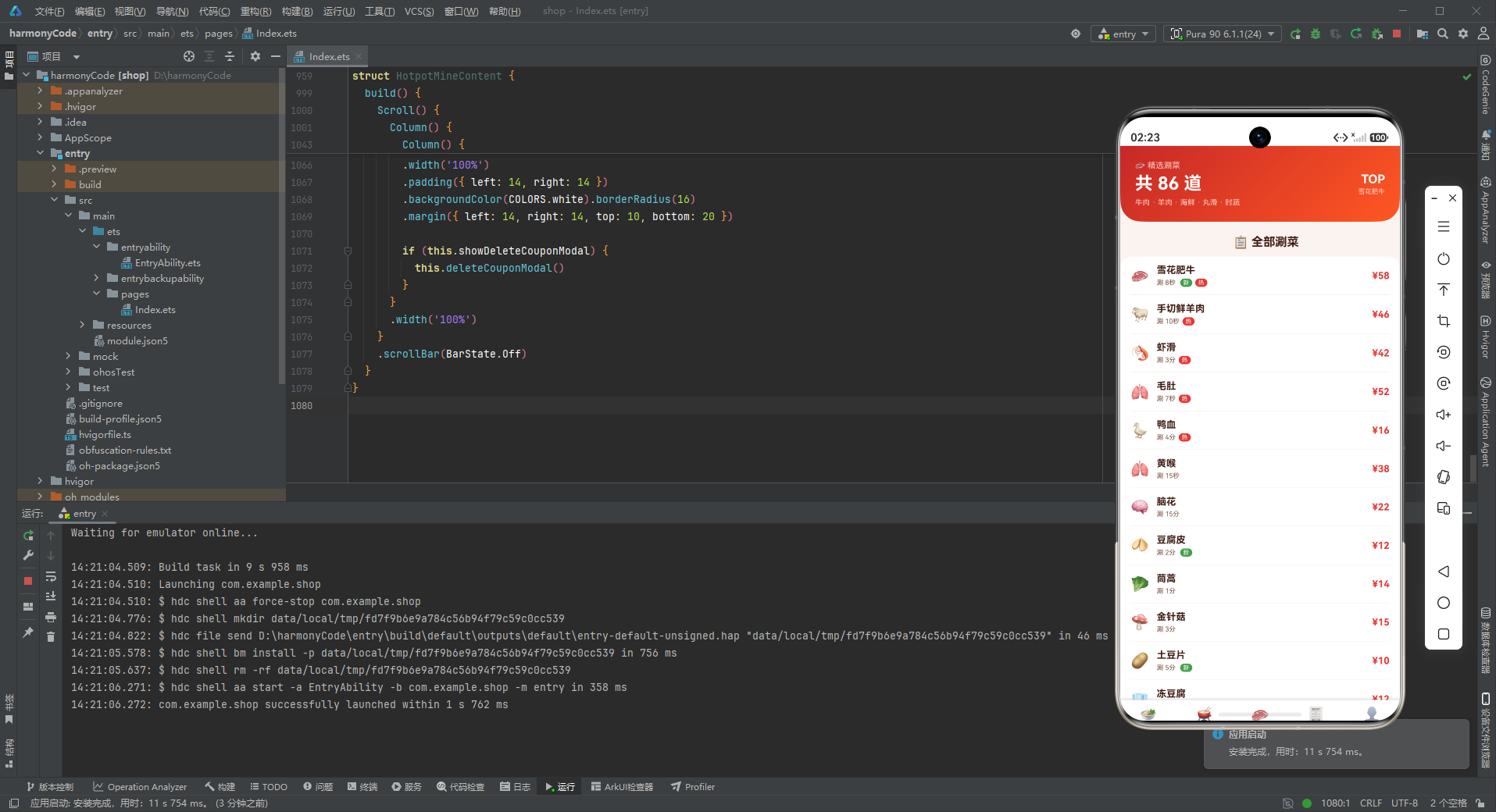
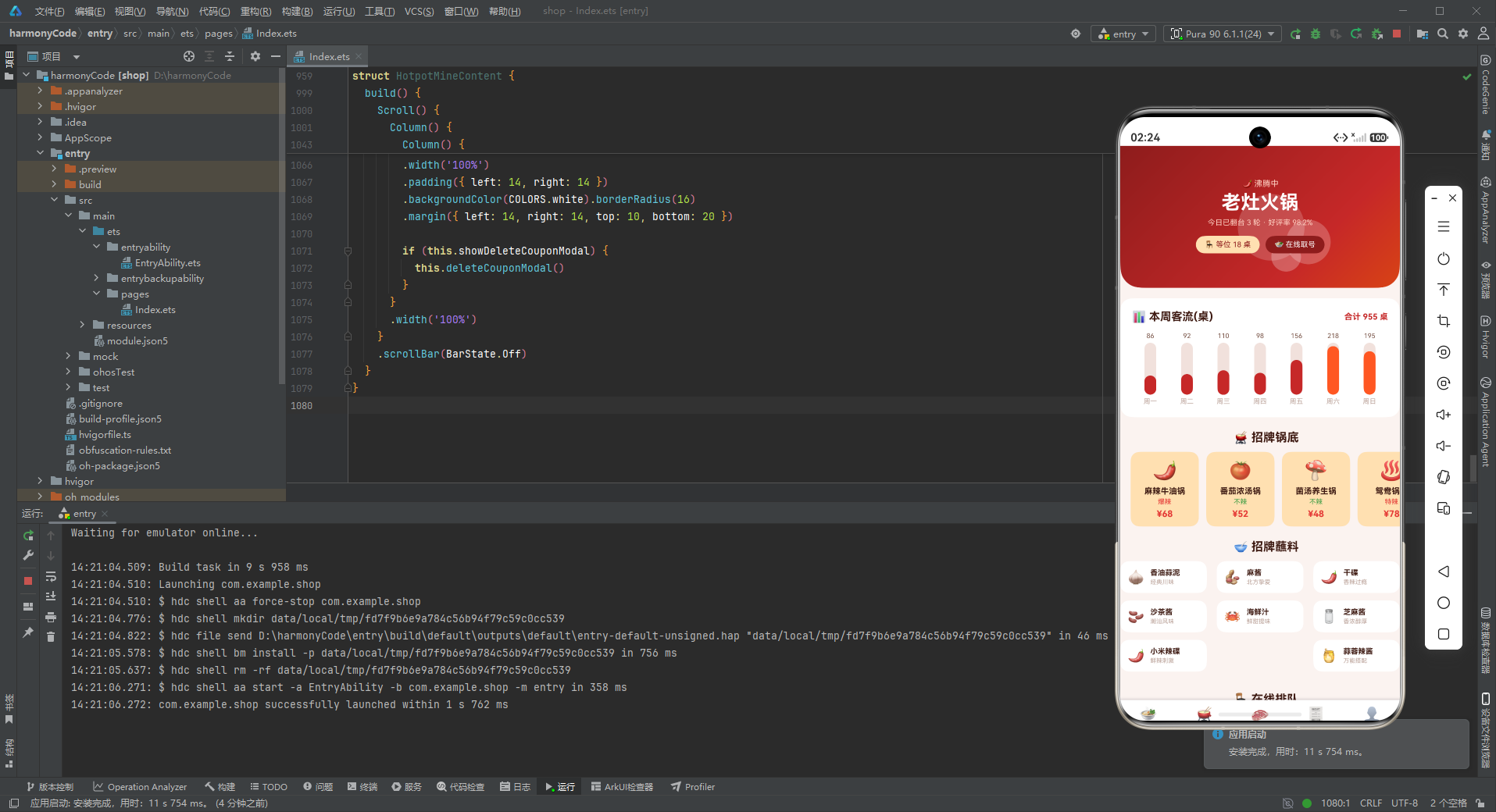
首页是用户进入应用后看到的第一个页面,承担着品牌展示、数据概览、快捷入口等多重功能。这个页面内容最丰富,包含了沸腾锅底头卡、周客流柱状图、招牌锅底横滑、蘸料九宫格、在线排队、人气涮菜六大模块,以及新增涮菜功能。
8.1.1 状态与弹窗定义
@Component
struct HotpotHomeContent {
  @State showAddDishModal: boolean = false
  @State dishName: string = ''
  @State dishPrice: string = ''
首页组件定义了三个状态变量:showAddDishModal控制新增涮菜弹窗的显示与隐藏,初始值为false(不显示);dishName和dishPrice分别存储弹窗表单中输入的菜品名称和价格。
这种弹窗相关的状态都定义在页面组件内部的设计,体现了组件化的思想——每个页面管理自己的弹窗状态和表单数据,互不干扰。虽然多个页面都有类似的弹窗结构(新增/编辑/删除确认),但状态是独立的,避免了状态污染。
8.1.2 modalOverlay遮罩构建器
  @Builder modalOverlay(onClose: () => void) {
    Column()
      .width('100%').height('100%')
      .backgroundColor('rgba(0,0,0,0.55)')
      .onClick(onClose)
  }
modalOverlay是一个通用的弹窗遮罩构建器,接收一个onClose回调函数作为参数。它创建了一个占满整个屏幕的半透明黑色遮罩层(rgba(0,0,0,0.55)表示55%不透明度的黑色),点击遮罩层会触发onClose回调关闭弹窗。
这个构建器的设计非常巧妙:第一,它是可复用的,每个弹窗都可以使用同一个遮罩;第二,它通过参数传入关闭逻辑,保持了灵活性——不同的弹窗可以有不同的关闭处理;第三,使用半透明黑色遮罩既可以突出弹窗内容,又能让用户隐约看到后面的页面,提供了位置感。
8.1.3 addDishModal新增涮菜弹窗
  @Builder addDishModal() {
    Stack() {
      this.modalOverlay(() => { this.showAddDishModal = false })
      Column() {
        Row() {
          Text('🥩 新增涮菜').fontSize(18).fontWeight(FontWeight.Bold).fontColor(COLORS.textPrimary)
          Column().layoutWeight(1)
          Text('✕').fontSize(18).fontColor(COLORS.textHint).onClick(() => { this.showAddDishModal = false })
        }
        .width('100%').padding({ left: 20, right: 20, top: 18, bottom: 12 })
        Divider().color(COLORS.border)
        Column() {
          Text('菜品名称').fontSize(12).fontColor(COLORS.textSecondary).margin({ top: 12, left: 20 })
          TextInput({ placeholder: '如 鲜切黄牛肉' })
            .placeholderColor(COLORS.textHint).fontSize(14).width('90%')
            .backgroundColor(COLORS.bg).borderRadius(8)
            .margin({ left: 20, right: 20, top: 4 })
            .onChange((v: string) => { this.dishName = v })
          Text('菜品价格').fontSize(12).fontColor(COLORS.textSecondary).margin({ top: 14, left: 20 })
          TextInput({ placeholder: '如 68' })
            .placeholderColor(COLORS.textHint).fontSize(14).width('90%')
            .backgroundColor(COLORS.bg).borderRadius(8)
            .margin({ left: 20, right: 20, top: 4 })
            .onChange((v: string) => { this.dishPrice = v })
          Row() {
            Text('取消').fontSize(14).fontColor(COLORS.textSecondary)
              .layoutWeight(1).textAlign(TextAlign.Center)
              .padding({ top: 10, bottom: 10 })
              .backgroundColor(COLORS.bg).borderRadius(8)
              .onClick(() => { this.showAddDishModal = false })
            Column().width(12)
            Text('保存').fontSize(14).fontColor(COLORS.white)
              .layoutWeight(1).textAlign(TextAlign.Center)
              .padding({ top: 10, bottom: 10 })
              .backgroundColor(COLORS.primary).borderRadius(8)
              .onClick(() => { this.showAddDishModal = false })
          }
          .margin({ left: 20, right: 20, top: 20, bottom: 20 })
        }
        .constraintSize({ maxHeight: '70%' })
      }
      .width('88%')
      .backgroundColor(COLORS.cardBg).borderRadius(16)
    }
    .width('100%').height('100%')
  }
addDishModal构建器定义了新增涮菜的弹窗内容。整个弹窗使用Stack堆叠布局,底层是遮罩层(modalOverlay),上层是弹窗内容卡片。
弹窗内容是一个Column,宽度为屏幕的88%,使用卡片背景色和16dp的圆角,营造出悬浮卡片的视觉效果。弹窗分为三个区域:
标题栏:使用Row布局,左侧是弹窗标题"🥩 新增涮菜",中间用一个弹性Column撑开,右侧是关闭按钮"✕"。标题栏底部有一条分隔线(Divider)。
表单区域:包含两个表单项——菜品名称和菜品价格。每个表单项都有标签文字和输入框(TextInput)。输入框使用背景色作为填充色,8dp圆角,placeholder使用提示色。输入框的onChange事件实时更新对应的状态变量。
操作按钮:使用Row布局,包含"取消"和"保存"两个按钮,各占一半宽度(layoutWeight(1))。取消按钮使用浅背景+深文字,保存按钮使用主色背景+白文字,形成视觉对比。
弹窗使用.constraintSize({ maxHeight: '70%' })限制最大高度为屏幕的70%,防止内容过多时弹窗超出屏幕范围。
8.1.4 沸腾锅底头卡
        // 沸腾锅底头卡(气泡特效)
        Column() {
          Stack() {
            Column().width(90).height(90).borderRadius(45).backgroundColor('rgba(255,255,255,0.18)')
              .margin({ top: 30, left: 30 })
            Column().width(60).height(60).borderRadius(30).backgroundColor('rgba(255,255,255,0.22)')
              .margin({ top: 70, left: 130 })
            Column().width(40).height(40).borderRadius(20).backgroundColor('rgba(255,255,255,0.25)')
              .margin({ top: 110, left: 70 })
            Column() {
              Text('🌶️ 沸腾中').fontSize(11).fontColor('#FFD0C2')
              Text('老灶火锅').fontSize(26).fontWeight(FontWeight.Bold).fontColor(COLORS.white)
                .margin({ top: 4 })
              Text('今日已翻台 3 轮 · 好评率 98.2%').fontSize(10).fontColor('#FFD0C2').margin({ top: 6 })
              Row() {
                Text('🪑 等位 18 桌').fontSize(10).fontColor(COLORS.primaryDark)
                  .padding({ left: 12, right: 12, top: 6, bottom: 6 })
                  .backgroundColor(COLORS.accentLight).borderRadius(12)
                Text('🍲 在线取号').fontSize(10).fontColor(COLORS.white)
                  .padding({ left: 12, right: 12, top: 6, bottom: 6 })
                  .backgroundColor('#8E1C1C').borderRadius(12)
                  .margin({ left: 8 })
              }
              .margin({ top: 12 })
            }
            .alignItems(HorizontalAlign.Center)
          }
          .width('100%')
        }
        .width('100%')
        .padding({ top: 20, bottom: 22 })
        .linearGradient({ angle: 135, colors: [[COLORS.primaryDark, 0.0], [COLORS.primary, 0.7], [COLORS.chili, 1.0]] })
        .borderRadius({ bottomLeft: 28, bottomRight: 28 })
沸腾锅底头卡是首页最上方的品牌展示区域,也是整个应用视觉冲击力最强的部分。它采用了渐变背景配合气泡特效的设计,模拟火锅沸腾时热气腾腾的感觉。
气泡特效通过三个不同大小、不同位置的半透明白色圆形实现:最大的圆(90x90)在左上方,中等的圆(60x60)在右上方偏下,最小的圆(40x40)在左下方偏下。这些圆形使用Stack堆叠布局,通过margin定位到不同位置,形成大小不一、错落有致的气泡效果。透明度从18%到25%不等,增加了层次感。
文字内容居中展示,从上到下依次是:状态标签"🌶️ 沸腾中"、品牌名称"老灶火锅"(26号粗体白字)、数据概览"今日已翻台3轮 · 好评率98.2%"。底部有两个操作标签:“等位18桌"和"在线取号”,分别使用浅橙和深红的背景色。
渐变背景使用135度角的三色渐变,从主色深色(#8E1C1C)过渡到主色(#C62828)再到辣椒橙(#D84315),营造出从暗红到亮橙的火焰感。底部左右各28dp的圆角让头卡呈现出上宽下收的造型,更加精致。
8.1.5 周客流柱状图
        // 周客流柱状图
        Column() {
          Row() {
            Text('📊 本周客流(桌)').fontSize(15).fontWeight(FontWeight.Bold).fontColor(COLORS.textPrimary)
            Column().layoutWeight(1)
            Text('合计 955 桌').fontSize(11).fontColor(COLORS.primary).fontWeight(FontWeight.Bold)
          }
          .width('100%')
          Row() {
            ForEach(WEEK_HOTPOT, (v: WeekHotpotMeta, i: number) => {
              Column() {
                Text(v.value + '').fontSize(9).fontColor(COLORS.textSecondary)
                Stack({ alignContent: Alignment.Bottom }) {
                  Column().width(16).width(16).height(70).backgroundColor(COLORS.border).borderRadius(8)
                  Column().width(16).height(Number(v.value) * 0.3).backgroundColor(
                    i === 5 || i === 6 ? COLORS.accent : COLORS.primary)
                    .borderRadius(8)
                }
                .width(16).height(70).margin({ top: 4 })
                Text(v.label).fontSize(9).fontColor(COLORS.textHint).margin({ top: 4 })
              }
              .layoutWeight(1)
              .alignItems(HorizontalAlign.Center)
            }, (v: WeekHotpotMeta, i: number) => v.label + i)
          }
          .width('100%').margin({ top: 12 })
        }
        .width('100%')
        .padding(16)
        .backgroundColor(COLORS.cardBg).borderRadius(16)
        .margin({ left: 14, right: 14, top: 14 })
周客流柱状图是一个纯代码实现的数据可视化组件,没有使用任何图表库,完全通过基础组件搭建而成。
图表区域分为标题行和柱状图主体两部分。标题行左侧是图表标题"📊 本周客流(桌)“,右侧是合计数据"合计955桌”,使用主色突出显示。
柱状图主体使用Row水平排列7根柱子(对应周一到周日),每根柱子是一个Column,使用layoutWeight(1)平均分配宽度。每根柱子包含三个元素:上方是数值文字、中间是柱形图、下方是日期标签。
柱形图使用Stack堆叠布局实现,底部对齐(Alignment.Bottom)。底层是一个70dp高的背景柱(使用边框色),上层是根据数值计算高度的前景柱(使用主色或强调色)。前景柱高度 = 数值 × 0.3,这个系数是根据数据范围和柱子高度调试出来的,确保数据最大的柱子接近满高。
周末(周六、周日,对应索引5和6)的柱子使用强调色(橙红色),工作日使用主色(红色),这种配色策略既符合视觉习惯(周末数据通常更高),也增加了图表的可读性。
8.1.6 招牌锅底横滑
        // 招牌锅底横滑
        Text('🫕 招牌锅底').fontSize(16).fontWeight(FontWeight.Bold).fontColor(COLORS.textPrimary)
          .margin({ left: 16, top: 18 })
        Scroll() {
          Row() {
            ForEach(POT_LIST, (p: PotMeta) => {
              if (p.isHot) {
                Column() {
                  Text(p.emoji).fontSize(26)
                  Text(p.name).fontSize(11).fontWeight(FontWeight.Bold).fontColor(COLORS.textPrimary)
                    .margin({ top: 6 })
                  Text(getSpicyText(p.spicy)).fontSize(9)
                    .fontColor(getSpicyColor(p.spicy)).margin({ top: 3 })
                  Text('¥' + p.price).fontSize(12).fontColor(COLORS.danger).fontWeight(FontWeight.Bold)
                    .margin({ top: 4 })
                }
                .width(92)
                .padding(10)
                .backgroundColor(COLORS.accentLight).borderRadius(12)
                .margin({ right: 10 })
                .alignItems(HorizontalAlign.Center)
              }
            }, (p: PotMeta) => p.name)
          }
        }
        .scrollable(ScrollDirection.Horizontal)
        .scrollBar(BarState.Off)
        .margin({ left: 14, top: 10 })
招牌锅底横滑是一个水平滚动的卡片列表,只展示标记为热门(isHot === true)的锅底。使用Scroll组件包裹Row实现水平滚动,设置scrollBar(BarState.Off)隐藏滚动条,让界面更加简洁。
每张锅底卡片是一个92dp宽的Column,使用浅橙色背景(accentLight)和12dp圆角。卡片内容从上到下依次是:锅底emoji图标(26号字体)、锅底名称、辣度文字(调用getSpicyText和getSpicyColor动态生成)、价格(使用危险色突出显示)。
在ForEach循环内部使用if (p.isHot)进行条件过滤,只渲染热门锅底。这种方式的优点是简单直接,但缺点是每次渲染都会遍历所有数据。如果数据量很大,更高效的方式是先对数组进行filter再传给ForEach。
横滑卡片的设计非常适合展示推荐内容或分类入口,用户可以快速浏览多个选项而不占用太多垂直空间,是移动端常用的交互模式。
8.1.7 蘸料九宫格
        // 蘸料九宫格
        Text('🥣 招牌蘸料').fontSize(16).fontWeight(FontWeight.Bold).fontColor(COLORS.textPrimary)
          .margin({ left: 16, top: 18 })
        Flex({ wrap: FlexWrap.Wrap, justifyContent: FlexAlign.SpaceBetween }) {
          ForEach(DIPPING_LIST, (d: DippingMeta) => {
            Row() {
              Text(d.emoji).fontSize(18)
              Column() {
                Text(d.name).fontSize(10).fontWeight(FontWeight.Bold).fontColor(COLORS.textPrimary)
                Text(d.desc).fontSize(8).fontColor(COLORS.textHint).margin({ top: 2 })
              }
              .alignItems(HorizontalAlign.Start)
              .margin({ left: 8 })
            }
            .width('31%')
            .padding(10)
            .backgroundColor(COLORS.white).borderRadius(12)
            .margin({ bottom: 10 })
          }, (d: DippingMeta) => d.name)
        }
        .width('100%')
        .margin({ left: 14, right: 14, top: 10 })
蘸料九宫格使用Flex弹性布局实现,设置wrap: FlexWrap.Wrap支持换行,justifyContent: FlexAlign.SpaceBetween使每行两端对齐。每个蘸料项宽度设为31%,这样每行可以放3个(31% × 3 + 间距 ≈ 100%)。
每个蘸料项是一个Row,左侧是emoji图标,右侧是文字信息(名称和描述)。使用白色卡片背景和12dp圆角,视觉上清爽整齐。
九宫格布局是一种非常高效的信息展示方式,可以在有限的空间内展示大量条目,同时保持良好的可读性和点击区域。8种蘸料刚好可以排满3行(第一行3个、第二行3个、第三行2个)。
8.1.8 在线排队与人气涮菜列表
        // 排队叫号
        Text('🪑 在线排队').fontSize(16).fontWeight(FontWeight.Bold).fontColor(COLORS.textPrimary)
          .margin({ left: 16, top: 18 })
        Column() {
          ForEach(QUEUE_LIST.slice(0, 4), (q: QueueMeta) => {
            Row() {
              Text(q.table).fontSize(12).fontWeight(FontWeight.Bold).fontColor(COLORS.textPrimary)
              Column() {
                Text(q.people + ' 人用餐').fontSize(9).fontColor(COLORS.textSecondary).margin({ top: 3 })
              }
              .alignItems(HorizontalAlign.Start)
              .layoutWeight(1)
              .margin({ left: 10 })
              Text(q.wait).fontSize(10).fontWeight(FontWeight.Bold)
                .fontColor(q.isDone ? COLORS.success : COLORS.warning)
            }
            .width('100%')
            .padding({ top: 10, bottom: 10 })
            Divider().color(COLORS.border)
          }, (q: QueueMeta) => q.table + q.people)
        }
        .width('100%')
        .padding({ left: 14, right: 14 })
        .backgroundColor(COLORS.white).borderRadius(16)
        .margin({ left: 14, right: 14, top: 10 })
在线排队列表展示了4条排队记录(通过QUEUE_LIST.slice(0, 4)截取前4条)。每条记录是一行,左侧是桌位信息,中间是人数,右侧是等待状态。等待状态的颜色根据isDone动态变化:已叫号用绿色,等待中用黄色。
列表项之间使用Divider分隔线分隔,分隔线颜色使用边框色。整个列表使用白色卡片背景和16dp圆角。
人气涮菜列表的结构与排队列表类似,也是卡片式列表,每行包含图标、名称信息和价格。这里就不再重复分析。
8.2 锅底页面 HotpotPotContent
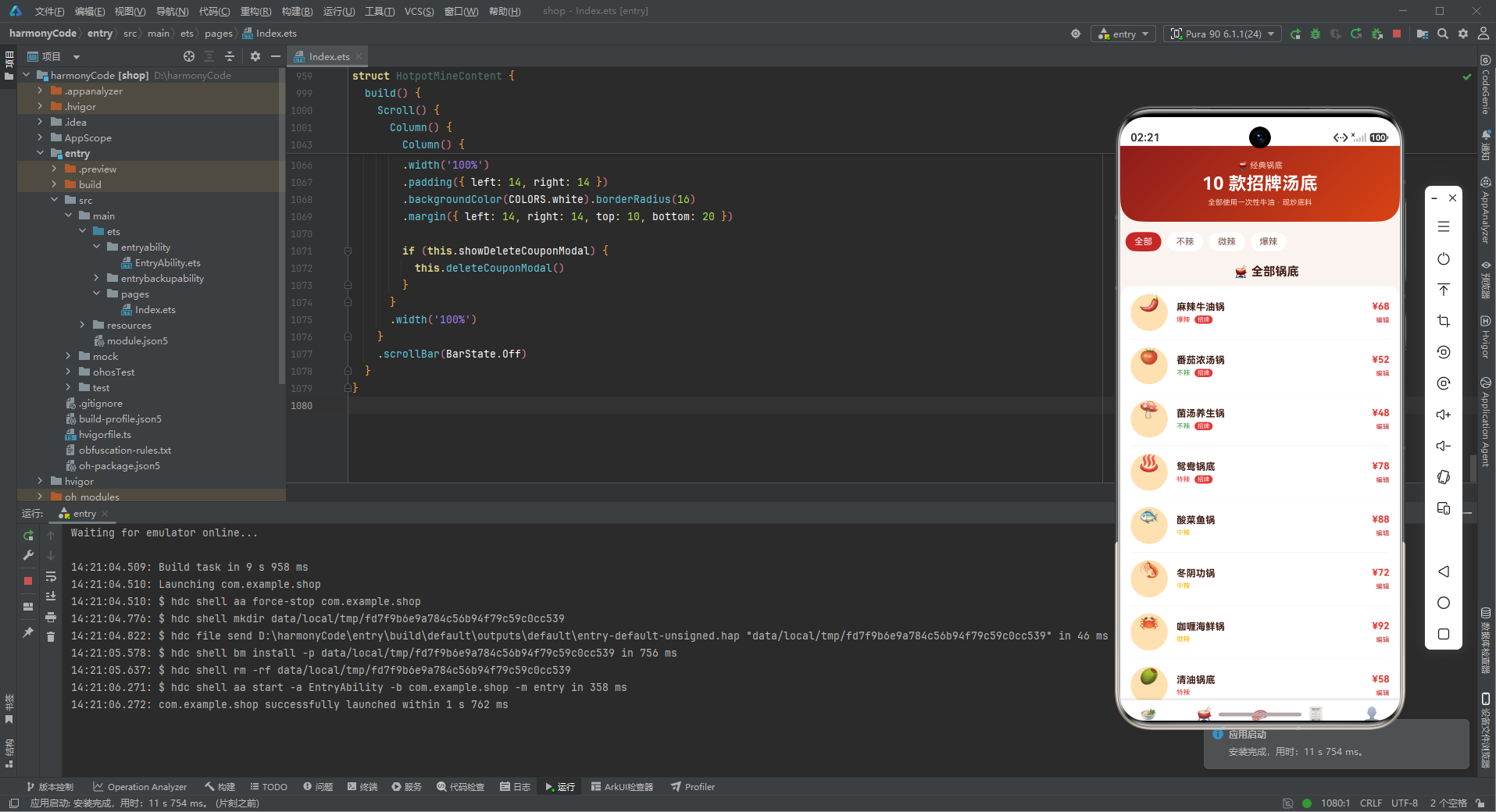
锅底页面专注于展示全部锅底,包含锅底头卡、辣度筛选、全部锅底列表和编辑锅底弹窗。
8.2.1 锅底头卡
        Column() {
          Text('🫕 经典锅底').fontSize(11).fontColor('#FFD0C2')
          Text('10 款招牌汤底').fontSize(24).fontWeight(FontWeight.Bold).fontColor(COLORS.white)
            .margin({ top: 4 })
          Text('全部使用一次性牛油 · 现炒底料').fontSize(10).fontColor('#FFD0C2').margin({ top: 6 })
        }
        .width('100%')
        .padding(20)
        .linearGradient({ angle: 135, colors: [[COLORS.primaryDark, 0.0], [COLORS.chili, 1.0]] })
        .alignItems(HorizontalAlign.Center)
        .borderRadius({ bottomLeft: 28, bottomRight: 28 })
锅底页面的头卡与首页头卡风格一致,都是使用渐变背景+底部圆角的设计。但内容更加简洁:三行文字居中展示,分别是副标题、主标题和品质承诺。渐变色从主色深色过渡到辣椒橙,营造火焰般的视觉效果。
每个页面都有自己的头卡设计,虽然风格统一,但内容和渐变配色略有差异,形成了"和而不同"的视觉层次。这种一致性设计让用户在不同页面间切换时不会感到突兀,同时每个页面又有自己的特色。
8.2.2 辣度筛选
        Row() {
          Text('全部').fontSize(12).fontColor(COLORS.white)
            .padding({ left: 12, right: 12, top: 6, bottom: 6 })
            .backgroundColor(COLORS.primary).borderRadius(14)
          Text('不辣').fontSize(12).fontColor(COLORS.textSecondary)
            .padding({ left: 12, right: 12, top: 6, bottom: 6 })
            .backgroundColor(COLORS.white).borderRadius(14)
            .margin({ left: 8 })
          Text('微辣').fontSize(12).fontColor(COLORS.textSecondary)
            .padding({ left: 12, right: 12, top: 6, bottom: 6 })
            .backgroundColor(COLORS.white).borderRadius(14)
            .margin({ left: 8 })
          Text('爆辣').fontSize(12).fontColor(COLORS.textSecondary)
            .padding({ left: 12, right: 12, top: 6, bottom: 6 })
            .backgroundColor(COLORS.white).borderRadius(14)
            .margin({ left: 8 })
        }
        .width('100%').margin({ left: 14, top: 14 })
辣度筛选是一组标签按钮,使用横向滚动的方式展示(虽然代码中用的是Row,但标签数量不多时可以这样设计)。当前选中的"全部"标签使用主色背景+白字,未选中的标签使用白色背景+灰色文字。
胶囊形按钮(borderRadius: 14)是筛选标签常用的设计形式,圆润的造型显得友好且易于点击。选中态与未选中态在背景色和文字色上都有明显差异,确保用户可以清晰识别当前筛选条件。
8.2.3 全部锅底列表
        Column() {
          ForEach(POT_LIST, (p: PotMeta) => {
            Row() {
              Column() {
                Text(p.emoji).fontSize(22)
              }
              .width(50).height(50).borderRadius(25)
              .backgroundColor(COLORS.accentLight)
              .alignItems(HorizontalAlign.Center)
              Column() {
                Text(p.name).fontSize(13).fontWeight(FontWeight.Bold).fontColor(COLORS.textPrimary)
                Row() {
                  Text(getSpicyText(p.spicy)).fontSize(9)
                    .fontColor(getSpicyColor(p.spicy))
                  if (p.isHot) {
                    Text('招牌').fontSize(8).fontColor(COLORS.white)
                      .padding({ left: 4, right: 4, top: 1, bottom: 1 })
                      .backgroundColor(COLORS.danger).borderRadius(6)
                      .margin({ left: 6 })
                  }
                }
                .margin({ top: 4 })
              }
              .alignItems(HorizontalAlign.Start)
              .layoutWeight(1)
              .margin({ left: 12 })
              Column() {
                Text('¥' + p.price).fontSize(13).fontColor(COLORS.danger).fontWeight(FontWeight.Bold)
                Text('编辑').fontSize(9).fontColor(COLORS.primary).margin({ top: 6 })
                  .onClick(() => { this.showEditPotModal = true })
              }
              .alignItems(HorizontalAlign.End)
            }
            .width('100%')
            .padding({ top: 11, bottom: 11 })
            Divider().color(COLORS.border)
          }, (p: PotMeta) => p.name)
        }
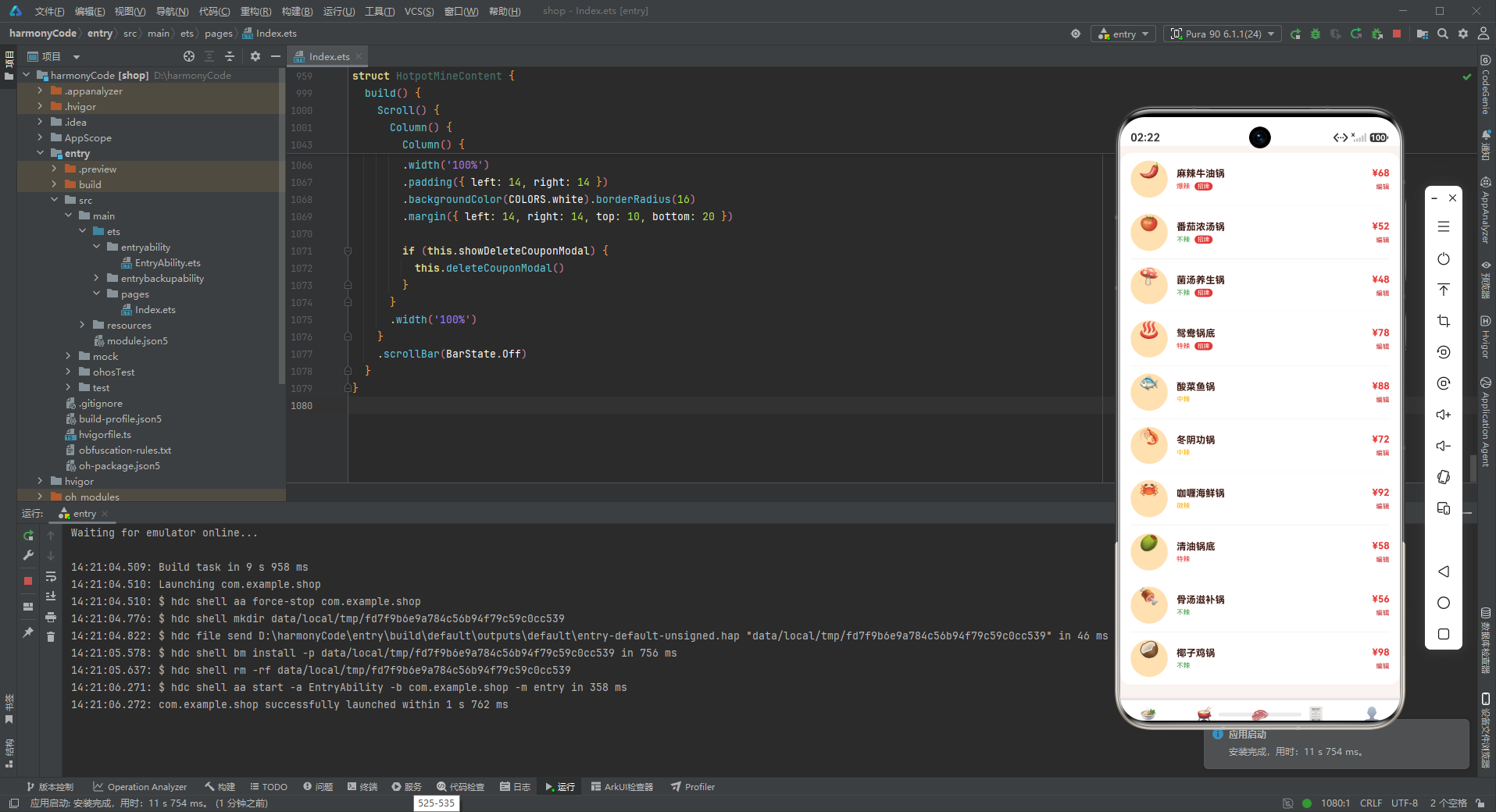
全部锅底列表展示了所有10款锅底的完整信息。每行采用左中右三段式布局:左侧是圆形图标、中间是锅底信息、右侧是价格和编辑操作。
左侧图标使用50x50dp的圆形,浅橙色背景,中间放置锅底emoji。圆形图标让列表看起来更加活泼有趣,也比纯文字列表更有辨识度。
中间部分是主要信息区,上方是锅底名称(粗体13号字),下方是辣度文字和招牌标签。招牌标签使用红色背景+白字的小胶囊样式,非常醒目。
右侧是价格和操作区,价格使用危险色(红色)粗体突出显示。下方有一个"编辑"链接,点击后弹出编辑锅底弹窗。
8.3 涮菜页面 HotpotDishContent
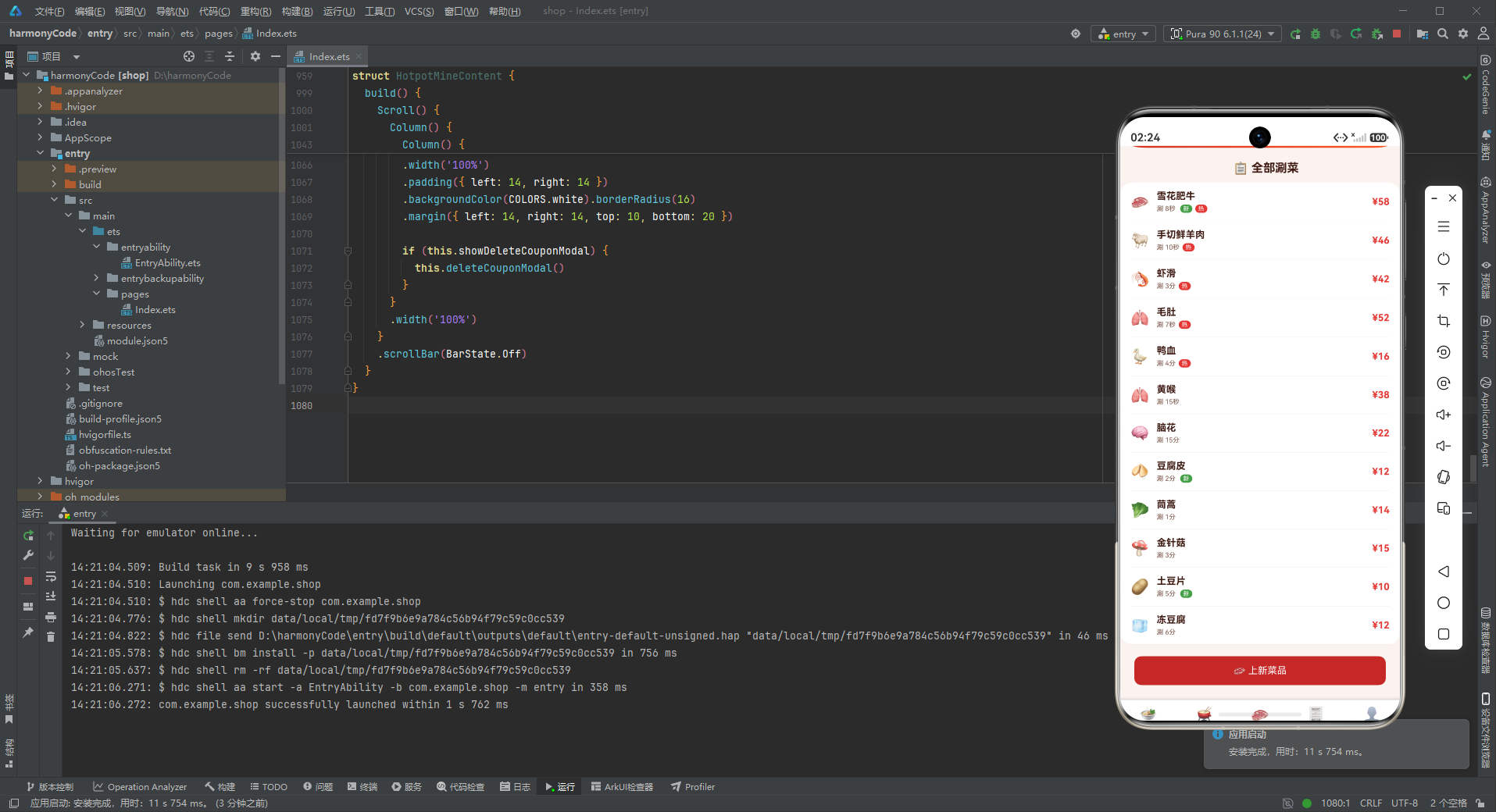
涮菜页面展示全部涮菜列表,结构与锅底页面类似,但内容更丰富——每道菜有更多的属性标签(新品、热卖等)。
8.3.1 涮菜头卡
        Column() {
          Row() {
            Column() {
              Text('🥩 精选涮菜').fontSize(11).fontColor('#FFD0C2')
              Text('共 86 道').fontSize(24).fontWeight(FontWeight.Bold).fontColor(COLORS.white)
                .margin({ top: 4 })
              Text('牛肉 · 羊肉 · 海鲜 · 丸滑 · 时蔬').fontSize(10).fontColor('#FFD0C2').margin({ top: 6 })
            }
            .alignItems(HorizontalAlign.Start)
            .layoutWeight(1)
            Column() {
              Text('TOP').fontSize(16).fontWeight(FontWeight.Bold).fontColor(COLORS.white)
              Text('雪花肥牛').fontSize(9).fontColor('#FFD0C2').margin({ top: 2 })
            }
            .alignItems(HorizontalAlign.End)
          }
          .width('100%')
        }
涮菜页面的头卡采用了左右分栏的布局:左侧是分类统计信息,右侧是TOP推荐。这种布局在信息展示上更加高效,用户一眼就能看到总览数据和热门推荐。
渐变色从主色(红)过渡到强调色(橙),比首页和锅底页面的渐变更加明亮,体现了涮菜品类的丰富多样。
8.3.2 涮菜列表
            Row() {
              Text(d.emoji).fontSize(20)
              Column() {
                Text(d.name).fontSize(13).fontWeight(FontWeight.Bold).fontColor(COLORS.textPrimary)
                Row() {
                  Text('涮 ' + d.time).fontSize(9).fontColor(COLORS.textSecondary)
                  if (d.isNew) {
                    Text('新').fontSize(8).fontColor(COLORS.white)
                      .padding({ left: 4, right: 4, top: 1, bottom: 1 })
                      .backgroundColor(COLORS.success).borderRadius(6)
                      .margin({ left: 6 })
                  }
                  if (d.isHot) {
                    Text('热').fontSize(8).fontColor(COLORS.white)
                      .padding({ left: 4, right: 4, top: 1, bottom: 1 })
                      .backgroundColor(COLORS.danger).borderRadius(6)
                      .margin({ left: 4 })
                  }
                }
                .margin({ top: 4 })
              }
              .alignItems(HorizontalAlign.Start)
              .layoutWeight(1)
              .margin({ left: 10 })
              Text('¥' + d.price).fontSize(13).fontColor(COLORS.danger).fontWeight(FontWeight.Bold)
            }
涮菜列表项的设计非常精致。每行左侧是菜品emoji,中间是菜品名称和标签行,右侧是价格。
标签行是设计的亮点:首先展示涮煮时间(“涮 8秒”),这是火锅特有的实用信息;然后根据isNew和isHot标记动态显示"新"或"热"的标签。新品标签使用绿色背景(成功色),热卖标签使用红色背景(危险色),两种标签颜色对比鲜明,含义明确。
标签的尺寸很小(8号字,上下各1dp内边距),不会抢占主要信息的视觉权重,但又足够醒目,让用户可以快速扫一眼就识别出菜品的特色。
8.4 订单页面 HotpotOrderContent
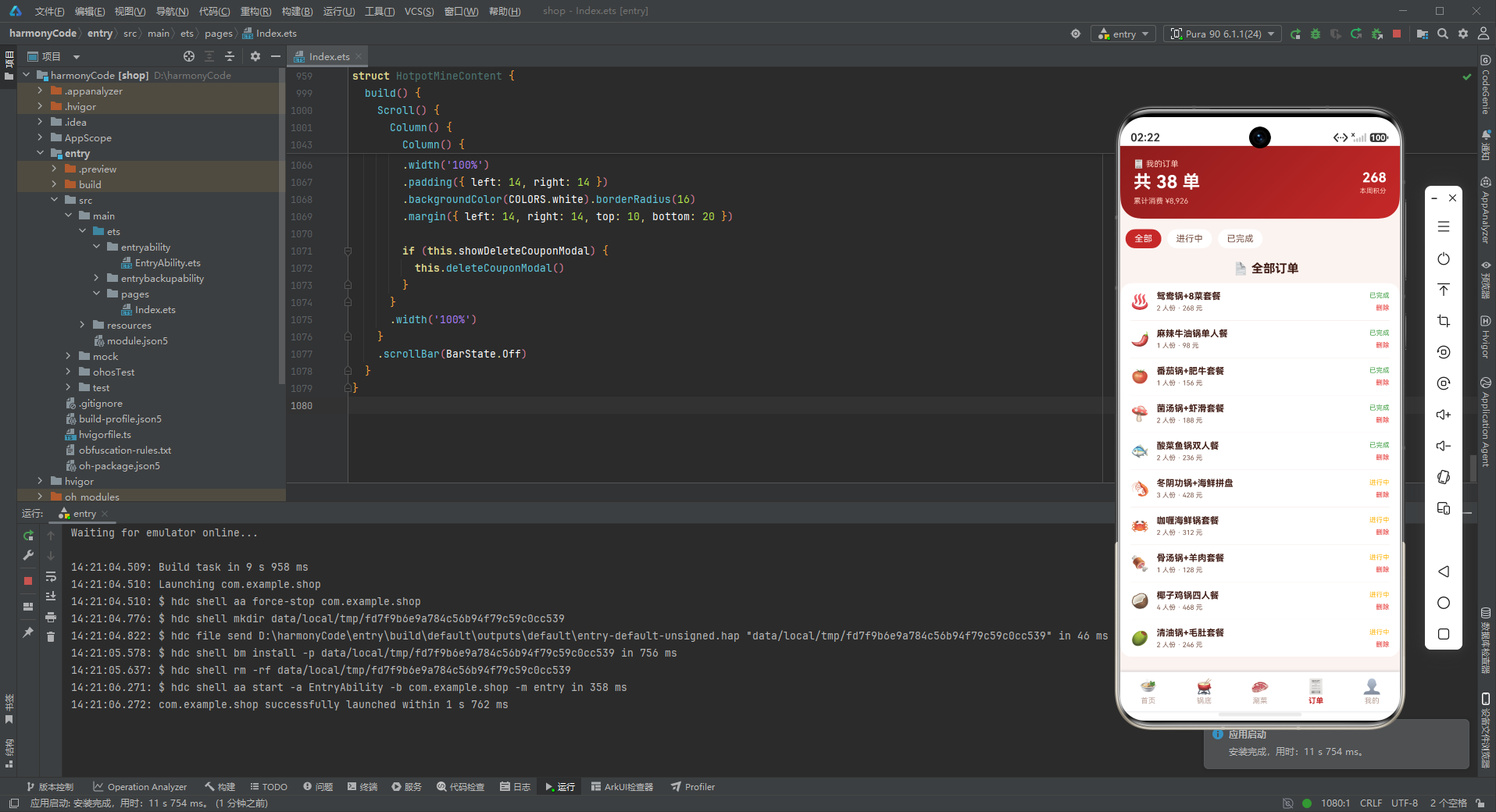
订单页面用于展示用户的历史订单,包含订单统计头卡、订单筛选、订单列表和删除确认弹窗。
8.4.1 订单统计头卡
        Column() {
          Row() {
            Column() {
              Text('🧾 我的订单').fontSize(11).fontColor('#FFD0C2')
              Text('共 38 单').fontSize(24).fontWeight(FontWeight.Bold).fontColor(COLORS.white)
                .margin({ top: 4 })
              Text('累计消费 ¥8,926').fontSize(10).fontColor('#FFD0C2').margin({ top: 6 })
            }
            .alignItems(HorizontalAlign.Start)
            .layoutWeight(1)
            Column() {
              Text('268').fontSize(18).fontWeight(FontWeight.Bold).fontColor(COLORS.white)
              Text('本周积分').fontSize(9).fontColor('#FFD0C2').margin({ top: 2 })
            }
            .alignItems(HorizontalAlign.End)
          }
          .width('100%')
        }
订单头卡同样采用左右分栏布局:左侧是订单统计(订单总数、累计消费),右侧是本周积分。头卡将消费金额和积分数据并列展示,强化了"消费=积分"的关联认知,激励用户继续消费累积积分。
8.4.2 订单列表
            Row() {
              Text(o.emoji).fontSize(20)
              Column() {
                Text(o.name).fontSize(12).fontWeight(FontWeight.Bold).fontColor(COLORS.textPrimary)
                  .maxLines(1)
                Text(o.num + ' 人份 · ' + o.price + ' 元').fontSize(9).fontColor(COLORS.textSecondary)
                  .margin({ top: 4 })
              }
              .alignItems(HorizontalAlign.Start)
              .layoutWeight(1)
              .margin({ left: 10 })
              Column() {
                Text(o.isDone ? '已完成' : '进行中').fontSize(9)
                  .fontColor(o.isDone ? COLORS.success : COLORS.warning)
                Text('删除').fontSize(9).fontColor(COLORS.danger).margin({ top: 6 })
                  .onClick(() => { this.showDeleteOrderModal = true })
              }
              .alignItems(HorizontalAlign.End)
            }
订单列表每行包含:左侧订单图标、中间订单信息(名称、人数、价格)、右侧状态和操作。订单名称设置了maxLines(1),防止名称过长时换行影响布局。
状态文字根据isDone动态变化:已完成用绿色,进行中用黄色。下方的"删除"操作使用红色文字,点击后弹出删除确认弹窗。
8.5 我的页面 HotpotMineContent
"我的"页面是用户个人中心,展示会员信息和优惠券列表。
8.5.1 会员等级头卡
        Column() {
          Row() {
            Column() {
              Text('💎 金牌火锅会员').fontSize(11).fontColor('#FFD0C2')
              Text('顾大厨').fontSize(22).fontWeight(FontWeight.Bold).fontColor(COLORS.white)
                .margin({ top: 4 })
              Text('已消费 ¥8,926 · 等级 LV6').fontSize(10).fontColor('#FFD0C2').margin({ top: 6 })
            }
            .alignItems(HorizontalAlign.Start)
            .layoutWeight(1)
            Column() {
              Text('86%').fontSize(18).fontWeight(FontWeight.Bold).fontColor(COLORS.white)
              Text('距 LV7 还需 ¥1,074').fontSize(8).fontColor('#FFD0C2').margin({ top: 2 })
            }
            .alignItems(HorizontalAlign.End)
          }
          .width('100%')
          Row() {
            Text('🎁 可用券 8 张').fontSize(10).fontColor(COLORS.white)
              .padding({ left: 12, right: 12, top: 6, bottom: 6 })
              .backgroundColor('rgba(255,255,255,0.15)').borderRadius(12)
            Text('⭐ 积分 2,680').fontSize(10).fontColor(COLORS.white)
              .padding({ left: 12, right: 12, top: 6, bottom: 6 })
              .backgroundColor('rgba(255,255,255,0.15)').borderRadius(12)
              .margin({ left: 8 })
            Text('👑 专属客服').fontSize(10).fontColor(COLORS.white)
              .padding({ left: 12, right: 12, top: 6, bottom: 6 })
              .backgroundColor('rgba(255,255,255,0.15)').borderRadius(12)
              .margin({ left: 8 })
          }
          .width('100%').margin({ top: 14 })
        }
会员头卡是个人中心页面最核心的元素,展示了用户的会员身份信息。上半部分左右分栏:左侧是会员等级、用户名、消费金额和等级;右侧是升级进度(86%)和升级提示。下半部分有三个标签:可用券数量、积分余额、专属客服。
标签使用了半透明白色背景(rgba(255,255,255,0.15)),这种设计在渐变背景上非常常见——既保持了背景的通透性,又能让文字清晰可读。三个标签水平排列,形成了快捷入口区域。
渐变色从辣椒橙过渡到主色深色,与其他页面的渐变方向相反,形成独特的视觉标识。
8.5.2 优惠券列表
            Row() {
              Text(c.emoji).fontSize(20)
              Column() {
                Text(c.name).fontSize(12).fontWeight(FontWeight.Bold).fontColor(COLORS.textPrimary)
                Text(c.desc).fontSize(9).fontColor(COLORS.textSecondary).margin({ top: 3 })
              }
              .alignItems(HorizontalAlign.Start)
              .layoutWeight(1)
              .margin({ left: 10 })
              Column() {
                Text('¥' + c.price).fontSize(13).fontColor(COLORS.danger).fontWeight(FontWeight.Bold)
                Text('删除').fontSize(9).fontColor(COLORS.textHint).margin({ top: 6 })
                  .onClick(() => { this.showDeleteCouponModal = true })
              }
              .alignItems(HorizontalAlign.End)
            }
优惠券列表每行展示一张优惠券的信息:左侧图标、中间名称和使用条件、右侧金额和删除操作。金额使用红色粗体突出显示,让用户一眼就能看到优惠力度。
九、弹窗组件详解
9.1 modalOverlay的实现原理
应用中所有弹窗都采用了相同的实现模式:Stack堆叠布局 + 遮罩层 + 内容卡片。modalOverlay构建器负责创建遮罩层,它是一个全屏的半透明黑色Column,点击后会触发传入的onClose回调。
这种实现方式的原理是:Stack组件会将子组件堆叠在一起,后声明的组件显示在上方。所以Stack中有两个子组件时,第一个(遮罩层)在底层,第二个(内容卡片)在上层。用户点击遮罩层时弹窗关闭,点击内容卡片时不关闭(因为点击事件不会穿透到下层)。
所有页面的弹窗都遵循这个统一的模式,保证了交互体验的一致性。虽然每个页面都重复定义了modalOverlay构建器(这是一个可以优化的点,可以抽取为全局公共组件),但设计模式是完全一致的。
9.2 新增类弹窗设计模式
新增类弹窗(新增涮菜、上新菜品等)用于创建新的数据记录。这类弹窗的结构是:标题栏 + 表单区域 + 操作按钮。
标题栏包含弹窗标题和关闭按钮;表单区域包含若干输入框,每个输入框有对应的标签;操作按钮包含"取消"和"保存"(或"种下"、"上架"等不同业务文案)。
表单输入框使用统一的样式:背景色填充、8dp圆角、placeholder使用提示色。这种一致性设计减少了用户的认知负担。
9.3 编辑类弹窗设计模式
编辑类弹窗(编辑锅底、编辑植物档案等)与新增类弹窗结构几乎完全相同,区别仅在于标题文字和按钮文字。在实际项目中,编辑弹窗通常会预填充现有数据,但在这个原型中为了简化,表单初始是空的。
9.4 删除确认类弹窗设计模式
删除确认类弹窗(删除订单、删除优惠券等)用于危险操作的二次确认。这类弹窗比表单类弹窗更简洁:标题 + 提示文字 + 两个操作按钮(取消/确认删除)。
确认删除按钮使用危险色(红色)背景,与取消按钮的浅色背景形成强烈对比,提醒用户这是一个不可逆的危险操作。提示文字会明确说明删除的后果,如"删除后将无法查看订单详情与积分,确定删除吗?",帮助用户做出明智的决策。
删除确认弹窗的宽度比表单弹窗窄一些(82% vs 88%),视觉上更加紧凑,符合确认对话框的设计规范。
十、核心UI组件分析
10.1 渐变头卡组件
每个页面顶部都有一个渐变色头卡,这是应用最具辨识度的视觉元素。虽然每个页面的头卡内容和渐变配色略有不同,但设计语言是统一的:
- 渐变角度:统一使用135度角(从左上到右下),符合视觉习惯
- 底部圆角:统一使用bottomLeft和bottomRight各28dp的圆角,形成上宽下收的造型
- 文字层次:统一使用三级文字结构——小字标签、大字标题、辅助说明
- 配色逻辑:都在红色系内变化,但每个页面有独特的渐变组合
这种头卡设计有几个优点:第一,品牌识别度高,用户一眼就能认出这是火锅App;第二,信息层次清晰,标题、数据、操作一目了然;第三,营造氛围,渐变色和气泡/光晕特效让界面不再单调。
10.2 柱状图组件
周客流柱状图是纯代码实现的数据可视化组件,展示了如何用基础UI组件构建图表。核心技术点包括:
- Stack堆叠布局:底层背景柱 + 上层数据柱,底部对齐
- ForEach循环:遍历数据数组生成多根柱子
- 动态高度计算:根据数据值计算柱子高度
- 颜色区分:周末用强调色,工作日用主色
- 平均分布:
layoutWeight(1)让柱子等宽排列
虽然这个柱状图比较简单,没有动画和交互,但它展示了声明式UI框架在数据可视化方面的潜力——不需要引入沉重的图表库,用基础组件就能实现美观实用的图表效果。
10.3 卡片式列表
应用中的列表几乎都采用了卡片式设计:白色背景、圆角边框、内边距、外边距。这种设计在移动端非常流行,原因包括:
- 视觉层次清晰:卡片将信息分组,用户更容易理解内容结构
- 触摸友好:卡片有明确的边界,点击区域清晰
- 美观现代:圆角+阴影的组合符合现代设计审美
- 一致性强:统一的卡片样式让整个应用看起来规整有序
列表项内部普遍采用左中右三段式布局:左侧图标/头像、中间主要信息、右侧价格/状态/操作。这种布局结构信息密度高、条理清晰,是移动端列表的经典设计模式。
10.4 横滑卡片
招牌锅底横滑、节气横滑、积分兑换横滑等横滑组件使用Scroll + Row + ForEach的组合实现。横滑适合展示推荐内容、分类入口等不需要全部展示的条目,既节省了垂直空间,又提供了丰富的选择。
横滑卡片的设计要点:隐藏滚动条(scrollBar(BarState.Off))、卡片之间留间距、第一张卡片左边距与页面对齐、最后一张卡片右侧留空白。这些细节处理让横滑组件看起来专业且易用。
十一、技术亮点总结表格
| 功能模块 | 技术实现方式 | 设计模式 | 代码量估计 |
|---|---|---|---|
| 底部Tab导航 | @State + 枚举 + @Builder tabItem | 状态驱动视图 | 约60行 |
| 页面切换 | if-else条件渲染 + @Builder contentArea | 条件渲染模式 | 约30行 |
| 颜色系统 | interface + const常量对象 | 接口契约模式 | 约40行 |
| 数据模型 | 8个interface定义业务实体 | 类型优先设计 | 约60行 |
| Mock数据层 | 8组const数组常量 | 常量配置模式 | 约120行 |
| 辅助函数 | getSpicyText/getSpicyColor纯函数 | 工具函数模式 | 约20行 |
| 渐变头卡 | linearGradient + Stack气泡特效 | 视觉增强模式 | 约50行/页 |
| 柱状图 | ForEach + Stack堆叠 + 动态高度计算 | 纯代码图表 | 约40行 |
| 横滑卡片 | Scroll + Row + ForEach | 横滑列表模式 | 约30行/处 |
| 九宫格 | Flex + FlexWrap.Wrap + 百分比宽度 | 弹性网格模式 | 约25行 |
| 卡片列表 | Column + ForEach + Divider | 列表渲染模式 | 约40行/处 |
| 新增弹窗 | Stack + modalOverlay + TextInput表单 | 表单弹窗模式 | 约50行/个 |
| 编辑弹窗 | Stack + modalOverlay + TextInput表单 | 表单弹窗模式 | 约50行/个 |
| 删除确认弹窗 | Stack + modalOverlay + 确认按钮 | 二次确认模式 | 约35行/个 |
| 状态管理 | @State组件内状态 | 局部状态模式 | 每个组件3-5个变量 |
安装DevEco Studio程序

选择目标安装目录:

设置环境变量,但是需要重启一下:

新建一个空白模板:

设置API为24的模板项目:
初始化项目,自动下载相关依赖:

完整代码:
// ============================================================
// 525.ets 火锅美食 APP — HotpotApp
// 主色调: 火锅红 #C62828 + 辣椒橙 #FF5722
// 布局: 沸腾锅底头卡(气泡特效) + 周客流柱状图 + 招牌锅底横滑
// + 蘸料九宫格 + 排队叫号 + 热门涮菜列表
// + 会员等级头卡 + 我的订单 + 积分商城
// 弹窗: 新增涮菜 / 编辑锅底 / 删除订单 (全部 modalOverlay)
// ============================================================
interface HotpotColorPalette {
primary: string
primaryLight: string
primaryDark: string
accent: string
accentLight: string
chili: string
bg: string
cardBg: string
textPrimary: string
textSecondary: string
textHint: string
border: string
success: string
warning: string
danger: string
white: string
}
interface TabMeta {
title: string
icon: string
}
interface PotMeta {
name: string
emoji: string
spicy: number
price: number
isHot: boolean
}
interface DishMeta {
name: string
emoji: string
price: number
time: string
isNew: boolean
isHot: boolean
}
interface OrderMeta {
name: string
emoji: string
num: number
price: number
isDone: boolean
}
interface DippingMeta {
name: string
emoji: string
desc: string
isHot: boolean
}
interface QueueMeta {
table: string
people: number
wait: string
isDone: boolean
}
interface WeekHotpotMeta {
label: string
value: number
}
interface CouponMeta {
name: string
emoji: string
price: number
desc: string
isNew: boolean
}
const COLORS: HotpotColorPalette = {
primary: '#C62828',
primaryLight: '#E57373',
primaryDark: '#8E1C1C',
accent: '#FF5722',
accentLight: '#FFE0B2',
chili: '#D84315',
bg: '#FBF3F0',
cardBg: '#FFFFFF',
textPrimary: '#3E1A12',
textSecondary: '#7A5548',
textHint: '#BCA39A',
border: '#F0E2DC',
success: '#43A047',
warning: '#FFB300',
danger: '#E53935',
white: '#FFFFFF'
}
const TAB_CONFIG: Record<string, TabMeta> = {
'HOME': { title: '首页', icon: '🍲' },
'POT': { title: '锅底', icon: '🫕' },
'DISH': { title: '涮菜', icon: '🥩' },
'ORDER': { title: '订单', icon: '🧾' },
'MINE': { title: '我的', icon: '👤' }
}
const POT_LIST: PotMeta[] = [
{ name: '麻辣牛油锅', emoji: '🌶️', spicy: 5, price: 68, isHot: true },
{ name: '番茄浓汤锅', emoji: '🍅', spicy: 0, price: 52, isHot: true },
{ name: '菌汤养生锅', emoji: '🍄', spicy: 0, price: 48, isHot: true },
{ name: '鸳鸯锅底', emoji: '♨️', spicy: 4, price: 78, isHot: true },
{ name: '酸菜鱼锅', emoji: '🐟', spicy: 3, price: 88, isHot: false },
{ name: '冬阴功锅', emoji: '🦐', spicy: 3, price: 72, isHot: false },
{ name: '咖喱海鲜锅', emoji: '🦀', spicy: 2, price: 92, isHot: false },
{ name: '清油锅底', emoji: '🫒', spicy: 4, price: 58, isHot: false },
{ name: '骨汤滋补锅', emoji: '🍖', spicy: 0, price: 56, isHot: false },
{ name: '椰子鸡锅', emoji: '🥥', spicy: 0, price: 98, isHot: false }
]
const DISH_LIST: DishMeta[] = [
{ name: '雪花肥牛', emoji: '🥩', price: 58, time: '8秒', isNew: true, isHot: true },
{ name: '手切鲜羊肉', emoji: '🐑', price: 46, time: '10秒', isNew: false, isHot: true },
{ name: '虾滑', emoji: '🦐', price: 42, time: '3分', isNew: false, isHot: true },
{ name: '毛肚', emoji: '🫁', price: 52, time: '7秒', isNew: false, isHot: true },
{ name: '鸭血', emoji: '🦆', price: 16, time: '4分', isNew: false, isHot: true },
{ name: '黄喉', emoji: '🫁', price: 38, time: '15秒', isNew: false, isHot: false },
{ name: '脑花', emoji: '🧠', price: 22, time: '15分', isNew: false, isHot: false },
{ name: '豆腐皮', emoji: '🥠', price: 12, time: '2分', isNew: true, isHot: false },
{ name: '茼蒿', emoji: '🥬', price: 14, time: '1分', isNew: false, isHot: false },
{ name: '金针菇', emoji: '🍄', price: 15, time: '3分', isNew: false, isHot: false },
{ name: '土豆片', emoji: '🥔', price: 10, time: '5分', isNew: true, isHot: false },
{ name: '冻豆腐', emoji: '🧊', price: 12, time: '6分', isNew: false, isHot: false }
]
const ORDER_LIST: OrderMeta[] = [
{ name: '鸳鸯锅+8菜套餐', emoji: '♨️', num: 2, price: 268, isDone: true },
{ name: '麻辣牛油锅单人餐', emoji: '🌶️', num: 1, price: 98, isDone: true },
{ name: '番茄锅+肥牛套餐', emoji: '🍅', num: 1, price: 156, isDone: true },
{ name: '菌汤锅+虾滑套餐', emoji: '🍄', num: 2, price: 188, isDone: true },
{ name: '酸菜鱼锅双人餐', emoji: '🐟', num: 2, price: 236, isDone: true },
{ name: '冬阴功锅+海鲜拼盘', emoji: '🦐', num: 3, price: 428, isDone: false },
{ name: '咖喱海鲜锅套餐', emoji: '🦀', num: 2, price: 312, isDone: false },
{ name: '骨汤锅+羊肉套餐', emoji: '🍖', num: 1, price: 128, isDone: false },
{ name: '椰子鸡锅四人餐', emoji: '🥥', num: 4, price: 468, isDone: false },
{ name: '清油锅+毛肚套餐', emoji: '🫒', num: 2, price: 246, isDone: false }
]
const DIPPING_LIST: DippingMeta[] = [
{ name: '香油蒜泥', emoji: '🧄', desc: '经典川味', isHot: true },
{ name: '麻酱', emoji: '🥜', desc: '北方挚爱', isHot: true },
{ name: '干碟', emoji: '🌶️', desc: '香辣过瘾', isHot: true },
{ name: '沙茶酱', emoji: '🫘', desc: '潮汕风味', isHot: false },
{ name: '海鲜汁', emoji: '🦀', desc: '鲜甜提味', isHot: false },
{ name: '芝麻酱', emoji: '🫙', desc: '香浓醇厚', isHot: false },
{ name: '小米辣碟', emoji: '🌶️', desc: '鲜辣刺激', isHot: false },
{ name: '蒜蓉辣酱', emoji: '🍯', desc: '万能搭配', isHot: false }
]
const QUEUE_LIST: QueueMeta[] = [
{ table: 'A 区 · 小桌', people: 2, wait: '等 2 桌', isDone: true },
{ table: 'B 区 · 中桌', people: 4, wait: '等 5 桌', isDone: true },
{ table: 'A 区 · 大桌', people: 6, wait: '等 8 桌', isDone: true },
{ table: 'C 区 · 包厢', people: 8, wait: '等 3 桌', isDone: false },
{ table: 'B 区 · 中桌', people: 3, wait: '等 11 桌', isDone: false },
{ table: 'A 区 · 小桌', people: 1, wait: '等 1 桌', isDone: false },
{ table: 'C 区 · 大桌', people: 5, wait: '等 6 桌', isDone: false },
{ table: 'B 区 · 小桌', people: 2, wait: '等 14 桌', isDone: false },
{ table: 'A 区 · 中桌', people: 4, wait: '等 9 桌', isDone: false },
{ table: 'C 区 · 小桌', people: 2, wait: '等 4 桌', isDone: false }
]
const WEEK_HOTPOT: WeekHotpotMeta[] = [
{ label: '周一', value: 86 },
{ label: '周二', value: 92 },
{ label: '周三', value: 110 },
{ label: '周四', value: 98 },
{ label: '周五', value: 156 },
{ label: '周六', value: 218 },
{ label: '周日', value: 195 }
]
const COUPON_LIST: CouponMeta[] = [
{ name: '满100减20', emoji: '🎫', price: 20, desc: '全场通用', isNew: true },
{ name: '新客立减30', emoji: '🎁', price: 30, desc: '首单可用', isNew: true },
{ name: '下午茶5折券', emoji: '☕', price: 50, desc: '14-17点', isNew: true },
{ name: '会员双倍积分', emoji: '💎', price: 100, desc: '周四专享', isNew: false },
{ name: '毛肚免费券', emoji: '🫁', price: 52, desc: '消费满200', isNew: false },
{ name: '锅底半价券', emoji: '🫕', price: 34, desc: '工作日使用', isNew: false },
{ name: '饮品买一送一', emoji: '🥤', price: 18, desc: '堂食专享', isNew: false },
{ name: '生日免单券', emoji: '🎂', price: 168, desc: '当月有效', isNew: false }
]
function getSpicyText(spicy: number): string {
if (spicy === 0) {
return '不辣'
} else if (spicy <= 2) {
return '微辣'
} else if (spicy <= 3) {
return '中辣'
} else if (spicy <= 4) {
return '特辣'
}
return '爆辣'
}
function getSpicyColor(spicy: number): string {
if (spicy === 0) {
return COLORS.success
} else if (spicy <= 3) {
return COLORS.warning
}
return COLORS.danger
}
enum HotpotTab {
HOME,
POT,
DISH,
ORDER,
MINE
}
@Entry
@Component
struct HotpotApp {
@State activeTab: HotpotTab = HotpotTab.HOME
@Builder contentArea() {
Column() {
if (this.activeTab === HotpotTab.HOME) {
HotpotHomeContent()
} else if (this.activeTab === HotpotTab.POT) {
HotpotPotContent()
} else if (this.activeTab === HotpotTab.DISH) {
HotpotDishContent()
} else if (this.activeTab === HotpotTab.ORDER) {
HotpotOrderContent()
} else if (this.activeTab === HotpotTab.MINE) {
HotpotMineContent()
}
}
.width('100%')
}
@Builder tabItem(icon: string, label: string, tab: HotpotTab) {
Column() {
Text(icon).fontSize(20)
Text(label).fontSize(10)
.fontColor(this.activeTab === tab ? COLORS.primary : COLORS.textHint)
.fontWeight(this.activeTab === tab ? FontWeight.Bold : FontWeight.Normal)
.margin({ top: 2 })
}
.layoutWeight(1)
.onClick(() => { this.activeTab = tab })
}
build() {
Column() {
this.contentArea()
Row() {
this.tabItem(TAB_CONFIG.HOME.icon, TAB_CONFIG.HOME.title, HotpotTab.HOME)
this.tabItem(TAB_CONFIG.POT.icon, TAB_CONFIG.POT.title, HotpotTab.POT)
this.tabItem(TAB_CONFIG.DISH.icon, TAB_CONFIG.DISH.title, HotpotTab.DISH)
this.tabItem(TAB_CONFIG.ORDER.icon, TAB_CONFIG.ORDER.title, HotpotTab.ORDER)
this.tabItem(TAB_CONFIG.MINE.icon, TAB_CONFIG.MINE.title, HotpotTab.MINE)
}
.width('100%')
.padding({ top: 8, bottom: 8 })
.backgroundColor(COLORS.white)
.shadow({ radius: 10, color: '#3E1A1226', offsetY: -2 })
}
.width('100%').height('100%')
.backgroundColor(COLORS.bg)
}
}
@Component
struct HotpotHomeContent {
@State showAddDishModal: boolean = false
@State dishName: string = ''
@State dishPrice: string = ''
@Builder modalOverlay(onClose: () => void) {
Column()
.width('100%').height('100%')
.backgroundColor('rgba(0,0,0,0.55)')
.onClick(onClose)
}
@Builder addDishModal() {
Stack() {
this.modalOverlay(() => { this.showAddDishModal = false })
Column() {
Row() {
Text('🥩 新增涮菜').fontSize(18).fontWeight(FontWeight.Bold).fontColor(COLORS.textPrimary)
Column().layoutWeight(1)
Text('✕').fontSize(18).fontColor(COLORS.textHint).onClick(() => { this.showAddDishModal = false })
}
.width('100%').padding({ left: 20, right: 20, top: 18, bottom: 12 })
Divider().color(COLORS.border)
Column() {
Text('菜品名称').fontSize(12).fontColor(COLORS.textSecondary).margin({ top: 12, left: 20 })
TextInput({ placeholder: '如 鲜切黄牛肉' })
.placeholderColor(COLORS.textHint).fontSize(14).width('90%')
.backgroundColor(COLORS.bg).borderRadius(8)
.margin({ left: 20, right: 20, top: 4 })
.onChange((v: string) => { this.dishName = v })
Text('菜品价格').fontSize(12).fontColor(COLORS.textSecondary).margin({ top: 14, left: 20 })
TextInput({ placeholder: '如 68' })
.placeholderColor(COLORS.textHint).fontSize(14).width('90%')
.backgroundColor(COLORS.bg).borderRadius(8)
.margin({ left: 20, right: 20, top: 4 })
.onChange((v: string) => { this.dishPrice = v })
Row() {
Text('取消').fontSize(14).fontColor(COLORS.textSecondary)
.layoutWeight(1).textAlign(TextAlign.Center)
.padding({ top: 10, bottom: 10 })
.backgroundColor(COLORS.bg).borderRadius(8)
.onClick(() => { this.showAddDishModal = false })
Column().width(12)
Text('保存').fontSize(14).fontColor(COLORS.white)
.layoutWeight(1).textAlign(TextAlign.Center)
.padding({ top: 10, bottom: 10 })
.backgroundColor(COLORS.primary).borderRadius(8)
.onClick(() => { this.showAddDishModal = false })
}
.margin({ left: 20, right: 20, top: 20, bottom: 20 })
}
.constraintSize({ maxHeight: '70%' })
}
.width('88%')
.backgroundColor(COLORS.cardBg).borderRadius(16)
}
.width('100%').height('100%')
}
build() {
Scroll() {
Column() {
// 沸腾锅底头卡(气泡特效)
Column() {
Stack() {
Column().width(90).height(90).borderRadius(45).backgroundColor('rgba(255,255,255,0.18)')
.margin({ top: 30, left: 30 })
Column().width(60).height(60).borderRadius(30).backgroundColor('rgba(255,255,255,0.22)')
.margin({ top: 70, left: 130 })
Column().width(40).height(40).borderRadius(20).backgroundColor('rgba(255,255,255,0.25)')
.margin({ top: 110, left: 70 })
Column() {
Text('🌶️ 沸腾中').fontSize(11).fontColor('#FFD0C2')
Text('老灶火锅').fontSize(26).fontWeight(FontWeight.Bold).fontColor(COLORS.white)
.margin({ top: 4 })
Text('今日已翻台 3 轮 · 好评率 98.2%').fontSize(10).fontColor('#FFD0C2').margin({ top: 6 })
Row() {
Text('🪑 等位 18 桌').fontSize(10).fontColor(COLORS.primaryDark)
.padding({ left: 12, right: 12, top: 6, bottom: 6 })
.backgroundColor(COLORS.accentLight).borderRadius(12)
Text('🍲 在线取号').fontSize(10).fontColor(COLORS.white)
.padding({ left: 12, right: 12, top: 6, bottom: 6 })
.backgroundColor('#8E1C1C').borderRadius(12)
.margin({ left: 8 })
}
.margin({ top: 12 })
}
.alignItems(HorizontalAlign.Center)
}
.width('100%')
}
.width('100%')
.padding({ top: 20, bottom: 22 })
.linearGradient({ angle: 135, colors: [[COLORS.primaryDark, 0.0], [COLORS.primary, 0.7], [COLORS.chili, 1.0]] })
.borderRadius({ bottomLeft: 28, bottomRight: 28 })
// 周客流柱状图
Column() {
Row() {
Text('📊 本周客流(桌)').fontSize(15).fontWeight(FontWeight.Bold).fontColor(COLORS.textPrimary)
Column().layoutWeight(1)
Text('合计 955 桌').fontSize(11).fontColor(COLORS.primary).fontWeight(FontWeight.Bold)
}
.width('100%')
Row() {
ForEach(WEEK_HOTPOT, (v: WeekHotpotMeta, i: number) => {
Column() {
Text(v.value + '').fontSize(9).fontColor(COLORS.textSecondary)
Stack({ alignContent: Alignment.Bottom }) {
Column().width(16).height(70).backgroundColor(COLORS.border).borderRadius(8)
Column().width(16).height(Number(v.value) * 0.3).backgroundColor(
i === 5 || i === 6 ? COLORS.accent : COLORS.primary)
.borderRadius(8)
}
.width(16).height(70).margin({ top: 4 })
Text(v.label).fontSize(9).fontColor(COLORS.textHint).margin({ top: 4 })
}
.layoutWeight(1)
.alignItems(HorizontalAlign.Center)
}, (v: WeekHotpotMeta, i: number) => v.label + i)
}
.width('100%').margin({ top: 12 })
}
.width('100%')
.padding(16)
.backgroundColor(COLORS.cardBg).borderRadius(16)
.margin({ left: 14, right: 14, top: 14 })
// 招牌锅底横滑
Text('🫕 招牌锅底').fontSize(16).fontWeight(FontWeight.Bold).fontColor(COLORS.textPrimary)
.margin({ left: 16, top: 18 })
Scroll() {
Row() {
ForEach(POT_LIST, (p: PotMeta) => {
if (p.isHot) {
Column() {
Text(p.emoji).fontSize(26)
Text(p.name).fontSize(11).fontWeight(FontWeight.Bold).fontColor(COLORS.textPrimary)
.margin({ top: 6 })
Text(getSpicyText(p.spicy)).fontSize(9)
.fontColor(getSpicyColor(p.spicy)).margin({ top: 3 })
Text('¥' + p.price).fontSize(12).fontColor(COLORS.danger).fontWeight(FontWeight.Bold)
.margin({ top: 4 })
}
.width(92)
.padding(10)
.backgroundColor(COLORS.accentLight).borderRadius(12)
.margin({ right: 10 })
.alignItems(HorizontalAlign.Center)
}
}, (p: PotMeta) => p.name)
}
}
.scrollable(ScrollDirection.Horizontal)
.scrollBar(BarState.Off)
.margin({ left: 14, top: 10 })
// 蘸料九宫格
Text('🥣 招牌蘸料').fontSize(16).fontWeight(FontWeight.Bold).fontColor(COLORS.textPrimary)
.margin({ left: 16, top: 18 })
Flex({ wrap: FlexWrap.Wrap, justifyContent: FlexAlign.SpaceBetween }) {
ForEach(DIPPING_LIST, (d: DippingMeta) => {
Row() {
Text(d.emoji).fontSize(18)
Column() {
Text(d.name).fontSize(10).fontWeight(FontWeight.Bold).fontColor(COLORS.textPrimary)
Text(d.desc).fontSize(8).fontColor(COLORS.textHint).margin({ top: 2 })
}
.alignItems(HorizontalAlign.Start)
.margin({ left: 8 })
}
.width('31%')
.padding(10)
.backgroundColor(COLORS.white).borderRadius(12)
.margin({ bottom: 10 })
}, (d: DippingMeta) => d.name)
}
.width('100%')
.margin({ left: 14, right: 14, top: 10 })
// 排队叫号
Text('🪑 在线排队').fontSize(16).fontWeight(FontWeight.Bold).fontColor(COLORS.textPrimary)
.margin({ left: 16, top: 18 })
Column() {
ForEach(QUEUE_LIST.slice(0, 4), (q: QueueMeta) => {
Row() {
Text(q.table).fontSize(12).fontWeight(FontWeight.Bold).fontColor(COLORS.textPrimary)
Column() {
Text(q.people + ' 人用餐').fontSize(9).fontColor(COLORS.textSecondary).margin({ top: 3 })
}
.alignItems(HorizontalAlign.Start)
.layoutWeight(1)
.margin({ left: 10 })
Text(q.wait).fontSize(10).fontWeight(FontWeight.Bold)
.fontColor(q.isDone ? COLORS.success : COLORS.warning)
}
.width('100%')
.padding({ top: 10, bottom: 10 })
Divider().color(COLORS.border)
}, (q: QueueMeta) => q.table + q.people)
}
.width('100%')
.padding({ left: 14, right: 14 })
.backgroundColor(COLORS.white).borderRadius(16)
.margin({ left: 14, right: 14, top: 10 })
// 热门涮菜列表
Text('🥩 人气涮菜').fontSize(16).fontWeight(FontWeight.Bold).fontColor(COLORS.textPrimary)
.margin({ left: 16, top: 18 })
Column() {
ForEach(DISH_LIST.slice(0, 5), (d: DishMeta) => {
Row() {
Text(d.emoji).fontSize(18)
Column() {
Text(d.name).fontSize(12).fontWeight(FontWeight.Bold).fontColor(COLORS.textPrimary)
Text('涮 ' + d.time).fontSize(9).fontColor(COLORS.textSecondary).margin({ top: 3 })
}
.alignItems(HorizontalAlign.Start)
.layoutWeight(1)
.margin({ left: 10 })
Text('¥' + d.price).fontSize(12).fontColor(COLORS.danger).fontWeight(FontWeight.Bold)
}
.width('100%')
.padding({ top: 10, bottom: 10 })
Divider().color(COLORS.border)
}, (d: DishMeta) => d.name)
}
.width('100%')
.padding({ left: 14, right: 14 })
.backgroundColor(COLORS.white).borderRadius(16)
.margin({ left: 14, right: 14, top: 10 })
Text('🥩 新增涮菜').fontSize(13).fontColor(COLORS.white)
.width('90%').textAlign(TextAlign.Center)
.padding({ top: 12, bottom: 12 })
.backgroundColor(COLORS.primary).borderRadius(10)
.margin({ left: 20, right: 20, top: 16, bottom: 20 })
.onClick(() => { this.showAddDishModal = true })
if (this.showAddDishModal) {
this.addDishModal()
}
}
.width('100%')
}
.scrollBar(BarState.Off)
}
}
@Component
struct HotpotPotContent {
@State showEditPotModal: boolean = false
@State potName: string = ''
@State potPrice: string = ''
@Builder modalOverlay(onClose: () => void) {
Column()
.width('100%').height('100%')
.backgroundColor('rgba(0,0,0,0.55)')
.onClick(onClose)
}
@Builder editPotModal() {
Stack() {
this.modalOverlay(() => { this.showEditPotModal = false })
Column() {
Row() {
Text('🫕 编辑锅底').fontSize(18).fontWeight(FontWeight.Bold).fontColor(COLORS.textPrimary)
Column().layoutWeight(1)
Text('✕').fontSize(18).fontColor(COLORS.textHint).onClick(() => { this.showEditPotModal = false })
}
.width('100%').padding({ left: 20, right: 20, top: 18, bottom: 12 })
Divider().color(COLORS.border)
Column() {
Text('锅底名称').fontSize(12).fontColor(COLORS.textSecondary).margin({ top: 12, left: 20 })
TextInput({ placeholder: '如 麻辣牛油锅' })
.placeholderColor(COLORS.textHint).fontSize(14).width('90%')
.backgroundColor(COLORS.bg).borderRadius(8)
.margin({ left: 20, right: 20, top: 4 })
.onChange((v: string) => { this.potName = v })
Text('锅底价格').fontSize(12).fontColor(COLORS.textSecondary).margin({ top: 14, left: 20 })
TextInput({ placeholder: '如 68' })
.placeholderColor(COLORS.textHint).fontSize(14).width('90%')
.backgroundColor(COLORS.bg).borderRadius(8)
.margin({ left: 20, right: 20, top: 4 })
.onChange((v: string) => { this.potPrice = v })
Row() {
Text('取消').fontSize(14).fontColor(COLORS.textSecondary)
.layoutWeight(1).textAlign(TextAlign.Center)
.padding({ top: 10, bottom: 10 })
.backgroundColor(COLORS.bg).borderRadius(8)
.onClick(() => { this.showEditPotModal = false })
Column().width(12)
Text('保存').fontSize(14).fontColor(COLORS.white)
.layoutWeight(1).textAlign(TextAlign.Center)
.padding({ top: 10, bottom: 10 })
.backgroundColor(COLORS.primary).borderRadius(8)
.onClick(() => { this.showEditPotModal = false })
}
.margin({ left: 20, right: 20, top: 20, bottom: 20 })
}
.constraintSize({ maxHeight: '70%' })
}
.width('88%')
.backgroundColor(COLORS.cardBg).borderRadius(16)
}
.width('100%').height('100%')
}
build() {
Scroll() {
Column() {
// 锅底头卡
Column() {
Text('🫕 经典锅底').fontSize(11).fontColor('#FFD0C2')
Text('10 款招牌汤底').fontSize(24).fontWeight(FontWeight.Bold).fontColor(COLORS.white)
.margin({ top: 4 })
Text('全部使用一次性牛油 · 现炒底料').fontSize(10).fontColor('#FFD0C2').margin({ top: 6 })
}
.width('100%')
.padding(20)
.linearGradient({ angle: 135, colors: [[COLORS.primaryDark, 0.0], [COLORS.chili, 1.0]] })
.alignItems(HorizontalAlign.Center)
.borderRadius({ bottomLeft: 28, bottomRight: 28 })
// 辣度筛选
Row() {
Text('全部').fontSize(12).fontColor(COLORS.white)
.padding({ left: 12, right: 12, top: 6, bottom: 6 })
.backgroundColor(COLORS.primary).borderRadius(14)
Text('不辣').fontSize(12).fontColor(COLORS.textSecondary)
.padding({ left: 12, right: 12, top: 6, bottom: 6 })
.backgroundColor(COLORS.white).borderRadius(14)
.margin({ left: 8 })
Text('微辣').fontSize(12).fontColor(COLORS.textSecondary)
.padding({ left: 12, right: 12, top: 6, bottom: 6 })
.backgroundColor(COLORS.white).borderRadius(14)
.margin({ left: 8 })
Text('爆辣').fontSize(12).fontColor(COLORS.textSecondary)
.padding({ left: 12, right: 12, top: 6, bottom: 6 })
.backgroundColor(COLORS.white).borderRadius(14)
.margin({ left: 8 })
}
.width('100%').margin({ left: 14, top: 14 })
// 全部锅底列表
Text('🫕 全部锅底').fontSize(16).fontWeight(FontWeight.Bold).fontColor(COLORS.textPrimary)
.margin({ left: 16, top: 18 })
Column() {
ForEach(POT_LIST, (p: PotMeta) => {
Row() {
Column() {
Text(p.emoji).fontSize(22)
}
.width(50).height(50).borderRadius(25)
.backgroundColor(COLORS.accentLight)
.alignItems(HorizontalAlign.Center)
Column() {
Text(p.name).fontSize(13).fontWeight(FontWeight.Bold).fontColor(COLORS.textPrimary)
Row() {
Text(getSpicyText(p.spicy)).fontSize(9)
.fontColor(getSpicyColor(p.spicy))
if (p.isHot) {
Text('招牌').fontSize(8).fontColor(COLORS.white)
.padding({ left: 4, right: 4, top: 1, bottom: 1 })
.backgroundColor(COLORS.danger).borderRadius(6)
.margin({ left: 6 })
}
}
.margin({ top: 4 })
}
.alignItems(HorizontalAlign.Start)
.layoutWeight(1)
.margin({ left: 12 })
Column() {
Text('¥' + p.price).fontSize(13).fontColor(COLORS.danger).fontWeight(FontWeight.Bold)
Text('编辑').fontSize(9).fontColor(COLORS.primary).margin({ top: 6 })
.onClick(() => { this.showEditPotModal = true })
}
.alignItems(HorizontalAlign.End)
}
.width('100%')
.padding({ top: 11, bottom: 11 })
Divider().color(COLORS.border)
}, (p: PotMeta) => p.name)
}
.width('100%')
.padding({ left: 14, right: 14 })
.backgroundColor(COLORS.white).borderRadius(16)
.margin({ left: 14, right: 14, top: 10, bottom: 20 })
if (this.showEditPotModal) {
this.editPotModal()
}
}
.width('100%')
}
.scrollBar(BarState.Off)
}
}
@Component
struct HotpotDishContent {
@State showAddDishModal2: boolean = false
@State dishName2: string = ''
@State dishPrice2: string = ''
@Builder modalOverlay(onClose: () => void) {
Column()
.width('100%').height('100%')
.backgroundColor('rgba(0,0,0,0.55)')
.onClick(onClose)
}
@Builder addDishModal2() {
Stack() {
this.modalOverlay(() => { this.showAddDishModal2 = false })
Column() {
Row() {
Text('🥩 上新菜品').fontSize(18).fontWeight(FontWeight.Bold).fontColor(COLORS.textPrimary)
Column().layoutWeight(1)
Text('✕').fontSize(18).fontColor(COLORS.textHint).onClick(() => { this.showAddDishModal2 = false })
}
.width('100%').padding({ left: 20, right: 20, top: 18, bottom: 12 })
Divider().color(COLORS.border)
Column() {
Text('菜品名称').fontSize(12).fontColor(COLORS.textSecondary).margin({ top: 12, left: 20 })
TextInput({ placeholder: '如 手打牛肉丸' })
.placeholderColor(COLORS.textHint).fontSize(14).width('90%')
.backgroundColor(COLORS.bg).borderRadius(8)
.margin({ left: 20, right: 20, top: 4 })
.onChange((v: string) => { this.dishName2 = v })
Text('菜品价格').fontSize(12).fontColor(COLORS.textSecondary).margin({ top: 14, left: 20 })
TextInput({ placeholder: '如 36' })
.placeholderColor(COLORS.textHint).fontSize(14).width('90%')
.backgroundColor(COLORS.bg).borderRadius(8)
.margin({ left: 20, right: 20, top: 4 })
.onChange((v: string) => { this.dishPrice2 = v })
Row() {
Text('取消').fontSize(14).fontColor(COLORS.textSecondary)
.layoutWeight(1).textAlign(TextAlign.Center)
.padding({ top: 10, bottom: 10 })
.backgroundColor(COLORS.bg).borderRadius(8)
.onClick(() => { this.showAddDishModal2 = false })
Column().width(12)
Text('保存').fontSize(14).fontColor(COLORS.white)
.layoutWeight(1).textAlign(TextAlign.Center)
.padding({ top: 10, bottom: 10 })
.backgroundColor(COLORS.primary).borderRadius(8)
.onClick(() => { this.showAddDishModal2 = false })
}
.margin({ left: 20, right: 20, top: 20, bottom: 20 })
}
.constraintSize({ maxHeight: '70%' })
}
.width('88%')
.backgroundColor(COLORS.cardBg).borderRadius(16)
}
.width('100%').height('100%')
}
build() {
Scroll() {
Column() {
// 涮菜头卡
Column() {
Row() {
Column() {
Text('🥩 精选涮菜').fontSize(11).fontColor('#FFD0C2')
Text('共 86 道').fontSize(24).fontWeight(FontWeight.Bold).fontColor(COLORS.white)
.margin({ top: 4 })
Text('牛肉 · 羊肉 · 海鲜 · 丸滑 · 时蔬').fontSize(10).fontColor('#FFD0C2').margin({ top: 6 })
}
.alignItems(HorizontalAlign.Start)
.layoutWeight(1)
Column() {
Text('TOP').fontSize(16).fontWeight(FontWeight.Bold).fontColor(COLORS.white)
Text('雪花肥牛').fontSize(9).fontColor('#FFD0C2').margin({ top: 2 })
}
.alignItems(HorizontalAlign.End)
}
.width('100%')
}
.width('100%')
.padding(20)
.linearGradient({ angle: 135, colors: [[COLORS.primary, 0.0], [COLORS.accent, 1.0]] })
.borderRadius({ bottomLeft: 28, bottomRight: 28 })
// 全部涮菜列表
Text('📋 全部涮菜').fontSize(16).fontWeight(FontWeight.Bold).fontColor(COLORS.textPrimary)
.margin({ left: 16, top: 18 })
Column() {
ForEach(DISH_LIST, (d: DishMeta) => {
Row() {
Text(d.emoji).fontSize(20)
Column() {
Text(d.name).fontSize(13).fontWeight(FontWeight.Bold).fontColor(COLORS.textPrimary)
Row() {
Text('涮 ' + d.time).fontSize(9).fontColor(COLORS.textSecondary)
if (d.isNew) {
Text('新').fontSize(8).fontColor(COLORS.white)
.padding({ left: 4, right: 4, top: 1, bottom: 1 })
.backgroundColor(COLORS.success).borderRadius(6)
.margin({ left: 6 })
}
if (d.isHot) {
Text('热').fontSize(8).fontColor(COLORS.white)
.padding({ left: 4, right: 4, top: 1, bottom: 1 })
.backgroundColor(COLORS.danger).borderRadius(6)
.margin({ left: 4 })
}
}
.margin({ top: 4 })
}
.alignItems(HorizontalAlign.Start)
.layoutWeight(1)
.margin({ left: 10 })
Text('¥' + d.price).fontSize(13).fontColor(COLORS.danger).fontWeight(FontWeight.Bold)
}
.width('100%')
.padding({ top: 11, bottom: 11 })
Divider().color(COLORS.border)
}, (d: DishMeta) => d.name)
}
.width('100%')
.padding({ left: 14, right: 14 })
.backgroundColor(COLORS.white).borderRadius(16)
.margin({ left: 14, right: 14, top: 10 })
Text('🥩 上新菜品').fontSize(13).fontColor(COLORS.white)
.width('90%').textAlign(TextAlign.Center)
.padding({ top: 12, bottom: 12 })
.backgroundColor(COLORS.primary).borderRadius(10)
.margin({ left: 20, right: 20, top: 16, bottom: 20 })
.onClick(() => { this.showAddDishModal2 = true })
if (this.showAddDishModal2) {
this.addDishModal2()
}
}
.width('100%')
}
.scrollBar(BarState.Off)
}
}
@Component
struct HotpotOrderContent {
@State showDeleteOrderModal: boolean = false
@Builder modalOverlay(onClose: () => void) {
Column()
.width('100%').height('100%')
.backgroundColor('rgba(0,0,0,0.55)')
.onClick(onClose)
}
@Builder deleteOrderModal() {
Stack() {
this.modalOverlay(() => { this.showDeleteOrderModal = false })
Column() {
Text('🧾 删除订单').fontSize(18).fontWeight(FontWeight.Bold).fontColor(COLORS.textPrimary)
.margin({ top: 24 })
Text('删除后将无法查看订单详情与积分,确定删除吗?')
.fontSize(13).fontColor(COLORS.textSecondary).margin({ top: 10 })
Row() {
Text('取消').fontSize(14).fontColor(COLORS.textSecondary)
.layoutWeight(1).textAlign(TextAlign.Center)
.padding({ top: 10, bottom: 10 })
.backgroundColor(COLORS.bg).borderRadius(8)
.onClick(() => { this.showDeleteOrderModal = false })
Column().width(12)
Text('确认删除').fontSize(14).fontColor(COLORS.white)
.layoutWeight(1).textAlign(TextAlign.Center)
.padding({ top: 10, bottom: 10 })
.backgroundColor(COLORS.danger).borderRadius(8)
.onClick(() => { this.showDeleteOrderModal = false })
}
.width('100%')
.margin({ left: 20, right: 20, top: 20, bottom: 20 })
}
.width('82%')
.backgroundColor(COLORS.cardBg).borderRadius(16)
}
.width('100%').height('100%')
}
build() {
Scroll() {
Column() {
// 订单统计头卡
Column() {
Row() {
Column() {
Text('🧾 我的订单').fontSize(11).fontColor('#FFD0C2')
Text('共 38 单').fontSize(24).fontWeight(FontWeight.Bold).fontColor(COLORS.white)
.margin({ top: 4 })
Text('累计消费 ¥8,926').fontSize(10).fontColor('#FFD0C2').margin({ top: 6 })
}
.alignItems(HorizontalAlign.Start)
.layoutWeight(1)
Column() {
Text('268').fontSize(18).fontWeight(FontWeight.Bold).fontColor(COLORS.white)
Text('本周积分').fontSize(9).fontColor('#FFD0C2').margin({ top: 2 })
}
.alignItems(HorizontalAlign.End)
}
.width('100%')
}
.width('100%')
.padding(18)
.linearGradient({ angle: 135, colors: [[COLORS.primaryDark, 0.0], [COLORS.primary, 1.0]] })
.borderRadius({ bottomLeft: 28, bottomRight: 28 })
// 订单筛选
Row() {
Text('全部').fontSize(12).fontColor(COLORS.white)
.padding({ left: 12, right: 12, top: 6, bottom: 6 })
.backgroundColor(COLORS.primary).borderRadius(14)
Text('进行中').fontSize(12).fontColor(COLORS.textSecondary)
.padding({ left: 12, right: 12, top: 6, bottom: 6 })
.backgroundColor(COLORS.white).borderRadius(14)
.margin({ left: 8 })
Text('已完成').fontSize(12).fontColor(COLORS.textSecondary)
.padding({ left: 12, right: 12, top: 6, bottom: 6 })
.backgroundColor(COLORS.white).borderRadius(14)
.margin({ left: 8 })
}
.width('100%').margin({ left: 14, top: 14 })
// 全部订单列表
Text('📄 全部订单').fontSize(16).fontWeight(FontWeight.Bold).fontColor(COLORS.textPrimary)
.margin({ left: 16, top: 18 })
Column() {
ForEach(ORDER_LIST, (o: OrderMeta) => {
Row() {
Text(o.emoji).fontSize(20)
Column() {
Text(o.name).fontSize(12).fontWeight(FontWeight.Bold).fontColor(COLORS.textPrimary)
.maxLines(1)
Text(o.num + ' 人份 · ' + o.price + ' 元').fontSize(9).fontColor(COLORS.textSecondary)
.margin({ top: 4 })
}
.alignItems(HorizontalAlign.Start)
.layoutWeight(1)
.margin({ left: 10 })
Column() {
Text(o.isDone ? '已完成' : '进行中').fontSize(9)
.fontColor(o.isDone ? COLORS.success : COLORS.warning)
Text('删除').fontSize(9).fontColor(COLORS.danger).margin({ top: 6 })
.onClick(() => { this.showDeleteOrderModal = true })
}
.alignItems(HorizontalAlign.End)
}
.width('100%')
.padding({ top: 11, bottom: 11 })
Divider().color(COLORS.border)
}, (o: OrderMeta) => o.name + o.price)
}
.width('100%')
.padding({ left: 14, right: 14 })
.backgroundColor(COLORS.white).borderRadius(16)
.margin({ left: 14, right: 14, top: 10, bottom: 20 })
if (this.showDeleteOrderModal) {
this.deleteOrderModal()
}
}
.width('100%')
}
.scrollBar(BarState.Off)
}
}
@Component
struct HotpotMineContent {
@State showDeleteCouponModal: boolean = false
@Builder modalOverlay(onClose: () => void) {
Column()
.width('100%').height('100%')
.backgroundColor('rgba(0,0,0,0.55)')
.onClick(onClose)
}
@Builder deleteCouponModal() {
Stack() {
this.modalOverlay(() => { this.showDeleteCouponModal = false })
Column() {
Text('🎫 删除优惠券').fontSize(18).fontWeight(FontWeight.Bold).fontColor(COLORS.textPrimary)
.margin({ top: 24 })
Text('删除后优惠券无法恢复,确定删除吗?')
.fontSize(13).fontColor(COLORS.textSecondary).margin({ top: 10 })
Row() {
Text('取消').fontSize(14).fontColor(COLORS.textSecondary)
.layoutWeight(1).textAlign(TextAlign.Center)
.padding({ top: 10, bottom: 10 })
.backgroundColor(COLORS.bg).borderRadius(8)
.onClick(() => { this.showDeleteCouponModal = false })
Column().width(12)
Text('确认删除').fontSize(14).fontColor(COLORS.white)
.layoutWeight(1).textAlign(TextAlign.Center)
.padding({ top: 10, bottom: 10 })
.backgroundColor(COLORS.danger).borderRadius(8)
.onClick(() => { this.showDeleteCouponModal = false })
}
.width('100%')
.margin({ left: 20, right: 20, top: 20, bottom: 20 })
}
.width('82%')
.backgroundColor(COLORS.cardBg).borderRadius(16)
}
.width('100%').height('100%')
}
build() {
Scroll() {
Column() {
// 会员等级头卡
Column() {
Row() {
Column() {
Text('💎 金牌火锅会员').fontSize(11).fontColor('#FFD0C2')
Text('顾大厨').fontSize(22).fontWeight(FontWeight.Bold).fontColor(COLORS.white)
.margin({ top: 4 })
Text('已消费 ¥8,926 · 等级 LV6').fontSize(10).fontColor('#FFD0C2').margin({ top: 6 })
}
.alignItems(HorizontalAlign.Start)
.layoutWeight(1)
Column() {
Text('86%').fontSize(18).fontWeight(FontWeight.Bold).fontColor(COLORS.white)
Text('距 LV7 还需 ¥1,074').fontSize(8).fontColor('#FFD0C2').margin({ top: 2 })
}
.alignItems(HorizontalAlign.End)
}
.width('100%')
Row() {
Text('🎁 可用券 8 张').fontSize(10).fontColor(COLORS.white)
.padding({ left: 12, right: 12, top: 6, bottom: 6 })
.backgroundColor('rgba(255,255,255,0.15)').borderRadius(12)
Text('⭐ 积分 2,680').fontSize(10).fontColor(COLORS.white)
.padding({ left: 12, right: 12, top: 6, bottom: 6 })
.backgroundColor('rgba(255,255,255,0.15)').borderRadius(12)
.margin({ left: 8 })
Text('👑 专属客服').fontSize(10).fontColor(COLORS.white)
.padding({ left: 12, right: 12, top: 6, bottom: 6 })
.backgroundColor('rgba(255,255,255,0.15)').borderRadius(12)
.margin({ left: 8 })
}
.width('100%').margin({ top: 14 })
}
.width('100%')
.padding(18)
.linearGradient({ angle: 135, colors: [[COLORS.chili, 0.0], [COLORS.primaryDark, 1.0]] })
.borderRadius({ bottomLeft: 28, bottomRight: 28 })
// 优惠券列表
Text('🎫 我的优惠券').fontSize(16).fontWeight(FontWeight.Bold).fontColor(COLORS.textPrimary)
.margin({ left: 16, top: 18 })
Column() {
ForEach(COUPON_LIST, (c: CouponMeta) => {
Row() {
Text(c.emoji).fontSize(20)
Column() {
Text(c.name).fontSize(12).fontWeight(FontWeight.Bold).fontColor(COLORS.textPrimary)
Text(c.desc).fontSize(9).fontColor(COLORS.textSecondary).margin({ top: 3 })
}
.alignItems(HorizontalAlign.Start)
.layoutWeight(1)
.margin({ left: 10 })
Column() {
Text('¥' + c.price).fontSize(13).fontColor(COLORS.danger).fontWeight(FontWeight.Bold)
Text('删除').fontSize(9).fontColor(COLORS.textHint).margin({ top: 6 })
.onClick(() => { this.showDeleteCouponModal = true })
}
.alignItems(HorizontalAlign.End)
}
.width('100%')
.padding({ top: 11, bottom: 11 })
Divider().color(COLORS.border)
}, (c: CouponMeta) => c.name)
}
.width('100%')
.padding({ left: 14, right: 14 })
.backgroundColor(COLORS.white).borderRadius(16)
.margin({ left: 14, right: 14, top: 10, bottom: 20 })
if (this.showDeleteCouponModal) {
this.deleteCouponModal()
}
}
.width('100%')
}
.scrollBar(BarState.Off)
}
}
十二、结尾总结
通过对这款火锅美食应用的全面拆解,我们可以看到一个功能完整、设计精美的移动端应用是如何从底层数据模型到上层UI组件一步步构建起来的。整个应用展现了声明式UI开发框架的强大表达力和优雅的代码组织方式。
从架构设计的角度来看,这款应用采用了经典的分层架构:数据模型层(interface)定义业务实体结构,常量配置层(const arrays)提供Mock数据和业务配置,工具函数层封装通用逻辑,组件层负责UI渲染和交互。各层职责清晰、依赖关系明确,代码具有良好的可读性和可维护性。特别是"接口定义 + 常量实现"的分离设计,为后续接入真实后端API打下了良好的基础——只需要将常量数据替换为接口请求,UI层代码几乎不需要改动。
从组件设计的角度来看,应用充分利用了@Builder自定义构建器来复用UI片段,虽然还没有抽取为独立的公共组件,但已经体现了组件化的思想。每个页面组件都管理自己的状态和弹窗,组件之间通过Tab导航进行切换,耦合度低、内聚性高。Tab导航的实现简洁高效,使用枚举类型管理状态,既类型安全又易于扩展。
从视觉设计的角度来看,这款应用最出色的是它的主题系统和头卡设计。以火锅红为主色调的配色方案与业务主题高度契合,营造出热情、温暖的品牌氛围。渐变头卡配合气泡特效的设计非常有创意,不仅美观,还能传达"火锅沸腾"的意象,是功能与形式完美结合的典范。卡片式列表、横滑卡片、九宫格等UI元素的运用也非常娴熟,信息层次清晰、视觉节奏明快。
从交互设计的角度来看,底部Tab导航符合用户使用习惯,弹窗交互模式统一(遮罩层+卡片+关闭按钮),操作反馈明确(颜色区分状态、按钮状态变化)。新增、编辑、删除三种弹窗各有特点但又保持一致的设计语言,用户学习成本低。列表项的左中右三段式布局信息密度高,操作便捷。
当然,作为一个原型应用,它也有可以进一步优化的地方:比如可以将重复的modalOverlay、列表项等抽取为全局公共组件,减少代码重复;可以引入更完善的状态管理方案(如全局状态管理)来处理跨组件的状态共享;可以增加页面间的跳转动画和弹窗的入场动画,提升交互体验;可以接入真实的后端API,实现数据的持久化存储。

作为“人工智能6S店”的官方数字引擎,为AI开发者与企业提供一个覆盖软硬件全栈、一站式门户。
更多推荐

 4
4 0
0- 0


 已为社区贡献73条内容

所有评论(0)