
网络缓存策略实现——从 LRU 内存缓存到多级缓存体系
文章目录

每日一句正能量
“不仰视别人,亦不低看自己。”
站直了别弯腰,你手里握着的,不比任何人少。你是自己的宇宙,中心自有乾坤。
世界盛大,时间公平。你只管扎根、生长,属于你的春天,从来不会缺席。愿你在自己的时区里,从容且坚定。
摘要
系列导读:本系列为鸿蒙生态赋能活动(第五期)技术实战文章。上一篇(第九十四篇)我们封装了完整的 HTTP 请求引擎,实现了拦截器机制、Session 复用、连接池管理与请求取消。本篇将在此基础上,深入探讨 网络缓存策略的实现,构建一套覆盖内存缓存、磁盘缓存、HTTP 协议缓存的多级缓存体系,解决重复请求、弱网白屏、应用启动慢等实际痛点。
一、前言:为什么缓存是网络优化的核心?
在移动应用开发中,网络请求是最常见的性能瓶颈之一。用户频繁切换页面、下拉刷新、重新进入应用,如果每次都要从服务器拉取数据,不仅浪费流量、消耗电量,还会因网络波动导致白屏和转圈圈的糟糕体验。
缓存的本质是 用空间换时间——通过在不同层级存储数据副本,减少不必要的网络往返。一个设计良好的缓存系统能够:
- 降低延迟:内存缓存响应时间 < 1ms,磁盘缓存 5~20ms,而网络请求通常 100~500ms;
- 节省流量:重复数据无需再次下载,尤其对图片、视频等大资源效果显著;
- 提升离线体验:弱网或无网环境下,用户仍能看到最近一次的有效数据;
- 减轻服务器压力:减少重复请求,降低后端 QPS。
HarmonyOS 提供了多种缓存能力:@ohos.net.http 的 usingCache 字段支持 HTTP 协议级缓存,@ohos.data.relationalStore 可用于磁盘持久化,LRUCache 则提供了内存级的最近最少使用淘汰策略。本文将把这些能力整合为一套完整的多级缓存方案。
二、多级缓存架构设计
2.1 三级缓存模型
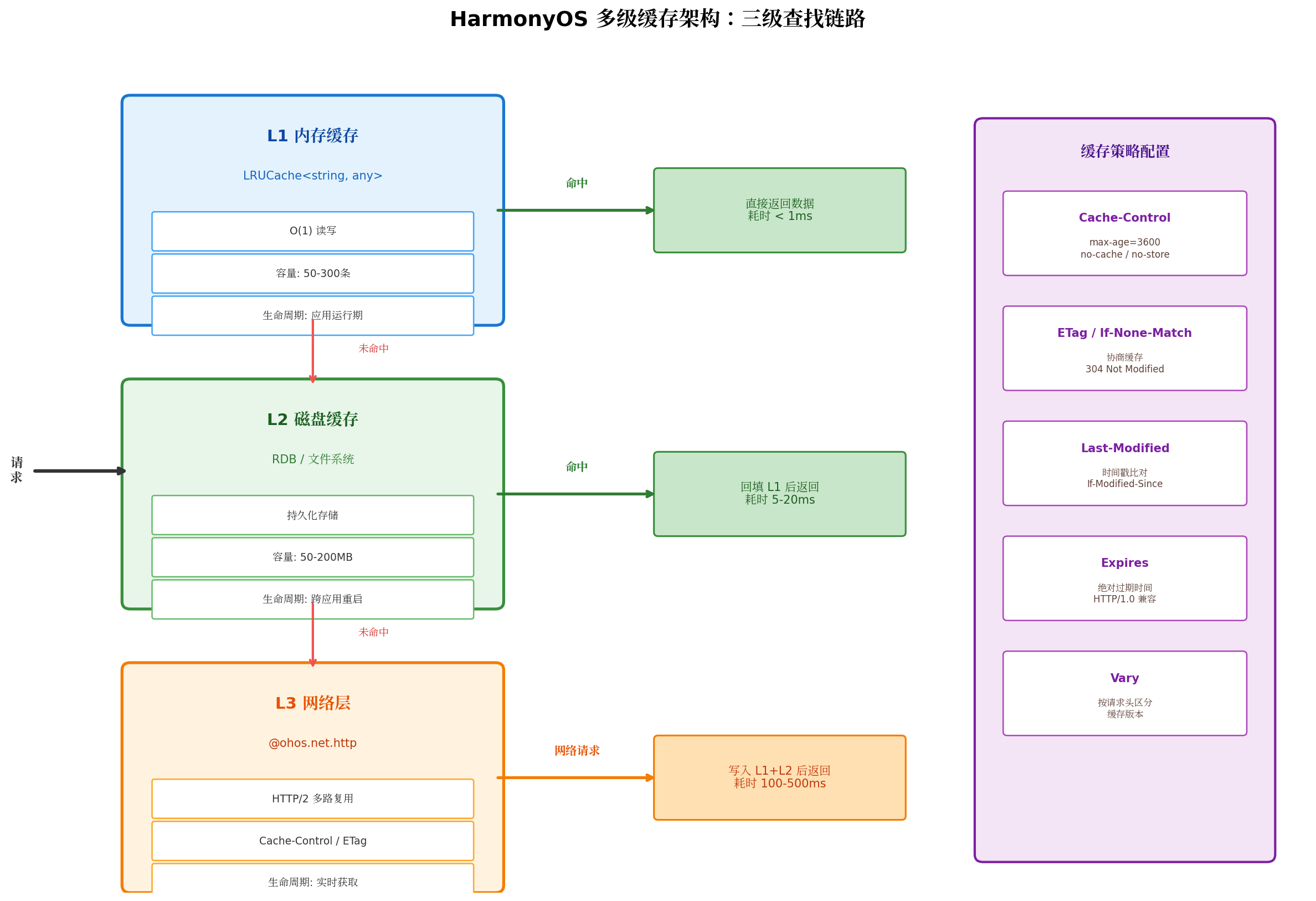
我们采用业界经典的三级缓存架构:
| 层级 | 存储介质 | 响应时间 | 容量 | 生命周期 | 适用场景 |
|---|---|---|---|---|---|
| L1 内存缓存 | LRUCache<string, any> |
< 1ms | 50~300 条 | 应用运行期 | 高频访问的热数据 |
| L2 磁盘缓存 | RDB / 文件系统 | 5~20ms | 50~200MB | 跨应用重启 | 需持久化的结构化数据 |
| L3 网络层 | @ohos.net.http |
100~500ms | 无限制 | 实时获取 | 缓存未命中或强制刷新 |
查找顺序:请求到达时,先查 L1 内存缓存,命中则直接返回;未命中则查 L2 磁盘缓存,命中后回填 L1 并返回;L2 也未命中才发起网络请求,获取成功后同时写入 L1 和 L2,供后续使用。
2.2 HTTP 协议缓存
在发起网络请求前,HarmonyOS 的 @ohos.net.http 模块本身也支持 HTTP 协议级缓存。通过设置 usingCache: true(默认开启)并在请求头中携带 Cache-Control 参数,可以让系统在底层自动处理缓存逻辑:
Cache-Control: max-age=3600:资源在 3600 秒内直接使用本地缓存,无需请求服务器;ETag+If-None-Match:协商缓存,客户端携带上次响应的 ETag,服务器返回 304 Not Modified 时直接使用本地缓存;Last-Modified+If-Modified-Since:基于时间戳的协商缓存,适用于不支持 ETag 的场景。
需要注意的是,协议缓存仅在网络错误且缓存仍在有效期内时才会返回缓存数据。对于需要更精细化控制的场景,仍需配合应用层缓存使用。
三、LRU 内存缓存实现
3.1 核心原理
LRU(Least Recently Used,最近最少使用)是内存缓存最常用的淘汰策略。其核心思想是:当缓存达到容量上限时,淘汰最久未被访问的数据,为新数据腾出空间。
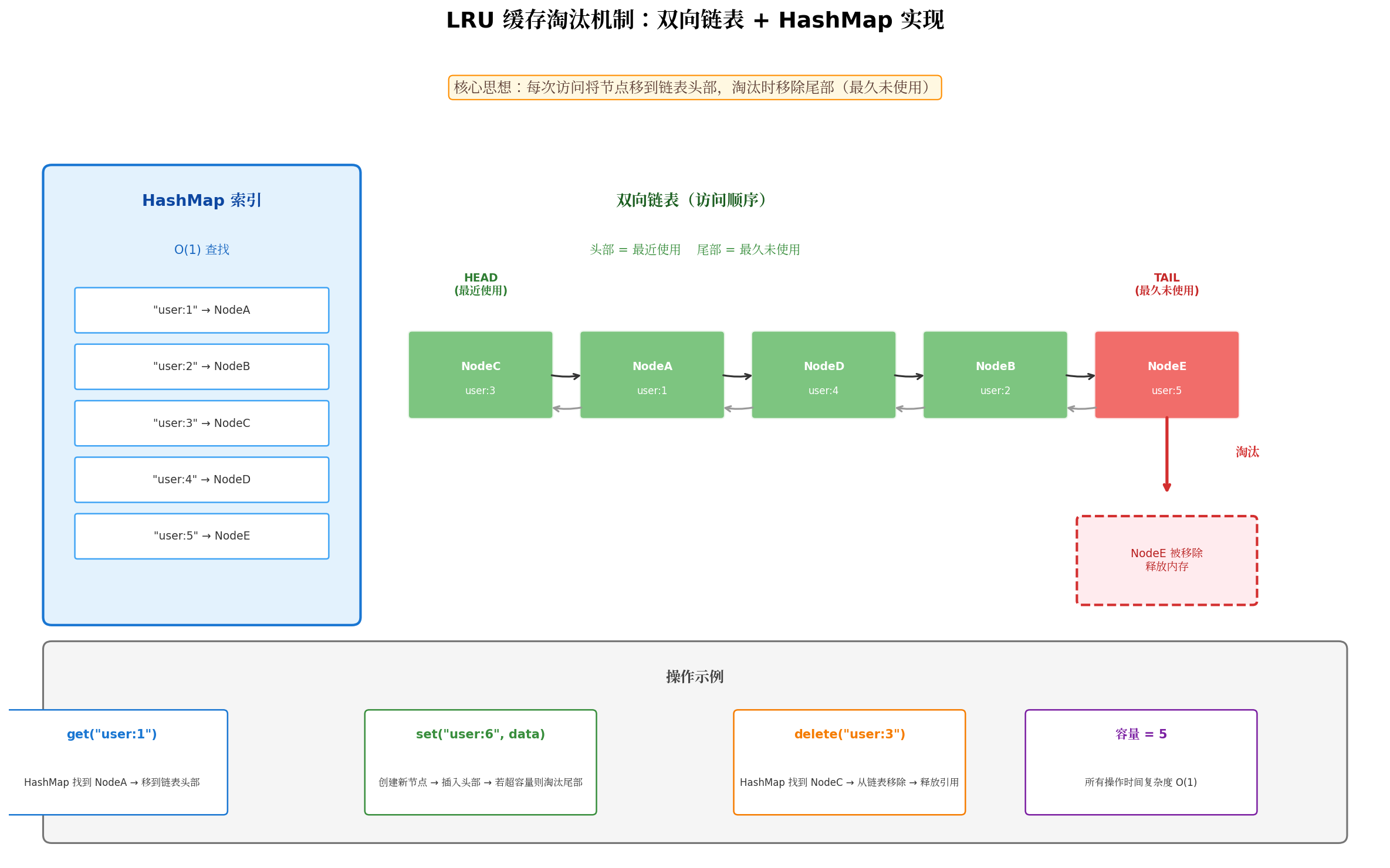
经典实现采用 双向链表 + HashMap 的组合:
- HashMap:提供 O(1) 的键值查找能力;
- 双向链表:维护数据的访问顺序,头部为最近使用,尾部为最久未使用;
- 淘汰操作:当容量满时,直接移除链表尾部节点,并在 HashMap 中删除对应键。
3.2 ArkTS 实现
// cache/LRUCache.ets

/**
 * LRU 缓存节点 - 双向链表结构
 */
class LRUNode<K, V> {
  key: K;
  value: V;
  prev: LRUNode<K, V> | null = null;
  next: LRUNode<K, V> | null = null;

  constructor(key: K, value: V) {
    this.key = key;
    this.value = value;
  }
}

/**
 * LRU 内存缓存实现
 * 基于双向链表 + HashMap,O(1) 时间复杂度
 */
export class LRUCache<K, V> {
  private capacity: number;                    // 最大容量
  private cache: Map<K, LRUNode<K, V>>;        // HashMap 存储
  private head: LRUNode<K, V> | null;          // 链表头(最近使用)
  private tail: LRUNode<K, V> | null;          // 链表尾(最久未使用)
  private size: number = 0;                    // 当前大小

  constructor(capacity: number) {
    this.capacity = capacity;
    this.cache = new Map();
    this.head = null;
    this.tail = null;
  }

  /**
   * 获取缓存值,并移动到链表头部(表示最近访问)
   */
  get(key: K): V | undefined {
    const node = this.cache.get(key);
    if (!node) {
      return undefined;
    }

    // 移动到头部表示最近访问
    this.moveToHead(node);
    return node.value;
  }

  /**
   * 设置缓存值
   */
  set(key: K, value: V): void {
    const existingNode = this.cache.get(key);

    if (existingNode) {
      // 已存在,更新值并移到头部
      existingNode.value = value;
      this.moveToHead(existingNode);
    } else {
      // 新节点
      const newNode = new LRUNode(key, value);
      this.cache.set(key, newNode);
      this.addToHead(newNode);
      this.size++;

      // 超过容量,淘汰尾部
      if (this.size > this.capacity) {
        this.removeTail();
      }
    }
  }

  /**
   * 删除缓存
   */
  delete(key: K): boolean {
    const node = this.cache.get(key);
    if (!node) {
      return false;
    }

    this.removeNode(node);
    this.cache.delete(key);
    this.size--;
    return true;
  }

  /**
   * 清空缓存
   */
  clear(): void {
    this.cache.clear();
    this.head = null;
    this.tail = null;
    this.size = 0;
  }

  /**
   * 获取当前缓存大小
   */
  getSize(): number {
    return this.size;
  }

  /**
   * 获取缓存命中率统计
   */
  getStats(): { size: number; capacity: number; utilization: string } {
    return {
      size: this.size,
      capacity: this.capacity,
      utilization: `${((this.size / this.capacity) * 100).toFixed(1)}%`
    };
  }

  // ========== 链表操作(私有方法)==========

  private moveToHead(node: LRUNode<K, V>): void {
    this.removeNode(node);
    this.addToHead(node);
  }

  private addToHead(node: LRUNode<K, V>): void {
    node.prev = null;
    node.next = this.head;

    if (this.head) {
      this.head.prev = node;
    }
    this.head = node;

    if (!this.tail) {
      this.tail = node;
    }
  }

  private removeNode(node: LRUNode<K, V>): void {
    if (node.prev) {
      node.prev.next = node.next;
    } else {
      this.head = node.next;
    }

    if (node.next) {
      node.next.prev = node.prev;
    } else {
      this.tail = node.prev;
    }
  }

  private removeTail(): void {
    if (!this.tail) {
      return;
    }

    this.cache.delete(this.tail.key);
    this.removeNode(this.tail);
    this.size--;
  }
}
3.3 容量规划建议
内存缓存的容量设置需要权衡命中率与内存占用:
// 根据预估数据大小动态计算容量
const avgDataSize = 50 * 1024;        // 假设平均 50KB/条
const maxMemory = 30 * 1024 * 1024;   // 分配 30MB 内存给缓存
const capacity = Math.floor(maxMemory / avgDataSize);  // 约 600 条

const cache = new LRUCache<string, any>(capacity);
四、磁盘缓存实现
4.1 基于 RDB 的磁盘缓存
对于需要跨应用重启持久化的数据,磁盘缓存是必要的一层。HarmonyOS 的 @ohos.data.relationalStore(RDB)提供了轻量级的 SQLite 封装,适合存储结构化缓存数据。
// cache/DiskCache.ets
import { relationalStore } from '@kit.ArkData';
import { common } from '@kit.AbilityKit';

interface DiskCacheConfig {
  dbName: string;
  tableName: string;
  maxAge: number;        // 默认过期时间(ms)
}

interface CacheEntry<T> {
  data: T;
  timestamp: number;     // 创建时间戳
  ttl: number;           // 生存时间(ms),0 表示永不过期
}

export class DiskCache {
  private db: relationalStore.RdbStore | null = null;
  private config: DiskCacheConfig;

  constructor(context: common.Context, config: Partial<DiskCacheConfig> = {}) {
    this.config = {
      dbName: 'HttpCache.db',
      tableName: 'cache_entries',
      maxAge: 7 * 24 * 60 * 60 * 1000,  // 默认 7 天
      ...config
    };
  }

  async init(): Promise<void> {
    this.db = await relationalStore.getRdbStore(getContext(), {
      name: this.config.dbName,
      securityLevel: relationalStore.SecurityLevel.S1
    });

    // 创建缓存表
    await this.db.executeSql(`
      CREATE TABLE IF NOT EXISTS ${this.config.tableName} (
        cache_key TEXT PRIMARY KEY,
        cache_data TEXT NOT NULL,
        timestamp INTEGER NOT NULL,
        ttl INTEGER NOT NULL
      )
    `);

    // 创建索引加速查询
    await this.db.executeSql(`
      CREATE INDEX IF NOT EXISTS idx_timestamp
      ON ${this.config.tableName}(timestamp)
    `);
  }

  /**
   * 读取缓存
   */
  async get<T>(key: string): Promise<T | null> {
    if (!this.db) return null;

    const resultSet = await this.db.querySql(
      `SELECT cache_data, timestamp, ttl FROM ${this.config.tableName} WHERE cache_key = ?`,
      [key]
    );

    if (resultSet.goToFirstRow()) {
      const data = resultSet.getString(0);
      const timestamp = resultSet.getLong(1);
      const ttl = resultSet.getLong(2);
      resultSet.close();

      // 检查是否过期
      if (ttl > 0 && Date.now() - timestamp > ttl) {
        await this.delete(key);  // 自动清理过期数据
        return null;
      }

      try {
        return JSON.parse(data) as T;
      } catch (e) {
        return data as unknown as T;
      }
    }

    resultSet.close();
    return null;
  }

  /**
   * 写入缓存
   */
  async set<T>(key: string, value: T, ttl?: number): Promise<void> {
    if (!this.db) return;

    const entry: CacheEntry<T> = {
      data: value,
      timestamp: Date.now(),
      ttl: ttl ?? this.config.maxAge
    };

    await this.db.executeSql(
      `REPLACE INTO ${this.config.tableName} (cache_key, cache_data, timestamp, ttl) VALUES (?, ?, ?, ?)`,
      [key, JSON.stringify(entry.data), entry.timestamp, entry.ttl]
    );
  }

  /**
   * 删除缓存
   */
  async delete(key: string): Promise<void> {
    if (!this.db) return;
    await this.db.executeSql(
      `DELETE FROM ${this.config.tableName} WHERE cache_key = ?`,
      [key]
    );
  }

  /**
   * 清空所有缓存
   */
  async clear(): Promise<void> {
    if (!this.db) return;
    await this.db.executeSql(`DELETE FROM ${this.config.tableName}`);
  }

  /**
   * 清理过期缓存,返回清理数量
   */
  async clearExpired(): Promise<number> {
    if (!this.db) return 0;

    const result = await this.db.executeSql(
      `DELETE FROM ${this.config.tableName} WHERE ttl > 0 AND ? - timestamp > ttl`,
      [Date.now()]
    );

    return result || 0;
  }

  /**
   * 获取缓存统计
   */
  async getStats(): Promise<{ total: number; expired: number }> {
    if (!this.db) return { total: 0, expired: 0 };

    const totalResult = await this.db.querySql(
      `SELECT COUNT(*) FROM ${this.config.tableName}`
    );
    let total = 0;
    if (totalResult.goToFirstRow()) {
      total = totalResult.getLong(0);
    }
    totalResult.close();

    const expiredResult = await this.db.querySql(
      `SELECT COUNT(*) FROM ${this.config.tableName} WHERE ttl > 0 AND ? - timestamp > ttl`,
      [Date.now()]
    );
    let expired = 0;
    if (expiredResult.goToFirstRow()) {
      expired = expiredResult.getLong(0);
    }
    expiredResult.close();

    return { total, expired };
  }
}
4.2 序列化注意事项
不是所有数据都能直接 JSON 序列化。例如 ArrayBuffer、PixelMap、Map、Set 等类型需要特殊处理:
// 图片数据转为 Base64 存储
async function cacheImage(imageBuffer: ArrayBuffer, key: string, diskCache: DiskCache): Promise<void> {
  // 错误:await diskCache.set(key, imageBuffer); // ArrayBuffer 无法 JSON 序列化

  // 正确:转为 Base64
  const base64 = bufferToBase64(imageBuffer);
  await diskCache.set(key, { base64, mimeType: 'image/png' });
}

function bufferToBase64(buffer: ArrayBuffer): string {
  const bytes = new Uint8Array(buffer);
  let binary = '';
  for (let i = 0; i < bytes.byteLength; i++) {
    binary += String.fromCharCode(bytes[i]);
  }
  return btoa(binary);
}
五、多级缓存管理器
5.1 核心实现
将内存缓存和磁盘缓存组合起来,形成完整的多级缓存体系:
// cache/CacheManager.ets
import { LRUCache } from './LRUCache';
import { DiskCache } from './DiskCache';
import { common } from '@kit.AbilityKit';

/**
 * 缓存策略配置
 */
export interface CachePolicy {
  memoryCache: boolean;      // 是否启用内存缓存
  diskCache: boolean;        // 是否启用磁盘缓存
  memoryMaxSize: number;     // 内存缓存最大条目数
  diskMaxAge: number;        // 磁盘缓存过期时间(毫秒)
}

/**
 * 默认缓存策略
 */
const DEFAULT_POLICY: CachePolicy = {
  memoryCache: true,
  diskCache: true,
  memoryMaxSize: 100,
  diskMaxAge: 7 * 24 * 60 * 60 * 1000  // 7 天
};

/**
 * 多级缓存管理器
 * L1 内存缓存 + L2 磁盘缓存
 */
export class CacheManager {
  private memoryCache: LRUCache<string, any> | null = null;
  private diskCache: DiskCache | null = null;
  private policy: CachePolicy;
  private initialized: boolean = false;
  private hitStats: { memory: number; disk: number; network: number } = {
    memory: 0, disk: 0, network: 0
  };
  private pendingRequests: Map<string, Promise<any>> = new Map();

  constructor(context: common.Context, policy: Partial<CachePolicy> = {}) {
    this.policy = { ...DEFAULT_POLICY, ...policy };

    if (this.policy.memoryCache) {
      this.memoryCache = new LRUCache<string, any>(this.policy.memoryMaxSize);
    }

    if (this.policy.diskCache) {
      this.diskCache = new DiskCache(context, {
        maxAge: this.policy.diskMaxAge
      });
    }
  }

  async init(): Promise<void> {
    if (this.initialized) return;
    await this.diskCache?.init();
    this.initialized = true;
  }

  /**
   * 获取缓存数据
   * 查找顺序:内存 → 磁盘 → null
   */
  async get<T>(key: string): Promise<T | null> {
    this.ensureInitialized();

    // 1. 先查内存缓存
    if (this.memoryCache) {
      const memoryValue = this.memoryCache.get(key);
      if (memoryValue !== undefined) {
        this.hitStats.memory++;
        console.debug(`[Cache] 内存命中: ${key}`);
        return memoryValue as T;
      }
    }

    // 2. 再查磁盘缓存
    if (this.diskCache) {
      const diskValue = await this.diskCache.get<T>(key);
      if (diskValue !== null) {
        this.hitStats.disk++;
        console.debug(`[Cache] 磁盘命中: ${key}`);
        // 回填内存缓存
        if (this.memoryCache) {
          this.memoryCache.set(key, diskValue);
        }
        return diskValue;
      }
    }

    console.debug(`[Cache] 未命中: ${key}`);
    return null;
  }

  /**
   * 设置缓存数据
   * 同时写入内存和磁盘
   */
  async set<T>(key: string, value: T, maxAge?: number): Promise<void> {
    this.ensureInitialized();

    if (this.memoryCache) {
      this.memoryCache.set(key, value);
    }

    if (this.diskCache) {
      await this.diskCache.set(key, value, maxAge);
    }

    console.debug(`[Cache] 写入: ${key}`);
  }

  /**
   * 获取或创建缓存
   * 如果缓存不存在,执行 factory 函数获取数据并缓存
   * 使用 Promise 缓存防止并发击穿
   */
  async getOrSet<T>(
    key: string,
    factory: () => Promise<T>,
    maxAge?: number
  ): Promise<T> {
    // 检查是否有进行中的请求(防止缓存击穿)
    if (this.pendingRequests.has(key)) {
      return this.pendingRequests.get(key) as Promise<T>;
    }

    // 尝试读取缓存
    const cached = await this.get<T>(key);
    if (cached !== null) {
      return cached;
    }

    // 执行 factory 获取数据
    const promise = this.executeFactory(key, factory, maxAge);
    this.pendingRequests.set(key, promise);

    try {
      return await promise;
    } finally {
      this.pendingRequests.delete(key);
    }
  }

  private async executeFactory<T>(
    key: string,
    factory: () => Promise<T>,
    maxAge?: number
  ): Promise<T> {
    try {
      const value = await factory();
      this.hitStats.network++;
      await this.set(key, value, maxAge);
      return value;
    } catch (error) {
      console.error(`[Cache] factory 执行失败: ${key}`, error);
      throw error;
    }
  }

  /**
   * 删除缓存
   */
  async delete(key: string): Promise<void> {
    if (this.memoryCache) {
      this.memoryCache.delete(key);
    }
    if (this.diskCache) {
      await this.diskCache.delete(key);
    }
  }

  /**
   * 清空所有缓存
   */
  async clear(): Promise<void> {
    if (this.memoryCache) {
      this.memoryCache.clear();
    }
    if (this.diskCache) {
      await this.diskCache.clear();
    }
    this.hitStats = { memory: 0, disk: 0, network: 0 };
  }

  /**
   * 清理过期缓存
   */
  async cleanup(): Promise<number> {
    if (!this.diskCache) return 0;
    return await this.diskCache.clearExpired();
  }

  /**
   * 获取缓存统计信息
   */
  getStats(): { hitRate: string; memoryHits: number; diskHits: number; networkFetches: number } {
    const total = this.hitStats.memory + this.hitStats.disk + this.hitStats.network;
    return {
      hitRate: total > 0
        ? `${(((this.hitStats.memory + this.hitStats.disk) / total) * 100).toFixed(1)}%`
        : 'N/A',
      memoryHits: this.hitStats.memory,
      diskHits: this.hitStats.disk,
      networkFetches: this.hitStats.network
    };
  }

  private ensureInitialized(): void {
    if (!this.initialized) {
      throw new Error('CacheManager not initialized. Call init() first.');
    }
  }
}
5.2 与 HTTP 请求引擎集成
将缓存管理器集成到上一篇封装的 HTTP 引擎中:
// network/HttpEngine.ets(扩展)
import { CacheManager } from '../cache/CacheManager';

export class HttpEngine {
  private cacheManager: CacheManager | null = null;

  setCacheManager(cache: CacheManager): HttpEngine {
    this.cacheManager = cache;
    return this;
  }

  async request<T = any>(config: RequestConfig): Promise<ApiResponse<T>> {
    const cacheKey = this.generateCacheKey(config);

    // 如果启用缓存且是 GET 请求,先查缓存
    if (config.useCache && config.method === HttpMethod.GET && this.cacheManager) {
      const cached = await this.cacheManager.get<ApiResponse<T>>(cacheKey);
      if (cached) {
        return cached;
      }
    }

    // 执行实际请求
    const response = await this.executeRequest<T>(config);

    // 写入缓存
    if (config.useCache && config.method === HttpMethod.GET && this.cacheManager) {
      await this.cacheManager.set(cacheKey, response, config.cacheTime);
    }

    return response;
  }

  private generateCacheKey(config: RequestConfig): string {
    return `${config.method}_${config.url}_${JSON.stringify(config.params || {})}`;
  }
}
六、缓存失效策略与一致性保障
6.1 四种经典缓存模式
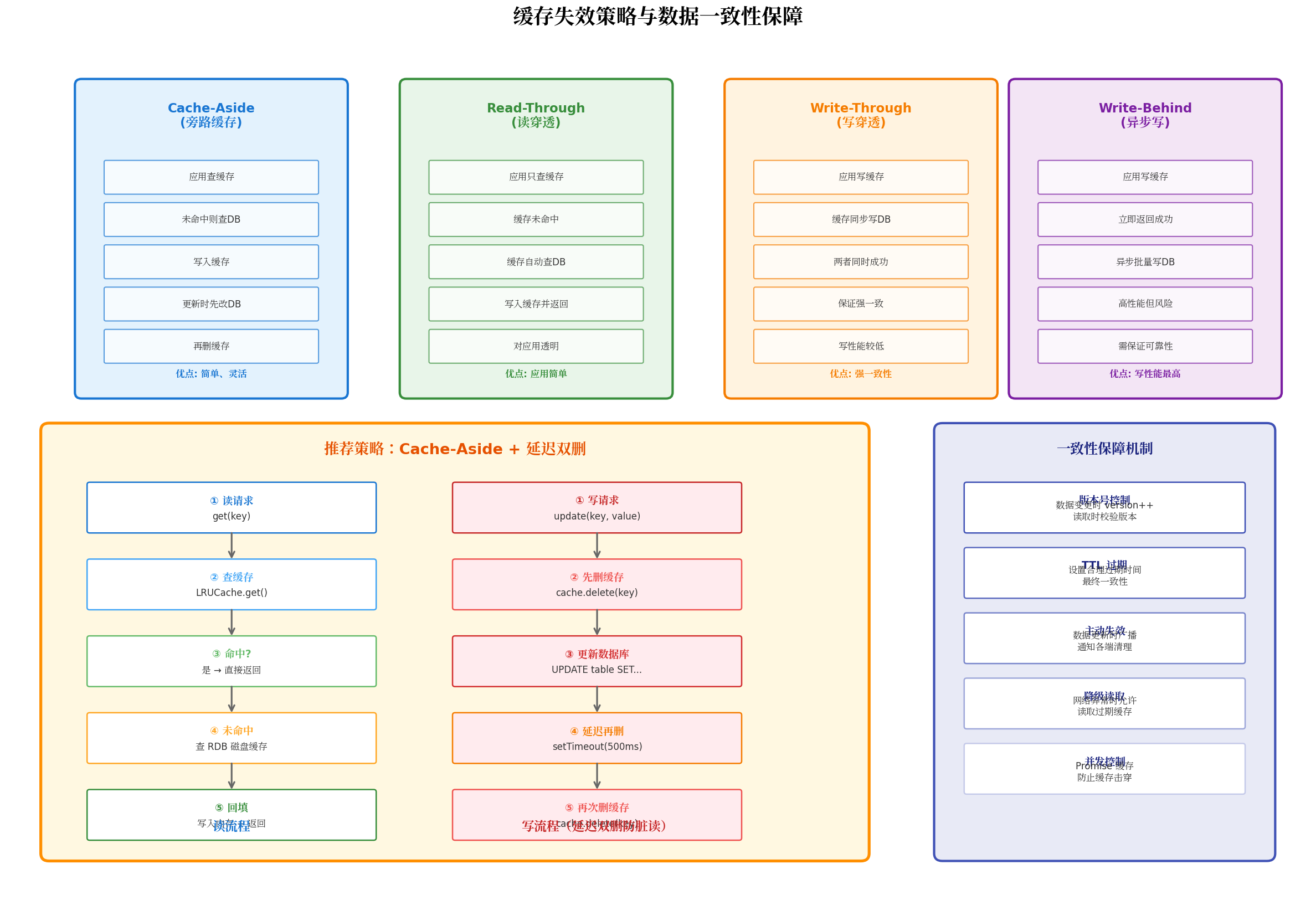
| 模式 | 读流程 | 写流程 | 一致性 | 适用场景 |
|---|---|---|---|---|
| Cache-Aside | 先查缓存,未命中查 DB 并回填 | 先更新 DB,再删缓存 | 最终一致 | 通用场景,最常用 |
| Read-Through | 只查缓存,缓存自动加载 DB | — | 最终一致 | 对应用透明,简化代码 |
| Write-Through | — | 同时写缓存和 DB | 强一致 | 写少读多,一致性要求高 |
| Write-Behind | — | 先写缓存,异步批量写 DB | 弱一致 | 写性能要求极高 |
6.2 延迟双删策略
在 Cache-Aside 模式中,经典的"先删缓存,再更新 DB"方案存在并发脏读风险:线程 A 删除缓存后、更新 DB 前,线程 B 读取旧数据并回填缓存,导致缓存与 DB 不一致。
延迟双删是解决这一问题的有效方案:
/**
 * 延迟双删:更新数据时,先删缓存 → 更新 DB → 延迟一段时间后再删一次缓存
 */
async function updateWithDelayedDelete<T>(
  key: string,
  updateFn: () => Promise<T>,
  cacheManager: CacheManager,
  delayMs: number = 500
): Promise<T> {
  // 第一次删除缓存
  await cacheManager.delete(key);

  // 更新数据库
  const result = await updateFn();

  // 延迟第二次删除(确保期间并发读已回填的脏缓存被清除)
  setTimeout(async () => {
    await cacheManager.delete(key);
    console.info(`[Cache] 延迟双删完成: ${key}`);
  }, delayMs);

  return result;
}
6.3 版本号控制
对于对一致性要求更高的场景,可以引入版本号机制:
interface VersionedData<T> {
  version: number;
  data: T;
  timestamp: number;
}

async function getWithVersion<T>(
  key: string,
  cacheManager: CacheManager
): Promise<VersionedData<T> | null> {
  return await cacheManager.get<VersionedData<T>>(key);
}

async function setWithVersion<T>(
  key: string,
  data: T,
  cacheManager: CacheManager
): Promise<void> {
  const existing = await cacheManager.get<VersionedData<T>>(key);
  const newVersion = (existing?.version || 0) + 1;

  await cacheManager.set(key, {
    version: newVersion,
    data,
    timestamp: Date.now()
  });
}
七、缓存预热与内存压力响应
7.1 缓存预热策略
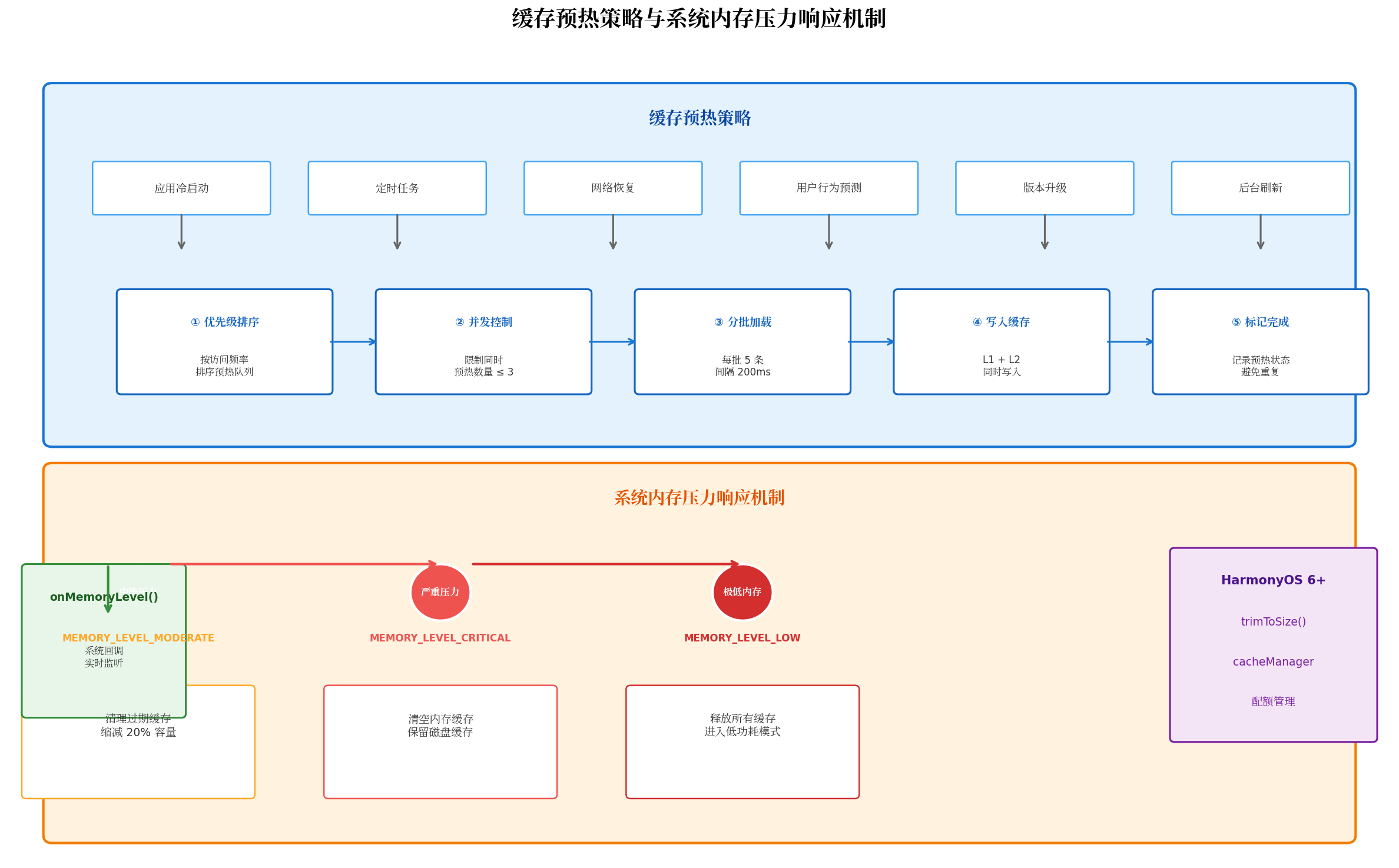
应用冷启动时,内存缓存为空,用户首次访问每个页面都会触发网络请求,体验不佳。缓存预热可以在后台提前加载高频数据:
// cache/CacheWarmer.ets
import { CacheManager } from './CacheManager';

interface WarmupTask {
  key: string;
  factory: () => Promise<any>;
  priority: number;     // 优先级,数字越小越优先
  maxAge?: number;
}

export class CacheWarmer {
  private cacheManager: CacheManager;
  private maxConcurrency: number = 3;  // 最大并发预热数

  constructor(cacheManager: CacheManager) {
    this.cacheManager = cacheManager;
  }

  /**
   * 执行缓存预热
   */
  async warmup(tasks: WarmupTask[]): Promise<void> {
    // 按优先级排序
    const sortedTasks = tasks.sort((a, b) => a.priority - b.priority);

    // 分批执行,控制并发
    for (let i = 0; i < sortedTasks.length; i += this.maxConcurrency) {
      const batch = sortedTasks.slice(i, i + this.maxConcurrency);

      await Promise.all(
        batch.map(task =>
          this.cacheManager.getOrSet(task.key, task.factory, task.maxAge)
            .catch(err => console.warn(`[Warmup] ${task.key} 预热失败:`, err))
        )
      );

      // 批次间间隔,避免瞬间大量请求
      if (i + this.maxConcurrency < sortedTasks.length) {
        await this.delay(200);
      }
    }

    console.info(`[Warmup] 预热完成,共 ${tasks.length} 个任务`);
  }

  private delay(ms: number): Promise<void> {
    return new Promise(resolve => setTimeout(resolve, ms));
  }
}
7.2 系统内存压力响应
HarmonyOS 提供了 onMemoryLevel() 接口,允许应用监听系统内存变化并动态调整缓存策略。
// cache/MemoryPressureHandler.ets
import { LRUCache } from './LRUCache';

export class MemoryPressureHandler {
  private memoryCache: LRUCache<string, any>;
  private originalCapacity: number;

  constructor(memoryCache: LRUCache<string, any>) {
    this.memoryCache = memoryCache;
    this.originalCapacity = memoryCache.getSize();
  }

  /**
   * 注册内存压力监听
   */
  register(): void {
    // HarmonyOS 内存等级回调
    getContext().onMemoryLevel = (level: number) => {
      this.handleMemoryLevel(level);
    };
  }

  private handleMemoryLevel(level: number): void {
    switch (level) {
      case 0: // MEMORY_LEVEL_MODERATE - 中等压力
        console.warn('[Memory] 中等内存压力,缩减缓存 20%');
        this.trimCache(0.8);
        break;

      case 1: // MEMORY_LEVEL_CRITICAL - 严重压力
        console.error('[Memory] 严重内存压力,清空内存缓存');
        this.memoryCache.clear();
        break;

      case 2: // MEMORY_LEVEL_LOW - 极低内存
        console.error('[Memory] 极低内存,释放所有缓存');
        this.memoryCache.clear();
        break;
    }
  }

  /**
   * 按比例缩减缓存容量
   */
  private trimCache(ratio: number): void {
    // HarmonyOS 6+ 支持 trimToSize
    const targetSize = Math.floor(this.originalCapacity * ratio);
    while (this.memoryCache.getSize() > targetSize) {
      // LRUCache 会自动淘汰尾部
      this.memoryCache.set('__dummy__', null);
      this.memoryCache.delete('__dummy__');
    }
  }
}
八、最佳实践与踩坑指南
8.1 Key 设计规范
合理的 Key 设计是缓存管理的基础:
// 推荐:结构化 Key,包含业务域、资源类型、唯一标识
const cacheKey = `api:user:profile:${userId}`;
const cacheKey2 = `api:news:list:${category}:${page}`;
const cacheKey3 = `image:avatar:${userId}:size_${width}x${height}`;

// 避免:简单拼接,容易冲突
const badKey = `${userId}`;  // 不同业务可能使用相同 userId
8.2 缓存穿透、击穿、雪崩防护
| 问题 | 现象 | 解决方案 |
|---|---|---|
| 缓存穿透 | 查询不存在的数据,每次都打到 DB | 缓存空值(设置较短 TTL) |
| 缓存击穿 | 热点数据过期瞬间,大量请求打到 DB | getOrSet Promise 缓存互斥 |
| 缓存雪崩 | 大量缓存同时过期,DB 压力激增 | 随机化 TTL,错峰过期 |
// 缓存空值防止穿透
async function getUserWithNullCache(userId: string): Promise<User | null> {
  const key = `user:${userId}`;

  const cached = await cacheManager.get<{ data: User | null; isNull: boolean }>(key);
  if (cached) {
    return cached.isNull ? null : cached.data;
  }

  const user = await fetchUserFromServer(userId);

  // 即使 user 为 null 也缓存,防止穿透
  await cacheManager.set(key, { data: user, isNull: user === null }, 60000);

  return user;
}

// 随机 TTL 防止雪崩
function getRandomTTL(baseTTL: number, jitter: number = 0.2): number {
  const jitterMs = baseTTL * jitter * (Math.random() - 0.5) * 2;
  return Math.floor(baseTTL + jitterMs);
}

await cacheManager.set(key, data, getRandomTTL(300000)); // 5分钟 ± 20%
8.3 缓存不是银弹
记住一个核心原则:只缓存那些"计算成本高、访问频率高、变化频率低"的数据。以下数据不适合缓存:
- 实时性要求极高的数据(如股票行情、倒计时);
- 用户敏感信息(如密码、Token,需加密存储);
- 大体积二进制文件(应使用文件系统而非 RDB);
- 一次性临时数据。
九、总结
本文从缓存的核心价值出发,系统性地构建了一套 HarmonyOS 多级缓存体系:
- 三级架构:L1 内存缓存(LRUCache)+ L2 磁盘缓存(RDB)+ L3 网络层(HTTP 协议缓存),逐级降级,兼顾速度与持久化;
- LRU 实现:基于双向链表 + HashMap 的 O(1) LRU 缓存,支持 get/set/delete/clear 全生命周期管理;
- 磁盘缓存:利用
@ohos.data.relationalStore实现结构化持久化存储,支持 TTL 过期自动清理; - 多级管理器:
CacheManager统一封装 L1/L2 查找逻辑,内置 Promise 缓存防止并发击穿; - 失效策略:Cache-Aside + 延迟双删解决并发脏读,版本号控制保障强一致性;
- 预热与压力响应:
CacheWarmer实现应用启动时的数据预加载,onMemoryLevel动态调整缓存容量; - 工程实践:合理的 Key 设计、空值缓存防穿透、随机 TTL 防雪崩,确保系统稳定运行。

作为“人工智能6S店”的官方数字引擎,为AI开发者与企业提供一个覆盖软硬件全栈、一站式门户。
更多推荐
 0
0 0
0- 0


 已为社区贡献92条内容

所有评论(0)