
华为昇腾910B部署手册——课堂质量诊断
·
先打开参考链接1:paraformer 推理适配昇腾-云社区-华为云
也可以参考链接2:Atlas 800I A2部署funASR记录
下载华为语音基础环境镜像:
docker pull swr.cn-southwest-2.myhuaweicloud.com/atelier/pytorch_2_1_ascend:pytorch_2.1.0-cann_8.0.rc3-py_3.9-hce_2.0.2406-aarch64-snt9b-20240910112800-2a95df3华为卡基本命令:
查看端口号:
ss -lntp | grep 8006查看显存:
npu-smi info先下载项目源码压缩包(百度网盘):
./BaiduPCS-Go d "/工作/远程部署/wangruihua/jyd_项目源码部署/jyd_speaker.zip" -p 10替换jyd_speaker目录中的flask_speaker.py为flask_speaker_huawei.py
# 接口:8006
# 华为滑动窗口:基于重叠窗口对齐跨段的说话人ID (临时较优方案,越往后越不准)
# CUDA_VISIBLE_DEVICES=6 python flask_speaker_huawei.py --port 8006
# CUDA_VISIBLE_DEVICES=5 nohup python flask_speaker_huawei.py --port 8006 > logs/8006.log 2>&1 &
# 这个版本将 batch_size_s=60 不容易爆显存
# 语音转写,说话人分割
# 环境:jyd/speaker
# paraformer + cam++
# 自动切分左右声道(目前效果最好)
# 带定量清理文件,删除最早的文件(防止内存占满)
# 分离左右声道,左声道无效自动处理右声道
# 处理静默时间 小于2s的归到上一条字幕
# 长时间静默后出现声音,整段时间都会标记到字幕行(瑞华)
# 音频统一处理为16000hz
# 字幕合并:以?。!做结尾,合并后计算字幕长度,大于60不继续合并;
# 处理端点检测模型失误情况
# 再次处理静默时间 小于2s的归到上一条字幕
# 添加讯飞api
# 带降噪 DeepFilterNet2降噪(切分音频)
# 带显存清理 删除不再使用的对象,减少代码冗余
# 程序保活重启机制 需要修改为绝对路径
# 平均 dBFS (-14.92) 表示文件有较多静音或低音量区域。VAD (Voice Activity Detection)模型配置不适合处理这种音频。
# 优化高并发队列问题
# 修改app.py为denosie.py
# 修改模型路径为当前文件夹模型
# 增加nospeaker字幕
# 增加参数,调用genstate参数时输入onlytext值为1,返回语音转写的纯文字
# 缓存池扩大到500
# 增加日志每天自动清理, 每 3 天切分一次日志,只保留最近 3 天
# 对音频进行统一转换为16000hz
# 增加右声道显存不足检测,日志打印
import os
os.environ["NUMBA_DISABLE_JIT"] = "1"
from flask import Flask, request, jsonify, url_for,send_from_directory
import os
import re
import gc
import csv
import time
import json
import argparse
import pandas as pd
from funasr import AutoModel
import threading
import torch
import tempfile
import numpy as np
from pydub import AudioSegment
from modelscope.pipelines import pipeline
from modelscope.utils.constant import Tasks
from datetime import datetime,timedelta
from pydub import AudioSegment
from denoise_huawei import denoise_audio # 从denoise_huawei.py导入降噪模块 / 一般不加降噪,降噪会丢失声音细节
from xunfeiapi import RequestApi
from queue import Queue
import logging
from loguru import logger
import time
# transfer_to_npu 的作用是把所有 cuda / cuda:0 的调用自动重定向到昇腾 NPU。 cuda:0 实际落到 NPU 上正常跑;
import torch_npu
from torch_npu.contrib import transfer_to_npu
# 每 3 天切分一次日志,只保留最近 3 天
logger.add("logs/8006.log", rotation="3 days", retention="3 days", encoding="utf-8")
app = Flask(__name__)
# 创建上传目录、结果目录和缓存目录
UPLOAD_FOLDER = os.path.abspath('./uploads')
RESULT_FOLDER = os.path.abspath('./results')
TEMP_AUDIO_FOLDER = os.path.abspath('./temp_audio_chunks')
if not os.path.exists(UPLOAD_FOLDER):
os.makedirs(UPLOAD_FOLDER)
if not os.path.exists(RESULT_FOLDER):
os.makedirs(RESULT_FOLDER)
if not os.path.exists(TEMP_AUDIO_FOLDER):
os.makedirs(TEMP_AUDIO_FOLDER)
# 创建队列用于管理音频处理
audio_processing_queue = Queue()
# 跟踪音频处理状态的字典
audio_processing_status = {}
# 降噪——————DF切分降噪
def process_audio_chunks(input_mp3_path, temp_folder, output_audio_path, audioid, frame_rate=44100):
logger.info(f"开始降噪:{input_mp3_path}")
os.makedirs(temp_folder, exist_ok=True) # 确保临时文件夹存在
audio_segment = AudioSegment.from_file(file=input_mp3_path).set_frame_rate(frame_rate) # 将MP3文件转换为WAV格式
chunk_length_ms = 600000
chunks = [audio_segment[i:i+chunk_length_ms] for i in range(0, len(audio_segment), chunk_length_ms)] # 将音频切割为10分钟的片段 (600000ms)
processed_segments = []
for i, chunk in enumerate(chunks):
chunk_path = os.path.join(temp_folder, f"{audioid}_chunk_{i}.wav") # 为每个片段生成临时文件路径
chunk.export(chunk_path, format="wav")
# 对切分出的片段进行降噪处理
logger.info(f"***************开始降噪第{i+1}段*************")
denoised_chunk_path = os.path.join(temp_folder, f"{audioid}_denoised_{i}.wav")
denoise_audio(chunk_path, denoised_chunk_path)
# 加载处理后的片段
processed_segments.append(AudioSegment.from_file(denoised_chunk_path))
# 清理原始片段文件
os.remove(chunk_path)
final_segment = AudioSegment.empty() # 合并处理后的音频片段
for segment in processed_segments:
final_segment += segment
final_segment.export(output_audio_path, format="wav") # 保存合并后的音频片段
# 已保存合并后的音频,删除降噪音频片段
for i in range(len(processed_segments)):
denoised_chunk_path = os.path.join(temp_folder, f"{audioid}_denoised_{i}.wav")
os.remove(denoised_chunk_path)
logger.info(f"降噪完成,输出文件在:{output_audio_path}")
def manage_files(directory, max_files=500):
"""管理文件夹中的文件数量,保持文件数量不超过 max_files,如果超过就删除最旧的文件"""
files = os.listdir(directory)
if len(files) > max_files:
# 获取每个文件的完整路径和修改时间
full_paths = [os.path.join(directory, file) for file in files]
# 按照修改时间排序文件
full_paths = sorted(full_paths, key=lambda x: os.path.getmtime(x))
# 删除最旧的 delete_count 个文件
for file in full_paths[:len(files)-max_files]:
os.remove(file)
logger.info(f"删除 {file} 由于文件数量超过限制")
def save_and_manage_file(file, path):
"""保存文件并管理文件夹中的文件数量"""
file.save(path)
# 管理 uploads 文件夹
manage_files(UPLOAD_FOLDER)
# 管理 results 文件夹
manage_files(RESULT_FOLDER)
def convert_audio_to_left_channel(input_file, output_dir):
os.makedirs(output_dir, exist_ok=True) # 确保输出目录存在
audio = AudioSegment.from_file(input_file) # 加载音频文件
audio = audio.set_frame_rate(16000) # 将音频采样率转换为16000Hz
# logger.info(f"{input_file}音频采样率降为16000hz")
# 检查音频是否是立体声
if audio.channels == 2:
left_channel = audio.split_to_mono()[0]
right_channel = audio.split_to_mono()[1]
filename, file_extension = os.path.splitext(os.path.basename(input_file)) # 获取文件名
# 保存左右声道音频文件
left_channel_path = os.path.join(output_dir, f"{filename}_left{file_extension}")
right_channel_path = os.path.join(output_dir, f"{filename}_right{file_extension}")
left_channel.export(left_channel_path, format="wav")
right_channel.export(right_channel_path, format="wav")
logger.info(f"立体声音频已转换为左声道:{left_channel_path}")
logger.info(f"立体声音频已转换为右声道:{right_channel_path}")
return left_channel_path, right_channel_path
else:
# 单声道复制保存为左右声道
logger.info(f"{input_file}原音频是单声道,正在转为16000hz的wav音频")
# 单声道处理:仍需转换为 16000Hz 并保存为 .wav 格式
filename = os.path.splitext(os.path.basename(input_file))[0]
left_channel_path = os.path.join(output_dir, f"{filename}_left.wav") # 统一输出为.wav 格式
right_channel_path = os.path.join(output_dir, f"{filename}_right.wav") # 统一输出为.wav 格式
# 导出为 16000Hz 的 WAV 文件
audio.export(left_channel_path, format="wav")
logger.info(f"单声道音频已转换为16000Hz WAV格式:{left_channel_path}")
# 导出为 16000Hz 的 WAV 文件
audio.export(right_channel_path, format="wav")
logger.info(f"单声道音频已转换为16000Hz WAV格式:{right_channel_path}")
return left_channel_path, right_channel_path
def classify_sentences(speaker_info):
logger.info("**************************句子分类**************************")
# 获取当前脚本的目录
current_dir = os.path.dirname(os.path.abspath(__file__))
question_words_path = os.path.join(current_dir, 'configs/question_words.txt')
noquestion_words_path = os.path.join(current_dir, 'configs/noquestion_words.txt')
# 打开文件
with open(question_words_path, 'r', encoding='utf-8') as file:
question_words = [word.strip() for word in file.readlines()]
with open(noquestion_words_path, 'r', encoding='utf-8') as file:
noquestion_words = [word.strip() for word in file.readlines()]
def is_question(sentence):
for word in noquestion_words:
if re.search(re.escape(word), sentence):
return False
for word in question_words:
if re.search(re.escape(word), sentence):
return True
return False
sentences = [info.split(':')[1] for info in speaker_info] # 提取每个speaker的句子
question_sentences = [sentence for sentence in sentences if is_question(sentence)]
logger.info("************************课堂诊断结束************************")
return question_sentences
def initialize_model():
"""初始化模型并返回实例。"""
model = AutoModel(
model="models/modelscope/hub/damo/speech_seaco_paraformer_large_asr_nat-zh-cn-16k-common-vocab8404-pytorch",
model_revision="v2.0.4",
vad_model="models/modelscope/hub/damo/speech_fsmn_vad_zh-cn-16k-common-pytorch",
vad_model_revision="v2.0.4",
punc_model="models/modelscope/hub/damo/punc_ct-transformer_zh-cn-common-vocab272727-pytorch",
punc_model_revision="v2.0.4",
spk_model="models/modelscope/hub/damo/speech_campplus_sv_zh-cn_16k-common",
spk_model_revision="v2.0.2",
device = "cuda:0",
)
logger.info("************************模型初始化成功************************")
return model
# def clear_cuda_cache():
# """清理CUDA显存和Python垃圾回收。"""
# torch.cuda.empty_cache()
# torch.cuda.ipc_collect()
# gc.collect()
def align_speaker_ids_by_overlap(all_chunks_results, overlap_window_ms=30000):
"""
基于重叠窗口对齐跨段的说话人ID
overlap_window_ms: 段交界处的重叠窗口时间(毫秒),默认30秒
"""
if not all_chunks_results:
return []
aligned_results = []
global_speaker_map = {} # {局部段索引_局部speaker_id: 全局speaker_id}
next_global_id = 0
for chunk_idx, chunk_data in enumerate(all_chunks_results):
sentence_info = chunk_data["sentence_info"]
if chunk_idx == 0:
# 第一段:直接使用原始ID作为全局ID
for item in sentence_info:
if 'spk' in item:
local_spk = item['spk']
key = f"{chunk_idx}_{local_spk}"
if key not in global_speaker_map:
global_speaker_map[key] = next_global_id
next_global_id += 1
item['spk'] = global_speaker_map[key]
aligned_results.extend(sentence_info)
logger.info(f"段{chunk_idx}: 初始化,识别到{len([k for k in global_speaker_map if k.startswith(f'{chunk_idx}_')])}位说话人")
else:
# 后续段:通过交界窗口判断说话人延续性
prev_chunk_data = all_chunks_results[chunk_idx - 1]
prev_sentence_info = prev_chunk_data["sentence_info"]
# 获取前一段末尾窗口内的说话人
if prev_sentence_info:
prev_chunk_end = prev_sentence_info[-1]['end']
overlap_start = prev_chunk_end - overlap_window_ms
prev_speakers_in_window = {}
for item in prev_sentence_info:
if item['end'] >= overlap_start and 'spk' in item:
prev_speakers_in_window[item['spk']] = item.get('text', '')
# 获取当前段开头窗口内的说话人
curr_chunk_start = sentence_info[0]['timestamp'][0][0] if sentence_info else 0
overlap_end = curr_chunk_start + overlap_window_ms
curr_speakers_in_window = {}
for item in sentence_info:
if item['timestamp'][0][0] <= overlap_end and 'spk' in item:
local_spk = item['spk']
curr_speakers_in_window[local_spk] = item.get('text', '')
# 建立当前段的局部ID到全局ID的映射
local_to_global = {}
# 如果两个窗口内说话人数量一致,尝试按出现顺序映射
if len(prev_speakers_in_window) > 0 and len(curr_speakers_in_window) > 0:
prev_spk_list = sorted(prev_speakers_in_window.keys())
curr_spk_list = sorted(curr_speakers_in_window.keys())
# 简单策略:如果说话人数量相同,按顺序映射
if len(prev_spk_list) == len(curr_spk_list):
for i, curr_spk in enumerate(curr_spk_list):
local_to_global[curr_spk] = prev_spk_list[i]
logger.info(f"段{chunk_idx}: 重叠窗口内说话人数量一致({len(curr_spk_list)}人),按顺序映射")
else:
logger.info(f"段{chunk_idx}: 重叠窗口内说话人数量不一致(前段{len(prev_spk_list)}人, 当前段{len(curr_spk_list)}人),无法直接映射")
# 更新当前段的说话人ID
for item in sentence_info:
if 'spk' in item:
local_spk = item['spk']
if local_spk in local_to_global:
# 已映射到前一段的全局ID
item['spk'] = local_to_global[local_spk]
else:
# 新说话人,分配新的全局ID
key = f"{chunk_idx}_{local_spk}"
if key not in global_speaker_map:
global_speaker_map[key] = next_global_id
logger.info(f"段{chunk_idx}: speaker{local_spk} 是新说话人,分配全局ID={next_global_id}")
next_global_id += 1
item['spk'] = global_speaker_map[key]
aligned_results.extend(sentence_info)
logger.info(f"说话人对齐完成,共识别出{next_global_id}位说话人")
return aligned_results
def process_audio_in_chunks(audio_path, model, chunk_duration_s=600, batch_size_s=60):
"""
分段处理长音频,避免内存溢出,并对齐跨段说话人ID
chunk_duration_s: 每段处理的时长(秒),默认600秒=10分钟
"""
from pydub import AudioSegment
# 加载音频获取总时长
audio = AudioSegment.from_file(audio_path)
total_duration_ms = len(audio)
total_duration_s = total_duration_ms / 1000
logger.info(f"音频总时长: {total_duration_s:.2f}秒,将按{chunk_duration_s}秒分段处理")
all_chunks_data = []
chunk_duration_ms = chunk_duration_s * 1000
for start_ms in range(0, total_duration_ms, chunk_duration_ms):
end_ms = min(start_ms + chunk_duration_ms, total_duration_ms)
chunk_audio = audio[start_ms:end_ms]
# 保存临时音频片段
temp_chunk_path = audio_path.replace('.wav', f'_chunk_{start_ms}_{end_ms}.wav')
chunk_audio.export(temp_chunk_path, format="wav")
logger.info(f"处理片段: {start_ms/1000:.2f}s - {end_ms/1000:.2f}s")
try:
# 处理该片段
chunk_res = model.generate(input=temp_chunk_path, batch_size_s=batch_size_s, hotword='')
if chunk_res and "sentence_info" in chunk_res[0]:
# 调整时间戳(加上片段起始时间偏移)
for item in chunk_res[0]["sentence_info"]:
item['timestamp'][0][0] += start_ms
item['end'] += start_ms
all_chunks_data.append({
"sentence_info": chunk_res[0]["sentence_info"]
})
# 清理临时文件
os.remove(temp_chunk_path)
# # 显存清理
# torch.npu.empty_cache()
# gc.collect()
except Exception as e:
logger.error(f"处理片段 {start_ms/1000}s-{end_ms/1000}s 失败: {e}")
if os.path.exists(temp_chunk_path):
os.remove(temp_chunk_path)
raise e
# 对齐说话人ID(使用基于重叠窗口的方法)
aligned_results = align_speaker_ids_by_overlap(all_chunks_data, overlap_window_ms=30000)
# 返回合并后的结果
if aligned_results:
return [{"sentence_info": aligned_results}]
return []
def process_audio_and_save_result(audio_filepath, audioid, audiodenoise):
start_time = time.time()
logger.info(f"start time: 开始计时,audioid: {audioid}, audiodenoise: {audiodenoise}, audio_filepath: {audio_filepath}")
res=[]
left_processed = False
try:
# 设置保存结果CSV文件地址
result_filename = f'{audioid}_speakers.csv'
result_filepath = os.path.join(RESULT_FOLDER, result_filename)
input_mp3_path = audio_filepath
temp_folder = 'temp_audio_chunks' # 用于存储音频片段的临时文件夹
output_audio_path = f'temp_audio_chunks/{audioid}_denoised.wav' # 指定输出文件的路径
# 将音频转换为左声道
left_channel_path,right_channel_path = convert_audio_to_left_channel(input_mp3_path, temp_folder)
# 切分音频降噪处理
if audiodenoise == "1":
process_audio_chunks(left_channel_path, temp_folder, output_audio_path,audioid)
else:
output_audio_path = left_channel_path
logger.info(f"开始处理{output_audio_path}音频文件")
# clear_cuda_cache()
model = initialize_model()
# 判断音频时长,超过1200秒(20分钟)使用分段处理
audio_segment = AudioSegment.from_file(output_audio_path)
audio_duration_s = len(audio_segment) / 1000
if audio_duration_s > 1200:
logger.info(f"音频时长{audio_duration_s:.2f}秒,使用分段处理避免内存溢出")
res = process_audio_in_chunks(output_audio_path, model, chunk_duration_s=600, batch_size_s=60)
else:
res = model.generate(input = output_audio_path, batch_size_s=60, hotword = '')
# 检查res列表是否为空,如果为空则开始处理右声道
if not res or "sentence_info" not in res[0]:
logger.info("没有从左声道音频文件中识别出任何内容")
else:
# clear_cuda_cache()
if os.path.exists(left_channel_path):
os.remove(left_channel_path)
logger.info(f"清理临时左声道文件: {left_channel_path}")
if os.path.exists(right_channel_path):
os.remove(right_channel_path)
logger.info(f"同时清理临时右声道文件: {right_channel_path}")
left_processed = True
del model,left_channel_path,output_audio_path
except Exception as e:
if "CUDA out of memory" in str(e):
audio_processing_status[audioid] = 'nocuda' # 更新状态为nocuda
logger.info(f"处理错误可能是显存不足,异常信息为:{e}")
else:
logger.info(f"处理左声道音频失败,异常信息为:{e}")
# clear_cuda_cache()
finally:
# clear_cuda_cache()
pass
if not left_processed: # 左声道不行得话,处理右声道
try:
# 切分音频降噪处理
if audiodenoise == "1":
process_audio_chunks(right_channel_path, temp_folder, output_audio_path,audioid)
else:
output_audio_path = right_channel_path
logger.info(f"开始处理{output_audio_path}音频文件")
# clear_cuda_cache()
model = initialize_model()
# 判断音频时长,超过1200秒(20分钟)使用分段处理
audio_segment = AudioSegment.from_file(output_audio_path)
audio_duration_s = len(audio_segment) / 1000
if audio_duration_s > 1200:
logger.info(f"右声道音频时长{audio_duration_s:.2f}秒,使用分段处理避免内存溢出")
res = process_audio_in_chunks(output_audio_path, model, chunk_duration_s=600, batch_size_s=60)
else:
res = model.generate(input = output_audio_path, batch_size_s=60, hotword = '基因')
# clear_cuda_cache()
if os.path.exists(right_channel_path):
os.remove(right_channel_path)
logger.info(f"清理临时右声道文件: {right_channel_path}")
if os.path.exists(left_channel_path):
os.remove(left_channel_path)
logger.info(f"同时清理临时左声道文件: {left_channel_path}")
del model,right_channel_path,output_audio_path
# except Exception as e:
# audio_processing_status[audioid] = 'failed' # 更新状态为失败
# logger.info(f"处理音频文件错误,异常信息为: {e}")
# clear_cuda_cache()
# finally:
# clear_cuda_cache()
# 右声道也添加显存报错检测
except Exception as e:
if "CUDA out of memory" in str(e):
audio_processing_status[audioid] = 'nocuda' # 更新状态为nocuda
logger.info(f"处理错误可能是显存不足,异常信息为:{e}")
else:
audio_processing_status[audioid] = 'failed' # 更新状态为失败
logger.info(f"处理音频文件错误,异常信息为: {e}")
# clear_cuda_cache()
finally:
# clear_cuda_cache()
pass
# 检查res列表是否为空
if not res or "sentence_info" not in res[0]:
logger.info("没有从音频文件中识别出任何内容")
audio_processing_status[audioid] = 'failed' # 更新状态为失败
return
# 打印出文本
data = res[0]["sentence_info"]
# 初始化一个变量来存储上一行的 `end` 时间
previous_end_time = None
with open(result_filepath, 'w', newline='', encoding='utf-8') as csvfile:
writer = csv.writer(csvfile)
# 写入表头,增加 'interval' 列
writer.writerow(['start', 'end', 'interval', 'speaker', 'text'])
for item in data:
start_sec = item['timestamp'][0][0] / 1000
end_sec = item['end'] / 1000
# 计算时间间隔,如果这不是第一行的话
interval = start_sec - previous_end_time if previous_end_time is not None else item['timestamp'][0][0] / 1000
# 第一行特殊处理
if previous_end_time is None :
writer.writerow([0, start_sec,interval,'', ''])
else:
# 将数据行写入CSV文件,包括时间间隔
writer.writerow([previous_end_time, start_sec, interval, '', ''])
speaker_interval = end_sec-start_sec
writer.writerow([start_sec, end_sec, speaker_interval, item.get('spk', ''), item.get('text', '')])
# 更新上一行的 `end` 时间
previous_end_time = end_sec
def process_dataframe1(df):
i = 0
while i < len(df) - 1: # 修改条件以避免索引越界,检查当前行和下一行
# 检查当前行和下一行的speaker是否相等且不为空,且text长度小于等于6
if pd.notnull(df.loc[i, 'speaker']) and \
pd.notnull(df.loc[i + 1, 'speaker']) and \
df.loc[i, 'speaker'] == df.loc[i + 1, 'speaker'] and \
len(str(df.loc[i, 'text'])) <= 6:
# 暂存start和text
temp_start = df.loc[i, 'start']
temp_text = str(df.loc[i, 'text']) + " " + str(df.loc[i + 1, 'text'])
temp_interval = float(df.loc[i + 1, 'end']) - float(temp_start)
# 删除当前行和下一行
df = df.drop(index=[i, i + 1])
# 重置索引以保持连贯性
df = df.reset_index(drop=True)
# 替换新的一行的start,并合并text
df.loc[i, 'start'] = temp_start
df.loc[i, 'interval'] = temp_interval
df.loc[i, 'text'] = temp_text
else:
i += 1
return df
def merge_silent_intervals(df): # 静默时间小于2s的归到上一条字幕
i = 0
while i < len(df):
# 检查当前行的speaker是否为空,且间隔时间小于2秒
if pd.isnull(df.loc[i, 'speaker']) and df.loc[i, 'interval'] < 2:
if i > 0: # 确保不是第一行
# 将当前行的间隔时间加到前一行的间隔时间上
df.loc[i - 1, 'interval'] += df.loc[i, 'interval']
# 当前行的end时间赋值到前一行的end时间上
df.loc[i - 1, 'end'] = df.loc[i, 'end']
# 删除当前行
df = df.drop(index=[i])
# 重置索引以保持连贯性
df = df.reset_index(drop=True)
else:
# 如果是第一行且符合条件,也删除它,但需要处理合并到下一行的情况
df.loc[i + 1, 'start'] = df.loc[i, 'start']
df.loc[i + 1, 'interval'] += df.loc[i, 'interval']
df = df.drop(index=[i])
df = df.reset_index(drop=True)
else:
i += 1
return df
# 字幕合并:以?。!做结尾,合并后计算字幕长度,大于60不继续合并
def merge_captions(df):
# 初始化索引和合并的结果
i = 0
while i < len(df) - 1: # 最后一条不需要检查后面的条目
current_text = df.loc[i, 'text']
current_speaker = df.loc[i, 'speaker']
# 确保当前发言者非空
if pd.notna(current_speaker):
# 检查文本是否以结束符号结束
if not current_text.endswith(('?', '。', '!')):
# 检查下一条字幕是否为同一个发言者
next_speaker = df.loc[i + 1, 'speaker']
if current_speaker == next_speaker:
# 合并文本和时间,检查合并后长度是否超过60
combined_text = current_text + df.loc[i + 1, 'text']
if len(combined_text) <= 60:
df.loc[i, 'text'] = combined_text
df.loc[i, 'end'] = df.loc[i + 1, 'end']
df.loc[i, 'interval'] += df.loc[i + 1, 'interval']
df = df.drop(index=[i + 1])
df = df.reset_index(drop=True)
continue # 继续检查这条字幕是否需要进一步合并
else:
# 如果合并后长度超过60,不合并
pass
i += 1
return df
# 处理端点检测模型失误情况
def merge3(df): # 处理端点检测模型失误
i = 0
while i < len(df):
# 当前speaker不为空,speaker说话时长>15,并且说话字数<40的情况
if pd.notna(df.loc[i, 'speaker']) and df.loc[i, 'interval'] > 15 and len(df.loc[i, 'text']) < 60:
new_end_time = df.loc[i, 'end']
new_start_time = new_end_time - 15
original_start_time = df.loc[i, 'start']
# 更新当前行的开始和结束时间
df.loc[i, 'start'] = new_start_time
df.loc[i, 'interval'] = 15
# 创建新的空白行数据
new_row = {'start': original_start_time, 'end': new_start_time, 'interval': new_start_time - original_start_time, 'speaker': None, 'text': ''}
if i > 0 and pd.isnull(df.loc[i - 1, 'speaker']):
# 合并到上一行空白行
df.loc[i - 1, 'end'] = new_start_time
df.loc[i - 1, 'interval'] += new_row['interval']
else:
# 在当前行上面插入新行
df = pd.concat([df.iloc[:i], pd.DataFrame([new_row]), df.iloc[i:]]).reset_index(drop=True)
i += 1 # 调整索引以跳过新插入的行
i += 1
return df
# 读取CSV文件
df = pd.read_csv(result_filepath)
processed_df = process_dataframe1(df)
processed_df = merge_silent_intervals(processed_df)
processed_df = merge_captions(processed_df)
processed_df = merge3(processed_df)
processed_df = merge_silent_intervals(processed_df)
processed_df.to_csv(result_filepath, index=False)
# logger.info(f'Processed data has been saved to {result_filepath}')
logger.info(f'处理过的数据保存到 {result_filepath}')
# 对结果中的句子进行分类
speaker_info = [f"{item.get('spk', '')}:{item.get('text', '')}" for item in data]
question_sentences = classify_sentences(speaker_info)
# 保存分类后的疑问句到 TXT 文件
questions_filename = f'{audioid}_questions.txt'
questions_filepath = os.path.join(RESULT_FOLDER, questions_filename)
with open(questions_filepath, 'w', encoding='utf-8') as txtfile:
for sentence in question_sentences:
txtfile.write(sentence + '\n')
def time_convert_vtt(ms):
"""将毫秒转换为WebVTT字幕格式的时间字符串"""
hours = ms // 3600000
minutes = (ms % 3600000) // 60000
seconds = (ms % 60000) // 1000
milliseconds = ms % 1000
return f"{hours:02}:{minutes:02}:{seconds:02}.{milliseconds:03}"
def generate_vtt(data):
vtt_content = "WEBVTT\n\n"
for index, item in enumerate(data):
start_time = time_convert_vtt(int(item['timestamp'][0][0])) # 转换为毫秒
end_time = time_convert_vtt(int(item['end'])) # 转换为毫秒
speaker = f"speaker{item['spk']}"
text = item['text']
vtt_content += f"{start_time} --> {end_time}\n{speaker}: {text}\n\n"
return vtt_content
def generate_vtt_nospeaker(data):
vtt_content = "WEBVTT\n\n"
for index, item in enumerate(data):
start_time = time_convert_vtt(int(item['timestamp'][0][0])) # 转换为毫秒
end_time = time_convert_vtt(int(item['end'])) # 转换为毫秒
text = item['text']
vtt_content += f"{start_time} --> {end_time}\n{text}\n\n"
return vtt_content
# 生成vtt内容
vtt_content = generate_vtt(data)
# 保存vtt到文件
vtt_filename = f'{audioid}_caption.vtt'
vtt_filepath = os.path.join(RESULT_FOLDER, vtt_filename)
with open(vtt_filepath, 'w', encoding='utf-8') as vttfile:
vttfile.write(vtt_content)
# 保存不带speaker的vtt文件
vtt_nospeaker_content = generate_vtt_nospeaker(data)
vtt_nospeaker_filename = f'{audioid}_caption_nospeaker.vtt'
vtt_nospeaker_filepath = os.path.join(RESULT_FOLDER, vtt_nospeaker_filename)
with open(vtt_nospeaker_filepath, 'w', encoding='utf-8') as vttfile:
vttfile.write(vtt_nospeaker_content)
# 处理完成后,更新状态
audio_processing_status[audioid] = 'completed'
# 管理结果文件夹中的文件数量
manage_files(RESULT_FOLDER)
# 管理临时文件夹中的文件数量(左声道,降噪,切分)
manage_files(temp_folder)
# clear_cuda_cache()
end_time = time.time()
logger.info(f"generate time:{end_time-start_time}")
def process_audio_and_save_result_xunfei(audio_filepath, audioid):
start_time = time.time()
logger.info("开始调用讯飞接口")
audioid = audioid
# 保存结果到 CSV 文件
result_filename = f'{audioid}_speakers.csv'
result_filepath = os.path.join(RESULT_FOLDER, result_filename)
result = RequestApi(upload_file_path= audio_filepath).get_result()
# 先解析 'orderResult' 的 JSON 字符串
order_result_str = result['content']['orderResult']
# 将字符串解析为 JSON 对象
try:
order_result_json = json.loads(order_result_str)
except json.JSONDecodeError as e:
logger.info(f"解析 JSON 时出错: {e}")
exit(1)
# 现在可以访问 lattice2 等字段
lattice2 = order_result_json.get('lattice2')
res = []
for item in lattice2:
# 获取说话人信息
speaker = item.get('spk', '未知说话人')
# speaker取到“段落-”字符
speaker = int(speaker.split('段落-')[1])-1
# 获取时间戳
begin_time = int(item.get('begin', '未知时间戳'))/1000
end_time = int(item.get('end', '未知时间戳'))/1000
interval = end_time - begin_time
# 解析出文字片段的内容
json_1best = item['json_1best']
text = []
for rt in json_1best['st']['rt']:
for ws in rt['ws']:
# 提取每个片段的文字
text.append(''.join([cw['w'] for cw in ws['cw']]))
res.append((speaker, ''.join(text),begin_time,end_time,interval))
# 将结果保存到 txt 文件中
with open(result_filepath, 'w', encoding='utf-8') as f:
writer = csv.writer(f)
writer.writerow(['start', 'end', 'interval', 'speaker', 'text'])
for i, (speaker, speech,begin_time,end_time,interval) in enumerate(res, 1):
writer.writerow([begin_time, end_time, interval, speaker, speech])
def merge_silent_intervals(df): # 静默时间小于2s的归到上一条字幕
i = 0
while i < len(df)-1:
# 检查当前行的speaker和下一行speaker相等,且间隔时间小于2秒
if df.loc[i, 'speaker'] == df.loc[i + 1, 'speaker'] and df.loc[i, 'interval'] < 1:
if i > 0: # 确保不是第一行
# 将当前行的间隔时间加到前一行的间隔时间上
df.loc[i, 'interval'] += df.loc[i+1, 'interval']
# 当前行的end时间赋值到前一行的end时间上
df.loc[i, 'end'] = df.loc[i+1, 'end']
# 当前行的内容加到上一行
df.loc[i, 'text'] += df.loc[i+1, 'text']
# 删除当前行
df = df.drop(index=[i+1])
# 重置索引以保持连贯性
df = df.reset_index(drop=True)
else:
# 如果是第一行且符合条件,也删除它,但需要处理合并到下一行的情况
df.loc[i + 1, 'start'] = df.loc[i, 'start']
df.loc[i + 1, 'interval'] += df.loc[i, 'interval']
df.loc[i + 1, 'text'] = df.loc[i, 'text']
df = df.drop(index=[i])
df = df.reset_index(drop=True)
else:
i += 1
return df
# 字幕合并:以?。!做结尾,合并后计算字幕长度,大于60不继续合并
def merge_captions(df):
# 初始化索引和合并的结果
i = 0
while i < len(df) - 1: # 最后一条不需要检查后面的条目
current_text = df.loc[i, 'text']
current_speaker = df.loc[i, 'speaker']
# 确保当前发言者非空
if pd.notna(current_speaker):
# 检查文本是否以结束符号结束
if not current_text.endswith(('?', '。', '!')):
# 检查下一条字幕是否为同一个发言者
next_speaker = df.loc[i + 1, 'speaker']
if current_speaker == next_speaker:
# 合并文本和时间,检查合并后长度是否超过60
combined_text = current_text + df.loc[i + 1, 'text']
if len(combined_text) <= 60:
df.loc[i, 'text'] = combined_text
df.loc[i, 'end'] = df.loc[i + 1, 'end']
df.loc[i, 'interval'] += df.loc[i + 1, 'interval']
df = df.drop(index=[i + 1])
df = df.reset_index(drop=True)
continue # 继续检查这条字幕是否需要进一步合并
else:
# 如果合并后长度超过60,不合并
pass
i += 1
return df
# 处理端点检测模型失误情况
def merge3(df): # 处理端点检测模型失误
i = 0
while i < len(df):
# 当前speaker不为空,speaker说话时长>15,并且说话字数<40的情况
if pd.notna(df.loc[i, 'speaker']) and df.loc[i, 'interval'] > 15 and len(df.loc[i, 'text']) < 60:
new_end_time = df.loc[i, 'end']
new_start_time = new_end_time - 15
original_start_time = df.loc[i, 'start']
# 更新当前行的开始和结束时间
df.loc[i, 'start'] = new_start_time
df.loc[i, 'interval'] = 15
# 创建新的空白行数据
new_row = {'start': original_start_time, 'end': new_start_time, 'interval': new_start_time - original_start_time, 'speaker': None, 'text': ''}
if i > 0 and pd.isnull(df.loc[i - 1, 'speaker']):
# 合并到上一行空白行
df.loc[i - 1, 'end'] = new_start_time
df.loc[i - 1, 'interval'] += new_row['interval']
else:
# 在当前行上面插入新行
df = pd.concat([df.iloc[:i], pd.DataFrame([new_row]), df.iloc[i:]]).reset_index(drop=True)
i += 1 # 调整索引以跳过新插入的行
i += 1
return df
# 读取CSV文件
df = pd.read_csv(result_filepath)
processed_df = merge_captions(df)
processed_df = merge_silent_intervals(processed_df)
processed_df = merge3(processed_df)
processed_df.to_csv(result_filepath, index=False)
def convert_to_vtt_time(seconds):
"""Convert seconds to VTT time format (hh:mm:ss.mmm)"""
hours = int(seconds // 3600)
minutes = int((seconds % 3600) // 60)
seconds = seconds % 60
milliseconds = int((seconds - int(seconds)) * 1000)
return f"{hours:02}:{minutes:02}:{int(seconds):02}.{milliseconds:03}"
def convert_csv_to_vtt(csv_file, output_vtt):
"""Convert a CSV file to VTT format and save it."""
# Load the CSV
df = pd.read_csv(csv_file)
# Open the output VTT file
with open(output_vtt, 'w', encoding='utf-8') as vtt_file:
# Write the WebVTT header
vtt_file.write("WEBVTT\n\n")
# Iterate through each row and format the subtitle block
for index, row in df.iterrows():
start_time = convert_to_vtt_time(row['start'])
end_time = convert_to_vtt_time(row['end'])
speaker = f"speaker{row['speaker']}"
text = row['text']
# Write the VTT block
vtt_file.write(f"{start_time} --> {end_time}\n{speaker}: {text}\n\n")
result_vttname = f'{audioid}_caption.vtt'
result_vttpath = os.path.join(RESULT_FOLDER, result_vttname)
# 生成VTT文件
convert_csv_to_vtt(result_filepath, result_vttpath)
# 管理结果文件夹中的文件数量
manage_files(RESULT_FOLDER)
logger.info(f'Processed data has been saved to {result_filepath}')
# 处理完成后,更新状态
audio_processing_status[audioid] = 'completed'
end_time = time.time()
logger.info(f"generate time:{end_time-start_time}")
def audio_processing_worker():
while True:
# 获取队列中的音频文件
audioid, audio_filepath, audiodenoise = audio_processing_queue.get()
if audioid is None:
break # 如果是终止信号,则退出线程
process_audio_and_save_result(audio_filepath, audioid, audiodenoise)
audio_processing_queue.task_done() # 标记任务完成
# 启动工作线程,最多可同时处理1个音频
worker_thread = threading.Thread(target=audio_processing_worker, daemon=True)
worker_thread.start()
@app.route('/results/<filename>') #提供一个 Flask 路由,用于返回存储在 RESULT_FOLDER 目录下的文件。当用户请求该路由时,Flask 会尝试从指定的结果文件夹中发送对应的文件。
def serve_result_file(filename):
return send_from_directory(RESULT_FOLDER, filename)
@app.route('/speaker', methods=['POST'])
def upload_and_process_file():
if 'audiofile' not in request.files:
logger.warning("请求中没有 audiofile 字段")
return jsonify({"code": 5, "msg": "No audio file part"}), 200
file = request.files['audiofile']
if file.filename == '':
logger.warning("上传的文件没有文件名")
return jsonify({"code": 5, "msg": "No selected file"}), 200
audioid = request.form.get('audioid')
audiotype = request.form.get('audiotype')
audiodenoise = request.form.get('audiodenoise')
if not audioid:
logger.error("缺少 audioid 参数")
return jsonify({"code": 5, "msg": "No audio ID provided"}), 200
# audio_filepath 为 audioid + 文件名
audio_filepath = os.path.join(UPLOAD_FOLDER, f'{audioid}_{file.filename}')
file.save(audio_filepath)
logger.info(f"上传文件已保存: {audio_filepath}")
try:
audio = AudioSegment.from_file(audio_filepath)
logger.info(f"原始音频信息: 声道={audio.channels}, 采样率={audio.frame_rate}, 时长={len(audio)/1000:.2f}s")
except Exception as e:
logger.error(f"音频转换失败: {e}")
return jsonify({"code": 5, "msg": f"Audio conversion failed: {e}"}), 200
# 管理文件夹数量
manage_files(UPLOAD_FOLDER)
manage_files(RESULT_FOLDER)
manage_files(TEMP_AUDIO_FOLDER)
# 初始化audioid的处理状态
audio_processing_status[audioid] = 'processing'
# logger.info(f"音频 {audioid} 已进入处理队列")
if audiotype == "1":
# 在后台线程中开始处理,以避免阻塞响应
thread = threading.Thread(target=process_audio_and_save_result_xunfei, args=(audio_filepath, audioid))
thread.start()
logger.info(f"音频 {audioid} 已交给讯飞接口处理")
else:
# 将音频文件加入队列进行处理
audio_processing_queue.put((audioid, audio_filepath, audiodenoise))
logger.info(f"音频 {audioid}_{file.filename} 使用本地模型,id {audioid} 已进入处理队列,降噪={audiodenoise}")
return jsonify({"code": 0, "msg": "Start processing", "data": {"audioid": audioid}})
@app.route('/genstate', methods=['POST'])
def check_generation_status():
audioid = request.form.get('audioid')
if not audioid or audioid not in audio_processing_status:
return jsonify({"code": 5, "msg": "Empty ID or unknown ID"}), 200
if audio_processing_status[audioid] == 'completed':
# 读取form参数
onlytext = request.form.get('onlytext')
logger.info(f"获取 audioid: {audioid} , onlytext 参数为 {onlytext}")
# 使用url_for生成结果文件的URL
result_url = url_for('serve_result_file', filename=f'{audioid}_speakers.csv', _external=True, _scheme='http')
# 生成疑问句文件的URL
questions_url = url_for('serve_result_file', filename=f'{audioid}_questions.txt', _external=True, _scheme='http')
# 生成字幕srt文件的urlsrt
# 生成疑问句文件的URL
caption_url = url_for('serve_result_file', filename=f'{audioid}_caption.vtt', _external=True, _scheme='http')
# 生成不带说话人字幕srt/vtt文件的url
caption_url_no_speaker = url_for('serve_result_file', filename=f'{audioid}_caption_nospeaker.vtt', _external=True, _scheme='http')
response_data = {
"audioid": audioid,
"speaker_url": result_url,
"questions_url": questions_url,
"caption_url": caption_url,
"caption_url_no_speaker": caption_url_no_speaker
}
if onlytext == '1':
text_path = os.path.join(RESULT_FOLDER, f'{audioid}_speakers.csv')
try:
df = pd.read_csv(text_path)
all_text = ''.join(df[df['text'].notnull()]['text'].astype(str).tolist())
response_data["text"] = all_text
except Exception as e:
logger.error(f"提取纯文字失败: {e}")
response_data["text"] = ""
return jsonify({"code": 0, "msg": "processed", "data": response_data})
elif audio_processing_status[audioid] == 'failed':
# 如果处理失败,返回失败的状态
return jsonify({"code": 5, "msg": "The audio file may be missing sound", "data": {"audioid": audioid}})
elif audio_processing_status[audioid] == 'nocuda':
return jsonify({"code": 5, "msg": "CUDA is out of memory, please try again later", "data": {"audioid": audioid}})
else:
return jsonify({"code": 1,
"msg": "processing...",
"data": {
"audioid": audioid,
"speakers_url":"",
"questions_url": "",
"caption_url": "",
"caption_url_no_speaker":""
}
})
if __name__ == '__main__':
parser = argparse.ArgumentParser(description='Run a Flask web application.')
parser.add_argument('--port', type=int, default=8006, help='端口号')
args = parser.parse_args()
app.run(port=args.port, host='0.0.0.0')
华为昇腾服务器speaker容器启动命令:
docker run -it -u=0 --net=host --device=/dev/davinci7 --device=/dev/davinci_manager --device=/dev/devmm_svm --device=/dev/hisi_hdc --shm-size=32g -v /usr/local/dcmi:/usr/local/dcmi -v /usr/local/Ascend/driver:/usr/local/Ascend/driver -v /var/log/npu/:/usr/slog -v /usr/local/bin/npu-smi:/usr/local/bin/npu-smi -v /opt/jyd01/wangruihua/jyd_speaker_test:/opt/jyd01/wangruihua/jyd_speaker_test --name jyd_speaker_container swr.cn-southwest-2.myhuaweicloud.com/atelier/pytorch_2_1_ascend:pytorch_2.1.0-cann_8.0.rc3-py_3.9-hce_2.0.2406-aarch64-snt9b-20240910112800-2a95df3 /bin/bash华为昇腾服务器speaker容器启动命令(新):
docker run -it \

--name jyd_speaker_container \

-u=0 \

--privileged \

--net=host \

--shm-size=32g \

--device=/dev/davinci7 \

--device=/dev/davinci_manager \

--device=/dev/devmm_svm \

--device=/dev/hisi_hdc \

-v /usr/local/dcmi:/usr/local/dcmi \

-v /usr/local/Ascend/driver:/usr/local/Ascend/driver \

-v /usr/local/bin:/usr/local/bin \

-v /usr/local/sbin:/usr/local/sbin \

-v /var/log/npu:/usr/slog \

-v /opt/jyd01/wangruihua/jyd_speaker_test:/opt/jyd01/wangruihua/jyd_speaker_test \

swr.cn-southwest-2.myhuaweicloud.com/atelier/pytorch_2_1_ascend:pytorch_2.1.0-cann_8.0.rc3-py_3.9-hce_2.0.2406-aarch64-snt9b-20240910112800-2a95df3 \

/bin/bash
查看显卡信息:
ls -l /dev/davinci*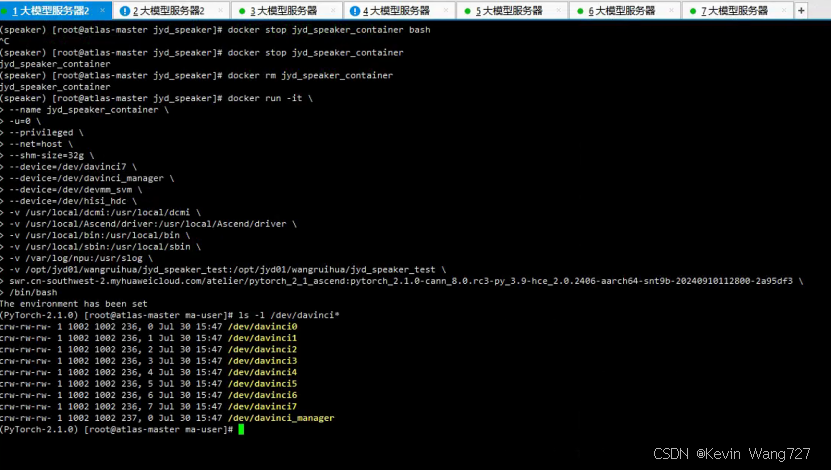
查看显存信息:
执行 npu-smi info
npu-smi info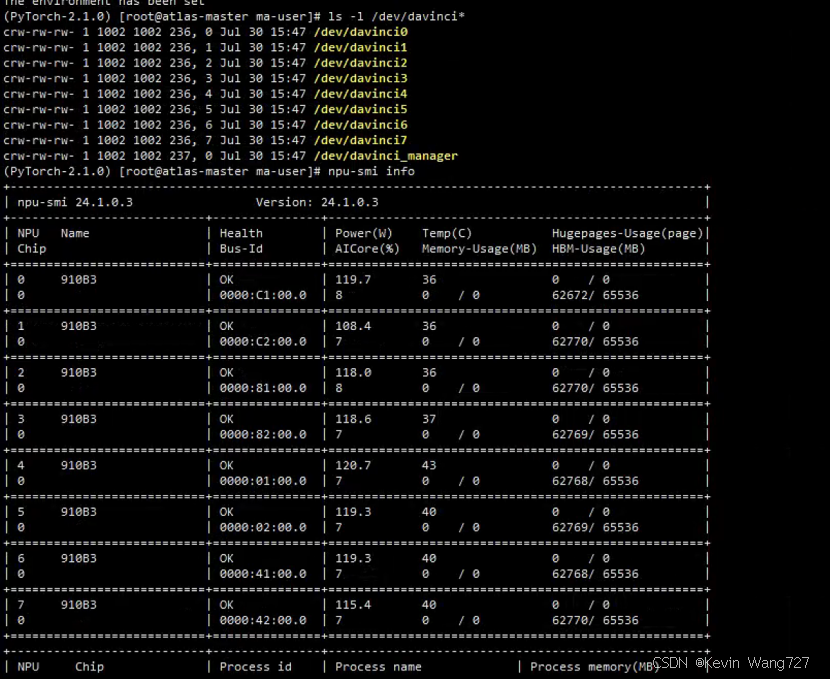
进入项目目录:
cd /opt/jyd01/wangruihua/jyd_speaker_test修改flask_speaker.py源码,适配华为昇腾910B显卡:
启动后需要修改flask_speaker.py源码,或者直接使用前面替换的flask_speaker_huawei.py
添加:
import torch_npu
from torch_npu.contrib import transfer_to_npu
transfer_to_npu 的作用是把所有 cuda / cuda:0 的调用自动重定向到昇腾 NPU。
所以AutoModel模型加载中的 cuda:0 实际落到 NPU 上正常跑;
删除所有cuda版本的显存清理语句:
clear_cuda_cache()安装依赖:
pip install funasr torchaudio==2.1.0 pydub modelscope==1.14.0 datasets loguru deepfilternet pydub

-i https://pypi.tuna.tsinghua.edu.cn/simple
卸载原生镜像创建容器的环境中的transformers,安装降级后的版本:
pip uninstall -y transformers
pip install transformers==4.37.2 -i https://pypi.tuna.tsinghua.edu.cn/simple
遇到其他问题,需要注意使用root权限运行程序
sudo -s启动关键字服务:
nohup python3 flask_keywords.py > logs/8003.log 2>&1 &启动说话人服务:
nohup python3 flask_speaker.py > logs/8006.log 2>&1 &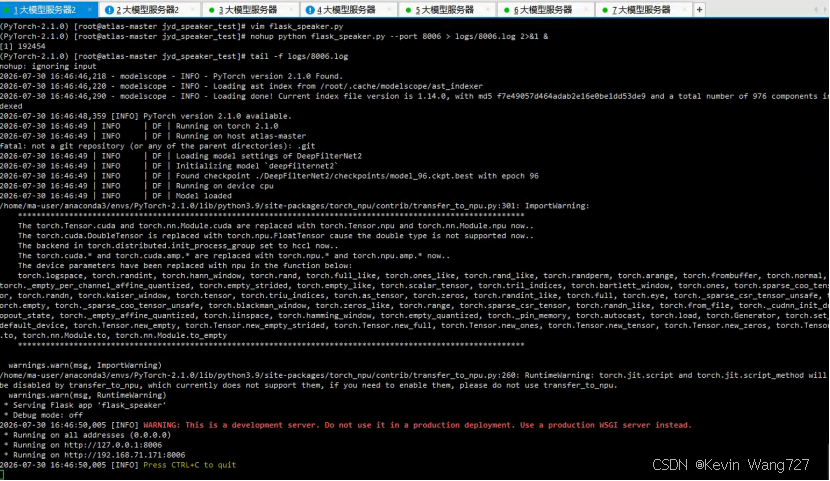
查看端口号:
ss -lntp | grep 8006测试服务:
python3 test_speaker.pypython3 test_keywords.py如果遇到下面错误,是python环境不对,改用root下的python环境
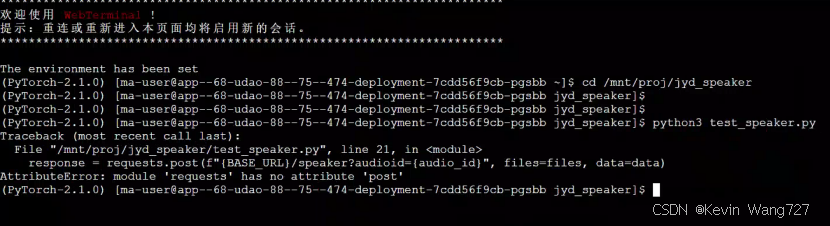
执行:sudo -s
重新运行测试服务:
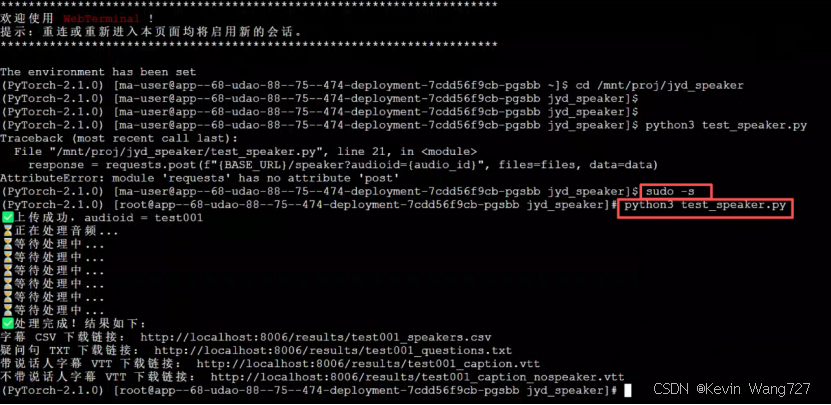
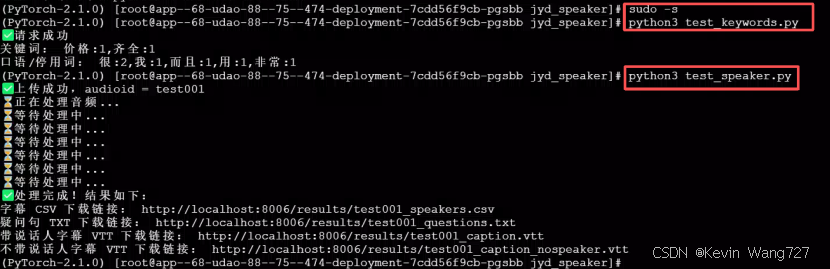
服务端正常输出示例:
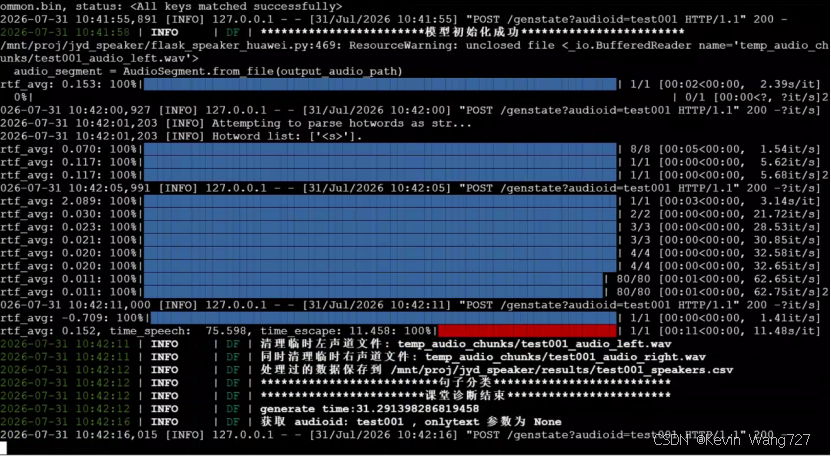

作为“人工智能6S店”的官方数字引擎,为AI开发者与企业提供一个覆盖软硬件全栈、一站式门户。
更多推荐

 0
0 0
0- 0


 已为社区贡献1条内容

所有评论(0)