
鸿蒙轻松背单词应用开发实战(四)-随机涂抹背诵与学习进度管理
·
鸿蒙轻松背单词应用开发实战(四)-随机涂抹背诵与学习进度管理
前言
随机涂抹背诵是手动涂抹的进阶功能,系统自动随机选择单词并智能遮挡,帮助用户更高效地记忆。本文详细介绍随机涂抹背诵功能的实现及学习进度管理。
为什么需要随机涂抹?
- 避免顺序记忆:打乱顺序,避免位置记忆
- 智能优先级:优先复习错误单词
- 自动化学习:减少用户操作,提高效率
- 科学复习:基于艾宾浩斯遗忘曲线
一、智能选词算法
1.1 选词策略
export enum WordSelectionStrategy {
  RANDOM = 'random',           // 纯随机
  WEIGHTED = 'weighted',       // 加权随机
  SEQUENTIAL = 'sequential',   // 顺序
  PRIORITY = 'priority'        // 优先错误单词
}

export class WordSelector {
  private words: WordModel[];
  private strategy: WordSelectionStrategy;

  constructor(words: WordModel[], strategy: WordSelectionStrategy) {
    this.words = words;
    this.strategy = strategy;
  }

  selectNext(): WordModel | null {
    switch (this.strategy) {
      case WordSelectionStrategy.RANDOM:
        return this.selectRandom();
      case WordSelectionStrategy.WEIGHTED:
        return this.selectWeighted();
      case WordSelectionStrategy.PRIORITY:
        return this.selectPriority();
      default:
        return this.selectSequential();
    }
  }
}
1.2 纯随机选词
selectRandom(): WordModel | null {
  const unlearnedWords = this.words.filter(w => !w.isLearned);

  if (unlearnedWords.length === 0) {
    return null;
  }

  const randomIndex = Math.floor(Math.random() * unlearnedWords.length);
  return unlearnedWords[randomIndex];
}
1.3 加权随机选词
selectWeighted(): WordModel | null {
  const unlearnedWords = this.words.filter(w => !w.isLearned);

  if (unlearnedWords.length === 0) {
    return null;
  }

  // 计算权重(错误次数越多,权重越高)
  const weights = unlearnedWords.map(w => 1 + w.errorCount * 2);
  const totalWeight = weights.reduce((sum, w) => sum + w, 0);

  // 随机选择
  let random = Math.random() * totalWeight;

  for (let i = 0; i < unlearnedWords.length; i++) {
    random -= weights[i];
    if (random <= 0) {
      return unlearnedWords[i];
    }
  }

  return unlearnedWords[0];
}
1.4 选词流程图
二、随机遮挡实现
2.1 遮挡模式
export enum MaskMode {
  WORD = 'word',               // 遮挡单词
  TRANSLATION = 'translation', // 遮挡翻译
  RANDOM = 'random'            // 随机遮挡
}

export class MaskGenerator {
  static generateMaskMode(mode: MaskMode): 'word' | 'translation' {
    if (mode === MaskMode.RANDOM) {
      return Math.random() < 0.5 ? 'word' : 'translation';
    }
    return mode;
  }

  static generateMaskedText(text: string): string {
    const maskChar = '■';
    return maskChar.repeat(text.length);
  }
}
2.2 遮挡效果展示
@Builder
MaskedContent(word: WordModel, maskMode: 'word' | 'translation') {
  Column() {
    // 单词行
    if (maskMode === 'word') {
      Text(MaskGenerator.generateMaskedText(word.word))
        .fontSize(28)
        .fontColor('#333333')
        .fontWeight(FontWeight.Bold);
    } else {
      Text(word.word)
        .fontSize(28)
        .fontColor('#333333')
        .fontWeight(FontWeight.Bold);
    }

    Divider().width('80%').color('#E0E0E0').margin({ top: 20, bottom: 20 });

    // 翻译行
    if (maskMode === 'translation') {
      Text(MaskGenerator.generateMaskedText(word.translation))
        .fontSize(24)
        .fontColor('#333333');
    } else {
      Text(word.translation)
        .fontSize(24)
        .fontColor('#333333');
    }
  }
  .width('100%')
  .alignItems(HorizontalAlign.Center);
}
图 1 遮挡效果展示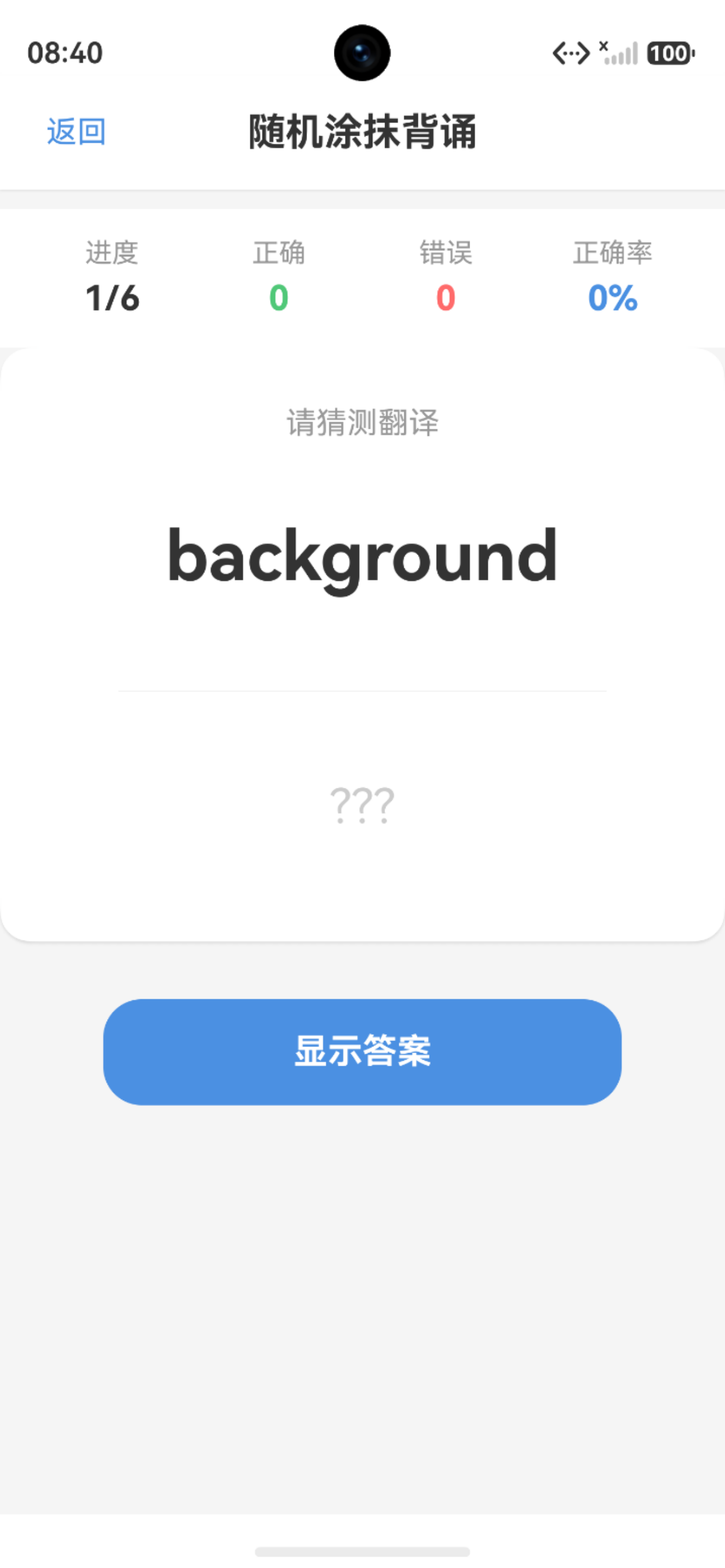
三、学习进度管理
3.1 进度数据结构
export class StudyProgress {
  wordId: number;
  totalAttempts: number = 0;
  correctAttempts: number = 0;
  errorAttempts: number = 0;
  lastStudyTime: number = 0;
  nextReviewTime: number = 0;
  masteryLevel: number = 0;  // 掌握等级(0-5)

  constructor(wordId: number) {
    this.wordId = wordId;
  }

  getAccuracy(): number {
    if (this.totalAttempts === 0) return 0;
    return Math.round((this.correctAttempts / this.totalAttempts) * 100);
  }

  isMastered(): boolean {
    return this.masteryLevel >= 4 && this.getAccuracy() >= 80;
  }
}
3.2 进度管理器
export class ProgressManager {
  private progressMap: Map<number, StudyProgress> = new Map();
  private static instance: ProgressManager;

  static getInstance(): ProgressManager {
    if (!ProgressManager.instance) {
      ProgressManager.instance = new ProgressManager();
    }
    return ProgressManager.instance;
  }

  recordResult(wordId: number, isCorrect: boolean) {
    let progress = this.progressMap.get(wordId);

    if (!progress) {
      progress = new StudyProgress(wordId);
      this.progressMap.set(wordId, progress);
    }

    progress.totalAttempts++;
    if (isCorrect) {
      progress.correctAttempts++;
      progress.masteryLevel = Math.min(5, progress.masteryLevel + 1);
    } else {
      progress.errorAttempts++;
      progress.masteryLevel = Math.max(0, progress.masteryLevel - 1);
    }

    progress.lastStudyTime = Date.now();
    progress.nextReviewTime = this.calculateNextReview(progress);
  }
}
3.3 进度更新流程
四、艾宾浩斯遗忘曲线
4.1 复习间隔计算
export class EbbinghausCalculator {
  // 艾宾浩斯遗忘曲线复习间隔(小时)
  private static readonly REVIEW_INTERVALS = [
    0.5, 1, 2, 6, 12, 24, 48, 72, 168, 336, 720
  ];

  static calculateNextReview(progress: StudyProgress): number {
    const level = Math.min(progress.masteryLevel, this.REVIEW_INTERVALS.length - 1);
    const intervalHours = this.REVIEW_INTERVALS[level];
    return Date.now() + intervalHours * 60 * 60 * 1000;
  }

  static needsReview(progress: StudyProgress): boolean {
    return Date.now() >= progress.nextReviewTime;
  }
}
4.2 遗忘曲线示意图
五、随机涂抹页面实现
5.1 页面状态
@Entry
@Component
struct RandomStudyPage {
  @State currentWord: WordModel | null = null;
  @State maskMode: 'word' | 'translation' = 'word';
  @State showAnswer: boolean = false;
  @State studyCount: number = 0;
  @State correctCount: number = 0;
  @State isComplete: boolean = false;

  private selector: WordSelector | null = null;
  private progressManager: ProgressManager = ProgressManager.getInstance();

  aboutToAppear() {
    const words = WordDataManager.getInstance().getCurrentBook()?.words || [];
    this.selector = new WordSelector(words, WordSelectionStrategy.PRIORITY);
    this.loadNextWord();
  }

  loadNextWord() {
    if (!this.selector) return;

    const word = this.selector.selectNext();

    if (word) {
      this.currentWord = word;
      this.maskMode = MaskGenerator.generateMaskMode(MaskMode.RANDOM);
      this.showAnswer = false;
    } else {
      this.isComplete = true;
    }
  }
}
5.2 标记结果
markResult(isCorrect: boolean) {
  if (!this.currentWord) return;

  // 记录进度
  this.progressManager.recordResult(this.currentWord.id, isCorrect);

  // 更新统计
  this.studyCount++;
  if (isCorrect) {
    this.correctCount++;
  }

  // 加载下一个单词
  this.loadNextWord();
}
六、学习报告生成
6.1 报告数据结构
export class StudyReport {
  totalWords: number = 0;
  studiedWords: number = 0;
  masteredWords: number = 0;
  averageAccuracy: number = 0;
  studyTime: number = 0;
  wordDetails: WordReportDetail[] = [];

  getSummary(): string {
    return `本次学习共${this.studiedWords}个单词,正确率${this.averageAccuracy}%,已掌握${this.masteredWords}个单词`;
  }
}
6.2 报告展示
@Builder
ReportView(report: StudyReport) {
  Column() {
    Text('学习报告')
      .fontSize(24)
      .fontWeight(FontWeight.Bold)
      .margin({ bottom: 20 });

    Row() {
      this.StatCard('总单词', report.totalWords, '#4A90E2');
      this.StatCard('已学习', report.studiedWords, '#67C23A');
      this.StatCard('已掌握', report.masteredWords, '#E6A23C');
    }
    .width('100%')
    .justifyContent(FlexAlign.SpaceEvenly);

    Column() {
      Text('平均正确率')
        .fontSize(16)
        .fontColor('#999999');

      Text(`${report.averageAccuracy}%`)
        .fontSize(36)
        .fontColor('#67C23A')
        .fontWeight(FontWeight.Bold);
    }
    .margin({ top: 30 });
  }
  .width('90%')
  .padding(20)
  .backgroundColor('#FFFFFF')
  .borderRadius(15);
}
图 2 报告展示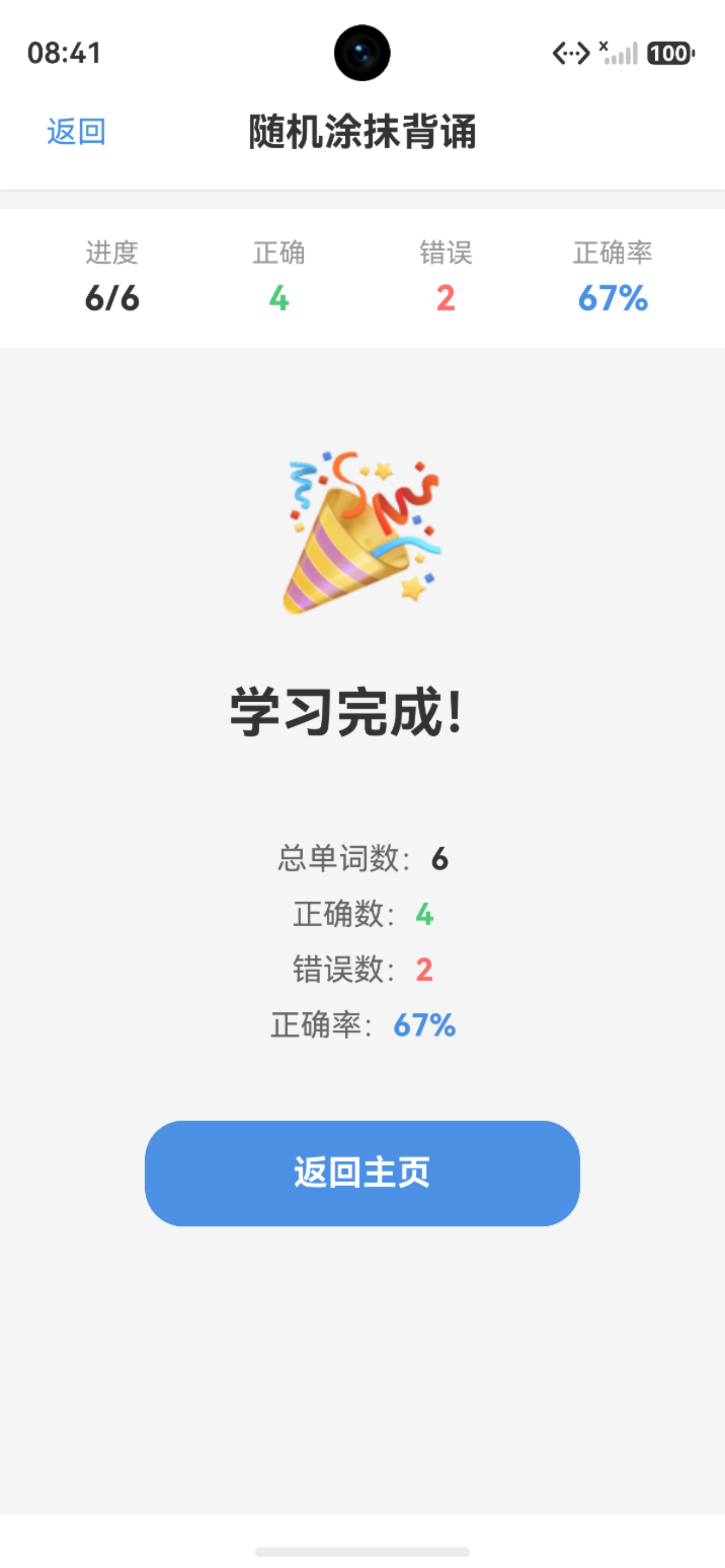
七、总结
本文详细介绍了随机涂抹背诵功能的实现。通过智能选词算法、随机遮挡机制、学习进度管理和艾宾浩斯遗忘曲线,实现了科学高效的单词记忆功能。
核心要点:
- 智能选词:多种选词策略,优先错误单词
- 随机遮挡:灵活的遮挡模式,增加学习趣味性
- 进度管理:详细记录学习过程,可视化学习效果
- 科学复习:基于遗忘曲线,合理安排复习时间
系列文章导航:
下期预告: 鸿蒙轻松背单词应用开发实战(五)-UI界面设计与交互优化

作为“人工智能6S店”的官方数字引擎,为AI开发者与企业提供一个覆盖软硬件全栈、一站式门户。
更多推荐

 0
0 0
0- 0


 已为社区贡献42条内容

所有评论(0)