
armonyOS掌上记账APP开发实践第81篇:ArkUI 沉浸光感与空间计算
·
ArkUI 沉浸光感与空间计算
沉浸光感组件:环境光自适应与动态主题
什么是沉浸光感
传统移动应用的 UI 是"静态"的——背景色、卡片阴影、图标风格在应用启动时确定,运行时不再变化。鸿蒙7通过沉浸光感(Immersive Light-Sensing)能力,让 UI 可以感知环境光变化,并动态调整界面表现,实现"像纸一样随光变化"的视觉体验。
核心能力由 Multimodal Awareness Kit 提供,包括:
- 环境光传感器数据接入:实时获取环境光强(Lux)和色温(K)
- 光感样式自适应:ArkUI 组件内置光感响应,开发者只需声明"启用光感",无需手写光照算法
- 系统级光感联动:当用户打开"自动光感主题"后,所有支持光感的应用会同步切换明亮/暗色模式
沉浸光感(Immersive Material)
// 沉浸光感(Immersive Material)教学 Demo
// 本 Demo 演示鸿蒙7空间化设计系统(Spatial UI)的核心能力:沉浸光感材质
//
// 核心知识点:
// 1. systemMaterial 属性:为组件添加通透毛玻璃材质效果
// 2. ImmersiveMaterial:沉浸光感材质类,提供 style/interactive/lightEffect 三个配置
// 3. 材质档位:EXQUISITE(强) / GENTLE(均衡) / SMOOTH(弱) / ADAPTIVE(自适应)
// 4. 按压交互:interactive=true 开启按压缩放 + 点光源效果
// 5. 渐变模糊:滚动时标题栏从透明渐变到模糊,营造沉浸感
import { uiMaterial } from '@kit.ArkUI';

@Entry
@Component
struct ImmersiveMaterialDemo {
  private scroller: Scroller = new Scroller();

  // 当前选择的材质档位
  @State currentStyle: uiMaterial.ImmersiveStyle = uiMaterial.ImmersiveStyle.THICK;
  @State enableInteractive: boolean = true;

  // 模拟内容数据
  private contentItems: string[] = Array.from<string, string>({ length: 30 }, (_: string, i: number): string => `列表项 ${i + 1}`);

  build() {
    Column() {
      // ===== 顶部标题栏(带沉浸光感) =====
      // 知识点:systemMaterial 为组件添加毛玻璃材质,呈现通透感
      Row() {
        Text('沉浸光感演示')
          .fontSize(18)
          .fontWeight(FontWeight.Bold)
          .fontColor('#1A1A1A')
      }
      .width('100%')
      .height(56)
      .padding({ left: 16, right: 16 })
      .justifyContent(FlexAlign.Center)
      // ImmersiveMaterial:style 控制材质厚度,THICK = 厚材质(模糊度高)
      .systemMaterial(new uiMaterial.ImmersiveMaterial({
        style: uiMaterial.ImmersiveStyle.THICK,
        interactive: false, // 标题栏不需要按压交互
        lightEffect: { color: undefined }
      }))

      // ===== 控制面板 =====
      Column({ space: 16 }) {
        Text('材质档位选择')
          .fontSize(15)
          .fontWeight(FontWeight.Medium)
          .fontColor('#1A1A1A')
          .width('100%')

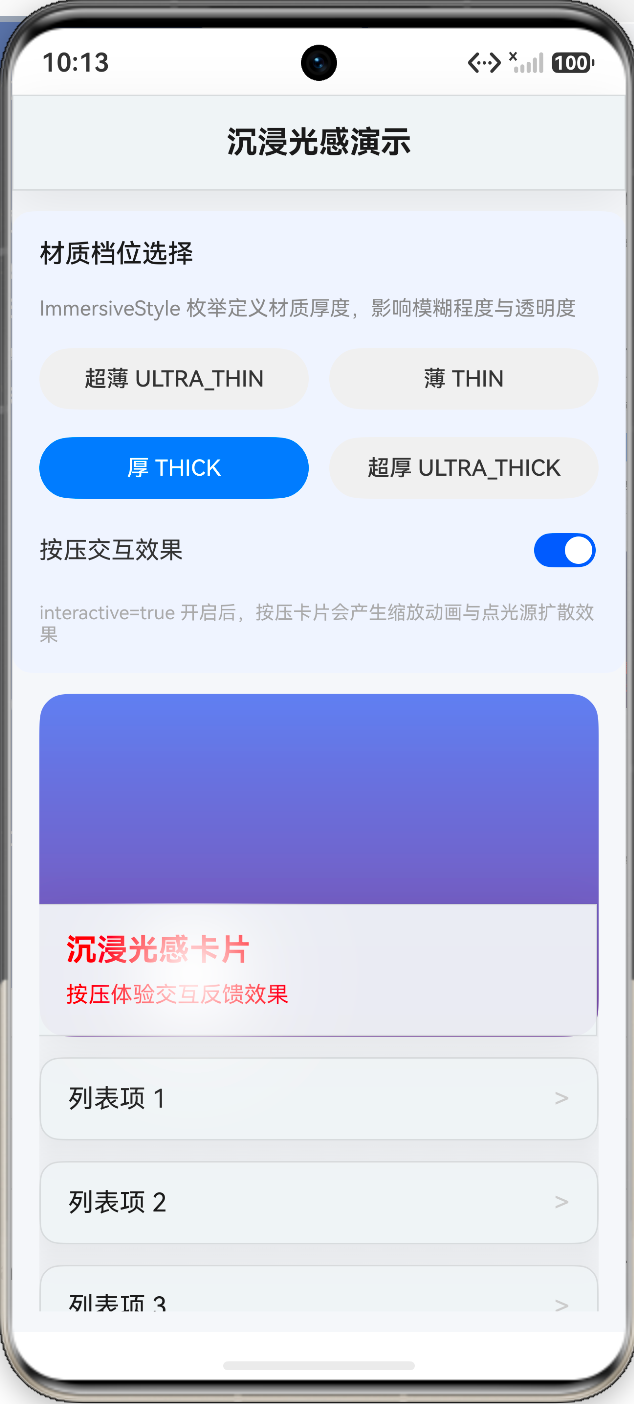
        Text('ImmersiveStyle 枚举定义材质厚度,影响模糊程度与透明度')
          .fontSize(12)
          .fontColor('#888888')
          .width('100%')

        // 档位切换按钮组
        Row({ space: 12 }) {
          Button('超薄 ULTRA_THIN')
            .fontSize(13)
            .height(36)
            .layoutWeight(1)
            .backgroundColor(this.currentStyle === uiMaterial.ImmersiveStyle.ULTRA_THIN ? '#007AFF' : '#F0F0F0')
            .fontColor(this.currentStyle === uiMaterial.ImmersiveStyle.ULTRA_THIN ? '#FFFFFF' : '#333333')
            .onClick(() => {
              this.currentStyle = uiMaterial.ImmersiveStyle.ULTRA_THIN;
            })

          Button('薄 THIN')
            .fontSize(13)
            .height(36)
            .layoutWeight(1)
            .backgroundColor(this.currentStyle === uiMaterial.ImmersiveStyle.THIN ? '#007AFF' : '#F0F0F0')
            .fontColor(this.currentStyle === uiMaterial.ImmersiveStyle.THIN ? '#FFFFFF' : '#333333')
            .onClick(() => {
              this.currentStyle = uiMaterial.ImmersiveStyle.THIN;
            })
        }

        Row({ space: 12 }) {
          Button('厚 THICK')
            .fontSize(13)
            .height(36)
            .layoutWeight(1)
            .backgroundColor(this.currentStyle === uiMaterial.ImmersiveStyle.THICK ? '#007AFF' : '#F0F0F0')
            .fontColor(this.currentStyle === uiMaterial.ImmersiveStyle.THICK ? '#FFFFFF' : '#333333')
            .onClick(() => {
              this.currentStyle = uiMaterial.ImmersiveStyle.THICK;
            })

          Button('超厚 ULTRA_THICK')
            .fontSize(13)
            .height(36)
            .layoutWeight(1)
            .backgroundColor(this.currentStyle === uiMaterial.ImmersiveStyle.ULTRA_THICK ? '#007AFF' : '#F0F0F0')
            .fontColor(this.currentStyle === uiMaterial.ImmersiveStyle.ULTRA_THICK ? '#FFFFFF' : '#333333')
            .onClick(() => {
              this.currentStyle = uiMaterial.ImmersiveStyle.ULTRA_THICK;
            })
        }

        // 交互开关
        Row() {
          Text('按压交互效果')
            .fontSize(14)
            .fontColor('#333333')
            .layoutWeight(1)
          Toggle({ type: ToggleType.Switch, isOn: this.enableInteractive })
            .onChange((isOn: boolean) => {
              this.enableInteractive = isOn;
            })
        }
        .width('100%')

        Text('interactive=true 开启后,按压卡片会产生缩放动画与点光源扩散效果')
          .fontSize(11)
          .fontColor('#AAAAAA')
          .width('100%')
      }
      .width('100%')
      .padding(16)
      .backgroundColor('#F0F4FF')
      .borderRadius(12)
      .margin({ left: 16, right: 16, top: 12 })

      // ===== 效果展示区 =====
      List({ scroller: this.scroller, space: 12 }) {
        // 示例卡片1:图片背景 + 沉浸光感覆盖层
        ListItem() {
          Stack({ alignContent: Alignment.BottomStart }) {
            // 背景渐变色(模拟图片)
            Column()
              .width('100%')
              .height(200)
              .linearGradient({
                direction: GradientDirection.Bottom,
                colors: [[0x667EEA, 0.0], [0x764BA2, 1.0]]
              })
              .borderRadius(16)

            // 沉浸光感信息卡
            // 知识点:interactive=true 开启按压交互,产生弹性反馈与点光源
            // 真机优化:在 Stack 中分层处理,底层深色遮罩 + 顶层沉浸材质
            Stack() {
              // 底层:深色半透明背景,确保文字可读
              Column()
                .width('100%')
                .height('100%')
                .backgroundColor('rgba(0,0,0,0.5)')
                .borderRadius(16)

              // 顶层:文字 + 沉浸光感材质
              Column({ space: 8 }) {
                Text('沉浸光感卡片')
                  .fontSize(18)
                  .fontWeight(FontWeight.Bold)
                  .fontColor('#FF0000')
                Text('按压体验交互反馈效果')
                  .fontSize(13)
                  .fontColor('#FF0000')
              }
              .alignItems(HorizontalAlign.Start)
              .width('100%')
              .padding(16)
              .systemMaterial(new uiMaterial.ImmersiveMaterial({
                style: this.currentStyle,
                interactive: this.enableInteractive,
                lightEffect: { color: undefined }
              }))
            }
            .width('100%')
            .alignContent(Alignment.BottomStart)
          }
          .width('100%')
          .height(200)
        }

        // 示例卡片2:列表式内容
        ForEach(this.contentItems, (item: string, index: number) => {
          ListItem() {
            Row() {
              Text(item)
                .fontSize(15)
                .fontColor('#1A1A1A')
                .layoutWeight(1)
              Text('>')
                .fontSize(16)
                .fontColor('#CCCCCC')
            }
            .width('100%')
            .padding({ left: 16, right: 16, top: 14, bottom: 14 })
            .borderRadius(12)
            // 每个列表项都应用沉浸光感材质
            .systemMaterial(new uiMaterial.ImmersiveMaterial({
              style: this.currentStyle,
              interactive: this.enableInteractive,
              lightEffect: { color: undefined }
            }))
          }
        }, (item: string) => item)
      }
      .width('100%')
      .layoutWeight(1)
      .padding({ left: 16, right: 16, top: 12, bottom: 12 })
      .scrollBar(BarState.Off)
    }
    .width('100%')
    .height('100%')
    // 背景色:浅灰色让毛玻璃透明效果更明显
    .backgroundColor('#F5F7FA')
  }
}
运行结果(见图 3-27):

作为“人工智能6S店”的官方数字引擎,为AI开发者与企业提供一个覆盖软硬件全栈、一站式门户。
更多推荐
 1
1 0
0- 0


 已为社区贡献34条内容

所有评论(0)