
鸿蒙 PC Markdown 编辑器文件系统:Core File Kit URI 与安全保存
鸿蒙 PC Markdown 编辑器文件系统:Core File Kit URI 与安全保存
鸿蒙 PC编辑器不能把文件路径当成普通字符串。用户通过系统选择器授予的是 URI访问能力,打开、保存、另存为、文件夹工作区和外部修改检测都建立在这条授权上。文件操作若只追求“写成功”,会忽略取消、短写、旧尾部、磁盘冲突和失败后缓冲区保留。
本文基于 OhMarkdown,拆解 Core File Kit选择器、严格 UTF-8分块读取、完整写入、保存前冲突比较和沙箱备份。代码位于 https://gitcode.com/VON-/codex_md_oh,对应提交 3a9146e。
选择器是权限入口
打开文档:
const options = new picker.DocumentSelectOptions();
options.maxSelectNumber = 1;
options.fileSuffixFilters = [
  'Markdown|.md,.markdown,.mdown,.mkd,.txt'
];
const documentPicker =
  new picker.DocumentViewPicker(context);
const selectedUris = await documentPicker.select(options);
if (selectedUris.length === 0) {
  return undefined;
}
return readUtf8Document(selectedUris[0]);
取消返回 undefined,不是异常。调用页面恢复 Ready或 Modified,不清空当前会话。扩展名过滤表达产品支持范围,但读取仍要校验编码和大小。
保存未命名文档使用 DocumentSaveOptions:
const options = new picker.DocumentSaveOptions();
options.newFileNames = [suggestedName];
options.fileSuffixChoices = ['Markdown|.md'];
const selectedUris = await documentPicker.save(options);
return selectedUris.length > 0
  ? selectedUris[0]
  : undefined;
应用不自行拼公共路径,也不请求扫描整个磁盘。用户选择的位置和 provider决定 URI。保存选择器取消后 dirty保留,若操作来自“保存并关闭”,标签也不能关闭。
读取前限制文件大小
const MAX_DOCUMENT_BYTES = 20 * 1024 * 1024;
const file = await fileIo.open(uri, fileIo.OpenMode.READ_ONLY);
try {
  const stat = await fileIo.stat(file.fd);
  if (stat.size > MAX_DOCUMENT_BYTES) {
    throw new Error(
      'The selected document exceeds the 20 MB validation limit.'
    );
  }
  // 分块读取
} finally {
  await fileIo.close(file);
}
上限在分配缓冲区前检查。二十兆是当前验证边界,不代表产品长期只能打开二十兆;提高上限前要先验证内存、Bridge和 CodeMirror。finally确保解码失败也关闭句柄。
分块与严格 UTF-8
const decoder = util.TextDecoder.create(
  'utf-8',
  { fatal: true, ignoreBOM: false }
);
const chunks: Array<string> = [];
let totalBytesRead = 0;

while (totalBytesRead < stat.size) {
  const requestedBytes = Math.min(
    64 * 1024,
    stat.size - totalBytesRead
  );
  const chunk = new ArrayBuffer(requestedBytes);
  const bytesRead = await fileIo.read(
    file.fd,
    chunk,
    { length: requestedBytes }
  );
  if (bytesRead === 0) {
    break;
  }
  totalBytesRead += bytesRead;
  chunks.push(decoder.decodeToString(
    new Uint8Array(chunk, 0, bytesRead),
    { stream: totalBytesRead < stat.size }
  ));
}
stream解码处理跨块多字节字符,fatal拒绝非法序列,避免替换字符后再保存造成不可逆损坏。读取结束比较 totalBytesRead === stat.size;文件在读取中变化或提前 EOF时抛错,不把半文档送入编辑器。
读取同时检测 BOM和换行,返回 OpenedDocument而不是裸字符串。URI、名称、正文和格式在会话中一起迁移。
打开相同 URI 不创建副本
多标签应用先查找:
const openedSession = this.documentSessions.find(
  (session) => session.uri === openedDocument.uri
);
if (openedSession) {
  await this.captureActiveDocumentSession();
  this.applyDocumentSession(openedSession);
  await this.activateEditorSession(openedSession);
  return;
}
同一文件出现两个标签会产生保存竞争和脏状态歧义。URI是身份键,不用文件名。当前空白、未命名、未修改会话可被首次打开复用,其他情况创建新会话,避免覆盖未保存内容。
写入必须验证完整字节
const serializedContent = serializeDocument(
  content,
  format
);
const expectedBytes = buffer.from(
  serializedContent,
  'utf-8'
).length;
const writtenBytes = await fileIo.write(
  file.fd,
  serializedContent,
  { offset: 0, encoding: 'utf-8' }
);
if (writtenBytes !== expectedBytes) {
  throw new Error(
    'The complete document could not be written.'
  );
}
await fileIo.truncate(file.fd, writtenBytes);
await fileIo.fsync(file.fd);
先写新正文,确认字节,再 truncate删除旧文件多余尾部。若新内容短于旧内容而不 truncate,末尾会残留。fsync请求持久化;最终 finally关闭句柄。
字符数不能代替字节数,BOM、中文和emoji都会不同。短写必须抛错,不能更新 saved基线。
保存前检测外部变化
打开时保存 persistedDocumentContent和格式。保存前重新读磁盘:
const diskDocument = await readUtf8Document(saveUri);
if (existingDocumentUri.length > 0 &&
  this.persistedDocumentContent !== undefined &&
  (diskDocument.content !== this.persistedDocumentContent ||
    !this.isSameDocumentFormat(
      diskDocument.format,
      this.documentFormat
    ))) {
  throw new Error(
    'The file changed on disk. Reopen it or use Save As ' +
    'to avoid overwriting external changes.'
  );
}
正文或 BOM/换行变化都算冲突。应用不静默覆盖,缓冲区保持 dirty,用户可另存为。比较全文适合当前二十兆边界,未来可使用 mtime、size加哈希降低成本,但 provider时间戳可靠性要验证。
覆盖前保存旧版本
在写用户 URI前,将磁盘旧内容和格式原子保存到沙箱:
pendingBackup = {
  version: 1,
  documentUri: saveUri,
  documentName: diskDocument.name,
  previousContent: diskDocument.content,
  hasUtf8Bom: diskDocument.format.hasUtf8Bom,
  lineEnding: diskDocument.format.lineEnding,
  updatedAt: Date.now()
};
await savePendingSaveBackup(
  context.filesDir,
  pendingBackup
);
外部写入失败后尝试恢复旧版本;恢复也失败则保留备份供下次启动。只有新文件保存完成才清理。沙箱备份弥补用户 URI无法直接采用 AtomicFile的覆盖窗口。
保存完成仍要检查 revision
写入使用保存请求时的正文快照。若期间用户继续输入,磁盘成功不代表当前缓冲区已保存。只有 documentRevision === snapshotRevision才清 dirty;否则状态仍为 Modified。保存并关闭流程也因此不会误关。
CodeMirror的 markSaved使用请求时 Text作为基线,用户后续输入与其比较仍为脏。文件系统结果和编辑器基线必须同步,不能只更新状态栏文案。
错误路径保留缓冲区
选择器取消、格式选择取消、外部冲突、短写、fsync异常、备份失败和 URI权限失效都不能删除 documentContent。catch只更新状态;标签仍在,恢复草稿不清理。可靠编辑器的默认错误策略是保留用户内存状态。
系统错误提示目前集中在状态栏,避免连续文件操作弹出大量对话框。严重冲突未来可用非阻断通知提供 Reopen和 Save As动作。
鸿蒙 PC 文件选择器实测
下图来自 MateBook Pro 2in1模拟器,应用通过系统选择器打开文件后进入编辑工作台。它验证了真实 URI授权,而不是应用内伪造路径。
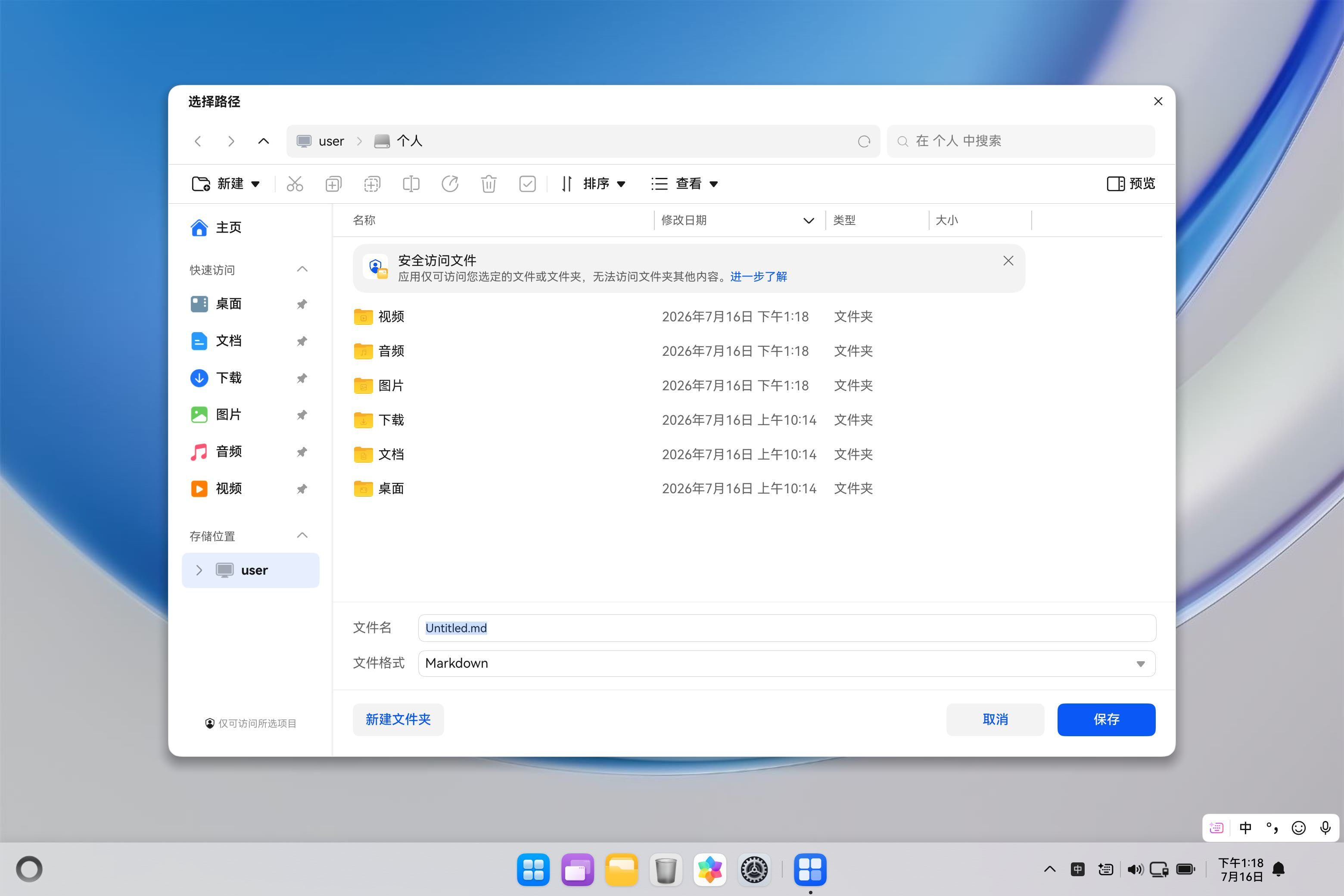
设备验证需要覆盖打开、另存为、取消、覆盖已有文件、只读目标、外部修改和应用重启后授权。截图只是入口证据,字节和故障行为由 ohosTest与保存报告补充。
工作区 URI 的差异
文件夹选择器返回 URI,但 fileIo.listFile需要结构化 URI中的 path。应用使用 new uri.URI(directoryUri).path枚举,再在原 URI对象上构造子项 path,保留授权语义。直接字符串拼接或把完整 URI当 path曾在模拟器报 No such file or directory。
文件与文件夹 API接受参数形式不同,不能抽象成一个无类型“路径工具”。每个 Core File Kit调用点应明确需要 URI、fd还是 path。
当前边界
只支持严格 UTF-8,单文件二十兆验证上限;没有文件监听,外部变化只在保存前发现;授权跨重启和云 provider仍需真机验证;用户 URI写入依赖沙箱备份,不是平台原子替换;没有 Save As显式命令入口的完整冲突工作流。
后续应增加 provider矩阵、权限撤销、网络盘延迟、文件删除和重命名测试,并把错误映射为用户可执行操作。提高文件规模前先减少全文 Bridge复制。
结语
Core File Kit安全保存是一条事务:系统选择器建立授权,严格分块读取验证内容,URI成为会话身份,保存前比较磁盘基线并原子备份旧版本,写入检查 UTF-8字节、truncate与 fsync,最后按 revision更新 dirty。任何失败都保留编辑缓冲区。
鸿蒙 PC编辑器真正的文件能力不是“能打开 md”,而是面对取消、冲突和故障时仍不会替用户做不可逆决定。

作为“人工智能6S店”的官方数字引擎,为AI开发者与企业提供一个覆盖软硬件全栈、一站式门户。
更多推荐

 9
9 0
0- 0


 已为社区贡献49条内容

所有评论(0)