
鸿蒙多功能工具箱开发实战(二十七)-安全加固与数据保护
·
鸿蒙多功能工具箱开发实战(二十七)-安全加固与数据保护
前言
安全是应用开发的重要考量。本文将讲解HarmonyOS应用的安全加固和数据保护措施。
一、敏感数据保护
1.1 数据加密
import cryptoFramework from '@ohos.security.cryptoFramework'

export class CryptoUtil {
  /**
   * AES加密
   */
  static async aesEncrypt(plainText: string, key: string): Promise<string> {
    try {
      // 创建加密器
      const cipher = cryptoFramework.createCipher('AES256|CBC|PKCS7')

      // 生成密钥
      const symKey = await this.generateAesKey(key)

      // 加密
      const input = { data: new Uint8Array(Buffer.from(plainText).buffer) }
      await cipher.init(cryptoFramework.CryptoMode.ENCRYPT_MODE, symKey, null)
      const output = await cipher.doFinal(input)

      // 转Base64
      return this.uint8ArrayToBase64(output.data)
    } catch (e) {
      console.error('AES encrypt failed:', e)
      throw e
    }
  }

  /**
   * AES解密
   */
  static async aesDecrypt(cipherText: string, key: string): Promise<string> {
    try {
      const cipher = cryptoFramework.createCipher('AES256|CBC|PKCS7')
      const symKey = await this.generateAesKey(key)

      // Base64转Uint8Array
      const input = { data: this.base64ToUint8Array(cipherText) }
      await cipher.init(cryptoFramework.CryptoMode.DECRYPT_MODE, symKey, null)
      const output = await cipher.doFinal(input)

      return Buffer.from(output.data).toString()
    } catch (e) {
      console.error('AES decrypt failed:', e)
      throw e
    }
  }

  private static async generateAesKey(key: string): Promise<cryptoFramework.SymKey> {
    const keyBlob: cryptoFramework.DataBlob = {
      data: new Uint8Array(Buffer.from(key.padEnd(32, '0').slice(0, 32)).buffer)
    }
    const generator = cryptoFramework.createSymKeyGenerator('AES256')
    return await generator.convertKey(keyBlob)
  }

  private static uint8ArrayToBase64(data: Uint8Array): string {
    return Buffer.from(data).toString('base64')
  }

  private static base64ToUint8Array(base64: string): Uint8Array {
    return new Uint8Array(Buffer.from(base64, 'base64').buffer)
  }
}
1.2 密码哈希
export class PasswordUtil {
  /**
   * 生成密码哈希
   */
  static async hash(password: string, salt?: string): Promise<{ hash: string, salt: string }> {
    // 生成盐值
    const saltValue = salt || this.generateSalt()

    // SHA256哈希
    const md = cryptoFramework.createMd('SHA256')
    await md.update({ data: new Uint8Array(Buffer.from(password + saltValue).buffer) })
    const result = await md.digest()

    return {
      hash: Buffer.from(result.data).toString('hex'),
      salt: saltValue
    }
  }

  /**
   * 验证密码
   */
  static async verify(password: string, hash: string, salt: string): Promise<boolean> {
    const result = await this.hash(password, salt)
    return result.hash === hash
  }

  private static generateSalt(): string {
    const random = new Uint8Array(16)
    for (let i = 0; i < 16; i++) {
      random[i] = Math.floor(Math.random() * 256)
    }
    return Buffer.from(random).toString('hex')
  }
}
二、安全存储
2.1 安全偏好设置
export class SecurePreferences {
  private static instance: SecurePreferences
  private preferences: Preferences
  private encryptionKey: string

  private constructor() {}

  static async getInstance(): Promise<SecurePreferences> {
    if (!SecurePreferences.instance) {
      const instance = new SecurePreferences()
      instance.preferences = await preferences.getPreferences(
        globalThis.context,
        'secure_prefs'
      )
      instance.encryptionKey = await instance.getOrCreateKey()
      SecurePreferences.instance = instance
    }
    return SecurePreferences.instance
  }

  /**
   * 安全存储数据
   */
  async putSecure(key: string, value: string): Promise<void> {
    const encrypted = await CryptoUtil.aesEncrypt(value, this.encryptionKey)
    await this.preferences.put(key, encrypted)
    await this.preferences.flush()
  }

  /**
   * 安全读取数据
   */
  async getSecure(key: string): Promise<string | null> {
    const encrypted = await this.preferences.get(key, '') as string
    if (!encrypted) return null

    try {
      return await CryptoUtil.aesDecrypt(encrypted, this.encryptionKey)
    } catch (e) {
      console.error('Decrypt failed:', e)
      return null
    }
  }

  private async getOrCreateKey(): Promise<string> {
    let key = await this.preferences.get('master_key', '') as string
    if (!key) {
      key = PasswordUtil.generateSalt()
      await this.preferences.put('master_key', key)
      await this.preferences.flush()
    }
    return key
  }
}
三、网络安全
3.1 HTTPS证书校验
import http from '@ohos.net.http'

export class SecureHttpClient {
  private httpClient: http.HttpClient

  constructor() {
    this.httpClient = http.createHttp()
  }

  /**
   * 安全HTTP请求
   */
  async secureRequest(url: string, options: http.HttpRequestOptions): Promise<http.HttpResponse> {
    // 强制HTTPS
    if (!url.startsWith('https://')) {
      throw new Error('Only HTTPS is allowed')
    }

    return new Promise((resolve, reject) => {
      this.httpClient.request(url, {
        ...options,
        // 证书校验
        header: {
          ...options.header,
          'X-Content-Type-Options': 'nosniff',
          'X-Frame-Options': 'DENY'
        }
      }, (err, data) => {
        if (err) {
          reject(err)
        } else {
          resolve(data)
        }
      })
    })
  }
}
3.2 请求签名
export class RequestSigner {
  private static secretKey = 'your-secret-key'

  /**
   * 生成请求签名
   */
  static sign(params: Record<string, any>): string {
    // 排序参数
    const sortedKeys = Object.keys(params).sort()
    const signStr = sortedKeys.map(k => `${k}=${params[k]}`).join('&')

    // HMAC-SHA256签名
    const mac = cryptoFramework.createMac('HMACSHA256')
    // ... 签名实现

    return signStr
  }

  /**
   * 验证签名
   */
  static verify(params: Record<string, any>, signature: string): boolean {
    const expectedSign = this.sign(params)
    return expectedSign === signature
  }
}
四、权限控制
4.1 敏感操作保护
export class AuthGuard {
  private static lastAuthTime: number = 0
  private static authTimeout: number = 5 * 60 * 1000  // 5分钟

  /**
   * 检查是否需要认证
   */
  static needAuth(): boolean {
    const now = Date.now()
    return now - this.lastAuthTime > this.authTimeout
  }

  /**
   * 执行敏感操作
   */
  static async executeWithAuth<T>(
    operation: () => Promise<T>,
    authPrompt: () => Promise<boolean>
  ): Promise<T | null> {
    if (this.needAuth()) {
      const authenticated = await authPrompt()
      if (!authenticated) {
        return null
      }
      this.lastAuthTime = Date.now()
    }

    return await operation()
  }
}
五、高级安全功能
5.1 安全流程图
5.2 安全区域存储
import security from '@ohos.security'

class SecureStorage {
  static async save(key: string, value: string) {
    // 使用安全区域存储敏感数据
    await security.setSecureData({
      alias: key,
      data: value
    })
  }

  static async get(key: string): Promise<string> {
    const result = await security.getSecureData({ alias: key })
    return result.data
  }
}
5.3 输入验证
class InputValidator {
  static validateEmail(email: string): boolean {
    return /^[^\s@]+@[^\s@]+\.[^\s@]+$/.test(email)
  }

  static validatePhone(phone: string): boolean {
    return /^1[3-9]\d{9}$/.test(phone)
  }

  static sanitize(input: string): string {
    // 防止XSS攻击
    return input.replace(/[<>]/g, '')
  }
}
图 1 本地存储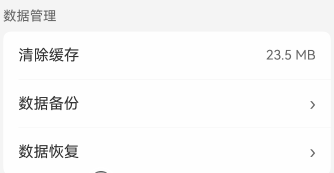
六、小结
本文详细讲解了安全加固:
- ✅ 数据加密
- ✅ 密码哈希
- ✅ 安全存储
- ✅ 网络安全
- ✅ 权限控制
- ✅ 安全区域存储
- ✅ 输入验证
系列文章导航:
下期预告:鸿蒙多功能工具箱开发实战(二十八)-应用更新与版本管理

作为“人工智能6S店”的官方数字引擎,为AI开发者与企业提供一个覆盖软硬件全栈、一站式门户。
更多推荐
 5
5 0
0- 0


 已为社区贡献32条内容

所有评论(0)