
JSON数据结构详解 - Flutter在鸿蒙平台的数据交换基础
引言
在移动应用开发中,数据结构设计是决定应用性能和可维护性的关键因素。对于天气查询应用来说,JSON数据结构的设计直接影响到数据解析的效率、代码的可读性以及功能的扩展性。
本章节将深入分析天气API返回的JSON数据结构,探讨如何设计合理的数据模型来高效处理复杂的天气数据。我们将结合实际的API响应示例,详细讲解各种数据结构的设计原则和最佳实践。
1. 天气API JSON结构概述
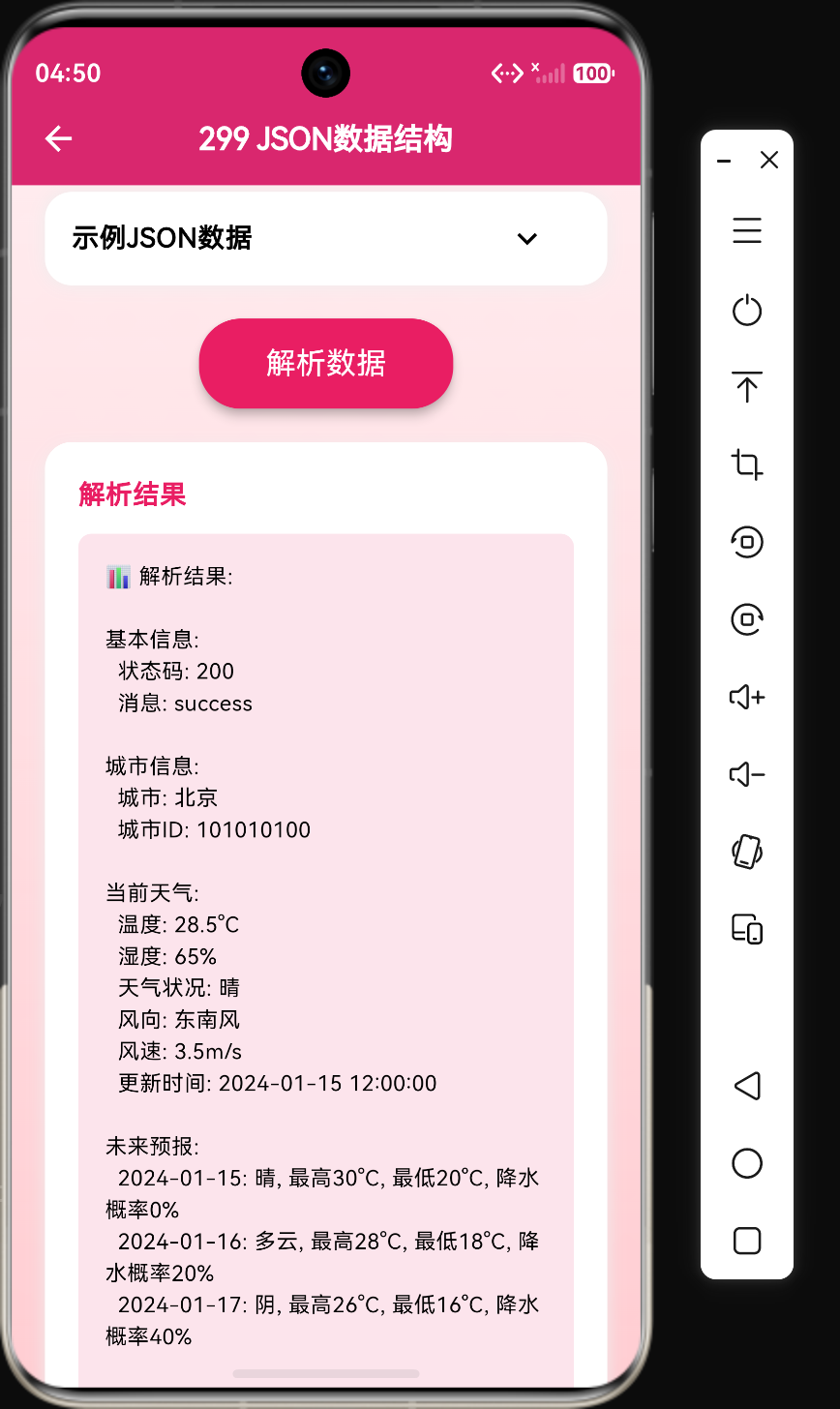
天气API返回的JSON数据通常包含多个层次的数据,涵盖当前天气、未来预报、空气质量等信息。一个典型的天气API响应结构如下:
{
  "code": 200,
  "message": "success",
  "data": {
    "city": "北京",
    "cityId": "101010100",
    "current": {
      "temp": 28.5,
      "humidity": 65,
      "condition": "晴",
      "wind": {
        "direction": "东南风",
        "speed": 3.5
      },
      "updateTime": "2024-01-01 12:00:00"
    },
    "forecast": [
      {"date": "2024-01-01", "high": 30, "low": 20, "condition": "晴", "pop": 0},
      {"date": "2024-01-02", "high": 28, "low": 18, "condition": "多云", "pop": 20}
    ],
    "hourly": [
      {"time": "08:00", "temp": 22},
      {"time": "12:00", "temp": 28},
      {"time": "18:00", "temp": 25}
    ],
    "aqi": {
      "value": 45,
      "level": "优",
      "primary": "PM2.5"
    }
  }
}
1.1 结构层次分析
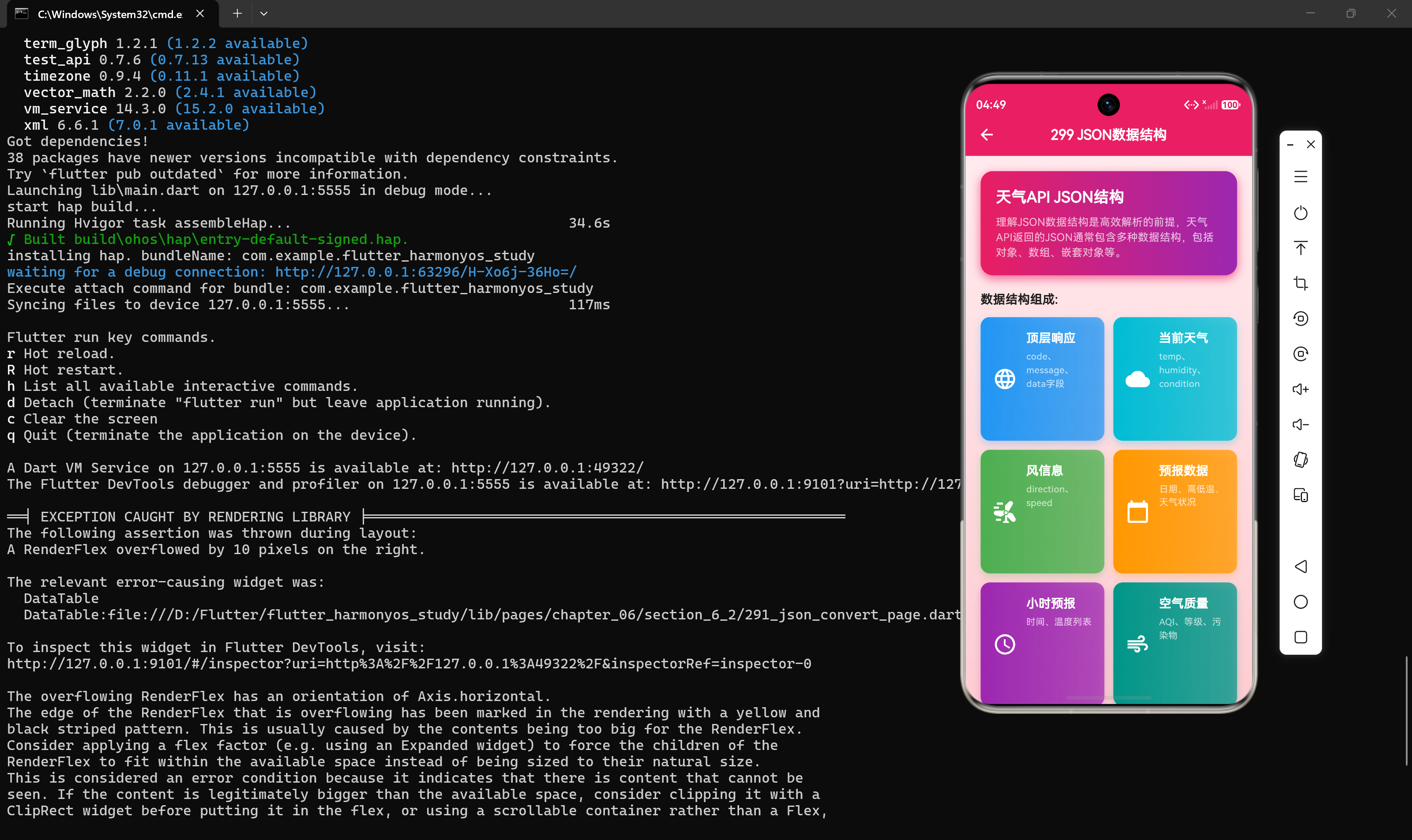
从上述示例可以看出,天气API的JSON结构包含以下几个层次:
- 顶层响应层:包含状态码、消息和数据主体
- 数据主体层:包含城市信息、当前天气、预报数据等
- 嵌套对象层:如当前天气对象、风信息对象、AQI对象
- 数组层:如预报数组、小时预报数组
1.2 核心数据结构类型
天气API中常见的数据结构类型包括:
- 对象结构:使用
{}表示,存储键值对数据 - 数组结构:使用
[]表示,存储有序数据列表 - 嵌套结构:对象中包含其他对象或数组
- 混合结构:同时包含对象和数组的复杂结构
2. 顶层响应结构设计
顶层响应结构是API返回数据的统一封装,用于传递请求状态和业务数据。
2.1 通用响应模型
class ApiResponse<T> {
  final int code;
  final String message;
  final T data;

  ApiResponse({
    required this.code,
    required this.message,
    required this.data,
  });

  factory ApiResponse.fromJson(Map<String, dynamic> json) {
    return ApiResponse<T>(
      code: json["code"] as int,
      message: json["message"] as String,
      data: json["data"] as T,
    );
  }
}
代码解析:
- 使用泛型
<T>使响应模型具有通用性 code字段表示请求状态码,200表示成功message字段包含状态描述信息data字段是实际的业务数据,类型由泛型参数决定
2.2 状态码设计规范
| 状态码 | 含义 | 使用场景 |
|---|---|---|
| 200 | 成功 | 请求成功并返回数据 |
| 400 | 请求错误 | 参数错误或格式不正确 |
| 401 | 未授权 | 需要登录或Token无效 |
| 403 | 禁止访问 | 权限不足 |
| 404 | 资源不存在 | 请求的城市或数据不存在 |
| 500 | 服务器错误 | 服务端内部异常 |
2.3 泛型响应的实际应用
Future<ApiResponse<WeatherData>> fetchWeather(String city) async {
  final response = await http.get(Uri.parse("https://api.example.com/weather?city=$city"));

  if (response.statusCode == 200) {
    Map<String, dynamic> jsonData = json.decode(response.body);
    return ApiResponse<WeatherData>.fromJson(jsonData);
  } else {
    throw Exception("请求失败: ${response.statusCode}");
  }
}
3. 当前天气数据结构
当前天气数据是用户最关心的信息,包含温度、湿度、天气状况等实时数据。
3.1 当前天气模型设计
class CurrentWeather {
  final double temp;
  final int humidity;
  final String condition;
  final Wind wind;
  final String updateTime;

  CurrentWeather({
    required this.temp,
    required this.humidity,
    required this.condition,
    required this.wind,
    required this.updateTime,
  });

  factory CurrentWeather.fromJson(Map<String, dynamic> json) {
    return CurrentWeather(
      temp: (json["temp"] as num).toDouble(),
      humidity: json["humidity"] as int,
      condition: json["condition"] as String,
      wind: Wind.fromJson(json["wind"]),
      updateTime: json["updateTime"] as String,
    );
  }
}
代码解析:
temp字段使用double类型,因为温度可能包含小数humidity字段使用int类型,表示百分比condition字段使用String类型,描述天气状况wind字段是一个嵌套对象,需要单独解析updateTime字段记录数据更新时间
3.2 风信息数据结构
class Wind {
  final String direction;
  final double speed;

  Wind({required this.direction, required this.speed});

  factory Wind.fromJson(Map<String, dynamic> json) {
    return Wind(
      direction: json["direction"] as String,
      speed: (json["speed"] as num).toDouble(),
    );
  }
}
代码解析:
direction字段表示风向,如"东南风"、“西北风”speed字段表示风速,单位通常是m/s或km/h
3.3 天气状况枚举设计
为了提高代码的类型安全性,可以将天气状况定义为枚举:
enum WeatherCondition {
  sunny,
  cloudy,
  overcast,
  rain,
  thunderstorm,
  snow,
  fog,
}

extension WeatherConditionExtension on WeatherCondition {
  String get displayName {
    switch (this) {
      case WeatherCondition.sunny:
        return "晴";
      case WeatherCondition.cloudy:
        return "多云";
      case WeatherCondition.overcast:
        return "阴";
      case WeatherCondition.rain:
        return "雨";
      case WeatherCondition.thunderstorm:
        return "雷阵雨";
      case WeatherCondition.snow:
        return "雪";
      case WeatherCondition.fog:
        return "雾";
    }
  }
}
代码解析:
- 使用枚举定义所有可能的天气状况
- 通过扩展方法提供显示名称的转换
- 避免使用魔法字符串,提高代码可维护性
4. 预报数据结构
预报数据包含未来几天的天气预测,是天气应用的重要功能之一。
4.1 单日预报模型
class ForecastDay {
  final String date;
  final int high;
  final int low;
  final String condition;
  final int pop;

  ForecastDay({
    required this.date,
    required this.high,
    required this.low,
    required this.condition,
    required this.pop,
  });

  factory ForecastDay.fromJson(Map<String, dynamic> json) {
    return ForecastDay(
      date: json["date"] as String,
      high: json["high"] as int,
      low: json["low"] as int,
      condition: json["condition"] as String,
      pop: json["pop"] as int,
    );
  }
}
代码解析:
date字段表示日期,格式通常为"YYYY-MM-DD"high和low字段分别表示最高温和最低温condition字段表示当天的天气状况pop字段表示降水概率(Probability of Precipitation)
4.2 小时预报模型
class HourlyForecast {
  final String time;
  final int temp;

  HourlyForecast({required this.time, required this.temp});

  factory HourlyForecast.fromJson(Map<String, dynamic> json) {
    return HourlyForecast(
      time: json["time"] as String,
      temp: json["temp"] as int,
    );
  }
}
代码解析:
time字段表示时间点,格式通常为"HH:00"temp字段表示该时间点的预测温度
4.3 数组数据解析技巧
当解析数组类型的JSON数据时,需要注意以下几点:
// 错误示例:直接转换可能导致类型错误
List<ForecastDay> forecast = json["forecast"] as List<ForecastDay>;

// 正确示例:使用map进行类型转换
var forecastList = json["forecast"] as List;
List<ForecastDay> forecast = forecastList
    .map((e) => ForecastDay.fromJson(e))
    .toList();
代码解析:
- JSON数组解码后返回
List<dynamic>类型 - 需要使用
map方法逐个转换为目标类型 - 最后调用
toList()生成新的列表
5. 空气质量数据结构
空气质量数据是现代天气应用的重要组成部分,反映了大气污染程度。
5.1 AQI数据模型
class AqiInfo {
  final int value;
  final String level;
  final String primary;

  AqiInfo({
    required this.value,
    required this.level,
    required this.primary,
  });

  factory AqiInfo.fromJson(Map<String, dynamic> json) {
    return AqiInfo(
      value: json["value"] as int,
      level: json["level"] as String,
      primary: json["primary"] as String,
    );
  }
}
代码解析:
value字段是AQI数值,范围通常为0-500level字段表示空气质量等级,如"优"、“良”、"轻度污染"等primary字段表示首要污染物,如"PM2.5"、"PM10"等
5.2 AQI等级判断
String getAqiLevel(int aqi) {
  if (aqi <= 50) return "优";
  if (aqi <= 100) return "良";
  if (aqi <= 150) return "轻度污染";
  if (aqi <= 200) return "中度污染";
  if (aqi <= 300) return "重度污染";
  return "严重污染";
}
代码解析:
- 根据AQI数值判断空气质量等级
- 中国标准将AQI分为六个等级
- 不同等级对应不同的健康影响程度
6. 完整天气数据结构
将所有数据结构组合在一起,形成完整的天气数据模型。
6.1 完整数据模型
class WeatherData {
  final String city;
  final String cityId;
  final CurrentWeather current;
  final List<ForecastDay> forecast;
  final List<HourlyForecast> hourly;
  final AqiInfo aqi;

  WeatherData({
    required this.city,
    required this.cityId,
    required this.current,
    required this.forecast,
    required this.hourly,
    required this.aqi,
  });

  factory WeatherData.fromJson(Map<String, dynamic> json) {
    var forecastList = json["forecast"] as List;
    var hourlyList = json["hourly"] as List;

    return WeatherData(
      city: json["city"] as String,
      cityId: json["cityId"] as String,
      current: CurrentWeather.fromJson(json["current"]),
      forecast: forecastList
          .map((e) => ForecastDay.fromJson(e))
          .toList(),
      hourly: hourlyList
          .map((e) => HourlyForecast.fromJson(e))
          .toList(),
      aqi: AqiInfo.fromJson(json["aqi"]),
    );
  }
}
代码解析:
WeatherData类作为根数据模型,包含所有天气相关数据- 使用工厂构造函数
fromJson实现JSON解析 - 嵌套对象通过调用各自的
fromJson方法解析 - 数组数据使用
map转换为类型化列表
6.2 数据模型关系图
ApiResponse
└── WeatherData
    ├── city (String)
    ├── cityId (String)
    ├── current (CurrentWeather)
    │   ├── temp (double)
    │   ├── humidity (int)
    │   ├── condition (String)
    │   ├── wind (Wind)
    │   │   ├── direction (String)
    │   │   └── speed (double)
    │   └── updateTime (String)
    ├── forecast (List<ForecastDay>)
    │   └── ForecastDay
    │       ├── date (String)
    │       ├── high (int)
    │       ├── low (int)
    │       ├── condition (String)
    │       └── pop (int)
    ├── hourly (List<HourlyForecast>)
    │   └── HourlyForecast
    │       ├── time (String)
    │       └── temp (int)
    └── aqi (AqiInfo)
        ├── value (int)
        ├── level (String)
        └── primary (String)
7. 数据结构设计原则
设计高质量的数据结构需要遵循以下原则:
7.1 单一职责原则
每个数据模型应该只负责表示一种数据实体:
// 正确:每个类只表示一种数据
class Wind { ... }
class AqiInfo { ... }
class ForecastDay { ... }

// 错误:一个类包含多种不相关的数据
class WeatherMisc {
  String windDirection;
  double windSpeed;
  int aqiValue;
  String aqiLevel;
}
7.2 不可变性原则
使用final关键字确保数据模型不可变:
// 正确:所有字段都是final
class CurrentWeather {
  final double temp;
  final int humidity;
  // ...
}

// 错误:字段可变,可能导致意外的状态变化
class CurrentWeather {
  double temp;
  int humidity;
  // ...
}
代码解析:
- 不可变对象更安全,避免并发问题
- 不可变对象更容易测试和调试
- 不可变对象可以安全地在Widget之间传递
7.3 类型安全原则
使用具体类型而非dynamic类型:
// 正确:使用具体类型
double temp = (json["temp"] as num).toDouble();
List<ForecastDay> forecast = forecastList.map(...).toList();

// 错误:使用dynamic类型,缺乏类型检查
dynamic temp = json["temp"];
dynamic forecast = json["forecast"];
7.4 空值安全原则
使用可选类型处理可能为空的字段:
class WeatherData {
  final String city;
  final AqiInfo? aqi;  // 可选字段,可能为空

  WeatherData({
    required this.city,
    this.aqi,
  });
}
8. 复杂数据结构处理技巧
在实际开发中,我们经常会遇到各种复杂的数据结构。
8.1 处理可选字段
factory WeatherData.fromJson(Map<String, dynamic> json) {
  return WeatherData(
    city: json["city"] as String,
    aqi: json.containsKey("aqi")
        ? AqiInfo.fromJson(json["aqi"])
        : null,
  );
}
代码解析:
- 使用
containsKey检查字段是否存在 - 对于可选字段,提供默认值或null
8.2 处理不同版本的API
factory CurrentWeather.fromJson(Map<String, dynamic> json) {
  // 兼容不同字段名
  double temp = (json["temp"] ?? json["temperature"] ?? 0) as num;

  return CurrentWeather(
    temp: temp.toDouble(),
    // ...
  );
}
代码解析:
- 使用
??运算符处理字段名变化 - 提供默认值确保解析不会失败
8.3 处理嵌套数组
class WeatherData {
  final List<List<HourlyForecast>> hourlyByDay;

  factory WeatherData.fromJson(Map<String, dynamic> json) {
    var days = json["hourlyByDay"] as List;
    List<List<HourlyForecast>> hourlyByDay = days
        .map((day) => (day as List)
            .map((hour) => HourlyForecast.fromJson(hour))
            .toList())
        .toList();

    return WeatherData(hourlyByDay: hourlyByDay);
  }
}
代码解析:
- 嵌套数组需要多层
map转换 - 每层都需要进行类型转换
9. 数据模型与UI组件的映射
设计数据模型时,需要考虑如何与UI组件进行映射。
9.1 数据驱动UI
Widget buildWeatherCard(CurrentWeather weather) {
  return Card(
    child: Column(
      children: [
        Text("${weather.temp}°C"),
        Text(weather.condition),
        Text("湿度: ${weather.humidity}%"),
        Text("${weather.wind.direction} ${weather.wind.speed}m/s"),
      ],
    ),
  );
}
9.2 列表数据渲染
Widget buildForecastList(List<ForecastDay> forecast) {
  return ListView.builder(
    itemCount: forecast.length,
    itemBuilder: (context, index) {
      ForecastDay day = forecast[index];
      return ListTile(
        title: Text(day.date),
        subtitle: Text("${day.condition} ${day.low}°C ~ ${day.high}°C"),
        trailing: Text("降水概率 ${day.pop}%"),
      );
    },
  );
}
10. 性能优化建议
处理复杂JSON数据时,性能优化是一个重要考虑因素。
10.1 延迟解析
对于不常用的数据,可以延迟解析:
class WeatherData {
  final Map<String, dynamic> rawData;
  CurrentWeather? _current;

  CurrentWeather get current {
    _current ??= CurrentWeather.fromJson(rawData["current"]);
    return _current!;
  }
}
代码解析:
- 使用懒加载模式,只在需要时解析
- 减少初始化时间,提升应用启动速度
10.2 使用代码生成
对于复杂的数据模型,推荐使用json_serializable自动生成解析代码:
()
class WeatherData {
final String city;
final CurrentWeather current;
WeatherData({required this.city, required this.current});
factory WeatherData.fromJson(Map<String, dynamic> json) =>
_$WeatherDataFromJson(json);
Map<String, dynamic> toJson() => _$WeatherDataToJson(this);
}
代码解析:
- 代码生成减少手动编写样板代码
- 自动处理类型转换和空值检查
- 编译时检查,减少运行时错误
10.3 使用Isolate进行解析
对于非常大的JSON数据,可以使用Isolate进行后台解析:
Future<WeatherData> parseWeatherInIsolate(String jsonStr) async {
  return await compute(_parseWeather, jsonStr);
}

WeatherData _parseWeather(String jsonStr) {
  Map<String, dynamic> data = json.decode(jsonStr);
  return WeatherData.fromJson(data);
}
代码解析:
- 使用
compute函数在后台Isolate中执行解析 - 避免阻塞主线程,保持UI流畅
11. 错误处理策略
在解析JSON数据时,错误处理是必不可少的。
11.1 全局错误捕获
T? safeParse<T>(String jsonStr, T Function(Map<String, dynamic>) parser) {
  try {
    Map<String, dynamic> data = json.decode(jsonStr);
    return parser(data);
  } catch (e) {
    print("JSON解析错误: $e");
    return null;
  }
}
11.2 字段级错误处理
factory CurrentWeather.fromJson(Map<String, dynamic> json) {
  return CurrentWeather(
    temp: _parseDouble(json["temp"], 0.0),
    humidity: _parseInt(json["humidity"], 0),
    condition: _parseString(json["condition"], "未知"),
    wind: json.containsKey("wind")
        ? Wind.fromJson(json["wind"])
        : Wind(direction: "未知", speed: 0),
    updateTime: _parseString(json["updateTime"], ""),
  );
}

double _parseDouble(dynamic value, double defaultValue) {
  if (value is num) {
    return value.toDouble();
  }
  return defaultValue;
}

int _parseInt(dynamic value, int defaultValue) {
  if (value is num) {
    return value.toInt();
  }
  return defaultValue;
}

String _parseString(dynamic value, String defaultValue) {
  if (value is String) {
    return value;
  }
  return defaultValue;
}
代码解析:
- 为每个字段提供默认值
- 即使某个字段解析失败,整个对象仍能正常创建
- 提高应用的健壮性
12. 数据结构版本管理
随着业务发展,API数据结构可能会发生变化。
12.1 版本标记
在数据模型中添加版本标记:
class WeatherData {
  final int version;
  final String city;
  // ...

  WeatherData({
    required this.version,
    required this.city,
    // ...
  });
}
12.2 版本兼容处理
factory WeatherData.fromJson(Map<String, dynamic> json) {
  int version = json["version"] ?? 1;

  if (version == 1) {
    return WeatherData._fromJsonV1(json);
  } else if (version == 2) {
    return WeatherData._fromJsonV2(json);
  } else {
    return WeatherData._fromJsonV2(json); // 默认使用最新版本
  }
}
13. 总结
设计高质量的JSON数据结构是构建可靠天气应用的基础。通过本章节的学习,我们掌握了以下核心知识点:
- 理解天气API的JSON结构:包括顶层响应、当前天气、预报数据、空气质量等
- 设计合理的数据模型:遵循单一职责、不可变性、类型安全等原则
- 掌握解析技巧:处理嵌套对象、数组、可选字段等
- 实现错误处理:确保应用在异常情况下的健壮性
- 优化性能:使用代码生成、懒加载、Isolate等技术
在实际开发中,建议结合json_serializable等工具来提高开发效率和代码质量。同时,根据业务需求灵活调整数据模型设计,以适应不断变化的API结构。
参考文献
- Dart官方文档 - JSON and serialization: https://dart.dev/guides/libraries/library-tour#json
- Flutter官方文档 - Serializing JSON: https://docs.flutter.dev/data-and-backend/json
- json_serializable包文档: https://pub.dev/packages/json_serializable

作为“人工智能6S店”的官方数字引擎,为AI开发者与企业提供一个覆盖软硬件全栈、一站式门户。
更多推荐



 6
6 0
0- 0


 已为社区贡献58条内容

所有评论(0)