
鸿蒙Flutter JSON与Dart类型映射详解
引言
在Flutter开发中,JSON解析是日常工作中不可或缺的一部分。当我们从网络请求获取到JSON数据后,需要将其转换为Dart对象才能在应用中使用。这个过程中,最关键的环节就是理解JSON类型与Dart类型之间的映射关系。
本章节将深入探讨JSON与Dart类型的对应规则,结合天气查询应用的实际场景,帮助读者掌握类型转换的核心技术,避免常见的类型错误。
1. JSON与Dart类型对应关系
JSON(JavaScript Object Notation)是一种轻量级的数据交换格式,它只支持六种基本数据类型。而Dart是一种强类型语言,拥有更丰富的类型系统。理解它们之间的对应关系是正确解析JSON的基础。
1.1 类型对应表
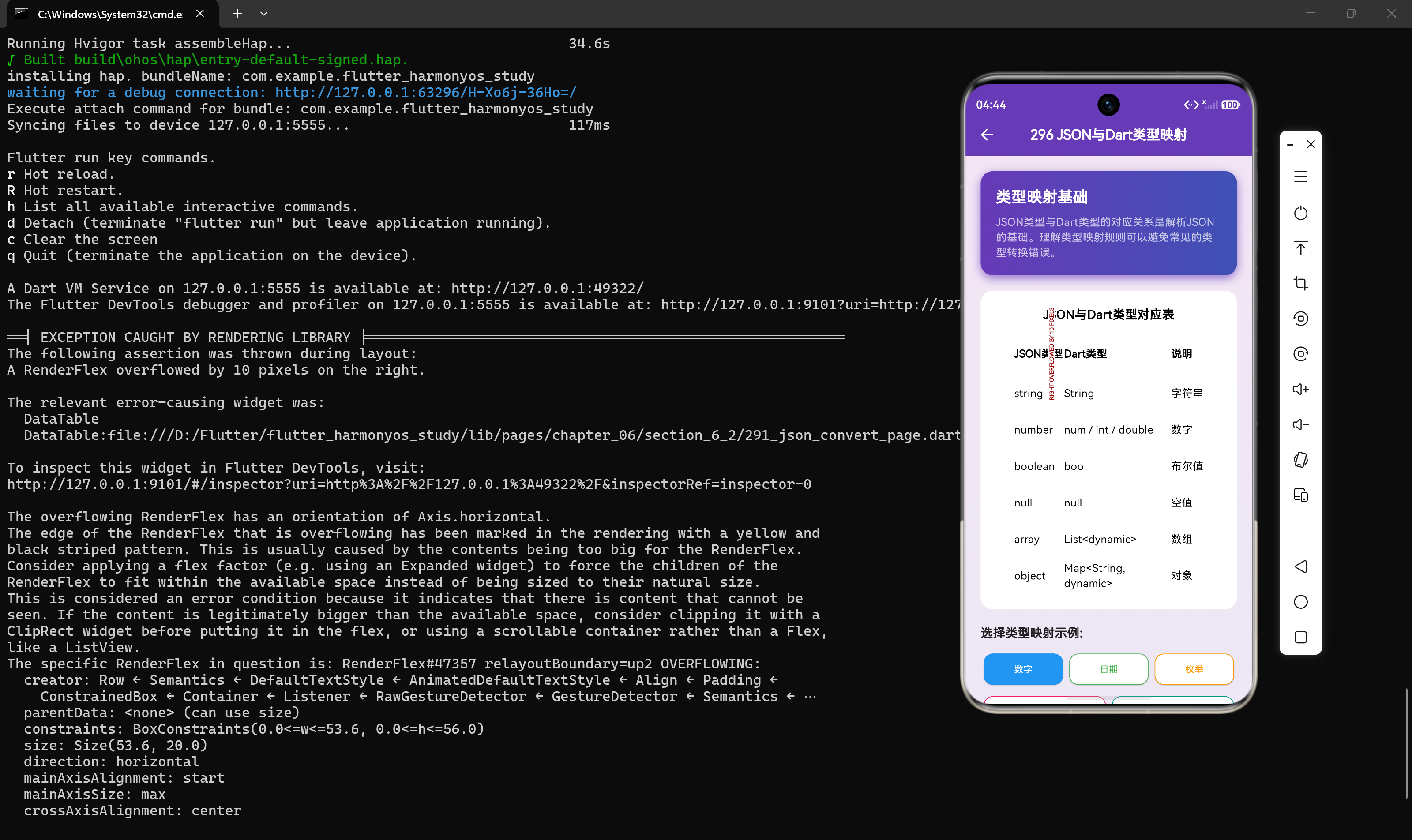
下表展示了JSON类型与Dart类型的标准对应关系:
| JSON类型 | Dart类型 | 说明 |
|---|---|---|
| string | String | 字符串类型 |
| number | num / int / double | 数字类型,默认解析为num |
| boolean | bool | 布尔值 |
| null | null | 空值 |
| array | List<dynamic> | 数组,元素类型为dynamic |
| object | Map<String, dynamic> | 对象,键为String,值为dynamic |
1.2 类型映射原理
当使用json.decode()解析JSON字符串时,Dart会按照以下规则进行类型映射:
import 'dart:convert';

void typeMappingDemo() {
  String jsonStr = '''{
    "name": "北京",
    "temperature": 28.5,
    "humidity": 65,
    "isSunny": true,
    "wind": {"direction": "东南风", "speed": 3.5},
    "forecast": [26, 28, 30],
    "remark": null
  }''';

  Map<String, dynamic> data = json.decode(jsonStr);

  print('name类型: ${data["name"].runtimeType}');
  print('temperature类型: ${data["temperature"].runtimeType}');
  print('humidity类型: ${data["humidity"].runtimeType}');
  print('isSunny类型: ${data["isSunny"].runtimeType}');
  print('wind类型: ${data["wind"].runtimeType}');
  print('forecast类型: ${data["forecast"].runtimeType}');
  print('remark类型: ${data["remark"]?.runtimeType ?? "null"}');
}
输出结果:
name类型: String
temperature类型: double
humidity类型: int
isSunny类型: bool
wind类型: _InternalLinkedHashMap<String, dynamic>
forecast类型: List<dynamic>
remark类型: null
从输出可以看出,JSON中的number类型会根据实际值自动解析为int或double。
2. 数字类型处理
数字类型是JSON中最常用的数据类型之一,但也是最容易出错的类型。因为JSON的number类型没有区分整数和浮点数,而Dart有明确的int和double类型。
2.1 默认解析行为
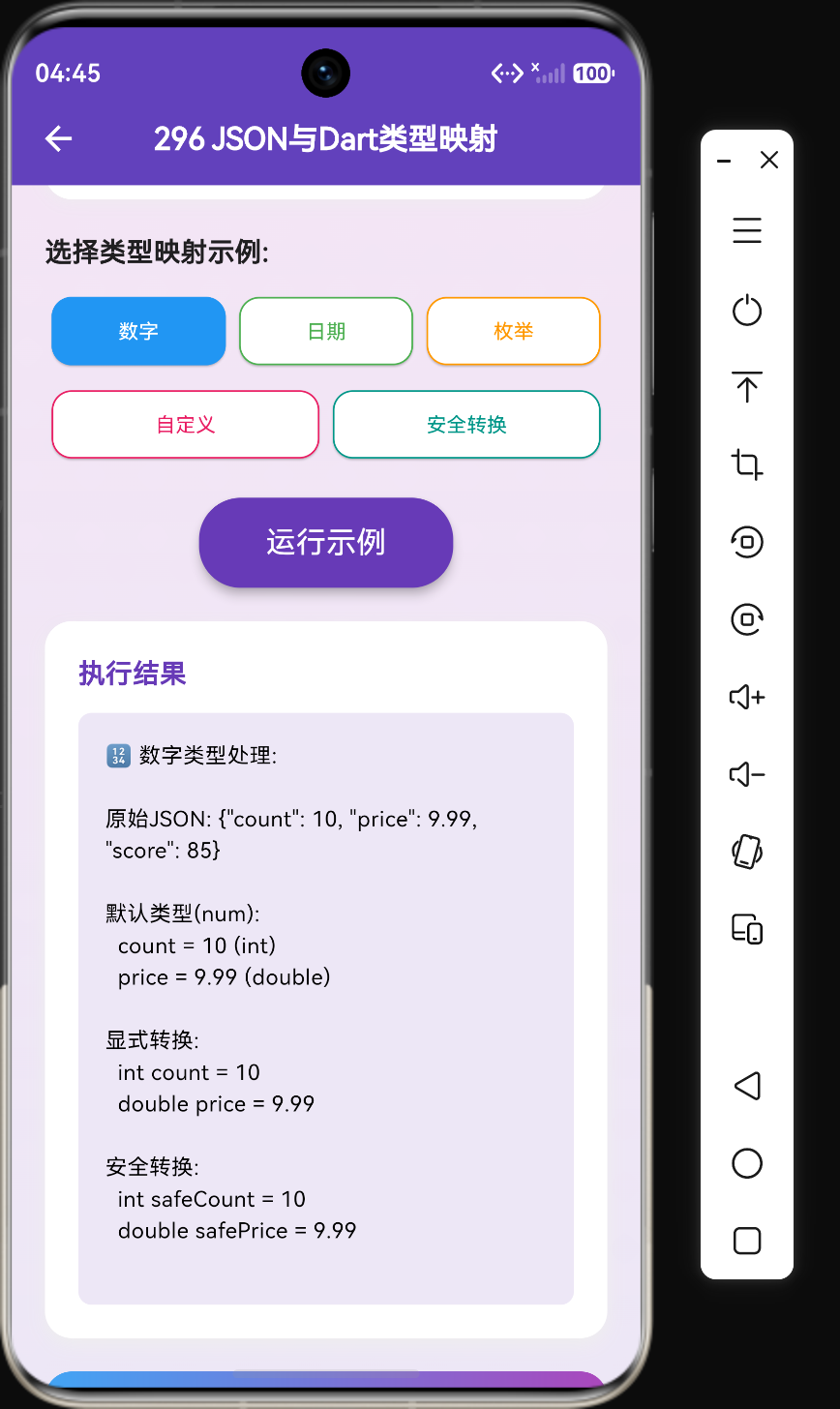
当json.decode()解析JSON数字时,会根据数值的实际情况自动选择int或double类型:
void numberParsingDemo() {
  String jsonStr = '{"count": 10, "price": 9.99, "score": 85}';
  Map<String, dynamic> data = json.decode(jsonStr);

  print('count: ${data["count"]} (${data["count"].runtimeType})');
  print('price: ${data["price"]} (${data["price"].runtimeType})');
  print('score: ${data["score"]} (${data["score"].runtimeType})');
}
输出结果:
count: 10 (int)
price: 9.99 (double)
score: 85 (int)
2.2 显式类型转换
虽然Dart会自动选择合适的数字类型,但在实际开发中,我们通常需要显式指定类型以确保类型安全:
void explicitTypeConversion() {
  String jsonStr = '{"count": 10, "price": 9.99, "score": 85}';
  Map<String, dynamic> data = json.decode(jsonStr);

  int count = data["count"] as int;
  double price = data["price"] as double;
  int score = data["score"] as int;

  print('count: $count');
  print('price: $price');
  print('score: $score');
}
2.3 安全转换方式
当JSON数据可能存在类型不匹配时,需要使用更安全的转换方式:
void safeNumberConversion() {
  String jsonStr = '{"count": 10, "price": 9.99, "score": null}';
  Map<String, dynamic> data = json.decode(jsonStr);

  int safeCount = (data["count"] as num).toInt();
  double safePrice = (data["price"] as num).toDouble();
  int safeScore = (data["score"] as num?)?.toInt() ?? 0;

  print('safeCount: $safeCount');
  print('safePrice: $safePrice');
  print('safeScore: $safeScore');
}
代码解析:
- 使用
as num先转换为num类型,再调用toInt()或toDouble()进行转换 - 使用空值合并运算符
??提供默认值 - 使用空值检查
?.避免空指针异常
2.4 处理边界情况
在实际应用中,JSON数字可能出现各种边界情况,需要特殊处理:
void edgeCaseHandling() {
  String jsonStr = '{"largeNumber": 9223372036854775807, "decimal": 0.1}';
  Map<String, dynamic> data = json.decode(jsonStr);

  int largeNumber = data["largeNumber"] as int;
  double decimal = data["decimal"] as double;

  print('largeNumber: $largeNumber');
  print('decimal: $decimal');
  print('decimal精确值: ${decimal.toStringAsPrecision(15)}');
}
注意事项:
- Dart的int类型支持64位整数,最大值为9223372036854775807
- double类型存在精度问题,对于需要精确计算的场景,应使用decimal库
3. DateTime类型处理
JSON规范中没有专门的日期时间类型,日期时间通常以字符串或时间戳的形式表示。在Dart中,我们需要手动将这些值转换为DateTime对象。
3.1 ISO 8601字符串解析
最常见的日期时间格式是ISO 8601标准格式:
void parseIsoDateTime() {
  String jsonStr = '{"timestamp": "2024-01-15T10:30:00Z"}';
  Map<String, dynamic> data = json.decode(jsonStr);

  DateTime timestamp = DateTime.parse(data["timestamp"]);

  print('完整时间: $timestamp');
  print('年份: ${timestamp.year}');
  print('月份: ${timestamp.month}');
  print('日期: ${timestamp.day}');
  print('小时: ${timestamp.hour}');
  print('分钟: ${timestamp.minute}');
}
输出结果:
完整时间: 2024-01-15 10:30:00.000Z
年份: 2024
月份: 1
日期: 15
小时: 10
分钟: 30
3.2 Unix时间戳解析
另一种常见的日期时间表示方式是Unix时间戳:
void parseUnixTimestamp() {
  String jsonStr = '{"unixTime": 1705300200000}';
  Map<String, dynamic> data = json.decode(jsonStr);

  DateTime fromMilliseconds = DateTime.fromMillisecondsSinceEpoch(data["unixTime"]);
  DateTime fromSeconds = DateTime.fromMillisecondsSinceEpoch(data["unixTime"] ~/ 1000);

  print('从毫秒解析: $fromMilliseconds');
  print('从秒解析: $fromSeconds');
}
注意事项:
- Unix时间戳可能以毫秒或秒为单位,需要确认API文档
- 使用
~运算符进行整数除法
3.3 自定义日期时间解析
当日期时间格式不符合标准格式时,需要自定义解析逻辑:
DateTime? _parseDateTime(dynamic value) {
  if (value is String) {
    try {
      return DateTime.parse(value);
    } catch (_) {
      return null;
    }
  } else if (value is int) {
    return DateTime.fromMillisecondsSinceEpoch(value);
  }
  return null;
}

void customDateTimeParsing() {
  List<String> jsonStrings = [
    '{"time": "2024-01-15T10:30:00Z"}',
    '{"time": 1705300200000}',
    '{"time": "2024/01/15 10:30"}',
  ];

  for (var jsonStr in jsonStrings) {
    Map<String, dynamic> data = json.decode(jsonStr);
    DateTime? dateTime = _parseDateTime(data["time"]);
    print('输入: ${data["time"]} → 解析结果: $dateTime');
  }
}
4. 枚举类型处理
JSON中没有枚举类型,通常使用字符串或数字来表示枚举值。在Dart中,我们需要自定义转换函数来处理枚举类型。
4.1 定义枚举类型
首先定义一个天气状况的枚举:
enum WeatherCondition {
  sunny,
  cloudy,
  rainy,
  snowy,
  stormy,
}
4.2 字符串转枚举
编写从字符串到枚举的转换函数:
WeatherCondition? _parseCondition(String? value) {
  switch (value) {
    case "晴天":
    case "sunny":
      return WeatherCondition.sunny;
    case "多云":
    case "cloudy":
      return WeatherCondition.cloudy;
    case "雨天":
    case "rainy":
      return WeatherCondition.rainy;
    case "雪天":
    case "snowy":
      return WeatherCondition.snowy;
    case "暴风雨":
    case "stormy":
      return WeatherCondition.stormy;
    default:
      return null;
  }
}

void stringToEnum() {
  String jsonStr = '{"condition": "晴天"}';
  Map<String, dynamic> data = json.decode(jsonStr);

  WeatherCondition? condition = _parseCondition(data["condition"]);
  print('天气状况: $condition');
}
4.3 枚举转字符串
编写从枚举到字符串的转换函数:
String _conditionToString(WeatherCondition condition) {
  switch (condition) {
    case WeatherCondition.sunny:
      return "晴天";
    case WeatherCondition.cloudy:
      return "多云";
    case WeatherCondition.rainy:
      return "雨天";
    case WeatherCondition.snowy:
      return "雪天";
    case WeatherCondition.stormy:
      return "暴风雨";
  }
}

void enumToString() {
  WeatherCondition condition = WeatherCondition.sunny;
  String conditionStr = _conditionToString(condition);

  Map<String, dynamic> data = {"condition": conditionStr};
  String jsonStr = json.encode(data);

  print('序列化结果: $jsonStr');
}
4.4 使用扩展方法优化
为了代码更加简洁,可以使用Dart的扩展方法:
extension WeatherConditionExtension on WeatherCondition {
  String get displayName {
    switch (this) {
      case WeatherCondition.sunny:
        return "晴天";
      case WeatherCondition.cloudy:
        return "多云";
      case WeatherCondition.rainy:
        return "雨天";
      case WeatherCondition.snowy:
        return "雪天";
      case WeatherCondition.stormy:
        return "暴风雨";
    }
  }

  static WeatherCondition? fromString(String? value) {
    switch (value) {
      case "晴天":
      case "sunny":
        return WeatherCondition.sunny;
      case "多云":
      case "cloudy":
        return WeatherCondition.cloudy;
      case "雨天":
      case "rainy":
        return WeatherCondition.rainy;
      case "雪天":
      case "snowy":
        return WeatherCondition.snowy;
      case "暴风雨":
      case "stormy":
        return WeatherCondition.stormy;
      default:
        return null;
    }
  }
}

void extensionUsage() {
  WeatherCondition condition = WeatherCondition.sunny;
  print('显示名称: ${condition.displayName}');

  WeatherCondition? parsed = WeatherConditionExtension.fromString("多云");
  print('解析结果: $parsed');
}
5. 自定义类型处理
在实际开发中,我们通常需要将JSON数据转换为自定义的Dart类对象。这需要实现fromJson构造函数和toJson方法。
5.1 基本自定义类型
定义一个简单的Point类:
class Point {
  final double x;
  final double y;

  Point({required this.x, required this.y});

  factory Point.fromJson(Map<String, dynamic> json) {
    return Point(
      x: (json["x"] as num).toDouble(),
      y: (json["y"] as num).toDouble(),
    );
  }

  Map<String, dynamic> toJson() {
    return {"x": x, "y": y};
  }
}

void customTypeDemo() {
  String jsonStr = '{"x": 10.5, "y": 20.3}';

  Point point = Point.fromJson(json.decode(jsonStr));
  print('反序列化: Point(x: ${point.x}, y: ${point.y})');

  String encoded = json.encode(point);
  print('序列化: $encoded');
}
5.2 嵌套自定义类型
定义一个包含嵌套对象的Weather类:
class Wind {
  final String direction;
  final double speed;

  Wind({required this.direction, required this.speed});

  factory Wind.fromJson(Map<String, dynamic> json) {
    return Wind(
      direction: json["direction"] as String,
      speed: (json["speed"] as num).toDouble(),
    );
  }

  Map<String, dynamic> toJson() {
    return {"direction": direction, "speed": speed};
  }
}

class Weather {
  final String city;
  final double temperature;
  final Wind wind;

  Weather({
    required this.city,
    required this.temperature,
    required this.wind,
  });

  factory Weather.fromJson(Map<String, dynamic> json) {
    return Weather(
      city: json["city"] as String,
      temperature: (json["temperature"] as num).toDouble(),
      wind: Wind.fromJson(json["wind"]),
    );
  }

  Map<String, dynamic> toJson() {
    return {
      "city": city,
      "temperature": temperature,
      "wind": wind.toJson(),
    };
  }
}

void nestedCustomType() {
  String jsonStr = '''{
    "city": "北京",
    "temperature": 28.5,
    "wind": {"direction": "东南风", "speed": 3.5}
  }''';

  Weather weather = Weather.fromJson(json.decode(jsonStr));
  print('城市: ${weather.city}');
  print('温度: ${weather.temperature}');
  print('风向: ${weather.wind.direction}');
  print('风速: ${weather.wind.speed}');
}
6. 类型安全检查
在解析JSON数据时,类型不匹配是最常见的错误之一。为了提高代码的健壮性,需要添加类型安全检查。
6.1 基本类型安全检查
使用is运算符进行类型检查:
void basicTypeCheck() {
  String jsonStr = '{"name": "张三", "age": "25", "score": null}';
  Map<String, dynamic> data = json.decode(jsonStr);

  String? name = data["name"] is String ? data["name"] : null;
  int? age = data["age"] is int ? data["age"] : null;
  int score = data["score"] is int ? data["score"] : 0;

  print('name: $name');
  print('age: $age');
  print('score: $score');
}
输出结果:
name: 张三
age: null
score: 0
6.2 通用类型安全解析函数
创建一个通用的类型安全解析函数:
T? safeParse<T>(dynamic value) {
  if (value is T) {
    return value;
  }
  return null;
}

void genericTypeSafeParsing() {
  String jsonStr = '{"name": "张三", "age": 25, "isActive": true}';
  Map<String, dynamic> data = json.decode(jsonStr);

  String? name = safeParse<String>(data["name"]);
  int? age = safeParse<int>(data["age"]);
  bool? isActive = safeParse<bool>(data["isActive"]);
  double? height = safeParse<double>(data["height"]);

  print('name: $name');
  print('age: $age');
  print('isActive: $isActive');
  print('height: $height');
}
6.3 处理可选字段
在JSON数据中,有些字段可能是可选的,需要特殊处理:
class User {
  final String name;
  final int age;
  final String? email;
  final double? height;

  User({
    required this.name,
    required this.age,
    this.email,
    this.height,
  });

  factory User.fromJson(Map<String, dynamic> json) {
    return User(
      name: json["name"] as String,
      age: (json["age"] as num).toInt(),
      email: json["email"] as String?,
      height: (json["height"] as num?)?.toDouble(),
    );
  }
}

void optionalFieldsDemo() {
  String jsonStr = '{"name": "张三", "age": 25}';

  User user = User.fromJson(json.decode(jsonStr));
  print('姓名: ${user.name}');
  print('年龄: ${user.age}');
  print('邮箱: ${user.email ?? "未设置"}');
  print('身高: ${user.height ?? "未设置"}');
}
7. 类型转换最佳实践
结合天气查询应用的实际场景,总结类型转换的最佳实践:
7.1 使用代码生成工具
对于复杂的数据模型,推荐使用json_serializable等代码生成工具,可以自动生成类型安全的序列化和反序列化代码:
import 'package:json_annotation/json_annotation.dart';
part 'weather.g.dart';
()
class Weather {
final String city;
(name: 'temp')
final double temperature;
final String condition;
Weather({
required this.city,
required this.temperature,
required this.condition,
});
factory Weather.fromJson(Map<String, dynamic> json) =>
_$WeatherFromJson(json);
Map<String, dynamic> toJson() => _$WeatherToJson(this);
}
7.2 定义统一的解析工具类
创建一个统一的解析工具类,集中处理所有类型转换逻辑:
class JsonParser {
  static int parseInt(dynamic value, {int defaultValue = 0}) {
    if (value is int) return value;
    if (value is double) return value.toInt();
    if (value is String) return int.tryParse(value) ?? defaultValue;
    return defaultValue;
  }

  static double parseDouble(dynamic value, {double defaultValue = 0.0}) {
    if (value is double) return value;
    if (value is int) return value.toDouble();
    if (value is String) return double.tryParse(value) ?? defaultValue;
    return defaultValue;
  }

  static String parseString(dynamic value, {String defaultValue = ""}) {
    if (value is String) return value;
    return defaultValue;
  }

  static bool parseBool(dynamic value, {bool defaultValue = false}) {
    if (value is bool) return value;
    if (value is String) return value.toLowerCase() == "true";
    if (value is int) return value == 1;
    return defaultValue;
  }

  static DateTime? parseDateTime(dynamic value) {
    if (value is String) {
      return DateTime.tryParse(value);
    }
    if (value is int) {
      return DateTime.fromMillisecondsSinceEpoch(value);
    }
    return null;
  }
}

void unifiedParserDemo() {
  String jsonStr = '{"temp": "28.5", "humidity": "65", "isSunny": "true"}';
  Map<String, dynamic> data = json.decode(jsonStr);

  double temp = JsonParser.parseDouble(data["temp"]);
  int humidity = JsonParser.parseInt(data["humidity"]);
  bool isSunny = JsonParser.parseBool(data["isSunny"]);

  print('温度: $temp');
  print('湿度: $humidity');
  print('是否晴天: $isSunny');
}
7.3 使用freezed实现不可变模型
对于需要不可变数据模型的场景,可以使用freezed库:
import 'package:freezed_annotation/freezed_annotation.dart';
part 'weather.freezed.dart';
part 'weather.g.dart';
class Weather with _$Weather {
const factory Weather({
required String city,
required double temperature,
required String condition,
(0) int humidity,
String? description,
}) = _Weather;
factory Weather.fromJson(Map<String, dynamic> json) =>
_$WeatherFromJson(json);
}
void freezedDemo() {
String jsonStr = '{"city": "北京", "temperature": 28.5, "condition": "晴"}';
Weather weather = Weather.fromJson(json.decode(jsonStr));
print('城市: ${weather.city}');
print('温度: ${weather.temperature}');
print('湿度: ${weather.humidity}');
}
8. 常见类型转换错误及解决方案
在实际开发中,经常会遇到各种类型转换错误,下表列出了常见错误及解决方案:
| 错误类型 | 错误信息 | 原因 | 解决方案 |
|---|---|---|---|
| 类型转换错误 | type ‘String’ is not a subtype of type ‘int’ | JSON中的值是字符串,但代码期望int | 使用安全转换函数,先检查类型 |
| 空值错误 | Null check operator used on a null value | 访问了可能为null的字段 | 使用空值检查?.或提供默认值 |
| 格式错误 | FormatException: Invalid date format | DateTime字符串格式不正确 | 使用try-catch或自定义解析函数 |
| 数组类型错误 | type ‘_InternalLinkedHashMap’ is not a subtype of type ‘List’ | 期望数组但得到对象 | 检查JSON结构或添加类型检查 |
| 嵌套错误 | type ‘Null’ is not a subtype of type ‘Map<String, dynamic>’ | 嵌套对象为null | 在访问前检查嵌套对象是否存在 |
8.1 完整的错误处理示例
Weather? safeParseWeather(String jsonStr) {
  try {
    Map<String, dynamic> root = json.decode(jsonStr);

    if (root["code"] != 200) {
      print("API返回错误: ${root["message"]}");
      return null;
    }

    Map<String, dynamic>? data = root["data"] as Map<String, dynamic>?;
    if (data == null) {
      print("数据为空");
      return null;
    }

    String? city = JsonParser.parseString(data["city"]);
    if (city == null || city.isEmpty) {
      print("城市名称无效");
      return null;
    }

    double temperature = JsonParser.parseDouble(data["temperature"]);

    return Weather(
      city: city,
      temperature: temperature,
      condition: JsonParser.parseString(data["condition"]),
    );
  } catch (e, stackTrace) {
    print("解析失败: $e");
    print("堆栈信息: $stackTrace");
    return null;
  }
}
9. 实战案例:天气查询应用类型映射
结合天气查询应用的实际场景,展示完整的类型映射实现:
class HourlyForecast {
  final String time;
  final int temperature;

  HourlyForecast({
    required this.time,
    required this.temperature,
  });

  factory HourlyForecast.fromJson(Map<String, dynamic> json) {
    return HourlyForecast(
      time: JsonParser.parseString(json["time"]),
      temperature: JsonParser.parseInt(json["temp"]),
    );
  }
}

class DailyForecast {
  final String date;
  final int high;
  final int low;
  final String condition;

  DailyForecast({
    required this.date,
    required this.high,
    required this.low,
    required this.condition,
  });

  factory DailyForecast.fromJson(Map<String, dynamic> json) {
    return DailyForecast(
      date: JsonParser.parseString(json["date"]),
      high: JsonParser.parseInt(json["high"]),
      low: JsonParser.parseInt(json["low"]),
      condition: JsonParser.parseString(json["condition"]),
    );
  }
}

class WeatherResponse {
  final Weather current;
  final List<HourlyForecast> hourly;
  final List<DailyForecast> daily;
  final DateTime lastUpdated;

  WeatherResponse({
    required this.current,
    required this.hourly,
    required this.daily,
    required this.lastUpdated,
  });

  factory WeatherResponse.fromJson(Map<String, dynamic> json) {
    List<dynamic> hourlyList = json["hourly"] as List? ?? [];
    List<dynamic> dailyList = json["daily"] as List? ?? [];

    return WeatherResponse(
      current: Weather.fromJson(json["current"]),
      hourly: hourlyList
          .map((e) => HourlyForecast.fromJson(e))
          .toList(),
      daily: dailyList
          .map((e) => DailyForecast.fromJson(e))
          .toList(),
      lastUpdated: JsonParser.parseDateTime(json["last_updated"]) ?? DateTime.now(),
    );
  }
}

void weatherAppDemo() {
  String jsonStr = '''{
    "current": {
      "city": "北京",
      "temperature": 28.5,
      "condition": "晴"
    },
    "hourly": [
      {"time": "08:00", "temp": 22},
      {"time": "12:00", "temp": 28},
      {"time": "18:00", "temp": 25}
    ],
    "daily": [
      {"date": "2024-01-15", "high": 30, "low": 20, "condition": "晴"},
      {"date": "2024-01-16", "high": 28, "low": 18, "condition": "多云"}
    ],
    "last_updated": "2024-01-15T10:00:00Z"
  }''';

  WeatherResponse response = WeatherResponse.fromJson(json.decode(jsonStr));

  print('当前天气: ${response.current.city} ${response.current.temperature}度');
  print('24小时预报:');
  for (var hour in response.hourly) {
    print('  ${hour.time}: ${hour.temperature}度');
  }
}
10. 总结
类型映射是JSON解析的核心环节,正确处理类型转换可以避免大量运行时错误。本章介绍了:
- JSON与Dart类型的对应关系
- 数字类型的处理方法
- DateTime类型的解析技巧
- 枚举类型的转换策略
- 自定义类型的序列化与反序列化
- 类型安全检查的最佳实践
- 常见错误及解决方案
在实际开发中,建议根据项目规模和需求选择合适的类型转换方案:
- 小型项目或快速原型:使用手动解析和基本类型转换
- 中型项目:使用代码生成工具(json_serializable)
- 大型项目:结合freezed和统一解析工具类,实现类型安全和不可变数据模型
通过掌握本章内容,读者可以在天气查询应用及其他Flutter项目中高效、安全地处理JSON数据。

作为“人工智能6S店”的官方数字引擎,为AI开发者与企业提供一个覆盖软硬件全栈、一站式门户。
更多推荐


 7
7 0
0- 0


 已为社区贡献58条内容

所有评论(0)