
鸿蒙Flutter json_serializable - 代码生成最佳实践
引言
在Flutter开发中,手动编写序列化和反序列化代码不仅效率低下,还容易引入错误。json_serializable是一个强大的代码生成包,可以自动生成类型安全的序列化代码,大大提高开发效率和代码质量。
本章节将深入探讨json_serializable的使用方法,结合天气查询应用场景,展示如何配置和使用这个工具。
1. json_serializable 概述
1.1 什么是 json_serializable
json_serializable是Dart官方推荐的代码生成包,它通过注解标记数据模型类,自动生成对应的序列化和反序列化代码。
1.2 核心优势
- 类型安全:编译时检查,避免运行时类型错误
- 自动生成:减少手动编写样板代码
- 易于维护:数据模型变更后,重新生成即可
- 社区成熟:广泛使用,文档完善
1.3 工作原理
- 在数据模型类上添加
@JsonSerializable()注解 - 运行代码生成命令
- 自动生成
.g.dart文件,包含序列化和反序列化代码 - 在模型类中调用生成的方法
2. 环境配置
2.1 添加依赖
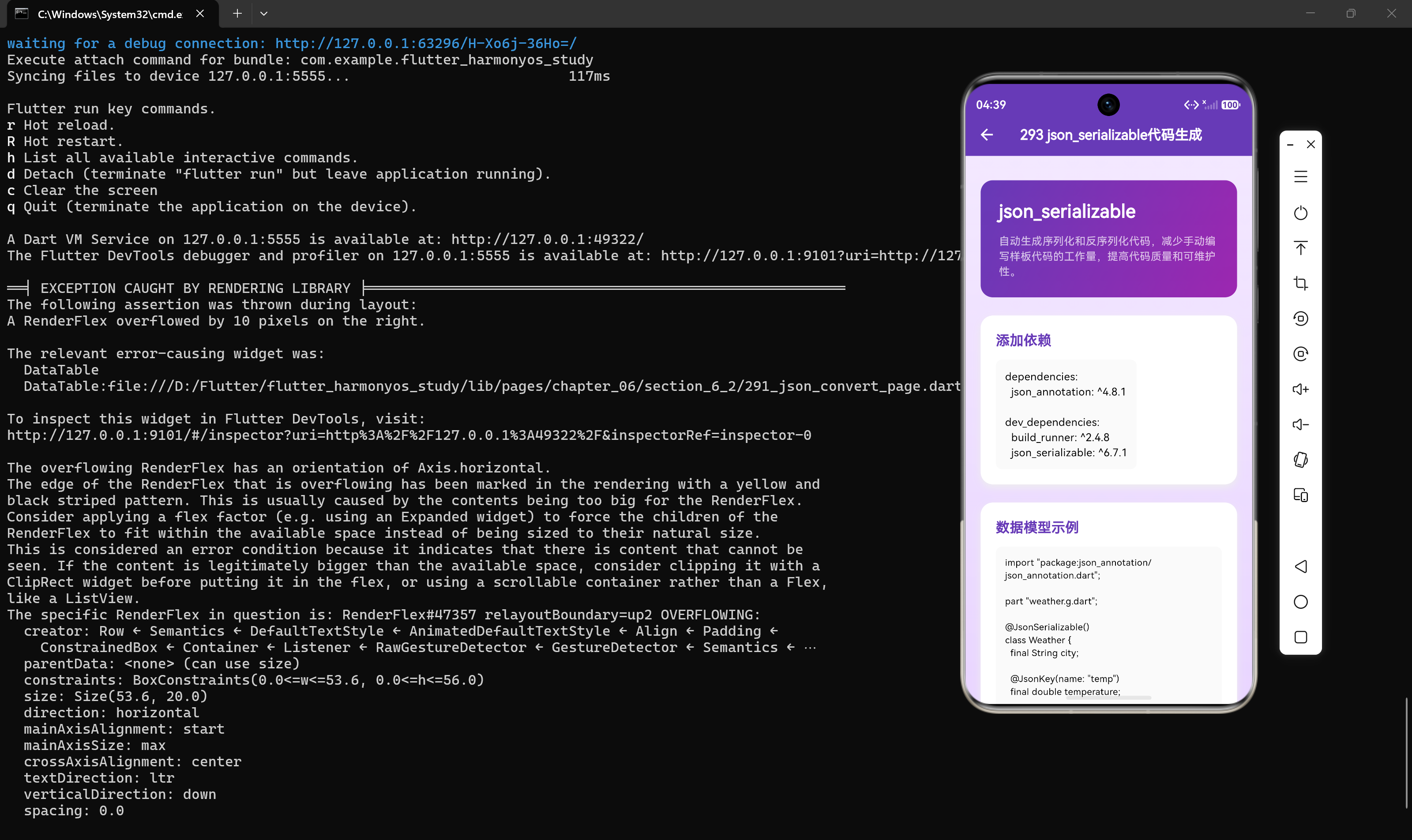
在pubspec.yaml中添加以下依赖:
dependencies:
  json_annotation: ^4.8.1

dev_dependencies:
  build_runner: ^2.4.8
  json_serializable: ^6.7.1
代码解析:
json_annotation:提供注解定义,运行时依赖build_runner:代码生成工具,开发依赖json_serializable:代码生成器,开发依赖
2.2 安装依赖
flutter pub get
2.3 配置 build.yaml(可选)
创建build.yaml文件,配置代码生成选项:
targets:
  $default:
    builders:
      json_serializable:
        options:
          explicit_to_json: true
          any_map: false
          checked: false
          create_factory: true
          create_to_json: true
配置说明:
| 选项 | 说明 | 默认值 |
|---|---|---|
explicit_to_json |
是否显式调用嵌套对象的toJson | false |
any_map |
使用Map<dynamic, dynamic>而非Map<String, dynamic> |
false |
checked |
生成检查代码,确保类型安全 | false |
create_factory |
是否生成fromJson工厂方法 | true |
create_to_json |
是否生成toJson方法 | true |
3. 创建数据模型
3.1 基础模型定义
import "package:json_annotation/json_annotation.dart";
part "weather.g.dart";
()
class Weather {
final String city;
(name: "temp")
final double temperature;
final String condition;
(defaultValue: "")
final String description;
Weather({
required this.city,
required this.temperature,
required this.condition,
this.description = "",
});
factory Weather.fromJson(Map<String, dynamic> json) =>
_$WeatherFromJson(json);
Map<String, dynamic> toJson() => _$WeatherToJson(this);
}
代码解析:
- part指令:引用生成的代码文件
- @JsonSerializable()注解:标记需要生成序列化代码的类
- @JsonKey注解:自定义JSON字段映射
- fromJson工厂方法:调用生成的反序列化方法
- toJson方法:调用生成的序列化方法
3.2 @JsonKey注解详解
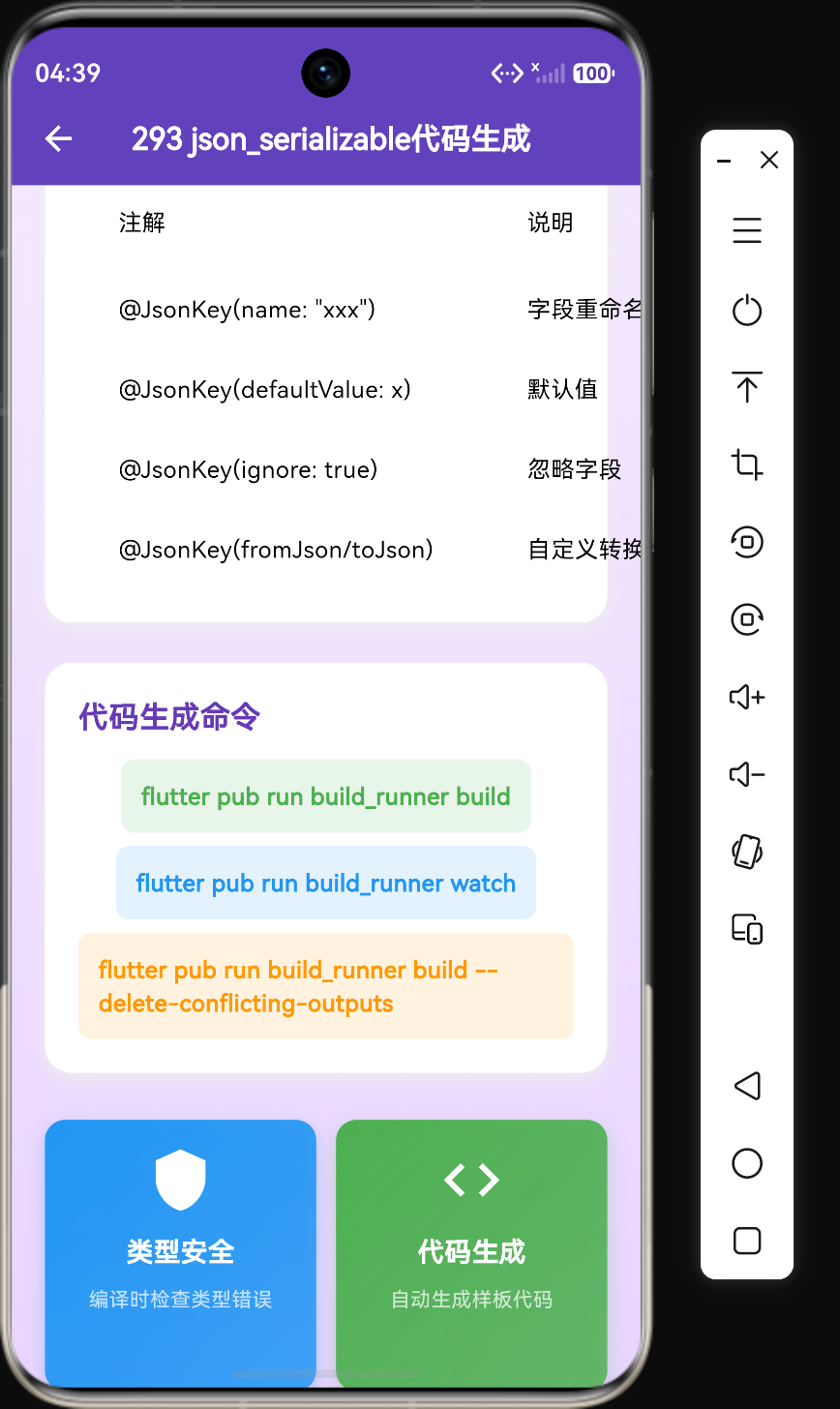
@JsonKey注解提供了丰富的配置选项:
(name: "user_name")
final String userName;
(defaultValue: 0)
final int count;
(ignore: true)
final String? password;
(fromJson: _dateTimeFromJson, toJson: _dateTimeToJson)
final DateTime timestamp;
(required: true)
final String email;
(disallowNullValue: true)
final String name;
@JsonKey参数说明:
| 参数 | 类型 | 说明 |
|---|---|---|
name |
String | JSON中的字段名 |
defaultValue |
dynamic | 默认值 |
ignore |
bool | 是否忽略此字段 |
fromJson |
Function | 自定义反序列化函数 |
toJson |
Function | 自定义序列化函数 |
required |
bool | 是否必填 |
disallowNullValue |
bool | 是否禁止null值 |
4. 运行代码生成
4.1 单次生成
flutter pub run build_runner build
4.2 持续监听
flutter pub run build_runner watch
代码解析:
watch模式会监听文件变化,自动重新生成代码- 适合开发过程中使用,避免频繁手动运行
4.3 清理并重新生成
flutter pub run build_runner clean
flutter pub run build_runner build --delete-conflicting-outputs
代码解析:
clean命令删除所有生成的文件--delete-conflicting-outputs参数强制覆盖冲突文件
5. 生成的代码分析
5.1 生成的文件结构
运行代码生成后,会生成weather.g.dart文件:
// weather.g.dart
Weather _$WeatherFromJson(Map<String, dynamic> json) => Weather(
  city: json["city"] as String,
  temperature: (json["temp"] as num).toDouble(),
  condition: json["condition"] as String,
  description: json["description"] as String? ?? "",
);

Map<String, dynamic> _$WeatherToJson(Weather instance) => <String, dynamic>{
  "city": instance.city,
  "temp": instance.temperature,
  "condition": instance.condition,
  "description": instance.description,
};
代码解析:
-
_$WeatherFromJson:反序列化方法- 将Map转换为Weather对象
- 处理类型转换,如
(json["temp"] as num).toDouble() - 处理默认值,如
json["description"] as String? ?? ""
-
_$WeatherToJson:序列化方法- 将Weather对象转换为Map
- 处理字段映射,如
"temp": instance.temperature
5.2 类型转换策略
生成的代码会自动处理类型转换:
// 数字类型
temperature: (json["temp"] as num).toDouble(),

// 字符串类型
city: json["city"] as String,

// 可选字段
description: json["description"] as String? ?? "",

// 列表类型
forecast: (json["forecast"] as List<dynamic>)
    .map((e) => ForecastDay.fromJson(e as Map<String, dynamic>))
    .toList(),
6. 复杂模型示例
6.1 嵌套对象
import "package:json_annotation/json_annotation.dart";
part "weather_response.g.dart";
()
class WeatherResponse {
final WeatherData weather;
WeatherResponse({required this.weather});
factory WeatherResponse.fromJson(Map<String, dynamic> json) =>
_$WeatherResponseFromJson(json);
Map<String, dynamic> toJson() => _$WeatherResponseToJson(this);
}
()
class WeatherData {
final String city;
final CurrentWeather current;
final List<ForecastDay> forecast;
final DateTime lastUpdated;
WeatherData({
required this.city,
required this.current,
required this.forecast,
required this.lastUpdated,
});
factory WeatherData.fromJson(Map<String, dynamic> json) =>
_$WeatherDataFromJson(json);
Map<String, dynamic> toJson() => _$WeatherDataToJson(this);
}
()
class CurrentWeather {
final double temp;
final int humidity;
final String condition;
CurrentWeather({
required this.temp,
required this.humidity,
required this.condition,
});
factory CurrentWeather.fromJson(Map<String, dynamic> json) =>
_$CurrentWeatherFromJson(json);
Map<String, dynamic> toJson() => _$CurrentWeatherToJson(this);
}
()
class ForecastDay {
final String date;
final int high;
final int low;
ForecastDay({
required this.date,
required this.high,
required this.low,
});
factory ForecastDay.fromJson(Map<String, dynamic> json) =>
_$ForecastDayFromJson(json);
Map<String, dynamic> toJson() => _$ForecastDayToJson(this);
}
6.2 自定义类型转换
对于DateTime等特殊类型,可以自定义转换函数:
import "package:json_annotation/json_annotation.dart";
part "weather.g.dart";
DateTime _dateTimeFromJson(String str) => DateTime.parse(str);
String _dateTimeToJson(DateTime date) => date.toIso8601String();
()
class Weather {
final String city;
final double temperature;
(fromJson: _dateTimeFromJson, toJson: _dateTimeToJson)
final DateTime lastUpdated;
Weather({
required this.city,
required this.temperature,
required this.lastUpdated,
});
factory Weather.fromJson(Map<String, dynamic> json) =>
_$WeatherFromJson(json);
Map<String, dynamic> toJson() => _$WeatherToJson(this);
}
代码解析:
_dateTimeFromJson:将字符串转换为DateTime_dateTimeToJson:将DateTime转换为字符串- 使用
@JsonKey的fromJson和toJson参数指定自定义转换函数
7. 使用示例
7.1 基本使用
void useGeneratedCode() {
  String jsonStr = '{"city":"北京","temp":28.5,"condition":"晴"}';

  // 反序列化
  Weather weather = Weather.fromJson(json.decode(jsonStr));
  print("${weather.city}: ${weather.temperature}度");

  // 序列化
  String encoded = json.encode(weather);
  print(encoded);
}
7.2 解析API响应
Future<Weather> fetchWeather(String city) async {
  final response = await http.get(Uri.parse(
      "https://api.example.com/weather?city=$city"));

  if (response.statusCode == 200) {
    return Weather.fromJson(json.decode(response.body));
  } else {
    throw Exception("获取天气失败");
  }
}
7.3 序列化并存储
void saveWeather(Weather weather) async {
  final prefs = await SharedPreferences.getInstance();
  String jsonStr = json.encode(weather);
  await prefs.setString("weather_data", jsonStr);
}

Future<Weather?> loadWeather() async {
  final prefs = await SharedPreferences.getInstance();
  String? jsonStr = prefs.getString("weather_data");

  if (jsonStr != null) {
    return Weather.fromJson(json.decode(jsonStr));
  }
  return null;
}
8. 高级配置
8.1 忽略字段
()
class User {
final String name;
(ignore: true)
final String? password;
User({required this.name, this.password});
factory User.fromJson(Map<String, dynamic> json) => _$UserFromJson(json);
Map<String, dynamic> toJson() => _$UserToJson(this);
}
代码解析:
password字段不会参与序列化和反序列化- 适合敏感信息或临时数据
8.2 默认值
()
class Weather {
final String city;
(defaultValue: 0.0)
final double temperature;
(defaultValue: "未知")
final String condition;
Weather({
required this.city,
required this.temperature,
required this.condition,
});
factory Weather.fromJson(Map<String, dynamic> json) => _$WeatherFromJson(json);
Map<String, dynamic> toJson() => _$WeatherToJson(this);
}
8.3 字段重命名
()
class User {
(name: "user_name")
final String userName;
(name: "age")
final int userAge;
User({required this.userName, required this.userAge});
factory User.fromJson(Map<String, dynamic> json) => _$UserFromJson(json);
Map<String, dynamic> toJson() => _$UserToJson(this);
}
9. 与freezed结合使用
9.1 添加依赖
dependencies:
  json_annotation: ^4.8.1
  freezed_annotation: ^2.4.4

dev_dependencies:
  build_runner: ^2.4.8
  json_serializable: ^6.7.1
  freezed: ^2.5.7
9.2 创建freezed模型
import "package:json_annotation/json_annotation.dart";
import "package:freezed_annotation/freezed_annotation.dart";
part "weather.freezed.dart";
part "weather.g.dart";
()
class Weather with _$Weather {
const factory Weather({
required String city,
(name: "temp") required double temperature,
required String condition,
("") String description,
}) = _Weather;
factory Weather.fromJson(Map<String, dynamic> json) =>
_$WeatherFromJson(json);
}
代码解析:
@freezed注解:生成不可变模型代码@JsonSerializable()注解:生成序列化代码@Default(""):提供默认值- 自动生成
copyWith方法,方便对象修改
10. 性能优化
10.1 预编译模型
对于频繁使用的模型,可以在应用启动时预编译:
void main() {
  // 预编译JSON解码器
  json.decode('{}');

  runApp(const MyApp());
}
10.2 延迟解析
对于大型数据集,可以考虑延迟解析:
()
class WeatherData {
final String city;
// 使用JsonConverter实现延迟解析
(fromJson: _parseForecast)
final List<ForecastDay> forecast;
WeatherData({required this.city, required this.forecast});
factory WeatherData.fromJson(Map<String, dynamic> json) =>
_$WeatherDataFromJson(json);
}
List<ForecastDay> _parseForecast(List<dynamic> list) {
return list.map((e) => ForecastDay.fromJson(e)).toList();
}
11. 常见问题
11.1 生成代码失败
问题:运行build_runner后没有生成.g.dart文件
解决方案:
- 检查是否添加了
part "xxx.g.dart";指令 - 检查是否添加了
@JsonSerializable()注解 - 检查依赖版本是否兼容
- 运行
flutter pub run build_runner clean后重新生成
11.2 类型转换错误
问题:生成的代码出现类型转换错误
解决方案:
- 检查JSON字段类型是否与模型定义一致
- 使用
@JsonKey的fromJson参数自定义转换 - 对于数字类型,确保使用
(json["field"] as num).toDouble()
11.3 嵌套对象序列化
问题:嵌套对象序列化时出现错误
解决方案:
- 确保嵌套对象也添加了
@JsonSerializable()注解 - 在
build.yaml中设置explicit_to_json: true
12. 最佳实践
12.1 项目结构
lib/
├── models/
│   ├── weather.dart
│   ├── weather.g.dart
│   ├── forecast.dart
│   └── forecast.g.dart
└── ...
12.2 代码组织
- 集中管理:将所有数据模型放在同一目录下
- 命名规范:模型文件使用小写蛇形命名(如
weather_model.dart) - 代码生成:将生成的
.g.dart文件纳入版本控制
12.3 开发流程
- 定义模型:创建数据模型类并添加注解
- 生成代码:运行
build_runner生成序列化代码 - 使用模型:在业务代码中使用生成的方法
- 更新模型:修改模型后重新生成代码
13. 总结
json_serializable是Flutter开发中处理JSON序列化的首选工具。它通过代码生成机制,自动生成类型安全的序列化代码,大大提高了开发效率和代码质量。
本章详细介绍了json_serializable的配置、使用和高级特性,结合天气查询应用场景展示了实际应用。掌握这个工具对于构建高质量的Flutter应用至关重要。

作为“人工智能6S店”的官方数字引擎,为AI开发者与企业提供一个覆盖软硬件全栈、一站式门户。
更多推荐
 7
7 0
0- 0


 已为社区贡献29条内容

所有评论(0)