
鸿蒙多功能工具箱开发实战(十六)-实时行情数据获取与展示
·
鸿蒙多功能工具箱开发实战(十六)-实时行情数据获取与展示
前言
实时行情数据展示需要网络请求和数据刷新机制。本文将讲解HarmonyOS网络请求API和行情数据展示的实现。
一、网络请求封装
1.1 HTTP服务封装
import http from '@ohos.net.http'

export class HttpService {
  private static instance: HttpService
  private httpClient: http.HttpClient

  private constructor() {
    this.httpClient = http.createHttp()
  }

  static getInstance(): HttpService {
    if (!HttpService.instance) {
      HttpService.instance = new HttpService()
    }
    return HttpService.instance
  }

  /**
   * GET请求
   */
  async get<T>(url: string, params?: Record<string, string>): Promise<T> {
    const fullUrl = params ? `${url}?${this.stringifyParams(params)}` : url

    return new Promise((resolve, reject) => {
      this.httpClient.request(fullUrl, {
        method: http.RequestMethod.GET,
        header: {
          'Content-Type': 'application/json'
        },
        connectTimeout: 60000,
        readTimeout: 60000
      }, (err, data) => {
        if (err) {
          reject(err)
        } else {
          try {
            const result = JSON.parse(data.result as string) as T
            resolve(result)
          } catch (e) {
            reject(e)
          }
        }
      })
    })
  }

  private stringifyParams(params: Record<string, string>): string {
    return Object.entries(params)
      .map(([k, v]) => `${encodeURIComponent(k)}=${encodeURIComponent(v)}`)
      .join('&')
  }
}
1.2 行情数据接口
export interface GoldPrice {
  date: string
  price: number
  change: number
  changePercent: number
}

export interface ExchangeRate {
  from: string
  to: string
  rate: number
  updateTime: string
}

export class MarketService {
  private http = HttpService.getInstance()

  /**
   * 获取今日金价
   */
  async getGoldPrice(): Promise<GoldPrice> {
    // 模拟数据(实际应调用真实API)
    return {
      date: new Date().toLocaleDateString(),
      price: 580.50,
      change: 2.30,
      changePercent: 0.40
    }
  }

  /**
   * 获取实时汇率
   */
  async getExchangeRates(): Promise<ExchangeRate[]> {
    // 模拟数据
    return [
      { from: 'USD', to: 'CNY', rate: 7.2456, updateTime: new Date().toLocaleString() },
      { from: 'EUR', to: 'CNY', rate: 7.8912, updateTime: new Date().toLocaleString() },
      { from: 'GBP', to: 'CNY', rate: 9.1234, updateTime: new Date().toLocaleString() },
      { from: 'JPY', to: 'CNY', rate: 0.0482, updateTime: new Date().toLocaleString() }
    ]
  }
}
二、数据刷新机制
2.1 定时刷新
@Component
struct MarketPage {
  @State goldPrice: GoldPrice = null
  @State exchangeRates: ExchangeRate[] = []
  @State isLoading: boolean = false
  @State lastUpdate: string = ''

  private marketService = new MarketService()
  private refreshInterval: number = null

  aboutToAppear() {
    this.loadData()
    // 每30秒刷新一次
    this.refreshInterval = setInterval(() => {
      this.loadData()
    }, 30000)
  }

  aboutToDisappear() {
    if (this.refreshInterval) {
      clearInterval(this.refreshInterval)
    }
  }

  async loadData() {
    this.isLoading = true
    try {
      this.goldPrice = await this.marketService.getGoldPrice()
      this.exchangeRates = await this.marketService.getExchangeRates()
      this.lastUpdate = new Date().toLocaleTimeString()
    } catch (e) {
      console.error('加载数据失败:', e)
    } finally {
      this.isLoading = false
    }
  }

  build() {
    Column() {
      NavBar({ title: '实时行情' })

      // 下拉刷新
      Refresh({ refreshing: $$this.isLoading }) {
        Column() {
          // 金价展示
          this.GoldPriceCard()

          // 汇率列表
          this.ExchangeRateList()

          // 更新时间
          Text(`最后更新: ${this.lastUpdate}`)
            .fontSize(12)
            .fontColor('#999999')
            .margin({ top: 16 })
        }
      }
      .onRefreshing(() => {
        this.loadData()
      })
    }
  }

  @Builder
  GoldPriceCard() {
    Column() {
      Row() {
        Text('今日金价')
          .fontSize(16)

        Text(this.goldPrice?.date || '')
          .fontSize(12)
          .fontColor('#999999')
      }
      .width('100%')
      .justifyContent(FlexAlign.SpaceBetween)

      Text(`¥${this.goldPrice?.price?.toFixed(2) || '--'}`)
        .fontSize(36)
        .fontWeight(FontWeight.Bold)
        .margin({ top: 16 })

      Row() {
        Text(`${this.goldPrice?.change > 0 ? '+' : ''}${this.goldPrice?.change?.toFixed(2) || '--'}`)
          .fontColor(this.goldPrice?.change > 0 ? '#E74C3C' : '#27AE60')

        Text(`(${this.goldPrice?.changePercent?.toFixed(2)}%)`)
          .fontColor(this.goldPrice?.change > 0 ? '#E74C3C' : '#27AE60')
      }
      .margin({ top: 8 })
    }
    .width('90%')
    .padding(24)
    .backgroundColor('#FFFFFF')
    .borderRadius(12)
    .margin({ top: 16 })
  }
}
三、高级功能
3.1 数据流程图
3.2 错误处理
class QuoteService {
  private static MAX_RETRY = 3
  private static retryCount = 0

  static async fetchWithRetry(url: string): Promise<QuoteData> {
    try {
      const response = await http.request(url)
      this.retryCount = 0
      return this.parseResponse(response)
    } catch (error) {
      this.retryCount++
      if (this.retryCount < this.MAX_RETRY) {
        await this.delay(1000 * this.retryCount)
        return this.fetchWithRetry(url)
      }
      throw new Error('数据获取失败')
    }
  }
}
3.3 数据缓存
class QuoteCache {
  private static cache: Map<string, { data: QuoteData, time: number }> = new Map()
  private static TTL = 30000 // 30秒

  static get(key: string): QuoteData | null {
    const item = this.cache.get(key)
    if (!item) return null
    if (Date.now() - item.time > this.TTL) {
      this.cache.delete(key)
      return null
    }
    return item.data
  }

  static set(key: string, data: QuoteData) {
    this.cache.set(key, { data, time: Date.now() })
  }
}
四、界面优化
4.1 行情卡片
@Component
struct QuoteCard {
  @Prop quote: QuoteData

  build() {
    Column() {
      Row() {
        Text(this.quote.name).fontSize(16)
        Blank()
        Text(this.quote.code).fontSize(12).fontColor('#999')
      }

      Row() {
        Text(`¥${this.quote.price.toFixed(2)}`)
          .fontSize(24)
          .fontColor(this.quote.change >= 0 ? '#E74C3C' : '#27AE60')

        Text(`${this.quote.change >= 0 ? '+' : ''}${this.quote.changePercent.toFixed(2)}%`)
          .fontColor(this.quote.change >= 0 ? '#E74C3C' : '#27AE60')
      }
      .margin({ top: 8 })
    }
    .padding(16)
    .backgroundColor('#FFF')
    .borderRadius(8)
  }
}
图 1 今日金价界面展示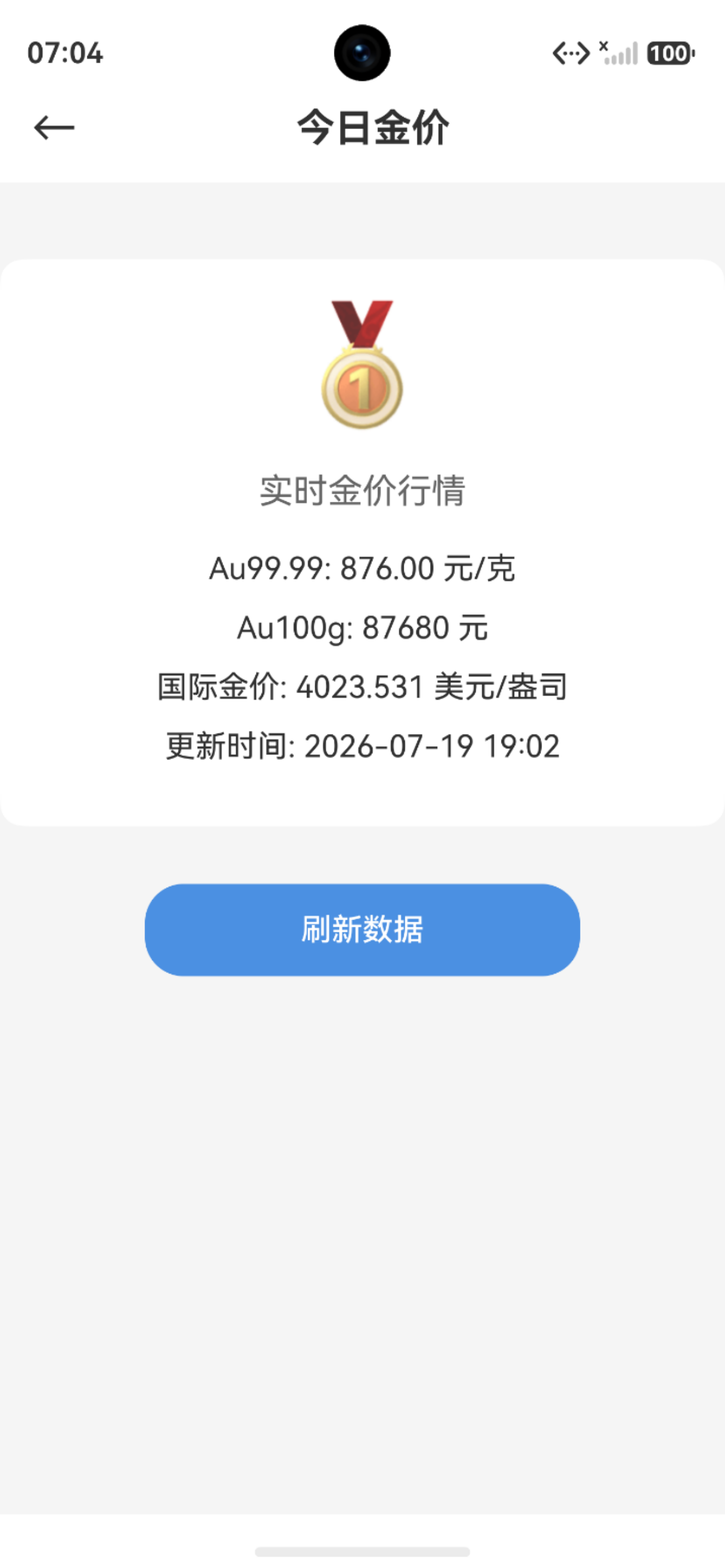
五、单元测试
describe('QuoteService', () => {
  it('should fetch quote data', async () => {
    const data = await QuoteService.fetch('000001')
    expect(data.price).toBeGreaterThan(0)
  })
})
六、小结
本文详细讲解了实时行情功能:
- ✅ HTTP请求封装
- ✅ 行情数据接口
- ✅ 定时刷新机制
- ✅ 下拉刷新
- ✅ 数据展示
- ✅ 错误处理
- ✅ 数据缓存
- ✅ 单元测试
系列文章导航:
下期预告:鸿蒙多功能工具箱开发实战(十七)-每日语录与天气查询

作为“人工智能6S店”的官方数字引擎,为AI开发者与企业提供一个覆盖软硬件全栈、一站式门户。
更多推荐
 1
1 0
0- 0


 已为社区贡献22条内容

所有评论(0)