
鸿蒙报错速查:@Trace 装在 V1 @Component 编译就炸,V2 装饰器只能装 @ComponentV2,根因 + 真解法
报错原文
ERROR: 10505001 ArkTS Compiler Error
Error Message: '@Trace' can only be used in V2 components. At File: xxx.ets:N:N
真机配图:V2 正解能编译能跑
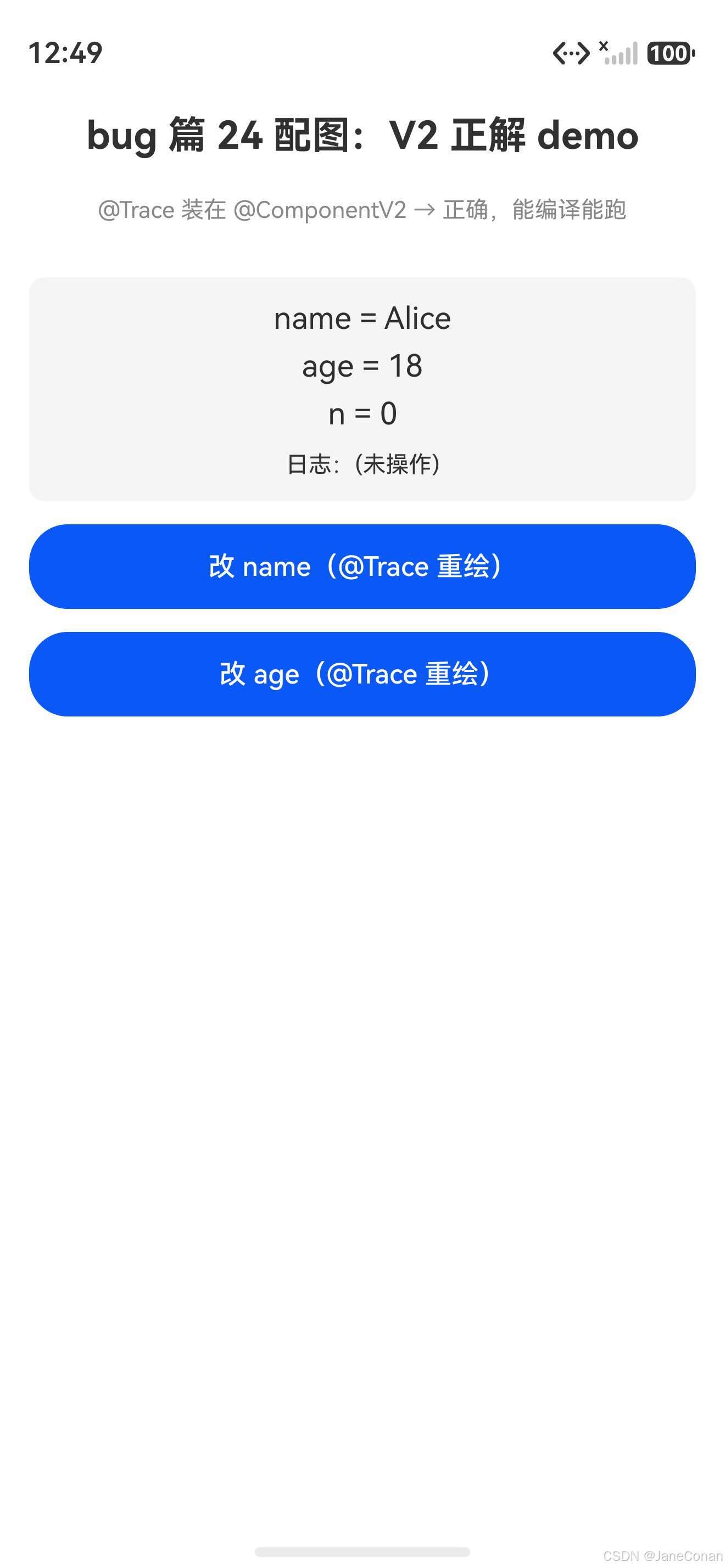
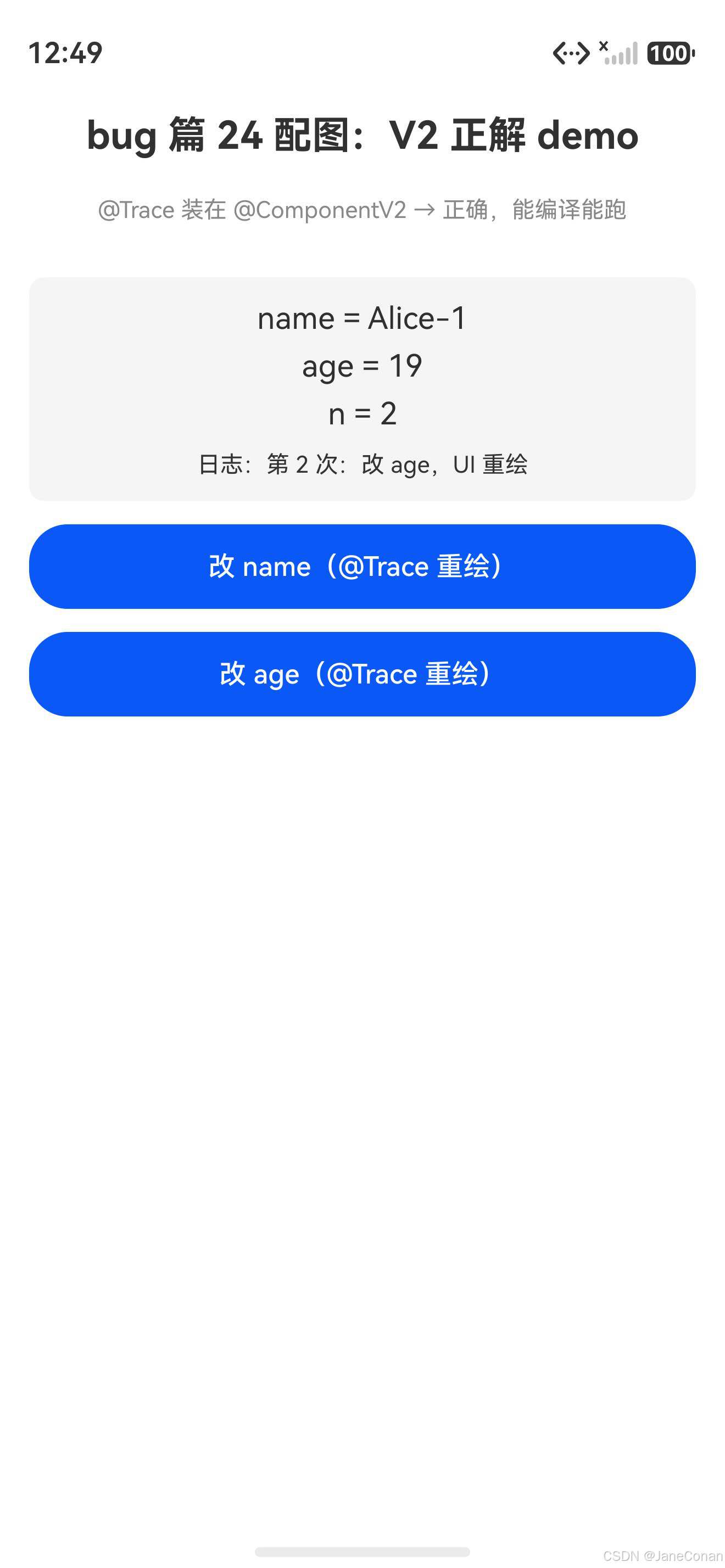
@Trace 装在 @ComponentV2 里——正解,能编译能跑。改嵌套对象成员真触发 UI 重绘:
V2 正解初始态(name=Alice, age=18, n=0):
点改 name + 改 age 后(name=Alice-1, age=19, n=2,UI 重绘):
报错写法(
@Trace装在@Component)编译就炸,装不上真机;正解写法(装在@ComponentV2)能跑,改成员就重绘。装错就炸,装对就跑——这是 V1/V2 双轨最直白的证据。
报错触发场景
你写鸿蒙 ArkUI V2 装饰器时,@Trace 装在 V1 的 @Component struct 里就炸:
// ❌ 报错写法
@Component                  ← V1 组件装饰器
struct Index {
  @State user: User = new User()  ← V1 状态装饰器
  @Trace name: string = ''        ← V2 装饰器,装在 V1 里报错
}
根因
鸿蒙 6.1 API 23+ 装饰器体系 V1/V2 双轨——V1 和 V2 装饰器不能混用:
| 体系 | 组件装饰 | 状态装饰 | 嵌套对象装饰 |
|---|---|---|---|
| V1 | @Component |
@State / @Prop / @Link |
@Observed + @ObjectLink |
| V2 | @ComponentV2 |
@Local / @Param / @Once |
@ObservedV2 + @Trace |
@Trace 是 V2 装饰器,只能装在 @ComponentV2 装的 struct 里;装在 V1 的 @Component 里编译就报错。
ArkTS 这么设计的原因:V1 和 V2 的状态追踪机制完全不同——V1 用 @Observed + @ObjectLink 套子组件,V2 用 @Trace 改成员就重绘。混用会导致状态追踪混乱,编译器直接拒绝。
真解法
两种解法,按场景选:
解法 1:struct 改 @ComponentV2(推荐,迁 V2)
// ✅ 解法 1:struct 改 V2,全套用 V2 装饰器
@ObservedV2
class User {
  @Trace name: string = ''
}

@ComponentV2                 ← 改成 V2
struct Index {
  @Local user: User = new User()  ← @State 也得改成 @Local
  build() {
    Text(this.user.name)
  }
}
迁 V2 要全套换:
@Component→@ComponentV2@State→@Local@Prop→@Param@Link→@Param+@Once@Watch→@Monitor@Observed+@ObjectLink→@ObservedV2+@Trace
解法 2:退回 V1 用 @Observed + @ObjectLink(不迁 V2)
// ✅ 解法 2:退回 V1 嵌套对象方案
@Observed                    ← V1 嵌套对象装饰器
class User {
  name: string = ''
}

@Component                   ← 保持 V1
struct Index {
  @State user: User = new User()
  build() {
    Text(this.user.name)
    Button('改 name') {
      // V1 改成员不触发重绘,要重赋值
      this.user = new User()
      this.user.name = 'Alice'
    }
  }
}
V1 改嵌套对象成员不触发重绘——必须整对象重赋值 this.user = new User() 才更新。这是 V1 最大的坑,也是鸿蒙造 V2 的根本原因。
高频踩坑场景
场景 1:class 装在 V1 struct 里
// ❌ 报错(class 不能装在 struct 里,且 @Trace 是 V2)
@Component
struct Index {
  @ObservedV2
  class User {              ← class 不能嵌套在 struct 里
    @Trace name: string = ''
  }
}

// ✅ 正解(class 顶层定义)
@ObservedV2
class User {
  @Trace name: string = ''
}

@ComponentV2
struct Index {
  @Local user: User = new User()
}
场景 2:V1 V2 装饰器混用
// ❌ 报错(@Component + @Local V2 装饰器)
@Component
struct Index {
  @Local count: number = 0   ← @Local 是 V2 装饰器
}

// ✅ 正解(全套 V2)
@ComponentV2
struct Index {
  @Local count: number = 0
}
场景 3:@Provide + @Consumer 装在 V1
// ❌ 报错(@Provider/@Consumer 是 V2,装在 @Component 报错)
@Component
struct Index {
  @Provider('theme') theme: string = 'light'
}

// ✅ 正解(V2 组件用 V2 跨层传递)
@ComponentV2
struct Index {
  @Provider('theme') theme: string = 'light'
}
场景 4:@Monitor 装在 V1
// ❌ 报错(@Monitor 是 V2,替代 V1 的 @Watch)
@Component
struct Index {
  @State count: number = 0
  @Monitor('count')      ← V2 装饰器装在 V1 报错
  onCountChange(monitor: IMonitor) {}
}

// ✅ 正解(V1 用 @Watch)
@Component
struct Index {
  @State count: number = 0
  @Watch('onCountChange') count: number = 0   ← V1 用 @Watch
  onCountChange() {}
}
一句话速查
@Trace / @Local / @Provider / @Consumer / @Monitor / @Computed → 全是 V2 装饰器,只能装 @ComponentV2,装在 @Component 就报错
V1/V2 装饰器对照表
| V1 | V2 | 用途 |
|---|---|---|
@Component |
@ComponentV2 |
组件装饰器 |
@State |
@Local |
组件内状态 |
@Prop |
@Param |
父传子单向 |
@Link |
@Param + @Once |
父传子双向 |
@Watch |
@Monitor |
监听变化 |
@Observed + @ObjectLink |
@ObservedV2 + @Trace |
嵌套对象追踪 |
@Provide + @Consume |
@Provider + @Consumer |
跨层传递 |
| - | @Computed |
V2 新增计算属性 |
铁律:一个 struct 只用 V1 或只用 V2,不能混。新项目优先用 V2 避坑。
完整代码仓库
本文所有正解写法都已托管到 AtomGit:
🔗 仓库地址:https://atomgit.com/JaneConan/arkui-bug-v2-decorator-in-v1
仓库包含:
- 四种高频踩坑场景的 ❌ 报错写法 + ✅ 正解写法对照
- V1/V2 装饰器全对照表
- 可直接用 DevEco Studio 打开参考
作者:JaneConan
仓库:https://atomgit.com/JaneConan/arkui-bug-v2-decorator-in-v1
协议:Apache-2.0,随便用,别告我

作为“人工智能6S店”的官方数字引擎,为AI开发者与企业提供一个覆盖软硬件全栈、一站式门户。
更多推荐
 0
0 0
0- 0


 已为社区贡献28条内容

所有评论(0)